Vom Selfie-Wahn bis zum personalisierten Kaffeepott: Alles schön individuell, bitte. In der Abscheu vor dem Wir und den anderen zeigt sich unsere pubertäre Gesellschaft.
Mit Gerhard Schröder, Geschäftsführer von Kreative Kommunikationskonzepte, spreche ich über neue Formen der Unternehmenskommunikation. Wir alle werden freier und nebenbei wird die Umwelt gerettet. VR und 360 Grad sei Dank!
Deutschland kann sich weiterhin am EZB-Anleiheprogramm beteiligen. In Karlsruhe wurden die Klagen des CSU-Politikers Gauweiler und anderer EZB-Kritiker abgewiesen.
Eine 21-Jährige stellt bei Ebay eine Anzeige zur Kinderbetreuung ein. Familien mit Kind melden sich – aber auch zahlreiche Männer mit anderen Wünschen.
At the recent Ignite conference Microsoft publicly unveiled their plans to allow Office 365 customers to place their data in specific geographic regions. They're calling this capability “multi-geo”, and it will support Exchange Online, OneDrive, and SharePoint Online.
Microsoft has been working on this for more than 18 months and already has some early adopter customers using multi-geo today. If you want to get involved in the preview program you can reach out to your Microsoft account representative to find out more.
Data Residency Challenges for Multi-National Organizations
Historically the geographic location of Microsoft's datacenters has caused problems for multi-national customers who need to meet different data residency requirements for the countries that they operate in. When you sign up for an Office 365 tenant, you need to choose the location that your tenant will be provisioned in. If you choose North America, all of your data is stored in North American datacenters. If you choose EMEA, your data is stored in European datacenters. Some countries have what Microsoft calls “go local” options as well, such as Australia and Japan, where a region is bound to a specific country, so you can specifically choose the country to locate your data in (previously our Australian data was stored in Asia Pacific, which has datacenters in Singapore and Hong Kong).
If your data residency needs did not allow all of the data for your organization to live in that one region or country, you were forced to either:
Maintain on-premises infrastructure to service those regions that have data residency requirements
Provision multiple, separate Office 365 tenants in the various regions that your organization operates in
Both options increase the complexity of your overall solution, requiring additional infrastructure and complicating your administrative scenarios. In the case of multiple Office 365 tenants, it also creates user experience problems such as not being able to use the same SMTP namespace in multiple tenants, friction for cross-tenant collaboration, and challenges with cross-tenant free/busy and calendar sharing.
Multi-geo aims to solve those problems by allowing customers to select where data is stored on a per-user basis. So if you have 10,000 staff in North America, and 5,000 staff in Australia, you can host the Exchange Online, OneDrive, and SharePoint Online data for the 10,000 NAM users in North America, and the 5,000 AUS users in Australia, but all within the same Office 365 tenant so you maintain all the benefits of a single SMTP namespace, single GAL, ease of administration, and ease of sharing and collaboration.
Multi-Geo Architecture
One of the benefits of cloud services is that we don't need to worry about all the server and networking infrastructure that runs behind the scenes. However, it is interesting to know how Microsoft solves problems at the scale of Azure and Office 365. During Ignite the Microsoft presenters shared some information about how multi-geo works.
For Exchange Online, a regular tenant includes Azure AD services, an Exchange Online account forest, and an Exchange Online resource forest. The Azure AD service is global, something that has caused concern for customers I've spoken to in the past who view their data residency requirements as applying to Azure AD data (e.g. accounts, metadata, etc) as well as their other data (e.g. emails, documents, databases). Those customers seem to be in the minority though, and most customers seem happy with the current state of play for Azure AD as a global service.
Image via Microsoft @ Ignite 2017
Azure AD account information synchronizes with the Exchange Online account forest, which is local to a region. Mailbox data is stored in the Exchange Online resource forest, which is also local to a region. This account/resource forest model will be familiar to anyone who has worked with complex, multi-national organizations in the past which often designed their Exchange environments this way as a means of providing separation between different entities within the larger organization, as well as to simplify merger and divestiture scenarios.
When a customer is enable for multi-geo, their mailboxes for each geo that they enable in their tenant will be hosted in an Exchange Online resource forest for that geo. The account will be hosted in a “Cross Region Account Forest” (CRAF) that spans multiple geos so that each resource forest is able to communicate with directory infrastructure that is local to that geo, mitigating the risk of cross-geo networking issues impacting service.
Image via Microsoft @ Ignite 2017
OneDrive for Business and SharePoint Online work in a similar fashion, with geo-specific instances used to store user OneDrive data and SharePoint sites in the desired region.
Image via Microsoft @ Ignite 2017
Administration Changes for Multi-Geo
When your tenant is enabled for multi-geo there is no change to the location of your users' data until you as the administrator drive that change. Microsoft does not move user data between regions automatically.
The first change is to enable the regions for your tenant that you will allow user data to reside in. After that, each user account is configured with a preferred data location (PDL). If no PDL is specified for an account, it defaults to the geo where your tenant was first created. If the PDL for an account is different to the geo where their data is currently located, Microsoft detects that and will initiate the move of the mailbox and OneDrive data for the user to their preferred geo. The PDL attribute is available in Azure AD now, and for customers using directory synchronization the current versions of Azure AD Connect will allow you to specify an on-premises attribute (such as CustomAttribute1) to store the PDL setting for synced user accounts.
As this is still a preview feature of Office 365 not all of the administrative tools are ready for multi-geo. An example provided during the Ignite presentation is that some Exchange Online cmdlets still need to be updated. The admin portals for OneDrive and SharePoint Online are also being updated to provide a selection menu for the regions you've enabled in your tenant, so that you can specify different policies and configurations for different regions.
Image via Microsoft @ Ignite 2017
Although the OneDrive and SharePoint approaches allow different policies per region, Exchange Online isn't quite there. Mail flow and processing will behave the same as it always have, and features such as mail flow rules and retention policies are not currently able to be targeted at specific geos. It's still possible to target mail flow rules to groups that represent specific regions, and assign retention policies for each user that matches the requirements of their geo, but that puts the onus on you as the administrator to align your targeting with the regions in your multi-geo tenant. Ideally in the future Exchange Online will have geo-targeting as a capability, which should make life easier for admins.
Multi-Geo User Experience
One of the key points throughout Microsoft's presentations is that the user experience for multi-geo tenants is completely seamless. Users are not interrupted or inconvenienced by the migration of data from one geo to another, nor are they made to jump through extra hoops to collaborate with users in different regions. A single GAL is available to users in Outlook, and a single “people picker” for the entire organization is available in other apps such as OneDrive. To the user, there is no change from a single-geo tenant.
Of course, as an administrator you can apply different policies and restrictions to suit your needs, such as configuring different OneDrive sharing policies for each region. Users might notice that they can't do something that their colleagues in other parts of the world can do. But that's an impact that you are creating yourself due to your own requirements.
Is Multi-Geo for You?
Each of the Microsoft presenters at Ignite made it clear that multi-geo is designed to meet data residency requirements. It is not intended as a performance improvement. Performance problems with Office 365 services are most likely to be caused by network issues rather than the location of a user's data. Moving data closer to the user might shave a few milliseconds off the latency, but Microsoft will not be recommending multi-geo as a performance solution nor should you expect to gain better performance by using multi-geo in your organization.
Early impressions are good, with customer case studies shown off during Ignite that demonstrated the benefits of multi-geo and the problems it has solved for those early adopter customers.
As of today, Exchange Online and OneDrive multi-geo are available in preview. Both are expected to reach general availability in the first half of 2018. SharePoint Online multi-geo is in development, expecting to reach preview in the first half of 2018 as well. There is no timeline for general availability of SharePoint Online multi-geo yet.
General availability is one thing, but whether multi-geo is available for all customers remains to be seen. Currently there is an application and approval process to be accepted in the preview program. Whether there is an approval step required after general availability is unknown. But it seems that multi-geo will not be something you can just turn on by yourself.
Licensing is also an unanswered question. I fully expect multi-geo to come at an additional cost to the existing Office 365 licenses.
There was no word on multi-geo for Microsoft Teams. Although multi-geo will work for Office 365 Groups, which presumably means that a team's shared files will be stored in the appropriate geo, the actual Teams conversation data needs to be considered as well. Hopefully we'll see announcements about this in the future.
For customers who have already deployed multiple tenants there is the question of how to migrate to a multi-geo tenant instead. For Exchange Online the solution might be simple thanks to announcements at Ignite about Microsoft developing the capability to easily move mailboxes between tenants, instead of relying on third party tools. OneDrive and SharePoint migrations might still rely on third party tools, until Microsoft looks at providing native solutions. These things tend to be demand-driven though, so unless it's a major roadblock for a significant customer, we could be waiting for some time.
Multi-Geo Resources from Ignite
You can check out the Ignite sessions on multi-geo for Office 365 at the following links:
Das neue EU-Urheberrecht könnte Online-Plattformen dazu verpflichten, von Nutzern hochgeladene Inhalte zu prüfen. Die Juristen des EU-Rats halten dies für mit den Grundrechten vereinbar. Dem widersprechen Bürgerrechtsorganisationen. Von David Pachali (Leistungsschutzrecht, Urheberrecht)
Von Mickey-Maus über Nemo und Dori bis hin zu Bambi - Disney hat viele beliebte Figuren zum Leben erweckt. Jetzt gibt es endlich mehr Informationen zu der Eröffnung eines Disney-Stores in München - lange dauert es nicht mehr.
Whatsapp hat eine neue Funktion angekündigt, mit der ihr euren Standort in Echtzeit mit euren Kontakten teilen könnt. Das Ganze funktioniert sowohl mit Einzelpersonen als auch mit Gruppen.
Whatsapp: Standort teilen leicht gemacht
Schon im Januar 2017 kursierten erste Informationen zu der neuen „Standort-teilen-Funktion“ im Netz. Am Dienstag hat das Unternehmen den Schalter umgelegt und den Release mit einem Blogbeitrag angekündigt.
Wer nun meint: „Es gibt doch schon die Möglichkeit, den eigenen Standort mit seinen Kontakten zu teilen“, hat vollkommen recht. Bislang wurde aber nur ein statischer Punkt auf der Karte angegeben. Mit der Funktion „Live-Standort teilen“ könnt ihr euren Kontakten eine Karte übermitteln, auf der in Echtzeit angezeigt wird, wo ihr euch aktuell befindet.
Whatsapp: Die neue Live-Standort-teilen-Funktion wird in den kommenden Wochen für alle freigegeben. (Bild: Whatsapp)
Die neue Funktion dürfte sich unter anderem an belebten Orten wie Einkaufsstraßen oder -zentren, Festivals und Messen als ein hilfreiches Tool entpuppen, sofern es zuverlässig und genau funktioniert. Denn durch den bequemen Austausch des Standortverlaufs ist es nicht mehr erforderlich, sich permanent per Textnachricht über seine Position auszutauschen. Neu ist die Idee indes nicht – mit Glympse gibt es so etwas schon seit Jahren.
Anzeige
Whatsapp: Live-Standort-teilen-Funktion ist Ende-zu-Ende-Verschlüsselt
Whatsapp erklärt, dass ihr die Teilen-Funktion für bestimmte Zeitfenster wie 15 Minuten, eine Stunde und bis zu acht Stunden aktiviert lassen könnt. Falls sie nicht mehr benötigt wird, könnt ihr die Funktion jederzeit manuell beenden. Das neue Feature ist genauso wie das bisherige zum Teilen des Standorts standardmäßig deaktiviert und muss vom Nutzer angestellt werden.
Weiter heißt es in der Ankündigung, dass die Funktion wie jeder Chat mit einer Ende-zu-Ende-Verschlüsselung versehen ist, sodass sie genauso sicher vor den Augen Dritter ist wie ein Einzel- oder Gruppenchat.
Die Themen Sicherheit und Datenschutz werden bei vielen Messaging-Apps leider immer noch kleingeschrieben, auch wenn einige diesbezüglich schon nachgelegt haben. Threema war einer der ersten Messenger, bei denen die Sicherheit höchste Priorität hatte.(Bild: Threema)
1 von 11
Die Funktion „Live-Standort teilen“ soll in den kommenden Wochen für alle Nutzer eines Android-Smartphones oder iPhones freigegeben werden. Abgesehen von der Echtzeit-Tracking-Funktion wird das Unternehmen in den kommenden Wochen oder Monaten wohl zusätzlich eine Editier- und eine Revoke-Funktion in Whatsapp integrieren – mit letzterer könnt ihr bereits gesendete Nachrichten wieder zurückziehen.
Dropbox stellt Selbstständigen mit Professional eine neue Option zur Verfügung, mit der diese Zugriff auf bisher Firmen vorbehaltenen Funktionen erhalten. Neu ist das Feature Showcase.
Dropbox Professional: Neue Option für Selbstständige
Funktionen, die bisher nur Firmen und Team-Accounts zugänglich waren, stehen mit Dropbox Professional jetzt auch Einzelpersonen zur Verfügung. Dazu gehört der Zugriff auf Produktivitäts- und Präsentationstools, darunter die beliebte Synchronisationslösung Smart Sync. Neu an Bord ist Dropbox Showcase, das die Kundenkommunikation erleichtern soll. Das neue Angebot richtet sich vor allem an Freelancer und Selbstständige.
Dropbox Professional inklusive Showcase und Smart Sync. (Bild: Dropbox)
„Kreative, Freelancer und kleine Unternehmen können immer größere Projekte bewältigen und müssen darüber hinaus immer flexibler sein“, erklärte Todd Jackson, Head of Product von Dropbox. „In dieser neuen Arbeitswelt ist es essenziell, jedes Mal einen überragenden ersten Eindruck zu hinterlassen.“ Mit Dropbox Professional inklusive Showcase und Smart Sync sollen Selbstständige künftig ihren Workflow besser organisieren können. Darüber hinaus soll die individuelle Freigabemöglichkeit von Dateien effektiver sein als das Verschicken per E-Mail, wie Dropbox verspricht.
Dropbox Professional: Mit Showcase kann man sehen, wer die Präsentation anschaut. (Screenshot: Dropbox)
Dropbox Showcase dient der Präsentation von Inhalten, die mit dem eigenen Branding versehen und in individuell gestalteten Layouts und beschriftet freigegeben werden können. Nutzer sollen damit künftig auch verfolgen können, welche potenziellen Kunden bei einer Akquiseaktion das Material angeschaut und kommentiert haben. Zudem soll dadurch auch die Kommunikation mit bestehenden Kunden verbessert werden können.
Anzeige
Dropbox Professional ermöglicht Zugriff auf Smart Sync
Für viele Einzelnutzer interessant dürfte auch sein, dass mit Dropbox Professional jetzt der Zugriff auf das gefragte Feature Smart Sync ermöglicht wird. Die im Januar vorgestellte plattformübergreifende On-demand-Lösung zur Synchronisation ermöglicht es Windows- und Mac-Nutzern, direkt vom Desktop aus auf Dropbox-Dateien und -Ordner zuzugreifen – ohne, dass der Speicher der eigenen Festplatte belegt würde.
Showcase am Handy. (Bild: Dropbox)
Darüber hinaus bietet Dropbox Professional neue Möglichkeiten der Datenfreigabe für bisherige Einzelnutzer, etwa die Konfiguration von Freigabe-Passwörtern, die Erstellung von Links mit begrenzter Gültigkeitsdauer oder die Möglichkeit, eine detaillierte Aufstellung aller Betrachter der Daten anzuzeigen. Zudem sollen auch Features wie das Remote-Löschen für Sicherheit und Datenschutz sorgen.
Dropbox Professional ist ab sofort erhältlich und bietet einen Terabyte Speicherplatz. Die Option kostet 199 Euro pro Jahr oder – bei monatlicher Abrechnung – 19,99 Euro pro Monat. Nutzer können laut Dropbox „jederzeit kündigen oder ein Downgrade durchführen“.
Ob Bitcoin, AI oder Bots – über moderne Technologien wird viel gesprochen. Bei vielen Unternehmen scheinen sie im Alltag noch nicht angekommen zu sein, vor allem wenn es um Finanzen und Buchhaltung geht.
(Foto: FastBill)
FastBill, die Finanzmanagement- und Buchhaltungssoftware aus Frankfurt, möchte kleinen Unternehmen helfen, mit alten Mustern zu brechen. Mit Hilfe von Bots und Workflow-Automatisierungen ermöglicht das Unternehmen schnellere Zahlungseingänge und eine vollständige Digitalisierung der Buchhaltung bis hin zum Steuerberater.
Der Ansatz von FastBill ist die Integration von Rechnungswesen, Echtzeit-Banking und Assistenzsystemen in einem einfachen User-Interface, über das die Nutzer ihre Liquidität im Überblick behalten, Zahlungen schneller eingehen, und die Buchhaltung im Hintergrund erledigt werden kann.
6 Beispiele, wie FastBill die Buchhaltung automatisiert
Das Schreiben von Rechnungen ist für die meisten Unternehmer keine Herausforderung mehr, die richtige Kommunikation mit dem Kunden und schnellere Zahlungseingänge aber schon. Denn was nach dem Rechnungsversand passiert, ist häufig: Nichts. Das lange Warten auf den Zahlungseingang beginnt. Das ist nicht nur ein schlechtes Gefühl, sondern bedeutet häufig auch ein Jonglieren mit der Liquidität. Denn oft hängen wichtige Ausgaben und Gehälter daran, die nicht warten können. Diese sechs Lösungen helfen gegen Buchhaltungs-Frust.
1. Rechnungen online bezahlen lassen
Mit der Online-Rechnung von FastBill können Kunden ihre Rechnung ganz einfach online bezahlen. (Screenshot: FastBill)
Was aus Onlineshops bereits bekannt ist, kann jetzt auch für einfache Online-Rechnungen genutzt werden. Dabei bekommt der Rechnungsempfänger einen Link zu einer Seite, auf der er seine Rechnung mit modernen Online-Bezahlmethoden bezahlen kann. Der Bezahlen-Button macht es jedem Kunden besonders einfach, einen Haken an die Rechnung zu machen und verleitet besonders bei geringen Rechnungsbeträgen zur schnellen Zahlung.
2. Rechnungen innerhalb von 24 Stunden vorfinanzieren lassen
Wer nicht auf die Tagesform des Kunden vertrauen möchte, kann sich den Rechnungsbetrag auch sofort auszahlen lassen. In wenigen Sekunden wird geprüft, ob die Rechnung zur Vorfinanzierung geeignet ist. Ist die Prüfung positiv, kann sich der Rechnungssteller auf eine Auszahlung innerhalb von 24 Stunden freuen.
Viele Rechnungen lassen sich mit wenigen Klicks vorfinanzieren – inklusive Auszahlung innerhalb von 24 Stunden. (Screenshot: FastBill)
3. Mahnprozess automatisieren
Manchmal wird die Rechnung einfach vergessen, manchmal wird sie schlicht nicht ernstgenommen. Für viele Probleme im Alltag bietet FastBill entweder selbst eine Lösung, oder schafft Abhilfe über Partner. So auch bei der Mahn-Automatisierung: Jede Rechnung kann so lange in einen automatisierten Mahn-Workflow gegeben werden, bis der Kunde zahlt.
4. Dokumentenerfassung per Beleg-Bot automatisieren
Sind die Umsätze geschafft und das Problem mit der Liquidität gelöst, steht die nächste Herausforderung an: Belege sammeln. Um diese Arbeit zu automatisieren, stellt FastBill einen automatischen Beleg-Bot zur Verfügung, der Belege von über 500 Portalen und Online-Diensten wie Mailchimp, Dropbox, Facebook, Google und Co. erfasst.
Der Beleg-Bot muss pro Portal einmal konfiguriert werden und läuft danach vollautomatisch. Sobald eine neue Rechnung von einem Service vorliegt, wird diese automatisch in FastBill als Ausgabe erfasst – inklusive aller Meta-Daten und dem Beleg. Das ist günstiger und einfacher als jede Assistenz.
5. Banking ohne Banking erledigen
Alle wichtigen Daten aus einer Hand: In FastBill ist eine Banking-Funktion implementiert. (Screenshot: FastBill)
Keine Zahlung ohne Beleg. Besonders viel Zeit kostet häufig das Wechseln zwischen verschiedenen Tools für den Abgleich mit dem Bankkonto. In FastBill ist das Banking bereits integriert und ermöglicht so direkten Zugriff auf Bankkonten, sodass sich Zahlungen zu offenen Rechnungen und Belegen einfach zuordnen lassen. Das spart Zeit und verkürzt Arbeitsschritte deutlich. Mehr unter http://www.fastbill.com/banking.
6. DATEV-Schnittstelle für den Steuerberater
Die beste Ordnung bringt nur etwas, wenn auch der Steuerberater mit im Boot ist. Erst vor wenigen Wochen hat FastBill die Zusammenarbeit mit DATEVconnect online verkündet. Dabei handelt es sich um eine Schnittstelle, über die FastBill-Nutzer ihre Rechnungen und Belege direkt zu „DATEV Unternehmen online“ übermitteln können.
Auch die Steuerberater profitieren davon enorm, da dieser Service für sie ohne besonderen Aufwand nutzbar ist und manuelle Arbeit entfällt. FastBill-Nutzer müssen keine händischen Exporte mehr vornehmen oder Papierdokumente versenden. Das reduziert die Fehleranfälligkeit und funktioniert binnen Sekunden auf Knopfdruck. Willkommen in der Zukunft.
Wird die Fußgängerzone verpollert? Die Verwaltung jedenfalls prüft weiterhin die Möglichkeit, die Zufahrten zur Fuzo mit im Boden versenkbaren Zylindern zu regeln.
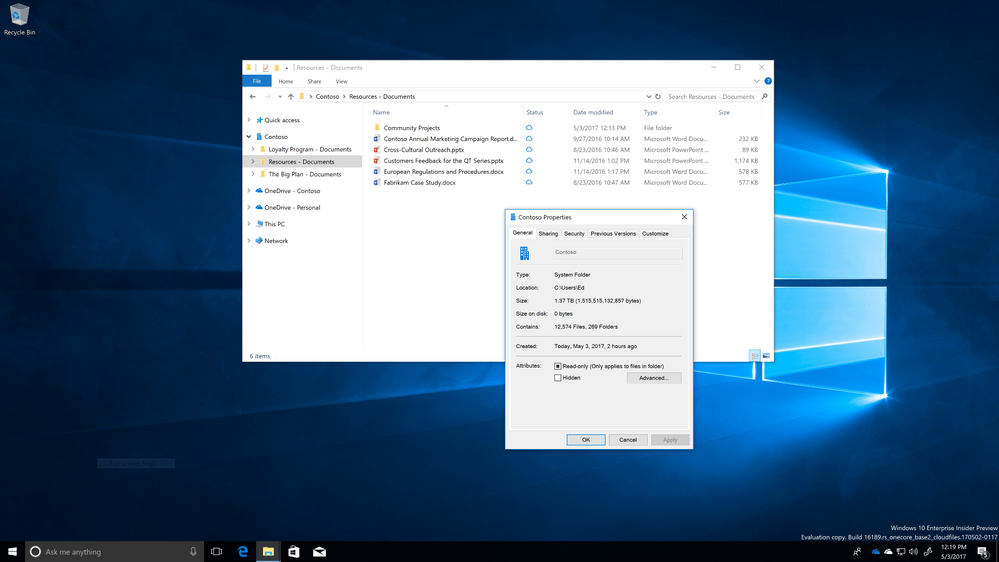
OneDrive Files On-Demand has been designed from the ground up for enterprises. Files On-Demand leverages the Windows Fall Creators update to simplify the user experience with cloud storage and sync, bring the power of the cloud into Windows File Explorer, and dramatically limit the network impact of sync on your corporate network.
Files On-Demand works with your personal and work OneDrive, as well as your SharePoint Online team sites. As people create and collaborate on more files, take more photos and work across multiple devices, it’s increasingly important to access your important content, both from your work and personal life—all in one place. You shouldn’t have to worry about whether there is enough storage on your device or if you can access your files on an airplane.
Files On-Demand works by allowing users to completely browse and manage their files in OneDrive and SharePoint Online team sites without having to pay the cost of disk space. This is critical with team sites and any folder setup for collaboration, because your corporate network doesn’t have to pay the cost of thousands of PCs all downloading the same content.
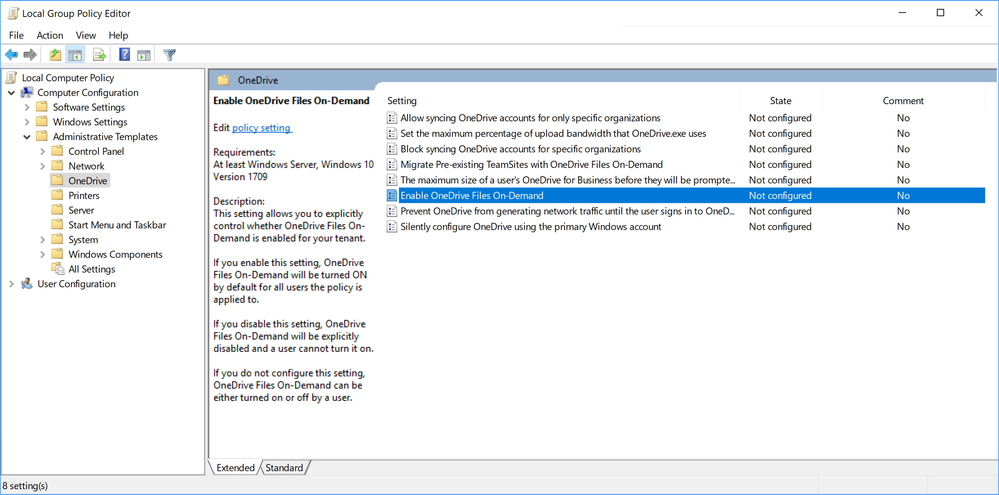
In addition to this, Files On-Demand ships with controls for enterprise admins to tailor the Files On-Demand experience to your tenant.
All previous existing OneDrive policies continue to work the same with with Files On-Demand deployed.
OneDrive sync supplies two group policies plus, there is a third built in Windows component to allow for scripting so admins can express control over specific content to require to be synced locally or free up space under when desired.
Enterprise Admins can choose how they want users to interact with sync. Admins can force all users of Windows Fall Creators update to use the new Files On-Demand feature or they can also disable it and users will get the existing sync behavior that is uniform with Windows, 7, 8, earlier version of Windows 10 and Mac. Enabling this policy means every single new user in your tenant to turn on OneDrive will default to online-only files. Existing users who have content already synced local will now have the capability to make their files online-only.
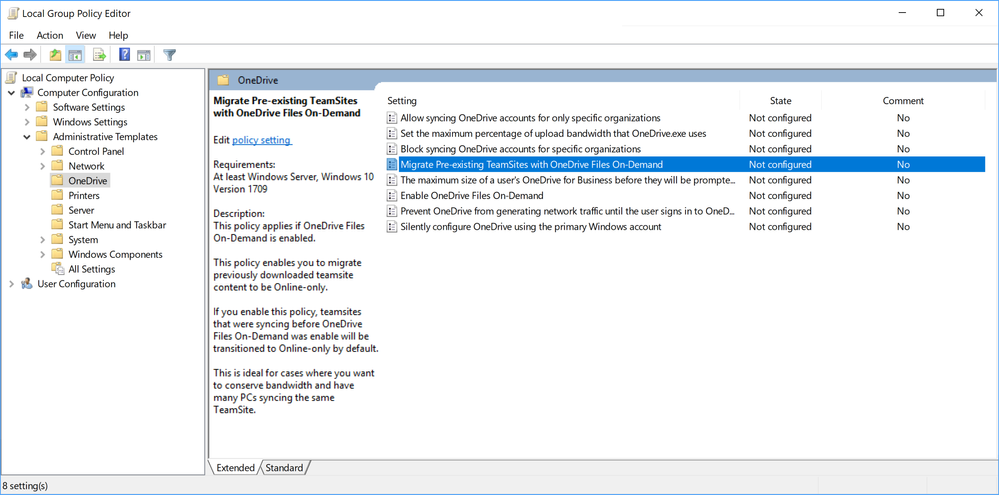
Migrate Pre-existing Team sites
If your enterprise has already been using OneDrive syncs capability of syncing team sites, enabling this group policy allows you to convert all existing team sites from locally synced to online-only. What this means is every subsequent file added or file updated in the team site will only generate a few bytes of data to each PC sync vs fully downloading the content.
Attrib.exe
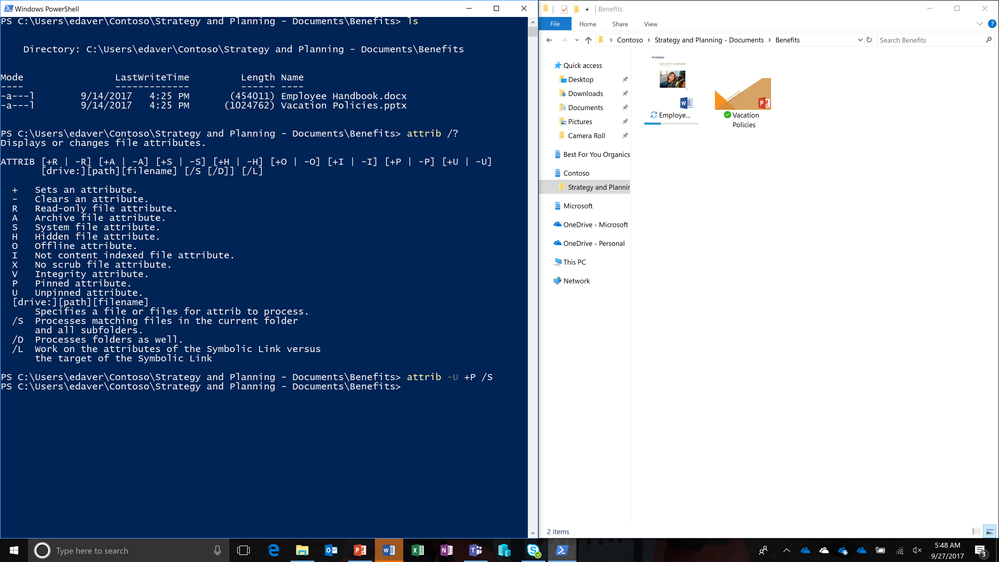
Files On-Demand is designed for the flexible nature of enterprise content and scenarios. The choice of whether a file is locally available or online-only is scriptable by admins. This means admins can define a policy to automatically choose between a file taking up space and accessible with no network connection and file downloading when the user interacts with it. This is possible because Files On-Demand uses the NTFS file system attributes as way for admins, applications, and users to express the state desired. New filesystem attirbutes were added to NTFS to support this scenario and commands were added to Attrib.exe so the process is scriptable.
Attrib.exe enables 2 core scenarios. “attrib -U +P /s”, makes a set of files or folders always available and “attrib +U -P /s”, makes a set of files or folders online only. Because Attrib is directly accessible from PowerShell this means it can also be leveraged with tools like regular expression matching to apply to a set of documents important to your organization. Below is an example of using “attrib -U +P /s” to automatically make benefits documentation available on the device for every user.
To learn more about the Windows 10 Fall Creators Update, visit the Windows Blog here. For end users, check out our new video "Learn About Files On-Demand" here.
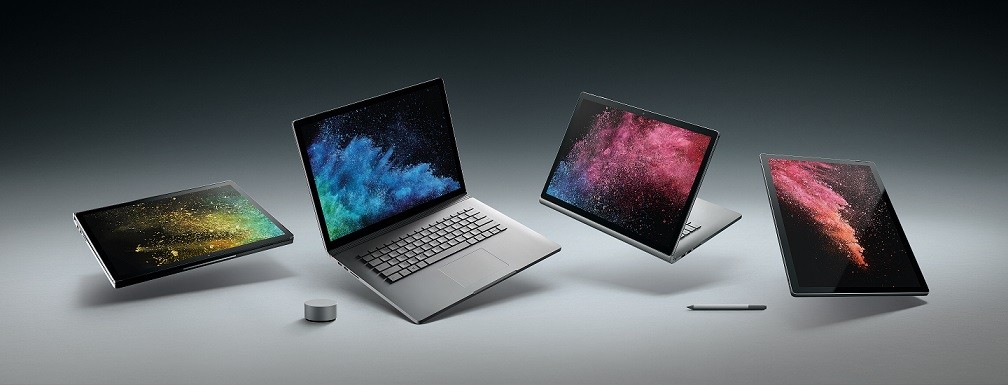
Das Surface Book 2 wird dieses Jahr in zwei Größen erhältlich sein, einer 13-Zoll und einer 15-Zoll Variante. Das erwartete Launch-Datum der neuen Surface Books ist der 17. November 2017.
Vergleichbar mit dem aktuellen MacBook-Lineup des wohl größten Konkurrenten Apple kündigt auch Microsoft zwei 13-Zöller und einen 15-Zöller an, wobei letzterer unglücklicherweise vorübergehend nur in den USA erhältlich sein wird. Statt Touchbar gibt es hier jedoch einiges mehr, über das sich der Nutzer bei der teureren Variante freuen kann.
Surface Book 2 (13,5-Zoll, Dual-Core mit integrierter Intel-Grafik) – 1749,00€
Das Grundmodell des neuen Surface Books kommt mit folgenden Spezifikationen:
Display: 13,5-Zoll 3000 x 2000 PixelSense Display mit 267 PPI
Prozessor: Intel Core i5-7300U (3.2 GHz)
Arbeitsspeicher: 8GB Arbeitsspeicher
Grafik: Intel HD-620 (integrierte GPU)
Speicher: 256 GB SSD
Anschlüsse: 2 x USB Typ-A 3.1, USB Typ-C 3.1, SD-Kartenleser, 3,5mm Audio, Surface Connect
Konnektivität: WLAN ac, Bluetooth 4.1
Gewicht: ~ 1,5 kg (1533 g)
lüfterlos
Surface Book 2 (13,5-Zoll, Quad-Core mit Nvidia-Grafik) – ab 2249,00€
Für einen nicht zu verachtenden Aufpreis bekommt der Kunde einen auch nicht zu verachtenden Zuwachs an Performance. Das höherpreisige Modell kommt mit den brandneuen Intel i7-Prozessoren der 8. Generation – dem ersten Quad-Core der mobilen „U“ Prozessorserie – sowie einer dedizierten Grafikkarte in allen Ausführungen.
Display: 13,5-Zoll 3000 x 2000 PixelSense Display mit 267 PPI
Prozessor: Intel Core i7-8650U (4.2 GHz)
Arbeitsspeicher: 8GB / 16 GB Arbeitsspeicher
Grafik: Nvidia GTX-1050 (2GB)
Speicher: 256GB / 512 GB / 1TB SSD
Anschlüsse: 2 x USB Typ-A 3.1, USB Typ-C 3.1, SD-Kartenleser, 3,5mm Audio, Surface Connect
Konnektivität: WLAN ac, Bluetooth 4.1
Gewicht: ~1,6 kg (1,642 g)
Speicher: 256 GB SSD
Anschlüsse: 2 x USB Typ-A 3.1, USB Typ-C 3.1, SD-Kartenleser, 3,5mm Audio, Surface Connect
Lüfter in der Tastatureinheit verbaut
Maximal konfiguriert kostet Sie das neue Surface Book 2 jedoch nicht allzu schlappe 3449,00€.
Surface Book 2 (15-Zoll)
Neben einem größeren und höher auflösenden Display besitzt das Surface Book 2 mit 15-Zoll Display auch eine leistungsfähigere Grafikkarte mit 6 Gigabyte dedizierten Speicher sowie Unterstützung für Xbox Wireless. Das größere Surface Book 2 wird hierzulande vorerst allerdings nicht erhältlich sein und kommt ab 16. November in den USA ab einem Preis von 2499 US-Dollar auf den Markt.
Display: 15-Zoll 3240 x 2160 PixelSense Display mit 260 PPI
Prozessor: Intel Core i7-8650U (4.2 GHz)
Arbeitsspeicher: 16 GB Arbeitsspeicher
Grafik: Nvidia GTX 1060 (6GB)
Speicher: 256GB / 512 GB / 1TB SSD
Anschlüsse: 2 x USB Typ-A 3.1, USB Typ-C 3.1, SD-Kartenleser, 3,5mm Audio, Surface Connect
Konnektivität: WLAN ac, Bluetooth 4.1, Xbox Wireless
Gewicht: ~1,6 kg (1,642 g)
Speicher: 256 GB SSD
Anschlüsse: 2 x USB Typ-A 3.1, USB Typ-C 3.1, SD-Kartenleser, 3,5mm Audio, Surface Connect
Lüfter in der Tastatureinheit verbaut
Surface Book 2 Spezifikationen – Andere Neuerungen
Darüber hinaus verfügt das neue Surface Book 2 dieses Jahr erstmals über USB-C. Dieser Port ist leider nur USB 3.1, hat also eine maximale Datenübertragungsrate von 10 Gbit/s. Enttäuschend, dass Microsoft wieder auf Thunderbolt 3 verzichtet hat, aber immerhin hat das Surface Book 2 im Gegensatz zum neuen Surface Pro überhaupt einen USB-C Anschluss.
Microsoft verspricht seinen Nutzern mit dem 70Wh-Akku des Surface Book 2 außerdem eine Akkulaufzeit von bis zu 17 Stunden (5 Stunden im Tablet-Modus), meiner Meinung nach etwas hoch angesetzt, aber das Ladegerät können die Besitzer des Surface Book 2 wohl beruhigt mal zu Hause vergessen.
Die Frontkamera verfügt natürlich über das von allen geschätzte „Windows Hello“ – Feature, welches das entsperren Ihres Notebooks über einen kurzen Infrarot Iris-Scan erlaubt.
Die gesamte Redaktion ist gespannt, was Microsoft hier fabriziert hat und abgesehen von der kleinen Enttäuschung über den fehlenden Thunderbolt-Port und dem nicht allzu erschwinglichen Preisschild des Surface-Neulings freuen wir uns auf den Release.
Seid Ihr so gespannt wie wir? Teilt eure Meinung in den Kommentaren!
Am vergangenen Wochenende bekam ich eine E-Mail mit dem Betreff
Ich schwöre, damit hatte ich nichts zu tun!
Erst dachte ich, jemand hätte etwas verbaselt. Aber es kam anders:
Lieber Manuel,
ich wundere mich seit ein paar Tagen, warum ich in meiner Facebook-Timeline dauernd was von "Manitu" lese, obwohl manitu doch gar nicht groß unterwegs ist in Sachen Social Media. Jetzt stelle ich fest: Meine Frau ist schuld
Wir betreiben auf unserem Hof eine der größeren Wildtierstationen in Deutschland (http://www.retscheider-hof.de) und sind unter anderem auch Sitz der Deutschen Iltishilfe, die ebenfalls von meiner Frau gegründet wurde. Sie hat dieser Tage ein Frettchen (also die Haustier-Variante eines Iltis) aufgenommen, der wegen einer komplizierten Beinverletzung eingeschläfert werden sollte. Das Tier wurde vergangenen Freitag in einer Spezialklinik im Ruhrgebiet sehr aufwendig opiert und hat nun wieder gute Chancen auf ein langes Leben.
Was ich nicht wusste: Weil der Patient die ganze Behandlung so unglaublich tapfer wegsteckt, hat Steffi ihn "Manitu" getauft - was wohl eigentlich klassisch 'Manitou' werden sollte, aber als langjährige Manitu-Kundin hat ihr Freud da einen Streich gespielt. Als sie es bemerkte, waren die entsprechenden Posts schon zichfach unter Frettchen-Freunden und Iltis-Fans geteilt und die Namensgebung damit komplett.
Der Fall erregt in der Szene gerade viel Aufsehen und deshalb ist Manitu in aller Munde. Viele haben für die Behandlung von Manitu gespendet und deshalb habe ich eine Bitte an Dich:
Ich bräuchte bitte nochmal ein paar Gläser und Becher mit manitu-Aufdruck, von denen ich neulich schon überrascht ein unangekündigtes Paket in der Post fand Wir möchten den Spendern danken, die diese Operation möglich gemacht haben und würden die Becher/Gläser daher verlosen. (...)
Natürlich sponsorn wir die Tassen und Gläser. Da ich zwischenzeitlich erfahren habe, dass der Operateur keine Rechnung stellen wird, ging auch mein Gedanke, die OP nachträglich - sozusagen als Pate - zu finanzieren, ins Leere. Aber wer weiß, wo wir uns in Zukunft für den kleinen Manitu einsetzen können
From the initial launch of Windows 10, we’ve been on a mission to empower the creator in all of us. We believe in the fundamental human need to create to propel the world forward.
Today, we deliver the Windows 10 Fall Creators Update offering breakthroughs in creativity – from bringing mixed reality and 3D to the masses, to faster broadcasting for gaming, to turning photos and videos into real memories, and so much more. The Windows 10 Fall Creators Update can be experienced on a wide variety of Windows 10 PCs and on a range of Windows Mixed Reality headsets available for the first time today.
We believe the PC is the ultimate canvas for creativity and can empower people to create like never before. This is why we are building Surface to be the ultimate laptop and are delighted to introduce the Surface Book 2, the most powerful Surface yet.
Windows 10 Fall Creators Update
The Windows 10 Fall Creators Update is packed with new innovations including, new Inking experiences like inking directly on PDFs, a new Find my Pen feature, Continue on your PC with Cortana or your phone’s browser including, Microsoft Edge for seamless Windows experiences across devices, enhanced security and privacy features, and improvements in accessibility, including Eye Control. I’m excited about these innovations and in particular four big bets that deliver on our vision for creativity:
Mixed reality for the masses
With the Windows 10 Fall Creators Update, we introduce mixed reality to the masses. With mixed reality, we seek to fundamentally improve the way you create, communicate and play. You can transcend time and space and immerse yourself in any environment, helping ideas break free from the boundaries of paper or screens.
Until now, any practical use of mixed reality required the use of a headset and for immersive virtual reality, you had to mount cameras in the corners of your home. And you couldn’t take your headset with you to a friend’s house or your workplace.
That changes with the availability of Windows Mixed Reality headsets. For the most immersive mixed reality experience, our partners, Acer, Dell, HP, and Lenovo are launching the very first Windows Mixed Reality headsets today, beginning at $399 for headsets bundled with advanced motion controllers. Samsung’s innovative mixed reality headset, the Samsung HMD Odyssey, will become available on November 6th. Windows Mixed Reality headsets are the only headsets that don’t require you to drill holes into your walls and you can take them on the go.
The Fall Creators Update also includes the Mixed Reality Viewer, which brings mixed reality to the PC. By simply using the camera on your PC, you can see 3D objects mixed into your actual surroundings – people, places, things, or anything you can imagine.
It’s so exciting to see so many components coming together to introduce the world to mixed reality, from innovative and affordable new Windows Mixed Reality headsets to technology to experience mixed reality on your PC. Now you can enjoy travel, sports, live concerts, and gaming like never before in your own virtual home with content from over 20,000 apps in the Windows Store.
3D offers next boost to human productivity
3D will offer the next major boost to human productivity, enabling a next generation of computing that moves far beyond the 2D world we’ve been confined to. This is so powerful because 3D is truly representative of the world you live in – improving the way you comprehend, retain, and learn.
With the Fall Creators Update, we enable anyone to create in 3D. Over 100 million people use Microsoft Paint every single month and now with Paint 3D they can all become 3D creators – easily manipulating objects, creating and sharing in 3D. With the Fall Creators Update, you can now bring 3D objects into your Office files, including PowerPoint presentations and Word documents, to dramatically improve your storytelling and improve comprehension. Objects can rotate and animate within your presentation. And with the Mixed Reality Viewer, you can easily drop your 3D creations into the physical world. 3D is great for students, professionals or anyone who wants to create.
Gaming becomes even more interactive
Gaming is the fastest growing form of entertainment because it is incredibly interactive. And, gaming has never been more popular on Windows, with nearly 200 million monthly active users gaming on Windows 10.
In fact, with an explosion of interest in eSports and interactive game streaming, more people spend time watching gameplay than actually playing games. We launched Mixer, the only near real-time, interactive game streaming service, to help everyone broadcast, watch or interact with other gamers.
With the Fall Creators Update, we are making Mixer even better – you can now launch and jump into a game stream faster than before. And Game Mode enables gamers to access more power of the PC and dedicate it to games, delivering a more performant gaming experience on Windows 10.
The next era of gaming is coming this fall with the new improvements in the Fall Creators Update, immersive gaming experiences for mixed reality, and the upcoming launch on November 7 of Xbox One X, the world’s most powerful console built for true 4K gaming.
Creating memories with photos & videos
Photos and videos have never been more popular on Windows, with more than 250 million active users of Photos on Windows 10. Trillions of photos and videos exist digitally, but how do we ensure these precious images can be retained as memories?
Our Photos app is totally reimagined in the Fall Creators Update, so you can easily convert photos into memories and stories with personalized 3D effects, Ink, transitions, and video – no editing experience required. You can take photos from your vacation and simply and easily edit them into a collage of photos and videos with a soundtrack, theme, Ink, and cinematic transitions. And with 3D, you can make objects dynamic, like a soccer ball bursting into flames as it passes the goalie and soars into the net.
Announcing Surface Book 2
The PC is the platform to power the next wave of creativity and Surface is the tip of the spear of innovation to help drive this next wave forward.
One of the most powerful ways to experience the Windows 10 Fall Creators Update is on the Surface family of devices. We are building Surface to be the ultimate laptop, infusing versatility, performance, and design into every product we make and creating a stage for the best of Windows and Office. More than ever there is a need for a class of high-performance devices that don’t compromise the versatility and style of a laptop customers want.
Today, we’re excited to introduce the latest in the Surface family: Surface Book 2 – a powerhouse laptop with amazing graphics and up to 17 hours of battery life. Now available in a 13” and 15” option, Surface Book 2 is the most powerful Surface we’ve ever built. With the latest 8th Generation Intel Dual-Core and Quad-Core processors and NVIDIA GeForce GPUs, Surface Book 2 has up to five times the graphics performance of the original Surface Book and is twice as powerful as the new MacBook Pro.
But more than just raw power, Surface Book 2 is built for the way you work and create. It gives you the power of a laptop, the versatility of a tablet and the freedom of a portable studio all in one beautifully styled device.
Surface Book 2 is powerful enough to run professional software from Adobe, Autodesk, and Dassault Systemes flawlessly and plays popular PC games at 1080p, 60 FPS, including demanding titles like Forza Motorsport 7 and Gears of War 4.
Surface Book 2 joins Surface Laptop and Surface Pro to round out a strong portfolio of laptops that are designed to not only allow people to experience Windows Mixed Reality and gaming, and be productive anywhere, but to empower the artists, designers, developers, and engineers who are leading the next wave of creative innovation.
The new Surface Book 2 laptops start at $1499 and will be available for pre-order on November 9th in the US, with the 13” also available in additional markets. To learn more about Surface Book 2, visit Panos’ blog post.
The need to create has never been more important. We want Surface to continue to inspire and enable creativity and we’re excited to work with our partners to deliver incredible modern devices. The Windows ecosystem fosters incredible innovation, and this holiday, there will be a range of beautifully designed and feature-rich devices. These include new Windows 2-in-1s, laptops, all-in-ones, gaming PCs that feature Intel’s new 8th Generation Intel Core processors, the latest NVIDIA GPUs enabling Windows Mixed Reality experiences, long battery life, and OLED and 4K screens for the most stunning visuals.
From new PCs from Surface or our partners, new Windows Mixed Reality headsets and motion controllers – to the world’s most powerful console in Xbox One X – you can choose a Windows device to empower the creator in you.
With the Windows 10 Fall Creators Update, we are introducing some fun, new ways to get creative – from bringing mixed reality and 3D to the masses, to faster broadcasting for gaming, to turning photos and videos into real memories, and so much more. The Fall Creators Update can be experienced on a wide variety of Windows 10 PCs and on a range of Windows Mixed Reality headsets.
You can get the Fall Creators Update in a few different ways. If you already have a Windows 10 PC and have automatic updates enabled, the update will be delivered to you when it’s ready. If you are an advanced user and would like to get the update manually, visit this blog post to learn how to get the Fall Creators Update.
Here’s what’s new in the Windows 10 Fall Creators Update:
Windows Mixed Reality
With Windows Mixed Reality, you can escape to the most immersive experiences – touring top travel destinations, getting inside the most exciting games, attending the most popular events, even travelling across time and space – right in your own home, with you at the center of everything.
Amazing experiences don’t need to be expensive or complicated. All you need is a headset and a compatible Windows PC. And, to enhance your experience, try out the extras like headphones and advanced motion controllers. A variety of headsets and motion controllers are available from leading makers like Acer, Dell, HP, and Lenovo. Headset-motion controller bundles start as low as $399[i]. Check here to see if your existing PC is compatible, or shop the exciting new models available this holiday season.
Photos
The reimagined Photos app now gives you the ability to add filters, text, 3D effects – and soon full 3D objects – and even digital ink to your photos and video clips for great storytelling complete with soundtracks, themes, and transitions. To help you get started, select the create button and two or more photos or videos and the Photos app will automatically bring together your memories into a video. Keep this cut to enjoy and share, remix it with just the click of a button, or edit it yourself to get it just right. To start creating your own personal story, go to the Photos app – free with Windows 10.
Mixed Reality Viewer
With Mixed Reality Viewer, you can see 3D objects – either from the Remix3D.com community or your own creation from Paint 3D – mixed into your actual surroundings through your PC’s camera for powerful ways to bring your story to life. Start creating in Paint 3D and select Mixed Reality to view your creation in your real world or go straight to the Mixed Reality Viewer app, free with the Windows 10 Fall Creators Update, to get started.[ii]
My People
Quick access to your top people. Now you can pin your top people to the taskbar for one-click access to those who matter most. Communication apps, starting with Mail and Skype, come up together custom-filtered by individual. Tap on your pinned contact to send an email or chat using Skype without having to open the apps.
People-first Sharing. Sharing is as easy as dragging a file directly onto the pinned contacts in your taskbar. Or share directly via the ‘Share’ picker by choosing from the recommended list of your top people.
See emoji from pinned contacts. Emoji from your pinned contacts are able to appear and animate right from the taskbar – an extra level of emotional connection and expression between you and the key people in your life.
Cortana
Voice-activated Power Commands. In addition to exciting voice-activated features like reaching Cortana above the lock screen, you can now ask Cortana to shut down, restart, or sleep your PC.[iii]
Microsoft Edge
Annotate your books. When you select text, you have a whole lot of new options to personalize your books. You can add highlights in four colors, underline, add comments or copy text. You also have the ability Ask Cortana to find more information about the content you are reading without leaving the reading experience. Visit the Windows Store to get a book to personalize.
Pin your favorite websites to taskbar. Pinned sites are back! Pin a website to the taskbar from Microsoft Edge to have the icon show up in the taskbar for instant access. To get started, go to menu, select “Pin this page to the taskbar,” and the site icon appears on your Windows taskbar!
Edit URL for Favorites. You can now edit the URL of any favorite in the Favorites menu or the Favorites Bar. Simply go to Hub, then Favorites; right-click on a favorite and select “Edit a URL.”
Full screen mode (F11) in Microsoft Edge. Simply press F11 or choose the new Full Screen icon within the Settings menu (three dots) to take your websites full-screen. You can exit Full Screen view by pressing F11 again, or by clicking the Restore icon in the top-right corner.
Microsoft Store
You may have also noticed a new Microsoft Store logo on your Windows 10 device. We’ve unified the Microsoft Store on both Windows 10 and Xbox for a simpler shopping experience. Microsoft Store – whether shopping in a physical store, online, or through your Xbox or Windows 10 device – is the best destination to seamlessly discover, experience, download and buy the latest products and content from Microsoft and its partners, including hardware, games, entertainment, apps, and more.
Security
Ransomware protections. To better protect against ransomware attacks, we’re introducing Windows Defender Exploit Guard that helps protect files from unauthorized changes by nefarious applications and your applications from unknown exploits. Additionally, Windows Defender Antivirus now has specific safeguards in place, along with default enhanced coverage that is delivered instantly via the cloud protection service. These and other security technologies protect against persistent ransomware campaigns like Cerber, Locky, and Spora, as well as global outbreaks like WannaCry, and Petya.
Stay productive
Continue on PC. You know those websites, searches and articles that you pull up on your iPhone or Android phone? Now you can forward them to instantly open on your PC, so you can continue what you’re doing – researching that project, shopping for those shoes, finishing that article – with all the benefits of the bigger screen.
Microsoft Launcher. With just a quick swipe-to-the-right, Microsoft Launcher for Android offers a tailored feed of your important events, top news, recent activities, favorite people and most frequently used apps. And, Microsoft Launcher has been designed to make it easy for you to seamlessly continue what you’re working on – whether it’s photos, documents and more—on your PC.
OneDrive Files On-Demand. When you save your files in OneDrive, now you can access them just like any other file on your PC without filling up your disk space. Easily tell which files are available online only or offline. Online-only files download on demand with a double-click, and you can make them online only again to free up space. Or you can select files to always be available offline. Click here to learn more about OneDrive Files On-Demand and how to enable it.
Find My Pen. Windows can now tell you where you were when you last inked on your computer, which makes finding a lost digital pen a lot easier.
Pen as PowerPoint clicker. Through the Bluetooth connection to your PC, your pen becomes a PowerPoint clicker. Present like a pro –advance your slides just by clicking the button on the back of the pen.
PDF annotations and form filling. Now you can fill in PDF-based forms within Microsoft Edge, save them and print them. And with the annotations capability extended to PDFs, you can ink on PDFs, highlight text and erase your annotations.
Better PDF viewing. When PDF docs show up sideways, you can now rotate them and even adjust file layout for easier reading.
Currency Converter. In response to one of our top customer requests, there’s now a Currency Converter included in the native Calculator; even works offline for when you’re traveling internationally and want to avoid connection charges.
Recover PIN and password from lock screen. No more getting locked out of your device. If you’re using an AADP or MSA account and you get stuck at login, you can now reset your password and PIN straight from the lock screen after verifying your account identity.
Eye Control. Making Windows more accessible particularly to people with disabilities, Eye Control beta lets you operate an on-screen mouse, keyboard, and text-to-speech experience using just your eyes; requires compatible eye tracker, like the Tobii Eye Tracker.
Narrator (screen reader) intelligence. We added a feature to our screen reader to generate image descriptions using Microsoft Cognitive Services for images that lack alternative text.
Dictation: We added support to Dictate text in Windows using modern speech recognition services, which uses cloud-based intelligence.
Choose your performance/battery balance. New Performance/Power slider* lets you set the right balance between battery-life longevity and system performance and responsiveness. Optimize for battery life on a long flight; go with performance when you’re gaming or photo editing at home.[iv]
Here’s a tip! With the all-new Microsoft Tips app, you can master the basics of Windows 10, see what’s new in the Fall Creators Update, learn surprising and little-known tricks, and try things out with a press of a button. Type “Tips” in the search box on the taskbar to find the app, or look for it in the Start menu.
PC Gaming
Game Mode. You can now easily toggle Game Mode for the game you’re in, directly from the Game bar.
Mixer: Mixer broadcasting will load and start faster than before. Also, when broadcasting to Mixer, you can now determine audio stream sources.
New help options: We’ve added a new “Xbox Networking” section in Settings under Gaming, to help PC gamers identify and ensure network connection quality while using voice chat and playing multiplayer games.
GPU in Task manager. Windows Task Manager now displays information about the graphics hardware and performance of your system.
Windows and Office together are the best duo for doing. 3D, now in Office, helps you increase visual and creative impact with 3D objects in your PowerPoint presentations, Word, and Excel documents. View, resize, and rotate a 3D object with the 360-rotation handle, pull content from the Remix 3D community or locally from your PC, plus even use a brand-new transition type, Morph, with 3D models in PowerPoint to create cinematic transitions between slides. This 3D technology builds upon the already-robust productivity experiences in Office, including inking with a digital pen.
The Fall Creators Update begins rolling out worldwide today. Visit your local Microsoft Store and Microsoft.com to experience the Fall Creators Update with free demos and workshops, or get assistance from our expert Answer Desk technicians, including a free consultation to determine if your device is eligible for the update.
Discover and learn more about Fall Creators Update with free digital skills workshops and Create and Play events, through direct access to Microsoft technology. For more information about workshops taking place in your area this fall, check your nearest Microsoft Store.
[i]Estimated retail price; actual prices may vary. Selected models only; dependent on retailer availability. [ii]Remix 3D catalog available in select markets; experience may vary by region and device. Online access required to use Remix 3D from within the application [iii]Cortana available in select markets; experience may vary by region and device. Cortana above the lock screen is hardware dependent. User must enable within Settings. Learn more at microsoft.com/en-us/cortana/get-started/pc. [iv]Available on most Intel and AMD devices with battery. [v]Office 365 subscription required; sold separately
Die Polizei hat auf einem Autobahnparkplatz in der Oberpfalz einen illegalen Tiertransport mit mehr als 7000 Tieren gestoppt. Über 800 Tiere wurden nun nach München gebracht.
Tesla entlässt im Auto-Bereich etwa ein bis zwei Prozent seiner Mitarbeiter. Dem Unternehmen zufolge haben die Betroffenen die geforderte Leistung nicht erbracht. Es gibt jedoch Vermutungen, dass dies nur ein Vorwand sei, um Kosten zu senken. (Tesla Model 3, Elektroauto)
War da was? Der Sommer ist vielen als andauerndes Tief in Erinnerung geblieben. Aber in Bayern schien die Sonne doch ganz schön. Ganz anders als in Bremen!
Die Schwachstelle in der WLAN-Verschlüsselung wirft eine wichtige Frage auf: Wie sieht es eigentlich mit der Patch-Versorgung durch die Hersteller aus? Miserabel, wenn nicht endlich der Staat eingreift, findet heise-Security-Chef Jürgen Schmidt.
Das Invoxia NVX 200 ist ein Tischtelefon, das sich mit der Apple Watch 3 mit LTE und Smartphones verbinden lässt. Ein Vorteil soll die bessere Tonqualität sein, die mit dem Telefonhörer erreicht wird. (Bluetooth, Mobil)
 Vom Selfie-Wahn bis zum personalisierten Kaffeepott: Alles schön individuell, bitte. In der Abscheu vor dem Wir und den anderen zeigt sich unsere pubertäre Gesellschaft.
 Deutschland kann sich weiterhin am EZB-Anleiheprogramm beteiligen. In Karlsruhe wurden die Klagen des CSU-Politikers Gauweiler und anderer EZB-Kritiker abgewiesen.
 Eine 21-Jährige stellt bei Ebay eine Anzeige zur Kinderbetreuung ein. Familien mit Kind melden sich – aber auch zahlreiche Männer mit anderen Wünschen.


 Das neue EU-Urheberrecht könnte Online-Plattformen dazu verpflichten, von Nutzern hochgeladene Inhalte zu prüfen. Die Juristen des EU-Rats halten dies für mit den Grundrechten vereinbar. Dem widersprechen Bürgerrechtsorganisationen. Von David Pachali (Leistungsschutzrecht, Urheberrecht)
 Etwa 400 Anhänger der Terrormiliz haben sich nach der Befreiung der nordsyrischen Stadt ergeben. Darunter sollen auch Kämpfer aus Deutschland sein.






 Tesla entlässt im Auto-Bereich etwa ein bis zwei Prozent seiner Mitarbeiter. Dem Unternehmen zufolge haben die Betroffenen die geforderte Leistung nicht erbracht. Es gibt jedoch Vermutungen, dass dies nur ein Vorwand sei, um Kosten zu senken. (Tesla Model 3, Elektroauto)
 War da was? Der Sommer ist vielen als andauerndes Tief in Erinnerung geblieben. Aber in Bayern schien die Sonne doch ganz schön. Ganz anders als in Bremen!

 Das Invoxia NVX 200 ist ein Tischtelefon, das sich mit der Apple Watch 3 mit LTE und Smartphones verbinden lässt. Ein Vorteil soll die bessere Tonqualität sein, die mit dem Telefonhörer erreicht wird. (