Shared posts

11 Dec 16:54

Introducing new ways to work in Microsoft Project

by the Project team

Today’s project teams need to collaborate successfully to deliver value. Project managers and teams want to work in ways that make sense for their projects. Program and portfolio managers want transparency and governance across the entire project portfolio.

How can your company or department support different work styles without losing the power of a centralized project management system? With agile in Project, project managers and teams can choose the methodology that makes sense for the project at hand, including: agile, waterfall, hybrid, or task-oriented. The integration of Project with Microsoft Planner lets you connect Project tasks to a Planner plan and track detailed work in Planner.

Use agility in your Project portfolio

With agile in Project, you can use agile methods to track your projects in Project Online Desktop Client. You can create new agile projects or apply agile views to your existing waterfall projects. You can track your projects using Scrum and Kanban methodologies, including viewing task boards, creating backlogs, and tracking sprints, as well as viewing reports on agile statistics.

Image of a project displayed in the agile in Project dashboard.

For more details, see “Use agile in Microsoft Project.”

Manage Project task work in Planner

With the new integration between the Project Online Desktop Client and Planner, task owners can track granular task details in a lightweight tool. Project managers retain control over the project’s work breakdown structure and can easily view the detailed work being done against a task.

This capability may also be used to reduce complexity of project plans in Project, enabling the project manager to control a smaller number of tasks while task owners can further break down the tasks in Planner. Teams that manage their work in Project Online can better streamline work with teams that use Planner.

Image of the Planner dashboard set to the Charts view, with an Excel pop-up window displayed showing detailed task data.

For more details, see “Streamline cross-team work with the newly integrated Project Online Desktop Client and Microsoft Planner.”

We are excited to be adding agile functionality to Project and integration with Planner. Both are available now through Project Online Professional and Project Online Premium subscriptions. We look forward to your comments and feedback—feel free to submit feedback through our Project UserVoice and Planner UserVoice sites!


Frequently asked questions

Q. How do I get the features included in agile in Project?

A. Agile in Project is available for Project Online Professional and Project Online Premium subscriptions. The feature works with Project standalone .mpp files and with Project Online. It does not work with Project Server 2016—if you open Project connected to Project Server 2016, the agile in Project feature won’t show up. If you open an .mpp file with agile data in a previous version of Project, you won’t see the agile fields, but the agile data won’t be lost.

Q. How do I get Project and Planner integration capability?

A. To get the integration capability, you need to subscribe to either Project Online Professional or Project Online Premium. For Planner, you need to subscribe to Office 365 Business Essentials, Business Premium, E1-E5, or an Education plan.

The post Introducing new ways to work in Microsoft Project appeared first on Office Blogs.

20 Nov 21:59

The Secrets of ASP.NET Core User Secrets

by Dino Esposito

The imminent advent of the GDPR serves to remind us once again of the importance of keeping any sensitive data that is managed by applications safe and secured. It is no longer a task that you can duck because it isn’t that interesting.

In classic ASP.NET applications, we had a relatively easy API that we could use to encrypt the content of selected sections of the web.config file. In this way, you could encrypt information such as connection strings. I have the impression that this API, along with the more general need to encrypt configuration data, has lost its appeal and attraction over the past few years. In fact, the success of source code platforms such as Github has increased this trend to lose interest in encryption. Consequentially, a great deal of potentially critical data such as API keys and connection strings have been published as clear text in public repositories.

In ASP.NET Core, the entire infrastructure for managing and securing configuration data has been rewritten from scratch. The web.config file has disappeared to be replaced by a variety of data providers. None of them, though, has encryption capabilities. However, ASP.NET Core has user secrets.

Application’s Sensitive Data Defined

Simply put, a user secret is any application data that you want to keep secret. Canonical examples of software user secrets are database connection strings, API keys, client IDs and secrets to access social networks and SaaS applications. User secrets also include all those pieces of information that are sensitive and application-specific, such as credentials to access payment gateways, but also tokens to access online services.

In these enthusiastic days of shared code repositories, the safest thing to do is to keep secrets outside the scope of the code repository, whether it be TFS, Github or whatever else. In ASP.NET Core, user secrets are, by design, stored outside the project so that the project can easily and quickly be checked-in and published also on public repos without worries and anxiety. Let’s see how to deal with user secrets in an ASP.NET Core applications and within Visual Studio 2017.

Dealing with Secrets in Visual Studio

In an ASP.NET Core project, you will need to reference the secret manager tool in order to work with user secrets from within Visual Studio. The secret manager tool comes by installing the Nuget package Microsoft.Extensions.SecretManager.Tools. The tool can be used from the command line -through the dotnet launcher – or silently used by Visual Studio whenever you, the developer, sends commands through the UI. The secret manager controls a local machine data store where the secrets are saved. To enable the manager to create the store, you need to generate a unique secret manager ID for the application. The ID is an arbitrary string with the sole requirement of being unique in the development machine. You can set the secrets ID by directly editing the CSPROJ file of the project. You add a UserSecretsId entry in the PropertyGroup section.

<PropertyGroup>
    <TargetFramework>netcoreapp2.0</TargetFramework>
    <UserSecretsId>8084c8e7-0000-0000-0000-c26798dc28d1</UserSecretsId>
</PropertyGroup>

You can also use the assembly directive but, if you do so, there’s the risk that the ID gets duplicated and, in this case, the application won’t even start.

[assembly: UserSecretsId("8084c8e7-0000-0000-0000-c26798dc28d1")]

The fact is that Visual Studio automatically edits the CSPROJ by file adding a random GUID as the secrets ID the first time you use the UI to add a secret. The figure below shows the relevant menu item.
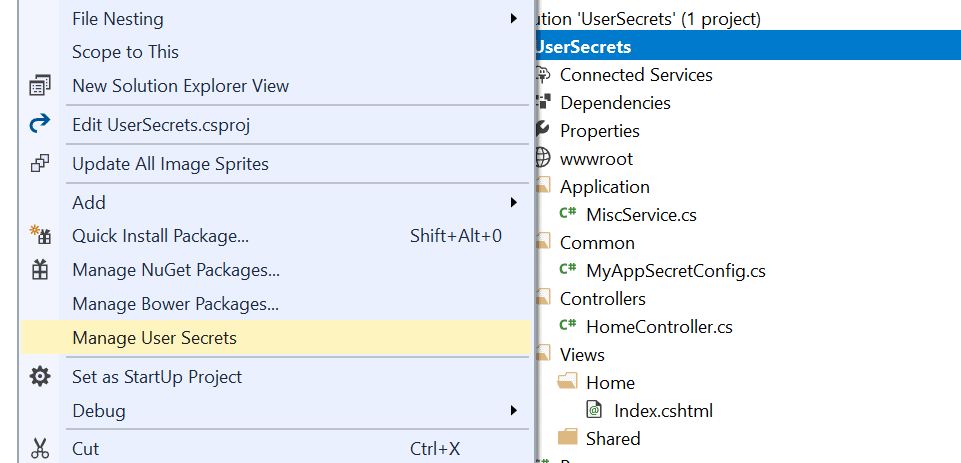
You open up an editor window by clicking on the ‘Manage User Secrets’ menu item. Basically, your secrets are saved as plain properties in a JSON file named secrets.json. The file is created automatically and edited from a system protected folder on the local machine. The exact location depends on the operating system. For a Windows machine, the file is:

%APPDATA%\Roaming\Microsoft\UserSecrets\<user-secrets-id>\secrets.json

The %APPDATA% folder is a system folder, hidden by default, under the user’s profile. On other operating systems, specifically Linux and Mac, the location is under the Microsoft folder. Note that changing the user secret ID (in the CSPROJ file or in the assembly directive) will generate a new, empty secrets.json file.

Considerations about the Secrets.json File

As weird as it may sound, all of the application secrets are being kept in a plain, crystal-clear JSON file. Is this really an issue? It depends on the perspective you take. If your viewpoint is that secrets are secrets regardless of the environment then, yes, having them saved in a JSON file is not secure at all. However, the secrets file lives on the development machine in your user area, and only there. It is not part of the project and there’s no risk it will be inadvertently checked-in in some repositories. At the same time, Visual Studio offers a simple user interface that transparently retrieves and manages the secrets for you. This is designed to make you more likely to resist the temptation of having it available at hand but dangerously, right there in the project,

What matters is that the secret manager and user secrets are, by design, for development only. Sure, the secrets could have been saved in some machine-specific trusted store or at least encrypted with some transparent and machine specific key. For the time being, though, that’s not the case especially because user secrets—as configured—won’t work in production. There is no realistic risk of losing data unless your laptop is stolen and your login password is then guessed. However, it is not a full solution for the production environment either.

So let’s see how to programmatically deal with user secrets, in development first and in production next.

Using Secrets in the Development Environment

User secrets are, technically, part of the configuration tree and are loaded by processing a JSON file—the secrets.json file—from a protected and hidden location. Here’s the constructor of a Startup class that supports user secrets.

public Startup(IHostingEnvironment env)
{
    var builder = new ConfigurationBuilder();
    if (env.IsDevelopment())
        builder.AddUserSecrets();
    var dom = builder.Build();
 
    // Save the configuration root object for further references
    Configuration = dom;
}

The MyAppSecretConfig class is a plain POCO class whose public interface fully matches the list of secrets. At the very minimum, the class is like the one below.

public class MyAppSecretConfig
  {
      public string ConnectionString { get; set; }
  }

The content of the secrets.json file is simply mapped to the matching members of the class. It’s the same matching algorithm that is used with model binding. You inject an instance of the class wherever you need to access secrets using the internal DI system and the IOptions<T> interface.

As mentioned, though, the user secrets are a development-only feature. Also, just because secrets are stored only on the developer’s machine, the content must be the same for any developers in the team. At the same time, and for the same reason, the list of secrets being used on a machine can’t simply be checked into a shared repository.

Configuration for the Production Environment

User secrets don’t exist in production, yet it is in production especially that you need the information that secrets hold. There are a couple of possible approaches, plus the definitive solution of writing your own encrypted configuration data provider. (I’ll address just this in an upcoming article.) The simplest way to store application sensitive settings in production is by using the application settings of an Azure App Service.
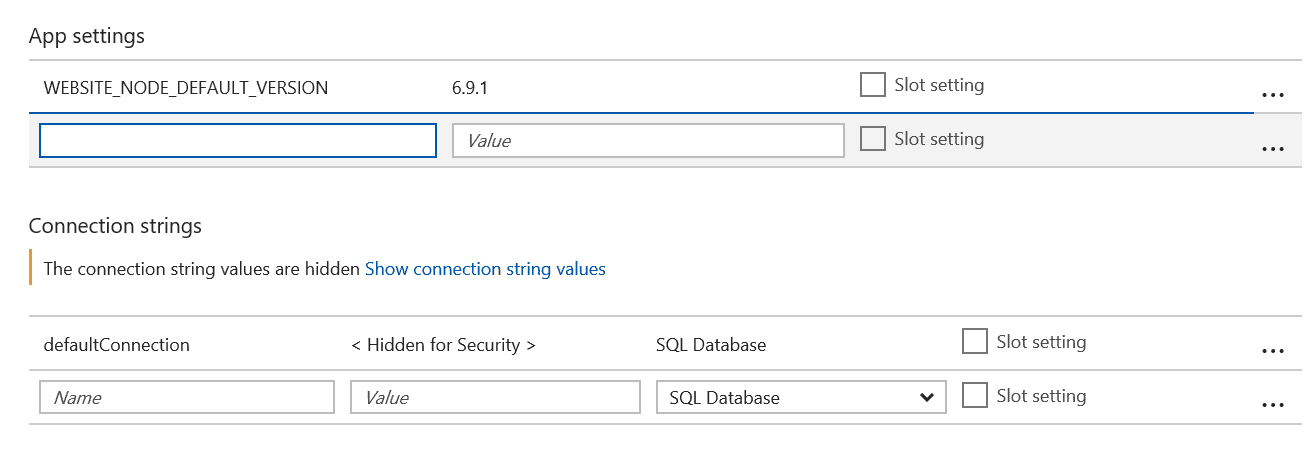
The interesting thing here is that Azure makes all the values of the app settings available as environment variables. Therefore, if you use user secrets in development then you should have AddEnvironmentVariables added in production to the building of the configuration tree.

public Startup(IHostingEnvironment env)
  {
      var builder = new ConfigurationBuilder();
      if (env.IsDevelopment())
          builder.AddUserSecrets<MyAppSecretConfig>();
    if (env.IsProduction())
          builder.AddEnvironmentVariables();
      var dom = builder.Build();
   
      // Save the configuration root object for further references
      Configuration = dom;
  }

Azure application settings are not encrypted, but at the same time you store values there so you could even encrypt them in some way before storing them. When encryption is involved, the main issues are most important but .NET Core provides interesting helpers also in that area. For more information you might want to check the following URL: https://docs.microsoft.com/en-us/aspnet/core/security/data-protection.

An alternate approach is to use an Azure Key Vault. In this case, you use the AddAzureKeyVault extension method to the ConfigurationBuilder class. The key vault offers a better guarantee of security because the method of access to its content complies with the FIPS 140-2 cryptographic standard. The AddAzureKeyVault method takes the URL to the vault as argument and either a X509 certificate or credentials to an Azure AD account to identity the client of the service. The Azure key vault also exposes a REST API for you, so you can extend its use beyond the storing secrets and even consider storing information in it programmatically. Secrets are essentially static content that is set once for the life of the application instance, whereas the key vault is just a particularly safe data storage. For more information on Azure key value, refer to the following article: https://docs.microsoft.com/en-us/aspnet/core/security/key-vault-configuration?tabs=aspnetcore2x.

If your application is not hosted on Azure, but instead lives on premises, the environment variables are still a good option to use to store user secrets, and having a dedicated encrypted configuration provider also works in this case.

User Secrets Before ASP.NET Core

Even if this article is primarily focused on ASP.NET Core it might helpful to recall how to protect user secrets (e.g., connection strings) in classic ASP.NET MVC. It is interesting to note that this feature has long been available. I’s been there since ASP.NET 2.0, released back in 2005, but for some reasons it was hardly used in recent years. Even now when I happen to mention it in conference sessions or classes I still find quite a few developers completely unaware of it.

In classic ASP.NET, configuration data is typically stored in a section of the web.config file and the content of configuration sections can be encrypted using one of the Windows encryption library. There are two main options: using the DPAPI library or the RSA library. The former saves you from the burden of dealing with keys as it uses a machine specific autogenerated key. The latter is more portable across machines

Although there’s an API for encrypting and decrypting sections of the web.config file, in your code you’re mostly interested in decrypting configuration data. As far as encrypting is concerned, you might want to rely on external tools that do the job for you. It can be of course a custom tool you write personally—something as simple as a console application—or it can be a system tool such as aspnet_regiis.exe. You will be able to find this command line tool in the .NET Framework system folder.

%windir%\microsoft.net\framework\v4.0.30319

The exact syntax to use is the following

aspnet_regiis -pe "connectionStrings" -app "/YourApp"

The -pe argument indicates that you want to encrypt the connectionStrings section of the configuration file within the /YourApp application. The default encryption provider is the RSA. For this command line to work, the application must be reachable with the given relative URL. Otherwise, if the application is not published yet, you can use a programmatic API to do the same.

var config = WebConfigurationManager.OpenWebConfiguration("~");
var section = config.GetSection("connectionStrings") as ConnectionStringsSection;
section.SectionInformation.ProtectSection("RSAProtectedConfigurationProvider");
config.Save();

Add this code to a controller method and you’ll get the web.config turn into something like below.

<connectionStrings configProtectionProvider="RsaProtectedConfigurationProvider">
  <EncryptedData Type="http://www.w3.org/2001/04/xmlenc#Element"
    xmlns="http://www.w3.org/2001/04/xmlenc#">
    <EncryptionMethod Algorithm="http://www.w3.org/2001/04/xmlenc#tripledes-cbc" />
    <KeyInfo xmlns="http://www.w3.org/2000/09/xmldsig#">
      <EncryptedKey xmlns="http://www.w3.org/2001/04/xmlenc#">
        <EncryptionMethod Algorithm="http://www.w3.org/2001/04/xmlenc#rsa-1_5" />
        <KeyInfo xmlns="http://www.w3.org/2000/09/xmldsig#">
          <KeyName>Rsa Key</KeyName>
        </KeyInfo>
        <CipherData>
          <CipherValue>U7Bsk+... s=</CipherValue>
        </CipherData>
      </EncryptedKey>
    </KeyInfo>
    <CipherData>
      <CipherValue>7 ... w==</CipherValue>
    </CipherData>
  </EncryptedData>
</connectionStrings>

You read it back, you just use the regular API for reading a connection string and decryption will be transparent.

var connString = ConfigurationManager.ConnectionStrings[0];

To decrypt the file and have it back to the clear format you simply change the method ProtectSection with UnprotectSection.

Summary

It is very important to encrypt sensitive data but, overall, I feel that over the past few years developers perceived it as a low priority task. In ASP.NET Core, Microsoft recently introduced ‘user secrets’, which is an API that aims to keep sensitive data out of the project folder. This means that if any code in the project is checked into some code repository, there will be no sensitive data included with it because those secrets are kept outside the project and stored in a user’s profile subfolder. User secrets are only intended for development work and are not a trusted store because their content is unencrypted. Azure application settings or Azure key vault are the options to save secrets within Azure. Finally, we looked back at non-Core ASP.NET and found out that the encryption of sections of the web.config file is a feature that has been available since ASP.NET 2.0. There are no more excuses that would permit you to skip the chore of encrypting or protecting in some serious way any sensitive data such as connection strings and API keys.

The post The Secrets of ASP.NET Core User Secrets appeared first on Simple Talk.

20 Nov 21:58

Die komfortable Steuerung im Smart Home wird dank Homematic IP nun noch flexibler

by HomeMatic-INSIDE
Wenn die Rollläden abends herunterfahren, soll automatisch die stimmungsvolle Hintergrundbeleuchtung im Wohnzimmer eingeschaltet werden, aber natürlich nur, wenn sich jemand im Raum befindet. Die Automatisierung solcher Alltagssituationen wird mit der neuen Funktion der Smartphone App von Homematic IP zukünftig noch einfacher. Diese bietet die Möglichkeit, unzählige Vorgänge im Smart Home direkt miteinander zu verknüpfen und Aufgaben somit bequem und komfortabel zu automatisieren. eQ-3 stellt diese Erweiterung ab sofort mit dem aktuellen Update der Homematic IP Smartphone App zur Verfügung. Dabei bleibt der Cloud Service auch mit dieser umfangreichen Neuerung weiterhin kostenlos.
Erneut setzt eQ-3, der europäische Marktführer für Whole-Home-Lösungen im Bereich Smart Home, mit seinen Innovationen neue Maßstäbe für die intelligente Haussteuerung. Die bereits vorhandenen Funktionen zur Steuerung von Komponenten in Gruppen oder nach Zeitprofilen werden nun mit der neuen Automatisierungsfunktion abgerundet. Diese ermöglicht es zukünftig, nahezu alle Vorgänge und Geräte im Homematic IP System miteinander zu verknüpfen und so unzählige Aufgaben zu automatisieren. Dabei kann die Funktion für alle Anwendungsbereiche genutzt werden. Homematic IP umfasst mittlerweile über 50 verschiedene Produkte aus den Bereichen Lichtsteuerung, Heizungssteuerung, Sicherheit und Überwachung, Rollläden- oder Jalousiesteuerung sowie Wetter und Umwelt.

Mit der neuen Version der kostenfreien Smartphone App ist die Automatisierungsfunktion ab sofort verfügbar. Damit können Nutzer die Aufgaben im Smart Home über die Erstellung von Regeln automatisieren und selbstständig ablaufen lassen. Diese Regeln bestehen aus mindestens einem Auslöser, der mindestens eine oder auch mehrere Aktionen auslöst. Dabei können Nutzer zusätzlich angeben, ob die Aktionen nur unter bestimmten Bedingungen, wie zum Beispiel ab einer bestimmten Raumtemperatur oder bei geschlossenen Fenstern, ausgeführt werden sollen. Ein praktisches Beispiel ist hier die automatische Aktivierung des Hüllschutzes zu einer bestimmten Uhrzeit, sofern alle Fenster geschlossen sind. Mit einer weiteren Regel kann der Hüllschutz dann auch am Morgen wieder automatisch deaktiviert werden. Generell können die aktivierten Regeln zu jeder Zeit über die Homematic IP Smartphone App auch wieder deaktiviert werden.

Mit den Systemen Homematic und Homematic IP entwickelt eQ-3 bereits seit mehreren Jahren innovative Smart-Home-Systeme für die komfortable und intelligente Hausautomation, die sich für den Hausbau ebenso eignen, wie für die einfache Nachrüstung im Eigenheim oder der Mietwohnung. Dabei umfassen beide Systeme als Whole-Home-Lösungen zusammen das industrieweit breiteste Produktportfolio. Die Programmierung von einfachen bis komplexen Szenarien ist mit Homematic bereits seit Beginn über die Webbrowser-basierte Nutzeroberfläche möglich. Durch die neue Automatisierungsfunktion der Smartphone App ist eine individuelle Programmierung nun auch für die neue Smart-Home-Generation Homematic IP möglich.
20 Nov 21:57

AAIB Singapore issues report on Dreamliner Trent 1000 fan blade failure incident

by Harro Ranter
20 Nov 21:51

Status Update for Azure Information Protection and Microsoft Cloud App Security – October 2017

by Adam Hall

Hello again to our Azure Information Protection community and welcome to the Cloud App Security community!

If youve been following our journey, you must be aware that were actively working on deepening the integration between these services to enable wider information protection scenarios that are important to you.

In that spirit, we are expanding these posts to include Microsoft Cloud App Security (MCAS), which is important as we know many of you work across these products, plus we continue to build out integrations. In case you missed it, you can find last month’s Azure Information Protection status update here.

Its been a busy month and we have some great updates, so lets take a look.

Azure Information Protection

The current GA client is 1.10.56.0

  • Nothing new to add, see last months post for all the updates from last months GA release. Next GA release is scheduled for December.
  • And as always, we continue to squash bugs
    • Prevent an Outlook hang with Outlook reminders.
    • Support updates for Office 64-bit, so that you can protect documents and emails.
    • Fall back to the Calibri font if visual markers in the Azure Information Protection policy are configured for a font name that is not installed on the client.
    • When you configure a label for user defined permissions and HYOK (AD RMS) protection, the protection no longer incorrectly uses the Azure Rights Management service.

A new Preview client has been posted! Current Preview is 1.15.7.0 which contains a number of new features:

  • For Office apps, automatic and recommended classification runs continuously in the background, instead of running when documents are saved. With this change in behavior, you can now apply automatic and recommended classification to documents that are stored in SharePoint Online. Learn more about how this works here.
  • A new advanced client setting to allow Outlook to apply a different default label, or no label. More information here.
  • For Office apps, when you specify custom permissions, you can now browse and select users from an address book icon. This option brings parity to the user experience when you specify custom permissions by using File Explorer.
  • Support for sharp graphics and text for dynamic dot per inch (DDPI) monitors. Applies to File Explorer, right-click to classify and protect files, the Azure Information Protection Viewer, and to the Click-to-Run version of Office 2016.
  • Conditional Access
    • The preview of conditional access enables admins to configure conditional access policies help secure access to sensitive information, you can Learn more here. Common scenarios include:
    • Requiring Multifactor Authentication
    • Checking device compliance/Domain Join
    • Assessing risky-sign in
    • Blocking access when the user is not on a trusted network

The public preview release of the Azure Information Protection scanner

These updates were heavily influenced by your great feedback, and allowed us to ship new features, verify bug fixes and generally improved our product. We thank you for this ongoing engagement!

Other things to be aware of:

  • Check out the AIP+CAS integration and how Cloud App Security can read files classified by AIP and set policies based on the file labels
  • We’re adding a new feature to the new OneDrive sync client: the ability to sync IRM-protected SharePoint document libraries and OneDrive locations. You can learn more about this Preview here.
  • The RMS Protection tool is moving to End Of Life on February 10, 2018. This functionality is replaced by the AIP Client.
  • A reminder that the Azure classic portal is going to be retired on Nov 30. For more info please see this blog and we have a great set of migration guidance in our Docs.
  • A new AIP end user adoption guide is available. Use it to accelerate deployment and usage in your company

As we let you know previously, we have adopted UserVoice as a platform for you to tell us what we should be working on, and I would ask and encourage you all to take a look and place your votes to help us understand the priorities you have.

Cloud App Security

  • In case you missed it, check out all the announcements from Ignite
    • Conditional Access to monitor user sessions and control content access and downloads directly inside SaaS apps through integration between MCAS and Azure AD.
    • A new Cloud App Discovery experience empowered by Microsoft Cloud App Security to provide deeper visibility into what apps and services your users are accessing. See comparison to MCAS discovery here.
  • We have a new data center, in addition to our US-based data center, will enable Cloud App Security customers to be in complete compliance with new and upcoming European standardization and certifications. For more information and for a list of IP addresses and ports that need to be opened to work with our new data center, see Network requirements.
  • New filters were added to the App connectors page that provides you with simpler filtering and additional insight, including Connected by data, so that you know which user connected each app.
  • Cloud discovery on log files that contain only destination IP information was improved.
  • You can let us know what YOU need via the MCAS UserVoice site.

Summary

Hopefully this helps you with your testing, planning, and deployments, we welcome your commentary and feedback. We also know this can be a lot to absorb, and we are here to help!

Thank you,

Adam Hall on behalf of all the hard-working teams!

20 Nov 21:51

Azure Information Protection documentation update for October 2017

by Carol Bailey

Hi everybody

Our technical writer, Carol Bailey, is letting you know whats new and hot in the docs for October.

Reminders: Follow us on Twitter (Microsoft Mobility @MSFTMobility) and join in our peer community at www.yammer.com/AskIPTeam.

Gagan (on behalf of the Information Protection team)


The Documentation for Azure Information Protection has been updated on the web and the latest content has an October 2017 (or later) date at the top of the article.

The doc updates this month continue to support the release announcements from Ignite 2017, with new and supporting documentation for the Azure Information Protection scanner, and additional information for Azure AD conditional access. The migration guide is also updated for new scripts that are now on the Download Center.

As always, we listen to your feedback and try to incorporate it whenever possible.If you have feedback about the documentation, you can contact us by emailing AskIPTeam@Microsoft.com.

Whats new in the documentation for Azure Information Protection, October 2017

What is Azure Information Protection?

– Updated the Resources for Azure Information Protectionsection, for a link to the end user adoption guide, and an update for the Ignite 2017 sessions.

Applications that support Azure Rights Management data protection

– Updated the supported applications table, for Office Mobile for Android, whichnow supports editing protected documents in addition to viewing them. Also updated the supported solutions table with a new entry for Forcepoint DLP.

Frequently asked questions for Azure Information Protection

– New entries:

Migrating from AD RMS to Azure Information Protection

– Updated for the new scripts on the Download Center, with revised guidance for Mac computers.

Configuring usage rights for Azure Information Protection

– Updated the Rights included in the default templatessection, for templates that are created after October 6, 2017.

How to configure a label for Rights Management protection

– Added a new section for examples, which includes how to configure a label to send a protected email to a Gmail account, how to grant controlled access to users in another organization, how to add external users to an existing label, and how to configure a label for email that supports less restrictive permissions than Do Not Forward. Let us know of additional examples that you would find useful.

How to configure conditions for automatic and recommended classification for Azure Information Protection

– Updated for the following:

  • An important note that automatic classification and user-defined permissions should not be configured for the same label.
  • New section, How automatic or recommended labels are applied. This new section makes it easier to distinguish the differences in behavior for the general availability (GA) version of the client, and the current preview version of the client that is also used with the scanner. Note that the scanner requires conditions to be configured as automatic.

Deploying the Azure Information Protection scanner to automatically classify and protect files

– New article, step-by-step instructions to install, configure, and run the Azure Information Protection scanner. The scanner isnow in public preview and announced at Ignite.

How to configure labels and templates for different languages in Azure Information Protection

– Removed the preview disclaimer, now that this feature is generally available.

Azure Information Protection client administrator guide

– Updates include:

  • Instructions to install the client for users are moved to their own page:Install the Azure Information Protection client for users
  • For custom configurations, the Enable recommended classification in Outlook option incorrectly had the preview disclaimer removed last month, and is now reinstated.
  • For document tracking, added a note to explain why you might not see the Admin icon, and how to alternatively switch to Administrator mode by using a direct link.
  • For file types supported, for native protection, added file name extensions for Visio. This support was introduced with the latest GA version of the client. This section is also updated with the information that for text-based files, the Azure Information Protection viewer has a maximum supported file size of 20 MB.
  • For file types excluded, added two new sections: Files that cannot be protected by default, and Limitations for container files, such as .zip files.

AzureInformationProtection

– The online help for this module is updated for the cmdlets that support the Azure Information Protection scanner.


04 Nov 16:25

Microsoft Azure now offers 12-months free tier account

04 Nov 16:25

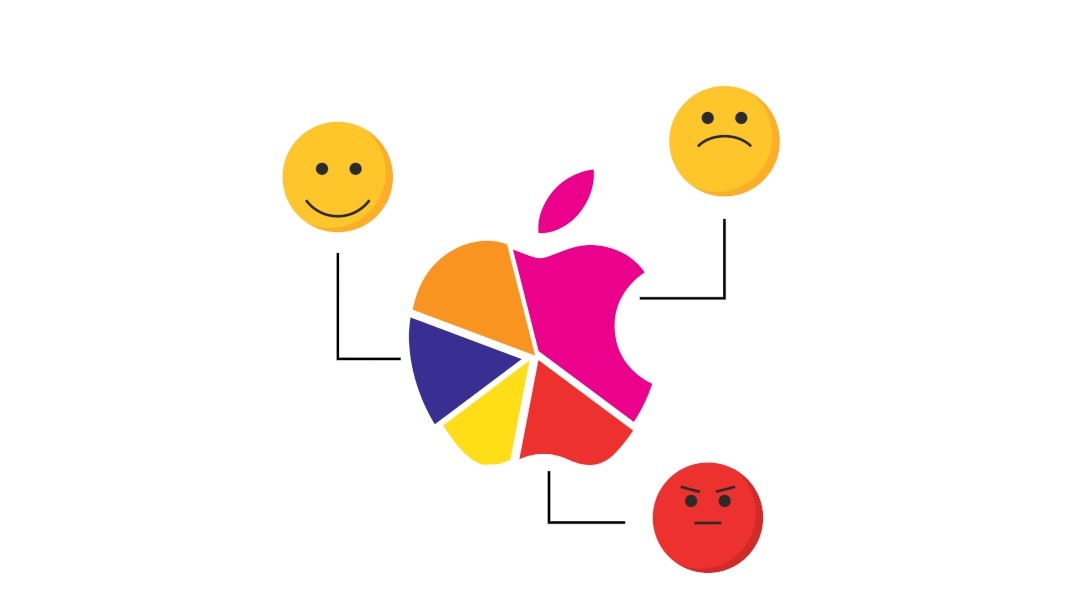
Studie: US-Bürger vertrauen Microsoft mehr als Apple

by Albert Jelica

In der Fachpresse, sowohl in Deutschland, als auch in den USA, ist man sich grundsätzlich einig, dass Apple-Geräte besser sind. Die iPhones und MacBooks schneiden in Tests sehr häufig besser ab als die Konkurrenz.

Die sehr gute Meinung vieler Journalisten von den Produkten des Herstellers aus Cupertino scheint allerdings der Durchschnittsbürger nicht zu teilen, was sich vermutlich auch am Marktanteil ablesen lässt.

In einer durch Reticle Research durchgeführten Studie wurden 1.520 US-Amerikaner repräsentativ ausgewählt und zu ihrem Vertrauen in unterschiedliche Technologiekonzerne befragt. Während Apple sehr häufig mit einer hohen Kundenzufriedenheit wirbt, scheint der Durchschnittsbürger diese Ansichten nicht zu teilen.

Weniger Vertrauen in Apple als in Microsoft

Laut der Studie haben nur 27 Prozent der Befragten ein hohes Vertrauen in Apple, während es etwa 33 Prozent sind bei Microsoft.

Auch das Misstrauen des durchschnittlichen US-Bürgers ist auf Seiten Apples deutlich höher. So geben 13 Prozent der befragten an, Apple sehr zu misstrauen und weitere vier Prozent sagen, dass sie dem Konzern etwas misstrauen.

Im Vergleich dazu sind es nur 5 Prozent, die ein hohes Misstrauen in Microsoft haben, während weitere 10 Prozent den Redmondern etwas misstrauen. Somit ist die Stimmung auch unter den Kritikern Microsofts einerseits deutlich positiver gegenüber dem Unternehmen und andererseits sind es insgesamt weniger.

Weniger Leidenschaft für Apple als für Microsoft

Während man Apple-Fans als sehr leidenschaftliche Anhänger des Unternehmens kennt, sehen die durchschnittlichen Bürger das Unternehmen nicht derart positiv. In der Kategorie Leidenschaft wurde die Frage gestellt, inwiefern man betroffen wäre (im Sinne von interessiert), wenn ein Konzern vom einen auf den nächsten Tag verschwindet.

Microsoft befindet sich in Sachen Interesse der Nutzer direkt hinter Amazon und Google im Spitzenfeld, während Apple mit Facebook weit abgeschlagen den letzten Platz belegt. Bei Microsoft gaben nur vier Prozent an, dass es ihnen vollkommen egal wäre und weitere 8 Prozent, dass es sie etwas betreffen würde, wenn das Unternehmen plötzlich einfach verschwindet.

Bei Apple sagten 14 Prozent, dass es ihnen vollkommen egal wäre, wenn das Unternehmen morgen verschwindet und weitere 7 Prozent, dass es sie etwas interessieren würde.

Bei Microsoft sagten allerdings 21 Prozent aus, dass es sie sehr betreffen würde, wenn das Unternehmen morgen verschwindet, während es bei Apple nur 17 Prozent waren. Kombiniert mit der deutlich negativeren Wahrnehmung von Apple scheint der Konzern bei den Durchschnittsverbrauchern keine großen Anhänger zu finden.

Apple entfernt sich von den Kunden

In der Fachpresse wird Apple häufig als Innovationsträger gefeiert und die sehr hohen Preise für alte Technik werden kommentarlos akzeptiert. In den letzten Jahren hat es Apple allerdings mehrfach geschafft, durch mehrere Konsumenten-feindliche Entscheidungen selbst die Fans zu verärgern.

So war die Entfernung des Klinkensteckers für Kopfhörer für sehr viele durchschnittliche Kunden ein Problem, welche das iPhone 7 für diese Zielgruppe einfach nicht mehr interessant gemacht hat.

Dasselbe gilt für das neue MacBook Pro, welches auch zahlreiche Apple-Fans schlichtweg eine große Enttäuschung war.


Quelle: The Verge

Der Beitrag Studie: US-Bürger vertrauen Microsoft mehr als Apple erschien zuerst auf WindowsArea.de.

04 Nov 16:19

Microsoft is Killing Outlook.com Premium

by Paul Thurrott

Surprise! Microsoft just killed Outlook.com Premium, and it hid this news in a separate announcement about Office 365.

The post Microsoft is Killing Outlook.com Premium appeared first on Thurrott.com.

04 Nov 16:19

Microsoft-Mitarbeiter installiert Google Chrome während Präsentation, weil Edge dauernd abstürzt

by Albert Jelica

Jeder, der Edge bereits benutzt hat, dürfte die Erfahrung gemacht haben, dass der Browser nicht immer ganz zuverlässig funktioniert. Selbstverständlich hat jede Software derartige Probleme, zumindest gelegentlich, aber Edge ist zweifellos im Alltag weniger stabil als Google Chrome.

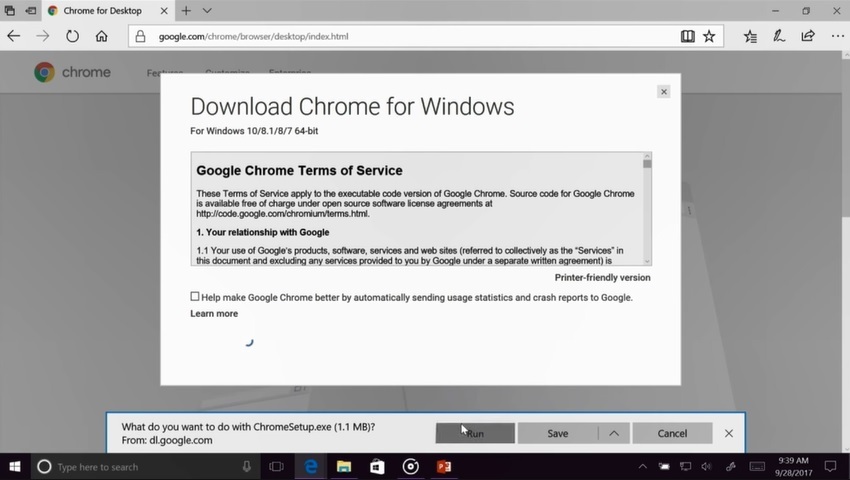
Während einer Azure-Präsentation ist genau das vorgekommen und der Microsoft-Mitarbeiter sah sich gezwungen das zu tun, was das Unternehmen in der Öffentlichkeit wahrscheinlich gerne vermieden hätte. Der Mitarbeiter sah sich gezwungen, während der Präsentation Google Chrome aus dem Internet herunterzuladen und den Browser der Konkurrenz zu verwenden. Er sah die Sache mit Humor und die Zuseher sahen das sehr ähnlich. Dass die Aufnahme auch von Microsoft selbst veröffentlicht wurde, ist durchaus respektabel. Andere Unternehmen gestehen eigene Fehler ungerne ein und schneiden Teile der Videos raus, wenn diese passieren.

Microsoft nimmt es mit Humor, doch die Schwäche des eigenen Browsers zeigt diese Präsentation ganz deutlich. Das Unternehmen zeigt sich damit selbst, dass man ordentlich Arbeit vor sich hat am eigenen Edge-Browser.


via TNW

Der Beitrag Microsoft-Mitarbeiter installiert Google Chrome während Präsentation, weil Edge dauernd abstürzt erschien zuerst auf WindowsArea.de.

04 Nov 16:16

Square announces the Register, a $999 point-of-sale device for larger businesses

04 Nov 16:16

Diese Aktie ging durch die Decke, als die Firma sich den Zusatz Blockchain verpasste

Eine britische Firma verbuchte ein überraschendes Kursfeuerwerk – und das alles nur, weil sie sich den Namenszusatz Blockchain verpasste. Und das passierte nicht zum ersten Mal.

On-line: Blockchain als Namenszusatz löst Kursfeuerwerk aus

Blockchain-Hype sei Dank. Für die Aktionäre der britischen Internetfirma On-line Plc dürfte der vergangene Freitag ein echter Glückstag gewesen sein. Denn innerhalb nur eines Tages sprang der Kurs der On-line-Aktie um fast 400 Prozent nach oben. Was geschehen war? Die Firma hatte angekündigt, dass sie sich den Namenszusatz Blockchain verpassen will, wie Bloomberg berichtet.

Blockchain – der Name macht‘s. Die On-line-Homepage lädt jedenfalls nicht wirklich zum Investieren ein. (Screenshot: On-line.co.uk/t3n.de)

Schon am Donnerstag, als die Pläne erstmals bekannt wurden, legte die On-line-Aktie um 19 Prozent zu. Das war aber nichts gegen den Tag darauf, als sich der Aktienkurs auf bis zu 85 Pence pro Stück fast verfünffachte (plus 394 Prozent). On-line sah sich daraufhin gezwungen, am Freitagnachmittag in einer zweiten Pressemeldung klarzustellen, dass sich das Blockchain-Produkt, an dem das Unternehmen arbeite, noch in einer frühen Entwicklungsphase befinde. Der Aktienkurs ging folgerichtig wieder deutlich zurück.

Am Montag war die On-line-Aktie nur noch 39,5 Pence wert – immerhin noch mehr als doppelt soviel wie zu Beginn der Kursrallye. Ebenfalls beeindruckend: Am Freitag erreichte das Handelsvolumen knapp drei Millionen Aktien, was 16 Mal so viel war wie im gesamten Jahr 2017 – bis zu dem plötzlichen Kursfeuerwerk. Eine ähnliche Aktienhausse hatte es schon Anfang des Monats gegeben, als sich das US-Unternehmen Bioptix in Riot Blockchain umbenannte. Der Aktienkurs hatte sich aufgrund des enorm gestiegenen Anlegerinteresses daraufhin nahezu verdoppelt.

Anzeige

Blockchain-Produkt von On-line in einer frühen Phase

Bei On-line ging es freilich nicht nur um den Namenszusatz, das Unternehmen arbeitet, wie oben angedeutet, an einem Blockchain-basierten Produkt, das mithilfe von Token-basierten Anwendungen Nutzer von Finanzwebsites bei der Bewertung von Informationen unterstützen soll. Die erste entsprechende Anwendung soll aber erst frühestens 2018 getestet werden.

Zum Weiterlesen:

04 Nov 16:16

How to write a JavaScript-free todo app using just HTML and CSS

04 Nov 16:16

Update 1710 for Configuration Manager Technical Preview Branch – Available Now!

by Yvette O'Meally

Hello everyone! We are happy to let you know that update 1710 for the Technical Preview Branch of System Center Configuration Manager has been released. Technical Preview Branch releases give you an opportunity to try out new Configuration Manager features in a test environment before they are made generally available. This months new preview features include:

  • Check compliance for co-managed devices from Software Center when conditional access is managed by Intune – Users can now use Software Center to check the compliance of their co-managed Windows 10 devices when conditional access is managed by Intune.
  • Limit Windows 10 enhanced telemetry to only send data relevant to Windows Analytics Device Health – You can now set the Windows 10 telemetry data collection level to Enhanced (Limited). This setting enables you to gain actionable insight about devices in your environment without devices reporting all of the data in the Enhanced telemetry level with Windows 10 version 1709 or later.
  • Configure and deploy Windows Defender Application Guard policies – You can now create and deploy Windows Defender Application Guard policies to Windows 10 clients that help protect your users by opening untrusted web sites in a virtualized browser (Edge and Internet Explorer).
  • Authorize software that is trusted by the Intelligent Security Graph as part of Windows Defender Application Control – Device Guard policies in Configuration manager are now renamed to Windows Defender Application Control policies. This better reflects the scope of their functionality. On devices that run Windows 10 version 1709, software that is trusted by the Microsoft Intelligent Security Graph (ISG) can now be automatically authorized. The trustworthiness of the software is defined by reputation data from Windows Defender SmartScreen, Windows Defender Antivirus, and more.
  • Configure Windows Defender Exploit Guard – Windows Defender Exploit Guard provides intrusion prevention rules and policies that make vulnerabilities more difficult to exploit in Windows 10. All Exploit Guard components are now configurable with Configuration Manager.
  • Improved descriptions for pending computer restarts – The reason for a pending computer restart is posted.
  • Run Scripts – Weve added the ability to configure security scopes for the Run Scripts feature. Weve also integrated an additional improved monitoring experience as part of the Run Scripts wizard.

This release also includes the following improvements based on your feedback from UserVoice:

  • Allow up to 512×512 pixel icons for application in Software Center – You can now deploy apps with up to 512×512 pixels icon to display in Software Center. This was earlier capped at 250×250 pixels and anything larger showed up blurry on Software Center. We have now changed this after receiving feedback from our customers.
  • Support for Cryptography: Next Generation certificates Weve added limited support for Cryptography: Next Generation (CNG) certificates. For more information about the supported scenarios please read Introducing support for Cryptography: Next Generation (CNG) certificates in Configuration Manager.

Update 1710 for Technical Preview Branch is available in the Configuration Manager console. For new installations please use the 1703 baseline version of Configuration Manager Technical Preview Branch available on TechNet Evaluation Center.

We would love to hear your thoughts about the latest Technical Preview! To provide feedback or report any issues with the functionality included in this Technical Preview, please use Connect. If theres a new feature or enhancement you want us to consider for future updates, please use the Configuration Manager UserVoice site.

Thanks,

The System Center Configuration Manager team

Configuration Manager Resources:

Documentation for System Center Configuration Manager Technical Previews

Try the System Center Configuration Manager Technical Preview Branch

Documentation for System Center Configuration Manager

System Center Configuration Manager Forums

System Center Configuration Manager Support

Download the Configuration Manager Support Center

04 Nov 16:15

Flow of the Week: Get notified immediately when your flow has errors or failures

For this Flow of the week, Program Manager, Sunay Vaishnav will show you how you can stay on top of flows and be notified of failures in real time. Be sure to read and see how you can use flows for business critical processes.
04 Nov 16:14

Premium Outlook.com features now available to Office 365 subscribers

by the Outlook team

Today, we began rolling out new benefits for Office 365 Home and Office 365 Personal subscribers who use Outlook.com. These premium email features include an ad-free inbox, enhanced protection against malware and phishing, larger mailbox sizes, and premium customer support. In the coming months, we’ll be introducing additional premium Outlook.com features to make personal email and calendar experiences for Office 365 subscribers more powerful, productive, and secure.

An ad-free experience

The Outlook.com interface is now free of ads for Office 365 Home and Office 365 Personal subscribers. This includes banner ads as well as advertisements in the message list—commonly referred to as native ads. Without ads, you’ll have less distractions and faster page load times, so you can be more focused and have a better email experience.

Sophisticated protection against email threats

Email is one of the most popular ways that criminals trick people into giving away their passwords or downloading viruses and ransomware. That’s why all Outlook.com accounts already feature robust spam and virus filtering and support from a global security team that works tirelessly to stop these threats.

For Office 365 Home and Office 365 Personal subscribers, we now offer additional security against the most sophisticated types of threats in two ways:

  • Scanning attachments—Sophisticated techniques detect new types of malware previously not seen, giving you protection against today’s most advanced threats.
  • Checking links—When you click a link in an email, it is checked in real-time to determine if the destination website is likely to download viruses or malware onto your computer. If the site is found to be malicious, a warning screen alerts you not to access the site.

More mailbox storage

In our new Office 365–based infrastructure, a free Outlook.com account now receives 15 GB of email storage space. Office 365 Home and Office 365 Personal subscribers enjoy even larger amounts of storage: 50 GB of space in total. Today, we’re also boosting storage limits to 50 GB for all our loyal Outlook.com users whose mailbox size is 12 GB or larger.

Premium support

If you need help on an Outlook.com account issue, you’ll receive free technical support as an Office 365 subscriber. Whether you call us on the phone or reach out via in-app support, you get our highest levels of care and support.

How to get started

Getting started and using these premium features in Outlook.com is easy.

  • It’s automatic—We activate the premium Outlook.com benefits based on the email address you used to sign up for your Office 365 subscription. Addresses ending in @outlook.com, @hotmail.com, @live.com, and @msn.com all qualify. Please note that if you use the Connected Accounts feature to access a @gmail.com, @yahoo.com, or other third-party account from Outlook.com—the advanced email security features do not apply to these accounts.
  • You can share the benefits—If you have an Office 365 Home subscription and share your Office 365 benefits with others, they will get these benefits for their Outlook.com mailboxes—including the advanced security, ad-free experience, and 50 GB of email storage.
  • The rollout is underway—We’ve already begun rolling these capabilities out to Office 365 Home and Office 365 Personal subscribers worldwide. The process of updating all accounts will take about one month. So if you don’t see them right away, don’t worry—they are on the way.

To learn more about the features and see a list of frequently asked questions, please check out the Premium Outlook.com features for Office 365 subscribers help topic.

We hope you enjoy these new benefits, and we look forward to bringing even more premium value to Office 365 Home and Office 365 Personal subscribers in the months ahead!

—The Outlook.com team

The post Premium Outlook.com features now available to Office 365 subscribers appeared first on Office Blogs.

04 Nov 16:14

Why does American medicine still run on fax machines?

04 Nov 16:14

Show HN: Easy Webserver for Node Js, Python, PHP, etc. With Free SSL

04 Nov 16:14

Telekom: Schnellere LTE-Uploads dank 64QAM-Modulation

Schnelleres LTE-Internet bei der TelekomDie Deutsche Telekom setzt neue Modulationsverfahren im LTE-Netz ein. Dadurch sind höhere Geschwindigkeiten im Up- und Downstream möglich. Wir fassen die Neuerungen zusammen
04 Nov 16:13

Passt der Neue? Diese Software erkennt die richtigen Mitarbeiter

89 Prozent der Kündigungen im ersten Jahr haben kulturelle Ursachen. Umso wichtiger ist es, bei Neueinstellungen gleich den Richtigen zu finden. Eine Software soll helfen und den Teamfit errechnen.

Da hat der Personaler nach bestem Wissen und Gewissen das Kandidaten-Interview geführt. Er hat den Lebenslauf abgeklopft, Referenzen hinterfragt, persönliche Ziele gecheckt und sogar eine Test-Aufgabe erfüllen lassen. Zwei Stunden später ist die Sache klar: Der Kandidat ist dufte. Kann losgehen.

Vier Monate später sieht die Situation nicht mehr ganz so rosig aus. Der neue Mitarbeiter prescht vor, wo in den Augen des Teams Zurückhaltung angesagt ist. Er trifft im Kundengespräch Einzelentscheidungen. Das Team tickt jedoch hoch demokratisch und nimmt ihm dieses Verhalten übel. Es hakt an allen Ecken und Enden. Nach sechs Monaten entscheiden beide Seiten, sich in gegenseitigem Einvernehmen zu trennen. Was läuft hier schief? Wieso konnte man nicht vorher klären, ob es passt?

Passung Glückssache?

Die Einstellung eines neuen Mitarbeiters hat nicht selten Glücksspiel-Charakter. Die fachliche Eignung abzuklopfen, ist noch verhältnismäßig einfach. Doch passt der oder die Neue denn auch ins Team? Dass diese Frage entscheidend ist, ist allen klar. Schließlich ist es ein offenes Geheimnis, dass Teams, die miteinander arbeiten statt gegeneinander, zufriedener und leistungsfähiger sind. Also kommt sie auf den Tisch. Doch dann wird es vage. Ab jetzt bewegen sich alle Beteiligten in der Regel im Nebel. Denn weder der Kandidat noch der Personaler können auf diese Frage eindeutig antworten. Der Grund: Es fehlen die Fakten.

Das Unternehmen weiß oft gar nicht genau, worauf es bei der Passung achten soll. Selbst wenn ein Teammitglied mit am Tisch sitzen würde, könnte es maximal die Sympathiewerte abklopfen. Klar, Sympathie hilft. Es ist schön, sich zu mögen, wenn man gemeinsam in einem Büro sitzt. Doch Sympathie reicht nicht aus, um eine gute und vor allem im Unternehmenssinne wirksame Zusammenarbeit zu gewährleisten. Und wenn die fehlt, geht die Motivation auf lange Sicht in den Keller. So verlassen 89 Prozent aller Angestellten, die innerhalb des ersten Jahres kündigen, das Unternehmen nicht, weil sie mit einem Kunden nicht zurechtkamen, der Arbeitsweg auf Dauer zu aufwendig war oder das Essen in der Kantine unterirdisch schmeckte. Nein, sie tun dies, weil sie andere Werte, Ziele und Motivationen haben als ihre Kollegen.

Für eine dauerhaft gute Zusammenarbeit braucht es kulturelle Gemeinsamkeiten. Haben beide Seiten ein gleiches Kundenverständnis? Gehen beide Seiten von ähnlichen Verhaltensweisen am Markt aus? Haben beide Seiten die gleiche Ansicht darüber, was Erfolg für das Unternehmen bedeutet? „Solche Fragen lassen sich nicht via Bauchgefühl klären. Dafür braucht es Fakten“, ist Darja Gutnick, Gründerin und CEO des in Berlin ansässigen Softwareentwicklers Bunch, überzeugt.

Anzeige

Kulturabgleich per Knopfdruck

Bunch hat eine Software-Lösung entwickelt, die die Werte und Normen von Mitarbeitern eines Unternehmens und dessen Bewerbern misst und miteinander vergleicht. „Unternehmen können dadurch bereits im Einstellungsprozess herausfinden, ob ein Bewerber die gleichen Werte und Motivationen teilt wie ein bestehendes Team“, so Gutnick. „Die Mitglieder eines Teams füllen ein 30-Fragen-Online-Assessment aus. Damit stellen sie den Werterahmen des Teams dar“, erklärt Gutnick. „Das gleiche Assessment geht an den Kandidaten, fallweise vor dem ersten oder dem zweiten Interview.“ Indem Bewerber und Team die Fragen gleichermaßen beantworten, lägen fundierte Fakten zu den jeweiligen Werten und Zielen auf dem Tisch. „Auf Basis eines Algorithmus, der auf dem Modell der Stanford-Researcher beruht, berechnen wir sogenannte Matching-Scores.“  Ergebnisse im zweistelligen Plus-Bereich seien ein sehr gutes Zeichen. Und wenn nicht mehr als zwei Prozent negativer Einfluss festzustellen sei, lohne es sich, mit dem Kandidaten ins Gespräch zu kommen, so Gutnick. Auf diese Weise könne man jeden Kandidaten zu jedem Team matchen.

„Wir haben das Verfahren für unser Produktmanagement-Team getestet“, berichtet Markus Müller, Head of Product Management“ bei N26. „Der Test hat allen Beteiligten geholfen, den fehlenden Culture Fit früher zu erkennen. Ohne die Fakten hätten wir womöglich noch zwei bis drei Runden miteinander gedreht und wertvolle Zeit verschwendet“, so Müller.

Die Frage „Daumen hoch oder runter“ sei im Recruiting-Prozess gar nicht unbedingt entscheidend, ergänzt Gutnick. „Wichtig ist den Unternehmen, dass beide Seiten, sowohl Kandidat als auch Unternehmen, genau wissen, worüber sie am Tisch miteinander reden“, so die Bunch-Gründerin. Beide Seiten hätten eine gute Gesprächsbasis, meint auch Müller. „Man muss nicht bei Adam und Eva anfangen, sondern kann ganz gezielt Informationslücken füllen.“ Der Product Manager nutzt das Tool nicht nur für den Recruiting-Prozess, sondern auch, um intern passgenaue Teams zu bauen. „Wenn ich weiß, wie die verschiedenen Teammitglieder im Unternehmen ticken, kann ich gezielt Projektteams bilden, die gut miteinander arbeiten“, so Müller.

Und was ist, wenn einer schummelt? „Bei der Befragung gibt es kein Gut oder Schlecht. Wir messen keine Skills oder Fähigkeiten, sondern Präferenzen im Arbeitsstil, im Umgang miteinander oder mit Kunden“, so Gutnick. „In unserem ‚Forced Choice Assessment‘ muss der Nutzer immer zwischen zwei attraktiven Aussagen wählen, beispielsweise: ‚Ich lege Wert darauf, mit Kollegen harmonisch zusammen zu arbeiten‘ versus: ‚Ich arbeite gerne auf klare Ziele hin‘. Auch wenn beide Aussagen erstrebenswert sind, ist nur ein Kreuz zulässig.“

Kultur prägen

Wenn Unternehmen den kulturellen Rahmen für potenzielle neue Mitarbeiter abstecken, dann setzt dieser Prozess auch bei dem Unternehmen selbst etwas in Gang. „Indem sich das Team Fragen zu den eigenen Werten stellt, entwickeln die Teammitglieder ein Bewusstsein für die eigene Kultur: Wofür steht die Firma? Was ist uns wichtig? Was geht gar nicht“, so die Bunch-Gründerin. Dabei werde möglicherweise dem Team auch eine kulturelle Leere bewusst. Dann sei es jetzt höchste Zeit, diese Leere zu füllen. „Unternehmen, die Kultur dem Zufall überlassen, lassen eine der wichtigsten Ressourcen im Unternehmen ungemanaged“, ist Gutnick überzeugt.

Müller schlägt in die gleiche Kerbe: „Wenn ich mir vornehme, als Unternehmen auf lange Sicht flexibler zu agieren, dann kann ich mit Hilfe des Assessments an konkreten Stellschrauben drehen – sowohl bei den bestehenden Teams als auch bei Neueinstellungen“, so Müller.

Frühwarnsystem nutzen

Machen wir jetzt vor jeder Begegnung einen Profilabgleich? Arbeiten wir nur noch mit dem zusammen, bei dem das Matching grünes Licht zeigt? „Das digitale Matching ist keine Alternative zum echten Leben, sondern eine Ergänzung“, betont Gutnick. „Unternehmen haben so die Möglichkeit, bereits sehr früh im Prozess Erkenntnisse zu gewinnen, die das Team sonst später ereilen und ein Vielfaches an Kosten verursachen“, so Gutnick.  Die Alternative sei, dass man ohne fundierte Daten eine Entscheidung für einen Probetag trifft und damit möglicherweise wertvolle Zeit verschwendet, und das für alle Beteiligte. „Wenn sich konkrete Fallen schon auf dem Weg abzeichnen, dann sollte man das wissen und sie umgehen“, so Gutnick.

Mehr zum Thema: Tools für HR Manager: So geht Personalorganisation per Software

04 Nov 16:13

Chip Hall of Fame: Atmel ATmega8

04 Nov 16:13

Bug in Google's Bug Tracker Lets Researcher Access List of Vulnerabilities

04 Nov 16:11

How a $10 microchip turns 2-D ultrasound machines to 3-D imaging devices

04 Nov 16:10

Batteries with 50 per cent more energy with pure silicon anode

04 Nov 16:10

Facebook employees opened a privately shared Google Sheet I sent to my brother

04 Nov 16:10

Empower your team and safeguard your business with Microsoft 365 Business

by the Microsoft 365 team

Today we’re announcing general availability of new solutions purpose-built for small and medium-sized businesses with up to 300 employees. Available worldwide today, Microsoft 365 Business includes the Office 365 suite of productivity and collaboration tools, as well as device management and security tools to safeguard company information across Windows 10 PCs, mobile devices, and apps. It is an integrated solution designed to simplify IT for small and medium-sized businesses.

We’re also announcing general availability of three new business apps—Microsoft Connections, Microsoft Listings, and Microsoft Invoicing—which join Microsoft Bookings, Outlook Customer Manager, and MileIQ to create a suite of capabilities to help small businesses grow and thrive. These new apps are now available in Microsoft 365 Business and Office 365 Business Premium for customers in the U.S., U.K., and Canada.

In addition, Microsoft StaffHub, an app to help Firstline Workers manage their workday, is now included in Microsoft 365 Business and Office 365 Business Premium subscriptions.

Become a modern workplace

Today’s modern, global workplace is changing, which brings tremendous opportunities and challenges for businesses of all sizes. Businesses must meet the needs of a five-generation workforce, contend with an increasingly complex cyberthreat landscape, and innovate quickly to meet evolving customer expectations.

At the same time, small and medium-sized customers tell us they want solutions that are easy to manage and maintain. Often small business owners find technology options to be complex and costly, leading many to make do with a patchwork of services or defer investments altogether. Such approaches compromise business productivity and introduce security vulnerabilities, which may be one reason why 43 percent of all cyber-attacks last year targeted companies with fewer than 100 employees.

Safeguard your business

Microsoft 365 Business is built to deliver the productivity tools and security services businesses need in a single, simple-to-manage product. It safeguards company information, extending security across users, apps, and devices. It helps ensure PCs are up to date and secure, helping prevent security vulnerabilities that cyber-thieves often exploit. It also provides protection for company information across devices, with the ability to remove company data from lost or stolen devices.

A smart device displays the Microsoft Admin center.

Empower your people

Microsoft 365 Business delivers the productivity and collaboration tools businesses need to help their people be their most productive. It includes the suite of Office 365 productivity and collaboration apps, including Word, Excel, and PowerPoint, as well as Outlook for email; SharePoint and OneDrive for sharing files with customers, co-workers, and suppliers; and Microsoft Teams for chat-based teamwork.

Two smart devices display Microsoft Teams.

Simplify your IT management

Microsoft 365 Business is designed to reduce the complexity and costs of managing technology for businesses and their IT partners. It offers simple setup and management, so business owners and their teams can put more of their time and energy toward building their businesses. From a single console, you can quickly set up new employees, configure device security policies, and manage user identity and access, as well as ensure all your people are on the most up-to-date versions of Windows 10 and Office. And the single per-user, per-month subscription streamlines costs and simplifies management.

A smart device displays the Microsoft Admin center.

Microsoft is committed to helping empower and safeguard small and medium-sized businesses across the globe. To learn more about Microsoft 365 Business, contact your Microsoft Partner or visit a Microsoft Store.

Acquire customers and nurture business growth with three new apps

Today, we are also making available three new apps to help small businesses acquire new customers, increase revenue, and accelerate billing and receivables.

  • Microsoft Connections lets businesses send professional-looking marketing emails that showcase their brand and drive sales.
  • Microsoft Listings helps businesses acquire new customers and build their brand by getting their business listed on Facebook, Google, Bing, and Yelp.
  • Microsoft Invoicing provides estimate and invoicing tools that help accelerate payment and manage cash flow.

These new business apps can be managed centrally from the Business center. They build upon three business apps from Office 365 already available:

  • Bookings simplifies the process of scheduling and managing customer appointments.
  • Outlook Customer Manager provides simple customer management for small businesses, right within Outlook.
  • MileIQ offers a smarter way to track mileage, with automatic mileage logging, easy classification as business or personal, and comprehensive reporting.

Together, these apps form a toolkit for small business owners to run and grow their businesses. You can learn more about these apps in today’s business apps from Office 365 announcement.

Give Firstline Workers the tools they need to do their best work with StaffHub

Firstline Workers make up much of the global workforce and are the heart of many small and medium-sized businesses. StaffHub is a purpose-built app to help Firstline Workers manage their workday, allowing business owners and employees to easily create and manage schedules, assign and complete tasks, and communicate with each other.

The post Empower your team and safeguard your business with Microsoft 365 Business appeared first on Office Blogs.

04 Nov 16:03

iPhone: Populäre Apps gefährden ihre Nutzer

by ZEIT ONLINE: Datenschutz - Patrick Beuth
Ein Hamburger IT-Spezialist hat in 111 der 200 beliebtesten iOS-Apps Schwachstellen gefunden. Ihre Entwickler umgehen Apples Richtlinien und das Unternehmen lässt es zu.
04 Nov 16:03

Microsoft Recommending Non-Expiring Passwords to Office 365 Customers

by Paul Cunningham

My Office 365 admin portal displayed a new recommendation when I logged in last week. Microsoft is recommending that user account passwords be set to never expire. My tenant is currently set to an expiry period of 90 days, whereas a newer tenant I was doing some testing with last month has defaulted to 730 days. I am not sure whether a tenant created today will default to 720 days or to non-expiring passwords.

This recommendation has so far appeared only in tenants that I have access to that are configured with First Release for everyone, and that aren't enabled for directory synchronization. I imagine that the recommendation is being rolled out slowly.

The thought of non-expiring passwords might raise a few eyebrows in some organizations. For a long time the accepted position for passwords was to change them regularly. This thinking comes from a time when passwords were the single factor of authentication for most systems, with multi-factor authentication being relatively rare. Times have changed though, and recent research has concluded that requiring users to change their passwords regularly will usually lead to them:

  • choosing weaker passwords to begin with, because they don't want to learn complex new passwords each time they are forced to change it
  • choosing new passwords that are only a minor variation of their previous password, e.g. Monday01 changes to Monday02

So what should we do if we aren't requiring our users to regularly change their passwords?

Microsoft's recommendation links to a page in the Office 365 admin portal that allows you to set user passwords to never expire. You can access the same password expiration settings in the Settings -> Security & Privacy section of the portal.

From that page (above) there is a link to learn more about the recommendation. The link goes to a Microsoft white paper titled Microsoft Password Guidance and authored by the Microsoft Identity Protection Team. It's an interesting read and should be useful for anyone trying to build security policies based on modern standards instead of legacy ideas.

As you would expect, there's an element of user education involved in good password selection. Forcing users to adhere to complex password policies, such as requiring multiple character sets, has been shown to be counter productive. Similarly, forcing users to make use of difficult to remember passwords is detrimental to the user experience, and makes users view passwords as a burden rather than an important security requirement.

Microsoft instead recommends:

  • An 8-character minimum password length (Azure AD/Office 365 has a maximum password length of 16 characters for cloud identities)
  • Remove character composition requirements (i.e. don't require combinations of uppercase, lowercase, numbers, special characters, etc)
  • No password expiration
  • Ban common passwords
  • Educate users to not re-use corporate passwords for other systems and apps
  • Enforce multi-factor authentication
  • Enable risk-based multi-factor authentication challenges

The first three items are configurable by you as the administrator. The fourth item, banning of common passwords, is handled automatically for you by Microsoft for cloud identities. Here's an example of what a user will see when they try to reset their password to one of the banned passwords.

Educating users to not re-use passwords is a little trickier. You can give them all the education in the world but password re-use is not something that can be easily detected and prevented.

That brings us to multi-factor authentication. MFA is one of the best password security measure that you can implement. MFA is particularly important for admin accounts, but it should be deployed to users as well. However, in a reader survey I ran earlier this year, 54% of respondents said they do not use MFA at all. Only around 20% of respondents say they use MFA for all admin and user accounts. The main reason given for not rolling out MFA is the inconvenience of users having to enter MFA codes at sign in. However, as I showed in this article, it's possible to remove much of that inconvenience using Azure Active Directory conditional access policies.

The final item on the list is risk-based MFA prompts. Azure Active Directory (and therefore Office 365) is able to identify risky sign-in behaviour based on a variety of signals:

  • Leaked credentials – Microsoft monitors sources of breach data dumps and also acquires breach data from researchers and law enforcement agencies.
  • Anonymous source IPs – Examples include known proxy services that are typically used for malicious behaviour.
  • Impossible travel – two sign-ins from geographically distant locations. I triggered one of these while on vacation in the USA by using my Freedome VPN service to connect to an Australian endpoint to access some geo-restricted content.
  • Unfamiliar locations – sign-ins from locations that are not close to where the user normally logs in, and are from unknown devices.
  • Infected devices – sign-ins from devices that are known to be infected with malware.
  • Suspicious IPs – sign-ins from IP addresses that show a pattern of failed sign-in attempts for multiple accounts over a period of time.

The risk events that are triggered by the list of signals above are available in Azure AD reports. With Azure AD Identity Protection you can also create risk-based policies that will automatically respond to risk events. This requires Azure AD Premium P2 licensing. Risky sign-ins can be blocked entirely, or can trigger an MFA prompt or password reset for the user. Triggering MFA prompts requires that MFA already be rolled out to your users, so these risk-based policies are best used in conjunction with a proactive MFA deployment. This is another example of how you can allow non-MFA logins and only trigger MFA for risky sign-ins.

As you can see above, most of what Microsoft recommends instead of password expiration can be deployed for free. However, conditional access and the advanced capabilities of Azure AD Identity Protection require additional licensing. The cost is worth it, in my opinion, because even a minor breach of low level user accounts can escalate to a very expensive security incident very easily. But, for organizations who aren't willing to invest in security, it will be a tough sell to move away from the password expiration policies that they probably believe have served them well until now.

The post Microsoft Recommending Non-Expiring Passwords to Office 365 Customers appeared first on Practical 365.

04 Nov 16:01

The two questions I ask every interviewer

04 Nov 16:00

CCU-2 Bundle Angebot mit 12 Monaten CloudMatic connect

by HomeMatic-INSIDE
Aktuell gibt es die HomeMatic-Zentrale CCU-2 zusammen mit CloudMatic connect (Lizenz für 12 Monate) für insgesamt 79,95 EUR im ELV-Shop. Wer also sowieso mit dem Gedanken gespielt hat, sich eine Zentrale zuzulegen, der könnte jetzt damit ein paar Euro sparen. Gerade im Zusammenspiel mit Homematic IP Komponenten kann die CCU-2 komplexe Steueraufgaben über eigene Programme realisieren.

Features (CCU-2)

  • Steuerung, Konfiguration und Verknüpfung aller HomeMatic-Geräte aus den Bereichen Heizen und Energiesparen, Verschlusstechnik, Licht und Leistung, Sicherheitstechnik und Wetter
  • Steuerung und Verbindung von drahtgebundenen und Funk-Komponenten des Systems
  • Komplexe Steueraufgaben mit individuell per mitgelieferter PC-Software erstellbaren Logikprogrammen realisierbar
  • Ermöglicht auch das Einrichten direkter Verknüpfungen zwischen HomeMatic-Geräten, auch, wenn diese ohne Einsatz der Zentrale arbeiten sollen
  • Hohe Funkreichweite mit 250 m (Freifeldreichweite)
  • Voll kompatibel zur bisherigen CCU-Software, somit Einspielen von Backups der CCU1 möglich(!)
  • Funk-Schnittstelle
  • USB-Host/Device
  • Ethernet 10/100 Mbit/s
  • Direkter Einsatz am IT-Übergabepunkt (Router), für Wandmontage oder Tischaufstellung

CloudMatic connect

Weltweiter Zugriff - per APP und Webbrowser

Sie möchten von überall auf Ihre Haussteuerung zugreifen können? Sicher und komfortabel? Nutzen Sie CloudMatic connect! Über die sichere Anbindung von CloudMatic connect greifen Sie über das Internet auf Ihre HomeMatic Haussteuerung zu.

Anwendungsbeispiele

  • Kontrollieren sie den Status der Alarmanlage - auch im Urlaub!
  • Vergessen das Licht auszuschalten? Machen Sie das doch eben aus dem Büro!
  • Es hat sich unerwartet Besuch angekündigt? Schalten Sie die Heizung doch schon mal in den Partymodus!

So funktioniert es

  • Sie melden sich von Ihrer HomeMatic Zentrale zu unserem Dienst an
  • Sie erhalten einen persönlichen Schlüssel, der nur für Sie gilt. Dieser wird auf Ihrer HomeMatic Zentrale eingespielt.
  • Ihre Zentrale baut nun einen sicheren Tunnel zu unserem Portal auf. Natürlich AES 256bit verschlüsselt und über digitale Zertifikate authentisiert - was dem aktuellen Stand der Technik entspricht. Für Sie passiert das alles vollkommen transparent im Hintergrund!
  • Sie können nun über unser Portal auf Ihre CCU zugreifen. Klicken Sie einfach auf den Link im Portal - schon werden Sie auf Ihre Haussteuerung geleitet.
  • Sicherheit geht vor: Damit kein Dritter Zugriff auf Ihre Zentrale hat, sichern wir Ihre CCU über unsere Webfirewall. Erst nach Authentisierung mit Benutzername und Passwort ist ein Zugriff auf Ihre Haussteuerung möglich.