Perhaps the prettiest number system of all is the balanced ternary notation, which consists of radix-3 representation using –1, 0, and +1 as “trits” (ternary digits) instead of 0, 1, and 2.
– Donald Knuth Art of Computer Programming, Volume 2: Seminumerical Algorithms, 3rd Edition
This article is about an exploration of an old, little known, and very curious part of the history of computing and my attempts to understand it better, using SQL. It concerns an ordinary working man, a provincial town clerk doing repetitive calculations, who in 1840 not only discovered a clever way of representing numbers for mechanical calculation, but went on to devise a working calculating machine built out of wood. In some ways, his ‘balanced ternary’ system is superior to our own, as Donald Knuth once observed. It may seem oddly irrelevant to you, and it certainly looked that way to me for a while, yet it ended up by giving me plenty of insights into contemporary IT problems, and it turned into a fascinating puzzle.
The quest for Thomas Fowler
In the Bodleian library, there is the last copy of what is, at first glance, a very strange and puzzling publication, printed in 1838. It is a book of numbers with their binary and ternary equivalent, published at a time when there was no obvious use for binary or ternary numbers at all, no digital computers, nothing. Binary or ternary maths wasn’t part of Victorian culture. Even Babbage was, at that time, using decimal arithmetic for the difference engine. On the face of it, it wouldn’t be that much stranger if we discovered a two-hundred-year-old oil painting of a lady talking into a smartphone.
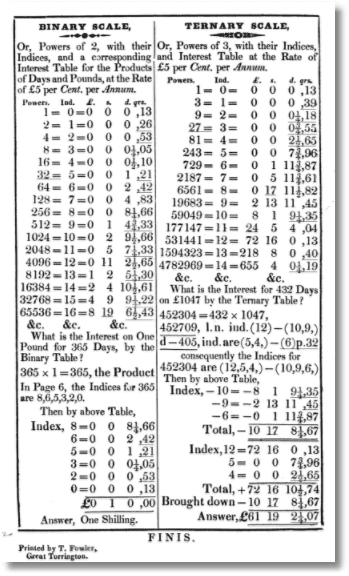
Why did Thomas Fowler publish it? Fortunately, the book has been scanned by Google for you to inspect. He explains why.
“THE following TABLES are Published chiefly for the purpose of facilitating the very troublesome Calculations, which occur every Quarter in making up the Accounts of POOR LAW UNIONS. Having myself been employed in the Torrington Union, to make up the Accounts, at the commencement, I found those Calculations the most troublesome part of the business, and had recourse to the common Logarithms, which certainly abridged the labour, yet even with this valuable aid I was not satisfied, and was constantly searching after some other method more simple, and of easier application;—happily, I hit on the Idea, that any Number might be produced, by a combination of the Powers of the Numbers 2 or 3, and consequently, that the same Indices of the Powers that produced any two or more Numbers, would also represent any other two or more quantities bearing the Ratios of these Numbers, one to another respectively.”
Fowler had never been taught anything about binary or ternary number systems. No books at that time had any information about this. His most significant contribution to computer science was his explanation of the balanced ternary system, which is so elegant and easy to do repetitive calculations that it was well worth the extra bother of translation from decimal to ternary. In fact, he seems to have been the first to discover the practical value of the balanced ternary number system, and certainly the first to exploit it. Essentially, he had discovered that any number could be represented in as a series of values that could be -1, +1 or 0 and represented a power of three according to its ordinal position in a string. Fowler was doing his calculations in this ‘balanced ternary notation’ because it saved him a great deal of time as a council employee doing repetitive calculations, as he explains in his booklet. He had discovered that you could calculate what we’d call ‘percentages’ by simple addition or subtraction of various pre-calculated landmark percentages if you translated the decimal figures into balanced ternary. In fact, once you’d done this conversion, you could then do any repetitive division, multiplication, calculation of a proportion or percentage on them, purely by simple addition; doing the calculation once for every power of three in the range, and subsequently just doing simple addition based on the ternary representation of each number you need to do the calculation for. He explains all this in his booklet.
A simple example of usage
Imagine that goods had a tax rate of 22% (VAT in the UK is currently 20% which is easy to calculate in your head)
We make ourselves a simple calculator that has to change only when the rate changes
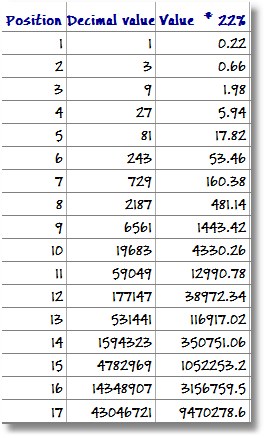
Now, if we want to calculate the figure of 22% of a sum like, for example, 341234, and we have no modern calculator to do it in an instance, we turn 341234 into its balanced ternary equivalent, using Mr Fowler’s splendid booklet to get …
+-0-+000+-+0-
Having done that, we get out our pencil and paper and add up the relevant values from the third column of the chart according to the sign in that position. (A trit is a single position in a ternary number, represented by either a -,+ or 0.)
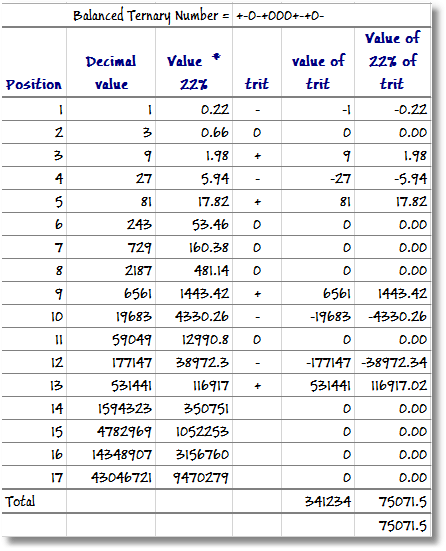
The answer is 75071.5, which we achieved with nothing but simple addition. I’ve attached a simple spreadsheet to allow you to try it out and see what is going on under the covers. Why would Mr Fowler have been so excited by this? Because ‘mental’ addition –without a calculator- is much easier, quicker, and less error-prone than multiplication and division. It meant he got home on time. This idea was a real practical benefit to him in his work.
Thomas Fowler and the Power of Three
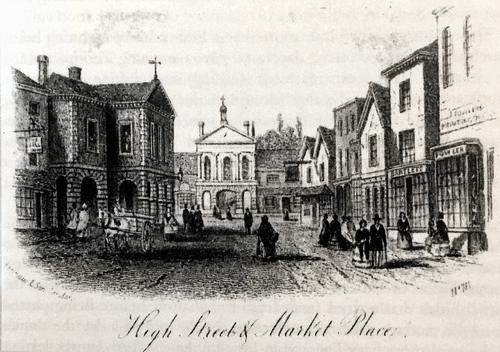
Thomas Fowler of Torrington, in North Devon, Britain, was a man of his time, in an age where everything seemed possible. He was born in 1777. Despite his lack of education or qualifications, he was able to argue on equal terms with Airey, Babbage and De Morgan, the leading mathematicians of the day. Like Michael Faraday, Richard Trevithick, or George Stevenson, he had little formal education. Like them, it didn’t stop either his confidence or energy, and it didn’t stop his peers respecting his abilities. He was a habitual inventor, who had already discovered and patented the principle of the thermosiphon that lead to the introduction of water-based central heating.
Such was Thomas Fowler’s obvious resourcefulness that he established himself as the local printer, council officer, and bank manager in his home town. His father had been a cooper, a very skilled craft, and Thomas had also had a good basic education before being apprenticed to a fellmonger. He was a skilled woodworker and had a fascination for mathematics. He soon became relatively prosperous by taking over the local printworks, and transforming it into a modern concern, supplemented with printing machinery he’d designed and built himself.
In his book, funded by a local squire who was impressed by his ingenuity, he finishes his description of his accounting calculations with a tantalizing demonstration of balanced ternary multiplication:
“I may now conclude, with an Example of Multiplication, by the Ternary Scale, which scarcely requires any mental exertion whatever; no Multiplication, nor even Addition, is required, as ordinarily practised.”
Multiply +0--+-+  =  628
      By +-+00-0  =  564
         _______________
        -0++-+-0    2512
      +0--+-+00     3768
    -0++-+-         3140
   +0--+-+
   _____________________
   +-000000--+-0 =354192
   _____________________
I have to admit that I had plenty of ‘mental exertion’ trying to understand it, at first. It becomes a bit clearer if we lay it out in the same way that we do multiplication by hand.
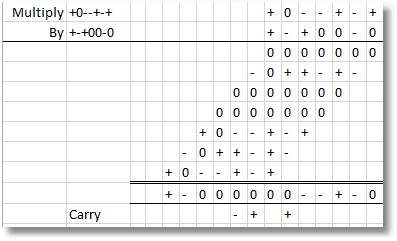
Once again, he avoids any multiplication in favour of simple addition, but I’ll explain more of the nuts and bolts of this later on in this article, and show how the ‘carry’ is performed.
He finishes the introduction to the book with the teasing sentences
“In the course of my observations on the Binary and Ternary Scales, I have fallen on a species of Binary and Ternary Arithmetic, which appears to possess some curious Properties, but, as writing on this subject is incompatible with my present purpose, I have only given a short Example of Multiplication, in what may be termed, Ternary Arithmetic, the process is extremely easy, and may be extended to very large Numbers.
Should the Sale of the present Edition be favourable, another will soon follow, in which the Ternary Table will appear under another Form, and extend from Unity to Numbers almost indefinitely great, and also contain some other curious and I hope, useful matter.”
Before we get too immersed in what Thomas Fowler had discovered, I need to explain a bit more about the balanced ternary system and how its remarkable properties led him to design and build a wooden calculating machine.
The example of multiplication has the puzzling line: +-+00-0 = 564.
That left-side value is in balanced ternary, a system based on the curious properties of ‘the power of three’. Anyone who used the old-fashioned weighing scales would be familiar with ‘Bachet’s problem of weights‘; the way that any weight of, say, between one and forty ounces could be done with just four weights: a 1-ounce weight, a 3-ounce weight, a 9-ounce weight and a 27-ounce weight. You chose one or more weight, just putting them on one scale or the other, while the item being weighed was on one of the scales.
With four ‘trits’ of the value 27, 9, 3 and 1, you can represent any value between -40 and +40 by either subtracting them (-), adding them (+) or not using them (0). Negative numbers are as natural to represent as positive ones.
  -40 = ----
  -39 = ---0
  -38 = ---+
  -37 = --0-
  -36 = --00
  -35 = --0+
  -34 = --+-
  -33 = --+0
  -32 = --++
  -31 = -0--
  -30 = -0-0
  -29 = -0-+
  -28 = -00-
  -27 = -000
  -26 = -00+
  -25 = -0+-
|
  -24 = -0+0
  -23 = -0++
  -22 = -+--
  -21 = -+-0
  -20 = -+-+
  -19 = -+0-
  -18 = -+00
  -17 = -+0+
  -16 = -++-
  -15 = -++0
  -14 = -+++
  -13 = ---
  -12 = --0
  -11 = --+
  -10 = -0-
   -9 = -00
|
  -8 = -0+
  -7 = -+-
  -6 = -+0
  -5 = -++
  -4 = --
  -3 = -0
  -2 = -+
  -1 = -
   0 = 0
   1 = +
   2 = +-
   3 = +0
   4 = ++
   5 = +--
   6 = +-0
   7 = +-+
   8 = +0-
|
   9 = +00
  10 = +0+
  11 = ++-
  12 = ++0
  13 = +++
  14 = +---
  15 = +--0
  16 = +--+
  17 = +-0-
  18 = +-00
  19 = +-0+
  20 = +-+-
  21 = +-+0
  22 = +-++
  23 = +0--
  24 = +0-0
|
  25 = +0-+
  26 = +00-
  27 = +000
  28 = +00+
  29 = +0+-
  30 = +0+0
  31 = +0++
  32 = ++--
  33 = ++-0
  34 = ++-+
  35 = ++0-
  36 = ++00
  37 = ++0+
  38 = +++-
  39 = +++0
  40 = ++++
|
So, -40 equals ‘—-‘, because it is -27-9-3-1. Similarly, -8 is ‘-0+’ because it is -9+0+1. In Bachet’s weights system, the ‘-‘ means ‘put the weight on the same scale as the thing being weighed’ and ‘+’ means ‘put the weight on the other side to the thing being weighed’ and ‘0’ means ‘leave the weight in the box’.
Why is this exciting? It is because it solves a fundamental problem of the binary system, which is that binary number have to be stored in a fixed width so that we can represent negative numbers. This is why there is such a rich and confusing plethora of numeric data types in SQL Server or .NET. I once had to write a Binary-coded decimal (BCD) math package in 8080 Assembler. It is accurate, but it isn’t elegant. I’d have done anything short of murder for a simpler way of coding numbers like this. To represent negative numbers in binary we must use Two’s Complement, which assumes a fixed length of representation. In the way that we use numbers in the real world, they just aren’t fixed length; and many of our woes with overflow and rounding errors are due to this simple problem. The ternary system doesn’t have this problem, as it is tri-state. This would have been a godsend. It can be extended to support the ternary equivalent of the decimal point. You can use it for floating point numbers too. With the balanced ternary number, there would be no need for separate encoding for decimal, integer and floating-point numbers. It is more like handling strings. Of course, to be effective you would need a processor that codes in ternary in its registers and has all the math primitives, such as addition and multiplication. These can be, and have been, made. Basically, in a database or the application you could have a single number format for every numeric datatype.
Given all this, why the lack of contemporary interest in ternary computing? It could have turned out rather differently.
The Wooden Ternary Computer
Fowler’s book alone is enough to secure his place in the history of computing, but there was much more behind his interest in the Ternary system than he was revealing. What Fowler didn’t explain in his book, although there were some tantalizing hints, was that he was already engaged in designing and building a wooden, mechanical computing machine in his back-garden workshop, based on the balanced ternary system.
He spent the final part of his life working on this wooden computer, his most ambitious project. He envisaged a small precision metal instrument but hadn’t the machinery or skills to do it, so he set to work to build a mock-up out of wood to demonstrate the principles. It was the size of a weaving loom, and similar in appearance.
Like everything else he did, he threw all his mental energy into trying to improve it. When it was finally revealed in 1840, the design of the mechanical computer deeply impressed Babbage, as well as Baily and De Morgan, who all described it in some detail. Papers about the computer were read to the Royal Society, and it was exhibited for some years in the 1840s, in the George III Museum of Kings College, London, alongside Babbage’s Difference Engine.
Fowler wrote “This Machine was constructed entirely with my own hands (principally in Wood) with the utmost regard to economy and merely to put my Ideas of this mode of calculation into some form of Action; It is about 6 feet long , One foot deep and three feet wide., In Brass & Iron it might be constructed so as not to occupy a space much large than a good portable writing desk and with powers such as I have described.”
Sadly, the creation of two successive designs for the ternary calculating machine were Fowler’s final work: he died in late middle age, dictating to his daughter a description of the machine on his deathbed. Happily, we still have this description of the device and the way it worked. There is a representation of it in a stained glass window in Torrington Church.
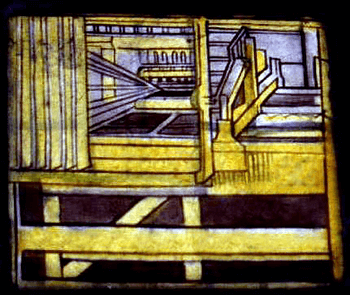
Sadly, without Fowler’s advocacy, the machine attracted little interest, for a variety of reasons. Perhaps the main one was that Babbage’s difference engine could print, and the primary requirement was to print tables for calculating inclination for ranging guns, for navigation and for logarithmic tables. The available tables were inaccurate due to human error, and there was an urgent need for something better. There was no demand then for a calculating machine. Also, the wooden calculator required that the numbers were converted to and from ternary. It was a considerable culture-shock and had to be done by lookup, or by a rather laborious addition/subtraction process described by Fowler in his book. Fowler was trying to demonstrate the principles of the system rather than a practical device and the audience could only see the wood.
It was another half century before Burroughs produced the first commercially-successful calculator. In the meantime, industrial society adapted to the need for computational skills. People discovered that if they spent a large part of their working lives adding up figures, or doing engineering calculations, they became very quick and accurate at it. As recently as forty years ago, I witnessed accountants consistently checking a column of figures on an A4 sheet of paper in around three seconds with complete accuracy. If one includes the OCR input, that feat was impossible to perform with the computing devices that were around at the time. Mechanical and electronic calculators took a long time to get broad acceptance because of the huge potential of the brain for training. Just study, for example, what a professional musician can do!
Since Fowler’s pioneering work, there has been relatively little interest in the ternary system. However, the first working ternary computer was built in Russia, at the Moscow State University, in 1958, designed by Nikolai P. Brusentow and his colleagues. They named it Setun, after the river that flows near the university campus. From 1958 to 1965 around fifty of them were built. The aim was to create a small, simple and cheap computer, that could be used in schools and offices. The design performed well and Setun-70 (1970), a two-stack computer, followed. Had it been given the funding by the state that it deserved, this type of computer would rival the supremacy of the binary system. Although it would be possible to map balanced ternary numbers to binary storage by using two bits per trit, you can’t process ternary numbers quickly in any of the current binary CPUs because it really needs three-state logic to implement mathematic operations. Flip, Flap, flop rather than Flip Flop, as Donald Knuth observed.
Following Fowler’s death, his wooden computer was eventually put into storage, having been broken into several pieces to make it fit the space. The remains were returned to the family. They were unable to reassemble it and, at some point, it disappeared. We now know of its appearance only through an illustration that is part of a memorial stained-glass window in Torrington Church. We have no detailed plans, only Fowler’s description and De Morgan’s account. Recently, a group of historians of computing lead by Mark Glusker have been able to reconstruct parts of the mechanism from the contemporary accounts and the illustration.
After a century and a half of neglect, we are beginning to realize the full significance and relevance of what Fowler discovered.
Exploring the balanced ternary system in SQL
The most interesting thing about Fowler’s contribution to computer science was the balanced ternary system. Basically, it is both a storage and representational system of numbers, decimal, floating-point and integer, that lends itself intrinsically to calculation and manipulation. So, let’s explore this system, using SQL. It could be any other language but many implementations have been done already. Besides, SQL tables have a strange affinity with the table in Fowler’s book. We are not doing this with even the remotest thought that it is a practical idea, but because it is a great way to understand, test, and appreciate the system. I admit to enjoying myself. It exercised some SQL muscles that were getting a bit flabby.
Anything that involves simply converting balanced ternary numbers to integers and doing math on that is cheating. It is too easy. I’m more interested in working out what Fowler had in mind for his vision of mechanical calculation and how he might done this in detail, at the low level; and how we might do it in the future with tri-state logic. We don’t know exactly how he performed addition, subtraction, multiplication and division with the wooden calculating machine, though Mark Glusker (reference at the end) has made a convincing reconstruction of part of the machine. It is intriguing to model the possible ways of doing it. The code for these following SQL routines is attached to the article.
Creating a Number Table
The first exercise for a SQL implementation is to have a ‘number table’ that has both decimal integers and their ternary equivalents, for lookup. This is the approach that Fowler took with his booklet, though it was necessarily in a truncated form for publication.
We also want to convince ourselves that no number has two different balanced ternary representations, and vice-versa. We want a quick reference for testing routines and understanding the way the system works.
As there are only three possible values for each digit, you can easily get all the combinations and permutations of ‘-‘,’+’ and ‘0’ by simply doing repeated cross joins on them, and then calculating the integer. For a broader number table of greater range, you just add cross-joins. Of course, if you have, say, a nine-digit range, zero will be nine zeros long where just one suffices, and so on. It would be nice to truncate leading zeros. Also, we will need to convert from balanced ternary to integer.
For a few of the subsequent routines, I use a lookup view of the actual positional values of the trits of a ternary number. Here is a view that does this.
IF (Object_Id('dbo.TernaryWord', 'V') IS NOT NULL)
     SET NOEXEC On --you don't need to keep recreating this.
GO
CREATE VIEW dbo.TernaryWord
/**
        Summary:   >
        This view returns a list of consecutive integers representing the
		ordinal position of each DecimalValue of a ternary word of 27 DecimalValues,
		together with the decimal value of each DecimalValue. (either positive,
		negative or absent)
        Author: Phil Factor
        Date: 07/09/2017
        Database:PhilFactor
        Examples:
             - code: Select TheIndex, decimalValue from TernaryWord
        Returns: two-column result TheIndex int, decimalValue bigint >
        **/
WITH SCHEMABINDING
AS
 SELECT TheIndex, DecimalValue
  FROM
    (VALUES
	(1, 1),(2, 3),(3, 9),(4, 27),(5, 81),(6, 243),(7, 729),(8, 2187),(9, 6561),
	(10, 19683),(11, 59049),(12, 177147),(13, 531441),(14, 1594323),(15, 4782969),
	(16, 14348907),(17, 43046721),(18, 129140163),(19, 387420489),(20, 1162261467)
	,(21, 3486784401),(22, 10460353203),(23, 31381059609),(24, 94143178827),
	(25, 282429536481),(26, 847288609443),(27, 2541865828329)
) number(TheIndex, decimalValue)
GO
SET NOEXEC OFF
From Balanced Ternary to Integer
The classic approach to this is to use iteration. This can be translated to SQL Server but we are more likely to choose a set-based method for performance. However, it is always useful for double-checking
IF Object_Id('dbo.BalancedTernaryToInteger','FN' ) IS NOT NULL
   DROP function dbo.BalancedTernaryToInteger
GO
CREATE FUNCTION dbo.BalancedTernaryToInteger(@BalancedTernary VARCHAR(50))
/**
Summary: >
  This takes a string representation of a balanced ternary number
  and returns an integer accordingly. It uses iteration so is slower
  than an iTVF solution like IntegerFromBalancedTernary, but is useful
  for checking
Author: PhilFactor
Date: 11/09/2017
Database: PhilFactor
Examples:
   - Select * from dbo.dbo.BalancedTernaryToInteger('+-000000--+-0')
Returns: >
  A one-row table with one column, the integer
        **/
  RETURNS INT
AS
  BEGIN
    DECLARE @ii INT = 1;
    DECLARE @lenii INT = Len(@BalancedTernary), @accumulator INT = 0;

    ---
    WHILE(@ii <= @lenii)
      BEGIN
        SELECT @accumulator =
          CASE Substring(@BalancedTernary, @ii, 1) WHEN '+' THEN (@accumulator * 3) + 1
            WHEN '-' THEN (@accumulator * 3) - 1 ELSE @accumulator * 3 END, @ii = @ii + 1;
      END;

    RETURN @accumulator;
  END;
GO
An inline table-valued function will always do better
IF Object_Id('dbo.IntegerFromBalancedTernary') IS NOT NULL
   DROP function dbo.IntegerFromBalancedTernary
GO

CREATE FUNCTION dbo.IntegerFromBalancedTernary
/**
Summary: >
  This takes a string representation of a balanced ternary number
  and returns an integer accordingly
Author: PhilFactor
Date: 14/11/2017
Database: PhilFactor
Examples:
   - Select * from dbo.IntegerFromBalancedTernary('+-000000--+-0')
Returns: >
  A one-row table with one column, the integer
        **/
  (
  @String Varchar(MAX)
  )
RETURNS TABLE
 WITH SCHEMABINDING
AS
RETURN
  (
    (
    SELECT
      Convert(INT,
  	  Sum( CASE Substring(Reverse(@String), TheIndex, 1)
  	         WHEN '-' THEN -DecimalValue
               WHEN '+' THEN DecimalValue ELSE 0 END
           )
         ) AS TheInteger
      FROM dbo.TernaryWord
      WHERE Len(@String) = TheIndex
    )
  )

GO
So, it is plain sailing to go from ternary to integer.
Removing leading zeros
For certain operations, we will also want to remove leading zeros. Here, we need to ensure that if there are only zeros, then one zero is left. Here again, an inline function is the way to go.
IF (Object_Id('dbo.TrimLeadingZeros', 'IF') IS NOT NULL)
DROP FUNCTION dbo.TrimLeadingZeros
  GO-- if the routine exists this stub creation stem is parsed but not executed
  CREATE FUNCTION dbo.TrimLeadingZeros(@String VARCHAR(MAX))
  /**
          summary:   >
          This function returns a string with all leading zeros removed.
          Author: Phil Factor
          date: 8th Aug 2017
          example:
               - code: select WithoutLeadingZeros from dbo.TrimLeadingZeros('000678')
  			 - code: select  WithoutLeadingZeros from dbo.TrimLeadingZeros('678')
               - code: Select  WithoutLeadingZeros from dbo.TrimLeadingZeros('000')
          returns:   >
          Input string without leading white-space

          **/
  RETURNS TABLE
  WITH SCHEMABINDING
  AS
  RETURN
    (
    SELECT
      CASE WHEN @String NOT LIKE '%[^0]%' THEN '0' else
  	Stuff(' ' + @String,
  	      1,
  	      PatIndex('%[^0]%', '0' + @String + '!' COLLATE SQL_Latin1_General_CP850_BIN) - 1,
  	'') end AS WithoutLeadingZeros
    )
  GO
Part of the script is a quick assertion test to ensure that it works
--now do some quick assertion tests to make sure nothing is broken
  IF EXISTS
    (SELECT *
       FROM
         (VALUES
            ('00000', '0'), ('0296009', '296009'), ('0120000', '120000'),
            ('3218', '3218'), ('0-+000', '-+000') –Tests removed for brevity
         ) AS testCases(TheInput, TheOutput)
         OUTER APPLY TrimLeadingZeros(testCases.TheInput) AS TLZ
       WHERE TheOutput <> WithoutLeadingZeros
    )
    RAISERROR('TrimLeadingZeros failed a test', 16, 1)
So now, with these two table-valued functions in place, we can then create our lookup table.
Creating a lookup table for conversion
We’ll restrict ourselves to a tryte of nine trits wide, giving us 59049 integers between 29524 and -29524. A register of 27 trits wide would be enough for most of us, and would represent 7625597484987 numbers, about the same as a 44-bit word, but you’ll need a faster computer and more patience than I have, to calculate them all.
IF EXISTS(SELECT * FROM tempdb.sys.tables WHERE name LIKE '#tempBalancedTernary%')
     DROP TABLE  #tempBalancedTernary
  Create TABLE #tempBalancedTernary (symbol varchar(20) NOT null,IntegerValue INT NOT null)
  DECLARE @trinary TABLE(token CHAR(1))
  --create the table containing the three allowed symbols
  INSERT INTO @trinary(token)
     SELECT token from (VALUES ('-'),('0'),('+'))f(token)
  INSERT INTO #tempBalancedTernary (symbol, IntegerValue)
    SELECT symbol, Coalesce(TheInteger,0) FROM
     (SELECT WithoutLeadingZeros
        FROM @trinary a
        CROSS JOIN @trinary b
        CROSS JOIN @trinary c
        CROSS JOIN @trinary d
        CROSS JOIN @trinary e
        CROSS JOIN @trinary f
        CROSS JOIN @trinary g
        CROSS JOIN @trinary h
        CROSS JOIN @trinary i
        CROSS JOIN @trinary j
        OUTER APPLY dbo.TrimLeadingZeros
         (a.token+b.token+c.token+d.token+e.token+f.token+g.token+h.token+i.token+j.token)
     )AllPPermutations(symbol)
  OUTER APPLY dbo.IntegerOfBalancedTernary(symbol)
  GO
  ALTER TABLE #tempBalancedTernary
    ADD CONSTRAINT TheTernaryKey unique (Symbol);
  ALTER TABLE #tempBalancedTernary
    ADD CONSTRAINT IntegerValuePKey PRIMARY KEY CLUSTERED (IntegerValue);
We now have a quick way of translating between integer and balanced ternary. We can easily test things out. We can now progress to the simple mathematical operations that so engrossed Thomas Fowler. The table that we produced in the preceding introductory paragraph was produced simply by the query …
SELECT Convert(VARCHAR(3), IntegerValue) + ' = ' + symbol
  FROM #tempBalancedTernary
    WHERE IntegerValue BETWEEN-40 AND 40
  ORDER BY IntegerValue
… and we now have an excellent testbed to checking mathematical operations.
Just one last task before we do so, to have a routine that converts from integer to Balanced ternary.
Converting From Integer to Balanced Ternary
IF (Object_Id('dbo.BalancedTernaryOfInteger', 'IF') IS NOT NULL)
     DROP FUNCTION dbo.BalancedTernaryOfInteger
  GO
  CREATE FUNCTION dbo.BalancedTernaryOfInteger(@TheNumber INT)
  /**
          Summary:   >
          This function/view/procedure converts an integer into balanced ternary
          Author: Phil Factor
          Date: 04/09/2017
          Database:PhilFactor
          Examples:
               - code: >SELECT ternary FROM dbo.BalancedTernaryOfInteger(29562)
               - code: >
  SELECT Convert(INT,(TheNumber*59049)-29524), ternary  FROM
    (Values
      (rand()),(Rand()),(Rand()),(Rand()),
  	(Rand()),(Rand()),(Rand()))number(TheNumber)
   outer APPLY dbo.BalancedTernaryOfInteger(Convert(INT,(TheNumber*59049)-29524))

          Returns:   >
          nothing
          **/
  RETURNS TABLE
  WITH SCHEMABINDING
  AS
  RETURN
    (
    SELECT Coalesce(
      (SELECT Substring(
          CASE WHEN @TheNumber > 0 THEN '0+-' ELSE '0-+' END,
          (((Abs(@TheNumber) + Floor(DecimalValue / 2)) / DecimalValue) % 3 + 1),
          1
      ) AS TheTernary
      FROM
        dbo.TernaryWord
        where DecimalValue <= Abs(@TheNumber) + Floor(DecimalValue / 2)
      ORDER BY DecimalValue DESC
      FOR XML PATH(''), TYPE).value('.', 'VARCHAR(27)'), '0') AS ternary
    )
  GO
And now, with an assertion test, we can check that it works with the whole range!
IF EXISTS (
SELECT * FROM #tempBalancedTernary AS TBT
outer APPLY dbo.BalancedTernaryOfInteger(IntegerValue)
WHERE ternary <> symbol)
RAISERROR ('I can''t believe it. The BalancedTernaryOfInteger routine is incorrect',
16,1)

GO
The Basic Mathematical Operations
The next step is to check out negation, addition, incrementing, multiplication and division. This starts easy, but doesn’t stay easy.
Negation
To turn a positive BT (balanced Ternary) number into its negative or vice versa, all you need to turn all the ‘+’ symbols into ‘-‘, and all the ‘-‘ symbols into ‘+’. You leave ‘0’s well alone.
I do this:
SELECT Replace(Replace(Replace('+0--+-+','-','='),'+','-'),'=','+')
Giving
-0++-+-
I’d be pleased if there is a more efficient way!
You can, of course, now prove to yourself that this works by reading them in the lookup table …
SELECT symbol, IntegerValue
FROM #tempBalancedTernary AS TBT
WHERE symbol IN
('+0--+-+', Replace(Replace(Replace('+0--+-+', '-', '='), '+', '-'), '=', '+'))
… which gives …
symbol  IntegerValue
  +0--+-+ 628
  -0++-+- -628
Abs
With the ABS function, you are just negating a negative number and leaving a positive one. A positive number starts with a + and a negative one starts with a ‘-‘, just like decimal notation. The precise meaning is different, though. Here is a simple example.
SELECT CASE WHEN Left(LTrim(ternary),1)='+' THEN ternary
ELSE Replace(Replace(Replace(ternary ,'-','='),'+','-'),'=','+') end
FROM (VALUES ('-+---0'))f(ternary)
Increment and Decrement
Incrementing is the same action as decrementing, and is a subset of full binary addition so I’ll deal with it here. Binary increments can quite often lead to cascading flips of the more significant bits. Ternary increments are less prone to this, so you gain performance from treating it as a separate operation. I’ll use a recursive approach. using the simple rules for this operation, SQL Server functions don’t really handle defaults well, hence the need for the DEFAULT keyword.
IF Object_Id('dbo.incrementTernary', 'FN') IS NOT NULL DROP FUNCTION dbo.incrementTernary
  GO
  CREATE FUNCTION dbo.incrementTernary
    /**
  summary:   >
  This function increments a ternary number. A decrement is just an increment with a
  negative number, of course. This is a recursive scalar function so it isn't going
  to be super fast (av 0.05ms in my timing) !
  Author: Phil Factor
  date: 28th Aug 2017
  example:
    - code: select  dbo.incrementTernary('---',default,'0')
   returns:   >
  the incremented/decremented balanced ternary value as a string.

  **/
    (
    @ternary VARCHAR(27),
    @IndexIntoTrigit INT=NULL,
    @increment CHAR(1)
    )
  RETURNS VARCHAR(27)
  AS
    BEGIN
  	IF @IndexIntoTrigit IS NULL SELECT @IndexIntoTrigit=Len(@ternary) --initial call
      IF @increment IN
      ('-', '+')
        BEGIN
          SELECT @ternary=Stuff(@ternary,@IndexIntoTrigit,1,
           CASE Substring(@ternary,@IndexIntoTrigit,1)
             WHEN '-' THEN CASE @increment WHEN '-' THEN '+' WHEN '+' THEN '0' ELSE @increment end
             WHEN '+' THEN CASE @increment WHEN '-' THEN '0' WHEN '+' THEN '-' ELSE @increment END
             ELSE  @increment END)
          IF(Substring(@ternary, @IndexIntoTrigit, 1) = '-' AND @increment = '+')
            OR (Substring(@ternary, @IndexIntoTrigit, 1) = '+' AND @increment = '-')
            IF(@IndexIntoTrigit < 2)
              SELECT @ternary = dbo.incrementTernary('0' + @ternary, @IndexIntoTrigit, @increment)
            ELSE SELECT @ternary = dbo.incrementTernary(@ternary, @IndexIntoTrigit - 1, @increment)
        END
      RETURN @ternary
    END
  GO
Binary Addition
Binary addition refers to simple addition of two values, an L_value and an R_value. We will need more than this for multiplication, which is the ability to sum an arbitrary set of values.
Here is a simple addition just to show how it is done.
+++---000
   +-0+-0+-0
  __________
  +-0+-+-+-0
Starting from the least significant right-hand side, we look at the digit in the two values. Two zeros result in a zero, of course. In the next column is a minus and a zero, leaving a minus. All is simple until we get to the fifth column with two minuses. Hmm. There is a ‘minus’ carry and a ‘plus’ residual. That means that the next column should end up with zero, but there is a carry and so it is a minus. Then it is all simple until we get to the final left-side column where the two plusses give a ‘minus’ carry and a ‘plus’ residual. The carry appears in the rightmost column of the sum.
Knuth summarizes all this in his table:

Which I’ve translated
---------000000000+++++++++ carry
   ---000+++---000+++---000+++ lvalue
   -0+-0+-0+-0+-0+-0+-0+-0+-0+ rvalue
  _____________________________
   0+-+-0-0++-0-0+0+--0+0+-+-0 addition
  _____________________________
   --0-00000-0000000+00000+0++ carried
By ‘Carry’ I mean the number carried over from the summation of the previous trigit.. The ‘carry’ for addition is unusual in that it can be positive or negative. We are dealing with both positive and negative numbers. The ‘carried’ row is the value that must be carried to the next column because of the calculation
Subtraction is the same operation as addition. You just add a negation of the number. It is just a simple string manipulation. Carry is just a simple single-character ternary value, and so it can be dealt with simply. The obvious approach is iterative but we like to avoid that.
You can use Knuth’s lookup table to do the addition, and I rather like it because it is closer to the spirit of Fowler’s wooden computer.
IF Object_Id('dbo.KnuthAdd_BT', 'FN') IS NOT NULL DROP FUNCTION dbo.KnuthAdd_BT
  GO
  CREATE FUNCTION dbo.KnuthAdd_BT
    /**
  summary:   >
  This function adds two balanced ternary numbers via a lookup. It uses Knuth's
  lookup table rather than doing the calculation
  ---------000000000+++++++++ carry
  ---000+++---000+++---000+++ lvalue
  -0+-0+-0+-0+-0+-0+-0+-0+-0+ rvalue
  ____________________________
  0+-+-0-0++-0-0+0+--0+0+-+-0 addition
  ____________________________
  --0-00000-0000000+00000+0++ carried

  Author: Phil Factor
  date: 28th Aug 2017
  example:
    - code: select  dbo.KnuthAdd_BT('+--0-','0+++-000')
    - code: select  dbo.KnuthAdd_BT('++++','++++')
    - code: Select  dbo.KnuthAdd_BT('','+++')
    - code: Select  dbo.KnuthAdd_BT('0','000000')
  returns:   >
  the balanced ternary value as a string.

  **/
    (
    @Lvalue VARCHAR(27),
    @RValue VARCHAR(27)
    )
  RETURNS VARCHAR(27)
  AS
    BEGIN
      DECLARE @Maxlen INT, @carry CHAR(1) = '0', @addition VARCHAR(27) = '' --initialize our result
      SELECT @Maxlen = Len(@Lvalue), --determine the maximum length
        @Maxlen = CASE WHEN @Maxlen < Len(@RValue) THEN Len(@RValue) ELSE @Maxlen END
      SELECT @addition = CASE @carry WHEN '-' THEN minusresult
                           WHEN '0' THEN zeroResult
                           WHEN '+' THEN plusresult END + @addition,
        @carry = CASE @carry WHEN '-' THEN minuscarry
                   WHEN '0' THEN zerocarry
                   WHEN '+' THEN pluscarry END
        FROM
        ( --the trits in the same ordinal position combined into a string up to the maximum length
        SELECT Substring(Reverse(@Lvalue) + Replicate(0, 27 - @Maxlen), TheIndex, 1)
               + Substring(Reverse(@RValue) + Replicate(0, 27 - @Maxlen), TheIndex, 1), TheIndex
          FROM
            (VALUES
  -- SQL Prompt formatting off
        (1),(2),(3),(4),(5),(6),(7),(8),(9),(10),(11),(12),(13),
  	  (14),(15),(16),(17),(18),(19),(20),(21),(22),(23),
  	  (24),(25),(26),(27))number(TheIndex)
  -- SQL Prompt formatting on
          WHERE TheIndex <= @Maxlen + 1
        ) AS FirstTwoDigits(digits, TheIndex)
          INNER JOIN
            (VALUES --Knuth's table rearranged for the convenience of relational operations
   ('--', '0', '+', '-', '-', '-', '0'),
  ('0-', '+', '-', '0', '-', '0', '0'),
  ('+-', '-', '0', '+', '0', '0', '0'),
  ('-0', '+', '-', '0', '-', '0', '0'),
  ('00', '-', '0', '+', '0', '0', '0'),
  ('+0', '0', '+', '-', '0', '0', '+'),
  ('-+', '-', '0', '+', '0', '0', '0'),
  ('0+', '0', '+', '-', '0', '0', '+'),
  ('++', '+', '-', '0', '0', '+', '+'))
          AS Addition(digits, minusresult, zeroResult, plusresult, minuscarry, zerocarry, pluscarry)
            ON Addition.digits = FirstTwoDigits.digits
        ORDER BY TheIndex
      RETURN --knock off any leading zeros.
    CASE WHEN @addition NOT LIKE '%[^0]%' THEN '0' else
    Stuff(' ' + @addition, 1,
  	    PatIndex('%[^0]%', '0' + @addition + '!' COLLATE SQL_Latin1_General_CP850_BIN) - 1,
  	    '')
    END
  END
The other approach I use is more complicated than strictly necessary as it deals with any amount of values of carry, which is necessary for the Sum_BT function. However, it isn’t much simpler to use Knuth’s lookup table. We are, however, rather cheating in that we are using integer division and a modulus function
IF Object_Id('dbo.Add_BT', 'FN') IS NOT NULL DROP FUNCTION dbo.Add_BT
  GO
  Create FUNCTION dbo.Add_BT
  /**
          summary:   >
          This function adds two balanced ternary numbers
          Author: Phil Factor
          date: 23th Aug 2017
          example:
               - code: select  dbo.Add_BT('+--0-','0+++-000')
  			 - code: select  dbo.Add_BT('+++','+++')
               - code: Select  dbo.Add_BT('','+++')
  			 - code: Select  dbo.Add_BT('0','000000')
          returns:   >
          the balanced ternary value as a string.

          **/
    (
    @Lvalue Varchar(200),
    @RValue Varchar(200)
    )
  RETURNS VARCHAR(80)
  AS
    BEGIN
      DECLARE @difference INT
      SELECT @difference = Len(@Lvalue) - Len(@Rvalue)
      IF @difference < 0 SELECT @Lvalue = Replicate('0', Abs(@difference)) + @lvalue
      ELSE SELECT @Rvalue = Replicate('0', @difference) + @Rvalue
      SELECT @Lvalue = '00'+Replace(Replace(Replace(@lvalue, '0', '00'), '+', '+1'), '-', '-1'),
             @rvalue = '00'+Replace(Replace(Replace(@rvalue, '0', '00'), '+', '+1'), '-', '-1')
      DECLARE @result VARCHAR(80), @carry INT;
      SELECT @carry = 0, @result = '';
      SELECT @result = CASE(trit + @carry) % 3 WHEN 2 THEN '-'
                         WHEN-1 THEN '-'
                         WHEN 0 THEN '0'
                         WHEN 1 THEN '+'
                         WHEN-2 THEN '+' ELSE '0' END + @result,
        @carry = CASE WHEN(trit + @carry) > 0 THEN ((trit + @carry) + 1) / 3
                   WHEN(trit + @carry) = 0 THEN 0 ELSE ((trit + @carry) - 1) / 3 END
        FROM
          (
          SELECT Convert(INT, Substring(@Lvalue, (TheIndex * 2) - 1, 2))
                 + Convert(INT, Substring(@Rvalue, (TheIndex * 2) - 1, 2)) AS trit, TheIndex
            FROM dbo.TernaryWord AS TW
            WHERE Substring(@Lvalue, (TheIndex * 2) - 1, 2) <> ''
          ) AS f(trit, TheIndex)
        ORDER BY TheIndex DESC
      RETURN
        CASE WHEN @result NOT LIKE '%[^0]%' THEN '0' else
  	   Stuff(
  	  ' ' + @result, 1,
  	  PatIndex('%[^0]%', '0' + @result + '!' COLLATE SQL_Latin1_General_CP850_BIN) - 1,
  	  '') end
    END
  GO
So we can test the validity of these by a little test harness that will run from SSMS.
This makes use of our table of ternary values against their integer values to make sure that all give the same answer.
DECLARE @lvalue VARCHAR(27), @lint INT, @rvalue VARCHAR(27), @Rint INT
  SELECT @lvalue = symbol, @lint = IntegerValue
    FROM #tempBalancedTernary
    WHERE IntegerValue = Convert(INT, (Rand() * 29525) - 14762)
  SELECT @rvalue = symbol, @Rint = IntegerValue
    FROM #tempBalancedTernary
    WHERE IntegerValue = Convert(INT, (Rand() * 29525) - 14762)
  IF (dbo.add_BT(@Lvalue,@Rvalue)<>dbo.Knuthadd_BT(@Lvalue,@Rvalue))
  OR ((SELECT symbol
   FROM #tempBalancedTernary WHERE integerValue=@lint+@rint)<>dbo.Knuthadd_BT(@Lvalue,@Rvalue))
  	RAISERROR ('test failed',16,1)
  GO 10000
Yes, it looks as if ternary addition works OK!
Sum Addition
We need to be able to do addition of a whole collection of ternary numbers if we are to have the necessary tools for multiplication. This turns out to be only slightly more complicated than addition. We just need to create a user table type that allows us to pass a read-only table to a function.
IF EXISTS (SELECT * FROM sys.types WHERE name= 'BTNumbers')  SET NOEXEC ON
  GO
  CREATE TYPE dbo.BTNumbers AS TABLE
  (
      Number VARCHAR(80)
  )
  SET NOEXEC OFF
  GO
So now we can create a function that will sum any quantity of ternary numbers that we wish
IF Object_Id('dbo.Sum_BT', 'FN') IS NOT NULL DROP FUNCTION dbo.Sum_BT
  GO
  CREATE FUNCTION dbo.Sum_BT
    /**
  summary:   >
  This function takes a list of balanced ternary numbers and returns the
  sum

  Author: Phil Factor
  date: 25th Aug 2017
  example:
    - code:
  returns:   >
  the balanced ternary value of the sum as a string.

  **/
    (@ListOfBTNumbers BTNumbers READONLY)
  RETURNS VARCHAR(80)
  AS
    BEGIN
      DECLARE @result VARCHAR(30), @carry INT;
      SELECT @carry = 0, @result = '';
      SELECT @result = CASE(trit + @carry) % 3 WHEN 2 THEN '-'
                         WHEN-1 THEN '-'
                         WHEN 0 THEN '0'
                         WHEN 1 THEN '+'
                         WHEN-2 THEN '+' ELSE '0' END + @result,
        @carry = CASE WHEN(trit + @carry) > 0 THEN ((trit + @carry) + 1) / 3
                   WHEN(trit + @carry) = 0 THEN 0 ELSE ((trit + @carry) - 1) / 3 END
        FROM
          (
          SELECT TheIndex,
            Sum( CASE Substring(Reverse(f.Number) + '00000000000000000000000', TheIndex, 1)
  		         WHEN '-' THEN -1
                   WHEN '0' THEN 0
                   WHEN '+' THEN 1 ELSE 0 END
               ) AS TritSum
            FROM @ListOfBTNumbers AS f
              CROSS JOIN
                dbo.TernaryWord AS TW
            GROUP BY TheIndex
          ) AS f(TheIndex, trit)
        ORDER BY TheIndex;
      RETURN
    CASE WHEN @result NOT LIKE '%[^0]%' THEN '0'
    ELSE  Stuff(' ' + @Result, 1,
  	    PatIndex('%[^0]%', '0' + @Result  + '!' COLLATE SQL_Latin1_General_CP850_BIN) - 1,
  	    '')
      END
    END
  GO
Now that we have this, we need to test it to make sure it works.
SET NOCOUNT ON
  DECLARE @NumbersToAdd BTNumbers
  DECLARE @IntegerCheck TABLE (value INT)
  INSERT INTO @integerCheck
  SELECT Convert(INT,(TheInteger*59049)-29524) FROM (Values
      (rand()),( Rand()),( Rand()),( Rand()),( Rand()),( Rand()),( Rand()))number(TheInteger)
  INSERT INTO @NumbersToAdd
  	SELECT ternary FROM 	@integerCheck
    outer APPLY dbo.BalancedTernaryOfInteger(value)
  IF (
   SELECT dbo.BalancedTernaryToDecimal(dbo.Sum_BT(@NumbersToAdd)))<>
  (SELECT Sum(value) FROM @integerCheck)
  	RAISERROR('Incredible! the sum function didn''t work',16,1)
  GO 1000
Multiplication
We can now return to that tantalizing example of multiplication, of which Thomas Fowler said, “scarcely requires any mental exertion whatever; no Multiplication, nor even Addition, is required, as ordinarily practiced.”
It makes more sense to those of us who learned long division at school if one adds in the ‘0’s that Fowler left out.
Multiply +0--+-+  =  628
        By +-+00-0  =  564
           _______________
           0000000
          -0++-+-0
         000000000
        0000000000
       +0--+-+0000
      -0++-+-00000
     +0--+-+000000
     _____________________
     +-000000--+-0 =354192
     _____________________
If the relevant trit of the multiplier is ‘+’, then the equivalent partial product is the multiplicand shifted left by the place. If it is ‘-‘, then it is the negated multiplicand similarly shifted. The ‘0’ does nothing. Then the partial products are summed to get the result. All very easy.
IF Object_Id('dbo.Multiply_BT', 'FN') IS NOT NULL DROP FUNCTION dbo.Multiply_BT
  GO
  CREATE FUNCTION dbo.Multiply_BT
    /**
  summary:   >
  This function multiplies two balanced ternary numbers using the method outlined
  by Mark Glusker from an example by Thomas Fowler

  Author: Phil Factor
  date: 27th Aug 2017
  example:
    - code:
  returns:   >
  the balanced ternary value as a string.

  **/
    (
    @Lvalue VARCHAR(27),
    @RValue VARCHAR(27)
    )
  RETURNS VARCHAR(27)
  AS
    BEGIN
      DECLARE @PartialProducts BTNumbers
      INSERT INTO @PartialProducts
        (Number)
        SELECT CASE digit WHEN '+' THEN @Lvalue
                 WHEN '-' THEN Replace(Replace(Replace(@Lvalue, '-', '='), '+', '-'), '=', '+') ELSE
                                                                                                  '0' END
               + Replicate('0', TheIndex - 1)
        FROM
          (SELECT Substring(Reverse(@RValue), TheIndex, 1), TheIndex
             FROM
                dbo.TernaryWord AS TW
          ) AS f(digit, TheIndex)
        WHERE digit NOT IN
      ('0', '')
      RETURN dbo.Sum_BT(@PartialProducts)
    END
And now we can check that it works
DECLARE @lvalue VARCHAR(27), @lint INT, @rvalue VARCHAR(27), @Rint INT
  SELECT @Lvalue = symbol, @lint = IntegerValue
    FROM #tempBalancedTernary
    WHERE IntegerValue = Convert(INT, (Rand() * 29525) - 14762)
  SELECT @RValue = symbol, @Rint = IntegerValue
    FROM #tempBalancedTernary
    WHERE IntegerValue = Convert(INT, (Rand() * 29525) - 14762)
  IF(dbo.Multiply_BT(@Lvalue, @RValue) <>
      ((SELECT symbol FROM #tempBalancedTernary WHERE IntegerValue = @lint * @Rint)
      )
    )
    RAISERROR('Incredible! The test failed', 16, 1)
  GO 1000
Conclusion
Did Thomas Fowler invent something without precedent? Yes, he combined the principles of mechanical calculation with the simplicity of the ternary system to create a successful calculating machine. Had Fowler been given the resources lavished on Babbage, and Babbage’s robust health, he could well have gone on to make the same breakthroughs that Babbage made, such as printing the output and programming the calculations.
Is there still something we can learn from this? We have gone so far down the track of binary technology that is hard to see a ternary computer like the Setun providing anything more than we can get from binary technology. However, there is, potentially, gains to be made in creating maths packages that use balanced ternary, at least in their storage form, because these would hold out the promise of providing a single number type without the dangers of overflow.
For me, though, the biggest excitement is to explore the world of a stubborn, intelligent and determined man born over two hundred years ago in relatively humble circumstances, educating himself by night by thumbing through textbooks to the light of a candle, and then blazing a pioneering trail in a number of different technologies, fueled by a passion for technology, anger and sheer obstinacy. I would love to see him take up his place in the history of computing alongside the better-known pioneers of information technology. He deserves it.
References
Glossary
-
Ternary Scale – the number system based on trits, equivalent to the decimal system.
-
Trit,- the ternary version of a bit, the ternary digit.
-
Tryte – the ternary version of a byte, usually 9 trits wide
-
Ternary Word – a 27 trit wide number.
-
Multiplicand – the number being multiplied
-
Setun – a Series of computers built in Russia on the balanced ternary system
The post The Power of Three and the Wooden Computer appeared first on Simple Talk.




 5G wird von den Netzbetreibern nicht ohne Bedenken aufgebaut. Doch ist das Netz einmal errichtet, sollen laut Huawei die Kosten pro übertragenes Bit sinken. Diese Ansicht teilen auch andere. (


 Der teltarif.de-Newsletter liefert jeden Donnerstag die wichtigsten Meldungen der vergangenen Woche aus den Bereichen Mobilfunk, Internet, Festnetz, Hardware und Broadcast.