AppCode 3.1.6 发布,相隔上一版本时间比较长,因为 AppCode 团队正在努力开发下一个 EAP 版本。此版本主要是解决 OS X 10.10.4 beta 方面的一些问题。
AppCode 3.1.6 现已提供下载,也可以获取自动升级。
Yours as always,
The AppCode Team
AppCode 是一个全新的 Objective-C 的集成开发环境,用于帮助开发 Mac、iPhone 和 iPad 的应用程序。

AppCode 3.1.6 发布,相隔上一版本时间比较长,因为 AppCode 团队正在努力开发下一个 EAP 版本。此版本主要是解决 OS X 10.10.4 beta 方面的一些问题。
AppCode 3.1.6 现已提供下载,也可以获取自动升级。
Yours as always,
The AppCode Team
AppCode 是一个全新的 Objective-C 的集成开发环境,用于帮助开发 Mac、iPhone 和 iPad 的应用程序。


Google's Project Tango tablet — the one with 3D sensors and a rumored $1,000 price tag — is now up for viewing on Google Play. Curiously, though, it's not up for purchase.
The tablet that's listed on Google Play right now is geared at developers to build apps on the technology. So it looks like Google might be keeping its word that the device will be available to developers this year. The Project Tango tablet is also supposed to be available to consumers in 2015

Image: Google Play
The tablet has 3D-motion trackers and captures the geometry of the environment around you. The project goes beyond the tablet itself — Tango is a campaign to "give mobile devices a human-scale understanding of space and motion." Read more...
More about Google, 3d, Tablets, Tech, and Dev Design
Humans could be much more efficient communicators if they could bypass language altogether and directly transmit thoughts, ideas and instructions from one brain to another. Scientists have demonstrated that instant brain-to-brain communication could become a reality with the help of computers.
In recent experiments, researchers from the University of Washington showed that they could send one person's thoughts through a computer to control the hand motion of a person sitting half a mile (0.8 kilometers) away.
The team first demonstrated this brain-to-brain connection was possible back in August 2013. But now the researchers have put the technology through more rigorous testing and are close to making it usable in real-world scenarios, they said Read more...
More about Communication, Mind, Brain, Tech, and Dev DesignXLIlovely technologically
So cute video from Primesense about world of 3D sensing. Sensors everywhere! )))
BTW. Today at CES 2013 they will present the smallest 3d sensor - the Capri.
XLIthis is interestingly amazing
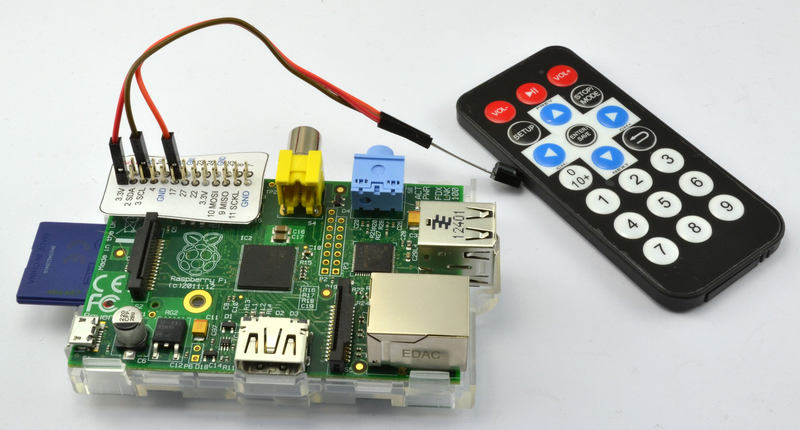
本篇教程将会讲解如何用一部红外遥控器来遥控操作树莓派上安装的影音中心.
XLInice tutorial to enter wordpress dev
Since WordPress is one of the leading content management systems out there it spurs countless people to become developers themselves. Some of the best I know in the industry emerged from these “DIY developers” – people who started looking at code as a hobby.
WordPress is a good medium to start out in because its functions are clear, the coding style is extremely transparent and easy to understand and the documentation is phenomenal (not to mention the huge community). With this article I hope I can give you a quick primer on where to start your long but – hopefully – fun journey!
Note to developers: There are quite a few instances where what I explain is not the full story. This is what Terry Pratchett calls “Lies to children”. It is difficult to explain programming concepts to beginners by going into maximum detail. When you learn acceleration in school you are not told that this is actually integral calculus, the sum of the area under a graph. You simply learn the result (speed over time). The idea is the same here 

WordPress is not made of special “WordPress stuff”, it is built using the most common programming language on the web – PHP. There are three more languages used which are responsible for different facets of a WordPress site, bringing the total to four:
Discover how to use the best web design tools on the market plus increase your income to $125+ per hour. LearnWebDevelopment offers the best in freelance training. Learn More.
Note: There are actually a couple of more languages used like XML or MySQL. You will either not need to use these languages or by the time you do, you’ll know them. Their use is either indirect (used through PHP functions) or relegated to a small, hidden facet of WordPress
In order to be an accomplished WordPress dev you’ll need to be well versed in all three. In my opinion HTML is the easiest to learn, followed by CSS and then comes PHP. Do not mistake easy to learn with easy to master. While you can get going with HTML and CSS in a couple of days, CSS in particular is difficult to master.
The answer to this question depends on the type of person you are. There are two basic paths you can take. You can start fiddling first and learn what you need to do along the way, or you can sit down and start by learning the languages involved first.
This is the path that I took when I started out 9 years ago (I think it was WordPress 1.2 at the time). I had a basic blog which was fine, I just wanted a different background color. I started digging around and managed to change it. I had no idea what I was doing but any time I wanted to change something I looked at forums, tutorials available and tried to understand what I actually did.
Eventually this led me to actually learn programming properly by reading PHP documentation, CSS specs and so on, but the initial boost was from actually achieving something.
This is akin to learning music. If children have to learn music theory first they may be put off. Give someone a guitar or a piano first, teach them a few chords and they’ll be much more receptive to the theory.
If you like a hands on approach and you tend to fall on your feet and think fast, the meddler is for you.
Many people decide to sit down and learn a language first. This way is just as good and can be just as rewarding. While you don’t get the “rush” of instantly being able to change something on your website you do get it when you finally get to a website and actually know something about it.
The major downside of the meddler approach is that you learn in a less controlled environment with less structure. As a result you are in the dark more than you’d like. If you take the time to learn things first you will have an easier time when the time comes to apply your knowledge.
If you feel ill at ease when you don’t know something, if you’re not a risk taker by nature and you don’t like unexpected things happening the student approach should be your path.
As I’ve mentioned before WordPress is made up of (mostly) PHP, CSS, HTML and Javascript. Which one you start learning is up to you, in any given situation all three are used to generate what you see on the page. I have a strong feeling that disciples of the meddler learning method will want to go for CSS and HTML first while the students will want to tackle PHP.
Using an analogy from architecture:
HTML – or hypertext markup language – is the language which is responsible for giving webpages structure. It is not HTML’s job to tell a heading that it should have a purple background, but it is its job to determine what level that heading should be.
A great example which showcases this perfectly is CSS Zen Garden. If you go to the site you’ll see a list of links on the right under “Select a design”. If you browse through a couple you’ll see that the look of the website changes drastically. On each design the HTML for the webpage is exactly the same. It is the styling of the structure which is different, bringing us neatly to our next language, CSS.
CSS – or cascading style sheet – is a way to style your webpage. If you create a heading and a paragraph in HTML it is the job of CSS to determine how these two elements are shown. Typeface, font size, font weight, color, padding, margin, etc. – all this is up to CSS.
PHP – or PHP: Hypertext Preprocessor (it’s a recursive acronym) – is a server-side scripting language and allows you to perform a number of awesome tricks. For our purposes it is mostly used to output HTML.
When you write HTML you could display any date, but you’ll need to actually type it in. Displaying the current date to a user would be impossible. You could update it daily by hand but even then, you couldn’t account for timezone differences.
This is where PHP comes in. Instead of saying: “The date is 2013-07-02″ you can say: “The date is [current date]“. This is of course not how it looks, but this is the idea and this is where the “server-side” comes in.
A HTML file is retrieved from the server and displayed as is. PHP files are not retrieved from the server. Instead, whenever you look at a PHP page the code is processed on the server and you only see the result. The “[current date]” bit in our example is replaced by the actual current date and only then is it sent to your browser.
Javascript is a versatile, multi-purposed language. For our purposes it is used to enhance the behaviour of the website. When you send a contact message through a form the page usually reloads and you get a success message. With Javascript you could make the form slide away and a message float in, instead of reloading the page. It is a layer on top of HTML and CSS which adds functionality.
The best place to start is WordPress itself. As I mentioned, it is a very understandable system, The PHP and HTML will be especially easy to learn through it.
I suggest looking into the default twentytwelve theme. This theme (and others) can be found in the wp-content/themes folder in your WordPress installation. The “page.php” file is responsible for displaying WordPress pages. Open this file and navigate to a page on your website. You’ll notice that it is quite easy to determine what’s going on.
<article id="post-<?php the_ID(); ?>" <?php post_class(); ?>>
	<header class="entry-header">
		<h1 class="entry-title"><?php the_title(); ?></h1>
	</header>

	<div class="entry-content">
		<?php the_content(); ?>
		<?php wp_link_pages( array( 'before' => '<div class="page-links">' . __( 'Pages:', 'twentytwelve' ), 'after' => '</div>' ) ); ?>
	</div><!-- .entry-content -->
	<footer class="entry-meta">
		<?php edit_post_link( __( 'Edit', 'twentytwelve' ), '<span class="edit-link">', '</span>' ); ?>
	</footer><!-- .entry-meta -->
</article><!-- #post -->
On line 3 there is some thing called a function, ‘the_title()’. The title of the page is added in place of this. If you would change this line to the following you would be able to display the text ‘Title:’ before the title:
<h1 class="entry-title">Title: <?php the_title(); ?></h1>
Even if it isn’t all clear it is worth looking into these files and trying to figure out what is happening. the WordPress Codex is your friend through all of this!
The WordPress Codex is THE WordPress documentation. It has numerous getting started articles and tutorials and it also has documentation for almost every function used.
Previously you’ve seen the ‘the_title()’ function. A quick search will get you the documentation for the_title() where you can read all about this function and all the options it gives you.
Upon reading the explanation of the title function you can figure out that we can also put the text “Title:” before our title like this:
<h1 class="entry-title"><?php the_title( 'Title:' ); ?></h1>
Even though you haven’t learned about PHP functions and arguments yet you are already using them like a pro. This is why using WordPress to learn programming is so great.
Specific tutorials are also very helpful, usually when you have a goal in mind. If you want to display the excerpt of an article instead of the full content you can look at tutorials, like one I found on Wpbeginner.
More often than not, these articles will teach you what you need to know, and then some. Quite frequently you won’t get some part of what’s being said. While this is annoying as heck, it is ok. You won’t be able to take everything in at once but you’ll get there eventually.
There are a number of sites which offer complete courses on WordPress, and other programming languages. Some have popped up recently which are phenomenally good. Treehouse, Tutsplus Premium and Code Academy are all great places to learn.
I wish there would have been resources like this when I started out, I am particularly fond of Treehouse. It is fun, easy to understand and a joy to learn things. I use it in my company to train new people and I use it myself to learn new skills.
The great benefit of using these sites – even though they cost some money – is that you get an all-encompassing education. The truth is that HTML, CSS, PHP and Js is completely useless on its own. How you use JS can depend on all three of the other languages for example, so making sure they you get taught everything in a good system is a great way to move forward qucikly.
Reading top blogs in this area is essential for any developer – beginners and pros alike. Beginners learn from all the articles and pros stay on top of their game. Most websites in the development field carry in-depth technical articles, lighter reading and articles aimed at beginners as well, so you’ll definitely find interesting pieces on your level, whatever that level is. Take a look at the resources section at the end of the article for some examples.
I am not a huge fans of forums as they can dispense some inaccuracies. However while learning, sometimes it is good to fall into other peoples’ mistakes as well. The only way to become a top-notch developer is to make so many mistakes that you become really good at identifying them and sidestepping them.
Stackoverflow, Daniweb, The WordPress Forums and other sites can be great for getting information and figuring out why something isn’t working. It can also help you find friends and contacts in the industry which is not to be sneezed at. Being able to ask a buddy via email why that darned function isn’t working is a lot easier that posting on a forum.
You think only coders work on WordPress? Think again! Documentation writers, language specialists, translators, back-end consultants, marketing people, etc. all contribute, many don’t know anything about coding. Even just sharing your thoughts and feature ideas could be a great help.
Becoming active in the community will teach you a lot about WordPress and some of the technical aspects will rub off on you as well. It will bring you closer to the experts who know all there is to know about it and they will help you out if you ask for it if you are a valuable member of the community.
There is a great article in the Codex about Contributing to WordPress. Pick your poison and help out.
There are numerous other ways to help out. Pick your favorite plugin and contact the developer. Tell him/her that you love the product and if he needs any help testing you’d be happy to lend a hand. You can do the same with themes or any other WordPress related product. Trying to be a genuine help will take you places you never expect!
Becoming a WordPress developer is hard but rewarding work. The good news is that there are ways to further your career in this field than by coding. Taking part in the community, helping out others who know less than you do is just as effective.
By being a valuable member of the community and practicing a lot you’ll be creating your own WordPress themes in no time!
XLIgood post

Administering many sessions of usability testing has shown us that people either attribute their failures to forces outside of their control (e.g. “The website doesn’t work and needs to be fixed) or to things they have influence over (e.g. “I’m not that good with computers but I could probably learn how to use it”).
A person’s perceived influence over outcomes is known, in psychobabble, as their ‘locus of control’ and it has a profound effect on usability testing results.
Qualitative data and verbatims from individuals with an internal locus of control often reflect a positive user experience, even when they have made several errors performing tasks. Similar to the respondent in the scenario depicted in the cartoon below, these individuals attribute their errors to their own actions, rather than failures of the...read more
By James Breeze, Alexis Conomos
XLIgood one

Read full post: Raspberry Pi’s Father Speaks: Eben Upton On The Future of Technology And More
XLImy parents need one

Read full post: 7 Ways to Ensure Your Loved Ones’ PC Will Never Need Fixing
XLIinteresting design
“If cities were smarter, then life in cities would be better. That’s why IBM created ads with a purpose. By adding a simple curve, we gave advertising a new function.”


Great idea. A bit like this from last month.
Via @issue (and, after neglecting my feed reader for five days, quite a few others too).
Credits:
Ogilvy & Mather France
Chief creative officer: Chris Garbutt
Executive creative director: Susan Westre
Art director: Daniel Diego Lincoln
Copywriters: Lauren Elkins, Andrew Mellen
Concept: Daniel Diego Lincoln, Stephane Santana
Photographer: Bruno Bicalho Carvalhaes

XLIgood work saves me alot efforts
After being unable to find any really good color picker dialogs for Android, I decided to make my own, and this is how it turned out:
I made the dialog a two-part color picker based on the HSV color model: First you select the hue and saturation parts in a circle, and then finally select the value in a gradient below as seen in the screenshots below. The dialog is available for download in the GitHub repository: HSVColorPickerDialog.java


The HSVColorPickerDialog is based on the AlertDialog, and it is really easy to use:
public HSVColorPickerDialog(Context context, int initialColor, final OnColorSelectedListener listener);

public interface OnColorSelectedListener {
    /**
     * @param color The color code selected, or null if no color. No color is only
     * possible if {@link HSVColorPickerDialog#setNoColorButton(int) setNoColorButton()}
     * has been called on the dialog before showing it
     */
    public void colorSelected( Integer color );
}
You call the constructor with a Context, a color that is to be selected as default, and a OnColorSelectedListener that is invoked when the
user has selected a color and pressed OK:
HSVColorPickerDialog cpd = new HSVColorPickerDialog( MainActivity.this, 0xFF4488CC, new OnColorSelectedListener() {
    @Override
    public void colorSelected(Integer color) {
        // Do something with the selected color
    }
});
cpd.setTitle( "Pick a color" );
cpd.show();
Notice how the callback’s color parameter is an Integer and not an int? That is because the dialog has the option of letting the user select no color, in which case the Integer is null. To allow the user to do this, simply call the following method on the dialog before showing it:
cpd.setNoColorButton( R.string.no_color );
This makes the dialog add a third button in the bottom like this:

The post HSV Color Picker Dialog appeared first on Buzzing Android.