Shared posts

04 Aug 16:15

News - Ukraine Talks Collapse, India Threatens Pakistan’s Water Supply, IDF Operation Gideon’s Chariots

Tom Roche

Bessner and (mostly) Davison deliver another EXCELLENT week-in-review (minus the pre- and inter-audio ads)

Subscribe now for an ad-free experience and much more content!

This week in the news roundup: the Ukraine peace talks collapse (3:30) as Trump stuns European allies with his sudden pivot back to positions beneficial to Russia (7:21); in EU elections, a Romanian centrist wins the presidency (11:06), a Polish centrist wins the first round of the presidential election (13:27), and the Portuguese center-right wins that country’s parliamentary election (14:46); India continues to threaten Pakistani water levels (17:05); South African president Ramaphosa’s visit to the White House goes awry (20:04); in Israel-Palestine, the IDF begins Operation Gideon’s Chariots (23:58), the Israelis allow “minimal” aid into Gaza without distribution (27:13), and a European backlash follows the IDF’s operation and a West Bank shooting incident involving diplomats (31:18); Israel again appears to be preparing to strike Iran (35:17); Evo Morales is excluded from the presidential ballot in Bolivia (38:16); a New Cold War update featuring China pledging additional money to the WHO after a pandemic agreement (40:51); and Trump announces the Golden Dome project (43:44).
27 May 18:19

Alvaro Ramirez: Awesome Emacs on macOS

by Alvaro Ramirez
Tom Roche

very long but very interesting collection of Mac hacks

27 May 2025 Awesome Emacs on macOS

Update: Added macOS Trash integration.

While GNU/Linux had been my operating system of choice for many years, these days I'm primarily on macOS. Lucky for me, I spend most of my time in Emacs itself (or a web browser), making the switch between operating systems a relatively painless task.

I build iOS and macOS apps for a living, so naturally I've accumulated a handful of macOS-Emacs integrations and tweaks over time. Below are some of my favorites.

Emacs Plus

For starters, I should mention I run Emacs on macOS via the excellent Emacs Plus homebrew recipe. These are the options I use:

brew install emacs-plus@30 --with-no-frame-refocus --with-native-comp --with-savchenkovaleriy-big-sur-curvy-3d-icon

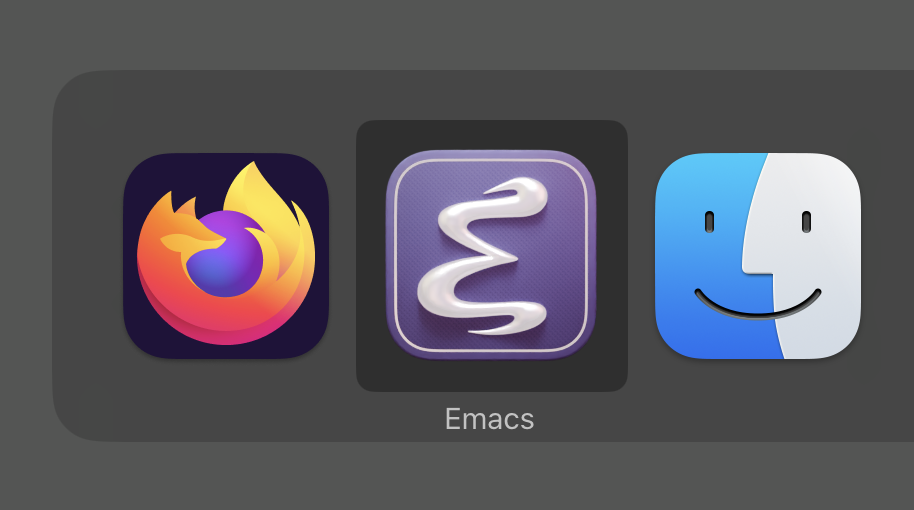
Valeriy Savchenko's icons

Valeriy Savchenko has created some wonderful macOS Emacs icons. These days, I use his curvy 3D rendered icon, which I get via Emacs Plus's --with-savchenkovaleriy-big-sur-curvy-3d-icon option.

icon.png

Modifiers

It's been a long while since I've settled on using macOS's Command (⌘) as my Emacs Meta key. For that, you need:

(setq mac-command-modifier 'meta)

At the same time, I've disabled the ⌥ key to avoid inadvertent surprises.

(setq mac-option-modifier 'none)

Enabling Control-Meta(⌘)-D

After setting ⌘ as Meta key, I discovered C-M-d is not available to Emacs for binding keys. There's a little workaround:

defaults write com.apple.symbolichotkeys AppleSymbolicHotKeys -dict-add 70  'enabled'

Frames

You may have noticed the --with-no-frame-refocus Emacs Plus option. I didn't like Emacs refocusing other frames when closing one, so I sent a tiny patch over to Emacs Plus, which gave us that option.

I also prefer reusing existing frames whenever possible.

(setq ns-pop-up-frames nil)

Visual tweaks


Most of my visual tweaks have been documented in my Emacs eye candy post. For macOS-specific things, read on…

It's been a while since I've added this, though vaguely remember needing it to fix mode line rendering artifacts.

(setq ns-use-srgb-colorspace nil)

I like using a transparent title bar and these two settings gave me just that:

(add-to-list 'default-frame-alist '(ns-transparent-titlebar . t))
(add-to-list 'default-frame-alist '(ns-appearance . dark))


I want a menu bar like other macOS apps, so I enable with:

(use-package menu-bar
   :config
  (menu-bar-mode +1))

menu-bar.webp

Emoji picker (a freebie!)

If you got a more recent Apple keyboard, you can press the 🌐 key to insert emojis from anywhere, including Emacs. If you haven't got this key, you can always M-x ns-do-show-character-palette, which launches the very same dialog.

Also check out Charles Choi's macOS Native Emoji Picking in Emacs from the Edit Menu.


Longing long press for accents?


If you prefer Apple's long-press approach to inserting accents or other special characters, I got an Emacs version of that.

accentuated.webp

Rotate macOS display

I wanted to rotate my monitor from the comfort of M-x, so I made Emacs do it.

Open with

While there are different flavors of "open with default macOS app" commands out there (ie. crux-open-with as part of Bozhidar Batsov's crux), I wanted one that let me choose a specific macOS app.

open-with_x2.webp

Open in Xcode (at line number)

Shifting from Emacs to Xcode via "Open with" is simple enough, but don't you want to also visit the very same line?

SF Symbols (for work)


Apple offers SF Symbols on all their platforms, so why not enable Emacs to insert and render them?

This is particulary handy if you do any sort of iOS/macOS development, enabling you to insert SF Symbols using your favorite completion framework. I happen to remain a faithful ivy user.

sf-insert-trimmed_x1.8.webp

SF Symbols (for fun)

Speaking of enabling SF Symbol rendering, you can also use them to spiff your Emacs up. Check out Charles Choi's Calle 24 for a great-looking Emacs toolbar. Also, Christian Tietze shows how to use SF Symbols as Emacs tab numbers.


Quick kill

While macOS's Activity Monitor does a fine job killing processes, I wanted something a little speedier, so I went with a killing solution leveraging Emacs completions.

kill_x1.8.webp

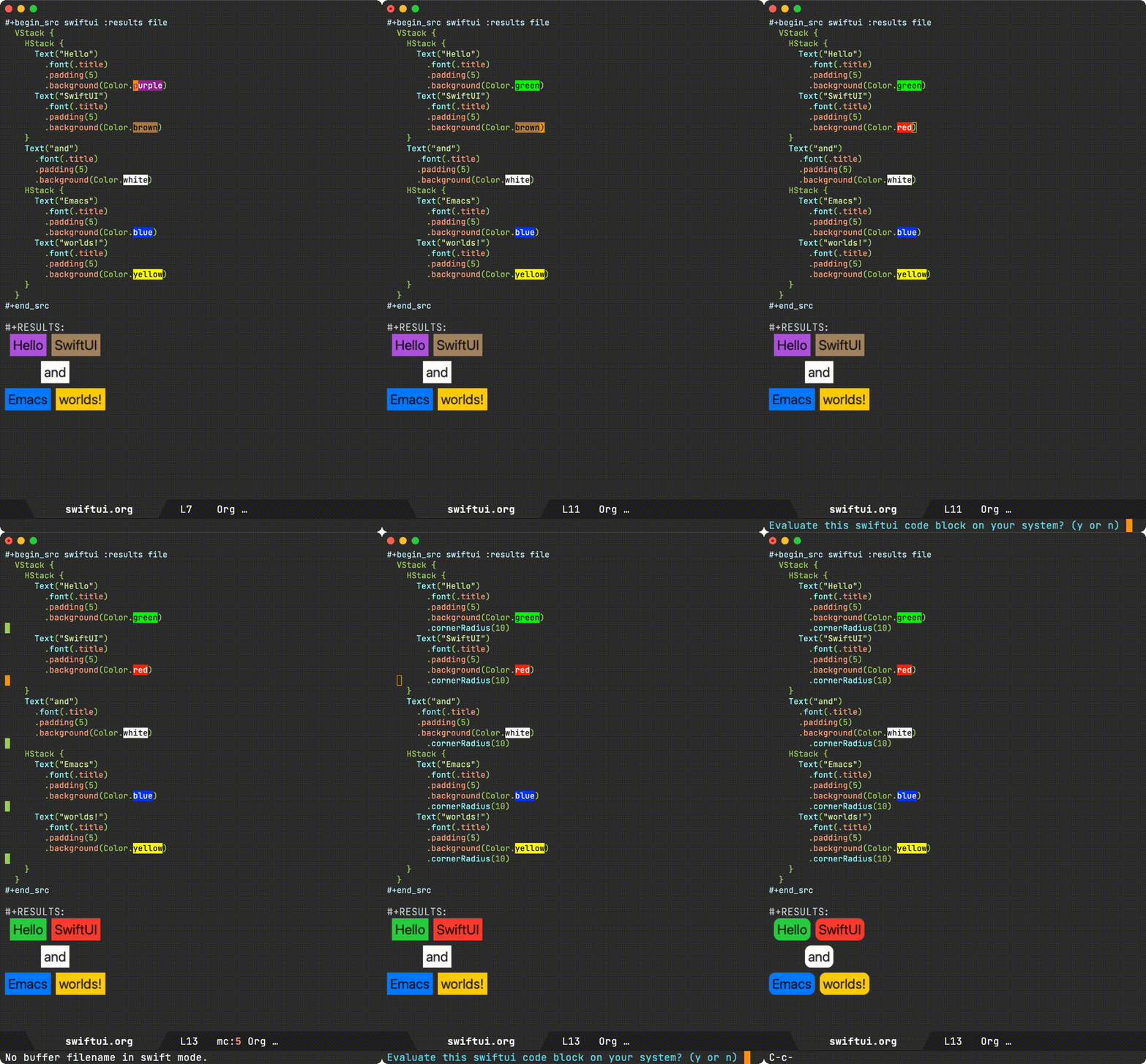
SwiftUI a la org babel

Having learned how simple it was to enable Objective-C babel support, I figured I could do something a little more creative with SwiftUI, so I published ob-swiftui on MELPA.

file-render.gif


Changing macOS default apps

I found the nifty duti command-line tool to change default macOS applications super handy, but could never remember its name when I needed it. And so I decided to bring it into dwim-shell-command as part of my toolbox.

set-default_x1.3.webp

I got a bunch of handy helpers in dwim-shell-commands.el (specially all the image/video helpers via ffmpeg and imagemagick). Go check dwim-shell-commands.el. There's loads in there, but here are my macOS-specific commands:

  • dwim-shell-commands-macos-add-to-photos
  • dwim-shell-commands-macos-bin-plist-to-xml
  • dwim-shell-commands-macos-caffeinate
  • dwim-shell-commands-macos-convert-to-mp4
  • dwim-shell-commands-macos-empty-trash
  • dwim-shell-commands-macos-install-iphone-device-ipa
  • dwim-shell-commands-macos-make-finder-alias
  • dwim-shell-commands-macos-ocr-text-from-desktop-region
  • dwim-shell-commands-macos-ocr-text-from-image
  • dwim-shell-commands-macos-open-with
  • dwim-shell-commands-macos-open-with-firefox
  • dwim-shell-commands-macos-open-with-safari
  • dwim-shell-commands-macos-reveal-in-finder
  • dwim-shell-commands-macos-screenshot-window
  • dwim-shell-commands-macos-set-default-app
  • dwim-shell-commands-macos-share
  • dwim-shell-commands-macos-start-recording-window
  • dwim-shell-commands-macos-abort-recording-window
  • dwim-shell-commands-macos-end-recording-window
  • dwim-shell-commands-macos-toggle-bluetooth-device-connection
  • dwim-shell-commands-macos-toggle-dark-mode
  • dwim-shell-commands-macos-toggle-display-rotation
  • dwim-shell-commands-macos-toggle-menu-bar-autohide
  • dwim-shell-commands-macos-version-and-hardware-overview-info

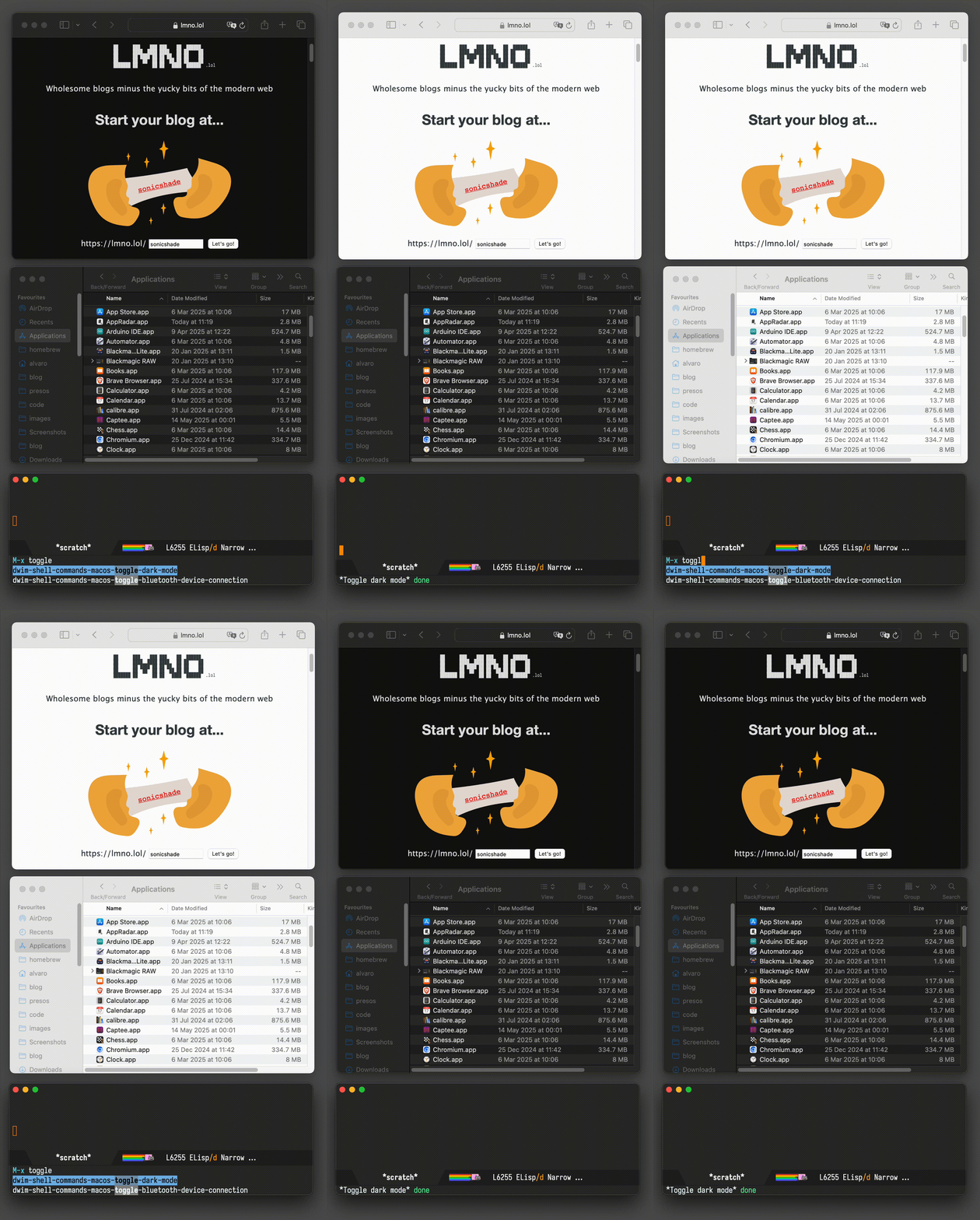
Toggle dark mode

Continuing on the dwim-shell-commands family, I should also mention dwim-shell-commands-macos-toggle-dark-mode.

While I hardly ever change my Emacs theme, I do toggle macOS dark mode from time to time to test macOS or web development.

dark-toggle.gif

Menu bar auto hide

One last dwim-shell-command… One that showcases toggling the macOS menu bar (autohide).

autohide.webp

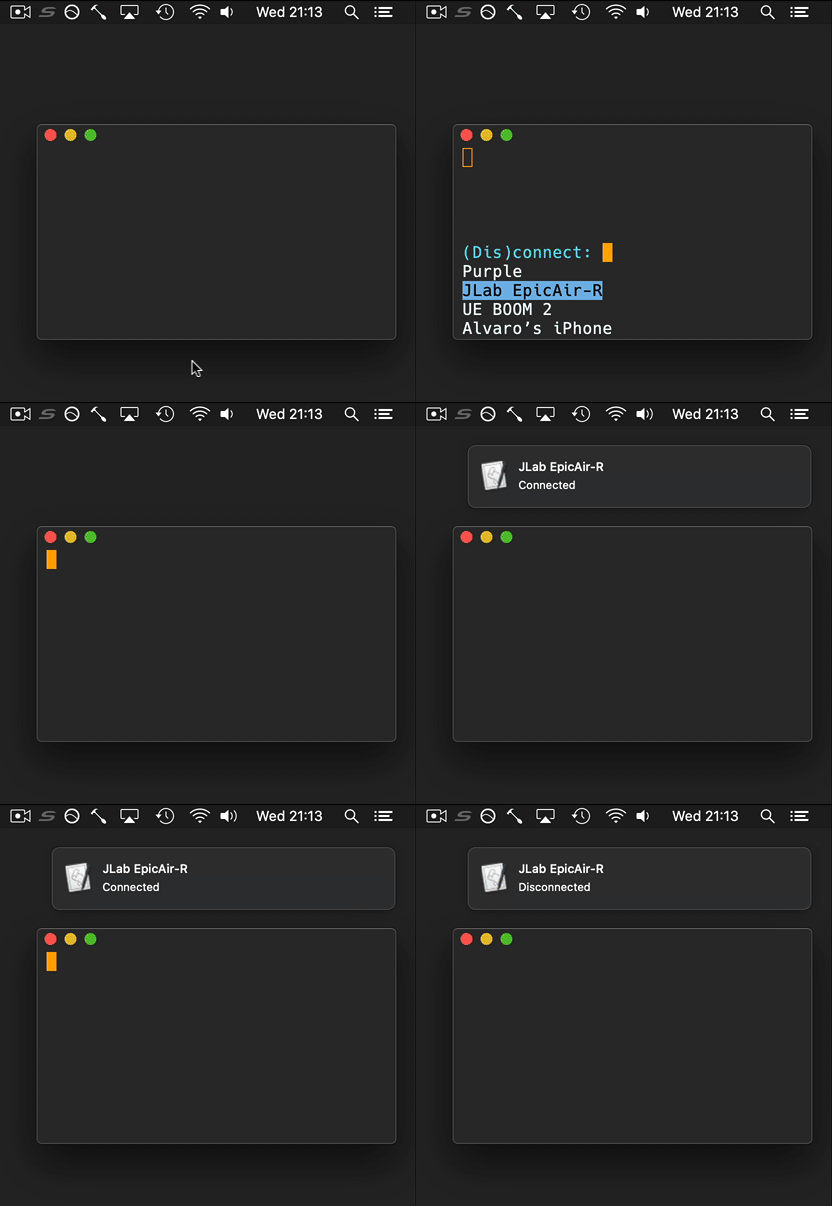
Connect to your Bluetooth speaker

While this didn't quite stick for me, it was a fun experiment to add Emacs into the mix.

connect-disconnect.gif

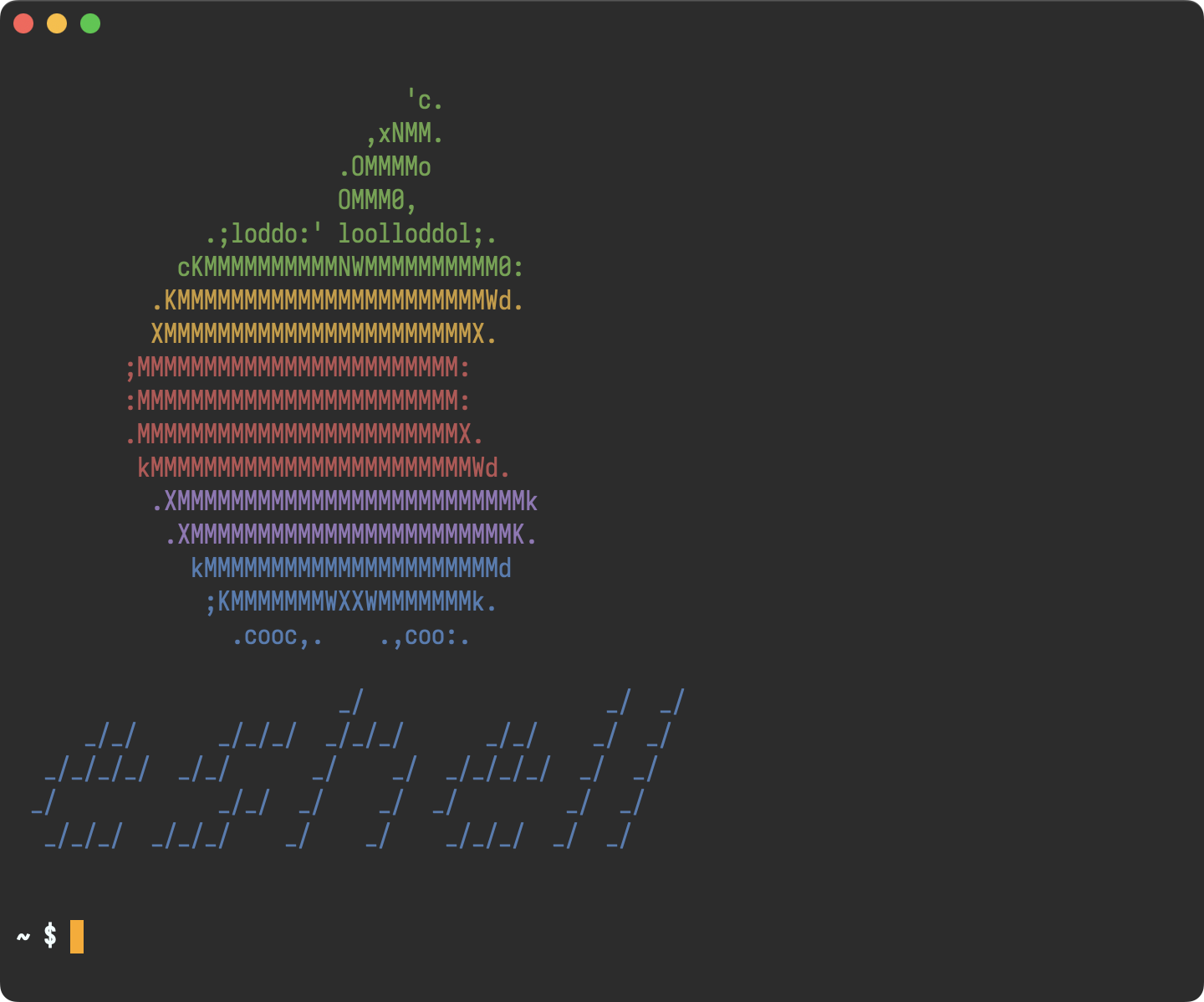
Eshell

This is just a little fun banner I see whenever I launch eshell.

eshell.png

This is all you need:

(use-package em-banner
   :custom
  (eshell-banner-message  "
 \x1b[32m                             'c.                    \x1b[0m
 \x1b[32m                          ,xNMM.                    \x1b[0m
 \x1b[32m                        .OMMMMo                     \x1b[0m
 \x1b[32m                        OMMM0,                      \x1b[0m
 \x1b[32m              .;loddo:' loolloddol;.                \x1b[0m
 \x1b[32m            cKMMMMMMMMMMNWMMMMMMMMMM0:              \x1b[0m
 \x1b[33m          .KMMMMMMMMMMMMMMMMMMMMMMMWd.              \x1b[0m
 \x1b[33m          XMMMMMMMMMMMMMMMMMMMMMMMX.                \x1b[0m
 \x1b[31m        ;MMMMMMMMMMMMMMMMMMMMMMMM:                  \x1b[0m
 \x1b[31m        :MMMMMMMMMMMMMMMMMMMMMMMM:                  \x1b[0m
 \x1b[31m        .MMMMMMMMMMMMMMMMMMMMMMMMX.                 \x1b[0m
 \x1b[31m         kMMMMMMMMMMMMMMMMMMMMMMMMWd.               \x1b[0m
 \x1b[35m          .XMMMMMMMMMMMMMMMMMMMMMMMMMMk             \x1b[0m
 \x1b[35m           .XMMMMMMMMMMMMMMMMMMMMMMMMK.             \x1b[0m
 \x1b[34m             kMMMMMMMMMMMMMMMMMMMMMMd               \x1b[0m
 \x1b[34m              ;KMMMMMMMWXXWMMMMMMMk.                \x1b[0m
 \x1b[34m                .cooc,.    .,coo:.                  \x1b[0m

 \x1b[34m                        _/                  _/  _/  \x1b[0m
 \x1b[34m     _/_/      _/_/_/  _/_/_/      _/_/    _/  _/   \x1b[0m
 \x1b[34m  _/_/_/_/  _/_/      _/    _/  _/_/_/_/  _/  _/    \x1b[0m
 \x1b[34m _/            _/_/  _/    _/  _/        _/  _/     \x1b[0m
 \x1b[34m  _/_/_/  _/_/_/    _/    _/    _/_/_/  _/  _/      \x1b[0m


 "))

Screencasts

I wanted a quick way to record or take screenshots of macOS windows, so I now have my lazy way, leveraging macosrec, a recording command line utility I built. Invoked via M-x of course.

Eglot (LSP) for iOS/macOS dev

If you want any sort of code completion for your macOS projects, you'd be happy to know that eglot works out of the box.

(use-package eglot
   :ensure t
   :hook (swift-mode . eglot-ensure)
   :config
  (message  "warning: ` jsonrpc--log-event ' is ignored.")
  (fset #'jsonrpc--log-event #'ignore)
  (add-to-list 'eglot-server-programs '(swift-mode . ("/Applications/Xcode.app/Contents/Developer/Toolchains/XcodeDefault.xctoolchain/usr/bin/sourcekit-lsp"))))

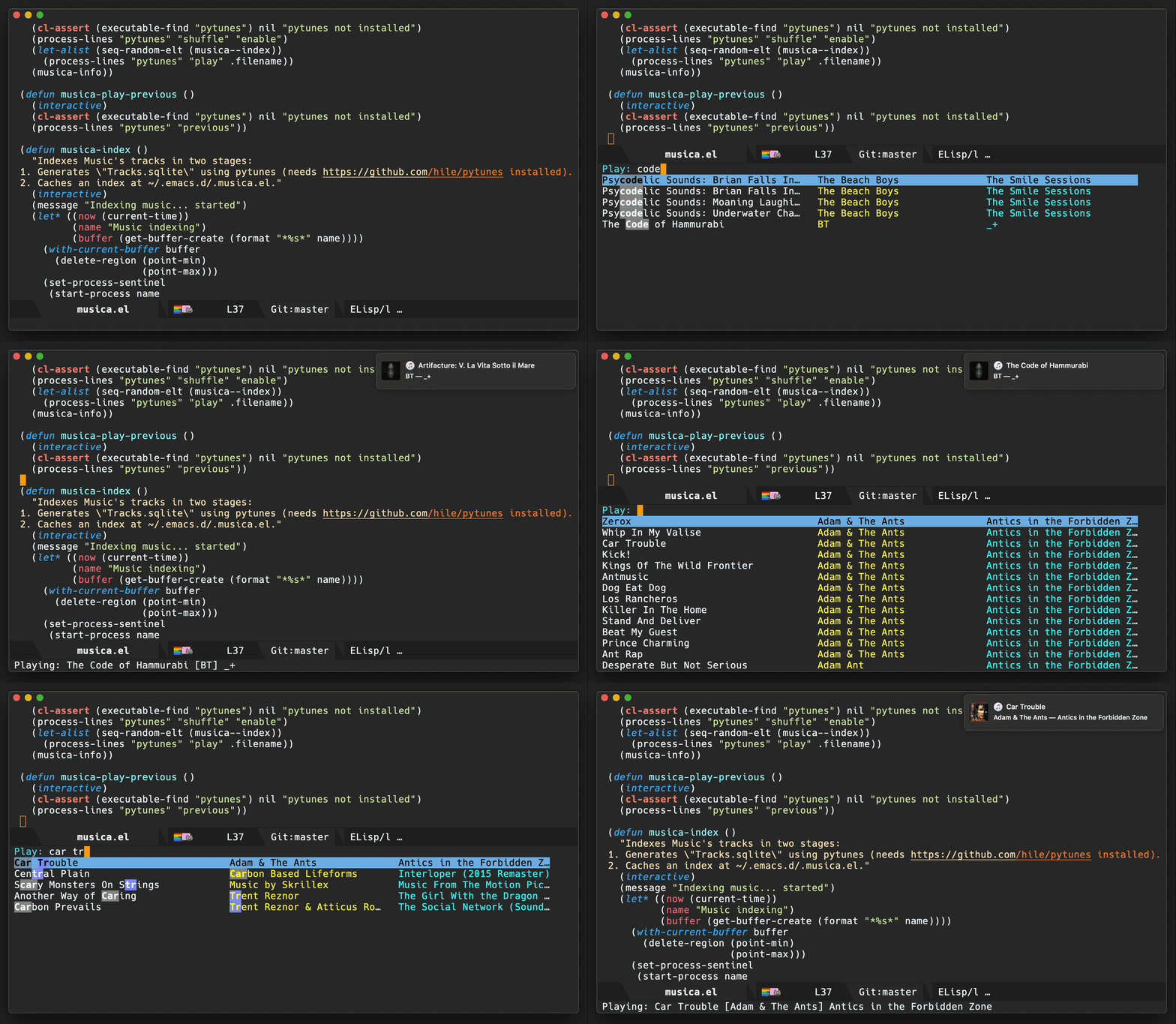
Search and play (Music app)

This is another experiment that didn't quite stick, but I played with controlling the Music app's playback.

music_search.gif

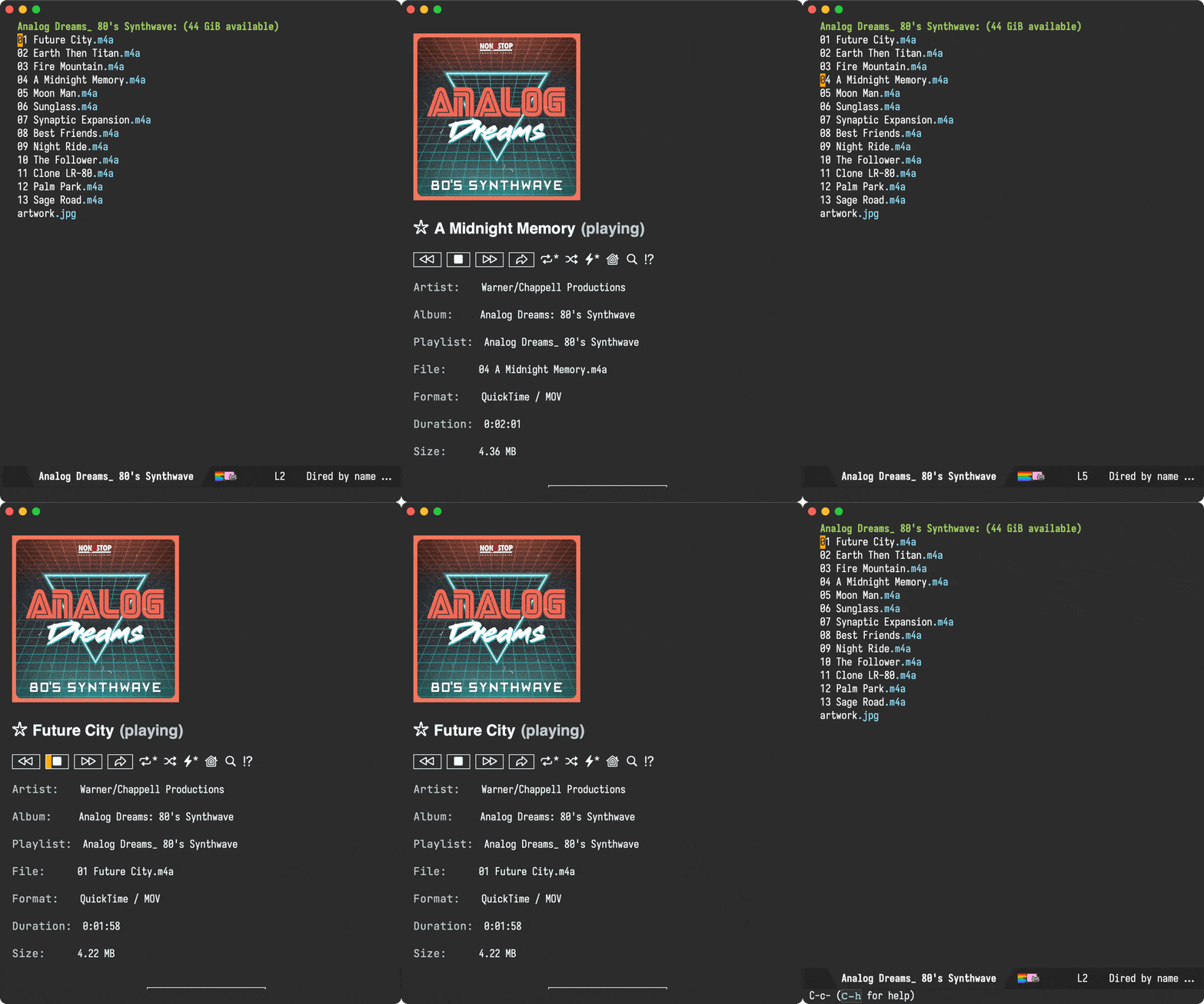
While I still purchase music via Apple's Music app, I now play directly from Emacs via Ready Player Mode. I'm fairly happy with this setup, having scratched that itch with my own package.

open-file.gif

By the way, those buttons also leverage SF Symbols on macOS.

Reveal -> all <- in Finder


While there are plenty of solutions out there leveraging the open command line tool to reveal files in macOS's Finder, I wanted one that revealed multiple files in one go. For that, I leveraged the awesome emacs-swift-module, also by Valeriy Savchenko.

reveal.webp


Use the macOS Trash

The macOS trash has saved my bacon in more than one occasion. Make Emacs aware of it. Also check out M-x dwim-shell-commands-macos-empty-trash.

recovered_x1.6.webp

Build your own macOS utils

While elisp wasn't in my top languages to learn back in the day, I sure am glad I finally bit the bullet and learned a thing or two. This opened many possibilities. I now see Emacs as a platform to build utilities and tools off of. A canvas of sorts, to be leveraged in and out of the editor.

For example, you could build your own bookmark launcher and invoke from anywhere on macOS.

launcher.gif

Emacs as default email composer

Turns out you can also make Emacs your default email composer.

Emacs key bindings everywhere

While not exactly an Emacs tweak itself, I wanted to extend Emacs bindings into other macOS apps. In particular, I wanted more reliable Ctrl-n/p usage everywhere, which I achieved via Karabiner-Elements. I also mapped C-g to Esc, which really feels just great! I can now cancel things, dismiss menus, dialogs, etc. everywhere.

Org as lingua franca

With my Emacs usage growing over time, it was a matter of time until I discovered org mode. This blog is well over 11 years old now, yet still powered by the very same org file (beware, this file is big).

With my org usage growing, I felt like I was missing org support outside of Emacs. And so I started building iOS apps revolving around my Emacs usage.

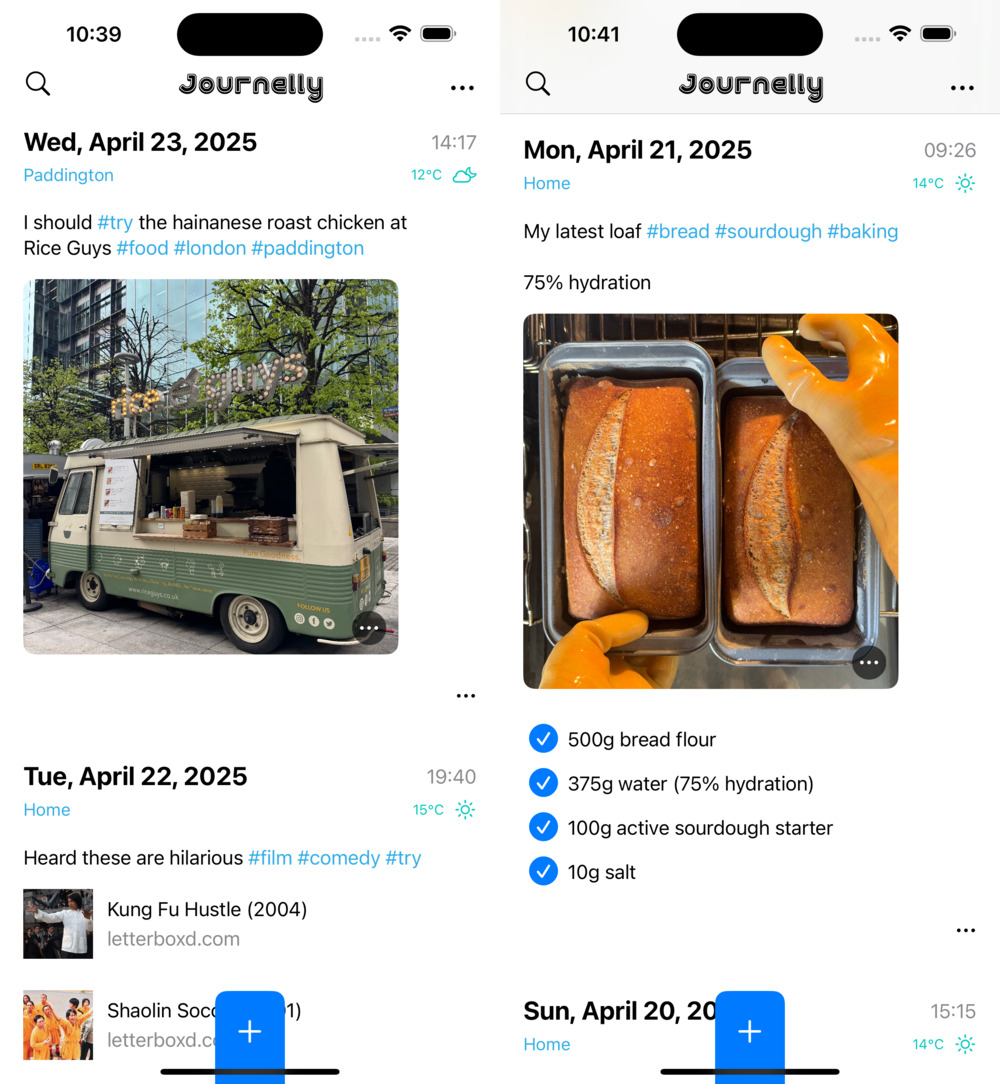
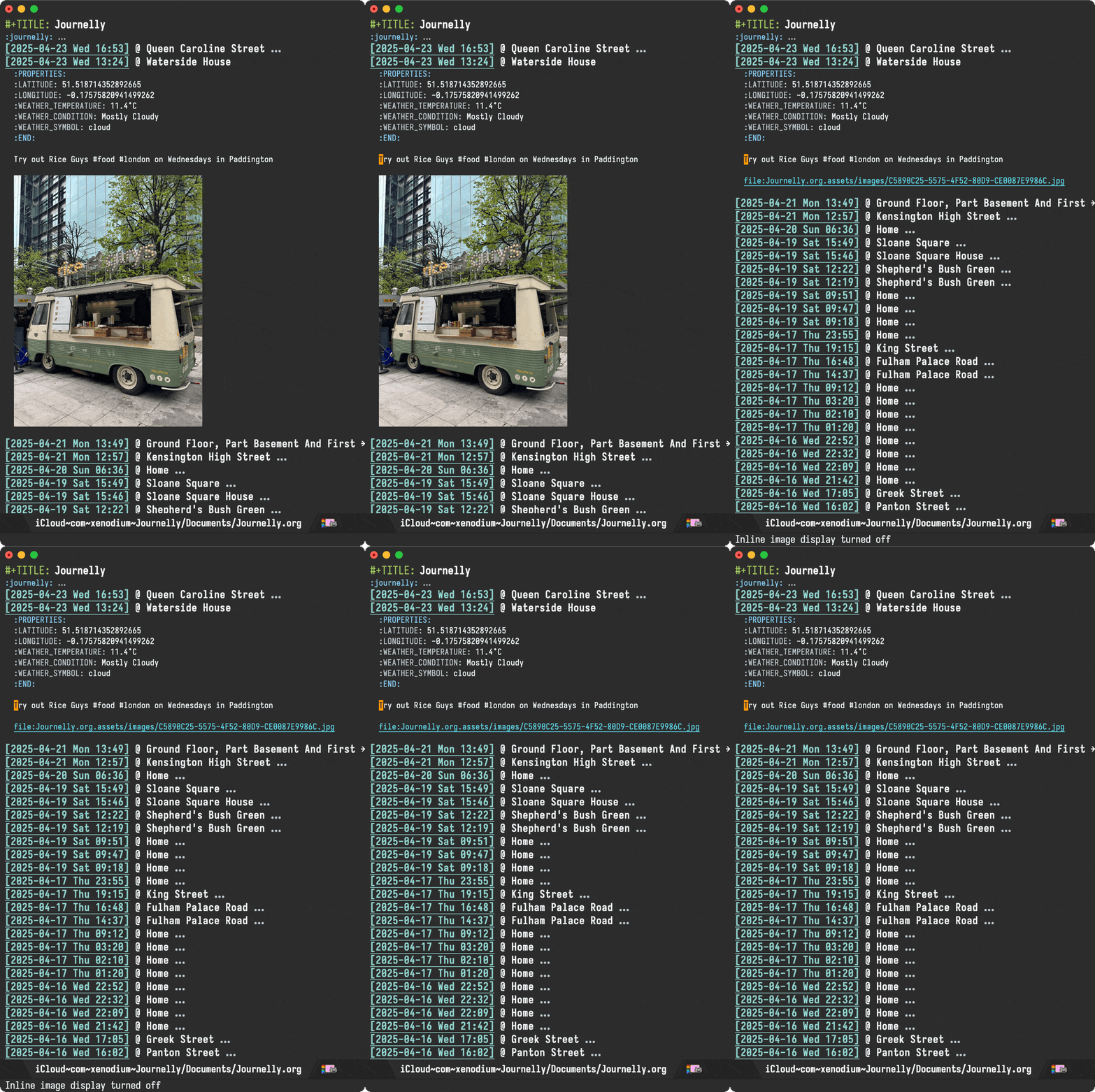
Journelly (iOS)

Journelly is my latest iOS app, centered around note-taking and journaling. The app feels like tweeting, but for your eyes only of course. It's powered by org markup, which can be synced with Emacs via iCloud.

sideways.jpg

emacs.gif

Flat Habits (iOS)

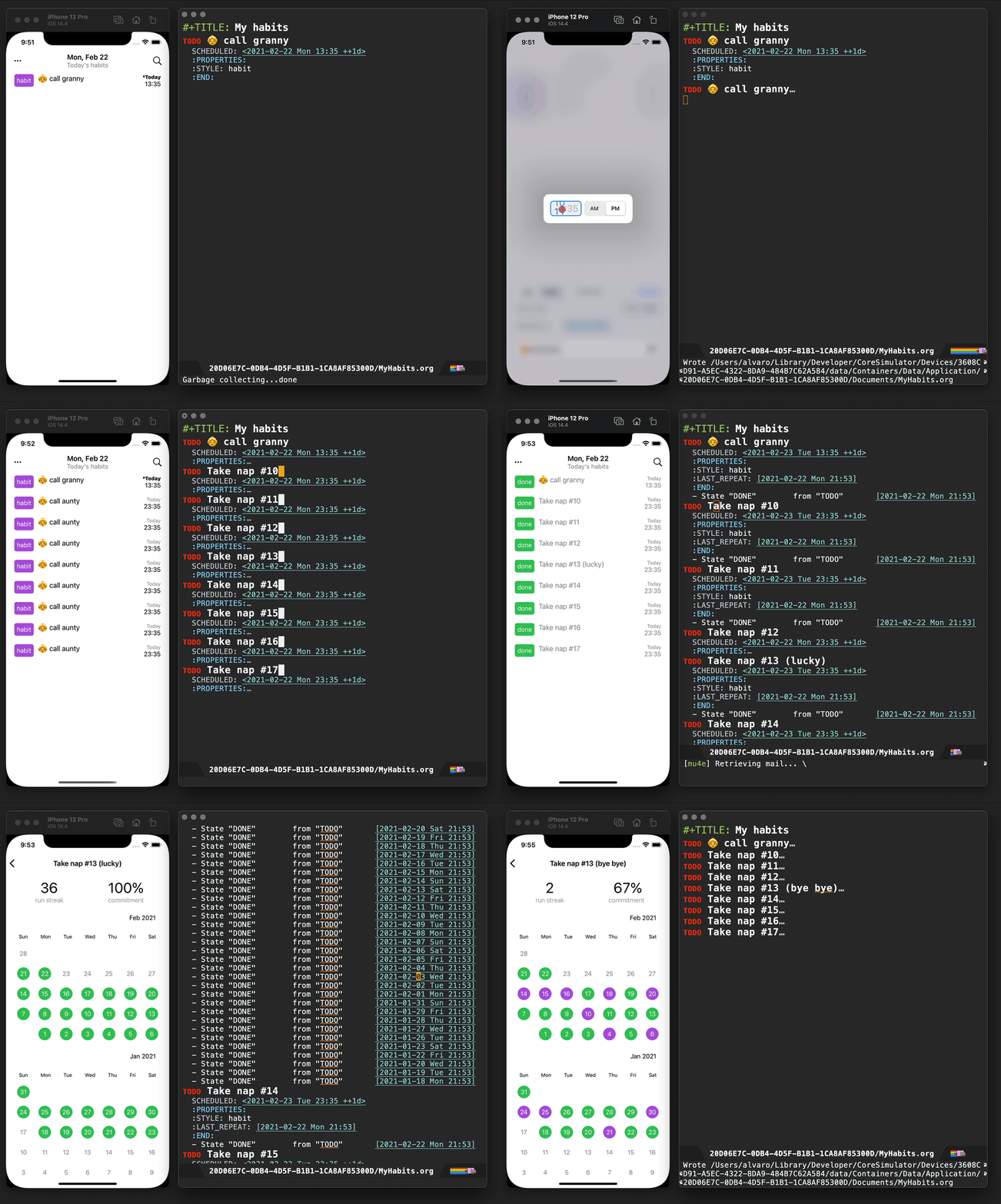
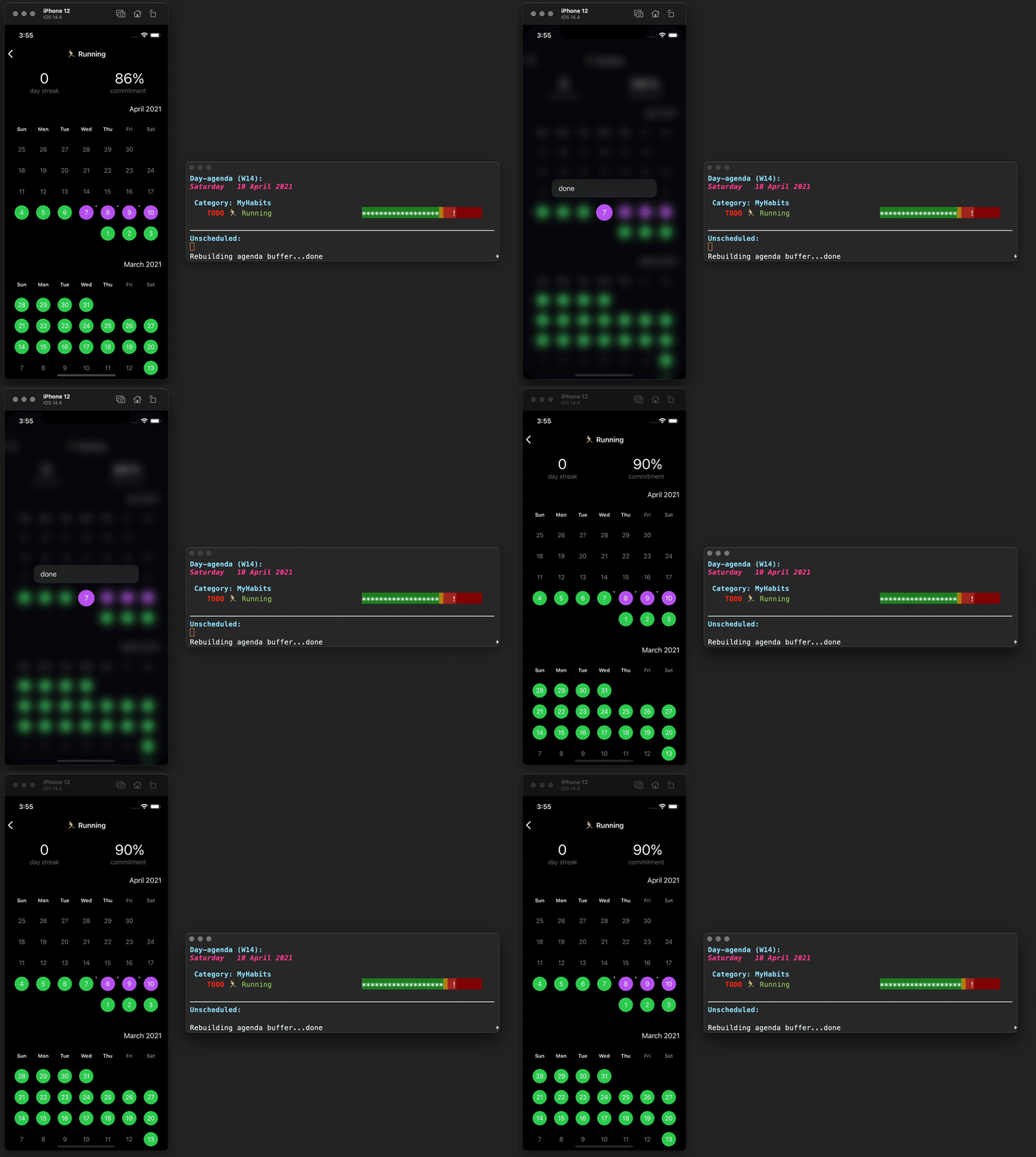
Org habits are handy for tracking daily habits. However, it wasn't super practical for me as I often wanted to check things off while on the go (away from Emacs). That led me to build Flat Habits.

flat_habits.gif

flat_agenda.gif

Scratch (iOS)


While these days I'm using Journelly to jot down just about anything, before that, I built and used Scratch as scratch pad of sorts. No iCloud syncing, but needless to say, it's also powered by org markup.

scratch-download_no_audio_x2.6.webp

Plain Org (iOS)

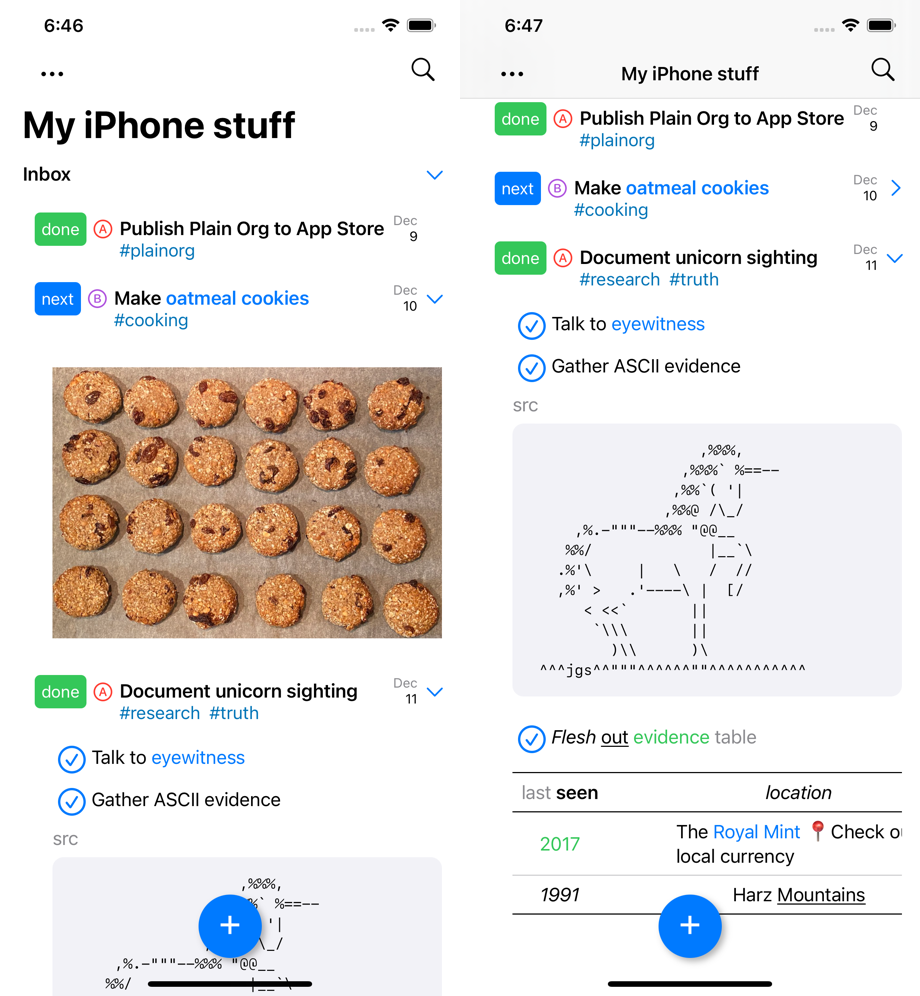
For more involved writing, nothing beats Emacs org mode. But what if I want quick access to my org files while on the go? Plain Org is my iOS solution for that.

plain-org.png

Found this post useful?

I'll keep looking for other macOS-related tips and update this post in the future.

In the meantime, consider ✨ sponsoring✨ this content, my Emacs packages, buying my apps, or just taking care of your eyes ;)

27 May 18:03

Jon Stewart Slams CNN’s “Bombshell” Biden Book Promo Amidst Cancer Diagnosis | Patrick McGee

Tom Roche

as is too-often usual with DSEE: excellent set (Stewart in top form) followed by very-skippable interview

Jon Stewart critiques the media spin on Joe Biden’s cancer diagnosis, from CNN's shameless promotion of Jake Tapper’s book to Fox News’s "but"-tainted sympathies.

Award-winning journalist Patrick McGee joins Jon to discuss how Apple built China in his new book "Apple in China: The Capture of the World's Greatest Company." They talk about Apple “sleepwalking” into this crisis, building a competitive market in Xi Jinping's authoritarian state, the vocational training that boosted rivals, how Trump’s attempted Apple boycott backfired, and whether investments may be facilitating the annexation of Taiwan.

See omnystudio.com/listener for privacy information.

Learn more about your ad choices. Visit podcastchoices.com/adchoices

26 May 18:56

Marcin Borkowski: Adding directories to EMMS playlist from Dired

by Marcin Borkowski
Like many of us Emacsers, I do much (if not most) my computering in Emacs. This includes using EMMS as my main media player and Dired as my file manager. One thing I find myself doing pretty often is adding a bunch of subdirectories in my ~/music directory to my EMMS playlist. I usually used emms-add-directory-tree, but it is not really smooth if I want to apply it to many subdirectories. I thought, “there must be a function which adds the current item – or the marked items – to the playlist”.
26 May 18:53

Real Python: Marimo: A Reactive, Reproducible Notebook

Marimo notebooks redefine the notebook experience by offering a reactive environment that addresses the limitations of traditional linear notebooks. With marimo, you can seamlessly reproduce and share content while benefiting from automatic cell updates and a correct execution order. Discover how marimo’s features make it an ideal tool for documenting research and learning activities.

By the end of this tutorial, you’ll understand that:

  • Marimo notebooks automatically update dependent cells, ensuring consistent results across your work.
  • Reactivity allows marimo to determine the correct running order of cells using a directed acyclic graph (DAG).
  • Sandboxing in marimo creates isolated environments for notebooks, preventing package conflicts and ensuring reproducibility.
  • You can add interactivity to marimo notebooks using UI elements like sliders and radio buttons.
  • Traditional linear notebooks have inherent flaws, such as hidden state issues, that marimo addresses with its reactive design.

Before you can get started with marimo, you’ll need to install it. Fortunately, this is quick and easy to do:

Shell
$ python -m pip install marimo
Copied!

You use pip to install the marimo library on your system. With this done, it’s time to get started, be amazed, and learn all about a different type of notebook.

The best way to approach this tutorial is to use the instructions to complete the various examples and try the exercises yourself. If you want copies of the various notebook files created during the tutorial, you’ll find them in your download bundle. The README.md file provides further details of what’s in your downloads.

Take the Quiz: Test your knowledge with our interactive “Marimo: A Reactive, Reproducible Notebook” quiz. You’ll receive a score upon completion to help you track your learning progress:


Interactive Quiz

Marimo: A Reactive, Reproducible Notebook

This quiz is a great way to reinforce and build on what you've learned about marimo notebooks. You'll find most of the answers in the tutorial, but you'll need to do some additional research to find some of the answers.

How to Get Started in a Marimo Notebook

A notebook is a file where you can write your programming code, run it, and view the output. You can add formatted text to explain how your code works, display charts to clarify results, and even allow your notebook’s users to try out different scenarios using a customized user interface. Once your notebook is complete, you can save everything in a single file and share your creation with others.

In this section, you’ll learn to use marimo to create a simple notebook to perform a calculation and clearly display its results.

Like many notebooks, marimo notebooks consist of cells. The primary cell types are code cells, where you enter and run your Python code, and Markdown cells, where you enter formatted text to augment the code and its output.

In this first example, you’ll use a marimo notebook and NumPy to solve a pair of simultaneous equations. To do this, you’ll first need to install the NumPy library:

Shell
$ python -m pip install numpy
Copied!

With NumPy installed, you can now create your notebook by typing the following command into your console:

Shell
$ marimo edit simultaneous_equations.py
Copied!

When you run this command, you’ll most likely create a new notebook named simultaneous_equations.py for editing. If you already have a marimo notebook with that name, you’ll open it instead. Either way, your notebook will be ready for you to use within your browser.

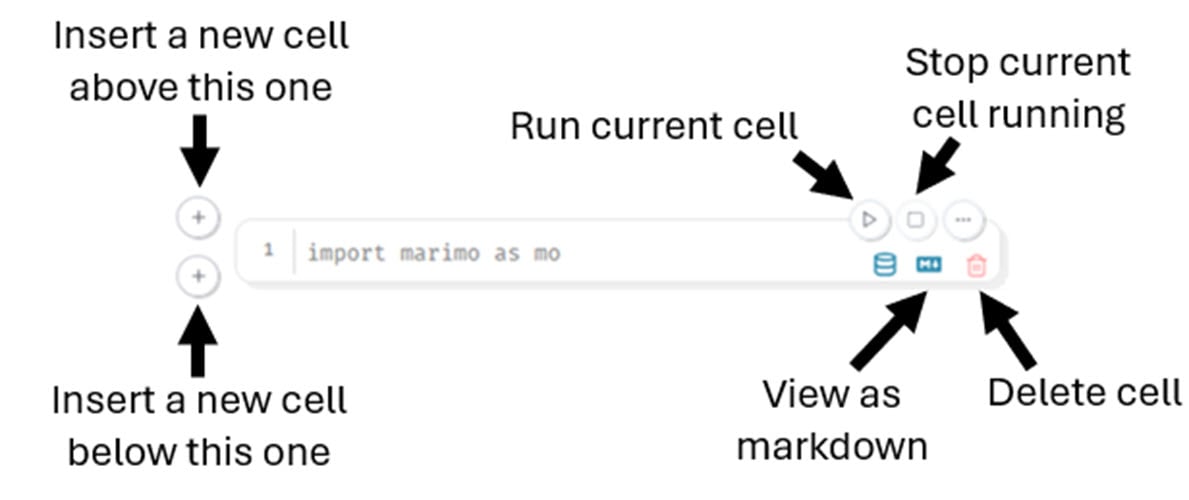
Switch to your web browser, and you’ll see your new notebook. It’ll contain a single cell. Hover your mouse over the cell to reveal a range of icons, each with a tooltip that explains its purpose and shows the associated keyboard shortcuts:

graphic showing a marimo notebook cell and its controls.

Each of the main icons are described in the screenshot above. While most of these are self-explanatory, there are some points you should be aware of:

  • The red trash can icon shown here won’t appear immediately in your notebook. This is used to delete a cell and will only appear when you add other cells. You can’t see it yet because all notebooks must have at least one cell. Deleting the last cell is impossible.
  • The color of the Run current cell icon is also significant. If this cell is white, as it is in the screenshot, it’s up to date and doesn’t need to be run. Once you start changing cells, you’ll see their Run icons develop a yellow tinge. This warns you that the cell has become stale, meaning you must run it to update it.
  • Finally, notice that the numbers to the left of each cell indicate the line numbers of the code within the cell. Unlike most other notebooks, there are no numbers to indicate the running order of the cells. This is because marimo allows you to add code cells in any order. Marimo can work out the correct cell running order for itself. Even so, placing cells in an illogical order should be avoided.

When you hover your mouse over some of marimo’s icons, you’ll see their associated keyboard shortcuts. Unfortunately, they don’t work correctly in all browsers. If they don’t work for you, stick to using your mouse. Feel free to try them to find out if they work for you.

Adding Code and Markdown Content

It’s time for you to gain experience creating some content in marimo. By following the walk-through, you’ll get hands-on practice with the basics.

Although confusing the first time you see it, the single cell that contains import marimo as mo is actually a blank cell. This code allows you to work with the marimo API. However, it’s not in the cell unless you type it in manually.

Read the full article at https://realpython.com/marimo-notebook/ »


[ Improve Your Python With 🐍 Python Tricks 💌 – Get a short & sweet Python Trick delivered to your inbox every couple of days. >> Click here to learn more and see examples ]

25 May 04:03

A Whole New World: China-CELAC Summit Builds New Bridges with Latin America and the Caribbean

by Soberanía Podcast
Tom Roche

another EXCELLENT ep from Hackbarth and Granados Ceja

It’s bizarro world! In today’s episode, we kick off by discussing the recent summit between China and the Community of Latin American and Caribbean States (CELAC), attended by President Xi Jinping and several Latin American heads of state of varying degrees of progressivism. With the threat of Trumpism and tariffs hanging in the air, the summit acquired both greater impetus and urgency. In section two: when does a big-tent political party become too big? Kurt and José Luis discuss this question in the context of the recent incorporation into MORENA of two former PRI members with checkered pasts: Adrián Ruvalcaba as head of Mexico City’s metro and Enrique Benítez in Durango ahead of elections there. Then…it’s back! The State Department liberates budgeted funding for the CIA cutout NED, known in Mexico for funding “civil-society” oppo organizations such as Mexicans Against Corruption and Impunity (MCCI). Finally, in a bizarro losers and haters, a rare thoughtful, analytical piece in the English-language press from Kate Aronoff at New Republic explores Mexico’s industrial policy.

25 May 04:00

Pere Ubu, Rocket from the Tombs & the Music of David Thomas

Tom Roche

VERY EXCELLENT, must listen

Hosts Jim DeRogatis and Greg Kot pay tribute to the late singer, songwriter and musician David Thomas. They do a deep dive on his career and life, discussing his music with Pere Ubu and Rocket from the Tombs.

Join our Facebook Group: https://bit.ly/3sivr9T

Become a member on Patreon: https://bit.ly/3slWZvc

Sign up for our newsletter: https://bit.ly/3eEvRnG

Make a donation via PayPal: https://bit.ly/3dmt9lU

Send us a Voice Memo: Desktop: bit.ly/2RyD5Ah  Mobile: sayhi.chat/soundops


Featured Songs:

Pere Ubu, "Non-Alignment Pact," The Modern Dance, Plan 9, 1978

The Beatles, "With A Little Help From My Friends," Sgt. Pepper's Lonely Hearts Club Band, Parlophone, 1967

Pere Ubu, "Babylonian Warehouses (Live on Sound Opinions)," Why I Hate Women, Smog Veil, 2006

Dead Boys, "Ain't It Fun," We Have Come for Your Children, Sire, 1978

Pere Ubu, "30 Seconds Over Tokyo," 30 Seconds Over Tokyo (Single), Hearthan, 1975

Dead Boys, "Sonic Reducer," Young, Loud and Snotty, Sire, 1977

Rocket from the Tombs, "Amphetamine (Live)," The Day the Earth Met Rocket from the Tombs (Live From Punk Ground Zero, Cleveland 1975), Smog Veil, 2002

Pere Ubu, "Laughing," The Modern Dance, Blank, 1978

Pere Ubu, "Humor Me," The Modern Dance, Blank, 1978

Pere Ubu, "Dub Housing," Dub Housing, Chysalis, 1978

Pere Ubu, "Caligari's Mirror," Dub Housing, Chysalis, 1978

Pere Ubu, "(Pa) Ubu Dance Party," Dub Housing, Chysalis, 1978

Pere Ubu, "Navvy," Dub Housing, Chysalis, 1978

Pere Ubu, "Waiting For Mary," Cloudland, Fontana, 1989

Pere Ubu, "George Had a Hat," The Tenement Year, Enigma, 1988

Rocket from the Tombs, "Sonic Reducer," The Day the Earth Met Rocket from the Tombs (Live From Punk Ground Zero, Cleveland 1975), Smog Veil, 2002

Pere Ubu, "Caroleen (Live on Sound Opinions)," Why I Hate Women, Smog Veil, 2006

Arvella Gray, "John Henry," I Blueskvarter Chicago 1964, Volume Two, Jefferson, 2000

See Privacy Policy at https://art19.com/privacy and California Privacy Notice at https://art19.com/privacy#do-not-sell-my-info.

25 May 03:59

A Companion Tribute to Our David Thomas Farewell

Tom Roche

EXCELLENT obit for Cleveland's Peter Laughner (1952-1977), with all-too-brief sample from one of his solo songs

Following our tribute to David Thomas, Jim reflects on another Pere Ubu and Rocket from the Tombs member lost too early, and pays tribute with a Desert Island Jukebox selection.

Become a member on Patreon: https://bit.ly/3slWZvc

Join our Facebook Group: https://bit.ly/3sivr9T

Sign up for our newsletter: https://bit.ly/3eEvRnG

Make a donation via PayPal: https://bit.ly/3dmt9lU

Send us a Voice Memo: Desktop: bit.ly/2RyD5Ah  Mobile: sayhi.chat/soundops

See Privacy Policy at https://art19.com/privacy and California Privacy Notice at https://art19.com/privacy#do-not-sell-my-info.

25 May 03:58

Radio War Nerd EP 524 — The American Pope, feat. Annibale

by mail@yashalevine.com (Gary Brecher)
Tom Roche

Annibale EXCELLENT as usual. Note however the mistitling of this episode--only a very small part of it is about Leo XIV. A much better title would be something like "Catholic Church geopolitics from Leo XIII to Leo XIV, featuring IOR (aka Vatican Bank) global crimes/hijinks"

Co-hosts John Dolan & Mark Ames
25 May 00:17

Energy sanctions on Russia and seizing ships on the high seas

by The Duran
Tom Roche

another excellent Duran Live with Stanislav Krapivnik

Energy sanctions on Russia and seizing ships on the high seas

23 May 23:59

The News Quiz: Ep 5. An Island of Strangers

Tom Roche

amusing as usual

Andy Zaltzman is joined by Alasdair Beckett-King, Sara Barron, Daliso Chaponda and ITV Deputy Political Editor Anushka Asthana. Discussion points include this week's immigration White Paper, tighter controls on international students looking for gainful employment, the elusive definition of a 'skilled job', chimpanzees utility in medical emergencies, and the returns policy on a returns hub.

Written by Andy Zaltzman.

With additional material by: Samira Banks, Catherine Brinkworth, and Cody Dahler. Producer: Rajiv Karia Executive Producer: Pete Strauss Production Coordinator: Jodie Charman Sound Editor: Marc Willcox

A BBC Studios Audio Production for Radio 4.

22 May 16:37

933 - We Can Grok It For You Wholesale feat. Mike Isaac (5/12/25)

Tom Roche

EXCELLENT (and funny) survey of AI- and Big-Tech-related issues and crimes

Tech reporter Mike Isaac returns to the show for a round-up of the latest AI news. From collegiate cheating to funeral planning, Mike helps us make some sense of how this wonderful emerging technology is reshaping human society in so many delightful ways, and certainly is not a madness rune chipping away at what little sanity remains in our population’s fraying psyche. We’re doing another call-in show with Matt for the midweek, so if you have any questions or comments, send an UNDER 30 SECOND voice recording to calls@chapotraphouse.com We also have some new merch going up at chapotraphouse.store this Weds, May 14. So keep your eyes out for that!
22 May 16:36

935 - It’s Joever feat. David J. Roth (5/19/25)

Tom Roche

excellent, amusing

We planned this episode to cover the spate of stories revealing just how out of it and diminished Joe Biden was during his term, and new details about the political flunkies and media stooges who were complicit in covering it up. But yesterday Biden’s team announced an almost certainly life-ending cancer diagnosis. So we’re joined by David Roth to discuss how it’s finally well and truly Joever. Find David’s work at Defector here: https://defector.com/author/david-roth New merch for the summer up at https://chapotraphouse.store/
21 May 16:26

Laura Tingle's Canberra: where to next for the Coalition?

Tom Roche

alas, the Tingle is (soon to be) gone--Laura announces imminent retirement

The Liberal Party has a new leader, but what lies ahead for the Coalition, the Nationals and conservative politics in Australia more broadly?

  • Guest: Laura Tingle, Political Editor 7.30
19 May 18:16

The Deep State at the Twilight of Empire (Wayne State University - DCC76)

Tom Roche

excellent, esp Q&A on Israel's role in the US-based global empire

Episodes of Devil's Chess Club--and all American Exception podcast episodes--are available first on Patreon [ https://www.patreon.com/americanexception ]. This episode features my recent speaking appearance at Wayne State University. Deep appreciation for Professor Khari Brown as well as the Wayne State Sociology, African-American Studies, and History departments---and to Wiley Michelle Boley for filming and editing! Special thanks to: • Dana Chavarria, production • Casey Moore, graphics • Michelle Boley, animated intro • Mock Orange, music
18 May 02:13

JFK Disclosure Under Trump – James DiEugenio (DCC81)

Tom Roche

yet another EXCELLENT (if unorganized) conversational deep-dive into the JFK assassination and 2 of its dryruns (Chicago and Tampa, though [there are others](https://www.kennedysandking.com/images/ctka/public/2016/bleau-chart.png))

Episodes of Devil's Chess Club--and all American Exception podcast episodes--are available first on Patreon [ https://www.patreon.com/americanexception ]. James DiEugenio joins us to discuss the Trump administration’s release of illegally long-withheld JFK-related documents. DiEugenio recently appeared before Congress with friends of the pod Oliver Stone and Jefferson Morley. The three were there to discuss the JFK case with Representative Luna’s committee. Check out: * Jim’s website: Kennedys and King [ https://www.kennedysandking.com/ ] * Jim’s latest book (ed.): 'The JFK Assassination Chokeholds: That Inescapably Prove There Was a Conspiracy' [ https://www.amazon.com/JFK-Assassination-Chokeholds-James-DiEugenio/dp/B0CN851JM8/ ] Special thanks to: • Dana Chavarria, production • Casey Moore, graphics • Michelle Boley, animated intro • Mock Orange, music
15 May 19:14

69 - The not-so-great GroKo w/ Astrid Zimmermann

by Spaßbremse
Tom Roche

EXCELLENT survey of German politics on the inauguration of the newest/worst CDU-SPD GroKo. Main weakness of this analysis I see is, this completely ignores (as in literally |mention|=0) the BSW-Linke split, much less assessing the problem and how to solve it.

GroKo is back! But now it's far less "great" than before. To explore what to expect from the new German government, Ted speaks with Astrid Zimmermann (⁠@zimmermann.av⁠) of Jacobin Germany (⁠@jacobinmag_de⁠).

-Watch the first Spaßbremse VIDEO PODCAST here: https://youtu.be/HdskRf_FmBI

Read her articles here (German): https://jacobin.de/autoren/astrid-zimmermann

Read her latest piece on GroKo here (in English): https://jacobin.com/author/astrid-zimmermann

*****

Follow Spaßbremse on Twitter (⁠⁠⁠⁠⁠⁠⁠⁠⁠⁠⁠⁠⁠⁠⁠@spassbremse_pod⁠⁠⁠⁠⁠⁠⁠⁠⁠⁠⁠⁠⁠⁠⁠). Music by ⁠⁠⁠⁠⁠⁠⁠⁠⁠⁠⁠⁠⁠⁠⁠Lee Rosevere⁠⁠⁠⁠⁠⁠⁠⁠⁠⁠⁠⁠⁠⁠⁠. Art by Franziska Schneider.

Support us on Patreon here: ⁠⁠⁠⁠⁠https://www.patreon.com/spassbremse

14 May 16:17

Episode 472 - Monopoly Money (w/ Matt Stoller)

Tom Roche

EXCELLENT

Subscribe to Bad Faith on Patreon to instantly unlock our full premium episode library: http://patreon.com/badfaithpodcast

Director of Research at the American Economic Liberties Project Matt Stoller returns to Bad Faith to talk Facebook's anti-trust case, why big tech is pushing AI, the surprising goodness of Trump's FTC, and whether the worst impacts of Trump's tariffs are still ahead.

Subscribe to Bad Faith on YouTube for video of this episode. Find Bad Faith on Twitter (@badfaithpod) and Instagram (@badfaithpod).

Produced by Armand Aviram.

Theme by Nick Thorburn (@nickfromislands).

11 May 19:02

Irreal: Window Placement When Using Dired

by Irreal
Tom Roche

pullquote (somewhat edited):
> [To open Dired in another window on the current dir/folder, just] use `C-x 4 C-j`. [Note the `C-x 4` prefix] works for a lot of commands. I use it to open files or buffers in another window several times a day. You can also open your windows in another frame by using [prefix `C-x 5`] instead of `C-x 4`.

Courtesy of JTR from The Art Of Not Asking Why, here’s a handy tip for dealing with window placement when bringing up a Dired buffer. There are two problems.

The first doesn’t really concern window placement. Most often JTR wants to bring up a Dired buffer for whatever directory he’s already in. The easy way to do that is to use dired-jump (bound to Ctrl+x Ctrl+j) to open a buffer in the same directory as the current file.

The problem with that is that it opens the Dired buffer in the current window. JTR doesn’t want that. He wants to open Dired in some other window so that he can see his current file and the Dired buffer. The answer to that is simple: just ask Emacs to open Dired in another window. There’s a general protocol for doing that. Simply use Ctrl+x 4 Ctrl+J to call Dired. That will open Dired in the same directory as the current file but in another window.

The Ctrl+x 4 … works for a lot of commands. I use it to open files or buffers in another window several times a day. I used to consider it an esoteric maneuver but now I use it all the time. You can also open your windows in another frame by using 5 instead of 4.

The 4/5 protocol doesn’t work for all commands but it does for a lot of them. It’s a real time saver that I use repeatedly. It’s well worth internalizing.

11 May 15:23

Trump's tariffs hurt the US much more than China - Economist Michael Hudson explains

Tom Roche

Hudson VERY EXCELLENT as usual

Donald Trump's tariffs are benefiting rich elites at the expense of the majority of the population, argues economist Michael Hudson. He explains how the US trade war on China is isolating the United States and encouraging countries to seek alternatives. Ben Norton hosts the interview. VIDEO: https://www.youtube.com/watch?v=jGsLDQQuzU0 Read Michael Hudson's report "Return of the robber barons – Trump’s distorted view of US tariff history": https://geopoliticaleconomy.com/2025/04/14/michael-hudson-robber-barons-trump-tariffs/ Topics 0:00 Intro 1:11 Michael Hudson highlights 2:09 Interview starts 2:41 Replacing income tax with tariffs 5:40 Government industrial policy 9:22 Reaganomics 2.0 11:29 Gilded Age 14:54 China's model 17:50 (CLIP) JD Vance calls Chinese "peasants" 18:12 Public finance 22:57 Trade war on China 25:12 (CLIP) Trump demands tribute 25:42 US attempt to isolate China 26:30 USA doesn't have many cards 28:55 Import substitution 30:16 Trump is isolating the US 34:58 US dollar system in crisis 38:03 Reindustrialization 40:06 Trump's bullying strategy 43:26 Destroying the post-WWII system 49:06 Global South vs the West 50:58 Democracy or oligarchy? 56:05 Billionaire oligarchs 56:56 Corruption 58:25 Outro
11 May 02:41

Chechnya, The Forgotten McJihad – Max Parry (DCC80)

Tom Roche

yet another VERY EXCELLENT, wideranging, informative (esp re Fred Cuny (1944-1995), a Sorosi deepstater who posed as (and was widely promoted in empire corporate-funded media) as a humanitarian) DCC episode (well worth 90 min of your time) interviewing [Max Parry of CovertAction Magazine](https://covertactionmagazine.com/author/maxparry/)

Episodes of Devil's Chess Club--and all American Exception podcast episodes--are available first on Patreon [ https://www.patreon.com/americanexception ]. Max Parry joins us to speak with us about his new Covert Action Magazine article entitled “Did the CIA Covertly Support Chechen Separatist Terrorism? Of Course They Did” [ https://covertactionmagazine.com/2025/04/24/did-the-cia-covertly-support-chechen-separatist-terrorism-of-course-they-did/ ] Max Parry is an independent journalist and geopolitical analyst based in Baltimore. His writing has appeared widely in alternative media and he is a frequent political commentator featured in Sputnik News and Press TV. He also hosts the podcast Captive Minds [ https://www.youtube.com/channel/UC6kOHlPDIfXv_RLaVgPfitA ]. Special thanks to: • Dana Chavarria, production • Casey Moore, graphics • Michelle Boley, animated intro • Mock Orange, music
07 May 18:48

E209 - White American Liberals, Pt 1 w/ Kevin Schultz

Tom Roche

VERY EXCELLENT: informative survey of liberalism in philosophy, discourse, and (real) politics (esp US) c1815-2025

Subscribe now for an ad-free experience and much more content!

Kevin Schultz, Chair of the Department of History at the University of Illinois Chicago, joins the program to talk about his new book Why Everyone Hates White Liberals (Including White Liberals): A History. In this first part of the discussion, they get into liberalism’s consistent spirit yet inconsistent character, the transition from progressivism to liberalism in America in the early 20th century, FDR’s use of the word “liberal” as a sort of marketing tool, the height of the “white liberal,” William F. Buckley and the modern American conservative movement, the New Left’s opposition to “the liberal order,” the perception of white liberals in the civil rights movement, and more. 

Learn more about your ad choices. Visit megaphone.fm/adchoices

07 May 18:20

Warfare in Medieval Iberia - Interview with Carlos Filipe Afonso

Tom Roche

excellent

This special episode, I interview Historian Carlos Filipe Afonso, a professor of medieval military history in the Iberian Peninsula  

Hosted on Acast. See acast.com/privacy for more information.

05 May 20:56

AfD; a Kemalist Party

by The Späti Boys
Tom Roche

another VERY EXCELLENT Ciarán+Nick joint, funny /and/ informative

05 May 17:22

Laura Tingle and Niki Savva dissect the election results

Tom Roche

almost entirely about the massive Liberal-National fail (and therefore not much about how the ALP won), but an EXCELLENT dissection of LN decline

ABC 7.30's Political Editor Laura Tingle and political commentator Niki Savva discuss the enormous ramifications of Labor's landslide federal election victory and the future for the Coalition. 

Guests: Laura Tingle, political editor 7.30; Niki Savva, columnist with The Age and the Sydney Morning Herald, former advisor to Howard-Costello government

05 May 14:29

Angleton, Mossad, the Mob, and CIA "Cuban Business" - Part 1 (DCC77)

Tom Roche

VERY EXCELLENT: as usual, Good "brings the receipts" (in this case, Zionists vs JFK), but this ep is shorter and better-focused than most "Devil's Chess Club" outings. 1st part of 3!

Episodes of Devil's Chess Club--and all American Exception podcast episodes--are available first on Patreon [ https://www.patreon.com/americanexception ]. This episode features a presentation based on my recent article, “James Angleton, Mossad, the Syndicate, and the CIA’s 'Cuban Business'.” [ https://americanexception.substack.com/p/james-angleton-mossad-the-syndicate ] About a year ago I discovered a page in James Angleton’s 1975 Church Committee testimony that the CIA tried to hide by deleting in subsequent releases. The 86ed page—which happened to be page 86—shows that CIA counterintelligence chief James Angleton did not tell CIA director John McCone that, in order to bypass the entire CIA, Angleton was using a Mossad officer as an operational agent for anti-Castro operations in Cuba. The outcome was that there was very little paper trail at the Agency when it came to the details of Angleton’s mobbed-up “Cuban business”—especially the assassination apparatus which many JFK assassination researchers believe was later redirected at President Kennedy. Special thanks to: • Dana Chavarria, production • Casey Moore, graphics • Michelle Boley, animated intro • Mock Orange, music
05 May 14:28

Who Killed JFK? (Angleton’s Cuban Biz – Part 2: DCC78)

Tom Roche

VERY EXCELLENT 2nd part of 3 on the CIA-Mafia-Mossad triangle around Lansky and Cuba

Episodes of Devil's Chess Club--and all American Exception podcast episodes--are available first on Patreon [ https://www.patreon.com/americanexception ]. This episode features Part 2 of a presentation based on my recent article, “James Angleton, Mossad, the Syndicate, and the CIA’s 'Cuban Business'.” [ https://americanexception.substack.com/p/james-angleton-mossad-the-syndicate ] Specifically, this installment examines the nature of the regime which killed JFK as well as Zionism’s role in the assassination. Special thanks to: • Dana Chavarria, production • Casey Moore, graphics • Michelle Boley, animated intro • Mock Orange, music
05 May 14:28

Zionism and the JFK Assassination - Angleton’s Cuban Biz – Part 3 (DCC79)

Tom Roche

VERY EXCELLENT 3rd part of 3 on the CIA-Mafia-Mossad triangle around Lansky and Cuba

Episodes of Devil's Chess Club--and all American Exception podcast episodes--are available first on Patreon [ https://www.patreon.com/americanexception ]. This episode features Part 3 of a presentation based on my recent article, “James Angleton, Mossad, the Syndicate, and the CIA’s 'Cuban Business'.” [ https://americanexception.substack.com/p/james-angleton-mossad-the-syndicate ] Specifically, this installment seeks to explore the historical consequences of Zionism’s role in the assassination of President John F. Kennedy. Special thanks to: • Dana Chavarria, production • Casey Moore, graphics • Michelle Boley, animated intro • Mock Orange, music
03 May 19:04

#620 - Creation In Pectore

Tom Roche

VERY EXCELLENT return to form after a somewhat-disappointing-but-still-listenable MU 619

In last year's Oscar contender CONCLAVE (2024), the election of a new pope at Vatican City becomes a centrist parable for navigating an era of political extremes. PLUS: We recap the strangest Canadian election of the century so far. Join us on Patreon for an extra episode every week - https://www.patreon.com/michaelandus Check out Will's book Ed Wood: Made in Hollywood USA - https://orbooks.com/catalog/ed-wood/ Subscribe to Luke's Substack - https://www.lukewsavage.com/ "Conclave, and the liberal abyss," by Reuben of Haringey - https://fromthisbrokenhill.substack.com/p/conclave-and-the-liberal-abyss
03 May 03:49

News - WFP Out of Food in Gaza, US-Rwanda Migrant Deal, National Security Advisor Waltz Reassigned

Tom Roche

Bessner and (mostly) Davison deliver another EXCELLENT week-in-review (minus the pre- and inter-audio ads)

May Day is no more, but the world, sadly, does not revolve around the left. This week: a new report on 2024 global military spending shockingly shows it has increased (2:05); the UN’s World Food Programme is out of food in Gaza (4:05), the IDF herds people into Rafah (5:55), and the PLO creates a vice presidency in anticipation of a successor to Mahmoud Abbas (8:32); in Syria, violence between security forces and Druze militias kills over 70 people (12:18); the US bombs a migrant center in Yemen (16:14) as Houthi/Ansar Allah forces continue to shoot down drones (17:58); the Iran-US nuclear talks have been postponed (19:35); there are rumblings of imminent armed conflict between India and Pakistan (21:48); Trump claims to have spoken with President Xi Jinping of China as both economies take a hit from the former’s tariffs (24:31); a court ruling may upend South Korea’s election (28:00); Nigeria sees an increase in jihadist violence (30:00); Congolese and Rwandan foreign ministers set a deadline for a peace deal (32:10); in Russia-Ukraine, Russia’s Kursk operation appears to be at its end (34:03), Trump and Zelensky meet at Pope Francis’ funeral (35:33), and the US and Ukraine finally sign a mineral deal (37:26); the Trump administration designates gangs in Haiti as terrorist groups (39:54); the Liberal Party wins Canada’s election (41:19); Donald Trump relieves Mike Waltz of duty as national security advisor, but appoints him as UN ambassador (44:03); and the US is negotiating with Rwanda so that the latter may take migrants on the former’s behalf (48:50). 

Grab a copy of Spencer Ackerman’s current run of Iron Man!

Learn more about your ad choices. Visit megaphone.fm/adchoices