Shared posts

21 May 17:21

The Design of Code: Organizing JavaScript

Great design is a product of care and attention applied to areas that matter, resulting in a useful, understandable, and hopefully beautiful user interface. But don’t be fooled into thinking that design is left only for designers.

There is a lot of design in code, and I don’t mean code that builds the user interface—I mean the design of code.

Well-designed code is much easier to maintain, optimize, and extend, making for more efficient developers. That means more focus and energy can be spent on building great things, which makes everyone happy—users, developers, and stakeholders.

There are three high-level, language-agnostic aspects to code design that are particularly important.

  1. System architecture—The basic layout of the codebase. Rules that govern how various components, such as models, views, and controllers, interact with each other.
  2. Maintainability—How well can the code be improved and extended?
  3. Reusability—How reusable are the application’s components? How easily can each implementation of a component be customized?

In looser languages, specifically JavaScript, it takes a bit of discipline to write well-designed code. The JavaScript environment is so forgiving that it’s easy to throw bits and pieces everywhere and still have things work. Establishing system architecture early (and sticking to it!) provides constraints to your codebase, ensuring consistency throughout.

One approach I’m fond of consists of a tried-and-true software design pattern, the module pattern, whose extensible structure lends itself to a solid system architecture and a maintainable codebase. I like building modules within a jQuery plugin, which makes for beautiful reusability, provides robust options, and exposes a well-crafted API.

Below, I’ll walk through how to craft your code into well-organized components that can be reused in projects to come.

The module pattern

There are a lot of design patterns out there, and equally as many resources on them. Addy Osmani wrote an amazing (free!) book on design patterns in JavaScript, which I highly recommend to developers of all levels.

The module pattern is a simple structural foundation that can help keep your code clean and organized. A “module” is just a standard object literal containing methods and properties, and that simplicity is the best thing about this pattern: even someone unfamiliar with traditional software design patterns would be able to look at the code and instantly understand how it works.

In applications that use this pattern, each component gets its own distinct module. For example, to build autocomplete functionality, you’d create a module for the textfield and a module for the results list. These two modules would work together, but the textfield code wouldn’t touch the results list code, and vice versa.

That decoupling of components is why the module pattern is great for building solid system architecture. Relationships within the application are well-defined; anything related to the textfield is managed by the textfield module, not strewn throughout the codebase—resulting in clear code.

Another benefit of module-based organization is that it is inherently maintainable. Modules can be improved and optimized independently without affecting any other part of the application.

I used the module pattern for the basic structure of jPanelMenu, the jQuery plugin I built for off-canvas menu systems. I’ll use that as an example to illustrate the process of building a module.

Building a module

To begin, I define three methods and a property that are used to manage the interactions of the menu system.

var jpm = {
    animated: true,
    openMenu: function( ) {
        …
        this.setMenuStyle( );
    },
    closeMenu: function( ) {
        …
        this.setMenuStyle( );
    },
    setMenuStyle: function( ) { … }
};

The idea is to break down code into the smallest, most reusable bits possible. I could have written just one toggleMenu( ) method, but creating distinct openMenu( ) and closeMenu( ) methods provides more control and reusability within the module.

Notice that calls to module methods and properties from within the module itself (such as the calls to setMenuStyle( )) are prefixed with the this keyword—that’s how modules access their own members.

That’s the basic structure of a module. You can continue to add methods and properties as needed, but it doesn’t get any more complex than that. After the structural foundations are in place, the reusability layer—options and an exposed API—can be built on top.

jQuery plugins

The third aspect of well-designed code is probably the most crucial: reusability. This section comes with a caveat. While there are obviously ways to build and implement reusable components in raw JavaScript (we’re about 90 percent of the way there with our module above), I prefer to build jQuery plugins for more complex things, for a few reasons.

Most importantly, it’s a form of unobtrusive communication. If you used jQuery to build a component, you should make that obvious to those implementing it. Building the component as a jQuery plugin is a great way to say that jQuery is required.

In addition, the implementation code will be consistent with the rest of the jQuery-based project code. That’s good for aesthetic reasons, but it also means (to an extent) that developers can predict how to interact with the plugin without too much research. Just one more way to build a better developer interface.

Before you begin building a jQuery plugin, ensure that the plugin does not conflict with other JavaScript libraries using the $ notation. That’s a lot simpler than it sounds—just wrap your plugin code like so:

(function($) {
    // jQuery plugin code here
})(jQuery);

Next, we set up our plugin and drop our previously built module code inside. A plugin is just a method defined on the jQuery ($) object.

(function($) {
    $.jPanelMenu = function( ) {
        var jpm = {
            animated: true,
            openMenu: function( ) {
                …
                this.setMenuStyle( );
            },
            closeMenu: function( ) {
                …
                this.setMenuStyle( );
            },
            setMenuStyle: function( ) { … }
        };
    };
})(jQuery);

All it takes to use the plugin is a call to the function you just created.

var jpm = $.jPanelMenu( );

Options

Options are essential to any truly reusable plugin because they allow for customizations to each implementation. Every project brings with it a slew of design styles, interaction types, and content structures. Customizable options help ensure that you can adapt the plugin to fit within those project constraints.

It’s best practice to provide good default values for your options. The easiest way to do that is to use jQuery’s $.extend( ) method, which accepts (at least) two arguments.

As the first argument of $.extend( ), define an object with all available options and their default values. As the second argument, pass through the passed-in options. This will merge the two objects, overriding the defaults with any passed-in options.

(function($) {
    $.jPanelMenu = function(options) {
        var jpm = {
            options: $.extend({
                'animated': true,
                'duration': 500,
                'direction': 'left'
            }, options),
            openMenu: function( ) {
                …
                this.setMenuStyle( );
            },
            closeMenu: function( ) {
                …
                this.setMenuStyle( );
            },
            setMenuStyle: function( ) { … }
        };
    };
})(jQuery);

Beyond providing good defaults, options become almost self-documenting—someone can look at the code and see all of the available options immediately.

Expose as many options as is feasible. The customization will help in future implementations, and flexibility never hurts.

API

Options are terrific ways to customize how a plugin works. An API, on the other hand, enables extensions to the plugin’s functionality by exposing methods and properties for the implementation code to take advantage of.

While it’s great to expose as much as possible through an API, the outside world shouldn’t have access to all internal methods and properties. Ideally, you should expose only the elements that will be used.

In our example, the exposed API should include calls to open and close the menu, but nothing else. The internal setMenuStyle( ) method runs when the menu opens and closes, but the public doesn’t need access to it.

To expose an API, return an object with any desired methods and properties at the end of the plugin code. You can even map returned methods and properties to those within the module code—this is where the beautiful organization of the module pattern really shines.

(function($) {
    $.jPanelMenu = function(options) {
        var jpm = {
            options: $.extend({
                'animated': true,
                'duration': 500,
                'direction': 'left'
            }, options),
            openMenu: function( ) {
                …
                this.setMenuStyle( );
            },
            closeMenu: function( ) {
                …
                this.setMenuStyle( );
            },
            setMenuStyle: function( ) { … }
        };

        return {
            open: jpm.openMenu,
            close: jpm.closeMenu,
            someComplexMethod: function( ) { … }
        };
    };
})(jQuery);

API methods and properties will be available through the object returned from the plugin initialization.

var jpm = $.jPanelMenu({
    duration: 1000,
    …
});
jpm.open( );

Polishing developer interfaces

With just a few simple constructs and guidelines, we’ve built ourselves a reusable, extensible plugin that will help make our lives easier. Like any part of what we do, experiment with this structure to see if it works for you, your team, and your workflow.

Whenever I find myself building something with a potential for reuse, I break it out into a module-based jQuery plugin. The best part about this approach is that it forces you to use—and test—the code you write. By using something as you build it, you’ll quickly identify strengths, discover shortcomings, and plan changes.

This process leads to battle-tested code ready for open-source contributions, or to be sold and distributed. I’ve released my (mostly) polished plugins as open-source projects on GitHub.

Even if you aren’t building something to be released in the wild, it’s still important to think about the design of your code. Your future self will thank you.

21 May 17:21

Writing Testable JavaScript

We’ve all been there: that bit of JavaScript functionality that started out as just a handful of lines grows to a dozen, then two dozen, then more. Along the way, a function picks up a few more arguments; a conditional picks up a few more conditions. And then one day, the bug report comes in: something’s broken, and it’s up to us to untangle the mess.

As we ask our client-side code to take on more and more responsibilities—indeed, whole applications are living largely in the browser these days—two things are becoming clear. One, we can’t just point and click our way through testing that things are working as we expect; automated tests are key to having confidence in our code. Two, we’re probably going to have to change how we write our code in order to make it possible to write tests.

Really, we need to change how we code? Yes—because even if we know that automated tests are a good thing, most of us are probably only able to write integration tests right now. Integration tests are valuable because they focus on how the pieces of an application work together, but what they don’t do is tell us whether individual units of functionality are behaving as expected.

That’s where unit testing comes in. And we’ll have a very hard time writing unit tests until we start writing testable JavaScript.

Unit vs. integration: what’s the difference?

Writing integration tests is usually fairly straightforward: we simply write code that describes how a user interacts with our app, and what the user should expect to see as she does. Selenium is a popular tool for automating browsers. Capybara for Ruby makes it easy to talk to Selenium, and there are plenty of tools for other languages, too.

Here’s an integration test for a portion of a search app:

def test_search
  fill_in('q', :with => 'cat')
  find('.btn').click
  assert( find('#results li').has_content?('cat'), 'Search results are shown' )
  assert( page.has_no_selector?('#results li.no-results'), 'No results is not shown' )
end

Whereas an integration test is interested in a user’s interaction with an app, a unit test is narrowly focused on a small piece of code:

When I call a function with a certain input, do I receive the expected output?

Apps that are written in a traditional procedural style can be very difficult to unit test—and difficult to maintain, debug, and extend, too. But if we write our code with our future unit testing needs in mind, we will not only find that writing the tests becomes more straightforward than we might have expected, but also that we’ll simply write better code, too.

To see what I’m talking about, let’s take a look at a simple search app:

Srchr

When a user enters a search term, the app sends an XHR to the server for the corresponding data. When the server responds with the data, formatted as JSON, the app takes that data and displays it on the page, using client-side templating. A user can click on a search result to indicate that he “likes” it; when this happens, the name of the person he liked is added to the “Liked” list on the right-hand side.

A “traditional” JavaScript implementation of this app might look like this:

var tmplCache = {};

function loadTemplate (name) {
  if (!tmplCache[name]) {
    tmplCache[name] = $.get('/templates/' + name);
  }
  return tmplCache[name];
}

$(function () {

  var resultsList = $('#results');
  var liked = $('#liked');
  var pending = false;

  $('#searchForm').on('submit', function (e) {
    e.preventDefault();

    if (pending) { return; }

    var form = $(this);
    var query = $.trim( form.find('input[name="q"]').val() );

    if (!query) { return; }

    pending = true;

    $.ajax('/data/search.json', {
      data : { q: query },
      dataType : 'json',
      success : function (data) {
        loadTemplate('people-detailed.tmpl').then(function (t) {
          var tmpl = _.template(t);
          resultsList.html( tmpl({ people : data.results }) );
          pending = false;
        });
      }
    });

    $('<li>', {
      'class' : 'pending',
      html : 'Searching &hellip;'
    }).appendTo( resultsList.empty() );
  });

  resultsList.on('click', '.like', function (e) {
    e.preventDefault();
    var name = $(this).closest('li').find('h2').text();
    liked.find('.no-results').remove();
    $('<li>', { text: name }).appendTo(liked);
  });

});

My friend Adam Sontag calls this Choose Your Own Adventure code—on any given line, we might be dealing with presentation, or data, or user interaction, or application state. Who knows! It’s easy enough to write integration tests for this kind of code, but it’s hard to test individual units of functionality.

What makes it hard? Four things:

  • A general lack of structure; almost everything happens in a $(document).ready() callback, and then in anonymous functions that can’t be tested because they aren’t exposed.
  • Complex functions; if a function is more than 10 lines, like the submit handler, it’s highly likely that it’s doing too much.
  • Hidden or shared state; for example, since pending is in a closure, there’s no way to test whether the pending state is set correctly.
  • Tight coupling; for example, a $.ajax success handler shouldn’t need direct access to the DOM.

Organizing our code

The first step toward solving this is to take a less tangled approach to our code, breaking it up into a few different areas of responsibility:

  • Presentation and interaction
  • Data management and persistence
  • Overall application state
  • Setup and glue code to make the pieces work together

In the “traditional” implementation shown above, these four categories are intermingled—on one line we’re dealing with presentation, and two lines later we might be communicating with the server.

Code Lines

While we can absolutely write integration tests for this code—and we should!—writing unit tests for it is pretty difficult. In our functional tests, we can make assertions such as “when a user searches for something, she should see the appropriate results,” but we can’t get much more specific. If something goes wrong, we’ll have to track down exactly where it went wrong, and our functional tests won’t help much with that.

If we rethink how we write our code, though, we can write unit tests that will give us better insight into where things went wrong, and also help us end up with code that’s easier to reuse, maintain, and extend.

Our new code will follow a few guiding principles:

  • Represent each distinct piece of behavior as a separate object that falls into one of the four areas of responsibility and doesn’t need to know about other objects. This will help us avoid creating tangled code.
  • Support configurability, rather than hard-coding things. This will prevent us from replicating our entire HTML environment in order to write our tests.
  • Keep our objects’ methods simple and brief. This will help us keep our tests simple and our code easy to read.
  • Use constructor functions to create instances of objects. This will make it possible to create “clean” copies of each piece of code for the sake of testing.

To start with, we need to figure out how we’ll break our application into different pieces. We’ll have three pieces dedicated to presentation and interaction: the Search Form, the Search Results, and the Likes Box.

Application Views

We’ll also have a piece dedicated to fetching data from the server and a piece dedicated to gluing everything together.

Let’s start by looking at one of the simplest pieces of our application: the Likes Box. In the original version of the app, this code was responsible for updating the Likes Box:

var liked = $('#liked');

var resultsList = $('#results');


// ...


resultsList.on('click', '.like', function (e) {
  e.preventDefault();

  var name = $(this).closest('li').find('h2').text();

  liked.find( '.no-results' ).remove();

  $('<li>', { text: name }).appendTo(liked);

});

The Search Results piece is completely intertwined with the Likes Box piece and needs to know a lot about its markup. A much better and more testable approach would be to create a Likes Box object that’s responsible for manipulating the DOM related to the Likes Box:

var Likes = function (el) {
  this.el = $(el);
  return this;
};

Likes.prototype.add = function (name) {
  this.el.find('.no-results').remove();
  $('<li>', { text: name }).appendTo(this.el);
};

This code provides a constructor function that creates a new instance of a Likes Box. The instance that’s created has an .add() method, which we can use to add new results. We can write a couple of tests to prove that it works:

var ul;

setup(function(){
  ul = $('<ul><li class="no-results"></li></ul>');
});

test('constructor', function () {
  var l = new Likes(ul);
  assert(l);
});

test('adding a name', function () {
  var l = new Likes(ul);
  l.add('Brendan Eich');

  assert.equal(ul.find('li').length, 1);
  assert.equal(ul.find('li').first().html(), 'Brendan Eich');
  assert.equal(ul.find('li.no-results').length, 0);
});

Not so hard, is it? Here we’re using Mocha as the test framework, and Chai as the assertion library. Mocha provides the test and setup functions; Chai provides assert. There are plenty of other test frameworks and assertion libraries to choose from, but for the sake of an introduction, I find these two work well. You should find the one that works best for you and your project—aside from Mocha, QUnit is popular, and Intern is a new framework that shows a lot of promise.

Our test code starts out by creating an element that we’ll use as the container for our Likes Box. Then, it runs two tests: one is a sanity check to make sure we can make a Likes Box; the other is a test to ensure that our .add() method has the desired effect. With these tests in place, we can safely refactor the code for our Likes Box, and be confident that we’ll know if we break anything.

Our new application code can now look like this:

var liked = new Likes('#liked');
var resultsList = $('#results');


// ...


resultsList.on('click', '.like', function (e) {
  e.preventDefault();

  var name = $(this).closest('li').find('h2').text();

  liked.add(name);
});

The Search Results piece is more complex than the Likes Box, but let’s take a stab at refactoring that, too. Just as we created an .add() method on the Likes Box, we also want to create methods for interacting with the Search Results. We’ll want a way to add new results, as well as a way to “broadcast” to the rest of the app when things happen within the Search Results—for example, when someone likes a result.

var SearchResults = function (el) {
  this.el = $(el);
  this.el.on( 'click', '.btn.like', _.bind(this._handleClick, this) );
};

SearchResults.prototype.setResults = function (results) {
  var templateRequest = $.get('people-detailed.tmpl');
  templateRequest.then( _.bind(this._populate, this, results) );
};

SearchResults.prototype._handleClick = function (evt) {
  var name = $(evt.target).closest('li.result').attr('data-name');
  $(document).trigger('like', [ name ]);
};

SearchResults.prototype._populate = function (results, tmpl) {
  var html = _.template(tmpl, { people: results });
  this.el.html(html);
};

Now, our old app code for managing the interaction between Search Results and the Likes Box could look like this:

var liked = new Likes('#liked');
var resultsList = new SearchResults('#results');


// ...


$(document).on('like', function (evt, name) {
  liked.add(name);
})

It’s much simpler and less entangled, because we’re using the document as a global message bus, and passing messages through it so individual components don’t need to know about each other. (Note that in a real app, we’d use something like Backbone or the RSVP library to manage events. We’re just triggering on document to keep things simple here.) We’re also hiding all the dirty work—such as finding the name of the person who was liked—inside the Search Results object, rather than having it muddy up our application code. The best part: we can now write tests to prove that our Search Results object works as we expect:

var ul;
var data = [ /* fake data here */ ];

setup(function () {
  ul = $('<ul><li class="no-results"></li></ul>');
});

test('constructor', function () {
  var sr = new SearchResults(ul);
  assert(sr);
});

test('display received results', function () {
  var sr = new SearchResults(ul);
  sr.setResults(data);

  assert.equal(ul.find('.no-results').length, 0);
  assert.equal(ul.find('li.result').length, data.length);
  assert.equal(
    ul.find('li.result').first().attr('data-name'),
    data[0].name
  );
});

test('announce likes', function() {
  var sr = new SearchResults(ul);
  var flag;
  var spy = function () {
    flag = [].slice.call(arguments);
  };

  sr.setResults(data);
  $(document).on('like', spy);

  ul.find('li').first().find('.like.btn').click();

  assert(flag, 'event handler called');
  assert.equal(flag[1], data[0].name, 'event handler receives data' );
});

The interaction with the server is another interesting piece to consider. The original code included a direct $.ajax() request, and the callback interacted directly with the DOM:

$.ajax('/data/search.json', {
  data : { q: query },
  dataType : 'json',
  success : function( data ) {
    loadTemplate('people-detailed.tmpl').then(function(t) {
      var tmpl = _.template( t );
      resultsList.html( tmpl({ people : data.results }) );
      pending = false;
    });
  }
});

Again, this is difficult to write a unit test for, because so many different things are happening in just a few lines of code. We can restructure the data portion of our application as an object of its own:

var SearchData = function () { };

SearchData.prototype.fetch = function (query) {
  var dfd;

  if (!query) {
    dfd = $.Deferred();
    dfd.resolve([]);
    return dfd.promise();
  }

  return $.ajax( '/data/search.json', {
    data : { q: query },
    dataType : 'json'
  }).pipe(function( resp ) {
    return resp.results;
  });
};

Now, we can change our code for getting the results onto the page:

var resultsList = new SearchResults('#results');

var searchData = new SearchData();

// ...

searchData.fetch(query).then(resultsList.setResults);

Again, we’ve dramatically simplified our application code, and isolated the complexity within the Search Data object, rather than having it live in our main application code. We’ve also made our search interface testable, though there are a couple caveats to bear in mind when testing code that interacts with the server.

The first is that we don’t want to actually interact with the server—to do so would be to reenter the world of integration tests, and because we’re responsible developers, we already have tests that ensure the server does the right thing, right? Instead, we want to “mock” the interaction with the server, which we can do using the Sinon library. The second caveat is that we should also test non-ideal paths, such as an empty query.

test('constructor', function () {
  var sd = new SearchData();
  assert(sd);
});

suite('fetch', function () {
  var xhr, requests;

  setup(function () {
    requests = [];
    xhr = sinon.useFakeXMLHttpRequest();
    xhr.onCreate = function (req) {
      requests.push(req);
    };
  });

  teardown(function () {
    xhr.restore();
  });

  test('fetches from correct URL', function () {
    var sd = new SearchData();
    sd.fetch('cat');

    assert.equal(requests[0].url, '/data/search.json?q=cat');
  });

  test('returns a promise', function () {
    var sd = new SearchData();
    var req = sd.fetch('cat');

    assert.isFunction(req.then);
  });

  test('no request if no query', function () {
    var sd = new SearchData();
    var req = sd.fetch();
    assert.equal(requests.length, 0);
  });

  test('return a promise even if no query', function () {
    var sd = new SearchData();
    var req = sd.fetch();

    assert.isFunction( req.then );
  });

  test('no query promise resolves with empty array', function () {
    var sd = new SearchData();
    var req = sd.fetch();
    var spy = sinon.spy();

    req.then(spy);

    assert.deepEqual(spy.args[0][0], []);
  });

  test('returns contents of results property of the response', function () {
    var sd = new SearchData();
    var req = sd.fetch('cat');
    var spy = sinon.spy();

    requests[0].respond(
      200, { 'Content-type': 'text/json' },
      JSON.stringify({ results: [ 1, 2, 3 ] })
    );

    req.then(spy);

    assert.deepEqual(spy.args[0][0], [ 1, 2, 3 ]);
  });
});

For the sake of brevity, I’ve left out the refactoring of the Search Form, and also simplified some of the other refactorings and tests, but you can see a finished version of the app here if you’re interested.

When we’re done rewriting our application using testable JavaScript patterns, we end up with something much cleaner than what we started with:

$(function() {
  var pending = false;

  var searchForm = new SearchForm('#searchForm');
  var searchResults = new SearchResults('#results');
  var likes = new Likes('#liked');
  var searchData = new SearchData();

  $(document).on('search', function (event, query) {
    if (pending) { return; }

    pending = true;

    searchData.fetch(query).then(function (results) {
      searchResults.setResults(results);
      pending = false;
    });

    searchResults.pending();
  });

  $(document).on('like', function (evt, name) {
    likes.add(name);
  });
});

Even more important than our much cleaner application code, though, is the fact that we end up with a codebase that is thoroughly tested. That means we can safely refactor it and add to it without the fear of breaking things. We can even write new tests as we find new issues, and then write the code that makes those tests pass.

Testing makes life easier in the long run

It’s easy to look at all of this and say, “Wait, you want me to write more code to do the same job?”

The thing is, there are a few inescapable facts of life about Making Things On The Internet. You will spend time designing an approach to a problem. You will test your solution, whether by clicking around in a browser, writing automated tests, or—shudder—letting your users do your testing for you in production. You will make changes to your code, and other people will use your code. Finally: there will be bugs, no matter how many tests you write.

The thing about testing is that while it might require a bit more time at the outset, it really does save time in the long run. You’ll be patting yourself on the back the first time a test you wrote catches a bug before it finds its way into production. You’ll be grateful, too, when you have a system in place that can prove that your bug fix really does fix a bug that slips through.

Additional resources

This article just scratches the surface of JavaScript testing, but if you’d like to learn more, check out:

  • My presentation from the 2012 Full Frontal conference in Brighton, UK.
  • Grunt, a tool that helps automate the testing process and lots of other things.
  • Test-Driven JavaScript Development by Christian Johansen, the creator of the Sinon library. It is a dense but informative examination of the practice of testing JavaScript.
21 May 17:20

Article: Interview and Book Review: The LogStash Book, Log Management Made Easy

by Aslan Brooke
James Turnbull makes a compelling case for using Logstash for centralizing logging by explaining the implementation details of Logstash within the context of a logging project. The book targets both small companies and large enterprises through a two sided case; both for the low barrier to entry and the scaling capabilities. By Aslan Brooke
21 May 17:20

Presentation: You Are Not a Software Developer! - Simplicity in Practice

by Russell Miles
Russ Miles shares the patterns and anti-patterns he's observed when teams attempt to really deliver valuable software, imparting principles and practices that guide him when helping teams deliver. By Russell Miles
20 May 18:04

Presentation: Writing Usable APIs in Practice

by Giovanni Asproni
Giovanni Asproni expands upon the idea that usable APIs help writing clean code. By Giovanni Asproni
18 May 18:54

Episode 107 - Service Bus updates in Windows Azure SDK 2.0

by Nathan Totten, Nick Harris, Abhishek Lal

In this episode Nick Harris and Nathan Totten are joined by Abhishek Lal – Senior Program Manager on Windows Azure – who demonstrates what's new for Service Bus in the Windows Azure SDK 2.0 update including OnMessage receiver, Message Browse and SAS.

Links to deck, demo source code and update shown on the show follow:

Like Cloud Cover on Facebook!

Follow @CloudCoverShow
Follow @cloudnick
Follow @ntotten
Follow @abhishekrlal

18 May 10:41

Building a Notes App with IndexedDB, Redis and Node.js

by Jennifer Fong-Adwent

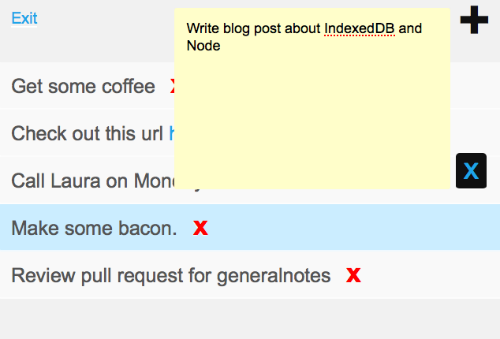
In this post, I’ll be talking about how to create a basic note-taking app that syncs local and remote content if you are online and defaults to saving locally if offline.

notes app sample

Using Redis on the server-side

When adding records in Redis, we aren’t working with a relational database like in MySQL or PostgreSQL. We are working with a structure like IndexedDB where there are keys and values. So what do we need when we only have keys and values to work with for a notes app? We need unique ids to reference each note and a hash of the note metadata. The metadata in this example, consists of the new unique id, a creation timestamp and the text.

Below is a way of creating an id with Redis in Node and then saving the note’s metadata.

// Let's create a unique id for the new note.
client.incr('notes:counter', function (err, id) {
 
...
 
    // All note ids are referenced by the user's email and id.
    var keyName = 'notes:' + req.session.email + ':' + id;
    var timestamp = req.body.timestamp || Math.round(Date.now() / 1000);
 
    // Add the new id to the user's list of note ids.
    client.lpush('notes:' + req.session.email, keyName);
 
    // Add the new note to a hash.
    client.hmset(keyName, {
      id: id,
      timestamp: timestamp,
      text: finalText
    });
 
...
 
});

This gives us the following key pattern for all notes on the server-side:

  1. notes:counter contains all unique ids starting at 1.
  2. notes:<email> contains all the note ids that are owned by the user. This is a list that we reference when we want to loop through all the user’s notes to retrieve the metadata.
  3. notes:<email>:<note id> contains the note metadata. The user’s email address is used as a way to reference this note to the correct owner. When a user deletes a note, we want to verify that it matches the same email that they are logged in with, so you don’t have someone deleting a note that they don’t own.

Adding IndexedDB on the client-side

Working with IndexedDB requires more code than localStorage. But because it is asynchronous, it makes it a better option for this app. The main reason for why it is a better option is two-fold:

  1. You don’t want to wait around for all your notes to process before the page renders all elements. Imagine having thousands of notes and having to wait for all of them to loop through before anything on the page appears.
  2. You can’t save note objects as objects – you have to convert them to strings first, which means you will have to convert them back to objects before they are rendered. So something like { id: 1, text: 'my note text', timestamp: 1367847727 } would have to be stringified in localStorage and then parsed back after the fact. Now imagine doing this for a lot of notes.

Both do not equate to an ideal experience for the user – but what if we want to have the ease of localStorage’s API with the asynchronous features of IndexedDB? We can use Gaia’s async_storage.js file to help merge the two worlds.

If we’re offline, we need to do two things similar to the server-side:

  1. Save a unique id for the note and apply it in an array of ids. Since we can’t reference a server-side id created by Redis, we’ll use a timestamp.
  2. Save a local version of the note metadata.
var data = {
  content: rendered,
  timestamp: id,
  text: content
};
 
asyncStorage.setItem(LOCAL_IDS, this.localIds, function () {
  asyncStorage.setItem(LOCAL_NOTE + id, data, function () {
    ...
  });
});

The structure of the IndexedDB keys are very similar to the Redis ones. The pattern is as follows:

  1. All local ids are saved in a localNoteIds array
  2. All local note objects are saved in note:local:<id>
  3. All remote/synced ids are saved in a noteIds array
  4. All remote/synced note objects are saved in note:<id>
  5. Local notes use a timestamp for their unique id and this is converted to a valid server id once Redis saves the data

Once we’re online, we can upload the local notes, save the remote ones on the client-side and then delete the local ones.

Triggering note.js on the client-side

Whenever we refresh the page, we need to attempt a sync with the server. If we are offline, let’s flag that and only grab what we have locally.

/**
 * Get all local and remote notes.
 * If online, sync local and server notes; otherwise load whatever
 * IndexedDB has.
 */
asyncStorage.getItem('noteIds', function (rNoteIds) {
  note.remoteIds = rNoteIds || [];
 
  asyncStorage.getItem('localNoteIds', function (noteIds) {
    note.localIds = noteIds || [];
 
    $.get('/notes', function (data) {
      note.syncLocal();
      note.syncServer(data);
 
    }).fail(function (data) {
      note.offline = true;
      note.load('localNoteIds', 'note:local:');
      note.load('noteIds', 'note:');
    });
  });
});

Almost done!

The code above provides the basics for a CRD notes app with support for local and remote syncing. But we’re not done yet.

On Safari, IndexedDB is not supported as they still use WebSQL. This means none of our IndexedDB code will work. To make this cross-browser compatible, we need to include a polyfill for browsers that only support WebSQL. Include this before the rest of the code and IndexedDB support should work.

The Final Product

You can try out the app at http://notes.generalgoods.net

The Source Code

To view the code for this app feel free to browse the repository on Github.

18 May 10:40

Presentation: Architecting for High Availability

by Attila Narin
Attila Narin discusses AWS concepts: Availability Zones, RDS Multi-AZ deployments, SQS and Auto Scaling, Elastic IP, load balancing, DNS, DynamoDB, Amazon S3, etc., and EC2 best practices. By Attila Narin
18 May 10:40

Presentation: Programming The Feynman Way

by Ben Evans
Ben Evans explores the idea that many of the characteristics of Feynman’s approach to physics are applicable to programmers, fueling the dream of a world where developers are free to be themselves. By Ben Evans
18 May 10:40

Android Studio: A New IDE from Google Based on IntelliJ IDEA

by Abel Avram
Google launches another Android IDE built on IntelliJ IDEA Community Edition, sharing many features with the Eclipse-based tool. By Abel Avram
18 May 10:40

Presentation: Web Development: You're Doing It Wrong

by Stefan Tilkov
Stefan Tilkov challenges many commonly-held assumptions about how to best develop web applications, emphasizing the strengths and ideal roles for HTML, CSS, JavaScript, HTTP and URIs. By Stefan Tilkov
18 May 10:40

Presentation: Confessions of an Agile Addict

by Ole Friis Østergaard
Ole Friis Østergaard discusses software development addictions: becoming aware of them, controlling them, getting rid of bad habits by admitting them and changing through practice. By Ole Friis Østergaard
12 May 14:33

Presentation: Spock: Test Well and Prosper

by Ken Kousen
Ken Kousen introduces Spock, a logical testing framework written in Groovy, providing code samples for developers. By Ken Kousen
11 May 10:12

Interview: Interview with Paul Webster, Eclipse Platform UI lead on Eclipse 4

by Paul Webster
Paul Webster provides some history and context for the evolution of the Eclipse 4 project, and sketches out where it is going with the Eclipse Kepler (4.3) and Luna (4.4) releases in the future. By Paul Webster
11 May 10:12

Presentation: The Java EE 7 Platform: Higher Productivity & Embracing HTML 5

by Arun Gupta
Arun Gupta demoes some of the new features introduced or enhanced in Java EE 7: HTML5, JAX-RS 2, JMS 2, Batch Processing and Caching API, WebSocket, etc. By Arun Gupta
11 May 10:12

AIDE 2.0 Introduces Support for Native C/C++ Apps

by Abel Avram
AIDE 2.0 adds support for C/C++, a new Design View, better UI and improved Git integration. AIDE is an Android IDE running on Android. By Abel Avram
11 May 10:12

Making Immutable Object Graphs Easier in C#

by Jonathan Allen
Creating a simple immutable class in C# is easy, but eventually you’ll want to create deep graphs that, for efficiencies sake, should be created via a builder. Or perhaps you want to make non-destructive updates by creating methods. Building out all these builders and methods can be quite tedious and thus error prone. Andrew L Arnott offers a solution that relies on T4 based code generators. By Jonathan Allen
10 May 17:39

Presentation: Architecting for Continuous Delivery

by John Esser, Russell Barnett
John Esser and Russell Barnett discuss Ancestry.com’s SOA implementation capable of supporting continuous delivery, architectural standards used, and how continuous delivery works for them. By John Esser, Russell Barnett
10 May 17:38

Presentation: Rocking the Gradle

by Peter Walker
Peter Walker discusses and demoes some of Gradle’s features: declarative build, convention over configuration, plugins, multi–project support, partial builds and increments, Ant and Maven integration. By Peter Walker
10 May 17:38

KnockoutJS vs jQuery – A wonderful team

KnockoutJS is an MVVM JavaScript framework for your browser. It allows you to easily bind raw data to a model and update elements bound to that model.

jQuery is a DOM manipulation framework that has made JavaScript not suck.

Both have their reason to exist and they should actually not compete. It’s all about using the right tool for the right job.

The problem

When building rich HTML page with a lot of input/tag manipulation, the most common manipulation is changing what is displayed. Be it the content of a text box or the content of a tag, we need to update those elements a lot. What we often end up is a lot of jQuery code that selects element and then updates it.

It becomes very quickly clear that increasing the amount of code would make it look like spaghetti code. Another big disadvantage of having all of your UI driven by jQuery is that you end up with a lot of selectors. Unless you are selecting by ID, tag or classes (and depending on your browser), selectors will eventually slow your browser.

So how do we fix spaghetti event binding and keep our head cool?

Fixing the problem with KnockoutJS

Let’s start with some basic HTML:

<div id="myModel">    
    <label>Firstname</label>
    <input type="text" id="firstname" />

    <label>Lastname</label>
    <input type="text" id="lastname" />

    <span><strong id="fullname">Displaying full name here</strong></span>
</div>

That’s the most simplistic example. We have a first name and a last name and we want to concatenate both of them into an tag to display the user and that, in real time. This might seem like an easy problem but keep in mind that real-life problems will actually be more fierce. With that said, let’s start coding.

What would that look like in jQuery?

$(document).ready(function () {
    $("#firstname").on('keyup', UpdateFullname);
    $("#lastname").on('keyup', UpdateFullname);
});

function UpdateFullname() {
    $("#fullname").text($("#firstname").val() + ' ' + $("#lastname").val());
}

We basically have no less than 5 selectors. All based on IDs so they are going to be fast but still… it’s five selectors. We could probably optimize things a bit but this is as close as production code I’ve seen in the wild. The trick for the real-time requirement in this scenario is the ‘keyup’ event. As we add more elements to our model we might have to add more event binding to invoke that function on other elements. Maybe other functions will require that same function too and you end-up with a flurry of selectors left and right with a big JavaScript file of 800 lines of code in no times.

What about KnockoutJS?

$(document).ready(function () {
    ko.applyBindings(new FullnameViewModel(), $("#myModel")[0]);
});

function FullnameViewModel() {
    var self = this;
    self.firstName = ko.observable('');
    self.lastName = ko.observable('');

    self.fullname = ko.computed(function() {
        return self.firstName() + ' ' + self.lastName();
    });
}

Of course, for the KnockoutJS version to work properly, I have to change the HTML a little bit. I’ll also take the time to remove unused attributes (required by jQuery in this case) to work. Here is how it looks now.

<div id="myModel">    
    <label>Firstname</label>
    <input type="text" data-bind="value: firstName, valueUpdate: 'afterkeydown'" />

    <label>Lastname</label>
    <input type="text" data-bind="value: lastName, valueUpdate: 'afterkeydown'" />

    <span><strong data-bind="text: fullname">Displaying full name here</strong></span>
</div>

So what can we understand from that? Yes, it takes a bit more JavaScript to do the work but now, the whole “business rules” are actually encapsulated in one JavaScript function. If we need to reuse part of how the full name is built, it’s actually part of your model. It’s something you can write tests for. As more rules are added to the view model, less time is spent debugging which selector I am to use and more about writing business rules of our presentation layer.

Why should I go with Knockout?

  • If your application actually has some business rules that need encapsulating, Knockout will provide you an easy way to do it.
  • If you are unit testing your JavaScript, it is much faster and easier to test only the ViewModel without any actual HTML in the back. You could potentially run something like PhantomJS to test your ViewModels.
  • If you are going to reuse part of the model in other bits of HTML or simply if your HTML is still changing a lot
  • If you need to be able to serialize your whole model in JSON to send to the server.

What should I still use jQuery for?

  • Basic DOM manipulation/selection
  • Ajax requests
  • Effects and animation

Give KnockoutJS a try!

Try it out by going first to KnockoutJS.com and doing the live tutorial. It will be easy to get your feet wet. Then, use it in Visual Studio since it’s part of the template!

08 May 18:15

Sambamba: Another Way To Automatically Parallelize Code

Sambamba is an interesting research project out of academia that's yet another attempt at coming up with a better means of automatically parallelizing code. The Sambamba project describes itself as "A Runtime System for Online Adaptive Parallelization."..
06 May 18:22

How to Spread The Word About Your Code

by Peter Cooper

You spent an entire weekend building a library, jQuery plugin, build tool, or other great piece of code you wanted to share far and wide, but after some tweets and a failed attempt to make the front page of Hacker News, your creation languished, unloved, in a GitHub repo. A common situation for many developers nowadays, but one you can avoid.

As the editor of several programming newsletters, I frequently get two types of e-mails from developers. Those reaching out to ask if I can mention their projects, and those expressing surprise and excitement that their work has been featured. If you’re a developer doing good work but feel more like you’d be in that second group, the three steps in this article are for you.

Before we get started, there’s a stumbling block we need to kick away. Terms like ‘marketing’ and ‘advertising’ are dirty words for many developers and it’s not uncommon for developers to be reluctant to do much promotion. ‘Build it and they will come’ used to work when exciting open source projects were few and far between but now everyone seems to be working on something and making a noise about it. Few of the successes you see come through pure luck but because developers are actively promoting their work or, at least, making it discoverable. It’s time to join them!

Step 1: Get your project ready

Before you can promote your project, you need to make it attractive to potential users and evangelists (including general wellwishers, the media, and other developers).

A good name

Ensure your project has a palatable name. It doesn’t need to be clever or even descriptive, but it’s worth avoiding innuendos that may present a problem down the line. For example, the popular Testacular and Authgasm projects, are now named Karma and Authlogic respectively after users raised a fuss.

You should perform a search for the name you choose to be sure you’re not clashing with anything else that’s popular or trademarked (did you know Firefox was called Phoenix and Firebird prior to Firefox?). The US Patent and Trademark Office has an online trademark search facility.

A benefit of having a relatively unique or uncommon name is so you can search for it over time (or even set up a Google Alerts notification for the name) and find mentions of your project without many irrelevant results popping up. If you want to have something descriptive but unique, consider joining two words together. For example, when I created a Ruby library to do natural language detection, I called it WhatLanguage and it’s easy to search for.

An official homepage or project URL

The term ‘homepage’ is a bit outdated but you ideally need a single ‘home’ URL that you can promote and point people to in relation to your project. You don’t need to splash out on a fancy template or even a domain name, but your project needs a focal point. That could be an entire site with its own domain, such as those for Yeoman or HTML5 Boilerplate, a simple single page on an existing domain, such as that for RoughDraft.js, or even a regular GitHub repo, such as for vague.js.

If you have the freedom to do so, make sure your site looks good on the major browsers (including mobile), hook up some analytics to your page and ensure the <title> tag is well written. Use a title like “MyProject – A JavaScript Library to X, Y and Z” instead of just “MyProject – About” or a blank title. With social bookmarking, this matters as you can’t guarantee your evangelists will write a good title of their own.

If you’re not a Web designer, don’t have the time to spend making a complete design, but still want a complete site rather than just a GitHub repo and README, consider using a framework like Bootstrap as it’ll provide a clean layout out of the box and you can forget about many cross browser and device issues.

Documentation and copywriting

It’s only just a cliché that developers don’t like to write documentation, but you need something for potential users to fall back on, and time invested in producing useful documentation up front will pay dividends later.

At a cynically bare minimum, you need to write enough documentation that someone will be confident about sharing your link or promoting your project and not feel like they’re sending their own followers into a black hole of misunderstanding. This means your homepage or README needs to cover a few angles. You’ll need to:

  • Prominently feature a “[noun] is” paragraph. An alarming number of project homepages don’t explain, in simple terms, what the project is actually for or does. If you’ve built a JavaScript library that does language detection, say, you have to say so. For example: “LanguageDetect is a JavaScript library for detecting the natural language of text.”

    An excellent example of this in action is on libcinder.org where it states right up front: “Cinder is a community-developed, free and open source library for professional-quality creative coding in C++.” Perfect!

  • Write clear titles, subheadings, and support copy. At a bare minimum, ensure titles, subtitles, and any sort of writing on your homepage are straightforward and clear. Write for the lowest common denominator on your homepage. You can get more advanced elsewhere.

  • Write a beginner’s tutorial and link to it from your home page. Unless everything’s simple enough to explain on a single page, quickly write a tutorial that covers basic installation and usage and either include it in your README file or put it on the Web and link to it from your README and/or homepage.

  • State dependencies and requirements clearly. Does your library only work on a specific version of Node? Is it a browser extension for Firefox? Does your code require PostgreSQL, Redis, or another specific database? Be sure to include a bulletpoint list of dependencies and requirements for your project to be usable so as not to disappoint potential users.

  • Specify the license for your code. While you could get away with keeping your licensing information tucked away in a LICENSE file in your GitHub repo, specifying what license your code is released under up front and center will help put many developers at ease. Likewise, if your project is commercial is nature and costs money, don’t hide that detail away and mislead visitors.

  • If your project is a library or API, feature some example code on the homepage. Unless your library is particularly complex, let visitors see an example of its usage on the project homepage. If your API is good, this could be a great way to get an ‘easy sale.’ I’m not a huge fan of the code example chosen but the homepage for Ruby shows off this technique.

Extra materials

A blog post is a great way to introduce a project that might need more background or have more of a story than it’s practical to tell on a homepage or within documentation. If there’s any sort of story behind your project, a blog post is a great way to tell it. Be sure to link to the post from your project’s homepage and consider promoting the blog post separately to relevant sites within your niche.

If you have the ability, recording a screencast or other sort of video can help. Could you put together a simple 5 minute screencast of how to install and use your library? Or have you built a game that could be demonstrated in a few minutes of gameplay? Record a simple video, put it on YouTube, and embed it on your homepage. Your accent doesn’t have to be as crisp as a newsreader’s and you don’t even have to appear within the video. All that matters is you get to the point quickly and your audio is tolerable (not muffled, clipping, or drowned in background music).

As the editor of several programming newsletters, I look at thousands of projects each year, and it’s still uncommon to see simple screencasts, yet they certainly help a project stand out and, as a consequence, make it more likely for me to talk about it. You can see a perfect example on Punch’s homepage. The early popularity of Ruby on Rails also depended upon a popular ‘build a blog engine in 15 minutes’ video, back when the concept of using video to promote an open source project was very novel.

If you’re sticking to the straight up, GitHub README approach (and it’s certainly not a bad idea for a simple library), a bonus tip is to create a tiny screencast of your code in action and convert it to an animated GIF for inclusion in your README. Richard Schneeman outlines this technique in Use GIFs in your Pull Request for Good, not Evil. The result is striking and could help your README stand out.

For further ideas on how to make your project stand out before you begin promoting it, check out the great How to Make Your Open Source Project Really Awesome by Michael Klishin. It digs into more detail about versioning, announcements, having a changelog and writing good documentation.

Step 2: Get the word out

You’ve polished your project, got a URL to promote, and you’re ready to get the news out.

A word of caution, however. Don’t use every technique on day one. You could overload your site with traffic or, worse, be subjected to a barrage of online criticism if your work or site is broken. With something like a library or tool, a gentler approach will work well and building up small streams of visitors and users over time will give you a much better time.

Social networking

Your own social networking profiles are always a good place to start if you have them. You’ll get more immediate feedback from people who actually know you and if your project is particularly interesting, it could go viral even from a single mention.

A great example of a simple project going viral was YouTube Instant by Feross Aboukhadijeh. Feross built YouTube Instant quickly, mentioned it on Facebook before going to bed, and woke up to a flood of traffic and press mentions.

If you like to experiment and have several bucks going spare, you could also consider paying for a promoted post on Facebook. This will give your post more visibility in your news feed, but is best reserved for if your Facebook friends are mostly developers or people likely to be interested in your project. If not, and you’d still like to spend some money, consider an ad on Reddit or a relevant programming blog instead.

Influencers, bloggers, and niche media

Whether you’re working on a JavaScript library, Firefox extension, backend app in Rails, or a theme for Bootstrap, your code will fit into one or more niches and every technical niche has a variety of ‘influencers’, people and publications who are popular and well known for the topic at hand.

Getting a tweet, retweet, or even an entire blog post from an influencer could have a significant impact on your project, as could being invited to blog elsewhere (Mozilla Hacks, for example!). If Brendan Eich tweeted about your JavaScript library, Lea Verou wrote a blog post about a CSS trick you discovered, or Paul Irish mentioned a Web development tool you built in a talk, you would attract a lot of interest quickly. It is key, however, to realize there are many great influencers in every space and you’ll achieve nothing by hounding any one person so be prepared to move on.

Spend some time working out who the influencers and key publications are in your niche. For Twitter, Followerwonk is a handy tool that searches Twitter biographies for certain words. If you search for “javascript” the first page includes several users who would be useful to reach out to if you had a particularly interesting JavaScript-related release to promote. Reaching out on Twitter can be as simple as a single tweet and many busy folks prefer Twitter as it takes less time to reply than an e-mail. A single tweet from @smashingmag could drive thousands of visitors your way, so consider tweeting them, and other similar accounts, when you have something relevant.

I’d also advise looking for blogs and e-mail newsletters in your niche. Start with something as simple as Googling for “javascript blog”, “javascript newsletter”, “css blog” or whatever’s relevant to your project. Most bloggers or e-mail newsletter publishers will not be offended by you sending them a quick note (emphasis on quick) letting them know about your work. Indeed, some weeks there can be a shortage of interesting things to write about and you might be doing them a huge favor.

If you choose to e-mail people (and your project will probably be more substantial than a few hours’ work to justify this), take care not to make demands or to even expect a reply. Many bloggers and influential people have overflowing inboxes and struggle to reply to everything they receive. Make your e-mail as easy to process as possible by including a single URL (to your now superb homepage or README) and include your “[noun] is” paragraph. Don’t take a non-response as an insult but keep moving on to the next most relevant person. You might even consider taking a “Here’s my project that does X, Y and Z. No reply needed, I just thought you might like it” approach. Softly, softly works here, as long as you get to the point quickly.

How to get attention from internet celebrities by Jason Cohen and How to Write the Perfect Outreach Email by Gregory Ciotti go into more detail about e-mail etiquette when promoting your work to influencers. While you might not need to contact any ‘celebrities’ in your niche, the principles of keeping it short, including a call to action, and ensuring your work is appropriate to the person are really true for anyone you’re sending unsolicited messages to.

Podcasters are an often forgotten source of promotion opportunities too. While some podcasts don’t cover news or new releases at all, many do, and being on the radar of their hosts could help you get a mention on a show. Smashing Magazine has put together a list of tech podcasts covering the areas of design, user experience, and Web development in general. Again, keep your e-mails short and sweet with no sense of expectation to get the best results.

User curated social news sites

As well as reaching influencers and niche media, sometimes reaching the public ‘firehose’ of news can work too, and there are few better examples of these in the modern world of development than Hacker News or Reddit.

Hacker News in particular is notoriously hard to reach the front page on and ‘gaming’ it by getting other people to vote up your post can backfire. (Indeed, it will backfire if you link people to your post on Hacker News and encourage them to upvote. They have ways of detecting this behavior. Get people to manually find your post instead.) If you do reach the front page of Hacker News, of course, you can certainly expect an audience of many thousands of developers to be exposed to your work, so be sure to try.

With Reddit, the key isn’t to dive straight into a huge sub-Reddit like /r/programming but to look for sub-Reddits more directly related to your project. For a JavaScript library, I’d post to /r/javascript or possibly /r/webdev. Reddit ads can also perform well if you’re OK with spending some money and these can be targeted to specific sub-Reddits too.

There are many similar sites that are less well known but which are respected in their niches and can drive a lot of interested visitors, including Designer News (mobile and Web design), DZone (general developer stuff), EchoJS (JavaScript), RubyFlow (Ruby and Rails), and Lobste.rs (general hacker and developer stuff). Finding the right site like this and taking time to make an on-topic, well written post will help a lot.

The mass media / press

This article is primarily focused on the promotion of open source and front-end projects and these are typically not frequently covered in print or on the TV or radio. If, however, you think the mass media would be relevant for your project, here are some other articles packed with handy tips:

Step 3: Maintain momentum

You’ve built up some interest, your GitHub stars, Reddit votes, and pageviews are all rocketing up, but now you want to capitalize on the attention and maintain some momentum.

User support

Whether you’ve built an open source project or a cool tool, you’re going to end up with users or fellow developers who want to provide feedback, get help, or point out issues with your work. On GitHub, the common way to do this is through the built-in ‘issues’ tracker, but you might also find people start to e-mail you too.

Be sure to define a policy, whatever it is. Users won’t feel good about opening issues on your GitHub repo if there are already many unresolved issues there and your project could stagnate. Ensure you respond to your audience or at least make your policy clear within your README or on your site. If you don’t want issues raised or code contributions, make this clear up front.

Extending your reach

For many projects, create a dedicated Twitter account, blog, Facebook page, or Google+ page in advance is overkill, but if your project starts to take off, consider these things. They’ll provide an extra way not only for users to remain in touch with your project but also a way for them to help promote it by retweeting things you post or by directing potential new users your way.

You can also extend your reach in person by going to user groups and conferences and, if you’re really lucky, you can speak about your work too. This is a great way to get new users as people are much more likely to look into your work if they’ve met you in person.

Avoid being defensive

If your project does well on sites like Hacker News or Reddit, you’ll be tempted to read all of the comments your peers leave, but be careful. Comments about your work will, naturally, seem magnified in their intensity and critical comments that might not actually be mean spirited may seem as if they are to you.

It’s hard, but the best policy is to not let any overtly mean comments get to you, duly correct any observations that are wrong, and to thank anyone who goes out of their way to compliment your work. Even if you’re in the right, with the lack of body language and verbal cues, being too defensive can look bad online and result in the post becoming a lightning rod for drama. Engage as best you can, but if it feels wrong to reply to something, listen to your gut.

Be careful if you go into a new community to promote your work and get negative feedback. Most communities have rules or expectations and merely entering a community to promote your work is frequently considered a faux pas. Be sensitive to people’s environments and try to abide by a community’s rules at all times.

The long term

If your project does particularly well, you could be presented with the opportunity of turning it into a business in its own right. Many simple open source projects, often started by a single developer, have turned into long term work or even entire companies for their creators.

Back in 2010, Mitchell Hashimoto released Vagrant, a Ruby-based tool for building a deploying VirtualBox-based virtualized development environments. In late 2012, Mitchell launched Hashicorp, a company providing Vagrant consulting services to enterprise customers. An even higher profile example is Puppet Labs, a company built around the Puppet open-source configuration management tool and which has taken total funding of $45.5 million so far.

If your project becomes respected and heavily used within its field, you might also be approached to write a book or article about it or even speak at a conference. This is a good sign that your project has ‘made it’ to some extent as publishers and event organizers are in the business of working out what it makes business sense to present.

Putting it all together: A checklist

This has only been a basic introduction to promoting your work and with practice you’ll come up with tons of tips of your own (it’d be excellent if you could share some in the comments here). Based on all of the ideas above, here’s a basic checklist to run through next time you release a new project and want to get some added exposure:

  • Focus most of your efforts on your project’s homepage or README.
  • Check your project’s name doesn’t clash with anything else and is unique enough to find references to your work later.
  • Promote your work to your closest social group first to unbury any problems with your work.
  • Record a screencast or write a blog post about your project if some extra background would be useful for others.
  • Work out a perfect *”[project name] is”* sentence to describe what your project is or does.
  • Use your *”[project name] is”* sentence to give your page a descriptive title.
  • Find influential people, blogs, podcasts, and e-mail newsletters in your niche and send them a short, pleasant note.
  • Post to social news and bookmarking sites. Ensure your title is descriptive.
  • Use your *”[project name] is”* sentence in e-mails and contacts with influencers.
  • Take a positive, “look on the good side” approach to responding to comments about your work.

Good luck!

04 May 12:43

Presentation: Keynote: The Power of Abstraction

by Barbara Liskov
Abstraction is at the center of much work in Computer Science. It encompasses finding the right interface for a system as well as finding an effective design for a system implementation. By Barbara Liskov
04 May 10:43

Presentation: Testing and Refactoring Legacy Code

by Sandro Mancuso
Sandro Mancuso runs a hands-on demo adding tests to a Java legacy code then refactoring it. By Sandro Mancuso
04 May 10:43

Presentation: JVM Mechanics – A Peek Under the Hood

by Gil Tene
Gil Tene discusses JVM observation-based runtime optimizations, ordering and memory model rules, basics GC functions, memory management, and JVM mechanics. By Gil Tene
01 May 10:46

Node at Work: A Walkthrough

In my first article, “Even Better In-Browser Mockups with Node.js,” I explained why Node.js makes designing applications easier and more efficient, and how to get started. Now it’s time to see your new design process in action.

Rather than figuring out all your requirements and API schemas just to design your comps with mockup content hard-coded and server interactions faked—only to throw it all away when you go back and implement things “for real”—you can use Node.js to skip the hard-coding and produce client-side code that’s ready for beta at the end of the design stage.

The process looks a lot like good ol’ designing in the browser, but with more JavaScript and an additional layer:

  1. Design the layout and styling
  2. Convert the markup to a JavaScript template
  3. Create an initialization function
  4. Create a simple Node.js server
  5. Add a mockup data object to the server
  6. Add server functions to serve static pages and JSON
  7. Request and consume the JSON on the client

Sound daunting? Don’t worry. The first step takes approximately a zillion times longer than any of the others. So if you’ve already mastered the design, you’ll find the rest of these steps more than manageable.

In this walkthrough, we’ll build a feature for a mock art store. If you want to follow along at home, you can clone my GitHub repository. (If you need help installing, see the README, or just take a peek at the live demo—I’ll cover all the steps and code below.)

Creating templates

Once you have a solid design and the markup to accompany it, converting it to a template you can use for all examples is more efficient than creating duplicate markup for each one. The hard part’s over; you already thought about where data points would be used in the design when you created it. With those choices fresh in your mind, go back and mark up your HTML with data in whatever template language you prefer.

For my example, I’m using a store selling art prints. Here’s a snippet of my initial markup:

<h2>Two Acrobats with a Dog</h2>
<h3>Pablo Picasso</h3>
<img src="img/102.jpg" alt="Two Acrobats with a Dog" class="active" />
<ul class="info">
	<li>8" x 11"</li>
	<li>acid-free paper</li>
	<li>suitable for matting</li>
</ul>
<span class="price">$49.99</span>

Think of your templates as places to define your requirements for both data and its formatting on the client side. If you can also reuse it for client-side rendering, that’s awesome—but that may not be relevant to your application. As long as you have good data, converting from one template language to another is trivial, so don’t agonize over which template engine to use.

You do need a template engine that will work in both the browser and Node.js, however. If you’re unsure, search for your template engine on GitHub and verify that there’s a guide to installing it via npm in the manual, as well as a minified script for use on the client. I prefer doT.js, so here’s that snippet again marked up to add data using doT:

<h2>{{=it.title}}</h2>
<h3>{{=it.artist.name}}</h3>
<img src="img/{{=it.id}}.jpg" alt="{{=it.title}}" class="active" />
<ul class="info">
	{{~it.info :info_item}}
	<li>{{=info_item}}</li>
	{{~}}
</ul>
<span class="price">{{=it.price}}</span>

I like to save my templates in their own directory at the same level as my JavaScript directory, so now I store that as tmpl/detail.dot.

Initializing the client

Since we want to be able to use our templates in both Node and the browser, they need to be stored outside of the HTML and loaded and compiled when we open the page. To start, save the minified version of your template engine and add a script tag to your page to include it. Once that’s done, you can fetch the template, compile it, and then continue on with any other initialization work in your main JavaScript file. I’m using jQuery in my example, so my code looks like this:

var detailTmpl;

$.when( 
	$.get( "tmpl/detail.dot", function( tmpl ) {
		detailTmpl = doT.template( tmpl );
	}, "text" ) 
).then( init );

That mysterious init function? That’s where I’ll put any interactivity I want to add to my currently static mockup. For the moment I’m only creating one interaction, so my init function is pretty simple:

function init() {
	$( "div.content" ).on( "click", "div.result", showDetail );
}

This code can be made much more elegant using Require.js with its text plugin. That’s beyond the scope of this demo, but I highly encourage it for production.

We’ll handle template rendering in showDetail(), but we have to add a server and data store before writing that function, since right now we lack any data to render.

Creating a server

If I reload my page now and open the browser console, I get a JavaScript error. That’s because I’m trying to load my template via an XMLHttpRequest (XHR) on a page being served from the file system, in violation of the same origin policy. I can’t even check that my template works until the page is served properly (i.e., from a server).

To whip up a simple Node server that allows me to run my XHRs, I do a few things:

  • Move all my existing assets into a new subdirectory called public
  • Open my terminal or command line to my working directory and run npm install express
  • Add a server.js file to the working directory

We could write everything from scratch, of course, but it’s more work than is necessary for a basic server. The Express framework provides a number of abstractions of server and application concepts. For the initial version of the server, the only one we’ll need is its ability to serve static resources. We can use it by adding four lines of code to server.js:

var express = require( "express" ),
	app = express();

app.use( express.static( __dirname + "/public" ) );

app.listen( 3000 );

Once you start your server by typing node server.js in your open terminal or command line, you can view your page at http://localhost:3000 (adding a filename if necessary), and the error related to loading the template ought to disappear.

Adding server-side data

While it’s certainly nice to be able to use XHRs, we’re creating the Node server to use it as a representation of the real server—and real servers store data. Though it’s not hard to create a data store that works with a Node server, it’s even less difficult to create one big object literal. For a mockup, that’s all we really need. One of the goals here is to define the data objects we need to support in our new design, so the format of this object can be determined by the template we just added. For my example, I need an object structured something like this:

var products = {
	"102": {
		id: 102,
		title: "Two Acrobats with a Dog",
		artist: {
			name: "Pablo Picasso"
		},
		price: "$49.99",
		info: [
			"8\" x 11\"",
			"acid-free paper",
			"suitable for matting"
		]
	}
};

Note that products could just as easily be an array, but I want to be able to quickly find my products—once I have more than one in my fake data store—by ID. Aside from that little twist, the data look exactly like the content hard-coded in my original HTML. If I want to add more data, including things that might break the layout in unpredictable ways, I can just copy this structure and make substitutions. Well, almost.

Returning data from the server

If you’ve dealt with other server-side frameworks, creating endpoints for XHRs might seem intimidating, but Express makes it really easy. We don’t need any special setup to define a server endpoint as a target for asynchronous requests. All we have to do is define the path on the server where we want to accept requests and a callback. The callback receives a request object (for doing things like getting passed-in data) and a response object (for defining what we return to the client). To return the data in my products object, I add a few lines of code at the bottom of server.js:

app.get( "/detail/:id", function( req, res ) {
	res.send( products[ req.params.id ] );
});

app.listen( 3000 );

See? Easy. If I restart my server and go to http://localhost:3000/detail/102, I should see my object data. To break down what’s going on with the ID in the path, we’ve named the data at that position in the path "id" with the :id bit, and it then becomes available as a property of req.params.

The names and positions of parameters are up to us, and if our path were super complex, we could also use regular expressions to split out multiple pieces of data. Express also gives us the option of accepting data from the query string or from a POST. Of all the pieces we’re creating, however, the paths are the most likely to change in production, so it’s to our advantage to keep them as readable as possible.

Besides sending pure data to the client, we also want to be able to send rendered HTML, in case a user is linked directly to a product detail or doesn’t have JavaScript available. We might also want HTML for our own consumption via XHR, if we find that client-side rendering is slowing us down. So we add a second endpoint below the one we just created to do that:

app.get( "/product/:id", function( req, res ) {
	res.render( "detail", products[ req.params.id ] );
});

For simplicity’s sake, and because the first path served JSON for an overlay while this provides a full page, I’ve used a different pathname, but kept the same pattern. This time, instead of the response’s send function, I use render(). Express provides some magic to make template rendering work out of the box, but since I’m using doT instead of Jade (the default template engine of Express), I have to do some additional setup.

First I have to go back to the terminal or command line, stop my Node server, and install my template engine using npm install doT and the consolidate module (which provides Express compatibility for a number of popular template engines) using npm install consolidate. Now I’ve got both of those in my node_modules directory and can use them in server.js.

Since doT (and probably your template engine of choice, as well) is accessed through consolidate, consolidate is the only additional module I need to require at the top of server.js:

var express = require( "express" ),
	app = express(),
	cons = require( "consolidate" );

I want to continue serving some of my other pages statically, so I add my template configuration stuff below the existing app.use line in my code:

app.use( express.static( _dirname + "/public" ) );
app.engine( "dot", cons.dot );
app.set( "view engine", "dot" );
app.set( "views", _dirname + "/public/tmpl" );

Those three new lines set doT (as exposed by consolidate) as the view engine, register files ending in .dot as templates, and tell Express to look in /public/tmpl for templates to use. So when Node sees res.render( "detail", { ... } ), it knows to expand "detail" to /public/tmpl/detail.dot and render it as a doT template. Now I can restart my server, go to http://localhost:3000/product/102, and see my template rendered statically, without creating a separate server-side file.

Fetching dynamic data

Our template now works as a static page, but there’s still one more step to get our mockup populated with the data from the server. Remember the showDetail function from our main client-side script? It’s time to flesh that out.

In my simple example, the overlay my template will populate already exists as a hidden div on the main page, and it appears when the user clicks a div containing a summary of the content. This div has a data attribute storing the ID of the product that corresponds to the key and id property in my server-side data object. Once that click event happens and showDetail() is called, I just need to do this:

function showDetail( e ) {
	var id = $( this ).data( "id" );
	$.get( "detail/" + id, function( info ) {
		$( "div.detail" ).html( detailTmpl( info ) );
		$( "div.detail" ).show();
	}
}

The path above is the same one I defined in server.js. If you chose a different name for yours, use that name here on the client. When I receive the data object from the server, I pass it to detailTmpl(), the compiled version of my template. The result of the detailTmpl function is the HTML to populate my overlay.

Onward

So there you have it! A mockup that mimics the interactions it will have with its production server precisely on the client, without the need for hard-coded data or temporary workarounds. Despite the simple exercise, the process I’ve outlined accomplishes a good deal of the setup necessary to create other workflows that require server interactions. For instance, I can fill my fake data store with more products and use that to render the initial page that triggers my overlay without having to revisit my mockup data, and my application will show the correct values in any view I add to it.

If you’d like to explore beyond just serving HTML and JSON, consider adding in Socket.io to allow real-time interaction for multiple clients or Require.js to manage your assets on the client. You could also move your CSS into templates and serve different builds of your site for different browsers or devices. Your mockup can be as sophisticated and reflect as many of its production requirements as you choose. At the end, the lion’s share of your client-side code is done and ready to use.

01 May 10:45

Introduction to Hadoop: Real-World Hadoop Clusters and Applications

The Hadoop ecosystem relies on composability — the ability to use output from one tool as input to the next — to efficiently process data at scale, from simple projects, to processing streams of real-time data, to building data warehouses.
01 May 10:44

Fallacies of massively distributed computing

by Arnon Rotem-Gal-Oz

In the last few years, we see the advent of highly distributed systems. Systems that have clusters with lots of servers are no longer the sole realm of the googles’ and facebooks’ of the world and we begin to see multi-node and big data systems in enterprises. e.g. I don’t think a company such as Nice (the company I work for) would release an hadoop based analytics platform and solutions, something we did just last week, 5-6 years ago.

So now that large(r) clusters are more prevalent, I thought it would be a good time to reflect on the fallacies of distributed computing and how/if they are relevant; should they be changed.
If you don’t know about the fallacies you can see the list and read the article I wrote about them at the link mentioned above. In a few words I’d just say that these are statement, originally drafted by Peter Deutsch, Tom Lyon and others in in 1991-2, about failed assumptions we are tempted to make when working on distributed systems which turn out as fallacies and cost us dearly.

So the fallacies help keep in mind that distributed systems are different, and they do seem to hold, even after the 20 years that passed. I think, however, that working with larger cluster we should also consider the following 3 as fallacies we’re likely to assume

  • Instances are free
  • Instances have identities
  • Map/Reduce is a panacea

Instances are free
A lot of the new technologies of the big-data and noSQL era bring with them the promise of massive scalability. If you see a performance problem, you can just (a famous lullaby word) add another server. In most cases that is even true, you can indeed add more servers and get better performance. What these technologies don’t tell you is that instances have costs. More instances mean increased TCO starting from management effort monitoring, configuring etc, as well as operations cost either for the hardware; the rented space and electricity in a hosted solution or the usage by hours in a cloud environment. So from the development side of the fence the solution is easy – add more hardware. In reality sometimes it is better to make the effort and optimize your code/design. Just the other week we had a more than a 10 fold improvement in query performance by removing query parts that were no longer needed after a change in the data flow of the system – that was way cheaper than adding 2-3 more nodes to achieve the same results.

Instances have identities
I remember, sometime in Jurassic age, when I set up a network for the first time (A Novell Netware 3.11 if you must ask) it had just one server. Naturally that server was treated with a lot of respect. It had a a printer connected, it had a name, nobody could touch it but me. One server to rule all them clients. Moving on I had server farms, so just a list of random names began to be a problem so we started to use themes like gods, single malts (“can you reboot the Macallan please”) etc. Anyway, that’s all nice and dandy and if you are starting small with a (potentially) big data project you might be tempted to do something similar. If you are tempted – don’t. When you have tens of servers (and naturally even worst when you have hundreds or thousands) you no longer care about the individual server. You want to look at the world as pools of server types. you have a pool of data nodes in your hadoop cluster, a pool of application servers , a pool of servers running configuration x and another with configuration y. You’d need tools like abiquo and/or chef and/or ansible or similar products to manage this mess. But again, you won’t care much about XYZ2011 server and even it runs tomcat today, tomorrow it may make more sense to make it part of the cassandra cluster. What matters are the roles in the pools of resources and that the pool sizes will be enough to handle the capacity needed.

Map/Reduce is a panacea
Hadoop seems to be the VHS of large clusters. It might not be the ultimate solution, but it does seem to be the one that gets the most traction – a lot of vendors old (like IBM, Microsoft, Oracle etc.) and new (Hortonworks, Cloudera, Pivotal etc.) offer Hadoop distros and many other solutions offer Hadoop adaptors (Mongodb, Casandra, Vertica etc.) and Hadoop, well hadoop is about the distributed file system and, well, map/reduce.
Map/Reduce, which was introduced in 2004 by Google is an efficient algorithm for going over a large distributed data set without moving the data (map) and then producing aggregated or merged of results (reduce). Map/Reduce is great and it is a very useful paradigm applicable for a large set of problems.
However it shouldn’t be the only tool in your tool set as map/reduce is inefficient when there’s a need to do multiple iterations on the data (e.g. grpah processing) or when you have to do many incremental updates to the data but don’t need to touch all of it. Also there’s the matter of ad-hoc reports (which I’ll probably blog about separately) Google solved these in pregel, percolator and dremel in 2009/2010 and now the rest of the world is playing catchup as it did with map/reduce a few year ago – but even if the solutions are not mature yet, you should keep in mind that they are coming

Instances are free; Instances have identities; and map/reduce is a panacea – these are my suggested additions to the fallacies of distributed computing when talking about large clusters. I’d be happy to hear what you think and/or if there are other things to keep in mind that I’ve missed

27 Apr 07:59

Presentation: Grails Goes Graph

by Stefan Armbruster
Stefan Armbruster discusses building a Grails application with a graph data store based on Neo4j and sharing insight based on his own experience using such a system in production. By Stefan Armbruster
27 Apr 07:58

Presentation: Generic Hypermedia and Domain-Specific APIs: RESTing in the ALPS

by Mike Amundsen
Mike Amundsen describes the ALPS standard, a way to define the data and workflow details for a Web application and apply these details consistently regardless of the media type in use. Working examples in the talk also show how this standardized definition can make designing, implementing, documenting, and maintaining Web APIs easier and more consistent across multiple media types. By Mike Amundsen