After posting a preview screenshot for LXDE-Qt, I got quite a lot of feedback from various sources. Generally the responses from the users are positive, but there are also some people saying that LXDE is no longer lightweight.
Please, in the free world we’re all friends and let’s not spread FUDs to hurt each other. I’m not going to respond to groundless accuse or get involved in toolkit wars. Just see the screenshot.
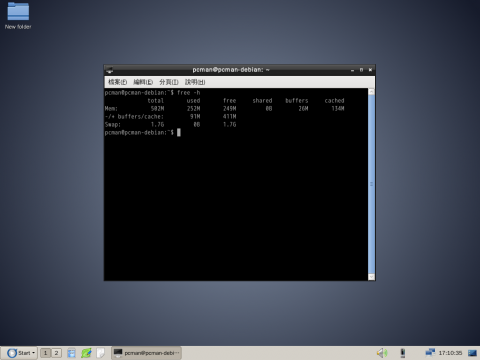
This screenshot is done for a cleanly installed Debian testing system running LXDE-Qt after a cold boot. The Qt theme engine used is “CleanLook”.
The command “free -h” shows that 252 MB is in use. However, most of the space is used for buffers and caches. After excluding caches and buffers, the memory usage is 91 MB. On the same machine, LXDE gtk+ version uses 86 MB. Will you call this “bloated”? Please note that I open “lxterminal”, a GTK+ 2 terminal emulator, to execute the “free” command. That means doing this also loads GTK+ so the actual memory usage should be lower than this. Besides, I’m using zh_TW locale since I’m from Taiwan and we use traditional Chinese here. That means, I also have Chinese fonts and input methods loaded in the memory. If you’re a western user, you probably don’t need them and can save a little bit here.
By default, similar setting under Ubuntu will use around 200 MB of RAM. That’s caused by differences between distros, not the bloat of LXDE. So, please stop spreading unfounded FUDs. Qt is designed for use with embedded systems and cell phones. How fat and resource hungry can it be? It’s the way you use it that really matters.
Delivering a good lightweight desktop is always our goal no matter what approach we’re using. So stay tunned and be confident.
DeriziotisClever move by Samsung
Deriziotisinteresting!
Deriziotisinteresting report, here's my "word-cloud".. funny how 2 of my most commonly used words are "coffee" and "zombie" :) http://www.wolframalpha.com/share/clip?f=d41d8cd98f00b204e9800998ecf8427ejoaf3r9hjc
Deriziotismeh, TV manufacturers suck.. it's probably good that google give them a hard time

Smart TV providers who wish to use HTML5 for their streaming ecosystems have been running into a wall with YouTube, according to Korea's ETNews. It said Google has insisted TV makers place the app on their systems' main page and pass a Smart TV "browser conformity test" at its US headquarters, too. As a result, companies like Samsung have had to wait up to three months for YouTube certification. A key part of this allegation is that that TV makers who opted for Mountain View's Android-based Google TV instead of HTML5 wouldn't face such problems, but meanwhile, we've contacted Google for its take on the matter.
Filed under: Home Entertainment, HD, Google
Source: ETNews
DeriziotisInteresting gaming set-up by a game developer
I’ve already posted about how I’d decided to choose the PC as my ‘next-generation’ gaming platform, and last weekend I built the first iteration of that machine. I say the first iteration, because a PC is inherently an evolving platform, and I expect to refine it and upgrade it in future, but this is where I’m starting from. I thought I’d discuss the choices I made, and the experiences I’ve had so far. Be aware, this is a long one with quite a lot of technical detail, so buckle up 
The problem with buying a PC is that you can quite easily go absolutely nuts and blow a fortune on it, by creeping up specification scale gradually without even realising – it’s only a little extra to move one notch up on a component, but then the other components are letting the side down, and before you know it you’ve blown a couple of grand. So, I deliberately set myself very clear goals in building this machine and didn’t allow myself to stray from that:
With that in mind, I went shopping
I looked at a lot of cases. Most weren’t appropriate because most regular PC cases these days are tower style and/or don’t really look at home under a TV, so I was mostly looking at HTPC cases. In that space you get a lot of cases which are too small because they’re not designed for performance machines, or are horribly overpriced because they come with front-mounted screens and IR receivers, neither of which I wanted, or they were just made by Lian Li or Fractal Design, who make lovely cases but I don’t need to blow a quarter of my budget on something that will be hidden except for the front panel. In the end I zeroed in on Silverstone as having the best range of fairly affordable, spacious and well-constructed cases, and the one I chose was the LC10-E, which fitted my size and setup needs exactly.
As well as being full size but short enough to fit inside the TV cabinet, it also has good ventilation – I just added an extra silent front-mounted fan to make sure I could pull enough cold air from outside the TV cabinet to keep things cool. Inside there’s loads of room to lay things out nicely, the PSU is out of the way in one corner and there’s about 5 times as much space as I need for storage, which just means plenty of airflow.
There are a few minor downsides – the case assumes you’re mounting an optical drive, with the blanking plate meant to attach to the front of the drive tray, but I wasn’t installing any optical drives. I just had to duct tape the plate from the inside instead – looks fine but it’s a bit of a bodge. Also the height of the case is lower than the width of a tower case – still large enough for full-size GPUs but a few millimetres too short for most of the full-size aftermarket CPU coolers, and most of the ‘low profile’ coolers designed for HTPCs aren’t high enough performance for overclocking. Water cooling was an option, but most of the closed-loop systems have a 120mm radiator, but the mounts at the back of this case can only take 80mm (they already have 2 good fans there), again because of the slightly lower profile designed for cabinets. Luckily there are some mid-profile coolers which are still powerful enough to do the job while being shorter than the big ones, such as the Noctua C14 which I almost went for, but for both cost and logistical reasons (out of stock) I took a punt on the Akasa ‘Performance Multimedia Cooler’ which combines a nice sized heat block and copper heat-pipes while being about half the height of most full size coolers. It seems to be doing the job so far (see the Overclocking section).
Matching the CPU performance of the PS4/XB1 isn’t that difficult, their 8-core AMD chips might sound impressive, but actually in practice even when AMD chips of the same architecture are clocked at twice the speed they are in the next-gen consoles, they still can’t beat a mid-range Intel. Of course the PS4 benefits from very fast GDDR5 on the CPU, but it shares the memory bandwidth with the GPU components too so it’s unclear exactly how much benefit it gets from that. So the choice of Intel wasn’t hard, the only question was which generation, and which model. Intel recently released their new Haswell chips, whose primary enhancements over Ivy Bridge are actually about power usage rather than performance (so really aimed at portable machines), but even though there isn’t a performance benefit of opting for this generation, the switch to a new socket format (LGA 1150) means it was the best bet solely for upgradeability later.
One thing to bear in mind is that Haswell chips are not completely overclockable unless you pay a little extra for the ‘K’ variants, but it’s worth it. I decided that the sweet spot for price / performance was the i5 4670K, which is plenty fast enough (especially when overclocked) to hit my performance target and is on the right side of the price hockey stick.
I’m usually a Gigabyte or Asus guy and I think it’s important to buy a decent motherboard, since it usually survives a couple of CPU/GPU upgrades. Some people suggest you focus all your budget on your CPU and GPU, but I think the motherboard is critical – upgrading the GPU later is 10 minute job, switching the motherboard is far more hassle. Plus it’s the thing that’s holding your entire system together, it’s stability and flexibility is vital.
Since I was intending to overclock, the Z87 series of motherboards was the natural choice, and I picked the Asus Z87-PRO board for a couple of reasons; firstly it was a solid board which had had some great reviews, particularly around its tools for overclocking and diagnostics, but also it came with built-in support for WiFi and Bluetooth 4.0, which is very useful for a lounge machine. Sure, I could have added this with a USB module for an additional expense, but to have it right there on the board with a really nice external aerial was the clincher on top of the already solid feature set.
The GPU is one area where you can really blow the budget, the top-end cards are really impressive but can easily cost you £500+ on their own. I didn’t have the budget for that, and my goal was to find something right now which was around the same raw power as a PS4, on the assumption that I can upgrade it in a year or 18 months anyway. Bearing in mind that I didn’t need to power a super-high resolution monitor (or multiple monitors) only a TV at 1920 x 1080, I consulted the faithful Toms Hardware GPU Guide and decided on the GeForce GTX 650 Ti Boost as a base, specifically the OC Windforce variant, a pre-overclocked version which has a large open heat-sink and large low-noise fans.
Compared to the PS4, which is basically an ATI 7970M tweaked down a little, this card is likely to be very slightly less powerful. It’s unscientific, the overclocked version of the Ti Boost is slightly faster than those stats, and the PS4 GPU is slightly slower than the stock 7970M, but generally they’re in the same ballpark. My assumption is that by the time that people really start pushing the upper boundaries of the PS4 I’ll have upgraded it a notch anyway.
Not much to say here – I picked some good-quality but fairly run-of-the mill Corsair Vengence Red sticks, 2x4GB rated at 1866Mhz with good CAS timings. It’s not worth buying the crazily high Mhz rated sticks because overclocking memory makes almost no difference to real-world performance anyway.
PSU quality is a big factor in how reliable your system is, so it doesn’t pay to go cheap on this component. I also always buy modular PSUs these days (ie those that come with a minimum of pre-attached cables and you plug in what you need) because they’re just much more convenient and leave a lot more space in the case for airflow. It’s important to bear in mind that Haswell chips need a PSU that can handle their new sleep state, because on older PSUs this can trip an under-voltage limit and make the PSU think something is wrong. Here’s one list of Haswell-compatible PSUs.
Lots of people buy PSUs that are way larger than they need – no-one really needs a 1000W PSU unless they’re doing 4-way GPUs, several old HDDs and a boatload of extras like water cooling pumps and neon strips or something. 650W is plenty for a potential future 2-way SLI setup with overclocking so in the end I went for an XFX Pro Series 650W (modular edition) – underneath the badge and styling this is a Seasonic PSU which are well respected for their stability. It’s also quiet, which is important.
SSD is the way to go these days, which will definitely give much faster loading times than the HDDs in next-gen consoles, but they’re obviously more expensive. Given my budget I had originally thought I’d have to get a small primary SSD for the OS and current games, and perhaps a secondary HDD for less frequently used things, just to have enough space, but then I spotted Samsung’s new entry-level 250GB 840. The non-Pro edition isn’t going to win any prizes against the higher-end SSDs (including the 840 Pro editions), but it’s still orders of magnitude faster than a standard HDD, and 250GB is just the right sort of size not to be constraining on a game machine. There are questions about the longevity of the TLC (Triple Level Cell) NAND technology compared to the more usual MLC NAND most higher-end SSDs use, but since this is a dedicated game machine I’m quite willing to take my chances to get this level of performance for this price.
I haven’t include any mouse / keyboard / controllers in my budget list because I already owned enough spares. I found that wired keyboards & mice work fine with extension cables so long as you don’t exceed the USB standard of 5m total, and there are plenty of wireless options too. You can also buy a receiver so you can use up to 4 XBox 360 controllers if you want (I still had a wired USB one which I’m using).
I connected video output directly from the GPU’s HDMI port to my AV receiver, and the same cable also carries the digital audio so there were no extra components needed there.
All values are in British Pounds Sterling and exclusive of VAT, since we don’t have VAT here. If you’re in the USA you can multiply these numbers by around 1.4 (exchange rate is 1.5+ but you guys always get everything cheaper).
| Silverstone LC10-E Case | £ 74.99 |
| Akasa Amber Ultra Quiet 80mm Case Fan (for front) | £ 4.15 |
| Intel Core i5-4670K (Haswell) | £ 162.49 |
| Akasa Low Profile CPU Cooler AK-CC9101BP01 | £ 20.82 |
| Asus z87-Pro Motherboard | £ 139.16 |
| Gigabyte GeForce GTX 650Ti Boost 2GB Windforce OC | £ 109.99 |
| XFX Pro Series 650W modular | £ 62.49 |
| Corsair Vengeance Red 8GB DDR3 | £ 54.99 |
| Samsung 250GB SSD 840 | £ 111.66 |
| Akasa Dual 2.5" SSD Mounting Kit | £ 5.82 |
| Total | £ 746.56 |
So, budget achieved then. As I mentioned before, the main component I can see myself upgrading later is the GPU, but this one is good enough to play everything I have queued up right now at very good fidelity at 1920×1080. To get significantly better than this card would require a jump of at least £100 which wasn’t really justifiable at this stage.
You might also need to add the cost of the operating system to the above by the way – I didn’t because I had a spare copy of Windows 8 already which I bought in advance a while back when it was offer.
I had no optical drive, so I needed to get the Windows 8 disc on to a bootable USB stick. Microsoft used to provide a tool for this for Windows 7, but it will only produce NTFS format USB sticks, and most UEFI BIOS machines can’t boot from that. So after turning the Windows 8 disc to an ISO image, I used a nice little tool called Rufus to create the bootable USB drive from that. This worked seamlessly and I was running (and inevitably, updating) Windows 8 in no time. I also put the motherboard drivers on the same USB drive, basically the minimum to get the network drivers working so I could download everything else.
I fairly quickly set the Windows 8 UI scaling to 150% since anything less than that is not very readable on a TV (at least not on my 40″). Given the purpose of the machine, Steam was the main thing I wanted to install.
I was really keen to try out Steam’s Big Picture mode on the TV, because it fits the lounge gaming environment better than a PC interface, and by and large I wasn’t disappointed. When it’s fired up it has a very slick console-like feel and generally works very well, whether you’re navigating it with a 360 controller or a mouse.
It’s not perfect though:
Another issue, which isn’t Big Picture’s fault, is that on Windows 8 you can’t get Steam to automatically start up and enter Big Picture when the machine starts, because Microsoft made the decision to force you to look at their lovely new ‘Tiles’ interface when you boot, whether you want to or not (I don’t). There are various products and hacks to get around this, but Windows 8.1 will address this too. In the end I actually just made the power button activate Hibernate mode and just never reboot the machine unless there’s an update needed, which works fine too.
The Asus Z87 has a really friendly overclocking tool which will automatically run through overclocking options progressively, monitoring temperature and fan performance and performing stress tests in order to quickly establish stable optimum performance settings. Using this I quickly had the 4670K running at 4.5GHz (over the stock 3.4GHz) with fan profiles set, and temperatures well within comfortable margins. Compared to overclocking experiences I’ve had in the past, this was ridiculously quick, easy and non-threatening, and I’d probably buy another Asus board in the future just for this feature.
I haven’t overclocked the GPU yet because the one I bought is already factory overclocked and various reviews have indicated that the headroom for further overclocking isn’t huge, so I won’t push my luck on that yet until I feel I need it.
This is still a work-in progress because the system has only been together a week and I haven’t had much time with it, but it seems good – I can quite happily run my first new purchase Trackmania 2: Stadium at 1920×1080 at the highest stock detail level and it runs very slick, and Torchlight 2 looks lovely on the big screen with lots of UI space compared to the 1440×900 I’ve run it at before. The fans stay pretty quiet too, and I know how fast they can run under extreme stress, the Asus stress test proved that, so there’s probably more headroom for more demanding games.
Load times with the SSD are just insane though, coming from gaming mostly on a 360 recently – I never have to wait for anything, which is really nice. The downside is that many games like Torchlight 2 put handy hints in the loading screens, but I never get time to read them before the loading has already finished! 
I’m really happy with this setup. Sure, it’s more expensive than a console and it takes more time to set up, but I’m loving the renewed flexibility to play mouse & keyboard games as well as controller-focussed ones, and the more open nature of the platform. I’m already building a huge wish-list on Steam of games I never got to play because they were PC only, or indie games which are new or never made the jump, and Rock, Paper, Shotgun brings me new things to look forward to every week.
Perhaps the best way to sum this up is to say this: finally I can combine my love of PC gaming with my love of sitting on the couch. What’s not to like?
DeriziotisGo Firefox! We love your unaffiliated open-source development processes!
Just a quick note on Daily Releases (process to upload to the ubuntu distribution more than 200 components Canonical is upstream for in various ubuntu series).

After some discussions on #ubuntu-release today, we decided to evoluate the daily release versioning schema:
Mainly due to handling SRUs regarding feature branch, multiple releases per day, transitioning from next ppa to the distro, supporting maintenance branch released with the same upstream version, but being a potentially different content than trunk, the version schema has been (slightly) simplified:
This still enables the above cases for getting all the concurrencies working with what we deliver to distro as well to various ppas. The upstream merger should still be working and being compatible as well. 
The new code is now deployed in production after changing the configuration. In addition to changing the test cases to the new versioning schema, you will notice that there are as well some additional tests to ensure the transition from the old to new world should happen seemlessly
All the documentation and processes have been updated to the latest as well.
Happy daily releases!
Deriziotisfinally! it is hear! want!

Coming in just after a Russian site managed to review the device, Samsung has officially announced the Galaxy S4 zoom. Combining a fully featured Android 4.2.2 Galaxy phone (basically a Galaxy S4 Mini) with a 16MP point-and-shoot, it brings a 10x optical zoom lens to bear -- the first phone to do so. On the phone side, it sports a 4.3-inch qHD display, 1.5GHz dual-core CPU, 1.5GB RAM, 8GB of internal storage (expandable via microSD slot) and a 1.9MP front facing camera. The camera includes optical image stabilization and a Xenon flash, along with a special "Zoom Ring." That ring surrounds the camera, and when twisted (even while on a call) it can launch in-call photo sharing, or go straight to other camera modes. Extra software features are also on hand to advantage of the combo device's capabilities including Photo Suggest that shows great pics taken by others in the area, Smart Mode auto settings and more.
President and CEO JK Shin is pleased by the union, calling it "truly the best of both worlds, without compromise," for people who want to capture high quality images and share them, but don't want to carry two devices. We're told it will arrive in the UK this summer but have not been able to confirm a pricetag, while its early Russian reviewers mentioned a July release and local pricing of around $618, converted. Intrigued, horrified, or just want to compare it to Nokia's latest efforts? A press release, pictures and detailed spec sheet await you below.
Update: Samsung has confirmed that the Galaxy S4 zoom will come to the US too, at some point in Q3 this year.
Filed under: Cellphones, Cameras, Mobile, Samsung
Source: Samsung
Deriziotisoh, the hours and hours I've spent debugging memcache
DeriziotisAwesome. I would play if the fuckers hadn't blocked it.
Reddit comment: "Tried it. survived the first time, didn't have the balls to have a second go at it xD"
> Linux is about choice.

If I could only have one thing this year, it would be to eliminate that
meme from the collective consciousness.  It is a disease.  It strangles
the mind and ensures you can never change anything ever because someone
somewhere has OCD'd their environment exactly how they like it and how
dare you change it on them you're so mean and next time I have friends
over for Buffy night you're not invited mom he's sitting on my side
again.

As a consumer, yes, you have lots of choices in which Linux you use.
This does not mean Linux is in any sense _about_ choice, any more than
because there are so many kinds of cars you can buy that cars are about
choice.

The complaints up-thread about juju and pulse are entirely valid, but
the solution is not to try to deliver two things at once.  If you try to
deliver both at once you have to also deliver a way of switching between
the two.  Now you have three moving parts instead of one, which means
the failure rate has gone up by a factor of _six_ (three parts, and
three interactions).  We have essentially already posited that we have
insufficient developer effort to have 100%-complete features at ship
time, so asking them to take on six times the failure rate when they're
already overburdened is just madness.  Alternatively, we could say that
we're integrating features too rapidly, but you do that at the expense
of goal 1, to be the showcase for the latest and greatest in free
software.

Software is hard.  The way to fix it is to fix it, not sweep it under
the rug.

There is a legitimate discussion to be had about where and how we draw
the line for feature inclusion, about how we increase and formalize our
testing efforts, and about how we develop and deploy spike solutions for
corner-case problems like the one device class that juju happens to do
worse than the old stack.  But the chain of logic from "Linux is about
choice" to "ship everything and let the user chose how they want their
sound to not work" starts with fallacy and ends with disaster.

- ajax