Shared posts

14 Sep 16:32

The “Diderot Effect” Turns You Into a Weak, Mindless Consumer 

by Kristin Wong on Two Cents, shared by Whitson Gordon to Lifehacker

The “Diderot Effect” Turns You Into a Weak, Mindless Consumer 

I once bought a rug. It was pretty, it was on sale, and I said what the heck, it’s only $20, and took it home and put it on my floor. Days later, I bought new pillows; the old ones didn’t match the rug. Before I knew it, I’d also bought new plants, a chair, and a ton of other accessories. That $20 spiraled into hundreds of dollars worth of new stuff. This is the Diderot Effect in action.

It’s a nasty little habit, but knowing how it works can help you stop it in its tracks. To put it in basic terms, the Diderot Effect a social habit that involves two ideas:

  1. Sometimes the stuff we buy is linked to our sense of identity. Think about something you own that you just couldn’t part with.
  2. Sometimes the stuff we buy is so great it makes us want to buy other great stuff. Like my rug.

The term was coined by 18th century French philosopher Denis Diderot who wrote the essay, “Regrets on Parting with My Old Dressing Gown.” In the essay, he talks about receiving a beautiful new dressing gown as a gift. He loves it, but then he realizes it makes all of his other things look like crap. So what does he do? He goes out and buys new things. Diderot writes:

I was absolute master of my old dressing gown...but I have become a slave to my new one … Beware of the contamination of sudden wealth. The poor man may take his ease without thinking of appearances, but the rich man is always under a strain.

First world problems, I know. But essentially, this is how lifestyle inflation happens. We get used to having a certain fancy thing, and then we feel compelled to match the rest of our lifestyle to that thing. Most of us have been there.

http://lifehacker.com/how-to-program...

While Diderot seems to take a moral stance on the issue, I personally don’t think there’s anything wrong with buying whatever the hell you want, as long as you’re financially stable, you’re financially prepared for the future, and you’re mindful about your budget and your spending. The problem with the Diderot Effect is that it’s mindless consumption.

Simply being aware that this phenomenon exists will probably go a long way toward preventing it. But over at Becoming Minimalist, writer Joshua Becker has a few other suggestions. Here are some of my favorite:

Analyze and predict the full cost of future purchases. A store may be having a great sale on a new outfit—but if the new outfit compels you to buy a new pair of shoes or handbag to match, it just became a more expensive purchase than originally assumed.

Buy things for their usefulness rather than their status. Stop trying to impress others with your stuff and start trying to impress them with your life.

Remind yourself that possessions do not define you. Abundance of life is not found in the things that you own. Your possessions do not define you or your success—no matter what marketers will try to tell you.

Becker offers additional insight on the Diderot Effect over at his blog. Check it out at the link below.

Photo by jarmoluk.

Understanding the Diderot Effect (and How To Overcome It) | Becoming Minimalist

14 Sep 16:30

Raccoon sweeps the floor

by Heather Johanssen

Looks like Disney wasn't lying when they portrayed forest animals helping clean homes.

14 Sep 13:43

Australian PM Tony Abbot ousted in own-party coup

by Cory Doctorow


Australia's Liberal Party voted out its own leader, Prime Minister Tony Abbott, and replaced him with Malcolm Turnbull. Read the rest

12 Sep 20:41

Sphero's BB-8 gets voice command support on Android

by Joseph Keller

When it first hit store shelves, BB-8 by Sphero lacked support for voice commands through an Android device. That problem has now been remedied, with an update to the BB-8 app now making its way through the Google Play Store with support for voice interaction.

12 Sep 19:33

A Deep Dive Into Google Photos: Not Your Grandma's Photo Album

by Alex Hatzenbuhler

photos hero

At Google IO this past June we saw the launch of many new products from Google, including Android M, Android Pay, and Project Brillo. The tech giant also launched Google Photos as its own service, which was previously tied down to Google+. Today we're going to dive into every corner of Google Photos and my experiences with it over the last few months.

Intro & tests

Over the last eight years I have used iPhoto, Aperture, Lightroom, and Photos on Mac to organize my photos.

Read More

A Deep Dive Into Google Photos: Not Your Grandma's Photo Album was written by the awesome team at Android Police.


12 Sep 19:32

6 Phrases to Help you Learn Photography Faster

by Danielle Werner

5 simple photography tricks for accurate shots

Learning all the ins and outs of photography is a never ending challenge. For some, the technical side of photography seems more difficult to understand. Others feel they are challenged by the creative side of understanding composition and light. When learning any new skill, the understanding of fundamentals is always most important. The complexity of settings, along with endless creative options is what makes photography so challenging. That’s where these six sayings come in. These simple phrases will bring you back to the basics, helping you to create quality images quickly, allowing for more time to experiment creatively.

1. ISO: Set it first – change it last

Set it and forget it until you have to remember.

Many people get confused by the purpose of ISO, and how to use it when controlling light. Unlike the other two big settings (aperture and shutter speed) when used properly, ISO gives your photograph the ability to be more sensitive to the available light. When you are setting your ISO, remember to choose a setting based on the amount of available light you happen to have in your scene. Don’t set it because the shot you took before was too dark and you want to brighten the exposure.

ISO - Set if first. Change it last.

ISO 2500, f/1.8 at 1/125th of a second

Every time you enter a scene, before you take a shot, ask yourself, what kind of light is there?

Here are some starting ISO settings, adjust as necessary for your scene:

  • Bright sunny day: ISO 100-200
  • Shade/clouds: ISO 400-800
  • Indoors: ISO 800-1600
  • Little/no light: ISO 1600 and up

Don’t forget the negative side of ISO. Most camera models go above 1600 ISO now. However, if you choose 1600, or higher, you will most probably see noise (digital grain) in your image. There are many post-production techniques to remove noise, but it’s always best to capture your best shot in the camera. Consider this when choosing a higher ISO in dimly lit areas.

2. Set an intention

Both shutter speed and aperture measure and control how much light the camera takes in. But they each also have a creative aspect that must be considered when choosing your settings. Knowing their distinct qualities, and creating an intention when you shoot, are two extremely important fundamentals of photography.

Set an Intention

ISO 200, f/4.0 at 1/5000th

Ask yourself, “What is my purpose?” Why are you taking that photo? Be clear on what you want to capture. Give yourself a moment to set an intention or two, then keep it in mind the whole time. Once you have figured out your main purpose, you can use that to choose which setting you will set first. As aperture affects the depth of field and shutter speed affects movement, which aspect is more important for creating the image you want?

Let’s take a look at two more awesome phrases to easily remember the different purposes of aperture and shutter speed.

3. Shutter speed: fast freezes – slow shows

Shutter speed is all about capturing (or not capturing) motion. When you want to show movement in the photograph, use a slower shutter speed. If a subject is moving and you want to freeze that movement, use a higher (faster) shutter speed. The faster the subject is moving, the higher your shutter speed must be to freeze them/it.

Quick Tip: Do not hand hold and shoot below 1/60th of a second. You are a vibrating creature, you are always moving. At about 1/60th of a second, the camera might capture the movement (called camera shake) you create just by pressing the shutter button.

Shutter Speed

Image #1 (left): ISO 1000, f9.0, 1/20th
Image #2 (right): ISO 1000, f/4.0, 1/125th

Here are some starting points to freeze moving subjects. Start here and adjust as necessary:

  • Moving cars: 1/4000th of a second or faster
  • People running: 1/1000th or faster
  • Kids playing: 1/500th or above
  • Person sitting still: 1/100th or faster
  • Still object: 1/60th or faster
  • Night scene: (tripod) 1/60th or slower

4. Aperture: High number = more in focus. Low number = less in focus

This setting is all about depth of field, the distance between the front and back of a focal plane. The focal plane is determined by the spot where you tell your camera to focus. The higher the f-number, the larger the distance of that plane. This means, more depth of the scene is within the focal plane, thus it is in sharper focus. The opposite is also true. The lower the f-number, the smaller the distance between the front and the back of the focal plane and less is in focus.

If you want everything in the photo to be fully in focus you will need to choose a higher f-number. If you want to create a shallow depth of field bringing only one part into focus, you will use a smaller f-number.

Aperture Photography Trick

Image #1 (left): ISO 160, f/11.0, 1/400th
Image #2 (right): ISO 160, f/1.8, 1/4000th

Here are some aperture starting points, same as before, adjust as necessary:

  • Close-ups or detail shots: f/2.8 or lower (larger)
  • Portraits: (one person) f/1.8 – f/5.6
  • Groups: (2 or more) f/5.6 – f/8.0
  • Local scene: (less distance) f/8.0 – f/11
  • Landscape: (more distance) f/11 – f/22

5. Frame your finder

Witness your scene through your viewfinder, as you allow your eye to examine every inch of what you can see through the lens. Look from top left, across and down to the right. What is in each corner? Notice the edges of the frame. When examining everything you see, slightly move your camera around as you prepare for finding the best version (framing) of this shot. This will give you a greater sense of what you do, or do not want to be in the shot. You will notice if you have cut something off, or added something into the shot you do not want.

When you make a habit of always re-framing your viewfinder as you are shooting, you will gain a greater sense of awareness, allowing for more shots from other vantage points you hadn’t considered before. Even more importantly, as you practice this, every shot you take will be closer to what you want to capture in the first shot you take.
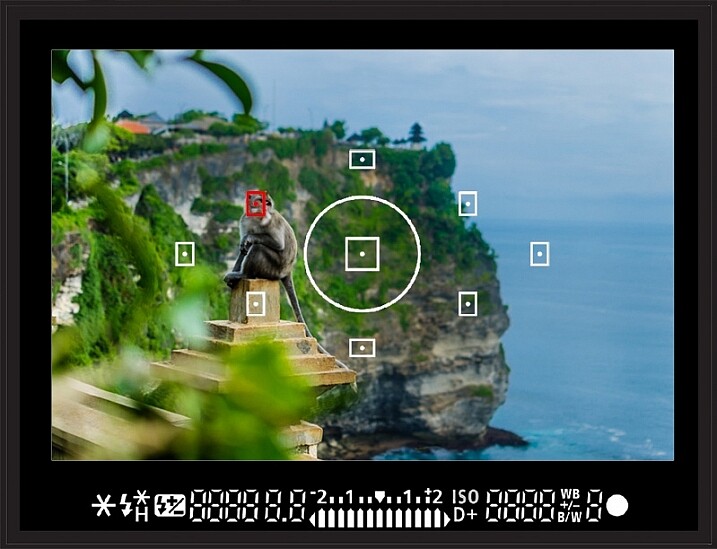
Frame your finder

See what is in every inch of your frame before snapping the shutter!

6. Count your clicks

Once you have your desired exposure based on the purpose of what you are capturing, you can choose to change your purpose (capture a different effect) by going up or down the range of either aperture or shutter Speed. To make sure you keep a proper exposure like you had before (assuming you are shooting in Manual Mode), just count your clicks. If you click six times in one direction on shutter speed (because now you want to show motion), you will need to click six times in the other direction for aperture to keep a proper exposure.

For example: When photographing a birthday party, you may go from focusing on close-ups and details, to kids running around, to capturing a sunset. In this case, the first intention is creating a shallow depth of field to capture a non-moving object. Set your aperture to a low f-number. Using your meter, now set your shutter speed for correct exposure and snap away. ISO will already be set because that’s the first trick to remember.

Now it is time to capture the kids running around. You will  switch focus from aperture to shutter Speed. To make sure you freeze their movement (no one likes a photo of a blurry kid), you will change your shutter speed to 1/1000th of second.

Photography tricks

But wait! Before you start moving the dial, remember to count how many clicks you are going. If you clicked down four times to get to 1/1000th of a second, then you will click UP four times using your aperture dial. Now your exposure will be the same, but you quickly changed your settings to creatively capture something entirely different. Note: if you are using Aperture or Shutter Priority modes the camera will do this adjustment for you automatically.

There you have it

The best thing you can do now is turn these tricks into habits by jotting down these simple phrases and stuffing them in your camera bag. Next time you are ready to shoot, read over them once or twice before you begin. As you practice using these tricks in order to become more accurate and efficient behind the lens you will create more stunning eye-catching photographs of any subject you choose to capture.

Do you have any other cool phrases that you say to yourself when you are shooting? If you know any other great tricks that are easy to remember and simple to understand, let us know in the comments section below. Together, it will be fun to build a compilation of great photography learning quotes!

The post 6 Phrases to Help you Learn Photography Faster by Danielle Werner appeared first on Digital Photography School.

12 Sep 16:06

Top 10 Ways to Trick Yourself Into Getting Rid of Clutter Once and For All

by Melanie Pinola

Top 10 Ways to Trick Yourself Into Getting Rid of Clutter Once and For All

Dealing with clutter is a constant battle for many of us. Clutter can creep up on us, it drains us mentally even if we’re not directly thinking about the clutter, and it wastes our time and money. A binge decluttering session won’t be enough to keep clutter at bay forever; we’ve got to change our mental habits. Here are ten new ways of looking at clutter.

10. Pretend You’re Moving Soon

Top 10 Ways to Trick Yourself Into Getting Rid of Clutter Once and For All

The thought of moving can be painful, in large part because we have too much stuff. Pretend you’re going to move, though, and it will be easier to identify the stuff you just don’t need and should get rid of. If it’s not worth the effort of packing up to bring along to a new place, it’s not worth keeping in your current one. Reality check: You probably don’t need most things you own.

9. Make a Plan

Top 10 Ways to Trick Yourself Into Getting Rid of Clutter Once and For All

Clutter is hard to get rid of when there’s just so much of it or bits of clutter in every room. When it’s overwhelming like that, we’re more likely to put off decluttering. However, just by having a plan with small steps you can do each day, such as this eight-week guide, you can stay motivated and trick yourself into thinking this is doable. If you’ve got a messy office, here’s a plan to get it organized.

8. Get Rid of One Thing Every Day

Top 10 Ways to Trick Yourself Into Getting Rid of Clutter Once and For All

Speaking of baby steps, it might be easier for you to declutter if you only have to get rid of one thing at a time. Do this every day until you reach your downsizing goal. You could do five things at a time or ten if you like. Either way, it could become a game that’s easy to win. Start with this list of eight things you can discard now.

7. Don’t Buy Things If You Wouldn’t Pay Full Price for Them

Top 10 Ways to Trick Yourself Into Getting Rid of Clutter Once and For All

When I posted this tip, some of the commenters took it to mean not looking for sales. That wasn’t really the point; it’s more about programming our minds to stop buying crap we don’t really need. “If you wouldn’t buy it at full price, you probably don’t need it,” is just a way of saying: don’t buy things just because they’re on sale. Great deals are great—but only if you truly need or could use the item. Otherwise, sale items just take up space in our homes and become clutter. For things you already own, a similar rule of thumb applies: If you wouldn’t buy it today, sell it.

6. Remember: “Don’t Put It Down, Put It Away”

Top 10 Ways to Trick Yourself Into Getting Rid of Clutter Once and For All

Another mantra to keep in mind, this one reminds us that not all flat surfaces are the right spot for your stuff. When things aren’t where they belong, they become clutter. So as soon as you’re about to put something down, ask yourself if that’s where it belongs. And also remember to “complete the cycle” for any cleaning method by following through on the most important step: putting things away. It helps if your collections have a purpose and your rooms have distinct purposes as well.

5. Just Give Up Hope

Top 10 Ways to Trick Yourself Into Getting Rid of Clutter Once and For All

We don’t mean you should give up hope that you can clear up your clutter, we mean stop holding on to things you hope you’ll use one day (but deep down inside know you probably won’t). Those “just in case” things are usually the biggest sources of clutter. “One day I might need this [insert thing that’s still in the moving box in your garage from ten years ago]” should be a red flag that the object is just taking up space.

4. Thank Your Items for Their Service (Then Give Them Away)

Top 10 Ways to Trick Yourself Into Getting Rid of Clutter Once and For All

Marie Kondo, the author of The Life-Changing Magic of Tidying Up, offers this strange but effective tactic: Say goodbye and thank you to items that you need to let go of. Sometimes sentimentality is the root of a lot of clutter, so think utility first and ditch the guilt. Thank your old coat for keeping you warm, your kids’ stuffed animals they no longer play with for bringing them joy, and your collection of duplicate computer cables for connecting your stuff once upon a time. Then you can move on. It might also help to think “this isn’t my stuff” when you’re decluttering.

3. Declutter with the Right Questions

Top 10 Ways to Trick Yourself Into Getting Rid of Clutter Once and For All

Another Kondo tip: for each item in your possession, ask “Does this item spark joy?” If it’s not useful, beautiful, or joy-making, it’s probably time to find a new home for it. Here’s a checklist for your clutter identification needs.

2. Commit to the “One In, Two Out” Rule

Top 10 Ways to Trick Yourself Into Getting Rid of Clutter Once and For All

The rule: Whenever you bring in a new item, you have to find a new home for two other items. With this rule, you’re decluttering and likely upgrading at the same time. Win!

1. Focus on Your Clutter Hotspots

Top 10 Ways to Trick Yourself Into Getting Rid of Clutter Once and For All

Even if you can’t get rid of all the clutter in your home, if you focus on the one or two areas that tend to attract clutter the most (for me, that’s my entryway table and my piano and, well, my desk), you’ll be ahead of the game. The broken window theory, which says that just one broken window can lead to vandalism, applies to clutter too: just one piece of junk mail on the table or towel on the floor could soon become piles of clutter. Focus on the worst areas first before the clutter spreads. (Simple tricks I’ve used are keeping the piano cover open so I can’t dump the day’s mail there and adding a shredder in the entryway to prevent unnecessary papers from getting into my house in the first place.)

Who knows? Maybe keeping those areas clean for a while will inspire you to keep clutter away in the rest of your place for good. The Flylady is a great resource for living clutter-free once and for all.

Photo by GlebStock (Shutterstock).


Lifehacker’s Weekend Roundup gathers our best guides, explainers, and other posts on a certain subject so you can tackle big projects with ease. For more, check out ourWeekend Roundup and Top 10 tags.

12 Sep 08:46

Coyote/Golden Retriever mix dog adopts 10 baby chicks

by Xeni Jardin
vZb3kq

“They showed up in our yard one morning and it was love at first sight,” the YouTube uploader says of this sweet video. (more…)

12 Sep 08:43

Facebook tests temporary profile pictures for supporting causes

by Jacob Kastrenakes

Changing your profile photo is a puzzlingly big decision, but Facebook is trying to make it easier to quickly change them up every so often. According to TechCrunch, Facebook is testing a new feature that allows people to temporarily set a new profile photo, which will then go away after a set number of hours, days, or weeks. Facebook tells TechCrunch that it's making the feature in response to the way that people often "use their profile pictures to support a cause, root for a team, and commemorate milestones like birthdays and anniversaries." The idea is that by setting a temporary picture, you can express how you're feeling at the moment and then have it revert back to normal when appropriate. Facebook reportedly wants to roll the...

Continue reading…

11 Sep 21:34

Top 10 Incredibly Useful Windows Programs to Have On Hand

by Whitson Gordon on Lifehacker 10, shared by Whitson Gordon to Lifehacker

Top 10 Incredibly Useful Windows Programs to Have On Hand

Sometimes, all you need is the right app to get something done—whether it’s an essential everyday tool, or something a bit more specialized. Today, as part of Lifehacker’s 10th anniversary celebration, we’re looking at 10 of our favorite apps in the latter category.

Check out the full list below, and see more of our 10th anniversary look back at lifehacker10.lifehacker.com.

11 Sep 19:43

Driver using selfie stick drives his Jeep into a canoe

by Mark Frauenfelder

jeep-canoe

If you are driving, it's probably not a good idea to pay more attention to your selfie stick than the road. But if you do it anyway, be sure to record yourself running into the canoe tied to the truck in front of you.

[via]

11 Sep 13:49

Google and Twitter team up to offer their own 'Instant Articles' — with a twist

by Recode Staff

Google and Twitter are working together to help publishers show “instant articles” to people who use their services on mobile phones.

The plan, which is supposed to launch with a small group of publishers this fall, is an effort to make it easier for publishers to distribute their stuff on mobile devices. It is also a response to similar pushes from Facebook, Apple and Snapchat.

Continue reading…

11 Sep 13:21

New curb leads to chaos in UK town

by Rob Beschizza

A woman who sprained her ankle in Cheltenham, England, is just the latest to trip after the installation of a new street curb that is a different color to the old one.

Read the rest
11 Sep 12:39

Practice Substitution, Instead of Deprivation, to Get Into Frugal Habits

by Eric Ravenscraft

Practice Substitution, Instead of Deprivation, to Get Into Frugal Habits

Nothing can kill your motivation to save faster than feeling like you’re being deprived of something. Rather than saving by forcing yourself to abstain, focus on substitutions you can make to your habits that cost less.

As personal finance blog The Simple Dollar explains, buying a cheaper version of an item can be more rewarding and nearly as beneficial to your budget as giving it up entirely. Rather than buying the brand name product, grab the store brand. Instead of foregoing a gadget purchase, shop used products. While cutting out needless purchases is great, there are some things you’ll always want or need to do. In those cases, substituting a better deal will be more beneficial to your habits than just guilting yourself out of spending money at all:

This is how I spend a lot of my spare time when I’m doing mindless things like driving to the doctor’s office. I spend time looking at the ordinary things I do in my life and look at potential substitutions that might conserve money, time, or energy and leave me with more of those resources than the current way I do things.

When you’re trying to save money, it can feel like any cash you spend at all is a problem. This isn’t always the case, though. If something adds value to your life, you can buy it, but there may be a cheaper way to add that same value. The more you can substitute the things in your life for better deals, the better your budget will look.

The Frugal Magic of Substitution – and 25 Ways to Make the Magic Happen | The Simple Dollar via Rockstar Finance

Photo by romana klee.

10 Sep 23:04

Adorable tiny baby ducklings love taking a bath with patient capybara

by Xeni Jardin
vZbX9D

Three energetic ducklings standing on top of a capybara who is just trying to take a bath. (more…)

10 Sep 21:12

Facebook now lets journalists broadcast live video to your News Feed

by Chris Welch

Celebrities like Dwayne Johnson aren't the only people allowed to use Facebook's live streaming app anymore. The company is opening up the future, which works through a standalone app called Mentions, to journalists with verified Facebook profiles and / or pages. Previously, only high-profile public figures like actors, athletes, musicians, politicians, and other "influencers" were permitted to stream live video to users through the Mentions app. Replays are available once the initial live stream is compete, and Facebook also allows comments and likes alongside broadcasts like YouTube and Periscope.

"We want to make Facebook a better experience for journalists whether it’s used for news-gathering or better connecting with their readers...

Continue reading…

10 Sep 21:08

Watch weather forecaster nail pronunciation of: Llanfairpwll​gwyngyllgogery​chwyrndro​bwllllantysilio​gogogoch

by David Pescovitz

Llanfairpwllgwyngyllgogerychwyrndrobwllllantysiliogogogoch is a village on the island of Anglesey off the coast of Wales, UK. Nice work, Liam Dutton of Channel 4.

10 Sep 16:10

Android Pay is rolling out starting today

by Jared DiPane

Google has announced that its new mobile payment system, Android Pay, will begin rolling out today. With this, you will be able to make payments using just your Android phone. Over the coming months, additional features, banks and store locations will be adding support for Android Pay.

10 Sep 16:10

World's fastest tortoise

by David Pescovitz
untitled

Bertie the tortoise broke the world record for the fastest animal in his species, moving at .28 meters/second, beating a tortoise named Charlie's 1977 record of .125 meters/second. Meet Bertie in the video below, celebrating his entry into the new Guinness World Records book.

10 Sep 15:18

Periscope live streaming app adds landscape video mode

by Chris Welch

Periscope's live streams are no longer stuck in portrait orientation. Today the company is unveiling a new landscape mode that works across iOS, Android, and the web and easily lets users shoot and broadcast video in landscape. Creatively, the new feature allows for a wider field of view than you'd get recording in portrait. To be clear, this was technically possible before, but it wasn't really an official feature and required viewers to watch videos sideways. Now, landscape video will look right regardless of which orientation your phone is in; just rotate it to landscape to take broadcasts fullscreen.

"As much as we're fans of portrait video, we know that there are many times where the scene you're trying to capture is...

Continue reading…

10 Sep 15:17

Marvel's Jessica Jones will premiere on Netflix on November 20th

by Kwame Opam

Netflix's next big Marvel series finally has a premiere date. Jessica Jones, starring Krysten Ritter, is now set to debut for streaming audiences on November 20th.

Jessica Jones follows Ritter in the title role as she opens a detective agency after she ends her career as a superhero. As a private investigator, she'll handle cases dealing with superpowered folks in New York City. Joining her are Halo: Nightfall's Mike Colter as Luke Cage (who'll be getting his own series in 2016), and former Tenth Doctor David Tennant, who'll play the villainous Purple Man.

Continue reading…

10 Sep 13:32

Samsung's new family of SmartThings products now available for purchase in the UK

by Rich Edmonds

SmartThings

Samsung has announced that the new line of SmartThings products are now available from the company's website, as well as Currys PC World. Purchasing the new Starter Kit will provide you with enough gear to upgrade your home and make it compatible with Samsung's latest sensor tech. Once everything is set up, it's then possible to continue adding new smart devices compatible with SmartThings.

The Starter Kit contains the main Hub, a Multi Sensor, Motion Sensor and Presence Sensor, as well as Power Outlet to manage lights, electronics and other small appliances. Making a purchase will set you back by £199. More sensors can be purchased separately for £30, £30, £30 and £45 respectively. The Moisture Sensor can also be purchased for £30, but is not included in the Starter Kit.

Hit the store links below to order the new SmartThings products:

Purchase Samsung SmartThings Starter Kit from Currys PC World

Purchase Samsung SmartThings Starter Kit from Samsung

Source: Samsung

09 Sep 23:21

Watch Apple's iPad Pro, Apple TV, and iPhone 6S event in 8 minutes

by Chris Ziegler

By Apple standards, today's event was a blockbuster, covering major product updates in three different categories. One is notable, two is a party, but seriously — three? We're still catching our breath.

The good news is that you don't need to sit through a two-hour presentation to catch up on all the news if you don't want to — using the magic of modern technology, we've been able to compress the event down to a far more digestible 8 minutes. Sit back, watch, enjoy, and take this opportunity to figure out which credit cards have enough available balance to charge all this stuff.

Continue reading…

09 Sep 23:21

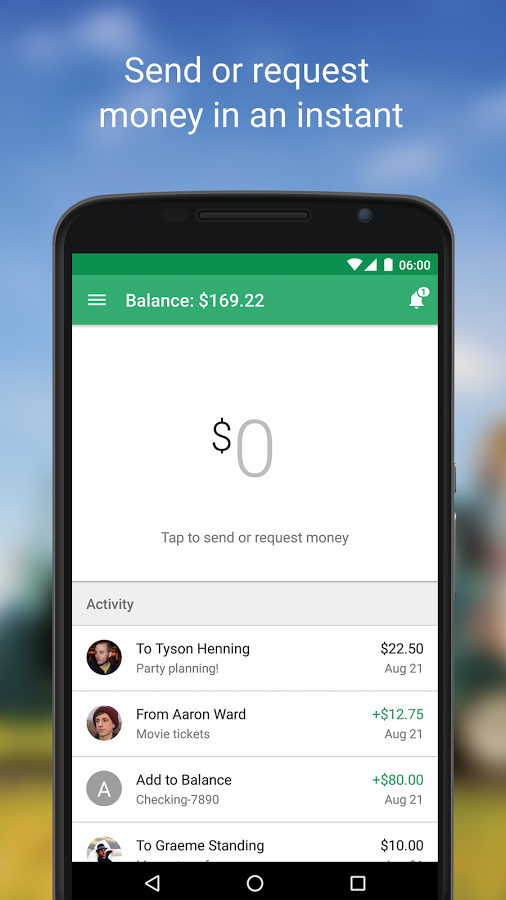
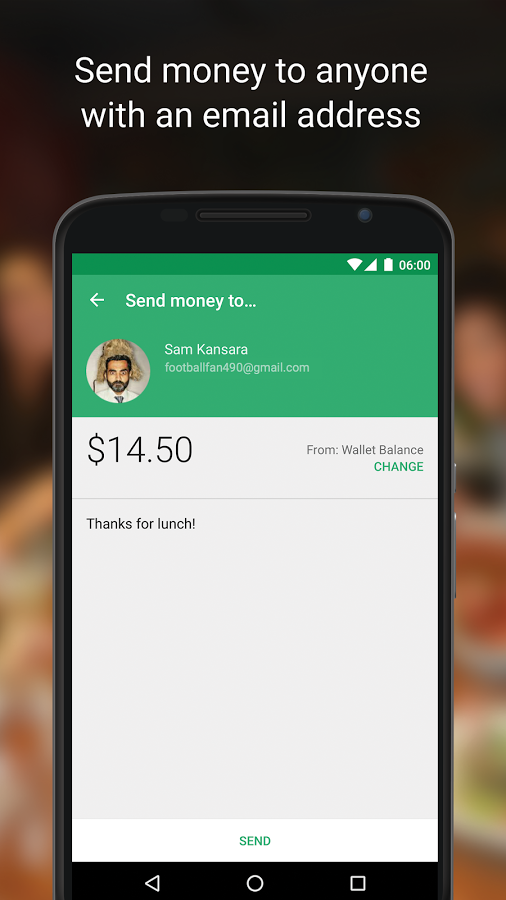
Google Releases New Simplified Wallet App In The Play Store, Sets The Stage For Android Pay

by Ryan Whitwam

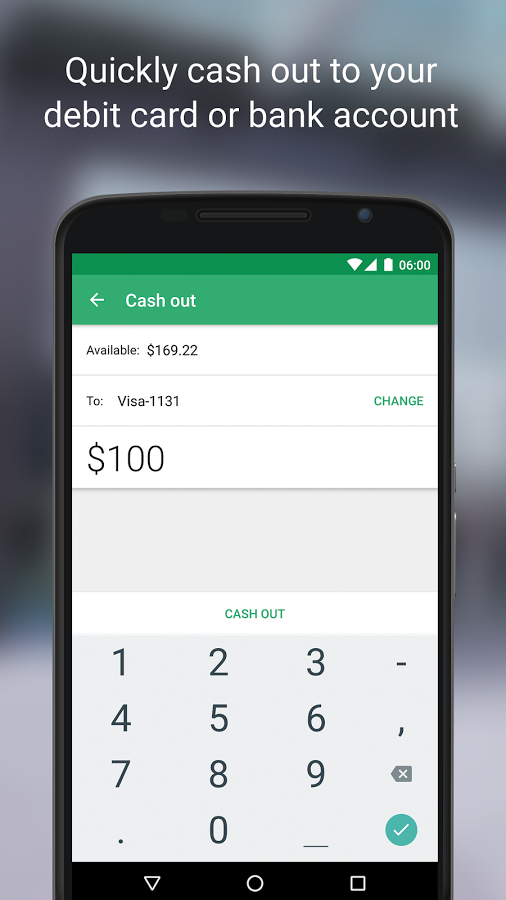
wallet newWe know that Android Pay is going to drop any day now, and that means Google Wallet is changing too. The Wallet app will no longer be used for paying in stores, but it will  be used to send money. The new Wallet app is now live in the Play Store as a different listing than the existing Wallet app.

1 2 3 4

The new Wallet app has a slightly different icon, and of course, it's a new package (com.google.android.apps.gmoney) that won't overwrite your existing Wallet app.

Read More

Google Releases New Simplified Wallet App In The Play Store, Sets The Stage For Android Pay was written by the awesome team at Android Police.


09 Sep 22:28

A comic predicted Apple inventing Microsoft's Surface three years ago

by Tom Warren

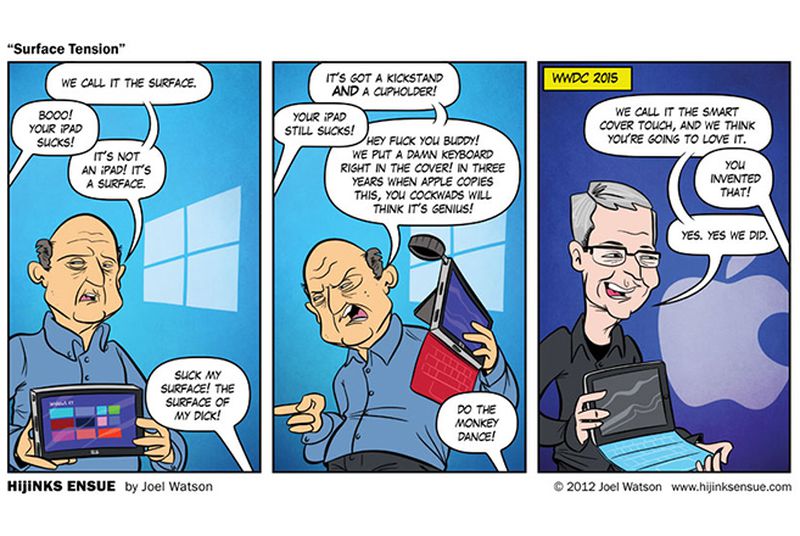
Sometimes people make predictions and they're terribly wrong, but every once in a while an oracle appears with a prophecy that predicts the future. Joel Watson, a cartoonist, is today's oracle. Watson captured the moment Microsoft announced its original Surface tablet, back in 2012, in cartoon form. The crowd's reaction simply mocks Microsoft's tablet, but Watson predicts the crowd at Apple's event (in 2015!) will love it and claim Apple invented such a device. It's Apple's reality distortion field in full effect. Genius.

Continue reading…

09 Sep 21:55

There already is a Pencil for iPad, but its maker thinks there's room for Apple's stylus too

by Vlad Savov

The guys at FiftyThree can't catch a break. First Facebook named its biggest and best app Paper, copying the name of FiftyThree's earlier iPad drawing app, and now Apple has named its new stylus a Pencil, just like the iPad accessory FiftyThree already sells.

We reached out to the company, which is growing increasingly reliant on hardware sales of its Pencil for its income, to ask how it will react to Apple's new launch. The answer is equivocal, as it neither derides nor entirely welcomes the Apple Pencil:

Every Pencil needs Paper. We’re excited to launch the all-new Paper on iPhone and iPad tomorrow, after which creative thinkers everywhere will see their phones and their ideas in a new light. We believe pen-and-touch input is the...

Continue reading…

09 Sep 21:09

Hands-on with Apple's new iPad Pro

by Lauren Goode

There's Apple's best-seller - the iPhone - and then there's iPad. That's not to say that iPad is a poor product; quite the opposite, actually, with the word "iPad" having become synonymous with "tablet." The issue is around tablets themselves. Consumers don't upgrade them as often as they do smartphones, and iPad sales have been slumping.

Continue reading…

09 Sep 21:08

The pink iPhone is here

by Vlad Savov

The new iPhone has today been unveiled and it looks very much like the old iPhone, except for one variation: the iPhone 6S now also comes in pink. Or rose gold, in Apple parlance. It's still the perfectly chiseled metallic leader of the smartphone world, but now it's wearing a gentler shade of aluminum skin. How are we going to deal with that?

In a world where the best technology is usually dressed up either aggressively or austerely, is there room for a globe-conquering phone dressed like Dwayne Johnson's Tooth Fairy? Well, if Dwayne Johnson can pull off the look, why not the iPhone? Pink is strong. It always has been. It's served the Financial Times for over a century and it's a favored color for business shirts too. Apple used a neon...

Continue reading…

09 Sep 21:07

Amazon Cloud Drive Now Has Its Own IFTTT Channel

by Bertel King, Jr.

Screenshot 2015-09-09 at 3.58.27 PM

Amazon Cloud Drive is a way to get around storing your stuff on your own hardware. Instead, you can keep it on someone else's. It this case, Amazon's.

IFTTT is a service that automates the way the sites you visit interact with each other. Those letters stand for "If This Then That."

Now the two of them are friends. Amazon has announced its new IFTTT channel for Amazon Cloud Drive. Things you could do include automatically taking photos that people tag you in and saving them into a folder on Amazon's servers.

Read More

Amazon Cloud Drive Now Has Its Own IFTTT Channel was written by the awesome team at Android Police.


09 Sep 21:06

Everything Apple Announced Today that Actually Matters

by Thorin Klosowski

Everything Apple Announced Today that Actually Matters

Apple’s big Fall Event came in at over two hours today, and it was packed with a ton of announcements. If you didn’t spend your morning watching the whole thing, here’s what they announced that actually matters.

The iPad Pro Has a 12.9” Screen, an Optional Keyboard, and Stylus

Everything Apple Announced Today that Actually Matters

The newly-announced iPad Pro has a 12.9” screen with a 2732x2048 resolution (that’s more than the MacBook Pro with Retina Display). It weighs about 1.5 pounds and is 6.9mm thick. It also comes packed with a variable refresh rate to save battery power and a new A9X chip, which Apple is billing as 22 times faster than the original iPad. The iPad Pro has a four speaker sound system that promises to be louder than earlier models. In short: ...it’s a bigger iPad.

The accessories are what separate this iPad from the others. They’re releasing a Microsoft Surface-esque keyboard cover specific to the iPad Pro called the Smart Keyboard ($169), as well as a new pressure sensitive stylus called the Apple Pencil ($99). It starts at $799 for the 32GB model, $949 for the 128GB model, and $1079 for the 128GB/Cellular model. They’ll be available in November. You can get more of details from our friends over on Gizmodo.

http://gizmodo.com/ipad-pro-every...

The New Apple TV Has Siri, a New Remote, and Lots of Apps and Games

Everything Apple Announced Today that Actually Matters

Apple also announced a new version of the Apple TV with a bunch of improvements. It comes with a new remote that includes a small touchpad, as well as a microphone for voice control. They’ve also improved the software: alongside the typical video apps, you also get an Apple Music app, photo app, and access to the App Store through a new operating system called tvOS. With tvOS, developers will be able to make apps for the TV including games, web services, and more. Developers will also be able to make universal apps so you can use them on your iPhone, iPad, and Apple TV.
With Siri, you can search for a movie or TV show and see all the apps in which it’s available for streaming. Siri also has a ton of commands to help you find and learn about movies and shows quickly. For example, you can search for things like, “Play that episode of Modern Family with Edward Norton” or “Show me action movies.” The new Apple TV launches in October for $149 for the 32GB model and $199 for the 64GB model. Gizmodo has more details if you’re interested.
http://gizmodo.com/the-new-apple-...

The iPhone 6s and 6s Plus

Everything Apple Announced Today that Actually Matters

As expected, the iPhone got a refresh today with the new iPhone 6s and 6s Plus. The big new feature this time around is 3D Touch, which recognizes the force you use to create new touch gestures. For example, pressing hard on an app’s icon could bring up a menu to quickly look at an email, take a photo, or something else. There’s also a haptic feedback engine to give you feedback in the form of a small vibration when you make those harder taps.

As you’d expect, there’s a bit of a performance bump with a new a9 chip as well, plus a new Touch ID sensor. The camera gets a bump up to 12 megapixels, and can shoot 4K video. They’ve also released a new Live Photos shooting option that essentially creates short, animated photos of every picture you take. The iPhones come in silver, gold, space grey, and a new fourth color: rose gold (so, pink).

While iOS 9 launches September 16th, the new iPhone models won’t be available until September 25th for the usual two-year contract pricing of $199 for the 16GB, $299 for the 64GB, and $399 for the 128GB for the 6s. The 6s Plus comes in at $299 for the 16GB, $399 for the 64GB, and $499 for the 128GB. Apple also announced their own upgrade plan where you can pay $32 a month to lease a phone and upgrade every year (which our napkin math shows is likely a bad idea, because like other upgrade plans, you’ll spend more than you would buying your phone outright and selling it). You can find more info over at Gizmodo, including their breakdown of the new plan.

http://gizmodo.com/this-is-apples...

Apple WatchOS 2 with Native Apps Comes September 16th

Everything Apple Announced Today that Actually Matters

Apple Watch got a little love today too, with a new update that introduces native apps. That means Apple Watch now has standalone apps that don’t require an iPhone app to use. There’s also some new models, a rose gold and anodized aluminum models, alongside some new bands. Watch OS2 is coming September 16th. You can learn more about it here.

http://gizmodo.com/apple-watchs-o...