Shared posts

09 Oct 20:48

Saudis halved the death toll in Hajj stampede: true count is 1453

by Rob Beschizza

Muslim pilgrims pray around the holy Kaaba at the Grand Mosque

After reporting 700 pilgrims dead in a stampede near the holy city of Mecca two weeks ago, Saudi authorities have come clean with the true number killed after pressure from investigators: 1,453 were killed and hundreds remain missing.

Indeed, Shiite Iran in particular has challenged its Sunni arch-rival’s status as the custodian of Islam’s two holiest sites, warning that if diplomacy doesn’t yield an independent investigation, “the Islamic Republic is also prepared to use the language of force.” Nearly one-third of the deaths in the incident were pilgrims from neighboring Iran.

Given all of this, it’s not terribly surprising that a more accurate accounting of the tragedy had to come from an outside source. As Ruth Graham noted last month in The Atlantic, Saudi officials weren’t eager to take responsibility: “In Saudi Arabia, the country’s health minister chalked up the latest incident to a failure to follow instructions, and the head of the Central Hajj Committee blamed ‘some pilgrims from African nationalities.’”

In the meantime, hundreds of worshipers still remain missing and so the true extent of last month’s disaster is not fully known.

09 Oct 17:34

This Tool Turns Your Vague Goals Into Actionable Tasks

by Kristin Wong

This Tool Turns Your Vague Goals Into Actionable Tasks

To reach your goals, it helps to break them down into a series of actionable tasks. This tool from Harvard Business Review can help you organize the process to come up with an easy-to-read plan.

If you want to turn your vague goals into manageable to-dos, you’ll have to do some brainstorming and come up with some milestones. Harvard Business Review’s interactive tool gives you a template in which you can get the job done. You simply enter your goal, and then you fill in a series of tasks for the goal that go from broad to specific.

http://lifehacker.com/5925801/how-ca...

You can do this on your own, obviously, but this tool makes planning a lot easier. After you fill in all the fields, it populates a one page plan with all the actionable tasks necessary to reach your goal. Give it a try for yourself at the link below.

A Tool to Help You Reach Your Goals in 4 Steps | HBR

09 Oct 17:33

”Kitty likes to jump in the sheets when I make the bed”

by Xeni Jardin

rh5O7wN

Looks like a scene from a Kubrick film, but it's just a snapshot of a cat hiding under the blankets. Uploaded by Redditor attigirb.

09 Oct 17:30

Amazon Fire 7-inch: How much tablet does £50 get you?

by Richard Devine

Amazon may have flopped when it came to launching a smartphone, but its tablets have been far more successful.

We're now several iterations in and, believe it or not, up to Version 5 of Amazon's own take on Android, Fire OS. With it we've got a new round of hardware that covers various sizes and price points.

What we have here is the 7-inch variety. It's the new entry-level offering with 8GB of internal storage and special offers, but it also costs an incredibly low £49.99 in the UK and $49.99 in the U.S. So it's potentially the most important one to look at.

Let's see what you actually get for not a lot of money.

09 Oct 17:30

Google OnHub Rooted, Turns Out To Be A Chromebook In Router's Clothing

by Ryan Whitwam

wm_2015-09-07 14.11.29

Google hasn't said much about how its new OnHub router works—it's a mysterious black box (blue cylinder, technically) with inactive radios and updatable firmware. The modders from Exploitee.rs have gotten their hands on an OnHub, and it didn't take long for them to root it. Interestingly, they rooted it like a Chromebook because that's sort of what the OnHub is—a Chromebook with no screen acting like a router.

The modders discovered the OnHub's close relationship to a Chromebook by dumping the SPI flash and eMMC from the board.

Read More

Google OnHub Rooted, Turns Out To Be A Chromebook In Router's Clothing was written by the awesome team at Android Police.


09 Oct 14:22

Inkcase is an e-ink display for your iPhone

by Rob Beschizza

inkCase-i6-hero2A

Inkcase is exactly what you just guessed it is: a phone case with an e-ink screen that provides a simpler, more economical view on your communications. (more…)

09 Oct 14:18

LogMeIn buys LastPass for $125 million

by Colin Lecher

Remote computer-access company LogMeIn has acquired popular password-management company LastPass for $125 million, LogMeIn says in a statement today. The company says the deal is "expected to close in the coming weeks."

According to the statement, LogMeIn is planning to merge LastPass with another password-management company, Meldium, which was bought last year by LogMeIn. Eventually, Meldium and LastPass will go under the LastPass brand.

LastPass became a favorite password-management option soon after its launch in 2008, and now caters to millions of users. Earlier this year, the company also offered its service for free on smartphones, only charging users hoping to switch between desktop and mobile. In June, the company announced...

Continue reading…

09 Oct 13:28

Handmade at Amazon Helps You Sell Your Homemade Goods

by Eric Ravenscraft

Selling stuff you made yourself isn’t new to the internet. However, the internet’s biggest retailer is now getting in on the game with Homemade at Amazon.

The new service allows existing or new sellers to apply for a special type of listing for handmade goods. Currently, the service is accepting applications, but sellers need to be approved before their listings can go live. For now at least, it seems that Amazon is being pretty strict about the definition of “handmade.” No mass produced items or things assembled from kits. This is in stark contrast to primary competitor Etsy’s move in the opposite direction (though, of course, Amazon already sells mass produced items, so it’s not much of a sacrifice).

Handmade at Amazon | Amazon via The Verge

09 Oct 13:28

26 Cool Images Utilizing the Color Blue

by Darlene Hildebrandt

Last couple of weeks we’ve been looking at images of red and yellow, warm colors. So let’s switch it up and go with a cool color – blue!

David Yu

By David Yu

Luis Ascenso

By Luis Ascenso

Jeff S. PhotoArt At HDCanvas.ca

By Jeff S. PhotoArt at HDCanvas.ca

TexasEagle

By TexasEagle

Sonny Abesamis

By Sonny Abesamis

Adrien Sifre

By Adrien Sifre

Geir Tønnessen

By geir tønnessen

Alias 0591

By Alias 0591

Eric Bégin

By Eric Bégin

Neal Fowler

By Neal Fowler

Thomas Hawk

By Thomas Hawk

Simon Ingram

By Simon Ingram

Julie Falk

By Julie Falk

Pen Waggener

By Pen Waggener

Paul Nelson

By Paul Nelson

Jeff Huffman

By Jeff Huffman

Mark Robinson

By Mark Robinson

Ernie R

By Ernie R

Huds?n

By Huds?n

Tambako The Jaguar

By Tambako The Jaguar

Chris Combe

By Chris Combe

Ronelle

By Ronelle

Ritchard Ton

By Ritchard Ton

Lorna Carlson

By Lorna Carlson

Roy Cheung

By Roy Cheung

StylishLensT

By StylishLensT

Chris Ford

By Chris Ford

The post 26 Cool Images Utilizing the Color Blue by Darlene Hildebrandt appeared first on Digital Photography School.

08 Oct 23:37

[Hands-On] Betternet Is A Free, Unlimited VPN Service That Doesn't Need An Email Address, Lets You Download Torrents, And Has Unobtrusive Ads

by Bertel King, Jr.

Betternet

People who take online privacy seriously eventually get to the point where they want to experiment with a VPN. Usually this costs money, which puts some people off particularly because the process involves handing over an email address and credit card information. This means that even if you're better protected from prying eyes than you would be if you were VPN-less, the company that supplies the service may still be able to connect the dots.

Read More

[Hands-On] Betternet Is A Free, Unlimited VPN Service That Doesn't Need An Email Address, Lets You Download Torrents, And Has Unobtrusive Ads was written by the awesome team at Android Police.


08 Oct 23:37

Move over iPad Pro and Surface Pro, Dell just announced a 2-in-1 and they include the keyboard

by Staff

Dell has announced updates to its XPS line, and it includes a new XPS 12 model that happens to be a 2-in-1 tablet hybrid. It's just days after we got our first look at the new Surface Pro 4 and Surface Book devices at the Microsoft Windows 10 event. It gives users another Windows OS option that can compete against the likes of the MacBook Pro and iPad Pro. Perhaps best of all though, unlike the iPad Pro and Surface Pro, the XPS 12 comes with its keyboard base included.

The XPS 12 has a 12.5-inch display that can be optioned up to include a 4K display. So the XPS 12 is not just a laptop, and it doesn't have some strange screen that spins and flips to create a hybrid tablet like the previous XPS 12. Instead, the new XPS 12 uses magnets that will secure and separate the tablet from its keyboard base. It also features the latest in tech with two USB Type-C ports that also work as Thunderbolt 3 connections, one for charging and the other to connected peripherals. It's will be powered by the new Intel Skylake Core M5 processor and can be optioned out up to 2.7 GHz. It features an 8-megapixel rear-facing and a 5-megapixel front-facing camera. The tablet portion weighs in at 1.75 lbs while the docked laptop version comes in at 2.8 lbs.

The base model will feature a 1920x1080 HD touch display, 128GB of storage, and 8GB and will cost $999. Dell hasn't released the official launch date yet but says we should see it in November.

Video Source: Windows Central

08 Oct 23:37

This 53-megapixel camera might be the best point and shoot camera ever made

by Staff

There is a new camera out that promises to pack DSLR-quality photography into a pocket-sized point and shoot body. It's called the Light L16, the 16 being there for the fact it has 16 different camera lenses built into its housing. Each lens is 13-megapixels, and any ten can fire simultaneously at any given moment. When combined the L16 will offer a ridiculous 52-megapixels of image quality. In total, there are five 35mm lenses, five 70mm lenses, and six 150mm lenses. As Light terms it, its the equivalent of having a camera body, zoom, and three fast prime lenses right in your pocket.

The back of the Light features a large 5-inch touch screen that promises to make it easy to capture professional-looking photos on the go. It also has onboard editing, and the built-in WiFi makes it easy to share those photos with loved ones. Other neat features include the ability to adjust your photos depth of field even after the photo is taken, and it will shoot all the way to an f 1.2 stop. The optical zoom also offers 35 - 150 mm of zooming giving this camera a decent range.

All this power in a compact size isn't going to be cheap. Light is currently taking launch month preorders for a hefty $1299. The camera also won't ship till summer of 2016, and if you don't preorder yours by November 6th, the price goes up even more to $1699 per unit.

PreOrder your Light L16 today / $1299

08 Oct 20:58

Stunning video of whales swimming under the Aurora Borealis

by David Pescovitz
KkqMEb

Harald Albrigtsen shot this beautiful footage off the coast of Norway. (YouTube)

KkqMEb

08 Oct 20:52

A Cute Kitten Can Walk Again Thanks To 3D-Printed Wheels

by John Biggs
Screen Shot 2015-10-08 at 3.59.59 PM Cassidy the Kitten was born without hind legs and was left for dead in a forest until he was found and sent to a shelter in Vancouver. The shelter nursed him back to health and then two students from Walnut Grove Secondary School, Josh Messmer and Isaiah Walker, used a Makerbot to give the wee one a pair of wheels and a little wheelchair. Cue heartwarming music. Tiny Cassidy lost his back… Read More
08 Oct 17:21

Ant-Man And The Wasp Arrives In 2018

Ant-Man And The Wasp Arrives In 2018

And three new films will land in 2020

Ant-Man-Wasp

It might not have set the box office aflame the way Avengers: Age Of Ultron, but Ant-Man was still a qualified success and launched new characters in Paul Rudd’s Scott Lang and Evangeline Lily’s Hope Van Dyne. Marvel is capitalising on that, shuffling its schedule to accommodate sequel Ant-Man And The Wasp, which will arrive in July 2018

Nothing was revealed about the team behind the film – this is really more of a planting of the flag – but the studio will no doubt be putting feelers out and gathering the requisite talent soon. There’s a chance that Peyton Reed will return to direct given his light touch on the first one, but Marvel doesn’t specify. And yes, it means we get a proper focus on Janet taking on the mantle of the Wasp, as originally carried by her mother.

The new arrival means there has been some juggling of the schedules for other Marvel releases, with Black Panther shifting up to February 2018 and Captain Marvel moving back to March 2019.

And there are more movies on the way, with Disney and Marvel announcing three untitled superhero pics for 2020, one arriving in May, one in July and one in November. The phases continue!


08 Oct 16:27

Smartphone Battery Myths, Explained

by Thorin Klosowski

Smartphone Battery Myths, Explained

Over just a few years, the batteries in our smartphones have changed a lot. That means those old tips to stretch out your battery life just aren’t as true as they once were, yet we still share them like they’re gospel. Before telling someone to disable Bluetooth or Wi-Fi, let’s shed some light on those old myths.

Myth: You Should Completely Discharge Your Battery Before Plugging It In

Smartphone Battery Myths, Explained

Batteries used to be stupid. Older batteries would “forget” their full capacity, so they wouldn’t be able to fully charge again. So, you’d have to let a battery discharge all the way to 0% before charging it again. That’s not the case anymore, and it hasn’t been for a long time.

Smartphones today have lithium-ion batteries, which don’t suffer from the memory problems of older nickel cadmium and nickel-metal hydride batteries. Similarly, lithium-ion batteries count charges differently than older batteries, so you don’t need to worry about discharging it completely. Here’s how Apple explains it, and while they reference their batteries, the rules apply to any lithium-ion battery:

Charge your Apple lithium-ion battery whenever you want. There’s no need to let it discharge 100% before recharging. Apple lithium-ion batteries work in charge cycles. You complete one charge cycle when you’ve used (discharged) an amount that equals 100% of your battery’s capacity — but not necessarily all from one charge. For instance, you might use 75% of your battery’s capacity one day, then recharge it fully overnight. If you use 25% the next day, you will have discharged a total of 100%, and the two days will add up to one charge cycle. It could take several days to complete a cycle. The capacity of any type of battery will diminish after a certain amount of recharging. With lithium-ion batteries, the capacity diminishes slightly with each complete charge cycle. Apple lithium-ion batteries are designed to hold at least 80% of their original capacity for a high number of charge cycles, which varies depending on the product.

Most manufacturers still suggest you “calibrate” your battery by discharging and recharging it once every one to three months. Since your battery’s overall life diminishes over time, the time you have left on each full charge decreases a little with every full discharge. Essentially, every discharge shortens the battery life just a little bit. Discharging to 0% once a month helps the operating system calibrate the full life cycle of the battery so it knows exactly how much it has diminished over time.

However, more and more batteries have a digital calibration tool built into them. These “smart batteries” supposedly reduce the need to calibrate, though it’s still recommended when your battery behaves oddly. If you see the battery percentage on your phone jump around a lot (like you could have sworn it was fully charged, and now it’s at 20%,) it’s time to calibrate it. You don’t want to do this too often though. It’s actually bad for lithium-ion batteries to be regularly drained all the way to 0%. That counts as a full charge cycle, which in turn decreases the battery’s total life.

http://lifehacker.com/why-calibratin...

Myth: Charging Your Battery Overnight Kills the Long-Term Battery Life

In the same vein as calibrating your battery, it used to be possible to ruin a battery by “overcharging,” or leaving it plugged in all the time. When you plugged in your phone for long periods, older lithium-ion batteries could overheat (or explode, in rare cases), which in turn just reduces the charge capacity and long-term life of the battery (this can still happen if you have a case that doesn’t allow for heat to dissipate).

These days, chargers and smartphones are smart enough to prevent this from happening. Speaking with iFixit technical writer Andrew Goldberg, Popular Mechanics has this to say:

Something that’s not an issue is overcharging. Contrary to what you might think (or have been told), leaving your phone or laptop plugged in all the time is not bad for its battery. That’s because your gadgets, the batteries in them, and the chargers you attach them to are actually pretty smart about the way they do business. Trickle charge—what your battery gets when it’s connected and full—is way less detrimental to the battery’s health than a larger discharge would be.

That said, leaving your phone plugged in all the time can still lead to degradation, but it’s not enough that you’ll even notice. As we’ve pointed out before, if you want to extend the life of your battery, you want to keep it between 40%-80% all the time. That sounds great on paper, but it’s pretty ludicrous for someone living in the modern world. The good news is leaving it plugged in overnight while you sleep, even if it’s close to full, doesn’t negatively affect it as much as it used to.

http://lifehacker.com/5875162/how-of...

This is also a good time to point out that taking care of your smartphone’s battery is a little different than something like a laptop for one simple reason: you probably get a new phone at least every two years. The lifecycle of that battery isn’t as important as it used to be because the lifespan of a phone is so short. Of course, you may be the type to hold onto a phone forever,, but if you’re not, worrying about this stuff is unnecessary. Batteries will die and degrade over time no matter what you do, so don’t obsess over it too much.

Myth: Closing Apps Improves Battery Life

We like to think of our smartphones as little computers, and we treat them like so. On your laptop, having a bunch of apps open at once—especially ones that connect to the internet—strains your battery, so it makes sense that your smartphone would work the same way, right? Wrong. That’s not how smartphones work.

In the case of iOS, apps do not stay open the same way they do on a computer. When you leave an app, it’s frozen, doesn’t do anything, and doesn’t require any resources. Closing them does nothing for your battery— except it costs CPU power and battery to close everything. Former Genius Bar technician Scotty Loveless explains:

By closing the app, you take the app out of the phone’s RAM. While you think this may be what you want to do, it’s not. When you open that same app again the next time you need it, your device has to load it back into memory all over again. All of that loading and unloading puts more stress on your device than just leaving it alone. Plus, iOS closes apps automatically as it needs more memory, so you’re doing something your device is already doing for you. You are meant to be the user of your device, not the janitor.

The same is true for Android. You’ll hear some people swear by task killers to handle close apps and improve battery life. The problem is, they don’t work, and do more harm than good. Similarly to iOS, when you kill a task on Android, you’ll just have to restart it again, and doing so puts drain on the CPU, which puts drain on the battery. Whether you’re manually killing apps or using a task killer, you’re using resources you otherwise wouldn’t be, and that kills the battery.

Instead of closing apps all the time, it’s better to turn off background data when you can. On iOS, it’s called Background App Refresh. This means apps can load data in the background, even when it’s not in focus. When they do this, they use CPU power, which drains the battery. You can prevent apps from doing this by heading to Settings > General > Background App Refresh and change the toggle for any apps you don’t care about. On Android, you can turn off background data by heading to Settings > Wireless & networks > Data usage and set “Allow background data” to “Restrict background data.” However, be warned that while it will save you battery life, some apps, like the Play Store, simply won’t work at all with the background data restricted.

All this isn’t to say that apps aren’t the problem. Certain software, like messaging apps, absolutely destroy your smartphone’s battery life. So, turn off Background App Refresh for apps that don’t need it, disable notifications for apps that have no business notifying you, and delete any apps you’re not actually using. Apps can still kill your battery if they’re poorly programmed or just extremely demanding. Smartphones also now have great metrics so you can track which apps are doing so. On Android, you can head to Settings > Battery to see which apps are using the most power. On iOS, head to Settings > Battery to see similar information.

http://lifehacker.com/5650894/androi...

Myth: You Should Only Use “Official” Chargers with Your Phone

Smartphone manufacturers want you to use the official charger that comes with your phone. Look at any box or manual and they’ll often say it’s “highly recommended” that you don’t use any other charger. However, while you shouldn’t use cheap, sketchy knockoff or counterfeit chargers, affordable off-brand chargers are fine.

Modern USB chargers are standardized and while you’ll see different charge time results with different chargers, that doesn’t affect the battery itself at all. Ken Shirriff took a look at various chargers a number of years ago and found that while the time it takes to charge a device varied from charger to charger, doing so with a third-party charger has no effect on the battery itself. That includes using chargers that supply a different number of amps than the phone expects. Modern smartphone batteries are smart enough to only use the maximum amount of power it can handle regardless of what being supplied, so there’s no danger of overheating as long as the charger itself is providing the correct current. Knockoff chargers often pretend to supply more (or less) power than they should (or vary wildly even during a charging session,) which is where the trouble comes in. Off-brand chargers won’t do this.

Myth: Disabling Bluetooth, Wi-Fi, and Location Services Saves a Ton of Battery Life

It seems like every new feature added to smartphones, whether it’s Background App Refresh in iOS or Google Now On Tap on Android, is a serious threat to your smartphone’s battery life. While that’s true, you don’t have to go through and toggle every new thing to “Off,” nor is there any use in disabling basic system services like Bluetooth or Wi-Fi just to save battery.

For example, MacWorld took a look at the toll system services take on an iPhone’s battery and found that many don’t have a huge effect. For example, leaving location services on for an app you’re not actively using has almost no effect on the battery life whatsoever. Similarly, turning on Airplane Mode, which cuts cellular, Wi-Fi, Bluetooth, GPS, and location services, only squeezed out an extra 30 minutes of life, which isn’t that much all things considered (and this was two years ago, things have likely improved since then).

Wi-Fi and Bluetooth used to draw a lot of power, but nowadays they draw so little that toggling them on and off does little for your battery life. As for location services, let the apps that need it use it, but make sure you don’t have apps that are using your location all the time for no particular reason. That constant use will still kill your battery life, but thankfully you usually have the option to limit location services to only being active when the app is open. Of course, if you don’t use Bluetooth or Wi-Fi, just leave them off, but don’t feel like you have to do so.

What usually kills your battery the fastest is the screen. So if you’re really worried about battery life, just turn the screen off and put the phone in your pocket until you really need to use it.

Illustration by Sam Wooley.

08 Oct 16:25

States enjoy kickback from prison phone gougers

by Mark Frauenfelder

shutterstock_316507088

The families of prisoners in the U.S. often have to pay rates as high as $12.95 for 15 minutes of phone time to stay in touch with an incarcerated spouse, child, or parent.

Global Tel-Link Corp. and Securus Technologies are the two main prison phone service providers, and they make a fortune charging poor people over 100 times the typical rate for a phone call. They reason they can get away with it is that they give generous kick-backs to state and local governments for giving them contracts to be the exclusive phone service providers for prisons under their control.

(more…)

08 Oct 12:45

Some Android 6.0 Apps May Not Know to Ask for Permissions and Break

by Eric Ravenscraft

Some Android 6.0 Apps May Not Know to Ask for Permissions and Break

If you’re one of the lucky few to get the newest Android on your device, you might notice some apps behaving oddly. This may be due to certain apps not requesting permissions when they need to, causing them to break.

In Android 6.0, Google has implemented a new permission system that requires apps to request access to things like your camera or location individually, rather than in one bulk permissions grab when you first install an app. You can also disable permissions one at a time later, if you change your mind. This is a good change (and one iOS users should be familiar with), as it makes it much easier to protect your privacy.

The problem, however, is that apps need to update themselves to actually ask for those permissions. If a developer decides to update the app to “support” Marshmallow by targeting the new version, but doesn’t add dialog boxes to request individual permissions, that app won’t get those permissions.

This can lead to some broken features. Curiously, Google’s own Google+ app is one such example. When creating a post, users can’t see thumbnails for their recent pictures until they grant the Storage permission. Otherwise, parts of the app’s interface simply won’t appear.

If an app isn’t behaving the way it did prior to an update, you can check its permissions and see what it’s allowed to do. Head to Settings > Apps > [Name of the app] > Permissions to see what’s enabled and what’s not.

PSA: If Some Apps Like Google+ Aren’t Working Well On Marshmallow, Check Their Permissions, They Might Not Know To Ask For The Ones They Need | Android Police

08 Oct 12:42

Megaupload's Kim Dotcom takes the stand, fends off inquiries into finances

by Greg Sandoval

Kim Dotcom, founder of the now defunct file-storage service Megaupload, made his long awaited appearance in a New Zealand court on Thursday.

Indicted by the United States on criminal copyright violations in January 2012, Dotcom testified at a hearing to determine whether he and three other former Megaupload executives will be extradited to the US to stand trial. For nearly four years, lots of legal jockeying has prevented the hearing from getting to court, and even now Dotcom's attorneys seek yet another postponement.

The defense claims the US is trying to starve the defendants of resources. Since the arrest of Dotcom and six other former Megaupload executives, who the DOJ said oversaw one of the all-time largest internet piracy...

Continue reading…

08 Oct 12:36

Alphabet Now Owns abcdefghijklmnopqrstuvwxyz.com

by Drew Olanoff
Google Alphabet blocks Since it couldn’t buy ABC.com or Alphabet.com, Google Alphabet has acquired the next best thing. abcdefghijklmnopqrstuvwxyz.com Google announced the structural changes that led to Alphabet back in August, and it just became official. There’s nothing there right now, but Google sure does own it (the record was updated on 10/7/15): According to the completely worthless and… Read More
08 Oct 12:35

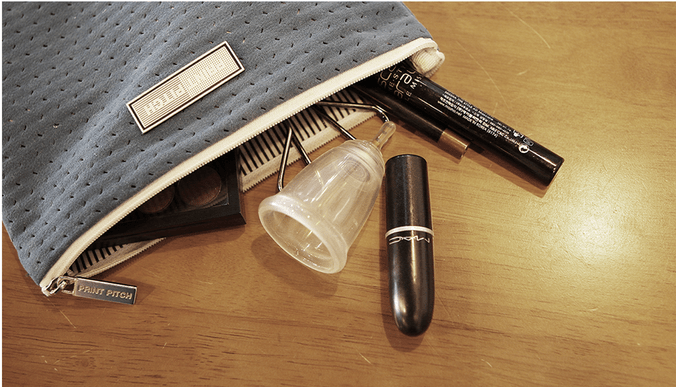
‘Smart Menstrual Cup’ Looncup Deciphers Your Flow

by Catherine Shu
Looncup I like to think I’m not squeamish about menstruation. I track my symptoms every month and am rarely hesitant to talk about periods with close (and even not so close) friends. I was still taken aback, however, when I heard about Looncup, which bills itself as the “world’s first smart menstrual cup” and surpassed its $52,000 Kickstarter goal in just one week. Read More
08 Oct 12:34

uBeam Finally Reveals The Secret Of How Its Wireless Charging Phone Case Works Safely

by Josh Constine
uBeam Cynics have denounced uBeam’s ultrasound wireless charging at-a-distance technology since its first prototype was invented in 2011, in part because it refused to share the particulars for fear of competitors copying it. But today, its founder Meredith Perry unveiled extensive details, research, and safety information about how uBeam works, and will be able to simultaneously… Read More
07 Oct 23:18

"Wanting Is an Option Your Mind Provides, Not an Order You Have to Follow"

by Patrick Allan

"Wanting Is an Option Your Mind Provides, Not an Order You Have to Follow"

There’s a fundamental difference between “want” and “need,” and it all comes down to choice. As difficult as fighting off your wants may seem, it can help to remind yourself that you’re the one calling the shots.

On his blog, James Clear suggests that taking active steps toward reducing your “unquestioned consumption” while finding a way to want less as a consumer will make your life better. To do that, you have to put things in perspective and recognize what wanting really is:

Let go of wanting things. There will never be a level where you will be done wanting things. There is always something to upgrade to. Get a new Honda? You can upgrade to a Mercedes. Get a new Mercedes? You can upgrade to a Bentley. Get a new Bentley? You can upgrade to a Ferrari. Get a new Ferrari? Have you thought about buying a private plane? Realize that wanting is just an option your mind provides, not an order you have to follow.

The bottom line is you choose to want something. You don’t choose to need something. Needs are orders. When you start to think of wanting as a choice and not some primal desire you have no control over, you can prevent yourself from making bad choices. Wanting isn’t always bad, but it can only benefit you to exhibit control over it.

http://twocents.lifehacker.com/the-diderot-ef...

The Diderot Effect: Why We Want Things We Don’t Need - And What to Do About It | James Clear

Photo by Denise Krebs.

07 Oct 23:17

"100 Science Fiction & Fantasy Books to Read in a Lifetime"

by David Pescovitz

untitled

Amazon's book editors compiled their list of "100 Science Fiction & Fantasy Books to Read in a Lifetime."

It's a compelling list, even if they skipped two of my favorite SF authors, JG Ballard and Rudy Rucker. Who else did they miss? Share in the comments!

"100 Science Fiction & Fantasy Books to Read in a Lifetime" (Amazon)

07 Oct 20:15

Clear Out Clutter By Thinking of Every Possession as a Relationship

by Melanie Pinola

Clear Out Clutter By Thinking of Every Possession as a Relationship

Most of us have way too many things. It’s only after decluttering that we realize the psychological effect of all our possessions, as if we have thousands of relationships tugging at us at all times.

That’s the analogy David Cain offers on Raptitude: everything you own is a relationship you’re in. Cain describes the process of going through all his possessions to evaluate whether they spark joy, as author Marie Kondo advises, and how liberating it is to free yourself from things that make you feel guilty or bad:

Our possessions are more psychological than physical. What a thing is is much less important than what it does to your mind when you own it. But it’s hard to see what each item does when you’re feeling the effect of a thousand such relationships at once. That’s why you need to audit every single object on its own, and why owning fewer things is better overall.

Probably the most common reason people keep things they’re not using is because they “have value”— meaning they once cost money. But the real value in things is the experience they create for us. Even things with a monetary value can lower the quality of our experience in a lot of ways, by making us feel guilty, taking up space, or keeping us preoccupied with goals we’re not really committed to. And the money is already gone anyway. The important question is always “What does it feel like to own this?” and you can have the answer in seconds when you hold it in your hands and ask.

Time to end some relationships to the things that are just taking up space and renew our relationships to the things we have that do spark joy.

Every Thing You Own is a Relationship You’re In | Raptitude

07 Oct 17:07

Hands and eyes on View-Master for Google Cardboard

by Russell Holly

Mattel is wielding nostalgia to spectacular effect, but this is also a well-made Cardboard kit.

Just in time for holiday sales, Mattel's kit for Google Cardboard is starting to hit shelves. The View-Master Virtual Reality box takes the classic design from our childhood, makes some room on the inside for a phone, and offers a unique content ecosystem alongside Google's increasingly popular Cardboard platform. It's a fantastic combination of virtual reality, augmented reality, and a universally appreciated hardware profile.

Let's take a look.

07 Oct 17:05

Scientists can draw very different meanings from the same data, study shows

by Arielle Duhaime-Ross

Giving the same information to multiple scientific teams can lead to very different conclusions, a report published today in Nature shows. And that's exactly why two researchers think scientists should share their data with others  — well before they publish.

Continue reading…

07 Oct 14:55

Introducing the Accelerated Mobile Pages Project, for a faster, open mobile web

by noreply@blogger.com (Google Blogs)
Smartphones and tablets have revolutionized the way we access information, and today people consume a tremendous amount of news on their phones. Publishers around the world use the mobile web to reach these readers, but the experience can often leave a lot to be desired. Every time a webpage takes too long to load, they lose a reader—and the opportunity to earn revenue through advertising or subscriptions. That's because advertisers on these websites have a hard time getting consumers to pay attention to their ads when the pages load so slowly that people abandon them entirely.

Today, after discussions with publishers and technology companies around the world, we’re announcing a new open source initiative called Accelerated Mobile Pages, which aims to dramatically improve the performance of the mobile web. We want webpages with rich content like video, animations and graphics to work alongside smart ads, and to load instantaneously. We also want the same code to work across multiple platforms and devices so that content can appear everywhere in an instant—no matter what type of phone, tablet or mobile device you’re using.

The project relies on AMP HTML, a new open framework built entirely out of existing web technologies, which allows websites to build light-weight webpages. To give you a sense of what a faster mobile web might look like, we’ve developed this demo on Google Search:

Over time we anticipate that other Google products such as Google News will also integrate AMP HTML pages. And today we’re announcing that nearly 30 publishers from around the world are taking part too.

This is the start of an exciting collaboration with publishers and technology companies, who have all come together to make the mobile web work better for everyone. Twitter, Pinterest, WordPress.com, Chartbeat, Parse.ly, Adobe Analytics and LinkedIn are among the first group of technology partners planning to integrate AMP HTML pages.

In the coming months we’ll work with other participants in the project to build more features and functionality focused on some key areas:

  • Content: Publishers increasingly rely on rich content like image carousels, maps, social plug-ins, data visualizations, and videos to make their stories more interactive and stand out. They also need to implement ads and analytics in order to monetize the content and to understand what their readers like and dislike. The Accelerated Mobile Pages Project provides an open source approach, allowing publishers to focus on producing great content, while relying on the shared components for high performance and great user experience. The initial technical specification—developed with input and code from our partners in the publishing and technology sectors—is being released today on GitHub.
  • Distribution: Publishers want people to enjoy the great journalism they create anywhere and everywhere, so stories or content produced in Spain can be served in an instant across the globe in, say, Chile. That means distribution across all kinds of devices and platforms is crucial. So, as part of this effort, we’ve designed a new approach to caching that allows the publisher to continue to host their content while allowing for efficient distribution through Google's high performance global cache. We intend to open our cache servers to be used by anyone free of charge.
  • Advertising: Ads help fund free services and content on the web. With Accelerated Mobile Pages, we want to support a comprehensive range of ad formats, ad networks and technologies. Any sites using AMP HTML will retain their choice of ad networks, as well as any formats that don’t detract from the user experience. It’s also a core goal of the project to support subscriptions and paywalls. We’ll work with publishers and those in the industry to help define the parameters of an ad experience that still provides the speed we’re striving for with AMP.

We hope the open nature of Accelerated Mobile Pages will protect the free flow of information by ensuring the mobile web works better and faster for everyone, everywhere.

Posted by David Besbris, Vice President Engineering, Search


We’re announcing a new open source initiative called Accelerated Mobile Pages, which aims to dramatically improve the performance of the mobile web.
07 Oct 14:39

Google introduces Accelerated Mobile Pages Project to make the mobile web faster

by Jared DiPane

Google has introduced Accelerated Mobile Pages Project, its new way to make the mobile web even faster. Back in September, it was first revealed that Google was likely working on this type of project, and now it is official.

07 Oct 13:20

HP’s new all-in-one PC is curved and ultra wide

by Jacob Kastrenakes

HP is introducing a number of new PCs today, but easily the most impressive — on a physical level, at least — is the Envy Curved All-in-One PC: a Windows 10 machine built into a curved and extremely wide 34-inch display. Just imagine how many windows you could have up at once. It's, like, a lot.

Continue reading…