Shared posts

21 Oct 15:12

How much did Back to the Future Part 2 get right about 2015?

by Kwame Opam

It's October 21st, 2015. Somewhere, in a parallel present not at all like our own, Marty, Doc Brown, and Jennifer are about to land in a "futuristic" Hill Valley. Flying cars cruise the skies. Youth gangs with weaponized hoverboards roam the streets looking for kids to bully. And the fax machine rules all forms of communication.

Continue reading…

21 Oct 15:12

Read Adele's Twitter letter about her upcoming new album, 25

by Jamieson Cox

Infrequent Twitter user Adele took to her account this morning to post a lengthy, personal letter detailing her long-awaited new album 25. The missive is coming on the heels of a mysterious snippet of new music debuted during a commercial break in the UK this weekend, a clip that counted as her first piece of new material since her 2012 Bond theme "Skyfall." "My last record was a break-up record and if I had to label this one I would call it a make-up record," writes the singer. "I'm making up with myself. Making up for lost time. Making up for everything I ever did and never did."

The release of a new Adele record is the kind of momentous occasion that has the power to impact the entire music industry. Her last album, 2011's 21, sold...

Continue reading…

21 Oct 11:28

HTC One A9 hands-on video

by Alex Dobie

Four minutes of HTC's latest "One."

The mid-range space has become really interesting over the past six months, with serious hardware arriving from the likes of Motorola, Huawei and OnePlus with price tags that won't break the bank. The recently-announced HTC One A9 is HTC's take on what a mid-range phone should be in 2014, and we've gotten our hands on the aluminum-bodied handset ahead of its November launch. Check out our hands-on video below, and be sure to check out our full A9 preview when you're done.

20 Oct 21:05

Here's how BlackBerry secured Android on the Priv

by Jared DiPane

BlackBerry has offered some additional information about the steps it took in making sure that the Priv by BlackBerry was secure, even while running Android. For years, BlackBerry has been known for security, its operating system was built around it. With the switch to Android on the Priv, some were left concerned about how BlackBerry planned to stay true to its roots in making sure that the upcoming smartphone was as secure as the rest.

20 Oct 21:01

LA prosecutors won't charge Saudi sheik with multiple sexual assaults because “insufficient evidence”

by Xeni Jardin

Aerial view of the mansion where Majed Abdulaziz Al-Saud was arrested

Prosecutors for the county of Los Angeles say they will not file charges against a Saudi prince recently arrested for sexual assault at a gated mansion on the edge of Beverly Hills.

A civil lawsuit filed in L.A. County Superior Court on Sept. 25 says he attacked multiple women inside the home for several days.

(more…)

20 Oct 20:57

Yahoo Shares Fall On Q3 Profit Miss, Recover Mildly On News Of Google Search Deal

by Alex Wilhelm
yahoo-earnings Today following the bell, Yahoo reported its second quarter financial performance. Not discounting traffic acquisition costs (ex-TAC), Yahoo’s revenue for the period totaled $1.23 billion. The company earned $0.15 per share during the quarter, using adjusted metrics (non-GAAP). Read More
20 Oct 17:07

Facebook rolls out instant articles to all iOS users and announces an Android beta

by Casey Newton

Five months after introducing its fast-loading instant articles into the News Feed, Facebook is now rolling out the format to all iPhone users, the company said today. Speaking at the Wall Street Journal's WSJD Conference in Laguna Beach, CA, Facebook's Chris Cox said 1,000 articles a day will now be published as instant articles. Facebook will also test the format in a beta for Android users later this year, said Cox, Facebook's chief product officer.

Continue reading…

20 Oct 17:06

The new Nexus phones: beautiful, secure, and a shot across the bow

by Cory Doctorow

1-eGQqrUi3nJdrZmIx9HLwEg

Dan Gillmor has been playing with Google's new Nexus phones, the humungous 6P phablet and the smaller 5X, and he's written a shrewd and thorough review of what these phones do -- and more importantly, what they mean. (more…)

20 Oct 17:05

HTC commits to software updates on the One A9 within 15 days of release to Nexuses

by Andrew Martonik

With the announce of the One A9, HTC is trying to make a splash with a different type of device — a smaller screen, lighter software and a few features it hasn't offered before. But one of the biggest announcements, at least from an Android enthusiast point of view, was the commitment to amazingly fast software updates.

20 Oct 17:05

HTC One A9 versus M7, M8 and M9: Spec comparison

by Alex Dobie

With today's announcement of the A9, there's a new member joining the HTC One family. The HTC One A9 isn't a performance powerhouse like the M9, but it is a tempting prospect for buyers looking at a smartphone purchase around the $400 mark. To see how the A9 measures up against the three previous HTC Ones — the M7, M8 and M9 — check out our comparison table below.

20 Oct 17:05

Mental Health Startup Lantern Launches Tool To Manage Stress

by Megan Rose Dickey
18940552976_774127f437_k One in five adults in America experienced a mental health issue last year, according to the U.S. Department of Health & Human Services. Meanwhile, one in ten people under the age of 18 went through a period of major depression in 2014. Despite the prevalence of mental health issues among both children and adults in the U.S., less than 20% of children and 44% of adults get treated. Lantern,… Read More
20 Oct 15:46

Nexus 5X review

by Dan Seifert

There’s a funny thing about fans (whether they’re fans of a sports team, a band, or a particular company or product): they can be hard to please. Google learned this with last year’s Nexus 6. It was a much larger and more expensive phone than the Nexus 5 that preceded it, and there was no guarantee that if you loved the Nexus 5, you’d also love the Nexus 6. In fact, many Nexus fans did not like the 6, as they were either not interested in spending $650 for a new phone or using one that’s roughly the size of a mid-’70s Coupe de Ville.

So this year, Google has rolled out two new Nexus phones. There’s the larger and more expensive Huawei-made Nexus 6P, which my colleague Dieter Bohn will examine in detail. And then there’s the Nexus 5X,...

Continue reading…

20 Oct 15:44

Nexus 6P review: the best Android phone

by Dieter Bohn

The Nexus 6P is a premium phone.

"Premium" is a funny word when it comes to phones. It's as though everybody in the business of judging them got together in a secret cabal to come up with the most awkward language possible to describe the set of ineffable qualities that separates the very best phones from the rest. They get designated as "flagships" with "elegant" design that are "top tier" thanks to some combination of their materials, craftsmanship, specs, and of course their (usually very high) price.

It’s a pretend category, maybe, but you know it when you see it. For a long time, it included the iPhone and not a whole lot more. Later, you would see Samsung and Sony's best in there (and maybe HTC, in a good year). But Nexus...

Continue reading…

20 Oct 15:41

Palabre 2.0 Gets A Visual Overhaul And Adds More News Providers Like Twitter, Inoreader, The Old Reader, And An SDK For Developers

by Rita El Khoury

palabre-v2

When Google Reader got shut down a few years ago, I was in disarray. My entire work system relied on having an easy one-stop site to check all the news and articles that have been recently published instead of having to visit each source to check it out. As alternatives started spanning out, I tested a couple until I settled on Inoreader because it embodied everything Google Reader was (fast, reliable, simple, handy with keyboard shortcuts) without the bells and whistles of magazine views and images that often hindered my workflow.

Read More

Palabre 2.0 Gets A Visual Overhaul And Adds More News Providers Like Twitter, Inoreader, The Old Reader, And An SDK For Developers was written by the awesome team at Android Police.


20 Oct 15:37

Give me blood, cash, or jail time, Alabama judge orders defendants

by Xeni Jardin

Photo: The Montgomery Advertiser

What's worse than courts demanding that poor people pay extortionate fines to the state for minor offense? Asking them to literally pay with their own blood.

(more…)

20 Oct 11:59

EE unveils the Robin, a new 4G tablet for kids

by Rich Edmonds

EE has unveiled a new tablet called the Robin. This new product will enable kids to access content online, utilizing the 4G connectivity. What makes this tablet ideal for younger users is the array of parental controls available to effectively filter and manage exactly what children will be able to see and do on the device. The EE tablet will be priced at £129.99 SIM-free.

19 Oct 23:51

Popcorn Time for your browser makes illegal movie streaming even easier

by Nick Statt

A Popcorn Time developer has made it easier than ever before to stream pirated movies and TV shows by placing the streaming service directly in your browser. Popcorn Time, which operates like Netflix but via pirated media streams from torrent sites, was previously only available as a desktop and Android mobile app users had to download. Now you can use Popcorn Time by venturing over to browserpopcorn.xyz, no login required. The website builds on previous attempts to create a browser-based torrent service, like Popcorn In Your Browser, that ultimately failed because they relied on third party services to function.

The browser version was created by 15-year-old Serbian programmer Milan Kragujevic, who appears to have cloned the original...

Continue reading…

19 Oct 23:02

Netflix is working on a Gilmore Girls revival

by Kaitlyn Tiffany

This news is relevant to the interests of basically every person.

TV Line reports that Netflix is working on a limited revival of the classic mother-daughter dramedy series Gilmore Girls. Having reportedly closed the deal with series creator and head writer Amy Sherman-Palladino and executive producer Daniel Palladino, Netflix is now said to be negotiating with key members of the cast (including Lauren Graham, Alexis Bledel, Kelly Bishop, and Scott Patterson). TV Line says the cast is expected to sign on, but until then, nothing is final.

Rory and Jess forever

Continue reading…

19 Oct 23:02

22 New And Notable Android Apps And Live Wallpapers From The Last 2 Weeks (10/5/15 - 10/19/15)

by Michael Crider

roundup_icon_largeWelcome to the roundup of the best new Android applications, games, and live wallpapers that went live in the Play Store or were spotted by us in the previous 2 weeks or so.

Please wait for this page to load in full in order to see the widgets, which include ratings and pricing info.

Looking for the previous roundup editions? Find them here.

Featured App

Currency FX - Exchange Rates

This week's roundup is brought to you by Currency FX - Exchange Rates from HandyApps.

Read More

22 New And Notable Android Apps And Live Wallpapers From The Last 2 Weeks (10/5/15 - 10/19/15) was written by the awesome team at Android Police.


19 Oct 22:07

14 Things You Can Do in Android Marshmallow That You Couldn't Do in Lollipop

by David Nield on Field Guide, shared by Whitson Gordon to Lifehacker

Whether you’ve put in an order for a Nexus 6P or you’re patiently waiting for Android version 6.0 to reach your Galaxy S6, you’ll want to know what Marshmallow can do for you. It’s not a dramatic leap forward for Google’s mobile OS, but there are still a number of useful new features you’re going to want to know about.

Of course, unlike Apple, Google updates all its key apps independently of the OS as a whole—that means there’s not quite as much to talk about with an Android update as there is with an iOS one. At this stage (stock) Android is pretty much Google Now with a settings page and a dialer app, but Marshmallow still offers plenty of reasons to look forward to your upgrade.

1. Get Google Now on tap
14 Things You Can Do in Android Marshmallow That You Couldn't Do in Lollipop

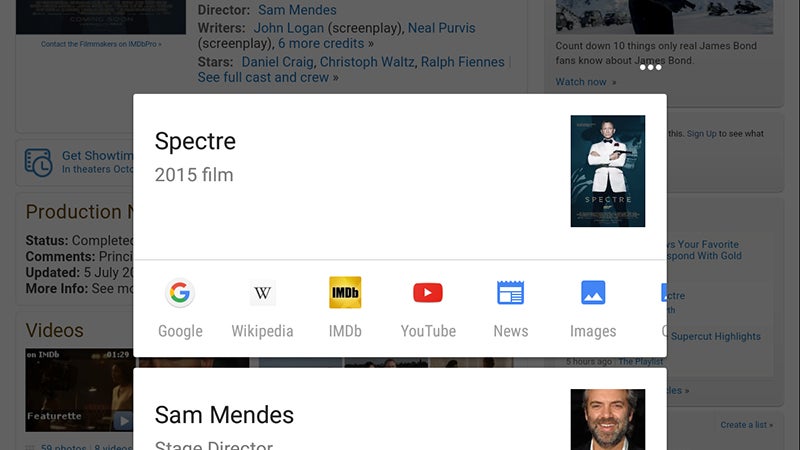
Google Now on Tap is the biggest new feature here and is activated with a long-press on the Home button. It’s designed to understand context better than ever before, so songs, movies, venues and the like are automatically identified inside the current app and you get a bunch of relevant links.

If there’s a place reference, for example you get navigation directions and a link to its Street View. In the case of movies, the links go to the IMDB app (if installed), YouTube, Wikipedia and so on. It’s still in its early stages, but it shows promise. The usual Google Now interface is still in place, too.

2. Make the most of USB Type-C

Your Android device isn’t going to magically sprout a USB Type-C port as soon as Marshmallow arrives, but Google’s latest code update does provide native support for the next-generation connector standard—which is why you’ll find it on newer phones like the Nexus 5X and the OnePlus 2.

If you’re completely new to the USB Type-C party, it essentially provides faster charging, faster data transfer, advanced multitasking (if you want to output video and charge your device at the same time, say) and most importantly of all, reversible cables. Not a bad little upgrade.

3. Manage permissions more easily
14 Things You Can Do in Android Marshmallow That You Couldn't Do in Lollipop

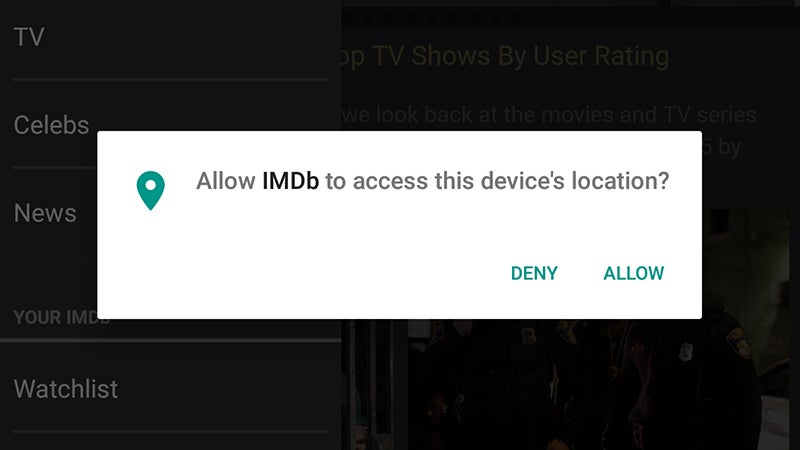
It was obvious that iOS had it right as far as transparent, granular app permissions were concerned, and Android Marshmallow admits as much, because it now has a very similar system. Permissions are asked for as and when they’re needed, rather than all at once during installation.

That gives you a better idea of what’s going on and also let’s you, for example, give Facebook access to your camera but not your contacts. If you want to check which apps have what permissions (and edit them), go to Settings: tap Apps then the cog icon, then choose App permissions.

4. Use a fingerprint as security

Third-party manufacturers have been adding fingerprint sensors to their hardware for a while now, but Android 6.0 Marshmallow represents the first time it’s actually been supported by the core OS itself. As on the iPhone, you can use the new feature to unlock your device, make payments in Android Pay, and more.

You’re still relying on your actual phone to offer a fingerprint sensor, but most future handsets will include such capabilities now that Google has seen fit to add support for it to Android. Everything should work quickly and seamlessly, and Play Store purchases support fingerprint authorization, too.

5. Manage volumes more intuitively
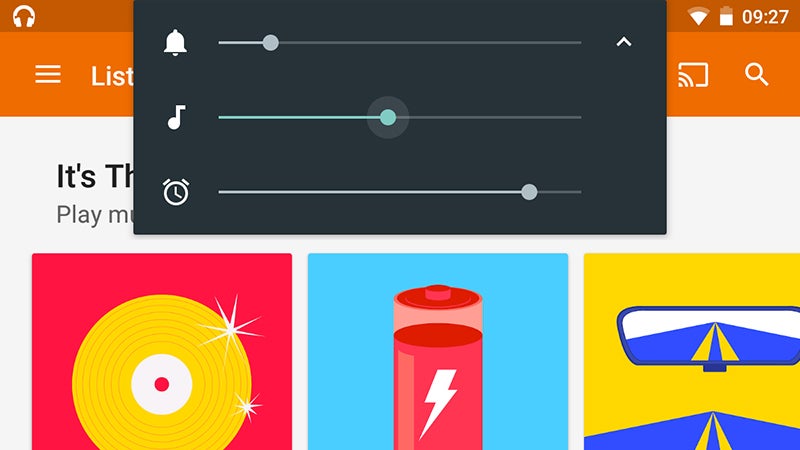
14 Things You Can Do in Android Marshmallow That You Couldn't Do in Lollipop

Lollipop made some volume setting changes that were designed to be more flexible but just ended up being confusing. In Marshmallow, it’s much clearer. Put the volume to zero with the hardware buttons to enter ‘quiet mode’ and tap the down arrow to adjust all the device volumes independently.

Tap the Do not disturb button on the quick settings panel to switch between total silence, alarms only and the Priority Mode from Lollipop. As before you can still allow certain events, apps and contacts to make an audible alert on your device while the volume is down (Sound & notification in Settings).

6. Let your device Doze

Doze is Marshmallow’s new battery management trick: It puts your device into something close to airplane mode when you’re not using it. Your phone or tablet automatically senses when it’s not active and when it’s been stationary for a while, and this is when Doze swings into action (or rather inaction).

There’s no setting to enable or disable Doze, so you can simply enjoy the extra battery life. It cuts down on background processes and increases the time between checks for less important updates. Important messages and calls are still going to come through to your device immediately, however.

7. Get the real web inside your apps

14 Things You Can Do in Android Marshmallow That You Couldn't Do in Lollipop

This is more for developers, but end users are going to notice it, too. A new Marshmallow feature called Chrome Custom Tabs makes it easier for apps to display websites without kicking you out to the full Chrome app. It’s like an app-branded version of Chrome that quickly displays links you tap on.

That means you get access to all of the standard features inside Chrome (like your saved passwords) rather than having to put up with some lightweight web viewer put together by the app’s developer. It’s not going to change your life, but it’s something else to look out for while you use Marshmallow.

8. Select text more accurately

One for those of you struggling with small screens (or large fingers). When you’re selecting text using Android Marshmallow, the OS automatically extends your selection to match whole words so you spend less time fiddling about trying to get exactly the right words or phrases highlighted on screen.

If you still need character-by-character selection then you can drag the blue handles back in from the front or end of your selection— but as you drag them out you’ll go a whole word at a time. Perfect for sharing a compelling turn of phrase you’ve come across somewhere on the web.

9. Share to your most-used apps
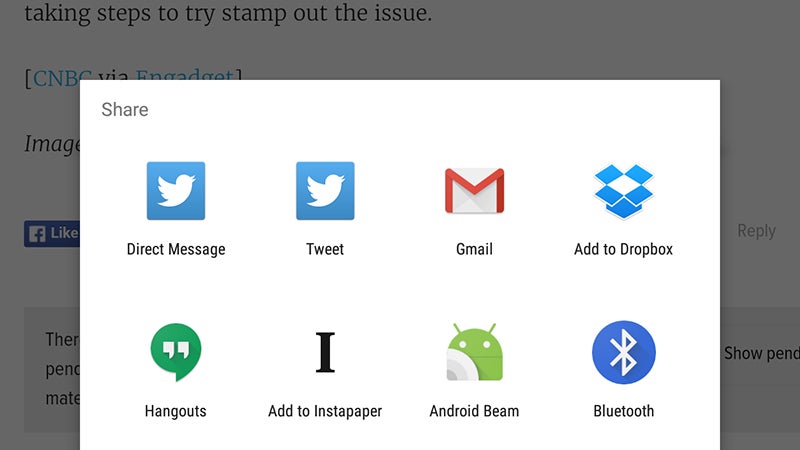
14 Things You Can Do in Android Marshmallow That You Couldn't Do in Lollipop

One of the minor but neat tricks Android Marshmallow has up its sleeve is the ability to automatically understand the people and the apps you share with most often. If you’re always posting links from the web to Twitter, then Twitter is the first app that’s going to appear in the pop-up Share menu.

It’s the same with your contacts, and you should find Marshmallow learns more about your habits and your favorite people to share to as you go. Of course all of your share-enabled apps are still available as before, but the ones you use most frequently are going to be easier to reach.

10. Swipe left to access voice controls

The lock screen gets a major change in Android Marshmallow: When swiping left, you now get access to the standard Google voice search instead of the dialer app (presumably more people want to search Google rather than make old-fashioned phone calls to the people they know).

That means you can quickly look up the time in Sydney or the conversion rate between dollars and pounds without diving into the main OS. If you try and run a personal Google search (“show my flights,”“next appointment”), access to the results is blocked until you unlock the device as normal.

11. Access the System UI Tuner
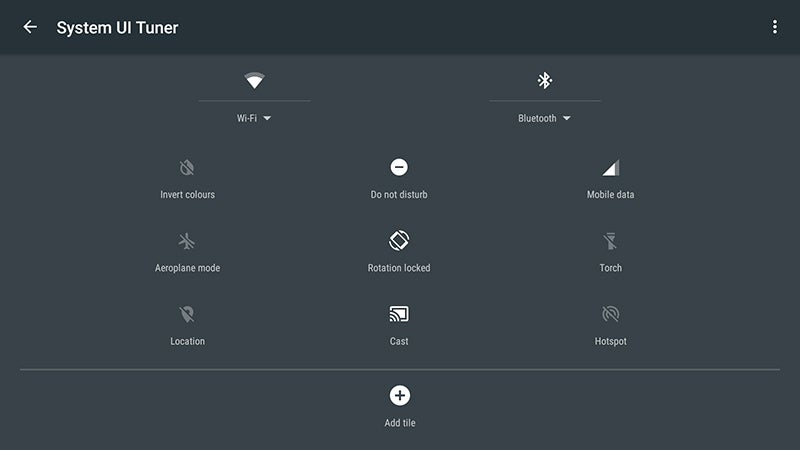
14 Things You Can Do in Android Marshmallow That You Couldn't Do in Lollipop

Pull down the Quick Settings pane (a two-finger swipe from the top), then press and hold the cog icon to activate the System UI Tuner, an experimental new feature in Android 6.0 Marshmallow that most users may not decide to bother with. You can find it at the bottom of the main Settings app.

The new utility lets you move around the various icons in the Quick Settings pane and add or remove tiles as you see fit. There’s also the option to hide certain indicators from the status bar (from airplane mode to Bluetooth) and you can also toggle a new battery percentage indicator on or off.

12. Check default apps

Managing default apps is a bit of a mess in Android at the moment (but at least it’s there right, iOS fans?) and Marshmallow tries to help without actually doing much good. As before, you can clear default associations for a particular app by finding its entry on the Apps screen in Settings.

However, you can also tap the cog icon on the Apps screen and then select Default Apps to manage associations for the big stuff: Browser, camera, SMS, pictures and so on. From what we can tell these settings take priority over everything else, so head here if you want to make changes to default apps.

13. Monitor device memory usage
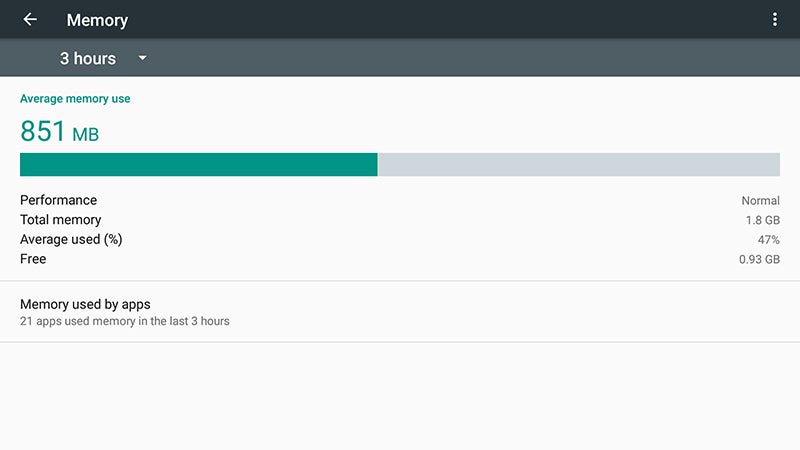
14 Things You Can Do in Android Marshmallow That You Couldn't Do in Lollipop

In recent versions of its mobile OS, Google has been giving users more information on local storage, battery usage, and so on. With Android Marshmallow, details of the state of your device’s memory are added, too. Tap on the Memory entry in the Settings app to see what’s on offer.

As well as checking up on average memory use as a whole, you can see which apps are hogging the biggest slice of your system resources—the utility lets you break down the statistics for the last 3, 6, 12 or 24 hours. The new feature will probably be of most use when you’re troubleshooting problems.

14. Back up everything in your apps

Previous versions of Android were able to back up lots of important data, like wifi passwords and app installs, and of course apps like Gmail and Google Calendar keep everything in the cloud anyway. Marshmallow gives developers the opportunity to add their own data to the mix, if they want to.

That means not only will all of your apps come back like magic whenever you do a restore, but all of your app settings and preferences are going to come back, too. There’s not a user-facing option to enable this—it’s up to developers—but at least the feature is finally available.

19 Oct 20:00

Drones Now Need To Be Registered With U.S. Government, Say The FAA And DOT

by Fitz Tepper
shutterstock-capitol-drones As rumored last week, the U.S. government has just announced a program that will require drones to be registered with the U.S. Department of Transportation. At a press conference today in Washington D.C., Transportation Secretary Anthony Foxx announced the plan. The department will be creating a task force comprising public and private industry leaders to devise exactly how the… Read More
19 Oct 19:59

Lenovo hasn't given up on its giant table-top PC

by Lauren Goode

It's been a few years since Lenovo first introduced its giant table-top PC as a kind of hybrid solution for both family fun and productivity, and safe to say, we haven't seen many (or any) of these in the wild since then. But that doesn't mean Lenovo, still the world's largest PC maker, has given up on the idea. Today the Chinese PC-maker introduced the Yoga Home 900 Portable All-in-One Desktop.

"Portable" may seem a bit tongue-in-cheek, because the 27-inch, 16-plus-pound machine isn't necessarily something you're going to take with you on your next business trip (and if you do, please send us the video). It's actually positioned as a home computer, meant to offer desktop-grade performance but with some ability to move it from location...

Continue reading…

19 Oct 19:58

The first 5 things to know about the Nexus 6P

by Jerry Hildenbrand

Let's get to know the Nexus 6P.

The Nexus 6P looks to be the best Nexus ever, and we'll have a lot to say about it using a lot of words. It deserves all of them.

But there are a few things you need to know right away, and we've got the top five things you need to know right here in one handy spot. Have a read!

The first five things to know about the Nexus 6P

This thing is a fingerprint magnet

And we're not talking about Nexus Imprint.

Some of us get a little twitchy when our phones are covered head to toe, front and back, with greasy fingerprints. If this sounds like you, go ahead and buy a microfiber towelette or two to carry around.

You'll be needing it to wipe all of your grubby fingerprints off of your new Nexus 6P.

I ordered a dozen.

The metal casing gets hot if you set it in direct sunlight

Science, yo!

This is nothing new for people who currently use (or have used) a phone with a body that's predominantly metal. Your new Nexus 6P will get very warm if you have it in direct sunlight.

19 Oct 19:58

The first 5 things to know about the Nexus 5X

by Jerry Hildenbrand

These are the first things to know about the Nexus 5X.

Expect to see a lot of words being written about Google's new Nexus 5X in the coming weeks. LG once again has teamed with Google to bring a phone running Android as Google intended (for better or worse) and this year the 5X comes in a smaller and more pocket-friendly size.

We going to get you started on all the things you want and need to know about the new Nexus 5X. Read on

The first five things to know about the Nexus 5X

The Nexus 5X is light as a feather

And we mean crazy light.

A phone with a 5.2-inch display isn't exactly large by today's standards, but when you pick up the Nexus 5X you'll do a double take.

Checking in at just 136 grams, the 5X is a little lighter than even the Galaxy S6, and about 30 grams lighter than the LG G4. It takes a bit of getting used to.

But we're loving it. It's still solidly built, and the light weight makes it easy to carry around in a bag filled with things that have a screen.

19 Oct 19:58

The New Nexus Phones Support USB Power Delivery To Charge Other Devices, But It's Sketchy On Older Phones And Tablets

by Ryan Whitwam

wm_2015-10-19 13.26.31

The benefits of USB Type-C are still unclear to me. I mean, I get that it's universal and reversible, but right now it's just another cable to have around. When it becomes more ubiquitous, though, Type-C might be most useful when the time comes to charge up your gadgets. The new Nexus phones offer a taste of this future with support for USB power delivery, allowing them to both send and receive power.

Read More

The New Nexus Phones Support USB Power Delivery To Charge Other Devices, But It's Sketchy On Older Phones And Tablets was written by the awesome team at Android Police.


19 Oct 19:48

Tiny anti-snoring gadget for people with sleep apnea looks promising

by Mark Frauenfelder

apnea

https://youtu.be/uEzvw9tfMJM

If this little gadget called Airing really does prevent obstructive sleep apnea, then it's a big deal. The Indiegogo-funded project is described as the first hoseless, maskless, micro-CPAP. (more…)

19 Oct 16:51

Fox News terrorism expert indicted for lying about his career as CIA officer

by Mark Frauenfelder

simmons

Accuracy in Media (AIM) has removed Wayne Simmons (62) from its Benghazi commission after he was arrested on "charges of major fraud against the United States, wire fraud, and making false statements to the government," including allegedly falsely claiming he worked for the CIA, reports Media Matters. Simmons is the guy who scared the wits out of Fox news viewers by telling them fantastical tales such as the one about "at least 19 paramilitary Muslim training facilities in the United States."

Simmons was a frequent guest on Fox News, where he pridefully boasted about his expertise as a former CIA officer, while Fox News anchors like Neal Cavuto lapped it up. Now Simmons is sitting in jail, facing 35 years in federal prison. The charges against him include major fraud against the United States, wire fraud, and making false statements to the government.

The wire fraud charge alleges that Simmons "defrauded an individual victim out of approximately $125,000 in connection with a bogus real estate investment."

AIM describes Simmons as having "spent 27 years working with the CIA to combat terrorism, narcoterrorism and narcotics trafficking, arms smuggling, counterfeiting, cyber-terrorists, and industrial and economic espionage," and that he "has been a Terrorism Analyst for the Fox News Channel since 2002."

Fox News spokesperson Irena Briganti told CNN that he "was never a contributor for Fox News," and described hims as a "non-paid guest."

19 Oct 16:51

First Image From The Absolutely Fabulous Film Arrives

First Image From The Absolutely Fabulous Film Arrives

Edina and Patsy ride again

Ab-Fab-Movie-First-Still

Long talked about, but never quite made until now, Absolutely Fabulous: The Movie finally has the cameras rolling and Jennifer Saunders and Joanna Lumley back living their version of the good life. Picture proof sits above!

Mandie Fletcher is calling the shots on this one, working from Saunders’ script, with Edina and Patsy joined, as you might expect by Julia Sawalha’s Saffy, Jane Horrocks as Bubble and June Whitfield as Mother. “I am thrilled and excited to finally start filming,” says Saunders. “We are all taking our medication and hoping for the best,”

The plot, which follows some of the archetypes for a film based on a British sitcom sees Edina and Patsy shopping, drinking and clubbing their way round London’s top spots until they stumble into a fashionable launch party and are blamed for a major incident. Fleeing the ensuing media storm and attendant paparazzi, they head for the French Riviera without a penny to their names, but start to form a plan to stay there permanently. Makes sense...

The likes of Kate Moss, Emma Bunton, Chris Colfer, Dawn French, Kim Kardashian and more are scheduled to show up for this one, shooting in the UK and the South of France. It doesn’t yet have a specific release date, but should be (dis)gracing our screens next year.


19 Oct 16:33

Researchers have found that a malicious Chinese ad network, used in over 250 iOS apps, has been sile

by Whitson Gordon

Researchers have found that a malicious Chinese ad network, used in over 250 iOS apps, has been silently collecting user data including serial numbers and email addresses. Apple has already begun removing these apps from the App Store, but you can read more here.

19 Oct 16:32

Dozens of Pirate Domains Quietly Added to UK ISP Blocklists

by Andy

stopstopFollowing a series of High Court orders, six of the UK’s major ISPs are required to block access to dozens of the world’s largest torrent sites and streaming portals.

It all began in April 2012, when member labels of the BPI moved to have the notorious Pirate Bay blocked by the country’s leading providers. Shortly after in July the same year, the MPA successfully argued that Usenet indexing site Newzbin2 should share an identical fate.

Some six months later, popular sites including Kickass, H33T and Fenopy were blocked too, with others such as Movie2K and EZTV joining them shortly after. And in July 2013 the Premier League joined the blockers, with a High Court order against First Row Sports.

Ever since, the MPA, BPI, Premier League, book publishers and even watchmakers have been obtaining blocking orders covering hundreds of URLs, in the hope that somehow this will prevent or at least reduce infringement of their rights.

Whether they actually achieve those aims is something rarely discussed but that’s not the only thing being kept quiet. On a regular basis the rightsholders listed above add new domains and new URLs to existing court orders which ISPs are obliged to comply with. No public announcements are made to advise the public, aside from the ‘page blocked’ messages supplied by their ISPs.

Nevertheless, TorrentFreak has learned that October has been a particularly busy month on the web blocking front, with rightsholders adding dozens of domains to existing orders covering almost 90 URLs. They cover official sites, clones, fakes, proxies (general and dedicated) plus assorted mirrors.

On the torrent site front, Demonoid.ws (plus three Demonoid proxies operated by proxyunblocker.org), 7torrents.info, seventorrents.org, seventorrents.pro, soupbit.me, torrentalter.org and ez-torrents.com are now present on the list.

After their main sites were blocked in an earlier court order, several TorrentDay and TorrentButler proxies have also been targeted.

Unsurprisingly, Popcorn Time related domains also make an appearance including getpopcornti.me, popcorntime.is, popcorntime.party and popcorntime.re.

Targeting isoHunt, its clones, proxies and Popcorn Time-style software isoPlex, new URLs to be blocked include izohant.com, izohant.net, izohant.org, isohunters.com and several unblockers operated by unblockme and torrentunblock.com

Action has also been broad on the streaming front. Several PrimeWire related domains (primeseries.to, primewire.fr, primewire.is, primewire.org, primewire.sg, gxiso.com) are the main targets along with several Viooz and Vodly-related domains at viooz.ph, vodly.at, vodly.be and viooz.ac.wwwunblocker.com.

Other streaming related URLs added to the blocklist cover a range of main domains and proxies for letmewatchthis (.at and .link), several LosMovies proxies operated by TorrentProx.com, plus 10 movie25, movie2k and movie4k proxies hosted at ProxyKings.com.

The grouping of the domains and URLs above shows that copyright holders are continuing with their strategy of targeting not only main domains, but also any others that could facilitate access by another route. This ensures that copyright holder blocking measures deter not only casual pirates but also those a bit more determined to find an easy way around blockades.

In total around 90 URLs are covered by the latest action, all of which should be blocked by ISPs including Virgin, Sky, TalkTalk and O2 during the coming days.

Source: TorrentFreak, for the latest info on copyright, file-sharing, torrent sites and ANONYMOUS VPN services.