Shared posts

07 Dec 18:40

Walk through the incredible installation inside the Japan pavillion at Venice Biennale

by Cory Doctorow
animation (2)

Last spring, we went to Venice to celebrate my wife's birthday and took a boat to the Biennale, which was pretty disappointing, with one notable exception: 'The Key in the Hand,' Chiharu Shiota's installation at the Japan pavilion, which took our breath away.

(more…)

07 Dec 18:40

The real bubble boy's impact on medicine

by David Pescovitz
PA-3413205

David Vetter (1971-1984) suffered from severe combined immunodeficiency (SCID), a disease that required him to live inside a sterile environment, a plastic "bubble." Eventually, he tested a special suit developed by NASA so that he could venture out of his bubble. Vetter's story partially inspired the 1976 TV movie "The Boy in the Plastic Bubble," starring John Travolta (full film below), the asinine 2001 comedy "Bubble Boy," and a Seinfeld episode. Vetter's life and tragic death continues to help physicians understand and treat immunodeficiency diseases.

https://www.youtube.com/watch?v=ARHnhyiepxc

PA-3413205

07 Dec 18:36

Google Turns On Safe Browsing In Chrome For Android

by Frederic Lardinois
mobile-malware Google’s Safe Browsing technology is now enabled by default on Android to protect mobile Chrome users from accessing phishing sites and web pages that harbor malware. Until now, Safe Browsing was only available to desktop users, as well as for Chrome users on Android who turned on Google’s optional data compression service. Read More
07 Dec 18:36

Emotech Is Building Olly, A Robot Assistant With Personality

by Natasha Lomas
Olly A robot with a unique personality might sound like an oxymoron. Or science fiction. But that’s the goal of London-based startup Emotech, launching on stage at TechCrunch Disrupt London 2015 today, with a plan to crowdfund its first product, a voice-controlled robot assistant called Olly, early next year. Read More
07 Dec 18:35

Watch the first trailer for Netflix's Crouching Tiger, Hidden Dragon: Sword of Destiny

by Kwame Opam

The first trailer for Netflix's followup to the Oscar-winning Crouching Tiger, Hidden Dragon is here, giving us our first real glimpse at how the streaming company plans to take on the Wuxia classic. Here, Michelle Yeoh has reprised her role as Yu Shu Lien, who must now strive to protect the legendary Green Destiny sword, which once belonged to legendary swordsman Li Mu Bai, from an evil warlord. She's joined by Rogue One: A Star Wars Story star Donnie Yen and former Glee star Harry Shum, Jr. Judging from the plentiful use of old-school wire work and VFX, the film should hopefully appeal to both old and new martial arts movie fans alike. Crouching Tiger, Hidden Dragon: Sword of Destiny hits select IMAX theaters and Netflix on February...

Continue reading…

07 Dec 18:34

Add to-dos to your Google Calendar using Reminders

by The Gmail Team
Posted by Vijay Umapathy, Product Manager

Our calendars should help us make the most of our time — scheduling meetings at work, remembering brunch with friends, and keeping track of all our other commitments. But often our to-do list is elsewhere, separate from the Calendar that organizes our day, and we end up overcommitted or miss something important because we forgot to check our list.

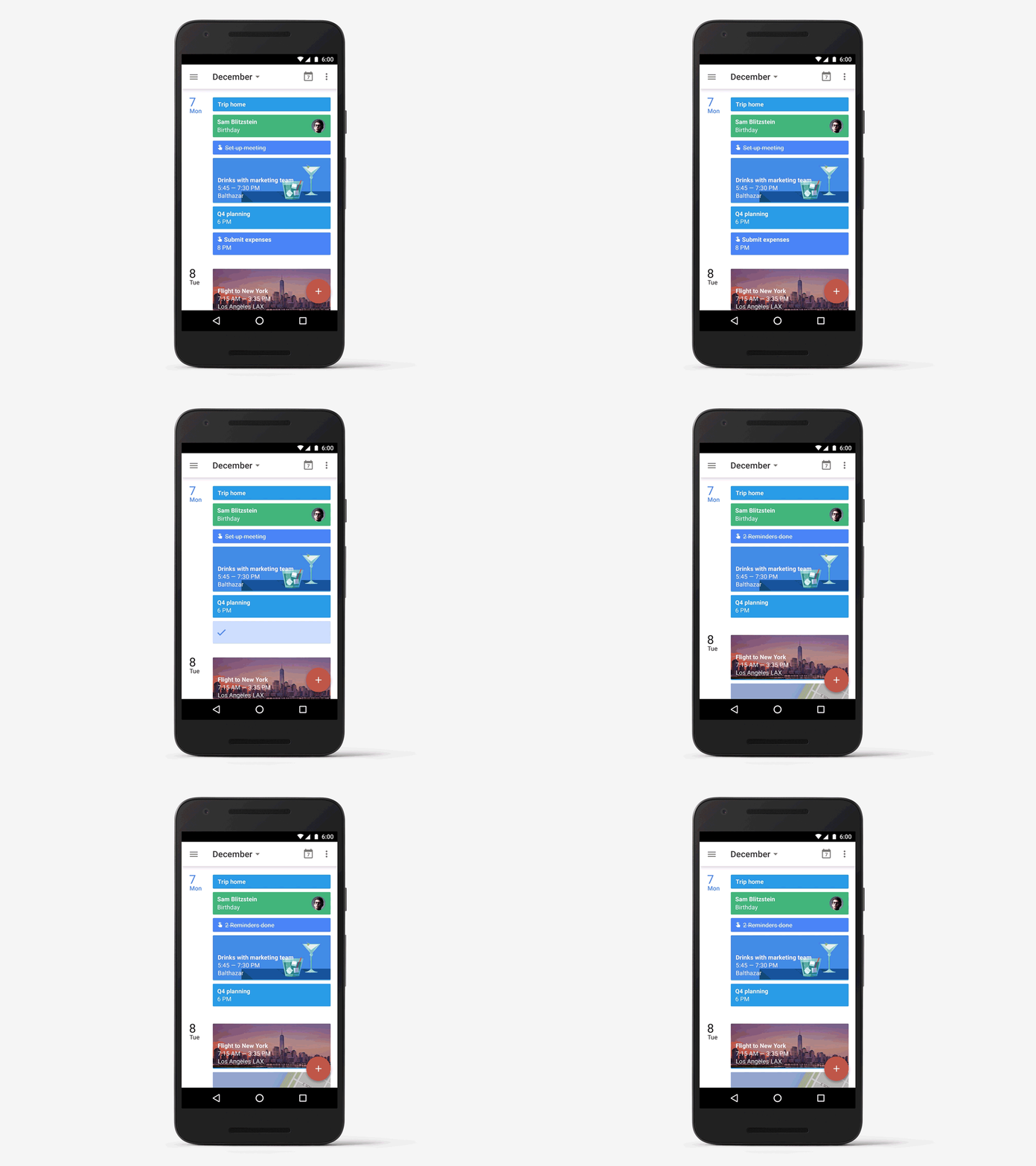
Now there's a single way to manage your day: starting this week, you can create Reminders in Google Calendar to keep track of your to-dos alongside your scheduled events.


Reminders stick around
You might already create calendar entries to remind you to call the doctor or pick up groceries on the way home. But while those entries come and go, Reminders stick with you over time so you can track them until they are actually done. If a Reminder isn't completed, it will appear at the top of your Calendar the next day. And the next. When you do finally call the doctor or pick up those necessities, just swipe the Reminder away ... and you're onto the next to-do.
Reminders help with the details
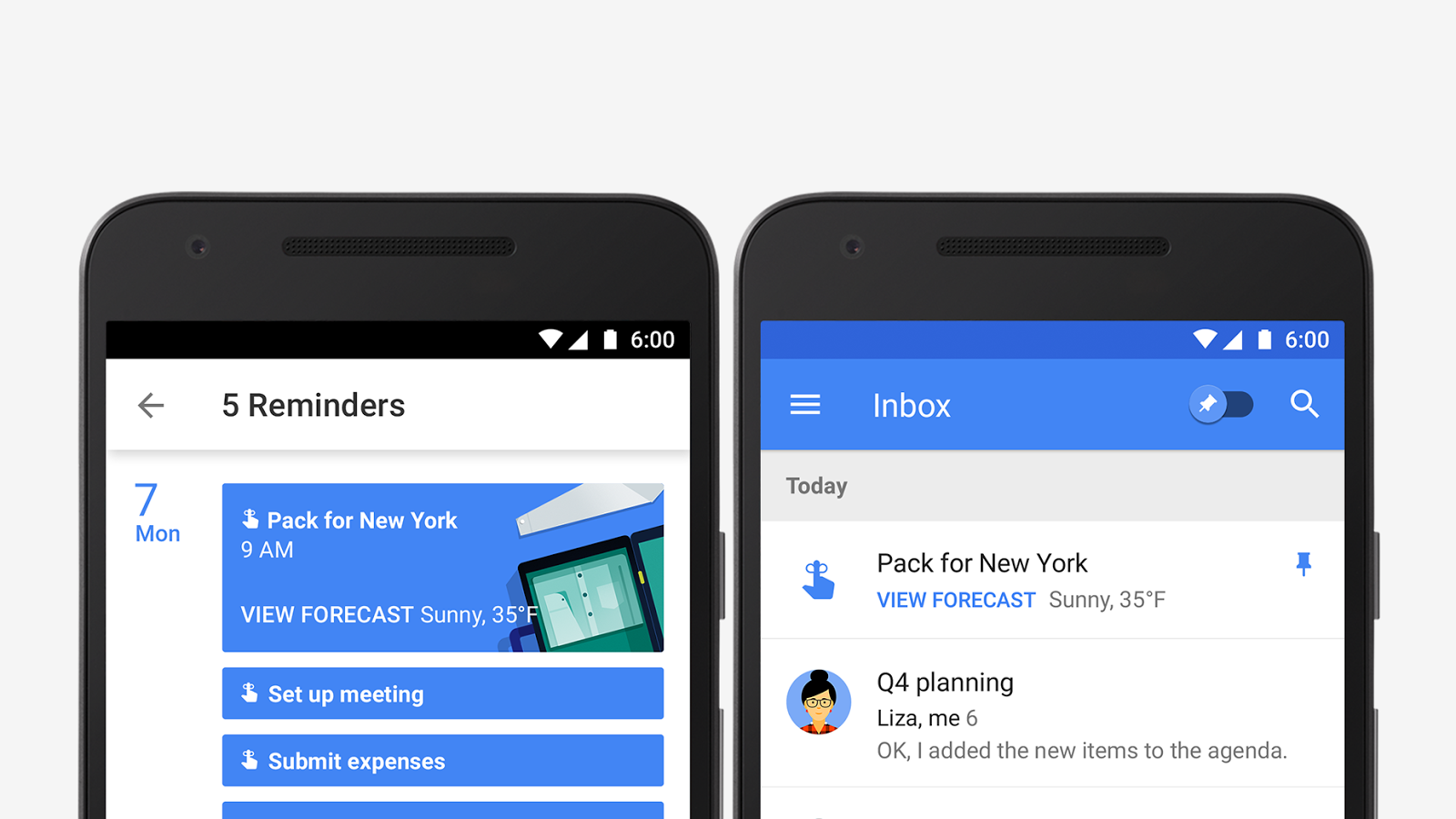
Another way Reminders are more useful than events is that Calendar adds things like phone numbers and addresses automatically. So if you add a Reminder to make a call or run an errand, the number or address will be right there when you need it. Just like Inbox by Gmail, Calendar uses information from your contacts, as well as Google's knowledge graph to provide this extra bit of help.
Reminders work across Google
You can also create Reminders from Inbox, Keep, and Google Now. This means you can create a Reminder when you're checking your email and it will show up on your calendar right away. Plans change? Just move the Reminder to a better time. Or if your hands are full, you can record your Reminders in Google Now一like, "Ok Google, remind me to buy birthday candles"一then mark it as done later in Calendar.
Reminders will be rolling out this week with the latest versions of Calendar on Google Play and the App Store. And don't worry, we're working on bringing Reminders to the web as well.


07 Dec 18:33

Dropbox is shutting down its Mailbox and Carousel apps

by Chris Welch

Dropbox is doing away with Mailbox, the email app it acquired in March 2013, and Carousel, the company's attempt at a standalone photo management app. The company says that it's making this decision now to focus more directly on the primary Dropbox app and the collaborative features it's known for. "The Carousel and Mailbox teams have built products that are loved by many people and their work will continue to have an impact," wrote Dropbox's founder/CEO Drew Houston and CTO Arash Ferdowsi in a blog post. "We’ll be taking key features from Carousel back to the place where your photos live — in the Dropbox app. We’ll also be using what we’ve learned from Mailbox to build new ways to communicate and collaborate on Dropbox."

Mailbox will...

Continue reading…

07 Dec 16:13

Twitter now displays full photos instead of cropping them

by Jacob Kastrenakes

Twitter is starting to put an even bigger emphasis on photos within your feed. After a change today, Twitter's web feed will now display full square and landscape images, rather than cropping them into an awkwardly sized rectangle (portrait images are larger, but still get cut off). This is phenomenal news for anyone who's regularly tweeted photos of people, only to have Twitter weirdly cut off their head and center an image on their chest or groin. On the other hand, you can expect power users to complain for the rest of the day about how you can now only see two tweets at the same time.

The change to photos was announced this morning and appears to have already rolled out. In addition to shifting over to uncropped single images,...

Continue reading…

07 Dec 16:13

Amazon's new $250 Fire HD 8 Reader's Edition tablet is made for ebook lovers

by John Callaham

People who love to read ebooks, but also want to get a full-featured tablet instead of an ereader, might want to check out Amazon's newest member of the Fire tablet family. The Fire HD 8 Reader's Edition, priced at $249.99, is designed to make it easier to read ebooks, especially at night, with its Blue Shade feature.

07 Dec 15:42

Save the Same Amount You Splurge to Curb Impulse Buying

by Kristin Wong on Two Cents, shared by Whitson Gordon to Lifehacker

Save the Same Amount You Splurge to Curb Impulse Buying

Spending temptations are everywhere, and it’s easier than we think to give into them. If you’re looking to put an end to your impulsive spending, try this trick: every time you give into a splurge, put that same amount in a savings account.

The Motley Fool explains:

Inundated by these opportunities to spend, skew the act of spending to your favor. So you want to buy those new boots? Match that spending with an equal contribution to your down payment.

Sometimes the pain of doubling a cost is enough to deter a purchase. In the case you still choose to spend, the matched contribution ensures you’re at the very least taking measures to save.

I like this rule because, either way, you win. You either forgo the splurge because you can’t afford twice the amount, or you give in and beef up your savings in the process. Also, if you make it a rule, it forces you to take an extra moment to think about your purchase, and mindful spending is a good thing.

http://twocents.lifehacker.com/practice-consc...

There are potential drawbacks, of course. You might end up saving your splurge amount only to realize your checking account is dangerously low. You obviously want to use the rule using your own discretion.

For more detail, check out the full post at the link below.

How to Trick Your Brain Into Saving a Down Payment | The Motley Fool via Fidelity

Photo by Rocky Lubbers.

07 Dec 15:07

Lightroom is now entirely free on mobile

by Jacob Kastrenakes

Adobe's Lightroom is now entirely free to use on mobile. The Android app is dropping its requirement for a Creative Cloud subscription today, following the iOS version going free in October. That's great news for mobile photographers, who'll now have access to the powerful tools inside of Lightroom even if they can't afford or don't want to use the desktop version as well.

Continue reading…

07 Dec 14:39

America’s 20 prettiest national parks in winter

by Bill Crider
07 Dec 14:39

French Ministry of Interior wants to ban open wifi, Tor

by Cory Doctorow

LibertyEqualityorDeath

A leaked memo from the Ministry sets out new bills it would like to see introduced into the French Parliament as early as next month, setting out an ambitious plan to block privacy tools, something only technically possible by recreating China's Great Firewall in a European democracy, spying on all networked activity to prevent the use of Tor. (more…)

07 Dec 13:48

Are You Ready for 10 Hours Of Marching Cats?

by Bill Crider
The Presurfer: 10 hours of marching cats? Yes, 10 hours of marching cats!
07 Dec 13:47

Measure Your Water Usage For Leaks to Keep Your Bill Low

by Eric Ravenscraft

Measure Your Water Usage For Leaks to Keep Your Bill Low

Ready for another utility bill annoyance? Your water bill might be higher than it needs to be. Even if you think nothing in your house is leaking, do a periodic check to make sure your bill isn’t unnecessarily inflated.

As personal finance blog Three Thrifty Guys points out, water leaks can be hard to spot if you’re not checking your water meter (you know, that thing under the big metal plate in your front yard?) on a semi-regular basis. A leak can be minor enough that you don’t notice the slow drip, but steady enough that it can raise your water bill significantly. To make sure this isn’t happening, check your usage at night while all the water’s off and see if it’s changed by the morning:

This simple test should give you an indication if there are any unforeseen leaks going on. If the meter is the same as when you read it before bedtime, you’ve passed the water leak test. If you notice it has moved – then you have some issues. You may want to run the test a second night just to be sure your results are good (and not some anomaly).

Speaking from personal experience, this simple test can reveal more issues than you might have anticipated. In my own home this summer, we discovered a large leak in the pipes leading to the house in the front yard. There was no noticeable water on the surface, but below ground, gallons of water was leaking out. This can occur anywhere in the home. Just because your faucets aren’t dripping doesn’t mean you’re leak free. Do yourself a favor and check every once in a while, especially if you notice your water bill a little higher than usual.

How to Tell if You Are Losing Money With a Secret Water Leak | Three Thrifty Guys

Photo by Wikimedia Commons.

07 Dec 13:44

Apple bumps iTunes Match and Apple Music upload limit to 100,000 songs

by Sam Byford

Apple users are now able to store a lot more music in the cloud. Following a June announcement by internet software and services SVP Eddy Cue, the company has "started rolling out support" for iTunes Match and Apple Music libraries of up to 100,000 songs — the previous limit was 25,000. Cue confirmed the news to MacRumors, which first reported on users noticing the change.

The move means you'll be able to have an online music library twice as big as the 50,000 tracks Google Play Music offers, although that service is free. Apple requires you to pay either $24.99 a year for iTunes Match or $9.99 a month for Apple Music to make use of the cloud locker. And iCloud has been by far the least reliable element of Apple Music, often failing to...

Continue reading…

07 Dec 13:44

Spotify breaks down your personal listening habits with Year in Music feature

by Amar Toor

Spotify has released a new end-of-the-year feature that gives you a personalized look at your year in music. The interactive "Year in Music" page lets you scroll through a rundown of your top songs, artists, and genres of 2015, along with some aggregate stats (the total minutes of played music and the number of songs and artists you listened to). You can also see how your taste may have changed with each season. If the results aren't too embarrassing, you can share your snapshot on social media with a card like the one below (disclaimer: I never use Spotify).

Continue reading…

05 Dec 17:49

Top 10 Ways to Browse the Web Better on Your Phone

by Melanie Pinola

Top 10 Ways to Browse the Web Better on Your Phone

Looking up things online is one of the main reasons most of us pay for a data plan, but let’s face it: Surfing the web on a tiny screen with a tiny keyboard can suck sometimes. Here are ten ways to make the experience at least a little better.

10. Use the Best Mobile Browser

Top 10 Ways to Browse the Web Better on Your Phone

Web browsers are very similar for the most part, but little features like syncing with your desktop browser could push you towards a favorite. We prefer Chrome for both iOS and Android, although there are many other great mobile browsers. If you ever need to access Flash content, try Puffin web browser (Android and iOS).

9. Use an Ad Blocker

Top 10 Ways to Browse the Web Better on Your Phone

Ad blockers can speed up your browsing and help preserve battery life. Here are the ones that work best on iOS and, for Android, consider Adblock Plus for Android, a standalone web browser that blocks ads.

8. Turn on Data Saver Mode

Top 10 Ways to Browse the Web Better on Your Phone

Chrome has a data saver setting that compresses pages and, on Android, blocks images from loading when you’re on a slow connection. This means you can browse pages faster and not have them eat up too much of your data. On Android, go to settings and then Advanced to turn data saver on. On iPhone, go to Settings then Bandwidth to find the setting.

7. Use Text Expansion and Alternate Keyboards

Top 10 Ways to Browse the Web Better on Your Phone

Alternate keyboards (here are our favorites for Android and iOS) help you peck away less at the tiny screen. For words that you often have to enter into online forms, such as your email or your company name, consider creating your own text expansion shortcuts. Here’s how to do it for the stock Android keyboard and how to do it on iOS. There are also a few text expansion apps for iOS and Android if you want to take text expansion even further on your phone.

6. Learn Shortcuts and Gestures for Your Phone

Just as on the desktop, keyboard shortcuts for the mobile browser are timesavers. For example, you can switch between open tabs by swiping horizontally on the omnibar or refresh a page by swiping down from the top of a web page. Here are our top 10 iOS shortcuts and gestures and seven time-saving shortcuts for Android. (They’re not all browser-related, but still worth reviewing.)

5. Browse Without a Data Plan

Top 10 Ways to Browse the Web Better on Your Phone

In case you ever find yourself in an area without good data service, download Smozzy (for Android). The free app lets you browse the web without a data plan by using your cellular provider’s messaging plan. It work with T-Mobile and has some provisional support for AT&T and Sprint, with untested support for other wireless companies.

4. Share Web Pages Between Your Desktop Computer and Your Phone

Top 10 Ways to Browse the Web Better on Your Phone

Want to send some information you just found to your desktop or from your desktop to your phone? Sure you could email yourself, but there are more efficient ways to sync and swap files and more between your devices. Here’s how to break down the barrier between your Android or your iPhone and your computer.

3. Use a VPN

Top 10 Ways to Browse the Web Better on Your Phone

Using a VPN is just as important on mobile as it is on your laptop or desktop computer. We recommend TunnelBear Mobile, an elegant and easy solution for Android and iOS.

2. Read Your Phone Comfortably at Night Without Wrecking Your Sleep

Top 10 Ways to Browse the Web Better on Your Phone

Your phone’s bright screen is distracting to others when you’re in a dark room (like a movie theater or your shared bedroom). It can also be interrupt your sleep and kill your productivity the next day. You can fix this by simply dimming your screen’s brightness or use an app like Sunset for Android or Flux for iOS.

1. Read a Site Clutter-Free

Top 10 Ways to Browse the Web Better on Your Phone

Although most sites have mobile-friendly pages these days, they can still be cluttered with distracting elements. Put your browser into a reading-friendly mode to strip out the menus and ads. You can do this with a bookmarklet or in Chrome for Android enable the hidden “Reader” mode.

Illustration by Fruzsina Kuhári.


Lifehacker’s Weekend Roundup gathers our best guides, explainers, and other posts on a certain subject so you can tackle big projects with ease. For more, check out ourWeekend Roundup and Top 10 tags.

05 Dec 17:48

How the Beatles Invented the Future of Pop

by Bill Crider
05 Dec 14:14

Lumino City – A game by Makers

by Michael Borys

Luminocity_1

Lumino City is a charming, hand-crafted point-and-click adventure that’ll make you smile. It’s a cozy world of clever puzzles and light storyline where you hunt for your kidnapped Grandpa while repairing the world around you.

It’s now available on Steam and on your iOS device.

LuminoCity_2

Did I mention this is a hand-crafted? Even if I did, it’s worth saying again because at first glance you probably wouldn’t know it. London based game company, State of Play, took 3 years to lovingly create a 10 foot tall physical set entirely out of paper, balsa, miniature lights and motors.

lumino-2

They then filmed transitions from one area to another to achieve an interesting and cinematic gaming experience.

lc4

Lumino City reminds me a bit of the claymation game Neverhood from the 90‘s where camera movements and focus shifts wasn’t programmatic but created from real cameras in physical environments.

lumino-1

The working set pieces are just part of an undertaking that was clearly a labor of love.

Luminocity_3

And it’s one of those projects I wish I was a part of.

lc5

I love making stuff – but more than that I love making stuff that comes to life.

Once State Of Play created and filmed their whimsical set, they plopped 2D animations on top of it – and what they now have is a unique and delightful wonderland to us to explore with Lumi, the main character.

Lumino-Icon

The movement of Lumi works and looks beautiful because the designers elegantly keep the plane that she travels in crisp and the others hazy.

about1

As you play, there are no time limits, there's no way to hurt yourself and for better or worse - there are no voiceovers. It’s just you controlling your flat avatar in a not-so-flat world.

LuminoCityScreenshots1

With each newly discovered area, you’ll be given a puzzle to solve that'll help the city or NPC characters around you. There are no instructions so you’ll be incorporating trial and error to learn the rules and make things happen.

From the get-go you’ll be collecting, tinkering, and code cracking in ways that you haven’t in other games - where else are you going to power a Ferris-wheel with an aquarium of electric eels?

maxresdefault-1

To keep you on track, the experience is linear and the puzzles act as roadblocks to other areas. If you ever get stuck, there’s always The Handy Manual at your disposal. It’s a 900 page book in your inventory that'll help you through any puzzle problem you’ll ever have.

handybook

I know that 900 pages seems impossible to navigate, but the designers came up with a clever way to make only certain pages matter to you.

Though there were hundreds of touch points in Lumio City that I loved, there were just a few things I can criticize:

1) The tiny text in the environments was sometimes difficult to read

2) I was at times confused as to where I could click on or travel to

3) Sometimes inputting puzzle answers was punishing even when I understood the mechanic

4) The difficulty of each puzzle ramped up nicely until the middle of the game when a spike occurred - this inspired me to cheat from then on.

At that point, it became more about exploring beautiful environments for me.  But even with these nitpicky gripes I enjoyed the game from beginning to end and the fact that the story is so light only increased the charm factor.   Because I was forced to fill in story gaps myself, I looked at this from a maker point of view rather than that of a designer or storyteller.

In the end, State of Play has created something you just can't help but be inspired from - there is something truly amazing in Lumino City!

lumino


04 Dec 23:29

Get People to Do What You Want With These 11 Clever Psychological Tricks

by Patrick Allan

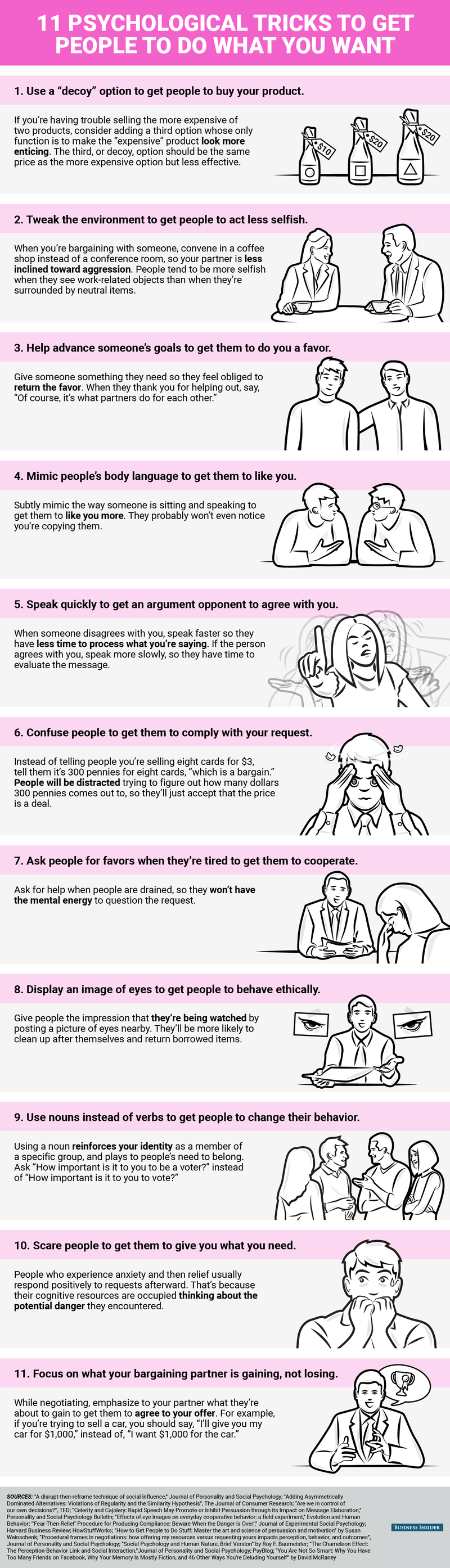
While it’s it not always important to get what you want, it sure feels good sometimes. This handy cheat sheet explains 11 different ways you can influence others to give yourself a win every once in a while.

This infographic from Samantha Lee and Shana Lebowitz at Business Insider may help you sway someone just enough to get them working with you and not against you. For example, you can make people more agreeable in certain environments (like a pleasant coffee shop), or speak quickly in an argument so they don’t have time to fully process what you’re saying and just assume you’ve made a good point. We’ve touched on some of these methods before, but this cheat sheet puts a few more psychological tricks at your disposal. Keep in mind, however, you shouldn’t abuse any of these techniques or you might lose a few friends or damage work relationships. Save them for when you really need them. You can check them out down below.

http://lifehacker.com/5869772/how-to...

11 Psychological Tricks to Get People To Do What You Want | Business Insider

Get People to Do What You Want With These 11 Clever Psychological Tricks

04 Dec 21:53

The Complete 2015 Guide To Buying A Motorcycle Helmet

by Sean MacDonald on Lanesplitter, shared by Whitson Gordon to Lifehacker

The Complete 2015 Guide To Buying A Motorcycle Helmet

Buying a motorcycle helmet is a very tricky process. Most helmets are impossible to find if you want to try them on, plus everything fits differently, and most of the descriptions provided by helmet-makers are indecipherable and incoherent. Luckily for you, I get to try a lot of them out firsthand—and I’m here to help.

First of all, if you haven’t read Siler’s “Everything You Need To Know About Motorcycle Helmets” article, you should do so now. The most important thing to note, as far as this guide is concerned, is that helmets all have specific interior head shapes, which are the most important thing to consider when purchasing a motorcycle helmet. A $1,300 helmet that creates hot spots is far more unsafe than a $150 one that fits appropriately.

Helmets are incredibly difficult to find to try on, especially when you get into the decent brands, and if you can’t find a local store where you can try them on I suggest making a field trip out of it or ordering from someone with a great return policy like RevZilla.

There are far too many helmet options out there today for me to have touched/experienced/tried them all, so consider this guide more of a “what Sean would say if I called him and asked him what I should buy” than the be-all, end-all definitive guide. But we test a lot of gear around these parts, and these are the ones we swear by.

Race/Sport Helmets

When Money Is No Object

The Complete 2015 Guide To Buying A Motorcycle Helmet

If I were buying a sport or race helmet and had money to spend, I’d be in a bit of a pickle right now. Shoei and Bell are both about to launch new, top-of-the-line sport lids and both definitely have their advantages. All of that said, I can tell you that the Schuberth SR-1 ($899-$969) is, without a doubt, the best helmet I’ve ever worn and I somewhat expect that not to change.

http://lanesplitter.jalopnik.com/the-shoei-x-14...

Like any good race helmet, it’s a bitch to put on/take off (so don’t buy it for daily or street us) but, on the track, the thing is simply aces. It has zero buffeting, a small shell, is quiet, and is the most aerodynamic thing I’ve worn.

The Complete 2015 Guide To Buying A Motorcycle Helmet

If you’re not buying a dedicated track helmet, I’d wait to see about the new Bell and Shoei, but the Arai Corsair X ($755-$872) is certainly a great option. Its shape isn’t the most aerodynamic for track stuff, but it’s sufficient and the helmet is fantastic for daily riding.

When You’re Willing To Pay For Quality, Comfort, And Style

For those of you who don’t want or need the best out there, but are still willing to spend some money for something you really like and that has a few additional features, your money should go to the ICON Airframe Pro ($375-$600). It fits great, does well at speed, and looks incredible with a race suit or in your street gear.

The Complete 2015 Guide To Buying A Motorcycle Helmet

If that doesn’t float your boat, Bell Star Carbons are on sale for $450 on RevZilla, and the AGV Corsa has dropped to $637 for some options. I think the shell on the Bell is massive and not very aerodynamic, but it’s lightweight and still has that premium feel. The AGV fits me terrible, but Lindsay swears by it (and it looks fucking awesome.)

When You Just Need Something To Keep Your Safe

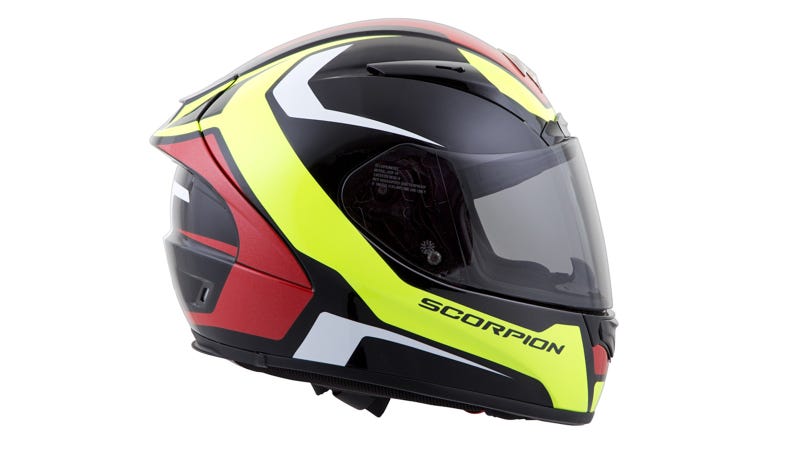
For those of you who don’t care about a lot of the creature comforts or the name on your lid, there are still some great options. If I were looking to spend under $300 on a lid, I would look no further than this Scorpion EXO-R200 for $229 (on sale.) I know a lot of guys who have moved to Scorpion lately and they make a killer product, and that’s before you consider the price.
The Complete 2015 Guide To Buying A Motorcycle Helmet

The other helmet I’d look at is the HJC RPHA-10, which has lots of options on sale currently in the $240-$300 range. It’s another really nice helmet considering the money, and is used by actual professional racers unlike many brands that offer budget “race” helmets.

Commuter Helmets (because you asked nicely and I’m a man of the people)

When Money Is No Object

I think the Schuberth C3 Pro is the best commuter helmet, but I cover that below. If I were looking for a regular full face for normal, everyday use (commuting/canyon riding/just being a motorcyclist), I’d be looking at the Arai Corsair X (covered above) or Shoei GT-Air ($494-$603). Arai makes a lot of great options, and I’m pretty happy with my Defiant, but the sides of it drop so low they make a bluetooth headset impossible and often hit the collar of some jackets. The Shoei has a drop down sun visor and features Shoei’s new internal head shape, which fits a much larger variety of people (finally including me).

When You’re Willing To Pay For Quality, Comfort, And Style

As some people have mentioned, you get a ton for your money with the Bell RS-1 ($300). I actually wasn’t super impressed with it (the shell felt too big and the pads broke in too much), and would probably opt to spend either quite a bit more or less, but many have had better experiences than I. Being able to use the photocromatic lens is a huge plus here.

The Complete 2015 Guide To Buying A Motorcycle Helmet

The Shoei Qwest ($330-$450) is another great option at this price point. It has a premium feel to it, and their improved head shape. It also has their new visor system, which creates a much better seal than the previous Shoeis did.

When You Just Need Something To Keep Your Safe

Look no further than the ICON Alliance Dark ($150). It’s cheap, comfy, has a nice liner, comes with a dark shield, and looks far more stylish than anything else in the price range. This helmet is such a freaking good deal.

Modular Helmets

When Money Is No Object

No question, the Schuberth C3 Pro ($770-$830) is my favorite modular helmet. It fits extremely well, is quiet enough that the bluetooth system is actually useful, is all day comfy and looks great. I’ve put tens of thousands of miles in mine and it’s still a trusted staple.

The Complete 2015 Guide To Buying A Motorcycle Helmet

When You’re Willing To Pay For Quality, Comfort, And Style

The Shoei Neotec ($584) is a great option in the mid price range. It does a great job at venting/keeping air out, but isn’t as comfy as the Schuberth and not nearly as quiet. It still has that premium helmet feel however, and is a solid choice overall providing it fits.

When You Just Need Something To Keep Your Safe

Honestly, if you’re looking at modular helmets, you probably plan on putting some serious time in and I would be very hesitant to go cheap. Luckily for you, the Schuberth C3 is only $329 right now on RevZilla which is sort of the deal of the century.

Dual Sport Helmets

When Money Is No Object

This one wins only by being the only entrant, but the new Schuberth E1 ($829-$889) is a modular dual sport lid that looks incredible. I got a chance to see it in person when they unveiled it a month back and it looks superb—although I’m not completely convinced it will be worth the premium over our next options.

The Complete 2015 Guide To Buying A Motorcycle Helmet

When You’re Willing To Pay For Quality, Comfort, And Style

I’m simply in love with my Arai XD4 ($539-$656). It looks and fits great, looks premium, and has a super plush interior. Most importantly, it buffets the least at speed out of everything I’ve worn with a beak.

Shoei has come an incredibly long way with their new Shoei Hornet X2 ($535-$644), which replaces the terrible Hornet DS. It uses Shoei’s new internal headshape, which fits many people quite a bit better, and looks great while venting well. It isn’t quite as aerodynamic as the Arai, but it’s close and it still keeps its spot in my rotation.

The Complete 2015 Guide To Buying A Motorcycle Helmet

Lastly, the AGV AX-8 DS ($379-$500) is another great option. It doesn’t fit me as well as the other two options, but it has best in class visibility and, in my opinion, looks the best of the bunch. Siler has an AGV head and it’s his favorite helmet, but he’s also a dummy.

When You Just Need Something To Keep Your Safe

If you’re going budget, your best bet is the Bell MX-9 Aventure ($144-$200). Even Bell’s basic offerings are well made helmets, and are made using the tech that trickles down from the nicer helmets. They also create some of the best graphics out there right now. I haven’t worn this one yet, but I did read 50 or so reviews before posting it, and people seem really happy with it so this is what I would do.

Retro Helmets

When Money Is No Object

If you really want to style-shame people, there’s only one answer: Ruby Castel. They went bankrupt, and were then purchased with the intent of remaining open, but you can still find them on eBay if their online site is down on any given week. At more than $1,000 a pop, you better be obsessed with looking good and making sure other people know it, because these are simply terrible to wear.

The Complete 2015 Guide To Buying A Motorcycle Helmet

When You’re Willing To Pay For Quality, Comfort, And Style

I debated long and hard before leaving the words “quality” and “comfort” in the subhead, because retro helmets aren’t nearly as comfortable as a real full face. That said, at these helmets at least have an internal headshape that shows they were intended for human use instead protecting bowling balls.

The most popular in this space is the Bell Bullitt ($180-$600). The Bullitt comes in tons of amazing colorways, but I just can’t convince myself to love the extra wide opening. Add a dark or mirrored visor and it gets better, but I think the lines are just off. To be honest, I think the Biltwell Gringo is far more worth it as it looks nicer and is much cheaper.

I haven’t had a chance to wear this one yet, but the new NEXX X.G100 ($400) is the most interesting in the space to me. The helmet shape blends retro with something that looks like it will be better at speed and, while the graphics are all direct Deus and Ornamental Conifer rip-offs, I still sort of love them.

When You Just Need Something To Keep Your Safe

The Complete 2015 Guide To Buying A Motorcycle Helmet

If you want to look cool riding your bike around town, and don’t want to get hit in the face with debris, look no further than the Biltwell Gringo ($129-$250). It’s my favorite of all the retro lids, and is the cheapest of the “full face” bunch. Love the looks. Love the colors. Love the price.

If You Want To Feel The Wind On Your Face

None of the existing open face helmets have really done anything for me. The Bells fit me terribly, the Biltwells aren’t much better and look massive. Back when I wore them more often, I actually wore a novelty helmet so that it would sit lower, look better, and be more aero (because, let’s face it, if I went down I was already screwed.)

This year, we’ve seen two new entrants come which look very interesting. The first, the new Scorpion Belfast ($200), is actually a really nice helmet. I got to preview some of Scorpion’s new gear a month or two back and this was one of the things I was the most excited about. It fit great (in their HQ), and looked incredible in person. I wasn’t a fan of the drop down sun visor (because if I’m wearing this, I want to look as cool as possible and will wear glasses), but that may be a draw for a lot of you.

The Complete 2015 Guide To Buying A Motorcycle Helmet

The other new option is the NEXX X.G10 ($250). Like its full faced brother, it’s a massive rip off of some other popular brands but, if they get the fit right, it could be a great option. Hopefully I’ll get a chance to test these in the near future.

Dirt Bike Helmets

When Money Is No Object

While it may seem silly to spend a ton of money on something you’re pretty much guaranteed to bounce off the ground with, I absolutely love some of the premium options in this space.

The Complete 2015 Guide To Buying A Motorcycle Helmet

I’m a huge fan of 6D and their ODS technology, and the 6D ATR ($500-$760) is simply a fantastic helmet. It’s incredibly comfortable, feels premium inside, and will actually help save your brain.

My other favorite is the Bell Moto-9 FLEX ($599-$699), which is now also getting some brain saving technology. The Bell is the only dirt helmet I’ve ever worn that doesn’t buffet at high speeds, and I actually wear my matte black one as a street helmet for most of the summer.

When You’re Willing To Pay For Quality, Comfort, And Style

I would still recommend the Bell Moto-9 ($399) if you’re looking to wear something nice, but not spend more than $500. They don’t offer it in the carbon anymore, and it doesn’t have the flex technology, but it still has an incredible shape, fit, and finish.

The Complete 2015 Guide To Buying A Motorcycle Helmet

I actually haven’t had a chance to wear the Arai or Shoei options yet, but I’m sure they’re fine as well. Personally, I’d go for one of the options above or below.

When You Just Need Something To Keep Your Safe

Most dirt helmets are cheap, so at this price it’s about finding something that fits well and looks great. The new Scorpion helmets look incredible (I have a camo one thats coming out soon that’s beautiful), but they don’t fit me very well.

The Complete 2015 Guide To Buying A Motorcycle Helmet

I love my Thor Verge helmet, but it’s likely pretty similar to the options from FOX or TLD or Answer. Find some jerseys you like and then get a helmet that matches and you’ll likely be fine. Or take the money you would have spent on a premium helmet and buy three cheap ones so you can keep your steeze on point.

Conclusion

There are a ton of great helmet options, with even more on the horizon. There are simply too many options to cover them all here so, again, remember that this is just based on my life as a guy who gets to play with a bunch of stuff.

If there are other helmets you think are worth my checking out, I’d love to hear about them. Also, check out the related links for more info on helmets in general as well as some of the important advancements happening in the field.

The Complete 2015 Guide To Buying A Motorcycle Helmet

Have things you want suggest? Questions about my selections? I’ll try and follow the comments section closely.

Wondering About The Other Stuff I’m Wearing?

Top Shot: Dainese Trickster Evo

Ronin Pic: ICON Basehawk Jacket, UglyBROS denim, REV’IT Sand Pro gloves, Dainese Cooper boot.

Ducati Monster Pic: Alpinestars Orbiter race suit

Kawasaki ZX-6R pic: Dainese Trickster Evo, Racer High Speed gloves, Alpinestars Supertech R boots

V-Strom pic: ICON Raiden DKR jacket, UglyBROS denim

Second Ronin Pic: ICON Basehawk Jacket, REV’it Sand Pro gloves, UglyBROS denim

Harley Pic Sean: Aether Eclipse Jacket, Crank and Stroker Vest, UglyBROS denim, Dainese Cooper boots, Dainese Blackjack gloves

Harley Pic Rebecca: ICON Fairlady Jacket

Supermoto Pic: Dainese Trickster Evo, Dainese Full Metal gloves, Alpinestars Supertech R boots

BMW Pic: Union Garage Robinson Jacket, Dainese Blackjack glove

Photos: Zach Cohen, Scott Sorenson, Brian J Nelson, Sinuhe Xavier, Brian Murray, Dean Bradshaw, Drew Ruiz

Contact the author at sean.macdonald@jalopnik.com. Follow Lanesplitter onFacebook and Twitter.

04 Dec 14:05

29 Unencumbered Images of Kids Being Kids

by Darlene Hildebrandt

Kids have a natural free spirit about them. They don’t sensor themselves and they do what they want, how they want, when they want to – usually.

Let’s see some images (you’ll notice that a few of these are my own images) that capture this essence of what it is to be a kid:

Benurs - Learning And Learning...

By Benurs – Learning and learning…

Maitham Rushaidan

By Maitham Rushaidan

Adoephoto

By adoephoto

United Nations Photo

By United Nations Photo

Marcin Moga

By Marcin Moga

Attila Siha

By Attila Siha

Brighter Than Sunshine

By brighter than sunshine

Premnath Thirumalaisamy

By Premnath Thirumalaisamy

ThomasLife

By ThomasLife

Robbert Van Der Steeg

By Robbert van der Steeg

Donnie Ray Jones

By Donnie Ray Jones

Darlene Hildebrandt

By Darlene Hildebrandt

Darlene Hildebrandt

By Darlene Hildebrandt

Darlene Hildebrandt

By Darlene Hildebrandt

Steve Evans

By Steve Evans

Steve Evans

By Steve Evans

Darlene Hildebrandt

By Darlene Hildebrandt

Capture Queen

By Capture Queen

ZOBEL *

By ZOBEL *

Kevin Conor Keller

By Kevin Conor Keller

Darlene Hildebrandt

By Darlene Hildebrandt

Darlene Hildebrandt

By Darlene Hildebrandt

Darlene Hildebrandt

By Darlene Hildebrandt

Amina Tagemouati

By Amina Tagemouati

Ilavanji Ilavanji

By ilavanji ilavanji

Paul David

By Paul David

Brittany Randolph

By Brittany Randolph

Peter Roome

By Peter Roome

David Guyler

By David Guyler

The post 29 Unencumbered Images of Kids Being Kids by Darlene Hildebrandt appeared first on Digital Photography School.

04 Dec 13:59

Colds

The contagious period ends right around when you start to sound sick over the phone, which is probably evidence of cold viruses evolving to spread optimally in the workplace.
04 Dec 13:54

Watch real cars on separate racetracks compete in the same virtual world

by James Vincent

Castrol is doing a surprising amount of work blending the real world and virtual reality. (Although, any amount of effort in this field from a motor oil company would be surprising.) Earlier this year, it turned a racing car into what was essentially a very expensive VR controller, mapping the vehicle's movement onto a virtual car and outfitting the driver with a VR headset. The driving is happening in real life, but the driver is navigating a virtual racetrack full of boulders and spikes. Now, Castrol has repeated this experiment with a pair of drivers (one of whom used to be The Stig), putting them to work on separate but identical tracks, while their cars compete head-to-head in the same virtual world.

it's a promotional stunt, but...

Continue reading…

04 Dec 00:38

[Why Go Anywhere] Machu Picchu Gets The Street View Treatment In Google Maps, Llamas Not Included

by David Ruddock

picc

As a former student of archaeology, Machu Picchu is a place that has always fascinated me. As someone direly afraid of heights, Machu Picchu is a place I will almost certainly never go, barring the invention of personal air transport. As such, today I was quite pleased to learn that Google's globetrotting street view team has mapped the ancient city-temple-palace-agrarian-center with a backpack of many, many cameras.

Machu Picchu sits nearly 8000 feet above sea level, and its real purpose still largely eludes archaeologists and ancient historians to this day.

Read More

[Why Go Anywhere] Machu Picchu Gets The Street View Treatment In Google Maps, Llamas Not Included was written by the awesome team at Android Police.


04 Dec 00:35

Politely Exit an Unwanted Conversation by Giving a Specific Excuse

by Patrick Allan

Politely Exit an Unwanted Conversation by Giving a Specific Excuse

Whether you’re at a work party, convention, or some other social event, knowing how to slip away from a dull conversation is an invaluable skill. The trick to giving a good excuse is all in the specifics.

Lynne Waymon, networking consultant and the co-author of Strategic Connections, suggests you avoid giving obvious, open-ended excuses when you want to back out. People can tell when you’re lying and that you don’t want to talk to them when you say things like “I’m going to grab another drink” or “I guess we should both go circulate.”

Instead, be specific and polite. For example, Philip C. Thomas, regional chairman of Vistage, an executive coaching organization, recommends you say something like “I want to move on because I promised myself I’m going to meet at least 10 new people tonight.” The more specific your excuse is, the less likely they’ll think you’re blowing them off. Then finish on a good note by showing your appreciation and thanking them for talking with you. You can find more tips for backing out of a conversation at the link below.

http://lifehacker.com/the-most-grace...

A Conversation Exit Plan | The Wall Street Journal

Photo by ING Nederland.

03 Dec 21:19

Check out Google Play's best apps, games and entertainment of 2015

by Dan Thorp-Lancaster

Google has posted a collection on Google Play of the best apps, games, movies, and more from 2015. The collection features content from all across Google Play, showing off the best apps and top-selling media for the whole year.

Topping the best games list are Agar.io, Walking Dead: Road to Survival, Fallout Shelter, Minecraft: Story Mode and more. Some of the best apps include Flipagram, Robinhood, HBO Now, and Retrace, among others.

From there, Google breaks down the top selling items across entertainment categories. Albums are unsurprisingly led by Adele's 25, with the latest releases from Drake, Kendrick Lamar and The Weeknd following closely behind. Interstellar and Lucy made it to the top of the heap of movies alongside American Sniper, Big Hero 6 and others. We've also got Game of Thrones, The Walking Dead, and Downton Abbey leading the way for TV show. And finally, the top-selling books include (for better or worse) four entries from the popular Fifty Shades of Grey series, along with American Sniper, The Girl on the Train, Gone Girl and more.

There's much more to check out, including favorite albums, magazines, movies and books as ranked by the folks at Google. For the full list, be sure to hit up the link below.

Check out the Best of 2015 on Google Play

03 Dec 21:19

Play Store Has Started Allowing Split Payments Between Google Play Credit And Another Payment Method

by Ryan Whitwam

nexus2cee_gpc

It really stinks when you've been saving up your Google Opinion Rewards money, but you're just a few cents short of buying something. Google has not thus far allowed you to apply that credit and pay the difference, but it looks like that's changing. We've gotten multiple tips from readers who have been offered just that option in the Play Store.

The current official behavior when you don't have enough in Google Play balance to cover a purchase is to force you to use a card, PayPal, or carrier billing.

Read More

Play Store Has Started Allowing Split Payments Between Google Play Credit And Another Payment Method was written by the awesome team at Android Police.


03 Dec 17:46

Step inside your photos with Cardboard Camera

by noreply@blogger.com (Google Blogs)
With Google Cardboard, you can take amazing trips to faraway places and feel like you’re actually there. But what if you could also use Cardboard to go back in time—to step inside personal moments like your favorite vacation or a holiday dinner with family? Now you can with the new Cardboard Camera app for Android.

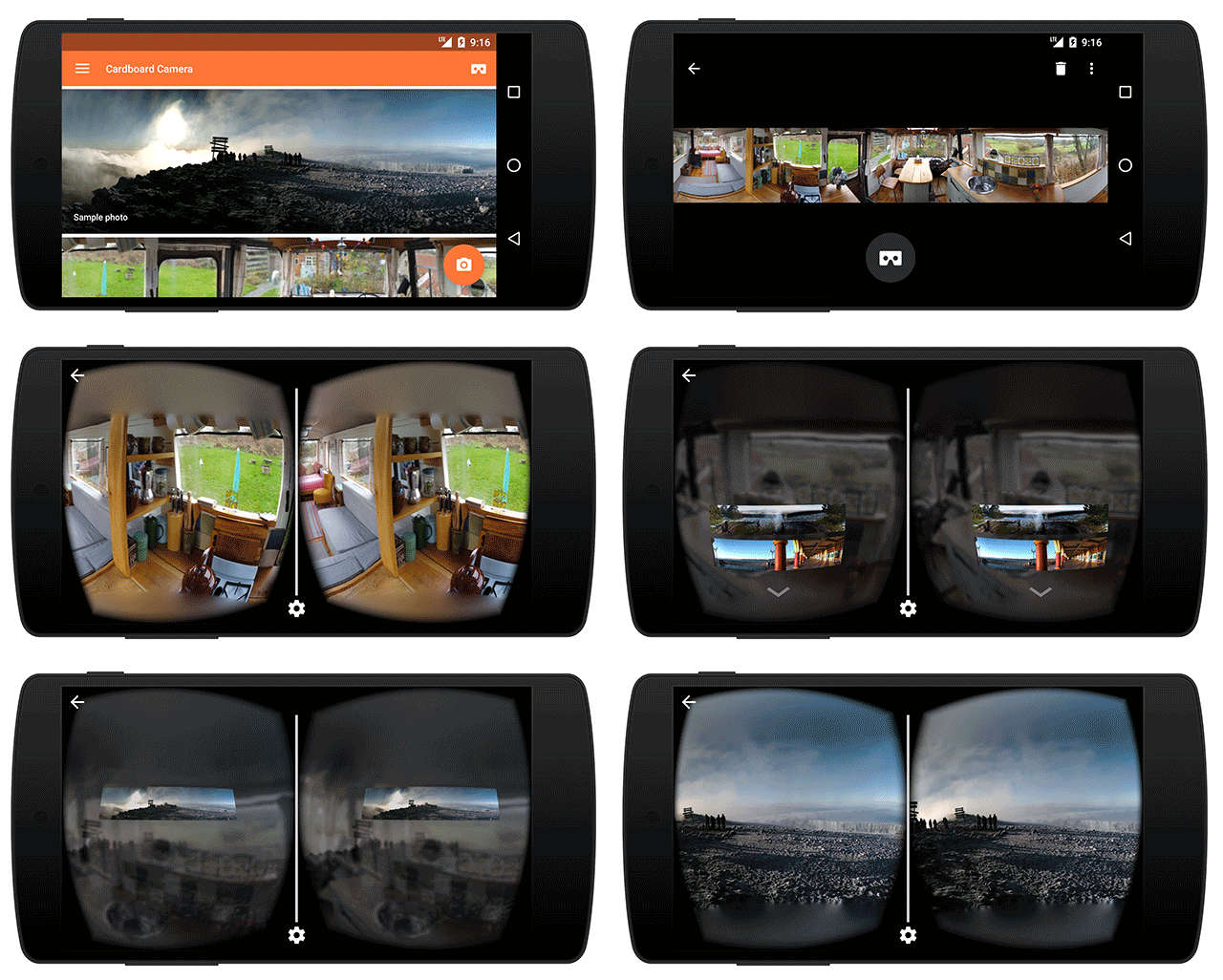
Cardboard Camera turns the smartphone in your pocket into a virtual reality (VR) camera. It’s simple to take a photo: just hold out your phone and move it around you in a circle. Later, when you place your phone inside a Google Cardboard viewer, you'll get to experience something new: a VR photo.
VR photos are three-dimensional panoramas, with slightly different views for each eye, so near things look near and far things look far. You can look around to explore the image in all directions, and even record sound with your photo to hear the moment exactly as it happened.
Taken with Cardboard Camera at Jackson Lake, Wyoming. This simulates the 3D effect when seen in a Cardboard viewer.

With Cardboard Camera, anyone can create their own VR experience. So revisit the mountaintop that took hours to hike, or the zoo where you saw (and heard) the monkeys, or your birthday party with the cake out and candles still lit. Capture the moments that matter to you and relive them anytime, from anywhere.

Cardboard Camera is available today on Google Play in 17 languages.

Posted by Carlos Hernandez, Software Engineer, Cardboard Camera http://3.bp.blogspot.com/-cXaR6CyEPw8/VmBpIVPkEkI/AAAAAAAARhg/hAv4GJWbWMA/s1600/Simulates_3D_Effect_in_Viewer.gif Carlos Hernandez Software Engineer Cardboard Camera