Shared posts

15 Dec 15:26

16 New And Notable Android Apps From The Last 2 Weeks (12/1/15 - 12/14/15)

by Michael Crider

roundup_icon_largeWelcome to the roundup of the best new Android applications, games, and live wallpapers that went live in the Play Store or were spotted by us in the previous 2 weeks or so.

Please wait for this page to load in full in order to see the widgets, which include ratings and pricing info.

Looking for the previous roundup editions? Find them here.

Featured App

DigiCal Calendar

Today's roundup is presented by DigiCal Calendar & Widgets from Digibites.

Read More

16 New And Notable Android Apps From The Last 2 Weeks (12/1/15 - 12/14/15) was written by the awesome team at Android Police.


15 Dec 15:05

Twitter Expands Moments To The U.K.

by Natasha Lomas
Twitter Moments Twitter is expanding Moments, its media rich, breaking news focused feed, to U.K. users today. The company debuted the feature in the U.S. back in October, and has since also rolled it out in Brazil. So this is not the first international expansion for Moments, but given the size of the U.K. market for Twitter it’s an important next step as it tries to ramp up mainstream interest in… Read More
15 Dec 15:02

First Click: Europe wants to raise the age of internet consent to 16

by Thomas Ricker

Duncan Robinson, Murah Ahmed, Hannah Kuchler reporting for the Financial Times on a last-minute amendment to EU data protection rules:

Continue reading…

15 Dec 00:14

The 20 Best New Apps of 2015

by Darren Orf on Gizmodo, shared by Whitson Gordon to Lifehacker

The 20 Best New Apps of 2015

Another year, another couple thousand new apps for you to wade through in a befuddled haze. Which ones should you download? Which ones should you actually pay for? And which ones deserve to take up prime real estate on your home screen? Whether you’ve spent the last 365 days asking yourself those very questions, or need a refresher on which apps from the last year deserve a second look, we’ve got you covered. Without further ado—our 20 favorite new apps from 2015:

The 20 Best New Apps of 2015

Layout

Before Layout, you had to search through the app store for something to help stitch your photos into a collage that was then sharable to Instagram (Pixlr was often my choice). But Instagram finally came to its senses and created an app to make collages less of a nightmare. You can move frames with a simple click and drag, and move photos around so you get the exact collection of shots you want. The app then serves up sharing options direct to Instagram, Facebook, and pretty much anywhere else you can think of.

[Free - iOS and Android]


The 20 Best New Apps of 2015

Outlook

Outlook needed an upgrade for a long, long time, and Microsoft finally delivered by buying one of the best email clients out there, Acompli, and bringing all its features and design to Outlook. It’s arguably one of the best Gmail clients for iOS (yes, it’s better than Gmail’s) and Microsoft plans to further integrate Sunrise, an amazing calendar app, directly into Outlook. In 2016, the app could become the go-to choice for keeping your email organized.

[Free - iOS and Android]


The 20 Best New Apps of 2015

Periscope

Periscope is arguably the heaviest hitter on this list. The app launched in March, and with the support of Twitter, quickly became the No. 1 livestreaming app out there. It’s been adopted widely by individual users and media outlets to offer instantaneous coverage from a smartphone to the rest of the world. Other competitors, like YouTube Live and Meerkat, offer intriguing alternatives. But Periscope, with its straightforward interface and growing community, is probably the most successful app of the year.

[Free- iOS and Android]


The 20 Best New Apps of 2015

Apple Music

Apple Music didn’t exactly set the music streaming world on fire, but it created one hell of an app and made up for years of lost time. It also introduced Beats 1, a delightfully old school way of discovering music in a sort of FM Radio/podcast hybrid. Apple Music also has deep integration into the iTunes Store, so if you already have an impressive library of paid tunes, Apple Music plays along nicely. Perhaps the most shocking development with Apple Music is that it’s also available on Android. So everybody wins (except Apple designers).

[Free w/ $10/mo subscription - iOS and Android]


The 20 Best New Apps of 2015

VHS Camcorder

This is one of those beautiful, simple apps that doesn’t need much describing. It makes video on your phone look like it was shot on some shitty camcorders from the 80s. Revolutionary? NOPE. But fun (and kinda brilliant) nonetheless.

[$4 - iOS]

The 20 Best New Apps of 2015

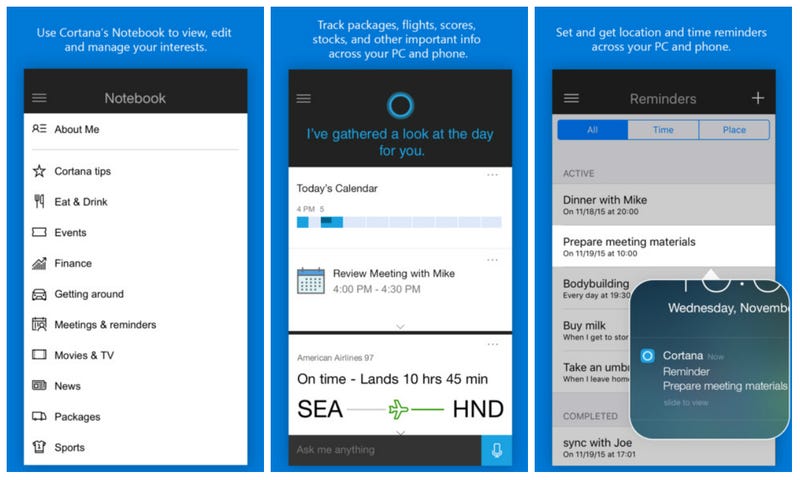
Cortana

Wait, what? Yes, it’s true that Cortana’s been around forever. But Microsoft took some big steps this year with its digital assistant, and Cortana is now platform agnostic. So if you happen to like Microsoft’s take on the mobile digital assistant, you can have it on your iPhone or Android as well. The latter comes with a few more features than iOS, like linking reminders across your PC and phone, though they all pale in comparison to Windows phone (Microsoft still wants to sell those Lumias...I think). The app is free and worth trying, especially if you’ve ever considered yourself a Master Chief sort of person.

[Free- iOS and Android]


MakerBot PrintShop

Makerbot had a tough 2015. The 3D printing company laid of 20 percent of its staff only to be followed up with laying off another 20 percent of its staff. But in the meantime, it was able to put together this app, which is one of the coolest ideas we’ve seen. It’s called PrintShop, and essentially it can turn any drawing into a 3D print—no CAD experience required. Printer manufacturers need to bridge the gap usability gap between artisan and layperson. PrintShow is that firststep. Now it just needs to be available on iPhone and Android and also play nice with other kinds of 3D printers out there.

[Free - iOS (iPad)]


The 20 Best New Apps of 2015

Google Photos

Google’s always had a Photos app, but the overhaul it launched in 2015 deserves to be on this list. The Google Photos app went from a nice little app that wasn’t incredibly useful to something that was mind-bogglingly good. So good that it kind of scared us when we first used it. Google Photos is super simple to use and the best way to keep track of all your photos, especially if you’re prone to using several different mobile devices. It also has a super smart algorithm to lump photos into the same category for easy search, and will create mini slideshows of certain photos from one day. It’s even worth forsaking Apple’s stock option to give Google Photos a shot.

[Free - iOS and Android]

The 20 Best New Apps of 2015

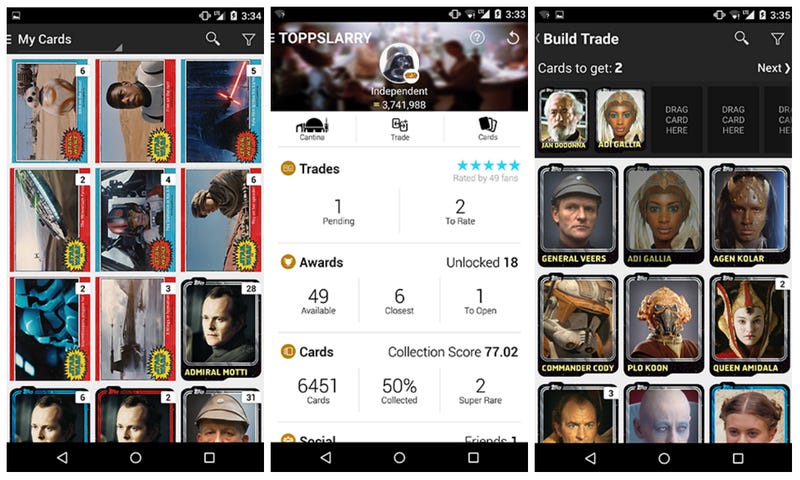
Star Wars: Card Trader

Topps Star Wars trading card app does for old-school Star Wars cardboard nostalgia what Hearthstone did for card games in the digital age. The app itself is just a simple card-collecting app, except that you can trade with anyone IN THE WORLD. The app has created its own economy of sorts, including what is essentially a JPG of Han Solo that’s worth $225 USD. Like the sports-related apps before it—Bunt, Huddle, and Kick—Star Wars: Card Collector doesn’t exactly muck with the formula much...other than the fact that it’s Star Wars and that’s awesome.

[Free w/ in-app purchases - iOS and Android]


The 20 Best New Apps of 2015

Darkroom

Filters are an important part of mobile photography. An Instagram without filters is an Instagram that I don’t want use at all. But what if your app of choice’s filter selection leaves you wanting something more? That’s why Darkroom is so great. Aside from being a great photo-editing app in general, it also lets you create filters after every tone or color tweak, so you can build up an impressive collection of hand-crafted filters.

[$3 - iOS]


The 20 Best New Apps of 2015

Arrow Launcher

Microsoft’s Garage is endlessly pumping out interesting apps across all platforms, but the one that stuck out the most in 2015 was Arrow Launcher. For Android only (obviously), Arrow Launcher wants to put your most used info front and center, so you can get in and out of your phone as fast as possible, with quick access to to-do lists and most used contacts. It might be a hard sell over Google Now or Nova launcher, but Microsoft’s launcher is surprisingly good (especially considering they’re the competition).

[Free - Android]


The 20 Best New Apps of 2015

HBO Now

“It’s here. It’s finally here” is what I thought when HBO Now was announced during WWDC 2015. As a mobile app, it actually has a little bit to build upon, and doesn’t provide all the features of its cable subscriber-only app HBO Go. But cable-free HBO is the best thing that’s happened to video streaming apps for awhile. Hopefully, the app ups its game even further in 2016.

[Free w/ $15/mo fee - iOS and Android]


The 20 Best New Apps of 2015

Giphy CAM

Animated pieces of internet gold are Giphy’s business—and business is good. That’s why they’ve launched Giphy CAM, a comprehensive app that lets you create and share the perfect GIF right when you need to. You can overlay sunglasses, weird faces, or yes, state-of-the-art junk food special effects. GIFs: They’re the way we live now.

[Free - iOS]


The 20 Best New Apps of 2015

Drupe

On a given day, I might call, text, FaceTime, WhatsApp, Messenger, and Instagram my best friend. That’s a lot of tapping, hunting for the right apps, and navigating their UI, before I can communicate. Drupe does away with all of that by building a super simple contacts app that’s much more than a contacts app. It keeps track of your top contacts in one column with popular messaging apps in another. Simply slide the contact icon over the icon of the platform you want to use, and Drupe opens up the right app with the right chat already selected. It’s time saving at its finest.

[Free - Android]


The 20 Best New Apps of 2015

Eve

Eve, formally known as Ruby, is more than just fun and games or a productivity aide. It’s one the best apps for women’s sexual health, offering comprehensive and easy-to-use menstruation and ovulation tracking. Eve can also track sexual health by analyzing other data collected from other health and fitness apps you might be using. It even customizes based on the type of contraceptive you’re using.

[Free - iOS]


Samsung Pay

This is one of the more limited apps on the list. It’s currently only available for the Galaxy Note 5, S6, S6 edge, and S6 edge+. The app works with traditional NFC, which payment apps like Apple Pay use, but also magnetic secure transmission (MST) a technology Samsung acquired from LoopPay in February. That means your phone needs to have MST technology for Samsung Pay to work as advertised. MST allows tap-to-pay functionality at terminals that may not have NFC, but do have MST card readers. This makes Samsung Pay the most accessible mobile payments app out there. It doesn’t quite annihilate the plastic in our wallets, but it’s definitely the app that’s come the closest so far.

[Free - Android (Samsung Phones)]


The 20 Best New Apps of 2015

DSCO

Sure, Giphy Cam is fine for making GIFs, but if you need something a little less...intense...that’s where DSCO comes in.It’s from VSCO, creators of VSCO Cam, so the team is comprised of experts in the imaging biz. But what I love most about DSCO is its incredibly simple and streamlined design. Take a video, swipe for filters, share to the internet. Done. It’s up against Instagram’s own Boomerang app (and its own self-looping features in the main app), but VSCO’s first app adventure outside VSCO Cam is one worth investigating.

[Free - iOS]


The 20 Best New Apps of 2015

Robinhood

Robinhood technically launched in late 2014, but at that time it was only on a limited invite system. A year later, Robinhood is now publicly available on Android and iOS, and it’s one of the more interesting app ideas I’ve seen in a while. Robinhood tries to take some of the scariness out of stock-trading with a super simple interface and zero commission trading. If you’ve ever thought about giving stocks a try, Robinhood is a wonderful app that’ll help you dip your toe into that big, complicated, intimidating financial world.

[Free - iOS and Android]


The 20 Best New Apps of 2015

Enlight

Other than games, photo editors are arguably the app category with the most options out there. Enlight might be the The One App to Rule Them All. The app offers myriad features, including noise reduction, cropping tools, and fixes for tone and color. You can also create collages and slap on a filter before exporting to Instagram. It’s a little pricey at $4, but if you’re taking more and more mobile photos, and want something a little better than what you’re getting out of your lens, Enlight is a worthwhile purchase.

[$4 - iOS]


The 20 Best New Apps of 2015

YouTube Gaming

Twitch has been the undisputed game streaming champion for years—and then YouTube Gaming came along. Leveraging its massive influence as an online video juggernaut, YouTube Gaming created an app that’s wonderfully designed for a power gamer or just a casual observer. Each game has its own page that’s divided into live videos, reviews, and let’s plays, and the app has a wealth of games to choose from. For more details, check out Kotaku’s hands-on covering YouTube Gaming’s many, many merits.

[Free - iOS and Android]

15 Dec 00:12

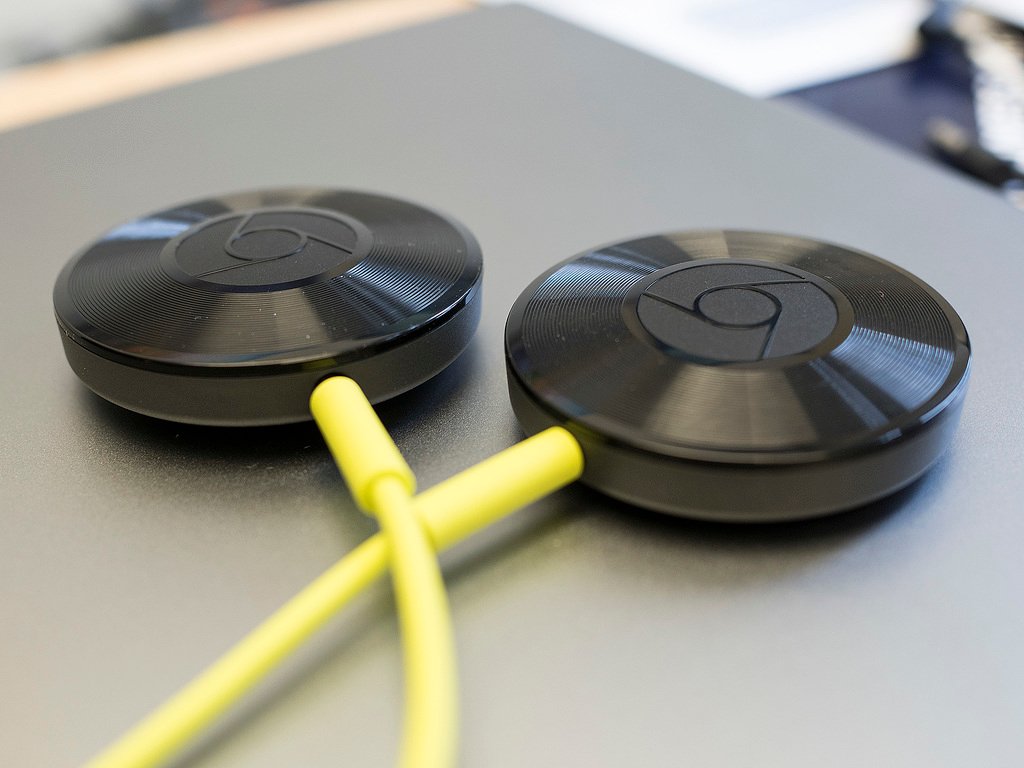
What you need to know about Chromecast Audio groups

by Russell Holly

Groups are now possible with Chromcast Audio, but setup can be a little tricky.

Google's audio-only addition to the Chromecast lineup this year seemed a little lackluster at first, but a recent update adding higher quality audio and the ability to group multiple Chromecast Audio together has elevated the accessory to a must for folks with multiple speaker setups in the home.

As is often the case with new software, there's a few things you need to know in order to get everything up and running in your home or office.

14 Dec 22:22

Japanese university bans all watches from exams

by Ashley Carman

One of Japan's most prestigious universities is banning all watches from entrance exam rooms over cheating concerns. The Wall Street Journal reports that Kyoto University's ban was "required to conduct a fair test," and applies to any type of watch, even mechanical ones. The paper says Kyoto is the first Japanese school to instate an entire ban, although other international schools had similar rulings; schools in Australia and England have banned watches altogether, and the AP Program and SAT test centers in the US have rules against smartwatches in examination rooms.

Kyoto University was the nexus of one of Japan’s largest cheating scandals when, in 2011, a male student posted questions online from his phone during an exam. He then...

Continue reading…

14 Dec 21:17

The First Step to Setting a Money Goal Is Asking Yourself “Why?”

by Kristin Wong on Two Cents, shared by Andy Orin to Lifehacker

The First Step to Setting a Money Goal Is Asking Yourself “Why?”

Paying off your student loans, opening a Roth IRA, saving for an emergency: these are all financially responsible things to do, and that’s great. However, they don’t work well as goals unless you can make them personal. When setting your money goals, ask one important question: why?

Over at 20SomethingFinance, writer G.E. Miller makes a good point:

I think this is an all too increasingly common practice in our modern culture. We hear that something is beneficial, so we want to go out and mimic it, without much thought as to why. Or, at best, the why is a secondary consideration...The biggest downside to a missing “why”, is it leaves very little internal motivation to see our goal through to completion. We are going to run into challenges, and if we don’t, the goal was probably too easy to begin with. In those challenging times, the “why” is what is going to keep us motivated, help us dig deep down, and push us to reach new heights. It helps us refocus.

I can relate. After paying off my student loans, my new financial goal was to just start saving money. It seemed like the right thing to do, but I didn’t really know why I was doing it, other than it’s what personal finance said I should do. The result? I didn’t save all that much, because I didn’t have a purpose that mattered to me. Eventually, I did have an answer to “why”: because I wanted to travel. This answer gave me the motivation to live below my means and save a lot more of my money.

Miller recommends working backwards. When you want to get your finances in order, “start with the “why” and end with the financial goal.” As he says, this is more meaningful and works better. Check out the rest of his post at the link below.

All Successful Financial Goals Should Start with This | 20SomethingFinance

Photo by Wade M.

14 Dec 21:14

The Red Cross brought in an AT&T exec as CEO and now it's a national disaster

by Cory Doctorow

056c026d-1c66-4d42-9fae-a8e96df290c5-1020x905

In 2008, the Red Cross was a dysfunctional mess, so it hired on Gail McGovern, an AT&T exec and Harvard Business School prof, who parachuted in a group of other AT&T alums to oversee a program of rigid, centralized control; mass layoffs;secrecy and funny accounting, an emphasis on "branding"; and a collapse in volunteer morale and public reputation for one of America's most respected charities. (more…)

13 Dec 22:00

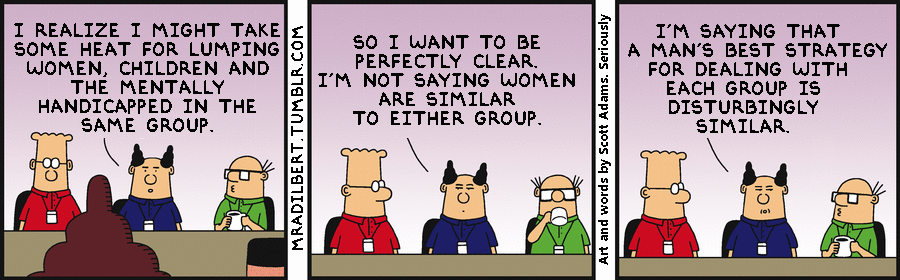
MRA Scott Adams: pictures and words by Scott Adams, together at last

by Cory Doctorow

tumblr_nyymj8Q4Hz1umctw4o1_1280

You may have noticed that Scott "Dilbert" Adams is a colossal asshole. (more…)

13 Dec 21:55

For every Firefly episode there's a tribute song.

http://hitfix.com/news/each-firefly-episode-gets-a-tribute-song-in-this-music-project-by-the-fallen-stars

HitFix chats to The Fallen Stars about their Firefly inspired music project.

13 Dec 14:32

I'm Sure You'll All Agree

by Bill Crider
The 32 Best Fantasy Books Of 2015  

Hat tip to Jeff Meyerson.
12 Dec 18:19

Britons will need copyright licenses to post photos of their own furniture

by Cory Doctorow

3964385117_e556281cd5_b

The Enterprise and Regulatory Reform Act 2013 is set to kick in, and with it will come an extended term of copyright for designer objects, such as furniture, which will endure for 70 years after the creator's death -- meaning that you'll need a license to post photographs of your own belongings. (more…)

12 Dec 00:42

Why Cats Knock Stuff Over (and How to Prevent It)

by Patrick Allan

Cats love to knock stuff over or push things off tables, and that leads to a lot of broken items. Are they mean-spirited animals that hate your stuff? Here’s the truth, and how you can help prevent it.

Dr. Katherine Houpt, Cornell University emeritus professor of veterinary behavior, suggests that cats knock things over for three main reasons: they’re hungry, they want attention, or they’re practicing hunting. Basically, they’re just being themselves. This reasoning also explains why it seems your kitty only wants to knock things over at night when you’re asleep. You can’t give them attention or feed them if you forgot, and night time is when hunting instincts can kick in. If you want to stop it, Houpt recommends you start by keeping them off your counters, either with double-sided tape or some other means, so they can’t knock things over to begin with. It might also help if they have a toy (like a fishing pole style toy) that lets them indulge in their “paw batting” behavior without breaking stuff. You can learn more about the science behind your cat’s seemingly rude behavior at the link below.

http://lifehacker.com/keep-cats-off-...

Why Your Cat Likes to Knock Things Over (According to Science) | Upvoted

11 Dec 21:12

Microsoft is letting OneDrive users keep their 15GB of free storage after all

by Tom Warren

Microsoft surprised many last month by announcing plans to reduce its free OneDrive storage from 15GB to 5GB. While the company is also removing its unlimited storage tier, it was the free storage removal that generated a backlash from OneDrive fans. A petition asking Microsoft to "give us back our storage" has received more than 70,000 votes over at Microsoft's OneDrive feedback site, and now the company has been forced to respond.

"We've heard clearly from our Windows and OneDrive fans about the frustration and disappointment we have caused," says a Microsoft spokesperson. "We realize the announcement came across as blaming customers for using our product. For this, we are truly sorry and would like to apologize to the community."

Continue reading…

11 Dec 17:47

Yet Another List I'm Not On

by Bill Crider
11 Dec 17:44

[HoloYolo4EVA] Bug Watch: Some Users Are Frequently Seeing This Password Recovery Prompt When Using The Play Store

by Rita El Khoury

password-recovery-promt

Ah Holo, how easily have you been forgotten! No sooner had Material Design been announced that we scrapped your vibrant black and blue, your grey boxes, your app tabs, and started championing white everywhere and animations. It's clear that Holo doesn't want to die, or someone at Google doesn't think Holo should be completely gone from Android, if only because it's good to see where you came from to appreciate the road you've been on.

Read More

[HoloYolo4EVA] Bug Watch: Some Users Are Frequently Seeing This Password Recovery Prompt When Using The Play Store was written by the awesome team at Android Police.


11 Dec 17:42

Google just made taking screenshots way easier in Android Marshmallow

by Chris Welch

Google has finally come up with a simpler way of snapping a screenshot of your Android phone — at least if you're lucky enough to be running Marshmallow. As noted by Droid Life, the company has updated Android 6.0's Now on Tap feature with a new icon that will take a screenshot and let you share it instantly. That's far more convenient than clumsily pressing down the button combinations (usually volume down and power) that most Android devices require for screenshots.

The small but clever addition should prove particularly useful for owners of the new Nexus 6P and Google's official case; one of the leading complaints about Google's accessory is that it makes screenshots frustratingly difficult since the sides are a bit loose.

But...

Continue reading…

11 Dec 15:19

Backslash: a toolkit for protesters facing hyper-militarized, surveillance-heavy police

by Cory Doctorow

056c026d-1c66-4d42-9fae-a8e96df290c5-1020x905

Backslash -- an "art/design" project from NYU Interactive Technology Program researchers Xuedi Chen and Pedro G. C. Oliveira -- is a set of high-tech tools for protesters facing down a "hyper-militarized," surviellance-heavy state adversary, including a device to help protesters keep clear of police kettles; a jammer to foil Stingray mobile-phone surveillance; a mesh-networking router; a "personal cloud" that tries to mirror photos and videos from a protest to an offsite location; and tools for covertly signalling situational reports to other protesters. (more…)

11 Dec 14:07

I'm Sure You'll All Agree

by Bill Crider
The 24 Best Science Fiction Books Of 2015  

I didn't expect to have read any of the books on this list, but by coincidence I'm just about to finish the one that's #2 on the list.  I'll probably finish it tonight, in fact.
11 Dec 14:06

28 Wintery White Snowy Images

by Darlene Hildebrandt

For those of us who live in the northern hemisphere, the ground is probably covered in snow for many of us by this time of the season. So what better reason is there to get out and photograph all that white fluffy stuff?

Here is that wintery white stuff in some snowy day images:

Adam Foster

By Adam Foster

Jenny Downing

By jenny downing

Tim Donnelly

By Tim Donnelly

Maf04

By maf04

Visit Finland

By Visit Finland

Shigemi.J

By Shigemi.J

Mika_Oulu

By Mika_Oulu

Adam Vradenburg

By Adam Vradenburg

Andrew Smith

By Andrew Smith

Gerry Balding

By Gerry Balding

Rodney Campbell

By Rodney Campbell

Maziar Hooshmand

By maziar hooshmand

Russ Seidel

By Russ Seidel

Julie Falk

By Julie Falk

Shawn Harquail

By Shawn Harquail

Pascal Bovet

By Pascal Bovet

Alexey Kljatov

By Alexey Kljatov

Kamyar Adl

By Kamyar Adl

Several Seconds

By Several seconds

Mike Norkum

By Mike Norkum

Rishi Bandopadhay

By Rishi Bandopadhay

Ishrona

By Ishrona

Roman Boed

By Roman Boed

Javier

By Javier

Flood G.

By Flood G.

Vida Dimovska

By Vida Dimovska

Brian Colson

By brian colson

Roman Schmitz

By Roman Schmitz

The post 28 Wintery White Snowy Images by Darlene Hildebrandt appeared first on Digital Photography School.

11 Dec 14:03

Google is working on split-screen multitasking for Android tablets

by Sam Byford

The Pixel C is the first tablet ever designed by Google itself, and with its keyboard attachment could have demonstrated Android's potential as an operating system for productivity. Problem is, the software just isn't there yet, with a dearth of optimized apps and little consideration for multitasking. The team behind the tablet is aware of the concerns, though, and used a Reddit AMA to discuss how things may improve in the future.

"We're working hard on a range of enhancements for Android in this form factor," says Android and Chrome UX director Glen Murphy. "There are many things, like multi-window, that we've been spending a lot of time on — hopefully we can share more about this soon." It sounds like we'll have to wait til Android's...

Continue reading…

11 Dec 00:09

Yo Dawg, I Heard You Like Yahoo Mail So We Put Gmail In Your Yahoo Mail

by Drew Olanoff
yo_dawg If you’re a real fan of the newly redesigned Yahoo Mail, but also use Gmail, today is your day. Seriously, throw a damn party. The Yahoo Mail team announced that you can now manage your Gmail from the friendly confines of Yahoo Mail, to go along with previous support for Outlook, Hotmail and AOL Mail (you know, the other email services that nobody uses unless it’s for Craigslist… Read More
10 Dec 21:47

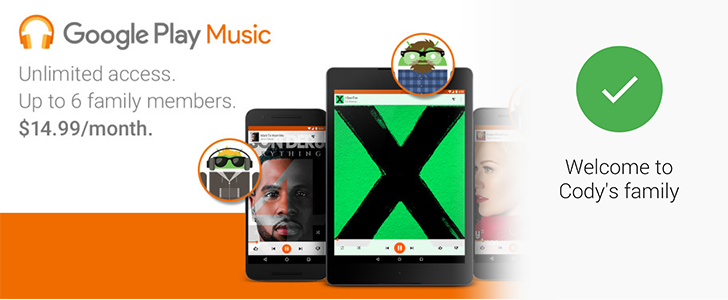
Hands-On With Google Play Music's Family Plan – Trusting Relatives With Shared Music And Shared Payment Methods

by Cody Toombs

family

Google announced family plans for Play Music (and YouTube Red) back in September alongside this year's Nexus lineup. The very competitively priced group subscription was made official yesterday and can be activated through the Play Music app. As it turns out, this isn't just a regular standalone subscription, but it's actually part of Google's new Family Groups that will ultimately bring app and media sharing to the Play Store.

Yes, sharing your music subscription means you're also sharing a credit card.

Read More

Hands-On With Google Play Music's Family Plan – Trusting Relatives With Shared Music And Shared Payment Methods was written by the awesome team at Android Police.


10 Dec 21:45

How the Family Plans for Spotify, Google Play Music, and Apple Music Compare

by Thorin Klosowski

How the Family Plans for Spotify, Google Play Music, and Apple Music Compare

All the big music streaming services now have family plans that allow you to share your subscription with others to save yourself a little dough, but they each vary a bit in how they work. Let’s breakdown exactly what you get with each.

You’d think that something as simple as a family plan for streaming music would be self-explanatory, but it’s a little more complicated than that. The above chart should make things simpler, but let’s break it down a bit more:

  • Spotify: For $14.99/month, you get two Premium accounts, and you can expand that to up to five people total for an additional $5/month per account (that’s $29.99/month for five people). They’re also running a confusing promo plan right now as well that includes a family plan for just $9.99/month for up to four family members. One person is the administrator and assigns the other family members accounts through their own account page. Each family member gets their own Spotify account and listening habits aren’t shared. Technically, each member of the plan is supposed to reside at the same physical address as the administrator.
  • Google Play Music: For $14.99/month, you and up to five family members get access to Google Play Music and YouTube Red. Each family member gets their own account and listening habits aren’t shared. The paying member will have to sign up for the family plan in the Google Play Music Android app, but members can use any app. They will need a Google account to use it.
  • Apple Music: For $14.99 a month, you and up to five people can share an Apple Music plan. Each person needs their own Apple ID to use it, but listening habits aren’t shared. However, the plan works through the Family Sharing service, so you’ll also be sharing purchases in iTunes, iBooks, and the App Store. This means everything will be tied to one credit card.

So, they’re all pretty similar on your wallet, but have a few quirks worth considering before you buy in. Of all the services, Apple Music easily comes off as the most family-centric of the bunch, because it hooks into your entire iTunes account. Obviously, if you’re all already using one service, that’s likely the best approach, but if not, you’ll need to pick which one suits everyone the best.

10 Dec 17:37

17 Hilarious Media Corrections From 2015

by Bill Crider
10 Dec 17:25

Shared memories made easy with Google Photos

by noreply@blogger.com (Google Blogs)
Sharing photos and videos between friends and family after your birthday bash or holiday gathering shouldn’t be difficult. But between the great shots your brother has buried on his iPhone and that friend who keeps forgetting to email you her pics, you're often left reliving the event through just the photos and videos you took yourself.

Today we’re introducing shared albums in Google Photos—a fast and simple way to pool your photos and videos that makes it easier to bring everyone’s memories together.

With the launch of Google Photos in May, we made it simpler to share images and albums by sending links over SMS, email, or messaging apps. With today’s launch, you can now make the albums you send collaborative. People receiving the shared album can join to add their own photos and videos, and also get notifications when new pics are added. You can even save photos and videos from a shared album to your Google Photos library, so that you can hold onto them even if you weren’t the one holding the camera.

Best of all, there’s no setup—select photos, make an album and then send the link off to whomever you’d like. And it works no matter what device your friends and family are using—tablet or laptop, Android or iPhone.

Shared albums is rolling out today on Android, iOS and the web. Time to create an album and revisit that holiday party from another angle!

Posted by James Gallagher, Engineering Lead, Google Photos IMAGE URL James Gallagher Engineering Lead Google Photos
10 Dec 17:24

Even more to love about Chromecast Audio

by Google Chrome Blog
A couple of months ago we launched Chromecast Audio to provide an easy way to stream your favorite tunes from your phone, tablet, or laptop to your existing speakers. At $35, Chromecast Audio is an affordable way to connect your speakers via WiFi so you can stream tons of popular apps including Spotify, Pandora, and Google Play Music from anywhere in your home. Today we’re starting to add two new features to the latest software update to elevate your listening experience.

Introducing Hi-Res audio support

Close your eyes and imagine the musician is playing in the room. Today we’re rolling out high-resolution audio support, which gives you even higher quality music playback using Chromecast Audio. With support of up to 96KHz/24bit lossless audio playback, you can enjoy higher-than-CD-quality audio on your existing high fidelity audio equipment.

Blast the same song in every room

Now you can easily fill every room in your home—bedroom, kitchen, living room, or wherever you have a Chromecast Audio connected—with synchronous music. Multi-room lets you group Chromecast Audio devices together so you can listen to the same song on multiple speakers.

Setup is simple. Connect and setup a Chromecast Audio device for each of your speakers, then use the latest Chromecast app to create a group. You can cast to the group the exact same way you would cast to a single Chromecast device. Since anyone with a phone can easily cast without pairing, you can sync your home speakers together and invite your friends to be the DJ.

So grab your hairbrush microphone, dust off your tennis racket guitar, and jam out to your favorite tunes at amazing quality and in every room of your house.

Posted by Tomer Shekel, Product Manager and Patron of Loud Music
10 Dec 17:24

Costs And Risks Of UK’s Draft Surveillance Powers Probed

by Natasha Lomas
Westminster A U.K. parliamentary committee tasked with scrutinizing the new surveillance powers contained in the draft Investigatory Powers Bill has heard several contradictory views on the proposed legislation. Read More
10 Dec 17:23

Google’s Plan To Accelerate The Mobile Web Will Go Live In February

by Sarah Perez
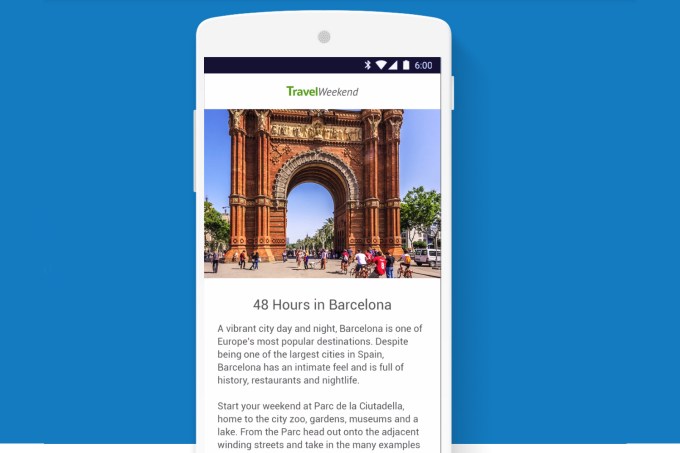
google-amp-ex Google’s plan to accelerate the mobile web – also known as the “Accelerated Mobile Pages Project” or AMP, for short – now has a launch date. The company said this week that it will begin directing traffic to its sped-up AMP pages in Google Search starting in late February 2016. In addition, Google notes that Pinterest is already testing AMP pages in its mobile… Read More
10 Dec 17:21

Google Photos’ new shared albums aren’t designed for a social world

by Katherine Boehret

Google is tired of Apple getting all the glory when it comes to photo sharing. Today, the company introduced a feature in its Google Photos app that’s designed to compete with Apple’s popular iCloud Photo Sharing. It's available for iOS, Android and the web. That cross-platform support is a big differentiator for Google, since Apple’s version is still exclusive to iOS and OS X. This matters if you’re trying to collaborate with all of your friends and family — not just your friends with iPhones and Macs.

Google’s shared albums are off to a decent start, but they seem designed for sharing one-time events rather than ongoing collections of memories.

I tested them for the past week on iOS and Android and found a few...

Continue reading…