After being one of the most recognizable apps using Google Wallet for payment processing, Uber is making the switch to using Android Pay as the old Wallet system is closing in on its sunset. Though Android Pay is most notably taking over as the NFC tap-and-pay system for Google, it is also ready to handle in-app and online payments that were once handled by Google Wallet as well.
As you may remember, Google has dramatically scaled back the capabilities of Google Wallet since Android Pay was announced; the older of the two services now simply works as a person-to-person money transferring system.
Uber is sending out emails to customers reminding them that Google Wallet support will be officially discontinued from the app on May 9, and in order to continue paying for rides in the app you'll have to move along to Android Pay or input a credit card manually. If you've already set up Android Pay with a card, you'll be able to simply tap on the Android Pay button in the payment settings of the Uber app and choose a previously-entered card from the list.
MutiNet's ResetPlug sounds like a serious gadget device you can buy with American dollars and plug into a wall, but it might as well be commentary on modern life. The smart plug connects to your Wi-Fi, and if it detects an outage in your internet service, it power cycles your Wi-Fi router or broadband modem every five minutes until the internet starts working again.
It automates a well-known, infuriating customer service platitude: "Have you tried turning it on and off again?" At this point I typically don't even bother calling Time Warner until I've unplugged and plugged anew everything a few times. I'm always a little disappointed when that "fixes" the internet, because now I can't blame Time Warner with confidence, and instead have...
Now that SoundCloud has inked licensing deals with all the big music rights holders, the startup is wasting no time rolling out subscription services and advertising to a wider number of markets to better monetize its 175 million users and compete better against the likes of Spotify, Deezer, Apple Music and the rest. The music-streaming company — sometimes referred to as the YouTube… Read More
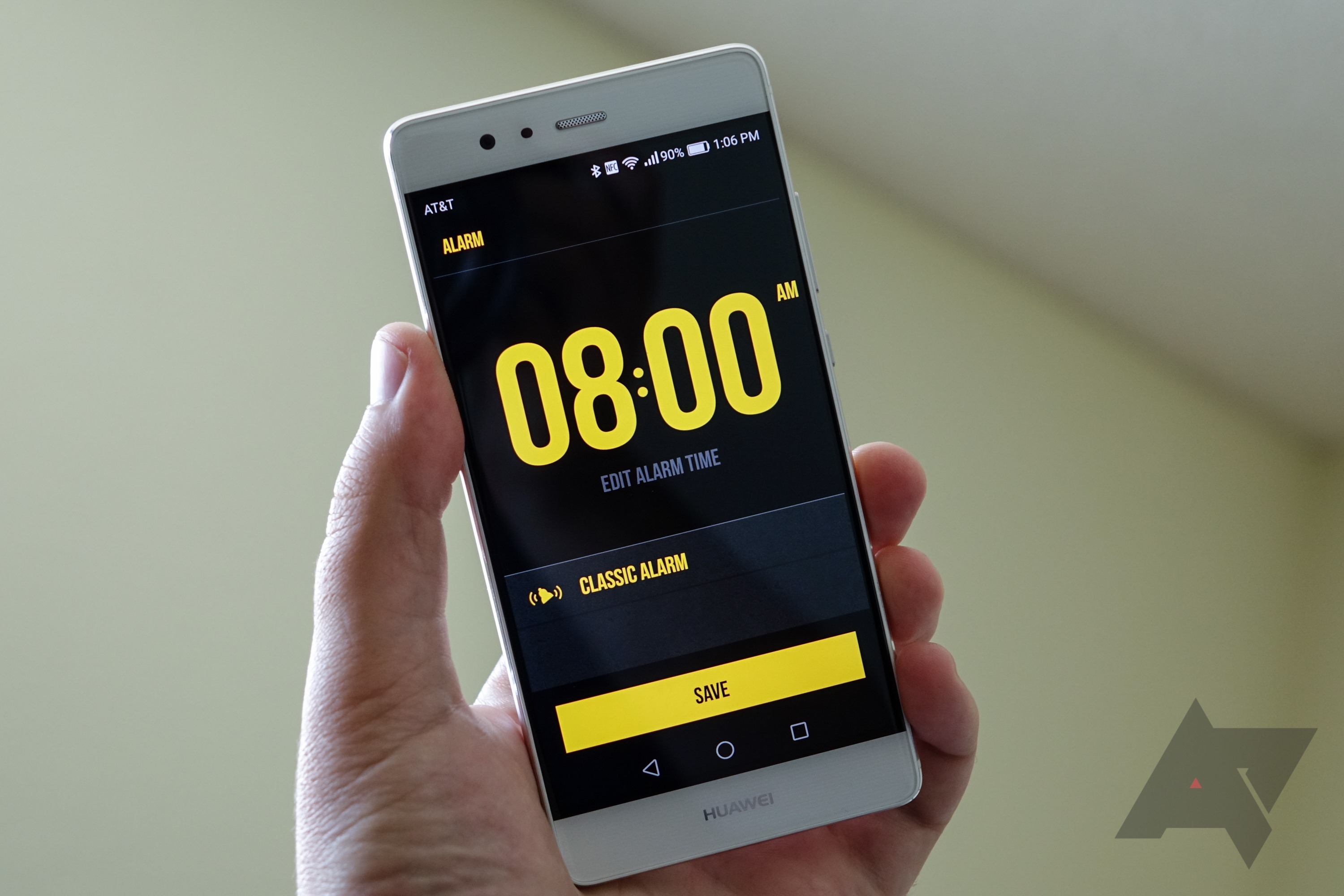
Dwayne Johnson, AKA The Rock, may be the most likeable man in the universe. And now he has an alarm clock app that, above all else, perpetuates this, because he's The Rock. You may say, "David, what makes this so much better than my amazing alarm clock app that I already have?" To which I would answer: this one contains nearly infinitely more Dwayne Johnson. And Dwayne Johnson does not do "snooze" buttons.
If you're new to Android, you might find yourself wondering exactly what we're talking about from time to time. As such, here's a glossary of terms you're likely to run across.
ADB: Android Debug Bridge. A tool used to connect and sends commands to your Android phone from a desktop or laptop computer.
AMOLED: Active Matrix Organic Light Emitting Diode. Basically, a very colorful, bright, display found in some smartphones. (See also Super AMOLED.)
Android: Google's open-source mobile operating system. It's used primarily in smartphones but also can be found on tablets, Mobile Internet Devices (MIDs) or even in kitchen appliances and automobile navigation.
Android Market: The original name for Google's repository for Android applications. Rebranded in March 2012 to Google Play.
AOKP: The Android Open Kang Project. A group that takes the open-source Android code and compiles it with other customizations for multiple devices.
AOSP: The Android Open Source Project. When you hear about Android being "open source," this is what we're talking about. It's a repository of the code released by Google, which can be downloaded and compiled by anyone. (If you know how.)
.apk: The file extension of an Android application.
Apps: Short for "applications." The programs you download and run on a smartphone. Can be free, or for sale.
App Inventor: Google's web-based system by which Android applications can be made without having to know how to code. Discontinued by Google, but released as an open-source project.
Apps2SD: An unapproved method of storing applications on the device's microSD card. An official method was included in Android 2.2, mostly making this moot.
Archos: A line of mid-grade Android tablets. Not all that well known, but held in fairly high regard.
ASUS: A Taiwanese manufacturer of phones and tablets. (Among many other things.)
AWS: Stands for Advanced Wireless Services. It is a band of frequencies used for cellphone connectivity, occupying the combined 1700MHz and 2100MHz frequencies (aka 1700/2100MHz.) Used primarily by T-Mobile USA for HSPA+ service, and by other carriers for LTE service.
Bloat(ware): Applications -- usually unwanted -- that are preloaded onto a device. It's a bit subjective as to what constitutes bloatware, and the flip side is that these applications are what allow carriers to sell phones and tablets at subsidized prices.
Bluetooth: A short-range radio build into smartphones that lets you connect headsets, speakerphones or even computers to your smartphone.
Bootloader: An internal mode on a phone that helps in the flashing of ROMs and other behind-the scenes actions.
Breaksclusive: Not breaking news, not exclusive news. It's BREAKSCLUSIVE!
BSI: Backside Illumination. Used to improve low-light performance in smartphone cameras.
Carrier: A company that provides cell phone service.
CDMA: One of two major standard for cell phone communications. Is used by Sprint and Verizon in the United States, and by a few nations elsewhere. Is largely seen as a dying standard. (See also GSM)
CES: North America's largest consumer electronics show, held in January at the Las Vegas Convention Center.
Civilian: What we lovingly call a non-smartphone nerd. Someone who doesn't buy a phone every few months.
Cyanogen: The online handle of one Steve Kondik, relatively famous in the hacking and modding community and the creator of the CyanogenMod series of ROMs.
Dalvik Cache: Writable cache that contains the optimized bytecode of all apk files (apps) on your Android device. Having the information in it's own cache makes applications load faster and perform better.
DLNA: Dynamic Living Network Alliance. A method for wirelessly streaming photos and videos from your smartphone to your TV.
Droid: An extremely popular horizontal slider made by Motorola on the Verizon network. The first to run Android 2.0 (and Android 2.0.1). Is currently running Android 2.1. Also the name for a line of Verizon Android phones.
EOL: Stands for "End of Life." Means a carrier or manufacturer is phasing out a particular product. It does not necessarily mean that phone or tablet is bad, nor will anyone come and take your EOL'd device away from you.
ETF: Stands for Early Termination Fee. Also known as an ETF, it's what a carrier chargers you to break out of your contract. Usually are prorated.
Google: Our benevolent overlord, and owner of Android.
Google Now: An enhanced, location-aware section within the Jelly Bean Google search app. Offers timely info, such as weather updates, transit times and locations, photo spots and travel times when out and about.
Google Now on Tap
Google Play: Google's one-stop online shop for movies, music, apps, games and books. At the time of its launch on March 6, 2012, it basically was a rebranded Android Market.
Google TV: Announced at the Google IO conference in May 2010, it's a combination of hardware and Android that features a full web browser, Android applications, and combines it with video that's available online -- Youtube, television, etc.
Google Wallet: Google's early attempt at a mobile payment system based on NFC. Has since been replaced by Android Pay. (Google Wallet lives on as a peer-to-peer payment system.)
Gorilla Glass: A scratch-resistant glass product from Corning used on a number of smartphones and tablets.
GPS: Stands for Global Positioning System. Uses a constellation of satellites in space to find your location on the ground.
GSM: One of two major standard for cell phone communications. Is used by AT&T and T-Mobile in the United States, and by the majority of carriers worldwide. (See also CDMA)
Hack (Hacking): Modifying the Android system to add customization, features, or bypass carrier and manufacturer restrictions. See root.
Hard reset: The act of resetting your phone to its "factory" state. Erases all user data, logins and passwords. May or may not erase what's on the internal storage or microSD card, too. (Also see soft reset.)
Honeycomb: Android 3.0. The first version of Android designed with tablets specifically in mind. Allows apps to "fragment" or split over a single screen. Is the first Android version to fully support dual-core processors. The first tablet with Honeycomb was the Motorola Xoom.
HTC: A Taiwanese smartphone manufacturer. And a darn good one.
Huawei: A major Chinese manufacturer, handles infrastructure as well as handsets and tablets.
Ice Cream Sandwich: Android 4.0. The follow up to the tablet-centric Android 3.0/3.1 that brought Honeycomb-like features back to Android smartphones. First appeared on the Samsung Galaxy Nexus.
IFA: Internationale Funkausstellung -- an annual consumer electronics show hosted in Berlin, Germany.
IMEI: Stands for International Mobile Equipment Identity. Basically a unique identification number assigned to every phone.
Intel: The longtime processor manufacturer. Entered the Android arena in 2012 with its "Medfield" Atom processor. At CES 2012, announced a deal with Motorola.
IPS: Stands for "in-plane switching." Gives better viewing angles and better color reproduction. First gained popularity in Apple displays, then made its way to mobile devices.
Launcher: Collectively, the part of the Android user interface on home screens that lets you launch apps, make phone calls, etc. Is built in to Android, or can be purchased in the Android Market.
Legacy: Code name for "old."
Legend: HTC's aluminum unibody phone with Android 2.1 and Sense.
LG: A Korean electronics and smartphone manufacturer.
Linux: An open source variant of Unix that is used as the underlying system on Android devices.
Live wallpapers: Animated wallpapers introduced in Android 2.1.
LTE: Stands for "Long-Term Evolution." Is considered to be one of the "true" methods of 4G data (even if it technically isn't). First rolled out by Verizon in late 2010, and then by AT&T in late 2011, and Sprint will begin using it in mid-2012.
Manufacturer: A company that physically builds cell phones.
MetroPCS: Regional and Prepaid carrier in the U.S. generally put in the "second tier" carrier category. As of late 2012, also pursuing a merger with T-Mobile USA.
Mobile World Congress (MWC): A European wireless industry trade show, held in Barcelona, Spain, the past few years.
Motorola: Manufacturer of smartphones and other hand-held wireless devices.
MTP: Stands for Media Transfer Protocol. Designed by Microsoft, and used by devices that have a single, unpartitioned storage structure to transfer files to and from a computer.
Nexus: A line of smartphones created in conjunction with Google. Also known as "Pure Google" devices. Generally are the first to launch with major updates to Android, as well as the first to receive updates. See also Nexus One, Nexus S, Galaxy Nexus.
NFC: Near-field communication. Short-range communication between your phone and something else -- another phone, a cash register, etc. Used by some credit cards as a method of quick payment.
OEM: Stands for Original Equipment Manufacturer. Used by folks in the industry to mean "manufacturer."
Onstar: The navigation/information/safety service that helps you keep your hands on the wheel while driving. Provides turn-by-turn navigation, live help from operators, and crash detection. Has a companion Android application.
Open GL: An open source 3D graphics library used in many devices, including Android devices
Open Source: Software which is liberally licensed to grant the right of users to study, change, and improve its design through the availability of its source code.
OTA: Stands for Over the Air. The act of moving data to your phone -- downloading, really -- without having to plug it in. Most Android system updates are OTA, as are application downloads.
PenTile: A subpixel layout scheme, patented by Samsung, that allows greater luminance at a lower power draw. RGBG Pentile uses alternating green pixels and has more definition than RGBW, which adds a white subpixel.
PIN: Stands for Personal Identification Number. Often four digits.
Pixel: An individual dot on the display. Also a way to measure the resolution of a camera (usually in millions of pixels). Pixels usually are made up of sub-pixels. The arrangement of those sub-pixels affects the way you see images and text.
PPI: Pixels per inch. How we determine a display's "pixel density." The more pixels in a display, the better graphics and text look.
PRL: The Preferred Roaming List, basically a way of telling your phone which towers to connect to first.
Project Butter: Software enhancements introduced in Android 4.1 to improve the smoothness of on-screen transitions and animations. Project Butter uses software tricks like vertical sync (vsync) and triple-buffering to display a smooth, consistent frame rate throughout the UI.
Reset (hard, soft): The rebooting of the phone. A soft reset is turning your phone off and on, or pulling the battery. A hard reset also is referred to as a factory reset, and wipes your personal information from the device.
Resolution: The term used to describe how many individual pixels are in a display. A common phone resolution is 720x1280, or 720 pixels in the short dimension, with 1280 in the long dimension. The more pixels you have in a display, the better the pixels per inch (ppi), making text and images more crisp.
ROM: Literally, "Read Only Memory." In Android, it's what you load for a major software update. "Custom ROMs" are just that -- developed outside control of a manufacturer or carrier.
Recovery Mode: A small separate operating mode you can boot your device into, used for device administration. Two popular custom recovery modes are Amon Ra and Clockwork.
Root: A method of unlocking the Android operating system to allow deeper programs deeper access than is allowed out of the box. (For more on root, click here.)
Root (SD card): The base folder (or top level) of the card. Often referred to as /sdcard in a file structure.
Samsung: A Korean electronics company. Manufacturer of the Galaxy S series of Android phones, among others.
SD card (or microSD card): A small plastic "card" that expands the available storage memory on your phone. Used by applications to store data, and you can store ringtones, pictures, etc., on it.
SDK: Stands for Software Development Kit. Generally, a set of tools used to create software for a certain platform following guidelines provided in the kit. For Android, the SDK provides tools to create applications that run on Android devices.
Sense****: A custom user interface (or skin) on top of Android. Exclusive to HTC smartphones.
Services: Portions of code that run in the background to provide content and services to applications.
Sideload: The act of installing an app outside of the Android Market. AT&T (tries to) prohibit its phones from doing this.
Sideload Wonder Machine: A simple open-source program that lets you sideload apps via computer, bypassing any restrictions a carrier might have put in place.
SIM card: The little card used in nearly every phone that connects the phone to the network. Generally refers to a physical card, though some phones may have a virtual SIM — and a few use both.
Soft reset: The act of rebooting your phone, whether intentionally or otherwise. Same effect as when you remove and replace the battery. (Also see hard reset.)
Sony Ericsson: A joint wireless venture from Sony and Ericsson. Dissolved in 2012, and the mobile arm will be marketed under the Sony name.
Super AMOLED: A generation ahead of AMOLED displays. Lighter, more power-efficient and less reflective than AMOLED. (See AMOLED)
Super AMOLED Plus: Take an AMOLED screen. Instead of eight subpixels per pixel, there are 12. Pretty awesome, actually.
Super Phone: Something other people call smartphones. If you see it used at Android Central, e-mail your favorite editor so the rest of us can make fun of the person responsible.
Tethering: The act of using your smartphone's data to provide Internet access to another device, such as a laptop. Can be done wirelessly, or via a USB cable.
TouchWiz: Samsung's custom user interface, though it's no longer formerly referred to in that manner.
USB: Stands for Universal Serial Bus. Is a method of connecting devices to a computer. Most smartphones now use microUSB cables to charge and sync.
UMS: Stands for USB Mass Storage. Devices with SD cards or partitioned internal storage mount that storage as UMS when connecting to a computer. Files can then be moved to and from the device.
Let's get ready to watch superheroes fight each other. Again!
Captain America: Civil War debuts this Friday, and chances are you're as excited for it as we are. In honor of the major Marvel smackdown about to begin, our resident themer Ara Wagoner has assembled a team of themes to help us show our #TeamCap or #TeamIronMan pride. Or #TeamUnderoos, to celebrate the return of Spidey to the MCU. So, grab your favorite launcher and your spangly armor and let's get to it!
Captain America theme
The First Avenger has a lot going on here between the whole Bucky situation and the world growing increasingly fearful and hostile towards "enhanced" humans. Steve Rogers prides himself on being a simple man, and we feel he'd be content with this simple and efficient theme. Cap is the man out of time, and his theme feels timeless and patriotic, even as he fights the government for civil liberties. Here's what we pulled off his theme with:
Set Stamped Red Icons as your icon pack in your launcher's settings. If your launcher doesn't support icon packs, you'll either need a launcher that does or a custom shortcut creator like Awesome Icons.
Long-press your app drawer icon and Edit it.
Select Gallery Apps to select your custom icon from. Navigate to Cap Shield Custom Icon and select it as your icon.
Save the icon.
Add a 4x1 Jack's Music Widget to the bottom row of the home screen. (If you home screen is wider than 4 across, resize the widget to fit.)
Open Jack's Music Widget app (in the app drawer, don't tap the widget) and set the widget style to Clear.
Add a 4x2 1WeatherTabbed widget to the top row of your home screen.
When configuration screen pops up, select the DarkBackground color, 0%Background opacity, WhiteIcon Set and Deep RedAccent.
Select Done in the top left corner to set the widget configuration and return to the home screen.
Copy your chosen Shield notification tone to Notifications folder using a file manager app like Solid Explorer.
Enter Settings app. In Sounds, set Ringtone to Captain America or Winter Soldier and Notification Tone to capam_shieldslam, capam_shieldslot, capam_shieldthrow or capambeamhit. (Note: if after initially copying your sounds to these folders, they don't appear in the sound picker, reboot device and they should appear.)
Iron Man theme
Iron Man's got the best toys, just ask him. He's got the best AI in the history of the world (and that AI's finally got a shiny, sweater-rocking body now). Iron Man's got the best witty remarks, and his snark is only matched by the aforementioned AI. He's gonna have a bit of a time in Civil War, but his theme is undeniably Stark.
Ara built this theme in a cave! With a box of scraps! Here's what you'll need to reproduce it:
Set Golden Icons as your icon pack in your launcher's settings. If your launcher doesn't support icon packs, you'll either need a launcher that does or a custom shortcut creator like Awesome Icons.
Long-press your app drawer icon and Edit it.
Select your custom icon from the Golden Icons pack. Scroll down to T for The Avengers and select the Avengers A.
Save the icon.
Add a 4x1 Jack's Music Widget to the top row of the home screen. (If you home screen is wider than 4 across, resize the widget to fit.)
Open Jack's Music Widget app (in the app drawer, don't tap the widget) and set the widget style to Clear.
Add a 4x1 1WeatherCompact widget to the bottom row of your home screen.
When configuration screen pops up, select the DarkBackground color, 0%Background opacity, and GoldAccent.
Select Done in the top left corner to set the widget configuration and return to the home screen.
Copy your preferred Notification Tone to Notifications folder and using a file manager app like Solid Explorer.
Enter Settings app. In Sounds, set Ringtone to Iron Man Ringtone and Notification Tone to your chosen notification tone. (Note: if after initially copying your sounds to these folders, they don't appear in the sound picker, reboot device and they should appear.)
Black Panther theme
What is with heroes who are kings not getting nearly as much love and cred for being badasses? Anyway, Black Panther is finally making his Marvel Cinematic Universe debut, and he deserves a great theme. Our theme is built around this truly awesome Black Panther poster by Ethan Livingstone. It also comes in sick metal poster prints at Displate, if you need even more Black Panther awesomeness to display.
Set Noctum as your icon pack in your launcher's settings. If your launcher doesn't support icon packs, you'll either need a launcher that does or a custom shortcut creator like Awesome Icons.
Long-press your app drawer icon and Edit it.
Select your custom icon from the Noctum pack. In the app drawer icon section, select the X shield icon, which looks suspiciously like a cross slash from Panther's vibranium claws.
Save the icon.
Add a 4x1 Jack's Music Widget to the top row of the home screen. (If you home screen is wider than 4 across, resize the widget to fit.)
Open Jack's Music Widget app (in the app drawer, don't tap the widget) and set the widget style to Clear.
Copy Panthers Roar to Notifications folder using a file manager app like Solid Explorer.
Enter Settings app. In Sounds, set Ringtone to Black Panther Tas and Notification Tone to Panthers Roar. (Note: if after initially copying your sounds to these folders, they don't appear in the sound picker, reboot device and they should appear.)
Black Widow theme
Widow never gets enough love for being the most badass spy not wearing an eyepatch in the Marvel Cinematic Universe. Iron Man may be a futurist with plans for everything, but Widow's the one who can walk into a room and know how she'd eliminate every single person there. Our theme for Widow pays homage to the glorious quotes surrounding our resident Russian and her ledger. Here's what you'll need:
Set image as your wallpaper using your launcher's wallpaper picker, with the hourglass slightly raised from the center (to leave room for the 1Weather widget).
Set Red Shadow Icons as your icon pack in your launcher's settings. If your launcher doesn't support icon packs, you'll either need a launcher that does or a custom shortcut creator like Awesome Icons.
Long-press your app drawer icon and Edit it.
Select Red Shadow to select your custom icon from. Navigate to S for Spider and select the spider icon as your icon.
Save the icon.
Add a 4x1 Jack's Music Widget to the bottom row of the home screen. (If you home screen is wider than 4 across, resize the widget to fit.)
Open Jack's Music Widget app (in the app drawer, don't tap the widget) and set the widget style to Clear.
Add a 4x1 1WeatherCompact widget to the top row of your home screen.
When configuration screen pops up, select the DarkBackground color, 0%Background opacity, and Deep RedAccent.
Select Done in the top left corner to set the widget configuration and return to the home screen.
Copy Grappling Hook/Whip Notification Tone to Notifications folder and Black Widow Kicks Ass Ringtone to Ringtones folder using a file manager app like Solid Explorer.
Enter Settings app. In Sounds, set Ringtone to Black Widow Kicks Ass and Notification Tone to grapplefire or whipnowt. (Note: if after initially copying your sounds to these folders, they don't appear in the sound picker, reboot device and they should appear.)
Spider-Man theme
Spider-Man is the bright, shiny newcomer in a Marvel Cinematic Universe that has been getting greyer, grittier, and bogged down in itself. He's new blood, fresh perspective, and we're all hoping he's gonna be as important in the films as he was in the comics version of Civil War. We've got a web-slinging theme as bright and classic as our friendly neighborhood Spider-Man, and since we figure Spider-Man is more of a tinkerer with his phones, it's even got a fully-customizable KWGT to sit on its
Set Stamped Red Icons as your icon pack in your launcher's settings. If your launcher doesn't support icon packs, you'll either need a launcher that does or a custom shortcut creator like Awesome Icons.
Long-press your app drawer icon and Edit it.
Select Stamped Red icon pack to select your custom icon from. Navigate down to S for Spider-Man.
Save the icon.
Add a 4x1 Jack's Music Widget to the top row of the home screen. (If you home screen is wider than 4 across, resize the widget to fit.)
Open Jack's Music Widget app (in the app drawer, don't tap the widget) and set the widget style to Clear.
Add a 4x1 KWGT to your home screen. Resize it to cover Spider-Man's web at the top of the home screen.
12.Tap the widget to configure it.
Tap the Exported tab of the Preset gallery.
Select Spider-Man Widget.
Save the widget with the floppy disc icon in the top right corner.
Return to the home screen. If the widget needs any adjustment, tap the widget to re-enter the editor.
To move an element left/right, tap that item in the Item list, then go to the Position tab. Adjust the XOffest (left and right) and the YOffset (up and down) as needed.
Save the widget with the floppy disc icon in the top right corner.
Enter Settings app. In Sounds, set Ringtone to Amazing Spider-Man Ringtone or Ultimate Spider-Man Ringtone and Notification Tone to Web Thwip 1 or Web Thwip 3. (Note: if after initially copying your sounds to these folders, they don't appear in the sound picker, reboot device and they should appear.)
Wearable Themes
Now your phone's all heroed out, but what about your watch? It needs some superhero magic, too! And that's where these watch faces come in.
AMERICA ($1.99): It's star-spangled awesome! This is one of the watch faces I always seem to come back to. The night mode on this watch face even takes Cap's shield from First Avenger to a cybernetic Winter Soldier.
IRON ($1.99): I know the expression is 'wear your heart on your sleeve', but this might take things a little too far. Tony Stark's life-saving and suit-powering device is often referred to as Tony's heart, and now you can wear it proudly on your wrist. Just don't think it'll give your watch repulsor-firing abilities.
CIVIL ($1.99): Feeling torn between both sides? More a fan of the conflict that of either side? Not a problem! Wear the fight on your sleeve - or rather your watch - with the CIVIL watch face, which is split between Cap's shield and Iron Man's Arc Reactor.
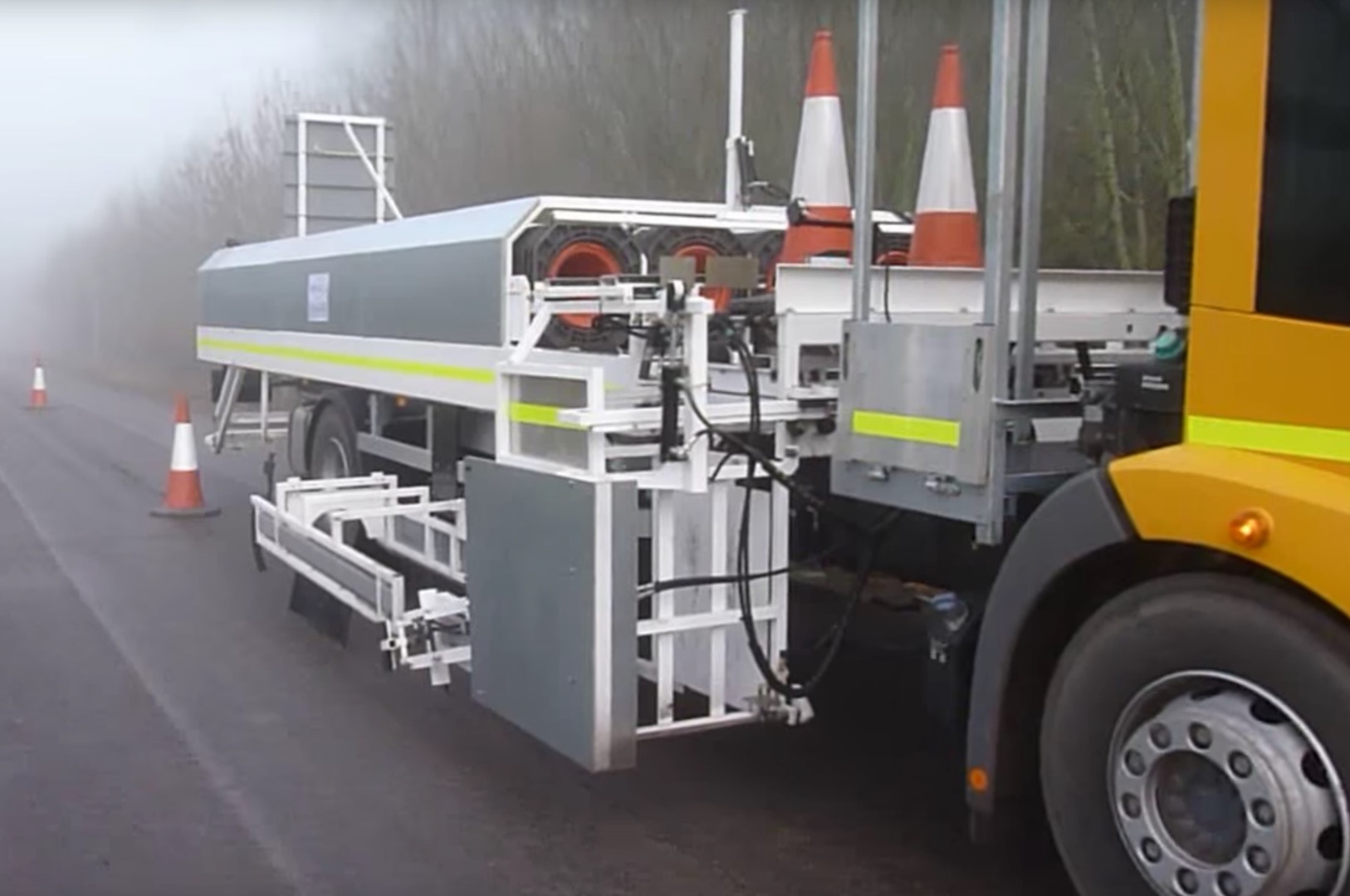
This vehicle picks up and stores traffic cones at nearly half the speed, 10 times the noise, and 20 times the expense of a human crew. But it looks cool.
Dangerous Golf, at its most base level, is about destruction. You are placed in an area filled with lots of breakable objects — a fancy dining room full of expensive silverware, or a gas station storeroom stocked with food — and asked to hit a golf ball in a way that demolishes as much as possible. You can bounce the ball off of walls, crash it through windows, or later on, light it on fire and ignite the stage like a powder keg.
The game is ridiculous and messy in a way that’s reminiscent of the PlayStation 2 era, before high-definition games were the norm, when crazy ideas for 3D games didn’t need a ridiculous budget, thousand-person teams, and risk-averse management.
That’s not to say Dangerous Golf is cheaper or ugly. It’s...
Google Keyboard for Android has received a significant update today, including a one-handed mode, some design tweaks, and the ability to resize the keyboard's height to your own preference. First off, there's now an option to display borders around the keys so can be more certain of which one you're tapping. The one-handed feature lets users pick whether they want the keyboard tailored for the right or left hand, while also offering a quick way to toggle back to the full-sized version, as the below image from Android Police shows.
Most British motorists still hold some animosity towards the onset of autonomous cars and want to maintain control of the vehicle.
In a survey conducted by IAM RoadSmart, 65 percent said that a human should always be in charge of the vehicle and 34 percent believe autonomous cars are a bad idea.
Interestingly, 55 percent said that autonomous cars will not be the norm on UK roads in the next few years, despite overwhelming support for autonomous functionality in cars by most major manufacturers.
“Technological advances that make driving and riding safer for all road users have to be embraced wholeheartedly — but British motorists and our members do want the right to drive,” said IAM RoadSmart CEO Sarah Sillars to The Express. “Intelligent cars will deliver a step change in road safety by targeting the human errors we make from time-to-time. We believe a well-trained driver and an ever-vigilant car is a win-win scenario for the future.”
British drivers aren’t the only ones
It appears motorists still have a fear of a computer-controlled car, meaning manufacturers and tech companies designing programs for self-driving need to be vocal on the security and safety benefits. Consulting firm McKinsey & Company suggests the adoption of self-driving could reduce accidents by 90 percent.
When that stat was brought up in the survey, the majority of respondents said they want to “wait and see” rather than restrict human control of vehicles. 15 percent disagreed with the proposition of removing human control entirely after reading the stat — 38 percent also said that they would not use an autonomous car.
Automated systems that stop tailgating were heavily favored by respondents, showing that British motorists do want limited automation of cars to increase safety on the road.
Autonomous cars are still an unknown to millions of drivers that question the effectiveness of a computer system on the road. In the next few years, as we start to see automatic parking and lane switching features added into cars, we might start to see a change in perception towards autonomous.
Something strange is happening with Radiohead. You could probably write that sentence at almost any time and it would be true, but, as Pitchfork points out, today the band has started erasing everything from their website, Facebook, and Twitter. No tweets, no cover images, no profile pictures, an empty Facebook page. Thom Yorke has also deleted all of his tweets. Their web presence hasn't entirely evaporated though — their music can still be found on YouTube.
This fade to white seems carefully calculated and intentional. Reddit user norrsson noticed earlier today that the band's website was slowly decreasing in opacity until the page was entirely white. The band's profile image and cover images on Facebook and Twitter are also both a...
Scientists have discovered a comet without a tail, making it the first of its kind. The discovery of the comet could give astronomers clues regarding the formation of the solar system, Reuters reports. Perhaps this doesn't sound quite as much fun as the booze-spewing comet scientists found last year, but here's a fact for you: the tailless comet is named after a breed of cats without tails. Cute? Sure!
The "Manx" comet is composed of rocky materials, which means it was likely formed in a region of the solar system close to Earth, according to Reuters. Most comets, which form far away from Earth, are made up of ice and other "frozen compounds." Usually, as these comets move toward the sun, the ice vaporizes off their bodies, creating a...
This column is part of a series where Verge staffers post highly subjective reviews of animals. Up until now, we've written about animals without telling you whether they suck or rule. We are now rectifying this oversight.
What is in a name? In my opinion, everything. Things are only as amazing as the words you use to describe them. That's why the pink fairy armadillo is the best animal there is, and Scissorhands Salon is the only place I get my hair cut. The pink fairy armadillo is also known as "pichiciego," which is one of the best words I've ever heard. Two great names, one beyond great animal.
The pink fairy armadillo is the world's smallest armadillo — they're usually about 4-inches long and weigh a quarter of a pound. Because of...
If you've been on the internet recently, you've probably come across the Lush bath bomb meme. It's the one where people throw random objects into a tub and say "I LOVE my Lush bath bomb!!" even though the thing going into the tub is definitely not a Lush bath bomb. (For newcomers to the world of homemade cosmetics, a bath bomb is a ball of something-or-other that you throw into a tub so the water smells nice (or gets fizzy?)). The popularity of this meme can be traced to three very human characteristics: the thrill of suspense, the joy of seeing unusual things in water, and a good old game of What does this word really mean?.
First, suspense: Now that the meme has solidified itself in meme consciousness, anyone hitting play on a bath...
I'm ashamed to admit that I never learned much about the International Space Station. But after seeing the IMAX 3D documentary A Beautiful Planet, I feel like I spent 45 minutes in it, and it was emotional and thrilling. I'm normally not a big fan of 3D movies, but the quality was so high that it didn't bother me and instead made the experience of learning about life inside the ISS that much better.
I was enthralled the entire time I watched the movie. I felt like I was floating in the ISS, observing the astronauts right in front of me as they ate, cut their hair, made espresso, helped each other get into their spacesuits, and played the bagpipes. I remember reading somewhere that one of the requirements of being an astronaut is that you can't be arrogant or have a big ego because those aren't good traits to have when you live in close quarters for months on end with other people. The astronauts on the ISS all seemed very smart, good natured, and kind. I wanted to hug them all.
The movie, which is narrated by Jennifer Lawrence, is called A Beautiful Planet because the main star of the show is our planet as filmed by crew of the ISS. We've all seen images of the Earth from space, but to see them in 3D on giant screen in crystal clarity is another experience altogether. My 13-year-old daughter was shocked by the nighttime footage of South and North Korea. South Korea is brightly lit and North Korea is in total blackness, except for a faint spot of light from Pyongyang. After we got home, she began reading about North Korea and its cultlike dictatorship.
I left this powerful movie with a feeling very humbled and with a great respect for the people and countries who worked together to design, construct, and maintain the ISS.
Every few weeks a new homespun smart mirror pops up on Reddit. The formula is pretty staid by now: put an LCD and a Raspberry Pi behind a one-way mirror, and now you have a weather widget to look at while you brush your teeth. There are even GitHub repos to do the software work for you. And yet I always click on each new project. It's always worth an upvote.
Engineer Ryan Nelwan went his own way. His project involves a rather large touchscreen mirror (smudges ahoy!), and some bespoke UI design. Swipe with two fingers to change the volume, rotate with two fingers to change the temperature, and drag a YouTube video to the right side of the screen to dismiss it. It's not a whole operating system, or, like, Minority Report. But it's still...
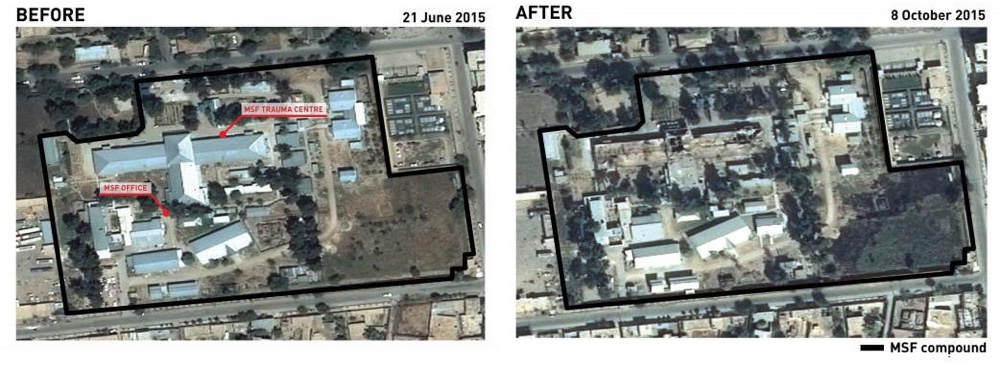
U.S. forces bombed a Doctors Without Borders-run hospital in Afghanistan last year, destroying it and killing and injuring scores of medical personnel and patients. But the air strike didn't amount to a war crime because it was caused by "unintentional human errors, process errors, and equipment failures," and “other factors,” U.S. military authorities said today.
For that sum you could build a small forest of Burj Khalifas - the world's tallest building, in Dubai, cost a piffling £1bn ($1.5bn). You could also knock up more than 70 miles of particle accelerator. The 17-mile-long Large Hadron Collider, built under the border between France and Switzerland to unlock the secrets of the universe, cost a mere £4bn ($5.8bn). The most expensive bridge ever constructed is the eastern replacement span of the Oakland Bay Bridge in San Francisco, designed to withstand the strongest earthquake seismologists would expect within the next 1,500 years. That cost about £4.5bn ($6.5bn).
Even the Great Pyramid would cost less than a billion to make, now, and require only a few hundred workers. But there is one man-made object pricier than a new nuclear power station in a western democracy: the international space station, alleged to have cost more than $100bn.
The deal seems strangely shady for something so obviously controversial: driven by political wrangling, with building costs offset to France and the project financed by China in return for a promise that the UK will pay twice the going rate for the electricity -- so expensive that onshore wind farms are cheaper. Even environmentalists OK with nuclear think the idea of a single vast plant powering an entire region is an outdated nightmare in the making.
Meanwhile, much smaller plants in France and Finland will apparently be completed at a fraction of the cost -- but at direct taxpayer expense. Whatever you might say about the project or nuclear power, it's a reminder of how comically bad the British are at planning anything that takes more than few years to complete.
Kids are impatient little buggers who don’t realize they’re being rude when they interrupt you when you’re having a conversation. Here’s an easy technique that will teach children a better way to get your attention.
Mom coach Kirsten explains the four steps in the video above.
Teach your child to place his or her hand on you when they want to speak to you while you’re talking to someone else.
Put your hand on top of theirs to acknowledge they want your attention.
Politely excuse yourself from the conversation.
Thank your kid for waiting and give him or her your full attention.
You might need to practice this a few times to establish it as a new good habit, but if you’re tired of always saying “wait a minute” or “I’m talking over here,” it’s definitely worth a try.
When a government agency produces a report urging major changes to intellectual property laws, one often expects something heavily weighted in favor of rightsholders
Documents published today by the Australian Government’s Productivity Commission contain a more balanced set of recommendations, several of which are likely to provoke an adverse reaction from both local and international rightsholders.
The Intellectual Property Arrangements draft report is a 600 page epic covering everything from copyright and patent issues through to pharmaceuticals and plant breeders’ rights. Of most interest to readers will be the agency’s comments on infringement, fair use and copyright terms.
Bring on the VPNs
For years Australians have felt that when it comes to entertainment content they’re treated as second class citizens. Aussies believe that not only do they pay over the top for content, but they also have to wait longer for it to arrive.
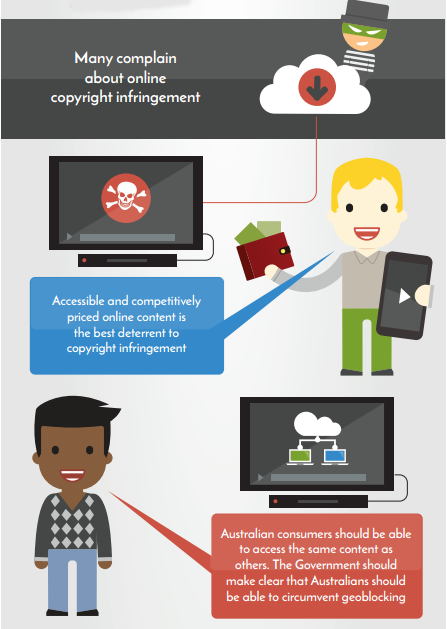
As a result many access overseas services by using a VPN, something which is frowned upon by rightsholders and actively blocked by companies such as Netflix. Nevertheless, the Productivity Commission wants to do everything it can to open up options for consumers.
“Geoblocking results in Australians paying higher prices (often for a lesser or later service) than consumers overseas,” the report reads.
“The Australian Government should implement the recommendation made in the House of Representatives Committee report At What Cost? to make clear that it is not an infringement for consumers to circumvent geoblocking technology.”
But the Commission doesn’t stop there. In case any foreign country wants to pressure Australia into acting otherwise, the agency advises the following.
“The Australian Government should seek to avoid any international agreements that would prevent or ban consumers from circumventing geoblocking technology,” it adds.
Dealing with piracy
The Productivity Commission notes that enforcement is a key factor in the efficiency and effectiveness of the Australian IP system. It also acknowledges that copyright infringement is an ongoing issue. That being said, rightsholders probably aren’t going to like the draft’s conclusions.
“Online copyright infringement remains problematic for rights holders. Evidence suggests many people infringe copyright because of the ongoing difficulty and cost in accessing content,” the report notes.
“Evidence suggests infringement declines with better content availability and most consumers prefer paid, legal consumption. As such, an effective approach to reducing infringement is the timely release of content to Australian consumers. This requires action by rights holders and their intermediaries.”
It’s not difficult to see how these statements dovetail with the recommendation on VPN use and the pressure could eventually see Aussies getting a better deal. But for rightsholders hoping for more enforcement options in the meantime, only disappointment awaits.
“Changes to the law to encourage Internet service providers to cooperate with rights holders, as well as litigation, have only had a modest impact in reducing infringement. Further legislative change is unlikely to improve compliance with the law,” the report states.
Fair Use and Copyright Terms
In keeping with the positive response to increased consumer choice, proponents of expanded fair use provisions and diminished copyright terms also have something to celebrate.
“Australia’s copyright system has expanded over time, often with no transparent, evidence-based policy analysis demonstrating the need for, or quantum of, new rights. A new system of user rights, including the introduction of a broad, principles-based fair use exception, is needed to help address this imbalance,” the report notes.
“The Australian Government should amend the Copyright Act 1968 to replace the current fair dealing exceptions with a broad exception for fair use. The new exception should contain a clause outlining that the objective of the exception is to ensure Australia’s copyright system targets only those circumstances where infringement would undermine the ordinary exploitation of a work at the time of the infringement.”
And on copyright terms, yet more consumer-friendly advice.
“The term of protection for most works is now more than 70 years and considerably longer than necessary to incentivize creation of most works (with a commercial life less than 5 years). The current duration of copyright imposes costs on the community and access to works is restricted, particularly for works not commercially available but still subject to copyright protection,” the draft reads.
“While hard to pinpoint an optimal copyright term, a more reasonable estimate would be closer to 15 to 25 years after creation; considerably less than 70 years after death. Perpetual copyright protection of unpublished works should also be removed.”
Consultation period
The report is currently in draft and written submissions are invited up until Friday 3 June 2016. The final report will be handed to the government in August and published shortly after.
Slowly but surely, Apple Music is starting to treat Android like a first-class platform. The most recent update to the app adds support for music videos and family plan signups. Yes, it's odd that both of those were exclusive to Apple's platform until now.
The last update in February added SD card download support, but the addition of music videos is arguably more important. This is an entire category of content that wasn't supported on Android, even though Android users were paying the same $9.99 per month as Apple users.
After months of rumors, Netflix has officially given the green light for a The Punisher series. Entertainment Weekly reports that Marvel has just ordered a new series starring the gun-toting vigilante first introduced in Daredevil season 2. Jon Bernthal is set to reprise the role of Frank Castle, army veteran turned anti-hero, for the show. Writer and producer Steven Lightfoot will serve as showrunner.
There are really only a handful of things I look for in wireless Bluetooth headphones: comfort, sound quality, and wireless reliability. Skullcandy's new Grind Wireless, a set of Bluetooth headphones that hit stores earlier this month, do well in all of those areas and only cost $89.99. They aren't perfect, but for less than a Benjamin, they get the job done and look pretty good while doing it.
The Grind Wireless look just like the wired version of the Grind, which means they have a minimal design, round, on-ear cups, a metal headband, and a padded top. A metal headband is rare to see in this price range; generally, inexpensive headphones are entirely plastic. I don't like that the Grind Wireless don't fold up in any way — jamming them...
Mother. Flipping. Smart. Contact lenses. Every time I see a patent for these, I get slightly less freaked outby the idea of putting electronics in my eye, and slightly more excited for my soon-to-be laser vision. The latest company to join in the hypothetical race for a technology that barely exists is Sony, with the Japanese tech company applying for its own smart contacts patent.
The patent, which doesn't appear to have been approved yet, describes a "contact lens and storage medium" capable of controlling an "image pickup unit" (aka a camera). The patent describes a lens that can take images when it detects the "conscious" blink of an eye, storing them locally, or sending them to an external device. A "tilt sensor" is used to...
by Claire Lower on Skillet, shared by Andy Orin to Lifehacker
Flour isn’t just made from wheat. Not only are there “alternative” grain flours, some are made with nuts, legumes, and even spuds. They may seem reserved for the gluten-free, health-conscious set, but when used well wheatless flours can be amazing. We’ve rounded up a few, and some delicious ways to use them.
Go Nuts With Almond and Hazelnut Flour
If you feel like getting a little nutty, try almond or hazelnut flour. They’re all highly prized by health nuts for their fiber content and low glycemic index, but what I care most about are all the tasty treats you can make with nut flours. They can contribute textures and flavors you can’t get with the All Purpose stuff.
For everyday baking, almond flour adds a sweet, nutty (duh) flavor and creates a tender, delicate crumb. It also gets some good-for-you fiber and fats in there, which is nice because I need all the nutritional help I can get. If you prefer the flavor of hazelnuts to almonds, rejoice, because everything I am about to tell you about almond flour and meal also applies to hazelnut flour and meal. Nut flours aren’t great fits for everything. You wouldn’t want to try and make a crispy, airy baguette, because the dense, oily, gluten-free nature just won’t play well there. Instead pick a pastry that would benefit from a denser, richer crumb, like any of the following:
Brownies: Nuts and chocolate are a natural match. Besides contributing a great flavor boost, both hazelnut and almond flour contribute extra moisture and body, making for an extra fudgy, extra tasty brownie. If you need a recipe, try this one from King Arthur Flour.
Breading: If you’re looking for a gluten-free way to crisp up some chicken strips, or just want to coat them in a little extra flavor, give them a quick toss in almond or hazelnut flour. The procedure for breading is the same as it ever was; just dip your meat of choice in an egg wash, then roll it around in some nut flour or meal. If you want extra tastiness, mix some cajun seasoning or garlic salt in there.
Macarons: If you do nothing else with almond flour, you should make macarons. King Arthur Flour has a great, though slightly involved, recipe for the tasty little sandwich cookies. Besides the almond flour, the ingredients are pretty common (sugar, egg whites, cream of tartar, and salt) but there’s a lot of whipping, resting, and gentle folding involved, so be sure to thoroughly read the instructions.
Quick Breads and Muffins: There is nothing sadder than a dry loaf of banana bread or muffin, which is why adding nut flour to your batter is such a good idea. The extra fat and moisture makes for a nice and tender crumb, keeping your quick breads of muffins from drying out. Also, almond and hazelnut banana bread sound downright decadent. If you need inspiration, start with these lemon poppyseed muffins from King Arthur Flour or these mini almond pound cakes from Bob’s Red Mill.
Chickpeas (or garbanzo beans) are a creamy, hearty gift that keeps on giving. I’m sure you are all familiar with the wonder that is hummus, but have you heard the good news about chickpea flour? Also known as gram flour, you’ve probably encountered this tasty ingredient in Middle Eastern and Indian cooking. This relatively high-protein flour has a slightly nutty flavor, and crisps up like whoa when fried in a bit of oil. This means flatbreads (and pizza crusts, and crackers) are perfect candidates for this particular flour.
If you want to get your cast iron skillet in on the action (and why wouldn’t you?) make socca, a large chickpea pancake that Mark Bittman describes as “totally foolproof.” Head over to the New York Times for the full recipe, but it couldn’t be easier. Preheat your skillet in an oven heated to 450 F. Mix a cup of chickpea flour with a cup of warm water. Stir in some salt and pepper and a couple tablespoons of olive oil. Remove your heated skillet and (carefully) swirl some olive oil around in there. Fry onions and rosemary in your hot pan, and pour the batter directly on top. Bake it all together until set and then broil for gorgeous crispy spots.
If you could only make socca with chickpea flour, that would be enough, but it has more gifts to give. It can be used to thicken soups, sauces, and stews, and makes a great binder for veggie burgers (a couple tablespoons should do the trick), and can even be used to make a delicious, decadent fudge (which you can learn how to make by watching the video above).
Rice (Flour) Is Nice
Rice flour is simply ground-up, raw rice, and can be made from either white or brown varieties. If you’ve ever perused an Asian market you may have seen two types of rice flour: glutinous and non-glutinous. Neither contain any gluten; “glutinous” just means that stuff is sticky. Perhaps the most fun application for glutinous rice flour (also called “sweet rice flour”) is mochi.
Mochi is deceptively easy to make, and only requires four ingredients: rice flour, water, sugar, and cornstarch. Just mix the rice flour and water in a bowl and steam for twenty minutes. After that, stir in the sugar over heat, letting it melt and incorporate completely. Transfer the dough to a baking sheet that is liberally coated in cornstarch (coat your hands too) and roll it out, cut it into pieces, or wrap it around ice cream and freeze. If you don’t have a steamer, you can also use the microwave, as explained in the video below.
Moving on to savory applications, rice flour makes excellent noodles. Though it’s a slightly involved process (you’ll need two people to make the dough) the ingredient list is short enough (rice flour, water, oil, and tapioca starch). If you want to try your hand at it, check out his recipe from Vietnamese Home Cooking, via Epicurious. Rice flour also makes for a light, crispy batter, and this one from ChefSteps is out-of-this world.
This tempura-style batter is infused with carbon dioxide for the laciest, lightest, crispiest coating you’ve ever crunched down on. You’ll need a whipping siphon, but these perfect, golden-brown veggies are a pretty good payoff if you ask me.
Perfect Your Bread with Potato Flour
Potatoes are a pretty perfect food, and potato flour continues the tradition of potato awesomeness by being pretty helpful in the kitchen. Made from dehydrated potatoes, this flour is particularly good at attracting water, making it great for tender breads, waffles, and pancakes. It also tastes like potatoes, which is a good thing.
For general baking: Replace up to 1/4 of any wheat flour in a recipe or substitute 5/8 cup potato flour for 1 cup all-purpose flour.
For yeast breads: Replace up to 1/6 of the wheat flour in a bread recipe or substitute 5/8 cup potato flour for each cup of all-purpose flour.
For a super soft hamburger bun, try this recipe from King Arthur Flour, which uses ¼ cup potato flour for 3 cups all-purpose. The potato flour makes the dough thicker and easier to handle, letting you craft a bun that holds its shape. One tip: when adding potato flour to bread recipes, be sure to mix it with your “regular” flour first; adding water directly to it turns everything into a gloppy, lumpy mess.
Potato flour is also an excellent thickening agent. To thicken soups (try potato soup for soup inception), stews, and sauces, just add a tablespoon at a time until you reach your desired viscosity.
So there you have it: a whole bunch of uses for some of the weirder flours out there. Use them well, and you’ll get great results, and they’ll be worth their (often higher) price tag. Experiment, and enjoy the delicious results.
Xiaomi has been rumored to launch a smartwatch for some time now, and it finally looks like the vendor will unveil its first offering in this space sometime later this year. Co-founder and vice-president Liu De confirmed the existence of the smartwatch, stating that it will be officially announced in the latter half of 2016.
That doesn't say much other than suggest a launch sometime after the month of June, but this is the first time the company has acknowledged that it is working on a smartwatch. According to GizmoChina, Xiaomi will also launch electric bikes and showcase new products from Ninebot, one of the several lifestyle companies the Chinese vendor has invested in.
While there's no further information regarding the smartwatch, Xiaomi is all set to launch the successor to the Mi Band in an event in China on May 10. The Mi Band 2 will offer a display as well as a physical button, and is expected to be aimed at the entry-level segment, much like its predecessor.
If This Then That (IFTTT) is an incredibly popular tool that enables features for web services like Twitter to generate an email through automation and lots more. Microsoft appears to be working on a similar tool for businesses to create automated workflows. Twitter user h0x0d discovered Microsoft Flow, a preview service that connects a number of cloud services together.
Microsoft's Flow is designed to connect services like Twitter, Slack, Google Drive, Dropbox, and Office 365. Microsoft lists a number of example "flows" (recipes), including the ability to generate SMS alerts from emails, pull tweets into Excel, or get Slack notifications when a file is uploaded to a Dropbox folder. You can even create flows to copy files from OneDrive...
Will.i.am's standalone smartwatch, the Dial, is now available to preorder in the UK. The device is an updated version of the Puls — a smartwatch we described as the "worst product we've touched all year" — and works without a tethered smartphone. This means you need to buy your own contract for it, though, and UK mobile operator Three is offering the Dial on a two-year contract from £24 a month with a £49 upfront payment. That's a total cost £625 or $911, which includes 500MB of data and 100 minutes of talk time each month.
Phone manufacturer Fairphone is all about making smartphones that are as accessible and ethical as possible. This includes trying to find conflict-free minerals for use in their phones' construction, but also the software that lives on these devices. Yesterday, the company released its own open source Fairphone OS — an Android-based operating system that doesn't include Google services. This means users will have to find their own apps for email, maps, and a browser, but in exchange they get more control over their software.
This certainly won't be something than many users will want. For most of us on Android, Google's services are just too integral to give up, and the benefits of an open source mobile OS...


 Now that SoundCloud has inked licensing deals with all the big music rights holders, the startup is wasting no time rolling out subscription services and advertising to a wider number of markets to better monetize its 175 million users and compete better against the likes of Spotify, Deezer, Apple Music and the rest. The music-streaming company — sometimes referred to as the YouTube…