If you find your Nexus 5X always crying out for more battery power due to an on-the-go lifestyle, you may want to consider picking up a Vinsic USB-C car charger.
Rated at 5V 3A output, you should be able to rapid charge your Nexus 5X, meaning your battery will get a significant boost during your daily commute. Plus, this charger features over-voltage protection and short-circuit protection.
The Vinsic charger has both a USB-A and USB-C port, allowing you to plug in two devices at once.
If you have misplaced the cable that came with your Nexus 5X or you just want an extra one for your workplace, the Anker USB-C to USB 3.0 cable is a solid choice.
It's 3.3 feet long, which is a pretty standard size for a charging cable and it supports USB 3.0. Since the Nexus 5X supports USB 2.0 you will always get great transfer speed for data.
If you find yourself in need of a longer charging cable for the Nexus 5X, or in need of a cable that's a little more durable, the Cambond 6.6-foot USB-C to USB-C cable is perfect for you.
It's rated for use with 2A wall chargers, meaning you should be able to rapidly charge your 5X in less time with the right charger. It's 6.6 feet long, which is double the length of the cable that ships with the Nexus, so you aren't tethered so close to the wall every time you plug in.
The cord is well-protected and features nylon fiber wrapped around the outside of the cable, which help prevent the wire from becoming frayed.
Although it seems that USB-C might become the preferred connection for phones in the future (because it is), you've probably got a lot of MicroUSB cables lying around. Good news! With the Anker USB-C to MicroUSB adapter, you don't have to let those old cords sit around collecting dust.
This simple adapter can be placed on the end of any MicroUSB cable to make it compatible with a USB-C port. The adapter is capable of receiving USB 2.0 transfer speeds and 2A charging speeds, so as long as your cable is up-to-snuff, this adapter won't feel any different than a standard USB-C cable.
Protecting your screen is important and getting an iCarez tempered glass screen protector can go a long way to making sure your phone lasts for the long haul.
This screen protector covers the entire screen and features a dry application method meant to prevent bubbling.
Keep your desk, counter, or nightstand looking neat and tidy, while charging your Nexus 5X with the NXET USB-C charge dock.
This dock will keep your Nexus completely accessible, making it super easy to swipe through the news of the day, check your calendar, or reply to messages all with one hand. The dock adjusts to three different viewing angles, which means you will always be comfortable when you are looking at it.
It's worth mentioning this dock won't allow you to charge your 5X rapidly; however, it's a good quality dock that still supports USB 2.0 transfer speeds for when you plug the dock into your computer.
If you find your Nexus 5X is always dying on you when you aren't around outlets of any kind, you may want to consider getting a Anker PowerCore+ power bank.
With a huge capacity of 20100 mAh, the Anker PowerCore+ can fully charge your Nexus 5X seven times and still have some juice left. It has two USB-A ports and a USB-C port allowing you to charge three devices at once, meaning all your favorite electronics will always be charged and ready to go.
While this is a great power bank, the cord that it comes with is not as high quality. We recommend using a better cable to ensure your devices are properly charged and protected from damage. The Cambond cable we mentioned earlier in this list would be a perfect choice.
The Photos Live case is a case for your Nexus 5X that is as unique as you are. It's a one shell case that features a photo of your choosing, making it perfect for treasuring a precious moment, highlighting your favorite photo, or even using a unique print from your favorite artist.
The Photos Live case has a companion app you can download to turn your wallpaper into an entire slideshow, making it seem as though your case is integrated into your Home screen!
A cool case to make you the talk of the town, or a timeless gift for a close friend or loved one.
If you want a case that offers your Nexus 5X some protection while keeping the beautiful natural look of the phone, the Ringke Fusion case is perfect for you.
It's a one-piece TPU sleeve that fits the 5X snuggly and doesn't block the usage of any buttons or ports. It has a dust cover over the headphone jack, so you can rest easy knowing dirt will stay out of there.
It's a little thicker around the edges of the phone to protect the phone from falling damage, and it even comes with a screen protector, so it protects the entire phone.
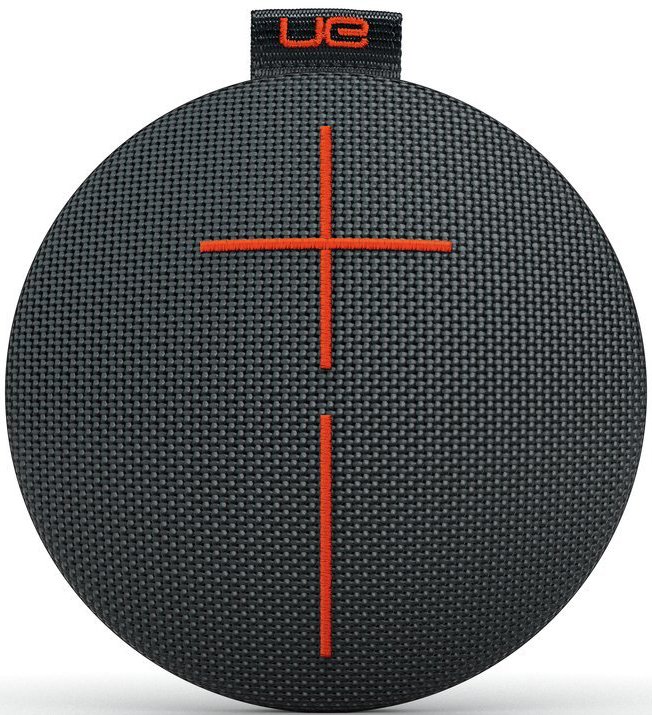
The Ultimate Ears Roll is a mini Bluetooth speaker you can take with you wherever you go. It has a fantastic water-resistance rating, meaning you don't have to sing alone in the shower anymore. Plus, it also comes with a floating life preserver, meaning you can bring this speaker to a pool party and have it float along the surface.
The sound quality of this tiny guy is impressive, and you can pair two together for a stereo experience. Download the UE app to control playback so you can control it from afar.
UE has released the Roll 2, which includes all the features of the older model along with a few key improvements. The Roll 2 has better sound — both in volume and tone — while also increasing the Bluetooth range to 100 feet.
The Roll 2 costs about $99; however, you can find the original Roll on sale, and it could be worth keeping an eye on the price as time goes on.
To some people, the value of the upgraded UE Roll 2 is offset by the potential savings of the original Roll. We have links to both versions below, so you can decide between the new and the old.
Microsoft has convinced another top Android phone maker to bundle its range of apps. Xiaomi and Microsoft have agreed to partner on bundling Office and Skype apps on the Mi 5, Mi Max, Mi 4s, Redmi Note 3, and Redmi 3. Like previous deals with Asus, Samsung, Sony, and Dell, the Xiaomi partnership is related to a patent-licensing deal, and the details have not been fully disclosed.
Xiaomi will start bundling Skype and the Office apps in September, providing Microsoft with a new way to reach Chinese consumers. Xiaomi recently broke into the top five worldwide phone makers (according to IDC), and the company's rise in market share has been attributed to its success in China. Microsoft is clearly keen to tap into Xiaomi's rise in growth, and...
The European Union is warning member states against banning services like Uber and Airbnb, under guidelines aimed at harmonizing regulation of the so-called "sharing economy." In a draft of the guidelines obtained by Reuters and The Financial Times, the European Commission says outright bans on the services should only be used as a "measure of last resort," suggesting that governments instead implement more moderate restrictions.
The goal is to establish a general framework for how to regulate companies like Airbnb and Uber, which have so far been forced to navigate different regulations across 28 EU member states. Uber has faced partial bans in France, Germany, and Belgium, while Airbnb has faced criticism in some cities for its effect...
Twist your tongue with these great word games for Android.
We've rounded up the best Android word games you'll find in the Google Play Store. These will test your puzzle-solving skills, trivia knowledge, and sheer reflexes. Quite a few have in-app purchases, but still offer plenty of free content on their own.
Ready to start working with letters? Check out our list of the best Android word games!
Words With Friends is one of those classic games that practically everyone has played, so it only makes sense that, eventually, a sequel would be released.
So what's new with Words With Friends 2? Zynga has completely redesigned the look and feel of the game while also adding a bunch of cool new game modes. There's Solo Challenge which pits you against iconic literary figures controlled by the CPU, from Jane Austen to the master wordsmith himself William Shakespeare. Then there's Lightning Round which is a team-based mode where it's a race to get to 750 points. Each member of your team starts with their own board and you swap and add words to each other's board as fast as you can. Both of these modes seem to address the biggest gripe with the original game — waiting for your friend to finally play a word.
Its a substantial update to a beloved game that'll likely lead to a whole bunch of Facebook invitations to play from friends and family, and does good work to further differentiate Words With Friends from Scrabble.
Wordament is an online-only multiplayer game that lets you compete against other spellers across the globe. Swipe to connect letters diagonally, horizontally, and vertically in order to score points based on a word's rarity, determined by how often the word is found by the player-base. You can rotate the board to better see combination options, but the placement of letters does not change in relation to other letters.
Add an Xbox or Facebook account in order to keep track of your friends and progress as you move up the leaderboard. Ads are minimal — a refreshing for many gamers.
Heads Up! is a really fun local multiplayer trivia game. One player holds a phone or tablet to their head showing a word, and a teammate gives hints as to what the word is (without saying it specifically, of course). A quick flip down of the device brings up a fresh word when guessed right, while a flip-up is a pass. After it's all done, you can watch a video replay taken from the device's front-facing camera and share it out with friends. There are six themed packs available out of the gate, and plenty more through in-app purchases of about a buck a pop.
You definitely need to give Heads Up! a try if you've been looking for something easy to play at parties.
How good are you at word association? Put your brain to the test to find the right word in 4 Pics 1 Word.
This game gives your four pictures that are all connected by a common word. Can you figure it out? This is a great casual game that starts out pretty easy but gets progressively more difficult as you reach the higher levels. There are literally thousands of levels to play so you're never going to run out of puzzles. It's a great game to play by yourself or with a small group of friends. It gets your brain going — and is also filled with ads. But it's free!
SnapAttack is the classic Scrabble game with a twist. Instead of taking turns against opponents creating words one at a time, SnapAttack gives you 2.5 minutes, 7 letter tiles, and a board with two words already on it. Your job is to place the letter tiles on the board as words and rearrange them as many times as possible before your time is up. SnapAttack rewards points the same way as Scrabble: tiles are assigned a number, and the board has score multipliers in the form of double- or triple-word and letter scores.
Work your way up the global leaderboard by creating as many words as possible during each round. A new round will automatically begin, so expect to lose track of time. There doesn't seem to be any ads in this game, a nice change from the norm.
The classic word-guessing game show is available for mobile in the form of Wheel of Fortune Free Play. Featuring slick graphics and Pat Sajak himself, Wheel of Fortune Free Play is the official game of the beloved game show. Spin the wheel and solve the word puzzles, and then see if you can win the bonus round
You'll have to play for a while to level up and unlock new modes like head-to-head and Vanna's Showcase, and there are daily bonus rewards to keep you playing. If you love Wheel Of Fortune, you'll love the mobile game.
Let us know in the comments below if we missed any of your favorite word games! If you'd like to see more great Android games, check out our roundup of the best Android games.
Gone are the days where a humorous picture or phrase will get your site’s 404 page noticed. In a version of the Internet where GIFs are the new text and videos are the new photos, it’s going to take a lot more than a witty phrase to stand out amongst the crowd.
But, we were surprised to see that most sites still aren’t taking advantage of that valuable real estate. Read More
Think about all the instances of geese you know and love from popular culture: Mother Goose, the Drake-approved OVO x Canada Goose collab, Grey Goose (got you feelin' real loose). Take all of these warm, happy thoughts from your mind and throw them in the trash, where they belong. Because what I'm about to show you is going to change everything you know about geese.
Last weekend I went to Central Park and saw something peculiar:
I've never known geese to be violent, but this goose was mad. You can barely make out its tiny gaping mouth in this photo, but that goose is mid-hiss at the crowd that had formed around it and its goslings. You also can't see the two other goslings just out of frame in this photo,...
You might not have thought of – much less visited – Myspace in years. (Yes, it’s still around. Time, Inc. acquired it and other properties when it bought Viant earlier this year.) But user data never really dies, unfortunately. For Myspace’s new owner, that’s bad news, as the company confirmed just ahead of the Memorial Day holiday weekend in the U.S., that it… Read More
by Caroline Weinberg on Vitals, shared by Alan Henry to Lifehacker
No matter how fast medicine moves us towards treatments, preventive medicine will always be the most effective and cheapest way to keep healthy. In this post, we’ll run down some common women’s health screening tests, when you should get them, and what you’re in for when you walk in.
Also, keep in mind that this list does not include things checked during your annual primary care visit (blood pressure, cholesterol, blood sugar, urinalysis, abdominal circumference, physical exam, etc) or behavior related screenings (STIs, lung cancer, etc). Those tests are all absolutely critical to maintaining your health as well: Don’t skimp on them just because you think heart disease doesn’t seem as scary as colon cancer.
As always, final decisions about your personal care should be made after a conversation between you and your physician. Not after a quick perusal of the internet.
What Is It? The manual breast exam looks for signs and symptoms of a number of breast problems, including cancer. There are two types: clinical breast exams (CBE) are performed by your doctor; breast self exams (BSE) are done at home. The goal is to identify signs early on so you can catch any problems before they progress.
Your doctor starts by checking your breasts for rashes, skin dimpling, or other abnormal changes. Once the visual check is done, they use the pads of their fingers to physically examine (palpate) your breast, under arm, and under your collarbone for lumps or abnormalities in your breast tissue and lymph nodes.
What Does It Feel Like? Like someone is kneading your breast and moving your arms around as if you’re a wax figure. Not painful but awkward in that “where am I supposed to be looking right now” kind of way. Also, doctors usually have cold hands.
Many doctors follow the ACOG guidelines and start including a bonus breast exam as part of your routine healthcare visit in your early teens. There’s nothing wrong with that, but research suggests that it can result in a high number of false positives (incorrectly identifying a problem where there is none). Breast cancer is exceedingly rare for women in their 20s; ACS argues that early CBEs may lead to unnecessary additional testing and procedures (not to mention anxiety).
In the past, women were told to perform monthly self-exams, which for most of us meant a half hearted poke on no particular timeline. ACOG and ACS are on the same page with this one, citing research that suggests no difference in mortality between women who perform BSEs and those who do not. Doctors now recommend that you practice “breast self-awareness.” Breasts come in all shapes, sizes, and consistencies: know your normal.
Mammograms
What Is It? A mammogram is an X-ray of your breast, designed to detect breast cancer. They can be done as a screening (for women who don’t have other symptoms) or a diagnostic (for a woman with signs/symptoms of breast disease or a lump). It is the only imaging technique shown to reduce breast cancer mortality.
What Does It Feel Like? I haven’t had the pleasure yet, so I crowdsourced this question on mammograms. The most common response was “Like your breast is in a vice.” General consensus is that the 10 - 15 minute test is definitely unpleasant, but less so than breast cancer.
When Should I Get It? This one’s a bit complicated, with organizations releasing sniping press releases and op-eds trying to discredit one another over mammogram screening guidelines.
In what turned out to be a highly contentious move, earlier this year the US Preventive Services Task Force (UPSTF) issued a new set of recommendations. They recommend screening mammography once every two years in women ages 50-74. They judged that low risk women younger than 50 or older than 75 do not require regular screening — everyone else disagreed.
What Does It Feel Like? It’s a blood test, so it feels like a needle prick.
When Should I Get It? Rates of the mutation are very low in the general population (less than 0.3%) and routine screening is not recommended for all women. For those with a family history of breast, ovarian, tubal, or peritoneal cancer, the USPSTF recommends genetic counseling and, if desired, BRCA testing after the age of consent (18 years). The FDA and CDC both caution against the use of home screening tests.
Pelvic Examination
What Is It? The pelvic exam is the physical exam portion of your visit to the gynecologist. In addition to checking your general reproductive health, doctors assess your organs, looking for signs of health conditions including cysts, fibroids, and STIs.
The pelvic exam includes an external examination and a bimanual examination. During the bimanual exam, two fingers are inserted into your vagina to assess your cervix. The doctor will also examine your uterus, ovaries, and fallopian tubes by pressing down on your abdomen. Depending on your doctor, they may also perform a rectovaginal exam (one finger is inserted into the rectum during exam). This allows a more complete picture of your anatomy, including the position of your uterus and assessment of the rectum.
What Does It Feel Like? Pretty much exactly like it sounds. Your doctor inserts fingers into your vagina and applies pressure to your lower abdomen. It’s not exactly a life highlight, but should not be painful. Generally you will stare at the fluorescent lights while awkwardly making small talk with the person feeling your internal genitalia. In part of a running theme, if the speculum is metal, it might be cold. Sometimes your doctor will warn you; sometimes it will be an unwelcome surprise.
When Should I Get It? As with many of these guidelines, it depends on who you ask.
Both organizations agree that pelvic examinations for women younger than 21 are only recommended when the medical history indicates a specific need. An annual visit to your gynecologist is still recommended for STI screening, general reproductive health counseling, and birth control as needed.
Pap Smear
What Is It? Although the pap smear was first developed in the 1920s, it didn’t gain real traction in the US until decades later. At the time, cervical cancer was the number one cause of death in women. With the advent of pap smears as a standard of women’s health, and improved cancer treatments, death rates decreased dramatically. Today, the pap smear (or, more commonly, “pap”) is considered one of the most critical screening tests for women. It aims to identify any cervical changes in the precancerous stage, before they develop into cervical cancer. It does not test for HPV infection. In 2012, a co-screening blood test for the human papilloma virus itself, the cause of nearly 90% of cases of cervical cancer, was incorporated into the guidelines.
For the test, a speculum is inserted into your vagina to give the doctor visual and physical access to your cervix. Your gynecologist will use a small spatula and brush to take a sample of your cervical cells. These scrapings are stained and examined under a microscope to look for dysplastic changes – in other words, to see if any of the cells are growing abnormally.
What Does It Feel Like? Not surprisingly, the pap is uncomfortable because your legs are up in stirrups and you are being propped open by a cold piece of metal (or plastic) while someone stares at your genitals. The test itself feels somewhat akin to having something dragged across your cervix for a few seconds (which is exactly what’s happening). The discomfort is fleeting.
When Should I Get It? In the past five years, guidelines have changed to recommend less frequent screenings.
Age 30-65: every 3 years or every 5 years with HPV co-screening
Age 65+: dependent on prior history
Why the change to screening later and with less frequency? The virus is extremely common in young women and, most importantly, many of the strains are handily taken care of by your immune system. HPV infection in a young, sexually active woman will likely self resolve without treatment.
There are vaccines — Gardasil and Cervarix — that protect against the cancer and genital wart causing strains of HPV. While earlier vaccination is ideal (it is recommended after age 11), the vaccine is recommended for women through the age of 26. This is a vaccine that prevents cancer. If you are eligible and don’t have it, go get it.
Colorectal Cancer Screening
What Is It? Most people associate colorectal cancer screening with colonoscopies — a multipurpose test that can screen for colorectal cancer, ulcers, polyps, and bleeding. There are actually a few methods of testing for colorectal cancer, each with a different screening recommendation. The unique advantage of the colonoscopy is that it visualizes the entire colon and allows for tissue sampling and removal of polyps as appropriate.
There are also several screening tests that look for blood in the stool, a possible sign of colon cancer.
What Does It Feel Like? As for the mammogram, I had to outsource this question. For the colonoscopy and sigmoidoscopy prep, the almost universal responses were either “I don’t want to talk about it. There’s just so much poop.” For the colonoscopy itself, most people are sedated so you will have no memory of the experience. Because the sigmoidoscope does not travel as far up the digestive tract, patients are awake through the procedure. This was described “like someone is snaking a pipe...only it’s your rectum.”
For the fecal occult blood screening test (FOBT), your doctor will insert one finger into your rectum and test for blood. This feels exactly as it sounds. For the fecal immunochemical test (FIT), you will collect samples of your own stool. This is painless, but kind of gross.
When Should I Get It? ACS recommends four screening options for low risk women. In all cases, if a test is positive, further exam via colonoscopy is required. Doctors reccommend screening beginning at age 50 or age 45 for African Americans. Patients can choose between a colonoscopy every 10 years, a flexible sigmoidoscopy every 5-10 years, CT colonography every 5 years, or double contrast barium enema every 5 years. The American College of Gastroenterology (ACG) emphasizes that their preferred screening test for polyps and cancer is a colonoscopy.
For detection of cancer, ACS recommends either a Guaiac based fecal occult blood test or fecal immunochemical test test every year or a stool DNA test every 3 years. Based on research suggesting FIT to be a superior test, it was adopted as the preferred cancer detection test by the ACG.
Bone Mineral Density Screening
What Is It? Osteoporosis is a condition in which bones lose density and weaken, making them brittle and more likely to fracture. It is a common consequence of decreased estrogen levels during menopause. It’s also significantly more common in women, with 1 in 2 post menopausal women at risk for an osteoporosis related fracture. That’s where the bone mineral density screening comes in.
Bone density is measured by an x-ray that determines the level of calcium and other minerals in your bones. Specifically, it is a dual energy x-ray absorptiometry (DXA) machine, which reveals more than a standard x-ray. Although screening is also possible by an ultrasound of your calcaneus, or heel bone, diagnosis and treatment standards are based on DXA findings.
What Does It Feel Like? The bone density test is an x-ray, typically of your hip and spine. You lie on a table and a technician will manipulate a machine to point at different parts of your body. It is painless. Unlike almost every other preventive test on women, this time you get to keep your clothing on.
Women younger than 65 should be screened if their fracture risk is equal to or greater than that of a 65 year old woman.
Regular screening and early treatment remains your best bet for reaching (or outliving!) the average American lifespan of 78.74 years (if you don’t live in the US, your average life expectancy can be found here.) Insurance coverage in the US is higher than ever, but many still have limited or no access to this kind of preventative care. If you do not have a regular physician or are uninsured, there are programs that can help:
The National Breast Cancer and Cervical Cancer Early Detection Program was established in 1991 and provides testing to low-income, underinsured, and underserved women in the US. Under the current Affordable Care Act (ACA), screening mammography is offered without co-pay or deductible to women with health insurance. Further information on insurance and screening can be found here.
The Colorectal Cancer Control Program offers colonoscopies for the underinsured. If there is no program near you, try reaching out to the American Cancer Society at 1-800-ACS-2345.
Beyond these, talk to your primary care physician or health care provider. There may be local or community programs that can help find affordable or free resources for these screenings as well.
Welcome to the roundup of the best new Android applications, games, and live wallpapers that went live in the Play Store or were spotted by us in the previous 2 weeks or so.
Please wait for this page to load in full in order to see the widgets, which include ratings and pricing info.
Looking for the previous roundup editions? Find them here.
A tiny programmable board designed as part of a UK educational initiative for kids to learn programming skills and originally distributed by the public service broadcaster, the BBC, to one million schoolchildren is now up for public pre-order. Read More
Dwayne "The Rock" Johnson has signed on to play one of the earliest superheroes: Doc Savage, who's said to be an inspiration for Superman. A film adaptation of Doc Savage was announced back in 2013, but apparently it's only now getting off the ground. Shane Black, the beloved action movie writer and director of Iron Man 3, is on board to direct.
There aren't many details about the film yet, but Johnson makes it sound like it should be pretty funny and strange. This is what he wrote in an Instagram post announcing the casting (emphasis his): "Here's the #1 reason I'm excited to become Doc Savage... HE'S A F*CKING HILARIOUS WEIRDO!"
From a hummus soup with the texture of miso to hummus-stuffed falafel and a hummus potato salad, Brothers Green Eats offers up five different ways to incorporate hummus into amazing dishes you may never have thought of—assuming any hummus is left in your fridge after opening it.
We already gave away three of these, but the bottom line was that Sabra—who obviously have a vested interest in making sure you buy hummus (even though it’s super easy to make your own, and barring that, you can improve the store bought stuff)—invited the guys out to an event, and asked them to come up with some innovative ways to use hummus in recipes. Hit play on the video above and fast forward to two minutes in (about here) to get right to the good stuff.
They start off with a flatbread topped with hummus as a base for a simple greek-style salad on top, made from a little lettuce, some olives, feta, and a little olive oil, which looks fantastic for an appetizer or any time of the day. Then they move on to the hummus potato salad, which is really just some seasoned and boiled potatoes, celery, and golden raisins (totally optional, I think) tossed up with a little spiked hummus (hummus with some sour cream, a hit of parsely, some lemon, and some curry powder) for an amazing side dish.
They move on to the hummus stuffed falafel, made from some soaked chickpeas and spices they put through the food processor and stuffed with hummus before cooking, and a hummus-based noodle soup that you’ll have to watch to really understand. They close the whole affair with some barbecue hummus chicken kebabs, which look amazing, and are as simple as you might think: hummus and barbecue sauce in equal parts, and marinade some cubed chicken with it for a few hours or overnight—then toss it right on the grill (they use their broiler, and prop the skewers up on a baking dish.)
All said, hit play on the video above for some pretty ingenious ways to use up the hummus in the back of your fridge—or for an excuse to go out and buy some hummus and make something amazing.
This interview with UBS whistleblower Brad Birkenfeld is as neat a case study in financial corruption as you could ask for: Birkenfeld's disclosures detailed 19,000 US tax evaders, including the bank's super-secretive list of "politically exposed persons," including people who laundered money for terrorists, and the US government threw him in prison (as well as paying him the largest reward in US history), declined to prosecute three quarters of those implicated, and then put him in prison.
(more…)
Your at-a-glance breakdown of the three new ZenFone 3 models.
ASUS today took the wraps off three new Android phones in the mid-to-high-end space, including the gigantic ZenFone 3 Ultra and the most advanced ASUS phone yet, the Snapdragon 820-powered ZenFone 3 Deluxe. With three new phones arriving simultaneously, it's worth taking a look over the specs to see how they compare.
Check down below for a full rundown of ZenFone 3, ZenFone 3 Deluxe and ZenFone 3 Ultra hardware specs.
Category
ZenFone 3
ZenFone 3 Deluxe
ZenFone 3 Ultra
Display
1080p 5.5-inch SuperIPS+ LCD 77.3% screen to body radio
1080p 5.7-inch SuperAMOLED 79% screen to body ratio
1080p 6.8-inch IPD LCD 79% screen to body ratio
Construction
Front and rear Corning Gorilla Glass panels with 2.5D contoured edges and metal frame
Full aluminum alloy unibody with "invisible antenna"
Full aluminum alloy unibody with "invisible antenna"
Processor
Qualcomm Snapdragon 625 Octa-core 14nm 8x1.4GHz ARM Cortex-A53
Qualcomm Snapdragon 820 series
Qualcomm Snapdragon 652 Octa-core 28nm 4x1.8GHz ARM Cortex-A72 4x1.4GHz ARM Cortex-A53
GPU
Adreno 506
Adreno 530
Adreno 510
RAM
4GB
6GB
4GB
Main camera
16MP ASUS PixelMaster 3.0 (Sony IMX298 sensor) f/2.0, 6-element Largan lens 0.03 second TriTech autofocus 4-axis OIS 3-axis EIS Color correction sensor Dual-tone LED flash
23MP ASUS PixelMaster 3.0 (Sony IMX318 sensor) f/2.0, 6-element Largan lens 0.03 second TriTech autofocus 4-axis OIS 3-axis EIS Color correction sensor Dual-tone LED flash
23MP ASUS PixelMaster 3.0 (Sony IMX318 sensor) f/2.0, 6-element Largan lens 0.03 second TriTech autofocus 4-axis OIS 3-axis EIS Color correction sensor Dual-tone LED flash
Asus has announced its new ZenBook 3, an 11.9-milimeter device it's calling the "the world's most prestigious laptop." Asus Chairman Johnny Shih detailed the ZenBook 3 on stage at Computex, comparing it directly to MacBooks, promising a device that weighed less than Apple's lightest laptops, and a processor "two times faster than MacBook."
Shih said the ZenBook 3 was "the best of both" MacBook and MacBook Air, being lighter and thinner than the former, and more powerful than the latter. The ZenBook 3 will also feature the company's highest screen-to-body ratio of any of its laptops. A ZenBook 3 with an i7 processor and a 1TB solid state drive will be available for $1,999, or $1,499 with a 512GB SSD.
Asus is taking on Microsoft's latest Surface's tablets with its Transformer 3 and Transformer 3 Pro, a new generation of 2-in-1 devices, announced today at Computex Taipei. The Asus Transformer 3 Pro is a direct competitor for Microsoft's Surface Pro 4, and will be purchasable with an Intel i7 processor, 16GB of RAM, and a 1TB solid state drive. The device is a hybrid laptop and tablet, but Asus is emphasizing the device's power, describing it as "the world's most versatile PC," and detailing an array of ports to make the Transformer 3 Pro simpler to connect to other devices.
The standard Transformer 3 won't have the same specifications as its Pro sibling, with Asus' Jonney Shih saying only that it would feature a seventh generation...
Meet Zenbo, a new robot friend for seniors, kids, and anybody else who wants to invite a less-cute real-world version of BB-8 into their own home. Asus chairman Jonney Shih showed off Zenbo on stage at Computex today, describing the robot as a smart home manager, security guard, hands-free kitchen assistant, and family photographer.
Zenbo looks like an iMac G4 riding a Sony Rolly, but appears to work like Amazon's Echo, providing recipe recommendations and similar services in response to voice queries. Users can also Zenbo to buy goods online, logging into accounts and inputting passwords with their voice, and take photos like an autonomous selfie stick.
We’ve covered lots of ways to cram a lot of stuff in small suitcases, but this video and infographic from Expedia is full of handy packing tips to remember the next time you’re heading out on a business trip—or a well-earned vacation.
Make no mistake, we’ve also shown you how to pack for a long trip, but it doesn’t hurt to have a reminder. Some of our favorite techniques are here too, like remembering to use packing cubes to organize items into smaller containers, make use of empty space like the insides of shoes and other items for even smaller things (like socks, for example), and to roll your shirts and sweaters to save space. They even cover some of our favorite rolling methods, like the military roll. Hit play on the video above, or check out the graphic below for more.
By now, if you have not downloaded Google’s Nik Collection, at the very least you have heard that this once $500 software, was made free for download in March 2016. The Nik Collection, as it has been known for over a decade, is a set of photographic filter plug-ins, and image enhancement tools, that delivers another look and feel to your photo.
The Nik Collection is comprised of Analog Efex Pro, Color Efex Pro, Dfine, HDR Efex Pro, Sharpener Pro, Silver Efex Pro and Viveza. As you see, the suite is quite extensive, thus this overview will just touch on its potential uses, and hopefully encourage you to further explore the collection more in-depth.
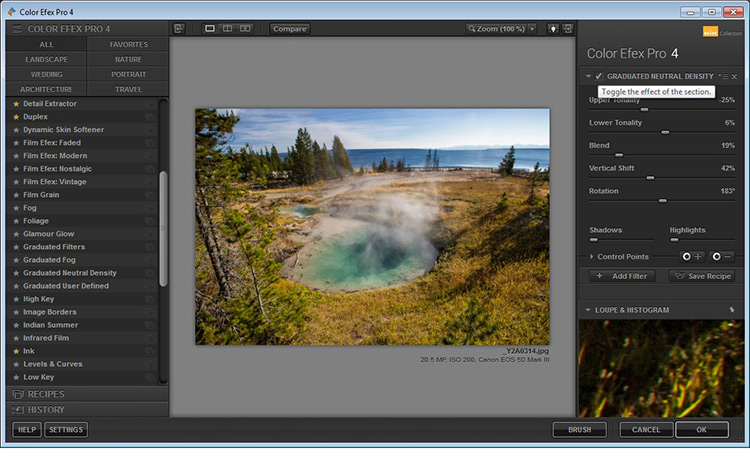
The layout in each set is very similar, which translates to ease of use once you get the hang of it. Preset filters are listed down the left side panel of the dashboard. If you click any of them, the chosen filter is immediately applied to your preview, and you then have sub-options for that filter listed on the right panel, which gives you further control over its application.
An awesome feature that the Nik Collection utilizes is called Control Points, which is available in each plug-in. A control point, as the name implies, is a way to control the application of a filter to selected areas of your choice. Take note of this, as it will be referenced and elaborated on below, as the various plug-ins are discussed.
Analog Efex Pro
If you love the images produced by older cameras, or want to add a vintage look to your photo, Analog Efex Pro may be the set that appeals to you. It strives to pay homage to techniques used by photographers many years ago, and will help transport your image back in time.
Original Image (left) Analog Efex Pro: Wet Plate preset applied (right)
In the sample image above, the finish is one of the “Wet Plate” preset options available in Analog Efex Pro 2, inspired by an alternative processing technique of yesteryear. Along with Wet Plate, some of the preset filters in the left panel include Classic Camera, Vintage Camera, Toy Camera and the popular Double-Exposure – all of which require little effort to give your image a unique style.
Original Image edit (left) Analog Efex Pro: Double-Exposure preset applied (right)
With a few clicks, the application of this technique attempts to mimic processing techniques established in the darkroom, or in-camera double exposures. Each filter can further be fine-tuned to your desire, using the sliders and curve-adjustments included in the right panel; you can even add Dirt and Scratches to create a sense of age and give your digital photo a film-like feel.
Color Efex Pro
Color Efex Pro is a collection of visual presets that allows you to enhance, or get more creative with your photo. There are 55 filters in this set, but with the ability to stack filters, the possibilities are endless. Customized combinations can also be saved as a preset, so you can easily apply the same processing to other images with a single click.
Original Image
Color Efex Pro 4: Skylight preset applied
In the Lighthouse example shown above, the Skylight preset filter was used, which simulates a glass warming filter. It removes some of the blue color casts, and intelligently warms the colors in the photo for a more pleasing effect. You can use your right sub-options to make this as intense as you want, but in some cases less is more.
Original Image (left) Color Efex Pro 4: Tonal Contrast preset applied (right)
In the photo above, the Tonal Contrast preset was applied. This preset adjusts contrast and light levels on a small scale, as well as brings out some texture in the image. The sliders enable you to affect how dynamic the final result turns out.
Original Image (left) Color Efex Pro 4: White Neutralizer preset applied (right)
Sometimes you need your whites to pop, for example the snow in the photo above. The White Neutralizer filter removes color casts from light objects and can be used to create bright, crisp whites without affecting the other colors of the photo. It is very useful for brides’ dresses and large expanses of white, such as snow or walls.
A very cool feature of Color Efex Pro is the ability to layer multiple filters on an image.
Original Image (left) Color Efex Pro 4: Tonal Contrast (middle) Color Efex Pro 4: Sunlight filter (right)
In the example shown, the Tonal Contrast preset was applied to the original image, then layered with the Sunlight filter. Layering equates to endless possibilities for your final edit.
Dfine
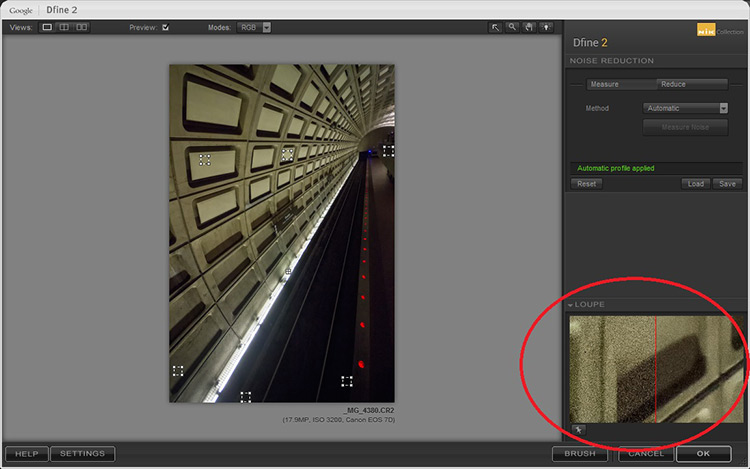
Dfine is Nik’s answer to noise reduction. Image noise characteristics deviate with exposure length, ISO settings and even temperature based on your camera. Dfine selects areas of your image and generates a “noise profile”. This allows the quick reduction of noise in your photos while retaining the edges, and in one click applies the calculated noise reduction to the image.
In the image above, the little squares denote what the software determined were areas requiring noise measurement. The loupe view (circled in red), shows the applied noise reduction on the right side – this view is at 100%.
On the right panel, the “Reduce” sub-option gives you two main methods to take away noise – either via the contrast or color. Both these adjustments affect the image differently, so play around with them and see which one works for your image.
Original Image (left) Dfine 2: Auto Noise Reduction applied (right)
Also included are some useful global adjustments for further refinement, such as the removal of JPEG compression artefacts and debanding.
Control Points in Dfine allows you to selectively apply noise reduction, which gives you the power to increase or decrease the noise reduction intensity in different areas of your image. So, even though Define auto-calculates the noise reduction needed, you can still maintain control over your noise processing.
HDR Efex Pro
High Dynamic Range (HDR) Imaging is a processing technique that has had mixed responses over the years. It was a trendy technique a few years ago, but has since matured into being used as a tool that extracts all the details of a scene available to the naked eye. HDR can be either overdone, or used subtlety, by exploring the differences between the darkest shadows and the brightest parts of the photo.
HDR Efex Pro is Nik’s contribution to this type of processing; where several images captured at different exposures, are translated into a single image that reflects a more dynamic range than your camera output is capable of creating (although camera advancement is starting to address this).
Original Images for HDR edit
Images combined using HDR Efex Pro 2
In the example above, three exposures are combined to bring back the lost highlights and shadows with tonality adjustments. This image can be pushed to look more realistic or even in the opposite direction.
Above its predecessors (such as Photomatix), HDR Efex Pro 2 has promised a simpler process and increased control and fine-tuning over the final image, along with an improved tone-mapping engine that claims to render color better. All tools are subjective, but no harm in trying this HDR tool out, even if just to verify some of Nik’s claims that they have improved Ghosting and Chromatic Aberration reductions.
Silver Efex Pro
Silver Efex Pro focuses on black and white processing. There are many programs quite capable of creating great black and white images, but various built-in tools like Dynamic Brightness, Soft Contrast, Amplify Whites, Amplify Blacks, and the advanced Grain Engine creates excellent diversity.
Original Image (left) Silver Efex Pro 2: Dark Sepia preset applied (right)
Silver Efex Pro comes with quite a variety of presets, and of course you can also create your own. The easiest way to do this is use an existing preset, customize it by making your adjustments, then save it so you can apply it to other images later on. Saving a preset is especially useful if you are doing an image set, and want the photos to have the same look and finish.
Original Image (left) Silver Efex Pro 2: High Structure preset applied (right)
The structure in this software adds depth to the photo by adding some sharpening. If you are into black and white photography, this is definitely a set you want to play around with.
Viveza
Viveza is an easy way to apply enhancements selectively without creating masks. Yes, you can still do global or image-wide adjustments, but it is very useful to be able to later refine only selected areas. Imagine the possibilities of applying structure, color, exposure changes, or doing shadow recovery to only areas you choose, knowing that the software is going to blend in your changes seamlessly.
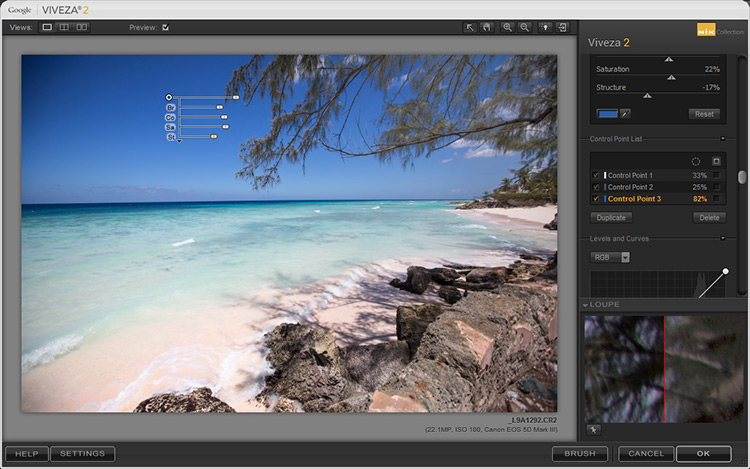
You can use Control Points on any part of the image you want to change. As with the other software in the Nik Collection, the top control (on your control point) allows you to change the radius/size of your adjustment area.
The Control Point shown in this image is on the blue sky. Based on the look you want, the radius of this area can be increased or decreased in size.
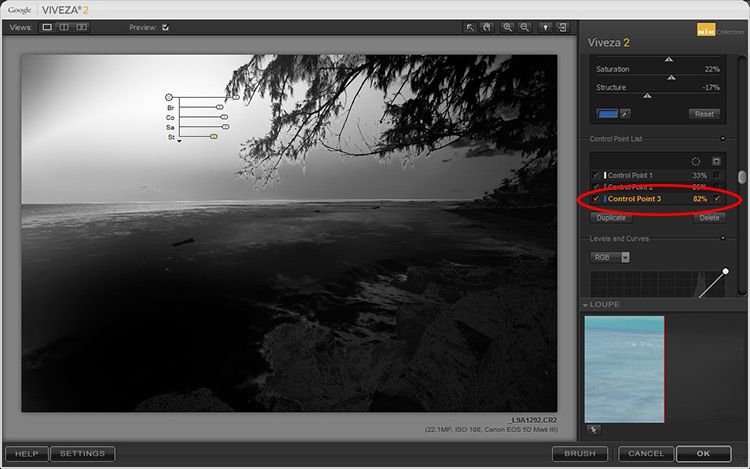
If you check the box next to the Control Point on the right (sub-options), all the affected areas will be shown in white, so you can decide if you want to adjust your work area.
In this example, the Control Point affects the blue in both the sky and sea, so any adjustments will apply to everything blue in the selected radius (highlighted in white on the image).
Selections, masks or adjustment layers may be your tool of choice to get precisely defined areas, but Viveza’s localized adjustments blend in with the surrounding areas quite well, and in some cases look more natural.
Sharpener Pro
While not everything in your image needs to be razor sharp, the best way to end up with a crisp finish and distinct edges, would be to start out with a properly focused image. Post-capture sharpening increases the contrast between adjacent pixels and significant edges within an image, which attracts your eye. Sharpening is thus used to enhance a focused image, as opposed to rescue elements of photograph that was captured out of focus.
Original Image (left) Sharpener Pro 3: applied to show edges (right)
In the sample image above, the sharpening is exaggerated to show the contrast effect that the software applies.
Sharpener Pro takes away some of the guesswork and gives you control over your sharpening, which is typically the last step in image processing. Control Points gives you the ability to selectively sharpen aspects of your image and allows the changes to blend in easily.
Conclusion
A great feature of each set in the Nik Collection is that it applies the effect on a duplicate layer. This is especially helpful if you want to dial back the effect and blend it with your original image, by simply changing the opacity of the layer.
Each plug-in has great potential, so do not be fearful to explore, test your creativity with preset combinations, and experiment with Control Points. It is a user-friendly collection and while this is a plus, it can also make it easy to overdo it.
Do share your thoughts and some of your images processed with Google’s Nik Collection of filters. How have they worked for you? Which is your favorite?
Colombia wants to produce Novartis's leukemia drug imatinib under a compulsory license, something it is allowed to do under its trade agreement with the USA, to bring the price down from $15,161/year (double the annual average income) to prices like those charged in India ($803/year).
(more…)
A year ago, we introduced Google Photos with one mission: To be a home for all your photos and videos, organized and brought to life, so that you can share and save what matters.
Now 200 million of you are using Google Photos each month. We’ve delivered more than 1.6 billion animations, collages and movies, among other things. You’ve collectively freed up 13.7 petabytes of storage on your devices—it would take 424 years to swipe through that many photos! We’ve also applied 2 trillion labels, and 24 billion of those have been for ... selfies.
To celebrate our first birthday, we’ve gathered a few of the team's favorite tips and updates we’ve made in the past year, so you can keep all that good stuff going...
1. To fly through Google Photos on the web at photos.google.com, press Shift-? to see a list of keyboard shortcuts.
2. Narrow down your search results by searching for more than one thing at a time. Search for two people: “Mom and Dad,” or a person and a place: “Mom Yosemite,” a place and a thing: “Yosemite bear,” or a person and a thing: “Mom bear” to find that photo of your mama bear with the real bear.
3. Running out of Google storage? On photos.google.com, under settings, you can choose to convert all of your uploaded content from “Original quality” to the free “High quality” size to recover lots of space.
4. Enter your favorite emoji (😎 🍂 💗 🎂 ) into search to pull up your corresponding photos. Not joking.
5. On photos.google.com, easily find the photos you recently uploaded by going to search, then choosing "Show More” and then “Recently Added.”
6. Tap into your device folders from the top of the albums page on Android, and see which folders are being backed up. Double-check that all those screenshots are safe!
7. Create a shared album for your family. Every time someone adds a new photo, everyone will get a notification so they can see your latest photo or video.
8. Have you spied the easter egg in the photo editor on Android? Hint...It’s out of this world.
9. Occasionally photos can appear out of order in your gallery—perhaps because the date was incorrectly set on your phone or camera when you took them. On photos.google.com, you can edit both the time and time zone of a photo or group of photos to put them in the right order in your library. Change one and they all get adjusted.
10. At the top of the albums page on mobile, scroll the carousel to the right and tap on the videos tile to get a view of all the videos in your library (on photos.google.com, you’ll see videos at the top of the album page).
Thanks for a wonderful first year—keep it up; all those selfies aren’t going to take themselves!
Posted by Anil Sabharwal, Vice President, Google Photos https://2.bp.blogspot.com/-41Xtn-xx7P8/V0iSHXk66oI/AAAAAAAASYA/Kyj9hzBMXFoDhWon4SgDCO-0-EwEbtMRwCLcB/s400/GooglePhotos.jpg
Water, especially that which is flowing, is a popular subject for photographers. You get to make artistic choices about whether to freeze or blur the water, and to what degree. That will affect how the final image looks.
Take a look at these images of flowing water and see how the photographers chose to capture the scene.
by Snacktastic Part II: the Snack Awakens on Hackerspace, shared by Andy Orin to Lifehacker
I know how this cat feels
Welcome to Hackerspace! This is the reader-run community of Lifehacker and our weekly open thread for you to share and talk about whatever you want. Well, it is not summer yet but it was about 90 here (in Philly area) most of the week and now it is a long weekend where everyone is going to the beach so it is summery enough! So, with that inspiration, what is your favorite summery beachy food? I’m not a native Pennsylvanian but man, I can appreciate a good sausage and they have some excellent kielbasa (and in Scranton, they literally have a sausage fest). Sausage, hot dogs, all those types of foods in meat casings with lots of mustard and relish are my choice but what are yours? I will also say that I like any kind of frozen dessert, ice cream or not.
Want to write for Hackerspace? Look at these guidelines to learn more. You can be cool like us, especially me. I’m the coolest. So, sit down, grab a cool drink and join us in the comment section. Maybe you’ll feel inspired to write your own post.
Every year, the Senate passes a secret bill (that is, a bill whose text is a secret during its debate) that re-authorizes intelligence agencies' surveillance powers; this year, someone (possibly chairman Richard Burr, R-NC and/or Tom Cotton, R-AR) has snuck in an amendment that would give the FBI the power to demand warrantless access to Americans' email and browsing history, using National Security Letters, a controversial, widely used secret police order.
(more…)
Justin Shafer was roused from his bed this week by thunderous knocking at his North Richland Hills, Texas home, and when he opened the door, found himself staring down the barrel of a 'big green' assault weapon, wielded by one of the 12-15 armed FBI agents on his lawn.
(more…)
The Botanical Treasury: Celebrating 40 of the Most Fascinating Plants through Historical Art and Manuscripts by Christopher Mills (editor)
University of Chicago Press
2016, 176 pages, 8.5 x 11 x 1.6 inches (softcover in clamshell box)
$33 Buy a copy on Amazon
The Royal Botanic Gardens in Kew, England has just come out with a sumptuous collection of “40 of the world’s most fascinating plants.” What makes them the “most fascinating”? For some it’s their appearance or structure, for others it might be their medicinal properties or economic impact. But from the bizarre-looking banksia to the quinine-packed cinchona to the functional bottle gourd, what they all have in common is a fascinating story.
The Botanical Treasury, which comes in a richly textured cloth-covered box along with 40 reproduced frameable prints, devotes four pages to each plant. Each entry includes an interesting tale pertaining to the plant along with copies of historical drawings, photos, letters, maps, journal entries and newspaper clippings. Most of the stories are about the naturalists and explorers who hunted for and studied these plants, but the book also celebrates the plants themselves, highlighting their unique features, uses, and capabilities. This makes a gem of a gift for any botanical nerd.
– Carla Sinclair
The International Olympic Committee announced today that 23 athletes who competed at the 2012 Games in London failed a retrospective doping test. The news comes one week after the IOC announced that it would begin proceedings against 31 athletes who violated anti-doping rules during previous olympic games.
Dragon Quest Builders — a game that mashes up the sandbox building elements of Minecraft with the story and world of Dragon Quest — is coming to North America.
Today Square Enix announced that the game, which first launched in Japan in January, will be releasing in the West in October, coming to both the PlayStation 4 and PS Vita (though the handheld version will only be available digitally). The news comes on the same day that the long-running fantasy RPG series marks its 30th anniversary; the original Dragon Quest launched on the Famicom this day in 1986.
Builders is a departure for the series, swapping turn-based combat for world building. Much like in Minecraft, you'll be using a variety of tools to gather...
For years, the Illinois Biometric Information Privacy Act has been a headache for any tech company working with facial recognition. It's a simple law, requiring a person's explicit consent before a company can make a biometric scan of their body. In the eight years since the law was first passed, those scans have become a central part of products like Google Photos, Snapchat filters, and Facebook's photo-tagging system. All three companies are currentlyfacinglawsuits for allegedly violating the Illinois law, producing biometric face prints without notifying Illinois citizens.
Now, Illinois' law is facing sudden and quiet changes that would dramatically reduce its power.
Yesterday, Illinois State Senator Terry Link quietly proposed a...










 Gone are the days where a humorous picture or phrase will get your site’s 404 page noticed. In a version of the Internet where GIFs are the new text and videos are the new photos, it’s going to take a lot more than a witty phrase to stand out amongst the crowd.
But, we were surprised to see that most sites still aren’t taking advantage of that valuable real estate.
Gone are the days where a humorous picture or phrase will get your site’s 404 page noticed. In a version of the Internet where GIFs are the new text and videos are the new photos, it’s going to take a lot more than a witty phrase to stand out amongst the crowd.
But, we were surprised to see that most sites still aren’t taking advantage of that valuable real estate. 
 You might not have thought of – much less visited – Myspace in years. (Yes, it’s still around. Time, Inc. acquired it and other properties when it bought Viant earlier this year.) But user data never really dies, unfortunately. For Myspace’s new owner, that’s bad news, as the company confirmed just ahead of the Memorial Day holiday weekend in the U.S., that it…



 Tor users are currently being served DuckDuckGo search results by default.
  A tiny programmable board designed as part of a UK educational initiative for kids to learn programming skills and originally distributed by the public service broadcaster, the BBC, to one million schoolchildren is now up for public pre-order.