With each major version of Android, Google unveils a new statue at its Mountain View, Calif. headquarters. This year is no different, with the freshly minted Android Nougat getting its own mascot outside Building 40 at the Googleplex.
Naturally, we had to run out there this afternoon and grab some pictures of the latest addition to the Android family, which we present for you down below. Enjoy!
Android N (currently in Developer Preview status) is now Android Nougat! It's the 12th nicknamed version of Android and will be released to the public in the fall of 2016. Here's everything you need to know so far!
What are the best brain-busting puzzle games for Android?
The touchscreen controls of a smartphone offer a unique opportunity for puzzle games, and arguably they're best suited for our pocket devices because they can be easy to pick up and play when you have a few free moments. we've collected
Last updated January 20, 2017: Revamped list with additional titles.
Bridge Constructor is a great physics-based puzzle game in its own right, but the new spin-off in the Portal universe takes the concept and adds in all the wacky elements from Aperture Laboratories.
Through 60 test chambers, your goal is to get the test vehicles to the end of the course any way you can using portals, propulsion and repulsion gels while avoiding deadly lasers, pits of acid, and sentient turrets. It's an outstanding cross-over title that provides a challenge that will delight fans of Bridge Constructor and Portal alike.
The Room is a widely celebrated puzzle franchise for Android, with three entries offering hours upon hours of challenging puzzle fun. These games are very reminiscent of point-and-click classic adventure series such as Myst and Siberia, and each offer hours and hours of entertainment with some of the best visuals you'll find in an Android game.
Controls are as simple as swiping around the screen and double tapping to focus in on an object or puzzle. As you progress through the game, you'll find objects that will help you find your way out. As you go, more and more of the story is revealed through notes left for you by the Craftsman.
Each game is pretty long and involved, so expect to spend many hours glued to your device as you solve puzzle after puzzle. These are paid games, but if you love a good puzzle challenge they're each well worth the price of admission!
Threes! is a fun and surprisingly cute number-based puzzle game where your goal is to swipe around the grid and match like numbers. But you've got to be strategic because if you fill up the board and run out of moves it's game over!
For a truly unfettered experience, you'll want to buy the full game for no ads or distractions while you play. If you'd prefer to save your money, the free version is also a great option, but once you burn through the set amount of plays you're given to start with, you'll need to watch ads to get more plays.
And believe us, once you get hooked on this game, you won't want to have to wait for ads all the time.
Like all the best puzzle games, Two Dots is simple to learn, difficult to master and highly addictive.
This is the sequel to the wildly popular Dots game, where the main object remains the same: connect as many dots of the same color as you can. The sequel brings new skills to the table, along with 900+ levels to work through.
Once you've gone through the first 10 levels, which act as a tutorial, Two Dots offers a linear adventure of sorts in Treasure Hunt, and a different mode called Expedition once you've reached level 35.
The game has absolutely no ads, and a really unique and clean visual style that you'll love. There are in-app purchases available for shuffles which might help you get through a particularly tricky level but you're better than that, right?
Monument Valley is an award-winning puzzle game that features outstanding art and sound design. You play as Ida, a princess who must find her way through fantastical structures which you must manipulate and change to complete the path and help her reach her goal.
The controls are simple as you tap to move the princess while discovering the different ways you can move the structures around. It's an intuitive experience that forces you to look at things from a different perspective. If you've never experienced the majestic wonder and mind-bending puzzles of Monument Valley, you should definitely check it out. You get the original game as well as a new chapter called Ida's Dream with the purchase, while Forgotten Shores features eight new chapters of gameplay which are available via an in-app purchase.
The sequel, Monument Valley 2, is also out and a worthwhile game to check out as well!
Brain It On is an absolutely addicting physics-based puzzle game that requires you to think outside the box to solve each level.
Using your finger or stylus, you must draw lines, shapes, weighted objects, or whatever else you think will solve each screen. Things get progressively creative and difficult as you progress through the over 200 levels, but you'll eventually need to go back and revisit old levels to get three stars to unlock new ones (stars are earned by finishing the level under time within the limit of shapes number of shapes).
It's a really fun game with multiple solutions available for each level, and is fun to play collaboratively as a group.
Developed by SQUARE ENIX, this is an amazing series of puzzle games that takes the characters and theme from an established gaming franchise, and throws them into a brand new puzzle-based adventure. So far, three franchises have been given the GO treatment — Hitman, Lara Croft and Deus Ex — with each garnering positive reviews from players and critics alike. You don't necessarily have to be fans of these franchises to enjoy their GO entries, though fans will likely enjoy the reimagined way of playing their favorite games.
These are highly stylized turn-based puzzlers that will provide hours of challenging fun — and best of all they're all currently on sale, so you can get all three for the price of an extra large coffee. Let's take a look at the individual games:
Hitman Go
This was the first franchise to be converted into the GO puzzle format, and it still holds up. You play as Agent 47 and must work your way through heavily-guarded compounds using all the same techniques found in the full Hitman games you've played on PC or console: disguises, distractions, sniper rifles and of course 47's iconic Silverballer pistols. There are multiple ways to beat each level, whether you want to be silent and sneaky, or forceful and deadly. You pick what kind of Hitman to be, as you work towards assassinating your main targets.
The Tomb Raider is back in this challenging entry that adds new wrinkles to the turn-based puzzles introduced with Hitman Go. Lara Croft is athletic and adventurous, and her GO game reflects that with puzzles that have her dodging boobytraps and deadly enemies as you work your way through 100 levels split into six chapters. It's an award-winning game that lures you in with its outstanding visuals and keeps you playing with its increasingly challenging puzzles.
Deus Ex is the latest franchise to get the GO treatment, and this might be the best one yet. With visuals that reflect the cyberpunk stylings of Deus Ex, and new hacking gameplay elements, you play as Adam Jensen who's working to unravel a complicated mystery as you sneak your way through a well-guarded fortress. This one probably features the most fleshed-out storyline of the three, and also features time-limited puzzles along with a level editor, so you can design, share and play levels from the game's community.
The process is pretty simple—first, make sure you have an actual toothpaste. Gel-style toothpastes won’t work for this. You’ll also want a damp cloth handy. Clean the glass thoroughly first, then rub a dab of toothpaste (they say “dime-sized,” but I think that depends on the crack in question and the size of the object you’re trying to fix) on the crack. Rub the toothpaste in firmly in a circular motion (but obviously not so hard you risk damaging the glass) for about a minute. Look at the glass, and if that did the trick, wipe the excess toothpaste away with the damp cloth. If not, repeat. That’s about it.
Obviously this isn’t a catch all, and we wouldn’t recommend it on expensive glasses or glasses you can (and should) get a professional to repair if they’re damaged, but if you’re short on cash or you have a pair of readers or sunglasses with those tiny annoying stress cracks in them, or a piece of glass furniture or glassware with a few scratches on them that you just can’t help but notice, it’s worth a shot.
by Beth Skwarecki on Vitals, shared by Andy Orin to Lifehacker
You probably know you shouldn’t feed chocolate to your dog—but maybe your dog got into your candy stash anyway, and came out fine. Meanwhile, your vet is more concerned that you admit to feeding him raisins. Confused? Let’s take a look at what the dangers really are.
Here’s the lowdown on what we know about some of the foods that are most dangerous to dogs. Before we begin, however, two things are important to understand for each food: what the food can do to your dog, and how much it takes to cause harm. These numbers are fairly well understood for some things, like chocolate, but not for others, like grapes.
What’s the danger? Chocolate can cause hyperactivity and, with higher doses, heart damage, seizures, and death. The dangerous parts of chocolate are the caffeine and a related chemical, theobromine. They’re both in a chemical family called methylxanthines. Coffee and tea also contain methylxanthines, but your dog is more likely to pig out on chocolate than on coffee grounds.
How much is a problem? It depends on the type of chocolate. White chocolate has almost no methylxanthines, milk chocolate has some, dark chocolate has a lot, and baking chocolate is the most concentrated.
Mild symptoms, like hyperactivity, appear when a dog has had about 20 milligrams of methylxanthines per kilogram of the dog’s body weight. Heart problems occur with about 40 milligrams, seizures at 60 mg, and death at 100-200 mg/kg.
Put this all together and you’ll realize the danger depends on the size of dog, the type of chocolate, and the amount eaten. A 20 pound pug, for instance, would only have mild symptoms from eating a Hershey bar, but could reach a fatal dose with just two ounces of baking chocolate. That’s why your dog doesn’t drop dead after eating a chocolate chip cookie: even for a small dog, there just isn’t that much methylxanthine in a few chips. But if your dog steals some baking chocolate, or gets into a stash of dark chocolate, their snack could easily turn deadly.
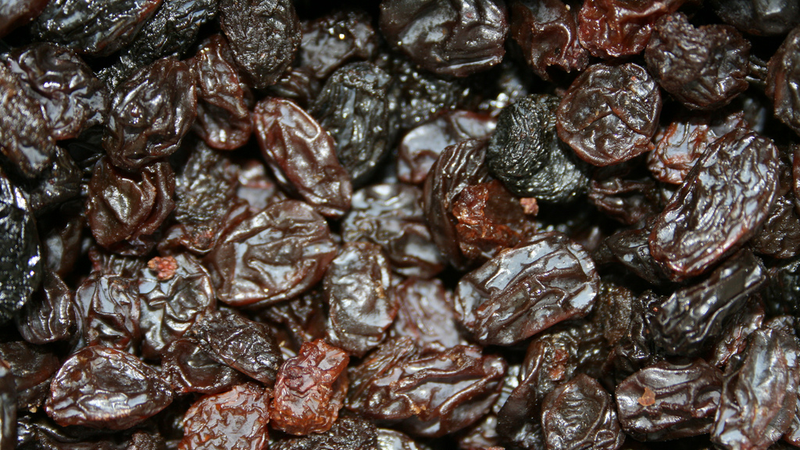
What’s the danger? Dogs can develop acute kidney failure after eating grapes, raisins, or Zante currants (which are actually not currants, but tiny raisins). The dog might vomit soon after eating the raisins, but the kidney damage takes time to occur. Symptoms may take 2-3 days to show up.
How much is a problem? This is the tricky part. We don’t know. Veterinarians have collected examples of dogs that died after eating just a handful of raisins, while other dogs have eaten two pounds without showing any ill effects. We also don’t know what the toxic component of grapes is—so it’s possible some types of grapes have more of the mystery ingredient than others. Until this mystery is solved, many vets consider any amount of raisin ingestion to be an emergency.
Sugarless Gum
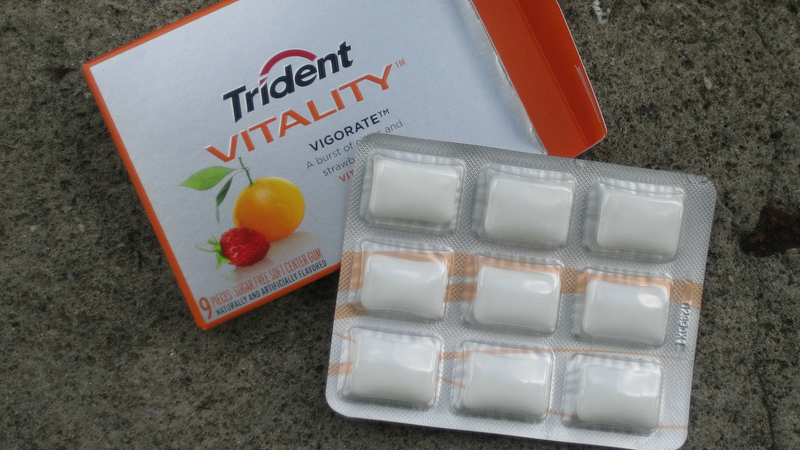
What’s the danger? It’s not the gum that’s the issue here—it’s the sweetener. Xylitol is a sugar alcohol used as a low calorie sweetener in gum and some low-calorie foods like sugar-free pudding. When a dog eats that gum or pudding, it can cause dangerously low blood sugar within minutes to an hour afterward. Symptoms include weakness, difficulty walking, seizures, and coma.
How much is a problem? Different products have different amounts of xylitol. In some brands, just over one piece of gum can cause hypoglycemia in a 20-pound dog, with only 5 pieces needed to cause liver failure. Many companies don’t want to state how much xylitol is in their product (secret recipe and all) but have shared this information with the Pet Poison Helpline for use in emergencies. Here’s the hotline’s fact sheet on xylitol. Bottom line, keep anything with xylitol or unspecified sugar alcohols away from your pet.
What’s the danger? Dogs who eat large helpings of onions or related vegetables (like garlic, shallots, and leeks) can have vomiting, diarrhea, and abdominal pain. More seriously, the sulfur-containing chemicals in these foods can destroy red blood cells, leading to anemia. In rare cases this can be deadly.
How much is a problem? It only takes 15-30 grams of onion per kilogram of the dog’s weight to cause detectable changes in the blood. This is equivalent to a 30-pound dog eating a whole, large onion. The sulfur compounds that cause anemia aren’t destroyed by cooking or drying, so even a bowl of leftover beef stew, if it was cooked with onions, could be harmful to your dog.
The damage can also add up over a few meals, so even if your dog seemed fine after one night eating onion-containing table scraps, several nights of the same could still be a problem. Onions and garlic are in some pet foods and treats, so it may be worth checking labels and avoiding those products if your dog eats a lot of them.
Macadamia Nuts
What’s the danger? Macadamia nuts aren’t deadly, but dogs who eat the nuts may develop hind limb weakness, vomiting, and tremors. Symptoms can occur within 12 hours of eating the nuts, and generally resolve, even without treatment, within two days.
How much is a problem? The toxin in the nuts is unknown, and so far the amount it takes to cause symptoms seems to vary. Again, it may be something only present in some nuts, perhaps even something like a mold that commonly grows on macadamia nuts. The smallest dose that has caused symptoms was 0.7 grams of nuts per kilogram of body weight. That’s just three nuts for a 20-pound dog. On the other hand, some dogs have needed 62 grams per kilogram, or over 200 nuts for the same size dog.
What to Do If Your Dog Eats Something Poisonous
If you think your dog has eaten something dangerous, your first step should be to seek help or advice. Don’t immediately try to make your dog throw up, or try to give them medications. Let a vet decide, because sometimes these measures can do more harm than good.
If your dog is showing signs of poisoning already, like foaming at the mouth, shaking, or bloody vomit or diarrhea, you’ll want to get her to a vet as soon as possible. But if your pet seems to be acting more or less normally, take a moment to seek advice. Call your vet or one of the 24-hour hotlines: the Pet Poison Helpline (855-764-7661, costs $49) or the ASPCA Animal Poison Control Center (888-426-4435, costs $65).
Acting quickly can save your pet’s life, or at least reduce your vet bills. It may be possible to pump the dog’s stomach to remove some of the toxic food, for example, but this only works before they’ve fully digested it. Some of the effects of poisoning can also be reduced with prompt medical treatment, like IV fluids to protect the kidneys of a dog who ate too many raisins.
Better than treatment, of course, is prevention—so make sure that these unsafe foods are out of your pup’s reach, or out of your home entirely. While you’re at it, check for medications, alcohol, and household chemicals, too. Your dog won’t understand why those yummy looking treats are now off limits, but at least he’ll be safe.
Google announced on Snapchat today that Android N, the latest version of Android, will now go by Android Nougat. The announcement comes after the company said at I/O last month that users could submit suggestions for the name online.
Nougat is the latest dessert-themed version of Android, due out later this summer. The release, initially announced in March and currently on its second (and mostly stable) beta, brings new features like an improved notification shade and split-screen multitasking to the mobile OS, while also improving on features like Doze that came with Marshmallow last year. The release also has Daydream, Google's new VR platform, baked in, though it'll only be supported by Daydream-ready handsets running the OS.
After what has seemed like the longest wait since the last time we had to wait for an Android nickname, we now know what Android N will be called.
Nougat.
Google announced the latest nickname — its 12th — live from its campus in Mountain View, Calif., sharing the tasty treat on Snapchat, but not before a lengthy tease. Through the Android statue garden, into some "top-secret Android N labs." And finally, we got it.
Nougat, for those unfamiliar, is a confectionary treat loaded with sugar or honey. It usually includes some sort of roasted nuts, and occasionally fruit. Whipped egg whites may be involved as well.
The next trick is going to get people to actually pronounce "nougat" correctly.
Here's the rundown of every Android nickname we've had:
Android N (currently in Developer Preview status) is now Android Nougat! It's the 12th nicknamed version of Android and will be released to the public in the fall of 2016. Here's everything you need to know so far!
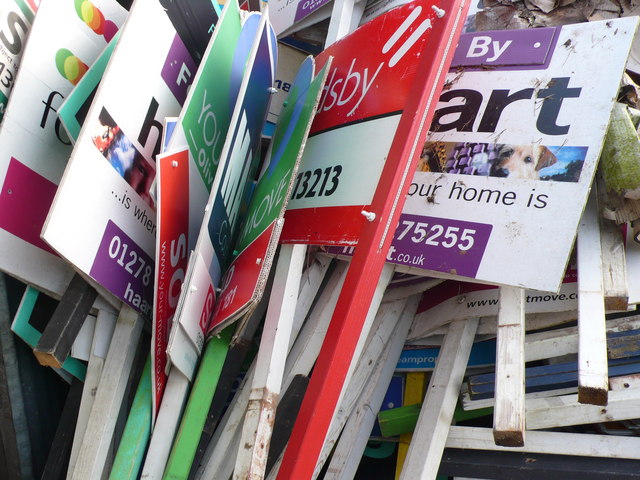
Singaporeans are the most prolific speculators on UK commercial property, and the United Overseas Bank is the most prolific lender to Singaporeans who want to speculate in that market -- and now they're turning off the faucet.
(more…)
You should use two-factor authentication on every account that offers it. Here's an explainer of what it is, and why you want it.
You see a lot of talk on the internet about two-factor authentication (or 2FA as it's commonly called) but most times its just people like us telling you to use it. And we'll continue that trend and start this bit of prose by telling you to use 2FA whenever and wherever you can. But we're also going to let you know what it is, and why it's important that you use it. Read on.
What is two-factor authentication?
To put it in simple terms, two-factor authenticat (2FA) means that you need to present two different things from two different sources that prove who you are. Generally, there are three different types of ID that can be used for 2FA purposes when it comes to online accounts:
A thing that only you should know. Things like a password, a PIN, an account number, your street address or even the last four digits of your Social Security number fit the bill here.
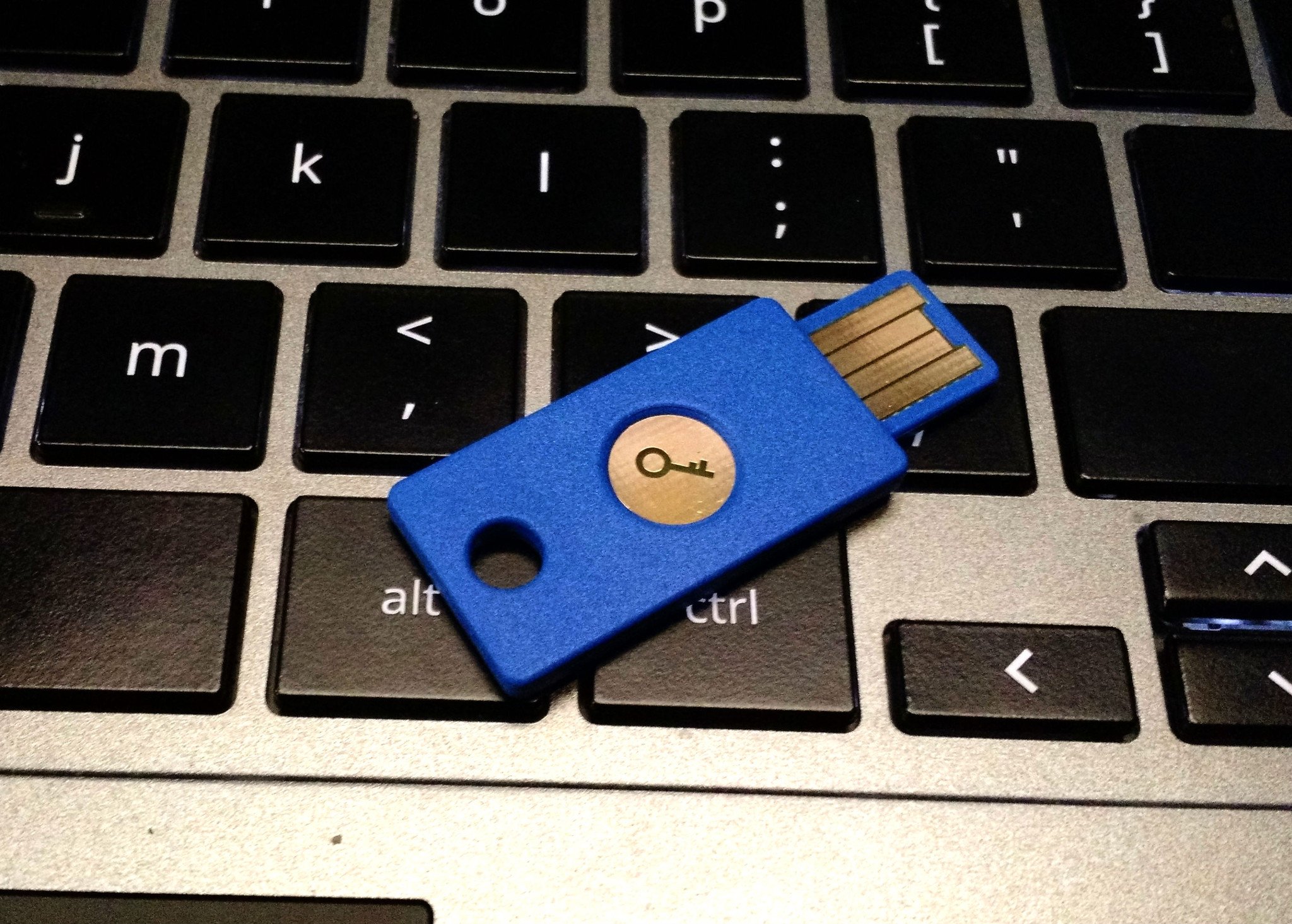
A thing that you can hold in your hands. This means your phone, an authenticator fob, or a USB security key.
A thing that is part of you like your fingerprint, retina pattern or voice pattern.
When you have 2FA enabled on an account, you need two of these three things to get access.
You've been using 2FA for most of your adult life. The companies who process credit card payments for online retailers usually force you to enter the three-digit code on the back of your credit card as well as the card number, then provide the billing address. The numbers on the card (both front and back) are a way to make sure you have the card in your possession for the first method of authentication, then the address you provide has to match what the card issuer has on file as a second way to prove who you are. That's 2FA. Back when the world still used checks to pay for things, most businesses wanted two forms of physical ID from a well-recognized place like your state DMV or your school as a way to make sure you are the person whose name is on the top of the check. That's also 2FA. And to get those IDs usually requires multiple things from different places to prove who you are.
You've been using 2FA all along and probably didn't realize it.
Using 2FA for your online accounts is a little bit different, but still uses the same principle — if you can provide more than one method to prove who you are, you probably really are who you claim to be. For an account somewhere like Google, or Facebook or Amazon you need to supply a password. Your password is something only you should know, but sometimes other people can get hold of it. When you add a 2FA requirement — like an authentication token sent to your phone or a USB security key that you plug into your computer — a password is no longer enough to get into your account. Without both pieces of authentication, you're locked out.
Is two-factor authentication secure?
Yes and no. Using 2FA on an account is a lot more secure than not using it, but nothing is really secure. That scary thought aside, using 2FA is usually sufficient protection for your "stuff" unless you're a high-profile target or really unlucky.
Using 2FA is usually sufficient protection for your onlione accounts and services.
On the positive side, if you're using 2FA and some fake phishing email manages to get you to supply your password they still can't log into your account. The way most people use 2FA for online accounts is to have a token sent to an app on their phone and without that token, the email scammer isn't going to have any luck getting access. They will enter your account user name or ID, then the password, and then they need to supply that token to go any further. Unless they have your phone, the work involved in bypassing the second ID requirement is enough to get the bad guy to say "forget it!" and move to someone else.
On the other hand, if you are someone like President Obama or Mick Jagger, it's worth it to try and get into your accounts. And there are ways. The communication between the people supplying the authentication token and your phone are safe for the most part, so attackers go after the website or server asking for the credentials. Auth tokens and cookies can be hijacked by very clever folks, and as soon as one method gets patched they start looking for another. This takes a lot of knowledge and hard work so that means that the end result has to be worth it all. Chances are you and I aren't worth the trouble, so 2FA is a good way to secure our accounts.
How do I use two-factor authentication?
It's easier than you might think!
Setting up 2FA on an account is a three step process. You need to provide your current credentials by typing in your password again (this helps keep someone else from adding it to your account), even if you're currently logged into the service. Then you go into the account settings and enable 2FA on your account. This lets the server that manages your login know that you want to enable it, and they will get everything ready on their end after they ask what type of authentication you will be using — most common are codes sent to your phone as an SMS message or through an authenticator application. Finally, you affirm the change by supplying a token back to the server. If you're using an app this might be a barcode you have to scan or manually entering some information into the app. If you chose to use SMS a code will be sent that you need to enter on the website to finish things up.
The next step happens when you want to log into that account again. You'll enter a username or ID, then a password, and then be asked to supply an authentication number. That number is sent as an SMS if that's how you set things up, or in the app on your phone if you decided to go that route. You type that number into the text field and you have access.
Most services will store an authentication token on your phone or computer, so the next time you want to log in you won't have to supply the code again. But if you want to set up access from another place, you'll need a code.
The process for each service that offers 2FA will be slightly different, but this is a good example of how things will work.
Wrapping it up
Now that you know a little more about 2FA, we hope you're inspired to set it up and use it wherever you can. Most popular services — Google, Facebook, Twitter, Amazon, Steam and more — offer 2FA. It's fairly easy to set up and the peace of mind you'll have makes it well worth it.
Updated January 2018: In light of the recent round of security issues, we have refreshed this page with the most relevant information.
At least one non-authorized person obtained sensitive information following the leak of global counter-terrorism database World-Check, owned by Thomson Reuters.
Chris Vickery, a security researcher at the software company MacKeeper, posted on Reddit that a copy of the World-Check database from mid-2014 had come into his possession.
“No hacking was involved in my acquisition of this… Read More
Foreigners! They're weird, and scary, and they talk different. What are they talking about? Is it you? It must be you. They want your secrets! Your amazing American secrets, the files and documents on things like fleet movements, spy satellite capabilities, and other national security questions that every upstanding citizen carries with them everywhere they go. Do you really want a foreigner looking at your delicious secrets, with their foreign brains and foreign eyes?
Luckily, the Office of the Director of National Intelligence is here to help, via the medium of patronizing and poorly produced short film. The 7-minute YouTube clip is titled "Know the Risk — Raise Your Shield: Travel Awareness" (more like Know the Risk: Excessive...
Omnidirectional wheels have been around for decades but that doesn't stop us imagining the day they'll finally become practical to use. The latest video to inspire this omnidirectional dreaming comes from William Liddiard, a Canadian inventor who's come up with his own take on the classic design. You can see the so-called Liddiard Wheels in action above, fitted to what appears to be a Toyota Echo.
Netflix has become known for rebooting classic television shows, and its latest project will be taking it into the depths of space with a reboot of the classic 1965 science fiction drama Lost in Space.
The streaming media company announced yesterday that it has picked up the show for a 10-episode first season, which is expected to stream worldwide starting in 2018. The reboot will be run by Zack Estrin, one of the executive producers for Prison Break, and written by Matt Sazama and Burk Sharpless (Dracula Untold, Power Rangers). Game of Thrones director Neil Marshall is also attached the project. The new show will be produced by Legendary Pictures which has been working bring the show to Netflix since late 2015.
Have you ever wondered just how many things 'OK Google' voice commands can do? Wonder no more (or at least wonder less) - a new site called ok-google.io has set about documenting over 150 voice commands for Google on your Android device. Examples include:
In 2012, a scandal erupted in the UK when it was revealed that undercover police officers infiltrated environmental groups, seduced and impregnated their members, and then abandoned them.
(more…)
EA has announced the company has released Tetris Blitz: 2016 Edition to the Play Store. This latest update brings a bunch of improvements and new features. Should you be a fan of the classic title, you'll really dig EA's take on the formula with Blitz. The developer has packed in a bunch of extras that bring something new to the table and spice up gameplay.
Here's what is available in Tetris Blitz: 2016 Edition:
Unlock exciting Power-Ups and Finishers as you level up
Play every day to be rewarded with new Daily Challenges
Make it rain with fresh Golden Minos – the more you clear, the more you earn
Be showered with Golden Minos in the Gold Rush bonus round after every level up
You might not want to spend too much time with your poop, but it can tell you a lot about your overall health. StoolAnalyzer can help you narrow down what health issues you might be having based on the size, color, and frequency of your bowel movements.
The online tool begins by asking you a few basic questions to describe your poop including shape, color, size, and how often you go to the bathroom for a number two. You’ll then receive a score out of 100 (because everything can be scored), followed by a more helpful description of why certain shapes or colors occur and what you can do to improve your diet to boost your poop score.
London-based addressing platform startup, what3words, which has created a universal postcode/zip code alternative aimed at simplifying location sharing, has taken in new funding round led by logistics company Aramex. Read More
In a bad week for Britain in the news, the UK can at least take solace in its average mobile connection speeds, which — according to a new report from content delivery network Akamai — are the best in the world. The company's latest State of the Internet report claims that British mobile users were able to get average speeds of 27.9 Mbps when connecting to Akamai's HTTP/S platform in Q1 2016, beating most countries in Europe by an average of more than 10 Mbps, and the United States' average speed by more than 20 Mbps.
The US had an average connection speed of 5.1 Mbps for the first quarter of 2016, lower than Turkey, Kenya, and Paraguay, and on a par with Thailand. Many European countries, in particular, more than doubled the average US...
SanDisk's new 256GB microSD card isn't the first of its kind, but it is, says parent company Western Digital, the fastest. The card has transfer speeds of up to 100MB/s and write speeds of 90MB/s — quick enough to transfer an entire HD movie in around 45 seconds. You'll need that sort of performance though if you're using the card for its intended purpose: recording and storing up to 14 hours of 4K footage from smartphones, action cameras, or drones.
The 256GB SanDisk Extreme microSDXC UHS-I card is only slightly faster than Samsung's own $249.99 256GB microSD card, but Western Digital also unveiled a slower cousin intended for a wider audience — the 256GB SanDisk Ultra microSDXC UHS-I Premium Edition. (Yes, those are some terrible,...
The tech world is ready for better Wi-Fi, and this year we may start to get it. The Wi-Fi Alliance is today announcing an update to its certification program for modern Wi-Fi devices, which will require all new products to support faster speeds and for routers to do a better job of handling multiple devices at the same time.
Going forward, routers and devices that want to comply with its latest certification program will have to support three key new features: wider channel bandwidth, an additional spacial stream, and perhaps most importantly, MU-MIMO. That latest one has a horribly convoluted name, but it essentially just means that a router can send data to multiple devices at the same time.
Microsoft is confirming today that it plans to ship its Windows 10 Anniversary Update to existing devices on August 2nd. The date slipped out by mistake yesterday, and it marks just over a year since Windows 10 first debuted on July 29th, 2015. Microsoft is marking the occasion with an update that is free to existing Windows 10 users, and includes new features like Windows Ink, Microsoft Edge browser extensions, and Cortana improvements.
Microsoft has been providing Windows 10 as a free upgrade for existing Windows 7 and Windows 8.1 users for the past year, but that's about to change. While 350 million devices are now running Windows 10, people will have to pay to upgrade from an older version of Windows soon. "After July 9th, we'll be...
Turning classic 2D cartoons into 3D renderings can be a tricky act to balance. There's always something a little unsettling and kind of off about the finished model, like say, The Peanuts Movie, or Garfield: The Movie. Maybe it's the way that it looks way too polished, or how it messes with the nostalgic memories of our beloved characters, but we just know it's not right when we see it.
Artist Gabriel de Laubier effortlessly jumped past this hurdle, transforming Bill Watterson's iconic Calvin and Hobbes "Big Bang" strip into an interactive 3D scene:
Prosthetic Knowledge
Each panel is like a window into a fully imagined world, and seeing Calvin and Hobbes existing in this kind of depth is pretty surreal. It's...
No one wants to serve spoiled food to their families. Conversely, consumers don’t want to throw food away unnecessarily–but we certainly do. The United States Department of Agriculture estimates Americans toss out the equivalent of US$162 billion in food every year, at the retail and consumer levels. Plenty of that food is discarded while still safe to eat.
Part of these losses are due to consumers being confused about the “use-by” and “best before” dates on food packaging. Most U.S. consumers report checking the date before purchasing or consuming a product, even though we don’t seem to have a very good sense of what the dates are telling us. “Sell by,” “best if used by,” “use by–they all mean different things. Contrary to popular impression, the current system of food product dating isn’t really designed to help us figure out when something from the fridge has passed the line from edible to inedible.
For now, food companies are not required to use a uniform system to determine which type of date to list on their food product, how to determine the date to list or even if they need to list a date on their product at all. The Food Date Labeling Act of 2016, now before Congress, aims to improve the situation by clearly distinguishing between foods that may be past their peak but still okay to eat and foods that are unsafe to consume.
Aside from the labeling issues, how are these dates even generated? Food producers, particularly small-scale companies just entering the food business, often have a difficult time knowing what dates to put on their items. But manufacturers have a few ways–both art and science–to figure out how long their foods will be safe to eat.
Consumer Confusion
One study estimated 20 percent of food wasted in U.K. households is due to misinterpretation of date labels. Extending the same estimate to the U.S., the average household of four is losing $275-455 per year on needlessly trashed food.
Out of a mistaken concern for food safety, 91 percent of consumers occasionally throw food away based on the “sell by” date–which isn’t really about product safety at all. “Sell by” dates are actually meant to let stores know how to rotate their stock.
A survey conducted by the Food Marketing Institute in 2011 found that among their actions to keep food safe, 37 percent of consumers reported discarding food “every time” it’s past the “use by” date–even though the date only denotes “peak quality” as determined by the manufacturer.
The most we can get from the dates currently listed on food products is a general idea of how long that particular item has been in the marketplace. They don’t tell consumers when the product shifts from being safe to not safe.
Here’s how producers come up with those dates in the first place.
Figuring Out When Food’s Gone Foul
A lot of factors determine the usable life of a food product, both in terms of safety and quality. What generally helps foods last longer? Lower moisture content, higher acidity, higher sugar or salt content. Producers can also heat-treat or irradiate foods, use other processing methods or add preservatives such as benzoates to help products maintain their safety and freshness longer.
But no matter the ingredients, additives or treatments, no food lasts forever. Companies need to determine the safe shelf life of a product.
Larger food companies may conduct microbial challenge studies on food products. Researchers add a pathogenic (one that could make people sick) microorganism that’s a concern for that specific product. For example, they could add Listeria moncytogenes to refrigerated packaged deli meats. This bacterium causes listeriosis, a serious infection of particular concern for pregnant women, older adults and young children.
The researchers then store the contaminated food in conditions it’s likely to experience in transportation, in storage, at the store, and in consumers’ homes. They’re thinking about temperature, rough handling and so on.
Every harmful microorganism has a different infective dose, or amount of that organism that would make people sick. After various lengths of storage time, the researchers test the product to determine at what point the level of microorganisms present would likely be too high for safety.
Based on the shelf life determined in a challenge study, the company can then label the product with a “use by” date that would ensure people would consume the product long before it’s no longer safe. Companies usually set the date at least several days earlier than product testing indicated the product will no longer be safe. But there’s no standard for the length of this “safety margin”; it’s set at the manufacturer’s discretion.
Another option for food companies is to use mathematical modeling tools that have been developed based on the results of numerous earlier challenge studies. The company can enter information such as the specific type of product, moisture content and acidity level, and expected storage temperatures into a “calculator.” Out comes an estimate of the length of time the product should still be safe under those conditions.
Companies may also perform what’s called a static test. They store their product for an extended period of time under typical conditions the product may face in transport, in storage, at the store, and in consumer homes. This time they don’t add any additional microorganisms.
They just sample the product periodically to check it for safety and quality, including physical, chemical, microbiological, and sensory (taste and smell) changes. When the company has established the longest possible time the product could be stored for safety and quality, they will label the product with a date that is quite a bit earlier to be sure it’s consumed long before it is no longer safe or of the best quality.
Companies may also store the product in special storage chambers which control the temperature, oxygen concentration, and other factors to speed up its deterioration so the estimated shelf life can be determined more quickly (called accelerated testing). Based on the conditions used for testing, the company would then calculate the actual shelf life based on formulas using the estimated shelf life from the rapid testing.
Smaller companies may list a date on their product based on the length of shelf life they have estimated their competitors are using, or they may use reference materials or ask food safety experts for advice on the date to list on their product.
Consumers themselves hold a big part of food safety in their own hands. They need to handle food safely after they purchase it, including storing foods under sanitary conditions and at the proper temperature. For instance, don’t allow food that should be refrigerated to be above 40℉ for more than two hours.
If a product has a use-by date on the package, consumers should follow that date to determine when to use or freeze it. If it has a “sell-by” or no date on the package, consumers should follow storage time recommendations for foods kept in the refrigerator or freezer and cupboard.
And use your common sense. If something has visible mold, off odors, the can is bulging or other similar signs, this spoilage could indicate the presence of dangerous microorganisms. In such cases, use the “If in doubt, throw it out” rule. Even something that looks and smells normal can potentially be unsafe to eat, no matter what the label says.
Londa Nwadike is the Assistant Professor of Food Safety, Extension Food Safety Specialist at University of Missouri, Kansas State University. Top image by Dooder and Toni Art (Shutterstock).
Google knows a lot about you - particular about the "you" on the internet. A new tool launched today called My Activity lets you get some insight on just what that information is - in a readable sense - by showing you your various web, Google product (including Android and Android apps), and search activities in a rather pretty card timeline. The site works on both desktop and mobile.
My Activity (here) shows all this information, but also acts a link hub for Google's various data-collecting services you can choose to turn on or off, such as location history.
Google makes most of its money from showing ads, both on its own services and on third-party sites running Google's ad network. When you use Google products, you have to be okay with some of the things you do being used to inform the ads you see. Today, Google is making a new tool available to users today that lets you see and control the information Google uses to show you ads, but it comes with an (optional) expansion of Google's advertising personalization.
Books can be heavy, expensive, and take up valuable space in a cramped apartment. If you've been considering the jump from physical books to ebooks, you'll need to figure out the best e-reader for the job. Thankfully you've got a few options, depending on where you want to get your books, and how you want them to look on the screen.
Take a peek at our picks for the best ebook reading apps on Android!
Amazon Kindle
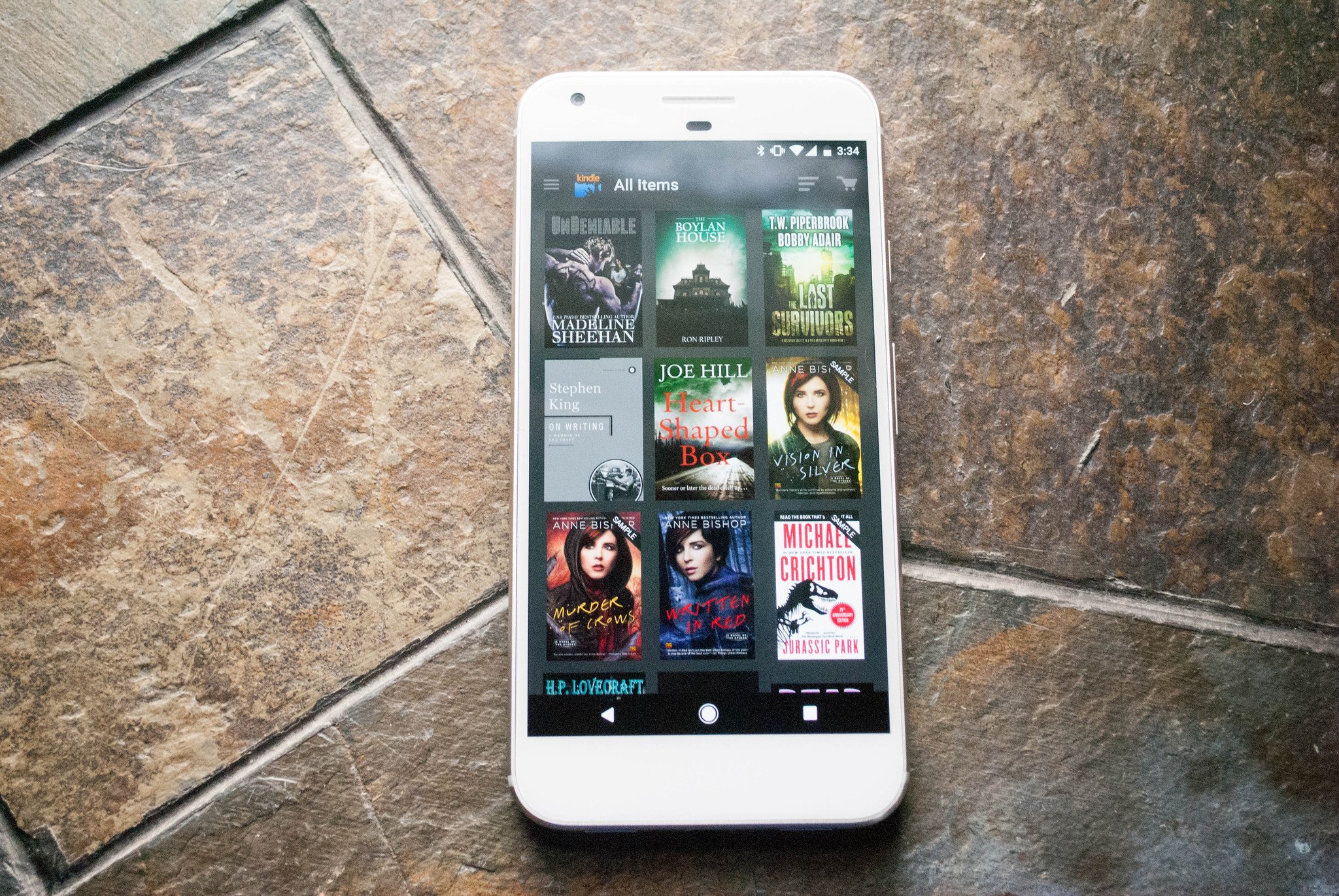
Amazon Kindle pulls ahead of the pack of ebook readers with its access to a huge library of content, which includes free books and content from indie publishers. Many classic books like The Count of Monte Cristo are absolutely free, and you can read them on your mobile device, or desktop with the Kindle app. There is a book out there for you no matter what genre you are looking for, and even includes independently published content.
Kindle Select Publishing even publishes content of varying lengths from self-published authors, or are otherwise unable to find a brick and mortar publisher. You can find titles ranging from Stephen King or Joe Hill to Chimamanda Ngozi Adichie and Bell Hooks. Kindle Unlimited offers an endless selection of ebooks for a monthly fee.
In the app, you're able to customize fonts, margins, line spacing, and organize the books you've downloaded into collections so that it's easier to find the book you want to read. Kindle will also remember the page that you left on when you switch devices. This means that you can switch between your phone, Fire Tablet, and PC without ever losing your page in the process.
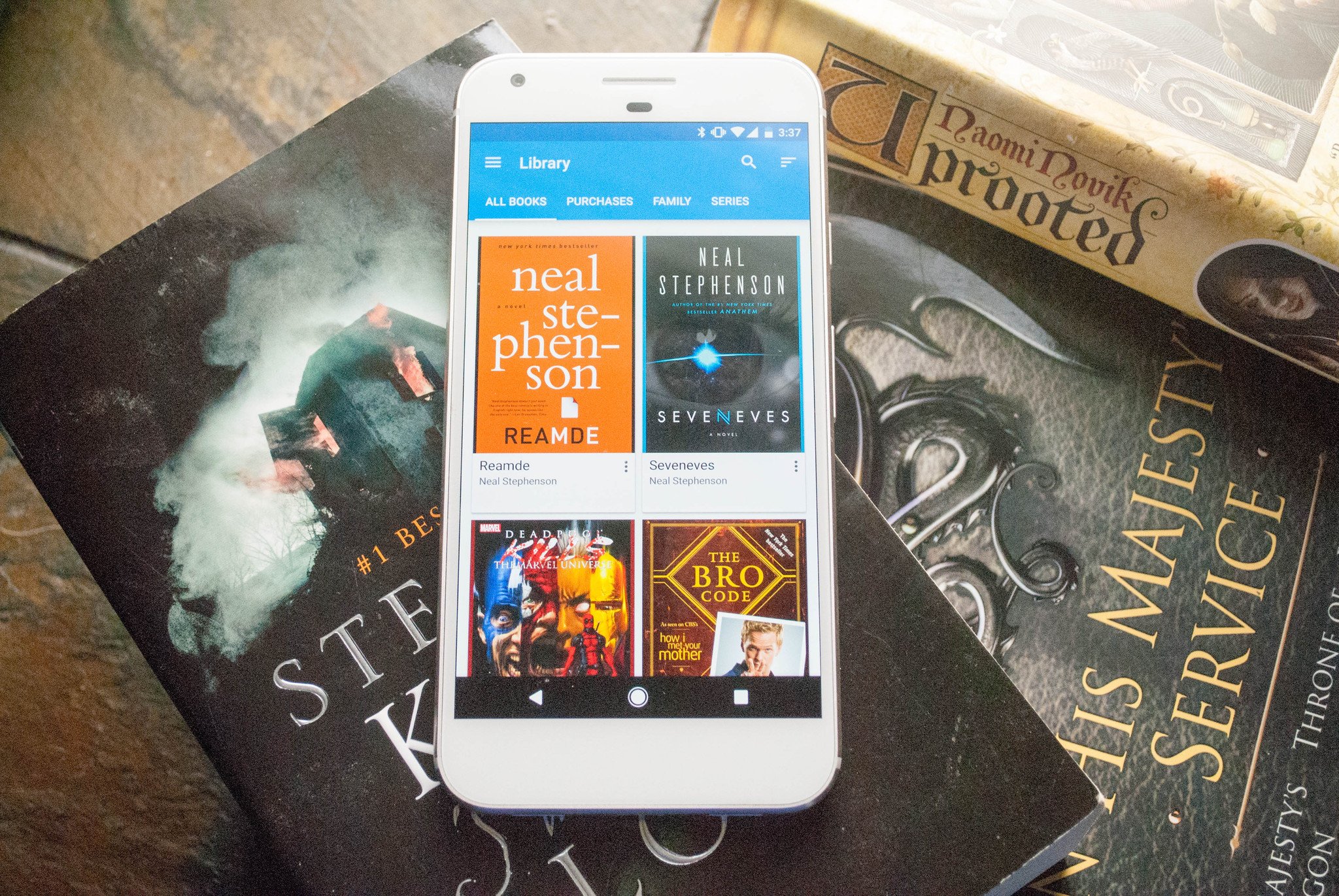
Google Play Books gives you access to a vast bookstore, some of which are free. You'll also find some textbooks, although we'd like to see the textbook selection improve in the future. You can read books offline, use a dictionary to look up unfamiliar words, and have your notes and place in the book saved across multiple devices through your Google account.
If you have a family account set up, then you can share books between everybody without having to purchase them multiple times. As you purchase more books, Google will also show you books that are similar to ones you have already purchased, in order to find new authors you may not have heard of before.
Google Play Books has a great selection for the bibliophile in your family, and will likely be loaded onto your Android phone when you purchase it. Staying within the Google ecosystem also makes it easy to share your purchases with family members, and keep all of your media in one place.
Kobo is a great way to read your favorite books whether it's on your phone or tablet. They have a gigantic selection filled with both new and established authors, including magazines and children's books. The most popular and trending ebooks are even updated hourly so that you don't miss an amazing story, even when it's coming from an author you've never heard of.
Kobo also includes a reading list, which lets you add items you are currently reading, as well as the books you intend to tackle. This makes it easy to keep track of your reading list, even when you're on the go.
As you begin to buy books and Kobo learns your likes, it will also build a recommendations list. This is made up of suggestions for new books or magazines, based on what you've already purchased. There is also a really awesome reading activity feature. It will show you how much time you've spent reading in the app, what books you are currently reading, a running tally of how many books you've read and how many pages you've turned in the process.
Kobo delivers an awesome reading experience with plenty of books to read through, as well as features that make finding a good book easier than ever. You can customize your reading experience, and since Kobo will learn your preferences over time, you'll find new authors with just a tap. As a final perk when you sign up you'll get a $5 credit to be used towards your first book purchase.
If you want to continue shopping at Barnes and Noble, the Nook app is what you're looking for. It's the company's branded app, which gives you access to a huge library of books, magazines, and periodicals.
Since this is the official app from Barnes and Noble, if you buy into their yearly membership you can apply those discounts through the app. You also get access to tons of features to customize your reading experience, like spacing, sizing, and font selection. You can also share your library with family members, organize the way you like, and bookmark upcoming books that are available for pre-order.
While being able to purchase books from a major retailer and download them to your phone is awesome, sometimes the books you want to read are ones that you already have the files for. Whether you've picked up ebooks from an independent publisher, or you've gotten the files from a now-defunct program, being able to open and read them is key. That's where Moon+Reader comes in.
It has support for 12 different file formats, from .rar files all the way to .epub files. On top of that you still are able to customize the way words look on the screen, lets you back up your library online, and gives you access to 5 auto-scroll options on top of plenty more fantastic features.
While you might miss the feel of a book in your hands, or the smell of aged paper, there's a reason ebooks are so popular: they can save you space and money. If you've made the choice to move solely to ebooks, you have a variety of different e-readers to choose from. Do you use an e-reading app? Let us know about it in the comments below!
December 2017: We've added Nook and Moon+Reader to our list, and updated the info on all the best ebook apps!
We've had a global shortage of helium for years now, but thanks to an aggressive search in Tanzania, scientists have just discovered 54 billion cubic feet of the gas, an amount that can last for several years. Scientists are calling this new approach to helium exploration a "game changer," according to the AP.
The discovery in Tanzania is the result of a new exploration approach for the precious gas that is essential to spacecraft, MRI scanners, nuclear energy, according to the Oxford University statement. Helium also fills party balloons.
This is the first time helium has been found intentionally, said the statement. Until now, the gas has been found in small amounts accidentally during oil and gas drilling.
Scientists are optimistic that they'll now be able to find more helium in other parts of the world using the same search methods. Read the full story here.
Pinterest today has a new tool for finding things that you might want to buy — and they’ll be things you see in the real world. Here’s how it will work: go to Pinterest search and tap the visual search button, point your camera at anything you’re interested in, and it’ll automatically do a visual search for everything you see. Pinterest will populate the photo with… Read More
Twitter — hot on the heels of the launch of its app for influencers, Twitter Engage — has today released yet another standalone application: Twitter Dashboard. The new service, available on both web and mobile, is aimed at businesses that want to use Twitter to connect with their customers. The app offers a suite of tools, including customized feeds of tweets, tools for… Read More
But now, I still have questions about what it's actually going to be like to live with and use all these bots and intelligent assistants. I don’t know the answer to any of them, and I don’t think anybody else does, either.
1: How should you talk to the bot? Should you use Facebook Messenger? Skype? iMessage?






 At least one non-authorized person obtained sensitive information following the leak of global counter-terrorism database World-Check, owned by Thomson Reuters.
Chris Vickery, a security researcher at the software company MacKeeper, posted on Reddit that a copy of the World-Check database from mid-2014 had come into his possession.
“No hacking was involved in my acquisition of this…
At least one non-authorized person obtained sensitive information following the leak of global counter-terrorism database World-Check, owned by Thomson Reuters.
Chris Vickery, a security researcher at the software company MacKeeper, posted on Reddit that a copy of the World-Check database from mid-2014 had come into his possession.
“No hacking was involved in my acquisition of this… 


 London-based addressing platform startup, what3words, which has created a universal postcode/zip code alternative aimed at simplifying location sharing, has taken in new funding round led by logistics company Aramex.




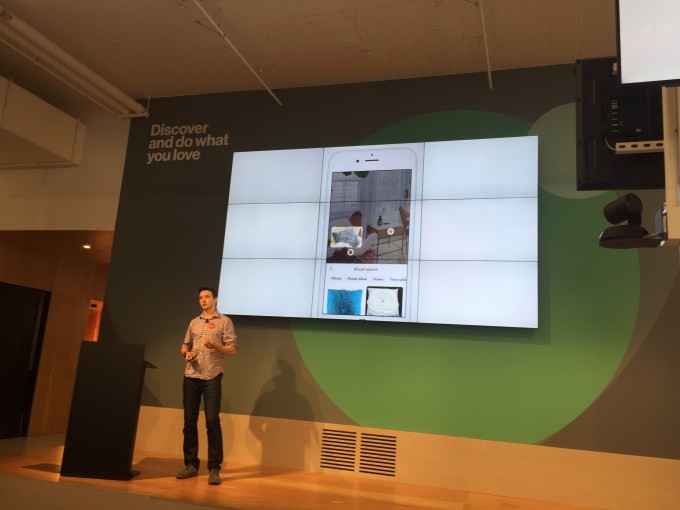 Pinterest today has a new tool for finding things that you might want to buy — and they’ll be things you see in the real world. Here’s how it will work: go to Pinterest search and tap the visual search button, point your camera at anything you’re interested in, and it’ll automatically do a visual search for everything you see. Pinterest will populate the photo with…
  Twitter — hot on the heels of the launch of its app for influencers, Twitter Engage — has today released yet another standalone application: Twitter Dashboard. The new service, available on both web and mobile, is aimed at businesses that want to use Twitter to connect with their customers. The app offers a suite of tools, including customized feeds of tweets, tools for…

