
"We believe that the new classics on this list are destined to become old classics," writes the BBC. "Whether or not that happens is ultimately up to you, the moviegoers. But one thing is certain: cinema isn’t dying, it’s evolving." (more…)
"We believe that the new classics on this list are destined to become old classics," writes the BBC. "Whether or not that happens is ultimately up to you, the moviegoers. But one thing is certain: cinema isn’t dying, it’s evolving." (more…)

Created by Rob Mulholland, the photon fairies await your presence in the wilds of Scotland. Just remember: if it bleeds, you can kill it—but these don't bleed. [via r/creepy]


Health services around the globe still struggle with mental health disorders, relying on a patient to provide documentation of mood changes in a journal or be open with a doctor or psychiatrist.
Both solutions are not seeing excellent results, which is why U.K. based Cambridge Cognition and Ctrl Group have announced Cognitive Kit, a software platform that lets patient express their mood and improve memory, attention, and reaction on a wearable.
See Also: Is Apple launching a fitness tracker alongside Watch 2?
The platform is built into the Apple Watch and Microsoft Band 2, which both feature heart-rate sensors. Other wearable devices will receive support in the future.
For now, patients are able to select six different mood faces and send them to a doctor or psychiatrist. Patients will also be able to play a variety of games throughout the day, which may show patterns in mood and memory or reaction deficiency.
Cognitive Kit, similar to Apple’s ResearchKit, will be open source. That means scientists and research will be able to dig into the data, find patterns, and hopefully improve mental health treatment.
In a two week trial, Cambridge Cognitive said over 30 million data points were recorded on wearables. If the kit was provided to every mental health patient that approves, we could see hundreds of millions more data points.
Cambridge Cognitive is looking to partner with healthcare and pharmaceutical providers to launch the Cognitive Kit. Alzheimer’s is one of the disorders it wants to tackle first, after presenting the platform to the Alzheimer’s Association International Conference.
The post New mental health technology tells your doctor what you won’t appeared first on ReadWrite.
If you enjoy falling asleep to some tunes but don't want them to play all night long, the latest update to Play Music is for you. A new version began rolling out last night and it adds a sleep timer so you don't have to worry about burning through your battery or data all night long. A look inside the app also shows more progress toward adding special support for the Edge display on certain Samsung phones.
Read MorePlay Music v6.13 adds a sleep timer and shows progress on Samsung Galaxy Edge support [APK Download + Teardown] was written by the awesome team at Android Police.
 Shopify is launching its retail hardware and point-of-sale app for merchants in the UK. The reader supports tap, chip and swipe payments, letting retailers accept both contactless and traditional card-based payments, and the free app works in tandem with the reader device on either iPhone or iPad. The Shopify app and reader combo means sellers can accept a range of payment options at… Read More

Ride-hailing giant Uber announced on Thursday that is has acquired Otto for approximately $680 million.
All of Otto’s team, which includes ex-leader of Google’s self-driving project, Anthony Levandowski, will move to Uber. They will work on the company’s self-driving project and report directly to CEO Travis Kalanick.
See also: Self-driving tech startup Otto wants truckers to keep on…napping
Otto’s research facilities in Palo Alto and San Francisco will continue to operate, and will share data with Uber’s Pittsburgh research center.
The acquisition price, at the time of writing, is calculated at $680 million by Bloomberg. That’s the value of slightly less than one percent equity in Uber, which Otto investors will receive. Uber will also provide 20 percent of the profits from its future trucking business, giving investors a long term reward for the acquisition.
Otto was not planning to build its own trucks, instead utilizing the current big rigs and installing a self-driving system inside. The startup has built its own sensors, including a LiDAR sensor, which is a useful radar tool for self-driving systems.
“Together with Uber, we will create the future of commercial transportation: first, self-driving trucks that provide drivers unprecedented levels of safety; and second, a platform that matches truck drivers with the right load wherever they are,” said Otto in a blog post confirming the acquisition.
Uber has been investing heavily into new transportation sectors in the past year, including food and commercial delivery. Long haul trucking might seem like a huge step for the private firm—valued at more than $60 billion—but it is just another move to make Uber the de-facto brand for all types of transport.
The acquisition announcement came a few hours after Uber and Volvo announced a $300 million investment into self-driving. Volvo will provide 100 SUVs to the Pittsburgh research center, which will be deployed on the roads by the end of the month.
The post Uber swallows self-driving truck startup Otto for $680 million appeared first on ReadWrite.
If you want to get a reply to your email, you can start by writing a good one. Boomerang has had some helpful tips to do this in the past, but now the company is taking it a step further. Its new feature Respondable will rate your emails on the fly in a few key categories.
Respondable works by displaying a series of recommendation meters for things like subject length, word count, reading level, and positivity (though you’ll have to be a Pro user for some advanced features like positivity). If you start to write a really long email, use too much jargon, or are too rude, Respondable will let you know. Obviously, you don’t have to adhere strictly to Respondable’s suggestions, but they’re handy to have.

The new feature is rolling out with a new version of Boomerang. If you’re currently using Boomerang in Gmail, Google Apps, Microsoft Office 365, or Outlook, you should see it show up in the near future.
Respondable | Boomerang
Your calves and ankles are under-appreciated muscles that work hard to keep your body steady and balanced while you’re standing, walking, or running. You might already be stretching your calves, but GMB shows you how to do them properly.
http://vitals.lifehacker.com/eight-hip-stre…
The video demonstrates two calf stretches: straight leg calf stretch and a bent leg calf stretch. The first variation emphasizes the gastrocnemius, which is the part of the calf muscle that people often admire. The bent version stretches out the ankle joint more. Healthier calves and ankles mean you can learn to do bad-ass movements like one-legged squats, or pistol squats.
The first thing is to find an elevated surface, such as a curb, a step, or a small ladder, where your heels can hang off the edge and allow you to apply more pressure (not pain) to stretch those calves. GMB recommends wearing shoes and keeping your arch on the edge of the step for better leverage. For each stretch, just hang out for 1 to 2 minutes for 3 sets.
http://vitals.lifehacker.com/get-serious-ab…
Fix Your Feet: Mobility, Strength, and Flexibility Exercises for Foot and Ankle Health | GMB Fitness
 Welcome to the roundup of the best new Android applications, games, and live wallpapers that went live in the Play Store or were spotted by us in the previous 2 weeks or so.
Looking for the previous roundup editions? Find them here.
Today's roundup is presented by AccuBattery from Digibites.
Read More28 new and notable (and 1 WTF) Android apps from the last 2 weeks (8/9/16 - 8/22/16) was written by the awesome team at Android Police.

Music subscriptions are all the rage now - most people I know use either Spotify or the services offered by Google and Apple. Not mentioned as much is, erm, Amazon, and its oft-forgotten Music service that acts as a locker for music purchased on and through Amazon. According to Recode, the company plans to reinvent it by introducing two music streaming services with different aims.
The first is similar to what you'd expect: $10 a month for all-you-can-stream music, akin to Spotify or other offerings.
Read MoreAmazon wants to sell a cheaper music subscription service that will only work on its Echo devices was written by the awesome team at Android Police.
After integrating a built-in VPN in its desktop browser and rolling out a dedicated VPN app for iOS, Opera is now bringing the service to Android users. While there are several VPN services available for Android, Opera is looking to differentiate its offering by providing free unlimited access.

The VPN is powered by SurfEasy, a company Opera acquired last year. The app offers a quick way to mask your location, access content that's locked to a specific region, and stave off tracking cookies (no Reebok, I don't want to buy your CrossFit shoes).
While the service itself is free to use, you'll find ads, and Opera will share anonymized data about your mobile usage habits with third parties:
This information is made available to third parties who are interested in better understanding the mobile ecosystem and how it's evolving. It's important to understand that this is not data about what you do with your phone, but rather this is data about how a large group of people use their phones.
The app is very straightforward to use: you can either connect to your closest region, or select from Canada, Germany, Netherlands, Singapore, or the United States. There's also a Guardian service that logs details of all the threats it has blocked. As soon as you're connected to a VPN server, you'll see a key icon in the notification bar.

Interested? Hit up the badge above or download Opera's VPN app from the link below.
Google 'introduces' new LG phone on Nougat promo page.
As Google officially unveiled Android 7.0 Nougat, there's a small surprise waiting on the shiny new Nougat promo page — an early look at the upcoming LG V20.

The V20, which will be the first phone to ship with Android 7.0, is referenced at the end of the page, along with an image showing a home screen and a holographic-style outline of the handset. The image is broadly in line with CAD renders that leaked a couple of weeks back showing a modular, G5-like design.
Google hails the device as "the first new smartphone that comes with Android Nougat, right out of the box. Coming soon."
The home screen itself mirrors what we've already seen on the LG G5, with a app-drawer-free layout and rounded rectangular icons. Beyond that, there's not a whole lot to see here.
However it is unusual to see Google promoting LG's phone alongside its new operating system. In the absence of any new Nexus phones — those aren't expected for another month or two — it's a natural fit. LG is set to officially unveil the V20 at an event in San Francisco on Sept. 6.

Jeepneys are the unofficial national vehicle of the Philippines. Originally made from modified surplus US jeeps after World War II by companies like Sarao, they developed into a colorful and stylized form of public transportation. (more…)

King’s Health Partners, an academic health science center in the U.K., will trial a wearable and mobile app program that tries to prevent patients from developing type 2 diabetes.
The program will take place in Lambeth and Southwark, two London boroughs. 200 patients, who are the most at-risk of developing type 2 diabetes, will trial the wearable and app combo for a year.
See Also: Research suggests sleep wearables could reduce PTSD risk
Activity will be tracked through the Buddi wearable, another U.K. company, but most of the interaction will take place on the mobile app. Patients will receive encouraging messages to try and get them active, alongside exercise programs tailored to user preferences. If a user is unable to stick to a regime, the app may offer alternatives.
The app will also monitor eating behaviors, to ensure that patients are not foods high in sugars or fat too often. Buddi’s wearable lets users get in contact with King’s Health Partners if they fall ill.
It is one of the first NHS-backed trials that involve wearables and mobile applications, according to Buddi CEO and founder Sara Murray. Innovate UK, the government’s public body for investment in startups, is also backing the program.
“In the face of the explosive growth of the obesity and type 2 diabetes epidemic, not only in London but globally, continued innovations in clinical services are required and the NHS is in need of new cost effective tools,” said King’s Health Partners lead researcher, Professor Khalida Ismail.
“Current intensive and expensive methods are not sustainable given the projected growth of the disease and we have a duty to develop new solutions to help tackle the problem.”
The national health service is looking for ways to reduce the amount of hospital visits and provide patients with optimal and cost effective solutions to healthcare problems, as its budget continues to suffer under the Conservative government. If the trial goes well, we may see further deployment across the U.K. for prediabetes patients.
The post Can this wearable prevent type 2 diabetes? appeared first on ReadWrite.

The next big version of Android begins to arrive today. Google is starting to roll out Android 7.0 Nougat, which adds split-screen multitasking, quick-reply notifications, much better emoji, and an assortment of other small changes throughout. You can read our full review right here.

An anonymous phone-bank worker at Britain's Department of Work and Pensions describes the cruel system under which call are handled, designed to purge the faintest hint of sympathy and to likewise deny callers access to basic, vital information without which their benefits will not be approved, or can be terminated. The DWP is who you call if you've been widowed and need help caring for your children, or when you get a cancer diagnosis, or when your organs fail. (more…)
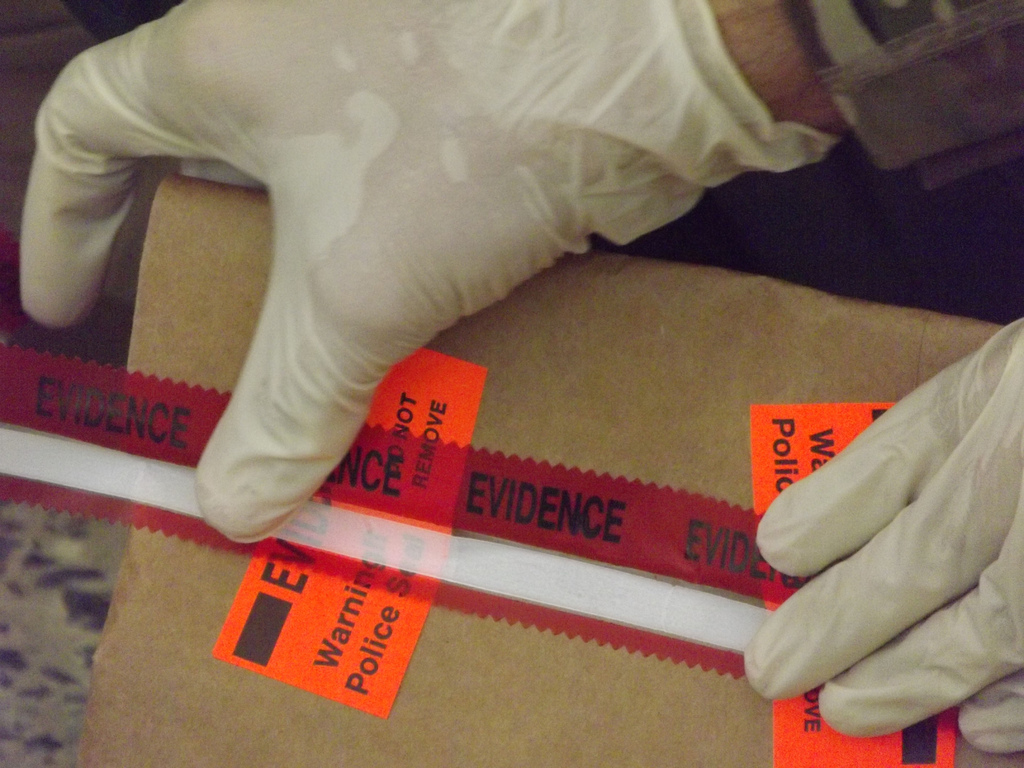
In the Bronx (and, to a lesser extent, elsewhere) when your belongings are seized as "evidence," it can be impossible to ever get them back, even if you're never charged with a crime. (more…)

Android N makes notifications more interactive and meaningful — and they can be backward compatible.
Getting notifications on your phone isn't something new or something that started with Android. Whether we're talking about annoying pop-up boxes or that addictive red blinking light, our phones have always been able to tell us it wants our attention.
But with Android 7.0, things are going to get a lot better, largely because developers now have more control over the way notifications are displayed.
Let's talk about the changes and new features.

These kinds of actionable notifications have been further refined in Android 7.0, and the developers can decide to add more context to the notification (think a multi-line chat history in that Hangout's notification, for example) and keep the notification active after you reply if a return response is anticipated. You could have a running Hangouts chat, complete with history, right in your notification shade. And because it's a native view of an app that's already active, it's light on resources.
Simply, when multiple notifications for a single app are received, they can be bundled together into a single group. This group can be expanded to see the individual messages. Changes in Android N allow developers to "progressively" expand the notification stack so that they can add context to the group or each notification. That means in our Hangouts example, you could expand a notification bundle showing 3 unread messages and see the chat history for one or all of them — and with the Direct Reply feature, you could act on them.
Developers can use these new features in their apps and still be compatible with older versions of Android
These changes may feel familiar to anyone using an Android with Lollipop or higher because the behavior is built on changes made in Android 5.0 (API 21). They are also what we already use on Android Wear watches with a new visual style. Because of this, Bundled Notifications and inline Direct Replies are backward compatible with any application built for Lollipop or higher. All the developer really needs to do is check that they meet the new best practices. Even if they don't bother, the existing API functions seamlessly call on the newer versions. This is important because the reality is that many apps we use every day rarely get updated.
Even better news is that using existing support libraries, developers can implement these changes and still have an app that works as intended for versions of Android as old as Honeycomb (Android 3.0). That's 98.2% of all Android devices still in use.
Notification Peeking brings back the old pop-up display for an incoming notification, but makes them smarter. A developer can use the peeking window to display the latest incoming notification of a bundled group. Our Hangouts notification is now collapsible and expandable to see content as we like, we can reply to each individual message thread and we could (if implemented by the developer) set things up so a reply can "peek" on our screen for a moment or two — and allow us to directly reply from the peeking window.
Custom Views and Message Styles let a developer change how the notifications look for a particular app. This can be very important when you are creating bundles and peeking, and can help us as users get the right information at a glance. Message Styles allow customization of a notification's labels, and now our Hangouts notification has a title — "Chat with Dad" or "Bad Jokes" — and if there are multiple participants, each reply could be labeled or colored.
Wrapping it all up, Custom Views allow a developer to define the artwork of a notification bundle (the icon) or define an icon for an individual notification, then use everything else without building their own user interface. A great app can have a unique notification style without worrying about how to handle replies, bundle multiple notifications into a stack and define the individual labels for each view without doing any of the heavy lifting themselves.
So far, these changes appear subtle, and that's because we've only seen Google's take on their implementation. Nobody making Android phones has to keep things low-key and mostly white, and developers now have some tools to make notifications for their apps stand out. We won't like them all, but the next great idea can be built using these tools.
Make notifications great again.

This year’s World Science Fiction convention, MidAmeriCon II, is currently being held in Kansas City, Missouri. And during tonight’s Hugo Awards ceremony, voters largely rejected the slated works that had been placed on the ballot.
The Hugo Award is one of the major awards for speculative fiction novels, shorter stories, magazines, editors, and other works. Unlike the Nebula Awards, which are voted upon by members of the Science Fiction and Fantasy Writers of America (SFWA), the Hugo Awards are selected by members of the convention.
The award is a major one: having Hugo Award Winning Author splashed across the top of a book or on an author’s bio is a really helpful thing when it comes to attracting the attention of readers, bookstore...

Google Allo is clearly one of the most audacious apps to be released by the company in recent times. Not only is it a departure from what Google has long been invested in doing with Hangouts, but it's also trying to catch up in one swift release with competing messaging apps that have been around the block for many years and have had time to perfect their approach.
So it seems logical that the Allo team got some "inspiration" from other messaging services.
Read MoreGoogle Allo's voice messaging interface looks awesome, with an eery resemblance to WhatsApp's was written by the awesome team at Android Police.

Create lists, transcribe recordings, doodle, collaborate on to-do lists, and much more with Google Keep.
Google Keep isn't your average note-taking client. While the app sports a minimal interface and is easy to pick up and use, it offers a set of powerful tools that make it an effective task management utility. From creating collaborative to-do lists to transcribing voice notes and saving bookmarks, the app does it all.
The best part about Keep is that all changes are synced automatically, giving you quick access to your notes across all your devices, and on the web. Here's what you need to know to get started with Google Keep.
This part's straightforward. Just head to the Play Store, search for Keep, and install the app.
Tap Install.

Select the Google account you want to associate with the app.

One of Keep's strengths is that it is very simple to use. Creating a note or editing an existing note is about as easy as it can get.
Enter the title and text, and tap the Back button to save the note.

Tap the Back button to save the changes.

Keep allows you to easily create and manage to-do lists. Here's how to get started.
Set a Title for the list, and start adding items. To delete an item, tap the Delete button on the right.

You can turn the note back into a text note by selecting the Menu button in the top left and selecting Hide checkboxes.

Keep has an excellent collaboration feature that lets you quickly share your notes and to-do lists with your friends and family. I use the feature to collaborate with my wife over grocery lists, chores for the weekend, and things to buy for the house. Here's what you need to know about sharing notes.
Allow Keep access to your contacts.

After adding the collaborator, tap the Save button to share the note.

The ability to set reminders for notes or to-do lists is one of Keep's most useful functions. The reminders feature works the same way as it does in Google Now: you have the option of creating a reminder based on time or location. Here's how you can easily set a reminder in Google Keep:
Set a reminder that triggers at a particular Time or at a Location.

You can also set recurring reminders for things like shopping lists. Reminders set in Keep will show up in Google Now and Inbox. When you're setting a reminder, you get default options for Morning, Afternoon, and Evening. Here's how to change the default options.
In the Reminder settings section, tap Morning to change the default time for notification alerts in the morning.

In addition to text notes, you can also dictate notes to Keep, with the audio getting automatically transcribed. It is a lesser-known feature that comes in handy when you're taking notes in class.
Tap the Play button to listen to the note.

Adding an audio recording to an existing note is really easy.
Tap the Recording button and start speaking. You'll see a text version of the recording as well as the audio added to the bottom of the note.

You can delete the recording by hitting the Delete button at the right of the audio. Doing so doesn't delete the text, which you'll have to clear manually.
You can easily take photos from within Keep, and extract text from within images.
Add a title and text to the image if required.

Want to grab the text from a photo you took, but don't want to manually transcribe from the image? There's a feature for that.
You can also make annotations to an image by tapping the Pen button in the top left.

If you're looking to add an image to an existing note, it's quick and easy.
Tap Choose image to add an image from the gallery to your note.

Like doodling? You can use Keep to draw digitally, with three modes available.
Tap between Pen, Marker, and Highlight tool.

Tap the Select button from the bottom bar to select and move part of your drawing.

Remember Delicious? You don't need a dedicated tool to save bookmarks anymore, as Keep does a capable job of saving and organizing your bookmarks.
In the Share via screen, navigate to Keep to save the link.

Tap Save to add the link as a note in Keep.

While Keep has a lot of features, it doesn't offer rich text editing. If you're in need of more robust formatting and editing tools, you can export your note to Google Docs, Evernote, Word, or other word processing services.
Tap Copy to Google Doc to turn the note into an editable Google Docs document.

Tap to save the note in your word editor.

You can also save several notes to a single Google Docs file. Just hold down to select individual notes, and then tap Copy to Google Doc.
If you no longer need a note, you can easily archive or delete it. Here's how:
Tap Delete to delete a note.

If you've accidentally archived a note, you can recover it by going to the Archive tab from the hamburger menu.
Tap the Unarchive button located at the top right corner.

You will be able to do the same for deleted notes, with notes staying for up to seven days in the trash.
Tap the Restore button.

Keep lets you add labels to organize your notes. If you're like me and take a lot of notes throughout the day, labels are absolutely essential to make sense of the clutter.
Add your desired label.

You can also add labels quickly with the hashtag (#) symbol.
Add your desired label from the list.

You can create, edit, and organize notes by labels with ease.
Tap on a label to show notes tagged with that particular label.

Tap the + button to add a new label.

Along with labels, you can use colors to visually differentiate between different types of notes.
Tap the desired color from the options at the bottom.

If you're looking for a minimalist note-taking app with a robust feature-set, it's time you gave Keep a try. The note-taking service is now integration into Google Docs, making it easier for you to surface information from your notes into your documents.
What do you use Keep for? Let us know in the comments below.
Updated January 2018: Updated with the latest additions to Google Keep.

In June, the Defense Department’s Inspector General released a report on the US Army's accounting, revealing that the Army had invented $6.5 trillion in "improper adjustments" ($2.8T in one quarter!) to make its books appear balanced though it could not account for where the funds had gone. (more…)

The police in Caldwell, Idaho told Shariz West that they thought her ex-boyfriend might have run into her house and they asked for permission to look inside; she said yes, but then the cops engaged in a 10-hour armed standoff against her empty home (the family dog was inside, but there were no humans), blasting holes in the walls, crashing through the ceilings, smashing out the windows, and filling the house with tear-gas, which destroyed most of the family's possessions. (more…)
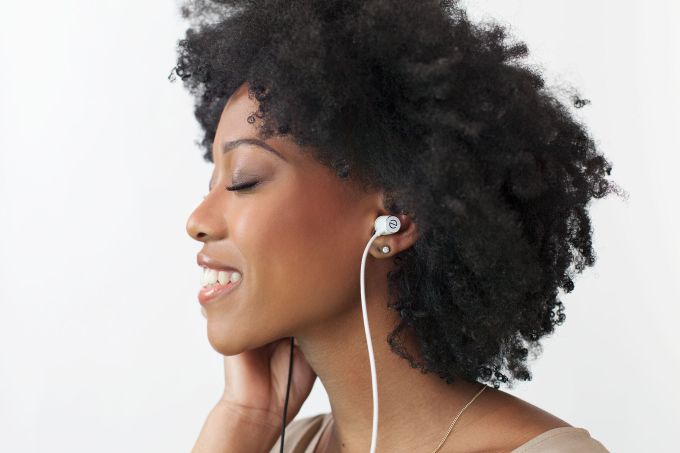 MeQ Inc., the company behind Even earphones, the tunable earbuds that adjust to users’ unique hearing abilities, has raised $2 million as it looks to expand its business.
Financing came from individual investors like Ilan Shiloah, an Israeli businessman and former chief executive of the Israeli arm of the advertising firm McCann Erickson and the chairman of McCann Worldwide… Read More
MeQ Inc., the company behind Even earphones, the tunable earbuds that adjust to users’ unique hearing abilities, has raised $2 million as it looks to expand its business.
Financing came from individual investors like Ilan Shiloah, an Israeli businessman and former chief executive of the Israeli arm of the advertising firm McCann Erickson and the chairman of McCann Worldwide… Read More
 A group calling itself the ShadowBrokers dumped data online last weekend that it claimed to have stolen from a hacking team widely believed to be linked to the NSA. The data contained vulnerabilities affecting major firewall products and ignited speculation that the NSA had been hacked.
Expert analysis of the data suggested that the NSA and the Equation Group are one and the same, but… Read More
A group calling itself the ShadowBrokers dumped data online last weekend that it claimed to have stolen from a hacking team widely believed to be linked to the NSA. The data contained vulnerabilities affecting major firewall products and ignited speculation that the NSA had been hacked.
Expert analysis of the data suggested that the NSA and the Equation Group are one and the same, but… Read More

Microsoft is facing a torrent of backlash from consumers and businesses complaining that the Windows 10 Anniversary Update has broken some third-party USB cameras. The update, released on August 2nd, reportedly dropped support for two major video compression formats — specifically the H.264 and MJPEG codecs. According to Microsoft-focused blog Thurrott.com, this was supposedly a decision the company made to prevent performance issues now that certain Windows apps have more direct webcam access post-update.
Now, millions of Windows users are discovering that their webcams are freezing up, even when trying to stream via Microsoft-owned Skype. The issue is said to effect many popular webcams from big-name peripheral makers like Logitech on...

Facebook has yet another piece of software to lure teenagers into thinking its products are more hip than Snapchat. The new iOS app, called Lifestage, is a kind of video diary where you answer biographical questions about yourself. Instead of filling in answers with text, you record a small video snippet that others can view on your profile. Every time someone updates their page, it shows up in a feed prompting others to check it out.
The catch: you can only use it if you're 21 and under.
The app was designed by 19-year-old wunderkind Michael Sayman, a Facebook product manager who tells TechCrunch that he wanted to replicate the readymade virality of Facebook’s earliest days, when it was restricted to college students. In that sense,...
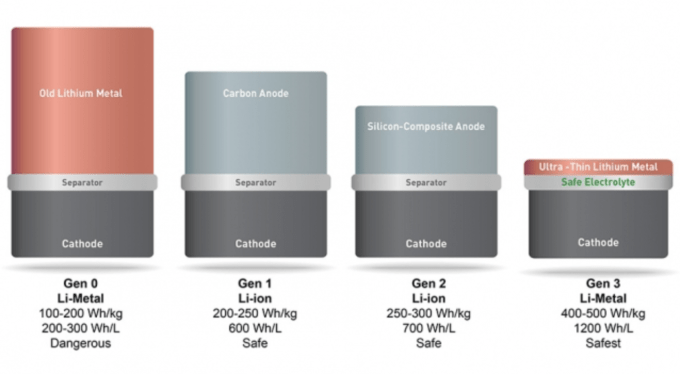 Soon cars, drones, phones, and almost anything with a battery are about to get a boost from a new MIT spin-out, SolidEnergy Systems. The company promises to double the battery life of basic lithium ion batteries and will also offer smaller batteries with the power of bigger cells. Why is this technology important? Because it is better than current battery tech and can maintain an energy… Read More

Google has just announced plans to gradually phase out support for Chrome apps on every platform except for Chrome OS. Starting later this year, new Chrome apps will be available only to Chrome OS users and won't be accessible on Windows, Mac, and Linux. (Existing apps will remain available and can still be updated.) Then, sometime in the second half of 2017, the Chrome Web Store will no longer display Chrome apps at all on those operating systems. And come early 2018, you'll no longer be able to load Chrome apps on Windows, Mac, or Linux at all. Extensions and themes are not at all affected by this change; in fact, they'll soon be given a much larger focus in the Chrome Web Store.
That might sound like a big deal, but Google says that...
