
Design student Sugko at Sejong University used a CymaScope to visualize bird songs, with beautiful results. (more…)
Design student Sugko at Sejong University used a CymaScope to visualize bird songs, with beautiful results. (more…)

Today's Oculus Connect 3 keynote covered a lot of ground. Over two hours of speechmaking Facebook and Oculus executives covered everything from release dates, prices, content, social, and diversity, to mobile SDKs and foveated rendering. If you want to relive it the way it happened, you can check out our liveblog, or watch the whole keynote on Facebook.
Here are some of the highlights:
Facebook's CEO is an obvious fan of VR, and not just in a I-spent-$2-billion-on-this-so-it-better-be-good sort of way. He explained how he's been sharing VR with world leaders, and then went on to do an extensive live demo of a new social experience Facebook is building for VR. Accompanied by Lucy and Michael, the trio...

Five years ago Google set out on an ambitious project to create a font family that encompasses the 800 languages and 110,000 characters found in the Unicode standard. Now available under open source, Noto’s aim is to get rid of the blank boxes that commonly appear when a computer or website isn’t able to display text.


Amazon updated their Alexa sample code on GitHub with a new wake word engine. This means that if you’d like to make your own Amazon Alexa with a Raspberry Pi, you can do so without the previously required press of a button.
http://lifehacker.com/amazon-has-an-…
The previous version of this project required that you press a button or an on-screen prompt before you could ask Alexa a question. Now, you can do so with a wake word, like “Alexa,” just like you can in the commercial version of the Alexa. This makes the prospect of building your own Alexa a heck of a lot more useful. As before, you’ll need a Raspberry Pi (model 2 or 3 are recommended, though we’ve seen the previous version running on both a C.H.I.P. and a Zero), USB microphone, and a speaker. You’ll find everything you need to know over on Amazon’s GitHub page.
Alexa AVS Sample App | GitHub
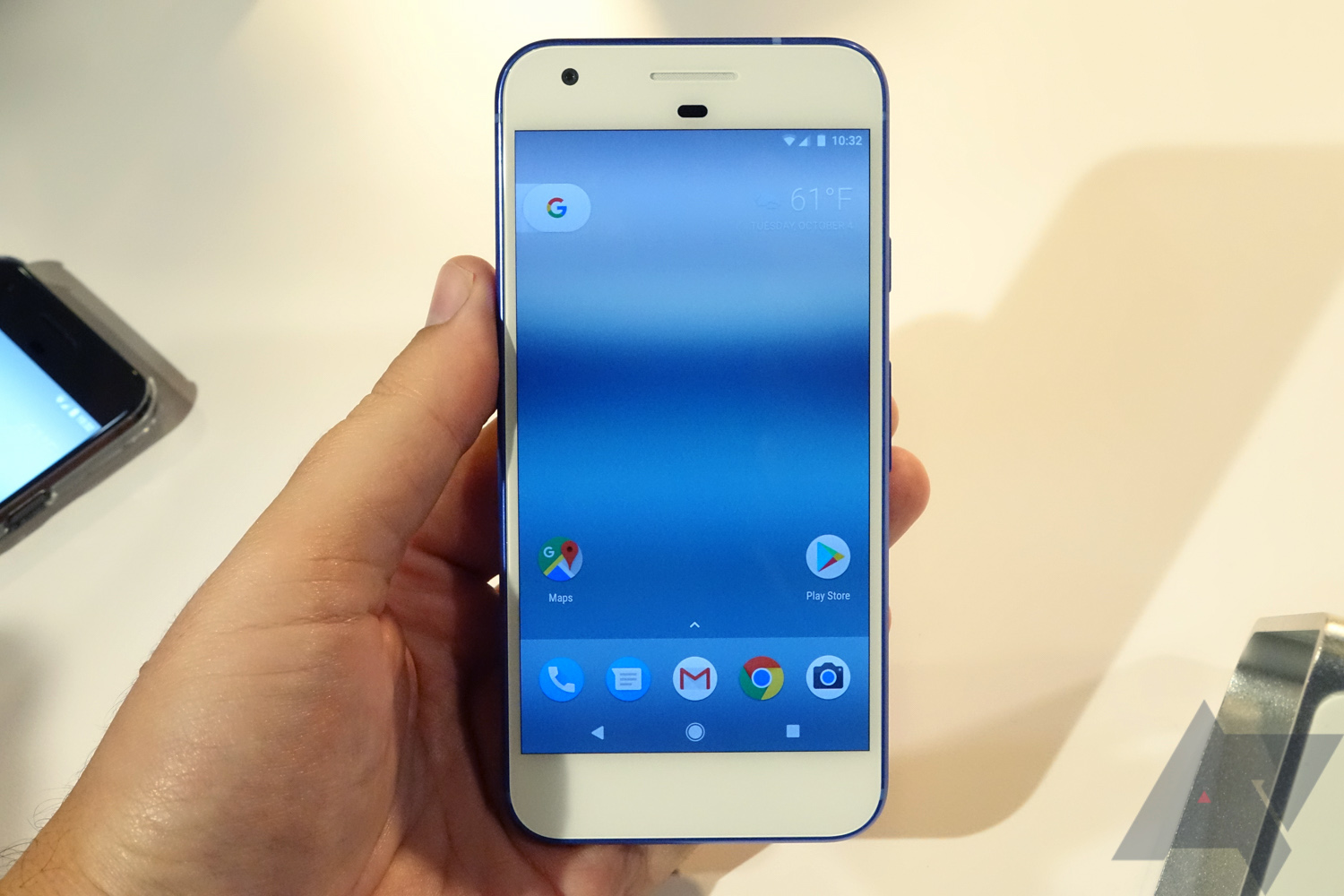
Verizon is known for bundling large amounts of pre-installed applications with little value, hence the term 'bloatware.' Unfortunately, it seems like the Verizon-sold Google Pixel phones are no exception.
According to a page on Verizon's website, the Pixel includes eight "Preloaded Play Store Apps," besides the usual Google-made apps bundled with most Android devices.
Read MorePixel phones on Verizon include some bloatware, can be uninstalled was written by the awesome team at Android Police.

Greyp Bikes announced a new electric bike today called the Greyp G12H. It can reach speeds of up to 27 miles per hour while using its 3kWh Lithium-Ion battery. It’ll reportedly stay charged for up to 150 miles. We don’t know how much it weighs, but Greyp’s similar bikes weigh around 120 pounds, so I’d presume it’ll be around there. Greyp says this model is "fit for every day commuting." I say that I want to see all the New York food delivery people zipping around on these. The bike isn’t available to buy yet, and we don’t have pricing info. We’ve covered a few electric bikes, all of which still seem cool as hell to me. This new bike isn’t the fastest available, nor is it the cheapest or lightest, but it’s got great battery life and...

The more we learn about the Chicago Police Department, the worse it gets -- there's the sabotage of dashcams, the widespread corruption, the investigators fired for refusing to cover up police crimes, off-the-books "black site" where the CPD kidnaps and tortures suspects, the Accountability Task Force Report that called the force racist, corrupt and broken. (more…)

Earlier this year, I wanted to start working out more. A friend suggested I buy a bunch of workout gear to motivate myself. I knew better, but I tried it anyway. Of course, I failed. Mindfulness site Break the Twitch has a name for this: a false first step.
http://lifehacker.com/5950484/how-to…
In a nutshell, here’s how writer Anthony Ongaro explains this concept:
This is the false first step: believing we’ve made a meaningful step toward a goal when all we’ve actually done is spent money or not done the thing we actually need to do. We’ve actually lost something (money and time) rather than attained something (meaningful progress).
I’ve done this with workout gear, camera equipment, healthy food, and all sorts of other hobbies, interests, and goals. Ongaro runs down a few of his own examples in detail. Chances are, you can think of your own examples, too.
It’s one thing to buy something to facilitate a goal you’re already working toward or a hobby you’re already interested in, but we often buy stuff to initiate that goal or hobby. And most of the time, that backfires. Instead of producing something, we consume and turn the goal into a novelty.
http://lifehacker.com/5887345/start-…
Of course, everyone is different and this may not be the case for you. Buying the right gear might actually work for you. For most of us, though, I think the false first step rings true. If you can relate, head to Ongaro’s full post at the link below. He goes into much more detail and it’s definitely worth the read.
Are You Taking The False First Step? | Break the Twitch via Rockstar Finance
Photo by heart-lines.

DCA has been presenting their concept for Optic, an AR bike helmet at conferences and competitions this year. It includes cameras, sensors, and a clear visor that displays alerts about obstacles, directions, and other data.

Optic gives cyclists the visual information to make safer decisions on the road by integrating front and rear cameras with 360-degree proximity and collision detection. The visor doubles as a heads-up display where Optic live-streams the rear camera and highlights potential risks. This allows the user to focus on the road ahead with full awareness of their surroundings. The visor display can also show navigation and journey statistic interfaces, putting information directly in front of the cyclists without them having to take their eyes off the road.
 Theranos is closing its labs and wellness centers, CEO Elizabeth Holmes announced today in blog post. And this isn’t a temporary closure: the “approximately” 340 employees running them are out of a job. Read More
 If you’ve been out of touch with the FinTech market recently you may have missed how popular prepaid cards have become. This is especially true when it comes to “open-loop” cards, which are prepaid cards powered by a processor like Visa or MasterCard that can be used anywhere a credit or debit card is accepted. These accounts now look and feel increasingly similar to an… Read More
Rather than create its own personal assistant for Galaxy smartphones, Samsung is just buying one. The company has announced it's acquiring Viv Labs, a startup formed by the creators of Apple's Siri personal assistant, for an undisclosed amount of money. The deal is being reported both by TechCrunch and CNBC and has been confirmed directly in this Medium post. Viv Labs publicly showed off its next-generation artificial intelligence assistant (simply called Viv) back in May. The product was able to successfully handle a series of complex user requests, wowing an audience at Disrupt NY.
The trio behind Viv — Adam Cheyer, Dag Kittlaus, and Chris Brigham — gradually departed Apple following the company's acquisition of Siri in 2012 and have...

Welcome to Android Central's guide to helping you find the perfect phone — for you and the people in your life!
It's increasingly likely that you're reading this on your smartphone. In fact, it's likely you're doing more on your phone than ever before, which is why it's so important to buy the right one — for you and the people in your life.
Here at Android Central, we don't just play with phones — we live and breathe them. We're constantly comparing them to the competition, seeking out the ideal device for each particular use case. We believe in the Android mantra of, "Be together, not the same," which is why we are launching the Smartphone Buyer's Guide to help you pick the right phone for your unique situation.
To do this, we spent hundreds of hours using, evaluating and often abusing all the phones that you see on retail shelves, glimpse on billboards, and see us write about every day. We then determined the most important categories, based on carrier, price, feature, size, user profile, manufacturer, and camera, and wrote guides that are easy to understand and quick to reference. And where applicable, we'll highlight individual phones that have earned our coveted Choice Award. In each guide, we'll highlight a Best Overall — that's the phone we think would suit most people the best most of the time in that particular category — and at least one alternative, because choice is good.
These guides are living things, and we will constantly be reviewing the choices to make sure they are up-to-date.
But this isn't the end. These guides are living things, and we will constantly be reviewing the choices to make sure they are up-to-date. For example, we understand that Google's new Pixel phones are highly anticipated and coming soon, and we're looking forward to using them for hundreds of hours so we can refresh our guides accordingly. Of course, you may not agree with our choices, and that's fine — we have a dedicated forum to discuss just that. While we can't promise your suggestions will impact our decisions, we promise to read everything, and to take them into account!
This guide couldn't have happened without the help of a few very hard-working people, including Florence Ion, Alex Dobie, Andrew Martonik, Jerry Hildenbrand, Derek Kessler, Harish Jonnalagadda, Marc Lagace, and many others behind the scenes. And this is just Phase One: we promise to expand the Smartphone Buyer's Guide to include more categories, price points, features, and more, and we eventually plan to expand to other regions, so we can recommend devices from carriers in Canada, India, UK, and Australia.
Get started with the Smartphone Buyer's Guide!
Personally, I'm really excited about this launch, which I feel is a natural next step for the site, and our community.
-Daniel

Google’s new Google Assistant appeared in every part of the company’s hardware event yesterday. Google was less clear about how Assistant differs from Google Now, or Now On Tap, or Google’s voice commands. To clear things up, here are some of Assistant’s best new features, and how it fits into your Google life.
Right now, the only way to try out Assistant is as a chatbot in Google Allo. Google also announced some features that won’t arrive until devices like Google Home or the Pixel phone arrive. Not every feature is available on every device, but there’s a lot of promising stuff on the way.
http://lifehacker.com/a-screenshot-t…

If you own an Amazon Echo, controlling your lights or thermostat with a voice command may not seem all that new. However, Google Assistant brings the Chromecast, and any other Google Cast-enabled devices, into the fold. With Assistant, you’ll be able to say “Play Luke Cage,” for example. Google will automatically figure out that you want to play the show Luke Cage, through the app Netflix, on the Chromecast that’s on your Wi-Fi network.
It’s unclear just yet how this will work if you have multiple Google Cast devices. So far, we know this feature will be enabled in Google Home, but hopefully it will at least come to the Pixel phone as well.
Google Assistant will also be able to control smart home devices like those from Nest, Samsung SmartThings, and Philips Hue. Those are just the partners that Google announced at launch, but presumably more will follow. Once again, it’s unclear if Google will let you control these devices from your phone, or just the Google Home speaker, but both would be amazing.
http://lifehacker.com/the-seven-best…

Google touts the ability to “have a conversation” with Google Assistant, like all anyone wants is a deeper relationship with their phone. However, when you actually use it, it becomes clear just how much better being able to ask follow up questions makes the experience. To demonstrate this, I tried out one of Google’s favorite examples that I never actually use: finding movie showtimes.
If I already know what movie I want to watch, I can just search whatever app I’m going to use to find tickets directly. Google’s useless to me here. However, if I’m curious what’s out, I can ask Assistant “What’s playing?” In Allo, this shows me a list of movies playing in my area. The Magnificent Seven looks okay. I tap it to get some information and reviews. I decide it’s worth a shot, so I go back to my Allo conversation and say “Showtimes” to find out where it’s playing near me. Except it only shows me the theaters closest to me. I prefer another AMC that’s about halfway between me and my friends. So I ask again, “Showtimes at Parkway Pointe.”
Though I’m now several commands into this conversation and even left the app for a bit, Google still knows I’m asking about The Magnificent Seven. In fact, the only flaw left with the system is that Google will only offer to let me order tickets through Fandango (which we’ll come back to). Previously, you had to have a pretty good idea of what you wanted to find for a lot of Google’s cooler features to really be useful. Now that you can ask follow up questions and have a real conversation, a lot of queries will get a lot easier.

Google Now can already guess that you might want to see the weather and maybe a few stock prices every day. With Google Assistant, you can get that kind of recurring information for anything by following up a search with “send me daily.” Want a daily update with all the presidential news? You got it. Need to know the current exchange rate between US dollars and British pounds every morning? Google Assistant can totally do that.
When I say “anything” I really mean anything. In Google Allo, I asked Assistant “How tall is Jeff Goldblum?” To which it naturally replied “Six feet four inches.” I then set up a subscription for that request to occur every morning at 7AM. This morning, I got a notification from Allo letting me know that, indeed, Jeff Goldblum is still six feet four inches tall. Presumably, this implies Google will let you set a subscription for nearly anything. We’ll see just how complex those scheduled commands can be when Assistant breaks out of Allo later this year. It’s possible that in the near future, you’ll be able to schedule a request for a cab every morning, or mute your phone every night simply by setting up a “subscription” to certain Google Assistant commands.

When you lose your internet connection, Google’s voice commands suddenly become useless. Google can’t even transcribe your commands, much less find out how tall Jeff Goldblum is. Assistant, on the other hand, will be able to save your commands and send them when you get your connection back.
This works best in Allo where you can type your commands, since most voice transcription doesn’t work without an internet connection. Simply type your command and the next time you have a connection, you’ll get your answer. If you leave the app, Allo will even push a notification to let you know that it reconnected and it found your answer. This can be super handy when you need to set a reminder on the subway before you forget, for example. Some Google voice commands already work without an internet connection, so this isn’t totally new, but it’s a nice safety net to have when your connection gets fussy.
http://lifehacker.com/use-some-googl…
Google Search has a strange relationship with third-parties. You can get information from Wikipedia, IMDb, Fandango, and a million other services, but you can’t always interact with them. For example, if you ask Google to call you a cab now, it will give you links to Uber and Lyft, but it can’t get you a ride directly. That will change in December when Google launches its Actions on Google platform.
This platform will let third-parties add voice actions to Google Assistant. These can either be “direct actions” which are simple requests like “How tall is Jeff Goldblum?” or complex, conversational ones. Google demonstrated this yesterday by showing how hailing an Uber would work. You can simply say “I need an Uber,” Google will connect you to the Uber chatbot which asks you where you’re headed, you give it an address, pick what type of cab you need, and Uber will handle the rest.
Since these will be built on Google Assistant, instead of just on one device, they’ll be able to adapt to whatever device you’re using. You can tap suggested replies to Assistant in Allo, or you can speak your commands to Google Home. As we stated before, you can also pause your conversations and come back to them later. Say you’ve already told Uber where you need to be picked up, but you need to ask your party if you need an UberX or an Uber XL. Google will wait while you figure it out. No more trying to memorize a long, complicated voice command to get it in one go.
One of Assistant’s accidental best features is that the Google Now name is essentially dead. While the company hasn’t exactly given a straight answer about how Google Now will live on after Assistant rolls out, Android Police discovered that virtually every reference to Google Now and Google Now On Tap have been removed in the latest Google beta. Which is fine by us, since Google Now was an awful name to begin with that’s only gotten more confusing over time. Assistant makes much more sense as an umbrella term for the company’s smart features.
Chances are if your email or social media account has ever been compromised, you accidentally gave your credentials to the scammers yourself. The most common way to infiltrate an account is called phishing, in which people trick you into handing over your login info to false websites that look legitimate.
Phishing attacks aren’t new, of course, and there’s likely a deluge of such emails in your spam folder, but it’s still the leading cause of compromised accounts. This graphic from Digital Guardian highlights how you can spot phishing attempts in your inbox and how to avoid them. Whether it’s weird attachments that prey on your curiosity or spoofed links that take you to a false login page that imitates a familiar brand, there are a variety of techniques that scammers use to engineer their way into your account (often just to proliferate more spam). And it’s not just email; beware of shady text messages from unknown numbers or people posing as IRS agents requesting your private info.
Have a look at the graphic below for a thorough look at common phishing methods.

Don’t Get Hooked: How to Recognize and Avoid Phishing Attacks (Infographic) | Digital Guardian

Next year, some of Netflix's original movies will have a debut home on the big screen. The streaming service just signed a deal with the theater chain iPic Entertainment that will give a same-day theater release to a portion of Netflix's films, The Wall Street Journal reports. The deal includes 10 of Netflix's upcoming movies, including The Siege of Jadotville (which will see a simultaneous release this Friday) and the Christopher Guest-directed comedy Mascots.
iPic Entertainment is a small luxury theater company — WSJ says the theaters offer "lobster rolls on the menu and monogrammed blankets for certain members" — with just 15 outposts around the country. Netflix's films will screen in New York and Los Angeles, according to WSJ, with...

A Reddit user says, "My English teacher has this posted outside her office."

Yesterday was a frenzy-filled day, what with the new Pixel phones, Google Home, and more being announced; however, not every day can be as exciting. Google's Opinion Rewards application for Android has been updated with a new icon, a blue color scheme, and a new notification icon. Fun stuff.
As you can probably tell, the new icon is circular. This corroborates the article that Cody whipped up about Google's impending "circlification" of its icons, which has already begun with the launch of the Pixel phones yesterday.
Read MoreGoogle Opinion Rewards gets a new icon and a blue color scheme to match was written by the awesome team at Android Police.
 I’ve recently seen a few examples of services that ask customers to type in their online banking usernames and passwords so the service can access their bank accounts on their behalf. The applications are fairly broad and definitely useful — making payments, ID verification and analyzing data, for example. This is a security anti-pattern. This is bad news. Read More
 It’s been just over a year since Adobe launched its Adobe Stock photography service, with deep integration into the company’s Creative Cloud suite. Today, it expands the number of photos available with the EyeEm Collection, a hand-picked selection of the best images EyeEm’s customers have shared and offered for sale on the platform. Read More
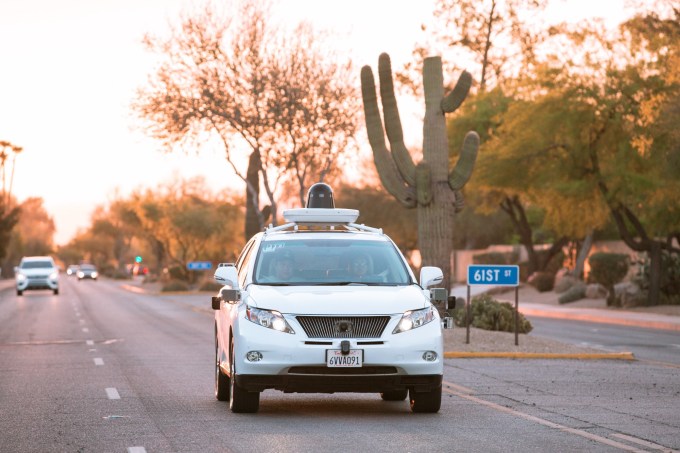 Google’s celebrating another milestone in its self-driving car project – a 2 million milestone, in fact. The search giant’s autonomous test cars have now racked up that many miles in public road testing, which it notes adds up to about 300 years of human driving based on the average person’s yearly total.
What’s interesting about the volume of miles Google has… Read More
Google’s celebrating another milestone in its self-driving car project – a 2 million milestone, in fact. The search giant’s autonomous test cars have now racked up that many miles in public road testing, which it notes adds up to about 300 years of human driving based on the average person’s yearly total.
What’s interesting about the volume of miles Google has… Read More

YouTuber Tommy Edison—who aims to highlight “the funny side of being blind"—takes us through the experience of finding and reading braille signs in public places.

It's not as simple as a single number, but here's a breakdown of how much of that 32GB you'll actually be able to use.
Google's Pixel phones only come in two storage configurations — a base model 32GB, and a pricey 128GB model, for which you'll pay a $100 premium. So if you're looking to save some cash on what's already a pretty expensive phone, you might be wondering just how much space you really get on the cheaper 32GB Pixel. Well, here's the answer.
It's not as simple as a single number, because of the way Android app updates work, but here's a quick breakdown:
A few things to note here. Even if you don't install any third-party apps, subsequent updates to built-in apps will whittle that number down further, over time. That's because updates to preinstalled apps occupy the same space as newly installed apps from the Play Store. (Even if you don't update, just using your phone accumulates cached data which also takes up space.)
MORE: How to free up storage space on Android
Secondly, more than 5GB might seem a bit steep for what's still a relatively barebones Android 7.1 experience, but it's worth remembering that Nougat's seamless updates feature is likely at play here. In order to update faster and more easily — and with less chance of bricking due to a software update — phones shipping with Android 7.0 or above duplicate the partitions where the Android OS lives. This redundancy is a good thing, but it also takes up a few extra gigabytes.
MORE: How seamless updates work in Android 7.0
Still, 23GB (give or take) is about on par with what you'd expect from a modern 32GB Android phone — the real test will come when the likes of Samsung and LG start pushing out mid-range phones with Nougat. Losing a few extra gigabytes on a 32GB "Google experience" phone isn't a huge deal. But factor in a heavier UI layer (like Samsung's TouchWiz) and more built-in apps, and a future 16GB handset might end up with a lot less space available to the user.
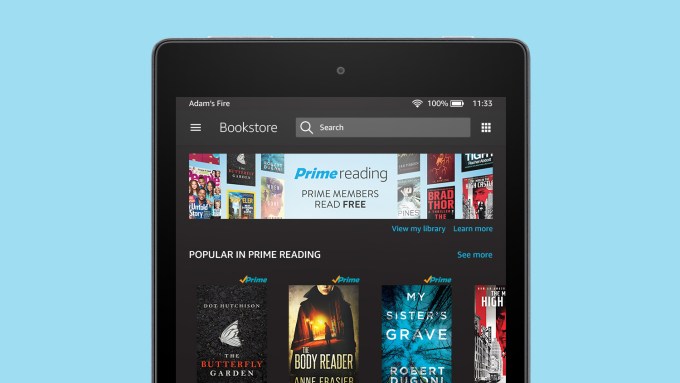 Amazon launched another benefit for Prime members today: Prime Reading, which lets users read from a section of over a thousand Kindle books, digital magazines, short stories, comics and more for free as part of their subscription. It’s essentially a version of Kindle Unlimited with a pared down catalog (Unlimited boasts over one million books, magazines and audiobooks) but without… Read More
 Virtual reality soothsayers have approached the technology as though they are treading on sacred ground and ushering in not only a new era of spatial computing but a new level of consciousness. Conversations that start with talking about dumb little mini-games lead to rabbit-hole ethical discussions. But what if instead of being a harbinger of a future utopia or dystopia, VR was just a hell… Read More

Where can you buy Google's new Pixel phones in the UK?
Google's Pixel event has just wrapped up, and already we're starting to learn about when and where we'll be able to buy the Pixel and Pixel XL in the UK, and how much they'll cost. The short version is that all four variants are pretty expensive, and that the Google Store live right now. EE should follow as exclusive carrier partner, and given the recent leaks they should also be available at Carphone Warehouse.
The simplest way to order an unlocked Pixel is directly from the Google Store. Right now Google's offering Quite Black and Very Silver for sale, but not the limited edition Really Blue.
Current shipping estimates put the Pixels 2-3 weeks out for delivery.
EE is the exclusive network partner for Google's Pixel phones. Prices for a Pixel with no upfront cost start at £50.99 a month, 24-month contract with unlimited minutes, unlimited texts and 10GB of data. For the Pixel XL, it's £55.99 a month over 24 months. Both phones are offered in silver and black.
Carphone Warehouse offers the Pixel and Pixel XL in silver and black, with an October 20 delivery date, and SIM-free prices matching the Google Store (see above.)
On contract, you've got a variety of options on Vodafone, O2, EE or Carphone's own iD network. The lowest monthly cost is £30.99 for a 32GB Pixel with 5GB of data on EE — that's with a hefty £249.99 upfront cost. As always, Carphone's range of plans is varied — and certain offers exist for upgrade customers — so we'd recommend taking a look at the plans on offer below.

Today's Google event was dedicated to how its new hardware and software will blend together. Google started off with an official Pixel phone unveiling, after weeks of rumors and leaks. That kicked off a focus on software, especially the way Google's new Assistant software will power the Pixel and Pixel XL smartphones and Google Home. Google also showcased its Daydream View, a cozy-looking VR headset covered in fabric. The new 4K Chromecast Ultra made an appearance, as did Google's modular Wi-Fi router system, and Google Home, the AI-powered speaker aimed at Amazon's Echo. We've got the details below, along with full coverage of Google's hardware event right here.
After weeks of leaks, Google...

Google’s new Pixel phones are here. After years of overseeing reference Nexus devices running stock Android, Google is finally stepping into the smartphone fray to show what its vision of Android looks like. The Pixel and Pixel XL feature deep software integration to Google’s services, including Google Assistant, Daydream, and Google Photos. Unlike most current Android phones, it actually ships with the latest Android Nougat operating system and will continue to receive the latest OS and security updates.
The performance gap between smartphones is thinner than ever, and unique features have become more and more important than pure specifications as key differentiators between devices. When every major phone takes great photos, works...
 Google announced its Android-powered VR platform, Daydream, at Google I/O earlier this year. Today's Pixel announcement brought with it the formal debut of Daydream View, Google's official first-party VR headset that's designed to work with the new Pixel phones. In addition to compatibility with Google's custom software, the design has a unique fabric approach that treats the hardware like a true "wearable."


The Daydream View is designed with fabric and microfibers that make it look like something new in a sea of plastic and metal.
Read MoreGoogle Daydream View is Google's fabric-wrapped VR headset, available in November for $79 was written by the awesome team at Android Police.
