Update March 2017: The Google Assistant is coming to all Android phones running Marshmallow and above, making it available on hundreds of millions of new devices.
Interactions with the Google Assistant are conversational in nature, and the service does a great job of remembering your line of questioning. For instance, you can ask the Assistant about the first Doctor Who episode, and it'll give you the details in the form of a card containing air date and additional information. Later, if you ask a question along the lines of when the next season will air, it will remember the earlier thread and surface results about the upcoming season.
The goal is to make the Assistant personable and readily available to answer your queries. The service is still in its infancy, but the advantage with Assistant is that it can readily draw on a huge pool of data from Google's knowledge graph. As more and more users start using the service, it will use its AI smarts to deliver better recommendations.
In this guide, we'll showcase how the Google Assistant functions within Allo. Think of it as a primer on what the Assistant is capable of today. Given that the underlying functionality of the Assistant is the same across devices, there won't be vast differences in implementation when using the service in Allo, phones, Google Home, and other devices. That said, a few features are limited to certain devices. For instance, you won't be able to use the Assistant to set reminders or make calls using Google Home, but you have that functionality on phones.
There are similar limitations when using the Assistant with Android Wear 2.0, but if you're using an Android phone running Marshmallow and above, there's a lot to look forward to. Assistant on Allo has also picked up added features, all aimed at making it easier for you to communicate with your friends and family. Here's what you can do with the Google Assistant in Allo.
Subscribe to daily alerts in Google Assistant
Google Assistant lets you subscribe to receive news stories, weather information, fun facts, poems, currency exchange rates, and more on a daily basis. The Assistant will automatically use your current location for weather alerts, but you can specify a different location.
When it comes to news, you'll be able to select publications and categories. You can then select a particular time for the Assistant to deliver the daily briefs. Once you're subscribed, you can at all your active subscriptions or make changes by asking Assistant, "Show active subscriptions."
Unwind with Google Assistant
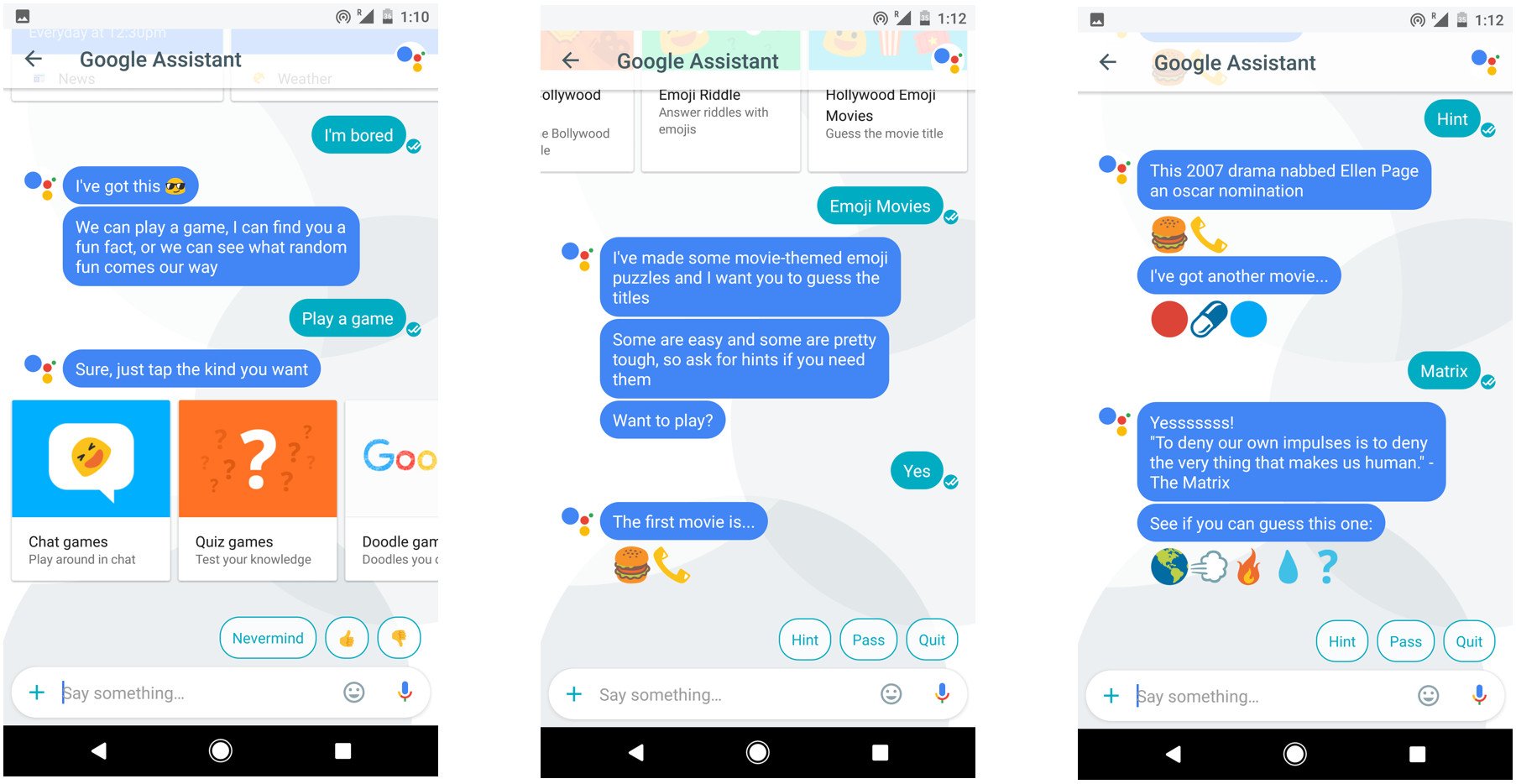
Feeling bored? You can ask the Google Assistant to play songs and videos, tell jokes, and if you're in the mood to procrastinate some more, you can also play puzzles and games with the service. Just say "let's play a game," and you'll see options for solitaire, tic-tac-toe, chat games (guessing Hollywood movies based on emojis is harder than you think), quiz games, and more. Games featured in Google Doodles are also available, including Pac-Man, Rubik's Cube, and Beethoven.
Use Google Assistant to set reminders and alarms
With Google Assistant, it's easy to set alerts, reminders, timers, and more. Just ask the Assistant to set a reminder for a specific date, choose the time, and you're done. The reminders are contained within Allo and don't show up in other services like Keep or Google Now.
Search your photos using Google Assistant
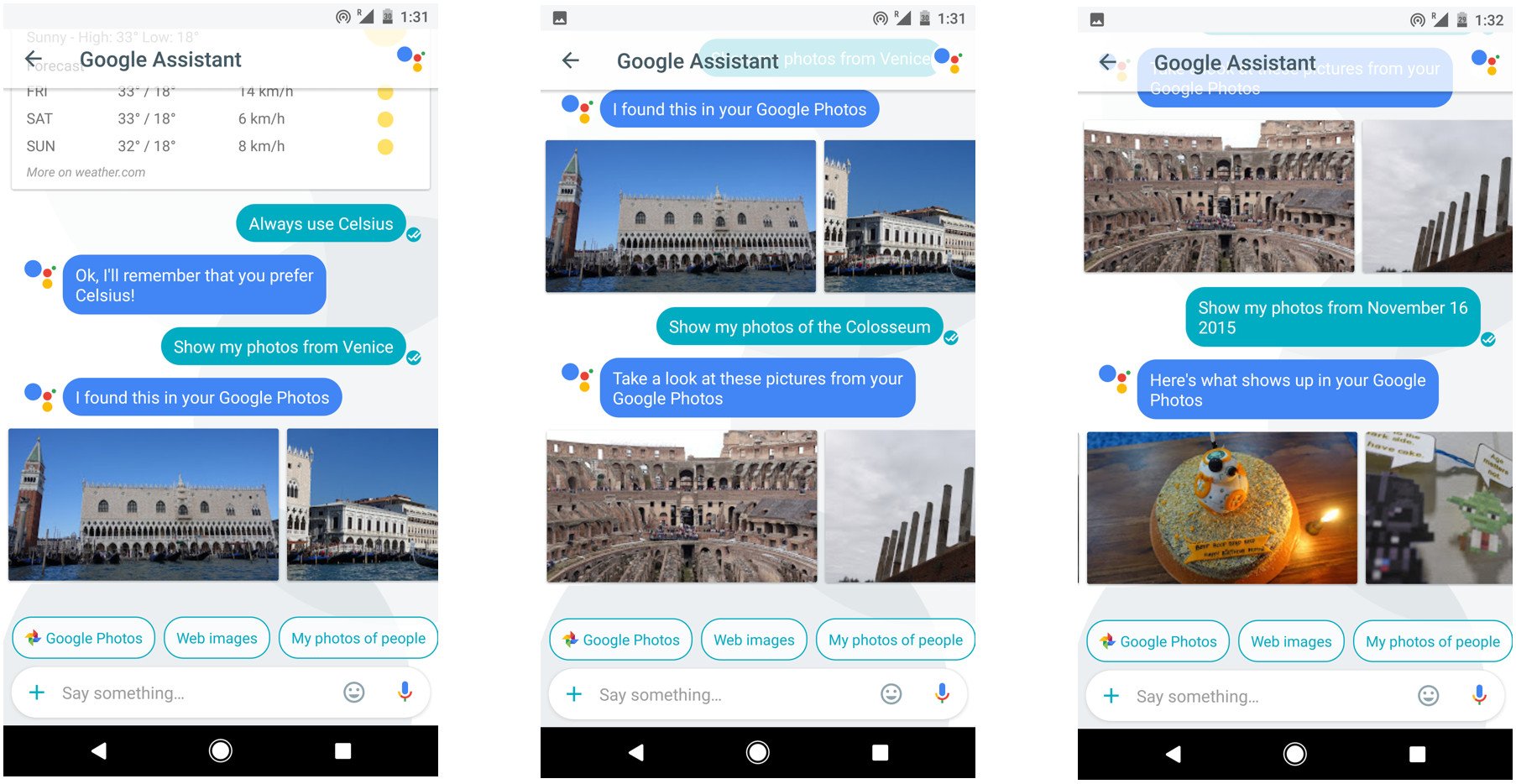
If you're looking for photos of a particular place or person, Google Assistant will be able to search through your Photos library. You'll also be able to set search parameters based on when the photos were taken. It's a nifty feature if you're looking to access a photo quickly. You can also ask Assistant to surface all images taken at a particular location.
Use Google Assistant to find your emails
You can search through your Gmail inbox directly from Allo. Assistant will be able to show you your most recent emails, or you can search for mails from a particular person, or emails from a specific day.
See your calendar entries in Google Assistant
Assistant integrates with your calendar to surface upcoming appointments. Just ask, "What's my agenda tomorrow?" and the Assistant will show you your calendar entries for the following day. As Allo has access to your calendar, you can also create new calendar entries from within the messaging service.
Find things to do nearby with Google Assistant
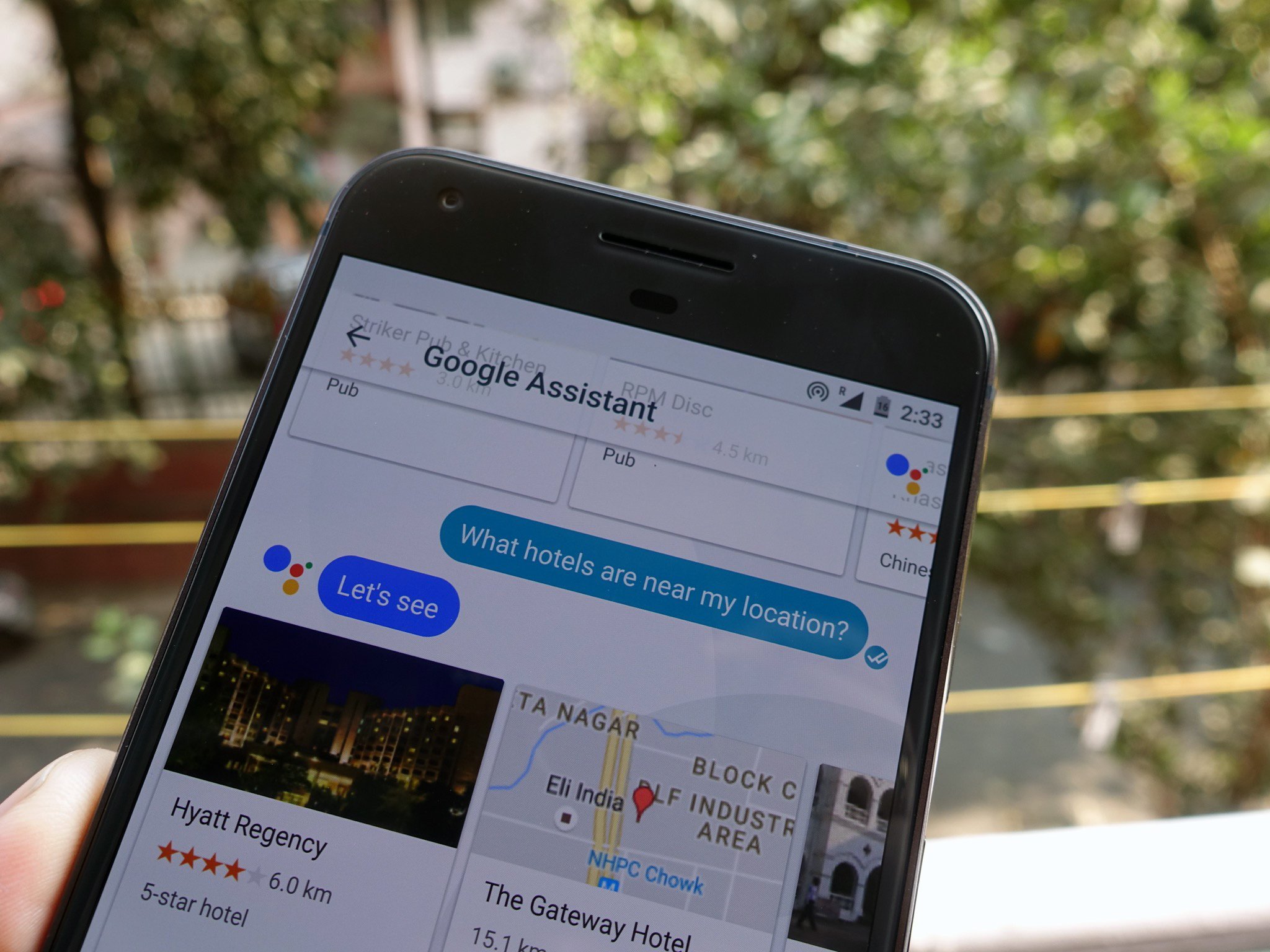
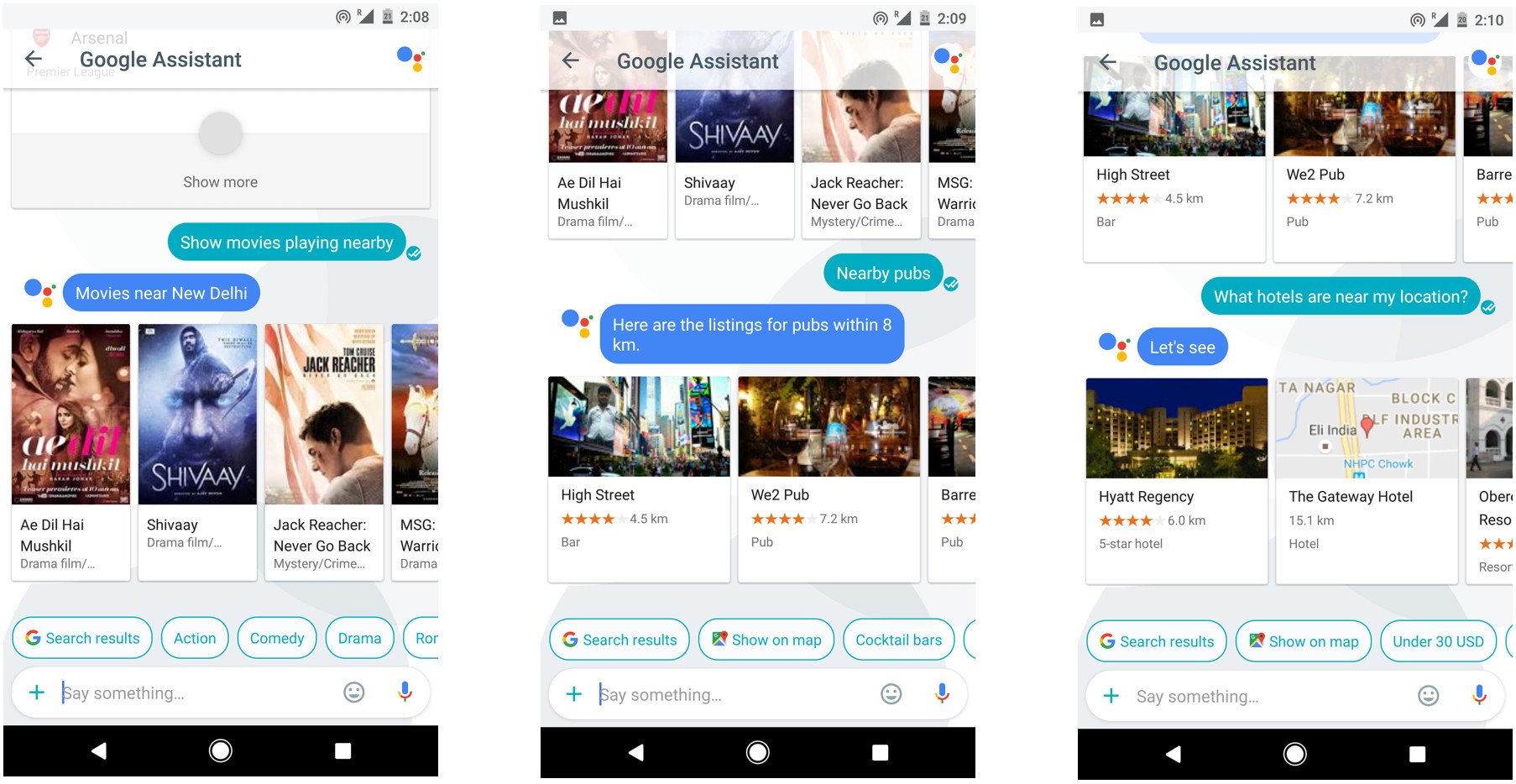
If you're looking to go out, the Assistant can recommend nearby restaurants, pubs, hotels, and other places of interest. You can also search for movies playing nearby.
Use Google Assistant to solve math problems
What good is a voice-guided assistant if it can't help you solve math problems? Just ask Assistant your query, and it'll give you the result immediately. It won't be able to solve complex equations, but if you're dealing with percentages or currency conversions, the Assistant comes in handy. You can also ask the Assistant for algebra formulas, and it'll surface a cheat sheet of basic formulas. Wish I had this when I was in high school.
Raise your GIF game
The latest update to Allo makes it even easier to send GIFs. You can now find GIFs by tapping on the smiley icon and swiping left, and Google is introducing a new feature called Lucky that automatically picks out a GIF for the occasion. Just select the smart reply with the Lucky icon, or enter "@lucky" followed by a phrase to quickly share a random GIF automatically. For instance, entering "@lucky cool" will result in a random selection from Giphy's vast catalog of GIFs tagged with that keyword.
As an aside, you can also animate emoticons in Allo. Select your emoticon, touch and hold the send button, and drag up to animate it.
That's it — for now
That's a quick list of things Assistant is capable of. With the new update, Assistant is readily accessible as a shortcut in the compose window next to the smiley icon, making it convenient for you to invoke the service. Google is constantly improving Assistant by leveraging its machine learning skills, and with the virtual assistant making its way into hundreds of millions of phones in the coming weeks, its usage is set to skyrocket.
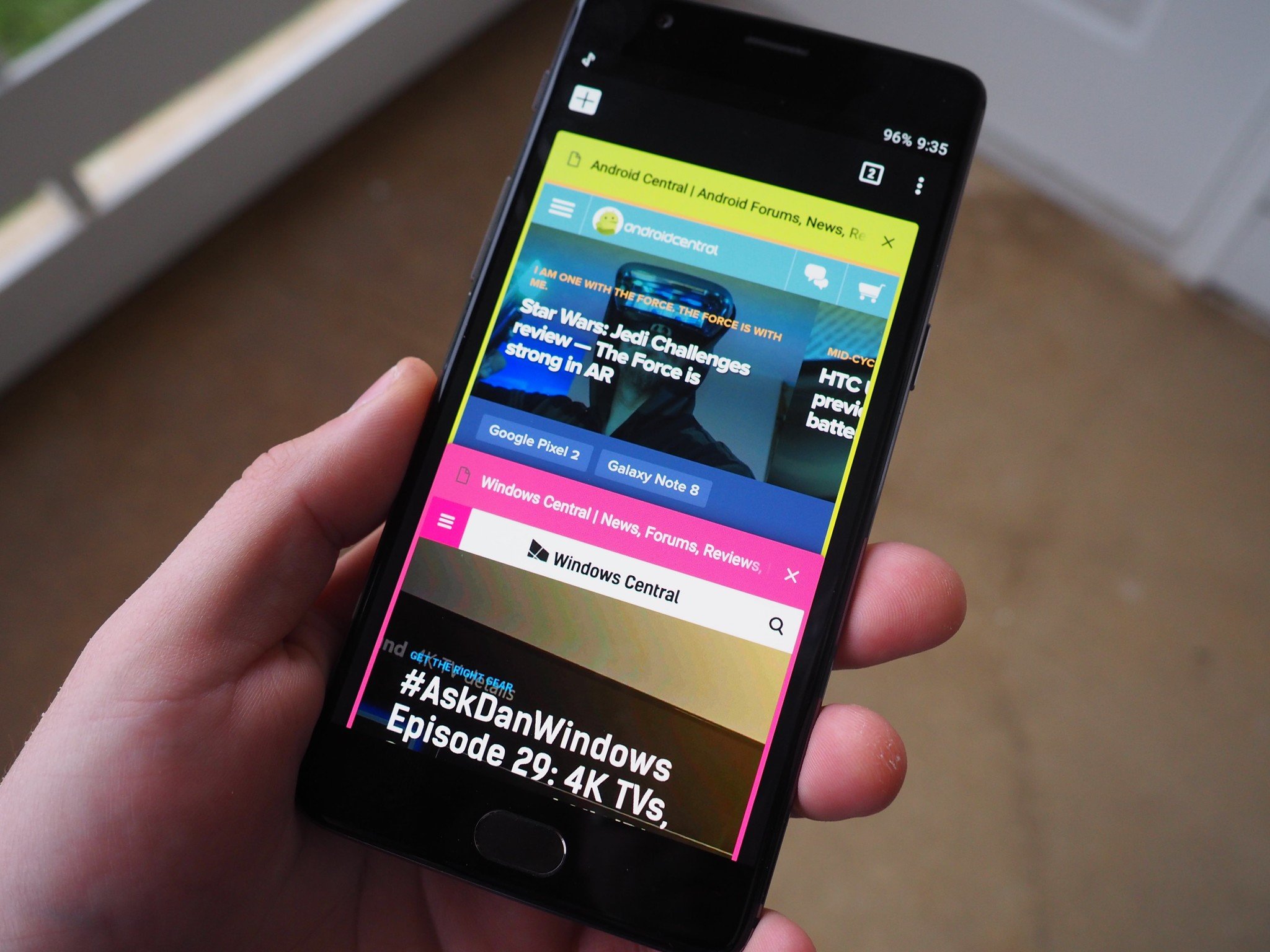
Launcher app shortcuts, those neat little pop-up functions for compatible apps that allow quick access to deeper app functions, are currently restricted to Android 7.1 on the Pixel phones and dev previews. As for everyone else, the tireless developer of Nova Launcher has you covered. Version 5.0 still isn't up in the public Play Store, but the beta version has been adding bits and pieces of Pixel Launcher functionality. The latest update includes the much-celebrated launcher app shortcuts.
Chromebooks, apps, browser extensions, you name it. If it's about Chrome, here's the place to start for anything and everything you need to know.
You know Google Chrome. It's on your phone, on your computer and might even be powering your laptop. It's one of Google's most ambitious projects and it plays a big part of their strategy for the web and mobile. Chrome is everywhere.
In typical Google fashion, Chrome also encompasses a bunch of things that we normally don't think of as being related. Google likes to unify stuff. Unifying things is good for development and is a great way to force innovation — making things do something new and work with other things is usually a good idea. But that can get confusing for people who just use products and services and don't need to know — or care — how the sausage is made.
That's where we come in. We love knowing how the sausage is made and we use Google's products and services. We can help you know everything you ever need to know about Chrome.
Chrome is the most popular web browser on the desktop and mobile.
Chrome is using a special version (known as a fork) of the WebKit engine developed by KDE in 1998 known as Blink. Apple Submitted major changes to the original in 2002 that were needed to allow the rendering engine to run on OS X and weren't fully compliant with the software license KDE required and this forked the project. Google had been a major contributor to Apple's version of the WebKit engine until they forked off Blink. With Chrome using the Blink engine, all Chrome-specific code — javascript hooks, platform code, build system tools and the like — has been removed from WebKit. Opera uses the same codebase as Chrome, and they too use the Blink engine. Amazon's Silk browser and Android also use the Blink engine for HTML rendering. Blink is just a refinement of the WebCore component of WebKit, and few if any issues are likely to arise for developers. All versions of Chrome on all platforms use the Blink engine except for the iOS version which uses Apple's Safari-exclusive version of WebKit.
Chrome's biggest draw is the way it syncs with your Google account. You can share bookmarks, open tabs, form data and more across every device that uses Chrome. This was a boon for mobile use and a big part of the adoption numbers.
Chrome is secure and Google sync works on every platform.
The Chrome browser also has support for sandboxed instances. Things you see or type in one tab are not normally visible to other tabs or other applications. Browser extensions work through the main Chrome instance and can affect every sandbox, but generally, things are kept separate. This can cause a high memory footprint as each tab occupies its own space in your RAM. It's a security feature that we depend on even if we don't realize it's there. The internet is not a very safe place, and every security feature helps. Other security features include a blacklist of sites that are potentially harmful and warnings when visiting sites that use a non-secure connection method.
Chrome is standards compliant, has a familiar and user-customizable interface and offers support for browser apps and extensions. This, as well as synchronization and security features, help make it the most popular web browser available.
Chrome is an operating system
Chrome is also a popular operating system for laptops, mini-PCs, and HDMI stick computers. Chrome OS includes the Chrome browser as a major component but it also has a long list of features of its own.
The Chrome browser runs better on a Chromebook that it does on more expensive computers. It was built from the ground up to be this way.
Chrome OS was designed from the ground up to be very lightweight. Like Android, it's a Linux-based system that Google has adapted to perfectly fit their needs. Chrome OS is responsive and capable on computers with specs that will barely support other operating systems, yet is scalable to take advantage of the most powerful components available. Using specially tweaked versions of standard Linux memory and process management tools like zRAM and a task scheduler, Chrome OS can take advantage of everything inside the computer it's running on for user tasks instead of operating system overhead. We still recommend you buy a machine with as much RAM and storage as you can, but it's important that the requirements are low. This is especially important now that Android applications can run on Chrome OS, since certain applications like Netflix and Plex will let you store videos offline. More storage means more movies, and more movies means more fun.
Besides running well on inexpensive hardware, Chrome can do everything most people want a computer to do.
Chrome is a complete operating system with platform support for third party applications. Multimedia features, GPU acceleration, human input device standards and more mean you can code applications specifically to run on Chrome and take advantage of the same hardware the system itself has access to. Security features and sandboxing also apply here, and applications are unable to directly interact with other applications or collect their data. The Chrome browser is a major component of Chrome and offers the same features available on Windows or Mac with a better performance to hardware ratio. This has to do with how the operating system handles the main Chrome process as well as child instances from tabs and other applications. In Chrome, things were designed with this in mind while the Chrome browser on other platforms has to work with the system calls and APIs exposed to it. The Chrome browser is a native application on Chrome OS, and it shows when you're using it.
Android and Google Play was recently introduced to Chrome OS. Running in a standard Linux container, Android is in its own sandbox while an abstraction layer handles communication between Android apps and the operating system. In layman's terms, you can think of Android as a separate section of Chrome with equal access to resources. There are very few Android apps that do not run on Chrome, and outside of things like launchers or icon packs most cases are because they aren't enabled by the developer. No changes to existing code are needed to run an Android app on Chrome, though developers are encouraged to be sure they have a pleasant layout designed for a much bigger screen and that their apps work well with a mouse and keyboard.
Google Play support is available on select Chromebooks and Chromeboxes, and there is a long list of other models that have support in the works. Future devices should run Android by default and include hardware (like sensors or a gyroscope) that make Android apps run even better.
Chrome OS has many great native applications, and the addition of Android will fill in the gaps for many of us. This, combined with the inexpensive prices, security, and ease of use are why we think Chromebooks are a great tool for almost everyone.
Both the Chrome browser and Chrome OS are built from open-source code. The Chromium and Chromium OS projects are very much like the Android Open Source project.
Everything needed to build a complete and fully-functional browser or operating system is available for anyone to use as they wish. Commercial distributions need to adhere to software license requirements, but outside of that, the code is fully modifiable and very easy to build. Open source releases of the Chromium project happen monthly and the project fully supports Chrome applications and extensions. Many popular Linux distributions offer Chromium because it's open and doesn't depend on closed proprietary code or binary files.
Chrome and Chrome OS are not open source. Like Android, where Google uses the open-source version with additions to build the software for the Pixel, Google and hardware partners take Chromium and use it to create the Chrome browser and use Chromium OS to build Chrome OS. Unlike Android, where device manufacturers are able to alter the software in ways that harm the platform, Chrome OS is controlled by Google. Hardware partners for Chromebooks and other Chrome OS devices help make sure things like the display and touchpad are compatible and extras like support for the ASUS cloud or HP device support can be added, but Chrome itself must ship as built by Google. This ensures a pleasant and familiar experience for everyone.
Chrome comes in a wide range of hardware
You can have a complete Chrome experience on an $80 Chromebit. You can also spend $1,700 dollars on an Google Pixelbook that has the latest hardware available. While one will handle more tasks at once than the other, the experience is exactly the same.
We're big proponents of Chromebooks around here. Unless I'm rendering a video or playing a game, there's a good chance I have my Chromebook in front of me when I'm on the computer. This includes my everyday work — I'm writing this post on my Chromebook sitting at a desk with a fully specced desktop that scores completely off the chart for Steam VR on it. Chromebooks are simple, intuitive and can do almost anything I need them to do. We think that for a good many people, the same will apply and a Chromebook is the best way to do computing safely and efficiently.
Chromeboxes are also pretty cool. Most are the same size as something like a Mac Mini and offer relatively high-end hardware at a very reasonable price. They make an excellent box in your entertainment stand that turns every TV into a smart TV, and when paired with a good monitor, mouse, and keyboard can offer a complete desktop experience for most everyone. They are also a great base for anyone who wants to roll up their sleeves and set up a media server or stand-alone firewall and router box.
A Chromebit is awesome for a traveler or anyone who is doing a business presentation. All you need it a TV with an open HDMI port and a small USB or Bluetooth input device and you have the entire web available with zero effort. They are a great way to have full access to your Google Play library, Amazon Prime library, Netflix and any other web-based service in your pocket, and Google Docs makes projecting spreadsheets or slideshows on a big screen simple. They are also great for the bedroom or anywhere space is at a premium. The fact that they are inexpensive is just a bonus!
Chrome is Google's way to get more people online and part of the internet age. Whether you use the Chrome browser on your phone or PC, or have a Chromebook as your primary computer, or even carry your Chromebit with you everywhere you go, Chrome is there to make things easy.
Chrome is powerful, secure and easy to use. While it isn't the best solution for every task, we think you'll find it's very well rounded and suits most needs. The future for Chrome looks bright, and we're all going to be part of it together!
Update November 2017: This page was updated to reflect the latest news and information about Chrome.
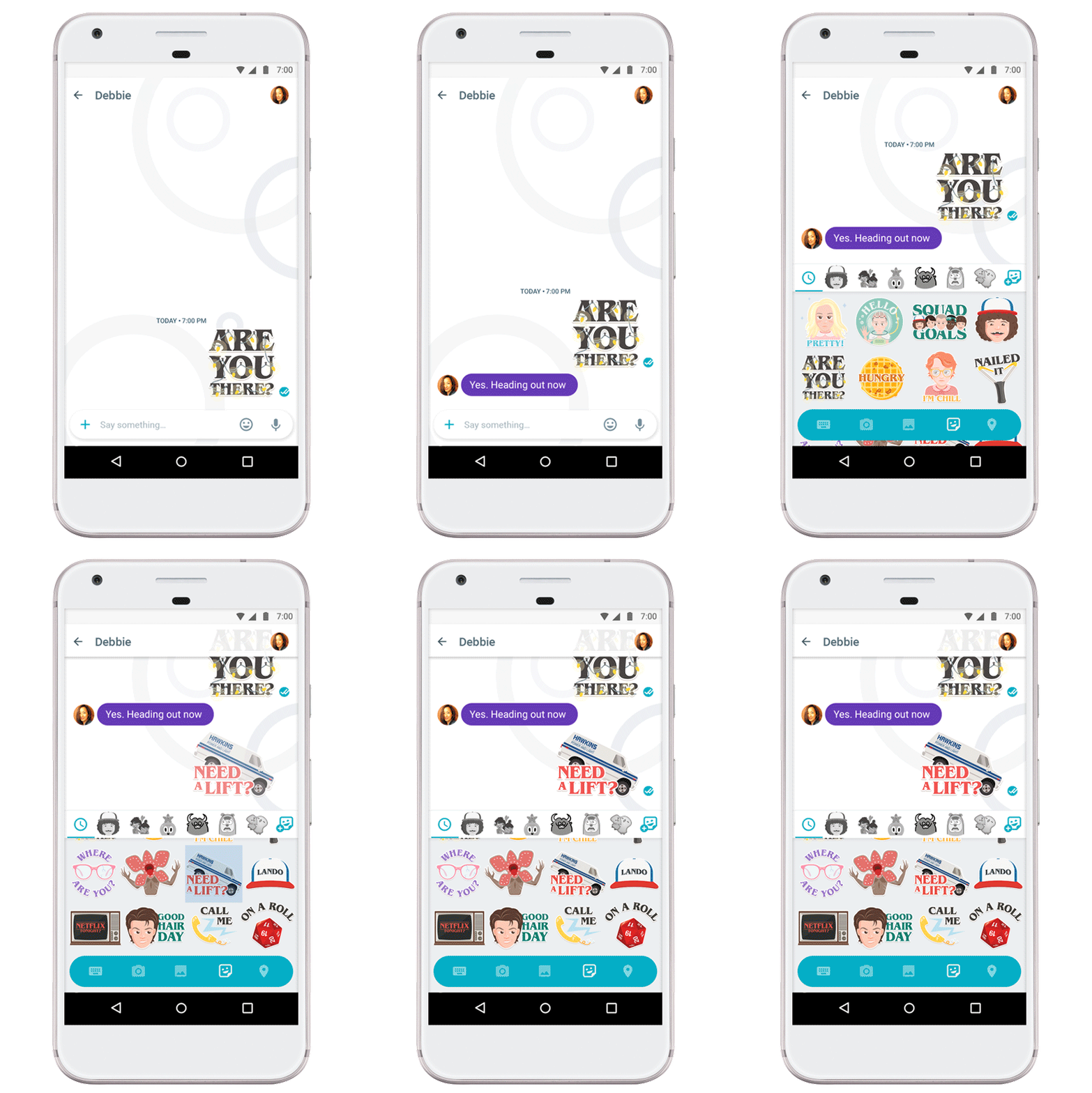
Mind control. Demogorgons. Barb. This Halloween, there’s no question we’ll see people out in costume as characters from this summer’s addictive Netflix original series, “Stranger Things.” To help bring you back into the ‘80s supernatural mindset, we’re partnering with Netflix to bring the Upside Down right to your chats in Google Allo, our smart messaging app for Android and iOS.
A new “Stranger Things” sticker pack is now available for download in Google Allo, featuring exclusive artwork inspired by the show. So whether you’re researching how to create a DIY Eleven costume with friends or debating whether Barb will reappear in season two, we got you covered.
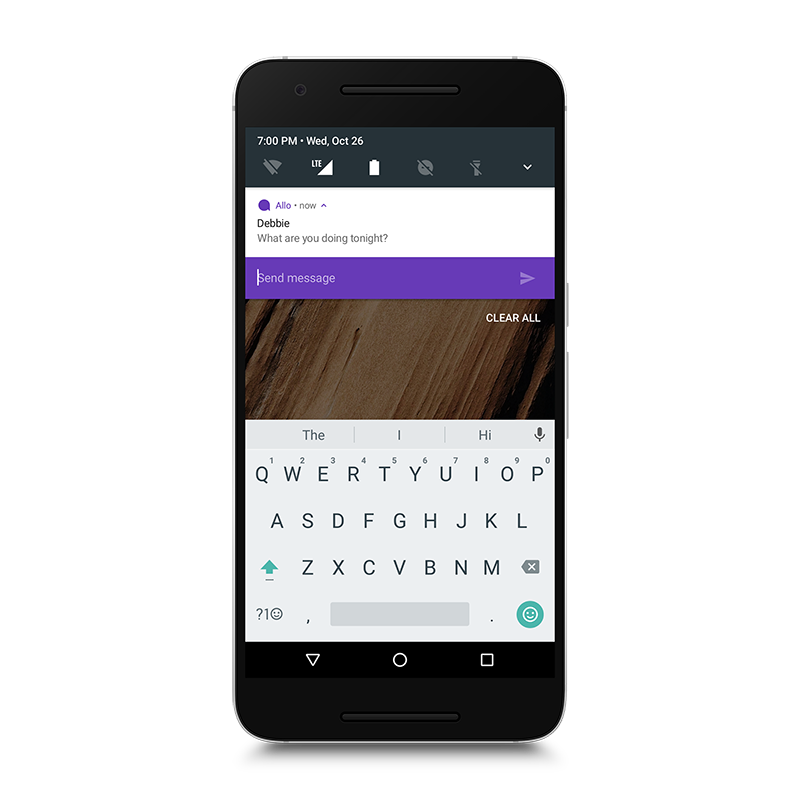
These stickers aren’t the only new thing in Google Allo this week. You can now reply to messages directly from your notifications on Android and iOS. So if you’re cooking up a French Onion Barb, you don’t have to stop what you’re doing to reply back to friends.
We’ve also added support for Android N so you can take advantage of its features. With split-screen mode you can now chat with friends and rewatch season one at the same time. App shortcuts help you quickly start a new conversation from the home screen. And for iOS users, we’ve brought the ability to doodle on your photos to iOS, so you can craft a masterpiece before sharing in Google Allo.
Beware the flickering lights, and have a safe and happy Halloween!
P.S. Google Allo will help you unlock your powers today in New York City. Stay tuned to Google on Twitter for a hint on where the drop-off from Hawkins National Laboratories will take place.
Facebook’s war on Snapchat is entering a new stage of hostilities. Starting today, Facebook will expand testing of a new camera in its main app that relies on the very same video and photo filters users of Snapchat enjoy. This includes masks that map to your face and full-frame effects that overlay over the scene. It will also let you either post that content or send it as a direct message to any number of people on your friends list. And in one more Snapchat-like flourish, this photo or video will only remain visible so long as you and your friend talk about it. If you fail to start a conversation in the first 24 hours after it’s sent, the content will disappear.
To try and get as many people to use this as possible, Facebook plans to...
One of the greatest challenges for people attempting to adopt or maintain a life of financial responsibility is the presence of financially irresponsible people in their lives. You have people who leverage social pressure to convince you to make bad spending choices or adopt bad financial habits. You have people who leverage their relationship with you in order to convince you to give them money. You have people who will ask to borrow money and never repay it. You might even have people who will directly access your funds and use them for unwanted things.
Regardless of how diligent you are about your own good financial choices, these things can seriously disrupt your financial progress. That’s because, in each and every case, financially irresponsible people can leverage aspects of your life beyond your finances to encourage you to make poor financial choices. They can leverage family, romantic, social, and even professional areas of your life to subtly (and not-so-subtly) push you toward poor money behavior.
The dilemma for many people in these situations is that they feel as though they have to choose between money and people and that it feels wrong to choose the money. Here’s the thing: the money you have is almost always the result of your personal hard work and hard choices. You made a lot of sacrifices to earn that money. If you had spent it foolishly, you wouldn’t have that money. By using it in a foolish way or giving it to someone who would spend it foolishly, you’re not wasting your money, you’re wasting your life. You’re sacrificing all of the hard choices and hard work that it took to improve your financial state.
I should know–I’ve made many of those kinds of mistakes. I’ve spent money to “keep up” with friends. I’ve given money to friends and family, knowing that it would never be paid back (and sometimes hoping that it would, only to be disappointed). I’ve had my spouse spend more than I expected (and, honestly, I’ve done the same to my spouse in the past, I’m sure). I’ve had people tap my personal relationship with them to ask for money or to invite my wife (it’s always my wife) to a “party” where social pressure is used to convince her to buy overpriced goods.
Every single one of those things was a mistake. Every single one of those things happened as a result of letting financially irresponsible people have too much of a stake in my life.
So, I started limiting that stake. In general, I took one of two approaches: I either found ways to minimize the ability of financially irresponsible people to affect my finances or I gently minimized their role in my life. Here are some of the specific strategies I’ve used or that I recommend for people in those situations.
Financially Irresponsible Spouses
Many financially responsible people are stuck with financially irresponsible spouses. This can happen in several ways, but the most common routes include a person having a financial epiphany after marriage that isn’t shared by the spouse or someone getting married while believing that he or she can change their spouse. Both are problematic and both require difficult solutions.
First and foremost, the two key elements to any rough edge in a marriage are communication and compromise. You have to be willing and able to talk about the subject and to do that without anger or personal attacks. If you can’t have a civil discussion about a rough edge in your marriage without resorting to a screaming match with personal attacks being thrown back and forth, you need to seek a marriage counselor who can help you reach a point where you can have civil conversations with the type of communication that a healthy marriage needs.
Once you’re able to sit down and discuss the issue in a healthy fashion, the thing to realize is that this isn’t an issue of “right” or “wrong,” but differing values. A person who is financially minded simply values things in a different way than someone who is not, but that’s not to say that either person is inherently wrong. The solution is to find a compromise that works well for both of you. One good solution is to set up a budget that allows each partner to have money that they can freely spend on personal things, gifts, hobbies–whatever he or she wishes–but said money has a monthly cap so that there can still be positive financial progress made.
The main issue that can undermine this is trust. If one partner or the other willfully and repeatedly violates an agreement that the two of you have, then there is a deep trust issue in the relationship, one that is likely a sign of some deeper relationship issues. Again, I recommend speaking to a marriage counselor before jumping to any further steps, but lack of trust between partners is something that needs to be fixed as soon as possible before it can completely corrode the relationship.
Financially Irresponsible Parents
Some people unfortunately find themselves in a situation where their parents are financially irresponsible. In some cases, the parents directly ask for financial assistance from their children; in many other cases, parents will overspend and just have an unspoken assumption that if the worst case results happen, their children will take care of them.
Many children go along with this out of a sense of not being ungrateful to their parents, who raised them and (hopefully) protected them through their childhood. Still, it places a real financial burden on the children as they have to deal with the financial demands of their parents while still keeping their own financial ship afloat.
Communication is absolutely vital here. If you don’t communicate, both sides will continue to operate with unspoken assumptions and such assumptions will eventually come to bear, resulting in a very nasty conflict that can easily damage relationships. If your parents tell you to your face that they are not expecting to rely on you in any way, then follow through with it.
Even with that type of communication, however, many children face intense guilt if their parents are struggling financially. What do you do in that situation, where their struggles aren’t just an imagined future, but today’s reality?
First of all, look for non-financial ways to help. Help them with household chores. Help them with budgeting. Help them with running errands and shopping. You may even go further and help them by cohabitating. Those are ways you can help without simply throwing money at the problem.
If you decide that you do wish to help, budget for it. Figure out carefully how much you can afford to give them and then plan for it. Don’t simply open your wallet on the spur of the moment unless that money is coming from the flexible spending part of your budget. If you’re going to consistently help, you need to plan for it starting right now.
I also strongly discourage loans, which is something that’s going to pop up a few more times in this article. Don’t lend money to family members or friends, ever. If you’re going to open your wallet and hand over money, do it as a gift, not as a loan. Acting as a lender to people in your life makes your relationship into a lender-borrower one and no one has warm feelings for their banker.
The most important thing to remember is that you do not have to help. Sometimes, relationships can become demanding and controlling and negative and those are things you never need in your life, even if it is your parents. Don’t be afraid to walk away from a negative situation.
Financially Irresponsible Adult Children
What if it’s your children that are financially irresponsible? Perhaps they ask for money constantly or even have a regular stipend from you. Maybe they even live at home without adequately contributing to the finances of your household. How can you handle this?
For starters, it’s important to remember that they’re the young ones with many years of life ahead of them. They’re the ones with energy and with lots of earnings potential. They also have the capacity to take a low-wage job–they don’t have to keep holding out for some kind of perfect job. (I certainly didn’t–one of my first jobs was literally shoveling dirt.)
In other words, you can cut them off. Young people have the energy to find a way to make things work in their life. They can find an entry-level job or two. They can find an apartment for themselves. They can balance their own budget. They can find resources to help them make ends meet if needed. In fact, they need to do such things, as it’s part of learning how to live.
I recommend giving your children a cut-off date. Let them know that financial changes are coming in the fairly near future and that they need to take action to deal with the changes. They need to find a job. They need to find an apartment. They need to adjust their budget to live without that deposit into their checking account.
At the same time, offer as much non-financial support as you can give. Ask them if they want help, and if they do, dive in. Help them find an apartment if they want that help. Help them seek a job if they want that help. Help them move out. Offer as much advice as you can if they ask and give them an open door for that advice. Some children will want this; others won’t. Just make sure you’re available.
Often, children need that final push to finally get out of the nest and find their own path to financial responsibility.
Financially Irresponsible Extended Family Members
What about the uncles and cousins and adult siblings and other people in your life that might have a financial impact on you? What do you do when your brother or your niece knock on your door, asking for a loan or some other help?
First of all, don’t loan money to family members. Don’t. Ever. Avoid it. You do not want a lender-borrower relationship with extended family members. For one, there’s a good chance you won’t be able to get them to pay you back. For another, that lack of payback is going to cause a family rift that will cause problems for many years to come. It’s a story that happens over and over and over again, and it’s never worth it. Don’t lend money to extended family members. Don’t.
Instead, openly offer non-financial help. Give that person a ride to work. Give that person some advice. Help that person find a job. Invite them over for dinner. Provide an ear for them to talk to and a shoulder for them to cry on.
What about when extended family members do things that encourage overspending, like maintaining an expensive gift-giving tradition or suggest expensive trips together? As is always the case, communicate, but do it outside of the framework of those expensive situations.
For example, if your family has an expensive winter holiday gift-giving tradition, the correct time to talk about it is in the spring or summer, not in the late fall or winter. If you do it right on the precipice of that event, you’re likely to cause hard feelings as people have already begun to plan for it. Instead, do it far away from any such planning. Similarly, if expensive trips happen in the summer, talk about it instead in the winter.
When you talk about such things, suggest a reasonable compromise. Instead of expensive gifts for everyone, do a gift drawing or perhaps put a cap on the cost of the gifts. Instead of expensive travel, do a more modest trip together (for example, I’m a huge fan of our national parks, so that’s a modest vacation that I want to go on). Don’t just say that you don’t want to continue the tradition because that appears as though you’re rejecting them and not rejecting the expensive routine.
Financially Irresponsible Romantic Interests
You’re dating someone and you find that they’re much looser with their spending than you are or have been that way in the recent past. That person spends money with almost frightening ease, particularly when that person’s income seems to be unable to support it. You notice a lot of envelopes from Chase or Bank of America in their apartment. Those are things you’ll notice as you grow close. But, aside from that financial concern, the match seems great. What do you do?
My honest suggestion is to be very wary of this relationship. I don’t mean that you should break it off immediately, but that you should apply more of a critical eye to the whole relationship. A drastically different view about spending can be something that becomes a major problem in marriage as you’re combining your financial lives together (whether you keep accounts separate or not), and drastically different levels of financial responsibility is going to result in some issues down the road.
This is also a good opportunity to start to learn how to communicate about such issues. The key to a good marriage is good communication, and there are few issues that rely on good communication more than money issues. If you can have a healthy money discussion about your differences in spending and can come up with a good strategy that has some compromise in it for both of you, then that’s a good sign for your long term relationship. If this conversation is difficult or impossible, then that’s another strong negative sign.
Once you have a compromise in place, does your partner stick to it? This is a trust issue, as you’re trusting your romantic partner to be able to stick to the things you’ve promised. Again, if you’re able to talk about a compromise and then your partner doesn’t stick with it, then there’s a trust issue. (There’s also a trust issue if you don’t stick with it, too.)
Financially Irresponsible Friends
Let me be blunt here: there are many, many financially responsible people in the world that I could be friends with, so I don’t really have the inclination to maintain friendships with people who encourage me to overspend. Period. I just don’t put effort into maintaining friendships with people with whom it is expensive to maintain friendships.
That doesn’t mean I don’t have friends with expensive tastes. It just means that when I do things with those friends, there’s no expectation whatsoever of spending money and that we do things together that are usually really low cost.
The vast majority of my close friends simply invite each other over for social things. We have dinner parties, game nights, movie nights, and binge-watching marathons. When we do other things, we usually talk it over and have the two best bargain hunters (me and one other person in the group) search for discounts and coupons and plan out the cheapest way to do it.
What do you do if your friends seem to have expensive tastes? Suggest less expensive options at least some of the time, for starters. Very few people will object to sometimes doing things that don’t require as much spending. If they do, then there’s a deep value disconnect between you and that other person. It’s okay to occasionally do something expensive with friends, but it should not be the norm.
You should also never accept negativity and criticism from “friends” because of your inexpensive tastes. If a “friend” is ridiculing your car that you bought out of an intentional strategy to save money, not only are you seeing a values difference, you’re also seeing an abandonment of kindness between friends. That’s a friendship that it’s perfectly okay to walk away from.
Another strategy is to choose social events for yourself that are low-cost and try to meet people there. Many of my closest friends over the last few years have been ones I’ve met at community game nights and at volunteer events. Almost all of those friends are pretty frugal people and our social activities are usually really inexpensive. If you follow this strategy, you’ll find that your social calendar becomes more and more filled with inexpensive events.
Financially Irresponsible Coworkers
In the workplace, you’ll sometimes find social pressure to do things like go out for expensive lunches or dinners or to buy expensive things like watches or gadgets. That pressure to “fit in” at work and build strong relationships can cause you to spend a lot of money that you might not otherwise spend.
Here’s the truth, though. The most lasting workplace relationships are built out of other things, like reliability and kindness and healthy candor. They aren’t built out of spending $50 on lunch. They’re built by being a great coworker, taking care of things that you promise to take care of, stepping up to challenges, not backstabbing people, and being an active participant in workplace conversations.
Another strategy is to intentionally spread out your lunches across a lot of dining companions. Bring your lunch in some days and eat with people who stay in the office for lunch eating leftovers. Get to know them. Go out to eat sometimes with the expensive crowd, too, but sometimes grab a bite with the cheap lunch crowd. Not only does this cut down on your lunch spending, it lets you interact with a lot of people and perhaps get to know people you didn’t know as well.
Simply going out with the expensive crowd isn’t going to do much to secure your spot at work. Being a good coworker will secure that spot more than anything else.
Final Thoughts
The strategies in this thread all boil down to a few key principles. Don’t lend money personally to people. Seek out lower-cost social activities and cherish the relationships with people who share those activities with you. Communicate clearly if you desire lower-cost obligations (and do it out of the context of the situation). Don’t be afraid to update your social circle. Communicate, communicate, communicate with your loved ones.
It’s only through those strategies that you’ll be able to maintain healthy relationships with some less financially responsible people in your life without going down a financially irresponsible road yourself.
Trent Hamm is a personal finance writer at TheSimpleDollar.com. After pulling himself out of his own financial crisis, he founded the site in late 2006 to help others through financially difficult situations; today the site has become a finance, insurance, and retirement resource. Contact Trent at trent AT the simple dollar DOT com; please send site inquiries to inquiries AT the simple dollar DOT com.
by Stephanie Lee on Vitals, shared by Alan Henry to Lifehacker
If you’ve ever urinated a little from coughing, sneezing, running, jumping onto a box, or doing heavy cleans or deadlifts, you’re not alone. It’s a common condition called stress urinary incontinence (SUI), but it’s something you should probably see your doctor about.
SUI can develop in some women after childbirth, as Girls Gone Strong points out, the answer isn’t simply, “Do more kegels.” Performing kegels is the generalized recommendation to improve incontinence due to a weak pelvic floor.
If the muscles are hypertonic or the issue is with breath holding, Kegels in isolation won’t solve the problem. Central stability (commonly called core stability) requires a balance of muscular strength and a neuromuscular strategy for engagement to meet physical demands. The respiratory diaphragm, deep abdominal muscles, spinal stabilizing muscles and pelvic floor need to work perfectly together.
If you urine leaks out when you’re working out, you may want to see a urologist and physical therapist who specializes in pelvic health. As embarrassing as it might be, it requires a team effort to get to the root of and address the problem. Meanwhile, the article linked below goes into some general tips on improving the function of your pelvic floor muscles.
I sometimes fast instead of eating when I travel, but I usually don't go more than 16 hours between meals. Cristi Vlad, a ketogenic diet enthusiast, describes what it is like to go 44 hours without eating. As you can see from his Ketostix (photo above) he is burning a lot of ketones.
Whenever I fly inter-continentally I fast; that is - I don't eat. I benefit from this by avoiding spending money on airport food and by avoiding airplane food.
Thus, I have no stomach upset. My GI tract is in 'reverie' mode, unlike when I was eating during my long travels. Back then, my stomach was somewhat disturbed and I had trouble recovering from jet lag, which is inexistent with this current strategy. I am aware, though, that correlation is not causation and that other factors from my life could contribute to this. Anyhow...
Yahoo released its semiannual transparency report today, the first issued by the company since Reuters revealed earlier this month that Yahoo scanned its users’ email accounts at the behest of the U.S. government. In an effort to inform consumers about how frequently the government snoops on their information, and how often companies are able to narrow or refuse the requests, Yahoo… Read More
Broken hearts, blind rage and calls to follow them on YouTube, Instagram and Snapchat. That’s how Vine stars are coping with the news that Twitter will shut down the Vine app in the coming months. At least since Twitter will let people download their Vines, most of the content should wind up on its competitors’ sites. Click or scroll through our list of the best reactions from the… Read More
In a win for privacy advocates, the FCC voted this morning to place new restrictions on internet providers that limit the information they can share about their subscribers.
When the rules go into place, likely sometime early next year, internet providers will be required to get explicit permission from subscribers before sharing “sensitive” information about them, such as their browsing history, their app usage, their location, and the content of emails and other communications.
This is all particularly revealing data, and none of it has been governed by FCC privacy rules until now. That means internet providers have been able to share or sell it to their partners, who might have used the information to advertise their own products and...
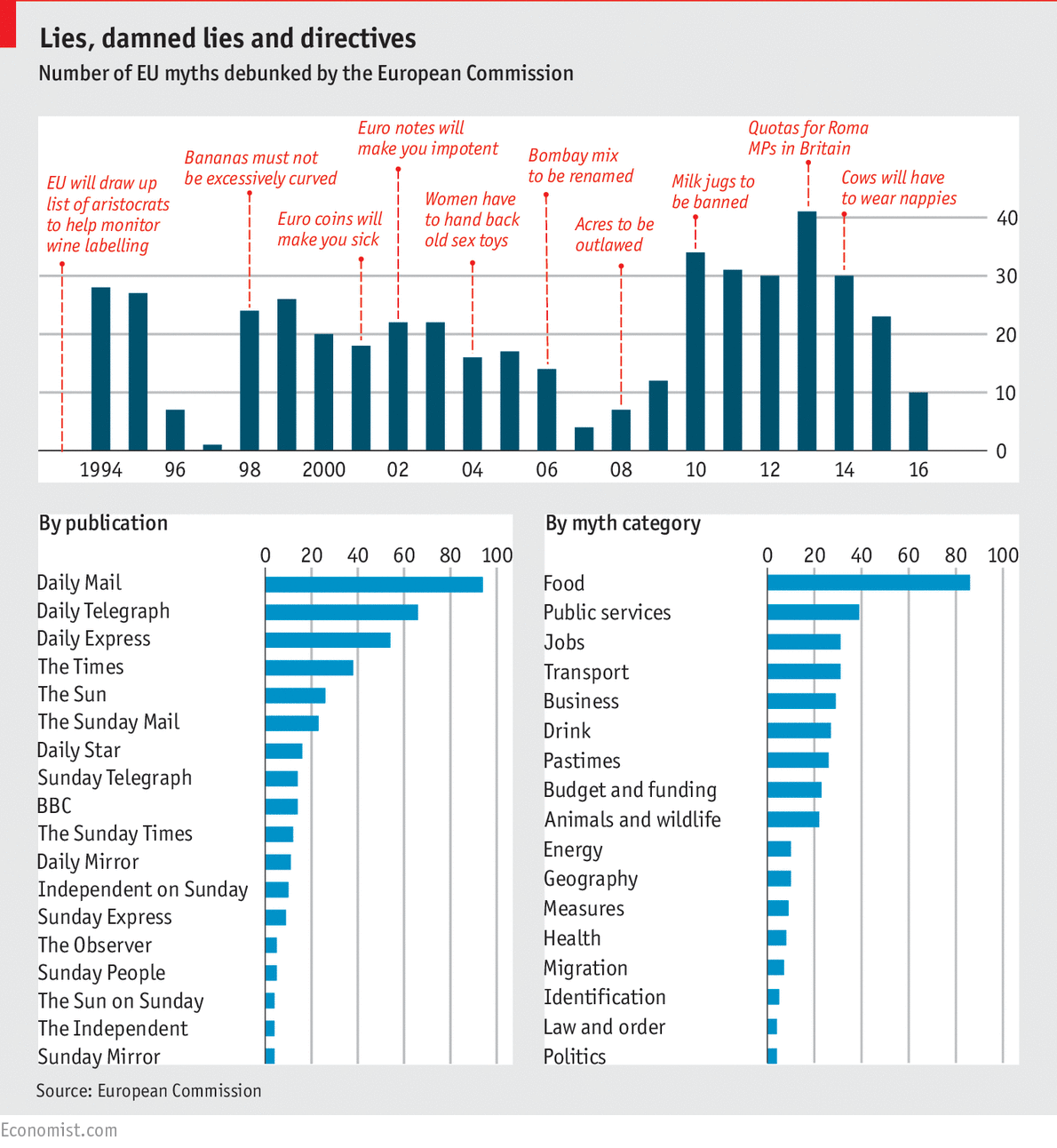
Last June, the Economist ran this chart: "Lies, Damned Lies, and Directives," which documents decades of flat-out lies about EU regulations that were published in the tabloid press (many invented by the UK's post-Brexit foreign minister and Trumpian hairclown Boris Johnson, whose press colleagues considered him most reckless confabulist on European matters in their ranks).
(more…)
With Twitter’s acquisition hopes essentially dead, the company now seems it’s on its own to fend for itself and needs to figure out a way to build a reasonable and profitable business. Today, it got a much-needed good Q3 performance by largely beating Wall Street’s expectations across the board. The company also confirmed that it would lay off roughly 9 percent of its staff as… Read More
Like any voice assistant, Google Assistant is only as powerful as what it can interact with ─ especially in the case of Google Home. While Assistant on our phones gives us what we need, namely, the power of Google’s search skills, Google Home will need to integrate with physical products in order to be truly useful.
Originally, the redesigned Google Calendar 5.0 annoyingly lacked a typical month view in its initial release for phones. Long since restored, Google Calendar is now finally adding a very useful Month homescreen widget.
Microsoft unveiled its revamped and modernized Paint app for Windows 10 earlier today. It's designed to make 3D object creation easy across devices with a regular mouse and keyboard, touchscreens, and stylus input. Microsoft is now letting Windows Insiders test out an early version of Paint 3D.
Microsoft has also launched an online community, alongside the Paint 3D app. It allows Paint users to export their creations and share them with the community, or download 3D objects that others have created. Microsoft has published Paint 3D in the Windows Store to download and install, but it will require the Windows 10 Creators Update, which is available to insiders.
If you’ve opened the Google Cast app recently, you might have noticed we’ve been hinting at some exciting changes. With the recent announcement of Google Home, our new voice-activated speaker, we are renaming the Google Cast app to the Google Home app. So you now have a one-stop destination to manage your compatible home devices. On top of the new name, we gave it a new icon, made the app easier to use, and added some useful new features.
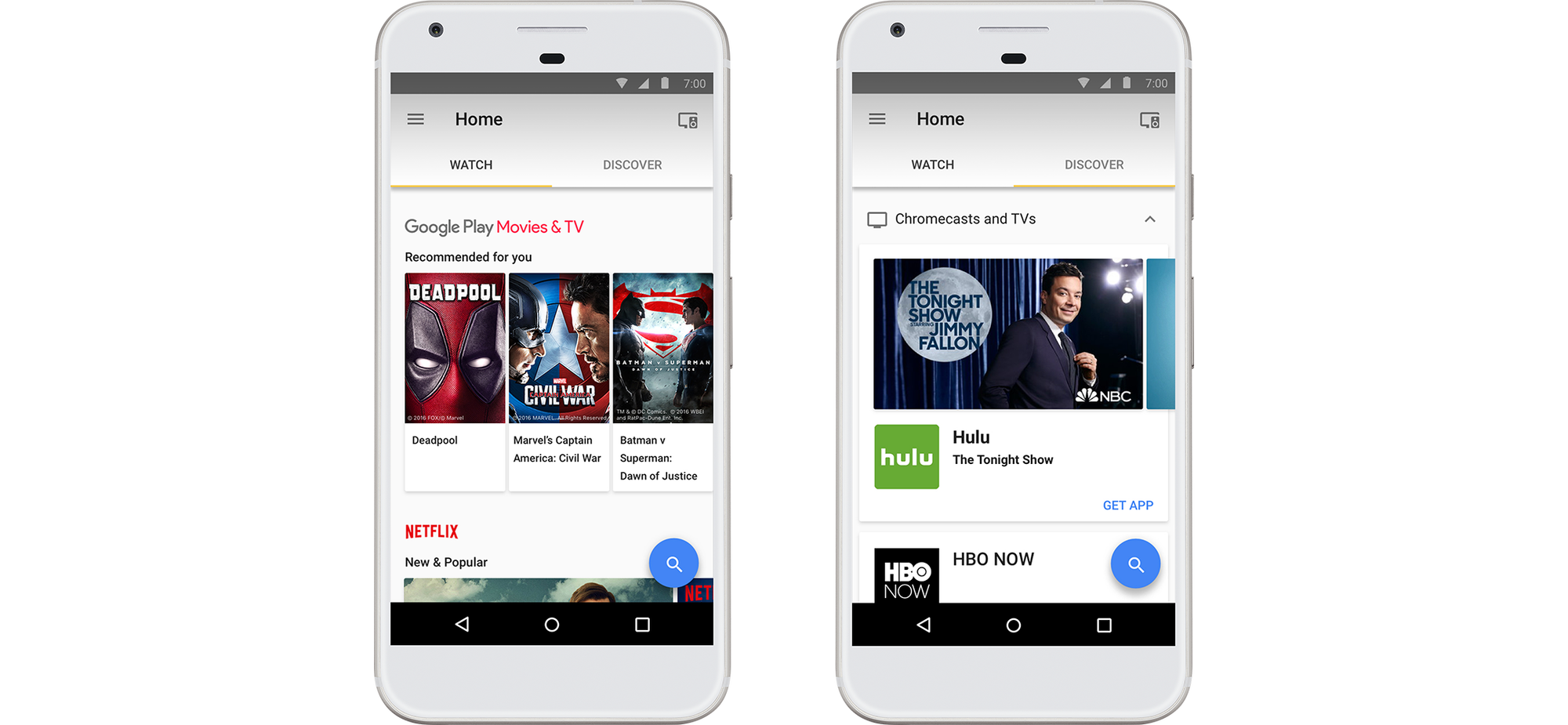
New design to make it even easier to watch & discover.
Using the Watch tab, you can discover trending and popular video content on your Chromecast-enabled apps like HBO Now, Netfilx, Hulu, YouTube, and Google Play Movies.
The Discover tab lets you explore a library of 1000+ apps that work with Chromecast, as well as the latest offers, features, and tips.
And you can search and browse for content across Chromecast-enabled apps right in the Google Home app anytime -- just look for the magnifying glass icon in the bottom right hand corner.
Control and manage your Chromecast and Google Home devices.
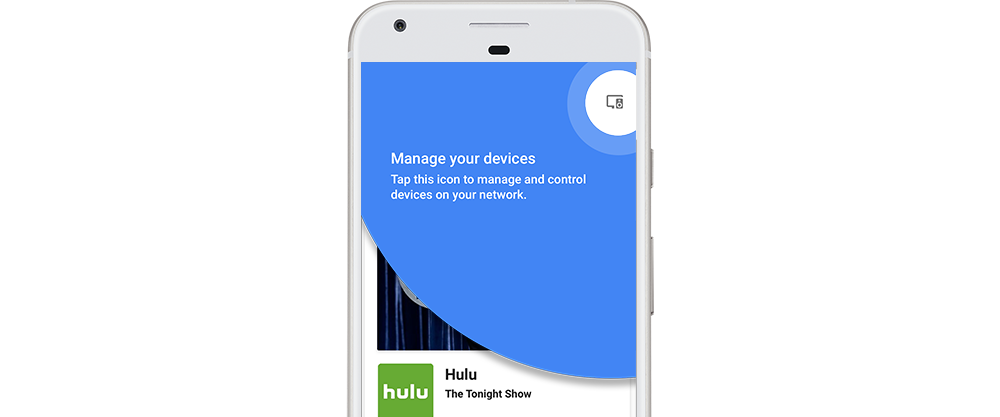
The Google Home app is also your one place to control and manage all your Chromecast and Google Home devices. Tap the Devices icon in the top right of the home screen to easily set up a new device, control playback or adjust Backdrop settings on your TV, and more.
The Google Home app will be coming this week on Google Play and the App Store, so keep your eyes open on your homescreen or app drawer for the new app icon. And stay tuned for more updates with the app as Google Home becomes available in the US in early November.
Microsoft just spent a full two hours presenting the future of Windows 10 and its Surface line on stage in New York City. And it wasn't exactly padding out that time — aside from a lengthydemo of Paint (something I think no one expected in 2016), Microsoft really did have a lot to cover. You can read our roundup right here, and above, you can watch our trimmed down cut of the two-hour event, which puts it all into a much snappier eight-and-a-half minute presentation. When you're done, you can check out our hands on with the new Surface Studio right here.
Google is gearing up for the release of Google Home in early November by updating the Google Cast app with a new design and a new name: "Google Home."
This marks, somewhat confusingly, the third name for Google’s companion application for controlling Google-branded connected devices, following the original "Chromecast" and "Google Cast" names. And while the consolidated branding is sure to be helpful going forward, as the Google Home app now serves as a one-stop shop to manage all your Google Home and Chromecast devices, it’s easy to see that it could be a bit confusing for customers who are familiar with the old product names.
Along with the new moniker, Google has updated the app with "Watch" and "Discover" tabs, making it easier to...
Google Photos has a smart “Assistant” feature — not to be confused with Google Assistant — which will take your photos and videos and occasionally create an artistic video, collage, or even a .gif. While it does this automatically, it doesn’t always do it with the photos and videos that you want it to. Thankfully, you can create an album, collage, animation, and movie right from the Photos app on your device.
Microsoft’s next version of its Windows 10 operating system, the Creator’s Update announced this morning, is about to get a lot more social. The company demonstrated a new feature called “My People,” which puts your most important contacts directly in the bottom toolbar on your desktop, so you can more easily share with them, message them across a variety of… Read More
Microsoft unveiled the Surface Studio today, an all-in-one PC with a 28-inch PixelSense display, with the thinnest display ever built according to Microsoft and a 3:2 display ratio. It also has an Intel Core processor, with a 2TB hybrid hard drive and an NVIDIA GPU, as well as integrated 2.1 speakers and a haptic feedback controller puck device.
The computer has a unique hinge on the back… Read More
One of the primary reasons smartwatches haven’t been selling very well is the lack of solid options. Over the past couple of months we’ve seen a few new Android Wear devices debut, and now those options have finally made their way into the Google Store.
Starting this week, Amazon is rolling out a free over-the-air software update that will install Alexa on Amazon's $49 Fire tablet, the Fire HD eight-inch tablet, and the Fire HD 10-inch tablet.
Unlike Amazon's Echo speakers, which you can shout at from across the room (or even another room) to call up Alexa, you have to long press on the Fire tablet's virtual home button to launch Alexa. From there, you can ask Alexa virtually anything you would ask it on the Echo speaker, and Amazon says that any of the 3,000+ "skills" that work with the Echo...
Android Wear 2.0 is bringing a lot of useful user-facing features, but it seems that there’s one as-yet-unreported change happening in the background with Wear 2.0 that might not be so well received.
According to one of Google’s Android Developer Advocates, Android Wear 2.0 will require completely standalone watch and phone apps, and abandons the system used since the first version of Android Wear that automatically installs Android Wear apps based on the apps you have on your phone.
Just because you want a great-sounding speaker doesn't mean you have to spend more than you did on your Chromecast Audio.
Chromecast Audio provides us with an easy way to stream media from our mobile devices to our favorite speakers, whether they feature Bluetooth, Wi-Fi, or neither. We've selected five of the best portable speakers that go great with this audio accessory and cost no more than the Chromecast Audio itself. Keep one in your bedroom, living room, kitchen, or bathroom — these speakers will give you the superior sound you crave without breaking the bank.
While the Chromecast Audio may not be waterproof, the OontZ Angle 3 from Cambridge SoundWorks certainly is. This 5-inch speaker speaker has an IPX5 rating, making it completely splashproof for any setting. Inside is a long lasting 2200mAh battery that provides up to 15 hours of music through its dual drivers for a total of 10W of stereo sound. The OontZ Angle 3 sounds great on every level — mids, highs, and even bass are clear thanks to the passive subwoofer design. If you're after a speaker that's built for a tougher environment, this is a great option for you.
The Photive Hydra is perfect for people that want a cheap speaker and are more concerned about sound quality than convenience. Sporting a passive subwoofer and two 40mm drivers, the Hydra delivers a fuller-sounding low end, while still providing pleasing, clear treble.
Its IP66 rating means it can get wet, but not submerged. Obviously, your Chromecast Audio is not water-resistant at all, but its a nice feature to have if you ever choose to use it away from the tether of your Chromecast Audio. For about $35, the Photive Hydra could be yours.
For something a bit more compact, but surprisingly loud, the AYL portable mini speaker is definitely one to check out. The 3W speaker on top provides quality sound that jams for up to 10 hours on a full charge. The unique design of this speaker makes it ideal for travel, quickly collapsing into a smaller size when needed. There's even a built-in 3.5mm headphone cable on the bottom for hooking up your Chromecast Audio, along with an extension cable if you need a little extra length. Priced around $15, you can't go wrong with this mini speaker.
Anker's Classic Portable Speaker, a box design that uses a single 2-inch, 4W driver and bass port to deliver its amazing quality sound. Powering the unit is a 2100mAh Li-ion battery that will keep the music going for up to 20 hours. The built-in mic allows you to use the Anker Classic as a speakerphone, but for keeping things simple just plug in your Chromecast Audio to the 3.5mm port on the side and enjoy what this crafty speaker has to offer. Included is a longer auxiliary cable, travel pouch, microUSB charging cable, and an 18-month warranty. You can grab one in black, blue, or white for around $30.
If you're looking for a speaker to use with Chromecast audio that is ultra portable, check out the VTIN Cuber.
With an IP67 rating, this small square speaker is made to withstand the elements, which is great if you ever want to use your Chromecast beside the pool or when you're outside grilling.
Believe it or not, this tiny thing actually has a pretty solid battery life, giving you up to 8 hours of listening time. It comes with a strap you can attach to make it even easier to carry, and if you want to venture away from your Chromecast you can always use it with standard Bluetooth.
What speakers are you using with Chromecast Audio?
Those are our top picks for an affordable speaker to use with Chromecast Audio. Which speakers are you using or looking into getting for yours? Sound off in the comments!
Updated Spetember 2017: Added prices for all the speakers listed.










 Yahoo released its semiannual transparency report today, the first issued by the company since Reuters revealed earlier this month that Yahoo scanned its users’ email accounts at the behest of the U.S. government. In an effort to inform consumers about how frequently the government snoops on their information, and how often companies are able to narrow or refuse the requests, Yahoo…
  Broken hearts, blind rage and calls to follow them on YouTube, Instagram and Snapchat. That’s how Vine stars are coping with the news that Twitter will shut down the Vine app in the coming months. At least since Twitter will let people download their Vines, most of the content should wind up on its competitors’ sites. Click or scroll through our list of the best reactions from the…

 With Twitter’s acquisition hopes essentially dead, the company now seems it’s on its own to fend for itself and needs to figure out a way to build a reasonable and profitable business. Today, it got a much-needed good Q3 performance by largely beating Wall Street’s expectations across the board. The company also confirmed that it would lay off roughly 9 percent of its staff as…





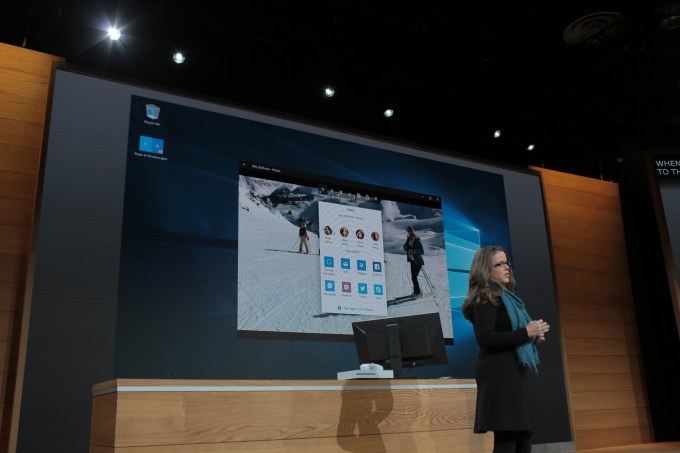 Microsoft’s next version of its Windows 10 operating system, the Creator’s Update announced this morning, is about to get a lot more social. The company demonstrated a new feature called “My People,” which puts your most important contacts directly in the bottom toolbar on your desktop, so you can more easily share with them, message them across a variety of…
  Microsoft unveiled the Surface Studio today, an all-in-one PC with a 28-inch PixelSense display, with the thinnest display ever built according to Microsoft and a 3:2 display ratio. It also has an Intel Core processor, with a 2TB hybrid hard drive and an NVIDIA GPU, as well as integrated 2.1 speakers and a haptic feedback controller puck device.
The computer has a unique hinge on the back…
Microsoft unveiled the Surface Studio today, an all-in-one PC with a 28-inch PixelSense display, with the thinnest display ever built according to Microsoft and a 3:2 display ratio. It also has an Intel Core processor, with a 2TB hybrid hard drive and an NVIDIA GPU, as well as integrated 2.1 speakers and a haptic feedback controller puck device.
The computer has a unique hinge on the back…