Shared posts

15 Nov 20:06

This All-In-One System Rescue Toolkit Automatically Repairs Your PC

by Alan Henry

We highlighted Paul Vreeland’s System Rescue Toolkit a few months ago, but now he’s built a new, “lite” version that packs most of the same tools and can automatically run against and repair common Windows problems for you. If you liked the original, you’ll love this.

The beauty of the original was that it offered a number of great utilities to help you troubleshoot your system if you had PC problems, without a whole bunch of trial versions, bloated utilities, or “we found X errors now call me to fix your computer” demos. The Lite version dials some of those tools back and makes the scan and repair process automatic, so you can use the toolkit, walk away and grab a bite to eat, and, hopefully, come back to a repaired and functioning Windows system—or at least some more information about what you should do next if the toolkit couldn’t fix your problems. He notes:

The Lite version of my toolkit runs all of the autoFIX steps from “Automatic Mode” found in the full version. You do not have to be a techie to use it! No technical expertise is necessary because all the repair tasks are run automatically! These repair steps include:

  • CPU/Cooling Test
  • Memory Test
  • Hard Drive Test
  • Windows Security Center Check
  • Anti-Virus and Anti-Malware Scans
  • Reset Windows Networking
  • System File Checker
  • Disk Cleanup and Defrag

Best of all, it’s completely free (although Paul does accept donations to maintain the project.) Hit the link below to try it out yourself.

AiO-SRT Lite | Paul Bryan Vreeland

Photo by Zach Chisolm.

15 Nov 20:04

Google's post-Brexit plans to include £1 billion investment in UK headquarters expansion, new jobs

by Andrew Martonik

Google is expanding in the UK, solidifying its presence for years to come.

After initial fears of big companies leaving the UK after its Brexit vote, Google has announced plans to build a new London headquarters and nearly double its workforce there by 2020. The new office in King's Cross, designed by Thomas Heatherwick, will size up at 650,000 sqft and give Google the room to expand from its current 4,000 employees in London to 7,000. The total expenditure for the expansion is expected to reach £1 billion.

In an interview with BBC, Google CEO Sundar Pichai expanded on Google's plans for the UK:

We see big opportunities here. This is a big commitment from us - we have some of the best talent in the world in the UK and to be able to build great products from here sets us up well for the long term.

The move to commit to the new UK headquarters comes as a bit of a surprise after many companies slowed investment in the UK after the vote to leave the European Union. Google's choice to stick with — and expand — its London offices echoes Pichai's sentiments that the UK's strengths go well beyond the single Brexit vote. He notes that the combination of the local UK talent with the influx of people from other countries coming to the UK for education have been great for the technology sector in Europe.

When I look at London [I see] a place in which we are able to attract great talent, find great talent in the UK, thanks to a great educational system here, but it has also been a place where people are willing to come from anywhere in the world.

Pichai of course has concerns over potential restrictions on skilled immigration and free movement and how it could have an effect on its business, but said that these considerations were taken into account when Google made the decision to move forward with its London headquarters expansion. With this much money and this many jobs involved, it's a great vote of confidence in the UK.

15 Nov 20:03

OnePlus 3T vs. OnePlus 3: What's the difference?

by Andrew Martonik

Here are the differences between the original OnePlus 3 and its mid-cycle replacement.

To lay it down from the start: not much has changed from the five-month-old OnePlus 3 to the new OnePlus 3T. Externally, things are identical between the two aside from a new color option. Internally is where you'll find the subtle (yet important) changes, though most of the internal specs remain unchanged as well.

Rather than giving you a full spec sheet with mostly the same values, I've narrowed things down here to simply highlight the differing points internally. You'll notice of course the processor, but also the new front-facing camera, optional 128GB of storage and the larger 3400 mAh battery. The rear camera also now has a sapphire covering, though the rest of the original components have remained. There's also a new color option, gunmetal, that's exclusive to the OnePlus 3T alongside the original soft gold color.

Category OnePlus 3T OnePlus 3
Processor Qualcomm Snapdragon 821
Quad-core 2.35 GHz
Adreno 530 GPU
Qualcomm Snapdragon 820
Quad-core 2.2 GHz
Adreno 530 GPU
Storage 64/128GB 64GB
Front Camera 16MP 3P8SP, 1-micron pixels
f/2.0, fixed focus
1080p video
8MP IMX179, 1.4-micron pixels
f/2.0, fixed focus
1080p video
Battery 3400 mAh
Non-removable
3000 mAh
Non-removable
Colors Gunmetal
Soft gold
Silver
Soft gold
Price $439 (64GB)
$479 (128GB)
$399 (64GB)

After that spec talk, it's worth mentioning the software as well. OnePlus has worked in a few extra optimizations and feature refinements in the OnePlus 3T that, alongside the Snapdragon 821, purport to offer a solid bump in performance and fluidity of the phone. That's all a bit moot in the end, however, as both the OnePlus 3T and original OnePlus 3 will be updated to Android 7.0 Nougat by the end of the year — they'll also both be on the same update schedule thereafter.

The final difference between the two is price. Just six months removed from the launch of the original, the OnePlus 3T is launching at $439, or $40 more than what the OnePlus 3 sells for today. (A bump to 128GB of storage will set you back $479 in total.) The improved specs are definitely a welcomed addition, and they haven't come at the cost of removing anything that made the original OnePlus 3 a great value.

15 Nov 20:01

Google PhotoScan turns your prints into high-quality digital images

by Casey Newton

The team behind Google Photos has released a new app for turning your old prints into digital photos, letting you save them to the cloud with a single tap. PhotoScan, which is being made available today on iOS and Android, lets you quickly scan a large number of photos using a novel, almost game-like interface. The tradeoff for the speed of the scans is quality — it’s slightly lower than what you might expect to get from a traditional flatbed scanner.

PhotoScan’s interface is admirably simple, and doesn’t even require a login. The app opens to the camera and instructs you to position a photo within the frame. When you do, four dots appear over your photo. To scan it, you move your phone over each of the dots and hold it until the circle...

Continue reading…

15 Nov 17:52

New eBay app update introduces categories to make finding products easier

by Phil Oakley

screenshot_20161115-174140

The eBay app has improved greatly over the last few years, going from a jumbled, kind-of-holo mess to the much a better, usable app it is now. Today, eBay is announcing a new update that makes it easier to find what you are looking for by introducing new, improved categories.

screenshot_20161115-170548 screenshot_20161115-170612

Categories are basically what they say on the tin: a lot of items separated into 32 categories that then go down into second-level categories - for example, in 'Video Games & Consoles,' there are categories such as 'Manuals, Inserts & Box Art,' 'Strategy Guides & Cheats,' and 'Coin-Operated Gaming.' Inside the categories are products you would expect to find in them - I looked for some motorsport items, and pretty quickly found what I was looking for.

Read More

New eBay app update introduces categories to make finding products easier was written by the awesome team at Android Police.

15 Nov 17:52

Full OnePlus 3T specs leak ahead of official announcement, Snapdragon 821 and more in tow

by Ben Schoon

Just ahead of the official announcement, the OnePlus 3T has leaked out via the company’s website (since pulled). As expected, OnePlus’ latest smartphone is nothing more than a slight upgrade on the current model…

more…


Filed under: Google Corporate
15 Nov 15:39

Tardigrade plushies for unkillable cuddling

by Andrea James

tardigrade-white-sm

Looking for a nerdy and obscure gag gift for a science-minded friend? How about a plushie of the toughest organism on earth? There's a motherlode of tardigrade plushies on this Japanese site. (more…)
15 Nov 15:37

21 new and notable Android apps from the last 2 weeks (11/1/16 - 11/14/16)

by Michael Crider

apps-01Welcome to the roundup of the best new Android applications that went live in the Play Store or were spotted by us in the previous 2 weeks or so.

Please wait for this page to load in full in order to see the widgets, which include ratings and pricing info.

Looking for the previous roundup editions? Find them here.

Apps

Fingerprint Gestures

Android Police coverage: 'Fingerprint Gestures' app brings one Pixel feature to more Android devices

A lot of Nexus 6P and 5X owners were less than thrilled when the Pixel phones were given fingerprint gestures that were technically possible, but not enabled, on their phones.

Read More

21 new and notable Android apps from the last 2 weeks (11/1/16 - 11/14/16) was written by the awesome team at Android Police.

15 Nov 15:36

Amazon Prime UK price drops to £59 this week

by Alex Dobie

Grand Tour tie-in gives new subscribers a £20 discount on a year of Prime.

In the run-up to the first episode of Top Gear spiritual successor The Grand Tour hitting Amazon Prime Video, the company is sweetening the deal for viewers in the UK. New British Amazon Prime subscribers to sign up this week can get a year's membership for £59, a £20 saving on the regular price.

As well as getting to see the latest antics from Clarkson, Hammond and May, Prime subscribers also get a discount if they sign up for Amazon Music Unlimited, which officially launched in the UK yesterday. That's in addition to Prime Video, Twitch Prime and speedy delivery on other stuff ordered from the retail giant.

The deadline for sign-up is midnight this Friday, November 18, after which Prime reverts back to the regular £79 annual price. The discount also doesn't apply if you take a 30-day free Prime trial.

See at Amazon UK

15 Nov 15:29

Marvel casually announces an Inhumans TV show.

http://www.avclub.com/article/marvel-casually-announces-inhumans-tv-show-245902

Marvel's long-in-the-works Inhumans movie has now been reborn as a TV show; speculation ensues.

14 Nov 22:27

Watch a young grizzly bear play with floating video cameras

by David Pescovitz

screenshot

Below, a young grizzly bear plays with two GoPro cameras mounted on a pontoon floating in the clear water of the Knight Inlet on the British Columbia Coast.

"The idea was to film bears diving for fish in 2-meter deep pools," wrote Newsflare member kitchinsink, who uploaded the video. "If I was in the pool they wouldn't come and dive so I needed a camera that would float 'inconspicuously!'"

(via National Geographic)

14 Nov 17:43

Elevators with no buttons, doors or stops

by Mark Frauenfelder
1jBRXV

Paternoster elevators don't have doors or buttons. The run continuously in a loop, like a ferris wheel. When you reach your desired floor, you get off quickly. 99 Percent Invisible has an article about these curious conveyances, which can still be found in Europe.

The compartments of a paternoster lift wrap around like a chain, with two side-by-side openings on each level. Passengers step into and out of either the “up” or “down” side on a given floor.

These endlessly looping lifts are slower than conventional elevators, generally moving about one foot per second, which makes it possible to get on and off. Their slow-but-perpetual motion is the key ingredient to their efficiency: with so many compartments and no need to stop, passengers need never wait for a lift. Taken together, all of the small cars can also hold more people than a one-per-shaft system.

14 Nov 14:27

This shy octopus is too cute for scientists to handle

by Caroline Siede
980x

The scientists commenting on the E/V Nautilus live stream just can’t contain themselves when it comes to this adorable Flapjack Octopus.

[via The Dodo]

14 Nov 13:09

Best Arcade Games for Android

by Marc Lagace

Bring back all the nostalgic feels with these arcade classics for Android.

For all the great new games that are released on Android, sometimes you want to play something ... familiar. Maybe something a little retro that reminds you of those arcade days spent plugging quarters into standalone machines for hours on end.

You can relive those moments on your Android phone with these great arcade games available in the Google Play Store.

PinOut

PinOut is a brilliant reimagining of the classic pinball action we're all familiar with into an endless arcade format, created by the award-winning developers behind Smash Hit. The game features sharp, futuristic graphics and smooth controls as it pits you in a race against the clock to see how far you can make it on one ball.

Unlike other pinball games that give you a set number of balls and have you focused on racking up combos and bonuses by strategically hitting bumpers and other features on the table, PinOut instead offers an infinite race against the clock on a seemingly neverending table. Tap to use the left and right flippers and strategically work the ball up through rails and onto the next section. Some rails feature a trail of dots which add time to the countdown clock at the top, so you'll need to master your flipper control and focus on hitting the ball through the time bonus rails. If you fail to hit the ball and it falls between your flippers, the only penalty imposed is the time you waste getting the ball back up to where it once was. If the time runs out, it's game over.

PinOut is a free download from the Google Play Store, but you might want to spend $2.99 on the one-time upgrade to premium to unlock the ability to start from previous checkpoints you've reached.

Download: PinOut (free with in-app purchases)

PAC-MAN

The quintessential arcade classic has been ported to Android over and over again, with a dozen of different twists on the tried and true gaming formula. But if you're looking for a pure Pac-Man experience, Bandai-Namco's free PAC-MAN app is everything you'll need.

In Classic Mode, you'll find everything looks and plays as you remember — minus the need for a stack of quarters. Once you've had your fill of the classic mazes, check out the collection of new mazes which add a new layer of strategy.

Tournament mode adds another layer of replay. Try and set the high score in regularly occurring tournaments against players from around the world.

PAC-MAN is a free download in the Google Play Store, and includes in-app purchases for different maze packs.

Download: PAC-MAN (free)

Advertisement


Galactic Nemesis

Galactic Nemesis is an updated version of arcade classics like Galaga and Galaxian for your Android phone. Blast your way through wave after wave of alien invaders, upgrading your ship as you go.

Controls are dead simple. Tap and drag your finger around the screen to move and shoot at the same time. Power-ups collect along the right side of the screen, so simply tap them when you need a little help. You get the first world for free but will have to pay $1.99 to unlock 3 other worlds. You'll also get 10 ships to unlock, over 50 in-game challenges, and no ads. With great pixel art, simple controls, and a winning gameplay formula, you can't go wrong with Galactic Nemesis if you're into classic arcade games.

Download: Galactic Nemesis (free with in-app purchases)

Metal Slug 3

A classic run-and-gun arcade title, Metal Slug 3 has been perfectly ported over to the Google Play Store and is worth checking out if you're a fan of the original games or simply enjoy action arcade shooting games.

The Android version gives you multiple ways to play.There's a single player campaign, which you can play in classic Arcade Mode or Mission Mode, which allows you to play your favorite mission or practice a particularly tough mission.

If your friends have the game, you can connect up via Bluetooth and play co-op modes. Metal Slug is always more fun with friends, so the addition of wireless local multiplayer greatly enhances the replay value.

Download: Metal Slug 3 ($2.99)

R-Type

Fans of R-Type will enjoy how smooth this classic side-scrolling shoot-em-up game plays on Android. Man your ship and take down the alien invasion one level at a time.

The game lets you control your ship directly via touch or using an on-screen joystick (Bluetooth controller support would have been nice here) and has a toggle for autofire. We've found the touch control to be the best compromise for allowing full control for evading enemies without obstructing too much of the screen.

Having reliable controls is important because this game is as tough as you remember it being. With wave after wave of enemies, tough boss battles, and one-hit deaths, you're in for a real challenge with R-Type.

Download: R-Type ($1.99)

SoulCalibur

We'd be remiss to have a list of best arcade games without at least one fighting game making the cut. This port of Soul Calibur is one of the nicest direct ports we've seen, featuring (thankfully) updated graphics from the 1998 original.

Beyond the classic Arcade Mode, there are multiple game modes to enjoy: Time Attack challenges you to beat all characters as fast as you can, Survival sees how far you can go in sudden-death battles, and Extreme Survival cranks things up to see how far you can go without being hit.

Before you click your heels and jump into the Google Play Store to get this one, here's the bad news: the price. At $13.99, this is priced more along the lines of a console download than a mobile offering. But this is essentially a full-fledged console game on your phone. This might be strictly for the hardcore SoulCalibur fans, but if you're looking for a quality fighting game for your Android device, SoulCalibur is as good as you'll find.

The only other downside besides the price is its lack of controller support; however, the virtual gamepad is surprisingly responsive and fully customizable.

Download: SoulCalibur ($13.99)

Advertisement


Crazy Taxi Classic

Hop in! The classic arcade driving game Crazy Taxi has been ported to Android by Sega and it's just as fun as you remember.

For those who might be unfamiliar with the concept, the game is a wicked-fast game where you play the raddest taxi driver in San Francisco as you break all the traffic stops to get your passengers to where they need to be as fast as possible. Featuring the classic punk sounds of The Offspring and Bad Religion, this game is a total throwback to the old arcade machines, or perhaps you remember the game best from the Sega Dreamcast.

You can play by classic arcade rules where you're always working to extend the countdown timer, or see how much money you can rake in over a set amount of time. The game is free to play with ads, or you can remove the non-Sega ads via an in-app purchase.

Download: Crazy Taxi Classic (Free w/ads, $1.99 to unlock full game)

Pinball Arcade

For fans of pinball, nothing will quite replicate the experience of playing on a glass-top pinball cabinet. Pinball Arcade for Android might just be the next best thing, featuring 70 classic pinball tables.

Each table is faithfully reproduced with all original features and graphics in rather stunning 3D graphics.

You get the full Arabian Nights table for free and are able to play free versions of all of the other tables included in the game, but you must plop down some serious cash to get full access to the other tables, which are sold individually ($5-$9 per table) or as part of a Season Pack ($35-$42 per season pack).

These prices are going to be way too steep for most, but if you're a hardcore Pinball fan who collects pinball cabinets, you'll appreciate the ability to test and play classic tables for a fraction of the cost of owning one in real life.

Download: Pinball Arcade (free with in-app purchases)

NBA Jam

NBA Jam has been available on Android since October 2010, and yet it still remains one of the most polished and fun sports arcade games you can play on the platform.

This remake of the 90s classic features all the fast-paced two-on-two action you remember from back in the day, with upgraded graphics including hilarious big head animations for every player in the game. Touch controls are simple and responsive, making it super easy to set up an epic alley-oop, or sink three shots in a row and hear Tim Kitzrow — the original NBA JAM commentator — yell his infamous line, "HE'S ON FIRE!"

There are four modes of play and no in-app purchases or currencies to deal with, so you can jump into a game right away. On top of quick matches and a Classic Campaign where you can unlock legendary players and other goodies, you can play online (but good luck finding a random opponent) or with a friend over local Wi-Fi.

If you're an NBA fan or a fan of the original game, NBA Jam should be a mainstay on your Android device.

Download: NBA Jam ($4.99)

Any arcade games we missed?

What are your favorite arcade-style games for Android? Any that should be added to our list? Let us know in the comments!

Update December 2017: Added Crazy Taxi Classic and NBA JAM to our list.

14 Nov 13:08

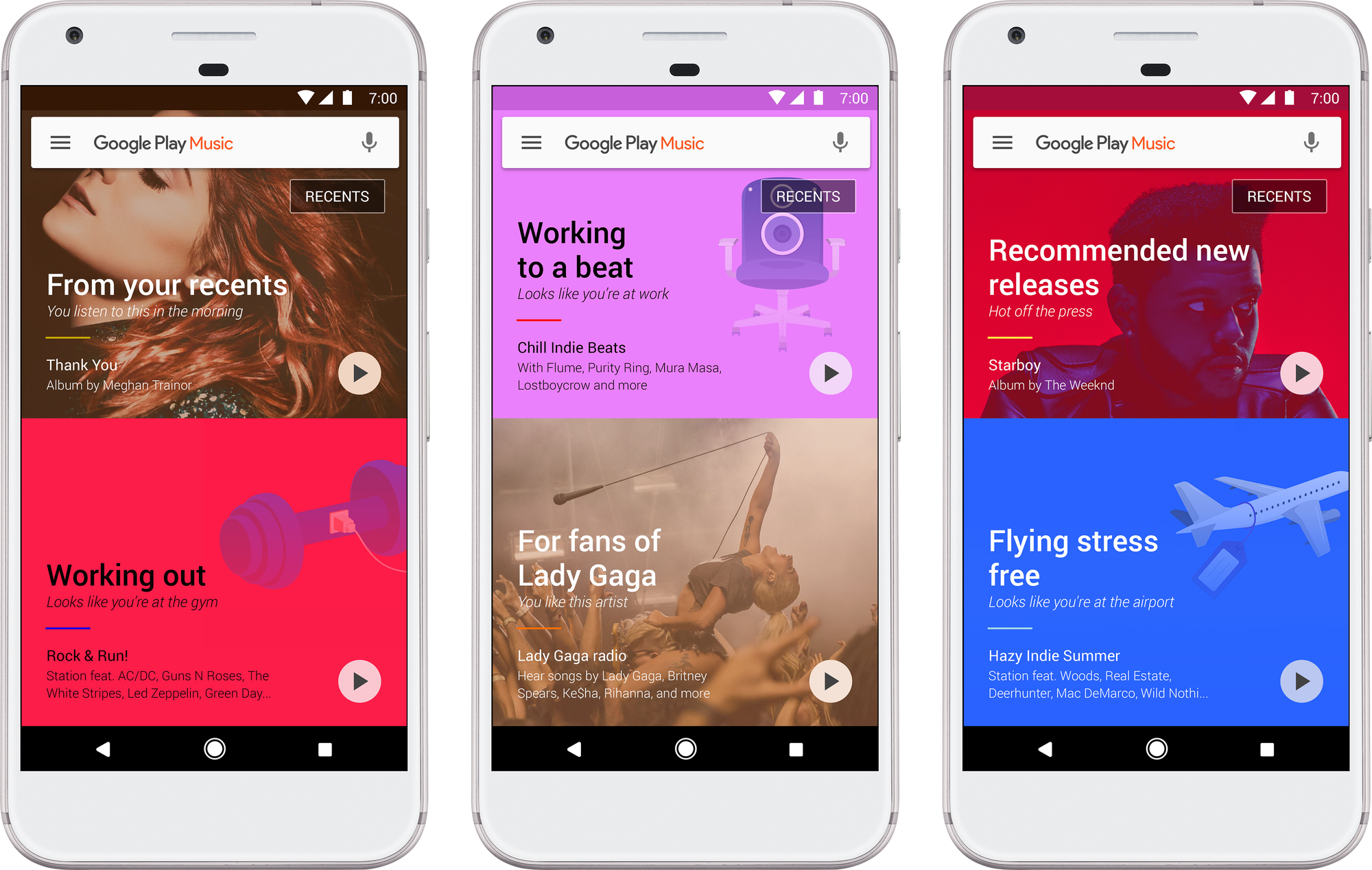
Introducing the new Google Play Music

by Elias RomanGoogle Play Music

Whether reminding you to leave to catch your flight, helping you find pictures of your daughter’s recital, or suggesting the right Smart Reply, Google builds tools that help you make the world of information more accessible and useful. And at Google Play Music, we strive for the same.

Building on our commitment to help you find the right music for any moment, today we’re introducing the new Google Play Music — a fresh take on our music streaming service that is smarter, easier to use, and much more assistive.

To deliver that, Google Play Music uses machine learning to figure out what music you like and then mixes in signals like location, activity, and the weather along with hand-picked playlists to personalize music for wherever you are and whenever you want tunes. Starting this week on Android, iOS and the web, the new experience will roll out globally (62 countries, to be precise).

DON’T THINK TWICE, IT’S ALL RIGHT

To provide even richer music recommendations based on Google’s understanding of your world, we’ve plugged into the contextual tools that power Google products. When you opt in, we’ll deliver personalized music based on where you are and why you are listening — relaxing at home, powering through at work, commuting, flying, exploring new cities, heading out on the town, and everything in between. Your workout music is front and center as you walk into the gym, a sunset soundtrack appears just as the sky goes pink, and tunes for focusing turn up at the library.

GPM Thriller

WHAT YOU WANT? BABY I GOT IT

The new Google Play Music has a brand new home screen built just for you. Think of it as the ultimate personal DJ—one who listens not only to what you like, but also when you like it, so the music that you care about now is always at the top of your screen. Maybe that's your favorite new release on Friday, the dance party playlist you listen to after work, or more music from a new artist you've just fallen in love with. Regardless, it will be there waiting for you to press play. Powered by Google's machine learning systems and honed by our team of expert music curators, your experience will keep evolving (and improving) as we get to know you better.

PLEASE DON’T STOP THE MUSIC

No connection? Lost in the desert? No problem. Well...except for the lost part (try Google Maps for that). When you subscribe, you’ll always be prepped with an offline playlist based on what you’ve listened to recently. As long as you remember to charge your phone, you’ll have your favorite tunes, even if you forgot to download them ahead of time.

From parks to airports to bars, whether you're walking, biking, or driving, the right music makes any moment better. With the new Google Play Music, we’re here to help with the perfect soundtrack for the things you do every day. After all, the only thing better than finding the perfect music is the perfect music finding you.


14 Nov 13:06

Google Play Music gets a total overhaul

by Ben Popper

Google’s approach to software increasingly centers around personalized recommendations and assistance. It will filter your email and surface only the messages you need to see, pop up alerts if your train line goes out of service, and even chat with you about the latest scores and trades from your favorite sports team. Today that same approach comes to Google’s music service, Google Play, which is being revamped to focus on contextual recommendations.

Using machine learning and clues like location, activity, and weather, the app tries to serve up a smorgasbord of playlists that will match your mood and moment. "At a high level, Google’s mission is to make the world of information really accessible and useful to people," said Elias Roman,...

Continue reading…

14 Nov 13:05

Amazon’s new music streaming service arrives in the UK with an Echo hook

by James Vincent

Amazon is launching its on-demand music streaming service, Amazon Unlimited Music, in the UK. The service was unveiled in the US last month, and offers 40 million tracks, Android and iOS mobile apps, and both hand-picked and algorithmically-generated playlists. But, it's not to be confused with Prime Music — a comparatively limited music-streaming service that Amazon bundles in for free with a Prime yearly subscription.

In the UK, Amazon Unlimited Music will cost £9.99 a month for non-Prime members or £7.99 a month/£79 a year (that's £6.58 a month) for those that are subscribed to Prime. (Spotify, by comparison, charges £9.99 a month in the UK.) There’s also a deal where you can get access to Unlimited Music on just a single Echo or...

Continue reading…

14 Nov 01:10

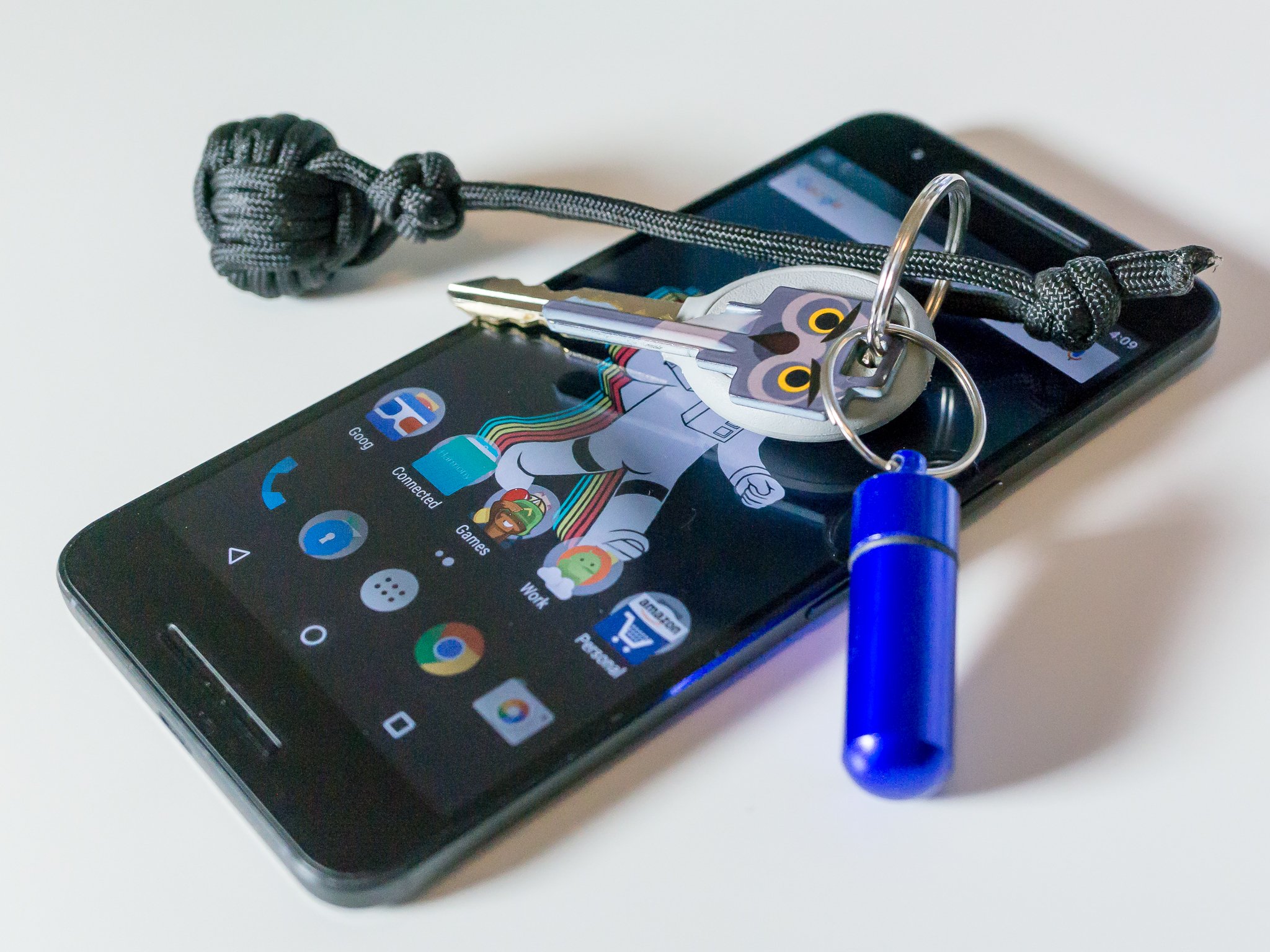
How to properly secure your Android phone

by Jerry Hildenbrand

Know how to use the tools you're given to keep your phone and your data secure.

Google, Apple, and Microsoft have great tools for managing your online security. Some implementations may be technically better than others, but you can be reasonably sure that your data — both on the phone and in the cloud — is safe. If you need more reassurance or have different needs, third-party companies are available that work with the big three to provide enterprise-grade security assurances. No method is 100% secure, and ways to get around it are found regularly, then patched quickly so the cycle can repeat. But these methods are usually complicated and very time-consuming and rarely widespread.

This means you are the weakest link in any chain of security. If you want to keep your data — or your company's — secured, you need to force someone to use these complicated, time-consuming methods if they wanted to get into your phone. Secure data needs to be difficult to obtain and difficult to decipher if someone does get ahold of it. With Android, there are several things you can do to make someone have to work really hard to get your data — hopefully so hard that they don't bother trying.

Use a secure lock screen

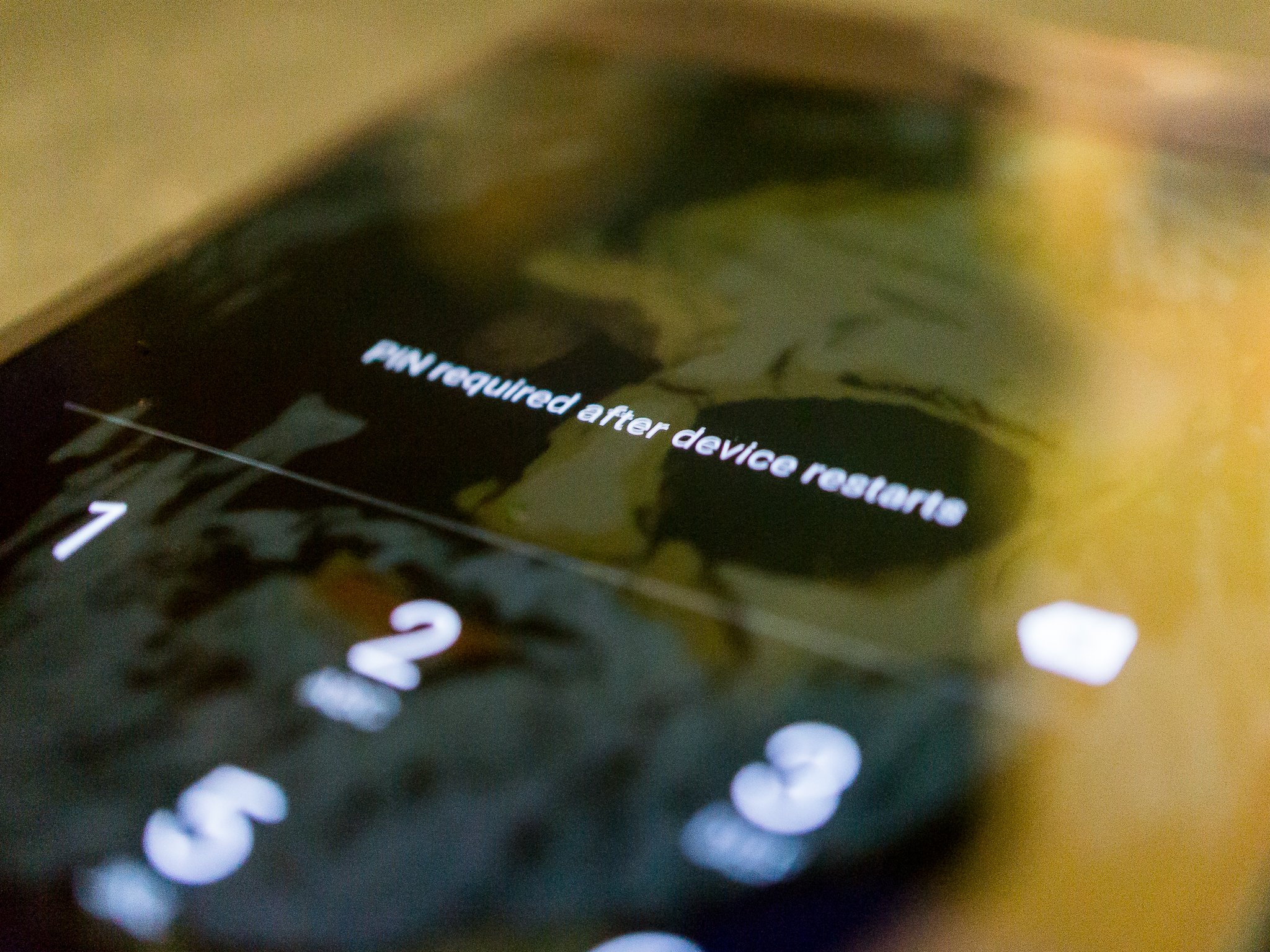
Having a secure lock screen is the easiest way to limit access to the data on your phone or the cloud. Whether you just left your phone on your desk while you had to walk away for a moment or two or if you've lost your phone or had it stolen, a lock screen that isn't simple to bypass is the best way to limit that access.

The first step is to lock the front door.

If your company issued you a phone or you work for someone with a BYOD policy, there's a good chance your phone is forced by a security policy to have password protection, and your IT department may have assigned you a username and password to unlock it.

Any method that locks your phone is better than none, but generally, a random six-digit PIN is enough to require someone to have special knowledge and tools to bypass it without triggering any self-destruct settings. Longer, randomized alpha-numeric passwords mean they will need the right tools and a lot of time. Entering a long complex password on a phone is inconvenient for you and we tend not to use things that inconvenience us so alternatives have been thought up that use patterns, pictures, voiceprints, and a host of other things easier to do than typing a long password. Read the instructions and overview for each and decide which works best for you. Just make sure you're using one.

Encryption and two-factor authentication

Encrypt all of your local data and protect your data in the cloud with two-factor authentication on your account logins.

Recent versions of Android come encrypted by default. Android 7 uses file-level encryption for faster access and granular control. Your corporate data may have another level of security to reinforce this. Don't do anything to try and lessen it. A phone that needs to be unlocked to decrypt the data is one that only someone dedicated is going to try to crack.

Online accounts all need to use a strong password and two-factor authentication if offered. Don't use the same password across multiple sites and use a password manager to keep track of them. A centralized spot with all your account credentials is worth risking if it means you'll actually use good passwords.

More: Two-factor authentication: What you need to know

Know what you're tapping on

Never open a link or message from someone you don't know. Let those people email you if they need to make the first contact, and offer them the same courtesy and use email instead of a DM or a text message to get in touch with them the first time. And never click a random web link from someone you don't trust. I trust the Wall Street Journal's Twitter account, so I'll click obscured Twitter links. But I won't for someone I don't trust as much.

Trust is a major part of security at every level.

The reason isn't paranoia. Malformed videos were able to cause an Android phone to freeze up and had the potential to allow elevated permissions to your file system where a script could silently install malware. A JPG or PDF file was shown to do the same on the iPhone. Both instances were quickly patched, but it's certain that another similar exploit will be found, especially when we see stories of flaws like Meltdown and Spectre affecting all our digital things. Files sent through email will have been scanned and links in the email body are easy to spot. The same can't be said for a text message or a Facebook DM.

Only install trusted applications

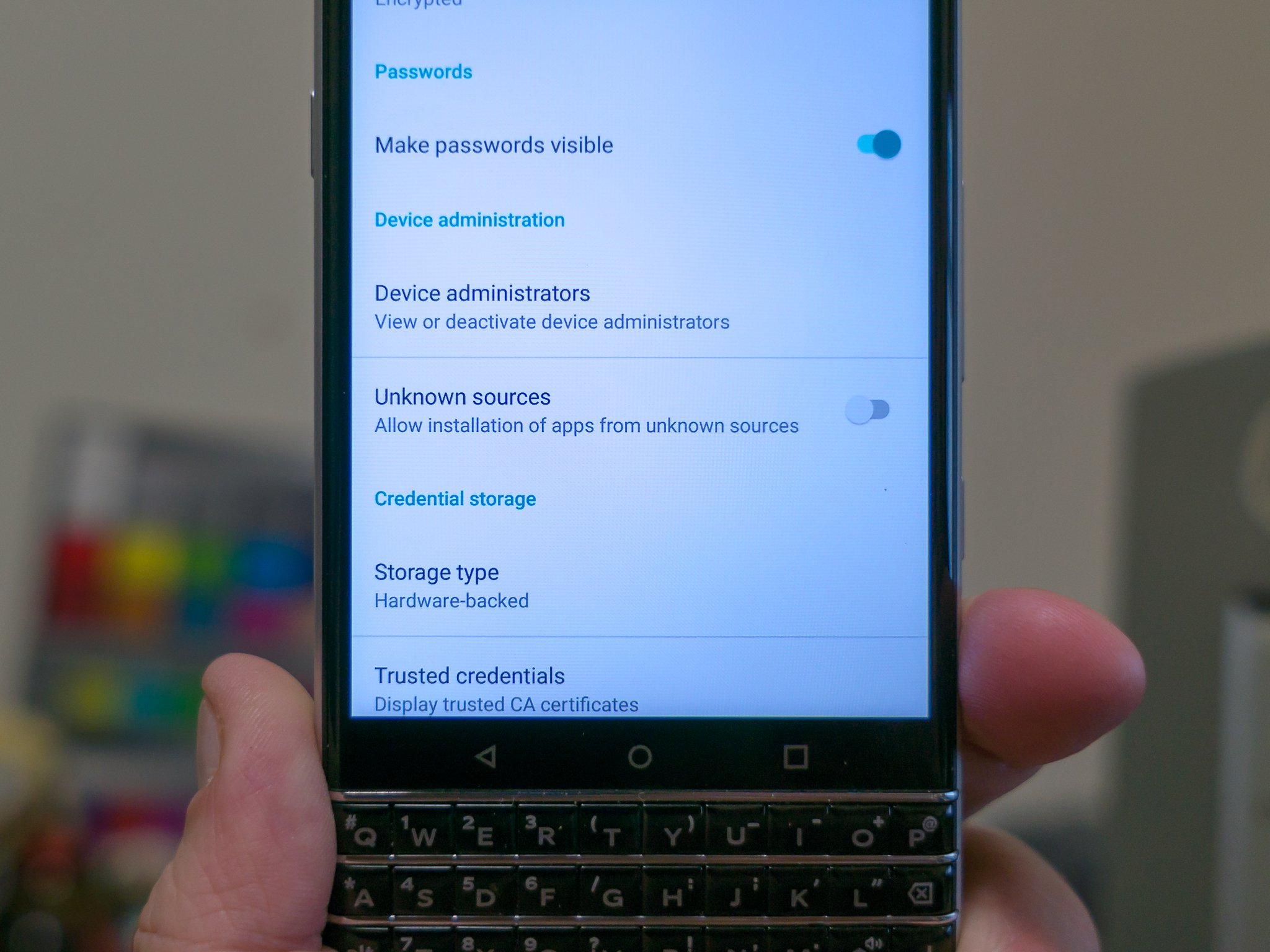
For most, that means Google Play. If an app or link directs you to install it from somewhere else, decline until you know more. This means you won't need to enable the "unknown sources" setting required to install apps that didn't originate from a Google server in the Play Store. Only installing apps from the Play Store means Google is monitoring their behavior, not you. They are better at it than we are.

If you need to install apps from another source you need to make sure you trust the source itself. Actual malware that probes and exploits the software on your phone can only happen if you approved the installation. And as soon as you're finished installing or updating an app this way, turn the Unknown sources setting back off as a way to combat trickery and social engineering to get you to install an app manually.

With Android Oreo, Google has made it easier to grant trust to a source so you won't have to flip any switches or toggles after you've set things up. This is something Google is always working on because they put their name on the back of every phone and look bad when stories about malware on Android happen.

More: Everything you need to know about the Unknown Source setting


None of this will make your phone 100% secure. 100% security isn't the goal here and never is. The key is to make any data that's valuable to someone else difficult to get. The higher the level of difficulty, the more valuable the data has to be in order to make getting it worthwhile.

Some data is more valuable than others, but all of it is worth protecting.

Pictures of my dogs or maps to the best trout streams in the Blue Ridge Mountains won't require the same level of protection because they aren't of value to anyone but me. Quarterly reports or customer data stored in your corporate email may be worth the trouble to get and need extra layers.

Luckily, even low-value data is easy to keep secure using the tools provided and these few tips.

Updated January 2018: In light of the recent round of web security issues, we have refreshed this page with up-to-date information.

14 Nov 01:09

If only people had known before the election…

by Gasparrini

13 Nov 21:26

The Anti-Snore Wearable is a very literally named product

by Ashley Carman

Can you guess what the Anti-Snore Wearable is designed to do? Hm. I wonder...

The Anti-Snore Wearable launched on Kickstarter earlier this week and is a band that wraps around a wearer’s arm. It vibrates whenever its companion iOS / Android app detects snoring in an effort to coax a person into turning over to his or her side. So the band tries to save your bed companion some passive aggressive side jabs. Got it.

The band doesn’t have a microphone inside, but pairs with a user's phone over Bluetooth. The downside of that pairing is a sleeper has to keep their phone near their bed all night, which some people might not be into. The app apparently relies on an algorithm to determine whether a sound is a snore or something else, like a...

Continue reading…

13 Nov 18:24

FriendFinder Networks hack reportedly exposed over 412 million accounts

by Megan Rose Dickey
adult friend finder If you have an account on AdultFriendFinder, Cams.com, Penthouse, Stripshow and/or iCams.com — and reused it on other sites — you should probably change your password. FriendFinder Networks, the parent company of those sites, has reportedly been hacked, resulting in the leak of of over 412 million accounts, according to Leaked Source (h/t to CSO). For context of just how big… Read More
12 Nov 16:29

Top 10 Free and Affordable Mental Health and Counseling Resources

by Alan Henry

This week’s roundup isn’t so much a top 10, since this isn’t ranked, and there’s way more than we can cover, but here are ten of our favorite mental health resources to keep handy for you or someone you love who may need someone to talk to, whatever the reason.

10. Dial 211

Not enough people know that most municipal areas have a 211 service you can dial to find out about mental health, counseling, or other resources available in your community and beyond. We mentioned them in our guide to finding someone to talk to when you can’t afford therapy, and the FCC’s “Dial 211" info page has a wealth of information about what you can learn when you call them.

The beautiful thing about 211 is that while they don’t offer mental health and counseling services directly in any way, they absolutely have directories of those services that they can refer you to. 211 is free, and almost always staffed by real people who are willing to help you (like one of our commenters here!) but some of the services they have access to aren’t, so keep that in mind.

9. Mental Health America

Mental Health America, formerly the National Mental Health Association, is a non-profit dedicated to improving the lives of people living with mental illness. The organization has offices and branches around the country, and a comprehensive “finding help” tool that includes self-assessment tools, links to finding someone in your community to talk to, and even tips on how to make the most of your relationship with a therapist or social worker, as well as a crisis number you can call in case of emergency (1-800-273-TALK).

Additionally, Mental Health America offers resources beyond just therapy and medication—they’ll help with other aspects of your life as well that may be impacted by mental health issues. You can read more about their other programs here.

8. MentalHealth.gov

MentalHealth.gov, for as long as it exists, serves as a catch-all location for mental health programs, resources, and even studies and evidence-based articles that can help you find someone to talk to. There are detailed pieces on what to look for in yourself or someone you know that may be an indicator that person is dealing with an undiagnosed issue, and even resources for people who know a loved one who’s in treatment or could use help, and how to handle their own feelings about that.

Whether you need immediate help, you’re a veteran struggling with PTSD or another mental health challenge, or you’re just looking for information on how to manage the complex web of health insurance and mental health offerings, there are resources to help you. They even have an easily bookmarkable page with hotlines and live chat worth keeping on-hand if you or someone else is ever in a dark spot.

7. The Trevor Project

The Trevor Project provides crisis intervention and suicide prevention for LGBTQ youth, in the form of its hotline (1-866-488-7386) and text line (Text “Trevor” to 1-202-304-1200), its social network (called TrevorSpace,) its support center articles, and online chat. You can get a quick rundown of the options here, and their operating hours (the hotline is 24/7, for the record.)

In addition to the hotline though, the support center offers a wealth of resources and deep reading on a variety of topics, including coming out to family or struggling with their own identity, as well as other mental health issues like depression or bipolar disorder, or those contemplating self-harm. They’re also happy to accept volunteers or donations, and have a great series of videos designed to help people become “lifeguards,” or learn how to help at-risk LGBTQ teenagers.

6. IAMAlive

IAMAlive is an online crisis network, and all of its volunteers are professionally supervised and trained in crisis prevention. Unlike many services (some of which are helpful and we’ll name later) where the listeners are volunteers or people just willing to lend an open ear, IAMAlive volunteers are trained to help you in almost any situation and can help you find additional in-person resources to help as well.

Volunteers come from (and operate) around the globe, and their online chat is just one click away. If you’re curious about becoming a volunteer, or what their volunteers go through, check out their FAQ. It’s extremely helpful, and very extensive.

5. The Crisis Text Line

The Crisis Text Line, which we’ve highlighted before, is a 24/7 service that’s text only. Right now though, their website is absolutely packed with support numbers and additional information. Plus, texting lets you reachout when you’re away from home or a computer, feeling unsafe about accepting or placing a phone call, or discreetly if you need to. Simply text 741-741 with the message “START” to get started. You’ll have to provide a couple of details, but after that you’re connected with someone who can help.

Some of the responses are a bit algorithmic, designed to gague the type of issue you’re experiencing and at what point they sould connect you with a crisis counselor, and they always wholeheartedly suggest following up with a professional who can help you after the crisis has passed.

4. ReachOut

ReachOut is a free social network, available for iOS and for Android, ideal for people on the go, or who would rather get help and connect with others on their phones instead of making phone calls or using desktop live chat services. It’s also a support network full of people who are struggling with similar issues that you’re having, and offer both communal options to talk to others about your problems or thoughts, or more urgent options to talk to someone when you really need help.

Best of all, the service offers tons of support choices for people who struggle with particular health and wellness concerns, like chronic pain and illness, cancer, and other medical issues that of course, in turn, impact your mental health. It’s worth installing.

3. BlahTherapy

BlahTherapy offers a combination of free and premium services that will give you people to chat with if you need someone to talk to. On the free side, you can speak anonymously to a listener at any time without signing up or registering for the site. It’s a bit like venting to a stranger who’s willing to listen—don’t expect comprehensive help or anything, but sometimes it’s nice to just be heard by someone who has an open ear.

On the premium side though, BlahTherapy can connect you with actual therapists and social workers who can talk to you via live chat, after being matched with someone who can help with the things you’re feeling or the issues you’re facing. It’s a chat relationship, of course, but they’re absolutely willing to help. You can try the premium service out for a week before you have to sign up for a subscription.

2. 7 Cups

We ran down many of 7 Cups’ best benefits in our list of resources for people who need therapy but can’t necessarily afford a counselor. The service is still around and helping people, but also has tons of resources on its site to help you practice good self-care, group messaging and community support options.

Why Self Care Is So Important Why Self Care Is So Important Why Self Care Is So Important

You’re overwhelmed at work. You have a ton of projects piling up at home, and your calendar is… Read more Read more

Of course, the site also has its signature free chat options to talk to trained listeners—essentially volunteers happy to share an open ear and talk to you about whatever’s going on—and even find professional therapists willing to help, for a fee, of course. The beauty of 7 Cups is that it’s well and truly anonymous, and even talking to a professional is free to start (subscriptions come later), and the service will even help you find a therapist in your area to connect with face-to-face. Even in the absence of all of that though, if you need someone to talk to right now, 7 Cups’ trained listeners are there to help. If you’re on the go, they have a mobile app too.

1. These Crisis Support Hotlines

In addition to the hotlines we’ve mentioned up to this point, here’s a quick rundown of some others you should keep handy, either for you, or for someone in your life who may be struggling:

The important thing though is to make sure that whatever you’re feeling or whatever your situation, keep in mind that someone out there can help, and someone out there will listen with kindness.

Many of these services and resources are stopgap measures, designed to help in a pinch, or serve as a gateway to more robust, in-person help. For more, check out the National Association of Social Workers or the American Psychological Association’s locator tool to find someone in your area to talk to. Don’t let stigma hold you back, get the help you deserve to be the best, healthiest you possible.

Title photo by A Health Blog. Additional photo by Pabak Sarkar.


Lifehacker’s Weekend Roundup gathers our best guides, explainers, and other posts on a certain subject so you can tackle big projects with ease. For more, check out our Weekend Roundup and Top 10 tags.

12 Nov 16:29

Best Journaling Apps for Android

by Jen Karner

Journey is the best journal app available on Android today. It not only allows you to journal from you phone, but also gives you access to all of the bells and whistles on your tablet, or computer.

Best overall

Journey

See at Google Play

Journey manages to one up other journaling apps with a combination of great features and a beautiful presentation. You can make photo or written entries, geotag your entries, and even access the service from your computer. While you are making entries you can enable the app to log the weather, add a variety of media, and even whether you are participating in an activity when you ought to be journaling. It uses Material Design to make navigating through the app as easy as possible, and even writing from your phone is simple and easy to edit.

Bottom line: With accessibility without paying a dime, and easy intuitive use, Journey easily becomes the Journal app that all others ought to be measured against.

One more thing: Journey offers a premium mode which gets you access to even more features that make keeping a journal easy. These include access to Markdown, further aesthetic customization, the ability to see which device you last used the app on, and plenty more.

Why Journey is the best

The right features, and accessibility across devices is what makes Journey the best.

Being able to access your journal from any location is a huge benefit for anyone who wants to take control of their digital journal. After all, if you're sitting at your computer, it's far easier to type out a prolonged entry than it would be by using the keyboard on your phone. That's one of the places that Journey really shines. It offers you access to your journal on tablet, phone, or computer.

While plenty of other journaling apps offer tons of great features, Journey is a complete package. As soon as you open the app you'll see your last entry, and are immediately able to start a new one. When you're writing up that new journal entry, there are a variety of ways to augment the text, using locations, tags, photos — anything, really. You can also let your device detect the local weather in your location, and import fitness data from your daily activities.

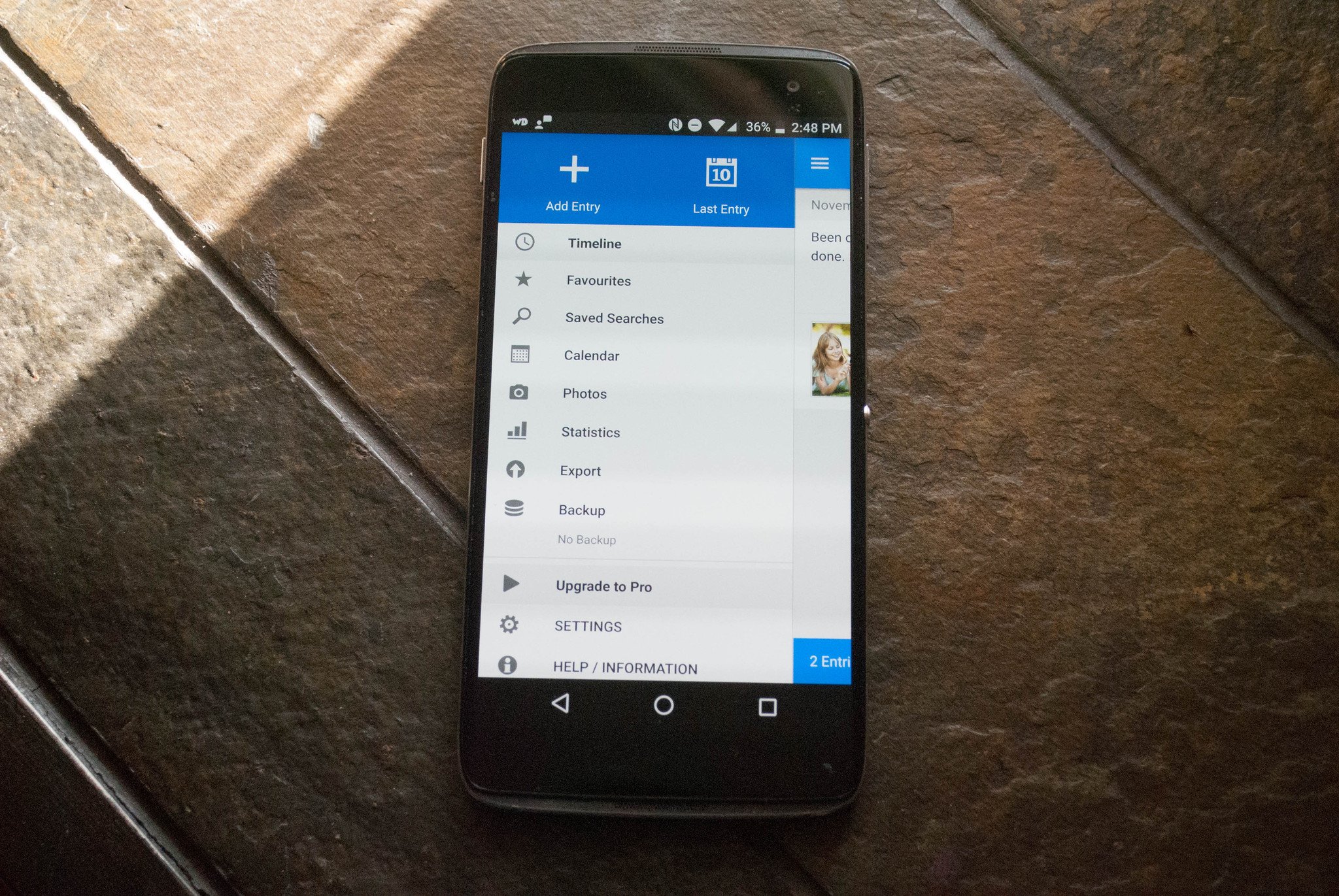
You get access to a calendar as well. It allows you to easily scroll through and see when you have updated your journal. This is just one of the ways that you can easily find old journal entries to go back over them. The second option for finding an entry you need to look back over is by searching with tags. Once you start to tag posts, they'll pop up in your sidebar making it easy to track down anything that you need without a problem.

Journey also offers a Premium version. While the free version is excellent and gives you a great experience, Premium adds Markdown support for additional formatting, along with security features that let you see which device you used the app on last.

Best for media

Day Journal

See at Google Play

Day Journal: Personal Diary delivers a great journaling experience with an emphasis on media. When you are writing an entry, you'll get a word count, and a number of features to help customize your entries. These include tagging, detecting local weather, location tags, and the ability to add how you are feeling. While there are more features like attaching photos, and looking at statistics, you'll have to upgrade to the Pro version to access them.

Day Journal puts a serious emphasis on having media attached to your journal entries. That's because the days of folding a snapshot into a paper journal are over for many people. By adding photos or audio to a specific entry you can remember that day more vividly. It's a small feature that really does make a big difference for people who like to go back and relive their memories through a journal. Now that means more than just words, it means photos and audio clips as well.

Bottom line: Day Journal is a great app that places most of its best features behind a paywall. While it can get the job done, it doesn't excel in any single area.

One more thing: If you do decide to pony up for those sweet Premium features you'll be able to add media and audio to your entries, as well as checking out your writing statistics.

Best for Sync

Diaro

See at Google Play

Diaro aims to give you control as to how you organize everything in your digital journal. Each time you add an entry you'll be able to select a folder and tags for it to live in. This is how they make it easy to go back and find a specific entry when you're ready to look it over. There aren't many options while you are writing entries you can add locations and photos. Diaro also gives you the option to enter a full screen mode which can make it easier to concentrate while you are writing.

Diaro also offers a Pro version of the app. The perks are pretty decent, too, with the added ability to export entries to PDF along with cloud sync using your Dropbox account. The Calendar will also help you look over recent entries by showing you the dates that you have journaled in the recent past. It uses Dropbox to store and sync your journal across devices, if you so choose.

That Dropbox sync option is no joke either. It stores your journal on Dropbox, and syncs quickly and effectively. This means that if you switch out phones, it's a breeze to access your journal from a new device. It adds a layer of accessibility that just cannot be overstated. Nobody wants the hassle of trying to figure out how to transfer their journal when they upgrade devices, and with Dropbox support you won't need to worry.

Bottom line: Diaro gives you a decent experience that will let you focus on your journaling without bogging you down in many features.

One more thing: The biggest perk of upgrading to Pro is the ability to link up with your Dropbox which allows you to backup and export your journal entries for better safe keeping.

Best for security

Penzu

See at Google Play

Penzu aims to offer you a stress free journaling experience. When you first get started you'll create a new journal, and name it. This is where your entries will be stored. The free version is a very bare-bone approach to journaling: you'll be able to write entries, add in photos, and make some tweaks to the format, but that's about it. Penzu Pro gives you access to unlimited journals, custom journal covers, custom fonts, 256-bit encryption security, reminders to journal at specific times of the day and even more.

Penzu's golden feature, and the one that might really grab your attention, is it's security lock. A digital journal is harder to access than a normal one, and that lends itself to being more secure. Penzu takes the fact that your journal may well be where your most private thoughts are stored and aims to give you protection to make sure no one has eyes on it, unless you have given them access.

Bottom line: Penzu is all about simplicity, with a basic free version that pushes you to upgrade to a subscription.

One more thing: Penzu Pro is a monthly membership, but does give you access to fantastic features, not the least of which is the ability to securely lock your journal.

Conclusion

There are plenty of great journaling apps out there that make keeping a digital diary easy. Each one is a bit different and it offers different features to let it stand out in the crowd. However many journaling apps hide their best assets behind a paywall, and that's where Journey truly stands out. It gives you tons of options and features for free, and if you decide to go Pro simply expands those options and features.

Best overall

Journey

See at Google Play

Journey manages to one up other journaling apps with a combination of great features and a beautiful presentation. You can make photo or written entries, geotag your entries, and even access the service from your computer. While you are making entries you can enable the app to log the weather, add a variety of media, and even whether you are participating in an activity when you ought to be journaling. It uses Material Design to make navigating through the app as easy as possible, and even writing from your phone is simple and easy to edit.

Bottom line: With accessibility without paying a dime, and easy intuitive use, Journey easily becomes the Journal app that all others ought to be measured against.

One more thing: Journey offers a premium mode which gets you access to even more features that make keeping a journal easy. These include access to Markdown, further aesthetic customization, the ability to see which device you last used the app on, and plenty more.

12 Nov 16:04

Everything you need to know about Google Daydream

by Russell Holly

What is Google Daydream?

Without being overly technical, Daydream is a new way to experience games and video on your phone. Instead of looking down at your screen and swiping or tapping, you can put your phone in a specially made headset and experience a 360-degree immersive environment that allows you to really step into the world instead of viewing it on a small screen.

Read more at VR Heads

11 Nov 21:33

PlayOn Cloud lets you record and download videos from streaming services to your iPhone

by Sarah Perez
437661 PlayOn has long offered media server software that allows cord cutters to record from streaming services like Netflix, Amazon, HBO, Hulu and others, in order to watch on any device – without ads – even when offline. Now, it’s taking this “cloud DVR” functionality to mobile through the launch of a new iOS application that lets you record and watch videos… Read More

11 Nov 21:26

A Spotify bug thrashed subscribers' drives for the past five months

by Cory Doctorow

fire-orange-emergency-burning

The Mac/Win/Lin versions of Spotify wrote hundreds of gigabytes of bad data per day to their 40,000,000 users, thrashing their drives. (more…)

11 Nov 21:18

The Subtle Knife: the trippiest rail trip you'll take today

by Andrea James

subtle-knife-01

subtle-knife-01

Daniel Crooks' latest experimental work, The Subtle Knife, continues his exploration of urban spaces overlaid with windows of other spaces. The result is a slow, smooth, hypnotic meditation on time and space. (more…)

11 Nov 21:07

Watch this poor fellow run after his car as it rolls away from him

by Mark Frauenfelder
Screen Shot 2016-11-11 at 10.05.05 AM

This guy stopped his car on a snowy road to take a quick bio-break, when he noticed his car was rolling away from him. He tried his best to catch up with it as it went backwards down a hill. The whole thing was caught on the car's dashcam.

11 Nov 14:52

Google Play Newsstand gets a major revamp w/ Material Design & personalized ‘For You’ section

by Abner Li
Google Play Newsstand has just received a major revamp that adopts Material Design’s latest guidelines and is focussed on delivering personalized reading recommendations. Version 4.0 swithces to a bottom navigation bar and has a new personalized “For you” seciton as the main feed.

more…


Filed under: Google Corporate
11 Nov 14:51

Yahoo admits employees discovered hack in 2014

by Kate Conger
marissa mayer Yahoo admitted today that some of its employees were aware of the theft of 500 million users’ data as early as 2014 — years before Yahoo publicly acknowledged the hack. The hack, which Yahoo has attributed to an unnamed “state-sponsored actor,” occurred in late 2014, and according to today’s filing with the Securities and Exchange Commission, it seems Yahoo… Read More