Shared posts

07 Jan 01:08

Build Your Own Spotify-Powered Jukebox With an LED-Lit Case

by Thorin Klosowski

We’ve seen plenty of Raspberry Pi jukeboxes, but few are as elegant as Imgur user justthatoneotherdude’s.

On the software end, justthatoneotherdude runs Volumio with a Spotify client, but that’s not what’s interesting. What’s interesting is the woodwork and knobs they use. The whole thing is packed into a solid wood case, then one knob is used for volume, while the others are linked to Spotify playlists. The device also packs in some color changing LEDs to help spice things up a bit too. It’s a fantastic looking little device, and simple enough to modify to suit your needs.

I made a Raspberry Pi Spotify Jukebox... | Imgur via Adafruit

06 Jan 21:38

Siren Care weaves electronics into fabric to keep diabetic patients healthy

by Matthew Lynley
siren care socks Instead of tracking your health with a little band that’s on your wrist, Ran Ma thinks that the future is keeping track of your health — or at least parts of it — with technology that’s woven into the fabric of your clothes. That’s the target of Siren Care, a wearable company that looks to weave electronic sensors into its clothing in order to track changes in… Read More
06 Jan 17:46

Fitbit's personal fitness and goal-setting features just got a lot more useful

by Dan Thorp-Lancaster

At CES 2017, Fitbit has announced a load of new features coming to its app in the next few months that should make using its trackers a much more personal experience. On deck is an all-new social experience, along with new personal goal setting features and more.

Perhaps the biggest changes are in the revamped social experience, which will come in the form of a new Community section of the app. In the Community section, you'll be able to check out a social feed where you can connect with friends and family and do everything from sharing your achievements to discovering new workouts. Think of it like a sort of Facebook feed specifically for fitness. The Community section also makes it easy to see how your friends are doing at a glance and even discover communities to join from a dedicated Groups portion.

If you're one for setting goals and sticking to them, Fitbit's new personal goal setting features should be a delight too. Here's a look at what to expect:

  • Personal Goal Setting in the Fitbit app provides a step-by-step guided process to help create achievable goals based on insights from your data and health and fitness objectives.
  • Define your health and fitness objectives by identifying your focus areas like steps, exercise, sleep, nutrition, or weight, and answering questions that help establish the motivation behind your goals.
  • Get personalized recommendations based on your objectives and historical Fitbit data. For example, if your motivation is to get more fit and your data shows you walk an average of 9,200 steps per day, Fitbit may recommend setting a higher goal of 10,000 steps per day.

Finally, a new firmware update will be making its way to the Fitbit Blaze, adding some nifty new stuff to check out. Once it lands, you'll be able to use your Blaze to check out your cardio fitness level, based on your VO2 max. The update will also bring guided breathing sessions, a feature that's also available on the Fitbit Charge 2.

As for availability, the Community tab is set to hit the Fitbit app in March, while Personal Goal Setting should arrive for existing users sometime in January. Meanwhile, the Fitbit Blaze firmware update is set to land in February. It's also worth noting that Fitbit today released a redesigned version of its Fitstar Personal Trainer app, which is available for Android.

Download Fitstar Personal Trainer (free)

06 Jan 17:42

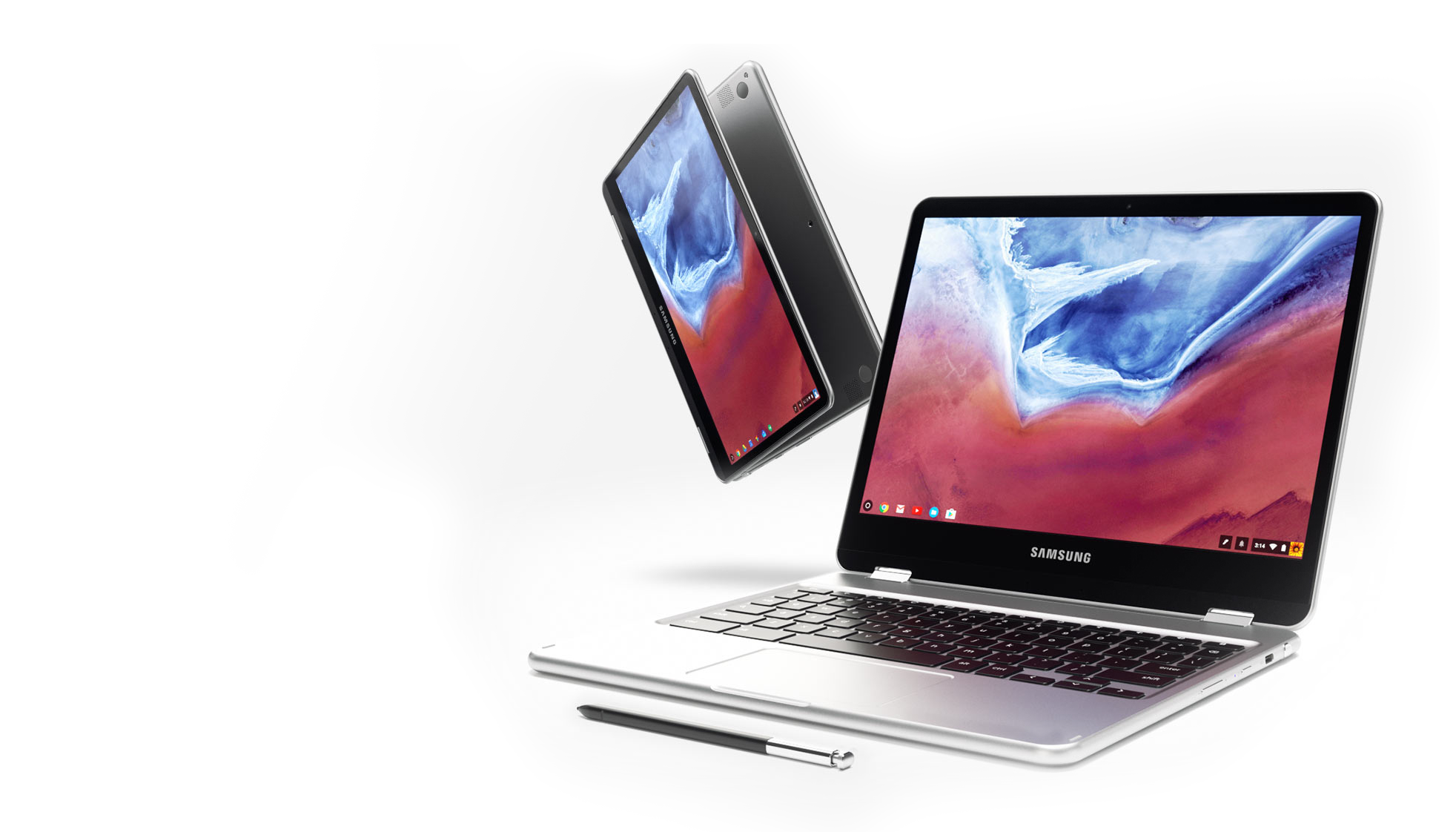
Hands on: Samsung’s Chromebook Plus/Pro breathe new life into Chrome OS [Video]

by Ben Schoon

There’s not a ton to get excited about at CES 2017, but two devices we’ve been eager to check out are the ASUS Chromebook Flip 2 and the Samsung Chromebook Pro & Plus. Today, we’ve finally been able to lay our hands on Samsung’s latest Chromebook option.

more…


Filed under: Google Corporate
06 Jan 17:41

Rewalk Robotics is building a “soft exoskeleton” to rehabilitate stroke patients

by Lora Kolodny
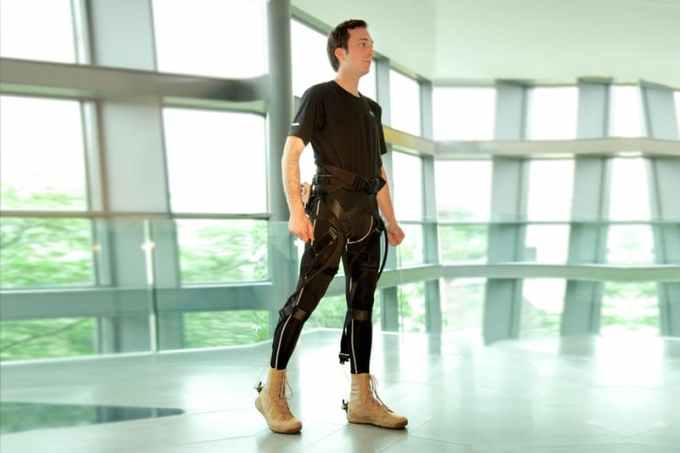
Rewalk's "Exosuit" in development was originally designed by researchers at Harvard's Wyss Institute. The Boston-based company that was first to provide robotic legs to paralyzed veterans in the U.S., Rewalk Robotics Ltd., has a new product in development that you won’t see this week at CES. The device is a “soft exoskeleton,” designed to help people who have lower limb disability but who have not severed their spinal cord or otherwise become paraplegic. According to Rewalk… Read More
06 Jan 17:40

Add items to your grocery list by scanning them on the way to the garbage can

by Brian Heater
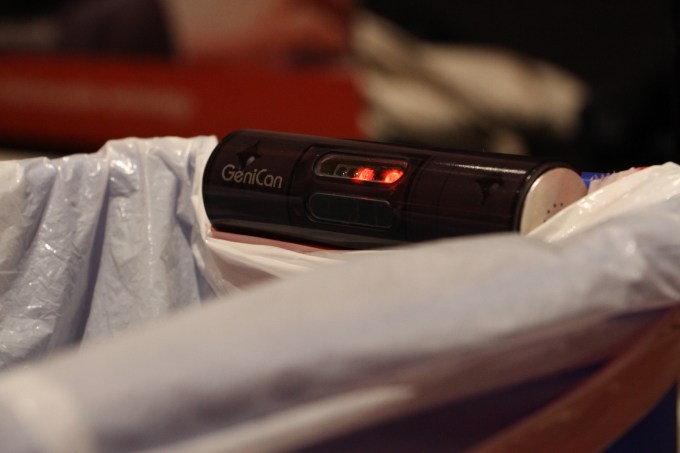
img_4922 At first glance, the GeniCan is completely ridiculous. At second, it’s actually kind of brilliant. The scanner clips onto the side of a trash can, an always present reminder to scan items when you run out. Before throwing an object out, you hold it up to the IR scanner and it adds it to your list. If an item can’t be scanned – like, say, a piece of fruit — the… Read More
06 Jan 17:39

Allergy Experts Now Recommend Introducing Peanut Products to Babies

by Patrick Allan

Parents have been told to avoid giving peanut-containing foods to babies for a long time, but recent research has started to suggest the opposite. Now, the National Institutes of Health recommend parents introduce peanuts to babies as young as four to six months.

Peanut allergies are deadly serious, and parents were previously told to hold off on introducing peanuts until children were into their toddler years, especially if there is a family history of allergies. Experts believed this would reduce the risk of them developing a peanut allergy, but now they believe it’s the other way around. Several large studies have shown that babies who are at high risk of becoming allergic are actually less likely to develop the allergy if they’re regularly fed peanut-containing foods during their first year. In an announcement earlier today, the NIH summarized new guidelines for preventing peanut allergies in young children. Their panel of allergy experts recommend that infants with a high risk of developing a peanut allergy should have it introduced to their diets as early as 4 months.

That said, before you introduce peanut-containing products to a child, make sure they are evaluated by an allergy specialist first. And the NIH cautions against giving infants whole peanuts or straight peanut butter since they can be choking hazards. To learn more about the new guidelines, check the link below.

NIH-sponsored expert panel issues clinical guidelines to prevent peanut allergy | National Institutes of Health via NPR Science

Photo by NIAID.

06 Jan 17:38

The Winter Classical Playlist

by Eric Ravenscraft

As the whether gets colder, staying indoors looks even more appealing than it normally does. Turn on this playlist and chill out to classical music with a wintery theme.

This playlist, curated by Spotify, collects a wide range of winter-themed music from classical composers like Chopin, Bach, and Tchaikovsky. It’s a delightfully cozy compilation that’s going to be my background noise while I make hot chocolate tonight.

Welcome to our Featured Playlist series. Each week, we’ll share a new themed playlist, embedded for your convenience! You can copy the track list to your service of choice, or listen right here. Have a sweet playlist of your own? Share it with us in the comments below!

Photo by A Guy Taking Pictures.

06 Jan 17:36

Are these the five best end credits of all time?

by Andrea James

CineFix makes their arbitrary choice of the best movie end credits in five different styles. Along the way, it's a pretty good survey of the history and styles of end credits. Lots of honorable mentions, though a few good ones inevitably got left out. (more…)

05 Jan 21:46

Google Calendar goals now have Google Fit integration [APK Download]

by Ryan Whitwam

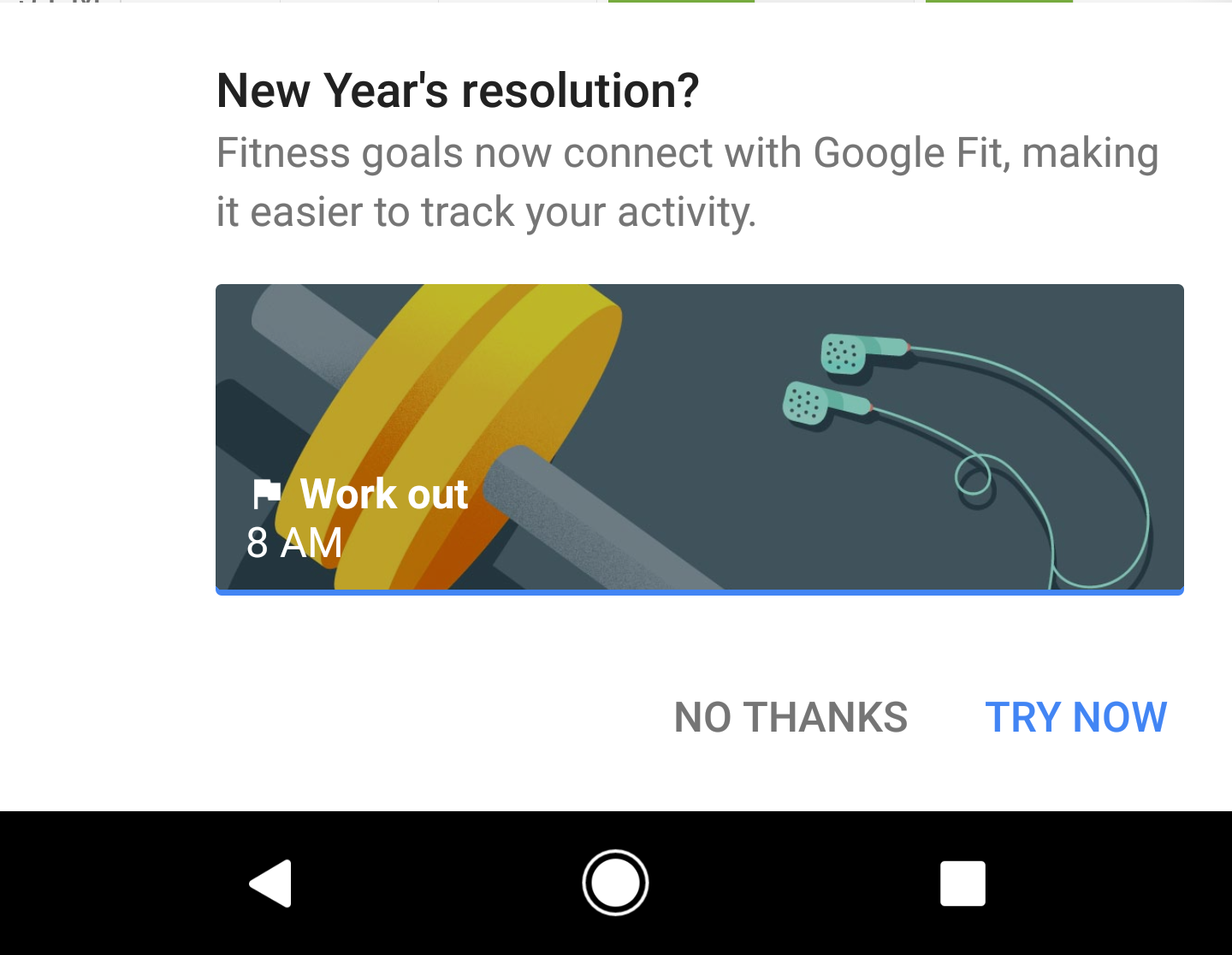
For a while now, Google Calendar has let you add goals so you can keep track of your efforts at self-improvement. One of the most popular uses (especially this time of year) is exercise goals. In the latest version of Calendar, you can plug in Google Fit to automatically complete your goals.

Adding goals takes just a few taps—tell the app what sort of activity you want to do, how often, how long, and what time of day works best.

Read More

Google Calendar goals now have Google Fit integration [APK Download] was written by the awesome team at Android Police.

05 Jan 18:19

Google Drive apps on Android gain EPUB and ODF support, Page setup in Docs

by Abner Li

While powerful, the Google Drive mobile apps have long lacked a few features found on the desktop site. With the first updates of the year, Docs, Sheets, and Slides for Android add Page setup, image improvements, and EPUB and ODF support.

more…


Filed under: Google Corporate
05 Jan 15:06

This bird just loves riding a moving sidewalk

by Caroline Siede

YouTube user Margara Francis uploaded this delightful video of a bird enjoying the hell out of a moving sidewalk at the airport. In fact, the bird likes the trip so much, he flies back to take it all over again.

[via The Laughing Squid]

05 Jan 15:05

Five tips for organizing counter clutter

by Caroline Siede

The start of a new year is a great time for reorganizing, and in this new video Elle Walker of What’s Up Moms offers five helpful tips for getting rid of counter clutter. As someone who just spent the day organizing her closets, I can personally attest to the therapeutic power of a good decluttering.

05 Jan 15:03

Kingston announces 1TB and 2TB flash drives, because why not

by Corbin Davenport

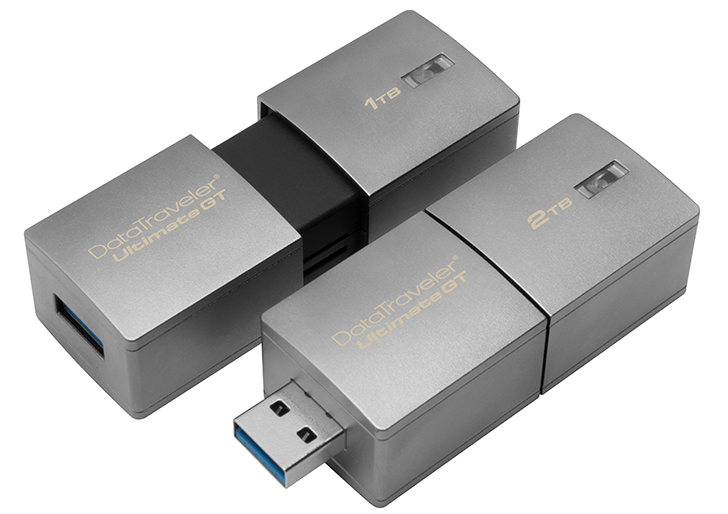
Since the very first disc drive, the 5MB IBM 350, storage has only become cheaper, smaller, and more plentiful. Today at CES, Kingston Digital announced the DataTraveler Ultimate Generation Terabyte (that's a mouthful) flash drives, which will be sold in both 1TB and 2TB configurations.

The drives themselves are just 2.83 inches wide (72mm), and claim to support full USB 3.1 Gen 1 (otherwise known as USB 3.0) speeds; although I doubt this flash drive can max out at 5GBp/s. I would have liked to see both USB Type-A and Type-C connectors, like this Lexar drive, for easier connectivity with USB Type-C Android devices (and new Apple computers).

Read More

Kingston announces 1TB and 2TB flash drives, because why not was written by the awesome team at Android Police.

05 Jan 15:01

Coming soon: Your Google Assistant on Android TV and more

by Sascha PrueterAndroid TV

When we announced the Google Assistant, we said that we wanted to help you get things done across a number of different places, contexts and situations. As we usher in the new year — and with it, the annual Consumer Electronics Show (CES) — we wanted to share an update on just a few of the ways you can expect to interact with your Assistant in the coming year.

Android TV and more

The Google Assistant is making its way to Android TV in the coming months. As part of an upcoming update on supported TVs and set-top boxes powered by Android TV, you’ll be able to ask the Google Assistant for help so you can enjoy the content you love, faster than ever, on the best screen in your house. No more typing or struggling to get to what you’re looking for — just ask the Google Assistant for help and you’re off to the races.

Assistant and Android TV
Netflix streaming membership required.

From playing media to planning for your day, here are some ways the Google Assistant on Android TV can help:

  • Play content: “Play Stranger Things on Netflix.”
  • Discover content: “Search YouTube for Jimmy Kimmel." And you can also ask a follow-up if you’re interested in more videos by saying: "Play the second one.”
  • Get answers: “Tell me about Jurassic Park?”
  • Set the right mood: “Dim the lights.”
  • Get ready for your day: “How long will it take to get to work?”  

In the coming months, the Google Assistant on Android TV will come to the NVIDIA SHIELD, along with all Android TVs in the US running Android 6.0 Marshmallow or Android 7.0 Nougat, such as the AirTV Player, Sharp Aquos, Sony Bravia, Xiaomi Mi Box, and more. And once available, the NVIDIA SHIELD will be the first TV device to offer a hands-free Assistant experience — so “Dim the lights” will only be an “Ok Google” away!

Over time, you'll also see the Assistant come to other new surfaces, like smartwatches running Android Wear 2.0, Android-powered in-car infotainment systems and many other types of devices through the Embedded Google Assistant SDK.

Actions on Google

Last month we announced Actions on Google, the developer platform for the Google Assistant. Since then, we’ve had a number of services release new and interesting ways for Google Home users to have a conversation with them — from meditating with Headspace to getting things done in the kitchen with Food Network.

This week at CES, you’ll hear from a handful of other partners, including Daimler and Hyundai. For both, the Google Assistant on Google Home will soon help make sure you’re ready to hit the road, just ask “Ok Google, ask Mercedes how much gas is in the tank.”

All of these announcements and more will be part of this week’s CES. You can expect to start using some of these Assistant integrations over the coming months and we’ll share more information as they become available.

Happy New Year and happy CES!


05 Jan 00:46

A new generation of Chromebooks, designed to work with millions of apps

by Kan Liu

Last year at Google I/O, we shared our plans for bringing the Google Play store to Chromebooks.  Today we’re excited to announce that we’re working with Samsung to launch the first Chromebooks built from the ground up for Android apps: the Samsung Chromebook Pro and the Samsung Chromebook Plus.

samsung-chromebook-pro-plus-1.png

These new Chromebooks offer greater mobility, together with all your favorite apps, so you can use Chromebooks in entirely new ways. Top apps for productivity like Slack™ help you get more done. When you want to play, you can enjoy popular games like Plants vs. Zombies Heroes™ on the high-resolution, large touch screen.  And with apps like Google Play Movies and Spotify™, you can download movies, shows and music to keep watching or listening when you’re on the go.

Thin and lightweight, the Samsung Chromebook Pro and Chromebook Plus are easily convertible from a laptop with a full keyboard to a tablet that’s comfortable to hold at only 2.38 lbs. In addition to a Quad HD high-resolution touch screen, these devices are the first Chromebooks to come with a built-in pen. This pen can be used with apps like Samsung ArtCanvas™ to make detailed drawing easy and fun.  And you can not only capture handwritten notes but also search them with Google Keep.

All the great Chromebook features, like simple automatic updates and built-in virus protection, haven’t changed. You can also run multiple apps at the same time — online or offline — helping you enjoy all the entertainment and productivity from Google Play apps anytime and anywhere.  

The Samsung Chromebook Pro, featuring an  Intel® Core™m3 processor, will be available in April.  The Samsung Chromebook Plus with an ARM microprocessor is available for pre-order starting today and in stores in early February, starting at $449.  Learn more at BestBuy.com.

We look forward to seeing what you do with this new generation of Chromebooks!
04 Jan 20:51

5 Best Ways To Use Your Amazon Echo

by Marc Lagace

Amazon Echo can make your life easier in innumerable ways.

Millions of people bought an Amazon Echo or Echo Dot for their homes in 2016 — and maybe you were one of them! Thanks to the growing number of skills available for Alexa, Amazon's voice-controlled AI assistant, you can make use of Amazon Echo countless different ways in different rooms in your house.

In fact, thanks to the way you can set up multiple Amazon Echo and Echo Dots throughout a house, you might be inspired to get a Dot or two for more coverage throughout your home. Here's some of our favorite ways to use Alexa to make life easier at home.

See at Amazon

Using Alexa in the kitchen

One of the most popular places to use an Amazon Echo is in the kitchen. When you've got your hands all messy making dinner, it's incredibly convenient to use when you need to set a timer or if you need to convert measurement units on the fly. There's also (of course) the option of ordering things right from Amazon, so if you notice that you're running low on a specific ingredient or need a new kitchen utensil, you can order it right away, and through the magic of Amazon Prime it might be available for same-day delivery!

There are also a bunch of Alexa Skills available for food and beverages, which run the gamut from recipes from popular brands and bartender apps with cocktail recipes and wine pairing suggestions. Also, it's alway better to cook with some music playing, and Alexa can control music from your Amazon Music account, Spotify, TuneIn and more.

If you've determined that there's no food in the kitchen to cook, or you just feel like ordering in, you can connect Alexa to the Domino's app for Android and order a pizza with only your voice. The future is now.

Starting the day on the right note

If you place an Amazon Echo in your bedroom, you can use it to make your life easier by setting your morning alarm each day. Simply ask "Alexa, set an alarm for…" whatever time you want, and you can set it to repeat every day, or just on weekdays or weekends. You can pop into the Alexa app on your phone to edit alarms at any time as well.

You can also have Alexa deliver you daily news or traffic briefings by simply saying, "Alexa, give me my Flash Briefing", which pulls together audio news reports from sources you can customize in the Alexa app, or say "Alexa, what's my commute?" for weather and traffic updates from your home to work. That way if traffic is backed up, you can plan your morning routine accordingly.

It's the little things that make mornings a bit more bearable.

Find Your phone around the house

Picture this: You're about to leave the house when you realize you can't find your phone. It's probably happened more than a few times to you, right?

With just a bit of setup, Alexa can help make it easier than ever to find your phone when you've accidentally misplaced it somewhere in your home thanks to TrackR.

First, you need to activate the find my phone skill through Alexa by saying"Alexa, enable the Find My Phone skill". Then you'll need to download the TrackR app onto your phone and go through the setup process for Alexa integration. Once it's all good to go, you can set off your phone's ringer by asking Alexa to find your phone. This will work even if you've set your phone to silent.

Set the mood with music

Both the Amazon Echo and Echo Dot have built in speakers for playing music, and since launch there's been growing support for different music services including of course Amazon's own music service, but also Spotify Premium, iHeartRadio, TuneIn, and Pandora.

By default, Alexa will scour Amazon Music to fulfil your request, so if you want to use a third-party service, you'll need to specify "from Spotify". For example, you can say "Play [title] by [artist] from Spotify" to play a specific track, or "Play [playlist title] from Spotify" to play a custom playlist that you've created within the app.

If you're a true audiophile and you've got Sonos speakers in your home or apartment, you'll be happy to know that full integration between Sonos and Amazon Echo is coming later in 2017, with beta testing currently underway via the Sonos App.

Explore the limitless possibilities with IFTTT

If you own an Amazon Echo and haven't looked into the available If This Then That (IFTTT) applets, you're really missing out.

IFTTT is a free service that allows users to create and share chains of simple conditional statements that connect different apps and devices together. Connecting it up with Alexa lets you do all sorts of smart things automatically, such as receiving a notification on your phone when your Alexa timer goes off, or have Alexa email you your shopping list whenever you ask "what's on my Shopping List".

This is also the place to find or create connections between your Amazon Echo and the ever-growing list of connected devices and apps that are compatible with IFTTT. For example, you can yourself some Alexa-compatible smart lights and take advantage of custom commands, such as "Alexa, trigger party time", which sets your Philip Hue lights to rotate through fun color loops.

There's a ton of fun to be explored here, and it might help to inspire your next smart home investment — however do note that IFTTT only works in the US or UK at this time.

What are your Alexa tips?

These are our best recommendations for using your Amazon Echo around the house, but we want to know how you use Alexa around your home! Let us know in the comments!

04 Jan 20:49

Google purportedly mulling a SoundCloud acquisition priced around $500 million

by Stephen Hall

According to a report out of Music Business Worldwide, Google is the “current favorite” among potential acquirers of the struggling Berlin-based music streaming company, SoundCloud. This comes after Spotify considered picking up the service earlier this year, a deal that ultimately died last month.

SoundCloud still needs a buyer, though, as it struggles to compete with the mainstream music streaming players like Apple and Google itself…

more…


Filed under: Google Corporate
04 Jan 20:47

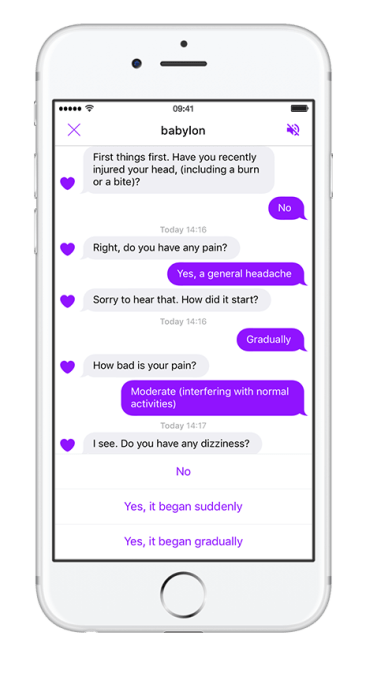
Babylon Health partners with UK’s NHS to replace telephone helpline with AI-powered chatbot

by Steve O'Hear
app-store-2 Babylon Health, the U.K. startup that offers a digital healthcare app via a mixture of artificial intelligence (AI) and video and text consultations with doctors and specialists, has scored a potentially significant trial with the National Health Service (NHS). Read More

04 Jan 14:38

Honor announces the Honor 6X with dual cameras, Kirin 655 SoC, and Android 6.0 for $249

by Ryan Whitwam

Are you a "cost-conscious yet uncompromising Internet-minded millennial?" If so, this is your lucky day, because Huawei's Honor sub-brand says it knows how you think. It understands the "double or nothing motto that millennials live and breathe." Finally, someone gets it! These are all things Honor has said in its PR today as it announced the global launch of the Honor 6X. It only costs $249, and I assume you can buy it even if you're not a "young and bold consumer." I myself am old and cautious.

Read More

Honor announces the Honor 6X with dual cameras, Kirin 655 SoC, and Android 6.0 for $249 was written by the awesome team at Android Police.

04 Jan 14:33

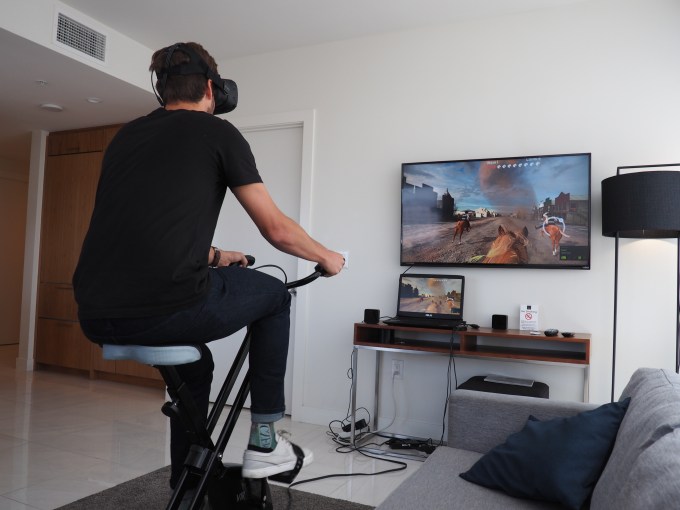
Fitbit announces integration with a nutrition service and a virtual reality bike

by Brian Heater
VirZoom Fitbit’s already got some of the top-selling fitness trackers on the market, but as the space faces a potential over-saturation, continued success lies in partnerships. As such, the wearable maker’s been building up its Works With Fitbit ecosystem one piece at a time. In the past year, Fitbit has added a couple of key partners, including a skill for Amazon Echo and an NBA 2K17… Read More
04 Jan 14:26

This self-brewing mug is reinventing coffee on-the-go

by Boing Boing's Store

On-demand fresh coffee often requires an expensive trip to the cafe or staying tethered to a bulky drip machine. The GoJoe Self-Brewing Coffee Mug is a welcome alternative, and unlike an coffee mug I've seen.

To make a cup, just fill the top half with ten ounces of water, add a filter-encapsulated coffee pod, and you can have a delicious cup of joe in moments. The battery contained in the lower section is removable, allowing you to enjoy your drink while the GoJoe charges for its next brew. 

Using this mug is incredibly straightforward. I just pressed the button once for light, and twice for a stronger kick. And the package also includes a month’s supply of Hey Joe’s eco-friendly coffee pods to help cut down on excessive plastic waste from single-serving cups. For a limited time, this GoJoe Self-Brewing Coffee Mug and Coffee Subscription is just $69.99, 43% off retail.

04 Jan 14:25

Maxime Causeret's gorgeous animation shapes order from chaos

by Andrea James

Break out your headphones for this one. Maxime Causeret has created a beautiful animation for Max Cooper's instrumental track "Order from Chaos." Seemingly random elements slowly coalesce into lifelike forms as the track moves from raindrops to increasingly complex sounds. (more…)

04 Jan 14:24

What's your hoarding/clutter level?

by Andrea James

Is 2017 the year you're going to get organiz-ized? The first step is acknowledging the scope of the issue. A bunch of organizations (!) have helpful scales to determine how pronounced you or someone you know is getting with their clutter: (more…)
04 Jan 14:18

Felicia Day announces she is pregnant.

https://twitter.com/feliciaday/status/816395699625439232

She broke the news with a photo. She says she is due in a few weeks and the baby is a girl. Congratulations Felicia!

03 Jan 21:04

This purring cat might be the most soothing thing ever

by Caroline Siede

This cat loves her blanket almost as much as I love this cat.

[via We Have Cats]

03 Jan 21:04

Is this the best UK comedy sketch of the 1970s?

by Rob Beschizza

Dave Allen was an Irish comedian popular in the UK from the 1960s until his death in 2005. His reputation is as a cantankerous irreligious fellow, but this family-friendly moment is widely held to be his best sketch. Someone on YouTube thinks it's the best British TV comedy sketch of the 1970s. There's some pretty stiff competition on that front, if you ask me. (Mastermind, from The Two Ronnies, is the best British comedy sketch of the 1980s. Dead Parrot was 1969.)

03 Jan 20:59

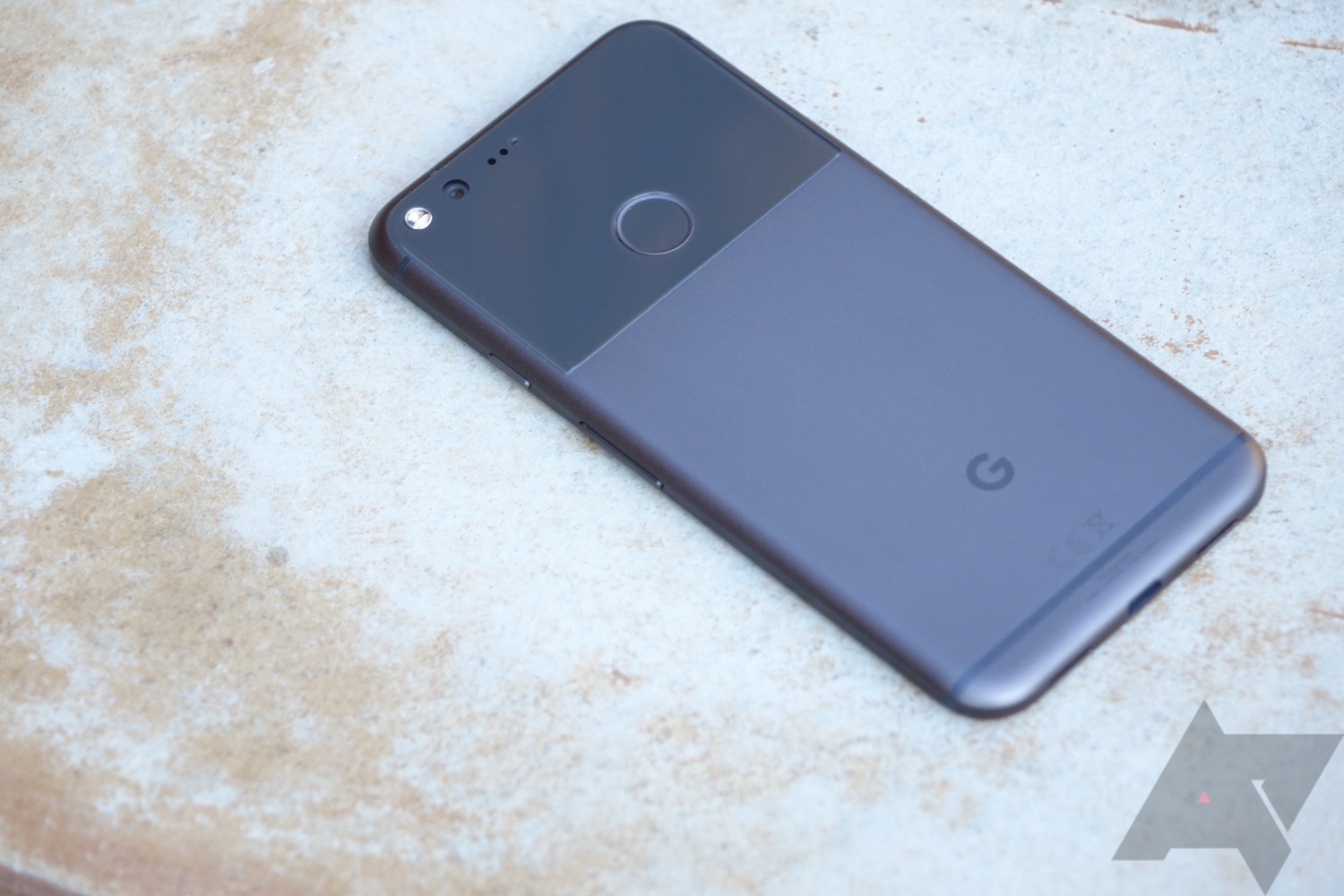
Google posts January OTA and system image files along with new security bulletin

by Ryan Whitwam

pixel

It's that time of month again—Google has posted updates for Nexus and Pixel devices, and there's a new security bulletin full of scary things. As usual, the OTAs are going to be rolling out to Google devices in the next few days, but you can grab the files right now and do the update manually.

There are a few more new builds this month than there were last time. Here's what we've got.

Read More

Google posts January OTA and system image files along with new security bulletin was written by the awesome team at Android Police.

03 Jan 15:04

Lenovo announces new Smart Assistant speaker with Amazon Alexa

by Rita El Khoury

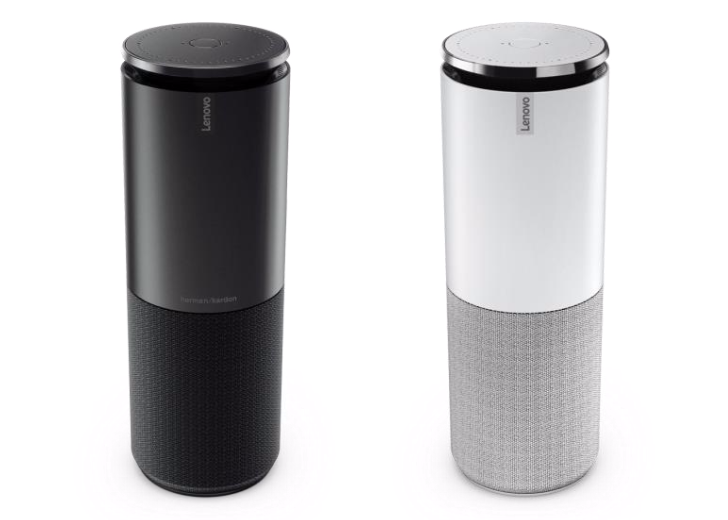
The Amazon Echo and its integrated assistant Alexa have seen a lot of success and popularity over the past year, and now more companies have been tempted to build their own iterations of the product. Some, like Lenovo, have decided to nearly copy the entire idea, from the form factor to the Alexa integration. The result is the Lenovo Smart Assistant Speaker.

It's a cylindrical tower, much like the Echo, with a speaker grille at the bottom and what seems to be a rising control panel with volume and trigger buttons and an array of 8 360-deg far-field microphones with noise suppression that can pick up voices from up to 5m away.

Read More

Lenovo announces new Smart Assistant speaker with Amazon Alexa was written by the awesome team at Android Police.

02 Jan 21:24

2016: Once again, piracy was so bad that the movie industry smashed all box office records

by Cory Doctorow

As has been the case for many consecutive years, the movie industry beat all box-office records in 2016, earning $11.4B at the US box office (while simultaneously insisting that piracy was destroying the industry and demanding the right to control and redesign the internet to save itself from this existential threat).