Shared posts

31 May 18:46

5 Simple Steps to Get Paid Faster and Improve Cash Flow

by Tucker Mathis

From tightening payment terms to making it easier for customers to pay you, follow these five simple steps to speed up payment and protect your positive cash flow.

Cash flow is the lifeblood of any small business, as you no doubt are well aware. How else are you going to cover expenses, pay employees and keep things running — not to mention qualify for financing when you need it? Needless to say, overdue payments can put a serious kink in your cash flow.

More than 80 percent of small business invoices in America are over 30 days past due. Not only that, the average small business is buried under more than $80,000 of unpaid invoices. And while late payments can cripple a small business, there are several steps you can take to bypass this common problem.

Getting paid in a timely, reliable manner is one of the best ways to bolster your cash flow. We know what you’re thinking: easier said than done. Follow these five simple strategies to get paid faster in order to maintain a positive cash flow.

  1. Invoice Immediately

Waiting until the end of the month to send invoices can cause significant payment delays. Cut down the time it takes to get paid by invoicing immediately after delivering your goods or services.

Are you still sending out paper invoices? It’s time to consider electronic invoicing. While emailing PDF invoices is a step in the right direction, there are myriad benefits of a more sophisticated online invoicing system, the first of which is immediate delivery of your invoices.

Electronic invoicing also lets your customers know that they’re dealing with a professional; you’re not likely to forget about an invoice, much less let it slide past the due date.

  1. Shorten Your Payment Terms

Are you giving your customers too much time to pay you? As tempting as it may be to offer favorable terms in order to close a deal, consider the strain on your cash flow if you offer 60- or even 90-day payment terms.

If you maintain a good relationship with your customers, 30 days should be sufficient. Just make sure to define your payment terms up front, and in writing.

  1. Provide Incentives

Incentivizing early or on-time payments can help you avoid the hassle (and headache) of tracking down late payments. The incentive is up to you, and could be anything from a small discount (0 to 5 percent) to non-cash rewards that are specific to your business.

You may also want to establish penalties or interest for late payments. Always consider the value of the client relationship before enforcing penalties. A first-time warning or flexibility for extenuating circumstances will go a long way to strengthen that all-important client relationship.

  1. Offer Flexible Payment Options

Put yourself in your customers’ shoes. How would you prefer to pay: Write a check and send it through snail mail, or pay the invoice online with one quick click? Make it as easy as possible for clients to pay you, and you’ll get your funds much faster.

Offering your customers more ways to pay is another simple way to speed up payments. Clients will appreciate the ability to pay with a credit card, via bank draft (ACH) or PayPal.

  1. Automate with Invoicing Software

Intuitive invoicing software can simplify all of the above, streamline your invoicing process and make it much easier to get paid faster. These online tools are a win-win for both you and your clients. Not only does the software make it simple to send invoices immediately, it makes it easier for your customers to pay you.

Forget about endless reminders and uncomfortable phone calls about past-due invoices. Online tools allow you to set up alerts to automatically remind customers when payments are due, or past due. Better yet, you can set a recurring invoice schedule and even activate auto payments, which are the gold standard for getting paid on time, every time.

When it comes to shoring up your cash flow, these minor efforts can pay enormous dividends. Once your invoicing system is set up to help you get paid faster, you can begin to rely on consistent cash flow that keeps your business in the positive.

This article was originally published on the author’s business financing blog and was reprinted with permission.

31 May 18:46

How to Build a Network That Will Work for You

by Issy Pelletier

If job postings were the only way to fill a role, many searches for the ideal fit would never end. In a quest for the perfect candidate, your network is your most valuable asset. However, networks, especially good ones, don’t create themselves. In order for your network to be an effective instrument towards achieving your hiring goals, it needs to be built, maintained and appropriately utilized.

Building Your Network

Your LinkedIn connections may include friends, colleagues, family, people you already know, or occasionally, the somewhat out of context request that you accepted. To build a stronger and more useful network, grow it offline.

“So, what do you do for work?”A simple question with an underlying networking goal. The answer provides context, fulfills curiosity, and most importantly, allows you to categorize this new person appropriately in your network. If this person’s work is relevant to yours or if their career is of interest, creating a relationship and staying in touch may end up being beneficial.

Though organic introductions and off the cuff meetings are a nice way to build your network, they are definitely not enough. Paul McDonald, Senior Executive Director of Robert Half, advises recruiters to utilize the same channels job seekers do in a job search to find qualified candidates. McDonald suggests attending industry association workshops, webinars, forums and seminars relevant to professionals with the profiles you are looking for. This allows you as a recruiter to build your knowledge of the candidate marketplace. What do candidates care about? What are they interested in? Awareness of top tier candidate interests can help you tailor your networking efforts to attract top talent.

Another important thing to keep in mind when building your network is maintaining and increasing its diversity. You do not want a network of all the same or similar profiles. McDonald encourages recruiters to connect with a diverse array of potential candidates of varying industries, companies and levels of experience.

“The more people you know, the greater the likelihood that one of them may be able to help you find the new hire for which you’re seeking.”

It is important to have a diverse network in order to have a diverse pool of candidates.

Nurturing Your Network

Putting effort into building a robust and diverse network will ultimately amount to nothing if you do not dedicate time to nurturing your connections. This means understanding what your network needs, taking care to not overtask or overuse it and carefully and strategically prioritizing relationships as they can be useful to all parties.

Casey Renner, Openview’s Executive Network Director, believes that in nurturing your network, there is nothing more important than understanding what it needs. Listening to your network and understanding what it wants will make your connections more meaningful and useful. Asks will be more poignant, likely yielding better results and your network will be more likely to participate in what you are asking of it.

While making asks, always be aware to never over task your network- the goal is to never ask more of your network than you are providing. Casey uses a good rule of thumb: two ‘gives’ for every ‘ask.’ Whenever possible, engage your network in interactions that are mutually beneficial. For instance, facilitating intros, peer connection, asking for content pieces and providing speaking opportunities are all potentially beneficial for both you and the person you are asking to participate.

Naturally, network relationships will ebb and flow. To manage this, you can prioritize certain relationships based on the mutual value for all involved. Casey’s concise advice: “you can’t always be helpful.” It’s important to realize this so that you can maximize the use of your network’s time as well as your own.

To reengage a faded connection, Casey recommends in-person interactions. A face-to-face meetup, like grabbing a coffee, shows a vested interest in the relationship. Not only do in-person meetings show your connections that you are willing to give them your time, but they’re also a great chance to realign what you’re both looking to get out of your relationship.

Ultimately, your network is made up of people with busy lives and jobs that don’t just include talking to you. Casey emphasizes the importance of remembering that all of your connections are people. It can become easy to view your network as a ‘tool,’ and relationships can become robotic and mechanical. “People have lives outside of responding to the emails that you send them. Never take anything personally!” As long as you are responsible and respectful of your network’s time, you should be able to reconnect when a reason occurs.

Using Your Network

Using and nurturing your network tend to coincide. But, aside from building the bases of relationships and painstakingly curating and caring for the product, you must also ask your network for what you need. Looking to hire? Put the jobs out there. Make sure your network is aware of what you are looking for (word of mouth travels far and fast). LinkedIn job posts rarely garner the likes of an Instagram, but a ‘thumbs up’ can go a long way when it pushes your post onto the right candidate’s feed. Refresh your posts often and ask people in your network (particularly those who you are hiring for) to share! You never know who might see the post or who in your network might know the right candidate. If you have built and maintained your network well, a great candidate might just end up in your inbox.

The post How to Build a Network That Will Work for You appeared first on OpenView.

31 May 18:43

4 Vital Strategies to Consider When Pricing Your Next Event

by Katie Sawyer

Setting a price point for an event is challenging, especially if it’s your first time. A good strategy is the key to not only turning a profit but also wowing customers.

You need to price tickets at a point the customer is willing to pay without shortchanging your overall profits. To set your event at a price that benefits your profits and the people who come, employ the following four strategies.

1. Look to a value-based model. A value-based pricing strategy combines perceived value, actual ticket price, and cost per ticket.

Perceived value is what your customer believes your event is worth. Actual ticket price is what the customer pays — this should be less than or equal to the perceived value. Lastly, the cost per ticket is what you pay to put on the event; it represents an event’s break-even point.

You need to account for each of those factors when determining a price. With value-based pricing as a guide, an event’s focus shifts from simply making money to delivering an event that garners a return and provides customers more long-term value.

2. Examine the playing field. Take a page from the competitive pricing playbook and look at how much the competition charges. A similar event may be priced widely different in a larger city — the cost of living and general event operational expenses might be higher.

Get in the habit of looking at events in cities similar to your target destination and evaluating their prices. Identify cities based on demographics like population, and then list out the key events in those cities. Consider the number of attendees, how long tickets are on sale, and how they’re priced.

3. Price with intent. Each event has a unique goal. Your ticket price should help drive you toward that goal.

If your goal is to create demand for a new company or product, for instance, generating awareness of the product or brand is likely more important than turning a profit from the event. In that case, pricing your event slightly lower to drive demand might be your best strategy. If an event is designed to supplement business costs, however, make sure your price allows you to recoup those expenses.

4. Offer multiple price points. For many events, a single ticket type (and price) doesn’t make sense. Offer general admission tickets to attract attendees who are looking for a one-size-fits-all experience, and offer other ticket types (like VIP passes) for attendees who want a more custom experience.

These two pricing levels are great both for your customers and your profitability. You don’t want your event to drain your budget, but you also have to consider your customers when pricing tickets. Keep those two ends of the spectrum — and these strategies — in mind when pricing tickets to your next event.

Eager to learn more about the art of pricing event tickets? Download this free whitepaper for more insights.

31 May 18:18

11 Most Common Mistakes During Sales Outreach

by Mario Peshev

Glossophobia, the formal term for “public speaking”, ranks among the most pressing fears affecting about 75% of the humankind.

Sales outreach is a step further when it comes to pushing the business forward. Unsolicited calls are known for their aggressiveness, gatekeepers have a respectable role in the corporate world, and making a breakthrough with an innovative idea is far from trivial.

To combat this fear and make the best out of your sales process, I’ve gathered 11 sales influencers discussing the most common mistakes beginner (and even intermediate) salespeople repeat on a day-to-day.

1. Failure to Offer Interest or Value

No alt text provided for this image

We often focus way too hard on who we want to talk to, without spending an equal amount of effort figuring out why they would want to talk to us. Unless you can align your outreach request to something you know is of interest or value to your prospect, you haven’t earned the right to try to engage them.

Jim Dickie, Research Fellow, CSO Insight

2. Product-Centric Messaging and Lack of Planning

No alt text provided for this image

There are three things I can highlight quickly that would dramatically improve the quality and effectiveness of most prospecting efforts that I witness.

Mistake 1: Connecting on LinkedIn and immediately pitching your product. I used to call this the Pounce & Pitch but my colleague Doug Wyatt has a better term, the “Bait & Pitch.” Most buyers report hating this, but reps persist because it occasionally works, when they luckily pitch someone who is open to it or already in the market or thinking about a solution like theirs.

The fix: Digital or social selling requires a more subtle approach. If you see a trigger event or sales signal, use another channel (such as email or phone). If you’re using social platforms to approach prospects, I generally suggest to create some awareness and interest and to build a relationship first, before prospecting directly. There are always exceptions, but if you remember that “social is subtle” and act more like you would in person at a networking event, you’ll fare better than using the “Bait & Pitch.”

Mistake 2: Using a product-centric approach (product pitch) vs. a problem-focused or buyer-centric approach.

The fix: I’ve helped companies get radically better results by avoiding the product pitch entirely, and using an approach that floats a problem the buyer is likely to have (or is known to have from a referral or research), shares an outcome the seller has helped similar companies achieve, mentions the way that outcome was delivered, and provides an opportunity to learn more (by setting an appointment where case details are shared and further discovery can be done). This “Problem/Outcome/Solution/Explore” approach becomes even more powerful with a referral or introduction, but even in the absence of that, it works far better than product pitching.

Mistake 3: A compete lack of research and sales call planning.

The fix: The amount of research needed varies greatly, based on whether you’re calling mid-level decision-makers in a pool of 50,000 accounts, or executive decision-makers at 25 named accounts. In both cases, research to uncover something about the person, their role, their company, and when possible, any known challenges that you can solve, to personalize the approach. Then, plan and personalize your approach for your prospect with your specific Problem/Outcome/Solution/Explore messaging, and if calling, be ready to leave a crisp, effective voicemail if they don’t answer.

Mike Kunkle, VP, Sales Enablement Services, SPA & SPASIGMA

3. Not Offering Value on the First Interaction

No alt text provided for this image

The most common mistake I see in sales outreach is failing to focus on what’s in it for the buyer beyond what you are selling. You aren’t going to get a prospect’s attention by offering a demo or saying “it’ll just take 15 minutes.” What value can you provide in that very first call, your first interaction with a prospective buyer, that they would be willing to pay for? What insights or ideas can you share that make them want to learn more, and spend more time with you at the beginning of the buying journey?

Matt Heinz, Heinz Marketing

4. Having No Qualified Prospects

No alt text provided for this image

The biggest mistake I’ve seen recently is salespeople not keeping enough qualified prospects in their pipeline. Everyone is focused on being a great closer, but that doesn’t matter if you have no one to talk to. ABP: Always Be Prospcting.

Butch Bellah, Speaker-Author-Sales Trainer, Author of “Sales Management For Dummies”

5. Failure to Make Customer-Focused Conversation

No alt text provided for this image

The most common mistake has two dimensions: Failure to have the right narrative and failure to drive the right combinations of outreach. Sellers must make the conversation about the customer and what the customer cares about… improving the results for which they are responsible.

We then need to concurrently drive that message and conversations though every channel of engagement until we find the medium that works for that person. Phone, voicemail, email, text message, Twitter, LinkedIn, fax, calendar invite, carrier pigeon… what ever it takes to break through. Be bold and determined, and never misinterpret being ignored as rejection. Senior people are busy so earn engagement.

No one worth getting to for new business development is lonely and bored or looking for a new friend in their work-life; nor are they interested in hearing a pitch. We must lead with value in a conversation by having a point-of-view concerning the customer’s opportunity to improve results. In these conversations we need to use the language of leaders which is ‘measurable outcomes and managing risk’. Everything needs to evidenced and reference specific improvements expressed in terms of dollars or percentages. Wake-up and embrace the phone for outreach combined with social and digital… it will transform results.

Tony Hughes, Sales Leadership Speaker – Author – Consultant

6. Indiscriminate Pitching

No alt text provided for this image

The biggest mistake I see salespeople make during sales outreach is they pitch their product to everyone hoping someone will buy.

They are 10X more likely to make a sale if they pique the interest of decision-makers, who recently experienced a ‘Trigger Event’ that motivates to them switch vendors, by pitching the impact (value) of their offering. (E.g Calling a vice-president of finance, who is new in their job, to say they can help them eliminate inventory write-downs.)

Craig Elias, Chief Catalyst, Shift Selling, Inc., Author of the award-winning sales book SHiFT!

7. Failing to Build Real Relationships

No alt text provided for this image

Quite often the most common mistake found during outreach is the one you least expect. We fail to be human. We forget that we are trying to build real relationships which require real empathy. If you don’t care about helping your prospect build a better business, or achieve whatever goal they are targeting, it will come across in your voice, language and body language. Empathy first then outreach.

Trish Bertuzzi, Founder & CEO The Bridge Group, Author, The Sales Development Playbook

8. Insufficient Knowledge About the Prospect

No alt text provided for this image

Not thinking about the sale from the prospect’s point of view — and not doing enough initial research on the issues that prospect confronts.

Daniel Pink, author of TO SELL IS HUMAN

9. Lousy Pitch Conclusions

No alt text provided for this image

At the end of a conversation, what’s the next step? Too many times we assume the next step is to follow up in a few weeks. I like specificity. Here’s what comes next. Here’s when you’re going to hear from me. Even better, set up the time for follow up. Every conversation has to have a call to action or specific follow up. Of course, sometimes the next follow up is the actual sale taking place. Don’t miss the opportunity to end the initial sales outreach with an actual sale!

Shep Hyken, Customer Service & Experience Expert, NY Times bestselling author and award-winning speaker

10. Ineffective Sales Approach

No alt text provided for this image

I’d answer that by raising a question I frequently do with sales people, which is “Are you coming from the mindset that you’re hunting for new buyers or farming your existing customer base for new opportunities?” If yes, then that’s the most common first mistake – you need to look at things through the lens of your customer. Do your buyers want to be hunted or farmed in the first place? No. Your job as a salesperson is to know if this looks like the ideal customer profile (ICP) based on not only their job title and responsibility, but also that they work for a company that absolutely fits and that you can help them with exactly what they need help doing.

Effective sales outreach takes a meaningful and human approach with these three key steps:

1. Know exactly who you’re calling, emailing or InMailing by ensuring they’re your ideal customer. Don’t waste my time, don’t waste your time. If you’re calling the wrong people, it creates a negative brand impression from the get go.

2. When you do reach out, it’s crucial that you as a salesperson #showmeyouknowme. Show me how you can help me. It doesn’t matter who else in the world you’ve helped, in other companies or industries if you can’t help me. Speak exactly to what you can do for me, which means first knowing who I am.

3. You need to prove that you care about me. Not only your commission, not your quota. #Showmethatyoucare and as a buyer, I won’t need to be hunted, farmed or targeted, I just need to be helped and treated in a way that feels like you personally care.

Jill Rowley, Partner at Stage 2 Capital, Growth Strategist & Startup Advisor

11. Lack of Social Media Acumen

No alt text provided for this image

B2B sales reps not using social media properly.

“The most common mistake I’ve seen during sales outreach stems from a B2B rep’s lack of social media acumen.

Nobody on LinkedIn wants to read your self-promoting posts.

Nobody on LinkedIn wants an unsolicited pitch one hour after they accept your invitation to connect.

Spray, Pray and Hope is not a good LinkedIn strategy.

Social media is quite powerful if you view it as a long-term strategy to strengthen both your company and personal brand. How do you do it? Add Value. Be interesting. Engage in peer discussions. Promote thought leadership. Write (or curate) interesting content. Find ways to help your contacts (introductions, etc.). Engage other social media influencers who can open doors and make warm introductions.

Over time, you will improve your credibility, influence and trust with your extended network – creating more qualified opportunities to engage.

Save your pitch for your profile page.

Eric G. Blumthal, CEO of count5

My Take

No alt text provided for this image

On top of the solid batch of incredible responses so far, focusing on ROI is the most impactful pet peeve we’ve seen to date.

Reaching out to a prospect is stressful. To alleviate the tension from the uncomfortable pitch, make sure you have a clear value proposition that connects strongly to the opportunities of a positive return on investment.

Research your target market and your existing customer base. Gather case studies and success stories. Extract the most common business challenges and build practical use cases that your product or solution solves flawlessly.

Use these as an entry point for your conversation by outlining a proven path to reducing expenses or increasing revenue for your sales lead.

The confidence of being able to deliver on your promise will be naturally reflected in your voice, portraying the level of confidence worth listening to.

Follow this list zealously and your prospects would be thankful for the well-crafted business opportunity you’re inviting them to.

This article was originally published on LinkedIn Pulse and reprinted with permission.

31 May 18:18

Sensemaking: Selling To Customers In The “Simple Quadrant”

by David Brock

This post is the fourth in my series on Sensemaking. For links to the other posts in the series, go to: Sensemaking, The Big Issue Facing Both Our Customers And Us.

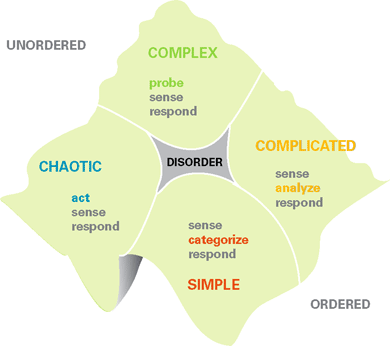
In this post, I’ll do a deep dive into how we sell into organizations operating in the Simple Quadrant. As a recap, the Cynefin model is displayed below:

The Simple Quadrant, is characterized by “known-knowns.” With a name like “simple,” people can mis-characterize businesses, thinking of them as simplistic or easy.

They might be anything but that. For example, many manufacturing processes are very challenging and difficult. But they behave in ways that are well known, consequently, they can be well characterized.

We see many part of the organization that may be characterized “Simple.” For example, many manufacturing or process applications can be characterized this way. Many operational or financial functions may be characterized this way. Some organizations may view the procurement function in this quadrant.

Many very mature businesses may have become “simple.” Depending on the market/application maturity, the business may have started as very complex, as patterns start to emerge, and people’s experience gets deeper, the business may mature and move to the complicated space. Still later, as the business matures further, they may move into the simple space.

Many “embedded products,” fit into this Simple Category. The “design in,” may have been a complex or complicated process, but once solutions have been found, the customer may view this as a supply chain/inventory management issue, with primary and secondary supply sources, regular procurement schedules and very predictable purchasing.

In some sense, we can look at many retail businesses, taxi, hotel businesses. They may have been in the simple or complicated quadrants, since they are relatively mature industries. However, new business models or competitors can disrupt them, moving them into the chaotic quadrant. In these industries, we’ve seen them disrupted by Amazon, Uber/Lyft, AirBnB.

While simple is, by no means, easy, the problems in the simple quadrant are very well known and characterized. Generally, in these businesses, there is a “best answer,” or a “best practice” in addressing or solving these problems.

What’s this mean for sales people, hoping to be “sensemakers” to their customers?

While we may recognize these functions or businesses may be in the simple quadrant. The customer, may not recognize this, they may not understand what their problems are or the best ways to solve them.

But we have to be careful, the customer may understand very well. After all, if they have been in the business or function for some time, or have great experience, inevitably they have seen the problems and know the best solutions or answers.

But how to we work with customer addressing problems and solutions in this space?

As the Cynefin model outlines, the method is pretty straight forward:

  1. First, we and the customer must “sense.” By that we mean, we must recognize there is a problem or opportunity. We can characterize and define the problem very clearly. For example, we are having quality problems in manufacturing, we are having throughput problems, we are having delays in billing/invoicing, we may not be responding to customer service issues very well.
  2. Once we have identified the problem, we must categorize it, we must say, “It is ‘THIS’ kind of problem. By categorizing the problem, we are then able to identify the best solution to address the problem.
  3. Once we have identified the best solution to the problem, we respond by implementing the solution that best solves the problem.

There are a number of implications for how sales can work with the customer in the Simple Quadrant.

First, the customer may not recognize the problem is well understood, well characterized, with known “best” solutions. It may simply be their inexperience. As “experts” in this category of problems, we can help guide the customer through the sense, categorize, respond cycle. Making it faster and easier for them to solve the problem.

For customers that are very experienced and know how to identify and characterize the problem (sensing), and categorize it; they may not know the best current solutions. They may be familiar with the way they had solved it in the past, but be unaware of new solutions that better solve the problem. We can educate them on the best current solutions for the problem.

For customers that are experienced with these types of problems, and know the solutions, we help them by making the buying process as easy and efficient as possible. They are knowledgeable buyers and just want a hassle free buying experience.

Many of these buying processes may be very transactional. “We know the problem, we know the solutions, we just want to buy quickly.” There are probably fewer buyers involved in the buying journey, and their buying cycle is likely to be very short.

There are some important implications for customers that are operating in the Simple Context. It’s critical that we have an outstanding digital presence, making it very easy for the buyer to self educate, and possibly even buy. So our marketing, content, and digital strategies become very important in making the buying journey as easy and efficient as possible.

These customers are coming from the point of view of “best practice,” so our marketing and selling strategies must be focused on how our solutions enable their implementation of best practice.

In designing our customer engagement strategies, since we are dealing with known-knowns, we can focus on the efficiency of our sales engagement processes. We can develop highly efficient, very predictable engagement models. Much of what we see in the XaaS “selling methodologies,” are really addressing customers in this Simple Quadrant.

As we look at our “go to customer” strategies, we can be very efficient in how we design them. We know the problems we are the best in the world at solving. We know who these customers are and can segment and target them very well. We know these problems fall into the simple quadrant, and we can develop the best approaches, both in marketing, sales, and customer experience for engaging these customers.

Having said this, we have to be cautious as we look at our strategies. For example, sometimes these problems, or customers having these issues may be in the Complicated Segment. Many XaaS vendors are discovering this. Where their sales approaches have been designed to be very predictable and scalable, some of their customers are changing, they may not be in the Simple domain but may be in the Complicated (or even Complex) domain. Our engagement strategies to address these domains are completely different.

Perhaps the easiest example might be moving from an individual or small department SaaS sale, to an enterprise wide sale.

Alternatively, we may be opportunistic, in changing who we sell to and how we sell within the enterprise. We choose to engage different buyers within our customer. In doing this, those buyers may be operating in a completely different quadrant. It’s easiest to illustrate this through an example.

One of my clients sold basic chemicals. The buying process was well understood and well characterized by all the customers in the market. It was in the Simple Quadrant, and buyers typically were concerned with supply chain management, quality, and price. Stated differently, their products were simple commodities and a commodity buying process was typically the way customers bought.

But we helped our client think about their business differently. We looked at who the actual users of the products were. It turned out, it was product planners, product marketing and designers. These people operated in the Complicated, sometimes Complex quadrants. My client thought, “How can we be helpful to them? How can we engage them?”

They started to design their marketing and sales strategies focused on those people within the enterprise. The issues they discussed with these customers were less about the products, but more about what the customer wanted to achieve and how my client could help reduce product launch risk, field safety issues/failures, product development cost and time, and many other issues.

As we look at our “go to customer” strategies, we have some important choices. It may be better to address the customer “where they are at,” or choose to address a different customer within the enterprise, addressing them where they are at.

Whichever choices we make, the Cynefin model offers us strategies for how we and the customer must work effectively together in whichever quadrant we find ourselves.

In the next post, we will build upon what we have learned about the Simple Quadrant, looking at the Complicated Quadrant.

31 May 18:14

The 6 Elements of a Truly Consultative Sales Process

by linda@lindarichardson.com (Linda Richardson)

We know that best-in-class sales organizations use a consultative sales process. But what does that really look like?

A sales process is consultative when the stages and actions align with the customer’s buying experience and are defined in terms of the customer relationship.

It's only successful when sales leadership and the sales force execute with dedication and competence. That's why a true consultative sales framework has both a process component and a human component. Let's dig into each.

Consultative Sales Process

A typical consultative sales process is made up of six stages. Each stage maps out winning behaviors and strategies. Here's an example:

  • Stage 1: Target and Qualify
  • Stage 2: Explore and Assess
  • Stage 3: Access and Develop Solution
  • Stage 4: Present Solution and Follow-up
  • Stage 5: Negotiate and Close
  • Stage 6: Implement, Follow Through, Assess Results, and Expand

The sales process stages should help guide salespeople in qualifying, closing, expanding business, and building relationships.

Each stage should define the objective, best practice activities, tools, models, and customer actions that signal readiness to advance to the next stage (for example, the customer agrees to a meeting in stage one or provides access to the executive buyer in stage two).

There should also be a list of sales coaching questions related to each stage. Some examples in Stage two would be: What business problem is the customer trying to solve? Have I reached the executive sponsor?

The stages must align with the buyer's journey: The process buyers go through to become aware of, evaluate, and purchase a new product or service.

Here's a typical buying cycle, along with the corresponding salesperson action.

Stage 1: Target and Qualify

The customer becomes aware of a business problem. Alternatively, the salesperson creates a pre-stage one opportunity by introducing an idea or challenge that is not yet on a customer’s agenda, or raises the visibility of an issue the customer has underestimated.

For example, a salesperson speaking with a company that offers online educational courses might say, "Some of your competitors have seen a decrease in online course subscribers as our economy has come out of the recession. Luckily, I've been able to help them find new avenues for attracting new business."

In this scenario, the salesperson identifies a problem, or a potential problem, the company or its industry is facing, and teases a solution.

Stage 2: Explore and Assess

Customers assess how much of a priority the issue is, determine their options, and develop decision criteria and decision process. Salespeople can help their prospects by sending them how-to blog posts, offering to run a consultative call, and sending them relevant content resources.

At this point, the salesperson would send case studies about how they've helped similar businesses overcome dwindling subscribers. They might also share relevant research or other articles that take a closer look at the state and future of online education.

And don't forget about video. Sending a helpful TED Talk or webinar is also a great way to grab a prospect's attention and provide valuable educational resources in an engaging manner.

Stage 3: Access and Develop Solution

Customers research, compare solutions, narrow down choices, and refine decision criteria. The salesperson must differentiate, focus on business outcomes, and prove value.

How will your solution differ from your competitor's? Make sure that's clear for your prospect. In our online education example, this might look like the following: "Many of our competitors offer to help you buy subscriber lists. We believe emailing thousands of people who have never signed up for your service is a bad customer experience. Instead, we help you target relevant subscribers at the right events, with the right ads, at the right time. This allows you to build a relationship instead of pitching your classes before your audience even knows who you are and how you can help them."

The salesperson has clearly outlined how they're different from others in their industry and the unique solution they offer for their prospect's business.

Stage 4: Present Solution and Follow Up

Knowledgeable customers make their selection and negotiate. Skilled salespeople will have already involved procurement prior to this stage. You should already know what steps need to be taken for your prospect's organization to buy a new product or service. That knowledge is crucial for presenting a solution with a realistic timeline.

Make sure you understand what the procurement process is and confirm that the solution you've laid out meets your champion's expectations.

For example, "I know that before I present to your executive team, your finance and paid advertising teams need to sign off on our solution. Do you think we will able to get their approval by the 14th of this month? And if so, would an executive presentation be realistic by the 20th?"

By securing your champion's agreement to the timeline, you have a more concrete plan forward, which makes follow up easier.

Step 5: Negotiate and Close

Customers make the purchase. Salespeople support implementation and follow-up. When a close is imminent, it's more important than ever to make sure your prospect feels supported.

You never want to lose a deal that's close to the finish line because you took attention off of nurturing a "done deal" and shifted it to a prospect higher in your funnel.

Check in with your late-stage prospects regularly. Ask if they have any questions or concerns. And get ahead of any red flags that might arise. If you touch base with a prospect who says, "My manager has approved the deal but is dragging her heals to sign the paperwork," ask if it would be appropriate for you to reach out directly to that stakeholder to answer questions or provide a gentle nudge.

Giving your champion prospect the backup they need is crucial at this stage.

Step 6: Implement, Follow Through, Assess Results, and Expand

Customers are in an evaluation mode. In the post-purchase stage, customers implement, measure outcomes, and evaluate performance against the sales promise. They decide on the future of the relationship. Salespeople must discuss results, prove value, and build on the rapport they previously created.

It is at the intersection of sales process and the buying process that sales are made. Marketing must step up to the plate and support the sales force not only with qualified leads but with knowledge sharing, research, and insights into industry and customer priorities, personas, and challenges. At that point, it is up to salespeople to build on that foundation to understand their customers on an individual, granular level to solve their business problems.

It has been my experience in building sales processes that almost all sales organizations have the fundamentals of an effective process within their reach -- but most don’t reach.

Defining a sales process doesn’t take significant blocks of time. To start, pull together a diverse team of sales leaders and top performers, operations, service, and marketing people to map out and capture elements such as key milestones in how customers buy, best practices, tools, customer actions, and models for each stage.

Consultative Salespeople

A consultative sales process is powerful because it clarifies for salespeople what is expected. Additionally, it guides sales managers in what to coach and evaluate.

A sales process, however, is not a silver bullet -- nor is it cast in stone. Instead, it's a map that detours and changes based on conditions. The sales process should also be flexible enough a salesperson can adapt it using their best judgment.

The success of a consultative sales process takes more than even the most clearly defined stages, models, and tools. What you won’t find laid out in the sales process are the salespeople tasked with carrying out the process, the sales managers committed to coaching to it, and sales leadership that fosters an open and supportive culture. These stand equal with process.

Just as customers’ buying patterns have dramatically changed, so too has what it takes to be a consultative salesperson. To execute, salespeople need a number of new skills and resources, including deeper knowledge, a higher level of skill, greater creativity to bring new perspectives and ideas to customers, better sales tools, and most importantly, committed sales leadership and coaching.

A new emphasis has been placed on sales process, but as essential and valuable as a consultative sales process is, success depends on the ability and dedication of sales leadership and the sales force to execute. In his book "Zen and the Art of Motorcycle Maintenance," Robert Pirsig makes a point worth remembering: The instruction book -- i.e., the process -- is only as good as the driver.

31 May 18:14

How to Segment and Track Your Audience With Google Analytics

by Nico Prins

We’re often told that in today’s world data is king. While there’s certainly truth to that statement, sometimes having too much information can be as bad as not having enough. In fact, too much data can blind easily us to truly important insights.

Over a third of marketers suffer from data overload.

That is, they know more about their customers than they know what to do with. This creates a whole host of problems. It’s inefficient. It makes it hard to know if you’re making the right decisions. It’s also just downright stressful.

To an extent, this problem is facilitated by the tools we use to analyze customer data. The problem isn’t with the tools themselves per se. Rather, we have the power to drill so deeply into our customers that it’s hard to know when to stop.

Take Google Analytics.

It’s the most popular analytics suite there is. There are also a host of Analytics tools that the platform supports.

From local bakery owners to behavioral marketing gurus at blue-chip companies, most people use Google Analytics to understand what is happening on their website. Yet how they use the tool varies immensely.

In reality, a lot of businesses don’t get further than a look at the number of site visitors or time on site. While these metrics are important, there is a reason that experienced marketers consider them to be vanity metrics. What companies with a limited budget and a business to run really need is a little bit of behavioral marketing know-how.

This means having a concrete strategy for segmenting and tracking your customers.

A Crash Course in Segmentation

Everyone likes to think that they’re a unique individual. In reality, this isn’t exactly the case. At the very least, it’s not so very difficult to group your customers into broad categories, otherwise known as audience segments. How you segment your audience will be based on certain indicators.

These come in two flavors static and dynamic.

Static indicators are things which don’t really change, at least not often. These are your audiences innate characteristics. The main examples are things like age, location, gender, income bracket and level of education. These are all available in Google Analytics by default, so you don’t need any wizardry to split your audience this way.

The first step to creating static segments is thinking about your ideal customer. You probably already have an idea of what this is. The thing to do here is to test this out and see if what you think about your ideal customer hold up to scrutiny.

To do this, head over to the ‘Audience’ page in Google Analytics. Then hit ‘Overview’ and ‘Add Segment’ and simply key in what you think is your ideal customer.

There’s more information on how to do this in the Analytics help guide.

If this group makes up a significant portion of your customer base then you’re in business. On the other hand, if you haven’t ever analysed your data there’s a good chance that there will be some surprises. This is often an issue for large companies where there is a separation between the sales and marketing departments.

Once you’ve got a firm handle on the demographics of your main customer base, you need to exclude them from the remainder of your web traffic to try and figure out who else is buying your products, using the ‘Demographics’ ‘Interests’ and ‘Geo’ tabs.

Doing this, you can create additional static segments of smaller, but still significant types of customers.

Good Behaviour

The second way to segment your customer base is using dynamic indicators. These are things which frequently change. Examples include customer behaviors, such as bounce rates and sources of traffic, as well as what devices they use.

Whether someone is a first-time or repeat buyer also falls into this category. You could even segment people along the lines of their average spend, or the total they have spent on your site.

In Google Analytics, these can be found under the ‘Behaviour’, “Technology’ and ‘Mobile’ tabs.

You can also use the ‘Custom’ tab to add a range of indicators related to your other marketing activities, especially when used in conjunction with other tools. This might include things like users who regularly open your newsletter or who follow you on Facebook.

Dynamic segmentation is useful for figuring out your customer’s buying journey, which can help you focus your efforts. For instance, if you have a higher conversion rate with users who visit your site more than once, you’re efforts should be put into drawing repeat traffic rather than looking for new users.

One useful trick for getting to grips with this is simply dividing your customers into those who made a purchase and those who did not. More than likely, your non-buyers will be first-time visitors.

Using this trick can also help you to go back and rethink static segments, as well as telling you who your messaging is landing with.

Keeping Track

When you start pulling all this together it really becomes fun. You’re probably already thinking that your different static segments probably have slightly different buying journeys. And you’re right!

Some demographics are naturally a little bit more willing to part with their money than others. By contrast, some people probably like to do a little bit more research to determine exactly the right product for them.

Combining static and dynamic segments lets you figure out the different typical buying journeys for your various target audiences. You can use this kind of information to help you fix leaks in your funnel. With the right support, you could visualize this through a custom Google Analytics dashboard.

In any case, once you’ve built a clear picture of the buying process for each of your main static segments, it’s time to start thinking about individual users, using Google Analytics’ ‘User-ID’ function.

This is simply a way of tracking a single user’s interactions with your site across different sessions and platforms. The goal is to follow their journey from the first contact, all the way through your sales funnel.

Obviously, what you actually do with this information depends on your specific business and the Key Performance Indicators you are using. Initially, you might want to push first time traffic towards returning to your website through targeted Facebook ads.

Equally, if a repeat visitor needs an extra push, it could be appropriate to incentivize them with a coupon in their email inbox, or simply some extra information about why your product is right for them.

Final Thoughts

Marketers often get overwhelmed when they don’t know what to do with all the data at their fingertips. This leads to suboptimal results and wasted time and money. Obviously, no-one wants that.

Normally, part of the problem is that they’re using powerful analytics tools without a clear idea of what they’re doing or what their goals should be. To combat this, I’ve provided you with a framework for what the fundamentals of your audience analysis should look like.

At its core, this has three stages. Firstly, segmenting your customers into target audiences using static indicators. Second, mapping out the customer journey for each of these using dynamic indicators. And finally, tracking individual users’ positions within these buying journeys.

With these fundamentals in place, you’ll be able to add whatever automation wizardry and fancy data modeling you want on top. More importantly, you’ll always have a clear idea of the core purpose of audience analysis to refer back to.

Then you’ll be unstoppable.

31 May 18:13

20 Landing Page Examples you Should Never Miss

by Georges Fallah

Landing pages are web pages that users land on by clicking on a search result, an online advertisement, link on a website, social media or email campaign. Landing pages are built for a specific or a single conversion objective and with one business goal in mind. For instance, if you’re creating a landing page to capture leads for an ebook that you’ve published, your primary goal is to drive your visitors to complete the form, and downloading the ebook should only be their single-minded intent. In addition, removing any navigation option would avoid distracting users, increase conversions and minimize the abandonment rate.

To help you design successful landing pages, I’ve put together 20 great landing page examples from well-known brands and we highlighted their key success factors as well as some areas for improvement.

1. Google Cloud Platform

Google-Cloud-Platform

Google Cloud Platform’s landing page type used above is a click-through page that asks people to try their service for free.

Here’s what they did great:

  • The blue color conveys comfortability and trust.
  • The headline is short, to the point and calls for action.
  • The offer “60 Days Free Trial” is tempting.
  • The sub-headline communicates a clear benefit and shows visitors what they will receive if they use the platform.
  • The way the items are listed with their tick-marks encourage the audience to try the tool.
  • The CTA button in green stands out on the page and includes the word “FREE” which also confirms to the audience what is mainly stated in the headline.
  • Leveraging on the popularity and success of Angry Birds game by featuring a testimonial from its makers empowers the company’s credibility.
  • There’s an option that if users are not ready yet to try it, they can contact sales or check their frequently asked questions.

2. Airbnb

Airbnb

Airbnb’s page is a homepage as a landing page with the primary purpose of asking prospects to become hosts.

Below are the points worth to be highlighted:

  • The headline includes a clear and promising end benefit.
  • The image showing the woman smiling creates acceptance and a visual representation of the end benefit.
  • The CTA button in red stands out in the page and entices users to convert.
  • Conditional formatting to personalize the page title with the user’s geolocation.
  • Customized experience using a dynamic profit calculator based on the user’s input.

3. Shopify

Shopify

Shopify’s landing page type is a lead capture page whose main purpose is to ask their users to enter their emails to benefit from a 14-day trial.

Here are the good practices that they applied on this page:

  • The modern purple and white color are comfortable for viewers eyes.
  • There’s only one field for the user to enter with a big CTA button for a better and more comfortable user experience which leads to a higher conversion rate.
  • The call to action is only a few words and communicates a clear benefit.
  • The social proof in the subheadline “Trusted by over 400000 businesses worldwide ” highlights the company’s credibility.
  • The image shows the end product through an example and its responsiveness on multiple devices.
  • The guarantee that there’s not any risk after subscription boosts the users confidence to convert.
  • The benefits of the product are clearly emphasized with helpful icons, relevant titles, short and explanatory paragraphs.

In this page, we don’t think there’s a serious issue that should be considered except if the logo is hyperlinked to the homepage so it might serve as an escape path for visitors.

4. WebProfits

WebProfits

Webprofits landing page is an infomercial page that educates their target audience about their product and what they can do for them.

The following are the good tactics they did:

  • The page includes the primary colors of their website and the curvy bottom of the above-the-fold grabs visitors’ attention.
  • The image showing people looking in the same direction with a smile creates a good impression for users that there will be positive results awaiting them if they use their services.
  • The darkened image mirrors the target audience making it relevant to their business environment while it reflects the headline.
  • The headline “Take the comprehensive approach to growth” provides a value proposition that would be appealing to their target audience.
  • The use of interrogative sentences is a smart way to intrigue interest and engage the user with the conversation to continue reading.
  • The laptop image shows the platform in action.
  • The red CTA buttons stand out from other elements in the background.
  • The first CTA button “TELL ME MORE” induces curiosity and encourages users to scroll down to read the content.
  • The first person pronoun “ME” in the first button stimulates the users intent and involve them by speaking from their perspective.
  • The second CTA button “LET’S TALK” asks users to contact the staff via chat to make the process much easier; this button is short, action-driven and marks 2 way communication because of the “us” which includes “me” and “you” unlike the first CTA that refers to the user only.

The only thing that should be revisited in this page is increasing the font size of the headline “Take the comprehensive approach to growth.”

5. Moz

Moz

This landing page by Moz is a click-through page whose principal objective is to redirect users to signup for a 30-day trial.

Here’s what they’ve done greatly:

  • The colors and themes are the same as their website which reflects their consistency in branding.
  • The image on the left side of the headline shows a visual representation of the actual software.
  • The value proposition is presented in a smart way; Moz wants to earn the trust of their users first before asking them to pay.
  • The yellow CTA button, as well as its copy stand out on the page. The first pronoun “My” shows users that they are more selective in their decisions.
  • The supporting proof element “35000+ customers use Moz” as well as the well-known brands presented in this page emphasize on credibility.
  • The features are simplified and visually represented by unique icons which make it distinctive from what we usually see.

6. Acorns

Acorns

Acorns landing page is another example of a click-through page that asks users to start using their service.

Here’s what they did well:

  • The headline communicates a call to action, the end benefit and a sense of urgency.
  • The subheadline shows the value proposition by stating in a short sentence, what the audience will get.
  • The green CTA button is compatible with other colors on the page and includes a call to action as well as a sense of urgency.
  • The image shows a representation of the product and indicates that it’s mobile responsive.
  • The example featured in the image shows a high number which grabs the attention and interest of the visitor.

However, there’s an area that can be reconsidered which is dropping the navigation options on the top right of the page.

7. Upwork

Upwork

The type of Upwork’s page above is a homepage as a landing page whose primary purpose is to get their prospects to find suitable freelancers. Below are the points worth to be listed:

  • The colors of the headline, CTAs, mug, copybook, and paper clips are the same as their logo which shows their consistency in branding.
  • The landing page content and its background image are featured with matching colors presented in a harmonious way.
  • The CTA button “Post Your Job” in the first image stands out on the page.
  • The copy targets a specific target audience by including the end benefit.
  • The CTA button “Become a Freelancer” in the sticky header provides a path for freelancers who might mistakenly land on this page and avoids them from leaving.

8. UBER

UBER

UBER’s landing page is a lead capture page that asks their users to become drivers.

Here are the effective practices they applied:

  • The headline communicates a clear benefit to drivers.
  • The use of the white background makes it look comfortable to the eye and reflects flexibility.
  • The question “Need a car?” helps Uber capture users who have the skills but miss the tool.
  • The “Ride with Uber” gives the riders a segmenting option to ride with UBER. This is a great navigation option in order not to lose the potential riders segment in case they landed on this page by mistake.
  • The privacy policy below the form shows that the company cares about the privacy of their page visitors.
  • The CTA button below the form is used in a green background color with a white font which makes it look distinctive from other elements in the page.
  • The image clearly provides a visual presentation to their target audiences (drivers and riders), staging the dynamics of the service provided.

Interestingly, the whole production team tried to address several elements in this image:

  • The driver smiling indicates that the prospect would be happy working with Uber.
  • The driver with the seatbelt on shows that UBER is a law-abiding company and encourages safe driving and security measures.
  • The passenger sitting at the back corner of the car sets up the context of the service.
  • The way the passenger is blurred in the back is an excellent production technique to highlight the driver’s role and focus on him as the hero of this landing page.
  • The driver seems to be greater than 45th years old, and his ethnicity is somewhat neutral. This allows UBER to indicate that anyone can become a driver.

9. Paypal

PayPal

Paypal’s page type above is a homepage as a landing page that mainly asks users to download and use their app.

Here’s what they did well:

  • The CTA button in dark blue and the columned features below that show in a lighter color when selected indicates a relevant and powerful branding.
  • The grey color projects modernity and high tech.
  • The headline and subheadline are simple and provide an end benefit.
  • The video includes all the details and technicalities visitors might need to know about, encouraging them to engage with the page and discover more about their service. It also makes the page simple without having to include too many explanations.
  • The main CTA button “Get PayPal Here” stands out on the page and supports the claim of the headline “Get paid anywhere.”
  • The image shows the app in action.
  • The card reader shows visitors how they can use their mobile device to swipe credit cards. This image proves the “anywhere” claim in the headline and supports the mobility of this particular service from PayPal.
  • The features are simplified and visually represented by unique icons which make it distinctive from what we usually see.
  • The grey color in the footer which is the same one used in the header creates a similar landing page.

10. Stripe

Stripe

Stripe’s page type is a homepage as a landing page whose primary purpose is to ask visitors to create an account.

Below are the good practices that they did:

  • The company starts by informing visitors of the new feature they launched. This entices them to engage with their products and convert with different options. Although the word “new” is small, it’s highlighted.
  • The headline is highlighted in a bigger font, and “new” indicates that the company is regularly keeping up with the changing trends that fulfill their target audience interests.
  • The subheadline clearly explains what the company is about.
  • The CTA buttons stand out on the page and are used in matching colors.

The image on the right drives visitors attention by revealing to merchants that:

  • The company integrates with a well-known ecommerce software.
  • Customers are allowed to create their online store with Shopify while accepting credit cards from Stripe.

There’s only one thing that needs to be revisited which is removing the second CTA button “Contact Sales” below the text as it might draw visitors away from the page.

11. LinkedIn

LinkedIn

LinkedIn’s landing page is a lead capture page that asks users to use the channel’s inmail service to engage with their target audiences.

Here’s what they did well:

  • The words “Sophisticated” and “First” drive a sense of exclusivity, playing on the ego of the target audience.
  • The colors of the page go well with LinkedIn’s logo.
  • The image clearly shows the service provided.
  • The explanation shows what the page is about with the benefits that visitors will gain if they use the service.
  • The call to action headline above the form clearly informs prospects why they should fill out the form.
  • The 3 options below the form address their target audience needs and push them to convert.

However, few elements need to be rechecked such as making the lead capture form shorter to drive more readers to fill out the form and placing the CTA button below the form to avoid any confusion. Also, the text can be reduced.

12. GEICO

GEICO

GEICO’s landing page is a lead capture page that asks users to get free insurance quotes in return for merely providing their zip codes.

Here are the points that are worth to be mentioned:

  • The headline and the visuals are dominant and quickly grab the user’s attention.
  • The headline creates curiosity.
  • The lead capture form has only one field to fill out which increases the conversion rate.
  • The CTA button “Begin a Quote” is specifically tailored to the offer.
  • No navigation options in the header or footer.

The only thing that should be reconsidered in this page is the headline as it doesn’t show the actual benefit. Also the placeholder text inside the field “ Enter Zip” should be in a lighter grey in order not to confuse it with a clickable button.

13. Jeff Bullas

Jeff-Bullas

This landing page created by Jeff Bullas is a click-through landing page that asks visitors to download his ebook.

Below are the good practices he managed to execute on this page:

  • The caricature style of the ebook cover grabs visitors attention.
  • The headline provides a clear benefit and starts with “Free” and is highlighted in a separate color to encourage users to get the ebook.
  • The subheadline is showing that they can learn what took a long time “4 years” in only “4 hours” encourages the target audience to convert.
  • The CTA button includes different elements: “Click Here” shows the call to action, “To Get it” emphasizes the benefit and “NOW” marks immediacy.
  • The absence of any navigation element.

Nevertheless, few things can be revisited on this page. Firstly, the testimonial is written by Jeff Bullas; it would be better to showcase a social proof written by a user or an influencer which boosts credibility and adds more value to the page. Alternatively, it could be directly written in a way that clarifies what the subheadline above is about without putting it between quotation marks. Secondly, the CTA button can be placed above the fold.

14. Fabletics

Fabletics

Fabletics landing page type is a click-through page that asks their online shoppers to buy their outfit.

Here’s what they did well:

  • The red headline “Fashion That Performs” stands out on the page and grabs visitors attention.
  • The prices indicate transparency and showing that they can save almost $31 when they become VIP members entice them to convert.
  • The red color of the CTA button is the same as the headline’s color.
  • The absence of additional navigation elements helps increase the conversion rate.
  • There’s an option for users who have already created an account to sign in from the same page. This avoids losing the other target audience who mistakenly land on this page.

There are few things that should be revisited such as unifying the font style and leaving more spacing between the headline, copy and the CTA button to make it easier for visitors to read. The link below the red CTA button is bolder than it should be which may distract visitors from the primary objective “GET STARTED”.

15. Oribi

Oribi

Oribi’s landing page is a click-through page that asks users to sign-in to have access to advanced analytics that Facebook doesn’t have.

Below are the successful points that they implemented on the page:

  • The headline clearly explains what they provide and includes the keyword “Facebook Ads” which is beneficial for SEO, copywriting as well as their branding.
  • The image shows the service in action and grabs users attention by advising about the appropriate time that works best for them. It’s also revealed in a user-friendly, smart and handwritten way.
  • The simplicity and spacing make the page comfortable to the eye.

The primary considerations that should be reconsidered are showing the word “Free” in a bigger font size to make it easily seen. Also taking out the CTAs “About us” and “Blog” at the top right of the page avoids users navigations.

16. Urban Airship

Urban-Airship

Urban Airship’s page is a lead capture landing page. The primary purpose of this page is inviting their target audience to register for a webinar.

Here’s what they did well:

  • The headline provides a clear benefit.
  • The subheadline highlighted in bold notifies visitors that they can register to get the recording in case they don’t have time to attend right away.
  • The content clearly elaborates on the benefits of registering and lists down what the user will get from this webinar
  • The CTA “Register Now” on the top of the form, urges visitors to sign up.

At times, we believe that few elements can be reconsidered such as making the headline thicker to drag more attention, adding headshots for each of the speakers, using a more compelling CTA request in the button such as “Register Now” or “Take me to the Webinar”, “and changing its color to make it distinctive.

17. WalkMe

WalkMe

WalkMe’s landing page is a click-through page that asks visitors to try their services.

Below are the successful practices that they executed:

  • The presence of a well-known brand “Salesforce” adds more value to the page.
  • The use of Salesforce CRM is suitable for both copy and SEO.
  • The use of “R” mark gives credibility and also protects them from brand infringement.
  • The headline highlighted in blue draws visitors attention and communicates a clear benefit.
  • The subheadline complements what was previously stated in the headline and touches on an insight related to the service provided by Salesforce.
  • The CTA button stands out and entices visitors to convert.
  • The background image showing the software is darkened for the purpose of clearly showing the headline in front of it.

The only thing that we think should be revisited is adding more space between the logo and the text as well as the text and the CTA button.

18. MasterClass

MasterClass offers different online classes created for students of all skill levels in various fields such as music, painting, writing, cooking or any other arts.

Here’s one of their landing pages that we analyzed:

MasterClass-Golden-Ramsay

This page’s type is a homepage as a landing page that includes different elements. The main purpose of this page is to push visitors to watch a video by a well-known chef.

The points below are worth to be listed:

  • The video shows the thumbnail of a famous chef which encourages visitors to watch it.
  • The CTA button in red “ALL-ACCESS PASS” stands out on the page.
  • The benefits are clearly presented with relevant icons.
  • The pricing “$180/year” marks transparency.

On the other hand, we see that some elements can be improved such as changing the CTA button’s copy on the bottom right of the page to include an actionable request. Second, the pricing is used in a small font size; making it large would highlight confidence.

19. Inkling

Inkling

Inkling’s landing page is a lead capture page that asks visitors to download an ebook.

Below are the effective practices that have been applied:

  • The headline and content work together to create a strong value proposition.
  • The option to request contact from their sales team is a smart way to get high interest and quality leads.
  • The blue background color shows a computer in a home environment which reflects the “remote worker” aspect. It’s also darkened to reveal the headline, body text, and form.
  • The orange color of the CTA button looks distinctive and shows immediacy which drives users to convert.
  • The entire section including the bullet points entices readers to find out what they will learn from this ebook.
  • The image on the right provides a visual representation of the ebook’s topic.

However, we believe that some areas can be enhanced such as making the form shorter because it would entice more visitors to subscribe. Also, removing the social media buttons or adding them later on the page prevents users from abandoning it especially in the above-the-fold section before filling out the form. Furthermore, the last two drop-down form fields should be labeled in order not to confuse visitors.

20. Microsoft Power BI

Microsoft-Power-BI

Microsoft Power BI’s landing page is a lead capture page that asks users to give their contact information to advance their career with data analysis and business intelligence.

Below are the effective practices they implemented:

  • The headline communicates a clear benefit.
  • The introduction includes a clear explanation of what the page is about.
  • The benefits in bullet points are listed in a transparent way and create curiosity for visitors to fill out the form to discover the full benefits.
  • The CTA request “Download Now” above the form is concise and to the point.
  • The orange CTA button drives urgency to download the service now.
  • The letters in bold draw users attention to significant sentences.
  • The links in the footer on the bottom left are not highlighted, and this is critical not to redirect users to another page.

However, we believe that the copy and the form are a bit long; making them shorter would increase conversion rates.

Landing pages are an indispensable part of marketing campaigns. It connects your other marketing initiatives and integrates with them to serve as a distinct and single-minded point in your customer journey.

Knowing how to create a landing page is key to ensure a high conversion rate and a successful campaign. We hope that the examples we showed you in this article were helpful to give you an idea. But of course, you should create and adapt your landing page in a way that best fits your objectives and needs. Ultimately, you should always measure your landing page analytics to know what works best for your business and optimize it for the best results.

Originally published here.

31 May 18:13

Leadership – 10 Questions You Need to Ask Yourself

by Mark Hunter

Leadership is not defined by words. It is defined by results. I have a list of 10 questions that I share with leaders that I work with as a way to determine if they are truly leading their companies and organizations.

Don’t just ask yourself these questions and then be done. Rather, ask these questions and then really think through the implications for each question and your answer.  I suggest that each leader reviews this list of questions twice a year minimum. After you review them, it’s important to build an action plan to strengthen your leadership; however, not from all 10 questions, just two of them. By diligently focusing on the two questions you feel you need to work on, you will significantly increase your leadership skills over time. I truly believe that leadership is defined by results, and not the results achieved by you but rather by those you lead.

Here are the 10 questions:

1. Are those you lead better by being lead by you?

2. What do you do for those you lead that grows them professionally and personally?

3. Do those people you had the opportunity to lead 5+ years ago look back on their time spent with you and consider it rewarding?

4. How do the people you lead impact your life?

5. Does your team operate as effectively when you’re gone as when you’re present?

6. Do those people you lead always move onto bigger and greater opportunities when they leave you and the company?

7. Do you have a coaching and development plan for each person you’re leading, and how committed are you to that plan?

8. Is your team viewed as the one people want to be apart of?

9. Do your team’s results far exceed the sum of each person?

10. Do you and every member of your team have a servant’s heart when it comes to helping others?

So, which two questions will you focus on? Dig deep, create a plan and execute well. Leadership is a skill that must be nurtured each day just like you must nurture each person you have the privilege of leading.

Copyright 2019, Mark Hunter “The Sales Hunter.” Sales Motivation Blog. Mark Hunter is the author of High-Profit Prospecting: Powerful Strategies to Find the Best Leads and Drive Breakthrough Sales Results

30 May 20:17

Net Promoter Score (NPS) Myths Debunked

by Sara Staffaroni

Net Promoter Score (NPS) is one of the most popular metrics being used in business today. And while NPS has many supporters to sing its praises, there seems to be an equal number of critics who have emerged to decry it, citing a number of reasons why it should be abolished. Among this debate, misconceptions have emerged from both sides. In order to truly understand this metric, these common NPS myths should be debunked.

Myth #1: NPS is not predictive

Some denouncers have claimed that NPS does not predict customer loyalty. While it may be true that NPS isn’t predictive in some cases in certain industries under particular circumstances, countless other research has shown that NPS is indeed an excellent predictor or repeat purchases, referrals, revenue, and business growth. Numerous studies have found a strong relationship between high Net Promoter Scores and revenue.

Therefore, it is inaccurate to say that NPS is unilaterally not predictive. Furthermore, predictiveness is far from the only benefit that NPS has to offer. When companies adopt NPS as a key metric, it inspires business growth, customer-centricity, and cross-functional alignment as different departments unite under the banner of decreasing detractors and increasing promoters.

It can also serve as a starting point for deeper customer research, a diagnostic tool for improving the customer experience, and an opportunity to connect with individual respondents.

Myth #2: NPS is not useful

Many NPS critics purport that the score isn’t useful. In some cases they’re correct: NPS is only as useful as you make it. When it’s not deployed correctly, only used as a vanity metric, or not leveraged properly, NPS won’t be very useful.

When done right, it’s an extremely valuable source of customer insight. Reaping the benefits of what NPS has to offer begins with setting it up thoughtfully from the start. Common mistakes in deploying NPS include:

  • Not sending NPS frequently enough. Some companies only measure NPS on an annual basis. With the fast pace of most businesses today, this isn’t often enough to spot shifting trends. It shouldn’t just be used as a once-in-a-while pulse check, but as part of a cycle of continuous improvement.
  • Sending NPS to the same people too often. This results in survey fatigue, lowered response rates, and aggravated customers who begin to select low scores because they feel overtaxed.
  • Surveying at the wrong time. Customers need to have been using the product for long enough to form an opinion before answering the NPS survey. At the same time, they shouldn’t be surveyed so long after their experience that they don’t remember it. A common benchmark for surveying is 30 days after getting a product or service, but this could vary. The best bet is to think through when a survey would make sense from the customer’s perspective. Long story short, sending at the wrong time can lead to vague and unactionable data.
  • Not asking for details. A score on its own doesn’t reveal much. But a follow-up question like “What’s the primary reason for your score?” along with a comment field will illuminate the driver behind the score, which is ultimately what will provide the insight to make improvements.

All of these mistakes can undermine the usefulness of any NPS program, but getting the most out of it doesn’t stop with the setup. The next step is to mine the data to learn from customers, follow up with them, and make improvements.

In this way, NPS is an important microphone for customer voices and a tool to drive business action. As customer experience leader Bruce Temkin has encouraged, “Instead of obsessing about the specific metric being used, companies need to obsess about the system they put in place to make changes based on what they learn from using the metric.”

As such, businesses should aim to monitor and evaluate NPS results to find the drivers of satisfaction and dissatisfaction. Trends will naturally emerge, and feedback can be put into categories. Armed with this knowledge, different departments adjust their approach to do more of what customers like and less of what they don’t. After making any changes, the previous NPS score can be used as a benchmark against the new one to see if the changes had the intended result.

Reviewing NPS responses also reveals opportunities to follow up with customers based on their status as detractors, passives, or advocates. Following up with detractors can mean righting a wrong and changing a customer’s opinion on the company. Connecting with passives can turn them into promoters. And seeing as how promoters are willing to recommend a business, they should be encouraged to do so.

Myth #3: NPS is a product metric

NPS isn’t a metric for just one team. While customers may be evaluating their likelihood to recommend a product, their responses could be affected by the brand, the messaging, the product experience, the customer support, the pricing, the competition, and many other factors.

Undeniably, NPS is influenced by the work of every team within a company. No one team should be held independently responsible for something that takes entire cross-functional coordination to impact. Not only is it demoralizing to hold a team to something that’s outside of their own control, but it’s also ineffective.

That’s not to say that it’s not possible to evaluate each team’s contribution to the NPS score. One way to learn more about what actions each team can take is to give a small handful of follow up questions asking customers to rate a variety of factors that are tied to specific teams, for example, their customer support exchanges or purchasing experience.

Similarly, NPS should not be used to rate individual employees, such as after a customer support interaction. Use a Customer Satisfaction Score (CSAT) or Customer Effort Score (CES) metric instead, and use NPS to gather more broad-reaching insights and mobilize the entire organization toward a common goal.

Myth #4: NPS is the only metric you need

An NPS metric is only one data point, and it alone can’t tell you everything you need to know about your business and customer experience. NPS should be used as part of a suite of metrics alongside options like a Customer Satisfaction Score (CSAT) and/or Customer Effort Score (CES). This can supplement learnings from NPS data as well as provide completely new perspectives.

And looking at metrics in combination can reveal dependencies and relationships and lead to more insights. For example, grouping customers who have answered both an NPS and a CSAT survey into buckets can further highlight opportunities for each group. Those with high NPS and high CSAT will be at the highest potential for advocacy and should be contacted as soon as possible to refer friends, provide quotes, or participate in other customer marketing activities. Those with low NPS and low CSAT will be at highest risk for churning and should be contacted immediately if there’s any chance of keeping them around. Plus, combining metrics can increase predictability.

Similarly, NPS itself can be broken out into segments, as different populations of customers may have different answers and needs. Separating NPS scores by product or platform and type of customer, for example, free versus paid or new versus established highlights nuances between groups that will allow for more specific remediation plans.

In addition, customer research shouldn’t stop at a single-question effort like NPS. More in-depth research tactics like longer-form surveys and interviews can be used to go deeper on specific topics of interest and help you get to know customers even better.

Two sides to every story

NPS is not a holy grail, as some advocates might have you believe. Nor is it an impractical frivolity, as some opponents might urge. Used correctly and as part of a rounded approach, it can be a highly useful tool in serving your customers and helping you achieve success.

30 May 20:17

Now that Uber and Lyft are public, their inevitable financial collapse is much clearer

by Cory Doctorow

Veteran transportation economics Hubert Horan has consistently published the best-informed, deepest critiques of Uber and Lyft, explaining how the companies can never, ever be profitable, and warning investors away from becoming the "greater fools" that allow Uber/Lyft's early investors to cash out at their expenses, while cataloging the many ways that Uber and Lyft's legislative strategy, coupled with predatory pricing, is destroying the cities they operate in.

Now, three weeks after Uber's disastrous IPO, which has left more than 80% of the $25.9B pumped in by Uber's pre-IPO investors underwater (over a period when the S&P 500 rose by 50%!), Horan is back with a sobering reckoning for the sector's future profits.

As Horan writes, there's no way that Uber and Lyft "can produce their service at costs consumers are willing to pay" and there's "no evidence that they can ever profitably expand to any other markets (food delivery, driverless cars, etc.)." Uber and Lyft are losing money faster than any Silicon Valley startup in history, and they have "none of the economic characteristics that allowed companies like Amazon or Facebook to quickly grow into profitability and drive strong public equity appreciation."

But that's not to say that the company failed its (early) investors. The company currently has a market cap of $80B, "corporate value [created] out of thin air," and Horan's educated guess is that the investors in Uber forced founder Travis Kalanick out not over sexual assault scandals, but because Kalanick wanted to remain a private company for as long as possible, keeping the company's finances shrouded in mystery so that critics couldn't see what was really going on behind the closed doors. In Kalanick's place, the investors installed a CEO who said the right things about transparency, but who also worked toward the $120B IPO value that would let them all realize a profit on their investments.

Horan lays much of the blame for Uber and Lyft's sustained existence at the feet of a credulous, cash-starved press who repeated the companies' claims that they could someday be profitable if only self-driving cars arrived, if only they could become intermediaries between every restaurant and every diner, if only, if only.

The decline of Uber and Lyft "seems inevitable." The companies are "actually higher cost and less efficient than the operators [they] had driven out of business." They survived and grew not due to technological advantage but because of "massive subsidies, regulatory arbitrage and other factors."

In the meantime, the shorts are betting big on Uber's collapse.

Few, if any of Uber’s narrative claims were objectively true. Hype about powerful, cutting edge technological innovations that could overwhelm incumbents in any market worldwide helped hide the fact that Uber was actually higher cost and less efficient than the operators it had driven out of business. Stories about customers freely choosing its superior products in competitive markets helped hide Uber’s use of massive subsidies to subvert market price signals and mislead investors about its growth economics. Misleading accounts about driver pay and working conditions helped hide the fact that most margin improvement was due to driving driver take-home pay down to minimum wage levels.

Uber was never going to dominate driverless cars and displace private car ownership, but these tales created false impressions about robust long-term growth. But all of these claims were uncritically repeated in the mainstream media, and over time they shaped the powerful general perception that Uber was “successful, efficient and highly valuable.”

The formula Uber used to build powerful, effective narratives was copied directly from what is widely used in partisan political battles. It combines significant resources (money and communication channels), the emotive, us-versus-them propaganda-style techniques demonstrated to be effective, and (Travis Kalanick’s contribution,) the willingness to deploy them in a ruthless, monomaniacal manner. The formula is especially effective when the interests that might disagree or challenge those claims were significantly less organized or funded.[11]

Will the “Train Wreck” Uber/Lyft IPOs Finally Change the Public Narrative About Ridesharing? [Hubert Horan/Naked Capitalism]

30 May 20:15

Increasing IT Sales with Effective Telemarketing Talking Points

by Barbara McKinney

The real-time interaction that telemarketing provides makes it a top choice for IT companies – especially startup software vendors – in turning cold leads into potential business opportunities. However, not all software and IT companies are making it big in their lead generation campaign. Increased revenue generation is simply unattainable if we fail to acknowledge several factors in effective CRM for the IT industry.

Presenting IT products is indeed difficult compared to selling everyday items. In order to achieve a sale, you will need to master the technical language used in IT lead generation telemarketing. Potential customers will more likely engage you once you are able to determine the particular IT solution they need. And often, effective engagements mean a higher chance a prospect considers a purchase.

When you have a clear intention to increase your sales, knowing what to say to a prospect becomes as indispensable as computers to the modern entrepreneur.

Plan your call script

A telemarketing call script serves as a handy guide in the same degree of importance as using a flashlight through a dark tunnel. Whoever you are confronting in a cold call, it is essential to know your way around a conversation. So, build your call script based on your target’s profile, keeping tabs on data such as budget, employee size and industry. If a prospect for instance has annual revenue of $100,000 and is seeking to improve their VOIP/IP phone system, you can use such information to craft talking points relevant to these issues.

Ask questions and listen

A successful telemarketing engagement is one in which the prospect is provided enough space to detail the issues his or her organization is facing. But when inquiring about their specific needs, IT marketers should refrain from subjecting people to an interrogation. It shouldn’t be that way. It is better, on the other hand, to give general questions, listen to the prospect’s answers and zero in on important topics. If the discussion turns towards effective network management, stoke awareness by telling the prospect you have the appropriate support services.

Talk with a specialist

Indeed, be it as it may, telemarketing is very risky business. Either you succeed or you fail, and it all depends on how well you approach your targets. But at this point, you really want to achieve only the best for your business, which is why you might want a competent IT lead generation company to provide expert profiling and IT telemarketing for you. Now, this is a talking point you wouldn’t want to miss out on!

Learn more sales and marketing tips or get more qualified IT leads.

30 May 20:15

How to Win IT Sales Appointments for Consultancy Services

by Barbara McKinney

IT companies face a great challenge in engaging potential customers. Aside from creating an effective brand awareness campaign, these companies are also impelled to deliver quality communications that will push their audiences to purchase a service package, specifically IT consulting services which have seen a considerable rise in demand over the years.

To this end, effective lead generation and appointment setting are needed. An immediate boost in sales needs well-organized methods of acquiring high profile IT leads. If you are a company offering IT consulting services, being able to present that particular line of offers in a clear manner is essential to win sales appointments minus the hassle.

Clarity is not the only thing that IT service providers need to secure. Additional factors such as call time, client profile and marketing-sales infrastructure also have a hand at influencing buyer decisions. It is therefore important to set up a marketing program that marks these factors as high priority.

Call time

Aside from email, appointment setting makes full use of telemarketing to drive prospect interest. Phone engagements, due to the real-time convenience they offer to both seller and prospect, are still popular in terms marketing for IT. But let’s be real here: Not all companies in the industry are doing it right in picking the appropriate time and day to conduct a call. Decision-makers are practically busy people hence calling on the wrong occasion will more likely inconvenience them and make them turn down subsequent calls from you. Writing for Demand Media, Greg Brian quoted studies suggesting that lunchtime is the worst time to conduct a cold call while 8-9 am (when prospects arrive at work) and 4-5 pm (when they are about to call it a day) during workdays are the best.

Client profile

Prospects that bide well with your ideal client profile are more likely to set an appointment with you. They exhibit a high likelihood to buy because they correspond to the type of customers you want to pursue based on budget, location, job title, and company size. Having a well-defined client profile can help focus your lead generation and appointment setting efforts on winnable sales opportunities, so always keep tabs of your profiling activities.

Marketing-sales infrastructure

This pertains to implementing a lead management program. Basically, you would want to have a database that effectively scores leads based on your interactions with them. You would also want an effective system that manages your content, email and telemarketing campaigns, allowing you to identify high-value opportunities that your sales team can target. In this respect, you might want to apply marketing automation software. And since we are talking about selling IT consultancy services, you might as well take the familiar advice to outsource your marketing to a trusted and industry-competent IT lead generation company.

Originally published here.

30 May 20:14

4 Reasons Why You Aren’t Getting Enough Trade Show Booth Traffic

by Samuel Smith

After all the planning, investment and hard work, imagine standing in an empty trade show booth while attendees simply walk on by.

If you’ve been in that situation, chances are you were frustrated, while your bored booth staffers wished they were somewhere else.

Trade shows are too expensive to do without having a consistent flow of traffic in your booth. Here are 4 reasons your booth traffic is too small – reasons you can fix to turn that trickle of booth traffic into a flood.

1. You’re Not Hosting Engaging Trade Show Activities

Trade show attendees have changed in two major ways, that make it harder to get them out of the aisle and into your booth. And both of those causes are from technology.

First, trade show attendees have greater control over the buying cycle than before. They know they can find info on any product or service with a simple Google search. They’ve internalized that greater control with them even as they walk the show. In the past, their threshold to enter a booth was lower, because they might not get the info elsewhere. But now, attendees require more value before they are willing to engage with a booth staffer. You have to offer more than a stagnant booth to get their attention – and time.

And second, trade show attendees love consumer technology, like smart phones, flat screens, and tablet computers (like iPads). Especially because Millennials are now the largest generation in the workforce. They spend hours interacting with tech every day, at home and work. If you don’t integrate technology into your booth, you’ve lost a big chunk of the trade show audience, especially if your buyers trend younger.

So, trade show attendees are now harder to attract into your booth, because they are empowered to control the buying cycle, and they love tech. Therefore, you have to go beyond just standing there in your booth. You need a fun, tech-driven, interactive activity to get their attention. The table stakes are simply higher.

You’ve invested in buying booth space, show services, an exhibit, and staffer travel costs. Invest a little more in promotions to multiply the results from your entire trade show budget.

2. You Exhibit At Shows With Too Few Of Your Best Buyers

Measuring your current shows to find out which ones provide the best return on investment (and which shows are duds) requires great lead management and a willingness of your sales management to share their data. So, once a show gets on your schedule, it’s hard to get it off. (How often have you heard, in answer to the question, why do we go to that show, “because we’ve always been there”?)

Finding shows with a higher concentration of your buyers takes a lot of homework. First you have to really know what your best buyers look like: what are their job titles, their industries, and the size of their companies. Then, you have to find the shows where those buyers attend – not easy when there are over 10,000 shows in North America alone.

So you can spend all your time managing your current show schedule, rather than digging in and finding better shows to replace some of them.

Combine a solid lead management system with better relations between sales and marketing, and you’ll be half way to evolving your show schedule to events that will have attendees more willing to see you.

3. You Lack Enough Willing, Trained Booth Staffers

Effective booth staffers don’t just respond to attendees as they enter your booth. Great booth staffers are adept at getting attendees to walk in. Super staffers are friendly, genuine, focused, and knowledgeable.

To upgrade your booth staff into a team that will help increase booth traffic, you need to have enough of them for the opportunity. It makes no sense to spend $50,000 on a show, but only send 2 booth staffers to save $1,000 on expenses.

But, even if you bring enough booth staffers, it won’t matter if they are not willing. If you choose booth staffers who don’t want to be there, they will not be inviting to attendees, and their negative attitude will also affect your otherwise willing booth staffers.

And if you have enough willing booth staffers, help them succeed by giving them the training they need. Train them on your products, your promotional activities (see reason #1!), your buyers, and the process of booth staffing itself.

4. Your Exhibit Is Not Compelling

Attendees walking by your booth glance at your exhibit for just a few seconds. So your exhibit has to be designed to get their attention quickly.

Uncompelling exhibits are often covered with too much text and small photos, in an effort to tell the exhibitor’s entire story. That cluttered message misses its mark.

Better exhibit designs strip down the message to its bare essentials. The remaining fewer words and photos are bigger and bolder. Also, the words are focused on what matters to the buyer, not the exhibitor. And the colors are bolder, and the space is more open and inviting.

And, compelling exhibits are designed with the exhibitor’s promotional activity in mind, with easily accessible space to host it, and graphics to promote it, like this exhibitor.

Get More Booth Traffic

A booth without traffic is a waste of time and money. But you can fill your booth with these 4 steps: Adapt to today’s more picky trade show attendee by hosting engaging activities, find the shows where they walk in droves, bring enough willing booth staffers, and design your exhibit to quickly capture attention.

Your booth will be busier, you’ll get more leads, and your trade show program will be more profitable.

Originally published here.

30 May 20:14

How to Expand a Channel Partner Program

by Amity Kapadia

Having a channel partner program in place is becoming an important piece of the overall customer acquisition plan for B2B marketers today. And it comes as no surprise. B2B buyers are researching your brand before actually engaging with you. In fact, roughly 80% of the B2B buyer’s journey is complete before a buyer reaches out to sales. Which is why it’s crucial to build relationships with customers using the help of partners.

Now let’s assume we’re working off the same definition of partner marketing.

What is a channel partner program?

Partner marketing leverages the synchronicities of two companies – each with its own brand equity, core expertise, unique value proposition, and its own distribution strength – to create strategic alliances to gain market share both companies otherwise may have a long and arduous process of acquiring.

For example, a US-based software company is looking to expand into EMEA. Instead of relocating employees, hiring and providing extensive training on culture and processes and GTM strategy, as well as footing the bill for the expensive overhead that comes with more offices, the company decides to develop strategic partnerships in EMEA. These partners are experts in the region, have their own networks and existing customer bases of the target profile, and can be quickly brought up to speed on the product offerings. This will decrease the timeline and cost to acquire and service customers in EMEA. Additionally, this partnership provides greater marketing exposure which, ultimately, drives new customers.

In this instance, the company is able to dramatically decrease the speed to market while increasing the quantity and quality of feedback from their target market, via local, experienced partners.

So, where do marketers start when it comes to developing a partner marketing plan?

Increase the Number of Partners in Your Channel Partner Program

Similar to running a referral program, partner marketing is in part a numbers game. Instead of limiting your program to a small niche group, you’re likely to see better results with expanded outreach. When companies open up their programs to different types of partners, activity spikes and the top of the funnel begins to expand.

Here are 3 ways to cast a wider net when it comes to reaching more potential partners:

  1. Promote Your Program: Don’t rely on partners to come to you or hope that the right partners will find your program. Announce your program launch through dedicated emails to those already in your network, such as industry associations, to start seeing results quickly. And keep the momentum rolling by sharing a media statement on LinkedIn or distributing a press release for every new partnership developed. This exposure is good for both sides and shares a unified front to the public.
  2. Add a Program Overview Landing Page: Provide partners with a comprehensive overview of the program by having a dedicated page to educate them. This also makes it easy to share URLs and point back to this page whenever promoting your partner program.
  3. Utilize a Self-Serve Registration Page: Having a registration page allows potential partners to “opt-in” and for you to collect additional information, such as their company profile and other useful details. Once they submit an application via the registration form, you can choose to immediately deliver access to your program, or do additional manual screening. Either way, applications or registration pages substantially reduce the front-end administrative time with prospective partners that may not be a good fit. Don’t forget, for relationships you’ve established with existing partners, include them into your program to make participation turnkey.

While quality usually trumps quantity, it’s important to choose the right partners that make sense for your business and to the end consumer. There should be a synergy and balance in the relationship between two different organizations with unique, but complimentary offerings.

Typically, when companies have the right messaging and relevant incentives for partners that are adding to the top of the funnel, passing along leads, and even helping to close deals – a ripple effect is created.

30 May 16:30

Kill Your Inefficient Tools and Processes Before They Kill Your Company

by Daniel Codella

As businesses continue to expand globally and distributed teams become the norm, collaboration has become essential to success. Managers and employees are spending 50% more time in collaborative activities. In response to these trends, organizations have been rushing to bring on as many collaborative tools as possible. While many of these tools have helped organizations work better, we’re starting to see diminishing returns.

The wrong tools for the job

The proliferation of tools hasn’t just slowed down the output of work — it’s brought it to a near standstill. In one survey of 5000 workers at 22 global companies, fewer than 44% said they knew where to find the information they need for their day-to-day work. The average enterprise company uses over 900 cloud applications to manage its processes, and 59% of workers say the number of tools they use to work has increased in the past year, according to Symantec. 68% of workers switch apps 10 times an hour or more and waste a full hour a day in app switching.

In an effort to cut costs or reduce the friction of change, companies try to keep inefficient tools and systems in place, even if better options are available. They augment or repurpose existing solutions with custom add-ons, patches, or other quick fixes. Elaborate and rigid processes have to be created to get piecemeal systems to function properly. These ad-hoc solutions can grow so complex that it becomes nearly impossible to upgrade or swap out any individual part without risking the collapse of the entire system. What was once intended to enable teams to work together more effectively can easily become the shackles that slow momentum and innovation.

In today’s environment, moving slowly is more than just a disadvantage — it’s a serious threat that can take down your company. Below are 6 of the most common threats organizations face because of inefficient tools and processes, along with specific ways to fix them based on our experience with over 19,000 leading organizations worldwide.

The 6 biggest threats caused by inefficient tools and processes and how to fix them

1. Data silos

Problems are inevitable when different departments within a company manage customer or company data in multiple applications or databases. Because changes in one system or database don’t automatically carry over to the others, multiple versions of the same account or file are created with no clear answers as to which is the most up to date. Human error is common as teams try collaborating across fragmented systems. As the amount of data that’s collected increases over time, the problems created by data silos compound.

How to fix it:

  • Adopt a single source of truth: Posting work, updates, and related communication in one place drastically reduces miscommunication and gives everyone more clarity on what’s being accomplished. Cloud-based solutions help prevent teams from working with outdated data or creating version-control issues with files.
  • Use flexible work management solutions: Identify what each person and/or team needs from their tools. By understanding the needs of each person and team and the type of work they’re doing, you can pick the solution that works best for all of them. For example, Wrike offers 9 different views so each team can find the one that fits their needs.
  • Leverage automation and APIs to connect systems: Use integrations to tie together as many of your existing tools as possible to increase clarity while still allowing people to use the apps they like best. A flexible API can help your organization customize tools for very specific uses, unlocking incredible value. Automation can be used to reduce or eliminate the manual entry of data and move data between systems.

2. Fog of War

Leading companies are careful to make use of critical insights that come from the frontlines. When executives have relevant insights at their fingertips, they are able to make much more impactful decisions. On the battlefield, a lack of situational awareness is referred to as the “fog of war.” Inefficient tools and processes create visibility gaps that make it difficult for company leadership to spot roadblocks, prioritize activity, and assess progress.

How to fix it:

  • Adopt a collaborative work management solution: Collaborative work management tools align people across teams and distances, improve the quality and consistency of work, reduce miscommunication and waste, and provide everyone greater visibility.
  • Use dashboards and custom statuses to monitor progress: It’s critical that the entire team can see how projects are progressing and how the organization is moving towards goals. Custom statuses add more clarity to what’s being accomplished. Shared dashboards are an easy way to keep people up to date on projects and in alignment with next steps.
  • Make use of reports to quickly give the C-suite a lay of the land: Instead of spending hours gathering data and crunching numbers, take advantage of automated reports to quickly visualize all work statuses and progress in an easy-to-digest format. This gives company leadership the visibility and insight necessary to make more impactful and strategic decisions.

3. Duplicate work

When parts of the organization make new discoveries or learnings without a way to convey them to the rest of the org, duplication of effort is common. In addition to the wasted time and resources, duplicate work can confuse teams and undermine the importance of process. International organizations that have teams separated across geographic areas or have cultural or language differences are especially prone to this problem.

How to fix it:

  • Improve internal communication: Don’t use meetings for status updates — that’s what your project management platform is for. Instead, use meetings to discuss items that need further conversation or exploration such as strategic direction, issues open to debate or exploration, refinements to process or deliverables, systemic problems that impact multiple team members, and any new learnings that could benefit the org as a whole.
  • Make sure task owners are clearly identified: At the start of a project, everyone should be clear on who is the decision maker, approver, stakeholder, etc. For repetitive work, set up approvals and communications that reinforce the workflow.
  • Share learnings: Set up opportunities for teams to share insights, not only amongst themselves but across departments.

4. Infighting

With no visibility or accountability, teams can get protective of their data. The data silos mentioned earlier cause teams to compete with each other for resources and power rather than focusing on delivering a unified customer experience. The inconsistencies this infighting cause results in a loss of brand credibility and trust and create a negative work environment.

How to fix it:

  • Nest goals and common OKRs: Start with an overarching company goal, and under that, nest department-wide goals. Below those, list goals for each subteam and then finally, drill down into individual goals. Having this nested structure empowers every employee and every team to look at their work and see how it impacts the larger picture. They can easily go up and down the ladder to see how their individual work fits into team goals, department goals, and even company-wide objectives.
  • Improve visibility: Making these nested goals known to everyone in the org provides visibility into what work is actually being accomplished and fosters a sense of true collaboration. Seeing how each individual’s work connects to the whole adds meaning to the work and inspires all to work in unison to achieve common objectives.
  • Get management working together: Forbes lists “conflicted leadership” as the number 1 reason why silos exist. Managers and leaders should set the tone for breaking down silos, sharing information, and collaborating effectively.

5. Roadblocks and Bottlenecks

Most companies are able to move fast when they decide on a new tactic or strategy. The problems arise when a suitable solution or process is found. They lock into that process, optimize it, and abandon their search for alternatives. Over time, the process or solution may lose effectiveness and may even be creating roadblocks. Due to a lack of visibility, companies may be completely unaware of these bottlenecks. Even if they do spot them, a lack of communication or accountability may prevent the situation from being rectified in an effective manner.

How to fix it:

  • Audit your processes: Regularly evaluate your processes as a team to ensure their efficiency, and encourage the exploration of new tools and methods periodically. When a process is mapped out and everyone on the team understands each component and how they fit together, they can begin to identify opportunities for improvement.
  • Adopt a growth mindset: Adopting a growth mindset can help your team embrace failure and persist in the face of setbacks. People with a growth mindset believe their talents can be developed and that new skills can be learned. Not everyone is born with a growth mindset, but it can be taught. When an entire company adopts this way of thinking, little can hold the organization back from reaching their goals and objectives. Any obstacles are seen as temporary, and solutions can and will be discovered.
  • Cultivate divergent thinking: Divergent thinking is focused on opening up problems, exploring possibilities, and enlarging perspectives. Having a healthy mix of divergent and convergent thinkers on your team can push your organization to experiment and innovate.

6. Technical overhead

New tools, devices, and processes are added as an organization requires more functionality. While it may be functional and necessary in the short term, it adds complexity that has the potential to become a risk and weakness. Every single-point or overly specialized solution an organization adopts increases the amount of “technical overhead” and cost it will take to upgrade or update the system. If the providers of those solutions are slow to update their software, organizations are prevented from moving forward due to the dead weight.

How to fix it:

  • Adopt a solution that works both vertically and horizontally: Companies no longer have to choose between shallow collaboration tools that work horizontally across departments, or specialized vertical solutions that silo teams. Enterprise collaboration tools have developed to provide a greater breadth and depth of communication functionality with capabilities like dashboards and reporting, while connecting workflows across function-specific tools via APIs and integrations. Selecting a flexible solution that can replace and connect multiple apps is the most efficient way to reduce technical overhead.
  • Automate data flows: Inputting data into a work management solution can feel like a chore and a waste of time for busy teams. Use templates to drastically reduce the time it takes to create and manage repeatable tasks and projects. Use automation as much as possible in your workflows to allow your team to focus on more high-impact work. Request forms are a great way to provide consistency to work intake, saving your team from tracking down critical details that delay project starts.
  • Leverage APIs to connect to all other apps: Your collaborative work management tool should bring order to the chaos by serving as the “single source of truth.” Plug in as many of your existing tools as possible to increase clarity while still allowing people to use the apps they like best. A flexible API can help your organization customize tools for very specific uses, unlocking incredible value.

Customizable and Configurable Tools Fuel Consistent Growth

Leading companies understand how big of a liability inefficient tools and inflexible processes really are. The answer is not more technology — it’s making better choices. Customizable and configurable tools along with flexible processes can help your organization accomplish more without sacrificing consistency or quality.

Interested in learning how top companies are using flexible tools and processes to achieve more? Download our latest ebook to see how companies like Unbounce, Pendo, BMind, and Frontline Education are achieving consistent growth using customizable tools and flexible processes.

This article originally appeared on Wrike.com

30 May 16:30

How to Take Your Emails From Serious to Seriously Engaging, Part 2

by JJ Tyson

In last week’s blog, we discussed how well-utilized humor can enhance your marketing materials and increase engagement. This week, we’ll take a deep dive into the specifics of using humor – and how to avoid common mistakes.

Humor is never a magic bullet. While it has the power to enhance your campaigns, it’s important to align it with your brand and audience. Like any tool, it’s more impactful in some circumstances than others.

When to Use Humor in Marketing

Humor lightens the tone of your communications, so it’s best to use it on occasions when the information you’re conveying is something positive or lighthearted.

For example, an email informing users of a sale is a fun, exciting opportunity to integrate humor into your strategy. On the other hand, if you’re writing to let someone know that their order failed to process – it’s probably best to remain short and simple.

Why You Should Keep the Marketing Humor Positive

One of the most important factors when utilizing humor is to keep your tone upbeat and non-derisive. Customers don’t like being made of, and humor in your marketing should never come at the expense of the reader.

In general, it’s best to keep your humor broad and upbeat. Choosing the wrong kind of humor can be costly. GoDaddy was forced to pull its 2015 Super Bowl ad because it seemed to make fun of animal cruelty. Snickers landed itself in hot water after an ad featuring Mr. T made fun of a man in tight shorts.

While it’s true that certain companies have branding and audiences that align with riskier humor, it’s best to proceed with caution. Here are some tips to help keep your humor on track and on brand.

1. Be Careful with ‘Blue Humor’

“Blue” is a comic term for content that errs on the side of poor taste. In general, it’s good to keep marketing humor as appealing to a general audience as possible. While it can sometimes be okay to use coarse language in a very specific marketing situation, it’s generally best to avoid taboo subjects.

For most brands, a helpful tip is the grandparent trick. Simply ask yourself “If my grandparents saw this, would they be offended?”

If the answer is yes, it’s usually best to avoid it, unless your brand is specifically known for its edgy humor.

2. Keep Humor Relevant

When writing a funny piece of copy or designing a humorous graphic, it’s easy to get caught up in the funny bits of your work. But don’t fall into the trap of trying to force a joke.

The goal is to integrate humor into your marketing in a seamless way, not to sacrifice substance for wit. Remember, the shorter your emails are, the more likely they are to be read in their entirety.

What does this mean for marketers? Don’t exhaust your customers’ energy with jokes and forget to provide them with useful information. This is likely to come across as more annoying than humorous because there’s nothing funny about wasting your customers’ time.

3. Avoid Social Issues

Sometimes brands decide to take a stand on a social issue. While that’s an individual choice, it’s almost never a good idea to make light of it. Pepsi was famously forced to apologize when it aired an ad showing Kendall Jenner quelling a protest by offering a soft drink to a police officer. While the ad wasn’t actually intended to be funny, the public saw it as a parody of social movements, and the response was anything but positive.

Attempting to inject humor into tense cultural moments happens, but brands are rarely successful when they make light of serious situations.

Now that we’ve covered what to avoid, let’s talk about good ways to add humor to your emails.

1. Play With What Your Brand Does

I’m sure you know your value props by heart. Now is your chance to use your imagination. Think about the problem that your brand solves and present it in a new way.

One brand that does this consistently well is Tushy, an ecommerce brand specializing in bidets. Its marketing copy is light and funny, and its lead capture strategy offers users the chance to join the “clean butt club.”

Notably – the humor is never overtly crass. They’re not using the opportunity to make explicit toilet jokes. Instead, their frankness about their product comes across as earnest, fun, and appealing.

2. Use Wordplay

Wordplay, often referred to as “Dad Jokes,” are a safe bet for making your emails fun without being too over the top. For instance, let’s say your a brand specializing in cookware. Instead of a subject line like “Save 20% on Appliances,” try something like this.

  • We’ve Whipped Up a Discount for You
  • We Won’t Simmer Down – Sale is Going on Now”
  • “This Sale is Amazing” – Your Kitchen
  • In 24 Hours, This Deal is Toast

3. Make Humorous Comparisons

Comparisons are an interesting way to demonstrate your value prop. Adding a touch of humor can make them even more effective. Famed pitchman Ron Popeil used a version of this technique to sell knives. In his product demonstrations, he used a bread knife to cut through funny and unusual items like shoe leather and aluminum cans, to great visual effect.

The format for this is simple. “Doing X without our Product is Like Doing X with an X.” An example of this would be:

Cooking without our product is like trimming hedges with a butter knife. Sure it’s possible, but don’t you have other things to do?

Wrapping Up

Humor is a great tool for marketers to increase audience engagement with their content. By avoiding touchy topics and keeping humor relevant to your audience, you’ll create content that customers enjoy and actively seek out. Give humor a shot in your next email remarketing or on-site engagement campaign to see what a difference it can make.

30 May 16:30

Write a Book—Yes, an Actual Book—to Take Your Marketing to the Next Level: Part 2

by Joe Gillespie

Writing an inbound marketing book—and as we said in the first part of this series, you are using existing content to create a book, not starting a scratch—is more than copywriting and the actual words. The steps after you finish writing are just as important for turning the prose into a book that people can read from cover to cover and maximizing your marketing strategy.

Prepare for Publication

After all the compiling, writing, revising, and revamping, you’ll be ready to design your book. First, edit the heck out of the copy. This will be in print, forever etched in history, so any typos or grammar mistakes will also be permanent. If no one on your team is a good copy editor, consider contracting someone for the job.

After you’re satisfied with your edit, design your book. If you have designers on staff or under contract, this may be a unique challenge that they will enjoy. Important design considerations include:

  • The intended audience: Knowing your audience drove the copy you wrote, and it should also drive the design. A book aimed at seniors might benefit from larger print. Millennials will appreciate bullets and chunky text. A highly technical or academic audience may not mind if the design is a little boring.
  • Page size: Do you want larger pages and a potentially thinner book, or smaller pages and something that might weigh more? Your interior design will factor into this decision as well. Trade paperback is a generally good size for your book—6 inches wide by 9 inches long—but you could go smaller for something that resembles paperback novel. Also, you need to design the book with an even number of pages.
  • Photos: Although stock picture sites might let you use their photos for your book, you run the risk that someone else is using the same photos for their content. Choosing in-house photos avoids this problem and keeps you clear of any legal issues with pictures for which you aren’t sure has the copyright.
  • Binding: Don’t forget to design a binding, which includes the cover and back cover.

The last pre-printing step is to secure an ISBN (short for International Standard Book Number) for your book. An ISBN officially registers your book among the millions of books that have been published and, for an extra cost, provides a bar code to add to your back cover. The cost for an ISBN and barcode is $150, but the price is worth it to properly register your book and protect your intellectual property. Add the number to your credits/copyright page.

Hire a Printer

Unless you are the chief marketer for a print operation (convenient!), you will need to hire a printer to turn your work into a real book. Expect to pay about $5-$15 per copy, depending on how big your book is. How many copies you print depends on how you plan to distribute the book, though your printer may charge less per copy if you order more.

(One more thing: Give the book another edit after design and before you send it to the printer. This is your last chance to avoid immortalizing grammar error …)

Get on Amazon

Realistically, selling your books directly to the public shouldn’t be the goal for a book you intend to be marketing collateral. However, having a price on the book (and the bar code) exudes value, particularly when you are giving it away for free—recipients turn it over, see the cost, and think they are coming out ahead. Set a price, probably $5-$10 more than what it cost to print.

Next, make your printed book available on Amazon via the Amazon Advantage program, which is cheaper and generally less hassle than using Amazon Marketplace, and caters to selling creative works and handling most of the finer details, including inventory and billing. The program does cost $99 to join, and Amazon takes a big chunk of every sale, but turning a profit isn’t the point—you want the exposure and authority that being on Amazon provides.

Add It to Your Website

This may seem counterintuitive, but after your book is successfully printed, you should turn all of its copy into an enormous pillar page on your website. Again, because you aren’t looking to directly profit from the book, there’s no reason to withhold its valuable information from the world—especially after all the work you’ve put into it. You can even offer a PDF version of the book for website visitors to download, as well as add the Amazon link if they want to order a physical copy for themselves.

Oh, the Possibilities!

The books are printed, and they are stacked up in your office. Aside from the copies you sent to Amazon (which probably won’t be many, maybe 10 or 20), how do your team and sales use the new epic to fuel your marketing strategy. The possibilities are endless:

  • Hand out copies at trade shows, recruiting fairs, local business events, and anywhere else potential prospects might attend.
  • Send copies to your existing clients.
  • Send copies to branch offices.
  • If someone downloads the PDF from your website, follow up by offering to send the lead a physical copy of the book.
  • Leave some in the lobby of your offices. If the receptionist notices someone reading the book, he or she can tell visitors that they can take it home with them.
  • Distribute it with welcome packages you give to new customers or clients.
  • Ask if you can leave a few copies of the book at local businesses, particularly any that attract your personas. For example, if you handle marketing for a professional gardening services company, drop off some copies by the front door of an arboretum or nature center.
  • Encourage the sales team and, really, anyone in your company to keep a couple copies with them to hand out as they see fit.
  • Work with PR to send copies to trade publications, neighborhood newspapers, industry websites, and anywhere else that could be interested in writing a review or article of your book.
  • Work with HR to send job candidates a copy of your book before they interview.

What you should avoid is mass mailing your book to the neighborhood. Your creation is still inbound marketing; firing out hundreds of copies meanders into outbound marketing and ups the chances your book will end up in the garbage of recipients who aren’t interested and feel you are intruding their mailboxes with your gift. That’s not only expensive and ineffective, but also possibly reputation-damaging.

When your book is finally published and in your hands, you will discover something surprising: a sense of pride. Many people long to publish a book and never get the chance; you created one and are using it to market your company. Enjoy the accomplishment—you’ve earned it … and start thinking about your next book!

30 May 16:30

What is your Customer’s Minimum Viable Problem?

by bob@inflexion-point.com (Bob Apollo)

Minimum Viable ProblemThe concept of a Minimum Viable Product is common in the start-up community. It is normally regarded as an initial release of a product that has just enough features to satisfy early adopter customers and provide feedback for future product development.

The concept has parallels in the case of your customer’s Minimum Viable Problem. This is a business issue, opportunity or threat that is significant enough to justify action, but manageable enough to allow a straightforward buying decision.

This is a particularly critical concept for many B2B sales organisations who are faced with opportunities that initially appear to have momentum, but which subsequently fail to convert because of one of two important reasons...

  1. The underlying business problem was never actually significant enough to justify the necessary investment - and so the project as initially defined turned out to be a non-starter
  2. The problem was significant enough to justify action, but subsequent “solution creep” meant that the decision making and approval process - whether because of the budget required or the number of stakeholders who became involved - became so labyrinthine that achieving a short-term consensus for action became impossible

Like the ancient myth of Scylla and Charybdis, finding a path between these two extremes requires exceptional navigation skills.

If, despite our best efforts to make the case for change, the initial business problem simply is not large enough to justify an investment, there is a natural tendency to try to make the problem bigger - but this very often also involves additional functionality that comes with an additional cost.

If we’re not careful, this can result in a runaway “arms race” in which the problem to be solved is progressively expanded and which - in addition to requiring a larger and potentially more expensive solution - often brings new stakeholders into the decision loop.

Sales people can be tempted to follow this path in order to try and maximise the initial potential customer order size, but this strategy brings obvious risks, particularly if this takes the project cost over an internal approval threshold, or if it brings new people with potentially differing opinions or priorities into the equation.

If the customer’s problem does not appear to be initially significant enough, my guidance is to fully explore all the implications and consequences - good and bad - of the currently defined problem.

Remember that studies of buying psychology demonstrate that decision makers are 2-3 times more likely to take decisive action to avoid a pain than they are in the hope of achieving a gain. Be sure that you have explored all of the negative implications of sticking with the status quo - don’t just focus on the upside of change.

And remember that a smaller, easily justified investment can bring your potential customer on board faster and with less fuss than trying to maximise the initial sale. Assuming that your initial solution delivers on your customer’s expectations, there will always be plenty of time to develop the relationship and substantially expand on the initial order.

The most successful strategy appears to be to target, identify and address your customer’s Minimum Viable Problem first - and then build upon your success.

So - what are your Ideal Potential Customer’s most obvious Minimum Viable Problems? How can you identify, engage and qualify them? How can you make a compelling case for change? How can you get all the stakeholders on board? And how can you make the buying decision a simple and straightforward “no-brainer” for your customer?


ABOUT THE AUTHOR

bob_apollo-online-1Bob Apollo is a Fellow of the Association of Professional Sales, a member of the Sales Enablement Society, a regular contributor to the International Journal of Sales Transformation and the Sales Experts Channel and the founder of Inflexion-Point Strategy Partners, the leading UK-based B2B value-selling experts.

Following a successful corporate career spanning start-ups, scale-ups and market leaders, Bob is now relishing his role as a pro-active advisor, coach and trainer to high-potential B2B-focused sales organisations, systematically enabling them to transform their sales effectiveness by adopting the proven principles of value-based selling.

30 May 16:29

12 Things You Need to Do as a New Sales Manager, According to Practice Better's CEO

by kwalsh@hubspot.com (Kim Walsh)

Welcome to “The Pipeline” — a weekly column from HubSpot, featuring actionable advice and insight from real sales leaders.

So you’ve just been promoted to sales manager — congratulations!

You‘re likely fresh off of thriving as an individual contributor, but your new role extends well beyond your personal performance. You’re relying on a lot more people, and a lot more people are relying on you.

Making the transition from a top-performing rep to an effective coach and leader is anything but easy. In your first three months as a manager, you’ll have to learn an entirely new set of processes — some related to sales, some not.

And for the most part, those will boil down to three primary tasks:

  1. Learning to empower your reps
  2. Scaling your own management process
  3. Fostering team growth

The most important exercises you’ll need to undergo in each area are outlined below. Good luck, and happy managing!

Free Download: Sales Plan Template

1. Assess your strengths as a manager.

You became a sales manager for a reason. If you want to nail your new role, you need to know exactly what that reason is — and there are some valuable resources to help you get there. One book I always recommend to anyone pursuing a leadership role is Peter Drucker's On Managing Yourself.

As Drucker puts it, “[You] cannot build performance on weaknesses — let alone on something [you] cannot do at all.” You need to know your strengths, first and foremost. If you understand those, your team will follow your lead.

A few questions to ask yourself as a new manager are:

  • What is my leadership style?
  • What is my management style?
  • What is my coaching style?
  • What are my strengths?
  • Where are my areas for improvement?

Once you understand your strengths as a leader, share them with your reps so they know how best to communicate with you — that will give everyone a better sense of how your work styles can mesh.

2. Get to know your team.

Your team is a collective unit composed of unique personalities. Even though they‘re working towards common goals, they’re still individuals with specific needs, interests, sensitivities, and preferences. So treating them as a monolith won't do too much for you.

You can‘t get everyone pulling in the right direction by giving them all the same kind of attention. Tailoring your management style to suit your individual reps might sound challenging — mostly because it is — but it’s also one of the coolest aspects of a managerial role.

Every rep you manage is going to have their own set of motivations, goals, challenges, strengths, weaknesses, and mindset. And leveraging those characteristics to bring out the best in each rep might be the most gratifying part of the job.

But as I touched on, this is one of the trickiest parts of any managerial role — and if you want to deliver on it, you should arm yourself with as much insight as possible. Consider looking into some trainings on elements of the role like situational leadership. That kind of knowledge can be a huge help.

Caring about your team as individuals will go further than you think. If you believe in each rep for their unique strengths, chances are you’ll be in the back of their mind the day they doubt themselves. And believe me, that day will come sooner than you think.

We all need guidance and empowerment — so be proactive in offering it.

3. Understand how your team wants to be managed.

As a new sales manager, you're going to want to set up meetings with each of your reps as soon as possible.

Down the line, you should have two weekly meetings with each of your team members: one for forecasting and pipeline review, and another for coaching, career discussions, or any other topic the rep in question might want to discuss (more on that later).

Your top priority at this stage should be understanding the shape your future meetings will take — that starts with you figuring out what your team members need out of their professional relationships with you.

Below are a few questions that you can ask in your initial meetings with your team members:

  • What does success mean to you?
  • What is your biggest strength?
  • What is one thing you would like to improve on?
  • What would prevent you from achieving your goals?
  • What do you think makes a good leader?
  • How do you like to be managed?
  • How do you like to receive feedback?
  • What do you look for in a coach?
  • What motivates you day-to-day?
  • How can I help you be better?

4. Create a team-wide weighted pipeline.

One of your responsibilities as a sales manager is to roll up a weekly or monthly forecast to your head of sales.

A weighted pipeline — one that assigns a value to each potential deal (a combination of the deal’s value and its stage in the sales process) — serves as a snapshot of what your total pipeline is “worth” at a given point in time.

Deals in early stages are weighted less than deals that could close this week, and no deal is weighted at 100% until it closes.

You can start putting one together by grouping all potential deals by where they are in the sales process and the sum of their value. Then, multiply the total value of each stage by the weight assigned to that stage (your company should have standard weights you can use).

Here’s an example of what that might look like.

Discovery call with an influencer (5% weight)

  • Deals: 50
  • Potential value: $100
  • Weighted value: $5

Discovery call with a decision maker (7% weight)

  • Deals: 33
  • Potential value: $66
  • Weighted value: $4.62

Presentation/demo with an influencer (20% weight)

  • Deals: 17
  • Potential value: $34
  • Weighted value: $6.80

Presentation/demo with a decision maker (40% weight)

  • Deals: 8
  • Potential value: $16
  • Weighted value: $6.40

Budget approval (60% weight)

  • Deals: 12
  • Potential value: $24
  • Weighted value: $14.40

Legal approval (70% weight)

  • Deals: 10
  • Potential value: $20
  • Weighted value: $14

Contracts sent out (80% weight)

  • Deals: 12
  • Potential value: $24
  • Weighted value: $19.20

In this example, although the total potential value of all your team’s deals is $284, the weighted pipeline more accurately represents your pipeline’s current value — $70.42.

No deal is 100% guaranteed until it‘s closed. Even the most promising deal in the world can fall apart late in the game. I recommend generating a pipeline that’s four times your goal to account for that unpredictability. We‘ll cover how to accurately assess your reps’ pipelines in a bit.

5. Schedule forecasting meetings with each rep.

Building an accurate, effective weighted pipeline involves determining which deals should be included and which ones should be omitted. To start, you'll want to set up weekly forecasting meetings with each of your reps to assess their pipelines and offer guidance.

Remember, your reps are individuals, so naturally, they'll be receptive to individualized approaches. So offer some room for personalization with the tone and tenor of your conversations, but don't go overboard. You need to keep your fundamental pipeline questions the same if you want to keep your weighted pipeline uniform and accurate.

Here are a few forecasting questions to help guide you:

  • Who is the economic buyer?
  • What does the landscape look like when the contract is going to be signed? (Is your rep going to physically camp out at the prospect’s office? Will they walk down to Legal?)
  • What stage is this deal in? (Use the deal stages in your CRM for uniformity.)
  • Why would they buy now?
  • Is there a cash flow or budget issue? How can we solve it?
  • What is their timeline?
  • What is the consequence if they don’t buy now?
  • How many roles are you speaking with? Does this cover all the departments that need to be involved?
  • Where is this initiative coming from? Will the CEO/anyone C-level need to give final approval?
  • What is the purchasing, legal, and procurement process?
  • Is there a deal size threshold that triggers a legal review?
  • How strong is your champion?
  • Do we have access to the cell phone numbers of all people involved in this deal?
  • How can I help?

Make it clear that the forecasting meeting is about collaboration. Your top reps will want to know that you’re there to help and provide guidance, not interrogate them.

6. Set a weekly optional meeting with each rep.

I recommend setting up two short meetings with each rep per week. I just outlined what the first one should look like — a check-in about deal forecasting to ensure accountability and give you a pulse on their performances.

The second should function as a general meeting to help your reps grow — individually, professionally, and within the context of the team dynamic. This one can cover a range of topics, from career guidance to call reviews to specific coaching.

I like to keep these meetings to 30 minutes to keep them focused and let my reps choose the topic. This ensures that we’re covering practical, immediately relevant areas for them.

7. Set a weekly, monthly, and quarterly cadence for your team members’ sales activity.

A weekly cadence for metrics gives your team a concrete goal to work toward — encouraging the effective behavior your team needs to demonstrate to consistently deliver results.

Some ideas for a weekly cadence meeting to drive accountability are:

  • Weekly calls
  • Meetings booked per week
  • Qualification calls per week
  • Weekly product demos/presentations
  • Weekly goals

Have reps self-report on either hitting or missing these goals. If they miss, ask them to create a plan outlining their plans to get back up to speed.

To set these goals, compare your reps’ benchmarks to company benchmarks. On average, how many deals does a rep need to close to meet their quota? How many demos or presentations do they need to deliver to make that number? How many meetings do they need to book?

Work backward until you know the average number of outreach activities each rep needs to complete per week — adjusting their individual targets as necessary.

This action gives you some essential perspective — showing you where your attention will be most effectively allocated. A rep who already exceeds these targets won’t need much hand-holding, but a rep whose activity level is a half of what it needs to be will require some ramping up.

8. Define your hiring process.

As a manager, you’ll be directly responsible for hiring new members of your team, so you’ll need to develop an interviewing and evaluation strategy.

You should also think about what other resources are available to you. For example, you might want to lean on some team members — identify particularly trustworthy reps who could help you evaluate potential candidates.

Your company will have a hiring playbook, but that criteria probably won‘t completely cover your team’s needs and overall dynamic. Your team has specific strengths, gaps, and challenges — and your hiring process should reflect those.

Develop a profile for your ideal candidate, considering questions like:

  • What type of candidate are you looking to hire?
  • How many years of experience are you looking for?
  • What previous roles offer the most relevant experience?
  • How much does their previous industry matter to you?
  • What key attributes define your most successful rep?

Pro-tip: Even if you think you have an all-star hire on your hands, don't skip the reference checks. You never know what you might find out!

9. Create a peer mentor program.

A well-constructed peer mentor program's value is multifaceted — offering key benefits to all parties involved. For mentors, it can serve as a solid career development and leadership initiative path. For mentees, it makes personal improvement less alienating and imposing, all while offering an “easy in” for folding into the team dynamic.

Assign each level you manage a peer buddy and create guidance for the mentor program. Whether it’s by shadowing, reviewing calls together, or weekly check-ins, peer mentors add a valuable additional perspective to your coaching.

10. Foster peer-to-peer learning environments.

Collaboration rarely just occurs on its own. — so as a manager, it’s your responsibility to create situations that foster it. For example, a weekly team meeting is a great way to drive cross-team collaboration on deals in progress, where everyone is helpful and supportive.

Define your team incentives and what drives your reps. Does a team dinner drive results? Do people get excited about spending time outside of work with one another? Find the events or activities that make your team “click” (and also improve performance), and then double down on them.

11. Don’t solve your team’s problems for them.

This is one of the tougher obstacles first-time managers run into. As I touched on at the beginning of this article, if you‘re new to management, you’re probably fresh off of killing it in an individual contributor role yourself. You know the ropes, so it can be tempting to just do your reps' work for them.

You have to avoid that temptation. Giving into it isn‘t in anyone’s best interest. Your team will learn and grow with your help — but there's a big difference between helping a rep and babying one.

Helping a rep is preparing them to be able to help themselves, down the line. Balance trust and guidance, and allow reps to solve problems mostly on their own. Once they‘ve hashed those issues out, have them explain the process of how they got there, and provide feedback if you’re asked to.

Letting your team members develop their own solutions will build their confidence more than if you simply tell them what to do. Being overbearing and taking on all of their issues yourself will inhibit their growth and be unsustainable in the long run.

Remember: It’s never about you. Being a manager is about your people and how you serve them.

12. Always solve for the company first.

As an individual contributor, you spend most of your time thinking about yourself — whether you’re going to hit your number this month, what you need your manager’s help with, what you want your next career move to be, and so on. Being a successful manager means thinking bigger picture, putting your company before your team and your team before yourself.

Your legacy as a manager won’t just be about your performance and numbers. It will be about the impact and development of your people. The best days for front-line managers are the days their people over-achieve or receive promotions for their hard work and dedication.

That's what matters.

Sales managers empower, lead, support, and guide reps, but that’s not all we do. We get to make an impact on each individual’s day-to-day experience and overall quality of life. It’s not easy, but when you look back? Wow — it is rewarding!

sales plan

30 May 16:27

9 Ideas for How to Upsell Your Customers and Increase Sales

by Michael Ugino

As an e-commerce seller, you’re in business to grow your customer base and increase sales. To do this, you have to reach as many people as possible by way of advertising, promotions, and offers.

These are all effective ways to grow your business but another worthwhile option is figuring out how to upsell your customers. Upselling is a sales strategy used to convince customers to buy more products — usually at a higher price point. Sellers that understand how to use upsells so that customers gladly increase their cart value are well on their way to increasing conversions and sales.

While large e-commerce sellers like Amazon dominate upselling, smaller e-commerce sellers have been slow to adopt these strategies. With so few small sellers taking advantage of upselling, there’s a huge amount of opportunity for you to learn how to use this strategy so that you grow faster than your competition.

To help you increase your sales, here are nine ways to get customers to buy more — without compromising their experience.

Strategically grow your business with upsells

Before we get into how to upsell, let’s first look at why you need an upsell strategy in the first place — especially as a small retailer. Unlike other sales strategies that take place early in the customer journey — like running Facebook ads to get people to your website — many upsells happen closer to the end of the journey when customers are either ready to buy something or have already bought something.

At this point, customers know enough about you and your products to continue on to your checkout page. At this point, customers feel comfortable and are open to indulging in a little impulse buying. In fact, some sellers see a 10% increase in conversion rate when they save upsell until the end.

So instead of creating a checkout sequence that only captures payment information, use your checkout process to introduce an upsell:

how to upsell customers

[Source]

Upsells account for 70-95% of sales and renewals for retailers that offer them and are 68% more affordable than onboarding new customers. Think about it. By simply asking a customer to increase their cart value, your sales increase and you save money that would have otherwise been spent on customer acquisition tactics. Upsells are an easy win for you.

Keep in mind that, even though upsell is used as a broad term to increase sales, there are actually four ways to ask customers to buy more. They are:

  • Upsell. Invite customers to buy the same product they’ve selected but give them the option to access more features at a higher price. For example, if you sell fitness trackers online, let customers know they can also buy models with a pedometer and calorie tracker vs. the basic model that only tracks heart rate.
  • Cross-sell. Amazon does a good job with this because it suggests products customers can buy in addition to their original purchase. For example, if a customer wants to buy a dash cam for their car, Amazon also shows different mounting kits they’ll need.
  • Add-on. With this option, you sell an additional product that offers customers even more value. For example, you can sell warranties to go with electronic products.
  • Bundle. This is when you group together more than one product to create a new bundle. For example, a wellness brand might sell ten essential oils bundled in addition to selling them individually.

We’ll look at examples of each of these shortly. Since your customers are different from your competitors’ customers — they have slightly different pain points and preferences — what works for one retailer won’t work as well for you. Depending on the types of products you sell, experiment with each of the approaches above until there’s a notable increase to sales. What’s also great about upsells is they’re 100% customizable. If you see a specific customer need or trend, use it to create an upsell opportunity.

Now that we’re clear on why upsells are such a powerful sales tool, let’s look at examples of how to upsell customers as part of your sales strategy.

1. Offer a special reward to ease the decision-making process

It’s one thing to show your customers cool new products on your site but it’s another for these same customers to actually follow-through and buy something. They’ve already spent time deciding on which products they want to buy, so they might need an incentive to nudge them towards an impulse buy.

If you use the checkout screen to share your upsell opportunity, customers have already entered in their payment information so they’re in buying mode. You’ve convinced them to make an initial purchase but to get them to spend a little more, share a special offer.

An upsell offer, combined with products your customers are already receptive to, makes the buying decision easier. This is because customers are getting what they want and they already trust your brand. A special offer also increases your chances of boosting sales.

For example, if their cart value is $50 and there’s an option to save an extra 10% by upgrading to a larger product, customers might be more willing to spend a little more to get it.

Here’s an example:

how to upsell customers

[Source]

You’ll notice that the item in the cart is $16.75, but the customer has the option to buy a bigger bag of cat food that costs more but comes with a 30% discount. This approach works because, even with the discount, the customer still spends more than they would have. If the customer chooses the most expensive option, they save almost $15 but you make an additional $18 in sales. The discount acts as an incentive to encourage the customer to make a quick decision and buy the bigger bag.

2. Use product comparisons to trigger a sale

The majority of customers browsing your product pages are doing research. They’re researching product features, price, and availability. To make this process easier for your customers, show them more than one product at a time.

You see this approach a lot on software-as-a-service (SaaS) product pricing pages where they compare different service packages. However, this approach is also an effective way to place an upsell opportunity early on in the customer journey. By placing more than one option of the same product on one page, customers can make their decision quicker — instead of clicking between multiple pages or tabs.

Use comparisons depending on the types of products you sell. Similar products that have different features that customers use to make their buying decisions benefit from comparisons. For example, Dollar Shave Club gives customers the option to compare its three blades against each other based on factors like handle type, number of blades, and usage:

how to upsell customers

how to upsell customers

By basing this comparison on features, Dollar Shave Club makes it possible for customers to buy exactly what they’re looking for, even if it costs more.

Dollar Shave Club’s product page for razors lists the monthly subscription price for each blade option and includes a call-to-action (CTA) for customers to click and buy after they’ve compared products:

how to upsell customers

3. Include choices based on customer preference

As you get to know your customers better — you figure out what they search for and what they buy — you can offer upsell products that match their interests. For example, if a large segment of customers routinely searches your home furnishings product pages, use a cross-sell or add-on to introduce them to additional products that are relevant and match their search and purchase patterns.

For example:

  • For a cross-sell, show customers artwork to go with the new furniture they’re buying. If they’re updating a room in their home, this cross-sell gives them an opportunity to get their furnishing needs met in one place.
  • For an add-on, show customers special cleaning kits for different types of upholstery.

Bundles are also a handy way to showcase products to match customer preferences. By showing customers lots of choices to add to their cart, there’s a chance it gets harder for them to decide which product to add on. In this case, offer bundles of products that are higher priced but make it possible for customers to get everything they want.

how to upsell customers

[Source]

In this example, instead of settling on just one product, customers can get an entire set.

4. Show product suggestions to help with the search

You might have noticed that more e-commerce sites show product suggestions. Based on what customers search for, they’re shown similar products. These are categorized as ‘Product Suggestions’ or ‘Customers also searched for’ and the goal is to get customers to spend a little more.

For customers browsing eBay, they’ll notice a section called ‘Similar sponsored items’ at the bottom of product pages:

how to upsell customers

These products aren’t just more expensive, they also have more features and accessories. What’s also great about this layout is the writing in red that tells customers the inventory status. As a small business, you can also do this to give your customers a sense of urgency. This will drive them to make a quick buying decision vs. waiting and maybe coming back later.

Tools like WooCommerce and Bigcommerce let you decide how you’ll display your inventory so you can manage your sales.

5. Offer free shipping based on minimum purchase amount

Of all the perks customers say they prefer, free shipping ranks at the top of the list. The National Retail Federation (NRF) recently shared the results of a study that showed that 75% of customers in the U.S. expect free shipping. As a small seller, it might be harder to offer free shipping but you can meet customers halfway by requiring a minimum purchase amount.

As this article from Crazyegg points out, “Free shipping works only if the buyer is in the right phase of the buy cycle.” This typically happens near the end of the cycle at the purchase stage. Since most upsells happen at this point, offering free shipping here increases the chances of customers buying something more to take advantage of free shipping.

Since customers are ready to buy when they get to the checkout screen, show them how much more they need to add to their cart to qualify for free shipping. This acts as an incentive for them to look at products at specific price points to meet the minimum — these products might even be products they wouldn’t have bought otherwise.

how to upsell customers

[Source]

Remember, customers are put off by unexpected shipping costs when they get to checkout — they’ll abandon their cart and possibly never come back. Make sure to add reminders about how to get free shipping on your homepage, your product pages, and the checkout page.

6. Use add-ons to add value to purchases

If customers have already done their research and they know what they want to buy, an upsell might not sway them to spend more. What might do the trick, though, are add-ons. Remember, this type of upsell is meant to add value to the product customers are already willing to buy.

Depending on the types of products you sell online, adds-on can include additional features, sample size products, or bonus products.

As a way to introduce a new product line called Wanderer Favorites, Dollar Shave Club includes add-ons to their product page:

how to upsell customers

In addition to buying razor blades, customers also have the option to add shower products to their order for as little as $6.

Notice, these add-ons are offered before customers get to the checkout screen. This approach works because, as customers explore your site, they get a chance to naturally discover new products and learn about them before adding them to their cart.

7. Send a follow-up email with an incentive

Just because a customer didn’t buy something extra at checkout doesn’t mean you’ve lost a chance to upsell them. You can send an email afterward to revisit the offer you shared at checkout. Send an email that includes a limited time offer for customers who bought something recently and might be interested in a sale you’re running. Or like this email Target sent to its email subscribers, use social proof and share top picks to get customers to come back and search your product pages again.

how to upsell customers

You can also use these follow-up emails as part of an abandoned cart campaign. You can share the products already in the cart in the hopes that customers will buy them and add in a product recommendation that’s also an upsell. Like this example from ASICS, include an incentive like free shipping to get customers to take action.

how to upsell customers

how to upsell customers

A tool like Mailchimp makes it easy even for small businesses to segment their customers and create simple email campaigns to encourage customers to head back to your store.

8. Use a referral program to encourage sales

Referrals are a powerful marketing strategy because they cut down the cost of new customer acquisition. Instead of running ads all the time, a referral program with relevant rewards does a good job of getting new and current customers to buy. Your customers and their referrals get some kind of reward that resonates with them.

Since the majority of customers are willing to share a referral — 83% of customers are willing to share a referral after a positive experience — ask them for one during the checkout process. This way when they send the referral offer to their contacts, current customers qualify to use their extra money or points for a future purchase.

There are tools like Extole and ReferralCandy that make it easy for e-commerce sellers, regardless of size, to manage referral programs. For example, if you use Shopify to manage your store, ReferralCandy can integrate with your store so that you can proactively ask customers for referrals. Even though the majority of your customers are willing to refer their friends and family, only 29% actually do. Use an app to keep referrals at the top of customers’ minds when they get to the checkout page.

9. Create a membership club

Studies show that customers who are part of a loyalty program spend 67% more than customers who aren’t. Add in the fact that loyal customers have a higher lifetime value than other customers and you can see why loyalty programs are so important.

At checkout, ask repeat customers to join your loyalty program. Upsell them by offering a free gift when they make minimum purchases. For example, when a customer joins, if they spend $200 or more going forward, they receive a free gift every time. This way, these customers are always looking for more products to buy so that they meet the purchase minimum and get a little something extra.

You can even give customers choices of which free gifts they can choose from since this increases the chances of them seeing something they like and taking you up on your offer.

An example of an e-commerce retailer using this approach is Sephora. When users sign up as preferred customers, every month they have the option to receive a free gift — like makeup — when they spend a certain amount of money:

how to upsell customers

[Source]

To keep customers coming back to take advantage of the offer, change the free gifts you offer so there are more chances for customers to find something new to try.

Experimentation determines how you upsell your customers

Now you know how to upsell your customers to give them a positive experience and grow your business. Even if you’re a small retailer, you can try any of these options to increase sales.

Upsells are the perfect opportunity to experiment based on your customer needs and expectations. Consider segmenting customers based on the types of products they buy and test how different segments respond to your upsell strategies. Based on the options that result in high sales, introduce them to a wider customer base to continue to grow your business.

30 May 16:13

How to Choose New Sales Technology (With “No-Brainer” Checklist)

by Chad Dyar
choose sales technology image

No matter what your tech stack currently looks like, it’s going to change.

It’s a fact. New tech will constantly come to market and your needs will continually evolve. Which means you’re going to be evaluating new sales tech on a regular basis.

But how do you decide?

In this article, I’ll share a simple plan for evaluating new sales tech, so you can confidently say yes or no to any new offers.

Choosing New Technology: a Bird’s Eye Perspective

When considering a new tool, the first step is always to identify the problem you are trying to solve. If a product doesn’t solve the problem, you’re decision is easy. It’s a flat “no.”

But in most cases, the decision won’t be that easy. So here’s how to decide whether tech is right for you.

First, identify the problem you’re solving. Then, use these 5 criteria to decide whether the tech solves your problem and is a good fit for your needs.

Your goal? Tech is rarely a one-time purchase. So think of it as an investment in your growth and profitability.

RELATED: 5 Key Sales Tech Trends to Watch

The Tech Checklist: 5 Criteria a New Product Must Meet

Choosing New Sales Tech

1. Security

Security is often the deal breaker (or at the very least, the deal staller). There’s no need to waste either side’s time if the tech does not meet basic security requirements.

In your first conversation with a new tech vendor, request all the security documentation. SOC 2 (Types 1 and 2) are standard these days, and a lot of companies (especially ones that deal with sensitive customer data) won’t move forward without them.

If this sounds like a lot of trouble, think again. Getting hacked is bad for business and bad for public relations. Take the time to be sure your new tech is secure.

RELATED: The CCPA for Sales and Marketing Leaders: Everything You Need to Know (California Consumer Protection Act)

2. Integration

If you can check off the security box, then it’s time to make sure the new tech can integrate with your current stack.

Most tech companies can give you a quick guide to how they work with Salesforce. But as a savvy tech buyer, you should send potential vendors a list of all the technology in your stack to see what other integrations may be available.

For example…

Think about how many of your tools integrate with Slack. One of my favorite new integrations is the Outreach/LeanData integration that allows you to kick off a sequence as soon as a lead is assigned. That kind of information can set one tool apart from the others in consideration.

3. Return on Investment

Do you know how you are going to determine the return on investment for the new tool?

Most tech companies should be able to help you out here. If they come to the table with a good understanding of your company and sales process, they should be able to help you make the business case and attach some dollars and cents to the ROI category.

If all they bring to the table is, “We help you do more of something,” you might want to think twice about making that investment.

A recent vendor I worked with actually sent me a calculator after a deep discovery conversation and had me plug in a few of our metrics to see what the anticipated outputs would be.

Maybe the tool you are looking at is more on the content management or learning side. It doesn’t matter. There is ALWAYS a way to determine ROI: content that is accessed, or that leads to closed won deals, or skill enhancement that leads to closed won deals, for example.

Remember, where there’s a will, there’s a way to get to ROI.

4. Product Road map

When you are evaluating a new tool, you’re always going to be weed through the feature benefit dump. Everything in that dump is part of the evaluation process, but the savvy buyer dives deeper into discussions around the product road map.

With most companies signing multi-year contracts these days, you are not just buying a tool anymore. You are investing in a business that should yield greater returns over time as they evolve their product suite.

If your new partner is building out a calendaring tool, maybe you don’t need to buy a separate one. Knowing what’s coming helps you plan ahead and invest wisely.

5. Implementation/Customer Success

Some of the best closers are the CS/Implementation team! Meeting them and understanding what life after a signed contract is going to be like can put the final nail in the proverbial decision.

These are the people you will be working with closely as your implement, roll out, train, and troubleshoot the new tech, so they are critical to your success.

If I am in the final round with three vendors and one of them stands head and shoulders above the rest in terms of Customer Success and Implementation, the decision on who to move forward becomes incredibly easy. Every time.

Now You

This checklist should be your bottom-line criteria when choosing new sales tech. But every company is different, and ultimately, you’ll need to fine-tune a checklist that works for your business.

What are the things you care about when evaluating sales tech? What keeps you from saying Yes?

The post How to Choose New Sales Technology (With “No-Brainer” Checklist) appeared first on Sales Hacker.

30 May 16:13

Effective Lead Generation Strategies to Boost Your Reach

by Megan Mosley

Whether you are running a business out of your home or are leading a massive organization, your main goal will always be to get more customers. Getting more customers does not have to be tricky, but there are certain steps that you need to take for effective results.

If you really want to get more customers and are willing to put in the time and effort required to do so, then you have to indulge in lead generation.

What is lead generation

It is the process by which you create potential customers for your business. You implement lead generation strategies, to introduce your business to new eyes.

Essentially, lead generation is about getting high quality and high intent customers for your business. But it is pointless without brand exposure and marketing.

image1

Source

With that out of the way, let’s take a look at some effective lead generation strategies that will do wonders to boost reach for your business.

Why lead generation is important

Salespeople are turning more towards inbound marketing strategies. Many businesses have found that inbound marketing, where people come in on their own will, seems to work better than cold-calling.

Working with interested leads tends to produce better results. This is why businesses rely on lead generation to help them generate traffic, which can eventually lead to a conversion.

Lead generation bridges the gap between businesses looking for people to buy, and people looking to buy a product. By using a lead generation process, your business has more chances of grabbing a potential buyers attention by showcasing something of value that you can offer to them.

How to do lead generation

There are a lot of different industries out there. So, what works well for you might not work well for others. You need to really think about your audience and what tactics you can use to drive them to your end goal.

But there are a few top level things any business can look at, but you may have to tweak a step to fit your business.

Step 1 – Focus on lead capture

For lead capture, you may want to consider using a special form or a dedicated landing page. If you set yourself up a nice and concise form, you have a better chance of getting a conversion.

There are tricks when it comes to creating a form.

  • Form length – there can be a tradeoff here. The trick is to find a middle ground. Too short of a form might mean anyone and everyone signs up – even if that means they aren’t a serious customer down the road. Too long of a form and you risk abandonment. People might not be willing to spend too much time on it. So ask what you need to ask, and maybe save the finer detailed questions for later on.
  • Lead qualifying fields – You may want to add a question or two that allows you to pick out and focus on your top leads. You might ask them something that will help you determine how likely they are to become a customer. Asking a specific question that can help you gauge whether or not they are in need of what you have to offer.
  • Form fields – Speaking of fields, you need to ask all the basics. If you want to be able to communicate with them in the future, you’ll have to get a few key details. This will include the obvious like name and email. But you’ll likely also want to know a few other key details like business industry, number of employees, role at the company, company website, etc.
  • Lastly, your privacy policy or terms & conditions – People want to know you aren’t going to share their information with others. No one wants their information to be added to a mass email list to receive spam and other junk. If you fail to add a link or a brief summary of your commitment to their privacy they may not fill out the form at all. Privacy is huge!

Step 2 – Lead magnets

You have a form, and maybe even a landing page. But none of this matters if you aren’t offering something of value. Your lead magnet is the incentive you can offer in exchange for the lead’s information.

But not just anything will do. A lead magnet usually works because it gives insightful information or solves a problem. These are usually super specific pieces of content, that are high value, and easy to absorb.

There are a ton of things you can offer…

  • PDFs – This one is super simple to create and usually works really well. You can turn any of your blog posts into a PDF and offer it as an exclusive download or upgrade. It’s actually quite impressive how many people want to own something they may have already read in a PDF format. If your information is helpful enough, people will value this download as a useful tool.
  • Discounts & promotions – This type of lead is fine with receiving emails from you because they want to see future sales, coupons, and promotions. A good deal is always an easy way to get lead traffic, and it also helps move them towards conversion!
  • Reports – This is a great resource for B2B businesses. This is an easy one to make work for industries who like data and research. This can also be an easy one to update over the years. You can compile data you find or do your very own research, and either way, give the people statistics they want to see.
  • Newsletter – People like to subscribe to newsletters as a way of keeping up with their favorite brands. Or to learn about specific things in the industry. Most newsletters will lead them to other insightful content, or the brand’s latest content, which is why they choose to subscribe! Even better is this type of lead is expecting you to email them!
  • Ebook – People always talk about eBooks as being lead magnets. Sure they can be useful, but they aren’t as high of converters as some of the other items on the list. Plus, they can be time-consuming to create. But, if you offer a really good one, you may find a few really good leads come your way.
  • Checklists – People love checklists. These are easy to digest and points are clear to understand. Plus, the items listed are lined up in an order that helps the person achieve what they want in the easiest way possible. They are also relatively easy for you to create!
  • Infographics – Most people love visuals. You might already add them to your content and you may find that they are pretty great for driving traffic. These work because they help people visualize the content you’re giving them, making it easier for them to digest the point of the content. It’s a win for everyone.
  • Video – A step above infographics are videos. The visual and audio make this a far better tool to learn from and help drive your point better than articles and eBooks. Plus, you have to the opportunity to show off your personality and your brand!

Do keep in mind though, if you opt for deal sites, then your margins can be pretty thin. This is not exactly a permanent solution if that is what you are looking for in the first place. But then again, you will be able to generate leads quickly and acquire loyal customers in the long run.

You can also host a variety of different rewards or incentive programs. A referral incentive or a loyalty program incentive can be just what you need to reel leads in (without having to push deals out on deal sites).

Step 3 – Landing Page Conversion Techniques

There are many things you can do to make sure your landing page converts. Here are some general tips to making sure your landing page is the best for your business.

Let’s take a look at why this landing page works.

pasted image 0 23

  • Easy to read – Cut out confusion, and cut to the chase. No one wants to land on a page that is lengths at the end to download a simple PDF. So give a brief explanation of the content and anything the user should expect.
  • No crazy fonts – another way to make it easy to read is to use a good font. Some fonts out there may be fun, but minimize the curly cues for design elements, and make sure what you’re saying is legible.
  • Visually appealing – Symmetry and a good image can go a long way. You’ll want to avoid harsh colors as well as colors that are hard to see. You know, don’t use a yellow font on a white page.
  • Clear and easy to find CTA – What’s worse than getting to a page and not knowing what to do. If people are confused about how to move forward with their download or access to your content, they won’t move forward (literally).

Step 4 – Lead Scoring

Let’s talk about lead scoring. This is essentially when you assign values or points to each lead you are able to generate.

The leads that you do get in might not all make the cut for what you’re looking for. Sure they might be interested in what you have to share, but that doesn’t mean they will convert to a paying customer. Lead scoring, therefore, helps you prioritize your leads and work on the relationships with those who look promising.

You can calculate a basic lead score a few different ways. But the most basic is to calculate the lead to customer conversion rate.

The best lead generation tactics

Now that you get the basics, let’s review a few tactics that are sure to help you convert.

Rethink discounts and deals

This is one common strategy to attract customers, because who doesn’t like discounts? But, several websites offer discounts and deals. This is where you need to rethink your strategy. You should consider looking to see if your product is fit for any local or national opportunities among common deal websites.

If you are not entirely sure, you can always partner up with other businesses. It’s even better if you can find complementary businesses that actually know about hosting deals. They will be able to show you the ropes and they will do most of the hard work for you. This can result in your product or service getting noticed, and you will not have to spend a lot to make it happen.

Give SEO equal importance

Interesting fact: only 10% of internet users go beyond the first page of search results when they look for information. What this means is that businesses have a lot more competition to deal with to get on the first page — which translates to greater leads. No matter how informative or well designed your website is, if it is not visible, you are not going to get any leads.

Source: Pexels

For this reason, it is important that you give SEO (Search Engine Optimization) equal importance. It is a great lead generation tactic that can put your website on the first page of search results. Also, don’t forget about local SEO!

At first, SEO may seem difficult to comprehend, but at its very core, it boils down to the three following factors:

  • Provide useful information
  • Answer frequently asked questions
  • Ensure your writing is concise and clear

To learn more about SEO, you may find plenty of sources online. However, if you are a part of a highly competitive market, then you may want to hire an SEO expert. By doing so, you may get extra value for your lead generation tactics. But in most cases, investing in digital savvy writers and good content alone can do wonders for you.

Adopt content-based lead generation

Since we are talking about SEO, let’s take a look at content too, or content-based lead generation strategy to be more precise. But for this strategy to work, your content has to be optimized. This way, your presence on search engines will be better than ever before.

The more high-quality content you produce, the greater the reward from search engines. The reason being, search engines give utmost priority to websites that answers questions simply and quickly. For example, if you create content about your company that provides the answers to where, what, why and who, then you will benefit from improved search rankings.

At the same time, as search is becoming local, you may further benefit from lead generation tactics that combine your content with your physical location. This way, at least, you will be able to dominate your local search.

A modern website is a must

Those days are long gone when only media companies, tech organization, and focused businesses were required to have beautiful websites. If you have a car selling business or are building apps, you need a fantastic website with impressive design, efficiency, and speed to keep your potential customers from going elsewhere.

By creating a website that is clear to its visitors about what, where, why and who is behind your company, it proves to be a great asset. Come to think of it, a good website is like your very own digital business card. A perfect example of this would be Offer Factor, which has all the makings of an attractive and user-friendly website.

image3

What is interesting is that you do not need to know how to code to make a brilliant website. You can build websites now by dragging and dropping elements and features, it is literally that simple! So really, anyone can have an updated website, and there really is no excuse to not have one.

Start a business newsletter

Email marketing lead generation is quite similar to content lead generation strategies. In this case, think of it as a mixture of content strategy and social lead capture techniques.

If it works out, you will get a lead generation tactic that notifies your target audience about updates from the industry or your company. Not only will they get updates delivered to their inbox, but you will not have to strive for attention.

To make the most of this strategy, you need to compel people to actually sign up. You can start by promising exclusive experiences, knowledge, and VIP sales. But do not stop there — keep sending newsletters, as long as they have something useful to offer. If you play your cards right, by targeting a captive audience you may acquire highly valuable leads, who may even become your own brand ambassador.

In conclusion

The strategies are just a few of the many that can be integrated into your business operations to boost your reach. Not all of them may work for you, which is why you need to do your homework regarding what strategies would be suitable for your business type (what are your competitors doing?).

The bottom line is this: if at first, you don’t succeed, try another strategy. Old strategies can work, but you might need to give them a unique twist. Also, don’t be afraid to spend a little, as it may go a long way for you — especially if you are creative with strategies.

30 May 16:12

Lead vs. Prospect vs. Sales Opportunity: How To Move From One to Another?

by zorian@insightsquared.com (Zorian Rotenberg)

After years of leading sales teams, I’ve experienced firsthand how businesses have unique needs and criteria to consider when identifying a sales opportunity. I’ve discovered it’s crucial to identify when a lead converts into an opportunity. This switch impacts your sales process, your ability to qualify, and your alignment with marketing.

However, if your sales and marketing team don’t agree on what an opportunity is and chase leads without a unified set of qualification metrics, you’ll have problems scaling your sales.

In this post, I’ll dig into how to identify a sales opportunity and how to convert a lead into a prospect. Let’s dive in.

Free Download: 101 Sales Qualification Questions [Access Now]

Table of Contents

What is a sales opportunity?

After years in the field, I come to my own definition. A sales opportunity is a prospect with a high chance of a sale if you nurture them well. As I touched on earlier, a sales opportunity should have a strong potential to buy. At this stage, that usually means your product or service solves a pain point for them.

However, not all sales opportunities bear fruit. I’ve seen sales reps work with the prospect to move them forward in the sales cycle. They want to create a qualified sales opportunity and start honing in on closing that deal. But in the end, they don’t make a sale.

Why is that? Well, not every opportunity is qualified. They may not be the best fit to benefit from your offering. Which leads to the question…

What is a qualified sales opportunity?

A qualified sales opportunity is a sales opportunity that you’ve vetted to ensure a match to your product or service. It’s the next step into the sales funnel, and they have the funds and authority to make the purchase. You don’t want to waste time chasing an opportunity that can never become a paying customer.

One of the first things I discovered when heading a sales team was that most new salespeople had no idea how “sales opportunity,” “qualified,” “lead,” and “prospect” differed. They would often use the terms interchangeably, which led to confusion and lost sales.

B2B ecommerce sales already have slim conversion rates of 1.8% to 2.7%, so you can’t afford extra hurdles to jump.

I found each rep used their own judgment and bias to qualify sales opportunities, so I consistently had to filter out warm but unqualified leads from the company’s CRM. That inconsistency damages accuracy in projecting revenue. I find it vital to define clear sales process stages to ensure deals are being categorized correctly.

To help, let’s dive into definitions.

Lead vs. Prospect

A lead is the initial contact phase of your sales funnel. It might be a cold phone call (outbound) to a name on a company's website in your target audience, a contact from an information request form, or someone who downloaded an ebook from your website (inbound). A lead can even come from a random meeting at a convention.

I consider someone a lead if they have expressed some form of interest in the company’s offering or they have a reason to be interested.

A prospect, on the other hand, is someone I’ve gathered more information on and compared to our ideal buyer persona. I know the type and size of their company, their position, and hopefully, their pain points.

I find it works best to sort prospects from leads to find a sales opportunity.

How I Turn a Lead Into a Prospect

The process of converting a lead into a prospect is simple in theory but nuanced in practice.

How to convert leads into prospects and then into sales opportunities.

I start my lead conversion workflow by walking every lead through my company’s sales qualification process. That helps me match our offerings to the lead’s needs and resources. If they don’t match, I don’t move them forward. That can lead to wasted resources.

Next, I refine the remaining leads with my three-step qualification process.

Organization

Does the size of the organization and its resources fit our target? Is the lead in the right industry? If I’m targeting individuals, does the lead meet our demographics? At this stage, I gather and verify potential customer data.

Opportunity

Even if a lead is a perfect match for our buyer persona, they don’t become a prospect if they don’t need our product. Over the years, I’ve found that if there’s no pain point to solve, there’s no opportunity.

Stakeholder

Ideally, I only want leads that have the decision-making authority at their company. If the lead doesn’t have the authority to make a final purchasing decision, I identify who does before continuing through the stages of the sales process.

Georg Roch, the CEO of FILMFLUT, a film and media production company, talks about the importance of identifying all of the decision-makers.

“When multiple stakeholders from the potential client's side begin discussing our solution internally, it significantly propels the decision-making process forward,” Roch says.

Remember, your leads might also be exploring competitor products and may as well be moving further in their conversion process.

Prospect vs. Sales Opportunity

When I move a lead to a prospect, we gather more information and start to get a feel for whether or not they are an actual opportunity for a sale.

I’ve seen many sales experts use the BANT (Budget, Authority, Needs, Timeline) criteria for this. However, in my opinion, over-reliance on these criteria can lead to missed sales.

If my prospect has a budget in place and a 30-day timeline to buy the product, she’s already far down the sales pipeline with around an 80% chance of conversion. This is a late-stage sales opportunity that could score highly on BANT, but I also want first-stage opportunities that might only come with a 10% to 15% win rate.

These might not be BANT stars, but they can still be valuable customers and may come with less competition for the sale if everyone else is ignoring them, thanks to BANT.

Dmitriy Bobriakov, marketing manager at RealEstateU, an online real estate school, explains that when he was working with a SaaS platform startup, he found that focusing on BANT wasn’t a great strategy for closing deals.

Their sales reps were trained to ask about the budget in the first call, discuss needs in the second call, and try to close deals by call three, Bobriakov says. But this aggressive approach backfired - prospects felt pressured, and sales struggled.

“Lead with value, build relationships, and then assess BANT when the timing is right. This ultimately leads to more sales success,” Bobriakov says.

Characteristics All Sales Opportunities Must Share

Three characteristics that every sales opportunity must have.

While BANT can be useful, at the most fundamental level, I believe all sales opportunities should share three traits. Start with these, and then add criteria particular to your company.

1. Pain

A sales opportunity needs to have a reason to buy your product. What problem can you solve for them? How can you make their life easier?

Many prospects I talk to don’t explicitly tell me their pain point at first. However, there are usually clues that help me identify the customer's pain points.

For example, I pay attention to how they reached us as a lead. If they downloaded our “Top 10 Marketing Tools for 2024” ebook, it makes a great starting point when I talk to them. I can use the information to craft specific questions and pull the pain point out of the prospect.

2. Interest

The next thing I look for is interest. It’s not enough for them to have a pain point. They also have to want to solve it before I can consider them a sales opportunity.

I’ve found that some qualified prospects aren’t aware of their problem but are open to solving it once it’s pointed out. For example, prospects are often unaware that they don’t have to manually move information from one software to another and can use software to automatically connect systems.

However, some have been aware of their pain point for years, have found a workaround for their existing issues, and aren’t interested in a different solution.

In my opinion, it’s better to walk away from sales prospects who aren’t interested in a solution and instead focus on those who are ready to listen.

3. Fit

Even if my product solves a pain point and they are interested, my company’s products might not be the right fit. If their company is a small business with three employees, and my product is made for businesses with 100+ employees, it is not a good sales opportunity.

They're not the right fit for my product. Say I could convince a small company to make a huge purchase that saves money on logistics. However, the purchase costs more than the savings it offers. If I ignore the customer’s needs and go through with a sale, it’s highly likely that I’ll create an unhappy customer who might influence other prospective customers.

By missing this bad fit opportunity, I’m protecting my brand image and maintaining good word of mouth — both of which are worth far more than a single sale.

Best Practices I Follow to Maximize Sales Opportunities

Best practices to maximize sales opportunities.

Pain, interest, and fit are my three criteria for upgrading prospects to sales opportunities. Once I have those sales opportunities, I need best practices to close those potential sales.

Build genuine connections.

It’s easy to pick out lead names and automate your sales process using templates and tools like CRM software. However, building a personal rapport with your prospects helps build solid connections that you can use to upsell or cross-sell later.

I’ve found that adding a personal touch to each step of the sales process helps build a stronger customer relationship. Sometimes, that’s identifying a lead’s unique needs. Sometimes, it’s me remembering that, in our initial conversation, they mentioned their daughter was cramming for finals, so I ask how she did.

Gauri Manglik, CEO of Instrumentl, says that establishing a personal connection early is crucial.

“I make it a point to ask questions about their background, interests, and pain points to understand their unique situation. This shows you're genuinely invested in them as an individual, not just seeing them as a number,” Manglik says.

Don’t waste their time.

According to a 2024 HubSpot report, 28% of prospects back off due to a lengthy sales process. A successful sales process takes little of the sales lead’s time while being as detailed as possible on your end.

I maintain a balance in this process by closing sales-qualified leads as quickly as possible without making them feel rushed. Part of that is knowing what they need.

Philip Stanley, media manager at Venture Smarter, highlights the importance of understanding the needs of your potential customers.

“It’s not enough to just know who the lead is; we need to understand their unique needs and challenges. This means going beyond the basic demographic information and diving into their business operations, goals, and pain points,” Stanley says.

Find your champion.

Even when there are multiple stakeholders and decision-makers, I find it is important for me to build a connection with one person who is an advocate for my product internally.

Mark Osborne, founder of growth firm Modern Revenue Strategies, calls this person your “champion.” This person on the buying committee will actively sell the rest of the stakeholders on the value of the project and advocate for your offering, putting their own reputation on the line.

This internal referral from a champion gives me an internal advantage over competitors who don’t take the time to make that connection.

Patience Leads to Sales Opportunities

One piece of advice I love sharing with all my sales reps is to have patience when qualifying prospects. Disqualifying leads too early in the process or based on the wrong criteria leads to missed sales opportunities.

Following my steps for moving leads, prospects, and sales opportunities through the sales funnel helps keep your team on the same page and on track for more conversions.

Editor's note: This post was originally published in January 2020 and has been updated for comprehensiveness.

sales qualification

30 May 16:12

Embracing Sales in a Product-Led Company

by Chris Savage

Integrating sales into a product-led company isn’t always easy. And while we’ve developed our own way of doing sales at Wistia, I wasn’t always a believer. In fact, I had almost religious beliefs about sticking to a strict self-serve model. At that time, my perception of sales was very black and white. Today, it’s clear to me that there’s actually quite a bit of gray on that spectrum.

Wistia is a video software service that helps small and medium-sized businesses grow with video. We’re an angel-funded company that’s been in business for a little over twelve years now, and we’re proud to say that we’re profitable. Being independently funded has given us the freedom to be true to who we are and take risks that prioritize the long-term employee and customer experience over short-term revenue growth. This has made a huge difference in the kind of company we’ve become over the years.

That dedication to sticking to our company values has trickled down to the way we run our sales program here as well. We’ve learned that being committed to our way of doing things usually turns out to be the best for our business and our customers.

A Little Background – Profile of a PLG Company

It’s helpful to understand that Wistia has always been a product-led company, but our approach to leveraging that model has evolved over time. In the beginning, we offered a free trial/demo that we assumed would be a great way for prospects to get to know our product. The problem was that the trial was for a limited time, which meant that once it ended, whatever video the prospect had uploaded would be taken down. As you can imagine, that created a pretty unfortunate customer experience that didn’t sit too well with our audience.

After we’d been in business for about seven years, we felt like we had enough experience and customer insight to take the risk of adding a free plan. Lucky for us, this move ended up being a phenomenal success. It delivered an exponential increase in the number of people who were willing to give our product a try now that there wasn’t a time limit on how long their video would remain on the platform.

Today, the free plan continues to be a great way to get new prospects engaged with our products. Typically, most people discover us through our educational content, which includes blog posts and—of course—videos. Many small and medium-sized business owners and marketers lack confidence when it comes to using video. They’re intimidated by the medium and unsure how to shoot video, edit it, distribute it, and so on. Beyond the execution, they’re afraid that if they miss the mark with their content, they can really hurt their brand—and they’re not wrong.

This knowledge-gap actually gives Wistia the opportunity to provide people with truly helpful how-to content that answers their most pressing questions about video. At the end of the day, sharing this type of content is a long-term play—we don’t expect everyone to sign on as customers right away. For example, one of our most successful videos is a tutorial on how to turn a conference room into a video studio. People loved this video so much that they’d share pictures of them in their “Wisita studios” on social, but then they’d upload their videos to YouTube (because no one gets fired for using YouTube). At first, that felt like a failure, but we’ve come to realize that content is an important way for us to educate and build our audience.

Sales comes into play in this scenario when someone in that audience we’ve built has needs that are too complex to be handled by our self-serve onboarding experience.

Sales Strategy – It Doesn’t Have to Be All Polyester Suits and High-pressure Tactics

As I mentioned earlier, I wasn’t on board with sales at the start. Like many product-led founders, I had my doubts (that verged on outright aversion). I wasn’t initially able to see past the negative stereotype of a pushy salesperson trying to convince the prospect to buy. It didn’t take me long for me to realize, however, that there are many different flavors of sales, and you can choose which one is right for your company.

The right sales approach should be an expression of your company values. Don’t assume you have to do sales like everyone else does sales. Instead of worrying about what might go wrong, ask yourself what could go right. Reframe things by thinking about how the right sales approach can make things better for your company, your customers and your prospects.

Our products were completely self-service when we introduced sales about three years ago. The first thing we noticed after bringing sales into the mix was that our total monthly number for self-serve customers went down slightly. This initially caused a little panic that maybe we’d made the wrong decision, but we quickly realized that the drop in self-serve was natural. The truth was that there had always been people who wanted to talk to a salesperson, and now they could get their questions answered up front instead of diving immediately into the self-serve onboarding process. Ultimately, integrating sales was a value-add for these prospects.

These early insights combined with a focus on our core company values (long-term thinking, creativity, presentation and simplicity) helped us develop a relationship-driven sales approach that aligns with how we do business. We’ve found that—done properly—sales is a valuable part of the overall brand experience that uses honesty and authenticity to help a prospect figure out if Wistia is a good fit for their business. If it is a fit, we help them through the process. If it’s not a fit, we don’t force it. In fact, we’re so transparent that if a direct competitor is a better fit, we’ll tell the prospect that.

Much of what we do is about earning trust and creating delight. Our goal is to recreate the kind of experience we’ve come to expect from the Apple store—a friendly environment filled with experts who are ready to answer your questions, teach you about products and help you solve your problems. We think of customers not only as people who have purchased our products, but also people who might someday purchase our products.

Sales Tactics – It’s Critical to Find the Right Balance Between Sales and Self-Serve

The vast majority of our sales activity is responding to inbound requests from people who have more complex needs than the average person. It’s basically an informal PQL model in which our sales team is assigned to people who are not yet customers and are tasked with helping them get up to speed on the best way to use Wistia to solve their problems. In essence, our sales approach isn’t that different from our customer success approach. In both cases, we’re just helping people get the most out of our products. It’s just that one group helps existing customers and one group helps prospects.

Knowing when to get a salesperson involved is always a little tricky. One of the reasons we were originally completely self-serve was to keep our prices down so we were within reach of small and mid-sized companies. Taking sales out of the mix was an effective way to reduce overhead. That’s why when it comes to bringing sales back into the equation, it needs to be done in a cost-effective way.

To strike the right balance, we’re always looking for opportunities to expose different parts of the product through our self-serve onboarding experience. We do this by paying attention to the kinds of questions people ask when they work with sales and then identifying instances where a certain feature could be simplified enough to be integrated into our onboarding process. We’re constantly evaluating the trends that are coming up in these conversations to identify when we should change the product itself, update a support resource, developing a video series or connect a prospect with a salesperson. Whichever tactic we choose, the end goal is always the same: help customers find answers to questions faster.

This ongoing evaluation of our approach helps us scale both customer support and success. On the support side of things, we’re constantly expanding the educational resources we have available in our knowledge base, which requires continuous communication with our product team—all of which helps keep the volume of support tickets under control. On the success side, we tend to focus on more complicated parts of Wistia that are usually most relevant to larger customers, like marketing automation integrations. In both cases, our whole team is always on the lookout for opportunities to simplify as much as we can so we can make it more broadly accessible to self-serve customers.

Innovation – It’s Less About Shiny New Objects and More About Just Doing Things Your Way

Wistia has come a long way since we first incorporated sales into our business. Despite not being able to initially envision what sales the “Wistia way” would look, we found the approach that was right for us by building on our core values and not being afraid to do things our own way.

We’re also lucky to be able to take chances throughout all areas of our business. For example, in addition to developing our own sales strategy, we’re also doing some unique things on the marketing front. Our recent collaboration with Sandwich Video, an L.A.-based video production agency that’s worked with brands like Slack, Warby Parker and Square, embodies this spirit. We partnered with Sandwich last year and challenged them to create three video ads with three very different budgets—one for $1,000, one for $10,000 and one for $100,000. We then created a four-part docuseries called One, Ten, One Hundred (now available on Amazon Prime) about the entire process with a focus on how money impacts creativity.

Just like our sales team is focused on helping prospects find the best ways to get the most out of Wistia, One, Ten, One Hundred is focused on actually helping our prospects figure out how to stretch a small budget and still create a top-notch video. So, don’t be afraid to try something different or look at something as traditional as sales through a whole new lens. That’s how you uncover the innovations that make a real difference to your customers and to your business.

The post Embracing Sales in a Product-Led Company appeared first on OpenView.

29 May 16:42

Here’s What You Need to Sell Your SaaS Product to Enterprise Customers

by Anna Talerico

For SaaS companies, the allure of the enterprise customer is pretty strong. The prestige of a big logo alone can boost your brand’s credibility and provide powerful social proof. And because enterprise customers typically stick around longer, they lower your overall churn risk. Plus, enterprise customers usually spend more—on support, seats, usage, integrations, etc. The LTV of an enterprise customer can be extraordinarily high, making the extra effort to land them well worth it.

But as wonderful as selling into enterprise accounts is, it can pull you in a million different directions with new types of requests and requirements. It’s hard to parse what enterprise SaaS buyers want, versus what they actually require. And making decisions about how far you should go to support the enterprise can be gut-wrenching. Often, you are faced with a choice between veering off your product development roadmap to drop everything in support of an enterprise customer’s demands or losing their account (which could hit your revenue churn number in a painful way).

To cut out some of that gut-wrenching guesswork, here’s a checklist of the key considerations enterprise customers have when choosing a SaaS company, so you can go into your relationship with an enterprise customer prepared for their unique needs.

Rigorous security requirements

New rules about personal data regulation, or GDPR, have changed the way we think about data nearly overnight. As consumers become more anxious about data, GDPR compliance is at the top of the list for enterprise companies right now, and if you don’t have it, your product likely won’t even be considered.

And as data breaches continue to cause massive headaches for brands around the globe, meeting rigorous security requirements is also crucial. Every large organization has their own requirements, so while you can generally standardize with a set of security features, there will always be an odd, one-off requirement or hoop to jump through to land an enterprise customer.

Be prepared to receive 600-question security assessments routinely. Consider who in your organization will be point to collect responses and manage that process. I like to use a contracts and compliance manager for this critical responsibility.

Integration options

According to a recent study by MuleSoft, 52% of SaaS vendors report that over half of their customers require integration, and 87% viewed integration as a major hurdle in the sales process.

Let those stats sink in and then consider that those stats are especially relevant to enterprise customers, who have lots of software and need it all to work together.

Enterprise customers will want to know you have standard integrations with their tech stack, and they may also need custom integrations, or at least an API option, as well. They will expect you to have experts to work on the integrations with them, as they won’t want to self-navigate through it. Your team needs to offer outstanding support during the integration process to prove your value to an enterprise company.

Reliability, disaster recovery and business continuity

It’s easy to tout your brand’s reliability in a sales pitch, but in practice, that might not actually be the case. A recent study found that over a quarter of IT professionals claimed to meet service availability despite having no data to back up those claims. And a third of those respondents reported an outage in the past three months.

Reliable uptime, disaster recovery (DR) and business continuity (BC) are crucial aspects of relationship management with enterprise customers, who tend to view a lot of their software as “critical” and will want to know you have a reliable uptime track record and the systems in place for disaster recovery and business continuity. Often, you will be required to actually show them a sanitized copy of your DR and BC plans during the procurement process.

Documented SLAs, usually with some sort of credits that are applied if you don’t meet the SLA will go a long way toward winning customers who expect attentive service and around-the-clock support. What happens if you do go down? How fast will you respond to an outage, and how quickly will you resolve it? Enterprise customers tend to want these answers in writing, in their contracts, including credits for significant outages.

Don’t let this one scare you away though. It’s easy to say, “we don’t have those things, so it’s pointless to try to win enterprise deals,” but that’s not the right approach to take. Document what you can actually provide (there are lots of templates for BC and DR plans online) and be forthright about it. Many enterprise customers want to know the plans exist, and are less concerned with the details of your actual target recovery time, etc.

Account Management

Enterprise customers generally require account management that goes beyond the typical customer success paradigm of an SMB SaaS product. Knowing your customer and the level of interaction they prefer is key. Some enterprise companies would like to hear from vendors frequently, while others “dread that recurring invitation to lunch,” according to a poll of enterprise companies by Sapphire Ventures that included SaaS decision makers from Pandora and the San Francisco Giants.

Whether your enterprise customer wants monthly check-ins or once a year catch-ups after the onboarding process, they absolutely want their money’s worth from your product, especially when it comes to easy adoption by a wide variety of roles and experience levels inside the organization. In a similar vein, when they do need you, enterprise companies also expect great support options and training as well.

Enterprise companies bring prestige as well as business, but reeling in a big fish requires more work than scooping up tadpoles. Enterprise companies often have much bigger demands than SMBs, and working to meet those demands before you even go after an enterprise customer can make your SaaS product stand out and help you through a speedy procurement process.

The post Here’s What You Need to Sell Your SaaS Product to Enterprise Customers appeared first on OpenView.

29 May 16:38

Which Sales Closing Techniques Still Work in the Digital Era?

by Alex Rynne
Sales Team Working Together

Sales still close all the time. It’s just how they close that’s changed.

For modern sellers operating in the digital space, the old convention of closing a deal by adding your personal, persuasive touch and a firm handshake has faded. Reps now must often find a way to push deals across the finish line without the luxury of a face-to-face conversation, which can be tough in the case of a purchase that will cost thousands or even millions. This modern dynamic may explain why more sales seem to be stalling – 53% of B2B buyers have admitted to postponing decisions on at least half their purchases.

In an era when closing the sale has become less of a tactic and more of a culmination of proof and due diligence, here are five ways to encourage your buyer to sign the contract and get started.

5 Sales Closing Techniques That Still Work Today

Use Case Studies to Reinforce a Successful Outcome

Don’t just share your most persuasive and relevant case study or testimonial content, tailor it to your buyer’s concerns and interests. When sharing a case study, make it easy by highlighting or calling out parts that will interest the decision maker in question. Which previous-state scenarios will your buyer be able to relate to? Which solutions and outcomes will they find pertinent?

Consider carving up multiple case studies to create a relevant, compelling, and believable narrative. In other words, put in the work to say, “These companies in a similar situation really thrived.”

This gesture is appreciated because it saves your buyer time and effort, but it also helps you ensure that your most convincing case study and testimonial content gets seen by the right people.

Don’t Take My Word for It

After demonstrating the plausibility of success, offer to put your buyer in touch with a happy existing customer whose situation the prospect might relate to.

Chances are, your buyer will ask for references anyway. By providing references and testimonials proactively, you achieve three goals. First, you’re providing proof at the very moment it’s likely to have the greatest impact on your buyer’s attitudes and beliefs. Second, by helping your buyer complete their due diligence during the process, you make it possible to close the deal sooner. Third, providing references and testimonials unprompted can help you outpace competitors who aren’t backing up their claims with proof.

The Closer Presentation

More and more today, sales reps who’ve sold one or two people at an account become relegated to the sidelines while those people attempt to sell other members of a buying committee. Not knowing what’s going on behind the scenes – who’s talking to whom, who’s sharing what, how claims are being represented – can leave you feeling powerless and without a strategic next step.

In situations like these, provide your most compelling LinkedIn PointDrive package and encourage your contacts to share it throughout the buying committee. PointDrive presentations make it easy for buyers to access and share your information from anywhere. The major benefit as it relates to closing is that you’ll gain insight into whom your content is getting shared with and who’s actually reading it. Using this context, you can move beyond “just checking in” to follow up with the right people at the right time regarding the right matters. If nothing else, having this context empowers you to ask action-inducing questions of your tighter contacts within the buying committee.

Put Time on Your Side

This one’s tricky because if you manufacture urgency, your buyer is likely to see right through it. And in the end, a slick stunt is more likely to hurt your cause than help it.

The key here is to establish a sense of timely urgency without making your buyer feel unduly pressured. If you legitimately have a timely discount or a limited supply, it’s okay to use these factors to your advantage.

Often, the best way to do this though is to lay out a case using facts. For instance, an ROI exercise might reveal a significant monthly savings, with the product paying for itself in about nine months. When all the other boxes have been checked and the buyer committee is dragging its collective feet, demonstrating the cost of delaying the decision might be just what you need to finally move pen to paper.

Ask for Input

I love it when sales teams share their success stories because it serves to remind us just how many factors are at play in each deal, and how even the smallest gestures can make all the difference in the most massive of deals.

If you have a sale that’s stuck in the final stages of your pipeline and you’re not sure of the next step, ask around. Managers, colleagues, even senior leaders (if you have the benefit of being able to bend their ear) might have suggestions that haven’t occurred to you.

Getting help isn’t a sign of weakness, but rather intelligence. The longer your deal sits in the same pipeline stage, the less likely it is to close. You’ve already put in much of the work. Why not capitalize on the expertise and experience of those around you to help you seal the deal?

For more advice designed to put you in the closer’s seat, subscribe to the LinkedIn Sales Blog.

29 May 16:27

The 19 Best Group Scheduling Tools in 2024

by lindytolberts@gmail.com (Lindy Tolbert)

Managing a packed schedule can be tough. I know all too well how difficult it can be to find a time that works for everyone on my team.

Whether you're looking for a group scheduling tool or an online meeting scheduler, these tools can help cut back on extra emails and messages. And with advanced features, they can reduce friction and improve efficiency.

Get Started with Free Meeting Scheduling Software

Let's go over the features that make an ideal scheduling app. Then, we'll explore the best individual or group scheduling tool for you. Keep reading or jump to the section you're looking for:

What is the best scheduling tool?

It takes commitment and focus to build any business. And that includes how you manage your time.

This means that the best meeting scheduler won't be the best unless it’s the best for you. While you might be able to make do with a calendar app, the right scheduling tool can save crucial time and resources.

So, before we cover the top scheduling tools, let's talk about what you need in a scheduling tool.

If you have a light schedule without too many meetings, you'll want a tool that's easy to use and set up. But if your success relies on a full schedule of meetings, classes, or appointments, you may need a more robust tool.

You may need to make appointments in a hurry or while multitasking. Each tool has its own quirks, and it can take time to learn every detail. So, it's also a good idea to choose a scheduling tool that can scale with you and your workload.

To pick the right scheduling tool, start by asking yourself a few questions:

  • What features do you need beyond scheduling individual or group meetings?
  • What is your ideal budget?
  • How does your schedule impact your KPIs?
  • Do you need to schedule remotely or with a mobile device?
  • What kind of data would you connect to your scheduling tool if you could? Client information? Contact history? Time zone planning?
  • What other tools do you want to connect to your schedule?

How to Choose the Best Scheduling Tool Online

Now that you’ve got a good gut feeling about what you need in a scheduling tool, let’s take a look at the most important scheduling app features.

App Integrations for Sales

Look at your current tech stack. You may want to create a list of the tools that you use before, during, and after each meeting. Then, make notes about integrations you may want in the future. It also helps to know what makes a good individual or group scheduling tool — just having integration with your calendar apps isn't enough.

Look for scheduler integrations that allow you to engage with and sell to prospects. Your tool should integrate with:

These integrations remove points of friction from your workflow. They can also help streamline the sales process. For example, if you do a lot of sales calls with video, you may want to integrate with video call software. This connection gives you an automatic option to include a video call link in each meeting invite.

Optimized for Mobile

Your prospects might check their email, chat with team members, and accept invites by phone. And if your role involves travel or remote work, mobile optimization can make it much easier for you to send meeting requests from anywhere.

So, the best scheduling tools are optimized for mobile. This allows prospects to easily book time on your calendar or RSVP for existing events without access to a desktop browser. And it makes it easy for you to keep up with your calendar on the go.

Intuitive Set-Up

You’re busy, so you can't afford to spend too much time signing up on a platform and learning how to navigate it. So, the best scheduling tools should be easy to set up and use.

As you onboard with your new tool, pay attention to moments in the process that feel uncomfortable or take a little longer than you think they should. These gut feelings can seem small at first, but as you continue to use the tool they can impact your workflow.

Choosing the Right Meeting Scheduling Tool

The right meeting scheduler will include the features that matter most to your business.

For example, if you're focused on brand awareness, find a tool that offers customizable elements for scheduling pages. This gives you a chance to align your meeting scheduling with your brand. You can edit colors and calendar themes, or create custom meeting lengths.

If you're working with a global client base, meeting timing is also a factor. Some tools make it easier for invitees in different time zones. These tools automatically shift your availability to align with their work hours.

Private Scheduling Page or Meeting Link

Another major part of meeting scheduling is privacy. Whether your client is choosing your business over a competitor or setting a personal appointment, it's important to keep privacy top of mind.

Look for a scheduling tool that lets you create private scheduling pages or links to sign up for already-scheduled meetings.

Finding the Best Group Scheduling Tool

Group scheduling tools can be even more challenging than a scheduling tool just for you. This is because they need to offer tools for more problems and more people.

For example, most small businesses won't use a different scheduling tool for each department. For example, say your business has inside and traveling sales reps. Traveling sales teams might need SMS notifications about scheduling and scheduling changes. But inside sales might make analytics and marketing integrations a priority.

This means you'll need a scheduling tool that works for everyone on the team. The right group scheduling tool can improve business processes and transparency. It can also cut repetitive tasks and simplify onboarding for new team members.

Privacy & Transparency

You'll enter a lot of important data into your scheduling app. Some will also need access to your and your teams' calendars and contacts.

Private calendar data might also include:

  • Health information, like test results
  • Student grades
  • Confidential client notes
  • Photographs
  • Internal documents

So, choose a group scheduling tool that offers robust privacy settings and features. This will help protect every member of your group from cybersecurity threats and other data privacy issues.

Now that we've covered the fundamentals of what to look for in a scheduling tool, let's check out some of the best ones on the market.

1. Sales Hub

Best For: Overall Scheduling Tool for Small Businesses

Scheduling Tool Pricing: Free, With Premium Options

Sales Hub Ideal Users

Sales Hub stands out from other scheduling tools because of its robust CRM integration. It has the tools to schedule quick internal meetings and prospect calls. At the same time, it offers workflows to nurture leads through a long sales pipeline that may need follow-ups on a range of channels.

It’s a scalable tool that can accommodate the needs of freelancers up to enterprise businesses. And if you’re looking for a scheduling solution for your marketing and service teams as well, HubSpot CRM offers free scheduling software too.

Sales Hub Pros

HubSpot's free scheduling software simplifies and automates what used to be an arduous and often manual process.

Fully integrated with our CRM platform, the Meetings function allows you to:

  • Cut out back-and-forth scheduling emails
  • Offer transparency and flexibility for scheduling meetings
  • Simplify the lead-capture process by asking key client questions before meetings

You can embed this tool on your website and customize branding. It also automatically adds contact data for each new meeting. This database helps you easily grow your client list as you get more connections.

HubSpot Meetings also offers group meeting links. You can alter the settings so that you receive notifications for each new meeting. You can also include critical meeting information within the link, such as meeting length and subject matter.

Sales Hub Cons

Because Sales Hub is an all-in-one solution for sales teams, it has many features you may not know to look for in a scheduling tool. This is great for most businesses but it may take time to learn and get the most out of this tool. If you're looking for a quick tool to start using right away, you might want a more basic alternative at first.

Sales Hub Example
HubSpot meetings tool calendar with available meeting times

Get started with Sales Hub

The Free Meeting Scheduler is part of Sales Hub. This feature enables prospects to book meetings with you. It integrates with Google Calendar and Office 365 Calendar. According to Adriti Gulati, Senior Professor at HubSpot, "What's great about the meetings tool is it syncs seamlessly with your calendar so you're never gonna be overbooked if someone books a time with you with that link."

Sales Hub Key Takeaways
  • Meets scheduling and more complex business needs
  • Fully-integrated CRM to streamline sales processes
  • Seamless integration with your preferred calendar app
  • Personalized group scheduling link that you can send to anyone
  • Stringent security standards
  • Ability to choose team members within the app (no need to enter their email if you’re in the same organization)
  • Multi-lingual support

2. Calendar

Best For: Internal Group Meetings

Scheduling Tool Cost: Paid, Plans Start at $20/Month

Calendar Ideal Users

The low price and features make this tool ideal for scheduling internal group meetings for both small and large businesses.

Calendar Pros

Calendar is one of the most intuitive scheduling tools available. It uses machine learning to deliver smart scheduling. It also lets you tag as many invitees as you would like when scheduling a meeting and shows you a time when everyone is available. If you need to reschedule, one click reveals what times work for every person on your team.

This tool offers:

  • Unlimited scheduling
  • Compatible with PCs, Macs, iOS, and Android devices
  • Calendar connectivity (with Gmail, Office 365, Outlook, and iCloud)
  • Email and SMS notifications about scheduling and scheduling changes
  • Extra team member access
  • Team analytics
  • CRM integration
Calendar Cons

This is a basic tool that works for most users. Integration quality varies, so you may want to confirm that your most essential software works well with this tool. Premium features are mostly for organizations, so they may take some time for individual users to learn.

Calendar Example
Scheduling tool online example: Calendar

Calendar Key Takeaways
  • Integration with popular calendar apps
  • Personalized group scheduling links that you can send to anyone
  • Ability to create group meetings based on group availability or round-robin availability
  • Rigorous security standards

3. CalendarHero

Best For: Scheduling Group Meetings With External Parties

Scheduling Tool Pricing: Free, With Premium Options

CalendarHero Ideal Users

This scheduling tool is ideal for meetings with those who know very little about your business (for example, a potential investor). This is because this tool makes it easy for invitees to ask questions as they’re scheduling the meeting. We recommend it for startup businesses.

CalendarHero Pros

This tool helps with scheduling because it lets you create pre-configured meeting types. For example, you can include a video conferencing link in the invite and use shared availability features for group meetings. It also has helpful integrations that make it easy to send prospects critical information without leaving the scheduler.

This tool offers:

  • Calendar connectivity (with Gmail, Office 365, and iCloud)
  • Gmail, Outlook, and Slack integrations
  • Personal scheduling links
  • Scheduling widgets
  • Google Drive, OneDrive, or Dropbox file access

HubSpot customers: CalendarHero integrates with HubSpot and you can use this scheduling tool with Sales Hub.

CalendarHero Cons

Calendar Hero saves a lot of time for users with automation, integrations, and ease of use, but there are some limits that can be frustrating. For example, some WordPress users mention challenges with embeds and customization on their sites. That's not a challenge for some users, but because WordPress powers 43% of the internet, it could be a deal breaker for many users.

While you can book meetings with this tool through SMS on your mobile phone, it doesn't have the easy and direct mobile some users want for calendar management.

CalendarHero Example
Scheduling tool example: CalendarHero

Image Source

CalendarHero Key Takeaways
  • Integrates with a range of tools like HubSpot, Zoom, and Zapier
  • Personalized group scheduling link that you can send to anyone
  • Makes it easy for invitees to ask questions before booking a meeting
  • Ability to invite team members within the app if you’re on a Team subscription

4. Doodle

Best For: Scheduling Quick Group Meetings on Mobile

Scheduling Tool Cost: Free, With Premium Options

Doodle Ideal Users

Because of its quick "Create Doodle" button and mobile app, we recommend it for those who need to create a quick group meeting on mobile. Doodle is also useful for more formal meeting scheduling, especially if you upgrade.

Doodle Pros

This scheduling tool is arguably the best available for smartphones on the market. Doodle relies heavily on the polling function to crowd-source available meeting dates.

Doodle first lets you set up a MeetMe page, where you can display your free time and choose your designated branding. You can set up a poll of your available dates and times. Then invitees vote on time slots that are convenient for them through a custom link.

It offers several response choices — not just the yes or no binary — and allows choosers to rank or explain responses. You can see who has responded and who hasn't and keep responses to a limited number if needed. It's also compatible with most calendars.

Other features include:

  • Option to attach videos and other media
  • Useful reporting
  • Ease of setup and use
Doodle Cons

The polling structure is time-saving and useful for many users, but it lacks design and branding features in comparison to other scheduling tools. User reviews also mentioned distracting ads and too much scrolling to complete more complex polls.

Doodle Example
Scheduling tool example: Doodle

Doodle Key Takeaways
  • Great scheduling tool for mobile device users
  • Personalized group scheduling link that you can send by email or by sharing the URL
  • Ability to create large group meetings based on availability even without logging in

5. Boomerang

Best For: Scheduling Group Meetings within Your Email

Scheduling Tool Pricing: Free, With Premium Options

Boomerang Ideal Users

This tool is the best choice for scheduling group meetings right within your email, all you need to do is add the emails of everyone you’d like to invite.

Boomerang Pros

This scheduling tool is a browser extension that connects with your browser. It takes into account different time zones.

While you’re emailing, you can easily pull up your calendar to let clients pick the best time to have a call. They only see the times that you’re available, not your other appointments and activities. You can also embed your schedule into the text body.

Its main selling point is that it operates entirely within your email page. The tool creates an event once an invitee selects a time, and that time is automatically recorded in your calendar.

Boomerang Cons

It's privacy-oriented in that it doesn't show the details of your schedule. But to use the service, you have to grant it access to some of your private information, including your calendar, contacts, and email.

Boomerang Example
Scheduling tool online example: Boomerang

Image Source

Boomerang Key Takeaways
  • Works with popular calendar apps, such as Gmail and Outlook
  • Share your availability over email with an embedded "Live Calendar"
  • Lets you suggest meeting times for the individual or group right within your email
  • Can email both team members and external parties

6. Mixmax

Best For: Scheduling Internal Group Meetings within Gmail

Scheduling Tool Cost: Free, With Premium Options

Mixmax Ideal Users

The powerful scheduling features in Gmail, make this tool the best choice for Gmail users. It’s also a particularly useful choice for internal meetings because you can embed a meeting poll within email messages.

Mixmax Pros

You can build this scheduler directly into your Gmail. This platform is particularly useful for salespeople with features like:

  • LinkedIn Sales Navigator integrations
  • Sales dialer
  • Sales email templates
  • Other features include:
  • Customizable email templates
  • Open and click tracking
  • Notifications
  • Slash commands for quick scheduling
  • Embedded links and media

These tools help cut friction at all communication points that lead up to each meeting.

Mixmax Cons

If brand awareness is a focus for your business you may have a problem with Mixmax branding on emails, widgets, and calendar appointments. Limited integrations might also impact your ability to use this tool effectively. Be sure to check your tech stack before adding this tool.

Mixmax Example
Scheduling tool example: Mixmax

Image Source

Mixmax Key Takeaways
  • Seamless integration with all Google apps, including Gmail
  • Ability to share your availability over email with an embedded version of your Google Calendar
  • Embedded meeting polls for easy group scheduling

7. Arrangr

Best For: Sending User-Friendly Group Polls

Scheduling Tool Pricing: Free, With Premium Options

Arrangr Ideal Users

If you're looking for a simple scheduling tool, this hassle-free scheduling tool is a great pick. It offers basic features with enhanced security and a great user experience.

Arrangr Pros

This scheduling platform allows you to create a booking link that prospects can use to choose the best time that works for them. It integrates with your email, it will automatically show the times that you’re available.

Arrangr can also auto-generate video conferencing links for your invites. And you can send group availability polls to up to 15 recipients on the free version, 20 on the Pro version, and 50 on the Pro+ version. This tool also offers useful features like one-click scheduling and follow-ups for expired meeting invites.

HubSpot customers: Use Arrangr with Sales Hub to simplify meeting scheduling, or sign up on the website to use it as a standalone tool.

Arrangr Cons

This scheduling tool gets high marks from its customer base, but is a browser-based tool. If your sales process relies on mobile scheduling, you might want to look for a different tool.

Arrangr Example
Scheduling tool: Arrangr

Image Source

Arrangr Key Takeaways
  • Integration with popular apps, such as HubSpot and Zoom
  • Easily add video conferencing links to invites
  • Offers a range of templates and follow-ups

8. YouCanBookMe

Best For: Scheduling Paid Group Appointments

Scheduling Tool Cost: Free, With Premium Options

YouCanBookMe Ideal Users

YouCanBook.Me’s Stripe integration allows you to charge when people book a meeting. This makes it a great fit for group meetings like online classes, training, and conversation sessions where clients need to pay to enter.

YouCanBookMe Pros

This simple but powerful tool is good for large organizations. This is because you can use its calendar to book many people, services, or locations.

It's optimized for mobile for remote scheduling. It also makes it easy to:

  • Customize the interface for your brand
  • Personalize notification preferences
  • Add buffers between appointments
  • Adjust appointment lengths
  • Block off times on your schedule
YouCanBookMe Cons

User reviews mention challenges rescheduling reviews and limitations in the free plan as cons for this tool. Stripe is a great payment processor, but you may want to look elsewhere if it's not the preferred processor for your target customers.

YouCanBookMe Example
Scheduling tool online example: YouCanBookMe

Image Source

YouCanBookMe Key Takeaways
  • Ability to charge customers for booking
  • Personalized round-robin scheduling link that you can send to prospects
  • Options for customizing calendar details
  • Integration with popular apps, such as Zapier, Stripe, and Zoom

9. 24Sessions

Best For: Scheduling Group Video Calls

Scheduling Tool Pricing: Paid, Contact for a Quote

24Sessions Ideal Users

This tool is a video calling platform, so it’s ideal for scheduling group meetings with a video call component. Other tools on this list integrate with tools like Zoom, but 24Sessions is one of the few that’s built on a video calling platform.

24Sessions Pros

This feature-rich group scheduling tool offers:

  • Dial-in features
  • Meeting recordings
  • Can host multiple participants

This makes it ideal for a range of scheduling needs from planning demos to supporting complex clients. It also includes video and screen sharing, which makes it a great tool to serve most sales meeting needs.

24Sessions also allows you to integrate a calendar on your website or a standalone landing page. It also automatically creates calendar appointments and reminders and sends out links to the video chat meeting room.

If you're looking for a feature-heavy one-stop shop for sales teams and group scheduling, this is a good solution for you.

24Sessions Cons

Because of its robust feature set, this tool isn't as intuitive as some of the others on this list. This means that it may take more time to set up and customize and could cause some confusion for clients. Each meeting requires a unique code, which is good for security but can impact call efficiency.

24Sessions Example
Scheduling tool example: 24Sessions

Image Source

24Sessions Key Takeaways
  • Feature-rich in-platform video call scheduling
  • Ability to show calendar availability on the scheduling page
  • Personalized group scheduling link that you can send to anyone
  • Integration with popular apps, such as HubSpot and Zapier

10. Cogsworth

Best For: Scheduling International Group Meetings

Scheduling Tool Pricing: Paid, Plans Start at $20/Month

Cogsworth Ideal Users

This tool comes with strong translation features and an emphasis on harmonizing time zones. This makes it a great choice for your team if you have multiple offices and customers across the world.

Cogsworth Pros

Cogsworth is a scheduling service with a focus on smooth customer experience. It integrates with Office 365 and Google Calendar and is customizable based on location, availability, and services provided.

Other useful features include:

  • Built-in appointment buffers and time zones
  • Notification sending
  • Text translation
  • Website calendar embeds
Cogsworth Cons

This versatile tool is consistently adding new features and making updates. While this is helpful, some users feel that the organization of the site could be clearer. Updates to payment gateways and analytics are also areas for potential improvement.

Cogsworth Example
Scheduling tool example: Cogsworth

Cogsworth Key Takeaways
  • Translation and time zone features for global teams
  • Integration with popular calendar apps, such as Gmail and Outlook
  • Personalized booking page or form
  • Personalized round-robin scheduling link that you can send to prospects
  • Ability to display calendar availability on the scheduling page

11. Pexip

Best For: Adding a Group Scheduler to Your App

Scheduling Tool Cost: Paid, Contact for a Quote

Pexip Ideal Users

Because it offers an open API, this tool is a particularly great choice if you’d like to add a group scheduling tool to your own app or SaaS product.

Pexip Pros

Pexip is a solid option if you have a large organization with vast, complicated scheduling needs. It's good for teams or franchises because you can add a certain teams' available time and sync individual calendars within the group calendar.

This scheduling tool also offers plenty of integrations. It allows you to assign tasks and track customer experience while adhering to necessary security measures.

It’s also a good choice for working in complex situations. For example, if one client has more than 100 franchises, you can schedule a meeting with any of them directly from the website.

Pexip Cons

This tool gets strong reviews from users but isn’t as well known as some other tools, so that can impact interactions with clients. Users appreciate the stability and security of this tool, but that focus can sometimes mean a slower ramp to new features.

Pexip Example
Scheduling tool example: Pexip

Image Source

Pexip Key Takeaways
  • Tool for secure video meetings and scheduling
  • High security standards
  • Personalized booking page or form for individual team members
  • Shows calendar availability on the scheduling page

12. Bookeo

Best For: Scheduling Group Activities and Services

Scheduling Tool Pricing: Paid, With Free Trial

Bookeo Ideal Users

This is mostly an appointment scheduling tool for services, classes, and activities. It's recommended for service or activity businesses that need a strong group scheduling tool.

Bookeo Pros

Bookeo is primarily a reservation platform for small businesses. It allows you to give a self-scheduling link to prospects and customers using its advanced scheduling feature.

The app syncs with Google Calendar, iCloud, Outlook, and Office 365. It also gives you the ability to create recurring bookings. If you and your client would like to speak weekly, this would be the app for you. It also allows you to embed a user-friendly appointment scheduler on your website.

HubSpot customers: You can sync your Bookeo appointments to Sales Hub. This makes it easy to turn your appointments into deals you can nurture.

Bookeo Cons

This tool is primarily for reservation-focused businesses, so it may not be the right tool for every use case. This unique feature set may also have a steeper learning curve for setup and updates than some other tools.

Bookeo Example
Scheduling tool example: Bookeo

Image Source

Bookeo Key Takeaways
  • Useful for recurring group meetings, classes, and appointments
  • Personalized round-robin scheduling link that you can send to prospects
  • Ability to display calendar availability on the scheduling page

13. Calendly

Best For: Automating Group Scheduling

Scheduling Tool Cost: Free, With Premium Options

Calendly Ideal Users

This tool offers built-in workflows for follow-ups and reminders. It's useful for users who want to automate elements of the scheduling process.

Calendly Pros

Calendly is a well-known scheduling app. It has a simple and aesthetically pleasing interface. This tool also automates the scheduling process, which is helpful for sales teams on the go.

It's user-friendly and offers cross-software compatibility. This makes it a popular choice for external clients. It connects with Outlook, Microsoft Office 365, iOS Calendar, and Google Calendar.

HubSpot customers: Try the Calendly integration to embed meeting scheduling on your website. It also automatically creates leads, contacts, and activities in HubSpot when it schedules a meeting.

Calendly Cons

Users mention limited branding opportunities and features on some plans. This post comparing Calendly and HubSpot offers more details.

Calendly Example
Scheduling tool example: Calendly

Image Source

Calendly Key Takeaways
  • Helpful workflows and automations
  • Integration with popular apps, such as HubSpot, Zoom, and Zapier
  • Personalized round-robin scheduling link that you can send to prospects
  • Displays calendar availability on the scheduling page

14. OnceHub

Best For: Scheduling Recurring Group Sessions and Panels

Scheduling Tool Pricing: Free, With Premium Options

OnceHub Ideal Users

This tool’s "session packages" feature allows your customers and teammates to bundle multiple group sessions. This makes it a great fit for successive group training.

OnceHub Pros

This tool prioritizes creating an easy connection between your prospects and sales team so that those prospects feed directly into the flywheel.

It's easy to embed into your website, marketing, and email marketing campaigns. This helps your prospect schedule from their first point of contact.

For group meetings, it also synchronizes events across all participant calendars.

OnceHub Cons

Some users feel that this solution is less intuitive than other alternatives. Limited reporting choices are also a concern for some users.

OnceHub Example
Scheduling tool example: OnceHub

OnceHub Key Takeaways
  • Great for classes, workshops, and training sequences
  • Integrates with a range of tools, including Outlook and Zapier
  • Personalized booking page or form for individual team members

15. Acuity Scheduling

Best For: Scheduling Group Classes

Scheduling Tool Cost: Paid, Plans Start at $16/Month

Acuity Scheduling Ideal Users

This meeting scheduler is useful for small businesses and group classes. It includes a feature that allows you to create a form for scheduling classes.

Acuity Scheduling Pros

Acuity Scheduling offers a range of tools, and the more you pay, the more you get out of the service.

Paid plans are compatible with Google Workspace, Office 365, Exchange, and Outlook.

This tool also includes:

  • Video conferencing with Zoom, GoToMeeting, and Join.me integrations
  • Scheduler embedding
  • Invoicing
  • Accounting and payments
  • Group emails

Your clients can see your schedule and book their own time to see you. The easy access makes it simple to schedule or reschedule and make payments online.

Acuity Scheduling Cons

This scheduling tool gets rave reviews for ease of use and setup. When users use some of the more unique or custom features there are some pain points, like finding choices in the UI or accessing options on mobile. This is a Squarespace company, and both companies use the same support documents, which can create a confusing user experience.

Acuity Scheduling Example
Scheduling tool example: Acuity Scheduling

Image Source

Acuity Scheduling Key Takeaways
  • Online payment and accounting features
  • Video conferencing integrations
  • Automated reminders for invitees

16. Rallly

Best For: Full-Day Availability Polls

Scheduling Tool Pricing: Paid, Contact for a Quote

Rallly Ideal Users

This scheduling tool is the simplest choice for availability polling for large groups. Note that you can’t add time slots, so it's best for finding availability for entire days. This may be useful if you’re planning a multi-day conference or event.

Rallly Pros

Rallly is one of the best choices for those who worry about privacy.

This tool is poll-based and allows poll respondents to retain their anonymity — even if they decide to engage in the discussion portion. After you create a scheduling poll, you can invite people by sharing the link or emailing them.

Rallly Cons

This scheduling tool lacks widespread email integration and customization capabilities.

Rallly Example
Scheduling tool example: Rallly

Rallly Key Takeaways
  • No login required
  • Simple polling page with no frills or distractions
  • Ability to send an event link to all attendees
  • No sensitive information needed for access, which limits security risk
  • Ability to schedule group meetings with extra large groups — anyone with the link can respond

17. FreeBusy

Best For: Enterprise Group Scheduling

Scheduling Tool Cost: Free, With Premium Options

FreeBusy Ideal Users

This tool lets you create distinct groups within your organization. You can then create availability pages for each of these groups. It's recommended for enterprise businesses with multiple customer-facing teams.

FreeBusy Pros

FreeBusy is often a favorite pick for B2B companies, specifically because it integrates with so many different services. It operates as a Chrome extension or plugin for Outlook email.

Here is a partial list of the personal and business calendars it supports:

  • Outlook
  • Oracle
  • Microsoft Exchange
  • Office 365
  • OwnCloud
  • Salesforce
  • Facebook
  • Google
  • IBM Verse
  • iCloud
  • Yahoo
  • Zimbra

When you sign up, you get a unique URL that hosts your calendar. You can send that link to people who want to schedule with you, and they can sign up on your page — or you can add participants to a meeting you create and offer one of your available times.

You can also include buffer times around your meetings or block contacts from requesting meeting times.

FreeBusy Cons

Reviews mention a sometimes challenging learning curve for this tool.

FreeBusy Example
Scheduling tool example: FreeBusy

Image Source

FreeBusy Key Takeaways
  • Connects with a wide range of personal and professional calendars
  • Unique features for enterprise teams, like corporate directory integrations for access and reporting
  • Integration with popular enterprise apps, such as Google Workspace, Zoom, and Zapier

18. Vyte

Best For: Scheduling Confidential Group Meetings

Scheduling Tool Pricing: Free, With Premium Options

Vyte Ideal Users

This tool allows you to hide invitees from each other, making it helpful for scheduling confidential group meetings. For example, if you’re inviting a secret guest and don’t want other people to know.

Vyte Pros

This scheduler works best with iOS. It's a poll-based system that lets users vote on suggested meeting times and dates once they receive an email from you with the information.

Vyte then remembers that availability and suggests meeting times. It records your meeting time in your calendar once everyone agrees on the details.

The Pro plan also has features to build in buffers between meetings.

Vyte Cons

This scheduling process is quick and easy for you to schedule meetings. That said, clients using this scheduling tool for the first time may get confused by the range of choices and limited communication on their end.

Vyte Example
Scheduling tool example: Vyte

Image Source

Vyte Key Takeaways
  • Ability to hide invitees from each other and set mandatory attendees
  • Integration with popular apps, such as Google Workspace, Zoom, and Zapier
  • Shows calendar availability on the scheduling page

19. MeetFox

Best For: Scheduling Small Group Meetings Without Zoom

Scheduling Tool Pricing: Free, With Premium Options

MeetFox Ideal Users

MeetFox’s "meeting room" feature allows you to create web-based meeting rooms for your internal meetings. This makes it a great choice if you don’t — or can’t — use Zoom.

MeetFox Pros

MeetFox is a great choice for creating pre-call questionnaires. This can help you get more information from your prospect before every meeting.

This tool also has integrations for payment collection, making it a great tool for coaching and online education.

It's compatible with Google Calendar and Outlook. When you register your account, you allow access to all your pertinent information — calendar, contacts, email, and more.

MeetFox Cons

This tool has a compact but exceptional feature set, but those features may not work the same for all users and browsers. It's also a good idea to do some research to make sure you can meet the language and time zone needs of your customers with this tool.

MeetFox Example
Scheduling tool example: MeetFox

Image Source

MeetFox Key Takeaways
  • Ability to create online meeting rooms without a video app such as Zoom
  • Integration with popular apps, such as HubSpot, Gmail, and Slack
  • Personalized booking page or form for individual team members

If you’re still looking for the right tool for you, check out these posts with the best meeting schedulers and scheduling apps.

Use a Scheduling Tool to Grow Better

Ultimately, the options are endless for scheduling tools. Whether you value specific features, efficiency, or branding, any one of these services would be worth using for your business.

With the tools listed above, you can create a scheduling workflow that improves your sales process. The right scheduling tool can help you exceed quotas and delight your customers. Take note of what you need, and start testing out these exciting tools.

Editor's note: This post was originally published in May 2019 and has been updated for comprehensiveness.
meetign scheduler

29 May 16:25

9 Killer Tips For Successful Lead Generation

by Florind Metalla

It’s no secret that many businesses are having issues with “lead generation”. Sales departments are beginning to think that they have exhausted the limit of people and companies to sell all of their products and services to. This could explain why only 10% of marketers feel that their lead generation campaigns are effective.

The solution? Having a set of helpful tips to make the most of your online channels to help boost your lead generation.

1. USE SOCIAL MEDIA TO BOOST YOUR SALES PIPELINE.

No alt text provided for this image

Utilize social media to help share your content and get it in front of more of your target audience. Using blog posts to direct traffic to your website or landing pages is a great way of capturing higher quality prospects Instagram and Facebook are great social media platforms that can help generate highly targeted traffic and leads. Another reason for having a powerful social media marketing strategy is it will help you build a loyal and engaged following while getting highly qualified and targeted leads. Get to know your audience and share information that will help demonstrate your expertise. The last tip is to avoid focusing your posts solely on your company. Try interacting with your followers and try to be helpful because when a prospect is potentially ready to buy, they will more likely come to you and trust you as a supplier.

2. HAVE THE RIGHT AUDIENCE DATA.

No alt text provided for this image

The number one key to your customer’s heart is having the correct data so you can target the right people at the right time. Lead generation is time sensitive. If you generate a lead and do not follow up within a reasonable amount of time, your lead will go elsewhere.

3. HAVE THE RIGHT TOOLS IN PLACE TO TRACK YOUR LEAD.

No alt text provided for this image

Always ensure that you’re able to track return on investment and allocate budgets by using trackable channels to attract your leads. One example that you should consider is Google Analytics. Google Analytics will help you analyze your website traffic and also report on your audience behaviour. Another platform that will help with your lead generation is HubSpot. This is an inbound marketing and sales platform that focuses on tracking your leads activity online and delivers marketing content tailored to their interests. Having all of your lead sources report back into one central system is critical to keeping your leads organized, tracking the effectiveness of and value of each lead source and ad campaign, and being able to effectively follow up with each lead.

4. QUALITY OVER QUANTITY.

No alt text provided for this image

When it comes to leads, you always want your sales department to focus on quality over quantity. Don’t waste time on unqualified leads and do your research to target audiences that have the highest change of buying your product.

5. GRADING STRUCTURE FOR PROSPECTS.

No alt text provided for this image

Because lead generation is so time sensitive, it’s a good idea to divide your leads into short-term, mid-term and long-term to create a rolling pipeline. But why stop there, you can also have a set of criteria to define who qualifies as a prospect and what they have to do to move to the next level of the pipeline.

6. ALWAYS MONITOR YOUR COMPETITION.

No alt text provided for this image

Did your competition just launch a new product or website? Always keep a close eye on your competition and track what they’re doing. You can use that information to create more effective ads and additional lead generation strategies of your own.

7. STRUCTURE YOUR COMMISSION SCHEME.

No alt text provided for this image

You must structure your commission scheme to reflect the skills and efforts that are required to help manage existing accounts and land new businesses. Perhaps even considering dividing your sales team into salespeople who focus on selling into new customer accounts “hunters” and account managers focused on managing the relationships with existing customers and growing their accounts “farmers”.

8. CAPTURE INFORMATION ON YOUR WEBSITE.

No alt text provided for this image

In order to get leads from your website, you need traffic and you need to make your call-to-action as effective and clear as possible. Make it clear and easy for your audience to understand exactly what you want them to do and how they can benefit in return. Ensure that you have a compelling landing page so that when people come to your site it increases the odds of conversation.

9. USE AN AUTOMATED, OPT-IN EMAIL MARKETING SCHEME.

If used correctly, emails can be a great cost-effective way to generate new business. When you are sending emails, it’s essential to tailor them to your lead so they feel exclusive. Make sure the emails also have clear call-to-actions and a link to your landing page where prospects can provide the necessary details.

29 May 16:25

Why a B2B Account-Based Marketing (ABM) Strategy Must Be a Priority

by Kelly Waffle

Let’s face it, marketing resources—whether part of a large or small team—only have a certain amount of bandwidth each month to build or strengthen their brands, generate leads or demand, enhance their customer experiences, or to reach all of these goals.

For many, the ultimate goal is to help increase/improve opportunity engagement throughout their funnels or pipelines.

Unfortunately, to achieve these goals, marketers often have to adjust, adapt, and accelerate their marketing strategies and plans. Reaching the right buyers (especially C-suite) is getting harder and harder. Traditional and digital marketing and sales tactics aren’t working as well as they once did.

  • Buyers don’t pick up the phone or return calls as much as they once did. TOPO notes that it can take up to 18 calls to reach a buyer.
  • Buyers are not opening emails and clicking on links as much these days. Campaign Monitor reports that the average email open rate is 17.92%.
  • Buyers may not be at your conference or stop by your booth. Conferences and trade shows are getting more expensive as destinations to attend or to exhibit.
  • Buyers are leveraging less referrals. According to a study from the Hinge Research Institute, Inside the Buyer’s Brain, Second Edition, the use of referrals as a search method has dropped by 15 over the last few years. Buyers are also making fewer referrals. The rate of actually making a referral is down almost 5% over the last few years.

Marketers must be as effective and efficient as possible with the resources, time, and budget that they have. This is where ABM can help. The Alterra Group reports that ABM shows a higher ROI than other marketing activities. ITSMA takes it further noting 87% of marketers that measure ROI say ABM outperforms every other marketing investment.

This is why a B2B, account-based marketing (ABM) strategy must be a priority for you. Why wouldn’t you prioritize account-based marketing tactics over other less effective, traditional and digital means? According to SiriusDecisions, 92% of B2B marketers worldwide consider ABM “extremely” or “very” important to their overall marketing efforts. Need more proof, read on…

“87% of marketers that measure ROI say ABM outperforms every other marketing investment.” ITSMA

Times Have Changed for B2B Marketers

Gone are the days of sending out one universal message to the world and expecting a high level of engagement and buying. Personalization and customization are the names of the game now to be effective. Today’s buyers and clients are savvier than in days gone by. They do research on everything. They read blogs, recognize automated messages, listen to podcasts and webinars, and more. They are enlightened. They conduct searches online and don’t ask for referrals as much. They want to hear from sellers who have done their homework and know their businesses, challenges, goals, etc. They want to talk with sellers who are genuine—sellers who can add value to their buying journeys with tailored, not canned responses. They are looking for trusted advisors.

Have you ever received an email or LinkedIn message from someone who was attempting to personalize but got your personal or company name wrong? I have this happen to me a few times a month. Needless to say, those sellers do not get very far with me.

Also, keep in mind that, contrary to your some of your team’s thinking, your products or services do not fit or appeal to everyone. Even, if by some small miracle, you do have that unicorn product or service, you should prioritize the audiences you are trying to reach. Focusing your messaging and selling will help your company or firm be more effective and is a key pillar of ABM. Before I go much further with B2B, account-based marketing, let me define what it is so that we are on the same page.

What is B2B, Account-Based Marketing (ABM)?

At Hinge, we believe that ABM is a scalable and layered strategic approach to marketing and sales that leverages different levels of targeted and personalized messaging to engage with a specific prospect or customer/client (account) during an experience or journey. The processes and tactics of ABM have been around for decades in one form or another. What makes ABM different is the technology now available to leverage account segmentation, behavior, orchestration, and reporting.

Our definition of Account-Based Marketing includes the alignment and orchestration of not only Marketing and Sales teams but the Executive, Sales Development, Customer Success, Product Development, and other teams that engage with prospects and customers/clients. It brings together targeted accounts, data-driven programs, and personalized buyer experiences into a coordinated outreach. Some call this broaden approach “Account-Based Everything” or “ABX.”

Many marketers came up through the ranks learning to develop and maintain a marketing and sales funnel or waterfall where the focus is placed on generating a high volume of awareness and leads at the top of the funnel, nurturing a portion of them into demand, and converting a smaller subset of that demand into opportunities and then closing them. With ABM, that funnel approach is flipped. As organizations such as FlipMyFunnel have promoted, with the flipped funnel, the focus is on targeting a small set of accounts, mapping and engaging key decision makers, and then creating relationships that lead to more opportunities and revenue. (See Figure 1.)

The traditional funnel focuses on number of leads generated and the number of leads passed to Sales. The flipped funnel focus on identifying key accounts and the number of meetings (engagement) with key decision makers.

Figure 1: The Traditional Funnel and the FlipMyFunnel Funnel

A Striking Benefit of B2B Account-Based Marketing

As I discussed earlier, ABM tactics often outperform every other marketing tactics. The ROI is dramatic and makes a compelling case for any marketer. But the differentiator that I think will capture the attention of any corporate or firm leadership team will be the significant impact on revenue.

SiriusDecisions reports in one of its State of ABM studies that “91% of companies using ABM were able to increase their average deal size.” Moreover, 25% of the respondents stated that their revenue increase was over 50%!

Independently, research from TOPO and the ABM Leadership Alliance, and reported in ABM in Action, shows that companies that have implemented ABM saw a 171% increase in their Annual Contract Value (ACV). (See Figure 2.)

From Gartner’s perspective, its research shows that ABM programs provide a 70% increase in opportunities created.

Figure 2: ACV lift after implementing ABM

“25% of the respondents stated that their revenue increase was over 50%.” SiriusDecisions

Don’t Skip Addressing Considerations

Hopefully, if you have reached this point, you are pretty excited about ABM and what it can do for your company or firm. Now, a shot of reality. To be successful at account-based marketing, you have to address a lot of considerations. That is why it is so important to start on our strategy now. Imagine you are custom building a new home. Your strategy is your blueprint. You wouldn’t invest a lot of time, money, and resources into building a new home if you didn’t have a detailed blueprint. Beyond that, what types of windows will you have, what will the flooring look like, how much tilework will there be, will there be smart house features? It’s all about the details and who will do the work. Will you be doing any of the carpentry, plumbing, electric, drywall, painting, masonry, etc.? Will you be using any contractors or specialists on this custom home? Will you have a general contractor to drive the blueprint/strategy? Even if you want to do a lot of this with internal resources, you should still use an ABM consultant to guide you through the strategy, help you apply best practices, and avoid known pitfalls.

The same holds true for your ABM initiative. You’ve got considerations such as buyer personas, target account lists, change management, playbooks, data management processes, account plans, cross-functional account team organization, content, offers, campaign design, personalization, events, account mapping, internal collaboration and communications, and more.

Then there are channel considerations. Email. Direct Mail. Account-Based Advertising. Social. Phone Calls. Inbound. Outbound. Metrics. Reporting. You don’t have implement all of these considerations, but I think it is well worth going through the exercise of addressing the considerations. Then you can scale your ABM program based on resources, budget, timelines, and more. It is best to start out with a small pilot program that you can grow and optimize in phases.

A Couple of Tips/Caveats

There is no doubt that a well-planned Account-Based Marketing strategy can have a dramatic, positive impact on ROI and revenue in ways few other marketing strategies can. However, be patient. Set realistic expectations based on your average sales cycle and the skill sets of your team members. While your strategy will be well-intention, it will not be coming out of the gate fully optimized. You will gain insights along the way. Changes will occur to the program—Just like with that custom-built house, you will find changes will occur to your ABM program. The exciting part is that if you stick with the program, you will eventually see the optimization kick in and the bigger payoffs occur.

Speaking of learning from previous tactics, I would recommend that you make sure that your company or firm has a strong brand, key differentiators, and solid positioning before proceeding to ABM. I have seen several clients move ahead only to hit a brick wall when target accounts did not engage—even with the higher level of personalization. Consider your brand a foundation piece to your ABM.

Another foundational piece is a good, high-performance website. The website, custom landing pages, messaging, etc. will tie directly to your other ABM tactics. Nothing stops a possible ABM deal faster than a website that is too slow, too hard to navigate, too vague, or too old (out of style).

Why You Need to Prioritize A B2B, Account-Based, Marketing (ABM) Strategy Now

The B2B marketing world is changing fast. ABM has been proven to work—and work well. You need to commit to ABM today even if you do not implement a strategy and program for a year or more. Planning now will ensure a higher level of success tomorrow. This piece was not designed to be a comprehensive guide to ABM. In fact, its purpose was to specifically focus on the compelling metrics and data to get you to raise ABM as a priority.

Use this piece to get excited and motivated. Keep in mind that your results may vary—especially if you have never created and implemented an ABM strategy before. Start discussions with different teams to get buy-in. Do research online or by talking with ABM practitioners or industry analysts. Now you know what is possible. In the near future I would like to address how to build out an account-based marketing framework. The key to ABM success is to coordinate and unify traditional and digital marketing tactics—and then execute, communicate, measure, and optimize.

“Companies that have implemented ABM saw a 171% increase in their Annual Contract Value (ACV).”
TOPO