I.gardner.gb
Shared posts
The Learning Elimination Team
How I Learned That Company Culture Isn’t Just Hype
When I quit my job to start Capterra in 1999, the last thing on my mind was corporate culture.
Defining our business model, identifying our target customers, developing our strategy, working on our product – these were the things consuming the vast majority of my time. The litany of research and articles on the idea of culture trumping strategy—including the now famous Netflix culture deck—have been a more recent phenomenon.
Fortunately, this worked out for us since we didn’t start seriously hiring until year six. During those first five years, I gave some thought to how I wanted our culture to be when we did begin to expand, but in retrospect, it was not nearly enough. I had no idea how important culture would be in defining and scaling our company. Now I know. Culture is the most important thing when it comes to building a company that lasts.

Capterra celebrating Halloween 2014 by paying homage to our 1999 beginning.
My initial thoughts on culture were a reaction to my four years of work experiences between college and starting Capterra. For example, I despised how much time people wasted at work and, related, how much weight was given to face time.
I, and others, would get into the office by 8am, leave at 6:30pm, hardly break at all, and accomplish quite a bit in roughly 10 hours a day. I really enjoyed the work and all the learning and growth that came with it. I’d take the evenings off, but invest a few hours over the weekend in reading business books and catching up on email as well. My manager demanded none of this; all he cared about was my work performance, and I believe that I exceeded expectations. I don’t think he ever bragged about the hours I was putting in. He didn’t have to… my work spoke for itself.
There were others in the office who arrived before I did and maybe even stayed later than me. Some of them did work harder than me—and get more done—but even more would waste hours every day in office gossip or screwing around online.
I feel pretty confident in saying that most of them were not very productive. They did not accomplish nearly as much as they should have, despite how good they were at appearing like hard workers. Yet their manager would constantly talk about the number of hours his team was putting in every day, like that was all that mattered to him. I don’t care what time you get in (or leave); if you spend half your day on Facebook, texting, or chatting it up with coworkers, there is little to no chance that you are getting much done.
Lesson #1: Using the number of hours that you see someone sitting at their desk – particularly in the age of constant Internet access – as the primary indicator of how well they are performing is ridiculous.

Of course, that’s not to say that the number of hours is unimportant.
I don’t know anyone who is highly productive who does not also put in a solid number of hours. But I do think how we spend our time has more of an impact on our performance. Work smarter, not harder. Yes, a bit of a cliché but one with a lot of truth to it. The primary thing that people should be measured by is their performance—the amount of work they get done and how high the quality of that work is.
Another problem that I encountered at a large firm was the lack of freedom to work on other projects. No matter how quickly and adequately I got done all of my work, it completely flummoxed my managers that I wanted to try new things and contribute to other initiatives. I literally could get all my work done in a few hours each day, but the idea of taking on more responsibilities was simply unheard of to them. The tacit message was, “Slow down, take your time. And no, you can’t leave early either.” This was a bit soul crushing.
Lesson #2: If you are fortunate enough to hire employees who can get their stuff done faster than you had estimated, give them the freedom to take on more work. Within reason, let them decide what they want to work on.
This seems rather silly to even have to state, but this practice is apparently extremely uncommon. Middle management often does not know what to do with overachievers.

My next lessons learned came in the first couple years of Capterra, which was spent working out of my basement.
My days felt incredibly more productive at home than in an office due to fewer distractions. I also was working much longer hours due to the work required to get a new business off the ground. That said, I took full advantage of the flexibility. I would go for a mid-afternoon run, something I never did while working at an office. I would leave at 6 to go pick up my now-wife for a date, return by 10, and work until 2. And those were some of my most productive work hours. The flexibility was amazing. I would mention my mid-day runs to people and they would make fun of me and call me a slacker. Their mindset was a 9 to 5 workday. They assumed everyone was like that.
Taking advantage of the flexibility was one of the smartest things I did. Does that flexibility have to go away when you get office space? Or have a family? I don’t think so.
Lesson #3: Take freedom to the next level. Not only should people have a say in extra projects that they take on, they should have plenty of flexibility in their schedule. This will go a long way toward making them happy in both their personal and professional lives.
Some people are early risers and prefer to get in and leave early. Others are late risers and prefer to get in and stay late. Others like to take more breaks during the day to go for a run—or whatever – and will happily get in early and stay late to make that happen. It should not matter. What matters is performance. If someone is killing it at work, does it really matter how/when they get their hours in?

The difficult part is when someone takes full advantage of this flexibility and is not performing at a high level. In fact, this really sucks. They bring down the morale of all top performers. When that happens, it forces the issue of having to deal with that person. You can’t hide from it. And I’m not perfect – I have hidden from it before. I continuously must recommit to dealing with under-performers when they arise. It is the least fun part of my job, but I can’t think of a better alternative. I don’t view taking away flexibility as an option. It is part of treating people like mature adults.
All of this leads to my two most valuable lessons learned.
Lesson #4: Hiring is insanely important. When you hire great people with a strong work ethic, you can spend less of your time worried about whether they will take advantage of freedom. Their own desire to perform at a high level will keep them motivated to do great work.
But it’s not the only thing that motivates them. Career analyst Dan Pink has stated that autonomy, mastery, and purpose are the keys to staying motivated at work.

Autonomy speaks directly to freedom, mastery adds the element of continuously growing one’s skills, and purpose alludes to the importance of seeing the deeper meaning behind not only your specific duties, but the overall mission of the company. A connection to a greater purpose is extremely powerful. I, along with my cofounders, have worked extremely hard throughout Capterra’s history to make these ideas a reality. We remain a work-in-progress.
Lesson #5: To lead is to serve. Servant leadership is the best way to engage people for the long haul. My job is to serve people in any way that I can to help them do great work and be amazing employees.
I don’t always get this right, but the more I focus on serving others – particularly our employees – the better the results usually are.

I used to think that the customer was king. That may have had something to do with not having any customers for the first couple years. Now I know that the employee is king. Employees come first because they are the ones who delight customers. So my advice to any entrepreneur is once you are fortunate enough to get customers and employees, spend just as much time on the latter as on the former.
And culture is the primary means by which you do this.
The post How I Learned That Company Culture Isn’t Just Hype appeared first on Capterra Blog.
Enterprise Mobile Services
PwC, Consulting Giants Push Google Apps for Work
The ‘Root’ of Professional Learning

“Trinity Root Sculpture” by Ingrid Truemper. Creative Commons licence CC BY-SA
In my previous post, I have alluded to having a “light-bulb moment” with regards to my eventual EdD thesis. So far, I have had two conversations with “key” people and a third, and final, conversation to be had this week. One of these “key” people has provided me, for now, a working title for my thesis. In fact, it is this same individual whose Masters thesis gave me the “wobble” concerning originality in the first place. The title they suggested was: “To what extent can (e-)portfolios really support developing academic practice“. Indeed, the notion of the prefix “(e-)” comes from them as well, they go on to say that it “denotes paper or electronic portfolios, as much of the literature on the use of portfolios is applicable to either a paper-based or electronic format“. I will say more about the three “conversations” that I have had in a future posting.
Insofar as this post in concerned, I want to pick up on some of the themes, ideas and issues that have emerged with some of the reading that I have undertaken as part of this module assignment. The articles that I have read (thus far) are from Smith & Tillema (1998), Knight (2002), Orland-Barak (2005), and Crawford (2007). These will not be the only articles, I will be delving into some more and see what emerges from the literature as well.
The Smith & Tillema (1998) paper concerns two studies from two different universities (one in Israel, the other in The Netherlands) on how portfolios are constructed and compiled by school principals (the Israeli study) and managers (the Dutch study). It was quite clear that some of the respondents had some difficulties compiling these portfolios and struggled with being critically reflective, having said that, the “most frequent statement was that one learned more about oneself” (ibid. p. 203). There was tensions as to whether portfolios were a tool for personal and professional development or just for appraisal exercises. Possibly because of lack of experience or insufficient instruction, was the lack of familiarity in the art of reflection. Another inhibitor, seem to be around time pressures as well, with the authors concluding that:
“The results show that people who think more favourably of self-directed learning use the portfolio as an instrument for personal development more easily and readily. Evidence was found that a conceptual change in views about self-directed learning and self-assessment is more likely to occur if the participants see the relevance of the portfolio process to their own work. Future work in promoting portfolio use as a learning and development tool could take this into consideration at the planning stage” (ibid. p. 204-205).
The Knight (2002) makes a play on continuing professional development (CPD) (for initial teacher education) being needed because no-one can hold all the propositional (conceptual, explicit) knowledge nor the procedural (practical, tacit) knowledge that is needed. The notion of reflection is both contested and challenged, Knight (2002) argues:
“In the past 20 years a great deal of faith has been put in the concept of ‘the reflective practitioner’ and the idea that reflection in, on, and for practice are promising ways of improving the quality of espoused theories (propositional or explicit knowledge) and of practice (procedural knowledge and tacit knowing). Like many enduring educational concepts, its rhetorical appeal has outstripped the evidence. Some objections, well captured by Donnelly (1999), are that reason only has limited access to that which drives our actions, which rather limits the promise of reflection for improving practice” (ibid. p. 232).
Furthermore, Knight (2002) positions the spotlight on the valorisation of non-informal learning asserting that “continuing professional development policies that do not appreciate the importance of the non-formal learning will be skewed and hence less effective than their proponents hoped” (ibid. p. 234).
Knight (2002) offers an interesting quote from Briggs & Peat (1999) that uses the analogy of the “not neat” but rhythmic “healthy human heart” as a mirror to the often messy and chaotic nature of professional learning:
“… isn’t quite regular. It exhibits a strangeness that involves endless chaotic variations, microjolts, and tiny variations within each heartbeat … a healthy organism … [is] jiggling, moving, shifting, filled with positive feedback loops that push the system into new directions and negative feedback loops that keep processes from flying off into merely random oblivion” (Briggs & Peat, 1999:65, 67, cited in Knight, 2002:235).
These notions of complexity and organism had reminded me of the work by Dave Cormier (2008, 2012, 2014) on rhizomatic learning and my own blog post for “Open Education” MOOC from The Open University as a response to it. I began to wonder how much alike professional learning and rhizomatic learning could be and whether we could interpret, explain or describe professional learning through the Deleuzian concept of the rhizome. Of course, I could be barking up the wrong tree (no pun intended). There are a couple of papers around this that I think is worth investigating before dismissing it as a “novel” idea.
Crawford’s (2007) paper is an overview of a (then planned) three year research project which attempts to understand those influences upon CPD practices within the context of the UK Higher Education sector. Crawford contends “that to develop a meaningful understanding of CPD practices in academia, it is necessary to start with an exploration of what academics understand by CPD, what they do and why, taking account of the context within which that happens” (ibid. p. 56). I have located Crawford’s doctoral thesis on this, so will need to look a little deeper at the findings and it’s potential relevance to my own studies.
Finally, the Orland-Barak (2005) paper, which introduces the concept of two types of portfolio: “process portfolio” (as a method to become acquainted with the process of developing and structuring a portfolio, to understand its’ strengths and weaknesses, i.e. “learning by doing”), and “product portfolio” (to represent the products of learning, i.e. evidencing engagement, understanding and reflection of new material or experiences). Once again, the notion that the portfolio tool could be used to facilitate reflective practice is highlighted here as something that is a “‘taken for granted’ assumption … espoused by educational theorists” (ibid. p. 28). In evaluating the style of reflective writing used, Orland-Barak draws upon Hatton and Smith’s (1995) four levels of reflecting writing:
- descriptive writing (reports of events or literature, which is not reflective at all, i.e. practical);
- descriptive reflection (providing reasons on personal judgement, i.e. ethical);
- dialogic reflection (a form of discourse with oneself and exploration of possible reasons, i.e. critical);
- critical reflection (involving reasons given for decisions or events which take account of the broader historical, social, and political contexts, i.e. transformational).
It would seem that in Orland-Barak’s study of two in-service courses for mentors and teachers in Israel, the predominate style of reflective writing tended to adhere towards the descriptive reflection category. However, there did appear to be an unintended outcome:
“Although the value of the experience for participants’ professional development was not initially a focus of this research, the data suggest that both kinds of portfolio yielded benefits for the mentors. These were apparent in the participants’ expressed sense of accomplishment in the experience of documenting their professional learning through a writing medium, seldom practised in the teaching profession” (ibid. p. 37).
Orland-Barak (2005) comes to an interesting conclusion:
“It follows, then, that, to some extent, reflection was enhanced by the infrastructure of engagement created in the product portfolio, where participants worked together towards the instrumental goal of constructing and presenting a group portfolio. An infrastructure of engagement provides physical and virtual spaces, mutual access in time and space, joint tasks, availability for help, and casual encounters and activities that bring about occasions for applying skills, devising solutions, making decisions, using creativity and for developing collegial interactions in the larger professional community” (ibid. p. 39).
If my conversations and readings are anything to go by, it looks like I am about to embark in the murky and messy waters of academic practice, professional learning and e-portfolios. I am beginning to test the waters as to whether my idea for a doctoral thesis is a feasible, practical and sound one. As that old Billy Ocean song goes: “When the going gets tough … The tough get going“.
Reference
Becher, T. & Trowler, P. (2001). Academic Tribes and Territories: Intellectual Enquiry and the Cultures of Disciplines. 2nd Edition. Buckingham, England: The Society for Research into Higher Education (SRHE) & Open University Press.
Briggs, J. & Peat, F.D. (1999). Seven Life Lessons of Chaos. New York: Harper Collins.
Cormier, D. (2008). “Rhizomatic Education : Community as Curriculum”. Dave’s Educational Blog, 3.1.2008. Available at: http://davecormier.com/edblog/2008/06/03/rhizomatic-education-community-as-curriculum/ [Accessed 13.3.2013].
Cormier, D. (2012). Embracing Uncertainty – Rhizomatic Learning in Formal Education. Available at: http://www.youtube.com/watch?v=VJIWyiLyBpQ [Accessed 13.3.2013].
Cormier, D. (2014). Rhizomatic Learning – The community is the curriculum. Peer 2 Peer University (P2PU). Available at: https://p2pu.org/en/courses/882/rhizomatic-learning-the-community-is-the-curriculum/ [Accessed 18.2.2014].
Crawford, K. (2007). “Continuing Professional Development in Higher Education: Debating the Academic Perspective”. The International Journal of Knowledge, Culture & Change Management, 7(8), pp. 51-57. Available at: http://eprints.lincoln.ac.uk/3218/ [Accessed 18.2.2014].
Deleuze, G. & Guattari, F. (1988). A Thousand Plateaus: Capitalism and Schizophrenia. Translated from French by B. Massumi. London, England: Continuum.
Donnelly, J.F. (1999). “Schooling Heidegger: On being in teaching”. Teaching and Teacher Education, 15(8), pp. 933–949. Available at: http://dx.doi.org/10.1016/S0742-051X(99)00038-4 [Accessed 19.2.2014].
Hatton, N. & Smith, D. (1995). “Reflection in teacher education: towards definition and implementation”. Teaching and Teacher Education, 11(1), p. 33-49. Available at: http://dx.doi.org/10.1016/0742-051X(94)00012-U [Accessed 19.2.2014].
Knight, P. (2002). “A systemic approach to professional development: learning as practice”. Teaching and Teacher Education, 18(3), pp. 229–241. Available at: http://dx.doi.org/10.1016/S0742-051X(01)00066-X [Accessed 18.2.2014].
Orland-Barak, L. (2005). “Portfolios as evidence of reflective practice: what remains ‘untold’”. Educational Research, 47(1), pp. 25-44. Available at: http://dx.doi.org/10.1080/0013188042000337541 [Accessed 18.2.2014].
Smith, K. & Tillema, H. (1998). “Evaluating Portfolio Use as a Learning Tool for Professionals”. Scandinavian Journal of Educational Research, 42(2), pp. 193-205. Available at: http://dx.doi.org/10.1080/0031383980420206 [Accessed 18.2.2014].
Pearson’s Efficacy Listening Tour
Back around New Year, Michael wrote a post examining Pearson’s efficacy initiative and calling on the company to engage in active discussions with various communities within higher education about defining “efficacy” with educators rather than for educators. It turns out that post got a fair bit of attention within the company. It was circulated in a company-wide email from CEO John Fallon, and the blog post and all the comments were required reading for portions of the company leadership. After a series of discussions with the company, we, through our consulting company, have been hired by Pearson to facilitate a few of these conversations. We also asked for and received permission to blog about them. Since this is an exception to our rule that we don’t blog about our paid engagements, we want to tell you a little more about the engagement, our rationale for blogging about it, and the ground rules.
The project itself is fairly straightforward. We’re facilitating conversations with a few different groups of educators in different contexts. The focus of each conversation is how they define and measure educational effectiveness in their respective contexts. There will be some discussion of Pearson’s efficacy efforts at a high level, but mainly for the purpose of trying to map what the educators are telling us about their practices to how Pearson is thinking about efficacy in the current iteration of their approach. After doing a few of these, we’ll bring together the participants along with other educators in a culminating event. At this meeting, the participants will hear a summary of the lessons learned from the earlier conversations, learn a bit more about Pearson’s efficacy work, and then break up into mixed discussion groups to provide more feedback on how to move the efficacy conversation forward and how Pearson’s own efforts can be improved to make them maximally useful to educators.
Since both e-Literate readers and Pearson seemed to get a lot of value from our original post on the topic, we believe there would be value in sharing some of the ongoing conversation here as well. So we asked for and received permission from Pearson to blog about it. Here are the ground rules:
- We are not getting paid to blog and are under no obligation to blog.
- Our blog posts do not require prior editorial review by Pearson.
- Discussions with Pearson during the engagement are considered fair game for blogging unless they are explicitly flagged as otherwise.
- On the other hand, we will ask for Pearson customers for approval prior to writing about their own campus initiatives (and, in fact, will extend that courtesy to all academic participants).
The main focus of these posts, like the engagement itself, is likely to be on how the notion of efficacy resonates (or doesn’t) with various academic communities in various contexts. Defining and measuring the effectiveness of educational experiences—when measurement is possible and sensible—is a subject with much broader application’s than Pearson’s product development, which is why we are making an exception to our blogging recusal policy for our consulting engagements and why we appreciate Pearson giving us a free hand to write about what we learn.
The post Pearson’s Efficacy Listening Tour appeared first on e-Literate.
Using English as the common corporate language in a German multinational
Purpose – This study aims to examine a German multinational that uses English as the common corporate language (CCL) for internal communications with its international subsidiaries/agencies. It examines use of English within the workplace, and problems/opportunities it presents to those who use it.Design/methodology – The questionnaire was piloted with a German employee on placement in the UK. The e‐mail questionnaire was then used to collect data from a random sample of 10 per cent (142) of respondents in non‐English‐speaking countries, using the company database.Findings – CCL is supported by employees and English is used widely: a total of 90 per cent of respondents need to speak English for their job, and wish to continue English training – a virtuous circle of instrumental motivation. Varying levels of fluency create problems in meetings, and dissuade some from contributing. Whilst most wish to continue their English training, few currently take lessons.Practical implications – In meetings, use handouts, and remind those with greater fluency to speak more slowly, and not use colloquialisms/idioms. Language audit is needed, to allow a more targeted training programme, based on levels of competence. Conversation classes with native English speakers: for higher levels of competence, focus on slang expressions, idioms and colloquialisms. Job rotation in English‐speaking countries – on return, employees help with language classes and cultural briefings. Selective recruitment across the company's global network.Originality/value – The study examines many aspects of CCL use, and as such, should provide a useful indicator of areas that other researchers might like to examine in greater detail in future.
Virtual Classrooms — Future of Education
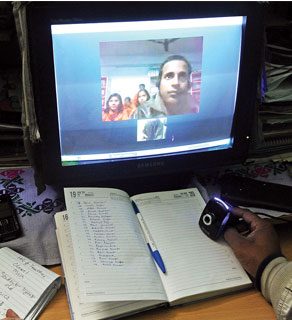
It is often said that schooling is about 21st century learners being taught by 20th century teachers with 19th century infrastructure and curriculum. To take the reach of education to a much higher percentage, we have to make use of Information Communication Technology and break our conventional comfort zones for imparting knowledge and learning.
Indian Government is planning to set up virtual classrooms and online courses for school education, Finance Minister Arun Jaitley informed during his budget speech for the year 2014-15. Jaitley has proposed an allocation of Rs 100 crore for this initiative. BJP, in its 2014 election manifesto, had said that this initiative would make it convenient for working class people and housewives to improve their knowledge and qualifications.
Education has taken a quantum leap with the Internet, breaking classroom barriers and introducing students to a whole range of courses for upgrading themselves, which are also more affordable and accessible. In an IT savvy country like India, virtual classrooms assume a whole new value.
MOOCs (Massive Open Online Courses) that are, so far free, have generated a new wave in an education environment highly dissatisfied with the state of college education. The move is set to get a further push with India and the US looking to partner in this domain. In 2012, online education enrollment witnessed a 21 per cent growth rate in India compared to a paltry 2 per cent growth rate in higher education. What goes without saying is that the easy access to technological services is the main reason behind this.
Another critical factor is that the requirement for trained engineers and technologists is far more than the number of qualified graduates that India’s technical institutions currently produce. It is imperative that institutions like IITs, IISc, NITs and other leading universities in India disseminate teaching/learning content of high quality through all available media like virtual classrooms.
It may be mentioned that the previous government had also launched an open repository for school education called National Repository of Open Educational Resources (NROER) in August last year. This repository included concept maps, videos, audio clips, talking books, multimedia, learning objects, photographs, diagrams, charts, articles, Wikipages and textbooks for all grades in multiple languages. Students could search or browse through concepts from various subjects from elementary and secondary level education. They could also comment on them and contribute to the repository.
A good example of extending training with virtual classrooms can be found at Brihanmumbai Municipal Corporation (BMC), where audio-visual facilities were set up in 400 civic-run schools across the city at a cost of Rs 27 crore last year. A brain child of Uddhav Thackeray, the initiative’s aim was to teach students in a fun-filled manner, which, in turn, would put a check on poor attendance.
India needs to take the virtual classrooms to each and every sphere of education to take India to the next level as far as learning, knowledge and skills are concerned.
The Don Draper clause

If you keep up with pop culture, you will know who Don Draper is. If you don’t, let’s just say he’s a character in one of the most popular TV series in the last decade, Mad Men - which tracks the lives of Madison Avenue advertising executives in the 60’s.
So, what’s up with this Don Draper clause? It is a clause that Dynamo PR (award-winning, creative PR consultancy) is now adding to their employees’ contracts, which means that on a regular basis employees receive a strange/funny/creative personalized gift paid for by Don. If you want to know more, check out their @DonDraperClause handle on Twitter.
Along with unlimited holiday (which we also have here at Wazoku), this is an innovative way of rewarding and making your employees feel included and part of an organisation that treats them well and as human beings.
What’s the idea? Well, the idea is to make their best employees happy, feel like they are cared for and to attract the best talent. Who doesn’t want to work for a company that makes them feel special? This is a great way of promoting company culture as well as enhancing their reputation out there in the world. Sometimes all it takes is a little thing. Sounds pretty good, no?
If you’d like to read more on how idea management software can help with employee engagement, head on to our Library and watch an interview with Charles Webb from Waitrose.
OneNote Class Notebook Creator --- Guest blog post from Kevin Sait
Guest post from Kevin Sait. Kevin is Head of IT Strategy at Wymondham High Academy.
This time last year Wymondham High Academy was just at the point of trialling Office 365, as the Head of IT Strategy I was still finding my way around the school site, and trying to remember names and faces. A year later and Office 365 has been embedded along with Yammer to 1600 + students, Teachers have begun to embrace the flexibility of working in the cloud, the ability to move documents in between devices without it changing layouts!
We have also in that year deployed Windows 8.1 to more than 700 school computers, deployed over 200 Surface devices, and added a sustainable BYOD element into school life!, that can really be described as the easy part!. Now the school is well on the way to its goal of embedding the use of technology in the classroom for the benefit of teachers, (making their life easier, working to improve good working practice in the classroom) and students, (understanding the technology, its use and how to benefit from key skills such as communication, collaboration and sharing).
One of the big players here has been the adoption of OneNote 2013, which I can guarantee is the one piece of software people have never heard of, but trust me it can be a real game changer in your school. The latest iteration as a SharePoint app The OneNote Class Notebook Creator can literally ‘blow your mind’ as an educator with its potential in schools.
So what exactly is it?
OneNote Class Notebook Creator allows you to create a whole class notebook, with content library, collaboration pages, and student notebooks, in one document! The real beauty about this is students only see the content library (resources from the teacher), the collaboration space (sharing ideas) and only their own notebook. So students use the notebook as if it is their own, can copy information from the teachers resource pages, do homework, and the teacher has global access to all the student notebooks and with the power of OneNote can leave feedback on students work in a variety of manners (audio, video, annotation etc).
Going from Zero to OneNote Hero!
School Principal Russell Boulton has been one of the early adopters of OneNote Class Notebook Creator at Wymondham with his Year 7 Science group. Up until two weeks ago Russell would admit he knew of but didn’t use OneNote. After a short session with us, literally 30 mins, Russell then an created his first Class Notebook and shared it with his teaching group on Yammer, our enterprise social network.
School Principal Russell Boulton is and early adopter of OneNote Class Notebook Creator:
Class Notebook has been a catalyst for me to introduce Flipped Learning into this terms topic. I have uploaded some video’s into OneDrive for Business and created a sharing link, embedded that into the content library in the Class Notebook so students have access to those resources. Part of the homework this week was to watch the video’s at home (or where ever they are connected to the internet). So we can get down to the task in the classroom and maximise the learning time.
We have an active group on Yammer for my Year 7 science, and this is a great place to share access to the Class Notebook, also students use it as a discussion point and can help each other out if there is a problem/.
The great thing is I can also look into the Student Notebook and see how work is progressing at any time, and with OneNote on my Surface I can leave video feedback instantaneously if I wish. These are early days but we see the potential and how to deliver learning in a more exciting way for students and am sure, this well develop further.
How easy is it to get started?
After installing the Class Notebook Creator into your Office 365 site then its a case of launching the app from your site.
As you can see Class Notebook creator is now an app in your page, and you can now run it directly.
Here is how simple it is to get up and running.
First of all launch the app and you will be offered the opportunity to create a new Class Notebook, you also have the option of adding other students to existing books here also.
So select Create a Class Notebook, this will take you to the next screen.
Add the name for your Notebook Science Period 2 Wednesday’s makes it easy for student to find if they have multiple OneNote open. Click Next.
This screen shows you the construction of your Notebook. You can rename the Collaboration Space and Content Library if you need to. Click Next.
Add your students name individually or paste them from a CSV. This sets up the correct number of Student Spaces.
Decide what goes in the Student Space, these are just standard examples, but you can configure this for your own way of teaching. Click Next.
Lastly you will see a Preview of the Notebook – make sure your happy with it or amend the structure – the choice is yours. Click Create to create your Notebook.
What happens next?
As on Office 365, you now get presented with a sharing URL giving access to the document, with the permissions set so student only see their own space and both the content and collaboration spaces. This is available on any internet connected device, so can be leveraged pretty much anywhere.
You can now post the URL into SharePoint or email it, we generally post it Yammer our social feed which is heavily used in school.
Are you an Office 365 user?
Simply add the app from the SharePoint store to get started. If your not an Office 365 user try Office 365 free for 30 days at http://office365.com
In summary OneNote is a much under utilised tool in the Office suite on its own. Its feature rich and empowering for both teachers and students. Class Notebook Creator takes this to the next level of utilising 21st century skills in the classroom and of course is free.
45 Best Mobile Apps and Tools for Marketers: How to Manage Social Media From Anywhere
You get a ton done when you’re at your computer, speeding away on the day’s social media strategy.
Might there be a way to wring some productivity when you’re away from your desk?
Mobile apps and tools can make it so a marketer’s entire day is filled with opportunities to connect, engage, and share. You can get more done while commuting, lounging, waiting, and any time when you’re not tethered to a desktop or laptop.
Which apps are best for social media marketers?
I gave a huge number of them a test run and came up with 45 amazingly useful apps that can help you accomplish social media marketing tasks with a tap, swipe, or touch.
I’d love to hear which ones are your favorites, and if I missed any that you love to use.
45 best mobile apps for your social media marketing
Dashboards and clients for social media management
1. Buffer
You can schedule updates to multiple accounts on Twitter, Facebook, LinkedIn, and Google+, as well as follow-up with statistics on how each post performed. The newest version of the iOS app allows for sharing and scheduling from inside other popular apps like Safari. Find an awesome link in your browser? Share it to Buffer without ever leaving the app.
> Download for iOS and Android

Other options –
2. Tweetbot
One of the most popular Twitter clients out there, Tweetbot lets you organize and interact with your Twitter stream in whichever way is most productive for you. Separate the stream into lists or channels, and tweet, respond, and reply directly from within the app.
> Download for iOS
Other options –
3. Facebook Pages Manager
You can enjoy complete page management controls via this Facebook app, making life super easy for admins who need to make changes on the fly, while you’re on the go.
> Download for iOS and Android
4. Flow for Instagram
Have you ever tried to view Instagram from an iPad? It can be a bit tough. The official app isn’t universal, so everything that’s made for iPhone gets stretched to fit iPad. Flow for Instagram solves some of these quibbles with an iPad-specific display of your Instagram feed. You can browse, like, comment, and follow, all from right within the app.
> Download for iPad
Useful tools for social media marketing tasks
5. Dropbox
Access important files from anywhere, and share with your team members whether you’re at your desk or out and about. The app is great for previewing shared files like images, perhaps in advance of an upcoming social media campaign.
> Download for iOS and Android
6. Evernote
For note-taking and remembering, it’s tough to beat Evernote. In addition to being an all-encompassing to-do list and swipe file, the mobile app lets you snap a picture of something you wish to remember, and Evernote can pull out text and context from inside the image.
> Download for iOS and Android
7. Asana
Asana is one of the most popular project management services, and their mobile app brings tasks, to-dos, and organization to your phone or tablet, too. Their mobile versions—iPad especially—are useful, intuitive, and beautiful.
> Download for iOS and Android
Other options –
8. Trello
At Buffer, we rely on Trello for a huge number of organizational jobs. It helps us track bugs in our Buffer product, and it’s how we arrange our content calendar each week. Being able to edit, rearrange, and add from a mobile device is a huge benefit when you’re suddenly onto a new idea.
> Download for iOS and Android
9. HipChat
Distributed teams can get a ton of use out of HipChat for team communication (traditional offices, too). And if you happen to be away from your desk, you can still stay in touch with the conversation, even receiving notifications when someone mentions you directly.
> Download for iOS and Android
Other options –
10. Nimble
Nimble is a super-powerful contacts manager that integrates seamlessly with the social profiles of each of your contacts. Stay connected to your network, and grow your following on your social accounts by syncing your contacts with Nimble.
> Download for iOS
11. Mention
One of our favorite social listening tools, Mention helps you find and follow up with brand mentions all over the web—blogposts, social media updates, and anywhere else your keywords come up.
> Download for iOS and Android
Other options –
12. IFTTT
There are hundreds of IFTTT recipes you can try to supercharger your social media sharing. The IFTTT app makes it easy to connect services, including the biggest social media sites and your most-used services.
> Download for iOS and Android
Amazing image creation tools for on-the-go graphics
13. Over
Add stunning text to beautiful images. The result: a super shareable piece of visual content that will engage your audience.
> Download for iOS and Android
Other options –
14. Photo Editor by Aviary
To quickly create awesome images—either from the shots you take from your phone or from existing images you’ve uploaded to your camera roll—you can use Aviary’s rich suite of editing tools.
> Download for iOS and Android
Other options –
15. Canva
One of our go-to resources for creating images for social media, Canva’s new app brings all the features from the web right onto your iPad. Tap on templates, and drag elements into place to create a cool image to share—and share directly when you’re done thanks to Canva’s integrated social sharing.
> Download for iPad
Content apps for finding and sharing the latest news and links
16. Feedly
Feedly is our go-to app for subscribing to RSS feeds and discovering new content to share on social media. It integrates with all the same great apps as the web version (like Pocket and Buffer), and the forward-thinking gestures on iOS are something to behold—e.g., double-tap to close stories, swipe down to go to the next page.
> Download for iOS and Android
17. Flipboard
Flipboard takes content from an RSS feed, Twitter list, or category and displays it in a beautiful, flippable magazine format. It’s a great resource for discovering new content and for staying on top of a category or topic.
> Download for iOS and Android
18. Daily
A fun app we built here at Buffer, Daily provides a hand-picked stack of articles that you can share or skip with a simple swipe. It’s like Tinder for content, and it connects straight to your Buffer queue for easy scheduling.
> Download for iOS

19. Mashable
Stay on top of the latest news and trends that are happening in social media by keeping tabs on the Mashable app. All the breaking stories and interesting reads that show up on Mashable can also be viewed here.
> Download for iOS and Android
20. TED
Needing some inspiration from one of the world’s best presentations? Pull up a TED talk on your phone or tablet. The TED app contains all the best presentations from their archives, and after watching, you can easily share the ones you most enjoy.
> Download for iOS and Android
21. Prismatic
The Prismatic app learns from your content tastes and ends up finding and delivering content that is catered to you. It gets smarter the more you use it.
> Download for iOS
Nice-to-have tools to fill out your social media apps toolbox
22. Dashboard for Google Analytics
Check in on your traffic stats and campaign results from your phone. Dashboard for Google Analytics shows an easy-to-understand display of your analytics, great for seeing how your social media campaigns are faring.
> Download for iOS
Other options –
- Analytiks
- Google Analytics for Android
- gAnalytics
- Analytics Pro
23. Google Drive
All your files are here—completely editable and shareable. Even when you’re offline, you can access and view all your files and documents.
> Download for iOS and Android
Other options –
24. MailChimp
If you use MailChimp for your email management, their mobile app is a super helpful way to manage your list and your campaigns on the go. Send campaigns (and edit via a companion iPad app), view stats, and manage your list, all from your phone or tablet.
> Download for iOS and Android
Other options –
25. Gather
Another useful app from the MailChimp team, Gather lets you send text messages to your subscribers to keep them updated at events.
> Download for iOS and Android
26. Chimpadeedo
MailChimp’s email capture app, Chimpadeedo is super useful for conferences and merch tables. Turn the app on, and people can sign themselves up for your list in seconds.
> Download for iOS and Android
27. Mailchimp Snap
And finally (last MailChimp app – I swear!), with Snap you can send an email based on an image you take on your mobile phone. The app syncs with your existing lists, and it grabs your new photo or a photo from your camera roll to place into an email with your chosen text and template.
> Download for iOS
28. Hangouts
Need to connect quickly with a coworker when you’re away from the office? Google Hangouts on mobile can come in super handy in a pinch. Connect and chat with your friends or coworkers, regardless of what device they’re using.
> Download for iOS and Android
Other options –
29. Overcast
If you’re into podcasts for learning or sharing, there are a handful of great apps to try, starting with Overcast. Find podcasts via search, then build a playlist and listen from the app—offline or online.
> Download for iOS
Other options –
30. TapTalk
Tap a friend’s profile picture to send them a photo or video. This popular social messaging app can be useful for remote teams, conferences, retreats, and more.
> Download for iOS and Android
31. Paper
The content app from Facebook takes the vital links and information from your News Feed and delivers it in a nicely-dressed package, perfect for on-the-go consumption.
> Download for iOS
32. WiFi Finder
If you’re in need of a wifi spot to get work done, pull up this app to see which networks are available in your vicinity.
> Download for iOS and Android
33. WordPress
Our Buffer blog runs on WordPress, and so do tens of thousands of others. The WordPress mobile app makes it easy to manage everything about your site, and it works both for WordPress.com sites and for self-hosted sites.
> Download for iOS and Android
Other options –
34. SlideShare
View and organize all your favorite SlideShare presentations from your mobile device. The app even lets you store presentations for offline viewing when you’re not connected to the Internet.
> Download for iOS and Android
All the official apps of the major social media channels
35. Facebook
All the features you’ve come to know and love form the web version of Facebook. And when you log in to the Facebook app, you can then quickly and easily manage Facebook logins at other sites and apps, too.
> Download for iOS and Android
36. Twitter
A really wonderful interpretation of the Twitter stream and profiles, with easy links to lists, direct messages, and notifications.
> Download for iOS and Android
37. LinkedIn
The best way to manage your professional contacts on-the-go. You can check out your connections, post updates, and even discover, save, and apply to recommended jobs:
> Download for iOS and Android
38. Google+
An intuitive and fast way to browse through your Google+ feed and manage your profile and page.
> Download for iOS and Android
39. Instagram
One of the fastest-growing social networks, the photo app is the biggest one on this list that remains app-only. If you want to run a visual marketing strategy through Instagram, you’ll need the app.
The app has taken lots of strides in the past few months, including the release of Hyperlapse video. See below for an example.
> Download for iOS and Android
40. Pinterest
Simple and intuitive to view, like, and repin. The Pinterest app is ideal for idle browsing, and it supports sharing to Pinterest from browsers and other apps.
> Download for iOS and Android
New and fringe social media channels to try
41. Snapchat
With Snapchat, you can take a photo and share a photo, then the photo disappears after your friend views it. Marketers are still figuring out how best to take advantage of this. Some early pioneers include McDonald’s, Taco Bell, and General Electric.
> Download for iOS and Android
42. WhatsApp
The mobile messaging app (that is now owned by Facebook) lets you send text messages to friends and colleagues. Like Snapchat, this is one that marketers are still feeling out. There have been lots of articles written on how marketers might take advantage of WhatsApp.
> Download for iOS and Android
43. Vine
The microvideo app from Twitter lets you record six-second videos that play on a loop. The integration with Twitter is seamless, so your videos will appear and play with ease. Some great use cases so far have been brands using it for how-to videos, like this one from Lowe’s.
> Download for iOS and Android
44. Tumblr
For brands on Tumblr, you’ll find the same great features and tools from the web version here in the mobile app, including a powerful hashtag search and easy profile edits.
> Download for iOS and Android
45. Quora
The crowdsourced answers website has a lot of neat uses for marketers, especially as a source for information and content ideas. You can check in on the latest questions and topics from the app.
> Download for iOS and Android
Conclusion
As you can see, there are a huge number of helpful apps for marketers to try. You probably don’t need all 45 on your phone, but hopefully you identified a few that can help make your marketing efforts all the more efficient.
Which mobile marketing apps do you use? I’d love to hear your favorites in the comments.
Image sources: Blurgrounds, Icon Finder, Death to the Stock Photo
The post 45 Best Mobile Apps and Tools for Marketers: How to Manage Social Media From Anywhere appeared first on Social.
Building a culture of sharing
In an open culture, we share: we share our successes, our failures, and the respective paths we took to achieve both. The end point is incidental to the act: it’s the mindset of sharing that helps us to be more open, accountable, adaptable and agile. It’s the act of sharing that helps us to be wise.

Does your organisation have a culture of sharing, or is knowledge still used as a mechanism of control?
In the Social Age, reputation is forged in our communities, founded upon reputation built over time. it’s consistency of action and reaction that counts. Leaders who are humble, who share wisely and act consistently can develop stronger social authority and, hence, be more effective in the communities that help us to be agile.
But share what?
Our time, our knowledge, our capability, our wisdom, our communities, our expertise. It’s not just about curating content and sharing it (although that is a key skill for social leaders), but also about sharing our capacity. It’s about helping out.
A sharing culture is one where the default position is to be open, to be curious. It’s permissive of diversity and difference and welcomes permission to experiment.
Sharing is not about reciprocity: it’s about clarity of purpose and openness of intent. If we share wisely, we build bonds, we build reputation, we strengthen our tribe, and strong tribes are ‘sense making‘, they help us fathom our path through the Social Age.
A sharing culture is not the preserve of New Age cooperatives or collectives: it should be front and centre of any healthy and competitive organisation. Share with your friends, share with your competitors. If they are looking to you to learn, it just shows that you’re doing something right.
But sharing is not about volume: i use the word ‘wisely’ intentionally. It’s about adding context to what we share, about ensuring it’s relevant and timely. Be it our support or our resources, it’s about sharing the right things at the right time. Knowing when to offer and being open to being asked.
Reflect on the culture in your own organisation: does it welcome sharing, is it permissive of sharing? Or do you still use knowledge as a mechanism of control?
Would a proposed e-academy offering full-time virtual education really ‘reshape education in England’?
A proposed free school, Wey ecademy has a vision to ‘reshape education in England’. It will demolish ‘barriers to a first class education’ and ‘give choice to every postcode’.
How will it do this? It will provide full-time education to 10-19 year-olds via the internet.
Education is, of course, more than following a syllabus – it’s about children meeting others, making friends, engaging in physical activity and learning to cope in a social as well as a working environment.
The ecademy’s prospectus seems to recognise this – but many clubs etc are on-line. Some would argue children already spend too much time on-line without being expected to receive their full-time education via a medium full of distractions.
Extra-curricular activities, the prospectus suggests, could be fulfilled by attending local clubs and groups. But these usually entail a cost. Pupils in normal schools are not expected to pay for extra-curricular activities such as ‘enrichment’ activities or sport unless the activities involve a theatre visit, say, or a residential course.
On-line education, especially if full-time, demand a high degree of self-motivation, maturity and discipline. Nowhere in the prospectus does the eacademy mention supervision by a real adult as opposed to a virtual one. Wey ecademy says its school is for children as young as ten. Perhaps it’s assumed there will be an adult around to keep the child on task but this isn’t made explicit. The Department for Education (DfE) says children under 12 are too immature to be left for long periods of time so will it approve free school offering full-time on-line education to 10 year-olds? And even those youngsters deemed old enough to be left alone might find alternative things to do – we’re talking about teenagers here.
The eacademy prepares pupils for exams which, the prospectus says, would be taken at local exam centres. But not all schools accept ‘private’ candidates. External candidates have to provide proof of identity such as a passport. Pupils without such proof would need to present a private candidate identification form with two photos to the exam centre at the time of entry. Presumably parents would have to take responsibility for this. These regulations apply to GCSEs and A Levels. It’s unclear what rules would apply to Key Stage 2 pupils taking SATs or older pupils taking the International Baccalaureate Diploma which Wey eacademy says it will be offering ‘in time’.
But who is behind the free school proposal which has already been turned down once? It’s Wey Education Schools Trust (WEST), the ‘vehicle’ set up by Zail Enterprises Ltd, a subsidiary of Wey Education PLC. Zail hopes the ‘school management model’, running free schools or academies, will help ‘generate long term profitability and a return to shareholders’.
Education delivered on-line has its uses. School refusers, children with medical conditions, children in remote areas (providing the broadband is up to it) and children who move around a lot could benefit from such lessons.
However, it would be more beneficial to children if on-line tuition was linked to existing brinks-and-mortar schools (with proper funding, of course). They would be able to join the normal school when circumstances changed and there would be no problem with confirming identity when taking exams. Pupils would benefit from being part of a real, rather than virtual, community.
ADDENDUM WEST is also supporting the proposal for Peckham Free School. It says it ‘will be the trust responsible for running the school if approved with the group constituting the local governing body’. For more information about Wey Education PLC and its belief in 2011 that the Government’s academies and free schools programme ‘will create increased opportunities for private sector companies to manage and run state-funded schools at all levels’ and how it ‘intends to follow a policy of both organic expansion and acquisition to establish a meaningful market share’ here.
What Faculty Should Know About Competency-Based Education
I loved the title of Phil’s recent post, “Competency-Based Education: Not just a drinking game” because it acknowledges that, whatever else CBE is, it is also a drinking game. The hype is huge and still growing. I have been thinking a lot lately about Gartner’s hype cycle and how it plays out in academia. In a way, it was really at the heart of the Duke keynote speech I posted the other day. There are a lot of factors that amplify it and make it more pernicious in the academic ecosystem than it is elsewhere. But it’s a tough beast to tackle.
I got some good responses to the “what faculty should know…” format that I used for a post about adaptive learning, so I’m going to try it again here in somewhat modified form. Let me know what you think of the format.
What Competency-Based Education (CBE) Is
The basic idea behind CBE is that what a student learns to pass a course (or program) should be fixed while the time it takes to do so should be variable. In our current education system, a student might have 15 weeks to master the material covered in a course and will receive a grade based on how much of the material she has mastered. CBE takes the position that the student should be able to take either more or less time than 15 weeks but should only be certified for completing the course when she has mastered all the elements. When a student registers for a course, she is in it until she passes the assessments for the course. If she comes in already knowing a lot and can pass the assessments in a few weeks—or even immediately—then she gets out quickly. If she is not ready to pass the assessments at the end of 15 weeks, she keeps working until she is ready.
Unfortunately, the term “CBE” is used very loosely and may have different connotations in different contexts. First, when “competency-based education” was first coined, it was positioned explicitly against similar approaches (like “outcomes-based education” and “mastery learning”) in that CBE was intended to be vocationally oriented. In other words, one of the things that CBE was intended to accomplish by specifying competencies was to ensure that what the students are learning is relevant to job skills. CBE has lost that explicit meaning in popular usage, but a vocational focus is often (but not always) present in the subtext.
Also, competencies increasingly feature prominently even in classes that do not have variable time. This is particularly true with commercial courseware. Vendors are grouping machine-graded assessment questions into “learning objectives” or competencies that are explicitly tied to instructional readings, videos, and so on. Rather than reporting that the student got quiz questions 23 through 26 wrong, the software is reporting that the student is not able to answer questions on calculating angular momentum, which was covered in the second section of Chapter 3. Building on this helpful but relatively modest innovation, courseware products are providing increasingly sophisticated support to both students and teachers on areas of the course (or “competencies”) where students are getting stuck. This really isn’t CBE in the way the term was originally intended but is often lumped together with CBE.
What It’s Good For
Because the term “CBE” is used for very different approaches, it is important to distinguish among them in terms of their upsides and downsides. Applying machine-driven competency-based assessments within a standard, time-based class is useful and helpful largely to the extent that machine-based assessment is useful and helpful. If you already are comfortable using software to quiz your students, then you will probably find competency-based assessments to be an improvement in that they provide improved feedback. This is especially true for skills that build on each other. If a student doesn’t master the first skill in such a sequence, she is unlikely to master the later skills that depend on it. A competency-based assessment system can help identify this sort of problem early so that the student doesn’t suffer increasing frustration and failure throughout the course just because she needs a little more help on one concept.
Thinking about your (time-based) course in terms of competencies, whether they are assessed by a machine or by a teacher, is also a useful tool in terms of helping you as a teacher shift your thinking from what it is you want to teach to what it is you want your students to learn—and how you will know that they have learned it. Part of defining a competency is defining how you will know when a student has achieved it. Thinking about your courses this way can not only help you design your courses better but also help when it is time to talk to your colleagues about program-level or even college-level goals. In fact, many faculty encounter the word “competency” for the first time in their professional context when discussing core competencies on a college-wide basis as part of the general education program. If you have participated in these sorts of conversations, then you may well have found them simultaneously enlightening and incredibly frustrating. Defining competencies well is hard, and defining them so that they make sense across disciplines is even harder. But if faculty are engaged in thinking about competencies on a regular basis, both as individual teachers and as part of a college or disciplinary community, then they will begin to help each other articulate and develop their competencies around working with competencies.
Assuming that the competencies and assessments are defined well, then moving from a traditional time- or term-based structure to full go-at-your-own-pace CBE can help students by enabling those students who are especially bright or come in with prior knowledge and experience to advance quickly, while giving students who just need a little more time the chance they need to succeed. Both of these aspects are particularly important for non-traditional students[1] who come into college with life experience but also need help making school work with their work and life schedules—and who may very well have dropped out of college previously because they got stuck on a concept here or there and never got help to get past it.
What To Watch Out For
All that said, there are considerable risks attached to CBE. As with just about anything else in educational technology, one of the biggest has more to do with the tendency of technology products to get hyped than it does with the underlying ideas or technologies themselves. Schools and vendors alike, seeing a huge potential market of non-traditional students, are increasingly talking about CBE as a silver bullet. It is touted as more “personalized” than traditional courses in the sense that students can go at their own pace, and it “scales”—if the assessments are largely machine graded. This last piece is where CBE goes off the tracks pretty quickly. Along with the drive to service a large number of students at lower cost comes a strong temptation to dumb down competencies to the point where they can be entirely machine graded. Again, this probably doesn’t do much damage to traditional courses or programs that are already machine graded, it can do considerable damage in cases where the courses are not. And because CBE programs are typically aimed a working class students who can’t afford to go full-time, CBE runs the risk of making what is already a weaker educational experience in many cases (relative to expensive liberal arts colleges with small class sizes) worse by watering down standards for success and reducing the human support, all while advertising itself as “personalized.”
A second potential problem is that, even if the competencies are not watered down, creating a go-at-your-own-pace program makes social learning more of a challenge. If students are not all working on the same material at the same time, then they may have more difficulty finding peers they can work with. This is by no means an insurmountable design problem, but it is one that some existing CBE programs have failed to surmount.
Third, there are profound labor implications for moving from a time-based structure to CBE, starting with the fact that most contracts are negotiated around the number of credit hours faculty are expected to teach in a term. Negotiating a move from a time-based program to full CBE is far from straightforward.
Recomendations
CBE offers the potential to do a lot of good where it is implemented well and a lot of harm where it is implemented poorly. There are steps faculty can take to increase the chances of a positive outcome.
First, experiment with machine-graded competency-based programs in your traditional, time-based classes if and only if your are persuaded that the machine is capable of assessing the students well at what it is supposed to assess. My advice here is very similar to the advice I gave regarding adaptive learning, which is to think about the software as a tutor and to use, supervise, and assess its effectiveness accordingly. If you think that a particular software product can provide your students with accurate guidance regarding which concepts they are getting and which ones that they are not getting within a meaningful subset of what you are teaching, then it may be worth trying. But there is nothing magical about the word “competency.” If you don’t think that software can assess the skills that you want to assess, then competency-based software will be just as bad at it.
Second, try to spend a little time as you prepare for a new semester to think about your course in terms of competencies and refine your design at least a bit with each iteration. What are you trying to get students to know? What skills do you want them to have? How will you know if they have succeeded in acquiring that knowledge and those skills? How are your assessments connected to your goals? How are your lectures and course materials connected to them? To what degree are the connections clear and explicit?
Third, familiarize yourself with CBE efforts that are relevant to your institution and discipline, particularly if they are driven by organizations that you respect. For example, the American Association of Colleges and Universities (AAC&U) has created a list of competencies called the Degree Qualifications Profile (DQP) and a set of assessment rubrics called Valid Assessment of Learning in Undergraduate Education (VALUE). While these programs are consistent with and supportive of designing a CBE program, they focus on defining competencies students should receive from a high-quality liberal arts education and emphasize the use of rubrics applied by expert faculty for assessment over machine grading.
And finally, if your institution moves in the direction of developing a full CBE program, ask the hard questions, particularly about quality. What are the standards for competencies and assessments? Are they intended to be the same as for the school’s traditional time-based program? If so, then how will we know that they have succeeded in upholding those standards? If not, then what will the standards be, and why are they appropriate for the students who will be served by the program?
- The term “non-traditional is really out-of-date, since at many schools students who are working full-time while going to school are the rule rather than the exception. However, since I don’t know of a better term, I’m sticking with non-traditional for now.
The post What Faculty Should Know About Competency-Based Education appeared first on e-Literate.
No natural light in almost half of European offices, finds report
Almost half (42%) of European office employees have no natural light in their working environment, over half (55%) don’t have access to any greenery and 7 per cent have no window in their workspace. Yet according to the findings of The Human Spaces Report, commissioned by Interface and led by Organisational Psychologist Professor Sir Cary Cooper, European employees who work in environments with natural elements report a 13 per cent higher level of well-being and are 8 per cent more productive overall. With nearly two-thirds (63%) of EMEA office workers now based in either a town or city centre and spending on average 34 hours per week in the office, their interaction with nature is becoming increasingly limited. Yet despite city dominated lives, the research found workers have an inherent affinity to elements that reflect nature. Flexible working was a surprisingly low preference, with just 11 per cent of workers choosing a space that suits their needs as their productive way to work..
The academic study looked at the impact of the physical office environment on employee well-being across 3600 office workers in eight countries throughout EMEA.
Spain reported the highest number of office employees with no window (15%), and also had the most stressed workforce. In contrast, Germany and Denmark reported the least number of workers with no windows (2% and 3% respectively), and had the happiest workforce.
Interestingly, 40 per cent of workers across EMEA said they would feel most productive at their own desk in a solitary office, while 31 per cent would feel most productive at their own desk in an open plan office.
Professor Sir Cary Cooper said: “The work environment has always been recognised as essential to employee well-being and performance but often purely as a ‘hygiene factor’. The Human Spaces report clearly illustrates the connection between the impact of working environments and productivity. It’s no coincidence that the most modern employers now take a new view, designing environments to help people thrive, collaborate and be creative. Being connected to nature and the outside world, biophilic design, to give it its real name, is a big part of that.”
The top five natural elements EMEA office workers put on their wish list for their ideal office space:
- Natural light
- Quiet working space
- A view of the sea
- Live indoor plants
- Bright colours
Contact with nature and design elements which mimic natural materials has been shown to positively impact health, performance and concentration, and reduce anxiety and stress,” said Mandy Leeming, Design and Development Manager (UK) at Interface.
“When it comes to creating office spaces that achieve this, it’s about taking the nuances of nature that we subconsciously respond to, such as colours and textures, and interpreting them.”
The post No natural light in almost half of European offices, finds report appeared first on Workplace Insight.
ISIS rebrands to Oxford International
Ambitious UK education group, ISIS Education, which provides a broad range of educational programmes in the UK and Canada, is rebranding to “Oxford International Education Group” following strong growth in recent years. The group’s new name will be a cohesive umbrella brand for the many divisions and products it offers.
The well-known ISIS brand will still be used as the name for its main English language division, ISIS Schools and ISIS Junior.
“We feel that now is the right time to bring in a new ‘umbrella’ brand, which will act to unify all our divisions under one strong name”
The group – which recently sought a minority investment to further its expansion plans – has grown strongly in recent years through investing in new product ranges and leading education facilities.
“We consequently feel that now is the right time to bring in a new ‘umbrella’ brand, which will act to unify all our divisions under one strong name,” commented David Brown, co-founder.
“We are very enthusiastic about the continued opportunities that are present in our industry, and equally excited by our growing team of strong, high calibre staff, who will, we are sure, help us achieve our ambitious and exciting plans,” added Brown.
The new name, to be unveiled at the trade event ICEF Berlin next month, maintains the company’s strong links to the city of Oxford, from where the name ISIS originated, and where it now has its largest operational hub.
Recent growth has seen ISIS develop a number of equally highly regarded complementary brands including Bucksmore, Homelingua and Oxford Tutorial College.
It has also seen the September opening of its first Pathways College, Leicester International Pathway College (LIPC), in partnership with DeMontfort University.
ISIS Education was founded in 1991 by owner-directors David Brown and Robert Darell when it began by operating outbound tours for UK university students. Set up with investment from The Prince’s Trust, the company is a significant success story for the start-up enterprise charity, of which Prince Charles is President.
The State of Educational Blogging 2014
Each year we conduct a survey on how educators are using blogs. Our goal is to document the trends in educational blogging.
We started the annual survey because we’re frequently asked for detailed information to help educators:
- Convince school administrators to allow blogging.
- Understand the benefits of blogging and how blogs are used with students.
- Know more about which blogging platforms are commonly used by educators (and why).
Here’s what you told us in 2014! You’ll find our survey questions for this year’s report here!
Click on a link below to go to the section you want to read:
- Key Findings
- About the survey
- Who are the respondents
- How blogs are used
- Benefits of blogging
- Blog platforms used
Key Findings
This is our third annual report of the state of educational blogging.
Device Usage
Surprisingly, there hasn’t been a significant increase in the use of one-to-one devices in the 3 years we’ve surveyed educators (44 % selected Yes in 2014 compared to 45 % in 2013 and 41 % in 2012).
15 % of respondents with one-to-one device programs are BYOD and 21 % of respondents with one to one device programs are provided by the school or school district.
Devices usage in one-to-one programs from 2012 to 2014 shows an increase in iPad use (from 27 % in 2o12 to 5o % in 2014), slight change in PC laptop usage (from 45 % in 2012 to 40 % in 2014), a decrease in Mac Laptops (from 32 % to 20 %) and increase in Chromebooks (0 % in 2012 to 16 % in 2014) and other types of tablets (from 6 % in 2012 to 18 % in 2014).
Blog Usage
Majority of respondents told us they mainly used their blogs for class websites (20 %), class blogs (38 %) and/or student blogging (17 %) and a high proportion also had their own personal/personal blog (30 %).
Based on student blog usage from Edublogs.org, 55 % of student blogs are public and can be viewed by anyone and 45 % of student blogs are private restricted to specific readers.
Majority of respondents said they used the student blogs for reflective blogging (40%), practice reading and writing skills (36 %), assignments /assessments (32 %), digital citizenship skills (31 %), encourage peer learning and support (31 %), collaboration / discussion (30 % ), ePortfolios (24 %) and global collaboration and authentic audience (24 %).
While most class blogs were used for: share information with families (53 %); assignments and class news (43 %); share links and resources (42 %) and global collaboration and authentic audience (34 %). Other uses of class blogs included: teach digital citizenship skills. to inspire students; sharing learning, share resources; provide students with opportunity to interact online; and to promote books and reading.
Blog Platform Used
Most respondents used Edublogs (50%) as the main blog platform they used followed by Blogger (21%) and then WordPress.com (10%).
It’s quite common for educators to host their different blogs on several different blog platforms. Edublogs (21%) was the most common second main blog platform used followed by Blogger (18%) and WordPress.com (11%).
Trends for 2014
Key trends we’ve observed from supporting educators and their students in 2014 are:
- Increase usage by Universities to use blogs as websites. You’ll find examples of all the different ways Universities and higher Ed use Blogs and WordPress here.
- Increase usage of schools to use blogs as ePortfolios. This is more common on CampusPress where the student uses the same student blog to share their learning and showcase their work, for all subjects, throughout their entire school life. You’ll find examples of the different ways schools use blogs here.
About the Survey
This is our third annual report of the state of educational blogging.
This year’s survey was conducted from May 28 – August, 21 2014 and a total of 587 respondents took part in the survey.
The survey was promoted via Twitter, Facebook and through blog posts. We encouraged replies from educators regardless of what blogging platform they used.
You can check out the questions we asked here.
| Year | No. of Respondents | Read Report |
| 2014 | 587 | State of Educational blogging 2014 |
| 2013 | 378 | State of Educational blogging 2013 |
| 2012 | 259 | State of Educational blogging 2012 |
Who are the respondents?
We started with basic inquiries about our respondents’ background to learn more about their role and their educational institution. Respondents were able to select more than one checkbox for most questions which is why the results for some questions add up to more than 100%.
Majority of the response were by teachers (64%) followed by students (11%).

Most were based at public schools or institutions (71 %).

Roughly a third were based in Elementary/Primary schools (37%) followed by High School (24 %) and Middle/Junior (19 %).

44% of respondents were based at educational institutions that have or will soon have a one to one device program. There hasn’t been a significant increase in one to one devices in the 3 years we’ve surveyed educators (45 % selected Yes in 2013 compared to 41 % in 2012).

This year was the first time we asked respondents if their one to one device program was a BYOD program.
15 % of respondents with one to one device programs are BYOD and 21 % of respondents with one to one device programs are provided by the school or school district.

iPads (50 %) were the most commonly used device in one to one device programs followed by PC laptops (46 %) and Mac Laptops (20%).

Devices usage in one to one programs from 2012 to 2014 shows an increase in iPad use (from 27 % in 2o12 to 5o % in 2014), slight change in PC laptop usage (from 45 % in 2012 to 40 % in 2014), a decrease in Mac Laptops (from 32 % to 20 %) and increase in Chromebooks (0 % in 2012 to 16 % in 2014) and other types of tablets (from 6 % in 2012 to 18 % in 2014).

Majority of respondents were introduced to using blogs through a professional development session / workshop(27 %) or via a work colleague (30 %). Other ways they were introduced to blogging included their teacher.

Although our survey didn’t include geographical location of respondents statistics for all blogs hosted on Edublogs.org from August 20, 2013 to August 20, 2014 highlights United States is the main user of blogs (accounts for 45.07 % of visits to Edublogs blogs) followed by Canada (10.56 %), Australia (8.08%) and United Kingdom (5.04 %).
How blogs are being used
Next we looked at how respondents used their blogs.
Majority of respondents told us they mainly used their blogs for class websites (20 %), class blogs (38 %) and/or student blogging (17 %) and a high proportion also had their own personal/personal blog (30 %).

17 % of respondents told us their students had individual student blogs. The number of individual student blogs supervised by educators varied considerably: the maximum number was 200 blogs.
Based on student blog usage from Edublogs.org, 55 % of student blogs are public and can be viewed by anyone and 45 % of student blogs are private restricted to specific readers.
| Allow search engines | 32 % |
| Block search engines | 23 % |
| Only logged in users can view blog | 12 % |
| Only logged in registered user can view blog | 6 % |
| Only logged in admin user can view blog | 0 % |
| Password protected blog | 27 % |
18.2 % of educators only supervised student blogs and didn’t have personal, professional or class blogs. While most educators had an average of 3 blogs other than the student blogs they supervised.
Majority of respondents said they used the student blogs for reflective blogging (40%), practice reading and writing skills (36 %), assignments /assessments (32 %), digital citizenship skills (31 %), encourage peer learning and support (31 %), collaboration / discussion (30 % ), ePortfolios (24 %) and global collaboration and authentic audience (24 %).

While most class blogs were used for: share information with families (53 %); assignments and class news (43 %); share links and resources (42 %) and global collaboration and authentic audience (34 %). Other uses of class blogs included: teach digital citizenship skills. to inspire students; sharing learning, share resources; provide students with opportunity to interact online; and to promote books and reading.

As we already knew there are a lot of educators who have been blogging for years.
Benefits of blogging
The following benefits of blogging were summarized from this year’s survey responses.
One of the biggest challenges educators new to blogging face is understanding what is a blog and the basics of how a blog works. If you are new to blogging we recommend start by watching this quick intro video,
Benefits of a class blog:
- Having a class blog is a great way to…
- Store teaching ideas and lessons online so they are always easily accessible;
- Have assignments online so students who are absent can complete work even if they aren’t in class (no need for siblings to pick up work and no need to prepare packages of work)
- List all assignments with their due dates (students and parents can never say they did not know something was due);
- Post student samples of work to use in future lessons;
- Post student work so they can show their parents and relatives who live far away;
- Encourage students to do work of excellent quality so that it is ‘publishable’
- Keep lists of great books which students can consult when planning their own reading;
- Supply links to other valuable websites such as World Book Online and library catalogues.”
- A class blog is a wonderful way to communicate information to parents and give them a glimpse into what is going on every day in their child’s classroom, without the worry of losing a paper newsletter. If a parent says they didn’t know about a test, for example, I just say, it was on the blog.
- No photocopying, easy to post. I also pose interesting questions on the blog and kids and their parents can research it and post so all can see, e.g., what is the smallest mammal on Earth.
- Our class blog provides an insight into our class. It allows absent parents or those who work away from home to keep up to date with what their children are learning about and this enable us to build a learning community which parents feel part of. Blogging also allows us to educate the parents on the experiences and outcomes that are central to the Curriculum for Excellence which we follow and that active play is central in learning for children.
- Blogging is a fantastic way of sharing what is happening in the classroom with the wider world and for students to engage in authentic communication. With good use of tags and categories, it is also a great way of organizing web-based resources.
- I find it so satisfying having students comment on the class blog and ask if they can create a new page. They take an incredible amount of interest and pride in what goes into our blog and they enjoy sharing with their families. My team teaching partner now timetable (blogging) into our weekly literacy classes.
- Technology makes even mundane tasks more engaging for my students. Putting some of my spelling tasks online means that my students are more likely to be engaged. Also, I am trying to encourage some ‘flipped classroom’ strategies and posting work, explanations, images and videos is allowing me to develop this teaching strategy.
- We also use the blog to publish parent feedback, community news, photographs, information, transition information. The list is endless.
Here are examples of class blogs so you can check out how they are used:
- 1A/B @ Willunga Primary - Kindergarten
- Mrs Rabe’s Class blog – Kindergarten
- The Birds Nest - Kindergarten / Grade 1
- Little Champs - Kindergarten / Grade 1
- The High Flyers – Grade 1
- Mrs K’s Class - Grade 1
- Look What’s Happening in Room 102! - Grade 1/2
- Ms Cassidy’s Classroom blog – Grade 2 (links to student blogs in sidebar)
- Digital Voices – Grade 3
- Mrs Yollis’ Classroom blog - Grade 3
- Mrs. Hamman’s Class Blog - Grade 3
- Mrs Moore’s Class blog – Grade 3
- Mr Baldock’s Class blog - Grade 3/4
- Grade 3/4 at Napoleons Primary School - Grade 3/4
- Jade J Year 3/4 Multiage - Grade 3/4
- Miss Jordan’s Class @ Barwon Heads Primary School - Grade 4
- Walk this way – Grade 4
- Wonder, Inquire, Create, Inspire - Grade 4
- Miss Smith’s Classroom – Grade 5
- Grade 5 at Napoleons Primary School - Grade 5
- Mrs Muller’s Class blog – Grade 5
- Fabulous 5 B – Grade 5
- Technie Kids – Grade 5
- Making Waves in Sixth Grade - Grade 6
- Mr. Miller’s Classroom Blog - Grade 6
- Blogs-by-the-sea – Grade 6
- Broadbent Blues – Grade 6/7
- Huzzah - Grade 6/7
- Krebs’ Class Blogs - Grade 7/8
- Jurupa Hills High School Photography and Yearbook
- English 10 – High school
- Mr Ross’s Science Class – High School
- The Edublogger class blog list - includes Maths, Science, English, History, LOTE, EFL /ESL, Library, School news blogs and more!
Benefits of student blogging:
- My students blog everyday. It has given their learning purpose and empowered them to take charge of their learning. They are publishers now and often choose to write on their own. It allows all of my students to be successful and work up to their potential. It promotes collaboratipn and allows them to connect globally. They use it to connect globally as well. We have 6 iPads and daily use of a MacBooks cart. We also BYOD However. we usually work in pairs or teams to foster collaboration and would do so even if we had more equipment.
- Blogging helps with reading, writing, artistic, critical thinking, and social skills. It has revolutionized and energized the way I teach. It has made me a teacher and a learner, and made my students learners and teachers. Blogging is the one activity my students are consistently excited about, and something they will do on their own, on weekends, after school, on vacations. We just finished our school year with a Skype visit with a class we met through blogging.
- Blogging is a big part of my classroom program. I have found blogging an excellent way for students to reflect on their learning and share their learning experiences with family members.
- I have my students blog to get them to practice a different way of writing while using technology.
- Blogging is a great way to have the students practice critical thinking skills because it allows think time for those who do not always have an immediate answer and needs some think time.
- Blogging makes what we do as schools, educators and students transparent. The home:school connection is essential for student success, and blogs are a great way of making that success realistic.
- Blogs provide an excellent medium for reflection, as well as the development of expressive writing skills. They can be quite informal, or used to develop advanced social writing skills complete with in text links and citations. This is a resource not to be ignored.
- I do a lot of the posting at the beginning of the year and turn it over to my students as the year progresses. It also gives us a place to display projects.
- Blogging provides a voice for even the shy student who might not speak up in class. Also, there is a natural sharing of ideas for students in the 21st century who have grown up in a digital world and are engaged by a digital framework.
- Blogging is the perfect platform for putting digital citizenship and online safety skills into action and practicing in a safe environment.
- Students need to understand all that is happening in this new era of technology, and blogging is a great way to introduce them to more than just the video games that they play.
- Each student, K – 12 has an ePortfolio which is shared with parents. The school also allows parents to access report information all the time with student reporting of assessment for both formative and summative types being displayed for parents and students. Report adds are delivered digitally and manually. All students use the ePortfolios in their Student Led Conferences to discuss their learning goals, areas for improvement and growth.
Watch The Possibility of Student Blogging by Andrea Hernandez and Slivia Tolisano.
Benefits of student blogging as part of a global community:
- My students’ geography skills have improved and they show a genuine interest in the world, and I believe blogging has contributed to this
- Blogging has created a way the students can share their work with a global audience and peers all over the world. They enjoy reading the comments posted and it empowers them to create and strive for their best effort.
- My students now have a reason to write as they share with their peers all around the world. Through our blogs, they are gaining a better understanding of how other people live and learn. We have access to professionals in the field who extend their learning.
- Blogging is fun, teaches real world skills, and opens the door to the global community.
- The student blogging challenge was an eye-opener from which I have never looked back. The global audience made a huge difference to my views on blogging.
Here are examples of student blogs so you can check out how they are used:
- Jarrod’s Aweome Blog - 10 years old
- Heather’s Perfect Posts
- Meaow @ Josie’s Blog
- Mirian’s Magical Moments
- Breana P ePortofio
- Come Somersault with Sarah
- Austicandproud – 13 years old
- Avogadro Salad – High school chemistry blog
- Youinnorway – 18 year old from Norway
Benefits of Personal Educator’s blog:
- It’s a good way to reflect on your teaching practices.
- Changes your the way you teach, collaborate and reflect, it will become the way you teach
- “There are a myriad of reasons why I blog, depth of knowledge, learning & networking with authentic audiences, reflective practice, as an ePortfolio of my professional growth. Blogging has re-energized my educational drive and perspective. Every educational stakeholder should have a blog!
- Writing a blog helps me to remember what I was discovering at a certain time of the school year. Each year is so different due to new technologies being introduced at different professional development days. With a blog, it helps you to keep track of all the great educational discoveries or failures that happen as you teach throughout the year and share with others.
- I see my professional blog as me thinking out loud and not minding if people hear. However, I am the main audience and I don’t actively seek a following. I am delighted if it is of use to others. “
- Share the story of public education in an authentic way. The press often chooses to report the negative side of education. I want to show what is really happening on a daily basis.
- I blog to share professional development and resources, to interact and network with colleges and to learn as I blog.
- Blogging has personally changed the way I teach – it gives me a personal platform to reflect and allows my students to reflect on their own learning.
- Blogging is a great way to reflect upon teaching and also to share your classroom with the world. I have been inspired by teachers who blog and hope to do the same for others.
Watch Seth Gordon and Tom Peters talk about blogging.
Check out Steve Wheeler’s 3 Things you need to know about blogging!
Here are examples of personal and professional educator blogs so you can check out how they are used:
- Larry Ferlazzo’s Websites of the Day
- The Edublogger
- The Principal of Change
- Free Technology for Teachers
- Cool Cat Teacher Blog
- Integrating Tech in the Primary Classroom
- Teacher Reboot Camp
- Dangerously Irrelevant
- Edublog Awards Best Individual Blog 2012
Blogging tips:
- The best way to learn how to blog is to… blog! Start by following other blogs to see what they do, then write your own posts about what you have done in class, and allow it to grow from there. Kids will figure lots of stuff out on their own, so you don’t need to know how to do everything before you start!
- I think it is important for new bloggers to remember that when they first start blogging, it might feel like no one is reading their blog. Connecting it to other social media tools like Twitter and Facebook can spread their work to more audiences. They can turn these connections on when they are ready to share with a larger audience.Important for educators to abide by the social media standards and style guide of your school.
- My advice? Have a go! You learn as you go when you start with basic post you and the children come up with ideas about what else you would like to do then ask Edublogs or research, there are hundreds of teachers out there blogging and sharing their expertise.”
- For educators new to blogging, read as many blogs as you can and comment on the blogs you like. End your comment with a question to invite conversation. Link your blog to social network sites so that people you know can spread the word about your blog.
- Advice to new bloggers – don’t get caught up in the thinking that you need to write an essay every time you blog.
- Privacy of students’ names and photos – must be careful and since the school is represented quality counts
- It’s all about commenting. The students who make an effort to find other student blogs that interest them and make thoughtful comments get the most traffic on their own blogs. Those who don’t, get few visits–no matter how catchy their title, flashy their theme or wonderful their writing.
- Teach your students the skills to use their blogs: embedding pictures and videos, creating links in text, commenting skills, connecting to others, using widgets.
- Start small. Keep it manageable, by keeping the purpose clearly defined.
- Commenting is a big part of our blog and each year I explicitly teach my students how to write quality blog comments.
- Be sure to set up a monitor system, so that spam responses must be approved before going to post. Also, discuss what you want your usernames for students to be (broad criteria) to protect identity and for ease of identification as the teacher.
Refer to the following for help getting started:
- Student blogging – Guides you through the process of class and student blogging.
- Personal blogging – Helps you set up your own personal or professional educator blog.
Blog platforms used
Most respondents used Edublogs (60 %), followed by Blogger (11 %) and then WordPress.com (10 %).
Please note:
- Responses by many of those that selected WordPress.com as there main platform highlighted they were using either Global 2 (CampusPress) or Glow Blogs (WordPress powered service provided for Scottish teachers and their students) and not WordPress.com.

It’s quite common for educators to host their blogs on several different blog platforms. Edublogs (21 %) was the most common second main blog platform used, followed by Blogger (14 %) and WordPress.com (12 %).
For example, they may use different platforms for each different type of blog (professional/personal blog, class blog or students blogs) or may have a blog platform recommended / supported by their School District.

Below’s a summary of reasons shared for using each blog platform from this year’s survey (you can read last year’s responses here):
Back to Top
Reason for using Edublogs:
- Edublogs was the only affordable website I found that had the following needed attributes:
- password protected
- picture thumbnails
- comment board with required approval before posting”
- We have worked with Edublogs for several years and it fits our needs perfectly. We love the customized WordPress platform and the continual enhancements. Best of all, customer service and responsiveness is through the roof!
- WordPress is the platform that I am most familiar with, and I already had some (limited) experience managing a network of blogs. I like Edublogs options with regard to themes and widgets, and the fact that they offer more memory than other blog platforms that I looked at. I also need a platform that plays nice with iPads, and Edublogs does.
- Love how Edublogs support teachers and students. How they help class connect with other classes around the World and the Student blogging challenge.
- I am impressed and grateful by how quickly my questions are answered by Edublogs.
- Allows students to create their own blogs within the security of a closed network. Also allows easier access to blogs for their peers and myself when assessing their work.
- At first it was due to the security that it could provide, as I was looking for a place where I could expand audience to everyone in my common class (Expository Writing) but not the general public. I will continue with it even though our security restrictions have loosened due to the functionality of it and the oversight that I still have as an instructor. I also like all of the features that it provides and the cost is manageable with my departmental budget.
- I can have student blogs associated with and housed within the class blog, and these can be kept private / shared only within the group.
- Easy to use and intended for educational purposes. No ads.
- Simple, easy to use, very user friendly and yet it allows you to do so many new things on your blog.
- Branding. My blogs are generally about education and I like the EDU in the name.
- Edublogs provides clear advice on setting up blog
- Confidence in their privacy settings to allow me and the children to blog anything without worrying about confidentiality.
- Good value for money”
- Convenient and able to post many different types of material.
- Allows me to control student blogs and easily link student blogs all together
- Ease of use, good support. Student blogs link for free yet can also be customised.
- Ease of use, no need to find a hosting site, easy entry into using WordPress, reasonable cost to school, support team is brilliant, fantastic themes, robust features
- Easy to organize, upload and download info. I can keep assignments and links from class year to the next class year.
- Fast reply to support requests.
- I can approve all of my student work, comments before it goes online through my dashboard. I don’t need to log in 26 times and can manage everything through my account.
- Easy to use, attractive templates, safe for kids and I can monitor multiple student blogs easily.
- Edublog was recommended by out ITC person, it’s free, it’s government recommended and there are no questionable advertisements.
- Edublogs is not blocked by my school! It allows us to be part of an educational blogging community. Edublogs has lots of great features that allows me to share creatively on our library blog
- Edublogs is so easy to use, and their tech support is amazing.
- EduBlogs seemed the safest for school environments. The other blog I used is a self-hosted wordpress.org and it seemed to get more spam and be a little more open to the public than we wanted for our high school students. The EduBlog Pro platform allowed enough space for us to store more than 2 years worth of student blogs, vlogs, and has become a main resource for our school communications. The platform was easy to teach and very similar to WordPress layout with enhanced safety features. It served our students very well and allowed them many advanced technology options for advanced blogging. We decided to share one blog and have over 100 student writers contribute in and out (as the classes change) because we mainly had a specific audience (our high school students, staff, parents, community) so we all worked together to share news and special interest pieces from students. I thought one class blog would receive more attention that 100 individual blogs and would also be more organized for both my grading and their writing. I bought an easier domain for very cheap to help students, staff, parents, and community members find the site easier. We also used the EduBlog for specific clubs, sports, and activities to share their news or special links/forms as needed on their assigned pages. We were not looking to make money with this blog so EduBlogs worked just fine. The students had valuable news writing and technology experience working with the EduBlog Pro platform.
- Education friendly, immediate & helpful support–problems are addressed & fixed
- I like the privacy settings that Edublogs has. Also, the customer service is amazing! Any time I have a question, it has been answered quickly and I was able to solve the problem.
- I like the set up, ease of use, and I want my students to be able to communicate with those in class, people out-side of class, and beyond. This, to me, is so much more pertinent than a reflective journal, which is usually shared only between a student and myself (& I LOVE that) but this is much more up to date, global, and the students think it’s fun. I think it raises the bar in terms of thought processes, grammar and conventions, and almost “self-assesses.”
- I liked its introduction of itself and all of its uses.
- I liked the appearance and ease of use.
- I love Edublogs. It is teacher and kid friendly. Many helpful posts done by Sue Waters. Most importantly, the reason I chose Edublogs was because I wanted to try out the Student Blog Challenge organized by Sue Wyatt, so I signed up right before the challenge began in March 2014. I was not disappointed. It was a wonderful experience! I was a little apprehensive at first, being a homeschool mom and everyone else being mostly from traditional type schools, but Miss W. was so warm and welcoming to my children and me. I am so grateful to her. She is soooooo wonderful! My children and I have learned much about blogging, being online, web tools, and so much more. I even have a twitter account, which I never considered having before, and now see how much I have missed out on. Thus, I guess my answer is: the reason I use Edublogs is mostly because of Miss W. and also because of Sue Waters. A blogging platform that has people who care about their bloggers as much as these two do: well, who else would you want to use?
- I love how easy and simple it is to use.
- I needed to bring all my research notes into one searchable place, with the opportunity to share it with my PhD supervisors.
- I placed my summer program in the All-Russian Children’s Centre “Ocean” onto my blog in order to conduct classes through it. It is a rather convenient way of teaching my students basic digital skills through the Internet. They are EFL learners, so it is a very new experience for them to learn the online resources in this field.
- I think it is better to use Edublog because it is easier to use and my teacher recommended using Edublog because I do not have to pay for my blog so if I don’t like it I can stop.
- I thought it would be easier to make student blogs.
- I use Edublogs because it was recommended by a colleague. It is a very user-friendly platform that allows me to customise my class blog to suit my needs.
- Introduced during ETMOOC sessions. I find it easy to use with visually appealing themes. I also appreciate the support Edublogs has given me (Sue solved a problem I tweeted about! and helped me change my theme to a device friendly platform). I also like the the simplicity of the instructions, and my students are able to follow them too.
- Is geared to educational use and doesn’t require an email
- It is a very easy platform for a novice in technology.
- It is easy to use. It allows me to moderate posts and comments and that made families and our administration more comfortable.
- It is the platform I was first introduced to. I’m familiar with it now and all our staff use this for their class blogs. It is therefore easier to support each other.
- It is user-friendly and a great way to utilize technology / 21st Century learning expectations without being overwhelmed with all of the “techie” stuff.
- Managed WordPress environment. Backups, security, fast optimized speed, no need for software of plugin updates. Stress free platform that I don’t have to worry about. Great customer support by email in the Dashboard of WordPress. It is like having managed WordPress hosting at an affordable price.
- No advertising, great interface
- Support. I am fairly new to blogging and I work in a system without any technical support, so Edublogs provides me with a safety net for when things go awry.
- Supported by our district and supported for education purposes
- Terrific support, ease of set-up, excellent class management system, safety of student work, and good price for all of these features.
- The secure aspect of it plus it is easy and affordable to use and maintain
- There are a lot of useful information for my teaching. Thanks to Edublogs, I can pick up valuable ideas easily.
- This blog platform seems much safer than some others I have looked into.
- This is the one I started with years ago and I’m reluctant to migrate my content.
- This is used to complete class assignments to share my opinions with fellow students and under the supervision of the teacher.
- This one seemed to fit my needs best since I am a new education blogger.
- This platform is user-friendly, allows me to easily monitor student blogs, and has the security measures I need (such as blocking search engines).
Back to Top
Reasons for using Blogger:
Attached to my gmail account
- Ease of use, free to use, easy to customize and integrated with other Google products and Google apps for Education.
- Easy to use when I first started blogging
- I do not have to pay for it and it allows me to set up student blogs without advertising.
- I have access to it through my school email.
- It is what I learned on and I just haven’t bothered to change.
- It was easy to find and set-up
- It’s easy to get to from Google account.
- Students have Google Accounts assigned by school. It offers that use of the same password as their Google Drive, Gmail etc
Back to Top
Reasons for using WordPress.com:
Responses by many of those that selected WordPress.com as there main platform highlighted they were using either Global 2 (CampusPress) or Glow Blogs (WordPress powered service provided for Scottish teachers and their students) and not WordPress.com.
- A strong community, with very good support. The platform is easy to use and manage.
- Ease of use and multiple blog support. Non intrusive staff, and good support.
- Ease of use coupled with professional look and feel.
- Free, easy to use, reliable, features,
Back to Top
Reasons for using KidBlog:
- Ease of use, easy to manage. ability to make private and safe for students.
- I did a bit of reserarch prior to setting up. It seems like the most common blog used by my colleagues and peers. I wanted a platform I knew I could rely on and a strong cohort to go to for support.
- I’ve used Kidblog in the past. It was easy to set up and students didn’t need e-mail addresses.
- It allowed me to have the kids having their own individual page linked to a classroom blog.
- It is easy for the younger students. I use edublogs with my college students.
- It is easy to manage and easy for the kids to upload and share their thoughts. It is a very safe format. It is also free which is great.
- It’s free. It’s safe. It’s easy for teachers to use.
- Kidblog iPad app is very easy for young students to manage, and teacher has control. I use this for student blogging.
- Kidblog is easy for parents, students and other people to understand if the student needs help. I have not had issues with it at all.
- Similar format to my WordPress blog. Easy for kids to use.
- Simplicity. I used to use Edublogs but I like this interface better.
- Simplified sign up procedure and no need for an email address in order to sign up the students.
- User friendly, most of my teaching friends chose this for their classes.
Back to Top
Reasons for using Edublogs Campus (now known as CampusPress):
- Ease of use, it is very user friendly.
- Quick and helpful response, every time I’ve made a mistake or don’t know how to do something”
- Global 2, a CampusPress network, is supported and provided by DEECD (Department of Education and Early Childhood Development). This premium version of Edublogs is fantastic!
- Online support that is available
- Fairly easy to use, support is excellent, the only platform my school will approve.
- I was introduced to it by a colleague 5 years ago and have found no reason to change.
- School mandated or chosen platform at my school
- Whole School Approach
Back to Top
Reasons for using Weebly:
- Weebly is easy and robust. It is a good balance of templates and easy drag and drop we parts it allows blog and webpages and us easy to manage as a teacher. Young students pick it up easily it allows ind creativity while still providing templates. A good balance.
- Easy, fun, and itss free if you only have 1/2 blogs per account
- I attended a course with a local school who was using weebly and seemed easy to use.
- It has good themes and is easy to manipulate!
Back to Top
Reasons for using Blogmeister:
- Excellent moderation, blogs organized by assignment, easy to create student blogs.
Back to Top
Reasons for using Self hosted WordPress:
- Full control over plugins.
- I have a fair amount of experience with the platform and can get it to do what I want it to do without being restricted in functionality and sharing.
- I know it well, and it provides options for customization.
Back to Top
Reasons for using Tumblr:
- Easy to use and has more pictures/videos than writing.
- Easy to use and intuitive
- Started with Tumbbr and feel comfortable with it.
What Else?
Do you have other information you would have liked us to include? What other questions would you like us to have asked?
Let us know in the comments below!
elearnspace › Innovation in open online courses

In a few weeks, our edX course Data, Analytics, and Learning #DALMOOC will start. We (Carolyn Rose, Dragan Gasevic, Ryan Baker, and I) have spent the last several months thinking through the course structure and format. This is a short overview of the innovations that we want to explore during the course. The innovations build heavily on community and network approaches that I and others (Stephen Downes, David Wiley, Alan Levine, Jim Groom, Dave Cormier) have used in previous open courses.
Public libraries play a central role in providing access to data and ensuring the freedom of digital knowledge.
EdX moves into executive courses
Turn Any YouTube Video Into A GIF
For example, you'd turn:
www.youtube.com/watch?v=dQw4w9WgXcQ
into: www.gifyoutube.com/watch?v=dQw4w9WgXcQ.
Then set the GIF length in seconds using the slider and and hit enter. Here's an example I made. ( via: Techcrunch )
Jisc announces ‘community opportunity’ for new online interactive resources
Jisc is inviting proposals from training providers in the further education (FE) and skills sector, in England, to develop new online interactive resources for apprentices.
We are looking for bids between £5K and £30K, with over £400,000 available in total for development of learning content.
The new interactive resources created during this opportunity will enable providers to move towards a more blended learning offer. This is a high priority at present as providers are now required to measure the amount of online and blended delivery they offer as part of the FELTAG report.
Jisc is inviting proposals from a number of vocational areas:
Automotive engineer
Broadcast / digital media production
Broadcast engineer
Business administration
Classroom assistant / childcare
Construction / bricklayer
Creative industries / theatre tech / scenery workshops
Creative industries / fashion / upholstery
Food / live events
Hairdresser
Health and social care
Horticulture / heritage sector
Laboratory technician
Logistics
Plumber
Rural / land-based
Successful proposals will have to demonstrate considerations of metadata, ‘curriculum mapping’ and Creative Commons licences are an integral part of the proposal to ensure the resources are discoverable, relevant and recyclable.
The aim is that these online interactive resources will help to improve access to and exploitation of open educational resources (OERs). The commissioned content will be deposited on the national repository for open educational resources, Jorum and made available for teachers and learners to share and exploit.
Ruth Hansford, manager of the interactive learning resources for skills project at Jisc, says:
“There is a time-honoured teacher tradition of spending evenings creating learning materials, taking them into work and swapping them over the photocopier. But how do teachers in the FE and skills sector locate and exploit suitable learning content in the digital age?
We’re offering the possibility to create varied and high-quality multimedia and interactive content which will be available to all in the sector.”
The deadline for proposals is Thursday 16 October 2014 at midday. If you have any questions please contact Ruth Hansford, r.hansford@jisc-collections.ac.uk.
Can L&D be Agile?
Last week at Learning Live, I had a lot of fun listening to a variety of speakers on some interesting topics. The first of these was from Owen Ferguson, and his colleague (whose name I’ve kind of completely forgotten). They were talking about how they have adopted using an agile methodology for project management when it comes to any work they receive. In the world of technology, this is fast becoming a way to disrupt the traditional way of producing work.
I first learned about agile as a project management methodology in a previous organisation I worked for. The majority of their work was project based, and in the main, it was delivered by using traditional project methodology known as waterfall. The waterfall method is what we know of as a typical was of working in projects. There are various models for this such as Prince2 or PMBOK.
These projects follow a set and prescribed way of working, with clearly defined roles such as Project Manager. You have a scoping phase, development phase, user testing, and implementation. In the world of work, most of us will be used to this. It involves defining clear deliverables, producing business cases for projects, having clear parameters for what work will and won’t be done, milestones, and having a critical path. You’ll likely use tools like MS Project, Gantt charts, SWOT analysis, benchmark research, and other interesting and useful tools.
Project teams normally meet their clients when they have to, when milestones are reached, and at the end of the project when they are ready to hand over and implement a project.
Procurement teams in a lot of corporates favour this as a preferred approach to delivering projects for their companies. This is mostly because of the things I’ve talked about above. It offers these departments the firm perspective that nothing could possibly go wrong, and if it does, there are severe repercussions.
Agile, then, is kind of everything the waterfall method isn’t. Here’s the set of values that agile teams ‘sign up’ to (as in they agree to these things as a way of working):
‘We are uncovering better ways of developing software by doing it and helping others do it. Through this work we have come to value:
Individuals and interactions over Processes and tools
Working software over Comprehensive documentation
Customer collaboration over Contract negotiation
Responding to change over Following a plan
That is, while there is value in the items on the right, we value the items on the left more.’
The nuts and bolts of this methodology are completely different to waterfall. The agile team works in what are called sprints. A sprint is a period of time normally between 2-3 weeks. At the end of this sprint, there is normally a product available for the client to review. On feedback, the iterative process starts again, and the team set about the next round of development, ready to complete the next sprint in the same time frame.
Instead of objectives and tasks, the team have what are called ‘stories’. These stories help the team know what they should be focused on. The stories can be codified and categorised however makes sense. The idea is that at the start of the project, you have a big list of stories. By the end, using the agile approach, you would have a few leftover which don’t matter.
The iterative and sprint approach means that the client involvement is much greater and often requires the client to be present throughout the project so that decisions can be made instantaneously. What is also means, crucially, is that you have working prototypes from the end of the first sprint. It won’t be perfect, it’ll be full of flaws, but it’ll be something to review against. By the 7th or 8th sprint, you’re either well into producing a highly usable product, or you’re ready to deliver the product because of the process you’ve just gone through.
There are, of course, challenges to this approach. It’s a bold way of working, with definables being worked out along the way. That’s scary for a lot of clients who want a clear idea of what they’re getting before the work has even started. The size of the project team can fluctuate depending on the sprint and stories that still need to be resolved. There is no need for a central project manager. It relies on the team working together and offering support to one another as appropriate, be it your speciality or not.
So, here’s the question: Can L&D work in this way? Can HR work in this way?
For a long time, L&D has always followed the waterfall method. We define a learning need, design a course, and deliver it to the business. There’s little in the way of checking in as it’s being designed. There’s little in the way of effective feedback from users. We pretty much don’t know if it works as a learning intervention until we are standing and delivering.
Those in the e-learning and online collaboration worlds may lay claim that they’ve been adopting the agile methodology more in recent years.
But what about the internal teams? The ones who are aligned to business goals and have budgets to deliver against, and have teams out there doing good facilitation? Can they work in this way?
My tuppence says that if we are to, we have to learn a lot of new skills to support this.
Tagged: agile methodology, Learning Live
University inspections face overhaul
The BBC is reporting that there is to be an overhaul of the way the quality of university courses in the UK is checked in the next few years…
The higher education funding councils have announced a review of how universities are monitored.
There will be a public tendering process to run the university inspection system from 2017.
The current watchdog, the Quality Assurance Agency, says that it already offers “internationally recognised expertise” in ensuring quality.
The announcement raises the prospect of a new system for protecting the quality of higher education.
It is the first time that the contract for running the watchdog system will have been put out to competitive tender in this way.
It follows major changes in the university sector – with more consumer pressure from students paying higher tuition fees and an increasing number of private providers needing to be overseen.
It will also become a bigger sector next year with the removal of limits on student numbers.
Universities are autonomous and responsible for their own standards – but since 1997 the Quality Assurance Agency (QAA) has had a role in checking that these standards are maintained.
The funding councils say they want assessment arrangements that are “risk-based, proportionate, affordable, and low burden”.
There will be a consultation process followed by competitive bids to run the quality assurance monitoring.
There could also be a split in the current UK-wide system – with England, Wales and Northern Ireland carrying out a review separately from a parallel review announced for Scotland.
A spokeswoman for the QAA says it would bid for the contract…
More at: University inspections face overhaul
Do universities need a new approach to quality assessment? Is there a role for a system that makes comparisons between them more possible (or is that unnecessary and/or totally unrealistic)? Perhaps Ofsted should have a go(!). Please tell us what you think in the comments or via Twitter…
Don’t forget you can sign up to receive our daily email bulletin every morning (around 7 am) with all the latest schools news stories. Your details will never be given to anyone else and you can unsubscribe at any stage. Just follow this link!
Who Should be Your Chief Collaboration Officer?
Hansen and Tapp end their article with what I think may be the best job description I’ve read for a Chief Collaboration Officer: “While he is responsible for driving the collaboration effort, he needs to do so by working with his peers. His job is to craft a holistic solution to collaboration, one that involves strategy, HR, product development, sales solutions, marketing, and IT. In short, he needs to be a masterful collaborator.”
They also make this excellent point about how the CCO must help the whole organization work more collaboratively: “You need someone to look after the whole, by taking a holistic view of what is needed to get employees to work across silos.”
The post Who Should be Your Chief Collaboration Officer? appeared first on ThinkTank.
Traditional office environment could become outdated in the near future: PwC report
The traditional ‘nine to five’ office environment could soon become outdated and be a thing of the past in many organisations, according to a report issued by PwC. PwC’s ‘The future of work: A journey to 2022’ report, shows that only a minority of workers want to work in a
Mortgage-style student loans – the repayment threshold goes down !??!?
In November last year the government sold its remaining ‘mortgage-style’ student loans to Erudio. These loans were available to those starting HE between 1990 and 1998 as replacement for student grants. At the time, outstanding balances on those loans were roughly £900m.
Unlike student loans now being issued, these loans are fixed-period repayment loans meaning that outstanding balances must be repaid within 5 years once an earnings threshold is crossed.
The 1998 Education (Student Loans) Regulations specify that threshold as
‘85% of the lender’s estimate of average monthly earnings of all full-time employees in Great Britain for the January when the level will apply based on figures published by the Office for National Statistics’
Each September a new threshold is announced and borrowers are able to apply for deferral. In September 2013, the threshold was £28 775, much higher than on other student loans and one reason Erudio paid much less than the face value of the outstanding balances.
BIS continues to calculate the repayment threshold each year. The figures applies to the loans bought by Erudio but also those sold in the 1990s and now owned by Thesis Servicing.
The 2014/15 threshold was announced at £26 727 and came into effect on 1 September.
That’s a drop of over £2000. Since wages are not falling that looks very odd.
A BIS spokesperson told me:
“The repayment threshold for mortgage style loans will be £26,727 from 1 September. The threshold is calculated annually by BIS using earnings data published by the Office for National Statistics (ONS). This is set out in legislation and outlined in borrowers’ loan credit agreements which are regulated by the Consumer Credit Act 1974. As a result, neither BIS nor any third party are able to alter these terms.
“The threshold has reduced as a consequence of the reduced earnings growth indicated by the ONS data.”
Now reduced earnings growth is not a decline in earnings (or negative earnings growth, if you must). So it’s still hard to see what has happened.
BIS kindly provided me with their calculations.
BIS aim at estimating the Annual Mean Earnings found in the Annual Survey of Hours and Earnings (ASHE). Unfortunately there are lags in the publication of data which means that when trying to estimate a figure for 2014/15, BIS only has the ASHE data from April 2013 to go on.
So BIS uses monthly data about average weekly earnings which is provided more regularly and with much less delay (also ONS data) to estimate the likely increase in mean annual earnings over the next 21 months (Jan 2015 is the target in this case). BIS focuses on the weekly earnings data for April each year to get a year-on change.
The culprit is clear: April 2013 average weekly earnings are anomalous because of a large amount of bonus payments (following the abolition of the 50% tax rate for higher earners). The figure jumps to £484 pw from £472 pw (Apr 2012) but has now settled back to around £478 at present. If you just use those data points, it looks as if there were large wage increases in 2012/13 but that we have then had declines in income; since BIS then projects that trend forward into 2015, the effect is magnified.
On that basis, BIS has looked at the average annual earnings in April 2013 – £32 370 – and has projected, on the basis of the change in weekly earnings, a decrease of 1.65% per year over the 21 months to January 2015 to give estimated average annual earnings of £31,444. This then generates the repayment threshold for 2014/15 of £26 727.
But this is unreasonable – the ONS data overall shows a small but steady increase over the relevant period – roughly 1.9% pa, which would give a Jan 2015 figure of £33 464 and a 2014/15 repayment threshold of £28 444. A threshold £1717 higher.
That is a significant difference. Moreover, you won’t find anyone who thinks the ONS data supports the official figure. BIS have used the same calculation as every year but not used common sense to correct for a clear anomaly.
I do not know how many people might be caught out here for the next year (before the threshold ‘corrects’), but I do know they will face having to pay back at least one fifth of their debt over 12 months before they can get a new deferral – that could be over £100 per month.
Obviously the sales have complicated matters, but nothing in the legislation or loan agreements specifies the particular calculation used by BIS.
You could argue that by sticking to the method they have always used they have in fact gone against the legislation.
BIS have ended up using the only ONS data point which would indicate a decline in earnings. BIS are meant to be estimating the ASHE figure for 2015 but have reached something mechanically that no one believes to be reliable. Prima facie that looks unreasonable and ought to be open to challenge under consumer credit legislation.
BIS have promised to provide me with further comment on Monday.
Update
This blog was updated on Friday afternoon to reflect the fact that the BIS calculation is used for loans owned by Thesis Servicing as well as those bought recently by Erudio.
Second Update
An expanded version of this blog with updates from BIS and NUS appeared on the MoneySavingExpert website. It includes a discussion page.
Two-fifths of global employees would choose flexible working over a payrise
A friend of mine went for a job recently and asked about flexible working. They were informed that: “we don’t like to allow people to work from home as we can’t keep our eye on them.” This attitude is a disincentive to job applicants and existing staff, and makes employers who take this attitude look at best old-fashioned and at worse foolish. Even the UK’s pro-employer government extended the right to request flexible working to anyone with over 26 weeks service this June, which illustrated how ‘mainstream’ flexi-work has become. A new piece of research reveals there is currently something of a global shift in culture towards a ‘Flex Work Imperative’, described as a perfect storm of employee demand, improving job market, and legislation that is shifting flex work from job perk to an employee’s right. It’s why 43 per cent of employees surveyed said they would prefer flex work over a pay raise.
New Way to Work (NW2W) Index, published by communication software firm Unify, pointed to the rise of legal actions or “Right to Request” laws around the world that are giving employees the right to request flex work. But it’s not only a matter of a stick, as the survey shows, when implemented properly, a flexible working policy can actually help an organisation to save money.
“Employees are serious about flex work,” said Bill Hurley, Chief Marketing Officer at Unify.
“In addition to nearly half of all employees preferring flex work over a pay raise, nearly one third said they would change employers if offered flexible work elsewhere. It is time to get on board—business leaders who ignore the Flex Work Imperative could find themselves suffering the loss of their best employees.”
For Volume 4 of the NW2W Index, Unify surveyed more than 800 global participants at all levels across finance, IT, marketing, R&D, sales, customer service, operations, and other functional areas. The Index showed that, implemented properly, flex work can save money, especially when a pay raise across the board could be difficult to meet.
In the full report, available on the NW2W hub, Unify provides best practices for how businesses can successfully implement flex work, emphasizing it is not an “all-or-nothing” situation. Rather, many employees would be satisfied with a few days per week working from home; or the ability to work in the office for part of the day, and then finish at home.
Some of the best practices include management setting the example by working remotely a few hours per week, leveraging technology to have as successful an interaction as if they were in the office.
Businesses can also establish and document a virtual team code of conduct that outlines the things employees must do in order to make flex work successful.
You can follow the New Way to Work conversation on Twitter at #NW2W and on LinkedIn.
The post Two-fifths of global employees would choose flexible working over a payrise appeared first on Workplace Insight.
An Open Office Experiment That Actually Worked
Nowadays many people regard open-plan offices with skepticism — remnants of a once-cool work space fad that led to more distraction than innovation. As this article explains, there are downsides to too much transparency.
But we at The Bridgespan Group decided to test that conventional wisdom six months ago when we moved 70 employees from offices and cubicles on two floors of a building in Boston’s Back Bay to a dramatically different space fashioned out of the gutted top floor of a tower four blocks away.
It was a bid to tear down hierarchies and invigorate our already collaborative culture, and so far the experiment has been a success. The open layout has increased productivity, energy and connectedness. But the journey from a traditional office to this new space where everyone shares work benches, tables, lounge areas, and first-come-first-served private rooms took careful thought and planning.
The planning
Just over a year ago, 22 staff members — drawn from all roles and functions — gathered in our raw, unfinished new space for two and a half days to explore what to do with it. A team from Architects of Group Genius facilitated decision-making, joined by our building architects from CBT. Our challenge was to design a dramatically different kind of office that would enhance teamwork and insight around the projects at the heart of our work advising non-profit organizations. We also wanted to provide a much broader array of work space choices for all staff every day, yet keep costs down, befitting our own non-profit status (and budget!).
We broke into groups to think about the environments where we did our best work; we took field trips to spaces built for knowledge workers and created a spectrum of design schemes, from next-to-normal to radical. (A smaller group had already spent months researching design concepts, listening to TED talks on sound and space, and visiting innovative organizations.)
During the process, many of us thought back to the mid-summer week when the air conditioning system in half of our existing offices had suddenly failed. Forced to squeeze into the cooler space and share offices, cubicles and desks with colleagues, staff started working together in casual ways outside pre-planned meetings and appointments. Could we duplicate this happy accident in our new space? The literature told us that workers want personalization and choice. What if we achieved that not by offering a fixed office or cubicle, but by giving each staff member, at every level, many choices of where to sit and how to work every day, and within each day, as well as large flexible spaces for people to meet, brainstorm, and otherwise collaborate.
Photo credit: © Anton Grassl/Esto
The execution
At the end of our design lab, we handed off to our architects a “radical” plan which they built out over the next few months.
It included:
- an open café, where staff bump into each other making coffee, or making sandwiches and catch up or take care of business
- a “laboratory” space with tables, sofas and white boards at the heart of the office, where teams meet and discuss work previously done in closed conference rooms
- a large, closed-off library space with lots of natural light that we call the “quiet car,” where people can work without interruption
- several small comfortable seating clusters throughout the office for small-group conversations
- a bank of small private rooms for people to use when they truly need privacy for meetings, phone calls, or individual work–but no private offices even for the most senior staff
- sitting and standing work stations where people can park themselves day-to-day
- glass-walled conference rooms so most meetings are seen by everyone, even if they aren’t heard
- background noise masking, so that conversations in the open are heard as mild hubbub rather than distinct, distracting words
- lockers in which staff can keep personal items
You can find more photos on this page of CBT’s website and at The Muse.
Photo credit: © Anton Grassl/Esto
The results
Six months in, we continue to be amazed at how differently we work in the new space and how much the spirit of our office has changed. We used to make appointments to see each other; now, we often just run into each other, and all kinds of new ideas emerge from these unplanned collisions of two or three or four people.
Formal meetings are routinely held in the open areas, where it’s easy to bring in someone else on the spur of the moment—just because they’re passing nearby, or sitting in view.
We want our new space to remain dynamic, and keep improving. To that end, we created a “Way We Work” group, which holds regular community check-ins, and crafts new ways to solicit and act on feedback, including anonymous input. Our new office space is not so much built to last as built to change. And that spirit seems to be rubbing off on all of us who work in it.