....read more
I.gardner.gb
Shared posts
19 May 15:50
An Easy to Use Tool to Create Interactive Videos for Your Class
by EdTech Guy
September 25, 2015
Zaption is a web tool and mobile app that enables you to create interactive video lessons. You can use videos from YouTube or Vimeo and add to them a wide variety of...
....read more
....read more
19 May 15:47


Tacit and Tribal Knowledge: Socially Moderated Sense Making
by julianstodd
Before i complete my writing around the Change Curve framework, i’m pausing to reflect and rehearse some language around tribal, tacit knowledge. A common thread that lies through the work around Social Learning, Social Leadership, and my more recent Change work is about how we carry out ‘sense making‘ conversations within our communities and share stories back out into the organisation. We also feed those stories back into our communities. It’s a constantly iterating process: adapting, learning, building on our story and sharing it.

The notion is this: that we have formal learning, codified by the organisation into process and systems, and held in knowledge management frameworks, then we have totally social knowledge, held within the community and not codified anywhere: tacit knowledge of ‘how it’s done around here‘. Social approaches seek to bridge the gaps between these two: socially held knowledge (tacit/tribal) is often invisible and unmoderated. Formal knowledge is a story owned by the organisation, but not necessarily responsive or grounded in reality. Social Learning bridges this gap by including both formal aspects of learning, but also the semi formal, social layers that surround it. In effect, it opens a door to the tacit knowledge, providing spaces and opportunities (sometimes structured and scaffolded) to surface this tribal knowledge and use it within our sense making conversations.
To close the loop, we need to architect in steps to bring our new ‘sense‘ back to the tribe: to share our stories wisely. That’s why the Social Leadership framework includes ‘narrative‘, as does the Community model and, more recently, the Change Curve. Because if we don’t loop back to the tribe, we are resorting to formal mechanisms. We can’t own (and would never seek to own) the tribal space, but we do have a voice in it. We can actively consider how this knowledge is held and how it can be used as a powerful counterpoint to formally organised knowledge and catalyst for social sense making.
That’s what i’ll be exploring in the next stage of the Change Curve work: how we loop back to the tribe, using storytelling approaches.
19 May 15:45
Tagged: craig weiss, elearning 24/7, LMS, next generation LMS, nextgen LMS


Top 10 NextGen LMSs for 2015-2016
by Craig Weiss
Lots to get do, so little time or space for that matter.
What I am seeing
Less statistics. Personally I am a data freak and when I was overseeing training, I wanted to get as much statistics and data as I could out of my LMS to really gain that deep insight that only a system can provide – or IMO should provide.
But the systems that are coming into the space nowadays have ditched the robust stats for just the basic stats, which – HERE COMES THE IRONY – is how systems were appearing back in the early days – early 2000’s (as a whole).
Now it is as though we have come full circle but the exception being nicer graphics and UIs.
Some vendors will toss in the generational reasoning behind the reason for minimal stats, but then when you think about it – shorter is quicker mentality has been around a long time – a reason why USA Today dominated publications when it showed up in the 80’s.
The difference nowadays is with all the media in our face – hundreds of ways to attain and acquire information, short and getting right to it – is way better than staring at a screen while drool drops onto the keyboard, as your course never seems to end.. zzzz, oh sorry about that. I was drooling on my keyboard.
As a Result
To the whole reduction of statistics, I had to weigh that in the grand scheme of things.
Is a vendor next gen if they offer minimal (the basics if that in some cases) statistics? Even if it is designed in such a way to pull/extract useful information from it? What about vendors who are “nextgen” but still a work in progress – in the sense that they need a tweak here, or a tweak there or what are they doing with that – but otherwise this is very next gen?
Then where do you place vendors who have been around but offer the capabilities including more robust statistics? Do they get penalized for being older rather than something fresh (as in the past year)?
Lastly there is the whole UI thing. Newer systems are pushing modern UIs, but the UI is one component – big in some way, but the UX must be there. And yes, you have to have the features – dependent on your target market(s), audiences, etc.
If you are targeting B2B/B2C then your system should have features and capabilities that reflect that. I wouldn’t expect to see performance reviews in a system that says they are focusing only on B2B. Just as I wouldn’t expect built-in CRM with all types of sales functionality for a system targeting internal employees.
Yet, in some systems there is a mingling of the two, which is fine if you are targeting both segments or some type of blue ocean strategy whereas it is all for one and wait – I meant it is for everyone.
How do I define NextGen?
Next Generation to me isn’t about one specific feature or capability, rather it is looking at the picture of training today (based upon target audience(s), vertical(s) and yes, that thing called global).
Qualifications
- UI/UX that hits all the cylinders – the whole two step thing – bores me to tears. Total marketing garbage. It’s funny or sad more so, when you have to get back to the learner home page and it takes two browser back clicks, because in the system you can’t get there with two. Anyway, as I stated earlier, you need the modern, but you need the user experience to match it and even push forward. One of the systems here is all about video bytes, so their UI/UX is going (and should be) different than a system who is bringing in multiple pieces such as courses, content, video files, compliance and so forth.
- Mobile – It has to be there. Responsive is basic land. Native apps – Yes. On/Off synch – live now or by end of the year. Anything beyond that? I’m ready – and so you land more NextGen points too.
- Features – Not every system has compliance/regulatory features and that is more than fine with me and it should be that way in the market. LMSs were not built or designed from the early days for compliance/regulatory training. They were created for WBT and analytical information.
So, not having compliance shouldn’t be a minus for someone. If though however, you have compliance a next gen feature then would be first digital signature. Then digital signature on a mobile device via your native on/off synch app.
Want to go one step further – NextGen – Ability to shoot short video of OJT of that person with the stated task or whatever and then afterwards, they sign off on it – and it goes into your LMS. Video plus signature = proof plus.
If you are involved with knowledge sharing, which today the better word would be curation which then leads to knowledge creation/sharing – that is step one. Actually, curating the information is step one. Then the knowledge creation of the info plus the sharing is step two.
Step three? Person who created the original content or byte of content or whatever takes that other bytes of content curated by learner X and builds upon it. Third step? That new combination continues to be built or tweaked or enhanced – think silly putty – goes lots of different ways to satisfy various learning styles and so forth. Why go one way, when you can go six or 12 ways? Thus, each new capability adds to the nextgen experience.
Social as we know it – okay as most vendors see it with Twitter, FB, YouTube, Linkedin and the same ol same of discussion groups, chat isn’t next gen to me. Open ID? That is one step. Bringing in communities – nope not next gen.
Enabling communities to be built via those folks using mobile smartphones for example for projects and talking within your native self/contained app, with maybe a little video byte is a different story.
You have up/down like/disklike? Not nextgen. But, you have the ability for folks to leave audio or video comments (small bytes) on pieces of content or courses – NextGen.
Lastly, let’s not forget the whole thing called courses. There are systems today whereas the courses have become secondary to content – as in content that is in no way near anything like a asynchronous based course, and no just because you can go “self-paced” that does not make it an asynchronous based course (it has a few other items too).
Courses I believe are still extremely relevant.
Content is too – if it is the right content – which only the client (buyer) would know based upon their learners.
Whenever I see a vendor who thinks they know more on the courses vs content thing, I cringe. The same applies to the new algorithms that I see popping up, whereas the vendor has created this algorithm based on this and that (variables and such and I won’t bore you and yes I am making it simplified) and as a result it computes and outputs a score/data point on learning or multiple pieces of learning.
Is that next gen? Not to me. It’s different and for some folks it will be a “yippee” and “yowsa-yowsa”, and hey congrats on that.
But machine learning aka predicative analysis which is an early stage of AI is NextGen – and as noted before it is not Amazon Search Recommendation engine. If it is, then your system must be recommending hibachi grills along with a course on performance reviews.
The Top 10
Each of these systems slide under my Top 10. They may or may not be the system you are seeking – so please, always do due diligence. If I think the system needs some major tweaks, fixes and a little touch here and there, I will state that.
If you are wondering does this mean, each of these systems are in my top 50 for 2016 report – the answer is “no comment”, because the rankings are still being put together along with all those lovely bits of data tied to multiple set of criteria. So, it is “no comment”.
#10 Schoox – I love how they say “corporate” then mention “restaurants” and “retail”, but anyway that’s just me. This is a self-service system, you buy and go live type of thing – and it is pretty simple to setup, but that is not why they are listed here. I love the bookmarklet you can add to your browser so you can curate stuff on the fly, they have the mobile, skill management and some reports that appear in an infographic look – which I like.
While there are multiple areas to view in terms of reports, the information you can see from it isn’t that ooh and ahh, but if you can live with the basics and in some areas maybe a little less – like total number of hours, avg completion rate and such – then the analytics will work for you.
The system has the whole content stream look that I have been seeing recently – okay – over the past year – that can work in some cases and in others not so much. Here is Schoox it does work. API key is here and yes they take APIs too. If you are fine with minimal data points (stats) and are looking for something that is quick and go with a nextgen feel – then check em out. Or not – after all, we have nine to go.
#9 Frog – K-12 platform, but for me I still think K-6 is their sweet spot. This was in my Top 10 for 2014 for NextGen and in my Top 50 for 2015 rankings and it is still a slick LMS that screams err ribbetts nextgen. Apps? Check. Playing games with assessments? Check. Playing learning games? Check.
Skill gap? Not sure I need it for a 4th grader, but yeah its there. Super cool feature – students can upload images and videos right from their mobile device into the LMS. Oh and integration with Office 365 a nice one too. Analytics from the K-12 standpoint is solid. I have been a big fan of Frog for the past few years and nothing in my mind changes that.
#8 Spoke – Another Top 50 from 2015 system and nextgen in 2014 to boot. This is a social learning platform, where the social plays into that wall of content stream I mentioned earlier (as a fast and growing trend). This product is not for everyone – and I want to repeat that – not for everyone.
But it does offer a lot of next gen features and a lot of hope – no pressure, here no pressure. Seriously though, it is a fun system – and learning should be what? Anyone? Anyone? Fun! Communities that add that knowledge share experience exists, gamification is here with all the trimmings (okay, they are missing a couple of the latest gamification features, but heck only one system in the entire market has it – and u will see them on this list too).
Getting back to Spoke, another buy and go live today system although they will help you if you ask, the analytics are the simplified version but again its on a trend cycle (industry wise) and they accept APIs. Oh, SCORM and xAPI too. I’d love to see more social power come out of here – so Spoke – are you listening or just talking? har har, oh I’m on fire today.
#7 learndot – When I saw this product a few months back, I admit I gave them an earful. It wasn’t that I found the system poor, rather I found it lacking in a few areas and which I saw enornmous potential and possibilities. I’m like that. When I see possible and the vendor is not seeing it – well, you get the picture. Anyway, being that as it may, this is a system for B2B/B2C and sans the areas I found missing, it does a lot on the nextgen scheme of things as it relates to B2B.
One of the areas some B2B folks like is the appearance of their system as an actual web page or maybe a portal (tunnel) if you will. Learndot delivers. The UI/UX from a B2B/B2C approach can be quite slick and by no way looks like an LMS (well at least not the main POW – which is the POW you need).
SEO (optimized) and HTML5 design. The challenge with SEO is how to verify that and I know of other vendors who pitch it too, but hey SEO is not universal it should be universal for any system whose customer base is going B2B/B2C, but that is for another discussion. E-commerce is good, analytics for all that e-commerce deliciousness is there.
One of my big gripes with learndot – wasn’t their ability to add apps – that was nice; rather it was this separate analytical statistical engine for sales training (Gooddata – it is a BI tool, but for learndot it is used for sales training data, etc.) that can go into the system. It looks awesome – but you have to pay a separate license for it – which was the bothersome part. Include it – I say!
#6 Docebo – Another Top 50 LMS from 2015 and equally NextGen top tier system from 2014. They still have the one-click courses, buy and click and whalla in the LMS and they offer apps (although I wish they offered more), with the one click and done thing.
The minuses right now is the mobile – which is going thru a overhaul, but the system itself is all about nextgen capabilities. Video HD converter on the back end is quite nice and one of the big reasons Docebo appears in this year’s rankings is something they have in the works. I can’t tell you what that is – but it has a lot of potential – and if it hits on all cylinders and Docebo takes it to the next couple of levels…
The Top Five – The Top Five
#5 eLogic Learning – Top 50 LMS in 2015, new appearance in the NextGen rankings. One of knocks has been their UI (okay my knock on them) – glad to report is about to launch and it looks RAD. But the reason they are here is the system – the inner workings of said forth system and the talent there have combined to push the system into overdrive of NextGen capabilities.
Items include
- Ability to convert video into SCORM 1.2 video – yep, your video is finally a video course with all the tracking and trimmings – who wants Cranberries?
- Learner-Centric model – At ATD I talked about this feature as a future feature and eLogic launches it soon after. Basically it enables each learner to have a fully customized experience – taking personalization about five steps ahead with another nine flights up – in the LMS. To me, learner-centric is the next evolution and key future feature for any LMS. I could spend a chunk of writing explaining the whole thing, but they have it, it rocks – time to move on.
- APIs
- Gamification, leaderboard, badges and badge library, mobile with on/off synch is about to go live (in final testing) – and yes it has the typical mobile responsive
- Total new UX – part of that whole UI thing, and it just screams nextgen
Finally, they are constantly moving forward. And moving forward plays a big role in my book. Analytic fans should be happy and they do have solid compliance and regulatory too.
#4 edsby – Great Gatsby! Actually it doesn’t rhyme, but it sounded like it did when I thought of it.
What does another K-12 platform have in common with their competitors? Well, it is K-12 and it is an LMS, so there are two items. After that, it is a whole new ball of wax or thread, let’s go thread. I like the ability for students to be able to upload their own content (I know it seems like this would be universal – just as you think it would be on the corporate side – but in neither case it is!) and manage it.
Mobile is here along with the general wall – a time to smash it down, and bring up either a wall of content streaming. Big pluses for me on the NextGen side include ability to send approvals like field trip, etc. electronically including signatures.
I don’t know about you, but when I was a kid losing approval slips were a common event and oh those report cards that the parent had to sign after seeing it – hello, tossing into a bush and claiming it was stolen! With edsby – that famous trick won’t work anymore. Auto-synch with SIS, SSO with Office 365, APIs, LTI and xAPI too.
#3 Fuse Universal – Speechless. Okay, not really, but this is a hot rod of a nextgen platform if ever I have seen one. It is all about video – as in video bytes, but you can upload other bits of content – documents, files, etc., and yes it has assessment capability and SCORM so courses are doable, but this is more about video.
If I wanted to have a system to use my 3rd party authoring tool SCORM course, I might want to go elsewhere – because its look and design and approach is not going to be appealing to everyone. Even a bleeding edge guy like me, I’m not sure I would go with them if I had asynchronous based courses in whatever course standard, UNLESS that course was built 100% in video.
And was no more than five minutes in length. Take one part VLP – video learning platform, and two parts Shake and Shake and here you go – Fuse. Social is there with their communities and here is just a bit of what is possible and please note – I’m just skimming the surface
- Mobile exists – on/off synch with lots of capabilities within it – including ability to record whatever and upload it into the LMS – so even if it is offline, and you capture whatever, when you are online, synch city!
- The mobile app also has lots of capabilities within it
- For video in the system, there is search with metadata, whereas you will see next to the video some text for example on what is being covered and discussed and then click on the text area and bammo- it goes right to where the person is saying that same stuff
- You can have public or private communities – Public might be good if you wanted a wide open for all to enjoy – or if you were B2B/B2C trying to sell courses, video courses, content, etc. , the private though is a better route in my book and most of their clients go private
- Open ID is in the product – I love that!
- Communities are not just the ones you belong to, but there are recommended communities too; oh and yes gamification with a leaderboard is here; ability to record screencasts from within the LMS is available – so you can use it to screen record whatever on your desktop, browser, etc.; Each topic or piece of content or discussion includes analytics such as how many times it was viewed, how many times it was shared, and so forth (visible on the front end), the system has widgets – which the admin can turn on or off, and is in the works of a new video feature which will allow for auto transcripts among other things
The analytics are not robust by any stretch – more basic but I think they are on the right path, give me lots of video stats as someone with bookmarking/chapters video courses with TOC could and would want, and I’m so there.
#2 Growth Engineering – #1 Top 50 LMS for 2015, Top Tier NextGen LMS 2014 and 2015. As noted this is more than just an gamification based LMS, it is a full blown system with compliance and regulatory, and performance management feature sets to boot. NextGen wise, it is another hot rod racing down the street. Why? How about
- Forward thinking – in the works for a new admin side UI
- Genie – pure gamification authoring tool – gamification capabilities for the people building the courses – a novel idea! Seriously, it is very slick to build courses within the offering and you can also build game based courses – from my understanding you will have eight by the year end – as in eight game based courses that can be built from the product – with the product; you can obviously build your own game courses, but it comes with eight
- Mobile apps, on/off synch, responsive – and for those folks who say “it takes so long” when you ask for why they do not have it, Growth had it built, tested and launched in under five months – and without any misscues. You also can do quite a bit within the mobile, beyond just taking courses.
- UI/UX is fun for learners
- Gamification – has it all, plus the two next gen features I see for gamification – (built in badge library with over 100 badges, ability to build your own badges (in the works) and a gamification authoring tool – ability to build games (exists)
- Has app store in the works (yeah, yeah) Nando’s for everyone! (Nando’s is a popular chicken restaurant in England)
- APIs
What I see missing in the offering is well, some more forward thinking capabilities. As you know, once you are in the “nextgen” – you have to stay there – and that means pushing the learning envelope. The games thing is totally cool, but for example on something that could be done: a unique twist on the usual Social Q/A (actually Social Q/A is not even universal in our space) would make sense here; emojis would also be a unique experience as well.
#1 ExpertusOne – Just when I think, oh they have dropped it or what are they doing – it must be the end of nextgen for them, ZING, SMASH, YOWSA – here they come out of the gate without some really NextGen feature sets. First off, this is a top tier system. 2013, 2014 #1 LMS, 2015 #2 in Top 50 rankings; secondly top tier rated nextgen for 2014 and 2015; but for 2015’s report, they dropped to #2 for a couple of reasons one of which was that they didn’t seem to be pushing the forward thinking button as they had in the past.
Well, they not only pushed it – they crushed it.
NextGen wins include
- Voice capability within their mobile native app. No longer stuck with using your hands and fingers actually to click and take a course or an assessment or do some other things within the app, the voice capability will do some of those things – not everything mind you
- Extensive feature capabilities within the mobile app – again,not just courses and assessments
- On/Off synch and responsive already in play (BTW, the number of on/off synch native apps with LMS vendors as a whole is still weak)
- Gamification with leaderboard, badges, etc. totally there
- Machine learning aka Predictive learning exists and looks sharp
- Can shoot video, capture images and upload directly into the LMS
- Has a few other items in the works (sorry, can’t disclose), but clearly shows that they are not just thinking now but already down the road – in multiple ways
Bottom Line
That is the top 10 NextGen systems for 2015-16.
Congrats to everyone.
E-Learning 24/7
Tagged: craig weiss, elearning 24/7, LMS, next generation LMS, nextgen LMS
19 May 15:41
Tagged: Adobe Captivate Prime, Adobe Captivate Prime Review, Adobe LMS, LMS Review


Product Review – Adobe Captivate Prime LMS
by Craig Weiss
Adobe Captivate Prime brings forth a modern UI, along with a simple UX (user experience), but along the way misses the boat on several items that leaves one wondering why?
The solution which is captivating many in the industry offers something for many folks, a solution that focuses on the learner, yet offers caveats to those that it is trying to better. On the administration side easy sometimes isn’t better and the solution faces some early challenges.
This isn’t to say the solution is in the minus rack, rather it is to say it is still a work in progress.
Let’s Go to the Tape
Great
- Mobile native apps for iOS and Android, on/off synch (Awesome)
- Gamification comparison whereas learners can see where they rank against their peers or individual colleague
- Modern User Interface relatively easy to use and understand; administration side similar albeit there are a couple of areas that are challenging
- Built in authoring tool that is a simple add what you want in to it and whalla you are are off and running
- Within the course player, ability to add notes – including notes to PDFs – within the player mind you, that the learner can refer back to
- Tutorials on specific parts/features within the system
- Create a learning plan in somewhat auto function with rules, whereas a person can add a new user based on a set of parameters, automatically into a course and thus learning plan, without having to do it manually each time
- Can add skills tied to credits tied to badges if so desired
- Skills map on home learner page
- Map courses to skills
- Streaming video backend – enabling you to upload your video and it automatically be encoded and stream back as a video module
- FTP overnights for the HRIS system or HR database – Captivate Prime learns it on the first upload (I did not test this – this is according to Adobe)
- Gamification – but at the same time it has a unique identifier, it also has the standards as in leaderboard, badges, points
Average
- E-mail templates and reminders
- Classroom management
- Virtual Classroom
- Certificates
- Learning Timeline next to course(s) on learner home dashboard; learner can select on their timeline a specific course or select the course next to it
- Progress dates
- Can upload your own logo, create a sub-domain
- Most standard features
- Profile – can also view your face on home learner page
- Badges
- Support is included – phone, chat, knowledge base, e-mail (but time specific availability, as in not all are 24/7)
- SCORM, SCORM 1.2 and AICC (why is there AICC? What’s next offering Egg Creams for purchasers?), xAPI will be arriving in Q4 2015
Poor
- Under gamification to attain levels and thus acquire badges (on the admin side) cannot change the points to attain a specific level badge (example shortly on what I am referring to)
- Cannot change the UI colors, you start off with grey/black, in another area it is putty like color with dry brown like color
- Only skinning is the ability to upload your own logo
- No e-commerce
- Did you know that? No and I don’t care
- Pushes the “completion” or “must complete” courses, etc. – rather than what WBT was defined to do – select courses/content, jump around and focus on the page or whatever that you want to learn and increase knowledge – you know “non-linear”, in this approach – “completion” is not the requirement
- Primarily need to upload your own badges, the ones that come with it are major lame
- No social
- No compliance features
- Under the author (create your own course within the system), it can be a tad challenging due to the module and course structure – the only time I found it not to be as simple as you expect, yes easy to create etc., but the module angle with the course thing, well you have to read more about it down below
- Supports English only at this time, no multilingual
- Self-Service system in a sense, can buy and go live quickly (albeit at Enterprise I would not)
- You have to complete courses in order to acquire points for gamification – huge YUCK; there is one offering that allows you to just select any course BUT after you complete a course – defeats the purpose of WBT, whereas you can select any courses and focus on specific areas without having to complete it (right now these folks miss out)
Adobe asked me not to publish their pricing, since in some areas it can be negotiated. I did agree not to publish the pricing (and please do not ask me for it, since I promised I would not provide it).
Adobe sees the system as a LMS with LCMS features. I’m not sure about the LCMS angle.
The only areas I saw was the ability for content versioning and RLOs, which are just a couple of pieces of a LCMS. Yeah folks love to shove in built-in authoring tool too, and that is fine with me, but the whole LCMS statement, I just don’t see it (and yeah, I let Adobe know that).
It is a LMS, but hey if you want to pitch it equally as a LCMS go for it – since that market is drying up faster than a bunch of grapes sitting in the sun and turning into raisins.
Learner Side
Upon logging into the system you see the learner’s home dashboard.

The brand logo is on the left side, you can have your own logo there along with your name. The top headers for learners are Home (what you are looking at), Learning and Catalog. The bell looking icon is for messages. Face icon – Profile Settings. If you are an administrator – you will see
- Administrator
- Author
- Manager
- Learner
With button clicks next to each view.
Within in the page, you will see your beautiful face again or whatever image you want to place in there. Next your ratings for completion of content/courses/items (think progress bar) towards attaining a badge.
If you click the badge, you will go the “badge” screen whereas you can download the “badge”. When I did it I got the badge image, zipped in a file. I could say something about that, but best to leave it to your imagination.
The Skills Map shows the skills you need to attain/acquire thru (trainings their term) assigned to you or available in the catalog.
Personally, I hate the word trainings. I mean Adobe refers at one point to courses – self-paced (aka asynchronous based), webinar, etc. – The proper term should be learning – I mean isn’t that the goal of taking courses (regardless if they are completed or not) – to LEARN and acquire knowledge.
Before jumping into the “Learning Timeline”, you can see “INTERNAL” – this refers to an internal certification. If you see a badge like icon it means you can acquire a badge with it.
The name of the course that needs to be completed is listed (you have to complete it to get a certificate) and as you can see this course has not yet been started.
The “Did You Know” – is sort of a knowledge based wrapped within questions. I’d rather have a different widget/block there – and give the administrator some options. I mean you could add a social angle to it – “Twitter Feed”, “leaderboard top rankings”, “where you stand in the rankings”, “list of favorites” and so forth.
I did not have enough courses in the system to see the “Recommended Courses”, but the system will use machine learning (aka predictive analysis) to recommend courses – based on what you have completed. I state completed rather than currently taking (without mandatory completion) because the LMS as a whole is setup that way.
For example on the administration side, when you pick your module, the “self-paced” module states that “learners can begin and complete a course module based on their own pace or schedule”. If you say “complete”, uh that means completing it – which as noted above is not what WBT was defined nor designed to do.
Shouldn’t it be “begin or take courses in the course module based on blah blah” rather than the “has to complete”? This for me is a big fail on the part of the Adobe platform and as mentioned earlier is seen throughout the system.
Learning Timeline
 In this example, you will see how the timeline works. Depending on how many courses you have (or whatever).
Click the progress bar on learning timeline – enjoy the putty color. Best to enjoy when it is freezing outside and you are miserable. Nothing says fun than “putty”.
The date “Nov 4th, 15”, in this example indicates the deadline for completing my module “Whiskey”. Under that, “Aug 3rd, 25 (which is basically go as long as you want) is “Gone with the bone”.
On the right side is the module. Each module can have “tags”. If you click on the timeline “Gone with the Bone”, the box next to it will show the course “Gone with the bone” and whatever tag is associated with it. If it has yet to start it will state that.
If you want to go back to “Whiskey” you select the timeline “Deadline Whiskey”. If you do not click on that specific area and rather click the date, it won’t work.
I’d rather see a listing of the courses under that module with the option to start or continue. If I want to view the details of the module and/or the course, I can ‘view details’ button.
The assumption of all this is that the module was assigned to me.
I say that because if I purchased the courses under the module (at this point I can’t without the e-commerce), I would know the course(s) overview, so why be redundant. On the other hand, being assigned to me with a “yet to start”, I more than likely haven’t seen it.
If I have and yet to start, the option to either see the courses I can pick from right there on the module or next to it (dumping that “Did you know’) would make more sense. Why force folks to click more and more when you do not have to?
Anyway, when you click the right box of “Whiskey” in my example, you will go to the screen below:
 This course includes a “certificate”/certification.
Thus you must complete the course to attain it. The title of the course is below, followed by an overview of the certification. As you can see, I really went at it.
Under that is the course itself. Thus “Whiskey” is the module.
My course is identified as “Diego and Cheyanne” (two of my three dogs).
It shows that it is self-paced (asynchronous), who created it – and honestly most ID folks wouldn’t want their name on it. Then the course overview which includes my third dog “Milo”. And yes all that is true.
Okay, on the right of that is the deadline to complete the course, the type “recurring”, the validity which is one year and what badge you can attain “sales”.
If you click “start” you jump right into the course player, which Adobe calls “fluidic player”. Nothing like adding another term to confuse people.
Since we are on that, I am going to start calling any course player, “Spartucusa Player”, since each is dedicated to independent content. Let’s do it!
Quick Hits
Catalog shows the catalog of courses/content/items and so forth. Learning when click defaults to “Programs”. 
- All – listing of all
- Yet to Start – what courses/content not yet started
- Completed – self-explained
- Skills – Need to attain/acquire
- Sort By – Program name (a to z), Program name (z to a), or start date
- Search – Pushes out stuff via metadata, i.e. you type in a letter and move forth
Click Courses and it shows you all the courses – again using the options listed above (bullet points).
Certifications
- All
- Assigned
- Completed
- Sort by – Certification a to z, Certification z to a, start date
Within my “Certifications” screen, my module next to its tag, include “revisit”. But when you try to click “revisit”, it won’t work, which is odd since most people I think would try to click “revisit”. In order to move towards “revisit” you have to click within the module box.
Frustrating? You bet. Confusing? Yep.
Gamification
Okay, here is how it is going to work. I am first going to show you the front end and explain, then jump over to the admin side for the gamification creation because this is where you can see the Badge Level things and point requirements to attain them.
Learner Side Gamification (sound the horns, err trumpets)
The gamification component of Captivate Prime provides the following
- Badges
- Points – The amount needed to acquire the badge, based upon a set of variables (listed as tasks) as defined by the administrator. You can change the number of courses needed to complete to attain said points, but you cannot change the “points”. I should note that not only includes the points for each variable, but also the total number of points to attain each level, “Bronze”, “Silver”, “Gold”, “Platinum”.
I’ll be frank, I’ve seen the block of points (the administrator cannot change the points, with another vendor’s system) and it is an absolute joke. As the administrator and thus the client, I should have the control to decide the points, not the vendor. I mean how can the vendor know what is needed. If it is an algorithm (and I have no idea, the other vendor’s point thing was), then whoever created that, needs to go back to the drawing board and yank that “we as the vendor, decide on what points are needed for each level”.
Most of the gamification is setup in the administration side, a few screens to wet your appetite
 This is the view listed under “instances”. If you want to enable “gamification” you can do it on this screen too, plus some point options.

Leaderboard
The leaderboard on the learner side offers a couple of cool items
- Your face (assuming it is on your profile) and where you are in terms of the levels, it will also show whomever you are comparing yourself against
- The rankings – by name
- Lists on the right side the number of courses to attain the points (in this example you can see “for fast learner”
- If you want to see how you compare to someone there is a search bar to do so

What I’d love to see is a “reward store” once they achieve whatever level of points. Store the “currency” in a virtual wallet (the clients are the ones who put their money in the virtual wallet for their learners).
How to Accrue those Points, Levels and honestly my major concern

- Levels – See the points inside them – you cannot change that total number, because you can’t change the points under each task. What can you change? The number of courses to attain those points.
- You do not have to build up the courses – i.e. start low for lower points and then go up the chain. You can for example, require six courses for 100 points and only 5 for 400 points.
- As aforementioned in each task, you have to complete a specific number of courses. You can decide on the per time period – options are month, year and quarterly.
Fast Learner – Pushing someone to acquire those points – let’s say in a month. What is the probability that they are actually going to learn that information, synthesize it and build upon it. Uh about the same probability that tomorrow here in LA it is going to snow.
What is worse is that clients/customers who see high course completion actually believe that the learner is truly comprehending the information.
When you make it either mandatory or make learners go fast to go through a course or courses by set forth time – to get points, you are not really saying “we want you to acquire, comprehend and build upon what you learn (towards your skills, role, whatever).
What you are saying is “you must get these done” and assume that the skill building will come from that.
Self driven learner – Yeah, I get to go on my own pace, but have to complete the courses by a set time period. How is that different than the fast learner? WBT is non-linear driven, built upon the idea to attain knowledge the adult learner should target those pages, lessons, scenarios, chapters that focus on what they need to do so.
Administration Side
Quite robust, and rather than go into the whole thing, I will show you some screens, such as the one for the home administrator dashboard, along with two sections that should change from “adding” to a drag and drop angle for better efficiency.

I’d prefer to see some graphical data on this home dashboard and remove the “manage skills” or the whole thing – except create courses, since the other items are on the left sidebar.
Adobe has said they will be creating more tutorials, but right now I saw only a couple.
Strange Screens
 Here is one of them, under “Add Certifications”. Lots of white space here err putty grey. I was hoping it was a drag and drop thing. Nope.
Another screen  does the same thing. Drag and Drop works so much better and is easier than the route Adobe has chosen to go.
And what the heck are those pluses for? Design is clear, but still.
Quick Screen of Reports
Home Dashboard

This is the “report dashboard”
- View Sample Reports – what you are seeing are the ones that were provided to me
- My Reports – Your Reports
- Subscribed Reports – Reports you are subscribed to (ideal IMO for managers)
Using the sample report for “courses vs profiles”
- Can measure how many courses were completed, started, started but not completed by department
- If you click any of the bar graph(s) for each department, you will see the breakout by individual(s) in that department.
- In the further breakdown, it will list “completed, started, started but not completed” by each individual. This is in a “bar” graph.
- Learning Time Spent – “Completed, Started, Time Spent” – by year
 , if you want to see by each quarter under that specific Manager (in our example – Cynthia G)


The Skills vs Managers report is interesting.
I loved the idea of it, but to view the manager (the bottom part) it is not easy to do. You have to highlight the bar using your mouse and I admit, I found it only after a few minutes.
Once I did, I was underwhelmed. The bar graphs were now short and stubby and the data was showing this rating of “skill achieved”, “skill assigned” by individual manager (I surmise). Why they were listed when the other manager on the top Adam is there I just didn’t get.
It is as though Adam is competing with Manager blah blah in the bottom bar from a skill standpoint, but I cannot see the specific skill or skills. Plus I can’t see Adam’s skill rating. If the Manager below are actually employees of Adam then seeing their individual skill ratings is fine, but again what is the value of the skill rating?
Maybe Adobe tells me in the training or I have to view a tutorial video or their help, but it would be way easier if they told me via a hover over the graph.
In the same “sample report” for Skills, on the top part I see it by “each Manager” I think that is what it is, and it lists “skill achieved, skill assigned”. In a random selection, I picked “Alexander Dean”. His rating was achieved 2.5, assigned 2.6. When you click on him you see what I can only assume are his employees, with their skill achieved and assigned.
One other item of note, you can drag and move around the reports on the dashboard.
Quick Others
I did like the “skills” part of the Adobe solution – so kudos on that. The Reports use an X and Y axis thing and the custom reports are not really ad-hoc, rather they are “select” one canned report vs another canned report. As I recall, there were six canned reports.
The system does have an assessment/quiz area with L1 and L3 feedback. Notifications, reminders for courses/content, etc. is through e-mail. And the system offers activities.
I know I’m leaving out some items, but in you get the main pieces IMO.
Adding users including them to groups is simple enough and the one section I really liked was the auto capability for the learning plan, whereas you can decide ahead of time certain variables tied to adding them to say a group, with a recurrence of doing so. In my test, whenever I new user was added to the system, they automatically went into a group that was assigned a specific learning plan.
That was cool and could definitely speed up the process, but you would have to make sure everything is set to go, before you just zip forward.
Bottom Line
Adobe Captivate Prime LMS does offer a nice set of features, but it equally lacks some important features such as e-commerce, multilingual and that yucky and dull interface. Sure social is missing and there are changes that need to be made for the UX, plus a few other areas (some shown, some not), but I believe they are on the right track.
I will note though a couple of items that you should be aware of though: the LMS does not come with the Captivate authoring tool – you will have to purchase that separately. Nor does it come with Adobe Connect. You can connect any web conferencing solution to Adobe Captivate Prime and it does accept APIs.
My gut says that Adobe is going Enterprise as a primary, with SMB as a secondary.
As for verticals, I’m not sure they have specific ones to hit, rather they are going all market. They can of course disagree with my take, but that is how I see it right now. If they want to hit compliance, they need compliance features which are missing.
Will people buy this system? Absolutely. The name alone “Adobe” is a strong brand, highly recognized in the tech industry. If you are a fan of Adobe products and love Captivate the authoring tool or Connect, then having the LMS wouldn’t be out of the question.
If you do not have those Adobe e-learning offerings, but have Adobe products, again, it is not out of the realm to see you purchasing the solution.
The system is strong in the skills approach, the gamification is a whirlwind with the “how I see me” versus others (reminds me of the profile rankings of Linkedin) and how I see me versus X (which for sales people would be more than enough to motivate) are big time pluses in my book.
My recommendation on Adobe Captivate Prime
I wouldn’t recommend it for B2B/B2C at this point until some items are added and areas modified. E-Commerce is one such area (as adding it), but there are other areas and features that need to be included, and enhanced.
However, this is a system that I see as a good fit for internal (employees) and if I was willing to forgo some of the missing features in hopes that they will be there by say Q2 2016 or by end of the year 2016, and are fine with the simplified (not robust) analytics then yeah, I would definitely consider the solution.
Are there better systems out there, yes, but we are not talking about them we are talking about Adobe Captivate Prime.
And I expect after this review, there will be lots of talk.
Good and Bad.
E-Learning 24/7
Tagged: Adobe Captivate Prime, Adobe Captivate Prime Review, Adobe LMS, LMS Review
19 May 15:41

Corbyn, higher ed & the Overton window
by admin

This post follows on from the previous one regarding our view of higher ed (yes, I’ve been thinking about it over the summer). As those in the UK will know, but overseas readers (hello!) may not, there is currently a leadership election underway for Labour, the opposition party. To everyone’s surprise, and to the chagrin of most of the senior Labour figures, it looks as though the left-wing candidate Jeremy Corbyn will win. This isn’t a post about Labour, or politics really, but about what the more general value of someone like Corbyn is in the current climate (and possibly why that has proven popular).
There is a political concept known as the Overton Window, which is defined as the range of ideas the public will accept. If an idea falls outside of the Overton window it is rejected. However, as Owen Jones argues in his book The Establishment, there are people, and groups, whose function is to effectively shift the Overton Window. It has been moving steadily right since the 1970s, so that ideas that even Margaret Thatcher thought were too radical, are now seen as standard practice. Ideas, such as privatising the NHS, would once have been political suicide, but aspects of them can now be discussed. For me then, Corbyn’s role is to help drag the Overton Window back to a more central position. For example, if a privatised part of the prison service performs badly, the media will focus on discussing whether that company is doing a good job, providing value for money, etc. But they will not question whether selling of services such as this is a good idea in the first place. That falls outside of the Overton Window currently. Corbyn’s presence makes that question a viable one to ask, and thus helps shift the window back. I’m not saying this will make him a successful leader, my point is rather that what is interesting here is the control of narrative.
And this shaping of narrative is something I’m interested in with regards to educational technology and higher education in general. I touched upon the importance of narrative regarding MOOCs in the Battle for Open. It is evident also in the “university degree as personal investment” narrative that has come to dominate higher education. In my last post I talked about the value of viewing higher education as a process and not just a product. The reason it is difficult to do so, is because a process view falls outside of our own Overton Window in higher education.
And just as I value Corbyn’s presence for helping shift the narrative ground in UK politics, so I regard many of the bloggers whose work I admire (Audrey Watters, Kate Bowles, Jonathan Rees, Richard Hall) as performing a similar service – they help shift the higher education window (or at least help resist it being dragged in a certain direction).
12 Apr 15:54
Remember Harvard Graphics?
by Steve
I saw this clever post yesterday, titled Computer Science Courses That Don't Exist But Should, and one suggested course in particular really stood out:
CSCI 3300: Classical Software Studies
Discuss and dissect historically significant products, including VisiCalc, AppleWorks, Robot Odyssey, Zork, and MacPaint. Emphases are on user interface and creativity fostered by hardware limitations.
While I am not nearly geeky enough to know all of those old products, (the only one I recognize is VisiCalc, and I never even used that), it made me think back on my introduction to software and workplace technology more generally.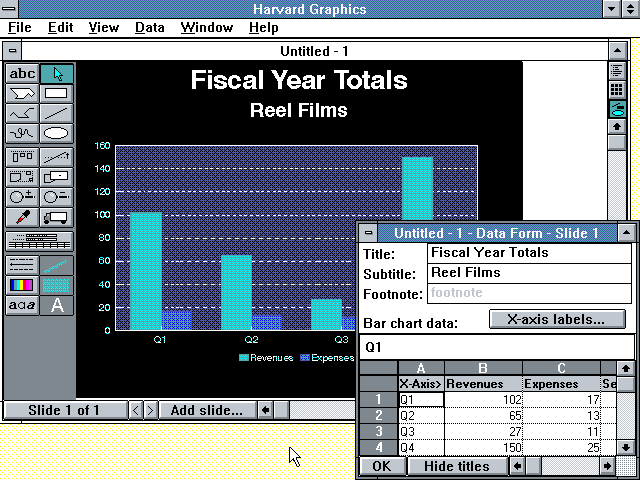 Pretty slick UI, right?
And the one 'classic' piece of workplace tech that I remember most fondly, for reasons I will share in a second, is Harvard Graphics, the first general use charting and data visualization tool to gain acceptance in the office. In the late 80s and maybe a little into the early 90s, Harvard Graphics was the go-to tool for creating at that time were really amazing bar, pie, line, and other types of charts that today we would just laugh at for their simplicity. But pretty soon Microsoft Office took over the office, and Harcard Graphics pretty quickly fell out of fashion.
But I loved my time with Harvard Graphics. Back in the day, when the first colorful stacked bar chart of regional sales broken out for the last 4 quarters emerged from the plotter, (look that one up, kids), and I marched it in to the CFO's office, suddenly I was looked at not like the 22-year-old kid who knew nothing, but as the 22-year-old kid who created something cool.
After getting a glimpse of what the HG program could do, the CFO started setting me off to make more and different kinds of graphical representations of our financials that would be used in exec meetings, sent out to the regional presidents, and often tacked up on the wall in the CEO's office. No one would ever tack a boring looking income statement on their wall, but a 3-D multi-colored bar chart of gross profit margin by product segment? That was high art to some of these guys, and I was the only person in the office, (probably because I could not add much value anywhere else), that was able at that time to produce these charts.
That simple little program, and the rest of the office's reluctance to embrace anything new or seemingly complicated, helped me cement a reputation as someone clever, useful, and for being what then passed for technically savvy - which make no mistake helped out your career as much back in those days as it does today.
Harvard Graphics got me at least two raises I am pretty sure.
Ok, the walk down memory lane is over. Have a great weekend and think about this little tale the next time some new and scary and complicated technology shows up in the office.
It just might be the one that gets your work tacked up on the CEO's wall.
12 Apr 15:51

The brand new Captivate 9 puts Adobe years ahead of the competition was first posted on August 21, 2015 at 9:35 am.
©2014 "The mLearning Revolution Blog". Use of this feed is for personal non-commercial use only. If you are not reading this article in your feed reader, then the site is guilty of copyright infringement. Please contact me at rjjacquez@gmail.com
The brand new Captivate 9 puts Adobe years ahead of the competition
by RJ Jacquez
What a difference three short years make in technology.
Back in 2012 you would have been hard-pressed to find anything exciting in version 6 of Adobe Captivate, in fact most of the cool stuff at the time was coming from Adobe’s competitors, namely Articulate with their new Storyline software and their latest iteration of Articulate Studio.
However, about a year ago I started to notice the tables turning.
While Articulate continues to make small, trivial improvements to their apps, sadly most with emphasis on the old, traditional eLearning, Adobe has been working hard on innovating and solving big problems, that truly matter in today’s multi-screen and multi-device world.
Today’s reality for Learning Design software vendors is simple, if you continue to focus on traditional eLearning design, you are not only doing customers a disservice, you are putting the future of your company at risk, in the way Kodak did when they refused to see a digital future.
I’m fully convinced eLearning is dead and all of us need to focus on designing learning experiences that are fluid across multiple screens and that go beyond the 1024″ x 768″ comfort zone of the desktop computer. The sooner we embrace this truth and rally around tools and technologies that can enable us to deliver compelling learning experiences across multiple devices anytime and anywhere, the better off we will be as an industry.
Adobe Captivate takes a page from the Adobe Creative Teams
A key competitive advantage the Captivate team has always had, is access to a wealth of innovations developed by the rest of the company, especially those by the Adobe Creative teams. I’m happy to see that they are taking full advantage of that in this new release.
Adobe Captivate Draft for iPad
With Captivate 9, Adobe introduces a new iPad app that looks a lot like Adobe Ideas from a few years back. Ideas used to be one of my favorite apps, but unfortunately Adobe discontinued it in 2012. I remember using it and thinking, wow this would be amazing as a way to start designing learning experiences on the go and then continue developing these on the desktop and that is exactly what Adobe Captivate Draft for iPad is. According to Adobe’s site Draft is a storyboard app but I see it as a bigger innovation that has the potential to change how learning professionals will approach learning design in the 21st century. I don’t think is too far-fetched to envision a future where we can actually design full-blown learning experiences on a mobile device without the need for a desktop computer.
Captivate Draft strengthens the idea that we are no longer tethered to our stationary computers and that mobile devices are maturing from simple consumption tools to powerful authoring devices.
I especially like the intuitive gestures included in Draft for placing squares, triangles and circles on slides, as well as more powerful objects, such as text, images, video, audio and web objects, all with a simple finger gesture on the screen. It really is impressive. Incidentally, if you tap on any of these gestures, the app will show you how to draw these objects in order to add them correctly using a simple animation.

Adobe Captivate Draft on iPad
And that is just the beginning with this app. You can actually storyboard multiple slides, even add question slides, as well as images from your iPad’s library, record audio on the spot, share it with other reviewers and upload it to the Adobe Creative Cloud for easy access from Adobe Captivate 9.
Wow!
Responsive Learning Design
I recently wrote a post, where I made a case from why Responsive Web Design is the future of Learning Design. Thus far the post has been retweeted close to 500 times and overall the idea has resonated well with learning designers across the world.
One only needs to look at the direction of the web in general to realize the world is moving to responsive design as a way of solving the idea that we can no longer control what devices people use to access our content, and it’s easy to see why we need to move to responsive learning design, too.
The inclusion of Responsive Learning projects in Captivate 8 was a game-changer in my mind, and with the improvements made in version 9, things only continue get better. My first impressions, when I tested responsive projects was why limit break points to just three. In Captivate 9, we now get up to 5 breakpoints enabling us to design fluid learning experiences that can be accessed on the desktop, tablets and smartphones, including in landscape and portraits modes. Also new in version 9 is full support for importing SVG files, plus if you have Adobe Illustrator, you can actually round-trip changes between the two applications

Learning Assets Galore
I don’t know much about this partnership, but it appears that Adobe has partnered with the eLearning Brothers in an effort to bring users access to a ton of learning assets (over 25,000), including cutout people, games, interactions, scenarios, course starters and more. You can import any of these assets right from within Captivate 9 and the integration is pretty seamless. I tested this and it works really well!

Recording directly from Mobile Devices
Here’s another feature that I’m really impressed with, the ability to plug-in my iPhone or iPad to my Mac and then have Captivate 9 connect to it and record a video demo of any app. Again I tested this with my iPhone and it works flawlessly.

Adobe also introduces Captivate Prime, a new Learning Management System
Here’s how Adobe describes Captivate Prime:
Adobe Captivate Prime uses a single universal player that, like a fluid, dynamically provides eLearning content in all major media types, and for desktop and devices all through a common player. The advantages are significant. Because Prime uses this HTML5 player, the learning experience is seamless and looks and feels like the same modern player on virtually any device. The mobile experience on Prime is full of delightful surprises. Most notably, it supports offline course playback and delayed reporting. So even if you’re away from a network, you can still take courses and the mobile player will just sync your scores and other data with the Prime servers the next time you are online.
I really like the idea that Adobe built Prime from the ground up using new technologies such as HTML5 and not Flash. I also like the fact that the player is fully responsive, which means that learning experiences will be fluid across multiple devices.
Other noteworthy features in Adobe Captivate 9
There’s so much to like about the new Captivate 9 software, including enhancements to the multi-device preview via Adobe Edge Inspect and more Geo-location support. New in Captivate 9 is support for multi-state objects with any coding, including smart shapes, images, buttons text and more.
Conclusion
As someone who worked on RoboDemo when it was an eHelp Corporation product and later at Macromedia and Adobe, on the Captivate team, I couldn’t be happier to see Adobe taking this great product in the right direction.
Kudos to my old team for a job well done with Captivate 8 and now Captivate 9!
As I wrote in the title, the brand new Captivate 9 puts Adobe years ahead of the competition and as I see it right now, Adobe has set the bar really high for everyone else developing learning design software.
Needless to say, I highly recommend Adobe Captivate 9! Here’s a link to the trial, go get it!
What are your thoughts?
The brand new Captivate 9 puts Adobe years ahead of the competition was first posted on August 21, 2015 at 9:35 am.
©2014 "The mLearning Revolution Blog". Use of this feed is for personal non-commercial use only. If you are not reading this article in your feed reader, then the site is guilty of copyright infringement. Please contact me at rjjacquez@gmail.com
12 Apr 15:51


A Proposal for Change in Our Current Model for Higher Ed
by JimS
 By Lynn Zimmerman
Associate Editor
Editor, Teacher Education
A couple days ago, I heard a report on BBC News at WUNC about the connection between higher education and the job market in the UK. A recent report showed that almost 60% of college graduates were not able to find jobs in their field or even at their level of education. Some analysts are saying a university education is worthless and a waste of money, so they are advocating a return to apprenticeships.
However, the speaker said that he thinks that university education needs to be better aligned with what’s going on in the workforce. He also asserted that the workforce needs to be more open-minded about the skills they are looking for. He used the example that if you are going to be a biochemist, you need to learn certain knowledge and skills. However, for other bio-tech jobs, many of the skills one learns in any STEM program can give the employee the necessary basic skill set, which they can then refine on the job.
When I worked at a high school here in the US, I was part of a workforce readiness initiative for high school students. A representative from the local phone company told us to send them applicants who can read and write and be on time and they can do the rest with their in-house training. At the time, I thought that was a little simplistic, and I still do, but there is some truth in what he says.
This story also made me think about technology and education as well as MOOCs, other educational delivery systems, and the cost of education. First, I want to make it clear that I think there is more to university education than “skills training.” I think the university is a place to expand our awareness, have the opportunity to explore issues, and learn to think, really think. However, I also believe that higher education needs to take a step back and re-think how it is educating.
One area that should be addressed is the current model of students taking two years of basic courses, English, math, science, etc., before they can start their major courses. If high schools are doing their job, students should have this basic knowledge before entering the university. If they don’t then, perhaps, these deficits can be addressed with online competency-based courses that students take along with their major courses.
There are several advantages to this idea. First, students learn the skills they need, but save time and money. Second, these courses can help teach mastery skills as they are developing or refining competencies, such as writing skills and critical thinking. Then in major courses, students can integrate these skills into their acquisition of abstract theory and concrete knowledge needed to develop what they need to find jobs and be successful in their chosen careers.
What are your thoughts about this issue? Have you experienced this type of model (blend of online competency-based basic courses and major courses) or another model that helps better prepare students for the 21st century workforce while assuring them a quality education?
11 Apr 18:34
Hackney Pirates: School ≠ education ≠ learning. How can we become a ‘learning society’?
by Tom Beresford
Content
One of my fondest memories from my school years is getting in trouble for asking ‘why’ too many times. It was one of those defining moments in life where a higher power was telling you off for doing something that you thought was both natural and right. What I love about this memory is that it exactly when I realised that 'school' doesn’t equal education, nor does it equal learning. At that point, I knew that my natural inquisition could never be satisfied within the walls of a school building, nor by a single education system.
A thirst for learning is a basic human instinct, so why does it sometimes feel that systemic schools have a monopoly on learning? There’s an analysis in there somewhere, but the line of enquiry that I want to follow is why isn’t learning more widely imbedded in our everyday lives and the broader society?
Along came my Service Safari. Bingo. Hackney Pirates Cafe, aka ‘The Ship of Adventures’.
Situated on Kingsland Road, Hackney, in an archetypal East London Community, this unassuming shop is an absolute gold-mine of creativity, imagination and learning. Walking into the hybrid book-store cafe from the hectic, traffic-ridden street results in a mix between excitement and escapism. The immersive space is designed as the hull of a pirate ship, decorated with books and other items to be sold. But the real magic of this place wasn’t revealed to me until a confident pair of young boys scurried past me, being sure to say hello, but clearly eager to get somewhere. I watch them with intrigue as they greet a volunteer behind the cafe bar, exchange words, and carry on towards what to the naked eye looks like an idle panel of wood that makes up part of the ship’s hull. In fact, it’s a secret passageway that leads to the real purpose of this social enterprise...
Beyond the cafe/bookstore, Hackney Pirates offers supplementary support to local school children who have been flagged by their school as needing extra help to achieve their full potential. Working together with local schools, families and volunteers, they deliver unique real-world learning projects, that produce high quality products (sold in their very own store). all within their own unconventional learning environment, the Ship of Adventures.
In addition to the mass creativity on show at this hub of education, is a clear illustration of what learning is possible within a community, beyond the traditional school paradigm. Creating a learning community where “all the world can come and share in what is happening”, has the potential to create a much broader culture of learning that is relevant and less dependent on the traditional structures of education.
Imagine a Hackney Pirates in every community, targeting not just young children, but all age bands. A 'learning society' is something that wets the whistles of many politicians' speech writers, however the actual efforts to grow and nurture a culture of learning have been piecemeal at best. Adult learning opportunities are sporadic and policies are often granular, generally constrained to specific industry training.
“The whole of life is learning, therefore education can have no endings” (Eduard Linderman). For those who see this as a distant pipe-dream, never to be achieved, I simply ask, why? At Innovation Unit we think that public services can certainly learn a lot from such a community-focused, localised approach, and my visit to Hackney Pirates has opened my eyes even wider towards the realms of possibility.
I hear the UK library infrastructure could do with a little revolution in thinking...
Tom Beresford is Researcher and Project Coordinator at Innovation Unit.
Photo credit: Destination Hackney.
Our 'Service Safaris' were a set of visits the team at Innovation Unit made in groups to local service providers who are daring to do things differently. Our aim was to learn from them, and see what we could take away and instill into our journey transforming public services.
The visits had an unexpected added twist - every single one of us came away with a bolstered sense of passion. We were totally inspired, and between us all the visits renewed sense of 'this is exactly why we do what we do...and exactly why we love it.'
Check back soon for the final part of the blog series.
11 Apr 18:34

open and connected leadership
by Harold Jarche
What happens when reputation-based networked leadership comes up against hierarchical institutions and competitive market forces? In the short-term, it looks like it loses, as was the case of Greece’s finance minister, Yanis Varoufakis.
“So what Varoufakis is doing here is harnessing the capacities of communication technologies to support transparency and genuinely intelligent policy debate, and thus empower the polity. Alas, the opposite of both of those trends is the dominant norm in the political use of the mass media and communication technologies.” – Open Democracy
But it may be the winning strategy for the long-term.
“Varoufakis is experimenting with open and representative politics which seeks to advance the economic and social wellbeing of those he is elected to represent. Surprisingly, such an enterprise seems ‘new’ because the ‘realist’ norms of power governing high finance view the very idea of that sort of politician as an impossibility. If we have any serious commitment to the West’s democratic vision of power, let us hope there are more impossible politicians out there.” – Open Democracy
I noted in leadership in perpetual beta that in an age of pervasive networks, creativity and design are extended while command and control mechanisms like the executive suite are made obsolete. The art of storytelling as a leadership skill is retrieved from the past. Networks like Open Democracy are a platform for the narratives of new leaders like Varoukis. Other aspects of older societal leadership practices are also being retrieved, such as this example of democratic self-management used in West Africa.
“Being self-managers by definition, they navigate conditions and engage in practices that drive serious effectiveness without bureaucracy:
Zero Command Authority. All relationships, and all activities, are purely voluntary. No one has any authority to direct activities of any kind. All leadership is exercised through influence, persuasion and trust. The voluntary gathering of forty unpaid leaders for two full days of training was an expression of pure self-management.
Nurturing the Network. The overall network is actually a network of networks (in the parlance of my friend, Ken Everett, N2N). Each leader has a local community network, nested within the larger community of communities. The leaders operate fluidly at both network levels and internalize self-management at a visceral level because they have no other way to get things done. Resources from the larger level (like learning) flow to the local level, and local resources (like information) flow to the larger level. Both network levels are necessary, and each nourishes the other.
Learning Organization. The leaders gathered in small groups at break times to share insights, questions, observations and updates. The groups were fluid and information flowed easily from group to group and person to person, refining and anchoring the learning.” – Doug Kirkpatrick
As I complete my third book in the perpetual beta series, I see more signs of an emerging form of connected leadership as society and our economies move into the the next organizational form, from Tribes to Institutions to Markets, and now to Networks dominating the previous three forms.
While tribes were mostly cooperative, sharing freely amongst themselves, they had a near horizon for sharing, and were usually patriarchal for major decision-making. In networks, these tribal tendencies for control are not optimal. Neither are the more sophisticated control methods of institutions and those of markets. Thinking that the role of leadership is to act and make short-term decisions misses out on how well fully functioning human networks can deal with most problems without intervention from above. When managers and executives get involved, they often make things worse for those doing the day-to-day work. This is even more pronounced when those doing the work are connected to their peers in social networks and communities of practice that have established and trusted knowledge-sharing practices.
The real job of leaders today is to ‘hold the space’, and in order to hold it they need to first establish a space where connections are flourishing. Leading is connecting.
- Leaders help make connections.
- Leaders are network weavers, connecting others to make the network stronger.
- Leaders model good learning behaviours.
- Leaders practice personal knowledge mastery.
My new e-book, Adapting to Perpetual Beta: Leadership in the Network Era, will be published here before the end of Summer.

11 Apr 18:26


Using Associations To Prime Social Behaviour
by Richard Millington
Every colour, word, smell, image, sound provokes a set of associations we inherited growing up (and a few before we were born).
These associations prime our behaviour in curious ways.
For example, when we say something is “not scary“, “not bad“, or “not dangerous” our brain instantly picks up on the words ‘scary’, ‘bad’, and ‘dangerous’ and primes our mental pathways accordingly (which influences our actions).
Right now your brain is associating this post with scary, bad, and dangerous….Boo!
This has an impact in social settings too.
Let’s imagine you wanted to prime members to participate. You need to create connections to objects that they associate with participation. Does ‘sign up’, ‘register’ and ‘add your thoughts’ create the right associations?
There’s a big difference between using the words ‘post’, ‘create’, ‘share’, and ‘submit’ and using the word ‘publish’ for example. Each conjures very different associations. There’s a big difference between being labelled as a member, contributor, author, or volunteer too.
Think of the images that are displayed on your site too. Are they stock images used to fill gaps because ‘images are good‘? Are they photos of people similar to the members you’re trying to reach (or aspire to be) taking the actions you want your members to take? Does your audience see people like them doing what you want them to do?
Are the images of people you feature expressing the emotions you want members to feel when they read the post?
Consider the colours. What best primes members for the actions you want them to take? If you want safe/standard ideas use the blues and greys to match. There’s a guide here. If you want the scary and dangerous ideas (yikes, did it again!) use the reds and purples. You can even consider the font you use too. Here’s another useful guide.
You can create use second tier connections too. When primed with words like forgetful, wrinkle, people walk slower. What works objects in your sector conjure up images? Perhaps New York with ambition? Family with compassion? Beaches with relaxation? These can easily prime the type of contributions you will receive.
Sadly different groups make different associations with different objects. Colours can mean different things to many people.
A simpler way of thinking about this. What do you want members to be thinking when they move from one stage (room/page) to another? What will prime them to take the kind of contributions you want them to take? If you want them to read, ask them to read. Call them an audience. Tell them about your ‘latest updates’. If you want them to reply, ask them to review, test, or check the material etc.
There is a LOT of scope for improvement here. At the very least, we can be more careful about not creating associations we don’t want. That would be a killer mistake.
28 Sep 20:23
Humble leadership improves results
Some say it’s hard to be humble but humility is an essential characteristic of good leadership. Humble leaders are acutely aware of their shortcomings and weaknesses and they are open and honest about it.
25 Sep 13:57


How to Create a Great Workplace Infographic
by Smaragda Papadopoulou
How to Create a Great Workplace Infographic
You probably already know that happier employees generate better business results. The Great Place To Work institute has been researching the correlation between happy employees and employee productivity for more than 30 years. What they have found is staggering.
- Great places to work perform nearly two-times better than their competitors on the stock market.
- The best companies to work for experience as much as 65 percent less turnover than other organization.
- Great places to work more easily attract great candidates, paving the way for long-term growth and success.
But how can you make your business generate happier employees? The central ingredient in a great place to work? Trust! Trust is a crucial component of a great place to work.
The How to Create a Great Workplace Infographic shows you how to build trust among your team members and within all levels of your organization. In addition, it explore the importance of (and the ways you can) implement the following elements of a great place to work:
- Flexibility.
- Strong communication.
- Recognition.
- Professional development.
- Effective feedback.
- A sense of purpose.
Via: www.adeccousa.com
The post How to Create a Great Workplace Infographic appeared first on e-Learning Infographics.
25 Sep 07:48

Surface in Education event - October 22nd, Microsoft UK HQ
by Andrew Robertson - EDU

:: EVENT UDPATED: now including first look at newly announced Surface Book and Surface Pro 4 ::
Next month we will be opening the doors of our UK HQ for a full day of all things Surface within education. Interact and take a sneak peek at what the future of classroom looks like with the power of Surface, Surface Pro, and Surface Hub.
For registration details, please see below
The best way to learn about how this technology can positively impact the way students and teachers work, is to hear from those who are already using it. With this in mind, we'll be giving you the opportunity witness the potential for your school, college, and university by featuring the stories of case-study customers and Showcase Schools sharing best practices during the day. Then, towards the end of the day we'll send you off with a special keynote we know you’ll love.
All this, in a red carpet event with full exhibition area, including aspects of our very own Showcase Classroom.
It’s the event you don’t want to miss.

Event Details:
Thursday October 22nd
9.30: Registration, Refreshments, and Exhibition Area
10.30: Start
10.45: Surface, Surface Pro, and Surface Hub
13.00: Lunch, Exhibition Area, & Networking
14.00: Case Studies, & QA
15:00: Closing Keynote
16.00: End of event
Microsoft Campus, Building 3, Thames Valley Park, Reading, Berkshire, RG6 1WG
To register please click here to secure your place, using the invite code 942A19. Feel free to forward this invite, though there is a max limit of 2 people per customer organization, and each person will need to register individually.
24 Sep 11:54
Teaching & Learning innovations at Cass Business School
by Jo Richardson
If you’re looking for new teaching and learning ideas for the coming academic year, then lecture capture recordings of presentations from the 2015 Cass Teaching and Learning Showcase might provide some inspiration. The annual event...
24 Sep 11:53

5 Ways For Project Managers To Get More Done
by Elizabeth Harrin
I confess to being obsessed with productivity and organisation at the moment. As my toddlers are getting older, I find it takes more and more organisation to keep on top of our household routines. Plus I need to be super organised for work as well, as I choose not to stay late to get things ...
24 Sep 08:26


step aside for network era democracy
by Harold Jarche
Verna Allee says that in states of ‘complex unorder’, loose hierarchies and strong networks are necessary. This point was driven home this morning as I listened on CBC radio about the closure of a rural school in Nova Scotia and how the option of turning it into a ‘hub school’ was beyond the comprehension of the school board and department of education. These are strongly hierarchical organizations, while the community has been strengthening its networks between multiple actors in the region and beyond. The community understands it is dealing with a state of complex unorder, while the bureaucrats still think it is merely ‘complicated order’, as the departmental guidelines on hub schools attest.
“The neo-liberal argument is that the demand for school space is down and surplus inventory should logically be discarded. School sites are just property, a disposable public asset, and a potential public liability if they do not yield a return on their investment. By this logic fewer school children mean fewer schools. Schools have no place in neighbourhoods too small to supply a large enough clientele to make them ‘viable’. Market forces and market thinking trump democratic ideals for local communities.” – The School as Community Hub
Image by Verna Allee
Alexis de Tocqueville, in his book ‘Democracy in America’ based on his travels in 1831, identified ‘associations’ of citizens to be a driving force in the new democracy. John McKnight, in The Careless Society, described these groups as having three key capabilities: “the power to decide there was a problem, the power to decide how to solve the problem – that is, the expert’s power – and then the power to solve the problem”. As de Tocqueville saw how a society could function without an aristocracy, we now must see how government can function without a bureaucratic elite, and communities can operate without bureaucratic overlords. At this time, communities best understand their problems, and have the networked ability to solve them, but they lack the expert’s power of access to legislation and taxation.
Almost two hundred years ago the association of engaged and connected citizens enabled a functioning democracy in early America. Today, the dominance of markets, and market-centric thinking is coming to an end. In the early network era we need to develop systems of loose hierarchies and strong networks to deal with the increasing complex unorder our communities face. Democratic ideals must trump market thinking, or we will be doomed to live in the past, using the tools of the past.
Source: adapting to perpetual beta
The European Union is an example of how decentralization can work within a unified political entity. It is still a work in progress, as is democracy.
“Under the principle of subsidiarity, in areas which do not fall within its exclusive competence, the Union shall act only if and in so far as the objectives of the proposed action cannot be sufficiently achieved by the Member States, either at central level or at regional and local level, but can rather, by reason of the scale or effects of the proposed action, be better achieved at Union level.” – EU Declarations
Subsidiarity is a founding organizational principle for democracy in the network era. It enables community-level cooperation to counter competitive market forces to meet local needs within a global context. Imagine if our governments had a clause that stated that they would act only if objectives could not be achieved by the local community. Neither the market nor the government have the answers to our problems anymore. Both need to step aside for network era democracy to work. The solutions to our problems are in our networks, local and global.
23 Sep 15:24

Digital workplaces
by noreply@blogger.com (chris sexton)

I'm at the Gartner Digital Workplace summit in London for the next couple of days, bit of a last minute booking, as this is a new summit and I hadn't spotted it until recently. Am hoping it ties in nicely with the work on digital strategy we want to start soon. I'll try and take as many notes as I can of the sessions. Will definitely be in note form and not joined up English, so bear with me! I'm also using a new blogging tool on my iPad as my previously one has died, so who knows what posts will look like.
Opening keynote is entitled "Workplace Reimagined, Agile, Empowered, Engaged"
Digital Business is the creation of new business by blurring the digital and physical worlds. Three components people, things and business. Difference to 10 years ago is that the things are smart.
Digital workplace.
Engaged employees are more enthusiastic. By promoting employee engagement digital workplaces create a workforce that makes discretionary contributions to business effectiveness. Has to be based on trust. Building tougher increases trust.
Need to bring consumer like experiences into the workplace. Our most sophisticated computing environment these days is often in our home. Digital workplaces have an explicit goal of creating a consumer like computing experience that enables teams to be more effective. Need to strive for digital dexterity. The things people want to use, will always change. Don't chase the tools. Chase what people want to do.
Use smart technologies and people centric design. Instead of us becoming digitally literate, our computers need to be people literate. Digital workplace strategies exploit rmerging smart technologies and people centric design to support dynamic non routine work. Need to connect people to people, people to things and things to things.
There is no one vendor that will provide what we need. It's like an ecosystem of vendors that we need to stitch together. Need to use lighter weight technologies that will interact. Our teams need specialists who are not technologists. Need to have people who understand people.
IT will be measured in the future by internal customer satisfaction, not by how much money they save!
People need a more natural way of working. The way we interact with computers is improving. Apps that can talk and listen are not new, but apps that can interpret, learn and evolve are. Gartner predict that by 2018 25% of large organisations will have an explicit strategy to make their core computing more consumer like.
Emotion detection, already being used in some call centres. Facial recognition being used in marketing. What might these things mean in workplaces. Teachers with wearable cameras. Really will have eyes in the back of their heads. Workers in dangerous situations such as oil rigs wearing sensors to measure fatigue and stress levels.
HCI will become CHI where the computers are interacting with us.
Access to data, technology and people needs to be universal. Smart machines needed to create contextual experiences. Not talking about AI, ie replicating the way people think, but processing information and feeding it to us in a way we want. Building better tools.
How many people in room use things like Dropbox, when they're not allowed to? Loads. Convenience always trumps security and regulations! Need to change our policies, but also our language.
To really achieve a digital workplace, we need to involve people from outside of IT, eg HR, FM.
People will not only bring their own devices and apps to the workplaces, but will be bringing their own digital assistants. Different ones for different purposes. Amy from x.ai works across time zones to schedule meetings. Amelia from IPsoft handles front line queries and learns from experience. We will be opening up our data eg email and calendars to these digital assistants.
WYNIWYGWYNI great acronym! What you need is what you get when you need it.
Reimagine the workplace. Make it natural, make it universal, make it helpful.
 Posted with Blogsy
23 Sep 10:30
Tagged: 70-20-10, e-learning, e-learning tools, formal learning, informal learning


Top Six E-Learning Tools for 2015
by Craig Weiss
Well it is that time of the year. For what? No clue, but people seem to like saying that phrase and so, I’m adding it to this post.
And what a post it is going to be.
Unusual? Oh, in so many ways. Fun and Fantastic? If you have ever found something you lost, it is just like that – euphoria and then you realize the TV is still on and your favorite show is about to start.
Qualifications for e-learning tools
None. I didn’t put together any secret formula or weighting criteria for these tools. I did look at several sites that listed tools and realized for the most part they were authoring tools or tools that are super mainstream and oh, they are authoring tools.
When I did find a recent site, a few tools were different than the authoring tools or tools like Go Animate!, but most were ho-hum – is it nap time?
Thus, I decided to identify some e-learning tools that I think are unique, probably unheard of in the industry (in some cases) and offer folks some very cool capabilities.
Trial Tools
Always get a trial on any e-learning tool. A demo is a plus, but you really need to see how it works for you, whether what it says it actually delivers and whether it is a benefit to you and your team or school or whatever.
Best Buddy
Usually I list the others first, then the top tool or top product at the bottom to build excitement.
Not this time around though.
The top three e-learning tools out there are listed below. I’d like to personally thank you for winning this year. Uh, I won’t actually see you in person, rather I am sending a message right now using my ESP techniques that I learned from reading an ebook, telling me how to unlock this mystical powers.
Okay, all set. Oh, and for those folks wondering whether I am getting any money from these listings of products, the answer is a huge NO. NO affiliate money, no nothing. As with anything I do, always independent and fair. Oh, and honest. : )
Here they are
#1 Inkling – Document management solution with analytics. This isn’t your typical DM solution, more of a way to create whatever types of content you want, push it out, track it and utilize the results. I’d love to see more mobile power to it, beyond the usual and I think they could do something with video, not just popping it into the content per se. That said, it is a very cool e-learning tool.
#2 LMSApp – I am always intrigued by this tool. I know it won’t be flashy or knock my socks off (does anyone use this phrase anymore?) but it still makes me want to see more.
#3 Demo Chimp – Back in the day there was this amazing authoring tool called Rapid Intake and the guy behind the whole thing was Garin Hess. Garin is the person behind Demo Chimp. I know Garin (transparency here) and I always felt not only did he know his stuff, but this guy is an ID (instructional design) guru. A true e-learning developer who gets it. Anyway, he launched this product and it really is very cool. As you can surmise it enables you to create demos of your product, content, etc. A demo can easily become a course. Works with mobile.
#4 Nitro PDF – Frankly the best PDF tool out on the market. You can do everything you can imagine in it – okay, not everything you can imagine. But, editing, adding your signature, outputting to Word, Excel, PowerPoint (and I can tell you, it actually looks quite good and not cruddy which you see in other PDF push to Word products). I use Nitro as my PDF solution and even use their Cloud version, where I can send out documents, get people to sign them, and then save it all. IMO it makes Adobe Acrobat and Reader look like ancient offerings.
#5 Degreed – It shows off beautiful, and yes it lists thousands of courses, but it is not an LMS nor LCMS nor learning platform (in case you were wondering). Rather total e-learning tool here.
What it does is you buy the courses, take the courses, take whatever you want – but you actually leave the site and go to the site where the courses or whatever you are using are located. Not iFrame here, literally link click (behind the scenes) and whalla on course site. So, one server goes to another server on another vendor’s site.
The same with an LMS. Think of Degreed as an overlay with a set of robust features. They use an algorithm whereas they (Degreed and their expert or experts) came up and the admin cannot change the points assigned to each piece of content or whatever (not at this point they can’t).
Degreed told me that they are considering/exploring changing that so an administrator could change the points piece, which is huge, since it impacts the algorithm in a positive way – after all, shouldn’t the people who are creating the content and administering it, have the power to modify and tweak those points on whatever? I always hate where vendors think they know more than the client when it comes to these algorithms.
Remember think overlay and you will be better off.
#6 Easybib – This one is for you K-12 and HE folks. Sake for transparency – I use this tool too. Where you might ask? With my book that I am writing, that will be published next year by ATD. This would have been an awesome tool back in my days of grad school, especially with that yucky literature review thing. Anyway, the solution offers you the option to use Chicago, APA, Harvard and other formats for your citations and will save the citations in the cloud. I should note this is the premium option. I think they call it Pro.
Bonus
#7 Madcap Flare – There are people out there who either still use Robohelp or wish there was something like it out in the market. Well the folks behind the original Robohelp left and formed Madcap. They have a variety of offerings, but this one is for flare. Think Robohelp on steriods, maybe PEDs – who really knows.
Finally
I see a lot of courses that are missing the essence of instructional design. What I hear back is that individuals can’t find the methods used or it takes too long to learn or there is no need to use instructional design in building a course, especially with the rapid content authoring tools.
With all due respect, I disagree. I self-taught myself instructional design and if I can do it, so can you. I used the site below to help me, and read a great book by Horton (last name) in 2002 (so the content of course building with HTML not sure if relevant today).
Anyway, I started out using ADDIE for ID then realized it really doesn’t apply to WBT, even back in the early days. So, I like many other ID folks that I know, decided to do a hybrid of ADDIE – a little bit here, a little bit there. You can extract information from ADDIE and use it in building your course or courses.
I did.
This is the site, I don’t know if it has been updated with links or not, but I and many, many others used it and I know people who still do. It is all about ID, e-learning and stuff like that. Includes some OD items as I recall. Don Clark
Labels and Boxes
I’m not a fan of Kirkpatrick – some people are – and hey whatever makes you happy.
Just as some people live and die by the 70-20-10 approach and others do not – including me. I just don’t see nor believe that 70-20-10 really applies to e-learning in 2015. Same with the informal-formal learning.
E-Learning has changed training, L&D in so many ways. But, you see, as a whole, we can’t have that. We can’t see the world outside of the forest (okay some of us can – and that is why change is happening across training and L&D ).
We like labels. We like to put items or approaches or methodologies in a nice box. Then put a bow on it and call it a day or informal learning or formal learning or 70-20-10 or something else that has been around since the early to mid 1900’s. ADDIE? 1950’s.
Well, I hate freaking labels and I cannot stand putting things into boxes. I like seeing what is impossible and pushing it to become possible. That is what e-learning offers all of us – but to achieve that, we all need to take one step back and see beyond the state of yesterday and the path of today.
Each of these e-learning tools offers you that first step in seeing what is out there.
For some of you, it will be a multiple set of steps. For others a step here and a step there.
Maybe it will provide you with a ladder to look above the forest and trees of commonality of online learning.
Offering you an opportunity to rip down those labels; smash those boxes and say to yourself, this is different.
It is not, 70-20-10. Not informal-formal. And not, some antiquated approach that wasn’t designed nor built for WBT.
What you must decide is whether these tools will provide you with the necessities to move forward
Into the future
OR, will you disregard them
and stay in the past.
E-Learning 24/7
Tagged: 70-20-10, e-learning, e-learning tools, formal learning, informal learning
23 Sep 10:28
 I’m no Corbyn fan but his BIG idea in education (NES) is way beyond the pale, insipid Tristram Hunt policies that typified the last Labour leadership's educational policy. I was highly crtitical of his approach. Actually, it wasn’t a policy at all. They decided to keep the issue off the political canvas, as they largely agreed with the Conservatives. No difference, don’t mention it. Thankfully the hapless Hunt has resigned. But what does our Jeremy really promise in education? He outlined his ideas here but I've speculated a little, based on past pronouncements and alliances.
At least it’s a bold idea, roughly in line with what many want. But to pull this off you have to centralise funding agencies (a good idea) and save costs. Yet, the idea also brings in its wake the usual quango-building. Corbyn is unlikely to go for a merger approach, so we’ll likely end up with a profusion of bodies with a large administrative centre. That’s worrying. Bureaucracy may be its downfall.

10 Corbyn education policies that actually make good sense
by Donald Clark

1. National Education Service
In his acceptance speech he thanked the "Socialist Education Association". Their ideas have informed his policy. It was they who want to ‘develop a single, broad and inclusive framework for the curriculum from early years to adult education’. The emphasis on a universal (comprehensive) system, with equality of opportuntiy at its heart, is exactly what this organisation recommends.
So what is the National Education Service? Corbyn equates it with the National Health Service - free at the point of delivery. So far, so good. This is a fine idea. The world of learning is like the separate horizontal layers of an old, stale cake. Pre-school, primary, secondary, sixth form, FE, HE, adult learning. Yet individual learners go on a vertical journey and have to smash through each of these horizontal layers in turn, often failing, getting disillusioned and the net result is a system where nobody’s happy – learners, teachers or parents. We need to see learning as a lifelong experience, like health.
It may also align education with health in another fashion, with a focus on evidence-based teaching and learning. We have long compared education with medicine, showing that one has advanced while the other has remained largely static. Here's an opportunity to take the research and professionalisation agenda seriously. The problem he faces is ghat teachers want professionalisation but then go all woozy when it comes to professional standards and a reserach and evidence-based approcah to teaching and learning. You want to be like the NHS, then make the whole thing student-centred, in the same way that health is patient-centred.
The NES needs to be fleshed out. How will it be funded, run and organised? He has to reconcile his belief that Local Authorities should build and run schools v a NES. You can do what is currently done with the NHS - directly funded by Government, lots of control, appoint a CEO, free at point of delivery but with professional bodies, such as NICE, recommending and publishing guidelines (Ben Goldacre has written smartly about hte neeed for a NICE in education). A second model is the BBC-type model, where you set up a separate Trust, at arms-length from Government. This is unlikely as control is what they want and probably need, to get things done. A third model is a highly devolved model back to Local Authorities but this is dangerous as many could be hostile. Unfortunatley, that's the chosen model, bringing all free schools and academies under loacl authority or Mayoral control.
But remember also, that it is not possible to have a ‘National’ Education Service. What he means is an 'English' Education Service. Scotland, Wales and NI, long disgusted by the political shenanigans in England, have long gone. Nevertheless there may be room for more alignment, as this is the model they sort of have elsewhere.
So what is the National Education Service? Corbyn equates it with the National Health Service - free at the point of delivery. So far, so good. This is a fine idea. The world of learning is like the separate horizontal layers of an old, stale cake. Pre-school, primary, secondary, sixth form, FE, HE, adult learning. Yet individual learners go on a vertical journey and have to smash through each of these horizontal layers in turn, often failing, getting disillusioned and the net result is a system where nobody’s happy – learners, teachers or parents. We need to see learning as a lifelong experience, like health.
It may also align education with health in another fashion, with a focus on evidence-based teaching and learning. We have long compared education with medicine, showing that one has advanced while the other has remained largely static. Here's an opportunity to take the research and professionalisation agenda seriously. The problem he faces is ghat teachers want professionalisation but then go all woozy when it comes to professional standards and a reserach and evidence-based approcah to teaching and learning. You want to be like the NHS, then make the whole thing student-centred, in the same way that health is patient-centred.
The NES needs to be fleshed out. How will it be funded, run and organised? He has to reconcile his belief that Local Authorities should build and run schools v a NES. You can do what is currently done with the NHS - directly funded by Government, lots of control, appoint a CEO, free at point of delivery but with professional bodies, such as NICE, recommending and publishing guidelines (Ben Goldacre has written smartly about hte neeed for a NICE in education). A second model is the BBC-type model, where you set up a separate Trust, at arms-length from Government. This is unlikely as control is what they want and probably need, to get things done. A third model is a highly devolved model back to Local Authorities but this is dangerous as many could be hostile. Unfortunatley, that's the chosen model, bringing all free schools and academies under loacl authority or Mayoral control.
But remember also, that it is not possible to have a ‘National’ Education Service. What he means is an 'English' Education Service. Scotland, Wales and NI, long disgusted by the political shenanigans in England, have long gone. Nevertheless there may be room for more alignment, as this is the model they sort of have elsewhere.
2. More vocational
It also unifies the funding. I’m in favour of unifying educational funding as it oils the wheels for more rational decisions, especially the balance between academic and vocational. HE has had its own way for too long. It’s bloated and over-funded. We need to rebalance HE with a stronger approach to vocational. Curiously, Corbyn is more aligned with the Conservatives and their 3 million apprenticeship promise at the last election. But his view of apprenticeships is not one of being employer-led. It would be accredited by FE (that's weird) and employers. This is a bit fuzzy but there is a clear need for a properly defined and funded apprenticeship system. It has cross-party appeal. The good news is that he really does value ‘skills’ and wants to stop the deep erosion of FE and the adult skills budgets. It's anti-Blairite and it's right.
3. Scrapping University fees
He wants to scrap fees but also reintroduce grants. This is par for the socialist course but it has consequences, not least the subsidising of the rich by the poor.
4. Online education?
He’s a fan of the Open University, saw it as a socialist triumph, and talks about it fondly and explicitly as a great Labour achievement. Good on him. I agree, and hope that he will expand on this online approach to education. Tom Watson's a digitally sophisticated politician and really does get this stuff.
5. Get rid of charitable status for private schools?
Keiza Dugdale, Corbyn’s emissary in Scotland, has hung her hat on this policy in education and I’m sure Corbyn agrees and will attempt to do this south of the border. This is long overdue. The Conservatives and, unfortunately, the hapless Tristram Hunt, was in thrall to this elitist system. It's unlikely they will call for its abolition but we do have to see them as the business they are and recognise that they are a major force in creating inequality.
6. Scrap Grammar Schools and 11+
He want to scrap all Grammar Schools and the 11+. This has long been a stupid anomaly in England and causes no end of chest beating in the Conservative Party. David Willets, one of the smartest people in the Conservative government, was sidelined and eventually sacked, just because he held this belief, so it is not a mad, loony-left policy but a mainstream belief. Good policy, let's get it done.
7. Fewer tests
Fewer tests! Thanks God. This taps into the widespread view among teachers and parents that this has got out of control. However, the hard-left have a habit of sticking with centralised state-control in education , so don;t hold your breath. The SNP, north of the border have just introduced another raft of testing.
8. No league tables for schools
Yipee. Again this taps into the zeitgeist about education being a right, not a competitive market. We don;t have league tables for hospitals, nether should we for schools. Education is far too important to turn into a competitive sports spectacle.
6. Scrap Grammar Schools and 11+
He want to scrap all Grammar Schools and the 11+. This has long been a stupid anomaly in England and causes no end of chest beating in the Conservative Party. David Willets, one of the smartest people in the Conservative government, was sidelined and eventually sacked, just because he held this belief, so it is not a mad, loony-left policy but a mainstream belief. Good policy, let's get it done.
7. Fewer tests
Fewer tests! Thanks God. This taps into the widespread view among teachers and parents that this has got out of control. However, the hard-left have a habit of sticking with centralised state-control in education , so don;t hold your breath. The SNP, north of the border have just introduced another raft of testing.
8. No league tables for schools
Yipee. Again this taps into the zeitgeist about education being a right, not a competitive market. We don;t have league tables for hospitals, nether should we for schools. Education is far too important to turn into a competitive sports spectacle.
9. Single examination boards?
My guess is that he’d also unify examination boards, A Gove idea but a good one nevertheless. It’s what they have in Scotland and makes a NES that much easier to implement.
10. Corporation tax
On costs he wants to add 2% to corporation tax. This is reasonable, and matches the ‘levy’ the Conservatives want to load on to employers for apprenticeships. In many ways this is easier to implement and redistributes profits into training. The problem here is that this raises only £3 billion. This nowhere near covers what Corbyn is proposing.
Ministers
One worry I have is that, in education, Corbyn has a pretty dismal personal record. He was pampered through fee-paying prep and boarding schools but only got two E grades at A-level. (You get an E for turning up.). He then dropped out of his University course for disagreeing with his tutors. Wow.
Also, Lucy Powell, appointed Shadow Education post, is an apparatchik politician - school, Oxford, party HQ, assistant jobs, MP. Far from stellar, she's a bit of a Labour clone. On the upside Angela Eagle, who is in charge of 'skills', is a formidable and capable politician. BIS has always been badly run with lacklustre civil servants. It needs a shake-up.
Ministers
One worry I have is that, in education, Corbyn has a pretty dismal personal record. He was pampered through fee-paying prep and boarding schools but only got two E grades at A-level. (You get an E for turning up.). He then dropped out of his University course for disagreeing with his tutors. Wow.
Also, Lucy Powell, appointed Shadow Education post, is an apparatchik politician - school, Oxford, party HQ, assistant jobs, MP. Far from stellar, she's a bit of a Labour clone. On the upside Angela Eagle, who is in charge of 'skills', is a formidable and capable politician. BIS has always been badly run with lacklustre civil servants. It needs a shake-up.
Conclusion
At least it’s a bold idea, roughly in line with what many want. But to pull this off you have to centralise funding agencies (a good idea) and save costs. Yet, the idea also brings in its wake the usual quango-building. Corbyn is unlikely to go for a merger approach, so we’ll likely end up with a profusion of bodies with a large administrative centre. That’s worrying. Bureaucracy may be its downfall.
23 Sep 09:43
UPDATE AND PICTURES: Bus ploughs into parked car and restaurant in Crystal Palace
Firefighters rescued a woman who was trapped after a bus ploughed into a parked car and a restaurant in Crystal Palace during the morning rush hour.
23 Sep 09:39
Tagged: #altc, #digitalcapabilities, #VLE

The angst of time, technology and VLE sediment #altc
by sheilmcn
As an additional #hashtag activities at this year’s #alt conference, participants were asked to use the hashtags #my #altc to highlight their “best bits” of the conference.
I had high hopes for the “are learning technologies fit for purpose?” session, however despite Lawrie saying he didn’t want this to be a re-hash of “is the VLE debate” of a few years ago, it did seem to turn into a bit of VLE bashing, with the underlying inferences that learning technologies = VLEs and they weren’t fit for purpose. I did have to have a bit of a rant at the direction of the discussion leading to #my #altc moment
(which did seem to go down quite well with the rest of the people at the session
@leohavemann @Lawrie @DonnaLanclos thank you
— Sheila MacNeill (@sheilmcn) September 8, 2015
//platform.twitter.com/widgets.js
To VLE or not to VLE, that seems to always be THE question. It is, imho, actually the elephant in the room. We have them, so can we just move on please. It’s how we use them that’s important. Martin Weller has a good post on the session too, and blame him for the VLE sediment phrase!
As all the keynote speakers either explicitly stated, our digital footprints, data and access are all changing. Even our so called “learners 2.0” spoke about the ubiquity of technology in their lives but the scary moment when you have to use in “in the real world” in your job, in their case as they were trainee teachers, in the classroom. Confidence levels can swing dramatically from using digital “stuff” for your own purposes to when you have to use it in learning and teaching. I know in my institution we have many new teaching staff who come directly from professional practice and their knowledge of “learning technology” is very limited, and based on their own experiences. What’s new there, I hear you ask dear reader. We know that all teachers just do what their favourite teachers did. Well yes, but just now not everyone has had experience of blended, and or fully online learning. They are often still trying to figure it all out as well as cope with a very different working environment.
In the discussion the issue of time came up. Some people think this is a non starter as if someone wants to to do something,then they will make the time. Which is true to an extent. But, if staff member isn’t confident in using whatever their institutional VLE is, then the chances of them being able to find the time with increasing teaching loads gets smaller. New technologies (learning or otherwise) alone won’t solve this. If we want to create digitally confident learners and teachers we need to give time for digital experimentation and failure. A closed, (relatively) safe space such as a VLE is good place to start that.
Almost exactly a year ago I wrote a post called “Living with the VLE dictator”, a year on my thoughts are much the same. However, I do see an opportunity to reframe the debate around people digital capabilities and use of (learning) technologies not just the technologies themselves.
Tagged: #altc, #digitalcapabilities, #VLE
14 Sep 09:54
Coming Soon: A brand new LMS from Adobe
by Priyank Shrivastava
Yes you heard it right! An LMS from Adobe. We have been working on building a Learning Management System (LMS) for sometime now. And I am happy to let you know that it is shaping up nicely and is getting ready to be launched soon. This is a long post, but so has been our […]
11 Sep 14:10
'Open university' of air and mail: from the archive, 11 September 1964
by By our Educational Correspondent
A new distance learning concept is being launched, combining TV and radio tuition with correspondence and face-to-face residential courses
The first scheme for an “open university” is announced today by Dr Michael Young, chairman of the Advisory Centre of Education. ACE’s National Extension College is asking the Department of Education for £2 millions a year for this purpose.
Mr Young’s scheme is given in the form of a report of a conference on television and correspondence, which was opened by Sir Edward Boyle, Minister of State for Education and Science, and chaired by Mr A. D. C. Peterson, of the Oxford University Department of Education.
Continue reading...
11 Sep 14:07
Colleges free to apply for degree-awarding powers as moratorium ends
by Tony Harbron
The TES is reporting that proposals to remove barriers to entry into the higher education market have been welcomed by FE colleges.… Read the rest
11 Sep 14:07
Superhead calls for schools to teach identical curriculum at same time in same order
by Tony Harbron
The Times is reporting that a former head and government advisor has called for children aged 4 to 14 to study the same uniform curriculum in the same order at the same time in schools across the country.… Read the rest
04 Aug 14:09
Ernst and Young drops degree classification threshold for graduate recruitment
by Chris.Havergal
27 Jul 09:27
Google Timeline - scary and impressive
by philipbradley
Google Timeline promises you that you can 'revisit the world that you have explored'. Critics may well say that Google is keeping very close tabs on everything that you do, even moreso than you thought! They explain: "Your Timeline allows you to visualize your real-world routines, easily see the trips you’ve taken and get a glimpse of the places where you spend your time. And if you use Google Photos, we’ll show the photos you took when viewing a specific day, to help resurface your memories."
Let me give you an example. Last year I went on holiday to Cornwall. I used my mobile phone a few times to check mail, take photographs (though at that point not on Google photos) and check the web.
So I can see where I went, how long I stayed, and if I'd used Google photographs I could see what photographs I had taken. I can go through my history to any given year or date to see what I did and where I went, I can see popular locations, favourite restaurants and so on.
It's currently available on the web (you can see yours at https://www.google.com/maps/timeline) if you have location services turned on, and it's also on the Android at the moment, not iOS. It's being rolled out, so don't worry if you don't have it yet, it'll come your way soon. You can of course turn it off by choosing not to share locations with Google, and you can delete particular days or journeys for whatever reason. Obviously you're the only person who can see this; it's NOT public.
I'm really in two minds over this. It's a great tool, and if you ever need to remember where you were on a particular day, or want to relive memories of a holiday, it's superb. However, it's also worrying that we're continually feeding huge amounts of data into Google, and they can do pretty much whatever they want to with it.