by Jackie Krause, Laura Portolese Dias, Chris Schedler
While competency-based education is growing, standardized tools for evaluating the unique characteristics of course design in this domain are still under development. This preliminary research study evaluated the effectiveness of a rubric developed for assessing course design of competency-based courses in an undergraduate Information Technology and Administrative Management program. The rubric, which consisted of twenty-six individual measures, was used to evaluate twelve new courses. Additionally, the final assessment scores of nine students that completed nine courses in the program were evaluated to determine if a correlation exists between student success and specific indicators of quality in the course design. The results indicate a correlation exists between measures that rated high and low on the evaluation rubric and final assessment scores of students completing courses in the program. Recommendations from this study suggest that quality competency-based courses need to evaluate the importance and relevance of resources for active student learning, provide increased support and ongoing feedback from mentors, and offer opportunities for students to practice what they have learned.
The AI, Deep Learning, Machine Learning and Cognitive Computing turf is really heating up – this will be the hottest areas to invest-in, in 2016, no doubt. This video shows what is already possible – imho, a true #hellven challenge!
Find more about man vs machine and artificial intelligence on the TFA Youtubechanel.
Read more related posts on The Futures Agency blog
It’s clear that video is increasingly part of doing business: 96% of businesses say video helps train employees better and faster, 94% say it has a strong part to play in team bonding, and 91% think it makes executives more personal and relatable. But how exactly are enterprises using video to communicate both internally and
The best webinars are focal points for everyone to check they are doing it right.
The best webinars are like radio shows for an enthusiastic topic group.
Webinars can tell members they’re going through the same challenges, same joys, and the same experiences as one another. They tell people what to care about, how to feel, and provide a point of common connection.
Webinars should integrate with the current affairs in the community and increase activity. They should draw in newcomers and engage them within the group.
At their worst, webinars are an unmemorable waste of time for everyone concerned. They don’t educate or entertain.
If your webinars aren’t boosting activity, they’re (sadly) wasting everyone’s time.
Don’t settle for doing another ok webinar. You’ve attended and hosted as many as I have.
You know the drill. The webinar begins. A speaker is introduced. The speaker speaks for 45 minutes with 15 minutes allowed for questions.
These webinars exist to fill gaps in a content calendar. They don’t increase activity.
We can use a few simple principles to undertake much better webinars for members.
Principle 1) Integrate Webinars With Topical Community Affairs
Imagine your webinar as a radio show for your community. The goal is to leave members feeling highly informed, entertained, or better connected to one another.
The webinar should be integrated with current community activity.
A webinar should tackle key issues that have arisen, draw attention to the key people, and highlight what’s going on.
Don’t invite experts at random. Invite experts who can help resolve the toughest challenges members have highlighted.
Which brings us to setting a good webinar topic.
Principle 2) Use Your Data To Identify Good Topics
There are 3 good approaches to determine a webinar topic:
1) Surveys. Use your member surveys to highlight good discussion topics.
These should have a specific focus. You can find examples of our surveys here. Provide members with an open-ended way to highlight issues that may not have been addressed yet.
2) Recent discussions. Review the most popular discussions in the past month. Invite one or two of the key participants to join you in a webinar and publish the registration link in a reply to that existing discussion.
3) Call for Ideas. A simpler option is to call for ideas. Ask what topics members would like to be covered in a webinar. What are the sub-topics of each.
Principle 3) Try A Non-Lecture Format
Lectures are the easiest way to do a webinar, but not the best.
Webinar recordings don’t attract many viewers, which means you’re designing for the live audience – not the subsequent audience.
You can test different formats here. The best webinars should be:
Highly educational.
Comprehensively tackle a big challenge members have or inform members about any upcoming issues. Be time-efficient with this. The shorter the webinar is, the better.
A traditional presentation format can work, but so can having an hour-long Q&A.
You might do an online workshop. Imagine this as a classroom and have attendees do exercises.
You can have a facilitated panel discussion between 3 to 4 top experts. Go far beyond the traditional format.
Highly entertaining.
This doesn’t have to involve telling jokes, although humour is great. Have members share their most emotive or remarkable stories about the topic. Tell them during the webinar. Better yet, let members tell them live.
You can solicit questions from members and answer them yourself during the webinar.
You can highlight the funniest stories you’ve seen around the web that week.
Perhaps imagine your webinar is an hour-long show. You might have the first 10 minutes for the latest news in your sector, the next 20 might for a guest interview, another 20 minutes on member stories. You can then use the final 10 on individual member announcements.
Look at what radio shows and entertainment shows do. There are many different formats here. You can mix and match these too to keep it fresh.
One week have an expert, the next tackle member problems, the third do your own lecture, and the fourth share some of the most engaging stories recently.
Principle 4) Don’t Use Default Options
Don’t rely on the default options of your webinar software.
Check every feature and setup every option. You will only need to do this once.
In future you can replicate a previous webinar and change the key details. Here are a few key things to set.
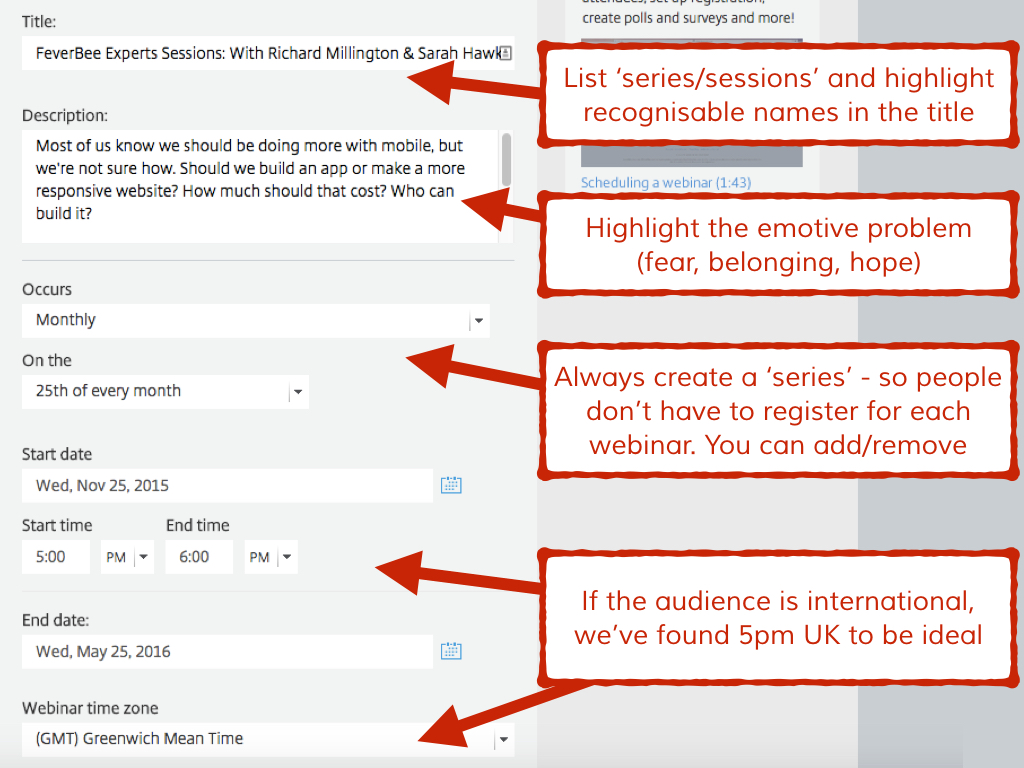
Title: Define the webinar as part of an ongoing series. List either the known people involved or the specific problem you will tackle. We’ve found people and organizations trump a specific challenge, but this will depend how well known individuals within that sector area.
Description: Outline the problem that the webinar will tackle. Don’t explain the solution here. The purpose of the description is to persuade people to register. Use your survey data to highlight the specific emotional appeals (usually hope, fear, or belonging) within that topic. If someone is worried about mobile design, what are they really worried about? Probably appearing incompetent, seeing engagement begin to decline, or not keeping pace with new trends?
Create a series: One-off webinars can be fine, but it’s far better to create the series. You can change each individual webinar anytime you like. This requires people only to sign up once and receive notifications of all future webinars.
Set a time that is around lunchtime or the beginning of the evening: We’ve found 5 to 6pm UK time to be ideal for our international time. Largely because it catches lunchtime on the east coast of the USA. If your audience is more concentrated, pick a time that is close to lunch or the end of the day.
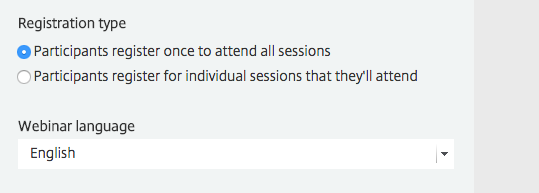
Make sure you select register once to attend all sessions.
Branding and Design
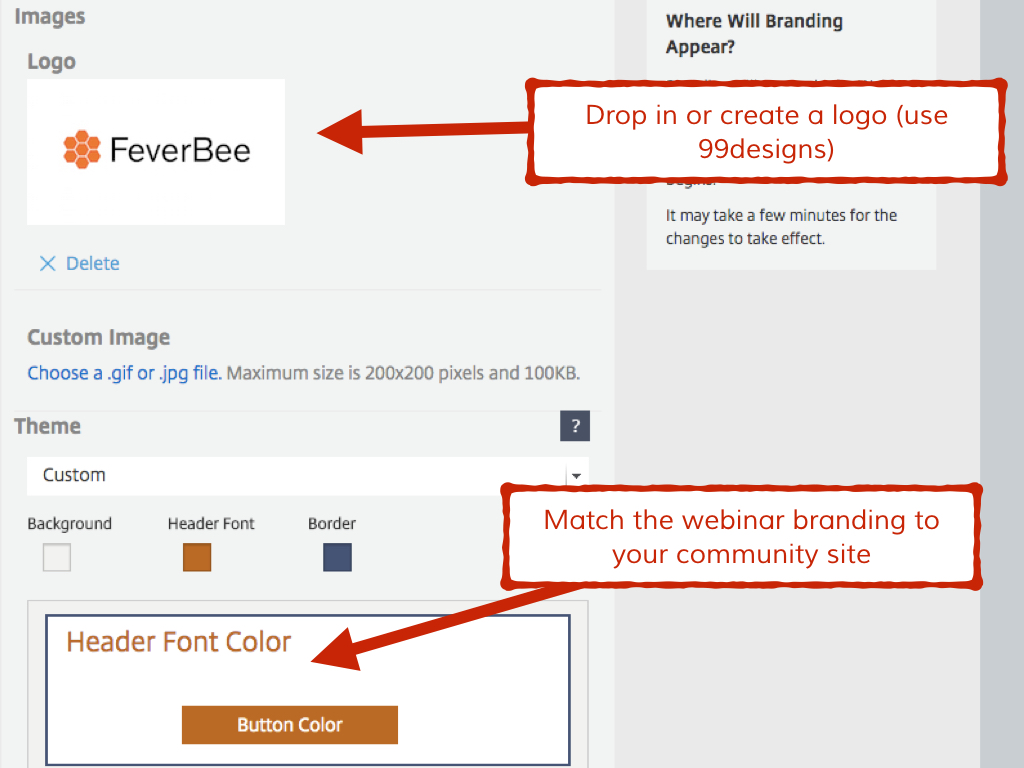
Add your brand or community logo to the webinar If you don’t have one, go to 99designs and have one designed. You’ll be using this for a long time.
Then select or customize the theme to reflect the branding of your site. The default branding designs are very plain.
Remember in future, you can copy the template from previous webinars.
Welcome message
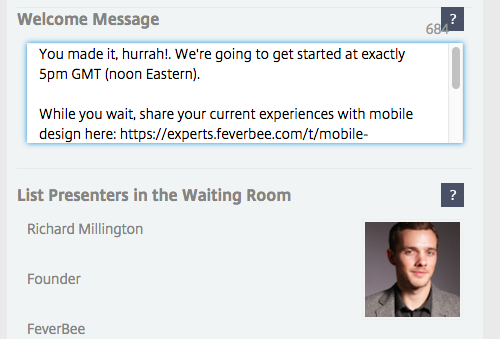
Most people will show up a few minutes early. Some show up 30 minutes early and do work while waiting to begin. Add a welcome message that also serves as a call to action to participate in the community.
This might provide more examples about the topic, the relevant discussion, or anything else within the community.
You can also (not shown in this box) list the hashtag to solicit early questions.
Be sure to add your guests as panelists early and check they use the link on the day. Resend these on the day and check in with any guests 2 hours early.
Develop your e-mail series
This is the biggest immediate area for improvement right now. GoToWebinar (and most platforms) offer you the ability to send out a series of e-mails to all attendees.
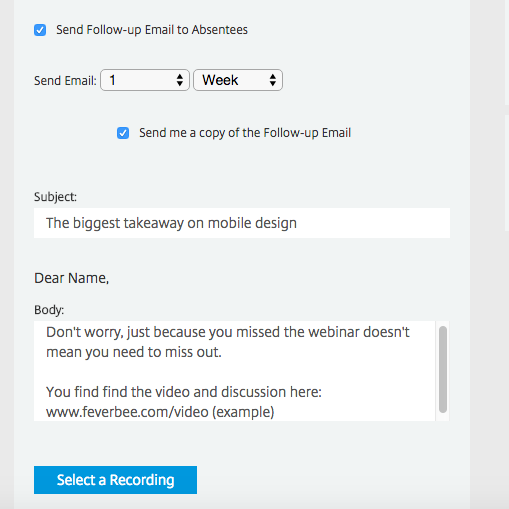
Don’t use the bland defaults. Each message is a chance to engage someone further in your community.
Use these to include links to relevant discussions within the community.
You want people to share what they want to learn, their own examples, and who they want to hear from. Place calls to action within these e-mails to engage people further within the community.
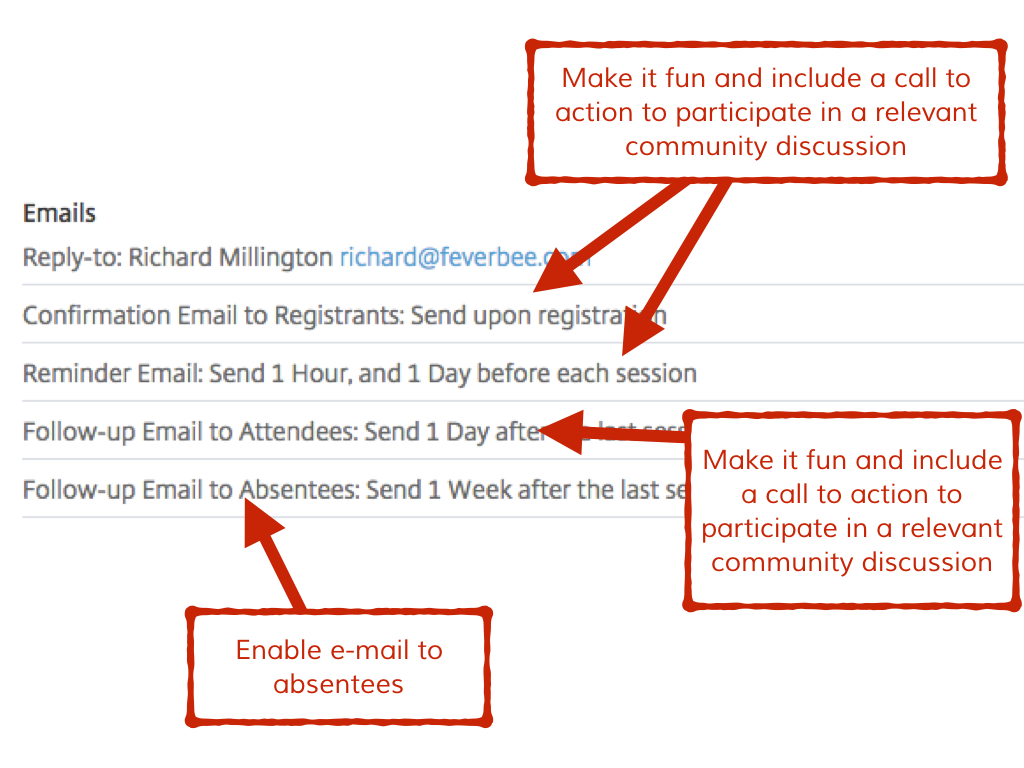
Enable the follow-up message to non-attendees. Don’t include the video, guide them to the place in the community which contains the video.
The entire purpose of the webinar is to increase engagement. You want to bring these people into the community circle.
Principle 5) Use A Broader Array Of Assets To Promote The Webinar
Make it easier for guests to co-promote the webinar
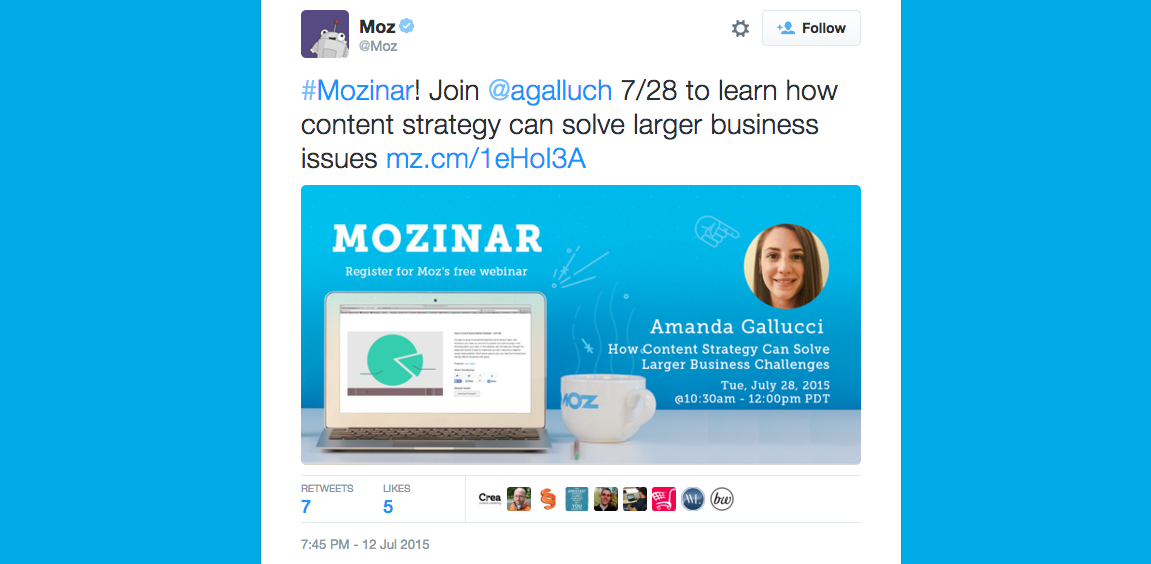
Create a standard image featuring the subjects of the webinar which can be used on Facebook, Twitter, LinkedIn, and elsewhere.
Tag in the other person by name with relevant industry hashtags. This makes it easier for the subject of the webinar to co-promote by simply clicking share or retweet.
Also offer the subject(s) of the webinar something exclusive just for their audience.
This can be previous videos, useful information, or anything that helps.
This increases the odds they will help promote it to their own audience (which means more members for your community).
Banner or popup on your site.
Many platforms allow you to create a banner or popup to highlight upcoming activity. Use this to drive more people to sign up for the webinar.
Again, you usually only need to do this once for a series.
Promote in the discussion posts.
In relevant discussion posts, let people know you’re hosting a webinar to tackle the problems or issues highlighted in the discussion. You can go back to former posts as well – all members receive a notification.
Solicit questions in advance.
You don’t want dead silence when it comes to questions, so solicit some questions in advance on Twitter, the community, and your mailing lists.
Use a curiosity-driven subject line “Questions about {topic}”.
This also helps to promote the session and equips you with a list of questions to ask during the webinar.
It’s usually far more effective to send an e-mail out to everyone asking for questions about a topic (which promotes the webinar) than to send out endless notifications about the webinar itself.
Other groups
Offer any other groups the ability to send the recording to their own audience if they wouldn’t mind promoting it. You can also use their questions first as an exclusive benefit to reaching more people.
ShareLinkGenerator
In your own e-mails to attendees or outbound promotion, use the ShareLinkGenerator to create a clickable link people can use to promote the webinar in their own social media channels. There are plenty of others tools, this is the easiest.
Principle 6) Don’t Skip The Pre-Interview
Do you think most interview subjects appear on the news without the presenter knowing what she’s going to say? Of course not. Most media outlets do pre-interviews. You should do these too.
You personally shouldn’t be learning anything new in the webinar, but your audience should be.
You should never be asking a question of a subject in a webinar you don’t know the answer to.
This leaves you no time to prepare follow-up questions and typically means you fail to extract the most valuable insights in the most efficient way possible.
I recall asking one webinar subject years ago how they got into the field. Five minutes later, he was still explaining his detailed history. Before a media outlet conducts a live interview, they do a pre-interview.
They find out the most useful pieces of information and guide the discussion in that direction.
This also allows you to prepare the subject to talk more or less about specific topics. Explain to them the key insights you’re hoping to extract from the interview.
Have methods of alerting them it’s time to wrap up their answer and to move on to the next question (e.g. if they’re speaking and you begin responding to every point in the affirmative).
Many poor webinars occur due to a lack of preparation. Simply doing pre-interview and better preparing for webinars will make most of them far better than they are today.
The webinar is the summary of what you have already discovered about the person. It’s not a free-wielding interview format.
Before the webinar begins, you should know the questions you’re going to ask of any subjects, the answers they’re going to give, how you’re going to shut down and move on to the next point, and the questions from audience members.
Principle 7) Only Deliver Handouts To Those That Show Up
If people know the recording will be available, they don’t turn up (and, curiously, they never watch the recording neither).
The most powerful way to get people to show up to the webinar is to provide extra value within the webinar itself.
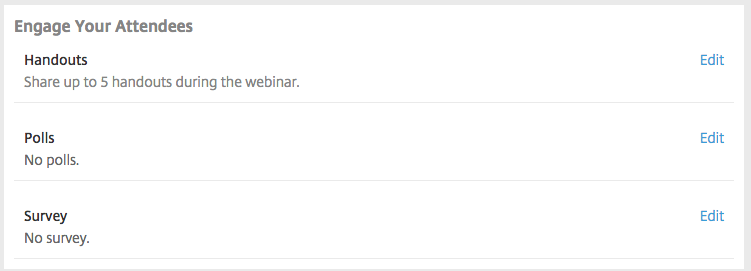
This usually means handout information. GoToWebinar and most other platforms lets you deliver up to five handouts.
I suggest you use all 5 of them, even if some have been sent out before.
One or two can be the best material or a list of links provided by the subject of the webinar or about the topic of the webinar.
People highly value a list of recommended books, detailed resources, or even links to the top discussions on this topic. This material can also later be reused for new members to the community.
Detailed case studies and examples also work well as handouts.
This is also why pre-interviews work well. They let you prepare handouts that summarize the key points of the speaker and you can send them out during the webinar itself.
Principle 8) Prepare Engagement Activities Every 10 – 15 Minutes.
If you do public speaking, you know it’s hard to keep an audience’s attention for 45 minutes.
Now imagine doing that on a webinar where the attendees don’t have to feign polite interest.
I rarely see engagement activities used within a community webinar.
Yet every platform allows them. If you know the points you or your subjects will make, you can prepare surveys and polls to find out more information and engage the audience every 10 – 15 minutes within the session itself.
This keeps attendees more engaged. Most people right now will have your webinar running in the background while they work. You need to keep them engaged with clear activities. You need to plan these activities in advance.
These should address the biggest questions members face, their views on the issues highlighted by the subject, or broader thoughts on the industry/sector the community is in.
Principle 9) Arrive Early And Ask Questions Of Individual Members.
Show up to the webinar 15 minutes early and start the broadcast. You don’t need to begin the session yet, just start the broadcast.
Now welcome people by name as they arrive. Ask them questions they can respond to with their microphones or in the Q&A. Keep it informal and friendly.
The goal is to individualize the session to as many participants as possible. Speak openly about some of the latest things going on in the community.
Ask people for their views. Try to increase the level of engagement while people wait. Attendees that arrive early will feel they’re getting something exclusive and unique to them.
This is also a good time to ask people to share some of their biggest challenges, what topics they hope the webinar will help them with, and when they can ask questions.
Over time you will begin to build relationships with a large number of people answering the questions.
Principle 10) Act Like A Radio Show Host
During the webinar don’t act like a polite emcee, act like a radio host. Cut people off when you need to, bring in new voices, mention as many individuals as you can by name. Press subjects to answer the question if they skirt around the answers.
Have a personality, shine the light where it needs to be shone. Engage people heavily within the session. Don’t worry about replying to an impromptu question or tweet from an attendee.
Principle 11) Use The Survey To Create The Learning Loop
Use the follow-up survey to gather useful information. Ask people how informative or entertaining they found the webinar. Ask people what they liked and didn’t like about the webinar. Feed this back into your planning for the next webinar.
Make sure the survey goes out after each session and comprises of just 3 to 5 questions.
Quickly convert the video and upload it to Vimeo. Then share the video link with those that attended and your partners. Upload the slides to slideshare and link it to the video.
Encourage the subject(s) of the webinar to post the video to their own channels.
Principle 12) Always Loop Back To Fresh Community Activity
Now create new discussions in the community about any of the issues raised in the webinar. Include this link in the e-mails going out to both attendees and non-attendees.
Also include a link to the video within this community. This should drive further activity in the community and spread the knowledge further throughout the community.
Don’t Become Stale
Any webinar format or form you assume is going to become stale after a large amount of time. This means you will need to frequently test different ideas and bring new ones into the webinar.
At the moment we’re not exploring any of the possible formats we could be using to drive greater traffic in the community through webinars. Even soliciting questions in advance and creating new discussions after the webinar will drive more activity.
We have a great opportunity to explore new formats and integrate them better with community activity. If we get it right, we can deliver far more effective, valuable, and memorable webinars.
Engagement with work and Community (potential and applied value)
Opportunities for community value creation
Data gathering methods used were:
Pre and post program surveys sent to all 200 (approximately) Community members. 115 people responded to the pre-program survey and 78 to the post-program survey.
Data from monitoring Community SharePoint site
Community Demographics
Community members are from nine operational sites and two head office locations in Australia and New Zealand. Job role and age distribution are shown in the tables below. The geographic and age distribution of respondents was similar between the two surveys. The percentage of trades-people who responded to the post-program survey declined compared to the pre-program survey. This is consistent with feedback about barriers to entry for this group to take part in the online community.
% Program Respondents
Job Role
Pre-Program
Post-Program
Tradesperson – Fitter (performs hands-on maintenance and repair of mechanical equipment)
27.4%
23.1%
Tradesperson – Electrician (performs hands-on maintenance and repair of electrical equipment)
24.8%
16.7%
Maintenance – Other (e.g. Coordinator, Planner, Manager – plan and manage maintenance tasks and resources)
17.7%
28.2%
Engineer (production line design, project manage changes to production equipment)
12.4%
19.2%
Other
17.6%
12.8%
% Program Respondents
Age Group
Pre-Program
Post-Program
< 30 years
10.5%
10.3%
31-40
16.7%
20.5%
41-50
34.2%
37.2%
> 50
38.6%
32.1%
Increase in Networks
Completed Online Profile
By default, all employees have a brief personal profile in SharePoint and contact details in Lync (now Skype For Business). We also set up a contact directory on the Community site, organised by work location and job role. People were asked to update their profile with details such as experience, past projects, and interests. Profiles are included in SharePoint search results, so these details make it easier to find and connect with relevant people. As an entry level networking activity, updating a profile is an important step in community participation.
31% of respondents updated their SharePoint profile during the program. This increased members with complete profiles to 40%, against a target of 80%.
Interaction with People at other Locations
Unfortunately, we are unable to gather any network analysis data from SharePoint or Lync. We asked about the interaction between Community members in different locations using SharePoint and Lync. We compared the number of people respondents interacted with in the four weeks before each survey. WCL webinars were excluded from the data.
The graph below shows two key shifts:
Approximately 20% increase from no interactions to 1-5 interactions
Approximately 6% increase from 6-10 interactions to 11-20 interactions
We asked respondents to list up to five people they had interacted with at other sites in the previous two weeks. However, we lacked an effective tool or method to analyse this data.
Interaction across sites increased during the WCL program. Sustaining and building interaction would require effort.
Community Engagement
Site Newsfeed
The Maintenance and Engineering Community used an existing SharePoint site. General updates and transient chat could be posted on the newsfeed. However, the newsfeed was rarely used before WCL.
An early WCL activity was for everyone to follow the SharePoint site. Following a site ensures that site newsfeed posts appear in your personal newsfeed. SharePoint does not ‘push’ notifications of newsfeed activity outside of the newsfeed itself. This means that the only way a person will be aware of newsfeed posts is if they check their feed. The graph below shows how often respondents checked their feed. The number of respondents who never check their feed dropped from 62% to 27%. Those checking at least once a week rose from 18% to 48%. There was a slight increase in the people who check their feed daily from 9% to 13%.
Discussion Forum
Two discussion forums were added to the site: one for the WCL program, and a second for ongoing Community use. During WCL, we gradually moved activities from the program forum to the Community forum. We encouraged people to use the Community forum to share knowledge, solve problems and collaborate on improvements.
Forum posts do not appear in the SharePoint newsfeed. An alert can be set up on a forum to receive email updates of activity either immediately, daily or weekly. WCL participants were shown how to set up an alert and asked to set one up on the forum. At the end of the program only 30 people (approximately 14% of the group) had set up an alert. However, only 30% advised that they ‘never’ check the forum. This indicates that most are visiting the forum without being prompted by email alerts.
Activity on the Community forum was analysed. The count excluded activity on the WCL program forum and by program facilitators.We counted the number of questions, likes and replies, and the number of active individuals. There were 115 interactions from 23 individuals, representing 11% of the Community population.
Participation rates are consistent with the 1-9-90 rule which is a positive start. A small number of community champions are emerging.
Barriers to Community Engagement
The survey listed a set of activities and asked respondents who had not done at least two why they had not been more active. The table below shows frequency of different responses.
Respondents identified the key barriers to community engagement as:
Time – finding the time to do activities
Skills – not being sure how to use SharePoint and/or Lync
Need – not having identified a need to engage
Technology – Inadequate access to computer or mobile device
Who would be interested? – Uncertainty about what they can contribute and who would be interested in their contribution
Opportunities for Community Value Creation
Two open-ended questions gathered views on how participation in the Community could add value. The questions focused on improving business results. The were also phrased so that the answers reflected personal pain points and opportunities.
Q1: What do you see as the biggest opportunity to improve work practices and maintenance results at your site?
Key themes in responses were:
Access to information
Communication and collaboration between production plants
Relationship and collaboration across departments at a local level
Improving troubleshooting and speed to resolve equipment faults
Time / workload, improving workflow
Standard processes, setting standards, accountability
Maintenance planning
Improving technical knowledge
Innovation
Q2: How do you think the Community of Practice could help you with this opportunity?
Key themes in responses were:
Drawing on everyone’s experience
Allowing information to be shared
Ease of communication with others
Having a greater number of people to ‘bounce’ ideas, solutions and improvements
Use forums to ask questions and access feedback/experiences from other sites
Learning from mistakes and successes of others
Not reinventing the wheel
Alignment to common goals through interaction in new ways
Training on technical skills
I am actually writing this post seven months after the WCL program. This gives me the benefit of knowing what has happened in the intervening period. I recall being positive immediately following the WCL program. The WCL program had helped us to launch the Maintenance and Engineering Community of Practice. Participants understood how a Community of Practice could create value. The interaction between people in different locations had increased, and community engagement was growing. We could build on this with strong community facilitation. We had some barriers to address, particularly if we wanted to enable the trades-people to take part. There were also opportunities. Community Champions were emerging. The Community had identified improvement opportunities that we could build activity around.
The National Engineering and Maintenance Managers had a deeper understanding of tacit knowledge. They had a stronger appreciation of the value of networks and potential contribution of a Community of Practice. Our next step was to support them to develop a strong plan to build and sustain the community. We engaged Helen Blunden of Activate Learning Solutions to provide coaching on Community facilitation.
Image c/o Taichiro Ueki on Flickr used under a CC-BY-NC-ND 2.0 license.
Ever since the emergence of the internet, there have been concerns about those excluded as services increasingly move online. Commonly referred to as the “digital divide”, this exclusion has manifested itself in two distinct ways: lack of access (first level) and that of skills (second level). Progress has been made with the former in recent years as the numbers of those without internet have steadily declined, but the latter has proven far more difficult to address.
Over the course of the past two years, the number of people that have never accessed the internet has fallen by approximately 15% (from just over 7m in the first quarter of 2013 to just under 6m in the equivalent quarter in 2015). However, a lack of internet skills is still stubbornly high. In a BBC online skills survey last year, the corporation found that 20% of UK adults lacked basic online skills. Indeed, the overall lack of skills (particularly across the poorest households) remained unchanged between 2013 and 2014. These findings have been reinforced by a recent report by Go.On UK that found that more than 12m people “do not have the skills to prosper in the digital era”.
Traditionally, public libraries have been a key mechanism to close this so-called divide. Indeed, the People’s Network was borne out of this effort to close the gap and help more people get online. Libraries were seen as the ideal place to provide the support required. They offer a neutral space free from corporate influence, and are staffed by individuals trained to seek out and evaluate information. However, recent years have seen widespread library closures and cuts to staffing levels that have seriously impeded the services they provide. As a result, the libraries crucial role in bridging the digital divide has been severely undermined.
Whilst the role of libraries in tackling the digital divide has diminished, private sector organisations have stepped in to fill the gap. In March 2015, for example, BT and Barclays announced that they were going to work together to connect more people to the internet and to provide support to help people develop the skills they need. In order to provide this access and support, BT and Barclays would be working with local authorities to deliver the initiative in public libraries and community centres in England.
The delivery of this initiative is particularly interesting given the role of public libraries in this area and begs the question why such an initiative needs the direction of either Barclays or BT given the support public libraries have provided. However on the surface, in terms of closing the digital skills gap, there appears to be some benefit in their involvement. For example, Barclay’s Code Playground initiative is potentially a useful way to teach children how to code – a skill that is increasingly regarded as an important one for children to develop (although there are differingviews on the extent to which coding itself should be prioritised). However, this option is only available if they can visit a Barclays branch during a weekday with an adult and can provide a laptop. An option, therefore, not available to those without a computer at home or those whose circumstances prevent a visit to the bank on a weekday.
Initiatives such as the Code Playground could, of course, be delivered effectively by public libraries should they have the funding and staffing to make it happen. Indeed, with public libraries being far more accessible to the general public (and a lot more child-friendly) there is a real opportunity here for libraries to develop the digital skills of the next generation and help the UK lead the world in bringing through the next generation of coders. Delivering such an initiative that requires individuals to visit a branch and bring expensive equipment with them is perhaps not the most effective way of addressing the deeply entrenched digital skills divide.
The move to enlist Barclays and BT into the drive to tackle the digital skills gap emerged as an outcome of the Digital Inclusion Charter, where 38 signatories committed in December 2014 to reduce the number of people who are offline by 25% by 2016. The public library scheme will be run by Barclays Digital Eagles and BT’s Digital Friends. BT volunteers will be “working with trained Barclays staff – called Barclays Digital Eagles”, although it is difficult to determine who BT will employ as “Digital Friends” to deliver this initiative.
Furthermore, there is a lack of clarity regarding Barclays “Digital Eagles”: are they Barclays staff that have volunteered for these roles and been given extra training? Are these people experts who were recruited specifically to provide this service in libraries? Or are they simply bank staff doing this as an additional duty? It is unclear from the information currently in the public domain etc how Barclay’s will deliver this service. What we do know is that of the 377 UK-wide vacancies available at Barclays in August 2015, none have the title “Digital Eagle”.
Problems presented by the BT/Barclays partnership
There are a multitude of problems presented by this tie-up between BT/Barclays, and public libraries in England.
The encroachment of a commercial enterprise into a neutral public space such as public libraries is fundamentally at odds with the ethos of freely providing access to services for all.
The attempt by commercial enterprises to take over the roles of public servants: on what basis are volunteers working on behalf of a commercial body able to better provide the service than trained staff/volunteers working in public libraries?
How long is this funding going to last? It’s stated to be a two year project, but what happens when it ends? How will Barclays, BT and the government ensure that the development of digital skills continues after the project comes to a close?
Hardware – with Barclays Code Playground scheme (designed to help teach children to code), children have to bring their own laptop to the sessions. As this pairing of BT and Barclays seems to cover the internet connection (BT) and skilled support (Barclays), has there been any consideration regarding the provision of hardware? All three are required to effectively tackle a lack of digital skills, how will they ensure all three are available? Or is it only accessible to those who can provide the equipment?
Staffing – are commercial enterprise staff going to be allowed to use a public, neutral space? What will be the checks and controls on suitability of Barclays staff to work with often vulnerable users, such as Disclosure verification? Can we be sure that the staff provided by Barclays/BT will adhere to the highest levels of trust and privacy, meeting the standards expected of professional librarians?
Will BT or Barclays be allowed to use this neutral public space to promote their own commercial enterprises? Will there be any requirement for them to be entirely neutral when dealing with issues in terms of communications and banking?
When will this service be available? Is it only during dedicated sessions, as with those Barclays currently hold in their branches? Or will it be available during library opening hours, whatever they may be? Will BT/Barclays staff be available on evenings and weekends when the library is open?
Confusion over availability – digital TV means viewers across the UK will be seeing adverts for this service, which is actually only going to be available in England and Wales. This creates unrealistic expectations in potential service users of the resources available to them in their location, which their local public library staff will have to deal with.
Before the commencement of such an initiative, some clarity on these issues would be helpful and made clear to the general public.
Comment from CILIP – the professional body for librarians
To date, CILIP have not made any official comment on the implications of this collaboration between BT and Barclays, restricting their references to the announcement to a single tweet linking to a story published on The Bookseller website on 19th March. They also tweeted a link to another Bookseller story about the official launch of the pilot scheme on the 22nd July, but have not voiced any official concerns about this intrusion of commercial enterprises into a public space. Whilst there has been no comment to date, a representative from CILIP has attended all the meetings of the overseeing body, the Leadership for Libraries taskforce and have therefore been aware of the developments. It’s possible, of course, that all of the concerns raised above have been put forward by CILIP and these have been factored in to the development of the project.
The implementation of the scheme
The launch of the trial scheme took place on 22nd July 2015. As most of the publicity was on Government websites and the sites of the companies involved, the launch seems to have gone somewhat under the radar, aided by the lack of commentary by the professional body.
The press release mentions 100 libraries and community centres being involved in the scheme. The initialreports stated the scheme would cover “57 libraries and 13 community centres across the country. A further 10 sites, including a care home, a charity home and a homeless centre will also be provided with free wi-fi” – a total of 80 sites. Details of the remaining twenty sites are not currently clear which begs the question, what’s happened to involvement of the care home, charity home and homeless centre in the scheme? BT state that “more than 100 libraries and community centres” will deliver the project. The first Leadership for Libraries meeting indicates that the funding is for “80 libraries and 20 community centres in areas of social deprivation”, but in a later meeting the scheme is proposed to cover “100 sites including over 50 libraries”. Thirty libraries appear to have been dropped from the scheme, but there is no indication as to why.
Trying to locate specific detail about this scheme appears to be particularly difficult. How many libraries and other locations are actually involved in this scheme? Where can we find out which ones they are, and where they are? Why is there no consistency in the messages being published about this scheme? One of the risks of commercial enterprises being involved in public spaces and services is that the entire culture of a corporate body is focussed on protecting its own sensitive commercial secrets – a culture at odds with public body accountable to the public. The result seems to be what we have here with the BT/Barclays tie-up: a project that is both difficult to verify and one riddled with conflicting information.
Alternative approaches
In contrast to the above approach of inviting commercial enterprises to take possession of elements of a public space and services, an alternative project has also recently been launched in England by Arts Council England (ACE). As part of the drive to increase skills, ACE have announced the availability of £7.1 million in funding for public libraries in England to access, which will run for six months and help enable free wifi access across all public libraries in England. Confusingly though, that initiative is also a “key development” of the Leadership for Libraries Taskforce in parallel to the BT/Barclays project.
Final questions
It would be helpful if BT, Barclays, and the Leadership for Libraries Taskforce address the issues raised above, and communicated with greater clarity about the nature of the scheme and how it will be delivered. Answers to the following questions would be particularly beneficial in terms of the roll-out of this scheme:
How many public libraries are involved in this initiative? Which specific ones are they?
What restrictions are there on the employees of commercial enterprises while in a neutral public space? Are they allowed to promote their products, or try and gain a commercial advantage by attempting to gain clients while positioned within public libraries?
Was any analysis done on the viability of asking commercial enterprises to donate funds to public libraries to allow public library staff to provide the services which those commercial enterprises now wish to provide in libraries, prior to BT and Barclays being given permission to place their own staff within those spaces?
What protections are in place for the vulnerable users of public libraries who make use of the resources provided by the BT/Barclay partnership? Both in terms of the checking of the commercial participants in this scheme, and ensuring that no inappropriate promotion of products is being undertaken.
Who is responsible for the security of the machines which participants will use for the initiative, e.g. ensuring that no malware is installed on the machines involved.
What is the long-term plan for supporting this approach to developing digital skills in the general public, once this project is completed?
If you're in need of free images to use, take a look at LibreStock. It's a database of over 36,000 images that you're entirely free to use however you want. The images are pulled from a variety of different sites (though excluding Flickr for example) and they are of a good quality. Here's a screenshot for a 'library' search:
Click on the image that you want, and you get taken to the appropriate website, where you can then download it. It's not the biggest database out there, and regular readers will be aware that there are plenty of other engines out there, but it's certainly good enough to add to your lists!
Library Hi Tech News, Volume 32, Issue 9, Page 1-3, November 2015. Purpose – The purpose of this paper is to share possible opportunities for librarians, faculty and students with access to Google Classroom, and it includes a discussion of its application and functionality in information literacy sessions. Design/methodology/approach – This paper describes the functionality of Google Classroom with a review of its capabilities for providing information literacy instruction based on hands-on use in several classes and observation. Findings – Google Classroom streamlined delivery of materials with students in one-time and multi-meeting classes. Students appreciated its seamless integration with their university email accounts. Originality/value – Librarians teaching classes often need to share introductory information, exercises and supplemental materials with students. Google Classroom offers a simple platform for this purpose.
It’s an all-too-familiar scenario: we purchase something that promises to be “easy to use”, and yet it turns to be excessively complicated. And the more we try and figure it out, the more frustrating our experience becomes – to the point where we tune out, and give up.
Over the last few weeks we have been looking at a series of video tutorials for Sway, and so far we have explored what Sway is and how it can be used to make a tutorial and share a vacation - but it doesn't stop there. Another way that this app can help you to collaborate and share at school, at home or on the go, is through creating newsletters.
Within any educational institution, communication and the ability to share information and updates is vital. Whether that be letting people know an event is coming up, sharing the success of students academically or otherwise, or perhaps just sharing recent news of what the school has been up to. Sway is great for creating an interactive, engaging newsletter that you can then easily distribute online, for all students, teachers and parents to access.
One example of how Sway has been used in this way is the Bureau of Fearless Ideas, a Seattle based non-profit organisation who provide free after school tutoring to students, along with numerous opportunities for creative writing and other exciting educational activities. As part of their work, they send out a bi-monthly newsletter to keep students and their parents updated on what has been going on. What's important is that, when creating their Sway, the staff can work together in editing and preparing the content, making the most of the app as a collaborative tool.
Within Sway you can use the simple features to create the newsletter in exactly the way you want. When creating a newsletter or brochure like this, it is important that it is engaging for the reader - which is why the ability to use a range of media in your Sway is a great tool. You can easily add text in different sections, while integrating images throughout as well. You can bring images in from your computer files or OneDrive, and then arrange them in a way that suits you, using the layout features such as slideshow or groups to enhance this experience for the viewer. Making use of the focus points tool also ensures that the important points of your photos aren't cropped or covered, making sure that your story is told exactly the way it was intended.
And the media is not just left at that! Sway is also compatible with SoundCloud and other music platforms, so it is easy to drop any songs or music that you want into your newsletter. You can then enhance the experience by supporting your messages with social media, sprinkling your Sway with tweets and posts brought in from other sites.
If you have combined all of this media to form great, engaging content, then the last thing you want is static data popped in amongst the fun! This is why the ability to embed interactive charts into your Sway makes it an even better tool for telling everyone about the progress the students are making, or recent OFSTED statistics, for example.
Once all this content is dropped in, the drag and drop editing makes creating an update quick and easy. One click interaction means you can create a Sway in a snap, and the speed and simplicity helps schools, universities, colleges and other organisations, such as Bureau Fearless Ideas, get the word out about what they are up to. Try creating a newsletter yourself at www.Sway.com.
Here is the Sway featured in the video, for the Art + Film institute:
CIPD chief executive Peter Cheese opened the institutes’s annual conference in Manchester by telling delegates that they will need to look beyond traditional thinking and standardised practice, and start defining ‘professional’ in new terms.
There is no one size fits all model for HR and organisations need to start developing principles and values that drive good, ethical and sustainable business more clearly, he said.
The conference provided much food for thought and challenged delegates to think about the role of HR now and in the future. Here are our take-aways from the conference.
1 Presenteeism is a huge challenge for organisations
Professor Sir Cary Cooper, 50th anniversary professor of Organisational Psychology and Health at Manchester Business School, opened the conference with a talk looking at wellbeing at work. He shared a range of stats showing the scale and impact of stress at work. For example, 70% of people work more than 40 hours a week – but we know that consistently working long hours will make you ill.
Cooper said that presenteeism – coming to work ill or adding no value whilst at work – is becoming an increasingly urgent issue for organisations as it affects one in four employees. And this is having a considerable impact on productivity – the UK is the least productive of the G7 countries.
The answer, Cooper said, is to improve how we manage colleagues. That means developing managers with great interpersonal skills, who show empathy and compassion and who have emotional intelligence.
2 Corporate L&D needs to change
Our very own Mike Collins gave an interactive session on why L&D needs to change. Citing the work of Sir Ken Robinson, Mike said L&D needs to shift paradigm from being the custodians of learning to enabling colleagues to develop their own learning skills.
In order to do this, L&D professionals must:
1. Get out of your comfort zone to innovate
2. Think big, start small
3. Take a risk
He said that L&D must start to think about how it can contribute, be a catalyst, collaborate, curate and be creative.
3 HR business partners can impact change
Helen Thevenot, global business partner at Thomson Reuters described how HR business partners can have a huge impact on culture change. She described how her team had piloted a change programme that started with 300 technology leaders and ended up reaching 10,000 employees.
Thevenot attributed the success to asking searching questions about culture from the outset. The company looked at mood and how it affects productivity. From this work the company identified that individual accountability was at the core of change – the individual has to be accountable for their behaviours.
The HR team challenged their own thinking on change. Thinking drives behaviour, behaviour drives results, Thevenot said, so the team challenged themselves to think differently. They went outside of the business to get ideas, visiting organisations that worked in very different ways to their own. By doing this they challenged their own thinking and developed new ways of bringing about change including hackathons.
Thevenot said that HR business partners need to make technology their friend. Thomson Reuters is using their HR technology platform to identify skills around the business, for example.
4 New skills for HR
HR professionals need to be credible and trusted, according to Steve Foster, former organisational effectiveness manager at Transport for London.
Although he was talking about change projects, his advice is relevant to all HR professionals as all organisations are in a constant state of flux. To be effective at helping manage change, HR professionals must use an effective approach to change, be clear on the value they bring and always be curious.
On top of this, make sure you know who you need to influence to be successful in your role and constantly assess where change is as a priority in your priority list. It is easy for change to be trumped by day to day priorities. Finally, look to develop teams not individuals. You cannot do this alone!
5 How to beat the digital deluge
Dave Coplin, chief envisioning officer at Microsoft, gave a glimpse into the future of technology. He showed how machine learning and big data will help computers predict the future – the question for organisations is what they do with that data. It all sounded quite scary but the good news is that these developments give us humans a chance to rethink our relationship with technology.
We need to stop skimming, snacking and multitasking with technology and start living in the moment – that means choose whether to use tech or not. Always ask the question: will using technology at this help or not.
The good news is that the future requires us to be creative . . . and we don’t necessarily need technology to do that
Every second Friday I review what I’ve noted on social media and post a wrap-up of what caught my eye. I do this as a reflective thinking process and to put what I’ve learned on a platform I control: this blog. Here are what I consider the best of Friday’s Finds for 2015.
Quotes
“All things are subject to interpretation. Whichever interpretation prevails at a given time is a function of power and not truth.” – Friedrich Nietzsche – via @surreallyno
@ericgarland – “Humility is often painful, but arrogance is always fatal.”
@willrich45 – Engagement: “Not a metric for learning. A prerequisite.”
“I think it’s a discovery all artists make: the most interesting and bravest work is likely the hardest to make a living from.” – @berkun
“It is difficult to get a man to understand something when his salary depends upon his not understanding it” — Upton Sinclair – via @jerrymichalski
“Jos de Blok is a nurse. He owns a company that employs 9,000 community nurses in Holland. The company has only 45 administrators, about a 10th of the average for a company that size.
The company, Buurtzorg, is the highest rated care organisation in Holland, as rated by patients. It is the highest rated employer in the country for 3 out of the last 4 years.
Its overheads are 8% vs the average of 25%. Imagine how much extra money you have we would have for patient care if we could copy this. Its employee sickness rate is about half that of similar organisations.
The company is 7 years old and now has 60% of the community nurses and community patients in the country. Nurses are leaving their old companies in droves.
Instead of managers, hierarchy and bureaucracy the nurses manage themselves in teams of about 12 nurses. They employ their own staff, order their own supplies, solve their own problems. And they love it!”
“Work. There are two critical drivers of change in work: connectivity and machine capabilities. As we are connected almost any work can be done anywhere in the world, with richer interfaces enabling greater comfort with remote work and the ability to perform physical labour. Increased capabilities of robots and computers are matching and moving beyond those of humans in many cases, destroying jobs. There is the potential for these forces to reduce employment and polarise work opportunities. However we can also envisage and create a future of work in which job creation exceeds job destruction, and we make work increasingly human, tapping our expertise, creativity, and aptitude for relationships to create a more prosperous world.”
“In the 1950s, the bureaucracy was the computer. People were organized into technocratic systems in order to perform routinized information processing. But now the computer is the computer. The role of the human is not to be dispassionate, depersonalized or neutral. It is precisely the emotive traits that are rewarded: the voracious lust for understanding, the enthusiasm for work, the ability to grasp the gist, the empathetic sensitivity to what will attract attention and linger in the mind.”
“I help to negotiate rules and exceptions from those, to prevent or resolve conflicts, to make appointments and to get to people and places. I do all kinds of things “meta” – keep eyes on meta-learning, observe, document, reflect and get others in the loop.
Most of the work kids do themselves. It’s their learning and I’m holding the space for them.”
“The conceit of education is that the answer to bad schooling is always more schooling … When education is seen as a cure and cognitive deficiency a disease, we need to worry.”
“So, if you really think deeply about such things, you come to realize that every organization is nothing but a mental construct, an idea around which people and resources are assembled theoretically in pursuit of common purpose and in accordance with a belief system of some sort. So I became convinced that it is really the ultimate design problem. If an organization is really nothing but a mental construct, then anything you can conceivably imagine in putting together the relevant materials, which include people and their relationships, is possible. And this construct will either bring out the best in people or the worst in them. In the long run, the command and control model rewards and brings out the worst in people instead of their best.”
“To summarize, the refugee crisis is a microcosm of the future that we all face over the next 10-20 years. The social grammar of that crisis looks like this:
• As rules and regulations (that always reflect the past) are increasingly out of sync with the actual reality on the ground, we see
• Systems starting to fail, break down and collapse, which leads to…
• People, journalists/media rising to the occasion or not–and accordingly…
• The logic of collective action arising from either the past (muddling through or regression) or from the present moment (co-sensing by tuning into what the emerging future calls us to do).
If the latter happens, we begin to see that the crisis and breakdown of our larger systems are actually a phenomenal opportunity to renew and update our old bodies of rules and regulations to be more fluid and in sync with the actual situation on the ground.
If the former happens we will see an enormous magnification of human suffering and amplification of the system breakdowns on an unprecedented level of global scale.”
“At first, we in the city administration were very surprised. But then we realized that this was not uncoordinated. It was a highly professional, high speed performance. That is when it dawned on us that here was the self-organizing plural sector in action. So we in the city administration decided to give The Train of Hope all the technical support it might need, including background support on call. We then invited The Train of Hope to join the city’s crisis management network, an offer that was accepted. I am delighted to report that this cooperation has continued to perform consistently well, with no end date yet clear.” – Wolfgang Müller, Chief of Operations, City of Vienna
“Ultimately, Tomasello’s research on human nature arrives at a paradox: our minds are the product of competitive intelligence and cooperative wisdom, our behavior a blend of brotherly love and hostility toward out-groups. Confronted by this paradox, the ugly side—the fact that humans compete, fight, and kill each other in wars—dismays most people, Tomasello says. And he agrees that our tendency to distrust outsiders—lending itself to prejudice, violence, and hate—should not be discounted or underestimated. But he says he is optimistic. In the end, what stands out more is our exceptional capacity for generosity and mutual trust, those moments in which we act like no species that has ever come before us.”
Despite a record number of full-time undergraduates entering universities this year, the overall demand for higher education has been more challenging in recent times thanks to the decline of part-time study, a report highlights
If employers want to boost the productivity of their workforce they need to give them interesting work and trust them to get on with it. This is one of the main findings of the #cipd/Halogen Software Employee Outlook 2015 survey. When asked what would make them more productive at work, top of employees’ list is […]
University and College Union reacts to FoI request revealing highly paid officials at institutions reliant on income from undergraduate tuition fees
Revelations that leading academics in the UK are earning more than £600,000 while other staff have seen their pay cut, is evidence that the benefits awarded to vice-chancellors are “completely out of control”, according to a universities union.
A string of freedom of information requests by the TaxPayers’ Alliance and the Daily Mail showed that more than 7,500 staff at universities earned more than £100,000 last year, including several vice-chancellors and professors earning more than £600,000.
Higher education’s teaching and learning mission is under significant pressure, and colleges and universities are exploring a reorientation around learner success through new course models, learning space designs, and ways of assessing academic progress. Many factors are involved in leading academic transformation, including a focus on stakeholder-centered design, relevance of credentials, and the strategic use of technology. Academic transformation has the potential to restore higher education’s sustainability and bring renewed levels of excellence and student achievement.
The 7 Things You Should Know About... series from the EDUCAUSE Learning Initiative (ELI) provides concise information on emerging learning technologies. Each brief focuses on a single technology and describes what it is, where it is going, and why it matters to teaching and learning. Use these briefs for a no-jargon, quick overview of a topic and share them with time-pressed colleagues.
In addition to the 7 Things briefs, you may find other ELI resources useful in addressing teaching, learning, and technology issues at your institution. To learn more, please visit the ELI Resources page.
We looked at all still-private unicorns since 2011 and charted them based on when they first joined the unicorn club. While initially the chart shows unicorns being created at a relatively calm pace, the rhythm accelerates noticeably in late 2013 (right around the time Aileen Lee wrote her famous post coining the term unicorn in November 2013). Since then, there has been an explosion in unicorn creation, with over 60 new unicorns in 2015 alone.
The heights of the lines have no meaning, they are just connectors to the company logos.
This is a really good visualization that tells one story really well without crowding it with a bunch of extra information about the companies. Knowing that the image will most often be shared as a stand-alone piece, it would have been teer for them to include the URL back to the original infographic and a copyright statement in the infographic JPG image file itself.
Active learning is about engaging students in more activities than just listening. It places an emphasis of responsibility onto the learners as they must actively engage with the process for it to be a success, they are no longer sitting and waiting for us to fill their heads with knowledge.
Within higher education the emphasis of active learning has been on transforming the lecture model. It is a movement away from ‘sage on the stage’ and puts the lecturer into the role of expert guide and facilitator. We are there to help students to synthesize, construct and develop their own knowledge and understanding, rather than to try and transmit knowledge, unadulterated, from our heads into theirs.
The traditional lecture model is still the dominant teaching approach in UK HEIs and has changed very little in 600 years (See: Twilight of the lecture). Active learning aims to challenge that.
Why should I make my lectures more active?
Consider how you best learn. What have been your most positive memories? What do you remember after an hour or two hour lecture?
There has been an awful lot of research that points to lecturing as a fairly ineffective way of teaching. Students remember 70% of the first 10 minutes and 20% of the last 10 minutes of a lecture (Hartley and Davies, 1978). By reducing the amount of time you spend lecturing, you are greatly improving the students’ chances of understanding and retaining that information.
Research has also shown that how much new information students can retain from a lecture is also limited (Russell, Hendrieson and Herbert, 1984). Students who attended a “low density” lecture (containing 50% new information), retained more than those who had attended a “high density” lecture (containing 90% new information). When new information wasn’t being presented, the lecturers spent time reinforcing old information, contextualising and providing examples. This research implies that trying to give students too much new information in a lecture is actually counter-productive and that the time would be better spent in activities designed to reinforce selected key new concepts and giving students space to explore these thoroughly.
OK I’m sold! What can I do to make my lectures more active?
One of the most important aspects of active learning is to carefully design your activities around your learning outcomes and to encourage the students to think about what it is they are learning (Prince, 2004).
Studies have shown that introducing 1-3 minute pauses throughout the lecture dramatically increases recall and performance. This is also known as the pause procedure . This pause can be used to ask the students to discuss a key concept in pairs, to reflect on and answer a question, to explain their notes to a peer. A research project by Ruhl et al used the pause procedure to break up a 45 minute lecture into three sections. After each section he introduced a two minute break where the students were asked to work in pairs to consolidate their notes. This produced a marked improvement in student grades (see: Ruhl, et al, 1987).
Another popular method is the flipped classroom. When you flip the classroom the “lecture” element is given to students as homework and then the time in the lecture is used to discuss and explore the key concepts and work on activities that assist students in developing their own understanding.
For example, you could provide a key reading or video that you want them to read or watch in advance of your session in your Moodle area – check out BoB , which contains a huge video archive, TEDTalks, which has some excellent lectures on a variety of topics or MIT Open Courseware, which is the open area of the University of Massachusetts and also contains lectures on a wide variety of topics that are freely shared with other educators.
If you like you could also try recording your lectures, or part of your lectures, in advance. Tools like BB flashback (on standard build on all MMU machines), Voice over powerpoint, Audacity or even using a SWIVL, are all easy ways to record your lecture to provide to students in advance.
Use in lecture quizzes to create refresher points or spark discussions. An simple Yes/No or multiple choice question can be used to gauge the mood of group. If there is not a consensus then ask the students to buddy up with someone with a different opinion to them, and to discuss. Ask the question again and see how the opinions have changed (See: http://harvardmagazine.com/2012/03/twilight-of-the-lecture).
Below is a list of different software that can be used in lectures to ask questions to the group. Students can use their mobiles, tablets or laptops to post an answer. Each of these systems has a ‘free to use’ element, although most also have a paid option with more features.
Encourage students to confer and reflect in pairs, why not ask them to submit their reflections online so you can check their understanding and share with the group?
Tools for providing pre-session resources in Moodle
If you have clips for them to watch or a reading for them to complete, putting it into your Moodle area lets the students complete this in advance of the class.
Prince, Michael. “Does active learning work? A review of the research.”JOURNAL OF ENGINEERING EDUCATION-WASHINGTON- 93 (2004): 223-232.
Ruhl, K., C. Hughes, and P. Schloss, “Using the Pause Procedure to Enhance Lecture Recall,” Teacher Education and Special Education, Vol. 10, Winter 1987, pp. 14–18
Russell, I. Jon, William D. Hendricson, and Robert J. Herbert. “Effects of lecture information density on medical student achievement.” Academic Medicine 59.11 (1984): 881-9.
“We are churning out identikit stuff to fuel the employment sector. Don’t we want something more, something individual, something creative, something better for society?”
(Secondary teacher quoted in 'Exam Factories?', research commissioned by the NUT)
I am very pleased to have been asked to be one of the workshop leaders at the 'Socialism 2015' event being held over the weekend of November 7/8 at the Institute of Education, 20 Bedford Way, WC1H 0AL.
Together with Mary Finch, a socialist student who has recently helped organise a further 'Leeds For Free Education' march against cuts, privatisation, and tuition fees, I will be introducing a workshop on Sunday afternoon (1-2.45 pm) on 'Education for the Masses'.
I will be opening a discussion on 'Education in the 21st Century: factory school products or fully-developed individuals?'. Some of the topics I will throw in to the debate* will be:
'Useful knowledge’ – for who?
Who has control of education?
What are the aims of the ‘Global Education Reform Movement’?
Are schools becoming Exam Factories?
Can we still learn lessons from the “Commissariat of Enlightenment”?
What is our Strategy to Win?
Please come and join the discussion - but don't just leave it there. This workshop is just one of a wide range of discussions taking place over the weekend, together with two significant rallies taking place at the Camden Centre, Judd Street, WC1H 9JE. You can get an idea of what to expect by looking at this footage of last year's Saturday rally, featuring US socialist Kshama Sawant.
This year, the Saturday rally includes Paul Murphy, prominent fighter in the mass campaign of non-payment of water charges in Ireland and Anti-Austerity Alliance TD (Irish MP) and Jawad Ahmad, Pakistani singer and activist in the International Youth and Workers Movement. The Sunday rally includes Andreas Payiatsos, Greek socialist at the forefront of rebuilding the resistance after Syriza backed down in the fight against the austerity, and Dave Nellist, TUSC national chair and former socialist Labour MP.