Online learning continues to grow and expand with more and more students taking more online courses every year. With experienced educators opting to go the online route, receiving quality education...
[Please click on the post title to continue reading the full post. Thanks (and thanks for subscribing)!]
In this era of longevity, where average global life expectancy has rocketed from 53 years in 1960 to 72 years in 2015,1 employees are finding the need and preference to stay in the workforce beyond the “traditional” retirement age, developing secondary careers and moving through careers and roles. Hence, the workforce of today is composed of four generations, including baby boomers, Gen X, millennials, and Gen Z working together. This challenges organizations, as they must facilitate knowledge transfer within a multigenerational workforce to stay competitive.
Too often, organizations presume that they are monoliths, composed of workers that think, look, act, and react the same way. Just like society, organizations contain workers who have a diversity of thought, life experiences, and needs. Those diversities are reflected by generational characteristics that have an impact on how employees interact and exchange knowledge. Knowledge Management (KM) targeted initiatives should be predefined, but also must be flexible to incorporate each generation’s preferences, needs, expectations and beliefs. The knowledge transfer strategy, consequently, must be shaped with a generation-centric approach, taking into consideration multigenerational knowledge-sharing dynamics.
Drive knowledge sharing by adjusting to preferred learning experience
Organizations should first consider content consumption trends by generation to serve as a cornerstone to knowledge sharing. This allows the organization to align knowledge consumption processes to the learning experience preferences of each generation. According to a former director of a company from the consumer and industrial product industry, his organization determined what would resonate with different generations and how they designed components of “lessons learned” and knowledge-sharing processes to appeal to each generation. The high-level findings uncovered that baby boomers like that there is a structured process for sharing and a standard format for lesson capture; millennials, by contrast, like that the process uses new IT tools and collaborative group interaction,” said the former director at APQC’s 2016 KM Conference.2 He also added that this not only succeeded in engaging all the generations in knowledge sharing, but also brought them closer.
Other large organizations manage KM programs for knowledge transfer from the experienced generation to younger employees as part of their knowledge retention goals. In addition, we in the Deloitte Knowledge Management practice suggest adopting a conduit knowledge-sharing approach, with knowledge transfer occurring not only from experienced workers to less experienced workers, but also vice versa. As Bersin, Deloitte Consulting LLP notes in a recent case study,3 intergenerational relationships are formed by reverse mentoring, when early-career employees teach leaders about new and emerging technologies and leaders share their experience and expose millennials to areas of the business beyond their immediate job realm. Mentoring both ways in the multigenerational workforce provides opportunities for mutual employee development and learning by sharing of diverse perspectives and knowledge across generations.
One technology—appealing to all ages
When KM initiatives include the implementation of new KM systems and technological features for sharing knowledge, the multifaceted approach should address the generations, since the technological orientation of the generations will affect the adoption and usage level of the system. While Gen Z and millennials can be seen as digital savvy, baby boomers and Gen Xers can potentially be viewed more as digital immigrants, so the user interface (UI) should be designed to fit a variety of preferences. For example, offer linear acquisition of knowledge through hierarchical navigation along hyperlinked search capabilities to more fully appeal to all kind of users.
Organizations should also consider how to socialize and engage with workers from all generations. Look to not only match communication preferences, but also leverage more than one communication method:
Some people may prefer to consume content packed graphically and concisely in small “nuggets” on a mobile app, while others may prefer to consume larger amounts of written content on a website page.
Older generations might be not as social media oriented, so communicate through the channels that they use such as email, meetings, phone calls, and one-on-one sessions. Younger generations may be more engaged in interactive and virtual ways of communicating such as game-designed and competition applications (gamification).
Younger generations, as digital natives, may adopt new technologies rapidly, just by experimenting freely on the job with the tools, but older generations may need to understand the value first.4 Promoting KM initiatives and technologies by offering support and training those less tech savvy as new technological platforms are introduced can be a key to adoption. Helpful tools such as Digital Adoption Platforms (DAPs), which overlay the KM system and provide personalized walk-throughs, minimize ambiguity or resistance among new users and can provide an intuitive and simplified experience for the less tech savvy.
Even if all generations expect largely the same things from the workplace, they differ in the ways they act to achieve those things.5 Flexible KM approaches and initiatives, along with versatile knowledge processes facilitation that will meet all generations’ expectations from the workplace, can enable smooth knowledge transfer across the multigenerational organization.
Inbal Namir is a knowledge management director on the Deloitte Knowledge Management center of excellence in the Human Capital practice of Deloitte Consulting LLP. Stav Agmon is a knowledge management consultant on the Deloitte Knowledge Management center of excellence in the Human Capital practice of Deloitte Consulting LLP. Jill T. Perkinsis a knowledge management senior consultant in the Human Capital practice of Deloitte Consulting LLP.
Still all about information search and retrieval really?
In a conversation last week (ok, an engagement), the topic of content systems came up. Now this is something I’ve argued for before, in several ways. For one, separate content from how it’s delivered. And, pull content together by rules, not hardwired. And it’s also about the right level of granularity. It’s time to revisit the message, because I thought it was too early, but I think the time is fast coming when we can look at this.
This is in opposition to the notion of pre-packaged content. MOOCs showed that folks want to drill in to what they need. Yet we still pull everything together and launch it as a final total solution. We are moving to smaller chunks (all for the better; even if it is burdened with a misleading label). But there’s more.
The first point is about content models. That we should start designing our content into smaller chunks. My heuristic is the smallest thing you’d give one person or another. My more general principle is that resolves to breaking content down by it’s learning role: a concept model is different than an example is different than a practice.
This approach emerged from an initiative on an adaptive learning system I led. It now has played out as a mechanism to support several initiatives delivering content appropriately. For one, it was supporting different business products from the same content repository. For another it was about delivering the right thing at the right time.
Which leads to the second point, about being able to pick and deliver the right thing for the context. This includes adaptive systems for learning, but also context-based performance support. With a model of the learner, the context, and the content, you can write rules that put these together to optimally identify the right thing to push.
You can go further. Think of two different representatives from the same company visiting a client. A sales person and a field engineer are going to want different things in the same location. So you can add a model of ‘role’ (though that can also be tied to the learner model).
There’s more, of course. To do this well requires content strategy, engineering, and management. Someone put it this way: strategy is what you want to deliver, engineering is how, and management is overseeing the content lifecycle.
Ultimately, it’s about moving from hardwired content to flexible delivery. And that’s possible and desirable. Moreover, it’s the future. As we see the movement from LMS to LXP, we realize that it’s about delivering just what’s needed when useful. Recognizing that LXPs are portals, not about creating experiences, we see the need for federated search.
There’s more: semantics means we can identify what things are (and are not), so we can respond to queries. With chatbot interfaces, we can make it easier to automate the search and offering to deliver the right thing to the right person at the right time.
The future is here; we see it in web interfaces all over the place. Why aren’t we seeing it yet in learning? There are strong cognitive reasons (performance support, workflow learning, self-directed and self-regulated learning). And the technology is no longer the limitation. So let’s get on it. It’s time to think content systems, not content packages.
Think that artificial intelligence (AI) is hard? Turns out, you’re right, and for many business leaders, 2020 is the year of the “reality check,” when they lay the groundwork for a realistic AI-powered future. PwC’s third annual AI Predictions report shows that only 4% of executives surveyed plan to deploy AI enterprise-wide in 2020. A … Continue reading 2020 AI Predictions: Five ways to go from reality check to real-world payoff →
What, and how, do I have to learn? This key question confronts all CEOs
who are practicing lean seriously, argues CEO Nicolas Chartier, who
shares ways that he seeks to deepen his lean learning.
As we near the end of 2019, we can’t help but reflect on all of the incredible ways that Teams has evolved this past year, and how so many of our customers were able to use Teams to help them transform their own workplace collaboration. And a big thank you to all of you who have implemented Teams at your own organizations, and shared feedback with us along the way! Read on to learn what’s new in Teams in the month of December.
Microsoft Teams is now available on Linux
Microsoft Teams is now available for Linux users in public preview, enabling high quality collaboration experiences for the open source community at work and in educational institutions. Users can download the native Linux packages in .deb and .rpm formats here. We are constantly improving based on community feedback, so please download and submit feedback based on your experience. Learn more here.
What’s New: Chat & Collaboration
Native Federation for 1:1 Chats with users outside your organization
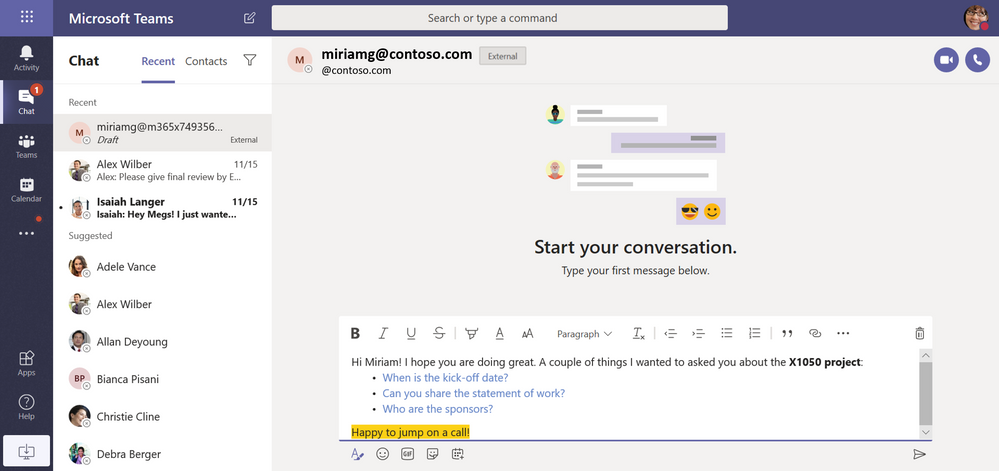
Have richer conversations with people outside your organization with Microsoft Teams. Users in TeamsOnly mode can now enjoy the same familiar chat experience whether they are communicating with a colleague or someone who is outside of their organization. An icon will appear next to the user’s name to indicate that they are external.
What’s New: Calling & Meetings
Add subtitles to your meetings with the Live Captions Preview (English)
Live Captions in Teams meetings allows you to turn on subtitles during the meeting. This makes meetings more inclusive, giving participants another way to follow along with the conversation, and addressing the needs of participants with different hearing abilities or language proficiencies. We are in the process of rolling this public preview feature out in English in the United States, and will look to roll this out in additional languages and geographies in 2020.
Dynamic Emergency Calling for Direct Routing
Dynamic Emergency Calling for Direct Routing is now available as a part of Microsoft Teams Phone System. It uses the caller’s current location to route their emergency call to a Public Safety Answering Point (PSAP), a call center operated by the local government. This is especially helpful when the user is not in their home country and does not know how to get in contact with local emergency services. Learn more here.
Add additional participants to meeting chats
Today in private meeting chat threads (i.e. the chats that are created in association with a meeting), users don't have functionality to easily add more participants to chat. This feature will add an entry point "Add participants" in the meeting chat header and users who are already part of the chat thread will be able to add more users to the meeting chat using this feature. This functionality currently exists in group chat and it will work the same way as group chat.
Reduce your notifications with muted meeting chats
Sometimes we must miss a meeting, and we don’t always need real-time notifications from the in-progress meeting chat. By default, meeting chats will now be muted until you either send a message in the chat or join the online meeting. So you can reduce notifications, but still keep track of the conversation.
To change these defaults, go to your profile picture at the top right of the app, select Settings > Notifications. From there, scroll to the meetings section and open the menu next to Meeting chat notifications.
Presenter or attendee? You decide.
Introducing meeting roles. Organizers, you can now choose what roles your invitees have during your meetings. Follow the directions at Assign roles in a Teams meeting and view what each role can do during the meeting.
Video Calling on Chrome is here!
Video calling on Chrome is now generally available. Now Teams users on Google Chrome can initiate and accept video calls with other Teams users. This release completes our story of full modality support (visual, audio, and screensharing) in Web Calling.
Citrix VDI support is now generally available
We have delivered an optimized media experience for Microsoft Teams in Citrix on-premises, Citrix Cloud, and Azure-hosted Virtual Desktop Infrastructure (VDI) environments. You can find more information on these topologies and capabilities here.
Contact Center APIs are ready for development At Ignite we announced the upcoming Certified for Microsoft Teams program for connected contact center solutions. Today, we’re happy to share much of the package of APIs to enable these solutions. Take advantage of the Microsoft Graph Presence, Create Online Meeting APIs & Phone System Direct Routing APIs to develop your solution. More coming soon!
What’s New: Admin
Microsoft Teams is coming to existing installations of Office 365 ProPlus on the semi-annual channel
We are making it easier for you to give your users the richest Teams experience, our desktop client, by adding Teams to Office 365 ProPlus. Starting January 14th, the Teams desktop client will be added to existing installations of Office 365 ProPlus on the Semi-Annual Channel.
Since everyone in the organization needs to communicate and collaborate, it’s important to make Teams available to all end users. We’ve published guidance to help you plan your rollout: Adopt Microsoft Teams.
While we encourage you to adopt Teams, we enable you to deploy at your own pace. If you wish to exclude it from your installation or disable auto-start of Teams, you are fully in control. You can find guidance on deploying Teams as a part of Office 365 ProPlus: Deploy Microsoft Teams with Office 365 ProPlus.
New mobility policy requiring Wi-Fi for the Teams Mobile app
A new mobility policy for the Teams Mobile app allows IT Admins to require their users to have Wi-Fi connections when making or receiving Teams video and/or video calls and meetings to control cellular data usage costs. Admins can apply this restriction on selected or all users in their organization. Learn more here.
Number Normalization Rules for tenant administrators
Tenant administrators often need to change a phone number for live inbound/outbound calls in order to ensure interoperability with phone networks. The rule can translate either callee or caller numbers to a desired format. Policy can then be applied using PowerShell in inbound and/or outbound directions.
Changes in Incoming IP Video policy
We have updated our meeting policies to allow IT administrators more control over how video is managed in Teams Meetings. The previous policy only prevented outgoing video. We have extended the Allow IP Video policy to prevent both outgoing and incoming video as needed. Tenant administrators can use this policy to manage bandwidth.
What’s New: Teams for Education Early teacher access to class teams
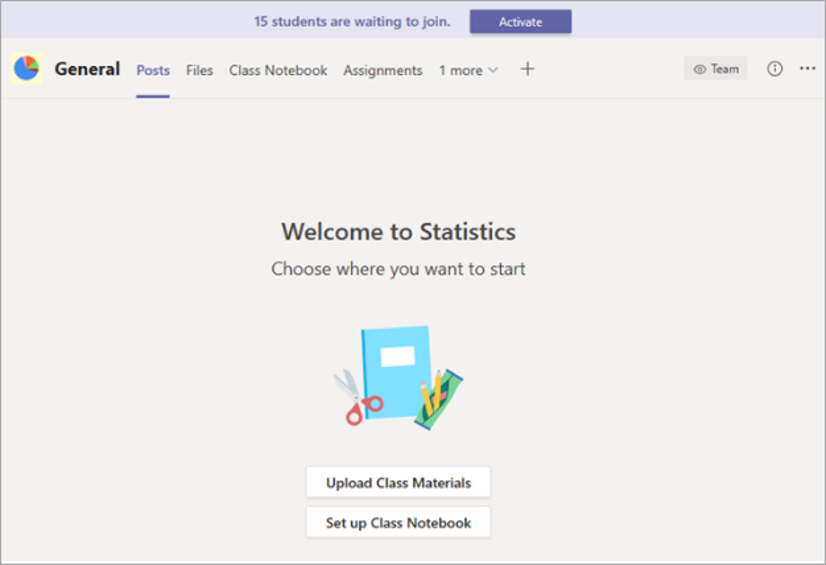
Microsoft School Data Sync (SDS) enables automatic creation of all your class teams using the data found in your school's student information system. With early teacher access to classes, you now have time to set up assignments, add files, and get organized before your students begin using the SDS-created team. Once your class team is ready to go, simply click “Activate” and that’s it! You control when students have first access to the class. Early teacher access to classes will be gradually rolling out this month.
Sync Teams assignments and grades to PowerSchool with Grade Sync
Using PowerSchool SIS for grades? Sync your assignments and grades directly to PowerSchool PowerTeacher Pro with Grade Sync and save yourself a step. Learn how to setup today, here!
Check out our end of the year blog, for all the new updates coming to Teams for Education!
H5P the way for Moodle to stay relevant in the post-Flash age?
The official release of Moodle 3.8 is finally available for download. Kickstarting MoodleMoot Global + Open EdTech Global 2019, Moodle has made the release available right on schedule. While H5P is...
Having used Skype for many years and found that it is still the one webconferencing tool that works well in my school and the area I live as it is not heavy on bandwidth. Microsoft took over Skype several years ago and instigated an annual 24 hour Skypeathon.
This year, they have changed the title to Microsoft Global Learning Connections which will encompass other collaborative tools eg Flipgrid, Teams etc but all the while encouraging classes across the world to become connected.
It is always a great experience to connect. Some classes sleep over at school for the 24 hours. Some of our past experiences included live linkups with schools in India who showed their traditional costumes and dancing, others demonstrated their outcomes in robotics, some played mystery Skype with us and some just called to quickly say hello.
Flipgrid is a trending tool to use in global connections and collaboration and it can be used with great success when time zones make it impossible to connect in real time.
Will you be involved this year? My classes certainly will. The hashtag being used is #MSFTGlobalConnect For more information check out some of the links below from Microsoft.
There’s been a lot of excitement recently surrounding “next-gen learning” and Microsoft Teams. I know of a few organisations who are making the switch from Moodle to Teams, so I’m on a mission to find out how a communications platform built around chat, meetings and storage has slowly become recognised as a Learning Platform. And whether or not Moodle should be worried.
From my experience, Teams seems to fit well with organisations who have already adopted Microsoft into their ecosystem as opposed to say Google. Many organisations running their email, cloud storage, intranets (SharePoint) and office docs via Microsoft naturally see Teams as another weapon in the arsenal. It often has the buy-in from internal company stakeholders such as the IT team, senior leaders and just about everyone else in the organisation, and it’s cheap, sometimes free.
So what exactly is Microsoft Teams? According to their website, Teams allows users to create and make decisions by “bringing everything together in a shared workspace where you can chat, meet, share files, and work with business apps“. So it’s a bit like Facebook Workplace then, and certainly nothing like an LMS, so why is it being used as one? Keep reading to find out.
Microsoft Teams is billed as a “Digital Hub that teachers and school leaders have been waiting for. Where teachers and students can experience a personalised, vibrant learning environment, as well as having many of the classroom basics, like assessments, assignments and notebooks“.
Now to most of us, this is just marketing speak. But when you are evaluating your LMS or considering a new one, then this marketing drivel is music to your ears. And Microsoft is a well established and widely known tech giant, and they’re cool, right? Well, er… no. But we’ll come onto that.
Organisations love the way that Teams integrate everything, so switching between a chat, video conference or document sharing is all done in a few clicks, all from within the same platform. Teams has changed the way organisations run a business, but I still fail to see how this can transform online teaching and learning. Where are the custom grading options and plagiarism tools? How can you use a quiz engine that only supports the most basic of question types? How do you structure a course and monitor completion tracking, course start dates and end of year rollovers?
Where are the learning plans, competencies and open badges? Where are the marking workflows, outcomes and rubrics? How can you create enhanced learning interactions from a word doc? It seems to me that most of the course content is derived from cloud services like OneDrive, favouring the creation of office documents to build up a course page as opposed to say lessons, databases, wikis and glossaries. But does the modern organisation actually need any of this old Moodle stuff? Is it still relevant?
In Teams, courses don’t exist in the traditional sense, instead, Teams uses workspaces. It is possible to add “tabs” to a workspace and link to or embed content from a popular cloud-based application, such as Trello, Asana, YouTube, Power BI or SmartSheet. At first, this sounds exciting, until you realise that we haven’t built an LMS, we have built an intranet. Tabs are like topics in Moodle. In each tab (page) you can include links, documents, embeds and tap into the other tools offered by the Microsoft suite.
So, in response to my early question, how does Teams become an LMS? Simple. Organisations are changing their needs and requirements for online learning. Perhaps they don’t need all the “teaching and learning tools” provided by Moodle. Perhaps they were never using them in the first place. Let’s be honest, how many corporate Moodle users use advanced grading, or set up the Workshop activity? How many organisations have gone beyond SCORM, a forum and a certificate? So maybe setting up a course like a modern intranet page is the way forward for them.
If this is the case, and we are no longer building courses in the traditional way, and it’s all now about document collaboration and cloud storage, meetings, chat, video and email then Moodle does feel out of place. But only in the way it’s marketed, positioned and perceived.
Moodle can do all of the above and more, if it’s configured to. Moodle has 365 integration, single sign-on, powerful forums, chat tools and social tools. And with a slick “Microsoft-style” theme, it could be made to look and feel every bit as “cool” as it’s Redmond rival. Unfortunately, Moodle isn’t seen as cool (I’m not sure Microsoft is or ever was, especially if you remember using Windows ME, and Bill Gates on-stage dance at the launch of Windows 95). However, a switch to Microsoft from Moodle can be seen as cool, innovative and “next-gen”. Organisations could be seen as trailblazers and trendsetters, going against the grain and challenging the very essence of the LMS.
Of course, if you are an institution who has used Moodle for a lot of years, then anything new and shiny will quickly become adopted. Out with old and in with the new does create a buzz, and the whole internal L&D culture can be changed overnight. “This is how we are going to build courses from now on” is the tune played by the senior leaders. A move that would be difficult to deploy if still using Moodle. “This is the way we’ve always done it”, would be the call back from disgruntled Moodle users when forced to make Moodle work like Teams.
So, should Moodle be worried about Teams? Well, the answer is yes and no. Moodle has released “Moodle Workplace”, which rivals Totara and other established corporate LMS platforms. But Moodle Workplace, nor Totara is not a direct competitor to Teams, it’s a different product. Microsoft Teams is like Facebook Workplace, I feel that these two platforms are competitors.
Essentially, it’s all down to the culture of the organisation. If an organisation can change the way they teach by using chat, video, office docs and collaboration then they will, and social business platforms will flourish. This culture change is a threat to Moodle, and to Totara and other LMS platforms (although Totara does offer Totora Social). If an organisation still feels the true value of online teaching relies on the very foundations of what Moodle provides, in terms of pedagogy, teaching tools, course formats and reports then Moodle need not be worried.
If it were me, I’d be pitching to both camps and making sure that Moodle can respond to the culture change that is happening in L&D, the tools are there, it’s just nobody is positioning them to this new uprising. It’s all about positioning and “educating” new and existing Moodlers that there is plenty of life left in the LMS, and with Moodle you can get the best of both worlds. I’m calling it, Moodle Teams.
What is a game? A game is an exploratory narrative, which the user is actively involved in. It is challenging and requires mental effort to progress. This built-in learning process is what makes games fun! To progress through levels in a game is to learn. Our minds initially struggle to cope but persevere in […]
In May 2019 a small revolution took place at Godel. The company’s project managers – the people who provide software delivery leadership for over 60 client engagements – became “agile delivery co-ordinators’ – a change initiated by Elena Ogneva, Godel’s head of agile delivery.
Elena has worked at Godel for nine years and comes from a business analyst and project management background before taking up the role as head of Godel’s project management division prior to changes. We asked her about the birth of agile delivery co-ordinator role and what brought about the changes.
Why did the company decide to rename the project manager position, and when did it happen?
We made the change after a conversation with a prospective client. During the meeting I had to describe the style of our work, and when I began to tell them about our project managers, I noticed the client was surprised. He asked “Can we name this role something else?” So, we said “Yes of course, we are agile.”
Agile and flexible methodologies are very current topics, but the “pure” project management roles seem less up to date. Clients are talking about agile and how they want flexible approaches – rather than rigidly defined projects. The term has become somewhat outdated and conveyed the wrong message to prospects and clients of what we actually do.
Godel knows how to work in the spirit of agile, we know what flexibility is, teamwork and facilitation, we know how to apply scrum and respond quickly to changes – we are already doing what the customers want, we just weren’t conveying that in the definition of our roles. These customers drivers and the complexity of the sales team at the Godel headquarters in Manchester led me to believe that it was time for a re-brand.
I went to management and explained the idea of changing the name of the position and the department and I was supported in my assertions. We started thinking of options and made a list of potential titles and in the end, we narrowed the choice to either “Agile Delivery Co-ordinator” or “Agile Delivery Manager”.
I chose the Agile Delivery Co-ordinator title because what we do is the co-ordination of delivery. Our clients are companies with their own IT departments, who know what they are developing and where they want to go. We work with the client to understand its business and objectives, set up interaction and communication and create a framework that will allow us to work together on product development and process efficiency in accordance with the needs of the team, client and product.
Was it difficult to convince employees of the usefulness of such changes?
I wrote an email and sent it to everyone at Godel. I explained that you shouldn’t be afraid – we will continue to work as before, but there will be more responsibility because we’re very clear that we know and practice agile.
The Agile Delivery Co-Ordinator role is broader than the Scrum Master role, which is to facilitate teamwork and eliminate blockers. I explained to the team that the way we react to the needs of our clients is more up to date and in line with their thinking. I received lots of enthusiastic comments from many of our Agile Delivery Co-ordinators who updated their LinkedIn profiles and received greetings from the community. People took it as a boost. Customers also perceived the change as a step forward. One customer even renamed these positions in their own organisation- a real affirmation that we’d done the right thing.
How does the work of an Agile Delivery Co-ordinator differ from the “classic” Project Manager?
The classic Project Manager function is about timelines, resources, scope and budget- with a directive management style. The Agile Delivery Co-ordinator role focuses more on people: facilitation and communication, team development and team building.
We create these working conditions so that each team member understands the essence and purpose of the tasks assigned to them. Moreover, the team (both Godel and client-side) decides what to do and how to do it. The idea is to create the most comfortable conditions for the work of both teams to create an atmosphere of trust so that they’re not afraid to criticise each other and offer the most advantageous solutions.
This isn’t the work of a Scrum Master in its pure form because it is impossible to direct and facilitate the team if you don’t understand the development process and don’t see the overall picture of where product development is going. The Co-ordinator must find a reasonable balance between the client, the team and management.
And what are your requirements for a candidate for this position?
The most important thing for a co-ordinator to do is focus on people, not his/her own ambitions. The team should come first as it’s impossible to write code and deliver a working application without people. Good communication and facilitation skills to translate ideas to the team is imperative, and a mindset based on the working product and an understanding of why it’s being created.
Soft skills are also necessary- understanding of how the process of developing a software product is arranged, and experience in related areas – business analysis, QA, and development- helps a lot in this. In addition, the candidate should not only be aware of flexible methodologies, but also share the core values of agile.
The topic of agile is still surrounded by a mass of disputes and speculations. How much does the agile approach work today?
It all depends on the direction of the business. If we are talking about a business where the environment doesn’t implement quick responses to users, to the needs of the product and the market, then traditional approaches can work quite effectively. For example, in the banking sector, where everything is tightly regulated and scheduled for the year ahead, the agile approach may be less necessary. They need strict reporting and structured processes.
Agile is suitable for fields with a volatile market and high competition where you need to quickly show results and interact closely with users to understand the reaction to the product. We have situations when it’s necessary to develop a new feature for a client in a week, allowing the client to spend the minimum of time and money to check the market response, and invest in longer-term development and architecture once tested.
I like agile because in this methodology each team member is responsible for the result. We are building a team that understands the goals of product development and can influence, if not the choice of technology, then the choice of one or another tool within the technology. Agile allows you to involve each team member in all stages of product creation.
Over time we’ve worked with clients who are truly agile – they spend a minimum amount of time on development and don’t engage in the in the deep strategic planning of each feature. It demonstrated that the agile approach works, and we better understood how to apply technical practices without which agile is impossible: serious automation, pair programming, code review, CI/CD practices that allow us to make the development process constant and as a predictable as possible. Historically we used scrum.org to train in the role of “Professional Scrum Developer”. Now we regularly conduct internal training based on our accumulated experience in the field of agile.
Everybody knows about Microsoft Office 365 and certainly a
lot of people work with it every single day. Among other tools, today’s O365
package includes Microsoft Teams and Yammer in their offer, so chances are your
company is using both. They are very similar platforms, so when should you use
one instead of the other?
This article will help you better define your use cases by
introducing each tool and their capabilities, as well as presenting some common
examples on when to use each of them. Let’s get started!
Teams
Microsoft Teams is the latest workload of O365. It has
gained a rapid success, managing to reach 13 million daily active users in just
two years. Designed to boost
collaboration across an organization, Teams has become the entry door to the
modern workplace in many companies around the world.
Teams has now replaced Skype for Business in the meeting and
conversation scope. And while these are two main features in Teams, they are
far from being the only ones that matter. Indeed, Microsoft Teams allows for
members to work together regardless of their location. It is the place to go
for information sharing and knowledge transfer on a specific context.
Teams is great for smaller groups leading projects and is
way more than a messaging tool for your company. It has come to change the way
companies embrace the modern workplace and helps with productivity – working
directly in Teams reduces the amount of emails sent internally.
When creating a new Team, an Office 365 Group is created,
too. This O365 group provides an immediate access to workloads such as Office
Online and even a SharePoint Team Site. Within their channels, users get to
find the information they need and open simultaneously each workload or file
created in the context of the team – no need to go through other apps in order
to get the job done!
Think about a business unit working on a new product release
together. They will have a specific team and channels dedicated to this project
exclusively. This way, users will know exactly where to start all conversations
related to the release and will share the relevant content. Everything revolves
around the same context. This concept as well as the fact that information is
historized and able to be searched for is one of Teams’ stronger assets.
Yammer
Yammer has been around for several years now and has become
a very popular Enterprise Social Network (ESN) for many companies. While its
growth has slowed down considerably, it’s still that trustworthy friend so many
companies like to work with, especially for internal communications and social
purposes.
This ESN is at the center of the culture of a company
helping boost employee engagement towards the brand and allowing for an easy
communication among colleagues. The people interacting within Yammer can be in
different departments or geographical locations, it doesn’t matter! Yammer
helps break the silos in any company.
One of the most common use cases in Yammer involves internal
communications managers. They tend to make announcements company wide, as their
goal is to reach the most people in the organization. These announcements are
then liked and commented by the employees, encouraging interactions between
people that would not socialize outside this type of environment.
The Verdict
Both Yammer and Microsoft Teams are amazing tools to work
with and definitely find their place in any organization’s modern workplace, so
when to use each one of them?
If the goal is to send company-wide messages and encourage
communication between different business units and employees in different
locations, Yammer is the right choice! Send out an announcement, create a poll,
have different groups – the whole company will be able to interact with
them.
If you want for team members to send messages about their
ongoing projects and have them collaborate in real-time on different files,
then Microsoft Teams will be the best ally. Users can join in different teams
and have specific channels for each one of their projects and work in-app
simultaneously, so all information will be right there when they need it.
We reached out to Dr. Rahul Choudaha and asked him about megatrends and higher education.
Dr. Rahul Choudaha is a global higher education strategist and analyst focusing on future-oriented, data-informed internationalization and global engagement strategies. He is a keen observer and commentator of trends and insights related to international student mobility, institutional partnerships, online and digital learning, cross-border/transnational education, world-class university initiatives, and quality assurance.
Dr. Rahul Choudaha (@DrEducationBlog) will be moderating a panel on creating capacity for global pos-secondary education at The Saylor Academy Summit: Closing the Global Skills Gap. #SaylorSummit19 Click To Tweet
Jacqueline Arnold, Director of Strategic Relationships and Communications at Saylor Academy: What is a megatrend? Why do they matter for the future of higher education?
Dr. Rahul Choudaha: I borrowed the definition of megatrends from John Naisbitt as “a long-term, transformational process with global reach, broad scope, and a dramatic impact.” When we think of higher education on a daily or even yearly basis, we often miss out on the more substantial external shifts which take place over several years and transform the fundamentals. Megatrends have the power to make us pause, think, and act in the interest of long-term changes. Among the key megatrends is the intersection of demographics, employment, and technological shifts, which are resulting in capacity and skills mismatch.
JA:Where do you see possible shifts in growth opportunities and demand for higher education?
RC: From my viewpoint, the keyword for the future of global higher education is “blended.” Here I use blended in a broader sense than just blending online and offline learning. I am advocating for the potential of blended offerings in terms of disciplines, countries, and institutions. In other words, bridging capacity and skills gaps is about interdisciplinary learning options that span geographic and institutional boundaries. For example, between 2007 and 2017, High-income countries added 4.3 million students in tertiary education, according to UNESCO. During the same period, Lower middle-income countries (e.g., India, Bangladesh, Viet Nam, Kenya, Ghana, and Nigeria with per capita income of between ~$1,000 to ~$4,000) added 29.2 million–seven times as many students as High-income countries. However, this dramatic growth does not mean that everyone has access to quality education at an affordable cost. Gross Enrollment Ratio (GER) of the addressable college-age population in these Lower middle-income countries can range from 20% to 40%, leaving a majority of potential learners still out of tertiary education. We know that our most significant defense for a future impacted by automation is an educated and skilled workforce. This is where blended offerings with flexibility and affordability for lifelong learning are crucial for addressing skills and capacity gaps.
JA:Why should higher education administrators pay attention to these trends? If you were a university president, what next steps would you take?
RC: Higher education institutions are at its core social institutions grounded in communities and economies of the region. Ignoring these megatrends will result in a failure to achieve the public good mission of the institutions. It not just about failure; now, we are at the onset of talking about the survival of institutions and mass unemployment unless institutions proactively respond to these megatrends. I would focus on blended as the core philosophy and strategy where partnerships with institutions, experiments with learning modalities, and synthesis of disciplines will guide the future.
Top-down empowerment programs reflect the reason they’re needed in the first place. Disconnected leaders develop ineffective empowerment programs in secluded conference rooms. There’s no power left for others when control is concentrated in… Continue reading →
While social learning may be one the currently hot new trends in the education and training fields, we have known for a while “why tried-and-true training methods don’t work anymore”, as discussed by Brigitte Jordan (1937-2016) in the mid-1990’s while working at the Institute for Research on Learning. Here are the highlights — From Training to Learning in the New Economy.
Based on the idea that training consists of the transfer of authoritative knowledge from expert instructor to novice learner, it capitalized on the notion that knowledge can be packaged into units, modules and lectures, and delivered in standardized fashion to “the work force”.
Conventional training departments are set up to “cascade” training modules throughout the company but are, by and large, not prepared to assist large numbers of employees with the highly individualized career preparation many forward-looking employees now desire.
Whatever learning needs to happen for getting work done at the front line — on production floors, in sales, or in customer service — often is not generated, or even recognized as needed, by the training organizations.
We need to shift from an emphasis on training and all that implies, to an emphasis on learning (and all that implies).
Learning is inherent in human nature
Learning is fundamentally social
Learning shapes identity
Informal learning is crucial in the workplace
In a fundamental way, all work is about learning: it is about learning to fit in and to collaborate, about learning to take initiative when appropriate, it is about really understanding customers, about acquiring intimate knowledge of the products and services the company sells and how they can fit into customers’ lives.
If it is true that we need to erase the distinction between learning and work, if it is true that learning is work and work is learning, then our most challenging question becomes: how can we construct and organize work environments in such a way that they support the kinds of learning that are useful and productive for employees, for work groups and for companies.
We have found no easy recipe, no universal set of prescriptions for doing that. What we have collected is a motley set of insights, of pragmatic maxims and design recommendations that serve as reminders of what the important issues and pitfalls are in this kind of endeavor.
View learning as work and work as learning.
Foster a view of knowledge as socially constructed rather than “transferred”.
Recognize and value informal communities of practice
Foster peer-to-peer learning and co-construction of knowledge.
Consider where person-to-person modeling and peer-learning are more powerful
Identify and advertise local experts so help is more easily found when needed.
Foster lateral communication between individuals and peer groups.
Many huge enterprises prefer Microsoft SharePoint as their collaboration and enterprise content management platform. Enterprises make use of SharePoint to store and access files by automating workflows, creating forms, and viewing business intelligence dashboards. Moreover, they can access all of these within a web browser with the help of Office 365 collaboration tools, which now include many of the SharePoint’s capabilities.
With the wash off for Office Groups in 2015
and later Teams in 2017, Microsoft is increasing the number of Office 365 collaboration tools, and this can be
confusing for its uses to decide which one they should go for. When a user
adopts Office 365, some expect that the collaboration should be more engaging
and less painful. But with the bulk of other tools, the users bite their tongue
as they turn to different approaches and adopt tools according to the business
scenarios and project needs.
To all this chaos, you can avoid such
situations and convert your workforce into a more productive form. In this
article, we will be discussing some tools which you need to know and how to use
them. Let’s get started!
There arises no doubt about these tools as they make
collaboration simpler, quicker, and transparent. Every user can include their
thoughts and expertise by adding value to their work and speed up the decision
making the process. The huge collaboration tools which digitally transforms
your work environment typically includes:
1.
Yammer
Yammer
If you want to give a shout out to a major
achievement on project completion or want to end up forming a question to the
whole enterprise for solving a problem you need to try your hands on Yammer. It
is also considered to spread a single message to a larger group of people.
The Yammer groups are concentrated around
certain technologies or areas of expertise other than being focused on a single
project. It is s kind of social networking service that works with the help of
group-based messenger where you can jump around from one Yammer group to
another and still access the past data of the previous group.
Similar to Microsoft teams, Yammer is built on
Office 365 tools, and so the group has default access to Planner, SharePoint team site, OneNote and document
library.
2.
SharePoint
SharePoint
We better know how irritating it becomes when
you have to send an email document to several people and ask them to add their
thoughts individually. This scenario can result in multiple versions of the
same document with the individual feedbacks, and therefore, SharePoint has a
better role to play in this. The tool allows you to work on a single
presentation at the same time by helping you to work quickly and provide
visibility on the approaches that others are talking about.
Since the past few years, Microsoft has turned
SharePoint into a backend repository and container with front end apps such as
Teams and Exchange. Many companies do not want to invest in Microsoft Teams, or
they already exist with tools like Slack; for all of them, it is better to
continue with SharePoint for collaboration purposes.
3.
Microsoft Teams
Microsoft Teams
The Teams tool is basically a chat-based
collaboration platform which brings all the people, content, and other tools
together to help a team which needs to stay more engaged and effective. It is
ideal for an entire team to be on the same page for a common project as they
must be able to chat whenever they want or update any actions in real-time.
Teams are built in Office 365 Groups, and
therefore the people have access to SharePoint sites which are created by default for
each team. As Microsoft Teams is mail-enabled, you can send emails to your
respective channels where every member in the team can access it. The
conversations appear in a threaded format in Teams, and so you get a chance to
go back and review questions if you want.
The tool is not designed as a collaboration
tool, but it does allow you to share documents with others and co-author them
by making it able a collaboration. This cloud service lets you save files and
documents safely and also syncs the documents to the devices of any kind where
you can easily upload a document in OneDrive and give access to other people.
You can grant permissions at a granular level by allowing read-only or edit
access. This ensures that team members do not use unapproved or insecure tools
which compromise business security.
Wrapping Up!
No two workplaces are similar, and therefore,
there is not a one-size fit all approach for collaboration. But there are
plenty of steps to create a more engaging workspace by incorporating some of
these tools. We hope this article helped you to get a brief idea about the
Office 365 collaboration tools. Keep Learning!
About the Author:
Stephanie Donahole is working as a
Business Analyst at Tatvasoft Australia, a SharePoint development company with
excellent SharePoint Developers. Her aim is to sharpen her analytical skills,
deepening her data understanding and broaden her business knowledge in these
years of her career. She loves to write about technology innovation
and emergence. Follow Her on Twitter at @SDonahole.
Librarians do an amazing job at school. They are entrusted with various educational tasks. These include, according to Queen University library, help students with information-related activities,...
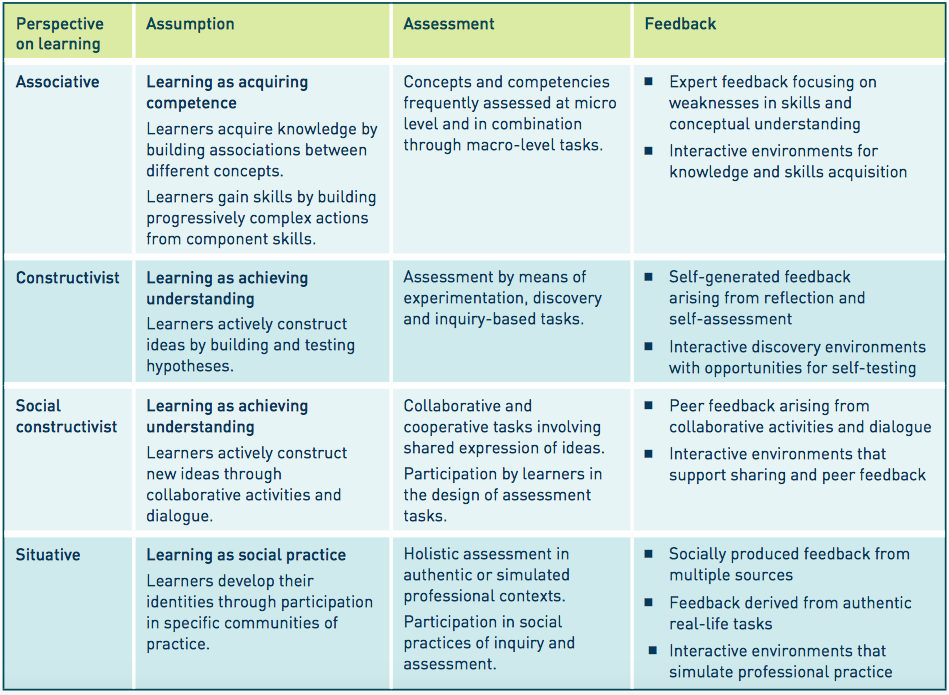
This table is very useful summary for anyone who is interested in aligning assessment with teaching methods. It's important that this is achieved, because as Biggs and Tang (2011) argue, students create their own meaning from their experiences, by seeking out learning engagement. The teacher's role is to create or facilitate the environments, content and dialogue that optimises the student's activities. This include assessment and feedback - which are vital in scaffolding the student's progress through their education. It is known as constructive alignment, and is inherently student centred. The task of teachers is to align student learning outcomes with appropriate and relevant activities and assessment.
If assessment fails to align with outcomes, or militates against student engagement, it becomes more of a barrier than an enabler. Examples include testing that misses essential learning outcomes, or inappropriate methods of assessment that students are unable to successfully complete. Feedback that is incomplete or insufficient to encourage better learning is another failure of constructive alignment in assessment. In principle, each of the four pedagogical perspective seem discrete, but in practice, the best teachers tend to borrow from all of these approaches at different times to support students in multiple ways.
Assessing learning in the digital age, where students are using a growing range of technologies and approaches to learn, is complex. The table above helps to simplify the complexity somewhat, and provides educators with models that helpfully describe alternative approaches to pedagogy.
References Biggs, J., and Tang, C. (2011) Teaching for quality learning at university. 4th ed. Buckingham: The Society for Research into Higher Education & Open University Press.
JISC (2017) Effective Assessment in the Digital Age.
Gunpowder & Geometry: The Life of Charles Hutton, Pit Boy, Mathematician and Scientific Rebel by Benjamin Wardhaugh. This book review is a guest post by London Historians Member Laurence Scales. This is the biography of Charles Hutton (1737-1823). Charles Who? To those in the know he was a Georgian mathematician. For those of you who […]
Undergraduate students studying at the University of Law Business School in the UK who complete a degree with the university will have their tuition fees waived for their master’s if they continue to study at the institution.
Students will have to meet the course requirements and immediately go on to the master’s course after graduating from their bachelors.
“We are pioneering a new model of business education”
The offer is open to both domestic and international students who enrol from this year onwards and has the potential to help students save up to £17,000.
With campuses in London, Birmingham, Manchester, Leeds and Nottingham, students will be able to take courses in different locations across the UK.
“Career planning has become increasingly important. A master’s course allows students to approach their careers with real certainty and address some of the complexities,” explained John Watkins, the director of employability at ULaw.
“Employers value the academic rigour obtained from a master’s course as well as the other disciplines and professional skills.”
Recent research showed postgraduate earn around £9,000 more than those without the same level of education.
“We’re thrilled to be able to call ourselves the first and only university in the UK to offer a free master’s course to our current and future undergraduate students” Andres Perez, the national director of business programmes at ULaw Business School, said.
“We are pioneering a new model of business education to help our students develop their knowledge of business specialisms and go further in their careers, including starting their own businesses and becoming the entrepreneurs of the future”
“At ULaw Business School we’re passionate about helping our students reach their full career potential and… we’re excited to see where our students go next after taking advantage of this opportunity to widen their prospects,” Andrea Nollent, vice-chancellor and CEO at ULaw, added.
The BBC is reporting that a one-off increase of £3.8bn would be needed to reverse 8% cuts in per pupil school spending, new analysis shows.… Read the rest
Another big money development where long term value will only really come in real integration.
By Doug Henschen
Salesforce $15.7 billion mega acquisition will add revenue and blunt a Microsoft competitive threat, but long-term benefits will depend on deeper integration and additive innovation.
Salesforce is spinning its mega acquisition of Tableau Software as the number-one CRM vendor buying the number-one business intelligence (BI) and analytics vendor. It’s a big deal that was likely hastened by last week’s acquisition of Looker by Google. In the short term, it will give Salesforce more revenue, but in my view, the success and ultimate value of the proposed $15.7 billion deal will depend on what Salesforce and Tableau can do together and whether Tableau can accelerate its move into the cloud.
Tableau fills a competitive gap for Salesforce that Einstein Analytics hasn’t filled. Einstein Analytics (which originated as Salesforce Wave Analytics in 2014) is still very new, and it’s not widely adopted by Salesforce customers. What’s more, Einstein Analytics has been largely aimed at CRM-centric analytic needs, whereas Tableau gives it broad, multi-purpose analytical capabilities that are already widely adopted and highly regarded.
A key challenge, however, is that only one third of Tableau customers, at best, are running in the cloud. So either Tableau has to accelerate its move into the cloud or Salesforce has to develop more of a hybrid strategy. The latter would go against Salesforce’s longstanding “no software” ethos, although even cloud player Amazon Web Services (AWS) has made accommodations for on-premises deployments in recent years.
One thing that Salesforce and Tableau have in common (other than tens of thousands of customers) is Microsoft as a formidable rival. Microsoft goes after Salesforce primarily with Microsoft Dynamics 365 and it goes up against Tableau primarily with Power BI. In both cases, Microsoft stresses its broader platform, including Office 365, Azure, the LinkedIn graph, and its broad data-management portfolio, but the real weapon on both fronts is the blunt instrument of competitive pricing. Microsoft effectively discounts its CRM and analytics offerings knowing it can count on long-term benefits, stickiness and profits from each customer and byte of data that ends up on Azure.
Competing against Microsoft Power BI is one thing, but cloud competition is about to get tougher with Google’s acquisition of Looker, announced last week. And with both Google and Microsoft now strongly pursuing the BI and analytics market, it likely won’t be long before AWS steps up its game from its current, less-than-competitive QuickSight offering.
Tableau needed a deep-pocketed parent to help it compete against these new competitors. A key area of investment important to both Salesforce and Tableau is augmented analytics and artificial intelligence (AI). Microsoft has been adding augmented capabilities to Power BI, and it highlights the connection to the rest of its AI portfolio. Leveraging one set of AI and augmented analytics investments across Salesforce and Tableau should provide economies of scale that will help both parties innovate.
MyPOV on How to Better Serve Customers Together
I appreciate that Salesforce is promising to maintain Tableau as an independent business, just as it did when it acquired Mulesoft last year. Salesforce is far better than most companies at retaining the leadership, talent and values of the companies it acquires. A big part of Tableau’s strength has been its culture, and I see Salesforce as more likely than any other suitor to retain that energy.
As I noted above, investments in AI and augmented analytics are an obvious place to start on future innovation. But with trends moving toward low-latency demands and predictive and prescriptive recommendations, I see analytics as destined to be more frequently embedded into applications. Not just OEM apps, but software apps that customers build themselves. Salesforce and the Force.com platform are both good fits for accelerating Tableau’s embedding strategy. Microsoft is pursuing these trends with its Power Apps, Flow and Power BI Embedded capabilities, and Salesforce and Tableau would do well to exploit their strengths.
As for how Salesforce and Tableau could improve and take advantage of integration, a few areas should be addressed to better serve customers. For starters, Tableau must evolve its self-service strengths and provide more tools and controls for centralized governance. The company started down this path a few years ago with data-certification capabilities, and it’s expected to add a data catalog this year. Salesforce and Tableau together could do more to address centralized data modeling, ensuring reusability and a single version of the truth. Here’s where Looker has strengths, offering an old-school semantic modeling environment built for modern cloud data architectures.
The addition of Tableau also raises questions anew for Salesforce as to how deeply it will invest in data-management capabilities. Last year’s Mulesoft deal upped Salesforce API-oriented integration capabilities, but AWS, Google and Microsoft offer end-to-end database, data warehouse, data integration and high-scale data platform capabilities that give customers one-stop-shop opportunities while also fueling AI capabilities. Salesforce has to decide whether to take a Switzerland approach -- working with all the major clouds and third-party vendors -- or whether it’s going to also offer its own data platforms and services. Perhaps it could choose a middle ground by focusing exclusively on analytics, acquiring, say, Snowflake, and perhaps a bit more in the way of big data and data integration capabilities.
These are interesting times, and I am hearing echoes of the BI and analytics consolidation that happened just over a decade ago. There is a danger that history could repeat itself, as when BusinessObjects, Cognos and Hyperion were acquired in 2007/2008 by SAP, IBM and Oracle, respectively. Back then, many predicted that these massive consolidators would push independents out of business, but that’s not what happened. That’s exactly when Tableau, Qlik, Spotfire and other innovators emerged and it was mostly downhill from there for the incumbents.
The lesson for Salesforce is that it can’t count on the power of its platform to retain and win new Tableau customers; the product must remain competitive on its own merits, and that will require investment and the spark of innovation that got Tableau where it is today.
What is your hourly rate as an instructional designer? How much do you make if you’re a full-time salaried employee? What about freelance or consultant rates? People frequently ask me these questions, and I always refer people to the same resources. Use these benchmarks to use as a starting point, but you’ll need to adjust for your experience, education, skills, industry, whether you’re a full-time employee or independent consultant, etc.
Note that since I’m in the US, all of these resources are US-centric. Hourly rates and salaries outside the US will vary, although Canada seems to be pretty comparable. Also, I’m focusing on data for instructional designers. If you search for related titles like elearning developer, training specialist, or learning and development manager, you’ll get different results.
Salary: Around $85,000
Comparing multiple sources, I find that the average salary for an instructional designer is about $85,000.
ZipRecruiter lists the average salary for instructional designers at $80,182.
On Salary.com, they divide the instructional designer role up into different levels. A level III ID has a median salary of $87,923.
Glassdoor lists total pay of $93,261, but that includes bonuses.
Devlin Peck’s survey found that instructional designers in the US make an average of $85,466.
With a free membership in the Learning Guild, you can access their past reports. The most recent detailed salary report is from 2018. The 2018 report puts the average salary for elearning professionals in the US at $84,421. The 2019 salary report took a different approach since salaries have been fairly stable, focusing on job roles and trends. (Note: you may see references to their salary calculator, but that appears to have been taken down, probably since the data is a little outdated.)
ATD’s 2018 research found a median base salary for talent development professionals (including IDs) of $82,350.
Lower salaries in higher ed, other sources
Instructional design jobs in higher education pay less than those in workplace training. HigherEdJobs lists the salary for instructional designers at $58,828.
Payscale’s estimates are much lower than others in the field, showing an average salary of $64,907. Indeed also lists a similar lower average salary of $65,059. It’s not clear why their data is different. These sources might include more higher education data, which would bring the overall averages down.
Entry level salary: Around $55,000
Entry level salaries for instructional designers are much lower, usually around $50-60k.
ZipRecruiter shows a national average entry level salary of $56,182.
Salary.com shows a median salary for “instructional designer I” (an entry level or lower level role) at $60,673.
Hourly rates for full-time IDs: Around $35-40/hour
Salary.com puts the hourly rate for instructional designers at $32-40, with an average of $36/hour.
ZipRecruiter lists the average hourly rate at $39/hour.
Consultant and freelance rates
Benchmarks for consultant and freelance rates
Rates for consultants and freelancers vary much more than salaries for full-time employees, so it’s harder to get averages or statistics to use as benchmarks.
The IDLance blog recommends different rates depending on experience.
$35-45/hr for people just getting started who need a first project
$45-60/hr for people with 1-3 years of experience
$60-75/hr for people with 4+ years of experience.
Personally, I think the top end of that IDLance range is too low–the hourly rates can continue to go up with more experience and specialized skills.
Harold Jarche’s “So You Want To Be an ELearning Consultant?” article is now 10+ years old, but the idea of ranges of rates for different activities is still relevant. Click the table at the bottom to expand it and see the details, adding $5-$10/hour for current rates. Design tasks are $50-100 on his chart; development tasks are $30-60 (I would update this to at least $40-65). Technological and business analytical tasks can earn you up to $200. Ray Pastore created an updated version of this list in 2014 showing rates from $35-$250/hour depending on the task.
On Upwork, instructional designers cost $20-45/hour, but the rates go as high as $125/hour for advanced work. (Note that Upwork keeps a percentage of that fee, so the IDs don’t keep all of that. Also, the very low end of that range is probably people outside of the United States.)
Federal government contracting
For contractors with the Federal government, you can use the GSA calculator to see the “not-to-exceed hourly rate” for different roles. For government contractors, the average ceiling rate is $113/hour, with a primary range from $72-154/hour. There are a number of jobs lower than $72/hour, including quite a few below $50/hour, so there are more opportunities at the low end of that range. Note that these contracts are always with specific companies, so you have to subcontract through those companies rather than getting the work yourself as an individual.
Freelance Rate Calculators
Quick way to calculate your rate
The quick way to calculate a freelance hourly rate is to double your W2 or full-time hourly rate. When you work independently, you have to pay additional taxes and buy your own software. You also spend a lot of time that isn’t billable (proposals, marketing, professional development, etc.). If you made $35/hour as a full-time ID, then you should charge about $70/hour as a freelancer.
Other ways to calculate a freelance rate
Vanessa Alzate explains in this video how to figure out your hourly rate as an instructional designer. She cites some sources (thanks for the mention, Vanessa!) and explains some of the considerations and trade-offs for your hourly rate, especially if you’re getting started.
Although it isn’t specific to instructional design or e-learning, Flying Solo’s Hourly Rate Calculator is a useful tool to determine your hourly rate as a freelancer based on your expenses. This calculator is more detailed that the one listed above.
Jeffrey Rhodes’ presentation on how to price consulting work explains how to determine your hourly rate as a consultant and how to estimate and price services. The presentation is dated looking, but the explanation of the thought process may be helpful.
I help organizations who need online learning that gets results and changes behavior. I also provide coaching for individuals in the field. Interested in learning more? Check out my portfolio or contact me with information about your goals.
Originally published 9/3/2013, updated 5/2/19, updated 5/26/22
eLearning Freelancer Bootcamp
Interested in becoming an elearning freelancer? The eLearning Freelancer Bootcamp is all about the business side of freelancing and consulting, specifically geared for instructional designers and elearning developers. This program helps you grow your business through live weekly workshops, recorded videos, resources, templates, and activities to build skills and get organized. Enrollment includes an online community for ongoing support.
Enrollment is currently closed, but you can join the waitlist to be notified when we open up for the next cohort in 2023.
Employers used 22 per cent of their apprenticeship levy funds in the 12 months to the end of January 2019 – a huge fourfold increase from the 5 per cent drawn down in the first nine months of the policy.
The skills minister Anne Milton revealed in a parliamentary answer yesterday that between May 2017 and the end of January 2019, levy-paying employers “utilised £601 million of the funds available to them to pay for apprenticeship training in England”.
This amounts to 15 per cent of the £3.9 billion total funds entering employers’ accounts in the same period.
In a separate parliamentary answer from last week, Milton revealed that in the 12 months from February 2018 to January 2019, £523 million, or 22 per cent, of the £2.36 billion received into employers’ apprenticeship service accounts had been drawn down.
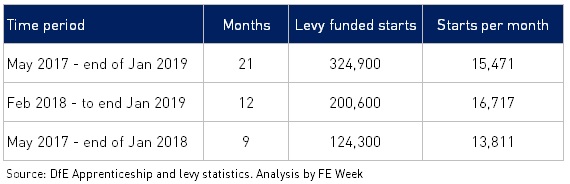
FE Week analysis of the figures used by the minister shows that in the first nine months of the levy, from May 2017 to January 2018, £78 million of the £1.54 billion (5 per cent) paid into employers’ accounts was used to cover training costs (see table below).
Levy funds usage has therefore increased fourfold, but apprenticeship starts have only increased by one fifth (21 per cent).
Funding is automatically drawn down every month for the duration of the apprenticeship so as new starts are taken on the monthly usage, percentage rises much faster than the starts as it is includes some of the cost of the starts in previous months.
Milton explains in the parliamentary answers that the figures do not include other costs that the levy pays for, such as funding apprenticeships for small, non-levy paying employers, for English and maths qualifications and for extra support for apprentices who are care leavers or have special needs.
Large employers have been made to pay the apprenticeship levy since it was launched in April 2017. After a deduction for non-English employees and a 10 per cent top-up the monthly levy value appears in the employer apprenticeship system account, which they have two years to use.
In March, Keith Smith, the Education and Skills Funding Agency’s director of Apprenticeships, told the public accounts committee that employers are expected to lose around £12 million in May, or 9 per cent of what they paid in April 2017, when the first ‘sunset period’ arrives.
And in a webinar with FE Week during the Easter break, the government admitted for the first time the vast majority of the £400 million underspend from the Department for Education’s apprenticeship budget was taken back by the Treasury.
Asked how much cash the Treasury clawed back in the financial year to April 2018, Milton replied she “can’t give exact figures”, and referred the question to Smith, who said it was “just over £300 million”.
There’ve been many concerns raised that employers are not spending their funds quickly enough. The NHS, for example, told FE Week in March that it expects to lose a fortune when unspent apprenticeship levy funds begin to expire from May.
Recent policy changes have aimed to increase levy spending. From this month, levy-paying employers will be able to share more of their annual funds with smaller organisations, when the levy transfer facility rises from 10 to 25 per cent.
The 10 per cent fee small businesses have to pay when they take on apprentices has also been halved this month.
The government had hoped the apprenticeship levy would encourage more employers to invest in training and help it hit its manifesto target of three million apprenticeship starts by 2020. However, starts have fallen dramatically since its launch.
The latest figures, released on March 28, revealed that apprenticeship starts for January were down 21 per cent on the same month in 2017 before the levy was introduced.
FE Week analysis shows that an average of 85,246 starts are needed every month over the next 15 months to reach the three million starts target. Since May 2015, the average has been 38,251.
Social learning is a key theme of mine because imitation is how we learn as a species. Social learning is best explained by Albert Bandura, recognized as the most eminent psychologist of the modern era.
“Learning would be exceedingly laborious, not to mention hazardous, if people had to rely solely on the effects of their own actions to inform them what to do. Fortunately, most human behavior is learned observationally through modeling: from observing others one forms an idea of how new behaviors are performed, and on later occasions this coded information serves as a guide for action.” —Albert Bandura
Making our organizations open to social learning fosters innovation. Nobody works in a vacuum and we all build upon past ideas and achievements. Open structures that distribute authority can lead to more transparent knowledge sharing which promotes social learning. This open sharing can foster more diverse perspectives which can fuel active experimentation. Innovation emerges from this constant flow of ideas and experiments.
Social learning is not a ‘nice-to-have’. It is not something bolted on to formal education or training programs. Social learning is how humans have evolved in order to survive and thrive. Social learning is a major factor in what makes humans unique. Many organizational practices — separate departments, chain of command, job descriptions, individual performance measurement, focus on task at hand — all block social learning. Without social learning, there will be no innovation. So don’t appoint a head of innovation. Remove barriers to social learning and let people do what we have evolved to do best — learn from each other.
“How are we to learn from each other? How are we to acquire novel information? How are we to work together to establish the truth of our environment if we don’t affirmatively foster and support this rather wonderful innate quality that we have to teach and learn from each other. We are innately a friendly species, but we need environments which allow us to optimally express our inclination to be friendly. We don’t want, for example, environments in which we’re pitted against each other, where we have leaders that are kind of saying, these people are responsible for your problems. We want environments which say, we can be united in our common humanity. And analogously, we want environments which are supportive and conducive to teaching and learning. We want environments — we want to create environments in which we maximize the flow and the spread of information.” —Nicholas Christakis — video
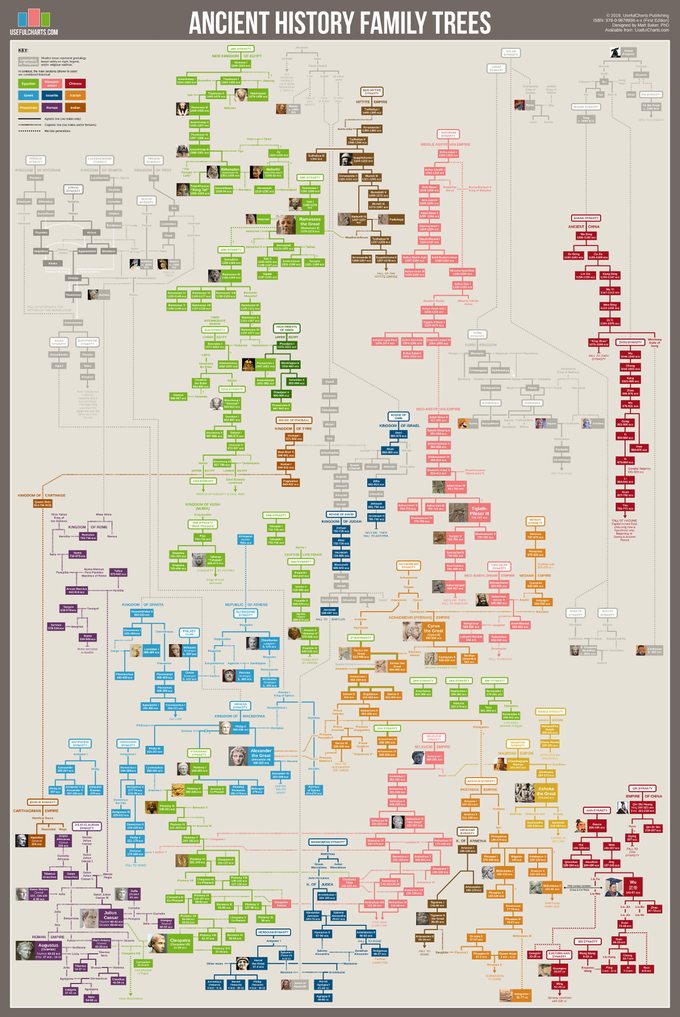
Matt Baker from UsefulCharts has launched a KickStarter campaign to release the fourth poster in his family tree series. The newest poster is the Ancient History Family Trees poster and focuses on the time period between 1600 BCE and 100 CE. It includes historical dynasties (shown in color) as well as a few sections based on legend and/or religious traditions (shown in grey).
Help support Matt launch the new poster on KickStarter by Friday, March 29, 2019!
The full list is as follows:
Armenia (Artaxiad dynasty)
Assyria (Middle and New kingdoms)
Babylon (Chaldean dynasty)
Carthage (Barcid dynasty & its Phoenician roots)
China (Legendary origins; Shang, Zhou, Qin, and Early Han dynasties)
Egypt (Dynasties 18-31; Ptolemaic dynasty)
Greeks (The Iliad; Sparta & Athens; Alexander the Great & the Diadochi)
Hittites (New Kingdom)
India (Ramayana & Mahabharata legends; the Buddha; Nanda & Maurya dynasties)
Palestine (Selected bible characters, Israel & Judah, Maccabees, Herod the Great)
Persia (Median, Achaemenid, and Arsacid dynasties)
Rome (Generals of the republic; Julio-Claudian dynasty)
Syria (Seleucid dynasty)
You can see the new chart up close in Matt’s YouTube video:
You can see the rest of Matt’s posters from UsefulCharts on the Cool Infographics Infographic Posters page where I have links to over 100 posters from designers all over the world! Once this poster is released and available, I’ll add the link to it on the Posters page as well.


 Posted by Inbal Namir, Stav Agmon, and Jill T. Perkins on December 19, 2019.