×You need to sign in to continue.

Shared posts

24 Oct 19:42

‘The Eye’, a rotating island in Argentina

by Timothy Whitehead

We recently came across this article about a floating island in Argentina that rotates. Producer and film director Sergio Neuspiller discovered it when filming in the area and has since started a Kickstarter to raise funds to investigate it further. See the Kickstarter promotion video below:

The island is visible in Google Earth imagery and has been in existence since at least 2003, the date of the oldest Google Earth image of the location. Here is an animation showing how it moves over time:

It is fairly obvious what is happening (no, it’s not an alien base as some have suggested). When you have a floating island and a water current that flows along one side of it, it will naturally rotate and become circular over time, as well as carving out a circular hole. The phenomenon is quite rare, because the conditions must be just right. Floating islands of plants are themselves quite rare, but in addition, it requires a current, though a fairly slow moving one.

[ Update: We believe wind may be the main factor in some instances rather than current. ]

There is a special type of floating island that is very common and that is ice. The phenomenon does occur with ice, as you can see in the YouTube videos below:


We tried to find other examples of rotating floating islands not made of ice and we found one on a lake in India:

Read more about it here.

We also found a reference to one in the Okavango delta. You can read the full story about it in a PDF found here. Apparently a Brian Wilson discovered a rotating floating island and identified it in aerial imagery from as far back as 1944. It could be seen to have kept rotating up until about 1974, when it attached itself to one side of the lagoon it was in and remained there until at least 1990. We had a look at the coordinates given and not far from that location did indeed find a floating island that has moved between 2006 and 2016. We cannot positively confirm that it is the same island.

But for the real treasure trove of rotating floating islands, the place to go is the Luapula River on the border of Zambia and the Democratic Republic of the Congo (DRC). Sadly, there isn’t a lot of historical imagery, so good animations were not possible. So, we are showing them in the form of ‘before and afters’ to demonstrate that the islands do, in fact, move.

before
after

A round one, an oval and another shape, sharing a pool.

before
after
before
after

If we are not mistaken, the dark patches are fire scars, suggesting the island can sustain fires without destroying it.

before
after

A whole bunch of floating islands!

before
after
before
after

And that’s just some of them. There are many more! Amazingly, we could just (although only just) see some of them moving using our Landsat animations KML file.

To see the above locations in Google Earth, including historical imagery tours, download this KML file.

The post ‘The Eye’, a rotating island in Argentina appeared first on Google Earth Blog.

10 Aug 16:02

Flash and Chrome

by Chrome Blog
Adobe Flash Player played a pivotal role in the adoption of video, gaming and animation on the Web. Today, sites typically use technologies like HTML5, giving you improved security, reduced power consumption and faster page load times. Going forward, Chrome will de-emphasize Flash in favor of HTML5. Here’s what that means for you.

Today, more than 90% of Flash on the web loads behind the scenes to support things like page analytics. This kind of Flash slows you down, and starting this September, Chrome 53 will begin to block it. HTML5 is much lighter and faster, and publishers are switching over to speed up page loading and save you more battery life. You’ll see an improvement in responsiveness and efficiency for many sites.

This is similar to a change we made last September, when some Flash content became click-to-play with Chrome 42. This had an immediate, positive impact for our users by improving page load times and saving battery power.

In December, Chrome 55 will make HTML5 the default experience, except for sites which only support Flash. For those, you’ll be prompted to enable Flash when you first visit the site. Aside from that, the only change you’ll notice is a safer and more power-efficient browsing experience.

Flash helped make the Web a rich, dynamic experience, and shaped the modern set of web standards. We continue to work closely with Adobe to ensure that your web experience is as fast and secure as possible and to help the Web transition to HTML5.

Posted by Anthony LaForge, curator of Flash in Chrome.
10 Jun 17:37

Monitoring oil reserves with satellite imagery

by Timothy Whitehead

When we were having a look around Rio de Janeiro for yesterday’s post we noticed a large oil refinery (Refinaria de Duque de Caxias) with many oil tanks, and it reminded us that monitoring oil reserves in large oil tanks is one of the possible commercial uses for high frequency satellite imagery produced by companies like Planet Labs and Terra Bella. Many of the large tanks used for storing oil have a floating roof, and the amount of oil stored in the tank can be determined by the height of the tank roof. For more technical details see this interesting article.


Full tanks on left. The same tanks but not so full on the right. Imagery from Google Earth, copyright DigitalGlobe.

We also created the animation below showing the tank levels changing over time. Google Earth historical imagery does not line up perfectly because the images are taken from different angles. We have tried to line up the ground in the different frames.

Speed in milliseconds per image:

You can adjust the speed of the animation by dragging the slider.

The tank in the centre, second row from the bottom has its roof renovated during the animation.

Find the refinery in Google Earth with this KML file

The post Monitoring oil reserves with satellite imagery appeared first on Google Earth Blog.

10 Jun 17:35

Terrapattern, the search engine for imagery

by Timothy Whitehead

Terrapattern is a very interesting new online search engine for aerial and satellite imagery. It is still an alpha version and only covers a few cities in the US, but the potential is very significant. To try it out, just go to www.terrapattern.com, select a city, then select a map tile of interest and it will find other similar map tiles.


The baseball fields of New York.

We found it remarkably good for finding various types of sports fields (football fields, tennis courts, baseball fields, golf courses). We suggest also trying things like container storage areas, parking lots, junk yards, different types of roofs, etc. We found that if we selected a section of a bridge it could find other bridges as well as piers, but not with 100% accuracy. This is because, as explained in the FAQ, it works on individual tiles and large features like bridges, which cover many tiles, are less accurately recognised. We foresee, however, a future version working on different scales of detail to classify structures of different sizes.

It is open source, so if anyone has computing power and other necessary resources they can use the code for other parts of the world. We are not sure if explicit permission is required before using Google Maps imagery for something like this, so be sure to read the Geoguidelines before implementing such a project.

They are hardly the first to think of using image recognition on aerial and satellite imagery. For example, we have previously had a look at German design studio Onformative who applied face recognition to imagery with remarkable results. It is probable that all major map makers have considered the possibility of using imagery to identify features relevant to maps and highly likely that several companies have built systems to attempt to do this. If any of our readers knows of any such projects and how successful they have been, please let us know in the comments. Google has a sophisticated image recognition artificial intelligence (AI) that they use with photos to provide both Google image search and tagging capability in Google Photos. It is almost certain that they have tried it out at some point on satellite / aerial imagery too.

Read more about Terrapattern here.

The post Terrapattern, the search engine for imagery appeared first on Google Earth Blog.

10 Jun 02:20

Google Photos: One year, 200 million users, and a whole lot of selfies

by Google Blogs
A year ago, we introduced Google Photos with one mission: To be a home for all your photos and videos, organized and brought to life, so that you can share and save what matters.

Now 200 million of you are using Google Photos each month. We’ve delivered more than 1.6 billion animations, collages and movies, among other things. You’ve collectively freed up 13.7 petabytes of storage on your devices—it would take 424 years to swipe through that many photos! We’ve also applied 2 trillion labels, and 24 billion of those have been for ... selfies.

To celebrate our first birthday, we’ve gathered a few of the team's favorite tips and updates we’ve made in the past year, so you can keep all that good stuff going...

1. To fly through Google Photos on the web at photos.google.com, press Shift-? to see a list of keyboard shortcuts.

2. Narrow down your search results by searching for more than one thing at a time. Search for two people: “Mom and Dad,” or a person and a place: “Mom Yosemite,” a place and a thing: “Yosemite bear,” or a person and a thing: “Mom bear” to find that photo of your mama bear with the real bear.

3. Running out of Google storage? On photos.google.com, under settings, you can choose to convert all of your uploaded content from “Original quality” to the free “High quality” size to recover lots of space.

4. Enter your favorite emoji (😎 🍂 💗 🎂 ) into search to pull up your corresponding photos. Not joking.

5. On photos.google.com, easily find the photos you recently uploaded by going to search, then choosing "Show More” and then “Recently Added.”

6. Tap into your device folders from the top of the albums page on Android, and see which folders are being backed up. Double-check that all those screenshots are safe!

7. Create a shared album for your family. Every time someone adds a new photo, everyone will get a notification so they can see your latest photo or video.

8. Have you spied the easter egg in the photo editor on Android? Hint...It’s out of this world.

9. Occasionally photos can appear out of order in your gallery—perhaps because the date was incorrectly set on your phone or camera when you took them. On photos.google.com, you can edit both the time and time zone of a photo or group of photos to put them in the right order in your library. Change one and they all get adjusted.

10. At the top of the albums page on mobile, scroll the carousel to the right and tap on the videos tile to get a view of all the videos in your library (on photos.google.com, you’ll see videos at the top of the album page).

Thanks for a wonderful first year—keep it up; all those selfies aren’t going to take themselves!

Posted by Anil Sabharwal, Vice President, Google Photos https://2.bp.blogspot.com/-41Xtn-xx7P8/V0iSHXk66oI/AAAAAAAASYA/Kyj9hzBMXFoDhWon4SgDCO-0-EwEbtMRwCLcB/s400/GooglePhotos.jpg
28 Apr 14:48

Phallic symbols in Google Earth

by Timothy Whitehead

A recent story in the news is about a school in Sydney Australia where someone drew some phallic symbols and a rude message on their lawn. They apparently managed to remove the unwanted graffiti within hours, but not before it was captured in aerial imagery, which has since been added to Google Earth.


The offending image in Google Earth. Clancy Catholic College, Sydney Australia

It turns out this sort of thing is quite common and especially common in schools.


Bellemoor School, Southampton.


Harman-Geist Stadium, Hazleton, Pennsylvania.


Yarm School, Teesside, United Kingdom.


Fairfield College, New Zealand.


Koonung Secondary College, Melbourne, Australia.


A field on the Isle of Wight

There are probably many more that we have not come across.

It is not a new idea, with the Cerne Abbas Giant dating from at least the 17th century


Cerne Abbas Giant, Dorset, United Kingdom.

There are also many examples of unintentional phallic symbols.


Newmarket Health Centre, Ontario, Canada.


A park in Des Moines, Iowa.


A housing estate in Hoylake, Wirral, United Kingdom.


A peninsula on New Providence Island, Bahamas


A Church in Dixon, Illinois.

For the locations featured in this post download this KML file.

The post Phallic symbols in Google Earth appeared first on Google Earth Blog.

28 Apr 14:44

Strange buildings in the sand

by Timothy Whitehead

Recently there have been a number of stories, such as this one, about a strange looking structure that can be seen in the Egyptian desert with Google Earth. We thought it was interesting enough to investigate.


The strange structure in the Egyptian desert.

The story was largely started by this YouTube video. There are some rather wild speculations about what it might be, but the most rational explanation is that it is a military structure. Going through the comments we discover that there are a number of other similar looking sites in Egypt, including the one shown below:


A similar structure, but this time we can clearly see missiles mounted in the circles around the site.

Once we were sure it is a military site, we found this article which talks about the typical layout of Russian-made Surface to Air Missile (SAM) sites. The standard layout is to have a central radar, usually on a raised platform, with a bunker below it and a number of SAMs arranged in a circle around it. And it turns out that there are a lot of them around the world. We could not find a single collection showing all sites around the world, but we have put together this KML file from a few collections that we were able to find. Links to the sources are in the KML. It also includes the various locations featured in this post. If you are interested in other military collections, see the Google Earth Community.

One of the collections we found features sites for the American made Patriot missile, such as the one below:


Patriot SAM battery in Kuwait. Note the central command structure with the dual ramps similar to the Egyptian sites.

While looking around Egypt we also came across a couple of single raised platforms with ramps. There is no sign of doors, nearby missile batteries or other structures.


Our guess is that this is a platform prepared for mounting military equipment (probably radar) in time of war.

The post Strange buildings in the sand appeared first on Google Earth Blog.

28 Apr 14:39

How big is the Google Earth database?

by Timothy Whitehead

This is the fourth and final in a series of posts about the size of the data in Google Earth. We already looked at:

Today we are putting it all together and trying to come up with an estimate for just how large the Google Earth database really is.

3D Imagery: 1024 TB

The total area of 3D imagery currently in Google Earth is approximately 524,000 sq km. We re-ran our tests for 3D imagery a number of times trying closer and closer views and every time we got closer, the figure got bigger. We eventually settled on an estimate of 2 GB to 1 sq km of 3D imagery although we believe it is an underestimate. This gives us a total of 1024 TB for 3D imagery.

Default Layer Aerial Imagery: 179 TB

For areas of countries we mostly relied upon this list on Wikipedia.

The continental US has more or less complete aerial imagery coverage. Total area approx: 7,663,000 sq km.

Based on our maps from this post, we estimate that the European countries Portugal, Spain, Italy, France, United Kingdom, Germany, Netherlands, Czech Republic, Austria, Montenegro, Greece, Denmark, Switzerland and Belgium have about 50% aerial imagery, as does Japan. Total area covered 1,506,000 sq km.

The US has approximately five times as much aerial imagery as the rest of the world combined.

Based on our previous results, we estimate aerial imagery requires approximately 2 GB per 100 sq km. This gives us a total of 179 TB for aerial imagery.

Satellite Imagery: 196 TB

Excluding Antarctica, the rest of the world’s land mass is approximately half covered with good quality satellite imagery. This is a total area of 63,638,000 sq km. Based on previous results, good quality satellite imagery requires about 0.3 GB per 100 sq km. Low quality satellite imagery requires significantly less space at about 18 MB per 100 sq km.
This gives us totals of 186 TB for good quality satellite imagery and only 10 TB for low quality satellite imagery.

Historical Imagery: 1,618 TB

This is the hardest to estimate. We will exclude the default layer in our calculations. The continental US has on average about seven aerial images for any location. This gives us a total of about 898 TB. Europe and Japan have approximately 50% coverage with five layers of aerial imagery. This comes to 118 TB. About a third of the world’s land area has five layers of good quality satellite imagery. This comes to 527 TB. About one percent of the world’s land area has twenty or more good quality satellite images. This comes to 75 TB.

So our final estimate for the total size of the Google Earth database is 3,017 TB or approximately 3 Petabytes!

Compare that to this post from 2006 at which time the estimate stood at 150 TB.

How accurate is our estimate? Given that the bulk of the size comes from historical imagery for which we simply do not have very accurate data, our estimate could easily be a long way from the true figure. In addition, the method used for determining how much data each imagery type requires was not particularly accurate. We have also completely ignored the old type of 3D buildings, and all the street and mapping data or layers. We have considered Street View to not be part of Google Earth as it should really be considered more of a Google Maps product or a product in its own right. We believe that overall it is a significant underestimate and the database is actually quite a bit bigger.

A significant proportion of the Google Earth database is US aerial imagery, both current and historical. For this we can largely thank the USGS and the USDA Farm Service Agency, although much of the most recent imagery is gathered by Google itself.

The post How big is the Google Earth database? appeared first on Google Earth Blog.

28 Apr 14:34

How much data is in Google Earth’s 3D imagery?

by Timothy Whitehead

Google continues to add new 3D imagery on a regular basis. Most of the major population centres in the US and Europe will soon be covered and many other parts of the world have significant areas covered too. So, just how much data does it constitute and how does it compare to plain overhead imagery? And when you browse an area in Google Earth, how much data must your computer download?

To answer the above questions we used the Google Earth cache to monitor how much data is being downloaded. We first deleted the entire cache, which can be done by first signing out of the Google Earth servers (File->Server Sign Out) and then going to Tools->Options->Cache and clicking the ‘Delete cache file’ button. Next, we created a zigzag path that covered a square region of 3D imagery and ran it as a tour as described in this post. We initially set the camera height for the tour to 1 km. At this height the camera can see the next row of the zigzag so that as it proceeds, all imagery in the area covered is fully loaded to the resolution Google Earth chooses for that view height. We did this for several different patches of 3D imagery. We also discovered after running most of our tests that if we get closer, then even higher resolution imagery is loaded, so we did another test for a smaller area from a height of just 300 m.

Our main tests covered an area of approximately 100 square kilometres each. As you can see below, this is actually only a tiny amount in relation to some of the larger areas of 3D imagery, but we could not do much larger areas as we were concerned about exceeding the size limitations of the Google Earth cache. As it was, we discovered that although the maximum size you can set for the cache in Google Earth’s options is 2 GB we were, in fact, able to grow it much bigger. At one point it even exceeded 4.6 GB and then later shrunk to just over 2 GB.


The area we tested near Milan, Italy (white zigzag). The red outlines show areas with 3D imagery.


The zigzag shape we used. (This one is Tokyo, Japan).


A corner of the area covered showing that only the area around the zigzag was fully loaded.

We also ran each test with 3D buildings turned on, and 3D buildings turned off.

Here are the results for 100 square kilometres with a camera height of 1 km.

3D buildings enabled 3D buildings disabled
Milan, Italy 3,097 MB 294 MB
Atlanta, Georgia 1,468 MB 296 MB
Abilene, Texas 803 MB 250 MB
Tokyo, Japan 1,317 MB 273 MB

The surprise is the wide variation from location to location. The area near Milan, Italy, uses four times as much data as the area near Abilene, Texas. The figures for plain imagery are much more consistent. All the areas tested have aerial imagery. In a later post we will have a look at whether or not there is a difference between aerial and satellite imagery.

The second surprise was just how much data 3D buildings require. We ran a test from a height of just 300 m over an area of just 20 square kilometres and it filled up 2,230 MB of cache, so the figures above are actually much smaller than if the best resolution imagery possible is loaded. The single area around Milan, Italy that has 3D imagery is approximately 2,500 square kilometres so it requires approximately 278 GB of data. That’s about the same as a small hard disk drive.

To see the zigzags we used in our tests, download this KML file, and to see what parts of the world have 3D imagery download our KML map.

This is the first in a series of posts trying to work out just how much data is in various aspects of Google Earth. If all goes according to plan, we should, at the end, be able to make wild guess at just how big the Google Earth database really is.

The post How much data is in Google Earth’s 3D imagery? appeared first on Google Earth Blog.

28 Apr 02:43

Moon Shot: A space story about life on Earth

by Google Blogs
Right now, 16 private teams from around the world are in a race to the moon. They’re in a $30 million competition called the Google Lunar XPRIZE (GLXP), which challenges teams to design and build a rover, land it on the surface of the moon, drive it 500 meters across the lunar landscape, and send HD video and imagery back to Earth by the end of 2017. And soon, you’ll be able to learn their stories in a new digital documentary series from Google, Academy Award®-nominated director Orlando von Einsiedel, Executive Producer J.J. Abrams, Bad Robot, and Epic Digital.

The GLXP competition, which started in 2007, aims to kick off a new era of space exploration by enabling low-cost and efficient access to the moon. Not only is the moon our closest neighbor in space, it’s also the gateway to exploring the rest of the universe—and provides opportunities for discovery in the fields of science, technology, and human habitation.

The teams in the competition come from all walks of life, from Silicon Valley tech experts, to hackers in Germany, to IT specialists in India, to a father and son working out of their their Vancouver apartment. In a series of 9 digital documentaries, Moon Shot goes behind the scenes with each team, bringing to life their challenges, sacrifices, quirks, and most importantly, the reasons why they’re making the 238,900 mile journey to the moon.

The series will be available for free on Google Play on March 15 and on YouTube on March 17. Subscribe to the Google Lunar XPRIZE YouTube Channel to be one of the first to see it, and for more information, visit lunar.xprize.org.

Posted by Yasemin Denari Southworth, Marketing Manager, Google Brand Marketing https://1.bp.blogspot.com/-wvBUsGac_VY/VtnXIcM82RI/AAAAAAAAR-I/0Blorgn6L90/s1600/Screen%2BShot%2B2016-03-04%2Bat%2B10.03.58%2BAM.png Yasemin Denari Southworth Marketing Manager Google Brand Marketing
03 Mar 04:16

Street View portals to Mars, the Moon and Atlantis

by Timothy Whitehead

Recently, we had a look at recent additions to Street View. We also included a map of changes over the past month. There were two spots in the ‘changes’ map that we found particularly interesting.

The first is in the Atlantic Ocean and upon closer inspection is very close to an underwater mountain named ‘Atlantis Seamount’. We were able to see the blue Street View indicator in Google Earth but were unable to enter Street View at that location.

However, in Google Maps you can enter the Street View, but you get instantly teleported to Santes Creus Monastery in Catalonia, Spain.


Santes Creus Monastery, Catalonia, Spain. See in Street View

The second location is in Angola. This time we were able to see it in both Google Maps and Google Earth and it turns out to be a portal to the Moon!


Portal to the moon found in Angola.


If you enter Street View at coordinates -9.097507,15.484863 in Angola, you will see Lunar Street View imagery. See in Google Maps.

We had heard about both Lunar and Martian Street View imagery before. Thank you to GEB reader ‘poli’ for giving us a link to a Martian image in the comments of this post. We had previously not managed to find a way to view it from within Google Earth. After we knew what to look for, we tracked down the Martian portal in the province of Papua, Indonesia.


The portal to Mars can be found at coordinates -4.5895946,137.4492225.


Street View imagery on Mars captured by the rover Curiosity. See in Google Maps

Not far north of the Atlantis portal, in the Atlantic Ocean at coordinates 40.571082, -29.539372, there is another Street View portal that takes you to underwater Street View of the Galapagos Islands.

To view the Mars and Moon locations in Google Earth download this KML file

You cannot view Street View in the ‘Mars’ or ‘Moon’ modes of Google Earth or Google Maps because the ‘yellow man’ is not shown.

As we have mentioned in the past the blue Street View layers tend to show different locations at different zoom levels and the blue markings for the above locations can only be seen when zoomed out quite a long way and not at all in Google Earth for the ‘Mars portal’.

In order to see the blue Street View outlines when zoomed out, first zoom in until you see the yellow man, hold him above the map and then zoom out with the ‘-‘ key on the keyboard. You can also move around with the arrow keys.

If anyone knows of any Street View on Mars or the Moon other than the two photospheres featured above, or if you know of any other portals where entering Street View in one location takes you somewhere totally different, please let us know in the comments.

The post Street View portals to Mars, the Moon and Atlantis appeared first on Google Earth Blog.

29 Feb 16:21

Protecting the world's news from digital attack

by Google Blogs
The web is an increasingly critical tool for news organizations, allowing them to communicate faster, research more easily, and disseminate their work to a global audience. Often it's the primary distribution channel for critical, investigative work that shines a light into the darkest corners of society and the economy—the kind of reporting that exposes wrongdoing, causes upset and brings about change.

Unfortunately there are some out there who want to prevent this kind of reporting—to silence journalism when it’s needed most. A simple, inexpensive distributed denial of service (DDoS) attack can be carried out by almost anyone with access to a computer—and take a site completely offline before its owners even know they’ve been attacked.

These attacks threaten free expression and access to information—two of Google’s core values. So a few years ago we created Project Shield, an effort that uses Google’s security infrastructure to detect and filter attacks on news and human rights websites. Now we’re expanding Project Shield beyond our trusted testers, and opening it up to all the world’s news sites to protect them from DDoS attacks and eliminate DDoS as a form of censorship.

We learned a lot from our early group of Project Shield testers. Not only have we kept websites online during attacks that otherwise would have taken them offline, we learned crucial information about how these types of attacks happen, and how we can improve our services to defend against them.

With this expansion, tens of thousands of news sites will have access to Project Shield. And because Project Shield is free, even the smallest independent news organizations will be able to continue their important work without the fear of being shut down.

Finally, Project Shield is not just about protecting journalism. It’s about improving the health of the Internet by mitigating against a significant threat for publishers and people who want to publish content that some might find inconvenient. A free and open Internet depends on protecting the free flow of information—starting with the news.

Visit our website to learn how Project Shield works and, if you work in journalism, discover how you can join the fight to protect the world’s news.

Posted by Jared Cohen, President, Jigsaw, and Advisor to Executive Chairman, Alphabet Inc. https://1.bp.blogspot.com/-1JjvWDOhzvw/VtnXIAUZHRI/AAAAAAAAR-E/32Bsc5AOAyc/s1600/Shield.jpg Jared Cohen President Jigsaw
29 Feb 16:17

Google Science Fair 2016: #howcanwe make things better with science?

by Google Blogs
The 2016 Google Science Fair opens for submissions today. Together with LEGO Education, National Geographic, Scientific American and Virgin Galactic, we’re inviting all young explorers and innovators to make something better through science and engineering. To learn more about the competition, how to enter, prize details and more, visit the site, and follow along on Google+ and Twitter

In this post, 2015 Grand Prize winner, Olivia Hallisey, joins us to reflect back on her own experience with Google Science Fair. -Ed.
I remember the day I first heard about the Google Science Fair last year. I was sitting in my 10th grade science class when my teacher asked us: “What will you try?” I loved the invitation—and the challenge—that the Google Science Fair offered. It was a chance to use science to do something that could really make a difference in the world.

I had always been curious and interested in science, and knew I wanted to submit a project, but didn’t really know exactly where to begin. I asked my teacher for his advice on selecting a research topic. He encouraged me to choose something that I felt passionate about, or something that outraged me, and told me to look at the world around me for inspiration. So I did. At that time, the Ebola crisis was all over the news. It was a devastating situation and I wanted to help be a part of the solution. I had found my project.

With the outbreak spreading so quickly, I decided that I wanted to find a way to diagnose the virus earlier so that treatment could be delivered as quickly as possible to those who were affected. I read online about silk’s amazing storage and stabilizing properties, and wondered if I could use silk to transport antibodies that could test for the virus. After many failed attempts (and cutting up lots of cocoons) I finally succeeded in creating a temperature-independent, portable, and inexpensive diagnostic test that could detect the Ebola virus in under 30 minutes. I was really excited that my research could help contribute to saving lives, and I was proud to be selected as the Grand Prize winner a few months later.

As the 2016 Google Science Fair launches today, I wanted to share a few tips from my own experience: First, as my teacher once guided me to do, look at the world around you for ideas. If you’re stuck, try the Make Better Generator to find something that excites or inspires you. Second, find a mentor who’s interested in the same things as you. There are a lot of helpful ideas on the GSF site to get you started. And finally, don’t get discouraged—often what first appears like failure can teach you so much more.

I urge other teenagers like me to take this opportunity to find a way to make the world around them better. Every one of us, no matter our age or background, can make a difference—and as young people, we’re not always so afraid to try things that adults think will fail. But change doesn’t happen overnight, and it often starts with a question. So look at the world around you and challenge yourself to make something better.


Science isn’t just a subject—it’s a way to make things better. So I hope you’ll join the conversation and enter the Google Science Fair this year. Our world is waiting to see what you come up with!

Posted by Olivia Hallisey, 2015 Grand Prize winner, Google Science Fair https://1.bp.blogspot.com/-AdD3J4PHv_A/Vs5OXbEltKI/AAAAAAAAR4M/IMUAo3p9JXU/s1600/Science%2BFair.jpg Olivia Hallisey 2015 Grand Prize winner Google Science Fair
28 Feb 16:10

Ghostly planes in Google Earth 3D imagery

by Timothy Whitehead

We recently came across this story about what at first sight appears to be a plane at the bottom of a lake. Today we are looking at how this ‘ghosting’ effect comes about.


The two ‘ghostly planes’ noted in the article above.

We have previously discussed the ‘rainbow effect’, which has even inspired artists. That is caused by the way satellite cameras work, taking multiple photos in quick succession with different colour filters.

However, the planes in this case are in 3D imagery, which is not captured by satellites, but from aircraft. An aircraft flies over a region capturing multiple images in succession. It then comes past again at a later time and captures more images. In this post we noted that a water tower had been photographed from six different directions at two different times of day. Next Google uses an algorithm that uses the stereoscopic effect to reconstruct the 3D shape of objects. However, this fails for moving objects. At airports we often see aircraft that were captured well from one side but had left or moved before the other side was captured and they end up looking hollowed out.


Planes that moved before all the second set of images were captured.

Vehicles have a similar problem:


You can read the number on the roof of the bus, but the rest is a ghost.

The technique used for reconstructing the 3D has particular problems with water. The surface of the water is constantly changing, which confuses the algorithm. Uniform surfaces with no markings also give problems. Google often completely turns off the 3D generation for large rivers, lakes and the sea. However, they still have multiple photos for each location, which the blend together. As we showed you in this post, this can lead to some interesting effects.

Based on carefully studying of a location in Venice, Florida, USA, we believe that there are four images captured in fairly quick succession, followed by another four at a later time, resulting in anchored boats appearing to have eight copies altogether, but moving boats only appear to have four images, unless you can figure out where they were on the second pass. There are also some much less distinct images for each boat, but they are harder to count or work out when they were captured.


Each boat has 8 distinct images as well as other less distinct images.

From the boat track below we can see that there is quite some time between each individual image:

An aircraft in flight, such as the ones at the beginning of the post, is so fast that it will only be captured once and thus appears fainter than most of the other images we have featured above.

To see the locations featured in this post in Google Earth download this KML file. Be sure to turn on the 3D buildings layer to see the imagery.

The post Ghostly planes in Google Earth 3D imagery appeared first on Google Earth Blog.

28 Feb 16:00

Space Engine – to Infinity and Beyond

by Frank Taylor

I still remember the first time I used Google Earth and how my sense of wonder grew as I realized the amazing capabilities of the program to portray our planet Earth at new levels of detail with a huge source of data both in aerial imagery, but also in 3D. It has been a long time since I found a program which generated the same sense of wonder. Until now.

Space Engine

Space Engine

I recently ran across an application called Space Engine which was reported to produce amazing visualizations of space and let you tour not only our solar system and nearby stars, but also stars throughout the Milky Way. Even better, the developer uses an algorithm to create planets, moons, asteroids and comets for as many star systems as astronomers currently believe exist, throughout our galaxy. Beyond that, Space Engine generates them for galaxies throughout the universe as we know it. So, you can literally visit trillions upon trillions of stars and planets (if you had enough time!) for endless galaxies. When you visit a planet, moon or asteroid’s surface, the program procedurally creates 3D terrain and textures to make the surface appear more realistic. To put this in perspective, this program lets you have an entire Universe to explore inside your own computer. Wow! However, it does require a relatively powerful desktop computer (or gaming laptop) with a beefy video card to run well (see the minimum specs in the download link at his web site).

My feeling was just as enthusiastic viewing Space Engine as the first time I saw Google Earth. What really amazed me was seeing the beauty of our universe when portrayed using more current graphics technology, and the endless sense of exploration to discover new worlds. Space Engine allows you to experience the awe and wonder of the Universe and capture your memories to share with others.

binary

Space Engine uses data from dozens of astronomical databases to accurately portray the physical characteristics for all the known systems. It also extrapolates the characteristics for stars and planets beyond to fill our galaxy and other galaxies based on theoretical compositions. You can easily see the physical characteristics (size, mass, gravity, atmosphere, temperature extremes, and whether a planet could support life). In a sense it is more of a sandbox simulation, or a game, than a mirror of our universe.

It’s important to note that your movement in Space Engine isn’t limited by silly physical laws like the speed of light, so you are able to travel to other systems throughout the Universe in very reasonable amounts of time. If you were limited to our current technological and scientific abilities, and our understanding of physics (not being able to travel faster than the speed of light), it would take decades or centuries to even reach the nearest star systems to Earth.

I had plans for creating my own video demonstration of this application. But, I keep getting engrossed in the program. So, I’m sharing one of several YouTube videos about Space Engine to give you a taste of the experience. If you have dreamed of space flight, like I have, then you will most likely have the same reaction of awe and wonder that I do every time I use Space Engine. Watch this video demonstration by a gamer called Obsidian Ant who is just as amazed:

To make Space Engine more like a game, the developer has chosen to allow its users to add space ships and controls so you can fly through space as if you were an explorer and visit places. You can really get a sense of dimension when you compare objects next to a spaceship. The developer has even added support for virtual reality by supporting the Oculus Rift – so you can really immerse yourself in this universe.

Spacecraft near a moon

Spacecraft near a moon

Like with Google Earth, Space Engine lets you click at a place (a star or other object you see in the background) and see information about it. Then, you can click a button and choose to simply fly to that location and get a closer view. Using various controls (including that Space Navigator, mouse, keyboard, joystick or even flight sim controls) you can easily move around the various astronomical objects and get better views. You can even land on them. I find myself regularly taking screenshots (like photographs) of the amazing views I see in this program! I have long used space art as a desktop background on my computers, and now I have an endless supply of views that are as good or better than those I’ve used before. If you search Google Images, you can find many thousands of screenshots from this program on the Internet.

Also like Google Earth, you can save a place you are viewing like a placemark and visit again at a later time, or share it with your friends. So, in many ways, Space Engine has abilities like Google Earth, but extrapolates its range to the whole universe, not just our home planet. But, Google Earth remains the king when it comes to portraying our home planet (both in terms of realism, but also in terms of the amount of data about Earth). Google Earth’s Mars and Moon modes also have far more data than Space Engine about those bodies. Space Engine has prettier views though, because it uses more recent graphics technologies and isn’t limited to near-surface viewing like Google Earth.

What’s really amazing about Space Engine, is that it was created, and continues to be developed, by a single person. Vladimir Romanyuk is a software engineer who lives in Russia. He has not only developed this application, but also architected his own universe using his knowledge of software and astrophysics. He does get help from an active community for space ship models, feedback, and contributions towards planetary models and textures. His software is not officially released yet – latest beta version is 0.9.7.4. But, judging by his fans, and my experiences, this freely available program is getting close to ready for broader use. According to his community forums he is planning to release a version of Space Engine for the Steam game platform soon which will greatly increase its exposure.

I should mention that there are some comparable commercial space games out there which already have a more robust gaming architecture for space travel with thousands of active users. The most popular and comparable one I’ve seen is Elite: Dangerous. Space Engine exists, in part, because of the much older pioneer in this genre of a free program called Celestia which also let you explore space and even allows people to create educational tours. I used Celestia many years ago as well and mentioned it in early days of Google Earth Blog posts, but the application has not been worked on for a long time. If you don’t have a fast enough computer for Space Engine, you can probably download and run Celestia (Windows, Mac, and Linux) and enjoy its more limited capabilities.

Many thanks to Vladimir for his fantastic work with Space Engine. He has done something I always thought would be the next step after Google Earth and even discussed with Google. I wish Vladimir the best success as he introduces his universe to a wider audience and continues to astound us with future features and data. His application right now is a real joy to experience. It may be a little tricky to learn the more advanced features, but the Space Engine forums can help you figure things out. Space Engine only runs on Windows right now, but he’s asking for donations to help him add new features and versions for Mac and Linux. He has recently uploaded his latest version to 0.9.7.4 RC1 (release candidate 1). Download here (note the file size shown on the page).

All of the screenshots in this post came from Space Engine with permission from it’s developer.

Purple Nebula Backdrop

Purple Nebula Backdrop

The post Space Engine – to Infinity and Beyond appeared first on Google Earth Blog.

28 Feb 15:56

Drawing circles in Google Earth

by Timothy Whitehead

In our recent post about LIGO and other large scientific instruments we mentioned that the Large Hadron Collider (LHC) at CERN in Geneva, Switzerland is underground. We know that it is circular and we were able to identify several buildings on its circumference. We would have liked to use that to draw a circle showing the location of the LHC. However, Google Earth does not have an option to draw circles. There are a number of tools on the web that will create a circle, given the coordinates of the centre and a radius, but in this case we don’t know where the centre is.

So, we thought it might be useful to have a tool that can draw a circle, given any three points on its circumference. It turned out to be more difficult than we expected, as trigonometry on the surface of the Earth is quite complicated. In two dimensions, the basic concept is easy; you just draw a triangle based on the three points, bisect the lines and where they intersect should be the centre. We used the same process but each of the steps has to be carried out using rather complicated formulas because of the curvature of the Earth. We used two different JavaScript libraries as we needed functionality from both. For distances and bearings we used GeographicLib, which is a popular open source library for geographic calculations. However, the current JavaScript version of GeographicLib does not include a method of finding the intersection of two geodesics so for that we used Geodesy from Movable-Type.

The results are not very accurate so if anyone knows a better algorithm for finding the centre of a circle on the surface of the Earth please let us know in the comments.


To create a circle simply create a KML file with three placemarks, upload it below and click ‘Create Circle’.

Show calculations.

Create Circle

To create a circle that you know the centre of, create a placemark at the centre and name it ‘centre’ and create a second placemark on the circumference. Then upload it above and click ‘create circle’.

The post Drawing circles in Google Earth appeared first on Google Earth Blog.

10 Feb 14:17

Landsat coverage

by Timothy Whitehead

The Landsat 8 satellite circles the earth in a near polar orbit. See this YouTube video to see an animation of the path it takes. The resulting images are captured in specific spots on the surface of the earth laid out in rows and slightly diagonal columns, which the USGS has numbered and calls the Worldwide Reference System 2 (WRS-2). WRS-2 has been used for Landsats 4,5,6 and 7. Landsats 1,2 and 3 used WRS-1. You can download a KML file here showing the outlines in Google Earth.

Because the Landsat orbit is slightly tilted with respect to Earth’s axis of rotation, the poles are not covered. Strangely, there is also a gap at the antimeridian (the 180th meridian). We don’t know what the reason for the gap is, as the satellite clearly does fly over the anti-meridian. This becomes very noticeable if you turn on ‘historical imagery’ and look at the South Pole:


You can see in brighter white the area not covered by Landsat imagery as well as the odd gap at the antimeridian.

As we have mentioned before, Google Earth has an imperfect join at the antimeridian and if you follow it you will notice a number of glitches in the imagery and there is even a noticeable line in the ocean floor data.


Noticeable glitches in imagery at the antimeridian.

The post Landsat coverage appeared first on Google Earth Blog.

10 Feb 14:16

Adding pictures to Street View

by Timothy Whitehead

This is part of a series of posts expanding on our Google Earth Blog FAQ.

We get quite a lot of email along the lines of: “Our business / rental property / property for sale is shown in Street View when it was under construction / being renovated and we feel this is negatively impacting us. Please update the Street View.” Google, however, does not capture Street View on demand and for good reason – they would be inundated with requests. But there is nothing stopping you from adding your own pictures to Google Maps and Google Earth and in most situations they will be treated with a greater priority than Street View imagery.

If you already have some good photos of the location, you can easily add them with Google Maps. Simply open the location in the Google Maps side panel either by searching for it or clicking on the place marker. Next, click ‘Add a Photo’ which appears both in the sidebar and as the last item in the list of photos. You can then upload your photo. Google Maps then shows a notice saying your photo will soon be available to be seen by the public. We assume that there is some sort of verification process to ensure that unsuitable photos are not displayed.

We found that you cannot add photos by this method to locations that do not already have markers.


Select a marker on the map (1) and then click ‘Add a Photo’ (either (2) or (3)

An alternative method is to use a smart phone and Google’s Street View app (Android iPhone). This will allow you to take panoramic photos and upload them to Street View with ease. Be sure to turn on your GPS for proper georeferencing. We believe that photos uploaded this way do not need to be attached to a placemark.

For more advanced options see this page from Google which also includes this interesting YouTube video, which has some interesting information about the trekker and how Street View is captured with it.

The post Adding pictures to Street View appeared first on Google Earth Blog.

10 Feb 14:16

Rotating and Translating Placemarks, Polygons and Paths

by Timothy Whitehead

The Google Earth placemarks and drawing tools assume that whatever you are marking or drawing is in a fixed geographical location. Although you can move individual placemarks or individual points on a polygon or path, you cannot move multiple items at once, or even move a whole polygon or path.

We recently got an email from one of the pilots of the Geico Skytypers Airshow Team. They plan their airshows in part with the aid of Google Earth and when they want to do a show at a new airport they have to recreate all the placemarks and paths again. So, they asked whether there is a way to move a group of placemarks and paths to a new location. We have recently been developing a JavaScript KML library for our own use and thought this would be a good way to test it. So we have created a small tool that allows you to take any set of placemarks, polygons and paths and move them to a new location. You can also, optionally, rotate them about a point.

To use it, simply create a placemark nameed ‘from’ near the objects you want to move. Then create a new placemark named ‘to’ where you want them all moved to. Then save them all, including the new placemarks a KML file. Upload it below and click ‘Translate’. It should download a new KML file with all your placemarks, paths and polygons moved to the new location. The way it works, is it calculates the distance and bearing from the ‘from’ placemark to each latitude and longitude pair in the KML file. It then calculates the same distance and bearing from the ‘to’ placemark and moves the latitude and longitude pair to that location. So everything is moved in relation to the ‘to’ and ‘from’ placemarks. This avoids the distortion you would expect if you simply add a fixed amount to the latitudes and longitudes.

Rotation is achieved via two possible mechanisms. The easiest is to simply type in the rotation angle below. Alternatively, create two paths labelled ‘from’ and ‘to’ with just two points each and include them in the KML file. The tool will work out the angle between the two and use that as the rotation angle. So, for example, if you want to move a set of placemarks from one airport to another while maintaining the alignment with the runway, you put the ‘from’ path along the runway of the airport you are moving from and the ‘to’ path along the runway of the airport you are moving to, and everything should line up. The point of rotation is the ‘to’ placemark.

Optionally rotate clockwise by:

Translate

Do not rely on the results – double check everything. We take no responsibility or liability, for any damages resulting from the use of this tool. It has not been tested very thoroughly and is not guaranteed to be accurate. Our KML parser is incomplete and may exclude some elements. It tries to translate more than just placemarks, paths and polygons, but some will not work perfectly. Image overlays, for example, do not work properly. The ‘Camera’ and ‘LookAt’ elements are translated but may not be quite right. The JavaScript works entirely in the browser so your KML is never uploaded to our server.


Create ‘from’ and ‘to’ placemarks.


Everything is moved relative to the ‘from’ and ‘to’ placemarks.


‘From’ and ‘to’ guidelines let you rotate and easily line up with geographic features.


Remember that the translation and rotation are still relative to the placemarks. The guidelines only determine the angle of rotation.


If you put the ‘from’ and ‘to’ placemarks in the same spot you can rotate around that point.

If you find any bugs, or have suggestions for further enhancements, please let us know in the comments.

See here for a variety of other JavaScript utilities we have made for working with KML.

The post Rotating and Translating Placemarks, Polygons and Paths appeared first on Google Earth Blog.

10 Feb 13:58

NASA damage maps

by Timothy Whitehead

We recently came across this interesting story about damage maps that NASA created after the Nepal earthquakes last year. We dug a little deeper and found this story on the NASA website, which includes a link to the damage maps viewable in Google Earth.

Grab the KML here. Be sure to also check out the layer labelled “NGA_All_Damage_Nepal_April_30th_2015_points“, which is not turned on by default. It shows the location of damage that has been confirmed. It appears to cover a slightly different area than the damage map and we did identify damage in the imagery on the right hand side of the damage map not covered by this layer.

The damage map is clearly not completely accurate, as it does not have a one to one correspondence with the actually identified damage. According to the NASA article it is based on change between satellite radar images between November 24, 2014 and April 29, 2015. As a result, a lot of changes not related to damage have been picked up. At the top left of the damage map a river really stands out. This is because river beds tend to change significantly over time.


The NASA damage map based on changes between radar images.


The map of directly identified damage overlaid on the NASA damage map.

The post NASA damage maps appeared first on Google Earth Blog.

29 Jan 16:11

Miniature Street View

by Timothy Whitehead

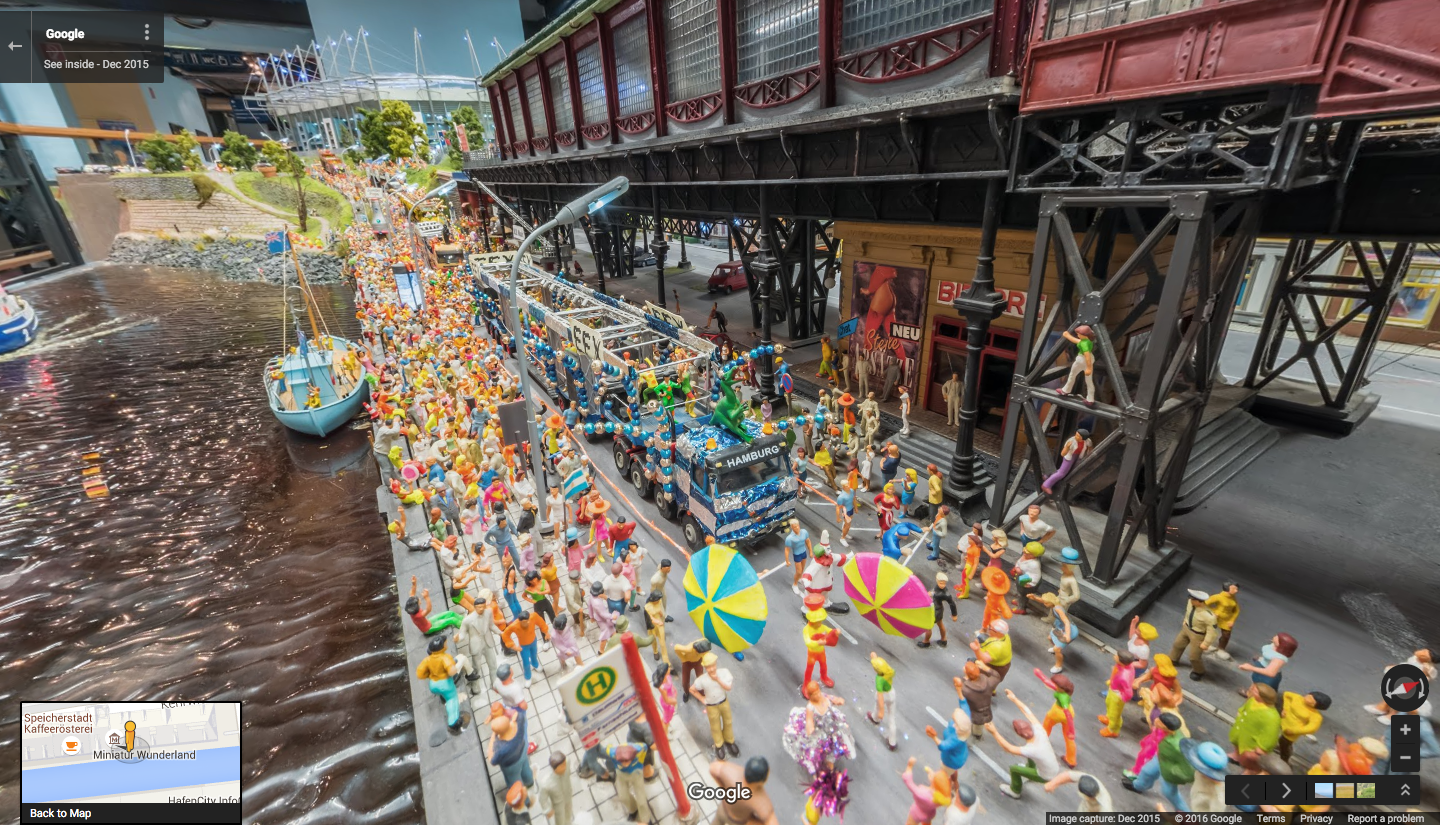
Miniature Wunderland is claimed to be the largest miniature model railway in the world. So, how do you go about capturing Street View of a miniature railway? With miniature cameras on miniature Street View cars of course!

Actually viewing the Street View in Google Earth proved a little difficult. The whole building was captured in 2012 with ordinary Street View and the location of that is shown by blue lines. The new miniature Street View captured in December 2015 is classified as ‘see inside’, which shows as orange dots. Unfortunately only a few of the dots show in Google Earth – there are more in Google Maps. We were, after some trial and error, able to locate all the miniature street View imagery in Google Earth, and once you are in a section you can explore without to much difficulty. We tried creating placemarks so that we could share the start locations but found that Google Earth placemarks can be quite unreliable with Street View. Probably the best ways to explore the new Street View is with this site or Google Maps


There is a lot more than just model railways.

The post Miniature Street View appeared first on Google Earth Blog.

27 Jan 18:02

Ant Cities from Space

by Timothy Whitehead

We recently came across this article about an area near the Grand Canyon where you can see circular patches of bare ground in the imagery. The bare patches are believed to be caused by ant nests and so the area has been dubbed the ‘Las Vegas of Ants’.


‘Las Vegas of Ants’, Grand Canyon, Nevada, USA.

Another location that has similar patterns that may be caused by ants is an area in Namibia. There they are known as ‘fairy circles’.


Namib fairy circles.

In Zambia there are large regions that are covered with termite mounds. Although termites look, and behave like ants they are actually more closely related to cockroaches. If you look at the region around Choma, in Southern Zambia, you will notice that all the fields have trees speckled around them, but it is not obvious why from the satellite imagery. However, there is a higher resolution image from the Africa Megaflyover


Termite mounds near Choma, Zambia. According to my sister, a biologist, the termite in question is Macrotermes sp.

Where farmers are using centre-pivot irrigation it is necessary to flatten the termite mounds, but the marks where they were can still be seen in the fields.


Top: a field with uncut trees where the termite mounds are. Centre: uncleared bush with termite mounds showing as lighter patches. Bottom: Circular fields for centre pivot irrigation with termite mounds flattened.

We also came across an area near Choma which has some white dots in the soil that are smaller than the previous termite mounds.


According to my sister, these could be another type of termite (possibly Cubitermes sp.), which makes small grey mounds.


An area near Lochinvar National Park, Zambia. This image was captured during a fire (still burning at the top right) which makes the termite mounds really stand out.

Large termite mounds are common in other countries such as India and Australia. We couldn’t find any that were clearly visible in satellite imagery but we did find this one, known as a cathedral termite mound, in Street View:


A cathedral termite mound, Litchfield Park, Australia

If you look at the satellite view of the area you can just make out some lighter spots in the imagery, which are other cathedral termite mounds and when they are close to the road you can also see them in Street View.

When looking around Namibia we came across some other strange patterns:


Strange patterns that appear to be related to water flow.

We also came across a location in Ethiopia that is featured in Google’s ‘Earth View’ Chrome extension. It also shows dots all over the fields that might be termite mounds but we could not find any ground level photos to confirm it.


Near Tana Lake, Ethiopia

To see all the locations featured in this post in Google Earth download this KML file.

The post Ant Cities from Space appeared first on Google Earth Blog.

27 Jan 17:59

Google Earth ‘Rainbow Planes’ Inspire Art

by Timothy Whitehead

Fast moving objects, such as aircraft, when seen in satellite imagery often show ghosting or a ‘rainbow effect’. This is caused by the way satellite cameras work taking several photos in succession using different wavelengths of light. The separate images are later combined to produce the full colour images we see in Google Earth. If anything moved between shots then we see an image for each of the three primary colours in slightly different locations and usually a fourth, slightly higher resolution image, in grey-scale. To see examples of this see this post we wrote on the subject.

This effect has inspired artist James Bridle, who has created two different artworks based on the rainbow effect. We came across this article about his second one.

You can read more about it on the artist’s blog here. Also check out his other artwork here as many of them are mapping or satellite imagery related.


Rainbow Plane 002 in Kiev, Ukraine, by James Bridle.


We were able to track it down in Google Earth imagery, but it is only barely visible and the rainbow effect is not visible at all.

We also tracked down most of the locations of another series of his called ‘Drone Shadow’ but only found one in Google Earth imagery and it is also only barely visible. To see the locations in Google Earth download this KML file.

The post Google Earth ‘Rainbow Planes’ Inspire Art appeared first on Google Earth Blog.

27 Jan 17:57

The best things come in small (Street View!) packages

by Lat Long
For those looking to relive their childhood dreams of being a conductor of their own railway and playing with dollhouses, we have a Street View surprise for you: Hamburg’s famed Miniatur Wunderland, the world’s largest model railway, has come to Google Maps. Boasting 13,000 meters of track and more than 200,000 tiny citizens, the museum includes tiny replicas of a variety of German provinces, famous places in America and even a fully-functioning airport!


Street View cameras have floated on gondolas in Venice, ridden on camels in the Liwa Desert and soared on snowmobiles on Canadian slopes. But to capture the nooks and crannies in Miniatur Wunderland, we worked with our partner at Ubilabs to build an entirely new—and much smaller—device. Tiny cameras were mounted on tiny vehicles that were able to drive the roads and over the train tracks, weaving through the Wunderland’s little worlds to capture their hidden treasures.


Google Maps’ miniature Street View devices cruising the railways and streets of Miniatur Wunderland

Touring the marvels of Wunderland, you must first begin in its oldest section: Knuffingen, a fictional town situated squarely between the Alps and Harz. Become one of this tiny city’s 10,000 inhabitants: Stop by the city’s rustic farmer’s market, witness the local fire department spring into action when a building catches fire and even see a plane lift off from Knuffingen’s airport.

Farmers market in Knuffingen, Miniatur Wunderland with the Street View car driving by

You can also see a variety of real places designed with an eye for accuracy: a soccer match in Hamburg’s stadium, a traditional town center in central Germany, a rowdy Oktoberfest celebration and a replica of the famous Neuschwanstein Castle in Bavaria, and even the ski slopes of Austria. You can also glimpse the everyday lives of thousands of miniature citizens, as they bike, camp and dance their way around the Wunderland.

Wunderland figurines enjoying a parade in Hamburg

Then it’s a (very) short hop over to the U.S., where you can zoom through the valleys of the Grand Canyon, gambol down the strip in Las Vegas, and even stop by Mount Rushmore to salute past U.S. Presidents. Because we captured this imagery at “street level” within the Wunderland itself, you can observe many tiny details in Street View that are not visible even to visitors to the museum -- deep sea divers at a county fair, farmers riding a broomstick, a newly-married couple on the steps of the courthouse and the dancing crowds at an outdoor concert.

See the bright lights in Las Vegas in Miniatur Wunderland

To see more of Miniatur Wunderland, including a miniature Street View car built to commemorate this joint project, explore our Street View gallery. As you navigate through this truly wonderful Wunderland, we think you’ll agree: when it comes to great views, size doesn’t matter!
Posted by Sven Tresp, Street View Program Manager
05 Jan 04:18

Make your home Internet look like your home with OnHub

by Google Blogs
Chances are, somewhere in your home, there‘s a tangled mess of wires and blinking lights that make your Wi-Fi work. Your router likely isn’t the most sightly thing, and you probably hide it behind a curtain or under a bookcase—out of sight.

Turns out, that’s a bit of a problem, since routers work better when they’re out in the open. So a few months ago, we released the first OnHub router from TP-LINK. It replaces the unruly cords, blinking lights, and bulky antennas of a typical router with subtle lighting and internal wiring, so you’re more likely to put OnHub out where it works best.

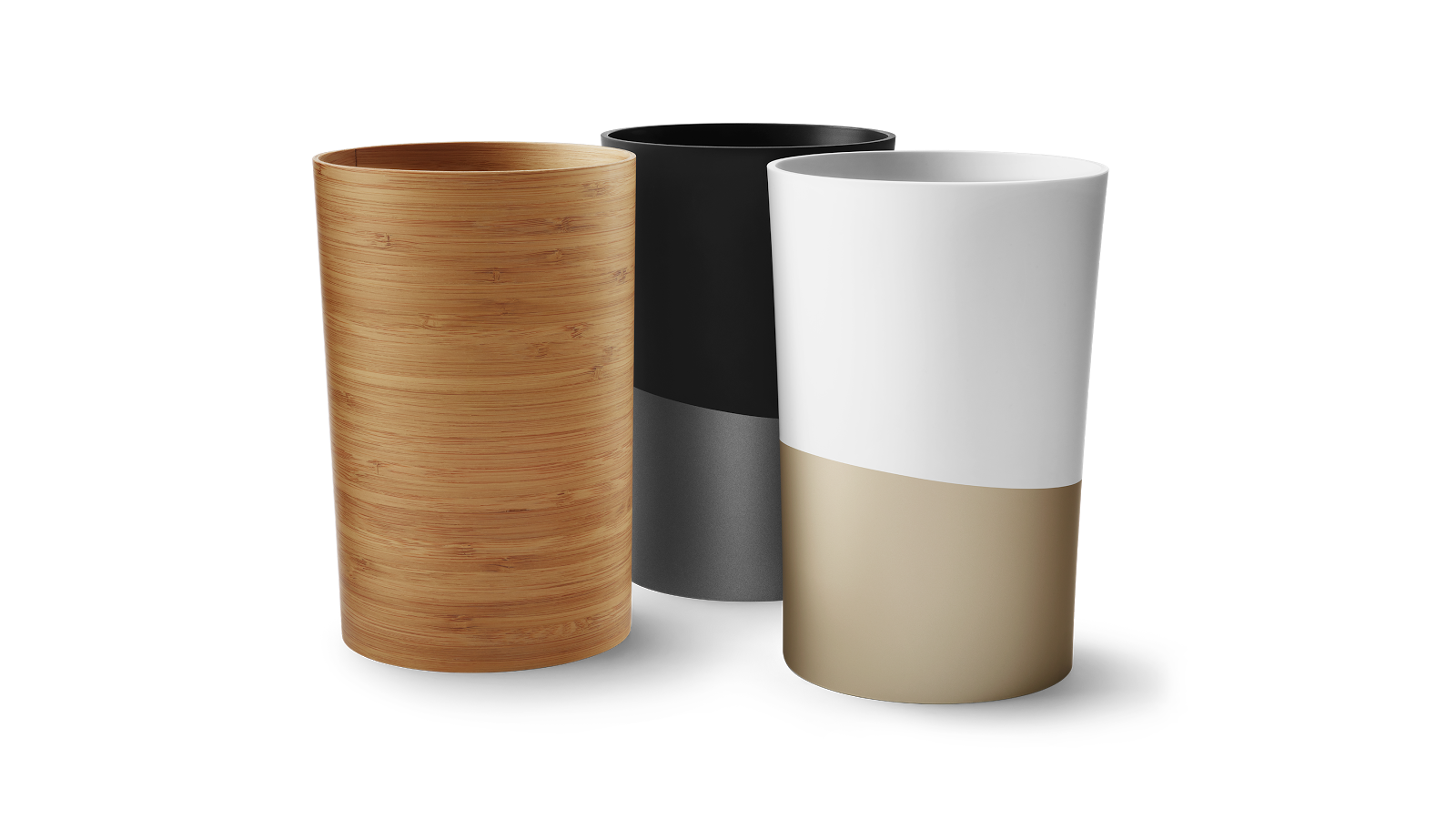
Today we’re introducing more ways to make your OnHub look great in your home with three new, interchangeable shells for the OnHub from TP-LINK, as well as OnHub Makers, a gallery of shells designed by artists, designers, and makers.

With OnHub Makers, we wanted to see what some of the world’s most creative minds would do to personalize their routers. We reached out to artists, makers and designers who poured resin, blew glass, and cut paper to make their own unique shells. You can see their creations and learn more in the OnHub Makers gallery.

Feeling inspired? Then it’s time to get crafty. We’ve put together all of the information you need to customize an OnHub shell. Whether you’re using a laser cutter or simple finger paints, download the Maker Packet for 3D files, 2D patterns, and useful guidelines. Once you’re done, be sure to share your designs online using the hashtag #OnHubMakers, and we may feature your design in our gallery.

If DIY isn’t really your thing you can still add some style to your Wi-Fi with one of the three new shells from the OnHub team, available later today in the U.S. for $29-39 on the Google Store.
Posted by Ben Brown, Product Manager, OnHub

http://4.bp.blogspot.com/-HTzSqT1Y7a8/VmcSiW9_Z4I/AAAAAAAARjU/NREGWCoteUo/s1600/JetstreamShell_O_TAF1_16x9%2B%25281%2529.png Ben Brown Product Manager OnHub
05 Jan 04:06

Animal shaped buildings in Google Earth

by Timothy Whitehead

We were having a look at recent imagery (captured in late November) in Google Earth and were surprised to find a building shaped like a crocodile in Jabiru, Australia.


Gagudju Crocodile Holiday Inn, Jabiru, Australia.

So we Googled it and found this article and this article listing a number of other animal shaped buildings. We were able to track most of them down in Google Earth. We also came across a few others from other such lists.

A couple of them are modelled in the old type of 3D. A number of others have the new 3D imagery, but most are not very well done, so are better viewed from Street View.


Elephant Tower, Bangkok, Thailand.


Lucy the elephant, New Jersey.


Cat-shaped Kindergarten Wolfartsweier, Karlsruhe, Germany.


The Snail House, Sophia, Bulgaria


Larry the Lobster, Kingston, Australia.


National Fisheries Development Board, Hyderabad, India.

To find the above locations and many more in Google Earth download this KML file.

Also be sure to check out our recent post on toys in Google Earth.

The post Animal shaped buildings in Google Earth appeared first on Google Earth Blog.

05 Jan 03:52

California City and other ghost cities

by Timothy Whitehead

We recently watched this YouTube video about California City, which was planned and laid out in the 1960s, but remains largely unoccupied. As you can see in the video, streets were created and named and in some cases even signposted. So we had a look in Google Earth and found that most of the Streets are marked and named in Google Earth.


Vast areas of desert all marked out with city roads make California City the state’s third largest city by area.

This reminded us of a location we found in Brazil, which, similarly, has laid out city streets that are visible in imagery dated as far back as 1970. We have been unable to find out anything about it partly because it doesn’t appear to have a name in Google Earth. The closest marker is “Sauípe de Dentro”, which we believe is actually the name of a nearby village. If any of our readers knows anything about it please let us know in the comments.

This lead us to also investigate other ‘ghost cites’ we have heard of in the past, such as Kilamba in Angola and the many ghost cities of China. It turns out though that Kilamba has since seen occupation levels rising and most of the ghost cities of China are newly built or still being built and it would be premature to declare that they will not be filled. We did, however, find articles suggesting that China is planning to build far more cities than it can ever possibly fill.


Ordos, China, is often cited as an example of a Chinese ghost city.


The central park or Ordos is quite striking from above.

If any of our readers know of other examples of cites that were partially constructed and then abandoned, please let us know in the comments.

The post California City and other ghost cities appeared first on Google Earth Blog.

04 Jan 05:42

Step inside your photos with Cardboard Camera

by Google Blogs
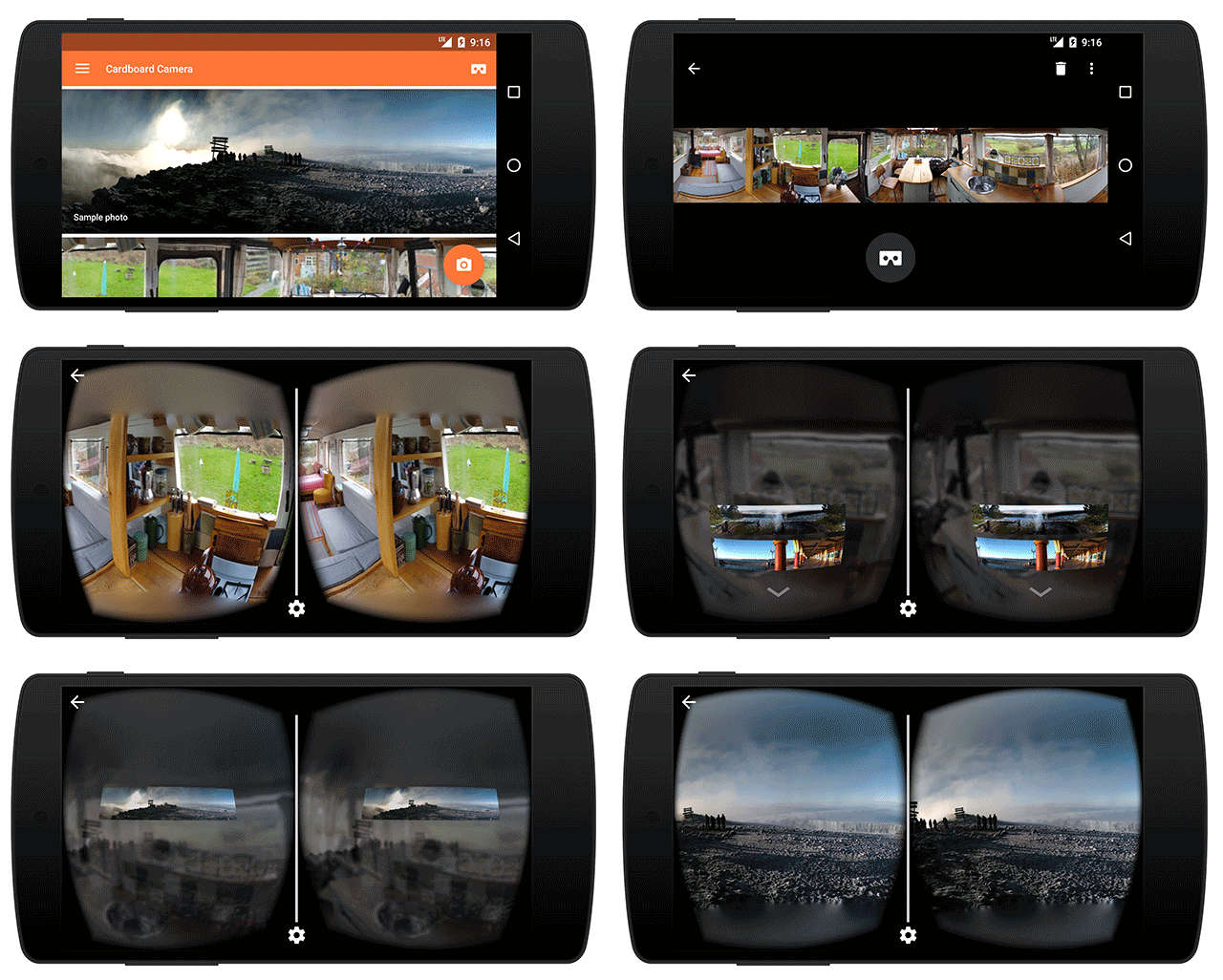
With Google Cardboard, you can take amazing trips to faraway places and feel like you’re actually there. But what if you could also use Cardboard to go back in time—to step inside personal moments like your favorite vacation or a holiday dinner with family? Now you can with the new Cardboard Camera app for Android.

Cardboard Camera turns the smartphone in your pocket into a virtual reality (VR) camera. It’s simple to take a photo: just hold out your phone and move it around you in a circle. Later, when you place your phone inside a Google Cardboard viewer, you'll get to experience something new: a VR photo.
VR photos are three-dimensional panoramas, with slightly different views for each eye, so near things look near and far things look far. You can look around to explore the image in all directions, and even record sound with your photo to hear the moment exactly as it happened.
Taken with Cardboard Camera at Jackson Lake, Wyoming. This simulates the 3D effect when seen in a Cardboard viewer.

With Cardboard Camera, anyone can create their own VR experience. So revisit the mountaintop that took hours to hike, or the zoo where you saw (and heard) the monkeys, or your birthday party with the cake out and candles still lit. Capture the moments that matter to you and relive them anytime, from anywhere.

Cardboard Camera is available today on Google Play in 17 languages.

Posted by Carlos Hernandez, Software Engineer, Cardboard Camera http://3.bp.blogspot.com/-cXaR6CyEPw8/VmBpIVPkEkI/AAAAAAAARhg/hAv4GJWbWMA/s1600/Simulates_3D_Effect_in_Viewer.gif Carlos Hernandez Software Engineer Cardboard Camera
01 Dec 01:53

‘Tis the season: Google brings holiday hours to Maps and Search

by Lat Long
Ever trekked all the way to your favorite restaurant just to realize it’s closed for the holidays? Well, we have. Now Google Maps and Google Search will help you avoid that common holiday mistake. We've added holiday hours to Maps and Search, so when you search for a business and a major holiday is within the next seven days, you’ll see whether the business has a special holiday schedule. Not only will you avoid showing up to find the doors locked, but you’ll save time by not having to call the business or check the website for hours.

If you want to find out what’s open as the holiday draws close, just search for a place and if the holiday hours are listed, you’ll see them.


If you search for a business and the holiday hours aren’t listed, you’ll see a warning message alerting you that the actual hours may be different because of the holiday.


And if you want to find a nearby open coffee shop, restaurant or bakery, just use the “Open Now” filter and we’ll show you places that are open on these days.

We’ve got you covered pretty much everywhere you search and anywhere you go. Because holiday hours and warnings are available globally, if you happen to be celebrating Boxing Day in the UK or New Year’s Eve in Sweden, you’ll see info specific to the country you’re in. How’s that for traveling like a local?

Posted by Jonathan Sidi, Product Manager, Google Maps & Local Search
29 Nov 17:44

Celebrating Hedy Lamarr

by Google Blogs
We love highlighting great stories about women’s achievements in science and technology. When the story involves a 1940s Hollywood star-turned-inventor who helped develop technologies we all use with our smartphones today … well, we just have to share it with the world.

Today on Google’s homepage we’re celebrating Hedy Lamarr, the Austrian-born actress Hollywood once dubbed “the most beautiful woman in the world.” Lamarr’s own story reads like a movie script: bored by the film industry and feeling typecast, Lamarr was more interested in helping the Allied war effort as World War II broke out than in the roles she was being offered. She had some background in military munitions (yes, really), and together with a composer friend, George Antheil, used the principles of how pianos worked (yep, pianos) to identify a way to prevent German submarines from jamming Ally radio signals. The patent for “frequency hopping” Lamarr co-authored laid the groundwork for widely-used technologies like Bluetooth, GPS and wifi that we rely upon daily.

It’s no wonder, then, that Lamarr has kind of a mythical status at Google, and I was pretty excited at the chance to tell her story in Doodle form. This took some tinkering of my own—after deciding on the movie format as a nod to her Hollywood career, I dug through old fashion illustrations and movie posters to try to capture the look and feel of the 1940s. Sketching storyboards on a yellow notepad helped me figure out how to show Lamarr in very different scenarios—movie star by day, inventor by night—which we then animated and set to the awesome soundtrack created by composer Adam Ever-Hadani.

So in the spirit of celebrating women in technology everywhere, here’s to Hedy Lamarr, who fused the arts with science and never let herself be typecast. Happy birthday, Hedy, on what would have been your 101st birthday. And thank you.

Posted by Jennifer Hom, Doodler

Day one of sketches and exploration
Storyboard organizing
Alternative ending from an early draft


Author Full Name
Author Title
Author Team
HERO QUOTE GOES HERE