Shared posts

31 Oct 18:32

The Edited Baby Registry

by Alison Mazurek
Baby Essentials.jpg

I always hesitate to claim that anything is minimalist, as I believe minimalism is so personal, but we live in a world where you are bombarded with baby products that you "need" and I believe that lack of space for baby gear is one of the main reasons people leave their small spaces. So instead of claiming this is a "minimalist" list of baby items, let's call it "edited". We don't need an overwhelming number of things for a new baby but there a few things that I have learned to rely on. Here is my edited list of baby gear and products that we used and loved. Anything I am listing here is an item that helped me stay in our small space with a baby and again with a baby and a toddler. There are so many choices out there and I haven't tried them all but this is what worked for us. Also, in putting together this post I re-read this post and find it to still be so true and relevant to those early newborn months with a toddler and our small space (here's the link in case you care to read). If you are expecting in a small space or just want to be more conscious about the baby items you allow into your space, I hope this list is helpful! And as always I highly recommend buying second hand whenever possible and sharing with friends.

Firstly and most important are my sleep essentials, with one good sleeper and one light sleeper these are the items that helped both of them fall asleep without me:

1. Bassinet - A bassinet was a great option for us with a second baby in a small space as it allowed us to delay having a crib as long as possible. A bassinet let baby sleep near us for the first 4 months but was easy to move out of the way during the day. I also think a bassinet is a great option for a first baby in a small space to delay major decisions about cribs, or sleeping arrangements until everyone gets to know each other a bit better. Our beloved bassinet is the Monte Design Rockwell in white.

2. Mini Crib - I am a big fan of mini cribs for small spaces. Both kids have now slept in a mini crib; Theo until over 2 years old and Mae is currently in one at 16 months. Less bed and more space is always our priority and mini cribs help us get there. Our mini crib is discontinued but this Babyletto Origami is the replacement. I love that it fits regular pack n play sized sheets and mattresses and comes in a variety of colours (wish I got the white!) (more about mini cribs in this previous post)

3. A Few Good Swaddles - I think you need 3-4 muslin swaddles for a variety of uses including blanket, swaddle, sun shade, burp cloth, rolled up head rest, emergency nursing cover etc. And I would recommend only having 3-4 that you love the colour and pattern of so you don't have to think before grabbing one. A few of my favourites are Pehr Designs, Little Unicorn, Modern Burlap, Aden and Anais

4. Ergo Cocoon - I know these don't work for everyone but both my babies loved being zipped up in their ergo cocoon and I loved that the swaddle didn't come loose while the slept, inevitably waking them up. I had 2 so one could go in the wash and used them for both babies until about 8 months old. 

5. Wubanub - while not the most beautiful of pacifiers both my babies loved them and I used them as comfort and sleep aids. Theo used one until 6 months when he gave it up on his own and Mae stopped at 15 months when we lost it. She spent a week upset until she eventually forgot. I know soothers are controversial for some people but for me they were a big help especially in those early sleepless months.

Baby Essentials (4).jpg

6. Stokke Tripp Trapp - for small spaces or any space the beautifully designed Stokke Tripp Trapp high chair is a classic for good reason. I bought mine second hand and have used it for both kids. Mae was in it with the baby set (plastic only, no cushions I had to clean) as soon as she could sit up. It compliments my dining table and chairs. I wish I had actually gotten two Tripp Trapps when Mae moved to the highchair instead of putting Theo in a regular dining chair but I couldn't get Trevor on board. While an investment piece they have great re-sale value. I couldn't imagine life without ours.

7. Travel Crib - I add this to my essentials list as we are travellers and travel with our babies. I wish I had bought a Baby Bjorn Travel Crib the first time around instead of waiting. I would love to hear if there is a comparable travel crib anyone prefers. I bought ours second hand, and consider it vital for travel and camping. I have also heard many stories of this being used successfully as a full-time crib in smaller spaces!

8. Stroller - I did a ton of research on strollers before landing on the Bugaboo Bee with a wheeled board and have found it to be the best choice for us city living folks. While it has a few design flaws, like I wish it would fold up smaller and it doesn't take curbs well. The pros outweigh the cons for me. I love that I could use it from day one without a bassinet and has grown with our kids. I love that both kids fit on it comfortably but it barely takes up more space than an umbrella stroller. For our age split and small space it is the perfect stroller. The only other stroller I heavily considered was the Babyzen Yoyo for it's smaller footprint and tighter fold. In the end I decided against it due to the need for the additional bassinet in the early months. But I still think it is a great city option and would consider it if I had to do decide again.

9. Nuna Leaf - I kept our Nuna Leaf after Theo outgrew it (lending it out until Mae was born to avoid storing it!) and loved it for a second time. Most importantly and unplanned the high weight limit was the best part of the this chair. Nothing can be off limits in our space especially for a 3 year old having trouble adjusting to his new sister. I know if we had a flimsier or fragile baby chair it would not have survived (and I would not have survived regulating that all day). I do think a baby chair is critical to put your baby down sometimes. I also think the Baby Bjorn Bouncer is a great lightweight option for small spaces. 

Baby Essentials (5).jpg

10. Ring Sling - I used a ring sling for the first time with Mae and wish I had considered it with Theo. I loved so much about wearing her in the sling... she could see out more, fell asleep easily in it and seemed so happy to be worn. And the sling is light and small so it was easy to bring everywhere, just in case. I am a true convert and would recommend it highly. I had the Connexion Baby Ring Sling in white birch and I believe the code 600sqft still gives you 10% at this lovely Canadian Mama run shop. Friends have also loved My Wild Bird.

11. Ergo Baby Carrier - I consider an Ergo Baby carrier a necessity especially as your baby grows into a toddler. Baby wearing is so helpful, whether it's a quick run to a store where you want to keep baby contained without the bulk of a stroller, for travel or getting out in nature. I have only used the original ergo so I can't speak to the 360 but the original carrier has been critical and I still use it weekly with a larger 16 month old. And I have tried many other brands before settling on the Ergo.

12. Changing Mat - I simplified our in home and diaper bag changing set up to just a portable Gathre leather micro mat for each and a container of wipes. I hide the mat, wipes and diapers in a canvas bin in the living room for easy access and change baby on the couch or the floor. A second mat is folded up small in the diaper bag. The system works wonderfully for us and would highly recommend this simple space saving option. I never felt I was missing out on a change table and was happy to not store a larger change pad. The gathre mats look great over a year later and are easy to clean.

13. Diaper Cream - While not technically gear I have edited many of the care products for babies out of our home and cling to a few crucial choices that serve multiple purposes and wanted to share. The overachiever by k'pure naturals is an all natural diaper cream that can be used for many topical skin treatments. I've used it on dry skin, chapped lips, scrapes and the little jar lasts so long. 

14. Nose Frida - I wouldn't have considered this an essential the first time around but second babies are constantly sick and being able to relieve some discomfort and help them breathe got this on the list (even as nauseating as the process is).

15. Baby Soap - I know soap seems odd to add but this Dr.Bronner's baby soap we use to wash bottles, our hands and anything touched by baby especially in those early months. You can water it down so the bottle lasts even longer. It's a real workhorse and all natural so you don't have to worry about it being safe for baby; you have enough to worry about.

16. Bottles - We went from having two cupboard shelves full of bottles with various sizes and nipples to having two ComoTomo bottles for the last year. I can't say enough about this bottle or how much Mae loves it and I loved the easy of cleaning and storing it. I always recommend it when friends are having trouble with their baby taking a bottle and preferring breast. The soft pliable design of the nipple and the body make it so unique, I never thought I would care this much about a bottle!

This post is completely my own opinions and is not sponsored in any way. I've added links for reference for most items. To add a few honourable mentions, I still swear by the Puj Tub Travel Tub for small apartment sinks and newborn bathing. And while I left it off the list, we used the Maxi Cosi Mico as our carseat for both kids and were really happy with it. I was also highly dependent on the My Brest Friend Pillow when nursing at home. 

I also received a lot of questions about keeping newborn clothing and outerwear to a minimum for new babies so I'm going to do a separate post about that shortly. If you have other products you couldn't live without feel free to leave a note below! 

31 Oct 18:32

Microsoft Aligns Features of Skype’s Desktop and Mobile Apps

by John Voorhees

Over the summer, Microsoft introduced a new Skype app for iOS with a multitude of new features that seemed designed to maintain its relevance in a social media-dominated world. At the time, Microsoft also introduced a preview version of the Skype desktop app that incorporated some of the same features. Today, Microsoft announced that the desktop app has exited preview mode and is being rolled out across several platforms.

The new Skype desktop app includes a lot of new features, but one of the most fundamental that should be welcome to all users is the unification of messaging across platforms. That means messages you receive through Skype will be available whether you’re using the app on a Mac, iOS, Windows, an Xbox, or another device.

In addition, Skype now includes cloud-based file sharing of up to 300 MB of data, customizable themes, and different ways to organize your chat list. Notifications have also been centralized with reactions to your messages, @mentions in group chats, and instances where you have been quoted available in one place. To jump to the spot in the conversation where the notification appears, just click on it. There’s a chat media gallery where you can access all photos, links, files, and other items sent to you too.

Microsoft has added many other bells and whistles. Chat conversations can take advantage of add-ons like event scheduling, sending money to friends and family, searching for GIFs, and more. Video calls and text-based messages can include reactions to let others know your mood, status updates, Twitter-style @mentions, and bots from third parties too. If there was any doubt that Microsoft wants to expand beyond simple voice and video calling, the latest updates to Skype’s apps should put that to rest.

The new version of Skype has begun rolling out to users. If you don’t want to wait for the update to show up, you can manually download it from Skype.com now.


Support MacStories Directly

Club MacStories offers exclusive access to extra MacStories content, delivered every week; it's also a way to support us directly.

Club MacStories will help you discover the best apps for your devices and get the most out of your iPhone, iPad, and Mac. Plus, it's made in Italy.

Join Now
31 Oct 18:32

iPhone X, Face ID, and Hidden Notification Content

by Federico Viticci

An interesting tidbit from Steven Levy's first impressions of the iPhone X: by default, the content of notifications on the Lock screen is hidden, and it's only displayed once you look at the iPhone and thus authenticate yourself.

Alternatively, a good way to see when you’ve been recognized is to notice the generic messages on the lock screen saying “you have a notification” from Facebook, Gmail, or wherever. When you and your iPhone X make that turn-on connection, those flesh out with the actual content of the message. (This feature—withholding potentially private alerts until the phone was unlocked—had previously been available as an option but now is the default.)

What I find intriguing is the fact that – if I'm reading this right – the feature has been turned on by default for the iPhone X, as if to underline the role of Face ID. This option, in fact, isn't new: on any existing device running iOS 11, you can go to Settings ⇾ Notifications ⇾ Show Previews and enable When Unlocked to achieve the same effect. On the Lock screen, the content of notifications (titles, preview messages, and media attachments) won't be shown until you place your finger on the Touch ID sensor.

It seems like Apple sees Face ID as not only technically superior to Touch ID (more secure, powered by machine learning), but also as a better user experience for dealing with notifications – otherwise, why would they make it the default setting? I'm curious to play with this and see if I revert to the old option or not.

→ Source: wired.com

31 Oct 18:32

En vrac du lundi (oui, encore !)

by Tristan
31 Oct 18:26

Arbutus Greenway’s Streetcar

by Ken Ohrn

At the weekend’s “Design Jam“, 100 residents of Vancouver, from all ‘hoods and oodles of demographics, volunteered their weekend to thinking about the future Arbutus Greenway.  People travelling on foot, people travelling on bikes, people relaxing, people playing.  Lots of ideas.  Nature, history.  And streetcars.

And likewise, the project team gave the volunteers BACKGROUND on light rail generally, and some early thoughts about the Arbutus Greenway’s light rail.

Clearly, there is a fundamental need to put light rail (a.k.a. “streetcar”) on the Arbutus Greenway.  It’s a contractual thing. But in some places the Greenway is only 15m wide, and a typical streetcar requires 4 m per direction, leaving a too-narrow space for all the rest that the Greenway should be.  So what to do?

As usual, Kenneth Chan of Daily Hive Vancouver has written a detailed account of the discussion material.

Preliminary conceptual designs show that the municipal government’s non-finalized, preferred route for the streetcar segment between West 8th Avenue and West 16th Avenue will take the northbound direction tracks off the Greenway and onto the northbound curb lane of Arbutus Street. The southbound direction will continue to run on the Corridor, next to the pedestrian and cycling paths.

Click to enlarge the illustrations. 

arbutus-streetcar-preferred-alignment

arbutus-streetcar-preferred-alignment.2


31 Oct 18:26

Gladys Adds iPhone Version and iCloud Sync

by Federico Viticci

Gladys, developed by Pavlos Tsochantaris, is one of the shelf apps we've been covering on MacStories since the release of iOS 11 and, as I wrote last week, the one I've been using on my two iPad Pros. Not only does Gladys implement many of the ideas I would have liked to see in a native shelf for iOS 11, but the app has gone beyond my expectations with the ability to save multiple data types for dropped items, as well as a file provider extension to view all your saved items in iOS 11's Files app.

With today's version 1.1, Gladys is also gaining a permanent spot on my iPhone's Home screen (which I shared in Issue 100 of MacStories Weekly for Club MacStories members). Gladys is now a universal app for the iPhone and iPad, and it can sync items across devices thanks to built-in iCloud integration. In my early tests with the app, everything worked as expected: CloudKit-based sync is fast and reliable, with changes made on one device (such as a link dragged from Safari into Gladys on the iPad) propagating in less than two seconds to the other.

From a feature standpoint, Gladys for iPhone is a near 1:1 adaptation of its iPad counterpart, with the obvious difference being the lack of multi-app drag and drop to save content into Gladys – an option that is not available for iPhone apps in iOS 11. However, in-app drag and drop is present in Gladys for iPhone as a way to rearrange items within the app, and it's been combined with the Taptic Engine to add an extra dimension to dragging thumbnails in the main view, which is a pleasant effect. Every other functionality from the iPad app has been ported to the iPhone, including the ability to label clippings (labels also sync over iCloud), the action extension to save content from other apps via the share sheet, and the extension in Files.

In addition to adding an iPhone app, Gladys 1.1 improves how you can preview individual representations of items saved using drag and drop on the iPad. From an item's detail view, types compatible with iOS' Quick Look now feature a preview icon that you can tap to visualize the item inside Gladys. This works for text, images, videos, and even URLs (which open in Safari View Controller). This feature is even more impressive when you drag something into Gladys from another iPad app, then use the detail view to inspect and preview all the flavors of the item captured by drag and drop – it's a great way to understand how the framework works behind the scenes.

I was somewhat skeptical about saving temporary, but still important work documents and bits of text in Gladys before, but with an iPhone version and iCloud sync, those doubts have vanished. Like Apple Notes, Copied, Bear, or iWork, Gladys is now another iCloud-powered app that syncs between my devices; I'm inclined to drop all kinds of draggable items when I'm working on my iPad because I know they will be available on my iPhone too. There are still features I'd like to see in Gladys (currently, the app has no way to group items in folders; the iPhone version has no 3D Touch quick actions), but, considering Tsochantaris' rapid development pace, I have a feeling we're going to see more updates over the next few weeks. I'm going to use Gladys a lot more after version 1.1, and I'm putting it on my iPhone's Home screen today.

Gladys 1.1 is available on the App Store.


Support MacStories Directly

Club MacStories offers exclusive access to extra MacStories content, delivered every week; it's also a way to support us directly.

Club MacStories will help you discover the best apps for your devices and get the most out of your iPhone, iPad, and Mac. Plus, it's made in Italy.

Join Now
31 Oct 18:26

The Best Fidget Spinners

by Eleanor
The Best Fidget Spinners
We researched 30 fidget spinners and tested nine of the most popular models before determining that the ZekPro Anti-Anxiety 360 Spinner is the best beginner spinner. Its seamless body and lengthy spin time are telltale signs of durable construction. Just don’t read too much into the name: We found no medical research to support claims that fidget spinners can reduce anxiety or stress.
31 Oct 18:26

SiriKit Support Will Be Included on HomePod for Certain Third-Party App Domains

by Ryan Christoffel

In an update on its developer site today, Apple announced that SiriKit support will be included in the forthcoming HomePod device.

iOS 11.2 introduces SiriKit for HomePod, the powerful speaker that sounds amazing, adapts to wherever it’s playing, and provides instant access to Apple Music. HomePod is also a helpful home assistant for everyday questions and tasks. With the intelligence of Siri, users control HomePod through natural voice interaction. And with SiriKit, users can access iOS apps for Messaging, Lists, and Notes. Make sure your SiriKit integration is up to date and test your app’s voice-only experience today.

When the HomePod was first unveiled at WWDC in June, there was no word regarding whether it would support third-party apps through SiriKit. While some expected further details on HomePod to arrive in September's keynote, that event came and went with no news. Today marks the first time we've learned anything new about HomePod from official sources since its initial introduction.

Messaging, Lists, and Notes are the only SiriKit domains that will work with HomePod at launch, but it's likely we'll see more added over time. This means the HomePod will be able to do things like send messages in Telegram, create tasks in Todoist or Things, and create notes in Evernote.

Information about how SiriKit on HomePod will work is included on Apple's full SiriKit site, which contains the following detail:

Siri recognizes SiriKit requests made on HomePod and sends those requests to the user’s iOS device for processing.

This means SiriKit support on HomePod will take a fundamentally different path than that of competing products like the Amazon Echo. In most cases the Echo's set of third-party Alexa skills can be operated completely independent of another device. For the time being at least, third-party support on HomePod will rely on a nearby iPhone or iPad.

There are still many HomePod details that remain unclear. For example, we don't yet know if SiriKit requests or iCloud requests will be tied to a single user's device, or if a family will be able to interact with the device in a user-specific way. Time will bring the full story into view, but for now, knowing that HomePod will launch with at least some third-party app support is good news.


Support MacStories Directly

Club MacStories offers exclusive access to extra MacStories content, delivered every week; it's also a way to support us directly.

Club MacStories will help you discover the best apps for your devices and get the most out of your iPhone, iPad, and Mac. Plus, it's made in Italy.

Join Now
31 Oct 18:26

iPhone X First Impressions Arrive via Steven Levy and YouTube

by Ryan Christoffel

Ahead of any full reviews for the iPhone X arriving, today one writer and a host of YouTubers published their first impressions for the new device, which releases November 3.

Steven Levy was one of the handful of journalists who received review units of the original iPhone over ten years ago. Today he exclusively shared his early thoughts on what appears to be the biggest evolution of the device, at least in form factor, since that original phone. Despite his praise for the device's advancements over previous iPhones, Levy concludes that some of the iPhone X's greatest achievements may only come to fruition with the help of third-party developers.

Remember, as cool as the original iPhone was, it didn’t really begin changing the world until Apple let third-party software developers take advantage of its innards—stuff like the camera, GPS, and other sensors. Maybe something similar, albeit not on such a grand scale, will happen with the iPhone X. Those who shell out the cash for this device will enjoy their screen and battery life today. But the real payoff of the iPhone X might come when we figure out what it can do tomorrow.

As Craig Federighi quipped during the iPhone X's introduction in September, taking some of the most advanced technology ever found in a smartphone and using it to create animated poo is, well, perhaps unsurprising, but certainly a bit anticlimactic. There are undoubtedly applications of the iPhone X's TrueDepth Camera and other features that haven't been dreamed up yet.

Speaking of which, among the YouTubers who were invited by Apple to get early hands-on time with the iPhone X, one of the guys from Highsnobiety performed (jokingly) what is perhaps the first relationship breakup over Animoji. How do breakups by Animoji rank compared to breakups by text?

Videos by UrAvgConsumer, Soldier Knows Best, and Booredatwork contain detailed walkthroughs of how to use the new phone, while Popular Science has a fun science-infused overview of the X's new features, and FASHION Magazine has a short, quick-hit look at ten favorite aspects of the iPhone X.

Apple's marketing strategy with the iPhone X clearly appears to differ from the company's standard practices, with this wave of first impressions preceding any proper reviews. While we should expect to see more traditional reviews from the usual sources in the coming days, perhaps Apple is simply attempting to highlight how this isn't just like any other iPhone launch.


Support MacStories Directly

Club MacStories offers exclusive access to extra MacStories content, delivered every week; it's also a way to support us directly.

Club MacStories will help you discover the best apps for your devices and get the most out of your iPhone, iPad, and Mac. Plus, it's made in Italy.

Join Now
31 Oct 18:26

Charts show time between assaults and public allegations

by Nathan Yau

As the list of sexual assault allegations grows for Harvey Weinstein (and many others who abused their power), Axios charted the time between events and public allegations. Painful decades.

Tags: assault, Axios, Harvey Weinstein

31 Oct 18:26

Project Lincoln from Adobe aims to reverse data visualization workflow

by Nathan Yau

With data visualization, you start with the data and let it guide geometry, colors, etc, and from there, you work on aesthetics, readability, and usability. The data informs the design. Project Lincoln is an experiment from Adobe that flips this. You draw shapes and illustrations first and then bind data to them.

Here it is in action:

My brain was confused. Something about this order of things doesn’t feel right. You go in with design first and then bring in the data, and then you edit again? Maybe this would be useful for quick prototypes or visual experiments? It’s hard to say how this would go in practice without actually trying it out, but my gut says no.

Tags: Adobe, prototype

31 Oct 18:25

Motherboard Reviews Animal Crossing: Pocket Camp

by John Voorhees

Most of the world has to wait until late November for Animal Crossing: Pocket Camp to arrive on iOS, but if you live in Australia or New Zealand, you can play the game now. Jed Whitaker has an early review at Motherboard where he provides additional details about the game’s free-to-play mechanic and stacks it up against Animal Crossing: New Leaf, a 3DS game on which Pocket Camp is based.

According to Whitaker:

One major change to the Animal Crossing formula here is that almost all items must be crafted instead of simply purchased, and the time it takes to craft something passes in real time. The game starts out by having every item only take one minute to craft, but three hours in, wait times get much longer, and you can pay real world money to purchase the premium currency, Leaf Tickets. These can be used to craft items instantly and to basically speed up every facet of the game.

Wait times in Pocket Camp are three hours. By comparison, New Leaf wait times are three days, which Whitaker points out should make Pocket Camp more tolerable to fans of the franchise. Still, if you simply must have an item right away and can’t wait a few hours, you can buy Leaf Tickets as an In-App Purchase.

Fans of the Animal Crossing series may also need to lower their expectations a little. At launch, there are only 40 animals to befriend in Pocket Camp, a small number compared to the over 300 available in New Leaf. Still, even if it’s not as deep as other incarnations of the series, Pocket Camp looks as though it strikes a good balance that should make the free-to-play aspects of it tolerable.

→ Source: motherboard.vice.com

31 Oct 18:22

The challenge with how Reddit is shutting down violent speech

by Josh Bernoff

Reddit clarified its policy to ban speech that “encourages, glorifies, incites, or calls for violence or physical harm.” Sounds great, but as always with free-speech issues, the lines between acceptable and awful are fuzzy. Reddit has a challenging history to deal with. Among mainstream public social platforms, it has been the most tolerant of extreme … Continued

The post The challenge with how Reddit is shutting down violent speech appeared first on without bullshit.

31 Oct 18:18

The Seven Co-operative Principles

by Bryan Mathers
Co-operative principles

You may not know that there are Seven Co-operative Principles. Yesterday, I was at Mozfest, hosted by Ravensbourne College in Greenwich, facilitating a visual conversation all about co-operatives. In fact, Mozfest is so chock-full of conversations, you can easily spend an hour getting to the right floor, bumping into interesting people you half-know. And that’s not because the lift/elevators are confusing. Which they are, but anyways…

I’m a founding member of WeAreOpen, a worker co-operative set up to help a few of us combine our skills, networks and voices.

The post The Seven Co-operative Principles appeared first on Visual Thinkery.

31 Oct 18:18

Should Pot Be Grown On Metro Vancouver’s Agricultural Lands?

by Sandy James Planner

photo-2

There is no doubt that growing marijuana is going to be a big business. And there is also no doubt that the thinkers that created the Agricultural Land Reserve with the hope of protecting the most fertile soils in Canada never thought that their advocacy could result in places for cannabis growing.

The applications are starting to filter in, including one  from “BC Tweed Joint Venture Incorporated”  which plans to grow millions of square feet of marijuana in an undisclosed location.  Delta farmland has attracted great interest with one application  in East Ladner to grow cannabis and extracts for medical and non medical purposes, with a proposed 1.1 million square feet of greenhouse space. To give you an example of how large that area is, the Tsawwassen Mills mega mall is 1.2 million square feet.

As reported in the Delta Optimist the Mayor of Delta has been watching the applications of existing greenhouse operations that want to switch from growing tomatoes to growing the more lucrative cannabis, including one application that wanted to option “an additional 3.7 million square feet of existing highly-efficient greenhouse space”. The Mayor of Delta contacted the Solicitor General Mike Farnsworth to ask if Delta could place restrictions on using farmland for cannabis and instead ask for cannabis to be grown in the industrial warehouses available in the established industrial areas.

The Richmond News  noted that the City of Richmond Council voted to oppose cannabis legalization and has asked to be able to regulate it at the municipal level.  The concern, as in Delta is seeing prime farm land needed for food security being usurped for cannabis operations. While some of Richmond Council also saw cannabis as being an entry-level drug  in the community, it was Harold Steves who observed simply and directly “We should not have farm land which was used for food to grow marijuana.”  Harold also has been suggesting that large industrial roofs may lend themselves perfectly for cannabis cultivation, taking pressure off the valued farmland soils.

The federal government  has a July 2018 deadline for cannabis legalization and the Provincial government  has a feedback survey asking for public input. You have until November 1st to respond.


31 Oct 18:18

Debunking the Network QoS myth

by Dean Bubley
Every few years, the network industry - vendors, operators & industry bodies - suffers a mass delusion: that there is a market for end-to-end network QoS for specific applications. The idea is that end-users, application developers - or ideally both - will pay telcos for prioritised/optimised connections of specific "quality", usually defined in terms of speed, latency & jitter (variability).

I've watched it for at least a dozen years, usually in 3-year waves:
  • We had enterprise networks promising differentiated classes of service on VPNs or the corporate connection to the Internet. Avoid the impact of the marketing department watching cat videos!
  • We had countless failed iterations of the "turbo boost" button for broadband, fixed or mobile.
  • We had the never-realised "two-sided markets" for broadband, featuring APIs that developers would use to pay for "guaranteed QoS"
  • We had numerous cycles of pointless Net Neutrality arguments, talking about "paid prioritisation", a strawman of massive proportions. (Hint: no content or app developer has ever had lobbyists pleading for their right to buy QoS, only telcos asking to be able to sell it. Compare with, say, campaigns for marijuana decriminalisation).
  • We currently have 5G "network slicing" concepts, promising that future MNOs will be able to "sell a slice" to an enterprise, a car manufacturer, a city or whatever.
  • My long-standing colleague & interlocutor Martin Geddes is pitching a concept of app-focused engineering of networks, including stopping "over-delivering" broadband to best-efforts applications, thus forcing them to predict and right-size their demands on the network.
In my view, most of these attempts will fail, especially when applied to last-mile Internet access technologies, and even more-especially to wireless/mobile access. There isn't, nor ever will be, a broad and open market for "end-to-end network QoS" for Internet applications. We are seeing network-aware applications accelerating much faster than application-aware networks. (See this paper I wrote 2 years ago - link).

Where QoS works is where one organisation controls both ends of a connection AND also tightly-defines and controls the applications:
  • A fixed-broadband provider can protect IP telephony & IPTV on home broadband between central office & the home gateway.
  • An enterprise can build a private network & prioritise its most important application(s), plus maybe a connection to a public cloud or UCaaS service.
  • Mobile operators can tune a 4G network to prioritise VoLTE.
  • Telco core and transport networks can apply differential QoS to particular wholesale customers, or to their own various retail requirements (eg enterprise users' data vs. low-end consumers, or cell-site timing signals and backhaul vs. user data). 
  • Industrial process & control systems use a variety of special realtime connection protocols and networks. Vendors of "OT" (operational technology) tend to view IT/telecoms and TCP/IP as quaint. The IT/OT boundary is the real "edge".
Typically these efforts are costly and complex (VoLTE was frequently-described as one of the hardest projects to implement by MNOs), make it hard to evolve the application rapidly because of dependencies on the network and testing requirements, and often have very limited or negative ROI. More importantly, they don't involve prioritising chunks of the public Internet - the telco-utopian "but Netflix will pay" story.

There are a number of practical reasons why paid-QoS is a myth. And there's also a growing set of reasons why it won't exist (for the most part) in future either, as new techniques are applied to deal with variable/unpredictable networks.

An incomplete list of reasons why Internet Access QoS isn't a "market" include:
  • Coverage. Networks aren't - and won't be - completely ubiquitous. Self-driving cars need to be able to work offline, whether in a basement car-park, during a network outage in a hurricane, or in the middle of a forest. The vehicle won't ask the cloud for permission to brake, even if it's got promised millisecond latency. Nobody pays for 99.99% access only 80% of the time.
  • The network can't accurately control or predict wireless effects at micro-scale, ie RF absorption or interference. It can minimise the damage (eg with MIMO, multiple antennas) or anticipate problems (weather forecast of rain = impact on mmWave signals).
  • End-user connections to applications generally go via local WiFi or LAN connections, which service providers cannot monitor or control.
  • No application developer wants to cut QoS deals with 800 different global operators, with different pricing & capabilities. (Or worse, 800 million different WiFi owners).
  • 5G, 4G, 3G and zero-G all coexist. There is no blanket coverage. Nobody will pay for slicing or QoS (if it works) on the small islands of 5G surrounded by an ocean of lesser networks.

  • "Applications" are usually mashups of dozens of separate components created by different companies. Ads, 3rd-party APIs, cloud components, JavaScript, chunks of data from CDNs, security layers and so on. Trying to map all of these to separate (but somehow linked) quality agreements is a combinatorial nightmare.
  • Devices and applications have multiple features and functions. A car manufacturer wouldn't want one slice, but ten - engine telemetry, TV for the kids in the back seat, assisted-driving, navigation, security updates, machine-vision uploads and so on all have very different requirements and business models.
  • Lots of IoT stuff is latency-insensitive. For an elevator maintenance company, a latency of a week is fine to see if the doors are sticking a bit, and an engineer needs to arrive a month earlier than scheduled.
  • I don't know exactly how "serverless computing" works but I suspect that - and future software/cloud iterations - take us even further from having apps asking the network for permission/quality on the fly. 
  • Multiple networks are becoming inevitable, whether they are bonded (eg SD-WANs or Apple's use of TCP Multipath), used in tandem for different functions (4G + SigFox combo chips), meshed in new ways, or linked to some sort of arbitrage function (multi-IMSI MVNOs, or dual-SIM/radio devices).  See also my piece on "Quasi-QoS" from last year (link)

  • Wider use of VPNs, proxies and encryption will mean the network can't unilaterally make decisions on Internet QoS, even if the laws allow it.
  • Increasing use of P2P technologies (or D2D devices) which don't involve service providers' control infrastructure at all.
  • Network APIs would probably have to be surfaced to developers via OS/browser functions. Which then means getting Apple, Google, Microsoft et al to act as some sort of "QoS storefront". Good luck with that.
  • No developer will pay for QoS when "normal" service is running fine. And when it isn't, the network has a pricing/delivery challenge when everyone tries to get premium QoS during congestion simultaneously. (I wrote about this in 2009 - link
  • Scaling the back-end systems for application/network QoS, to perhaps billions of transactions per second, is a non-starter. (Or wishful thinking, if you're a vendor).
  • There's probably some extra horribleness from GDPR privacy regulations in Europe and information-collection consent, which further complicates QoS as it's "processing". I'll leave that one to the lawyers, though.
  • It's anyone's guess what new attack-surfaces emerge from a more QoS-ified Internet. I can think of a few.
But the bigger issue here is that application and device developers generally don't know or care about how networks work, or (in general) have any willingness to pay. Yes, there's a handful of exceptions - maybe mobile operators wanting timing sync for their femtocells, for example. Safety-critical communications obviously needs quality guarantees, but doesn't use the public Internet. Again, these link back to predictable applications and a willingness to engineer the connection specifically for them.

But the usually-cited examples, such as videoconferencing providers, IoT specialists, car companies, AR/VR firms and so on are not a viable market for Internet QoS. They have other problems to solve, and many approaches to delivering "outcomes" for their users.

A key issue is that "network performance" is not considered separately and independently. Many developers try to find a balance between network usage and other variables such as battery life / power consumption together. They also think about other constraints - CPU and screen limitations, user behaviour and psychology, the costs of cloud storage/compute, device OS variations and updates, and so on. So for instance, an app might choose a given video codec based on what it estimates about available network bandwidth, plus what it knows about the user, battery and so on. It's a multi-variable problem, not just "how can the network offer better quality".


Linked to this is analytics, machine learning and AI. There are huge advances in tuning applications (or connection-managers) to deal with network limitations, whether that relates to performance, cost or battery use. Applications can watch rates of packet throughput and drops from both ends, and make decisions how to limit the impact of congestion. (see also this link to an earlier piece I wrote on AI vs. QoS). 

Self-driving vehicles use onboard image-recognition. Data (real-world sensed data and "training" data) gets uploaded to the cloud, and algorithms downloaded. The collision-avoidance system will recognise a risk locally, in microseconds.


 They can focus resources on the most-important aspects: I saw a videoconference developer last week talk about using AI to spot "points of interest" such as a face, and prioritise "face packets" over "background packets" in their app. Selective forwarding units (SFUs) act as video-switches which are network-aware, device-aware, cost-aware and "importance-aware" - for example, favouring the main "dominant" speaker.
 
Another comms developer (from Facebook, which has 400 million monthly users of voice/video chat) talked about the variables it collects about calls, to optimise quality and user experience "outcome": network conditions, battery level before & after, duration, device type & CPU patterns, codec choice and much more. I suspect they will also soon be able to work out how happy/annoyed the participants are based on emotional analysis. I asked about what FB wanted from network APIs and capabilities - hoping for a QoS reference - and got a blank look. It's not even on the radar screen.

At another event, GE's Minds and Machines, the "edge" nodes have a cut-down version of their Predix software which can work without the cloud-based mothership when offline - essential when you consider the node could be on a locomotive in a desert, or on a plane at 35000ft.


The simple truth is that there is no "end to end QoS" for Internet applications. Nobody controls every step from a user's retina to a server, for generic "permissionless innovation" applications and services. Paid prioritisation is a nonsense concept - the Net Neutrality crowd should stop using that strawman.

Yes, there's a need for better QoS (or delta-Q or performance management or slicing or whatever other term you want to use) in the middle of networks, and for very specific implementations like critical communications for public safety. 

The big unknown is for specific, big, mostly mono-directional flows of "content", such as streaming video. There could be an argument for Netflix and YouTube and peers, given they already pay CDNs, although that's a flawed analogy on many levels. But I suspect there's a risk there that any QoS payments to non-neutral networks get (more than?) offset by reverse payments by those networks to the video players. If telcos charge Netflix for QoS, it wouldn't surprise me to see Netflix charge telcos for access. It's unclear if it's zero-sum, positive or negative net.

But for the wider Public Internet, for consumer mobile apps or enterprise cloud? Guaranteed (or paid) QoS is a myth, and a damaging one. Yes, better-quality, better-managed networks are desirable. Yes, internal core-network use of better performance-management, slicing and other techniques will be important for telcos. Private wireless or fixed broadband networks, where the owner controls the apps and devices, might be an opportunity too.

But the concept of general, per-app QoS-based Internet access remains a dud. Both network innovation and AI are taking it ever-further from reality. Some developers may work to mark certain packets to assist routing - but they won't be paying SPs for an abstract notion of "quality". The notion of an "application outcome" is itself a wide and moving target, which the network industry only sees through a very narrow lens.
31 Oct 18:18

The Danforth Stripes Back

by dandy


The Danforth Stripes Back 

by Jake Allderdice, from issue 6

Talk to someone from Canada’s east or west coast about the hills in Toronto, and you’re likely to get a raised eyebrow in response. Fact is, we’re pretty lucky here. Most of our rides are as flat as an Amsterdammer’s.

In the east end, searching for a low-stress ride back up to the Danforth from the Beaches or the Leslie Spit, eventually you’ll discover Coxwell Avenue.

It’s the gentlest of climbs, a fact underscored by its historic route as a tramline connecting the Danforth with the lake. Even today, just east of Coxwell and Danforth, you can buy a western sandwich and a glass of beer at the “Terminal Grill,” so-called because of its proximity to the former terminus of the Danforth streetcar line.

Coxwell’s status as an important neighbourhood centre is signified by two political markers. It is the ward boundary between Toronto City Councillors Fragedakis and Davis on the north side of the Danforth and Fletcher and McMahon on the south. But more significantly, at Mortimer Avenue, it is the location of the East York Civic Centre, the borough’s former “City Hall.” When East York was folded into the City of Toronto in 1998, the civic centre was used to store useless junk from downtown City Hall: the city’s bicycle infrastructure planners were moved here, for example. The transition occurred during Mayor David Miller’s tenure, but the bicycle planners haven’t got a lot on their plates with Rob Ford in power either.

Perhaps they’ll find themselves shovelled out to Scarborough Town Centre next. In the meantime, a few projects from the past are still gumming up the planners’ off ices. One of them is the long overdue “bicycle expressway” that some have called for along Bloor-Danforth. The proposal first surfaced in a planning document in 1992 and has reared its head periodically since then.

Recently, a group of activists led by the late Tooker Gomberg’s widow, Angela Bischoff, have been lobbying for the route to be created as a memorial to Tooker. Sadly, “Take the Tooker” is not a rallying cry our current mayor is likely to take up. Nonetheless, the city says it is examining the proposal, with input from the IBI Group – a planning office with a portfolio of “smart growth” and walkable communities.

Indeed, city planner Uwe Mader is considering what most dandyhorse readers would call a no-brainer: putting bike lanes into one of the few downtown thoroughfares connecting the east side of the city with the west. Despite concerns from business, studies show that no one really drives to the Danforth to shop.

Most shoppers are, in fact, local residents who walk or bike to the area. Bike lanes would not change much for local businesses then, but they would change everything for cyclists.

The important question is: what is the best way to implement the new route? The IBI Group’s work is meant to answer that, but there’s no word on how long it will take – or whether or not the study has even begun.

Let's look again at Coxwell and Danforth.

“Nothing to see here,” as the cops say. “Move along.”

Fact is, the speed of traffic here sucks the life out of the neighbourhood. The Globe and Mail once noted that taxi drivers refer to this strip as the “miracle mile” because at a certain speed they can catch all the lights at green. But seriously, what would you want to slow down for along here, anyway? Not much – until you reach Pape. West of Pape, the Danforth becomes livelier – and that’s because traffic speed lessens.

Cars slow down because they have to squeeze into one lane of traffic due to lefthand

turn lanes at intersections. Bicycles, meanwhile, can travel this leg of the Danforth

at normal speed in the curb lane next to parked cars – with as wide a margin of safety from dooring as in most official bike lanes.

This stretch of the avenue reflects philosopher Ivan Illich’s notion that “…free people must travel the road to productive social relations at the speed of a bicycle.”

In this case, “productive social relations” means pedestrians have full run of the street, turning the Danforth into a market bazaar – a Mediterranean-style ramble. This was not accidental. It was the result of business associations meeting with city planners to say “make our piece of the city great.” All it took was repainting the existing right-of-way, which created left-turn lanes that became de facto pedestrian refuges and right lanes wide enough for cars to park or to drive, but not both. And so, the right lanes have become de facto bike lanes.

There is no one who can say they do not understand how this works. Everyone now

understands it. The only remaining questions are: When will this model be extended to the rest of the Danforth? When will Danforth and Coxwell be as great as Danforth and Logan?

And when will life east of Pape finally reach the speed of a bicycle?

Related on dandyhorsemagazine.com

A Do-Able Danforth (also from issue 6)

Report shows businesses are flourishing with new Bloor bike lane

Pride and Privilege on Bloor


31 Oct 18:17

Learn Ulysses: Easy Video Tutorials for the Best Writing and Ideas App [Sponsor]

by John Voorhees

Learn Ulysses is a video course from The Sweet Setup, a site known for picking the best apps in certain categories. Their pick for the best writing app on Mac, iPad, and iPhone is Ulysses, and with their Learn Ulysses videos, The Sweet Setup can help you get the most out of the app.

There’s a lot of power just under the surface of Ulysses’ simple interface. It’s the power-user features that make Ulysses more than just a simple text editor. Tools for document organization, exporting to a wide range of formats, filtering, and more make Ulysses a complete writing environment.

The Sweet Setup created their Learn Ulysses course to help users get the most out of Ulysses’ power. The seven high-quality videos will get you up and running with all the features of Ulysses so that you can stay on top of your ideas, your writing, and more. Each tutorial dives deep into the details making even complex topics easy to follow and understand.

Each video can be streamed or downloaded, and there are full transcripts of each so you can pick up tips even when you can’t access video. In addition to the videos, Learn Ulysses includes bonus content. There’s a cheat sheet highlighting keyboard shortcuts and additional features and interviews with writers, in which each explains their Ulysses setup and workflow, which is a fantastic way to get ideas about how to use the app yourself.

The Sweet Setup has a special deal for MacStories readers. This week only, you can get the Learn Ulysses video tutorials and all the bonus content for 20% off by visiting learnulysses.com.

Our thanks to Learn Ulysses for sponsoring MacStories this week.


Support MacStories Directly

Club MacStories offers exclusive access to extra MacStories content, delivered every week; it's also a way to support us directly.

Club MacStories will help you discover the best apps for your devices and get the most out of your iPhone, iPad, and Mac. Plus, it's made in Italy.

Join Now
31 Oct 18:17

Net Shop Boys

by Sasha Geffen

Every so often, when the algorithm decides that I am male, I’m served ads on my Twitter feed for remote personal stylist services. Cheaper than personal shoppers who work face-to-face with their clients, these monthly subscription sites market themselves like Blue Apron; they’re for people who’d like to dress well, but don’t want to spend time rifling through the racks, just as Blue Apron caters to those who aspire to cook well without setting foot in a grocery store. You punch in your measurements and preferences and let someone — the marketing emphasizes that there’s a real person on the other side of the screen, often depicted as a woman — pick out a box of clothes for you. When it comes in the mail, you pay for the articles you’d like to keep, plus a “styling fee,” and send the rest back.

Companies like Stitch Fix, Trunk Club, and Frank & Oak offer these services to both men and women, and while my government ID suggests I’m the latter, I’ve only been served ads tailored to men. These web spots suggest that the service removes an obviously undesirable obstacle (shopping) to an obviously desirable goal (looking good). Stitch Fix’s introductory lingo promises, in clipped commands, “Save time. Look great.” The service is identical for each gender, but the company bifurcates its marketing: Women sign up for a friend, while men sign up for a technology. Women receive their packages with “a personal note written by your Stylist;” men receive an unfussy stack of clothes.

Women sign up for a friend, while men sign up for a technology. Women receive their packages with “a personal note written by your Stylist;” men receive an unfussy stack of clothes

The idea that shopping for clothes is an inherently feminine activity — for men, it’s at best a nuisance, at worst emasculating — saturates American culture. It’s the premise to many a sitcom gag, as well as viral YouTube clips like “Shoes.” Even the layouts of department stores like Macy’s or Nordstrom indicate that for women, shopping is leisure and entertainment, accompanied by bright, glittering displays and wide varieties of products. For men, it’s work, performed among spare racks, bright spotlights, and solemn browns and blues, something you do to get done and get on with your life. A 2004 study performed by researchers at the University of Wollongong indicates that men are far more likely to be “hunter” shoppers who enter a store to procure a single, needed item and then leave, while women act as “gatherers” who linger in stores, often with a group of friends, and find pleasure in making spontaneous purchases.

Stitch Fix and its ilk assume that men would rather avoid shopping, but other digital startups employ a newer script. Rather than encourage shoppers to hunt down their prey and bolt, retailers like the online luxury fashion outlet Ssense, which caters to both men and women, have recently introduced robust editorial sections to their websites, inviting shoppers to read up on the cultural contexts of the clothes they buy. And the site Grailedpart social network, part editorial outlet, and part resale store — similarly operates on the premise that there exist men who actually enjoy shopping for (and lusting after) clothing.

Like a niche eBay, Grailed allows individual users to buy and sell items, with no structural distinction made between full-time, high-volume sellers and people who just clean out their closet sometimes. More than traditional online retailers, who sell from a position of impermeable authority, Grailed facilitates an intimacy among its participants that contradicts cultural norms concerning men and their clothes. Because anything you can buy there necessarily comes from another person, not a store, communication on the site flows bidirectionally. Instead of dictating gender to men with well-funded, deeply researched marketing campaigns, Grailed offers a rare window into how cis men perform gender for each other.


Fashion is necessarily an aspirational industry; you’re always supposed to want more clothing, preferably clothing a little better than what you already have. Moreso than many consumer products, clothes themselves hold an embodied potential. They’re visual signifiers enmeshed with the body — they transform the body, allow the body access to specific spaces, enable communication with certain people. In their advertising materials, designers and retailers stimulate consumers’ aspirational fantasies — maybe Polo makes you long for the chance to throw a yacht party, or Balmain for an invitation to an exclusive cocktail bar. These fantasies are powerful, but also broad and often sterilized. The models look superhuman, broadcasting their wares from a plane somewhere beyond our own. The peer-to-peer fashion market, conversely, operates without such a stark power imbalance. Sellers on Grailed are individuals or small businesses, not industry powerhouses. Their communication is limited and rife with human flaws — motion blur, spelling errors, awkward poses under beautiful clothes. The products might still be costly on the resale marketplace, but they’re sold via a whisper, not a megaphone.

Grailed emphasizes the sale of luxury clothing — its editorial section is full of primers on high-end designers like Rei Kawakubo and Rick Owens — but it permits the listing of just about anything you can wear. It divides its wares into three sections: “Grails” is where you find the good stuff, like Gucci, Saint Laurent, and Balmain; “Hype” offers brand new streetwear from outlets like Supreme, scooped up IRL and sold at a profit; and “Core” is everything else. Load the homepage and by default you’ll only see Grails, but like on eBay, the dregs reward a thorough comb. Buyers rate transactions, enabling a reputational system for sellers, but both purchases and sales add to the tally next to any given username, marking every user by the volume of their activity on the network. You can “like” a particular item by clicking a heart icon to monitor its price, which may drop, and you can follow sellers whose offerings you like, rendering a chronological stream of  items similar to Twitter’s timeline or Facebook’s news feed.

Like any sufficiently active online community, Grailed has its own vernacular and customs. Some of the lingo is baked into the interface — hilariously, the site’s shoe section is called “footwear,” and there’s a whole different tab for “sneakers.” But slang appears within individual listings, too, much of it overlapping the language used on men’s style forums. Leather jackets become “leathers,” as in, “I’m only selling this because I have too many leathers.” A new batch of sweatpants from Palm Angels or Needles is a “drop,” a word shared with gamers slaughtering bosses for the loot. TTS stands for “true to size,” BNWT is “brand new with tags,” and so on. The language is utilitarian enough, but also strikingly specific. Unlike eBay, whose listings run the gamut from hyperdetailed descriptions with high-res photos to a few tossed-off words, Grailed offers a consistent and individuated browsing experience even for people who prefer to window shop.

Most listings include more or less standard information about the item being sold, but certain sellers inject personality and backstory into the text of their listings, describing where the item was purchased, how many times it’s been worn, and why they’re letting it go. Some stage their photos against pleasing backdrops in their homes, modeling clothes in a light-drenched living room full of houseplants, a copy of Swann’s Way or Infinite Jest left conspicuously on a nearby coffee table. These details reduce the aspirational aesthetics of professional fashion campaigns to an individual scale. Sellers may be performing in front their own cameras in hopes of offloading their wares, but their props and sets are limited to what they already own and the space in which they already live.

Clothes themselves hold an embodied potential. They’re visual signifiers enmeshed with the body. Grailed is an aperture, albeit a narrow one, into how men resolve their bodies with the world

Popular sellers tend to infuse their listings with sumptuous details, not only in the photos, out of which their faces tend to be cropped or blurred, but in the descriptions. A leather jacket is never just a leather jacket, and because potential buyers can’t feel it themselves, a well-worded description is key. Sellers detail the weight of the leather, whether it’s soft or stiff, and the sensory experience that accompanies touching it. The best leather jackets, the ones that go for thousands of dollars used, tend to be “juicy” or “oily,” though some are “blistered,” i.e. deliberately cracked. “The details on the leather is [sic] breathtaking and so alive — the most tremendous leather job from Rick’s hand!” reads a listing for a 2009 Rick Owens jacket, originally up for $3,300. “This jacket is literally like a piece of art; you can stare at the leather for hours and always find new cracking details and skin in bloom.” That anyone would gaze into a leather jacket for hours seems unlikely, but that a seller would hint at this experience indicates a particular expression of masculinity: a masculinity that encompasses the appreciation of beauty and sensuality, a masculinity beyond strict utilitarian behavior.

The amateur photoshoots and breathless descriptions open up a particular pathos among the men who sell on Grailed. They expose small perforations into their interior, individual lives — the way they decorate their homes, how they carry themselves, their tattoos. The tenor of the site allows room for an automatic intimacy among the men who use it (there are some women in the ranks, but not many, from what I can tell). In one of my first interactions on the marketplace, a seller called me “bro,” a gesture I found both disarming and charming. There’s no information about me on my profile, no photos of my body — why wouldn’t I be a bro? It was like he was saying, we’re all boys here, it’s okay.


That American masculinity considers shopping a taboo speaks, in a way, to its parameters, its limits. Derided as superficial and frivolous, shopping is in fact often a process of serious consideration about how you modulate your body in the world, how the interior life can be communicated by way of the visible presence. The cliché question — “does this make me look fat?” — has serious ramifications once you get at what’s inside it: Will I be socially ostracized for how I look? Will the way I present myself render me undesirable? When teen girls shop together, they learn from each other how best to articulate themselves to ensure their future social and emotional survival.

By encouraging sociality in shopping for clothing, Grailed punctures the isolation of American masculinity. Unlike subscription-based clothing startups, it presumes no shame among its members; instead, it fosters excitement about choosing their own clothes, guided by their peers. When I use it to contextualize my own strange, inchoate masculinity, I browse unencumbered by images of ultra-ripped, testosterone-ripe cis men that populate the pages of many traditional online retailers — idealized bodies that bear very little resemblance to most other cis men, let alone me. Grailed is an aperture, albeit a narrow one, into how men negotiate their masculinity, how they resolve their bodies with the world. The quirks in their performance, where I can find them, act as ruptures in a gender that’s mythologized as self-evident, never practiced, never learned. These holes are doors. They are a way in.

31 Oct 18:17

163 East Hastings Street

by ChangingCity

This modest commercial building was built in 1903 for George Munro. Today it’s numbered as 163 E Hastings, but was 149 when it was built. We’re reasonably certain George was an absentee landlord, as we think he was in Victoria when this was developed, although he moved here a few years later. We looked as his history in connection to a tenement dwelling he developed in Strathcona also built by a George Munro. There were at least two other people called George Munro living in Vancouver when this building was developed; one was a miner, and the other a gardener, but George E Munro seems the more likely. He continues to be associated with the property over many years, carrying our repairs in 1917, and hiring the same architects who designed this to design a house some years later.

When it was first built in 1903 the building cost $7,000 and the architects were Parr and Fee. When it was first occupied, A J Periard, a merchant tailor occupied the premises. A few years later, Vancouver Millinery were located here; Adolphus Periard had moved a couple of doors to the west. In 1911 George E Munro was living in Graveley Street, and had a $10,000 house designed by Parr and Fee for 14th Avenue. In 1912 there was a permit to add a two-storey brick addition at a cost of $8,000, also designed by Parr and Fee, but there was an economic crisis in the city around that time, and clearly two more floors were never actually built. In 1913 George applied to make some alterations to a dwelling house at this address for the Greek Canadian Club, an organization incorporated in 1912, but who either never moved here, or never came to the attention of the city’s Directory compilers.

After the war, this was numbered as 161 E Hastings, and Roderick Macleod sold cigars and Owen Griffiths ‘notions’. Over the decades businesses have come and gone regularly; among them in the 1920s the BC Jewelry & Loan Co., in the late 1930s the Business Mens Club, which after the war was upstairs and renamed as the East End Business Men’s Club. Our 1979 image suggests there was still a club upstairs, or at least access to one, with a retail store on the main floor. In recent years there were artists studios on the upper floor, and various fast food take-out cafes have occupied the retail space at different times. Today the whole building is boarded up, in a block that is seeing some restoration of older buildings, while others deteriorate badly.

Image source: City of Vancouver Archives CVA 810-164


31 Oct 18:17

Prank your friends with the WhooPi Cushion

by Alex Bate

Learn about using switches and programming GPIO pins while you prank your friends with the Raspberry Pi-powered whoopee WhooPi Cushion!

Whoopee cushion PRANK with a Raspberry Pi: HOW-TO

Explore the world of Raspberry Pi physical computing with our free FutureLearn courses: http://rpf.io/futurelearn Free make your own Whoopi Cushion resource: http://rpf.io/whoopi For more information on Raspberry Pi and the charitable work of the Raspberry Pi Foundation, including Code Club and CoderDojo, visit http://rpf.io Our resources are free to use in schools, clubs, at home and at events.

The WhooPi Cushion

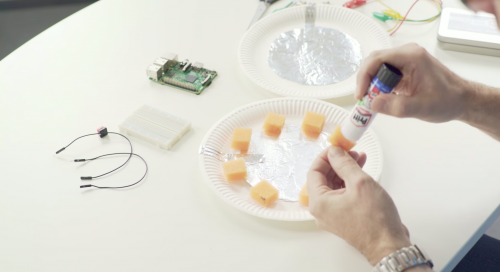
You might remember Carrie Anne and me showing off the WhooPi Cushion live on Facebook last year. The project was created as a simple proof of concept during a Pi Towers maker day. However, our viewers responded so enthusastically that we set about putting together a how-to resource for it.

A cartoon of a man sitting on a whoopee cushion - Raspberry Pi WhooPi Cushion Resource

When we made the resource available, it turned out to be so popular that we decided to include the project in one of our first FutureLearn courses and produced a WhooPi Cushion video tutorial to go with it.

A screen shot from our Raspberry Pi WhooPi Cushion Resource video

Our FutureLearn course attendees love the video, so last week we uploaded it to YouTube! Now everyone can follow along with James Robinson to make their own WhooPi Cushion out of easy-to-gather household items such as tinfoil, paper plates, and spongy material.

Build upon the WhooPi Cushion

Once you’ve completed your prank cushion, you’ll have learnt new skills that you can incorporate into other projects.

For example, you’ll know how to program an action in response to a button press — so how about playing a sound when the button is released instead? Just like that, you’ll have created a simple pressure-based alarm system. Or you could upgrade the functionality of the cushion by including a camera that takes a photo of your unwitting victim’s reaction!

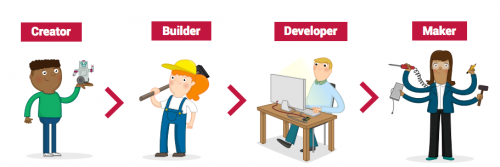
A cartoon showing the stages of the Raspberry Pi Digital Curriculum from Creator to Builder, Developer and Maker

Building upon your skills to increase your knowledge of programming constructs and manufacturing techniques is key to becoming a digital maker. When you use the free Raspberry Pi resources, you’re also working through our digital curriculum, which guides you on this learning journey.

FutureLearn courses for free

Our FutureLearn courses are completely free and cover a variety of topics and skills, including object-oriented programming and teaching physical computing.

A GIF of a man on an island learning with FutureLearn

Regardless of your location, you can learn with us online to improve your knowledge of teaching digital making as well as your own hands-on digital skill set.

The post Prank your friends with the WhooPi Cushion appeared first on Raspberry Pi.

31 Oct 18:17

Sonos One :: First impressions

by Volker Weber

one1

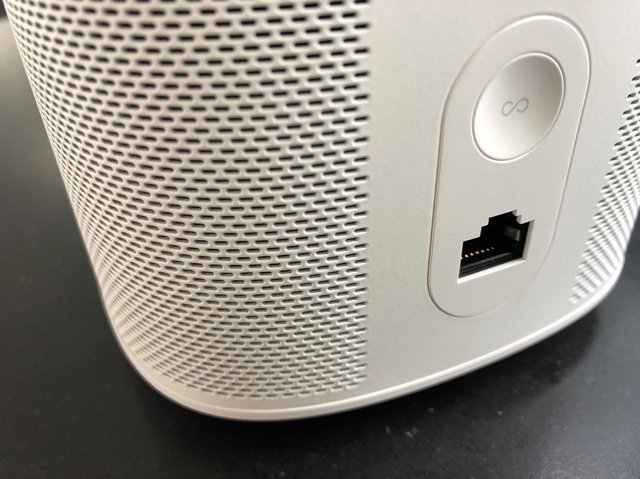
Sonos One is the new PLAY:1 with Alexa built in. Same dimensions as the older speaker with a new top. There is a microphone array under the circle at the top to pick up your voice from a distance. The physical buttons get replaced by a touch panel in the middle, which works the same as on the 2nd gen PLAY:5. Tap to pause/play, tap on the left for volume down and on the right for volume up, swipe left to right for next track and right to left for previous. There are two LED indicators. The smaller one is lit when the microphone is on, the larger one is similar to the regular status light on Sonos, which means it can be turned off. It also comes on when Alexa wakes up.

A Sonos One is preferrable to a PLAY:1 combined with an Echo Dot, because both speakers default to playing on their own. If you have an Echo Dot, you have to tell it to control the Sonos speaker. Having said that the Echo Dot's software is more advanced. There are many Alexa features that work on the Echo Dot, but not on Sonos One. It won't play the news summary and you cannot play from Spotify, both of which work on the Echo Dot. All of that will eventually come, but currently Sonos One is lagging behind. The hardware is done, the software is still in development.

Comparing just the farfield voice recognition of the Sonos One and the Echo Dot I find the Amazon speaker to be superior. It's easier to wake up from a distance and it seems to understand better. But when it talks back to you, the Sonos One is in a league of its own. Amazon does not have a speaker that rivals the Sonos sound.

one2

Sonos One is a good upgrade for the PLAY:1. There are only three reasons to prefer the PLAY:1: it has a thread for a wall mount which the One is missing (see above), physical buttons are easier to operate in the dark, and you cannot pair a One to an existing PLAY:1 for surround sound or as a stereo pair. I prefer the all white or all black design of the Sonos One over the metal grille of the PLAY:1, but I like the old top better. It was purposefully designed to hold small items bedside.

Sonos One has the new link button you will also find on the second gen PLAY:5 and the PlayBase. Which remains to be the only Sonos player I don't have.

31 Oct 18:16

Connecting Everywhere

by Richard Millington

What is the limit of your community? Who is or isn’t a part of it?

Is the community only the active participants on your community platform?

Is the community everyone who has registered on your platform?

Is it anyone that ever visits your platform (registered or not)?

Is it your customers (and only your customers)?

Is it everyone who has expressed an interest in your business (customer or not)?

Is it everyone that has expressed an interest in your field?

I recommend having this discussion early, because it changes everything.

p.s. One way to drive more value is to have a more expansive view of community.

31 Oct 18:16

LiteX vs. Vivado: First Impressions

by bunnie

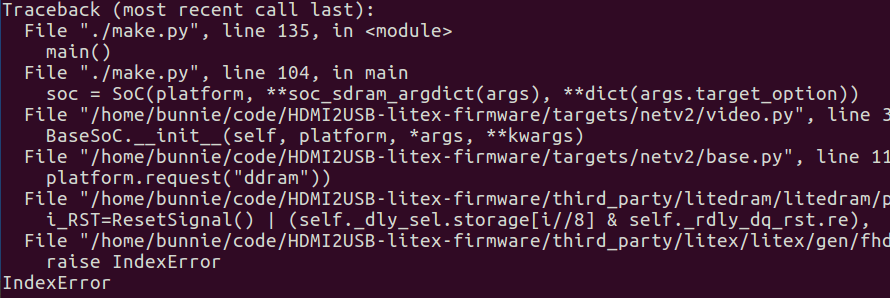
Previously, I had written about developing a reference design for the NeTV2 FPGA using Xilinx’s Vivado toolchain. Last year at 33C3 Tim ‘mithro’ Ansell introduced me to LiteX and at his prompting I decided to give it a chance.

Vivado was empowering because instead of having to code up a complex SoC in Verilog, I could use their pseudo-GUI/TCL interface to create a block diagram that largely automated the task of building the AXI routing fabric. Furthermore, I could access Xilinx’s extensive IP library, which included a very flexible DDR memory controller and a well-vetted PCI-express controller. Because of this level of design automation and available IP, a task that would have taken perhaps months in Verilog alone could be completed in a few days with the help of Vivado.

The downsides of Vivado are that it’s not open source (free to download, but not free to modify), and that it’s not terribly efficient or speedy. Aside from the ideological objections to the closed-source nature of Vivado, there are some real, pragmatic impacts from the lack of source access. At a high level, Xilinx makes money selling FPGAs – silicon chips. However, to attract design wins they must provide design tools and an IP ecosystem. The development of this software is directly subsidized by the sale of chips.

This creates an interesting conflict of interest when it comes to the efficiency of the tools – that is, how good they are at optimizing designs to consume the least amount of silicon possible. Spending money to create area-efficient tools reduces revenue, as it would encourage customers to buy cheaper silicon.

As a result, the Vivado tool is pretty bad at optimizing designs for area. For example, the PCI express core – while extremely configurable and well-vetted – has no way to turn off the AXI slave bridge, even if you’re not using the interface. Even with the inputs unconnected or tied to ground, the logic optimizer won’t remove the unused gates. Unfortunately, this piece of dead logic consumes around 20% of my target FPGA’s capacity. I could only reclaim that space by hand-editing the machine-generated VHDL to comment out the slave bridge. It’s a simple enough thing to do, and it had no negative effects on the core’s functionality. But Xilinx has no incentive to add a GUI switch to disable the logic, because the extra gates encourage you to “upgrade” by one FPGA size if your design uses a PCI express core. Similarly, the DDR3 memory core devotes 70% of its substantial footprint to a “calibration” block. Calibration typically runs just once at boot, so the logic is idle during normal operation. With an FPGA, the smart thing to do would be to run the calibration, store the values, and then jam the pre-measured values into the application design, thus eliminating the overhead of the calibration block. However, I couldn’t implement this optimization since the DDR3 block is provided as an opaque netlist. Finally, the AXI fabric automation – while magical – scales poorly with the number of ports. In my most recent benchmark design done with Vivado, 50% of the chip is devoted to the routing fabric, 25% to the DDR3 block, and the remainder to my actual application logic.

Tim mentioned that he thought the same design when using LiteX would fit in a much smaller FPGA. He has been using LiteX to generate the FPGA “gateware” (bitstreams) to support his HDMI2USB video processing pipelines on various platforms, ranging from the Numato-Opsis to the Atlys, and he even started a port for the NeTV2. Intrigued, I decided to port one of my Vivado designs to LiteX so that I could do an apples-to-apples comparison of the two design flows.

LiteX is a soft-fork of Migen/MiSoC – a python-based framework for managing hardware IP and auto-generating HDL. The IP blocks within LiteX are completely open source, and so can be targeted across multiple FPGA architectures. However, for low-level synthesis, place & route, and bitstream generation, it still relies upon proprietary chip-specific vendor tools, such as Vivado when targeting Artix FPGAs. It’s a little bit like an open source C compiler that spits out assembly, so it still requires vendor-specific assemblers, linkers, and binutils. While it may seem backward to open the compiler before the assembler, remember that for software, an assembler’s scope of work is simple — primarily within well-defined 32-bit or so opcodes. However, for FPGAs, the “assembler” (place and route tool) has the job of figuring out where to place single-bit primitives within an “opcode” that’s effectively several million bits long, with potential cross-dependencies between every bit. The abstraction layers, while parallel, aren’t directly comparable.

Let me preface my experience with the statement that I have a love-hate relationship with Python. I’ve used Python a few times for “recreational” projects and small tools, and for driving bits of automation frameworks. But I’ve found Python to be terribly frustrating. If you can use their frameworks from the ground-up, it’s intuitive, fun, even empowering. But if your application isn’t naturally “Pythonic”, woe to you. And I have a lot of needs for bit-banging, manipulating binary files, or grappling with low-level hardware registers, activities that are decidedly not Pythonic. I also spend a lot of time fighting with the “cuteness” of the Python type system and syntax: I’m more of a Rust person. I like strictly typed languages. I am not fond of novelties like using “-1” as the last-element array index and overloading the heck out of binary operators using magic methods.


Comics courtesy of xkcd, CC BY-NC-2.5

Surprisingly, I was able to get LiteX up and running within a day. This is thanks in large part to Tim’s effort to create a really comprehensive bootstrapping script that checks out the git repo, all of the submodules (thank you!), and manages your build environment. It just worked; the only bump I encountered was a bit of inconsistent documentation on installing the Xilinx toolchain (for Artix builds you need to grab Vivado; and Spartan you grab ISE). The whole thing ate about 19GiB of hard drive space, of which 18GiB is the Vivado toolchain.

I was rewarded with a surprisingly powerful and mature framework for defining SoCs. Thanks to the extensive work of the MiSoC and LiteX crowd, there’s already IP cores for DRAM, PCI express, ethernet, video, a softcore CPU (your choice of or1k or lm32) and more. To be fair, I haven’t been able to load these on real hardware and validate their spec-compliance or functionality, but they seem to compile down to the right primitives so they’ve got the right shape and size. Instead of AXI, they’re using Wishbone for their fabric. It’s not clear to me yet how bandwidth-efficient the MiSoC fabric generator is, but the fact that it’s already in use to route 4x HDMI connections to DRAM on the Numato-Opsis would indicate that it’s got enough horsepower for my application (which only requires 3x HDMI connections).

As a high-level framework, it’s pretty magical. Large IP instances and corresponding bus ports are allocated on-demand, based on a very high level description in Python. I feel a bit like a toddler who has been handed a loaded gun with the safety off. I’m praying the underlying layers are making sane inferences. But, at least in the case of LiteX, if I don’t agree with the decisions, it’s open source enough that I could try to fix things, assuming I have the time and gumption to do so.

For my tool flow comparison, I implemented a simple 2x HDMI-in to DDR3 to 1x HDMI-out design in both Vivado and in LiteX. Creating the designs is about the same effort on both flows – once you have the basic IP blocks, instantiating bus fabric and allocation of addressing is largely automated in each case. Vivado is superior for pin/package layout thanks to its graphical planning tool (I find an illustration of the package layout to be much more intuitive than a textual list of ball-grid coordinates), and LiteX is a bit faster for design creation despite the usual frustrations I have with Python (up to the reader’s bias to decide whether it’s just that I have a different way of seeing things or if my intellect is insufficient to fully appreciate the goodness that is Python).


Pad layout planning in Vivado is aided by a GUI


Example of LiteX syntax for pin constraints

But from there, the experience between the two diverges rapidly. The main thing that’s got me excited about LiteX is the speed and efficiency of its high-level synthesis. LiteX produces a design that uses about 20% of an XC7A50 FPGA with a runtime of about 10 minutes, whereas Vivado produces a design that consumes 85% of the same FPGA with a runtime of about 30-45 minutes.

Significantly, LiteX tends to “fail fast”, so syntax errors or small problems with configurations become obvious within a few seconds, if not a couple minutes. However, Vivado tends to “fail late” – a small configuration problem may not pop up until about 20 minutes into the run, due to the clumsy way it manages out-of-context block synthesis and build dependencies. This means that despite my frustrations with the Python syntax, the penalty paid for small errors is much less in terms of time – so overall, I’m more productive.

But the really compelling point is the efficiency. The fact that LiteX generates more efficient HDL means I can potentially shave a significant amount of cost out of a design by going to a smaller FPGA. Remember, both LiteX and Vivado use the same back-end for low-level sythesis and place and route. The difference is entirely in the high-level design automation – and this is a level that I can see being a good match for a Python-based framework. You’re not really designing hardware with Python (eventually it all turns into Verilog) so much as managing and configuring libraries of IP, something that Python is quite well suited for. To wit, I dug around in the MiSoC libraries a bit and there seem to be some serious logic designs using this Python syntax. I’m not sure I want to wrap my head around this coding style, but the good news is I can still write my leaf cells in Verilog and call them from the high-level Python integration framework.

So, I’m cautiously proceeding to use LiteX as the main design flow going forward for NeTV2. We’ll see how the bitstream proves out in terms of timing and functionality once my next generation hardware is available, but I’m optimistic. I have a few concerns about how debugging will work – I’ve found the Xilinx ILA cores to be extremely powerful tools and the ability to automatically reverse engineer any complex design into a schematic (a feature built into Vivado) helps immensely with finding timing and logic bugs. But with a built-in soft CPU core, the “LiteScope” logic analyzer (with sigrok support coming soon), and fast build times, I have a feeling there is ample opportunity to develop new, perhaps even more powerful methods within LiteX to track down tricky bugs.

My final thought is that LiteX, in its current state, is probably best suited for people trained to write software who want to design hardware, rather than for people classically trained in circuit design who want a tool upgrade. The design idioms and intuitions built into LiteX pulls strongly from the practices of software designers, which means a lot of “obvious” things are left undocumented that will throw outsiders (e.g. hardware designers like me) for a loop. There’s no question about the power and utility of the design flow – so, as the toolchain matures and documentation improves I’m optimistic that this could become a popular design flow for hardware projects of all magnitudes.


Interested? Tim has suggested the following links for further reading:

31 Oct 18:15

Passport was my best smartphone. And a complete failure.

by Volker Weber

ZZ37FBB6A5

If I had to choose the best smartphone ever, it would be the BlackBerry Passport. This thing was rock solid, had great battery life and cell reception. It was both a phantastic messaging device as well as a perfect phone. Its screen was square and you could read everything with ease. When scrolling you did not even have to touch the screen because the hardware keyboard doubled as a trackpad. Its software let you easily view business and personal content without ever mixing them up.

Unfortunately BlackBerry 10 never took off and the Passport did not sell well.

31 Oct 18:15

Twitter Favorites: [Planta] I don't have a favourite in this baseball World Series, but every time one team gets ahead of the other, I root for the one behind.

Joseph Planta @Planta
I don't have a favourite in this baseball World Series, but every time one team gets ahead of the other, I root for the one behind.
31 Oct 18:15

How do you convince other people to use R?

I just got back from the rOpenSci OzUnconf that was run in Melbourne last week. I’d like to give a big thanks to the organizers (Nick Tierney, Di Cook, Rob Hyndman and others) for putting on a great unconference. These events are always a great opportunity to meet people just getting started in the R community and to get them involved.

As is typical for these unconferences, topic ideas were pitched via issues on the OzUnconf GitHub repo. One issue that I filed was titled “How do you pitch R to new users?”. While this issue was not taken up during the unconference (for good reason, I think), Nick was kind enough to initiate a lunch time discussion of the topic (with Daniel Falster kindly taking notes).

The topic came up in my mind because I’ve found that I’ve had to change the way that I “sell” R to new users. Through various discussions at the unconference and in many other venues, I’ve found that many R users, even today, are the “lone R user” in their group/institution/organization. While they may enjoy using R, it’s often made difficult by the fact that others in their group do not use R and therefore there is some negotiation over “how things get done”. Convincing others in the group to use R is one way to go (I suppose abandoning R is the other) and the question of how best to do this for different audiences is the question that arose in my mind. As a teacher, you can usually design the curriculum so that the students are forced to use R. But in most other environments, a different approach is needed.

As part of the introduction to the topic, I talked about how I used to convince others to use R. Bear in mind, this was almost 20 years ago and the majority of people I was talking to were using SAS, Stata, SPSS, Excel, or some other commercial package. These were largely interactive packages, perhaps with graphical user interfaces, designed to do more or less traditional statistical analyses. My pitch usually involved three things:

  1. Free. R was both free as in cost and free as in free software. The free cost part made it a highly accessible package and the free software part allowed for anyone to tinker with the package, inspect its code, and make improvements.

  2. Graphics. R was able to produce high quality “publication ready” graphics and it gave you detailed control over all the graphical elements. S-PLUS could also do this but S-PLUS didn’t come with the free part mentioned above.

  3. Programming language. Unlike packages like SAS, Stata, or SPSS, R came with a robust and sophisticated Lisp-like programming language that was well-suited for data analysis applications. In addition, you could use it to build packages that could extend the core R system.

Much has changed since those early days and I’ve varied my pitch quite a bit to focus on a few different things (that didn’t exist back then). In particular, the audience has changed—I talk to many more people who are just getting started in data analysis and therefore are a bit more open-minded about which software to use. Also, python has come on the scene as a viable alternative to R for data science and so there are even more arguments to consider. Some of the things I focus on now are

  1. Reproducibility and Reporting. With the development of knitr and its combination with R Markdown, the writing of reproducible reports was made infinitely easier. (Markdown itself, probably deserves its own discussion, but it’s not specifically R-related.)

  2. RStudio. The development of the RStudio IDE has made getting started with R much easier. Having a powerful IDE was important to me for learning other languages and I’m glad R finally has something solid for itself. RStudio has significantly simplified the development of R packages via devtools and roxygen2. While it’s not yet perfect, these tools have changed what used to be a labor-intensive and finicky process into a more manageable and easier to learn work flow.

  3. Graphics. R still has the ability to make great data graphics and with the introduction of ggplot2, it has become easier to make good graphics.

  4. R Packages and Community. With over 10,000 packages on CRAN alone, there’s pretty much a package to do anything. More importantly, the people contributing those packages and the greater R community have expanded tremendously over time, bringing in new users and pushing R to be useful in more applications. Eveyr year now there are probably hundreds if not thousands of meetups, conferences, seminars, and workshops all around the world, all related to R.

Discussion

At the unconference, a number of people had different approaches to how to convince others to use R. Here are just a summary:

  • Someone mentioned the Bioconductor, which is a huge resource for those doing research in the world of high throughput biology. Not many other packages have something similar so it makes an obvious selling point to people working in this area
  • The idea of using R end-to-end came up, meaning using R to clean up messy data and taking it all the way to some interactive Shiny app on the other end. The idea that you can use the same tool to do all the things in between made for a compelling case for R.
  • For the spreadsheet audience, the dplyr package was sometimes a good selling point. The idea here was that you could show people how much time could be saved by automating analyses and using dplyr to clean up data.
  • The open source nature of R came up a few times, primarily as a means for developing transferable skills. If you work at a company/institution that specializes in some proprietary package, it’s often difficult to transfer those skills somewhere else if your new job doesn’t use that package. The fact that R is open source means that, in theory, you could use it anywhere and the skills that you build up in R are (again, in theory) applicable everywhere.
  • Someone mentioned that if you want to convince someone to learn/use R, just show them the multitude of jobs available to R programmers (and in particular, the salaries attached to them).
  • The fact that R is obtainable for free is still important, given that Matlab and SAS licenses have not gotten any cheaper over time. In my experience, this is particularly important in non-industrialized countries where for many people paying for expensive licenses is not an option.

This just a brief summary of our discussion at the unconference and I was heartened to see all of the enthusiasm for R there. Even with R’s incredible growth over the last 20 years, there will still come a time when a case needs to be made to use R over something else. I’m just glad that we have so many more reasons today than we used to.

31 Oct 16:22

Skype for desktop is now rolling out

by Dean Daley
People using Skype

Skype for desktop has now left the preview phase and is finally rolling out, along with some new features and improvements.

The desktop app refresh lets Skype users utilize the same settings and features on their desktop as they do on their smartphone.

New features include customizable themes that allow users to pick a theme and colour. Chat lists will allow users to organize their contacts by time, unread or status. Users can also compact or collapse the chat list so users can see more of their screen.

Skype is now cloud-based as well, allowing users to send over 300MB of data by dragging and dropping files and reducing battery power consumption.

Additionally, Skype has introduced a notification panel which lets users see all of their notifications in a single shade, including reactions to messages and @mentions in a group message. There’s now a chat media gallery, too, which can be used to find shared content, such as medias, links and files.

Skype for desktop also has reactions so users can react to messages and video calls, @mentions to get someone’s attentions, more status updates and bots, such as the Expedia bot, to check flight times and pricing.

Source: Skype

The post Skype for desktop is now rolling out appeared first on MobileSyrup.

31 Oct 16:22

Google promises software fix for Pixel 2 XL audio issues

by Dean Daley

Unfortunately for Google, yet another problem has surfaced for the company’s new flagship, the Pixel 2 XL. The newest issue, first reported by the Pixel user community, is that the Pixel 2 XL is recording stifled audio in video recordings.

Some recordings are sounding sharp and tinny, while background sounds are muddy. In an extreme case, the recordings sounded like what could only be a bat cave for a few seconds before returning to normal. This has reportedly only happened to the Pixel 2 XL, without any reports of the Pixel 2.

According to CNET, Google is aware of the issue and the fix will be “rolled out in the next few weeks.” Google will also be rolling out a software update to fix the Pixel 2 XL’s burn-in issue, as well as the display’s muted colours.

Google is also offering a two-year manufacturer’s warranty for every Pixel 2 and Pixel 2 XL worldwide.

Source: CNET

The post Google promises software fix for Pixel 2 XL audio issues appeared first on MobileSyrup.

31 Oct 16:22

University of Waterloo battery technology could charge phones and laptops in seconds

by Bradly Shankar
iPhone charging

Technology can many things nowadays, but even the top-of-the-line electronics can take a while to fully charge.

However, a team at Ontario’s University of Waterloo is looking to speed up the charging process by developing a new kind of a specialized battery.

Using nanotechnology, the researchers said they were able to significantly improve energy-storage devices known as supercapacitors.

Their design roughly doubles the amount of electrical energy the rapid-charging devices can hold. In theory, these batteries will be capable of charging anything from smartphones and laptops to electric vehicles and high-powered lasers.

Supercapacitors are seen as a promising, environmentally-friendly alternative to traditional batteries, offering benefits such as faster charging and improved safety and reliability.

However, existing commercial supercapacitors are only capable of storing enough energy to power devices like cellphones and laptops for about 10 percent as long as rechargeable batteries.

As a solution, the scientists designed a method where they would use an oily liquid salt to coat atomically thin layers of the superconductor graphene.

“We’re showing record numbers for the energy-storage capacity of supercapacitors,” said Michael Pope, a professor of chemical engineering who led the Waterloo research, in a press statement. “And the more energy-dense we can make them, the more batteries we can start displacing […] “If they’re marketed in the correct ways for the right applications, we’ll start seeing more and more of them in our everyday lives.”

Image credit: Pixabay — rawpixel

Source: EurekAlert via: Huffington Post

The post University of Waterloo battery technology could charge phones and laptops in seconds appeared first on MobileSyrup.