Shared posts

16 Jan 23:11

“Sie dürfen nicht suchend herumirren”

by Andrea

Deutsche Welle: Kurt Beck: “Ich wollte es gar nicht glauben…” “Der Beauftragte für Opfer und Angehörige des Terroranschlags von Anis Amri verknüpft seinen Abschlussbericht mit klaren Forderungen an die Politik. Das Vorgehen von Politik und Behörden hat ihn mitunter entsetzt.”

“Viele seien traumatisiert und jeder Bericht über den Attentäter Anis Amri, Versäumnisse der Behörden oder andere Terroranschläge “reißt die Wunden der Menschen immer wieder auf”. Eine der ersten Schlussfolgerungen müsse sein, dass nach einem Terroranschlag wie dem in Berlin von Polizei- und Rettungskräften eine gut sichtbare Anlaufstelle geschaffen werde. Man werde sicherlich nicht alle Fragen beantworten können, aber man müsse die Menschen aufnehmen. “Sie dürfen nicht suchend herumirren.”

Genau das aber passierte nach dem Attentat auf dem Weihnachtsmarkt. Da seien Menschen auf der Suche nach Familienangehörigen und Freunden von Krankenhaus zu Krankenhaus gefahren. Die Identifizierung der Toten habe bis zu drei Tage gedauert. Beck erinnert an Rechnungen mit Mahnhinweisen, die Angehörige nach der Obduktion ihrer Verwandten erhalten hätten. “Ich wollte es gar nicht glauben, aber ich hatte einen solchen Brief in der Hand.””

20 Dec 05:44

Patreon Backs Out of Fee Structure Changes, But I’m Leaving Anyway

by Stowe Boyd

I’m moving to Steady because their paywall integrates with Tumblr, which can’t be done on Medium, note

Patreon has backed out of proposed changes in the company’s model for fees, as user backlash grew. The apologetic tone of the post by CEO Jack Conte — We messed up. We’re sorry, and we’re not rolling out the fees change.— was a shift from the lecturing tone of earlier posts.

The controversy around the fee change spurred me to look at alternatives for Work Futures, which is how I came across Steady, but I have moved ahead with adopting Steady for other reasons. In fact, Steady’s takes 10% plus processing fees, more than Patreon’s fees. However, Steady allows me to integrate a paywall right on my Tumblr blog, where I have written over 11 thousand posts, and where I start with more than 160,000 followers. Not to mention that I can use the Tumblr editor and other features that I have relied on for years, instead of the annoyingly primitive system at Patreon.

I plan an in-depth description of how it all works. Apparently, I am the first Steady user to try a Tumblr integration. But it seems to be working pretty well.

Go check it out. Here’s today’s Work Futures Daily post on stoweboyd.com.

More to follow.

………

Sign up for the Work Futures community to receive newsletter, events invitations, polls, and other information.

20 Dec 05:43

Apple updates AirPort firmware with KRACK vulnerability fix

by Rui Carmo

My AirPort Express was just bricked by this upgrade (can’t even factory reset it) which is a tremendous pain given that it was the tiny, neat device that provided coverage in my living room, and I have nothing to replace it with a similar form factor (nor planned budget for doing so).

It goes without saying that I am less and less impressed by Apple QA these days.

20 Dec 05:43

iMac Pro

by Rui Carmo

The only thing I will say about this right now, for permanent record, is that a Pro machine should be upgradable down the line, and that I think Apple is doing the same mistakes all over again.

20 Dec 05:37

Why is the West Side of Cities the Best?

by Sandy James Planner

res13835

In cities and towns why was the west side always seen as the best? Market Watch’s Steve Goldstein observes that researchers have found that it is  ” due to the impact of air pollutants at the time of the Industrial Revolution, as prevailing winds in the U.S. and Europe typically blow from west to east.”  Even today there is a price differential between the east and west sides of major cities even though the pollution that caused the difference has been minimized.

Called a “deprivation index”, pollution was the reason for up to 20 per cent of neighbourhood segregation based upon blue-collar workers and house prices. Even in pre-industrial times large cities like Paris and London had preferred west sides and east sides. The more polluted an area, the higher the percentage of low skilled workers living in the district.  By examining 5,000 industrial “chimneys” located in 70 British cities 130 years ago, researchers found that the spatial distribution of pollution correlated with areas of deprivation in cities.

The findings have implications for planning today to ensure that residential areas are situated near prevailing winds and away from sources of pollutants. And even today, that west address is still seen as best.


london-1800s


20 Dec 05:37

Real Estate and Transit

by Ken Ohrn

How property markets responded to newly-installed public transportation — the Australian experience.

Burquitlam-Station-Platform-SkyTrain-Evergreen-Line

Burquitlam station — Evergreen Line.

Property markets rise and fall as transport systems reshape accessibility in cities. Planners occasionally use ‘value capture’ funding and financing to help pay for public transport. But understanding where and when values rise is critical to the efficiency and equity of such schemes. This presentation looks at recent evidence from a set of Australian busway, rail and ferry projects that reveals great variation in how transport affects property values, including both spatial patterning and timing of uplift.

Matthew Burke is an associate professor in Griffith University’s Cities Research Institute. His research focuses mainly on travel behaviour, transport planning and the interactions of transport and land use. Matthew also helps coordinate much of his university’s transport research effort. In 2017 Griffith University was recognized among the top 100 universities in the world for research in the field of transportation science and technology in the Shanghai Rankings.


20 Dec 05:35

Bear 1.4 Brings Tag and Note Autocomplete, True Black Theme for iPhone X, and More

by Federico Viticci

As I noted last month in my iPad Diaries column, I've started using Bear in addition to Apple Notes to research articles in Markdown and later convert them to drafts in Ulysses. I was impressed with Shiny Frog's work on iOS 11 and how they brought advanced drag and drop to Bear, but I'm even more positively surprised by the improvements to tagging they released today as part of Bear's 1.4 update.

The marquee addition to Bear 1.4 is autocomplete, which is most notable when adding tags to a note. Now, instead of remembering which tags you've already added to your notes in Bear, you can start typing a pound sign and the first letter of a tag, and Bear will show you an inline popup with tag suggestions.1 Tap one, and the tag immediately gets added to the note without typing it in full. This not only simplifies how you can organize your notes with tags, but it also ensures you always use consistent tag names as you won't end up with duplicates (such as #idea and #ideas, which happened to me because I couldn't remember which one I had originally created).

I'm a fan of the contextual menu to choose tags, which I think works well on both the iPad and iPhone. What's even better though is that the same menu is now used to autocomplete wiki-style links to cross-reference other notes in Bear. The app has long offered the option to create links to other notes, but, like tags, the feature was inconvenient as it required you to manually type the entire name of a note you wanted to link to.

That annoyance is gone thanks to autocomplete. Now as soon as you type double brackets and the first letter of a note, Bear will show you a list of notes you can embed as links. Tap one, and you'll create a reference link to the note in the document you're working on. Alas, Bear still doesn't include an option to compile linked notes upon exporting the master one (which would be terrific to work on longform articles in the app), but I appreciate the possibility to more easily create TOC-type notes in the app.

Custom tag icons in Bear 1.4.

Custom tag icons in Bear 1.4.

There are other improvements worth mentioning in this update. Bear now automatically assigns custom icons to popular tags: in the app, the articles, games, ideas, and iPad tags I was using before now carry delightful monochrome glyphs that add a touch of personality to the sidebar and also make tags easier to find. I'd be curious to know how many more popular icons are supported. You can disable this option in the Bear's theme settings by turning off 'Custom icons for tags'.

Speaking of themes, Shiny Frog has added three new themes for Pro subscribers: Duotone Light, Duotone Snow, and Dieci. The latter (which means "ten" in Italian) is a true black theme that looks fantastic on the iPhone X's OLED display as it seamlessly blends with the bezels of the device.

In addition, Bear for Apple Watch now lets you scribble on notes by force pressing them, and you can also append todos to an existing note directly from your wrist. My favorite small tweak, however, is about using custom keyboards with Bear: the app now remembers custom keyboards you use for each note. For instance, the app will automatically show Gboard if you last used it in a note, but default to Apple's system keyboard, or a different custom one, elsewhere.

Bear's subscription model seems to be working well for Shiny Frog: the indie studio is releasing substantial updates to Bear at a regular pace, iterating upon their original vision of a Markdown-flavored note-taking app that combines elegance with power-user features. Version 1.4 is another remarkable update for what is, arguably, the best alternative to Apple Notes on iOS. If you've never played around with Bear, now would be a great time to check it out.

Bear 1.4 is available on the App Store.


  1. Alternatively, tap the hashtag button in the toolbar, and the tag suggestions menu will come up right away. ↩︎

Support MacStories Directly

Club MacStories offers exclusive access to extra MacStories content, delivered every week; it's also a way to support us directly.

Club MacStories will help you discover the best apps for your devices and get the most out of your iPhone, iPad, and Mac. Plus, it's made in Italy.

Join Now
20 Dec 05:35

Twitterrific for iOS Adds Black Theme, Dynamic Type, Temporary Muffles, Poll Support, and More

by John Voorhees

Twitterrific 5 for iOS was updated today with several new and improved features. My favorite addition is a true black theme that looks striking on the iPhone X. Users that pick the black theme are given a choice between a dark theme that has been modified for ‘greater contrast and clarity’ and the true black theme.

The app’s design has undergone other changes too. Users can pick avatars that are rounded rectangles, circles, squares, or squircles, and text sizes can be adjusted with more granularity thanks to the use of Dynamic Type.

Muffles, which are rules that partially hide tweets from your timeline, can be temporarily disabled now. Previously, the only way to deactivate a Muffle was to delete it.

Twitterrific’s experimental support for polls, which debuted on macOS recently, has been added to the iOS app too. To celebrate the holiday season, The Iconfactory has also added a new icon option: ‘Jolly Ollie,’ which features Twitterrific’s mascot in a Santa hat.

Twitterrific is available on the App Store.


Support MacStories Directly

Club MacStories offers exclusive access to extra MacStories content, delivered every week; it's also a way to support us directly.

Club MacStories will help you discover the best apps for your devices and get the most out of your iPhone, iPad, and Mac. Plus, it's made in Italy.

Join Now
20 Dec 05:35

Apple Releases iMac Pro and Updates to Final Cut Pro X, Motion, and Compressor

by John Voorhees

As expected, Apple introduced of the iMac Pro today, and an update to its professional video-editing app, Final Cut Pro X. Companion video-editing apps Motion and Compressor received updates too.

Specifications of the new iMac Pro are in line with what was reported earlier this week. In its press release, Apple provides examples of the kind of performance increases that different professionals can expect:

iMac Pro takes Mac performance to a whole new level, even when compared to our fastest quad-core iMac.

  • 3D designers can visualize huge 3D models and render scenes up to 3.4 times faster.
  • Developers can run multiple virtual machines and test environments, and compile code up to 2.4 times faster.
  • Scientists and researchers can manipulate massive data sets and complex simulations, visualizing data up to 5 times faster.
  • Photographers can work with enormous files and perform image processing up to 4.1 times faster.
  • Music producers can bounce (export) massive multi-track projects up to 4.6 times faster and use up to 12.4 times as many real-time plug-ins.
  • Video editors can edit up to eight streams of 4K video, or edit 4.5K RED RAW video and 8K ProRes 4444 at full resolution in real time without rendering. The iMac Pro can also export HEVC video 3 times faster.

All that power comes at a substantial price. The iMac Pro starts at $4,999 but can be configured to over $13,000.

Apple also updated Final Cut Pro X, its professional video editing app for macOS. According to Apple:

new features including 360-degree VR video editing, advanced color grading tools and support for High Dynamic Range (HDR) video. Optimized to take full advantage of the incredible performance capabilities of the all-new iMac Pro, Final Cut Pro users can now edit full-resolution 8K video for the first time on a Mac. Apple is also extending 360-degree VR video support to Final Cut Pro companion apps, Motion and Compressor.

Susan Prescott, Apple’s vice president of Apps Product Marketing said:

“With new features like 360-degree VR editing and motion graphics, advanced color grading and HDR support, Final Cut Pro gives video editors the tools to create stunning, next-generation content…. When combined with the performance of Mac hardware, including the all-new iMac Pro, Final Cut Pro provides an incredibly powerful post-production studio to millions of video editors around the world.”

The update to Final Cut Pro X lets editors create 360-degree video content and view those projects in real time using an HTC VIVE VR headset and SteamVR. Apple has also added professional color grading tools and supports popular HDR formats. Other features Apple touts include:

  • Easily import iMovie projects from iPhone and iPad into Final Cut Pro for advanced editing, audio work, motion graphics and color grading.
  • HEVC and HEIF support for importing and editing high efficiency video and photo formats from Apple devices.
  • Updated audio effects plug-ins from Logic Pro X with redesigned, resizable interfaces.
  • Faster, higher quality optical flow analysis built on Metal, Apple’s advanced graphics technology.

In addition to the update to Final Cut Pro X, Apple has updated Motion, which lets users create 360-degree VR titles and effects that are accessible from Final Cut Pro. Compressor has also been updated to let ‘users deliver 360-degree video with industry-standard spherical metadata.’

Final Cut Pro X, Motion, and Compressor are available on the Mac App Store as free updates to existing users. For new users, Final Cut Pro X is $299.99, Motion and Compressor are $49.99 each. Educational users can purchase the apps as a bundle for $199.99.


Support MacStories Directly

Club MacStories offers exclusive access to extra MacStories content, delivered every week; it's also a way to support us directly.

Club MacStories will help you discover the best apps for your devices and get the most out of your iPhone, iPad, and Mac. Plus, it's made in Italy.

Join Now
20 Dec 05:35

The Lisa

by Stephen Hackett

When thinking about the earliest days of Apple, it's easy to recall the Apple I, the Apple II line and the Macintosh. However, there's one more computer that defined Apple's early years. This computer was ground-breaking but incredibly expensive, and exposed many things wrong within Apple itself.

The Lisa launched 35 years ago next month. Today, it is mostly considered as a precursor to Mac. While that is true, it doesn't come close to doing this computer justice.

Development & Launch

Development of the Lisa began in 1978, just one year after the Apple II shipped. It was heralded as Apple's next-gen computer, and was to be a system that allowed the company to make in-roads into businesses in an all-new way.

When Steve Jobs and others made their fateful visit to Xerox PARC in 1979, the vision for the computer drastically changed. Lisa was to be Apple's first computer with a real GUI, driven by a mouse. Over the five years, development costs swelled to $50 million.

Steve Jobs was eventually forced out of the Lisa program in 1982, but the computer retained the name of his daughter. Officially, Lisa stood for “Local Integrated Software Architecture," even though Jobs later said it was "obviously" named after his child. During these years, Jobs denied paternity, even through a legal case included DNA testing, making this chapter of Apple history a little ... uncomfortable.

After years of work and ballooning costs, the Lisa finally launched in January 1983 at a cost of $9,995.1

Lisa 1

The original machine was powered by a 5 MHz Motorola 68000 processor and included support for a hard drive, and shipped with two "Twiggy" floppy disk drives.

Apple Lisa with optional ProFile hard drive

Apple Lisa with optional ProFile hard drive

Officially known as "FileWare," this disk and drive system proved unreliable and slow. The disks were 5.25 inches like other disks at the time, but were incompatible with other drives. Every Lisa came with Apple II-like expansion slot, which gave birth to a range of accessories over the year, including high-density floppy drives, SCSI controllers and even aftermarket CPUs.

Lisa Software

The real story with the Lisa was the software it ran. The Lisa operating system included features like protected memory. This was absent from the Macintosh operating system until the launch of Mac OS X eighteen years later. Under the hood, it ran on a file system that supported hierarchal directories, making it ideal for organizing files on the Lisa's internal hard drive.

Lisa had two main modes. The first, named The Lisa Office System, included seven GUI applications for users: LisaWrite, LisaCalc, LisaDraw, LisaGraph, LisaProject, LisaList, and LisaTerminal.

With these applications, the Lisa introduced the GUI (and the mouse!) to just about everyone who saw one of the computers. This technology allowed users to interact directly with their content in a way that a command line never allowed. This edition of Byte magazine has a great feature on the computer, written by Gregg Williams. It really shows how new these concepts were in 1983:

Suppose I'm writing a report for my boss and I want to prepare a chart to illustrate a point. With a few movements of the mouse (more on this pointing device later), I "tear off" a sheet of Lisa Graph "paper" (thus activating a program called Lisa Calc and displaying an empty grid on the screen) and give it the heading "Annual Sales." I then type my numbers into a grid, name the graph and the x and y aces, and request a bar graph. Violà: I get a bar graph.

To us, this sounds like a normal day in Numbers or Excel, but 35 years ago, it was mind-blowing. The software played a large part in Apple's marketing for the machine, as this ad shows:

(Don't miss this very dramatic ad, either.)

The second mode was a development environment named Apple Lisa Workshop. Developers could use Workshop to create applications to run in the Office System environment, needing to reboot between the two modes to test their software. It's clunk by today's standards, but means that a Lisa could be used to write software for itself. It took the Mac a couple of years to officially reach that computing milestone, and the iPad has yet to do so.

Sadly, PCalc never supported the Lisa

Sadly, PCalc never supported the Lisa

Response to the first Lisa was mixed. The price tag was a major hurdle for all but the largest companies looking at the machine as a productivity tool.

Enter Macintosh

After being booted from the Lisa team in 1982, Jobs wandered around the company until he took over the Macintosh project from Jeff Raskin. The Mac took shape as a Lisa alternative closer to the cost of an Apple II, but more on that in a second.

One year after the Lisa was introduced, Steve Jobs took the Macintosh out of the bag for the first time in January 1984 and the Lisa's days instantly became numbered.

The Mac included many Lisa-first technologies, including a GUI and the mouse, but at a cost that was far lower. Its operating system was more rudimentary, however, lacking multitasking and protected memory. The new machine was clocked at 8 MHz as opposed to the Lisa and Lisa 2's 5 MHz.

The Mac sold 50,000 units in its first 100 days; the Lisa sold only a few thousand in its first year. No doubt the Mac's $2,495 price tag was a major factor.

In an internal Apple video, Jobs addressed the relationship between the Lisa and the Macintosh:

What's so exciting about Macintosh is that while Lisa pioneered this amazing technology, this amazing software technology that makes this possible, with Macintosh, we've been able to take that software technology and pull it down into a price range that is going to be affordable not just to the corporation, as Lisa is, but the individual.

We're going to find people buying Macintoshes for their own use, or for use in a dormitory, or for use in a corner of a corporation that might never have gotten a computer before.

The Lisa was in trouble.

Lisa 2 & MacWorks

The Lisa 2 was announced in the same keynote as the Macintosh. The new model was designed to help correct the original product's shortcomings. The new machine featured a single 3.5-inch, 400k disk drive built by Sony that proved far more reliable. The cost was slashed to as little as $3,495. Lisa 1 owners could replace their Twiggy drives for this new interface. The upgrade was free, and included the front plate to hide the previous opening.

The Lisa 2 came in several configurations. The 2/5 included a 5 MB hard drive, as the Lisa 1 had, while the high-end 2/10 featured a 10MB internal hard drive and 1 MB of RAM.

The new machine came with an upgraded version of the Lisa Office System, now renamed 7/7. Don't miss this PDF boasting the benefits of the Lisa's native software.

At the same time, Apple released MacWorks. This was a software emulation layer that allowed the Lisa to run Mac software and applications. While it initially only ran from a floppy disk, version 2 added hard drive support.

The Lisa's display was 720 pixels wide by 260 pixels tall. This horizontal layout was great for applications like text editing, but led to complications when it came running Mac software, which expected square pixels.

MacWorks was designed to help Lisa users enjoy what the Macintosh had to offer and to consolidate Apple's internal work to maintain its two GUI-based operating systems.

In reality, MacWorks was just another nail in the Lisa's coffin. As groundbreaking as the Lisa Office System was, it was quickly forgotten as things like MacWrite and MacPaint took over.

Mac XL

In January 1985, Apple released another version of the Lisa hardware. Essentially a rebranded Lisa 2/10, the Mac XL was positioned as the first high-end Macintosh, despite its clock speed being 5 MHz like the Lisa and Lisa 2. It sold for $4,000.

(Somewhat surprisingly, the Macintosh XL did fairly well, at least in comparison to the Lisa, which sold only 10,000 units in two years.)

The ill-fated Mac XL

The ill-fated Mac XL

The XL still shipped with rectangular pixels, but the optional Macintosh XL Screen Kit upgrade changed the resolution to 608x432. This made running MacWorks far better. The Lisa's operating system was still there, but it played second fiddle to the Mac's.

The End of Lisa

The end of the Lisa project is a heartbreaker. Apple quit building new Macintosh XL units in the spring of 1985, and officially killed the product in early 1986, after months of being out of stock.

A company named Sun Remarketing released MacWorks Plus, their updated version of the Mac emulation software that supported Macintosh Plus features, emulating up to System 6.0.8.

The company also helped Apple dump some 2700 unsold units in a Logan, Utah landfill.

In 1986, Apple offered all Lisa and XL owners the opportunity to turn in their computer for $2,600 off the purchase of a Macintosh Plus and Hard Disk 20, a rig worth $4,098.00 at the time.

Lisa's Legacy

The world owes a lot to the Lisa. It pioneered the GUI and mouse, and changed computing forever. This computer deserves to be remembered, but history honors the winners.

As such, the Macintosh gets the credit for many of the Lisa's achievements. The Mac was cheaper, more approachable, and simpler, and it pushed the Lisa to the curb in a hurry. Had the Macintosh been even a few years later, the world may remember the Lisa more easily.

Of course, The Lisa was never going to be a mainstream machine due to its price. The cheaper Macintosh gave birth to modern computing, even if it cribbed a lot of ideas from its older sibling. The Lisa may have lost out to the Mac, but its ideas are still with us today.


  1. That's over $24,000 in today's dollars. ↩︎

Support MacStories Directly

Club MacStories offers exclusive access to extra MacStories content, delivered every week; it's also a way to support us directly.

Club MacStories will help you discover the best apps for your devices and get the most out of your iPhone, iPad, and Mac. Plus, it's made in Italy.

Join Now
20 Dec 05:35

PDF Viewer 2.1 Adopts iOS 11 Document Browser

by Federico Viticci

Since the release of iOS 11, I haven't seen many apps use the system's new document browser – the built-in Files view that can be embedded in document-based apps as a root view. I covered this feature extensively in my iOS 11 review. Apple's iWork suite of apps has switched to Files' document browser, as did MindNode 5, but I've struggled to find other examples of high-profile third-party apps abandoning their custom file managers in favor of Apple's solution. As I argued in September, my guess is that a combination of bugs and lack of deeper customization for the document browser is preventing more apps from embracing it. Which is too bad, as the Files integration brings substantial benefits in the form of drag and drop, iCloud Drive and third-party locations, recents and tags, and more.

PDF Viewer, the powerful PDF editor for iOS we originally reviewed here and here, is adding support for iOS 11's document browser with version 2.1, launching today on the App Store. After testing a beta of this update for the past week, I'm impressed by how the folks at PSPDFKit have been able to fine-tune the document browser to the app's needs.

PDF Viewer now uses the document browser as its main view: like in the Files app, you have two tabs for Recents and Browse; the latter is where you can navigate every location configured in Files, plus your favorites and tags. Unsurprisingly, PDF Viewer gets its own container in iCloud Drive by default. Aside from a custom heading, the app's launch screen exactly mirrors what you'd see in the Files app, which is the entire point of adopting the document browser in iOS 11. It's meant to turn Files into a system-wide layer for managing and opening documents in other apps.

There are a handful of customizations the PDF Viewer team was able to bring to the document browser. When you long-press a document in the browser, the copy & paste menu features two additional Export and Print actions that aren't normally available in Files. This is a new extension point for the document browser in iOS 11 (which MindNode also uses for Versions), just like the settings icon in the top toolbar, used by PDF Viewer to open its settings. Speaking of which, you can change the document browser's appearance, choosing one of the three options Apple made available to developers in iOS 11 – white, light, and dark.

Despite the slow adoption by third-party apps, I remain convinced that Files' document browser is a good idea that needs to be refined to provide developers with more control over its UI and custom actions. As PDF Viewer 2.1 shows, the document browser allows you to manage a consistent working set of files without having to learn a new UI from scratch, with the added benefit of integrating with third-party storage locations to open and edit PDF documents.

iOS 11's document browser isn't without its quirks, but I believe that apps like MindNode and PDF Viewer are making a smart investment for the future in supporting it today. PDF Viewer 2.1 is available on the App Store.


Support MacStories Directly

Club MacStories offers exclusive access to extra MacStories content, delivered every week; it's also a way to support us directly.

Club MacStories will help you discover the best apps for your devices and get the most out of your iPhone, iPad, and Mac. Plus, it's made in Italy.

Join Now
20 Dec 05:28

The real problem is Decoy News (and decoy content of all kinds)—and the platforms can’t fix it

by Doc Searls

The term “fake news” was a casual phrase until it became clear to news media that a flood of it had been deployed during last year’s presidential election in the U.S. Starting in November 2016, fake news was the subject of strong and well-researched coverage by NPR (here and here), Buzzfeed, CBS (here and here), Wired, the BBC, Snopes, CNN (here and here), Rolling Stone and others. It thus became a thing…

… until Donald Trump started using it as an epithet for news media he didn’t like. He did that first during a press conference on February 16, and then the next day on Twitter:

And he hasn’t stopped. To Trump, any stick he can whup non-Fox mainstream media with is a good stick, and FAKE NEWS is the best.

So that pretty much took “fake news,” as a literal thing, off the table for everyone other than Trump and his amen chorus.

So, since we need a substitute, I suggest decoy news. Because that’s what we’re talking about: fabricated news meant to look like the real thing.

But the problem is bigger than news alone, because advertising-funded media have been in the decoy business since forever. The difference in today’s digital world is that it’s a lot easier to fabricate a decoy story than to research and produce a real one—and it pays just as well, or even better, because overhead in the decoy business rounds to nothing. Why hire a person to do an algorithm’s job?

In the content business the commercial Web has become, algorithms are now used to target both stories and the advertising that pays for them.

This is why, on what we used to call the editorial side of publishing (interesting trend here), journalism as a purpose has been displaced by content production.

We can see one tragic result in a New York Times story titled In New Jersey, Only a Few Media Watchdogs Are Left, by David Chen (@davidwchen). In it he reports that “The Star-Ledger, which almost halved its newsroom eight years ago, has mutated into a digital media company requiring most reporters to reach an ever-increasing quota of page views as part of their compensation.”

This calls to mind how Saturday Night Live in 1977 introduced the Blues Brothers in a skit where Paul Shaffer, playing rock impresario Don Kirshner, proudly said the Brothers were “no longer an authentic blues act, but have managed to become a viable commercial product.”

To be viably commercial today, all media need to be in the content production business, paid for by adtech, which is entirely driven by algorithms informed by surveillance-gathered personal data. The result looks like this:

To fully grok how we got here, it is essential to understand the difference between advertising and direct marketing, and how nearly all of online advertising is now the latter. I describe the shift from former to latter in Separating Advertising’s Wheat and Chaff:

Advertising used to be simple. You knew what it was, and where it came from.

Whether it was an ad you heard on the radio, saw in a magazine or spotted on a billboard, you knew it came straight from the advertiser through that medium. The only intermediary was an advertising agency, if the advertiser bothered with one.

Advertising also wasn’t personal. Two reasons for that.

First, it couldn’t be. A billboard was for everybody who drove past it. A TV ad was for everybody watching the show. Yes, there was targeting, but it was always to populations, not to individuals.

Second, the whole idea behind advertising was to send one message to lots of people, whether or not the people seeing or hearing the ad would ever use the product. The fact that lots of sports-watchers don’t drink beer or drive trucks was beside the point, which was making brands sponsoring a game familiar to everybody watching it.

In their landmark study, “The Waste in Advertising is the Part that Works” (Journal of Advertising Research, December, 2004, pp. 375–390), Tim Ambler and E. Ann Hollier say brand advertising does more than signal a product message; it also gives evidence that the parent company has worth and substance, because it can afford to spend the money. Thus branding is about sending a strong economic signal along with a strong creative one.

Plain old brand advertising also paid for the media we enjoyed. Still does, in fact. And much more. Without brand advertising, pro sports stars wouldn’t be getting eight and nine figure contracts.

But advertising today is also digital. That fact makes advertising much more data-driven, tracking-based and personal. Nearly all the buzz and science in advertising today flies around the data-driven, tracking-based stuff generally called adtech. This form of digital advertising has turned into a massive industry, driven by an assumption that the best advertising is also the most targeted, the most real-time, the most data-driven, the most personal — and that old-fashioned brand advertising is hopelessly retro.

In terms of actual value to the marketplace, however, the old-fashioned stuff is wheat and the new-fashioned stuff is chaff. In fact, the chaff was only grafted on recently.

See, adtech did not spring from the loins of Madison Avenue. Instead its direct ancestor is what’s called direct response marketing. Before that, it was called direct mail, or junk mail. In metrics, methods and manners, it is little different from its closest relative, spam.

Direct response marketing has always wanted to get personal, has always been data-driven, has never attracted the creative talent for which Madison Avenue has been rightly famous. Look up best ads of all time and you’ll find nothing but wheat. No direct response or adtech postings, mailings or ad placements on phones or websites.

Yes, brand advertising has always been data-driven too, but the data that mattered was how many people were exposed to an ad, not how many clicked on one — or whether you, personally, did anything.

And yes, a lot of brand advertising is annoying. But at least we know it pays for the TV programs we watch and the publications we read. Wheat-producing advertisers are called “sponsors” for a reason.

So how did direct response marketing get to be called advertising ? By looking the same. Online it’s hard to tell the difference between a wheat ad and a chaff one.

Remember the movie “Invasion of the Body Snatchers?” (Or the remake by the same name?) Same thing here. Madison Avenue fell asleep, direct response marketing ate its brain, and it woke up as an alien replica of itself.

It is now an article of faith within today’s brain-snatched advertising business that the best ad is the most targeted and personalized ad. Worse, almost all the journalists covering the advertising business assume the same thing. And why wouldn’t they, given that this is how advertising is now done online, especially by the Facebook-Google duopoly.

And here is why those two platforms can’t fix it: both have AI machines built to give millions of advertising customers ways to target the well-studied eyeballs of billions of people, using countless characterizations of those eyeballs.In fact, the only (and highly ironic) way they can police bad acting on their platforms is by hiring people who do nothing but look for that bad acting.

One fix is regulation. We now have that, hugely, with the General Data Protection Regulation (GDPR). It’s an EU law, but it protects the privacy of EU citizens everywhere—with potentially massive fines. In spirit, if not also in letter (which the platforms are struggling mightily to weasel around), the GDPR outlaws tracking people like tagged animals online. I’ve called the GDPR an extinction event for adtech, and the main reason brands (including the media kind) need to fire it.

The other main fixes begin on the personal side. Don Marti (@dmarti) tweets, “Build technologies to implement people’s norms on sharing their personal data, and you’ll get technologies to help high-reputation sites build ad-supported business models ABSOLUTELY FREE!” Those models are all advertising wheat, not adtech chaff.

Now here’s the key: what we need most are single and simple ways for each of us to manage all our dealings with other entities online. Having separate means, each provided by the dozens or hundreds of sites and services we each deal with, all with different UIs, login/password gauntlets, forms to fill out, meaningless privacy policies and for-lawyers-only terms of service, cannot work. All that shit may give those companies scale across many consumers, but every one of them only adds to those consumers’ relationship overhead. I explain how this will work in Giving Customers Scale, plus many other posts, columns and essays compiled in my People vs. Adtech series, which is on its way to becoming a book. I’d say more about all of it, but need to catch a plane. See you on the other coast.

Meanwhile, the least we can do is start talking about decoy news and the business model that pays for it.

[Later…] I’m on the other coast now, but preoccupied by the #ThomasFire threatening our home in Santa Barbara. Since this blog appears to be mostly down, I’m writing about it at doc.blog.


20 Dec 05:28

Firefox Focus Adds Quick Access Without Sacrificing Users’ Privacy

by Barbara Bermes

It’s been a little over a year since we launched Firefox Focus. We’ve had tremendous success since then, we launched in 27+ languages, launched on Android, and hit over 1 million downloads on Android within the first month of launch.

Today, we’re introducing a new feature: quicker access to your most visited sites, as well as the ability to add any search engine to your Focus app. They were the most requested items from our users and are aligned with our goals on what makes Focus so great.

We know our users want choice and miss the convenience of having their favorite websites and search engines at their fingertips, but they don’t want to sacrifice their privacy. Since the moment we’ve built Focus, our goal has been to get our users quickly to the information and sites all while keeping their data safe from unwanted targeting.

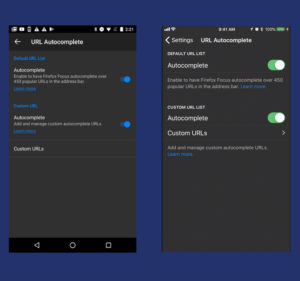
We all have our popular go-to sites that we visit regularly — whether it’s checking the latest news on your favorite news site or checking the scores of your beloved sports team. Now, you can add the sites you visit frequently to your personal autocomplete list within the app. This means that only you can see the sites’ URL in this list. So, when you’re ready to check your favorite sports team’s scores, you simply type in a couple letters and autocomplete will finish the job.

Autocomplete on Android (Left) and iOS (Right)


Check it out here:

There’s also something new for users where they can add search engines from any site that has a search field. If you want to search from somewhere outside our list of suggested search engines, go ahead and add it! For example, if you want to see a movie this weekend but don’t want to waste hours on a bad movie, you can check rottentomatoes.com. We know that choice is important to our power users so this new function allows them to set up their preferred way for searching the web.

One of the reasons users love Focus is because of the faster load times due to our auto-blocking of ads and trackers. It quickly gets you to the places where you want to go and sets us apart from other browsers. We built Focus as the quickest and easiest privacy browser built with you in mind.

The latest version of Firefox Focus can be downloaded on Google Play and in the App Store.

The post Firefox Focus Adds Quick Access Without Sacrificing Users’ Privacy appeared first on The Mozilla Blog.

20 Dec 05:28

Today’s net neutrality vote – an unsurprising, unfortunate disappointment

by Denelle Dixon

We are incredibly disappointed that the FCC voted this morning – along partisan lines – to remove protections for the open internet. This is the result of broken processes, broken politics, and broken policies. As we have said over and over, we’ll keep fighting for the open internet, and hope that politicians decide to protect their constituents rather than increase the power of ISPs.

This fight isn’t over. With our allies and our users, we will turn to Congress and the courts to fix the broken policies.

The partisan divide only exists in Washington.  The internet is a global, public resource and if closed off — with only some content and services available unless you pay more to your ISP — the value of that resource declines. According to polls from earlier this year, American internet users agree. Three-quarters of the public support net neutrality. This isn’t a partisan issue.

We’ll keep fighting. We’re encouraged by net neutrality victories in India and elsewhere.  Americans deserve and need better than this.

The post Today’s net neutrality vote – an unsurprising, unfortunate disappointment appeared first on The Mozilla Blog.

20 Dec 05:26

The Fairest iPhone of Them All

18 Dec 15:57

The Best Hybrid Bike

The Best Hybrid Bike

If you’re looking for a bike for your daily commute and your weekend exercise, a fitness hybrid may be the right choice. We spent 40 hours sifting through nearly 50 options, test-rode more than a dozen bikes, and concluded that the Marin Fairfax 1 is the best hybrid for most people. It provides a stable, comfortable ride on city streets, yet it’s light and agile, and an excellent value.

18 Dec 15:52

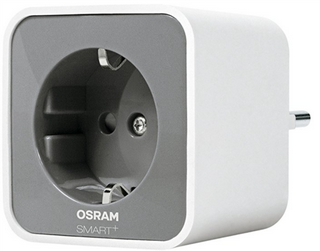
Heute 20 Euro :: Schaltbare Steckdose für Philips Hue

by Volker Weber

osramlightify

Einen billigen Jakob habe ich noch. Diese schaltbare Steckdose ist nicht nur vergleichsweise hübsch, sondern funktioniert auch an einem Philips Hue Hub. Damit integriert sie sich in die Hue Apps und in Alexa und Apple Homekit. Kostet sonst knapp 30 und heute nur 20 Euro.

More >

18 Dec 15:52

Stuff that works :: Was ich selbst benutze

by Volker Weber

8ec1162489a20bdbb5fd90292b877fd9

Ab und an stoße ich auf ein Produkt, das den Editor-refuses-to-give-it-back Award verdient. Das heißt, es ist so gut, dass ich es gar nicht mehr hergeben mag. Diese Information verschwindet aber mit der Zeit im Strom dieser Website und darum habe ich mich jetzt entschlossen, einen festen Ort dafür zu finden. Diese Seite wird ständig aktualisiert werden und ich werde sie auch von der Sidebar rechts verlinken. Die einzelnen Produkte sind mit Partner-Links zu Amazon versehen. Wenn Du sie dort kaufst, bekomme ich eine kleine Provision.

Tastaturen

  • Logitech Keys-To-Go: Für unterwegs. Minimalistisch, leicht, abwaschbar, überraschend gut und preiswert. Unterschiedliche Preise für unterschiedliche Farben!
  • Microsoft Universal Foldable Keyboard: Wenn das Keys-to-Go zu groß ist, dann steckt man sich dieses Keyboard in die Jackentasche. Etwas gewöhnungsbedürftig wegen der leeren Mitte, aber sehr brauchbar.
  • Logitech K780: Zu schwer zum Mitnehmen, aber perfekt für den Tisch zu Hause. Verbindet per Bluetooth bis zu drei Geräte. Smartphone oder Tablet stellt man einfach in die Rinne am hinteren Ende der Tastatur. Sehr wertig!
  • Microsoft Surface PRO Signature Type Cover: Passt an alle Surface Pro 3, Pro 4 und Pro. Die Tastatur ist mit Alcantara überzogen und fühlt sich super angenehm an. Das ist ein dickes Upgrade vor allem gegenüber der Tastatur am Surface Pro 3. Auch nach einem Jahr täglicher Nutzung ist sie bei mir nicht verschmutzt. Allerdings habe ich sie auch jede Woche abgewischt.

Kopfhörer

Wenn ich irgendeinen Universalkopfhörer benennen sollte, der einfach ganz prima für alles taugt, dann würde ich sagen: Apple Airpods. Aber selbst die können nicht alles. Sie schirmen zum Beispiel die Umgebungsgeräusche schlecht ab. Für alle spezielleren Anforderungen verwende ich vor allem Plantronics. Die stellen Qualitätsprodukte her, die lang halten und mit Software-Updates unterstützt werden.

  • Apple AirPods: Das beste Apple Produkt seit langem. Die sind so unscheinbar, aber wenn man sie erst mal hat, merkt man wie genial sie sind. Nein, sie fallen nicht aus den Ohren und man verliert sie auch nicht.
  • Plantronics Voyager 5200 UC: Das ideale Headset für stundenlange Telcos. Man sendet nur die eigene Stimme, keine Umgebungsgeräusche, nicht einmal Fahrtwind beim Radeln.
  • Plantronics Voyager 3200: Eine ganz leichte Variante ohne Windgeräuschunterdrückung. Hier in der Variante ohne UC, das heißt ohne den USB-Stecker für den PC. Gibt es auch mit UC.
  • Plantronics Voyager Focus UC: Das ideale Headset für's Großraumbüro. Unfassbar lange Sprechzeiten, liegt auf beiden Ohren und hat Geräuschunterdrückung sowohl auf dem Mikrofon als auch den Ohren. Es ist trotzdem leicht und bequem zu tragen. Verlinkt ist das volle Paket mit USB-Verbindung und Ladestation. Man kann den Kopfhörer auch ohne diese Station kaufen.
  • Plantronics Backbeat Fit: Bestes Headset für Workouts. Die Treiber sitzen nicht fest im Ohr und verschließen es deshalb nicht. So hört man noch, was um einen herum passiert.
  • Plantronics Backbeat Pro 2: Sehr bequem, mit passiver und aktiver Geräuschunterdrückung. Jede Menge Komfortfunktionen, etwa ein Außenmikro, das sich auf Knopfdruck einschaltet, wenn man schnell eine Ansage hören will.
  • Marshall Monitor Bluetooth: Mein Headset für Led Zeppelin. Laut. Und die Außenwelt ist einfach weg, auch ohne Geräuschunterdrückung. Laufen mehr als 24 Stunden bei voller Lautstärke. Also mehr als ich je ertragen könnte.

Schuhe

Ich laufe ja recht viel mit dem Hund. Und dabei hat sich schnell herausgestellt, dass normale Straßenschuhe oder Sneakers nicht weit tragen. Die sind oft nach 500 km fertig, oder nach maximal zwei Monaten. Also nutze ich bessere Wanderschuhe. Das tut auch dem Fuß gut.

  • Scarpa Zen Pro: Halten ungefähr 2000 km bei mir. Sehr robust.
  • Scarpa Mojito: Die leichtere Variante des Zen Pro. Halten aber auch nur 1500 km.
  • Scarpa Hydrogen Hike GTX: Diese Schuhe trage ich nur im Winter oder bei heftigem Regenwetter. Ich kann noch keine Kilometerangabe machen, da sie auch nach 2000 km noch nicht "fertig" sind.

Luxus

Anders als viele andere Erklärbären mag ich keine Gadgets, also kuriose Technikspielzeuge. Wir haben einfach zu viele Dinge. Ich habe zum Beispiel zu viele Kopfhörer (siehe oben) und zu viele Smartphones und Computer. Bei den Dingen, von denen ich nicht zu viele habe, genieße ich die Qualität. Wer wissen will, wie ich so drauf bin, schaue dieses Video über Vipp an:

Die Vipp Shelter habe ich nicht, das haben sie wohl auch noch nie verkauft. Aber ich habe sehr viele Dinge aus der Einrichtung und ich genieße sie täglich. Wirklich jedes Mal wenn ich sie benutze. Die meisten kamen als Geschenke von meinem Wunschzettel. Den teuersten Artikel in dieser Liste habe ich selbst verschenkt.

18 Dec 15:52

BlackBerry stops updating the PRIV

by Volker Weber

Alex Thurber:

Having now stepped outside the original 2-year window, we will no longer be delivering monthly updates for the PRIV moving forward. That said, we continue to support our loyal users as follows:

Read the whole thing. Your take-away will be that BlackBerry will discontinue the PRIV as well as the DTEKs updates two years after they were announced. And they will offer trade-ups to KEYone and MOTION, the only remaining current phones that are now made by BlackBerry Mobile.

More >

18 Dec 15:48

TensorFlow opens an official WeChat account, latest in a string of Google comeback attempts

by Frank Hersey

TensorFlow is getting its own official WeChat account, Google announced at a developers’ conference today in Shanghai, our sister paper reported. TensorFlow is an open source library for dataflow programming and machine learning, such as neural networks. This move is the latest sign of Google feeling for ways back into China. Why is a WeChat […]

TensorFlow opens an official WeChat account, latest in a string of Google comeback attempts originally appeared on TechNode

18 Dec 15:47

FBI in Alaska just thanked Qihoo 360 for helping combat cyber crime

by Timmy Shen

FBI Anchorage in Alaska just showed its appreciation on Twitter to Qihoo 360, the leading Chinese cybersecurity company providing anti-virus solutions, for its role in cracking three local cyber crime cases involving significant DDOS attacks. Defendants in the cases have pleaded guilty to be responsible for creating “Mirai” and clickfraud botnets, infecting hundreds of thousands of IoT […]

FBI in Alaska just thanked Qihoo 360 for helping combat cyber crime originally appeared on TechNode

18 Dec 15:41

Key themes in mobile learning: Prospects for learner-generated learning through AR and VR

files/images/image.1.jpg

Claudio Aguayo, Thomas Cochrane, Vickel Narayan, Australasian Journal of Educational Technology, Dec 18, 2017


Icon

"Mobile learning still requires the theories, methodologies, and practices of its own as a field," write the authors. "We also see a need for mobile learning to be conceptualised around ever-changing learning affordances and educational settings, rather than focusing on static structures such as content-delivery approaches, while embedding it within the scholarship of technology enhanced learning." All of which makes sense to me. The context is a literature review in a New Zealand project "targeting the origins, developments, and current state of the art in mobile learning across disciplines and educational sectors." The best quote from the report is from "Parsons (2014), who also recounts the key themes in mobile learning research over the past 20 years, concludes that '[T]he message from the timeline for current researchers is to cast their eye beyond current technology and practice and imagine the potential opportunities for the mobile learning that are not yet even possible or practical.'" Image: Paradiso.

[Link] [Comment]
18 Dec 15:39

R data structures for Excel users

by Nathan Yau

Introducing yourself to R as an Excel user can be tricky, especially when you don’t have much programming experience. It requires that you switch from one mental model of the data that exists in an interactive spreadsheet to one that exists in vectors and lists. Steph de Silva provides a translation of these data structures for Excel users.

Tags: Excel, R

18 Dec 15:36

Twitter’s new ‘Threads’ feature aims to make posting tweetstorms easier

by Patrick O'Rourke
Twitter

Twitter has announced a new feature called ‘Threads’ that’s designed to connect multiple tweets together in order to make a more easily readable and comprehensive conversation thread.

When a user shares a number of tweets in quick succession about a specific topic or idea, the act is often referred to as a “tweetstorm.” Threads aim to make connecting two or more tweets more streamlined for both for readers and those sending out the tweets, giving users a simple way to combine multiple tweets into a coherent stream.

Threads are created by using a new ‘+’ button, allowing users to add an additional tweet to their conversation ‘Thread.’ Tweets can also be drafted ahead of time and then sent out simultaneously through a ‘Tweet All’ button.

When browsing Twitter, a new option called ‘Show this thread’ is also now available, allowing users to view a series of linked tweets.

Twitter says that its new Threads feature is primarily designed for users who want to provide ongoing commentary on a particular event or topic.

The social media platform recently increased its tweet limit from 140 to 280 characters, a controversial move that frustrated many long-time users who appreciated Twitter’s emphasis on brevity.

In an interesting act of timing, Twitter’s new Threads feature, which shares a number of similarities with social media aggregation platform Storify, has been announced on the same day the aforementioned company revealed plans to shutter operations.

Twitter says that that Threads is rolling out on iOS, Android and desktop “in the coming weeks.”

Source: Twitter 

The post Twitter’s new ‘Threads’ feature aims to make posting tweetstorms easier appeared first on MobileSyrup.

18 Dec 15:36

Canadians still paying some of the highest wireless rates in the world: ISED

by Rose Behar
Canada

Innovation, Science and Economic Development Canada (ISED) has published its annual telecom price comparison study.

Put together by telecom digital media strategy organization Nordicity, the 10th annual Price Comparison Study of Telecommunications Services in Canada and Select Foreign Jurisdictions compiles and compares the various prices of telecom services in Canada and around the world.

Overall, the study once again confirmed a fear that many Canadians have vocalized: Canada’s telecom prices, including mobile wireless, mobile internet fixed broadband, and even bundle services, are some of the highest in the world.

Mobile wireless

Nordicity’s study focused on eight countries: Canada, U.S., Italy, Japan, Germany, U.K., France and Australia.

The report found that France, Italy, Australia and the UK were among the lowest priced wireless telephony markets, while Canadian rates were among the highest along with the U.S., Japan and Germany.

The study compared pricing by segmenting the types of mobile plans into six different tiers or levels, which are as follows:

  • Level 1: 150 minutes
  • Level 2: 450 minutes and 300 SMS
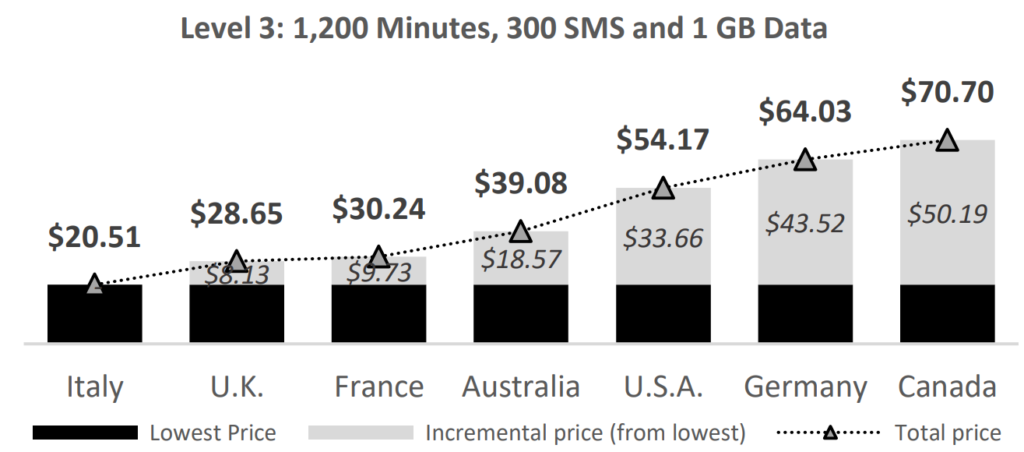
  • Level 3: 1,200 minutes, 300 SMS and 1GB of data
  • Level 4: Unlimited minutes, SMS and 2GB of data
  • Level 5: Unlimited minutes, SMS and 5GB of data
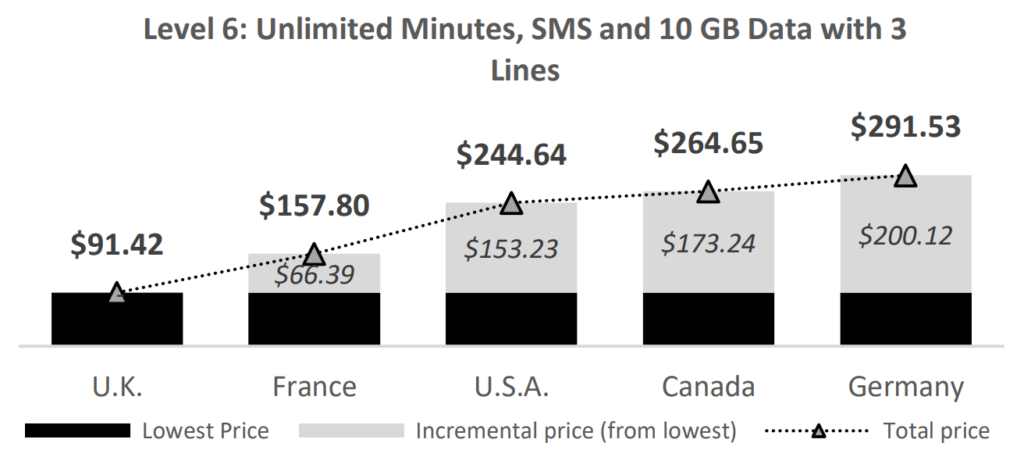
  • Level 6: Unlimited minutes, SMS and 10GB of data with three lines

Canada topped the charts as the most expensive nation for mid-level plans, coming in first place for levels 3, 4 and 5, which range from 1GB to 5GB of data. In the high and low tiers, it also remained in the top three.

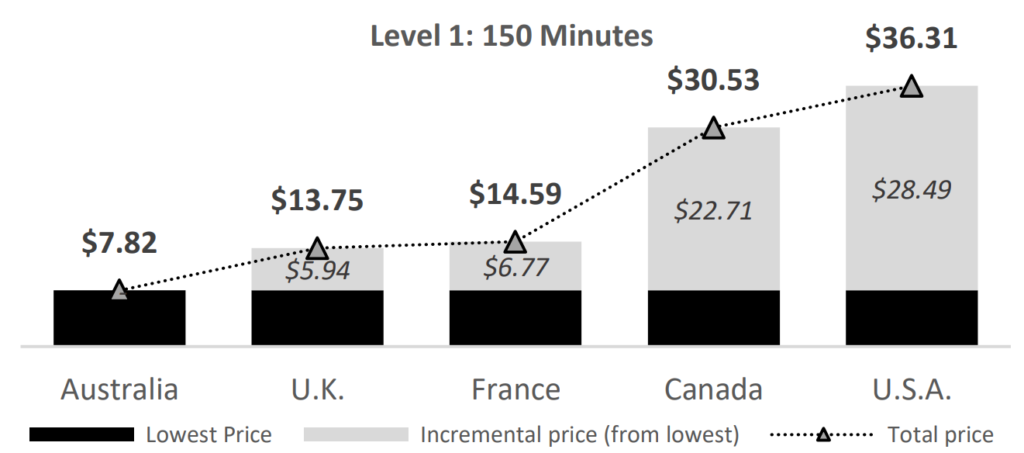
Canada’s average prices at the lowest tier are $30.53, coming in second to the U.S.’s $36.31. Canada’s pricing is $22.71 more than Australia, which offers plans at that tier for an average of $7.82.

At the most data-heavy tier, level 6, Canada takes the second slot with $264.65 on average, just behind Germany’s $291.53. The country with the lowest rates at that tier is the UK with $91.42.

While Canada’s prices are undoubtedly high, averages have actually decreased for the lower tiers. At level 1, there’s been a significant 25.7 percent decrease, at level 2 there was a 16 percent decrease and at level 3 there was a 5.3 percent decrease.

Unfortunately, those declines weren’t enough to drastically change Canada’s standing as one of the most expensive places in the world to use wireless services. While the country managed to edge itself out of first place for level 1 service, it stayed at third for level 2 and jumped from second to first place for level 3.

Nationally, Nordicity studied six Canadian cities, applying the same six service levels. The results showed the lowest prices occur in provinces where there’s a strong regional player in the market to contend against Rogers, Bell and Telus.

Regina, Saskatchewan, where crown corporation Sasktel operates, was the most inexpensive city to purchase wireless telephony services in at levels 2, 4, 5 and 6. Montreal, Quebec – which is catered to by Videotron – had the lowest level 1 plans. Meanwhile, Winnipeg, Manitoba had the lowest level 3 plans. Manitoba no longer has a large independent fourth carrier after Bells’ acquisition of MTS, but the carrier’s unique plans are still having a competitive influence on the market.

Across all other segments, three cities rotated between having the highest prices: Toronto, Vancouver and Halifax.

Mobile wireless internet

Google Chrome

The report also looks at mobile wireless internet by itself, focusing on three main service levels. Level one consists of 2GB to less than 5GB, for which Canadians pay a monthly average of $43.01. Level 2 consists of 5GB to less than 10GB, for which Canadians pay an average of $60.79. Finally, level three consists of 10GB and more, which comes in at $82.28.

Canada topped the charts for level 1 and came in second place in level 2 and 3 to the U.S. Japan took third position for all three tiers, while the lowest-priced countries included Australia, France and the U.K.

Within Canada, Toronto and Winnipeg were the cities with the highest-priced mobile wireless internet, while Regina and Montreal offered the lowest prices.

Fixed broadband internet

Fiber Optic

It’s interesting to note that, in certain categories of internet speed, Canadian broadband internet prices are on the lower end of the spectrum.

In the 3 to 9Mbps range, for example, Canadians pay, on average, the second-least for their internet — $41.83. The only country that pays less is Italy, at $41.18.

However, it’s in the higher speed brackets that one starts to notice how much more Canadians pay.

In the 41 to 100Mbps range, Canadians pay the third-most, $82.54. That’s in comparison to Australia, which pays $89.98, and the U.S., which pays $114.81.

In the 100 to 1,000Mbps range, Canadians pay the second-most, $95.10. The only country that pays more for its ultra-high range broadband internet is the U.S., $145.15.

Bundled services

As cutting the cord becomes more and more common, subscribers purchasing services bundled together have become less common.

Still, Nordicity’s study included an analysis of the different prices that subscribers pay for bundled services, breaking down bundles into three categories.

In the first category — comprised of wireline telephone, wireless mobile phone and fixed broadband service — Canadians paid the most, $191.08.

In the second category — comprised of wireline, fixed broadband and television — Canadians paid the second-most, $120.99. Only subscribers in the U.S. — who paid an average of $138.41 — were charged more for this category of bundle.

Finally, in the third category — comprised of wireline, wireless, fixed broadband and television — Canadians paid the most, $199.19.

A brief note on the subject of methodology

In addition to Canada, the study analyzes telecom prices in the U.S., as well as Australia, Japan, the U.K., France, Germany and Italy.

It’s important to mention that the study examines telecom prices in six Canadian cities, four American cities, but only one city from the six other countries — typically the largest or most populous city in the country.

Nordicity says it gathered information by consulting telecom service provider websites for pricing information during April and May 2017, while also consulting with customer service representatives when the need arose. Nordicity also stated that it only used the lowest price available for any of the aforementioned categories.

Finally, Nordicity converted global prices into Canadian dollars, using the Bank of Canada’s May 2017 monthly average exchange rate to make the comparison.

Check out the full pricing study here.

The post Canadians still paying some of the highest wireless rates in the world: ISED appeared first on MobileSyrup.

18 Dec 15:36

Apple awards U.S. manufacturing company Finisar $390 million USD

by Sameer Chhabra
iPhone X Face ID settings

Cupertino computing giant Apple has announced that California-based manufacturing company Finisar will receive $390 million USD in awarded funding.

The award is part of Apple’s Advanced Manufacturing Fund, and Finisar is expected to use the substantial endowment to increase its research into vertical-cavity surface-emitting lasers (VCSEL) — the technology used in the iPhone X’s TrueDepth camera.

The True Depth camera itself uses VCSELs to project an array of 30,000 dots onto users faces. By mapping faces, the phone can unlock using Face ID, and can also transpose the user’s face onto apps like Animoji.

An Apple media release reports that Finisar will invest in transforming a 700,000-square foot manufacturing plant in Texas into the “high-tech VCSEL capital of the U.S.”

Apple also reported that “100 percent of the VCSELs Apple buys from Finisar will be made in Texas.”

“When you combine our proven ability to consistently manufacture exceptional products with our new state-of-the-art Sherman facility, we’re confident we can achieve our shared goal of providing consumers with incredibly exciting features,” said Jerry Rawls, CEO of Finisar, in the same Apple media release.

Apple has set aside $1 billion USD for its Advanced Manufacturing Fund, as a way of stimulating U.S.-based companies into improving their manufacturing efforts. No doubt, the fund is also a way of subtly exerting control and influence over some of the emerging manufacturing companies in the U.S.

The post Apple awards U.S. manufacturing company Finisar $390 million USD appeared first on MobileSyrup.

18 Dec 15:35

Google researcher delivers iOS 11 jailbreak method

by Rose Behar
iOS 11 control centre

After a dearth of major public jailbreaks since iOS 10, a method of jailbreaking iOS 11 devices has been discovered by Google security researcher Ian Beer.

For those unfamiliar, jailbreaking is a method of exploiting a vulnerability in Apple’s mobile operating system in order to gain more control over what you can do with your device. For instance, with a jailbroken iPhone, users can install any app, run emulators and customize the interface. The jailbreaking scene, however, has died out over the last few years, largely because much of the functionality offered via the process is now built directly into iOS 11.

Beer released the proof-of-concept code for a rooting concept that works on both iOS and macOS devices on December 11th. According to Beer, a memory corruption issue on iOS 11.1.2 and below allows an attacker to execute malicious code with system-level privileges.

Apple released a fix for the bug (identified by bug number CVE-2017-13861) on December 2nd with iOS 11.2. It’s unclear what the identifier is for macOS, since Apple doesn’t include detailed descriptions for each fix.

Essentially, this means that if you’re willing to keep your device at iOS 11.1.2 — security risks and all — then you can jailbreak your iPhone. Various jailbreaking projects have already said they plan on integrating Beer’s code into their tools, and if you’ve got the knowledge and patience, you can already access his proof-of-concept code and tinker away on your own.

Beer said he tested the exploit on iPhone 6s, iPhone 7, iPod Touch 6G, and Mac OS 10.13 on a MacBook Air 5.2, though it should work on other devices as well.

Beer is a researcher with Google’s Project Zero, a department tasked with identifying zero-day vulnerabilities — meaning security vulnerabilities unknown to anyone interested in fixing the issue.

Source: Ian Beer Via: Gizmodo, The Register

The post Google researcher delivers iOS 11 jailbreak method appeared first on MobileSyrup.

18 Dec 15:34

Chromecast and Apple TV will soon be available again on Amazon, says report

by Dean Daley
Amazon Echo Dot

Google and Amazon’s feud is coming to an end.

According to an Amazon spokesperson speaking to CNET, the U.S.-based e-commerce giant will once again stock Google’s Chromecast as well as the Apple TV.

“I can confirm that we are assorting Apple TV and Chromecast,” said the spokesperson, in an interview with CNET.

Amazon initially removed the Chromecast and Apple TV from Amazon.com two years ago. Due to the removal, searches on the e-commerce site only returned results for Amazon’s Fire TV stick, as well as mounts for Chromecast and Apple TV.

It was only a few weeks ago that Google announced plans to remove its YouTube app from the Amazon’s Echo Show and its Fire TV stick due to Amazon’s refusal to reach an agreement with Google over Chromecast products, a threat that Amazon seems to have taken quite seriously.

As of right now, product listings for the Apple TV, including the Apple TV 4K, the Google Chromecast and Chromecast Ultra have appeared on the American Amazon website, but Amazon has yet to update its Canadian site.

This most recent change may also lead to Google keeping its YouTube app on the Fire TV stick and add it back to the Amazon Echo Show — a product that hasn’t been released in Canada yet.

MobileSyrup has reached out to Amazon Canada for comment, and this story will be updated with a response.

Source: CNET

The post Chromecast and Apple TV will soon be available again on Amazon, says report appeared first on MobileSyrup.

18 Dec 15:34

Pre-orders for the Ataribox have been delayed

by Dean Daley
Ataribox header

Pre-orders for the mysterious Ataribox were suppose to go live today, however, the company sent out an e-mail stating that it’s taking longer than expected,” to create the platform and ecosystem the Atari community deserves.”

Atari wants to make sure its mysterious product — that it hasn’t announced any games for yet — satisfies its customers and will not set up pre-orders for the console until it fixes its issues first. A new launch plan will be announced at some point in the next few weeks, and the company wants to keep Ataribox supporters informed.

A final price hasn’t been confirmed yet, but the company expects the cost to range between $249 and $299 USD, which amounts to about $308 and $370 CAD. Although early supporters on the company’s Indiegogo campaign may receive a discount.

The Ataribox is to feature an AMD processor and a Linux operating system, with the goal of competing with retro-consoles like the SNES Classic.

Source: Engadget

The post Pre-orders for the Ataribox have been delayed appeared first on MobileSyrup.

18 Dec 15:34

Apple Maps is bringing indoor maps to Toronto, Edmonton and Vancouver international airports

by Patrick O'Rourke
Apple Maps

Apple Maps has been updated with detailed maps of airports in more than 30 Canadian, U.S. and international airports, giving travellers the ability to get additional information about each location.

Once users access this feature, they can access the following information:

  • Tap ‘Look inside’ to view boarding gates, security checkpoints, check-in desks, baggage claim carousels and more
  • Users can then browse hundreds of shops, restaurants, or restrooms located within the airport or in a specific terminal
  • It’s also possible to ask Siri to find something nearby in airports
  • You can view your location in real-time with indoor positioning
  • Toggling between floors in airports is also possible

Below is a complete list of Canadian airports that now support the above features:

  • Pearson International Airport in Toronto
  • Vancouver International Airport in Vancouver
  • Edmonton International Airport in Edmonton

Below is a complete list of airports that support Apple Maps’ new airport features:

  • Amsterdam Airport Schiphol AMS
  • Baltimore/Washington International Thurgood Marshall Airport BWI
  • Berlin Tegel Airport TXL
  • Berlin Schönefeld Airpors SXF
  • Chicago O’Hare International Airport ORD
  • Chicago Midway International Airport MDW
  • Denver International Airport DEN
  • Detroit Metropolitan Wayne County Airport DTW
  • Geneva Airport GVA
  • Hong Kong International Airport HKG
  • Houston George Bush Intercontinental Airport IAH
  • Houston William P. Hobby Airport HOU
  • Indianapolis International Airport IND
  • Jacksonville International Airport JAX
  • Las Vegas McCarran International Airport LAS
  • London Heathrow Airport LHR
  • London Gatwick Airport LGW
  • Los Angeles International Airport LAX
  • Orange County John Wayne Airport SNA
  • Miami International Airport MIA
  • Minneapolis–Saint Paul International Airport MSP
  • Nashville International Airport BNA
  • New York John F. Kennedy International Airport JFK
  • New York LaGuardia Airport LGA
  • Newark Liberty International Airport EWR
  • Oakland International Airport OAK
  • Philadelphia International Airport PHL
  • Pittsburgh International Airport PIT
  • Portland International Airport PDX
  • San Diego International Airport SAN
  • San Jose Norman Y. Mineta International Airport SJC
  • Seattle–Tacoma International Airport SEA

The post Apple Maps is bringing indoor maps to Toronto, Edmonton and Vancouver international airports appeared first on MobileSyrup.