Shared posts

20 Dec 05:39

The Thing In The Closet

by Rui Carmo

It’s 2017, and we still have a printer in the house. Or, rather, a printer/scanner/fax combo, which mostly skulks in a closet and spits out sheets liberally sprayed with horrendously expensive ink, beeping contentedly now and then. We got it back in early October to replace its ailing predecessor, but I’ve been so busy that my notes on the entire affair languished in a dusty corner of my Dropbox until tonight.

Our previous printer was an OfficeJet 4500, which started becoming a nuisance due to a mechanical failure that is symptomatic of the way these things are put together–the paper feeding mechanism started having trouble picking up sheets from the tray, and there simply was no way to tweak or replace what appeared to be a worn out rubber roller without disassembling the entire printer (which I attempted to do) and possibly breaking a few more parts of the mechanism in the process (which I didn’t).

The former new hotness, now old and busted.

The Hunt For The InkJet In October

So I started looking for a replacement, which had to address a fairly well-defined set of requirements:

  • It had to be a combo printer/scanner, since every now and then I need to file away and digitize multiple documents (so an automatic document feeder was a plus).
  • It had to support AirPrint out of the box, so I could discontinue my ancient hack, which I had recently Dockerized but shouldn’t really be necessary in 2017.
  • Given the negligible volume and kind of actual printing we do (we almost never print photos, and it’s mostly the kids who print anything these days), a color inkjet would still be the most economical solution.
  • For compatibility reasons (i.e., zero drivers, common protocols) sticking to HP was a given, since direct scanning from macOS Preview and iOS VueScan were two things I did not want to do without.
  • Wired Ethernet and fax were desirable, but optional (more on that later).

After a few days of poking at online retailers’ woefully inadequate technical spec sheets and HP’s adequate (but squirrelly and inconsistent) tech support site, I decided to go with the OfficeJet 4650, which is ultimately just as plasticky and crappy and disposable, but hides it well under a contoured shell with a minimal set of ports as well as a black and white touchscreen display that replaces everything else but the power button.

Besides looking much nicer than its predecessor, it is also a tad more practical to deploy, since the power supply is now built-in. In fact, it wouldn’t look half bad sitting on a desk:

The new plastic ink guzzler.

The paper feeding mechanism, although just as inscrutable in its depths, manifests itself outwards in two characteristic ways:

  • It has a nicer, closed in tray with better guides (which means there’s less hassle feeding A4 and photo paper to it and aligning the sheets).
  • Instead of a proper output tray, it has an utterly ridiculous paper holder that rotates out automatically to hold sheets as they come out of the printer, which I expect my kids to break my day now.

This latter mechanism seems to be a staple of HP’s current inkjet range, so there was no way to avoid it. Time will tell if it lasts.

One requirement that the 4650 didn’t comply with is wired Ethernet. It doesn’t have an Ethernet port, but since it’s sitting right underneath one of my AirPort Extreme base stations, Wi-Fi was an adequate compromise. Of course I can also plug it in via USB to one of my Linux boxes if I so choose, although setting up CUPS is not something I would like to keep doing in this day and age.

But one thing it does have is fax.

Fax? Are you from the past?

I’m not, but Portuguese customs still in the Middle Ages, so fax comes in handy.

I routinely order stuff from abroad (mostly gadgetry and electronics components), so every couple of months I have to send in proof of purchasing, and for some inane reason it’s impossible to send a PDF or anything above a megabyte or so to customs via e-mail (either the message is filtered out or they just don’t receive the attachment).

So fax is still a thing, even though the process of getting anything through customs is now a veritable homage to Rube Goldberg, for what actually happens is this:

  • I put together a PDF with an intro sheet, a scan of the customs notice, and the proof of purchase, and send it to my printer via the network.
  • It then dials the fax number via the Thomson router that is plugged in to my fiber connection, in a woefully wasteful digital/analog/digital conversion whose only saving grace is that, in a way, machines are singing to one another as the PDF is rasterized into rows of dithered pixels.
  • Someplace in my telco’s IMS network, an SBC kicks the digital audio stream into an outbound MSC, which then rings up the customs fax service and adds another leg of digital/analog/digital conversion.
  • Hopefully, the customs office then has the fax routed internally via some sort of fax-to-email gateway, but I would not be surprised if large rolls of fax paper and gnomes were involved.

All things considered, at least I don’t have to put up with T.38 anymore. Had enough of that when we were trying to shove fax over 3G…

AirPrint Woes

Although scanning worked perfectly (especially in VueScan, which I can never say enough nice things about), AirPrint didn’t (and occasionally still doesn’t), since it too ran afoul of the wave of subtle breakage of Apple’s new OS releases.

I’ve had a number of irritating problems with the printer in both macOS High Sierra and iOS 11, which I initially attributed to HP’s shipping the printer with a self-signed certificate–this because I could not get it to work with macOS as “Secure AirPrint” (picking the insecure connection worked) and because I often could not load the printer status page on iOS after it redirected to HTTPS, which happened seemingly at random across multiple devices, but which also coincided with our not being able to print from those devices (iOS 11 would either be stuck on “contacting printer” or Print Center would just go away, merrily tossing the print job into the void).

I eventually “fixed” it by resetting the printer to factory defaults and disabling IPv6, after which I could both access the printer via HTTPS and print from my iPad. Even so, now and then things mysteriously fail to work for a minute or so, so this is sure to be a source of continued annoyance.

But overall it works fine, and the expense sheets and other trivia I print out are crisp and clear (even in draft mode). It does the job quietly, without any fuss and speedily enough, and I guess that is the best one can say about a printer in 2017.

20 Dec 05:38

Using ThebeLab to Run Python Code Embedded in HTML Via A Jupyter Kernel

by Tony Hirst

If you want to run Python code embedded in a HTML file in your browser, one way of doing it is to use something like Brython, Skulpt or Pypy.js, which convert your python code into Javascript and then run that Javascript in the browser.

One of the problems with this approach is the limited availability of Python modules ported into Javascript for use by those packages.

Another route to using Python in the browser is to connect to a remote Python environment. This is the approach taken by online code editors such as PythonAnywhere or repl.it.

A third way to access a Python environment via a web browser is using Jupyter notebooks, but this limits you to using the Jupyter notebook environment, or a display rendered using a Jupyter extension, such as RISE slideshows or appmode.

Several years ago, O’Reilly published a demonstration Jupyter plugin called Thebe that allowed you to write code in an HTML page and then run it against a Jupyter kernel.

I think that example rotted some time ago, but there’s a new candidate in the field in the form of @minrk’s ThebeLab [repo] .

Here’s an example of a live (demo) web page, embedding Python code in the HTML that can be executed against a Jupyter kernel:

The way the code is included in the page is similar to the way it was embedded in the original Thebe demo, via a suitably annotated <pre> tag:

One other thing that’s particularly neat is the way the page invokes the required Jupyter kernel – via a Binderhub container:

(You may note you also need to pull in a thebelab Javascript package to make the whole thing work…)

What this means is that you can embed arbitrary code, for an arbitrary language (or at least, as arbitrary as the language kernels supported by Jupyter), running against an arbitrary environment (as specified by the Binder image definition).

The code cells are also editable, which means you can edit the code and run your own code in them. Obviously:

  1. this is great for educators and learners alike because it means you can write – and run – interactive code exercises inline in your online course materials;
  2. rubbish for IT because they’ll be scared about the security implications. (The fact that stuff runs in containers should mitigate some of the “can our network get hacked as a result” concerns, but leave open the opportunity that someone could used the kernel as place from which to mount an attack somewhere else. One way many notebook get round this is block or whitelist the external sites from which requests can be made from inside the kernel. Which can be a pain if you need to access third party sites, eg to download data. But is maybe less of an issue when running a more constrained activity inline within course materials against a custom kernel environment?)

It’d be great to be able to run something like this as a demonstrator activity in TM112… I just need to put a demo together now… (Which shouldn’t be too hard: the current plan is to use notebooks for the demos, running them from a Binderhub launched environment…)

PS I just did the quickest of quick proofs of concept for myself, taking the demo thebelab html file and adding my own bits of ipython-folium-magic demo code, and hey presto…https://psychemedia.github.io/ipython_magic_folium/ In the demo, try editing the code cell to geolocate your own address, rather the address of the OU, and re-run that code cell. Or look for other things to try out with the magic as described here.

PPS so now I’m wondering about a Thebelab HTML output formatter for nbconvert that runs the code in code input cells that are hidden using the Hide Cell notebook extension, to render the output from those cells, and writes the code from the unhidden code input cells into <pre> tags for use with Thebelab?

20 Dec 05:38

'Robots Are Coming For Your Jobs'

This is part eight of my annual look at the year’s “top ed-tech stories

In previous years, I’ve looked at how education technology is intertwined with narratives about “skills,” “competencies,” and “credentialing.” I’ve looked at how for-profit colleges, MOOCs, and learn-to-code companies have tapped into these narratives in order to justify their products and services. These have all been separate articles in each series. But this year, I’m reorganizing my analysis of these “trends,” partly because I think they can all be subsumed under the larger theme of “the new economy.” (And partly because I really cannot or should not write more than ten of these things every year – and this year I think I’m somehow poised to write eleven, goddammit.)

What are the dominant stories we’re being told about the economy – about our role, now and in the future, as workers? What are the dominant stories we’re being told about the role of education in preparing workers for this future economy?

The importance of thinking about education through the lens of “the new economy” was best demonstrated this year by Tressie McMillan Cottom in her book on for-profit education, Lower Ed: The Troubling Rise of For-Profit Colleges in the New Economy. Don’t get distracted by just by the “for-profit colleges” part of that title, I’d caution. “Lower ed” is far more pervasive.

Among McMillan Cottom’s many contributions to education scholarship, she complicates the stereotype that those who attend for-profit colleges – and those are disproportionately low-income women and women of color – are somehow “dupes.” Rather, McMillan Cottom argues these students are making rational decisions in a world of growing economic precarity and shrinking social programs. In the hopes of not being (further) left behind in the labor market, these students are compelled to engage in this risky credentialism. “The new economy” insists we hustle. And that’s the future – that hustle – for more and more students and more and more workers.

Watch Tressie McMillan Cottom on The Daily Show. Listen to her on NPR’s Fresh Air. Read The New York Times review of her book. Don’t mess with her on Twitter.

I’ve already made references to for-profit higher education in the second and third articles in this year-end series – on the “innovation gospel” and on the business of student loans. I’ve also written a separate article listing some of the various events that happened in the for-profit college industry this year – closures, lawsuits, sales, and the like. I want to focus here, in this article, on the hustle, on the stories we were told this year about “the new economy,” and I want to explore how “risky credentialism” affects students and workers broadly – “lower ed,” as McMillan Cottom has dubbed it.

You’ll notice, however, that this article is not titled “Education Technology and the New Economy.” That’s because the stories told this year to keep us hustling and to keep up imagining a certain kind of future are almost all about robots.

Over and over and over and over and over and over and over again we were told “robots are coming for your jobs.” And so, we must “automation-proofschools in response. We must encourage people to pursue “robot resistant” majors in college. We must prepare preschoolers for an automated future. Something about education needing to be reshaped in order to combat “jobsolescence” – I kid you not, someone said that.

The threat of robots might come less from their purported “artificial intelligence” – although there was a steady drumbeat of stories this year touting their magnificentmentalcapabilities – than from the story that posits human intelligence is faltering. Humans can no longer keep up; they are no longer desirable or capable employees (if indeed they ever were). Robots are much more ideal as workers, because of course they cannot unionize. They don’t ask for health insurance benefits or sick leave or 401K contributions. Employers, so we’re told, are simply unable to find workers with the right skills. Humans have fallen behind.

“The Skills Gap”


Despite the overwhelming evidence that there is no “skills gap,” – particularly a “high tech skills gap” – it’s a convenient and popular story told by employers, entrepreneurs, investors, pundits, and politicians alike – particularly those who’d like to blame schools for failing to teach students the right “skills.”

“The right skills,” of course, are the skills that employers expect potential employees to possess, largely eschewing training themselves and instead offloading the risk and responsibility of training onto individuals. Demanding that schools teach “the right skills” is also one of many examples of an ongoing “innovation” fixation, of how industry is pressing the education system to bend to its needs.

Arguably, there is no better example of this than the ongoing push that “everyone should learn to code,” led at the K–12 level by the industry-backed advocacy organization Code.org. As The New York Times’ Natasha Singer described the work of the non-profit in June:

Code.org has emerged as a new prototype for Silicon Valley education reform: a social-media-savvy entity that pushes for education policy changes, develops curriculums, offers online coding lessons and trains teachers – touching nearly every facet of the education supply chain.

Code.org is backed by a long list of technology companies – from AT&T to Amazon to Facebook to Google to Verizon. (I’ll look in more detail at how robots are coming for your children in the next article in this series.)

And well beyond the industry’s backing of Code.org, venture capital has continued to flow into “learn-to-code” businesses in 2017, alongside a number of corporate grants (and corporate PR efforts that have sought to encourage the adoption of coding curriculum. (For a complete look at who funded learn-to-code companies this year, visit funding.hackeducation.com.)

Bootcamp or Bust


Coding bootcamps also continued to be popular among tech investors. In previous years, these were also popular acquisition targets, but 2017 saw several of these high-profile acquisitions falter under new corporate leadership.

Their stumbles certainly weren’t from a lack of positive PR from trade publications, which repeatedly touted the benefits of these short-term technical programs: “Learn to code, get a job – and get paid well,” as Edsurge put it. “A guaranteed jobor your money back!” “No teachers!” “Sweet digs!”

In July, two of the most well-known (and some believed, well-established) coding bootcamps announced they’d be closing their doors: Dev Bootcamp and Iron Yard. Both had been acquired by for-profit college companies, a convenient target – no surprise – for entrepreneurial blame at the bootcamps’ failures: Dev Bootcamp was bought in 2014 by Kaplan Inc and Iron Yard was acquired in 2015 by the Apollo Education Group, the parent company of the University of Phoenix.

In some ways, the explanation for the closure was quite simple: there are now far more coding bootcamps – almost 100 across the US and Canada – than there are prospective students. But there have been some indications too that many employers find bootcamp graduates to be unprepared for technical work. Or rather (and this is really key) employers don’t interpret the bootcamp certificate as a good “signal” – and that is the “lower ed” gamble all along. (On average, a bootcamp runs about $11,000 for a 12-week course.) As Tressie McMillan Cottom puts it, “Boot camps are a tax paid by suitably credentialed workers who do not have enough capital (economic, social, or cultural) to enter a high status field of work in which some job is undergoing an actual or projected short-term demand bubble.”

In October, the New York State Attorney General Eric Schneiderman announced a $375,000 settlement with the coding bootcamp Flatiron School “for operating without a license and making bogus claims about the success of its graduates.” One week later, Flatiron School was acquired by WeWork, a company that runs co-working spaces, meet-ups, and now a private K–12 school to teach entrepreneurship – “the new economy” indeed.

The charges of providing misleading information about graduates echo those commonly made against other for-profit colleges – charges that prompted bootcamps (or more accurately a loan provider for bootcamps) this year to start reporting job placement statistics, and charges that, in previous years, had led to the Obama administration’s creation of the “gainful employment rules.” Those rules, aimed at career-colleges and career-oriented programs, had been challenged by for-profits in the courts for years; and in January, the Department of Education finally released the names of some 800 programs which failed to meet the accountability standards – that is, they’d failed “by having graduates with annual loan payments that exceeded 12 percent of their total earnings or 30 percent of their discretionary income.” But as many feared, the Trump administration announced in March that it would delay implementing the rules or imposing any sanctions against the programs that were in violation. In June Secretary DeVos said she would pause the “burdensome” rules until they could be “re-negotiated.”

As The New York Times put it in February, “For-Profit Schools, an Obama Target, See New Day Under Trump.” Clearly there’s very little oversight or accountability for these programs at the federal level. And even though a couple of coding bootcamps have stumbled this year, it’s not clear that the hype or the funding will dry up. There are other markets to pursue, after all – markets in Mexico, Gaza, Uganda, Kenya, and Nigeria, for example. The prison market.

“The new economy.”

The New Vocationalism


Stanford University professor Larry Cuban published a three article series this year on “Coding as the New Vocationalism” – parts 1, 2, and 3 – which provides important historical context to the latest Silicon Valley push for computer science education. (Disclosure: there’s a photo of my brother and me using Logo in part 2.) Career and technical education is hardly new – this year marks the centennial of the Smith Hughes Act, which first promoted and funded vocational education in agriculture, trades, industry, and homemaking. Although lauded by many industry groups today – often framed as a lamentation over the loss of the shop class as public schools have reduced their vocational offerings – the history of vocational education is fraught with racism, sexism, classism, and xenophobia, where “certain students” were tracked into vocational training and “certain students” were given more academic opportunities. “Tracking” – an educational practice that re-inscribed social inequalities.

But renewed vocational training (or career and technical education or CTE) has found support not just from Silicon Valley technology companies but from the Trump administration. Trump has earmarked more money for apprenticeships, for example. (He even praised Germany – Germany! – for its apprenticeship model.) Others in the administration and in the Republican party have echoed his call for more career-oriented education and less focus on college attainment. “We need to stop forcing kids into believing a traditional four-year degree is the only pathway to success,” Secretary of Education DeVos recently asserted.

All this makes for (yet more) business opportunities.

The Business of Credentialing


In the last few years, as part of this series, I’ve chronicled Silicon Valley’s push for new credential and certificate products – “Competencies and Certificates” in 2014; “Credits and Credentialing” in 2015; “Credentialing” in 2016. These products – badges, microcredentials, micromasters, nanodegrees, and the like – have been packaged alongside (and by) MOOCs, coding bootcamps, and other popular ed-tech trends. Funny, for all the talk of “unbundling education” among investors and education reformers, they’re more than happy to sell you new bundles of products and services they support.

It’s been an effort to create a new credentialing ecosystem of sorts, one that includes but extends beyond traditional higher ed (for-profit and not-for-profit). But it’s still one that, to borrow from Tressie McMillan Cottom yet again, constitutes “lower ed.” As she argues in her book, “new institutions and new credentials are by definition lacking in prestige, the kind of prestige that lower-status workers and students need for their credential to combat discrimination in the labor market.”

Nevertheless, the promise of many of these certification programs – from for-profit colleges to coding bootcamps to MOOCs – is that they are viable alternatives to “the traditional four year degree.” “You Can Get a Good Job Without a Bachelor’s Degree,” an op-ed in Bloomberg recently asserted. “More Americans just need the right training.” Implied even in this headline: a high school diploma is no longer sufficient. Indeed, the job prospects for those with just a high school diploma but no additional schooling are pretty dismal, even for positions that once did not demand any sort of post-secondary education.

Silicon Valley entrepreneurs still like to trot out the argument that “Your College Degree is Worthless,” but that’s bullshit – and peak hypocrisy as many of these men (they’re always men. weird that, eh?) already have college degrees. So when you hear marketing claims like “MissionU Says It Can Replace Traditional College With a One-Year Program,” ask about the type of person that can eschew traditional credentialing and rely on simply networking with famous employers and entrepreneurs or “independent study” in order to “make it.”

More likely in “the new economy,” a college degree is not enough, and thus we see the scramble for workers to attain even more credentialing in order to remain economically competitive – that’s that “tax paid by suitably credentialed workers who do not have enough capital (economic, social, or cultural) to enter a high status field of work” as McMillan Cottom has described it.

Some of what we saw this year was an attempt to rebrand occupational licensing with the terminology used by Silicon Valley – “microcredentialing.” Microcredentials for teachers. Microcredentials for police. Neither of these two efforts occur in a vacuum, of course, as pressures for “alternative certification” have long been wrapped up in reform efforts that reshape who has control, institutional or otherwise, in determining who has the right qualifications and right “skills” for a particular (public) profession. Credentialing still functions as a type of gatekeeping, even if you add the “micro” prefix to make it look smaller and less gate-like.

If degrees don’t matter – I mean, they do, but let’s do some Silicon Valley-style pretending here – then how can you tell if someone has the right qualifications and the right “skills”? There are, no surprise, a number of startups that purport to help you with that. (For a fee.) But the language of “skills versus credits” is also one found in other education reform efforts, notably those associated with “competency-based education,” “mastery-based learning,” and the like. (I touched on this topic briefly in a previous article on online education.)

Earlier this year, a consortium of elite private high schools formed the Mastery Transcript Consortium in order to replace the traditional transcript with a document that “would not include courses or grades, but levels of proficiency in various areas.” The effort, which the organization said it hoped would “transform college admissions,” is meant to help shift the way in which students are evaluated but also, according to the organization, the way in which they are taught. But with participation from The Dalton School, Phillips Exeter Academy, Choate Rosemary Hall, Catlin Gable School, and the like, one has to wonder how we can expect the most prestigious private schools in the US to lead a charge that would reform schools (and college admissions) to be more equitable. What sort of credentialism best serves the students at the country’s most elite schools, and will that ever serve the majority of public school students?

In a prestige-based system, let’s be honest, students from these schools are admitted into colleges and universities based not merely on “skills” or “grades” but on the signals of affluence and attainment that the K–12 school they attended symbolizes. There’s a certain level of trust and expectation that’s automatically granted to them. (That’s what the networks of power and wealth – and whiteness – get you.)

It’s crucial to look at all the stories we’re told about credentialing side-by-side: you need a degree; you don’t need a degree; we need to change how grading works to be more equitable; and, of course, one of the most popular tales, we need to change how the process works because students and employees cannot be trusted.

That’s the argument, at least, for a move to put transcripts and degrees on the blockchain. Students cheat. Job applicants lie. “In the Era of Microcredentials,” says Edsurge, “Institutions Look to Blockchain to Verify Learning.” Now the blockchain does not actually verify learning. It just presumably means that the information about what they’ve done is stored in a record that hasn’t been altered. If you believe the blockchain evangelists, this “crypto accreditation” will mean no fake PhDs. (Looking at you, Sebastian Gorka, deputy assistant to President Trump.) No taking a four-week course and passing it off as an Ivy League degree. (Looking at you, Joseph Otting, Trump’s nominee for the US Treasury’s Office of the Comptroller of the Currency.) No telling people that your on-the-job training at Sizzler is a business degree. (Well, it was BS, Iowa State Senator Mark Chelgren.) Even in the face of these notable Republicans’ distortions this year, one should probably ask how necessary it is to throw the computational (and electrical) power of the blockchain at this “problem” – particularly with the blockchain’s history of fraud and fascism.

Malta thinks it’s necessary, I guess. It became the first country to explore issuing educational certificates via the blockchain. MIT will issue digital diplomas on the blockchain. Sony’s in the business. And Northeastern has teamed up with IBM to put digital badges on the blockchain.

In other badging news, Salesforce received a patent for badges. Pearson filed a patent for badges. Folks still insist that badges are “gaining traction.” Of course, we’d expect as much in a world of economic precarity where workers need to be able to display as much flair on their employee uniforms as possible.

The Business of Hiring


It was notable that when the venture capital firm GSV issued its latest report on investment opportunities in education this spring, that it discussed both “learning” and “talent” technology. If you can’t find success in training workers, try to find success in being the arbiter of who gets hired, I guess.

This is hardly a new market for investors, but it’s a reliable one – as the GSV report says, “We believe we are now in a new wave of creation and consolidation in enterprise/professional learning and talent sector.” More details about venture capitalists’ activity in this sector this year in the supplement to this article here: “Who’s Investing in Job Recruitment and Job Placement Startups (in 2017?” A sample of headlines from trade publications underscores the kinds of features that might make these companies appealing to investors: “Headstart wants to better analyze candidates to fit them with the best jobs”; “Swedish Startup Hopes to Replace Resumes With ‘Gamified’ Job Matching System”; “​The Cost of Cutting in Line: Students Can Now Buy Their Way to a Job Interview.” As venture capitalist Tom Vander Ark wrote in Education Week in July, “Chalk up the sector disruption to better software-as-a-service platforms, cheaper cloud-computing services and the rise of artificial intelligence across all HR functions.” Vander Ark interviewed GSV’s Michael Moe in September where they contended, among other things, that artificial intelligence in hiring would eliminate bias – claim that surely flies in the face of all the evidence that algorithms can be incredibly racist, replicating the prejudices of their designers and the inequalities of existing systems.

(A story from August: “New app scans your face and tells companies whether you’re worth hiring.” The company in question is HireVue. Its customers include plenty of universities and school districts – BYU and Atlanta Public Schools, for example.)

Robots might not take your job. But they might decide whether or not you get hired in the first place. “Robots” – not bosses. It’s never the bosses’ fault, is it.

Training Ed-Tech


I looked at “the year in MOOCs” briefly in a previous article in this series, where I noted that they have largely pivoted away from “free and open online education” to job training. It’s been a common move in the past for education startup to move away from selling to schools and toward selling to companies. Corporate learning – that’s where people hope the money is. (You can look to Lynda.com, which was acquired by LinkedIn in 2015 for $1.5 billion, as the kind of “exit” that many ed-tech entrepreneurs hope to have.)

As such, education technology products that were, according to some of the storytelling, poised to “revolutionize schools” are instead marshaled for job training. And there’s no better example of that this year than virtual reality (although it’s still largely a gimmick even there): KFC, UPS, and Walmart all boasted that they were training new employees with VR. (And the tech press dutifully repeated the marketing.) There’s still hope in some quarters for school-based applications, I suppose. Student teachers are getting trained with VR, Education Week reported this fall.

But today’s education technology landscape feels a little different than previous manifestations in which struggling startups could readily turn towards what they were told would be a more reliable revenue stream: corporate learning. (Although to be clear, yes, they still do that. Yes, they’re still encouraged to do so.)

In part that’s because “the new economy” has shifted the burden of job training. It doesn’t necessarily fall to the employer now. I’m not even sure it falls to the school. It falls to the employee and the prospective employee. A future of “lifelong learning” isn’t one where we get to pursue fanciful curiosities and intellectual interests – me, I would like to learn about pigeon first aid. It’s about a labor market that requires us all to be constantly picking up new skills on our own dime and our own time so we’re (hopefully) employable. As social services dwindle, we will need retraining our entire lifetimes because we will be working until we die.

We’re also seeing schools be pressured to become the sites of corporate learning themselves, training students in the specific skills that specific industries (local industries, often) want. “Save Your College (and America’s Workforce) Through Corporate Training,” as investors Frank Britt and Ryan Craig wrote in Edsurge.

As such, perhaps the next ed-tech “platform” to watch – or to listen for the stories about, at least – will be Salesforce, which as MIT Technology Review excitedly wrote this year, is “Making Job-Training Software People Actually Want to Use.” (Ha. Ha. Ha.) Inside Higher Ed noted in passing in October that “Salesforce, the world’s largest customer relationship management platform, has announced a new classroom-ready training scheme called Trailhead for Students.” Also in passing, this sentence in a Brookings Institution report from November: “It is probably fair to say that the social good of having every high school student in America learn Salesforce might outstrip other trendier agendas in tech.”

“Everyone should learn Salesforce.” It’s got a charming ring to it…

Robots Are Coming For Your Children


Why we need to start teaching tech in Kindergarten” – Ivanka Trump, Special Assistant to the President

There’s no reason why children in elementary schools can’t be launching their own businesses” – Rebekah Neumann, co-founder, WeWork

More on teaching robots and training children in the next article in this series…

Financial data on the major corporations and investors involved in this and all the trends I cover in this series can be found on funding.hackeducation.com/archives.html. Even at 5000 words an article, there are stories I left out. You can read more at 2017trends.hackeducation.com/archives.html.

20 Dec 05:37

Ohrn Image – False Creek Ferry

by Ken Ohrn

One of those tough, dependable little False Creek Ferries, fog and the fabulously re-fabbed Burrard Bridge.  What a combo on a cold nearly-winter’s day.


20 Dec 05:37

Meet You for Barbeque in Chinatown~Legacy Business Success Story

by Sandy James Planner

fullsizeoutput_9cb

It is in the 100 block of East Pender Street right beside the New Town Bakery and it truly is one of the best places for a host of Cantonese dishes including my favourite, the curried beef.  Chinatown Barbeque at 130 East Pender Street will remind you of the places you frequented a student in Chinatown~clean, packed, and bustling with dishes coming out of the kitchen. Carol Lee is the owner, and she also  chairs the Vancouver Chinatown Foundation and is on the  Vancouver Chinatown Revitalization Committee. You may recognize some of the chefs and servers from the Daisy Garden in Chinatown works hard to support local residents and employees. The servers and chefs at Chinese BBQ used to work at Daisy Garden restaurant at 142 East Pender, a popular place that was destroyed in a fire two years ago.

As Wanyee Li of Metro News observes “Diners at the 48-seat restaurant can choose from several iconic Cantonese dishes that Chinatowns around the world used to be known for – BBQ duck, BBQ pork, roast pork, poached chicken, soy sauce chicken, and more.
“It’s a fine line. You want to be changing and you want to respect the history – but people love the food,” said Lee.

And the place is packed, with a mix of the young and the old  proving as Lee notes that “businesses that pay homage to the glory days of Chinatown can still thrive in the neighbourhood…I think a lot of the Chinese stores think it is hard to open in Chinatown and they have gone to other places where it is easier,” said Lee, acknowledging people can find Chinese food almost anywhere in the Lower Mainland. “But Chinatown has something different,” she said. “It’s something that is historic – it’s part of our Vancouver and Canadian history.”

A draft report commissioned by the City on “legacy businesses”  in Chinatown identified four factors: historic significance, small or a family operation, welcoming to seniors and culturally relevant.  And food is a way to get people to the table and reanimate an area. The success of Chinese Barbeque has been so evident that the support of Chinatown restaurants is seen as the base for a “thematic” streetscape renewal in Chinatown, with Foo’s Ho Ho restaurant expected to reopen in 2018.

Bill Yuen, a researcher at Heritage Vancouver identifies the welcoming factors to seniors and lower-income people, and the use of dialect languages as being part of the success for legacy businesses, and notes  in a Vancouver Sun article that It’s about developing businesses to enhance those values that make this place meaningful to people.”  Chinatown Barbeque is a great start.

fullsizeoutput_9c9


20 Dec 05:37

Are Seniors Close to Being Homeless in the Vancouver Market?

by Sandy James Planner

29555137_original-859x450

It appears that there are two population cohorts being severely pinched~younger people trying to find a place to live in Vancouver with salaries that are not rising at the epic speed of housing costs, and seniors who may not own their own home and find limited income to pay for rents. On the weekend I went to a suburban Starbucks and noticed an older SUV idling in the parking lot. There was a Christmas wreath in the window, and two older women in the front seats. They were clearly living in the car, and had driven up to Starbucks to access the free wifi.

As reported in the Vancouver Sun  “while the debate over the city’s housing crisis often focuses on millennials, people who work with seniors say elderly adults have lower incomes and fewer supports to withstand being displaced from their homes. “People end up living on the streets, or living in their cars, or crashing with friends, sleeping on the couch,” said Linda Forsythe, a board member of 411 Seniors Centre Society. “That used to happen a lot with young people,” she said. “They could tolerate it quite well, and sort of get on with their lives, whereas, with older people, you don’t have a chance to make more money. That’s the problem.”

There is a provincial grant to help elderly renters called Shelter Aid for Elderly Renters or SAFER. The subsidy ONLY applies to rent up to a certain “cap”, which “in the Lower Mainland is $765 a month, even though the average rent for a one-bedroom apartment is $1,223, according to the Canada Mortgage Housing Corporation.” And in Victoria or Kelowna? The rent cap is $667.While rents have risen by 45 per cent over the past ten years, the cap has only risen by 9 per cent according to Isobel Mackenzie, B.C. ‘s seniors’ advocate.

Seniors who own homes and condos can defer their property taxes but may have challenges paying for strata fees, extra assessments or utility costs. The seniors’ advocate is even saying that seniors are ending up in residential care because they cannot pay for their rent. The B.C. government does intend to build 114,000 affordable housing units with 2,400 slated for seniors. But for seniors that are one or two bills away from not being able to pay their rents, upping the cap for subsidy for rent may be essential. The challenges are compounded for immigrant seniors who also face a language barrier in determining what services they are eligible for and how to access them.

“Lola-Dawn Fennell, executive director of the Prince George Council of Seniors, recently told a House of Commons committee that most clients come to the centre in crisis.“When you are already stretched to your monthly income and emotional and physical limits, a broken-down furnace or a bill collection notice or one more hour of caregiving can become a last straw,” she said. “Yes, we see suicidal seniors.”

qtq80-ri3wbs


20 Dec 05:37

What Contributes the Most to CO2? It’s not Power Plants

by Sandy James Planner


us-largest-coal-fired-power-plant-890_westvirginia-890x500

It used to be that power plants caused a lot of pollution, and coal-fired plants in 2011 contributed to 1.7 billion tons of carbon dioxide a year.   As reported in Bloomberg News today it is cars, trucks, planes and boats that are the biggest source of U.S. greenhouse gas pollution

So how did that happen? While electricity use has not declined, it is now being generated from cleaner sources, most notably by the decline in using coal power. Coal has declined as a source by 33 per cent in the last decade, while natural gas usage has increased by 60 per cent. It is the clean up of the power sources for the electricity grid which has made the major change.

Carbon dioxide emissions from vehicles, planes and boats exceeded that of electrical production in 2016, and has continued to widen.While cars are more efficient, the United States is considering under the Trump administration “rolling back the toughest fuel-efficiency standards, which are set to take effect in the early 2020s.”

The development of electric cars and the continuing decline in the price of battery packs will eventually impact emissions. It is expected that by the mid 2020’s electric cars will be the standard for reliability and convenience than the gasoline-powered equivalents. And here is where it gets interesting~”When the electrification of the U.S. auto fleet begins in earnest, pollution from the two biggest energy sectors—electricity and transportation—may ultimately converge. Those electric cars are going draw their power from the grid.”

ITC- Clean Power Plan Infographic_4


20 Dec 05:36

Can I please have a #Sonos Classic app

by Volker Weber

9fd3f1a0c63ca983fe9e666619f1bfc0

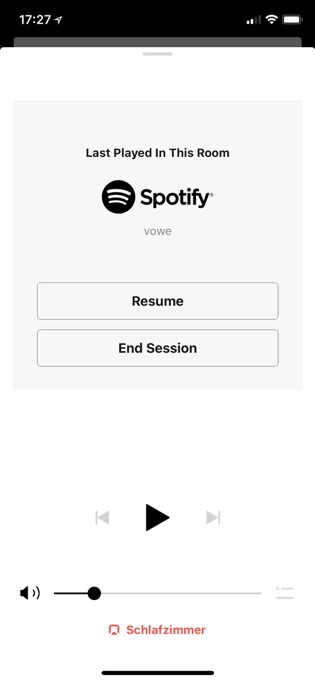
Ute has been a Sonos user for ten+ years and she was unable to play a Ludovico Einaudi album in the Living Room without asking me. She was stuck on this screen. You are killing the WAF. Nobody wants to look stupid.

Many years ago Coca-Cola wanted to create a new formula. It was a terrible idea and they had to introduce a Classic Coke with the old formula. Sonos is still on the new improved formula.

Maybe Sonos can do some a/b testing instead of those soft questionaires in their beta program. The feedback loop is broken in a bad way. Otherwise they could not release something this terrible.

20 Dec 05:36

No matter what Skype says, I am not active

by Volker Weber

Sketch

When I switch computers or install Microsoft software, I sometimes end up with being logged into Skype, courtesy of my Microsoft account. Only when I received one of those spam messages -- Andreas is not to blame -- I remember logging out and uninstalling the software. There has been a time when I used Skype a lot. A long time ago.

20 Dec 05:36

Twitter Favorites: [mattgallowaycbc] Scenes from a subway ride to Vaughan. Love the use of public art. https://t.co/anoqkHKtSM

Matt Galloway @mattgallowaycbc
Scenes from a subway ride to Vaughan. Love the use of public art. pic.twitter.com/anoqkHKtSM
20 Dec 05:34

Measuring And Driving Usage Of Teams For Education

files/images/i1.wp.comTeams2-b6d89de52b2b95ad9506e4ef2ac725e3f76ecd70.png

Sam McNeill, Microsoft Education Blog, Dec 21, 2017


Icon

The headline refers to Microsoft Teams, and not to teams in general. There's a reference back to this article on how to measure activity in Teams. In this article Sam McNeill looks specifically at measuring the use of Teams in education. It focuses mostly on how to extract data from the application to reveal usage. There is repeated reference to the idea that "if you value it, measure it". But increasingly, the tool does the measuring. "The future of O365 Admin reporting is clearly heading towards personalised recommendations on how to maximise the tools to drive efficiency and smarter collaboration within your organisation." Here's the question, though: should we trust the recommendation from the tool to use the tool more? That's like Facebook admitting that using the site poses a mental health risk, but then recommending people use the site more.

[Link] [Comment]
20 Dec 05:34

Is Wikipedia a Trustworthy Academic Resource? Scientists Think So

files/images/UA_wikipedia.jpg

Meghan Bogardus Cortez, EdTech, Dec 21, 2017


Icon

Though I have some issues with how it is managed and how it is produced, I still consider Wikipedia to be a valuable resource and one that I am quite willing to reference in my articles. And that's the point of this article: Wikipedia is useful to me because I'm sceptical, because I'm careful to read articles in the context of my own wider knowledge, and because I cite them as background, not authority. Other reserachers seem to be doing the same. “Our research shows that scientists are using Wikipedia and it is influencing how they write about the science that they are doing... We need to change the conversation from one of abstinence to intelligent information consumption."

[Link] [Comment]
20 Dec 05:34

Focusing on the Process: Letting Go of Product Expectations

files/images/freedom-to-learn.jpg

Jackie Gerstein, User Generated Education, Dec 20, 2017


Icon

This post draws a useful distinctoon between viewing education as a product and viewing it as a process. Quoting from Rogers’ Freedom to Learn Gurstein writes, "The most socially useful learning in the modern world is the learning of the process of learning, a continuing openness to experience and incorporation into oneself of the process of change." The article lists the benefits of a process-based approach for both learners and educators, and points to examples of process-oriented learning activities.

[Link] [Comment]
20 Dec 05:29

politicalprof:This explains a lot …


politicalprof:

This explains a lot …

20 Dec 05:29

macrolit: The moral test of government is how that government treats those who are in the dawn of...

macrolit: The moral test of government is how that government treats those who are in the dawn of...
20 Dec 05:29

"I dream of a love that is more than two people craving to possess one another."

“I dream of a love that is more than two people craving to possess one another.” - Irvin...
20 Dec 05:23

Canadian carrier support lines falter due to massive interest in 10GB promo

by Rose Behar
iPhone with ethernet cable

It’s safe to say the $60/10GB BYOD promo plans from the Big Three Canadian carriers and Freedom Mobile are shaking up the market in Ontario, Alberta and British Columbia.

The promotional rate (about $65 less than regular pricing) is unprecedented in recent years — the closest thing was the occasional 6GB pricing battle caused by Freedom or similar competitions between the Big Three’s flankers and Vidéotron in Quebec.

There haven’t been mobile rates like these since Mobilicity, Public Mobile and Wind Mobile hit the market as independents, and Canadians in the above-mentioned provinces — the most populous in Canada — are jumping at the chance to nab them before they expire tonight and tomorrow.

In fact, so many Canadians are interested in the plans that the major carriers are having a difficult time keeping up with the number of calls coming into their call centres.

Throughout the weekend, there were reports of consumers waiting on hold for over an hour, but as of late afternoon Mondays, things reached a fever pitch and instead of long waits, consumers began encountering busy tones or messages telling them to call back later.

“Because of overwhelming demand and longer wait times we will honour the offers for our existing customers for tomorrow only.”

MobileSyrup independently confirmed that support was unavailable through Rogers, Fido, Virgin Mobile, Telus, Koodo and Freedom Mobile. While Bell’s line works, consumers interested in the 10GB deal are urged to visit a Bell store instead, and the carrier notes that there’s a “higher than normal” volume of calls.

As the carriers’ call centres become more and more backlogged and the clock ticks down to expiration (at least until the inevitable encore), excited consumers are turning into irate ones.

In response to MobileSyrup‘s request for comment, Rogers apologized for the wait and promised it would extend the offers for existing customers until tomorrow.

“We’ve seen tremendous response from Canadians and thank everyone for their patience and apologize for any wait,” said the carrier.

“These offers expire for new Rogers and new Fido customers today (except Fido BYOP in Ontario). Because of overwhelming demand and longer wait times we will honour the offers for our existing customers for tomorrow only. Our Fido Bring Your Own Phone offer goes until tomorrow end of day in Ontario only.”

That includes not only the $60/10GB deal for no-term activations and upgrades, but also the $85/10GB deal for Premium plan activations and upgrades as well as the $110/10GB plan for Premium Plus plans.

“Demand far exceeded our expectations, on one of the busiest weekends of the year.”

Fido’s plan extends until December 19th, and representatives have directed customers to change their plan online through My Account.

Telus also responded to MobileSyrup‘s request for comment, stating:

“We suspected that Telus and Koodo’s 10GB for $60 promotion would be popular, but demand far exceeded our expectations, on one of the busiest weekends of the year. We are very sorry for the longer wait times that customers experienced over the weekend and are grateful for their patience. We are continuing to make real-time adjustments to minimize wait times before these great offers expire at the end of the day tomorrow.”

Freedom Mobile has communicated that customers can use the online self-serve option to nab the promotion.

MobileSyrup has also reached out to Bell, Virgin Mobile and Freedom Mobile for comment on the support outages.

Update 18/12/17: Telus has responded with comment. The article was updated accordingly.

The post Canadian carrier support lines falter due to massive interest in 10GB promo appeared first on MobileSyrup.

20 Dec 05:23

Samsung to unveil Galaxy S9 in late February, says Bloomberg

by Igor Bonifacic
samsung

Samsung will debut the Galaxy S9 and S9+ in late February, according to a report from Bloomberg.

This new report, written by publication’s Mark Gurman and Ian King, is significant insofar as it corroborates a previous report from Korean-langauge news publication the Bell, which stated Samsung planned to debut the S9 on February 27th.

In addition, like the Bell, Gurman and King write that Samsung is currently on track to start shipping the S9 and S9+ to consumers as early as March. Should Samsung stick to that timeline, it will end up releasing the S9 ahead of when it released the S8 in 2017.

With Bloomberg corroborating earlier rumours, it’s almost guaranteed we’ll see Samsung announce the S9 either at Mobile World Congress or a separate event of its own making in or around the annual telecom conference in late February.

Citing unnamed sources, the outlet also includes a bit about the device itself. “The new phones will be similar to the current Galaxy models, but include upgraded camera systems,” write the two reporters.

This aligns with what we’ve heard about the S9 and S9+ through previous reports, which is that the two phones will likely be iterative updates on Samsung’s current S-series lineup.

Source: Bloomberg

The post Samsung to unveil Galaxy S9 in late February, says Bloomberg appeared first on MobileSyrup.

20 Dec 05:23

Google investigating newfound Pixel 2 XL fingerprint scanner speed issue

by Igor Bonifacic
Google's new Pixel 2 XL

Add a slow fingerprint scanner to the Pixel 2 XL’s already long — and seemingly continously increasing — list of issues.

According to several new posts on the official Google product support forums, Pixel 2 XL users are noticing that it takes their phone’s fingerprint sensor significantly longer to unlock their device after updating to Android 8.1.

With Android 8.0, the phone would unlock itself almost immediately after recognizing its owner’s fingerprint. Post 8.1., however, users are reporting a significant delay between when they place their finger on the Pixel 2 XL’s scanner and when the device is finally unlocked.

For its part, Google says it’s investigating the issue, but at the moment, the company hasn’t said when it expects to resolve the problem.

In response to a forum post, Google community manager Orrin Hancock said he’ll be in touch with Pixel 2 XL owners to collect bug reports and other information.

MobileSyrup will update this article when Google provides an update to the situation. It’s likely, however, that the company will release an over-the-air update to address the issue.

Source: Google Via: DroidLife

The post Google investigating newfound Pixel 2 XL fingerprint scanner speed issue appeared first on MobileSyrup.

18 Dec 15:50

Twitter Favorites: [iSmashFizzle] You might not think of yourself as a troll, but if the majority of your time on here is spent tweeting about what y… https://t.co/ONcCCPVoj0

Ashley C. Ford @iSmashFizzle
You might not think of yourself as a troll, but if the majority of your time on here is spent tweeting about what y… twitter.com/i/web/status/9…
18 Dec 15:49

NewsBlur Blurblog: iOS 11 Horror Story: the Rise and Fall of iOS Security

sillygwailo shared this story from ElcomSoft blog.

We loved what Apple used to do about security. During the past years, the company managed to build a complete, multi-layer system to secure its hardware and software ecosystem and protect its customers against common threats. Granted, the system was not without its flaws (most notably, the obligatory use of a trusted phone number – think SS7 vulnerability – for the purpose of two-factor authentication), but overall it was still the most secure mobile ecosystem on the market.

Not anymore. The release of iOS 11, which we praised in the past for the new S.O.S. mode and the requirement to enter a passcode in order to establish trust with a new computer, also made a number of other changes under the hood that we have recently discovered. Each and every one of these changes was aimed at making the user’s life easier (as in “more convenience”), and each came with a small trade off in security. Combined together, these seemingly small changes made devastating synergy, effectively stripping each and every protection layer off the previously secure system. Today, only one thing is protecting your data, your iOS device and all other Apple devices you have registered on your Apple account.

The passcode. This is all that’s left of iOS security in iOS 11. If the attacker has your iPhone and your passcode is compromised, you lose your data; your passwords to third-party online accounts; your Apple ID password (and obviously the second authentication factor is not a problem). Finally, you lose access to all other Apple devices that are registered with your Apple ID; they can be wiped or locked remotely. All that, and more, just because of one passcode and stripped-down security in iOS 11.

So What’s the Big Deal?

If you are working in a sensitive environment, is front door security all you need to secure a building? Don’t you need additional checks or e-keys to enter some rooms? This no longer applies to iOS. Once you have a passcode, you then have access to everything. Let us have a look at what you can do to the user and their data once you have their i-device and know their passcode.

The iTunes Backup Password

Imagine you’re working for a company whose main business is breaking passwords. iPhone backups one can make with Apple iTunes or third-party apps such as iOS Forensic Toolkit can be protected with a password. That password is strong or very strong depending on the version of iOS. Your company builds better software, while Apple makes backup passwords even more secure. In the end, Apple seemingly wins the race: breaking those passwords now requires a powerful computer (or multiple computers) equipped with high-end video cards, but even then, you cannot try more than handful passwords per second.

Then Apple makes a sudden twist, allowing anyone to simply reset that highly secure password. That’s what they did in iOS 11. If you have access to the device and know its passcode, you will no longer need to perform lengthy attacks. Just go ahead and remove that password.

Why is this important? Before I tell you that, let us look at how it used to be in iOS 8, 9 and 10.

Backup Passwords in iOS 8, 9 and 10

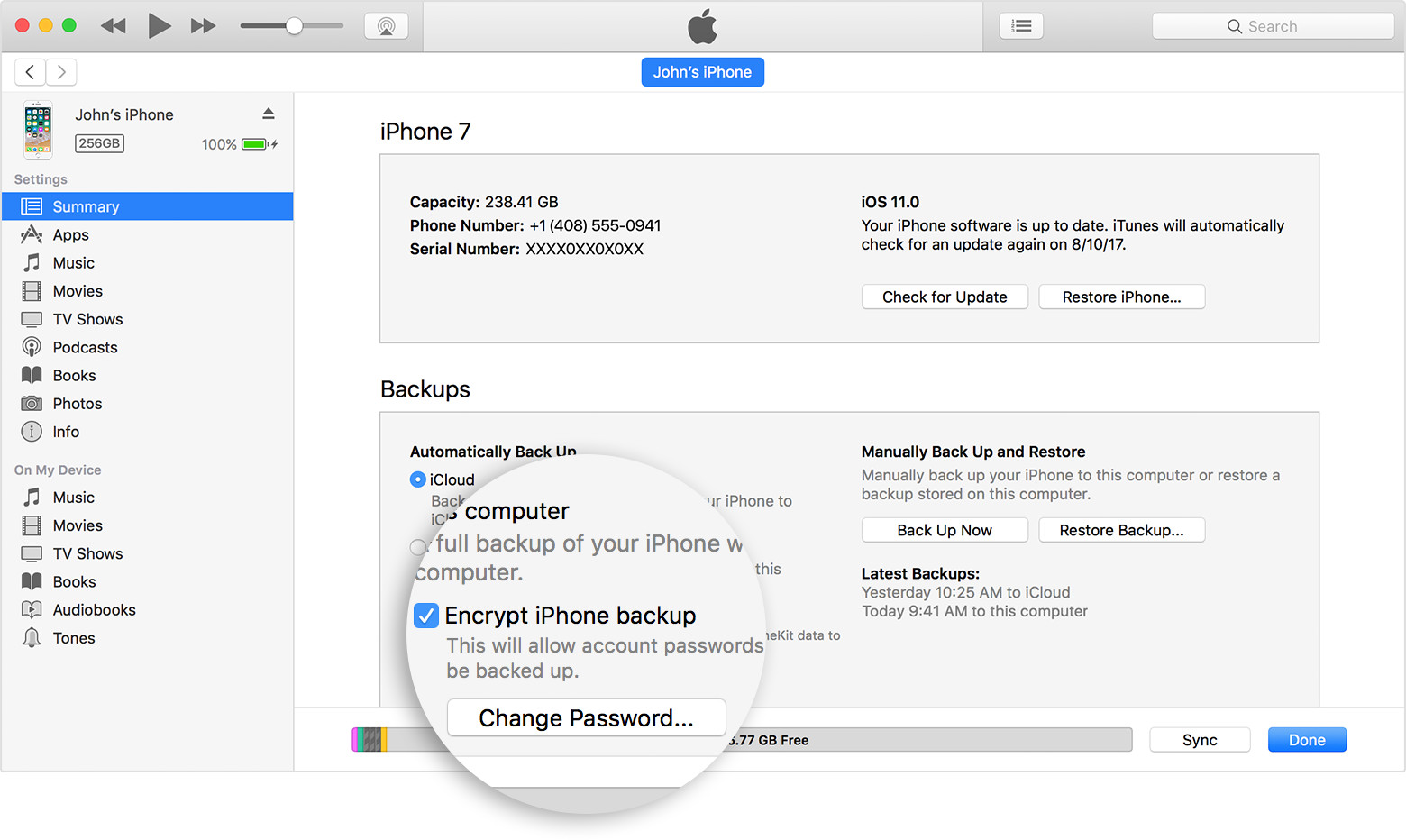
In these versions of iOS, one could protect their backups by specifying a backup password in iTunes. One would only need to do it once. Once a password was set, all future backups made on that computer and any other computer, with no exceptions, would be protected with that password:

The password would become the property of the i-device and not the PC (or the copy of iTunes) that was used to set the password. You could connect your phone to a different computer and make a local backup with a freshly installed copy of iTunes, and that backup would still be protected with the password you set a long time ago.

Any attempt to change or remove that password must pass through iOS, which would require to provide the old password first. Forgot the original password? There’s no going back, you’re stuck with what you have unless you are willing to factory reset the device and lose all data in the process.

If you ask me, this was a perfect and carefully thought through solution. Want to protect your data against an attacker? Set a long and complex backup password and don’t store it anywhere. Forgot that password? You can still make a cloud backup and restore your phone from that backup; even your passwords (keychain) would be restored if you rolled out the cloud backup onto the same device you made the backup from (or used iCloud Keychain if that was to be a different device).

A perfect system? Apparently, it was not to everyone’s liking. The users whined. The police complained. The FBI complained. And Apple gave up.

iOS 11: Stripping Backup Passwords

In iOS 11 you can still specify a backup password in iTunes, and you still cannot change or reset it through iTunes if you don’t know the original password. However, this means very little as you can now easily remove that password from iOS settings.

This is what Apple has to say in its Knowledge Base:

You can’t restore an encrypted backup without its password. With iOS 11 or later, you can make a new encrypted backup of your device by resetting the password. Here’s what to do:

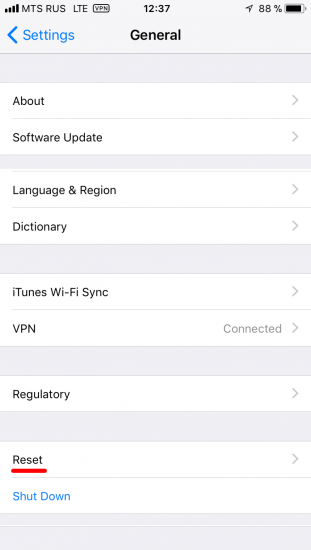
  1. On your iOS device, go to Settings > General > Reset.
  2. Tap Reset All Settings and enter your iOS passcode.
  3. Follow the steps to reset your settings. This won’t affect your user data or passwords, but it will reset settings like display brightness, Home screen layout, and wallpaper. It also removes your encrypted backup password.
  4. Connect your device to iTunes again and create a new encrypted backup.

You won’t be able to use previous encrypted backups, but you can back up your current data using iTunes and setting a new backup password.

If you have a device with iOS 10 or earlier, you can’t reset the password. 

You’ll be looking for these settings:

and

That’s it? That’s it. You have just removed the backup password. You can now make a new backup or, rather, extract information from the device. Don’t rush and make sure to specify a temporary password (“123” always works) before you make that backup. A password-protected backup will allow you decrypting the user’s passwords, credit card data, health data and other things that would be otherwise inaccessible.

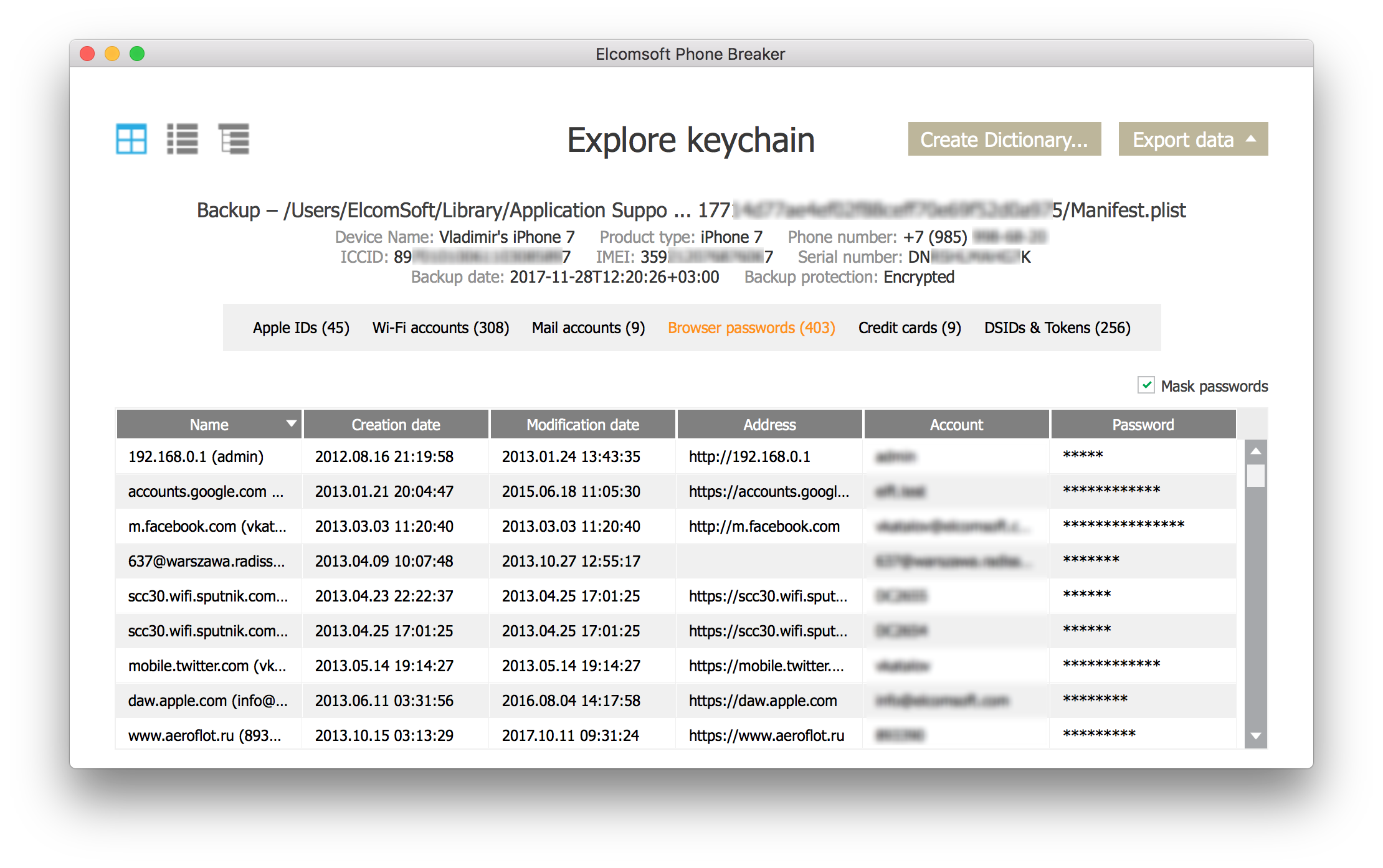
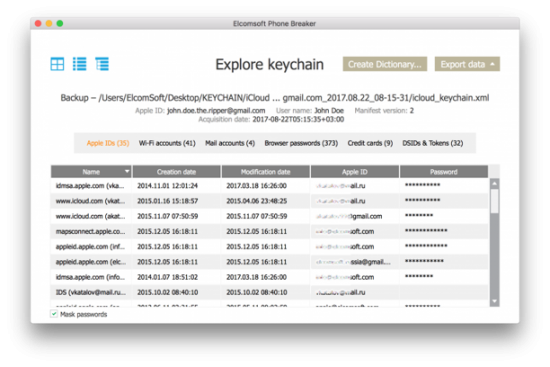
So, set a temporary password, make that backup, decrypt it with Elcomsoft Phone Breaker or just use Keychain Explorer (a tool in Elcomsoft Phone Breaker) to access that user’s passwords, authentication tokens, credit card numbers and other interesting things. Oh, and their pictures, too.

Passwords:

While there, look for their Google Account password. If it is there in the keychain (and I don’t see why not), you’ll gain access to a whole lot of highly interesting information including several years worth of precise location data, all passwords they saved in Chrome, Google Photos, bookmarks, Google search history and a log more. Two-factor authentication? I bet it’s that SIM card or Google Prompt on the iPhone in your hands.

What if you don’t have any photos in the backup? Check in the iOS Settings app whether iCloud Photo Library is enabled in iCloud account – Sync – Photos. If it is, the photos are synced with iCloud and are not included in local or cloud backups. Simply switching this feature off makes it possible to back up the photos into a local backup.

What if the iPhone in question runs an earlier version of iOS that does not allow removing backup passwords? I say you’re lucky because you can simply update that device to iOS 11 and then reset that password. We tried this strategy multiple times, and not once did we have an issue.

What if the device simply cannot run iOS 11, like that iPhone 5c from San-Bernardino? If this is the case, your best bet is attempting to jailbreak that iPhone. 32-bit devices (iPhone 4s, 5, and 5c) allow for complete physical acquisition (including the keychain). Just note that we are talking about the situation when the passcode is known, though that was not the case in San-Bernardino.

With access to just an iPhone and its passcode, you have already gained access to all of the following:

  1. Everything contained in a local backup (with a password)
  2. Passwords and tokens from the local keychain
  3. Local pictures and videos
  4. Application data (mostly SQLite)

This alone is massive, but that was just the beginning. You can do more; in fact, a lot more. What if I say you can now change the user’s Apple ID password, remove iCloud lock, remotely lock and/or erase user’s other devices and make sure they can never get back control over their account?

Changing Apple ID Password and Removing iCloud Lock

Normally, changing an account password requires confirming the old password first. In some cases, one could reset a password by receiving a one-time password reset link to a trusted address. This is about the same for the Big Three (Apple, Google and Microsoft) if you do it through the browser.

But (and this is a very important “but”) Apple has its own way. For Apple accounts with two-factor authentication, one can simply reset their Apple ID password from the device by confirming their device passcode (as opposed to supplying their old Apple ID password).

What does that mean in practice? If you have someone’s iPhone, and you happen to know or can recover the passcode (solutions allowing to brute-force device passcodes are available on the market), you can do the following:

  • Change the user’s Apple ID password
  • Remove iCloud lock (then reset and re-activate the iPhone on another account)
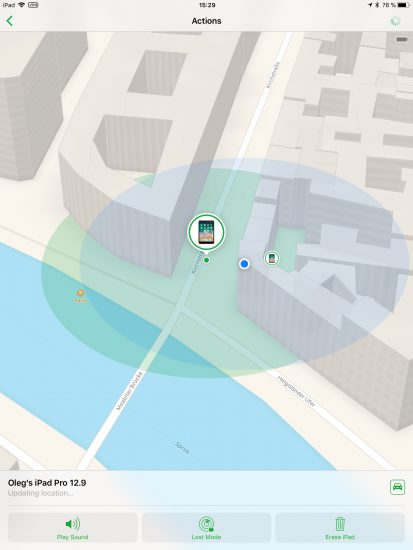
  • Discover physical location of their other devices registered on the same Apple account
  • Remotely lock or erase those devices
  • Replace original user’s trusted phone number (from then on, you’ll be receiving that user’s 2FA codes to your own SIM card)
  • Access everything stored in the user’s iCloud account

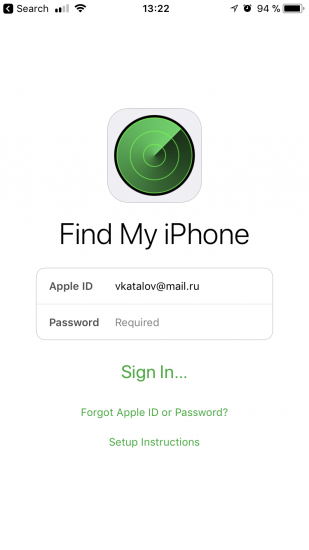
So how do you reset the user’s Apple account / iCloud password? For that, we’ll use the preinstalled Find My Phone app (reminder: this is going to work on 2FA-enabled accounts only):

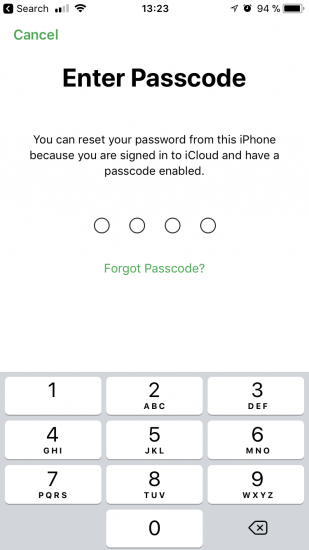
From there, tap “Forgot Apple ID or password?” The app will prompt for device passcode:

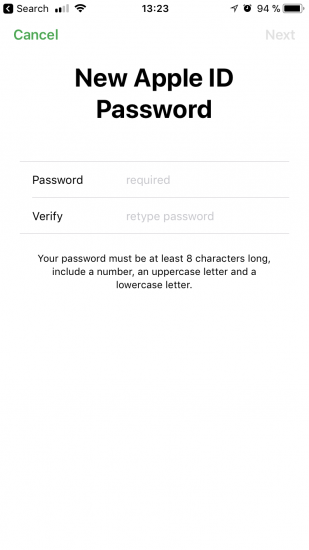
Enter the passcode. During the next step, enter and confirm a new Apple ID password (same as iCloud password):

It’s that simple. You were never prompted to enter the original Apple account password; device passcode was enough to reset account password.

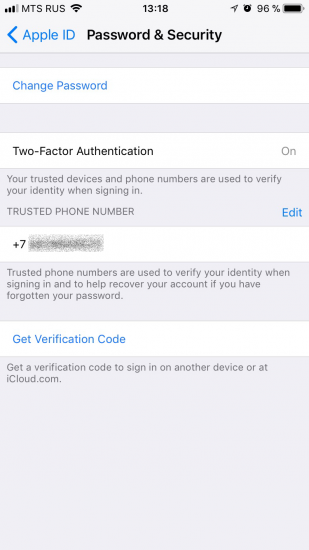
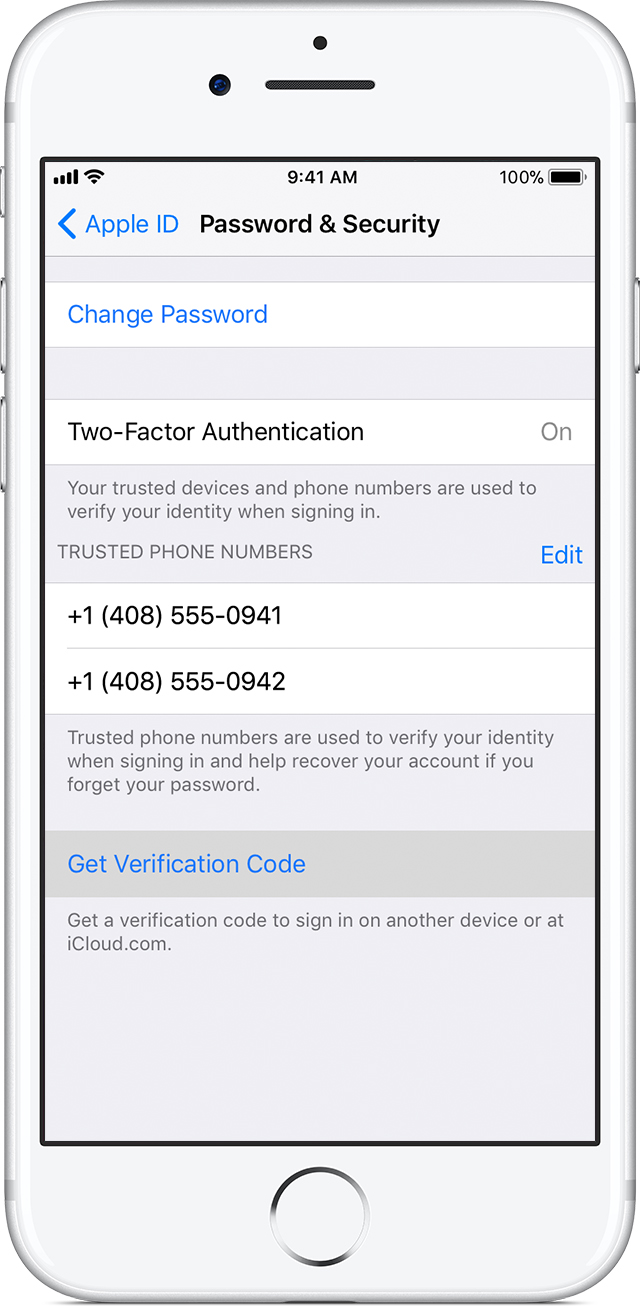
Is this a bug in the Find My Phone app? Absolutely not! You can do the same even without using the app. Open the Settings app on the user’s iPhone, and open the user’s Apple ID settings. From there, open Password & Security:

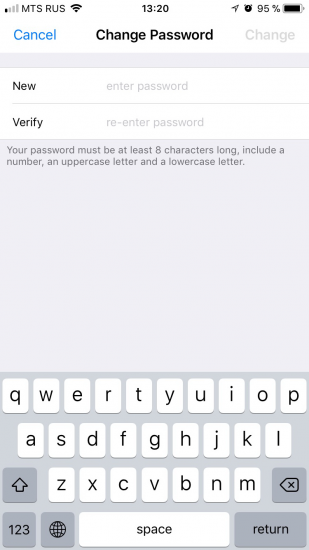
Tap Change Password. You will be prompted for device passcode:

Then you’ll be able to change the password to iCloud / Apple ID:

In fact, you can do even more from the Settings app compared to Find My Phone. In addition to account password, you can also replace the user’s Trusted Phone Number with your own phone number, making it insanely difficult for the ex-owner to regain control over now-yours Apple account. In order to replace the trusted phone number, first add and confirm a new trusted number; then you can remove the old one.

At this point, removing iCloud lock (the very lock that protects iOS devices from theft) it as easy as switching off Find My iPhone and typing your newly created Apple ID password.

Accessing iCloud Account

Access to iCloud data (backups, synced data, iCloud Photos and stored passwords) is normally securely protected. In order to access that data you would need a login and password (and access to the second authentication factor).

Wait! We’ve just reset the user’s iCloud password, and we’ve just added a new phone number to receive one-time codes! This means we can easily access everything the user has in their Apple account, including iCloud backups, photos taken on all of their devices, their iCloud Keychain, contacts, call logs, and a lot more.

iCloud Backups

We wrote about iCloud backups many times before. In a word, Apple may store up to three last backups per device. If the user has multiple iOS devices registered on the same Apple ID, up to 3 cloud backups will be available for each device.

By resetting the iCloud password, you’ve just opened the possibility to access those backups. All you need is the user’s Apple ID, your newly reset password, and one-time code to pass two-factor authentication.

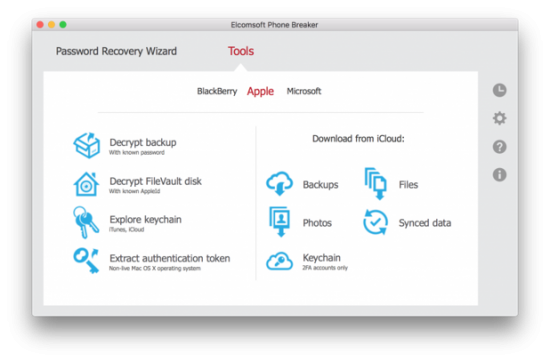
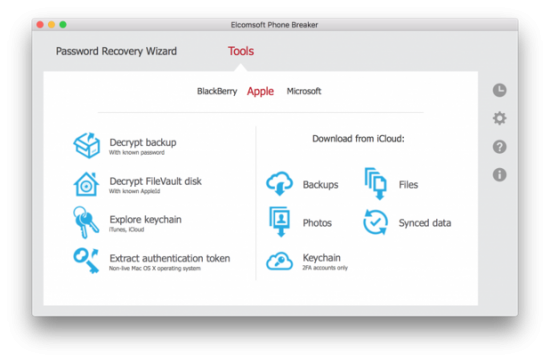
Use Elcomsoft Phone Breaker to download backups. [Tools] | [Apple] | [Download from iCloud] | [Backups].

The backup will be downloaded and saved in the iTunes format. You can view its content with Elcomsoft Phone Viewer or other forensic tools.

Call Logs, Files and Synced Data

iCloud is a lot more than just backups. Apple devices use iCloud to sync information such as browser bookmarks and open tabs, Web browsing history, contacts, notes, call logs, and even passwords. This information is collected and synchronized across all devices registered on the same Apple account.

Extracting synced data is simple. Just use Elcomsoft Phone Breaker to download, and Elcomsoft Phone Viewer to analyse.

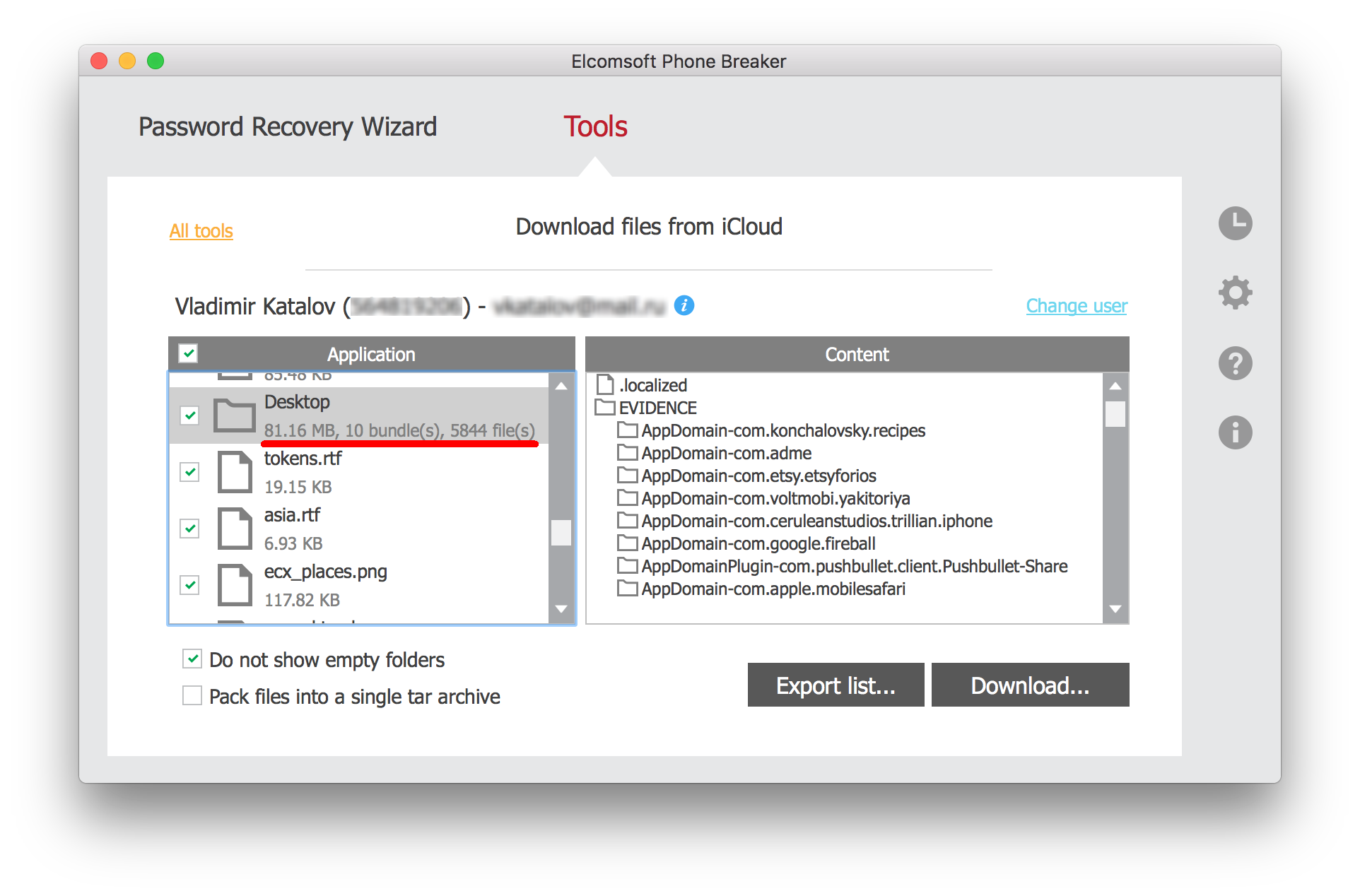
What if the user has a Mac? We can then access Documents and Desktop files synced by that Mac with iCloud Drive! Use Elcomsoft Phone Breaker: [Tools] | [Apple] | [Download from iCloud] | [iCloud Drive] to obtain those files. Finally, as an added bonus, you may be able to extract the user’s FileVault2 recovery key (if the user allowed cloud recovery, that is).

The Passwords: iCloud Keychain

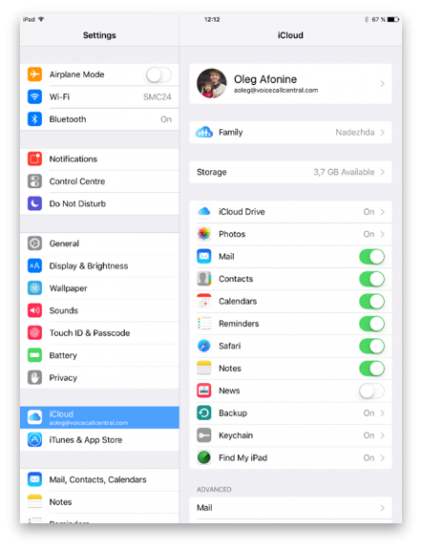
iCloud Keychain is a cloud service for synchronizing Safari passwords, authentication tokens and payment information across iOS devices. After changing iCloud password and assuming you know device passcode (and this, for the purpose of this article, is a given), you can easily download those passwords.

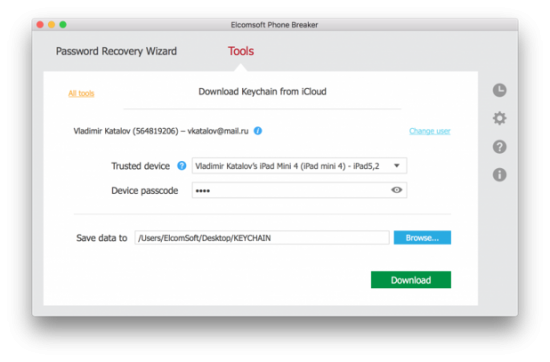
Step 1: in Elcomsoft Phone Breaker click [Tool] | [Apple] | [Download from iCloud] | [Keychain]

Step 2: use login, password and 2FA code to log in to iCloud

Step 3: select a trusted device from the list (this must be the device that you know the passcode to) and enter its passcode into the Device passcode box

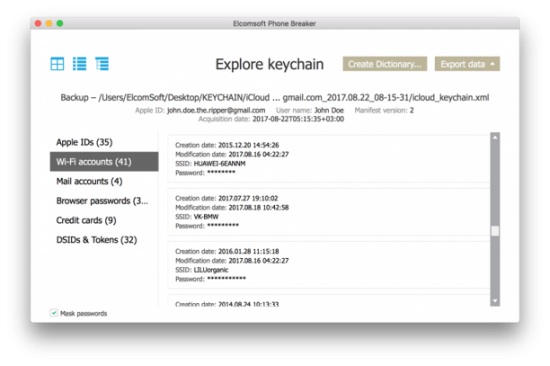
Step 4: the iCloud Keychain will be downloaded. You can now go back to the main window and open Keychain Explorer to access those passwords. By the way, you will now have access to the original (old) password to the user’s Apple ID account, as well as (possibly) passwords and tokens to that user’s other Apple ID accounts, if there are any. In addition, you may also see passwords to email accounts and Wi-Fi networks, as well as pretty much every password the user typed in Safaru.

Conclusion

With the release of iOS 11, Apple developers made too many assumptions, breaking the fragile security/convenience balance and shifting it heavily onto convenience side.

Once an intruder gains access to the user’s iPhone and knows (or recovers) the passcode, there is no single extra layer of protection left. Everything (and I mean, everything) is now completely exposed. Local backups, the keychain, iCloud lock, Apple account password, cloud backups and photos, passwords from the iCloud Keychain, call logs, location data, browsing history, browser tabs and even the user’s original Apple ID password are quickly exposed. The intruder gains control over the user’s other Apple devices registered on the same Apple account, having the ability to remotely erase or lock those devices. Finally, regaining control over hijacked account is made difficult as even the trusted phone number can be replaced.

This is just scary. Why Apple decided to get rid of the system that used to deliver a seemingly perfect balance between security and convenience is beyond us.

If you don’t think this is a big issue, just one word for you: celebgate. Obviously, the victims had a password protecting their accounts, and yet that was not enough to stop hackers from stealing their photos. This is what the second protection layer is for as delivered by two-factor authentication. What I am saying is: once they have your iPhone and your passcode, you are no longer in control of their device and their Apple account.

What can you do to protect yourself? Since the passcode is now the one and only safeguard left, make sure you use at least 6 digits. Four-digit PINs are no longer secure. Other than that, we’ll just wait and see if Apple can fix it.

Tags: 2FA, Elcomsoft Phone Breaker, Elcomsoft Phone Viewer, EPB, EPV, FileVault, iCloud, ios 11, passcode, Two-Factor Authentication

This entry was posted on Wednesday, November 29th, 2017 at 4:59 pm and is filed under Did you know that...?, Security, Software. You can follow any responses to this entry through the RSS 2.0 feed. Both comments and pings are currently closed.

18 Dec 15:48

Twitter Favorites: [mrgan] Reading a 19th-century novel where a character sighs over a pile of unwanted mail: calling cards, dinner invitation… https://t.co/w4FAyXEK0U

Neven Mrgan @mrgan
Reading a 19th-century novel where a character sighs over a pile of unwanted mail: calling cards, dinner invitation… twitter.com/i/web/status/9…
18 Dec 15:48

Twitter Favorites: [alecash] Finally up online, here's my Tedx Beijing talk on Chinese youth, on Youku https://t.co/VsJ0t5wzbI and Youtube https://t.co/mcdJy7cysO

Alec Ash @alecash
Finally up online, here's my Tedx Beijing talk on Chinese youth, on Youku goo.gl/bYcpvz and Youtube youtu.be/FJ6QKtOvzaATedX
18 Dec 15:47

From my inbox

by Volker Weber

c15e8a564a90ca683ce19547a19b5a05

Sechzehn selbstgemachte Bethmännchen. Wie toll ist das denn, liebe Conny?

18 Dec 15:47

Fragment – Virtues of a Programmer, With a Note On Web References and Broken URLs

by Tony Hirst

Ish-via @opencorporates, I came across the “Virtues of a Programmer”, referenced from a Wikipedia page, in a Nieman Lab post by Brian Boyer on Hacker Journalism 101,, and stated as follows:

  • Laziness: I will do anything to work less.
  • Impatience: The waiting, it makes me crazy.
  • Hubris: I can make this computer do anything.

I can buy into those… Whilst also knowing (from experience) that any of the above can lead to a lot of, erm, learning.

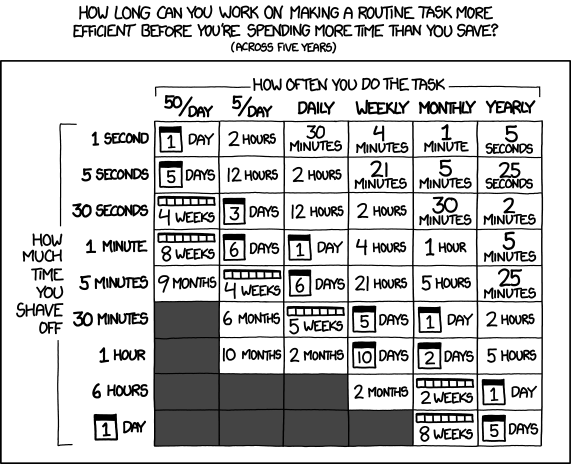
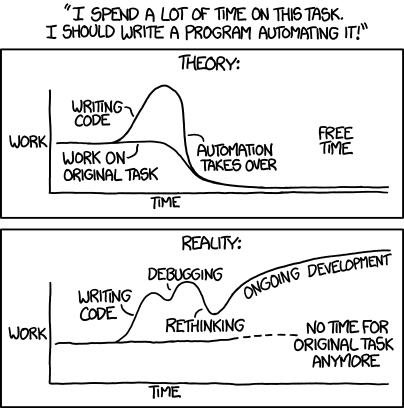
For example, whilst you might think that something is definitely worth automating:

the practical reality may turn out rather differently:

The reference has (currently) disappeared from the Wikipedia page, but we can find it in the Wikipedia page history:

Larry_Wall_-_Wikipedia_old

The date of the NiemanLab article was Sept. 7, 2012, 11:22 a.m., and it looks as if the reference, which is actually a quote from the Programming Perl book (which I should probably read again…), had already been removed by then?

Larry_Wall__Revision_history_-_Wikipedia

So here’s one example of a linked reference to a web resource that we know is subject to change and that has a mechanism for linking to a particular instance of the page.

Academic citation guides tend to suggest that URLs are referenced along with the date that the reference was (last?) accessed by the person citing the reference, but I’m not sure that guidance is given that relates to securing the retrievability of that resource, as it was accessed, at a later date. (I used to bait librarians a lot for not getting digital in general and the web in particular. I think they still don’t…;-)

This is an issue that also hits us with course materials, when links are made to third party references by URI, rather than more indirectly via a DOI.

I’m not sure to what extent the VLE has tools for detecting link rot (certainly, they used to; now it’s more likely that we get broken link reports from students failing to access a particular resource…) or mitigating against broken links.

One of the things I’ve noticed from Wikipedia is that it has a couple of bots for helping maintain link integrity: InternetArchiveBot and Wayback Medic.

Bots help preserve link availability in several ways:

  • if a link is part of a page, that link can be submitted to an archiving site such as the Wayback machine (or if it’s a UK resource, the UK National Web Archive);
  • if a link is spotted to be broken (header / error code 404), it can be redirected to the archived link.

One of the things I think we could do in the OU is add an attribute to the OU-XML template that points to an “archive-URL”, and tie this in with service that automatically makes sure that linked pages are archived somewhere.

If a course link rots in presentation, students could be redirected to the archived link, perhaps via a splash screen (“The original resource appears to have disappeared – using the archived link”) as well as informing the course team that the original link is down.

Having access to the original copy can be really helpful when it comes to trying to find out:

  • whether a simple update to the original URL is required (for example, the page still exists in its original form, just at a new location, perhaps because of a site redesign); or,
  • whether a replacement resource needs to be found, in which case, being able to see the content of the original resource can help identify what sort of replacement resource is required.

Does that count as “digital first”, I wonder???

18 Dec 15:42

A Tillerson Slip Offers a Peek Into Secret Planning on North Korea

by DAVID E. SANGER
Secretary of State Rex W. Tillerson offered tantalizing details about how the United States would race inside North Korea to seize its nuclear weapons in the event of a collapse.
18 Dec 15:40

Kamadia: Why I didn't get a PhD – and why you shouldn't either

files/images/lazy_campus.PNG

Aly Kamadia, Ottawa Citizen, Dec 21, 2017


Icon

I don't have a PhD but I have a PhD education - that is, I completed all the coursework for my PhD, passed five rigorous comprehensive exams, and prepared a dissertation proposal. I also spent four or five years teaching classes as part of my graduate assistantship.  What I didn't do was to complete the dissertation; my committee felt I shouldn't be studying network theories of mind. So I am in a position to evaluate (for myself at least) Kamadia's assertion based on the work involved, not the paper you get. Was it worth it? For me, yes. But note: I never paid tuition, and I was paid through my assisstantship throughout. But it made me twice the philosopher I was when I started. It was the difference between knowing about philosophy and doing philosophy.

[Link] [Comment]
18 Dec 15:39

Multivariate map collection

by Nathan Yau

I heard you like maps. Jim Vallandingham put together a collection of maps that show multiple variables, for inspiration and perusal.

Tags: collection, multivariate

18 Dec 15:37

Early Renders of the Galaxy S9 Reveal Slightly Modified Design

by Chethan Rao
Steve H a.k.a. @OnLeaks on Twitter has leaked the renders of the Samsung Galaxy S9, which is expected to be announced in February next year. It’s still too early to tell if these leaks will materialize, but it’s worth mentioning that OnLeaks was spot on with the Galaxy S8 and S8+ leaks earlier this year, thus giving some credence to this particular leak as well. Continue reading →
18 Dec 15:37

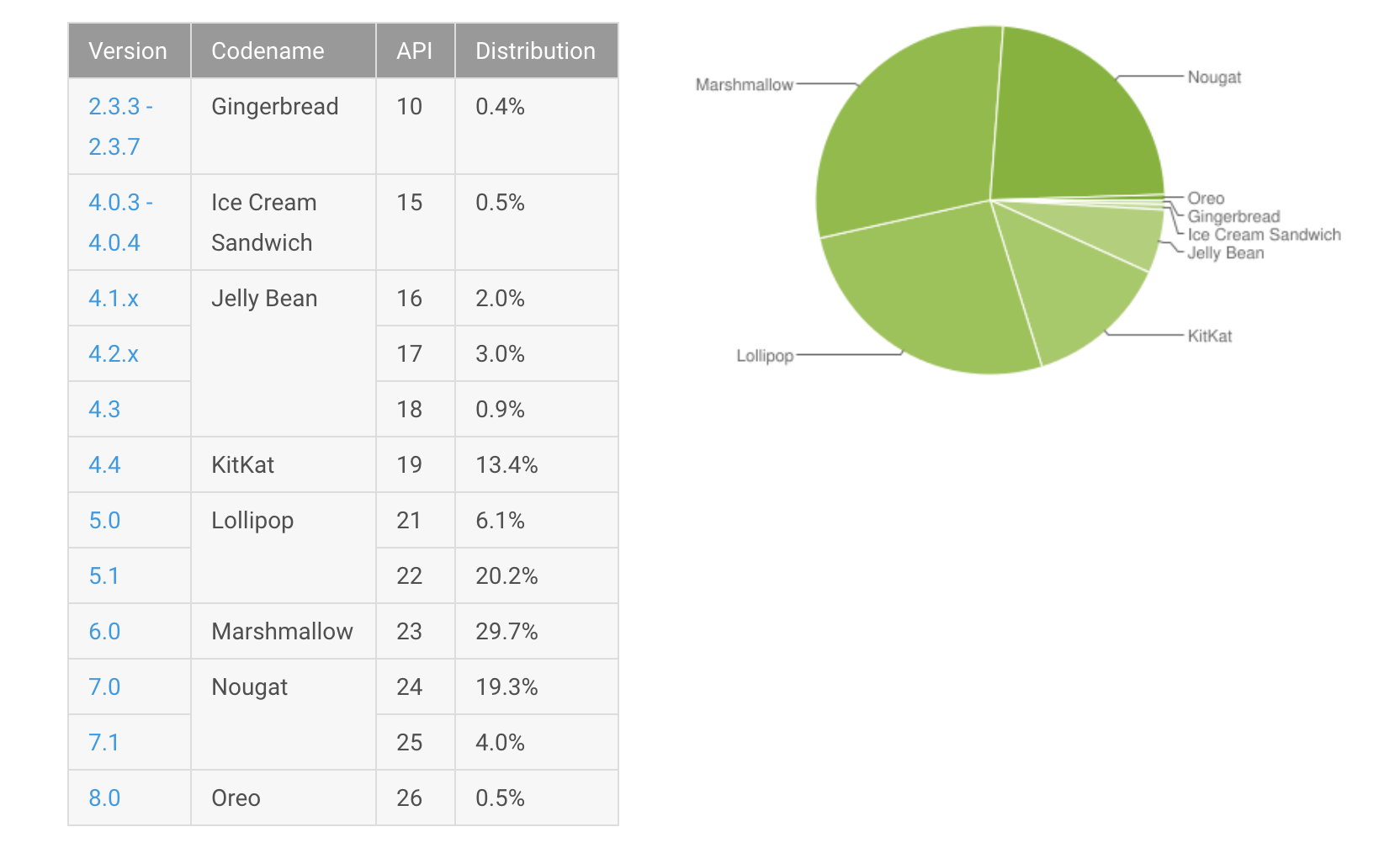
Android 8.0 Oreo is only installed on 0.5 precent of Android devices

by Patrick O'Rourke

Android’s latest operating system distribution number are in and once again Oreo’s install base shows struggling growth.

On the other hand, Nougat’s install rate is on the rise, while older versions of Google’s mobile operating system continue to decline.

Specifically, only 0.5 percent of Android devices are currently running 8.0, amounting to an increase of just two-tenths of a percentage point since last month’s results. To put this number in perspective, 8.0 isn’t even the latest version of Android given that Google just released 8.1 to Pixel devices.

Oreo most recently made its way to the HTC 11 and U11 Life, along with Sony’s Xperia XZ ZXs and X performance. Other manufacturers like Essential, OnePlus and LG, have recently launched Android 8.0 beta programs. With this in mind, it’s likely that Oreo’s numbers will improve when Google releases its next Android distribution numbers.

Android distribution numbers .

While Oero’s increase is nearly non-existent, Android 7.0 jumped 1.7 percentage points to 19.3 percent, while 7.1 experienced an increase of one point to four percent. Marshmallow fell 1.2 percentage points to 29.7 percent, leaving the aging Android iteration as still the most popular version of the OS.

Comparing the latest version of Android’s distribution numbers to iOS is the best way to exemplify the most stark difference between the competing operating systems. As of early November, iOS 11 adoption — the latest version of Apple’s mobile OS — sits at 52 percent. It is, however, worth noting that this adoption rate lags behind iOS 10 over a similar time period, perhaps due to the many issues Apple has encountered with the latest version of its OS.

Google compiles its Android distribution numbers based on devices that have accessed the Play Store over the course of a seven-day period that ended on December 11th.

Source: Google 

The post Android 8.0 Oreo is only installed on 0.5 precent of Android devices appeared first on MobileSyrup.