Rolandt
Shared posts
Looking Back: Reviewing 2017 Predictions
A Town That Named itself “Santa Claus”

Trust The BBC News to find that there truly is a place called “Santa Claus” that is in Indiana with a population of 2,500 with most of them of course living in a gated development called “Christmas Lake Village”. And yes, the three main streets are named after the three wise men Balthazar, Kaspar and Melchior. Other areas of the town have streets named after reindeer.
Why? This place used to be called Santa Fee but the post office in the 1800’s already had Santa Fe three hundred kilometers to the north and wanted a name change. The residents were choosing from the names of either Santa Claus or Wittenbach. The post office at the time was tiny but since about 1914 letters addressed to the other Santa Claus started to arrive, and the postmaster started to respond to those letters. Now 20,000 letters are addressed to “Santa Claus, North Pole” yearly, and they all end up here. Over two hundred volunteers respond to the letters with a printed response and a hand written annotation.
There is a holiday park called Holiday World and Splashin’ Safari in Santa Claus that gets over one million visitors a year, and as expected there are models of Santa Claus everywhere. The town centre is called Kringle Place. You can come and get your letters stamped at the post office as being mailed from Santa Claus. And as one of the residents noted to an inquirer, if the town had been called Wittenbach the town would not have received the interest and economy it has today.
Here’s Santa Claus citizen Pat Koch explaining how Santa Claus got its name. You can view the YouTube video here.



Navigation Apps Turning Quiet Streets into New Arterials

You may relate to this. In a Delta neighbourhood there is a residential street that is the shortest distance between two arterial roads, favoured by GPS apps, tradesmen and taxis and is a block shorter for arterial short-cutting cars.There are no sidewalks, no indication that pedestrians are walking on the street which includes a blind corner on a hill with no pedestrian clearance. At 50 kilometers per hour the inevitable has happened, with high traffic volumes and speeds resulting in the killing of a neighbour’s dog, one transmission gutted on a front lawn and cars ending up in neighbours’ yards and through their hedges. Add in a few nearby “golf” communities where older seniors drive to services in their garaged polished cars at speed through this residential street to get to an arterial. The fact it is a residential local street and that short cutting should not be happening is not of interest to the GPS apps or drivers, and puts local walkers and cyclists at risk.
Kudos to Leonia New Jersey (across the Hudson River from New York City) which realized that these “alternative routes” don’t just manifest themselves in driver behaviour, but are also suggested by services like Google Maps, Waze and Apple Maps. As the New York Times notes these apps have resulted in traffic-choked towns where people have been circumventing traffic and choosing shorter routes due to GPS services. And Leonia has had enough: “In mid-January, the borough’s police force will close 60 streets to all drivers aside from residents and people employed in the borough during the morning and afternoon rush periods, effectively taking most of the town out of circulation for the popular traffic apps — and for everyone else, for that matter.”
“Without question, the game changer has been the navigation apps,” said Tom Rowe, Leonia’s police chief. “In the morning, if I sign onto my Waze account, I find there are 250,000 ‘Wazers’ in the area. When the primary roads become congested, it directs vehicles into Leonia and pushes them onto secondary and tertiary roads. We have had days when people can’t get out of their driveways.”
The Waze app uses crowd sourcing to update its information which has resulted in some neighbourhoods “fabricating accidents” to stop the flow of motorists using the app. While defending the app’s right to reroute vehicles from congested roads to residential streets, Waze also says it “shares free traffic data with municipal planners nationwide”, as if the good of more vehicle planning outweighs the rights of residents to the safe and comfortable use of their street. Indeed Waze says that if a road is “private” it will not be used by the app. How many “private streets” in your community?
Unlike other communities that have installed turn restrictions and speed humps, Leonia’s approach has been proactive against congestion and short cutting caused by apps. Residents will be issued special tags for their cars, and other users of the street will be fined $200 in the rush hours. The police department has notified the major traffic and navigation apps of the changes and fully intends to enforce local use of their streets. While other elements like traffic barriers or street closures are the more preferential way to keep traffic out, the approach taken is a policing one. As the Chief of Police of Leonia says “It’s basically all or nothing . It’s a very extreme measure for very extreme traffic. Would I prefer not to do this? Of course. But I would rather try something and fail than not try anything.”


Writing a book review
Writing book reviews, to me, feels as the service we all ought to provide other scholars. I don’t post actual reviews on my website (instead, I post my reading notes because I don’t know if my notes are detailed enough to be an actual review, and whether I’ll do justice to the author), but I do have extensive experience writing reviews. Producing a book (or even editing a volume) is a tremendously challenging and taxing endeavour, so I believe book reviews should be done thoroughly, kindly and honestly.
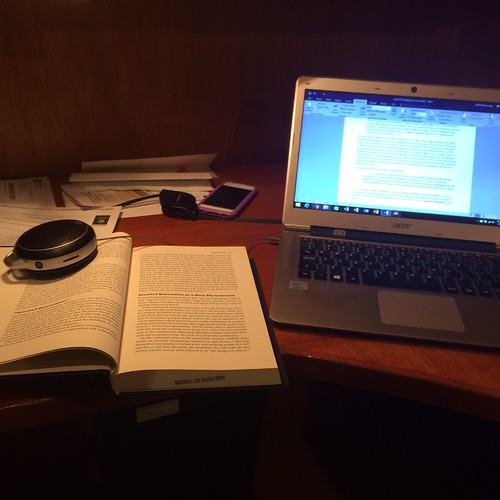
For many of my colleagues, assigning a book review (or a book review essay) is part of their teaching process. I don’t do this in my classes, and never have, even in graduate school courses. But I have written and published book reviews myself in various journals (my most recent one of Plastic Water, by Hawkins, Potter and Race in the Canadian Journal of Water Resources). While different people (and evaluation committees) will value book reviews differently, for many folks publishing a book review will be a nice entry into the world of academic publishing.
Via @HNet_Reviews, great review of @NancyAppelbaum’s Mapping the Country of Regions. It provides everything a good review should: very effective summary of the book’s argument, useful contextualization of its contributions. https://t.co/04FJrlsuPX
— Robert A. Karl (@RAKarl) December 21, 2017
For me, a good review should include at the very least the following elements:
- Full citation and price of the book.
- A summary of the book’s major insight(s), usually worded in the nicest way possible.
- A detailed account, chapter by chapter, of the best elements learned in the book.
- A summary of everything good and bad about the book, again, usually worded in a nice but rigorous way.
There are a few book reviews that are a bit more picturesque (like this one, which starts with a lovely memory that brings the author of the review home with regards to what they want to say about the book) or more systematic and direct, like this one that summarizes the book concisely and swiftly.
For me, the actual physical process of writing a book review goes like this (bear in mind I’ve already written about how to read entire volumes, both single-or-multi-authored and edited):
- I start by skimming the entire book really quickly.
- I read the introduction and conclusion.
- I make a plan to read the entire book, if I can’t in one sitting, which chapters I’ll be reading over however long I decide to take to finish the review, unless I’m under deadline.
- I follow the plan, usually reading and taking handwritten notes about the book chapter(s) in my Everything Notebook (or typing detailed notes in a memorandum).
- I write up the review as noted above, but reserve criticisms to the very last paragraph of the review.
- I send it out to people whom I trust and ask them to see if my review was too harsh.
- I edit the review according to feedback I receive.
My hope is that this post will help those who are writing book reviews. As always, be honest and direct, but also kind and generous. You can always write a detailed review that is tough, but that can be palatable and find the good elements of a book. Someone on my Twitter timeline recommended these 3 rules about book reviewing post, also worth considering.
Another solid example of a book review as published in Canadian Food Studies can be found here (thanks Dr. Sarah Martin for this piece!)
Dr. Michael Leo Owens also offered one of his own book reviews for you to check out (thanks!)
Godless
This fascinating Netflix miniseries by Scott Frank examines the West as it would be experienced by a 19th century frontier town that is populated with modern women. Almost all the men of La Belle, New Mexico have been killed in a mine accident, and the surviving men are a blind sheriff, a deputy who is far too young and too easy to bruise, a preacher who has mysteriously vanished en route to the territory, and a cadre of retired buffalo soldiers a few miles away. The women run things and they do it well; they understand feminism. They’re racially tolerant and understand the complexity of sexual orientation: they’re not the women of history but they act as we might (hope to) act in the face of adversity.
Paris After the Liberation 1944-1949
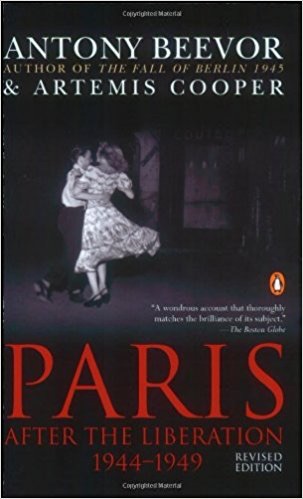
What’s hard to imagine about the aftermath of the Occupation, and what Beevor captures wonderfully, is the extent to which everything seems to have improvised at the last minute. Everyone was terrified that they’d be accused of collaborating; everyone who stayed, after all, had in some sense collaborated. No one knew whether the Occupation would be replaced by a new Occupation by the Allies, or by something else — and if the latter, whether something else was a new republic or the old one.
Someday, Trump will be gone. It makes sense to think about how we can restore our damaged land.
The other fascinating argument this close look at Paris after the war makes is that these years were necessarily a response to the failure that became Vichy, and that the response itself was a failure. Rather than address the legacy of the war, France (after some years of toying with Communism and related dithering) chose to adopt a comforting myth, and to adhere to that myth until it collapsed in the wake of 1968. Beevor thinks 1968, too, was a failure. Most people do. But 1968 transformed the way way think; the triumph of rock and irony, the rise of postmodernism, liberation theology are all built on the foundation of 1968.
1968 gave us, in the end, the collapse of the Iron Curtain. It also have use truthiness and Trump. We’re still living in the ruins.
Students & The Cost of Higher Education

Tim Klapdor,
Heart | Soul | Machine,
Dec 29, 2017

Tim Klapdor writes about the reasons for "the end of demand driven education" in the UK. This is the idea that the system would be prepared to educate those students who wanted to learn. One reason, he writes, is government policy, which is intended to favour the rich, and is therefore opposed to the idea of education for all. Another reason is the cost, as universities made to attempt to leverage the economies of scale as their enrollments increased. Lost in the whole discussion, he says, are the students. "No one seems willing to discuss the fact that students are being forced to prop up the higher education system as the government slowly defunds it."
[Link] [Comment]The next-generation operating model for the digital world

Albert Bollard, Elixabete Larrea, Alex Singla, Rohit Sood,
McKinsey,
Dec 29, 2017

I can see this trend being reflected in the origanizations I deal with. There are two major aspects: first, "a shift from running uncoordinated efforts within siloes to launching an integrated operational-improvement program organized around customer journeys", and second, "a shift from using individual technologies, operations capabilities, and approaches in a piecemeal manner inside siloes to applying them to journeys in combination." This all sounds good in theory but it's a lot more difficult to apply in practice. Each silo and each individual tech choice exists for a reason, and forcing them into an integrated whole can result in enterprise-wide disruption. Like this. Like this. Like this. Like this. You have to build resiliance into enterprise planning, which requires enabling parts of the enterprise to decouple when a central system goes south.
[Link] [Comment]How to dream like a professional
You probably have this week off, or at least it’s a light work week for you. It’s the perfect time to dream about your career. Time without work deadlines is a precious resource. You are probably decompressing somewhere warm, playing board games with family, or riding character-themed rides at an amusement park. Go ahead, have … Continued
The post How to dream like a professional appeared first on without bullshit.
Study Shows that Interval Training on a Bike is the Best Exercise to Fight Aging
 Aging is inevitable, but there are things you can do to fight aging. Yet another study has shown the extraordinary benefits of interval training to combat aging. Specifically, it showed the most impressive anti-aging results in older people who did high intensity interval training on stationary bikes.
The post Study Shows that Interval Training on a Bike is the Best Exercise to Fight Aging appeared first on Average Joe Cyclist.
My Favorite iOS Games of 2017

As 2017 draws to a close, we’ve seen what may prove to be a shift in iOS gaming. With the recent introduction of app pre-orders, iOS may attract more paid-up-front indie games and ports of console and PC titles than in the past. Pre-orders aren’t limited to games, but it’s no coincidence that the first batch of pre-orders released on the App Store were all successful indie titles.
It’s too early to tell if recent developments are the beginning of a trend towards a more diverse and interesting iOS game market or a one-off anomaly that will fizzle, but I hope it takes hold. The prospect of the App Store attracting new sorts of games could broaden the appeal of iOS as a gaming platform, which in turn, could change the dynamic of iOS gaming in 2018.
We’ll have to wait to see what 2018 has in store, but in the meantime, the end of the year is a good time to look back. It’s always hard to pick favorites. So many excellent games were released this year, and I didn’t have time to try them all, but here are my six favorites of the 37 that I covered in 2017 along with links to each of the reviews of them.
Hidden Folks

No game brought a smile to my face more often this year than Hidden Folks. The combination of whimsically detailed artwork and delightful interactions with the game’s environments made this game an instant iOS classic. The goal is to find people, animals, and objects hidden in the game’s expansive landscapes. Hunting for items is just the start though. Nearly everything in the game’s environments responds to touch rewarding the curious with entertaining reactions with each poke of the screen.
Hidden Folks launched in February with 14 hand-drawn, black and white scenes. Since then, developer Adriaan de Jongh and illustrator Sylvain Tegroeg have continued to expand the Hidden Folks universe adding a factory scene and most recently, a winter wonderland. To learn more about the story behind Hidden Folks, check out Episode 8 of AppStories in which Federico and I interview Adriaan de Jongh.
[Review]
Typeshift

Zach Gage had a very good year. Back in March, he released Typeshift, a clever word game that combines elements of word searches and crossword puzzles. The goal is to shift columns of letters up and down to create words in the center row, which changes the color of the letters. The puzzle is complete when you’ve used all the available letters, changing their colors.
Typeshift features a seemingly endless supply of puzzles with challenges and new puzzle packs available as In-App Purchases. Like Gage’s previous word game, SpellTower, Typeshift is thoroughly addicting and a must-play for word game fans.
[Review]
Flipflop Solitaire

Flipflop Solitaire is Zach Gage’s most recent iOS game. It’s a new take on the classic card game that adds new levels of complexity that make it hard to put down. Flipflop Solitaire’s twist is that cards can be stacked in ascending or descending order. It’s an interesting dynamic that opens up new options for shifting cards around as you try to move them to the four ordered stacks. Mix and match too many ascending and descending sequences, and it’s that much harder to unscramble them later.
The game makes great use of sound and haptic feedback on the iPhone that gives Flipflop Solitaire the tactile feel of playing with real cards.
[Review]
Splitter Critters

I’m always surprised when an iOS game comes up with a new gameplay model. You’d think that with so many games available on iOS that there would no longer be room for innovation.
Splitter Critters proved that there is still plenty of room for creative interactions in iOS games by playing to the strengths of iOS’s touch interface. The goal of the puzzle game is simple: guide a group of aliens to their spaceship while keeping them safely out of harm’s way. However, instead of manipulating the aliens to reach their ship, you manipulate the environment by swiping across it, which tears the scene into parts allowing you to shift the pieces like torn pieces of paper to allow the aliens to access their ship.
Splitter Critters combines its clever interaction model with cute graphics that make the game a pleasure for gamers of all ages.
[Review]
Euclidean Lands

Synthesizing elements of Monument Valley and Hitman GO, Euclidean Lands plays out on the surface of a three-by-three cube you rotate like a Rubik’s cube. The goal of the turn-based game is to defeat the enemies scattered on each of the six surfaces avoiding obstacles and counterattacks. Over the course of the game, new challenges are introduced like bosses and the ability of enemies to rotate the cube, which keeps things interesting. With the release of iOS 11, Euclidean Lands added an AR mode that lets players hover the cube wherever they are. It’s a fun addition to the dimensionality of the game, which plays to the elements that make it one of my favorite games this year.
[Review]
Antitype

It was a fantastic year for word games. Released just a couple of months after Typeshift, Antitype takes a different approach, focusing on opposites. The object of the game is to unscramble two stacked words that are antonyms. Each puzzle starts with a clue. Tapping on a letter changes the ones around it by incrementing them by one letter. It’s a challenging mechanic that requires practice and thought to master. The number of times you can poke at each letter is limited, which makes Antitype the sort of game that requires careful planning and strategy instead of experimentation. Between this and Typeshift, word puzzle fans have a lot to be thankful for in 2017.
[Review]
If you missed any of these gems from 2017, check out my full reviews linked above and give them a try. If you want to dig even deeper, you can find all of my Game Day reviews here.
Support MacStories Directly
Club MacStories offers exclusive access to extra MacStories content, delivered every week; it's also a way to support us directly.
Club MacStories will help you discover the best apps for your devices and get the most out of your iPhone, iPad, and Mac. Plus, it's made in Italy.
Join NowStanford CS 007: Personal Finance for Engineers (Reviews & Reflection)
For those looking for the course material, I’ve posted the slides for all 10 sessions on a parallel site: http://cs007.blog
On September 26th, I had the great pleasure of officially kicking off a brand new course at Stanford University, “Personal Finance for Engineers“. The course was offered through the Computer Science department (CS 007), but was also open to undergraduate & graduate students of any major.
How quickly the quarter went. On December 6th, I gave the 10th and final lecture of the seminar. Grades were submitted by December 18th, and course evaluations were summarized and provided to lecturers by December 20th.
In the interest of learning & transparency, I thought I’d post some of the feedback here, as well as summarize a few of my own reflections on the seminar.
Summary Results: Learning Goals
Out of the 93 students who took the course, it looks like 69% (64) left feedback on the course. The following charts and material are provided anonymously by Stanford University.
The learning goals for the course were as follows:
- Expose students to a wide range of personal finance topics.
- Provide students with both practical & theoretical frameworks to make financial decisions.
- Build confidence in students on how to approach real life financial decisions.
- Provide students with content that will encourage discussions with family and / or friends.
Overall, the student feedback on these four areas were fairly consistent. A majority felt the course achieved these goals “extremely well” (highest ranking), with a large minority giving the course “very well” for these goals. The individual comments left by students seemed to confirm these results. A few samples:
Q: What skills or knowledge did you learn or improve?
“I literally knew nothing about personal finance, but just being exposed to this material helped me ask the right questions to myself and my parents.”
“Everything — I’m a financial manager on the row and a senior, but knew next to nothing about finances. This was super super helpful.”
“I improved on a great deal in this class. From understanding behavioral finance. to deciding whether or not to rent/buy, this class truly taught me about personal finance and more.”
Summary Results: Instruction & Organization
One of the elements I underestimated when proposing this class was the amount of time it would take to prepare an 80 minute lecture every week. Converting what previously had been a 60-minute talk into a 10 seminar course proved to be a significant time commitment (one of the reasons you haven’t seen any posts on this blog since the course started).
As a result, I was particularly concerned about what the feedback would be to the course material, since most of it was new. Fortunately, the results look positive.
Individual Feedback: Student Recommendations
One of the most telling results from teaching a course at Stanford are the individual recommendations that students are asked to give about a course to future students.
Q: What would you like to say about this course to a student who is considering taking [CS 007] in the future?
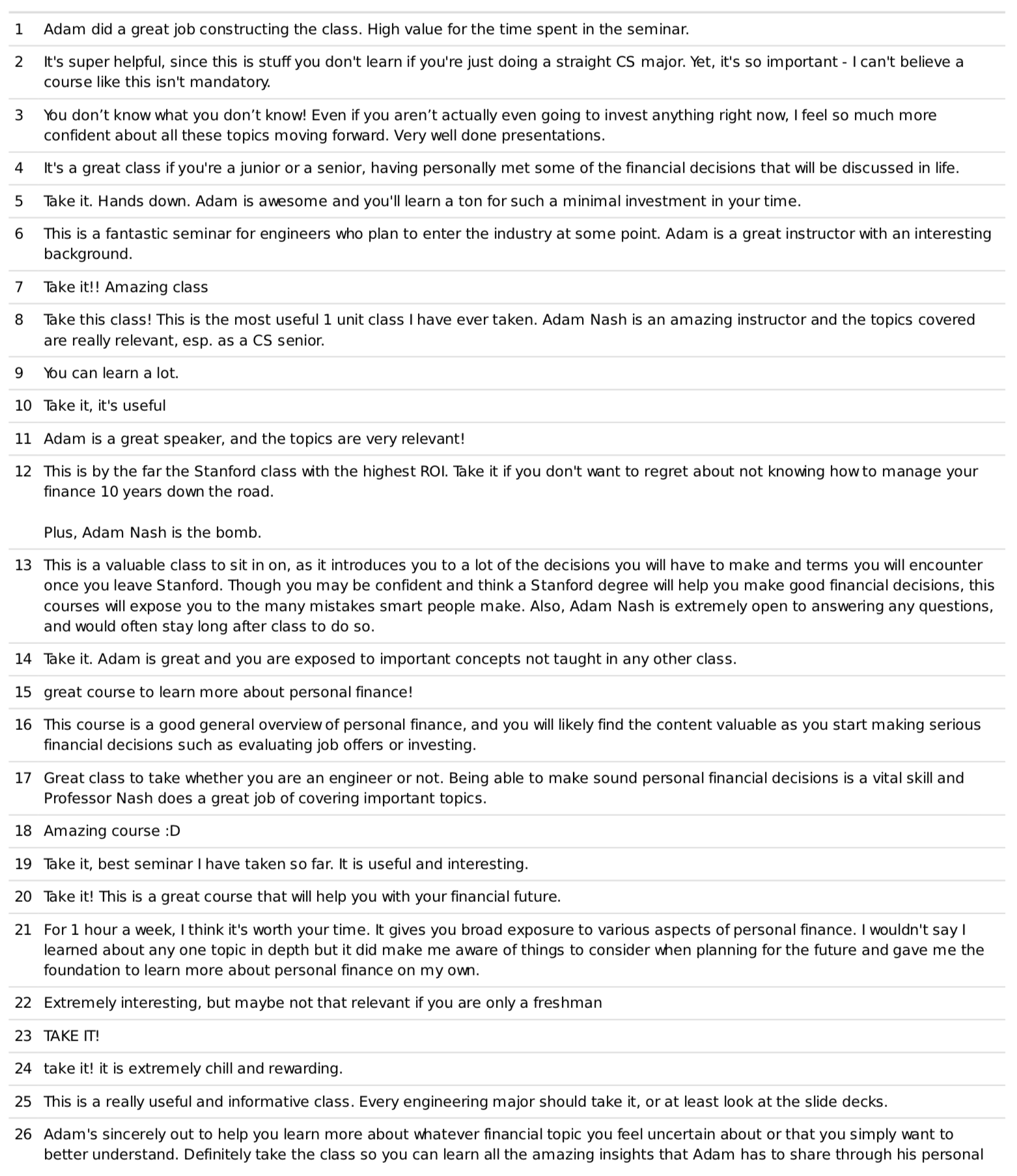
These reviews confirm how much students want to learn and engage around personal finance topics. The desire is there, the fundamental problem is that few schools offer any curriculum to fulfill it.
If you are wondering, Review #12 is my Mom’s favorite.
Data: What sessions did students value most?
Stanford allows faculty to add supplementary questions to the student feedback form. I asked students specifically to name three sessions that they found most valuable, and to name a session they found least valuable.
The results were interesting. Investing was far away the seminar students found the most valuable, with compensation, real estate and debt following.
| Investing | 28 |
| Compensation | 16 |
| Real Estate | 12 |
| Debt | 10 |
| Financial Planning & Goals | 7 |
| Bonus: Crypto, VC & Derivatives | 6 |
| Behavioral Finance | 5 |
| Savings & Budgeting | 4 |
| Net Worth | 2 |
When students were asked which session was the least valuable, there were far fewer votes to count. Still, it was interesting that despite being one of the favorites, “Real Estate” was also one of the least favorites. Reading the comments, it seems as if some students felt like real estate was too far in the future to be relevant to their current situation. The students who enjoyed it clearly enjoyed the section on how to make the decision between renting & buying.
| Real Estate | 7 |
| Behavioral Finance | 5 |
| Debt | 3 |
| Compensation | 2 |
| Bonus: Crypto, VC & Derivatives | 2 |
| Savings & Budgeting | 2 |
| Financial Planning & Goals | 1 |
| Net Worth | 1 |
| Investing | 0 |
It is worth noting that 8 students actually put down that all of the sessions were valuable, so I think it is fair to say that the content was well received.
Final Thoughts & Reflections
As part of developing this course, I chose to post the slides from every seminar online within a couple of days of teaching the class. My goal was to get as many eyes as possible on the content, to ensure there were no mistakes and to get advice on places to improve it.
There was only one session that received several corrections, and that was the “Real Estate” seminar. A special thank you to those of you on Twitter who helped me improve & correct this content.
Top requests that I received for the next time I teach the class:
- PDF versions of the slides
- Voice over version of the slides
- Video of the lectures
I likely should have done all of these in 2017, but I was a bit nervous about doing this with a brand new course & course material.
The most important reflection I have on this quarter is a sincere feeling of gratitude to Stanford University for allowing me to teach this course. Mehran Sahami, the Associate Chair for Education in the Computer Science department, sponsored the course, and without him it would not have been possible. A special thank you is also due to Greylock Partners, who supported my efforts to teach this course this year.
I also would like to thank the 93 students who took the course and provided excellent feedback along the way. The course was originally opened to only 50 students, and it was incredibly gratifying to see so many students request an exception to take the class during the Fall Quarter.
If you have additional feedback or thoughts about the course, and how to broaden the reach of financial education, please feel free to reach out with comments on Twitter or LinkedIn.
iOS 11 X and iOS 11 Classic
In his review of the iPhone X, John Gruber astutely points out that the device effectively runs a fork of iOS 11:
There were always two things and only two things on the front face of an iOS device — the touchscreen display and the home button. In fact, the iPhone X changes iOS in more fundamental ways than even the iPad did. In terms of the role between the display and the home button, the iPad really was — and remains today — “just a big iPhone”.
The iPhone X, however, creates a schism, akin to a reboot of the franchise.
Apple hasn’t called attention to this, but effectively there are two versions of iOS 11 — I’ll call them “iOS 11 X”, which runs only on iPhone X, and “iOS 11 Classic”, which runs on everything else.
The fundamental premise of iOS Classic is that a running app gets the entire display, and the home button is how you interact with the system to get out of the current app and into another. Before Touch ID, the home button was even labeled with a generic empty “app” icon, an iconographic touch of brilliance.
This is a great way to think about the evolution of iOS going forward. As I noted last month, the iPhone X will reshape the entire iOS ecosystem over the next few years. Consequently, it’ll also make it more challenging to review a new version of iOS, as we’ll have to account for deeply different variations of the same features.
→ Source: daringfireball.net
Benno Ballooner

 |
| Benno Ballooner Men's and Women's 8. Courtesy: Clever Cycles |
Benno Baenziger co-founded Electra in 1993 (along with Jeano Erforth), which produced cruisers at a time when very few cruisers were available on the market. In 2014, Electra was bought by Trek. It's now apparent that Baenziger was not finished designing useful bikes for the rest of us.
The Ballooner, of course, gets its name due to its wide tires (26 x 2.35). Baenziger writes: "Personally, I am not a big fan of skinny tires. I believe that bigger tires provide for a better and more controlled ride."
You can read more about Benno bikes on the Clever Cycles Blog.
Benno offers the Ballooner in both derailer and internal hub versions. Here are the specs for the IGH version:
| Frame | 6061 Aluminum Alloy Frame |
|---|---|
| Fork | CRMO Fork with Investment Cast Lug Crown |
| Rims/wheels | Double Wall Aluminum Rims |
| Tires | 26”x 2.35” Balloon Tires (60 TPI) |
| Crankset | Retro Aluminum Crankset |
| Rear derailleur | Shimano Alfine Internal 8-Speed |
| Brakes | Shimano Hydraulic Disc Brakes |
| Pedals | Retro Aluminum |
Those Mega Cruise Ships Looking for a Vancouver Parking Place

In the “bad ideas that just won’t go away” department both Port Metro Vancouver and the Delta Optimist are out in force saying how important it is that new facilities are designed to accommodate mega cruise ships. These mega ships have been called “floating skyscrapers laid out sideways” and accommodate over 5,000 people. The gross tonnage is over 100,000 tons, and these vessels are over 1000 feet wide by 225 wide. These floating cities are designed for the cruise companies to have great economies of scale, but set up logistical problems for ports that have to accommodate these vessels. Indeed there are already lists of places online that are purportedly being ruined by the visits of these behemoths.
But here is what Port Metro Vancouver says~they’ve had a two per cent increase in passenger volumes over the year and the Port says that cruises are a “critical economic driver” bringing in an average 3 million dollars per vessel stay into the economy.
Of course this means that the Port is already embarking on a “pre-feasibility” study to ascertain where this mega cruise ship dock is going to be. As Price Tags Vancouver has previously written the two potential locations are Port Metro Vancouver locations in Richmond or Delta. Delta port is already trying to expand its facility to accommodate more cargo, despite the fact that such expansion will wipe out critical habitat for the migratory western sandpiper. But back to those mega ships.
Such ships could provide more customers for the ailing Tsawwassen Mills mall which is failing to attract a mega amount of customers outside of their annual Boxing Day sale. The ships could also bring candidates to the new casino which will be potentially placed beside the Massey Tunnel. And in the words of the Delta Optimist “…the port has also been saying cruise lines are building bigger ships which Canada Place won’t be able to accommodate. This summer, a top official with Cruise Lines International Association told the media that Vancouver is behind other cities, such as Seattle, that are investing heavily in their port infrastructure. The Vancouver port shut down Ballantyne Pier to cruise ships in 2014, leaving Canada Place as the city’s only cruise terminal.”


Our Favorite Gear and Accessories of 2017

For each of us, iOS devices or Macs dominate our day-to-day computing, but they don’t tell the full story. Whether it’s a battery pack to keep a device charged, the latest game console for kicking back and relaxing, or a comfortable chair for sitting at a desk while writing, we use a wide variety of other products for work and play. So, with 2017 coming to a close, we compiled a list of our favorite gear and accessories that we used this past year.
Federico
Logitech Slim Combo for iPad Pro 12.9"

I didn't pay attention to the smaller version of Logitech's Slim Combo keyboard case when it launched alongside the 10.5" iPad Pro earlier this year. Most heavy iPad users I know didn't like the build quality of the product, so I decided it wasn't worth trying. A few months later though, I realized that the bigger version of the Slim Combo, made for the 12.9" iPad Pro, was exactly what I had been looking for.
The Slim Combo, as the name suggests, is a combination of a hard shell plastic case for the iPad and a slim keyboard that attaches via the Smart Connector to the iPad. Compared to Logitech's first attempt at a keyboard for the iPad Pro – 2015's CREATE – the Slim Combo features a case that is easier to remove from the iPad, a built-in Pencil holder, and, unlike the smaller version, a cover that folds under the keyboard while typing on a desk. This makes the Slim Combo for the 12.9" bulky and heavy when you're carrying the iPad around, but surprisingly compact when you're typing on a desk. Add backlit illumination, iOS-specific function keys (including a Home button that can be long-pressed for Siri activation), and laptop-like full-size keys to the mix, and you have a keyboard solution that is more professional than Apple's lighter, but more limited Smart Keyboard.
I've been writing with the Slim Combo on my iPad Pro for over three months now, and I really like it. I still hope that Apple eventually makes a backlit Smart Keyboard or a Brydge-like clamshell accessory for the iPad, but for now, the Slim Combo works well for me.
Fintie's Pencil Cap Holder and Nib Cover

I bought these accessories for cheap on Amazon and they've fixed a common annoyance of my Slim Combo + iPad Pro + Pencil setup. With Fintie's cap holder and nib cover, the detachable parts of the Apple Pencil aren't getting lost in my Tom Bihn Daylight Briefcase bag when I travel anymore. I cannot tell you how many times I've found the Pencil's cap removed from the Pencil itself, but still attached to it thanks to Fintie's cap holder. These may not be exactly minimalistic or elegant, but they have fixed a real problem in a simple, practical way. They also fit perfectly if the Pencil is placed in the Slim Combo's holder.
Pioneer Rayz Plus Lightning Earbuds

Arguably, I have too many headphones and earbuds laying around my house because I like to test them all and never have time to sell them. I added Pioneer's Rayz Plus Lightning earbuds to my travel gear in June for a few reasons:
- I never use AirPods on planes. Trust me, you don't want to be the person crawling on the floor trying to find a fallen AirPod between other people's seats;
- I didn't want to use a dongle to charge my iPhone 7 and listen to music or Brain.fm at the same time;
- I wanted to have noise cancellation without having to pack bulky over-ear headphones in my carry-on bag. Also, earbuds are easier to remove when a flight attendant asks you a question;
- Finally, I had a feeling I was going to be writing and editing on my way back from WWDC (I was right), so I wanted to make sure I could focus on the plane by removing engine noise while also keeping my iPhone constantly charged.
The Rayz earbuds meet all of these requirements. They're not cheap, but in a compact package you get noise cancellation (which is pretty decent for earbuds this small), a remote that also acts as a Lightning passthrough so you can plug in a cable and charge your iPhone from the earbuds, and, more importantly, great sound. The combination of these features was perfect on my flight back from San Jose: with a battery charging my iPhone through the Rayz Plus and Brain.fm playing various Focus sessions, I was able to finish my iPad Pro 10.5" review and publish it the following Monday.
Belkin USB-C Car Charger

I mentioned this charger in the Fast Charging Tests section of my iPhone X story, where you can see how its charging rate compares to other batteries and adapters. The short version: at 36W output via USB-C, this is the adapter to get if your car supports this kind of power delivery. Thanks to this adapter, I can fast-charge my iPhone X and iPad Pro while I'm driving – a fantastic upgrade from the 5W USB adapters I had last year.
Mophie Charge Force Powerstation

Speaking of batteries, this was one of my favorite surprises when I was working on my iPhone X story: a standard USB-A battery pack that doubles as a portable Qi charger. The surface of the battery supports inductive charging, which allows you to carry it around the house and place the iPhone on top of it – no cables involved – to charge it at 5W. This isn't the fastest way to charge an iPhone, but the convenience of having a portable wireless charger that follows me in every room of the house has been a fantastic addition to my typical work day.
Nvidia Shield TV

Of all the gadgets I imagined I would buy in 2017, an Android TV device was not on my list. However, Google's TV OS isn't the primary reason why I purchased an Nvidia Shield TV two months ago. We use the Shield to run Plex Media Server, which feeds HD video (and even 4K content) to our iOS devices and new Apple TV 4K. Thanks to a modern Tegra SoC, the Shield supports simultaneous instances of Plex transcoding, allowing us to stream any kind of video format to iOS without loading times.
The Shield uses our existing Synology NAS to access movies and TV shows, acting as a bridge between "cold storage" on spinning hard drives and connected devices running the Plex player. I should also say, though, that Android TV is pretty good: we enjoy the ability to pick up the Shield's remote and ask Google Assistant to play videos on YouTube, and the device is supported as a destination for "casting" videos from the YouTube iOS app as well.
Nintendo Switch

Anyone who listens to Remaster knows that my 2017 in gaming has been defined by the Nintendo Switch and The Legend of Zelda: Breath of the Wild, which I've played for nearly 190 hours so far. The Nintendo Switch is the dream console I wanted to have since I was a kid with a Super Nintendo in the 90s. The Switch hasn't only been a comeback for Nintendo as a company – for many gamers like me, it reignited an interest in videogames that had perhaps faded in the background as the responsibilities of adult life slowly took control of our daily routines.
Thanks to its flexibility, the Nintendo Switch is a console that adapts to my life and my habits instead of demanding long play sessions in front of a TV. The more I play with it at the end of a long work day, the more I realize the Switch is the perfect console for my needs. There are aspects Nintendo could improve in the future (bigger display, native 4K output in docked mode), but as a first version, the Switch is my favorite non-Apple hardware product of 2017. The Switch made me fall in love with Nintendo all over again.
John
Anker Powercore+ 26800 PD with 30W Charger

I’ve had a few different Anker batteries over the years, and each time I’ve bought a new one, it was bigger than the last. A big external battery has its downsides. They’re heavy, large, and take a long time to charge, but that’s more than made up for in convenience when I’m on the go.
The Powercore+ 26800 has one USB-C port with USB Power Delivery technology and two USB-A ports. That allows Anker’s battery to charge items that previously weren’t possible, which has come in very handy with big, power-hungry devices. In my case, that means my 13” MacBook Pro and Nintendo Switch. Anker’s battery can even charge my laptop or Switch while I use them, which gives me added flexibility. I can set up in a coffee shop regardless of where the electrical outlets are and charge my MacBook while it sits in my bag – I’ve even used the Powercore+ to work around my house where plugging a charger into the wall is inconvenient. The battery’s PowerIQ feature makes charging up an iPhone or iPad a fast and painless process too.
Anker Premium 5-Port 60W USB Wall Charger PowerPort+ 5 USB-C with Power Delivery

When I’m at my desk, I use this Anker charger that plugs into a wall outlet. It has a USB-C port that powers my MacBook Pro when it’s docked and four USB-A ports that I use to charge other devices. Mine usually has Apple Watch and iPhone/iPad Lightning cables hanging off of it. I prefer the Anker charger to an Apple power brick because it sits on my desk, only takes up one of the outlets on the power strip under my desk, and doesn’t have a wall wart that blocks other outlets on the power strip. Using the Anker charger also frees up my MacBook Pro charger, so it’s readily available when I leave the house.
Logitech Harmony Elite Remote Control, Hub & App

The Harmony Elite is the third Harmony remote I’ve used over the course of many years. They’re expensive, but I picked up this one on sale on Black Friday, which helped. Harmony remotes have always been a little tedious to set up, and this time wasn’t perfect either, but it was light years ahead of prior remotes I’ve owned that had to be tethered to a PC.
What intrigued me about the Harmony Elite is its Alexa support. With the Harmony skill, I can now tell Alexa to turn on my Apple TV, and the TV, stereo, and Apple TV all come to life set to the correct inputs. The remote’s battery life isn’t great, but it comes with a vertical stand that looks better than past models, so I don’t mind leaving it out near the TV where I can dock the remote every few days.
I was a little worried about how the IR blasters would perform because the Hub and stereo sit in separate compartments of a low entertainment center beneath my TV. There’s wood between the entertainment center compartments, and the TV sits on the wall behind the Hub – but the IR blasters have worked flawlessly to turn everything on and switch inputs. I don’t have access to Siri when I’m using the Harmony remote to control my Apple TV, but the directional pad is less error-prone than the Siri Remote’s touchpad, so more often than not, I use it instead of Apple’s remote.
Philips Hue White Ambiance Starter Kit, Motion Sensor, Switch, and Recessed Lights

I finally took the plunge and bought Hue lights recently. The lighting in my studio is now fully automated via Apple’s Home app and an Amazon Echo. Instead of the Hue lights that change colors, I got white ambient lights, which are dimmable and can be dialed into a wide range of white tones. The setup includes four recessed lights in the ceiling, a bulb in a floor lamp, and another bulb in a fixture over the stairs leading to my studio.
On a small ledge along the stairwell I placed a Philips motion sensor. That way, as soon as I step on the stairs, the lights turn on. To make it easier for my family who may not want to deal with the Home app or voice-controlled assistants, I also installed a Philips dimmer switch, which sticks on the wall with adhesive. The switch has on and off buttons as well as programmable buttons for quickly activating pre-programmed scenes. I’m still experimenting with the setup, but it’s been handy to have the lights take care of themselves when I head to the studio to work with my hands full.
Beats X

I loved my AirPods, but they don’t fit very well in my ears – and then I sent them through the laundry, which wrecked the charging case. That gave me an excuse to try the Beats X. I’ve used many makes and models of headphones over the years and have found that in-ear buds like the Beats X fit best. Like the AirPods, the Beats X use the W1 chip that has the range and other advantages of the AirPods. The biggest compromise is the cord that runs behind your head. The cord gets in the way sometimes, but overall, I haven’t minded it. Plus, when I take the buds out but want to keep them around my neck, they stay put because there are magnets in the earpieces that hold them together in front of me when they aren’t in my ears.
NETGEAR Orbi

I had networking issues earlier this fall and had one of those slightly panicky moments as I imagined my network going down in the middle of recording AppStories. I ended up replacing most of my network gear including my aging cable modem and switch, which were causing a bottleneck. I also replaced my wireless router with the NETGEAR Orbi router and one satellite unit.
I’ve been blown away by the Orbi’s performance. The hardware isn’t as small and compact as something like the Eero, but its vase-like size and shape hide powerful antennae that blanket my house with Wi-Fi. On a wired connection, I can typically get download speeds of around 350 Mbps. Of course, it still depends on where I am in my house, but the Orbi typically delivers 200-250 Mbps downloads with one unit in the basement – where the cable enters the house – and the other sitting in my kitchen.
Ryan
AirPods

Easily my favorite accessory of the year1, I've used Apple's AirPods nearly every day of 2017 and my experience with them has been fantastic. I wrote at length about the AirPods early this year, but here are a few bullet point highlights that make me glad to use them each day:
- Battery life is entirely a non-issue for me. It amazes me that these tiny devices can run for so long then charge up so quickly in the charging case. I worry about battery life just as much as I did in the days of wired EarPods – which is to say, not at all.
- The charging case's dual purpose in such a small size is brilliant. I love how easily I can pocket and have with me, at all times, both a carrying case for the AirPods and an extra ~20 hours of battery life.
- Life without tangled cords is objectively better. This isn't a benefit unique to AirPods, but it's one of the perks I never cease to appreciate.
- Having audio pause or resume when I take an AirPod out of or put it back into my ear feels so perfect. I can't believe earbuds didn't do this before.
Two quick things that are less positive. First, at one point during the year my right AirPod would at times come out of the charging case dead – including once on a flight, which was particularly unfortunate. Since this behavior was inconsistent, though, I lived with it far too long before searching for a solution. When I finally did a little research and, as a result, cleaned the charging case with compressed air, the problem went away. Second, I don't know if my AirPods experience would be quite as positive if I didn't have an Apple Watch for controlling audio playback. Perhaps in the absence of a Watch I'd simply rely on Siri more for things like skipping forward or back in podcasts, or changing music tracks, but I can't say for sure that Siri would be a suitable alternative. Volume adjustments, I imagine, would be particularly lackluster with Siri. Apple Watch is the ultimate AirPods companion.
iHome iSP6X Smart Plug

Among the tech enthusiasts I know, I'm one of the most hesitant entrants to the world of smart home devices. My concerns to this point have centered around price and market fragmentation. While I understand smart products will always warrant a premium price over 'dumb' ones, until this past year that premium was too big for me. Market fragmentation made matters worse, as I didn't want to spend much money on products that would only work with a certain ecosystem. I'm all-in on Apple products, so HomeKit-compatible devices have always seemed like the best choice – but until this past year it was unknown whether Apple would create a standalone smart speaker, so I needed to remain open to a possible Amazon Echo or Google Home in my future when buying smart devices.
All this to say, the only smart home product I invested in before this week is a single iHome iSP6X smart plug. That's going to change soon, as I just spent some Christmas gift cards on a couple new smart devices, but for 2017 I've lived with this single device, and I recommend it as a way to dip your toes into the Internet of things.
For part of the year I used the smart plug with a lamp in my office, and was able to control it remotely when my wife and I went on vacation to keep the house from being dark 24/7. More recently, I set up our Christmas tree lights on the plug, and have been using Siri on my Apple Watch to turn the lights on and off each day. I thought about configuring automation that would turn the lights on when my wife and I got home in the evenings, but Siri on the Apple Watch Series 3 is so fast, I've never felt the need to automate.
Now that the holidays are reaching an end and the Christmas tree will go away soon, I plan to combine my existing iHome plug with a second one coming in the mail to power a lamp and white noise machine in the master bedroom. With the two plugs, I'm going to setup a 'Good night' scene that will turn off the lamp and turn on the white noise machine right at bedtime.
TP-Link AC1900 Router

The first half of 2017 was plagued by too many Wi-Fi issues for my liking. My router at the time offered wildly inconsistent data speeds and even began dropping connections altogether on a regular basis. Making matters worse, near the beginning of the year I moved my home office out of the master bedroom into its own dedicated room, and that room happens to be on the opposite end of the house from the router. The office move aside, though, even devices that weren't far from the router experienced increasing connection troubles over time. So after some router hunting and research, I settled on a TP-Link AC1900 as a good compromise between price and performance.
There's not much I can say about the AC1900 other than that it's solved our problems. I now get a strong connection in my office, and speeds are not only much more reliable – they also frequently exceed the max speeds advertised by our Internet provider. To my memory, there have been two times since July that I needed to reboot the router, but those were so far apart and may have been caused by other issues, so I don't count them against the router. If we had continued having problems after trying out the AC1900, my plan was to splurge for a mesh system like Eero, but I'm happy to report that the budget option has met all our needs so far.
IKEA Markus Desk Chair

This year my office chair met its end, so after a little research I decided the best replacement in my price range would be the IKEA Markus. I needed something comfortable and reliable without spending more than a couple hundred dollars, and after about nine months of use, so far the Markus has proven to meet those needs.
I'm a relatively tall guy at 6'4", and one of my favorite details about the Markus is its tall back. Most chairs I've ever sat in require most of my head to hang over the top, but with the Markus I can comfortably sit back and have good neck and head support against the headrest. I also have back issues, and while the Markus hasn't taken those away (which I wouldn't expect), it hasn't contributed to them either. Despite sitting at my desk for most of the average work week, my back hasn't had any chair-related problems. Overall, I've been very satisfied with the Markus.
Whether you're contemplating ways to better optimize your tech gear for the new year ahead, or you simply have holiday gift cards burning a hole in your pocket, we hope these recommendations serve you well.
- Although, can a pair of mini-computers that go in your ears really be classified as an accessory? ↩︎
Support MacStories Directly
Club MacStories offers exclusive access to extra MacStories content, delivered every week; it's also a way to support us directly.
Club MacStories will help you discover the best apps for your devices and get the most out of your iPhone, iPad, and Mac. Plus, it's made in Italy.
Join NowMemorial ride for Daryl Craig
This morning we had a ride in memory of Daryl Craig who died on December 20, after being struck by a cube van on College St, near Ossington. Cyclists started gathering at Spadina and Bloor before 10 am.

Some of the usual suspects are looking a bit cold (Patrick, Albert, Hamish)

A couple of pictures of Sam’s nicely detailed winter bike.


David arrives with the banner. We knew that someone had already placed a ghost bike at the crash site.

Joey makes a few announcements to start things off.

I count 31 cyclists, just before we set off.

and we’re off, headed south on Spadina.

Turning west on Harbord.

South on Shaw.

At College and Shaw.

Taking the lane on College.
This section is narrow and has streetcar tracks and lots of on street parking, all of which could have contributed to the tragic collision.

Joey leads the way

At the crash site.

The ghost bike, already provided by family and friends.

Not much road width to display the banner.


This is what passes for bike infra along this section.

RIP Daryl R. Craig. Deepest condolences to his family and friends.

Thanks to all who rode with us to remember a fellow cyclist.
Wayne Scott’s pictures are here.
Video by Michael Whitla
Update: Metronews coverage.
Ten years in, nobody has come up with a use for blockchain

Kai Stinchcombe,
HackerNoon,
Dec 30, 2017
This is a pretty thorough debunking of the idea that blockchain technology will disrupt industry. Kai Stinchcombe looks at several putative use cases - payment and banking, anonymous transactions, micropayments, bank-to-bank transfers, smart contracts, distributed ledgers and storage, stock transfers, authentication - and in each case shows that the hard parts are not addressed by blockchain. For example, blockchain is no more efficient than the existing system of payments and banking, but with none of the protections. Meanwhile, it turns out that anonymous banking helps criminals and terrorists a lot more than it helps society in general. And so on and on. "Blockchain enthusiasts often act as if the hard part is getting money from A to B or keeping a record of what happened. In each case, moving money and recording the transaction is actually the cheap, easy, highly-automated part of a much more complex system."
[Link] [Comment]No boundaries for user identities: Web trackers exploit browser login managers

Gunes Acar,
Freedom to Tinker,
Dec 30, 2017
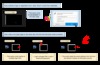
The first item in this series, describing how websites record your sessions by tracking keyboard clicks and mouse movements - was an eye-opener. This article talks about how your browser betrays you. "Third-party scripts exploit browsers’ built-in login managers (also called password managers) to retrieve and exfiltrate user identifiers without user awareness." I tested it myself on their live demo page and it certainly appears to work. There's a list of sites that use this technique for grabbing email addresses and using them for tracking. Using ad blockers can help prevent this. But the best defense is to disable browser auto-fill options and use a third party password manager like 1password instead. Via Ben Werdmuller.
[Link] [Comment]Top 3 tips for journalists wanting to get started in data journalism

Paul Bradshaw,
Online Journalism Blog,
Dec 30, 2017

These aren't just tips for journalists, they're tips for learners as well. Consider the first tip: "Don’t start by learning a technique for the sake of it – there are 101 different things you could learn – instead pick a problem that you face regularly, or a story idea that you have, and let that dictate the sorts of data journalism skills that you learn first." Doesn't that make so much sense as an approach to learning? It's certainly the approach I take. Or consider the three technical skills: speadsheet skills, data visualization, and computational thinking. If we think of 'spreadsheek skills' as data management in general, we have a pretty core skill.
[Link] [Comment]Blockchain – don’t ask how, ask why

David Kernohan,
Wonkhe,
Dec 30, 2017

Why Blockchain? That's the key question. "In this case," writes David Kernohan, "the problem is trust." For example, what do you do if you don't trust your bank? "Cryptographic encryption (hiding information using the power of really difficult maths) lends anonymity and security, but the openly visible nature of transactions lends reliability." Except - it doesn't. In the cases where the currency fluctuates wildly, or where millions are stolen from user accounts, or where falso contracts are executed, you find quickly that there is no more reason to trust the digital currency ecosystem than there is to trust banks or governments. And maybe a lot less reason. "You don’t need Wonkhe to tell you that investing in a hugely volatile financial product with no reliable – or even regulated – way to withdraw your money is probably a bad idea." Yeah.
[Link] [Comment]Your Best Shot 2017 – Black and White
The Your Best Shot 2017 Flickr group has more than 5,000 members who have uploaded nearly 4,000 photos to the pool and created dozens of beautiful galleries curated in this discussion thread.
If you haven’t already joined the group, we encourage you to upload your single best photo taken this year before you miss your chance on January 5th, 2018!
Here is a selection of our favorite black and white images below, but you can see the complete gallery here.






My Year Of Linux Inside The Desktop
Christmas has come and gone, and nothing much has happened other than an untimely viral flu, a fair amount of reading and the start of a well-deserved break, during which I noticed it’s been a year since I last posted about Elementary and built a rather nice Hackintosh, and that it’s probably worthwhile to do a little recap.
Another Thing In The Closet
First off, about that Hackintosh, which I rather affectionately christened rogueone.
The long and short of it is that although I was able to get most of the niceties working (including Bluetooth input), I never had the time to fix dual display support under Sierra (which is critical for me) and ended up installing Elementary on it instead–which worked beautifully with everything, except that Linux power management and fan control lack finesse to a degree where the machine was substantially louder–and even with handpicked components, the fan noise was too much compared to my mini.
Since I needed to run Windows and have a native Linux server for testing, I set up KVM (Elementary is Ubuntu LTS under the hood, after all), stuffed the machine into a closet and turned my nearly eight-year-old Mac mini into a souped-up thin terminal, which has worked out quite well in many regards–there is now zero fan noise in the office (the mini also runs cooler), I get to use both my monitors and can still enjoy all my Bluetooth input devices.
Thin and Big vs Fat and Locked Down
In fact, I’ve been pondering if I shouldn’t follow through–just get a cheap fanless PC to dual boot between Windows and Linux and call it a day. I’ve even drafted a shortlist (currently topped by the Mele PCG35 paired with an LG 43UD79), and the only two hard requirements are that it has to be utterly noise-free (so low-end fanless machines are mostly OK), and that it needs to be able to drive a 4K display.
Given these preferences, It’s pretty obvious to me that I’m not part of [Apple][a]’s elusive “Pro” segment–I’m a UNIX guy that codes and builds cloud solutions, I don’t do (much) audio or video editing, my photography needs aren’t really met by their software (although the OS does have great color management), and I find all-in-one machines to be too limiting, especially when they’re not expandable at all. The mini form factor suited me perfectly until they stopped being upgradable, but I’m getting round to accept that my hope for a decent compact Mac desktop is 90% likely to go unfulfilled.
On the other hand, it’s actually quite amazing to think that I spent a good portion of my time working inside the Linux subsystem in Windows and hardly missed the Mac during business hours–were it not for my reliance on Mail.app (something that Thunderbird never managed to solve) and the buttery smoothness of macOS input devices, and I’d probably have switched wholesale to Windows for office work and Linux for coding and photography.
Less Entropy is More
And, let’s face it, that is an increasingly likely option given the mess macOS turned out to be during 2017. I kept running Elementary on my ancient Chromebook, and the thing is absolutely rock solid and consistently smooth (even with only 2GB of RAM, a crummy screen and a lousy touchpad), to the extent that it’s often the first laptop I reach for when inspiration strikes me.
Yeah, it’s Linux, and it’s impossible to file away all the jutting corners and kludges. But it’s been a year, and I can’t find anything (else) wrong with it that I can’t work around or live with. In fact, it’s aged better than macOS, and that alone should give you pause.
darktable 2.4.0 released

I’ve been using Darktable for almost six months now, and although it is a bit clunky on a Mac it’s already proven to be vastly superior to Photos (although that’s admittedly a very low bar these days).
Non-destructive editing features make it a great way to tweak RAW photos (although admittedly I take few of those), and the lens correction features let me account for the fisheye lens in our dinky little action camera.
Best of all, it is now fully cross-platform (I used it in Windows under the Linux subsystem with an X Server, but that’s not required anymore), so regardless of what the future brings, I now have one great solution for photo editing in the long run.
The Watch, my Apple device of the year
Looking back, the five things that were most relevant to me this year in an Apple context were:
- The echoing absence of a renewed Mac mini
- The wall-to-wall iOS/macOS bugfest
- The Touch Bar folly (and MacBook Pro keyboard problems)
- The Watch Series 3
- An overall feeling of disenchantment with both iOS and macOS
Working through these, the only one I think I can be positive about is my experience with the Watch. I’ve ranted often enough about how much I hate all-in-one locked-down machines, how much I like the ridiculously outdated (but utterly silent) Mac mini still on my desk, and I’ve been trying really, really hard not to write about how much I’ve come to loathe the Touch Bar, the absence of a physical Esc key and, overall, the temperamental and clackety keyboard of the new MacBook Pro (which I’ve started having a few problems with myself).
When my birthday rolled around this year, I had a conundrum (besides the usual “should I spend $VALUE amount of money”): I’m in dire need of a new desktop machine, my iPhone 6 is well over three years old and will likely not see another major iOS version, and besides Apple hardware, there are more bits of home infrastructure that need replacing ASAP.
As it turns out, everything works well enough (for the moment) that there was no pressing need to upgrade–I had the battery on my iPhone replaced last Summer (giving me first-hand experience of its relationship to performance), and I find the iPhone X’s lack of Touch ID to be a major put-off (based on my experience with Windows Hello, I think Face ID is much more useful on laptops and desktops, and prefer to explicitly unlock smaller devices with my finger), so being Apple‘s Animoji guinea pig wasn’t really on the cards.
I am also considerably put off by the iPhone 8’s glass back (which I still consider to be a dumb choice, regardless of Qi charging and better radio transparency), so getting a new phone was out1.
But there was one device I was sure to use all day, every day, and that made sense to upgrade from both an economic and timing perspective: my original “Series Zero” Apple Watch.
I have zero interest in an LTE-enabled Watch, but the 38mm WiFi model is readily available here, and considering I got the original at $100 off early last year and that I found it to be worth every penny but too slow overall, upgrading to a Series 3 was pretty much a no-brainer.
So here are my (short) notes on it:
Pluses:
- Right off the bat, the Series 3 is much faster. Everything that runs exclusively on the Watch loads and runs nearly instantly, including the Workflow actions I have for sending pre-defined messages and getting live updates from public transit services. Some apps are still split affairs, though, which means that my pokey iPhone 6 is actually slowing down my Watch…
- Siri (which always worked well enough, given my reduced expectations) now talks back, which is nice. I wish it was more useful to keep track of workouts, but on the other hand I’ve had great success using it with HomeKit (more on that in a later post).
- The battery lasts me well over two days in average use, although I’m currently experimenting with the Watch as a sleep tracker (using AutoSleep) and recharging it daily during breakfast and morning ablutions.
- Overcast is just glorious on it, and (besides Outlook) the third-party app I use the most, although I have zero interest in listening to podcasts from my Watch–I’m happy enough using it to navigate and play back what’s on my phone during my commutes.
- The physical improvements (waterproofing, brigher display) are secondary, but welcome.
Minuses:
- Regardless of what you think of the Marc Newson design twists, I wish the thing was round and looked more like a conventional timepiece.
- Although I’m now accustomed to lifting my wrist to check the time and understand the constraints of an OLED display, I still wish there was an always on time display, even if dimmed.
- Watch face customization is still a limited affair. Given my interest in progressing towards an as yet unspecified degree of fitness, I use an Activity variant, but wish I could mix and match layouts and complications better. On the same topic, the Siri watchface is completely useless since it has zero integration with non-Apple appplications.
- Apple decided to break the Music app (and playback controls) by making it fully independent of the phone, which is stupid if (like me) you have zero interest in loading music onto your Watch and would rather use it as a remote for controlling playback on your phone. The sorest point for me is that Apple clearly expects you to pair your Bluetooth headphones to your Watch too, completely mangling the much more common use case of taking calls on the go.
- Some apps (like WhatsApp and Google Maps) are still missing in action. I can reply to WhatsApp messages but have no on-device app, and I’d rather ask people for directions than use Apple Maps.
Some of these downsides echo Apple‘s particular brand of single-mindedness about how people should use their devices, but so far the benefits outweigh them–since I started wearing the original Watch, the activity and workout features have had a positive effect, and I now exercise regularly (if lightly, given the insane worklife I lead).
I think that’s a great return on investment, if you ask me.
-
I’m also quite interested in seeing what kind of upgrade the SE gets next year–I love the smaller form factor, and getting updated internals in an easy to grip metal casing would probably be the sweet spot for me. ↩︎
A better solution to fake news, starting with Facebook
Fake news is a big problem, and Facebook is at the center of it. It’s clear that made-up and distorted stories amplified on Facebook helped swing the 2016 presidential election. But the simple and “obvious” solutions to the problem have backfired. Now Facebook is at work on something better. And I have a proposal based … Continued
The post A better solution to fake news, starting with Facebook appeared first on without bullshit.
China’s bike rental sector is still kicking—Hello Bike just won RMB 1 billion financing
Updated 28 December, 2017: This article has been updated to correct the statement Hello Bike completed its Series D1 financing round on December 12th. The financing was completed on December 4th. Despite the spectacular demise of bike rental companies such as Coolqi and Bluegogo, the market is still alive and kicking. Hello Bike (哈罗单车) announced today the […]
China’s bike rental sector is still kicking—Hello Bike just won RMB 1 billion financing originally appeared on TechNode
World’s top Go player Ke Jie announces rematch with AI, this time without AlphaGo
“I’ve said before that I will never play against AI, but now I take that back.” With these words, the best Go player in humankind, Ke Jie, announced his rematch with AI in April 2018. His last match played against a computer program was against Google’s Alpha Go at the Future of Go Summit in […]
World’s top Go player Ke Jie announces rematch with AI, this time without AlphaGo originally appeared on TechNode
Face Unlock on the OnePlus 5T Could Be Infringing on Some Patents
 The OnePlus 5T is still relatively new in the market and is perhaps one of the best Android phones to buy right now. In terms of the features it brings to the table, Face Unlock appears to be a key highlight, given that it’s a first for the lineup. A new report claims that OnePlus’ implementation of this feature could be infringing on a handful of patents held by American company Sensible Vision.
Continue reading →
The OnePlus 5T is still relatively new in the market and is perhaps one of the best Android phones to buy right now. In terms of the features it brings to the table, Face Unlock appears to be a key highlight, given that it’s a first for the lineup. A new report claims that OnePlus’ implementation of this feature could be infringing on a handful of patents held by American company Sensible Vision.
Continue reading →
Google Looking to Open Experience Centers in India to Bolster Pixel Sales
 Encouraged by the response it has received through its pop-up stores, Google is now planning on opening its own brick-and-mortar stores in India to bolster sales of its Pixel handsets.
Continue reading →
Encouraged by the response it has received through its pop-up stores, Google is now planning on opening its own brick-and-mortar stores in India to bolster sales of its Pixel handsets.
Continue reading →