
An example of the @FinhavenHQ’s remote work culture (also our building had a fire alarm and we walked down 23 floor… twitter.com/i/web/status/9…

mkalus
shared this story
from  Price Tags. Price Tags.
|

It is not a good thing to smash your Tesla into the back of a parked fire truck on San Francisco Bay Bridge. A Tesla driver just did and was reported to be twice over the legal level for blood alcohol. His defense? The car was driving. As reported in the Vancouver Sun “according to the California Highway Patrol, the driver explained that his Tesla electric vehicle “had been set on autopilot,” obviating the need for him to be in control of the vehicle or, well, sober.”
The California Highway Patrol nixed that idea, and the driver was sent to jail. But it also brings up an interesting point~is the car the designated driver if someone is intoxicated? Wasn’t the whole idea of autopilot to give the driver the luxury of paying attention to other things besides driving? Even though cars are like dens on wheels loaded with lots of fun gadgetry, Tesla still states its autopilot system is “not fully autonomous”. You can drive fast, have a good time, but “the company instructs drivers to be alert because they are ultimately responsible for their vehicle and whatever it smacks into.”
In 2016 there was the deadly crash when a Tesla Model S and its driver failed to see a tractor-trailer turning onto a divided highway. The driver had relied on the autopilot, and in the “last 37 minutes of his drive, he had his hands on the wheel for just 25 seconds. He also ignored seven dashboard warnings and six audible warnings.” Some reports have cited that he was watching a movie at the time of the crash.
While Elon Musk has been saying that there will be no need for an instrument panel in future vehicles, Tesla crashes have been attracting interest from investigators. Autopilots were supposed to protect occupants and “even pedestrians” from crashes.
While it has not been determined whether the autopilot was on when the Tesla plowed into the fire truck at over 100 kilometers per hour, the firemen did note that the vehicle was unable to engage the autopilot after. “The car was towed, they said. “No, it didn’t drive itself to the tow yard.”


I am working on to cleanup some issues that I have been ignoring for a long time. So things might break. Have patience.

I am working
SANTA BARBARA, Calif., Jan. 25, 2018 /PRNewswire/ -- Sonos today announced that for a limited time you can get the "Sonos Two" bundle – two Sonos Ones for just $349 in the US and £349 in the UK starting on January 26. Launched in October of last year, Sonos One delivers great multi-room sound, the widest selection of supported music and audio content services available on a smart speaker, and easy to use voice control. This limited time offer on the smart speaker for music lovers is available on Sonos.com and through participating retail partners.
Does not help them if they don't support AirPlay and direct play from Apple Music.
I once believed in systems. I believe in systems now. It’s what happened in between that I want to look at.
I started my career building information systems; after summer jobs as a programmers, I knew that I wanted to be a consultant. I didn’t understand what that meant, ignored wise advice about what I ought to do, and talked my way into a job with the consulting arm of Arthur Andersen & Co.—long before it morphed into Andersen Consulting and later Accenture.
I designed and built information systems that massaged accounting data and produced reports meant to lead to better management decisions. I became pretty adept at annoying my supervisors with questions about how my programs connected to the broader business. It’s possible that some of the information my programs produced may have contributed to marginally better analysis and decisions by some middle managers. I was absorbed with the intricacies of making computers do what I told them to do.
That led to an MBA on the theory that what I needed was to understand the big picture; how did all of the pieces fit together? If I wanted to build more effective information systems, I needed to understand business as a system. How did strategy and finance and operations interact? I jumped from the weeds to strategy and the CEO’s perspective. From there it was back out to the consulting world.
I now had the systems tools I needed to design solutions that would have real impact. The flaw in my brilliant plan was that the people I was designing and building systems for seemed to have little interest in actually changing how they worked or thought. I’m fundamentally a nerd so my solution was to go back to school again; clearly I had missed something in my previous studies. If the intended users of my systems insisted on being too dumb to recognize how clever my designs were then I needed to learn how to do better designs.
I started a Ph.D. program in management information systems. Fortunately, Ph.D. programs give you access to very clever people with lots of perspective. They began to gradually eliminate the stupid and replace it with some deeper insight. The first order analysis, of course, was that thinking of users as stupid wasn’t a winning strategy. I was young—younger anyway. The second order answer was to build a knowledge base in organizational theory. The quest since then has been to develop a better synthesis; exactly of what is an evolving target.
This isn’t a new quest. It’s often framed as an either/or choice between people and technology. A more intriguing path is one of both/and. That isn’t a new thought either. But it is worth a revisit.
The post From systems building to systems thinking appeared first on McGee's Musings.

Evie Liu and William Davis, reporting MarketWatch, looked at release strategies of Oscar nominees over the past few years. Some go for the wide release with the movie playing in over 1,500 theaters, whereas others choose a platform release with the movie playing in fewer than 50 theaters. The last seven of eight Best Picture winners went with the latter route.
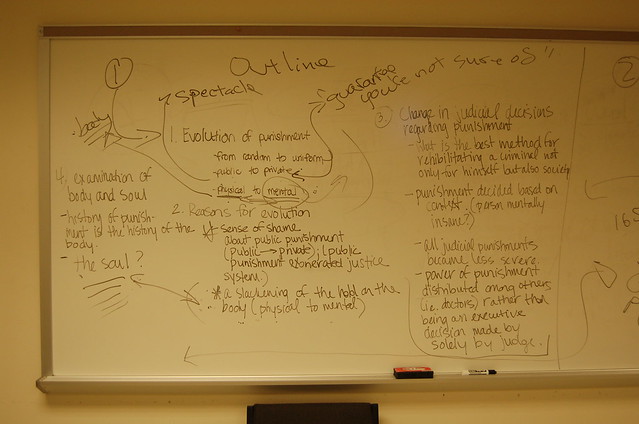
The other day I got a comment on a post from 2007 about teaching Foucault’s Discipline and Punish. It’s over a decade old at this point, and it’s interesting to me because it marks a moment when I was knee deep in getting WordPress Multiuser running for all of UMW—what would three short months later be the roll out of UMW Blogs. This class was an early experiment with teaching on top of WordPress for me, and it was a lot of fun. I enjoy teaching early American literature courses tremendously (though it has been a long while, this may have been my last), and this was effectively a graduate level course focused on crime narratives from the 17th and 18th centuries that I unleashed on unwitting UMW undergrads. The class in particular I blogged about shared an assignment wherein I had students take the first 20-30 minutes of class and frame their idea of the first chapter of Discipline and Punish collectively, then map it on the board.
[At this point during the writing of this post I lost a couple of hours to finding out why the Faculty Academy site (which I discovered was broken thanks to a link in my 2007 post) was not resolving. That’s now fixed, more on that anon  ]
]
The exercise built on their regularly blogged reflections on the reading, and it went pretty well. In fact, I was excited enough to blog about it in a fairly self-satisfied manner. What I probably did not expect at the time was that ten years later other folks teaching Discipline and Punish would find and use this post as an inspiration for their own course. That’s pretty cool. Last summer, Sam H. commented on the post that he had experimented with this approach and had some success:
I just used a modified version of this format to teach selections from Discipline and Punish, and it was amazing! Rather than ask my students to outline the argument, I asked them to (1) conceptualize disciplinary power, (2) describe the panopticon and explain it’s significance to Foucault’s argument, and (3) conceptualize docile bodies. I was planning to leave the room, but I chickened out (**what if they all just left?!**), and ended up pacing around the room reading my copy of the text as my students worked their way through their own. I had them work in groups of 5-6 rather than as a class and it was so fun listening to them read passages to one another and try to understand them.
They wrote all kinds of fascinating quotations on the board under the corresponding questions. (I had to push the first group to go up and write, but after that the flood gates really opened; there was even a line of students waiting to write on the board!) They brought up most of my “go to” passages in the text all on their own.
Thanks so much for this post. It truly generated a meaningful class for my students and myself and I’ll certainly remember it for a long time.
The just a few days ago, and the reason I am writing this post, Kate Lechter commented to let me know she had used the approach with her Intro to Lit class, and it seemed to go well:
Taught this today as a theoretical intro to a lit class focused on crime and punishment, using your suggestion of letting the students outline. It went really well! Thanks for making this public and talking about your approach.
It may very well be that folks that tried it and things went horribly wrong will not leave a comment, but luckily I don’t care about them What I remain fascinated and inspired by is that when you document your process and share your work more times than not it comes back to you in the form of reaffirmation and gratitude. Documenting my work on this blog has basically defined my career. There is no way I would have remembered this assignment, no less gotten kudos from strangers more than a decade later, if I hadn’t taken the time to blog it. I am increasingly convinced that blogging is a long-term investment in your soul, and this is the most recent dividend.


Technology is continually providing us with new ways to create and publish stories. For these stories to achieve their full impact, it requires that the tools to deploy them become accessible and easy to use.
That’s one of the reasons why Mozilla has worked to develop A-Frame, a framework that makes it easy for anyone to build virtual reality experiences for the web.
Emblematic Group, founded by virtual reality pioneer Nonny de la Peña, is committed to using emerging technologies to tell important and overlooked stories, creating immersive experiences that address impactful social issues. Their most recent breakthrough project, Mother Nature, uses A-Frame, democratizing the process and allowing users to tell their own stories in WebVR.
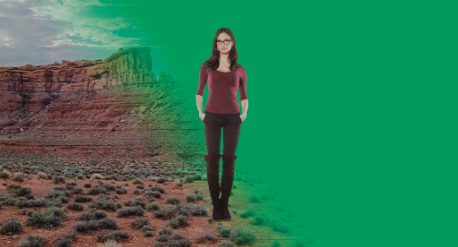
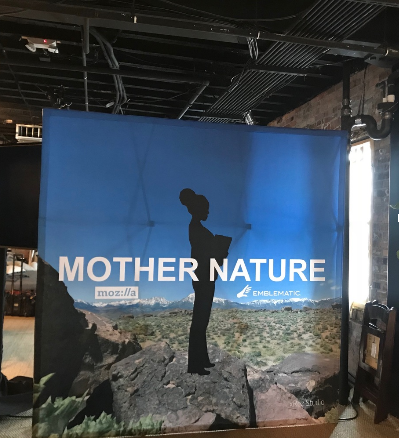
Mother Nature is a traveling installation that invites people to rebuke claims that women are underrepresented in tech leadership and engineering roles due to ‘clear biological causes’ and seeks to give female engineers, leaders, technologists and creators a platform and voice. While working on this project, the Emblematic team was able to collaborate with Mozilla to build a new platform that utilizes A-frame to tell stories easily and quickly.
“What used to take us weeks, now only takes us minutes,” explained de la Peña, as she shared how A-Frame has changed the way she and her team create and deliver content.
As de la Peña elaborated, most journalism organizations don’t have the money to hire all the software developers needed to create VR experiences. A-Frame allows these organizations to bring their vision to life in a way that is easier, faster, and cheaper. It cuts out lengthy post-production work that can take weeks and typically requires highly sophisticated computer programming. This development is an important step in bringing new voices into virtual reality.
Looking forward, Emblematic aims to create REACH, an open-source toolkit for creating and sharing stories that use high-resolution photograms as backgrounds. With an initial focus on journalism funded by a grant from the Knight Foundation, Emblematic is working with the Online News Association to source and capture newsworthy locations and to support digital journalists eager to benefit from the unique capabilities of this new platform. From places like the Tijuana border to Greenland to the Supreme Court, storytellers will be able to bring their own pressing stories straight into the browser for high fidelity virtual reality in a way that previously was too costly for most newsrooms. The eventual goal is for any user with a mobile phone to be able to create and publish experiences that lets users walk around inside the story.
Learn more about Nonny de la Pena and follow the Emblematic Group by visiting their website.
Learn more about how to get started with A-Frame by visiting the official website.
The post Mozilla Empowers Journalists with the Power of A-Frame appeared first on The Mozilla Blog.
As we gear up to celebrate the tenth anniversary of International Data Privacy Day on January 28, we want to highlight Mozilla’s efforts to create awareness and help protect your personal information.
As champions of a healthy and safer internet, we don’t care about your privacy just one day a year. Every day is data privacy day for us. And we don’t mean this as a gimmick. Mozilla isn’t your average tech company. We are a not-for-profit dedicated to keeping the web open and accessible to all. Privacy and safeguarding your personal data is the core of our mission. And of our products. Firefox Quantum and everything else we do from policy to advocacy or fun social media activities are rooted in that principle.
To learn more about what we do and what you can do to protect your privacy here are some events and tips.
Today, Mozilla will be participating in the U.S. National Cyber Security Alliance Privacy Aware event, to talk more about how to respect privacy, safeguard data and enable trust. You can watch the event here, where I’ll give an update on my recent TEDx talk about the problem with online privacy and the importance of taking control of our online lives.
We continue to work on policies that support privacy around the world: advocating for what India’s first data protection law should look like, helping guide the ePrivacy Regulation in the EU, and working to ensure that the U.S. government collaborates with companies to protect your data from bad actors.
Earlier this week, we released the latest version of Firefox Quantum which includes opt-in Tracking Protection. We’ve studied Tracking Protection and found that, in addition to protecting their privacy, users actually have a better, faster experience with the web when pages load without trackers. That is why in November we upped the ante in Firefox Quantum and began offering our users the option to turn on Tracking Protection all the time. 24-7.
Mozilla is a proud partner of Tactical Tech, whose Data Detox will help you remove any toxic data build up. It’s an 8-day cleanse, and with just a small daily time commitment, you finish feeling refreshed and rejuvenated online and IRL. The detox is was an integral part of the Glass Room, an interactive exhibition that highlights people’s relationship with the Internet.
To help bring the important issues of data security and privacy to a general audience, on Friday, January 26, we’re also celebrating Peanut Brittle Day. Just like you shouldn’t use the same amount of all the ingredients, you shouldn’t use the same password for all your sites. How do you keep track off all your different passwords? Join our team as they talk safety and security online while making Peanut Brittle for a one of a kind live stream.
The post Celebrating the tenth anniversary of International Data Privacy Day appeared first on The Mozilla Blog.
Paweł Zadrożniak: Cover of Imperial March by computer hardware orchestra. (YouTube, 1:50min) The sober title doesn’t do the music justice.
Here’s how Paweł Zadrożniak built his “orchestra”: Return of the Floppies. He has videos of dozens and dozens of songs, the most recent is Africa by Toto.
Link via MetaFilter.
Time for another look at what’s new and interesting in the #rstats world with the help of Peter Meissner’s (@marvin_dpr) crossword.r .
.
The answers to last week’s puzzle have been posted (it seemed to make more sense posting the answers a week later vs the Monday after).
There is a dedicated category — puzzler — to make it easier to find these later on, all in one place. That category also has it’s own RSS feed.
mkalus
shared this story
from  Das Kraftfuttermischwerk. Das Kraftfuttermischwerk.
|
Kommt so hin, denke ich.
— Finja (@finja_f) January 24, 2018
(Direktlink, via FerSehErsatz)
mkalus
shared this story
from  Radfahren in Stuttgart. Radfahren in Stuttgart.
|


 |
| OpenStreetMaps |


An iPhone SE wouldn’t do. There were no DTEK50s left in Canada. And it was January, 2018.
Our Z10s were five years old. Happy Birthday.
I was frustrated. I had been researching how to solve the Phone Problem for about nine months. Over the past month and a half of concerted effort I had twice tried to buy new phones and get them to work. And I had twice failed.
Defeated, I gave up trying to game the system and reluctantly worked within it. I signed up for a two-year plan. I ordered a “0$” phone. I ordered us Samsung Galaxy A5s.
Not sure you’ve heard of those? Me neither. The trademark soup of Android phone names hasn’t improved in the decade since its release.
In this particular case you might not have heard of it because it wasn’t originally supposed to show up in North America. It was going to target EMEA and LatAm only… but then some Canadian carriers made it worth Samsung’s while to bring it to the Great White North.
So how is it. It is a tidy little phone with just enough nods to the now-past (SD Card slot, headphone jack), and just enough gee whiz features (fingerprint sensor for unlock, Always On OLED screen, USB Type-C connector) to bridge our way out of BlackBerry Land.
BBM Groups works, but notification settings are a joke. The Hub is here, but it is a pale shadow of its always-available BB10 edition.
I’ve managed to find a way to install the Android edition of the BlackBerry keyboard. It is familiar enough that I’ve composed all three of these voluminous posts about phones on it. It is strange enough in the details that I still can’t get capitalization correct all of the time.
It makes a difference to me that Samsung is trying to compete with Google in enough ways that many things don’t have to default to data collection. We’re still deep in the belly of the beast, but there are holes that I can see sunlight through so long as I can find the right settings to turn off.
It has enough nice touches that make me think that maybe the Samsung devs care about their phones as much as I care about the ones which bear my code. Like how, when it’s dark, the screen fades into brightness slower than when it’s light out. There’s also all these little false-starts on the phone as well that suggests investment in the R part of R&D, like swiping the phone with the edge of your hand to screenshot. I’d never do that, and have turned it off, but you have to try things to find things that work.
Also, I’ve found a replacement for BlackBerry Blend. It has its quirks, but so did Blend, and I’m looking forward to bending it to my will.
In short, it’s a mixed bag of features poured into a big slab of glass. It’ll do. Since it has to.
So that’s that. We have now left the land of Products of Five Years Past. It is a strange world, but it’s one with Firefox in it, so it can’t be all bad, right?
I hope you’ve found these rambling diatribes of Old Man Yelling at Phone to be entertaining, educating, or at least diverting.
Here’s to having to not have to do this for another five years! (he says, ignoring a creeping sense of dread)
The full title is L’amour est un oiseau rebelle (“Love’s a rebel bird”), a big soprano aria from Carmen, written by Georges Bizet in 1875. That’s right, an opera! We’re into scary territory here, at risk of chasing away followers of this quixotic New Year’s Resolution. But bear with me, it’s quite a song.
No, I’m not really an opera fan. It has problems: pretentiousness, a lot of the music is lame, it encourages a hard vibrato-heavy voice that usually repels me, the male singers bellow, and they care way too much about the costumes. But, I go see them sometimes; Lauren and I subscribed to the Vancouver Opera for a few years, and really enjoyed it. First of all, those vocal styles sound way better unamplified in a big space than they do on your radio speakers. And fact, on those remaining occasions when opera is performed completely without any amplification help, it’s a rare experience — music at a huge scale with no electricity involved. The construction of the sound is done in real time by a hundred performers, powered only by talent and a whole lot of practice; no mixing board!. No home stereo you’ve ever heard can come close to what live opera sounds like.
And the whole costumes-and-pearls thing is just part of opera being big; it’s presented on a big stage with a big orchestra and big chorus and big stars singing big songs. There’s nothing small about it, and once again, when you’re actually in the audience looking at them, the elaborate costumes and sets and so on make perfect sense.


Screen grabs from the Rinat Shaham video linked below.
That’s if the music is good. Of those I saw as a subscriber, at least a third were tuneless trash, another bunch were OK, and then there were one or two that were so intense and beautiful they left me dazed for days. Also, I confess to having cried like a baby in a tragic part of La bohème.
Anyhow, now that we’re past the lengthy apologetic prelude, let’s get to the song. Bear in mind that in its heyday when the famous operas were being written, this was pop music. Your show got to run a long time and make you real money if it had songs that got the toes tappin’ and went through people’s minds while they were walking to work. Most operas, if they’re lucky have one. Carmen has two, Habanera and the Toreador Song. If you go see Carmen, I guarantee you’ll find one of ’em playing in your head while you brush your teeth the next morning. Despite that, the opera had a rough launch because it was way too gritty and realistic.
I picked the Habanera because, along with having one of the catchiest tunes ever written it gives the soprano the most scope to max out the drama and fun and sex; this is the joyful part of the story before it turns all dark and deathly. It’s worth noting that Carmen is a heroine for our times; sex-positive and strong. Then she gets murdered by a jealous asshole. Which is also highly relevant in 2018.
This is part of the Song of the Day series (background).
The Baltsa/Carreras/Karajan version on Spotify, Amazon, and iTunes.
To be honest I basically never listen to opera recordings, except for sometimes I’ll tune into the NY Met show on Saturdays, and if something really juicy is playing I’ll roll down the windows and max out the volume, just to create an atmosphere on the street and savor the pedestrians’ eye-rolls.
But, here are three live video performances; since the song is under five minutes, you ought to sample one or two and see if your mind gets expanded.
Let’s award prizes! First, best acting and use of a cigar: Anne Sofie von Otter. Next, best music: Agnes Baltsa, who shows you can take the volume down while adding intensity. Finally, most sex: Rinat Shaham. I’m serious, cover the children’s eyes or you’ll have to explain what she’s doing with that rose and the gentleman’s trousers. The pictures above are outtakes from the video with Ms Shaham, with with whom I feel a relationship because she had the role when I saw Carmen. She’s a fine soprano, but I can’t find a recording that captures what took my breath away there in the hall: Her lower register, unusual in a soprano and just huge, you could feel the air in the hall shuddering on her low notes. Oh, and did I mention sex? Yeah, verges on NSFW. It’s so great to watch a human put out a thousand volts of sex and joy and a million volts of strength and charisma.
In front of the main window of North Van’s new Polygon Gallery.

Or maybe that is the art.
mkalus
shared this story
from  Ulysses Blog. Ulysses Blog.
|
David is a teacher and administrator of his school’s science department, currently based on Long Island, New York. In his opinion, reflective practice is crucial for any educator; writing is his way to do it. Ulysses is not only his chosen tool for this but also helps him save time with his administrative chores.
Please tell us something about you and what you are working on.

I’m an educator currently based on Long Island in New York. After 12 years as a teacher, I became the administrator in charge of the department I taught with during September of 2016. Next year, I’m moving back into the classroom and moving with my family to Singapore. Outside of my immediate job responsibilities, I work on a lot of different things related to education more broadly.
Which role does writing play in your life?
Writing is a primary way that I express myself in the larger world. My job requires me to write quite a bit, but outside of the responsibilities that I’m paid for, I write regularly for my blog, and for other professional organizations and associations that I’m a part of.
Which topics do you write about?
When I’m writing for work, I write teacher evaluations, white paper analyses of district initiatives that I’m managing, and the whole variety of administrative communication that is required of a manager. When I’m writing for myself, I write about the interface of technology and education, progressive science education, and the use of systems thinking to improve our understanding of the world and our place in it.
So you’re writing teaching observation scripts. Could you please go into more detail about this? What is the situation like, on which device do you work, and how does Ulysses help you with this task?
When I’m observing a teacher, I need to keep a record of what I see. This script is the central source of evidence that is used when discussing the lesson with the teacher following my observation. It’s a pretty dry document, but it needs to be clear. Ulysses helps with that process a lot. I write my initial script notes using Ulysses on the iPad and then decompress them into something that makes sense for people who aren’t me using Ulysses on macOS. Then I need to send the script over to the teacher and upload it into our staff evaluation system. Ulysses does all of the heavy-lifting in this process as regards formatting scripts for maximum readability and providing it in several formats that are best suited for each step of this process. The markdown syntax saves me a TON of time in formatting different parts of the script (ex. timestamps, dialogue, actions), and the styles let me send it over to teachers in a way that makes the record very clear for them (I use a modified version of the “Color Code” style for this). Our evaluation system needs the script as a text file, so I just export it as a RTF and then copy/paste it in. I imagine the time-savings per observation is probably at least 10 minutes of time that I would spend repetitively formatting and converting the file from other word processors. Multiply this by the 55 observations that I do each year, and the time-savings really start to become apparent.
You also write articles for your own blog. What is it about?
My blog is where I do most of my writing for myself (and readers). With the move to administration, I had moved it to Medium. With the move back to the classroom, and out of the country, I’ve recently moved it back to my personal website. As an educator, reflective practice is crucial. Different teachers do this in different ways. For me, I find that it’s best to do my thinking in public, which is really where the blog comes in. It has always seemed to me that thinking aloud is really the only way that you can get your thinking examined, which is a central piece of developing your thoughts over time. A large part of that is communicating as clearly as I can through my writing.

Please describe your blog writing workflow. Where do you work, which tools do you use, and which roles plays Ulysses in it?
I try to write at least one piece a week, sometimes more and (when school isn’t in session) sometimes less. I think “one piece a week” is a manageable goal and keeps me going without risking burnout. Assuming I’m writing one a week, I’ll get it roughed out by Wednesday, edited (usually by letting Grammarly make a pile of suggestions) and queued to post on Thursday, and then posted on Friday. The blog is a mixture of short- and long-form pieces, but for anything of any significance (n>100 words), Ulysses is going to be the first stop. I’m pretty fluent in markdown syntax at this point, and my website’s backend (Squarespace) has markdown baked in, so it’s a clean export-upload for any pieces that I write. I ran the prior iteration of the blog on Medium, which also played really well with Ulysses’ publishing feature.
What do you like best about Ulysses? Do you have a favorite feature?
My favorite thing about Ulysses is that when I use it, it’s really just text on a screen, which is exactly what I want when I’m writing. I put it on “editor-only,” zoom the text in until it’s filling the screen, and go to town. It has just enough formatting options to be useful, and they are not obtrusive like what you see in a more “office-centered” word processor. The export options are great, and it’s not difficult to modify an available style file for things that I need in my own writing life. I also like the fact that Ulysses is omnipresent and seamless in my computing ecosystem. I can start working in iOS and move to macOS without skipping a beat.
Which other tools and productivity apps are you using, and how do they help you?
You’ll find David’s reflections on life as a teacher on his personal blog Knuffke.com. Also, you can follow him on Twitter.
On 12 March the 2018 edition of the Open Belgium Conference takes place in Louvain-la-Neuve. With my company, next to sponsoring the event as a partner, we submitted several proposals in the open call for speakers. The program and speakers have now been announced. I’m pleased that we’ve been invited to give two presentations.
My colleagues Frank and Jochem will talk about a project we’re doing with a regional government and local governments, where together with civil servants from the local governments we talked to farmers, citizens, entrepreneurs and businesses and simply asked them: ‘what do you do’ and ‘how can we help (with our data)’? The process and results and the way this is a novel experience for both civil service and external stakeholders are story worth sharing.
I will be presenting at the very end of the day, talking about the need for and use of creating systematic and detailed inventories of data assets in a government entity. Increasingly open data, personal data protection, information security, and data sovereignty are overlapping topics and efforts, where most government organisations will still treat them as islands. My and my company’s experience from creating data inventories for 6 different Dutch government bodies shows how data inventories can support data governance, embracing privacy, security and openness, all by design.
I’m looking forward to the conference, and meeting up with both familiar faces, and new ones, as well as get a better overview of all that is happening in Belgium concerning open knowledge. If possible I’d like to find some new contacts for collaboration in Belgium, by transplanting some of our methods and processes.

The amount of detail is staggering (and some of the options are debatable), but the key takeaways for me are that:
Even diehard Mac-centered opinion makers have woken up and started smelling the coffee (yes, Marco, I’m looking at you), but I don’t think most people realize how quickly unbiased folk are willing to switch “back” to custom Windows machines provided things work well enough for their intended purpose.

A photo has surfaced of an Acer tablet running Google’s Chrome OS.
The picture was taken by an attendee at the BETT education and technology show in the U.K. ChromeUnboxed originally spotted the tablet, which features an Acer logo on the bottom bezel.
The photo shows what could be the first Chrome OS tablet ever.
Not much is known about the the tablet, though ChromeUnboxed says it features a display that falls between eight and 10 inches. The tablet also includes a Staedtler stylus.
The version of Chrome OS featured in this tablet doesn’t seem to be the same as is what’s found in Chromebook laptops. That’s what makes the leaked device unique — it’s the first tablet ever seen running Google’s Chrome OS.
A few months ago Google’s Rajen Sheth made a statement saying that Google plans to move the Chrome OS into the tablet space.
Alister Payne has since deleted his tweet, though it’s expected we’ll see more of this mysterious tablet at the 2018 Google I/O developer conference in May.
Source: ChromeUnboxed
The post Acer tablet running Chrome OS emerges in leaked image appeared first on MobileSyrup.

Bell has announced all of the new shows that will be streaming on its CraveTV service in February.
Here’s everything coming to the streaming platform in this February:
Counterpart, W5, and The CHi will continue on throughout the month of February.
The post Here’s what’s coming to CraveTV in February appeared first on MobileSyrup.
Yesterday Apple released to developers the first beta of MacOS 10.13.4, and I was delighted to see that support for encoding HEIF images was included (finally). So naturally, and only a few hours later (sorry for the delay), I've got a pre-release version of Acorn which supports it. My new image processing app also supports HEIF, so if you're in need of converting more than a couple of images to this new format, send me a note.
Now a couple of random thoughts.
The UTI and file extension that Preview.app advertises for HEIF is "public.heic" and .heic. HEIF stands for High Efficiency Image File Format, HEIC stands for… HEIF images encoded with the High Efficiency Video Codec (HEVC). So it's short for HEIHEVC I guess? At any rate, it's getting very confusing on my end as to what to call it, so I'm following Preview's lead and files saved out of Acorn get the file extension of .heic for HEIF images.
Then again, HEIF is a container format. It supports HEVC and H.264. Kind of like QuickTime's .mov format. So maybe .heic makes sense after all, because it's not like we have room for 8 bytes associated with the file to give us any more information such as what app to open it in and the format of the file. Instead, we get an extension and magic headers in the file. But I digress.
HEIF supports up to 16 bits per channel! This is super awesome because it means we've got a great image format that not only compresses images better than JPEG, but we can keep our colors accurate when paired with wide gamut color profiles such as Display P3. Goodbye banding! But there's bad news as well. Apple's encoders both on iOS and MacOS only support 8 bits per channel. So that means if you were wanting to convert your RAW images to HEIF but you wanted to keep your color accuracy, you're out of luck for now.
But it's all a step in the right direction.


