Thursday, March 1 – 5:30 pm. Robson at Homer looking west:

Looking east:

Robson may not be a through street on these blocks, but really, hardly a moving car to be seen. Why?
Thursday, March 1 – 5:30 pm. Robson at Homer looking west:
Looking east:
Robson may not be a through street on these blocks, but really, hardly a moving car to be seen. Why?

In the first update since November 2017, Apple today released version 1.7.8 of Workflow, the powerful iOS automation app they acquired last year. The latest version, which is now available on the App Store, introduces a brand new Mask Image action, adds support for Things' automation features, and improves the ability to extract text from PDFs using the company's PDFKit framework, launched in iOS 11. While the unassuming version number may suggest a relatively minor update, Workflow 1.7.8 actually comes with a variety of noteworthy changes for heavy users of the app.
First up is the ability to open specific workflows without running them. While Workflow previously supported URL schemes to either open the app or run an existing workflow, it didn't support opening an individual workflow without starting it. In Workflow 1.7.8, you can now use the workflow://open-workflow?name=WorkflowName URL scheme to create launchers that open existing workflows in the app.
These new URLs are ideal for apps such as Launcher or Launch Center Pro, and I recommend them to create shortcuts for workflows you're frequently editing, or which you want to run only after dropping content into the workflow editor (a feature that was added in version 1.7.7). Speaking of drag and drop: if you're dragging an item and want to use it as input for a workflow, you no longer need to wait for the workflow to spring-load after hovering over it in the main My Workflows view. Just pick up a file and drop it over a workflow to run it – it's faster and feels nicer than the old implementation.
The new Mask Image action is a feature Workflow users have been requesting for several years now; thankfully, Apple's implementation doesn't disappoint, and is poised to dramatically simplify image editing workflows that relied on tedious workarounds to mask images. Workflow's native Mask Image action applies a mask to an image passed as input, cutting it into any shape you want. By default, the action offers three built-in presets: rounded rectangle (with a customizable Corner Radius value), ellipse, and icon.
In addition, you can also provide your own custom alpha mask through an image variable: in my early tests with this feature, I had fun using random images from my photo library as masks and understanding how Workflow treated their brightness as a custom alpha mask. According to the app's documentation, darker colors in the alpha mask become transparent and lighter colors remain opaque; the mask is also resized to match the dimensions of the source image if necessary.

Masking an app's artwork with Workflow's built-in icon shape.
For the past couple of years, here at MacStories we've used our own workflows to mask images in the shape of iOS app icons or rounded profile pictures to be used for interviewees in our newsletters. These workflows required us to make our own squircle alpha masks from scratch and use a handful of actions and calculations with the Overlay Image action to fake the ability to mask an image because Workflow didn't officially support it. We can throw all those workflows away with the new Mask Image action. Turning square artwork returned by the iTunes API (also natively supported in Workflow) into an app icon shape is now as easy as using Mask Image: Icon – that's it.
Here's a three-action workflow I made to search the App Store, pick a result (from a rich list), and generate an iOS icon for the selected app. No more third-party mask images, no more Overlay Image coordinates to be used. You can now create similar workflows for cropping a profile picture to a circle or putting iOS screenshots into device frames. I've been waiting for this action, and I'm happy with Apple's solution.
In a surprise move, Workflow 1.7.8 extends its existing Things integration by supporting the more powerful automation features Cultured Code recently brought to its task manager. The Add Things To-Do action has been updated in this release with new fields based on Things 3.4's URL scheme: you can assign a task to a project or area, specify a heading, enter dates, reminders, and deadlines, and even specify notes and tags. When saving a task in Things, you can choose to show the task editor in Things and manually confirm the new item, or immediately return to Workflow, receiving the task's ID as input text.

The new Things action in Workflow 1.7.8.
There's a common thread between the Mask Image and Add Things To-Do actions: both obviate the need for complex workarounds – whether they involve image overlays or URL schemes – because they're based on visual automation and magic variables. The complexity of the underlying automation is completely abstracted as the user shouldn't have to worry about the details of what goes on under the hood. Both actions make automation more intuitive and accessible, which is exactly what Workflow always set out to achieve.
To give you a practical example, here's what my Things action looked like before today's update, and how Apple made it obsolete with an enhanced built-in action that exposes no URL scheme and doesn't require any date formatting:

The same Things action, before and after Workflow 1.7.8.
Thanks to native Things support, I've already updated my Things Linked workflow (previously detailed here), and I plan to update other workflows previously shared with Club MacStories members as well.
There are a couple of features missing from Apple's Things action I should point out: the reveal option to show a newly created task in Things doesn't seem to be supported yet, and I couldn't find an option to specify checklist items within the task either. The action also doesn't integrate with Things' more advanced JSON capabilities, but that's to be expected given the developer nature of the functionality. Overall, I'm thrilled to see Apple rolling out initial support for Things automation in Workflow as I didn't imagine it would happen so soon.
Lastly, besides dozens of welcome fixes and smaller enhancements (such as the ability to reorder items in dictionaries – finally), Workflow 1.7.8 features a substantially improved PDF-to-text coercion engine, built on top of the PDFKit APIs for iOS 11. In my initial tests with the update, Workflow appears to be extremely accurate in extracting text from PDFs now, correctly preserving line breaks and special characters, and going as far as splitting PDF pages as individual text items in the output – features all made possible by Apple's PDFKit.
Perhaps even more impressively, the performance of Workflow's PDF-to-text conversion is astounding: Apple's iOS Security Guide, a 78-page PDF document, is converted to plain text in 1 second by Workflow on a 2017 iPad Pro. I'm going to have fun thinking of how Workflow can now fit in my paperless workflows and DEVONthink usage. In the meantime, here's a workflow I made to pick a PDF with an iOS 11 file picker (which supports both iCloud Drive and third-party locations), extract its text, and merge multiple pages into a single plain text block.

Extracting text from a PDF loaded from DEVONthink's file provider extension.
As I wrote when Workflow 1.7.7 was released four months ago, I appreciate the fact that, despite an unclear big picture, Apple is still listening to the Workflow community and updating the app with fixes and important new features, such as today's Mask Image and Things actions. The company clearly knows that thousands of users depend on Workflow to make their iOS devices more efficient and productive; as we near the first anniversary of the acquisition with no updates on a possible Workflow 2.0, it's good to see that Apple is still putting in the effort to keep the app alive with new functionalities and native iOS integrations.
I plan to cover the changes in Workflow 1.7.8 over the next few weeks in our dedicated Workflow hub and my iPad Diaries column, as well as Club MacStories. In the meantime, you can download Workflow 1.7.8 from the App Store and read the release notes here.
Club MacStories offers exclusive access to extra MacStories content, delivered every week; it's also a way to support us directly.
Club MacStories will help you discover the best apps for your devices and get the most out of your iPhone, iPad, and Mac. Plus, it's made in Italy.
Join Now
iA Writer for Windows joins the family. You can download it right from the homepage without going through the Windows store. It's also supported on older versions of Windows. Give it a spin. You can try before you buy.
Earlier today, we released Drupal 8.5.0, which ships with improved features for content authors, site builders and developers.
Content authors can benefit from enhanced media support and content moderation workflows. It is now easier to upload, manage and reuse media assets, in addition to moving content between different workflow states (e.g. draft, archived, published, etc).
Drupal 8.5.0 also ships with a Settings Tray module, which improves the experience for site builders. Under the hood, the Settings Tray module uses Drupal 8.5's new off-canvas dialog library; Drupal module developers are encouraged to start using these new features to improve the end-user experience of their modules.
It's also exciting to see additional improvements to Drupal's REST API. With every new release, Drupal continues to extend investments in being an API-first platform, which makes it easier to integrate with JavaScript frameworks, mobile applications, marketing solutions and more.
Finally, Drupal 8.5 also ships with significant improvements for Drupal 7 to Drupal 8 migration. After four years of work, 1,300+ closed issues and contributions from over 570 Drualists, the migrate system's underlying architecture in Drupal 8.5 is fully stable. With the exception of sites with multilingual content, the migration path is now considered stable. Needless to say, this is a significant milestone.
These are just a few of the major highlights. For more details about what is new in Drupal 8.5, please check out the official release announcement and the detailed release notes.
What I'm probably most excited about is the fact that the new Drupal 8 release system is starting to hit its stride. The number of people contributing to Drupal continues to grow and the number of new features scheduled for Drupal 8.6 and beyond is exciting.
In future releases, we plan to add a media library, support for remote media types like YouTube videos, support for content staging, a layout builder, JSON API support, GraphQL support, a React-based administration application and a better out-of-the-box experience for evaluators. While we have made important progress on these features, they are not yet ready for core inclusion and/or production use. The layout builder is available in Drupal 8.5 as an experimental module; you can beta test the layout builder if you are interested in trying it out.
I want to extend a special thank you to the many contributors that helped make Drupal 8.5 possible. Hundreds of people and organizations have contributed to Drupal 8.5. It can be hard to appreciate what you can't see, but behind every bugfix and new feature there are a number of people and organizations that have given their time and resources to contribute back. Thank you!
Imagine you decided to move into sales and on your first day, someone handed you a list of the organization’s top customers and responsibility for the entire CRM system.
No training, no support, no roadmap.
This is pretty close to what happens in community management today. Most people are suddenly handed responsibility for building a community from an organization’s top customers on an advanced technology platform.
Often they have limited training, support, or a detailed roadmap.
At best, this leads to communities failing to reach their potential, getting bogged down in common problems, or unable to show their value.
At worst, it leads to empty ghost towns or pointless casinos (communities with lots of meaningless engagement).
The level of training given to community teams today is abysmal. It’s the root cause of most of the problems you and your team are facing.
It’s important to make continual progress of your community team a priority. Your team, your members, and your organizations deserve better the best. In this post, we’re going to highlight how to benchmark yourself and your current team.
We’re going to identify the skills they need and how you can set reasonable targets for each of them.
We sometimes receive emails asking if one of our courses is right for a participant.
This is a hard question to answer without knowing someone’s ability. Most people don’t know how good they are because they have no benchmarks to measure themselves against. They use the size of their community rather than their own abilities.
We benchmark community professionals along five attributes (adapted from our friends at the community roundtable). These are below:
1) Strategy. This is the ability to develop and execute a community strategy which deploys the organization’s limited resources to maximum impact.
2) Engagement. This is the ability to proactively engage, nurture top members, and build systems to improve the overall participation environment of the community.
3) Content. This is the ability to create original content and drive high-value contributions from other members.
4) Technical. This is the ability to select, implement, and optimize a community platform. This includes resolving technical problems and managing vendor relationships.
5) Business. This is the ability to build allies throughout the organization, measure value, run a community team, and gather more resources for the community.
We break each of these down by four distinct levels ranging from ok to world-class.
You should strive to gradually upgrade yourself and the community team to a world-class level in each of these areas.
This is subjective, but I recommend copying and adapting our benchmarking resource below.
Score each member of staff between 0 to 4 on each of the five attributes.

(right click and ‘save as’ to download)
We’re going to break down each of these levels below:
When benchmarking someone’s strategic abilities, you want to track their journey from thinking strategically to having a codified and invaluable strategy everyone understands and supports. This increasingly relies on research, metrics, and project management skills.
Strategy is about allocating resources to have maximum impact. It’s not about trying to do as many things as possible, but deciding what’s worth doing and allocating maximum resources to ensure success.
Or, to use an analogy, it’s not about dividing resources evenly to fight every battle, but about deciding which battles are worth fighting (see this big wins talk).
The first level is to ensure all staff members are thinking strategically about how they spend their time. Are they constantly using available data to reviewing which activities they undertake are driving results and pursuing those which are most effective?
As your staff progress, you want them to be proactively researching what members want and using that data to improve the community. They should know how their tactics serve a strategy which serves an objective which serves a goal.
At the more advanced level, you want them to become great at segmenting members, ensuring members are making their most valuable contributions, establishing benchmarks, and pursuing reasonable community goals. The strategy should be internalized here throughout the entire community team with modeling of different inputs to achieve goals.
Engagement skills are the core abilities of the community team to create the perfect environment for every member to make their best possible contribution to the community.
This begins at the lower levels with being a terrific community member.
Do your community staff resolve and escalate problems well?
Can they remove the bad material quickly?
Do they build positive relationships with community members?
As they move up the chain, they should focus on building systems which build a powerful sense of community and nurture superusers among the group. They should get better at building and optimizing the journey which turns newcomers into regular, active, members.
At the highest levels, you and your team need to be able to improve the resolution rates, address legal/brand issues, and ensure all staff know how best to engage members in the community.
Content is one of the areas where everyone considers themselves an expert (aren’t you a great writer?). Content is essentially the ability to develop and facilitate the creation of valuable long-form educational or entertaining content across blogs, webinars, videos etc…
At the simpler levels, all members of your team should be able to synthesize great content from existing work and member contributions. This should be nicely designed and implemented across multiple platforms.
As you improve, you should be able to optimize web copy and improve conversion rates, increase search traffic, and build an editorial calendar. This requires reasonable copywriting and SEO abilities.
At the higher levels, your team should be able to ensure an editorial calendar is adhered to (surprisingly hard), develop automation campaigns, edit contributions of other members and persuade top experts to create great content for your community.
Finally, a great community professional should be able to commission ‘big win’ content projects (e.g. our platform selection tool) which goes far beyond a simple blog post or video. It brings in a unique, viral, idea to attract great search traffic, and has a unique design/development.
Far too many people in this field profess to ‘not being technical’. This isn’t good enough when your entire work depends upon being adept at managing a technology platform and what happens within it.
At the basic level, this requires knowing how the features of the platform work and being able to diagnose any potential problems which arise. Your staff should be able to learn this by testing things, experimenting in the community, and asking around in the vendor’s relevant communities.
Beyond this, you need your team to be able to resolve most issues independently, run SQL queries to get the data you need and make improvements to the structure and design of the community without help. This kind of knowledge is best gained through peer support.
As you reach the more advanced level, you want to know more about the platform environment, using data to improve the speed and functionality of the platform, and using the best features from any third party platforms to build the best community possible.
Finally, you want to be able to take responsibility for the entire vendor process and address legal/privacy/security issues which can arise.
Business skills are the link between the community and the organization. This is about you being able to make the community indispensable to the organization. This begins with knowing how the community is supposed to help the business and the resources available to develop that community.
As you get better, you should become more adept at acquiring more resources by building a strong internal narrative and persuasively winning over any skeptics and key stakeholders within the organization.
Finally, this evolves into being able to attract and retain world-class community talent, build career maps, and build a community-first culture among the organization. The very best people I know have a pipeline of people eager to work for them. This doesn’t happen by accident, it happens by doing what one friend calls ‘building pipe’, constantly showing up, making connections, and knowing what talent you’re looking out for.
Now you have your benchmarks, you can begin to set reasonable targets of improvement for each member of your team.
A reasonable level of progress is an increase in 1 level (of 1 attribute ) every 2 to 3 months at the first two levels and usually 3 to 6 months at the upper levels.
This gives your team a clear focus and lets you build a roadmap of what you expect over 6 to 12 months. This, in turn, lets you identify what kind of support you need to provide the community team to help them reach each level.
Courses aren’t the only method of improving your community team or improving your own abilities. There are multiple channels available here, each can work in different situations.
This is a process that never ends. The goal is to set benchmarks, track progress, and push for ongoing, non-stop, improvement from every member of the community team. Set a skills roadmap for every person you work with and compel both of you to review it every 3 months.
Good luck!
- commissions on traditional media usually run the in the 3% range... Prof. Ritson concludes...
- commissions on digital media run in the 7-10% range
- because of automation, digital media are no longer any more difficult or time consuming to buy than traditional media
- agencies often set digital media buying quotas for media buyers to meet
"...let's also accept something that no one in the industry wants to talk about: that digital media gets a much greater share of the pie than news media (print) because it is more profitable for the agencies that recommend it."
"...The simple marginal profit that agencies make from digital media is almost triple what they would get from channeling the money to news media."As I said in my Type A Group Newsletter last week, Prof. Ritson is too wise and prudent to make outright accusations. I'm not. There is no doubt in my mind that to some agencies "digital first" is just code for "me first."


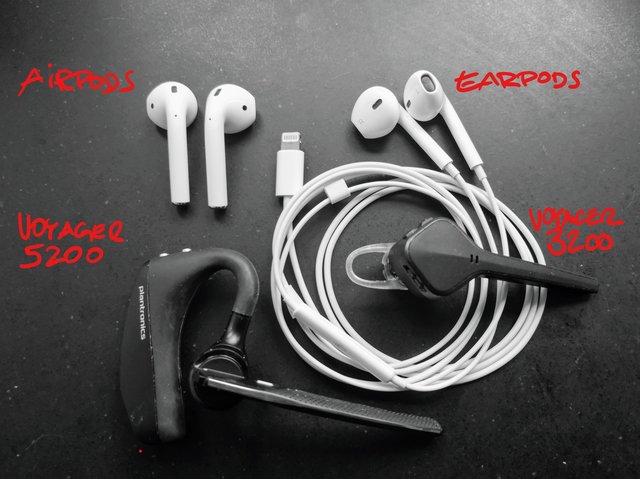
Die meisten Menschen machen sich wenig Gedanken darüber, wie sie in Telefonkonferenzen auf der anderen Seite ankommen. Und das hängt ganz wesentlich vom Mikrofon ab. Also habe ich mal einen kleinen Test gemacht. Anlass war ein Austausch mit unserem Videohannes, der mir erklärt hat, wie er Schaltungen mit Leuten macht, die nicht im Studio sind. (Hier nicht wichtig, aber er nimmt Skype.)
Dies ist eine Aufnahme mit Voice Memos auf dem iPhone. In der Reihenfolge mit folgenden Headsets: Appe EarPods, Apple AirPods, Plantronics Voyager 3200/Edge, Plantronics Voyager 5200, und wieder Apple EarPods.
Überraschend für viele sicher, wie schlecht die AirPods klingen. Zum Hören sind sie wirklich angenehm, aber zum Aufnehmen taugen sie weniger als alle anderen Alternativen. Und ich denke, man erkennt auch, was man mit dem Voyager 5200 gewinnt, auch wenn das etwas klobiger wirkt.
Was hier gar nicht berücksichtigt ist: Die Plantronics unterdrücken Umgebungsgeräusche zuverlässig. Man hört beim 5200 nicht einmal den Fahrtwind, der beim Radfahren das Mikrofon anpustet. Da wären die EarPods völlig verloren.
vowe's choice: Wenn es drahtlos und gut sein soll, vor allem in lauter Umgebung: Voyager 5200 UC. Ohne UC ist das dreißig Euro billiger, hat aber weder die Ladeschale noch den USB-Adapter für PC oder Mac. Beides will man aber haben. Alternativ und genauso guter Klang: Voyager Focus.

Neural networks can feel like a black box, because, well, for most people they are. Supply input and a computer spits out results. The trouble with not understanding what goes on under the hood is that it’s hard to improve on what we know. It’s also a problem when someone uses the tech for malicious purposes, as people are prone to do.
So, folks from Google Brain break down the structures of what makes these things work.
Tags: Google, neural network
A few years ago, Ray Corrigan suggested to me that the “surveillance state” would most likely be manifest through the everyday mundane actions of petty bureaucrats and administrators, as well as the occasional bitter petty-Hitler having a bad day.
Ray has a systems background, and systems theories were one of my early passions (I started reading General Systems Theory books whilst still at school), so I suspect we both tend to see things from a variety of systems perspectives.
This means that we see the everyday drip, drip, drip of new technologies, whether electronic, digital or legal (because I take legal and contractual systems to be technologies too) not as independent initiatives but as potential components of a wider system that allows these apparently innocuous separate components to be combined or composed together to create something new.
(Inventing a new thing in and of itself is not that interesting. There are many more opportunities for combining things that already exist in new ways than there are for inventing new things”out of nowhere”.)
For example, today a news story has been doing the rounds repeating claims that the DWP are requesting video surveillance materials from leisure centres as part of fraud investigations [DWP: No denial of blanket harvesting of CCTV or Fake-Friending of Disabled People]. It is clear that the DWP do make use of video surveillance footage (just do a news search on disability DWP video) but not the extent to which they do or are legally allowed to request footage from third parties.
The story reminded me about some digging I did a few years ago around DWP using the opportunity of police roadside traffic checks for fraud trawling [All I Did Was Go to a Carol Service…]. It’s maybe worth revisiting that, and updating it with examples relating to requests for video surveillance footage.
What’s notable, perhaps, is the way in which laws are written that afford enforcers a legal basis for some activity that, when the law is originally written, is apparently innocuous, and only offensive to creeped out paranoid science fiction activists imagining what the application of the law might mean, whilst at the same time lighting up the eyes of techies who see the law as an enabler of a particular, technologically mediated action that could be “really cool”.
“Cool, we could use smartphone fingerprint readers for handheld fingerprint checks anywhere and it’d be really cool…” Etc.
Which is not totally science fiction. Because if you recall, UK police started using handheld fingerprint readers for identification purposes as part of “everyday” stop and search activities earlier this year [Police in West Yorkshire can now use mobile phones to check your fingerprints on the spot] . You can read a Home Office press release about the trial here: Police trial new Home Office mobile fingerprint technology.
Amidst the five minute flurry of reactionary “this is not acceptable behaviour” tweets, Andrew Keogh pointed out that [t]his isn’t new law, it has been on the Statute Book for some time, arising from an update to the Police and Criminal Evidence Act, 1984 (PACE) by the Serious Organised Crime and Police Act 2005. My naive reading of that amendment is that the phrases “A constable may take a person’s fingerprints without the appropriate consent” and “Fingerprints taken … may be checked against other fingerprints to which the person seeking to check has access” put in place the legal basis for procedures that are perhaps only now becoming possible through the widespread availability of handheld, networked devices.
One wonders how much other law is already in-place that a creative administrator or bureaucrat might pick up on and “reimagine” using some newly available technology.
At the same time that legislation might incorporate “sleeper” clauses that can be powerfully invoked or enabled through the availability of new technologies, the law also fails to keep up with the behaviour of the large web companies (that were once small web companies).
I was never convinced by Google’s creative interpretations of copyright law on the one hand, or its “we’re a platform not a media company” mantra (often combined with US constitutional “free speech” get out clauses). It will be interesting to see which one they deploy against the AgeID requirements for viewing online pornography in the UK which is to be regulated by the BBFC (background: DCMS Age Verification for pornographic material online impact assessment, 2016 as well as the current UK gov Internet Safety Strategy activity). Because Google and Bing are, of course, pr0n search engines with content preview availability.
On the topic of identity creep, another government initiative announced some time ago (Voter ID pilot to launch in local elections [Sept 2017] had a more formal announcement earlier this week: Voter ID pilot schemes – May, 2018. For a reaction that summarises my own feelings, see eg James Ball, Electoral fraud is incredibly rare. The Tories’ ID trial is an unsavoury attempt at voter suppression. When you take the time out to go and vote, just remember to take your ID with you. And if you need to get some ID, make sure you do it well in advance of the election day on which you’ll need it.
As with many technologically led, “digital first” initiatives, an anti-pattern approach loved by certain public bodies as a way of making services inaccessible to those most likely to either require them or benefit from them, I can’t help get the feeling that technology is increasingly seen by those who know how to use it as an instrument for abuse, rather than as an enabler. Which really sucks.

Bud Hunt,
Bud the Teacher,
Mar 11, 2018

Nice post from Bud Hunt on his experiences during a student protest against guns. "It’s easy for me to forget, in the humdrum of spreadsheets and TPS reports and invoices and administrivia, that there are real fights to fight, and real struggles of the head and heart and hands that require my, and many others’ attention," he writes. "I hope you’re finding ways, even really little ways, to practice being brave and strong and true. Not only will they make the world a better place – but they’ll make you stronger for the next struggle that’ll need the best you can bring."
Web: [Direct Link] [This Post]This week, as part of the Serbian open data week, I participated in a panel discussion, talking about international developments and experiences. A first round of comments was about general open data developments, the second round was focused on how all of that plays out on the level of local governments. This is one part of a multi-posting overview of my speaking notes.
To use local open data effectively it may well mean that specific types of local data need to be available for an entire country or at least a region. Where e.g. real time parking data is useful even if it exists just for one city, for other data the interest lies in being able to make comparisons. Local spending data is much more interesting if you can compare with similar sized cities, or across all local communities. Similarly public transport data gains in usefulness if it also shows the connection with regional or national public transport. For other topics like performance metrics, maintenance, quality of public service this is true as well.
This is why in the Netherlands you see various regional initiatives where local governments join forces to provide data across a wider geographic area. In Fryslan the province, capital city of the province and the regional archive collaborate on providing one data platform, and are inviting other local governments to join. Similarly in Utrecht, North-Holland and Flevoland regional and local authorities have been collaborating in their open data efforts. For certain types of data, e.g. the real estate valuations that are used to decide local taxes, the data is combined into a national platform.
Seen from a developer’s perspective this is often true as well: if I want to build a city app that incorporates many different topics and thus data, local data is fine on its own. If I want to build something that is topic specific, e.g. finding the nearest playground, or the quality of local schools, then being able to scale it to national level may well be needed to make the application a viable proposition, regardless of the fact that the users of such an application are all only interested in one locality.
A different way of this national-local interaction is also visible. Several local governments are providing local subsets of national data sets on their own platforms, so it can be found and adopted more easily by locally interested stakeholders. An example would be for a local government to take the subset of the Dutch national address and buildings database, pertaining to their own jurisdiction only. This large data source is already open and contains addresses, and also the exact shapes of all buildings. This is likely to be very useful on a local level, and by providing a ready-to-use local subset local government saves potential local users the effort of finding their way in the enormous national data source. In that way they make local re-use more likely.
This week, as part of the Serbian open data week, I participated in a panel discussion, talking about international developments and experiences. A first round of comments was about general open data developments, the second round was focused on how all of that plays out on the level of local governments. This is one part of a multi-posting overview of my speaking notes.
As local governments are responsible for our immediate living environment, they are also the ones most confronted with the rise in citizen generated data, and the increase in the use of sensors in our surroundings.
Where citizens generate data this can be both a clash as well as an addition to professional work with data.
A clash in the sense that citizen measurements may provide a counter argument to government positions. That the handful of sensors a local government might employ show that noise levels are within regulations, does not necessarily mean that people don’t subjectively or objectively experience it quite differently and bring the data to support their arguments.
An addition in the sense that sometimes authorities cannot measure something within accepted professional standards. The Dutch institute for environment and the Dutch meteo-office don’t measure temperatures in cities because there is no way to calibrate them (as too many factors, like heat radiance of buildings are in play). When citizens measure those temperatures and there’s a large enough number of those sensors, then trends and patterns in those measurements are however of interest to those government institutions. The exact individual measurements are still of uncertain quality, but the relative shifts are a new layer of insight. With the decreasing prices of sensors and hardware needed to collect data there will be more topics for which citizen generated data will come into existence. The Measure Your City project in my home town, for which I have an Arduino-based sensor kit in my garden is an example.
There’s a lot of potential for valuable usage of sensor data in our immediate living environment, whether citizen generated or by corporations or local government. It does mean though that local governments need to become much more aware than currently of the (unintended) consequences these projects may have. Local government needs to be extremely clear on their own different roles in this context. They are the rule-setter, the one to safeguard our public spaces, the instigator or user, and any or all of those at the same time. It needs an acute awareness of how to translate that into the way local government enters into contracts, sets limits, collaborates, and provides transparency about what exactly is happening in our shared public spaces. A recent article in the Guardian on the ‘living laboratories’ using sensor data in Dutch cities such as Utrecht, Eindhoven, Enschede and Assen shines a clear light on the type of ethical, legal and technical awareness needed. My company has recently created a design and thinking tool (in Dutch) for local governments to balance these various roles and responsibilities. This ties back to my previous point of local governments not being data professionals, and is a lack of expertise that needs to addressed.
2017 was a great year for Mozilla. From new and revitalized product releases across our expanding portfolio to significant progress in advocating for and advancing the open web with new capabilities and approaches, to ramping up support for our allies in the broader community, to establishing new strategic partnerships with global search providers — we now have a much stronger foundation from which we can grow our impact in the world.
Building on this momentum, we are making two important changes to our leadership team to ensure we’re positioned for even greater impact in the years to come. I’m pleased to announce that Denelle Dixon has been promoted to Chief Operating Officer and Mark Mayo has been promoted to Chief Product Officer.
As Chief Operating Officer, Denelle will be responsible for our overall operating business leading the strategic and operational teams that work across Mozilla to ensure we’re scaling our impact as a robust open source organization. Aligning these groups under Denelle’s leadership will ensure a holistic approach to business growth, development and operating efficiency by integrating the best of commercial and open innovation practices across all that we do.
As Chief Product Officer, Mark will oversee existing and new product development as we deepen and expand our product portfolio. In his new role, Mark will oversee Firefox, Pocket, and our Emerging Markets teams. Having all our product groups in one organization means we can more effectively execute against a single, clear vision and roadmap to ultimately give people more agency in every part of their connected lives.
Our mission is more important and urgent than ever, our goals are ambitious and I’m confident that together we will achieve them.
The post Setting the stage for our next chapter appeared first on The Mozilla Blog.
This was composed by Chris Smither (no, I’d never heard of him either) but was a hit for, and is now sort of a trademark of, Bonnie Raitt. Bonnie’s recorded a lot of good music over the years, but the thing with her is you need to see her play live, it’s at another level entirely.

Bonnie is a tuneful, convincing, loud blues singer (listen to Love Me Like a Man, for example), and is also a dazzling guitarist. In particular she has this gritty, textured slide-guitar tone that absolutely nobody else gets. This was brought home to me one time when I was at a concert and the opening act was led by her band’s keyboard player, and they weren’t bad at all, funk and soul and energy. But Bonnie came on to play their last tune, just played along on guitar in the band, and all of a sudden it was like they turned the volume up to eleven, there was this huge growling beast lurking in the center of the band’s sound.
But on Love Me Like A Man, she normally drops the slide and fingerpicks her breaks, which don’t have the raw intensity but are really just awfully graceful.
I have another connection with Ms Raitt. In 1989 I wrote a “benchmark”, a computer program which exists to test how fast computers can do a particular task — in this case, reading and writing data to and from files on disk. Because this kind of program exists to find bottlenecks in computer systems, and because Bonnie is so great with a bottleneck guitar, I called the program Bonnie, and people are still running it.
Now as for the words… are we into dangerous territory here? There is a breed of male songwriters who might have gotten themselves deep into the sexist weeds starting with a title like this. (And in fact, the original title was “Love Her Like a Man”). No, I don’t believe so at all; but give it a listen and see what you think.
This is part of the Song of the Day series (background).
Spotify playlist. This tune on Spotify, iTunes, Amazon. Now for a live-video treat: First, very young at Austin City Limits, then a much more grown-up version; you wouldn’t want to miss either. Listen to those guitar breaks!
 It’s a given in writing circles that there are only a small number of basic plots; the miracle of human storytelling is how many unique tales have been wrought from that basic ore.
Storytelling has become a lens in better understanding the organizations that we belong to and interact with. I think we’ve construed story too narrowly in organizations. Oddly enough, we’ve done so by ignoring the social dimensions of story.
Our first images of story conjure Homer declaiming to the audience gathered by the fire. But we quickly enlisted others to bring stories to fuller life and drama arrived. Through the usual concatenation of circumstance, fortuitous moments, and basic temperament I found my way into that world. A degree of shyness and curiosity about how things—as opposed to people—worked led to a shadow career behind the scenes.
I was fortunate that my early history involved producing original works within a tradition rich environment. What that meant was that you started without a script or even a title but opening night was fixed. Some of those involved had been through the experience the year before and the year before that. Others of us had no clue. All of us knew that the institution had been pulling off the equivalent trick since 1891. There are things you can accomplish before the script is finished. On the other hand, it’s hard to build a set before you’ve designed it and you can’t design it without an inkling of what the show will be about.
From the outside, this looks like chaos. Parts of it are. Traditions and history assure you that the curtain will go up on opening night. Tradition also assures that you will lose sleep along the way. I couldn’t see it at the time but I was learning how innovation and organization worked. More specifically, I was learning about innovation as collaborative story-making and about the interplay linking technology constraints and opportunities with artistic or strategic vision.
Viewed from the audience, performance is about actors, their lines, and their interactions. Sets, lights, and costumes may be visible, may attract some fleeting attention, yet fade into the background. The massive efforts going on behind the scenes to create the context within which the performance plays out only become apparent when something malfunctions.
This creative fulcrum, where content and context are brought together, is the most interesting place to stand. Those who can learn to look in both directions—to play with both content and context—have more degrees of innovation freedom than those who limit their gaze. Learning to look both ways, however, is a very hard thing to do.
What makes it hard is that the tribes who come together to create a shared creative outcome come from very different traditions and mindsets. Pursuing excellence within any one aspect of production means settling for mediocrity in others. Working across tribes demands an ability to speak multiple languages with competence at the expense of eloquence in a single tongue.
The particular conversational bridge that draws my attention today is the contribution that changing technology can offer. Technology is a powerful creative lever . It makes things possible that weren’t before. In a stage production, for example, an automated lighting system can slowly change the look of the set over the course of many minutes, simulating the transition from dawn to full daylight. That is an artistic effect that wasn’t possible when the change depended on human operators.
But that creative effect might never be contemplated unless the artists staging and directing the performance learn about and understand what the technology has made possible. And that requires an effective conversation between artist and technologist.
It requires translators but also requires something more difficult. This level of creative collaboration demands a shared respect for all who contribute. Healthy, tradition rich institutions are better prepared to cope with new innovation opportunities than weaker organizations. Resistance to change is a marker of organizational weakness; infatuation with new technology for new technology’s sake is a marker of low trust in institutional tradition.
Managing the conversation across the performance and technology tribes depends on helping the participants see the larger picture that all are seeking to bring into existence.
The post There’s always a bigger picture appeared first on McGee's Musings.
 Google today released the first Developer Preview of Android P for compatible Nexus and Pixel devices. This is still a very early version of Android P which is primarily meant for developers and it hardly contains any major user-facing changes.
Continue reading →
Google today released the first Developer Preview of Android P for compatible Nexus and Pixel devices. This is still a very early version of Android P which is primarily meant for developers and it hardly contains any major user-facing changes.
Continue reading →
 Alongside releasing the first Developer Preview of Android P, Google also provided developers with an estimate of when future DP builds of the OS will land and when they should expect the final public version to be releasing. Google intends to release five preview builds of Android P before releasing the final version to AOSP and OEMs in Q3, 2018.
Continue reading →
Alongside releasing the first Developer Preview of Android P, Google also provided developers with an estimate of when future DP builds of the OS will land and when they should expect the final public version to be releasing. Google intends to release five preview builds of Android P before releasing the final version to AOSP and OEMs in Q3, 2018.
Continue reading →

Google has released its Android P Developer Preview.
The preview is solely meant for developers as it’s unstable and runs the possibility of bricking user devices, but it does include interesting new features.
Here are some of the biggest updates coming features found within the Android P Developer Preview.
Apple has inspired many Android manufacturers to mimic its iPhone X-style notch. Asus’ new ZenFone 5 lineup looks like a clone of the iPhone X and uses the notch, and if rumours are true, both LG and Huawei will also unveil phones later this year with a notch.
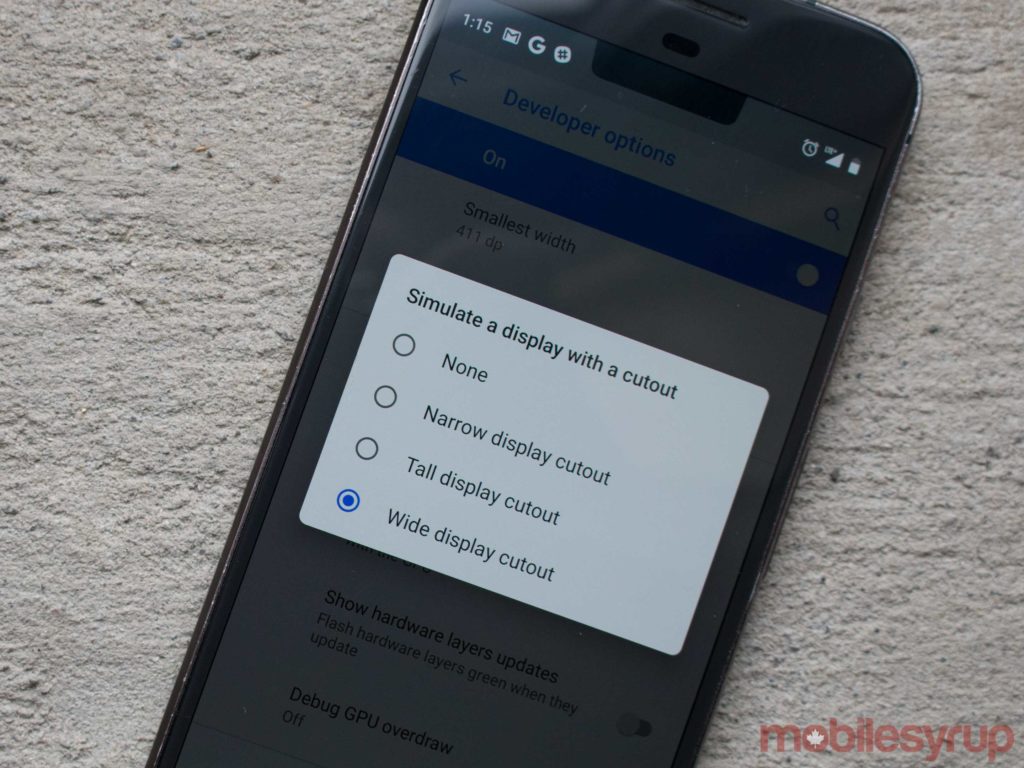
Android P now supports screen cutouts natively. The system manages the height of the status bar so it can match the notch. It seems developers can make a tall display cutout, a narrow one and a wide display cutout.
The Android application package (APK) for Google’s Reply app was launched last month. The app allows smart replies to display within the notification bar for a variety of apps, including Facebook Messenger, WhatsApp and Slack.
Now, it seems the feature will become a native Android feature. Developers can now make their apps display a few lines within a conversation, attach inline photos and add stickers to the notification bar. This means developers can apply this functionality into their own apps, like Facebook Messenger and Slack.
In great news for privacy advocates, Android P will not allow idle apps to access a device’s microphone, camera or other internal sensors. Any apps that attempt to access these device sensors while idle will receive system errors.
Android P app developers now also have the ability to stream from two or more physical cameras simultaneously. This means that applications can grab information from more than one camera at once. This is similar to Nokia’s ‘Bothie’ feature which allows users to stream from the front and the rear camera at once.
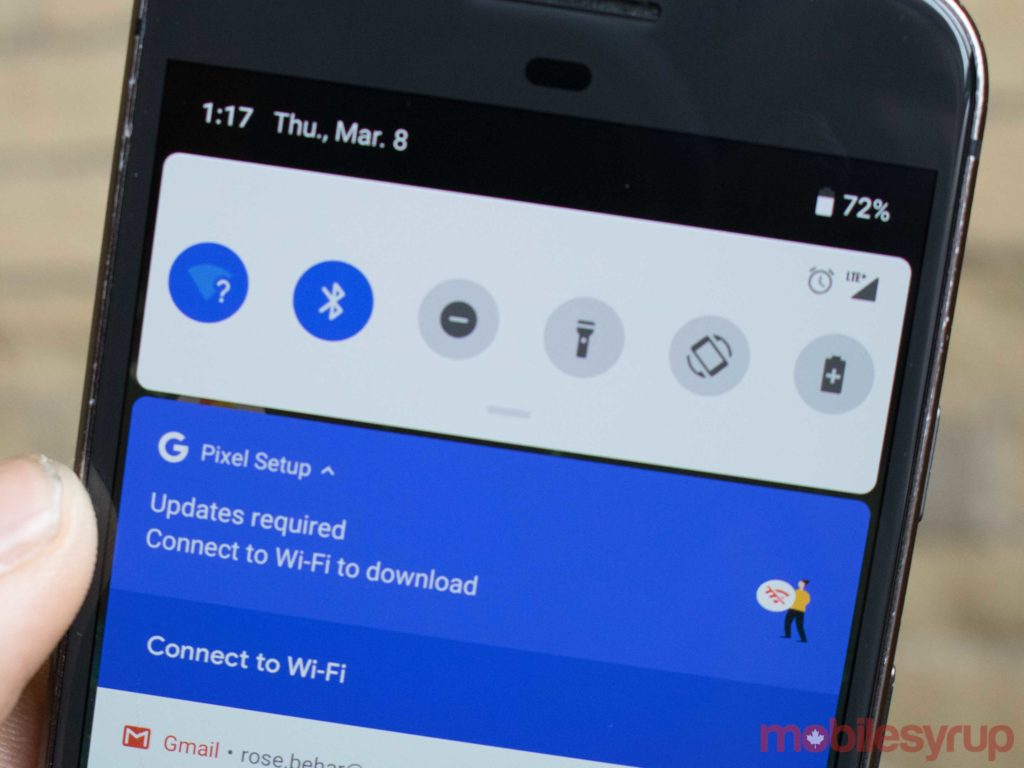
With Android P, Google has moved the operating system’s clock to the left side of the status bar. On Android O and older versions, the clock is on the right side of the status bar.
Android P now has IEEE 802.11mc support, which allows apps to measure distances between WiFi access points.
With a single WiFi access point, the phone can measure a device’s distance from that point. In buildings and homes with more than one WiFi access point — houses with Google WiFi or any mesh network, for example — Android P devices will be able to accurately triangulate location within two metres.
This feature should allow homeowners to turn on enabled smart lightbulbs just by entering a room.
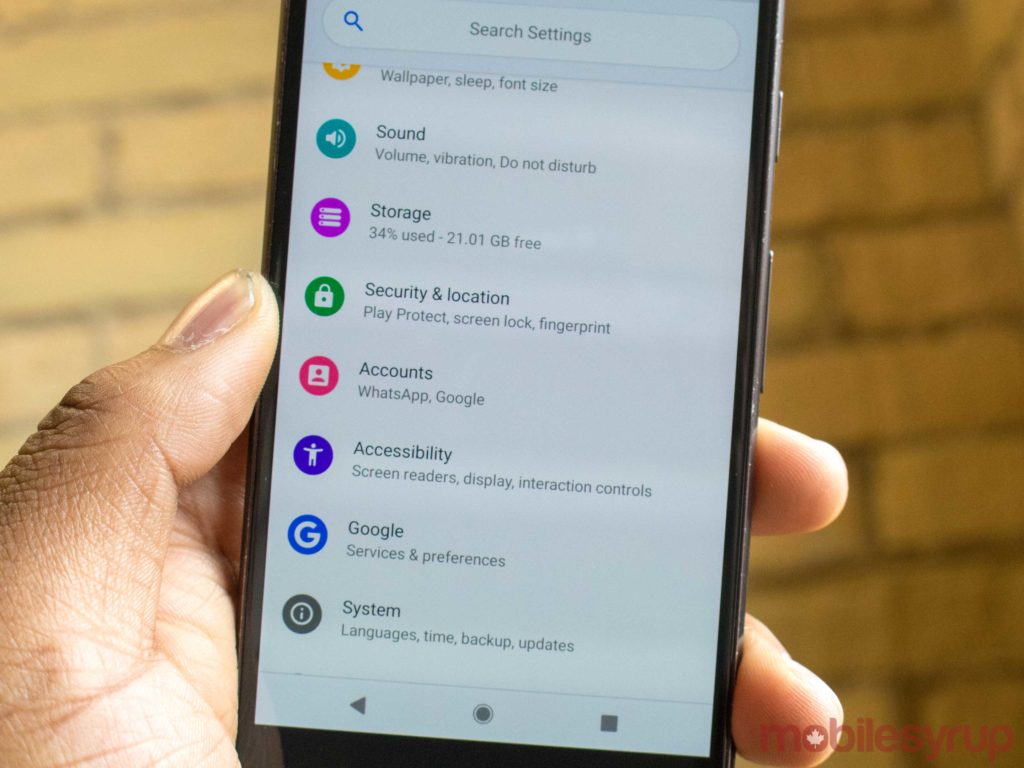
Google has added colours into its settings menu for Android P. The ‘Network and Internet’ setting is blue, the ‘Display’ setting is yellow and ‘Storage’ is purple.
In the past, notifications were aligned to the left. Now, however, notifications are centred. Google has also placed the battery at the very bottom-centre of the display.
For those who are interested in downloading the Developer’s Preview click here.
Source: Google
The post Here are some of the best Android P Developer Preview features appeared first on MobileSyrup.

Google has added a new video message feature to its video calling app Duo.
The video messaging functionality allows users to leave a 30-second video message if the person they’re calling doesn’t pick up.
Video messages will be saved for one day after they’re viewed unless the user chooses to save it to their local storage. Google Duo is a person-to-person video calling app that launched to compete with Skype and FaceTime in 2016.
Available on both iOS and Android, Google has been adding new features to Duo since the apps launch in an effort to make the app more robust.
Google Duo is unique because it offers end-to-end encryption and a preview feature that lets the caller on the receiving end see live video of who’s calling before they pick up.
Source: Google
The post Google adds new video message feature to its Duo app appeared first on MobileSyrup.

Update 03/08/2018: Snap has confirmed it will cut 120 positions from its engineering team. You can find the full statement below:
Confirmation of the Snap layoffs totaling 120 and Hunter’s full email to employees here: https://t.co/8zE8smvKBT pic.twitter.com/L5LX6IAjZI
— Alex Heath (@alexeheath) March 8, 2018
Snapchat’s parent company Snap is reportedly planning on laying off around 100 workers from the its engineering department.
People familiar with Snap’s plans told video news service Cheddar in an exclusive interview that the layoffs would affect approximately 10 percent of Snap’s engineering team and would take place at some point within the next week.
While this doesn’t seem like a massive number of people, this is the first time Snap will layoff employees in its engineering department.
Last year, Snap laid off a few dozen people in its hardware divisions. The company also laid off around 22 people in a variety of other teams in January 2018.
According to Cheddar, Snap has slowed its hiring rate by around 60 percent, maintaining a workforce of roughly 3,000 total employees.
While this may be the beginning of something new for Snap, it comes at a time when Snapchat is facing increasing competition from Instagram and Facebook.
Source: Cheddar
The post Snap confirms it is cutting 120 engineering jobs [Update] appeared first on MobileSyrup.

Just minutes after getting my hands on Samsung’s latest flagship S Series smartphone, one fact was abundantly clear — if you weren’t fond of the Galaxy S8 and S8+, then you’re going to have similar feelings about the S9 and S9+.
Over the last few days, I’ve described the South Korean manufacturer’s latest flagship as its iPhone 8.

S8+ on the left and the S9+ on the right.
Here’s why: there’s nothing really wrong with the S9 or S9+. In fact, I’d go so far as to say that Samsung’s latest S series smartphones are the pinnacle of the Android ecosystem, surpassing even the beleaguered Pixel 2 XL in some respects.
It’s just that the S9 isn’t a significant improvement over the S8.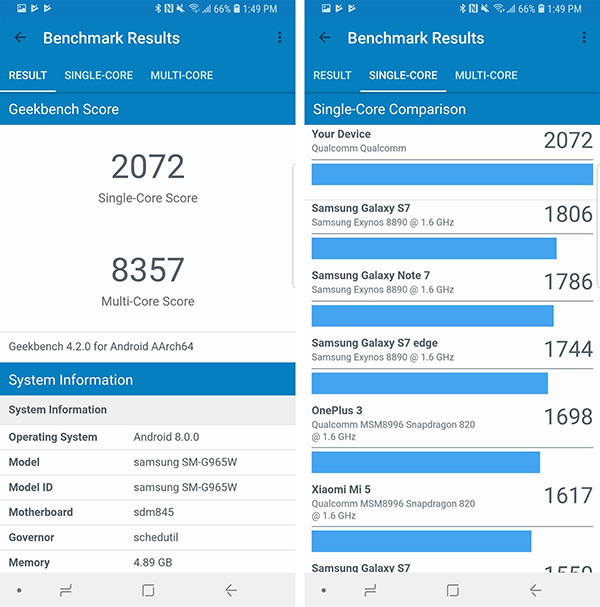
The smartphone features an impressive, versatile camera — complete with a variable aperture — that still shoots slightly over-processed photos, a design that’s a cut above competitors and, as expected, unrivalled build-quality in the Android space.
That’s not to say that there aren’t improvements in Samsung’s latest flagship. Qualcomm’s new Snapdragon 845 (the phone features Samsung’s own Exynos 9810 processor in Europe and other regions) provides an impressive 35 percent improvement in speed. The S9+ also now features 6GB of RAM, an update I found helped the phone run smoother when the device was under heavy load.

The problem is that, from an aesthetic perspective, the S9 looks identical to the S8. Given that Samsung is synonymous with Android in North America, the average consumer often purchases a new device based solely on how it looks.
If the S8 is just as flashy as the S9 at first glance, why would someone opt to purchase the newer, more expensive device, when the S8 is sure to be sold at a significant discount?
And therein lies the problem.

Though most of the S9’s new features are software-related, the smartphone includes a couple of hardware improvements as well.
The most significant change to the S9’s exterior is the new location of the fingerprint sensor. It’s now located below the camera, instead of to the right of the lens like with the S8/S8+ and Note 8. This means it’s no longer necessary to awkwardly claw your hand around the device in order to reach the fingerprint scanner. That said, the S9’s fingerprint scanner is still tiny and I did encounter instances where I found it difficult to locate.

I’m also not completely satisfied with the location of the S9’s fingerprint sensor. While I’m pleased Samsung moved it to a more sensible location, I’d prefer if it were located still farther down the phone, similar to the Pixel 2’s scanner.
Beyond the fingerprint scanner shuffle, there are other improvements, too. The S9 includes 4GB of RAM, while the S9+ has an even more sizeable 6GB of RAM.

S9+ on the left and an iPhone X on the right.
Other new features include improved camera functionality, a revamped camera app and AR Emoji — Samsung’s interesting, but ultimately lacklustre take on Animoji (more on this later).
The firm also claims the S9’s speakers are 40 percent louder than the S8’s. While the S9’s stereo audio quality is an improvement over the S8 in fidelity, I found the phone only slightly louder. The phone also now supports Dolby Atmos virtual surround sound with headphones.

Dolby Atmos is above standard stereo sound, but the jump in quality isn’t as significant as some might expect. Those who watch a lot of video content on their phones — through streaming services like Netflix, for example — will definitely be pleased with this addition though.
On a side note, the S9 features a working FM tuner. This isn’t a feature I have any interest in, but it’s something S Series fans have been asking for a while. Your headphones act as the antenna and the tuner is active even when data is turned off, as long as the S9 hasn’t been set to ‘Airplane Mode.’

S8+ on the left and the S9+ on the right.
The S9 features the same 18.5:9 aspect ratio, curved sides and glass front and back as its predecessor. The 5.8-inch S9 and 6.2-inch S9+ also include 2960 x 1440 pixel Super AMOLED displays that are identical to the S8’s. While Samsung says the S9’s panel is brighter, I didn’t notice much of a difference when comparing both displays head-to-head. HDR10 compatibility is back, too.
The S9’s screen is just as stellar as the S8’s and this makes sense given the reputation Samsung has built in the display industry over the last few years.

The phone also looks and feels the same as last year’s S Series devices, which is its most significant obstacle. This means that if you liked the S8’s glossy, fingerprint prone design, then you’ll love the Galaxy S9. Delving into the details, the S9 and S9+ are millimetres taller than their predecessors, and also weigh slightly more. Both of these changes likely won’t be noticed by the average user.
Just like last year, the phone includes 64GB of storage, which is expandable up to 400GB via a microSD slot. The S9 also supports 1.2Gbps data transfer speeds, though this is just future-proofing, given that a real network hitting this speed right now is purely theoretical.

Finally, the S9 is IP68 dust- and water-resistant and supports both wired and wireless fast charging, just like the S8.

The camera is the S9 and S9+’s most impressive feature and most significant upgrade.
The rear camera’s lens is capable of switching between f/1.5 (this is even wider than the LG V30’s f/1.6 aperture) and f/2.4 depending on lighting conditions, when set to automatic. The brighter aperture allows 28 percent more light into the sensor when compared to the S8’s f/1.7 aperture, with the f/2.8 aperture preventing overexposure under sunny conditions — for example, on a tropical beach.

Galaxy S9+ photo shot at night in manual mode – 7.9-megapixels, f/2.4, 1/4 shutter speed, 4.3mm ISO100.

Galaxy S9+ photo shot at night in manual mode – 7.9-megapixels, f/1.5, 1/4 shutter speed, 4.3mm ISO100
To be clear, its not possible to switch to f-stops between these numbers like with a DSLR. The S9’s variable aperture is binary and jumps between either f/1.5 or f/2.4. The ability to change apertures when shooting in Auto Mode improved low-light performance significantly. Under extremely bright conditions when shooting with f/2.4, the highlights were toned down a small amount.
The aperture can also be changed when the S9’s revamped camera is set to manual mode (called Pro in the camera app), though the option is buried in the shutter speed section. When I first learned that the S9 would feature a variable aperture, I had high hopes this would allow for mechanical depth-of-field effects. ‘Live Focus’ with the S9’s dual shooter looks great, but still has a heavily processed feel to it.
Unfortunately, while jumping between f/1.5 and f/2.4 does change depth-of-field slightly, the shift isn’t as significant as I expected. This feature isn’t a replacement for a DSLR equipped with a lens capable of a wide aperture.
Speaking of the S9’s camera app, it’s actually usable now — even when set to manual mode. Switching between the app’s various options, including Panorama, Food, Live Focus (which returns from last year’s Note 8) AR Emoji and Super Slow-Mo, is as easy as swiping through its top menu. This can cause issues though. I occasionally found myself accidentally switching between shooting modes because the settings are so easily accessible.

The S9’s 12-megapixel camera sensor also now includes what Samsung is calling second-generation dual-pixel autofocus, allowing for faster and more reliable focusing. In my experience, I found the S9 focuses more quickly than its predecessor, especially when movement is present in the frame.
The most significant change is that low-light photos are less noisy when compared to the S8’s shooter. Samsung says the S9 features an approximately 30 percent improvement in noise reduction. While it’s nearly impossible to verify the accuracy of this claim, I can confirm that the S9’s low-light photos are cleaner when compared to the S8’s. The S9’s camera processes 12 images per shot in order to reduce noise. To be clear, Samsung’s dual-pixel sensor debuted back with the S7, so this feature isn’t exactly new — the company has just improved on that foundation yet again.

Photos shot with the S9 still look heavily processed. This isn’t necessarily a bad thing given that under most circumstances, a photo taken with the S8 looked better than one shot with Apple’s iPhone 8, X or even Google’s Pixel 2 XL. Colour balance issues, lighting problems and even exposure are all processed more heavily behind the scenes with Samsung’s S Series. As a result, this also means photos shot with the S9 don’t look true to life. If you’re the type of person who prefers images that accurately depict natural vision, then Samsung’s S9 definitely isn’t for you.
There’s also a difference now between the S9’s and S9+’s shooter, with the latter device featuring a second rear 12-megapixel telephoto lens with a fixed f/2.4 aperture, allowing for 2x optical zoom and live focus. Both features function identically to how they did with the Note 8.

It’s also worth noting both rear cameras feature optical image stabilization with the S9+, which makes it easier to snap sharp photos under less than ideal conditions.

The S9’s 960 frames per second (fps) ‘Super Slow-mo’ feature is incredible when it actually works, giving users the ability to create easy-to-share gifs that can be manipulated in a variety of ways, including even setting them as the smartphone’s wallpapers and adding music.
Super Slow-mo comes in two forms: Auto and Manual. Automatic mode places a square box on the display that can be shifted in size and location, which in theory should make slow-motion recording process easier. When movement passes through the box, a clip is recorded. While this might sound simple, recording slow-motion videos in automatic mode feels unnecessarily finicky.

First, the object needs to travel past the lens exactly where the box is located on the display. Then, the feature also needs to trigger, which didn’t always happen in my experience.
In a number of instances, the S9 either didn’t detect motion or detected the wrong motion, resulting in Slow-mo not triggering properly. If you’ve set up a complicated slow-motion shot, this inconsistency can lead to needless frustration.

Manual Slow-mo gives more control to the user by placing a small button in the right corner of the display that needs to be pressed in order to activate slow-mo mode. This also adds more room for error as well. If you happen to miss the moment you want to capture, or if you’re even milliseconds off tapping the Slow-mo activation tab, your chance is gone.
All sl0w-motion video is only shot in 720p. While this isn’t an issue, it would have been great to see the S9 make the jump to 1080p slow-motion video.

I’ve had a lot of fun with the S9’s ‘Slow-mo’ mode and it is a significant step above the S8’s 240fps slow-motion shooting option.
Hopefully upcoming software updates will iron out some of the automatic feature’s most significant issues.

AR Emoji are weird and off-putting, but at times strangely endearing.
Acting as the S9’s answer to Apple’s surprisingly entertaining Animoji (one of my favourite iPhone X features), Samsung’s AR Emoji have stiff competition.
Instead of instant, on the fly facial recognition, the setup process takes between eight and 12 seconds to scan your face. The resulting cartoon usually resembles whoever the app has scanned, but with exaggerated, often uncomfortable features.

The level of accuracy with AR Emoji is underwhelming when it comes to face-tracking. I found the on-screen animated version myself lagged behind my real-world facial expressions. There were also instances where the experience would glitch in certain ways.
Where AR Emoji become more interesting is when it comes to the other obviously Snapchat-inspired augmented reality creations, including a box-faced blue dog (my personal favourite), a pink cat, a bunny, and of course, all-important sunglasses.
 Sharing these images across multiple social media platforms, which can be captured with either the rear or front-facing camera, is also easy.
Despite their technical shortcomings (which could be solved through future updates), AR Emoji are an entertaining diversion and could be the start of something new and exciting for Samsung. If you were expecting the underlying tech powering AR Emoji to rival Apple’s Animoji, then you’re going to be sorely disappointed though.
Some questions still remain surrounding the S9’s DeX dock, which is capable of working as a laptop-like trackpad. It’s unclear when the new DeX Pad is coming to Canada and how much it will cost.
The post Samsung Galaxy S9 and Galaxy S9+ Review: Standing firm appeared first on MobileSyrup.

When Google released the first Android P developer preview yesterday afternoon, the Nexus 5X, Nexus 6P and Pixel C were notably missing from the preview’s short list of supported devices.
In a communication with Ars Technica, the company has confirmed it will not update those three devices to Android P when a final release of the operating system is ready later this year.
While most Android fans had already come to terms with the fact that Google was ending support for its last two Nexus devices, some still held out hope that the company would update the Nexus 5X and Nexus 6P.
When Google launched the two smartphones in late 2015, it promised two years of software support and three years of security updates. Based on that promise, the company wasn’t obligated to update the Nexus 5X and Nexus 6P to Android 8.1, and yet Google still updated both smartphones to the latest minor release of Android Oreo.
Despite those deviations from its stated update policy, Google is now officially saying goodbye to both the Nexus 5X and Nexus 6P.
Additionally, with Google dropping support for the Pixel C, the company no longer officially supports a first-party tablet.
Google will provide the Pixel 2 and Pixel 2 XL with three years of software support. While that’s an improvement over what the company delivered with the Nexus 5X and Nexus 6P, it still pales in comparison to Apple’s update policy. With iOS 11, Apple is still supporting the almost five-year-old iPhone 5S.
Source: Ars Technica
The post Google won’t update Nexus 5X, Nexus 6P and Pixel C to Android P appeared first on MobileSyrup.
Heute hatte ich mal mehr Zeit zum Kochen als sonst unter der Woche. Vor ein paar Tagen fand ich durch Zufall dieses Rezept, und es hat mich gleich angelacht.
Vollmilchmädchen: Malted Mushroom Pot Pie with Yeasted Biscuits.

Heute habe ich dann gleich die doppelte Menge zubereitet und die erste Portion gerade zum Mittag gegessen – bin begeistert! Das gibt’s morgen gleich nochmal, und den Rest friere ich ein.

Toronto-based smart thermostat maker ecobee has raised an $80 million Series C in a round led by Energy Impact Partners, followed by eight institutional investors including Thomvest, Relay Ventures, and the Amazon Alexa Fund.
To date, ecobee has raised $190 million. The funding will allow ecobee to build upon its suite of smart home technologies, integrating whole-home-voice control, sensor technology, and artificial intelligence.
“Our goal is to build a home that learns and anticipates your needs, making your home an intelligent space that simplifies your life rather than complicates it,” said Stuart Lombard, president and CEO of ecobee. “We believe that by building voice capabilities, advanced sensor technology and powerful AI into the operating system of your home, we are helping to create a new computing platform. This technology will transform the way consumers interact with their favorite services for the better.”
Founded in 2007, ecobee has captured a third of the smart thermostat market and says it has experienced 100 percent YoY growth. Last year, ecobee introduced the ecobee4 smart thermostat with built-in Amazon Alexa voice control. Later this month, ecobee will launch its Alexa-enabled smart light switch, ecobee Switch+.
“ecobee is one of the fastest-growing connected home companies and a leader at bringing voice into the home,” said Lindsay Luger, partner at Energy Impact Partners who will be joining the ecobee board of directors. “Their product suite delivers comfort, ease and entertainment, while at the same time reducing costs and environmental footprint by optimizing what usually represents half of a homeowner’s electricity bill.”
Additional institutional investors contributing to ecobee’s Series C investment include North Leaf Capital Partners, Export Development Canada, Ontario Capital Growth Corporation, Tech Capital and GXP Investments. Barclays served as financial advisor for this transaction.
Ecobee noted that to date, its customers have saved “an estimated three terawatts of energy which is equal to preventing 2.6 million tons of greenhouse gas emissions. This would be the same as taking the city of Pittsburgh off-the-grid for a year.”
Related: Toronto-based Ecobee wants to be the Apple of smart thermostats
Source: BusinessWire
This article was originally published on BetaKit
The post ecobee raises $80 million, plans to release Alexa-enabled smart light switch called Switch+ appeared first on MobileSyrup.

On Tuesday, Google announced the addition of Chinese — both traditional and simplified — and Korean, as well as 20 other languages, to Gboard for Android.
According to Google, the two East Asian languages have been the most requested language additions for Gboard on Android (prior to Tuesday, they were already available on the iOS version).
With support for over 300 language varieties, Gboard now covers 74 percent of the world’s population, according to the search giant. The full list of Gboard supported languages can be found on Google’s website. The company first launched Gboard back in 2016.
Google is rolling out Gboard’s newest update worldwide. If you haven’t gotten the new version, you should over the next couple of days.
Source: Google
The post Gboard for Android adds support for Chinese and Korean appeared first on MobileSyrup.
