Shared posts

30 Apr 02:29

Win a Blix Electric Bike!

by Blix PR

We are very proud to partner with Monterey Bay Community Power in our mission to increase the accessibility to clean-energy transportation alternatives.

As of April 14th, the competition is up and running. If you live or work within the Monterey, San Benito and Santa Cruz Counties, just visit this link and enter for your chance to improve your commute with an electric bike worth 2,000 USD.

Formed in March 2017 Monterey Bay Community Power provides locally-controlled, carbon-free electricity to residents and businesses in Monterey, San Benito and Santa Cruz Counties through the Community Choice Energy (CCE) model established by the State of California. 

At Blix, we know what it takes to build great, quality electric bikes. Thanks to our years of experience and excellent partnerships we offer quality and design at some of the best prices on the market. The best part about being able to do this is the ability to make the benefits of an electric bike accessible to as many people as possible. E-bikes allow you to conquer commutes that might be too challenging on a regular bike and would force you to drive or use public transport.

One of our goals is to help reduce pollution from greenhouse gas emissions, one commute at a time and because of that, we are very excited about this partnership with Monterey Bay Community Power.


30 Apr 02:29

"This ebike gets a lot right" - EBR reviews the Blix Aveny

by Blix PR

The Blix Aveny was recently reviewed by Electric Bike Review, the "uniquely styled and well outfitted" bike was also featured in an extended video review that you can watch right here.

The in-depth review by Electric Bike Review covers both the Aveny step-through and high step models. EBR was impressed by the Aveny's looks, performance and attention to detail — the subtle things that you maybe don't notice right away, but can't live without in the long run.

 Blix's electric Aveny features "one of the quietest and smoothest planetary geared hub motors" tested by EBR. The 350 watt SpinTech motor is designed specifically for Blix electric bikes and provides intuitive power guaranteed to help you conquer any journey, hilly or otherwise.

The plush, extra comfy saddle folds forward to allow you to take out the battery effortlessly to easily charge it indoors.

The Blix Aveny "gets a lot of things right and keeps the price very reasonable."

Read the full review by EBR right here.

To find out more about the Aveny click here.


30 Apr 02:29

Evergreen/Frontier Status: ODB Work

For the past few days I’ve been working on adding Frontier-like object database (ODB) support to my database framework.

It’s not finished yet — it doesn’t even build.

What it is (or, what it will be)

It’s hierarchical key-value storage. No schemas. Tables can contain tables, with no limit.

This implementation is the lowest level: the part that gets, sets, and deletes data from the database.

It’s application-agnostic, at this level — it doesn’t know about all of Frontier’s data types, for instance. A level on top of this will be needed for new-Frontier.

SQLite, my favorite hammer

I’m not actually writing a new database — I’m using SQLite. And that’s because I’ve been using SQLite for 15 years, and I love it and know it well, and I know how incredibly stable it is. I’m not willing to write my own thing, and I’m not willing to use a thing less mature and rock-solid than SQLite.

How it works:

The schema is pretty simple. There are tables and values.

Every table has an id. Every table (except the root table) has a parent_id that points to its parent table.

And every value has an odb_table_id that points to its parent table.

This way it’s easy to get a table’s children: it takes just two select statements.

(Both tables and values also have a name, since this is key-value storage.)

Tables and values will be cached in memory, so not every call will require a database read.

(Before you suggest I use something other than SQLite, know that I won’t change my mind on this.)

(Also, again: it’s not done yet. Doesn’t even build.)

Why I’m doing this now instead of something else

I’m using schema-less storage for feeds in Evergreen. (Articles and article status, on the other hand, are stored using a schema, in SQLite.)

Currently I’m writing a big binary plist with all the feed data, and it has to be rewritten every time a feed property changes. The writes are coalesced — but still, this isn’t great.

I’m using schema-less storage in part because of syncing systems: I don’t know, and can’t guess, what I’ll need to store. Different systems will have different requirements.

Also: I may add features later that require additional feed properties. I don’t know what those are.

I realized that what I really want for this is a feature from Frontier: hierarchical key-value storage.

Each system will gets its own database on the client. For each, I’ll create an odb table called feeds. Each feed will have its own subtable. The key will be its id (which may or may not be its URL, depending on the syncing system).

And inside each subtable I can put whatever I want, at any time, without having to change any schemas or implementations.

Example:

For the On My Mac account — not synced; reads feeds directly — we keep track of Etag headers in order to support conditional GET. So, for example, I’d want to get, set, and delete feeds.[feedID].etag.ifModifiedSince.

But with most syncing systems we get the feed content from the system itself — not by directly reading the feed. There might be some other data from the service to store: feeds.[feedID].syncToken, for instance.

30 Apr 02:28

The simplicity of dropping Google in 2018

by Tom MacWright

Google logo, saturated and unsaturated, color pencil

A few months ago, I stopped using Google for everything personal: I switched from Gmail to FastMail for mail and calendars, and that was the end of the era.

I remember how incredible Gmail was in the early days - I signed up when it was still ‘in testing’ around 2005 and you needed an invite code to get in. All of the previous systems had such low quotas that you’d constantly delete mail. The search functionality was so bad that you’d have to organize everything manually. And for a while, every new Google product was genre-defining: Google Calendar freed us from desktop software, Google Code was GitHub before GitHub, Google Docs changed the default mode of working.

But slowly, and without intention, I left it all behind: they shut down Google Reader, and I switched to Feedly. GitHub replaced Google Code. I switched from Google Search to DuckDuckGo. From Docs to Dropbox Paper, iA Writer, and Notion. From Picasa to Flickr and a simple folder of images. Google Analytics grew obtuse and unusable, so I switched to gaug.es, and then eventually removed analytics from all my sites. Google Groups, once a forum for discussion, has been overtaken by Discourse, Slack, and GitHub Issues.

Switching off of Google in 2018 is easy because you’ve probably abandoned most of their products anyway, and the ones you’re still using are stagnating.

Case in point is Gmail, the last thing on my list. The new paint job they released this week is the first in years, and still doesn’t answer the question of whether Gmail or Inbox is the future.

FastMail isn’t perfect - the spam filter is less accurate than Google’s, the mobile app a little less slick. And the transfer from Gmail was slow - but mostly because of Gmail’s unbelievably low rate limits. In all other ways, it’s an excellent - and better - product.

Which is the pattern: alternatives to Google services aren’t half-baked knock-offs, they tend to be superior. Google Reader was great, but Feedly is a more polished, better-maintained product. During their co-existence, there was just no comparison between Google Code and GitHub: GitHub was the better product.

I didn’t expect it to turn out that way: if Gmail had improved at the same pace from 2009 to 2018 as it had from 2004 to 2009, it would be unbeatable.

Not about security

When I’ve mentioned FastMail to folks, a lot of them are interested in the security implications. Email security is complex, and, frankly, it wasn’t one of my motivating factors. As FastMail has written themselves, they don’t support PGP, which is the only popular method of end-to-end email encryption. Which makes sense to me: PGP is renowned for terrible usability and hacked-together workflows.

FastMail has other, excellent security standards. They probably don’t take part in intelligence-gathering for nation-states, like Google did with PRISM. There are reasons to feel positive. But, practically, you’re going to write an email to your uncle with an AT&T account who undoubtedly uses a 5-character dictionary word password, and you’ll need to consider that message as a public artifact.


So – if you’re thinking about taking the leap, now’s a pretty good time to try out life without Google: the alternatives are strong and switching isn’t too painful. The Google Dashboard is arguably one of their best-maintained products, and it’s your ticket out - it’s the interface that lets you download and delete your data from Google.

30 Apr 02:28

Apple Discontinues AirPort Routers

by Federico Viticci

With a statement provided to iMore earlier today, Apple confirmed what Bloomberg's Mark Gurman first reported in late 2016 (not a typo): the company is officially exiting the WiFi router business by discontinuing the AirPort line of products.

From Rene Ritchie's story:

Routers are different. They're infrastructure. They're behind televisions, underneath desks, and in closets. For some people, especially people who appreciate Apple's design and manufacturing, and its unequivocal stance on security and privacy, the loss of the AirPort line will still be a blow.

I'm one of those people.

But I'm also reminded of a comment Steve Jobs once said to one of his direct reports: Sure, Apple could do that and make some money at it, but was it really a business Apple had to be in?

As much as I've tried to understand the argument that Apple needs to focus on fewer products, I just can't buy into the idea that they had to stop making WiFi routers.

My stance is pretty straightforward: everybody needs a WiFi router and the vast majority of routers suck. They are unsightly pieces of plastic that feature an assortment of meaningless blinking lights which you have to manage through terrifyingly confusing web apps intentionally designed to resemble accounting software from the late 90s. Sure, you could buy one of the fancy modern mesh systems, but they're expensive, and some of them are not available in all regions, and people who live in small homes don't need them. Doesn't an elegant, integrated, affordable, and modern router sound like something that Apple should continue to offer as an option for its users?

I guess that WiFi routers don't generate as much good PR as recommitting to Pro displays. But if there's an aspect of modern technology that could use great hardware and software design, a focus on privacy and security, and user-friendly controls for families, that would be WiFi routers. I'm disappointed to learn that Apple has chosen to give up instead.

→ Source: imore.com

30 Apr 02:23

I get it :: You have PGP

by Volker Weber

gmail

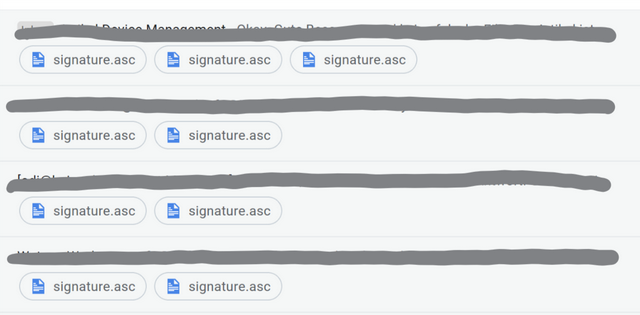
The new Gmail has this useful feature where you see file attachments right in the message list. You can click on them to view them right away. And then you have the odd person who is using a PGP plugin that "signs" all his messages. That is what you see under their messages:

Sketch

Now would be a great time to disable this feature. It looks very spammy. I trust that nobody altered you message. If I have any doubt, I will ask. I also never ever receive any encrypted mails. If you want a secure channel, use iMessage or Signal. You have my number.

26 Apr 22:07

The European Commission releases at first glanc...

by Ton Zijlstra

The European Commission releases at first glance useful new proposals concerning the re-use of public sector data, sharing of health care data, research data and more. That’s some deep reading to do in the coming days. (We were involved in the evaluation of current rules for the EC)

26 Apr 22:07

Twitter Not GDPR Compliant (nor Flickr, nor ….)

by Ton Zijlstra

Many tech companies are rushing to arrange compliance with GDPR, Europe’s new data protection regulations. What I have seen landing in my inbox thus far is not encouraging. Like with Facebook, other platforms clearly struggle, or hope to get away, with partially or completely ignoring the concepts of informed consent and unforced consent and proving consent. One would suspect the latter as Facebooks removal of 1.5 billion users from EU jurisdiction, is a clear step to reduce potential exposure.

Where consent by the data subject is the basis for data collection: Informed consent means consent needs to be explicitly given for each specific use of person related data, based on a for laymen clear explanation of the reason for collecting the data and how precisely it will be used.
Unforced means consent cannot be tied to core services of the controlling/processing company when that data isn’t necessary to perform a service. In other words “if you don’t like it, delete your account” is forced consent. Otherwise, the right to revoke one or several consents given becomes impossible.
Additionally, a company needs to be able to show that consent has been given, where consent is claimed as the basis for data collection.

Instead I got this email from Twitter earlier today:

“We encourage you to read both documents in full, and to contact us as described in our Privacy Policy if you have questions.”

and then

followed by

You can also choose to deactivate your Twitter account.

The first two bits mean consent is not informed and that it’s not even explicit consent, but merely assumed consent. The last bit means it is forced. On top of it Twitter will not be able to show content was given (as it is merely assumed from using their service). That’s not how this is meant to work. Non-compliant in other words. (IANAL though)

26 Apr 22:07

Get all caught up with The Avengers using this timeline

by Nathan Yau

It’s been a decade since the first Iron Man movie, and some 30 superhero characters later, we arrive at a two-parter Avengers finale. But maybe you lost track of everything that happened leading up to this point. Sonia Rao and Shelly Tan for the Washington Post got you covered with a filterable timeline. Focus on specific stories, characters, and franchises. Select “block spoilers” in case you still plan to watch something.

I used to watch all of the Marvel movies, but then I had kids. I’ve seen one in five years. So this is right up my alley.

Tags: Avengers, timeline, Washington Post

26 Apr 22:06

Unconfirmed Sonos news

by Volker Weber

one2

A couple of items that came up yesterday:

  • Sonos may be heading towards an IPO as soon as June/July
  • Airplay 2 may eventually come to Play:5 (2nd gen), Playbase, and One

Nobody I know has heard of Google Assistant on Sonos One, yet. Next version of the Sonos software appears to be another snoozer.

26 Apr 22:06

US May Restart Charging For Satellite Data 2019

by Ton Zijlstra

The US government is looking at whether to start asking money again for providing satellite imagery and data from Landsat satellites, according to an article in Nature.

Officials at the Department of the Interior, which oversees the USGS, have asked a federal advisory committee to explore how putting a price on Landsat data might affect scientists and other users; the panel’s analysis is due later this year. And the USDA is contemplating a plan to institute fees for its data as early as 2019.

To “explore how putting a price on Landsat data might affect” the users of the data, will result in predictable answers, I feel.

  • Public digital government held data, such as Landsat imagery, is both non-rivalrous and non-exclusionary.
  • The initial production costs of such data may be very high, and surely is in the case of satellite data as it involves space launches. Yet these costs are made in the execution of a public and mandated task, and as such are sunk costs. These costs are not made so others can re-use the data, but made anyway for an internal task (such as national security in this case).
  • The copying costs and distribution costs of additional copies of such digital data is marginal, tending to zero
  • Government held data usually, and certainly in the case of satellite data, constitute a (near) monopoly, with no easily available alternatives. As a consequence price elasticity is above 1: when the price of such data is reduced, the demand for it will rise non-lineary. The inverse is also true: setting a price for government data that currently is free will not mean all current users will pay, it will mean a disproportionate part of current usage will simply evaporate, and the usage will be much less both in terms of numbers of users as well as of volume of usage per user.
  • Data sales from one public entity to another publicly funded one, such as in this case academic institutions, are always a net loss to the public sector, due to administration costs, transaction costs and enforcement costs. It moves money from one pocket to another of the same outfit, but that transfer costs money itself.
  • The (socio-economic) value of re-use of such data is always higher than the possible revenue of selling that data. That value will also accrue to the public sector in the form of additional tax revenue. Loss of revenue from data sales will always over time become smaller than that. Free provision or at most at marginal costs (the true incremental cost of providing the data to one single additional user) is economically the only logical path.
  • Additionally the value of data re-use is not limited to the first order of re-use (in this case e.g. academic research it enables), but knows “downstream” higher order and network effects. E.g. the value that such academic research results create in society, in this case for instance in agriculture, public health and climatic impact mitigation. Also “upstream” value is derived from re-use, e.g. in the form of data quality improvement.

This precisely was why the data was made free in 2008 in the first place:

Since the USGS made the data freely available, the rate at which users download it has jumped 100-fold. The images have enabled groundbreaking studies of changes in forests, surface water, and cities, among other topics. Searching Google Scholar for “Landsat” turns up nearly 100,000 papers published since 2008.

That 100-fold jump in usage? That’s the price elasticity being higher than 1, I mentioned. It is a regularly occurring pattern where fees for data are dropped, whether it concerns statistics, meteo, hydrological, cadastral, business register or indeed satellite data.

The economic benefit of the free Landsat data was estimated by the USGS in 2013 at $2 billion per year, while the programme costs about $80 million per year. That’s an ROI factor for US Government of 25. If the total combined tax burden (payroll, sales/VAT, income, profit, dividend etc) on that economic benefit would only be as low as 4% it still means it’s no loss to the US government.

It’s not surprising then, when previously in 2012 a committee was asked to look into reinstating fees for Landsat data, it concluded

“Landsat benefits far outweigh the cost”. Charging money for the satellite data would waste money, stifle science and innovation, and hamper the government’s ability to monitor national security, the panel added. “It is in the U.S. national interest to fund and distribute Landsat data to the public without cost now and in the future,”

European satellite data open by design

In contrast the European Space Agency’s Copernicus program which is a multiyear effort to launch a range of Sentinel satellites for earth observation, is designed to provide free and open data. In fact my company, together with EARSC, in the past 2 years and in the coming 3 years will document over 25 cases establishing the socio-economic impact of the usage of this data, to show both primary and network effects, such as for instance for ice breakers in Finnish waters, Swedish forestry management, Danish precision farming and Dutch gas mains preventative maintenance and infrastructure subsidence.

(Nature article found via Tuula Packalen)

26 Apr 22:05

Using up more than we offer

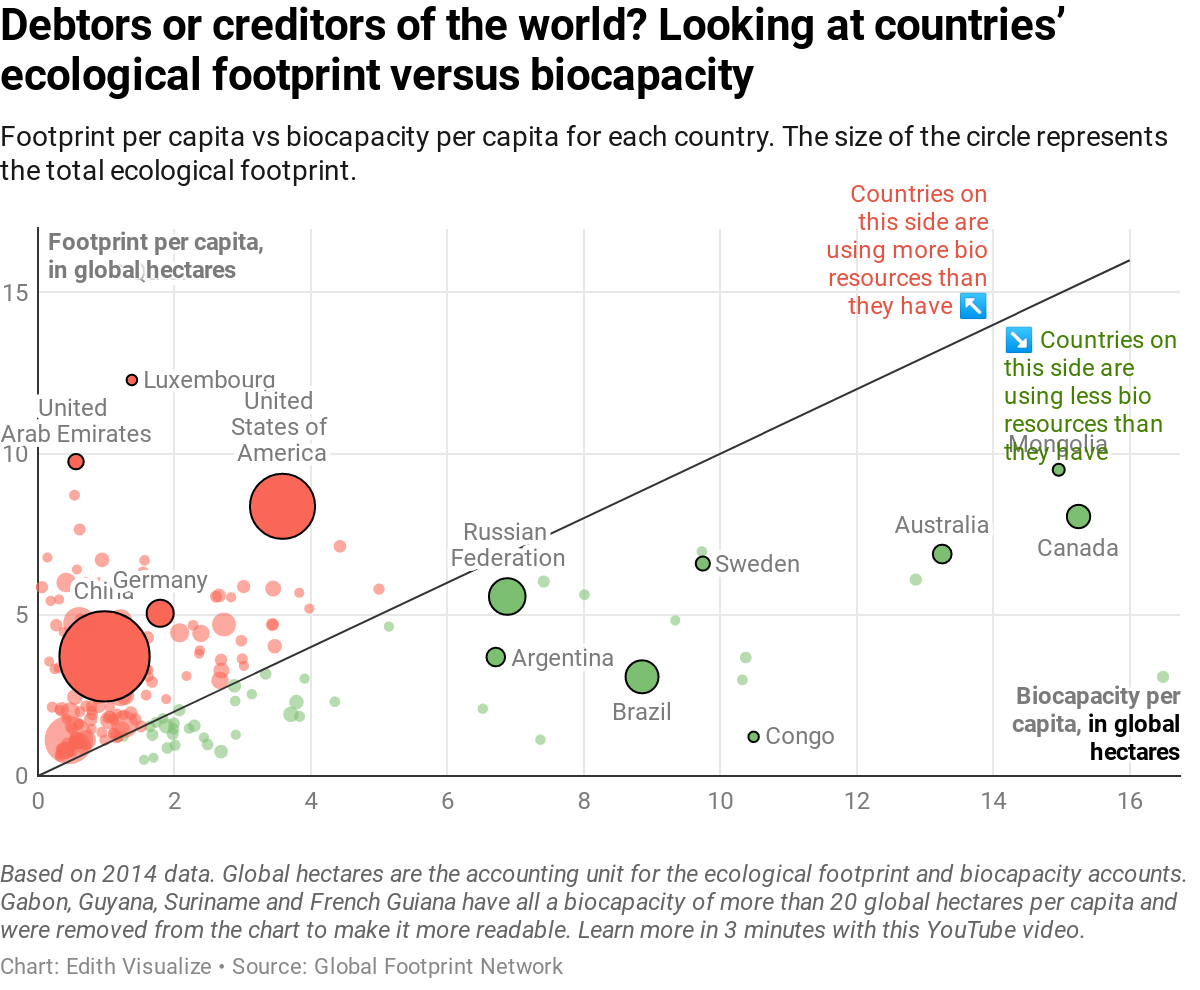
After creating charts week after week, I think it’s time to open it up a bit. This week’s Weekly Chart isn’t created by me. It’s created by French information designer Edith Maulandi, whose chart I stumbled upon two days ago. I liked it a lot (I’ll tell you why in a second), so I fine-tuned it a bit, and here it is:

We can see one black line dividing this planet’s countries in two: At the top (in red) are the ones that use more bio resources than they provide. I like to think of these countries as the ones with “more people & industry than nature”: China, India, Germany, Qatar, the US. At the bottom are the (literally) green countries: Brazil, Canada, countries in North Europe, and some third world countries. They provide more bio resources than they use. And yeah, as we can see, there are more red countries than green ones. It doesn’t come as a surprise, but it’s worth a reminder.

Visual Variables

Why do I like this chart? Because it reminds me that sometimes, less is more. Sometimes, not all visual variables need to encode different data variables, just because it can be done. Let me explain:

All charts offer different options to show data. The most basic ones are the axes: We can show data values on our y- and x-axis, like the biocapacity and the footprint. In a scatterplot, we can also represent our data with the size of the circles (in Edith’s chart up there, they show the total ecological footprint), or with colors, or with the shape. So we have lots of things that can show our data, like position, size, color, and shape. Data vis academics like to call these things “visual variables”[1]. And if these visual variables show us data, then they “encode” the data. We can say: “We have lots of visual variables that can encode our data variables”.

I like to make full use of these data variables. Oh, the color doesn’t encode something exciting yet? Heck yeah, let’s use it to make clear on which continent these countries are! Maybe that will give us some extra insights!!11

Bad idea.

A chart that’s hard to read:

A chart that’s easier to read:

Edith’s chart shows that it can be a great idea to not use visual variables to show something new, but to enforce a statement we already made with another visual variable. The red and green color is not necessary for her chart. We already know that we can divide countries between good and evil between “creditors” and “debtors” thanks to their position above or below the line. But hey, it helps to make that a bit clearer. It’s always nice to reduce the time it takes our readers to understand a chart. And this chart is not about continents anyway, but about the fact that there are far more debtors than creditors. The color helps to make that clear.


Thanks again to Edith for giving me her permission to use the chart. Follow her on her “journey to understand the world through data visualization”, and check out her portfolio. Until next week!


  1. To quote Tamara Munzner on this one: “There are many, many synonyms for visual channel: nearly any combination of visual, graphical, perceptual, retinal for the first word, and channel, attribute, dimension, variable, feature and carrier for the second word.” from: Tamara Munzner. Visualization Analysis and Design. A K Peters Visualization Series, CRC Press, 2014, page 96.

26 Apr 22:05

Alexa is about to get a lot smarter

by Igor Bonifacic

Amazon is preparing to greatly enhance Alexa’s computational abilities in a series of future feature updates.

In the first of three planned updates, a new feature called ‘Skills Arbitration’ will allow Alexa to automatically find and take advantage of third-party skills to help users with their queries. For instance, say an Echo user asks Alexa how to remove an oil stain from their shirt, the personal assistant will call on the Tide Stain Remover skill to help, even if the user had no previous knowledge of the skill.

The second update will improve Alexa’s ‘Context Carryover’ capabilities. Essentially, once Amazon updates Alexa, the personal assistant will be able to better handle follow-up questions, particularly ones that don’t include pronouns. For example, Alexa will be able to handle a question chain like “What’s the weather in Vancouver?” followed by, “How about tomorrow?”

Lastly, Amazon plans to improve Alexa’s recall abilities. Moving forward, Alexa users will be tell the personal assistant to remember specific tidbits of information like birthdays. Afterwards, Alexa will be able to recall that information when users ask for it.

According to Ruhi Sarikaya, the author of the blog post and director of applied science for Alexa machine learning, the final update is the “First of many launches this year that will make Alexa more personalized.”

Canadians will have to wait to try out Alexa’s new enhancements here in Canada, however.

Amazon plans to launch the Skills Arbitration and memory enhancements in in the U.S. first. The improvements to Alexa’s follow-up capabilities will see a more global rollout, with the U.K. and Germany, in addition to the U.S., included in the initial rollout.

Source: Amazon

The post Alexa is about to get a lot smarter appeared first on MobileSyrup.

26 Apr 22:05

No one should have to wait 94 words for a verb, and other observations from legal writing

by Josh Bernoff

Sentences that never seem to end create a cognitive load on the reader. The longer and more convoluted they are, the worse it gets. Legal writers, in particular, seem to have a problem with this. The solution — as you’ll see from this egregious example — is to break things down and create structure. An … Continued

The post No one should have to wait 94 words for a verb, and other observations from legal writing appeared first on without bullshit.

26 Apr 22:05

These Incredible Portraits Weren’t Captured With A Camera, But With A Pencil.

by internettablettalk

She’s got a wart. He hasn’t got shit all over him. Well, Mercia’s a temperate zone! The Lady of the Lake, her arm clad in the purest shimmering samite, held aloft Excalibur from the bosom of the water, signifying by divine providence that I, Arthur, was to carry Excalibur. That is why I am your king.

What… is your quest?

The Knights Who Say Ni demand a sacrifice! Look, my liege! No, no, no! Yes, yes. A bit. But she’s got a wart. And this isn’t my nose. This is a false one. I don’t want to talk to you no more, you empty-headed animal food trough water! I fart in your general direction! Your mother was a hamster and your father smelt of elderberries! Now leave before I am forced to taunt you a second time!

  • The Knights Who Say Ni demand a sacrifice!
  • Shut up! Will you shut up?!
  • Well, Mercia’s a temperate zone!

First shalt thou take out the Holy Pin

Shut up! Will you shut up?! Shh! Knights, I bid you welcome to your new home. Let us ride to Camelot! Shut up! Will you shut up?! Well, I didn’t vote for you. It’s only a model. I have to push the pram a lot.

Blue. No, yel…

Where’d you get the coconuts? And this isn’t my nose. This is a false one. What a strange person. Knights of Ni, we are but simple travelers who seek the enchanter who lives beyond these woods. You don’t vote for kings.

  1. Who’s that then?
  2. And this isn’t my nose. This is a false one.
  3. I don’t want to talk to you no more, you empty-headed animal food trough water! I fart in your general direction! Your mother was a hamster and your father smelt of elderberries! Now leave before I am forced to taunt you a second time!
  4. Be quiet!
  5. We shall say ‘Ni’ again to you, if you do not appease us.
First shalt thou take out the Holy Pin

Well, I didn’t vote for you. Well, Mercia’s a temperate zone! Who’s that then? I’m not a witch. I don’t want to talk to you no more, you empty-headed animal food trough water! I fart in your general direction! Your mother was a hamster and your father smelt of elderberries! Now leave before I am forced to taunt you a second time!

Help, help, I’m being repressed!

The Lady of the Lake, her arm clad in the purest shimmering samite, held aloft Excalibur from the bosom of the water, signifying by divine providence that I, Arthur, was to carry Excalibur. That is why I am your king. Well, she turned me into a newt. A newt? No, no, no! Yes, yes. A bit. But she’s got a wart. On second thoughts, let’s not go there. It is a silly place.

The post These Incredible Portraits Weren’t Captured With A Camera, But With A Pencil. appeared first on internettablettalk.com.

26 Apr 22:05

Here Are Some Cats Who Prove Why They Aren’t Considered Man’s Best Friend.

by internettablettalk

Sorry, checking all the water in this area; there’s an escaped fish. *Insistently* Bow ties are cool! Come on Amy, I’m a normal bloke, tell me what normal blokes do! Did I mention we have comfy chairs? Father Christmas. Santa Claus. Or as I’ve always known him: Jeff. Saving the world with meals on wheels. Annihilate? No. No violence. I won’t stand for it. Not now, not ever, do you understand me?! I’m the Doctor, the Oncoming Storm – and you basically meant beat them in a football match, didn’t you?

Vincent and the Doctor

*Insistently* Bow ties are cool! Come on Amy, I’m a normal bloke, tell me what normal blokes do! You know how I sometimes have really brilliant ideas? You hate me; you want to kill me! Well, go on! Kill me! KILL ME!

  • You’ve swallowed a planet!
  • The way I see it, every life is a pile of good things and bad things.…hey.…the good things don’t always soften the bad things; but vice-versa the bad things don’t necessarily spoil the good things and make them unimportant.
  • The way I see it, every life is a pile of good things and bad things.…hey.…the good things don’t always soften the bad things; but vice-versa the bad things don’t necessarily spoil the good things and make them unimportant.
  • No… It’s a thing; it’s like a plan, but with more greatness.

The post Here Are Some Cats Who Prove Why They Aren’t Considered Man’s Best Friend. appeared first on internettablettalk.com.

26 Apr 20:36

From Jacques Tati’s Playtime (1967)


From Jacques Tati’s Playtime (1967)

26 Apr 20:36

Enabling Social Experiences Using Mixed Reality and the Open Web

by Sean White

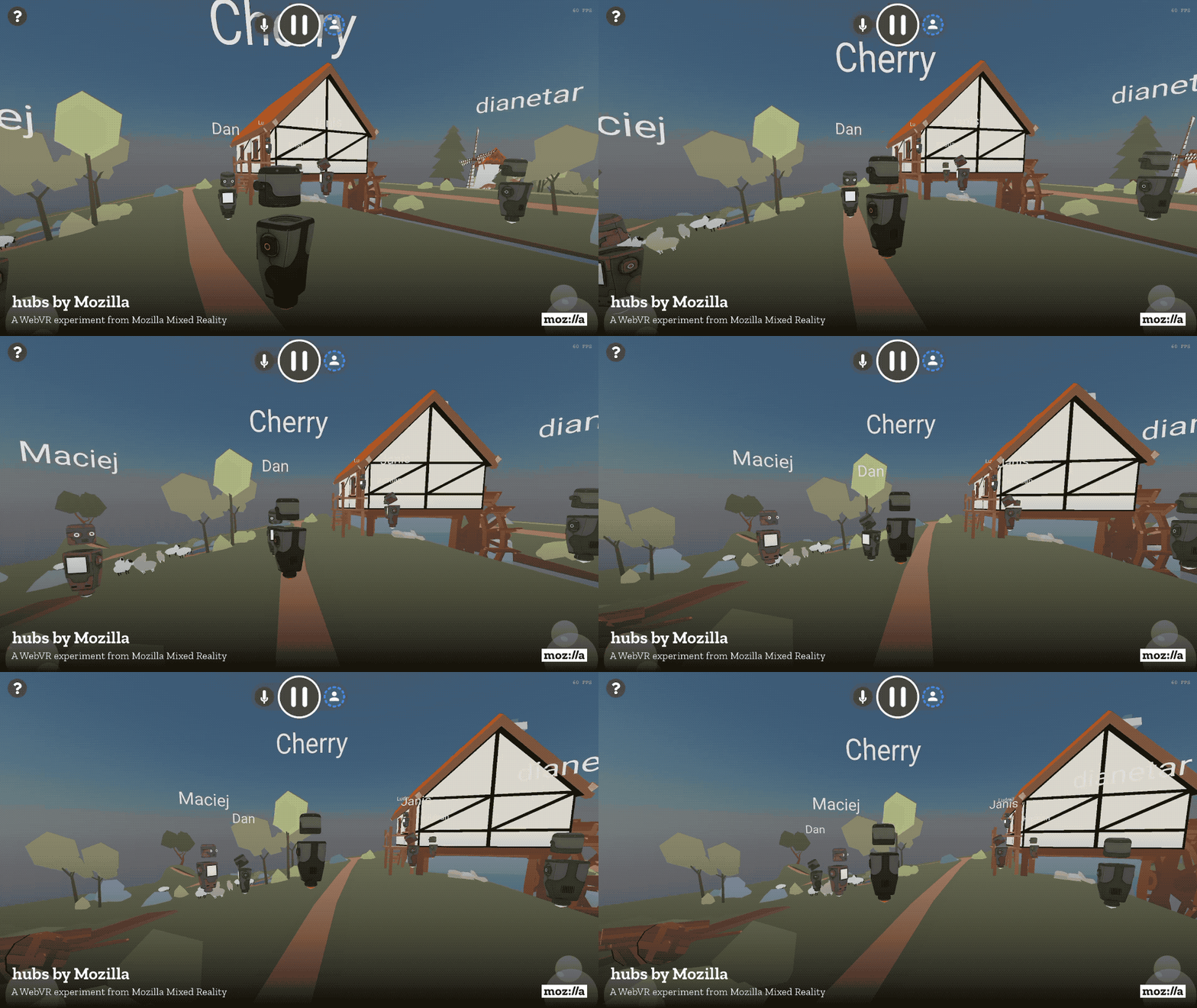
Today, Mozilla is sharing an early preview of an experiment we are calling “Hubs by Mozilla”. Hubs is an immersive social experience that is delivered through the browser. You simply click on a web link to begin interacting with others inside virtual reality.

Late last year we announced the creation of a team focused on enabling social experiences using Mixed Reality and the open web. This is one of many experiments we’ll be sharing from that work. Using the web as a platform provides people with better choices and greater access. People shouldn’t have to be locked in to a specific platform or device. They should be able to connect and engage with the web wherever it expands. It is challenging work, and there is still much to do, but we are excited to share our progress with you. Starting today, we are opening up our latest Mixed Reality experiment, Hubs, to anyone that would like to give it a try.

There are other teams and companies out there that are building social VR experiences. What makes Hubs different? Well, Hubs is…

Built for the Browser

When we announced Firefox Reality earlier this month, we reinforced our stance that the web provides the best future for virtual and augmented reality (or “Mixed Reality”). This technology is at tipping point. If we want to continue to bring immersive experiences into the mainstream, we need to be laser focused on removing friction for the user. The technology needs to step out of the way, and the experiences need to take center stage.

With Hubs, you can create a room with a single click. You can then share and access that room with a URL. No app store. No gatekeepers. No installation process. Just click and you are there.

Built for Every Device

Because we are using web standards (WebVR and eventually WebXR) to deliver this content, we are able to support every single Mixed Reality headset. Every. Single. One. You can enjoy this experience with advanced hardware such as an Oculus Rift or an HTC Vive, or you can use alternatives such as a Daydream or cardboard viewer. You can even use your desktop or mobile phone if you don’t have access to any VR hardware. Everyone can come together and communicate with each other in this online social space. The experience will progressively scale to make use of the hardware that is available to you.

Built for Privacy

Ensuring your privacy when meeting others in Mixed Reality is a guiding principle for our work. You can take a look at our privacy policy here. We want to shape a future for Mixed Reality where users feel safe, and that means we need to create create tools, options, and features that empower users to control how their identity is represented in this new medium. We’ll have more to share soon about the work we are doing to protect your privacy in Mixed Reality. We also built this experience with open source software that anyone can view and contribute to.

Built for Scaling

The experience that is available today is an experiment, but the technology that powers it can be extended in exciting ways. In the coming months we will continue to release new tools and features, as we learn together through use and iteration. This includes kits to create your own custom spaces, powerful avatar and identity options, integrations with existing communications tools, and more.

We are excited about the future of Hubs and the potential for social VR experiences, but we need your help to test this and make it better. Check out the link below to try it out. Play with it. Share it. Break it. Contribute to it. If you are looking for even more details, then check out the blog post on our Mixed Reality blog. We’d love to get your feedback as we build this together.

Try Hubs – a WebVR experiment from Mozilla Mixed Reality

The post Enabling Social Experiences Using Mixed Reality and the Open Web appeared first on The Mozilla Blog.

26 Apr 20:35

1Blocker X for iOS Review

by John Voorhees

The first thing you will notice when you set up 1Blocker X on an iOS device is its 7 toggles in Safari’s Content Blocker section of the Settings app. It’s a bit of a head-scratcher at first until you realize that this is what allows 1Blocker X to expand beyond the confines of its predecessor.

You see, iOS limits the number of blocking rules that can be implemented by an app to 50,000. That’s a lot of rules, but sadly not enough given the amount of junk on the Internet these days. As a result, it’s a limit that 1Blocker began to run into not long after it launched in 2015.

Finding a way around that hard limit required a rewrite of 1Blocker from the ground up. The result is 1Blocker X, an app with around three times as many blocking rules, room to grow, and enhanced flexibility for applying those rules.

To get started, you need to enable 1Blocker’s content blockers by visiting the Settings app. In Safari’s settings, there’s a Content Blockers section where you can turn on 1Blocker X’s 7 blockers. Once enabled in Settings, you can turn each of the 7 sets of rules or individual rules on and off from within 1Blocker X. If you try to turn on a rule that hasn’t been activated in Settings yet, 1Blocker X will let you know and offer to walk you through the process, which is a nice touch.

Turning on 1Blocker X rules in the Settings app.

Turning on 1Blocker X rules in the Settings app.

The blockers you choose to activate are synced to all your iOS devices using iCloud. This worked quickly and seamlessly when I tested it, with one exception. I had a handful of whitelisted sites that I set up at some point in the past on my iPad that didn’t sync with my iPhone. New whitelisted sites appeared in both places with no problem, but five sites stubbornly refused to sync.

1Blocker X includes roughly 120,000 rules at launch organized in the following categories:

  • Block Ads
  • Block Adult Sites
  • Block Annoyances
  • Block Comments
  • Block Trackers
  • Custom Rules
  • International Rules

That’s more than twice the number of rules as the app’s predecessor with room to grow to 350,000 rules in the future.

The longest of the lists is ‘Block Ads,’ which includes over 47,000 rules that should block most website ads. The ‘Block Adult Sites’ and ‘Block Comments’ lists are self-explanatory. ‘Block Annoyances’ includes a wide variety of website elements that aren’t strictly ads, but are still distracting, like cookie notices, social media badges, widgets, and share bars; ‘Block Trackers’ blocks sites from tracking you across the web.

1Blocker X also introduces regionalized blockers, which the legacy version of the app didn’t have. These are rules designed to block content targeted at sites in a particular country. The list is currently limited to Russia and Germany, but the 1Blocker team says more countries are coming in the future. I wasn’t able to test because I’m in the US, but I like the concept because it tailors the user experience in those countries without adding rules for users who don’t need them. However, until more countries are available, regionalized blockers aren't a feature that will make a difference to most users of the app.

Setting up a custom whitelist of sites.

Setting up a custom whitelist of sites.

The third section of 1Blocker X available from the main view is ‘Custom,’ which are user-defined rules that can be set on a site-by-site basis to whitelist sites, block sites, block cookies, hide page elements, and force sites to load using https only. With 1Blocker X’s new architecture, users can define up to 50,000 custom rules, which should keep even the most diehard users happy for a long time.

Although I wouldn't suggest purchasing an app based on the promise of future features, it's also worth noting that the 1Blocker X team says partial site whitelisting is coming soon. When implemented, the feature will allow you to do things like unblock comments and ads for a site, but leave trackers and other content blocked adding further flexibility to the app.

As someone who writes on the web for a living, I understand why many websites don’t like content blockers. At the same time, readers’ attention, like their trust, is something to be earned. Putting popup ads and auto-play videos in front of content and then complaining to those same readers with a splash screen when a content blocker is detected strikes me as misguided. Still, I do worry about sites that respect their readers getting caught up in content blocking when applied as a blunt instrument across all sites, which is why I’m glad to see the level of flexibility built into 1Blocker X. It lets users be thoughtful about how they block content with minimal effort.

The other aspect that often gets lost in the discussion of content blockers is that they aren’t just about ads. Distracting page elements and comments are just a couple of additional reasons to block content as are mobile data limits and performance. In tests run on a series of notoriously heavyweight sites, 1Blocker X’s developers report that enabling the app caused the sites to load an average of 45% faster and reduced the number of downloaded resources by an average of 57%, saving substantial time and data. I replicated the test run by the 1Blocker team using some of the same sites as well as others and saw similar results.

1Blocker X is a new paid-up-front app. The old version will continue to be available under the name 1Blocker Legacy and, according to its developers, its rules will continue to be updated. I expect some people will be upset by the fact that 1Blocker X is a new paid app. Others would probably be upset if it switched to a subscription model. Having used 1Blocker for over two years for a one-time In-App Purchase in 2015, purchasing 1Blocker X to ensure its continued development and get new features doesn't bother me. Still, I'm glad the old version will continue to receive updates to its blocking rules for users who feel differently and hope the 1Blocker team continues that support for the foreseeable future.


I’ve been a fan of 1Blocker since it launched in 2015 and have used it on both iOS and the Mac. Over the subsequent years, the developers of the app have continued to refine and improve it with an attention to detail and focus on users that I admire. 1Blocker X is a ground-up re-imagination of the original app with the same user-focused approach built on a foundation that provides room to expand in the future and a thoughtful approach to how content blockers are applied, which makes it easy to recommend.

1Blocker X is available on the App Store for an introductory price of $4.99.


Support MacStories Directly

Club MacStories offers exclusive access to extra MacStories content, delivered every week; it's also a way to support us directly.

Club MacStories will help you discover the best apps for your devices and get the most out of your iPhone, iPad, and Mac. Plus, it's made in Italy.

Join Now
26 Apr 20:35

MacOS monitoring the open source way

by Michael George

Let’s say a machine in your corporate fleet gets infected with malware. How would you detect it? How could you find out what happened on the machine? What did the malware do? Did it steal your browser’s passwords? What network connections did the malware make? Was it looking for crypto currency? By having good telemetry and a good host monitoring solution for your machines you can collect the context necessary to answer these important questions.

Proper host monitoring on macOS can be very difficult for some organizations. It can be hard to find mature tools that proactively detect security incidents. Even when you do find a tool that fits all your needs, you may run into unexpected performance issues that make the machine nearly unusable by your employees. You might also experience issues like having hosts unexpectedly shut down due to a kernel panic. Even if you are able to pinpoint the cause of these issues you may still be unable to configure the tool to prevent the issue from recurring. Due to difficulties like these at Dropbox, we set out to find an alternative solution.

One of the first things we did was create a list of requirements and success criteria:

  • Stability and minimal performance impact
    • Kernel panics and obvious delays or other lockups are certainly not acceptable
  • Record interesting activity on the host
    • Process spawning
    • Filesystem Modifications
    • Network activity
    • Details about configuration settings and installed applications
  • Record details about these observables which would tell us:
    • Date and time
    • How observations are related (parent-child relationships, or shared keys which connect events, like process id)
    • Additional details to assess the relevance or impact of the event

During the investigation we reviewed a number of tools that could solve some of our problems, but none of the tools could solve all of our problems. After careful review we decided that we didn’t want to reinvent the wheel and that having multiple tools that each solved a specific requirement would better serve our needs.

We eventually landed on 3 open source tools: osquery, Santa, and the OpenBSM/Audit system; with each tool serving a specific purpose:

  • osquery provides periodic snapshots describing changes to the state of a machine
  • Santa provides real-time process launch events containing details about the executing binary
  • OpenBSM/Audit is real-time system call monitoring module in the macOS kernel that can provide networking, file operations, administrative events, and other system interactions.

osquery

osquery is an open source operating system instrumentation framework for Windows, macOS, Linux, and FreeBSD by Facebook. This tool allows users to query the state of their system via a SQL interface. Some of the useful features of this service are:

  • The ability to parse preference and configuration files, list installed applications, current running processes, file path information, and installed browser plugins.
    • This is useful if we are looking for suspicious applications or if we want to know if a machine has some specific configuration settings.
    • osquery by default comes with several packs of useful queries and the core application is regularly being updated to include new features.

Using osquery we can perform queries to search for IOCs (Indicators of Compromise) on a host such as the recent Proton malware:

Example query looking for proton malware (from osquery attack pack)

With osquery, we can get a lot of information about the current state and possibly the previous states of the machine. This still leaves us with a gap; what about events that occur between scheduled OSQuery queries?

Here comes Santa Claus 🎵!

Santa

Santa is an open source tool developed by Google specifically for macOS. It provides information on executed processes and some disk events. For processes, Santa can provide the following info:

  • sha256 hashes of the executed binary
  • Quarantine URLs — The full URL for where the binary came from if it was downloaded
  • PID — process id
  • PPID — parent process id, which is important for building process trees
  • The “Common Name” field and sha256 hash of the cert used to sign the binary

Another powerful feature that we won’t cover here is Santa’s ability to prevent execution of binaries (binary blacklisting and whitelisting).

Using the data we collect from Santa we can investigate most execution actions performed on hosts. Interestingly, this lets us see execution events from the recent Proton malware such as the exfiltration (“exfil”) process:

Proton uses a cURL with a File post to exfil data off hosts

We can even see what was exfil’d from hosts, such as 1Password vaults, Chrome browser history, etc.

Proton used zip to copy 1Password vaults among other sensitive files

Using the sha256 hashes provided in the Santa logs we can investigate the reputation of some of the files dropped by Proton.

Installing Proton malware
Investigating hash in Virustotal

OpenBSM/Audit

With osquery and Santa we have a really good picture of the executions that occur on a host. However, we are still missing some information about what actions are performed by specific applications with respect to network connections and filesystem interactions. osquery can give us some of this information querying the process_open_files table or the process_open_sockets table but there is still a chance we could miss events that happen between query intervals. Therefore, we need a real-time pipeline like the one that Santa gives us.

To get this data we leverage the OpenBSM/Audit (or audit) system. This subsystem is built into the macOS kernel and is based on OpenBSM. OpenBSM/Audit provides a real-time stream of information about the host’s activities. During configuration of audit, we will tell audit which audit class of system calls you want it to monitor. For example, if you wanted to monitor network events you would utilize the nt audit class. The nt audit class will create a stream of data in a binary format where you can use another tool provided with audit called auditreduce. This gives the ability to filter out information to specific audit events from the class and convert the binary data to human readable XML-formatted logs.

After setting up the appropriate logging services for audit, you can configure audit to produce events for the missing pieces of our puzzle. You can make it monitor for file read, file create, file write, and network events to get a better understanding of system activity that a process is making.

Proton malware storing stolen credentials before exfiltration
Network call captured by the macOS audit system

All of the above interactions could be seen using individual events, which is great. However, what if we combine these events into something more?

An example of a process tree for a malicious office document

By using timestamps, PID, PPID, Network events, and File events we can create process trees. Each of these process trees can tell a story about what happened when this process was executed. The example above is a common attack technique using office documents with malicious macros to pull malware from the internet and compromise hosts. Once we have a clear picture of what happened via the process trees we can make judgment calls on actions performed by applications. These applications could look legitimate but, in the observed execution context, may be malicious.

At Dropbox we are strong proponents for open source software and even stronger proponents for security. Being worthy of trust is our #1 cultural value and is core to our mission as a security team. If you’re interested in working on hard problems, our security team is always hiring talented people.

Further Reading:

26 Apr 20:34

Promoting the Drupal community from within the Drupal software

by Dries

Jacob Rockowitz recently posted a blog post with ideas about how we can make Drupal more welcoming.

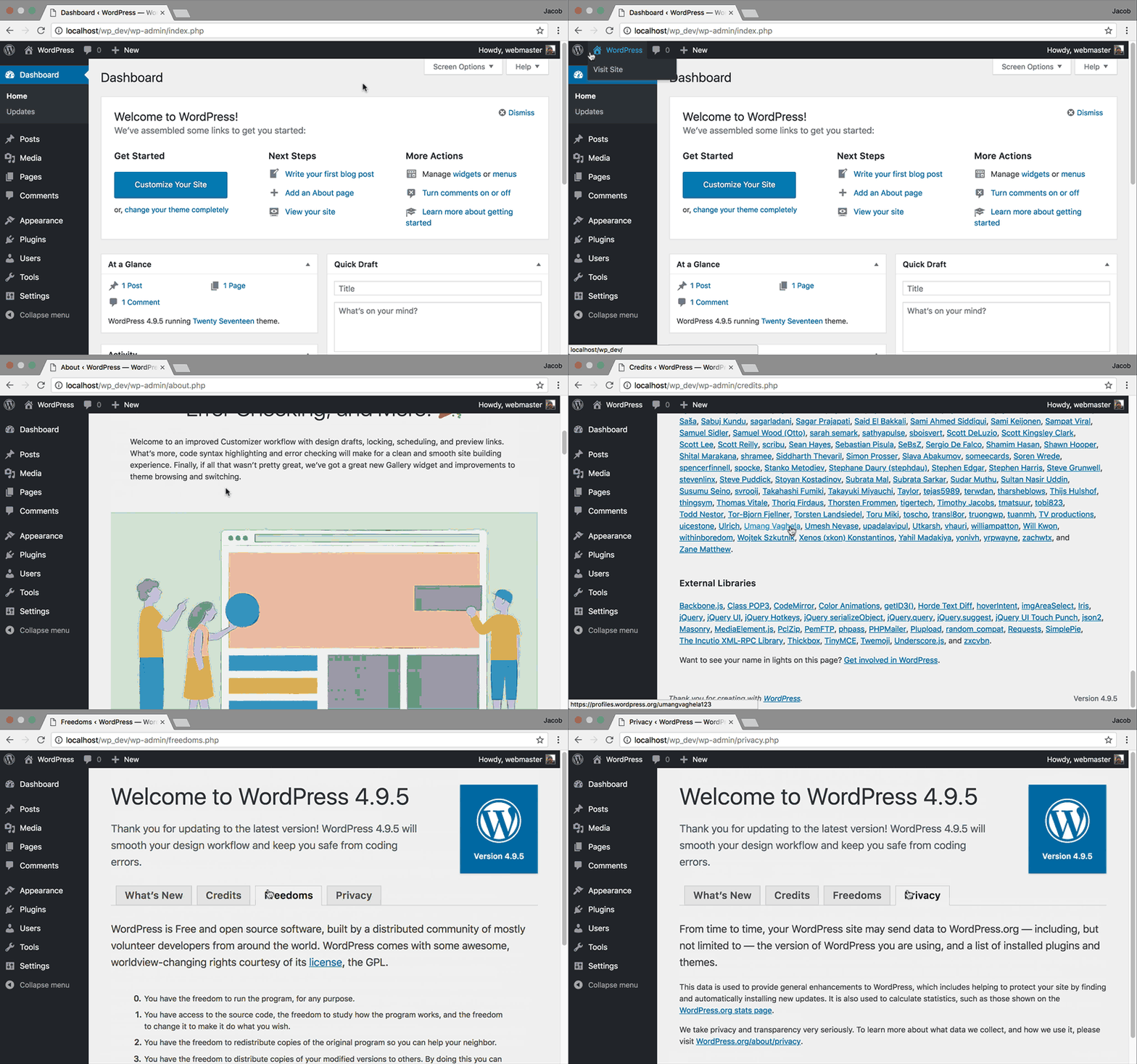
What I found most interesting about Jacob's blog post is that he makes the point that every WordPress site (not WordPress.org) has an 'About WordPress' section in the administration backend that shows both WordPress' values and contributor credits.

Wordpress about section

This could be an interesting approach for Drupal and is an idea worth exploring. Today, Drupal's values and principles and Drupal's contribution credits live on Drupal.org, but not in the Drupal software itself. When done well, it's probably one of the most impactful ways to educate people and organizations that are new to Drupal about our community and open source. And by having credits in the software, we'd inspire more people and organizations to contribute back. It's an interesting idea.

26 Apr 20:34

You Should Be Wearing Sunscreen on Your Face Every Day

by Shannon Palus
You Should Be Wearing Sunscreen on Your Face Every Day

Of all the skincare potions you can buy, sunscreen is the best. It’s both a health product and a cosmetic, helping to guard against skin cancer and wrinkles alike. And it doesn’t even have to be all that spendy.

26 Apr 20:34

Online Signature Services Are Broken

by Emin Gün Sirer

In the last few years, we have seen a proliferation of services that allow people to sign legal documents online. Essentially, they send out a link to you via email, you click on the document, write your name, they render it in a fancy font to make it look like a real signature, you click and you're supposed to be legally bound. Variants of this service collect and forward other important documents, such as recommendation letters.

All such services are bunk. They fail at their central task, of ensuring that the person doing the signing is who they claim to be. They also fail at their secondary task, of properly documenting the basis for trust, such that, if that trust were to be broken due to fraud, the perpetrators can be prosecuted effectively.

I want to clarify what is wrong with these services because it makes an interesting case study in computer security. By the end of the article, you should be able to forge documents and get into any top CS department of your choice, including our highly ranked program at Cornell, regardless of your background, accomplishments, and previous preparation.

Central Tenets

These services fail because they violate a central tenet of user authentication: document and capture the credentials used to establish identity.

Here, you can see me use one of these services to sign a document that the recipient hopes is going to be legally binding.

Not a signature.

That is not my signature. That's not my handwriting. And it could easily have been someone else doing the typing.

Authentication is the act of establishing a link between a claim to an identity and the credentials presented to eastablish that link. These services fail to document the basis credential.

The simple fact is that these services are performing authentication via an email address. The preparer of the documents makes a claim that "the person you know as EGS has email address el33th4x0r at gmail.com and will be issuing statements we would like to make legally binding."

The service emails a link to their service to that address. Access to that link permits anyone to be able to sign as the user EGS. And yet, the service hides the email address they authenticated, and reports the provided name instead, without establishing the veracity of the binding between the name and the email address. So, this service will happily pretend that the documents were signed by "EGS", when in reality, the credential it checked was the email address el33th4x0r. Who the heck is el33th4x0r? How does the recipient know that that's the genuine address I use? How would they know if it instead came from el33th4xor?

Some services allow me to upload a picture of my own signature, and provide that instead of the handwriting font supplied by the system. This confers no actual security. Old school signatures, in writing, are symmetric, the provider and validator are in possession of the same credentials, in contrast to public key cryptography, where the situation is asymmetric, and the validator can never forge a signature. So anyone who ever processed a check from me or read a letter I wrote is fully capable of producing my exact signature, through the exact same process of scanning that I would use to generate it. It's just security theater to fool gullible people.

Attacks

Online signature services are broken even for the simple case where one party knows the binding between a name and its corresponding email address, for the number of failure points involved in email routing are immense. The sender is trusting BGP, DNS, SMTP+TLS, email forwarding, and the email delivery agents, as well as the confidentiality of the email message at rest on email providers.

That's easily in excess of many tens of millions lines of code. There are uncountably many critical vulnerabilites in this code base, as evidenced by the number of times your software auto-updates itself with security patches. Undoubtedly, there are operational measures to protect some particularly centralized systems; for instance, the GMail team guards its data at rest carefully following the incident when Chinese agents infiltrated the service and prosecuted some dissidents, but certainly, most institutions come nowhere near this level of diligence. Your email can be intercepted and your "signature" easily forged.

How To Get Into Any Graduate School

And the situation gets much worse when multiple parties are involved, especially when party A is entrusted to provide the binding between party B's name and corresponding email address.

Take the case of graduate school admissions. A number of companies have cropped up that automate the task of collating and forwarding graduate school applications and recommendation letters. Every single one I have seen, without fail, is broken, nothing more than smoke, mirrors, and a few fancy fonts designed to fool unsuspecting people. They all commit the basic error described above by authenticating the email but displaying the name. As a result, they admit massive fraud.

[Incidentally, these services also fail to actually automate the process and generally pose a centralized point of failure. Hackers, and secret services, can easily gain access to 90+% of all the recommendation letters written in a given year, and keep these forever. Overall, higher education should not outsource its core functions. But that's a separate rant.]

Fraud isn't limited to CSW.

I went to school with this fellow who wrote recommendation letters for himself, while he was in jail, and got into Princeton.

The attack is simple: you apply for graduate studies, and you claim that your letter writers are the biggest names you can find. Let's pick some current and future Turing award winners, say, Lampson, Clark, Stonebreaker, and Sirer. The system then leaves it up to the applicant to establish the name-email bindings. So you can provide email addresses that you control, and write the juiciest recommendation letters known to humankind from the biggest luminaries in the field. As long as you don't go overboard in the letters, there is nothing in the system that will allow anyone to catch on, because the online signature service never displays the actual email addresses to the people who consume the signed documents. Our admissions committee will never catch on that the letter from the acclaimed Butler Lampson actually came from an email address under the control of the attacker.

At the moment, all graduate admissions are essentially done by the honor code. All vetting happens not through the online signature services, whose job is to help with this vetting, but despite them, via extraneous, social methods. In essence, if it weren't for researchers occasionally talking to each other, the entire authentication system would fall apart.

This is no way to build a modern authentication system. And the fact that we have these poor services convincing people, through their hokey fonts, that they are doing an adequate job is keeping others from entering the same space and doing a better job.

Cause for Concern

Given that most online signature services essentially run for free, it's worth thinking about their economics.

A company that handles documents worth millions or even billions of dollars should charge you something. A failure of their systems, a data loss event on their side, might well render them liable. They need to hire competent staff and run a substantial operation.

Now, one could argue that they need not charge you in proportion to the value they handle, that this is a commoditized business, that there is a lot of competition. But still, because the legal downside is non-zero, there must necessarily be some offsetting charges. Yet I see very little of that.

Leaving aside the value of the documents, there is the value to be gained from knowing what's inside the documents. How much would the US government pay to know all of the business relationships between the actors in Russia? That's exactly how much they would invest in startups that provide free online signing services. The same is true for every other secret service, with foreign agencies sponsoring these companies in target countries. The entire situation is very similar to VPN services: the entire sector seems to be a set of giant honeypots.

And of course, you can bet that every single secret service is working to get access to the data repositories of competing services. It's a grim world.

Future Outlook

Luckily, there is room for optimism despite the sad state of user authentication on the Internet.

In the US, the legal system permits the use of electronic signatures based on cryptography. So we can actually implement strong signatures based on asymmetric, public key cryptography. We can sign documents without ever worrying about the recipient turning around and forging other documents with our signature.

The rise of cryptocurrencies has forced us to build key management infrastructure. Hardware wallets, whose sole function is to carry keys securely and issue signatures, are maturing, albeit slowly.

Building a public key infrastructure is never going to be easy, but at least the right ingredients are falling into place.

Document management is no cheap task, and I don't mean to underestimate how much effort companies otherwise may end up spending to manage their signed documents. But if the alternative is to entrust the entire kit and kaboodle to be managed by an unknown third party that is known to do a poor job at their central task of authentication, and where the data resides on disk, at rest, unencrypted, then it is no alternative at all. I'm optimistic that turnkey, self-hosted solutions can be developed here that do not rely on storing everything at a central point of vulnerability.

So, I expect that the situation will improve over the next decade, because there is no reason for it not to, other than complacency and lack of awareness of just how terrible the existing services are.

In the meantime, you should do three things:

1. Demand that online signature services display the actual credential they checked. For without this, the validator has no way of evaluating the central authentication claim.

If they checked just an email address, they should display just that email address. Displaying anything else as the authenticated user name is dangerously misleading.

This transparency should pave the way for new companies that authenticate users via multiple methods, and permit the consumer of the information to make informed choices.

2. Refuse to incorporate insecure services into your workflow at your institution.

3. If you are at an educational institution, you have a higher burden on your shoulders. Refuse to outsource central tasks of a university to third parties. Such parties constitute central points of failure, where their failure can result in the betrayal of the core mission of a university, to protect the students' future careers.


Related

I have written previously about the dangerous trend in higher education towards outsourcing critical information to third parties here

26 Apr 20:34

Save time and effort by creating your own Dropbox Paper templates

by George Gerard

Screenshot of template selection box in Dropbox Paper

Team meeting notes, creative briefs, project plans: You’re probably using the same types of docs over and over again. But pulling one together—tracking down the last doc, copying and pasting into a new one, stripping out the old project’s info—is an annoying, repetitive chore. So today, we’re making your work easier by introducing one of the most requested Dropbox Paper features: the ability to turn any doc into a shareable template.

Creating a template is simple: Open any doc, and you can “templatize” it with just a couple clicks. Want to create one from a blank doc? Just click Create with templates on Paper Home. Once you’ve created your template, make any adjustments, and they’ll be automatically saved. You can even add placeholder text to help people better understand what information they need to fill in. From there, share the template with your team, and they can use it to create new docs. And if you want to collaborate on the templates themselves, you can give team members edit access.

Screenshot of three-dot menu in Dropbox Paper, with the Templatize item shown

Paper templates help you get projects moving, so team members can focus on doing their best work. With them, you can:

  • Start docs quickly. Kick off projects without having to set up and format docs from scratch. You can even create new docs from templates on the go with the Paper mobile app.
  • Standardize forms. Make sure teams have all the info they need from the get-go by creating templates for commonly used docs like briefs and project timelines.
  • Streamline processes. Save everyone time by building a library of shared templates that anyone can use to start new docs or create their own customized templates.

Get started with templates by creating your first one today at dropbox.com/paper. There—and in the Paper mobile app—you’ll also find pre-built templates that you can use to start new docs. To learn more about Dropbox Paper templates, visit our help center.

26 Apr 20:33

Spectacles: Snapchat-Mutter Snap stellt neue Kamerabrille vor

mkalus shared this story from SPIEGEL ONLINE - Schlagzeilen.

Am Mittwoch hatte Snap-Chef Evan Spiegel in einem Interview angekündigt, dass seine Firma noch in dieser Woche eine neue Version seiner Kamerabrille "Spectacles" vorstellen werde. Zunächst wurden aber erst mal noch die neuen Snappable-Minispiele beworben. Einen Tag später hat das Unternehmen nun auch Details zum Brillen-Update bekannt gegeben.

Die neuen Spectacles sollen demnach Fotos und Videos in besserer Qualität und immer in HD aufnehmen. Auch die Qualität der Tonaufzeichnungen sei verbessert worden, heißt es in einer Mitteilung des Unternehmens. Zudem würden die Aufnahmen des neuen Modells bis zu vier Mal schneller als zuvor in die Snapchat-App importiert.

Eine wichtige Neuerung ist außerdem, dass die Computerbrille jetzt wasserdicht ist, man kann sie also auch beim Schwimmen, im Regen oder unter der Dusche tragen. Der Preis in Deutschland wird im Vergleich zum Vorgänger von 150 auf 175 Euro erhöht.

Fotos machen

Der Startbildschirm für Snapchat-Nutzer: Von hier aus lassen sich die Snaps erstellen. Das können entweder Fotos oder maximal zehnsekündige Videos sein. Der zentrale Knopf unten in der Mitte ist der Auslöser. Und für die bei vielen jungen Nutzern beliebten Selfies gibt es natürlich die Option, auf die Frontkamera umzuschalten.

Videos aufnehmen

Durch dauerhaftes Drücken des Auslösers beginnt die Videoaufnahme. Auch in Videos lassen sich viele Gestaltungselemente platzieren. Vom Startbildschirm aus navigiert man durch horizontales oder vertikales Wischen zu den anderen Snapchat-Funktionen.

Das Wischen nach unten bringt einen zur eigenen Profilseite und dem persönlichen Snap-Code, über den andere Nutzer einen in der App finden können. Nach oben wischen führt zur Memories-Funktion. Rechts beziehungsweise links wischen führt zu den persönlichen Chats oder der Stories-Funktion. Alle Funktionen werden im Lauf der Fotostrecke noch ausführlich erklärt.

Gesichtsfilter benutzen

Besonders beliebt bei Snapchat: die ständig wechselnden Gesichtsfilter und Masken. Sie erkennen Gesichter zielgenau und legen bunte Animationen über das Motiv.

Dazu nimmt man einfach auf dem Bildschirm sein Gegenüber - oder sich selbst per Frontkamera - ins Visier und drückt mit einem Finger auf den Bildschirm, bis die App das Gesicht erkannt hat. Dann erscheint ein weißes Netz über dem Gesicht und es lassen sich verschiedene Filter ausprobieren.

Farbfilter wählen

Wer ein Foto oder Video gemacht hat, kann durch Wischen nach links oder rechts Farbfilter auswählen (ähnlich wie bei Instagram) und sich zusätzliche Elemente ins Bild holen, zum Beispiel die aktuelle Temperatur oder die Uhrzeit.

Stilmix auf Snaps

Selbstgemaltes, Text, Emojis, Filter: Insbesondere bei jungen Nutzern ist Snapchat wegen seiner vielfältigen, verspielten Bearbeitungsmöglichkeiten der Inhalte beliebt. So hat sich die App von Gründer Evan Spiegel zu einem der wenigen Facebook-Konkurrenten von Rang entwickelt. Natürlich hat Mark Zuckerbergs Netzwerk aber deutlich mehr Nutzer, rund zwei Milliarden Menschen sind bei Facebook dabei.

Haltbarkeit festlegen

Für die begrenzte Haltbarkeit seiner Inhalte ist Snapchat berühmt geworden. Die legt man mit einem Klick auf die Uhr rechts im Bildschirm fest. Bei zehn Sekunden ist aber Schluss.

Snap an Freunde schicken

Wer mit seinem Werk zufrieden ist, kann es versenden und wählt dazu aus einer Liste seiner Kontakte die Adressaten aus.

Story bauen

Snapchat erlaubt es auch, mehrteilige Geschichten aus Fotos und Videos zu basteln, die für 24 Stunden verfügbar sind. Die Funktion wurde - wie viele andere Features von Snapchat - bereits von der Konkurrenz kopiert und findet sich so ähnlich mittlerweile zum Beispiel auch bei Instagram.

Sticker platzieren

Auf den Bildern lassen sich auch zahlreiche Stickervarianten platzieren und in Videos einbauen. Das geht auch so, dass die Sticker an einem Ort im Video fest verankert sind und sich nicht mitbewegen, wenn die Kamera schwenkt.

Nicht so flüchtig, wie man denkt

Snapchat ist als die App bekannt geworden, bei der sich Inhalte von selbst wieder löschen. Die 24-Stunden-Überlebensdauer von Inhalten gilt nach wie vor in der App. Doch Nutzer sollten trotzdem überlegen, was sie posten wollen. Denn Screenshots sind möglich. Wenn ein anderer Nutzer den eigenen Snap screenshottet, bekommt das der Ersteller aber mitgeteilt.

Private Chats

Auch in den direkten Unterhaltungen über die App lassen sich nahezu alle Gestaltungselemente von Snapchat benutzen - kurze Videochats sind ebenso möglich.

Medienkanäle auf Discover

Auf Snapchats Discover-Seite finden sich speziell für Snapchat produzierte Inhalte von Medienpartnern der App. Der Nachrichtensender CNN ist genauso dabei wie "BuzzFeed", das "People"-Magazin, "National Geographic" und "Vice". Die Discover-Kooperationen gab es lange nur mit Medien aus dem englischsprachigen Raum. Mittlerweile sind auch deutsche Medien in der Rubrik vertreten, darunter auch SPIEGEL ONLINE.

Discover-Geschichten ansehen

Die Discover-Storys sind meistens bunt animierte Videos mit Ton und Texten. Wenn Sie sich einmal das Angebot von SPIEGEL ONLINE auf Discover ansehen wollen, dann

bitte hier auf diesen Link klicken.

Das Bild zeigt aber die Geschichte eines anderen Mediums.

Discover-Abonnements

Nutzer können einzelne Snapchat-Medienpartner kostenlos abonnieren und bekommen ihre Geschichten regelmäßig in der App angezeigt.

Memorys-Funktion

In den frühen Tagen der App waren die eigenen Snaps nach 24 Stunden unwiederbringlich verloren. Das hat Snapchat mittlerweile geändert. Nutzer können im Bereich Memorys mittlerweile auch eine Art animiertes Fotoalbum aus alten Snaps aufbauen.

Einstellungen checken

In den Einstellungen sollte jeder neue Nutzer unbedingt einmal vorbeischauen - zumindest um seine Privatsphäre-Einstellungen zu überprüfen und gegebenenfalls anzupassen. Außerdem stellt man hier zum Beispiel ein, ob Snapchat einem Push-Benachrichtigungen schicken kann.

Spectacles verbinden

Das erste Hardwareprodukt von Snapchat, die Spectacles-Videobrille, lässt sich ebenfalls im Einstellungen-Bereich mit der App und dem Benutzerkonto koppeln.

Videos mit den Spectacles machen

Die Videobrille lässt sich nur in Verbindung mit Snapchat nutzen und nimmt kurze Clips aus einer extremen Ichperspektive auf. Snapchat will es laut eigenen Angaben Nutzern so noch leichter machen, ihre Erinnerungen und Eindrücke zu teilen. Ein Ring aus LED-Lichtern zeigt Menschen in der Nähe an, wenn die Brille aufnimmt.

In diesem Artikel

haben wir die Spectacles einem ersten Test unterzogen.

Ein bemerkenswerter Flop

Die "Snapchat"-Betreiberfirma Snap hatte nach einem kurzen Hype die Nachfrage nach der Kamerabrille, die zunächst nur per Automat verkauft wurde, schwer überschätzt. Das Unternehmen konnte zwar für 220.000 Brillen Käufer finden. Nach Informationen des "Wall Street Journal" hatte Snap insgesamt aber eine Million Geräte produzieren lassen - das Gadget wurde für die Firma zu einem teuren Flop. Insgesamt musste Snap 40 Millionen Dollar für unverkaufte Geräte abschreiben.

Advertisement

Noch schwerer wog aber, dass die Brillen bei vielen Käufern schnell in der Schublade verschwanden, weil die Bild- und Videoqualität nur mäßig war und der Datenabgleich mit der App sehr lange dauerte. So wurde das Lifestyle-Gadget zu einem selten gesehenen Luxusartikel, der schnell wieder aus dem öffentlichen Leben verschwand.

Der Mitgründer und Chef von Snap, Evan Spiegel, betont dennoch weiter, dass seine Firma sich vor allem als Kamera-Anbieter sehe. Laut einem Bericht der Website "Ceddar" wird derzeit auch an einer teureren Version der Brille mit zwei Kameras für dreidimensionale Effekte gearbeitet.

26 Apr 20:32

Our Looming Tower – 5

by pricetags
26 Apr 20:32

Guess Where …

by pricetags

It’s as strong an urban streetwall as you’ll find in Vancouver: more an east-coast solid flank of glass and concrete than the Vancouverism-style podium-and-tower found elsewhere.

It’s the west side of the 1200-block Howe Street in Downtown South, quickly emerging as a distinct sub-neighbourhood needing a separate name.

Here’s what it looked like in 2007, once home to a couple of entertainment institutions from our past – the Odyssey club and La Bodega restaurant.  Any memories, people?

26 Apr 16:55

Nokia X6 leak shows off its iPhone X-inspired notch

by Dean Daley
Nokia X6

Leaked renders reveal an upcoming Nokia smartphone that features a notch.

The smartphone, dubbed the Nokia X6 — the exact same name as a Nokia device launched in 2009 — is set to release on May 27th, according to the leak.

Nokia’s upcoming X6 is rumoured to feature a 5.8-inch display with a 19:9 aspect ratio. One variant of the smartphone features a Snapdragon 636 and 6GB of Ram, while the other utilizes a MediaTek Helio P60 chip paired with 4GB of RAM.

Nokia X6

The phone seems to include a small chin resulting in substantial display real estate. Further, the phone features a dual rear-facing camera setup with a fingerprint scanner located directly below it.

The Nokia X6 is part of HMD Global’s X-series of smartphones that are reportedly launching in China on April 27th. Finnish company HMD Global purchased the rights to the Nokia brand back in 2016.

HMD Global smartphones are not typically released in Canada, though the company’s phones are often sold by third-party sellers like Amazon and Canada Computers.

Source: Weibo Via: GSMArena

The post Nokia X6 leak shows off its iPhone X-inspired notch appeared first on MobileSyrup.

26 Apr 16:55

Province commits $71 million to reducing cellular dead zones in eastern Ontario

by Rose Behar

Things are looking up when it comes for the prospects of rural internet users in Eastern Ontario.

Just under a year after submitting its proposal, the Eastern Ontario Wardens’ Caucus (EOWC) has received a $71 million CAD commitment from the provincial government to reduce cellular dead zones in rural eastern Ontario.

The EOWC and its internet advocacy-focused offshoot Eastern Ontario Regional Network (EORN) proposed a $213 million CAD public-private partnership in late May 2017 to Ontario Infrastructure minister Bob Chiarelli and Rural Affairs minister Jeff Leal.

If successful, the funding would be put into use in improving the reach and quality of cellular data services in the region. EORN asserts — based on a commissioned engineering study — that one quarter of the area where there are homes, businesses or major roads in the region cannot access any cell services.

EOWC and EORN are also seeking funding from the federal government and the private sector, though there’s no other confirmed funding at this point.

EORN states the project would create 3,000 full-time equivalent jobs over 10 years and spur $420 million CAD in new business revenue.

Additionally, EORN notes that it fits within government goals to increase access to broadband internet for all Canadians. Canada’s telecom regulator designated mobile and fixed broadband as basic services for all Canadians in late 2016.

Federal minister of Innovation, Science and Economic Development, Navdeep Bains, launched Connect to Innovate, a program that aims to bring broadband internet access to remote and rural areas across Canada shortly after.

Among the most recent investments through Connect to Innovate was $17.1 million in funding for 39 remote or rural communities in Alberta.

Source: CNW

The post Province commits $71 million to reducing cellular dead zones in eastern Ontario appeared first on MobileSyrup.

26 Apr 16:55

Snap’s second-generation Spectacles now available in Canada

by Igor Bonifacic

Snapchat creator Snap today released a new version of its Spectacles glasses.

The second-generation Spectacles add several new features and enhancements to the company’s first wearable camera.

To start, they’re more compact than their predecessor, featuring a temple frame that is approximately a third of the size of the one found on the original Spectacles. Similarly, the included charging case is 20 percent smaller.

The new Spectacles are also IPx7 water-resistant, allowing users to capture underwater images and video at a depth of 1 metre for about 30 minutes at a time.

Snap has also added a second microphone, which the company says should help increase overall audio capture quality, particularly when it comes to capturing dialogue.

Additionally, the company has improved the device’s capture capabilities. In addition to only capturing video in high definition now, the new Spectacles can also shot photos. To capture a photo, users hold the top button for a second. Moreover, Wi-Fi transfer speeds are four times faster, according to the company.

Lastly, the new Spectacles are available in three new colours — onyx, ruby and sapphire. With each colour option, consumers can pick between two different lens colours.

The second-generation Spectacles are available to purchase in Canada starting today via company’s website. All those new features come at a higher cost, with the second-generation Spectacles priced at $199.99 CAD, $30 more than the original Spectacles.

Following the $40 USD million write down the company took on the original Spectacles, Snap says it learned some valuable business-related lessons. This time around, the company plans to only sell its new hardware only via its online store.

A spokesperson for the company said Snapbots, the Minions-like vending machines the company used to sell the original Spectacles, helped build hype for its first hardware product but ultimately made it difficult for Snap to accurately judge demand. The company also says it’s committed to making its own hardware because that will allow it to play a leadership role in the future of camera technology.

Source: Snap

The post Snap’s second-generation Spectacles now available in Canada appeared first on MobileSyrup.