Rolandt
Shared posts
@stoweboyd
@stoweboyd
@stoweboyd
@stoweboyd
The Carnival of the Mobilists no. 59 Is Here
Hi everyone,
Welcome to the 59th edition of the Carnival of the Mobilists! Sit comfortably and get ready for a blast of the best mobile writing of the week :)
Mobile Content and Services
As part of the interviews with leading research companies dedicated to the telecoms industry (previous guests were Strategy Analytics, Wireless World Forum), Michele MacKenzie of Ovum visits Xellular Identity and shares Ovum's Forecasts and insights regarding the mobile content market.
Justin Oberman covers the launch of the New York City Mobile Trial sponsored by Nokia, Citibank, Mastercard and Cingular and shares his experience with the Nokia 6126 with the NFC chip (Cingular branded) mobile phone. Urbanship also launch wallet apps for iphone, You can check in this article for more details about that.
Dennis of the Wap Review covers Mobitopia, a del.icio.us clone for mobile links only.
Following his fascinating post “Understanding Mobile 2.0” Rudy De Waele created a wiki space to start categorizing the so-called Mobile 2.0 companies and invites you to add your information and keep it updated.
The Mobile Diva, Darla Mack, raises her thumbs up on the threaded SMS Idea. Hey, when you're talking to someone via SMS you're having a conversation... so why not display it as such? :)
The iPhone
The buzz around the iPhone is still humming!
Krisse from All About Symbian joined the fun and picked the 'best post of the week' title with 'why $50 phones are revolutionary while $500 ones aren't'; and here's a quote I liked:
The discussion of an "upheaval" sounds particularly empty since it distorts what an upset is: something that contacts the lives of however many individuals as could reasonably be expected as significantly as could reasonably be expected. Innovatively bleeding edge contraptions like the Apple iPhone or Nokia N95 are going in totally the other way to unrest, and by focusing on them, their makers are purposely limiting the expansiveness and profundity of their items' impact."
David Beers hopes that the closed-platform iPhone could spur on a new era of open-platform handheld tablets which he calls "PDA 2.0" :)
On the same subject, Michael Mace proposes an alternative explanation to the previous answers provided to "why can't you add software to the iPhone?" - because of Windows.
Patrick Altoft tries to help understand the complexities of the speculations related to the Apple vs. Cisco iPhone trademark dispute and brings Eric Ramage's expert opinions as a Trademark Attorney.
C. Enrique Ortiz responds to a previous post by Christian Lindholm and shares his views on the subject of iPhone's new user interface.
Jason Delport agrees that Apple has raised the bar on the mobile user interface.
Kiran Bellubbi covers the inventory, production and distribution strategies between Moto, Nokia, and Apple and concludes that clearly, Apple has won this battle.
Bill Day sums up some of the early reports on iPhone while laying out three key issues identified during the first week: the lack of 3G, the lack of proper imaging capabilities and the lack of developer support.
Mobile OS
Anders Borg brings a section-by-section analysis of the MIDP 3.0 draft spec. I just learned that MIDP 3.0 “is the new, yet unfinished, version of MIDP. CLDC/MIDP is the most popular mobile phone application platform…" Also, Anders states (smiling) that this post is “not for the faint of heart” :)
Andreas Constantinou clarifies the mobile Linux landscape today and explains how there are five different types of offerings: from Linux support packages (the Lego bricks) all the way to complete products (the castles). He essentially maps Linux vendors and offers insight into how these vendors are like and unlike.
Thomas Menguy asks whether software or OS vendors have to define the user experience.
Mobile HS reviews
Welcome to Ricky Cadden, a new contributor to the CotM, with a reach review of the Nokia N75 (Cingular branded) mobile handset.
Also, Chris Johnson reviews the Blackberry Pearl.
Other Mobile Related
VoIP Lowdown reviews Skype’s plans to enter the mobile market with Wi-Fi phones and dual-mode cordless handsets among the company’s new range of products scheduled to debut this year.
Leonard Low lists ten good reasons why mobile devices are essential for education.
Just before saying goodbye:
You're all invited to the second annual MobileSunday. It's "an unofficial, informal and generally cool and funky gathering of mobile bloggers and their chums-that will be taking place in Barcelona on the eve of this year's 3GSM World" organized by Rudy De Waele. For more information - visit this page.
Don't forget the MoMo Global Peer Awards 2007 in Barcelona during 3GSM (February 12th starting at 3 PM) including the "Host of the Year Award" by Carnival of the Mobilists. The winning blogger will receive a complimentary trip to Helsinki for the MobileMonday Global Summit in May!
Have a great week and hope to catch up next week at Mobbu or in Barcelona :)
Being your own Boss Series: Jesse Brown of Canadaland
Jesse Brown is a renowned Canadian journalist leading the Canadaland podcast, which he launched in 2013, and Hover has been proudly sponsoring for many years. Jesse was a former chase producer of CBC Radio, where he worked with Michael Enright. Now, Jesse has written a book, The CANADALAND Guide to Canada (Simon & Schuster) and continues to publish a variety of podcasts under Canadaland. Subscribe to keep up-to-date with all things politics, journalism, art, food, and culture in Canada!
What gets you out of bed every morning?
The days I’m most excited to go to work are the days where we’re on a story and I really don’t know what’s going to happen next. It’s a parallel with the experience of listening to podcasts, and with the universal appeal of narrative itself. People just really want to know what happens next!
How did it feel to launch that first podcast episode?
Terrifying. I’d been a national radio host, so I was afraid that I’d fallen to some lowly amateur hobbyist level. I would have launched it much sooner but for that stupid fear.
How have you prevented burnout in the tough position of running your own business?
I haven’t.
What is the most difficult aspect of working for yourself?
I worked for myself for 15 years and got comfortable with it. Now I have a staff, and I feel much more responsibility to sustain a healthy business. Taking on a managerial role has definitely been the big challenge.
What is the most rewarding aspect of working for yourself?
The response from our listeners and readers. The knowledge that we’ve made things better in our industry – better for the news reading public, better for journalists. There are still huge problems, but the sick fear of talking about them is almost gone. We’re airing it out.
Can you discuss a time where you agreed to a project and regretted taking it on?
I’ve generally only taken on things I’m excited about, but I do regret situations where I’ve known a project is done but stuck around. You need to listen to that voice that tells you when it’s time.
“You need to make it real somehow… Once you stake your claim on a project, you’ve done the hardest part, and you just proceed.”
Can you discuss a time where a project or person encouraged you to keep going?
The encouragement I’ve gotten throughout my career from the CBC’s Michael Enright has convinced me to persist at times when I might otherwise have stopped.
Can you discuss an opportunity you’ve been able to do, thanks to running Canadaland?
Co-writing the CANADALAND Guide to Canada. It was really fun.
What was your personal favourite episode of all that you have done and why?
Hard to pick one. We were really happy with our recent episode explaining the popularity of Jordan Peterson. COMMONS and The Imposter had a number of episodes this season I felt proud to publish. I love listening to OPPO and feel totally ok about publishing it.
What is your favourite thing to do to relax and step away from the stress?
Eat good food and hang out with my wife and kids.
What is the number one step a person can take to get their own business of the ground?
You need to make it real somehow. That may mean telling your friends or your partner, it may mean announcing it online or putting up a web page. Once you stake your claim on a project, you’ve done the hardest part, and you just proceed.

How to Breathe New Life Into Your Old Yoga Mat

Whether you’re looking to buy your first yoga mat or upgrading a worn-out one, the question may have crossed your mind: What do I do with an old mat after it’s rested for its final shavasana? Given that yoga mats typically consist of only one or two materials, you might hope that the one you have can be recycled. But although that is technically possible, the not-great news is that it probably won’t happen.
“Recycling only works if there’s a … constant supply of product,” said William Carroll, PhD, an adjunct professor of chemistry at Indiana University, whom I interviewed for our guide to the best yoga mats. “And with yoga mats, there aren’t going to be enough coming back out of the waste stream for someone to do it.” In reality, he said, “they will end up in landfill.” At least eventually.
When recycling your mat outright is not an option (more on this in a moment), repurposing it is the next best thing. “We have to figure out how to keep materials in use for much longer than we typically do,” said Michael Brown, PhD, of Brown and Wilmanns Environmental, a consulting firm that advises product manufacturers on their environmental policies.
You have a number of ways to reuse mats to extend their purposeful life a bit longer—a practice that many yoga mat manufacturers endorse. For example, you might use an old yoga mat beneath a sleeping pad or sleeping bag when you’re camping, to add insulation and further soften a surface. Or you can upcycle portions of the mat to make custom-cut shelf liners or floor-protecting furniture pads. Yoga mats that have retained some cushioning can become under-knee padding for use while you’re gardening, or donations to animal shelters for use as bedding or crate liners. Mat maker Gaiam has published 50 customer-submitted ideas for yoga mat reuse; JadeYoga, another mat maker, lists 25 options on its site.
Why most yoga mats aren’t recycled
Many yoga mats are made of polyvinyl chloride (PVC) or thermoplastic elastomer (TPE), which are technically recyclable. In theory, equipped facilities “can chop them up, throw them in a hopper, melt them, and make something out of that melted stuff,” said Brown. “The problem is, if you’ve added a bunch of junk to the material—plasticizers, UV retarders, dyes, as well as just dirt from use—you’re not dealing with a pure polymer and you’ll get back a less-than-pristine polymer.” Such contaminants make used PVC and TPE yoga mats undesirable to recyclers.
Facilities can’t melt down rubber yoga mats like they can PVC or TPE mats, though they can grind rubber mats up and reconstitute their remnants for secondary use (similar to how recyclers can reuse tires in playground surfaces or foams to make carpet pads). But again, there needs to be a demand for the raw material, which so far hasn’t really materialized.
Used yoga mats can become under-knee padding for gardening, or donations to animal shelters for use as bedding.
In fact, JadeYoga, which makes our favorite all-rubber mat, used to offer its own recycling program, but discontinued it “because the cost and carbon impact of returning mats was not sustainable,” co-owner Dean Jerrehian wrote in an email. One of the very few active mat-recycling programs we’ve found is Manduka’s LiveOn, launched in April 2018, through which the company accepts used mats—made of any materials and from any brand—to be reused in home insulation, running tracks, and more. But this option is available only to customers who purchase a new Manduka mat.
Suga, which makes yoga mats out of recycled wetsuits, takes back its own mats for recycling into new mats if purchasers opt into its cradle-to-grave program. A $20 upcharge at the time of the initial purchase buys you replacement mats for life. Unfortunately, our yoga mat testers didn’t enjoy practicing on that coarse-feeling material.
Another company, Kiss the Sky, makes its mats from recycled pre-consumer rubber (basically, manufacturing scraps) in a similar grind-and-glue manner, and takes its mats back for recycling into new ones. We haven’t tested these mats, however.
Basically Perfect makes yoga mats out of cork and rubber and claims that these can be shredded for use as compost and will eventually biodegrade. Carroll pointed out that this process would take quite a while (“on the order of a few months”) even under ideal conditions, and we haven’t found any independent evidence that the mats will fully decompose in that way.
From an end-of-life perspective, yoga mats have issues similar to those for most things that end up in the trash—that is, they end up in the trash. Unless you help them find a second life to keep them out of the landfill.
Have you reused an old yoga mat? If so, how, and did it work out? We’d love to hear from you in the comments (photos encouraged).
eBay moving away from PayPal, will support Apple Pay in fall 2018

EBay and PayPal split into two different companies in 2015 and now the online marketplace giant is using a new back-end system to host payments on the platform.
According to a January 31st, 2018 media release, eBay is working with an Amsterdam-based company called Adyen to build a brand new back-end payments platform.
Adyen is used by both Netflix and Uber to handle their users payments services and it can be customized to work with many different transaction options, according to Engadget.
Apple Pay will be one of the first payment types that eBay will support, so Safari and iPhone users will be able to seamlessly purchase goods from the marketplace using their Apple Pay wallets.
“Offering Apple Pay as a form of payment on eBay is the first step in providing more choice and flexibility in payment options to our tens of millions of buyers,” said Steve Fisher a senior vice president of payments at eBay in the same July 24th media release.
EBay company will continue to add more payment methods in 2019 and hopes to have most of its Marketplace customers fully transitioned away from PayPal by 2021.
The Apple Pay eBay update will start rolling out to U.S. users first. MobileSyrup has reached out to eBay to see if and when the feature will launch in Canada.
Source: eBay
The post eBay moving away from PayPal, will support Apple Pay in fall 2018 appeared first on MobileSyrup.
Firefox Performance Update #10
Hey folks – another Performance Update coming at you! It’s been a few weeks since I posted one of these, mostly due to travel, holidays and the Mozilla SF All-Hands. However, we certainly haven’t been idle during that time. Much work has been done Performance-wise, and there’s a lot to tell. So strap in! But first…
This Performance Update is brought to you by: promiseDocumentFlushed
promiseDocumentFlushed is a utility that’s available for browser engineers in chrome documents on the window global. The goal of promiseDocumentFlushed is to help avoid synchronous layout flushes in our JavaScript code by scheduling work to only occur after the next “natural” layout flush occurs1.
promiseDocumentFlushed takes a function and returns a Promise. The function it takes will run the next time a natural layout flush and paint has finished occurring. At this point, the DOM should not be “dirty”, and size and position queries should be very cheap to calculate. It is critically important for the callback to not modify the DOM. I’ve filed bugs to make modifying the DOM inside that callback enter some kind of failure state, but it hasn’t been resolved yet.
The return value of the callback is what promiseDocumentFlushed’s returned Promise resolves with. Once the Promise resolves, it is then safe to modify the DOM.
This mechanism means that if, for some reason, you need to gather information about the size or position of things in the DOM, you can do it without forcing a synchronous layout flush – however, a paint will occur before that information is given to you. So be on the look-out for flicker, since that’s the trade-off here.
And now, here’s a list of the projects that the team has been working on lately:
ClientStorage (In-Progress by Doug Thayer)
The ClientStorage project should allow Firefox to communicate with the GPU more efficiently on macOS, which should hopefully reduce jank on the compositor thread2. This is right on the verge of landing3, and we’re very excited to see how this impacts our macOS users!
Init WindowsJumpLists off-main-thread (Completed by Doug Thayer)
The JumpList is a Windows-only feature – essentially an application-specific context menu that opens when you right-click on the application in the task bar. Adding entries to this context menu involves talking to Windows, and unfortunately, the way we were originally doing this involved writing to the disk on the main thread. Thankfully, the API is thread-safe, so Doug was able to move the operation onto a background thread. This is good, because arewesmoothyet was reporting the Windows JumpList code as one of the primary causes of main-thread hangs caused by our front-end code.
Reduce painting while scrolling panels on macOS (Completed by Doug Thayer)
Matt Woodrow noticed that the recently added All Tabs list was performing quite poorly when scrolling it on macOS. After turning on paint-flashing for our browser UI, he noticed that we were re-painting the entire menu every time it scrolled. After some investigation, Matt realized that this was because our Graphics code was skipping some optimizations due to the rounded corners of the panels on macOS. We briefly considered removing the rounded corners on macOS, but then Doug found a more general fix, and now we only re-paint the minimum necessary to scroll the menu, and it’s much smoother!
Make the RemotePageManager lazy (In-Progress by Felipe Gomes)
The RemotePageManager is the way that the parent process communicates with a whitelist of privileged about: pages running in the content process. The RemotePageManager hooks itself in pretty early in a content process’s lifetime, but it’s really only necessary if and when one of those whitelisted about: pages loads. Felipe is working on using some of our new lazy script machinery to load RemotePageManager at the very last moment.
Overhauling about:performance (In-Progress by Florian Quèze)
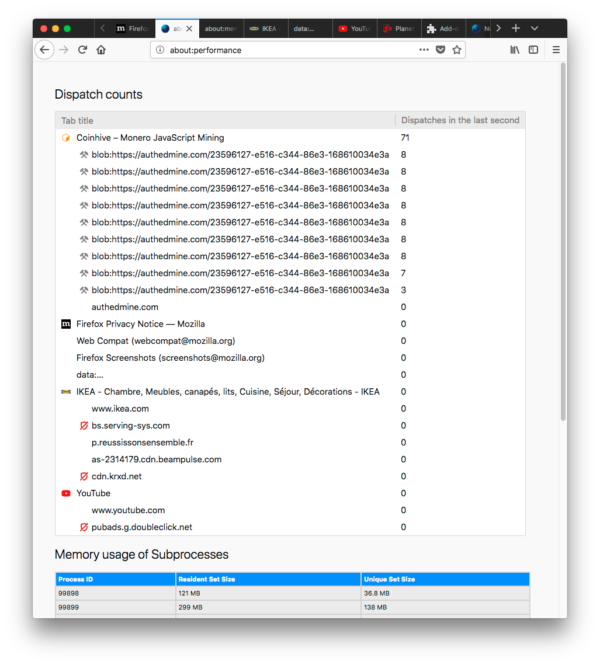
Florian is working on improving about:performance, with the hopes of making it more useful for browser engineers and users for diagnosing performance problems in Firefox. Here’s a screenshot of what he has so far:
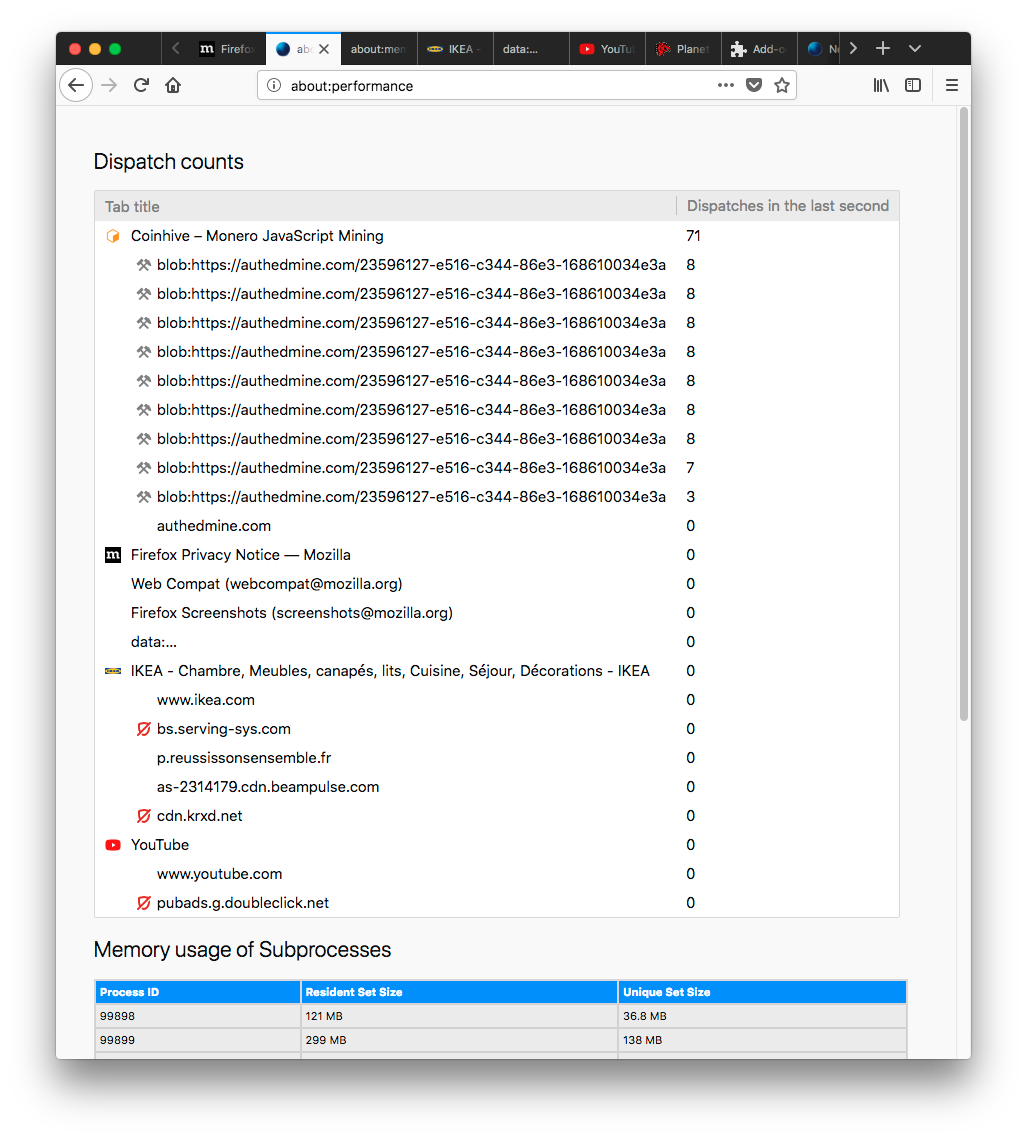
Apparently, mining cryptocurrency takes a lot of CPU!
Thanks to the work of Tarek Ziade, we now have a reliable mechanism for getting information on which tabs are consuming CPU cycles. For example, in the above screenshot, we can see that the coinhive tab that Firefox has open is consuming a bunch of CPU in some workers (mining cryptocurrency). Florian has also been clearing out some of the older code that was supporting about:performance, including the subprocess memory table. This table was useful for our browser engineers when developing and tuning the multi-process project, but we think we can replace it now with something more actionable and relevant to our users. In the meantime, since gathering the memory data causes jank on the main thread, he’s removed the table and the supporting infrastructure. The about:performance work hasn’t landed in the tree yet, but Florian is aiming to get it reviewed and landed (preffed off) soon.
Browser Adjustment Project (In-Progress by Gijs Kruitbosch)
This is a research project to find ways that Firefox can classify the hardware it’s running on, which should make it easier for the browser to make informed decisions on how to deal with things like CPU scheduling, thread and process priority, graphics and UI optimizations, and memory reclamation strategies. This project is still in its early days, but Gijs has already identified prior art and research that we can build upon, and is looking at lightweight ways we can assign grades to a user’s CPU, disk, and graphics hardware. Then the plan is to try hooking that up to the toolkit.cosmeticAnimations pref, to test disabling those animations on weaker hardware. He’s also exploring ways in which the user can override these measurements in the event that they want to bypass the defaults that we choose for each environment.
Avoiding spurious about:blank loads in the parent process (In-Progress by Gijs Kruitbosch)
When we open new browser windows, the initial browser tab inside them runs in the parent process and loads about:blank. Soon after, we do a process flip to load a page in the content process. However, that initial about:blank still has cost, and we think we can avoid it. There’s a test failure that Gijs is grappling with, but after much thorough detective work deep in the complex ball of code that supports our window opening infrastructure, he’s figured out a path forward. We expect this project to be wrapped up soon, which should hopefully make window opening cheaper and also produce less flicker.
Load Activity Stream scripts from ScriptPreloader (Completed by Jay Lim)
Jay has recently made it possible for Activity Stream to load its start-up scripts from the ScriptPreloader. From his local measurements on his MBP, this saves a sizeable chunk of time (around 20-30ms if I recall) on the time to load and render Activity Stream! This optimization is not available, however, unless the separate Activity Stream content process is enabled.
Enable the separate Activity Stream content process by default (In-Progress by Jay Lim)
This project not only ensures that Activity Stream content activity doesn’t impact other tabs (and vice versa), but also allows Firefox to take advantage of the ScriptPreloader to load Activity Stream faster. This does, however, mean an extra process flip when moving from about:home, about:newtab or about:welcome to a new page and back again. Because of this, Jay is having to modify some of our tests to accommodate that, as well as part of our Session Restore code to avoid unnecessary loading indicators when moving between processes.
Defer calculating Activity Stream state until idle (In-Progress by Jay Lim)
When Firefox starts up, one of the first things it prepares to do is show you the Activity Stream page, since that’s the default home and new tab page. Jay thinks we might be able to save the state of Activity Stream at shutdown, and load it again quickly during startup within the content process, and then defer the calculations necessary to produce a more recent state until after the parent process has become idle. We’re unsure yet what this will buy us in terms of start-up speed, but Jay is hacking together a prototype to see. I’m eager to find out!
Grab bag of Notable Performance Work
- Luca Greco landed all of the infrastructure to move the WebExtension storage.local backend from a file in the profile directory to indexedDB. This should particularly help the performance of the browser when WebExtensions write small changes to large storage structures, since historically this would cause the entire JSON object for the structure to be recomputed and flushed to disk. This should also help with memory consumption. The infrastructure is disabled by default, and once this bug is fixed, it will be switched on.
- Doug Thayer made our layerization logic smarter for pages that historically created many, many layers. This resulted in a nice win on our MotionMark score, and one user reported that it improved power usage as well.
- Mark Banner made it so that moving many bookmarks in bulk isn’t nearly as expensive to complete. This dropped the cost of dropping 300 bookmarks with async transactions from ~2s to ~400ms!
- Kartikaya Gupta made it so that users of the Gecko Profiler can use <pid>:<thread filter> in the thread filter input to gather samples of particular subprocesses. This will be very handy as we scale up the number of content processes!
- Hiroyuki Ikezoe made it so that we more often throttle computations for transform animations for out-of-view elements.
- Gijs Kruitbosch made it so that our DevTools don’t cause synchronous layout flushes when resizing the Inspector pane.
- Kris Maglione made it so that we more lazily load PluginContent.jsm, which should result in a content process start-up and memory win.
- Anny Gakhokize made it so that instead of sending 8 synchronous IPC messages to retrieve supported clipboard data types, we only send 1 with all of the necessary information.
- Marco Bonardo fixed a very important Places regression, where an entire table was being recalculated when deleting certain records.
- Dave Townsend fixed an issue where we were requesting the favicon for new pages twice instead of once. This resulted in a 2%-3% win on our internal session restoration bench on 64-bit Linux!
- PSPDFKit noted that Firefox is absolutely crushing it at WebAssembly performance.
- Andrew Swan enabled the delayed background page start-up optimization for WebExtensions by default, and it should ride out in the Firefox 63 release!
- Blake Kaplan got rid of the PBrowser::Msg_GetTabCount synchronous IPC message!
- The Graphics team has enabled WebRender by default for a subset of our Nightly population to test it. If you’re in that group, please file bugs if you see them! Check about:studies to see if you’re in the testing group.
Thank you Jay Lim!
As I draw this update to a close, I want to give a shout-out to my intern and colleague Jay Lim, whose internship is ending in a few short days. Jay took to performance work like a duck in water, and his energy, ideas and work were greatly appreciated! Thank you so much, Jay!
By “natural”, I mean a layout flush triggered by the refresh driver, and not by some JavaScript requesting size or position information on a dirty DOM ↩
And when it comes to smoothness and responsiveness, jank on the compositor thread is deadly ↩
it landed and bounced once due to a crash test failure, but Doug has just gotten a fix for it approved ↩
@stoweboyd
Google Docs is adding a grammar checker that works like Grammarly

Google is adding a new grammar checking tool to its online word processor, Docs.
The tool uses machine translation, which is the same tech that powers Google Translate. This time around, the feature isn’t being used to translate from one language to another, instead, it’s translating from incorrect grammar to correct grammar.
So far the company hasn’t shared much information regarding what the new feature can do. It looks like it will be able to spot common mistakes like the difference between affect and effect or improper comma use. When it spots a word that needs fixing it will underline it in blue instead of the same red spell check uses.
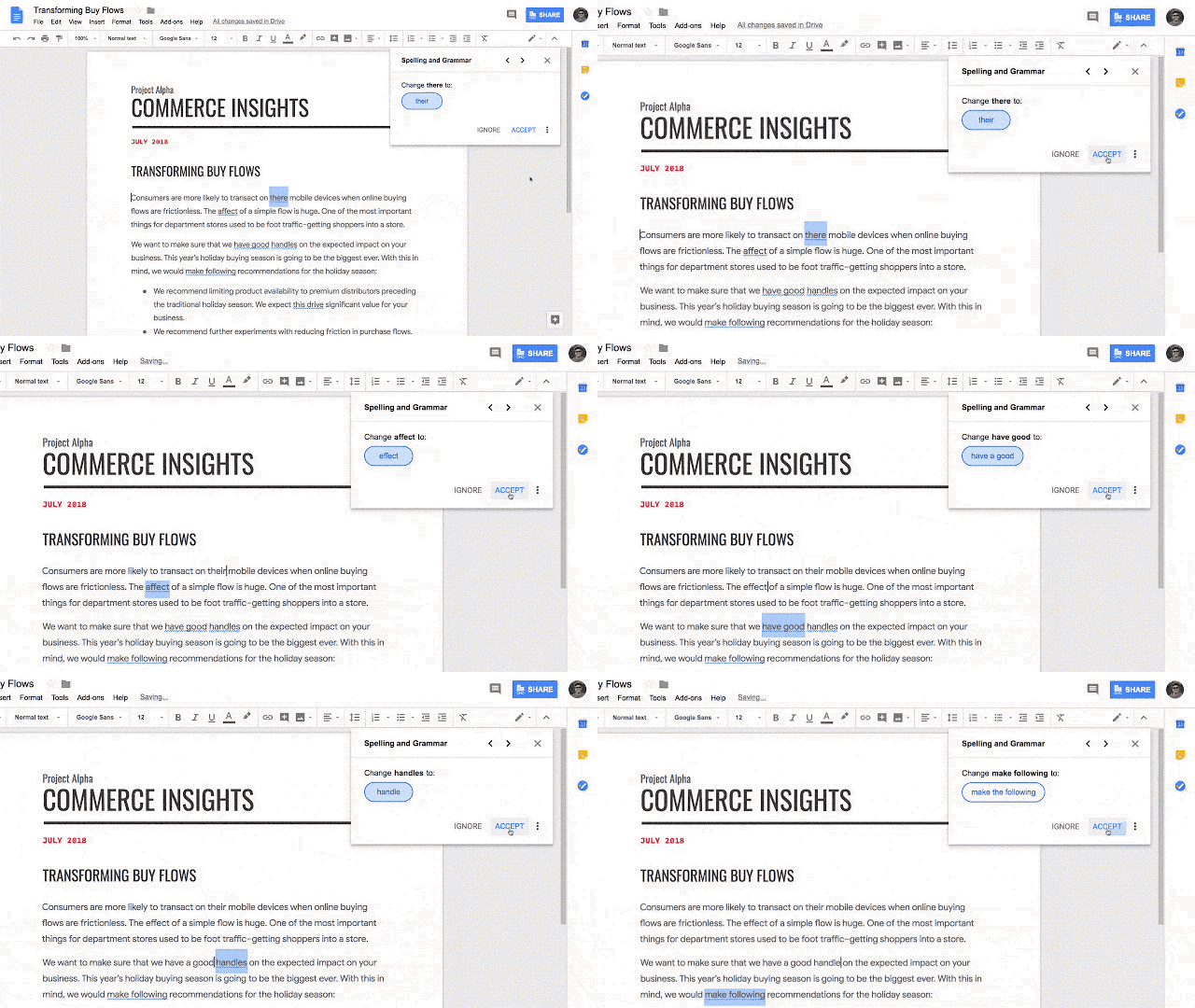
The tool uses artificial intelligence which is similar to how Grammarly edits, but nothing else has been shared explaining how the tool works. Since Google’s new tool isn’t available to everyone right away it’s hard to compare these two editors, but it will be interesting to see if Google’s grammar checker compares more closely to Grammarly’s free or paid tier.
Business users get access to the new feature first. They can use the feature today, but they’ll need to join the early adopter program and get the feature enabled by their system administrator.
Google hasn’t announced a date for its public rollout or what languages the feature supports yet.
The post Google Docs is adding a grammar checker that works like Grammarly appeared first on MobileSyrup.
Mandatory security keys for Google employees cut successful phishing attacks to zero

Google began mandating security keys to employees in early 2017. The change reportedly cut successful phishing attacks on its more than 85,000 employees to zero.
The company told Krebs on Security that it has had “no reported or confirmed account takeovers since implementing security keys.”
Security key devices connect via USB and allows users to login by simply pressing a button on the key. They use Universal Second Factor authentication (U2F).
Unlike traditional Two Factor Authentication (2FA), which supplement a password with a one-time code sent to a mobile device via text message or app, U2F devices simply plug in. Furthermore, U2F is much more secure, since attackers can intercept 2FA codes.
The downside with U2F security keys is that you need the physical key to login. Furthermore, U2F is a rather new technology. As such, there isn’t much support for it on the web yet.
Limited support
Google Chrome, Firefox and Opera all support U2F. However in Firefox, both Quantum and older versions, require users to enable U2F. To do so, simply type “about:config” in the browser bar and search for “security.webauth.u2f.”
Microsoft is planning to add U2F support to Edge later this year. However, Apple hasn’t said whether it will support the standard in Safari.
As far as websites go, a handful of big sites have support. Naturally, Google’s services support U2F. So does Dropbox, Facebook and Github. Furthermore, Dashlane and Keepass password managers support U2F.
Yubico, one of the more popular manufacturers of U2F security keys has a number of options available, at a number of retailers. Canadians can pick up a Yubico security key for as low as $26 on Amazon. Additionally, the devices are waterproof and crush proof.
Security keys could be a fantastic way to secure yourself online. The devices clearly work well for Google. Hopefully that pushes more companies to adopt security keys.
Source: Krebs on Security Via: Engadget
The post Mandatory security keys for Google employees cut successful phishing attacks to zero appeared first on MobileSyrup.
Google Sans font may be coming to Chrome OS in a future update

Google’s font, dubbed Google Sans, is coming to Chrome OS.
New code commits entered for Chrome OS shows that the company is working towards adding the font. Additionally, a bug report found by XDA Developers indicates Chrome OS will use Google Sans for titles.
It’s a natural progression for the font, which Google is using across a number of its apps now.
Google Sans began life as Product Sans, created specifically for Google’s logo redesign. Unfortunately, Google didn’t optimize Product Sans for scalability, so the search giant revamped its font to work in a number of sizes and weights.

Product Sans is virtually indistinguishable from Google Sans, but the newer version is better in almost every way. The flexibility to work in small fonts on a phone screen and a massive font on a billboard is impressive.
Not to mention that Google Sans looks great. The Android P Beta running on my Pixel 2 uses the font throughout. Everything from the lock screen clock to my notifications look fantastic.
Google Sans is also featured in the new Gmail, as well as on the slick new Wear OS webpage.
Since Google Sans is the defacto Google font, incorporating it into Chrome OS makes a lot of sense. Furthermore, it will help create some unification across the operating systems.
While we may only see Google Sans in the titles on Chrome OS for now, hopefully it expands to other areas of the operating system too.
Source: Chromium Gerrit Via: XDA Developers
The post Google Sans font may be coming to Chrome OS in a future update appeared first on MobileSyrup.
Amazon Prime Video is getting Dolby Atmos content at the end of August

Amazon’s video streaming hardware launched with support for Dolby Atmos’ audio technology and now the company is adding content to Prime Video to take advantage of it.
Amazon’s video streaming service is adding Dolby Atmos on August 31st when it launches Tom Clancy’s Jack Ryan.
Dolby Atmos is a type of surround sound technology that is considered on the cutting edge of home audio quality. To use this new audio tech users need a speaker setup the recent audio standard, such as Vizio’s new sound bar or other more recent audio devices.

Atmos works by bouncing sounds off of the ceiling as well as towards the user in order to create a more three-dimensional audio effect. Amazon’s Fire TV 4K that released in 2017 had support for Dolby Atmos right at launch, but it was missing Atmos equipped content.
Amazon’s new show, Jack Ryan is the first Amazon program to support the modern audio.
It will be interesting to see if Amazon starts releasing most of their original content with support for Atmos.
Source: Dolby, CordCutters
The post Amazon Prime Video is getting Dolby Atmos content at the end of August appeared first on MobileSyrup.
Ontario’s Hamilton Health Sciences developing healthcare AI applications

Ontario medical group Hamilton Health Sciences has announced a partnership with clinician company Real Time Medical on artificial intelligence (AI) application development for healthcare.
Real Time Medical will work with Hamilton Health Sciences and MIIRCAM (Medical Imagining Informatics Research Centre at McMaster) on the following services:
- Advanced research and collaboration on new projects
- AI training
- Clinical trials and leadership and advisory services
- Data labeling and validation
- Identification of the most beneficial clinical applications
- Joint IP development and patenting
- Provision of various balancing technology for use during validation and clinical trials
- Validation of resulting algorithms with over a hundred 100 licensed radiologists
“The development and validation of algorithms using high quality, well correlated clinical data sets is still very much a challenge for AI application initiatives,” said Dr. David Koff, chair of the Department of Radiology, McMaster University Hospital, of the need for the new partnership.
According to Hamilton Health Sciences, the collaboration will bring together AI technology developers and close to 100 faculty, 32 residents and 12 fellows, medical physicists and engineering resources.
Source: Canada Newswire
The post Ontario’s Hamilton Health Sciences developing healthcare AI applications appeared first on MobileSyrup.
Google launches a DRM-free audiobook store

Cory Doctorow,
BoingBoing,
Aug 02, 2018

There's no reason why audiobooks should be loaded with digital rights management (DRM) technology long after we've seen the success of both music and video distribution in open MP3 and MP4 formats. But as Cory Doctorow notes, Audible, which was acquired by Amazon a couple of years ago, controls more than 90% of the audiobook market. So despite promises to the contrary, neither it nor Amazon have made any move to open up the eBook market. This makes Google's announcement of a DRM-free audiobook store great news. Now you'll be able to play them on any device, and on any player, rather than be captive inside a proprietary Audible-Amazon setup.
Web: [Direct Link] [This Post]An IndieWeb Magazine on Flipboard

Chris Aldrich,
Aug 02, 2018

I don't think much of FlipBoard because, as Chris Aldrich says, it's just another silo. I nonetheless think it's a good idea to make indieweb more accessible to people, which this initiative does. I was also interested in the discussion of how to contribute to the IndieWeb Magazine on Flipboard, which you can do with its Social Networks Auto Poster (SNAP) system. It's not trivial, as it involves setting up a FlipBoard app in your WorkPress or Twitter or LinkedIn (or whatever) account. What would be really useful would be a SNAP application that allowed you to send from your social media account to any content service you want, not just FlipBoard. I haven't seen one yet.
Web: [Direct Link] [This Post]Twitter Favorites: [knguyen] God I love this show. It pushes all the buttons I wished Game of Thrones and Westworld would. https://t.co/r7ds8ahPrc

God I love this show. It pushes all the buttons I wished Game of Thrones and Westworld would. gq.com/story/sacred-g…
Twitter Favorites: [normwilner] I think I'm hallucinating. Both escalators at the Scotiabank are working tonight.

I think I'm hallucinating. Both escalators at the Scotiabank are working tonight.
Recommended on Medium: A pre-history of weeknotes, plus why I write them and perhaps why you should too (Week 16)
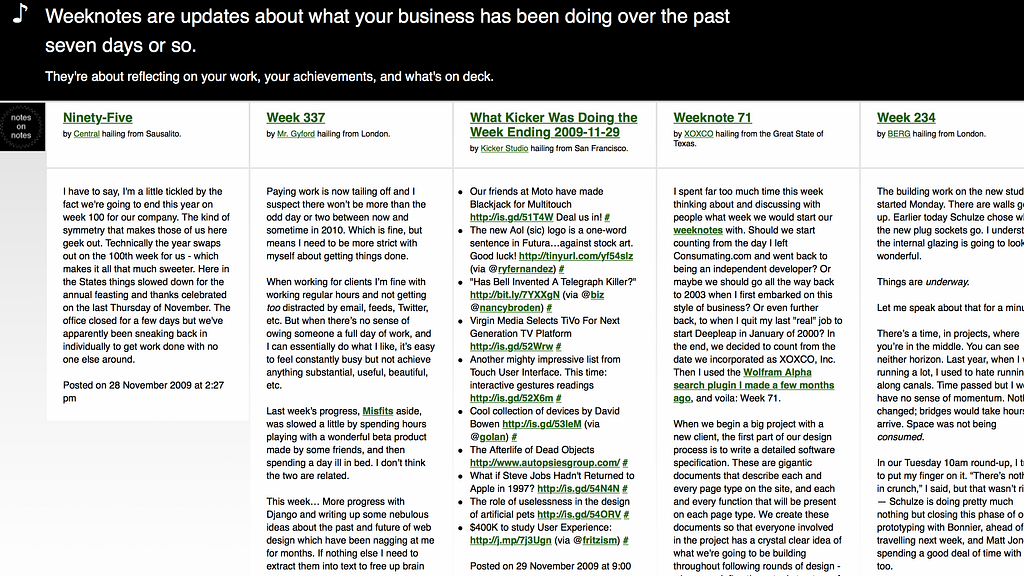
Have a look at the title where it says “Week 16”: there’s a format to these posts. I report and reflect. The format is called weeknotes.
There’s a decent-sized community of people who keep weeknotes. Check out Web of Weeknotes which brings together a couple dozen adherents.
I have a few friends whose weeknotes I always look forward to reading. Tom Armitage does that lovely thing of reporting progress abstractly week by week, using only project codenames, then revealing when the work ships what the codename was so you can connect the dots all the way back. His Week 227 is a good example. With Tom there’s always the joy/risk that halfway the post goes into a rabbit hole of (as in this case) soldering microcontrollers and what it feels like when today you don’t quite have the dexterity. And that kind of perspectival swerve is the fun of reading weeknotes.
I’m not sure Warren Ellis’ Orbital Operations (subscribe here) counts as weeknotes because it doesn’t self-identify as such and it’s an email newsletter, but unlike most newsletters it shares many of the weeknotes qualities: there’s a weekly rhythm; the spine of each edition is a weekly report of Warren’s work and observations, rather than following the popular newsletter formats of topic-driven essays or link lists; you see projects coalesce from Warren’s musings and interests through to codenames and, later, emerge as comics and Netflix seasons; you get a crazy privileged insight into whatever he’s reflecting on. To pick up on that last point, take this snippet from a recent Orbital Operations email:
I have (checks clock) sixteen days to finish a movie script. This is actually fine. A thing I learned from John Rogers is to write-over. Each stage of the job — beat outline, treatment, screenplay — is built on the other. Copy the rough beat outline into a new document and rewrite and add and expand until it’s a treatment. Copy the treatment into Final Draft and rewrite and add and expand until it’s a screenplay. That way, you only start with a blank piece of paper right at the very start of the process. Every other stage comes with scaffolding and a base coat. Works for prose and comics too. Try it. Just copy the previous document into the next one and start rewriting and adapting it. Might not work for everything, but it might give you a leg up.
Insane. Where else would you hear this kind of report from a ridiculously-accomplished culture-alchemist? Nowhere else, that’s where.
A third weeknotes-author I look forward to reading is Phil Gyford. Here’s Phil’s w/e 8 July 2018 which bounces between exhibitions attended, and nuggets of things learnt. In this particular edition (?)/episode (?)/transmission, Phil has made an acting showreel and summarises the process in seven bullets — hard-won knowledge generously shared— before ricocheting directly to his uncertainties re his craft:
I’m uncertain about my performance, but we’ll see how it looks. I felt pretty lost and useless, unable to conjure up the required emotions. Maybe my preparation hadn’t been right or enough but, ugh, I felt so dry. Nothing there. An emotionless husk.
(1) Reading: These moments of vulnerability are wonderful to read, and I feel a sudden and greater personal connection with Phil, in addition to feeling less isolated in my own moments of uncertainty.
(2) Writing: I know from experience that naming and recording these wobbly feelings is valuable because, at some point in the not-too-distant, you come back to your own work and say, “holy shit, that’s amazing, how was I capable of that,” and then you read the historic weeknotes and realise that at the time you were miserable about what you are now delighted by, and closing the loop like that gives you perspective during self-doubt moments in the future.
I always enjoy and appreciate Phil’s sign-offs. In that one: “I can cry! Wipe your happy tears, and I hope you have a good week.”
A pre-history of weeknotes
I wrote the first ever weeknote in August 2009 at BERG and here it is: Week 217.
I thought it’d be interesting to start giving a weekly update here of what we’re up to in the company.
Even in that proto weeknote the format is there already: a little reporting on the life of the business; a little off-road rambling; a single person’s individual perspective; a strong feeling of in medias res.
These posts continued for years, eventually rotating round the studio so everyone could (had to…) have a shot in their own particular way. Timo’s posterised video Week 335 is a particular favourite.
Weeknotes weren’t weeknotes when they started.
In September 2009, the following month, Bryan Boyer started writing weekly updates and finally in November I noticed that Bryan had named them “weeknotes” and so I adopted the tag. A few other studios had also started writing by then. Bryan created weeknotes.com which aggregated these posts. Now gone, it can be found in the Wayback Machine. There’s a screenshot at the top of this post.
And then Russell Davies wrote about weeknotes in his monthly Wired column! On the structure of time (May 2010):
Weeknotes detailed what they were up to that week, what had been going well, what hadn’t. They were just blog entries, updated weekly, nothing more remarkable than that. Except they struck a little chord with people — and other companies and individuals started doing the same thing.
They seem to have a pattern and rhythm that people like. A few paragraphs about what you’re up to. No need for big insights or revelations, just a bit of sharing and perhaps a moment of reflection. They fit neatly into that globally distributed culture of small creative businesses and people. Individuals and small companies such as these need to share to learn and to find like-minded partners and employees — the Weeknote matches the rhythms of their work, and the blog and RSS are the perfect way to deliver it.
RSS! Remember that?
And:
It helps to see that other people struggle with deadlines and clients, that big projects can fall apart and still get put back together, that finance is taxing but that this or that software package can help. Above all, it’s nice to realise that everyone else is also just making it up.
And we still have weeknotes today.
What about before August 2009?
I wrote that first weekly update inspired by a blog post that Russell had written two months earlier at Newspaper Club (company previously mentioned in Week 15) which was down the hall at the time. Here it is, Week One.
The transparency and diary format reminded me of (and this is going to sound slightly weird so apologies for the remainder of this paragraph) The Worst Journey in the World by Apsley Cherry-Garrard, being his retelling from his contemporaneous diaries of his participation in Scott’s 1910 expedition to the Antarctic — often called ill-fated but reading the book much of it was ill-their-own-bloody-faults — which I had read not long before, and which I loved for the adventure and tick-tock unfolding and the meandering thinking-out-loud-ness of it all, and I wanted to write something with a similar sense of road trip.
Although it wasn’t in my head at the time, I have also always been a fanatic of lab books in which you write, each day, what you’ve been up to in the laboratory, recording experiment results, musings, and anything else that occurs relevant or ir–. To prevent retrospective editing, you sign off the pages at the end of each day.
I have a physics background and enjoyed enormously my time in the lab. You can’t tell, in the middle of an experiment, what will be important. So write down the millilitres of whatnot and the pitch of the diffraction grating and the hypothesis you’re chasing down, but also whether you’ve shaved because there might be crystal seeds in your beard and what the weather is. You don’t know what is important until you’ve had a chance to look back and reflect.
So that was where that came from. And if nothing else, it demonstrates the depth of deviousness to which Russell is able to stoop to generate column fodder.
My habit at BERG, for some years, was to go to the studio on Saturday mornings and reflect on the week. One of my most rambling, longest, personally-most-enjoyable weeknotes was Week 315 and it came from a morning like that. It’s a series of notes of whatever was on my mind, and word-sketches about studio life.
Idling: They say dreaming is the brain’s way of processing the day’s events and emotions. A necessary process of defragmenting, filing, and letting things come to rest and join up. Idling is a waking dream, time to be with work but not to be working, to let events and activity settle out and resolve, and let ideas and strategy take form in an unforced way. A necessary process.
So you’ll read some thoughts about attention and risk, plus a record of what I had for dinner. A lab book!
I try to keep this weekly space for reflection going even now, though it more regularly happens on Fridays.
One of my favourite and shortest weeknotes, Week 243:
This moment, sat on the windowsill with my laptop on my lap, drawing interfaces and technical architectures in red felt tip pen, cutting paper and covering walls, writing rules that will govern us for weeks or more to come, this is the only moment, the legitimacy of kings is written in blood, and this is the reality of life in Scenario 4.
I’m at home right now. We got back from hols on Sunday and yesterday — mod a meeting or two — was a write-off. Today I’m writing about the history of weeknotes in part because there’s no Job Garden software development to report, and mainly to warm up my fingers after the break.
I was sitting in a café writing and drinking coffee early this morning, although really it’s much too hot for coffee, and I came home to meet a FedEx delivery which in the event arrived early but managed to leave its package anyway, and missed a UPS delivery which I didn’t know was coming and left its package inconveniently about a kilometre away and I’ll go out to fetch that later.
I also use private weeknotes.
I have a micro consultancy called Mwie Ltd which stands for Matt Webb Import/Export but Alex DS has decided is — and this is now canon — pronounced mais oui.
For the past couple summers I’ve run teams on innovation projects in the Android team at Google. They got weeknotes.
The startup accelerator I run (my reflections here) at R/GA Ventures with Lisa Ritchie who is program director: Lisa wrote weeknotes.
The per-project weeknotes are a little more structured, sure, but what I like about them is they’re not simply a reporting tool. There’s space to bring up weak signals and also anyone can be added to the distribution list, whether they’re in the project chain of command or simply an interested party. By being open about what’s not yet fully baked, and liberal with the subscription policy, fellow travellers encountered earlier in the project can jump in with opportunistic assistance.
Why write these things anyway
I’ve not been involved in the public weeknotes scene for some time. It’s grown and become its own culture which is delightful (though capped by the general decline in blogging over time, which is a shame but perhaps reversible).
This article, The why of weeknotes, captures the motivations well:
Anyway I found these seemingly simple updates a fascinating peak behind the curtain of a design studio that were generally just doing really interesting things but also being open as to the how and why of it all. They regularly (at least early on) were more than status updates and instead provided an interesting narrative. It was a geek serial.
That’s about reading. The real magic comes in why to write. The article continues:
most obviously they are an amazing aide memoir
And it also cites (I summarise):
a regular check intostate of mind; finding, within an organisation, “new stealth readers in leadership or HR type roles”; sharing problems; providing a conversation starter.
That last one is a biggie. I think of blogs like a green “available” light on Skype. I’m here, alive, and ready to chat!
For me, keeping weeknotes while I’m building and thinking about Job Garden, there’s another benefit in that I’m relying on compound interest to develop this product. I’m not doing much each week, but if I take a step every week, I should get somewhere. That’s the theory. In practice, in the middle of events, when you’ve left the near shore and the far shore is not yet visible, progress can be hard to discern and energy harder to find. So the passing mile markers of weeknotes give me some kind of reassurance.
I’m seeing more people starting weeknotes recently: Public Digital has a weeknotes category, started May of this year. Better Work Lab is today up to Week 26. Good.
However the weeknotes format has evolved, I think three qualities endure:
- some kind of rhythm. Obviously. Weekly? Probably. Possibly. Aspirationally anyway.
- a feeling of being in the middle of things. The rhythm helps with that: a regular sampling frequency means you don’t just report on projects and ideas when they’re finished, which is the normal temptation. Benefit: the “work in progress” feeling encourages others to jump in.
- written by an individual. The person with the conch might change week to week, but in my view the single perspective is vital. Individuals have fully rounded interests: yes this person is reporting on projects, but they’re also alive with feelings, and oh by the way they’ve also gone out and got ice creams for the office because it was hot this week.
I’ll add a last: the joy of weeknotes is just as much in the writing as the reading. If marketing happens too that’s a happy side-effect.
But honestly, there’s no dogma. Everyone has their own style.
Have some downtempo new wave synth pop.
https://medium.com/media/a5140bdb669a885f470b92ce14a99038/hrefIf you’re old school, you might be interested in the RSS feed for this blog: follow along with these Job Garden weeknotes by subscribing with this link. Or tap the “follow” button on the publication page.
If you start writing weeknotes because of this post, let me know.
A pre-history of weeknotes, plus why I write them and perhaps why you should too (Week 16) was originally published in Job Garden Blog on Medium, where people are continuing the conversation by highlighting and responding to this story.
Twitter Favorites: [bmann] I think weeknotes for both personal and organizational cadence is interesting. That question, can blogging-like p… https://t.co/U67tgadO8i

I think weeknotes for both personal and organizational cadence is interesting. That question, can blogging-like p… twitter.com/i/web/status/1…
Recommended on Medium: Doing Mindfulness
I keep getting stuck on the word “mindfulness” this morning. I guess most of the time I can just glide past the word and experience the reality to which it refers. But you know that phenomenon where, if you repeat a perfectly reasonable, commonplace word enough times, it starts to sound like nonsense? Try it: Button. Button. Button. Button. Button. Something like that occasionally happens to me with a word like “mindfulness,” where I gradually realize it’s just a bunch of blah-blah syllables that don’t really convey the meaning of this word.
I’m no pro etymologist — is that even a thing? — but according to the thought loops I was having on my meditation cushion this morning, it′s obvious from the structure of the word that the cultures who produced English didn’t have an indigenous term for this, so it had to be invented.
“Mind-” seems like a reasonable start; it’s a jolly old English word for the place, if you will, where mindfulness takes place, whatever it is. Then we get the suffix “-ful-,” which is kinda like the standalone word “full,” but in a specific sense that indicates self-possession. The best reference for it I can come up with is the word “careful.” I guess to be mindful is to be self-possessed of mind in the same sense in which to be careful is to be self-possessed of care. Doesn’t help much.
Then you tack on that irritatingly New Age suffix “-ness” to make a noun out of it, and now it has the sound of some immutable essence that’s out there to be taken possession of, and that seems all wrong. The English word for this should be a verb! It’s not something you get, it’s something you do.

Android Oreo is now installed on 12.1% of all Android devices

In something that’s becoming less of a frequent occurrence, Google has shared the latest Android distribution numbers. These figures come after the company didn’t disclose any new data in June. Moreover, we’re getting this July’s data later than usual.
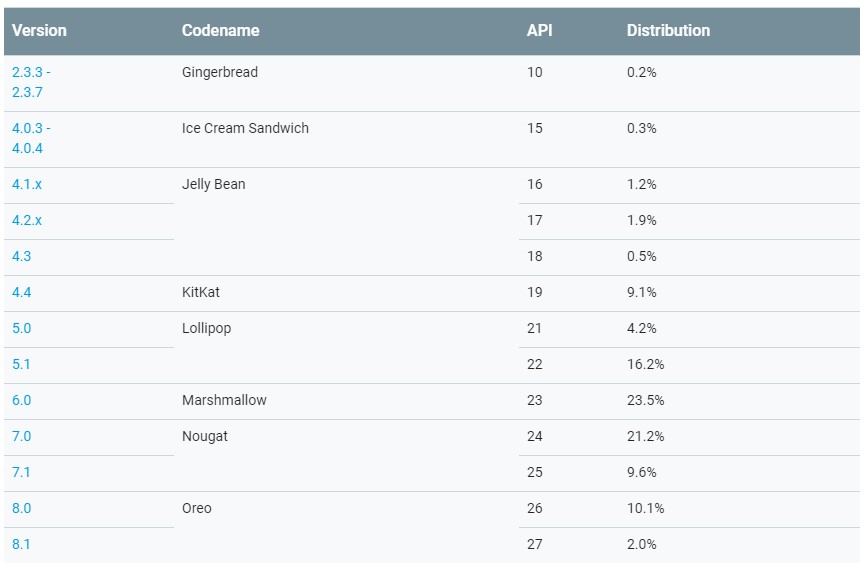
Compared to May, Oreo 8.0’s share of Android increased by 5.2 percentage points to 10.1 percent.
Combined with Android 8.1, which is now on 2 percent of all Android devices, the latest major release of Google’s mobile operating system is now installed on 12.1 percent of all Android devices.
With the release of Android P right around the corner, it’s unlikely Oreo will hit a 15 percent OS share before it’s supplanted by Android 9.0.
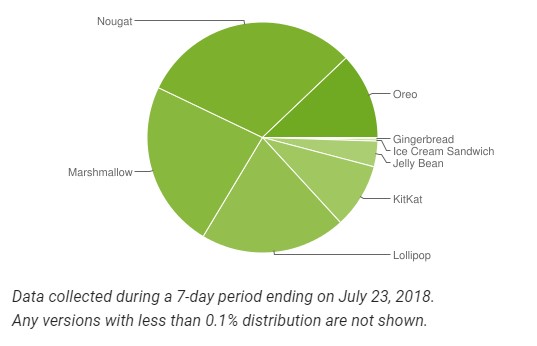
Meanwhile, the number of devices on 7.0 decreased by 1.7 percentage points to 21.2 percent, while the number of devices on 7.1 increased by 1.4 percentage points. Despite the slight drop in overall usage, Nougat remains the used version of Android.
Marshmallow usage also fell by 2 percent.
Google compiled its latest distribution data by counting the Android devices that accessed the Play Store during a seven-day period ending on July 23rd.
Source: Google
The post Android Oreo is now installed on 12.1% of all Android devices appeared first on MobileSyrup.
FRITZ!OS 7 ist da
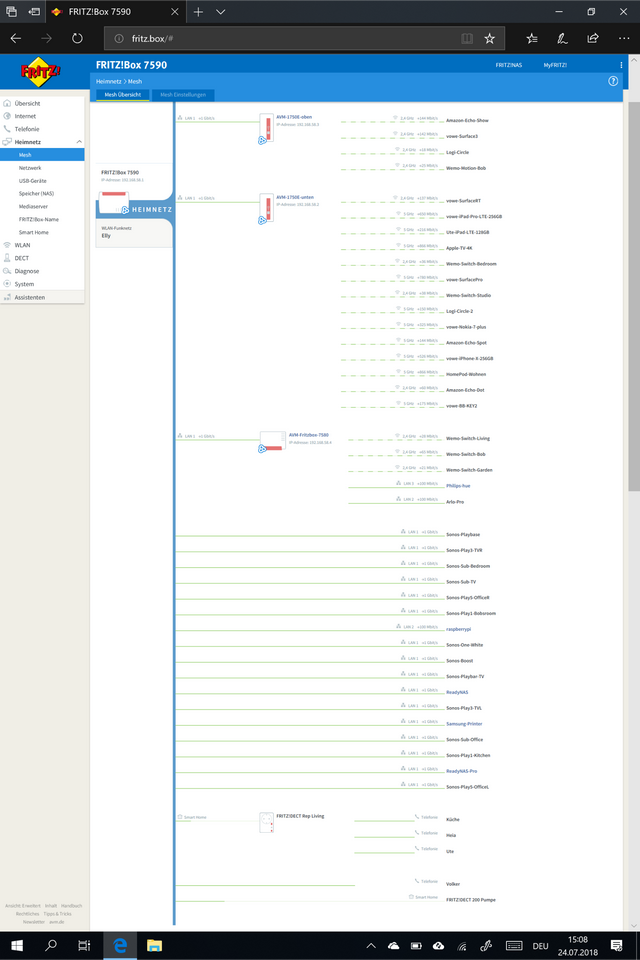
Die 7580 und 7590 haben das Update heute, andere kommen bald. Heute habe ich erstmals eine 7580 als Mesh Repeater eingerichtet. Update auf 7.0, zurücksetzen auf Werkseinstellungen, dann auf der 7590 und der 7580 den WPS-Knopf gedrückt. Fertig!
These Weeks in Firefox: Issue 41
Highlights
-
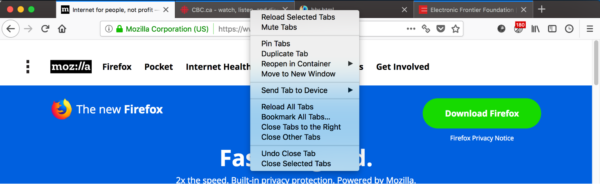
Multi-select tabs have been enabled by default on Nightly!
- Use Ctrl/Cmd-Click to select individual tabs, or Shift-Click to select a range, and then right click to perform operations on those tabs
- Please test it out and file bugs!
-
- There’s a spiffy new animation for the tracking protection icon in the identity block.

-
- AwesomeBar autocomplete fixes have been uplifted to 62. Please help us test it by reporting bugs where you’d expect an origin to be autofilled, because you use it often, but it’s not.
- Test Pilot launched two new Mobile experiments
-
Notes:
- Shipped on Android. Up next, we’re triaging, responding to early feedback and meeting with the Applications Services team to figure out next steps for the Notes experiment.
-
Firefox Lockbox:
- Released to the public on July 10th, 2018 at 6 AM Pacific via Test Pilot
- Social media response (Twitter, Hacker News, Reddit) relatively positive!
- Starting small with just a few English-only countries, will get feedback and roll out to more regions and languages soon
- Future: update Firefox Accounts OAuth integration, iOS 12 autofill support
- Next week: we kick-off Android app planning!
- Firefox Screenshots is getting new annotation features this week (undo/redo, and add text/emoji 🎉👍😎)
-
Notes:
Friends of the Firefox team
- Kanika Saini is working on
about:policiesand other parts of our Policy Engine! - More than one bug fixed
- Abdoulaye O. LY
- Manish Kumar [:manishkk]
- New contributors (🌟 = First Patch!)
- Igor Oliveira fixed a bug in our Addons Manager code where an undefined variable was being used
Project Updates
Add-ons / Web Extensions
- Kris fixed an issue with
filterResponseDatathat brokewindow.onloadin XML documents in Firefox 61 (possibly considering for 60ESR). - Peter Simonyi fixed a bug in
menus.onShownwhen the context is a bookmark (possibly to be uplifted to 62). - Shane fixed
webRequest.getSecurityInfoin 62 to: - Ian Moody fixed a devtools regression that was introduced in 61 (to be uplifted to 62).
- Aswan enabled the delayed background page startup on all channels (was just Nightly in 62).
- Luca fixed a bug with extension storage, as part of the move to IndexedDB.
- Smaug made extensions work with shadow DOM/WebComponents.
- Oriol made it so that
browser.tab.highlight()with a single tab does not setmultiselectedto true. - Shane updated
tabs.onUpdatedfiltering to useisArticleinstead ofisarticle. - Mkaply cleaned up the search API.
Activity Stream
- Started work on turning Activity Stream into a component (meta bug), primarily moving
initfrombootstrap.jsto a JSM, then moving packaging fromfeaturetobrowser.jar. - Implementing New Tab Page background and text color properties.
- Switching remote tippy top site data to use
RemoteSettings. - Getting
about:welcomeready with a bunch of fixes.
Lint
- Automated code analysis is now running in Phabricator.
Performance
In progress
- dthayer
-
ClientStoragework (which should help lower the jank on the compositor on macOS) is nearing completion. One more patch to get reviewed!- mconley suspects this is the major blocker to enable tab warming by default on macOS
- Also working on migrating more of our code to use the new Places Observer system, which should handle operations over many entries more efficiently (great for Sync and imports!)
-
- florian
- Working on beefing up
about:performance
- Working on beefing up
- Gijs
- Researching ways in which we can classify machines as “low powered”, and then adjust parts of our browser accordingly
-
Working on avoiding spurious
about:blankloads when creating new windows
- imjching
- Working on enabling the Activity Stream content process – just working through some test failures.
-
Researching ways in which we could use the
moz-page-thumbs:protocol in the privileged content process – this could allow us to persist the Activity Stream state in a way that avoids having to calculate new state during startup
Done
- dthayer
-
Moved some of the
WindowJumpListcode off of the main thread- According to arewesmoothyet, this was a significant source of jank
-
Moved some of the
- florian
-
The memory reporter table in
about:performancewas removed – a more performant and actionable replacement is in the works
-
The memory reporter table in
- Gijs
- Made browser resizing with devtools open smoother, also here.
- imjching
Policy Engine
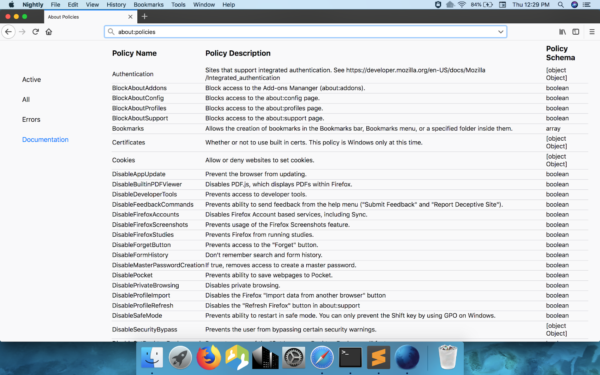
- Here’s a sneak peek of the new about:policies!
Privacy/Security
Anti-Tracking
- Follow us on the Meta-Bug, Front-End Meta Bug, and FastBlock Meta Bug.
- Baku added a pref that allows us to block storage access for third party trackers on the TP blocklist, unless they have user interaction.
Firefox Monitor
- The Firefox Monitor shield study (bug) has finished and we’re evaluating the results.
Search and Navigation
Address Bar & Search
- WebExtension Search Query API landed
- Fixed bugs in the mercadolibre search plugin
- Florian Hartmann will present his work on the federated learning addon (original blog post) today during internship presentations
Places
- We are replacing
nsIDownloadHistorywith the async History API, and removing page annotations, to make the downloads views faster.- Cleaned up a bunch of old, deprecated code
- Removed
nsIGlobalHistory2.idland the docshell implementation ofnsDownloadHistory - Removed the
nsIDownloadHistory::removeAllDownloadsfunction
- Removed
-
DownloadCore.jsmis now the only responsible to add downloads, rather than sharing the task withnsExternalHelperAppService
- Cleaned up a bunch of old, deprecated code
- We are reducing the maximum favicon size from 256 to 192px. To shrink the favicons database size a bit, since nobody is using 256px icons in the UI.
Other
- Fixed a formfill autocomplete bug on the Google login page. Formfill will now act on keydown, rather than keypress, disallowing pages from bypassing it.
- There is a known issue on Windows 10 with the Antimalware Service slowing down the system when Firefox is running. A new Defender version, expected to solve the problem, should be available in the next weeks.
-
SQLite now uses an exclusive locking vfs on Linux. This prevents some
SIGBUScrashes and makes SQLite work more reliably on nfs filesystems. On the other side, it’s not possible anymore to access SQLite databases while Firefox is running. If you work with SQLite in Linux and need concurrent access to debug, you can create a booleanstorage.multiProcessAccess.enabledpref and restart the browser.
Application Services (Sync / Firefox Accounts / Push)
- Carol fixed the threading model in the FxA client component for Fenix 🎻.
- Ed is removing dependencies on C libraries in Sync.next, preferring pure Rust libraries where possible 🦀.
- Thom is continuing to work on a Sync Logins API in Rust for Lockbox 🔐.
- Mark is working on a strategy for shipping the Sync.next Rust library in products 🚢.
- Lina fixed a bug where moving bookmarks between folders wouldn’t move them on other devices, and changed the bookmarks mirror to be snappier 📚.
Test Pilot
-
Side View:
- A Firefox blog post drove about 10k new installs last week 🎉
- Interesting note: Side View is the 4th iteration of an idea that started out as a pre-57 XUL Overlay addon. Donovan recounts its history in a new blog post
-
Color:
- Les has been live coding while he works on adding custom background image support (inspired by mconley :-). Check it out on twitch or youtube
- John has been working on palette generators
- Design intern Vicky is working on a complete UX overhaul for Color so we can replace Personas Plus which will be retiring soon.
-
Send:
- Working with Platform to allow much larger file transfers via the WritableStream API. We hope to release a completely overhauled product experience when Streams are pref’d on in Firefox.
- Donovan has a working demo of Send for Android
- Test Pilot platform:
- Closed a ton of last minute bugs to make sure mobile launches were successful.
- Special high fives to Jess, Jesslyn, Cherry, Sylvestre, Devin, and Sandy for helping make our latest launch successful
-
Screenshots:
- Heartbeat study is complete; talking with Teon on Friday about the results
- Talking with devtools about screenshots integration
Web Payments
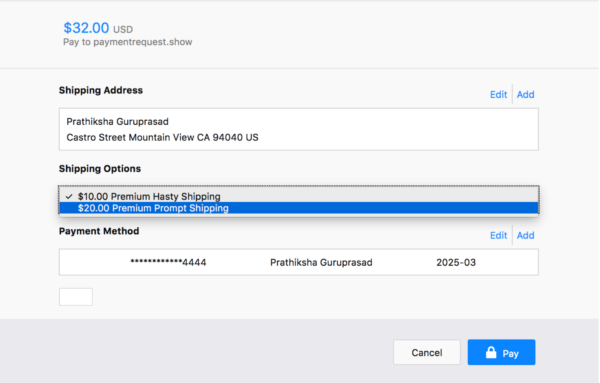
- Prathiksha landed native
<select>dropdowns. Dropdowns are going to be polished in a follow-up patch. - Sam is implementing error pages and handling the user closing the dialog with the native window controls, on platforms except macOS.
- Jared is breaking down work required to continue using a window modal
PaymentRequestdialog for the MVP so we can compare to the effort required to build a new tab-modal widget. - MattN reports that header and footer visual polish has landed. The team is now working on payment card add/edit page improvements.
Below the fold
- Keep up with developments in other browsers by following @intenttoship, @ChromiumDev, and @MSEdgeDev!
- Remember
Services.[c|p]pmm.initialProcessData? IntroducingServices.[c|p]pmm.sharedData, a better solution!- Key-value store stashed in shared memory, instead of cloned to each content process
- Read/Write in parent, Read-only in content
- Decoded lazily
- Sync’d to content on idle (with
changeevents firing on the message manager to let you know what updated)
- Check out Prathiksha’s intern presentation about her work on Web Payments!
Mu, a new Python IDE for beginners
Mu is a very simple-to-use Python editor and IDE (integrated development environment) and this week, version 1.0 was released!
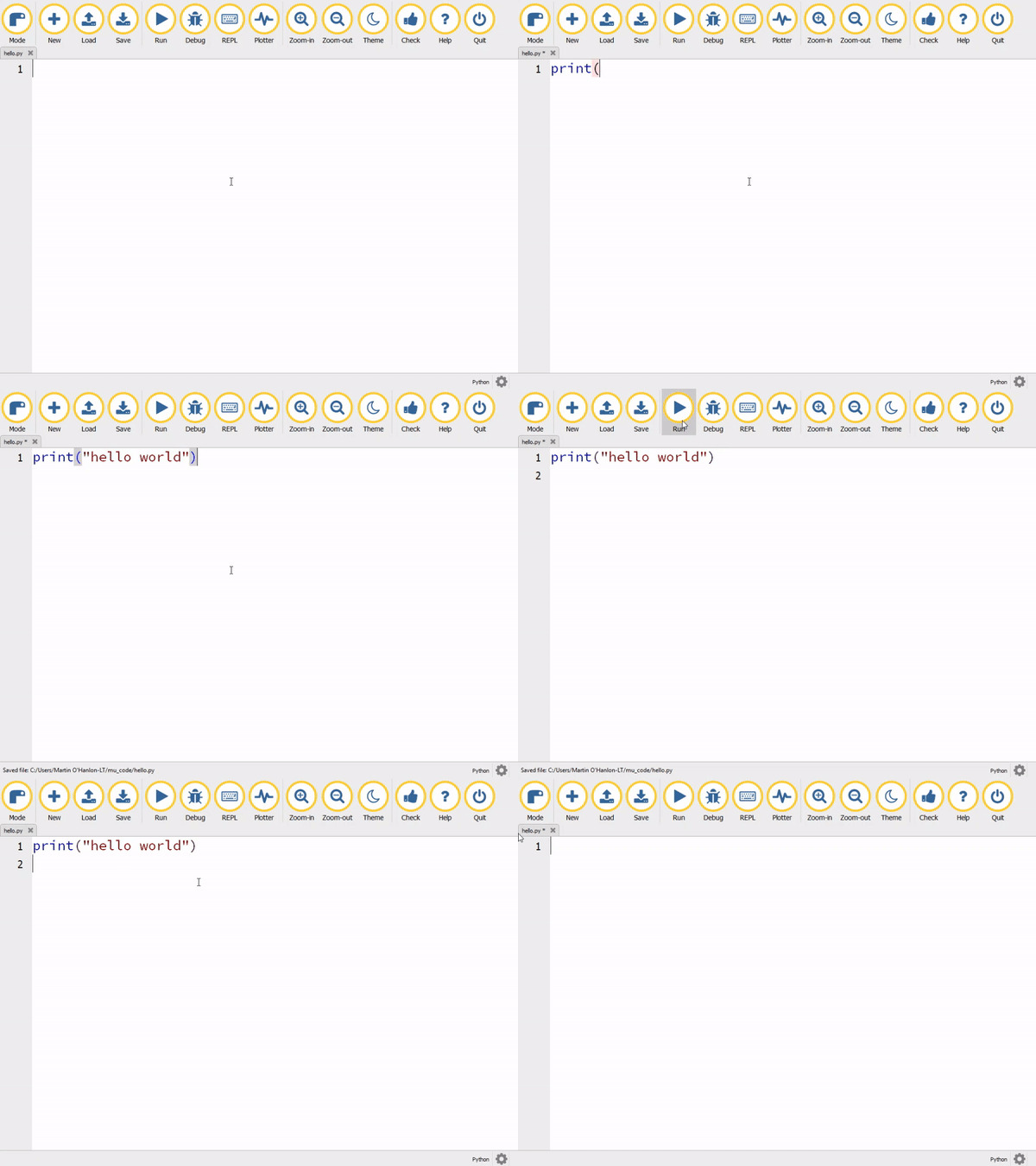
New Mu
Mu is designed to be as user-friendly and as helpful as possible for new Python programmers, presenting just the tools that are useful, such as:
- Syntax highlighting
- Automatic indentation
- In-built help
- Code checking
- Debugging
Great for new programmers
Mu is intended to be not the only Python IDE you’ll ever need, but the first one — the editor that helps you start your coding journey, but not necessarily the one you finish it with. So when you’re ready, you will have the skills and confidence to move on to using a more advanced Python IDE.
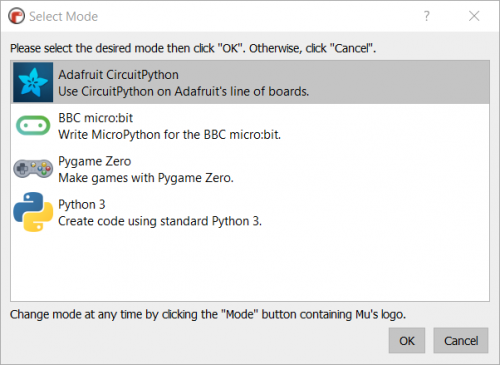
You can use Mu in a number of modes; modes make working with Mu easier by only presenting the options most relevant to what you’re using Mu for:
- Python 3 programming
- Programming a micro:bit
- Creating games using Pygame Zero
- Working with Adafruit’s Circuit range of boards
Available now
Mu version 1.0 is available now for Windows, macOS, Linux, and the Raspberry Pi’s official operating system Raspbian! And to help new Python programmers get started, we have created a guide to Getting Started with Mu for all these operating systems.

Mu is the brainchild of Nicholas Tollervey, who has worked tirelessly to create Mu. I recently met up with him and some of the Mu team at the world’s first Mu-“moot” to celebrate this release:
Nicholas Tollervey on Twitter
World’s first Mu-moot. :-(
One of the inspirations for Mu was the keynote presentation at EuroPython 2015 given by Raspberry Pi’s Carrie Anne Philbin. She talked about the barriers to children getting started with Python, including the lack of an suitably easy-to-use IDE:
Carrie Anne Philbin – Keynote: Designed for Education: A Python Solution
Carrie Anne Philbin – Keynote: Designed for Education: A Python Solution [EuroPython 2015] [23 July 2015] [Bilbao, Euskadi, Spain] The problem of introducing children to programming and computer science has seen growing attention in the past few years. Initiatives like Raspberry Pi, Code Club, code.org, (and many more) have been created to help solve this problem.
Raspberry Pi has provided support for the project, helping to take Mu from its first implementation as a micro:bit programming tool to a general-purpose and simple-to-use Python editor and IDE!
You can find installation instructions as well as tutorials on Mu’s website.
The post Mu, a new Python IDE for beginners appeared first on Raspberry Pi.
How to write about a trend
Trends are great topics for writing, because they’re always changing; people are eager for advice on what to do about them. But to write persuasively about a trend, you need to know what stage it’s in. So let’s go over strategies for writing about trends. I’ll start with the Gartner Hype Cycle, which is a … Continued
The post How to write about a trend appeared first on without bullshit.
Urbanist Abroad in New York


I’m off again — another trip (ah, the retired life). This time to New York.
I’ve been visiting the city since the mid-1970s (quite a different scene back then), and watched the city change.
Conclusion: NYC has become an ‘historic’ city, reflecting in its architecture the power and wealth of the 20th century, just as Florence did in the 16th century, as Amsterdam did in the 17th, London in the 18th, Paris in the 19th.
But there’s always something new. On top of the must-visit list is Hudson Yards — and in particular the public-art centrepiece, The Vessel, pictured above. (It’s not open yet, but should be near completion).

 What else should be on my list of must-sees? Knowledgeable PT readers no doubt have suggestions, including the offbeat and out-of-the-way — beyond Manhattan. Food recommendations always appreciated too.
Add them in the Comments. You can also follow me on my new, personal Instagram account @GordonPriceYVR, with summaries provided on this blog periodically.
Microsoft, Google, Twitter, Facebook Launch Open Source Initiative: “Data Transfer Project”

Adarsh Verma,
Fossbytes,
Aug 02, 2018

This could be really important or it could be nothing. According to this article, "Google, Twitter, Facebook, and Twitter have partnered and launched Data Transfer Project (DTP). The companies call it an 'open-source, service-to-service data portability platform' that aims to let you move your data from one platform to the other with ease." The most important thing is that "as it’s an open source initiative (here’s the GitHub Code), the tech giants expect other participants to join the platform and enhance data portability." See also "a research paper which describes that DTP will support existing standards like REST and OAuth." Here's the Google blog post about it. Microsoft's blog post. More coverage: Dark Reading, MarTech Today, Jaxenter, Computer Weekly, ZDNet, The Verge, ITWorld Canada.
Web: [Direct Link] [This Post]