Shared posts

12 Sep 18:31

Getting Started with WordPress in OU Create

by John Stewart

It’s back to school season, and for me that means helping students and faculty set up websites.

The Office of Digital Learning at the University of Oklahoma provides a service called OU Create which provides a web domain and server space for students, staff, and faculty to build websites. Working in partnership with Reclaim Hosting, we provide a LAMP environment and 5GB of storage where users can install WordPress or any other PHP-based web app (Drupal, Omeka, Joomla, etc.) or upload their own HTML site.

For most of our users, exposure to OU Create starts with me entering their classroom and talking to them about WordPress and how they’ll use it for their course. Faculty in Journalism, History of Science, Geography, Composition, and a host of other  departments are asking their students to write online to share what they’re learning with a broader, more authentic audience.

To get started in WordPress, students take the following steps

  1. Sign up for an account in OU Create
  2. Install WordPress—about 90% of our users have at least one WordPress site. The classes that are using custom HTML or SQL generally are starting with more coding experience.
  3. Write a post and a page to get familiar with the editor(s)
  4. Setup their website’s menu
  5. Play with themes
  6. Share a link to their site or a post

OU Create

To sign up for an OU Create account, users go to create.ou.edu and click on the big blue “Get started” button

screen shot of the OU Create landing page
OU Create landing page

From there, they enter the same credentials they use to access their email or any other OU system. If this is the first time a student has logged in, she will be prompted to pick a domain. Most users choose the free .oucreate.com subdomains. Most people register something with their name in it so that they can use it as a portfolio type website. Something like http://johnstewart.oucreate.com would be common. Alternatively, users can choose a top-level domain (johnastewart.org) but this costs $12/year for domain registration.

Once they’ve registered a domain and gone through the payment and terms of service screens, the users is pushed into a control panel. This is usually where we loose people.

Screenshot of the AddOn Domain function in the cPanel for Reclaim Hosting
OU Create Control Panel (cPanel)

There are lots of options represented by different icons. Users can register further domains and subdomains, add email accounts related to their domain, manage their files and security settings, and all sorts of other things. 

However, to keep it simple, we generally encourage students to click on the WordPress icon to start installing that app for their site.

Installing WordPress

Once a user has clicked on the WordPress App, they get a bit of information about WordPress as an App. There are screenshots of WordPress menus, some information about the file size of WordPress and its configurations, and also a “Install this App” button. Once the user clicks on the “Install this App” button, they are taken to a form to configure the settings for WordPress.

WordPress settings configuration

Users need to make sure they are installing WordPress in the desired domain. The default settings will take care of code updates and backups for them, so the only other things they need to change are the administrative username and password and the site title. If a user forgets to change these settings, they can always access them again by clicking on ‘My Apps’ from their control panel and then editing the settings of this or any other app.

Posts and Pages

The key to WordPress is deciding what type of site you are going to run. Most of our students will be using it as a blog, while most faculty tend to prefer a more static ‘About me’ type website. For blogging, students will want to create Posts. We also generally encourage them to update their ‘About’ page.

Setting up WordPress takes a while, but creating a post is super easy. This YouTube video provides an excellent walkthrough:

YouTube video walkthrough on creating posts in WordPress

Posts are great for course assignments. They are meant to be timely, news-item type submissions and can include video, images, audio, text, links etc.

One of the keys to getting WordPress to look good is including ‘Featured Images’ in your posts and pages. You can add a featured image in the post settings on the right side of the screen as you’re adding a new post. These are the big images that would show up at the top of a post and might represent the post in social media. In this theme, called Garfunkel by Anders Noren, the featured image shows up in the home page preview for each post. Most themes are built around the featured images. 

Garfunkel WP theme by Anders Noren

The other thing we talk about is the page. WordPress Pages are meant for more static information that’s pertinent for visitors to a website. The ‘About’ page is the default and most common page. You might also imagine a resume and maybe links to other work for a student. A faculty member might create a publications page or a teaching statement. 

Menus

Menus are particularly important for helping users get around a site that has several pages or categories of posts. By default, a WordPress site does not have any menus, but they are very easy to set up. There are a number of YouTube tutorials for menus, and this one is pretty succinct:

Themes

Once you’ve got a blog post and a page, you’ve set up your menus, and you’re comfortable moving around in WordPress, it’s time to decide how you want your site to look. A lot of users will start playing with themes before they write a post or page, but this can be problematic. Themes are sets of style sheets that will be applied to content. If you try to style content, before there is any content, you are basically multiplying by zero.

Once you’re ready to play with themes, you can click on Appearance>Themes to see the 4-6 themes that come preinstalled in OU Create’s WordPress installations. If none of those are particularly appealing, you can click on Add New to jump into the sea of 20,000+ WP themes that are available. Here again is a YouTube tutorial for making sense of this superabundance of style:

YouTube video on setting up WordPress

In this video about themes, the host, Tyler Moore, mentions a plugin called Elementor. This plugin is used by a lot of themes to create a visual, drag-and-drop interface that feels a bit like SquareSpace. Elementor is a freemium plugin with good functionality in the free tool. There are pieces that are great in the premium tool, but I don’t think they’re necessary for 99% of users. You can learn more about installing and using Elementor in the video.

Links

The last step for most of our users is making some sense of the links for their website. For most students, they’ll be interested in three kinds of links:

  • The homepage for the website is just the domain that you registered with OU Create; this is probably yourname.oucreate.com
  • To login to your site, you add “/wp-admin” to the end of your domain: yourname.oucreate.com/wp-admin
  • To share a post that you wrote with your professor or a friend, you’d can copy the url when you’re viewing your post. However, you want to be careful you don’t share the link that you use to edit your post when you’re logged in. You want to share the link that allows visitors to view your post. Usually this will have the format domain/category/post. If you haven’t set up categories for your posts, then the category will be “uncategorized.” So the link for a post will probably look like:
    yourname.oucreate.com/uncategorized/the-name-of your post
07 Sep 00:54

Vancouver – the Evil Bicycle Becomes Normal

by Ken Ohrn
NPA Mayoral candidate Ken Sim on a bike.

As the 2018 civic election rolls onward, we await the list of candidates who’ve filed nomination papers with Elections BC (last chance, September 14, 4 pm).

Meanwhile, we are treated to such revealing media stunts as this: Ken Sim, NPA Mayoral candidate, on a BIKE!  In public. On the record!  And the CBC announcing that this is the first of many such rolling interviews — the Election Cycle.  And the interview may not be about bikes at all. So bikes become a positive and normal part of the world of Vancouver, including the media world.

After failing miserably to agitate enough voters in a pollward direction with anti-bike rhetoric in both previous civic elections, perhaps the obvious has become obvious to the grey people in the NPA’s back rooms.  Bikes are popular.  Bikes are here to stay. Maybe we should join what we’ve been fighting, and what’s led to failures.

So Wai Young, to you we throw the anchor of probable failure. Be it yours to drag to defeat. We’re going after a different bunch of voters this time. Probably some housing stuff — tune in to CBC radio on Thursday morning to find out.

07 Sep 00:52

What’s In a Name?

by Ken Ohrn
Vision Mayoral Candidate uses title in e-mail name

Maybe I’ve just missed seeing it. Wouldn’t be the first time.

And I always knew that Mr. Campbell was a hereditary chief of the Squamish First Nation.

But this is the first officially Vision e-mail documentation I’ve seen where Mr. Campbell uses his title this way. To me, it’s yet another welcome sign of maturity around identity in Vancouver.

I’m proud of our plan to build more, better public transit in Vancouver. . . .

Chéenchenstway – lifting each other up.

-Ian
CHIEF IAN CAMPBELL
VISION CANDIDATE FOR MAYOR

07 Sep 00:52

A Huge Platform Plank — Vancouver Civic Election

by Ken Ohrn
UBC Millennium Line Extension (TransLink)

Having seen the NPA’s Ken Sim on a bike, it’s time for yet another colossal event in the 2018 Vancouver civic election.


Vision’s mayoral candidate, Chief Ian Campbell, and the party as a whole, have announced their intention to push the Broadway subway to UBC.  The timing is right to coincide with a Federal election in 2019.

. . .   Chief Ian Campbell and the new team of Vision Candidates are thinking about what’s next – finishing the Broadway Subway all the way to the UBC campus.

“A vote for Vision Vancouver for mayor and council is a vote to make Vancouver’s top transportation priority for the next four years extending Broadway Subway all the way out to UBC,” says Chief Ian Campbell. “The Subway needs to go all the way out to UBC so Vancouver’s biggest post-secondary institution connects with the Broadway Corridor – the second biggest jobs hub in the province.” . . .

“It is absolutely critical that the next Mayor of Vancouver is firmly committed to getting the Subway built out to UBC – we can’t have someone who will waffle or doesn’t know where they stand,” added Campbell. “We have Provincial and Federal Governments that are making transit investment a priority. UBC President Santa Ono says UBC will pay its fair share and contribute financially to making the Subway extension happen. The next four years are a huge opportunity for our city.”

Hopefully, this transit-to-UBC planning will include a subway stop at the upcoming and massive (92-acre) Jericho Lands development, turning its focus more clearly towards transit-orientation.

07 Sep 00:50

smart fortwo electric

by peter@rukavina.net (Peter Rukavina)

We had an hour to kill before IKEA opened this morning, so we stopped in at O’Regan’s Mercedes to test drive a smart fortwo electric drive (and learned, in the process, that smart no longer makes non-electric cars).

We shot a full video review, but the short story is that while the old gas-powered smart drove like a sluggish riding lawnmower, the electric drives like a rocket.

If we didn’t have the need to carry three people and a dog around—and if the PEI government offered the kind of electric vehicle subsidies that other provinces do—I’d seriously consider it to replace our Jetta.

07 Sep 00:49

Drupal 8.6.0 released

by Dries

Last night, we shipped Drupal 8.6.0! I firmly believe this is the most significant Drupal 8 release to date. It is significant because we made a lot of progress on all twelve of Drupal 8 core's strategic initiatives. As a result, Drupal 8.6 delivers a large number of improvements for content authors, evaluators, site builders and developers.

What is new for content authors?

For content authors, Drupal 8.6 adds support for "remote media types". This means you can now easily embed YouTube or Vimeo videos in your content.

The Media Library in Drupal 8.6

Content authors want Drupal to be easy to use. We made incredible progress on a variety of features that will help to achieve that: we've delivered an experimental media library, added the Workspaces module as experimental, providing sophisticated content staging capabilities, and made great strides on the upcoming Layout Builder. The Layout Builder is shaping up to be a very powerful tool that solves a lot of authoring challenges, and is something many are looking forward to.

The Workspaces module in Drupal 8.6

Each initiative related to content authoring is making disciplined and steady progress. These features not only solve for the most requested authoring improvements, but provide a solid foundation on which we can continue to innovate. This means we can provide better compatibility and upgradability for contributed modules.

Top requests for content authors
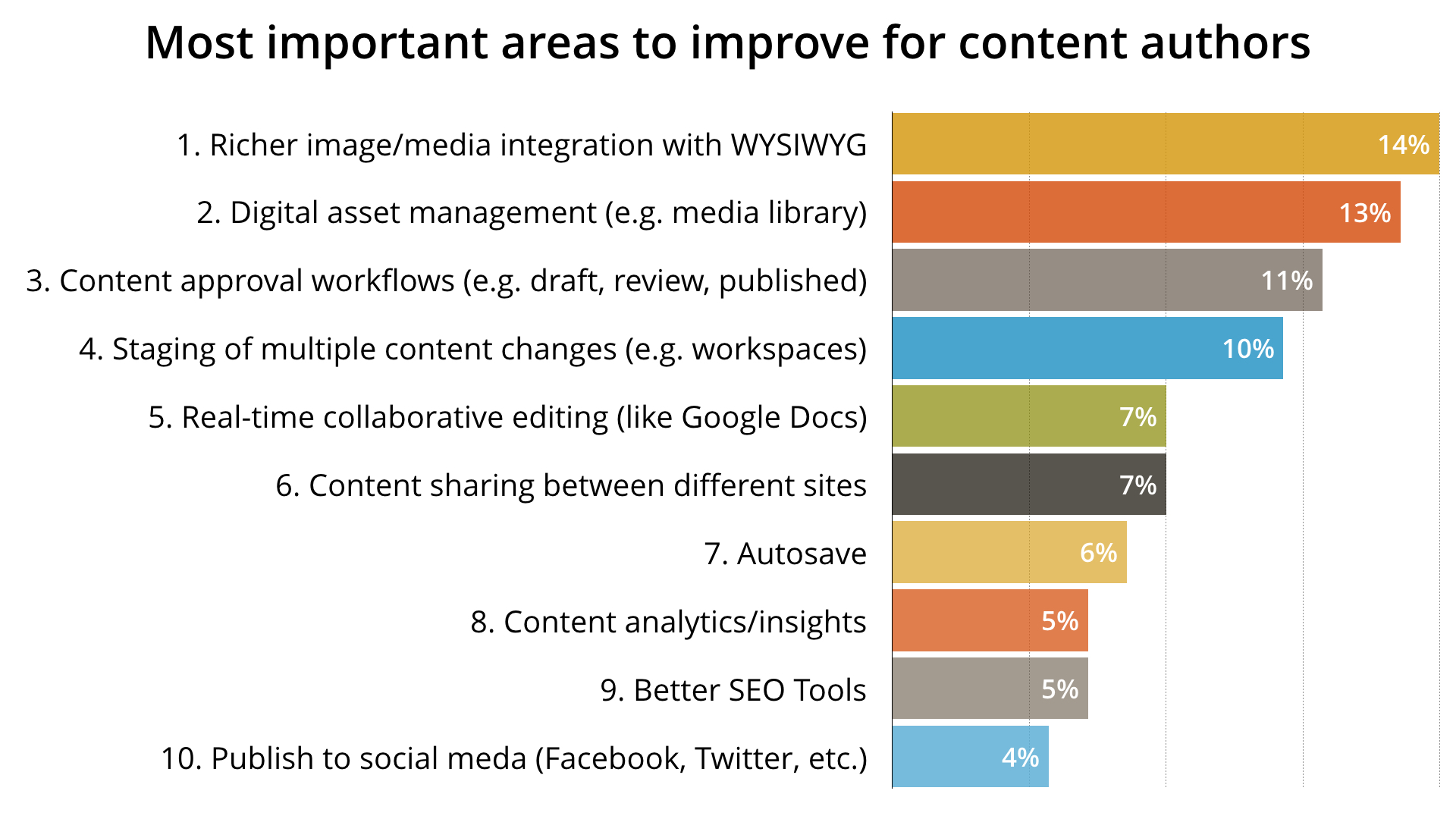
The top 10 requested features for content creators according to the 2016 State of Drupal survey.

What is new for evaluators?

Evaluators want an out-of-the-box experience that allows them to install and test drive Drupal in minutes. With Drupal 8.6, we have finally delivered on this need.

Prior to Drupal 8.6, downloading and installing Drupal was a complex and lengthy process that ended with an underwhelming "blank slate".

Now, you can install Drupal with the new "Umami demo profile". The Umami demo profile showcases some of Drupal's most powerful capabilities by providing a beautiful website filled with content right out of the box. A demo profile will not only help to onboard new users, but it can also be used by Drupal professionals and digital agencies to showcase Drupal to potential customers.

The experimental layout builder in Drupal 8.6 with the Umami demo profile
The new Umami demo profile together with the Layout Builder.

In addition to a new installation profile, we added a "quick-start" command that allows you to launch a Drupal site in one command using only one dependency, PHP. If you want to try Drupal, you no longer have to setup a webserver, a database, containers, etc.

Last but not least, the download experience and evaluator documentation on Drupal.org has been vastly improved.

With Drupal 8.6, you can download and install a fully functional Drupal demo application in less than two minutes. That is something to be very excited about.

What is new for developers?

You can now upgrade a single-language Drupal 6 or Drupal 7 site to Drupal 8 using the built-in user interface. While we saw good progress on multilingual migrations, they will remain experimental as we work on the final gaps.

I recently wrote about our progress in making Drupal an API-first platform, including an overview of REST improvements in Drupal 8.6, an update on JSON API, and the reasons why JSON API didn't make it into this release. I'm looking forward to JSON API being added in Drupal 8.7. Other decoupled efforts, including a React-based administration application and GraphQL support are still under heavy development, but making rapid progress.

We also converted almost all of our tests from SimpleTest to PHPUnit; and we've added Nightwatch.js and Prettier for JavaScript developers. While Drupal 8 has extensive back-end test coverage, using PHPUnit and Nightwatch.js provides a more modern platform that will make Drupal more familiar to PHP and JavaScript developers.

Drupal 8 continues to hit its stride

These are just some of the highlights that I'm most excited about. If you'd like to read more about Drupal 8.6.0, check out the official release announcement and important update information from the release notes. The next couple of months, I will write up more detailed progress reports on initiatives that I didn't touch upon in this blog post.

In my Drupal 8.5.0 announcement, I talked about how Drupal is hitting its stride, consistently delivering improvements and new features:

In future releases, we plan to add a media library, support for remote media types like YouTube videos, support for content staging, a layout builder, JSON API support, GraphQL support, a React-based administration application and a better out-of-the-box experience for evaluators.

As you can see from this blog post, Drupal 8.6 delivered on a number of these plans and made meaningful progress on many others.

In future releases we plan to:

  • Stabilize more of the features targeting content authors
  • Add JSON API, allowing developers to more easily and rapidly create decoupled applications
  • Provide stable multilingual migrations
  • Make big improvements for developers with Composer and configuration management changes
  • Continually improve the evaluator experience
  • Iterate towards an entirely new decoupled administrative experience
  • ... and more

Releases like Drupal 8.6.0 only happen with the help of hundreds of contributors and organizations. Thank you to everyone that contributed to this release. Whether you filed issues, wrote code, tested patches, funded a contributor, tested pre-release versions, or cheered for the team from the sidelines, you made this release happen. Thank you!

07 Sep 00:49

Coming up: a portable Marshall speaker

by Volker Weber

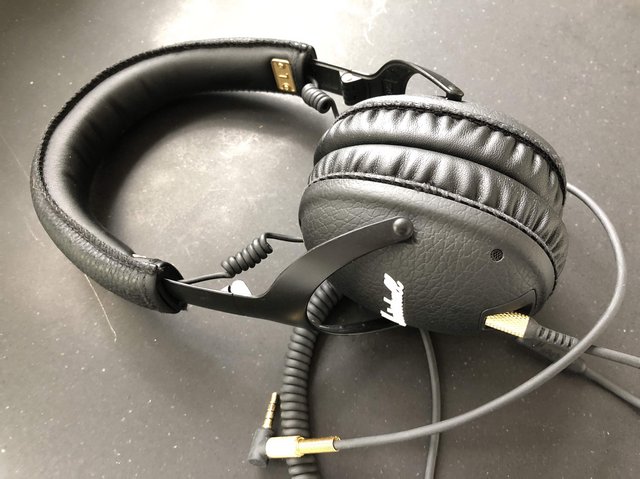
IMG 4353

I have a lot of headphones, but the Marshall Monitor Bluetooth is my goto headset. I prefer it over more expensive and better headphones, because it has exactly the right size to fit my head. It's not too small, it's not too big, it's crazy powerful, runs a day on a charge, and is easily controlled with a single knob. I connect it to my phone via Bluetooth and to my Surface via cable. If I need to waste time on a conf call, I will always pull out a Plantronics headset but most days, this is it.

Marshall Headphones is not the guitar amp company. It's Zound Industries, a swedish company with multiple brands, and they have licensed the Marshall brand and are using it for their loud products. And since I love the Monitor Bluetooth so much, I have decided I want to look at their speakers as well.

Marshall Headphones has started out with the Stanmore a few years ago. And they have built out that series with the small Acton and the mighty Woburn. They are all connected via Bluetooth and the Woburn goes up to a 110 db at 1m, which is crazy loud. You can also connect to it via RCA or optical cable. Marshall Headphones followed up with Wifi Connected versions of the Multiroom Acton, Multiroom Stanmore and Multiroom Woburn, which support Chromecast, Spotify Connect, and AirPlay. Next month the Acton and Stanmore come out as version II with Alexa. There you have it, three generations of Acton, Stanmore and Woburn, with Bluetooth, Wifi and Wifi/Alexa. All of these need to be connected to power.

The company also has two portable speakers, Stockwell and Kilburn. Kilburn is the larger one, and it is followed up by Kilburn II as of next week. This is the one I will be looking at, since any of the other ones do not stand a fighting chance against a built-out Sonos home.

07 Sep 00:49

Embedded Audio Players in Jupyter Notebooks Running IRKernel

by Tony Hirst

For ref, when running IRkernel Jupyter R notebooks, media objects can be embedded by making use of the shiny::tags function, that can return HTML elements with appropriate MIME types, and are renderable using _repr_html machinery (h/t @flying-sheep):

For example:

PS By the by, I notice the existence of another R kernel for Jupyter notebooks, JuniperKernel. An advantage of this over IRkernel is that it supports xwidgets, a C++ widget implementation for Jupyter notebooks akin to ipywidgets. (As far as I know, there isn’t a widget implementation for IRkernel, although maybe something can be finessed using shiny::tags and other bits of shiny machinery? ) Although I could install JuniperKernel on my Mac, I had some issues getting it to work that I haven’t had a chance to explore yet, so I don’t yet have a widgets demo…

PS having to save an audio file to then load back into the player may be a faff; that said, it looks like there may be a route to using a data URI? Not tried this yet; if you have a short reproducible demo that works, please share via the comments:-)

07 Sep 00:48

Twitter Favorites: [kevinmarks] @sillygwailo I do have the advantage of a database crawling all the blogs at technorati (but anyone could query it)

Kevin Marks @kevinmarks
@sillygwailo I do have the advantage of a database crawling all the blogs at technorati (but anyone could query it)
07 Sep 00:48

Running Mastodon Myself, an Experiment Pt1

by Ton Zijlstra

At our birthday unconference STM18 last week, Frank gave a presentation (PDF) on running your own website and social media tools separate from the commercial silos like Facebook, Twitter etc. Collected under the name IndieWeb (i.e. the independent web), this is basically what used to be the default before we welcomed the tech companies’ silos into town. The IndieWeb never went away of course, I’ve been blogging in this exact same space for 16 years now, and ran a personal website for just under a decade before that. For broader groups to take their data and their lives out of silos it requires however easy options out, and low-threshold replacement tools.

One of the silos to replace is Twitter. There are various other tools around, like Mastodon. What they have in common is that it’s not run by a single company, but anyone can run a server, and then they federate, i.e. all work together. So that if I am on server 128, and you are on server 512 our messages still arrive in the right spot.

I’ve been looking at running a Mastodon instance, or similar, myself for a while. Because yes, there are more Mastodon servers (I have accounts on mastodon.cloud and on mastodon.nl), but I know even less about who runs them and their tech skills, attitudes or values than I know about Twitter. I’ve just exchanged a big silo for a smaller one. The obvious logical endpoint of thinking about multiple instances or servers, is that instances should be individual, or based on existing groups that have some cohesion. More or less like e-mail, which also is a good analogy to think of when trying to understand Mastodon account names.

Ideally, running a Mastodon instance would be something you do yourself, and which at most has your household members in it. Or maybe you run one for a specific social context. So how easy is it, to run Mastodon myself.

Not easy.

I could deploy it on my own VPS. But maintaining a VPS is rather a lot of work. And I would need to find out if I run the right type of operating system and other packages to be able to do it. Not something for everyone, nor for me without setting aside some proper time.

Or I could spin up a Mastodon instance at Amazon’s server parks. That seems relatively easy to do, requiring a manageable list of mouse clicks. It doesn’t really fit my criteria though, even if it looks like a relatively quick way to at least have my own instance running. It would take me out of Twitter’s software silo, but not out of Amazon’s hardware silo. Everything would still be centralised on a US server, likely right next to the ones Twitter is using. Meaning I’d have more control over my own data, but not be bringing my stuff ‘home’.

Better already is something like Masto.host, run by a volunteer named Hugo Gameiro who’s based in Portugal. It provides ease of use in terms of running your own instance, which is good, but leaves open issues of control and flexibility.

So I’d like a solution that either can run on a package with my local hosting provider or figure out how to run it on cheap hardware like Raspberry Pi which can be connected to my home router. The latter one I’d prefer, but for now I am looking to learn how easy it is to do the former.

Mastodon and other similar tools like Pleroma require various system components my hosting provider isn’t providing, nor likely to be willing to provide. Like many other hosters they do have library of scripts you can automatically install with all the right dependencies and settings. In the section ‘social media’ it doesn’t mention Mastodon or any other ‘modern’ varity, but they do list GnuSocial and its predecessor StatusNet. GnuSocial is a script that uses the same protocols like Mastodon, OStatus and ActivityPub. So it should be able to communicate with Mastodon.

I installed it and created an account for myself (and myself as administrator). Then I tried to find ways to federate with Mastodon instances. The interface is rather dreadful, and none of the admin settings seemed to hint at anything that lies beyond the GnuSocial instance itself, no mention of anything like federation.

The interface of GnuSocial

However in my profile a button labelled “+remote” popped up. And through that I can connect to other people on other instances. Such as the people I am connected to on Mastodon already. I did that, and it nicely links to their profiles. But none of their messages show up in my stream. Even if it looks I can send messages to them from my GnuSocial instance as I can do things like @someotheruser, they don’t seem to arrive. So if I am indeed sending something, there’s no-one listening at the other end.

I did connect to others externally

And I can send messages to them, although they do not seem to arrive

So that leaves a number of things for next steps to explore. Also on Mastodon in conversation with Maarten I noticed that I need to express better what I’m after. Something for another posting. To be continued.

07 Sep 00:48

Fujifilm Pops Up Again Under the Full Framers

bythom fujifilm xt3 back

Fujifilm today announced the X-T3 update of their DSLR-like mirrorless camera. The interesting news is, that despite lots of specification advances, the X-T3 is priced at US$1499 (body only). That's a bit on the aggressive side for a crop sensor camera given all the full frame activity only US$500 above it, but Fujifilm is hoping that the additions and changes will make people consider this new camera, as well.

06 Sep 07:04

Author Photo

by peter@rukavina.net (Peter Rukavina)

Luisa took this photo of me when we were in Malmö and called it my “author photo.” It’s a testament to her skills as a photographer and to the quality of the OnePlus 5 camera. It also means I need to write a book to deserve it.

06 Sep 07:03

Why we need better tracking protection

by Steven Englehardt

Mozilla has recently announced a change in our approach to protecting users against tracking. This announcement came as a result of extensive research, both internally and externally, that shows that users are not in control of how their data is used online. In this post, I describe why we’ve chosen to pursue an approach that blocks tracking by default.

People are uncomfortable with the data collection that happens on the web. The actions we take on the web are deeply personal, and yet we have few options to understand and control the data collection that happens on the web. In fact, research has repeatedly shown that the majority of people dislike the collection of personal data for targeted advertising. They report that they find the data collection invasive, creepy, and scary.

The data collected by trackers can create real harm, including enabling divisive political advertising or shaping health insurance companies’ decisions. These are harms we can’t reasonably expect people to anticipate and take steps to avoid. As such, the web lacks an incentive mechanism for companies to compete on privacy.

Opt-in privacy protections have fallen short. Firefox has always offered a baseline set of protections and allowed people to opt into additional privacy features. In parallel, Mozilla worked with industry groups to develop meaningful privacy standards, such as Do Not Track.

These efforts have not been successful. Do Not Track has seen limited adoption by sites, and many of those that initially respected that signal have stopped honoring it. Industry opt-outs don’t always limit data collection and instead only forbid specific uses of the data; past research has shown that people don’t understand this. In addition, research has shown that people rarely take steps to change their default settings — our own data agrees.

Advanced tracking techniques reduce the effectiveness of traditional privacy controls. Many people take steps to protect themselves online, for example, by clearing their browser cookies. In response, some trackers have developed advanced tracking techniques that are able to identify you without the use of cookies. These include browser fingerprinting and the abuse of browser identity and security features for individual identification.

The impact of these techniques isn’t limited to the the website that uses them; the linking of tracking identifiers through “cookie syncing” means that a single tracker which uses an invasive technique can share the information they uncover with other trackers as well.

The features we’ve announced will significantly improve the status quo, but there’s more work to be done. Keep an eye out for future blog posts from us as we continue to improve Firefox’s protections.

The post Why we need better tracking protection appeared first on Mozilla Security Blog.

06 Sep 07:02

This B.C. bus stop has been voted one of North America's 'sorriest'

mkalus shared this story .

Read Story Transcript

If you want to catch a ride at TransLink's bus stop #61452, you have to either stand on the busy highway or climb over the concrete barrier at the edge of the road. 

The stop — on the Loughheed Highway in Pitts Meadows, B.C., about 40 kilometres outside Vancouver — has been voted one of the worst in all of North America by Streets Blog USA's annual Sorry Bus Stops contest.

"Vancouver probably isn't the first place that springs to mind when you think about sorry bus stops. But this stop ... is a doozy," writes Angie Schmitt.

'There isn't a lot of room for error'

The contest takes submissions for readers on the "sorriest, most dangerous and neglected bus stops" on the continent, narrows the list down to 16, then pits them against each other in a March Madness-style voter bracket. 

It's currently in the top 4, having recently beat out a bus stop adjacent to an eight-lane freeway in San Rafael, Calif.

The B.C. stop was submitted by San Diego's Jason Lee, who came upon it while he was in B.C. for an annual public transit conference.

Jason Lee says the bus stop on the highway in Pitts Meadows, B.C., could be improved by a bus shelter and an opening in the concrete barrier. (Submitted by Jason Lee)

He said the only opening through the jersey barrier along the side of the highway is about 50 metres away from the bus stop itself, making the stop both dangerous and inaccessible.

"If people aren't waiting at the stop, they might not have time to actually run and catch the bus and there's a potential for the driver to not see the person waiting and just ride right through without stopping," he told As It Happens guest host Helen Mann.

"If someone uses a wheelchair, they really have to use the side that's exposed to the highway and there isn't a lot of room for error there."

Deadly highway 

The highway itself is notorious, with 33 fatal crashes between 2004 and 2013, according to a CTV round-up of B.C.'s deadliest highways.  And while there is a bus-only lane in front of the stop, Lee said see saw plenty of cars streaming through it.

"I think that's part of the problem. As those private vehicles are speeding along, there's potential for them to have a collision with people waiting at that stop," he said.

TransLink said it doesn't own the land on which #61452 operates. Rather, it belongs to B.C.'s Ministry of Transportation.

"We are aware of the access concerns with this stop and are working with the Ministry to address them," TransLink spokesperson Chris Bryan said in an e-mail. 

The ministry, hower, said the decision to designate this location as a bus stop was made by TransLink and the Coast Mountain Bus Company.

"It's concerning to hear that people using this bus stop don't feel safe, and appreciate that this photo has been brought to our attention," the ministry said in an emailed statement.

"We are in the process of setting up meetings with TransLink and the Coast Mountain Bus company to see what we can do to make the bus stop more adequate."

The ministry said they will look at either redesigning the bus stop or moving it to an alternative location that's "still convenient for transit users."

Despite his criticisms about this particular bus stop, Lee said he was impressed overall with TransLink's operations.

"I think British Columbians should actually be quite proud of the transit system that operates in the Lower Mainland," he said.

"TransLink has really emphasized mobility not just in the Vancouver core, but in the suburbs surrounding there. So I think they should be really proud. I think, in this particular case though, it does appear to be the exception to the rule."

Written by Sheena Goodyear. Interview with Jason Lee produced by Ashley Mak. 

05 Sep 21:17

The 10 Best Stretches for Cyclists

by Guest Author

10 best stretches for cyclistsMany cyclists suffer from lack of flexibility and poor posture, and many of us suffer injuries. Stretching is the best way to combat these problems. This post explains the 10 best stretches for cyclists, and shows how they target the key parts of a cyclist's body. Start with 10 minutes a day, 4-5 times a week and you will very quickly start seeing and feeling improvements. As a bonus, you will also be able to cycle more efficiently!


The post The 10 Best Stretches for Cyclists appeared first on Average Joe Cyclist.

05 Sep 21:17

Articulation Points

I spent a delightful long holiday weekend in Wellfleet, thinking about some problems involving writing hypertexts that were raised in Stacey Mason’s superb dissertation advancement proposal. Stacey has always been more interested than I in diegetic links — links that concern what happens in the story.

You are being attacked by an angry grue. Do you (1) fight back, (2) run away, or (3) try to reason with the grue?

One observation I made in the course of these contemplations is that revising a complex hypertext is often hard.

Consider this contrived example. We’re writing a thriller, say, and we’ve just finished a fight scene. We had lots of choices and many variables were in play, but that’s over and we won (yay!) and now we’re starting a new episode. The start of that episode binds up lots of incoming links, and then offers a bunch of choices for what you do next.

Articulation Points

My observation was that it’s easy to add new options to the fight scene, or new opening moves in the episode that follows it, but any structural change to the start of the new episode is going to be a bear. Suppose you want “start of new episode” to be two separate notes? Or a new storylet? You can’t just paste in the new text: you’re going to need to revise all those inbound links, or all the outbound links. Or both. That’s can be a lot of bother, and bother inhibits revision.

This can be avoided by splitting the transition in advance. The destination is an empty writing space, connected to the new episode by a shark link that is followed instantly when we arrive.

Articulation Points

The new version acts just like the old one. But if we want to insert a writing space or a storylet before the new episode, we just replace one shark link and can leave all the rest of the links untouched.

Adding articulation points like these should facilitate editing and revising hypertexts.

A sign of our current predicament is that I can’t think of any place to discuss this sort of question. It’s no longer the sort of thing we talk about at ACM Hypertext. ICIDS seems to regard hypertext as a quaintly historical concern. ELO? Surely, you jest. EBR? Not enough theory. GDC? Too much theory, too few dollars. The blogosphere used to be good enough, but it’s pretty much gone now.

05 Sep 21:17

The Best We Could Do

A lovely graphic novel of the author’s search for an explanation for her unhappy Vietnamese-American family. Bui started this book as an alternative to her dissertation, which explored the history of Vietnamese refugees in their historical context but failed to get at the emotional core of her experience. An exceptional and concise portal into a complex history, rich with nuance and unexpected gentleness and complimented by Bui’s wonderful portraiture and deft watercolor work.

05 Sep 21:17

Science Podcast

by Andrea

Motherboard: Science Solved It podcast.

“I grew up on shows like The X-Files and Unsolved Mysteries. I checked out books on UFOs and Bigfoot from the library. I was fascinated by all of the wondrous, unexplainable things in the universe. And I still am. Only now, as an adult, a science journalist, and a skeptic, I’m much more interested in the explanations behind these mysterious phenomena.

That’s why I created Science Solved It, a new weekly podcast from Motherboard. Each episode, I explore one of the world’s greatest mysteries that was solved by science. I talk to the actual, real live scientists who cracked the case, while also indulging in some of the bizarre conspiracy theories that accompany these mysteries. Throughout the season, you’ll hear about unexplained, underwater noises, floating lights, moving rocks, and even a cartoon that gave people seizures.”

I found the podcast via this MetaFilter post: Science Solved It: theories and solutions to strange occurances, which has links and summaries to all the episodes in the first two seasons. I especially liked the episodes about the underwater flies at Mono Lake and the moving rocks in Death Valley, because I’ve been to those places years ago – plus, now I want to go see albino redwood trees (which probably won’t happen, as their location is being kept secret for good reasons).

I’ve got a cold at the moment and spent the past two days on the couch binge-listening to all 14 episodes in the first two seasons. Highly recommended!

05 Sep 21:17

Daniel Jalkut, Saying Goodbye to NetNewsWire 3:...

Daniel Jalkut, Saying Goodbye to NetNewsWire 3:

Since I’m not the only stalwart NetNewsWire 3 user, one of the things Brent was curious about was whether he could give that version “one last hurrah,” so to speak. Fix a few of the most glaring bugs, build against a modern SDK, and not only create an artifact for history to more accurately judge the app’s virtues, but to give long-standing users something to tide them over while development continues on NetNewsWire 5.

05 Sep 21:15

September Android 9 Pie security patch OTAs and system images now available to download

by Dean Daley
Google Pixel 2 XL fingerprint scanner

The first post-Android 9 Pie OTA files and system images are now available. The OTA files and system images are for anyone who doesn’t want to wait for Google to push the latest security patch to their phone.

The update includes a Bluetooth car audio fix — an issue that I’ve experienced myself. Installing the OTA doesn’t require the user to unlock their device’s bootloader.

The factory images and OTA files are available on the Pixel and Pixel XL, as well as the Pixel 2 and Pixel 2 XL.

There are two versions of the update available for the first-generation Pixel Telus and Verizon variants. While there’s only one release for the Pixel 2 and 2 XL only have one release of the update.

The September 2018 Pixel/Nexus security bulletin also mentions a variety of security and functional patches that Google will release this month. Those fixes include an improvement to battery charge in the Retail Mode for the Pixel 2 and 2 XL, as well as improving SW reporting for the Pixel, Pixel XL, Pixel 2 and Pixel 2 XL.

Android 8.1 factory images and OTA files are also available for the Pixel C, Nexus 6 and the Nexus 5X.

The September patch is also available to Essential phone owners.

I’ll note that my Pixel 2 XL received the over-the-air update late last night — the night of September 4th — so the OTA rollout is incoming.

Source: Google, Via: Android Police

The post September Android 9 Pie security patch OTAs and system images now available to download appeared first on MobileSyrup.

05 Sep 21:15

Facebook claims BlackBerry stole voice messaging, GPS technology

by Sameer Chhabra
Facebook app on Android

Menlo Park social networking giant Facebook has filed a patent infringement suit against Waterloo, Ontario-based enterprise software company BlackBerry Limited.

In a 118-page document filed in a San Francisco federal court on September 4th, 2018, Facebook claims that BlackBerry stole the social networking giant’s voice messaging technology, as well as infringed on five other patents.

According to Bloomberg, BlackBerry stands accused of infringing patents pertaining to the centralized tracking and analysis of GPS data, as well as patented technology that improves the delivery of graphics, video and audio on mobile devices.

Facebook declined MobileSyrup‘s request for comment.

This is the latest lawsuit between the Menlo Park and Waterloo companies.

In March 2018, BlackBerry sued Facebook, accusing the social networking giant of developing “competing applications that improperly used BlackBerry’s mobile messaging intellectual property.”

“We have a lot of respect for Facebook and the value they’ve placed on messaging capabilities, some of which were invented by BlackBerry,” said a BlackBerry spokesperson, in a previous email to MobileSyrup.

MobileSyrup has reached out to BlackBerry for comment. This story will be updated with a response.

Source: Bloomberg

The post Facebook claims BlackBerry stole voice messaging, GPS technology appeared first on MobileSyrup.

05 Sep 21:15

HTC Vive Wireless Adapter now available for pre-order in Canada

by Bradly Shankar
HTC Vive Pro

HTC has begun offering Canadian pre-orders for its Vive Wireless Adapter.

The Vive VR headset accessory, powered by Intel’s WiGig, offers a tetherless and responsive VR experience with a battery life of up to 2.5 hours.

The Adapter also supports a 6m x 6m (20ft x 20ft) play area capable of fitting up to two other Wireless Adapter-equipped Vive headsets for multiplayer experiences.

The Vive Wireless Adapter will come packaged with a battery, battery belt clip, USB cable, VIVE 3-in-1 short cable, PCI-e WiGig card, wireless Link Box and a two-month Viveport subscription.

The Adapter will cost $399.99 CAD and can be pre-ordered here.

A $79.99 attachment kit is required for the Wireless Adapter to work with the Vive Pro.

Note that there is an estimated shipping cost of $20-$28 for Canadian orders.

Shipments will begin later this month.

The post HTC Vive Wireless Adapter now available for pre-order in Canada appeared first on MobileSyrup.

05 Sep 21:15

Snapchat has two new Spectacles frames that look like normal sunglasses

by Brad Bennett

Snapchat-parent company Snap Inc. released its second generation Spectacles earlier this year, and now the company has two new frame designs just in time for the fall fashion season.

Both of the new glasses feature a more subtle design compared to the bright colours of the original.

The new glasses are also bit more gendered than the original unisex design. The boxier variant is called ‘Nico,‘ and the more cat-eye looking model is called ‘Veronica.’

The Veronica frames (left) and the Nico frames (right).

The technology inside the glasses is the same as the Spectacles 2 — Snap only changed the frame design, while adding polarized lenses and making a small change to the charging port.

It’s worth pointing out that the new glasses don’t work with the older model’s charging cable.

Users can buy the new glasses online, where they retail for $269.99 CAD. A disclaimer on the website says that they will start shipping in two-to-three weeks.

Alongside the launch of the new designs, Snap announced that it’s working on a feature for the Snapchat app that highlights popular stories that were shot using Spectacles. There’s no public release date yet for that feature.

Source: Snap Inc.

The post Snapchat has two new Spectacles frames that look like normal sunglasses appeared first on MobileSyrup.

05 Sep 21:15

Firefox 62 brings dark mode, more control over user data and more

by Jonathan Lamont
Firefox app icon on iOS

Firefox 62 brings some fun new features along with plenty of bug fixes and under-the-hood improvements.

For iOS users, Firefox has a new option for downloading files. Users can long-press any link to download a file. Firefox is also testing a new experimental Pocket feature on iPad. The feature allows users to discover and watch videos through the read-it-later service.

Switching and finding tabs will be easier for iOS users as well. Users can now search for their open tabs.

Furthermore, iOS users are getting a new dark mode. Users can switch to it manually, or set it to automatically turn on.

More control over user data

On the desktop side, dark mode is enabled automatically when you turn on macOS Mojave’s dark mode.

Desktop users will also have more options to control the new tab page. Users can adjust the position and number of rows of content. For example, users can have up to four rows of ‘Top Sites.’ Alternatively, they can have as little as one row of sponsored content from Pocket — or they can remove it entirely.

Firefox finally has support for Canadian English as well. It’s surprising that Mozilla took so long to add it as an option.

Firefox users will also have an option to wipe their profile data when disconnecting from Firefox Sync services. In other words, you can choose to erase bookmarks, passwords, history, cookies and other site data from your computer.

To cap things off, Firefox 62 for Android received some performance enhancements for scrolling and loading times.

You can check out the full release notes over here.

Next up for Firefox is version 63, which will bring new ‘Do Not Track’ features. Additionally, Do Not Track will be the default for Firefox browsers.

Source: Mozilla

The post Firefox 62 brings dark mode, more control over user data and more appeared first on MobileSyrup.

05 Sep 21:15

Apple preparing News app for Canadian launch: report

by Sameer Chhabra

Cupertino computing giant Apple is reportedly preparing its News iOS app for a Canadian launch, according to a report from the Logic.

According to a journalist who was allegedly approached by an Apple headhunter, Apple is currently in the process of recruiting editorial staff who will be responsible for curating Canadian-centric stories and content.

The Logic reported that “no firm launch date was discussed,” but that Apple is interested in launching the News app in Canada within the next year.

The News app first launched exclusively in the U.S. with the debut of iOS 9 in September 2016. The app was available for iPhone, iPad and iPod Touch users.

Apple device-owners in the U.K. and Australia were later able to access the News app when Apple rolled out iOS 9.1 in October 2015.

As of macOS 10.14, Mac users in the U.S., U.K. and Australia also have access to Apple’s news aggregation platform.

Apple recently bought the Texture magazine app from Next Issue Media, a group comprised of Conde Nast, Hearst Magazines, Meredith Corporation, News Corp, Time Inc. and Rogers Media.

The Cupertino computing giant later shuttered the Texture Windows app on June 30th, 2018.

Apple’s chief mobile competitor Google recently launched a completely redesigned News app for both Android and iOS.

Source: The Logic

The post Apple preparing News app for Canadian launch: report appeared first on MobileSyrup.

05 Sep 21:15

The electric vehicle market is growing incredibly fast

by Brad Bennett

A new report from Bloomberg sheds a little more light on the electric vehicle market.

It took the almost five years for EV makers to sell the first million electric cars, but the latest million were sold during a six month span.

Bloomberg predicts that over four million EVs will have been sold worldwide at some point during the first week of September.

The overall size of the electric vehicle market is still tiny compared to the market for regular cars. During the last seven-and-a-half years, automakers sold 590 million conventional light vehicles were sold too. By comparison, only 4 million EVs were sold during that same time period.

The most notable aspect to the boom in EV’s is the rate of their sales growth. More drivers bought electric cars in the first half of 2018 than throughout all of 2016.

This shows that even though regular cars are still the norm, electric vehicles are slowly building momentum to take over the market someday.

All in all, this is exciting news that shows electric cars making an impact on the gasoline vehicle market.

Source: Bloomberg

The post The electric vehicle market is growing incredibly fast appeared first on MobileSyrup.

05 Sep 21:15

New Samsung Chromebook passes through Wi-Fi Alliance

by Dean Daley
Samsung

It looks like Samsung is working on a new Chromebook. The new device was discovered by About Chromebooks which spotted the Chromebook passing through the Wi-Fi Alliance. 

The Wi-Fi Alliance details the upcoming device’s model number ‘XE5251BBI.’ The listing also confirms that the Chromebook is running Chrome OS 69 and supports the 2.4GHz and 5GHz frequency bands.

It’s unclear if Samsung’s new Chromebook will be an entry-level or premium device.

Samsung sells a variety of Windows laptops and Chromebooks. This year, Samsung took the wraps off of its second-generation Chromebook Plus.

It’s worth noting that, much like the new Chromebook Plus, it’s likely Canadians won’t get the chance to purchase Samsung’s as-of-yet unannounced Chromebook.

Source: Wi-Fi Alliance, About Chromebooks Via: 9to5Google

The post New Samsung Chromebook passes through Wi-Fi Alliance appeared first on MobileSyrup.

05 Sep 21:14

Users can now record Skype calls on Mac and Mobile

by Brad Bennett

Microsoft has added a new feature that lets mobile Skype and Mac users record their calls.

Skype has long been one of the titans of the video calling industry, even with newer platforms like Snapchat and Instagram starting to wedge into the space.

The platform still has a lot of features not included this newer wave of apps, and it’s only getting better now that Microsoft is adding the ability to record conversations.

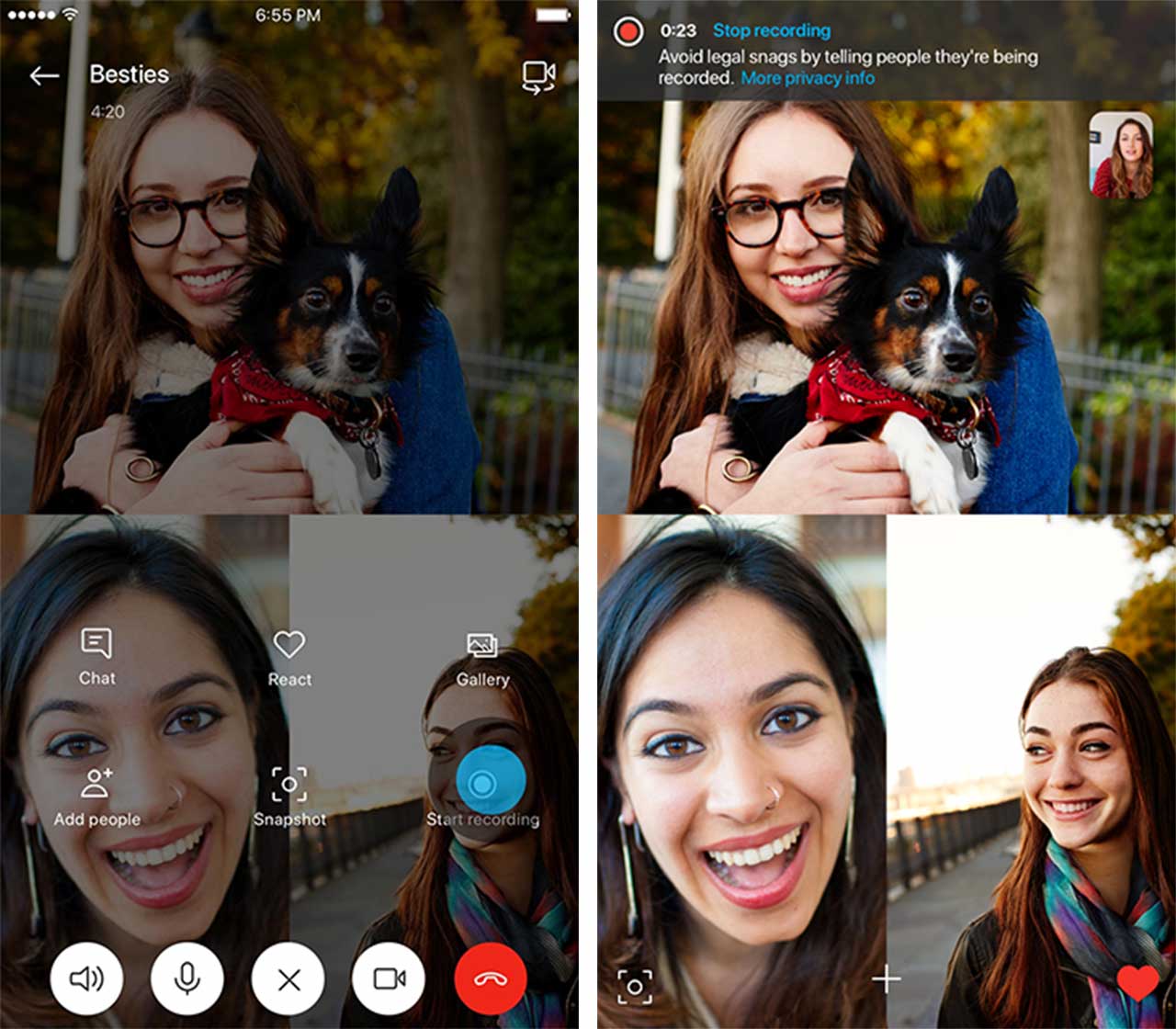
So far the feature is only available on mobile and Mac. To record a conversation, tap on the plus icon, then select ‘Start recording.’  The recording saves the audio and video, depending on the call format.

A notification pops up once a call starts being recorded, letting each person in the call know that what they’re saying is now on the record.

When the call’s done, users have 30-days to decide whether or not they want to save or share the recording before it disappears. If they opt to save the recording, it downloads as an MP4.

Call recording is coming to Windows 10 soon, and should roll out in the next update. There’s no word when this feature will come to Android.

Source: Microsoft

The post Users can now record Skype calls on Mac and Mobile appeared first on MobileSyrup.

05 Sep 21:14

YouTube dark mode widely rolling out to all Android devices

by Sameer Chhabra
YouTube app icon on Android

After more than a full year of waiting, it appears that YouTube’s dark mode is now widely rolling out to all Android users.

The release comes approximately one month after users first began reporting that the Google-owned video streaming platform had begun to receive a server-side update with the dark theme.

That being said, while many users are receiving a dark mode notification, it appears that not all devices are receiving the actual server-side dark theme update as of yet.

Two non-Google Android devices at the MobileSyrup offices received a notification prompting them to “Try the new Dark Theme.

A MobileSyrup Essential Phone was able to activate the dark theme after closing out of and then relaunching the YouTube app.

However, a MobileSyrup Huawei P20 Pro that received the prompt was unable to activate the dark theme, even after clearing the YouTube app’s cache.

Google first added a dark mode to the YouTube web app in May 2017. The company followed up with a dark theme for the YouTube iOS app in March 2018.

Via: XDA Developers

The post YouTube dark mode widely rolling out to all Android devices appeared first on MobileSyrup.

05 Sep 21:14

Google brings rugged devices to its Android Enterprise Recommended program

by Dean Daley
Android Mascot

Certified rugged Android devices will now receive five-years worth of security updates, according to Google.

The tech giant has added specific rugged devices to its Android Enterprise Recommended platform, a program Google implemented to make it easier for companies to select appropriate Android devices.

Google’s list of rugged devices includes the following smartphones:

  • Zebra TC25, TC51, TC56, TC70x and TC75x
  • Honeywell Dolphin CT40, Dolphin CT60 and Dolphin CN80
  • Sonim XP8
  • Point Mobile PM45
  • Datalogic Memor 10 — that’s launching in October.

For Google to select add a device to this list the company requires a minimum of Android 7.0, a certified ingress protection of at least IP64, support for at least one additional major operating system release and drop protection of MIL-STD-810G or IEC 62-2-32.

Source: Google Via: Android Police

The post Google brings rugged devices to its Android Enterprise Recommended program appeared first on MobileSyrup.