Shared posts

19 Oct 15:59

The History Of The Future

by noreply@blogger.com (BOB HOFFMAN)

If you go to marketing or advertising conferences the first thing you notice is that every genius with a Powerpoint deck is an expert on the future.

I attend way more conferences than is healthy.  I've been averaging about 12 of these a year, as speaking at these things is part of my business. I hear all kinds of hysterical and provocative predictions for the future. The one thing I don't hear is anything that turns out to be true.

The history of these future-hustlers is pretty rotten.

So here's a little exercise. Here are a dozen of the biggest advertising stories of the past couple of years. Go back and see if you can find any marketing geniuses who predicted any of the following:
  • Facebook/Cambridge Analytica scandal (here)
  • Martin Sorrell shown the door at WPP (here)
  • Mark Zuckerberg testifies before Congress (here)
  • Google fined over $5 billion by EU for illegal activities (here)
  • ANA study finds "pervasive" corruption in media (here)
  • Justice Department/FBI launch investigation of ad agencies (here)
  • Fake news dominates political discussions (here)
  • "Voice" shopping bombs (here)
  • "Brand safety" becomes major issue (here)
  • P&G dumps on digital (here)
  • Major fraud in social media (here)
  • Iconic Y&R evaporates (here)  
The reason you won't find anyone who predicted any of this stuff (okay, maybe there was one guy) is that no one is ever held accountable for their bullshit. Consequently, marketing experts feel free to say whatever the hell sounds good, cash their checks, and know there will never be any consequences.

If you're a marketing genius with a terrible track record, the future is a great place to hide.

And...
This Wednesday night (Oct. 17) in NYC, some smart ad people (and one dumbass blogger) will be talking about heretical ad stuff to support a great new ad book called "Eat Your Greens."  I am told  there aren't too many seats left, so go here now for info.

And, as you may have noticed...
...my posts on the blog have become rather sporadic. I have been focusing my attention on books and on my weekly newsletter. If you like the blog, I suggest you sign up for The Ad Contrarian newsletter here. I'll continue to post on the blog, but the newsletter will be more timely and consistent.


    19 Oct 15:57

    Clojure and Functional Programming at UNO

    by MJ Perez

    A talk given at the University of New Orleans about functional programming.

    Slides

    Clojure and FP at UNO - download

    Download slides

    The post Clojure and Functional Programming at UNO appeared first on LispCast.

    19 Oct 15:57

    Link Bracelet für Apple Watch

    by Volker Weber

    IMG 5040

    Dieses Apple-Gliederarmband gehört mittlerweile zu meinen Lieblingsbändern für die Apple Watch. Mit knapp 400 € in silber und 500 € in schwarz ist es allerdings auch genauso teuer wie schwer. Tobias hat ein sehr ähnliches Band aufgetrieben, das aktuell nur knapp 100 € kostet. Das ist kein unseriöser Schrott, wie man ihn sonst auf Amazon kaufen kann, sondern beinahe eine 1:1 Kopie des Apple-Armband. Ich hatte zunächst die Befürchtung, da seien irgendo Apple-Bänder vom Laster gefallen.

    Annotation (1)

    Dieses Gliederarmband gibt es in silber, schwarz und grau. Beim grauen und schwarzen Band wird man sehen müssen, wie gut die Oberflächenbehandlung ist. Die Kundenrezensionen klingen sehr positiv. Tobias hat das silberne und ist sehr damit zufrieden.

    More >

    15 Oct 02:59

    A breakout year for Open Source businesses

    by Dries

    I was talking to Chetan Puttagunta yesterday, and we both agreed that 2018 has been an incredible year for Open Source businesses so far. (Chetan helped lead NEA's investment in Acquia, but is also an investor in Mulesoft, MongoDB and Elastic.)

    Between a series of acquisitions and IPOs, Open Source companies have shown incredible financial returns this year. Just look at this year-to-date list:

    Company Acquirer Date Value
    CoreOS RedHat January 2018 $250 million
    Mulesoft Saleforce May 2018 $6,5 billion
    Magento Adobe June 2018 $1,7 billion
    GitHub Microsoft June 2018 $7,5 billion
    Suse EQT partners July 2018 $2,5 billion
    Elastic IPO September 2018 $4,9 billion

    For me, the success of Open Source companies is not a surprise. In 2016, I explained how open source crossed the chasm in 2016, and predicted that proprietary software giants would soon need to incorporate Open Source into their own offerings to remain competitive:

    The FUD-era where proprietary software giants campaigned aggressively against open source and cloud computing by sowing fear, uncertainty and doubt is over. Ironically, those same critics are now scrambling to paint themselves as committed to open source and cloud architectures.

    Adobe's acquisition of Magento, Microsoft's acquisition of GitHub, the $5,2 billion merger of Hortonworks and Cloudera, or SalesForce's acquisition of Mulesoft endorse this prediction. The FUD around Open Source businesses is officially over.

    15 Oct 02:58

    Toward no longer running naked through the digital world

    by Doc Searls

    We live in two worlds now: the natural one where we have bodies that obey the laws of gravity and space/time, and the virtual one where there is no gravity or distance (though there is time).

    In other words, we are now digital as well as physical beings, and this is new to a human experience where, so far, we are examined and manipulated like laboratory animals by giant entities that are out of everybody’s control—including theirs.

    The collateral effects are countless and boundless.

    Take journalism, for example. That’s what I did in a TEDx talk I gave last month in Santa Barbara:

    I next visited several adjacent territories with a collection of brilliant folk at the Ostrom Workshop on Smart Cities. (Which was live-streamed, but I’m not sure is archived yet. Need to check.)

    Among those folk was Brett Frischmann, whose canonical work on infrastructure I covered here, and who in Re-Engineering Humanity (with Evan Selinger) explains exactly how giants in the digital infrastructure business are hacking the shit out of us—a topic I also visit in Engineers vs. Re-Engineering (my August editorial in Linux Journal).

    Now also comes Bruce Schneier, with his perfectly titled book Click Here to Kill Everybody: Security and Survival in a Hyper-Connected World, which Farhad Manjoo in The New York Times sources in A Future Where Everything Becomes a Computer Is as Creepy as You Feared. Pull-quote: “In our government-can’t-do-anything-ever society, I don’t see any reining in of the corporate trends.”

    In The Age of Surveillance Capitalism: The Fight for a Human Future at the New Frontier of Power, a monumental work due out in January (and for which I’ve seen some advance galleys) Shoshana Zuboff makes both cases (and several more) at impressive length and depth.

    Privacy plays in all of these, because we don’t have it yet in the digital world. Or not much of it, anyway.

    In reverse chronological order, here’s just some what I’ve said on the topic:

    So here we are: naked in the virtual world, just like we were in the natural one before we invented clothing and shelter.

    And that’s the challenge: to equip ourselves to live private and safe lives, and not just public and endangered ones, in our new virtual world.

    Some of us have taken up that challenge too: with ProjectVRM, with Customer Commons, and with allied efforts listed here.

    And I’m optimistic about our prospects.

    I’ll also be detailing that optimism in the midst of a speech titled “Why adtech sucks and needs to be killed” next Wednesday (October 17th) at An Evening with Advertising Heretics in NYC. Being at the Anne L. Bernstein Theater on West 50th, it’s my off-Broadway debut. The price is a whopping $10.


    15 Oct 02:58

    The Peter and Oliver Podcast: Pondercast Edition

    by peter@rukavina.net (Peter Rukavina)

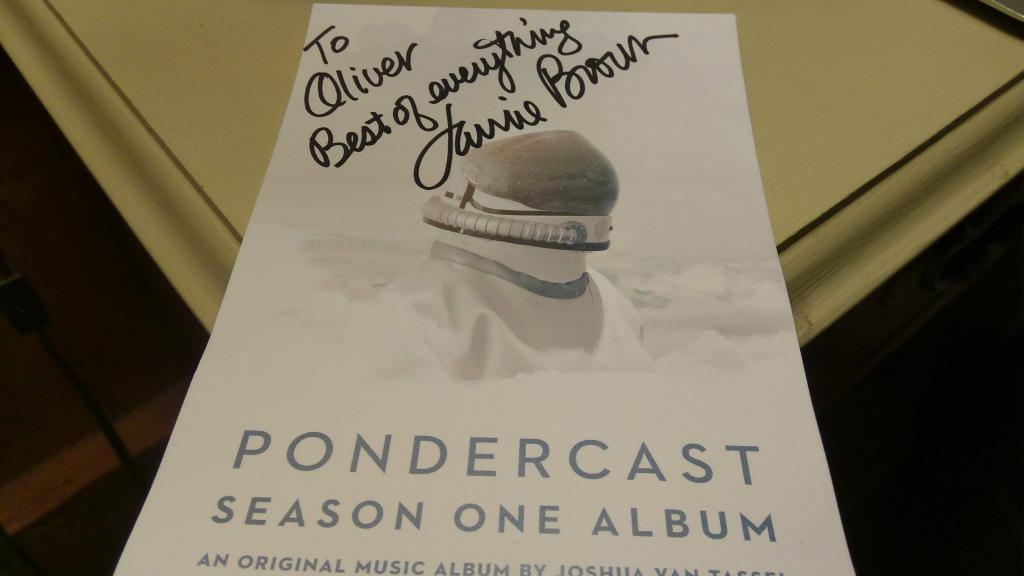
    The final event of Oliver’s Birthday Season, a trip to Wolfville to bear witness to a live taping of Laurie Brown’s Pondercast podcast.

    So, of course, we recorded a podcast while waiting for the show to start.

    15 Oct 02:58

    iPhone Photography: Capturing Bucolic Landscapes with Mariko Klug

    by Leticia Roncero

    Over the last few years, the improvements made in smartphone photography have been huge. Rather than feeling threatened, more professional photographers are now embracing the creative possibilities of iPhone cameras, and more amateurs are looking to step up their game.

    The just-announced iPhone XS Max and iPhone XS, and more recently Google’s Pixel 3 and Pixel 3 XL smartphones have been praised for their camera performance, presented as one of its most exciting features.

    To understand and appreciate the limits and possibilities of smartphone photography, we interviewed landscape photographer Mariko Klug, who shoots and edits entirely on an iPhone, and delights her Flickr followers with breathtaking images of meadows, beaches, mountains, and lakes.

    Veil of Leaves

    Tell us about where you’re from, where you live, and what you do.

    I’m of German and Japanese origin and live in Erding, in Southern Germany. As a wife, mother, dog owner and part-time worker at the nearby Munich Airport, my time is fully engaged.

    How did you get interested in and started with iPhone photography?

    In 2011, my husband gave me his used iPhone 4. At that time, I didn’t really know what an iPhone was capable of. It was just a phone to me. Coincidentally, I came across some interesting photos and artworks on social media and was really surprised to find out that they were taken and edited with an iPhone. This awakened my interest, and I started experimenting. I didn’t have any background in photography, but that was not a problem at all.

    Silence

    Most professional photographers choose to gear up with lenses and equipment. What is the appeal of using an iPhone?

    The biggest appeal is the easiness. It’s just so simple and convenient: no heavy equipment, no need to adjust settings, just take it out of the pocket to shoot and edit at any time, wherever you are. My camera is always with me, so I don’t miss any photo opportunities. There’s also the unlimited number of image editing apps. It’s all in one, which is just perfect to live out my creativity.

    You still can’t compare the quality of mobile photos with DSLR taken ones (although the quality has improved a lot since I started shooting with an iPhone 4 in 2011) but, in my opinion, photography isn’t about the gear or the technical quality of an image, it’s about the power of the imagery itself, the content and composition.

    Creatively, what is your process for taking photos? Do you do any planning?

    I usually don’t plan much ahead. As a dog owner, I have to go out three times a day anyway, regardless of the weather. But as a lover of mood, I have favorite times and weather conditions that I prefer to photograph in: sunrise, sunset, during fog and on stormy days.

    Bucolic Sunrise

    What are the most common challenges you come across when shooting with an iPhone? What do you do to overcome them?

    Definitely the battery life. The problem is not only the relatively short battery life: an iPhone—or I suppose this concerns all kinds of smartphones—is also very sensitive to cold temperatures. The battery can suddenly die even when it is still around 60 percent. My solution is to always have a small portable battery charger on hand. On extremely cold days I just leave the charger connected while shooting to prevent it from dying.

    Getting a landscape scene to fit within the boundaries of a square-cropped format seems an added challenge. How do you approach composition when taking square photographs?

    When I began photographing and uploading my photos to Flickr, I used to mix all kinds of formats. One day I was looking at my own Photostream and decided to bring some harmony into it. I chose square because I often used the Hipstamatic app to take pictures and, at that time, it was a square format photo app. Nowadays I see it as part of my style and also as a challenge.

    I don’t think much about composition when shooting, I just trust my feeling. I think you can apply all the same well-known composition techniques to square photos too. I don’t see much difference in the approach to composition, whether square or not.

    What are some of your favorite places to photograph and why?

    My favorite place is the countryside, so I count myself very lucky to live in beautiful Bavaria, in Southern Germany. In my vicinity there are lakes, forests and fields in abundance and the Alps are not too far away either. As a dog owner, I spend a lot of time outdoors regardless of the weather. So I find most of my inspiration in what’s around me. I also find inspiration while traveling in Europe.

    Shrouded in Mystery

    What editing app do you use? What apps do you recommend for people wanting to use their smartphone for more professional shots?

    I always start editing with Snapseed. It’s a free, powerful editing app ideal for basic adjustments like brightness, contrast, temperature, saturation, etc. It has a very helpful brush tool to treat certain areas, and a healing tool to remove unwanted objects. For filters and textures, I currently like to use Mextures, Stackables, LensLight, SkyLab and RookieCam. But there are still so many great editing apps…

    For shooting, I use the native camera on iPhone, ProCamera (for HDR shots), or Hipstamatic.

    Photography wise, what do you feel has been your most significant success?

    This is a very difficult question. I have won several awards in leading mobile photography competitions, like the Mobile Photography Awards and the iPhone Photography Awards and just recently, one of my photos was chosen to be featured on the official Apple Instagram account, with more than 360,000 likes. And now a dream comes true – the Flickr Blog feature!

    The Sentinel

    Be sure to visit Mariko’s Flickr photostream to see more of her work.

    15 Oct 02:58

    The trouble with government education technology initiatives

    Terry Freedman, ICT & Computing in Education, Oct 30, 2018


    Icon

    I'm going to select option B, which is give at the end of the article, suggesting that Terry Freedman has  "finally turned into the archetypal cynical grumpy old man sitting in the corner of the staffroom mumbling!" Why? Well, it's that the generalization in the headline is simply false. Sure, not everything works. But most of the technology initiatives governments have funded in universities actually have worked. In this part of the world, I can cite the student support programs run both federally and provincially and the research funding councils. But if you want something that is more directly technical, I might point to things like CANARIE, the national fibre-optic backbone, or the TRIUMF particle acceleration centre, and the CAP grant program putting access to the internet to communities across the nation. The internet itself was a government program, the web came out of CERN, and things ranging from XML to LMSs to MOOCs bar the imprint of government support. The government gets a lot right, a lot more than it is recognized for, and people saying that the government always fails have (a) not really looked at the track record of business in this space, and (b) are grumpy old men sitting in the corner of the staffroom.

    Web: [Direct Link] [This Post]
    15 Oct 02:57

    Some recent Internet reading

    by Liz

    An interview with Jaron Lanier, https://lareviewofbooks.org/article/delete-your-account-a-conversation-with-jaron-lanier/#!

    So the problem is that when people say, “Oh, we use social media for social justice,” they’re typically correct. And yet in the longer story they’re really vulnerable to a far greater backlash than they would have gotten if they used another technique. At the end of the day, it’s hard to say whether they really benefited or not.

    I disagree with what Lanier seems to be trying to say here. Of course if your activism reaches more people you are going to get more backlash. Are the specific people advocating for change ever going to be the ones to personally benefit for that change? Rare!

    What they want to do is take whatever input people put into the system and find a way to turn it into the most engagement possible. And the most engagement comes from the startle emotions, like fear and anger and jealousy, because they tend to rise the fastest and then subside the slowest in people, and the algorithms are measuring people very rapidly, so they tend to pick up and amplify startle emotions over slower emotions like the building of trust or affection.

    Interesting, and makes me think of Stardew Valley and its slow building of relationships between the player-character and the NPCs, relationships that have to be maintained. I also thought of the first example I was aware of, of the seemingly pointless exchange of tokens of approval in a social network, which I think was my friend Yoz creating something called “Sweeties” in Ning. And tangentially, of all the feminist sf utopias where there are barter based economies. Build in and opting into “slower” economies of attention could be possible – Excuse me while I go invent actual real life friendship, and the postal system – But seriously, I like this point and the only real answer to it may be to point this out to folks and for us all to seriously think about how we want to spend our time.

    I am also thinking of my essay on culture clashes and the underlying assumptions of the trolls of the 00s with particular feminist communities. One assumes that showing that you are harmed is evidence you need to be harmed more in order to do you the favor of toughening you up. The other values its “hugbox” (a term used as a pejorative by the trolls) ie, its social contract to be supportive, kind, and to value the courage of vulnerability.

    There is something to thinking “well, we SHOULD be alarmed and upset” about how things are – I think that is mistaking the early or middle phases of consciousness raising for a desirable steady state of being. It is normal in my view to have something of a breakdown as we try to integrate awareness of our participation in harmful, terrible or evil events and systems. As we see these truths we have to form some kind of narrative about what is happening and what we’re doing. That is where we’re at right now in public discourse – we are in a phase of rolling chaos and dis-integration.

    Another article: This particle physics news was neat to see, as my ex partner used to work on these sorts of experiments (including AMANDA, the precursor to Ice Cube).

    There is an open call for submissions to Cripple Punk Zine:

    Our goal is to continue spreading radical disability acceptance to as many people as we can. We want to help raise disabled people’s self worth and self esteem, support disabled content creators, and create more spaces for disabled people to unapologetically be themselves. Every single disabled person deserves to feel empowered!

    We are currently accepting submissions for the first issue, which will answer the question, “What is Cripple Punk?” and what cripple punk means to different people. The first issue should cover topics central to the cripple punk movement, like fighting ableism, embracing diversity, becoming empowered, and rejecting the roles mainstream society expects you to fit into.

    I may write something and send it on.

    I enjoyed this essay by Harry Giles (a rec from Sumana) on nurturing vs. shock in performance art.

    Learning how to care for your audience is actually far more aesthetically interesting and politically disruptive than working out how to shock them.

    This fits well with reading Lanier’s interview.

    On shock and harm in art:

    In each of these works, it is clear the people are actively harmed by the art, and this raises vital artistic and political questions. Who is it that is harmed, and why? Is it worth it? In Pussy Riot’s case, the punk gig offends worshippers and people who believe in a certain sanctity of the church space, who feel violated, but I would argue that in this case the violence is justified in the cause of attacking a patriarchy whose foundations rest in part on that very sanctity. But these are not easy arguments to make, and they are not artworks that I think can be taken or performed lightly.

    I thought of myself and some of the activism I have done, for example, times I have been naked for a cause. Was my going shirtless at riot grrrl concerts or stripping down for a picture for body positivity with Nakedjen in various places a positive, transgressive act, or a rude, offensive, illegal, non consensual violation of other people’s space that possibly harmed someone? Is it different from Kavanaugh flashing Ramirez at a frat party and if so, how? My view here is that the potential harm is important to acknowledge, and that the expression, intention, exuberant joy, humor, etc. was worth the risk, and the context has to be considered.

    thumbnail of two women

    15 Oct 02:56

    Twitter Favorites: [seanorr] In Toronto, every single bathroom is downstairs

    SEAN ORR @seanorr
    In Toronto, every single bathroom is downstairs
    15 Oct 02:56

    Oscar Wilde, Laurie Brown, and the the Apotheosis of Cool

    by peter@rukavina.net (Peter Rukavina)

    Back in the early 1990s, Laurie Brown moved from MuchMusic VJ to CBC Television’s flagship The Journal as arts correspondent and, in the process, defined a new kind of cultural journalism for the country. Inside the confines of the musty corporation she reported on Canadian art, music, movies and theatre with a leather jacket, a distinctive voice, and approach that was curious, innovative, and owed little to the CBC’s usual way of reporting on the arts.

    Contrast this 1981 CBC interview with Robert Bateman by Barbara McLeod with this 1996 CBC profile of the Rheostatics by Laurie Brown, for example: McLeod was a docent whose style typified the kind of arts journalism I grew up with; Brown’s approach was so much more immersed and engaged, so much more “art is of us and for us and by us.” It was a style that she took to everything she reported, and I became a regular and devoted viewer.

    Moving on from television, Brown hosted The Signal on CBC Radio 2 from 2007 to 2017, years that happened to coincide with Oliver’s bedtime, and Oliver having a radio next to his bed; he fell asleep to Laurie Brown for most of his formative years.

    When Brown moved from the CBC to a self-produced podcast, Pondercast, Oliver, now with a podcast-playing Google Home in his bedroom, followed her there, and has been a devoted and regular listener.

    And so when an Atlantic Canadian tour of live podcast tapings was announced for this fall, Oliver let it be known that he needed to attend one; as Oliver has seldom expressed such a definitive need for any activity, I jumped at the chance to build a visit to the Wolfville taping into his “birthday season.”

    Which is how we found ourselves in the famed Al Whittle Theatre tonight listening to Laurie Brown’s words and Joshua Van Tassel’s sounds.

    It was a delightful show, one that brought to mind Oscar Wilde’s similar tour of the Maritimes in 1882, a tour described like this:

    In an era that saw rapid technological changes, social upheaval, and an ever-widening gap between rich and poor, he delivered a powerful anti-materialistic message about art and the need for beauty.

    The episode we witnessed tonight was very much in that spirit: over a bed of Van Tassel’s sonic creations, Brown delivered an extended rumination on the sea, the horizon, on memory and repetition and learning, on Darwin and evolution, on whales, and on what it is that we call home.

    When I was Oliver’s age, Laurie Brown was the apotheosis of cool in Canada, turning a format on its ear and injecting new life into it; 30 years and several reinventions on, she’s managed to continue to be that still.

    Do attend a taping if you’re near, you will not regret it.

    15 Oct 02:56

    Adventures with coreboot and NVM Express storage

    by Youness Alaoui

    Let me tell you how I made NVMe SSD support work on the first generation Librem laptops. This story is pretty old, from before the Librem 13 version 2 was even released, so it has been simplified and brought back to the current state of things as much as possible. The solutions presented here have been implemented a long time ago in our coreboot ports, but the technical insights you may derive from this post today should prove interesting nonetheless.

    During internal beta testing of the install script a while ago, we realized that coreboot didn’t work with our NVMe SSDs, as all my testing had been done with a SATA M.2 SSD. I spent some time fixing coreboot so that it would initialize the NVMe SSD, and SeaBIOS so it can boot from the NVMe drive, and then I’ve figured out how to fix the NVMe issues I’ve been having after linux boots.

    The story began with my blog post about the interference of the AMI BIOS with coreboot. What I didn’t mention back then is that after I figured out the issue and managed to unbrick Francois’ Librem, he wasn’t able to boot into his SSD from coreboot because it wasn’t getting detected. I then realized that he had an NVMe SSD and not a SATA SSD.

    • A SATA drive is controlled using the SATA controller on the motherboard which talks to the SATA drive using 4 data lines.
    • A NVMe drive is actually a PCIe device all on its own, which could use up to 16 data lines (4 per lane and the M.2 specification defines up to 4 lanes per device).

    If a SATA device is detected, then the integrated SATA controller will talk to the drive using the SATA protocol, if a PCIe device is detected, then the device will be initialized as any other PCIe device (like the Wifi module for example) and in the case of NVMe drives, the NVMe protocol will be used directly (without passing through an onboard controller) to communicate with the device.

    With that knowledge, I figured out my simple mistake then: the PCIe port used for the M.2 connector is Port #6, which is a “Flexible I/O” which can be used for either SATA or PCIe according to the Intel Broadwell datasheet. Unfortunately, in the Librem 13 coreboot configuration, the PCIe Port #6 was disabled (since it was never used, but that was only because I only ever tried a SATA drive). So the fix was simple: enable the PCIe port #6, and once coreboot initializes that PCIe port, the NVMe drive is initialized and working.

    Francois tested this for me and confirmed he could boot on his drive. I needed to do my own tests however, so I ordered an NVMe drive (The Intel 600p Series SSD) and before I received it, someone (a regular Librem user) found and decided to test my script. With a lot of courage and determination, he was the first non-purism-employee beta tester of the coreboot install script and unfortunately, it didn’t work for him. While the coreboot install was fine, SeaBIOS wasn’t detecting his NVMe drive (he could boot into a live USB and flash back his Factory BIOS, so nothing to be alarmed about). I didn’t know why it worked for Francois but not for jsparber (our volunteer beta tester). I then realized that SeaBIOS itself didn’t have NVMe support, or more precisely, the NVMe support that was added to SeaBIOS was never tested outside of the qemu emulator, and was actually disabled for real hardware, so I enabled NVMe support for non-qemu hardware and sent the updated image to our beta tester who confirmed it to be working.

    Why was it working for Francois if SeaBIOS didn’t have NVMe support, though? That’s a bit mysterious, but I think that his specific NVMe drive had some sort of SATA-compatibility mode in order to allow booting from older BIOS that don’t support NVMe devices.

    Once I received my own NVMe SSD, I thought that it would just be a formality to get it to work, and indeed, it was detected by SeaBIOS but I couldn’t boot on it because it was still blank, so I tried to install PureOS on it. Unfortunately, that failed. I was getting an error halfway through the installation and the NVMe device was disappearing completely. My dmesg output had (among a flood of I/O errors) :

    nvme 0000:04:00.0: controller is down; will reset: CSTS=0xffffffff, PCI_STATUS=0xffff
    nvme 0000:04:00.0: Refused to change power state, currently in D3
    nvme nvme0: Removing after probe failure status: -19
    nvme0n1: detected capacity change from 256060514304 to 0
    

    After searching for a long time, I’ve found a few mentions of this error. At first, I thought that this lauchpad bug was the one affecting me, but it was saying that it was fixed in kernel 4.4.0, and 4.8. The PureOS live USB was sporting kernel 4.7 back then, so I thought that maybe I needed a higher kernel version still. I tried to install Ubuntu 17.04, but it wouldn’t even boot, and then the Fedora 25 live USB would have the same issue, even though it had kernel 4.9.6. I decided to try the Archlinux installer, which had the 4.10.6 kernel, and I had the same problems, then I found this other bug which says it might happen since kernel 4.10.0 had support for APST and some drives had quirks which made them fail when APST was enabled, but the fix here was simple, a kernel option at boot and the bug should disappear, so I tried it but no luck.

    At that point, in order to remove coreboot from the equation, I had flashed back an AMI BIOS on my Librem, but I was still getting all these issues.

    I gave up after a while, and I figured out that if it’s not a kernel issue, maybe it’s not a Linux issue at all, so I tried installing Windows on the NVMe, and the same issue happened again! “Well, if the problem happens with Windows and the factory BIOS, then there’s nothing I can do, the problem is with the drive itself, it’s defective! Right?”

    While I was trying to find the original packaging to ship it back for a replacement, I had an idea: I put the NVMe drive in the Librem 13 v2 prototype that I had, and it worked! So I figured that the problem was with my own Librem 13 v1 which might have had defective hardware (maybe a scratch on the motherboard or something?)

    However, for a week, while working on other things, I kept thinking that there must be something else I can do, that the issue can’t be as simple as “it’s a hardware issue”, but I didn’t know what more I could do if Windows+AMI Bios were failing, and the SSD itself was fine.

    Then Francois told me that he was having issues with his Librem, where the NVMe device would “disappear”. This looked a lot like the problem I’ve been having, but for him, it wouldn’t happen within the first 5 minutes of use like me, it would happen after 48 hours instead, sometimes after putting the laptop to sleep, sometimes not—very unpredictable. Unfortunately, he had also reinstalled his system at the same time when he flashed coreboot, so this new problem could be coming from coreboot or from the new OS he installed—but lo and behold, after he flashed his original BIOS back, he was still having the same issue of his NVMe disappearing.

    Since I don’t believe in coincidences, I decided to start my research again from scratch—forget all the various links and explanations and datasheets I found—and just looked at the problem from a blank slate. After I searched for the error I was getting again, I found a post on the Lenovo forums where someone was complaining about the same issue on their ThinkPad X270 and the thread was marked as “SOLVED“, so that was very promising. After reading through it, I found that the solution was a new BIOS update for the Lenovo X270 that fixed the problem. And when I looked at the changelog of that update, this is what it said about NVMe support:

    - (New) Disable NVMe L1.2
    - (New) Disable NVMe CLKREQ

    Now that was interesting… what was this “L1.2” and “CLKREQ”? I did some more research and I found an article that explained that L1.2 is simply a lower-power mode of operation for a PCIe device. Going back to the original dmesg output, I then realized that it said something very interesting about the drive and its power state:

    Refused to change power state, currently in D3

    According to this MSDN article, the “D3” there refers to a device power state, and more precisely, D3 is the lowest power state of the device. That seems to coincide with the L1.2 PCIe state which is also the lowest power state. I’ve decided to do what Lenovo did and disable CLKREQ and L1.2 in the PCIe device. The CLKREQ seems to be used by the CPU or by the device to request activation of the clock and to allow exit of the L1.2. According to the PCI specification, I’ve found a document that states :

    “The CLKREQ# signal is also used by the L1 PM Substates mechanism. In this case, CLKREQ# can be asserted by either the system or the device to initiate an L1 exit”

    The “L1 PM substates” is referring to that L1.2 (L1.1 and L1.2 are referred to as L1 substates, and “PM” here means “Power Management”), so my theory was that the drive goes into low power mode, and when it needs to get out of it, the CLKREQ should be used, but wasn’t working, causing the drive to never know that it needs to wake up. Disabling CLKREQ would fix it because some other mechanism would be used to wake the drive, or disabling L1.2 would also fix it because the drive would never go into that D3 low power mode.

    I looked extensively at the Broadwell LP datasheet and I saw that the CLKREQ for PCIe port #6 is multiplexed with GPIO 23, and looking at the gpio.h in coreboot for the Librem 13, I see GPIO 23 set as “INPUT”, while GPIO 18 and 19 (which are for PCIe ports #1 and #2) are set as “NATIVE”. So I’ve set GPIO 23 to NATIVE and tried it, but this made NVMe undetectable; coreboot was simply unable to detect anything on port #6, and I have no idea why. Not only do I not know what a “native” gpio means, but I also don’t know why changing it from input to native would cause the PCI bus scan to fail.

    Either way, I’ve set it back to “INPUT” and tried to see how to disable CLKREQ from some PCI configuration. Unfortunately, the code in soc/intel/broadwell/pcie.c—which mentions “CLKREQ”—does things that I can’t understand, it modifies/sets PCI configuration values on offsets that don’t match anything in the datasheet and I have no idea if I’ve been reading the datasheet incorrectly or if the code is wrong somehow.

    One simple example is this code snippet:

    /* Per-Port CLKREQ# handling. */
    if (gpio_is_native(18 + rp - 1))
    /*
    * In addition to D28Fx PCICFG 420h[30:29] = 11b,
    * set 420h[17] = 0b and 420[0] = 1b for L1 SubState.
    */
    pci_update_config32(dev, 0x420, ~0x20000, (3 << 29) | 1);

    First of all, it’s checking for the gpio to be native (which is what I did before without success), but it’s setting the PCI configuration at offset 0x420, but the only offset 0x420 I see in the datasheet (page 736) is the “PCI Express* Configuration Register 3”:

    Bit    Description
    
    31:1   Reserved 
    0      PEC3 Field 1—R/W. BIOS may set this bit to 1b

    Possibly these 31 “Reserved” bits are only described in a confidential Intel document, but in any case I didn’t know what that code was doing and I wouldn’t know what to change to make it behave the way I want it to.

    I eventually found that this low power mechanism is called “ASPM” and the cbmem output from coreboot had a line that said “ASPM: enabled L1” which didn’t match any string in that soc/intel/broadwell/pcie.c file, so after I searched for the “ASPM:” string, I found that there is code in device/pciexp_device.c which is what actually configures the ASPM on the device!

    The code in pciexp_device is rather straightforward since it does this:

    /* Check for and enable Common Clock */
    if (IS_ENABLED(CONFIG_PCIEXP_COMMON_CLOCK))
        pciexp_enable_common_clock(root, root_cap, dev, cap);
    
    /* Check if per port CLK req is supported by endpoint*/
    if (IS_ENABLED(CONFIG_PCIEXP_CLK_PM))
        pciexp_enable_clock_power_pm(dev, cap);
    
    /* Enable L1 Sub-State when both root port and endpoint support */
    if (IS_ENABLED(CONFIG_PCIEXP_L1_SUB_STATE))
        pciexp_config_L1_sub_state(root, dev);
    
    /* Check for and enable ASPM */
    if (IS_ENABLED(CONFIG_PCIEXP_ASPM))
        pciexp_enable_aspm(root, root_cap, dev, cap);

    Unfortunately, those configs for L1_SUB_STATE and CLK_PM are forced-enabled in the menuconfig of coreboot, so I couldn’t disable it (I had already noticed them before but couldn’t disable them), so I just changed the code to remove the line that calls the
    pciexp_enable_clock_power_pm function, and tested it. I could then see in the cbmem log that coreboot didn’t enable CLKREQ anymore, but the install was still failing, so I also removed the code that calls  pciexp_config_L1_sub_state, and tried again, and my installation was successful!

    I had previously done around 50 installation attempts on that NVMe and the drive would always crash between 50% and 80% through the installation. With my new changes, I had now done 3 successive installs that went all the way to 100% without crashing a single time. This demonstrated that my changes worked, that disabling the CLKREQ+L1.2 substate on the NVMe drive fixed the issue. My “fix” was obviously not the most elegant way of solving the issue, but I was now happy to report that we would be able to use the NVMe drives.

    Some users might be wondering whether not being able to put their NVMe drives into low power mode would affect battery life, and the answer is, “In theory yes”, but in practice the difference would be a very small percentage. Back then, I doubted anyone would actually notice it, and so far it seems nobody did, so it looks like the issue is fairly minor in the grand scheme of things.

    Purism customers now had working NVMe support for their Librem laptops running coreboot, and this solved a big headache for our operations & support team (who had temporarily put on hold all NVMe-based orders because of the bug, favouring the SATA-based laptop configurations as they were more reliable at that time).

    Interestingly, this also meant that we had a superior user experience to similar laptops with a proprietary BIOS: users now had NVMe drives working with coreboot, NVMe drives that had never worked on the AMI BIOS we compared to!

    During my testing of the install script, I had also tweaked some of the coreboot options and we had coreboot booting in about 350 miliseconds, which is a lot faster than the few seconds it took for the AMI BIOS to boot.

    My fix was merged into coreboot in July 2017, via these two patches and this patch to SeaBIOS.

    Some additional notes…

    One might wonder if a possible reason behind the problem could have been an error in the design of the motherboard on the first-generation librems where the CLKREQ signal wouldn’t be properly routed, though it doesn’t look that way according to the schematics, so I’m not entirely sure why it was happening after all. At least, the fix was “simple” enough, and it worked on the Librem 13 v1 I had available to test.

    Interestingly enough, François’ NVMe drive kept failing on his Librem 13 v1 after 2 to 3 days of use, even with my final fix. I was unable to figure out why that was still happening back then; why would his NVMe drive go into D3 power state if coreboot wasn’t enabling the L1.2 substate anymore? We eventually tabled the matter for a while as François switched to the newly released Librem 13 “version 2” a few weeks later. The answer came to me completely by chance, a year or so later, as I was looking through some PCIe code and saw that the PCIe device itself could have “L1.2 support” set even if it’s not enabled, so maybe his Linux kernel was enabling L1.2 if it saw that the device “supported” it. Unfortunately, by then, Francois wasn’t able to reproduce the issue on his NVMe drive anymore even with his old laptop, so it was impossible to test our hypothesis. The question of why he had started having those issues “all of a sudden” back then (when he didn’t encounter such issues before) shall remain a mystery!

    The post Adventures with coreboot and NVM Express storage appeared first on Purism.

    15 Oct 02:56

    Sometimes It’s Better to Just Start Over With iCloud Photo Library Syncing

    by Rui Carmo

    This is the kind of voodoo that I really wish wasn’t necessary this far into the “future”. If you think about it, it’s been twelve major iterations (even if iCloud came along in its present form about halfway through) and bits of the system (especially anything related to syncing, in whatever form) still seem to be tacked on to each other with duct tape and designed for optimistic scenarios.

    15 Oct 02:55

    Vier Generationen Apple Watch : Ein kleiner Rückblick

    by Volker Weber

    ZZ279F2069

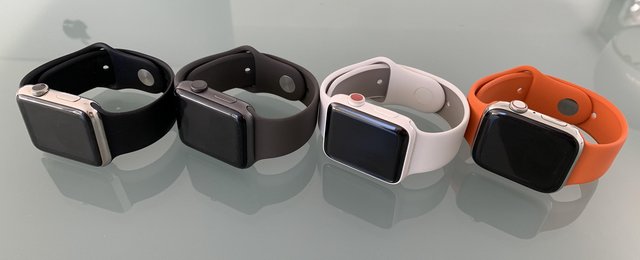
    Die Apple Watch ist für mich aktuell das aufregendste Produkt bei Apple. Wie beim iPhone habe ich die Entwicklung von Anfang an begleitet und anders als beim iPhone habe ich nie ein anderes Produkt in Erwägung gezogen. Zwischen iPhone 4 und iPhone 6 hatte ich meine Lumia-Phase. Das Bild zeigt vier Generationen:

    1. Das Original in Stainless Steel mit S1 Prozessor und 8 GB Speicher.
    2. Series 2 in Aluminium mit GPS, Dual Core S2 und ebenfalls 8 GB Speicher
    3. Series 3 Edition in Keramik mit GPS, Altimeter, LTE, Dual Core S3 und 16 GB Speicher
    4. Series 4 in Stainless Steel mit GPS, Altimeter, LTE, 64 bit Dual Core S4 und 16 GB Speicher

    Es gibt außerdem eine Series 1, die gegenüber der Series 2 auf GPS verzichtet und parallel zu Series 2 und Series 3 verkauft wurde. Aktuell kann man Series 4 und Series 3 kaufen.

    Das Original ist ein wenig wie das allererste iPhone. Es ist der Series 2 zwar deutlich unterlegen, aber es ist halt das Original. Bis die Series 2 mit watchOS 3 erschien, bekam sie mit watchOS 2 ein größeres Update verpasst, welches das Bedienungskonzept renovierte. Diese Uhr läuft nicht mehr mit watchOS 5, unterstützt aber immer noch das iPhone 5. Wenn dann mal Apple Pay kommt, kann man das NFC dieser Uhr zum Bezahlen nutzen, wenn man noch kein iPhone mit NFC hat.

    So richtig los ging es mit der zweiten Generation, der Apple Watch Series 2. Die war nämlich erstmals wasserdicht bis 50m Tiefe, bekam einen viel schnelleren Prozessor und GPS. Vor allem wurde das Display viel besser. Statt 450 Nits hatten alle folgenden Displays 1000 Nits Helligkeit. Das macht im Sonnenlicht den entscheidenden Vorteil. Wer diese Uhr hat, braucht über ein Upgrade noch nicht nachzudenken. Auch eine Series 1 ist noch gut, sie verzichtet nur auf das GPS. Für mich war der Sprung vom Original auf die Series 2 deutlich spürbar. Ich hatte dieses Modell in Aluminium und habe keinerlei Nachteile gegenüber der Stainless Steel gespürt. Das (weichere) Glas hat nicht den geringsten Kratzer und auch ein Jahr später war das Gehäuse wie neu.

    Mit der Series 2 hatte Apple das ursprünglich angebotene Massivgold-Modell eingestellt und ein wesentlich erschwinglicheres Modell aus Keramik als Watch Edition eingeführt. Das habe ich erst mit der Series 3 ausprobiert. Auch wenn ich die Uhr sehr schick finde, hat sie gegenüber Alu und Stahl kaum Vorteile. Sie ist viel kratzfester, aber auch dickwandiger. Deshalb gibt es eine unangenehme Kante beim Übergang vom Glas zum Display.

    Trotz dieser kleinen Nachteile habe ich die Uhr sehr geliebt. Der dicke rote Punkt sollte signalisieren, dass diese Uhr ein LTE-Modul und eine eSIM hat. Die habe ich bei meiner Uhr am ersten Tag aktiviert und dann die Freiheit genossen, dass man auch ohne iPhone überall erreichbar ist. Das iPhone habe ich nur noch auf Reisen mitgenommen. Oder wenn ich die Absicht hatte, irgendwas zu fotografieren. LTE hat zu einer Veränderung meines Verhaltens geführt.

    ZZ58C8AED5

    Und dann kam Series 4. Ein komplettes Redesign mit Glas/Keramik-Rückseite, die zur Verbesserung der Funkeigenschaften beitragen soll. Ich weiß es nicht, aber ich vermute, dass ich diesen Vorteil schon mit der Series 3 hatte, weil das Gehäuse nicht aus Metall war. Mit der Series 3 konnte ich schon ziemlich gut telefonieren, aber bei der Series 4 wanderte das Mikrofon auf die andere Seite und der Lautsprecher wurde deutlich besser. Aktuell ist für den Angerufenen nicht unterscheidbar, ob man mit iPhone oder Uhr telefoniert. Die Series 4 ist wieder so dünn wie das Original, aber zwei Millimeter größer. Das Display geht bis in die Ecken, vergleichbar dem iPhone X.

    Was ich richtig gut finde: Apple hat das Design niemals so geändert, dass eine alte Uhr alt aussieht. Auch heute noch kann man nur sehr schwer erkennen, welche Generation jemand am Arm hat. Alle Bänder passen weiterhin. Wer nur die Zeit wissen will, seine Aktivitäten tracken oder Benachrichtigungen vom Telefon bekommen will, kommt auch mit dem Original zurecht. Series 1 bringt mehr Geschwindigkeit und das hellere Display. Series 2 fügt GPS hinzu und erlaubt dem Sportler eine genaue Verfolgung seiner Läufe oder Radtouren. Allerdings nur bis ca 4 Stunden Workout.

    Series 3 bringt vor allem LTE, es sei denn, man hat es nicht aktiviert oder das einfache Alu-Modell ohne diese Option. Das neue Display der Series 4 ist größer, das Design gefälliger, das Telefon noch mal verbessert. Aber in der Praxis ist der Sprung von der Series 3 nicht groß genug, dass man eine neue Uhr braucht. Und das ist gut so.

    Ich bin gespannt, wie sich die neuen Funktionen, etwa das EKG nützlich machen. Wenn man gesund ist, wird man es nie brauchen. Und ich hoffe, das bleibt so. Letztes Jahr war ich nicht gesund und die Uhr hat mir sehr deutlich gemacht, dass ich jetzt zum Arzt gehen soll. Auch deshalb kann ich diesen Text hier schreiben.

    Apple wird noch viele weitere Generationen dieser Uhr bauen, die immer mehr Richtung Gesundheit gehen. Was für mich besonders nützlich wäre, ist ein Glucose-Monitor, der ohne Blut abzuzapfen funktioniert. Aber das steht noch in den Sternen.

    #dontbreakthechain

    15 Oct 02:55

    Apple Watch :: Welche für wen?

    by Volker Weber

    IMG 5024

    Im letzten Beitrag habe ich die Entwicklung der Uhr über vier Generationen betrachtet. Nun will ich noch ein paar Worte aufschreiben, die vielleicht geeignet sind, sich für die richtige Uhr zu entscheiden.

    Zunächst zum Upgrade: Wer noch das Original hat, sollte eine neue Uhr mindestens in Erwägung ziehen. Ab der zweiten Generation, egal ob Series 1 oder Series 2, ist das Display deutlich heller und besser ablesbar. Wer die zweite Generation hat, sollte nur upgraden, wenn er eine Funktion unbedingt will. LTE in der dritten, dazu Altimeter und eine Siri, die auch sprechen kann. In der vierten Generation gibt es ein komplettes Redesign.

    Die oben abgebildete weiße Uhr hat Apple eingestellt. Keramik hat nicht genug Vorteile, um den höheren Preis aufzuwiegen. Von der Series 4 gibt es noch zwei Modelle in Alu oder Stahl, dazu zwei Sondermodelle: Nike und Hermès. Alu ist matt, Stahl ist glänzend. Als Farbe kann man zwischen silber, gold, und schwarz wählen. Das günstigere Alu-Modell gibt es mit und ohne LTE, Stahl hat immer LTE. Ich rate dringend dazu, das LTE zu kaufen, selbst wenn man es nicht sofort aktiviert.

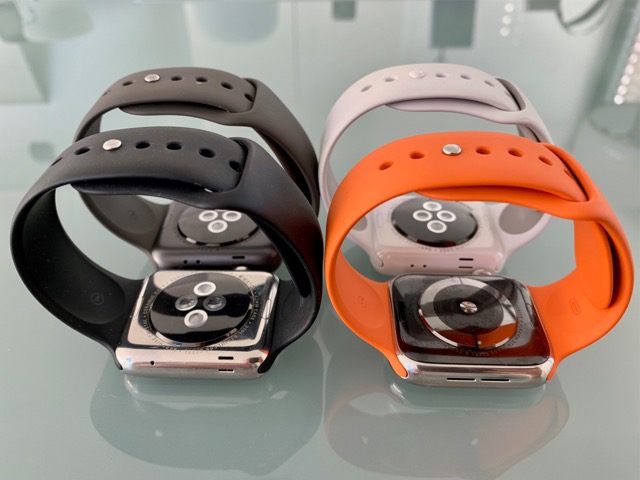
    Das Nike-Sondermodell aus Alu hat zusätzliche Zifferblätter und ein schönes gelochtes Sportarmband. Das wäre meine Empfehlung im mittleren Preissegment. Wer gerne mehr Bling und eine schwerere Uhr haben will, dem wird die Stahluhr besser gefallen. Ich persönlich mag die silberne Stahlversion, genannt Stainless Steel. Das sind im Bild oben das Original ganz links und die neueste ganz rechts. Wem ein hochwertiges Lederband wichtig ist und nicht auf den Preis gucken muss, der wird wahrscheinlich mit dem Hermès-Sondermodell aus Stahl glücklich werden. Oben drauf gibt es noch besondere Zifferblätter und das oben abgebildete Sportarmband im typischen Hermès-Orange. Wer die Uhr komplett verstecken will, nimmt ein dunkles Band und die Alu-Uhr in Space Grey. Das erkennt man in dem Bild oben ganz deutlich.

    Ich empfehle generell nicht, alte Modelle zu kaufen. Aber die parallel zur Seies 4 angebotene Series 3 ist einfach zu gut, um sie nicht in Erwägung zu ziehen. Die gibt es nur in Alu, dafür aber ab 299 Euro. 30 Euro mehr für das große Modell, plus 100 für LTE.

    Groß oder klein? Ganz einfache Entscheidung. Klein für Frauen, groß für Männer, mit nur ganz wenigen Ausnahmen. Die Apple Watch ist kleiner als man erwartet, aber an zarte Handgelenke passt nur die kleine. Die Entscheidung für ein Band ist nicht so wichtig. Erfahrungsgemäß kauft man immer wieder mal eins nach. Ich mag vor allem das Sportband.

    15 Oct 02:54

    measuring happiness

    Another one of those employee happiness reports is out. This kind of thing always makes me wonder: what are these numbers really measuring?

    It seems like happiness ratings by employees would depend on:

    • expected cost of retaliation for low scores

    • expected benefit of management response to low scores

    The expected cost of retaliation is the probability that an employee's ratings will be exposed to management, multiplied by the negative impact that the employee will suffer in the event of disclosure. An employee who believes that the survey's security has problems, that management will retaliate severely in the event of disclosure, or both, is likely to assign high scores to management.

    Some employers make changes in compensation or working conditions when they fail to achieve well on happiness (or employee engagement) surveys. If an employee believes that management is likely to make changes, then the employee is likely to assign low scores in areas where improvement would have the greatest impact. An employee might choose to vote honestly except in a specific area where they believe improvement is possible.

    An evil company where management makes an effort to de-anonymize the happiness survey results, retaliates against employees who give low scores, and will not make changes to improve scores, will appear to have high employee happiness.

    A good company where management does not retaliate, and will make changes in response to low scores, will appear to have low employee happiness.

    Of course, this all changes the more that people figure out that getting low happiness scores means that you have responsive management.

    bonus links

    Hacks.Mozilla.Org: Calls between JavaScript and WebAssembly are finally fast 🎉

    Tech Workers Now Want To Know: What Are We Building This For?, by Cade Metz, Kate Conger, New York Times

    Alt-right culture jamming

    One small change to New York’s intersections is saving pedestrians’ lives

    The Effectiveness of Publicly Shaming Bad Security

    Commons Clause is a Legal Minefield and a Very Bad Idea

    15 Oct 02:54

    UNO Synth Day 2

    by Richard

    The real magic from the UNO Synth will come not from being a standalone synthesizer but rather an instrument in an orchestra. After playing around with modifying the preset sounds and playing the demo patterns at lunchtime today, I figured out how to use the sequencer without the aid of the manual, and the video tutorial is very good. I have watched the tutorial on the sequencer, and the possibilities are exciting.

    Since I have the connectors to do it, I hooked up my Teenage Engineering Rhythm and tried to get it to sync. I was so far successful only in manually syncing a pattern on the Rhythm and the UNO, only out of sheer luck, and on the first try. After watching a video on syncing a PO-12 with a Korg Volca, it didn't make obvious how to do the same with the UNO, and any videos on how to sync an the UNO with a Pocket Operator have so far not yet been made.

    So far it's fun to sit on the couch and listen in using my headphones and rely on batteries for power, meaning I can work with it untethered from an electrical outlet. Conceivably I could use it on my commute, if my transit commute were long enough. With 17 minutes on a streetcar being my typical travel time, I'll barely get it out of my bag before I arrive at my stop.

    15 Oct 02:54

    A fresh look for dri.es

    by Dries

    In 1999, I decided to start dri.es (formally buytaert.net) as a place to blog, write, and deepen my thinking. While I ran other websites before dri.es, my blog is one of my longest running projects.

    Working on my site helps me relax, so it's not unusual for me to spend a few hours now and then making tweaks. This could include updating my photo galleries, working on more POSSE features, fixing broken links, or upgrading to the latest version of Drupal.

    The past month, a collection of smaller updates have resulted in a new visual design for my site. If you are reading this post through an RSS aggregator or through my mailing list, consider checking out the new design on dri.es.

    2018 dri.es redesign
    Before (left) and after (right).

    The new dri.es may not win design awards, but will hopefully make it easier to consume the content. My design goals were the following:

    • Improve the readability of the content
    • Improve the discoverability of the content
    • Optimize the performance of my site
    • Give me more creative freedom

    Improve readability of the content

    To improve the readability of the content, I implemented various usability best practices for spacing text and images.

    I also adjusted the width of the main content area. For optimal readability, you should have between 45 and 75 characters on each line. No more, no less. The old design had about 95 characters on each line, while the new design is closer to 70.

    Both the line width and the spacing changes should improve the readability.

    Improve the discoverability of content

    I also wanted to improve the discoverability of my content. I cover a lot of different topics on my blog — from Drupal to Open Source, startups, business, investing, travel, photography and the Open Web. To help visitors understand what my site is about, I created a new navigation. The new Archive page shows visitors a list of the main topics I write about. It's a small change, but it should help new visitors figure out what my site is about.

    Optimize the performance of my site

    Less noticeable is that the underlying HTML and CSS code is now entirely different. I'm still using Drupal, of course, but I decided to rewrite my Drupal theme from scratch.

    The new design's CSS code is more than three times smaller: the previous design had almost 52K of theme-specific CSS while the new design has only 16K of theme-specific CSS.

    The new design also results in fewer HTTP requests as I replaced all stand-alone icons with inline SVGs. Serving the page you are reading right now only takes 16 HTTP requests compared to 33 HTTP requests with the previous design.

    All this results in faster site performance. This is especially important for people visiting my site from a mobile device, and even more important for people visiting my site from areas in the world with slow internet. A lighter theme with fewer HTTP requests makes my site more accessible. It is something I plan to work more on in the future.

    Website bloat is a growing problem and impacts the user experience. I wanted to lead by example, and made my site simpler and faster to load.

    The new design also uses Flexbox and CSS Grid Layout — both are more modern CSS standards. The new design is fully supported in all main browsers: Chrome, Firefox, Safari and Edge. It is, however, not fully supported on Internet Explorer, which accounts for 3% of all my visitors. Internet Explorer users should still be able to read all content though.

    Give me more creative freedom

    Last but not least, the new design provides me with a better foundation to build upon in subsequent updates. I wanted more flexibility for how to lay out images in my blog posts, highlight important snippets, and add a table of content on long posts. You can see all three in action in this post, assuming you're looking at this blog post on a larger screen.

    15 Oct 02:54

    Zero-click bookstore?

    Random idea for a way to make the local bookstore easier to use than the big one-click Internet bookstore.

    I walk by the local bookstore all the time but I don't always have the list of books I want to read with me.

    So what about this?

    1. I keep a list of books I'm reading, or want to read, on Github.

    2. When I find out about a book I want to read, I add it to the list, make a GitHub issue, and assign the issue to someone at the local bookstore.

    3. The local bookstore gets the book and changes the status of the issue.

    4. I go pick up the book when I'm walking by the bookstore anyway.

    15 Oct 02:54

    Apple Watch Activity Competition #dontbreakthechain

    by Volker Weber

    Annotation (1)

    watchOS 5 has a new feature to motivate you to exercise more. You can enter a competition with up to 40 friends at a time. Unfortunately the competition can be gamed by altering your Move goal during the day. Only if you work with the real numbers, you get the correct point values. The lever in this competition is the Move goal. If it is set to a realistic number, two people of different fitness level can compete.

    Here is how the competition works. You get 100 points for reaching each of your goals. When you exceed the goal, you add more points, proportionally. For the Stand goal, you get 100 for 12 hours, and since the day only has 24 hours, 200 points is the max value. If you set your Move goal to 600, you will get 150 points for reaching 900. If your goal was set to 300, you would get 300 points for reaching 300% of your Move goal. The daily maximum is 600 points, which leads to a weekly maximum of 4200 points.

    I have created a small Excel file that takes your Move/Exercise/Stand values for seven days and calculates all points for the week. My Move goal is 600, the Exercise and Stand goal are 30 and 12 for all of us. Do you want to compete with me over the last seven days? Download the Excel template and fill out the first three columns. See where you are with 600 as your Move goal and then change the Move goal to the value you have set for yourself.

    Let's do this for real.

    Comment with the numbers. I have 3558 for the last seven days at a 600 Move goal. The prior week I finished with 3682 points.

    15 Oct 02:52

    The History of CCM in Weston Ontario

    by dandy

    A Cyclical Business

    For over 65 years, Weston – known simply as the “home of the bicycle” for its CCM connection – housed the cycle giant’s 232,000-square-foot head office and factory.

    By Steve Brearton, from dandyhorse issue 2 

    Last year was a winning one for Toronto cycling manufacturer Cervélo. In 2008, Carlos Sastre won the Tour de France on a Cervélo and their bikes were ridden to three Gold, five Silver and two Bronze medals at the Beijing Olympics. And although the company, founded in 1995, may not be a household name to all, they have become the largest manufacturer of time trial and triathlon bikes in the world.

    Pretty impressive, but Toronto’s cycling industry stretches back more than a hundred years to a period when the bicycle was this nation’s most alluring high tech product. During the 1890s, the bicycle was the world’s first mass market consumer luxury item and constant innovation drove consumer demand in the same manner that some people today crave the latest iPod or Blackberry.


    It was the golden age of bike manufacturing in the city and among the brands produced locally were Challenge, Pilot, Skylark, Cleveland, Antelope, Silver Ribbon, Gendron, Planet, Comet, Wanderer and Sun bicycles. In 1895 in a city with just over 180,000 residents, at least 13 different Toronto firms built cycles and 90 bike stores sold an estimated 18,000 bicycles.

    No firm, however, better reflects the opportunities – and pitfalls – generated by the early boom than Comet cycles. As early as 1882, Thomas Fane partnered with Charles Lavender to start T. Fane & Company, makers of Comet bikes. (Fane was a championship racer for the Toronto Bicycle Club in the 1880s, who married Florence ‘Gypsy’ Creed – reportedly Toronto’s first women cyclist. Their child, Ethel, rode a child-sized Comet.)

    By 1890, Comet produced nine different men’s and women’s bikes, boasted a factory at 33 Adelaide St. West and a satellite operation in Buffalo. In 1895, Comet moved to a handsome five-story building on Temperance St., the top story of which was used for a bicycle school.

    These were heady days for builders like Tom Fane, who imagined ever- expanding markets for his product. In fact, Comet and others were coasting toward a series of hits as quick and catastrophic as a “door prize.” In 1899 the firm went bankrupt.

    Comet was the victim of too much competition, particularly from large US companies situated in Canada. The economic circumstances that sank Comet were also affecting other bicycle makers – including Canada’s largest – and realignment of the industry would lead to the emergence of a single dominant manufacturer.

    In 1899, the Canada Cycle & Motor Company Limited (ccm) was formed by Canada’s largest bike makers, including Massey-Harris, Welland Vale and Toronto’s Gendron. Together, they made an estimated 85 per cent of Canadian cycles.

    Canadian Cycle & Motor Co. Ltd. would dominate the Canadian bicycle industry for over 80 years, but the story of ccm is also a west Toronto story because they were located in the Junction and then later in Weston. For over 65 years, Weston – known simply as the “home of the bicycle” for its ccm connection – housed the cycle giant’s 232,000-square-foot head office and factory.

    The new venture may have addressed competitive issues, but another, greater challenge loomed; with the arrival of the new century the public’s intense fascination with the bicycle ended and the car would soon replace the bike in evoking progress.

    CCM responded to new business conditions with layoffs and by shifting production in 1906 to the former Lozier plant on Weston Rd., just north

    of St. Clair Ave. Tubing for frames was brazed, cranks and pedals forged, among other parts produced on-site, and up to 200 bikes were assembled daily at the 137,000-square-foot plant. (The previous year, they also intro- duced their iconic hockey line.)

    CCM was one of Canada’s first major manufacturers that distributed coast-to-coast and into global markets. By the ’30s Toronto-made bicycles were ridden in 40 nations. Fewer cyclists were racing or touring for plea- sure, but many more commuted by bicycle. Cyclists were buying “strong, serviceable machines,” many of those built by ccm in Toronto. From 1920 until the mid-’30s ccm enjoyed record sales, in part due to a new target demographic – women. Ads proclaimed this “dignified and effective means of ‘reducing’ is fast becoming the vogue.”

    By 1930, Canada Cycle & Motor Co. Ltd. was one of only three large bicycle manufacturers in the nation – down from about 25 in 1898 – and produced the majority of Canadian cycles, among them the Rambler, the Light Delivery bicycle and the Flyer, ccm’s top-end racer. The city also continued to have a handful of small bicycle makers, among them Planet, a survivor of the l890s, as well as Alan Kay Cycles and specialty frame builders, such as the iconic Doc Morton, who built racing frames on Dundas St. for some of Canada’s fastest wheelmen in the ’20s and ’30s.

    Entering their second half century, ccm claimed there were more than a million of their bikes on Canada’s roads, but the bicycle had fallen out of favour with Torontonians and the company was in terminal decline. In 1983 ccm went bankrupt, putting almost 600 employees out of work.

    CCM’s closure severed ties to Toronto’s historic industry, but other niche producers prospered. One example being in 1969 when John Palmer and Michael Barry Sr. began assembling their trademark Mariposa cycles after purchasing a shipment of lightweight tubing ccm no longer wanted. By the mid-’80s, Mariposa was building and painting about 100 touring and racing bikes annually for enthusiasts like Canadian artist Greg Curnoe whose reproductions of them are featured in galleries and collections across the country, as well as on the cover of this magazine.

    Forty years later, it’s Cervélo – the new kid on the block – doing its part to rekindle the glory of Toronto’s great bike brands. This year, Cervélo became the first bike manufacturer in decades to have a team competing in cycling’s greatest races. Once again, Toronto is a city that resonates in cycling circles around the world.

    Steve Brearton is a Toronto writer and researcher. He will be leading a walking tour of the history of the bicycle in Toronto as part of Jane’s Walk, on May 3. janeswalk.net

    Photo reproduced courtesy of Massey-Ferguson Limited.

    This story originally appeared in issue 2 of dandyhorse from spring 2009. 

    Crossposted the The Bicycle Museum - COMING SOON! 


    15 Oct 02:52

    NetNewsWire Article Age Limits

    RSS readers — at least the several where I know how they work — have some limits on how long they keep articles and how long they track read/unread status.

    I may not have the details exactly right, but I recall that Google Reader stopped tracking read/unread status for every article older than 30 days. With NewsGator it was two weeks or the most recent 200 articles. Older versions of NetNewsWire had different limits, depending on which version you’re talking about.

    There are several good reasons for limits. One is ethical: piling up unread articles forever isn’t fair to people. Your RSS reader should not be a taskmaster or a source of guilt. Articles should age out after a period of time.

    Another is that the more data is saved, the slower database lookups tend to get, and the slower the app gets. In the case of a Mac or iOS app, this also means using more disk space and more energy (more battery).

    A third is that if an RSS reader sets the expectation that it creates a personal backup of the internet, then the developer will be doing features, bug fixes, and performance optimizations for this forever, to the detriment of the rest of the app and the majority of its users. (I went through this with earlier versions of NetNewsWire.)

    Limits are a necessity. The hard part is deciding what the limits should be, and figuring out how to make them understandable to users.

    NetNewsWire will sync with various systems (Feedbin and similar), and, for each syncing account, it will just adopt the limits of each system.

    But that still leaves one case where the limits need to be worked out: the non-synced On My Mac account. The below is my thinking (after much discussion with other people) on this.

    The Rule

    Articles older than n days will be deleted automatically — but it will preserve a minimum of the 10 most recent articles per feed, and it won’t delete starred items.

    (Where n is something like 90 days.)

    This is slightly more complex than just aging out older articles. It makes sure that feeds that haven’t been updated in a long time still have their most recent 10 articles.

    I think this is reasonable because you don’t want to click on a feed and see zero articles just because it hasn’t been updated in six months (or whatever).

    But there’s a tricky part here: how do we define the age of an article? Seems like it should be obvious, but it’s not.

    Publication Date vs. Arrival Date

    Every article has three dates, though two of them may be empty.

    • Publication date: the date specified in the feed when the article was published (may not exist in the feed)
    • Modification date: the date specified in the feed when the article was edited (may not exist in the feed)
    • Arrival date: the date NetNewsWire first saw the article (guaranteed to exist, since it’s NetNewsWire-generated)

    Most of the time, arrival date and publication date will be pretty close. Not always, though — not, for instance, when adding a feed. When it reads a feed for the first time, the arrival date is that moment for each item, while the publication date could be anything.

    You might think, naturally, that NetNewsWire should use arrival date when deciding whether or not to delete an article. If it arrived more than n days ago, then it should be deleted, because that means the user has had it for more than n days.

    But there’s a problem with that: arrival date is never shown in the user interface. It’s not otherwise an interesting piece of information, where publication date is interesting to users.

    So if we have a time-based limit that’s triggered by unseen metadata (arrival date) — and there is visible metadata (publication date) of the exact same type and that seems like it’s directly relevant to age — then I think we have to use the visible date, the publication date.

    This makes the limit understandable: you can see the dates, after all, that it uses for its calculation.

    (Note: when publication date isn’t specified in the feed, then NetNewsWire uses the arrival date as the publication date, since it will usually be pretty close. Luckily, feeds do tend to include publication dates.)

    The one drawback to using publication date, though: it could delete an article with a recent arrival date but a long-ago publication date. I think this is okay — I think it’s the best of the available trade-offs.

    The Other Tricky Part: Communicating with the User

    The app shouldn’t behave mysteriously. How this works should be clearly communicated.

    One option is to just to write about it in the Help book. Unfortunately, people don’t read these all that much.

    So here’s what I’m thinking:

    Since there will be a preference pane where you can add and edit your various sync accounts (much like in Mail), we have a place for settings for the On My Mac account.

    In those settings would be something like this:

    Delete articles published more than: [popup] 30 days ago / 90 days ago / 120 days ago

    With explanotext:

    The On My Mac account deletes older articles when there are more than 10 articles in a feed. It never deletes starred articles.

    Though I most definitely like to limit preferences, this is a reasonable thing to want to configure — and having this there makes it much more likely that a user will see it and learn about the limit.

    I think that’s the best call, though it’s not set in stone yet.

    Reminder: None of This Applies to Syncing

    After reading all these words, you might have forgetten that I’m just talking about the limits of the On My Mac account. Different syncing systems have their own limits, and NetNewsWire will adopt those for the synced accounts.

    Feedback welcome

    If you go to the repo you can find my email address and find the bug tracker. You can always email me to ask to be added to the Slack group. But — fair warning! — a lot of the discussion is over super-dry stuff like this issue.

    15 Oct 02:51

    Camera Obscura

    by peter@rukavina.net (Peter Rukavina)

    We opted for a slow drive home today from Wolfville, starting with breakfast at the Wolfville Farmers’ Market and then heading east toward home around noon.

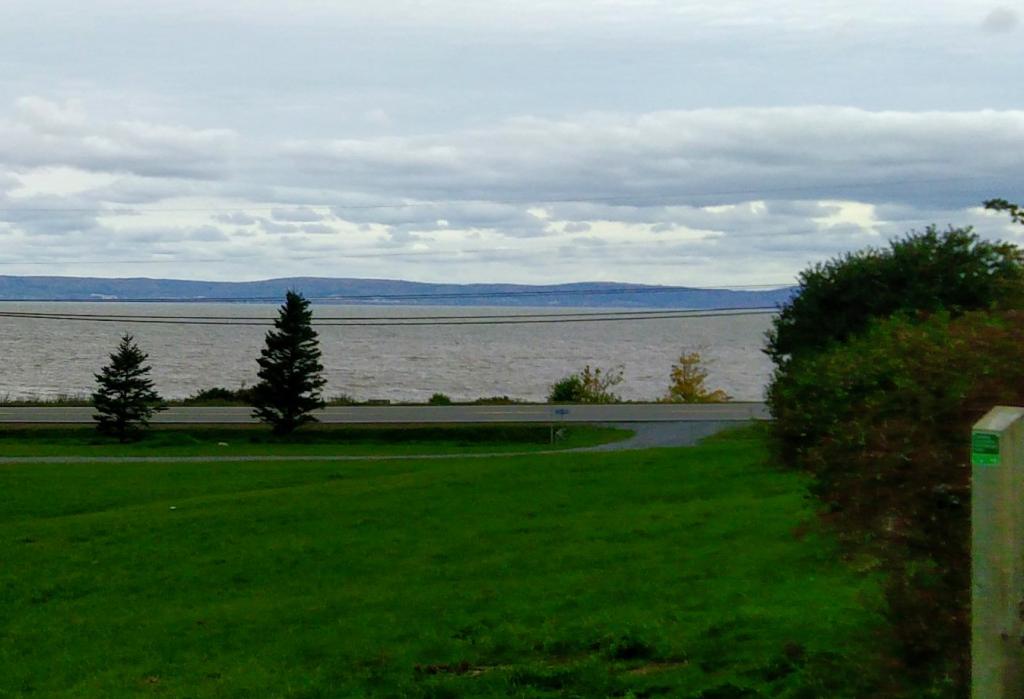
    Rather than a straight shot across to Brookfield, or the reportedly-faster dip down to Halifax and slingshot back out the 102, we opted to hug the coast, spending most of the day on Rte. 215 along the Bay of Fundy. Autumn foliage was at the peak of its peak, and we could not have picked a better day to drive through the Nova Scotia hinterland.

    The highlight of the day was coming across a camera obscura perched on a hill in Cheverie. You’d think such a wondrous attraction would deserve a sign, but there was none, and most drivers, I suspect, speed by unaware.

    It’s a fascinating construction of three interlocking brick cathedrals, entered through wooden doors into a darkened room above which is a system of lenses that reflects the scene of the shore, and the Bay of Fundy beyond, onto the floor.

    If you are in the Annapolis Valley, and are traveling east toward Truro, it doesn’t take much to detour up to Cheverie.

    (Just up the road from Chevrerie lies Walton, which I recalled was the birthplace of my old friend Stephen Southall, something I confirmed with a phone call from the car. His late father George ministered to five United Churches in the area in the 1960s; apparently there is a plaque on the wall in the United Church in Cheverie, which is enough to inspire me to return on our next trip that way).

    , ,
    15 Oct 02:49

    Does the Lens Mount Matter?

    First, let's put blame where it belongs: the marketing departments of Canon and Nikon. When you make a claim—our new mount is better—it's up to you to prove it. Worse still, Canon and Nikon have both opted to point to lenses that don't really effectively speak to the claim (Canon 28-70mm f/2, Nikkor 58mm f/0.95). 

    15 Oct 02:49

    Fun on the track with TBN

    by jnyyz

    Today, TBN organized a group session at the Mattamy National Cycling Centre. In short, it was a blast.

    Here are some of us getting fitted to the rental track bikes.

    IMG_9872

    The “before” picture, provided by Ian Rankin from the TBN FB page.

    44075872_10155876384121769_4386812938241966080_n

    We were split into two groups. Our instructor was Roy.

    IMG_9873

    We are all paying close attention.

    IMG_9876

    With all the shoulder checking that we’re supposed to do, I should have brought two helmet mirrors 😉

    IMG_9877

    Some blurry action photos with my phone.

    IMG_9878

    IMG_9880

    IMG_9882

    In the interest of survival, I didn’t do my usual trick of taking phone pictures while riding.

    Thanks to TBN for organizing this experience. I just wish the track was a bit closer to town.

    15 Oct 02:47

    Better image performance on dri.es

    by Dries

    For a few years now I've been planning to add support for responsive images to my site.

    The past two weeks, I've had to take multiple trips to the West Coast of the United States; last week I traveled from Boston to San Diego and back, and this week I'm flying from Boston to San Francisco and back. I used some of that airplane time to add responsive image support to my site, and just pushed it to production from 30,000 feet in the air!

    When a website supports responsive images, it allows a browser to choose between different versions of an image. The browser will select the most optimal image by taking into account not only the device's dimensions (e.g. mobile vs desktop) but also the device's screen resolution (e.g. regular vs retina) and the browser viewport (e.g. full-screen browser or not). In theory, a browser could also factor in the internet connection speed but I don't think they do.

    First of all, with responsive image support, images should always look crisp (I no longer serve an image that is too small for certain devices). Second, my site should also be faster, especially for people using older smartphones on low-bandwidth connections (I no longer serve an image that is too big for an older smartphone).

    Serving the right image to the right device can make a big difference in the user experience.

    Many articles suggest supporting three image sizes, however, based on my own testing with Chrome's Developer Tools, I didn't feel that three sizes was sufficient. There are so many different screen sizes and screen resolutions today that I decided to offer six versions of each image: 480, 640, 768, 960, 1280 and 1440 pixels wide. And I'm on the fence about adding 1920 as a seventh size.

    Because I believe in being in control of my own data, I host almost 10,000 original images on my site. This means that in addition to the original images, I now also store 60,000 image variants. To further improve the site experience, I'm contemplating adding WebP variants as well — that would bring the total number of stored images to 130,000.

    If you notice that my photos are clearer and/or page delivery a bit faster, this is why. Through small changes like these, my goal is to continue to improve the user experience on dri.es.

    15 Oct 01:09

    Disintegration of Discourse and Decentralised Tools

    by Ton Zijlstra

    We’re in a time where whatever is presented to us as discourse on Facebook, Twitter or any of the other platforms out there, may or may not come from humans, bots, or someone/a group with a specific agenda irrespective of what you say or respond. We’ve seen it at the political level, with outside influences on elections, we see it in things like gamer gate, and in critiques of the last Star Wars movie. It creates damage on a societal level, and it damages people individually. To quote Angela Watercutter, the author of the mentioned Star Wars article,

    …it gets harder and harder to have an honest discussion […] when some of the speakers are just there to throw kerosene on a flame war. And when that happens, when it’s impossible to know which sentiments are real and what motivates the people sharing them, discourse crumbles. Every discussion […] could turn into a […] fight — if we let it.

    Discourse disintegrates I think specifically when there’s no meaningful social context in which it takes place, nor social connections between speakers in that discourse. The effect not just stems from that you can’t/don’t really know who you’re conversing with, but I think more importantly from anyone on a general platform being able to bring themselves into the conversation, worse even force themselves into the conversation. Which is why you never should wade into newspaper comments, even though we all read them at times because watching discourse crumbling from the sidelines has a certain addictive quality. That this can happen is because participants themselves don’t control the setting of any conversation they are part of, and none of those conversations are limited to a specific (social) context.

    Unlike in your living room, over drinks in a pub, or at a party with friends of friends of friends. There you know someone. Or if you don’t, you know them in that setting, you know their behaviour at that event thus far. All have skin in the game as well misbehaviour has immediate social consequences. Social connectedness is a necessary context for discourse, either stemming from personal connections, or from the setting of the place/event it takes place in. Online discourse often lacks both, discourse crumbles, entropy ensues. Without consequence for those causing the crumbling. Which makes it fascinating when missing social context is retroactively restored, outing the misbehaving parties, such as the book I once bought by Tinkebell where she matches death threats she received against the sender’s very normal Facebook profiles.

    Two elements therefore are needed I find, one in terms of determining who can be part of which discourse, and two in terms of control over the context of that discourse. They are point 2 and point 6 in my manifesto on networked agency.

  • Our platforms need to mimick human networks much more closely : our networks are never ‘all in one mix’ but a tapestry of overlapping and distinct groups and contexts. Yet centralised platforms put us all in the same space.
  • Our platforms also need to be ‘smaller’ than the group using it, meaning a group can deploy, alter, maintain, administrate a platform for their specific context. Of course you can still be a troll in such a setting, but you can no longer be one without a cost, as your peers can all act themselves and collectively.
  • This is unlike on e.g. FB where the cost of defending against trollish behaviour by design takes more effort than being a troll, and never carries a cost for the troll. There must, in short, be a finite social distance between speakers for discourse to be possible. Platforms that dilute that, or allow for infinite social distance, is where discourse can crumble.

    This points to federation (a platform within control of a specific group, interconnected with other groups doing the same), and decentralisation (individuals running a platform for one, and interconnecting them). Doug Belshaw recently wrote in a post titled ‘Time to ignore and withdraw?‘ about how he first saw individuals running their own Mastodon instance as quirky and weird. Until he read a blogpost of Laura Kalbag where she writes about why you should run Mastodon yourself if possible:

    Everything I post is under my control on my server. I can guarantee that my Mastodon instance won’t start profiling me, or posting ads, or inviting Nazis to tea, because I am the boss of my instance. I have access to all my content for all time, and only my web host or Internet Service Provider can block my access (as with any self-hosted site.) And all blocking and filtering rules are under my control—you can block and filter what you want as an individual on another person’s instance, but you have no say in who/what they block and filter for the whole instance.

    Similarly I recently wrote,

    The logical end point of the distributed web and federated services is running your own individual instance. Much as in the way I run my own blog, I want my own Mastodon instance.

    I also do see a place for federation, where a group of people from a single context run an instance of a platform. A group of neighbours, a sports team, a project team, some other association, but always settings where damaging behaviour carries a cost because social distance is finite and context defined, even if temporary or emergent.

    15 Oct 01:05

    A Thousand Days at Microsoft

    by Rui Carmo

    It’s been a thousand days. Well, a little over, in fact (by nearly a hundred) but there is a weight to that number that carries with it a measure of how far down the rabbit hole I’ve gone since last year and how long it feels.

    Even though I can’t write about the details and have little interest in mixing work tech with personal pursuits, I’m still doing largely the same as a Cloud Solution Architect, although the stakes are a bit different.

    I’m now both dealing with most of the major named accounts and back working with system integrators and consultancies, which provides a degree of structure and focus that is quite welcome even as I still miss having my own team and running projects end-to-end.

    But I do get to tackle somewhat bigger projects now and then, and still find it very easy to keep myself sharp on the inner workings of most of the tech that interests me (including both Open Source and the competition), so the scales are almost even, and there are three main reasons for that:

    • The company’s internal transformation continues apace, and now that I’m more attuned to the internal shifts and the rhythm of product launches, pieces fall more rapidly into place in terms of things my customers can make use of (typically in the DevOps, data and AI spaces, although to be honest Portugal doesn’t have that many sophisticated enterprise customers yet).
    • We’ve surpassed the 50% mark in Linux VMs in Azure, which despite the long-standing bias against Microsoft from certain quarters of the industry legitimizes it as “a cloud for any workload” (as the mantra goes) and makes it a lot easier to have the right kind of discussion instead of having to explain everything Microsoft isn’t anymore.
    • Kubernetes is a first-class citizen on Azure to the extent where what I like to call “modern infrastructure” makes a lot of sense on Azure and our DevOps stack even as the competition solidifies (the fact that Microsoft has a coherent hybrid cloud approach has been paying off handsomely in the enterprise space, and even as the race towards the cloud is intensifying, we’re solidly entrenched in the mainstream).

    Looking back, I feel I’ve achieved most of what I originally set out to do: To experience the transformation inside Microsoft, be at the leading edge of public cloud, and learn as much as possible. But even as those goals solidify, there is a certain lack of fulfillment.

    In fact, the great yawning gap I still feel regarding a thousand days ago is that year-long projects (which were the norm before) are now distant memories, and despite having continued engagements spanning several smaller projects (and a lot of concurrency involved) I worry that my knack for strategic planning is deteriorating in favor of more ad-hoc, tactical plays—I’m a lot more “Agile” (if you’ll pardon the hype pun) these days, but I’m a long-haul kind of guy at heart, and the emphasis on smaller projects in my current role is just not cutting it.

    Another mental ache is that both focus time and room for growth are still sub par (again due to the insane number of different engagements, meetings and ad hoc internal chores I have to pack into my waking hours), with constant organizational change throwing wrenches into my plans.

    Part of that is clearly the time required to get to grips with the culture and, let’s face it, a matter of sheer luck amidst all the changes. My first year felt a lot like guerrilla warfare, whereas the third brought sane tactics and focused leadership (which helped tremendously). Now I can find my way around nearly blindfolded, and help others navigate the intricate little procedural mazes that every large corporation invariably begets. And yes, Microsoft still has a unique internal culture and a language all of its own.

    But, looking back to my years at both Vodafone and SAPO, the drive to build stuff, to go through the long, hard slogs of shaking out the bugs and persuading people and getting it all to fit together to come out at the other end with something for people to use is still there (in fact, has always been there), and I miss doing that.

    I miss it a lot, really, and can’t see an easy way to regain that feeling where I’m at right now (both in terms of role and in Portugal). Many friends tell me this is a First World Problem, but I, for one, would rather be happier creating things rather than just teaching other people how to sprinkle order onto bits of tech—teaching is something that has been on the cards for a while, but believe me, there are much more fulfilling things to teach.

    The only saving grace of my current occupation is that, regardless of subject matter, when you’re a halfway decent teacher you always learn more than your students.

    15 Oct 01:04

    Memorial ride for Clint, age 61

    by jnyyz

    A cyclist was killed this past Monday by a streetcar on Queen St. East. This was one of three recent, serious collisions involving streetcars and vulnerable road user, and has prompted an investigation by the TTC. This was the sixth cyclist death this year for the city of Toronto.

    Today was his memorial ride. It started at Bloor and Spadina as per usual, and went along Bloor, down Sherbourne then east on Queen to the crash site.

    DSC03449

    Joey gets us organized.

    DSC03450

    Lining up and preparing to leave.

    DSC07164

    Along Bloor.

    DSC03453

    Down Sherbourne.

    DSC03454

    Doug and Honey are faithful attendees.

    DSC03456

    DSC03459

    At the crash site.

    DSC07165

    Geoffrey with the ghost bike.

    DSC07166

    DSC07168

    A moment of silence.

    DSC03460

    A few decorations for the bike. A name plate will be added in due course.

    DSC07172

    According to police accounts, Clint (age 61) was riding eastbound, lost control of his bike and hit a parked car, and then fell into the path of a streetcar. You can see how little room there is between the parked cars and the tracks.

    DSC07171

    Clint was remembered by friends in this news clip

    https://toronto.ctvnews.ca/video?clipId=1509437

    May he rest in peace.

    DSC07174

    Update: CTV news clip

    15 Oct 01:02

    Flipboard takes news to the next level [App of the Week]

    by Brad Bennett

    Flipboard is a popular news aggregation app that launched all the way back in 2010 for Apple’s first iPad. Since then, the platform has grown to become one of the best apps I’ve ever used.

    Flipboard was impressive on the first-generation iPad. It used a digital newspaper-type of layout, and physical page flips to make the app feel engaging while still being easy to use and read.

    The app has maintained much of its core design in the years since, and to me, it doesn’t look as magical on a smaller phone screen, but it still features a clean aesthetic and works flawlessly.

    Flipboard isn’t all about its design though. The incredibly wide range of content sources and great aggregation algorithms are what make the service a fantastic one-stop-shop for all of your news and social media needs.

    To set up the app, you first need to select a host topics you’re interested in. These topics are called ‘Magazines.’  For example, I follow ‘Technology,’ ‘Gear’ and ‘Gadgets,’ ‘Flim,’ the ‘Daily Edition’ and many more. Each Magazine manages up-to-date news from a variety of reliable web sources. Users can dive into each Magazine on its own, or read the ‘For You’ section on the home page which has content from a variety of sources.

    You can even integrate specific social media accounts into Flipboard. For instance, I have my Twitter feed added to my list of Magazines, so popular tweets get added to my For You section. While Flipboard isn’t my main Twitter client, it’s cool to see tweets combined with all my news.

    It’s also possible to create your own Magazines with Flipboard. Most people will likely build Magazines for three reasons — for reading specific sources, for sharing content with people and for collecting your own read later list. You can also follow other user’s Magazines on Flipboard if they’re public.

    ‘Smart Magazines’ are a mix of custom Magazines and Flipboard’s curated Magazines. Just select a topic and a few hashtags and Flipboard’s algorithms automatically finds content to fill up the Magazine.

    The more content that is loaded into Flipboard makes it a better app. In total I follow 48 Magazines. Though I don’t read them all, it makes my For You section entertaining, varied and offers me news I wouldn’t go out of my way to look for.

    The home page has the For You section and the ‘Home Carousel,’ which holds nine Smart Magazines that can be customized, and the user’s Daily Edition news digest. The Daily Edition is a list of general news stories that the app has determined are essential.

    Flipboard also has tons of lists and content that it creates as well. Every day there’s a new ’10 for Today’ list of top stories, and during big news events, the Flipboard team often creates on-the-fly Magazines to group all of the news into one place.

    Further, there’s even a web app that lets you browse your magazines on a computer.

    If you’re interested in downloading Flipboard’s dedicated mobile app, the platform is available for free on iOS and Android. Make sure to follow MobileSyrup’s publisher account to get all of our Canadian tech news on Flipboard.

    The post Flipboard takes news to the next level [App of the Week] appeared first on MobileSyrup.