Shared posts

07 Feb 18:50

Self-help Edjucashun

by Tony Hirst

Never having learned to read music or play a musical instrument as a kid, I’m finding learning to play the harp quite incredible. The feedback loops between seeing marks on paper, speaking out the name of each note played (as recommended by several of the guides/tutorials I’ve seen), developing muscle memory and hearing audio feedback is just an amazing learning experience.

Progress is slow, and I’m struggling with metre and note length. I really should get a lesson or two with a teacher, not least so I can hear what my elementary practice tunes are supposed to sound like. (I have no idea what sort of models Google is building around all the Youtube videos of young children I seem to be watching (kids doing their practice pieces… You can probably imagine the level I’m at given I aspire to be that good!))

So… self-help… there’s loads of music related web apps out there, so I figured it might be useful to try to transcribe some of my practice tunes into a form that I can get some idea of what they should sound like.

The language I’ve opted for is abcjs (repo) which I discovered via the music21 package (see some music21 demos here) ; but it doesn’t need any of the Python machinery to run — it works directly in the browser.

Here’s an example of what it looks like:

X: 1
T: Blue Bells of Scotland
M: 4/4
L: 1/8
K: C
V:R
G2|c4B2A2|G4A2Bc|z8|z4z2G2|
V:L
z2|z8|z8|E2E2E2D2|C6z2|
V:R
|c4B2A2|G4A2Bc|z8|z8|
V:L
|z8|z8|E2E2F2D2|C6G2|
V:R
z8|c4G2Bc|B2G2A2B2|G4A2B2|
V:L
E2C2E2G2|z8|z8|z8|
V:R
c4B2A2|G4A2Bc|z8|z6|]
V:L
z8|z8|E2E2F2D2|C6|]

The M field gives the meter, the L the unit note length for the piece, and K is the key. V:R and V:L record right and left hand staves. Each separate line in the abcjs script corresponds to a separate line of music.

There are some handy notes (doh!) here — How to understand abc (the basics)
— and a some more complete docs here: The abc music standard 2.1 .

I’ve found that transcribing from sheet music to abcjs notation is also helping my music reading. The editor I use — https://abcjs.net/abcjs-editor.html — provides live rendering of the notes, so it’s easy to get visual feedback as I write in the notation about whether I’ve read to myself, and written, the correct one.

(The red highlight in the score follows the cursor position in the text editor.)

As well as live rendering of the score as you transcribe, you can also play back the tune using the embedded the music player. (I’m not sure if its possible to change the instrument type? It defaults to a sort-of piano…) The tempo is set by the Q parameter in beats per minute, so it’s easy enough to speed up and slow down the playback.

FWIW, I’ll start popping related tinkerings and doodlin’s here: psychemedia/harperin-onabcjs will also support adding things like fingerings for each note, but I don’t want to break copyright too much when I do post transcribed scores, so I’ll be omitting that…

As far as learning goes, learning to write abcjs will also help me learn to read music better, I think, as well as reading it a bit more deeply.

It’s ages since I learned a new sort of thing (though I have also been trying to learn Polish pronunciation so I can sound out names appropriately in a history of Poland I’m reading at the moment). It’s fun, isn’t it?! And soooo time disappearing…

07 Feb 18:50

“North is on the move”

by Andrea

NPR Science: As Magnetic North Pole Zooms Toward Siberia, Scientists Update World Magnetic Model.

“North is on the move, and that’s a problem for your smartphone’s maps.

Earth’s geographic north pole is fixed. But the planet’s magnetic north pole — the north that your compass points toward — wanders in the direction of Siberia at a rate of more than 34 miles per year.

That movement may seem slow, but it has forced scientists to update their model of Earth’s magnetic field a year earlier than expected so that navigational services, including map-based phone apps, continue to work accurately.”

NPR: The North Magnetic Pole Is Shifting East, Fast. “NPR’s Ari Shapiro speaks with Nature reporter Alex Witze about a rapid shift in the Earth’s magnetic poles.”

07 Feb 18:50

How to apply the Onion Architecture

by Eric Normand

I got a lot of questions about how to apply the Onion Architecture to particular situations. In this episode, I try to answer it with a specific example.

Transcript

Eric Normand: I answer some tough questions about the onion architecture. Hi, my name is Eric Normand and these are my thoughts on functional programming. This is season two and I hope to up the production quality that I had in the last season.

Let’s get right into it. A few episodes back I introduced something that’s called the onion architecture. I introduce it, meaning I explained it. Just real quick, the onion architecture is the layered architecture where you have your core domain implemented in a functional way in the middle.

It’s layers like an onion. Around that you have your business rules, also functional. Then finally, the last layer is this interaction layer. This is the layer where all the actions happen. This is the layer that talks to the database. It gets Web requests and makes other API calls.

This is an architectural pattern that you can use to have a functional-style architecture. After I posted that, I got a lot of variations on the same question, which is, “How do I make decisions in my domain model that then result in taking different actions in the outer layer?”

The idea is, if you weren’t going to architect this, let’s say you just had a very basic, straight forward implementation. It’s imperative. You would make an API call. Based on the results of that, you make some decision. Then you either call API A or you call API B. That’s the end. The logic of what you do is mixed in with the actions that you take.

How do you extract that out into something that you can call an Onion Architecture? Right. That is the real question that people have. I have to say, I got a couple of examples of what people wanted to turn into an Onion Architecture.

My first thought was, there’s not enough logic in it. There’s not enough business rules. There’s not enough domain in it to warrant coming up with different layers. Then I thought, “No, these are just simple examples that they’re giving, so let’s do it right.” Here’s an example that someone gave me. I should look up the name so I can reference them.

This is Andrew. Andrew, thanks for the question. In his example, you are implementing a web endpoint. This endpoint is for information about music albums. In the endpoint, you want to include images of the artists who worked on the album.

There’s some constraints. You need to have as many images as you can, up to five. Things like that. The problem is, there’s a lot of logic about…For instance, if there’s more than one artist on the album. It’s a compilation CD and you have a song from this artist and a song form that artist, you want to have one image from each artist. Not five of the first person.

The rules are based on…you read the thing in from the database, you make some decisions about where to get these images from, and then you go and find them. You do another database query to get the images. Then you put them together into a JSON and you send it back.

This is an example of something that, on the surface, if this were the real thing that I was implementing, I probably would put all of that logic right in the outer layer. Because it’s not that much.

The logic is something like, “Is it greater than five images?” [laughs] Then there’s not much more to it. I’m going to run with it. I’m going to turn it just as an exercise to explain it. I’m going to turn this into an onion architecture.

I’m trying to explain this in audio. That less than five, greater than five whatever it turns out to be, you could consider that a domain. Sorry, a business rule. The business rule is a valid artist or a valid album response has at least five images, something like that. That could be the expression in English of your rule.

Then in your business logic, you have a function called valid album response. It could be true, false or it could be something like true, then return or a list of problems. Now, this is convoluting it because the rules aren’t that complicated, but if you did have a lot of rules that you needed to apply, this thing could tell you all of the problems.

Now, these are business rules. Maybe those…what is the domain here? Is the domain album information and where to get images about different artists? I think that’s stretching it, but you could consider something like that, like album information, the repositories of images, of artist information, that kind of thing.

If you have an error in the business rule layer that says not enough images, then that kicks off at the outer layer a thing that says, “If I have not enough images, here’s how I rectify that.” Now, again I wouldn’t do it this way, because that’s such a very small bit of logic. There’s not much of a domain to build up there. There’s not much material there to work with, but you could imagine if the domain were more convoluted like a real-world domain would be, that you would have this sort of business rule layer that could decide, “Is this something I can respond with? If not, what are all the problems?”

Then your outer layer knows how to rectify those problems by asking the APIs or the databases of images, et cetera how to do that.

When you do architecture, you’re taking on…there’s a trade-off. You’re adding complexity at the beginning. It’s a known complexity. It’s a known cost. This is how we’re going to do our architecture. That’s how we’re going to structure our work, our code. This is the patterns that we’re going to use.

Then you get a benefit. Depending on how much code is going to fit into that architecture, you’re going to get a different benefit. With a very simple system, it’s probably not worth architecting just to be honest. If it could just be an imperative, “Fetch this, look at the response. If it’s good enough, send it. Otherwise, add more images.” That, to me, is not even that much code to write that. At some point, as your system grows, you’re going to think, “OK. I need some kind of organizing principle to make this less painful, less of a mess.” Once you’re at that point, that’s where architecture comes in.

This is a valuable way to architect it because, what happens is, let’s imagine your code was really long. It was 200 lines to make this response. You’re making Web requests. Then you’re doing all sorts of inline calculations. Then you’re making another request somewhere in the middle. You’re going to wish that you had it in pieces. Then where do you put those pieces? How do you cut those pieces up?

Those are the architectural questions. Just to recap, the onion architecture is saying you want three broad layers. The domain layer is where you encode the problem domain but without any of your own business’s policies, rules, and regulations that your business imposes. Your business might say, “The albums we deal with are only swing albums from the 1950s.” That might be a business rule.

That doesn’t mean that your domain has to know about that, especially since what if your business expands? Now you have all this code that you can’t use because it’s all assuming swing from the 1950s. It’s a silly example, but I hope the point is clear. That’s your domain code. It’s how do we see the problem without any influence about practical business things?

Then you have your business rules, which are things like, “Ah, we want to return five images in our response.” I’m trying to come up with business rules that make sense in this domain. Anyway, there’s business rules that are almost proprietary. “This is how we run the business.”

Then there’s this outer layer, which is simply for communicating that will query the business layer as you would query a third-party API. It queries the database. It takes that response. It asks the business-rule layer, “What should I do with this? Is this good enough? Should I return it?” There’s a little logic in the interaction layer, but it’s very much coordination.

It’s similar to the model-view controller architecture, which, if you look at it, the controller is where all of the coordination happens. The view is sending events to the controller. The controller is saying, “OK. When I get that event, that means I need to call this on the model. Take the results. Now it goes to this view because it’s going to change that.” It’s orchestrating everything.

All the real action, all the real change and important stuff, happens in the model or the view. The view is showing the user, and the model is maintaining the business rules and the consistency of the state. The controller is just saying, “OK. I need to do these three things and then send that off to the view. I choose this view.” Then boom. It’s good.

That outer layer is very much like that. It’s saying, “OK. I got this Web request. I know I need to call this business-rule function, which takes something that I get from the database. I got to get the database, query the database, ask the business-rule layer the question I have.” Then it will return the answer. Then that I can use. I make another decision. I branch.

I either do this or I do that. Then I send off the answer. That’s the idea. All right. My name is Eric Normand. Please subscribe. This is the first episode of Season Two. Season One was very impromptu. It was me walking around holding my camera or driving around. Sometimes there would be bad audio, bad video. I’m trying to fix that.

I constructed this little corner of my office that will be my little recording studio. These are whiteboards. This table is also a whiteboard. I’m looking forward to finding creative uses for that. You can contact me by email. I’m eric@lispcast.com. You could also find me on Twitter, @ericnormand with a D.

Just search for Eric Normand Clojure on LinkedIn if you’re into LinkedIn. You can follow me there, too. Don’t forget to subscribe. I will see you next time. Bye.

The post How to apply the Onion Architecture appeared first on LispCast.

07 Feb 17:21

More blogging! But not tonight

by Liz

Too much going on today! My mom is here! It’s nice! And, I went to help out a sick friend. Less nice but I’m glad I could be helpful. And I worked 8 hours at least. Busy busy busy busy. I’m so done!

Here, have a picture I took of a rainbow over Mission Street, next to a bus stop.

It has come to this. I’m hot-linking photos.

Trazodone take me away!

07 Feb 17:21

Pick A Side

by Richard Millington

More and more, we’re seeing communities need to pick a side.

You can have a ferociously moderated community which attracts smart, generous, people and produces high-quality content. You invest heavily in moderation, support the smart folks, and apply tight controls in who can do what.

You can have a lightly moderated community which supports intense debates, attracts people who enjoy expressing contrary opinions, and facilitates a powerful sense of community between members.

If you’re like most people, you’re muddling somewhere in the middle between the two. You’ve set a few ground rules and hope people don’t violate them. You respond to issues as they arise without any guiding strategy for what you want the community to be.

The basic rules of “don’t be a jerk” don’t suffice anymore, so decide now what kind of community you want to build.

07 Feb 17:18

What is Coding?

by Tony Hirst

I have no idea…

Here’s a first attempt:

the act of creating machine readable representations using formal syntax.

Which is to say:

  • act: something practical, possibly purposive, (so should that be intentional act?), which also makes it to be a skill and a craft?
  • creating: so it’s about doing something new, that also admits of having to solve problems along the way, perhaps be inventive, and playful.
  • machine readable: so coding produces something that a computer is capable of processing; does this implicitly unpacks further though, to take in notions of the machine actually processing the code  in order to bring about some sort of state transformation? So maybe replace with machine readable with machine interpretable and executable? But you don’t have to execute code? Eg if I encode a mathematical formula in LaTex, the machine will interpret that code to render the typographically laid out equation, but it hasn’t executed the code. So maybe machine interpretable and/or executable?
  • representations: this is not so much about what the code looks like to us, but the way we use it to create models that represent something “meaningful” to us in a way that the machine can process it in a way that is also meaningful to us. Again, this admits of problem solving and the need to be creative, but also starts to bring in unstated ideas that the representation somehow needs to be coherent and stand in some sort of sensible relationship to the sort of thing the code things they are representing?
  • using: so coding is about doing something with something…
  • formal: …that something being formally defined and bound/constrained…
  • syntax: …by a set of rules that determine how the representations are declared and the form in which those representations should be stated. Does adding and grammar help? Do programming languages add grammatical elements over and above syntactic rules? Is dot notation, for example,  a morphological feature or a syntactic one?

Note that there is nothing in there that distinguishes between text based languages and graphical languages (for example). Nor is the word language mentioned explicitly.

07 Feb 17:18

‘Human-Computer Insurrection’ released

The preprint of Human-Computer Insurrection: Notes on an Anarchist HCI is now available:

The HCI community has worked to expand and improve our consideration of the societal implications of our work and our corresponding responsibilities. Despite this increased engagement, HCI continues to lack an explicitly articulated politic, which we argue re-inscribes and amplifies systemic oppression. In this paper, we set out an explicit political vision of an HCI grounded in emancipatory autonomy—an anarchist HCI, aimed at dismantling all oppressive systems by mandating suspicion of and a reckoning with imbalanced distributions of power. We outline some of the principles and accountability mechanisms that constitute an anarchist HCI. We offer a potential framework for radically reorienting the field towards creating prefigurative counterpower—systems and spaces that exemplify the world we wish to see, as we go about building the revolution in increment.

Get it here

07 Feb 17:18

JupyterTips: Launching Jupyter Notebooks Into a Particular Browser

by Tony Hirst

There are just so many Jupyter related settings and configs that I’m going to start making short posts about them, tagged JupyterTips (feed), to try to help me remember what they are and how to invoke them…

TIL (Today I Learned)…

…you can define which browser a newly launched Jupyter notebook server will open into. By default, this is the default browser. But you can override it with the --NotebookApp.browser argument. For example:

jupyter notebook --NotebookApp.browser=firefox

See more commandline settings at: Jupyter Notebook — Config file and command line options

07 Feb 17:18

What Costa Rica can teach us about saving the environment

image

Last November, my family visited Costa Rica for the first time.I wasn’t there long enough to gain a deep understanding of the country’s history and culture, but I left with an appreciation for how it prioritizes the environment as central to the country’s economy and well-being. 

Costa Ricans have a saying, Pura Vida, which they use as a hello, goodbye and thank you. It literally means “pure life,” but it refers to living a simple life in harmony with nature and community. This would explain why all of the people I encountered seemed genuinely happy and friendly to each other (and they love children…. my 4 year old son was like a VIP wherever we went). 

My lasting impression was that there was so much life everywhere. The plants we usually buy at Home Depot were flourishing off the side of the road, butterflies floated around on walks though the jungle, and monkeys swung through the trees while the sloths just hung out (as sloths do). 

Costa Rica could be considered an oasis when compared with the political turmoil and poverty surrounding it in nearby countries like Nicaragua, Guatemala and Venezuela. How did it make impressive gains in environmental protection? 

And more importantly, is there a way for other countries around the world that are currently being devastated by deforestation, desertification, and rampant biodiversity loss, to achieve similar results? 

Costa Rica is a small country, yet it continues to hold the No. 2 spot in the World Energy Council’s global environmental sustainability ranking (just being Switzerland). Compare this to it’s neighbour, Nicaragua which has the lowest sustainability ranking in the region (88), just below the United States (87). 

Here are some ways in which Costa Rica became the world’s leader in protecting the environment:

image

Clean energy: In the last 30 years, renewable sources such as wind, geothermal, solar and hydroelectric have been responsible for nearly 93 percent of Costa Rica’s energy (with 75.9 percent derived from hydroelectric power and 17.7 percent from other renewables like wind power). The country’s goal is to be the first carbon neutral country in the world by 2021. 

Protected ecosystems: Costa Rica is a small nation, yet it holds five percent of the world’s known biodiversity and 3.5 percent of all marine life. As a result, it has protected an impressive 28% of its land as national parks, reserves, and wildlife refuges

Reforestation:  Before the 1950s, over 75% of Costa Rica was covered in tropical rainforest. However following that time period, Costa Rica saw it’s forest as a cash cow and rampant and unchecked logging ensued. By 1983 only 26% of the country retained forest cover, and the deforestation rate had risen to 50,000 hectares per year. At this point, Costa Rica established a National Conservation Strategy for Sustainable Development to reverse this trend. And it worked. By 1989, the annual deforestation rate had dropped to 22,000 hectares per year. The figure dropped continued to drop and in 1998 the deforestation rate had dropped to zero. Today forest cover has increased to 52% (double 1983 levels) and the government has set the ambitious goal of further increasing this figure to 70% to achieve carbon neutrality by 2021.

image

Eco-tourism:  With 50% of Costa Rica’s GDP linked to adventure tourism and ecotourism — a commitment to the environment is good business. It has also allowed them to rely less on natural resources for their economic well-being. But, it is a delicate balance of protecting ecosystems while also allowing for some human impact. Almost all of Costa Rica’s tourist destinations involve a fee (locals get a discount), which helps maintain the infrastructure needed to support tourism and protect the environment. I also noticed many of the hotels I stayed at were part of a Certification for Sustainable Tourism program. It was designed by the Costa Rica Tourism Board to recognize and reward businesses for their sustainable practices. Based on the degree in which they comply, a large selection of attractions, hotels and restaurants have been officially classified as sustainable.

Sustainable farming: Agriculture accounts for about 6.5 percent of Costa Rica’s gross domestic product and 14 percent of its labour force; however farming practices that over-exploit the country’s mass-produced cash crops, such as coffee, bananas and pineapple, have threatened its biodiversity. Addressing this crisis has led to a shift to sustainable agriculture. In November of 2017, new public-private alliances were formed, including a Green Growth Program focused on converting 200 small and medium enterprises into green businesses that will export food products such as organics and superfoods, to international markets.

Costa Rica may be a small country, but it is showing the world what is possible when a nation is united in prioritizing and protecting its greatest resource: the environment.

image
07 Feb 17:16

Surface Headphones coming to eight more markets

by Volker Weber

Beginning in March, Surface Headphones will launch in eight new markets: Australia, Austria, Canada, France, Germany, Ireland, New Zealand and Switzerland.

I am very much looking forward to this experience. They look very comfy and the way you can adjust volume and ANC speak for themselves.

Potential downside: No support for AAC or AptX. Which does not bother most people.

More >

07 Feb 17:16

School children are traveling to The Hague in d...

by Ton Zijlstra

School children are traveling to The Hague in droves today, to demand climate action. The train is overly full, with youth and with energy. Not all fitted on to the train, so some were left on the platform to take the next one. Good to see the spirit of activism.

20190207_093038

07 Feb 17:15

Twitter Favorites: [stephanieblack] The only way any of us write blog posts is by spending hours updating our static site generators first, and then fo… https://t.co/BNvS6BVRwx

Stephanie Wilkinson @stephanieblack
The only way any of us write blog posts is by spending hours updating our static site generators first, and then fo… twitter.com/i/web/status/1…
07 Feb 17:15

Is Your Phone Listening to You? Fragmentary Notes on Trusting Corporates…

by Tony Hirst

Many folk will have seen stories or posts floating around the internet claiming that someone was talking to someone else about X one day and they suddenly started received adverts about it on their phone, the assumption being that the phone listened in on the conversation, picked out the keywords and sent an ad on that basis.

One likely alternative explanation is that the person experiencing this had just primed, or sensitised, themselves to that ad. We see and blank out thousands of ads every day, at least consciously, but that doesn’t mean we don’t see them. And by talking about a thing we are then primed (self-primed?) to consciously notice it if it does cross our attention path soon after (my cog psych knowledge is not that good; there are probably some really good experiments and mechanisms around to explain this… eg stuff).

Another possible contributory factor is that the models are getting better at prediction. You do a sporty thing at a particular location (your phone knows where you are) and talk about different deodorant products afterwards. You then spot a deodorant ad. Your phone has been listening to you. Or maybe your phone (or the services or networks it is connected to) spotted you were at a sporty location, there was no phone activity for an hour and a half, (not even jiggling around, as detected by the gyros, so you left your phone somewhere; or maybe the signal died when you put it in a locker) so maybe you were doing something sporty, so maybe: worth a shot at advertising a deodorant?

Now the phone may or may not be being used to listen to you in the audible sense  of hearing your spoken conversations (it’s certainly being used to “listen” to your actions in web tracking ways, for example), and the webcos et al. tend to protest that they don’t. But they don’t make life easy for themselves with the sorts of things they do announce they can do.

For example, in a recent blog post on the Google AI blog, Real-time Continuous Transcription with Live Transcribe, there’s this:

Today, we’re announcing Live Transcribe, a free Android service that makes real-world conversations more accessible by bringing the power of automatic captioning into everyday, conversational use. Powered by Google Cloud, Live Transcribe captions conversations in real-time…

Okay, so if you have a network connection, your phone could transcribe any audio it heard in real time. Google are celebrating that fact. There is no technology blocker if access to the microphone and internet connection are available, and the microphone is in range of the conversation.

Potential future improvements in mobile-based automatic speech transcription include on-device recognition, …

So they also want to be able to do it on the phone…

The world is full of such apparent contradictions. On the one hand, conspiracy theories about what the tech giants (increasingly, rather than “the state”, as in the case of China) are doing; on the other, announcements by the same companies about what they don’t (as a matter or policy), can (technically), and do want to (technically) do.

Which comes down to a question of trust that the policies they operate under are: a) sound; b) followed; c) not not followed.

Here are some more possible contradictions…

We trust the Amazon store as a place to shop, right? Like a supermarket or department selling branded goods. But hold on a minute… For a start, it’s increasingly a market, and just like a free market or a car boot sale, buyer beware. At scale. Why? Well, Amazon Warned Apple of Counterfeit Products in 2016 and is now Warning Investors that Counterfeit Products are a Problem; there are plenty of other stories about counterfeit products on Amazon out there.

Something else to note about Amazon is that they are like a supermarket in a certain respect: they sell products from a wide range of own brand items, although you may not realise it. One way of trying to track down what brands they own is to look at the WIPO Trademark database.

(I built a trademarks by company explorer once, using OpenCorporates data and OpenRefine, but I suspect it’s rotted by now. Maybe worth revisiting, along with something that mines companies in a corporate grouping and grabs trademarks associated with all of them?)

So how about another Google story — Advancing research on fake audio detection:

When you listen to Google Maps driving directions in your car, get answers from your Google Home, or hear a spoken translation in Google Translate, you’re using Google’s speech synthesis, or text-to-speech (TTS) technology. …

Over the last few years, there’s been an explosion of new research using neural networks to simulate a human voice. These models, including many developed at Google, can generate increasingly realistic, human-like speech.

While the progress is exciting, we’re keenly aware of the risks this technology can pose if used with the intent to cause harm. Malicious actors may synthesize speech to try to fool voice authentication systems, or they may create forged audio recordings to defame public figures.

We’re taking action. When we launched the Google News Initiative last March, we committed to releasing datasets that would help advance state-of-the-art research on fake audio detection.  Today, we’re delivering on that promise…

On the one hand, the Goog is trying to create ever authentic voices. On the other, so are the bad guys. (Google, by implication, is not a bad guy).

By releasing some of their data, they hope to encourage third parties to create systems to distinguish real voices from machine generated ones.

The way research works, of course, is that the folk (at Google…) who create machine generated voices will presumably try to improve their creations to avoid detection by the new improved machine generated voice detectors on the grounds of “improving customer experience”…

In their defense:

As we published in our AI Principles last year, we take seriously our responsibility both to engage with the external research community, and to apply strong safety practices to avoid unintended results that create risks of harm.

So I wonder, will Google add something inaudible to its machine generated voices that flag out a voice as machine generated, even one sent over a low pass filtered phone connection, in a spirit of responsibility? This would make it trivially easy to detect a Google generated voice and prevent lazy bad guys from using it to fool other machines.

Finally, and this may seem like more Google bashing, but hey, this is just a sample pulled from today’s feeds (I’m on catch up), how do these big cos develop the trust that supports a belief that they can be trusted to formulate and adhere to sound policies that are not just for corporate benefit but also, at the very least, do no harm to the rest of society, if not actually benefitting it? By being good (corporate) citizens in wider society? Google pays more in EU fines than it does in taxes. Erm…?

07 Feb 17:15

Ralf Groene erklärt das Surface Headphone

by Volker Weber

Interessant: Das wird zum Telefonieren taugen:

Insgesamt acht Mikrofone – mit jeweils zwei Mikrofonen für Sprache sowie zwei Mikrofonen für das ANC pro Ohrmuschel – ermöglichen ein exzellentes Hör- und Anruferlebnis und bieten eine optimierte Sprachqualität für Telefonkonferenzen. Über die smarte und automatische Pause- und Wiedergabefunktion werden Songs oder Videos unterbrochen, sobald die Kopfhörer abgenommen werden. Verbinden lassen sich die Surface Headphones mit bis zu acht Devices, um leicht zwischen verschiedenen Geräten zu wechseln. Das funktioniert kabellos via Bluetooth auf allen gängigen Plattformen – die Kopfhörer sind kompatibel mit Windows 10, iOS, MacOS und Android Geräten. Über einen 3,5mm Audio-Anschluss lassen sich die Surface Headphones zudem via Kabelverbindung nutzen.

Das Dokument sagt acht Devices, Ralf spricht von fünf. So oder so genügend.

Mit einer Akkulaufzeit von bis zu 15 Stunden bieten sie außerdem genug Ausdauer für unterwegs. Sollten die Kopfhörer dennoch einmal leer sein, erlaubt eine Schnellladefunktion, den Akku innerhalb von fünf Minuten auf einen Stand zu bringen, mit dem sich wieder annähernd eine Stunde Musik hören lässt. In weniger als zwei Stunden ist der Akku über den USB-C-Anschluss vollständig aufgeladen.

USB-C ist gut, 15 Stunden eher knapp im Vergleich der Konkurrenten.

07 Feb 17:13

Banning Bottled Water

by peter@rukavina.net (Peter Rukavina)

With the talk about the scourge of bottled water this week, let’s not forget that people like Leo Broderick and Mary Boyd have been calling for its elimination for years.

07 Feb 17:13

Obscura Updated with Histogram Support and a New Image Viewer

by John Voorhees

Obscura 2.0 was one of our favorite iOS app updates of 2018, which garnered it a MacStories Selects Best App Update Runner-Up award. Since it was released eight months ago, developer Ben McCarthy has continued to refine the app and add new features such as iPad support, new editing controls, localizations, and a Photos extension. With the latest update out today, Obscura has added a histogram visualizer, a redesigned image viewer, iPad keyboard shortcuts, and more.

The histogram is available from Obscura’s control wheel alongside its other tools. Tapping on the histogram icon on the control wheel provides options to turn it on and off. Once enabled, a histogram animates from the bottom of the screen showing you the range of pixels exposed by the camera, which can help you tell if the shot you’re taking is over or underexposed.

From the histogram behind Obscura's controls, you can see that the first image is underexposed and the last one is overexposed.

From the histogram behind Obscura's controls, you can see that the first image is underexposed and the last one is overexposed.

The histogram animates in real time as you move your iPhone or iPad’s camera around and adjust things like exposure, which makes dialing in a good shot easier. My one concern with this feature is that the histogram uses dark gray bars on the black chrome surrounding the app’s controls, which may be difficult to read in certain lighting conditions like on a sunny day, though I haven’t been able to test it in sunlight thanks to Chicago’s perpetually gloomy winter weather. Still, I’m glad the histogram feature has been added because it’s a nice visual confirmation of the exposure of a photo.

The other significant update to Obscura is to the image viewer, which is a substantial improvement to the existing viewer. The information is better organized into card-like clusters of related information, uses color to convey temperature and tint information visually, includes filter data for images shot with Obscura, and on an iPhone, seems to use less vertical space than before.

The design of Obscura's image viewer has been improved significantly.

The design of Obscura's image viewer has been improved significantly.

The interaction on the iPhone has changed from a single scrollable view to a scrollable view that pushes the image up the screen but not offscreen. That serves as a point of reference reminding you of the image you are viewing but means that only the portion of the view under the image is scrollable and there is less room overall for the metadata. The new image viewer has also migrated all image actions – marking an image as a favorite, sharing, copying, duplicating, hiding, and deleting – to buttons directly beneath the image, which is a substantial improvement aesthetically as well as functionally.

On the iPad, Obscura adds keyboard shortcuts for navigating between the app’s library and camera views, taking a photo, navigating among images in the library view, and performing most of the actions on individual images like applying a filter and sharing them. I don’t shoot photos on my iPad very often, but it’s my favorite device for viewing and editing photos, so the addition of keyboard controls for functionality like navigating my library, adding filters, and sharing them is a welcome addition.

Obscura makes the most of the screen space on the iPad by moving metadata to a side panel.

Obscura makes the most of the screen space on the iPad by moving metadata to a side panel.

The image viewer works differently on the iPad. Instead of a scrollable view under the image, the metadata sits in a panel to the right of a photo and can be hidden by tapping the tag icon below it. The design makes good use of the iPad’s extra space, but the image viewer has a few bugs that need to be addressed to make it something I’d use regularly.

The metadata panel doesn’t always appear when I open an image. Most often this seems to be the case with pictures taken with other camera apps and screenshots, though not always. Nor does the filter thumbnail beneath an image or the metadata panel consistently update as I swipe horizontally between images. I noticed this issue on the iPhone too, though not nearly as frequently. The RAW, JPG, and Live Photo badges found on thumbnails in the library on the iPhone are missing from the iPad too. The cumulative effect of these bugs makes for a rougher experience on the iPad than I’d like, which is too bad because it detracts from what is otherwise a much-improved design.

If you use Obscura on the iPhone, this is a solid update. The histogram improves the experience of taking photos, and the new image viewer makes quickly scanning the data about images easier. I don’t use Obscura often on my iPad, and the bugs in this update won’t change that, but I’ll revisit the iPad version when the bugs are cleared up because I like the new design and keyboard shortcuts.

Obscura 2 is available on the App Store for $4.99. Additional filters are available as In-App Purchases.


Support MacStories Directly

Club MacStories offers exclusive access to extra MacStories content, delivered every week; it's also a way to support us directly.

Club MacStories will help you discover the best apps for your devices and get the most out of your iPhone, iPad, and Mac. Plus, it's made in Italy.

Join Now
07 Feb 17:13

En vrac du jeudi

by Tristan

En vrac numérique

Climat et vélotaf

L’intensité des catastrophes qui nous menaceront demain dépend encore de notre comportement aujourd’hui. Entre de très rudes vagues de chaleur et une « Terre étuve » devenue « inhabitable » dans de nombreuses régions, autrement dit entre un réchauffement de 2°C et un emballement de 5°C, la différence tient autant à nos capacités à changer (d’alimentation, de banque, de consommation, etc.) qu’à faire changer radicalement les orientations politiques de nos dirigeants. Pour l’instant, ni la France ni aucun pays de l’Union européenne ne tient ses engagements climatiques.

07 Feb 14:57

Twitter Favorites: [bmann] @Stv @rtanglao this tweet & thread speak to this https://t.co/oxTj1ko1Hl

Boris Mann @bmann
@Stv @rtanglao this tweet & thread speak to this twitter.com/stevenwhatevr/…
07 Feb 14:57

Cameras that understand: portrait mode and Google Lens

by Benedict Evans

I've talked quite a lot about the impact of machine learning and computer vision in general on everything from e-commerce recommendation to social to all kinds of cool industrial applications, but it's also interesting just to look at the effect that machine learning is having on actual cameras. 

For both Apple and Google, most of the advances in smartphone cameras now happen in software. The marketing term for this is ‘computational photography’, which really just means that as well as trying to make a better lens and sensor, which are subject to the rules of physics and the size of the phone, we use software (now, mostly, machine learning or ‘AI’) to try to get a better picture out of the raw data coming from the hardware. Hence, Apple launched ‘portrait mode’ on a phone with a dual-lens system but uses software to assemble that data into a single refocused image, and it now offers a version of this on a single-lens phone (as did Google when it copied this feature). In the same way, Google’s new Pixel phone has a ‘night sight’ capability that is all about software, not radically different hardware. The technical quality of the picture you see gets better because of new software as much as because of new hardware. 

Most of how this is done will be invisible to the user. HDR went from a garish novelty to a setting in the camera that sometimes worked to, now, something automatic that you never need to know about. I expect the separate ‘portrait mode’ or ‘night sight’ options will disappear, just like the ‘HDR’ button did. 

This will probably also go several levels further in, as the camera goes better at working out what you’re actually taking a picture of. When you take a photo on a ski slope it will come out perfectly exposed and colour-balanced because the camera knows this is snow and adjusts correctly. Today, portrait mode is doing face detection as well as depth mapping to work out what to focus on; in the future, it will know which of the faces in the frame is your child and set the focus on them. 

So, we are clearly well on the way to the point at which any photograph a normal consumer takes will be technically perfect. However, there’s a second step here - not just “what is this picture and how should we focus it?” but “why did you take the picture?”

One of the desire paths of the smartphone camera is that since we have it with us all the time and we can take unlimited pictures for free, and have them instantly, we don’t just take more pictures of our children and dogs but also pictures of things that we’d never have taken pictures of before. We take pictures of posters and books and things we might want to buy - we take pictures of recipes, catalogues, conference schedules, train timetables (Americans, ask a foreigner) and fliers. The smartphone image sensor has become a notebook. (Something similar has happened with smartphone screenshots, another desire path that no-one thought would become a normal consumer behavior.) 

Machine learning means that the computer will be able to unlock a lot of this. If there's a date in this picture, what might that mean? Does this look like a recipe? Is there a book in this photo and can we match it to an Amazon listing? Can we match the handbag to Net a Porter? And so you can imagine a suggestion from your phone: “do you want to add the date in this photo to your diary?” in much the same way that today email programs extract flights or meetings or contact details from emails. 

This is an interesting product design challenge. Some of this can be passive, as with automatically detecting flights in email - you wait until you know you have something. Machine learning means we now have this with face recognition and object classification: every image on your phone is indexed by default, and you can ask for ‘all pictures of my son at the beach’ or ‘every picture of a dog’. But you can do many more analyses than this, and we take lots of photos, and there will be something you could analyse in all of them. You can perhaps index or translate all of the text in all the photos you take (presuming that isn’t resource-prohibitive), but should you do a product search on every object in every picture on the phone? At some point, you probably need some sort of ‘tell me about this’ mode, where you explicitly ask the computer to do ‘magic’.

Asking a computer to ‘tell me about this picture’ poses other problems, though. We do not have HAL 9000, nor any path to it, and we cannot recognise any arbitrary object, but we can make a guess, of varying quality, in quite a lot of categories. So how should the user know what would work, and how does the system know what kind of guess to make? Should this all happen in one app with a general promise, or many apps with specific promises? Should you have a poster mode, a ‘solve this equation’ mode, a date mode, a books mode and a product search mode? Or should you just have mode for ‘wave the phone’s camera at things and something good will probably happen’?

This last is the approach Google is taking with ‘Lens’, which is integrated into the Android camera app next to ‘Portrait’ - point it at things and magic happens. Mostly.

Yes, this is ‘Khrushchev Remembers’
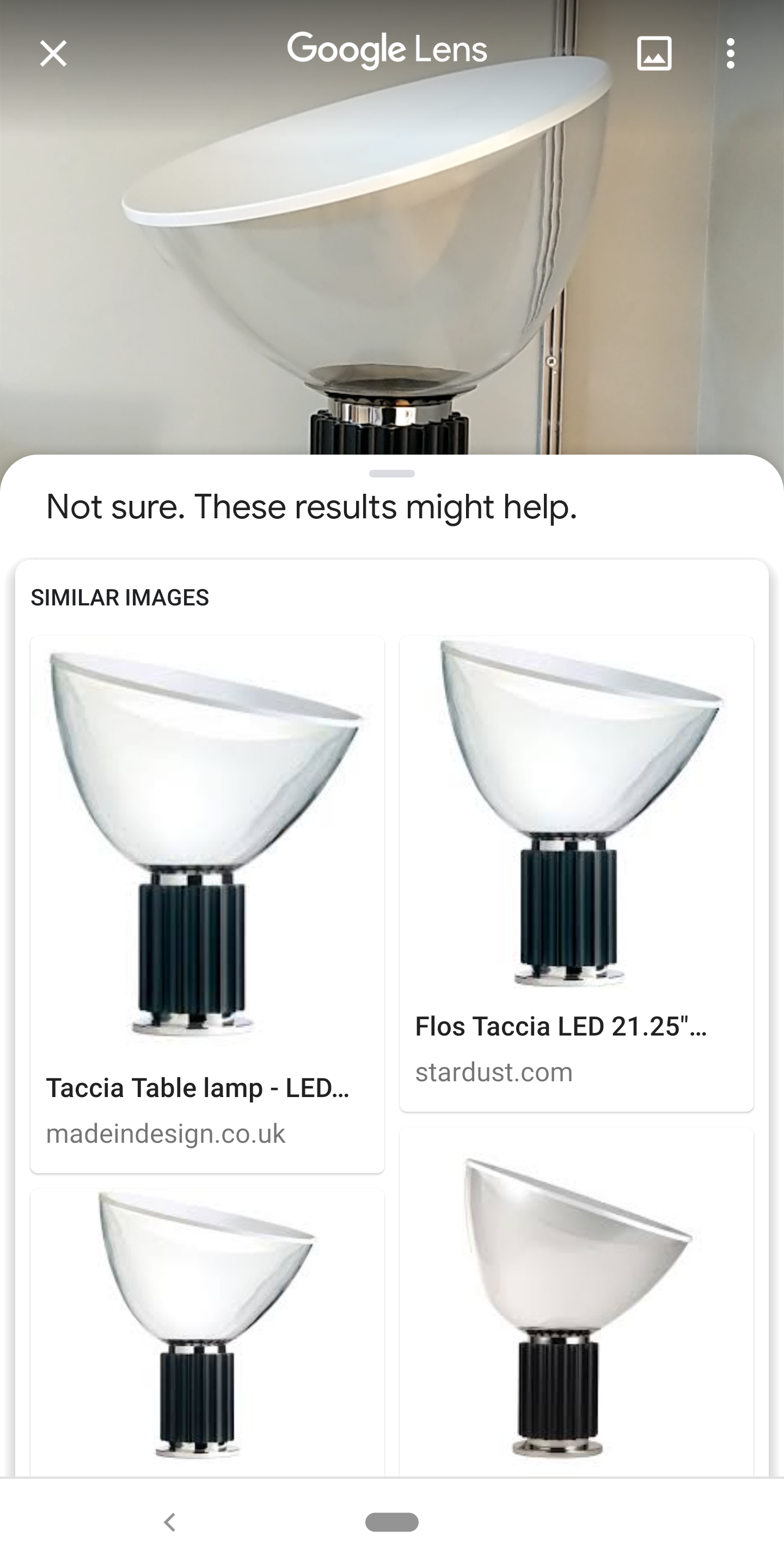
Yes, this is ‘Khrushchev Remembers’ Yes, this is a Taccia lamp
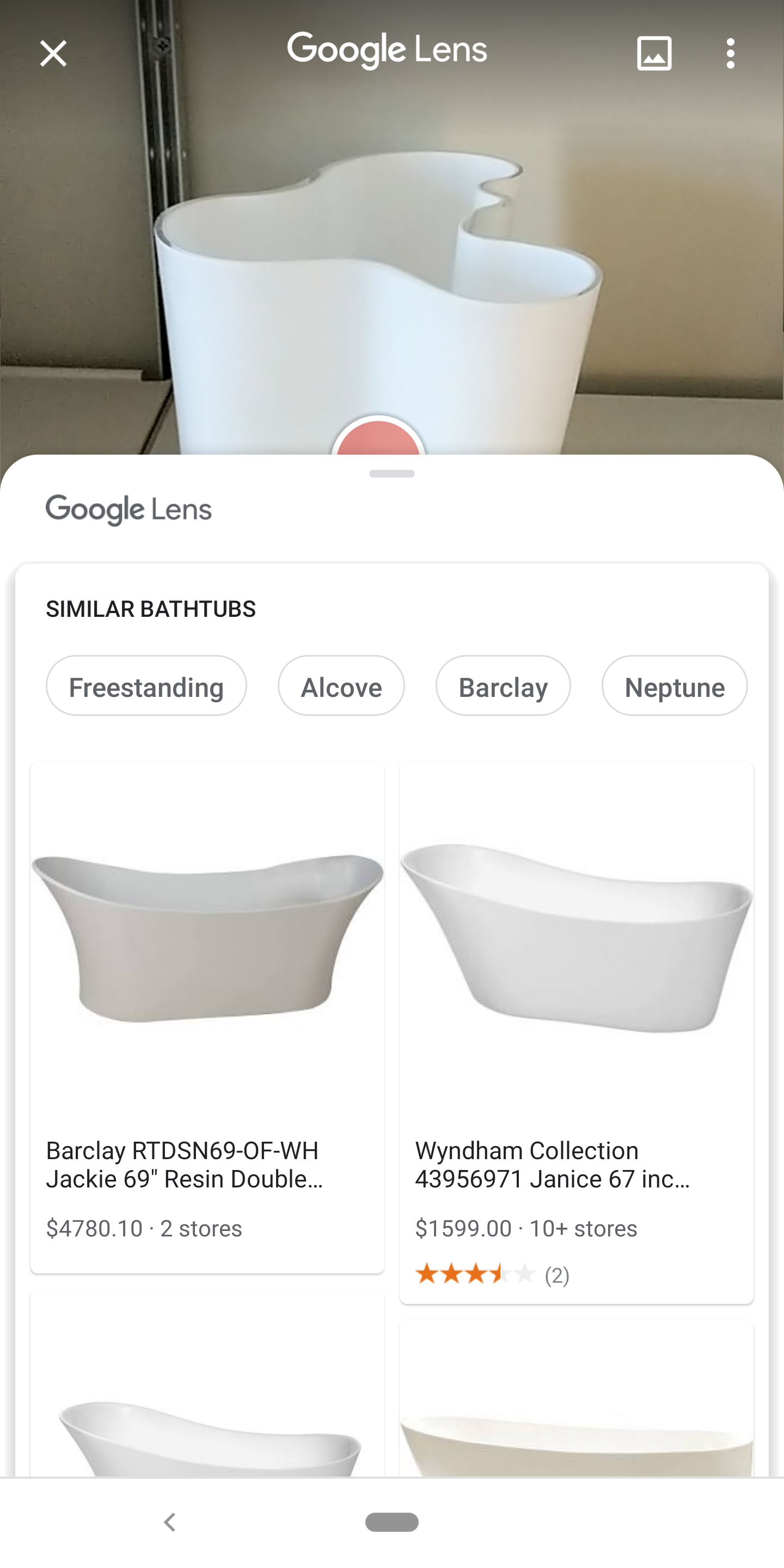
Yes, this is a Taccia lamp No, this is not a bath
No, this is not a bath

These three screenshots actually show quite a lot of moving parts:

  1. In the first, text is recognized (and I can copy it), and then the book itself is recognized (by the text or the image?) and Lens delivers a product match. Success.

  2. In the second, the app isn’t managing to recognise the object, so the photo is being passed on to Google Image search and a match is found on a bunch of web pages, but Google doesn’t know what this actually is. This works, from the consumer’s perspective, but there’s no knowledge graph.

  3. Third, what should be a highly recognizable product (an Alvar Aalto vase) is taken from an angle that probably doesn’t match an image on a website, but Google’s object detection thinks it’s a free-standing bath. If I manually give the image to Google Image Search, it suggests ‘club chair’. (Technically, the phone might be able to work out how big this object is and do something with that, but that’s probably for next year.)

These illustrate questions of both discoverability and expectation. What can it do, what should I not expect it to do, and how should you react when you don’t have a good result? This is in fact another manifestation of the challenge seen in voice assistants - they can do enough different things that you don’t want to give the user a list of all of them, but not nearly enough different things that you can expect it to handle anything you throw at it. So how do you build the communication and discovery of what your ‘AI’ system can do?

In the second example here we are failing down to Google image search, and voice assistants sometimes fall back to reading the top result from a Google web search. Here, this tactic worked. In the third example Google is confident (going direct to product search rather than image search), but wrong - how do I react to that? Would no suggestion at all have been better? I would have lost respect for the product if it hadn’t found the book, but I understand that matching the vase was a lot harder and give it a pass, and I can see why the vase might look like a bath to a ‘dumb’ computer. Conversely, I suspect that one of the problems with Siri was that Apple’s marketing gave the impression that you really could ask this thing anything: consumer expectations did not match the product’s capabilities.

In a sense, these questions are also brand questions. We know that Shazaam only does recorded music. Amazon’s app got a better match for the Krushchev book, linking not a modern reprint as Google did but a second-hand copy of the exact edition with the same cover. But, it failed totally on the lamp and the vase, even though they’re both for sale on Amazon. Do I have different expectations of Amazon? How intelligent do I expect the AI to be?

The alternative approach, as for Shazam, is to go vertical. Suppose there was an app that you could wave at a recipe in a book, that would generate a shopping list or maybe give you nutrition information. You could make that really reliable and you would have no ‘AI discoverability’ problem at all, but the app itself would have a discovery problem (even if it was from Google) - how would people find out about it? Either way, this approach isn’t workable for Google (or Amazon) - if they can recognise 50 categories now and 200 in two years, they can’t have 200 apps or 200 modes in the camera app any more than they can have 200 modes on the search page. You need either to have a general purpose front end or make the whole thing passive or invisible (face recognition, HDR, putting flight details into your calendar).

Language translation is another of these possible modes - and Google Translate does have its own app, for now. Google Translate is a visual Babelfish, and of course the Babelfish was a wearable. The long-term context for many of these questions is not an sensor in your pocket but a sensor that you wear. In, say, five years time, you might be able to buy, as a consumer product, a pair of ‘glasses’ that combine both a transparent, colour 3D display and a cluster of image sensors. Those image sensors map the space around you, so you can make the wall a display or play Minecraft on the table, but they also recognise things around you. At this point we won’t be taking photos-as-notes at all. You won’t take a picture of the conference schedule - you’ll just look at it, and then later that day say ‘hey Google, what’s the next session?’ Or, ‘I met someone at an event last week and their name badge said they worked for a Hollywood studio - who were they?’ So what suggestions will we get, and what will be remembered for you? How do you know what the glasses can do (and what someone else’s glasses might be doing)? And how do the brands associated with this map against intelligence and discovery on one hand and privacy and trust on the other? 

07 Feb 05:42

Carbonated Beverage Language Map

mkalus shared this story from xkcd.com.

There's one person in Missouri who says "carbo bev" who the entire rest of the country HATES.
07 Feb 05:42

PC staffer quits over what he calls Ontario's 'absolutely wrongheaded' autism plan

mkalus shared this story .

A PC staffer has resigned over changes to Ontario's autism program, calling the Ford government's new plan "indefensible."

"The decisions that the government has made ... are absolutely wrongheaded," said Bruce McIntosh, who resigned as the legislative assistant for MPP Amy Fee on Wednesday after the government's announcement.

The new plan doesn't recognize the differences in need between children at different ends of the autism spectrum, said McIntosh, who is the former president of the Ontario Autism Coalition and father of a child with autism.

The funding "doesn't come close," to what families require, said McIntosh, calling needs-based funding "absolutely critical."

"I'm not going to stay there and try and tell you that it's OK."

Doug Ford's government announced its plan to clear the province-wide wait list within 18 months on Wednesday. About 23,000 children diagnosed with autism spectrum disorders are waiting for government-funded treatment in Ontario, while just 8,400 are currently in the program receiving therapy.

The government will give funding for treatment directly to families, instead of regional service providers, with a total of up to $140,000 per child until the age of 18.

That funding is based on age, said Lisa MacLeod, minister of Children, Community and Social Services. A child entering the program at age two would be eligible to receive up to $140,000, while a child entering the program at age seven would receive up to $55,000.

Families can get up to $20,000 a year until their child turns six. After that, they can only get $5,000 a year, McIntosh said.

But intensive autism therapy can cost between $50,000 and $70,000 a year, said Ontario Autism Coalition president Laura Kirby-McIntosh, who is McIntosh's wife. The most intense treatment may be around $80,000, he added.

This means some families will quickly run out of funding.

Lisa MacLeod, Ontario's minister of Children, Community and Social Services, revealed changes to the province's autism program on Wednesday. (CBC)

As well, families making over $250,000 will not receive funding, MacLeod said.

MacLeod said the money will be front-loaded for younger children, because they experience the most need at younger ages. Research shows early intervention has the most impact in helping kids on the autism spectrum, MacLeod said.

Sources previously told CBC News the government will act on 14 out of 19 improvements requested by the Ontario Autism Coalition, and that funding to the program will not be cut. 

But McIntosh said the new plan acts against the OAC's recommendations.

"The government was given a list of three things that the [Ontario Autism Coalition] wanted them to do, and three things they shouldn't do," said McIntosh. "And they did the very first thing on the top of the shouldn't do list."

Kirby-McIntosh said they previously fought for needs-based funding under the Liberal government.

Parents of children with autism protested against the previous Liberal government in the spring of 2016 when it announced that people over age four would be cut off from funding for intensive therapy. The Liberals ultimately backed down.

That government's revised Ontario's autism program was in 2017 to give parents the option between either receiving therapy from government-funding service providers or receiving funding directly to pay a private therapist.

MPP Amy Fee, as a parent to two children with autism spectrum disorder, had protested in 2016 alongside them, Kirby-McIntosh told the Canadian Press. Fee is now McLeod's parliamentary assistant.

Improvements 'thrown away'

McIntosh said the new plan is "spreading the same amount of money more thinly."

Waitlist times — while still too long — have become "considerably better" in recent years, he said.

The directions that things were going was making "steady improvement," he said.

"But now that's all been thrown away for something that's not going to work and isn't equitable," McIntosh said.

More money for diagnostic hubs

The government also announced Wednesday it will also double government spending on autism diagnostic hubs, which currently receive $2.75 million per year.

There are around 2,400 children in line for assessment, with an average wait list of 31 weeks, according to government figures.

Ford's government also announced they are also creating a provider list to help families find clinical supervisors for behavioural services.

The government is also creating an independent agency to "bring families into the program, help them manage their funding, and assist them in purchasing and accessing services."

07 Feb 05:42

For the love of technology! Sex robots and virtual reality

by Markie Twist, Professor, University of Wisconsin Colleges and the University of Wisconsin-Extension
mkalus shared this story from Home – News – The Conversation.

Sex with robots will increase, as technological developments produce new love interests. Shutterstock

Sex as we know it is about to change.

We are already living through a new sexual revolution, thanks to technologies that have transformed the way we relate to each other in our intimate relationships. But we believe that a second wave of sexual technologies is now starting to appear, and that these are transforming how some people view their very sexual identity.

People we refer to as “digisexuals” are turning to advanced technologies, such as robots, virtual reality (VR) environments and feedback devices known as teledildonics, to take the place of human partners.

Neil McArthur is the co-editor of Robot Sex: Social and Ethical Implications, published in 2017 by MIT Press.

Defining digisexuality

In our research, we use the term digisexuality in two senses. The first, broader sense is to describe the use of advanced technologies in sex and relationships. People are already familiar with what we call first-wave sexual technologies, which are the many things that we use to connect us with our current or prospective partners. We text each other, we use Snapchat and Skype, and we go on social apps like Tinder and Bumble to meet new people.

These technologies have been adopted so widely, so quickly, that it is easy to miss what a profound effect they have had on our intimate lives.

It is fascinating to study how people use technology in their relationships. Not surprisingly, in our research we can already see people displaying different attachment styles in their use of technology. As with their human relationships, people relate to their technology in ways that may be secure, anxious, avoidant or some (often disorganized) combination of the three.

There is a second, narrower sense, in which we use the term digisexuals for people whose sexual identity is shaped by what we call second-wave sexual technologies.

These technologies are defined by their ability to offer sexual experiences that are intense, immersive and do not depend on a human partner. Sex robots are the second-wave technology people are most familiar with. They don’t exist yet, not really, but they have been widely discussed in the media and often appear in movies and on television. Some companies have previewed sex robot prototypes, but these are nothing close to what most people would consider a proper sexbot. They are also incredibly creepy.

Refining sexbots

There are several companies, such as the Real Doll company, working on developing realistic sexbots. But there are a few technical hurdles they have yet to overcome. Truly interactive artificial intelligence is developing slowly, for instance, and it is proving difficult to teach a robot to walk. More interestingly, some inventors have begun experimenting with innovative, non-anthropomorphic designs for sexbots.

Meanwhile, VR is progressing rapidly. And in the sex industry, VR is already being used in ways that go beyond the passive viewing of pornography. Immersive virtual worlds and multi-player environments, often coupled with haptic feedback devices, are already being created that offer people intense sexual experiences that the real world possibly never could.

Investigative journalist Emily Witt has written about her experience with some of these technologies in her 2016 book, Future Sex: A New Kind of Free Love.

Sherry Turkle explores relational artifacts in a 1999 lecture at the University of Washington.

There is compelling evidence that second-wave technologies have an effect on our brains that is qualitatively different from what came before.

MIT professor Sherry Turkle and others have done studies on the intensity of the bond people tend to form with what she calls “relational artifacts” such as robots. Turkle defines relational artifacts as “non-living objects that are, or at least appear to be, sufficiently responsive that people naturally conceive themselves to be in a mutual relationship with them.” Immersive VR experiences also offer a level of intensity that is qualitatively different from other sorts of media.

Immersive experiences

In a lecture at the Virtual Futures Forum in 2016, VR researcher Sylvia Xueni Pan explained the immersive nature of VR technology. It creates what she describes as a placement and plausibility illusion within the human brain.

As a result of its real-time positioning, 3D stereo display and its total field of view, the user’s brain comes to believe that the user is really present. As she says: “If situations and events that happen in VR actually correlates to your actions and relates personally to you, then you react towards these events as if they were real.”

As technologies such as virtual reality develop, more people will use them for sexual experiences. Shutterstock

As these technologies develop, they will enable sexual experiences that many people will find just as satisfying as those with human partners, or in some cases more so.

We believe that in the coming decades, as these technologies become more sophisticated and more widespread, there will be an increasing number of people who will choose to find sex and partnership entirely from artificial agents or in virtual environments.

And as they do, we will also see the emergence of this new sexual identity we call digisexuality.

Sexuality and stigma

A digisexual is someone who sees immersive technologies such as sex robots and virtual reality pornography as integral to their sexual experience, and who feels no need to search for physical intimacy with human partners.

Marginal sexual identities almost invariably face stigma, and it is already apparent that digisexuals will be no exception. The idea of digisexuality as an identity has already received strong negative reactions from many commentators in the media and online.

We should learn from the mistakes of the past. Society has stigmatized gays and lesbians, bisexuals, pansexuals, asexuals, consensually non-mongamous people and practitioners of bondange/discipline-dominance/submission-sadomasochism (BDSM).

Then, as time goes on, we have gradually learned to be more accepting of all these diverse sexual identities. We should bring that same openness to digisexuals. As immersive sexual technologies become more widespread, we should approach them, and their users, with an open mind.

We don’t know where technology is going, and there are definitely concerns that need to be discussed — such as the ways in which our interactions with technology could shape our attitudes towards consent with our human partners.

Our research addresses one specific piece of the puzzle: the question of how technology impacts sexual-identity formation, and how people with technologically based sexual identities may face stigma and prejudice. Yes, there are dangers. But whips and paddles can hurt too.

The Conversation

The authors do not work for, consult, own shares in or receive funding from any company or organization that would benefit from this article, and have disclosed no relevant affiliations beyond their academic appointment.

07 Feb 05:36

[essays] Oh God, It's Raining Newsletters

by Craig Mod
Email’s beginning was perfectly unremarkable: “QWERTYUIOP.” A keyboard burp. Something your cat might type. A nothing message sent by Ray Tomlinson in 1971 to test the system. But email has stayed, and has largely stayed decentralized, and from that — its ubiquity and lack of central authority — email has become one of the most boringly powerful publishing platforms around. I fear we’re entering an era of newsletter fatigue, but a month ago I started a new one.
07 Feb 05:36

3 Recommendations: Kanopy, Recomendo and DF Tube

by Caterina Fake

Screen Shot 2019-02-05 at 8.47.57 PM.png

Kanopy If you have a library card, you most likely have access to Kanopy, which is full of excellent movies, including a selection from the Criterion Collection, and the Bicycle Thief. I’m recommending it because I am still surprised at how few people know about it. The kids section is also full of good movies, sans garbage like My Little Pony Equestria Girls: Movie Night and Barbie and the Magic of Pegasus.

Recomendo, the mailing list from Kevin Kelly, Mark Frauenfelder & Claudia Dawson always has something to discover. KK wrote Cool Tools previously, which was a source of so many good links, and there is also a book of Recomendos.

DF Tube This is a chrome plugin that eliminates all the cruft around a YouTube video. For the past few months I’ve been trying to force YouTube to show me palatable content on my sidebar, but no matter how much crap I reject as “Not Interested” more crap appears. Since the fountain of crap is inexhaustible, I searched for a YouTube cleanup plugin. DF Tube–Distraction Free Tube– is so great! Everything bad — recommendations on the sidebar, crap on the homepage, inane commentary–vanishes!

07 Feb 05:36

Scouts, Water, Lorena Bobbit

by Caterina Fake

boy-scouts-girl-cub-scouts-promo.jpg

Scouts. Girls can now formally eligible to form boy scout troops. Not only was the copy editor asleep at their desk, the author did not note the inherent sexism of this odd new eligibility. Why not call both Girl Scouts and Boy Scouts “Scouts”? And are there boys clamoring to form girl scout troops? That would show some progress. As it has often been said, equality will have a chance not when girls can be more like boys, but boys can be more like girls.

Water. The state of water in the world in less than 500 words. This will be a big issue in the future if the population continues to grow as projected, and this is a good summary of the regions the problems will arise, and who is getting in front of the issue.

Lorena Bobbit. Of course the real story was not what was emphasized on late night TV–the penis–the real story was about years of marital rape, domestic violence and male entitlement. Did you know John Wayne Bobbit became a porn star after his penis reattachment surgery and was convicted and served time for tying a woman up and repeatedly raping her? All those jokes at Lorena Gallo’s expense are hard to countenance–but an upcoming documentary may set the story straight.


07 Feb 05:34

Spotify aims to build podcasting empire through purchase of Anchor and Gimlet Media

by Brad Bennett

Swedish audio streaming company Spotify has acquired podcast production company Gimlet Media and do-it-yourself podcasting platform Anchor to increase its podcast offerings.

Spotify paid a reported $230 million to buy Gimlet Media, according to RecodeInformation is not available regarding how much the music streaming service spent to acquire Anchor.

“With these acquisitions, Spotify is positioned to become both the premier producer of podcasts and the leading platform for podcast creators. Gimlet will bring to Spotify its best-in-class podcast studio with dedicated IP development, production and advertising capabilities. Anchor will bring its platform of tools for podcast creators and its established and rapidly growing creator base,” reads Spotify’s press release. 

It looks like Spotify bought these platforms to build out its offering for podcast producers. If the service can offer the means to build, record, and share podcasts right on its platform, that could be a big step forward for the company.

Spotify doesn’t seem like it’s finished spending money on acquisitions yet, either. In the company’s earnings report, Spotify shared its plans to spend $400 to $500 million on new properties this year. As a result, unless it dropped $270 million on Anchor, Spotify likely has a few more companies to buy.

In a separate blog post, company CEO Daniel Ek said, “just as we’ve done with music, our work in podcasting will focus intensively on the curation and customization that users have come to expect from Spotify. We will offer better discovery, data, and monetization to creators.”

Spotify already claims to be the world’s second largest podcasting platform. Therefore, if the service can get more people to listen to a higher number of podcasts, maybe it can even become the world’s largest.

The company expects the deals to finish by the end of the first quarter in 2019, but it hasn’t said if this means the Anchor app or anything at Gimlet Media will change.

You can still download Anchor on iOS or Android.

Source: Spotify, Recode

The post Spotify aims to build podcasting empire through purchase of Anchor and Gimlet Media appeared first on MobileSyrup.

07 Feb 05:34

Google Pixelbook is currently up to $510 off at Amazon Canada

by Bradly Shankar
Pixelbook-alternate-header

Various models of the Google Pixelbook are currently on sale on Amazon Canada.

The i5/8 GB RAM/256GB version of the Chrome OS touchscreen laptop is available for $1,449.99 CAD on Amazon Canada, $149 down from its regular price.

Meanwhile, the i7/16 GB RAM/512GB variant is on sale for $1,589.99 ($509 off).

The Pixelbook can be ordered from Amazon here.

For more on the Pixelbook, read MobileSyrup‘s review here.

Source: Amazon Canada

The post Google Pixelbook is currently up to $510 off at Amazon Canada appeared first on MobileSyrup.

07 Feb 05:33

Function over form: Mophie’s new power bank goes all-in on USB-C

by Jonathan Lamont
Mophie logo on Powerstation PD XL

I’ll give credit where credit is due: Mophie makes excellent power banks. While they’re typically on the pricey side, the style and build quality often make up the difference.

However, the company’s latest products, the ‘Powerstation PD’ and ‘Powerstation PD XL,’ eschewed that high level of style and the stunning looks of past models for something more practical.

The last Mophie portable charger I used was the brilliant red Powerstation with Lightning connector — which, as I noted before, only works well for iPhone users. The biggest drawback of this power bank was the lack of USB-C ports.

However, the new Powerstation PD goes above and beyond solving this problem. Not only does it offer a USB-C port, but it also supports the USB-C Power Delivery (PD) standard and supports up to 18W charging from both its USB-C and USB-A ports.

In other words, it can fast charge phones that can handle up to 18W of power, like most new Pixel, Galaxy and Apple phones.

Get your cables in order

Mophie Powerstation PD XL with cable

To take advantage of the fast charging, you’ll need a compatible phone, a supported USB-C cable, and the power bank. The USB-C port acts as the power bank’s charging port as well, so it’s worth having something that will charge the Powerstation quickly too.

If you’re using an Android device, you probably don’t have much to worry about. Chances are, you’ve already got a USB-C cable and a fast-charging brick. Plus, the Powerstation PD comes with a short 28cm USB-C to USB-C cable you can carry with you to connect the power bank to your phone.

iPhone users, on the other hand, will have some initial difficulty with the Powerstation PD. First off, you’ll need a USB-C to Lightning cable, which will run you $25 if you go through Apple. However, some third-party options are starting to show up that aren’t as expensive.

You’ll also need a UCB-C charging brick or a USB-A to USB-C cable to use the Apple power brick that came with your iPhone. What’s worse, that power brick will charge the Mophie slowly because it only outputs at 5W.

Apple’s 18W USB-C adapter costs $39, but again, you can find lower-cost alternatives from other brands. Regardless, iPhone owners picking up the Powerstation PD should expect an additional cost to get the correct cables and chargers.

We gained USB-C, but what did we lose?

The first thing you’ll notice about the Powerstation PD is it doesn’t look like other Mophie batteries. While changing up your look isn’t necessarily a bad thing, I feel the Powerstation PD is a step back for Mophie.

Gone are the lovely colours, excellent build materials, and generally solid craftsmanship of past products. Instead, the PD is all plastic, with a light grey band around the sides and a textured black plastic on the front and back.

The textured plastic isn’t bad — it feels nice in hand and looks decent, but it doesn’t compare to past models. Even the last Powerstation featured an aluminum front and back plate. Plus, the PD only comes in one colour: dull grey and black.

Colours aside, there’s one other issue with the Powerstation PD’s plastic shell: if you grip it with any force, it will creak and shift. Again, this isn’t necessarily bad, but in a premium product like the Powerstation PD — and considering Mophie’s past products — it’s disappointing to see this level of quality.

However, it’s not all bad news for the Powerstation PD. It still sports a side button that lights up LEDs to indicate charge level, something I quite enjoy about the Mophie batteries.

The Powerstation PD is also impressively small for the amount of charge it holds. The regular size comes in at 6,700mAh while the PD XL is 10,050mAh. Additionally, the Powerstation PD is light, which is one benefit of its plastic exterior.

A great Mophie, and okay portable charger

Mophie Powerstation PD and PD XL

Despite its shortcomings, the Powerstation PD is the best Mophie power bank you can buy right now. What it gives up in style, it makes up for in functionality. I, for one, would take the PD’s USB-C and fast charging over any of the fancier power bank offerings.

Unfortunately, outside of the Mophie ecosystem, the Powerstation PD doesn’t fare as well. It’s an expensive power bank, clocking in at about $80 CAD for the 6,700mAh version and $105 for the 10,050mAh model.

That’s a lot of money for a portable charger, and when you consider there are options out there for less than $70 CAD with 20,100mAh capacity — double that of the PD XL — it quickly becomes hard to justify.

This is where that premium argument would typically come in. In my story about the Powerstation with Lightning connector, I noted that the premium price of the power bank was justifiable if you cared deeply about the style of your portable battery, or if you were heavily invested in Apple’s ecosystem.

There’s no such saving grace for the Powerstation PD. iPhone users will need extra cables to make this power bank work, making it less than ideal for them. Android users will be good to go out of the box, but the build of the PD doesn’t do enough to set it apart from the competition.

Canadians will feel an extra burn as well, as Mophie’s website only offers U.S. pricing (I converted the above prices based on the exchange rate at the time of writing). Eventually, the Powerstation PD will come to Canadian stores, but for now, you’ll have to buy online, which means you’ll pay shipping too.

None of this is to say the Powerstation PD isn’t good. It’s a great portable charger, and at the right price, it’s an excellent option. However, I’d argue that the current price isn’t the right price for what the Powerstation PD offers users.

The post Function over form: Mophie’s new power bank goes all-in on USB-C appeared first on MobileSyrup.

07 Feb 05:33

Could You Volunteer As A Student Blogging Challenge Commenter?

Kathleen Morris, The Edublogger, Feb 06, 2019
Icon

If your answer to the question is "yes" then you may want to visit this post on Edublogger, read the overview, and if you're inspired, fill out the form. The occasion is the service's Student Blogging Challenge held every March and October - read more here.

Web: [Direct Link] [This Post]
07 Feb 05:32

Is Microsoft or Google your next LMS? The view from BETT

Jason Cole, e-Literate, Feb 06, 2019
Icon

The article barely mentions Google, so I imagine it's mentioned just for completeness. But there are two major strands of interest. First is the stand of no-shows at the large English technology conference: "the absence of the major LMS vendors besides Instructure Canvas... D2L, Moodle, the UK Moodle partners, and Blackboard had no discernible presence." Second, "When Microsoft makes their push, the learning system won’t look like an LMS, but it will look like Teams... Microsoft is rapidly integrating service platforms for email, calendar, business logic, business intelligence, AI, device management, and cloud services into the Teams platform." Which totally makes sense to me.

Web: [Direct Link] [This Post]