Shared posts

23 Mar 07:07

small places in the sun

by Gordon Price

In a single day, a chilling winter turns to a summer-like spring.  The seawall is packed; the bikes are out.  We look to the patios and parklets for conviviality and amusement.

These are the scenes captured in the videos of the ‘small places’ team – Brian Gould and Kathleen Corey.  PT has featured much of their work over the years, but here’s another one that’s perfect for the moment:

23 Mar 07:07

The Blix Spring Bike Riding Guide!

by Blix PR

The sun is out, flowers are blooming, and spring is in the air! With better weather, it is the perfect time to get back outside and start bike riding once again. Here at Blix Electric Bikes, we wanted to help you prepare yourself and your bike for spring riding—especially after a long winter! Proper clothing, hydration, and bike tune-ups are vital to enjoyable and safe riding. Below, you will find Blix top tips to ensure you and your bike are ready for spring adventures! 

Download your own Spring Riding Infographic!


 Proper clothing:

Spring weather is unpredictable with hot temperatures to sudden rain showers to windy afternoons. Here are some tips to best prepare yourself!

  • Light rain coat: Bringing a light shell that is water resistant can prevent your clothing from becoming wet, but it will also not cause you to overheat in the warmer or humid weather.
  • Sunglasses/Eye-wear: Wearing sunglasses protects your eyes from the sun as well as from any rain or debris that may be in the air during spring! 
  • Be cautious of flowing dresses and skirts: Making sure your dresses or skirts will not become caught in your tire or chain is crucial to preventing injury.

Hydration:

Bringing a water bottle with you while riding will help you stay hydrated in the warmer weather. When the sun is out, your body sweats more meaning it requires a higher fluid intake level to stay hydrated! Luckily, with a Blix basket you can carry your water everywhere you go.

Bike Tune-ups and Safety:

Winter riding or storage can be tough on your bike, so it is important to do proper check of all bike components. This includes

  • Tires: Checking tire pressure and checking for punctures, nails, or rocks is recommended as storage time and bad road conditions can cause tire damage or flat tires.
  • Fenders: While spring is sunny, rain is still likely and melting snow can lead to muddy areas. Fenders will protect your bike and your clothing!
  • Clean the entire bike: cleaning the bike frame, chain, and brakes is always important to safe riding, but it is especially vital after bad weather and heavy winter rain!

Benefits of spring bike riding:

The benefits of spring riding are endless! Enjoy flower blooms, baby animals, sunshine and later sunsets. Re-start your exercise routine, change-up how you commute, and spend less time cooped up inside!


Happy spring riding from the Blix Team!

More spring riding preparation tips can be found here!

Follow our social sites and share your spring adventures with us!

Facebook

Instagram

22 Mar 18:06

Twitter Favorites: [johnbollwitt] Legend. https://t.co/vzy4nywM3o

22 Mar 18:06

Garmin Edge 520 Plus vs Wahoo ELEMNT

by Average Joe Cyclist

Garmin Edge 520 Plus vs Wahoo ELEMNTThis post (with videos) compares the Garmin Edge 520 Plus vs Wahoo ELEMNT in detail. The Garmin Edge 520 Plus and the Wahoo ELEMNT are two of the best bike computers in the world. The Edge 520 Plus is a major upgrade on an already popular bike computer. Previously, the Wahoo ELEMNT was very serious competition for the Edge 520 - but how does it compare to the upgraded Edge 520 Plus? This post compares their features to help you decide which of these premium bike computers would be best for you.

The post Garmin Edge 520 Plus vs Wahoo ELEMNT appeared first on Average Joe Cyclist.

22 Mar 18:05

Why Technical Founders should have an Online Presence

by Samantha Lloyd

Being a technical founder means you’re responsible for the technology behind your company. Maybe you’re the inventor of a new product or you’re the coder of the next big app. Whatever it is that you’re the founder of, you are the person building it and that’s huge. As a technical founder, you know the importance of building the tech, but the front-facing brand matters just as much to your customer base. It’s important that, as the person behind the technology of your company, you share your story. The good news? You’ll be able to whip up a website for yourself in no time! We’ve got some domain names that’ll suit your online presence, too. Show the world what it means to be a technical founder.

What a Technical Founder’s Website Should Say

Your website should introduce who you are and pique the interest of those who land. Why does the person landing care that they’re on your website and where should they go from there? You want to keep this person engaged with your website. Talk about what you’ve built and why these projects mattered to you. Discuss the thought process behind each project and the time and effort that went into each initiative. Finally, ensure the proper call-to-actions (read: buttons!) are in place so that people know which part of your website to navigate to next. Lead people through your website in a sensible way: such as through the homepage, on to the about page, landing on then portfolio page, and finally, to the contact page.

What a Technical Founder’s Website Should Show

Your website should show two things more than anything: you and your recent work. Most people have an image of themselves on their personal websites. This is great if the image you have is high quality and recent – if not, wait to post an image of yourself until you have that. Aside from you, your website should play host to your work. Show images of what you’ve built and created. If you built a product, a website, or an app, share the screencaps of the final product. If you’re able to, sharing the iterative process is also an exciting thing for people looking to enter your field and follow in your footsteps. Your website needs to be well organized so your audience can navigate your plethora of inventions and creations with ease.

Where a Technical Founder’s Website Should Live

Hover offers over 300 Top-Level Domains (TLDs, or domain name extensions), and many that are categorized under “technology” or “computers” or “business” are perfect for entrepreneurs and those involved in the technology side of their companies. Some of the domain name extensions that are great for technical founders are: .TECH, .DEV, and .APP. The .TECH domain name is a blanket domain that could refer to your physical or digital tech across many different industries – from medical, to travel, to startups. The .DEV domain name really highlights who you are as a developer and is great for the coder leading the company. The .APP domain name suits any technical founder launching their own app. We also love the more generic, yet tech-focused, domains like .WEBSITE and .ONLINE. These domains are fun alternatives to the expected TLDs yet remain generic for a multitude of uses. New TLDs are all the rage and are growing in popularity, so don’t be afraid to think outside the norm. A strong domain name always makes a brand statement – so go forward with the one that best represents you and what you’ve built.

Where a Technical Founder’s Website Should Connect to

Whether we like it or not, we live in a world dominated by social media. People want to connect with the entrepreneurs they admire and get a peek into their world. Share your inspiring journey into founding and building your company with the people who want to learn from you. Be sure to link out to the social channels you use regularly (and make sure these are channels you enjoy keeping up… don’t start social channels you won’t use!).

You should also link out to any relevant work. If you’re talking about how you built your latest company, be sure to link out to that company on your website. Use your website as an opportunity to link to every project you’ve had a hand in building so someone who lands can understand your journey.

Finally, if relevant, link out to all publications that mention you in a “News and Blog” section. If Forbes wrote a piece on your company, or Narcity listed you as an entrepreneur to follow on social, or there’s a YouTube video of your latest keynote – let it live on your website! Your website can help you organize the content about you. People looking to hire you or have you speak at their tech event will want to be able to access this content, and it’s always good to monitor it to submit edits when necessary. Keep this list updated regularly so you can keep track of publications that mention you and share those articles or content pieces with your network.


22 Mar 18:05

The Dream of the 90s

by peter@rukavina.net (Peter Rukavina)

As related earlier, we did not take the direct route from Charlottetown to Portland: we left Charlottetown on Monday afternoon, and arrived Portland late on Wednesday evening, more than 48 hours later. But along the way we got to see several old friends, ate some good meals, drank some good coffee, and got microdoses of two cities we hadn’t visited in a long while.

But arrive in Portland we did, last night just after 10:00 p.m., on the Amtrak Cascades train from Seattle. We navigated our way through the deserted and foreboding streets of Old Town and checked into our lovely, minimalist room at The Society Hotel.

We’ve been gradually adjusting to the four hour time zone difference between PEI and the west coast, and this morning we didn’t wake up until 8:30 a.m., which means we’ve come close to reaching a new equilibrium. We ventured out into our new neighbourhood, stopping first in the park by the river to all Ethan to pee, then to Deadstock Coffee, and finally to Mothers Bistro for breakfast.

Fully sated, we then walked up the street to Powell’s Books, suitably overwhelming (most impressive infrastructural feature is a magic-seeming elevator with three doors); I emerged with a foot-high pile of books about type, bookbinding and fashion design (I sense a visit to the post office will be needed). By the time we were ready to leave my friend Oliver–our reason for visiting Portland in the first place–appeared at the end of aisle 939 as appointed, and we headed off with him for an afternoon of adventuring.

Said adventures included a stop at Nuvrei for iced tea and cookies, shoe shopping at Keen and REI (see [wee] Oliver’s new shoes below; they’re made of wool), and a visit to the dog park (where Ethan displayed his typical “you don’t have me on a leash; why is it in my best interests to come when you call me” confounding behaviour).

After a pit stop at Oliver’s house, we rendezvoused with Oliver’s sweetheart Cheryl for a excellent Indian meal at Swagat.

And now we’re hunkered down at our hotel, enjoying our first early evening this week.

This trip has a whirlwind character to it, and we’re certainly in no danger of overstaying our welcome at any juncture; we couldn’t keep up this pace for weeks on end, but as a the-journey-is-the-destination trip it has a lot to recommend it.

22 Mar 18:00

Everywhere In Cubicles

by Stowe Boyd

Beacon NY — 2019–03–19 — I have been out of pocket in NYC for a Platform Design Toolkit Master Class workshop with Simone Cicero. I’ll…

Continue reading on Work Futures Institute »

22 Mar 18:00

Machines of Loving Grace

by Stowe Boyd

Beacon NY — 2019–03–20 — I spent two excellent days at The Platform Design Toolkit Masterclass this Monday and Tuesday, led by Simone…

Continue reading on Work Futures Institute »

22 Mar 18:00

Total Platform Failure

by Richard Millington

…is rather unlikely (although MySpace is testing this theory)

But if it does happen, at least you have the email addresses of all your members to invite them to a new platform.

…unless you’re using Facebook groups.

Facebook groups aren’t likely to experience a permanent platform failure, but isn’t reducing organic reach to 0.1% the same thing? This isn’t happening overnight, it’s happening gradually (already).

But just because you’re being boiled slowly doesn’t mean you’re not still getting cooked.

Worse yet, it’s extremely hard to mitigate against once it’s happened. The best mitigation strategy is to move when your reach is still high enough to tell people you’re moving.

22 Mar 18:00

Apple Revamps Browse Tab in Apple Music to Surface More Content

by Ryan Christoffel

Today Apple has rolled out an update to the Browse tab in Apple Music, which all users should see soon. The new Browse tab surfaces a lot more content up front without requiring tapping through other menus first; it does, however, retain the same basic design language and feel as before.

The new Browse tab starts off the same as it always has, with a collection of featured banners up top to highlight new releases, Up Next artists, or newly updated playlists. After that is where things are different though: currently, the second section in Browse features Apple's Daily Top 100 playlists, followed by thematic sections like Weekend Warrior and Visionary Women, then Just Updated, Hot Tracks, and New Music, all of which come before the familiar More to Explore section where you can visit dedicated Genres, Moods, Top Charts, and Music Videos pages. Following that list of other pages, there are even more curated sections in Browse: We're Loving, Get Down Tonight, On Beats 1, and Coming Soon.

Several of the newly surfaced sections of Browse seem particularly relevant to the weekend, or to a specific culturally relevant topic, so it'll be interesting to see how often Apple's editorial team updates Browse with new sections to explore. The tab was refreshed regularly before, but it contained much less content than it does now, so there was less reason to check it out often. Now, however, it could become a near-daily destination if Apple updates it often enough, similar to the App Store's Today tab and Apple News' Digest tab.

Exposing more content from Apple's editorial team and making it more accessible to users is a good thing. Personally, the one drawback of this change for me is that because there are so many sections inside Browse, it can be more cumbersome to find my favorite sections. For example, if someone visited the Genres screen a lot, they now have to do a lot more scrolling to get to that option. Ultimately, this is the same basic problem I've had with Apple Music's For You tab for years: amidst the wealth of content available, only a select few sections are my favorite, but I currently have to scroll through a lot of content I don't care about to find those sections. My biggest wish for Apple's Music app is that it would enable custom reordering of the For You and Browse tabs so that users can put the sections they care about up top, similar to what's possible in the third-party client Soor.


Support MacStories Directly

Club MacStories offers exclusive access to extra MacStories content, delivered every week; it's also a way to support us directly.

Club MacStories will help you discover the best apps for your devices and get the most out of your iPhone, iPad, and Mac. Plus, it's made in Italy.

Join Now
22 Mar 17:57

Write what you know. (But what if all you know is the inside of your own brain?)

by Josh Bernoff

They tell fiction authors to “write what you know.” The same obviously applies to non-fiction. But it’s all too easy to go from that to “Write about yourself” — especially when it comes to self-help books. If you know about marketing strategy, write about marketing strategy. If you know about startups, write about startups. Just … Continued

The post Write what you know. (But what if all you know is the inside of your own brain?) appeared first on without bullshit.

22 Mar 17:57

The Case of the Late-2012 iMacs

by Stephen Hackett

The recent iMac updates brought additional power and flexibility to Apple's all-in-one desktop, but didn't redesign or modernize the iMac as we've known it for many years.

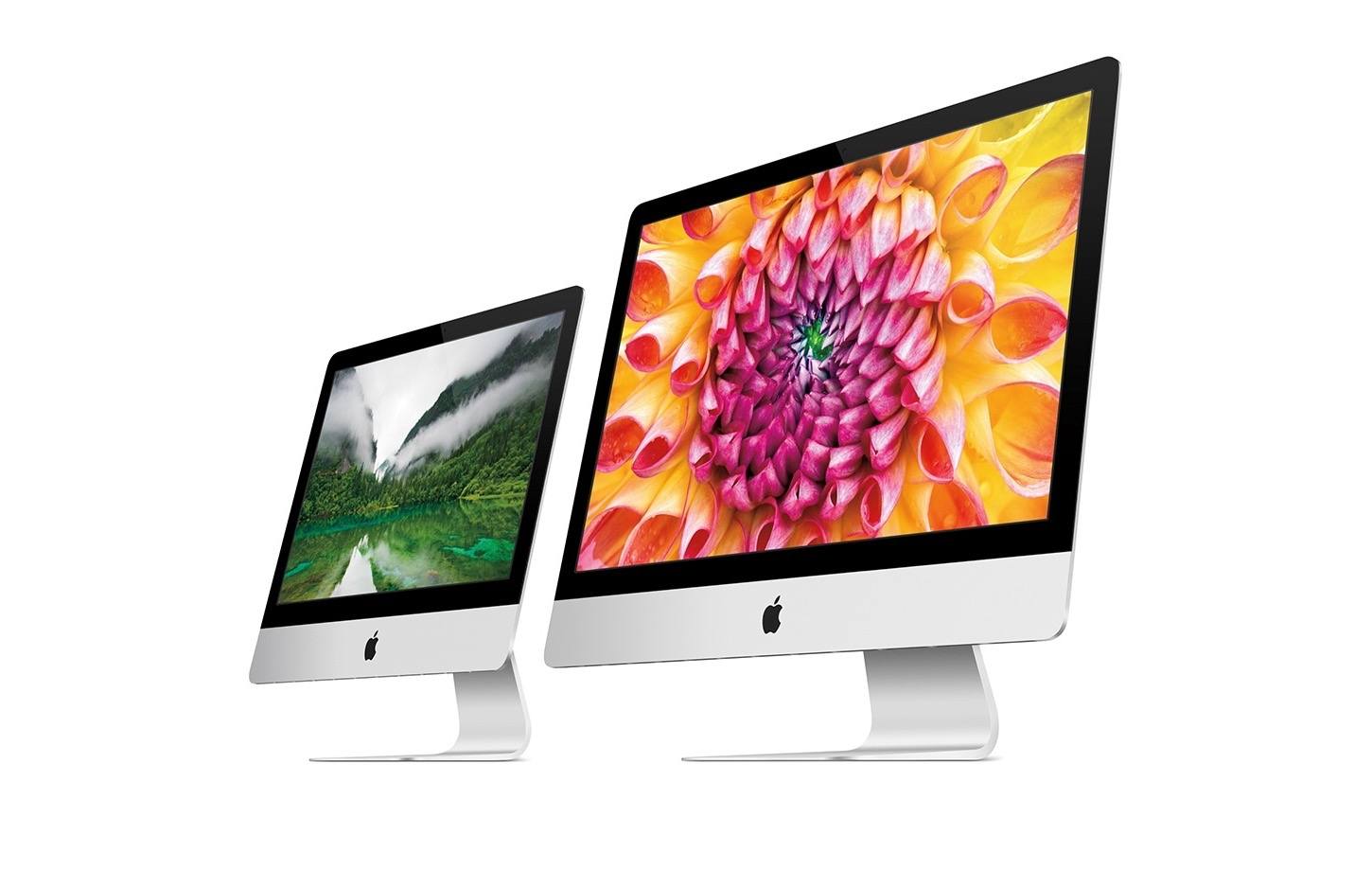
As the 21.5- and 27-inch machines are here to stay for at least a while longer, I thought it would be a good time to look back at the first of their kind, introduced at a press event in October 2012. You probably can't tell if the press image above is from 2012 or 2019.

We Gotta Go Back in Time

Before we get to that 2012 event, we need to roll the clock back a little further to August 2007, when Steve Jobs unveiled the first aluminum iMacs. These machines came in 20- and 24-inch variants, keeping the 16:10 aspect ratio from the white iMacs before them, but now included glossy displays complete with cover glass.

Late 2006 vs. Mid 2007 iMacs

Late 2006 vs. Mid 2007 iMacs

Apple was rightfully proud of the design, as this language from its website indicated:

iMac sets new standards for elegance and power. It packs a complete, high-performance computer into its all-in-one design. With its anodized aluminum frame and glass cover, it’s striking to behold. The glossy widescreen display — available in 20- and 24-inch sizes — makes photos and movies come alive with rich color. The use of recyclable glass and aluminum makes iMac friendlier to the environment, too.

It was one of those times when a new Apple product instantly made the old one look old, a trick Apple would repeat with the Late 2012 machines.

Two years later, in October 2009, Apple redesigned the iMac again. This time, the materials stayed the same: the front of the iMac was still carved out of aluminum (and now the back was too, as opposed to the black plastic used on the old design), and the screens were still covered in glass. However, the new screens used LED backlighting and IPS technology for better brightness and viewing angles. And, of course, they were in the now-familiar 21.5- and 27-inch configurations, using a 16:9 aspect ratio.

2009 iMacs

2009 iMacs

Apple raved about the design on its website, and for good reason. The more modern aspect ratio breathed new life into the machine, but the company wasn't done quite yet.

Thin Is In

Finally, we can talk about the Late 2012 iMacs. In a special press event, Phil Schiller took the stage to announce some big changes to the desktop machines.

Sometimes a picture is worth 1,000 words.

Not pictured: the giant hump at the back of the 2012 design.

Not pictured: the giant hump at the back of the 2012 design.

For this revision, the iMac received faster processors as expected, but to hear Apple tell it, they remade the entire machine:

Creating the stunningly thin design of the new iMac took some equally stunning feats of technological innovation. We refine, re-imagined, or re-engineered everything about it from the inside out. The result is an elegant, all-in-one computer that's as much a work of art as it is state of the art.

Flowery language aside, the design really was impressive. In addition to some of the obvious changes like ditching the SuperDrive that had graced the right side of the iMac since the iMac G5 days, Apple really dove into the machine's components to make the edges just 5mm thick.

A lot of work went into the screen. The new LCD was 5mm thinner then before, and Apple eliminated the 2mm air gap between it and the cover glass by laminating them together, something Schiller said hadn't been done with a screen of this size before this product. A nice side effect of this work was fewer reflections were created, making the new iMac easier to use in more environments.

The majority of thick components were bunched together near the foot's mounting point, but that thin edge took an advanced manufacturing technique named friction-stir welding to attach the chin to the back case. This made the enclosure both seamless and strong. Apple did its best to minimize the hump at the back of the case, but it does make an appearance in this media image:

This is a 2019 iMac, but it doesn't really matter.

This is a 2019 iMac, but it doesn't really matter.

It's What's Inside That Counts

The thicker aluminum iMacs included an access door under the chin for upgrading RAM. The thin iMacs didn't have any room for that, so Apple added a memory access door to the back of the machine, but only on the 27-inch models, as noted by this support article:

Memory is not removable by users on iMac (21.5-inch, Late 2012), iMac (21.5-inch, Late 2013), iMac (21.5-inch, Mid 2014), iMac (21.5-inch, 2017), and iMac (Retina 4K, 21.5-inch, 2017). If the memory in one of these computers needs repair service, contact an Apple Retail Store or Apple Authorized Service Provider. If you’d like to upgrade the memory in one of these models, an Apple Authorized Service Provider can help. Before you schedule an appointment, confirm that the specific Apple Authorized Service Provider offers memory upgrade services.

This got under my skin back in 2012, and it still bothers me. If you have a 21.5-inch iMac, the RAM is sealed into an aluminum and glass tomb.

I should also note that these iMacs were the first outfitted with a Fusion Drive, marrying an SSD to a spinning hard drive for the best of both worlds: fast disk access for things like the OS and commonly-used applications and files, and a ton of storage for media libraries and older documents. The Fusion Drive was optional in 2012, but has been the default on 27-inch iMacs for years now.


Oh, and they used NVIDIA graphics, and they supported the short-lived Target Display Mode. 2012 was a different time.

Time Is a Flat Circle iMac

This case design continues today, basically unchanged, even through the transition to Retina displays. The iMac has gotten much faster and has traded its Thunderbolt 1 ports for Thunderbolt 3 ones, but the enclosure has stayed the same ever since.

It even carried over to the iMac Pro, despite its overhauled internal design and Space Gray tint. Apple pointed out that they were able to cram the new machine into the old case:

Featuring next-generation Intel Xeon processors up to 18 cores, iMac Pro is designed to handle the most demanding pro workflows. With an all-flash architecture and all-new thermal design, iMac Pro delivers up to 80 percent more cooling capacity in the same thin and seamless iMac design. And with a new space gray enclosure and gorgeous 27-inch Retina 5K display with support for 1 billion colors, iMac Pro is as stunning as it is powerful.

I would love to see Apple modernize the iMac with better cooling, all-Flash storage, and the T2 chip. That didn't happen this time, and I understand that the low prices on the 21.5-inch machines probably prohibit such advancements, at least for now.

However, the outside of the iMac could use a refresh as well. The design is fine, but I think it could be modernized in a couple of areas. The bezels were fine in 2012, but seven years later, they look ridiculous. The integrated foot is sturdy, but I miss the days of more adjustable desktops. The built-in iSight camera is...not great, and the fan noise generated by high-end models is a non-starter for many of us.

It's time for Apple to do what it does best: make something look instantly old by unveiling something new.


Support MacStories Directly

Club MacStories offers exclusive access to extra MacStories content, delivered every week; it's also a way to support us directly.

Club MacStories will help you discover the best apps for your devices and get the most out of your iPhone, iPad, and Mac. Plus, it's made in Italy.

Join Now
22 Mar 17:55

The Outspoken Women of the House | Michelle Cottle debunks the conventional wisdom about women being...

The Outspoken Women of the House | Michelle Cottle debunks the conventional wisdom about women being...
22 Mar 17:54

Manche Dinge ändern sich nie

by Andrea

Deutsche Welle: Erneute Datenpanne bei Facebook. “Facebook hat eingeräumt, die Passwörter von Kunden unverschlüsselt auf seinen internen Servern gespeichert zu haben. Es könnten bis zu 600 Millionen Nutzer weltweit betroffen sein.”

“”Wir gehen davon aus, dass wir hunderte Millionen Nutzer von Facebook Lite, Dutzende Millionen weitere Facebook-Nutzer sowie zehntausende Instagram-Nutzer benachrichtigen werden”, erklärte das Unternehmen.

Facebook habe bislang keine Hinweise darauf, dass jemand intern missbräuchlich darauf zugegriffen habe, hieß es weiter. Die Passwörter seien auch für niemanden außerhalb des Unternehmens sichtbar gewesen. Die betroffenen Nutzer sollen dennoch “als Vorsichtsmaßnahme” benachrichtigt werden, obwohl es keinen Hinweis auf einen Missbrauch der Daten gebe.”

22 Mar 17:54

Mac Sound Sorcery

by Paul Kafasis

Update (March 26th, 2019): The wait is over, with the release of SoundSource 4, a brand-new (?!) audio control utility for MacOS.


In the very near future, we’ll be unveiling a brand-new product. While some of our audio tools are aimed at niche markets, this app is built for wide appeal. If you use audio on your Mac in any way at all, you’re going to want to hear all about this.

Stay Tuned

We’ll have more news next week, but for now, we’re just encouraging you to stay in touch via:

It’s going to be magical!

22 Mar 17:53

Suddenly, we kind of know what's going on

mkalus shared this story .

This morning, the world was full of certainty. It flipped just like that.

Yesterday evening we were awash in the same old uncontrollable variables, drowning in them, not knowing whether we'd fall out on no-deal next week, or if the EU would accept a change from Westminster, or what on earth Theresa May would do if it came to the cliff edge. And today, our clothes have dried out, we're on land, the sun has come out, and we can see several things quite clearly.

Everything's relative of course. We're still in a chaotic muddle of national horror. But it's a bit better than it was before.

The first thing we know is the timetable. After late-night talks yesterday, the EU has offered a flexible extension. If May somehow passes her deal, Article 50 is extended until 22 May, the day before the European elections. If not, it is extended until April 12th, the last date at which Britain can pass legislation for taking part in those elections.

As ever, the elections are the singular point in the future through which all the alternate timelines converge. You cannot stay an EU member state, even in Article 50, without taking part. But you can if you do. So if Britain comes up with some kind of plan and agrees to take part in the vote, it can extend to the end of the year and possibly longer.

This was as good an offer as we were likely to get from the EU. It actually showed a remarkable degree of patience. It was one last opportunity for MPs to find some nerve and take control.

But it was also an act of self-preservation. They weren't going to get landed with the blame for no-deal. They compromised where possible and did not where it wasn't. Now the ball is back in our court.

As a side point, it is quite dispiriting to see how effectively, sensibly and fairly these 27 different countries can work together, to tight time frames, when we cannot even get that degree of performance out of our Cabinet. But that is another matter, for another time.

The timetable is now set. Unless something is done by April 12th, we fall out the EU with no-deal. This date cannot be moved. It is hard as a rock. There will be no more extensions.

We know something else too: the prime minister is a busted flush. There is no secret plan going on in her head. There are no hidden depths, no alternate strategies. She is completely absent.

This should've been obvious for ages, but her deadening manner has a weird effect on the brain. It somehow suggests there is a master plan behind the surface. She gives so little away, you presume there is something there to conceal. But there isn't. There's nothing. She is the packaging for a product which does not exist.

Consider the last few weeks. She  pursued a work-down-the-clock strategy immediately followed by a humiliating request for more time. Just let that sink in for one moment. Her behaviour makes no sense on its own terms.

This week, she alienated the MPs she needs to pass her deal, in a bid to appeal to a public who she will not allow to vote on it. That is simply nuts. It makes no sense.

The same was true behind closed doors. Last night she gave EU leaders a 90-minute speech - those poor people - on her extension request. "It was 90 minutes of nothing," one EU source told the Guardian. "She didn’t even give clarity if she is organising a vote. Asked three times what she would do if she lost the vote, she couldn't say. It was fucking awful. Dreadful. Evasive even by her standards." Another said: "She was not convincing. It was not clear if she had a plan B; it was not clear if she had a plan at all."

There is, on a basic objective level, no point listening to the words that come out the prime minister's mouth. On Wednesday, MPs were the enemies of the people. Yesterday, they had "difficult jobs to do". Last week, MPs were going to be given indicative votes. This week, those votes had already been rejected. Last week, she put forward a motion on a long or short extension. This week she said she would only ask for a short one. Nothing she says means anything. You can't believe a word of it, good or bad.

So that's the second certainty: May has nothing else to offer. The government is dead. It has no plans and no idea what to do.

Put these two certainties together and you get a third: The EU have passed the ball back and provided the timetable. The government is dead and cannot catch it. So it follows that there is only one way out this mess: parliament.

It's easy to be cynical. They have had plenty of other opportunities to grasp this moment, even in such stark circumstances and with a prime minister so transparently not up to the job. But it is also wrong, on the basis of the evidence.

On Monday, Oliver Letwin and Hilary Benn will put forward an amendment for MPs to take control of the parliamentary timetable. This same amendment was defeated by only two votes last time. That is plainly winnable. And after the changes we've seen since last week - May's duplicitousness, her attack on MPs, and the clear offer provided by Europe - you would expect it to pass this time.

There is then, finally, a positive structure in place for how to proceed. It doesn't solve everything. We still need to find a majority for an alternative. But with MPs formally in charge, no-deal fades as a prospect, and the deadening hand of the government is finally removed from the wheel. Now we just need to hope they take it, because if they don't the only certainty left is that this country is about to take a severe beating.

Ian Dunt is editor of Politics.co.uk and the author of Brexit: What The Hell Happens Now?

The opinions in politics.co.uk's Comment and Analysis section are those of the author and are no reflection of the views of the website or its owners.

22 Mar 17:36

Best Buy Canada discounts first-generation Apple AirPods

by Bradly Shankar
AirPods

Following the launch of Apple’s second-generation wireless AirPod headphones earlier this week, Best Buy Canada has discounted the first-gen AirPods.

The Bluetooth earbuds can now be purchased online or in-store for $199.99 CAD (regularly $219.99) until March 27th.

The new AirPods also cost $219.99, although Canadians can pay $269.99 to get the headphones with a wireless charging case.

Apple has also confirmed that the first-gen AirPods have been discontinued. The second-gen AirPods, meanwhile, feature Apple’s new H1 chip and hands-free ‘Hey Siri’ support.

The post Best Buy Canada discounts first-generation Apple AirPods appeared first on MobileSyrup.

22 Mar 17:36

Apple to reportedly launch AirPower in ‘Late March’

by Igor Bonifacic
AirPower presentation

According to a new report from Taiwan’s DigiTimes, Apple will release its long-awaited AirPower inductive charging mat in “late March.”

Citing unnamed “industry sources,” the website writes that Lite-On Semiconductor, an Apple supplier in Taiwan, is forecasting an increase in its Q2 2019 revenues due to the release of AirPower, which is “set to be officially launched in late March.”

With 10 days left in the month, I think it’s fair to say we’re in “late March,” which is to say, if DigiTimes is correct, the release of AirPower is imminent.

However, as MacRumors notes, DigiTimes has a decidedly mixed track record when it comes to predicting Apple release dates. With its access to supply chain sources in China and Taiwan, the publication is better at predicting that Apple plans to release something, rather than an exact launch date of said device.

That said, there’s definitely evidence to suggest AirPower is finally on its way. Just yesterday, a new official image of the accessory leaked on Apple’s family of websites.

Source: DigiTimes Via: MacRumors

The post Apple to reportedly launch AirPower in ‘Late March’ appeared first on MobileSyrup.

22 Mar 17:36

SyrupCast Podcast Ep. 192: What is spectrum and how is it used?

by Robyn Edgar

This week on the SyrupCast, MobileSyrup staff writer Shruti Shekar and Globe and Mail telecom report Christine Dobby ask the question, “what is spectrum and why is it important?”

Last week, Canada began auctioning off the 600MHz spectrum to twelve different players. This spectrum is low-frequency and capable of passing through buildings as well as travelling long distances.

Shruti and Christine discuss how this will allow Canadian carriers to serve rural and urban areas of the country better, especially as 5G becomes available in Canada.

Tune in to hear the SyrupCast team’s thoughts.

Subscribe on iTunes

Direct download link

Do you have questions, comments, thoughts, or anything you would like addressed on the podcast? Send us an email to podcast@mobilesyrup.com. If you’re feeling extra adventurous, send us a voice recording of your question or comment and you may end up featured in a future episode!

Total runtime: 29:29

The post SyrupCast Podcast Ep. 192: What is spectrum and how is it used? appeared first on MobileSyrup.

22 Mar 17:36

IFTTT to remove all Gmail triggers and more ahead of Google API changes

by Jonathan Lamont
IFTTT app icon

‘If This Then That’ (IFTTT), a free web-based service for creating conditional action chains involving web apps, will lose a significant portion of its Gmail support on March 31st.

For those unfamiliar with the service, a conditional action chain — or as IFTTT calls it, an applet — is basically an ‘if statement’ related to web services. One example of how this could work would be setting IFTTT to send an email if you post a tweet with a specific hashtag.

Unfortunately, some of the critical Gmail functions are leaving the service later this month. In a post on the service’s online help center, IFTTT notes the removal of services is due to Google’s changes to the Gmail API ecosystem.

Specifically, IFTTT will remove all Gmail triggers and the ‘create a draft’ action, but the Gmail actions for ‘send an email’ and ‘send yourself an email’ will remain intact. Additionally, IFTTT says the change won’t affect any other Google integrations.

IFTTT says that when the service started, it built most of the available integrations. However, since launching the IFTTT Platform, most of the companies behind services and integrations on IFTTT now own and maintain them.

Further, IFTTT says it worked with Google to try and maintain the services, but it could only keep the ‘send an email’ and ‘send yourself an email’ options without significant and unsustainable infrastructure overhaul.

IFTTT caps off the post by saying it respects Google’s efforts to improve privacy and security despite how the change will affect users.

You can learn more about Google’s API changes in this blog post. Further, you can log in to IFTTT to see which of your applets will be affected by the change.

Source: IFTTT

The post IFTTT to remove all Gmail triggers and more ahead of Google API changes appeared first on MobileSyrup.

22 Mar 17:36

ActiveDock (just $27) is what the stock MacOS dock should’ve been

by MobileSyrup

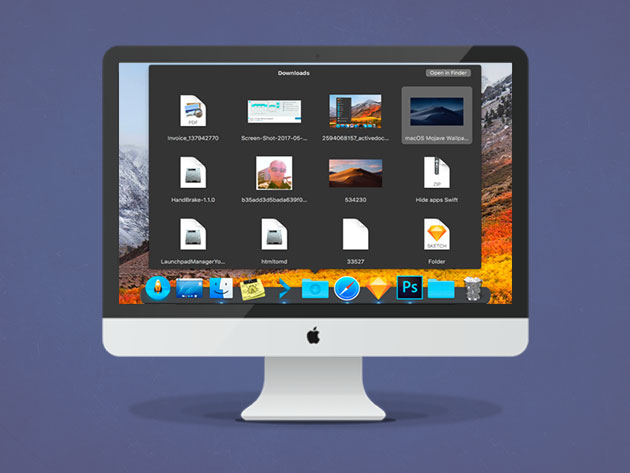
Apple invests thousands of hours into making their experiences seamless and intuitive, earning Apple its reputation for creating products and apps that “just work.” However, the dock on MacOS, one of its core experiences, leaves much to be desired, especially if you’re migrating from a Windows or Linux environment. Thankfully, ActiveDock resolves these issues for just $26.67.

ActiveDock is a replacement for the stock MacOS experience. On the surface, it looks like the regular dock, but it’s packed with additional features that make accessing your favorite files and apps easier. For example, Window Preview lets you quickly navigate to the windows you want to see, while Groups and Folders better organize your dock elements and reduce clutter. Best of all, ActiveDock lets you install custom icons and themes, letting customize it to fit whatever aesthetic you’re looking for.

If you’re hoping for an intuitive way to navigate between folders and apps, the stock Mac dock just won’t cut it. Instead, get yourself a fancy, customizable ActiveDock for just $26.67 CAD [$19.99 USD], or 60% off.

Like this deal? Check out Vault, the best way to secure your online data for just $9.99/mo.

 
ActiveDock For Mac: Lifetime License – $19.99

See Deal

The post ActiveDock (just $27) is what the stock MacOS dock should’ve been appeared first on MobileSyrup.

22 Mar 17:36

Google Assistant complimented Cortana to tease Stadia gaming service

by Igor Bonifacic

Earlier this week. Google unveiled its Stadia game streaming service.

It goes without saying, but it’s likely Google has been working on Stadia for the past several years. It turns out the company has been teasing the service for a while, as well.

On Friday, Reddit user ‘dustxx’ shared a response Assistant used to give when users asked about Cortana, Microsoft’s digital assistant.

“Cortana is so cool. She gets to assist in the Halo games and in real life. Maybe someday I can help out in video games too 😊

It just so turns out that helping in video games is exactly what Assistant will get to do once Stadia launches later this year. Google’s Stadia controller features a dedicated Assistant button, which allows users to ask Assistant for help if they’re stuck on a particularly tricky puzzle or boss.

Following the announcement, Assistant now says: “Cortana works for Microsoft. Plus she’s got her own video game franchise, she’s got it all 😊

Well played, Google.

Source: Reddit

The post Google Assistant complimented Cortana to tease Stadia gaming service appeared first on MobileSyrup.

22 Mar 17:36

Activate a new BYOP plan with Freedom and get $10 off for 12 months

by Jonathan Lamont

Shaw-owned Freedom Mobile is offering a discount for customers who bring their own phones (BYOP), plus a 3GB data bonus and more.

Right now, when you activate on select Data + Talk, Data or Home BYOP plans with Freedom, you can get up to $10 off for 12 months.

Data + Talk plans include the Big Gig + Talk 5GB, 10GB, 15GB and 20GB plans. All plans come with unlimited Canada-wide calling and global text, the listed data amount plus a 3GB bonus.

That means you can get as much as 23GB of data.

Additionally, all those plans receive a $10 credit each month for your first 12 months. Users can also get another $5 off per month with Freedom’s Digital Discount, which requires you sign up for Auto Pay. The $10/12 month discount is only available on new Pay Before or Pay After lines.

Freedom BYOP discount

All in, that means users can get the Big Gig + Talk 5GB plan, regularly $55 per month, for $40 for 12 months. Plus, the 3GB bonus makes it an 8GB plan.

The $10/12 month discount and 3GB bonus also apply to Freedom’s Big Gig 10GB, 15GB and 20GB data plans. These plans don’t include a calling package — users pay $0.05 per minute for Canada-wide calling — but do have unlimited global texting.

Freedom’s 1GB Data plan includes a $5 discount for the first three months instead.

Freedom’s ‘Home’ plans can get a $5/12 month discount

Finally, Freedom’s ‘Home’ plans include $5/3 month discounts on the Home 250MB plan, which includes 250MB of data, 100 minutes of Canada-wide talk, unlimited incoming calls and unlimited Canada and U.S. texting. The Home 500MB plan, which offers 500MB of data, unlimited Canada-wide talk and unlimited Canada and U.S. texting also benefits from the $5/3 month discount.

The Home 2GB plan offers a bonus 2GB — giving you 4GB in total — plus $5 for the first 12 months of your plan.

Freedom also has a limited-time LTE + 3G promo, which nets you 3GB of LTE data, 6.5GB of 3G data with no overage fees, unlimited Canada-wide talk and global text for $43 per month after the Digital Discount. Subscribers can also get the $5/12 month discount on this plan.

Like the $10/12 month discount, the $5/3 month and $5/12 month discounts appear as $5 credits on your bill for the first three and twelve months respectively.

On top of this, Freedom has a ‘Multi-line Offer’ that nets users a 15 percent promotional discount plus a $2 per month ‘Better Together’ savings discount. Coupled with the $5 Digital Discount, that means you can get the Big Gig + Talk 10GB $65 plan for $48.25 per month when you activate more than one line.

You can learn more about these deals and discounts over on Freedom’s website. These prices and offers may vary depending on location.

The post Activate a new BYOP plan with Freedom and get $10 off for 12 months appeared first on MobileSyrup.

22 Mar 17:35

Here’s what to expect from Apple’s streaming video service event

by Patrick O'Rourke
Apple TV

With Apple’s big streaming video service reveal event just around the corner on Monday, March 25th at 10AM PT/1PM ET, now is a good time to take a look back at the rumours surrounding the platform.

Along with the streaming service, it’s also possible the company has a few other surprises in store, including a news subscription platform and a final release date for its AirPower charging mat.

Here’s everything we know so far about the upcoming event.

Movie and television streaming service

Following Planet of the Apps and Carpool Karaoke, two original Apple TV shows that can only be described as critical failures, it’s somewhat difficult to get excited about the tech giant’s expanded original content ambitions.

This apprehensive feeling surrounding the streaming platform is exacerbated by reports Apple is “difficult” to work with and “conservative and picky” when it comes to the original content currently in development for the service.

That said, rumours indicate there are dozens of television shows and movies in the works, including the Stephen Spielberg-helmed Amazing Stories, an untitled CIA drama with Brie Larson, an Untitled M. Night Shyamalan-directed series and a high-profile project co-staring Reese Witherspoon and Jennifer Aniston.

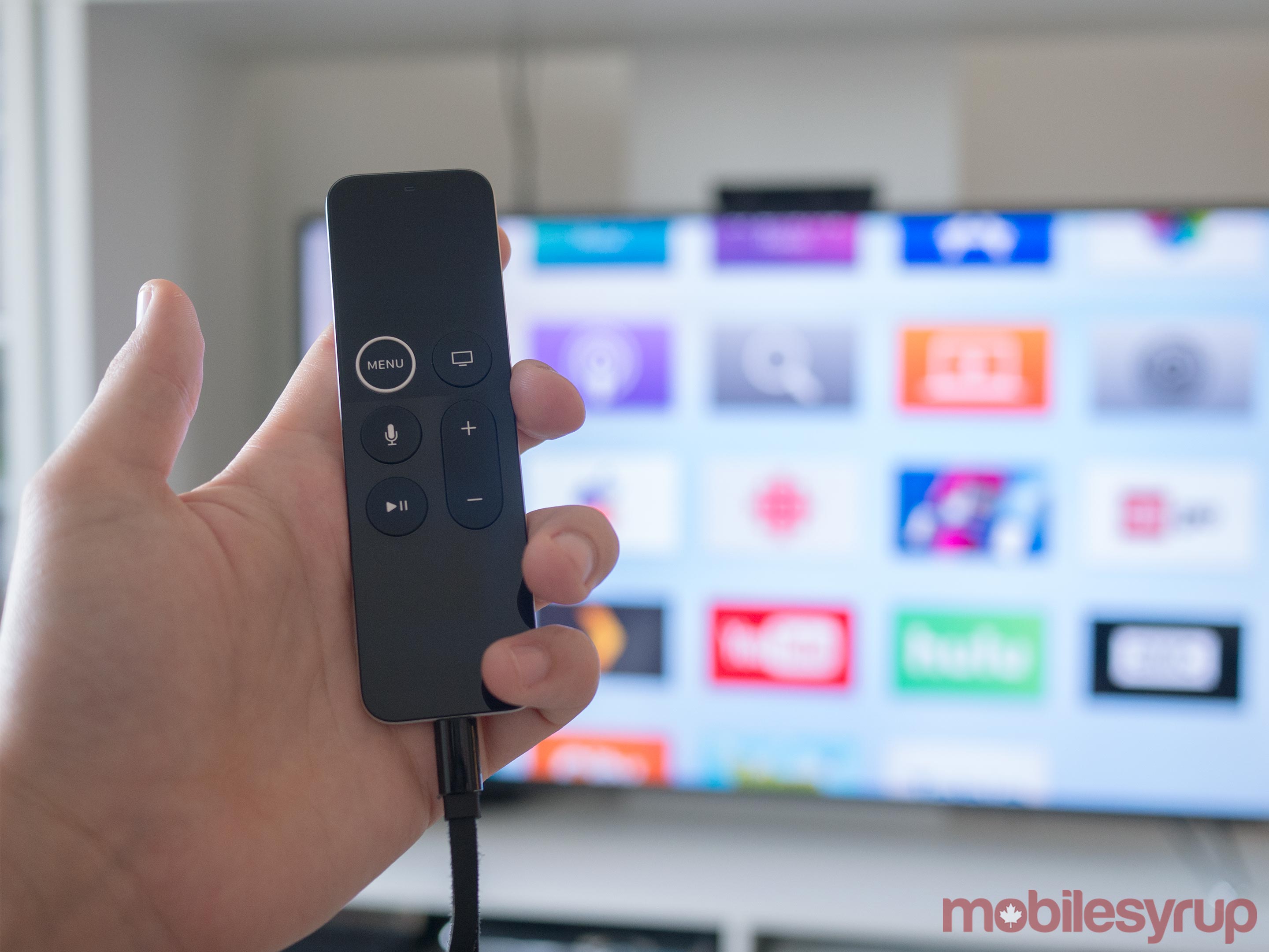
Apple TV 4K Siri Remote

In total, Apple is rumoured to have spent over a billion dollars in 2018 on the development of original video content. While a massive number on its own, Netflix, arguably Apple’s main competitor in the streaming video space, spent $8 billion USD (roughly $10.7 billion CAD) during the same year.

Given the ‘family-friendly’ image, Apple aims to convey with its products, it’s likely that the company’s streaming platform will make an effort to push the same ethos. Further, the relatively big names involved in the tech giant’s original content plans, including Steven Spielberg, JJ Abrams and Oprah, indicate Apple is going after crowd-pleasing concepts rather than the gritty nature of HBO or Netflix’s top-tier productions.

For a complete list of all the original programs that have leaked over the last few years, check out this Wikipedia page.

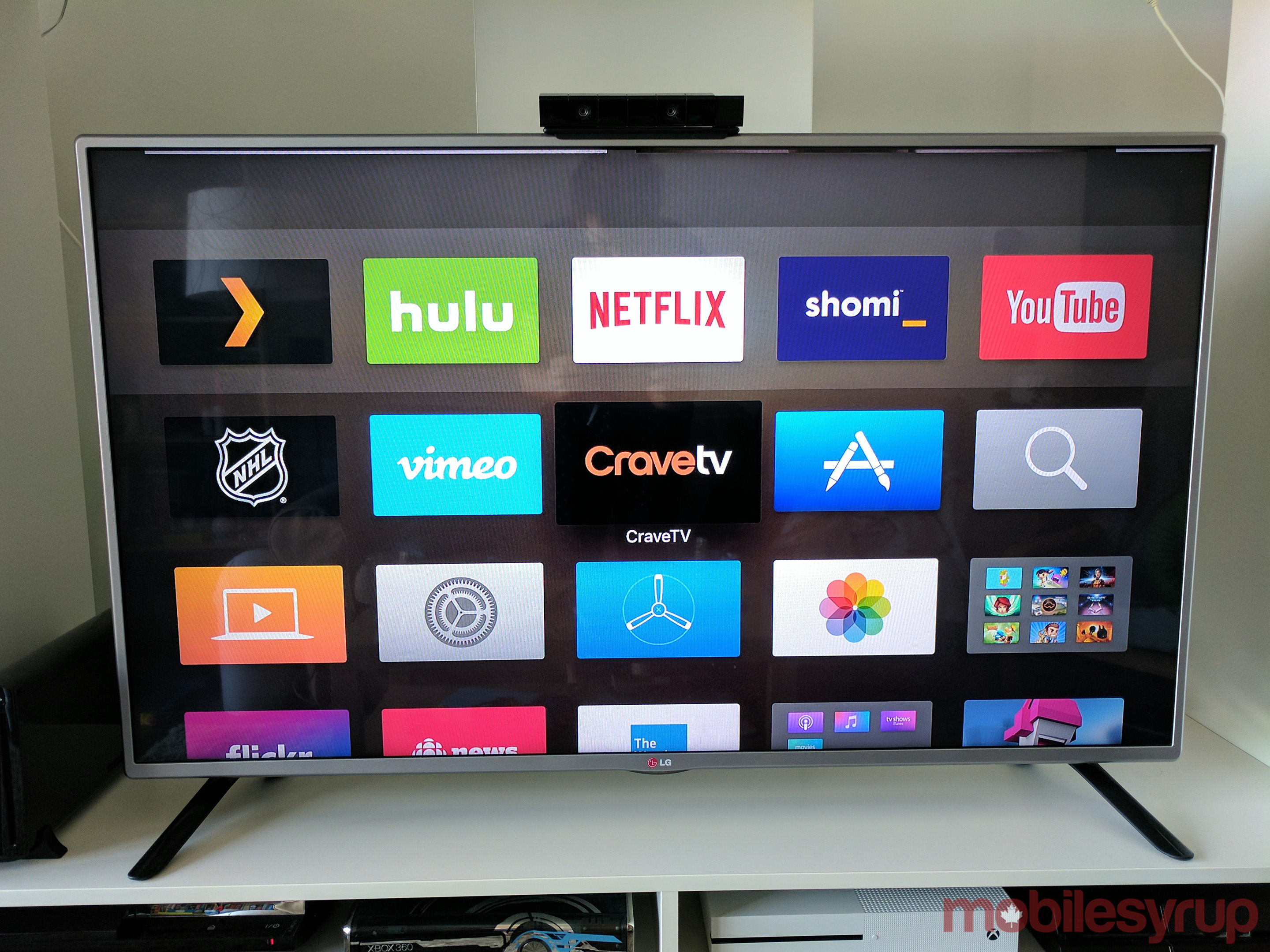
Along with its own original content, Apple is also reportedly partnering with established premium video platforms like HBO, Showtime and Starz. While this might be the case in the U.S. and other regions where Apple’s streaming service is set to launch, the situation in Canada will likely be different.

It’s unlikely that Apple’s service will feature all or even any of these premium providers in the Canada as Bell holds the rights to HBO’s content in Canada following the signing of a licensing agreement back in 2015.

Showtime’s content remains mostly exclusive to Bell, as a result of deal signed back in 2015 between the two companies. That said, popular Showtime television show Shameless is available on Netflix in Canada.

Starz is in a similar situation, with the premium television service signing an “exclusive long-term alliance” with Bell in January 2018 to launch its content in Canada. Bell recently announced that most of Starz’s content on its Crave streaming platform will cost an additional $5.99 CAD per month on top of its standard $9.99 CAD subscription fee as of March 1st.

As a result of these Canada-specific content deals and licensing agreements, it’s possible Apple could plan to delay the release of its streaming service north of the U.S. border until the majority of its original content is ready to drop. On the other hand, there’s also a likelihood these deals aren’t entirely exclusive and that Apple could find a way license at least some television shows and movies from HBO, Showtime and Starz.

To the surprise of absolutely no one, Netflix recently confirmed that it isn’t partnering with Apple’s streaming platform in any way.

Along with Apple’s streaming TV and movie app being available on Apple TV and televisions from various manufacturers, there are also rumours circulating that the company could be working on a low-cost streaming stick to expand the reach of its upcoming streaming video platform.


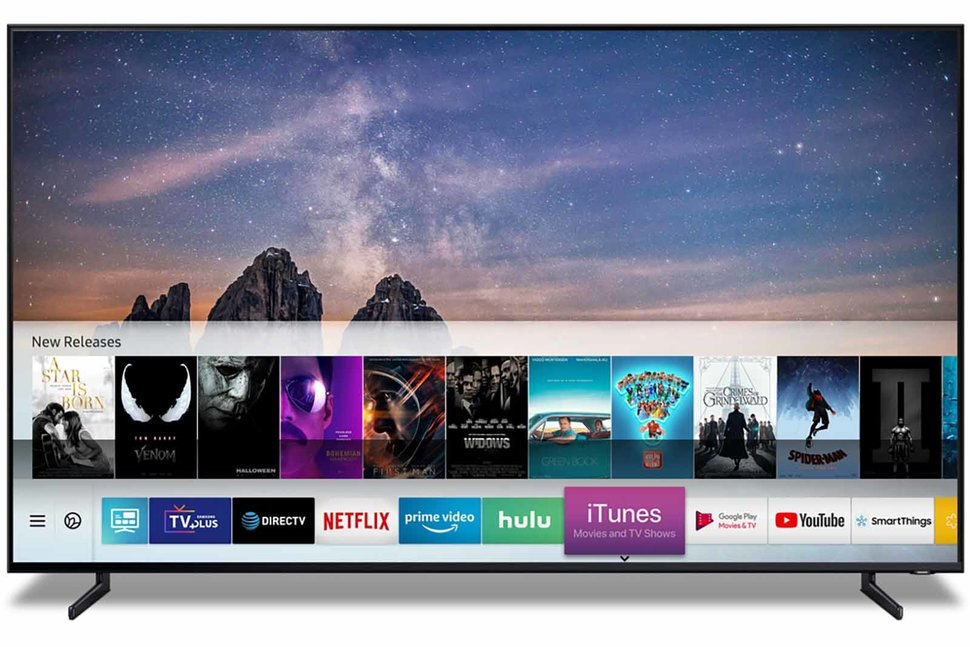
We already know that Apple’s ‘TV and Movies’ app is coming to Samsung televisions. Apple’s AirPlay 2 wireless casting protocol is also releasing on a number of manufacturer’s televisions, including TVs from LG, Samsung, Sony and Vizio.

These two uncharacteristic moves by Apple, which are examples of the tech giant’s walled-garden approach to software begining to crumble, is an effort to expand the reach of its streaming video service. This is similar to how Apple offers iTunes on Windows and Apple Music on Android.

While Apple will probably play a sizzle real of clips related its original content during the company’s keynote, reports indicate the actual service won’t launch until sometime this summer or in the fall. It remains unclear how much Apple’s video platform will cost and whether it will be bundled with Apple’s upcoming news subscription offering.

News subscription platform

Along with its streaming service, there’s a possibility Apple could also reveal more information about its rumoured news subscription platform.

Apple plans to launch an all-in-on subscription platform that includes Texture’s magazine offerings and various news sources. The company purchased Texture, which was partially owned by Rogers, back in March of 2018.

The company reportedly will allow publications to charge subscription fees through the platform but also aims to take a 50 percent cut of all revenue earned through the service. Although reports indicate many publications have signed up for the platform, notable publications such as The New York Times and The Washington Post still haven’t come to an agreement with Apple.

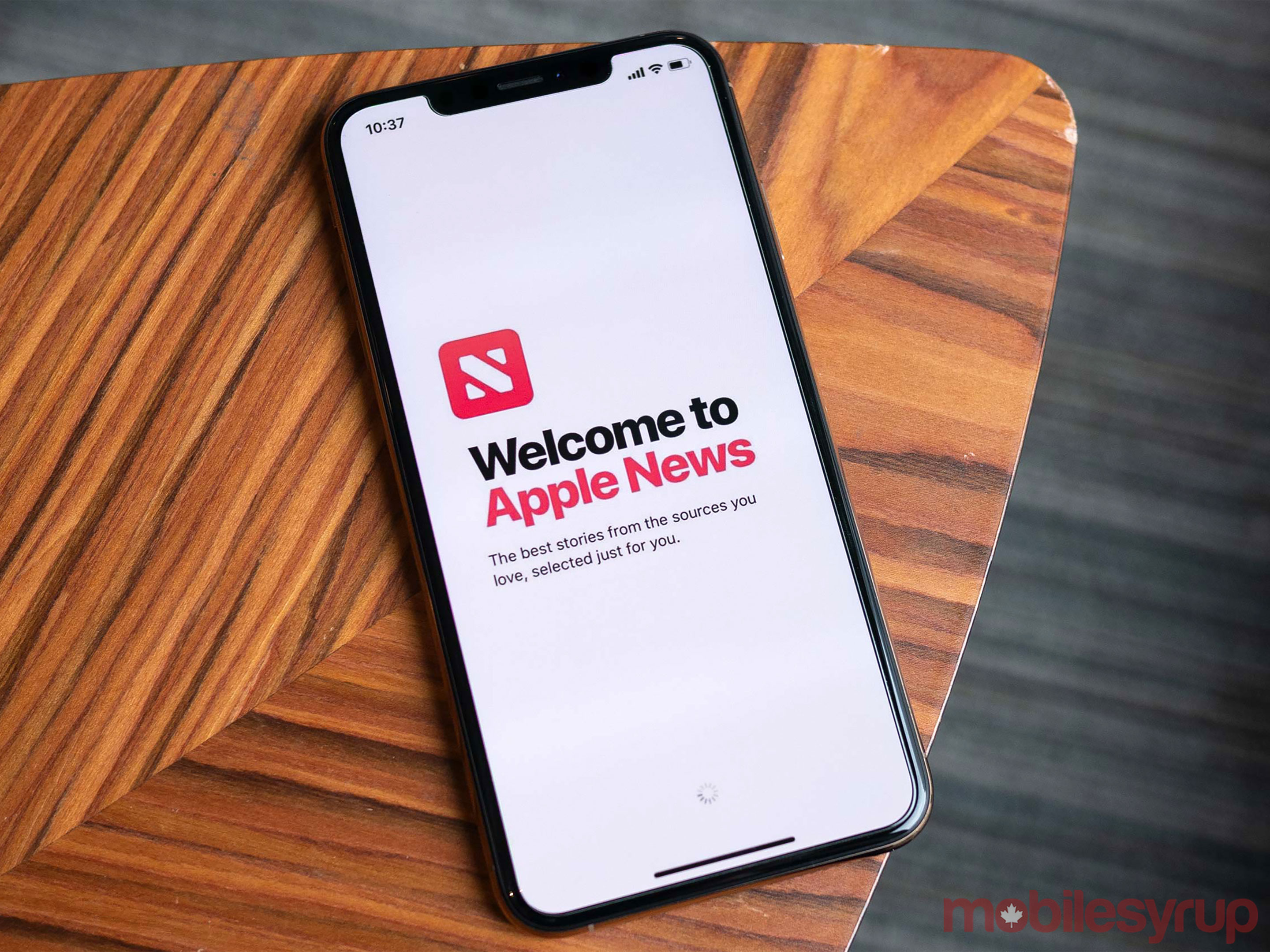
It’s also possible Apple will finally publically release Apple News in Canada either during the company’s Monday keynote or shortly after. While various publications reported weeks ago that Apple News is now officially available in Canada, that isn’t entirely true.

Tim Cook

The news aggregation platform is only available in Canada if you have the latest iOS 12.2 public beta installed on your device. It’s also worth noting that it the current Canadian version of Apple’s News doesn’t feature many Canadian publications. As it stands right now, only CTV News, TSN, The National Post, CBC News and the Toronto Star are present in Apple News in Canada.

There’s also a possibility we could catch a glimpse of AirPower, Apple’s often-delayed Qi wireless charging pad, as well as an iPod Touch with revamped internals, at the upcoming keynote.

I’ll be on the ground at Apple’s upcoming event next week bringing you all the news directly from the keynote.

Source: Bell, The Globe and Mail, (1), The Information, Wikipedia, Twitter (@stroughtonsmith)

The post Here’s what to expect from Apple’s streaming video service event appeared first on MobileSyrup.

21 Mar 23:04

TwoTone is a tool to sonify your data

by Nathan Yau

TwoTone, by Datavized and supported by the Google News Initiative, is a straightforward tool to sonify a dataset. Upload your data, select the metric, speed, and instrument, and you get a tune output.

If you thought visualization was tricky perceptually, then you’re in for a treat with sonification. The two most useful examples I can think of off-hand were event-based, so maybe start with something like that.

Tags: Datavized, Google, sonification

21 Mar 22:24

Germany’s culture of remembrance in numbers

Two weeks ago, we used Google Books Ngram data to explore how often English book authors used terms like “thirties”, “forties”, etc. But the Ngram viewer doesn’t just offer a giant English book corpus. It also lets us search through books in German, Spanish, Hebrew, Russian, etc. So let’s compare how words are used in different languages!

Wait a second. That’s the whole point of different languages, isn’t it: That words are different. Hardly comparable. Even place names (New York, Nueva York, Нью-Йорк) or people’s names (Jesus, Jésus, ישו) are not the same. So what can we compare?

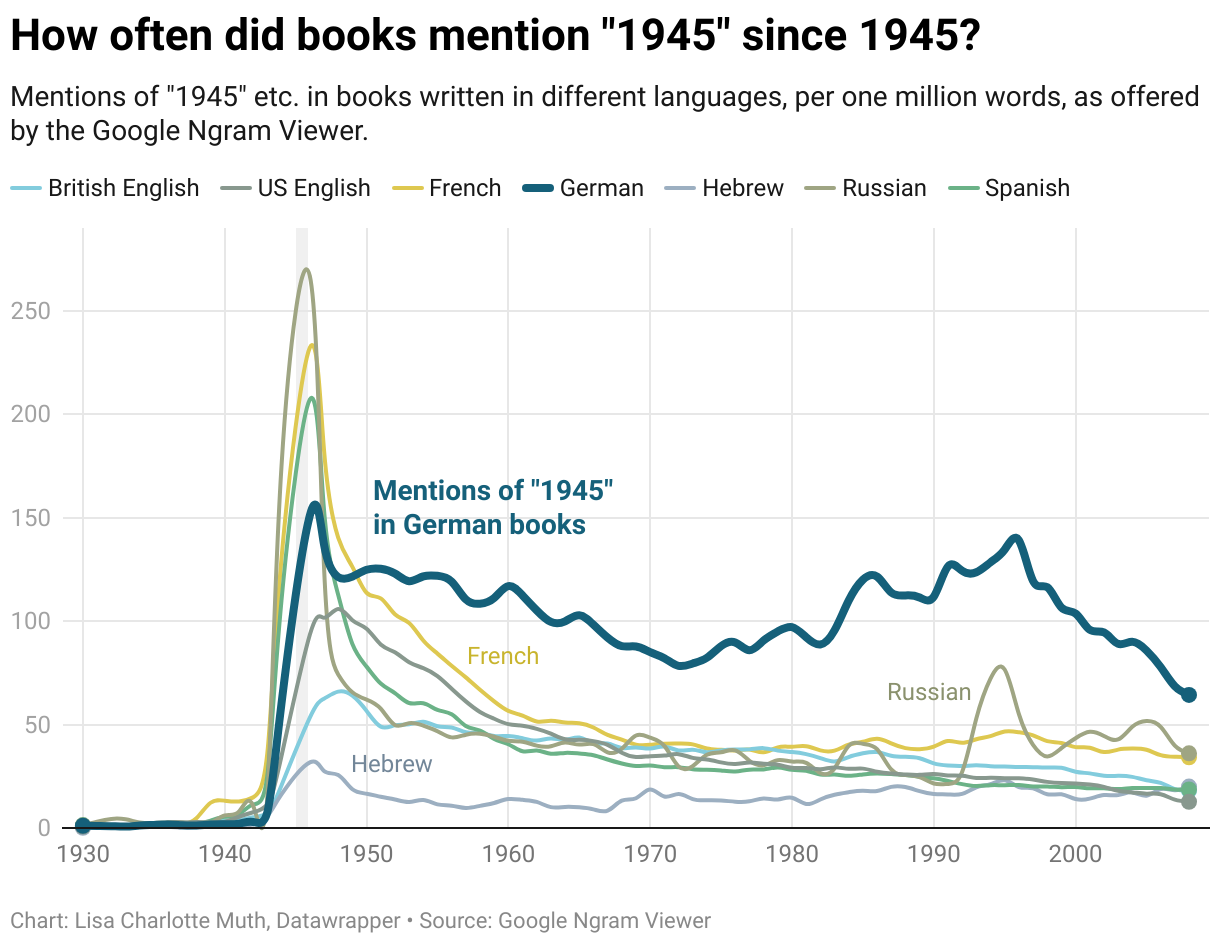
I thought about it. And I came up with an answer: Numbers! Numbers are written the same in all the languages that the Ngram viewer offers us to explore. Which means we can create a chart like this:

It’s hard to draw lots of conclusions from of this chart: Maybe Hebrew books refer to the end of the second World War differently compared to German books. Maybe Russian books contain “the end of the second World War” while German books contain “1945” – since most Germans know what that number entails.

But if we want to, we can read out of this chart that Germans didn’t stop referring to the World War for a long time; that only recently we’ve seen “1945” mentioned in books less than in the last sixty years[1]. It visualizes what Germans call “Erinnerungskultur” or “Culture of Remembrance”: not ignoring the past (even when it’s hard), but building monuments and museums, teaching it in schools, making movies about it. And writing about it in books.

Getting the numbers

To get the Ngrams viewer numbers, I used a Python script by Matt Nicklay called google-ngrams. We tell the script “please download all Ngram numbers for the term 1945 in the French book corpus between 1930 and 2008” and it gives us a csv with our numbers. Sweet.

But because it’s a bit exhausting doing this for all our different languages by hand, my coworker Gregor helped me write a Bash script. We tell the script “Please do the thing we just told the Python script to do for the French language and also for the English language, the German language, the Russian language, …”. So the Python script starts for French, then it generates a csv, then it starts again for English and generates a second csv, etc:

gif of the process of getting the numbers

But because it’s also exhausting to join these final csvs by hand, the Bash script does that for us with a tool called csvkit. That’s why at the end of the GIF above, you can see all csv’s disappearing into one csv, all-1945.csv. Here’s what it looks like:

gif of the process of getting the numbers

You can find the whole code in this Github repository. Clone it, open your terminal and type “make” to run it for yourself.


Next week I’ll be on vacation – so my coworker Elana, who brought you this Weekly Chart gem a while ago, will take over. Thanks, Elana! And I’ll see you all in two weeks.


  1. The Ngram viewer only gives us numbers up to 2008.

21 Mar 22:22

Google Announces Stadia, a Video Game Streaming Service Designed to Change the Way Games Are Enjoyed

by John Voorhees

Google wants to change the gaming landscape, and it’s not hard to understand why. After all, the game industry rivals Hollywood in size by some measures.

At a packed keynote event at the Game Developers Conference this week, Google unveiled Stadia, a new game streaming service coming later this year that seeks to put an end to expensive consumer hardware, large game downloads, patches, and other frustrations that accompany consoles by moving to a cloud-based system. The company also thinks it can enhance the gaming experience by bringing gamers and YouTubers closer together. The goals are ambitious and streaming feels like the future of gaming, but Google’s presentation left as many questions unanswered as answered.

At the heart of Stadia is a cloud-based gaming system designed to eliminate the need for a game console. Instead, games will run on the company’s custom servers and be delivered to players through its Chrome browser.

Last fall, the company tested its system with Assassin’s Creed Odyssey, a triple-A game from Ubisoft. Though not stated at the time, the test was part of the development process for Stadia. According to Google, that test showed that it could deliver a complex console game like Odyssey at 1080p resolution and 60fps through a browser.

Google says that when Stadia launches later this year, it will be able to deliver 4K HDR games at 60fps and in the future, at 8K HDR and 120fps, which would be a remarkable achievement. The company says it’s possible as a result of its robust network of servers that is unmatched by any other company.

By using Chrome as the point of entry, Stadia promises a premium gaming experience to a wide variety of platforms: phones, tablets, PCs, and TVs. A demo during Google’s presentation showed exactly that as the presenter moved from device to device, seamlessly picking up where he left off each time.

Switching between platforms was assisted by Google’s new controller, which was the only consumer-facing hardware discussed at the event. The controller, which incorporates elements of Xbox, PS4, and Switch controllers, operates over WiFi. In addition to the expected array of buttons and analog sticks, the Google controller features a button for capturing game footage to YouTube and a Google Assistant button that developers can use to provide in-game assistance to players who need help. First impressions of the controller have been positive, but Google hasn’t announced pricing for the controller yet.

Stadia will also introduce technology to allow YouTubers to share links to specific spots and states in games, a feature the company calls State Share. By following the link, and players will be able to experience the same part of a game they just watched their favorite YouTuber play. The feature could provide a new, more direct way for YouTubers like MatPat, who participated in the presentation, to connect with fans and for game developers to sell games. Players can also drop into a game to play alongside their favorite streamers with Crowd Play, a new take on current lobby systems used in multi-player games.

For all the excitement over the technology though, Google didn’t have much to say about the games that will be on the platform at launch and said nothing about what Stadia will cost. Assassin’s Creed Odyssey was the only game shown onstage and the single game that’s playable in the demo areas of GDC. Although id promised Doom Eternal during the keynote, the company had nothing to show off – nor did any of the other 100+ studios that Google says have its Stadia developer kit. That could change because Google has created a game studio called Stadia Games and Entertainment that’s being led by industry-veteran Jade Raymond who has worked at Sony, Electronic Arts, and Ubisoft, but it didn’t have anything to announce yet.

It was also curious that Google said nothing on stage about what kind of Internet connection speed is necessary to enjoy games at the resolutions Google expects to offer. Since the presentation, Google has been more forthcoming on the issue telling The Verge and others that approximately 25Mbps download speeds will be required for 4K, 60fps streaming. That will be a limiting factor in many parts of the world, though 5G wireless adoption may help mitigate the issue over the long term.

Having sat through Google’s presentation, it’s clear that the company is serious about Stadia. There are still many open questions, technical challenges, and competitors on the horizon like Microsoft, any of which could stop Stadia in its tracks. Despite my skepticism about Stadia’s claims though, the promise of the service is so compelling that I hope Google can pull it off and will be paying close attention when Stadia launches later this year.


Support MacStories Directly

Club MacStories offers exclusive access to extra MacStories content, delivered every week; it's also a way to support us directly.

Club MacStories will help you discover the best apps for your devices and get the most out of your iPhone, iPad, and Mac. Plus, it's made in Italy.

Join Now
21 Mar 22:22

Microsoft Surface Headphones im Test: Windows auf die Ohren

mkalus shared this story from SPIEGEL ONLINE - Schlagzeilen.

Microsoft wagt sich mit den Surface Headphones reichlich spät in einen Markt, der längst von anderen dominiert wird. Ausgehend von seinen Headsets für Piloten hat der Hifi-Konzern Bose bereits 2000 die ersten Kopfhörer auf den Markt gebracht, die Außengeräusche mit elektronischen Tricks minimierten. Seither wurde das Konzept von etlichen anderen Firmen dutzendfach adaptiert - und nun eben auch von Microsoft.

Die Surface Headphones fallen erst mal durch ihr Design auf. In mattem Hellgrau lackiertes Plastik dominiert über einige Aluminiumakzente. Wer diese Kopfhörer aufsetzt, fällt auf. Ihr Tragegefühl ist angenehm, die Ohrmuscheln legen sich sanft um die Ohren, der dick gepolsterte Kopfbügel verteilt das Gewicht gut über den Kopf.

Erstaunlich für Kopfhörer dieser Preisklasse ist, dass die Surface Headphones im kabellosen Betrieb nur herkömmliche Bluetooth-Audio-Übertragungen ermöglichen. Sie beherrschen weder das von Apple präferierte AAC-Format, noch den auf Android-Smartphones vielfach verwendeten aptX-Standard, die beide eine bessere Audioqualität bei Bluetooth-Verbindungen ermöglichen. Microsoft verschenkt damit einen Teil des Klangpotenzials seiner Kopfhörer.

Trotzdem überraschen Microsofts Kopfhörer mit einem klaren Hifi-Sound, der Bässe dick und manchmal etwas zu weich, Höhen klar und trocken präsentiert. Nur im Mittenbereich fehlt mir, beispielsweise bei "Space Lord" von Monster Magnet, etwas Druck. Die Stereowiedergabe wiederum ist hervorragend und bildet etwa den Flanger-Effekt im E-Piano von Vulfpecks "Dean Town" sehr schön plastisch ab.

Preisabfragezeitpunkt:
19.03.2019, 12:22 Uhr
Ohne Gewähr

ANZEIGE

Microsoft Surface Headphones

Preis:

EUR 379,90

Nicht ganz so perfekt arbeitet die Geräuschunterdrückung. Zwar schirmen die weichen Ohrpolster Außengeräusche schon passiv recht gut ab, und das elektronische System schafft es, beispielsweise das Triebwerksdröhnen in einem Flugzeug auszublenden. Ganz so beeindruckend wie beispielsweise bei Bose-Kopfhörern klappt das aber nicht.

Dafür ist die Akkuleistung ordentlich. Eine 13 Stunden lange Zugfahrt hielten die Surface Headphones mühelos durch, sie hatten danach noch Reserven. Und wenn man sie aufladen will, erledigt man das zeitgemäß per USB-C-Kabel. So ist der Akku im besten Fall nach zwei Stunden an der Steckdose wieder voll.

Etwas empfindlich

Positiv fällt auch das Bedienkonzept auf. Um die Ohrmuscheln sind drehbare Ringe angebracht. Mit dem rechten regelt man die Lautstärke, mit dem linken die Intensität der Geräuschminderung. Die geht ab einem gewissen Punkt dazu über, Außengeräusche sogar verstärkt an die Ohren weiterzuleiten - ein ungewöhnliches Feature.

Sensorflächen auf den Ohrmuscheln ermöglichen einen Aufruf des Google Assistant oder von Siri und die Steuerung von Musik und Anrufen. Schön wäre es, hier die Empfindlichkeit regeln zu können, denn die Flächen reagieren beispielsweise auch dann, wenn man im Liegen versehentlich mit dem Arm darüberwischt.

Sehr gut klappt dagegen das Zusammenspiel mit mehreren Geräten. Die Surface Headphones merken sich bis zu zehn Verbindungen. Im Test klappte das problemlos mit einem Windows-PC, einem Mac-Computer, einem iPhone sowie einem Android-Handy. Software-Updates können derzeit leider nur via Windows 10 eingespielt werden. Theoretisch geht das zwar auch per Cortana-App für iOS und Android, doch die ist in Deutschland nicht verfügbar.

Fazit

Vorteile und Nachteile

Warmer Klang

Hoher Tragekomfort

Gute Akkulaufzeit

Intuitive Steuerung

Geräuschminderung könnte besser sein

Hoher Preis

Der Einstand ist Microsoft gelungen, fulminant ist er nicht. Während der Sound der Surface Headphones sicher viele Freunde finden wird - auch jenseits des Windows-Ökosystems -, könnte die Geräuschunterdrückung noch verbessert werden. Zumal Microsofts Kopfhörer mit einem Listenpreis von 380 Euro kein Schnäppchen sind. Konkurrenzprodukte wie Sonys WH-1000X M3 bekommt man zumindest einige Zehner billiger.

Hintergrund: Produkttests im Netzwelt-Ressort

Über welche Produkte wir in der Netzwelt berichten und welche wir testen oder nicht, entscheiden wir selbst. Für keinen der Testberichte bekommen wir Geld oder andere Gegenleistungen vom Hersteller. Es kann aus verschiedenen Gründen vorkommen, dass wir über Produkte nicht berichten, obwohl uns entsprechende Testprodukte vorliegen.

Testgeräte und Rezensionsexemplare von Spielen bekommen wir in der Regel kostenlos für einen bestimmten Zeitraum vom Hersteller zur Verfügung gestellt, zum Teil auch vor der offiziellen Veröffentlichung. So können unsere Testberichte rechtzeitig oder zeitnah zur Veröffentlichung des Produkts erscheinen.
Vorabversionen oder Geräte aus Vorserienproduktionen testen wir nur in Sonderfällen. In der Regel warten wir ab, bis wir Testgeräte oder Spielversionen bekommen können, die mit den Verkaufsversionen identisch sind. In einigen Fällen kaufen wir Produkte auch auf eigene Kosten selbst, wenn sie bereits im Handel oder online verfügbar sind.

In der Regel werden Testgeräte nach dem Ende des Tests an die Hersteller zurückgeschickt. Die Ausnahme sind Rezensionsexemplare von Spielen und sogenannte Dauerleihgaben: So haben wir zum Beispiel Spielekonsolen und Smartphones in der Redaktion, die wir über längere Zeit nutzen dürfen. So können wir beispielsweise über Softwareupdates, neues Zubehör und neue Spiele berichten oder Langzeiturteile fällen.

Die Kosten für Reisen zu Veranstaltungen, egal ob sie in Deutschland oder im Ausland stattfinden, trägt SPIEGEL ONLINE stets selbst. Das gilt auch dann, wenn beispielsweise aufgrund kurzfristiger Termine ein Unternehmen die Reiseplanung übernimmt.
Veranstaltungen, zu denen wir auf eigene Kosten reisen, sind unter anderem die Messen Ifa, CES, E3 und Gamescom sowie Events von Firmen wie Apple, Google, Microsoft oder Nintendo. Auf Konferenzen wie dem Chaos Communication Congress oder der re:publica bekommen wir in der Regel, wie auch andere Pressevertreter, kostenlose Pressetickets, da wir über die Konferenz berichten und keine klassischen Teilnehmer sind.

Seit Dezember 2016 finden sich in einigen Netzwelt-Artikeln Amazon-Anzeigen, die sogenannte Partner-Links enthalten. Besucht ein Nutzer über einen solchen Link Amazon und kauft dort online ein, wird SPIEGEL ONLINE in Form einer Provision an den Umsätzen beteiligt. Die Anzeigen tauchen in Artikeln unabhängig davon auf, ob ein Produkttest positiv oder negativ ausfällt.

21 Mar 20:19

Dyson brings new smart vacuums, fans and lights to Canada

by Jonathan Lamont

When someone mentions Dyson, you probably think of vacuums. Maybe you also think of sophisticated bladeless fans.

You probably don’t think lights.

On Wednesday, March 20th, the British technology company brought four new products to Canada. They’re available exclusively on its website for now, with retail availability coming over the next few months.

The launch includes two vacuum cleaners, a purifying fan and a smart light. Across all four products, Dyson highlights its engineering prowess. Whether in the intelligent improvements to its handheld vacuum to the stunning LED desk light rated to last 60 years, there’s a clear sophistication the company has created in its products.

A smarter smart light
Dyson Lightcycle

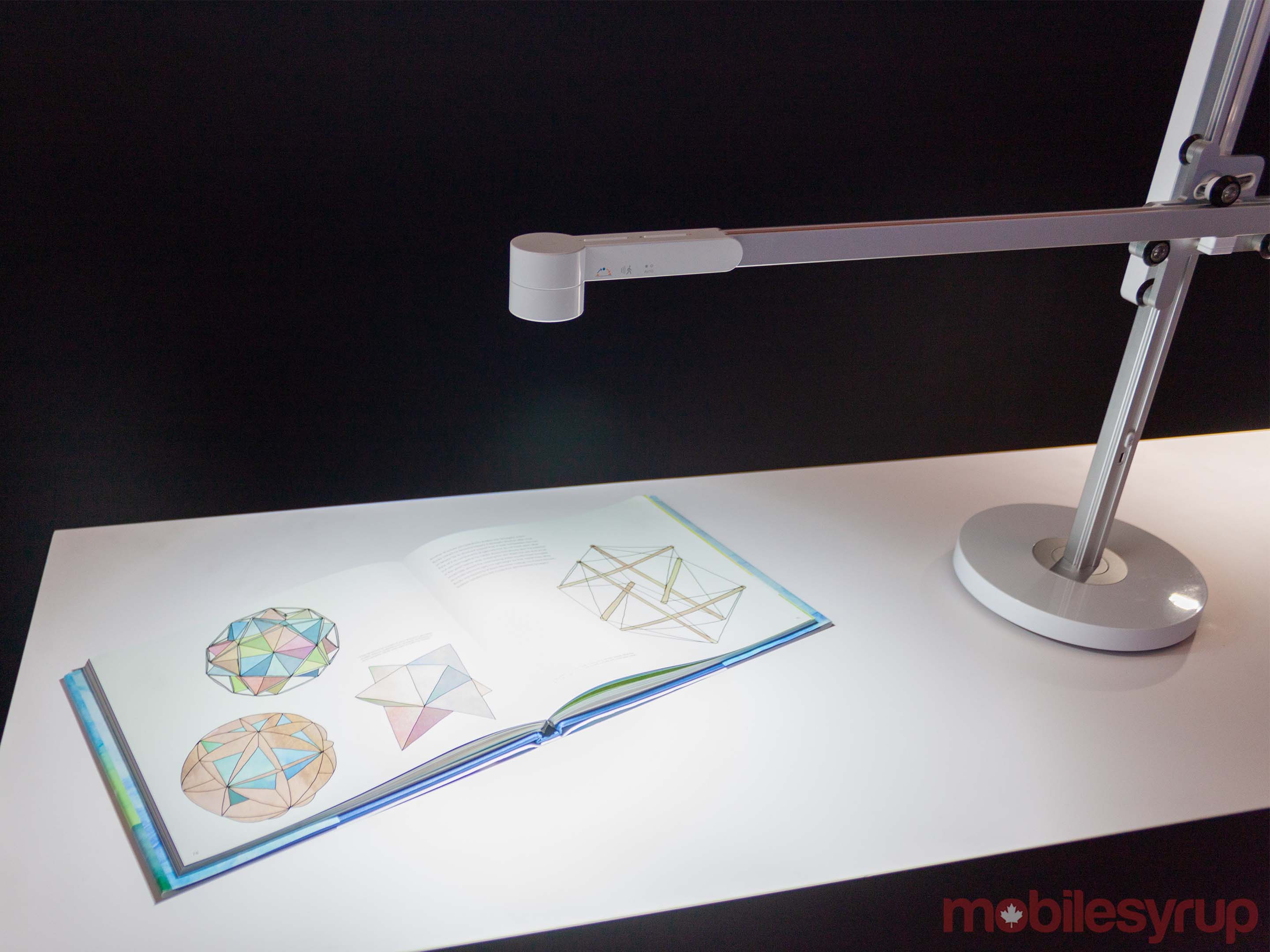
Dyson’s new Lightcycle task light makes some bold claims. Along with boasting a 60-year life span, Dyson says it designed the light to reduce eye strain with glare control, low optical flicker and automatic daylight tracking to ensure you always get the right light.

Further, Dyson’s light factors in a user’s age and adjusts accordingly. The company says a 65-year-old needs up to four times more light than a 20-year-old.

But first, I want to focus on one of the most striking aspects of the Lightcycle: its design.

It’s not wholly new. If you’ve delved deep enough on Dyson’s website, you may have spotted the CSYS task light, which on the surface, looks nearly identical to the Lightcycle.

Both sport the unique cross design that looks almost like the cranes that dot the skylines of Toronto. Unlike those cranes, however, Lightcycle features an impressive range of movement. The vertical arm allows the horizontal arm to glide up and down smoothly. The horizontal arm can also slide forward and backward. Plus, the whole thing pivots 360 degrees on the base.

What’s most remarkable about the system is how smoothly it operates. Adjusting the height of the light is practically effortless.
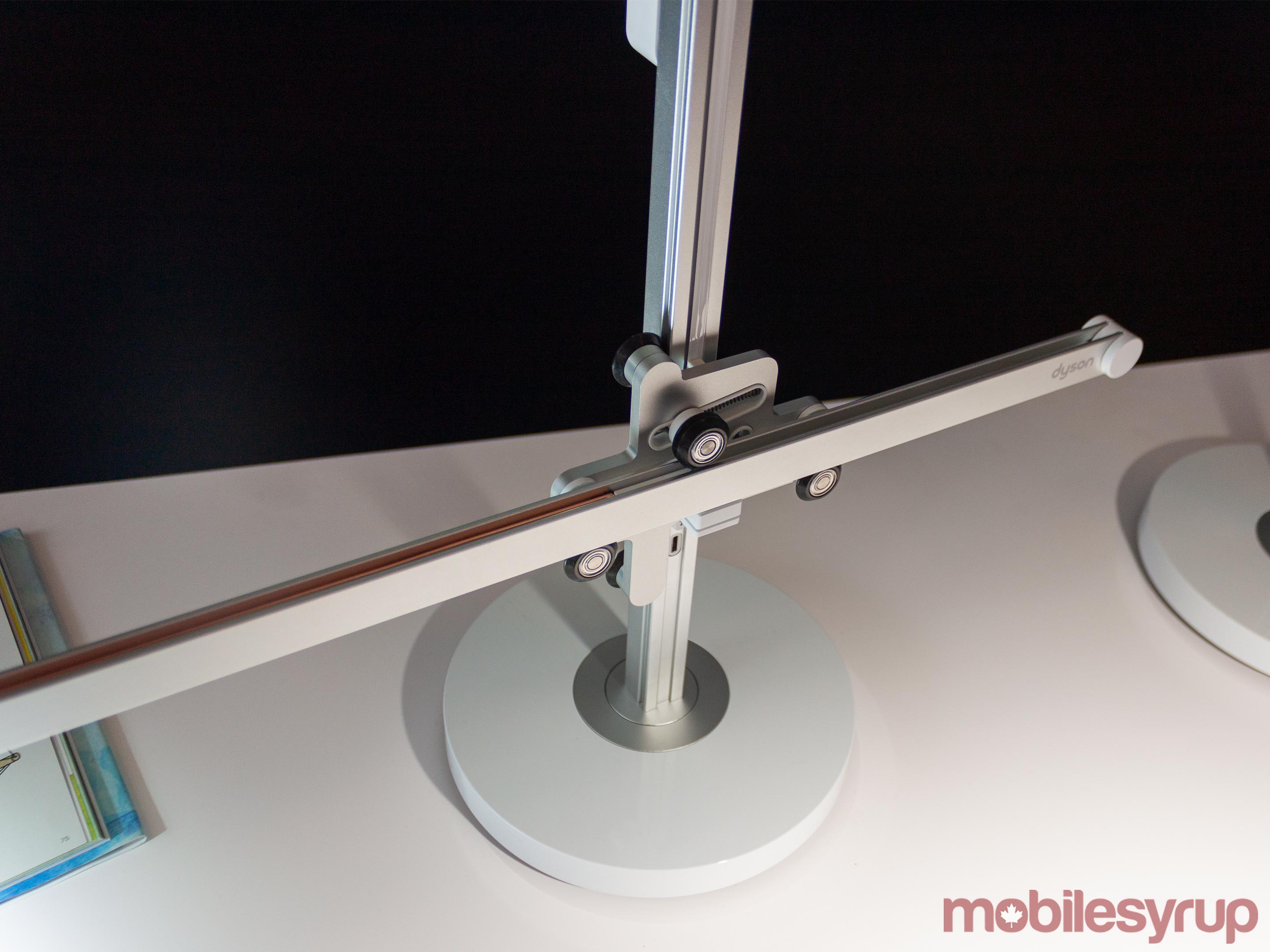
Dyson Lightcycle mechanism

Another significant difference between the Lightcycle and CSYS is the horizontal arm can be removed and swapped around. CSYS didn’t allow users to remove the horizontal arm, which meant if they wanted the light in certain positions, they had to spin the whole thing around and see the back of it.

Lightcycle also maintains one of CSYS’ best features: the heat pipe. Dyson says that when LEDs overheat, they can fade and discolour. So, Dyson’s engineers adapted a technology often used in satellites and created a vacuum-sealed copper tube with a single drop of water inside.

The water droplet vaporizes as the LED warms, carries heat away along the length of the pipe until it dissipates. It condenses into water and returns to the tip of the tube, where the process repeats. Dyson says the system uses no extra energy and is why the Lightcycle can maintain its brightness and light quality for 60 years.

On top of this, Dyson added several smart light features in Lightcycle. Users can control light temperature and brightness directly on the light, with the Dyson Link app, or sync it to the daylight in their location.

Additionally, the Lightcycle task light features three warm and three cool LEDs that work in tandem to simulate daylight colour temperatures ranging from 2,700 to 6,500 Kelvin.

However, the breathtaking engineering doesn’t come cheap. Lightcycle starts at an eye-watering $799.99 for the desktop variant. There’s also a taller floor variant for $1,199.99. Both options are available in silver and black colours.

Bigger brain, better clean
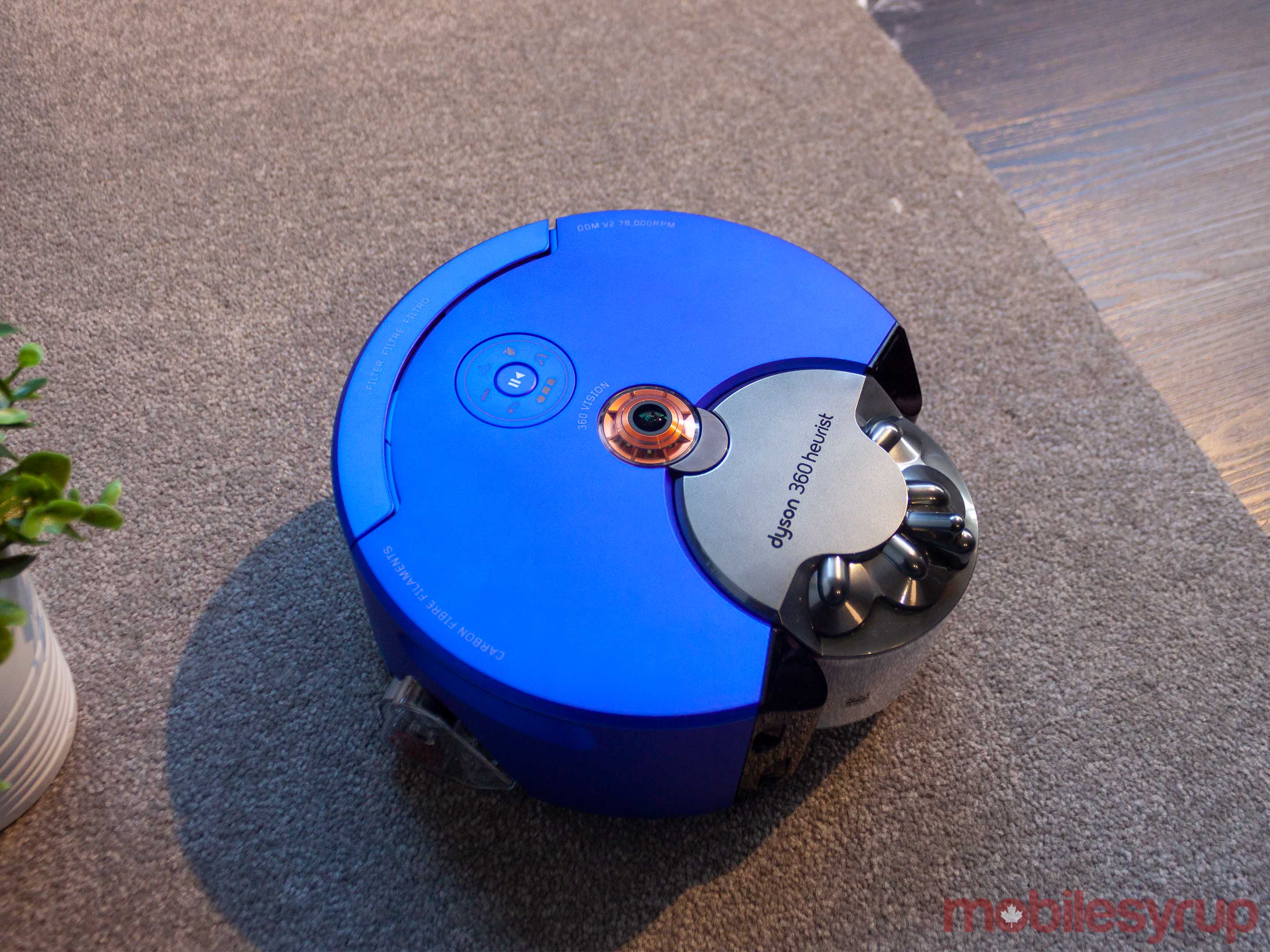
Dyson 360 Heurist

Along with the sophisticated new task light, Dyson unveiled a new robot vacuum.

Dubbed the 360 Heurist, Dyson says the new robot vacuum has 20 percent more suction and 20 times more memory than its predecessor.

On the top of the Heurist, there’s a fish-eye hemispheric lens that allows the robot to see 360 degrees and interpret its surroundings. Dyson calls it Simultaneous Localization and Mapping (SLAM) technology. The robot uses this to measure travel distance, so it always knows where it is in the room.

Dyson 360 SLAM module

Dyson described the process to me as similar to sailors using the stars to navigate on the ocean. The Heurist marks important reference points throughout your home — photos on the wall, lights on the ceiling — to figure out where it’s going.

Additionally, Dyson built an LED light ring around the SLAM module to enable low-light navigation.

The company coupled the SLAM module, along with several obstacle, drop, wall and long-distance sensors, with learning behaviour. As the robot cleans your house, it learns your home.

Dyson 360 Heurist charging pad

It also maps your home as it goes. Users can view the map in the Dyson Link app and designate different cleaning levels for different areas. For example, you can tell the robot to use its ‘low’ mode in your office where there isn’t as much to clean, but vacuum the hallway on ‘high.’

A quad-core processor and 10GB of RAM power the Heurist. Plus it has 32 times more long-term memory for storing maps and learning the best cleaning patterns for your home.

The 360 Heurist retails for $1,119.99 starting now.

A vacuum that knows how to clean
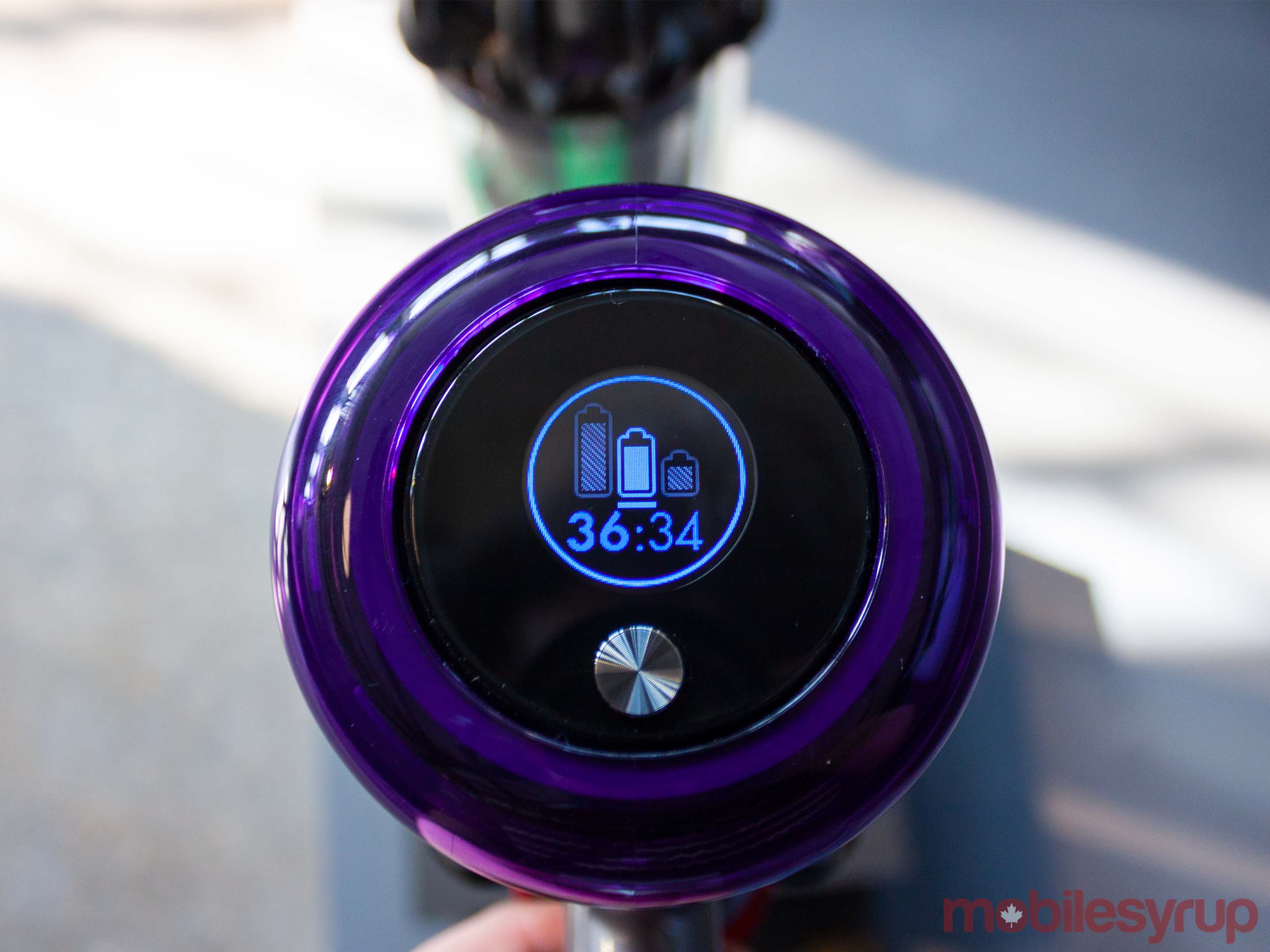
Dyson V11 LCD panel

Dyson also launched its V11 Absolute cord-free vacuum. On the surface, there’s not a whole lot different from the V10, but it’s what’s inside that counts.

First up, Dyson increased suction by 20 percent and the new V11 digital motor spins at up to 125,000rpm.

However, brains beat brawn and, sheer power aside, the V11 Absolute is one smart vacuum. It’s got several sensors in the head and motor that monitor suction.

The sensors in the vacuum’s head can also detect what kind of surface you’re vacuuming, ramping up the motor for more suction on carpet and toning things down on hard floors where it doesn’t need as much power.

There are several benefits to this, first and foremost that it takes the guesswork out of vacuuming. Users don’t need to figure out whether they need to use ‘Eco’ mode or ‘Boost’ mode. The vacuum does it for them.

It also helps increase battery life as the vacuum learn how it works over time and can more accurately calculate the remaining battery charge.

Plus, a new LCD display built into the vacuum lets users know how much time they have left on a charge and if something goes wrong. For example, if you suck up a sock with the vacuum, it’ll detect there’s a blockage and instruct users how to disassemble the vacuum to find and remove it.

The V11 is available in two variants starting at $799.99.

Purify your air
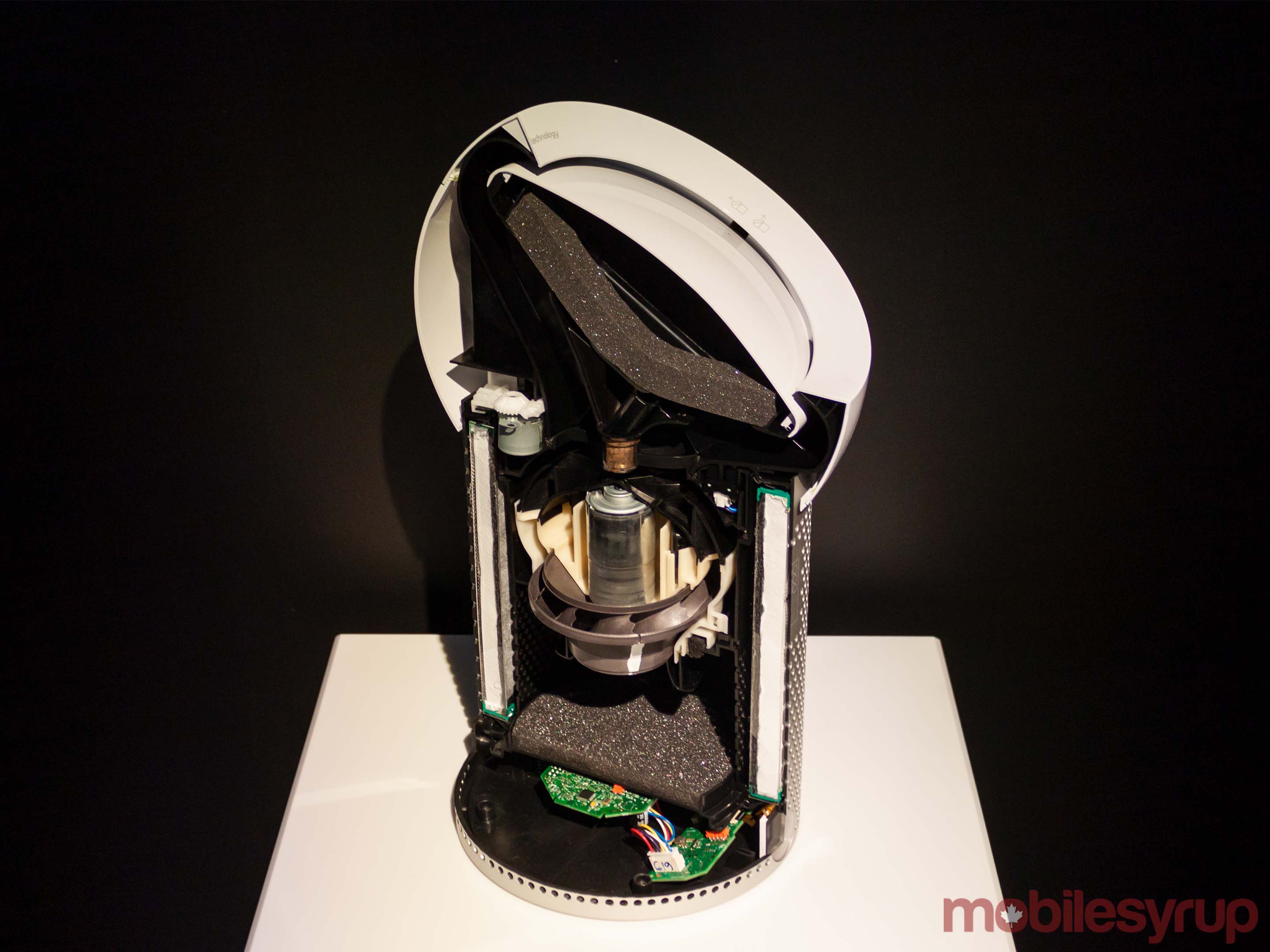
Dyson Pure Cool Me air purifier cross view

Last, but certainly not least, Dyson unveiled its ‘Pure Cool Me’ personal air purification fan.

It features a sealed HEPA filter that captures 99.97 percent of particle pollutants as small as 0.3 microns — particles 300 times narrower than a human hair.

Additionally, Dyson designed the Pure Cool Me with acoustics in mind. It’s astonishingly quiet for the amount of air it pushes out.

Speaking of which, Dyson based its design for the fan on the aerodynamic properties of the Harrier Jump Jet. The company calls it ‘Core Flow’ technology.

The fan emits two jets of air at the top and bottom of the device. The convex surface allows the air jets to converge, forming a high-pressure core. This allows the Pure Cool Me to project a precise stream of air at several angles. Plus, users can adjust the flow by merely sliding the convex surface.
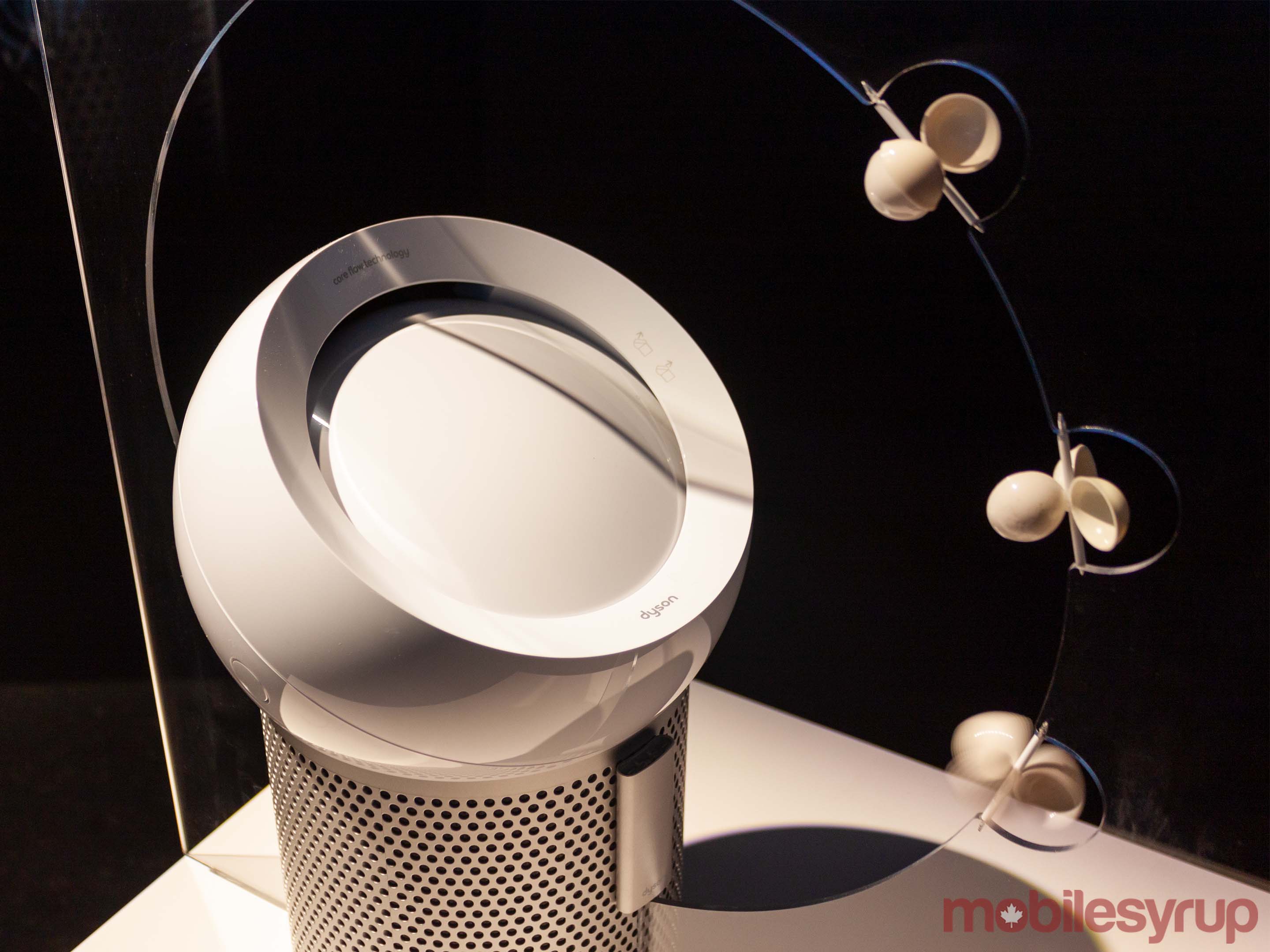
Dyson Pure Cool Me

While the Pure Cool Me doesn’t link up with your smartphone, it does have some smart features. Ambient light sensors will dim the LCD screen when a room gets dark. Users can also set sleep timers to control when the fan runs at night. Finally, the LCD also shows everything you need to know, from airflow speed to filter health.

Dyson’s Pure Cool Me starts at $449.99. It, and all the other products Dyson announced, will be available on the company’s Canadian website.

The post Dyson brings new smart vacuums, fans and lights to Canada appeared first on MobileSyrup.

21 Mar 20:16

Here’s what’s coming to Bell Media’s Crave in April 2019

by Dean Daley

Bell has announced the content that’s coming to its Crave video streaming platform in April. This month features hit shows like Game of Thrones season 8 and Doom Patrol as well as the movie Crazy Rich Asians. 

April 1st

  • I Am Richard Pryor at 9pm ET/ 6pm PT
  • Nurse Jackie: season 1-7
  • Beeba Boys
  • Away From Her

April 2nd

  • Chien de Garde
  • The Red Violin

April 3rd

  • Marion Bridge
  • Cosmopolis

April 4

  • The Culture High
  • Picture Day
  • Born In East LA
  • The Chi
  • Zombie At 17

April 5th

  • Power: season 5
  • Magic City: season 1-2
  • I Love You, America: season 1-2
  • Other Half
  • Unless Roger Waters: The Wall
  • 50 to 1
  • Ride with the Devil
  • The Skeleton Twin
  • The Interview
  • Nightcap: season 1-2
  • Buffalo ’66
  • American Psycho
  • Dirty Dancing
  • Punisher: War Zone
  • Tree Lounge
  • Beautiful Boy
  • Pop Life: season 1-3
  • Engraved on a Nation
  • Delilah and Julius: season 1-2
  • Doom Patrol: season 1, episodes 1 & 2 (and new episodes stream every Friday)
  • Ali Siddiq: It’s Bigger than these Bars
  • Nathan For You
  • King in the Wilderness

April 6th

  • Native Son at 10pm ET / 7pm PT

April 11th

  • Mean Queen

April 12th

  • Potatoes & Dragons: season 1-2
  • Andre the Giant
  • Paterno
  • The Long Dumb Road
  • Blackkklansman
  • Wildfire: season 1-4
  • Manhattan: season 1-2
  • The Unborn
  • Crash
  • The Good Shepherd
  • Magic in the Moonlight
  • Search Party
  • The Green Hornet
  • Monster’s Ball
  • Bad Lieutenant
  • War
  • The Winning Season
  • Eulogy
  • Where To I Do?
  • Dog Tales Rescue

April 13th

  • The Resurgence: Demarcus Cousin at 8pm ET/5pm PT

April 14th

  • You Me Her: season 4 at 11pm ET/8pm PT
  • Game of Thrones: season 8 at 9pm ET/ 6pm PT

April 18th

  • Henchmen

April 19th

  • Show Dogs
  • Mamma Mia: Here We Go Again
  • Crazy Rich Asians
  • The Son of Bigfoot
  • Dimension 404: season 1
  • Jerry Maguire
  • The Thing 1982
  • Apocalypse Now Redux
  • Rio
  • Rio 2
  • Bring It On
  • Rock the Kasbah
  • Reservoir Dogs
  • Fierce People
  • Suicide Kings
  • Swimming With Kings
  • High Tension
  • Wonderland
  • Confidence
  • Fireman Sam: season 8
  • The Hilarious House of Frightenstein: season 1
  • F*CK That’s Delicious 420 Speak
  • Rellik
  • I am Evidence

April 20th

  • Bosch: season 5
  • Anthropocene: The Human Epoch *Crave Original Documentary* at 9pm ET/ 6pm PT

April 22nd

  • Sharkwater Extinction at 9pm ET/ 6pm PT
  • Gentleman Jack: season 1 at 10pm ET /7pm PT

April 25th

  • Prodigals
  • Beyond the Black Rainbow

April 26th

  • At First Light
  • Venom
  • Homefront
  • Houdini: season 1
  • Let Me In
  • Irrational Man
  • Ocean’s 13
  • Requiem for a Dream
  • The Expendables
  • Eve’s Bayou
  • The Final Cut
  • Frailty
  • W.
  • Magi-Nation: seasons 1-2

April 27th

  • 2019 Rock and Roll Hall of Fame Induction Ceremony

Last Chance Programming:

  • Eric Clapton: Planes, Trains & Eric (April 7th)
  • 3 Generations (April 11th)
  • John Wick 2 (April 11th)
  • The Sun at Midnight (April 14th)
  • Michael Jackson’s Journey from Motown to off the Wall (April 16th)
  • Vegas Rat Rods (April 16th)
  • The Up in Smoke Tour (April 19th)
  • Gifted (April 19th)
  • Rough Night (April 19th)
  • Mune: Guardian of the Moon  (April 25th)
  • Wonder Woman (April 28th)
  • Diary of a Wimpy Kid: The Long Haul (April 30th)
  • A Murderer Upstairs (April 30th)
  • My Cousin Rahel (April 30th)
  • Takedown: The DNA Of GSP
  • The American (April 30th)
  • The Assassination of Jesse James by the Coward Robert Ford (April 30th)
  • Brothers (April 30th)
  • Brazil (April 30th)
  • Bullit (April 30th)
  • Cool Hand Luke (April 30th)
  • The Deer Hunter (April 30th)
  • The Devil’s Own (April 30th)
  • The Dirty Dozen (April 30th)
  • The English Patient (April 30th)
  • Evan Almighty (April 30th)
  • Executive Decision (April 30th)
  • Falling Down (April 30th)
  • Groundhog Day (April 30th)
  • How the West Was Won (April 30th)
  • Intolerable Cruelty (April 30th)
  • Lola (April 30th)
  • London Boulevard (April 30th)
  • Midnight Cowboy (April 30th)
  • Money Train (April 30th)
  • Music and Lyrics (April 30th)
  • Obsessed (April 30th)
  • The Pledge (April 30th)
  • Righteous Kill (April 30th)
  • Running on Empty (April 30th)
  • Saving Silverman (April 30th)
  • Seems Like Old Times (April 30th)
  • Soul Plane (April 30th)
  • Starman (April 30th)
  • Stir Crazy (April 30th)
  • Super (April 30th)
  • The Sweetest Thing (April 30th)
  • The Trailor of Panama (April 30th)

The post Here’s what’s coming to Bell Media’s Crave in April 2019 appeared first on MobileSyrup.