Shared posts

30 Mar 05:16

Apple Card: The MacStories Overview

by Alex Guyot

This morning at Apple's special event in the Steve Jobs Theater at Apple Park, Vice President of Apple Pay Jennifer Bailey took the stage to announce Apple Card. These "Apple" name prefixes are growing tedious, but Apple Card is looking to reduce the tedium which permeates the credit card industry. Apple is championing its credit card as a new industry leader in a variety of areas, including privacy, security, transparency, lack of fees, and fair interest rates. Apple Card gives rewards in cash rather than points, and these "Daily Cash" rewards are distributed to your Apple Cash account every day. If Apple Card can deliver on its promises, it shows real potential to be a disruptor in the often exploitative credit card industry.

Apple Card is both a physical and a virtual credit card, but Apple is strongly toting the virtual variant. It will live in a redesigned Wallet app when it launches this summer, and can be used anywhere that accepts Apple Pay. When using the Apple Card through Apple Pay, you will receive 2% cash back on all purchases, and 3% cash back on purchases from Apple (including at Apple Stores, on Apple's website, and on iTunes and the App Store). The physical Apple Card can of course be used anywhere Apple Pay is not accepted, but it will only give 1% cash back. Presumably if you use your physical card somewhere that does support Apple Pay, you'll still only get 1% cash back on those purchases. With these rewards, Apple is definitely hoping to get more people using Apple Pay whenever possible, rather than sticking to traditional methods that may be more comfortable.

Apple is calling their rewards program Daily Cash. True to its name, it will deposit any cash back that you've earned in daily intervals. There is no limit to the amount of Daily Cash that you can earn while using Apple Card, and the cash deposits directly into your Apple Cash account (formerly known as "Apple Pay Cash"). From Apple Cash you can send Apple Pay payments to your friends through Messages, make purchases at stores or online where Apple Pay is supported, or deposit the money into a bank account.

Apple Card and Wallet

Apple Card will live in the Wallet app just like existing credit cards linked to Apple Pay do today, but the interface for Apple Card will be far more intricate. Tapping on Apple Card in Wallet will reveal your total balance, when your next payment is due, recent transactions, and a button to access a more detailed look at your card's activity. You can view activity in weekly or monthly intervals, and it will be broken down for you in categories and in the amount of Daily Cash that you've earned back. Apple is using machine learning and Apple Maps data to puzzle out the true sources of any inexplicable transaction names, data which is then used to properly categorize and display your transactions. All of this analysis is performed privately on-device, keeping your data secure.

Within the categories section of Apple Card in Wallet, you'll be able to filter by all transactions in a category, drill down into all transactions by particular merchants, and see data for where and when these transactions took place. Categories have colors assigned to them to make it easy to spot which transactions fit where. It's unclear if you'll be able to manually categorize any transactions which may be placed incorrectly, or if you'll be able to set up custom categories (I'm assuming yes to the former and no to the latter, but being able to add custom categories and assign vendors to them would be very nice).

The details view for individual transactions will show photos and contact information pulled from Yelp, the amount of Daily Cash earned from the transaction, and a list of other transactions made at the same merchant. It will also display a monthly total spent at merchant.

Interest and Fees (or Lack Thereof)

Apple Card has no fees whatsoever, not even for late payments or exceeding limits. According to Apple, its goal is also to have some of the lowest interest rate in the industry. At the time of this writing, the Apple Card website is quoting variable APRs ranging from 13.24% to 24.24%. We'll have to wait for Apple Card to ship to start getting a sense of the actual average rate that people end up with.

The updated Wallet app will support new notifications for Apple Card users, sending reminders when upcoming payments are due. Payments for Apple Card are always due on the last day of the month, but you can set up payment reminders on a weekly or biweekly basis so that they match when you get paid. Missing payments will not result in fees, but Apple notes that it will result in increased interest accumulating on your balance. I believe this is directly in reference to Apple Card's transparent interest feature, which allows you to specify an amount you plan to pay on your card in a given month and returns an estimate of how much interest you'll pay on the remainder. If you specify that you'll pay your full amount then the app will tell you that you will have $0 in interest charges. If you then miss that payment, the result will of course be that interest accumulates on your balance.

Apple has emphasized strongly that it wants to encourage users of Apple Card to pay off as much of their balance as possible every month, preferably all of it. It specifically calls out how most credit card companies prominently display the minimum payment due, and if that's all you pay then you end up with tons of interest charges. Apple says it wants customers to pay as little interest as possible, and is doing as much as it can in the Apple Card interface to make things transparent and help users keep their finances in a healthy place.

Fraud Detection

Each time you make a payment with Apple Card, you'll receive a notification informing you of the payment and its amount. If you don't recognize a charge then you can press the notification and immediately report the possibility of a fraudulent charge. In a similar vein, if Apple detects a charge that it deems unusual then it will send a notification informing you of this. Directly from the notification, which will include an amount and a merchant name and location, you can mark the charge as okay if you expected it. This sounds like an absolutely excellent feature, and I'd expect should put an end to the incredibly frustrating situation where banks mark unexpected transactions as fraudulent and automatically decline them.

Privacy and Security

Apple does not store any of your Apple Card history on its servers. All transaction history and spending summaries are generated on-device, keeping your information in as few locations as possible. Apple Card is issued by Goldman Sachs, which will of course have access to your data since they're issuing the transactions. That said, according to Apple it chose to partner with Goldman Sachs specifically because the bank had not issued another credit card before, and was open to a new way of doing things. Apple is assuring customers that Goldman Sachs will never share or sell data from Apple Card users to any third-parties for marketing or advertising.

When Apple Cards are first activated, a unique number is stored in the secure element of each device that you add the Apple Card to. This number is required for the device to make transactions, and can only be unlocked by authenticating a transaction through Touch ID or Face ID. All transactions additionally require a second one-time use number, which is generated and consumed at the time of transaction.

Physical Card

Surprising no one, the physical Apple Card is over-engineered in the best way. Made from titanium, the card has an Apple logo and your name etched into it, and no other markings on the front other than the embedded chip. While your Apple Card does have a card number, expiration date, and CVV, those sensitive values cannot be found on the card itself. Instead you can access them from the Wallet app when you need them, which means that if your Apple Card is lost or stolen then your numbers cannot be pulled from it.

If your physical card is stolen and you need to freeze it, you can do so directly from the Wallet app at any time, and you can order a new card to be sent to you from there as well.

Support

If at any time you have a support question that you'd like answered about your Apple Card, you can just send a text message to get help. This utilizes Messages' Business Chat feature which Apple rolled out last year. You'll get a direct chat line to support which you can use to make an address change or pose any other questions or concerns you may have.

Conclusion

One of Apple's greatest skills has always been to step into an established industry and give a fresh take, throwing out the baggage and ingrained assumptions that incumbents rarely challenge. It's too early to know if Apple Card will join Apple's list of successfully disruptive products, but there's no question that it's telling a very different story than any other credit cards on offer today. With a foundation built on privacy and security, refreshing core values for not pursuing fees or excessive interest returns, a solid and straightforward rewards program, and an Apple-quality software experience, the Apple Card story sounds mightily compelling.

Apple Card is coming to the United States this summer, and you can sign up to be notified by email as soon as it's available here. As of now it is unclear when Apple plans to release the card in further regions.


You can follow all of our Apple event coverage through our March 25 hub, or subscribe to the dedicated March 25 RSS feed.


Support MacStories Directly

Club MacStories offers exclusive access to extra MacStories content, delivered every week; it's also a way to support us directly.

Club MacStories will help you discover the best apps for your devices and get the most out of your iPhone, iPad, and Mac. Plus, it's made in Italy.

Join Now
30 Mar 05:16

Social Failures

by Richard Millington

A community strategy should contain ‘risk factors’.

These are the biggest causes of community failure. Each risk factor should highlight the risk (i.e. technology failure), the likelihood of it happening (be Bayesian about this), the impact of it happening (from light to severe), the mitigation plan, and who’s responsible for implementing the mitigation plan.

The biggest risks are called ‘failures’. Put simply, this is when the community dies.

Technology failures are just one of the three things that can kill a community. It’s the least common and comparatively easy to mitigate against.

The two more likely failures are 1) your company will shut the community down (internal failure) or b) members leave (social failure).

Social failures tend to come in three forms, each of which you can mitigate against.

1) Decline in topic interest. Members gradually drift away because the topic becomes less interesting. Measure the number of unique new visitors to your community and search traffic trends for relevant terms. If you see a decline, you need to adjust the community’s topic scope to accommodate for where members are going.

2) Competitors. A new platform or community arises with a more focused topic or better technology which sucks in members. Measure average contributions per active member. If it declines, survey and interview members to ask where they are participating and learning about the topic today. Analyze these competitors too and either adopt their biggest features or develop unique benefits of your own. Facebook has shown if you move quickly enough you can ward off almost any threat (Twitter, Instagram, Snapchat etc..).

3) The community manager leaves. This is why the community manager should not be solely responsible for mitigating risk factors. A sudden community manager transition (i.e. where two don’t work alongside each other for a few weeks) is a recipe for disaster in smaller communities. The new community manager often struggles to maintain the same relationships, initiate discussions as engaging as before or create and facilitate the same quality of content. The best mitigation is to build a pipeline of potential recruits in advance, have two community professionals work alongside each other, and build an internal resource of best practices to quickly bring a newcomer up to speed.

In my experience, most communities both grossly underestimate the risk of failures and then increase the risk by taking no steps to mitigate against them.

30 Mar 05:16

Thank you for a great Spring 2019 History Walk Season. See you in August/September for the next round.

by James Johnstone
Mount Pleasant History Walk - Photo courtesy of Joan Lovell

It has been a wonderful and very interesting Spring 2019 season. Vancouver's own "ghost whisperer" Kati Ackermann Webb, from Vancouver Spooks Paranormal Investigators #VSPI came on my West End walk and my Mount Pleasant walk and shared with me and other participants on those tours some fascinating stories about who she was seeing, hearing and what she was sensing along the way. Kati and I will be collaborating on a number of tour plans during the upcoming August/September 2019 History Walk season. Stay tuned!

The tentative schedule for the late Summer 2019 History Walk Season is as follows:

Saturday - August 10 

Saturday - August 17

Saturday - August 24 

Saturday - August 31st
Tour 5 - A HISTORY WALK THROUGH MOUNT PLEASANT

Saturday - September 7

Saturday - September 14

This schedule will be tweaked and confirmed by late July of this year.

This Spring I was pleased to be able to do two private tours for people. I escorted both a Grandview and East End Private History Walk. The Sunday mornings of my late summer season have been reserved for private tours. All five of my History Walks are available as private tour for groups of five or more, (or for a minimum of $100) and are available in English, Japanese and Italian.

To find our more about or book space on my regular tours or to talk to me about booking private tours, contact me at historywalks@gmail.com

East End Vancouver/Strathcona History Walk - Photo courtesy of Linda Schulz

30 Mar 05:15

What a bleak description from the inside of the...

by Ton Zijlstra

What a bleak description from the inside of the House of Commons. There really is no gap between voters and politicians, they’re all blindly groping in the dark. The dread is palpable, with Brexit being a way to express it more than its cause. The dread expresses itself differently elsewhere. We sense change is coming, is here, we sense our institutions and structures are ill equipped for it, while individually we feel change is affecting us like the weather, rolling over us, powerless to change it. The question is does that dread push you to reactionary positions and fear, melancholia for something that never existed in the first place? Or do you look around you for the tools that are within your grasp and start building, disregarding what has no immediate meaning for your own agency? The MP in this article seems to think the existing structures can’t be challenged, even while acknowledging the structures show themselves to be made of sand. Lamenting a lack of agency in the midst of where (in)decision will determine the outcome. Feeling trapped like this MP’s constituents themselves, not realizing the potential tools scattered around her/him. That makes this MP part of the problem, not the forced-to-be-passive-bystander s/he claims to be.

30 Mar 05:15

Lists Found in Firmware Translators during the Naked Trill Project

by Allison M. Naaktgeboren

Introduction

    Please note that I did not name the project. It is a play on our respective surnames.

For several months, my research partner Mr.De4d and I have been spelunking in the depths of the Seagate firmware, whose internals are legendarily undocumented.

We have been studying a form of hard drive failure which regularly occurs in the wild in the Seagate Moose and Pharoah drive families. A seemingly undamaged drive powers on, spins up, gets stuck in busy, and is never recognized by the connected operating system. Mr.De4d has fixed several of these manually in the wild by forcing a translator rebuild. So we strongly suspect a corrupted translator in the firmware to be at fault.

Our objective is to build a tool or at least a procedure to programmatically fix the translator and make that available. The first step is to make ourselves a controlled corrupted translator to build and test code against. That is proving to be harder than anticipated. Work is ongoing at the time of writing.

Along the way, we have found a number of interesting things about the lists used by the Seagate translator. I had thought to wait until after we had finished our entire project to publish anything. However, we have received feedback that the data recovery community would really like to see what we have found so far even if it is unfinished.

A Bit of Background on Lists used in Firmware Translators

Conventionally, HDDs handle sectors going bad by building a translator that converts Logical Block Address(LBA) to a physical location, usually represented by the combination of cylinder, head, sector (CHS). Some sectors, part of the physical address, are defective during manufacture, others fail over time. The translator is responsible for taking LBAs and mapping them onto good sectors, skipping the bad ones. Conventionally it uses two-three lists to manage the types of bad sectors. Translators are expected to be rebuilt periodically to factor in changes to those lists. For a more thorough explanation of the translator and remapping, please see MJM’s bad sector remapping article.

They are:

  • G-List – Grown Defect List, list of defects accumulated over time, expected to dynamically grow over time
  • P-List – Primary Defect List, list of defects found at factory at start of device’s lifetime, expected to be static through the life of the device
  • T-List – Thought to stand for Tracks Defects List, although there are other theories. Generally believed to be dynamic.

What We Found in the Firmware

We were expecting to find three, maybe four lists when we popped open the terminal and starting poking around. We were to looking to identify and overfill one of the Grown Defects Lists to simulate the broken translator found in the wild. So we have found eight lists, and we are not certain that we have discovered them all yet.

Seagate Name Type Notes
Alt List G – Alt List: entries  by Logical Block Address(LBA) or sector.
– Synced with G-List.
– Changes over time as defects accumulate. Expected to be dynamic.
G-List G – G-List: entries by sector only, unlike Alt List
– Synced with Alt List
– Changes over time as defects accumulate. Expected to be dynamic.
LBA List ? – Might be an alias for the Alt List
Non Resident G-list (NRG) P – The 2nd primary list generated at the factory after the P-List is generated.
– Generated after a 2nd Self-Scan Test
– Unclear why. Expected to be static.
P-list P – “Classic” P-List; Factory defect list used to generate the translator. Expected to be static
– Generated after initial Self-Scan Test performed at factory level.
T-List ? – Cylinders are referenced when contents displayed and it looks similar to the Alt List
– May be a copy of the Alt List or may be a true T-list (track defect list).
User Slip Defect List (USDL) ? – May be related to G-list, entries the same, but each entry has additional information
System Slip Defect List (SSDL) ? – Able to view after ‘checks T-list” cmd(s) are run, suggesting a relationship to the T-List
– Much, much smaller than the USDL
30 Mar 05:15

Reclaim’s Slow and Steady Ascent

by Reverend

This weekend Antonella and I did what was our most impegnativo (an Italian word used to describe something that is long, arduous, and exacting) hike to date. We hiked Marzola, the mountain that separates Trento from Valsugana, which is over 1750 meters (5200+ feet) at its highest peak. We started at around 9:30 AM below Villazzano which is about 350 meters elevation. We got up to about 650 meters pretty quickly through what is called the “Sentiero dell’Aquila” or eagle’s path leading to a field and Rifugio (which is also an awesome restaurant) that is known as the Bindesi. They call it the eagle’s path cause it is quite steep, and I’ve become almost inured to the pain at this point—but that was not the case 3 years ago. 

By 10:15 AM we were ready for the second leg of the hike which goes up to 1050 meters, and is not as steep as the Sentiero dell’Aquila, but it makes up for it in length. It seems a lot longer for some reason (although in reality it is just 30 minutes longer than the first portion of the hike) and by this time the legs start moving automatically and the thinking starts. I enjoy thinking while hiking, in fact it was something I really missed about running during all my years of exercise remission. Often times when I have time to think on a hike I think about one of two things: 1) how good it feels to finally be able to do some arduous exercise again and 2) all things Reclaim Hosting. I don’t ever really stop thinking about Reclaim, and luckily that’s not a bad thing. Reclaim brings me great joy on many levels, but during this particularly demanding hike with an ample amount of time to reflect on things I realized that my newly discovered trekking life has a psychic analog with Reclaim.  

Let me explain, over two years ago I decided that it was high time to get in shape for a bunch of reasons, but primarily I wanted to be able to snowboard/ski with my kids. I spent the last two years walking and/or hiking a minimum of 4 miles a day. Nothing crazy, just enough for me not to grasp for the inhaler at every physical turn. It worked, but it took a lot of time and patience. When I might have otherwise been writing a post or playing a game I was out the door for a long walk or hike. I liked the physical results on a practical level, but the mental impact was far greater than I ever imagined. I’ve struggled with manic depression for decades now and while the beast never sleeps, a healthy dose of exercise has evened things out in ways no medicine ever could for me. 

What’s more, the simple lesson that measured, daily attention to one’s personal well being can easily be grafted on our work at Reclaim was not lost on me at about 900 meters. Part of the reason Reclaim Hosting has been so good to and for me is that I hate to be managed. What’s more, as Cathy Derecki recently wrote about, management often runs counter to the work I want to do. It’s important, for sure, but doing that in addition to everything else you have to do—which was the case for me when I became middle management in higher ed—becomes increasingly untenable and made for an increasingly unsustainable work life.  But, as I’ve learned since ds106 (or more broadly UMW’s DTLT), I work quite well in partnership with others. And Reclaim was that perfect partnership with Tim that provided all the satisfaction of my work at UMW with none of the management overhead and petty politics that plague just about any institutional environment. I think Lauren took the brunt of Tim and I’s reluctance to manage when she started, but luckily she survived, and even thrived, and then helped Meredith get acclimated, and now we have brought on Judith whose primary responsibility is to manage support.

TO try and save my comparison here cause I am going out on a tangent, the early years of Reclaim were extremely demanding on our time and energy given how much we had to learn and the amount of work we always had before us.* But everyday we did a little bit more, learned a bit more, and grew a little bit more, all the while avoiding investment capital (which for me is kinda like performance enhancement drugs in this quickly deteriorating analogy). We slowly and intentionally built a sustainable company by simply getting up every day and doing the work, or as they say “walking the walk.” Early on, beyond those who questioned us, we had a few moments wherein we questioned our selves after spending an entire weekend cleaning up a hacked shared hosting server or when we were faced with the daunting task of migrating our entire infrastructure, but like with the daily hiking, moving one server at a time, getting used to the regular questions from our hosting clients, and all the while trying to streamline our processes and experiences pays off over time. There is no quick fix to getting in shape or running a company, the idea is just the idea—-but if and when people like it almost everything after that is about supporting people and maintaining infrastructure. Much like every hike I take, even after I am feeling a bit stronger, is about trying to ensure I can do the next one as easily. 

I don’t write much about the business of Reclaim because I really don’t feel like this has been about business as much as it has been about consistency, support, and independence, all things that I think make me not only a healthier and better colleague, but arguably (and hopefully) a better dad and husband. Antonella and I didn’t actually reach the peak of Marzola on Saturday after climbing 1350 meters, and while we wanted to and very well could have, we had to choose between the peak and a good lunch before getting Tess off to her scheduled appointment. The latter choice won because hiking is not so much about summiting (though the views are nice) or some kind of race to the top, it’s about time with those closest to me that is premised on enjoyment, support, and care. And I believe that has also been the secret to Reclaim’s quite modest success, a small organization that is not racing to the top at all costs, but just showing up every day with a consistent, caring support that folks have come to rely on. No one asks Tim and I what will happen to Reclaim if either of us get hit by a bus anymore because now there’s Lauren, Meredith, Justin, and Judith, and hopefully some part-time support hep for nights and weekends here soon. I think that’s similar to the effects of hiking over time, as a company we are getting to a point where we feel healthier and stronger because we have climbed a few mountains by this point and as a result we have a much better sense of what to expect and what we need to do. There is no substitution for experience which can only be gotten by showing up each and every day. I like that, when at DTLT our philosophy was “just do the work,” and that has translated brilliantly to both my budding trekking life as well as a blooming Reclaim Hosting. 


*I can’t count the number of times people said it’s only you and Tim? What if one of you gets hit by a bus. Well we didn’t.

30 Mar 05:15

Lessons From the Asus Hack: How to Keep Your Computer Safe

by Andrew Cunningham
Lessons From the Asus Hack: How to Keep Your Computer Safe

In March 2019, Motherboard reported that the software update tool that Asus installs on its laptops had been used to install malware on about half a million computers. It’s unlikely that your computer was affected—the malware was installed on a lot of computers but was activated and used on only a few hundred—but this hack is an example of why we recommend uninstalling your computer manufacturer’s auto-update utility altogether. Even discounting any security issues, these utilities usually don’t offer the most updated drivers, and most manufacturers stop releasing new software updates for old computers after a year or two anyway.

But that doesn’t mean you should stop updating your computer’s drivers altogether. Driver updates can fix crashes, connectivity problems, security bugs, and other glitches, and if you play games (regardless of whether you do it on a regular ultrabook or a gaming laptop), new driver updates regularly fix bugs and improve performance in recently released games.

The guidelines and links below should walk you through what you need to know to update most computers with new drivers and firmware while also avoiding the extra security risks and crapware that comes with your computer manufacturer’s software update tools.

If you have an Asus computer

As the Motherboard report mentions, though the malware was installed on many computers, it was activated in only a handful of circumstances on computers that were targeted specifically by the hackers. Kaspersky Lab, the security company that discovered the “ShadowHammer” malware, has a tool you can use to see if your computer was one of the about 600 targeted (it’s pretty unlikely).

Still, you should uninstall the Asus Live Update tool at your earliest convenience and use our guidelines below to keep your computer up to date instead—the directions for checking the version of the Live Update tool that you have will also show you where you need to go to uninstall the software from Windows 7, 8, or 10. Then, make sure the antivirus software you use is up to date, and run a full scan; now that the malware has been made public, most antivirus software should be able to find and remove it.

The easy way to update: Let Windows Update handle it

Microsoft’s built-in Windows Update automatically downloads and installs the latest Windows security patches, as well as definition updates for the built-in Microsoft Defender antivirus tool. But it also does a pretty good job of detecting and installing drivers for most hardware, including Wi-Fi adapters, printers, and graphics processors for computers from any company.

The downside is that these drivers are usually a bit older than the ones you can get directly from companies like Intel, AMD, or Nvidia. Windows Update may not have drivers for specialized hardware like USB audio interfaces and it probably won’t download extra software you need to take full advantage of things like gaming mice or webcams. But as long as you’re not having problems or playing games, most people can rely on Windows Update to keep their computers functioning most of the time.

Checking your manufacturer’s support site

You do need to rely on your computer’s manufacturer for certain kinds of updates—primarily BIOS/firmware updates that can fix bugs and improve security, and software for keyboards or trackpads that varies from laptop to laptop. Dell, HP, Lenovo, Asus, Acer, and others maintain support sites that can offer up-to-date software for you when you type in your computer’s model or serial number. (If you have a PC you built yourself or one that was built for you, you should check the website for the company that made the motherboard.)

When it comes to drivers for graphics processors and Wi-Fi cards, these sites usually offer older drivers than the ones you can get directly from companies like Intel, AMD, or Nvidia. And after your computer is more than a year or two old, it’s common for laptop companies to stop updating these drivers altogether.

Directly from the source: Intel, AMD, and Nvidia

If you play games or are having Wi-Fi or Bluetooth connectivity problems, it’s probably best to go right to the source. The vast majority of the drivers your computer uses come from Intel, AMD, or Nvidia, and all three companies make it relatively easy to find what you need.

For most laptops, which include Intel integrated graphics as well as Wi-Fi and Bluetooth from Intel, Intel’s Driver & Support Assistant (DSA) can detect and download the newest versions of the most important drivers for your system. While we trust Intel’s driver update program more than the ones from the computer manufacturers, if you prefer to play it safe you can download drivers manually from the Intel Download Center; check the Windows 10 System screen or the Device Manager to find the model of processor and Wi-Fi card your system uses.

Owners of computers with AMD graphics cards can either plug in a model number manually on AMD’s support page or use the AMD Driver Auto-Detect Tool to get the most recent software; if your computer has an Nvidia graphics card you can do the same with Nvidia’s support page or its GeForce Experience software. Once those drivers are installed, each includes its own auto-update tool to alert you when new graphics drivers are available and to download and install them.

Sources

1. Kim Zetter, Hackers Hijacked ASUS Software Updates to Install Backdoors on Thousands of Computers, Motherboard, March 25, 2019

2. Check if your device has been targeted by the ShadowHammer cyberattack, Kaspersky Lab, March 25, 2019

30 Mar 05:15

Neuartige Kamera-Matrix soll autonomes Fahren verbessern

by Externer Autor
Kameramatrix als Abstandssensor und Bildgeber für autonomes Fahren und Montageprozesse Neue kompakte, energieeffiziente und rekonfigurierbare Kamera zur räumlichen Analyse präziser Farb- und Tiefeninformationen in Echtzeit vorgestellt. Im vom Bundesministerium für Bildung und Forschung (BMBF) geförderten [...]
30 Mar 05:15

From the ready room to the air in a paragraph break.

by Tom

How about this for writing, from James Salter’s The Hunters, his 1956 novel about fighter pilots in the Korean war. Cleve is an Air Force captain; he’s taking off on his first mission from his new posting.

Cleve dressed himself slowly to reduce the time he would have to spend standing around and taking little part in the talk. He was not fully at ease. It was still like being a guest at a family reunion, with all the unfamiliar references. He felt relieved when finally they rode out to their ships.

Then it was intoxicating. The smooth takeoff, and the free feeling of having the world drop away. Soon after leaving the ground, they were crossing patches of stratus that lay in the valleys as heavy and white as glaciers. North for the fifth time. It was still all adventure, as exciting as love, as frightening. Cleve rejoiced in it.

Salter goes from the ready room to flight inside a paragraph break. And how he describes it! His flying descriptions do become slightly more ‘technical’, in the sense of defining what is happening, when combat occurs, but he’s almost completely uninterested in the technical interactions of flying. He wants to show intent – what Cleve is doing, not what his plane is doing. (His plane, incidentally, is an F-86 Sabre, though it will only ever be referred to as a ‘ship’ throughout the novel, and the MiG-15s of the North Koreans will be reduced to nothing but ‘MIGs’.)

Beautiful; not quite ‘spare’, but stripped down to only that which is necessary to tell the story, about how a man feels in the air. The rest of the book is continuing to be as good.

30 Mar 05:14

Drafts for Mac: The MacStories Review

by Rosemary Orchard


The quest for the perfect text application – for some of us it has been a lifelong goal, or at least it feels like it. I realised very early on in my computing life that I did not enjoy playing with formatting in Word or Pages, and when I discovered that Markdown provides the ability to make items **bold** or _italic_ with just a few simple characters, I felt like I had finally found my text formatting holy grail.

Many years ago I discovered Drafts for iOS, and the idea appealed: you open the application and type. No creating a new file, or trying to decide what to do with the text before the thought is fully formed, just open, type, then decide. I frequently need to jot down notes, save links, and have found being able to write without thinking too much about where the words need to go, and how they're going to get there, is extremely helpful in today's world of constant interruptions.

Last year saw Drafts 5 released for iOS with even more capability than before, allowing you to truly customise it to be the text editor you've always dreamed of having. There was only one small but important snag – no Mac version.

Today there is a Mac app. It is what many of us have been waiting for, albeit with a few missing features at the moment. Drafts for Mac has landed.

Let's get one thing out of the way: you've probably heard of Marzipan, the Apple project to enable iOS developers to bring their applications to the Mac. This is not one of those apps. It is an app written from the ground up for macOS, which works as expected with the system features.

Onboarding


After installing Drafts for Mac, if you do not already have a Drafts Pro subscription from the iOS app, the benefits of it are outlined for you, allowing you to sign up for a yearly subscription for $19.99 or monthly subscription at $1.99, or to proceed with no subscription.

If you already have a subscription from the iOS app, that is recognised automatically, as the subscription is valid for both platforms.

So how do you actually use Drafts? As it's a text editor and storage application, there are many ways you can set it up to work for you – from being a temporary place to write text, to a program that can help you organise, find, and maintain notes. It uses iCloud to sync notes between devices, and also supports storing some script and template files in the Drafts folder in iCloud Drive.

Organizing Your Drafts

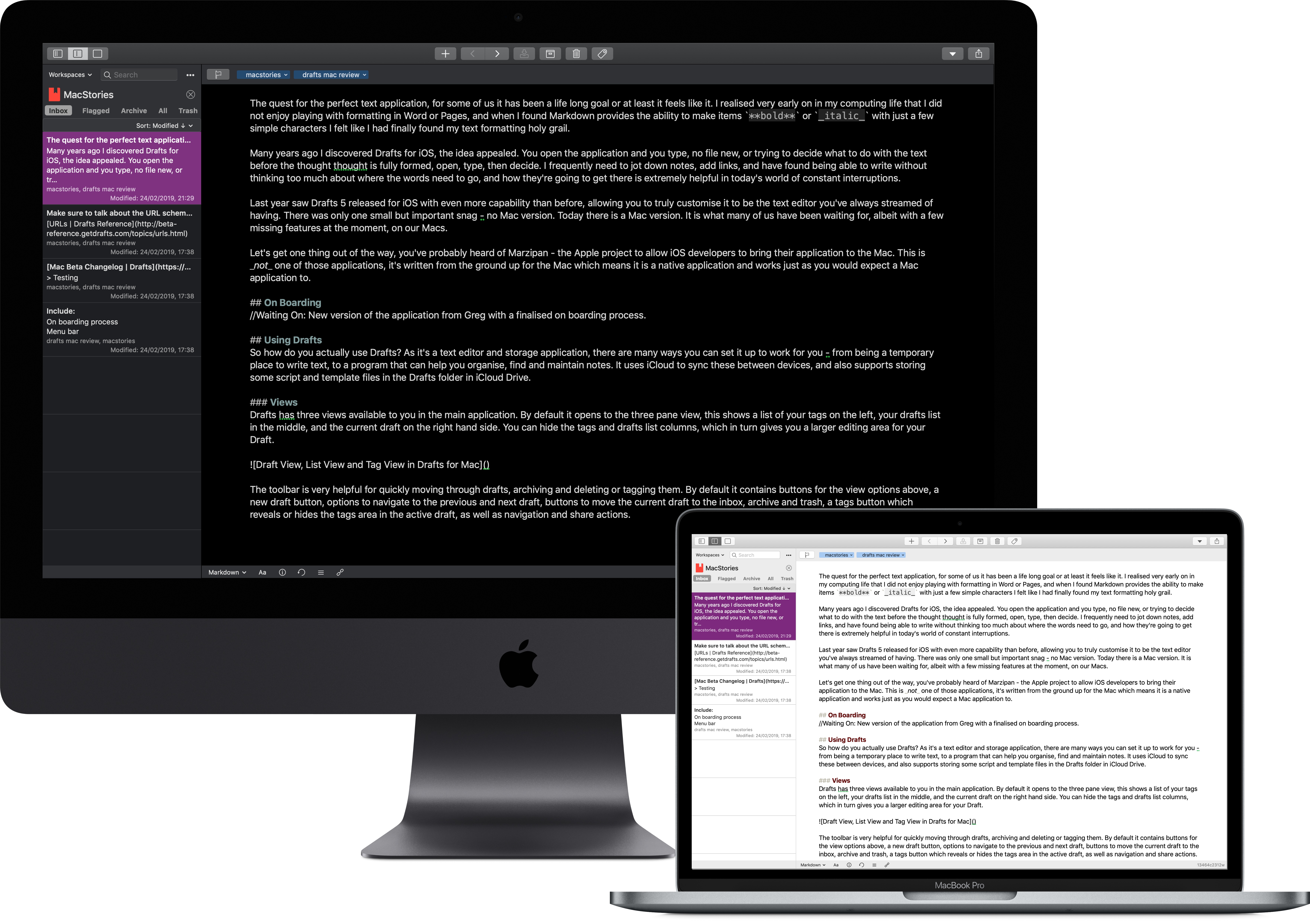
Drafts has three views available to you in the main application. By default it opens to the three-pane view, which shows a list of your tags on the left, your drafts list in the middle, and the current draft on the right-hand side. You can optionally hide the tag and list columns, which in turn gives you a larger editing area for your draft.

Draft View, List View, and Tag View in Drafts for Mac

Draft View, List View, and Tag View in Drafts for Mac

The app's toolbar is very helpful for quickly moving through drafts, archiving and deleting or tagging them. By default it contains buttons for the view options above, a new draft button, options to navigate to the previous and next draft, buttons to move the current draft to the inbox, archive, and trash, a tags button which reveals or hides the tags area in the active draft, as well as navigation and share actions.

Tags versus folders seems to be a permanent hot debate when it comes to file management, and for what it's worth, I'm on the side of "both" – but I prefer having tags available to me in Drafts. You can assign tags to a draft quickly, and leave the tag area of the editor open should you choose to do. In addition to this tag area, one of the sidebars is dedicated to tags, and Drafts offers powerful filtering that allows you to search for drafts that include every tag in a list of tags, any of those tags, and even to exclude drafts with specific tags.

In addition to tags, you can quickly flag drafts too – this is something that in combination with Workspaces can help you keep on top of the more important items that land in Drafts.

Workspaces are Drafts' version of folders – but they're dynamic. Based on tags and flags, and combinations of these, your Drafts workspaces are saved filters allowing you to see just the subset of Drafts you want or need to work on at the current moment in time.

Workspaces has a menu option, as well as a drop down next to the search option – from these you can select existing workspaces, open the editor, or clear the filters, the latter of which is quite handy when you want to edit a draft you created via the menu bar capture.

Workspaces are easy to create – you can specify which tag(s) or search strings to filter for, with tags if it should be an "any" or "all" filter, and then which sort should be applied to each of the inbox, flagged, archive, and all groups of items in the drafts list. You can also specify which of these you want to switch to when opening a workspace, allowing you to create a very simple workspace for flagged items.

Each Workspace can have an icon and colour associated with it, which helps you to identify it when switching between them. The icons and colours available are the same as on iOS, and these Workspaces sync across all devices connected to an iCloud account.

Writing Your Drafts

Drafts is one of many applications on the market which uses Markdown to allow you to format your text, meaning your document is plain text with extra notation for bold or italic. Drafts for Mac supports MultiMarkdown – and you can choose to enable options such as processing HTML and random footnotes. You can also switch your Drafts install to use GitHub Markdown, which offers support for tables, strikethrough, and allows you to disable support for images and links.

Markdown options in Drafts

Markdown options in Drafts

All of these options come into full force in the preview window – this can be accessed through the file menu, or with ⌥⌘P – which allows you to see a preview of what your document will look like once the formatting has been rendered. The preview doesn't update in real time with edits to your draft, but instead includes a small delay – this seems like it might be distracting at first, but it actually allows you to formulate your words and make some progress instead of seeing your nicely formatted typos show up on the other half of the screen! The preview window is just that, a separate window, which means you can put it on a second display. I've even used it in conjunction with Luna Display in meetings to show people the notes I've been taking.

The preview feature comes with three built-in themes, as well as the option to create your own and store them in a folder in iCloud Drive.

Creating Drafts

There are several ways you can create drafts, the first of which is just opening the application and typing into the editor area. Drafts will automatically create a new draft at launch after 5 minutes away from the app, and this can be changed in the preferences to suit your needs.

You can also create new drafts from the share sheet built into macOS simply by selecting text and sharing it to Drafts. This creates a new draft in the background with the selected text.

Another draft creation method is via the app's menu bar component, which serves as a way to open a quick capture window: here you can type or paste text, assign tags, change the syntax, and then save it. If you have a Drafts Pro subscription you can append or prepend this to an existing draft if you need to.

As well as being able to open a quick capture window, the menu bar also enables opening the full Drafts interface with a new draft loaded – either an empty one, or one populated with the contents of your clipboard. There's also an option to jump straight to the search field in Drafts, allowing you to quickly find whichever draft you're looking for.

New drafts can also be created using nothing but the keyboard: in Drafts' preferences you can set keyboard shortcuts that launch a quick capture window, or which capture the clipboard to Drafts. These work the same way the options from the menu bar icon do, just from the keyboard – and in the case of capturing the clipboard, it happens without ever seeing the Drafts interface.

Finally, one last method of draft creation is dragging and dropping text or Markdown files onto the dock icon – including multiple files at a time, which makes importing from other applications or systems easy.

Key Features

One of the reasons why Drafts has become such a popular application is because of the automation possibilities built into it. Drafts for Mac is not yet as capable as its iOS counterpart in this area – but it is no slouch either.

Drafts simply wouldn't be Drafts without URL schemes – and I'm very pleased to see that the Mac version doesn't disappoint in this area. What's more, these URL schemes are the same as the ones present on iOS, allowing users to control Drafts with simple commands that can be used in many applications, including bookmarklets in a web browser.

  • create: The create URL scheme allows you to create a new draft with the text you pass to it.
  • open: You can use this to open a draft with a specific UUID.
  • get: Use this to retrieve the contents of a URL with the UUID passed to the call.
  • prepend: Add text to the beginning of a draft.
  • append: Add text to the end of a draft.
  • replaceRange: Replace X characters from position Y – this can also be used to insert text inside a draft by passing length 0.
  • search: You can use this to either focus on the search field in Drafts, or pass a search string or a tag to filter for.
  • workspace: Open Drafts to a specific workspace.

Whilst URL schemes are very popular on iOS, you can also use them on macOS in conjunction with applications such as Alfred or PopClip to enable searching Drafts or opening a workspace of your choice from the keyboard.

One feature that helps Drafts stand out in the world of text editors is completely built-in versioning, enabling you to check what your draft looked like five minutes ago, or five hours ago. These versions are saved automatically as modifications are made, but you can also create them by pressing ⌘S. The beauty of these versions is being able to roll back in time and see where that fantastic sentence you accidentally deleted is. From the version history you can copy the whole draft, restore it, or even select sections to copy.

Version History in Drafts

Version History in Drafts

Another very useful feature of Drafts is Navigation within a draft – this is available from the toolbar and allows you to see a list of all the headings within a draft, and with a click you can jump to a specific one. Especially nice when working with longer drafts such as this review, Navigation allows you to jump straight to the area you're looking for instead of scrolling up and down, or using the find feature which may find many instances of the words you're searching for within your document. The navigation menu also lists recent drafts, which is a bonus if you're using Drafts in the editor-only view.

Drafts comes with seven built-in themes for the editor: Light, Sepia, Solarized, Lightgray, Dark, Gray, and Solarized Dark.

The first four of these are lighter colours, while the latter three are darker. You can set your preferences for both light and dark themes in the Editor menu entry, and then you can specify if Drafts should switch between these when your system does. This means if you're using an application such as Night Owl to switch between light and dark modes automatically, then Drafts will switch right along with it for you. You can also choose whether the rest of the Drafts interface should change to match the system settings, or be in light or dark mode all the time.

Drafts has built in the share sheet, which does allow you to send your text elsewhere – though of course it's not as flexible as custom actions. The share sheet takes advantage of other applications on your Mac, allowing you to send your draft to OmniFocus, Spark, or even to Yoink which converts it to a document.

As well as all of the options already covered, Drafts has a whole host of settings available in its preferences pane. You can set it to be launched at login, and to show the main window whenever the application is launched. You can also let your drafts be indexed by Spotlight, which is helpful when searching your whole Mac. You can choose not to sync Drafts through iCloud here too, but this means everything is only on your local device. Finally, you can choose to enable periodic backups on a daily, weekly, or monthly basis – and run a backup on demand as well as view these in Finder.

What's Missing?

Actions have not yet been added to Drafts for Mac – though full support is on the roadmap for the future. This means Mac users will lack many of the automation capabilities Drafts has become so well known for – even the simplest automations, such as keyboard shortcuts for formatting text in Markdown, are missing here. As actions are one of the main attractions for many Drafts users, it's unfortunate that the first release does not include them. However, Drafts is still a powerful text application without them. What's more, you're able to substitute many of the actions you might like to perform with applications such as Keyboard Maestro and Automator, or Alfred and PopClip.

As Drafts uses Apple's CloudKit to sync rather than iCloud Drive, that means it doesn't have a point of reference for images – so when previewing Markdown files, the app can't display images, only text.

Related to this, Drafts doesn't store documents where you can access them externally, such as in an app like Files. This means you're unable to automatically add new drafts by dropping a file into a folder, nor can you share files through iCloud's file sharing feature unless you manually export the draft as a file.

How I Use Drafts

Drafts has been ingrained in my life on iOS for so long that I'm not sure I would know what to do without it – but I tend to use my iPad instead of my Mac unless there's a good reason not to, such as podcast recording, so I was curious to see how Drafts for Mac would work its way into my life.

The first thing I noticed is that having quick capture and clipboard capture available means I am storing a lot more information in Drafts – sometimes just for 20 minutes or so. That has been extremely helpful as it means I only have one application to reference for the URLs, notes, and reminders to myself I create throughout the day. I frequently do this through Alfred using URL schemes.

As well as using Drafts to store text temporarily, I have come to find my workflow works well employing it for long-term storage and organisation. I have several workspaces which help me to find and organise my drafts based on tags associated with them – this helps me achieve a nice level of focus whilst still letting me capture anything that occurs to me quickly and easily. I store ideas for blog posts, drafts of emails, and personal show notes for podcasts here – the sync is rock solid so I can be editing something on my iPhone on my way through the door into my office and then pick up right where I left off on Drafts for Mac.

In the absence of actions support, presently I use Handoff with my iPhone or iPad to run custom actions on the drafts that need it. Though we can still use Alfred and even Keyboard Maestro with its "click at image" feature to get started with automation on our own. Overall, just having access to my drafts on the Mac has made my day to day work much quicker and easier.


Drafts for Mac is a free download available from the Mac App Store. This download grants access to basic features including creating drafts, tagging, and syncing to iOS or other Macs. In order to use Drafts for Mac's full capabilities, a Drafts Pro subscription is required. This unlocks workspaces, editor themes, and appending or prepending from the capture window. The Drafts Pro subscription is $19.99/year, and unlocks Pro features on iOS as well as macOS.

I am absolutely thrilled with this release of Drafts for Mac. For an application that is brand new to the platform, it feels solid and very Mac-like. Whether you're looking for a notes application for quick notes and text, or something more complex that allows organisation, Drafts can serve your needs. For those who have never tried using the iOS version there's no need for that, unless you want actions, in which case for the time being, picking up your iPhone or reaching for your iPad is a small price to pay for the functionality that will soon come natively to macOS.


Support MacStories Directly

Club MacStories offers exclusive access to extra MacStories content, delivered every week; it's also a way to support us directly.

Club MacStories will help you discover the best apps for your devices and get the most out of your iPhone, iPad, and Mac. Plus, it's made in Italy.

Join Now
30 Mar 05:14

The Stages of Relationships, Distributed

by Nathan Yau

Everyone's relationship timeline is a little different. This animation plays out real-life paths to marriage. Read More

30 Mar 05:14

Gerrymandering Paradox

Will the Supreme Court End Gerrymandering? Arguments Begin This Week | Michael Wines discusses a...
30 Mar 05:14

Eulogy for a 13-Year-Old Display

by chuttenc

goodbyeOldMonitorI was working for the Department of National Defence in Canada (specifically Defence Research and Development Canada) in early 2005 when I first plugged in my new xplio CM998 monitor. It was amazing.



Not only was it one of those new lightweight LCD monitors (I have since owned desks that weigh less), it supported resolutions up to 1280×1024 pixels natively and had both DVI and VGA ports!

It also generated enough heat in my basement apartment that I could notice it from across the room, but that was a plus in that cold Scarborough winter.

From there I moved it to an apartment. Another apartment. A home. And then another home. And then, finally, when I had stopped using it at home I started using it at work for Mozilla.

I liked its comfortable 5:4 aspect ratio, and the fact it wouldn’t wobble when I got up to get coffee.

On Friday it wouldn’t turn on. Well, it did turn on. Linux was assigning it desktop space, knew who it was and how big it was… but it wouldn’t display anything.

I would have liked to turn it off and on again, but the power switch hasn’t worked reliably since my daughter was born. So I did the next best thing and unplugged it and plugged it back in. It would display my Firefox wallpaper for just long enough for some capacitor to warm up or something, and then it would black out.

Nothing I could do would resuscitate it. No cable swaps, no buttons I could press, no whining or cajoling.

Here ends the 13-year service life of my venerable SXGA display.

Your service did not go unnoticed. Enjoy your recycling.

:chutten

30 Mar 05:14

Constructivist pedagogy is like a zombie that refuses to die

Isak Skogstad, Mar 26, 2019
Icon

This is the other side of the 'scientific evidence' debate. I have no doubt that the evience has led Paul Kirschner to the conclusions he has reached (just as it has let the also-mentioned John Hattie to reach his conclusions). The question is: can we trust the evidence, and can we trust the inference that leads to the conclusion? For Kirschner, the answer is clear. "Cognitive load is about how our cognitive architecture affects how we learn and how this interacts with instruction. There are possibly two thousand scientific articles that show that the theory generally holds."

Web: [Direct Link] [This Post]
30 Mar 05:13

With Apple News+, will publishers get what they bargained for?

Maya Kosoff, Columbia Journalism Review, Mar 26, 2019
Icon

Analysis of the Apple News announcement: “I’m sure Apple News+ will be fine, but man is it weird to hear a tech company describing 'human-curated news' as some high-concept innovation, and not the way news was selected and distributed for 400 years before the sorted feed era."

Web: [Direct Link] [This Post]
30 Mar 05:13

Killed by Google

Cody Ogden, Mar 26, 2019
Icon

This is a list of 149 products and services that have been killed by Google over the years. It stands as an object lesson in why you should not depend on commercial vendors and platforms for critical services. Source is on GitHub. Via TheNextWeb.

Web: [Direct Link] [This Post]
30 Mar 05:13

We Need to Talk About Geo…

by Tony Hirst

Over the last couple of weeks, I’ve spent a bit of time playing with geodata. Maps are really powerful visualisation techniques, but how do you go about creating them?

One way is to use a bespoke GIS (Geographic Information System) application: tools such as the open source, cross-platform desktop application QGIS, that lets you “create, edit, visualise, analyse and publish geospatial information”.

Another is to take the “small pieces, loosely joined” approach of grabbing the functionality you need from different programming packages and wiring them together.

This “wiring together” takes two forms: in the first case, using standardised file formats we can open, save and transfer data between applications; in the second, different programming languages often have programming libraries that become de facto ways of working with particular sorts of data that are then used within yet other packages. In Python, pandas is widely used for manipulating tabular data, and shapely is widely used for representing geospatial data (point locations, lines, or closed shapes). This are combined in geopandas, and we then see tools and solutions built upon that format as the ecosystem build out further. In the R world, the Tidyverse provides a range of packages designed to work together, and again, an ecosystem of interoperable tools and workflows results.

Having robust building blocks allows higher level tools to be built on top of them designed to perform specific functions. Through working through some simple self-directed (and self-created) problems (for which read: things I wanted to try to do, or build, or wondered how to do), it strikes me once again that the quite ambitious sounding tasks can be completed quite straightforwardly if you can imagine a way of decomposing a problem into separate, discrete parts, looking for ways of solving those parts, and then joining the pieces back together again.

For example, here’s a map of the UK showing Westminster constituencies coloured by the party of the MP as voted for at the last general election:

How would we go about creating such a map?

The answer is quite straightforward if we make use of a geodataset that combines shape information (the boundary lines that make up each constituency, suitably represented) with information about the election result. Data such as that made available by Alasdair Rae, for example.

First things first, we need to obtain the data:

#Define the URL that points to the data file
electiondata_url = 'http://ajrae.staff.shef.ac.uk/wpc/geojson/uk_wpc_2018_with_data.geojson'

#Import the geopandas package for working with tabular and spatial data combined
import geopandas

#Enable inline plotting in Jupyter notebooks
#(Some notebook installations automatically enable this)
%matplotlib inline

#Load the data from the URL
gdf = geopandas.read_file(electiondata_url)

#Optionally preview the first few rows of the data
gdf.head()

That wasn’t too hard to understand, or demonstrate to students, was it?

  • make sure the environment is set up correctly for plotting things
  • import a package that helps you work with a particular sort of data
  • specify the location of a data file
  • automatically download the data into a form you can work with
  • preview the data.

So what’s next?

To generate a choropleth map that shows the majority in a particular constituency, we just need to check the dataframe for the column name that contains the majority values, and then plot the map:

gdf.plot(column='majority')

To control the the size of the rendered map, I need to do a little bit more work (it would be much better if the geopandas package let me do this as part of the .plot() method):

#Set the default plot size
from matplotlib import pyplot as plt
fig, ax = plt.subplots(1, figsize=(12, 12))

ax = gdf.plot(column='majority', ax=ax)

#Switch off the bounding box drawn round the map so it looks a bit tidier
ax.axis('off');

To plot the map coloured by party, I just need to change the column used as the basis for colouring the map.

fig, ax = plt.subplots(1, figsize=(12, 12))

ax = gdf.plot(column='Party' , ax=ax)
ax.axis('off');

You should be able to see how the code is more or less exactly the same as the previous bit of code except that I don’t need to import the pyplot package (it’s already loaded) and all I need to change is the column name.

The colours are wrong though — they’re set by default rather than relating to colours we might naturally associated with the parties.

So this is the next problem solving step — how do I associate a colour with a party name?

At the moment this is a bit fiddly (again, geopandas could make this easier), but once I have a recipe I should be able to reuse it to colour other columns using other column-value-to-colour mappings.

from matplotlib.colors import ListedColormap

#Set up color maps by party
partycolors = {'Conservative':'blue',
               'Labour':'red',
               'Independent':'black',
               'Liberal Democrat':'orange',
               'Labour/Co-operative':'red',
               'Green':'green' ,
               'Speaker':'black',
               'DUP':'pink',
               'Sinn Féin':'darkgreen',
               'Scottish National Party':'yellow',
               'Plaid Cymru':'brown'}

#The dataframe seems to assign items to categories based on the selected column sort order
#We can define a color map with a similar sorting
colors = [partycolors[k] for k in sorted(partycolors.keys())]

fig, ax = plt.subplots(1, figsize=(12, 12))

ax = gdf.plot(column='Party', cmap = ListedColormap(colors), ax=ax)
ax.axis('off');

In this case, I load in another helpful package, define a set of party-name-to-colour mappings, use that to generate a list of colour names in the correct order, and then build and use a cmap object within the plot function.

If I wanted to do a similar thing based on another column, all I would have to do is change the partycolors = {} definition and the column name in the plot command: the rest of the code would be reusable.

When you have a piece of code that works, you can wrap it in a function and reuse it, or share it with other people. For example, here’s how I use a function I created for displaying a choropleth map of a particular deprivation index measure for a local authority district and its neighbours (I’ll give the function code later on in the post):

plotNeighbours(gdf,
               'Portsmouth',
               'Education, Skills and Training - Rank of average rank')

Using pandas and geopandas we can easily add data from one source, for example, from an Excel spreadsheet file, to a geopandas dataset. For example, let’s download some local authority boundary files from the ONS and some deprivation data:

import geopandas

#From the downloads area of the page, grab the link for the shapefile download
url='https://opendata.arcgis.com/datasets/7ff28788e1e640de8150fb8f35703f6e_2.zip?outSR=%7B%22wkid%22%3A27700%2C%22latestWkid%22%3A27700%7D'
gdf = geopandas.read_file(url)

#Import pandas package
import pandas as pd

#https://www.gov.uk/government/statistics/english-indices-of-deprivation-2015
#File 10: local authority district summaries
data_url = 'https://assets.publishing.service.gov.uk/government/uploads/system/uploads/attachment_data/file/464464/File_10_ID2015_Local_Authority_District_Summaries.xlsx'

#Download and read in the deprivation data Excel file
df = pd.read_excel(data_url, sheet_name=None)

#Preview the name of the sheets in the data loaded from the Excel file
df.keys()

We can merge the two data files based on a common column, the local authority district codes:

#Merge in data
gdf = pd.merge(gdf, df['Education'],
               how='inner',  #The type of join (what happens if data is in one dataset and not the other)
               left_on='lad16cd', #Column we're merging on in left dataframe
               right_on='Local Authority District code (2013)'#Column we're merging on in right dataframe
              )

And plot a choropleth map of one of the deprivation indicators:

ax = gdf.plot(column='Education, Skills and Training - Average rank')
ax.axis('off');

Just by the by, plotting interactive Google style maps is just as easy as plotting static ones. The folium package helps with that, for example:

import folium

m =  folium.Map(max_zoom=9, location=[54.5, -0.8])
folium.Choropleth(gdf.head(), key_on='feature.properties.lad16cd',
                  data=df['Education'],
                  columns=['Local Authority District code (2013)',
                           'Education, Skills and Training - Rank of average rank'],
            fill_color='YlOrBr').add_to(m)
m

I also created some magic some time ago to try to make folium maps even easier to create: ipython_magic_folium.

To plot a choropleth of a specified local authority and its neighbours, here’s the code behind the function I showed previously:

#Via https://gis.stackexchange.com/a/300262/119781

def plotNeighbours(gdf, region='Milton Keynes',
                   indicator='Education, Skills and Training - Rank of average rank',
                   cmap='OrRd'):
    ''' Plot choropleth for an indicator relative to a specified region and its neighbours. '''

    targetBoundary = gdf[gdf['lad16nm']==region]['geometry'].values[0]
    neighbours = gdf.apply(lambda row: row['geometry'].touches(targetBoundary) or row['geometry']==targetBoundary ,
                           axis=1)

    #Show the data for the selected area and its neighbours
    display(gdf[neighbours][['lad16nm',indicator]].set_index('lad16nm'))

    #Generate choropleth
    ax = gdf[neighbours].plot(column=indicator, cmap=cmap)
    ax.axis('off');

One thing this bit of code does is look for boundaries that touch on the specified boundary. By representing the boundaries as geographical objects, we can use geopandas to manipulate them in a spatially meaningful way.

If you want to try a notebook containing some of these demos, you can launch one on MyBinder here.

So what other ways can we manipulate geographical objects? In the notebook Police API Demo.ipynb I show how we can use the osmnx package to find a walking route between two pubs, convert that route (which is a geographical line object) to a buffered area around the route (for example defining an area that lies within 100m of the route) and then make a call to the Police API to look up crimes in that area in a specified period.

The same notebook also shows how to create a Voronoi diagram based on a series of points that lay within a specified region; specifically, the points were registered crime location points within a particular neigbourhood area and the Voronoi diagram then automatically creates boundaried areas around those points so they can be coloured as in a choropleth map.

The ‘crimes with an area along a route’ and the Voronoi mapping, which are both incredibly powerful ideas and incredibly powerful techniques can be achieved with only a few lines of code. And once the code recipe has been discovered once, it can often be turned into a function and called with a single line of code.

One of the issues with things like geopandas is that the dataframe resides in computer memory. Shapefiles can be quite large, so this may have an adverse affect on your computer. But tools such as spatialite allow you to commit large geodata files to a simple file based SQLite database (no installation or running servers required) and do geo operations on it directly: such as looking for points within a particular boundaried area.

At the moment, SpatiaLite docs leave something to be desired, and finding handy recipes to reuse or work from can be challenging, but there are some out there. And I’ve also started to come up with my own demos. For example, check out this notebook of LSOA Sketches.ipynb that includes examples of how to look up an LSOA code from latitude and longitude co-ordinates. The notebook also shows how to download a database of postcodes into the same database as the shapefiles and then use postcode centroid locations to find which LSOA boundary contains the (centroid) location of a specified postcode.

30 Mar 05:11

✚ How to Make a Bump Chart in R

by Nathan Yau

Visualize rankings over time instead of absolute values to focus on order instead of the magnitude of change. Read More

30 Mar 05:10

Firefox Lockbox Now on Android, Keeping your Passwords Safe

by Nick Nguyen

If you’re like most Firefox users, you have dozens if not hundreds of stored logins in your browser. When you use Firefox Accounts you get to take your logins on the web in Firefox Mobile. Today, many of those logins are the same ones used in the apps you download on mobile, so we’ve been working on making your various online identities work on your terms.

Today, we are excited to bring Firefox Lockbox to Android users, a secure app that keeps people’s passwords with them wherever they go.

Like Firefox Send, a free encrypted file transfer service which keeps people’s personal information private unveiled earlier this month, Firefox Lockbox is based on another successful Test Pilot experiment. Since its iOS launch, Firefox Lockbox has had more than 50K downloads, and was most recently optimized for iPad. As we continue to evolve our ecosystem of privacy-first solutions, Firefox Lockbox for Android was the next step in our efforts to give people the advantage when it comes to keeping them safe online with trusted tools and services from Firefox.

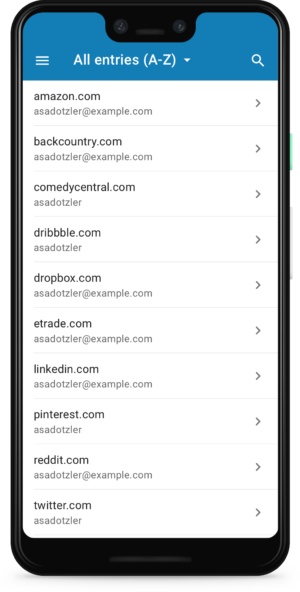
Unlike a traditional password manager, Firefox Lockbox is a simple app that gives easy access to the passwords you have already stored in your Firefox browser. No extra set-up necessary. This makes Firefox Lockbox the perfect solution for people who want to secure their personal information, but may not have time (or the recall) to choose and transfer all of their passwords into a password manager.

Here’s how Firefox Lockbox for Android works:


Retrieve your passwords on the go

Picture this: You volunteer your Netflix account for movie night at a friends but can’t remember your password. Rather than going through the reset process or accidentally locking yourself out with too many password attempts, Firefox Lockbox allows you to easily retrieve your password on your phone (now on both iOS and Android devices) so you can log in without a hitch. Plus, you can also use Face ID and Fingerprint touch to unlock the app, making it easy to securely access your passwords.

Retrieve your password from your phone

Take your passwords with you on any device

Keeping track of your  passwords across devices can be challenging, especially since many of us have tried to make them more complicated to protect ourselves against online data breaches. Say goodbye to the password “cheat sheet” stored as a note or “contact” in your phone or written on a sticky on your desk. Firefox Lockbox works with autofill to make the transition from using your Firefox desktop browser to mobile seamless, by automatically filling in your passwords saved on desktop to your everyday apps like Facebook or Yelp, on your mobile device.

Automatically fill in saved passwords from your desktop

Keeping track of your passwords is one of the first steps to taking control of your online privacy and Firefox Lockbox for Android is here to help.

We hope you try Firefox Lockbox for Android today. You can download it on Google Play.


The post Firefox Lockbox Now on Android, Keeping your Passwords Safe appeared first on The Mozilla Blog.

30 Mar 05:10

SoundSource 4 Is Our Brand-New, Incredibly Powerful, System-Wide Audio Control

by Paul Kafasis

Today, we’re pleased to introduce a brand-new product: SoundSource 4. You wouldn’t think a version 4 could be labeled as “brand-new”, but the massive new functionality and fully redesigned interface mean SoundSource 4 is effectively a whole new product.

SoundSource originated as a very basic tool to speed up access to your Mac’s speakers and mics. With SoundSource 4, it’s grown into a powerful system-wide audio utility which offers functionality to help every Mac user.


SoundSource in Action

Whether you’re listening to podcasts, streaming music, or watching videos, audio is a big part of using your Mac. With SoundSource, you gain superior control over all that sound.

Control Audio on a Per-Application Basis

SoundSource’s capabilities start with per-application audio control. As soon as you add an app to SoundSource, you can begin controlling its audio.

With the volume slider, you can make an app louder or softer than others, or even mute it entirely. The output device selector lets you control exactly where audio plays, so you can play music from iTunes or Spotify to your best speakers, while routing everything else to your Mac’s built-in output.

Sweeten Any Sound With Audio Effects

With the power of SoundSource’s audio effects, it’s a snap to get great-sounding audio. Apply effects to a specific application, or to all the audio playing on your Mac.

Anyone wanting more from their MacBook speakers can hit the Magic Boost button to instantly get richer, fuller sound. Our renowned 10-band Lagutin equalizer can do even more, and requires minimal setup with nearly two dozen presets to boost bass, enhance vocals, or even perfect what’s heard through AirPods. True audiophiles will welcome SoundSource’s support for Audio Units, which allow for complex and precise adjustments.

Whether you want to add an equalizer to Spotify, crank up the volume through small laptop speakers, or make precise adjustments to all your audio, SoundSource has you covered.

Get Fast Access to System Audio Devices

SoundSource hasn’t forgotten its roots, and it now provides fast access to all the settings your Mac’s Output, Input, and Sound Effects audio devices offer, right from the menu bar.

Using SoundSource, you can adjust volume and input levels, tweak the balance, and even switch sample rates. You may never need to open the Sound System Preference again!

So Many More Great Features

SoundSource has much more to offer, from great support for Apple’s popular AirPods to “Super Volume Keys” that allow keyboard volume controls to work with HDMI devices, DisplayPort monitors, and other digital hardware that MacOS doesn’t support by default. Global keyboard access and robust keyboard control make it a breeze to adjust your audio settings without ever even touching your mouse.

Everything SoundSource does is aimed at giving you control over the audio on your Mac. Experience the magic of SoundSource, and see why we say this is sound control so good, it ought to be built in to MacOS.

Try SoundSource Now

If you’re on MacOS 10.11 or higher, you can explore all that SoundSource offers by downloading our free, fully-featured trial. When you’re ready, you can purchase through our online store for just $29.


Get Started With SoundSource


Notes for Owners of SoundSource 3

SoundSource 4 is a major update that changes a lot, so be sure to check out “What’s New in SoundSource 4”.

If you own SoundSource 3, you can move to version 4 at a discount. Try it out, then purchase your discounted upgrade for just $19.

Finally, folks who purchased SoundSource on or after February 1st, 2019 will receive a complimentary upgrade to SoundSource 4. Full details have been sent via email, so be sure to check your inbox.

30 Mar 05:09

Finland’s “National Happiness” shouldn’t mean “Move to Finland”

by Caterina Fake

Header_countryside_red_house_cottage-1024x580.jpgThese headlines are stupid and I get annoyed with them every year:

Unhappy? Move to Finland

Want to be happy? Try Moving to Finland

The annual “national happiness” index came out again, and as usual, Finland and the other Nordic countries top the list. So we see these inane headlines again, recommending that people MOVE to Finland (or Denmark or Iceland or Norway). Yes there are many marvelous things about Finland–saunas, pulla, endless lakes, little red wooden houses, hedgehogs and a love of nature. But rather than move, agitate for the Nordic model at home and follow the recipe for national happiness.

What National Happiness means is that most people in Finland have enough to eat, are clothed and housed, have national daycare, a good education and national healthcare.  That is what it means. Finland also has one of the lowest rates of immigration among the Nordic countries– only 5.8% of their population in 2015 was foreign-born, and most of those immigrants were from Russia or Estonia. Moving to Finland wouldn’t be easy, nor would it make any change to the average person’s happiness, that is, if they have food, clothing, shelter, work and healthcare. But what Finland has–and this is significant– is the happiest (safest, healthiest, best cared for) POOR people in the world.

So don’t move to Finland unless you’re eager to embrace 7 months of winter! Instead, agitate for national healthcare, universally good schools, and a social safety net that catches all who fall.


A witty, informative, and popular travelogue about the Scandinavian countries and how they may not be as happy or as perfect as we assume, “The Almost Nearly Perfect People offers up the ideal mixture of intriguing and revealing facts” (Laura Miller, Salon).

30 Mar 05:09

Medium is a Nightmare

The long, complicated, and extremely frustrating history of Medium, 2012–present | Laura Hazard Owen...
30 Mar 05:09

If It Saves Pedestrian Lives, Why Isn’t Vancouver Implementing it Everywhere?

by Sandy James Planner

improving-walkability-at-signalized-intersections-with-signal-control-strategies-7-638

improving-walkability-at-signalized-intersections-with-signal-control-strategies-7-638


I have written before about leading pedestrian crossing intervals  for pedestrian crossings.  Last summer I wrote about New York City’s successful implementation of them which has resulted in a 40 percent decrease in pedestrian and cyclist injuries, and a decline in deaths.

It’s a very simple concept. For a nominal cost of $1,200 per intersection, crossing lights are reprogrammed to give pedestrians a seven to ten second start (in New York City) to cross the street before vehicular traffic is allowed to proceed through a crosswalk. There are over 100 of these leading pedestrian crossing intervals installed in New York City where their transportation policies prioritize the safety of walkers over vehicular movement.

Carlito Pablo in the Georgia Straight has taken a look at the City of Vancouver’s Transportation Plan that notes that 75 percent of Vancouver’s vehicular collisions with pedestrians happen at intersections. In his article he wonders why the City is not looking at implementing more of these leading pedestrian intervals to stop injuries and save lives.

“Other major North American cities have adopted a timing option for traffic signals in a bid to reduce risks for people on foot…It reinforces a pedestrian’s right of way, and makes a walker more visible.”

Pablo points out that while Vancouver has four leading pedestrian intervals installed at crossings, these are all just in the testing phase. Compare that to Toronto who is  planning for 80 of these intervals. And then there is New York City that have a whopping 2,238 leading pedestrian intervals at intersections.

NACTO, the National Association of City Transportation Officials have deemed that using these pedestrian intervals can reduce crashes by sixty percent. That is a whole lot of injuries prevented and lives saved.

Now here is what is funny about Vancouver’s slow adoption of something that has been proven to be more effective everywhere else. Vancouver’s 2012 Pedestrian Safety Study identified that the majority of crashes involving pedestrians happened at signalized intersections, even though they are less than 4 percent of all Vancouver intersections. The most common driver crash error  was turning left, with most of those drivers not yielding to pedestrians in the crosswalk when they had the right of way.

Those injuries and deaths would be substantially mitigated with a leading pedestrian interval with walkers  being given a head start to cross the street with no vehicular interference. This would also be helpful to people with accessibility issues and mobility aids who are 35 percent more likely to be crashed into while crossing. That Vancouver Pedestrian Safety Study  recommended implementing leading pedestrian intervals at intersections. That recommendation was also echoed in the City’s 2040 Transportation Plan.

You can find the City’s “pilot’ leading pedestrian interval at Davie and Burrard Streets. Last year “test” leading pedestrian intervals were implemented at  Thurlow and Pacific Streets, Granville and Smithe Streets, and Great Northern Way and Carolina Street. That is all there is in the City of Vancouver.

Respected City of Vancouver transportation engineer Winston Chou estimates that these installations have reduced pedestrian vehicular crashes by 12 to 19 percent. If that is so, what push from the public is needed to implement these at signalized intersections across the city? Kudos to Carlos Pablito for following up on the need for the universal application of the leading pedestrian interval in the City of Vancouver. Every life should matter.

Here is a YouTube video showing how the leading pedestrian interval works on a New York City intersection.


30 Mar 05:09

Self help is giving yourself permission to proceed

by df897FDRIORhjflkgfd
We’ve traded gatekeepers for gurus, and continue to seek permission and guidance to do what we want to do with our work.
30 Mar 05:09

The One About Manager READMEs

by rands

In our ninth episode, we discuss the idea of Manager READMEs, vulnerability in the workspace, how Toyota empower its humans, and how much Rands detests drama.

Enjoy it now or download for later. Here’s a handy feed or subscribe via Overcast or iTunes.

30 Mar 05:09

Cluetrain at 20

by Doc Searls

The Cluetrain Manifesto went online for the world on March 26, 1999. “People of Earth,” it began. Nothing modest about it. 

Chris Locke and David Weinberger both had newsletters with real subscriber bases (Entropy Gradient Reversals and JOHO, respectively). I had a good-size list of email correspondents, and so did Rick Levine. So we put the word out, same day.

And it spread. Like: whoaTom Petzinger’s Cluetrain column The Wall Street Journal called the Manifesto “pretentious, strident and absolutely brilliant,” which threw gas on the fire. Instantly my email traffic jumped from dozens to hundreds a day, where it has remained ever since.

Interesting fact: the only reason I know Tom said that is because it was mentioned in a 2000 interview for Linux Journal that was too long to run at the time and remained buried like a time capsule until 2014, when it was exhumed and turned into this seven-part Cluetrain fifteenth anniversary piece. If you want to know lotsa shit about Cluetrain, including more of the origin story than I just told, that’s where to look.

There’s also deeper stuff in it. An example:

Part 2: The Red Pill Story

Linux Journal: What is “Business as Usual” and what’s killing it?

Doc Searls: Business as Usual is the Dilbert cartoon where too much of the world continues to work.

Linux Journal: The PHBs we love to hate.

Doc Searls: Yeah, but it’s more than that. It’s what gives all of us pointy hair.

Linux Journal: Which is?

Doc Searls: There’s a blue pill answer and a red one. The blue pill answer is that companies are clueless and need to start getting the clues from markets. The red pill answer is much deeper and more fundamental. I like The Matrix analogy because the movie’s premise is that reality is a screen saver for something much worse. In Cluetrain we’re saying that what we think about business and markets is actually driven by something much more deep and sinister than the absence of “best practices” or other management disciplines that CEOs neglect to apply. In fact, I’ve come to believe that the Matrix in the movie is a metaphor for marketing. It’s the pleasing but false reality where we live only to serve as batteries for business as usual.

Linux Journal: And that’s the red pill answer?

Doc Searls: That’s part of the answer. The deeper part is about the programming. Business as Usual depends on all of us agreeing to understand business in terms that make us slaves. We’re not conscious of this programming because it’s unconscious. The Industrial Age hasn’t ended, because it lives in our heads. Worse, a repurposed version of it drives much of what we call “the new economy.” We’re still in blue pill territory when we talk about markets as distant, abstract things. At the bottom of the rabbit hole is what markets really are — what we really are. When we go there we see what we forgot when Industry came along and substituted abstractions for reality.

Linux Journal: What are you saying isn’t real?

Doc Searls: Most of what we call “markets” are pure abstractions. We see markets as targets for advertising messages, as creatures like bulls and bears, as battlefields and sports arenas where companies fight like gladiators for territoriesspaces and shares of categories and slices of pies. We give the “market” label to geographies like New York and China, and to demographics like “Men 25-54.” We also give it to characterizations like “upscale suburban Volvo drivers.” Each of these abstractions actually expresses a metaphor that does our thinking and talking for us.

Linux Journal: Give us an example.

Doc Searls: The word “content.” It used to be an catch-all noun for anything that occupied a package. Now we apply it to anything you can distribute over the Net. Why is that? What happened here? Why did “content” suddenly get so big? As a writer, I used to write stories. Back when I was in radio, we ran programs. Bands used to make records. Now all those things are “content,” and every artist is a “content provider.” Like our craft is nothing more than a manufacturing job, and our goods are nothing more than cargo you strap to a skid and load onto trucks. Where did that word come from? Why did we choose it instead of something else, like “goods?”

Linux Journal: So, why?

Doc Searls: Because we conceive business in terms of shipping, even though we’re hardly aware of it. In linguistic terms, our business vocabulary is induced by the conceptual metaphor business is shipping. This has been going on for the better part of two hundred years, and it didn’t stop when the Net showed up. Suddenly here was this fabulous new medium, this shiny new shipping system for everything you can name that ever went through an old medium, plus lots of new stuff. Let’s re-conceive everything as content and carry on with Business as Usual, but with a great new way to move stuff from A to Z, including B to B, B to C and all the rest of it. Just like we did with Television, we can load our content into a channel and address it for delivery to end users through medium that serves as a distribution system or a value chain.

Linux Journal: So when you say somebody “adds value,” you’re using a shipping metaphor.

Doc Searls: Absolutely.

Linux Journal: What’s so bad about that?

Doc Searls: Nothing, as far as it goes. But it doesn’t go very far in a world built on relationships in which shipping stuff from X to X is more a technicality than a fundamental concept. In the industrial world, especially the commercial mass media part of that world, shipping was a very appropriate conceptual metaphor. It gave us a useful vocabulary for describing a world where a goods move great distances between a few producers and millions of consumers. The problem is, when you apply that metaphor in a networked world, with its networked markets, you make the mistake of treating in-your-face customers as distant consumers. They aren’t cattle. They fish-like gullets gulping down products that fall off the end of distribution’s conveyor belt. But we still conceive them that way, or we wouldn’t talk about “aggregating” and “capturing” them. We also wouldn’t talk about “moving content” through the Net as if it were just another medium, like TV, radio and newspapers.

Linux Journal: Is the Net really that different?

Doc Searls: It’s absolutely different because it’s infinitely more than a way to convey crap from producers to consumers. It’s the connected consciousness of the market itself. It makes markets smart by giving customers unprecedented powers, the most fundamental of which is each other — not just an immense choice among suppliers. Ir makes customers extraordinarily powerful, too. If they get pissed off, they can make life hell for the vendor by creating sites like Gapsucks.orgUntied.com, and Burnallgifs.org. One customer with a grudge can bring a hallowed brand to great embarrassment.

Linux Journal: So you’re saying there’s a limit to how far you can stretch the shipping metaphor, because shipping isn’t all that’s happening in the post-industrial world.

Doc Searls: Right.

Linux Journal: When does it end?

Doc Searls: When it fails. When it falls out of fashion. When it comes off as rude behavior, like belching in public or smoking in an elevator. The plain truth is that “content” insults the nature of what it labels. Expressions like “B2B” and ” B2C” — labels for “business-to-business” and “business-to-consumer” — insult the nature of business itself. Ask yourself, do you do business to people or with them? “B2B” might be a useful category, but it has a way of presupposing that all that happens in a B2B business is the moving of goods from B to B. The preposition “to” was chosen for us by the shipping metaphor, which conceives business as shipping, rather than as a relationship.

Linux Journal: But what about the fact that, from the vendor’s perspective, we really do ship a lot of stuff to a lot of customers who buy stuff from us on the Web?

Doc Searls: It’s a fact. But it’s not the only fact. Nor is it the defining fact. What we need to understand — in our bones — is that the Net is not just a few-to-many system. Sure, it supports shipping. Where would Amazon be without it? But shipping is not all that happens. Suddenly the first source and the final customer are one click apart. “Consumers” aren’t a zillion plankton any more. They have names, personal Web pages and email addresses. Supply and demand can talk to each other. They can engage, just like they did for ten thousand years in real markets. That’s why it’s now good business for savvy producers to talk with their markets at every level, and with real human voices, not the robotic “thank you for calling” voice from phone mail hell.

Linux Journal: In the book you make the point that the Industrial Age is only two hundred years old, while markets have been around for thousands of years — and that the Net brings us back into the kind of world we had when markets were tents gathered at crossroads. What’s relevant about those ancient markets today? Isn’t the modern world too radically different?

Doc Searls: It’s not radically different. Two things are relevant about ancient markets. First, they never went away. The real world is full of them. Every farmer’s market reminds us of them. Second, the Net multiplies the power of all their virtues. As a result, markets themselves are much more powerful and smart than ever before. Our business-is-shipping vocabulary forces us to describe a world that excludes or discounts countless new facts of market life. As producers we assume we retain the power to create and organize demand, just as we did a decade or more ago. That just isn’t the case — at least not by traditional means.

Linux Journal: We notice that you created quite a bit of demand for the Cluetrain book.

Doc Searls: Yeah, but we didn’t do it by mass media methods. We did it by hacker’s methods. We wrote something we thought was good and put it out for review. Lots of people agreed that it was good and word spread from there. One reason they agreed was because we spoke for the masses of people who don’t want to be treated like fish in a tank any more. Not for Business. Not for Marketing.

Linux Journal: It also isn’t just producers who are stuck in the shipping metaphor.

Doc Searls: Right. Exactly. As consumers we often still feel powerless in the face of producer insults — just like we did back when all we could do was call a “customer support” 800 number and plead our case to a minimum wage worker who was paid to get rid of us. We’re in a world now that’s very much like that ancient market, that mess of stalls and tents at crossroads in the third world. In markets like those, reputation is extremely important. If the weaver’s cloth falls apart in a few days, or if he’s too big a jerk to deal with, customers spread word in the market, and the effects follow quickly. It’s the same today on the Net.

Linux Journal: What else have we forgotten about ancient markets?

Doc Searls: Mostly their importance. As a social institution, the market was far more important than the church, the government, the military, you name it. For evidence, look at your own surname. There’s a good chance it labels an ancestor’s role in his market. Hunter, Potter, Shoemaker, Mason, Miller, Smith, Tanner, Mason, Cobbler, Fisher, Weaver, Brewer… those names were earned by craft. Those crafts’ contexts were in the marketplace. Mr. Baker baked bread. Mr. Tanner tanned hide, and probably sold leather goods that he made himself. Mrs. Weaver probably wove rugs or garments on a loom she and her family built themselves. Mr. Carpenter was in the furniture or the construction business. All those craftspeople knew their customers by name. The forces that make a market — supply and demand, vendors and customers, producers and consumers — were a handshake apart.

Linux Journal: And the Industrial Revolution put an end to all that.

Doc Searls: Yes. It turned farmers and bakers into die-makers and loom operators: interchangeable parts of corporate machines. As Chris Locke puts it, Industry invented the job. In the Cluetrain book, Rick Levine talks very movingly about craft, and what it really means. Today the word suggests an avocation: a hobby. But our ancestors made their livings with their crafts, and they sold what they made in real-world markets. Rick starts his chapter, “I’m a potter’s son.” And it shows. Rick grew up identifying himself, like his father, with his work, which is programming — even though he now runs a company. Programming is his pottery, his personal craft.

Linux Journal: You call the Industrial Revolution an “interruption.”

Doc Searls: Yes. Industry had few uses for our crafts, but lots of uses for our labor. The social and psychological disruption must have been huge. Many generations have passed since our ancestors left their farms and shops and went to work in factories, mines and offices. We’ve long forgotten the demeaning and dehumanizing changes that Industry caused to whole societies when it melted us down to fuel the labor pool.

The great irony of Cluetrain is that today—

—yet things are worse. You know that, of course, but to grok how fully bleak things have become, read Shoshana Zuboff’s The Age of Surveillance Capitalism and/or Brett Frischmann and Evan Selinger’s Re-Engineering Humanity.

Yet I remain optimistic. Because Cluetrain was early by (it turns out) at least two decades. And mainstream media are starting to get the clues. I know that because last week I heard from The New York Times, The Wall Street Journal, AP and an HBO show. I normally hear from none of those (or maybe one, a time or two per year).

Something is in the water. It’s us, and the water is still the Internet.

Bonus link.

29 Mar 15:27

How to Deliver Constructive Feedback in Difficult Situations

by Volker Weber
Nonviolent Communication (NVC) is an awful name for one of the most powerful communication courses I’ve ever taken. NVC helps you to be honest, without criticising, insulting, or putting down other people.

You will have to understand and use a certain pattern and write your message down in 40 words or less. Looks easy, but it takes work. Very well worth the effort!

More >

[via]

29 Mar 15:26

Original AirPods get a software upgrade

by Volker Weber

fbccf0b418f749422800ddebc6f70423

No idea what has been changed, but it is a substantially higher version number. That's good, right?

29 Mar 15:17

How Microsoft found a Huawei driver that opened systems to attack

by Volker Weber
Huawei MateBook systems that are running the company's PCManager software included a driver that would let unprivileged users create processes with superuser privileges. The insecure driver was discovered by Microsoft using some of the new monitoring features added to Windows version 1809 that are monitored by the company's Microsoft Defender Advanced Threat Protection (ATP) service.

Monitoring systems were looking for attacks using technique popularized by the NSA. Quite a story.

More >

29 Mar 04:35

Huawei Announces the P30 and P30 Pro with 40MP SuperSpectrum Camera, 10x Hybrid Zoom, 40W SuperCharge, More

by Rajesh Pandey
Huawei today unveiled its flagship phone for the first half of 2019 — the P30 Pro and P30. The company has once again managed to take smartphone photography to a new level and released one of the most feature-packed smartphones of 2019. The P30 Pro particularly gives the Galaxy S10 a stiff competition and is superior to it in many ways. Continue reading →