Shared posts

23 Apr 21:00

MEDS, Drones and Machinic Neoplatonism

A few weeks ago, in collaboration with Nikki Stevens and Jacqueline Wernimont, I published an expose on NIST’s use of non-consensually gathered, highly-sensitive facial recognition datasets in Slate. For the purposes of testing and benchmarking facial recognition systems, NIST - a branch of the U.S. government - is using immigrant visa photos, photos of child abuse, and myriad other sickening datasets, without the consent of those within them. Many are tremendously racially biased, much like the software facial recognition produces. When the media cycle and hubub was over, after a week of press calls and tweets and emails, when I had wrestled my inbox back under control, I quietly went home. And I cried.

Not all of their horrifying datasets are created equal. One particular set of files stands out; the innoculously named Multiple Encounter Dataset, or MEDS. The dataset contains photographs - mugshots, specifically - of people arrested multiple times by the police; people who are now dead. As with immigrant datasets, and as one expects from the U.S. carceral “justice” system, the dataset is incredibly biased. Black people make up just shy of 13% of the U.S. population: they make up of just shy of 50% of the photographs. Uniquely, however, the dataset is publicly available. It is uploaded on to NIST’s website, for retrieval by all and sundry - all the better to train machine learning systems with. And that meant I could download it, and look at the photographs they are using.

So: I did. I downloaded it, and I looked through it, with every photo hitting me like a fist. People screaming, people crying; people with bloodstained faces, people with gazes that communicated nothing, because the process was that familiar, or because they had nothing left. Roughly bandaged wounds from their arrests. Tears streaked through stubble (which could be mine) around lipglossed mouths (which could be mine). Some old and collecting social security, some so young they couldn’t even vote.

The one photo that hit me the hardest, though, wasn’t found in the dataset but in the documentation. It was a photo of a Black man in his 50s, arching away from the camera and screaming out of fear or fury or a mix of both. And it was in the documentation as a specimen example - one of what the researchers who put the dataset together called:

“[An] Example of Stasm Output Requiring Manual Editing”

That’s it. That was the only note. Where I saw a middle-aged, screaming Black man, Andrew P. Founds, Nick Orlans, Genevieve Whiddon (of the MITRE Corporation) and Craig Watson (of NIST) saw: an example of the sort of image requiring manual editing. Which they subsequently did, overlaying the screaming person’s face with linked red dots to tell the algorithm how to adjust the face to fit their expectations. And I can’t get it out of my head, and I can’t stop asking how exactly it is that these people got to the point where they saw a screaming person as an example output. That’s what I’ve been thinking about ever since. What is it that let researchers get to this mindset?

Science and the Gardener’s Vision

Writing about drone warfare, Neil C. Renic surfaces the “gardeners vision” of warfare, one in which the stronger party in a war loses “the basic recognition that those we fight are fellow moral agents…when this bond of shared humanity, victimhood and moral equality is sundered, an erosion of behavioural restraint often follows”. One in which “what remains is a gardener’s vision of war; a war of pest control”.

In other words, to generalise, when those subject to an action are separated from the actor - in discourse, in relation, in framing - it becomes easy to take a “gardener’s vision”; to treat them as less human, or not human at all, and to see the process of interacting with them as one of grooming, of control, of organisation.

This is not a new problem: large parts of the state are oriented around maintaining that separation. As a state action, the preparation of this dataset could be explained by that orientation towards separation - but this is a small team of named individuals, not an abstract monolith, and such an explanation does not explain the comfortable reuse of this data by scientists in public and private institutions.

Science, too, has always had an issue in this area - a problem, stemming from the positivist treatment of people as a means to an end (that end being “data”), with seeing research subjects as truly human. Think about what it says that the term is frequently “subjects”. On countless occasions over the last few centuries, and into the present, positivist views of science have assisted scientists in dehumanising the “subjects” of their research. This has been assisted by larger-scale societal biases that already treat certain populations as less human. The case of Henrietta Lacks or of the victims at Tuskegee shows how structural and individual racism play a role in dehumanisation - but the case of Dan Markingson shows scientists perfectly capable of justifying inhumanity in the absence of race as a factor.

This is ultimately a component of the scientific method; of the dominant view of science as a thing done by a set of people (scientists) upon data to give rise to theory. That this data stems from human bodies, lives and traces is an unfortunate corollary: a distraction from the purity of science. Those bodies and people are treated as disposable, consumable, used as a source of data and then often discarded, particularly under a capitalist regime, as feminist epistemologists have long noted. But there’s something more going on here; something more than just dismissing humanity on the way to data, abstraction by way of discarding the body. Something about facial recognition in particular, but data science and “big data” in general.

Machine Neoplatonism and its Ethical Consequences

People talk a lot about the implications data science has for how science is done and technology is developed, both skeptically (rejecting the idea it fundamentally changes science) and forebodingly (pointing to, amongst other things, the changes it makes to disciplines such as sociology as well as the traditional sciences). One particularly evocative and resonant piece is by Dan McQuillan, who argues that algorithmic, AI-based approaches to science embody what he calls “machinic neoplatonism”.

Neoplatonism was a philosophical approach to science premised on a belief in “a hidden mathematical order that is ontologically superior to the one available to our day-to-day senses”. In other words, there was one grand unified theory of reality, which could be approached without considering the “instruments” that collected our data (be they telescopes or bodies). McQuillan, when he sees machine learning, sees this same philosophy make itself manifest: the idea that algorithms, fed the right data, just spit out the one secret hidden truth of how the universe functions in a particular domain, generating not theory (because you can’t necessarily see what they’re doing, or why!) but the guidance we need to structure society and reality. A machine learning system which folds proteins tells you which proteins fit, which should be further explored; it does not tell you why, but you don’t need it to. A machine learning system which assesses facial matches tell you what faces match; it does not tell you why, but…you get the (hah) picture.

In other words: there’s no theory. Really, there’s no need for a human scientist at all. You just get decisions, outcomes, things you can use. There is yet another degree of abstraction away from the bodies and minds that data comes from, and those bodies and minds are even more disposable and interchangeable - particularly when “big data” is often premised on getting as many datapoints (or photos) as possible, fading any individual into just…numbers. A gardener’s view, again.

That, to me, is the central ethical difference that machine learning based approaches feature - and make no mistake, facial recognition is one such approach. Not only do we have the issues of traditional science to contend with (single, objective Truths, abstraction from the people who participate, voluntarily or not, in science), those are magnified. The truth does not have to be known by the scientist, or even knowable; that the algorithm “works” is proof it is there and a justification for the algorithm. The abstraction is not just through a one-way mirror or epidemiological records, but separated by time, distance, anonymity, scale, so that it is even harder for human scientists (if they are involved at all) to see people rather than data sources. In pursuit of the one big truth, the truth that only an algorithm can determine, anything is permissible. That truth is simply superior; qualitative concerns, subjective concerns do not even register as legitimate concerns.

Abstraction and AI ethics

McQuillan has some great suggestions for how science might avoid these traps; adapting feminist and postcolonial critiques and methods, explicitly building “antifascist AI”, which, you know, I empathise with. It’s good work and work people should build on, but this issue of machine learning creating particular space for heartlessness and inhumanity is really not the primary reason I cried. I do not expect benificence out of scientists under traditional science, let alone machine neoplatonism - but I do expect it out of ethicists.

When Nikki, Jacqueline and I published our piece, it made waves. A lot of people took it up and pushed it on - the same was true with the trans-led campaign against Google’s transphobic ethics advisor. But just as noticeable in both cases were the people who did not. The people who hesitated because well, don’t bigots have power we should draw on? The people who called themselves allies but would never deign to boost either problem in a way that might diminish their media standing. The people like Luciano Floridi and Joanna Bryson who took the time to specify that they, in fact, knew best about how to secure trans rights.

In all of these cases what we see is a centering of the self; it is the Official Ethicist who determines the One True Way to make change, a way that usually benefits them. It is the Official Ethicist who determines which voices count, who demands we work with the system rather than against it. We see a delegitimisation of marginalised populations and our own knowledge - that same delegitimisation that aids in scientific dehumanisation and exploitation, that postcolonial and feminist scientific critiques critique. We see, in other words, precisely the same problems that science has always faced, this time in the form of its self-appointed monitors.

I have to believe that these people had simply not read James’s transphobic statements, or understood them. I have to believe that these people had simply not downloaded the datasets, looked through the chest-hammering images and amoral descriptions produced by the people they suggest we work with. I have to assume there is naivety at play, here. Because the alternative is that for all their airy critiques of existing practice, many AI ethicists have little problem with it: their issue is that it does not involve them in a position that befits their self-importance.

AI ethics cannot just inherit the problems of science and its patriarchal, conservative model: we cannot leave them unquestioned while striving to regulate technology because we must, above all things, be prefigurative in our politics. This can’t be an abstract theory game, or a reputational game; it is not about your stature it is about our lives. And for you to genuinely change things and make things better, you must first center our lives, center our sources of knowledge - do precisely what Dan suggests of science, because all of the evidence I have suggests we are subject to just the same risks and causing just the same harm. We cannot have a gardener’s view of ethics.

23 Apr 21:00

The Design of SoundSource 4

by Neale Van Fleet

At the end of March, we unveiled an all-new release of SoundSource, our powerful system-wide audio controller. SoundSource can help every Mac user who uses audio, whether you’re streaming music, participating in voice chat, or just watching videos.

Last month’s release was officially SoundSource version 4.0, but that doesn’t really tell the whole story. Despite its version number, SoundSource 4 is an entirely new app, with massive updates over what came before. Here’s a side-by-side comparison:

Unlike some more linear updates, the design and conceptualisation of SoundSource 4 began from a nearly blank slate. This is a story of how we got to our eventual release.

Starting With Posture

Whether intended or not, every app has what design researcher Alan Cooper calls a ‘posture’. From Cooper’s essential interface design book “About Face”:

Most people have a predominant behavioral stance that fits their working role on the job. The soldier is wary and alert; the toll collector is bored and disinterested; the actor is flamboyant and larger than life; the service representative is upbeat and helpful. Products, too, have a predominant manner of presenting themselves to users.

A workhorse app like Photoshop or Sketch, for example, takes over most of the screen and has what Cooper would call a ‘sovereign’ posture. These are apps you spend hours upon hours in. They tend to have a lot of features, and a correspondingly sprawling interface.

SoundSource is very different, as it works for you in the background, nearly invisibly. It needs to stay out of the way, so the user can accomplish other things. Occasionally, SoundSource needs to be accessed for a quick tweak, then just as quickly hidden away. It has a ‘transient’ posture.

Understanding that transient posture was essential to the app’s design. With this in mind, the menu bar was the obvious home for SoundSource. Making everything we wanted fit into the tight constraints of a menu bar app proved to be an interesting design challenge. At times, it felt more like working on a mobile app than a traditional desktop app, because of the smaller surface area.

Setting Priorities

Once we’d determined that SoundSource would live in the menu bar, the next step in our design process was creating a list of the main functions we wanted the app to have:

  • Volume control

  • Muting

  • Audio metering

  • Output device selection

  • Magic boost

  • Equalization (EQ)

  • Audio Effects

From this list, we needed to determine which elements were primary and which were secondary. Because of the transient posture of the app, we didn’t have the luxury of a lot of space to easily show all the controls at once. The more important elements needed to be more visible, at the top level of the interface, while the secondary elements could be slightly more tucked away.

We considered several options for elegantly hiding certain features. These included an inspector, a separate palette-esque window, and even an Audio Hijack-like popover bubble. However, I wanted to keep everything contained in the same space, which led us to an expanding “Advanced” area. When compared against the shipping product, even the very first sketches might look familiar (though messy):


An early, but recognizable, sketch of SoundSource 4. Most of the main UI elements are here, like boost, volume, and mute.

This layout was refined over time, but the basic ideas were set early on. Each source would get a single horizontal line, and an expanding section would hide the less frequently used controls.

Branding Boost

One of SoundSource 4’s central features is its Boost ability. This real-time audio compression makes audio seem louder, and it’s a great way of getting more out of even the smallest MacBook speakers. Right from the earliest sketches, it used a magic wand icon, because, well, in all honesty it was the first thing I thought of.

I assumed that visual concept of the magic wand would eventually change. In fact, I worked through dozens of alternatives. Here is the page from my most productive session of brainstorming alternative ideas:


A gallery of the many, many alternate boost concepts

Some of these ideas weren’t bad, but most ended up being too cute. We wanted SoundSource to feel reliable, almost like part of MacOS, and these concepts just didn’t help create that. Ultimately, the magic wand stuck, along with the name “Magic Boost”.

The App Icon

Once our Magic Boost concept was more or less settled, other elements like the app icon began to take shape as well.

SoundSource has had several icons in its long life. The most recent icon was inspired by the icon Apple used for the audio input on older Macs which actually, you know, had separate audio inputs.


An iMac’s audio input icon, highlighted


SoundSource 3’s app icon.

Working from that, I experimented with various ideas, starting with the previous app icon and eventually working in the magic wand:


Some early SoundSource 4 icon brainstorming

This was the first high fidelity version I made:


A mix of the old SoundSource 3 and the eventual SoundSource 4 icons

From here, the icon evolved slowly, eventually taking on a speaker background to help reinforce the audio aspect of the app, and losing the input icon altogether.


The final icon for SoundSource 4.

The SoundSource 4 icon also continues a bit of a retreat from flat design. The wand and speaker background are geometric, but still containing shadow and depth. The colours are bright and visually inline with the rest of flatter icons on the Mac these days, but overall I find the icon feels like a good combination of the two aesthetics.

The colour scheme of the icon was rooted partially in the green from the previous SoundSource, but then faded in a gradient to a new blue. This gave us a palette to use for the marketing, manual, and the website.

The Menu Bar Icon

We expect most users to set SoundSource as a login item, so it will run whenever their Mac is on. As a result, the menu bar icon will be seen far more than the app icon.

This icon took more time to get right. We wanted a design that captured the feeling of the main icon, while also feeling properly at home in the menu bar.

The above image shows a progression of menu bar icons (enlarged to better show details) made throughout the development process, with the oldest on the left and the final product on the right. Leading up to the final version, you can see a gradual simplifying of the wand to better fit in with the existing system menu bar icons.

Adding Life Through Animation

We took some time in a few places to liven up the UI with some animation. The first place we used animation was on our Magic Boost button. Early alpha builds used what was basically a check box, with just two states, on or off. We knew we could do something better though. I started by doing a mockup in Keynote, whose Magic Move transition is a great way to prototype ultra-basic animations. Then we built the final assets in PaintCode.

Magic Boost’s animation up close:

A second, and more subtle, animation can be found in our equalizer. When you change presets, the sliders all smoothly move to their new values, and the sparkline indicator in the menu updates as well.

These small details might be easily overlooked, but they do a good job of making the app feel livelier.

Iterating To Our Shipping App

Good design of any product takes many revisions. SoundSource 4’s interface is ultimately quite small, but it still required a great deal of design thinking. What’s described above provides a brief look into a process which spanned several months.

After many iterations, we succeeded in our aims to design something both compact and powerful. With SoundSource 4, we’ve made a useful sound control that’s simple enough for even novice Mac users, while also packing enough punch to be indispensable for the pickiest audio pros.

23 Apr 20:59

Twitter Favorites: [drunkencinemaTO] It's almost time! Who's ready for our PURPLE RAIN 35th Anniversary Screenings on 35mm tonight and tomorrow night at… https://t.co/yQMz519TNa

𝘿𝙧𝙪𝙣𝙠𝙚𝙣 𝘾𝙞𝙣𝙚𝙢𝙖 @drunkencinemaTO
It's almost time! Who's ready for our PURPLE RAIN 35th Anniversary Screenings on 35mm tonight and tomorrow night at… twitter.com/i/web/status/1…
23 Apr 20:59

Twitter Favorites: [DaveOstories] Thanks for choosing me 藤田良子 Olson. I’ll always be by your side loving & supporting you. Ceremony 1of3check. #DRO420 https://t.co/c0xiyiXmMz

DaveO, Storymaker @DaveOstories
Thanks for choosing me 藤田良子 Olson. I’ll always be by your side loving & supporting you. Ceremony 1of3check. #DRO420 pic.twitter.com/c0xiyiXmMz
23 Apr 20:59

Recommended on Medium: Sidewalk Toronto: Violating Democracy, Entrenching the Status Quo, Making Markets of the Commons

Sidewalk Labs is pushing ahead in shaping urban realms without consent. What they’re doing is experimentation without boundaries.

While a good chunk of Sidewalk Labs’ business model, at least what it wants to do to Toronto, may be problematic for public coffers, it may not be that new or special (real estate boondoggle, infrastructure finance). But the slice of work that it’s doing with data continues apace in the most evasive and slimy way possible.

Sidewalk Labs is not Google, nor is it following that business model of advertising for its initial plans in Toronto. But it has borrowed a few tactics from its corporate sibling. And while global debates rage around policies and laws related to data, and those that operate in those worlds hold forth on the issues with somewhat detached professional bemusement, the company steamrolls ahead. It’s steamrolling ahead using the method that may be the most powerful method it knows — shaping social norms.

Sidewalk Labs and its data approach is focused on entrenching the status quo of data collection. De-identified, anonymized, subject to responsible use assessments, blah blah blah — whatever word salad set applies, no problem — however it has to go down to be allowable. But it will go down, that’s never been on the table for a no. In today’s Sidewalk Labs’ newsletter, they announced their work on signage for data collection in public space. Digital Transparency in the Public Realm, as they call it. As they said last month: “sensors have become a part of our daily lives.”

Passive language, without agency. As though the sensors and cameras just sprouted into the world, without creators or purchasers, without contracts or decisions. This subtle normalization is the work to guarantee that a quantified city becomes a social norm. And of course it will come with a side of green-washing in the rhetoric, to make sure that you might hesitate or feel a sense of social pressure to get with the program — you’re not anti-sustainability, are you? The quantified ‘resilient’ city is key to opening up new markets.

Illustration: Hudson Christie — http://www.hudsonchristie.com/

While the hexagonal design touches got their final beauty marks, Sidewalk Labs has delayed, again, submitting its work to Waterfront Toronto, as reported by Amanda Roth at The Logic. This is an ongoing sign of disrespect for the opportunity it’s been given — disrespect for the three levels of Canadian government and the public. A disrespect that they paper over with spin about wanting to be thoughtful and thorough to get things right.

If there is one thing Sidewalk Labs has no interest in, it’s public input regarding what they’re doing. If they did, they would have brought the major components of this deal — such as real estate, scope and finance — clearly forward from day one. Do people think Dan Doctoroff didn’t have plans and financing ideas for the Ports Lands from the first day he stepped into Toronto? Ok.

And while the company can’t seem to close on their Master Innovation and Development Plan, they’re pushing full-steam ahead on their work to make sure cities, Toronto and elsewhere, are compliant with their quantified worldview. Sidewalk Labs has done several things in the pursuit of this goal. And it’s done in the Google way. Cheerful, young, faux-progressive, hip, making this all seem fun and harmless. And attracting a range of stakeholders to make complicit in its work and ideology.

Here are a few of the moves the company has made. They invented the term urban data (this does not exist) to try and shape a new class of data, and with it a new class of permissions and norms, ones that undoubtedly enable commercialization. Start to watch for that term in their communications. They’re saying it over and over and over, hoping that through brute force it will get picked up, which they’ve already had some minor success with.

I’ve seen a few organizations and governments start to talk about “city data”. It’s probably best not to glom onto this idea. What we need to be doing is talking about data in specific and granular terms, not new vague ones. In addition to this, this term removes the humans generating the data. Just because it’s aggregate or anonymous does not remove the human as a source nor does it put human activity, when deemed non-personal, up for commodification.

Earlier on in the process, Sidewalk Labs tossed all responsibility for data issues over the fence into a format it’s calling a civic data trust. How will that work? No one knows! But it’s a can now kicked safely ahead and into the future so no more questions there please. And in the pursuit of this quasi special economic zone/test-bed, this answer seems to be the most expedient way to shrug off problems related to using people’s aggregate data as inputs to products.

And in today’s power grab, the company thinks it should just go on ahead and start creating digital way-finding for public space, leaning into the idea of transparency to enable mass data collection. And of course they do it with lots of others. And of course it’s voluntary. Here’s an analogy about this move: when the public sector wants to do a plan for directions with signage, say in a city or in an airport or something, they hire planning companies to do that work. Private companies paid with public dollars. And this makes a lot of sense, because it’s a design exercise where everyone has already agreed on what North, South, East, and West are.

In this case, Sidewalk Labs is trying to create the map when no one has agreed on the directions. No one has agreed that all this stuff should even be in public. There is no social license to bypass these discussions that need to be had. It’s brazen. And worst of all, they can’t stop saying how helpful they are being. This work isn’t some kind of glorified way-finding. The foundation of what is being discussed here is in legal and social flux. This is entrenchment of the status quo dressed up as progressive fun.

Taken together, these approaches entrench and accelerate the current levels of surveillance in urban centres. This is all happening at precisely the moment society is having deep and extensive conversations about data as toxic and as a liability, not only as a public good or an asset. There are conversations about trade-offs that need to be had, conversations which may greatly reduce the amount of data collection that a city and its people agree to. Maybe not, but certainly not a step to skip.

Sidewalk’s work is an effort to undermine all of these discussions. It’s working to assert a social norm for public space that a corporation has no right to be doing. And as the urbanists they’ve co-opted think they are triumphantly shouting down the critics on issues of personal privacy, they’re missing the play entirely.

This isn’t about personal data and that narrow interpretation of privacy. It never was. And while de-identification is not the magic that people are being sold, and there are *very* legitimate concerns about personal data and privacy in the mix here, let’s set them aside. (And, I mean, Replica, let’s never forget that piece of work). Let’s also set aside the very real possibility that subsidiaries might be ingested by Google or that data can be cross-referenced. And and and. As you can see, privacy issues are not non-issues. And that word is confusing people. Despite all this mess, these issues still aren’t the major play to be aware of because these ones also have some decent attention on them.

Here’s the real data play to worry about: this project is a push to privatize every possible type of interaction or event in public space through data collection. To broker and mediate physical spaces through a digital layer. It may be a digital layer of open standards. It may be an interoperable layer. But as long as it’s there, it’s game on. And as Sidewalk Labs like to exclaim, hey — you can do this all too! They’re the enabler. They’ll enable local businesses. And they’ll do all of this while acting as though the company is not part of a holding company that has an ever-expanding set of subsidiaries that have products for cities. Or a massive asymmetry of power and expertise. It’s the nonsense of open as equity.

In response to these critiques, Sidewalk Labs will, of course, flap around and say they’re helping with transparency, as cities are already doing things that people don’t know about. Guess whose problem that is? Not Sidewalk Labs’.

That’s local governments’ problem, and an issue they need to wrangle with residents. And they need time and space to do so. And yes, they’re late. And yes, that has opened up this vulnerability. And yes, they have bad tendencies themselves when it comes to data sometimes. Despite all of this, Sidewalk Labs does not need to be parachuting in with its solution when people and their governments haven’t had the chance to get themselves sorted out first.

And while locals in Toronto *still* can’t stop chanting about how helpful this ridiculous project is, look at Sidewalk Labs roll on ahead, doing exactly what it wants in the absence of any government intervention and outside of their final deliverable. The governments are paralyzed by fear and uncertainty, and Sidewalk Labs is doing this extracurricular stuff but holding them hostage on their deliverable. So messy.

Endgame

The question is not whether or not there can be some civic value or resident gain from intensive data collection and uses. Of course there can be. Of course there is. But at what cost? Is a double-digit efficiency increase for energy or waste now the handmaiden for more privatization and a full-blown surveillance state? There are other ways to do well for the earth, and the trade-off equations look different. Some of those ways are through environmental laws and policies.

The market marking that’s being threatened through the datafication of physical space needs to be challenged. But if discussions of personal privacy continue to prevail because the word is not understood well, then the frame of the conversation will continue to be wrong, and this works to Sidewalk’s benefit. The word privacy is being used when it’s far too small a word to encompass all the things it represents: collective privacy, consent, power, agency, control, freedom, and more.

The green-washing that will be used to defend this datafication is just around the corner in this upcoming Master Innovation and Development Plan. And once we get there, you can bet there will be reams of people that will defend and deny the problems with this quantified future worldview: small businesses, city governments, transportation planners, and more.

But within each of those categories there are also people willing to rethink things in a big way, given the liabilities they create and the urgent nature of the issues we are facing together. As with everything related to this project, if people consent to these policy directions, that’s a different story. But the current framing of this project isn’t allowing for it. And that’s not by accident, it’s by design.

19 Apr 21:46

Take All the Scary Stuff Away

by Richard Millington

One member in a client research interview said “I just want someone to take all the scary stuff away”.

This is the reality which drives most people to your community.

They’re new to the topic and overwhelmed, scared, and frustrated.

They’re not going to ask questions because they don’t know how to formulate the question.

They’re not going to respond to questions because they don’t feel they have the expertise.

They’re not going to spend hours browsing content because there’s just too much there.

Too many communities do a terrible job of emphasizing with this mindset and making things less scary.

A few things here.

1) Provide a list of resources members should read when they join (keep it relatively short). Even better, have a 101 guide created by your veteran members.

2) Highlight the top member’s people should follow – or have mentors who newcomers can ask any questions.

3) Make it clear it’s ok to ask a “stupid” question, but it’s stupid not to ask the question – even provide a place for them to do it.

4) Cover some unwritten rules of the sector members can see (yes, write the unwritten rules).

5) Create a thread where members can share the biggest mistakes they made and what they learned from them (trust me, this thread is addictive).

Don’t just make the community less scary, make the entire topic less scary.

19 Apr 21:46

Android Browser Choice Screen in Europe

by Alan Davidson

Today, Google announced a new browser choice screen in Europe. We love an opportunity to show more people our products, like Firefox for Android. Independent browsers that put privacy and security first (like Firefox) are great for consumers and an important part of the Android ecosystem.

There are open questions, though, about how well this implementation of a choice screen will enable people to easily adopt options other than Chrome as their default browser. The details matter, and the true measure will be the impact on competition and ultimately consumers. As we assess the results of this launch on Mozilla’s Firefox for Android, we’ll share our impressions and the impact we see.

The post Android Browser Choice Screen in Europe appeared first on The Mozilla Blog.

19 Apr 21:44

Waterloo-based Mercku’s M2 router offers excellent Wi-Fi for a premium

by Jonathan Lamont
Mercku M2 Wi-Fi router

Wi-Fi is a significant staple of most people’s homes and businesses. It’s also something we don’t think about often unless it’s not working.

Thankfully, Waterloo-based Mercku does think about Wi-Fi, and how it can make it better, such as offering high-quality hardware and a superb software experience. Having spent a few weeks with the company’s debut M2 router, I’m not sure how I can go back to my old Wi-Fi.

It should be noted that I tested not one but two M2 routers, one of several configurations you can get from Mercku. The company offers its M2 routers as a standalone device, or you can get its ‘Hive’ mesh Wi-Fi system, which comes with four small ‘Bee’ nodes to spread around your home. Finally, Mercku plans to offer a ‘Swarm’ option which supes up mesh Wi-Fi by swapping out nodes for additional M2 routers.

Swarm wasn’t officially available at the time of writing, but when it is, customers will get three M2 routers that can work in tandem to provide excellent network coverage. I only used two M2 routers in my testing, but they were more than enough for my apartment.

On top of great hardware and software, Mercku’s routers offer straightforward, if time-consuming, set up processes.

Troubled beginnings

My first few hours with the M2 were challenging, to say the least.

I must stress that neither Mercku nor the M2 router caused the issues I experienced in switching from my old router. Instead, my issues stemmed from a broader problem: too much tech.

First up, a warning to those who, like me, have not dabbled in routers outside of what’s provided by your ISP: you’ll want to do some research.

The first part of my journey involved switching the ISP router into ‘bridge mode’ so I could use the M2 as the Wi-Fi access point. With a quick Google search, it wasn’t too difficult to make this switch. However, it meant that my old Wi-Fi network disappeared as the Mercku one sprang to life.

Because of the abundance of tech I have in my apartment, I wanted to set up the M2 with the same network SSID (name) and password as my old Wi-Fi so I wouldn’t have to reconfigure connected devices. Mercku caps the length of the SSID name, meaning my overly long SSID wouldn’t work, and I had to reconfigure all my devices for the new network. Worse, in the case of most of my smart lights and Google Homes, I needed the old network online so I could disconnect them within their respective apps.

In hindsight, I could have factory reset these devices and saved myself a lot of pain.

Ultimately, whether you choose to switch to an M2, or any other router, make sure you set aside ample time to make the switch, especially if you have several connected devices to deal with.

I was lucky, and got my old Wi-Fi and new M2 network online simultaneously, and was able to switch everything over before putting the ISP router back in bridge mode to eliminate signal interference.

Beyond that, the physical setup of the M2 was largely plug and play. Once the router was on, powered and connected to my modem, I simply connected to it with my phone and used the app to set my SSID, password and other settings.

Impressive hardware

Mercku M2 with box

With the setup out of the way, I was able to kick back and enjoy the benefits of Mercku’s hardware.

First, the M2 is stylish. Most routers aren’t. My ISP-provided router certainly wasn’t. It was a large, slatted white box covered in flashing lights, and despite wanting to hide it, for the sake of good signal, I had to have it out in the open.

Mercku came to my rescue, thankfully, with the M2’s small, black cuboid shape that will fit just about anywhere in your home.

Mercku also did away with a common — and annoying — part of routers: the flashing lights. The only visible light is a small LED on the front that is either green when everything is working (read: all the time) or red if there’s an issue.

Internally, the M2 impresses as well. It boasts a WHEMS antenna for both 2.4GHz and 5GHz bands, which ensures consistent signal coverage, as well as high isolation and low ECC, which improves communication transmission capacity and multiple input multiple output (MIMO) performance. Finally, Mercku boasts about the M2’s “groundbreaking” transceiver, which decreases environmental noise and eliminates interference to increase data throughput and communication efficiency.

Specifically, Mercku says it boosts the communications chip to its physical limits: -90 decibel-milliwatts (dBm). The company says the current industry average is between -50 and -70dBm, which is about 1/100th the power of -90dBm.

Practically, this means the M2 is capable of 2.4GHz speeds of 300Mbps and 5GHz speeds of 867Mbps, up to 3,000 square feet of coverage for a single router and plenty of power for homes packed with tech. Unfortunately, the M2 doesn’t support Wi-Fi 6. That’s not a big deal now, but as adoption of the newest Wi-Fi standard spreads, it’ll be an issue in the coming years.

In my experience, however, what really sets the M2 apart is Mercku’s software offering.

Software that stands out

Mercku app

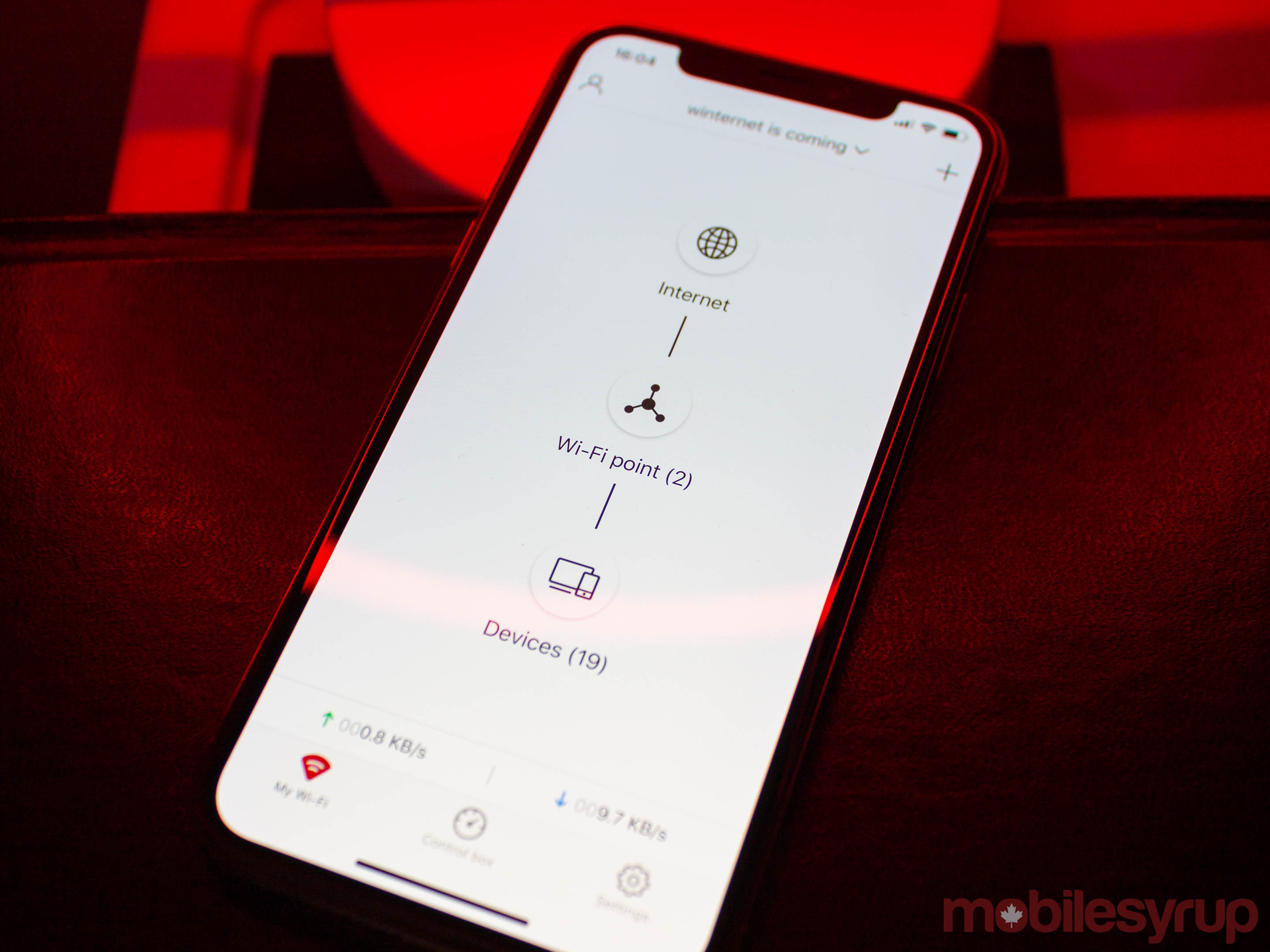
I’ve had the M2s for about a month, and Mercku has pushed several firmware updates already. All of them improved or added significant features to the smartphone app and routers. Even when I thought it couldn’t get better, Mercku found a way to improve.

The app lets you manage your Wi-Fi’s security — like SSID and password — implement parental controls like time restrictions or speed limitations, blacklist devices, keep tabs on connected devices and much more.

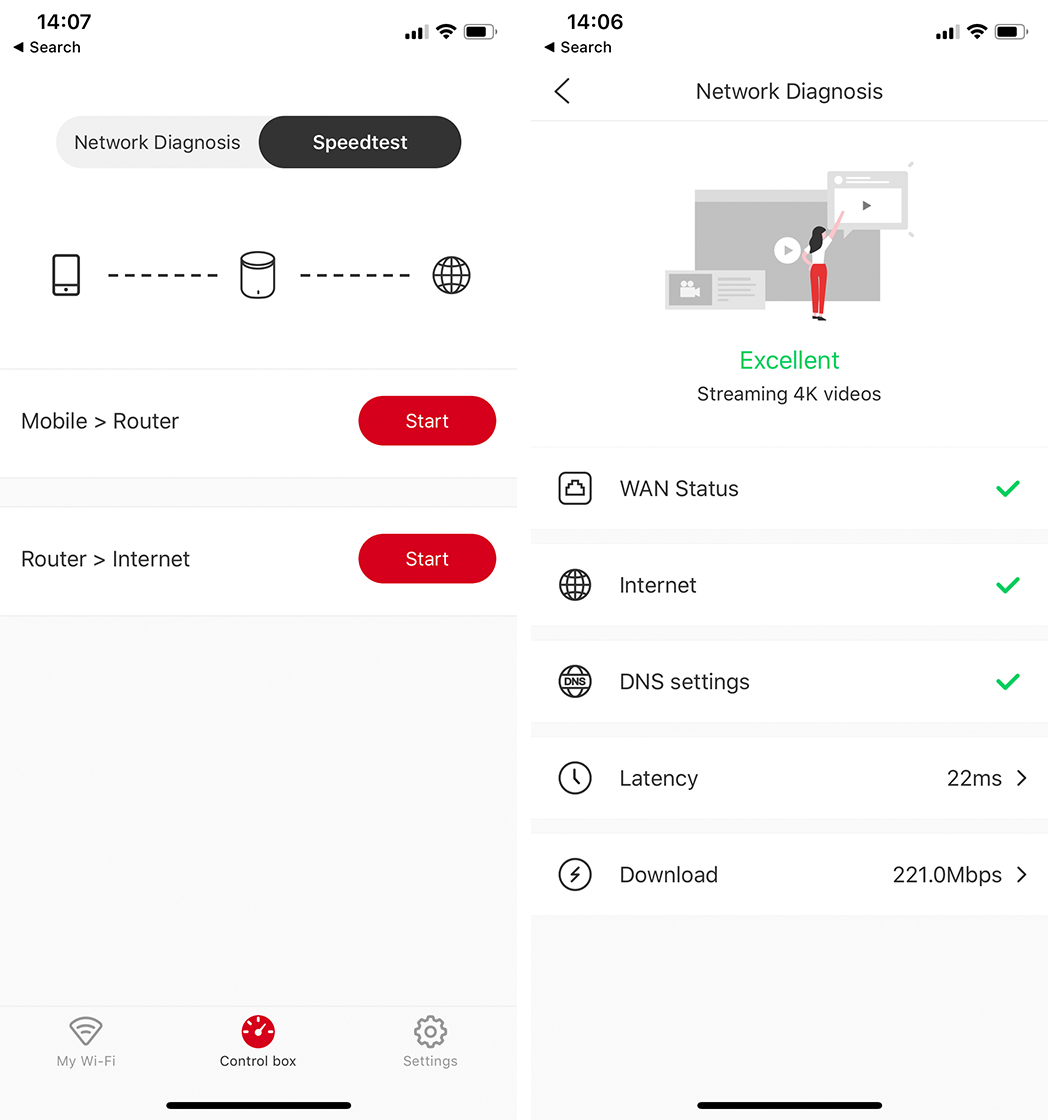
One of my favourite features was the ability to perform network diagnostics right from the app. I loved being able to check network performance quickly, and it made troubleshooting super easy. The app lets you check device-to-router performance (or, you LAN performance) as well as router-to-internet performance in the form of a speed test like those offered by Ookla and Fast.com.

Mercku app network diagnostics

However, for all the good in Mercku’s software, there were a few stumbling blocks. The biggest issue I had was with a feature dubbed Smart Connect, which combines 2.4GHz and 5GHz bands into a single SSID. Most routers offer separate SSIDs for each band (one 2.4GHz ‘SSID’ and an ‘SSID-5G’ for 5GHz).

On the surface, Smart Connect seems excellent. By offering a single SSID, the M2 ensures users don’t have to figure out which band to use when setting up a device.

However, I found the feature very hit and miss, with relatively new devices like my Roku smart TV, Chromecasts and some — but not all — of the Google Home and Google Home Minis in my apartment routinely losing connection to the internet. The culprit? Smart Connect.

Ultimately, I had to disable the feature. I’d recommend trying it first, but if you find any of your devices act up, turning it off will give you separate SSIDs for each band, and things should work fine after that.

Mercku’s better Wi-Fi comes at a premium

If you’re in the market for better, Canadian-made Wi-Fi, Mercku’s M2 is an excellent option. Unfortunately, it comes at a premium.

Mercku’s website gives you two options to buy: Amazon or its Indiegogo shop. The former links to Amazon.com, so make sure you switch over to Amazon.ca for Canadian pricing.

Actually, you may not want to do that.

The M2 will run you around $265 CAD — the price on Amazon.ca fluctuated while I was putting together the review, but it hovered around this mark.

However, the M2 costs $119 USD (about $158.93 CAD at time of writing), and if you buy through Indiegogo, you’ll pay $159 CAD. In other words, buying through Amazon.ca will add a $100 markup to the router, which makes it significantly less appealing in my opinion.

Compared to other routers from Linksys and D-Link available at Best Buy Canada, the M2 is quite expensive.

Things get worse when you look at Mercku’s Hive mesh Wi-Fi option, which clocks in just shy of $600 CAD. Indiegogo and Amazon.com offer it for $299 USD (about $399 CAD) meaning there’s a $200 markup on the Hive system.

Compared to other mesh Wi-Fi options, Mercku’s Hive comes in at almost double the cost of Google Wi-Fi and about $100 more than Linksys Velop.

Mercku says its working to update the Amazon.ca listing, as well as bring the M2 to other Canadian retail channels. Further, it recommended that Canadians interested in its products should use the Indiegogo page when making a purchase.

Considering the better pricing available through Indiegogo, the M2 and Hive both fall into similar price categories to competing products, which I think makes Mercku’s Wi-Fi solutions a more compelling buy.

That said, the M2 isn’t a future-proof purchase, lacking things like Wi-Fi 6 that, while not necessary, will be valuable in the next few years.

Furthermore, you’re likely paying a fee for your current ISP-provided modem/router already, which makes it harder to justify paying more for Mercku’s excellent router. Unless you need more range out of your Wi-Fi, you may be better off with what you have now.

The post Waterloo-based Mercku’s M2 router offers excellent Wi-Fi for a premium appeared first on MobileSyrup.

19 Apr 21:44

Microsoft Surface Hub 2S Event Recap

by Volker Weber

Microsoft continues to build fantastic hardware that augments their software in a beautiful way.

Product video >
Behind the scenes >
And the engineering >

19 Apr 21:42

Explore generative models and latent space with a simple spreadsheet interface

by Nathan Yau

Generative models can seem like a magic box where you plug in observed data, turn some dials, and see what the computer spits out. SpaceSheet is a simple spreadsheet interface to explore and experiment for a clearer view of the spaces between. Even if you’re not into this research area, it’s fun to click and drag things around to see what happens.

Tags: generative models, images, latent space

19 Apr 21:42

Google sent someone 10 Pixel 3s in lieu of a refund

by Igor Bonifacic

It’s fair to say Google has some of the most talented and intelligent individuals on the planet working for it. And yet, just like any company or person, it’s not immune to making mistakes, sometimes hilariously so.

On Thursday, Reddit user ‘Cheetohz’ took to the popular social media platform to share his experience with the search giant.

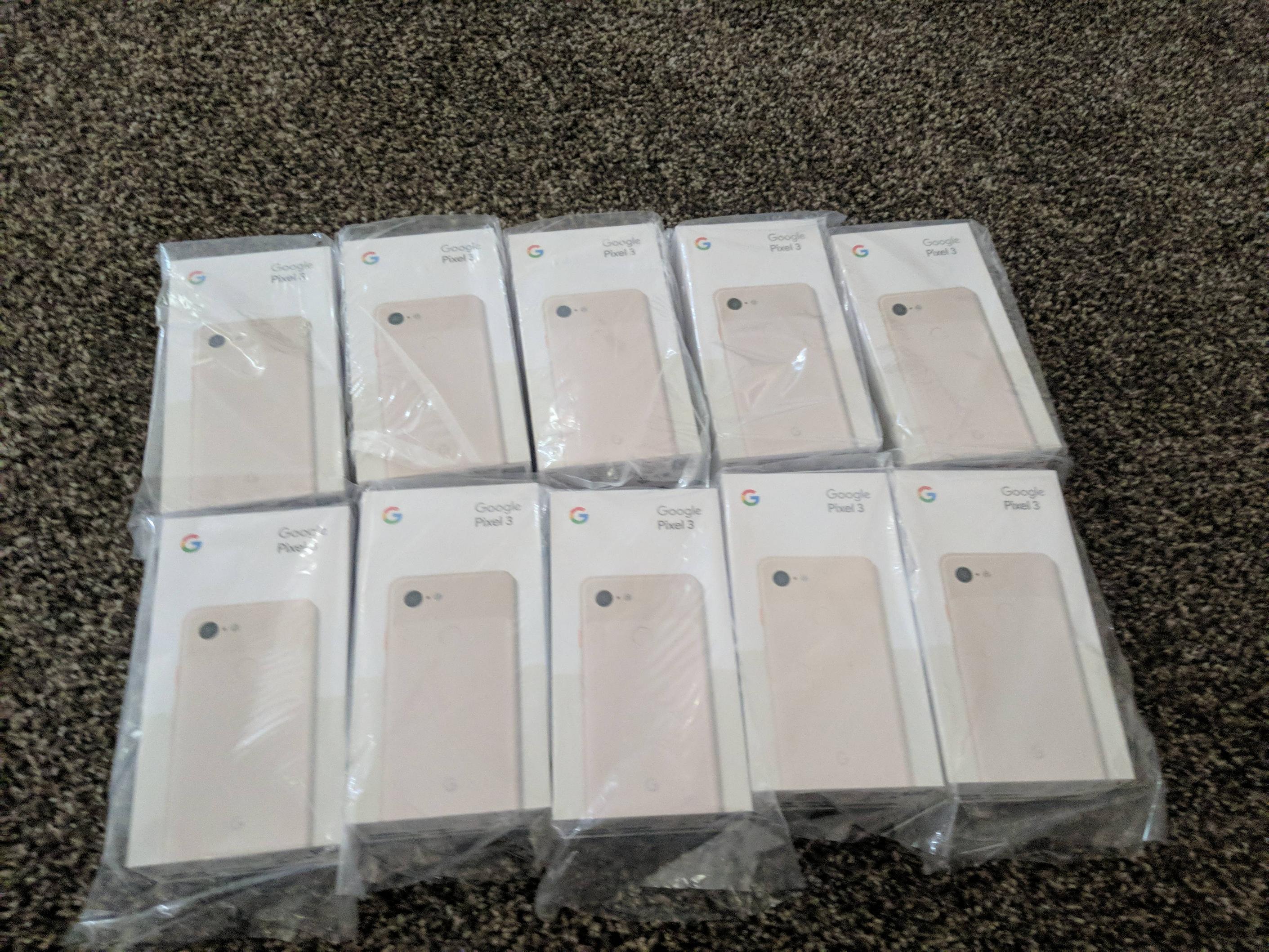
Cheetohz claims they recently returned a defective 128GB Pixel 3 smartphone, only for Google to partially refund them. According to Cheetohz, the firm refunded them $80 USD in tax and not the full price of the phone ($900 USD). What’s more, when Cheetohz bought a replacement in a separate transaction, Google sent them 10 Pixel 3 smartphones, instead of the one they ordered.

Financially speaking, Cheetohz has come out ahead in their interaction with Google. After all, they’re the one with $9000 USD in merchandise, but to their credit, they say they want to do the right thing by returning the other nine phones.

After Android Police first picked up the story, a Google representative commented on the thread and promised to message Cheetohz about the situation. This being Reddit, nine users quickly and kindly volunteered to take the other phones.

What’s the most humorous customer support experience you’ve had with a big corporation? Share the story with us in the comment section.

Source: Reddit Via: Android Police

The post Google sent someone 10 Pixel 3s in lieu of a refund appeared first on MobileSyrup.

19 Apr 21:41

HP announces new Chromebook 15 with IPS display and full-sized keyboard

by Igor Bonifacic
HP's Chromebook 15 laptop

On Friday, HP announced the HP Chromebook 15.

The company’s latest Chrome OS laptop is notable for being its first 15-inch Chromebook model.

Set to start at $449 in the U.S., the laptop features a full-sized keyboard, complete with numpad, as well as a backlit IPS display panel with touchscreen layer. Other features include 64GB of eMMC storage, 4GB of RAM, integrated Intel HD 610 GPU and up to 13 hours of battery life. The Chromebook 15 also features a front-facing webcam and built-in speakers by Bang & Olufsen.

A more expensive model features a Core i5 processor and 128GB of internal storage. HP hasn’t revealed how much this more capable model will cost.

The HP Chromebook 15 will be available in silver and blue colours.

We’ve reached out to HP to find if it plans to bring the Chromebook 15 to Canada. We’ll update this article with the company’s response.

Source: HP Via: The Verge

The post HP announces new Chromebook 15 with IPS display and full-sized keyboard appeared first on MobileSyrup.

19 Apr 21:40

Huawei P30 Pro: How to Shoot RAW/DNG Photos

by Rajesh Pandey
The Huawei P30 and P30 Pro are impressive camera phones. With a 40MP primary shooter, an ultra-wide angle shooter, and a 3x/5x optical zoom lens. In the right hands, the Huawei P30 can capture some stunning photos. And if you are a photographer using the P30, chances are you will want to capture photos in RAW as well. Continue reading →
19 Apr 21:40

Audirvana 3.5

by Rob Campbell
This weekend I took the plunge and sought out the newest version of Audirvana, my preferred, nay, favorite audio playback software. I’ve been using it exclusively for listening to my local collection of music on my computers for nigh 4 years now and I love it. But will I love 3.5? With a completely overhauled […]
19 Apr 21:40

Ghost Apartments in Seattle

by Gordon Price
.
It’s odd that Vancouver, with its ongoing crisis in affordable rental housing, doesn’t pay more attention to Seattle – fast-growing, tech-boom city that it is – where the problem has been so much new rental stock available that the fear has been too many ‘ghost apartments.’  That’s changing, according to the Seattle Times:

The Seattle area is filling up new apartments faster than any region in the country, suggesting demand for housing is starting to catch up with the record construction boom — not a great sign for tenants hoping landlords get desperate and drop rents.

The new figures offer fresh insight into the years-long, multibillion-dollar experiment being waged by developers as they build more apartments in the city of Seattle this decade than in the previous half-century combined, betting on the long-term economic health of the region. Will enough renters eventually materialize to fill them, or will the city have a skyline of empty ghost apartments? …

(Market analyst Carl) Whittaker cited the region’s strong economy and foreign immigration pull for leading the country in drawing renters, as well as the fact that the metro is building more apartments to actually house them. Only three metro areas in the country — New York, Dallas and Los Angeles — built more apartments than Seattle last year. …

For a while it looked like developers might have been too aggressive with all those new units: Vacancy rates had been rising, recently reaching their highest point since the recession. Building owners struggling to fill up tons of new units all at the same time resorted to offering concessions like a free month’s rent or thousands of dollars in gift cards. The supply-and-demand equation flipped so suddenly that Seattle rents went from soaring at the fastest rate in the country to among the slowest.

Now, generally speaking, apartments in Seattle are filling up nearly the same rate as they are opening.

As PT has noted before, the fundamentals are beginning to shift in Vancouver too: falling house prices, increased supply in some areas, more to come.  While the housing crisis continues, it’s changing, and perception lags behind.

19 Apr 21:40

Schnelle Updates beim Galaxy S10

by Volker Weber

b2aabde00235314772c9d8e84f540866

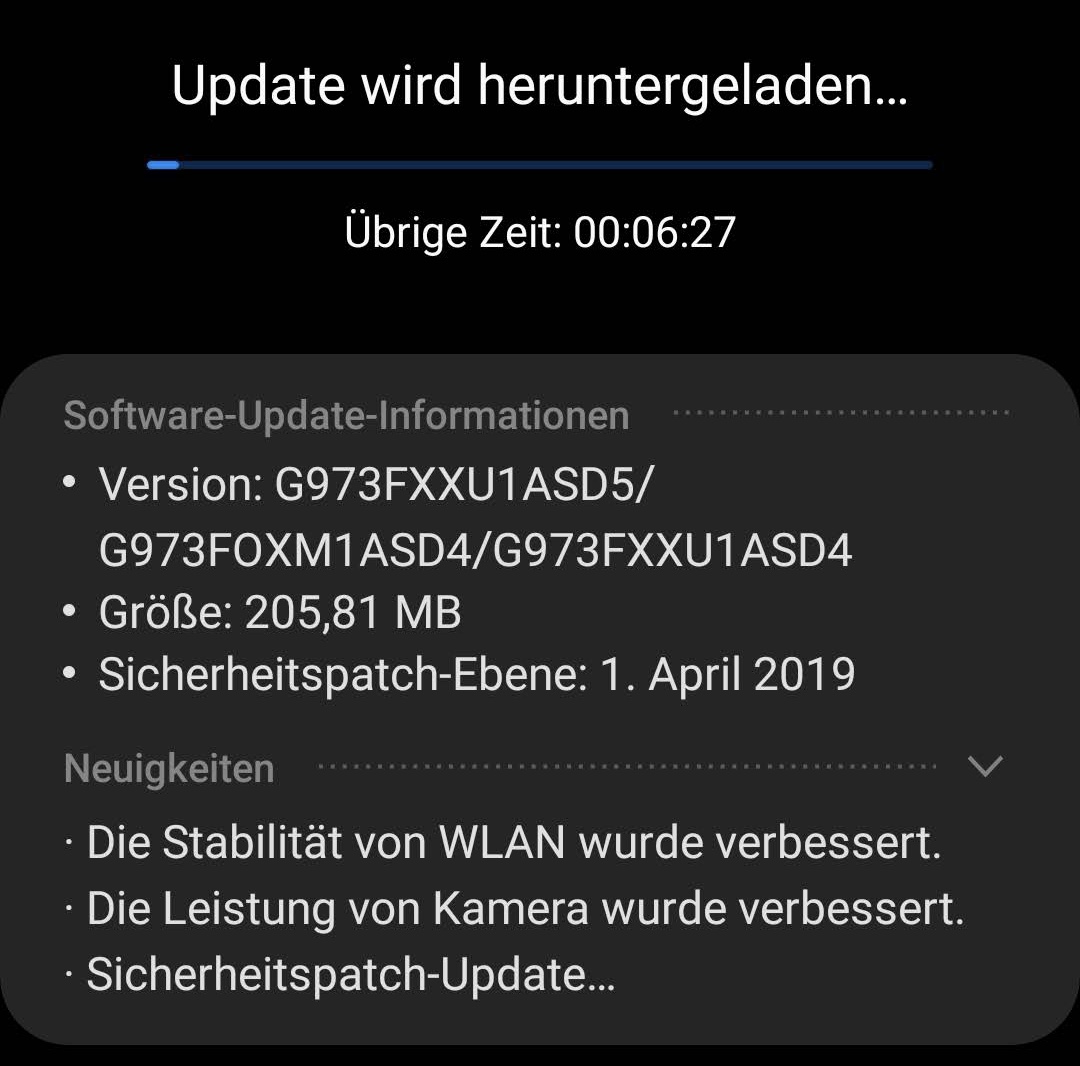
Seit ich das Galaxy S10 habe, liefert Samsung konsistent die Updates schneller aus als Nokia die für das 7 Plus und Motorola für das MotoOne. Das sind beides Telefone mit unverbasteltem Android, und doch schlägt Samsung beide mit der eigenen Software. Das finde ich sehr beeindruckend.

Für Enterprise-Geräte hat Samsung außerdem den Update-Support von drei auf vier Jahre verlängert. Die Koreaner sind hier auf dem richtigen Weg.

Das S10 gefällt mir übrigens rundum gut. Auf der Rückseite des schwarzen Gerätes steht in grau SAMSUNG und DUOS, das war's. Da ist nichts aufdringlich, keine lauten und schillernden Oberflächen. Über die technische Ausstattung müssen wir gar nicht reden. Das ist alles vom Feinsten. Das Superweitwinkelobjektiv hat sich als sehr nützlich erwiesen. Das sollte jedes Smartphone haben. Brauche ich viel häufiger als die Zoom-Linse.

Nur mit der Mode habe ich ein bisschen Probleme. Bezels sind nützlich, weil man das Handy auch irgendwo anfassen kann. Das S10 ist mir schon dreimal runtergefallen, weil es so glatt ist und sich nicht sicher halten lässt, ohne eine Aktion auszulösen. Halte ich das Gerät mit zwei Händen, vertippe ich mich dauernd, weil die Handbällen mit tippen. Und Glasrückseiten braucht nur wirklich kein Schwein, bei keinem Hersteller.

Bei der Software lernt Samsung dazu. Mühselig nur, aber der Fortschritt ist erkennbar. Alles ist doppelt, einmal von Samsung und noch mal von Google. Aber die Samsung-Software sieht nicht mehr schlimm aus. Das neue UI erleichtert sogar die Einhandbedienung und ist damit weiter als Google. Nur die Bixby-Nötigung zeigt, dass sie noch lange nicht angekommen sind. Und dass sie Facebook so feste integrieren, dass man es nicht mal löschen sondern nur deaktivieren kann, finde ich unverzeihlich.

19 Apr 21:40

macOS 10.15 to add Siri Shortcuts and Screen Time features: report

by Igor Bonifacic
MacBook Air

Apple plans to launch new macOS versions of Siri Shortcuts and Screen Time, according to 9to5Mac.

Citing “people familiar with the development of macOS 10.15,” 9to5Mac‘s Guilherme Rambo writes Apple will unveil its latest iOS to Mac apps at the company’s upcoming Worldwide Developer Conference (WWDC) in June.

On iOS, Siri Shortcuts allows iPhone and iPad users to create custom voice-activated shortcuts to complete actions within apps. Apple introduced Siri Shortcuts alongside iOS 12 when it updated its previous Workflow app for iOS in 2018. Rambo reports Apple will add “system-wide” support to macOS for Siri Shortcuts with 10.15.

Screen Time, meanwhile, is functionality that allows iOS users to track their iPhone and iPad usage. Each week, iOS delivers a report that breaks down how much time the user spent looking at their device, as well as how many times they picked it up and the number of notifications they received. It also includes a breakdown of specific app usage. Users can also access this information via iOS’s Settings app.

According to 9to5, this is how Screen Time will work on macOS, as well, with Apple adding a new System Preferences pane that allows users to see, at a glance, how much they’ve been using their computer.

Besides Siri Shortcuts and Screen Time, Apple will bring several current iOS exclusive iMessage effects to macOS. These include full-screen effects like ‘Confetti’ and ‘Echo.’

As part of the same initiative, noted Apple developer Steve Troughton-Smith recently tweeted that Apple will likely break up iTunes by releasing separate macOS music and podcasts apps.

In a separate report from earlier this year, Bloomberg‘s Mark Gurman wrote that Apple plans to launch a new software development kit (SDK) at WWDC 2019 that allows third-party developers to create a single code base for their macOS and iPad apps. By 2021, the company hopes to allow developers to create cross-platform apps for the iPhone, iPad and macOS.

Source: 9to5Mac

The post macOS 10.15 to add Siri Shortcuts and Screen Time features: report appeared first on MobileSyrup.

19 Apr 21:39

My MacStories Story: How iOS Automation Changed My Life

by Alex Guyot

Six years ago I was a senior in high school – a laughably short timeline compared to the immensity of growth and change which took place within it. Graduation, all of college, and a lonely move across the country; a career imagined, pursued, and achieved; friends and relationships come and gone. Not many threads of life make it all the way from the start of your late teens through the end of your early twenties, but those that do feel special in a way not much else can. MacStories is one of mine.

This week we're celebrating MacStories' 10th anniversary, and this year marked the fifth anniversary of my first article on the site. It boggles my mind to think that I've been part of this incredible team for more than half of MacStories' life, but that's nothing compared to the feeling of when it all began.

Supported By

Agenda


Agenda. An elegant new take on notes.

My first hook in the Apple blogging world was through the Macworld app on my iPad 2 sometime during my sophomore year of high school. I quickly added Daring Fireball and The Loop, and not long after that I started reading MacStories. I was definitely on to MacStories before June 2011 because I remember relishing the classic Daring Fireball piece On Attribution and Credit (and its equally classic more colorful precursor). In these articles John Gruber was calling out what MacStories readers already knew: MacStories wasn't just some "Apple enthusiast site," it was a legitimate publication covering Apple in a new way.

MacStories was one of the first blogs to really cover iOS as a serious platform for productivity. Federico saw a potential in the iPad at a time when the idea that "real work is only done on a Mac" was essentially unchallenged. As a high school student who owned an iPad but not a Mac, this resonated strongly with me. I had an interest in coding which was difficult to realize without owning a device with a terminal, but that unfed interest is exactly what pulled me into the fledgling field of iOS automation.

Comparing modern day iOS automation with that of 2013 is like comparing a car to a horse. We were years away from Shortcuts, and more than a year away from extensions and Workflow. There was only a single avenue of inter-app communication which could slip through the sandbox walls: URL schemes.

URL schemes were created to enable deep-linking in iOS apps. They worked extremely similarly to the standard web URL: an app would register a "domain name" which would launch it, and then could support parameters which directed the app to take a user to a particular place within it (or execute some action). A lot of apps supported basic launcher URL schemes, but it was Greg Pierce's Drafts which really drove things forward. Drafts could be launched with the URL scheme drafts://, and then actions could be triggered by adding parameters to the URL. On top of those basics, Pierce invented the x-callback-url protocol, which apps could adopt in order to support a second level of automation called a "callback." A callback meant that once an app successfully executed the action that the URL called for, it would then immediately trigger another URL.

Launching Drafts and creating a new draft via URL scheme in 2014

Launching Drafts and creating a new draft via URL scheme in 2014

This isn't the place to go deep on a somewhat (although not entirely!) outdated automation paradigm, but suffice it to say that URL schemes and x-callback-url were a very rudimentary form of programming. My interests were piqued immediately, and the fire was fueled as Federico continued to cover the burgeoning possibilities on MacStories. These were the pioneering days of inter-app automation on iOS.

In February 2013, Federico posted an article about chaining three apps together with Drafts and x-callback-url. At the end he theorized that even more apps could be linked together using a similar approach to his. I took that as a challenge, and within a couple days I had chained five (gasp!) apps together. I tweeted that to Federico1, and he wrote an article about it on MacStories.

As a 17-year-old with no website and maybe 50 followers on Twitter, seeing my name on MacStories pretty much blew my mind. That day I realized I needed to have my own site to publish on so that I wasn't just tweeting Dropbox links, and five days later The Axx was born2.

Quadruple cross post, such productivity!

Quadruple cross post, such productivity!

On The Axx I created The Action Page to document my URL scheme automations. A lot of them were pretty useful at the time, like cross posting between Twitter and App.net3. Others were just proofs of concept, or downright convoluted. On MacStories, Federico had just released his Editorial review, and I decided that Drafts needed a resource like that: a centralized place to learn how to use URL schemes and Drafts to link iOS apps together.

When my plans came across Federico's radar4 he reached out to ask if I'd be interested in publishing the article on MacStories instead. A few months later I posted my first ever article to the site:

Since publishing that article, I've had the pleasure of being part of the MacStories team for over five years now. That lead up to it was one of the most exciting and special times in my life, and one of the most impactful. The primitive programming of URL schemes inspired me to choose software engineering as a career, and my work at MacStories was my primary reference to get my college job in support for the home automation company SmartThings. SmartThings hired me to their cloud engineering staff out of college, a position which I moved across the country for and continue to be employed in to this day. I'm not sure where I'd be today if Federico hadn't been so fascinated by iOS automation, or if he hadn't given me a spot on the MacStories team.

Being part of that team has been and continues to be one of the great experiences of my life. We have an extraordinary team here, and everyone on it cares deeply about the special place that we're working to build. My annual watchOS reviews are some of my proudest work of anything I've ever done, and covering Apple events throughout the year has become a tradition that I love and look forward to despite the hard work that it entails.

Life hasn't slowed down since that last year of high school, and a lot of my side projects have fallen by the wayside over the years. I haven't been able to write for MacStories as much as I'd like to, but I've always made sure to keep my byline active at least a handful of times each year. This team of people is not something that I ever want to leave behind.

Here's to the next ten years.


  1. Sadly, the Dropbox video is lost to time. I've tried to dig it up multiple times over the years but have never been successful. ↩︎
  2. Shout out to SquareSpace for that mad turnaround time. Also to ditching Spanish class. ↩︎
  3. Pour one out. ↩︎
  4. Thanks again, Harshil! ↩︎

Support MacStories Directly

Club MacStories offers exclusive access to extra MacStories content, delivered every week; it's also a way to support us directly.

Club MacStories will help you discover the best apps for your devices and get the most out of your iPhone, iPad, and Mac. Plus, it's made in Italy.

Join Now
19 Apr 21:39

Notes from OER19

Jim Groom, bavatuesdays, Apr 19, 2019
Icon

More from OER19 in Galway, Ireland. Jim Groom's post describing some of the highlights makes me envious. Among many good bits: "It was during Melanie (Meyers)’s session that I had the epiphany that the OER conference is not so much about textbooks and content as it is about practice and people. Listening to the work she did making WordPress not so much stand-in for the LMS, but rather serve to highlight the intrinsic weakness of the (latter) system. And you do that by creating an open site that has become an resource educating people around the world about the Opioid crisis."

Web: [Direct Link] [This Post]
19 Apr 21:39

Huawei P30 Pro Camera Review: Breaking the rules

by Ted Kritsonis

Huawei said it wanted to “rewrite the rules” of photography with the P30 Pro, and in so doing, it’s breaking a few along the way, too.

It’s not totally clear to me that Gal Gadot, of Wonder Woman fame, shoots all that much with the P30 Pro, but she is the face of the product. The commercial she stars in speaks to the phone’s photography credentials, and there are good reasons why.

I outlined some of my initial thoughts in a previous hands-on, and after diving deeper into the array of features here, I can say Huawei has the chops to claim it’s among the best mobile cameras one can wield. It served me well on an extended trip to Europe.

For a full review of the phone and Dean Daley own take on-camera performance, check it out here on MobileSyrup.

From all angles

I’ve always felt that more lenses in a phone only matters if they have practical value. A telephoto lens isn’t worth having if it produces terrible images. What Huawei and Leica did together with the 5x optical zoom is an engineering feat, in my opinion. Utilizing the lateral space under the chassis to zoom in further without popping something out from the body is worth some applause. Who knew a periscope-like design would make its way to a phone one day?

I say that because it shoots well. The lens is available in almost every mode the phone’s camera offers. Soon enough, it will play a role with video when Dual View goes live in an upcoming software update. Night mode works just fine with it, too.

The thing about the P30 Pro is that its camera is incredibly deep. I found the 5x telephoto zoom lens sometimes brought me too close to properly crop a subject. For that, I could use the regular 1x lens and crop later. If even that lens put me too close, I had the ultra-wide lens to capture it all. If I wanted to shoot with some additional depth of field, Aperture and Portrait mode handled that. Manual controls via Pro mode brought something invaluable to the table, which I’ll get to later.

Huawei has touted its 50x zoom, but to me, that’s missing the real crux of what’s going on here. Sure, zooming in that far is neat, but it’s pretty much just magnifying the 5x zoom by cropping it digitally. It’s never going to be an acceptable photo in my eyes.

Not to mention it’s all but impossible to get a clear shot handheld. Every 50x zoom example Huawei showed to date was almost certainly taken with a tripod. Like Dean noted in his review, I found it more useful as a telescope, though I am somewhat unsettled by the fact it would be fairly easy to spy on someone from a distance.

Far more practical — to a surprising degree — was the 10x hybrid zoom. I detest digital zoom because it so obviously degrades an image, but the results here tempered my skepticism. However, the narrower aperture and increased sensitivity to movement make it challenging to shoot when lighting isn’t optimal. In low-light situations, it’s almost unusable handheld. With a tripod and Pro or Night mode, though, it’s possible to get a decent shot.

Shooting more

Sometimes, manufacturers will cram an array of shooting modes into the phone’s camera, only for some to be subpar or gimmicky. I’m not crazy about every one in the camera’s “More” section, but I do appreciate a few of them.

Monochrome is a gem, and well worth shooting with because of the flexibility that comes with it. Previously, the P10 and P10 Pro had a lens dedicated to black and white photography, but it’s been relegated to a software-based mode since the P20 Pro and Mate 20 Pro last year. Despite that, it’s excellent, especially in Portrait or Pro.

Huawei wisely included four of the main modes (normal, aperture, portrait, pro), along with full access to all the lenses. I would’ve liked Huawei to make this and HDR available on the main menu because they can help shooters get a little more creative.

Others, like Super Macro and Time-lapse prove worthy, too. I wondered in my hands-on why HDR was treated as a separate mode, and I’m still left wondering. While it does work okay, it’s inconsistent because it thinks it’s bringing out detail in highlights and shadows when it doesn’t always deliver. Moreover, Huawei already baked in backlighting help into its camera AI, which worked wonders for me.

Firing away

I’ve always leaned toward manual controls for better photos, and it’s no different here. Huawei’s Pro mode is relatively unchanged, but it benefits from the new lenses anyway. Shooting in RAW makes a real difference when editing with a program like Lightroom, especially with the way you can temper the camera’s impulses.

Master AI is Huawei’s way of automatically interpreting a scene and maximizing its composition. I’ve had my issues with it, and though still not totally sold, I like some of the changes. I mentioned earlier that backlit subjects can now come out looking fully illuminated. The beauty of it is that it requires no input from the shooter. So long as the AI is on with Photo mode, just point and shoot.

It’s one of those things that compensate for the lack of aperture control. Phone cameras are handicapped from the start because of their fixed apertures. Even the Samsung handsets equipped with a mechanical one are limited to two f stops. Pro mode lets you adjust shutter speed, ISO and exposure to try getting a nice, balanced image, except it’s hard to pull off sometimes. Master AI does it in seconds.

It’s very much in the same vein as Night mode, which remains one of the best things I’ve seen in a smartphone camera. Google’s Night Sight is the primary competitor, with OnePlus’ Nightscape trying to catch up. The thing with those other two is that it’s a one-and-done scenario. You press the shutter and hope for the best from the software.

Huawei’s mode is far more flexible. You can set the ISO and shutter speed or leave them on auto. You can also stop the shot’s capture and processing in mid-operation — something you may want to do to avoid an overexposed low-light scene. The ridiculously high maximum ISO (409,600) makes the mode more sensitive to light, and thus, more prone to overexpose shots when there’s a reasonable amount of light in the frame.

What I would love to see is the ability to shoot in RAW this way. Huawei’s Night mode software not only takes a huge burst of photos at different exposures and flattens them into one image, it also sharpens it. At times, the sharpening is overzealous, and so, I have to go and soften the edges in an editing app afterward. It’s a good problem to have, but it would be even better if shooters were given a say in how much sharpening goes into the shot.

Gauging image quality

Colour is one thing the P30 Pro doesn’t always get right. It’s probably one reason why Huawei includes standard, vivid and smooth colour options through most of the shooting modes (via the film icon at the top). Standard sometimes comes off dull and muted, whereas vivid and smooth increase contrast and saturation for photos that ‘pop’ a little more.

It is always easier to add contrast and saturation to a photo later, so I can understand why standard is the default. It’s a little more challenging to do it when the image already has those things visually.

But even without all that, it’s one reason why I leaned on Pro mode. Photo mode automatically adjusts white balance and exposure, sometimes to a fault. For example, daytime photos giving me the bluest sky were shot in Pro. In Photo, the sky was either a faint blue or washed out white, depending on the angle and focal point.

The backlighting AI can help retain detail in the sky, but it doesn’t always look as rich. Pro helped me capture shadows and reflections I couldn’t have otherwise. The shots I took at the Canadian cemetery at Juno Beach in Normandy, France are good examples. Same with those I shot at the Vimy Ridge Memorial.

Plus, by shooting in Pro and getting RAW files out of it, I had more to work with in post-production. The fact friends and acquaintances were taken aback by the shots I got with the phone — edited or untouched — was a sign to me that the P30 Pro’s camera could shock people.

The ToF sensor

Huawei won’t be the only one touting the merits of a Time-of-Flight (ToF) sensor. The sensor shoots out an invisible laser to measure when light bounces off a subject to create a 3D depth-of-field map. The result is supposed to be better bokeh photos, but I’m not sure that’s always the case. Not that photos are bad, just that the P30 Pro seems better than its predecessors at depth-of-field shots even without ToF in action.

Still, it’s there, and bokeh effects are nice, as a result. If the sensor can take away some of the heavy lifting of other conventional methods to achieve the perfect blur, I’m all for it. Ultimately, I believe ToF will figure more prominently with augmented reality (AR) content, and it remains to be seen how Huawei will roll that out.

Video recording

Huawei highlighted increased digital stabilization for video footage, but for whatever reason, chose not to make it an elective feature. I wish engineers had, because the stabilizing effect alters the framerate in mid-capture. I could go walking around shooting at 30fps, but with a quick pan up, down or sideways, the refresh rate appears to double.

On another user’s phone, I witnessed a video, shot dashcam-style, where the interior of the car never really moved, yet every bump made everything else move. It was almost as if the windshield was a movie theatre screen and car’s dash a row of seats. Kind of cool, but otherwise unnatural, making it hard to fully trust the phone for video.

When the effect doesn’t kick in, thanks to a static subject or slower movement, video quality is excellent. In low-light and when switching lenses, it’s not always smooth, and without manual video controls, there’s little I could do to improve the situation.

My review unit also had a problem with artificial light sources flickering in various clips I shot. Seeing others unaffected by the same issue, I’m chalking it up to a defect in mine, so unlikely something widespread.

Total package

What Huawei delivered with the P30 Pro is a versatile mobile camera that should serve notice to both competitors and consumers, alike. Apple has seemingly deemed its users uninterested in advanced photography features.

Samsung recently missed an opportunity to close the low-light photo gap. Google has done a remarkable job, albeit with a limited feature set. Huawei is trying things others simply haven’t yet, and much of what it’s doing actually works.

Calling this one of the best smartphone cameras available isn’t an understatement. If you had the P30 Pro in your hands, you would be doing yourself a disservice by not learning the camera’s gamut of features and modes. It won’t replace a DSLR, in my opinion, but it’s more than capable of taking outstanding photos right out of your pocket.

The post Huawei P30 Pro Camera Review: Breaking the rules appeared first on MobileSyrup.

19 Apr 21:38

Links for time-traveling space explorers

by Alex
family photo as Starfleet Crew

The illustration created for my article, “Geeks Gone Wild”, is my all-time favorite family photo.

Live from Norwescon

I’m at Norwescon 42 this weekend, a fabulous gathering of sci-fi enthusiasts in Seattle. While this is our third Norwescon, it’s my first time as a panelist. This page rounds up resources I’ve mentioned on my panels so far, as well as articles I think will interest NWC attendees.
General interest
These are stories I’ve written about science fiction, gaming, fandom and other themes that may interest NWC folks.
Thursday panels
MBTI, Big Five, and The Need to Classify Personality 
Extroverts, introverts, ambiverts. INTJ versus ESFP? Open versus Neurotic? Never have we had so many different ways of describing human personality. Are we coming up with a theory of mind, or is this just astrology for the 21st century? Inquiring minds want to know!
Manage Your Time
The business of writing isn’t always fun. In fact, many of us creatives hate this side of the biz. What are some tricks to stay focused on recordkeeping of payments and expenses, paneling or teaching workshops, and writing, all while finding time for life?
Friday panels
Women in Tech • Cascade 11 • 3–4 p.m.
The fields of technology, information science, and scientific research have traditionally been fairly hostile to women. Women still find it difficult to get tenured positions, critical research funding, and articles adjudicated in peer-reviewed journals, which can stifle their careers. This panel looks at the state of women in technology and information science and what can be done to improve the situation.
Cyborgs, Androids and other Machines as Characters in Science Fiction  • Cascade 11 • 7–8 p.m.
In this panel, we will explore sentient machines of all types in science fiction. What roles do “human” machines play in SF, and why do we as writers and readers find this archetype of human-as-machine/machine-as-human so valuable? As the line between human being and machine dissolves with looming advances in medical, biotech, AI, and virtual reality tech, how will this archetype (and stories portraying it) change?
Saturday panels
Blogger, Min3r, Gamer, AI: Tomorrow’s Job • Evergreen 1 & 2 •noon–1 p.m.
What will your job be in 2030? Chances are, it doesn’t even exist today. Within the next twelve years, thirty percent of all job categories will go extinct, but a plethora will be created in an increasingly AI-driven world. Maybe you’ll be a drone wrangler, a social media maven, a cyberwarfare soldier, or a cosmetic prosthetist. Explore what the world of work (and not work) will look like in the next ten to fifty years.
Star Trek Discovery • Cascade 9 • 11–noon
Star Trek is back on TV—new tech, new Klingons, new uniforms. We boldly go where no one has gone before… and talk about the new clothes on our favorite sci-fi TV show.
19 Apr 21:38

The Future of Augmented Reality & Blockchain Technology

Adario Strange, Next Reality, Apr 19, 2019
Icon

Another way new technology will impact ed tech in unexpected ways: "if there is a major blind spot in the AR space in 2019, it's the impact that blockchain technology will eventually have on the software distributed in AR clouds." Here's a good example: "In our current, web-based digital life, copying a photograph, for example, is trivial. And determining whether or not a digital photo is an original photo or just a copy of that digital photo can be difficult. Blockchain addresses this issue by allowing developers to create unique digital assets that users and other developers cannot copy." This has an impact for both commercial content (which cannot simply be copied) and also open content (which can restruct commercial uses). There's more, but this is the gist.

Web: [Direct Link] [This Post]
19 Apr 21:38

Google disables workaround that allowed Inbox to continue working

by Igor Bonifacic
Inbox by Gmail

Despite the creative efforts of fans, it appears Google’s Inbox email client is well and truly dead.

Google technically sunset Inbox on April 2nd. However, diehard fans found a clever workaround.

In short, to continue using it, some Inbox users installed a previous version of the app, v1.77. In this way, they were able to continue using Inbox even after Google officially shut down the app at the start of the month.

As of this Friday, however, that trick no longer works. As spotted by an Android Police reader, installing Inbox v1.77 no longer allows Inbox to continue working. What’s more, attempting to use even older versions of the client leads to the same result: a sign-in splash screen that says “something went wrong.”

Source: Android Police Via: 9to5Google

The post Google disables workaround that allowed Inbox to continue working appeared first on MobileSyrup.

19 Apr 21:38

An evening with James Gosling, Guido van Rossum...

An evening with James Gosling, Guido van Rossum, Anders Hejslberg, and Larry Wall? Four individuals who have profoundly impacted the world?

Yes please.

19 Apr 21:37

C’mon Texas. If you have to put these kind of n...


C’mon Texas. If you have to put these kind of notices up everywhere, that’s a sign of something. The Texas I was born in didn’t need ’em.

19 Apr 21:36

Beware marketing thought leaders bearing fashionable truths

by Josh Bernoff

I just came back from a conference full of marketers. Marketing conferences challenge the mind — but not necessarily in the way that they should. There are the talks that are intended to inspire. They are about being true to yourself and your brand, or the power of outstanding customer experience to inspire people. They … Continued

The post Beware marketing thought leaders bearing fashionable truths appeared first on without bullshit.

19 Apr 21:36

Avalanche Noise Generator Notes

by bunnie

Good sources of entropy (noise) are an essential part of modern cryptographic systems. I designed a mobile-friendly avalanche noise generator as part of the background work I’ve been doing for the betrusted project (more on that project later). I had to do a new design because the existing open-source ones I could find were too large and power hungry to integrate into a mobile device. I also found it hard to find solid theory pieces on avalanche noise generators, so in the process of researching this I wrote up all my notes in case someone needs to do a ground-up redesign of the system again in the future.

Here’s an excerpt from the notes:

Avalanche breakdown is essentially a miniature particle accelerator, where electrons that enter a PN junction’s depletion region (through mechanisms that include thermal noise) are accelerated across an electrical field, to the point where new electron-hole pairs are generated when these high-energy electrons collide with atoms in the depletion region, creating an amplification cascade with low reproducibility.

An approximate analogy is an inflatable pool filled with water. The height of the pool is the potential barrier of the reverse-biased PN junction. A hose feeding water into the pool represents a constant current of electrons. The volume of the pool can be thought of as the depletion capacitance, that is, the capacitor created by the region of the junction that is void of carriers due to natural drift and diffusion effects. As water trickles into the pool, the water level rises and eventually forms a meniscus. Random disturbances, such as ripples on the surface due to wind, eventually cause the meniscus to crest over the edge of the pool. The water flowing over the edge pushes down on the inflatable pool’s side, causing more water to flow, until the level has reduced to a point where the inflatable pool’s side can snap back into its original shape, thus restarting the cycle of filling, cresting, and breakdown. The unpredictability of when and where the breakdown might happen, and how much water flows out during the event, is analogous to the entropy generated by the avalanche effect in a PN junction.

The electrical characteristic of avalanche noise biased by a constant current source is a “sawtooth” waveform: a linear ramp up in voltage as the capacitance of the depletion region charges to the point where the electric field becomes large enough to initiate the cascade, and then a sharp drop off in voltage as the cascade rapidly discharges the junction capacitance. The cascade then abruptly halts once the field is no longer strong enough to sustain the cascade effect, leading to a subsequent cycle of charging and breakdown.

The site also includes detailed schematics and measurement results, such as this one.

The final optimized design takes <1cm^2 area and draws 520uA at 3.3V when active and 12uA in standby (mostly 1.8V LDO leakage for the output stage, included in the measurement but normally provided by the system), and it passes preliminary functional tests from 2.8-4.4V and 0-80C. The output levels target a 0-1V swing, meant to be sampled using an on-chip ADC from a companion MCU, but one could add a comparator and turn it into a digital-compatible bitstream I suppose. I opted to use an actual diode instead of a NPN B-E junction, because the noise quality is empirically better and anecdotes on the Internet claim the NPN B-E junctions fail over time when operated as noise sources. I’ll probably go through another iteration of tweaking before final integration, but afaik this is the smallest, lowest power open-source avalanche noise generator to date (slightly smaller than this one).

19 Apr 21:36

How to Travel Without Leaving a Trace

by Ria Misra
How to Travel Without Leaving a Trace

Niagara Falls and its surrounding parks see millions of visitors a year, and all that foot traffic results in a lot of trash—832 metric tons each year from the Canadian areas alone. Still, park sanitation workers were surprised to find a piano, broken into pieces, among the items left in the garbage one day.

“People dispose of all kinds of things,” said Steve Barnhart, the senior director for parks, environment, and culture at the Niagara Falls Parks Commission in Ontario. “But that was really unusual.”

Although odd things occasionally surface at tourist hot spots, the bulk of the waste in the garbage cans comes from much more common, repeat offenders. Here are some items that major tourist destinations often find tossed out by travelers—and some ways that you can avoid adding to all that rubbish along your own journey.

Plastic, plastic everywhere

Travelers often use disposable items as conveniences that they can simply toss afterward. But when a site hosts millions of visitors and hauls out hundreds of tons of trash a year, as many popular tourist destinations do, all those disposable items add up fast in ways that are quickly apparent on the ground.

Although that smashed piano caught Barnhart’s attention, he cited disposable plastic items—such as the brightly colored ponchos that visitors wear near the falls (which the park workers collect after the tours and bale together to recycle) and single-use drink bottles—as the kinds of items he and his fellow park workers see much more often among the waste removed from the parks surrounding Niagara Falls.

Angie Renner, the environmental integration director for Disney Parks, also pointed to plastic bags, cups, bottles, and straws as some of the more common items that end up in the receptacles at Walt Disney World and the company’s other theme parks. And Jamie Richards, a park ranger and spokesperson for Yosemite National Park, noted that plastic water bottles and cardboard coffee cups (including their plastic lids) frequently show up in the trash.

The most effective way to reduce the number of disposable items in the trash is often to just stop purchasing so many of them in the first place.

“Something that certainly helps us out is trying to reduce your single-use plastic water bottles,” Richards said. “We have plenty of filling stations throughout Yosemite National Park and that just really helps reduce a lot of the waste that’s generated in the park.”

Barnhart also cited the installation of water-filling stations for reusable water bottles in Niagara Falls’s parks as a way they have encouraged the reduction of trash.

Different drinkware options can replace other paper and plastic disposables. If you’re going to drink hot coffee or tea, carry a travel mug. If you like having a straw, bring your own reusable one. If you prefer to keep your drinks ice cold, bring an insulated water bottle so that you’re not tempted to buy chilled bottles on site. Or if you want to carry the smallest pack possible, go with a collapsible bottle. (Wirecutter has recommendations for these in guides to the best water bottle and the best travel mug.)

Skip the printouts

Sophie Grange, a spokesperson for the Louvre, listed maps and entrance tickets as some of the most common items the museum sees in the 1,200 tons of waste it carts out a year. The museum does recycle paper, but for visitors who are carrying a smartphone, paperless alternatives can be an even better option.

“The best way to reduce waste is to not produce any,” Grange said in an email. Instead she suggests that visitors who want to reduce their trash footprint download e-tickets and use the museum’s app or refer to posted signs for guidance on directions.

In addition to providing options for visitors to skip the printouts, she said the museum also tries to find ways to keep its own printed materials out of the landfill too. For instance, it sends promotional banners for temporary exhibits to a company that turns them into bags; the banners even go to archeological schools for use as coverings to protect dig sites.

Although tickets and maps for many tourist destinations are offered electronically, some travelers prefer to keep their tech to a minimum or may be traveling in areas where dicey connections and power failures are common. If paperless travel isn’t practical for you, the best thing to do is to have a place ready to hold your papers so that you’re not leaving a trail of them behind as you move. You can use a travel journal or notebook (Wirecutter recommends the Traveler’s Notebook), customized with an inset folder, to keep loose papers together until you can sort through them at home.

Unwrap new gear before you leave home

Disposable cups, bags, and utensils may be the first kinds of items that spring to mind when you’re thinking about how to reduce waste. But the packaging your gear and supplies come in can also be just as big of a problem. And when you’re on the road, you may find that places to dispose of that packaging are much more limited than they are at home.

In Yosemite National Park, Richards often sees this problem in action, especially when campers bring new gear directly from the store into the park without unpacking it.

“A lot of visitors don’t think about the amount of packaging material that comes if you buy a new sleeping bag, or a new tent,” she said. “If you have the chance to pack down and condense [before you leave home], you can reduce the cardboard and plastics that you bring into the park.”

You can also cut down on the amount of packaging you’re carrying by planning ahead and bringing a reusable packable bag to carry groceries or other supplies instead of picking up a disposable plastic or paper sack when you do your shopping. In fact, according to the United Nations Environment Programme, more than 60 countries have already put restrictions on single-use plastic bags, so carrying your own not only reduces your trash footprint but also means you’ll be better prepared in locations where bags aren’t available.

19 Apr 21:36

Accessorize to Personalize your Packa!

by Blix PR

This month has been filled with Blix innovation, creation, and new product launches. While we have already discussed the new Packa compact cargo ebike and the line of Blix bags, we felt it was time to discuss the most important features of any bike: accessories! Below you will find more information on some of the fun items you can mix and match to personalize your cargo carrying needs for your Packa.


Better with Baskets:

Front Basket: This stylish basket directly attaches to the front headtube and stays straight when you turn and when you stop. This means no spillage or tipping of your bike! It also includes a bamboo plate and cup holder for your coffee, tea, or water bottle. Fill your basket with flowers, farmers' market goodies, or a gym bag! 

Large Basket: This super versatile basket is great for larger loads and can be mounted to the front or rear rack. You can even fit two large baskets side by side on the rear rack for greater cargo capabilities. Fill this basket with groceries, sports equipment, or camping gear and be ready for your adventure.

Practical Platforms:

Front Rack: Sometimes the rear rack is not enough space for your needs. Adding a front rack can help resolve this issue! It connects directly to the headtube for great weight distribution and easy handling when riding. Similar to the front basket, it stays straight when you turn to keep your items steady and prevent tipping or spillage. This rack can be used on its own to carry cargo or add the large platform or large basket on top for even more cargo space. 

Platform: When your cargo needs are always changing, this platform can handle everything and anything. It mounts to both the front and rear rack. Grab the pizza, coolers, gym bag, you name it. The cargo possibilities are endless!


If you are interested in learning more about the Blix bags, check them out here

Learn how you can replace your car with the Packa here!

All accessories are available here!

Follow us:

Instagram

Facebook

19 Apr 21:35

Why do you pay so much for gas? Here's a hint: It's not just taxes

mkalus shared this story .

If you're a Metro Vancouver driver, you already know you're paying an awful lot for gas with prices hovering around $1.70 a litre.

You're well aware that oil and gas companies and refineries all want to make a profit,  so that's factored into the cost.

You also know that a hefty chunk of what you spend goes toward tax.

Taxes alone, however, don't explain why B.C. has the most expensive gas in the country and have nothing to do with sudden fluctuations in price.

So, the next time you're at the pump cursing about how much you're spending, here are some things to keep in mind.

Well, yeah. There's a lot of tax

Tax isn't the only reason gas is so expensive in B.C., but a big piece of what you pay at the pump goes to Victoria and Ottawa.

Here's a list of all the taxes you pay on a litre of gas in B.C.:

  • Provincial motor fuel tax — 7.75 cents.
  • B.C.'s carbon tax — 8.89 cents.
  • The B.C. Transportation Finance Authority tax — 6.75 cents.
  • TransLink tax (If you live in Metro Vancouver) — 17 cents, increasing to 18.5 cents on July 1.
  • Transit tax (If you live in Victoria) — 5.5 cents.
  • Federal excise tax — 10 cents.
  • Finally, pay the five per cent Goods and Services Tax on top of the total price.

When you add it all up, you're paying more than 50 cents a litre in tax if you live in Metro Vancouver.

A gas station in Metro Vancouver sells gas for $165.9 a litre (© Evan Mitsui/CBC)

Limited supply

B.C. only has two oil refineries — one in Prince George that produces about 12,000 barrels a day and one in Burnaby that has a capacity of about 55,000 barrels a day.

The Burnaby refinery provides gas to Metro Vancouver and Vancouver Island, but it can't come close to meeting the region's fuel demands.

To make up the difference, B.C. brings in petroleum from Alberta through the Trans Mountain Pipeline or from other countries.

The Cherry Point Refinery in Washington State is also a major source of gas for B.C.

The Parkland Refinery on Burrard Inlet in Metro Vancouver — formerly owned by Chevron — provides gasoline to Vancouver and Vancouver Island, but doesn't have capacity to meet all the area's demand. (Andy Clark/Reuters)

Seller's market

When refineries close or scale back production due to mechanical problems or scheduled maintenance, it chokes the supply of fuel to B.C.

As a buyer in a seller's market, this puts B.C. in a difficult spot.

The province now has to find other sources for its gas and diesel and it's competing against other regions for that fuel.

If multiple refineries in the Pacific Northwest scale back production at the same time, competition for fuel increases and the price goes up.

A man fills up his taxi at a gas station in Vancouver (Evan Mitsui/CBC)

B.C. has high fuel standards

Not all fuel is created equally and B.C.'s emission standards are some of the highest you'll find anywhere.

All gas and diesel that is sold in B.C. must include renewable materials and meet the province's carbon targets.

Jason Parent with the petroleum consulting company the Kent Group says this adds to the refining cost which ultimately gets passed along to consumers.

"We've seen that cost increase as regulations become more stringent over the years," he said.

"That's a cost that is raising the wholesale price of gasoline."

Other factors — such as global markets, time of year and the strength of the Canadian dollar — also affect the cost of gas.