Shared posts

26 Apr 05:05

What Access Levels Should You Assign To Members?

by Richard Millington

In one client gamification project, we’re looking at permissions members can achieve as they level up.

This raises some interesting questions.

  1. How valuable is each permission to the user?
  2. How will they use it?
  3. What is the risk?

For example, letting members that reach ‘level 25’ mark answers as accepted solutions sounds handy…until they begin marking every answer they give as an accepted solution.

Or, just as likely, mark the answers of their friends as accepted solutions. Of course, if only 20 members have that permission, you can look out for these problems and manage it. If 200 have that permission, it quickly descends into chaos with accusations of cheating flying around.

If you’re giving members internal permissions, you need to balance the value of the permission with how members could abuse it (and multiply this by how many people will likely have that permission).

This lets you reasonably decide if you can award members with that access. A typical example might show below:


(click here if you can’t see the image)

You will notice the absolute number of members with each permission drops sharply with each access level.

It’s also relatively within the control of most community teams to handle members abusing each level.

Better yet, each level gives members an advancing level of control and prestige they are likely to use and appreciate.

The key is to be relaxed with benefits members can’t abuse (access to a quarterly webinar), while tight on those which could cause challenges (deleting inappropriate posts).

26 Apr 05:04

When bad data leads to a disappearing neighborhood

by Nathan Yau

Caitlin Dewey for OneZero describes the case of the Fruit Belt neighborhood in Buffalo, New York, or “Medical Park” as it was incorrectly named in Google Maps:

Lott learned that the issue had been festering for years, and she wanted answers. The 2,300 residents in the Fruit Belt didn’t refer to the community as “Medical Park,” but Google Maps had done so since the late 2000s. Community members argued the designation was a calculated tweak in favor of gentrification, a digital rechristening that would be used to sell houses, market Airbnbs, and wrest the neighborhood’s future from the people who had made a home there for generations.

Lott didn’t know it at the time, but the misnomer also revealed a great deal about the invisible process major tech firms use to put neighborhoods on their maps — and how decisions based off arcane data sets can affect communities thousands of miles away.

Tags: Google Maps, missing data

26 Apr 05:04

New Apple AirPods :: Stuff that works

by Volker Weber
c7e3330d2eff11a4729709b547ff9504

The AirPods are Apple's best product, and they have been since they launched. Customer satisfaction is through the roof. With the new AirPods I fell in love with them once more, basically for three reasons:

  1. Siri is finally working as I want it to. Just say 'hey siri next track' and it so happens. With the original you had so say 'hey siri', then wait for the chime, then say 'louder'. That makes a huge difference.
  2. Longer battery life. Phone calls eat into the battery less, and equally important, those batteries are new.
  3. Inductive charging. You just put the case on your Fatboy and it's full.

Batteries wear out after 500 to 1000 full recharges and I have used those up easily on my first pair. Then you have to put them back into the case more often. You can still use them, but they are less fun. Keep that in mind if somebody offers you to buy their old pair.

More >

26 Apr 05:04

MindNode 6 Review: Refined Mind Mapping

by Ryan Christoffel

When MindNode debuted its last major version, it brought a major revamping and modernization of the core app experience. The update was a resounding success in my view: adopting the document browser, an adjustable panel system, and drag and drop made MindNode a shining example of modern iOS design; at the same time, additions like quick entry mode and a slate of new, easy to decipher iconography made MindNode more accessible to the mind mapping novice.

Where MindNode 5 brought major evolution and a fresh foundation, today's version 6 for iOS and the Mac is able to build on that foundation with refinements and advancements that make the app more versatile and expand existing features in new ways. I've grouped those improvements into two categories: focus aids and efficiency aids.

Focus Aids

Mind mapping is meant to bring out your thoughts and ideas in a visual way, so the ability to focus while creating your map is key. In that vein, MindNode 6 introduces a new Focus mode that brings the current branch you're working on to the forefront while dimming all other parts of your map.

Engaged by selecting a node then hitting 'Enter Focus' from the Action panel or the contextual pop-up menu, I find that Focus mode is ideal for larger, more detailed mind maps where you really go deep hashing out a particular project or, as I'm more prone to, an article. Focus mode not only dims the rest of your map, it also automatically zooms in on your selected node – a nice added touch.

A second way MindNode 6 aids focus is through its rich support for external displays. When connecting your iPad Pro, for example, to an external monitor via USB-C, MindNode now lets you have different parts of your mind map appear on your iPad and the connected monitor. You may want to keep the full map in view on the external monitor, ensuring the big picture remains but a glance away, while simultaneously working on a specific zoomed in section of your map on the iPad's display. The app also supports viewing attached photos and notes on external monitors while your iOS device displays your map itself.

Efficiency Aids

If you've ever encountered a time – and you likely have – when you wanted to modify the details of multiple nodes simultaneously, you probably tried a few things before discovering, frustratingly perhaps, that such a task was impossible. Enter MindNode 6's multi-select option, a simple fix that makes it easier than ever to bulk modify nodes.

There are two main ways to use multi-select on iOS: you can select a group of nodes in close proximity by tapping and holding at any point on your map, then dragging to reveal a very Mac-like selection box; alternately, if you need more control of which nodes are selected, you can similarly tap and hold on the map, but then rather than dragging, instead use a second finger to tap the various nodes you want to select. Both of these gestures are very Mac-like, yet they work surprisingly well on the touch-first iPad and iPhone.

Another efficiency upgrade in MindNode 6 is the ability to customize the quick actions in the Action panel to your particular needs. The panel includes two default quick actions, one on either side of the panel's top row, and to swap out those actions for something different, all you have to do is locate the desired action inside the panel's list of options, then use drag and drop to pick up the action and place it on the quick action spot of your choice. It's a really simple gesture that, again, models the Mac in a way – in this case by evoking customization of the Touch Bar. My only complaint is that you're limited to two quick action slots, even though it seems like the panel offers enough space that another two slots could easily be added without making things overly crowded.

One final change that speeds up a common function in the app is that MindNode now offers a search function for its sticker database. Accessed from the top of the sticker menu inside the Action panel, search makes it easy to find what you're looking for out of the over 250 available stickers.


MindNode 6 is the kind of release aiming to please existing users, not necessarily win over new ones. If version 5 didn't work for you, it's unlikely anything will be different now. However, for current MindNode users, the app you love now offers more power and flexibility than ever before. Iterative, feature-adding updates like this run the risk of cluttering the core app experience, but that's not at all the case here – every addition serves as a meaningful enhancement that, rather than cluttering the app, instead makes it more pleasant to use.

More than a top-tier mind mapping tool, MindNode's last two major updates have proven it an app on the cutting edge of iOS design and technologies. Just as version 5 integrated some of the best of Apple's modern iOS work, such as panels, the document browser, and drag and drop, this update puts powerful external display and multi-select features in your hands – not in a haphazard way, but in one that feels fresh yet native.

If you're in the market for a mind mapping app, I cannot recommend MindNode more highly. Version 6 is a free update for existing users; new users can download MindNode free for both iOS and the Mac, with a two-week trial available before paying a one-time In-App Purchase to unlock full functionality.


Support MacStories Directly

Club MacStories offers exclusive access to extra MacStories content, delivered every week; it's also a way to support us directly.

Club MacStories will help you discover the best apps for your devices and get the most out of your iPhone, iPad, and Mac. Plus, it's made in Italy.

Join Now
26 Apr 05:03

Facebook's role in Brexit — and the threat to democracy

by Volker Weber

Are we going to let Facebook destroy our society? And why are you so complacent?


More >

26 Apr 05:03

When a SpaceX rocket explodes, they call it an “anomaly”

by Josh Bernoff

SpaceX tested its crew capsule’s abort system on Saturday and it exploded. They described it as an “anomaly.” Is that accurate or misleading? SpaceX designed the crew capsule so it could send astronauts into space (so far it has only carried cargo). The system it tested on Saturday was for the “inflight abort” — a … Continued

The post When a SpaceX rocket explodes, they call it an “anomaly” appeared first on without bullshit.

26 Apr 05:02

Mapping Data Flows: Help Us Ask the Right Questions

by John Battelle

I’ve been quiet here on Searchblog these past few months, not because I’ve nothing to say, but because two major projects have consumed my time. The first, a media platform in development, is still operating mostly under the radar. I’ll have plenty to say about that, but at a later date. It’s the second where I could use your help now, a project we’re calling Mapping Data Flows. This is the research effort I’m spearheading with graduate students from Columbia’s School for International Public Affairs (SIPA) and Graduate School of Journalism. This is the project examining what I call our “Shadow Internet Constitution” driven by corporate Terms of Service.

Our project goal is simple: To visualize the Terms of Service and Data/Privacy Policies of the four largest companies in US consumer tech: Amazon, Apple, Facebook, and Google. We want this visualization to be interactive and compelling – when you approach it (it’ll be on the web), we hope it will help you really “see” what data, rights, and obligations both you and these companies have reserved. To do that, we’re busy turning unintelligible lines of text (hundreds of thousands of words, in aggregate) into code that can be queried, compared, and visualized. When I first imagined the project, I thought that wouldn’t be too difficult. I was wrong – but we’re making serious progress, and learning a lot along the way.

One of the most interesting of the early insights is how vague these documents truly are. The conditional (“might,” “could,” “may” etc) seems to be their favorite verb tense. It likely comes as no surprise to dedicated readers, but despite the last two years of public outrage, tech companies can pretty much do anything they want with your data, should they care to. Another interesting takeaway: The sheet amount of information that *can* be collected is staggering. A third insight: Even if you can find the data dashboards that give you control over how your data is used, cranking them to their fullest powers often won’t limit data collection and use, but rather will limit their application in very specific use cases. It’s all about the metadata. Lastly, it’s fascinating to see how similar these documents are across the top four companies, and how Apple, for example, has pretty much exactly the same rights to use your data as, say, Facebook.

I could go on, but what we really want to know is what *you* wish you understood about these companies’ data practices. That’s why we’ve built a very short, very subjective survey that we’re hoping you’ll take to give us input and feedback as we start to actually build our visualization.

I’ve buried the lead, but here’s the ask: Will you please take a minute to give us your input? Here’s the link, and thanks!

26 Apr 05:02

Juice Consolidates the Mac’s Bluetooth Functionality into a Single, Handy Utility

by John Voorhees

Juice is a Bluetooth device manager for the Mac styled to look like Apple's Home app. I didn’t expect to like the utility much because I don’t like the Home app's design. It turns out though that for an app like Juice, Home's mostly monochrome tile UI works and the app does an excellent job consolidating useful bits of Bluetooth functionality that are scattered throughout macOS.

Juice is a simple utility for connecting, disconnecting, and checking the battery status and other information about Bluetooth devices paired with your Mac. Juice's functionality is also available in the Bluetooth pane of System Preferences, your Mac's System Report, and the macOS Bluetooth menu bar app, but the app brings all those pieces together where they can be accessed and controlled from a single window.

Juice's Preference pane.

Juice's Preference pane.

What Juice calls the Control Center can be summoned with a global keyboard shortcut. A segmented control at the top of the app's sole window toggle's the Control Center between 'My Devices' and 'Preferences.' The Preferences view is where you can set the global keyboard shortcut, decide whether the app should be launched at login, and set several other options for how information about your Bluetooth devices is presented.

Juice's device Control Center.

Juice's device Control Center.

The 'My Devices' view displays Bluetooth devices as a grid of tiles similar to those used in Apple's Home app. What makes the UI work better for Juice than Home is that I've only got four Bluetooth devices paired to my Mac: a Magic Trackpad, Magic Keyboard, AirPods, and Beats X headphones. You might also connect a mouse, iPhone, or another Bluetooth device to your Mac, but I expect most people don't have more than a handful of Bluetooth devices paired with their Macs. The difference is meaningful. Compared to scanning through dozens of nearly identical tiles for a HomeKit device as can happen in Home, a Juice window with a half-dozen or fewer tiles is manageable.

A device that's already connected to your Mac is indicated by a little green light reminiscent of the green LED found on an AirPods case. For some devices, Juice also displays its remaining battery percentage. In my tests, Juice reported the remaining battery life for my Magic Trackpad, Magic Keyboard, and AirPods, but not my Beats X headphones or iPhone. For AirPods, the app shows the remaining battery of the headphones and the case after they are paired and the case remains open, but once the case is closed, the case information disappears.

Juice's animated alert that a device has been connected or disconnected is a nice touch.

Juice's animated alert that a device has been connected or disconnected is a nice touch.

To connect a device all you need to do is click its tile. If the feature is turned on in Preferences, an alert will animate from the bottom of the window to let you know when the device is connected. The same thing can be accomplished by recording a device-specific keyboard shortcut or right-clicking a tile and picking 'Connect.'

If you need nitty gritty details on your devices, Juice has them.

If you need nitty gritty details on your devices, Juice has them.

Right-clicking a tile and picking 'More Info...' displays detailed information about the Bluetooth device, which is a subset of what you'll find if you run a System Report on your Mac. This is also where you can record a device-specific keyboard shortcut for connecting devices. Disconnecting a device is accomplished by right-clicking the tile for a connected device and picking 'Disconnect.'

Juice also features a menu bar app, Today Widget, and Touch Bar support. The menu bar app is only useful as a way to open the app's window if you have its Dock icon turned off in Preferences and haven't recorded a global keyboard shortcut to open it, though it's also where you can check for updates, send feedback, and quit Juice.

Juice's Today widget.

Juice's Today widget.

The widget displays the same sort of connection and battery information as the main app. You can also click on a device to connect via Bluetooth, though there is no way to disconnect or get more information about devices from the widget. Like the main app, battery charge information was also limited to my trackpad, keyboard, and AirPods.

Juice lets you connect to devices using the Touch Bar on a MacBook Pro.

Juice lets you connect to devices using the Touch Bar on a MacBook Pro.

Juice can be activated from the Touch Bar too, which is one of my favorite features. Tapping the lightning bolt icon on the Touch Bar slides a list of your devices across the Touch Bar for quickly connecting or disconnecting them. I hardly ever use the Touch Bar, but this feels like a natural fit for the limited real estate available on the Touch Bar.

If you're only interested in using AirPods with a Mac, I'd suggest looking at AirBuddy, Guilherme Rambo's utility that I covered not long ago, which works a lot like AirPods do with an iOS device. However, if you want to manage all of your Bluetooth gear in one centralized place, Juice is a better option, especially if you have a MacBook Pro and find yourself pairing Bluetooth headphones with it a lot because the Touch Bar means those controls are always close at hand without cluttering up your Mac's screen.

Juice is available directly from the developer for $5.99.


Support MacStories Directly

Club MacStories offers exclusive access to extra MacStories content, delivered every week; it's also a way to support us directly.

Club MacStories will help you discover the best apps for your devices and get the most out of your iPhone, iPad, and Mac. Plus, it's made in Italy.

Join Now
26 Apr 05:02

What Does “No Coding Skills Needed” Really Mean?

by Guest Author

We live in a brand new era of website building and setup. Want to create a website for your new business? It’s much easier to do now than it ever was before (psst…check out Hover’s e-book on starting your online business). This means that anyone who has an idea for a business or a brand is able to find the right tools to launch quickly and with ease. You no longer need to be proficient in coding to create a great website. Read below to find out how you can make a website with no coding skills.

The Early Day Struggles of Website Building

In the old days, say 10 years ago or so, to create a website you needed to know, at the very least, HTML, CSS for styling, and do some research to find where you could purchase a domain and hosting. That’s would have only allowed you to build a simple website – something informational. If you wanted to learn how to code your own site you either needed to go to school and learn programming or grab a book and teach yourself at home. Many pursued these options in the early days of web design.

However, if you had no desire to learn how to code then you had to pay a web developer to create the website for you (or, you could convince a skilled friend or family member to help you out!). This pricier option was sometimes the only solution for a complex website.

Then some basic WYSIWYG (What You See Is What You Get) editors came out, allowing those who didn’t know how to code to build websites themselves. It was a great option for hobbyists or personal websites since no one wanted to pay someone else to create those. However, the tools were pretty archaic for anyone looking to build a professional website online.

Then, in 2003, WordPress was launched (and as of 2018, it has nearly 75 million sites using it). Other Content Management Systems (CMS) were also available and these helped with design and coding, essentially allowing people to build websites with no technical capabilities. These processes started to revolutionize the way a website was built. These tools allowed people to create well-designed websites with no technical knowledge. That said, you still needed to have an understanding of the platform and for some, the process was still challenging and time-consuming.

What’s an Easy Solution for Website Building?

This is where BoldGrid stepped in and created a drag and drop web editor where anyone could design a beautiful website using stunning templates and widgets to make building a website a breeze.

Not only did the overall build process become easier, but so did the process to get your domain name registered and setup. Domain registrars like Hover made the process so easy that anyone could register a domain without any troubles.

Is it True – No Coding Skills Are Needed?

Building a website can sound scary, but today with the power of Hover and BoldGrid, it isn’t.

Simply go to Hover.com, type in your domain name, if it’s available, add it to your cart, complete payment, and then point it over to your host of choice.

Next, install WordPress, download and install Boldgrid’s Page and Post Builder, select your theme, pick your plugins and away you go! You’ll have your new website up and running in no time.

How do you Launch Your Website?

While all of this information can sound great in an article, you might be wondering what the practical steps to moving forward with getting a domain, signing-up for hosting, and building your website are? To make it super easy for you, we’ve listed out the specific steps below:

  1. Luckily, you’re already on a domain name registrar’s website! Enter in the domain name that you’d like to claim into their main domain name search. If it’s available, go ahead and complete the registration and payment process. What if your dream domain isn’t available? Learn about some alternative extensions to the go-tos and try on something new and exciting for your domain name!
  2. After purchasing a domain, it’s time to point the domain to a hosting provider. WordPress hosting is the best plan to use, especially when using BoldGrid, so we recommend checking out InMotion Hosting’s plan. Here’s 10 reasons why their WordPress Hosting is the best!
  3. Once you sign up for web hosting, it’s time to point your domain over from Hover. Believe it or not, it’s not as hard as it may sound. Hover’s handy guide will walk you through each step!
  4. Once your domain is pointed over to InMotion Hosting, simply click the “Manage BoldGrid” plugin button in your Account Management Panel and follow the steps to installing BoldGrid on your new domain. If you have any questions, check out their guide or contact their 24/7 support!
  5. Next, choose a template and start dragging and dropping to build a beautiful website. Publish when you’re ready and start sharing it with friends, family, and the world!

It’s time to put away the limiting belief that you can’t build your own website! We are lightyears away from where web design and development began and the only thing standing between you and the site of your dreams is a few mouse clicks. Gone are the days of waiting or relying on someone else to create a website for you. Get started today with no coding skills needed.

NATHAN JOHNSON – CONTENT MARKETING SPECIALIST, BOLDGRID + INMOTION HOSTING

Nathan, a creative visionary from Littleton, Colorado, is a media producer, digital marketer, and web designer. Currently employed as the Content Marketing Specialist for InMotion Hosting and BoldGrid, Nathan works to provide these businesses with solid, relevant web content. He has personally built hundreds of websites and has produced everything from television commercials to music videos. When Nathan is not working on new content, he enjoys hiking Colorado’s 14ers, biking, and playing racquetball.

26 Apr 05:02

Galaxy Fold is fragile

by Volker Weber

Well, we’ve finally got the Samsung Galaxy Fold on our teardown table. This is, without question, an ambitious first-generation device—the idea of having both a smartphone and a tablet in your pocket at all times is pretty exciting! That said, a number of early reviewers had some durability issues with their review units, ultimately leading to a launch postponement. Are these temporary setbacks? Or are we headed for a full-blown AirPower-style product cancellation? We have no idea—we’re just here for a teardown.

Even if it were less expensive and the review samples did not break, you don't want something this delicate.

More >

26 Apr 05:02

Microsoft is winning the techlash :: Axios

by Volker Weber
The tech industry is feeling the pain of an unprecedented backlash over its business practices and broad impact on society, but original tech giant Microsoft has managed to stay mostly above the fray.

More >

26 Apr 05:00

The Best Turntable

by Chris Heinonen
The Best Turntable

Whether you’re buying your first turntable or returning to the hobby after a long absence, we think you should get the Denon DP-400 because it delivers the best combination of sound quality and user-friendly features. It has a built-in phono preamp for hassle-free setup, offers above-average adjustment flexibility, and sounds great out of the box.

26 Apr 04:59

The SSD Chair :: Simple, Strong and Durable

by Volker Weber

e23501c394307db11309e360dc0d43fc
Photo Tiptoe

Be quick. Kickstarter campaign ends soon.

More >

26 Apr 04:59

April Progress Update – Librem 5 Hardware

by Heather Ellsworth

Things are as awesome as usual.

Hi again, everyone! A lot has happened during these last few months of work, so get ready for a thorough Librem 5 hardware update report.

Conferences

Springtime seems to bring both nicer weather and plenty of events, and this year’s was no exception: Guido and Nicole went to Embedded World and met some very interesting people, while Tobias went to a GNOME Design Tooling Hackfest and worked on a number of ways to improve the workflow for those making GNOME app icons – including previewing hicolor and symbolic from a single template, auto-generated nightly icons and a new symbolics library app. Other team members attended LibrePlanet and saw a lot of excitement in the community about the devkit.

Design

In terms of design, the GNOME mockup templates were updated to include mobile screens, and thanks to Alexander Mikhaylenko from the community we now have a more realistic interactive mockup of the gestures for phosh; and GNOME 3.32 was released, containing many interesting things for our Librem 5 phone, such as a new app icon style and some adaptive core apps. There is now an initial adaptive mockup for Nautilus, and a nice tutorial blog post was written to serve as an introduction to designing apps for the Librem 5. See below for a preview of the Librem 5 shell mockups:

Software

Images

We have the new kernel builds integrated with the image-builder scripts, and finished flash-kernel and initrd rollout. The changes have been submitted upstream. Bug fixes included fixing an issue upstream when attempting to grow the root filesystem on first boot, which has been included in Debian buster – and this gives the root file system enough space to install Flatpaks. We also made some minor cleanups around the clocks and audio subsystem.

Mesa

We have had some issues with stability and texture corruption with the GC7000, and there is an ongoing investigation to resolving this. Two upstream bugs were found and fixed: a segfault in GALLIUM_TRACE and a segfault in GALLIUM_DDEBUG.

Gnome-settings-daemon

Thanks to Benjamin Berg and his review on the initial wwan plugin, we are now much closer to having this functionality in GNOME Settings.

Compositor

We also started experimenting with our own forked compositor, after some additional bug fixes – and even added features – and are just waiting for a few more pieces to fall into place before releasing it, so stay tuned! Concerning upstream wlroots bug fixes, we have made some functions static, fixed a build issue, uploaded wlroots v0.4.1 and wlroots v0.5.0-1 to Debian experimental, added support for supplying the preferred mode to the drm backend, and fixed layer shell popups in rootston.

Voice Calls

Concerning voice calls, our focus right now is testing call audio. In aid of this, we have been debugging DMA operations in the kernel, in order to discover why the audio buffer isn’t being filled quickly enough during playback through the SGTL5000 audio codec. The SIM7100 modem and the i.MX8’s SAI interface are also being investigated; while the latter is receiving PCM data, DMA transactions aren’t reading said data.

Libhandy

As far as Libhandy is concerned, a new expander row property was added, and it is useful to reveal external widgets depending on the state of the row. We are now working on adding a new adaptive view switcher, released version 0.0.9 and uploaded it to Debian. The team has also updated the libhandy version being used in GNOME settings, contacts, and web to v0.0.9 (see below for an example of the prototype of HdyPreferences window). Last but not least, the team fixed a regression bug, improved compatibility with glade and cleaned up style handling.

Text Messaging

We worked on enhancing the color scheme: from now on, all messages from unknown contacts will be colored red in the “Chats” list messages (but it can be disabled in the settings). A menu entry for adding unknown users to the contacts list and a “Leave Chat” entry in the main menu were also added. Chat logs are now preserved after chats are left, and chats remain when “Start Chat” (with the same contact) is opened. The “Delete Chat” behavior was improved – it now removes both the chat history and the chat. We have also worked with the design team to update, and improve, the UI – and, in terms of bug fixes, a severe issue that led to a segfault when the member list was updated was fixed, as was an issue that prevented new chats from being shown in the ‘Chats’ list. See bellow for a preview of the Librem 5 Chatty color scheme:


Kernel

Linux 4.18

The userspace firmware load helper has been disabled since it is not needed and can be problematic; a magnetometer was added and the power key was enabled.

Linux 5.X

We submitted the devkit’s LCD panel driver upstream, found and fixed an issue in the device tree where SAI6_RXD0 and SAI6_TXD0 needed to be swapped for the WWAN module, moved the redpine driver to the 5.0 kernel; we also posted a patchset to add initial support of the Mixel DPHY and a patchset to add initial support for the NWL MIPI DSI host controller, as found on the i.MX8MQ SoC. A patch to enable the updated TMU driver was submitted, and a VCNL404 light and proximity sensor driver added, as found on the Librem5 devkit. We have also submitted the librem5-devkit devicetree upstream – and the proposed change to OpenOCD, in order to add a m4 target, was accepted. Our upstream bug fixes included correcting some examples in the dt-bindings docs.

Hardware

When it comes to hardware, the team has continued working on our schematic of the Librem 5, tested an antenna patch with a recent build of U-Boot with the 5.0 kernel and generally continued the hardware devkit testing, especially around power and testing a prepaid SIM card showing a phone call is able to be placed. We also fixed a U-Boot issue that changes the charge controller’s slave address properly be 0x6B, and thanks to Hugo from the community, u-boot has been refactored. The team is now reviewing camera choices.

Our Community

Regarding community outreach, there was a mention of the Librem 5 devkit on the KiCad page; the troubleshooting section related to devkits in the documentation got some additions, and it was reorganized so users can find what they are looking for even quicker. Clayton from the community added the UART pinout table (which is very useful for debugging) to the documentation, and Bhushan Shah updated the tutorial on installing Plasma mobile in the documentation (thank you); an adaptive UI tutorial, a guide to sandboxing permissions, an example regarding network state and a very a nice example on writing an application were also added to the documentation.
A big “Thanks!” to all the external teams that have helped review and merge changes into upstream projects. Your time and contribution are much appreciated.

That’s all for now, folks – stay tuned for more exciting updates to come!

The post April Progress Update – Librem 5 Hardware appeared first on Purism.

26 Apr 04:59

Twitter Favorites: [Planta] A terrific piece on the old Penn Station in New York City by @kimmelman https://t.co/41VUStuzqi

Joseph Planta @Planta
A terrific piece on the old Penn Station in New York City by @kimmelman nytimes.com/2019/04/24/nyr…
26 Apr 04:59

NewsBlur Blurblog: Introducing Transit Insights, a Visual Tool to Track Transit Ridership in American Cities

sillygwailo shared this story from TransitCenter.

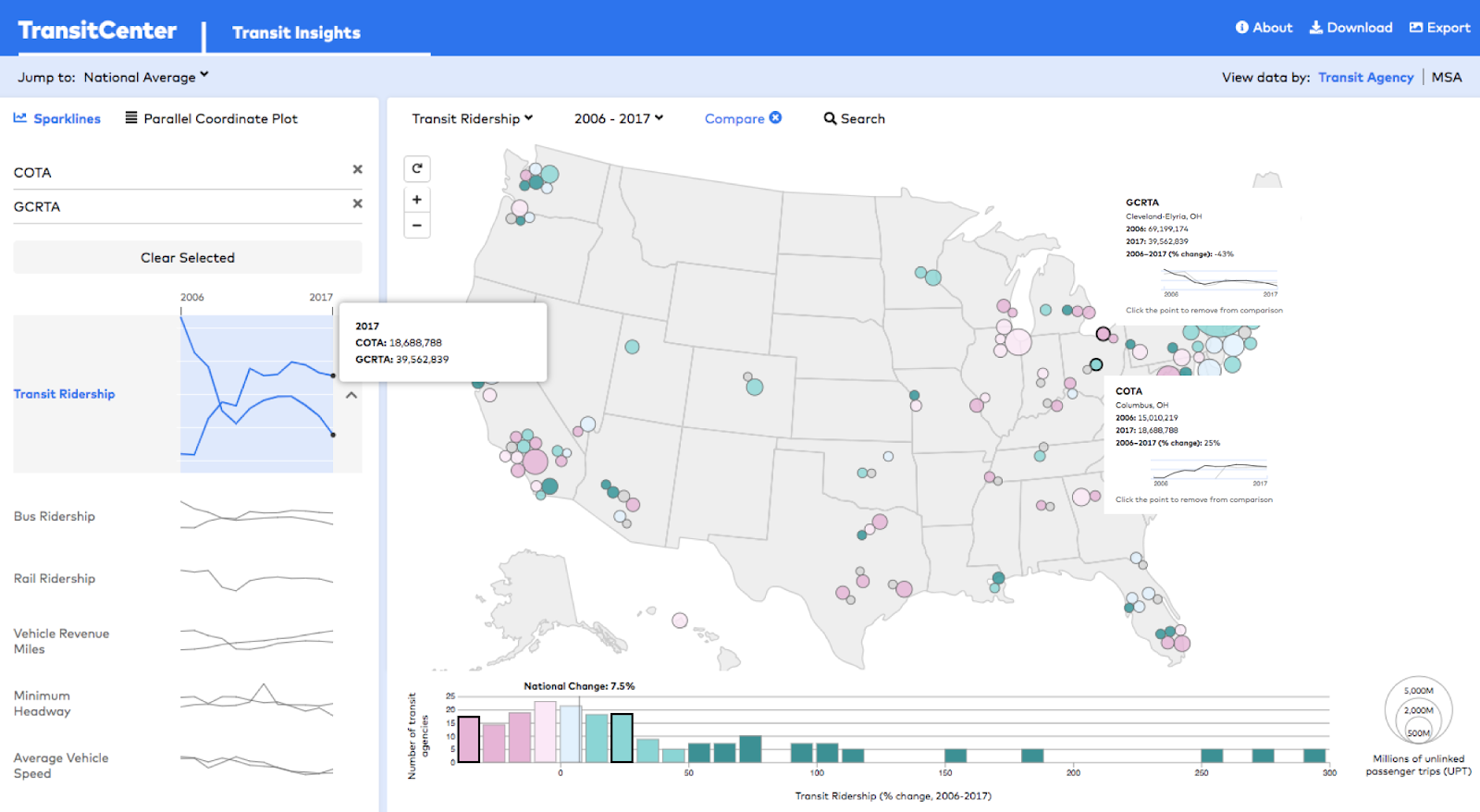
The transit fortunes of Columbus have been remarkably different than that of its neighbor, Cleveland.

The current story of American transit is one of ridership decline. But this national trend masks significant local variation — some transit agencies have grown ridership even in an era of cheap gas and easy car loans. As we like to say, “all ridership is local.”

Understanding why ridership is rising in some places but not in others is critical to formulating effective transit policy. And to gain that understanding, advocates, researchers, and policy makers need access to useful data on local ridership trends, service characteristics, and demographics.

That’s why we’ve created Transit Insights, a new tool that combines information from the National Transit Database, the U.S. Census, and the route maps at Transit.Land into a visual format that allows for quicker, easier reference than querying multiple databases. The site is currently in public beta, and we welcome feedback on how to improve it.

To illustrate the capabilities of Transit Insights, let’s look at the diverging transit fortunes of two Ohio cities. Faced with the same federal and state funding obstacles, Columbus and Cleveland have experienced remarkably different transit ridership outcomes over the past decade. Using Transit Insights, you can delve into the factors that explain the ridership difference between these two places.

Transit ridership at the Central Ohio Transit Authority in Columbus (COTA) grew 25% from 2006 to 2017 (and climbed even further in 2018 following a bus network redesign). But a hundred-odd miles northeast, ridership at Cleveland’s beleaguered Greater Cleveland Regional Transit Authority (GCRTA) has fallen by half over the same period.

Selecting these two agencies on the Transit Insights map using the “Compare” feature, you can tell that regional population change isn’t the only cause of the divergent trends, since transit trips per capita also rose at COTA and fell at GCRTA.

Click to enlarge

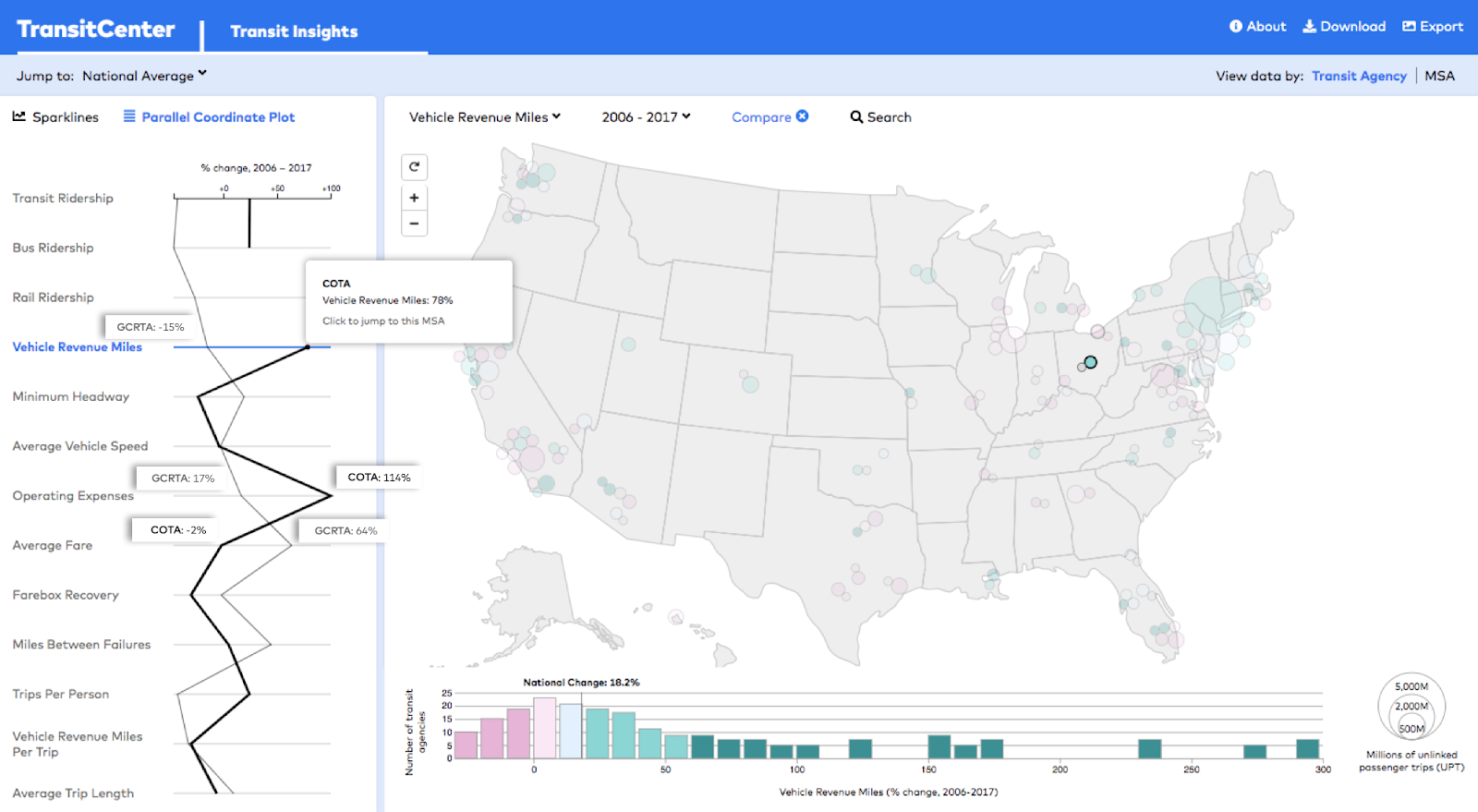
Vehicle revenue miles are an indication of how much transit service an agency provides. As you’d suspect, people generally respond to service increases by riding transit more. From 2006 to 2017, COTA expanded its vehicle revenue miles nearly twofold. In Cleveland, GCRTA slashed service around the 2008 recession, and hasn’t fully restored it since.

Operating expenses — which have increased at most US agencies since 2006 — quantify how much agencies spend to run buses and trains. Generally, higher operating expenses enable more and better service. COTA has doubled its spending on operations, while GCRTA’s expenses grew only slightly after adjusting for inflation.

Raising fares, meanwhile, exerts downward pressure on transit ridership, particularly over the long term. Since 2006, GCRTA has approved several fare hikes, pushing up the average price riders pay per trip 65%. But for riders in Columbus, fares have remained largely unchanged.

Click to enlarge

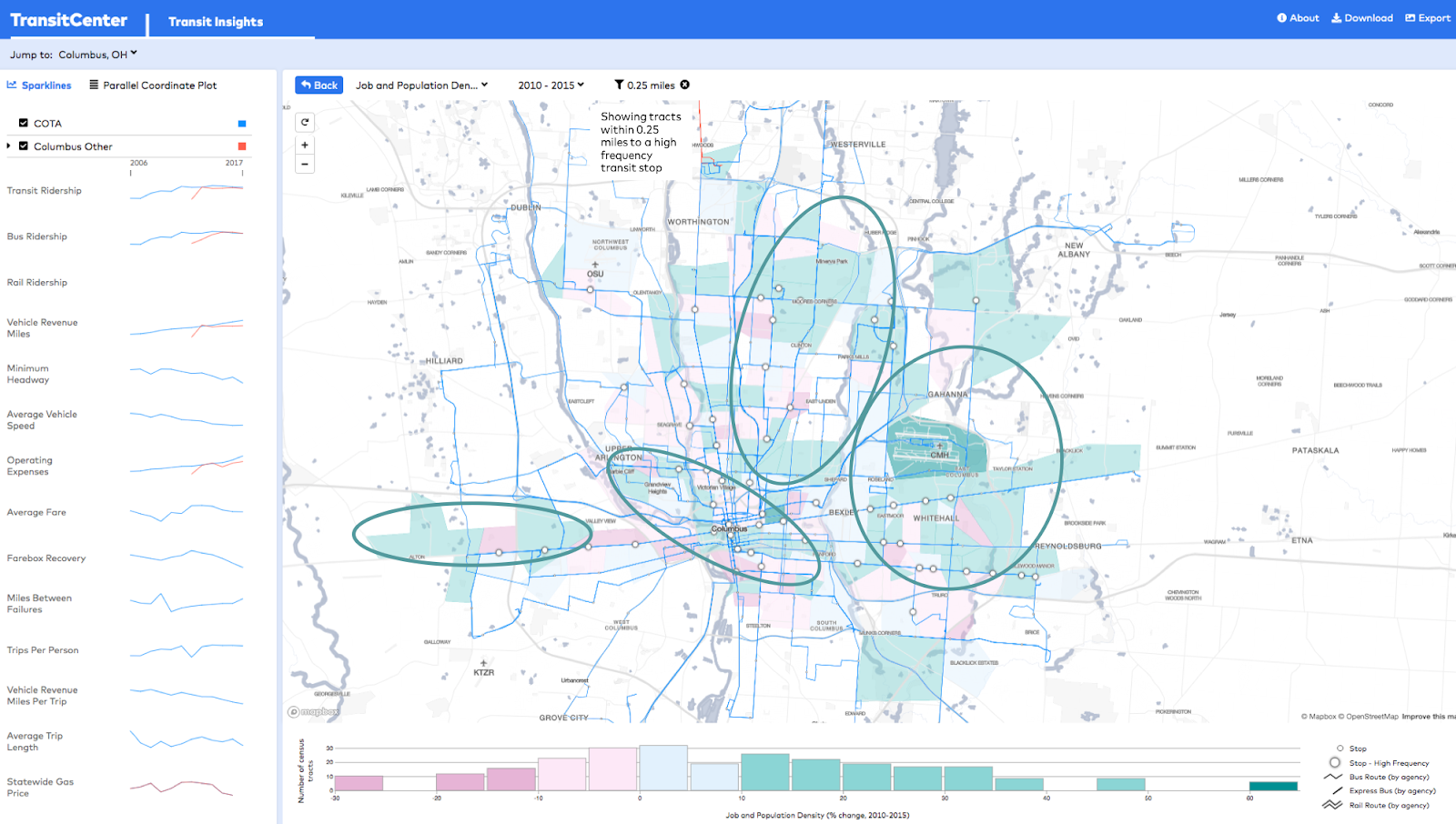
Transit is most effective when it runs frequently in high-density areas. Columbus has densified in neighborhoods within walking distance of COTA’s expansive frequent bus network. But in Cleveland, job and population density decreased along much of GCRTA’s frequent network (which is far more limited than COTA’s).

Click to enlarge
Click to enlarge

The tale of these two Ohio cities is just one example of the findings Transit Insights can unearth. Advocates, agency practitioners, journalists, and others can use it to measure, compare, and evaluate transit ridership trends in any major American metropolitan region.

Other queries of Transit Insights reveal that:

  • From 2012 to 2017, transit ridership increased in just a quarter of the country’s largest urban areas. Population magnets Seattle and Phoenix experienced the fastest transit ridership growth.
  • Only a few transit agencies have increased bus ridership since 2012 — most prominently, King County Metro and Houston Metro, which substantially altered service patterns with bus network redesigns.
  • Transit speeds have slowed down at many agencies as street congestion worsens. One exception is LA Metro, which expanded light rail service in 2010.
  • Ridership loss notwithstanding, in 2017 New York City Transit provided an average of 400 trips to each person living in its service area — over 150 more rides per capita than the next agency, San Francisco MTA.

Transit Insights draws on standardized data from the FTA’s National Transit Database, U.S. Census Bureau, and Transit.Land. A spreadsheet of agency data and images from Insights are available via the “Download” and “Export” features.

We’re sharing Transit Insights as a public beta. We welcome your questions about how to use it, suggestions for improving the tool, and examples of real-world application of Transit Insights in your work. Send your feedback to ridership@transitcenter.org or tweet @TransitCenter

The post Introducing Transit Insights, a Visual Tool to Track Transit Ridership in American Cities appeared first on TransitCenter.

26 Apr 04:59

The Bittersweet iOS Document Browser

by Federico Viticci

Thoughtful, well-researched analysis of the iOS document browser by Matej Bukovinski, one of the developers of PDF Viewer for iOS, which was among the first apps to support the feature back in 2017:

It’s been about a year and half since iOS 11 was released into the wild, and with it, the long-awaited system document browser. PDF Viewer was one of the first applications that truly went all in with this new component, and we did this by fully replacing our custom solution with it on devices that were upgraded to iOS 11. This move certainly got us a lot of attention and praise from power users, but it also caused a lot of frustration for others who were unlucky enough to stumble upon the bugs and limitations of this new component. From a developer’s point of view, it was a mixed bag as well. On one hand, it allowed us to stop developing our custom document browser, thereby saving ourselves a lot of valuable development time in the process. On the other hand, it forced us to make do with a system we did not own and couldn’t even “hack” around when there were problems.

PDF Viewer will drop support for iOS 10 shortly, which will get rid of the final remains of our custom document browser, so we thought it might be a good time to take a closer look at how its system replacement is doing and go over the good, the bad, and the ugly.

File management is one of the main sections of an in-depth iPad story I'm working on right now, and the document browser is a key functionality I'm going to describe in detail. Overall, I agree with Bukovinski's take: the document browser has brought consistency and speed to a lot of document-based apps, and I'm happy to see fewer custom file managers in apps these days, but it could use more customization options for developers, and the reliability of third-party file provider extensions is still largely hit or miss.

→ Source: pspdfkit.com

26 Apr 04:58

Can you always find a layer of meaning in which your problem is easier?

by Eric Normand

I’ve always found switching languages to be educational. I learn a lot. It always makes me wonder what I might learn from a non-existing language that I would bring back to my favorite languages.

Transcript

Eric Normand: Can you always find a layer of meaning in which your problem is easier? In this episode, I want to talk about my experience with learning different languages. Not going to be really defining a term in this one. This is mostly going to be like a personal experience report, but it should be universal.

I feel like a lot of people would have this experience. Hi, my name is Eric Normand, and I help people thrive with functional programming. I’ve had and I think we’ve all had this experience of learning a new language where a problem we were trying to solve is way easier in that new language than the language we were using before.

Maybe that was just our side project, you’re just experimenting, learning something new. You go back to your normal everyday language. You can actually take stuff back with you. You’ve learned this new thing and you learn, oh, if I only had this function that was in the standard library, I could do this work way easier.

I know we’ve all had this experience. I just want to explore this a little bit. Just a little bit about my personal experience with this. I was doing a lot of JavaScript programming, because this was at a time when there weren’t many other options. CoffeeScript was out, but I was using JavaScript at work. This was like 2012, 2011, 2012.

Then I switched jobs and got one doing ClojureScript in 2013. Clojure and ClojureScript exclusively. Just got used to that. Eventually, I went back to JavaScript. Wow, I felt a lot of the pain that I hadn’t really noticed I was feeling before. When I went from JavaScript to ClojureScript, it felt so freeing, so liberating, I felt powerful.

Then going back, I realized that I had forgotten [laughs] all the things I had to deal with all the time in JavaScript. But I was a better programmer for having spent so much time in ClojureScript, and I realized that I could implement about, not a 100 percent but a significant amount of what I liked about ClojureScript right in JavaScript. There was not that much that was out of reach.

That was really something that the language was giving me. A lot of it was just that Clojure has a great standard library. I could implement those things that I wanted. I did this a couple times, I now run my site is on WordPress. That’s PHP. I often find that I can just think about what I want to do and I get this idea, oh, in Clojure, I would do this and it would be so easy.

Then I realized I could write that function myself in PHP and then I just always have access to it. I don’t have to rely on what the language gives me, I can build on top of it. I have my own utility layer between what PHP gives me and what I use. It’s pretty nice. It’s not Clojure.

I don’t know if it’s even 80 percent of what I would want it to be because PHP is not quite as nice as JavaScript, but it’s pretty good. I’ve found compromises and it’s much better than basic PHP. I’ll tell you that. What this makes me think about, is what if I learned a new language? Some hypothetical language like it could exist, but I always think of some magical language that doesn’t exist.

Some coding enclosure, I spend the weekend learning this new language. Maybe more than a weekend, I learned this new thing. Then on Monday I go back to Clojure. What pain would I feel? What would I want to bring back?

What functions can I implement that I always needed but I never realized it and will eliminate tons of code and bugs and stuff because this is a better abstraction for that thing that I’m doing. I do believe that there’s always some better way of expressing the problem of solving or expressing the problem or expressing the solution.

There’s always some better way. Clojure can’t be it. I like Clojure, but it can’t be it. I think that there’s always more, there’s always something out there that we could discover. Like I said, the language might exist and I just haven’t learned. There’s a lot of people who haven’t learned Clojure or even a functional JavaScript library, like Lodash.

There’s a lot of people who haven’t done that, who would probably have the same experience like “Where has this been my whole life?”, “Why haven’t I known about this?” because it could have saved me so much agony. I always think about this. I’ve had this experience so many times that there always must be something else out there.

Often, I think that it might be some new general-purpose thing. If you took some new constraint, the Clojure, a lot of what it’s done is it said OK, if we only have immutable values and we’re going to do a data-oriented language, what are the functions that we seem to keep running into that we need?

A lot of them are just borrowed from other languages, let’s be honest. What if you took some other constraint, we’re dealing a lot with strings and string manipulation? Let’s say we have to do a lot of string munging. What do you get? You get something like Pearl, maybe a better language.

I don’t know what your feelings at Pearl are but it has a lot of great operations for dealing with strings. Maybe that’s something to pull back in. We don’t need to be dealing with strings. It’s just some basic operations, which I feel like we do in Clojure, we’re just dealing with like, oh, we’ll do concatenating strings and Regex matches and stuff.

That’s about it. Not much more than that. But, man, there’s some other cool stuff we could be doing that we haven’t really looked into. I wonder about that. Where could we explore, to bring stuff back in so that our code is that much better, that we’re able to work at the right level for the problem that we’re solving.

There’s always more out there. Even if we looked at every existing language and pulled all the good stuff in, there would still be some magical unicorn language out there that doesn’t exist yet, that we could learn from. I think that’s great. It’s beautiful. That’s one way to do it. The other way is to build it up, to build up the layers towards your problem.

You start solving your problem and you realize, oh, this is turning into a mess. Why is this so hard to do? You start refactoring and breaking things down to smaller bits and finding the layers where the things seem to not depend on each other, they only depending on stuff down below. It starts to stratify into these little layers.

Those layers become things you can build on top off and express your problem in a better way. I would love to hear your experiences with this. Whether you’ve learned a new language and brought stuff back to your main language, what kinds of stuff you brought back? What were the things that you really appreciated that you managed to write yourself or find some suitable replacement for?

I’d love to hear that. Then I’d also love to hear what you’ve done building up to your problem. You didn’t look elsewhere and bring it back, but you built up and then took what you built and made it something really nice and useful. Love to hear both of those. If you want to share that with me, please email me. I’m eric@lyspcast.com.

You can also find me on Twitter @EricNormand or find me on LinkedIn. If you liked this episode, or if you want to hear, I’ll share some of the stories. Just to be clear, if you share it with me, I might share it on the podcast unless you tell me not to, obviously.

If you send me an email about this, I might share it. I might talk about it, I might say your name, so please tell me if you don’t want me to. You should subscribe because then you will get to hear all these great stories. Awesome. I’m Eric Normand, thank you very much, I’ll see you next time.

The post Can you always find a layer of meaning in which your problem is easier? appeared first on LispCast.

26 Apr 04:58

Apple's $400 Billion Buyback Program

by Neil Cybart

One of the more certain items found with Apple’s upcoming 2Q19 earnings is that the board will approve increases to the company’s share buyback authorization and the quarterly cash dividend. The two capital return initiatives continue to be polarizing topics as Apple holds more than $100 billion of excess cash on the balance sheet. A closer look at Apple’s buyback and dividend trends suggests the company’s board still has a strong incentive to increase Apple buyback authorization in a big way next week.

Capital Return Trajectory

Exhibit 1 highlights the amount of cash Apple has spent on capital return (buyback, cash dividends, and net share settlement) on an annual basis since 2012:

Exhibit 1: Apple’s Capital Return (Annual)

Screen Shot 2019-04-24 at 1.41.19 PM.png

Prior to U.S. tax reform, Apple had been spending approximately $50 billion annually on capital return initiatives. The total was funded by a mixture of free cash flow and debt issuance. Once Apple was able to bring its foreign cash back to the U.S. at a favorable tax rate, the pace of capital return increased materially. Last year, Apple spent $90 billion on share buyback, cash dividends, and net share settlement.

Assuming Apple doesn’t spend a significant amount of its excess cash on M&A, the company has enough cash to continue spending nearly $100 billion on capital return annually for at least the next two years. Kicking off between $50 billion and $60 billion of free cash flow annually, Apple ends up utilizing approximately $40 billion to $50 billion of its excess cash on capital return initiatives each year. Over the long run, Apple’s current business footprint supports an annual capital return budget of closer to $50 billion.

Share Buyback

Next week, Apple’s board will approve the seventh consecutive increase to the company’s share buyback authorization. Here are the changes to Apple’s share buyback authorization since the program launched in 2012:

  • 2012: $10 billion buyback authorization 

  • 2013: $60 billion (increase of $50 billion)

  • 2014: $90 billion (increase of $30 billion)

  • 2015: $140 billion (increase of $50 billion) 

  • 2016: $175 billion (increase of $35 billion)

  • 2017: $210 billion (increase of $35 billion)

  • 2018: $310 billion (increase of $100 billion)

Last year, Apple’s board approved a substantial $100 billion increase in share buyback authorization. This was double the amount of the previous record increase in buyback authorization.

At the end of December, Apple had $63 billion of share repurchase authorization remaining. This is another way of saying that Apple had worked through $247 billion of its $310 billion share repurchase authorization. Assuming Apple bought back $20 billion of shares in FY2Q19 (January to March 2019), the company likely had closer to $43 billion of authorization remaining at the end of March.

When estimating the potential increase in Apple’s share buyback authorization, one has to look at the company’s intended buyback pace. Following U.S. tax reform, which opened the floodgates for Apple’s foreign cash being used to fund capital return initiatives, Apple had been on pace to buy back approximately $80 billion worth of shares annually. This elevated buyback pace was interrupted in FY1Q19 following the sudden and dramatic drop in product demand in China. In December 2018, Apple didn’t buy back any shares. However, based on Apple’s 1Q19 10-Q, it looked like Apple had begun buying back shares in January.

Assuming Apple continues to target a share buyback pace of approximately $80 billion per year, the implication is that Apple’s board will need to approve another substantial increase in share buyback authorization next week. An increase of less than $50 billion in additional share buyback authorization would imply a potential slowdown in Apple’s buyback pace. This would be a surprising move considering the significant amount of excess cash that remains on Apple’s balance sheet. In addition, management continues to reiterate its intention of reaching net cash neutral over time, which means the amount of cash on Apple’s balance sheet equals the amount of debt.

Accordingly, my expectation is that Apple’s board will approve an increase in buyback authorization in the range of $75 billion to $100 billion. This will bring Apple’s overall buyback authorization to approximately $400 billion. There isn’t much of a difference between a $75 billion and $100 billion increase in authorization. Both totals would give Apple plenty of flexibility to pursue an aggressive share buyback strategy. A $75 billion increase in authorization would provide Apple approximately $115 billion of available authorization for buyback while a $100 billion would equal more like $140 billion of available authorization. Both of those totals assume Apple repurchased $20 billion of shares in FY2Q19.

Quarterly Cash Dividend

Given how much press and attention is given to Apple’s share buyback, the company’s cash dividend story continues to fly under the radar. Apple’s board has approved six consecutive increases to the quarterly cash dividend. Next week, the company will announce its seventh consecutive increase.

Here is Apple’s dividend history since reinitiating the dividend in 2012:

  • 2012: $0.38 per share

  • 2013: $0.44 (15% increase)

  • 2014: $0.47 (8% increase)

  • 2015: $0.52 (11% increase)

  • 2016: $0.57 (10% increase)

  • 2017: $0.63 (11% increase)

  • 2018: $0.73 (16% increase)

When gauging the magnitude of the upcoming quarterly cash dividend increase, a 10% increase likely represents a floor. There are two reasons behind such an assertion:

  1. Dividend strategy. Apple follows a stable dividend policy characterized by a steady dividend payout that reflects its long-term earnings potential. Instead of dividends closely following near-term earnings swings, the two variables align when looking at long-term trends.

  2. Apple’s share buyback pace. As Apple buys back shares, the company pays out less in the way of cash dividends. This is made possible because repurchased shares are retired, reducing the number of outstanding shares. For every 100 million shares that Apple repurchases, the company saves approximately $300 million on cash dividends per year. Since reinstating the dividend, the amount of cash that Apple has spent on dividends has increased by 30% while the quarterly cash dividend has increased by 92%. As long as Apple continues to buy back significant amounts of stock, the company will be able to increase the quarterly cash dividend by 10% and not actually incur additional dividend expense.

(For an in-depth examination into Apple’s dividend strategy, check out the Above Avalon Report: Apple Dividends: A Deep Dive into Apple’s Cash Dividend Strategy. The report is available exclusively to Above Avalon members. To read the report, become a member here.)

With the preceding two variables in mind, my expectation is that Apple’s board will approve a 14% increase in Apple’s quarterly cash dividend to $0.83 per share, up from $0.73 per share.

Cash Spend

With more than $100 billion of excess cash on the balance sheet, there continues to be a vocal group advocating that Apple spend the cash on something other than capital return. However, the item that is often ignored by those advocating that Apple cut back on buyback and dividends is that management is already spending tens of billions of dollars each year funding organic growth opportunities.

In FY2018, Apple funded the following items:

After taking into account the preceding organic growth investments and expenditures, Apple was still left with approximately $50 billion of free cash flow. It is this free cash flow, in addition to the excess cash already on the balance sheet, that is funding the company’s capital return initiatives:

  • Buyback: $73.0 billion (in FY2018)

  • Cash Dividends: $13.7 billion

  • Net share settlement: $2.6 billion

  • Total: $89.3 billion

Piling additional cash into R&D simply as a means of spending excess cash doesn’t make any sense. The same philosophy applies to capex. Apple’s business model is capex light. There is no logic found in Apple moving away from this model just to spend more cash. Even if Apple doubled R&D and capex overnight, which isn’t going to happen, the company would still have tens of billions of dollars piling up on the balance sheet each year.

This leaves M&A as the only other way for Apple to spend the excess cash. While Apple is certainly in a position to fund additional M&A activity, including acquisitions with larger price tags, there is no logic in the company changing its M&A philosophy because it has excess cash. Acquisitions don’t suddenly become more rational simply because the acquirer has excess cash that it wants to remove from the balance sheet. Instead, Apple continues to look at M&A as a tool for acquiring technology and talent in order to plug crucial holes in its asset base.

Given the lack of attractive alternatives, Apple’s board still has the incentive to continue approving substantial increases to share buyback authorization and quarterly cash dividends.

Receive my analysis and perspective on Apple throughout the week via exclusive daily updates (2-3 stories per day, 10-12 stories per week). Available to Above Avalon members. To sign up and for more information on membership, visit the membership page.

26 Apr 04:58

Firefox Front-End Performance Update #17

by Mike

Hello, folks. I wanted to give a quick update on what the Firefox Front-end Performance team is up to, so let’s get into it.

The name of the game continues to be start-up performance. We made some really solid in-roads last quarter, and this year we want to continue to apply pressure. Specifically, we want to focus on reducing IO (specifically, main-thread IO) during browser start-up.

Reducing main thread IO during start-up

There are lots of ways to reduce IO – in the best case, we can avoid start-up IO altogether by not doing something (or deferring it until much later). In other cases, when the browser might be servicing events on the main thread, we can move IO onto another thread. We can also re-organize, pack or compress files differently so that they’re read off of the disk more efficiently.

If you want to change something, the first step is measuring it. Thankfully, my colleague Florian has written a rather brilliant test that lets us take accounting of how much IO is going on during start-up. The test is deterministic enough that he’s been able to write a whitelist for the various ways we touch the disk on the main thread during start-up, and that whitelist means we’ve made it much more difficult for new IO to be introduced on that thread.

That whitelist has been processed by the team, and have been turned into bugs, bucketed by the start-up phase where the IO is occurring. The next step is to estimate the effort and potential payoff of fixing those bugs, and then try to whittle down the whitelist.

And that’s effectively where we’re at. We’re at the point now where we’ve got a big list of work in front of us, and we have the fun task of burning that list down!

Being better at loading DLLs on Windows

While investigating the warm-up service for Windows, Doug Thayer noticed that we were loading DLLs during start-up oddly. Specifically, using a tool called RAMMap, he noticed that we were loading DLLs using “read ahead” (eagerly reading the entirety of the DLL into memory) into a region of memory marked as not-executable. This means that anytime we actually wanted to call a library function within that DLL, we needed to load it again into an executable region of memory.

Doug also noticed that we were unnecessarily doing ReadAhead for the same libraries in the content process. This wasn’t necessary, because by the time the content process wanted to load these libraries, the parent process would have already done it and it’d still be “warm” in the system file cache.

We’re not sure why we were doing this ReadAhead-into-unexecutable-memory work – it’s existence in the Firefox source code goes back many many years, and the information we’ve been able to gather about the change is pretty scant at best, even with version control. Our top hypothesis is that this was a performance optimization that made more sense in the Windows XP era, but has since stopped making sense as Windows has evolved.

UPDATE: Ehsan pointed us to this bug where the change likely first landed. It’s a long and wind-y bug, but it seems as if this was indeed a performance optimization, and efforts were put in to side-step effects from Prefetch. I suspect that later changes to how Prefetch and SuperFetch work ultimately negated this optimization.

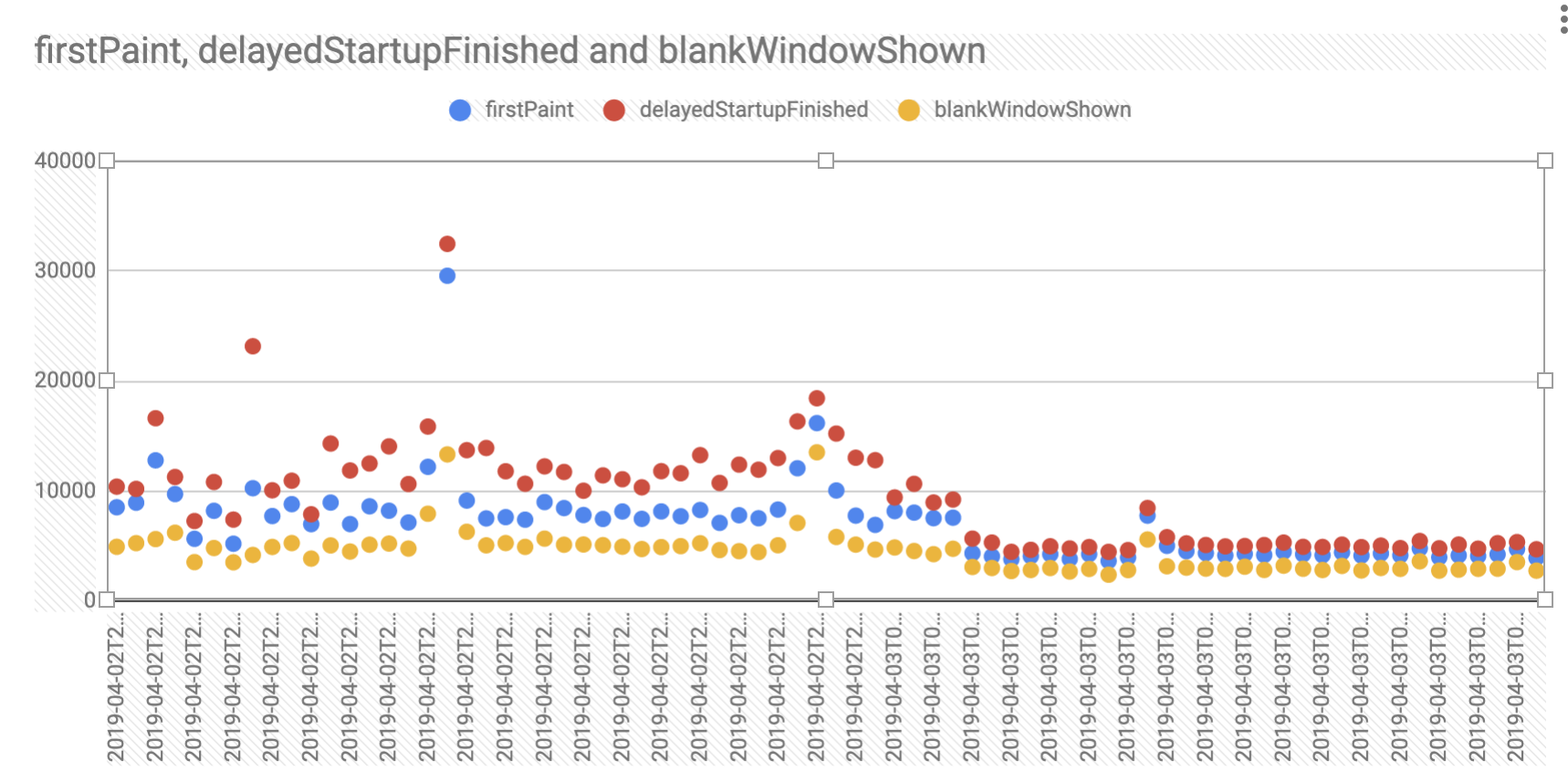
Doug hacked together a quick prototype to try loading DLLs in a more sensible way, and the he was able to capture quite an improvement in start-up time on our reference hardware:

This graph measures various start-up metrics. The scatter of datapoints on the left show the “control” build, and they tighten up on the right with the “test” build. Lower is better.

At this point, we all got pretty excited. The next step was to confirm Doug’s findings, so I took his control and test builds, and tested them independently on the reference hardware using frame recording. There was a smaller1, but still detectable improvement in the test build. At this point, we decided it was worth pursuing.

Doug put together a patch, got it reviewed and landed, and we immediately saw an impact in our internal benchmarks.

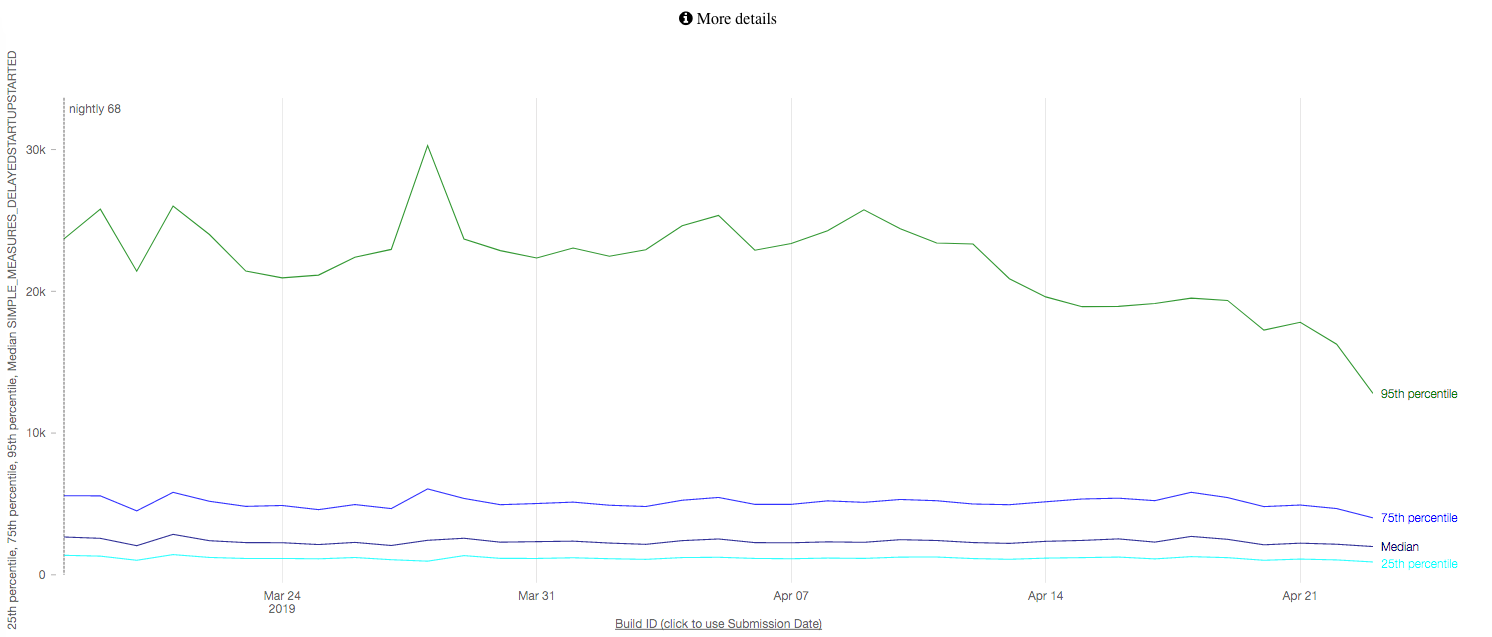
We’re also seeing the impact reflected in Telemetry. The first Nightly build with Doug Thayer’s patch went out on April 14th, and we’re starting to see a nice dip in some of our graphs here:

This graph measures the time at which the browser window reports that it has first painted. April 14th is the second last date on the X axis, and the Y axis is time. The top-most line is plotting the 95th percentile, and there’s a nice dip appearing around April 14th.

There are other graphs that I’d normally show for improvements like this, except that we started tracking an unrelated regression on April 16th which kind of muddies the visualization. Bad timing, I guess!

We expect this improvement to have the greatest impact on weaker hardware with slower disks, but we’ll be avoiding some unnecessary work for all Windows users, and that gets a thumbs-up in my books.

If all goes well, this fix should roll out in Firefox 68, which reaches our release audience on July 9th!


  1. My test machine has SuperFetch disabled to help reduce noise and inconsistency with start-up tests, and we suspect SuperFetch is able to optimize start-up better in the test build 

26 Apr 04:58

Don’t Use Bogus Metrics For An Online Community

by Richard Millington

Almost every community health metric is bogus.

Increasing the number of registered members is easy to measure. Every platform shows this figure. However, it’s a metric which only rises as members don’t delete their accounts. This better shows the age of the community than its success.

Increasing the number of questions or active members sounds reasonable except this is more controlled by how many customers your brand attracts in the first place. It also relies heavily on a) how many problems members have with products and b) how many new customers the company is attracting.

Increasing the number of questions with an accepted solution sounds smart. However, once you’ve answered all of the easy questions, it becomes progressively harder to answer the rest. Your rate naturally stalls. Sneakier community professionals have realised it’s easier to delete questions they can’t answer.

Increasing the % of newcomers who become active members makes sense until you consider the quality of newcomers declines over time. Your best customers/audience are likely to join in the inception/establishment phase of the community lifecycle.

Increasing the number of visitors is great but suffers from the same input problems. You can’t control how many customers you attract, how much the organisation spends on marketing and promotion etc…

Increasing member satisfaction is great until you realise members rarely distinguish between satisfaction with the products and satisfaction with the community. If the company released a bad product, member satisfaction naturally declines too. It doesn’t measure your performance.

Increasing call/ticket deflection is great until you realise no-one really knows if someone visiting a question with a solution actually received the answer they needed or just gave up (or even called customer support). This often doesn’t track any reduction in support costs, but theoretical reductions.

The list goes on, but the lesson is simple. There is not a single metric to fully measure community value. Every metric is flawed and can be (easily) gamed.

So what should you do?

Three things…

1) Don’t let yourself be measured by anything you can’t reasonably control and influence. Most metrics fail because they rely upon inputs outside of the community manager’s control. If you can’t directly influence it, you shouldn’t be measured by it. This is by far the biggest problem in measurement today.

2) Measure changes in customer behavior, not activity. Do members who join the community buy more after joining the community? Has the community improved customer satisfaction since it launched? Do people buy more or make more referrals? Track time-series data showing how customer behavior has changed. This should focus on the ultimate impact of the community. Who in the organisation is the community supposed to help? How will you know if it’s doing that?

3) Tell persuasive stories. A story needs a verifiable fact, an emotional hook, and a narrative from one state to another. Use the inputs you have to tell persuasive stories about changes in behavior. What are the tangible outputs of the community that make it indispensable to the organization?

Get the measurement wrong, and none of the good work you do will matter.

26 Apr 04:57

Cracking Frontier Markets

by Kenny Chen

Harvard Business Review Logo Thumbnail 130 x 130When a movie is released straight to video, it’s usually a bad sign: Early reviews were negative, the quality is dubious, or backers aren’t confident it will find an audience. Going straight to video, historically, was a way to save face and move on. But in 1992, when the electronics salesman Kenneth Nnebue shot the straight-to-video Nigerian movie Living in Bondage, it was anything but a disaster.


Nnebue had received a shipment of blank VHS cassettes to sell in his store but quickly realized that most Nigerians had no use for them. He then had the idea of putting homemade content on the tapes. He wrote a script, found a producer and a director, and hired actors and actresses. The resulting two-part thriller about a down-and-out businessman who uses witchcraft to revive his fortunes was released on those tapes; Nigeria had no operational cinemas at the time. Made on a $12,000 budget, the film went on to sell hundreds of thousands of copies across Africa, in the process catapulting “Nollywood”—the then-nascent Nigerian movie industry—to eminence.

Barely a blip on anyone’s radar 25 years ago, Nollywood today produces about 1,500 movies a year, employs more than a million Nigerians, and is thought to be worth $3.3 billion. In terms of volume, it rivals both Hollywood and Bollywood. This homegrown industry has attracted the attention of banks and other financial institutions, some of which now have “film desks” designed to invest in its productions. By some estimates, Nigeria is home to more than 50 film schools. The government has established funds for training filmmakers and financing new movies and is beginning to take piracy and copyright protection more seriously. In 2018 both New York and Toronto hosted Nollywood film festivals, while Netflix bought its first Nollywood film, Lionheart.

How could a modest investment by an electronics salesman simply looking to sell VHS cassettes trigger the rise of a multibillion-dollar industry in one of the poorest countries in the world—where fewer than 35% of households had access to electricity and only about 20% had a television set? Was Nollywood just a lucky anomaly?

Hardly. Nollywood is among scores of entities that have realized enormous growth by creating entirely new markets where they might least be expected. With emerging-market giants such as Brazil, Russia, India, and China experiencing slowdowns, investors, entrepreneurs, and multinationals are looking elsewhere. They’ve been eyeing so-called frontier economies such as Nigeria, Pakistan, and Botswana with great interest—and enormous trepidation. How can one find serious growth opportunities in economies characterized by extreme poverty and a lack of infrastructure and institutions, and with little or no data about market size and customers’ willingness to pay?

Missing from the conversation is a foundation of theory to help explain why some efforts succeed while others don’t. The reason, in our view, is the power of innovation, and specifically what we call market-creating innovation. It not only generates new growth for companies but catalyzes industries that buoy frontier economies and foster inclusive, sustainable development.

Download the HBR article “Cracking Frontier Markets”


The post Cracking Frontier Markets appeared first on Innosight.

25 Apr 22:09

Tesla updates Model S and X with extended range among other improvements

by Brad Bennett
Photo of Tesla Model S

Tesla’s high-end Model X and S vehicles can now drive further than ever before with a new drivetrain and some other improvements.

The Model S Long Range trim now maxes out at a whopping 600km. The Model X, on the other hand, can reach distances of 525km. This is all done with a new drivetrain, as both vehicles still use the same 100 kWh battery as the older versions. For comparison, the Long Range Model 3 has a range of 499km. The upcoming Long Range Model Y is estimated to hit 483km.

Model S

    • Standard Range – $105,600 CAD – 460km range (Old range – 435km)
    • Long Range  – $118,900 – 600km range (Old range  – 539km)
    • Performance  – $133,700 – 560km range (Old range – 507km)
    • (You can add Ludacris mode to the performance trim for $27,000 and it makes the car 20 percent faster.)

Model X

  • Standard Range – $112,300 CAD – 400km range
  • Long Range  – $125,600 – 525km range (Old range – 475km)
  • Performance  – $140,400 – 490km range (Old range – 465km)
  • (You can add Ludacris mode to the performance trim for $27,000 and it makes the car 20 percent faster.)

To make these new ranges possible, the vehicles pair a permanent magnet motor in the front with an induction motor in the rear to make the vehicles more efficient. Previously, Tesla used induction electric motors. The permanent magnet motor is what the Model 3 uses to help increase efficiency.

This new design also increased the vehicles zero to 100km/h times. The Performance Model S can hit 100km/h in 3.2 seconds, while the Performance X does it in 3.6 seconds.

Tesla didn’t just stop at a new motor to improve the vehicles’ range and power. It also added “silicon carbide power electronics, and improved lubrication, cooling, bearings, gear designs,” and new tires on some variants to achieve greater than 93 percent efficiency.

One of the best changes Tesla implemented was adding support for the faster V3 Superchargers, which means they can now charge at a rate of 200 kW. On the older V2 chargers, they’ll charge slightly quicker than before at a 145 kW rate.

On top of all this news, the EV company also brought back the Standard range models for both of these vehicles, so they’re slightly less expensive now.

Source: Tesla

The post Tesla updates Model S and X with extended range among other improvements appeared first on MobileSyrup.

25 Apr 22:09

CTV over-the-air frequencies updated to make way for mobile spectrum

by Bryson Masse
satellite antenna

If you use an over-the-air antenna to pick up your local CTV station in Southern Ontario or Vancouver Island, you will need to rescan for the channels after April 28, according to a release from Bell

To note, rescanning is a command in TV settings to seek available OTA channels.

The channels include:

  • CTV Toronto’s Channel 9.1
  • CTV Victoria’s Channel 23. 1
  • CTV Windsor’s Channel 26.1

The new frequencies will come into effect at midnight on April 28th.

“Mandated by ISED (Innovation, Science, and Economic Development)  in Canada and the Federal Communications Commission in the U.S. (FCC), this ‘TV channel repack’ program requires broadcasters with over-the-air services to transition into a tighter spectrum to free up more spectrum for wireless carriers,” read the release.

Source: Bell

The post CTV over-the-air frequencies updated to make way for mobile spectrum appeared first on MobileSyrup.

25 Apr 22:06

Multiple AirPods 3 rumours set sights on end of year launch

by Bryson Masse

It may be the bill for my recent AirPods 2 purchase still fresh in my wallet, but I don’t know how to feel about reports of new AirPods models slated to arrive by the end of 2019. But here we are.

The first is from the venerable Digitimes. Its sources claim noise-cancelling features will be included in the rumoured “AirPods 3” models. The Taipei-based outlet said Apple is looking to new features to beat back competing entrants to the full wireless headphone market, but it’s not having the easiest time with that.

“The sources said that noise cancellation is not a new technology, but a technology hard to harness,” wrote Digitimes. “On the one hand, semiconductor devices can hardly work without suffering electromagnetic disturbance, and on the other hand how the structural design of the noise forward feedback microphone can be done well to achieve harmonious operation with other devices is a great challenge for designers and assemblers.”

“In addition, earphones with noise-cancellation function will consume more power than those without, and it remains to be seen how Apple will do to reduce power consumption, the sources indicated.”

Subsequent to the Digitimes report, TF Industries analyst Ming-Chi Kuo told 9to5Mac that two models of AirPods will be released either at the end of this year or early next. One at the current price of the wireless headphones, but another model which will list at a higher price but will also feature a redesigned form factor.

As well, Apple wants to update the way AirPods are manufactured, said Kuo. He thinks the company would see better yields and lower production costs with a “system-in-a-package” design. I don’t know what that means, either.

The post Multiple AirPods 3 rumours set sights on end of year launch appeared first on MobileSyrup.

25 Apr 22:06

Azure, Office carry Microsoft’s third quarter 2019 earnings ahead of estimates

by Jonathan Lamont

Microsoft released its earnings for its third quarter ending March 31st, and it beat Wall Street expectations.

Reuters says the company’s total revenue rose by 14 percent. According to IBES data from Refinitiv, total revenue came in at $30.57 billion USD (about $41.24 billion CAD), beating analysts’ average estimate of $29.84 billion USD (roughly $40.26 billion CAD).

Further, Reuters says Microsoft’s Azure cloud computing unit, as well as its Office subscription software, fueled the growth.

Net income rose to $8.81 billion USD (approximately$11.89 billion CAD) from $7.42 billion USD (about $10.01 billion CAD) last year.

Interestingly, Microsoft’s Personal Computing segment was up 8 percent to $10.7 billion USD (roughly $14.44 billion CAD). This includes Windows commercial revenue, which jumped 18 percent, a 21 percent increase in Surface revenue and a five percent jump in gaming revenue.

Source: Reuters, Venture Beat

The post Azure, Office carry Microsoft’s third quarter 2019 earnings ahead of estimates appeared first on MobileSyrup.

24 Apr 02:56

Twitter Favorites: [MetroManTO] @joe_cressy A year later, our city looks like this. There are ways to protect pedestrians without extending a highw… https://t.co/NBzaCGA7A9

Pedro Marques @MetroManTO
@joe_cressy A year later, our city looks like this. There are ways to protect pedestrians without extending a highw… twitter.com/i/web/status/1…
24 Apr 02:56

NewsBlur Blurblog: Back To Work!

sillygwailo shared this story from Jak's View of Vancouver v.3.

Regular readers may have noticed that I have posted a lot less this week than usual.  That is because I suddenly find myself rather busy.

About eight years ago I published The Drive”, a history of Commercial Drive from 1935 to 1956. It was assumed by many, including me, that I would move swiftly onto the remainder of the history from the mid-1950s. But that proved difficult for a couple of major reasons:

First, recent local history is dependent for much of its documentation on newspapers and for many years the necessary papers (Sun, Province, Echo, etc.) of that period were hard to access without the time-consuming process of reading through the microfiches of each edition of every paper for every day. Before the writing of “The Drive“, for example, I spent a full year in the 7th floor of Central Library doing little else but reading through every edition of the Highland Echo from 1935 to 1960 — and that was just one weekly newspaper of about 8 to 10 pages an edition. Going through the morgues of three much larger daily newspapers for, say, 1955 to 1975, would literally take years. It was a daunting task.

Second, I became ever more interested in the first quarter century of Grandview’s life — from, say 1891 through the end of the First World War — and the work I put in started to concentrate on that period. This was assisted greatly by many of the early newspapers — Vancouver World, etc — being accessible on line with the context searching that that functionality makes available to the researcher. Most of my writing over the last decade has concentrated on this era.

Over that same stretch of time, I made a few attempts to pull together the history of Commercial Drive and Grandview, its hinterland.  That means I have dozens or scores of half-completed essays and research lists scattered throughout my computer. I pride myself on the tidiness of my research.  However, at times like these when a reassessment of what material I already have is required, that pride takes a bashing.

Which brings me to the purpose or reason for this reassessment.  I have decided that I will write a full scale history of the Drive from its beginnings to about 2000. The primary driver has been the very recent availability of both the Vancouver Sun and Province on line. This means that I can use the searching tools available through OCR to make my research searches far more specific and productive.  There is still a great deal of old-fashioned research to complete (including the page by page reading of the Echo‘s microfiche library from the 1960s through the 1990s that we bought some years ago for this very purpose) and, of course, grinding my way though the mountain of material I already have collected.

This is all going to take some time.  But at least you will know I am not just relaxing on the couch eating ice cream and watching game shows.


24 Apr 02:55

Freedom

When my parents bought me an Apple II Plus — in 1980, when I was 12 — I fell in love with this entire new world that was mine. Anything that was technically possible, I could do.

I played games and I learned how to write programs in BASIC and, later, using an assembler.

It was marvelous. There were no chains on me other than the limits of the machine.

* * *

At the same time, grown-ups were sneaking in Apple II Pluses to work so they could run VisiCalc. A little later it was IBM PCs.

And the reason there was similar: the computing power they had access to was tightly controlled by the IT priesthood. Then the personal computer came along, and they had the freedom to solve problems on their own — when they wanted to, the way they wanted to.

This was a revolution.

And then, a little while later, the Mac came out. The PC was great and it democratized computers to a certain extent — but the Mac, and the ideas behind the Mac, took that much, much farther. People who were put off by a DOS prompt on a green-screen monitor had a computer they wanted to use. This extended that revolution, and Microsoft later joined in with Windows.

* * *

After a while, of course, people realized that work computers weren’t really their own. And IT departments did their jobs — as they should — and they networked these computers and worked out administration and so on.

But still, it was much better than what had been.

And — very importantly — outside work, your computer was yours. You had the freedom to use all its power.

And Macs and PCs became ever-more-powerful, with faster CPUs, bigger hard drives, more accessories, and — perhaps most importantly — better software. Things like Photoshop and QuarkXpress and Lotus 1-2-3 and Word.

And (on Macs, which I know best): HyperCard, AppleScript, and UserLand Frontier. ResEdit. INITs. All this crazy powerful stuff, which I loved.

* * *

Maybe because I lived through this — maybe because I’m a certain age — I believe that that freedom to use my computer exactly how I want to, to make it do any crazy thing I can think of — is the thing about computers.

That’s not the thing about iOS devices. They’re great for a whole bunch of other reasons: convenience, mobility, ease-of-use.

You can do some surface-level automation, but you can’t dig deep and cobble together stuff — crossing all kinds of boundaries — with some scripts the way you can on a Mac. They’re just not made for that. And that’s fine — it’s a whole different thing.

In a way, it feels like iOS devices are rented, not owned. This is not a criticism: I’m totally fine with that. It’s appropriate for something so very mass-market and so very much built for a networked world.

* * *

But what about Macs?

Macs carry the flame for the revolution. They’re the computers we own, right? They’re the astounding, powerful machines that we get to master.

Except that lately, it feels more and more like we’re just renting Macs too, and they’re really Apple’s machines, not ours.

With every tightened screw we have less power than we had. And doing the things — unsanctioned, unplanned-for, often unwieldy and even unwise — that computers are so wonderful for becomes ever-harder.

And now comes Marzipan, and I can’t help but worry that it’s another tightened screw. Will sandboxing be a requirement? Probably. Will they be able to send or receive Apple events? Will they support AppleScript? Seems unlikely. Will they be available only on the App Store? Good chance.

And you could say that’s fine — developers will use AppKit. But if AppKit is deprecated — or, effectively the same thing, perceived as deprecated by developers, or just perceived as uncool — then you get only the less-powerful Marzipan apps.

Meanwhile, the iOS triumphalists are saying that we should welcome the end of the revolution.

People will probably tell me it’s generational. And maybe it is. But if we don’t have this power that is ours, then I don’t actually care about computers at all. It meant everything.

24 Apr 00:38

On the Creative Commons Certificate Course

by Stephen Downes


A week ago, by way of a post in the Creative Commons Open Education Platform discussion list, I became aware of the Creative Commons Certificate course, "an in-depth course about CC licenses, open practices and the ethos of the Commons." I did't know that it had been offered previously, but no matter. What really caught my attention was the $500 USD price tag. That's a lot of money for an open online course generally, let alone a very short introductory course taught by a non-accredited institution.

I posted a response on the discussion list but it was a couple of days days before it appeared, so instead of waiting to see if it ever appeared I also wrote a post in OLDaily, saying the following:
It's an online course for rich people. "The 10-week online course offers online instruction, a discussion forum and support for cohorts of approximately 25 learners per instructor." I don't see why Creative Commons could not have learned from the many lessons learned about offering open online learning, and I'm not sure I can trust Creative Commons as the host of an 'open education platform'.

This sort of response seems pretty obvious to me, and honestly, I don't see why I have to be the one to point these things out.

Cable Green - who had posted the original announcement - responded to my post via Twitter (there were some other responses as well, which I'll address below). It's a multi-part Twitter thread, and I'll just address each part in turn (Cable's tweets in italics).
Hi Stephen. I can’t figure out how to provide public comments on your blog post, so I shall reply here. Your readers may also be interested in our recent CC Certificate Blog post.

With tongue firmly in cheek, I could point out that he could have responded on his blog - the very blog he pointed me to in order to suggest a link that was not a response to my concerns.
Taking the CC Certificate is, of course, optional. If someone is already an expert in CC licensing, copyright, public domain, fair dealing / use rights, open licensing policies, etc., they may not need the course.

I don't know what 'optional' even means in this context. The course is not a part of a larger program or anything like that. It is certainly not a requirement for the use of a CC license  or for use of the web generally.

The most relevant sense in which it could be 'optional' would the case where the course is not needed in order to obtain the CC certificate. But in this sense, they appear to be a package. If you want the certificate, you have to take the course. This becomes clear with the next tweet...
For people who do want a facilitated learning experience on these topics, want to increase their expertise, and/or want to be able to say they are "CC Certified" - this might be a good fit: https://certificates.creativecommons.org 

To be clear - if you want the certificate, then you need the course. It's true that you might be an expert even without the course - I certainly consider myself one - but you will not be a certified expert without the course. That will cost you $500.

Why does this even matter? Isn't an expert an expert? Well - sure. But all else being equal, if you want to (say) offer training, act as a consultant, or get hired for employment, having the certificate gives you an advantage. After all, people can't assess your expertise directly. So in a very real sense, the only people who are qualified are people who have paid for the certificate.

These certificate courses are in a very real sense rendering moot any actual expertise a person may have, and substituting its own definition, and validation, of expertise. This is an inconvenience to a person like me. It poses a significant barrier to people in the Global South, where there is a greater reliance on such certificates, and where the cost is prohibitive. 
We find that people who think they are experts often are not as accurate on these complex topics as they think they are - and they are thankful for the opportunity to hone their skills, with a trained facilitator, in a global community of learners. I am one of these people.


I checked to see if Cable was one of the people who took the course and graduated with a certificate, and he was not. It's hard to imagine him paying the money (especially if it is out of his own pocket) to become qualified with his own certificate.

That said, there is no question that an opportunity to hone one's skills, especially in conjunction with experts, is something to celebrate. But it is very important to distinguish here between the learning and the certificate. The learning might be useful and worthwhile - but would people be paying $500 for it were it not for the (exclusive!) certificate?

This is an important point. There are many ways to learn about Creative Commons and open licensing, almost all of which are less expensive (most a lot less expensive) than this course. But there is only one way to get the certificate, at it is offered in a manner that does not even try to be affordable.

From where I sit, it is as though the proprietors of this course don't even grasp the concept of open education, which makes me very concerned that they are defining something called the 'open education platform'.
All of the CC Certificate content is updated (as of April 19, 2019), available for free, in multiple, downloadable, editable files on the CC Certificate web site.

Quite so. I didn't spot it at first - it was behind a link labeled Certificate Resources, which was not obvious to me. And the full materials were not available when I posted my original comments, though they were up to date as of the 19th of April.

Significantly, the first thing you read when you go to the site is, "Accessing this CC BY content is not a substitute for enrolling in the official course, and does not qualify you for CC Certification." This again speaks to my concern here that Creative Commons made no particular effort to offer an open course; it offered (some) materials under a Creative Commons license, but clearly (to judge by the comments from participants) there was much more that took place behind closed doors. All this is why I say Creative Commons did not even try to offer an open course.

I would also like to observe that the contents available online - read them here - do not constitute a course. They might constitute a one-day workshop. They are certainly not authoritative - I believe, for example, that you have to have a law degree to teach law, so the section on 'copyright law' is not a section on law. Important information - such as a discussion of WIPO - is limited to footnotes and current only up to 2017.

This is really important.Offering a certificate - even a course - implies a certain degree of credibility, credibility that can be earned one of two ways: through peer review, such as enabled by the course accreditation process, or through openness, in which all the content and instruction in the course are available for public scrutiny. Creative commons has not demonstrated either type of evidence for credibility. And yet its certificates can be used to suggest that some people - those who did not pay them $500 - are not qualified to work in the field. Because that is the only purpose of a certificate - to separate between qualified and unqualified practitioners.
Scholarships. CC submitted a proposal to fund 62 new scholarships for our colleagues in the global south. CC already budgeted for 15 scholarships in 2019. Goal: provide $400 scholarships, reducing the cost to $100 for global south participants.
We plan to announce the scholarship program at the upcoming CC Summit, launch the scholarship program in June, and admit scholarship recipients into our September, 2019 courses.

These tweets puzzled me for a few moments. The idea of a scholarship seems very much like an afterthought, as though the question of access hadn't occurred to them.

But more importantly, why would Creative Commons need to submit a proposal to discount its own educational offerings? Then I realized - they weren't. The proposal was to an external agency - not named in the tweet, but probably a foundation like Hewlett (though I stress that this is speculation). 
Am I the only one who sees this? The application to whatever charity is to redirect money that could be going to education providers in the Global South, sending it instead to pay the artificially inflated cost of a made-up credential.

As I said in other posts on the discussion list,
I understand that there is a cost if instructors are teaching 30-person classes. But what we know about online learning tells us that there are much more efficient ways of making the same learning available at a much lower cost. I doubt that even a scholarship program can improve the outcomes of such an inefficient approach....
One of the major objectives of our original MOOCs was to enable MOOC participants to create interaction and facilitation for each other. This is because there is no system in the world where a 1:30 instructor:student ratio will scale to provide open and equitable access.

In my view, this model worked very well. It wasn't a case of "the blind leading the blind" because in any large course there will be some people who are not 'blind'. The conversations that were needed - explaining concepts, digging deeper, providing motivation, etc. - could be (and were!) provided by participants themselves. Even in the case of the xMOOC, where no real interaction was provided at all, students created their own communities and provided this for themselves.

If Creative Commons were serious about open access,. they would explore some of these options. The fact that they instead turned to the least efficient and most expensive approach is very concerning.

That's why it is so disappointing to read that they are applying for funding for scholarships. Not only does it redirect otherwise useful money, it does so in a manner that seems indifferent to the cost of the activity.
We are also working with State and Provincial systems of education that have open edu programs. They are purchasing CC Certificate "seats" for their members in bulk - taking the financial pressure off teachers, professors and librarians.

This is a model that worked well for commercial software vendors. I don't know what sort of discounts would be available - if the commercial model is followed, this information would be proprietary.

That's it for Cable's tweets. There were some other remarks. Chauncey Huffman @chaunce88 wrote:
I understand the point you’re trying to make, but I feel like you’re mischaracterizing the CC organization. The certification is 100% optional, and people can still be “experts” without the certification. The price is subjectively reasonable for the amount of work put into it.

As before, I don't know what is meant by 'optional' in this context. I do know that the certificate is intended to confer competitive advantage to those who have one, and that the cost of the certificate confers that advantage to those who are able to pay the fee (which is, again, a substantial barrier in the Global South).

More to the point, the price of something in a market economy is not related to the cost of production, but rather, the purchaser's willingness and ability to pay. This is based on he value of the offering. It is arguable - and I would argue - that the value is not in the learning, but in the Certificate, and the people who can pay the cost because they expect to recoup that investment in future earnings (and competitive advantage over people who do not have the certificate).

Or to put the same point another way - I have put in at least as much effort into this post as was put into one of the units in the course, but nobody will be paying me any money for it, even if the learning is equally valuable.

Creative Commons is trading on the brand value of its name (promoted by the use of its licenses by people around the world) in order to confer some of its credibility to paying customers by means of the Certificates. If they weren't doing this, the certificates wouldn't be necessary - people would be happy to sign up and pay the fee for the learning itself.

Roger Gillis @rcgillis writes
Paid the $500 USD for the certificate- well worth it, in my opinion. I'm privileged to have the fund to be able to do so. 

Quote so. Privileged.
Open does not equal free - there's a tremendous amount of work and community behind the CC certificate. Please strive to recognize the invisible labour behind making a lot of open work possible.

Lots of work is done by lots of people for free. Indeed, pretty much every piece of work licensed under Creative Commons is available to people for free. The whole purpose of the Creative Commons license is to make content available for free.

No, you say? Go to the Creative Commons website. Read the tagline: "When we share, everyone wins." Read the subhead: "Help us build a vibrant, collaborative global commons." Does this sound like an organization that really means "buy an online course for $500?" It's quite a bait and switch if it does.

Certainly, the phrase 'open education' (as used in, say, the 'Open Education Platform') conveys a sense of 'free', or at the very least, affordable. I've covered this in a previous post. Pretty much nobody working on open access, open educational resources, or open education, is doing so in order to promote $500 tuition fees for questionable certificates.

Let me be clear. I recognize the work being undertaken to promote open work. I also recognize that people have the right to be paid for their work. But the difference between open work and the traditional commercial alternative is that open comes without a price tag. Otherwise, it may as well be some schlock produced and marketed by Pearson or McGraw-Hill.

And when you talk about the tremendous amount of work and effort required to produce something -remember, it cost me $12 to see Titanic, it costs me $10 a month for Netflix, and about $7 to listen to all of music on Google. Compared to that, a $500 cost for some fairly minimal content on open licensing seems, well, excessive.

That's all I have for now. Maybe Creative Commons could reconsider either (a) trying to offer this course as open education, or (b) dropping the Open Education Platform, for reason of lack of credibility.