
A few months ago @WIRED asked me to write down what I still love about tech, now that the industry's shine is dulle… twitter.com/i/web/status/1…
With the arrival of the Google Assistant, your Sonos system gets even smarter. Here are just a few of the ways Googles voice assistant gives you more control and enhances the brilliant sound experience of Sonos.
Comes to Sonos in the US today. Germany two months from now. Only on Sonos One and Beam. Question: can you have both Alexa and Google Assistant on the same speaker?
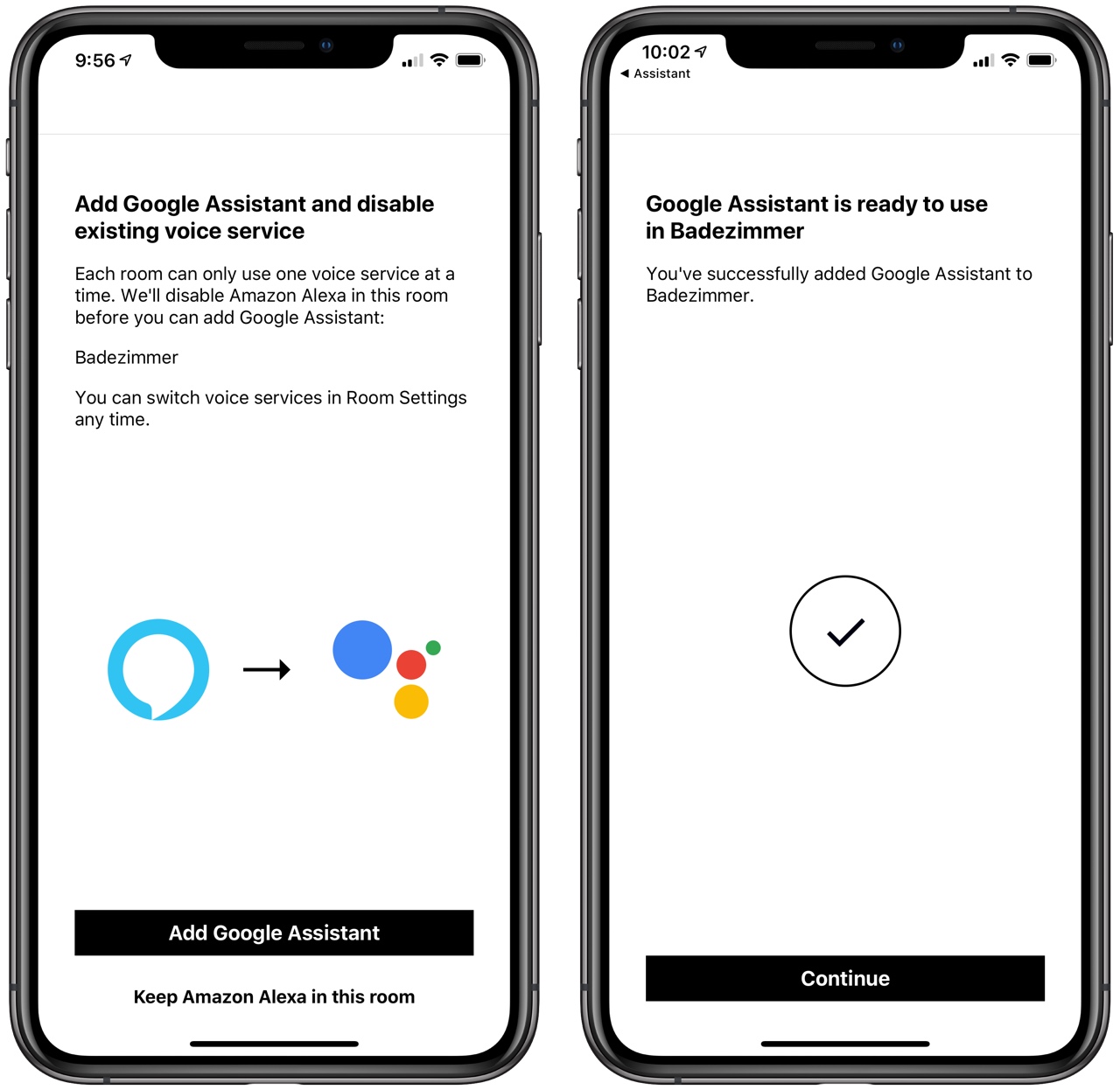
The answer is, you can't. You can enable both services in your home, but you have to select for each speaker which one it uses.


1… Many have asked me re RFEOI for Plan for English Bay and Sunset beaches. Here’s thread w comments. #VanPoli @ParkBoard @CityofVancouver https://t.co/n3OndjMIHk
— Sarah Kirby-Yung 楊瑞蘭 (@sarahkirby_yung) May 13, 2019
In the good news/bad news department, the City of Vancouver has announced a “Request for Expression of Interest (RFEOI) “on a proposed master plan for four iconic west end parks, their beaches, and the adjacent street networks. Noting that there is an expectation of 18,000 more residents in the West End by 2040 and the fact that this area is heavily frequented by tourists, the City is looking at a refreshing rethink of this place that is so loved by locals.
That heavily used parks that are older are being considered for a facelift is great, with enhancements being proposed for Morton Park, better connections for cyclists to the seawall, better readable open space, and an emphasis on biodiversity and festival space.
The Vancouver Aquatic Centre built in 1976 is over forty years old and is due for an overhaul. It would benefit from a redesign that tied it into Sunset Park. The RFEOI also wants to explore climate change and sea rise, and do work differently. Noting that these lands are on the unceded territory of the Musqueam, Squamish and Tsleil-Waututh First Nations, any proposal must include meaningful engagement with the Nations. This could be very exciting to have placemaking and marking from the indigenous perspective, and explore culturally and historically the use and importance of this site.
The bad news was it appeared that some City Councillors and Parks Commissioners were unaware of this city proposal and initiative, which follows city policy to improve and manage public amenities and improve active transportation connections.
John Coupar of the Parks Board told Global News “This looks like a big, big project with a lot of moving parts from what I read, and we were not aware of anything like this. It shouldn’t have come to us this way.”
Hopefully there will now be a briefing for City Councillors and the Parks Board to understand the scope of the proposal and why it is important for a densifying downtown. There will also be the need to think about resiliency and how best to adapt the space to potential water level changes in the future. Other issues that will be sure to be contentious are commercial facilities for selling food and beverages and what those operations will look like near these iconic beaches.
The deadline for the Proposals for Expressions of Interest is May 30. From there a shorter list of respondents will be requested to prepare more in depth documents.

I give lots of free advice. So do other people. If you’re going to ask me (or anyone) for help, I thought you might want to know how that works. How I give free advice Here’s a little peek into my business. People hear about my work with authors from my blog, from other authors, … Continued
The post Free advice: how to give it, and how to take it appeared first on without bullshit.

This report (65 page PDF) outlines the road ahead in Europe for student mobility and credit transfer. It reports that "the European Commission has proposed the creation of a European-wide hub for “online learning, blended/virtual mobility, virtual campuses and the collaborative exchange of best practices." This is directly related to the Common Microcredential Framework (CMF) mentioned here yesterday - here is a slide presentation from the European Association of Distance Teaching Universities (EADTU) outlining the motivation and approach that will be taken to establish the CMF.
Web: [Direct Link] [This Post]
A long time ago (a long time ago) there was this concept of the 'triad model', whereby a student studied at a remote institution while being hosted by a local learning centre. I wrote about it here, borrowing the term 'host-provider framework' from somewhere, and using my experiences supporting Athabasca University courses offered through vocational colleges in northern Alberta as a model. This model has never really disappeared, and we see it (sort of) revived with this article. The difference is that the name has been modernized ('micro-campus') and (in the case of this article at least) the learning centre offers courses from only one university (why?) and is located on some other university campus (why?). I can still forsee a role for local learning centres, offering access to support and coaching, the use of tools (such as a hololens or 3D printer) that students can't afford, and proving meeting space and project rooms.
Web: [Direct Link] [This Post]In my last post we went over the philosophy and process, goals and relevant art of building a read-it-later app; today we’ll be covering the basics of navigation, layout, and adaptive design, for both mobile and desktop.
Now that we have a pretty clear idea of the structure of our app, we can finally dive into designing the UI. Personally, I like starting off with sketches on paper and only then move to Inkscape for more detailed mockups, but you may use any tool you’re familiar with. There’s no need to be good at drawing, or good at a particular application, for this; you should just find a way to visualize your ideas – any way that works for you is good.
If you are using Inkscape for mockups, you might want to check out the GNOME mockup template for some common layouts and patterns to use in your designs. If you are looking for GNOME-style symbolic icons for your mockups, you can find them here, here, and here.
When it comes to the layout of an interface, it’s a good thing to have in mind what navigation structure would make the most sense for the type of content you have. The most common navigation patterns for GNOME apps are the Stack, the View Switcher and the Sidebar List.
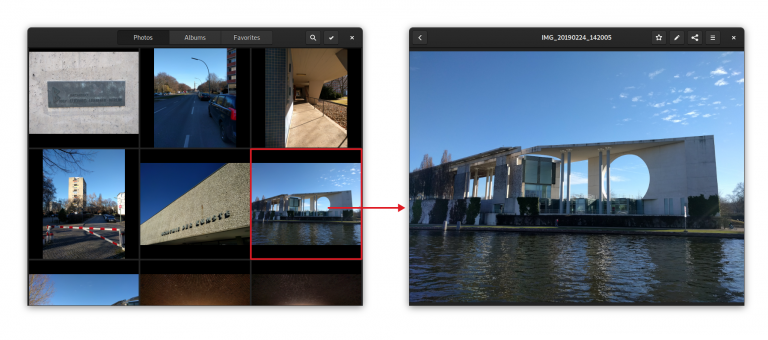
The Stack pattern is meant for when the views are completely separate, the UI is not shared and there is a back button that enables you to go back to the overview. This is, for example, how Photos allows you to navigate between a stream of photos and the detailed view of an individual photo. This means there is a bit more friction to switch between views than with other patterns – but it’s also more focused. It’s a great pattern when you don’t have to switch between views a lot.

The View Switcher is better for cases in which a small number of views are either equally important or need to be easily accessible. It’s used in GNOME apps such as Clocks, Music and Software as the primary form of navigation. On the desktop this switcher is always in the header bar, but a new adaptive version of it, which moves to the bottom of the screen for mobile, is being developed. It’s not quite ready yet, but it will soon hit a version of Libhandy near you.
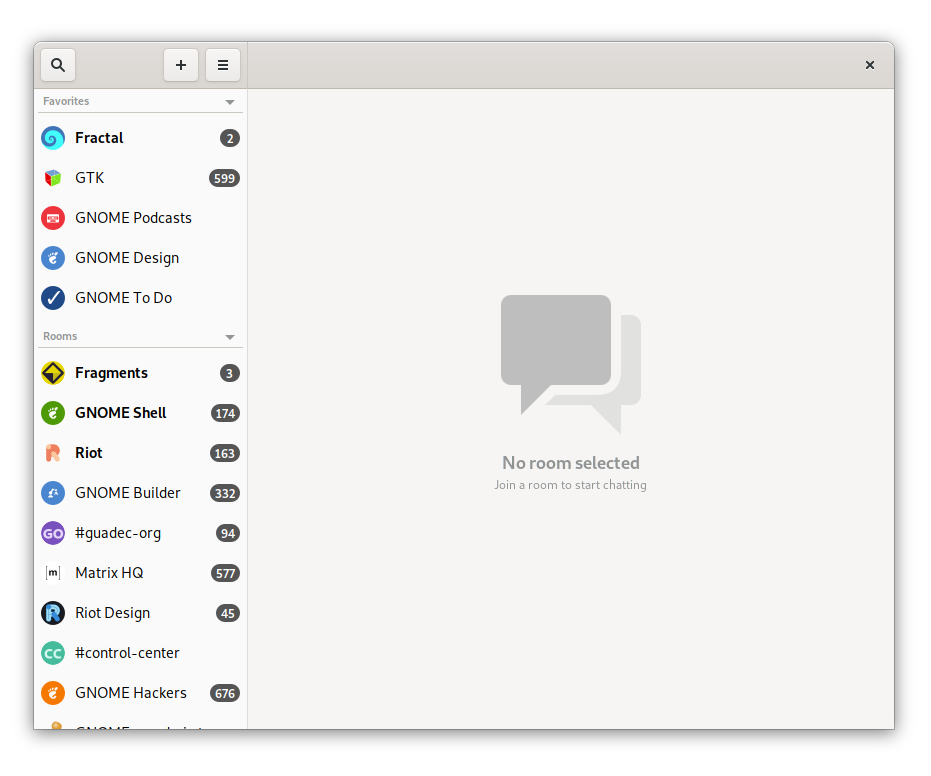
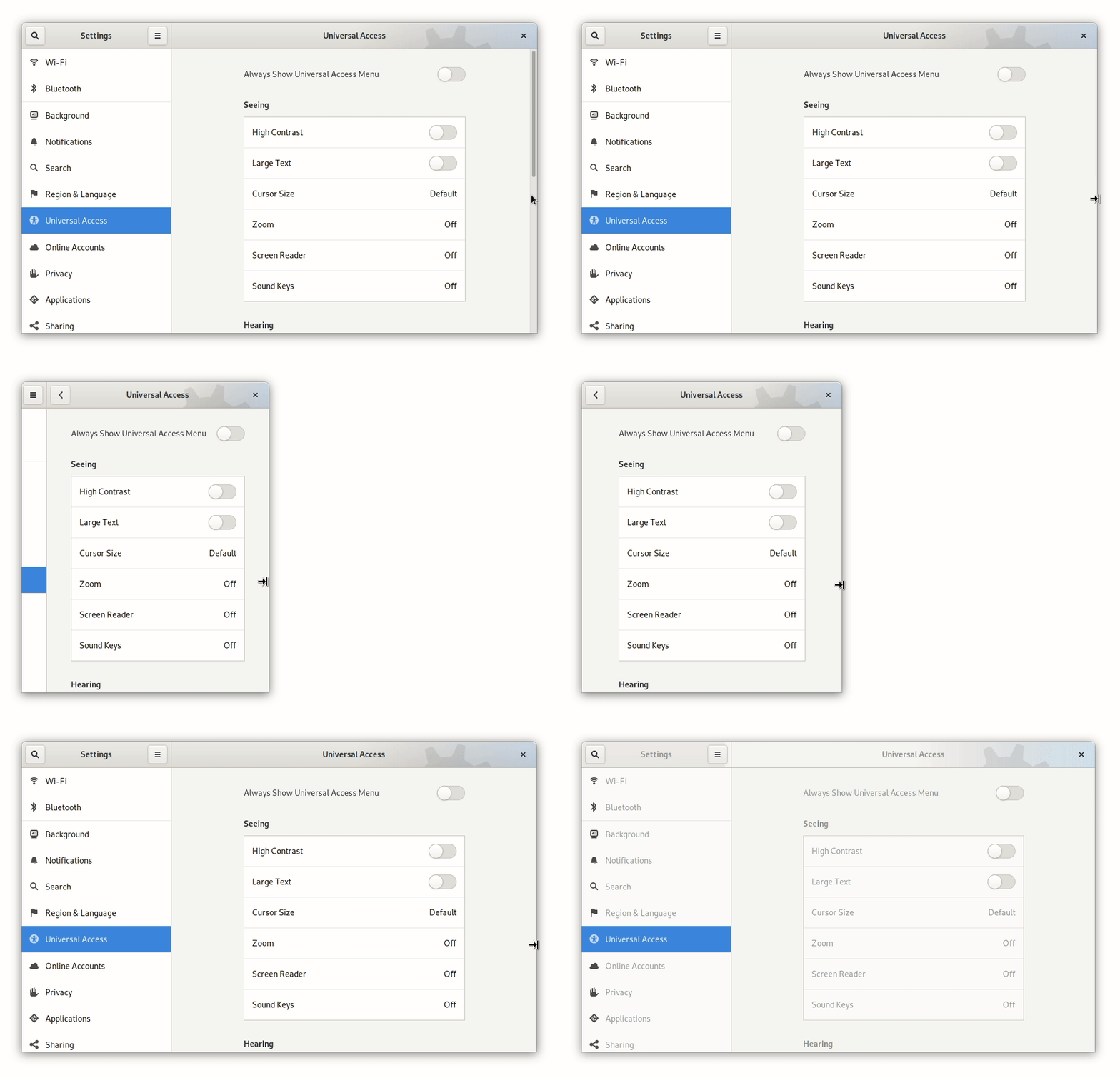
The Sidebar List is used when not only you have a lot of views, but you also often need to switch between them. It’s used in Fractal’s room list for example, because it gives a quick overview of all rooms and allows for quick context switching. On mobile, where there’s obviously not enough space for a content pane and a sidebar, you can use a Libhandy widget called Leaflet which transforms a Sidebar List on desktop into a Stack on mobile.
For our own read-it-later app, we will need navigation to switch between the different lists (Unread, Archive, Favorites) and between lists and article views.
The former is a small set of views that we want easily accessible, so a view switcher is a good fit. Since we can’t use the shiny new adaptive view switcher widget yet, we can use a plain old view switcher in the header bar (though we can, and should, design the UI with the beautiful new switcher in mind).
For the latter we could either use a stack or a sidebar list (along with the Leaflet widget so it works on mobile). Since we want this app to allow for a focused reading experience, and switching back and forth quickly between articles is not going to happen very often, a Stack is probably the best solution.
This means our main screens will look something like:
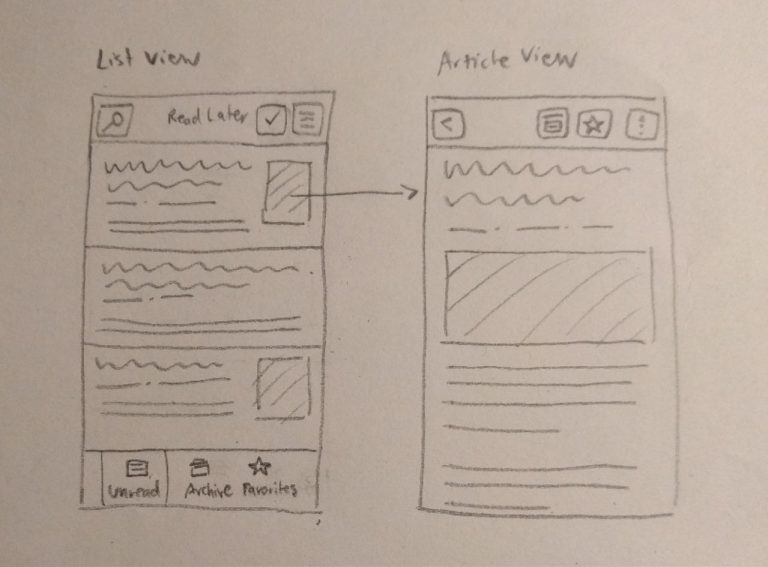
Now that we have a basic navigation structure, we can design each individual screen in more detail. These three article list screens are basically the same lists, but with different content.
The main purpose of these screens is to provide a nice, legible list of saved articles that entices people to catch up with their reading (list). In order to do this we’re going to go for a comfortable layout – which should include the article’s title, a preview, and some information about each article.
To help users catch up with their saved articles we should also try to make the content as interesting as possible. A plain, reverse-chronological list of saved items can be quite boring, and I’ve noticed I myself often scroll down the list randomly, looking for older articles. A potential way to build this feature into the core experience would be to show the reading list in a randomized order, while also showing the most recently saved articles at the top, as a separate category (see the mockups below).
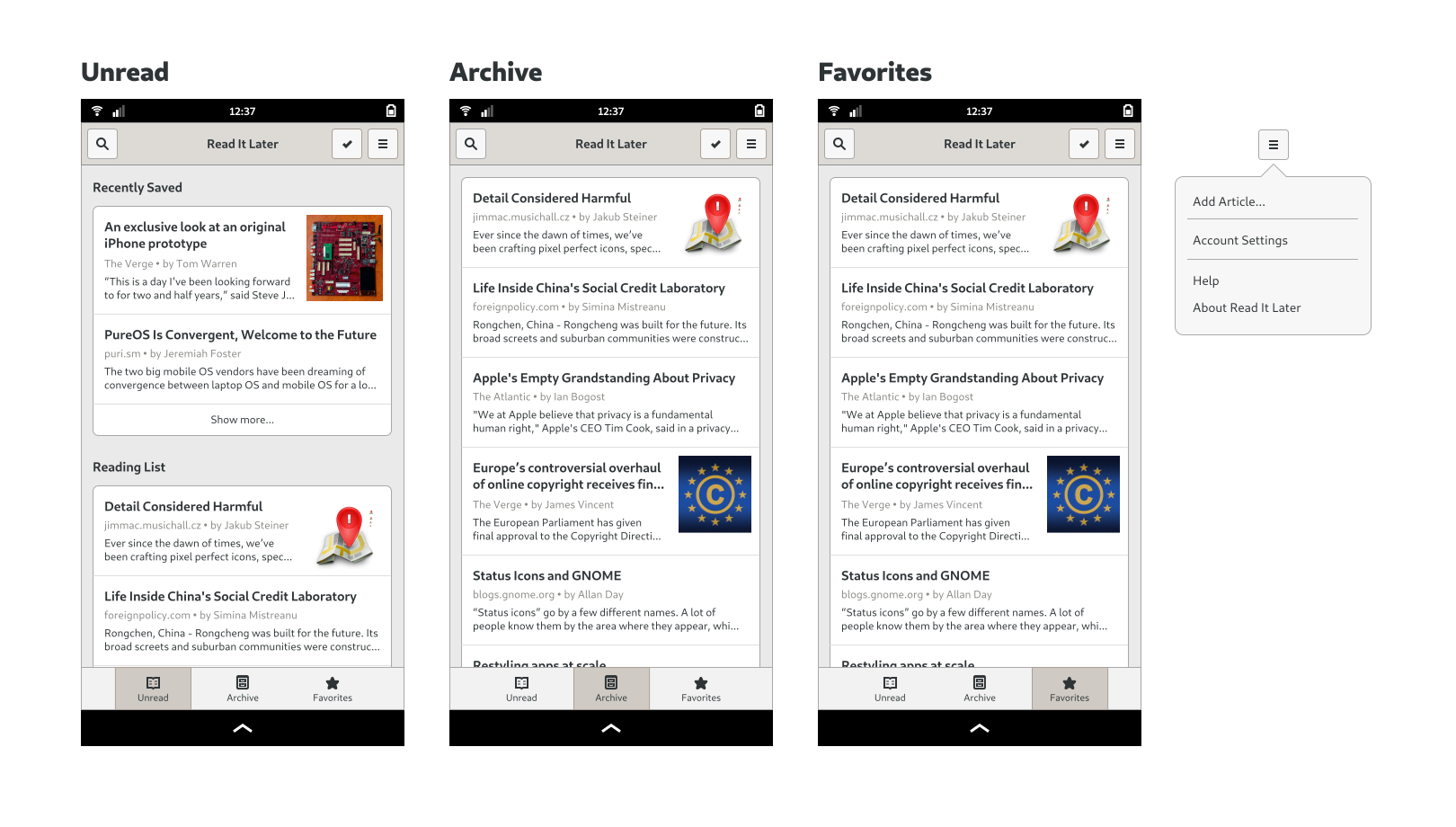
In terms of actions, we need to expose Search and Selection modes (for operations on multiple elements) as well as the application’s primary menu. The primary menu contains global app-level categories such as Help, Preferences, and About.
In the selection mode we need to have the ability to move articles to Favorites and Archive and delete them from our reading list. Since this is not an essential functionality though, we won’t be doing designs for it yet (but if you want to learn more, have a look at the selection mode page in the GNOME HIG – and the same goes for search, in the relevant HIG page).
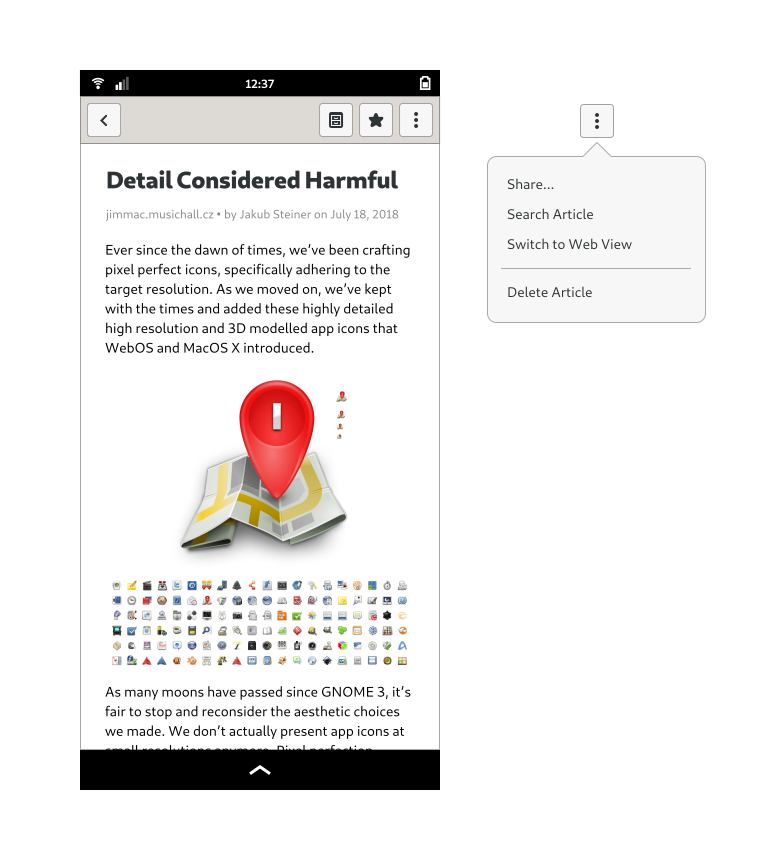
An article screen’s job is pretty straightforward: it’s meant to provide a great reading experience for the saved articles. Since many websites kind of suck in this regard, a reader mode (like the ones Epiphany and Firefox have) should be the default view whenever possible. There is however no guarantee that a given article will end up perfectly rendered, and we do need a way to show the website in its native styling, if and whenever necessary.
We also need to move articles into Favorites and Archive, and be able to delete and share them. The most important actions are usually shown directly in the header bar; the remaining ones (or simply the result of not having enough space) will call for a secondary menu.
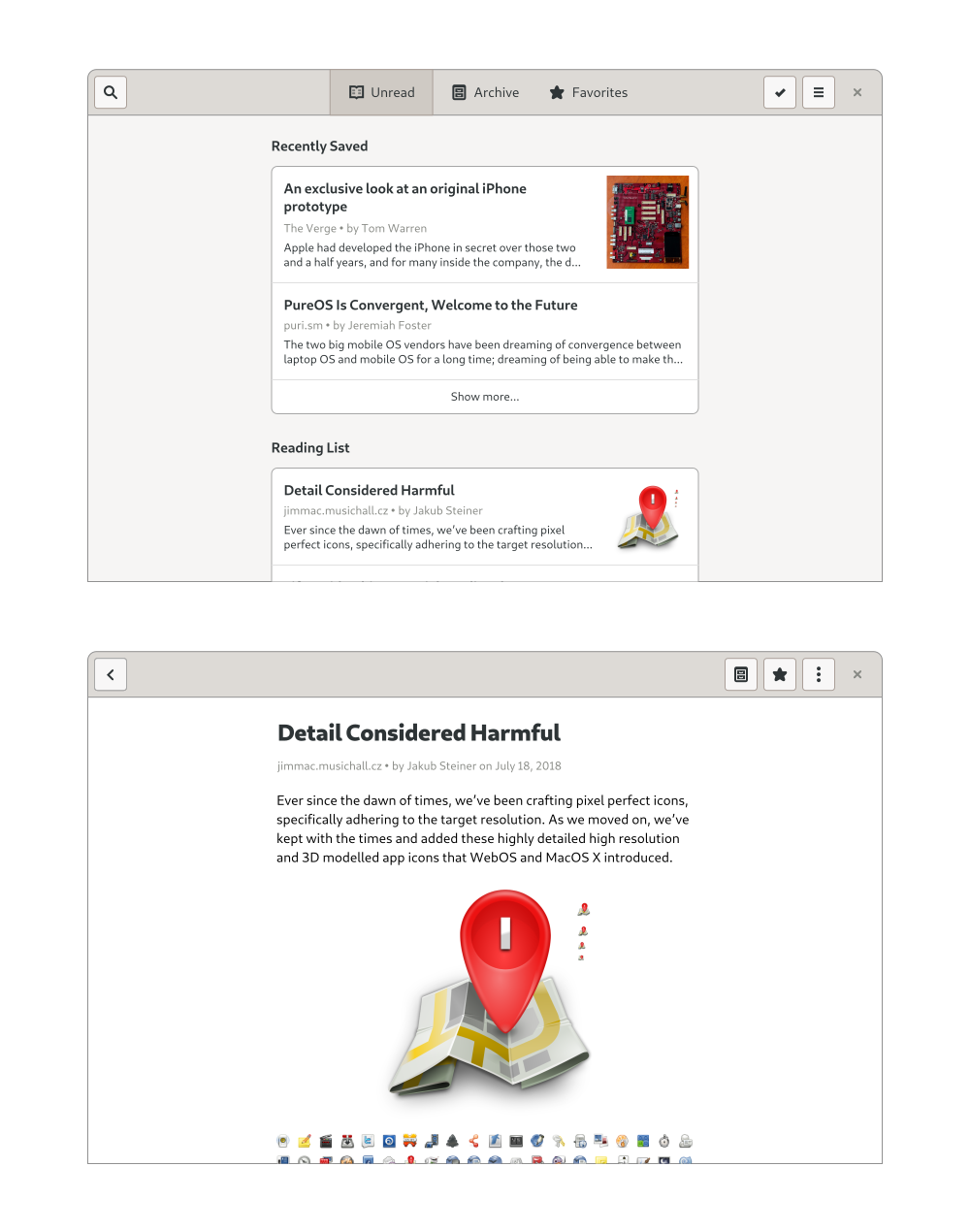
We should by now have a more or less clear idea of what our app looks like on mobile; but what will it look like on desktop? Similar to responsive web design, if we design our app for a mobile environment first, it’s usually pretty easy to make it work well on larger screens as well.
As our app has no sidebars or other complicated layout elements, the main change is that the content column width will have to grow with the window until it reaches a maximum width which is comfortable for reading. This can be implemented by wrapping the content area in a HdyColumn. The view switcher will also move up to the header bar, and there will be a close button on the right side.
We now have the basic structure and most important screens for the application – but that’ far from being everything we need. We need to design login and account settings, empty states, first run experience, errors, search and a number of other things that are beyond the scope of the series… It’s worth noting that mockups tend not to be final, that interfaces almost always change during implementation – as you learn more about use cases, underlying technology and other constraints. Ideally, you’ll also do some informal user-testing with real people, in order to get feedback about what you designed.
If you enjoyed the second part of this tutorial, stay tuned: I’ll be back soon with the third (and final) part. In the meantime, feel free to play with the mockups I made for this tutorial.
Purism believes building the Librem 5 is just one step on the road to launching a digital rights movement, where we—the people—stand up for our digital rights, where we place the control of your data and your family’s data back where it belongs: in your own hands.
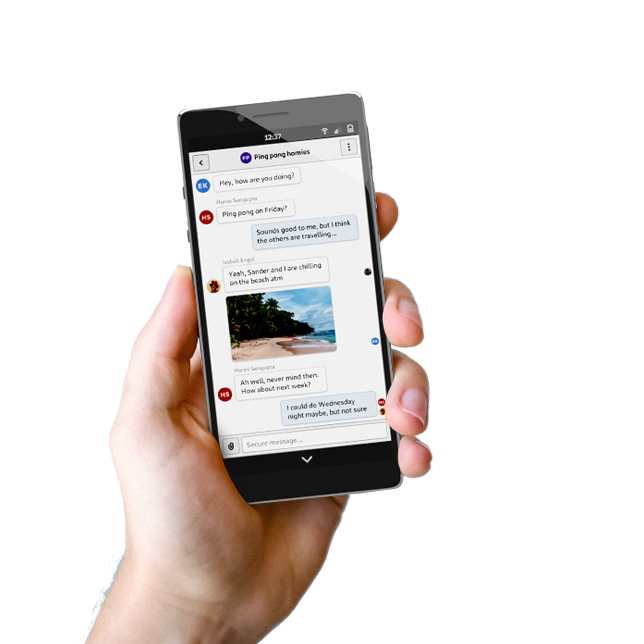
The post Librem 5 App Design Tutorial – Part II appeared first on Purism.
 After a number of leaks, OnePlus today unveiled the OnePlus 7 series comprising of the OnePlus 7 Pro and the OnePlus 7. The former is the one that’s going to hog all the limelight as OnePlus is finally ready to take on flagship smartphones from the likes of Samsung and Apple.
Continue reading →
After a number of leaks, OnePlus today unveiled the OnePlus 7 series comprising of the OnePlus 7 Pro and the OnePlus 7. The former is the one that’s going to hog all the limelight as OnePlus is finally ready to take on flagship smartphones from the likes of Samsung and Apple.
Continue reading →
Some interesting insights into how Amazon structure their engineering organization to maximize team productivity in a service-oriented environment. Two things that stood out to me: each service is owned by a "home team", but sometimes features that are needed by other teams can be built by forming an "away team" to build out that functionality. Secondly, Amazon has a concept of "bar raisers" who are engineers across the organization who help approve key design and architectural decisions. It's possible to go against the recommendation of a bar raiser but "such a move is noted and made visible to higher levels of management".
Via @cote
Hello, everyone! Today is no ordinary Tuesday — in our quest to create the most intelligent and advanced image editor in the world, we’ve added another incredibly cool, machine learning-powered feature to Pixelmator Pro. The feature is called ML Match Colors and it matches the colors of different photos using breakthrough machine learning. To see just a little of what it can do, check out the ML Match Colors film below.
Awesome, isn’t it? ML Match Colors does this magic by fine-tuning 37 different color adjustments, including things like Exposure, Shadows, Highlights, individual color ranges, and more. So it matches both colors and lighting! And it’s so easy to use. Just drag and drop any photo onto the Color Adjustments pane to match its colors. Fun fact: this feature is powered by the same machine learning algorithm we created for ML Enhance, so it has been trained on 20 million professional photos.
In addition, ML Match Colors is available in the Edit menu as Paste and ML Match Colors, so whenever you paste an object, you can automatically match its colors to the new image. If you’d like to see that in action, take a look at one of our newest Tips & Tricks.
In Pixelmator Pro 1.3.4, we’ve also added a Free Transform tool, which is something quite a few original Pixelmator users were missing in Pixelmator Pro. And just like with every feature from the original Pixelmator, we’ve made it more advanced and more powerful in Pixelmator Pro. For one, we focused on preserving every detail, even in extreme transformations. So the quality of our Free Transform tool is second to none. What’s more, any nondestructive edits applied to layers are preserved after transforming. And layers can be resized using three different image scaling algorithms — Bilinear, Lanczos, or Nearest Neighbor!
This is a free update — as usual — so head on down to the Mac App Store, download the latest version of Pixelmator Pro, and let us know what you think!
P.S. As you may or may not know, we’re always working on a few different things at once and I’m happy to announce that a major update to Pixelmator Pro — version 1.4 — is not all that far away. It’s going to be very Photos-oriented but maybe not quite in the way you’d expect. Trust me, it’s super cool and we’re planning to share a little sneak peek in the coming weeks.
Sandy James’s post on Cornelia Oberlander – “the First Lady of Canadian Landscape Design” – is so apropos at this time of year, when her legacy, particularly Robson Square, literally blossoms.
It’s not an exaggeration to say that the look of Vancouver is captured in her works.

She’s still active, still provocative. In the film “City Dreamers” in which she’s featured, she says she’s not in favour of daylighting streams that have been previously culverted – as is proposed, for instance, for Brewery Creek through False Creek Flats. Too many unexpected consequences, says the voice of experience.
| mkalus shared this story . |
The B.C. government has announced a feasibility study on creating a rapid transit link between the North Shore and Metro Vancouver.
The study, which will begin this summer, is being funded jointly by the province and the City of Vancouver along with the three municipalities on the North Shore — West Vancouver, the District of North Vancouver and the City of North Vancouver.
The current options available to cross to the North Shore — the Lions Gate Bridge, Second Narrows Bridge and SeaBus — have not changed in over 40 years. Meanwhile, the number of commuters has increased to the point where transportation has become the dominant issue in regional elections.
"Over the years, the high cost of housing has forced people to move further from the places they work, resulting in longer commutes and serious traffic issues," said Bowinn Ma, the MLA for North Vancouver-Lonsdale and Parliamentary Secretary for TransLink.
"This feasibility study is an extremely exciting addition to the many initiatives we have implemented so far and continue to work on to get the North Shore moving again."
The announcement from the government contains no frame of reference for the study, but says it will "consider the compatibility of a transit crossing with existing and future land use" and "could also consider increased use of the Burrard Inlet through an extended passenger ferry network."
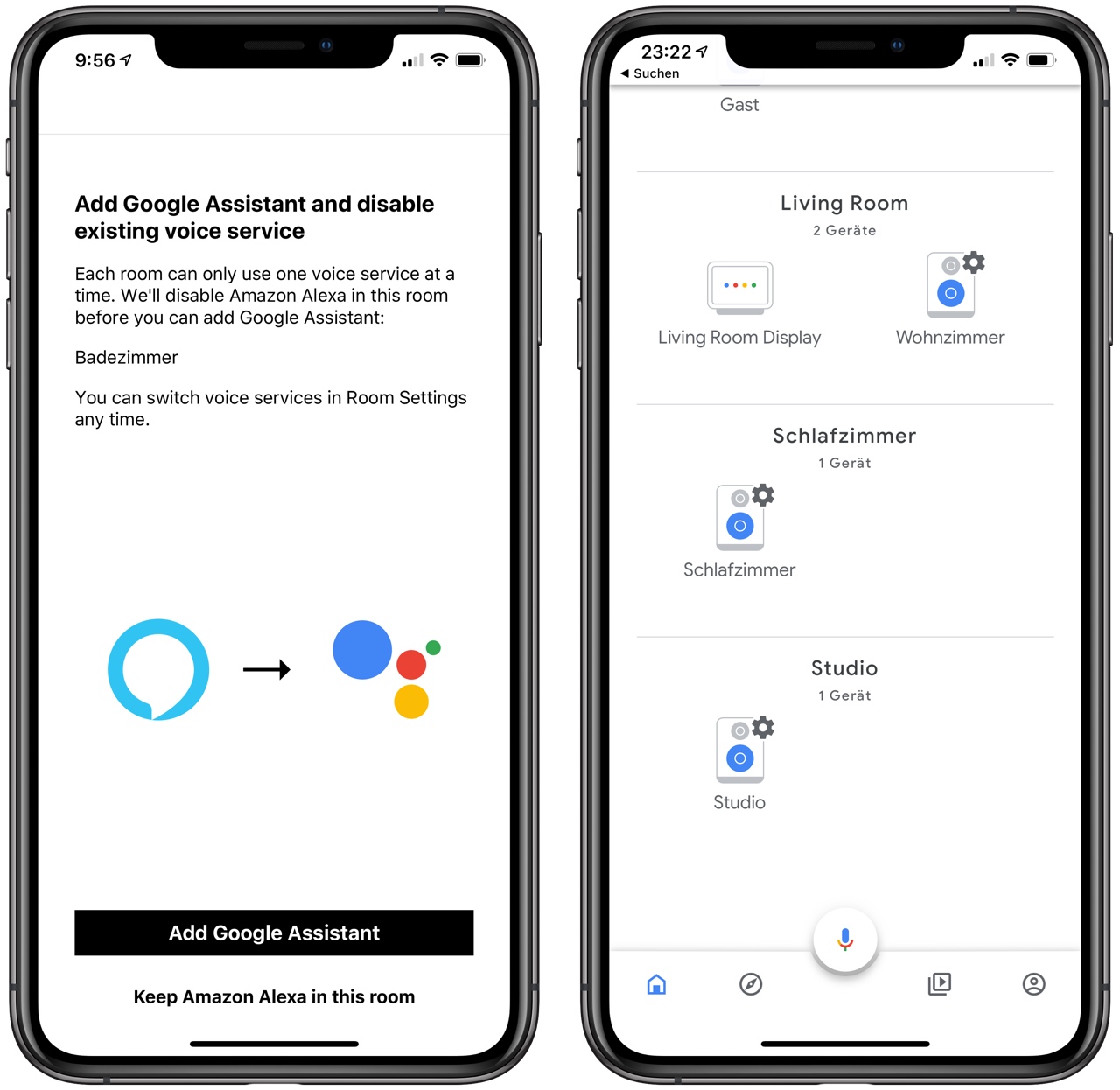
Ich habe den Google Assistant mit meinem Sonos verbunden. Der Assistant läuft auf einem Sonos One, dem im gleichen Zug Alexa entzogen wurde. Man kann zwar beides gleichzeitig im Sonos Haushalt haben, aber nicht auf dem gleichen Speaker. Durch die Verbindung von Google Home und Sonos tauchen auch alle Sonos Speaker in Google Home auf, aber das funktionierte auch schon ohne den Google Assistant auf einem Sonos Speaker.
Assistant funktioniert auf dem Sonos One im Prinzip genauso wie auf anderen Google-Home-Geräten. Man kann Geräte im Smart Home schalten, nach dem Wetter fragen, etc. Man kann wie auch mit Alexa, Musik abspielen. Dazu muss in Google Home und Sonos der gleiche Musikdienst konfiguriert sein. Das geht mit Spotify aber nicht mit Apple Music, weil Google Assistant Apple Music nicht abspielen oder steuern kann.
Hat man einen zweiten Player mit dem Sonos One gruppiert, dann spielt die Musik dabei auf beiden. Diesen Umstand hat sich Sonos zunutze gemacht, um die versammelte Presse zu verladen. Man stelle zwei Sonos Player in einen Raum, hier ein Sonos Beam und ein Sonos One und gruppiere sie. Auf einem richte man Google Assistant ein, auf dem anderen Alexa. Nun kann man abwechselnd "Hey Google" und "Alexa" sagen und Kommandos geben, die dann beiden Player ausführen. Das ist keine Zauberei, weil Sonos immer schon alle Controller koordiniert.
So wie Alexa hat auch Google Assistant eine ganze Reihe von Einschränkungen: Voice Calling, Broadcast Mode und Continued Conversations funktionieren nicht mit Sonos. Voice Match, also die Erkennung unterschiedlicher Personen funktioniert nicht. Die Sonos Player lassen sich auch nicht in Routinen einbauen.
Was ich noch nicht hinbekommen habe: Ich würde gerne einem Google-Home-Gerät oder einem Sonos One sagen, dass es Musik auf einem anderen Sonos Player abspielen soll. Dazu muss ich erst mal rausfinden, was ich dazu sagen muss.
Update: Das war ganz einfach. Gleiche Syntax wie bei Alexa: "Spiele meine Playlist House auf Wohnzimmer". Das Lenovo Smart Display zeigt mir übrigens an, wie Google meine Anweisung auf Englisch übersetzt und an Sonos schickt. Das liegt wohl daran, dass ich in Google Assistant zwei Sprachen hinterlegt habe. Das bedeutet, ich kann alle Sonos Player, auch die ohne Mikro, von Sonos One, Sonos Beam oder einem anderen Google Home-Gerät aus steuern.

A flaw in the massively popular voice-over IP chat platform WhatsApp allowed a sophisticated group of hackers-for-hire to hijack dozens of phones remotely.
WhatsApp discovered the flaw in early May, which attackers used to install surveillance software on both iPhone and Android devices by calling users through the app. The malware worked even if users didn’t answer the call, and effectively turned phones in pocket-sized surveillance devices by hijacking the camera.
The most recent breach occurred on May 12th, when a U.K.-based human rights lawyer received a call mere hours before WhatsApp pushed a patch for the flaw. The lawyer, who spoke anonymously for professional reasons, said it was one of many suspicious calls received over the past few months.
A WhatsApp spokesperson told the Associated Press (via CBC News) that the number of people affected is unknown, but it wouldn’t be inaccurate to say it’s in the dozens, at least.
The Financial Times noted that Israel’s NSO Group developed the malicious code used in the attack and researchers from the University of Toronto’s Citizen Lab said they believed the spyware attack was linked to the same vulnerability WhatsApp was working to patch.
While NSO told the AP in a statement that its technology is used by law enforcement and intelligence agencies to fight crime and terror, it’s worth noting that the spyware has repeatedly been used to hack journalists, lawyers, human rights defenders and dissidents.
Most notably, the spyware was implicated in the killing of Saudi journalist Jamal Khashoggi. Khashoggi was dismembered in the Saudi Consulate in Istanbul last year, and his body was never found.
The attack on the lawyer is particularly disturbing, considering several alleged targets of the spyware are suing NSO in an Israeli court. Further, Amnesty International, which says one of its staffers was also a target of the spyware last year, plans to join a legal bid to force Israel’s Ministry of Defence to suspend the NSO’s export licence.
Source: Financial Times, CBC News
The post WhatsApp found and patched spyware that infected phones through missed calls appeared first on MobileSyrup.

Google appears to be testing a new design for Google Assistant.
According to 9to5Google and a thread on Reddit, a few users are now using a Google Assistant design that looks very different from the Assistant we’re used to. This Google Assistant featured in ‘version 9.84.10.21’ of the Google app gets rid of the AI’s stark white overlay.
New look to the Google Assistant when you squeeze the sides. from r/google
Instead, the design sports a transparent overlay that darkens the bottom of the phone’s display and features text that reads “Hi I’m listening.” There’s also the Keyboard and Updates page options below the text.
Further, 9to5Google calls the Pixel light bar (a bar that features Google’s yellow, blue, green and red colours) that initially appeared on the Chromebook Pixel.
Additionally, 9to5Google was able to confirm the update by finding a matching string for “Hi I’m listening” in the Google app. The publication believes the original poster on Reddit was using Android Q.
This is a server-side update, so even if you have a Pixel 3 on Android Q and the latest version of the Google app, you still might not have this version of Assistant.
It’s unclear when or if Google will launch this variant of Assistant to everyone.
Image credit: Reddit (SentientKayak)
Source: 9to5Google, Reddit (SentientKayak)
The post Google appears to be testing new redesign for Assistant appeared first on MobileSyrup.

Rogers has opened enrolment in its device protection programs for users who skipped out when getting a new phone.
Whether you signed a new contract with Rogers or just upgraded your phone, typically the Toronto-based national carrier only lets you get device protection within 45 days of activating or upgrading your device.
For a limited time, however, you can sign up for the company’s protection plans. The open enrolment ends on May 31st, 2019.
Rogers offers three tiers of protection plan. The first costs $9 per month and includes repair if your device is damaged or has an out-of-warranty defect. Further, it offers up to two fulfilled service requests in 12 months and has processing fees ranging from $30 to $175. These fees depend on the tier of device you have. You can learn more about those fees here.
Rogers also offers a Premium Device Protection plan for $13 per month. The Premium plan offers a free repair for your first broken screen at absolutely no extra cost, as long as there’s no other damage to your device. It also provides device replacement for loss or theft and a choice between repair or replacement for accidental damage or out-of-warranty failure.
Processing fees for this plan range from $100 to $400 for replacements and $30 to $175 for repairs. Again, those fees depend on the tier of device you have. Also, there’s a limit of up to two fulfilled service requests in 12 months.
Finally, there’s a $15 per month option that includes the Premium Device Protection plan along with a ‘Value Pack.’ That package provides users with Premium Voicemail-to-Text or iPhone Visual Voicemail, Unlimited U.S. and international text messaging and Premium U.S. and international calling rate.
To learn more, or sign up for any of the plans, head over to Rogers’ website.
The post Rogers opens device protection enrolment for a limited time appeared first on MobileSyrup.

Bell Media has acquired the exclusive Canadian TV broadcast and streaming rights to CBS’ untitled Jean-Luc Picard Star Trek series.
As part of the agreement, each episode of the series will be available simultaneously in the U.S. and on Bell’s cable TV networks (Space in English and Z in French). Each episode will then begin streaming on Bell’s Crave subscription service the following day.
Patrick Stewart is confirmed to be reprising his role as Picard in the show, who most prominently played the character in seven seasons of Star Trek: The Next Generation from 1987-94. The upcoming series will mark his first turn as the character since 2002’s Star Trek: Nemesis.
Back in January, long-running Star Trek franchise producer Alex Kurtzman revealed that the series will take place 18 years after the destruction of the Romulan Empire in J.J. Abrams’ 2009 Star Trek film.
The Picard series is expected to premiere in late 2019 and will consist of 10 episodes.
This is the latest deal between Bell and CBS, following their agreement to give Bell the exclusive Canadian rights to CBS’ Star Trek: Discovery, as well as many of the older Star Trek series and films, including The Next Generation.
Image credit: CBS Television
Source: Bell
The post Bell obtains exclusive Canadian TV and streaming rights to Picard Star Trek series appeared first on MobileSyrup.

OnePlus’ latest and greatest — and not to mention most expensive — smartphone, the OnePlus 7 Pro is here.
Set to launch later this week, the OnePlus 7 Pro features a Snapdragon 855 chipset, a new QHD display with 90Hz refresh rate, as well as up to 12GB of RAM and up to 256GB of internal storage — in addition to a whole host of other improvements, both big and small.
Note: OnePlus will not sell the OnePlus 7 in Canada and the U.S. Instead, the company will continue to offer the OnePlus 6T (at a discount).
Canadian consumers can purchase the OnePlus 7 Pro exclusively via OnePlus.com starting on May 17th, 2019.
At launch, OnePlus will offer the 7 Pro in two colours: ‘Mirror Gray’ and ‘Nebula Blue.’ The phone will be available in a third colour, called “Almond,” post-launch.
As with the OnePlus 6T, some configurations are only available in certain colours. See below for specific details:
Mirror Gray
Nebula Blue
Almond – coming soon
For context, the base model OnePlus 7 Pro is $274 more expensive than the OnePlus 6T was when it first became available.
For the first time in Canada, OnePlus is introducing a device trade-in program. Canadian consumers can get a discount off the purchase of the OnePlus 7 Pro by trading in select devices via Phobio. Included in the list of eligible trade-in devices are all past OnePlus phones.
Source: OnePlus
The post OnePlus 7 Pro Canadian specs, pricing and availability appeared first on MobileSyrup.

Last week at Google’s I/O developer conference the tech giant confirmed that the Pixel 3a and Pixel 3a XL include a traditional headphone jack — and now we may know why.
Soniya Jobanputra, the Pixel 3a’s project developer, explained the reasoning in an interview at the conference. Regarding the headphone jack, Jobanputra stated that Google, “felt that consumers at this price point and this tier really needed flexibility.”
Her statement suggests that Google believes only users who are on a budget would want a headphone jack.
This explanation makes sense when considering that people who are on a budget would presumably purchase wired headphones, as opposed to pricey wireless ones.
However, there are probably a lot of consumers who can afford wireless headphones but would still prefer at least the option to use wired earbuds.
Phones without headphone jacks typically remove the ability to listen to music while the phone is charging, which can be a frustrating issue for some users.
With all that said, it’s interesting that Jobanputra sees the headphone jack as a budget feature specifically for “this tier” of Pixel device.
Source: Google Developers
The post Google reveals why the Pixel 3a features a headphone jack appeared first on MobileSyrup.

An announcement at the Lenovo Accelerate conference has revealed that the company has delved into the world of foldable laptops.
The device will be a laptop replacement rather than a supplemental device, as reported by Wired. The product has not yet been named.
The foldable laptop has a 13.3-inch diagonal display, and a 9.6-inch display when it is folded. It features a torque hinge.
Similar to the Samsung Galaxy Fold, the foldable laptop has a polymer screen with an OLED display.
What’s different about a foldable laptop, in comparison to a foldable phone, is that laptop users require a suitable keyboard. Although the default keyboard of the laptop is on the touchscreen, users can use the laptop as a clamshell laptop or as a large tablet. The laptop can also be used when slightly folded like a book.
The foldable laptop is designed for productivity and is targeted towards business users. It will run Windows and will be powered by an Intel processor.
Lenovo has been working on the laptop for more than three years, and hopes to uphold the same level of quality as the previous line of laptops.
A price or ship date has not yet been released, but Lenovo aims to release the laptop in the first half of 2020.
Image credit: YouTube (Screenshot)
Source: Wired
The post Lenovo reveals the world’s first foldable PC appeared first on MobileSyrup.

Netflix has revealed the first look at the fifth season of Black Mirror, which features a DC and Marvel face-off.
The photo depicts Anthony Mackie (Avengers: Endgame) and Yahya Abdul-Mateen (Aquaman) in a dark and rainy scene.

As of now, the image is the only detail we have regarding the episode.
However, Charlie Brooker, the series creator, told Entertainment Weekly that the episode is the “Marvel-DC crossover no one saw coming.”
Netflix has been pretty quiet about the upcoming season as viewers do not when the new season will premiere or how many episodes it will have.
Image credit: Netflix
Source: Entertainment Weekly
The post Netflix unveils first look at Season 5 of Black Mirror appeared first on MobileSyrup.

After the launch of the new OnePlus smartphones, it was revealed that the OnePlus 7 and 7 Pro don’t have headphone jacks and do not come with adapters.
The device’s box does not include a USB-C-to-3.5mm dongle.
In the past, the OnePlus 6T also did not have a headphone jack. However, buyers were given a headphone dongle with the phone.
The newest smartphones don’t come with this dongle, which means buyers will have to purchase a separate one. They can choose to purchase one from OnePlus or a separate company.
Buyers also have to option to buy USB-C headphones or Bluetooth headphones. They can choose to buy the new OnePlus Bullets Wireless 2 Bluetooth headphones, which were also recently released.
MobileSyrup’s review of the OnePlus 7 can be found here.
Source: Android Authority
The post OnePlus 7 does not include USB-C headphone jack adapters appeared first on MobileSyrup.
 The Huawei P30 series is all about its impressive camera. In particular, the Huawei P30 Pro packs an impressive 40MP SuperSpectrum camera sensor which can take some outstanding photos in l0w-light scenarios. Sadly, the camera app on the Huawei P30 leaves a lot to be desired. There are a lot of camera-related tips and tricks on the Huawei P30 that you can follow to improve the overall quality of photos or just make the overall experience better.
Continue reading →
The Huawei P30 series is all about its impressive camera. In particular, the Huawei P30 Pro packs an impressive 40MP SuperSpectrum camera sensor which can take some outstanding photos in l0w-light scenarios. Sadly, the camera app on the Huawei P30 leaves a lot to be desired. There are a lot of camera-related tips and tricks on the Huawei P30 that you can follow to improve the overall quality of photos or just make the overall experience better.
Continue reading →

If you’ve seen a basketball shot chart in the past few years, it was probably made or inspired by the work of Kirk Goldsberry. Coming from a cartography and data visualization background, Goldsberry applied his skills to basketball data, and he has a new book called Sprawlball. It tells the story of how this modern era of shooting threes at high volume came to be.
Come for the charts:

Stay for the narrative:
[The Rockets] care more about analytics than aesthetics. Their offense is like an MIT Sloan Sports Analytics Conference fever dream come true. More than any other team in league history, the Rockets obsess over numerical margins. They love “threes, frees, and layups” because on average these shots accrue points at higher rates than other attempts, particularly two-point jump shots, which are the Rockets’ least favorite shot types.
Harden is a perfect leader for this approach.
And the illustrations:

And finally, I leave you with David West’s tweet the other night as the Golden State Warriors defeated the Houston Rockets, because it must be shared:
Stop letting nerds tell you how to play basketball….
It’s all about balance.
Tags: basketball, book, Kirk Goldsberry

Photo Caption: south swell is here
Photo taken at: Waikiki, Hawaii
Instagram filter used: Clarendon

TalkToTransformer is an AI text generator that responds to anything you write in its textbox, whether it’s a question or the start of a made-up story.
Canadian engineer Adam King created the site. The technology within the site was innovated by a research lab called OpenAI.
OpenAI unveiled its language system, GPT-2, earlier this year. The system was previously only available to a number of scientists and journalists.
The technology is now accessible to everyone.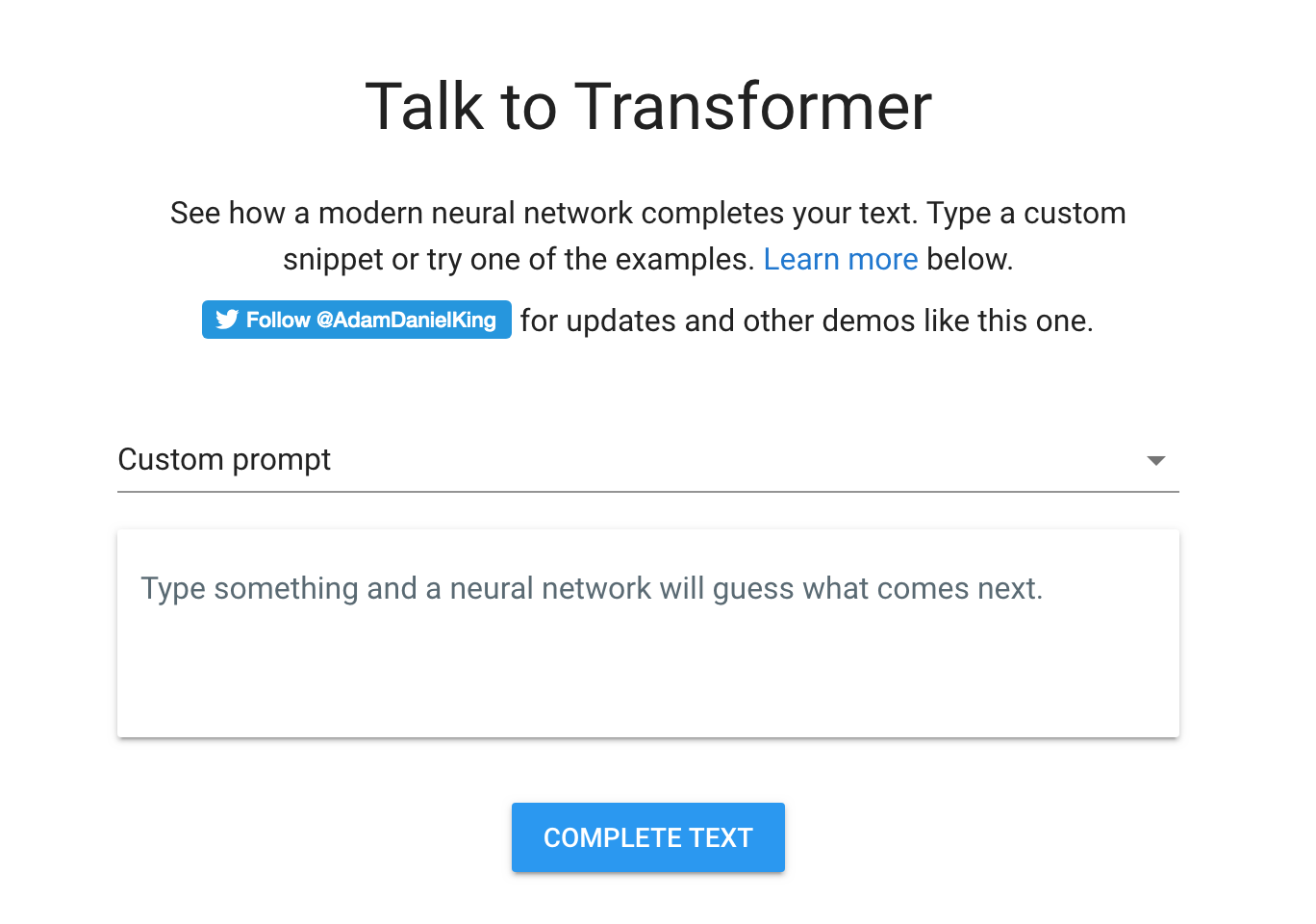
TalkToTransformer can identify news articles, stories, HTML and lyrics. The system is flexible and can recognize familiar characters from popular franchises.
However, the system has its limits. The text has surface-level consistency, but lacks long-term structure, as outlined by The Verge.
When TalkToTransformer narrates a story, characters will randomly emerge and disappear without any steadiness in their storyline. The conversations will also float between topics.
The generator is a multitalented system that is able to find patterns in data and sift through the web with a single algorithm.
The best way to understand and examine the generator is by exploring it for yourself here.
Source: The Verge
The post AI text generator writes you a story or poem with any prompt it’s given appeared first on MobileSyrup.


