 In a move that’s going to deal a major blow to Huawei’s smartphone business, Google has suspended all its business activities with the Chinese smartphone giant. The move comes due to the U.S. government’s Commerce Department putting Huawei and 68 other affiliate Chinese companies on the Entity List following an executive order from the U.S. President Donald Trump.
Continue reading →
In a move that’s going to deal a major blow to Huawei’s smartphone business, Google has suspended all its business activities with the Chinese smartphone giant. The move comes due to the U.S. government’s Commerce Department putting Huawei and 68 other affiliate Chinese companies on the Entity List following an executive order from the U.S. President Donald Trump.
Continue reading →
Rolandt
Shared posts
20 May 22:53
In a move that’s going to deal a major blow to Huawei’s smartphone business, Google has suspended all its business activities with the Chinese smartphone giant. The move comes due to the U.S. government’s Commerce Department putting Huawei and 68 other affiliate Chinese companies on the Entity List following an executive order from the U.S. President Donald Trump.
Continue reading →
Huawei Loses Access to Android and Play Store
by Rajesh Pandey
In a move that’s going to deal a major blow to Huawei’s smartphone business, Google has suspended all its business activities with the Chinese smartphone giant. The move comes due to the U.S. government’s Commerce Department putting Huawei and 68 other affiliate Chinese companies on the Entity List following an executive order from the U.S. President Donald Trump.
Continue reading →
20 May 22:53
Rules of Machine Learning: Best Practices for ML Engineering
Martin Zinkevich,
Machine Learning,
May 20, 2019
Most of us aren't building machine learning interfaces in educational technology, but it's still useful to stay up-to-date with the terminology (a short list begins this article) and best practices for machine learning implementations. The guide is also a helpful checklist for evaluating machine learning proposals. Finally, if you are implementing machine learning, it's best to "do machine learning like the great engineer you are, not like the great machine learning expert you aren’t."
Web: [Direct Link] [This Post]
20 May 22:53
Why am I podcasting about functional programming?
by Eric Normand
I received a negative YouTube comment. Normally, I ignore those, but this one insulted you, my audience. So I address it. Why am I podcasting about functional programming? What teaching techniques do I employ to help people learn?
Transcript
Eric Normand: Why am I podcasting? Hi, my name is Eric Normand and I help people thrive with Functional Programming.
I got a comment on a YouTube video the other day, a couple of days ago. If you don’t know, I record this as a video and I post it as audio for a podcast video on YouTube. Also, I have it transcribed and I put that text on my website.
I’ve got three different media coming out of this. I get comments from all sorts of places, but I got a comment on YouTube. Normally I get positive comments, but this one was negative. Even if I get negative comments I usually don’t make any deal out of them, but this one was different.
This one didn’t just say my podcast or my videos make no sense or are worthless like a lot of them do. This one also insulted my readers and my listeners and my viewers, so I feel it needs to be addressed. I’m going to read it, this is a comment from YouTube user “Thor S.” This was in the video where I talked about monoids.
[baby noises]
Eric: Got my baby here with me. I’m doing this one old school as you can tell. This is from Thor S on the monoids video “Why Monoids Kick Monads’ Butt,” that’s what I called the video. Here’s the comment, “Is this aimed at five-year-olds? That is the most long-winded and painful explanation of associative I can imagine.”
“It feels like you assume everyone watching is too stupid to understand the basic concept, so you have to go over it seven times with minute variations. I kept waiting for there to be any point to this video, but there’s nothing that couldn’t have been summed up in 40 seconds.”
I didn’t know what to do about this comment, I was thinking about ignoring it. Then I realized that this is an opportunity. This is an opportunity to talk about why I’m doing this. I talk to a lot of people about functional programming. I get various reactions, there are people at various levels of programming skill, functional programming skill.
There’s all sorts of people out there. One thing I’ve noticed is that there are a lot of concepts that people aren’t familiar with. Sometimes they’re familiar with them, but sometimes they’re not. In recent episodes, I have been making a list of things that I happen to know that I have encountered people who don’t know.
Not only sometimes do they not know them, but sometimes they are even averse to learning about them. Mostly it seems because they don’t know why it’s important. Especially this kind of stuff like associativity and monoids, they assume that it’s a bunch of math mumbo jumbo. That they don’t need to learn it. That’s how I see [laughs] what they’re explaining.
That it’s not important. It’s unfortunate because when you dig down deeper they say, “Well, I hear a lot of people talking about them but no one can ever explain why I would need to learn them.” I wanted to correct that. I want to explain it to people in a basic way.
In a way that makes it not only understandable to them, but also in a way that explains why they would want to use it. Would want to apply this concept. Unfortunately, a lot of people had bad experiences in high school when they learned about associativity. They got very confused with commutativity, and it wasn’t put in any kind of context.
There is smart people, they might have learned it well enough for the test but they happen to never think about it again. It never came up, or they never thought it came up again. They didn’t have enough context for it. That’s what I’ve done, I’ve made a big list of things. Concepts and ideas, and I tried to put context around them.
I try to apply the teaching techniques that I know. One of the teaching techniques is make things concrete, and another one is repetition. You’re not going to get everybody with one single explanation. 20 percent of the people might get it on the first explanation, another 20 percent get the second one.
You repeat stuff in different ways so that it picks up people. Plus, repetition is a way we learn. You hear it once, maybe you remember it. Twice, OK it’s more likely you remember it. The third time, you’re picking up different nuances in it. Now it clicks and you have a more solid understanding, and it’s going to stick in your memory.
These are basic teaching techniques. They’re human, they’re the way humans learn. To answer the question, am I explaining this for a five-year-old? No, I’m explaining it for people. I’m sorry if you already know this concept and listening to me talk about it is somehow insulting to you or I don’t know, makes you have some pain.
I’m sorry, just stop the video. You don’t have to watch it, you don’t have to listen. There are a lot of people out there who don’t know these things and I am trying to teach them to them. OK, Mr. Thor S? Could I have said it in 40 seconds? Yes, but not as many people would have remembered it. This is the case.
There’s billions of YouTube videos out there. If you don’t like my video, that’s fine. I don’t care, that’s fine. There’s a lot of people out there who do like my videos. There’s a lot of videos for you to watch that you will like. Chill out, dude. That’s OK, you don’t have to comment about it. You can just stop it.
Be nice. It’s fine if you don’t like my video, even if you say something like you don’t like it or you make a critique out of it. That’s fine, but don’t insult my audience about it. The ones who do like it. Thor S, be nice. Thanks everybody for listening. I hope I explained well why I’m doing what I’m doing.
I explained how I do it, but why? A lot of people, most programmers I would say, are exposed to object oriented ideas. Let’s put it close to 100 percent programmers are exposed to object oriented ideas. I want a similar percentage, close to 100 percent to be exposed to functional programming ideas.
I think they’re applicable no matter what language you learn, or what language you program in at work. I feel like they’re good ideas and they need to get out there. I want to make them accessible, I want them to make them available. I want people to have context around them so that they know why they’re learning them and can apply them in their daily lives.
That’s what I’m doing. I spend all this time sitting here talking to you about them, sitting in my office talking about them. I pay for a podcast hosting, I pay for transcription. It’s not free, but I feel the ideas need to get out there. If I can make it into a business at the same time, I feel that’s a win-win. There you go.
All right people, you all rock. You’re awesome, and just have one thing to say, rock on.
The post Why am I podcasting about functional programming? appeared first on LispCast.
20 May 22:52


The Community Strategist
by Richard Millington
If you don’t love research, identifying costs, project planning, developing benchmarks, getting internal support, and building decision trees, don’t become a community strategist.
We’ve created more community strategies (and trained more strategists) than most.
Believe me, this isn’t just a small jump to focus ‘on the big picture’, it’s a completely different type of work.
It’s often work community managers discover they don’t enjoy.
In our coaching, four areas seem to surprise people the most.
1) You need to cost your strategies.
If you’re presenting a plan and you don’t know the resources it requires, you have no idea if you’re creating something feasible or not. Worse yet, you’re not taking your work (or your colleagues) seriously. It’s hard for people to support something if they don’t know what the costs are.
For example below, every community strategy we create is fully costed by both the time and financial resources required:
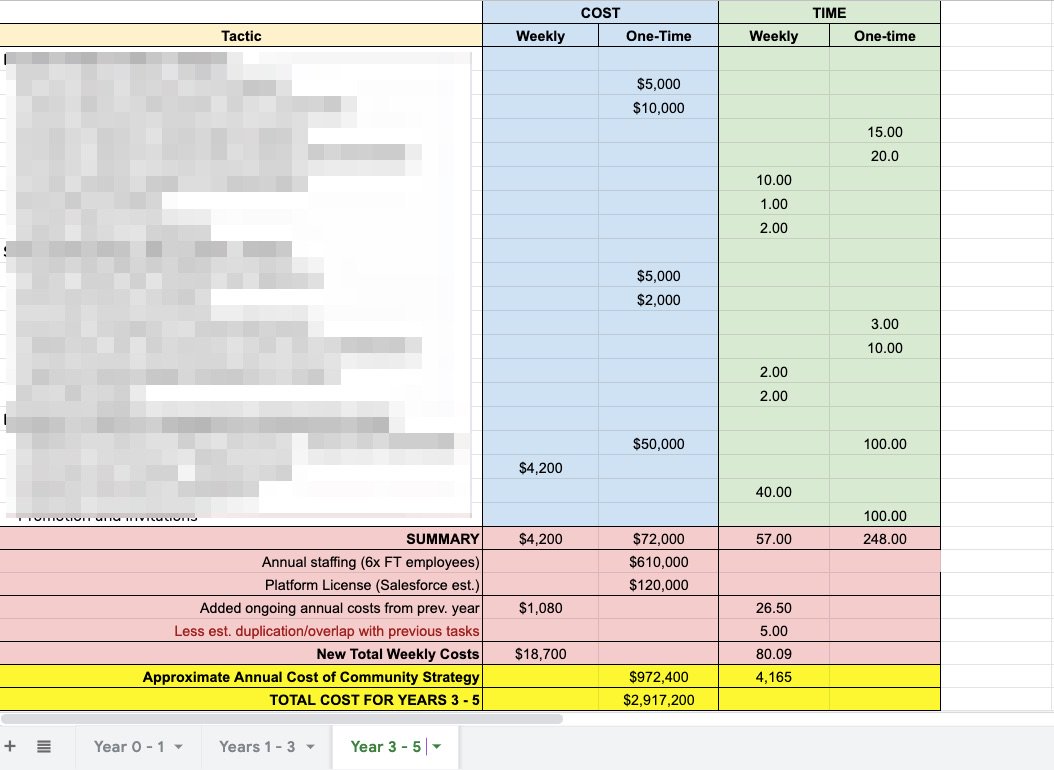
This is critical for two reasons. First, once you know the time required, you determine how many staff you need to reach each new level. This, in turn, guides you on the financial resources you need. Second, this makes the plan flexible. You can present options based upon resources available. (i.e. ‘with [x] resources I can achieve [y], but with [xx], I can achieve [yy]’).
Once you have your tactics prioritised you can quickly adapt them by the time and resources you have available.
2) You either have research or guesswork.
If you can’t point to the research that supports every assumption in your strategy, you should be honest and call it guesswork. You have no idea if it will work or not, (but, hey, at least it sounds good).
You have to love the research side of community. You have to enjoy interviewing dozens of people internally and externally, identifying segments, understanding their priorities, and using that to craft your approach from the community’s goals down to the specific tactics you decide to use. You have to analyze in-depth what is and isn’t working (more on that below). You have to enjoy reaching out to peers and researching other communities to identify the best approach towards everything you want to do.
3) Building Decisions Trees > Reporting Metrics
It’s one thing to set measurable goals and KPIs on the way towards achieving them. Reporting what happened/building a narrative around the data is vital. But reporting doesn’t tell you what you’re going to do differently. If you want your strategy to be more than just a snapshot in time, then you need to build decision trees based upon what the data tells you.
If a metric you really care about drops by 10% in the next few months, what will you do differently? You need to build out what success/failure of each tactic looks like, what you will stop doing and what you will invest more resources in doing based upon the data you’re seeing.
This is how you build a strategy that lives indefinitely instead of a strategy which becomes stale from the date it’s published.
4) Building Internal Alliances
You should never ‘drop’ the strategy on surprised colleagues.
The strategies we present are never a surprise. They’re the summation of a lot of conversations and collaborative decisions we’ve guided clients through to reach a point of agreement. If people are disagreeing with aspects of your strategy, you’ve probably not communicated frequently enough with your colleagues.
Anyone can whip up a detailed strategy document in a dark room in a week or two. The reason it takes us 3 to 4 months to build a strategy is we bring our clients along the journey with us. Every point is discussed, objections highlighted, concerns addressed as early as possible.
The end result is a strategy which has the support of all the key stakeholders (and key members of the community). There is a gulf in difference between tepid acceptance and enthusiastic support of a strategy.
Once the strategy is established, you have to continue to maintain strong relationships with stakeholders, address concerns, demonstrate results, build a shared narrative through powerful stories etc…
If this is the kind of work you want to do, then, by all means, push to reach the strategist level. But be aware it’s a very different kind of work from managing a community.
…and if you really want to thrive, don’t wait to reach the strategist level before acquiring these skills. Gain these skills before you have the job.
20 May 22:51
Your purchases, subscriptions and reservations in Gmail
by Volker Weber

Does this list scare you? It really should not. This information lives in your mail archive. Remove the mail and it disappears. Of course Google indexes your mail file. That is how you find stuff very quickly. This list is just a categorized view of the information in your mail file, for your convenience.
You don't want Google to have that information? Don't give Google your emails, in other words, don't use Gmail.
20 May 22:51

Huawei Canada to provide security updates to current, in-stock phones despite Google block
by Shruti Shekar
Huawei Canada says it “will continue to provide security updates” despite Google pulling out business with the Shenzhen-based company shortly after U.S. President Donald Trump’s ban.
On May 19th, Google made the decision to suspend its business, which would involve “the transfer of hardware and software products.” It said that the company would “only be able to use the public version of Android and will not be able to get access to proprietary apps and services from Google.”
In a statement to MobileSyrup, the Canadian division of the company said: “Huawei will continue to provide security updates and after-sales services to all existing Huawei and Honor smartphone and tablet products, covering those that have been sold and that are still in stock globally.”
The spokesperson also said that Huawei has been working on its own operating system for a while.
“Huawei has made substantial contributions to the development and growth of Android around the world As one of Android’s key global partners, we have worked closely with their open-source platform to develop an ecosystem that has benefitted both users and the industry,” the spokesperson said.
It’s important to note that Huawei has been in the works of developing this operating system for a while and in preparation for the possibility of the U.S. banning the company.
Huawei’s CEO Richard Yu had confirmed this in April and said: “We have prepared our own operating system, if it turns out we can no longer use these systems, we will be ready and have our plan B.”
Trump signed the executive order last week banning any foreign company from supplying U.S. companies equipment if they pose a national security threat. The ban was announced alongside a national emergency regarding technology threats against America.
It was reported that the ban could potentially result in an $11 billion USD revenue loss for the country and could potentially disrupt the global supply chain.
Update 20/05/2019 5:46pm ET: The U.S. Commerce Department has granted Huawei a temporary license allowing it to maintain its current networks and allowing it to provide software updates to existing Android devices, according to Reuters. The temporary license lasts until August 19th.
The post Huawei Canada to provide security updates to current, in-stock phones despite Google block appeared first on MobileSyrup.
20 May 22:45
 E-Bikes besitzen mehr und mehr das Potential, Autos von der Straße zu verdrängen. Leider sind sie in der Regel teuer, schwer und für manch einen unhandlich. Aber die Dinge verbessern sich definitiv. Ein Beispiel ist [...]
Luna Cycles stellt sein Super-Stealth 400-W E-Bike vor
by Externer Autor
E-Bikes besitzen mehr und mehr das Potential, Autos von der Straße zu verdrängen. Leider sind sie in der Regel teuer, schwer und für manch einen unhandlich. Aber die Dinge verbessern sich definitiv. Ein Beispiel ist [...]
20 May 22:44
Replied to a post by Chris McLeod I really sh...
by Ton Zijlstra
Replied to a post by  Chris McLeod
Chris McLeod
I really should start adding more of the sites I follow through RSS to Aperture
At IndieWebCamp Utrecht, Frank Meeuwsen created a nodejs importer for OPML into a microsub server like Aperture. To bulk import rss subscriptions from an RSS reader, and ease the transition.
20 May 22:43
5G as an enterprise LAN / Wi-Fi replacement is a myth
by Dean Bubley
Introduction
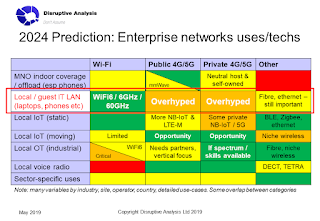
There are at least 10 reasons why 5G will not be a viable WLAN (wireless local area network) technology for mainstream enterprise. Despite recent claims to the contrary, it is not an alternative to Wi-Fi in offices, hospitals, apartment blocks or similar locations.
Enterprises, investors, policymakers and vendors should be extremely skeptical of assertions 5G will displace mainstream Wi-Fi uses. Indeed, they should question the credibility and honesty of those uttering such claims.
There will certainly more deployments of indoor cellular (including private and neutral host networks) in future, but these will almost all be incremental and not substitutional to Wi-Fi. They may be used for IoT/OT uses, but typically these will be entirely new.
4G / 5G technologies will not be integrated into most laptops or tablets, despite hype.
This post looks at why 5G cannot replace enterprise Wi-Fi - including numerous obvious reasons - and then examines why the cellular industry (which mostly understands the problems) is pretending otherwise. What's the story behind the unrealistic fantasy?
(It's quite long. Get a coffee first.)
What is wireless used for in enterprises?
Before drilling into the specifics of 5G, it is worth looking at how and why wireless gets used in enterprises at a local area. Local area here means a single office or site - whether that's an office block, a supermarket, a hospital or a factory. Some locations have multiple LANs across several buildings on a campus network, such as a university, corporate HQ site or major new property development.
(By contrast, WANs run over wide areas, such as between a retail chain's stores and warehouse sites in different cities, or linking a multinational bank's offices in several countries. Huge locations like smart cities and airports are somewhere in the middle).
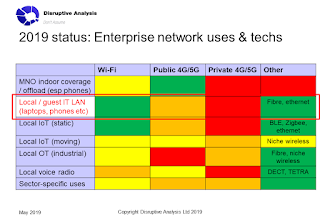
A top-level list of local wireless uses, often with separate infrastructure, includes:
This post is specifically about the IT/LAN/Internet access use-case. I think cellular has a lot to offer IoT (especially mobile IoT) for enterprise, as well as OT in industrial settings. We will also see more indoor / premises neutral-host networks (NHNs) both for coverage and private onsite voice/smartphone access. However, none of those generally gets classed as "LAN" connections.
(SAVE THE DATE: I will be running a private workshop in London on July 9th about NHNs, looking at both indoor and wide-area / metro / rural uses and deployment scenarios)
Why can't 4G/5G be used for wireless LANs instead of Wi-Fi?
At the heart of this debate is whether 3GPP cellular technologies can be used for local-area computing networks, especially for laptops, tablets and private smartphone use. Can it replace fixed ethernet and especially Wi-Fi connections? Will future PCs connect to the Internet via 5G? I'm being asked this by various of my clients, so it's worth going in to some detail here (and obviously, more detail & analysis for paying advisory customers)
This is not a new discussion - the 3GPP vs. IEEE standards war has waged for decades. I've addressed the topic multiple times, whether that's been about in-home usage (link), debunking the "5G will kill WiFi" myth (link) or discussing the important role for private cellular in industry and the need for local spectrum licensing (link).
I can see at least 10 reasons why cellular (whether provided by MNOs as a service, or owned by the business or an NHN provider) is not a suitable IT LAN technology for enterprise:
This should not really be a surprise to anyone. I honestly find it hard to believe that most people involved in networks/telecoms don't realise at least 4 or 5 of these points off the top of their heads.
Historical note: I've been skeptical of cellular-enabled laptops since 2006 (link). I wrote a full report in 2008 (link), which was actually far too optimistic (I predicted 30% attach-rate by 2011) despite being criticised as too-negative by the cellular industry. Most of the arguments remain valid for 5G.
So why the hype?
What's a bit baffling is why the 5G/WiFi replacement fantasy is becoming more common. Even AT&T's CEO was quoted at the company's financial results event (link) as saying "It’s serving as a LAN replacement product". Other 5G-centric commentators have said similar things.
To be fair, in some cases it will be genuine ignorance, although frankly anyone that clueless about enterprise networks shouldn't be making pronouncements anyway. Another more important issue is the conflation of all the different use-cases for connectivity (as above), and people conflating the LAN, offload and IoT domains in particular. Through that lens, the AT&T statement could (very generously) be considered applicable to some IoT scenarios.
Yes, 5G has a long-term role in some industrial verticals, especially with time-sensitive networking and private control of core and/or radio & spectrum. Neutral-host cellular will be important indoors too. But controlling robots & process machinery, or doing asset-tracking in a hospital, is not the same as accessing SaaS applications from a laptop or tablet, or local IoT applications from billions of devices with local gateways. Neither is using a new 4G/5G CBRS or local-spectrum network for "reverse roaming" or "MVNO onload" really a LAN business either.
But I think there are a few other more cynical reasons in play too:
There are at least 10 reasons why 5G will not be a viable WLAN (wireless local area network) technology for mainstream enterprise. Despite recent claims to the contrary, it is not an alternative to Wi-Fi in offices, hospitals, apartment blocks or similar locations.
Enterprises, investors, policymakers and vendors should be extremely skeptical of assertions 5G will displace mainstream Wi-Fi uses. Indeed, they should question the credibility and honesty of those uttering such claims.
There will certainly more deployments of indoor cellular (including private and neutral host networks) in future, but these will almost all be incremental and not substitutional to Wi-Fi. They may be used for IoT/OT uses, but typically these will be entirely new.
4G / 5G technologies will not be integrated into most laptops or tablets, despite hype.
This post looks at why 5G cannot replace enterprise Wi-Fi - including numerous obvious reasons - and then examines why the cellular industry (which mostly understands the problems) is pretending otherwise. What's the story behind the unrealistic fantasy?
(It's quite long. Get a coffee first.)
What is wireless used for in enterprises?
Before drilling into the specifics of 5G, it is worth looking at how and why wireless gets used in enterprises at a local area. Local area here means a single office or site - whether that's an office block, a supermarket, a hospital or a factory. Some locations have multiple LANs across several buildings on a campus network, such as a university, corporate HQ site or major new property development.
(By contrast, WANs run over wide areas, such as between a retail chain's stores and warehouse sites in different cities, or linking a multinational bank's offices in several countries. Huge locations like smart cities and airports are somewhere in the middle).
A top-level list of local wireless uses, often with separate infrastructure, includes:
- Local IT / Internet connectivity - this is the main LAN space, dominated by fixed ethernet and Wi-Fi. It connects PCs, laptops, deskphones, tablets, conferencing gear and various other computing products, either to the business's own servers or to the Internet and cloud. It is also good for private use of smartphones.
- Coverage extension of public mobile operator (MNO) services onto private property, where outdoor-to-indoor signals don't reach. This uses various forms of distributed antenna system (DAS), repeaters, small-cells etc, typically installed today only in the largest buildings. Essentially, this enables local smartphone connectivity both to the telco's services (eg telephony) and to the public Internet. In some cases Wi-Fi is used to "offload" data that could normally have gone over the carrier network. Note: genuine offload is a tiny fraction of total smartphone data traffic - see this post for more (link)
- Local IoT connectivity (connecting building automation systems, HVAC, entry control etc. This can be further divided into
- Static IoT - things that don't move around, such as sensors, door controls, CCTV cameras & aircon units
- Mobile IoT, for instance credit card terminals, robots, wearables, asset-tracking tags etc
- Local OT connectivity - operational technology, often business/safety-critical with a need for realtime deterministic control, such as industrial machinery, process controls, medical equipment and so on.
- Local voice connectivity- especially walkie-talkies and private two-way radio, which are now starting to be replaced with cellular alternatives.
- Other local uses - numerous sectors have their own niche wireless requirements, maybe linking to public safety / first-responders, broadcast, audiovisual systems etc
This post is specifically about the IT/LAN/Internet access use-case. I think cellular has a lot to offer IoT (especially mobile IoT) for enterprise, as well as OT in industrial settings. We will also see more indoor / premises neutral-host networks (NHNs) both for coverage and private onsite voice/smartphone access. However, none of those generally gets classed as "LAN" connections.
(SAVE THE DATE: I will be running a private workshop in London on July 9th about NHNs, looking at both indoor and wide-area / metro / rural uses and deployment scenarios)

Why can't 4G/5G be used for wireless LANs instead of Wi-Fi?
At the heart of this debate is whether 3GPP cellular technologies can be used for local-area computing networks, especially for laptops, tablets and private smartphone use. Can it replace fixed ethernet and especially Wi-Fi connections? Will future PCs connect to the Internet via 5G? I'm being asked this by various of my clients, so it's worth going in to some detail here (and obviously, more detail & analysis for paying advisory customers)
This is not a new discussion - the 3GPP vs. IEEE standards war has waged for decades. I've addressed the topic multiple times, whether that's been about in-home usage (link), debunking the "5G will kill WiFi" myth (link) or discussing the important role for private cellular in industry and the need for local spectrum licensing (link).
I can see at least 10 reasons why cellular (whether provided by MNOs as a service, or owned by the business or an NHN provider) is not a suitable IT LAN technology for enterprise:
- 13bn installed base of actively-used Wi-Fi devices today, of which only smartphones typically have cellular radios. Some have shortish replacement cycles (eg tablets) but others will last for 10+ years. They will need to be supported in-building.
- A tiny fraction of laptops & tablets have in-built 4G radios today. Despite the hype, this will not change significantly with 5G. Customers won't pay more for them, and manufacturers don't want the margin hit. We might see 10-20% penetration, but I'm doubtful (This is a whole other "10 reasons" post in its own right...) Wi-Fi remains primary.
- Plenty of other devices will never have cellular connections (5G printers? Servers?!). The number of Wi-Fi devices is exploding in IoT as well - from smart-speakers to lighting to interactive screens and terminals. Add in new low-power Wi-Fi for things like headsets (and a separate battle between Wi-Fi / BLE / ZigBee which cellular doesn't even have a toe in). Again, Wi-Fi remains primary. High-end/critical IoT devices may actually adopt passive optical LAN connections, rather than any wireless technology.
- Private 4G/5G networks are not just radios. They need core networks, control software, and maybe SIMs/eSIMs. The average IT department does not want to, or have the skills, to deal with all this, compared with installing some ethernet wiring and some Wi-Fi APs.
- Almost no businesses want to deal with the complexities of private / public cellular interconnection, roaming, regulation (lawful intercept?!) and so forth
- Even if some IT departments want to go towards 4G/5G connectivity, they still have BYOD policies, and guests, contractors and tenants who will keep desiring (& often expecting) Wi-Fi
- In-building 5G is going to be hideously complex anyway, especially for mmWave frequencies. Installing small cells also needs fibre backhaul, power etc. in the right places, whch may be different locations to Wi-Fi APs.
- Ironically, in-building 4G small cells usually need wired LAN connections to connect them. In future, it might even be possible to use Wi-Fi6 as backhaul, as it should have good-enough deterministic QoS for the time-sync requirements.
- The world would need, I estimate, 100-300,000 more enterprise cellular specialists for designing, installing, maintaining & operating 5G LANs. And AFAIK there aren't even proper training programmes, or certification schemes. That's a decade or more on its own (and probably a big opportunity for some)
- Indoor wireless coverage is difficult and variable. Radio is absorbed by interior walls, partitions, furniture, insulation, pipework etc. Giving QoS guarantees is almost impossible. Few design, planning and testing tools are available.
- Device-to-device use cases for Wi-Fi are not easily replicable with cellular. Maybe in the future.
- User perceptions of Wi-Fi and cellular, and behaviour around it, are entrenched and will take years to change, if ever.
- Patent & royalty costs for cellular are higher, as well as the extra chipset costs.
- Unknowable new security / threat surfaces (and the fact that Wi-Fi security is often integrated with the enterprise's identity & threat-management systems today)
This should not really be a surprise to anyone. I honestly find it hard to believe that most people involved in networks/telecoms don't realise at least 4 or 5 of these points off the top of their heads.
Historical note: I've been skeptical of cellular-enabled laptops since 2006 (link). I wrote a full report in 2008 (link), which was actually far too optimistic (I predicted 30% attach-rate by 2011) despite being criticised as too-negative by the cellular industry. Most of the arguments remain valid for 5G.
So why the hype?
What's a bit baffling is why the 5G/WiFi replacement fantasy is becoming more common. Even AT&T's CEO was quoted at the company's financial results event (link) as saying "It’s serving as a LAN replacement product". Other 5G-centric commentators have said similar things.
To be fair, in some cases it will be genuine ignorance, although frankly anyone that clueless about enterprise networks shouldn't be making pronouncements anyway. Another more important issue is the conflation of all the different use-cases for connectivity (as above), and people conflating the LAN, offload and IoT domains in particular. Through that lens, the AT&T statement could (very generously) be considered applicable to some IoT scenarios.
Yes, 5G has a long-term role in some industrial verticals, especially with time-sensitive networking and private control of core and/or radio & spectrum. Neutral-host cellular will be important indoors too. But controlling robots & process machinery, or doing asset-tracking in a hospital, is not the same as accessing SaaS applications from a laptop or tablet, or local IoT applications from billions of devices with local gateways. Neither is using a new 4G/5G CBRS or local-spectrum network for "reverse roaming" or "MVNO onload" really a LAN business either.
But I think there are a few other more cynical reasons in play too:
- Embarassment over mmWave's poor indoor penetration (despite the rhetoric), meaning Wi-Fi is an essential in-building complement for any 5G FWA deployment. This applies in residential use, but also for businesses too. Pretending that some sort of 5G outdoor - 5G indoor hybrid could fix this might spare a few blushes.
- Cost & complexity of future indoor 5G deployments: Reality is biting. Existing indoor systems are going to be hard to upgrade to even 3-4GHz bands, let alone adding mmWave and massive-MIMO support too. It's not just the radio elements, either - how exactly are carriers going to offer QoS / network-slicing over someone else's indoor wiring and antenna infrastructure? See this eBook I recently wrote for iBwave (link) for more details. Basically, if the telcos are going to help pay for 5G indoor connectivity, then new use-cases/revenues are desperately sought, beyond just MBB coverage. A "managed 5G LAN" line on a spreadsheet likely looks appealing, even if it's an exercise in wishful thinking.
- Bluster & hype aimed at regulators considering the 6GHz or other bands for unlicensed use (& thus mostly more Wi-Fi). The US FCC and various European regulators seem minded to add another large band (500-1200MHz) to the unlicensed systems arsenal. Taking a public stance of saying "Oh, 5G could do all those use-cases as well - how about normal exclusive licenses for that band instead?" fits the political narrative, even if it doesn't fit reality.
- Some 3GPP fundamentalists' dislike of Wi-Fi and unlicensed spectrum generally, or non-telco controlled networks, explains some of the comments. I've seen posts on LinkedIn saying "I wish Wi-Fi would go away", and similar. They have long fantasised about MNO-managed cellular LANs , in the same way that some Wi-Fi (and satellite) fundamentalists think they can replace mobile networks. They're all wrong. (And so are the 5G FWA folk claiming it's a mainstream alternative that could replace fibre or cable).
Conclusion
So to sum up:
- There's lots of different uses for wireless networks in enterprise, whether in individual buildings or across larger campuses. Ignore anyone who groups them all together.
- IT-centric LAN connections, for normal computing devices connecting to the Internet, cloud or local servers, are dominated by ethernet - either using fixed cabling, Wi-Fi or occasionally optical LAN. Smartphones connect both by Wi-Fi and cellular, where indoor connection is good enough.
- A handful of laptops and tablets can use 4G connections today, although few owners even bother to sign up for data plans. A slightly larger handful will have integral 5G in 5 years time, but most will just stick to Wi-Fi only. They will need to be supported in all the same locations as today, plus many new ones (eg public transport & retail).
- Private 4G and 5G networks come in many varieties, with a huge range of shared/local spectrum options being considered by regulators (link). Most, however, are not aimed at LAN use-cases, but more oriented to IoT/OT/indoor cellular coverage requirements. In those instances, Wi-Fi has limitations, for instance in applicability to robots moving around a large factor or warehouse.
- Some industrial/critical use-cases are not ideally suited to unlicenced spectrum, even with the better performance of new WiFi6 deployments. Given that the WiFi industry doesn't (yet) have a licensed-band version, then cellular is a likely option instead.
- Neutral host cellular networks are very exciting future developments, both indoors and out. But they're not going to be LAN replacements either.
- Operator 4G and 5G networks are very important to extend in-building, especially if telcos want to offer new network-slicing or QoS products that don't just work outdoors. However, upgrading existing in-building coverage solutions to 5G is hard, expensive and has many unknowns. Many small buildings don't have indoor coverage solutions at all today. The mobile industry is casting around for new revenues, as well as costs. One takeout: end-to-end network slicing is largely mythical, and will need to work over 3rd-party Wi-Fi indoors.
- We will also see various forms of Wi-Fi + cellular bonding, with devices connecting to both networks simultaneously. That's for another post.
- As with all areas of 5G hype, there's an "it'll solve world hunger", "one-size fits all" pitch to politicians, regulators, investors and media. It needs to be called out for its disengenuousness.
Private/enterprise 4G and 5G networks have lots of potential future use-cases & market opportunities. Replacing Wi-Fi for IT/Internet access LANs is not one of them.

Note: if you're interested in deeper analysis, or a private workshop / advisory engagement on this topic, please drop me an email at information at disruptive-analysis DOT com, or contact me via LinkedIn or Twitter.
Also - on July 9th, I'm running a London private workshop on Neutral Host Networks, together with Peter Curnow-Ford of Viatec Associates. Drop me a message if you're interested, and look out for full details & registration coming very soon.
20 May 22:43
Game of Thrones as a metaphor for American politics
by Josh Bernoff
Umm, no. Game of Thrones is a narrative created solely to capture and manipulate the attention of the viewer, focusing on the shocking and unexpected violations of norms. That’s not American politics. That’s American media. Except the part where Samwell Tarly suggests a democracy and everyone laughs at the idea. That part was relevant.
The post Game of Thrones as a metaphor for American politics appeared first on without bullshit.
20 May 22:41
Watch and Learn
by Ton Zijlstra
Yesterday I realised once again the importance of watching how others work with their tools. During the demo’s of what people worked on during IndieWebCamp Utrecht I was watching remotely as Frank demoed his OPML importer for Microsub servers. At some point he started sending messages to his Microsub server’s API, and launched Postman for it. It was the first takeaway from his demo. I decided to look Postman up, install it, and resolved to blog about the importance about sharing your set-up and showing people your workflows.
Then Peter independently, from a different cause, beat me to it with “You do it like that?”.
So consider this reinforcement of that message!
20 May 22:41
Checkvist recent updates - Kirill Maximov
Thanks for the kind words and for the feedback!
jaslar wrote:
>- the software got noticeably slow with anything much beyond a 5,000
>word article. That surprised me.
Could you possibly share with me a copy of the list where you notice the performance problems and let me know which operations are particularly slow? Also, which browser do you use?
Personally, I have lists with a couple of thousands of items max and they work OK for me. But probably your patterns of work differ.
>
>Other things holding me back from paying:
>
>- I'm paring down expenditures for software I don't use.
>- in addition to a web app, I want a mobile app (Android). I guess over
>a year ago, I looked at the product. The UI feel was so different I
>found it offputting.
Thanks, understood. The current mobile app at https://m.checkvist.com has quite a different UI. It has been re-written from scratch because it was hard to support offline mode in the current web app (and the mobile app works offline).
Thanks again,
jaslar wrote:
>- the software got noticeably slow with anything much beyond a 5,000
>word article. That surprised me.
Could you possibly share with me a copy of the list where you notice the performance problems and let me know which operations are particularly slow? Also, which browser do you use?
Personally, I have lists with a couple of thousands of items max and they work OK for me. But probably your patterns of work differ.
>
>Other things holding me back from paying:
>
>- I'm paring down expenditures for software I don't use.
>- in addition to a web app, I want a mobile app (Android). I guess over
>a year ago, I looked at the product. The UI feel was so different I
>found it offputting.
Thanks, understood. The current mobile app at https://m.checkvist.com has quite a different UI. It has been re-written from scratch because it was hard to support offline mode in the current web app (and the mobile app works offline).
Thanks again,
20 May 22:41
Luhmann wrote:
I was an early user but abandoned it when it became clear that there
>were no plans to develop a mobile app for iOS. Has that changed?
It is quite possible to work on iOS with the version described at https://checkvist.com/auth/mobile. It has fewer features than the desktop app, but quite usable, at least according to some feedback of our users.
Thanks,
Checkvist recent updates - Kirill Maximov
Luhmann wrote:
I was an early user but abandoned it when it became clear that there
>were no plans to develop a mobile app for iOS. Has that changed?
It is quite possible to work on iOS with the version described at https://checkvist.com/auth/mobile. It has fewer features than the desktop app, but quite usable, at least according to some feedback of our users.
Thanks,
20 May 22:41
tightbeam wrote:
I agree with jaslar that the software becomes sluggish when dealing with
>large amounts of text, such as chapters in a book. Maybe Checkvist isn't
>meant for writers? I'd be interested to know if recent updates have made
>it more usable for long-form fiction and non-fiction, because it really
>is a great outliner.
May I ask you to share with me an outline which would illustrate the performance problems you faced? Thanks! (kirsa at Checkvist)
Checkvist recent updates - Kirill Maximov
tightbeam wrote:
I agree with jaslar that the software becomes sluggish when dealing with
>large amounts of text, such as chapters in a book. Maybe Checkvist isn't
>meant for writers? I'd be interested to know if recent updates have made
>it more usable for long-form fiction and non-fiction, because it really
>is a great outliner.
May I ask you to share with me an outline which would illustrate the performance problems you faced? Thanks! (kirsa at Checkvist)
20 May 22:40
Over 12,000 MongoDB Databases Deleted by Unistellar Attackers
mkalus
shared this story
from  BleepingComputer. BleepingComputer.
|

Over 12,000 unsecured MongoDB databases have been deleted over the past three weeks, with only a message left behind asking the owners of the databases to contact the cyber-extortionists to have the data restored.
Although not on this scale, these types of attacks targeting publicly accessible MongoDB databases have happened since at least early-2017 [1, 2, 3, 4]. Attackers looking for exposed database servers using BinaryEdge or Shodan search engines delete them and demand a ransom for their 'restoration services'.
While Mongo Lock attacks also target remotely accessible and unprotected MongoDB databases, deleting them, and then demanding a ransom in order to get the content back, this campaign does not seem to request a specific ransom amount. Instead, email contact is provided, most likely to negotiate the terms of data recovery.
Sanyam Jain, an independent security researcher and the one who found the wiped databases, provided a very reasonable explanation for this, saying that "this person might be charging money in cryptocurrency according to the sensitiveness of the database."
The contact notes left behind
The 12,564 unprotected MongoDB databases wiped by Unistellar were found by the researcher using BinaryEdge (Shodan reports a smaller number of 7,656 databases, probably because of blocked queries).
Seeing that, at the moment, BinaryEdge indexes a little over 63,000 publicly accessible MongoDB servers according to Jain, it seems like the Unistellar attackers have dropped roughly 20% of the total.
The researcher first noticed the attacks on April 24, when he initially discovered a wiped MongoDB database which, instead of the huge quantities of leaked data he was used to finding, only contained the following note: "Restore ? Contact : <a href="mailto:unistellar@yandex.com">unistellar@yandex.com</a>
As he later discovered, after dropping the databases, the cyber-extortionists leave behind ransom notes asking their victims to get in touch if they want to restore their data by sending an email to one of the following two email addresses: <a href="mailto:unistellar@hotmail.com">unistellar@hotmail.com</a> or <a href="mailto:unistellar@yandex.com">unistellar@yandex.com</a>.
While the method used by the attackers to find and wipe databases in such large numbers is not yet known, the entire process is most probably completely automated.
After connecting to one of the publicly accessible MongoDB databases left unprotected on the Internet, the script or program used to do it is also configured to indiscriminately delete every unsecured MongoDB it can find, and then to add the ransom tables.
As Jain told BleepingComputer, the Unistellar attackers seem to have created restore points to be able to restore the databases they deleted.
Unfortunately, there is no way to track if their victims have been paying for the databases to be restored because Unistellar only provides an email to be contacted and no cryptocurrency address is provided.
BleepingComputer also tried to get in touch with Unistellar to confirm that the wiped MongoDB databases are indeed backed up and if any victims paid for their "restoration services" but got no response.
On May 1, Security Discovery researcher Bob Diachenko found an unprotected MongoDB database exposing 275,265,298 records of Indian citizens with detailed personally identifiable information (PII), left exposed unprotected on the Internet for more than two weeks.
The researcher "immediately notified Indian CERT team on the incident, however, database remained open and searchable until today, May 8th, when it got dropped by hackers known as ‘Unistellar’ group."
After the exposed MongoDB database got dropped by Unistellar, Diachenko discovered a note left behind, matching the ones Jain found on the other more than 12,000 wiped databases.
Securing MongoDB databases
These attacks can happen only because the MongoDB databases are remotely accessible and access to them is not properly secured. This means that the database owners can easily prevent such attacks by following fairly simple steps designed to properly secure their database instances.
MongoDB provides details on how to how to secure a MongoDB database by implementing proper authentication, access control, and encryption, and also offers a security checklist for administrators to follow.
More to the point, the two most important measures which will prevent the attacks are to enable authentication and to not allow the databases to be remotely accessible.
20 May 22:40
1076 likes, 423 retweets
In a minute and a half, Gordon Brown does more to smash the Brexit party than anyone else has managed for the last month. twitter.com/BBCPolitics/st…
by IanDunt
mkalus
shared this story
from  iandunt on Twitter. iandunt on Twitter.
|
In a minute and a half, Gordon Brown does more to smash the Brexit party than anyone else has managed for the last month. twitter.com/BBCPolitics/st…
"Nigel Farage is not going to be remembered as he wants, as the man of the people – he's going to be remembered as the man of the PayPal"
Former PM Gordon Brown calls for an investigation into Brexit Party funding
[tap to expand] bbc.in/2HBxsJ0 pic.twitter.com/dUIgsGz3Td
Posted byBBCPolitics on Monday, May 20th, 2019 11:53am
2004 likes, 968 retweets
Posted by
 IanDunt
on Monday, May 20th, 2019 12:14pm
IanDunt
on Monday, May 20th, 2019 12:14pm
IanDunt
on Monday, May 20th, 2019 12:14pm1076 likes, 423 retweets
20 May 22:39
Noteplan 2.0 is here, on time - Stephen Zeoli
I believe that there will be a 20% discount for about 24 or 48 hours... or so I infered from an email from Eduard.
Prion wrote:
That's he release candidate, likely identical to Noteplan 2. However,
>when the final v2 is going to be released, the upgrade is 9.99$
Prion wrote:
That's he release candidate, likely identical to Noteplan 2. However,
>when the final v2 is going to be released, the upgrade is 9.99$
20 May 22:36


Timery for Toggl: The MacStories Review
by John Voorhees
I have a long, rocky relationship with time tracking. For years I tracked my time because I had to; clients were billed by the hour. I hated the tedium of it. A big part of that was because I didn't have access to time tracking apps. Instead, I kept track of my time in a notebook or a plain-text document. When I left that job, I celebrated, figuring that I'd left time tracking in my wake. I was very wrong.
No sooner had I started writing and podcasting full-time than I found myself tracking every minute that I work again. There was a difference this time though. I was doing it for myself to ensure I spent my time wisely; no longer was I just feeding the back-end to an invoicing system.
Time tracking helps me weigh the value of the time I spend on every project, identify inefficiencies in the way I work, and acts as an early warning system to avoid burnout. Tracking for my own benefit has made all the difference in the world, but it didn't make keeping up with the habit any easier. For that, I needed a better set of tools than a notebook or text file.
The service I decided on was Toggl, which Federico and a few other friends were already using. It's perfect for anyone tracking their time for their own purposes because the service has a generous free tier. If you want more extensive reporting, advanced features, or project and team management though, there are paid tiers too.
Toggl also offers a rich web API. That was important when I first started using Toggl because early versions of its iOS and Mac apps weren't great. Those apps have improved, but early on, I switched to using Federico's Toggl workflows which evolved into his current set of Toggl shortcuts alongside the Toggl web app running in a Fluid browser instance on my Mac.
Toggl running as a Fluid browser app.
I'm still using Toggl in a Fluid browser on my Mac, but since last summer, I've been using the beta of Joe Hribar's Timery on iOS and loving it. In fact, Timery is so good that even when I'm at my Mac, I find myself turning to it to start and stop timers instead of the web app. There are additional features I'd like to see Timery implement, which I'll cover below, but for flexible, frictionless time tracking, you can't beat Timery. The app has been on my Home screen for months now and gets a workout seven days a week. Here's why.
How I Track My Time
Time tracking is most valuable if you do it consistently. The trouble is though, tracking the hours you work is a hard habit to form. When you're busy, you don't want to interrupt what you're doing to fiddle with entering tasks and managing timers.
To understand the strengths of Timery as a Toggl front-end, it helps to understand how I track my time. Like many time-tracking solutions, Toggl tracks time by activity, project, and tag. I've been tracking my time for over two years now and have found that what works best for me is limiting projects to broad areas of work I do:
- MacStories
- Club MacStories
- Podcasts
- Sponsorships
- Personal1
I used to have the Club and Podcasts split into multiple projects, but over time, I've turned to tagging to differentiate sub-projects. Tagging also allows me to track different activities across projects. For example, if I'm writing a column for the Monthly Log newsletter, I'll tag it as 'writing' and 'Monthly Log' so later, I can look back at the time I've spent on just the Monthly Log or writing across all of my projects.
The most granular level of time tracking is naming an activity. My only personal rule of thumb with naming is consistency. I started this review by simply calling the task 'Timery.' When I took a break and came back, I used the same description so I can easily see how long writing the review took me. It would be harder if the next time I worked on the review, I named it something different.
Tracking Time in Timery
Timery adopts the modern iOS look with big, bold headers for each tab.
With that framework in mind, it's time to dive into Timery itself. The app has that modern iOS look with big, bold headers at the top of its three tabs: 'Saved Timers,' 'Time Entries,' and 'Settings.'
Timery's timer start button sits above its tabs and displays different information depending on whether a timer is running and whether Show Tag Names is turned on in Settings.
Whether you're in Saved Timers, Time Entries, or Settings, there's always a button to start a timer just above the app's tab bar. If a timer is already running, the button displays the project name, task, and elapsed time. Tags are also displayed if the 'Show Tag Names' toggle is turned on in Settings. If no timer is running, the button says so and prompts you to tap it to start a timer. There are multiple other ways to start a timer, which I'll get to in due course, but this button, which sits within easy reach at the bottom of all Timery's tabs, is often the best place to start on an iPhone because it's always within reach.
Starting a new timer can be done from scratch, using recent timers, or saved timers.
When you tap the start button, a sheet slides up from the bottom with a bunch of different ways to input what you're working on. The screen is divided into three sections, the first of which allows you to pick a project from your saved list of projects, enter a description of the task you're working on, and add tags from your list of saved tags. The next section controls the duration of the task. The timer begins counting up as soon as you tap ‘Start,’ but you can adjust the start time, which is useful if you started working and forgot to begin your timer immediately. The final section of the sheet lets you pick from recent time entries and saved time entries, which copies the project, description, and tags from any of those entries that you select to the current timer. I use this last option whenever possible because it's the fastest.
The data for saved timers and recent time entries comes from Timery's first two tabs. New saved timers are added with the plus button in the top right-hand corner of the app. Tap that button and you can enter a new task as described above, or pick one from a long list of recent entries. Tap ‘Add’ and the new timer joins your list of saved timers.
The advantage of saved timers is that they can be started with a single tap on the timer you want. The Saved Timers tab also displays the total elapsed time for each saved timer you run even if you start and stop it multiple times during the day. Throughout Timery’s UI though, you can also start a timer by swiping right on its entry and tapping the play button that’s revealed. Swipe left, and buttons to edit or delete a timer are disclosed.
Starting, editing, and deleting timers is available with a swipe too.
I try to keep my saved timer list as short as possible. As I write this, I have ten. Each entry is something I do every week with the most frequently-used entries at the top. If the list gets much longer than that, I’ve found that it can be difficult to find the one I want quickly. It helps though that saved timers are color-coded according to their project and the saved timer list can be manually sorted by tapping and holding an entry then dragging it into new positions. Another reason to keep the saved timers list trim is that it’s what populates the app’s widget, which I cover below.
The Time Entries tab is exactly what you’d imagine: a reverse chronological list of the timers you’ve started and then stopped. In addition to project, description, and tag (if enabled), the Time Entries tab shows the duration of each task and the time it was started and stopped. Next to each day’s list of time entries is the total time logged for that day too.
As with the Saved Timers tab, you can swipe right to restart a past timer or left to edit or delete it. You can also start a timer by tapping the plus button, which opens the same UI as the button that sits at the bottom of the Time Entries screen.
One design change I’d like to see in the Time Entries section of Timery is the consolidation of identical timers that are started and stopped throughout the day. When you use Toggl’s service through its web app, a task like ‘Write Timery review,’ which I may start and stop multiple times during the day, is one entry with the total amount of time spent on it that day. With Timery, those entries are scattered throughout the Time Entries log as I work on a task, get interrupted by something else, and later resume it. Only saved timers display total elapsed time. To be fair, Toggl's iOS app doesn't consolidate entries either, but it's a feature I'd like to see come to Timery so I can look back at the entries for a day and quickly get a sense of the total amount of time spent on each task without adding multiple entries in my head.
Three 'Assemble Weekly' timers consolidated in Toggl's web app (left) and scattered throughout Timery's Time Entries tab.
The screenshots above show what I mean. In Toggl, I have four entries called ‘Assemble Weekly,’ which is the Club MacStories newsletter I put together every Friday. Those entries are consolidated in Toggl’s web app, so I can instantly see I spent about an hour and a half on Weekly last Friday. To see the same information in Timery, I need to scroll my Time Entry log and do the math in my head to arrive at the total time spent.
Also, no matter where you start or stop a timer within Timery’s UI, if you are using an iPhone the app provides a satisfying haptic double tap that confirms the start or end of the timer. It’s a small touch, but if I’m walking out the door to run an errand and remember that I forgot to stop a timer, it’s handy to open Timery or its widget, stop the timer, and get a confirmatory tap as I put my phone back in my pocket even before I have the visual confirmation that the counter is no longer progressing.
Projects, Tags, and Tasks
Projects, Tasks, and Tags are managed from Timery's Settings.
Projects, tags, and tasks can be managed from Timery's Settings tab. The Projects section lets you add new projects, adding a name and color that sync back to Toggl's service. Projects can also be deleted too. The process is similar for tags, except that tags cannot be color coded.
Tasks are a feature of Toggl's service that are only available as part of a paid plan and provide a second layer of organization to projects. If you don't have a paid Toggl account, you won't see any evidence of tasks in Timery. The feature is mentioned briefly in the description of Timery's paid subscription features, but I think it should be surfaced more prominently because I would have missed it if I hadn't begun experimenting with the feature at Federico's suggestion. After I signed up for a 30-day free trial for Toggl's Starter subscription, which is $9/month when paid annually, and logged out and back into Toggl inside Timery, the task feature immediately appeared in Timery. It's not a difficult process, but it's easy to miss.
Tasks can be managed in the Projects section of Timery's Settings (left) and added to a new time entry or saved timer (right).
Once signed in with my new Toggl Starter account, tasks are revealed in a couple of places. The first is the Projects section of the Settings tab. When you tap on a project, there's a new section that lists your tasks for that project and allows you to add new ones. The second place you'll find Toggl tasks is in the Saved Timers and Time Entries tabs. When you're adding a new saved timer or time entry, the projects section of the view includes all of the tasks you've added to a project. From here, you can pick an existing task for your timer or add a new one. When you pick a Toggl task, it's displayed after a colon in the time entry.
Timery's implementation of Toggl's paid tasks feature.
In the past, I've used tags to create the same sort of task-level detail to projects I track, but Toggl's built-in task feature has the advantage of coming with additional reporting features, and is structured by project instead of requiring you to pick from one long list of tags. From the screenshots above, you can see how I've subdivided a couple of projects into tasks. For Club MacStories, my tasks are heavily influenced by the sections of MacStories Weekly but also include tasks like Research and Newsletter Assembly. In contrast, my Sponsorships project is structured according to the timeline of booking sponsors for MacStories and our podcasts, beginning with finding the sponsors through invoicing and following up with them.
I have only just begun using Toggl's task feature, but what I've seen so far I like a lot. Timery does an excellent job incorporating the feature too. Once you have a paid Toggl subscription, starting timers with tasks is just as easy as without them. Moreover, if you prefer to stay on Toggl's free plan, it's as though tasks don't exist because you won't see them in Timery's UI at all, which means they won't get in your way.
Customization
Timery's many dark mode options.
As an app that I dip into and out of every day, I also appreciate that Timery offers a thoughtful dark mode and multiple icons. Dark mode can be turned on three ways. The first and most straightforward way is manually. In the app’s dark mode settings there are toggles to turn on dark mode, which uses dark gray UI elements, or Eclipse mode, which switches the UI to a ‘true black’ theme.
The second way to trigger dark or Eclipse mode is based on your iOS device’s screen brightness, which is the setting I use. With the app’s slider, I’ve set Timery to enter dark mode any time my screen brightness is less than 50%.
The final way to trigger dark mode is on a schedule. You can use sunrise and sunset times for your location, or set any times you’d like using a time picker.
Timery also includes 26 different icons. At the bottom of the icon picker screen, there’s also a theme toggle that, when turned on, changes the color of some UI elements to match the color of some of the icons available.
Widget and Siri Shortcuts
Timery's widget.
I don’t use Today widgets often, but I’ve moved Timery’s to the top of my widget list and have found myself using it more and more regularly, especially when I’m working on my iPad. When I finish a task, I often find myself back on the iPad’s Home screen thinking about which app I need for my next task. Timery is in my iPad’s dock, so it’s not hard to get to, but if I’m on the Home screen already, a quick swipe to the right to expose my widgets feels more natural.
Timery’s widget allows you to stop any currently-running timers and pick from your saved timers, which appear in two columns in the same order as the main app. If a timer is already running, it is displayed at the top of the widget spanning the two columns of saved timers. With one tap, you can stop the current timer or pick a saved one, which stops the current timer and begins the new one. My only wish is that the widget also included a short list of recent timers, which with the saved ones would probably cover 90% of the timers I want to start at any particular time.
Timery Siri shortcuts.
Timery’s Settings is also where you can access the app’s Siri shortcut options. Siri shortcuts can be set up to start saved timers, check the elapsed time on saved timers, report the total time logged for the current day or current task, and stop the current task. Tapping on any of the Siri shortcuts in Timery’s settings will cause that shortcut to appear in the Siri & Search section of the iOS Settings app, which you need to open to record a phrase to trigger the action. Once set up, Siri shortcuts are also available in the Shortcuts app for building custom shortcuts.
First, tap the Siri shortcut you want to set up in Timery, then go to the Settings app where it will be suggested and you can record a trigger phrase.
I don’t often use Siri shortcuts to start saved timers, but I use my ‘Stop Timery’ shortcut all the time whether I’m in the car via CarPlay, walking out the door and shouting to my HomePod in another room, or out for a run and remember I left a timer running. I’ll still need to go back and adjust the end time of the last task, but the ability to stop a timer wherever I think to do so has dramatically reduced the number of times I start work in the morning to find a timer that’s been left running for 12 or more hours. I especially like how Timery's Siri shortcut announces how long a stopped timer was running.
Timery's Siri shortcut can start, stop, and report on elapsed time tracked.
I also use a Siri shortcut to check the day’s elapsed time every so often. On days when I’ve worked on several different projects, it’s easy to feel like I haven’t gotten much done. A quick check of the day’s total time logged in Timery as the day winds down often reveals that I have actually put in a full day’s work even when I feel like I haven’t, which is a better way to end the day.
What I’d Like to See Added
Timery supports keyboard shortcuts on the iPad, but I’d like to see them expanded. The existing shortcuts provide access to all of the app’s screens, and from the Saved Timers tab, you can start the first ten saved timers. What’s missing though is the ability to navigate the UI, start previously-logged timers, and stop the current one. Navigation using the arrow keys on a paired keyboard would make picking existing timers and adding projects and tags to a new timer much more powerful. As it stands, I can start a new timer, but I still need to poke at my screen to add information to the timer, which slows me from getting to the actual work to be done.
I’d also like to see Timery add reports. The Toggl web and iOS apps include charts to visualize how you spend your time. Weekly, monthly, and yearly reports can be generated and compared with time logged for earlier periods. If you're a Toggl subscriber, project-level reports are also available broken down by each project's tasks. I rely on these reports to give me a sense of what I’m working on relative to other projects and prior periods and see if how I feel about my workload is borne out by the data. It’s the kind of information that allows me to evaluate if I’m working on the right projects and make periodic adjustments. I know this is on developer Joe Hribar’s radar and look forward to seeing what he comes up with in the future.
Finally, I’d like a Timery Apple Watch app. I can use Siri shortcuts to start and stop some timers from my Watch, but a dedicated Watch app that mirrors the functionality of the app’s Today widget and adds a handful of recently-used timers would add another handy way to access my timers. I’d also like to see a variety of Watch complications for triggering timers and displaying elapsed time.
Timery has helped me make peace with time tracking. Where years ago, it was a tedious process of recording detailed notes by hand, now it’s a simple, streamlined process. Instead of being an interruption and something that fed an invoicing system, time tracking has become a tool that helps me work better than before.
Recently, a Club MacStories member asked if time tracking reduces stress and anxiety. It’s an interesting question that got me thinking about why I time-track and the benefits it provides.
By itself, time tracking is just another tool that doesn’t cause or reduce stress; that’s entirely on me. For example, if I end the day, look at Timery, and realize I’ve only done four or five hours of work, I’ll probably be disappointed in myself and a little stressed, just as I would if I opened Timery and saw I’d worked 16 hours in one day and spent no time with my family. Long-term though, the accountability that time tracking allows does reduce stress because it allows me to stay on track and be more productive.
All of that is true of time tracking in general, but what Timery adds is a way to make time tracking effortless. It’s a role that can’t be understated. Time tracking is a habit that’s as hard to establish as regularly exercising or eating better. When you get busy, it’s far too easy to stop. Maybe you’ll come back to it later or perhaps you won’t, but either way, a big part of the benefit of time tracking is consistency, and that’s lost when you stop.
With saved timers, easy access to recent timers, a Today widget, and Siri shortcuts, Timery makes starting and stopping timers second nature. It’s so easy that I find myself using the app even if I’m working on my Mac and have Toggl’s web app open. A lot of the time, it’s just simpler to ask Siri to stop a timer or tap a saved timer in Timery than it is to switch to the web app. It’s also why I’d like to see Timery add an Apple Watch version of the app. The more ways I have to manage timers, the easier it is to maintain my time tracking habit.
With WWDC just a couple of weeks away, I’d like to point out that Timery is precisely the type of app I’d like to see come to the Mac as a Marzipan app too. There are a lot of time tracking apps on the Mac, but precious few that are also on iOS, and none I like that support Toggl on both OSes, other than the Toggl apps themselves. Having Timery on my Mac, especially if it has strong keyboard support, would complete the circuit of contexts in which I need the app and make tracking even more effortless than it is today with only an iOS app.
Putting aside a Mac version and other features I’d like to see implemented in the future, I can unequivocally recommend Timery for time tracking having used the app as a beta for almost a year now. Coupled with Toggl, which is The Wirecutter’s favorite time tracking service, Timery has reinforced my time tracking habit so well that I no longer find myself taking time tracking breaks when I get busy.
Timery is available from the App Store as a free download. A $9.99/year subscription unlocks many of the features described in this review, a complete list of which is available in the app’s settings.
- I only use my Personal project when I have a personal project going on that takes me away from time I'd otherwise be working on MacStories projects. That way, I can understand what was going on when I see a day with fewer MacStories hours than expected. ↩︎
Support MacStories Directly
Club MacStories offers exclusive access to extra MacStories content, delivered every week; it's also a way to support us directly.
Club MacStories will help you discover the best apps for your devices and get the most out of your iPhone, iPad, and Mac. Plus, it's made in Italy.
Join Now
20 May 22:36

3110 likes, 1469 retweets
The Brexit Party likes to pretend it loves democracy and the people. But here’s candidate @JGBartholomew showing what he really believes. The party has refused to publish a manifesto so we’ve done one for them at thebrexitparty.com (Location: Bollo Lane, London) pic.twitter.com/0HQcQwLiob
by ByDonkeys
mkalus
shared this story
from  ByDonkeys on Twitter. ByDonkeys on Twitter.
|
The Brexit Party likes to pretend it loves democracy and the people. But here’s candidate @JGBartholomew showing what he really believes. The party has refused to publish a manifesto so we’ve done one for them at thebrexitparty.com (Location: Bollo Lane, London) pic.twitter.com/0HQcQwLiob
Posted by
 ByDonkeys
on Monday, May 20th, 2019 10:07am
ByDonkeys
on Monday, May 20th, 2019 10:07am
ByDonkeys
on Monday, May 20th, 2019 10:07am3110 likes, 1469 retweets
20 May 02:15
Geolocation error: User denied geolocation prompt
by peter@rukavina.net (Peter Rukavina)
I’m putting this here because I ran into a confounding issue that it took me a long time to find a solution for, and I’m hoping to solve the issue for others in the same situation.
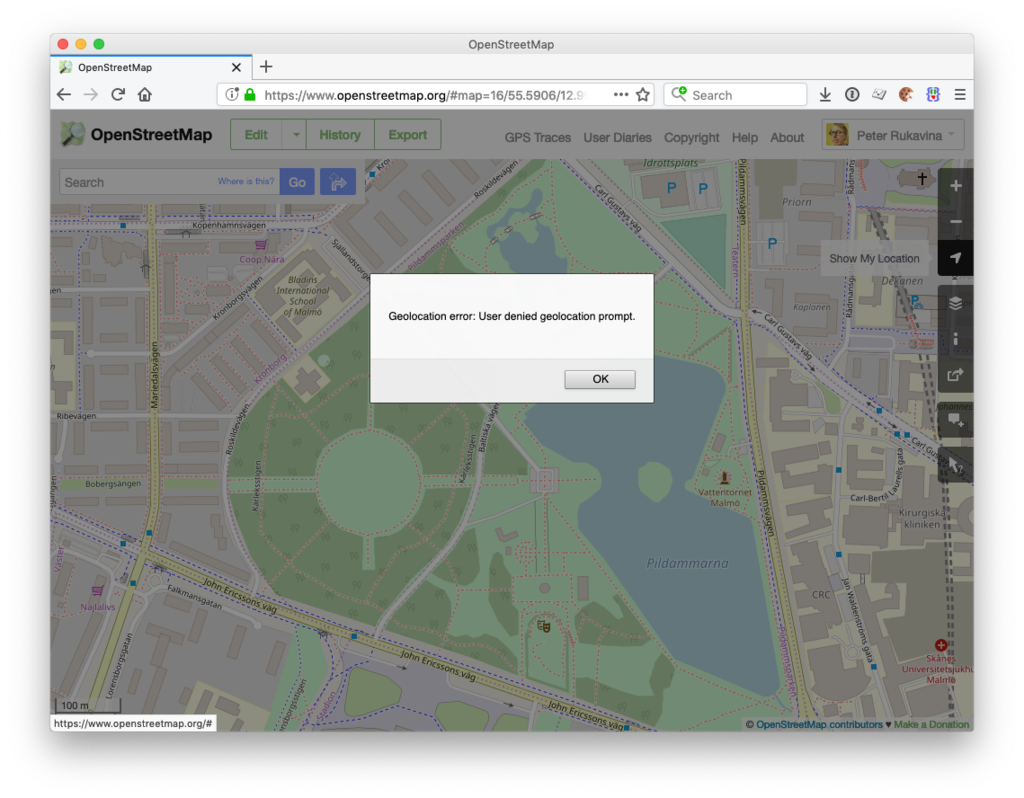
You’re using Firefox and OpenStreetMap on a Mac and you’re clicking on the “Show My Location” icon in the toolbar and you’re seeing the error “Geolocation error: User denied geolocation prompt”:
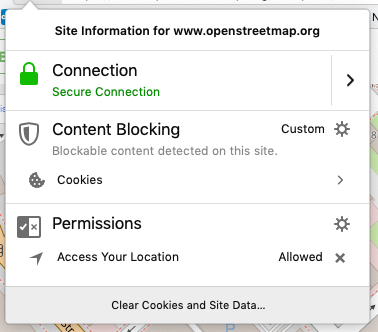
You’re seeing this despite having granted Firefox permission to use your location for openstreetmap.org:
You are confounded. You search for answers, and all you find are references to geolocation and https, but you’re already accessing openstreetmap.org via https, so that’s not the issue.
The issue might lie with your macOS Location Settings:
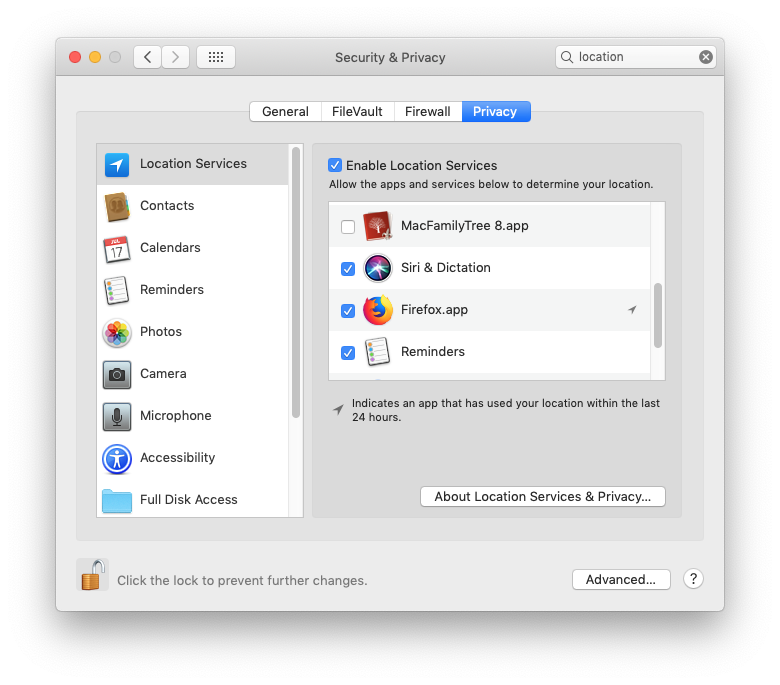
Open System Preferences > Security & Privacy > Location Services and make sure the Firefox.app settings is checked (you might need to click on the padlock in the bottom-left and enter your system password to be able to make this change).
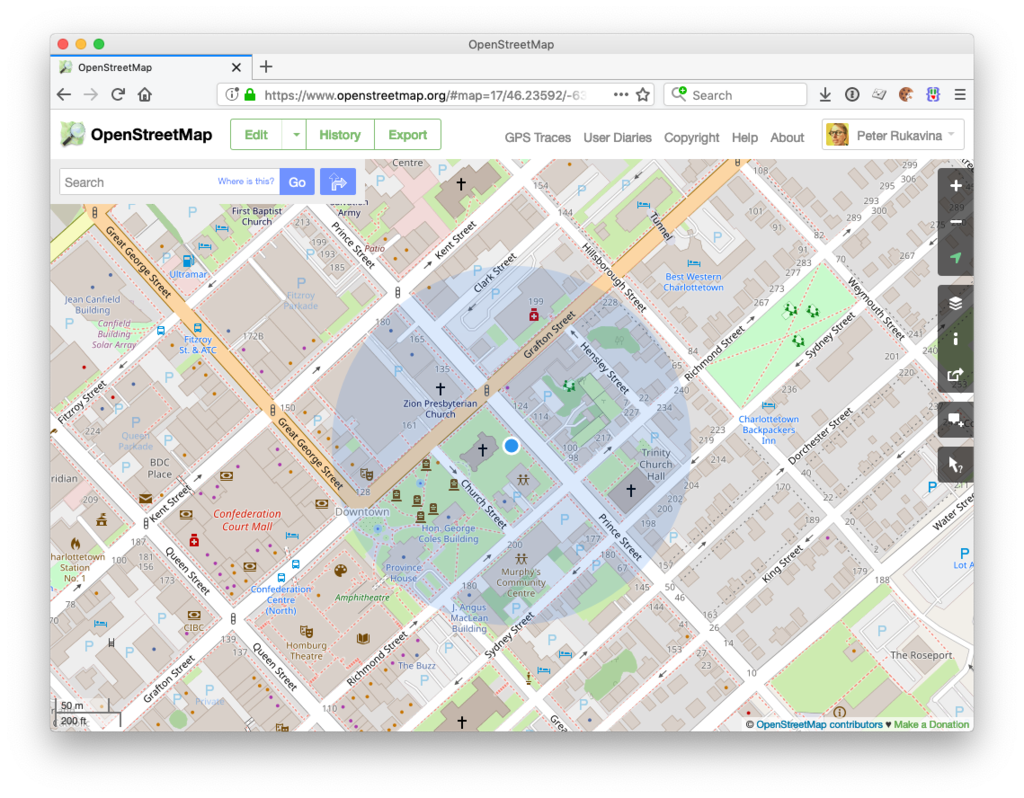
Once you do this, you should find that the “Show My Location” process works in OpenStreetMap as expected:
20 May 02:15
Keeping skill profiles up to date
Steven Forth,
TeamFit,
May 19, 2019

OK, here's my prediction: very few people are going to keep their "skills profile" up to date. How do I know this? Because they keep pretty much nothing else up to date. How's your website doing? Are the friends on your friend list still your friends? So what needs to happen instead? What we will have (evebtually) will be an AI that looks at everything we've done and constructs a skills profile for us. Parts of it will be human-readible, but parts of it (the most useful parts) will be based on byzantine data-processing algorthms only an AI could come up with.
Web: [Direct Link] [This Post]
20 May 02:14
Reading Richard Hughes
by Liz
I started reading Richard Hughes with High Wind in Jamaica (or, The Innocent Voyage) which was so strange and charming and unsettling that I had to set out to read this guy’s other books as well. In High Wind the adults in the book (and the reader) realize how amoral the children are – they’re terrifying, not innocent. You get a small taste of the protagonist, a 10 year old girl, starting to become conscious in an adult way. Glimpses of what we might think of as the reality of her situation appear to her and then melt away like mist.
My memories of these moments were like looking at mortality directly (since not only would I die but, the continuity of existence meant that the “me” of that moment would disappear and be forgotten) so I would vow to myself to remember particular things and write them someday so as not to lose the self of that time (paved over by some blithe future me.)
Next I tackled his incomplete trilogy, The Human Predicament. Also good and disturbing, with half the books taking place in England and the U.S. (with a detour to Morocco) and half in Germany during Hitler’s rise to power. It is pretty wild to read a novel that has Hitler as a character making his cameos. Hughes can get very digressive in a Melville sort of way, prosing on about philosophy and psychology, which I enjoy but I’m sure not everyone will. Augustine, our young protagonist, wanders around rootlessly having just missed the Great War by a hair as an 18 year old cadet when Armistice was declared. Cut off from the generation of men above him who experienced the war directly, and having grown up expecting to die in the trenches, he had no plan for how to live his life.
I was thinking of Anthony Powell and his protagonist Jenkins (comparing him a bit unfavorably with Hughes’s narrative point of view which hovers & dips into many people’s minds, crossing class & gender & other boundaries)… Then wondered if Hughes is a character in Dance to the Music of Time and if so… who…. I have to poke around and think about it. He was a bit older than Powell so they weren’t at Oxford at the same time. Bonus tangent: find and read The Loom of Youth by Alec Waugh to find the controversial queer bits.
I’m now in mid-read of In Hazard, a novel based on a steamship caught in the 1932 Cuba hurricane, which is even more obviously Melville-ish than the others. I wondered about the casual racism of the British seamen towards the Chinese crew members and then happily the point of view switched to some of the Chinese crew, without making me cringe. We first see the thoughts of a young man, P’ing Tiao, praying to T’ien Fei. Then a young Christian guy Henry Tung, trying to keep up the spirits of his mates with tall tales, and then the view switches to Ao Ling, P’ing Tiao’s friend, who isn’t religious at all and who lived through famine and became a follower of Mao. (I enjoyed Hughes’ asides comparing Chiang Kai-shek to Hitler – calling him the first fascist revolutionary whose first act was to start shooting leftists). Oh, god, then the cringe when the Brits come down the hatch and start talking the worst condescending pidgin (they are terrified of mutiny).
Interesting books – I’m so sad not to have the rest of book 3 of The Human Condition (there are 12 chapters of it.)
20 May 02:14
Me and Not Me
by Eugene Wallingford
At one point in the novel "Outline", by Rachel Cusk, a middle-aged man relates a conversation that he had with his elderly mother, in which she says:
I could weep just to think that I'll never see you again as you were at the age of six -- I would give anything, she said, to meet that six-year-old one more time.
This made me think of two photographs I keep on the wall at my office, of my grown daughters when they were young. In one, my older daughter is four; in the other, my younger daughter is two. Every once in a while, my wife asks why I don't replace them with something newer. My answer is always the same: They are my two favorite pictures in the world. When my daughters were young, they seemed to be infinite bundles of wonder: always curious, discovering things and ideas everywhere they went, making connections. They were restless in a good way, joyful, and happy. We can be all of these things as we grow into adulthood, but I experienced them so much differently as a father, watching my girls live them.
I love the people my daughters are now, and are becoming, and cherish my relationship with them. Yet, like the old woman in Cusk's story, there is a small part of me that would love to meet those little girls again. When I see one of my daughters these days, she is both that little girl, grown up, and not that little girl, a new person shaped by her world and by her own choices. The photographs on my wall keep alive memories not just of a time but also of specific people.
As I thought about Cusk's story, it occurred to me that the idea of "her and not her" does not apply only to my daughters, or to my wife, old pictures of whom I enjoy with similar intensity. I am me and not me.
I'm both the little guy who loved to read encyclopedias and shoot baskets every day, and not him. I'm not the same guy who walked into high school in a new city excited about the possibilities it offered and nervous about how I would fit in, yet I grew out of him. I am at once the person who started college as an architecture major -- who from the time he was eight years old had wanted to be an architect -- and not him. I'm not the same person who defended a Ph.D. dissertation half a life ago, but who I am owes a lot to him. I am both the man my wife married and not, being now the man that man has become.
And, yes, the father of those little girls pictured on my wall: me and not me. This is true in how they saw me then and how they see me now.
I'm not sure how thinking about this distinction will affect future me. I hope that it will help me to appreciate everyone in my life, especially my daughters and my wife, a bit more for who they are and who they have been. Maybe it will even help me be more generous to 2019 me.
20 May 02:14
Somewhat related
by russell davies
Two things to love about this.
a) The splendid musicianship
b) How bored the rest of the band is about it
That's the magic of magic. It's really impressive when it's completely reproducible and that means, for insiders, it's just routine. Maybe that's why there's something even more irresistible when someone gets the band to laugh.
Remembering Lionel Hampton, born on this day in 1908 in Louisville, Kentucky. Here he is performing a tom tom solo in Belgium in 1958. pic.twitter.com/S5tIKFI6Wp
— Dust-to-Digital (@dusttodigital) April 20, 2019
UNRELATED
Obvs one should be decrying the editorial philosophy on display here. OTOH 100% fire emoji for clarity. There is no doubt at all about what you should and shouldn't be writing.
In case anyone had any lingering doubts about the Evening Standard pic.twitter.com/vDsptLEWTf
— Dan (@DanGB88) May 3, 2019
SLIGHTLY RELATED
I have two links somewhere that I've been saving to post - both, IIRC, about age and memory. But I can't remember where I've saved them.
a) Irony
b) Poor content calendaring
20 May 02:13
Reuters: Google suspends some business with Huawei after Trump blacklist
by Volker Weber
NEW YORK (Reuters) - Alphabet Incs Google has suspended business with Huawei that requires the transfer of hardware and software products except those covered by open source licenses, a source close to the matter told Reuters on Sunday, in a blow to the Chinese technology company that the U.S. government has sought to blacklist around the world.
We will see how this plays out. Without access to Google Play store, Huawei's handset business outside of China would essentially be dead.
The bigger impact is more general. Who can trust a bully?
20 May 02:13
DEVONthink 3 Public Beta Now Open - Alexander Deliyannis
Interesting discussion; I am positively impressed by the contributors' sensitivities and principle-centric approach. These are no easy matters, as we are finding out in Europe and elsewhere, but I for one much prefer to be part of a debating society, than of one which believes that all questions have simple answers--usually involving getting rid of those who don't agree...
20 May 02:13
Datasette 0.28 - and why master should always be releasable
It's been quite a while since the last substantial release of Datasette. Datasette 0.27 came out all the way back in January.
This isn't because development has slowed down. In fact, the project has had 131 commits since then, covering a bewildering array of new functionality and with some significant contributions from developers who aren't me - Russ Garrett and Romain Primet deserve special recognition here.
The problem has been one of discipline. I'm a big fan of the idea of keeping master shippable at all times in my professional work, but I hadn't quite adopted this policy for my open-source side projects. A couple of months ago I found myself in a situation where I had two major refactorings (of faceting and of Datasette's treatment of immutable files) going on in master at the same time, and untangling them turned out to take way longer than I had expected.
So I've updated Datasette's contribution guidelines to specify that master should always be releasable, almost entirely as a reminder to myself.
All of that said, I'm finally back out of the weeds and I'm excited to announce today's release of Datasette 0.28. It features a salmagundi of new features! I'm replicating the release notes below.
Supporting databases that change
From the beginning of the project, Datasette has been designed with read-only databases in mind. If a database is guaranteed not to change it opens up all kinds of interesting opportunities - from taking advantage of SQLite immutable mode and HTTP caching to bundling static copies of the database directly in a Docker container. The interesting ideas in Datasette explores this idea in detail.
As my goals for the project have developed, I realized that read-only databases are no longer the right default. SQLite actually supports concurrent access very well provided only one thread attempts to write to a database at a time, and I keep encountering sensible use-cases for running Datasette on top of a database that is processing inserts and updates.
So, as-of version 0.28 Datasette no longer assumes that a database file will not change. It is now safe to point Datasette at a SQLite database which is being updated by another process.
Making this change was a lot of work - see tracking tickets #418, #419 and #420. It required new thinking around how Datasette should calculate table counts (an expensive operation against a large, changing database) and also meant reconsidering the “content hash” URLs Datasette has used in the past to optimize the performance of HTTP caches.
Datasette can still run against immutable files and gains numerous performance benefits from doing so, but this is no longer the default behaviour. Take a look at the new Performance and caching documentation section for details on how to make the most of Datasette against data that you know will be staying read-only and immutable.
Faceting improvements, and faceting plugins
Datasette Facets provide an intuitive way to quickly summarize and interact with data. Previously the only supported faceting technique was column faceting, but 0.28 introduces two powerful new capibilities: facet-by-JSON-array and the ability to define further facet types using plugins.
Facet by array (#359) is only available if your SQLite installation provides the json1 extension. Datasette will automatically detect columns that contain JSON arrays of values and offer a faceting interface against those columns - useful for modelling things like tags without needing to break them out into a new table. See Facet by JSON array for more.
The new register_facet_classes() plugin hook (#445) can be used to register additional custom facet classes. Each facet class should provide two methods: suggest() which suggests facet selections that might be appropriate for a provided SQL query, and facet_results() which executes a facet operation and returns results. Datasette’s own faceting implementations have been refactored to use the same API as these plugins.
datasette publish cloudrun
Google Cloud Run is a brand new serverless hosting platform from Google, which allows you to build a Docker container which will run only when HTTP traffic is recieved and will shut down (and hence cost you nothing) the rest of the time. It’s similar to Zeit’s Now v1 Docker hosting platform which sadly is no longer accepting signups from new users.
The new datasette publish cloudrun command was contributed by Romain Primet (#434) and publishes selected databases to a new Datasette instance running on Google Cloud Run.
See Publishing to Google Cloud Run for full documentation.
register_output_renderer plugins
Russ Garrett implemented a new Datasette plugin hook called register_output_renderer (#441) which allows plugins to create additional output renderers in addition to Datasette’s default .json and .csv.
Russ’s in-development datasette-geo plugin includes an example of this hook being used to output .geojson automatically converted from SpatiaLite.
Medium changes
- Datasette now conforms to the Black coding style (#449) - and has a unit test to enforce this in the future
- New Special table arguments:
-
?columnname__in=value1,value2,value3filter for executing SQL IN queries against a table, see Table arguments (#433) -
?columnname__date=yyyy-mm-ddfilter which returns rows where the spoecified datetime column falls on the specified date (583b22a) -
?tags__arraycontains=tagfilter which acts against a JSON array contained in a column (78e45ea) -
?_where=sql-fragmentfilter for the table view (#429) -
?_fts_table=mytableand?_fts_pk=mycolumnquerystring options can be used to specify which FTS table to use for a search query - see Configuring full-text search for a table or view (#428)
-
- You can now pass the same table filter multiple times - for example,
?content__not=world&content__not=hellowill return all rows where the content column is neitherhelloorworld(#288) - You can now specify
aboutandabout_urlmetadata (in addition tosourceandlicense) linking to further information about a project - see Source, license and about - New
?_trace=1parameter now adds debug information showing every SQL query that was executed while constructing the page (#435) -
datasette inspectnow just calculates table counts, and does not introspect other database metadata (#462) - Removed
/-/inspectpage entirely - this will be replaced by something similar in the future, see #465 - Datasette can now run against an in-memory SQLite database. You can do this by starting it without passing any files or by using the new
--memoryoption todatasette serve. This can be useful for experimenting with SQLite queries that do not access any data, such asSELECT 1+1orSELECT sqlite_version().
Small changes
- We now show the size of the database file next to the download link (#172)
- New
/-/databasesintrospection page shows currently connected databases (#470) - Binary data is no longer displayed on the table and row pages (#442 - thanks, Russ Garrett)
- New show/hide SQL links on custom query pages (#415)
- The extra_body_script plugin hook now accepts an optional
view_nameargument (#443 - thanks, Russ Garrett) - Bumped Jinja2 dependency to 2.10.1 (#426)
- All table filters are now documented, and documentation is enforced via unit tests (2c19a27)
- New project guideline: master should stay shippable at all times! (31f36e1)
- Fixed a bug where
sqlite_timelimit()occasionally failed to clean up after itself (bac4e01) - We no longer load additional plugins when executing pytest (#438)
- Homepage now links to database views if there are less than five tables in a database (#373)
- The
--corsoption is now respected by error pages (#453) -
datasette publish herokunow uses the--include-vcs-ignoreoption, which means it works under Travis CI (#407) -
datasette publish herokunow publishes using Python 3.6.8 (666c374) - Renamed
datasette publish nowtodatasette publish nowv1(#472) -
datasette publish nowv1now accepts multiple--aliasparameters (09ef305) - Removed the
datasette skeletoncommand (#476) - The documentation on how to build the documentation now recommends
sphinx-autobuild
20 May 02:13
I’m currently testing FeedBin syncing in NetNew...
I’m currently testing FeedBin syncing in NetNewsWire, and just filed issue #666. Hell yes!
20 May 02:11


Are pop-up and flip-up cameras the future of the smartphone selfie camera?
by Dean Daley
Mechanized cameras — are they the future or should we leave them in the past?
To put this new trend in perspective, mechanized smartphone cameras are not entirely new.
Here’s a bit of a history lesson: back in 2015 Huawei revealed the Shot X smartphone with a 13-megapixel rear-facing camera that flipped up so it could double as the selfie shooter.
Now, between this year and last year, many Asia-based smartphone manufacturers launched handsets with mechanized parts. There’s the Oppo Find X, Oppo Reno 10X Zoom, Oppo F11 Pro, Vivo Nex S, Vivo V15 Pro, Lenovo Z5 Pro and Samsung Galaxy A80, all phones that feature cameras that pop up in one way or another.
Even just this week, Realme announced the Realme X, OnePlus launched the 7 Pro and Asus revealed its ZenFone 6. The latter two devices are either now available in Canada or coming here soon.
Are mechanized pop-up or flip-up cameras the answer to giving users more screen real-estate? Or should smartphone manufacturers stick to notches and hole-punch displays, or try to figure out something else?
Let us know your thoughts in the comments below.
The post Are pop-up and flip-up cameras the future of the smartphone selfie camera? appeared first on MobileSyrup.
20 May 02:11

Google suspends Huawei’s Android license, restricted to using AOSP
by Ian Hardy
In another dramatic twist, Google has suspended business with Huawei that involves “the transfer of hardware and software products.”
Reuters reports that Google made the decision following the United States President Trump’s executive order that banned any foreign company from supplying U.S. companies if they pose a national security threat.
“Huawei will only be able to use the public version of Android and will not be able to get access to proprietary apps and services from Google,” stated a person familiar with the matter.
Huawei will only be able to gain access to the Android Open Source Project (AOSP), which also means it will have to wait for Google to push through security updates in AOSP before sending them to its customers.
Apps that usually appear on handsets through the Play Store or pre-installed — such as Gmail, YouTube and the Chrome — will disappear from future Huawei handsets. Existing Huawei devices will still be able to download app updates via Google.
The company has become one of the top smartphone manufacturers in the world and this move will certainly have significant impact on the company. Huawei has publicly stated it has “long been ready” for any ban if one were to come, noting it has created its own operating system.
Update 20/05/2019 5:46pm ET: The U.S. Commerce Department has granted Huawei a temporary license allowing it to maintain its current networks and allowing it to provide software updates to existing Android devices, according to Reuters. The temporary license lasts until August 19th.
Update 05/20/2019 9:23am ET: In a statement to MobileSyrup, Huawei Canada said the following regarding Huawei devices in Canada still receiving updates:
“Huawei will continue to provide security updates and after-sales services to all existing Huawei and Honor smartphone and tablet products, covering those that have been sold and that are still in stock globally.”
The post Google suspends Huawei’s Android license, restricted to using AOSP appeared first on MobileSyrup.