Shared posts

06 Jun 15:22

‘Jaw dropped’

by Andrea

BBC News: Long-lost Lewis Chessman found in Edinburgh family’s drawer. “A medieval chess piece that was missing for almost 200 years had been unknowingly kept in a drawer by an Edinburgh family.”

“They had no idea that the object was one of the long-lost Lewis Chessmen – which could now fetch £1m at auction.

The chessmen were found on the Isle of Lewis in 1831 but the whereabouts of five pieces have remained a mystery.

The Edinburgh family’s grandfather, an antiques dealer, had bought the chess piece for £5 in 1964.

He had no idea of the significance of the 8.8cm piece (3.5in), made from walrus ivory, which he passed down to his family.

They have looked after it for 55 years without realising its importance, before taking it to Sotheby’s auction house in London.”

Previously.

06 Jun 15:22

New Dental Office

by peter@rukavina.net (Peter Rukavina)

After years of appointments in the cramped/cozy confines of the old Cornwall Post Office, today was my first at the new home of Cornwall Dental Clinic.

The new clinic is like a Brooklyn tech startup as if designed by Alex Colville. It’s rather pleasant, but also deeply unusual given what I’m used to.

Stephanie cleaned my teeth with undiminished efficiency and care.

06 Jun 15:22

watchOS 6: The MacStories Overview

by Alex Guyot

Today at Apple's annual WWDC keynote address in San Jose, California, Tim Cook took the stage to announce the latest update to Apple's smartwatch operating system. watchOS 6 is coming this fall, and boasts a number of big changes. Most significantly, watchOS 6 makes progress on the independence of the Apple Watch from the iPhone, adds a number of new APIs and health features, and includes an all-new native UI framework for developers.

Supported By

Things


Supported by Things – where ideas take shape – one step at a time.

New Watch Faces

As usual, the latest version of watchOS comes with new watch faces. Overall, the watchOS 6 faces seem like minor new additions. They include a Gradient face where the hands move the gradient color throughout the day, a Numerals face where the background is full-screen numbers, a California Dial face, and a redesigned Solar face which shows the position of the sun throughout the day.

This year Apple did not mention any improvements to the Siri watch face, an unusual omission given that this machine learning face has been pushed as the flagship face on the Apple Watch for the last two years. That doesn't seem to be in the story this year. Instead we're back to third-party apps being prioritized over watch face changes, and given the breadth of changes for Watch apps, that feels like a decent tradeoff this time around.

New First-Party Apps

watchOS 6 will include a brand new native Books app for listening to your Apple Books audiobook collection directly from your Watch. The new Voice Memos app will let you record audio on your Watch, and will sync recordings back to Voice Memos on your iOS devices. Finally, Calculator is making the jump to watchOS as well. Alongside standard calculations, it will also include a feature to specifically calculate tips and split bills among multiple people.

These apps aren't groundbreaking, but each does its part to further divorce the Apple Watch from the iPhone. We'll get to the new first-party health apps below, but the biggest first-party app addition continues to further this year's story of Apple Watch independence: the App Store.

App Store on the Apple Watch

A native App Store on watchOS was probably not one of the most sought-after features for the Apple Watch, but the lack of it is one of the main reasons people need to go back to the iOS Watch app. Having the App Store directly on the Watch is a big step forward for the platform. The watchOS App Store will include full search functionality through dictation, Scribble, and Siri search requests. Apps can be purchased and installed directly on the Apple Watch, and for the first time you will be able to install an Apple Watch app without a companion iPhone app being installed as well. Developers will need to update their Watch apps in order to enable independent installation on the Watch.

Health and Fitness Improvements

An all-new Activity Trends feature kicks off this year's Apple Watch health and fitness changes. Activity Trends is a rolling comparison of your last three months of data against your last 365 days. It tracks nine key metrics, and will analyze the data to inform you whether you are improving or regressing and by how much. Metrics include exercise minutes (the Activity exercise ring), total stand minutes, daily calories burned (the Activity move ring), number of hours with at least one minute stood in a day (the Activity stand ring), distance walked, and daily VO2 max cardio levels. If you are trending downward, the Activity app will present you with coaching notifications to try to help you hit your goals.

Another new first-party watchOS addition is the Noise app. Noise will actively monitor the decibel levels around you throughout the day, and will notify you when they reach levels that may damage your hearing. The app was built with privacy in mind, and never records or transmits any audio whatsoever. There are complications for the Noise app so you can watch the noise levels around you from your watch face as well.

The last health change is the addition of a new menstrual cycle tracking app. Aptly named Cycle Tracking, the app will allow you to track your cycles over time. As the app builds up data, it will begin analyzing it and notifying users when it estimates a cycle is going to begin. Also based on this data, the app can optionally start sending notifications when it estimates that users are in a fertile window. All of these features are available directly in the Apple Watch Cycle Tracking app, but will be available in the iOS Health app too.

New Developer APIs

A new streaming audio API opens up the Apple Watch streaming capabilities to all audio apps. The previous streaming API only allowed music apps to stream content, so this year's change means that podcast, audiobook, and video apps can join in the fun as well.

watchOS 6 brings an extended runtime option for apps that have a legitimate need to run in the background for longer periods of time. Apple points out mindfulness apps, alarms, and physical therapy apps as examples, but I'm sure we'll see more as developers work with this loosened constraint. The API will allow access to sensors on the Watch, so heart rate, motion, and location data can be monitored over time. The extended runtime change may not sound like much, but if executed well it could be a huge step forward in the maturity of the watchOS operating system as a whole.

New APIs for CoreML and the Apple Watch Series 4 Neural Engine enable even more classes of third-party apps to make their way to the Watch. Apps can incorporate machine learning models for training and analyzing data directly on the device, another big step forward on the road to independence from the iPhone.

Finally, access to more iOS frameworks and technologies directly on the Apple Watch is enabling Watch apps to be shipped entirely on their own with no iPhone counterpart. As mentioned above, this will require changes from developers to take advantage of these technologies on the Watch instead of routing through the phone like they may be doing today. Finally, the new Sign In with Apple feature will let watchOS users sign into apps directly on their Apple Watch without needing to enter passwords.

SwiftUI

SwiftUI is a brand new way to develop interfaces for all of Apple's platforms. We'll be going into more detail on the implications of this change in our other WWDC coverage, but for now suffice it to say that this is a huge upgrade for developers. It will, in theory, massively simplify and streamline the process of building UIs for apps. On watchOS in particular this is great news, as the existing process for designing apps is notoriously slow and error-prone. We'll find out from developers this summer how well Apple pulled off this ambitious new take on interface building.

Miscellany

watchOS 6 will feature a new "Taptic Chimes" feature, which will tap you on the wrist at the top of each hour all day long. If you don't have your Apple Watch muted, it will also output a chime alongside the taps if you enable this. To each their own, I guess.

Apple didn't touch on watchOS Siri in the keynote, but on the web they do note a couple additions to Siri's Apple Watch feature set. First, Siri's Shazam integration has now arrived natively on the Watch. Ask Siri, "What song is this?" and your Apple Watch will listen to your surrounding audio environment and try to determine which song is playing in the background. Next, Siri can now search the web on your Apple Watch. Results will be returned in a scrollable list on your Watch, rather than refusing to do anything like in watchOS 5.

Animoji and Memoji stickers can now be sent to your friends from the Messages app on Apple Watch. These are a new feature in iOS this year, and it's good to see the Watch maintaining parity rather than dropping a year behind.

Alongside today's Apple Watch software announcements, a new set of summer color Watch bands have been released, as well as a new pride-themed band. You can check out all the new bands here.

Conclusion

In a pretty insanely packed event, watchOS feels like it slid under the radar. When you break it down though, this year is gearing up to be a hugely impactful release for the Apple Watch operating system. Third-party Watch apps have mostly stagnated in recent years as Apple has remained focused on system-level improvements. The big API changes have ultimately been hamstrung by weird constraints, such as only opening the streaming APIs to music apps. This year feels like all of that has changed.

Streaming is open to all apps now, and extended runtimes will be a game changer for many different use cases. CoreML and Neural Engine access widen the pool even further. When you round things out with greater independence from the iPhone and SwiftUI, watchOS feels like it finally has a compelling story for third-party developers.

Apple also hasn't stopped driving health and fitness features forward. These seem to be the main selling points for Apple Watch, and this year's additions of Activity Trends, Noise, and Cycle Tracking will make the Watch even more useful to owners. Analysis of activity data over time has definitely felt like a missing piece, so it's good to see Apple patching that hole. Cycle Tracking is a huge affordance for the 50% of the population who are far too often neglected by technology companies.

watchOS 6 will depend a lot on developers stepping back into the ring and being pleased with what they find. Let's hope Apple pulled off these improvements as well as it sounds like they did.


You can also follow all of our WWDC coverage through our WWDC 2019 hub, or subscribe to the dedicated WWDC 2019 RSS feed


Support MacStories Directly

Club MacStories offers exclusive access to extra MacStories content, delivered every week; it's also a way to support us directly.

Club MacStories will help you discover the best apps for your devices and get the most out of your iPhone, iPad, and Mac. Plus, it's made in Italy.

Join Now
06 Jun 15:18

Twitter Favorites: [InternetHippo] Everyone wants to be snarky and sarcastic all the time now but most people aren’t good at it so it comes off mean… https://t.co/U6QLZkR1ey

Objectively Correct @InternetHippo
Everyone wants to be snarky and sarcastic all the time now but most people aren’t good at it so it comes off mean… twitter.com/i/web/status/1…
06 Jun 15:18

Twitter Favorites: [migoodridge] Fun surprise to see a fabrication studio at the North York Central Library @torontolibrary #makerculture https://t.co/1Ud7gZiHwl

Michelle Goodridge @migoodridge
Fun surprise to see a fabrication studio at the North York Central Library @torontolibrary #makerculture pic.twitter.com/1Ud7gZiHwl
06 Jun 15:17

iOS 13: The MacStories Overview

by Ryan Christoffel

iOS 13 is the latest major version of Apple’s mobile software platform, unveiled earlier today during the company's WWDC keynote. Contrasting with last year’s iOS 12, which focused largely on performance improvements and brought fewer new features than usual, iOS 13 promises to continue the theme of strong performance while also adding a wide array of enhancements across the board. From a systemwide dark mode, updates to Shortcuts, a long-awaited redesign for Reminders, enhancements to an unprecedented number of system apps, and much more, there is a lot to take in here.

What’s not included in iOS 13 is iPad-specific updates, but that’s because Apple has split off the iPad’s version of iOS into its own dedicated software platform: iPadOS, which you can read our complete overview of here.

As for iOS 13, despite not including the variety of iPad improvements Apple has built, it remains a substantial release meant to take the mobile computing experience to a whole new level. Let’s dive in.

Supported By

Things


Supported by Things – where ideas take shape – one step at a time.

Dark Mode

As iOS has evolved over the years, the list of absent system features that are in high demand has significantly dwindled. One of the few standout features still on that list, however, which Apple plans to finally ship in iOS 13, is dark mode.

Proponents of a systemwide dark mode on iOS have undoubtedly grown accustomed to disappointment when WWDC comes and goes each year without any trace of the feature’s existence. A proper dark mode finally came to the Mac last year in macOS Mojave, but considering how few features these days make it to the Mac before iOS, that was no sure sign of an impending iOS version. Apple also introduced a feature called Smart Invert Colors in iOS 11 that I’ve used for the last two years as a dark mode replacement, and that accessibility feature seemed all the company was content to do in this space.

Except it wasn’t. Finally, iOS is gaining a true systemwide dark mode – and it looks great.

Dark mode can be activated most easily from the brightness tile in Control Center: a simple push of a button toggles the mode on and off. You can also enable dark mode from iOS’ Settings app, where there's an option to schedule it to activate and deactivate on a certain time schedule, or at sunset and sunrise.

Visually, Apple has employed a pleasant mix of black and gray in its own apps to ensure that dark mode retains the same great contrast and hue balance present in light mode. Painting everything black would have been easy, but it wouldn’t have looked or worked great. Like it did on the Mac, Apple has implemented dark mode on iOS in a way that’s both tasteful and functional. While third-party dark modes can be all over the place in style and usability, Apple has set a solid example for developers with its own apps.

Speaking of third-party apps, many of which have offered dark modes long before Apple ever did, iOS 13 will enable developers to easily integrate their own app’s dark mode with the new systemwide toggle, that way the system setting that determines whether dark mode is enabled or disabled will be respected in every other app you use. I expect the vast majority of popular apps with existing dark modes to support iOS 13’s dark mode toggle on day one.

Finally, dark mode’s debut also brings new system wallpapers in iOS 13 that are designed to change automatically based on whether dark mode is activated or not. It’s a nice touch and a good reason to try a new wallpaper.

Shortcuts & Siri Enhancements

Last year, following its acquisition of Workflow in 2017, Apple debuted Shortcuts as a new frontier of automation on iOS. Siri shortcuts were baked in at a system level, and the standalone Shortcuts app enabled users to build complex automations even more powerful than those enabled by Workflow. Although iOS 13’s update to Shortcuts isn’t as significant as some might have hoped, it does include several noteworthy improvements that extend automation in meaningful ways.
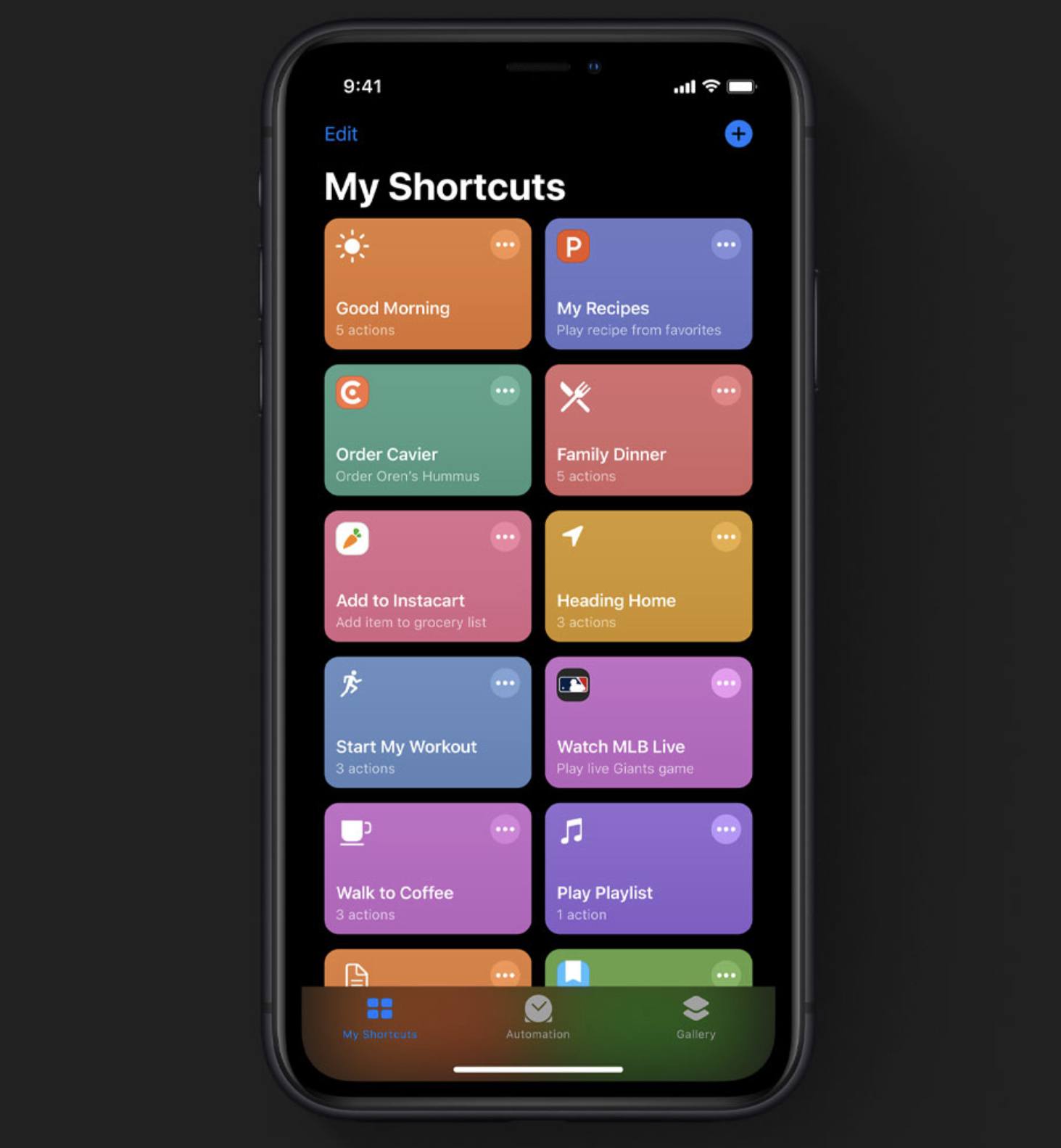
Perhaps the most significant update to the Shortcuts app is the addition of a new Automation tab. Inside this tab you’ll be able to set up rules that will run shortcuts based on the variety of triggers you configure. Currently in the beta, those triggers can be configured to either run a shortcut automatically, or first send an alert asking you to press a button to run the shortcut. There will be over 100 different triggers available, including those based on time of day, when you start a workout, when you connect to or disconnect from a particular Wi-Fi network, when you connect to CarPlay, and much more. The ability to run shortcuts with less direct user input was a top feature request following Shortcuts’ debut last year, so it’s exciting to see that addition arrive in iOS 13.

Another improvement to the Shortcuts app is something called “conversational shortcuts.” Apple gives the example of telling Siri “Order takeout from Caviar” then being presented with a list of options of restaurants and dishes to choose from. This means that app-specific shortcuts will be able to receive user input upon being triggered, rather than being limited to a single pre-set action. In iOS 12, for example, if you were to set up shortcuts for activating a timer using Timery, you’d need separate shortcuts for every timer; in theory, iOS 13 would enable setting up a single shortcut that, when triggered, asks you which timer you’d like to run.

One other change is that the Shortcuts app comes pre-installed on iOS 13, whereas before it was a separate download from the App Store. And shortcuts donated by apps, which can be used on their own or configured as part of a multi-step shortcut, now live directly in the Shortcuts app. Previously, they were hidden away in the Settings app’s Siri & Search screen.

Siri gains support in iOS 13 for integration with third-party audio apps, such as podcast players and music and audiobook clients. While these apps were able to integrate with Siri shortcuts last year, now there’s a proper SiriKit domain for audio, granting much more powerful tools for third-party apps.

Siri’s voice is being upgraded in iOS 13 thanks to something called Neural TTS (Text to Speech). While the voice won’t be drastically different, Neural TTS enables Siri to speak more naturally, especially when it recites longer sentences.

First-Party Apps

The bulk of improvement to iOS this year comes in the form of enhancements to built-in apps. Some apps are more radically changed than others, but ultimately there are very few system apps that iOS 13 doesn’t improve in some way or another.

Reminders

Reminders is the app that I personally have expected a redesign of for at least three straight years now. The app is a solid tool for lists and to-dos, featuring powerful integrations with system features like Siri and shortcuts, yet it has long felt abandoned. Reminders’ design and basic functionality haven’t receive substantive updates since iOS 7 in 2013. But finally, that big redesign has come.

The single biggest change to Reminders is its new visual design. Gone are the textured backgrounds and the awkward card system – Reminders now looks and feels entirely modern, with a white and gray interface aided by splashes of color in its icons.

Regarding functionality, the new Reminders has a lot to offer too. For starters, to-dos can be created using natural language input. This works similarly to an app like Todoist, where the words you type will be parsed by Reminders to intelligently add parameters like due dates to your task. Additionally, Reminders includes a much-improved interface for modifying task details, with a quick toolbar for adding locations, dates, and more. And in another first, Reminders enables sub-tasks in all your lists, a powerful tool common in other task managers.

Tasks can now be flagged, a tool that joins the existing three-tiered priority system. Also, there are now four default smart lists built-in to the app: Today, Scheduled, All, and Flagged. Each of these is self-explanatory, but they serve as helpful additional views of particular subsets of tasks. In previous versions of Reminders I’ve always lived exclusively in the Scheduled list, but the new Today and Flagged screens will I’m sure be regular destinations for me.

Another new feature of Reminders is the ability to attach files to a task. You can attach multiple photos and also use iOS’ scanning technology to scan a document that’s attached to a to-do. This means you can keep important reference documents close at hand when working through your to-dos.

Finally, lists in Reminders can be customized with 12 color options and 60 different symbols, adding a lot more personality to the app than was available before.

Maps

Apple highlighted in today’s keynote how its own home-built maps data will be rolled out to the entire US by the end of 2019. And to go with that more extensive data, the Maps app is receiving a variety of upgrades.

Look Around is Apple’s take on Google Maps’ Street View feature. For locations where the new maps are available, Look Around provides a 360-degree view of your location, and based on early previews it looks great. One highlight of Look Around over Google’s Street View is easier navigation within a particular location: when you tap and hold on the screen, you can quickly, smoothly advance down the road in a way that feels similar to riding in a car. The experience looks a lot smoother than the Google interaction method for advancing forward.

Inside the Maps app’s panel interface, there are changes to Favorites and a new Collections feature. Favorites are now easily accessible from a prominent horizontally-scrolling section of the main panel, and collections can be built with a variety of locations that you want to group together for any reason; these collections can even be shared with others.

Siri guidance when using Maps is more natural in iOS 13, offering the type of instruction you might receive from a human driver. An example from Apple’s website notes that rather than saying, “In 1,000 feet turn left,” Siri will now say, “Turn left at the next traffic light.”

Other noteworthy improvements to Maps include the addition of flight status information: you’ll get up-to-the-moment data about gate terminals, departure times, and more. Also, a new feature for easily sharing your ETA with others, and real-time transit information.

Messages & Memoji

Messages now enables automatically sharing your name and profile photo with anyone you message. You can choose to share these details with everyone, or just people you have a contact for, or no one at all. Another big improvement to Messages is that it has better search than before; Messages’ current search capabilities are awful, so I’m hopeful Apple made significant progress in fixing that.

Memoji are being upgraded to be a lot more customizable, so you can create a Memoji that more accurately portrays how you look – and before you ask, yes, you can finally add AirPods to your Memoji. Once you’ve built that Memoji, you’ll be able to use it or an Animoji as a sticker inside Messages. iMessage sticker packs are automatically generated for your set of Memoji and Animoji so that you can send sticker versions without needing to pose every time you do so. These stickers are also available as emojis straight from inside the emoji keyboard.

Memoji and Animoji stickers in iOS 13 are coming to all iOS devices running an A9 processor or later, meaning you don’t have to have Face ID to use these features. While the features won’t include their face-tracking elements on incompatible devices, I’d bet that the sticker and emoji options will likely be better utilized anyways, even on devices that can do more.

And of course, there are a few new Animoji coming to iOS 13: mouse, octopus, and cow join the existing slate of animals and other creatures.

Photos & Camera

The Photos app has been refreshed in iOS 13 with a much-improved Photos tab, new editing tools, and more.

I hardly ever use the Photos tab in iOS 12, but iOS 13’s enhancements seem destined to change that. Each time-based view inside the tab has its own special features: the Days view beautifully lays out photos and videos in an immersive browsing experience where videos and Live Photos autoplay as you scroll by them; the Months view displays Memories-like collections of photos you can easily navigate; the Years layout is dynamic based on the day you view it, so if you open it on your child’s birthday, each card representing a different year will automatically surface photos from the same day in previous years, offering a delightful way to view past photos from your current calendar day.

Editing in Photos now covers a variety of additional parameters, such as vibrancy, white balance, sharpening, noise reduction, and more. And all existing editing tools are being extended to not just photos, but videos as well. This enables easy rotation of a video, among many other things.

Portrait Lighting is being improved in iOS 13 by offering tools to adjust the intensity of lighting. Essentially, this is meant to replicate moving a light closer to or further away from its subject. Also, there’s a brand new Portrait Lighting effect: High-Key Mono, which looks great in press photos. It places a monochromatic subject on a white background for a classy, artistic look.

Find My

It’s normal for Apple to add new pre-installed apps to major versions of iOS, but in the case of Find My the company is simply merging two existing apps into one. All the functionality of Find My Friends and Find My iPhone is now condensed into a single app which can be used to track all of your devices, all devices associated with your Family Sharing account, and finally the locations of any friends or family members who have granted you sharing privileges. This now even works for devices that are offline, by utilizing Bluetooth LE in communication with nearby devices that help you find your lost device.

The former system of having two separate location-tracking apps could be confusing in two primary ways: first, the name Find My iPhone has grown entirely insufficient for an app that now also tracks iPads, Macs, Apple Watches, and AirPods; second, since Find My Friends formerly tied locations to a single device, and we live in a progressively multi-device world, it was awkward using one app to track a person based on their default device, then needing to switch to a different app to find any other devices. With the new Find My app, that complexity and potential confusion is gone. Now no matter which device or person you wish to view the location of, there’s a single place to do that.

Home

One exciting piece of low-hanging fruit addressed by iOS 13 is the ability to add AirPlay 2 speakers, such as the HomePod, to scenes and automations in the Home app. This likely means you can use these speakers within the Shortcuts app as well, especially since you can now add Siri shortcuts to automations created in Home.

Apple has added support for a feature called HomeKit Secure Video, whereby compatible HomeKit security cameras don’t send their data to the cloud for processing, but instead do that on a nearby Apple device and store that data end-to-end encrypted in iCloud. You’ll get up to 10 days of recording history, and that won’t count against your iCloud storage limit, but you are required to have a 200GB storage plan to gain Secure Video support for a single camera, or the 2TB plan for supporting up to five cameras.

HomeKit routers is a new supported device type for those who want the comfort of HomeKit’s security standards paired with their Wi-Fi router. No supported routers have been released yet, but Linksys, Eero, and Spectrum all have compatible products in the works.

Mail

Mail on iOS now offers desktop-class text formatting options, so you can craft messages in any font you’d like and customize the font size, color, and add things like numbered and bulleted lists, indenting and outdenting, and more. This is all housed in a new format bar that lives above the keyboard, which also includes handy buttons for attaching images or other documents, scanning documents, and adding drawings.

There are a few other small features Mail gains in iOS 13, like multicolored flags for better flagging messages, and the ability to block a sender and mute notifications for individual threads.

Notes

Notes continues to be one of my favorite iOS apps, and despite how feature-rich it already is, Apple hasn’t stopped pouring effort into making it better than ever. In iOS 13, there’s a new Gallery view for notes so you can view them as thumbnails rather than a traditional list. This is especially useful if you have a lot of notes with images or sketches.

Shared folders are coming to Notes in iOS 13, so you can collaborate not just on individual notes, but an entire folder of shared notes. You can also now share notes and folders that are view-only, meaning the person you share with can’t make changes but can still see live updates to your notes.

Checklist items in Notes can now be rearranged using drag and drop, something I’ve tried to do many times in the past and am glad to see added in iOS 13.

One of the biggest “finally” features for me personally is that Notes now lets you create and organize subfolders on iOS, which could formerly only be done on a Mac.

Calendar

Not much has changed about the Calendar app in iOS 13, save the addition of native support for file attachments. Similar to what’s found in the new Reminders app, events inside Calendar can now have documents like PDFs or images attached to them, which can be helpful as a personal reference or as a way to share important files with event participants.

Books

Apple Books, which received a big redesign last year in iOS 12, has added reading goals in this year’s update. You can set a Daily Reading Goal and track your progress in the app, building streaks and sharing your achievements with others. There’s also a new Books Read this Year collection to stay on top of your reading habits for the year.

Music

Lyrics in Apple Music can now display line by line in sync with the song you’re listening to, making it easier to follow along as a song plays. You can still scroll the full set of lyrics, and even tap a certain line to have the song jump immediately to that place.

The Now Playing screen in Music has been revised slightly, including a button that loads your Up Next queue. Many users may have never discovered they can scroll down to find that queue.

All the Rest

Performance Improvements. Stability and performance improvements were a big selling point for iOS 12, so it’s unsurprising that Apple has continued grinding away in that area in iOS 13. The next version of iOS will bring up to 30% faster Face ID unlock, app launches that are up to twice as fast, app downloads up to 50% smaller, and app updates up to 60% smaller.

Sign In with Apple ID. Like the popular buttons on the web to authenticate by signing in with Facebook or Google, Apple now offers its own secure method of authentication via your Apple ID. In supported apps and websites, tapping the ‘Sign In with Apple’ button will result in your device authenticating with Face ID or Touch ID, then you’ll be all set, no other logins required. Interestingly, developer documentation indicates this option will be mandatory for apps that use other third-party sign-in options.

Swiping QuickPath Keyboard. Swiping-style keyboards have long been present on Android, and you can even get them on iOS via custom keyboards such as Gboard, but Apple has never before added swiping capabilities to the system iOS keyboard. That’s about to change in iOS 13, where the keyboard now includes a QuickPath feature so you can swipe from one letter to the next without lifting your finger to quickly enter a word. Both tapping and swiping work interchangeably.

ARKit 3. As always, Apple has continued investing in ARKit to make it a more robust framework for developing AR apps. The major highlights of ARKit 3 are support for motion capture and people occlusion. The former enables apps to track a person’s movements and model them through, for example, an AR character, while the latter means that AR objects can now appear behind or in front of humans, creating a sort of mixed reality that Apple says is great for “green-screen-like applications.” Additionally, iOS 13 introduces a new Reality Composer app geared toward developers for prototyping their AR creations on an iPhone or iPad.

New Volume Display. The default way iOS has long displayed volume adjustments is through a square pop-up in the middle of the screen that obfuscates a substantial portion of your current app. In the early days of the iPhone this wasn’t a huge deal, because we didn’t watch a lot of video on our phones back then. But with the massive ascent of video’s popularity, Apple’s design has grown far more painful over time; most major apps that include video have even implemented their own custom volume displays, such as YouTube and Instagram. In iOS 13, those custom displays are finally being rendered unnecessary, because Apple has at last changed the volume display to be far less obtrusive, displaying in a small portion of the upper-left corner of the screen rather than the middle. If you ignore it, it quickly shrinks down, but even while adjusting it the new indicator is smaller than its predecessor.

Wi-Fi and Bluetooth in Control Center. The controls for Wi-Fi and Bluetooth inside Control Center can now be used to not only toggle those connections on or off, but also to choose which networks and accessories you want to connect to.

Voice Control. Although Apple presented it as a Mac feature, and we’ll cover it in more depth in our macOS Catalina overview, the new Voice Control accessibility feature enables full-OS navigation entirely by voice. Voice Control is designed for users with motor limitations, but it has fascinating potential in other areas too as a strong example of voice-first computing.

Low Data Mode. Similar to iOS’ Low Power Mode feature, Low Data Mode puts your iPhone or iPad in a state where apps automatically reduce their network data usage to help keep you under your carrier’s data cap.

Share Sheet Improvements. Apple’s share sheet is being upgraded in iOS 13 to offer suggestions of people to share with, a feature directly inspired by the company’s Clips app. When you open the share sheet you’ll be presented with the standard section for share extensions, but at the top where AirDrop recipients used to be listed, you’ll now see suggestions of contacts to share with, which include an icon indicating the particular app that will be used for sharing. AirDrop has been moved into the share extension row, and the action extension section has been redesigned to be more distinct from that of share extensions.

Screen Time Enhancements. Last year Apple added a host of digital well-being tools to iOS, including a suite of Screen Time features that enabled tracking device use and setting usage limits for yourself or your children. In iOS 13 Screen Time will enable parents to specify on a per-contact basis who their children can message or call at certain times of day. This makes some of the restriction features of iOS 12 more useful in family settings, where a parent wants their child to always be able to reach them, but they don’t want that child up all night talking to friends.

Multilingual Dictation. Dictation throughout iOS will now automatically recognize which language you’re using and intelligently enter the correct spoken words according to the different keyboard languages you have enabled.

Game Controller Support. Like the latest version of tvOS, iOS 13 includes support for two extremely popular game controllers: the Xbox One S and PlayStation 4 controllers.

Lots of iPadOS Features. There are a bunch of improvements I covered in my iPadOS overview that also apply to iOS and the iPhone, such as Files app upgrades, better font management, support for pointing devices, new multitouch gestures, and more. To get the full picture of what iOS 13 will offer, you’ll want to check the details on iPadOS too.


It’s incredible to me how packed of a release iOS 13 is without counting any of the iPad-specific features being added to iPadOS. Dark mode, shortcuts enhancements, and the vast array of improvements to system apps, not to mention a ton of smaller other features, make this one of the strongest iOS releases to date. As the iPad sets out on its own path, I can’t wait to see what that also means for the iPhone moving forward – iOS 13 is a strong first taste of what’s to come.


You can also follow all of our WWDC coverage through our WWDC 2019 hub, or subscribe to the dedicated WWDC 2019 RSS feed.


Support MacStories Directly

Club MacStories offers exclusive access to extra MacStories content, delivered every week; it's also a way to support us directly.

Club MacStories will help you discover the best apps for your devices and get the most out of your iPhone, iPad, and Mac. Plus, it's made in Italy.

Join Now

06 Jun 15:15

Toolkit: How to build a newsletter list

Paul Jun, Own Your Content, WordPress, Jun 04, 2019
Icon

Needless to say, I already agree that an email newsletter is one of the best ways to have a voice in the community (so is owning your own blog). Much better than social media. "You’ll scream so much on social media you’ll end up losing your voice, whereas with newsletters, you have to be thoughtful, clear, and useful." Why? "Email is definitely not ideal, but it is: decentralized, reliable, and not going anywhere—and more and more, those feel like quasi-magical properties." The only drawback is that it's getting expensive to send email newsletters; RSS does the same job, without creating extra cost - which is why companies like Google and Facebook work so hard to depreciate it.

Web: [Direct Link] [This Post]
06 Jun 15:15

The Wrong Math

by noreply@blogger.com (BOB HOFFMAN)

Daniel Kahneman, Nobel Prize winner, says people don't believe facts. They believe experts.

In some fields experts have credibility. Mostly it is in fields of hard science like medicine, physics, and chemistry where expert opinions can be tested.

In soft science, like economics and sociology, where enormous variables exist and controls are hard to establish, experts have far less credibility. There is also far less agreement within these disciplines. A quote attributed to George Bernard Shaw goes like this, "If all the economists were laid end to end, they would not reach a conclusion." Not because they are any less serious, but because their theories are difficult to prove or disprove.

Sadly in the field of advertising and marketing, experts are not usually hatched based on their record of producing reliable results, but on their ability to attract attention. Consequently we should be highly dubious of their "expertise." But we're not. Because as Kahneman also says, "a reliable way to make people believe in falsehoods is frequent repetition."

One of the most frequently repeated and, in my opinion, highly dubious tropes in our industry these days is the idea that the paragon of media strategy is "mass one-to-one" communication. In non-jargonista terms, this means reaching large numbers with individualized messages.

You would expect that this assertion would be met with skepticism. For one thing, there is no record of "mass one-to-one" communication achieving anything. You might argue that no one has yet been able to engineer "mass one-to-one" and that is why there is no record. Which is exactly my point. Shouldn't we exercise a little skepticism about a theory for which there are no examples?

All of our huge brands -- Apple, McDonald's, Coca-Cola, Toyota, Budweiser, Tide, Crest, Nike -- (I could go on here all day but you have work to do) have been created by the supposedly wasteful and sub-optimal mass media.

The power of the marketing feedback loop seems to have caused our industry to lose its ability to be sober or skeptical. Or as Kahneman might put it, facts don't matter. Experts do.

The reason we accept the fairy tale of "mass one-to-one" with absolutely no evidence is that a) experts are talking about it, and b) our math experts (in media and data) say it's true. 

I don't believe the experts, but I do believe in math. I believe math can offer us insights into how advertising works and how consumers can be influenced. The only problem is, I think we're using the wrong math. If you'll pardon my cliché, we have the wrong algorithm.

I don't know what concept of math the data experts use to persuade marketers that "one-to-one" is the media model of choice, but I believe the math model we should be using to understand media effectiveness is probability. In other words, what media strategy is most likely to produce the desired result? For large consumer-facing brands, there is ample evidence that (the prudent use of) broad based media has the highest likelihood of achieving the desired result of building substantial brands, and almost no evidence of anything else doing so.

The mathematics-based rationale for the primacy of mass one-to-one advertising and its alter ego precision targeting seem to go something like this: a) you are not wasting money on people not interested in your product, and b) customized ads are more relevant and persuasive.

This may be true for certain types of B2B marketers and highly-specific brand categories, but I think both these rationales are wrong for mainstream brands. I think probability would tell us three reasons why they're wrong.

First, I believe brands are far more likely to achieve big success if they are well-known. Public media (broad based media) make you well-known. Private media (one-to-one) don't. Perhaps the best argument for this can be found outside the advertising industry. As many have noted, in their early stages Google, Facebook, and Amazon were brands that became successful without advertising. How did they become successful? One component was that news media fell in love with them and gave them zillions in free coverage. These companies became well-known without advertising, and being well-known helped them grow. The rules of probability don't just apply to advertising, they apply across the board.

Second, I believe people are more likely to accept the legitimacy of brands that advertise in public than brands that advertise in private

Third, except for sociopaths, we all (secretly) want to fit in. Understanding what products fit with our peer culture is part of fitting in. This is why goths wear black and golfers wear plaid. Consequently, we are more likely to buy a brand about which everyone in our group knows what the brand stands for. Public media provide the framework to believe that your group has the same understanding of what the brand is about as you do. Private media do not. When advertising is customized for individuals, we have no idea if others know what we know.

Byron Sharp tells us the key to growing a brand is acquiring new customers. I believe probability tells us that the more people we communicate with loudly and in public the more customers we are likely to acquire. 

Another way to look at this...

The great Rory Sutherland says that "A flower is just a weed with an advertising budget." His point is that flowers expend a lot of resources to look and/or smell pretty. And about 125 million years of evolution have shown that the expenditure pays off. 

If there was a superior way for a rose to attract bees by individually or precision targeting certain types of bees with certain types of attractiveness, one would assume it might have evolved by now. Instead, roses produce a lovely, fragrant flower and let probability do its work.

Only time will tell if "mass one-to-one" is the formula for building big brands. I'm betting the under.

06 Jun 15:12

The Apple Privacy Wall

by Robert Scoble

The Apple Privacy Wall/Strategy Analysis of How Apple will Come at Oculus Next Year.

At Infinite Retina we soon will be sharing research on the Spatial Computing industry, this post gives you a little taste. Contact Irena Cronin or me if you need business strategy help to enter the Spatial Computing world.

Apple is clearly going after Facebook. That became obvious to everyone today as Apple announced a ton of new things, including new AR features for its messenger, and new privacy-focused features, at its World Wide Developer’s Conference.

Irena and I are hearing that one of the devices, er, AR/VR head-mounted displays, Apple is considering launching next year could go directly after Oculus Quest and the rest of the VR space.

First, today we retweeted dozens of things from the Apple keynote over on our Twitter account, so if you have been away from the Internet today you can catch up on the Apple news, and reactions to it, there.

Since Oculus has such a head start, especially with its $400 Quest, how could Apple crush it?

We see several ways:

1. Go after VR as “unsafe.”
2. Go after Facebook as “privacy thief.”
3. Go after VR as “not good enough.”
4. Go after Oculus Quest as “not capable enough.”
5. Go after Oculus Quest as “not social enough.”

Let’s take these on one by one.

VR IS UNSAFE

I’ve seen this first hand. You can’t really use it in a subway. Why? You can’t see someone pickpocketing you. You can’t use it in a party at your house. Why? You will hit people standing around (this happened to my dad and it left him quite a bruise and was quite pissed since he didn’t realize someone was playing VR and that they couldn’t see him). You can’t use it in the street. Why? You won’t see a car or other danger coming toward you. Apple could push AR further and say that AR is the way to go, and that it will expose VR’s unsafety.

FACEBOOK IS A PRIVACY THIEF

In two years Spatial Computing, including Facebook’s Oculus VR headsets (we hear Facebook is working on Spatial Computing glasses too, along with many others like Microsoft, with its HoloLens, and Magic Leap) will have very advanced 3D imaging technologies and eye sensors, along with cameras and microphones. Facebook has done an awful job of protecting our privacy, even flaunting that privacy is dead (Facebook’s lawyer, today, said the same). Same with Google.

Apple is building a new privacy wall that will surround all of its services and devices. Yeah, it is a metaphorical wall, but it builds a huge strategic moat around its products and services that many are finding quite attractive. You saw that today based on applause during Apple’s keynote when these features were announced. We see Apple as making moves toward keeping user data from escaping over that privacy wall, which increases trust in its services (and usage, hence profitability).

Today Apple announced that it was forcing developers to use its own signon feature. You know all those apps that make it easy to sign on by clicking a Facebook or Google button? Now they will be forced to add an Apple button, too, and it promises to protect your privacy in several ways that Facebook and Google don’t, even creating randomly-created email addresses so that if that company starts spamming you you will be able to easily turn off that email address.

I get thousands of promotional emails a day. Why? Because I have signed up for so many services over the years and because my email address has always been public. So I know what a daunting problem email marketing and ad tech are for people. This new feature is hugely interesting to me and I’m really not a private person at all. Most of the consumers and enterprise workers/execs we do research with are far more private than I am, and some demographics, like women or people of color have far deeper concerns about their privacy than I do. Even Facebook recognizes this, and at its F8 conference, gave many talks on how it was turning the corner on privacy and other issues hitting its users.

VR ISN’T GOOD ENOUGH OR SHARP ENOUGH

The resolution of VR isn’t good enough (Oculus Quest has screens that are 1440 x 1600). It doesn’t have enough resolution and its GPU, while absolutely magical if you look at what it can do, is underpowered for more advanced Spatial Computing uses. I can’t use it to answer my emails, or do my social media work, or edit videos. It simply isn’t good enough and doesn’t have enough applications yet, even though it is very cool.

Until Apple jumps into the market the Quest is a MUST HAVE product, and will easily be the product of the year. We don’t expect Apple to announce products until the second half of 2020, and it’s very probable that you won’t be able to buy those products until the first half of 2021. So Facebook has a year or so to figure out how it will deal with Apple’s arrival to the Spatial Computing world. It has a lot of work to do.

Watching videos inside a VR HMD, like the $400 Oculus Quest, is a great use case, but the screens aren’t sharp enough to feel like you are in a movie theater. It’s more like you are sitting very close to a nice TV screen and you can see individual pixels. Netflix or YouTube on the Quest has the same problem: really amazing to have a personal viewing device where a huge virtual screen is in front of you, but leaves you wanting because the resolution isn’t there yet.

We can’t say what Apple is planning here because so many sources are giving us conflicting information but Apple has some screens in development that follow what you hear here: https://youtu.be/el2IWYfEaCQ (Mark Spitzer worked at Google on Google Cardboard and here he lays out how optics should work to make hyper-sharp displays. His talk really is eye opening, pardon the pun, we are shocked more people aren’t watching this and discussing his conclusions).

VR IS NOT CAPABLE ENOUGH

Even after you solve these two problems, which will prove daunting for Facebook, since Apple can separate Augmented Reality into two pieces, the phone and the glasses themselves: in the phone goes compute, wireless, and battery, and that will let it keep glasses much lighter than companies that have to put it all into glasses. It also separates the cost in a way that hurts Facebook when it comes to price.

We are hearing Facebook is going to try to do that by putting the compute into the cloud, which shows that it will punt on many privacy issues, where Apple is going toward keeping data on your own devices, and in an encrypted form, so that Apple’s privacy wall will be daunting as a technical challenge, and a cultural one (and it really requires 5G to be available widely, something we don’t expect for years). Facebook tried selling a phone a few years ago and failed, so it will be forced to figure out some other way to bring the cost, and weight of glasses down, and keep price affordable for its two billion users to consider, too.

Apple will have a huge advantage here because of the millions of apps that already run on its phones and tablets. Facebook has none of those running on Quest (and won’t, especially since Facebook has locked down Quest pretty significantly and is putting up many barriers to independent developers to participate in its ecosystem. Many developers, who have spent hundreds of thousands of dollars building VR experiences, have gotten refused access to the Quest store, which means they are locked out and Quest users will never see them). We can see Apple having many many apps on day one, from Uber/Lyft to photo editing to spreadsheets, and many of the other apps we use on phones. Facebook will struggle to gain acceptance with developers until it proves it can sell tens of millions. Most industry insiders we talk with expect Quest to sell a few million in next 15 months, where Apple could sell that many in the first weekend. That’s the expectation, at least.

Apple gave a hint at how it would go at it, too, by developing exclusive content only available inside its privacy wall. Movies, TV shows, that kind of thing. I expect it will go a lot further by showing off integration to its health services, music services, credit card, news service, and more. Facebook’s efforts in each of these is second rate, if they exist at all.

VR IS NOT SOCIAL ENOUGH

Like we discussed before, you can’t use Oculus on public transportation. Last week my sons used it on a plane and it was inconvenient, at best, and we couldn’t see staff members trying to get our attention. At worst this will lead to huge safety issues. AR could bring dramatically important innovations so that, even if your visual field is mostly covered by virtual things, the virtual layers could be “turned down” when it senses a human is looking at you.

You also can’t use VR while trying to talk with someone else, you need to take the device off, and Facebook hasn’t done a good job yet of showing off multi-party environments you can play or work in. Yes, some exist, most notably Rec Room, but since so few people have VR those use cases aren’t all that useful for playing with people you know, so they aren’t getting the hype they probably should get.

If you take these advantages Apple has, we believe Apple will be able to charge far more for the Apple ecosystem than Facebook can charge, while having consumers thinking that the Apple glasses aren’t that expensive, especially in today’s world where Apple released a $7,000 monitor that isn’t even 8k yet.

In our research we are finding people will pay $1,000, or more, just to get devices from Apple, whom our average consumers tell us it trusts, than from Facebook, which it does not (even though they all are using it on Instagram, Messenger, and here, but the usage pattern here isn’t one of the deep trust we put into our phones, which have many people’s health data, credit cards, bank account info, and much more — very few people trust Facebook enough to turn over their credit cards to it).

Can Facebook convince users to try a $500 headset instead of buying an Apple one that might be $1,500 or more? We see that challenge as very daunting indeed because of the brand trust that Apple users have.

WHAT SHOULD ZUCK DO?

Now, this doesn’t mean all is lost for Facebook. We see that an advertising-supported approach will be much cheaper and will be attractive to companies who will want to market to consumers. The combination of both will give Facebook opportunities to build experiences that will be attractive to many consumers. We are hearing it is developing a “metaverse” that could see significant buyin from consumers and industry too.

The cost difference may be hard for consumers to discern, though, because Apple has the advantage of putting much of the compute down in the phone, most consumers might not think of the $1,000 to $1,500 they will pay for a new 5G iPhone (which we think will be required to drive the Apple glasses, when they get announced in late 2020) as additive to glasses that will run $500 to $1,500. We can imagine, too, Apple bringing different glasses for different use cases. The glasses you would want to wear while running, for instance, could be quite different than the ones you use while playing games, or watching movies, or working. The ecosystem Apple is building could, our research shows, run thousands of dollars, once you throw in new AirPods, Watches, a new 5G iPhone, and new Glasses. Facebook and Google could come along with approaches that would be far cheaper, due to being subsidized by advertising dollars.

So, back to the privacy wall. It’s clear that Apple is building a privacy wall around its services. Inside the wall? Less data will be collected than outside the wall. Inside the wall? That data will be encrypted and won’t be shared with third parties outside the wall.

This will see Apple’s services thrive in a world that cares deeply about privacy. We can imagine lots of consumers, for instance, will go with Apple Music, instead of Spotify, because they understand Apple’s stance on privacy and trust it not to share data with others. Spotify is sharing with lots of people, as I’m reminded when I look at Discord, which is how our company runs internally, and see Irena is listening to Spotify on its user interface. In other words, Spotify has shared data with third parties. We can see Apple is going to take a harsh stance against that kind of “over the privacy wall” kind of sharing. Companies that want to do it will live outside of Apple’s privacy wall and will have to convince people that giving up their privacy will bring enough benefits. Based on our research we find many consumers simply not willing to take that risk.

So, what would we do if we were Mark Zuckerberg? Give them a reason to jump over the privacy wall. Develop content studios that will bring exclusive after exclusive. Give developers capabilities to add value to Spatial Computing that Apple will simply be unwilling to give, due to its privacy wall strategy. Make Facebook’s systems easier, and more fun to use, than Apple’s are, and more capable. We can see many ways to do that that Apple will be culturally reticent to do.

Also, make it very clear that there’s a huge cost difference between Apple’s privacy wall-enclosed services and devices and Facebook’s advertising and transaction-supported business models. Apple’s core DNA is that it won’t do anything, or allow anything, inside the Apple Privacy Wall that they can’t make at least 30% margins on. Which means if you are inside the Apple Privacy Wall you will be forced to use Apple Pay, with its 30% cost. Facebook, by developing its own currency, and by being far less greedy, could take something like what credit cards do, say 2 to 5% of each transaction. Consumers, and content developers, who will want to sell tons of virtual items in, say, a metaverse, will eventually figure out that Apple’s approach is expensive indeed and many will jump over the privacy wall looking for other approaches.

Mark Zuckerberg should be heartened by Apple’s behavior with iPhone, actually. When it first came out it seemed like Apple would have a monopoly. But then Google came with Android, which was more open, less expensive, and it won most of the market share.

Zuckerberg might be able to stay ahead of Microsoft or Google as the world moves toward using glasses to compute by building on the amazing experiences that just shipped on Oculus Quest to get there just as Android did against the iPhone.

We’ll see, and that’s what makes this industry so fun to watch and participate in.

What should your business do? Well, today, if you don’t have an Oculus Quest and either a Magic Leap or a HoloLens, or spent significant time in all three, your business is already behind and that will be very noticeable next year as many new products, not just from Apple, come to market. Really, though, each business is individual and needs its own strategy, even if that strategy is to wait to see the market develop further before jumping in. We would love to help, drop us a line. I’m at robert @ infiniteretina.com

By 2022 the entire world will change and we see $50 billion worth of investment from both big and small tech companies coming to bear. Ignore this market at your peril. Apple isn’t. Its privacy wall is proof enough of that.

06 Jun 15:11

What to expect at data visualization job interviews

by Nathan Yau

Krist Wongsuphasawat, who recently interviewed for a healthy helping of visualization jobs, outlines the questions asked and the general flow of things.

[T]here are some sessions that your data visualization skills will play the key roles, but there will be tests for other skills as well. As I have mentioned earlier, data visualization is one of the main skills, but having only that is usually not good enough to land the roles. So do your homework, figure out what are the skills required for the target roles and make sure you can tick all of the checkboxes. If you are choosing the engineering track, there will be lots of expectations for front-end engineering skills.

From there, the tasks presented to you seem to vary a lot depending on what a company is looking for. Sounds stupendous.

Tags: interviews, jobs

06 Jun 15:11

Heute ist ein schöner Tag #dontbreakthechain

by Volker Weber

Vor zwei Jahren wurde bei mir ein dicker Diabetes festgestellt, den ich zunächst mit Medikamenten aber dann immer mehr durch eine kohlenhydrat-arme Ernährung mit viel Bewegung zurückdrängen konnte. Nun bin ich frei von Medikamenten und voller Disziplin: #dontbreakthechain.

Und ich freue mich so sehr.

06 Jun 15:11

Twitter Favorites: [majian53] This spectacular night scene of the mass hunger strike in Tiananmen Square 1989 was taken by a friend of mine. He w… https://t.co/2WjNAbB6xn

马建 Ma Jian @majian53
This spectacular night scene of the mass hunger strike in Tiananmen Square 1989 was taken by a friend of mine. He w… twitter.com/i/web/status/1…
06 Jun 15:10

Firefox Now Available with Enhanced Tracking Protection by Default Plus Updates to Facebook Container, Firefox Monitor and Lockwise

by Dave Camp

It’s been several weeks since I was promoted to Senior Vice President of Firefox, responsible for overall Firefox product and web platform development. As a long-time employee with 10+ years, I’ve seen a lot of things within the tech industry from data breaches, net neutrality and the rise and fall of tech companies. I believe that Firefox has and will continue to make a big impact in building the necessary protections to keep people safe online.

This past year, we’ve seen tech companies talk a big game about privacy as they’re realizing that, after several global scandals, people feel increasingly vulnerable. It’s unfortunate that this shift had to happen in order for tech companies to take notice. At Firefox, we’re doing more than that. We believe that in order to truly protect people, we need to establish a new standard that puts people’s privacy first. At Firefox, we have been working on setting this standard by offering privacy-related features, like Tracking Protection in Private Browsing, long before these issues were brought to light. With this new, increased awareness for privacy, we feel that the time is right for the next step in stronger online protections for everyone.

Last year, we announced our new approach to anti-tracking, and our commitment to help people stay safe whenever they used Firefox. One of those initiatives outlined was to block cookies from known third party trackers in Firefox. Today, Firefox will be rolling out this feature, Enhanced Tracking Protection, to all new users on by default, to make it harder for over a thousand companies to track their every move. Additionally, we’re updating our privacy-focused features including an upgraded Facebook Container extension, a Firefox desktop extension for Lockwise, a way to keep their passwords safe across all platforms, and Firefox Monitor’s new dashboard to manage multiple email addresses.

Enhanced Tracking Protection blocks sites from tracking you

For new users who install and download Firefox for the first time, Enhanced Tracking Protection will automatically be set on by default as part of the ‘Standard’ setting in the browser and will block known “third-party tracking cookies” according to the Disconnect list. We talk more about tracking cookies here. Enhanced Tracking Protection will be practically invisible to you and you’ll only notice that it’s operating when you visit a site and see a shield icon in the address bar next to the URL address and the small “i” icon. When you see the shield icon, you should feel safe that Firefox is blocking thousands of companies from your online activity.

For those who want to see which companies we block, you can click on the shield icon, go to the Content Blocking section, then Cookies. It should read Blocking Tracking Cookies. Then, click on the arrow on the right hand side, and you’ll see the companies listed as third party cookies and trackers that Firefox has blocked. If you want to turn off blocking for a specific site, click on the Turn off Blocking for this Site button.

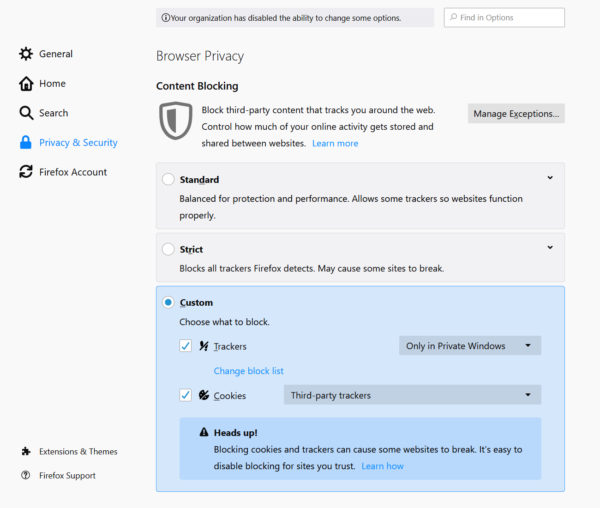
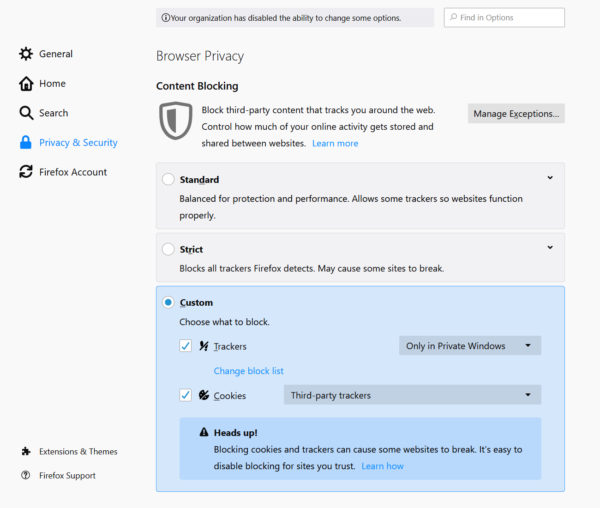
For existing users, we’ll be rolling out Enhanced Tracking Protection by default in the coming months without you having to change a thing. If you can’t wait, you can turn this feature on by clicking on the menu icon marked by three horizontal lines at the top right of your browser, then under Content Blocking. Go to your privacy preferences and click on the Custom gear on the right side. Mark the Cookies checkbox and make sure that “Third-party trackers” is selected. To learn more about our privacy and security settings and get more detail on what each section – Standard, Strict, and Custom – includes, visit here.

For existing users, go to your privacy preferences, click on the Custom gear and mark the Cookies checkbox

Latest Facebook Container blocks tracking from other sites

Earlier this year, Mozilla was honored as one of the World’s Most Innovative Companies by Fast Company. Notably our Facebook Container extension played a big role in getting us selected. With more than two million downloads since it launched, our Facebook Container is an add-on/web extension that helps you take control and isolate your web activity from Facebook (i.e. following and tracking you across the web). Today, we’re releasing the latest update for Facebook Container which prevents Facebook from tracking you on other sites that have embedded Facebook capabilities such as the Share and Like buttons on their site.

For example, when you are on a news site and reading an article, you often see Facebook Like and Share buttons. Our Facebook Container will block these buttons and all connections to Facebook’s servers, so that Facebook isn’t able to track your visits to these sites. This blocking makes it much harder for Facebook to build shadow profiles of non-Facebook users. You will know the blocking is in effect when you see the Facebook Container purple fence badge.

Facebook Container will block these buttons and all connections to Facebook’s servers

To add the latest Facebook Container Add-On, visit here.

Meet Firefox Lockwise: Manage Your Passwords Safely and Take them Everywhere

Last Summer, we brought you Firefox Lockbox for iOS, and in March of this year we announced both Firefox Lockbox for Android and an iPad-optimized version to expand the ecosystem. One of the top most requested features from users was to find a way to manage their passwords. Today, we are rolling out a Firefox desktop extension that offers this feature and completes this product family we are now calling Firefox Lockwise.

As part of the Firefox Lockwise product suite, formerly known as Firefox Lockbox, the desktop extension will give you more control over your stored passwords with shared access from every device. With the new desktop extension, Firefox Lockwise will provide an additional touchpoint to store, edit and access your passwords. The extension provides an enhanced experience for your saved logins, which will allow you to more easily manage and interact with your stored passwords in Firefox. You will notice a seamless integrated experience in Firefox when you move from desktop to mobile, with a similar layout of key features for easy navigation and access, and easy access to your logins and passwords.

The new Firefox Lockwise desktop extension includes:

  • Manage your saved list of passwords – The new dashboard interface makes it simple to update and manage your saved list. If you’re no longer frequenting a site, you can easily delete your saved password. And for the sites you access frequently, you can quickly reference and edit what is being stored, thus giving you an easy way to take control of your online privacy.
  • Access your passwords anywhere – Whether you’re shopping for shoes on your desktop or purchasing them on-the-go from your favorite site, Firefox Lockwise has you covered. Both the mobile app and desktop extension can help you quickly retrieve your password to access your site account, no matter which device you’re on to take advantage of member discounts or free shipping.

Whether you are a loyal user or you are ready to take control of your passwords, try Firefox Lockwise, available on iOS, Android, and now a Firefox add-on for Desktop.

Firefox Monitor adds dashboard to manage multiple email addresses

Since the launch of Firefox Monitor, a free service that notifies you when your email has been part of a data breach, more than 635,000 people have signed up for alerts. Users have been checking multiple personal email addresses on Monitor since launch, and the ability to easily manage multiple accounts has been a top, frequently requested feature. Today we’re launching a central dashboard to help you track and manage multiple email addresses, whether it’s your personal email accounts or ones for professional use.

Through the breach dashboard, you’ll receive a quick summary of updates for all registered email accounts. You’ll be able to easily identify which emails are being monitored, how many known data breaches may have exposed your information, and specifically, if any passwords have been leaked across those breaches. Adding a new email address to your existing Firefox Monitor account is simple, and whether you’re managing one – or multiple – new email accounts, you will be able to select a primary email address to serve as the hub for all notifications and alerts. We added a safety measure to ensure that all email addresses are verified by email before they are activated.

Identify which emails are being monitored, how many known data breaches may have exposed your information, and if any passwords have been leaked across those breaches

Being part of a data breach is not fun, but keeping track of and knowing where your private information may have been made public is one of the first steps in taking control of your online privacy.

We invite you to check out the new breach dashboard on Firefox Monitor!


The post Firefox Now Available with Enhanced Tracking Protection by Default Plus Updates to Facebook Container, Firefox Monitor and Lockwise appeared first on The Mozilla Blog.

06 Jun 15:10

When it comes to privacy, default settings matter!

by Peter Dolanjski

What if I told you that on nearly every single website you visit, data about you was transmitted to dozens or even hundreds of companies, all so that the website could earn an additional $0.00008 per ad! This is a key finding from a new study on behaviorally targeted advertisements from Carnegie Mellon University and it should be a wake-up call to all of us. The status quo of pervasive data collection in service of ad targeting is untenable. That is why we’re announcing some key changes to Firefox.

Today marks an important milestone in the history of Firefox and the web. As of today, for new users who download and install Firefox for the first time, Enhanced Tracking Protection will automatically be set on by default, protecting our users from the pervasive tracking and collection of personal data by ad networks and tech companies.

It seems that each week a new tech company decides to decree that privacy is a human right. They tout how their products provide people with “choices” to change the settings if they wish to opt into a greater level of privacy protection to exemplify how they are putting privacy first. That begs the question — do people really want more complex settings to understand and fiddle with or do they simply want products that respect their privacy and align with their expectations to begin with?

Privacy shouldn’t be relegated to optional settings

When thinking about consumer privacy online, I’m reminded of the behavioral economics studies which led to 401K plans (US retirement savings plans) moving from voluntary enrollment to auto-enrollment. Not too long ago most defined contribution retirement savings plans in the US required employees to sign-up and volunteer to start participating. Participation rates were very low. Why was that? Was it because people didn’t care about saving for retirement? Not at all! There were simply too many barriers to aligning with people’s expectations and desires and the benefits of saving for retirement aren’t felt immediately.

We are in a similar position with respect to software privacy settings. Pervasive tracking is too opaque and potential privacy harms are never felt immediately. The general argument from tech companies is that consumers can always decide to dive into their browser settings and modify the defaults. The reality is that most people will never do that. Yet, we know that people are broadly opposed to the status quo of pervasive cross-site tracking and data collection, particularly when they learn the details on how tracking actually works.

We also know that traditional privacy features such as Chrome’s Incognito mode are failing to live up to consumer expectations. The feature might keep your spouse from knowing what you’re thinking about getting them for your anniversary by erasing your history, but it does not prevent third-party tracking. Our research shows that Firefox users are seeking out privacy protection, particularly through the use of Firefox’s Private Browsing mode. In fact, nearly 25% of web page loads in Firefox take place in a Private Browsing window. The good news for these users is that Firefox’s Private Browsing mode has long put users first by blocking tracking. The bad news is that this generally isn’t true for many popular browsers, which allow tracking even in private browsing/incognito mode. A recent study found that users don’t understand this and think their data is being protected, when it is actually not.

As was the case with retirement savings plans, what this shows us is that the burden needs to shift from the consumers to the companies whereby the complexity of privacy settings shouldn’t be placed on users to figure out. The product defaults should simply align with consumer expectations. That is the approach we are taking in Firefox.

Enhanced Tracking Protection by Default

As stated above, new Firefox users will have strong privacy protection from the moment they install. We also expect to deliver the same functionality to existing users over the coming months. Because we are modifying the fundamental way in which cookies and browser storage operate, we’ve been very rigorous in our testing and roll-out plans to ensure our users are not experiencing unforeseen usability issues. If you’re already using Firefox and can’t wait, you can turn this feature on by clicking on the menu icon marked by three horizontal lines at the top right of your browser, then Content Blocking. Go to your privacy preferences and click on the Custom option on the right side. Mark the Cookies checkbox and make sure that “Third-party trackers” is selected. To learn more about our privacy and security settings and get more detail on what each section — Standard, Strict, and Custom — includes, visit here.

For existing users, go to your privacy preferences and click on the Custom option, ark the Cookies checkbox

If you are new to Firefox, we’d love for you to give it a try. Download the latest version here.

When it comes to privacy, default settings matter! We hope that the actions we are taking can ultimately compel change in the industry. Afterall, consumers deserve better.


The post When it comes to privacy, default settings matter! appeared first on The Mozilla Blog.

06 Jun 15:10

The web the world needs can be ours again, if we want it

by Chris Beard

People everywhere are demanding basic consumer protections. We want our food to be healthy to eat, our water to be clean to drink, and our air to be safe to breathe.

This year people have started to demand more of the internet as well, however, there persists an expectation that on the internet people are responsible for protecting themselves.

You should not have to worry about trading privacy and control in order to enjoy the technology you love. Tech companies have put the onus on people to read through their opaque terms and conditions tied to your data and privacy to use their services. The average privacy policy from a tech company is thousands of words and written at a level that often requires legal training to interpret. As such the vast majority of people don’t bother to read, and just click through these agreements trusting that the companies have their interests at heart.

This isn’t right, and it’s not where we stand. We aspire to put people back in control of their connected lives. To better equip people to navigate the internet today, we’ve built the latest version of our flagship Firefox browser with Enhanced Tracking Protection on by default. These protections work in the background, blocking third-parties from tracking your online activity while increasing the speed of the browser.

We’re offering privacy protections by default as you navigate the web because the business model of the web is broken, with more and more intrusive personal surveillance becoming the norm. While we hope that people’s digital rights and freedoms will ultimately be guaranteed, we’re here to help in the interim.

In a world where tech companies expect you to cobble together different tools to protect your privacy putting the burden on you, we are providing an easy-to-use solution with just one Firefox login to get the full benefit of all of the protections and capabilities we’ve built into our products and services.

By creating a Firefox account you can increase convenience while decreasing your exposure to some harmful parts of the web. An account unlocks the full potential of tools like Lockwise, which securely manages passwords, and Monitor, a service that notifies you when your email has been part of a known data breach.

We’re deepening our relationship with you because we know you can’t go it alone anymore. With Firefox you have a partner who knows the ins and outs of the tech industry, but who is beholden to serving you, not shareholders. We’re optimistic that together we can take back power over our online lives.

We choose to lead, not follow. Join us.  

You know what we stand for and what we’ve been about for over a decade thanks to our Manifesto and our Data Privacy Principles. Today we’re making it even more clear what you get when you sign up with us by announcing the Firefox Personal Data Promise — our commitment to handle your personal information with integrity and decency — and best practices for others to follow when it comes to protecting consumers privacy and rights online.

We’re taking these steps and we’re offering new tools to increase your protection and control, but it’s only the first step in our new relationship with you. We will continue to push back against collect-it-all business models that are set up to monetize people in seemingly every possible way. In addition to the tools and services we offer, we champion efforts like the fight for net neutrality, combat surveillance tactics and push for standards and practices that promote privacy and competition.

I hope you can see we’re different, and that we work hard every day to earn your trust. I believe that the internet can be a tool to make the world a better place where everyone is welcome. And safe. And respected. It can be a place that enables a free exchange of ideas. I know it can be because it once was.

The web the world needs can be ours again, if we want it. Please join me and millions of Firefox users in choosing a safer, more connected world.

The post The web the world needs can be ours again, if we want it appeared first on The Mozilla Blog.

06 Jun 15:08

A profile of business authors

by Josh Bernoff

I want to know who nonfiction and business authors are and how they work. I’d like to know why they got started, what their goals were, did they accomplish those goals, how long did it take, how did they publish (or plan to publish), how many copies did they sell, and how they made money. … Continued

The post A profile of business authors appeared first on without bullshit.

06 Jun 15:08

HomePod Gaining Multi-Voice Support and Handoff, AirPods Add Audio Sharing and More

by Ryan Christoffel

Amid yesterday’s packed WWDC keynote, where iOS 13, iPadOS, the new Mac Pro, and more were announced, Apple also shared a few exciting updates coming this fall for its music-focused accessory products: HomePod and AirPods. The HomePod will soon support multiple users, a new Handoff feature, and radio apps, while AirPods will gain audio sharing and a special Siri feature for messaging.

HomePod

When iOS 13 launches, HomePod will offer support for multiple users for the first time. Up to six different voices can be configured with the HomePod, such that when different family members speak to the device, Siri will know who’s talking and respond in a personalized way. Multi-user personalization extends to both Apple Music and Personal Requests – with the former, HomePod will tie listening history to each individual’s preferences, so asking Siri to “Play some music” will result in hearing a station custom-tailored for you. Personal Requests are the feature HomePod uses to tap into a user’s reminders, calendar events, and more. Previously, Personal Requests could only be configured with a single user, and access to data from Messages, Notes, and the like would be unavailable if that person left home; now, each member of the household can have their own Personal Requests tied to their own Apple ID, offering a much-improved experience.

Beyond multi-user support, the HomePod is also gaining a new Handoff feature in partnership with the iPhone. Whenever you’re listening to music or a podcast on your iPhone, or if you’re on a phone call, holding your device next to the HomePod will seamlessly hand off that audio to the HomePod. The feature works in reverse too: if you’re playing something on HomePod but need to head out the door, you can hold your iPhone next to the HomePod to move audio routing to the iPhone. I’m curious to see how this works in practice, especially when you throw AirPods into the mix that are connected to the iPhone, but it’s an exciting idea that demonstrates Apple’s ability to craft seamless ecosystem integrations.

Finally in HomePod announcements, the device is gaining access to over 100,000 radio stations from around the world via support for iHeartRadio, Radio.com, and more.

AirPods

In a rare but welcome development, Apple announced software improvements coming to AirPods in its WWDC keynote. In iOS 13, a new audio sharing feature will enable AirPods to be shared between two people for listening to the same stream of audio – whether a song, podcast, or the audio component of a video. Audio sharing engages when you tap your phone on to someone else’s, splitting audio into two identical streams that can each have their volume levels adjusted separately. It’s the perfect feature for couples or friends who want to enjoy a song or video together.

The second new feature coming to AirPods is that Siri will automatically announce messages you receive and enable you to respond to them instantly by voice, without the need for a ‘Hey Siri’ activation phrase. This will work both with Apple’s Messages app and every other third-party messaging app – when a message arrives, depending on if you’re in the middle of something like a phone call, Siri will either deliver the message immediately or wait until the call’s over. Once Siri reads your message, you can dictate a reply instantly just by speaking naturally, with no ‘Hey Siri’ preface. Since messaging interruptions could quickly grow annoying if left unchecked, Apple will include the ability to custom-configure which of your contacts Siri should alert you of messages from. The only drawback of this feature is that it’s exclusive to the second-generation AirPods.


It’s unusual for software updates to the HomePod and AirPods, which Apple deems mere accessories, to be highlighted during the WWDC keynote. That said, I found it a welcome change from the norm. All the features announced for these products are thoughtful enhancements I can see myself using regularly. I’m especially glad the HomePod is gaining multi-user support, but the other enhancements for HomePod and AirPods have me excited too – they’re the kind of features that feel like magic when done right, and I’m eager to see if Apple can pull them off.


You can also follow all of our WWDC coverage through our WWDC 2019 hub, or subscribe to the dedicated WWDC 2019 RSS feed.


Support MacStories Directly

Club MacStories offers exclusive access to extra MacStories content, delivered every week; it's also a way to support us directly.

Club MacStories will help you discover the best apps for your devices and get the most out of your iPhone, iPad, and Mac. Plus, it's made in Italy.

Join Now
06 Jun 15:00

Firefox 68 Beta 6 Testday Results

by Cornel Ionce


Hello Mozillians!

As you may already know, last Friday May 31st – we held a new Testday event, for Firefox 68 Beta 6.

Thank you all for helping us make Mozilla a better place: Rockstarprem007, Mohamed Bawas, Aishwarya Narasimhan and Aishu, noelonassis!

Result: Several test cases were executed for: Activity Stream and  Pin Firefox shortcut to taskbar for Windows 10.

Thanks for another awesome testday, we appreciate your contribution! 🙂

We hope to see you all in our next events, keep an eye on QMO.
We will make announcements as soon as something shows up!

06 Jun 14:43

(Yet another) interesting new app! - MadaboutDana

Oh, and another interesting, albeit text-only app (no markdown) with a very interesting feature - the automatic creation of hyperlinks from any word/phrase that exists as the title of a note in the database. So the more you write, the more links you get.

The app, Hyperlinks, is available for macOS and iOS (whereas Notenik is currently only available for macOS). The more I look at it, the more intriguing I find the premise... although the price is perhaps a little, hm, optimistic. But hey ---

Another shiny!

;-)
06 Jun 14:42

The Best Soda Maker

by Anna Perling, Dorie Chevlen, and Jamie Wiebe
The Best Soda Maker
Several bottles of carbonated and flavored water and the machines that produced them during our testing

To elevate water from a flat biological necessity to a fun, bubbly treat, your best option—environmentally and financially—is a home soda maker. Since 2015, we’ve spent over 200 hours researching and testing 14 models (plus our own DIY version), and after drinking gallons of seltzer, we think the easy-to-use SodaStream Fizzi OneTouch makes some of the fizziest, tastiest sparkling water.

06 Jun 14:40

macOS Catalina: The MacStories Overview

by Ryan Christoffel

The Mac is experiencing a new season of change. Following up on last year’s Mojave, which positioned the Mac as a productivity-first platform, this year macOS Catalina ushers in what’s sure to be a flood of new apps on the platform thanks to Project Catalyst. At the same time as the Mac welcomes an influx of new third-party apps, it says goodbye to iTunes in favor of dedicated apps for Music, Podcasts, and TV. From a user-facing standpoint Catalina isn’t a huge release – at least not until the other shoe drops and iPad apps hit the Mac this fall – but it is an important defining moment for macOS: with Catalina, old things are reimagined, and integration with the growing ecosystem of other Apple products and platforms propels the Mac to new heights.

Supported By

Things


Supported by Things – where ideas take shape – one step at a time.

Music, Podcasts, and TV Apps

At long last, iTunes on the Mac is no more. Music, Podcasts, and TV all have their own dedicated apps now, and device syncing has been integrated with Finder.

Music and Podcasts both have a very similar design, which is ultimately heavily inspired by iTunes itself. There’s a sidebar for your albums, playlists, podcast library, and more, and playback controls live at the top of the app. The two apps’ similarity is especially fascinating considering one is built with AppKit and the other UIKit. The TV app feels the least Mac-like of the trio, despite being an AppKit app – it follows the same basic design as the tvOS app.

The new Music app contains all the same music-related features and abilities that iTunes had before, but without all the extra baggage of doing a million other things too, which should hopefully result in a better, more responsive experience overall. Contrary to some pre-WWDC speculation, the iTunes Store is still around as a part of the Music app and you can still purchase songs and albums from it.

In the same way as Music, Podcasts feels familiar to its iTunes incarnation, offering the same set of functionality but adding to it one interesting new feature: Apple announced that it has begun creating transcripts for podcasts in its database, which will enable you to search inside the Podcasts app and get results based on spoken content from each show.

The TV app’s highlight feature is that it supports 4K HDR playback on compatible Macs, which includes all models introduced in 2018 or later that have 4K screens. TV also supports both Dolby Vision and Atmos for playback on compatible hardware.

Project Catalyst

The most significant change Catalina brings to the Mac is something that’s not actually user-facing: Project Catalyst, the initiative once known as Marzipan that enables bringing iPad apps to the Mac.

I’ve written a full separate overview of Catalyst, so you can read that for more details, but in short: Catalyst should lead to an unprecedented surge of new third-party Mac apps. Developers who already have a solid iPad app can now, thanks to Catalyst, build a strong Mac app with only a fraction of the work formerly required for that task. I can’t wait to see all the new apps arriving on the Mac App Store this fall.

Sidecar

Sidecar is a new feature of Catalina that enables using an iPad as a second display for your Mac. You can do this wirelessly from up to 10 meters away or using a wired connection, which presumably will perform better.

At first glance Sidecar seems to replicate a lot of the functionality of the Luna Display, but there are a few key differences. For example, Jason Snell writes for Six Colors:

You can’t initiate a Sidecar session from an iPad—it’s a Mac feature that is initiated from a Mac.
[...]
At the bottom of the iPad display, Sidecar displays a virtual Touch Bar, and on the side there are a bunch of modifier key shortcuts and an undo button. There’s also an option to bring up the on-screen keyboard, which Luna Display lacks.

Even though Sidecar won’t be able to replace my own use of the Luna Display, since I use it with a headless Mac mini and initiate connections from my iPad, I am glad to see a similar technology made available to a broader set of users, and at no cost. Sidecar can be a great aid to professional graphic design and photo editing apps on the Mac thanks to the precision and low-latency experience provided by the Apple Pencil. Beyond using the iPad as a mere Pencil-input device for your Mac though, if you’re someone who uses both a Mac and iPad regularly, it’s pretty great that your iPad can now serve a whole new function as a “free” additional display for your Mac. Sidecar enables using an iPad either to mirror your primary display, or spread content out on a second display.

All the Rest

First-Party App Updates. In step with the updates found in iOS 13 and iPadOS, a variety of system apps are being updated for macOS Catalina. Reminders is fully redesigned and a lot more powerful; Photos, Notes, Safari, and Home each include a handful of improvements; Find My combines Find My iPhone and Find My Friends into a single app, with the ability to locate devices that are offline. You can view our iOS and iPadOS overviews for more details on all these features.

Voice Control. A new tool in Apple’s set of accessibility features, Voice Control enables systemwide control of your Mac (or iPhone or iPad) entirely by voice. With Voice Control activated, your device will respond to voice commands like ‘Scroll up,’ ‘Click share,’ and ‘Next field.’ For more complex commands, Voice Control offers up lists of numbers for different options available in an app, so you can simply speak a number to interact with UI elements. Based on early demos, it’s a remarkable achievement in voice-first computing, designed for users with motor limitations but with implications that go far beyond that.

Apple Watch Authentication. The same technology that currently enables logging into your Mac via Apple Watch authentication is now being extended to other parts of the system: in macOS Catalina, your Watch can be used any time a password is required to authenticate with no typing required. It isn’t entirely automatic, but the process remains easy nonetheless – double-clicking the side button of the Watch will obviate the need for a password in any secure field.

Screen Time. Last year iOS 12 debuted Screen Time as a way to better keep track of the time you spend on your device, as well as utilize more extensive parental controls than were previously available. In Catalina Screen Time comes to the Mac, with all the same features found on iOS including the new communication limits added to iOS 13.

No 32-bit Apps. Though we all knew this was coming, since Apple pre-announced it at last year’s WWDC, it’s still worth noting that 32-bit apps are no longer supported on macOS Catalina.

Sync via Finder. As I mentioned earlier, if you formerly used iTunes to sync your iOS or iPadOS devices, that functionality has now been moved to the Finder. And fortunately, unlike before when connecting a device would launch iTunes, the same act does nothing in Catalina – no annoying pop-up Finder window is presented.

New Finder Cloud Integrations. Apple has introduced a FileProvider API for enabling third-party cloud storage providers, such as Dropbox, to integrate with the Finder in a new, secure way that doesn’t require a kernel extension. Adopting this new API will also mean these services can offer their apps through the Mac App Store.


At some point in the last few years, Apple realized they didn’t have to leave the Mac mostly alone in order to preserve what was great about it. Both on the hardware and software side, the company has aggressively worked to bring the Mac into the future while remaining true to the device’s rich history. I think Catalina is strong evidence of that work.

Slowly but surely, the Mac is evolving. While only time will tell whether an initiative like Catalyst ends up being a good thing for quality Mac apps, I’m hopeful that it will. The Mac is still the Mac, but it’s growing in new ways.


You can also follow all of our WWDC coverage through our WWDC 2019 hub, or subscribe to the dedicated WWDC 2019 RSS feed.


Support MacStories Directly

Club MacStories offers exclusive access to extra MacStories content, delivered every week; it's also a way to support us directly.

Club MacStories will help you discover the best apps for your devices and get the most out of your iPhone, iPad, and Mac. Plus, it's made in Italy.

Join Now
06 Jun 14:33

The First Post-iPhone Keynote

by Ben Thompson

This article was previously title ‘Apple’s Audacity’

It is the nature of hardware that a computer the vast majority of Apple’s customers will never own was the headline from the company’s keynote at its annual Worldwide Developer’s Conference (WWDC). The Mac Pro starts at $6,000, and will be configurable to a number many times that. If you think that is absurd, or would simply rather buy a new car, well, you’re not the target customer.

At the same time, here I am, leading with the Mac Pro, just like those headline writers, and I’m not incentivized by hardware driving clicks: it was fun seeing what Apple came up with in its attempt to build the most powerful Mac ever, in the same way it is fun to read about supercars. More importantly, I thought that sense of “going for it” that characterized the Mac Pro permeated the entire keynote: Apple seemed more sure of itself and, consequentially, more audacious than it has in several years.

The iPhone Plateau

In retrospect, the previous malaise around Apple should have been expected. When a product like the iPhone comes along — and make no mistake, there are very few products like the iPhone! — the goal is simply to hold on to a rocket ship. Growth was trivial: simply add a new country or a new carrier, and predict iPhone sales with eerie accuracy. That all culminated with the iPhone 6, when Apple’s forecasts were finally wrong — there was far more pent-up demand for larger screens than anyone anticipated.

It turned out that was the peak: Apple would again miss forecasts with the iPhone 6S, but this time their mistake was expecting growth that never materialized, eventually resulting in a $2 billion inventory draw-down. The forecasts did get better, but as I explained last year, unit growth never returned:

The 6S was the new normal: iPhone unit sales have been basically flat ever since:

iPhone unit sales over time

What has changed is Apple’s pricing: the iPhone 7 Plus cost $20 more than the iPhone 6S Plus. Then, last year, came the big jump: both the iPhones 8 and 8 Plus cost more than their predecessors ($50 and $30 respectively); more importantly, they were no longer the flagship. That appellation belonged to the $999 iPhone X, and given how many Apple fans will only buy the best, average selling price skyrocketed:

iPhone average selling price over time

From a financial perspective, it didn’t much matter where the growth came from — more units or more revenue per unit. The iPhone, though, was no longer a rocket ship scaling to new heights; it was an institution, something with roots, and something that could be exploited.

This changes a company: instead of looking outwards for opportunity, the gaze turns inwards. In 2018 I called it Apple’s Middle Age:

Apple’s growth is almost entirely inwardly-focused when it comes to its user-base: higher prices, more services, and more devices…The high-end smartphone market — that is, the iPhone market — is saturated. Apple still has the advantage in loyalty, which means switchers will on balance move from Android to iPhone, but that advantage is counter-weighted by clearly elongating upgrade cycles. To that end, if Apple wants growth, its existing customer base is by far the most obvious place to turn.

In short, it just doesn’t make much sense to act like a young person with nothing to lose: one gets older, one’s circumstances and priorities change, and one settles down. It’s all rather inevitable…The fact of the matter is that Apple under Cook is as strategically sound a company as there is; it makes sense to settle down. What that means for the long run — stability-driven growth, or stagnation — remains to be seen.

The long-run came quickly: one year later CEO Tim Cook had to issue a revenue warning thanks to slumping iPhone sales; after four years of accounting for between 68-70% of Apple’s revenue in the company’s fiscal first quarter, the iPhone suddenly only accounted for 62%.

It might have been the best thing that could have happened to Apple.

Three Announcements

There were three announcements in yesterday’s keynote that, particularly when taken together, spoke to a company moving forward.

The first was the end of iTunes, which will be split into separate Music, Podcasts, and TV apps; device syncing will be handed by the Finder. This is both straightforward and overdue, but still meaningful: while iTunes didn’t save Apple, the application is the connective thread of one of the greatest growth stories in business history. There is a direct line from the introduction of iTunes in January 2001 to the introduction of the iPod later that year, then the iTunes Music Store in 2003 (upon which the App Store was built), and ultimately the iPhone in 2007. iTunes provided the foundation for everything that followed, and it seems appropriate that the application is going away at the same time that growth story is coming to a close.

The second was the introduction of iPadOS. This is, to be clear, mostly a marketing move: iPadOS is very much the same iOS it was two days ago. Marketing moves can matter, though: in this case — much like the Mac Pro — it is a statement from Apple that the non-iPhone parts of its business still matter. While the company was on the iPhone plateau it wasn’t so clear that management cared about either — both the iPad and Mac languished, the former in terms of software, and the latter in terms of hardware — but now there is real evidence the company is fully back in. That management no longer had a choice is besides the point.

The third announcement was the App Store on Apple Watch. While there was not any news about the Apple Watch being completely untethered from the iPhone — non-cellular models have no choice — it is a clear step towards making the Watch independent.1 That, by extension, completely changes the Watch’s addressable market from iPhone users to everyone. This was likely Apple’s endgame all along, but there is more urgency than there may have been even six months ago, and that is a great thing: better urgency than complacency.

Privacy and Purpose

Last fall Cook gave a remarkable speech at the 40th International Conference of Data Protection and Privacy Commissioners in Europe. This was certainly not the first time Cook has spoken about privacy, but the clarity, purpose, and passion with which Cook spoke was striking. I wrote about the speech in a Daily Update, so I will not break it down in full here, but this portion is worth highlighting again:

Now there are many people who would prefer I never said all of that. Some oppose any form of privacy legislation; others will endorse reform in public and then resist and undermine it behind closed doors. They may say to you, “Our companies can never achieve technology’s true potential if they are constrained with privacy regulation.” But this notion isn’t just wrong: it is destructive. Technology’s potential is, and always must be, rooted in the faith people have in it, in the optimism and the creativity that it stirs in the hearts of individuals, and in its promise and capacity to make the world a better place. It’s time to face facts: we will never achieve technology’s true potential without the full faith and confidence of the people who use it.

It was only a month ago that Google made a very different pitch, making the case that the services it created with all of the data it collected was a tradeoff worth making. Unsurprisingly, the two different visions aligned with the company’s two different business models: data collection is obviously integral to advertising, and privacy a differentiating factor for Apple’s high-end hardware.

What I appreciated about both company’s events, though, was the commitment. Google did not try to obfuscate or hide how its products worked, but rather embraced and dwelled on the centrality of user data to its offerings. Apple, similarly, emphasized privacy at every turn, and did so with passion: it felt like the fight for privacy has given the entire company a new sense of purpose, and that is invaluable.

In short, it is clear that privacy has become more than a Strategy Credit for Apple. It is a driving force behind the company’s decisions, both in terms of product features and also strategy. This is particularly apparent in perhaps the most important announcement yesterday, Sign In with Apple.

Sign In with Apple

It’s important to note that the question of privacy goes far beyond Google and Facebook — it predates the Internet. Starting in the 1960s companies began collecting all of the personal information on individual consumers they could get; Lester Wunderman gave it the sanitized name of “direct marketing”. Everything from reward programs to store loyalty discounts to credit cards were created and mined to better understand and market to those individual consumers.

The Internet plugged into this existing infrastructure: it was that much easier to track what users were interested in, particularly on the desktop, and there were far more places to put advertisements in front of them. Mobile actually tamped this down, for a bit: there was no longer one browser that accepted cookies from anyone and everyone, which made it harder to track. That, though, was a boon for Facebook in particular: its walled-garden both collected data and displayed advertisements all in one place.

Over time Facebook extended its data collection far beyond the Facebook app: both it and Google have a presence on most websites, and offering login services for apps not only relieves developers from having to manage identities but also give both companies a view into what their users are doing. The alternative is for users to use their email address to create accounts, but that is hardly better: your email address is to data collectors as your house address was fifty years ago — a unique identifier that connects you to the all-encompassing profiles that have been built without your knowledge.

This is the context for Sign In with Apple: developers can now let Apple handle identity instead of Facebook or Google. Furthermore, users creating accounts with Sign In with Apple have the option of using a unique email address per service, breaking that key link to their data profiles, wherever they are housed.

This was certainly an interesting announcement in its own right: identity management is one of the single most powerful tools in technology. Owning identity was and is a critical part of Microsoft’s dominance in enterprise, and the same could be said of Facebook in particular in the consumer space. Apple making a similar push — or even simply weakening the position of others — is noteworthy.

Privacy and Power

Still, Sign In with Apple is a hard sell for most developers who have already aligned themselves with Facebook or Google or have rolled their own solution. And, given that developers want to make money, is it really worth adding on an identity manager that would likely interfere with that?

Then came the bombshell in Apple’s Updates to the App Store Guidelines:

Sign In with Apple will be available for beta testing this summer. It will be required as an option for users in apps that support third-party sign-in when it is commercially available later this year.

Apple is going to leverage its monopoly position as app provider on the iPhone to force developers (who use 3rd party solutions)2 to use Sign In with Apple. Keep in mind, that also means building Sign In with Apple into related websites, and even Android apps, at least if you want users to be able to login anywhere other than their iPhones. It was quite the announcement, particularly on a day where it became clear that Apple was a potential target of U.S. antitrust investigators.

It is also the starkest example yet of how the push for privacy and the push for competition are, as I wrote a year ago often at odds. Apple is without question proposing an identity solution that is better for privacy, and they are going to ensure that solution gets traction by leveraging their control of the App Store.

Note, though, that even this fits in the broader theme of Apple regaining its mojo: complaints about the App Store have been in part about data but mostly about Apple’s commission and refusal to allow alternative payment methods. It is a tactic that very much fits into the “get more revenue from existing customers” approach that characterized the last few years.

Sign In with Apple, though, is much more aggressive and strategic in nature: it is a new capability, that could both hurt competitors and attract new users. It is the move of a company looking outwards for opportunity, and motivated by something more intrinsic than revenue. It is very Apple-like, and while there will be a lot of debate about whether leveraging the App Store in this way is illegal or not, it is a lot more interesting for the industry to have Apple off the iPhone plateau.

I wrote a follow-up to this article in this Daily Update.

  1. The Watch will now be able to update itself as well
  2. One unanswered question: what about enterprise single sign-on offerings like Okta?
06 Jun 14:33

How to Prepare for Amazon Prime Day

by Alex Roth
How to Prepare for Amazon Prime Day

Amazon Prime Day has become Black Friday in July. It’s no longer just one day, with last year’s Prime Day going on for over 36 hours. It’s also more than just Amazon, with competing retailers offering discounts and price matches of their own. And while the opportunity to save has grown, so has the risk of wasting money on some impulse purchase you don’t need.

No matter where you shop, the key to coming out of Prime Day with your budget intact (and with something useful, or at the very least fun, on the way) is to do a little bit of preparation and to set some realistic expectations. Browsing Lightning Deals at 4 a.m. won’t net you a great 60-inch 4K TV at 50 percent off. But knowing ahead of time what you want, and what price to pounce on, will.

At Wirecutter, we’ll be sifting through the thousands of deals from Amazon and everyone else, posting on our Deals page only the best discounts (generally the lowest price we’ve seen in 90 days) on items our staff has reviewed and recommends. You can also follow along on Twitter with the @WirecutterDeals account, or get the deals in your inbox via our Deals newsletter.

Look for deals on small appliances, small electronics, and luggage

Amazon keeps a tight lid on its Prime Day deals until the event starts, but in Prime Days past, the best deals have been on kitchen appliances, luggage, and small electronics. Here are some of the biggest discounts we saw during Prime Day last year:

  • The Anova Culinary Sous Vide Precision Cooker, our pick at the time for the best sous vide machine, fell from a street price of $130 to $70 shipped from Amazon, and $72 from Williams Sonoma.
  • Our upgrade pick for the best cordless stick vacuum, the Dyson V8 Absolute Stick Vacuum, was discounted from $450 to $365. At the time, this was the lowest price we’d seen for a non-refurbished model.
  • The Instant Pot Duo 6-Quart, our favorite electric pressure cooker, dropped from $100 to an unheard-of $60 price.
  • Our pick at the time for the best carry-on luggage, the Travelpro Platinum Magna 2 22″ Rollaboard, went from $240 to $200. That discount may not seem like a lot, but that sale price was the lowest price we’d seen for the suitcase in months.
  • The best blender you can get, the pricey Vitamix 5200, dropped from $400 to $300.
  • The Jabra Move, a former budget pick for the best wireless Bluetooth headphones, went from $80 to $40.

What wasn’t on sale last year: the latest high-end electronics and entertainment. Don’t expect deals on top-quality 4K TVs, iPads, iPhones, video game consoles, or new video games and Blu-ray movies.

Start the day before

Just as Black Friday has gone from a single day to nearly a week of online and in-store sales, Prime Day is extending its hours as well. In 2018, Amazon officially expanded Prime Day to 36 hours beginning at 3 p.m. Eastern on Monday, July 16, but discounts were already appearing on Amazon the Sunday before. Expect the same this year.

Crash the party with a free trial of Prime

As the event’s name suggests, Amazon Prime Day is only for Amazon Prime members. The service costs $119 a year or $13 a month, and it gives you free two-day shipping on most purchases. Aside from the free shipping, Prime’s best features are streaming video and photo storage. Like Netflix, Prime Video has a rotating catalog of classic movies and TV shows, and Prime’s original content has been coming into its own lately. And Amazon Photos gives subscribers unlimited storage for full-resolution photos; this service could be a money-saver if it lets you cancel similar services from Apple’s iCloud or Google Photos.

If you’ve never had Amazon Prime before, you can use the 30-day free trial to get access to Prime Day. Once the event is over, if you decide Prime isn’t for you, just cancel before the trial ends to avoid being billed. Set a calendar reminder so you don’t forget.

Decide what you want before you shop

Before Prime Day starts, write a short list of what you’d like to buy, and be specific. Not all 55-inch 4K TVs are created equal, so choose a make and model, or at the very least identify the features you need, and note the price before the sale so that you have some perspective.

Choose Lightning Deals in the morning

Some of the best deals Amazon offers are Lightning Deals, which are available for a limited time in a limited quantity. They go fast, and Amazon leaves the expired ones visible so that shoppers see what they missed and feel compelled to watch for more.

The whole thing is designed to keep shoppers hooked and ready to pull the trigger with minimal time to assess the item and its price. If you do plan to shop the Lightning Deals, check them first thing in the morning and look for the ones that are upcoming. Taking this step will give you time to research the item, and you can set a reminder on your phone for 10 minutes before the deal starts so you don’t miss out.

Shop around

Prime Day might be Amazon’s thing, but the company can’t stop competitors from getting in on the action. Big-box retailers such as Best Buy, Target, and Walmart routinely match Amazon’s prices on appliances, TVs, and other electronics. If the deal you want is out of stock on Amazon, check to see if anyone else still has it.

In addition, keep your eyes on smaller, specialty retailers, as well as on local shops. As Prime Day has whetted people’s appetite for shopping, stores of all sizes have started to use the event to their advantage.

03 Jun 23:29

Mouse support comes to iPad with iPadOS accessibility feature

by Brad Bennett
9.7-inch iPad (2018)

Hidden away in iPadOS’ accessibility features is support for a USB mouse.

A developer named Steve Troughton-Smith (@stroughtonsmith’s) tweeted that the ‘Assistive Touch’ allows users to navigate their iPads with a mouse.

This isn’t a complete implementation of mouse support yet because it looks like a circular touch target, but nonetheless, you can now use a mouse with the iPad.

Most of today’s iPadOS announcements made it seem like Apple is working to make the iPad a more capable device when compared to a standard Mac or PC.

You can check out Steve Troughton-Smith Twitter timeline for even more sneak peeks at upcoming iPadOS features.

To learn more about iPadOS checkout, MobileSyrup’s full post about iPadOS.

Source: Twitter (@stroughtonsmith)

The post Mouse support comes to iPad with iPadOS accessibility feature appeared first on MobileSyrup.

03 Jun 22:22

Google to restrict modern ad blocking Chrome extensions to enterprise users

Kyle Bradshaw, 9to5Google, Jun 03, 2019
Icon

Here we have a case where a media platform has become sufficiently dominant that it is prepared to enforce the requirement that users view ads (and get tracked, and infected with malware, and the rest of it). It's just this sort of case that induces me to use Firefox (which I have pretty consistently over the years) instead of a commercial product. As uBlock Origin developer Raymond Hill says, "Google's primary business is incompatible with unimpeded content blocking. Now that Google Chrome product has achieve high market share, the content blocking concerns as stated in its 10-K filing are being tackled." More: BGR ("Google quietly ruined Chrome..."), Vice ("Google struggles to justify..."), CNet ("Google holds firm..."), Forbes ("Google Just Gave 2 Billion Chrome Users A Reason To Switch To Firefox"). If I can't prevent a browser from loading unwanted and unsafe content, there's no way I'm running it on my desktop. Image: DazeInfo.

Web: [Direct Link] [This Post]
03 Jun 22:21

To be real

by russell davies

Some time ago I wrote a blog post about a tiny bit of a record that I really loved. I imagined it would be the first in a long series of tiny musical aperçu. So, without further ado, ten years later, here is the second one.

Got To Be Real by Cheryl Lynn has a couple of these supreme little moments. The first is the glorious shift in the vocals, where the lead voice shifts into the backing vocals and, somehow, sort of, into some sort of synthysound shriek that manages to be piercing without being shrill. It's ecstatic. You hear it first at the end of 'to be real' at around 50 seconds. And then again in an extended way at 2:42. And throughout.

And then there's the breakdown at 2:49. I love when a band switches into unison. But this is more than that, it's like a cutaway diagram. They slice open the track and show you the funky underpinning that's been bouncing you along all this time. Oh, you say, we've been riding this all along. And then they build the track back up around you. It's like being in a time-lapse of the construction of St Paul's Cathedral. So good.

03 Jun 22:20

Some thoughts on the WWDC keynote

by Volker Weber


I cannot remember that Apple ever talked about so much new stuff in a single keynote. Where do I start? In no particular order:

  • iPadOS, finally. The iPad gets its own operating system, based on iOS but with more features. The two most important ones for me are multiple windows from the same app -- think two Word documents -- and better file management. You will be able to access SMB file shares from Files, as I do today from apps like Documents or PDFpro, as well as USB-connected file systems. This also means you can import from cameras into other apps like Lightroom. Files will be able to handle ZIPs etc. All of these things I can do in third party apps but bringing it natively to iPadOS will enable more people to use the iPad as their only computer.
  • tvOS gets a new home screen. Again. More importantly it gets multi-user support. I wish Apple would bring this to the iPad to enable sharing a family device. Apple wants to use AppleTV as a gaming console and will support two gaming controllers: Xbox One S and PlayStation DualShock 4. I don't know a thing about gaming and I had to write this down.
  • Mac Pro, finally. Apple has been teasing the return of the cheese grater for years and they announced it today, coming in the fall. Starting at 6000 dollars and easily going into five digits when built out with options it is their best Mac ever. Would be crazy if it were not, right?
  • A new display to go with it. 5000 dollars, plus 1000 for the stand. Or 200 for a VESA mount. The Mac Pro can drive six of those at the same time. Are we hitting six digits already if you take the RAM to 1.5 terabytes and add all the optional components? It is fascinating but I never had workloads for a Cray supercomputer either. MKBHD will want a couple. Cheaper than his camera gear.
  • iOS 13 has dark mode. I just switched my Windows desktop to light mode. :-)
  • Apple reworks a lot of apps in iOS 13, and there is way too much stuff going on here to tell it all. Most importantly they have worked on performance a lot, making existing hardware faster. They are also providing some interesting privacy features like random mail addresses for apps, a Sign In with Apple features so you don't have to fall for the ad profiling of Sign In with Google or Sign In with Facebook. Reminders will be useful.
  • HomePod gets three important updates: radio streams through iHeartRadio, a handoff where you can take the iPhone out of the loop of streaming music, and the ability to recognize multiple people by their voice. That handoff is what I always wanted from Sonos. Come home with your podcast and let the HomePod continue, without casting through AirPlay. This should survive the beer test. (Go get more beer from the supermarket, without interrupting the HomePod).
  • macOS Catalina will let you use an iPad as a secondary display. Apple calls it sidecar. Developers will be able to let their iPad apps run on Mac. This was previewed last year as Marzipan and it may be able to bring new apps to the Mac. Has to compete with PWAs and Electron apps, both of which just package web apps.
  • iTunes: R.I.P., split, burn. Gets split up in Music, Podcasts and TV. Device syncing moves to Finder.
  • The biggest news was a new SwiftUI framework on top of Swift, superseding the use of AppKit and UIkit. Way over my head. And I still don't get AR. Everybody seems to be excited about it, but I am not.
  • Least exciting was watchOS 6 and that is why Apple started with it. Watch gets an App Store and apps that can run independently from iPhone apps. This could enable Watch to be a platform of its own, not requiring an iPhone. Remember how Apple cut the iPod loose from the Mac and took over the world?

watchOS 6 runs on all watchOS 5 hardware. All Macs from 2012 onwards support macOS Catalina. iOS 13 drops the iPhone 5S and 6, keeping all others. iPadOS will run on iPad Air 2 and newer, including all iPad Pro, iPad mini 4+ and iPad 5+.

The 2018 iPad Pro made me use an iPad as my only computer, switching from a Surface Pro. I was concerned I did not have access to USB thumb drives but never really needed one. I keep running Windows computers and switch between the iPad Pro and Surface as well as Yoga, but I don't have to. iPadOS will only accelerate this move.

The video that Apple did not show:

More >

03 Jun 22:15

iPadOS: The MacStories Overview

by Ryan Christoffel

Today during the WWDC keynote, where Apple unveiled the next major version of its mobile software platform, iOS 13, the company also had a big surprise to share: iOS is now exclusive to the iPhone and iPod touch and has given birth to a new, dedicated operating system for the iPad, named iPadOS.

iPadOS includes all the existing features of iOS, including the host of updates coming in iOS 13, but adds to it a long list of enhancements that address common pain points among iPad Pro users. From an updated Home screen to multitasking improvements, Files upgrades including USB drive support, a desktop-class Safari, and much more. All of these features aim to make the iPad a more capable full-time computer than ever before.

Supported By

Things


Supported by Things – where ideas take shape – one step at a time.

Home Screen

iPadOS introduces a couple of changes to the Home screen. While those changes are more limited than many iPad users hoped leading into today’s announcements, they nonetheless enhance the utility of the iPad's main landing place.

For starters, the Home screen contains a denser layout of app icons than before, enabling up to 30 apps on-screen – not counting the dock – in its fullest form. Currently in iOS 12, my 12.9-inch iPad Pro can only fit 20 apps in the same space, so the addition of 10 more apps is huge.

In addition to fitting more apps, the new Home screen can also integrate with widgets from the Today View, which can be pinned to the left side of the Home screen without reducing the number of app icons visible on-screen. While users can opt to keep widgets separate from the Home screen, as they were before, the new Home screen can place the entire Today View right alongside your apps in a single place, eliminating the need to swipe back and forth between two different screens.

Multitasking

Multitasking is receiving a major upgrade in iPadOS. While the basic mechanics introduced in iOS 9, and refined in iOS 11, are still present here – including Split View, Slide Over, and using drag and drop to engage multitasking – Apple has beefed up the capabilities of all existing multitasking features in significant ways.

Apps can now be available in multiple windows that can enable in-app Split View of multiple documents or having separate instances of an app available in different app spaces. For example, in Apple Notes you can view two notes side-by-side, just like you could already do in Safari with two websites. This action is engaged via drag and drop and works just like Safari’s system, where dragging and dropping one note on either side of the note you’re currently viewing will open the two in a Split View. And while this new functionality is clearly a perfect fit for document-based apps, Apple has even employed it for other UI elements that can now be detached as standalone windows. For example, the compose box in Mail can be detached from the rest of the app to live either in a Split View or Slide Over window.

App spaces was a feature of iOS 11 that felt limited in its usefulness because apps could only ever have a single “version” of themselves live in the system. You could create a space containing, say, Pages and Safari, and that Split View would be retained until you broke it, but once you needed Safari in a different Split View, such as putting it next to Messages, the original space would be broken. In iPadOS that limitation is completely gone. Apps can now have different instances spread across the system in different app spaces. So you can have a particular note from Apple Notes in a space with Slack, and another note entirely in a space with Reminders.

With apps now existing across multiple spaces, there’s a new feature in iPadOS to help keep track of all those separate instances: App Exposé. Now, when an app has multiple windows open in different spaces, tapping on that app’s icon in your dock or on the Home screen will open Exposé and provide an overview of all the spaces currently using that app.

In addition to the enhancements to Split View and availability of multiple app windows, Slide Over is becoming a lot more powerful in iPadOS by offering easier ways to switch the current app displayed in Slide Over. You can now switch back and forth between different Slide Over apps with a horizontal swipe at the bottom of the Slide Over window, and swipe up from the bottom of the window to open an app switcher view for choosing from a collection of all your current Slide Over apps. Essentially, Apple has transformed Slide Over into a dedicated iPhone UI that floats above the rest of your iPad interface: it retains the same size class as the iPhone, and you can use the same gestures available on iPhone X, XS, and XR to switch between apps.

Files

Files debuted in iOS 11 as a major step forward for file management on iOS, but it’s seen no visible improvements since then. iPadOS and iOS 13 change that, however, as Files becomes a more robust Finder alternative on the iPad.

Files has a new Column view, joining the existing Grid and List views available before. Column view takes better advantage of the iPad’s large display, making it easier to dive into nested folders without getting lost. And a key element of the new Column view is a Preview pane on the right-hand side that includes a visual preview of the currently selected file, rich metadata for that file, and a selection of Quick Actions to easily do things like use Markup, create a PDF, or rotate an image.

At long last, Files includes built-in support for external storage devices. USB drives and SD cards can now be connected to your iPad and the documents they contain can be accessed directly from Files and moved into a separate file provider if you wish. One side benefit of this feature is that Files, through its document picker, now enables users to import photos from a camera directly into the app of their choice. Previously, connecting a camera would cause imported images to go directly into Apple’s Photos app, but that behavior has changed in iPadOS so you can now access your camera’s images via Files’ document picker in every app that supports it.

Another feature in the “Finally” category is that documents can be zipped and unzipped inside Files without the need for a third-party app.

One of my favorite Files improvements is that iCloud Drive now supports shared folders, a feature that’s long been offered by Dropbox but has been absent from iCloud Drive. If you’ve grown tired of Dropbox’s buggy Files integration, folder sharing may be the final push needed to go all-in with iCloud Drive.

There’s a new built-in Downloads folder in Files, the perfect pairing with a download manager that’s now available in Safari. Also, the existing On My iPad folder is now going to work the way you would expect: in iOS 12 you couldn’t add files or folders to On My iPad manually, it’s simply a holding place for apps that utilize offline storage for their own files; but with iPadOS, any file or folder you choose can be added to and organized inside On My iPad.

Files now natively includes the Document Scanner that was previously exclusive to Apple Notes. This is a natural addition, as I often find myself scanning something in Notes only to save it to Files, and now I won’t have to do that.

When using search, the updated Files app will now surface search suggestions to make it easier to find what you’re looking for. Also, users of local file servers can connect them to Files using SMB. And finally, a variety of keyboard shortcuts have been added to the app, so you can more easily navigate it without lifting your fingers from the keyboard.

Safari

As big as the improvements to Files are in iPadOS, it’s not the only key system app getting a lot of love: Safari is advancing by leaps and bounds to become a true desktop-class browser.

The most important change to Safari is that it now loads desktop versions of websites by default. But not the same crippled desktop shells that previously existed on the iPad: true desktop versions that are fully optimized for touch input. This is the type of change that I normally wouldn’t believe until I tested it myself, but Apple executive Craig Federighi specifically called out both Google Docs and Squarespace as examples of websites that formerly didn’t work properly on Safari for iPad, but now they function as expected in iPadOS. This is a huge improvement for the iPad.

Safari finally has a native Download Manager on the iPad. Files you download on the web via Safari are saved into the Files app’s new Downloads folder, just like Safari works on the Mac with Finder. Downloads can run simultaneously in the background, and you can check their status from the Download Manager in Safari’s toolbar. Once a download is complete, you can even use drag and drop to pull it out of the Download Manager and share it with another app. At last, iPad users can download files from the web without needing clunky workarounds.

The ability to access true desktop versions of websites on the iPad, and have a native Download Manager, are easily the best improvements to Safari. But the app comes with a handful of other useful enhancements too.

Safari’s start page has been tweaked with an updated design that houses favorites, frequently visited, and your most recently visited sites, but it also includes Siri suggestions which surface things like links you recently received through an app like iMessage.

Websites can now have a variety of settings altered on a per-site basis, including the previously available Reader view settings and whether a site displays its desktop or mobile version, but adding to those you can now decide whether to enable access to things like camera, microphone, or location, and enable or disable content blockers on specific sites.

When uploading photos in Safari, there’s now a built-in option to resize the photo like has existed in Mail for several years. You can make the photo Small, Medium, Large, or Actual Size, and see the associated file sizes at each different level.

Last but not least, a ton of keyboard shortcuts are being added to Safari in iPadOS, accessible like in all iPad apps by holding down the Command key.

All the Rest

Support for Pointing Devices. As discovered by Steve Troughton-Smith, Apple has added support for a connected mouse or trackpad to be used as a pointing device on iPadOS. The feature isn’t meant to be a default interaction method, instead existing as an Accessibility feature as part of AssistiveTouch.

New Multitouch Gestures. Working with text on the iPad is getting easier thanks to some new multitouch gestures being added to iPadOS. There are three-finger gestures to copy, paste, and undo; with three fingers you pinch to copy, spread to paste, and swipe left to undo and right to redo. Additionally, you can grab text with a single tap and swipe, the text cursor can be moved by simply picking it up and moving it, and lastly you can grab the scroll indicator on the right-hand side of the display and move it to jump to later portions of a document.

Pencil Improvements. The Apple Pencil’s latency is being reduced from the already-great 20ms down to 9ms, a significant improvement. The Markup toolset available in previous versions of iOS is being updated in iPadOS and iOS 13, and it’s also being made available to third-party developers via PencilKit. Finally, you can mark up anything in any app by dragging from the lower corner of the iPad using the Apple Pencil – this will open a screenshot view of what you’re looking at, but in supported apps you’ll also see an option to change that screenshot into a full-page capture of the document. All the Markup tools are available to annotate that document then share it, and they can even now be moved around the screen to different locations.

Font Manager. Apple has added a new, easier way to add custom fonts on iPadOS and iOS 13: you simply download them from the App Store, and manage them from inside the Settings app. Before now, adding custom fonts on iOS required downloading a third-party app, such as AnyFont, which would install font file formats via configuration profiles – a process no average user should have to experience. The whole system worked, but it was too complex to ever be mainstream. Going through the App Store will greatly simplify the process.

Floating Keyboard. When the software keyboard is on-screen, you can pinch it with two fingers to shrink it into a mini floating keyboard that can be moved around anywhere you’d like on the screen. This keyboard is essentially an iPhone software keyboard, perfect for ensuring your content doesn’t get obscured in those times when you need the keyboard handy, but you’re not writing a novel with it.

App Icon Quick Actions on iPad. Previously exclusive to 3D Touch-enabled iPhones, you can now access an app’s quick actions by pressing and holding its app icon on an iPad. Rumors have indicated 3D Touch is being removed from 2019’s iPhone lineup later this year, replaced by Haptic Touch, and this iPad change lends heavy credence to that notion.

Sidecar. Although more a feature of the new update to macOS than iPadOS, the iPad can now be used as a second screen for the Mac both wirelessly and via a wired connection. We’ll share more details on this in our macOS Catalina overview.


iPadOS takes what was started in iOS 9 and 11 and completes it in many ways. Apple has taken great care to address the most common pain points of working on an iPad, and based on what we’ve seen so far this will be a transformative update for the device.

Even more encouraging is what iPadOS means for the future of the iPad: while nothing’s been promised, it’s likely that the iPad receiving its own dedicated software platform, split from the iPhone, means we’ll get annual iPad-specific updates. As an iPad-first user who’s grown frustratingly accustomed to only receiving new iPad features every two years, I’m hopeful that iPadOS means the iPad will continue receiving the attention it deserves year after year. 2019 brings a powerful new foundation for the iPad, but the future potential for iPadOS, untethered from the iPhone, is what really gets me excited.


You can also follow all of our WWDC coverage through our WWDC 2019 hub, or subscribe to the dedicated WWDC 2019 RSS feed.


Support MacStories Directly

Club MacStories offers exclusive access to extra MacStories content, delivered every week; it's also a way to support us directly.

Club MacStories will help you discover the best apps for your devices and get the most out of your iPhone, iPad, and Mac. Plus, it's made in Italy.

Join Now
03 Jun 22:14

BC Wildfire Service sets up special camp as risk soars in province’s parched northwest - The Globe and Mail

mkalus shared this story .

Wildfire crews are arriving in northwestern British Columbia as drought grips the region and the fire danger soars along with the temperature.

The BC Wildfire Service is setting up a 150-person camp in the Dease Lake area, not in response to any specific blaze, but because the service expects potential new wildfire activity with the parched conditions.

A statement from the service says the camp will house firefighters ready to respond to any incident, while a team that specializes in overseeing wildfire management has also been sent to Dease Lake.

The fire danger rating is listed as high to extreme across most of the Northwest and Prince George fire centres, while large sections of the Coastal Fire Centre are also rated at a high risk for a blaze.

Wildfire service maps show the most drought-stricken area is in the extreme northwestern corner of the province, covered by the Cassiar fire zone, where a campfire ban and other open burning bans are already in effect.

Three new wildfires were sparked in that zone this week and crews also continue to work on two blazes that burned intensely last year and smouldered underground through the winter before resurfacing as hot spots in the spring.
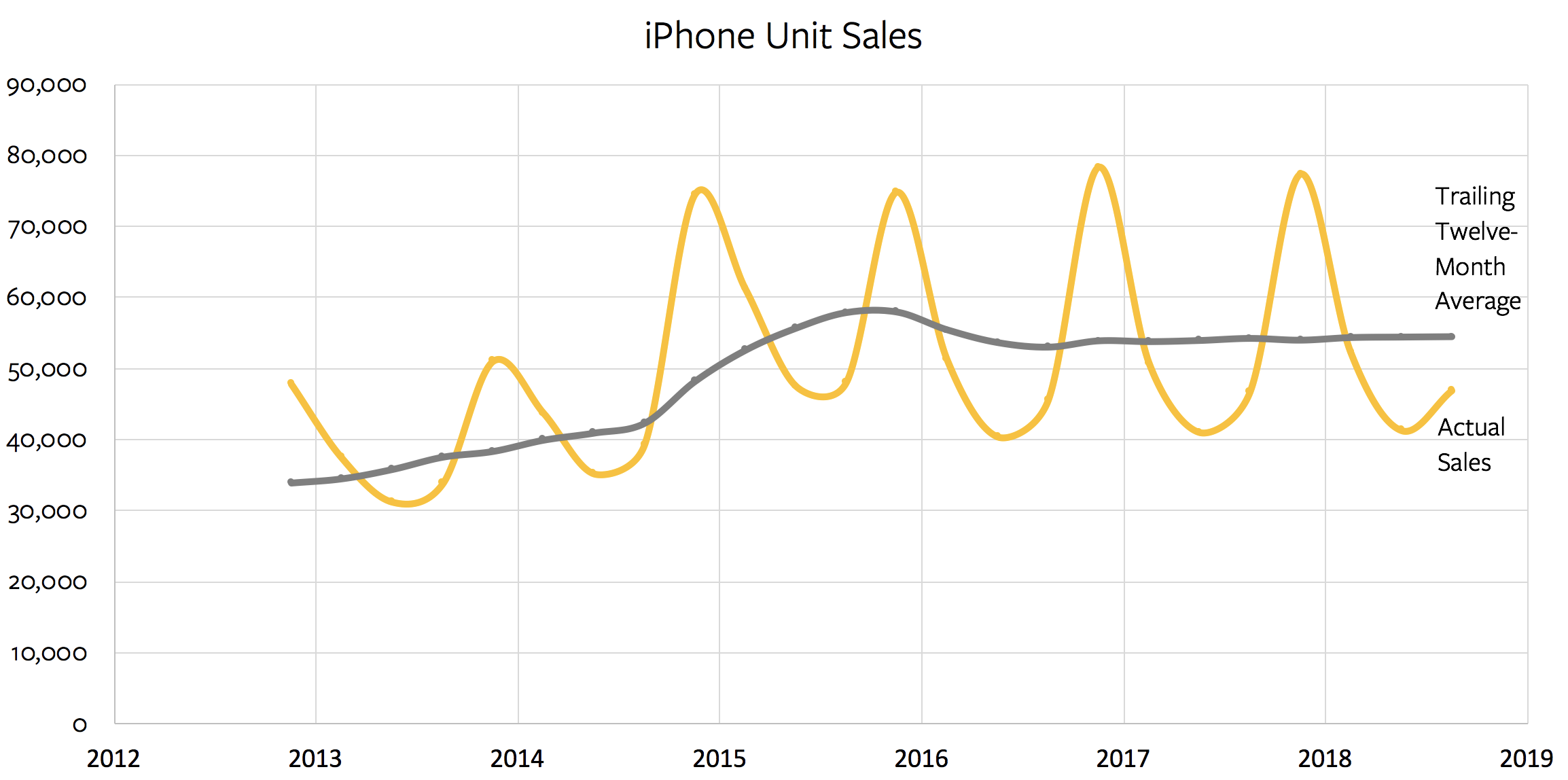
“The Northwest Fire Centre anticipates more holdover fires associated with the 2018 Alkali Lake fire,” says the wildfire service statement, referring to the blaze that charred more than 1,200-square kilometres of bush and destroyed more than 20 homes in Telegraph Creek.

“Firefighters will work out of the Dease Lake fire camp on a rotational basis throughout the summer. This will allow for quicker response times to new fire starts,” the statement says.

An extreme fire rating is applied to conditions where the wildfire service says fires will “start easily, spread rapidly, and challenge fire suppression efforts.”

The service’s website says 235 blazes have been recorded since the fire season began on April 1, and of the 42 fires currently burning, nearly 65 per cent were caused by humans.

03 Jun 22:14

My Friend John Muir Has Died

by peter@rukavina.net (Peter Rukavina)

I received the sad news this afternoon that John Muir has died.

No person has played as many roles in my life as John: from the time I first met him in the fall of 1985 John was, by times, my mentor, my teacher, my landlord, my boss, my interrogator, my arch nemesis and my friend.

He was one of the most interesting people I’ve ever met, one of the smartest people I’ve ever met, and one of the most tactically arrogant people I’ve ever met.

John had ideas, if you didn’t agree with those ideas, or didn’t understand them, he took you for coffee or a meal until you did (either).

Last year around this time John found himself in an extended hospital stay, and he gave me a call. Over the course of that night, and the next few, we talked on the phone for 4 or 5 hours, all told. About all manner of things: our lives, our partners, our children, politics, free speech, public broadcasting, our friends, our shared past. Occasionally he’d have to excuse himself when a nurse came into exact some indignity, but he’d call back a few minutes later and we’d pick up where we left off.

We were in touch a few times by email in the year since, but that series of conversations was our last hurrah as friends, and I’m glad to have had the chance.

John and I shared a love of the music of Curtis Driedger, and I don’t think Curtis would mind if I have him play John out:

I Hope (That the World Doesn’t Blow Up Tomorrow) from Problem A.