Shared posts

31 Jul 14:40

A quick dive into ALT’s journal with my MoodleNet hat on

by Doug Belshaw

One of the things I miss from my doctoral research is reading journal articles. So, with my MoodleNet hat on, I dived into ALT’s Research in Learning Technology today. I was on the lookout for things related to professional development and Open Educational Resources (OER).


Drumm, L. (2019). Folk pedagogies and pseudo-theories: how lecturers rationalise their digital teaching. Research in Learning Technology27. https://doi.org/10.25304/rlt.v27.2094

I admit that I was attracted to this article by its title, but it came up trumps:

Ideally, educators should critique and adapt ‘best practices’, taking charge of their own pathways of teaching. Indeed, as demonstrated in the data, many of these lecturers do this, but there is a block in articulating, reflecting and sharing these pathways. A solution could be to frame academic development and teaching qualifications as a medium for educators to explore their own voices and communicate about their teaching, without requiring them to fit into prescribed orthodoxies. Rather than setting folk pedagogies and pseudo-theories as ‘incorrect’, they could be acknowledged and used as starting points for conversations about teaching.


Macià, M., & García, I. (2018). Professional development of teachers acting as bridges in online social networks. Research in Learning Technology26. https://doi.org/10.25304/rlt.v26.2057

This is a particularly useful paper, where the author refers to ‘social networking sites’ as ‘SNSs’. It’s worth quoting at length:

SNSs used in education can promote socioconstructivist learning (Allen 2012; Manca and Ranieri 2017) by modifying the learners’ role and providing them with new educational understandings. The interconnected model of professional growth explains how teachers can benefit from the information acquired in online SNSs. This model takes several domains of the teaching situation into account (Clarke and Hollingsworth 2002): (1) the personal domain, including teachers’ ideas, knowledge and beliefs; (2) the external domain, represented by information or resources that teachers acquire while collaborating with other teachers or participating in training activities; (3) the domain of practice, related to action research activities developed in the classroom context; and (4) the domain of consequence, which includes students’ results and other consequences in the classroom climate or organisation. According to the interconnected model, an external source of information, which could be the consequence of participation in an online network or community, can generate change in teachers’ knowledge and foster new practices in their teaching. After experimenting in the classroom, teachers can evaluate the applied processes and student outcomes and, based on the results of this evaluation, make changes at a cognitive and behavioural level. In this context of participatory networking, teachers assume responsibility for the information that they exchange and the contributions they make to the educational networks in which they participate, as well as for the information they integrate and the connections they make, deciding by themselves what they need at every moment.

Recent research describes online teachers’ networks through the theories on social capital and social network analysis, which reveal how information flows between a group of network members (Ranieri, Manca, and Fini 2012; Schlager et al. 2009; Smith Risser 2013; Tseng and Kuo 2014). Bordieu’s ‘social capital theory’ (1986) asserts that:

the social capital possessed by a person depends on the size of the network of connections they can effectively mobilize and on the volume of the capital (economic, cultural or symbolic) possessed in their own right by each of those to whom they are connected. (p. 21)

Then, teachers’ social capital can increase when they connect to a larger number of colleagues who are highly skilled. According to Bordieu (1986), participants in a group have to make an effort to sustain the relations that ensure the continuity of the social formation through social exchanges. These social exchanges are identified as mutual recognition and recognition of the membership and also define the limits of the group. Members control new entries by defining occasions, places or practices to gather with other people who have similar interests. In this sense, maintaining and increasing social capital through exchanges requires continuous efforts of sociability, recognition and social competence, and this can result in the transformation of one’s own cultural capital (knowledge, principles and values).

Twitter is of special interest for this research because many teachers participate in this network and use it to share experiences and reflect on practice, to pose or ask questions, to share teaching materials and resources, to hold generic discussions and to provide emotional support (Davis 2015; Smith Risser 2013; Wesely 2013). In general, people tend to use Twitter to write posts about themselves, whereas educators tend to use it to share information (Forte, Humphreys, and Park 2012). For this reason, Twitter frequently plays the role of an aggregator of content or resources present in other social networks or virtual sites (Wesely 2013), as teachers tweet the link to such content and it can be recovered through the use of a hashtag (the method used on Twitter to categorise tweets into topics). Teachers also use Facebook, especially the ‘groups’ functionality, which is a closed environment that facilitates interchange around generic or specific topics (Ranieri, Manca, and Fini 2012). The use of both networks may have an impact on teachers’ professional growth by fostering their digital competence and helping to change their practice and educational perspectives (Manca and Ranieri 2017).

This quotation from an interview with a teacher is illuminating:

Starting to share in networks for me was a ‘before and after’. It was a complete change. I have evolved as teacher and I have a relationship with students which I never imagined. It has been much more than the knowledge, new tools or meeting people; it has generated a change in the way I work. After the project [a project about student talents] I started to take into account students’ emotions. I learned to respect students. (Interview, Teacher 6)

Also useful:

The teachers interviewed were all active members on SNS and preferred Twitter for dealing with educational issues. Twitter is a generic SNS that has been adopted by educators for multiple professional purposes such as communicating with others, increasing the visibility of classroom activities and sharing information, resources and materials (Carpenter and Krutka 20142015; Davis 2015; Veletsianos 2012; Wesely 2013). The asynchronous nature of online SNSs, the knowledge sharing and the immediacy of responses make Twitter and other SNS a suitable space for enhancing teacher professional development. Twitter was also praised for filtering valuable content for teachers, for facilitating searches on educational topics (Carpenter and Krutka 2015) and also for enabling serendipitous learning thanks to its condition of being a network (Wenger Trayner, and de Laat 2011). The participants in the study justified that they used Twitter because of the rapid flow of information, the ease of use of the platform, its open and participative nature and finally the high number of Twitter users who belong to the educational world. Indeed, involvement in online SNS helps teachers enlarge their professional community, share resources and reflect on teaching practices (Carpenter and Krutka 20142015; Wesely 2013).

Participant teachers also used instant messaging applications such as WhatsApp or Telegram to keep in touch with other teachers or to sustain active discussion groups. The use of these tools is very much related to mobile phones. These tools offer the same immediacy as Twitter in a closed and more controlled environment, where people can only join by invitation. The use of these instant messaging tools, and particularly their use in combination with other SNSs, has barely been studied for educational and training purposes but could be effective for maintaining informal communities of teachers (Bouhnik and Deshen 2014; Cansoy 2017).

The activities conducted openly in this SNS are mainly sharing information and socialising. In fact, we can consider that these two types of activities determine two different patterns of participation: (1) teachers who mainly use Twitter to share information, news, resources or media and who dedicate around two-thirds of their activity to this endeavour, and (2) teachers who mainly use Twitter for social purposes such as living a social life, live event participation and courtesy, with this social activity accounting for around 50% of their total activity. These two patterns, consisting of sharing information or being social, could be related to teachers’ interests and also to their personal and professional identity. Carpenter and Krutka (2014), in a study with 755 educators, found that the 96% of them used Twitter to share and acquire resources, 86% to collaborate with other teachers, 76% for networking and 73% for chatting. These results are consistent with the two main patterns of Twitter use identified in this study.

This explorative study into teachers who act as bridges reveals that they are active in SNSs and that they take advantage of this participation by introducing new practices into their classrooms and also by collaborating with other teachers to develop school practices. These teachers are highly motivated, enjoy their work and are eager to improve professionally, which could have triggered their participation in SNSs. Thus, it is not clear whether their participation in SNSs directly causes the improvement in their teaching practices or whether SNSs are just another tool used by teachers who are already interested. This question remains open and it is key to understanding the role that online networks and communities can play in teachers’ professional development. Our results show that there is certain interdependence between actively participating in an SNS and being involved in several communities. The results also highlight the relevance of lightweight peer production and peripheral participation in productive online social networks, which materialises in this bridging role that certain participants assume.


Atenas, J., & Havemann, L. (2014). Questions of quality in repositories of open educational resources: a literature review. Research in Learning Technology, 22. https://doi.org/10.3402/rlt.v22.20889

This paper is all about ‘quality indicators’ in Repositories of OER (ROER):
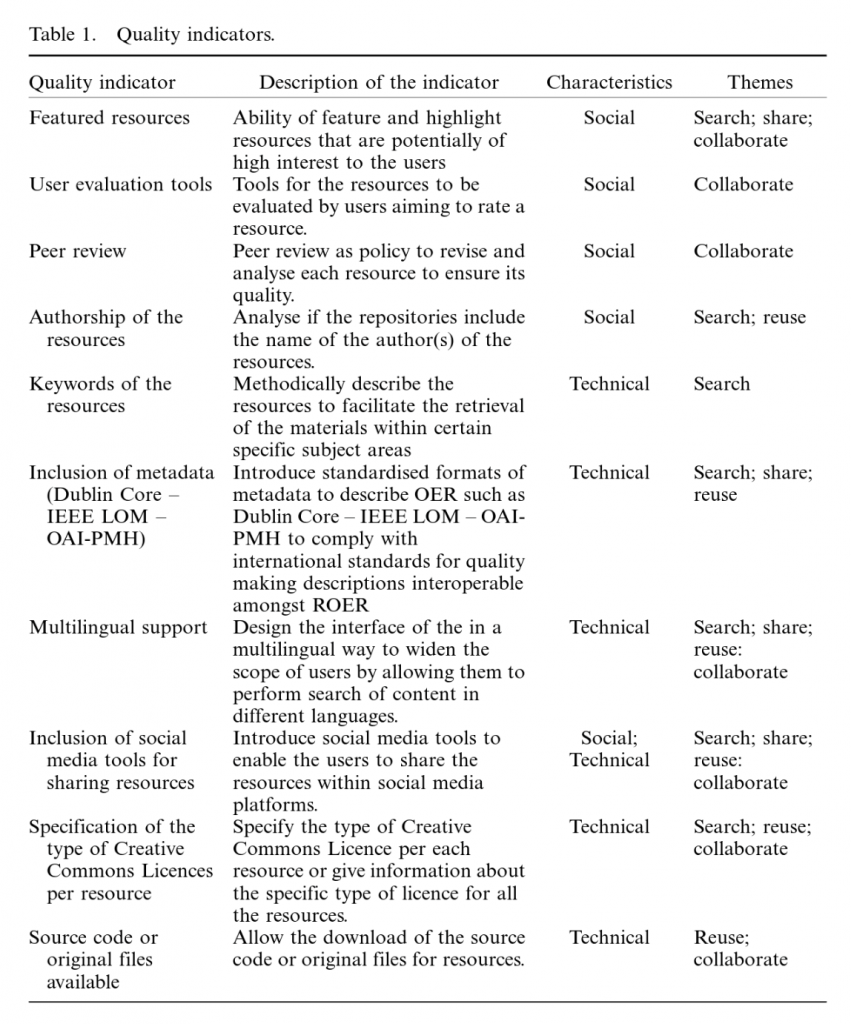
Drawing from our analysis of the literature, we would argue that the ethos underlying the creation of ROER can be said to comprise four key themes, which we refer to as SearchShareReuse, and Collaborate. The purpose of ROER is to support educators in searching for content, sharing their own resources, reusing and evaluating materials, and adapting materials made by or in collaboration with other members of the community.

The four themes can be understood in greater detail as follows:

  1. Search: As Google tends to be the first reference point for many people, it can be considered a ‘living index and repository for enormous content’ (Atkins, Brown, and Hammond 2007). Although the internet has among its archives billions of documents and multimedia materials that can be found by using search engines, it is a more complex task to ensure that the materials and documentation discovered in such searches are appropriate to a specific educational field and context. For Wang and Hwang (2004), it is difficult for educators to build and maintain personal collections and is ‘very time consuming to locate and retrieve distributed learning materials’. For Rolfe (2012), searching for OER in repositories facilitates the non-commercial reuse of content with minimal restrictions.
  2. Share: According to Hylén (2006) one of the possible positive effects of openly sharing educational resources is that free trade fosters the dissemination of knowledge more widely and quickly, so more people can access resources to solve their problems. For Windle et al. (2010) the quality assurance and good design of OER can enhance the reuse and sharing of OER, as ‘evidence suggests that those who feel empowered to reuse are more likely to themselves to share and vice versa’ (p. 16). According to Pegler (2012), if OER are not shared or reused, the main objective of the OER cannot be accomplished; also, the number of times in which a resource has been shared can be considered a measure of resource quality, as it provides an indication of the impact a particular resource has had.
  3. Reuse: A key concern of educators regarding the reuse of OER relates to the contextualisation of resources; to adapt, translate or reuse materials for use in different socio-cultural contexts could potentially be more difficult or costly than creating new resources. To alleviate these challenges, the main impetus must come not from technologies but from pedagogical communities where academics and teachers are both, content producers and users (Petrides and Nguyen 2008). The practice of reusing content has in the past been considered ‘a sign of weakness’ by the academic community, but this point of view has been changing as the OER movement is increasingly embraced by academics which are willing to share their content with others (Weller 2010).
  4. Collaborate: OER repositories, if well designed, can serve to facilitate different communities of users who collaborate in evaluating and reusing content and co-creating new materials by encouraging the discussion around improvement of resources (Petrides and Nguyen 2008). Though traditionally teaching materials were produced within the context of a classroom, OER can be created collaboratively in virtual spaces (McAndrew, Scanlon, and Clow 2012). ROER have potential as a framework in which ‘various types of stakeholders are able to interact, collaborate, create and use materials and processes’ (Butcher, Kanwar, and Uvalić-Trumbić 2011).

Whitworth, A., Garnett, F., & Pearson, D. (2012). Aggregate-then-Curate: how digital learning champions help communities nurture online content. Research in Learning Technology, 20. https://doi.org/10.3402/rlt.v20i0.18677

The authors refer to the ‘Aggregate-then-Curate’ model as ‘A/C’ and ‘Digital Learning Champions’ as ‘DLCs’
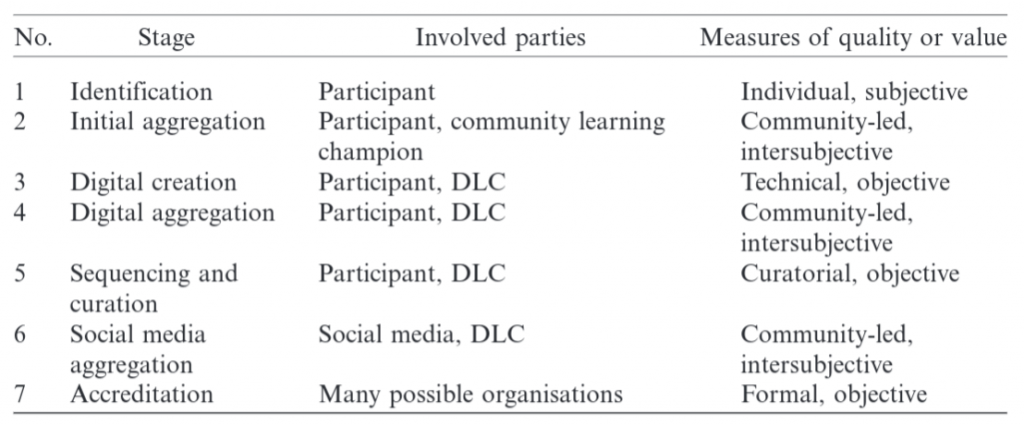
(1) Identification: The initial motivation for creating resources must come from the community participant (an individual, or a group), even if the motivation is in response to an external stimulus, e.g. a request to participate in a project. There will be at least one existing resource that the participant has in mind. This may be a physical object, a text (digital or otherwise), or tacit knowledge such as a skill, personal narrative, etc. The resource belongs to the participant and not to the project or to the partner institutions.

(2) Initial aggregation: This stage begins the process of connecting together resources by revealing links between them, suggesting appropriate groupings, potential learning pathways and so on. This is a social process and so must involve other members of the community, but not necessarily involve digital media. Often, it will take place very informally, as community members validate one another’s opinions about what information is useful, sometimes explicitly but often with reference to implicitly held, shared views – the sort of thing that binds people together in “communities” in the first place. However, it may also involve more organised and/or formal processes. What this stage entails is the intersubjective validation of initial, subjective ideas by members of the community.

(3) Digital creation: Once resources and connections between them have been identified by the community, some form of digital representation can be created. Even where some existing resources, first identified then aggregated in Stages 1–2, are already in digital form, the connections between them may need expressing as digital content in their own right.

A DLC would help here if they were at a different “developmental phase” in their work with, and experience of ICT, and could thereby provide technical assistance to the creation of digital artefacts. A particular resource might be very relevant and timely. However, its usefulness will be diminished if it is, for example, an inaudible recording. Is metadata in place, can the resource therefore be found by others? Is the appropriate format, or medium, being exploited? Is the material legal? These are more objective filtering criteria than apply at earlier stages.

(4) Digital aggregation: At this stage, resources are informally aggregated in a community-driven way. Digital aggregation involves using social links that either already exist (and may, or may not, have played a role in the initial aggregation at Stage 2), or which are discovered at the digital creation stage. Once again, this process may be supported by a DLC.

(5) Sequencing and curation: Sequencing is when the aggregation process takes on a more structured form. The collection of resources begins to demonstrate its potential to solve problems or drive learning outcomes both within and outside the community. Learning pathways or other broader narratives begin to be addressed through the aggregation process in a coherent way.

This is the stage at which curation comes into play. The subjective and intersubjective values assigned to the community informational resources by individuals and other community members, are validated here by interests that are partly external. This is a significant moment for the collection. If “curator” is broadly defined as “a person in charge of something … a guardian” (from Chambers English Dictionary), curation can therefore be defined as the management of a collection of resources at a fundamental level. As Simon (2010) recognises, and as our background discussion concluded, it is the level of participation in curation that is significant. Sequencing is the stage at which the resources’ quality begins to be judged by institutions that may still be familiar with the general context from which they emerged, but which are essentially external to the community. The role of a DLC here would be to facilitate the interaction across the boundary for mutual benefit, helping the community members reflect on, and thereby learn from, the interaction: but also helping the institution learn from the community.

(6) Social media aggregation: Their quality validated by a wide range of interests that remain local, resources that reach a certain standard – judged either by technical quality, informational quality, or widespread relevance and appeal – are then widely disseminated. The resources “go viral” in some form or another. The community that is now validating them and assigning them value is now much wider in scope and may exist in contexts that are quite distinct from that in which the resources initially emerged.

The effective use of a social media aggregator, such as a blog or a wiki or a more dedicated social media aggregator offered by a provider, would represent a shift in the participants’ mastery of a range of social media. This would indicate that they have a range of effective digital skills to use to curate digital content, as well as to negotiate with a number of third parties including groups, such as local history groups, as well as cultural and educational institutions.

(7) Accreditation: Collections of resources may be recognised as definitive, publishable, in need of protection, or other such formal recognition of their value (quality, distinctiveness, relevance). Individuals and communities may have their work on the resources recognised by the formal award of credit from an educational provider, or some other mark of status or achievement, perhaps an exhibition, further commissions, etc.

It must be stressed that this model is an ideal. In reality, later stages are often never reached, and some may be bypassed, or take place without the participation of effective learning champions, adequate levels of community participation, and so on. 


Di Blas, N., Fiore, A., Mainetti, L., Vergallo, R., & Paolini, P. (2014). A portal of educational resources: providing evidence for matching pedagogy with technology. Research in Learning Technology22. https://doi.org/10.3402/rlt.v22.22906

Learning object repositories can be difficult to navigate, and the educational material difficult to integrate into online courses. Schoonenboom, Sligte, and Kliphuis (2009) observe that the literature on the reuse of learning materials has largely focused on the development of materials. The authors developed guidelines that support staff and/or management in cases of (un)successful reuse of existing digital materials and provided methods for teachers in higher education in such cases. 

The authors observe that the tendency of current repositories is to retain content in the form of a broad mix of text documents, videos, audio files and graphics (EDRENE 2009). It also emerges that a few repositories include non-digital materials (e.g. text books). A little less than a third of repositories surveyed have a mix between free and commercial material. What is relatively clear is that educational repositories are mainly created to share learning objects, often characterised by metadata or ready-made courses, intended as an organised set of learning resources related to a specific discipline. However, they largely fail to provide a whole, fully described and reproducible learning experience that can clarify when, where and how materials, digital or not, were used; how the learning process was organised; what educational goals were planned; which educational benefits were generated and what the role of the technology was.


It’s not an in-depth analysis, just a quick look at one particular journal. However, I’m pleased with what I came away with. If you’re reading this and know related stuff I should be aware of, please share in the comments below!

31 Jul 14:37

Disadvantages of a Lingua Franca in Philosophy

Eric Schwitzgebel, The Splintered Mind, Jul 26, 2019
Icon

The use of English as the common language (lingua franca) for any discipline, not just philosophy, has its risks (and this would be true for any language, not just English). The author identifies three concerns (quoted):

  • The current situation puts disproportionate burdens on non-native speakers.
  • The nuances of ordinary language matter.
  • Robust, partially separate traditions can nurture diversity of thought.

All quite true. Thinking and learning in different languages forces you to see the world differently and talk about it differently.

Case in point: in English, you can start a sentence without knowing where it's going to end. That's because things like tense and gender are relatively fluid. But in French (so I learned) what you really need to do is to frame the entire sentence first, before uttering the first word. What is the tense? What is the subject? Only then can you know the correct words to use. This is a different way of thinking, and causes you to think of sentences themselves differently.

Web: [Direct Link] [This Post]
31 Jul 14:36

The New Mobility Part 1: Exploring the Challenges in Planning for Electric Micro Mobility

by Alexandra Doran

The wave of electric micro mobility: it’s happening fast here in Canada.

From e-bikes, to e-scooters, to e-boards and segways, increasingly cities in BC and beyond are speaking out about the need to accommodate such emerging technologies, while simultaneously grappling with how to do so.

Written in 1957, BCs Provincial Motor Vehicle Act (MVA), whose initial design was to regulate motor vehicles and their drivers, has proven to be a significant barrier in the creation of a more hospitable environment for these rapidly emerging technologies and their riders.

While e-bikes are now legally able to operate on BC roads (operators must be at least 16 years of age and wearing a helmet, with electric motors capped at 500 watts) how to accommodate users who wish to use different electric technologies — such as e-scooters and e-boards — remains a big question.

Why? Current rules for what ICBC terms “low-powered vehicles”  states that certain forms of low-powered vehicles, including motorized scooters and skateboards, cannot be operated on roads, or sidewalks. The reason is that the MVA classifies such modes as a type of motor vehicle, but are those that do not meet provincial safety standards required for on-road use. As a result, travelers using such modes are restricted to private property that does not have public vehicle access, or, in some municipalities, off-street trails and pathways.

For all you Vancouverites out there, the City still currently prohibits the use of low-powered vehicles along the seawall and park paths. Why? Primary reasons include reserving space for people walking and cycling, as well as minimizing the potential for user conflicts (there are already many), particularly those at risk of being caused by large groups of people (e.g. tour groups) using a form of electrified travel technology they are unfamiliar with.

In sum, if you’re looking to keep your e-scooting and boarding legal in BC, your safest bet is to remain on your own property, or to check your city’s bylaws. That, or risk facing a couple hundred dollar fine.

Now, let’s pretend all of the legal restrictions were removed in BC. Planners and decision-makers would still have to adequately plan for such users, of whom can a) disrupt slower moving travelers such as pedestrians or cyclists (using non-electric bikes), and b) face heightened physical dangers when traveling on streets with faster moving vehicles. Accordingly, even with legal restrictions removed, it is worth thinking about the types of questions planners and decision-makers would likely be faced with. Examples include:

How do we regulate people travelling on such small, yet fast devices? (e.g. where should they be able to travel, and how fast) … Do we create new space in what is likely an already constrained street section? or, do we position such users in existing spaces where a variety of users are travelling at a variety of speeds?

Do we permit them on board transit? (e.g. buses, SkyTrain)

Where do we permit them to park?

In the case of scooter shares (as well as for other mobility share programs!), it is critical that planners and decision-makers consider the extent to which what is being offered is equitable. For example, if cities are embracing (or thinking about embracing) share programs, how will these technologies be accessed and paid for? where will they be located? or, if dockless, where will they be permitted to operate and dock? In essence, who are the target users of such systems, who could be the users, and in what ways might certain users be locked out from using such systems?

Given the potential socio-economic and environmental benefits of these technologies, planners and decision-makers must think about innovative ways, particularly while the BC MVA remains unchanged, to guide and protect travelers who are (despite current restrictions), or who wish to use these modes –  even if for now that means clarifying current laws by posting regulatory signage on streets and sidewalks.

Simply issuing tickets to people who are, often unknowingly, operating these technologies where they aren’t allowed is not a particularly welcomed solution for the effective protection and regulation of what is undoubtedly a growing population of travelers.

While BC has yet to amend its MVA, and off-street paths in the City of Vancouver remain off-limits, numerous opportunities exist to help move the needle on welcoming these new technologies. In part 2 of this series I will discuss these opportunities, of which include recommended changes to BCs MVA, as well as highlighting what other Canadian cities have accomplished in terms reforming provincial and municipal laws in an effort to to both welcome and regulate such technologies.

Photo credit: 06.Thursday.WDC.9August2018 by Elvert Barnes. Licensed with changes (cropped) under ShareAlike 2.0.

31 Jul 14:35

Open Knowledge Austria Dissolves

by Ton Zijlstra

The Austrian Open Knowledge Chapter is dissolving itself (link in German), a decision already made at a general assembly in December 2018. Judging by the website activities had petered out in recent years, the blog falling silent at the end of 2017.

Austria over the years has been an active country concerning open government data and open knowledge in general. Specifically I see the Austrian open data community as a globally relevant good practice example, one that I still regularly refer to. Already in 2010, when I spoke at an open data meet-up in Graz, and in subsequent years presenting at OGD Austria conferences and various other events, what stood out to me was the broad scope the Austrian open data community had. Academia, activists, the federal chancellery, state governments, city governments, start-ups, technologists and traditional re-users were all around the same table. Informal get-togethers and resulting relations formed a basis on which more formal structures and cooperative initiatives could grow. I think such a solid community fundament is the key reason Austria was able to achieve a lot on open data in the absence of any legal framework to actively stimulate it, moreover with a constitution that enshrines civil service secrecy.

For a few years I was quite well informed about the Austrian efforts, through regular visits, and regular calls between German speaking community leaders from Germany, Austria and Switzerland, and me as the odd one out. Over time my connection grew more distant however.

With Open Knowledge Austria ceasing to exist, a chapter ends. I suspect the community substrate on which it could exist will endure, even if events, individual members lives and contexts are always in flux around us. It is laudable that OK Austria is actively deciding to dissolve. Organisations all too easily stumble into the pitfall that continued existence becomes the organisation’s primary goal. By dissolving, as Stefan Kasberger, OK Austria’s chair, wrote, one releases its hold on specific topics and niches in an ecosystem, and it becomes possible for new things to emerge over time.

Linz, OGD Austria
At the 2012 OGD Austria conference in Linz, a wall at the venue carried the text, near the floor obviously, “Above starts down below”. It seemed a good description of how the Austrian open data efforts were based on solid bottom-up community building to me at the time.

31 Jul 14:34

A Couple Handy Tricks for Text Measurement Caching

NetNewsWire’s timeline is fast — you can resize it and scroll it quickly.

It has to do a bunch of text measurement in order to do its layout. Text measurement is notoriously slow, though, so we use a cache.

How tall is this text?

Let’s concentrate on the issue of knowing how tall some text is. We know the available width (because we know the width of the timeline at any given moment), and we need to know the height of some text.

Let’s assume we always ceil the height and width and use integers in a WidthHeightCache of [Int: Int] (width: height). Each string passed to our sizer gets its own WidthHeightCache.

The first time it’s asked to get the height for a given width, there’s nothing in the cache, so it has to measure the text and store it in the cache.

And then the second time it looks up the width in the cache — if it’s there, then it returns the cached value. Otherwise it does the text measurement again.

But here’s where it gets smart…

Trick #1: in-between widths

Let’s say the first time the width was 100, and the second time the width was 200. Both results are in the cache.

If, on the third call, the width is 150 — between 100 and 200 — and the cached height for 100 and 200 are equal, then the height for 150 is necessarily that same height. We can avoid text measurement and just return the cached value. (And we keep the cache from growing on each call.)

Trick #2: estimated single-line height

What if, on the third call, the width is 250 instead of 150? There’s another trick. When the sizer is initialized, it can come up with an estimate for the height of a single line of text, just by using a short string (with tall characters) and a very large width.

This estimate means you will be able to know if the cached height for 200 is a single line. If that cached height is suitably close to the estimated single-line height, then you can skip text measurement again and just return the cached height for 200 — since more width can’t make the text higher.

The code in NetNewsWire for this isn’t fully generalized. It maxes out at two lines, since that’s what NetNewsWire uses. But it could form the basis for your own sizing/caching code.

PS Note: this is all because I don’t use Auto Layout on table cell views, for performance reasons. I use Auto Layout everywhere else — just not on table cell views.

31 Jul 14:34

A Third Text Measurement Caching Trick

I forgot about this one — I should have mentioned it in the previous article.

Let’s say the source text that gets displayed in your timeline could be quite long. NetNewsWire has this issue: the summary text is the text of an article (with HTML tags stripped).

This text could be many thousands of words long. But the timeline will only ever display at most a couple lines — even with an absurdly wide timeline on a large screen, it will never display thousands of words.

So here’s the trick:

Use a truncated version of the text rather than the entire text. For the truncation limit, come up with a length that is beyond what could conceivably fit in the space.

This way text measurement will be faster since it’s measuring less text.

(Also use this truncated text for the text field in the timeline.)

31 Jul 14:34

New Rail Systems for Camera Scanning Available

by admin

I’ve just finished a new batch of rail systems for camera scanning and I have a few additional ones available. These are among the very best tools for camera scanning slides and negatives with a DSLR. You can use just about any camera and macro lens. Faster, better, cheaper than a conventional scanner.
I have 5 rails and four light kits currently available. Here is the order page.

More info is in my book, Digitizing Your Photos.

The rails are $350/$375 depending on rail length. light kits are $200.

After making 50 or more of these, I’ve finally gotten it down to an assembly-line workflow, best done with at least five units at a time.


Drill press time! I’ve created a jig here so that I can properly place the access hole in the cover plate repeatably. 

The post New Rail Systems for Camera Scanning Available appeared first on The DAM Book.

31 Jul 14:33

Amazon as a boring retailer

by Benedict Evans

I sometimes think that if you could look in the safe behind Jeff Bezos’s desk, instead of the sports almanac from Back to the Future, you’d find an Encyclopedia of Retail, written in maybe 1985. There would be Post-It notes on every page, and every one of those notes has been turned into a team or maybe a product.

Amazon is so new, and so dramatic in its speed and scale and aggression, that we can easily forget how many of the things it’s doing are actually very old. And, we can forget how many of the slightly dusty incumbent retailers we all grew up with were also once radical, daring, piratical new businesses that made people angry with their new ideas.

This goes back to the beginning of mass retail. In Émile Zola’s Au Bonheur des Dames, a tremendously entertaining novel about the creation of department stores in 1860s Paris, Octave Mouret builds a small shop into a vast new enterprise, dragging it into existence through force of will, inspiration, and genius. In the process, he creates fixed pricing, discounts, marketing, advertising, merchandising, display, and something called "returns." He sends out catalogs across the country. His staff is appalled that he wants to sell a new fabric at less than cost; "that’s the whole idea!" he shouts. Loss leaders are nothing new.

Meanwhile, the other half of the story follows the small, traditional shopkeepers in the area, who are driven out of business one by one. Zola sees them as part of the past to be swept away. They’re doomed, and they don’t understand—indeed, they’re both baffled and outraged by Mouret's new ideas. Here’s the draper Baudu:

The place would soon be really ridiculous in its immensity; the customers would lose themselves in it. Was it not inconceivable? In less than four years they had increased their figures five-fold… They were always swelling and growing; they now had a thousand employees and twenty-eight departments. Those twenty-eight departments enraged him more than anything else. No doubt they had duplicated a few, but others were quite new; for instance a furniture department, and a department for fancy goods. The idea! Fancy goods! Really those people had no pride whatever, they would end by selling fish.

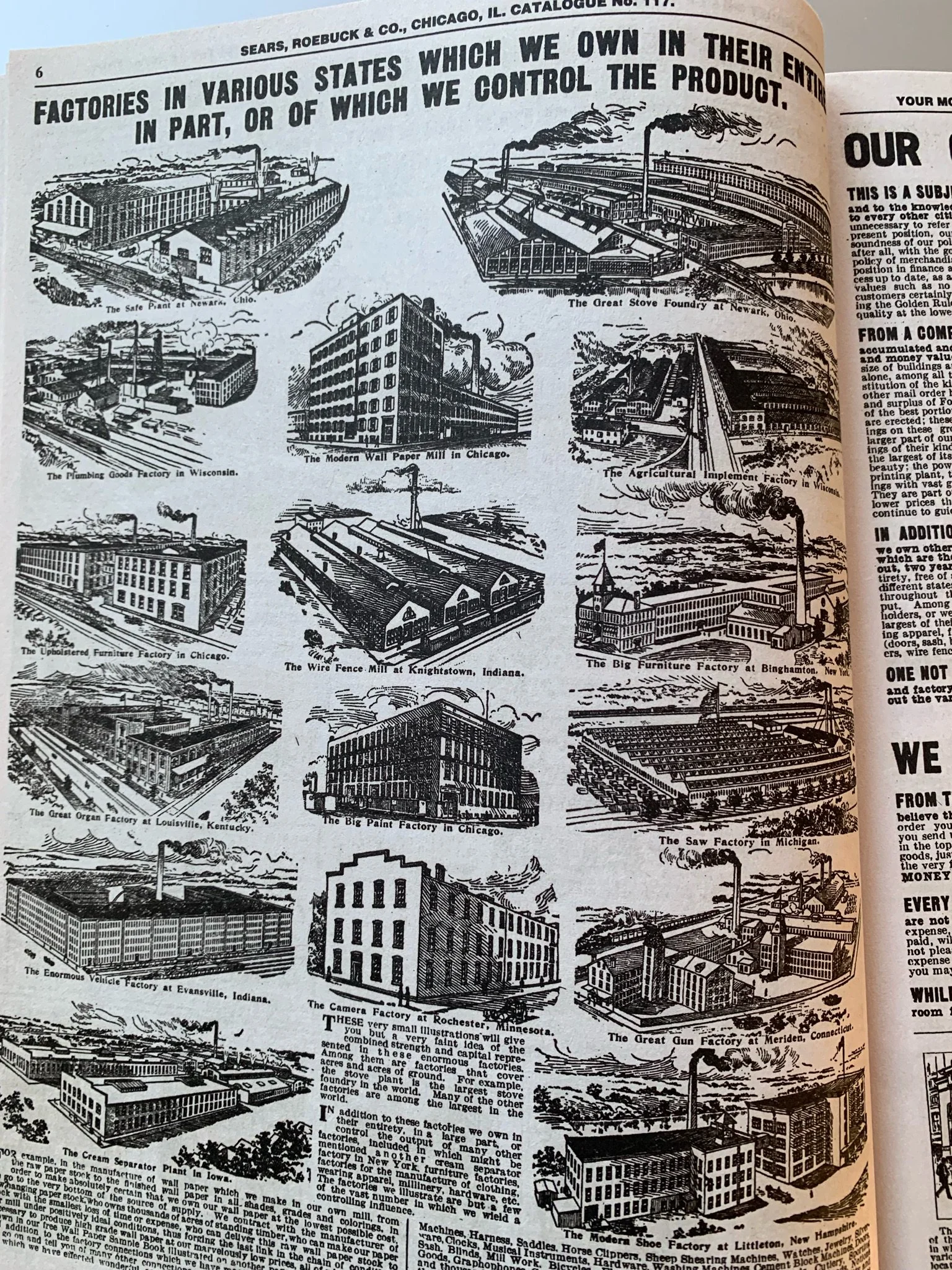
Mouret had a catalogue, but it was Sears Roebuck that used catalogues to transform retail again. The pages below come from the retailer's 1908 catalog; white label and private label products are not new either, and you can bet that Sears was using sales data to decide what market segments to enter next.

View fullsize D1ZGB3OV4AAKv0f.jpg
View fullsize D1ZF-jeU0AEklW3.jpg_large.jpeg
View fullsize D1ZF_3rVYAIJ4JC.jpg_large.jpeg
View fullsize D1ZGD4PV4AA6LDn.jpg

Amazon, of course, is the Sears Roebuck of our time, but it’s more than that. Amazon is systematically going through every branch of the idea tree around what retail is, and doing it without any pride. It’s trying everything that anyone has ever tried before, and anything else that it can think of that might make sense, as well. There is no-one saying "that’s a good idea, but we’re a website so we wouldn’t do that."

The clearest place to see this is in Amazon’s moves into physical retail. This is the opposite of pride or "principle." Amazon’s job is "to get you the thing," not "to be a website," so what are the best ways to do it? What else might work? The project to make a convenience store with no human checkout process is an obvious experiment, now that machine learning and computer vision offer a route to make it work. (There are a number of startups pursuing all the possible vectors to doing this.)

More interesting, though, are the Amazon Four-Star stores, physical retail stores —currently in New York and Berkeley, California—that only sell products rated highly by users on its site. I joked on Twitter that they feel as though they were designed by very clever people who have seen shops in Google Street View, but never actually been inside one. There's a sense of cognitive dissonance: the selection of products appears to be completely random. There’s a rice cooker, a Harry Potter Lego set, a cushion, a Roomba, a mixing bowl, a book about trees... It makes no sense. (In the words of Zola's Baudu, “Those people have no pride!”)

Of course, sometimes "it makes no sense" is the right reaction (remember the Fire Phone, after all). But when clever people do things that make no sense, it can be worth looking twice. Is this a new discovery model? A different way to change how people think about purchasing? Well, it’s another experiment.

All of this reminds me of stories about early Google, and how the company systematically rethought everything from first principles. Sometimes this was just a painful waste of time, as it learned the lessons everyone else had already learned, but sometimes the result was Gmail or Maps.

Sometimes the experiment is still in progress: though Amazon has managed to put Alexa into more than 50 million homes, it’s not yet clear what strategic value it will gain (I wrote about this here). But it’s better to own the experiment and get the option value than to sit on the business you already have and watch someone else try something new.

On the other hand, it’s interesting that Amazon seems to be doing as much experimentation as possible around the logistics model—from stores to drones to warehouse robots of every kind—but much less around the buying experience, other than small-scale tests of the Four-Star stores. After all, historically, department stores were about pleasure as much as they were about convenience or price. They changed what it meant to "go shopping" and helped turn retail into a leisure activity.

This has always been the gap in the Amazon model. It’s ever more efficient at finding what you already know you want and shipping it to you, but bad at suggesting things you don’t already know about, and terrible whenever a product needs something specific—just try finding children’s shoes by size.

This is probably inherent in the model. For Amazon to scale indefinitely to unlimited kinds of products, it needs to have more or less the same commodity logistics model for all of them. That’s the line it’s never been willing to cross. Amazon doesn’t do "unscalable." And yet, while we now know there is nothing that people won’t happily buy online, not everything will fit that commodity model. So maybe that’s the real test of Amazon’s pride: can it work out how to let us shop, rather than just buy?

31 Jul 14:33

Mobile Tech Podcast 120: Nokia 9 PureView review, Qualcomm Snapdragon 855 Plus, Neuralink implant, and moon landing anniversary with Ian Cutress of AnandTech

by Myriam Joire

As promised, I’m putting my podcast on my YouTube channel! Please subscribe (RSS, Apple, Google, Pocket Casts) for past and future episodes…

Current deals:
– OnePlus 7 8+256 Gray, $469.99: https://www.gearbest.com/cell-phones/pp_009591521059.html?lkid=45651578
– Huawei P30 Lite 6+128, $299.99: https://www.gearbest.com/cell-phones/pp_009928688347.html?lkid=46171597
– Get free Supercharging for your Tesla: https://ts.la/myriam23187

Support the podcast:

Show notes:
Join me for episode 120 of the Mobile Tech Podcast with guest Ian Cutress of AnandTech — brought to you by Audible. Are you ready for some science? In this episode we review the Nokia 9 PureView and discuss Qualcomm’s new Snapdragon 855 Plus, along with Neuralink — Elon Musk’s just revealed brain-machine implant. We also geek out about Apollo 11’s moon landing (which took place 50 years ago), and cover news from ASUS, Nokia, and Huawei… Bring out your calculators for this one!

Show links:
– Support the podcast with Audible: http://AudibleTrial.com/MobileTech
– Ian Cutress: https://twitter.com/IanCutress
– Neuralink implant: https://www.theverge.com/2019/7/16/20697123/elon-musk-neuralink-brain-reading-thread-robot
– 50th anniversary of moon landing: https://www.vox.com/science-and-health/2019/7/19/20698111/50th-anniversary-of-the-moon-landing-google-doodle
– Qualcomm Snapdragon 855 Plus: https://www.anandtech.com/show/14641/qualcomm-announces-snapdragon-855-plus-a-higher-bin-sku
– ASUS ROG phone II: https://www.androidpolice.com/2019/07/16/asus-rog-phone-2-confirmed-to-have-120hz-display/
– My Nubia Red Magic 3 mini review: https://www.androidpolice.com/2019/07/16/forget-gaming-the-red-magic-3-is-the-most-powerful-phone-under-500-in-the-us-right-now/
– My Nubia Red Magic 3 unboxing: https://www.youtube.com/watch?v=Ge4slteWkAc
– My Xiaomi Mi 9T unboxing: https://tnkgrl.com/2019/07/25/xiaomi-mi-9t-unboxing-video/
– Nokia 2.2 now available in the US: https://www.theverge.com/circuitbreaker/2019/7/16/20696286/nokia-2-2-price-small-notch-us-customers-budget-phone
– Nokia 9 PureView: https://www.androidauthority.com/nokia-9-pureview-review-962171/
– My Nokia 9 review: https://tnkgrl.com/2019/07/28/nokia-9-pureview-review-video/
– Lens aberration problem solved: https://petapixel.com/2019/07/05/goodbye-aberration-physicist-solves-2000-year-old-optical-problem/
– BoringPhone: https://www.stuff.tv/hot-stuff/smartphones/stripped-down-boringphone-saves-you-smartphone-addiction
– Shipments to Huawei resuming from US partners: https://www.bbc.com/news/technology-48771368

Subscribe to my podcast: http://www.mobiletechpodcast.com
Subscribe to my YouTube channel: https://www.youtube.com/MyriamJoire
Follow me on Twitter: https://twitter.com/tnkgrl
Follow me on Instagram: https://www.instagram.com/tnkgrl/
Read me on GeekSpin: https://geekspin.co/author/myriam-joire/
Read me on Android Police: https://www.androidpolice.com/author/myriam-joire/


31 Jul 14:33

Secret Design Bunker

by peter@rukavina.net (Peter Rukavina)

My friends at Nine Yards Studio have been skunkworking away for months now, inside a sonically-isolated design shop floating inside the courtyard of their headquarters on Fitzroy Street, on a project that seeks to take their considerable skills dealing with Big Things into the world of Small Things.

When they gave me an early tour this winter, I casually referred to the effort, in my affected way, as taking place in their “secret design bunker.”

This week I was overjoyed to receive an invitation to the public launch of the… Secret Design Bunker.

Finally, after years of vain frustration, toiling in the mines of coming up with names for things (here, here), I hit the big time!

There’s a blog post (emphasis mine, obviously):

Stacked, is the Secret Design Bunker’s first series of design explorations. The series celebrates plywood as a material and experiments with the potential forms it can be used to create. Children curiously stack wood blocks on top of one another; the Secret Design Bunker explored the potential forms of plywood could create with the same sense of curiosity.

And an invite:

Secret Design Bunker Popup Invite

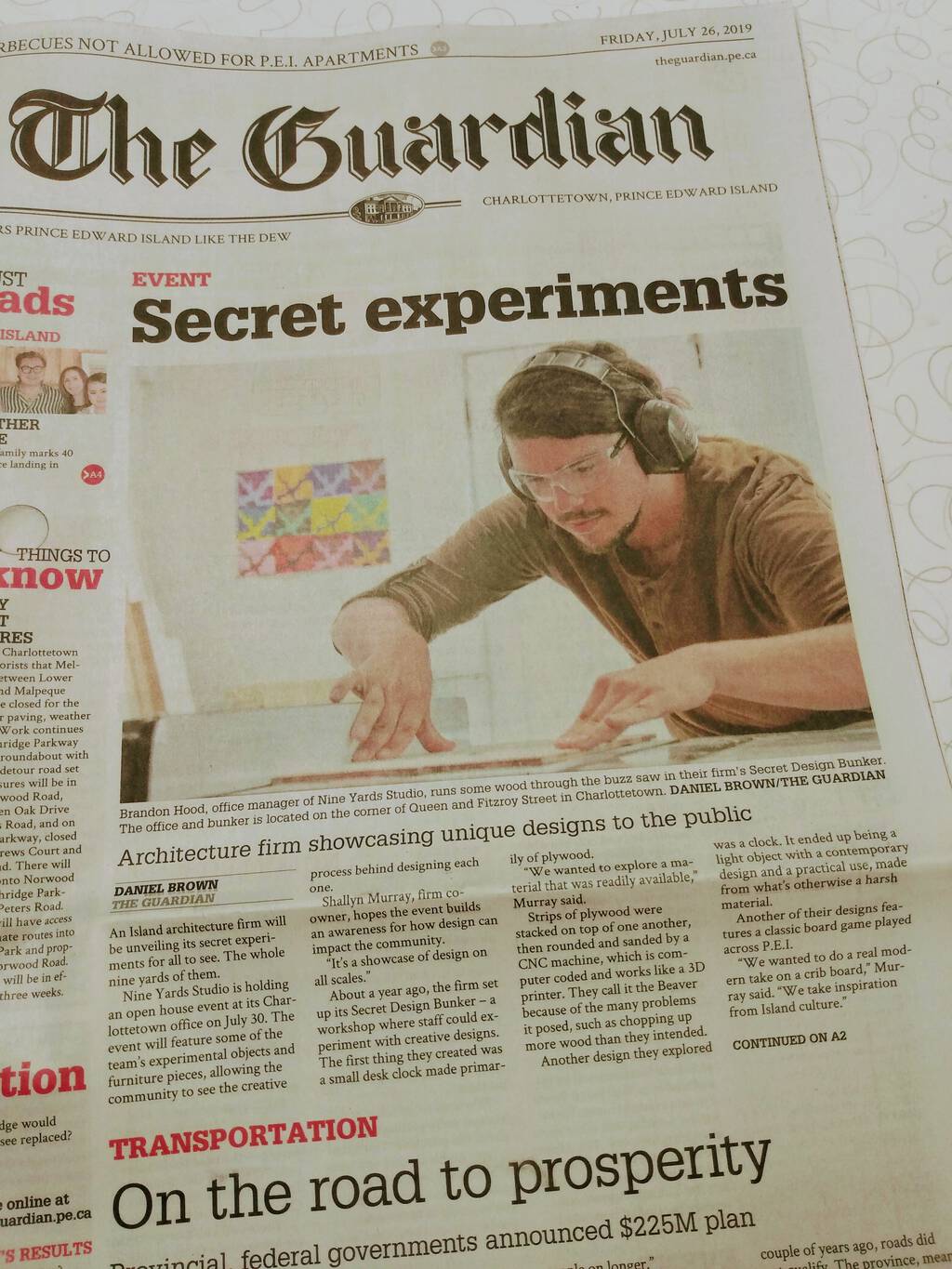
And a front page story in The Guardian this morning:

Front Page of The Guardian, July 26, 2019 (detail)

The hatch to the Secret Design Bunker gets opened to public air on Tuesday, July 30, 2019 at 12 noon at 63 Fitzroy Street in Charlottetown.

31 Jul 14:33

Replied to On Mobile Blogging by Aaron Davis ...

by Ton Zijlstra
Replied to On Mobile Blogging by Aaron DavisAaron Davis
You provide an interesting reflection on workflows Ton. Personally, I spend so much of my writing of late on my Nexus 6P. For longer posts, I still often start in Trello using Markdown, however for my collected posts I utilise the post editor. Although I have tinkered with Indigenous, I have become ...

Thank you Aaron, for providing some links to your own blogging work flow in response to mine. Thinking about specific needed parts of such a flow in general, and then a possible mobile version of it makes sense, without trying to come up with a perfect flow. Tools and technology choices change all the time, and perfection likely means stasis. One aspect from your description stands out to me, over time collecting links, remarks and individual on ‘cards’ until they accrue into a posting. Currently that isn’t part of my blogging flow, but very much of how I learn and think, so a gap to address. My current blogging flow supports more a style of primary and first order responses, reacting to incoming links, replies or short observations. Making my basic flow work on mobile in part is intended to be able to already have that out of the way so I can get around to more long form original stuff. Reading your links made me realise that my current information strategies badly support that latter style of blogging.

31 Jul 14:33

Two New Testing-themed Addins + One New and One Updated CRAN Package

by hrbrmstr

It’s been yet-another weirdly busy summer but I’m finally catching up on noting some recent-ish developments in the blog.

First up is a full rewrite of the {wand} pacakge which still uses magic but is 100% R code (vs a mix of compiled C and R code) and now works on Windows. A newer version will be up on CRAN in a bit that has additional MIME mappings and enables specifying a custom extension mapping data frame. You’ve seen this beast on the blog before, though, by another name.

wand::get_content_type("/etc/syslog.conf")
## [1] "text/plain"

Next is the {ulid} package (which I’ve also previously discussed, here) which is also now on CRAN to meet all your Universally Unique Lexicographically Sortable Identifiers-generation needs.

ulid::ulid_generate()
## [1] "0001EKRGTCRSVA4ACSCQJA61A0"

ulid::unmarshal("0001EKRGTCRSVA4ACSCQJA61A0")
##                    ts              rnd
## 1 2019-07-27 08:27:56 RSVA4ACSCQJA61A0

The [{testthat}] gravity well has caught over 4,000 CRAN packages but it’s not the only testing game in town. The {tinytest} package take slightly more minimalist approach and has the added benefit that the tests come along for the ride with the package, which makes it easier to solicit said test results from package users having problems with your code.

I still use {testthat} in most of my packages but gave {tinytest} a spin for a few of my more recent ones and it’s pretty nifty. The biggest feature I missed when switching to it was the lack of Cmd-Shift-T support for it in RStudio. Since I kinda still want Cmd-Shift-T for all the packages I have that use {testthat} I whipped up an RStudio addin that adds an Addin context menu item (below) and placed it in {hrbraddins}.

If you load up that package you can then bind something like Cmd-Option-Shift-T to that function and have equally quick keystroke access to package tests during development.

> hrbraddins:::run_tiny_test() # from within the {wand} pkg
Running test_wand.R...................   52 tests OK
All ok (52 results)

Finally, I got bit in a recent CRAN submission because I have remote CRAN checks turned off (soooo sloooowww) but had a 404’ing URL in the documentation of one of the methods in the package. Since I have a few more submissions coming up in the next 6-8 weeks I decided to whip up an RStudio addin for an on-the-fly package URL checker that wraps the exact same checks CRAN does for these submissions. (I keybound this to Cmd-Option-Shift-U and you can catch a glimpse of it in the addins menu in the above screenshot).

The output of one run is below. I deliberately modified two working URLs to show what you get output-wise when everything isn’t perfect:

> hrbraddins:::check_package_urls()
Gathering URLs for {wand} (this may take a bit)
- Looking in HTML files...
- Looking in metadata files...
- Looking in news files...
- Looking in Rd files...
- Looking in README files...
- Looking in source files...
- Looking in PDF files...

Checking found URLs (this may also take a bit)
# A tibble: 13 x 4
   url                                                        parent      status is_https
   <chr>                                                      <chr>        <dbl> <lgl>   
 1 https://gitlab.com/hrbrmstr/wand/issuessss                 DESCRIPTION    599 TRUE    
 2 http://gitlab.com/hrbrmstr/wand                            DESCRIPTION    200 FALSE   
 3 https://github.com/jshttp/mime-db                          man/wand.Rd    200 TRUE    
 4 https://github.com/threatstack/libmagic/tree/master/magic/ man/wand.Rd    200 TRUE    
 5 https://ci.appveyor.com/project/hrbrmstr/wand              README.md      200 TRUE    
 6 https://codecov.io/gh/hrbrmstr/wand                        README.md      200 TRUE    
 7 https://cranchecks.info/pkgs/wand                          README.md      200 TRUE    
 8 https://github.com/r-lib/remotes                           README.md      200 TRUE    
 9 https://github.com/threatstack/libmagic/tree/master/magic/ README.md      200 TRUE    
10 https://keybase.io/hrbrmstr                                README.md      200 TRUE    
11 https://travis-ci.org/hrbrmstr/wand                        README.md      200 TRUE    
12 https://www.r-pkg.org/pkg/wand                             README.md      200 TRUE    
13 https://www.repostatus.org/#active                         README.md      200 TRUE  

The {hrbraddins} package itself is just a playground and will never see CRAN, so do not hesitate to yank anything from it and put it in a safer and/or more accessible location for your own work.

FIN

For the packages, file issues and PRs the same way you always would. Same goes for the addins.

31 Jul 14:32

On Switching from iPad to Chromebook in School

by Fraser Speirs

This summer, my school is making a substantial change in our 1-to-1 programme. After nearly ten years, we are switching from iPad to Chromebook. I thought I would write a bit about why we are doing this.

We have refreshed our iPad deployment twice now. We started in 2010 with the original iPad, then got the 4th Generation iPad in 2013 then the 9.7” iPad Pro in 2016. Now, here we are in 2019, ready to refresh again.

The first thing I’d like to note is that this isn’t a spur of the moment decision, made in a fit of pique. I have internal papers at school that date back to 2014 exploring whether we should stick with iPad or move to Chromebook. I’ve owned Chromebooks since the Samsung Series 3 came out in 2012. I have been tracking ChromeOS for a long time.

iTunes U: A Burning Platform

The problem with Apple’s iOS education offerings that started to really make me wonder what the future held came when I realised that iTunes U was clearly just being left to die a slow death. At the time of writing, iTunes U still does not support basic iOS multitasking features that were introduced in iOS 9 - four releases ago.

I found myself looking enviously at features in Google Classroom. Features that I had filed radars for years previously and which still lie open. Features like scheduled posts, homework summary emails to parents, posts to individual pupils or groups in the class.

Whatever learning platform a school uses is a vital part of the work of the school and, if it’s not evolving, it’s dying. Make no mistake: iTunes U is a dying service and it would be more honest and respectable of Apple just to announce the date on which it will be put out of its misery.

iOS Management

I’ve been doing iOS sysadmin since before it was a thing that you could reasonably do. It’s way easier now than it has ever been in the past, but it’s still not easy enough. Too often, something or other just behaves strangely. Whether it’s a device that doesn’t receive timely push notifications or which won’t install a particular app over MDM for reasons which have an error message but no clear explanation or it’s that one iPad that thinks it’s not enrolled in DEP when it definitely is.

The worst issue by far in iOS sysadmin is backup and restore of supervised devices. This process has never been properly documented and it seems to change freely with iOS versions. Every time I have to do it, it takes at least three hours of experimentation to get something that mostly works.

Still, there are many things that are excellent about iOS management and it’s a very controllable platform for many purposes. It’s particularly good for sitting formal exams with.

iPad Hardware

We’ve been using 9.7” iPad Pro hardware in this cycle and, while the hardware remains fast and capable, I have not been very pleased with durability. We have seen a lot of fatigue-related screen damage - that is, damage not caused by a catastrophic accident but rather just repeated put-downs in a schoolbag.

We have also seen several other kinds of issues with our iPads this year that haven’t been happy. I’ve seen video cards go, batteries just stop working, devices just refusing to start up or restore correctly. This is to say nothing of the very poor quality of chargers and cables that Apple ships with iPads. Charger and cable damage is a constant problem in 1:1 programmes.

iPad longevity in a 1:1 programme is something that you need to consider too. I would not feel at all confident in going into a fourth year with our current set of hardware. I don’t know if the more education-focused 6th Generation iPad is better, but I’ve been disappointed in this hardware cycle.

Official iPad repairs are now very expensive. When we started, we were paying about £127 for an iPad screen repair at the Apple Store. We are now paying £365. Buying AppleCare doesn’t help, because AppleCare is tied to specific serial numbers and I don’t know in advance which iPads are going to break. You’d have to buy AppleCare for every iPad, which is not cost effective, even at current damage rates.

When I realised I could buy 1.8 brand new Chromebooks for the cost of one Apple iPad repair, I started to think seriously about what we had to do.

Learning and Teaching

When we started with iPad in 2010, I suppose I thought that we were heading into a new era in education with creativity at the forefront. Particularly, I thought that Scotland’s Curriculum for Excellence was going to usher that in. We were led to believe that all different kinds of assessment materials would be considered appropriate for submission to our exam board. None of that happened, and we seem to be moving away from that idea at a steady clip.

At the same time, it’s worth noting that we live in quite a different world in 2019 than obtained in 2010.

In August 2010, Google hadn’t yet shipped the Cr-48 Chromebook. Dropbox was only 3 years old; iCloud was a year away; Google Docs was a year old and Drive, Sheets and Slides were all a couple of years in the future. Mobile networking was not well developed. WiFi wasn’t all that fast. We were living on a 5 Mbit internet connection shared across our whole school.

Today, many things are different but a very significant factor is the sheer speed and availability of high-speed networking. We are looking at a world where TV, movies, virtualised PC desktops and, soon, Triple-A video games are able to be delivered to you over the network with no loss in quality.

It’s also worth noting the significant impact that the rise of tablets has had on the design and capability of laptops. In 2010, laptops weighed four-plus pounds - not including a weighty charger - and got 3-4 hours of battery life. Today, they’ve halved in weight and more than doubled in battery life while getting faster, more robust and more flexible. In the final analysis, I think that the long-term effect of tablets will be that they forced laptops to get better. You can increasingly see with devices like the iPad Pro that any significantly advanced tablet usage these days is barely distinguishable from using a laptop.

When I look at the world now, I see deep and real collaboration happening across the network. We are starting to see the end of people emailing documents back and forth. Synchronous and asynchronous collaboration with people across the internet is a serious technical and social skill that seems very important to me these days.

I feel that Apple has not grasped this issue correctly. There are only two ‘productivity clouds’ in the game: GSuite and Office 365. In 2010, we chose our computers and ran the software that came on our computers. In 2019, I think that we choose our productivity cloud and get the computer that best works with that cloud. Apple simply has not and is not competing in this space and is therefore at the mercy of forces it does not control.

It seems to me that, for a school, the choice is whether you’re a GSuite school or an Office 365 school and everything flows from that decision. It’s quite difficult to transition from one productivity cloud to another and nobody will do that without a compelling reason. Google and Microsoft are matching each other blow-for-blow in cloud features, partly for each to make sure that the other never develops such a compelling advantage.

That leaves Apple, happily making what might be the ne plus ultra of local-state computing. The best fat clients ever made. As Benedict Evans puts it, the best is the last. However, I think this model of computing is becoming increasingly irrelevant and I honestly don’t know if I can envisage a long-term future for software outside of the cloud.

The kinds of software that don’t run on the cloud these days are more constrained by the difficulty of getting the data on which they operate into the cloud, rather than the difficulty of running the software itself in the cloud. For example, editing 4K video in the cloud is difficult because moving raw 4K footage to the cloud is difficult, not because building a cloud-based video editor is beyond our reach.

So what do I hope to get out of our transition to Chromebooks? I hope that we will be able to better prepare our young people for a future where work is done collaboratively in the cloud rather than on local computers. I hope to use Google Classroom to improve the workflow between teachers and pupils. I hope to see a reduction in workload for teachers through collaboration on documents with pupils and the use of tools like self-marking Google forms, and mark recording in Google Classroom.

I would like a reduction in my own sysadmin workload when it comes to swapping out damaged devices and administering new ones. We will save 56% off our current iPad budget and I hope to be able to use that to provide new educational experiences for our pupils.

It was gratifying to see Apple put serious effort into getting the desktop version of Google Docs working in iPadOS 13. However, it’s too little too late for us at this stage in our development. We might come back to iPad in years to come but, for the next four years at least, we’re going to see what GSuite and Chromebooks can do for us.

31 Jul 14:31

Minimum Viable Ecosystem

by Stowe Boyd

The MVE is the least complex ecosystem that allows participants to learn about a more complex, future ecosystem with the least effort

Continue reading on On The Horizon »

31 Jul 14:28

Fifteen years ago my wife explained in a confer...

by Ton Zijlstra

Fifteen years ago my wife explained in a conference panel at BlogTalk that tools for online expression should really be much easier, and she was only using the tools she was using because I was ‘a geek‘ when it comes to online tooling.

Nothing much has changed it seems in the years since 2004. This morning, as a result from our conversations during our holiday about mobile blogging, we set up her personal blog for better IndieWeb usage. Earlier I had already added Webmention, but now we added IndieAuth, Microsub and Micropub. That way she can now use Indigenous to read feeds and blog on the go from her mobile, using Aperture to collect her feeds. (Indieauth is needed to authorise both Indigenous and Aperture to recognise and use her WordPress site, and Microsub for reading feeds, Micropub for posting to the blog.)

31 Jul 14:27

Traveling slow

by Liz

It was a good decision so far to break this trip in half. We did one short flight to Houston, stayed in the airport hotel, and will take off later today for Ecuador. I had a swim last night in the hotel pool so I even got in some exercise. This is in theory going to mean I’m not physically destroyed at the other end of the trip (and then on the way back we’ll stay in Houston a few days to visit my parents and grandma). So far so good!

I am planning to fritter away some time in the airport this afternoon before the flight playing Ingress and Pokemon as I ride the tram around and around. Perhaps also an airport “spa” leg massage.

31 Jul 14:27

What Is the Contract for the Web For?

by Ton Zijlstra

Very unsure what to think about Tim Berners Lee’s latest attempt to, let’s say, re-civilize the web. A web that was lost somewhere along the way.

Now there’s a draft ‘contract for the web‘, with 9 principles, 3 each for governments, companies and citizens.

It’s premise and content aren’t the issue. It reads The web was designed to bring people together and make knowledge freely available. Everyone has a role to play to ensure the web serves humanity. By committing to this Contract, governments, companies and citizens around the world can help protect the open web as a public good and a basic right for everyone., and then goes on to call upon governments to see internet access as a core necessity and a human right that shouldn’t be censored, upon companies to not abuse personal data, and on citizens to actively defend their rights, also by exercising them continuously.

There’s nothing wrong with those principles, I try to adhere to a number of them myself, and have been conveying others to my clients for years.

I do wonder however what this Contract for the Web is for, and what it is intended to achieve.

At the Contract for the Web site it says
Given this document is still in the process of negotiation, at this stage participants have not been asked to formally support or oppose the document in its current form.

Negotiation? What’s there to negotiate? Citizens will promise not to troll online if governments promise not to censor? If a company can’t use your personal data, it will no longer be an internet service provider? Who is negotiating, and on behalf of whom?
Formally support the contract? What does that mean? ‘Formal’ implies some sort of legal status?

There are of course all kinds of other initiatives that have voluntary commitments by various stakeholders. But usually it clearly has a purpose. The Open Government Partnership for instance collects voluntary open government commitments by national governments. Countries you’d wish would actually embark on open government however have left the initiative or never joined, those that are active are a group, (not all), of the willing for whom OGP is a self-provided badge of good behaviour. It provides them an instrument to show their citizens they are trying and doing so in ways that allows citizens to benchmark their governments efforts. Shields them against the notion they’re not doing anything. It does not increase open government above what governments were willing to do anyway, it does provide a clear process to help build continuity, and to build upon other member’s experience and good practices reducing the overall effort needed to attain certain impacts.

Other initiatives of this type are more self-regulatory in a sector, with the purpose of preventing actual regulation by governments. The purpose is to prevent exposing oneself to new legal liabilities.

But what does the Contract for the Web aim for? How is it an instrument with a chance of having impact?
It says “this effort is guided by others’ past work on digital and human rights” such as the Charter of Fundamental Rights of the EU and the EU GDPR. What does it bring beyond such heavy lifting instruments and how? The EU charter is backed up by the courts, so as a citizen I have a redress mechanism. The GDPR is backed up by fines up to 4% of a company’s global annual turnover or 20 million whichever is bigger.

How is it envisioned the Contract for the Web will attract more than those stakeholders already doing what the contract asks?
How is it envisioned it can be a practical instrument for change?

I don’t get a sense of clear purpose from the website. In the section on ‘how will this lead to change’ first much is made of voluntary commitments by governments and companies (i.e. a gathering of the willing, that likely would adhere to the principles anyway), which then ends with “Ultimately it is about making the case for open, universal web that works for everyone“. I have difficulty seeing how a ‘contract’ is an instrument in ‘making a case’.

Why a contract? Declaration, compact, movement, convention, manifesto, agenda all come to mind, but I can’t really place Contract.

What am I missing?

Untitled Forms / 20090924.SD850IS.3202.P1.SQ / SML
Please sign at the dotted line, before you go online?.
Image ‘untitled forms’ by See-ming Lee, license CC BY SA

31 Jul 14:27

Beware the ethical car

by Tom MacWright

On Tuesday, Lyft released a dataset for self-driving car development, along with a blog post. Here’s a snippet:

Avoidable collisions, single-occupant commuters, and vehicle emissions are choking our cities, while infrastructure strains under rapid urban growth.

And that translates to an efficient ecosystem of connected transit, bikes, scooters, and shared rides from drivers as well as self-driving cars. Solving the autonomous vehicle challenge is not just an option — it’s a necessity.

And then the CEO’s quote:

Not only can self-driving tech save two lives every single minute, it is essential to combat climate change by allowing people to ditch their cars for shared electric transportation. Lyft is committed to leading this transportation revolution.

Here’s what’s they’re doing: by co-opting the language of climate change, companies are going to try and make cars ethical.

Evidence so far

We should be wary. First, because ridesharing has already claimed to reduce emissions and traffic congestion, and has done the opposite.

See, Lyft claimed in 2015 that their service harmonized with public transit, rather than competed with it. That didn’t work out. Not only have they stolen trips from public transit, they’ve reduced support for transit and replaced walking & biking trips, too. They’ve increased traffic deaths by 2-3%, while increasing the number of cars on the streets.

Improved cars are a suspiciously convenient change agenda

California, eager to top its subsidy of mansions as blindingly regressive policy, decided to subsidize electric cars to the tune of $7,500 each, in the form of a tax credit. Tax credits, of course, are wealth transfer from some taxpayers to others: and in this case, we’re transferring our money to the deserving buyers of $90,000 sports cars.

That isn’t enough: we also allowed electric cars to drive in HOV lanes for years, until too many did so, traffic built up again, and the perk was removed.

While we subsidize the rich, we subsidize public transit less than almost everywhere else and make a grisly show of cracking down on fare evasion.

Space and selfishness

Lyft links to two articles in their blog post - one to a Washington Post ‘brand studio’ (sponsored, ghostwritten) article, and the other to The Atlantic. The Washington Post article is there to substantiate the climate change claim and here’s the crux of its argument:

Fulton’s analysis found little societal or environmental benefit from driverless vehicles unless they are both electric and shared.

Which brings us to the question of self-driving technology: will it be used for shared, communal transit like public transit works today, or will it be a way for rich people to have private luxury rooms?

All current signs point to the worse scenario. Here’s the carpooling, from the Washington Post article:

Carpooling peaked during the 1970s energy crisis, then dropped to 9 percent in 2014 from 20 percent in 1980.

Here’s what Elon Musk thinks of public transit.

“It’s a pain in the ass,” he continued. “That’s why everyone doesn’t like it. And there’s like a bunch of random strangers, one of who might be a serial killer, OK, great. And so that’s why people like individualized transport, that goes where you want, when you want.”

Would Musk encourage people to carpool in their self-driving Teslas? Do serial killers own Teslas? This hasn’t been an issue so far, because Tesla owners can drive by themselves in carpool lanes.

Or consider how people reacted to increasing vehicle efficiency, and were given the choice: save the environment, or bigger cars?

The global S.U.V. boom is a roadblock in the march toward cleaner cars that has been aided by advances in fuel-saving technology and hybrid or electric vehicles. Compared to smaller cars, S.U.V.s are less efficient, generally by about 30 percent.


Cars are a broken format. We shouldn’t give them a lifeline, or a new coat of paint, and society shouldn’t find a way to assuage the guilt that surrounds them.

Sure, cars should be electric. There are a lot of places in the world where transportation infrastructure isn’t sufficient and cars are the native transportation medium. Maybe they should be self-driving too, if the technology is safer than human drivers. Right now, it isn’t.

But to a large extent this is a zero-sum problem. Ridesharing already has substantially hurt public transit. The blue sky dream of self-driving cars is spawning galaxy-brain reckons like replacing the subway with underground highways, or replacing the subway with tunnels. These dreams are built around selfishness: they always offer private pods flying through space. Hyperloop promotional material portrays it as an alternative to being on the surface, with all those other people.

Avoiding climate catastrophe is obviously necessary, and we should consider all the options. But it’s hard to believe in car-centric solutions that don’t come with a vision of social and cultural change.

31 Jul 14:27

Pride Pride

by peter@rukavina.net (Peter Rukavina)

The first Pride Parade happened in Charlottetown in 1994, the summer after we arrived on Prince Edward Island. It was a shameful event, not for the parade itself, but for the insults and objects hurled from the sidewalks at the brave who ventured out.

Twenty-five years and one 18 year old son later, Pride was a very different thing today: a joyful celebration that stretched for miles and included as diverse a group as I’ve ever seen.

Among those participating was Oliver, who joined with the Green Party on its solar bicycle float; you can see him pedaling his heart out as he passed me on Euston Street this afternoon (he’s in a green T-shirt on the end of the bike, wearing a grey cap):

I am both a proud father, and proud of this Island for having evolved over the last 25 years.

31 Jul 14:27

Apple is reportedly giving up on the MacBook keyboard

by Rui Carmo

And there was much rejoicing throughout the land, for people would be able to trust their primary input devices once more.


31 Jul 14:25

‘Foodie call’ trend: how people use dating apps to get a free meal – and how to spot a freeloader

by Luisa Tam
There are many reasons people go on dates: some are after companionship, some are searching for “the one”, while others find dating a source of enjoyment that helps establish self and social confidence.Whatever the reason, dating can often be a fun experience, with the anticipation stirring up butterflies in the stomach. It is a healthy social interaction and can be a learning experience when both sides have a positive attitude to making their date interesting.When we look at things positively,…
31 Jul 14:25

Blind Spots in Phone Based Hotel Key System Reasoning

by Ton Zijlstra
Read Everybody Hates the Key Card. Will Your Phone Replace It? (nytimes.com)
Technology that allows hotel guests to use their phones as room keys is expanding, taking aim at those environmentally unfriendly plastic cards.

Hotel keys
Hotel keys, photo by Susanne Nilsson, license CC BY-SA

Everybody hates the keycard, says the NYT, and talks about using your phone instead. There are a few reasons why using your phone as a hotel key is not something I do, or would do.

One reason is provided by the hotels promoting this themselves:

And, since the keys are downloaded electronically through a hotel app, the host has a presence on the guests’ phones, and can offer other exclusive services, like promotions and a chat feature.

Presence on my phone, that sounds rather ominous. Let me count the hotel apps I currently allow on my phone…. 0.

Unless there’s an opt-in for each single additional ‘service’ as part of a hotel’s ‘presence’ on my phone, it is in breach of the GDPR wherever I travel. Do hotel chains really want to expose up to 4% of their annual turnover to liability risks?

The ones I’ve encountered worked through bluetooth. That opens up a wide range of potential vulnerabilities. I never have bluetooth switched on (nor wifi when not in active use, for that matter), and there are very good reasons for that. There might be other bluetooth devices nearby pretending to be my hotel door to get access to my phone, or piggyback on my room door’s communication. A plastic card and a room door never have that issue. NFC based ones have less of these issues, but still bring their own issues.

A vulnerability in a hotel’s mobile app now also becomes a vulnerability for your hotel key as well as for your phone. It also means a phone will contain data traces of any hotel you may have used it as a key. That is a privacy risk in itself, not only to yourself, but potentially as well to people you have encountered. (E.g. investigative journalists would be risking the anonymity and privacy of their sources that way.)

Another reason is, also when I travel alone I have 2 plastic key cards. I keep them in different places, so I have a back-up if one of them gets out of my hands. Having just my phone is a single point of failure risk. Phones get left in hotel bars. Phones slip out of pockets in taxi back seats. Phone batteries die.

That is the third reason, that phone batteries die, especially on intensive work days abroad. Already that is sometimes problematic for mobile boarding passes for e.g. a second leg of a trip after a long haul flight (such as last month on a trip to Canada), or an evening flight home.
When staying in a hotel, after a long day, I sometimes need to leave a phone to charge in my room (sometimes the room safe has a convenient power outlet), while I go have a coffee in the lobby. This month during holidays I left my phone charging during dinner in a hotel in Rouen, as well as in an apartment on the Normandy coast, while we headed out for a walk on the beach.
So when I read in the article “What is also great is that I don’t find myself forgetting my key in the room as I always have my phone with me“, I take that to mean “you can’t leave your room when your phone needs charging” and “you can’t return to your room if your phone battery died”.

Phones and hotel keys all have their vulnerabilities. Putting a key card on your phone doesn’t remove the existing vulnerabilities of existing key card systems, but transfers and adds them to the vulnerabilities of your phone, while also combining and increasing the potential negative consequences of one of those vulnerabilities becoming actualised.

31 Jul 14:25

Mark Leggott, Climate Hero

by peter@rukavina.net (Peter Rukavina)

My friend Mark lives out in Pownal, about 15 km east of Charlottetown.

On Thursday he was at home and needed to get to town to rendezvous with his wife Trina, and with us, for a trip out to Oyster Bed for a social.

In the normal course of affairs he would have asked Trina to drive the 30 km round trip to fetch him, but he decided to ride his bicycle to town instead.

I rode some of the route he took on an ebike earlier in the month, and so I know it’s not a flat and gentle ride.

All hail Mark.

30 Jul 04:33

Ab nächste Woche :: Sonos bei IKEA

by Volker Weber

35c36162403dc381ca33de4107ca86a8

Ab Donnerstag nächster Woche verkauft IKEA zwei Sonos-Lautsprecher unter eigenem Namen: Symfonisk. Gestern ist die Frist abgelaufen, in der keine Reviews der vorab verteilten Samples veröffentlicht werden durften. Die beste Beschreibung hat Matthias Kremp von Spiegel Online abgeliefert.

Wer gehofft hat, Sonos Play:1/ONE für's halbe Geld kaufen zu können, wird enttäuscht. Die Regalbox sieht ganz hübsch aus, klingt aber deutlich schlechter. Die Lampe dagegen schafft den Klang, aber nicht das Aussehen. Außerdem ist die Lampe dumm. Sie wird mechanisch ein- und ausgeschaltet. Smart wird sie erst durch das Leuchtmittel.

Was IKEA ausgesprochen gut gelöst hat, ist das Design der Regalbox. Wo ein Play:1 nur eine einfache Stativschraube hat, ist der Symfonisk für verschiedene Montagevorrichtungen vorbereitet, die IKEA-typisch durchdacht sind. Es gibt eine Wandhalterung, die aus dem Lautsprecher einen Nachttisch macht, inklusive einer Matte, die man zum Schutz der Oberfläche anbringt. Außerdem liefert IKEA eine Hakenkonstruktion, mit der man den Lautsprecher an einer Küchenreling aufhängen kann. Das überschüssige Kabel lässt sich dabei versteckt aufwickeln.

Mir persönlich taugen beide Lautsprecher nicht. Die Lampe sieht nur auf den ersten Blick wie ein Apple HomePod mit Lampenschirm und Untersetzer aus. In der Realität wirkt der Bezug eher wie eine Wollsocke. Der Regallautsprecher hat eine empfindliche Oberfläche und klingt mittenbetont, also wie ein Kofferradio. Für Nebenräume und als Rücklautsprecher eines Sonos Beam wird man sie einsetzen wollen. Oder, wie Jacqueline Godany richtig anmerkt, als Küchenradio für Podcasts.

Positiv: Alle Symfonisk passen in das Sonos-System mit allen seinen Vorteilen. Sie unterstützen Spotify Connect und anders als der alte Play:1 auch AirPlay. Vorsicht vor beim Kleingedruckten: Man kann eine Sonos Playbar nicht mit schlaueren Rücklautsprechern für AirPlay ertüchtigen.

30 Jul 04:33

Carbon Emissions and the Fermi Paradox

by Volker Weber

globalemissionstarget

The blue line depicts our carbon emissions. The red line is the course we would need to steer. And it does not look like we might succeed. Maybe other civilizations ran into the same problem elsewhere.

More >

29 Jul 15:42

The Best Videoconferencing Service

by Ben Keough
The Best Videoconferencing Service

Whether you’re a freelancer or part of a huge team, a great videoconferencing service makes working from home not just possible but even enjoyable. In times of social distancing, video calls have also proven to be a crucial tool for staying connected with family and friends, and even continuing education. We’ve spent more than 40 hours testing 12 of the most promising services, and we recommend Cisco Webex Meetings for large groups because of its generous free plan, robust security and privacy policies, and ability to scale with your team. But if you just want to hang out with friends when the world won’t let you share the same space, don’t worry: We have a pick for you, too.

29 Jul 15:40

Google Pixel Photo Workflow

I recently wrote about the excessive difficulty of moving the Google Pixel phone’s excellent pictures through a Lightroom workflow. It turns out that Lightroom has a solution; herewith details, upsides, downsides, and alternatives. Also, cautionary words for Adobe on Lightroom Classic

To start with, Adobe has a page telling you how to Sync Lightroom Classic with Lightroom ecosystem.

Sidebar: “Lightroom Classic”

If you’re not sure what “Lightroom Classic” means, they also have a page whose URL suggests it’s about Lightroom Classic vs Lightroom CC — but the “CC” designation has apparently been lost, so the cloud-centric version is just Lightroom. For those of us with cameras that aren’t phones and produce huge raw files, Classic is the place to be.

Now, anyone who’s software-savvy has to be nervous about using a product with “Classic” in its name because that usually means “we don’t care about this, won’t invest in it, and will probably discontinue it.” For the moment I’m not going to worry because I suspect the Lightroom customer based is overweighted with people carrying serious cameras that really need the disk-based workflow, and Adobe just can’t afford to blow us off.

Having said that, I owe thanks to someone with an @adobe.com address who wrote me an email beginning “You are working too hard.” and outlined the How-To. But later in our exchange, they said “I do recommend the CC version, I believe that's where most of the energy is being focused.” That makes me nervous. Hey Adobe, you got a huge percentage of the world’s serious photogs to sign up for a monthly subscription; you had better treat us and our big cameras and our monster DNG files nice.

How-To: Details

That how-to-sync page is accurate as far as it goes, but I got stuck for the longest time because it says “After signing in, click your user name that now appears at the upper-left corner and ensure that the Sync With Lightroom option is turned on.” Only my Lightroom screen doesn’t have my name on it. That’s because (like many other, I bet) I run in full-screen mode. So drop out of full-screen; or just push your mouse up to the top left corner and your name will appear. Hey Adobe, why in the freaking hell is that preference hidden there instead of placed under the “Lightroom Sync” tab in the, you know, Preferences? But I digress.

The other important thing they don’t tell you is that after you’ve taken the photos, you need to wake up the Lightroom app on your Pixel and it’ll auto-magically notice the new pix and sync ’em. I’m OK with this because it lets me control when the sync happens, normally when I’m in the warm glow of home WiFi.

I used to use the Lightroom camera app (which presumably does this itself) because it had better ergonomics than Google’s, but then Google’s got the computational-photography magic where it shoots 50 times a second and combines them to produce unnaturally great pictures.

Deletion

Deleting these synced photos gets a little weird. If you do it when you’re in the “All Synced Photos” folder, you get a message about how they’re going to be deleted from Lightroom but retained in the Catalog. Near as I can tell, that’s just wrong, they vanish from your phone and lightroom.adobe.com and your desktop Lightroom. If you’ve moved them into a regular working directory you just get the normal Lightroom “Deleted Selected Master Photo” dialog, but it still takes care of cleaning up the online and on-phone versions.

Alternatives

If you go check out the comments on my last piece, there are a bunch of interesting-sounding suggestions of other ways to move stuff in general and pictures in particular between your phone and your computer. I’m not going to check them out because the Lightroom process described here works for me. If you’re interested, I’d pay particular attention to one of the Sync apps from MetaCtrl because they’re by Trun Duc Tran, one of the best developers I ever worked with.

Downsides

This whole investigation got started because, as Stephen Shankland noted, when you do this auto-syncing you no longer go through Lightroom’s “Import” process, which allows you to rename, add metadata, apply develop presets, and so on. Not an issue for me but it might be for you.

29 Jul 15:40

Google Camera RAW vs JPG

I recently wrote about how to move the excellent photos from the Google Pixel phone Camera app into a desktop Lightroom workflow. I was pleased that it’s easy to tell the camera to generate DNG “RAW” files and include them in the process. But apparently, the camera’s JPGs are better and more useful than the DNGs. That’s weird.

Here’s a pair of pictures to illustrate. This morning, the cat found a sunny corner of the back porch and was squirming around out of pure joy.

Cat on the back porch (Google Pixel DNG) Cat on the back porch (Google Pixel JPG)

The DNG is above, the JPG below. Of course they’re both JPGs now in the blog, but both are straight out of the camera, resized and JPGized by Lightroom with no sharpening or anything. It’s not that dramatic here, but flipping back and forth in Lightroom, the difference isn’t subtle. The JPG has had some lens correction, the blown-out highlights have been recovered, there’s been a bit of sharpening (look at the cat’s belly hair and the broom bristles), and the color’s been tweaked — that watering-can is dead-on in the JPG but has extra yellow in the DNG.

In this CNET piece, Marc Levoy, who invented the term “computational photography”, says “The JPEGs from the Pixel camera may actually be more detailed than the DNGs in some cases” and yeah, no kidding. In fact — and this puzzles me — the JPG is 4032x3024 in pixels while the DNG is 4016x3008, which is to say it’s 112K bigger. But I don’t think that’s what Levoy meant.

Also: “Our philosophy with raw is that there should be zero compromise,” Levoy said. “We run Super Res Zoom and HDR+ on these raw files. There is an incredible amount of dynamic range.” That doesn’t match my experience, but then he was talking about the Pixel 3 and I still have a 2. Also, Stephen Shankland said: “I rather like Google’s computational DNGs from Pixel 3. They HDR-ize the raw input to create the DNG. It’s not perfect but I find it darned useful. (I also generally like the Pixel camera app’s JPEGs, though they can look overprocessed to my eye.)” So I look forward to giving Pixel 3 (or 4) DNGs a try.

Why do you want DNG anyhow?

Photographers like RAW versions of photos because they’re more editable. One of the most common editing modes is rescuing lost data from highlights or dark areas that look blown-out or dimmed-out in the original — you hear people saying that a good camera RAW is “deep”, and that’s certainly true of the files from the Fujifilm X-cameras.

Consider these three pictures. Once again, the first is the DNG, the second the JPG, and in the third, I decided to see if I could recover image in the dark area behind the hydrangea blossoms. (Not a thing I’d normally do on this shot, I like the dark framing.)

Hydrangea (Google Pixel DNG) Hydrangea (Google Pixel JPG) Hydrangea (Google Pixel JPG, edited)

I think the results speak for themselves. There’s a lot of useful data in this JPG.

Which raises one more question: By aggressively digging in with Lightroom, could I replicate what the Google camera software did, or maybe even improve on it? So I tried that, and there was progress but at no point did I think I was really replicating that tasty JPG, and I got bored trying.

So for now I think I’m going to turn off the DNG capture on the camera app. Sshhh, don’t tell any Real Photographers.

29 Jul 15:15

Fast Software, the Best Software - Andy Brice

As a professional software developer for over 30 years, it shocks me how bloated a lot of modern software is. I would be ashamed to write bloatware like that. Do these developers know what a profiler is? Maybe their bosses don't care?

The Hyper Plan executable is about 2 MB. With various third party libraries and the Visual C++ redistributable, it compressed to about 20MB (less on Mac).

I once bought an HP Colour printer and it proceeded to load a staggering amount of software onto my PC. This software was using almost all the CPU. God knows what it was doing. It totally bought the PC its knees and I had to uninstall to make the PC usable. I've never bought any HP stuff since.

--
Andy Brice
http://www.hyperplan.com
29 Jul 15:08

MagicDock turns the iPad into a desktop-like PC

by Patrick O'Rourke
Magicdock

I’m often a fan of strange, arguably unnecessary mobile accessories. This is thankfully a category the MagicDock definitely falls into.

While Apple has slowly been making the iPad Pro more laptop-like thanks to the addition of a USB-C port and iPadOS, the MagicDock kicks things up a notch.

The Kickstarter funded stand accessory gives the iPad Pro a Surface Studio-inspired feel to it — watch the video below and you’ll see what I mean. The iPad Pro easily attaches to the MagicDock magnetically, and the tablet is able to rotate in place, as well as move up and down smoothly via the MagicDocks’ built-in arm.


The dock also charges the iPad Pro via its USB-C port, which doubles as the connection to the MagicDocks various rear ports. The MagicDock includes an HDMI port, a USB-C port, a standard USB 3.0 port and a 3.5mm headphone jack. If you plan to use the iPad Pro for work, the addition of these ports definitely makes the tablet a more capable productivity device.

The MagicDock is also compatible with the 11-inch and 12-inch iPad Pro 2018, which the dock’s size changing depending on what tablet you purchase it for.

MagicDock

In terms of funding, the MagicDock currently sits at $42,326 CAD of its $10,529 goal. The ‘Silver’ or ‘Space Gray’ MagicDock is priced at $99 USD (roughly $130 CAD) for the 10.5-inch and $109 USD ($143 CAD) for the 12.9-inch iPad iteration.

As always, it’s important to keep in mind that Kickstarter projects don’t always come to fruition, so back the MagicDock at your own risk.

Source: Kickstarter 

The post MagicDock turns the iPad into a desktop-like PC appeared first on MobileSyrup.