Shared posts

04 Feb 19:01

There is No “Linux” Platform (Part 2)

by Tobias Bernard

This is Part 2 of a series on what’s wrong with the free desktop app ecosystem and how we can fix it, based on the talk Jordan Petridis and I gave at LAS 2019 in Barcelona.

In Part 1 we looked at all the different elements making up a platform, and found that there is only one “complete” platform in the free software desktop world at the moment. This is because desktops control the developer platforms, while packaging and system integration is managed by separate communities, the distributions, for historical reasons. This additional layer of middlemen is a key reason why we don’t have real platforms.

Power to the Makers

The problems outlined in Part 1 are of course not new, and people have been working on solutions to them for a long time. Some of these solutions have really started to come together over the last few years, empowering the people making the software to distribute it directly to the people using it.

Thanks to the work of many amazing people in our community you can now develop an app in GNOME Builder, submit it to Flathub, get it reviewed, and have it available for people to install right away. Once it’s on there you can also update it on a schedule you control. No more waiting 6 months for the next distribution release!
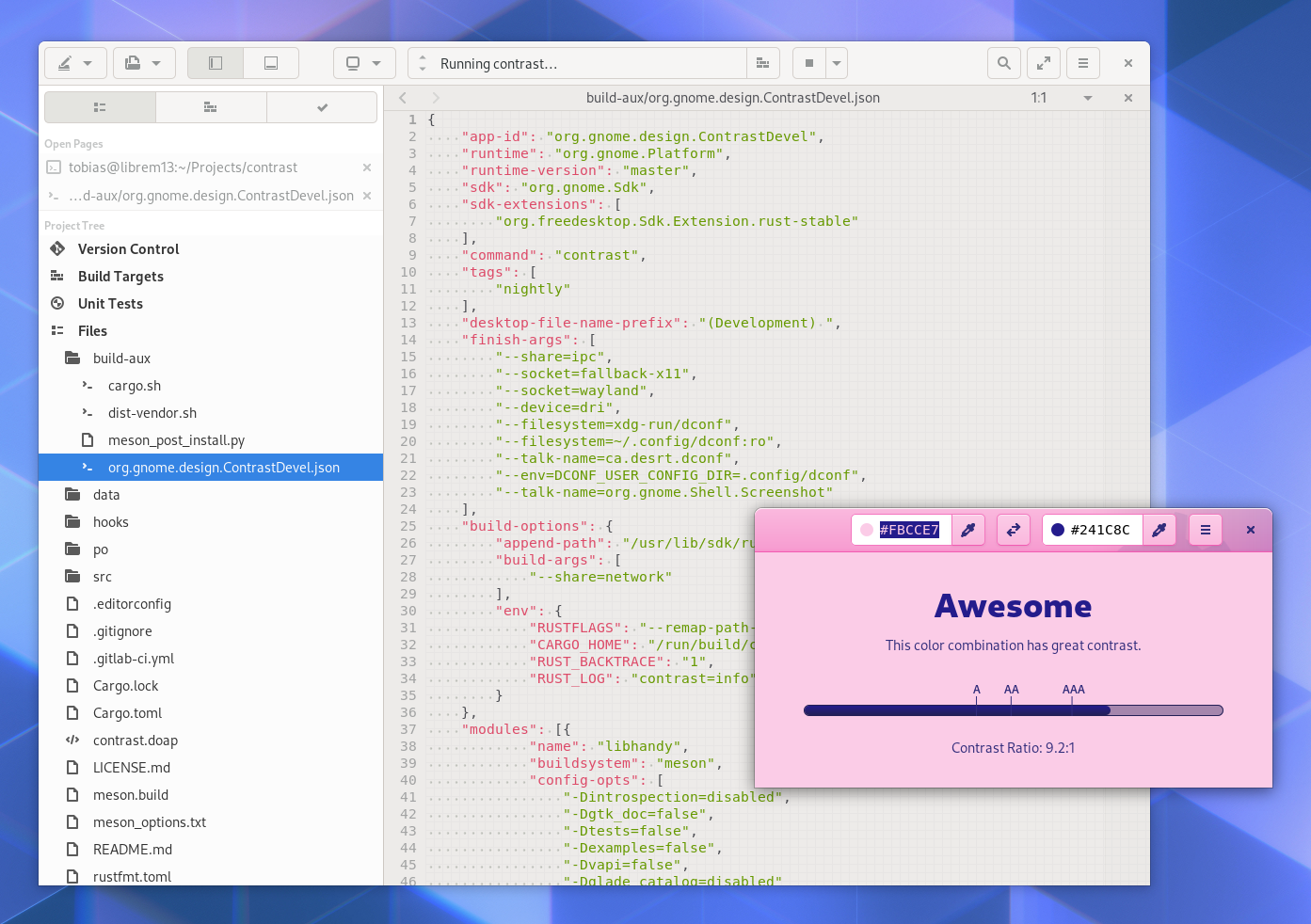
Thanks to GNOME Builder’s Flatpak integration, “works on my machine” is largely a thing of the past now!

But though this is all very awesome, Flatpak is unfortunately not a complete solution to the platform conundrum discussed earlier in this series.

Flatpak is Not Enough

Flatpak does solve a number of the issues around app distribution very elegantly, because app developers do their own packaging, and control their release schedule. It’s also a unified package format that works across different host systems, and the Flatpak runtimes are clearly defined development targets to do QA against.

But that doesn’t magically fix all our problems. The two elephants in the room are

  1. The Host still matters: Flatpak only solves part of the issues with distro packaged apps
  2. Downstream drama: Flatpak does not address the conflicts between desktops and distributions

1. The Host Still Matters

Even with Flatpak there are still some unpredictable variables on the host system which affect app developers. On the technical side a number of things can go wrong, from an outdated Flatpak version (which can mean some Portals apps rely on may be missing), to missing/incompatible system APIs such as password storage, calendar, or address book.

These things can lead to applications not working properly, or at all. For example, this is why new versions of GNOME Contacts cannot access any contacts on Debian 10, why recent GNOME Calendar cannot access any calendars on Ubuntu 18.04, or why Fractal doesn’t remember your password across restarts on some non-GNOME environments.

There are also user-facing integration points where applications interface with the system. These include things like notifications, the application menu, search providers, the old systray, and the design patterns used in individual apps.

For example, when the system UI or design guidelines change, applications follow the platform and change their UI accordingly. This means if you install newer apps on an older system, there are going to be weird edge cases. For example, if you install new apps on Debian 10 you get a confusing mix of the old and new application menu paradigms because the design guidelines were changed with GNOME 3.32 (early 2019).
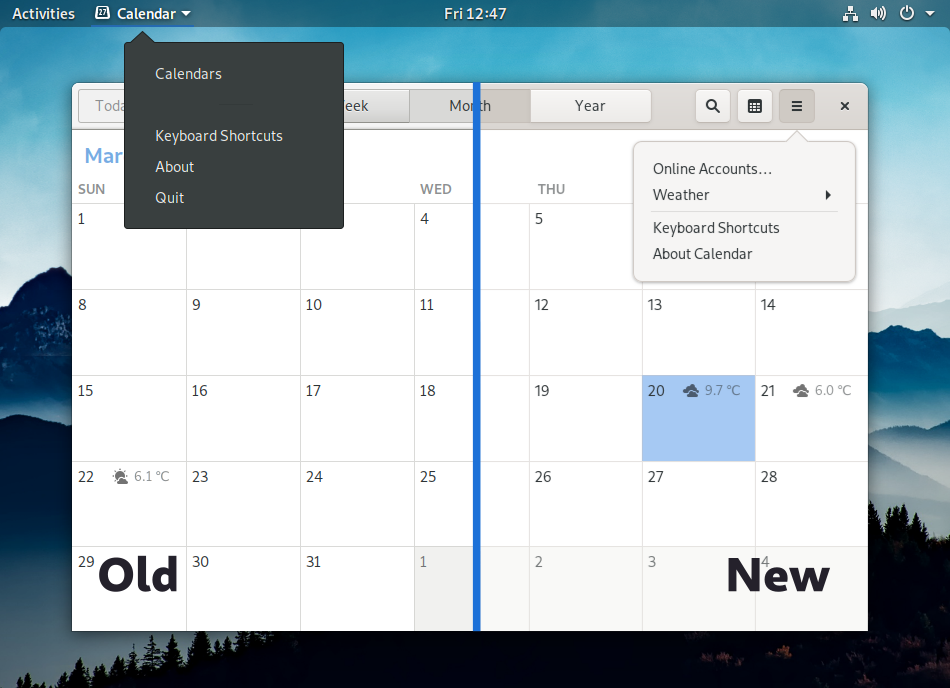
Before GNOME 3.32 applications had global menu items in the application menu in the Shell top bar, but now they are in the primary menu, inside the app window.

Flatpak also applies the host GTK stylesheet and icon set to apps. This means that if the host distribution overrides the system stylesheet, Flatpak will happily apply random, never-tested CSS to every app. Obviously this leads to lots of issues, ranging from ugly but relatively harmless glitches to real usability issues, such as illegible text on buttons. For more background on this particular issue, see this blog post.

Some of these issues could be fixed with more standardization, changes to Flatpak, or new portals. However, fundamentally, in order to be a real platform you need a clearly defined environment to develop and test for. Flatpak alone is not enough to achieve that.

Just like “write once, run everywhere” is always an illusion, it’s never going to be possible to completely split apps from the OS. You always need app developers to do some extra work to support different environments, and currently every distribution represents yet another extra environment to support.

2. Downstream Drama

Flatpak does not completely solve the issues app developers face in shipping their software, because these can not be isolated from the ones desktop developers face. In order to fix the app developer story we need real platforms. In order to get those we need to resolve the desktop/distribution dilemma.

The issues here roughly match the ones with traditional distribution packaging mentioned in Part 1, and can be grouped into three broad categories:

  • Structural issues inherent to having distributions and desktops be separate projects.
  • Fragmentation issues because we have multiple of everything so there’s duplication and/or bad abstraction layers.
  • Configuration issues, primarily around settings and other defaults, which have to be set at the distribution level but affect the user experience.

Structural Issues

One of the biggest structural issues is distribution release schedules not being aligned with the upstream one (or between different distributions). GNOME releases every 6 months, but distributions can take anywhere from a few weeks to several years to ship these releases.

This category also includes distributions overriding upstream decisions around system UX, as well as theming/branding issues, due to problematic downstream incentives. This means there is no clear platform visual identity developers can target.

For example, Ubuntu 18.04 (the current LTS) ships with GNOME 3.28 (from March 2018), includes significant changes to system UX and APIs (e.g. Unity-style dock, desktop icons, systray extension), and ships a branded stylesheet that breaks even in core applications.
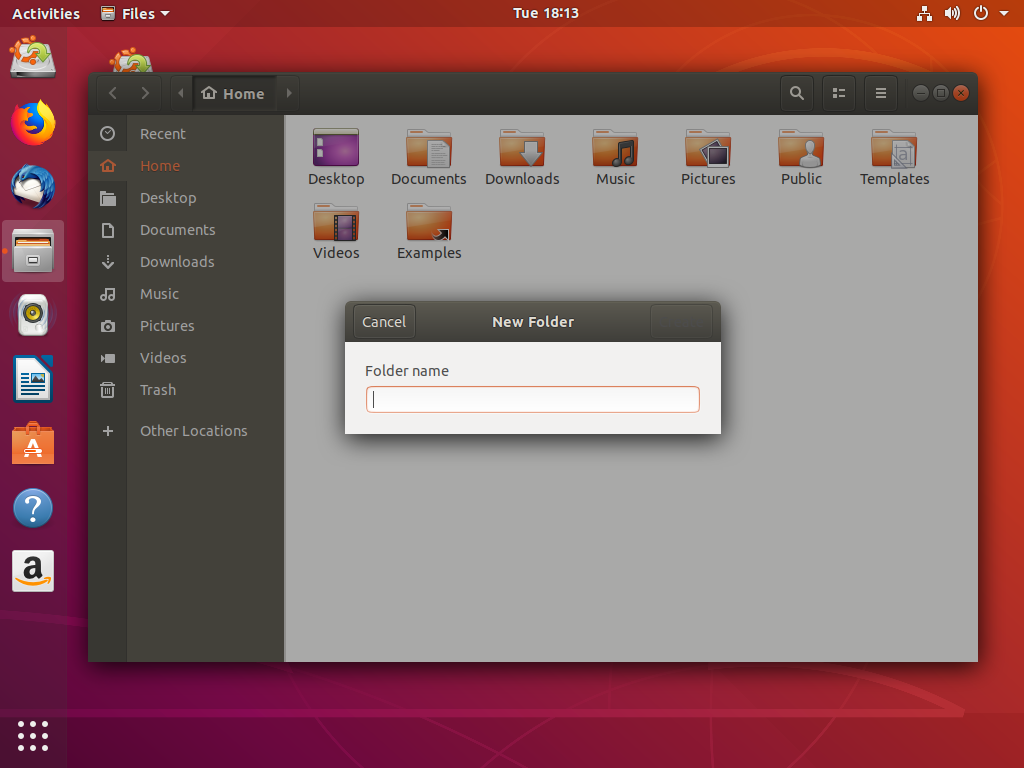
Ubuntu 18.04 overrides the GTK system stylesheet, which results in the “Create” button on the new folder dialog in Files being invisible (among many many other issues, especially in third party apps).

Fragmentation Issues

Having multiple implementations of everything means we either need do tons of duplicate work, or try to abstract over the different implementations.

On one end of the spectrum there are OS installers: There is no GNOME installer, so every distribution builds their own. Unfortunately, most of these installers are not very good, and don’t integrate well with the rest of the desktop experience (e.g. they use different design patterns than the OS itself). This can be either due to a lack of resources (e.g. not every downstream has their own GNOME designers), or because different distributions have specific downstream goals and motivations (e.g. Fedora and RHEL share an installer, which introduces lots of complexity).
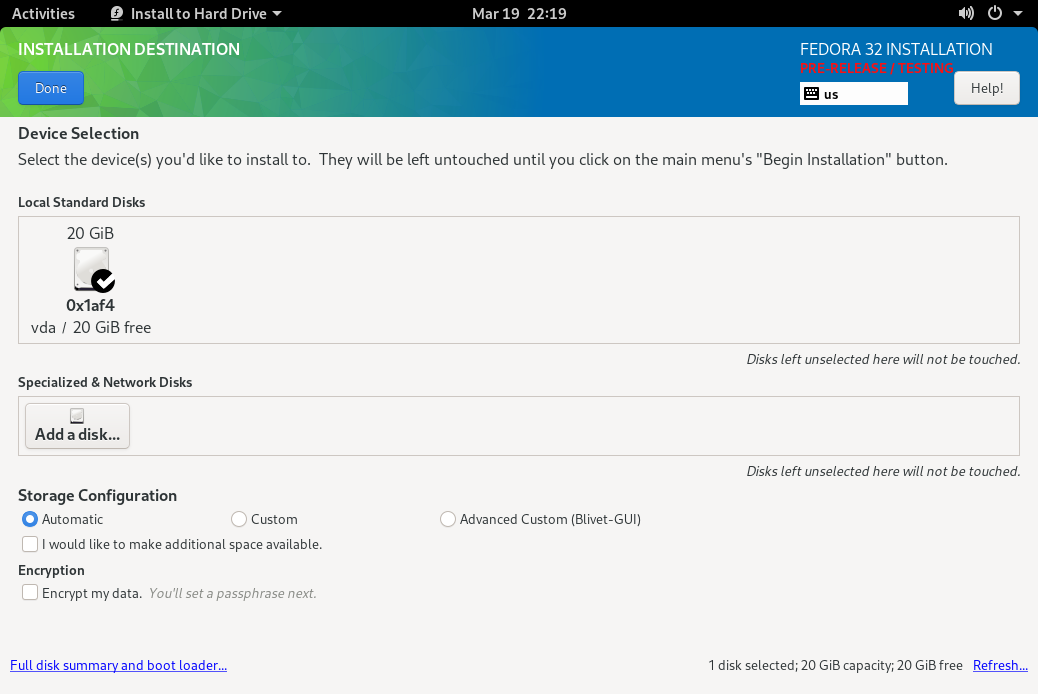
The famously awkward Fedora installer is a good example of why such core parts of the experience should be designed and developed upstream. Unfortunately this isn’t really feasible due to distribution fragmentation.

In other areas we have the opposite problem, because we’re trying to abstract over the fragmentation with a single component. For example, PackageKit is meant to abstract over different package formats, but in practice it only works for a handful of them, and even for those it’s often buggy. The PackageKit maintainers have officially given up on this approach.

Configuration Issues

This includes the default apps, the fonts shipped with the system by default, the terminal shell and prompt, and the UX around things like Plymouth. All of these things are usually configured at the distribution level and are therefore often not great, because these choices need to be made in concert with the rest of the platform UX.

Forging Platforms

Given the constraint of there being multiple different desktops projects and technology stacks (and the host still mattering), we’ll never have a single “Linux” or “FreeDesktop” platform. We could have one platform per desktop though.
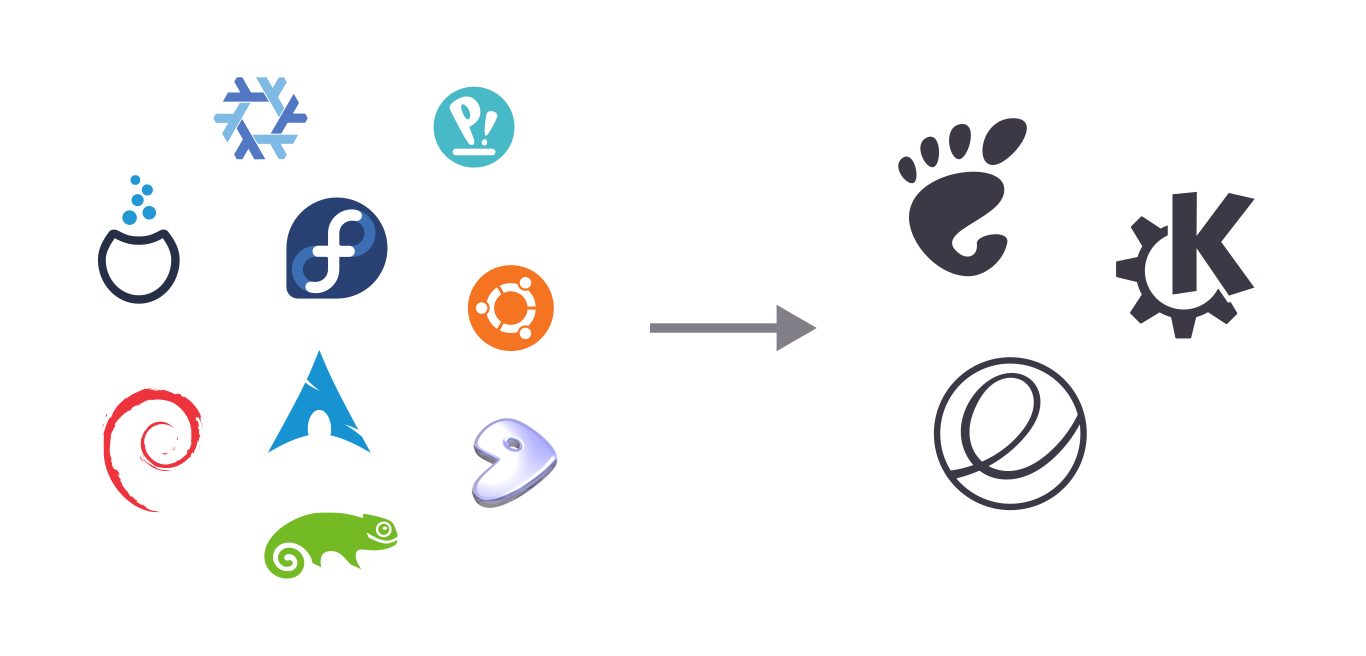
From an app developer point of view, testing for GNOME, KDE, and elementary isn’t as nice as testing only for a single platform, but it’s not impossible. However, testing for Debian, Fedora, multiple Ubuntu releases, OpenSUSE, Arch, Endless, and dozens more is not and never will be feasible, even with Flatpak. Multiple different distributions, even ones that ship the same desktop environment, don’t add up to a platform. But exactly that is what we need, one way or another.

The question is, how do we get there?

The Nuclear Option

When we look at it from a Flatpak context, the solution seems obvious. Flatpak is solving the middleman problem for app developers by circumventing the distributions and providing a direct channel between developers and end users. What if we could do the same thing for the OS itself?
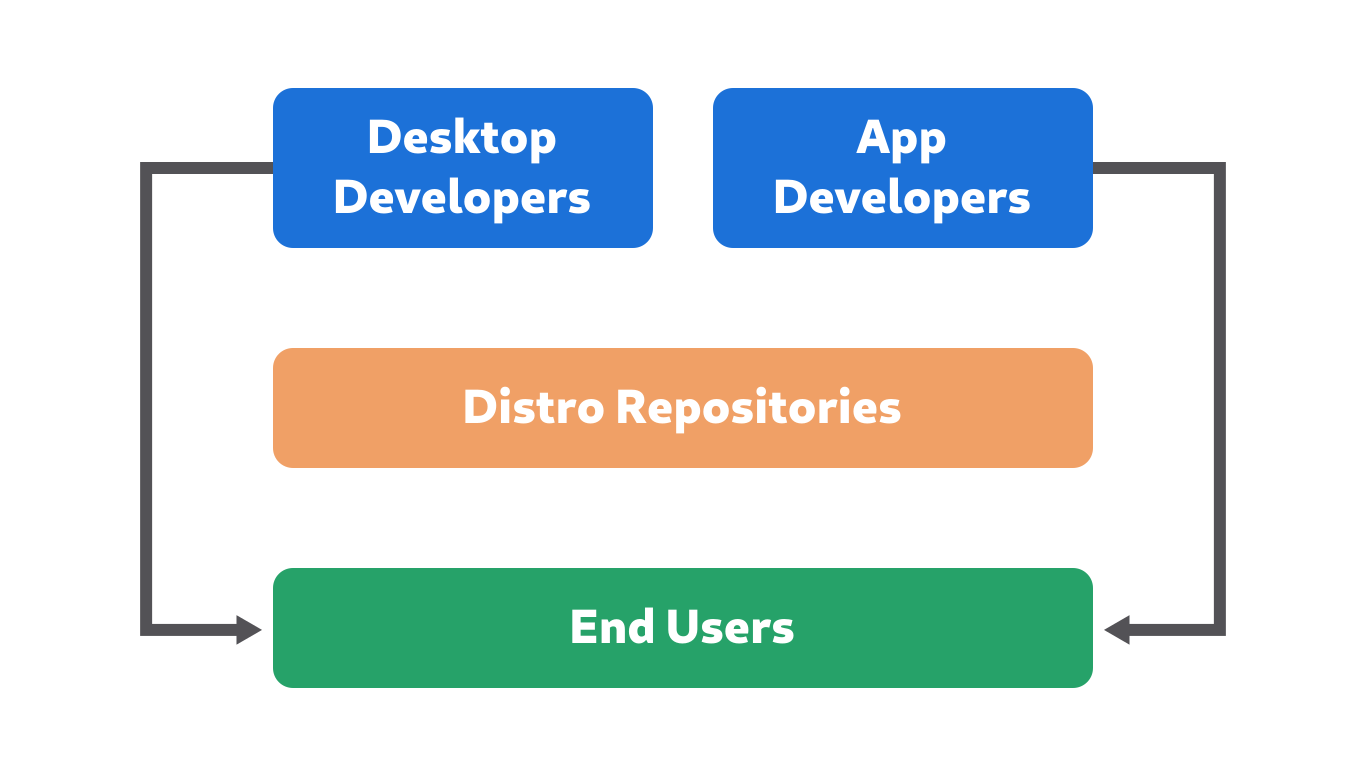
Of course the situation isn’t exactly the same, so what would that mean in practice?

With Flatpak runtimes there is no extra “distribution” abstraction layer. There are no Debian or Fedora runtimes, just GNOME and KDE, because those are the technology stacks app developers target.

These runtimes are already more or less full-fledged distributions which are controlled by the desktops, we’re just not using them as such. The Freedesktop SDK (which most runtimes are based on) is not based in any distro, but built directly from upstream sources using Buildstream as the build tool, and it already has most of the things you need to make a basic operating system.

There is an early-stage effort to make bootable nightly GNOME OS images for development/testing, built on top of the Freedesktop SDK. From there it wouldn’t be a huge leap to actually make an independent, consumer-facing platform OS for GNOME (and KDE, and other platforms).

However, though this is likely to become a very attractive solution in the future, there are a number of hurdles to be overcome:

  • An OS needs an installer, OS updates, a Plymouth theme, etc. All of these are being worked on for the nightly GNOME OS images, but are not quite there yet.
  • A “real” OS needs a dedicated group of people doing things like release management, security tracking, and QA. These are being done to some degree for the Flatpak runtimes, but a consumer OS would need more manpower.
  • It’s an OSTree-based immutable system, which means there is no traditional package management. Apps are installed via Flatpak, and server/developer workflows need to happen in containers. Though projects like Silverblue’s toolbox have come a long way over the past few years, there’s still work to be done before immutable OSes can painlessly replace systems with old-school package managers for all use cases.

It takes time to start a new operating system from scratch, especially when it’s using cutting-edge technology. So while things like GNOME OS could be amazing in the longer-term future, it’s likely going to take a few more years before this becomes a viable alternative.

Squaring the Circle

What could we do within the constraints of the technology, ecosystem, and communities we have today, then? If we can’t go around distributions with a platform OS, the only alternative is to meld the distributions into a meta platform OS.

Technically there’s nothing stopping a group of separate distributions from acting more or less like a unified platform OS together. It would require extraordinary discipline and compromise on all sides (admittedly not things our communities are usually known for), but given how important it is that we fix this problem, it’s at least worth thinking about.
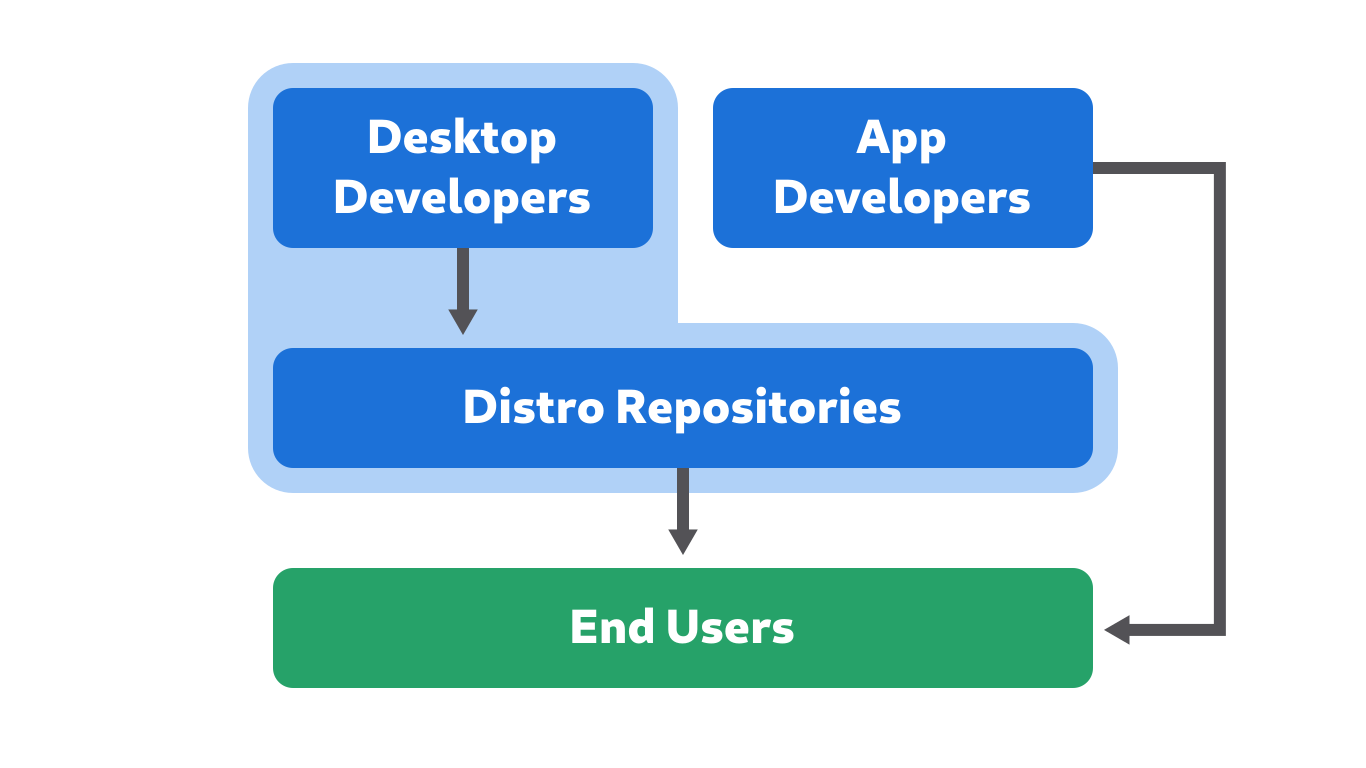
To get an idea what this could look like in practice, let’s think through some of the specific issues mentioned earlier:

Release Schedule: This is probably among the thorniest issues since release cycles vary wildly in length and structure, and changing them is very difficult. It’s not unimaginable that at least some progress could be made here though. For example, GNOME could have long term support releases every 2-3 years for “stable” distributions like RHEL and Ubuntu LTS. Distributions could then agree to either be on the regular 6 month schedule, or the 2 year “LTS” schedule. Alternatively, all distributions could find a single compromise schedule that can work for everyone (e.g. maybe one release per year, like mobile operating systems do).

Theming/Branding: Some distributions want ways to customize the OS experience such that their system looks recognizably different from others. This is not necessarily a problem, as long as this is done using APIs that are supported and intended to be used in this way (which unfortunately is currently not happening in many cases).

Creating more branding opportunities which do not break APIs which apps rely upon (especially third party apps shipped via Flatpak), is certainly possible and there have been discussions in this direction (e.g. GTK accent colors). Whether distributions would limit themselves to these APIs once they exist is of course an open question, but at least there is a ongoing dialog about this.

System UX/API Changes: Some distributions make significant changes to the core system, which fragments the visual identity of the platform at best, and severely damages the app ecosystem at worst. This includes things like adding a permanent dock, icons on the desktop, re-enabling the systray, or a “dark mode” setting which just changes the system stylesheet from under apps.

The solution here is simple in theory: If you think a change to the system UX is needed to fix a specific problem, don’t just patch it downstream, but instead help to address the actual underlying issue (We already touched on this in Part 1). For example, if you find that new users are confused by the empty desktop at startup, don’t just ship an extension that completely breaks the structure of the shell. Bring the problem to the upstream designers and developers, figure out a solution together, and help implement it upstream.

In practice it’s not always that easy, but a lot can be done by simply adopting an upstream-first UX mindset. It can take a while to get used to, especially for companies with more, uh, “traditional” internal processes, but it’s definitely possible seeing as it’s working well for Red Hat and Purism, for example.

OS Installer: It may not be doable to have a single code base, but we could definitely share at least the design (and possibly some UI code) for the installers used across distributions. A cross-distribution initiative for nice, native GNOME installers across the major distributions would probably not be easy logistically, but is not unimaginable.

Software Installation & Updates: GNOME Software and PackageKit’s “abstract across distros” strategy has clearly failed, and we need a new approach here. For applications there is a relatively easy solution: Distributions stop packaging apps, and work together on a common repository of developer-submitted Flatpaks (e.g. something like Flathub). We’d need to work out how this common solution can accommodate various distribution policies around e.g. proprietary software, but this seems very doable and most of it already exists in Flathub.

The resources currently going into repackaging every app for every distribution could be pooled to review the apps submitted by developers to the common Flatpak repository.

Seeing as most distributions are not (yet) image-based like e.g. Silverblue or Endless, we would still also need a way to update the packages that make up the core system. For this there’s probably no way around backend duplication.

System Default Configuration: Making progress in this area is likely not too difficult comparatively. The main thing we’d need is better coordination between the various parties needed to synchronize these things better (which is of course easier said than done). Having some kind of common forum where the upstream design and release team, as well as people in charge of major distributions can discuss and standardize defaults across the entire ecosystem might work for that.

The Bottom Line

If we want a future with real platforms we can either go around the distributions or have them all work together (or potentially both), but one way or another we need to vertically integrate.

Neither path is straightforward or easy, and there’s a huge amount of work ahead either way. However, the first and most important step is acknowledging that this problem exists, and that we need to radically change our approach if we’re serious about building attractive app ecosystems.

The good news is that many people across different projects are already working towards enabling this future. We hope that you’ll join us.

Happy hacking :)

25 Mar 19:38

Will COVID-19 Lead to Another MOOC Moment?

Jeffrey R. Young, EdSurge, Mar 25, 2020
Icon

The answer to the question is "yes", because if you actually want to educate people, then you remove the price tag. And it's "yes" because we're actually seeing this renewed interest. "Dhawal Shah, founder of Class Central, a site that serves as a directory of MOOCs, says he’s seen a sudden spike in traffic to his site... One day last week, for instance, he received more traffic to the Class Central site than he did over the entire month of February. 'I know what viral means, but this is on a different scale,' he said." Charles Severance agrees. “We haven’t even begun to hit our stride on how amazing these MOOCs can be,” Severance argues. “We’re a quarter of the way in on the MOOC marathon, and we can’t run anymore.” In another article, we see reports of record numbers at OU's FutureLearn.

Web: [Direct Link] [This Post]
25 Mar 19:38

Track confirmed Covid-19 cases by country, state, and region

by Nathan Yau

Wade Fagen-Ulmschneider made a set of interactive charts to track confirmed coronavirus cases. Switch between regions and scales. See the data normalized for population or not. See trends for active cases, confirmed cases, deaths, and recoveries.

Usually this much chartage and menu options would seem overwhelming. But by now, many of us have probably seen enough trackers that we’re ready to shift away from consumption into exploratory mode.

The data behind this tracker, like many others, is from the Johns Hopkins University Center for Systems Science and Engineering (JHU CSSE). They’ve been updating their repository daily on GitHub.

Tags: coronavirus, Johns Hopkins, tracker, Wade Fagen-Ulmschneider

25 Mar 18:35

Coronavirus: ‘Calm and reassuring’ didn’t convince Vancouver’s Covidiots to stay home. Maybe it’s time for fear and forcefulness

by Ian Young
Provincial health officer Dr Bonnie Henry has been the calm, reassuring and authoritative voice of the Covid-19 pandemic in British Columbia.Her near-daily press conferences (with BC health minister Adrian Dix) have become essential viewing, and have earned her a Twitter fan club with more than 7,000 followers, and supporters who literally sing her praises online.“Dear Dr Bonnie” (based on “Dear Theodosia” from Broadway’s Hamilton) includes lyrics such as “you will lead us through self…
25 Mar 18:35

RT @ellen_halliday: I'm seeing a lot of worried words that NHS staff are being mugged for their lanyards in London. This would be terrible…

by ellen_halliday
mkalus shared this story from AliceAvizandum on Twitter.

I'm seeing a lot of worried words that NHS staff are being mugged for their lanyards in London. This would be terrible if it were true, but no incidents have been reported to the Met police or the London hospitals I contacted. Hopefully this reassures those on the frontline. twitter.com/metpoliceuk/st…

We are aware of claims of NHS staff being deliberately targeted by criminals in London. The MPS is not aware of any recent reports of this nature. If you have direct knowledge of such a crime, please report it and we will investigate.


1189 likes, 884 retweets

Retweeted by AliceAvizandum on Tuesday, March 24th, 2020 9:30pm


18 likes, 2 retweets
25 Mar 18:35

COVID-19 Journal: Day 3

by george
I was joking with my friend Anne on the phone the other day that Jerry the Alien Overlord's Minion is doing pretty well on his takeover. He probably wasn't expecting such grand success when he got assigned to this backspace. The performance of his virus is blowing his group's KPIs off the charts: Many of the humans in the world are sitting still in our houses, we're not going to the library,
25 Mar 18:34

The Best Content For Customer Communities

by Richard Millington

A few years ago, I noticed nearly every community with a calendar of regularly scheduled content published a lot of content very few members engaged with.

It’s hard to create high-quality, valuable, content for a community each day. The novelty of any idea (e.g. member interviews) soon wears thin.

A far better approach is to aim for ‘big win’ content on a less regular schedule. Five types of content are especially useful to members.

1) Case studies. Instead of interviews, post case studies with members instead. Case studies force members to share something interesting they have done which could be valuable for other members. Any videos or long-form advice articles which highlight specifically how members resolved a common challenge or improved their results are great resources within a customer community (and good testimonial material too).

2) Analyses and breakdowns. Do a breakdown of a customer’s situation along with improvements. This is similar to case studies but highlights areas of improvement as well as what’s not going well. Almost every topic lends itself to breakdowns of member situations.

3) Templates and resources. Members find templates useful. Create templates that let members structure their work, plan out a project, and evaluate their success. This saves members time. You can also create templates to tackle topical events.

4) Surveys and data. Your members want to see how they compare to other members. Create a survey on a topical issue and get quantitative data you can reveal to them. This might include time spent on a project, budgets, salary level or anything that might be interesting. This works well when members can compare themselves to the average or use the data to support their own work.

5) Interviews with a VIP. Better than interviews with members is an interview with a genuine VIP in that field. These work best when the person is well known and respected by most of the audience. If you wouldn’t invite this person on stage at a major conference, they’re probably not a good match. Aim as high as possible.

Throw away your calendar of regularly scheduled content and go for the big wins instead.

25 Mar 18:34

Hope

by Nathan Yau

I read and read and read and read. But almost everything I read about is out of my control, so I’m turning more energy towards things that I can control. I’m keeping my distance. Supporting local. Writing. Poking at data. Making charts.

It’s going to get better, and we will get through this.

Tags: hope

25 Mar 18:34

Weeknotes: Datasette 0.39 and many other projects

This week's theme: Well, I'm not going anywhere. So a ton of progress to report on various projects.

Datasette 0.39

This evening I shipped Datasette 0.39. The two big features are a mechanism for setting the default sort order for tables and a new base_url configuration setting.

You can see the new default sort order in action on my Covid-19 project - the daily reports now default to sort by day descending so the most recent figures show up first. Here's the metadata that makes it happen, and here's the new documentation.

I had to do some extra work on that project this morning when the underlying data changed its CSV column headings without warning.

The base_url feature has been an open issue since Janunary 2019. It lets you run Datasette behind a proxy on a different URL prefix - /tools/datasette/ for example. The trigger for finally getting this solved was a Twitter conversation about running Datasette on Binder in coordination with a Jupyter notebook.

Tony Hirst did some work on this last year, but was stumped by the lack of a base_url equivalent. Terry Jones shared an implementation in December. I finally found the inspiration to pull it all together, and ended up wih a working fork of Tony's project which does indeed launch Datasette on Binder - try launching your own here.

github-to-sqlite

I've not done much work on my Dogsheep family of tools in a while. That changed this week: in particular, I shipped a 1.0 of github-to-sqlite.

As you might expect, it's a tool for importing GitHub data into a SQLite database. Today it can handle repositories, releases, release assets, commits, issues and issue comments. You can see a live demo built from Dogsheep organization data at github-to-sqlite.dogsheep.net (deployed by this GitHub action).

I built this tool primarily to help me better keep track of all of my projects. Pulling the issues into a single database means I can run queries against all open issues across all of my repositories, and imporing commits and releases is handy for when I want to write my weeknotes and need to figure out what I've worked on lately.

datasette-render-markdown

GitHub issues use Markdown. To correctly display them it's useful to be able to render that Markdown. I built datasette-render-markdown back in November, but this week I made some substantial upgrades: you can now configure which columns should be rendered, and it includes support for Markdown extensions including GitHub-Flavored Markdown.

You can see it in action on the github-to-sqlite demo.

I also upgraded datasette-render-timestamps with the same explicit column configuration pattern.

datasette-publish-fly

Fly is a relatively new hosting provider which lets you host applications bundled as Docker containers in load-balanced data centers geographically close to your users.

It has a couple of characteristics that make it a really good fit for Datasette.

Firstly, the pricing model: Fly will currently host a tiny (128MB of RAM) container for $2.67/month - and they give you $10/month of free service credit, enough for 3 containers.

It turns out Datasette runs just fine in 128MB of RAM, so that's three always-on Datasette containers! (Unlike Heroku and Cloud Run, Fly keeps your containers running rather than scaling them to zero).

Secondly, it works by shipping it a Dockerfile. This means building datasette publish support for it is really easy.

I added the publish_subcommand plugin hook to Datasette all the way back in 0.25 in September 2018, but I've never actually built anything with it. That's now changed: datasette-publish-fly uses the hook to add a datasette publish fly command for publishing databases directly to your Fly account.

hacker-news-to-sqlite

It turns out I created my Hacker News account in 2007, and I've posted 2,167 comments and submitted 131 stories since then. Since my personal Dogsheep project is about pulling my data from multiple sources into a single place it made sense to build a tool for importing from Hacker News.

hacker-news-to-sqlite uses the official Hacker News API to import every comment and story posted by a specific user. It can also use one or more item IDs to suck the entire discussion tree around those items.

The README includes detailed documentation on how to best browse your data using Datasette once you have imported it.

Other projects

25 Mar 18:32

Don’t Mute, Get a Better Headset

by Matt

One heterodox recommendation I have for audio and video calls when you’re working in a distributed fashion is not to mute, if you can help it. When you’re speaking to a muted room, it’s eerie and unnatural — you feel alone even if you can see other people’s faces. You lose all of those spontaneous reactions that keep a conversation flowing. If you ask someone a question, or they want to jump in, they have to wait to unmute. I also don’t love the “unmute to raise your hand” behavior, as it lends itself to meetings where people are just waiting their turn to speak instead of truly listening. I’m always hesitant to disagree with Seth Godin, but that’s been my experience.

So what should you do? Use the latest and greatest hardware and software to have the best of both worlds, a fantastic auditory experience for you and your interlocutors and little to no background noise.

To summarize, I recommend a wired, USB headset with a mic that stays a constant distant from your mouth and has a noise-canceling microphone. Save mute for coughs and sips of drinks.

The rest of this post I’m going to try out eleven different microphones and headsets, ranging from $35 to $1,000+, and record a short file on each, and intersperse some software tips for people on MacOS. You may want to listen to these samples with good headphones on to really hear the differences. I apologize some are louder than others, I didn’t edit to even out the levels, which Zoom or Skype would do automatically.

My previous top recommendation was the trusty Sennheiser SC 30, in my previous bag posts. It’s cheap and effective, but the cord was too long and it was USB-A. If you read no further, get this one and revolutionize how you sound on Zoom calls. Here’s how it sounds:

Sennheiser has upgraded to a USB-C version, with a much shorter cord, the SC 130. It feels and looks much better, you don’t need a USB-C dongle, and the sound quality of the earphones is quite bearable. The cost is about twice as much (~$70).

You can plug the USB-C into your iPad or Android phone as well and it works great, though the headphones can be a bit quiet on Android. Either of the above will spoil you for making calls, and you won’t want to go back to the old low-fi way of doing things.

In order to have a bit more flexibility I tried out the much more expensive ($134) Sennheiser MB Pro 1. I liked the freedom of wireless Bluetooth, but you can hear that the sound is much worse. Connecting over Bluetooth lowers the quality a ton, and also occasionally means you need to disconnect, reconnect, etc.

All three of the Sennheisers above come in two-ear versions, which I prefer if I’m in a noisy environment, but at home I find the one-ear a bit more comfortable. I got excited about this $70 TaoTronics “Trucker Bluetooth” headset because it had Bluetooth 5.0 so I foolishly assumed it would have better quality, but it sounds really terrible:

But does wireless have to mean terrible quality? The Apple Airpods Pro ($249) are actually pretty decent, and you can easily switch them between your phone and your computer in the audio menu. If you haven’t tried the Pro version, the noise canceling is actually pretty amazing for something so small and light — I jog with them.

And one of the best sounding mics in this entire roundup was the wireless $119 Antlion Audio ModMic Wireless, which sound amazing, but you have to provide your own headphones to attach it to, and the entire thing ends up being fairly bulky and has its own wireless adapter. On the plus side, you can bring your own super-fancy headphones and get amazing audio quality. With certain headphones it did cause a buzz in the ear of the headphone I attached it to.

But hot dang that sounds good. If they made an over-the-ear USB-C version with an earbud, and had the mic be a little smaller, it would be work-from-home nirvana.

I ventured into the gaming headset territory for this SteelSeries Arctis Pro Wireless Gaming Headset, which at first felt totally ridiculous with its own connector box, a million cables, etc, but goshdarnit grew on me. It has this really cool boom mic that extends out, and I think it’s the most comfortable headset I’ve worn for an extended amount of time. I tried it out via its proprietary 2.4ghz wireless connection + USB, and Bluetooth, and unfortunately the results weren’t great, including the Bluetooth being a little garbled. I hope Steelseries does another iteration because they’re so close, it just needs to be USB-C on the headphones, the cables, the everything, and super high quality recording.

One final entrant — how about just your laptop? Normally I would say this sounds terrible and judge people who didn’t use a headset, but John Gruber’s review of the new Macbook 16 had some really impressive audio files that intrigued me, so here it is, the Macbook Pro 16″, which starts at about $2,400. It’s a little boomy, but not bad.

Okay now let’s get a little crazy. Here’s a Zoom H5 with the SGH6 shotgun mic attachment. (The other Zoom! $410 total.)

Next up is the Shure SM7B Cardioid Dynamic, which is what I usually use to record the Distributed podcast, and costs about $400. This is milky and smooth. (I accidentally called it a Sennheiser in the recording.)

A favorite of voiceover artists everywhere is the Sennheiser MKH416 Super-Cardioid Shotgun Tube Condenser ($1,000), which I like the sound of and I also use for if I’m doing a fancy video setup and want super-good sound that’s not in the frame of the camera.

It’s a great sound, but the part of the house where I recorded all of these is pretty noisy with an AC unit on the other side of the wall, and there’s a ton of background noise in this.

Software eats the audio world

Just like photography has been completely transformed by software enhancing images to the point where the top-of-the-line Apple or Samsung smartphone camera is better than all but the very top pro SLR cameras, I think the same thing is going to happen for audio.

None of these clips are processed, which is why some of the volume levels are different, but I thought it would be fun to demo a tool I’ve been recommending to a lot of people.

There’s a $40/year program called Krisp.ai, which I first learned about in 2018 from this awesome post on the Nvidia developer blog, Real-Time Noise Suppression Using Deep Learning. What it does is create a virtual microphone, like a filter that exists between one of your physical inputs and what the software on your computer “hears.” For fun I re-recorded the MKH416 in the exact same place, but filtered through Krisp.ai:

Now the audio quality is not as good, it sounds a bit clipped, but throughout there is no more distracting background hums or noise. Krisp can be a little awkward to use but they’ve made it a lot more user friendly. You could mix Krisp with almost any option here and it would make it sound much better, in fact when I’m in a pinch my favorite go-to is Airpods Pro + Krisp.

With everything, a pro tip on MacOS is to hold Option when you click on the sound icon in your upper right taskbar, and it will let you select both input and output devices. Sound Preferences, linked at the bottom of that menu, are your friend. If a mic is too soft you can boost the input volume in the preferences. To choose a camera or mic in Zoom, click the arrow next to the mute button in the bottom left. In Zoom audio settings, under Advanced, they are starting to expose a number of new options for real-time audio processing.

The future sounds good.

25 Mar 18:27

Marshall Uxbridge :: Erste Eindrücke

by Volker Weber

9dea3a8b6f812b0384b07d43be83666a

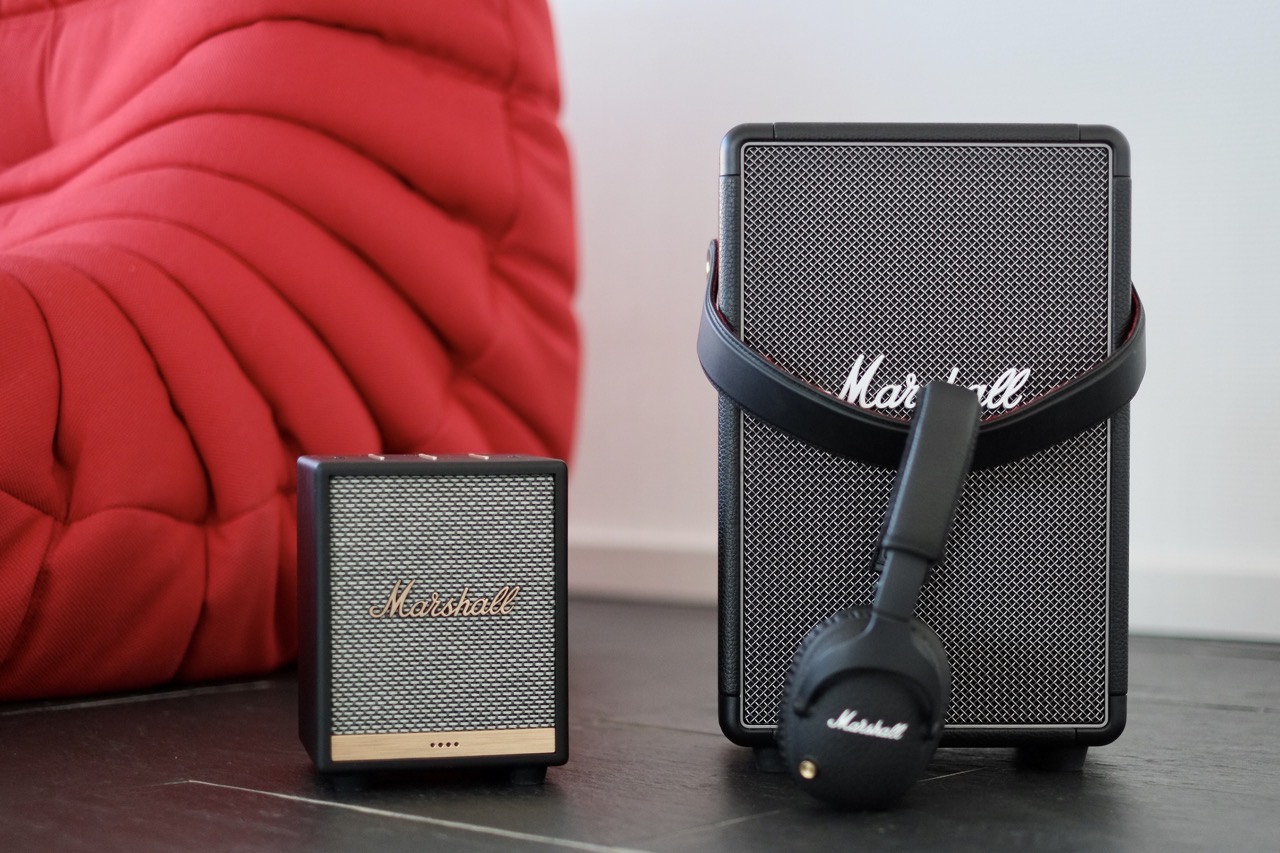
Marshall Headphones kündigt einen kleinen Giftzwerg ein, der am 8. April für knapp 200 EUR auf den Markt kommen soll. Der Marshall Uxbridge ist ein Smart Speaker mit WLAN und Bluetooth, Amazon Alexa mit zwei Fernfeld-Mikrofonen, AirPlay 2 und Spotify Connect. Er kann also selbstständig Musik von Spotify oder einem anderen, mit Alexa verbundenen Musikdienst abspielen. Übergibt man Musik aus der Spotify App, spielt der Uxbridge sie ab dann völlig selbsttätig ab.

Der Uxbridge wird mit einem einfachen zweipoligen Stromkabel angeschlossen. Er hat keinen Akku. Die drei Stege auf der Oberseite regeln Lautstärke, Bass und Höhen. Das sind keine Slider sondern Wippen, die man an den Enden runterdrückt. Ich vermiss definitiv die Drehregler der anderen Marshall Lautsprecher, aber die machen hier auch wenig Sinn, weil man ja "Alexa, lauter" sagen kann. Auf der Oberseite befinden sich neben den Stegen zwei Löcher für die Mikfrofone und zwei Buttons. Der eine schaltet Play/Pause, der andere Alexa. Hat man Alexa abgeschaltet, dann leuchten vier LEDs rot auf, um zu signalisieren, dass Alexa nicht mehr hört. Auf der Rückseite gibt es einen weiteren Button, der den Bluetooth-Pairing-Modus aktiviert.

Für die Aktivierung und allfällige Software-Updates liefert Marshall eine App, mit der die Einrichtung inklusive WLAN-Konfiguration und Verbindung zu Alexa sehr einfach gelingt. Alexa kann, aber muss nicht verbunden werden.

4685fdcd68ee06905ace46c58006973a

Marshall Lautsprecher müssen laut sein. Das schafft der kleine Giftzwerg, aber er überzeugt mich nicht, anders als die meisten anderen Marshall-Produkte. Das liegt vor allem daran, dass er ein billig wirkendes Plastikgehäuse hat, kein Vergleich zu dem genarbten Vinyl der anderen Geräte.

28269b31434c642a4464781c4b0ea5ec

Im avisierten Preissegment von 200 Euro gibt es außerdem überlegene Konkurrenz. Für gerade einmal 40 Euro mehr gibt es den dicken Brummer rechts im Bild, den Marshall Tufton (238 EUR) oder für 10 Euro weniger den kleineren Marshall Kilburn II (189 EUR). Die haben zwar nur Bluetooth und keine Smart Features, aber dafür einen dicken Akku und blasen die Tapeten von den Wänden. Wem es auf feinen Klang mit allem Alexa-Features ankommt, der ist mit einem Echo Studio (200 EUR) viel besser beraten. Und dann wäre da noch der Sonos One (190 EUR), der ebenfalls Alexa, AirPlay 2 und Spotify Connect drauf hat.

Das sieht nicht so prickelnd aus für den tapferen kleinen Uxbridge.

25 Mar 18:27

Hey Siri, Staubsauger!

by Volker Weber

a44c9044e7c2fb11e221c32ffbc60797

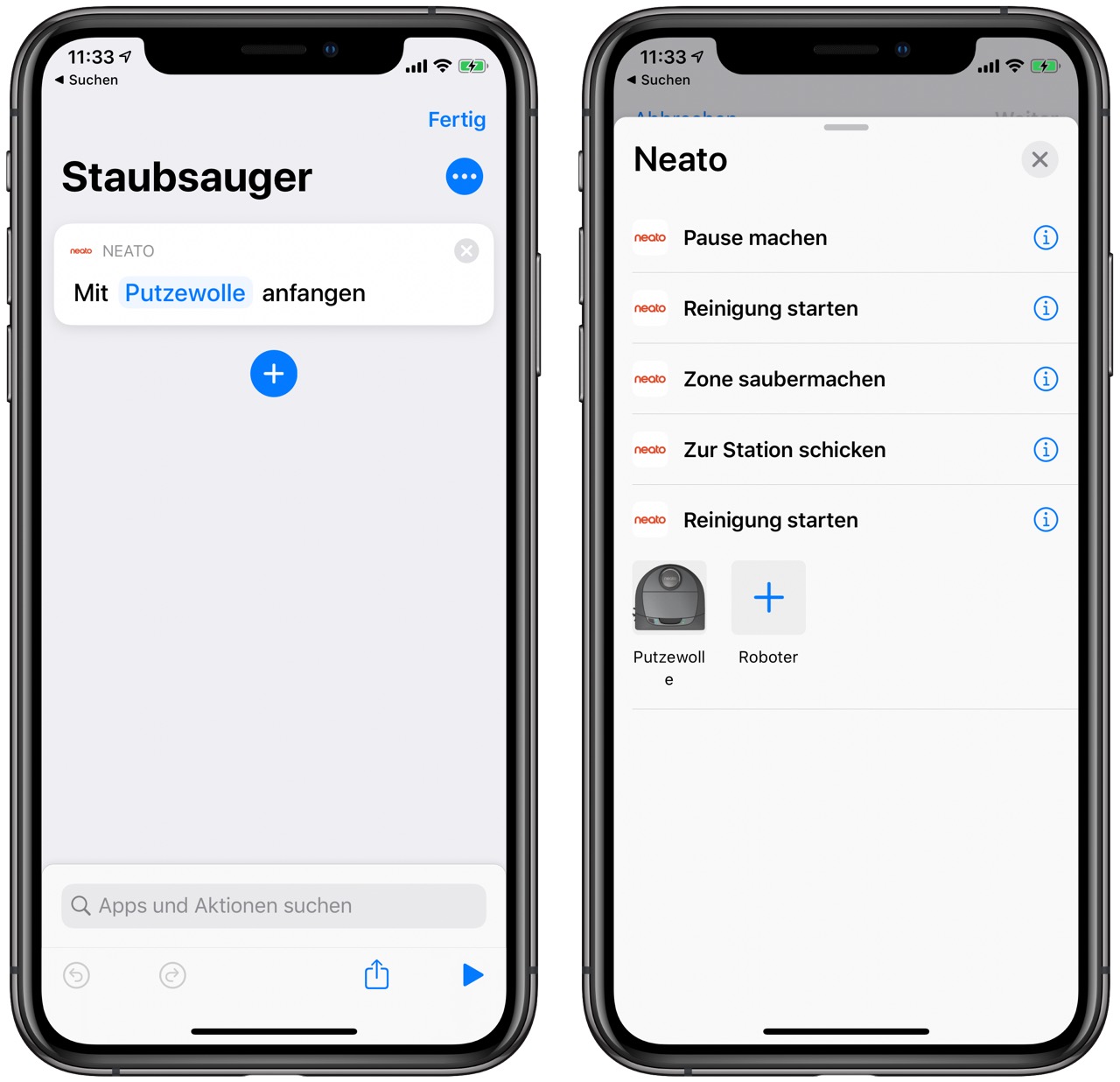
Wenn Sie Ihren Neato-Roboterstaubsauger mit Siri Shortcuts, Google Assistant oder Amazon Alexa verbinden, können Sie einfach mit Ihrer Stimme mit der Reinigung beginnen.

Neato hat vorgestern ein Update der App ausgerollt, mit dem man ganz einfach Kurzbefehle für den Staubsauger programmieren kann. 30 Sekunden investiert und nun kann ich einfach sagen "Hey Siri, Staubsauger" und schon läuft der Robbie los.

Neato D7 ist meine Empfehlung. Kostet aktuell 456 Euro. Wir putzen selbst und der Robbie hilft dabei jeden Tag.

25 Mar 18:27

Unihertz Atom XL: The bigger tiny handset

by Dean Daley

I’m not fond of small smartphones, but the Unihertz Atom XL is a blast to use.

The handset is the successor to the original Unihertz Atom, a miniature device that I took for a spin back in 2018. And boy, that was a tiny smartphone.

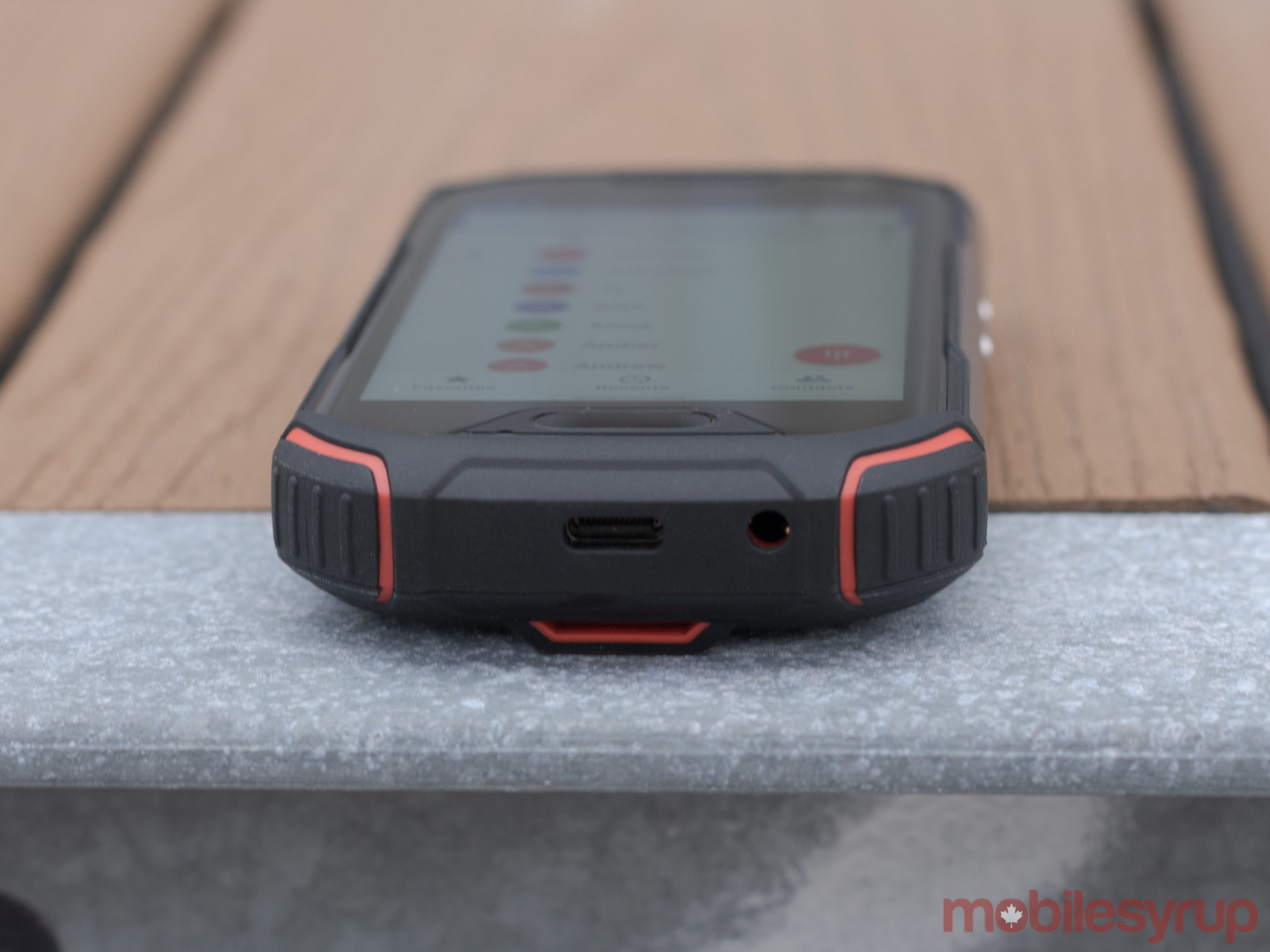
While Unihertz calls this handset the ‘XL,’ the phone only measures in at 134.5 x 65 x 17.5mm, with a 4-inch screen. By today’s standards, the Atom XL is positively minuscule.

But even though this is a small smartphone, and one I personally wouldn’t use consistently as my daily driver, it’s surprisingly useful in certain situations.

What is it?

The phone features a 48-megapixel rear-facing shooter, as well as IP68 water and dust protection. Additionally, it’s a rugged device with a MIL-STD 810G certification; it’s also dustproof and shockproof and can take a drop or two.

Furthermore, the miniature device features a Helio P60 octa-core chipset, Android 10, 4,300mAh battery, expandable storage and NFC.

Plus, the phone also can work like a walkie-talkie.

It’s important to note that the handset is quite chunky. It’s thicker than gaming phones I’ve used and almost twice as thick as the Galaxy S20 Ultra. It also weighs 224.5g, making it slightly heavier than Samsung’s larges S series device.

What’s it about?

The Unihertz Atom XL is similar to its predecessor but designed for everyone.

When I reviewed the original Atom, I spoke to Unihertz’s founder Stephen Xuyuan, who said, “It can make people’s outdoor adventures more fun and cool and it’s the amazing gift for geeks and nerds. Meanwhile, it’s the best choice for people who want a more durable and unique phone to shine their personality in daily life.”

This is even more the case for the XL. The XL’s 4-inch display is quite similar to smartphones from 2016 and before. With that much more space in comparison to the original Atom, I’m able to get more done and even comfortably use it as my daily driver if I wanted to.

And it’s still a rugged handset, which lets users bring it safely on adventurous trips if needed.

How’d I like using it?

I found the phone was able to handle any task I put it through, such as calling Ubers, swiping through Instagram stories, playing Spotify, and I even edited an article with the device.

Like I mentioned previously, I prefer bigger smartphones, but I like what Unihertz did with the user interface. It’s very basic and clean; Unihertz didn’t add anything to over complicate it. The phone offers Android 10 gestures, but you can also use the physical buttons.

There’s also no option to add an app drawer, but it’s simpler that way due to the small screen. While I prefer an app drawer adding the extra element to little display will make it more cluttered than necessary.

Who’s it for?

The Unihertz Atom XL is surprisingly stellar, but a tiny device like this isn’t for most people. Even though the Atom XL can work as a primary device, most people would likely use it as a secondary handset. My mother took my original Atom I reviewed a few months, and she loves to use it when she’s going on vacation. The device is rugged, so if she drops it, it’ll survive, and the same goes for the XL.

Someone who works outside may also want to consider this smartphone, especially those who work outdoors in Canada’s winter, as the handset can survive in cold temperatures.

Those who like to go camping and hiking can also bring along the Atom XL. With the handset’s dust and waterproofing and it can survive in varied environments. The 48-megapixel camera isn’t the best on the market, with pictures being a bit overexposed, and oversharpened but it’s decent and good enough for taking a picture or two while you’re on an adventure.

Where to grab your own?

The Atom XL costs $279 USD, which is equivalent to $402 CAD. You can grab it from Unihertz’s Kickstarter, and it has an estimated delivery for June 2020. The phone is fully backed and its Kickstarter is almost completed, but once it’s done you’ll be able to check it out on the company’s website.

The phone’s less powerful chipset will likely detract some, but those who don’t mind and want a smaller handset, the Atom XL is worth considering.

The post Unihertz Atom XL: The bigger tiny handset appeared first on MobileSyrup.

25 Mar 18:27

The Good Instagram Hunk

by myles

Before this all started, I decided to get in shape for the millionth time. I committed to a schedule of lifting weights at the gym three times a week, cutting all my weekly carbs to essentially zero, and being sober for a few months. It worked! I lost a bit of weight and felt a lot stronger than I once was. Then suddenly, I couldn't go to the gym anymore because of the germs. Now, I have to workout in the house which is less fun. (I absolutely hate running so that is not an option for me.) Enter: The Good Instagram Hunk.

I found the Instagram Hunk through another Instagram Hunk, actually. The one I first followed is a funny guy with big muscles and he recommended this fitness-based Hunk to his followers. This one is a trainer and he provides a great service for free, so I love him and I would like to pass him along to you. The Hunk's workouts are very hard and that's what makes them enjoyable to me.

The one I embedded above is a "full body" workout (the actual post on IG has a caption that provides you with lots of helpful details) and by the end of doing all of the stretching and pushing, I am covered in sweat all over my body and I feel a sense of accomplishment about my day. Sometimes I cheat a little to get to the end, but that's alright. I get better every time.

Unfortunately, I haven't tried all of his workouts, because I can't bring myself to order those bands yet. I have liked all of the ones I have tried so far, especially the upper body one, which features a finishing move that most Mortal Kombat characters could not to perform.

I'm doing his 4-day ab challenge now and it's very hard and makes me feel exhausted when I'm done with my daily exercises. It's a good feeling to have when you're exhausted with the world all day long. Thank you for your help, Hunk.
25 Mar 18:27

Drivers in B.C. can now extend their licences over the phone

by Aisha Malik

Drivers in British Columbia can now extend their expiring drivers licenses over the phone amid the COVID-19 pandemic.

British Columbians now just have to contact the ICBC’s Driver Licensing Call Centre up to six weeks in advance of their licences expiry date. Drivers will then receive an interim paper licence that will be valid for 90 days.

There is a chance that the 90-day period may be extended as the situation is currently being monitored.

Eligible extensions include routine renewals, reinstatement of a licence, and the replacement of a lost licence. It should be noted that expiring BC Services Cards and BC Identification Cards are not eligible for phone renewals.

“We ask that customers only attend a driver licensing office if their transaction is urgent and cannot be done by phone or online, and if they are not showing symptoms,” ICBC notes its press release.

Further, all driving tests have been suspended indefinitely, unless there is a legal requirement to obtain a license if someone is new to the province.

Image credit: Unsplash (Dan Gold)

Source: ICBC 

The post Drivers in B.C. can now extend their licences over the phone appeared first on MobileSyrup.

25 Mar 18:26

Signs & Portents: Smintheus, God of Plague

by Kyle Chayka

I've been reading The Iliad out loud in a nightly Zoom session with friends, which I recommend as a great distraction — it's the definition of epic action and as an oral poem it's not that hard to follow. But early on in book one I encountered a reference to Smintheus, the god of plague.

See, Chryses, a Trojan priest of Apollo, has his daughter abducted by King Agamemnon, Achilles, and the rest of the Achaean army. Chryses goes to the Achaean camp to try to ransom his daughter back, but Agamemnon refuses. So Chryses calls on Apollo to wreck the Achaeans in revenge, which, of course, he does. The rain of Apollo's arrows killing Acheaen troops is compared to plague (or maybe vice versa, depending on your mythological beliefs). 

Smintheus is apparently one of Apollo's many names. It comes from the word for mice, which are associated with prophecy I guess but also seem pretty relevant as far as plagues? Or is that just rats.

So, I was wondering, is our problem that we've upset Apollo, just like Agamemnon? The ancient Greek solution was to sacrifice 100 bulls in a big circle and burn their leg-bones wrapped in fat. Could be worth a try.

25 Mar 18:26

Amazon Is Having Supply Chain Issues. Here Are Some Trustworthy Alternatives.

by Elissa Sanci
Amazon Is Having Supply Chain Issues. Here Are Some Trustworthy Alternatives.

The coronavirus continues to disrupt our lives in more than a few ways. As we face mandatory shelter-in-place directives, school closures, and empty supermarket shelves, many folks are turning to online ordering to secure the essentials they need to get through these uncertain times. But what happens when the one-stop shop you’ve relied on for years—the retailer that was always there when you needed something in a pinch—suddenly can’t deliver?

That’s the reality currently facing a lot of shoppers. Amazon’s supply chain is struggling to meet demand as more people look to the online retail behemoth for the things they need but can’t find at their local grocery store (and the things they want but hesitate to pick up in person). The New York Times, Wirecutter’s parent company, reports that as the outbreak continues to shut down and slow factories in China, “Amazon is likely to feel potential shortages of goods earlier than its American peers because it usually keeps fewer items on hand than they do.”

For shoppers across the country, this means waiting longer for orders to arrive—and that’s if what you’re searching for is even in stock.

Before you immediately turn to another big-box retailer, check with locally owned shops. Supporting small businesses is especially important right now, and many stores continue to fulfill online orders. If you don’t know where to start, use Locally to search the real-time inventory at retailers that are still open in your area. And keep an eye on their social media accounts, which are likely to be updated more frequently than their main websites.

But if you still can’t find what you’re looking for at your local haunts, the Wirecutter Deals team has created a master list of reliable retailers you can turn to when “the everything store” no longer has, well, everything. We’ve vetted each seller, taking a close look at the precautions they’re taking, their shipping costs and stipulations, their current return policies, and the possibility of future disruptions. (Unfortunately, it’s unlikely that these stores will have toilet paper, cleaning supplies, or other products that have become particularly hard to get ahold of.)

Another alternative is purchasing items directly from the manufacturer, if the price is right. There’s a greater likelihood that it’ll have enough supply, though the cost is typically higher than what you’ll find at the stores linked below. We also think it’s perfectly fine to make purchases from a manufacturer’s dedicated storefront on eBay, Newegg, and Rakuten. (Just be sure to check the return policy first.)

Appliances

Small appliances and vacuums

  • Abt: Abt offers free standard shipping and scheduled delivery in the Chicagoland area with PPE and minimized contact. White glove service is presently suspended.
  • Target: Free shipping is included on orders of $35 or more. Target REDcard holders get free two-day shipping on most purchases (some lower-cost items only ship with a $25 minimum order, though). Stores open with more rigorous cleaning and safety protocols.
  • JCPenney: Orders of $49 and up qualify for free shipping. All brick-and-mortar stores are currently closed.
  • Best Buy: Best Buy’s shipping policy remains unchanged, with free shipping on online orders of $35 or more. All physical stores are closed, though contactless curbside pickup is available at some locations. Purchases made March 1, 2020 through May 17, 2020 have an extended return period through May 31, 2020

Large appliances

  • Abt: Abt offers free standard shipping and scheduled delivery in the Chicagoland area with PPE and minimized contact. Its white-glove delivery service has been temporarily suspended due to the coronavirus.
  • Home Depot: Orders of $45 or more qualify for free shipping. Physical stores are still open, albeit with shortened operating hours (all locations currently close at 6 p.m. local time). Free Curbside pickup is now available at most stores for online order pickup through the end of April.
  • Best Buy: Best Buy’s shipping policy remains unchanged, with free shipping on online orders of $35 or more. All physical stores are closed, though contactless curbside pickup is available at some locations. Purchases made March 1, 2020 through May 17, 2020 have an extended return period through May 31, 2020

Baby and kid

  • BuyBuy Baby: Free shipping is offered on orders over $39. Stores are open, but with the modified hours of 10 a.m. - 6 p.m. with special shopping hours between 9-10 a.m. for expectant mothers, seniors, and high-risk individuals
  • Pottery Barn: Pottery Barn’s shipping policy remains unchanged. Though physical stores are closed, store pickup is still available in some areas. Returns will be processed remotely.
  • Hanna Andersson: Store locations remain closed. In response to the coronavirus, Hanna Andersson is offering free shipping on all orders when you use the code FAMILY.

Automotive

  • Best Buy: Best Buy’s shipping policy remains unchanged, with free shipping on online orders of $35 or more. All physical stores are closed, though contactless curbside pickup is available at some locations. Purchases made March 1, 2020 through May 17, 2020 have an extended return period through May 31, 2020
  • Walmart: Walmart offers free shipping on orders over $35. The chain is currently offering extended hours (6 a.m. to 11 p.m. local time), but we suggest ordering ahead of time and picking up in (or even outside of) store. No-contact pickup is now available.

Electronics

  • Best Buy: Best Buy’s shipping policy remains unchanged, with free shipping on online orders of $35 or more. All physical stores are closed, though contactless curbside pickup is available at some locations. Purchases made March 1, 2020 through May 17, 2020 have an extended return period through May 31, 2020
  • Newegg: Newegg offers free shipping on most items (check the product page to confirm). Like Amazon, Newegg hosts third-party sellers with varying degrees of reliability—look for the “sold by” language, which is usually located near the price listing, to verify that Newegg is the seller.
  • B&H Photo: Though the physical store is closed, store pickup is still available. Free expedited shipping is included on most orders over $49.
  • BuyDig: Free shipping is still available on most items within the contiguous 48 states.
  • Adorama: The store’s physical location has closed, but its online stores are still operational. Contactless store pickup is also available at the Manhattan location. Free shipping is offered on thousands of items.

Health and fitness

  • Dick’s Sporting Goods: Orders over $49 qualify for free shipping, excluding oversized and overweight items. Contactless curbside pickup is available between 9 a.m. and 6 p.m. at many locations, with a few stores reopening. The retailer’s 60-day return policy has been extended to 90 days for most items.
  • REI: REI is offering free shipping on all orders in response to COVID-19. (It usually offers free shipping on orders of $50 or more.) All physical locations are currently closed and REI is not offering store/curbside pickup yet. Online returns are still available, with the return window extended to once the stores have reopened.

Hobby and crafts

  • Target: Free shipping is included on orders of $35 or more. Target REDcard holders get free two-day shipping on most purchases (some lower-cost items only ship with a $25 minimum order, though). Stores are open with more rigorous cleaning and safety protocols
  • Walmart: Walmart offers free shipping on orders over $35. The chain is currently offering extended hours (6 a.m. to 11 p.m. local time), but we suggest ordering ahead of time and picking up in store.
  • Guitar Center: Store locations are closed. Some items qualify for free ground shipping. Two-day express shipping is available for $10, while next-day shipping costs $15. (A minimum $25 purchase is required.) Return windows have been extended to 180 days.
  • Best Buy: Best Buy’s shipping policy remains unchanged, with free shipping on online orders of $35 or more. All physical stores are closed, though contactless curbside pickup is available at some locations. Purchases made March 1, 2020 through May 17, 2020 have an extended return period through May 31, 2020

Home and garden

  • Target: Free shipping is included on orders of $35 or more. Target REDcard holders get free two-day shipping on most purchases (some lower-cost items only ship with a $25 minimum order, though). Stores remain open with more rigorous cleaning and safety protocols.
  • Home Depot: Orders of $45 or more qualify for free shipping. Physical stores are still open, albeit with shortened operating hours (all locations currently close at 6 p.m. local time). Free Curbside pickup is now available at most stores for online order pickup through the end of April. Offering limited in-home services for essential maintenance and repair
  • Bed Bath & Beyond: Shipping is free on orders over $39. All locations are closed indefinitely. Returns extended by an additional 60 days for all eligible purchases made on or after February 20, 2020.
  • JCPenney: Purchases of $49 and more qualify for free shipping. All physical stores are currently closed.
  • IKEA: IKEA’s normal shipping policies remain unchanged. As all US stores are temporarily closed, the retailer is currently unable to accept returns or exchanges.
  • Ace Hardware: Stores remain open. Shipping is free for most online orders over $50 when you sign up for a (complimentary) membership. The retailer is also offering curbside pickup.
  • Lowe’s: Free shipping applies to orders of $45 or more. Physical locations are open with enhanced cleaning measures, implementing CDC guidelines for social distancing, shortened operating hours, and PPE equipment available for all workers. Limited contact curbside pickup is available. Lowe's is still offering delivery and installation of new appliances as well as repairs for appliances through our extended service plans and old appliance haul-away with delivery of large appliances.
  • Kohl’s: All physical locations closed, but limited-contact curbside pickup is available at most locations. Orders over $75 qualify for free shipping. Returns outside of the normal return window will be accepted for the first 30 days after stores re-open.

Kitchen and dining

  • Williams Sonoma: Free shipping is available for orders over $49. All brick-and-mortar locations are currently closed.
  • Crate & Barrel: Though Crate & Barrel charges for shipping on all orders, it periodically offers free shipping on select items. (Check the website for details.) All physical stores are currently closed.
  • Sur La Table: Stores remain closed, but online ordering is still an option. Free shipping is offered for orders over $59.
  • Nordstrom: All store locations closed, contactless curbside services for online orders as local regulations permit. Ships most items for free in the US.
  • IKEA: IKEA’s normal shipping policies remain unchanged. As all US stores are temporarily closed, the retailer is currently unable to accept returns or exchanges.
  • Bed Bath & Beyond: Shipping is free on orders over $39. All locations are closed indefinitely. Returns extended by an additional 60 days for all purchases made on or after February 20, 2020.
  • Kohl’s: Physical locations closed, limited-contact curbside pickup available at most locations. Orders over $75 qualify for free shipping. Returns outside of the normal return window will be accepted for the first 30 days after stores reopen.

Home-office essentials

  • Staples: In response to COVID-19, Staples is offering free shipping on all orders.
  • Office Depot/OfficeMax: Orders over $35 qualify for free shipping; some orders over $45 are eligible for next-day delivery. It has stopped accepting returns until May 3rd, but they are extending the normal return deadline by two weeks to accomodate for that.
  • Walmart: Walmart offers free shipping on orders over $35. The chain is currently offering extended hours (6 a.m. to 11 p.m. local time), but we suggest ordering ahead of time and picking up in (or even outside of) the store. No-contact pickup is now available.
  • IKEA: IKEA’s normal shipping policies remain unchanged. As all US stores are temporarily closed, the retailer is currently unable to accept returns or exchanges, with no date to reestablish them announced yet. IKEA has extended it’s return window to 365 days, with special consideration for receipts expiring soon. Removal services have been suspended.

Outdoor gear

  • REI: REI is offering free shipping on all orders in response to COVID-19. (It usually offers free shipping on orders of $50 or more.) All physical locations are currently closed. Certain limitations apply, but most merchandise can be returned once stores reopen.
  • Backcountry: Orders of $50 or more qualify for free shipping, but shipping may be delayed as Salt Lake City recovers from the recent earthquake. Returns are only given in the form of store credit if returned within 30 days of delivery.
  • Huckberry: Orders of $75 and up qualify for free shipping. Return window has been extended to 60 days.
  • L.L.Bean: All L.L.Bean stores are currently closed. Online orders over $50 qualify for free shipping.
  • Moosejaw: Moosejaw’s brick-and-mortar locations have closed. Online orders of $49 and up qualify for free shipping.

Pets

  • Chewy: Orders over $50 qualify for free shipping, though high order volumes may cause delays.
  • PetSmart: PetSmart stores are still open to the public, but we recommend buying online if possible. Orders over $49 qualify for free shipping when you join Treats, the retailer’s free loyalty program.
  • Petco: Orders $35 and up qualify for free shipping with some exclusions. Though stores are still open from 10 am to 6pm, we recommend ordering online unless absolutely necessary. Curbside pickup is also available. In-store returns are currently unavailable, but Petco will honor the original time window once returns are accepted again. Returns can also be done by mail for online orders.

Travel gear

  • eBags: The company is offering free shipping on orders over $49 with returns accepted within 30 days or order delivery date.
  • Nordstrom: The department store ships most items for free in the US, though arrival times are delayed. Returns, however, are handled on a case-by-case basis with no return window deadline.
  • Huckberry: Orders of $75 and up qualify for free shipping, otherwise shipping is $5 flat rate within the US. Shipments take longer than usual as expected, but its return window has doubled to 60 days from date of delivery to account for that.

Further reading

25 Mar 18:26

Don’t stand so close to me

by Josh Bernoff

Young students, so social,They crave friends like a drug.Not TikTok. Not Insta.They have to chat and hug. Their longing for friendshipOutlasts their parents’ rage.They gather, so close now,Like actors on a stage. Don’t stand so. Don’t stand so.Don’t stand so close to me.Don’t stand so. Don’t stand so.Don’t stand so close to me. The Boomers. … Continued

The post Don’t stand so close to me appeared first on without bullshit.

25 Mar 18:26

In Praise of the iPadOS 13.4 Cursor

by Federico Viticci

Jason Snell:

I want to take a moment to appreciate the delicate and whimsical animated appearance of the cursor in iPadOS 13.4, which was released today.

It’s delightful. It’s like a little cartoon character, the plucky dot who is up to any challenge, even if it means contorting itself into whatever form is required.

Consider the animation when it enters and exits an existing button. The circle oozes out into a curved rectangle, like it’s some sort of sticky blob. When it’s over the active area, the whole button tilts as if the blob is pulling it around. Move far enough, though, and the blob breaks back off of the button and returns to its traditional shape as a simple circle.

After playing around with the cursor for a few hours last week, I noted that it felt instantly natural – like it had been part of UIKit for years. Those first impressions still hold true. The iPad’s new cursor is whimsical and useful at the same time – a rare combination these days. And like all feature additions that feel “obvious” in hindsight, it’s clear that a lot of consideration went into rethinking the traditional cursor for a platform where touch control also exists.

→ Source: sixcolors.com

25 Mar 18:26

Apple’s Human Interface Guidelines on Pointers for iPadOS

by Federico Viticci

Speaking of the design considerations that went into iPadOS’ cursor, I suggest reading Apple’s new HIG document on the dynamic/adaptive pointer:

iPadOS 13.4 introduces dynamic pointer effects and behaviors that enhance the experience of using a pointing device with iPad. As people use a pointing device, iPadOS automatically adapts the pointer to the current context, providing rich visual feedback and just the right level of precision needed to enhance productivity and simplify common tasks.

The iPadOS pointing system gives people an additional way to interact with apps and content — it doesn’t replace touch. Some people may continue to use touch only, while others may prefer to use the pointer or a combination of both. Let people choose how to interact with your app, and avoid condensing your interface or making changes that require them to use the pointer.

And this part on “pointer magnetism”:

In addition to bringing focus to elements through pointer transformations and content effects, iPadOS can also help people target an element by making the element appear to attract the pointer. People can experience this magnetic effect when they move the pointer close to an element and when they flick the pointer toward an element.

When people move the pointer close to an element, the system starts transforming the pointer’s shape as soon as it reaches an element’s hit region. Because the hit region typically extends beyond an element’s visible boundaries, the pointer begins to transform before it appears to touch the element, creating the illusion that the element is pulling the pointer toward it.

Thoughtful, detailed read (as usual per Apple’s HIG) with illustrations that help get a sense of what’s possible with pointer customization (it doesn’t look like the Keynote update with cursor support mentioned in the document is out yet). Reading this, it’s clear that Apple didn’t simply bring the Mac’s cursor to the iPad – they started from the basic idea and redesigned it around a different platform.

→ Source: developer.apple.com

25 Mar 18:25

Government to launch online portal for financial assistance amid COVID-19

by Aisha Malik
An image of the Canadian flag blowing in the wind against a backdrop of clouds

The Government of Canada has announced that it will shortly be launching an online portal for Canadians to apply to get financial assistance.

As part of its efforts to help Canadians during the COVID-19 pandemic, the federal government announced new measures. The government says that Canadians who have lost their income due to COVID-19 will be eligible for $2,000 a month for up to four months.

Canadians who are eligible for the assistance will be asked to apply through the new portal. Prime Minister Justin Trudeau noted that the portal will be active soon, and that Canadians should be able to receive the money within 10 days.

MobileSyrup will update this story once the portal has been launched.

The post Government to launch online portal for financial assistance amid COVID-19 appeared first on MobileSyrup.

25 Mar 18:25

Have You Seen the Semenal* Movie "Michael" Yet?

by Unknown

In the late '90s, something special came down from the heavens. I refer not to the Eucharistic Miracle of Buenos Aires, but rather the Nora Ephron film, "Michael," which stars John Travolta as a fat angel who wears overalls without a shirt, chain smokes and smells like cookies when he's horny.

The aforementioned miracle is in fact two-fold: 1) that this movie was ever made and 2) that no one ever knows what I'm talking about when I bring it up.

In 1996, at the then-peak of his "Pulp Fiction"/"Get Shorty" resurgence, Travolta could have taken on just about any role.

Here is what he selected:


Why not stream it today? You're reading this so clearly you've got nothing better to do. Just something to think about.

*Headline is not a typo


25 Mar 18:25

The Coronavirus Disinformation System: How It Works

by Bellingcat Investigation Team
mkalus shared this story from bellingcat.

What else is contagious besides viruses? Lies, of course.

As the coronavirus pandemic engulfs the world, disinformation associated with the virus has taken on many forms. Whether it’s your uncle sending you a Tom Hanks meme at 4 a.m. or the current occupant of the White House lying about Barack Obama supposedly harming the CDC’s testing system — disinformation in a time like this only adds confusion to an already palpable sense of fear.

Together with Newsy, Bellingcat — and, specifically, Bellingcat investigator Robert Evans — help you categorize the kinds of lies that are being pushed about the pandemic right now.

Why is this important? Because even seemingly “harmless” disinformation normalizes the distortion of reality, with potentially deadly consequences.

Note: Earlier this month, the Newsy + Bellingcat team won the prestigious Scripps Howard Award for Innovation.

The post The Coronavirus Disinformation System: How It Works appeared first on bellingcat.

25 Mar 18:25

Microsoft to suspend optional non-security Windows 10 updates in May 2020

by Jonathan Lamont
Microsoft logo

Microsoft will pause all optional non-security updates for supported versions of Windows and server products in May 2020.

The announcement, posted on the Windows Message Center and shared by Microsoft’s ‘Windows Update’ Twitter account (@WindowsUpdate), comes in response to the ongoing COVID-19 pandemic.

“We have been evaluating the public health situation, and we understand this is impacting our customers. In response to these challenges we are prioritizing our focus on security updates,” said the Message Center post.

Specifically, this means the Redmond, Washington-based company will suspend ‘C’ and ‘D’ updates typically released during the third and fourth week of each month. C and D updates generally include non-security improvements and fixes. However, since the delay won’t begin until May, it’s possible we could still receive some new non-security optional updates before then.

The move isn’t surprising. Considering the dramatic increase in remote work, both for Windows users and Microsoft employees, the last thing Microsoft wants is to introduce a bug or other flaw to Windows.

Instead, the company will focus on its monthly security updates — ‘B’ updates — that usually arrive on the second Tuesday of each month. Security updates are far more critical, especially considering Microsoft just disclosed two zero-day vulnerabilities hackers are already actively exploiting.

Engadget also notes that Microsoft will delay the scheduled end of service date for older versions of Windows 10 Enterprise, Education and IoT Enterprise editions. Microsoft only offers service for Windows 10 feature updates for 18 to 30 months, depending on the edition and when the update was released. As such, service for the above Windows 10 updates set to end April 14th, 2020 will instead end on October 13th, 2020. Devices running newer versions of Windows 10 don’t have to worry about end of service changes. You can learn more about Microsoft’s service timelines here.

Windows isn’t the only software seeing delays. Microsoft delayed upcoming updates to its Chromium-based Edge browser as well, in part because Google delayed upcoming Chrome and Chrome OS updates. The search giant has since cancelled the Chrome 82 update and will focus on Chrome 83 instead.

Source: Microsoft Via: Engadget

The post Microsoft to suspend optional non-security Windows 10 updates in May 2020 appeared first on MobileSyrup.

25 Mar 18:24

Use This Time During Coronavirus Isolation to Learn to Play Guitar or Ukulele

by Brent Butterworth
Use This Time During Coronavirus Isolation to Learn to Play Guitar or Ukulele

Many of us now have more downtime than we’ve had in years. And many of us also own a guitar or ukulele that we bought on impulse, promising ourselves we’d learn to play when we had the time. Well, now we do. Thanks to the Internet, we also have the resources to learn to play at home—for free. But the confusing array of options for online guitar and ukulele instruction may prove to be more of a deterrent than an encouragement. We’re here to help, with a few recommendations for online instructors we’ve used and enjoyed.

25 Mar 18:24

Some of the Galaxy S20’s best camera features are coming to the S10 and Note 10

by Patrick O'Rourke
Samsung Galaxy S10+

Several of the Samsung Galaxy S20 series’ best new camera features, including ‘Single Take’ and ‘Night Hyperlapse,’ are coming to last year’s S10 and Note 10.

Samsung hasn’t revealed an exact release date for the update, but it’s set to make its way to U.S. markets “in the coming weeks,” according to a press release on the tech giant’s website. ‘Single Take’ allows users to tap the shutter button once to make the phone capture several different images at once, including a short, looped video, a wide-angle photo and other stylized photographs. While this mode doesn’t always snap the best quality images, it’s a great way to ensure you capture an important moment in a few different ways.

The update also brings the S20’s Night Hyperlapse mode to the S10 and Note 10. Other updates include the S20’s refreshed Gallery app with a new ‘Clean View’ that automatically groups similar shots of the same subject, a ‘Quick Crop Mode’ and Quick Share/Music Share.’ Finally, the S20’s Custom Filter that creates a photo filter from an image you’ve already shot, along with a new pro video mode, are also coming to the S10 and Note 10.

Though the S10 and Note 10 aren’t that old yet, it’s great to see Samsung carrying over some of the S20’s more interesting features to its flagship devices from last year.

Source: Samsung 

The post Some of the Galaxy S20’s best camera features are coming to the S10 and Note 10 appeared first on MobileSyrup.

25 Mar 18:23

How to Eat and Snack Smartly When You’re Working From Home All Day

by Nick Guy
How to Eat and Snack Smartly When You’re Working From Home All Day

If the coronavirus is forcing you to work from home for the first time, it can be difficult to know how to eat (and snack) in a smart way. Maybe you’re used to going out for lunch or eating in your company’s cafeteria. Perhaps you have an afternoon coffee-shop routine, and now you have to adjust to brewing your own. After close to a decade of working mostly from home—and talking to several certified nutritionists and food professionals—I’ve learned a few tricks that help me get through the day without grazing (at least not constantly) or eating just a bowl of cold cereal for lunch.

25 Mar 18:23

Purism’s contributions to Linux 5.5 and 5.6

by Guido Günther

Following up on our report for Linux 5.4, we continue to improve mainline kernel support for the Librem 5 phone. Here’s a summary of the progress we have made during the 5.5 and 5.6 development cycles.

Librem 5’s backlight LED driver

The driver that saw the most patches was the LED backlight driver. More specifically the lm3692x family of chips as used in the Librem 5 to drive the LCD panel backlight. It makes up for almost half of the changes submitted, besides bug fixes and preparations for other changes.

We extended the driver so it can configure over-voltage protection and the maximum LED current to not damage the LED strips of the panel:

We also made sure the LED strip is turned fully off at brightness level 0, which saves a bit of power but more importantly prevents the phone from glowing slightly in the dark:

Broadmobi baseband modem sound support

Broadmobi 818 support was added to the gtm601 driver, for audio calls:

Librem 5’s IMU sensor

Building on our previous work on driver support itself, we now hook up the IMU sensor to the devkit device tree hardware description. Things like accelerometer and magnetometer can now work out of the box:

Also, since the chip is oriented differently on the devkit’s mainboard than on the Birch and Chestnut Batches of the phone, we added support for the “mount matrix” API:

Support for the Librem 5’s fuel gauge

The battery fuel gauge on the Librem 5 is similar to the max17042, its driver was extended to support the phone’s max17055:

eLCDIF display controller

Our effort to make the display stack work out of the box continued by adding the eLDCDIF controller to the i.MX8MQ’s device tree. It can also  pass on flags from the DSI controller (which acts as a DRM bridge):

Thermal throttling

We enabled thermal throttling for the GPU. This was a pure device tree change. The code was already there:

Misc fixes

We fixed the scaling of the Librem 5’s light and proximity sensors to get correct values:

Lastly, we submitted patches for the Librem 5’s charge controller driver to work as a module:

Code review

This round we contributed 5 Reviewed-by: or Tested-by: tags to patches by other authors.

For current ongoing work, check out the kernel tree. Some of this is already merged into linux-next and should make it into a future report.

The post Purism’s contributions to Linux 5.5 and 5.6 appeared first on Purism.

25 Mar 18:23

Free software for remote working

by Sean Packham

Purism has been working remote since we started in 2014. Here’s our list of essential free software for remote work, all can be self hosted or used via various hosted options.

Chat, Calls and Video Conferencing

Team chat has already become an essential tool for teams looking to be more collaborative and less reliant on email. At Purism we use Matrix for team chat, 1 to 1 calls, video conferencing via Jitsi (open source video conferencing), adhoc file sharing and all our community chat channels. Matrix is a distributed (federated) network, similar to email, which means you can communicate across Matrix servers and compatible services.

You can self host Matrix or use a public instance like our own free Librem Chat service part of Librem One. All the goodness of Matrix conveniently hosted for you and accessible with one account that also gives you access to Librem Social, our hosted Mastodon instance, and our premium services: end-to-end encrypted email and VPN.

Audio Conferencing

We use Mumble for weekly team calls and general large group audio conferencing. We really like its low bandwidth requirements and found it scales really well for our all-hands meeting.

Social

Our primary social channel is on our free Librem Social service powered by Mastodon. Like Matrix, Mastodon is a distributed (federated) network, so you can create an account on one of the many public servers or host your own instance and still communicate across instances. Setting up a private company Mastadon can be a great way for everyone to share their days.

Librem Chat and Librem Social are free service part of Librem One


Forums

In addition to our community chat and social channels we have Discourse forums for our various products and support. Forums are great for long term conversations not suitable for chat. If you are new to remote work try out both team chat and forums to see what works for your team.

Project Management and DevOps

At Purism we have a pledge that all our software and hardware will be free/libre and open source. We host our own GitLab Community Edition instance for our source code, project management, support and DevOps. GitLab also has powerful user and group management which makes it easy to work with hundreds of active community contributors. For PureOS we also host phabricator for ticketing.

Content Authoring and Publishing

Our various web properties use WordPress for content authoring but we publish static sites for security and speed. We are looking to migrate to pure static site generators in the future but WordPress has been an essential tool for us to launch products and share updates with the community.

Calendar and Files

We heavily use NextCloud internally for our calenders, event scheduling, general file storage and collaborating on documents.

Operating System

At Purism we use PureOS, our secure GNU/Linux operating system based on Debian. PureOS comes with many security improvements over a default setup from the average Linux distribution. There’s support for our TPM chips and Librem Key. We’ve also enabled AppArmor for more secure apps and we’ve created a better, safer browsing experience by blocking ads and enforcing HTTPS everywhere. See the PureOS wiki to learn more about the extensive security features in PureOS.

PureOS is the same operating system we run on our Librem laptops, servers, our recently announced Librem Mini and even on our Librem 5 smartphone. Yes that’s right, the Librem 5 runs a complete desktop Linux experience with access to the same rich app ecosystem.

Other

Most office-based teams already have email and things like a company newsletter but we thought we’d share how we manage ours. Our company email and Librem Mail are powered by Dovecot and we use GNU Mailman for our newsletter and mailing lists. We also have an internal wiki based on wiki.js.

If you’d like to know more about how we work remotely let us know on social, chat or our forums.

The post Free software for remote working appeared first on Purism.

25 Mar 18:23

Will The Coronavirus Save Big Tech?

by John Battelle
Who’s Really Behind That “Death of the Techlash” Narrative?


One of my least favorite kinds of journalism is the easy win. It’s the kind of story that just lands in your lap. It feels contrarian, yet of the moment, it’s often predicated by the appearance of a primary source dangling easy data, and unlike most stories, it simply writes itself. The easy win is the kind of editorial sin most often committed by columnists facing immutable deadlines, and a perfect example can be found in the storied Wall St. Journal “Personal Tech” column last week. “OK, Fine, Let’s All Get Back on Facebook,” the headline read. The subhead explains further: “All it took was a pandemic to make Facebook’s privacy-challenged products seem highly appealing.”

Couched as a review of Facebook products helpful in our current era of mandated social distancing and work from home, the column may well mark a turning point in what was once knows as the “techlash.” Has the coronavirus pandemic earned the world’s most powerful purveyors of surveillance capitalism a collective pass from the press?

It certainly seems that way. A rash of articles over the past few days have picked up the narrative – and the comms teams at Apple, Facebook, Google and Amazon are more than happy to stoke it. They’d be fired for malpractice if they didn’t – no point in wasting a good crisis, after all.

But as the Journal columnist noted later in her piece, the reasons underlying society’s broad misgivings around Big Tech haven’t gone away. With that prophylactic caveat duly administered, the columnist then profiled her own usage of Facebook’s services – then declared them a trend. Before COVID, the company’s many privacy missteps had led her to back away. But now that everyone she knew was stuck inside, she found herself once again checking her feeds, monitoring her neighborhood Facebook groups, and even pointing a Portal camera at her son (the much maligned Portals, by the way, are now sold out – and Facebook was happy to provide comment on that happy news).

As the Portal story demonstrates, the death of the techlash narrative isn’t making it into the press unaided. Facebook’s been quite public about the fact that people just like our columnist are in fact flocking to its products. “Facebook Is ‘Just Trying to Keep the Lights On’ as Traffic Soars in Pandemic” crows a recent Times piece. That headline quote comes from Facebook’s famously media-trained CEO, Mark Zuckerberg, who hasn’t exactly made a practice of calling the press and offering offhand observations these past few years.

It’s always instructive to note when the company actively participates in stories, and when it declines comment. Lately, there’s been plenty of open lines of communication. The Times further wonders if “Big Tech Could Emerge From Coronavirus Crisis Stronger Than Ever.” And somehow (I can’t imagine how), an “internal report” from Facebook made its way into yet another Times reporter’s hands, leading to this chef kiss of a headline: ‘The Coronavirus Revives Facebook as a News Powerhouse.” Over at Wired, Facebook author Steven Levy asks “Has the Coronavirus Killed the Techlash?” He explains: “Facebook has gotten rare kudos for its responses to the pandemic, and perhaps even more significantly, more people are using it for the kinds of meaningful interactions that Zuckerberg has been promoting for a long time. Could this be a turning point?”

Well, yes, but I certainly hope it’s not the kind implied by present day reporting. Again, the issues our industry struggled with Before COVID won’t disappear After COVID simply because the public is thankful for services (and business models) to which we’ve already become addicted. A global crisis rightly draws our collective focus from just about every other problem, but once it abates, all those problems will still be here, waiting to be addressed. No amount of Instagram dance parties will change that fact.