Shared posts

08 Apr 01:01

How to hire a data visualization pro (or become one)

by Nick Desbarats
Original woman holding CV22604070_s.jpg

Organizations often ask me how to hire people who are able to create truly useful charts, and this post summarizes my (current) answer to that question. While this post is written as a guide for employers, it can, of course, also act as a guide for those who want to become data visualization professionals themselves, and work for the organizations that so urgently need those skills.

I also feel that a post like this is needed since there’s a lot of confusion around exactly what skills a candidate needs to possess in order to create useful charts, and this confusion can be seen in the job postings that organizations post for data visualization roles. Most such postings read like job descriptions for expert software users (Excel, Tableau, Qlik, JMP, etc.), data analysts, or graphic designers but, as I suggested in this recent post, those skills aren’t sufficient to allow someone to reliably create useful charts, and organizations that place people with only those skills into data visualization roles are usually disappointed with the results.

As the list below suggests, a surprisingly broad variety of skills are required to create truly useful charts, including elements of graphic design, data analysis and software product expertise, but also many other skills and types of knowledge. If you can think of other things that should be added to this list, please let me know in the comments and I’ll update this post as needed.

Essential skills

Data communication skills

This is the core skillset that you’re looking for, however, it’s also the hardest to measure, or even describe. “Data communication skills” is an umbrella term for a set of loosely related skills that include knowing how to select the right chart type and arrangement for a given situation and audience, how to figure out what data needs to be included in a chart in the first place, and many others (the Practical Charts course description contains a more detailed list). Unfortunately, I’m not aware of any widely-recognized standardized tests to evaluate these skills, so the best indicators of competence are typically whether or not a candidate has taken courses or read books from respected experts like Stephen Few, Alberto Cairo, Colin Ware, and Edward Tufte.

Domain knowledge

If you’re an insurance company, the person who’s designing your charts better have a fairly good understanding of insurance. This might sound a little surprising to some readers since data is data and charts are charts, right? What difference does it make to the person who’s creating charts whether the data is about insurance or cricket?

As anyone who’s taken my Practical Charts course knows, creating useful charts requires a surprisingly deep understanding of why the audience needed to see that data in the first place, and exactly what the audience will be using the charts for. Obviously, that’s not possible if the chart designer doesn’t really understand what the audience does and the environment in which they operate. Key data viz best practices such as adding informative callouts, visually highlighting the most important part of a chart, or adding meaningful comparison values for context can’t be followed if the chart designer has only a superficial understanding of the audience’s work and the environment in which they do that work. This also means that organizations should be wary of candidates who claim to be able to create useful, effective charts for any kind of data from any domain. IMHO, this suggests an incomplete understanding of what it takes to create truly useful charts.

Candidates don’t have to be domain experts, but your new hire should have a pretty good understanding of how organizations like yours work, much in the same way that a copy writer who’s writing a report or marketing copy for you has to know quite a bit about your organization and its environment in order to produce useful copy.

After your new hire starts, this domain knowledge will help them to get up to speed quickly on the specific, current challenges of your organization, an understanding of which is essential for them to be able to create charts that will be useful to decision-makers. To help them get up to speed (and be more useful to you), invite them to listen in on planning and strategy meetings early on so that they know what information decision-makers really need; don’t wait to involve them until all of the big decisions have been made.

Data visualization software expertise

Obviously, your new hire has to be reasonably competent at Excel, Tableau, JMP, Qlik, or whatever other data visualization tool you want them to use. This is generally pretty easy to assess by verifying that any training certifications that they provide are valid and credible, or by having them present a portfolio of visualizations that required more than just basic product knowledge to create.

Unfortunately, many job postings for data visualization roles focus almost entirely on these skills but, as this post suggests, software product knowledge is a relatively small component of what’s needed to create truly useful charts.

If your organization is creating custom, complex, or highly specialized charts, your new hire might have to have very deep technical knowledge of these tools, or even knowledge of custom data visualization code libraries. Most organizations, however, don’t need nearly that level of technical depth, and passing some intermediate product certifications will be enough. At that point, the other skills in this post start to eclipse technical product knowledge.

Knowledge of basic statistical concepts

This is an area where people who have primarily graphic design or software product backgrounds often fall short. Your new hire should understand the difference between means, medians and modes, how to correctly calculate percentage change between time periods, and be able to perform other basic statistical calculations. Ideally, they should be familiar with concepts such as quartiles, percentiles, and sampling. Without these skills, there’s a high risk that your new hire will accidentally create charts that misrepresent reality.

Almost essential skills

While not absolutely required, candidates who lack these skills should be given a lower priority in hiring decisions.

Statistical reasoning skills

These should really be under “Essential skills” but it’s so hard to find people who can reliably avoid conflating causation with correlation, notice survivor bias in data, and not step onto other common statistical reasoning landmines that I demoted these to “Almost essential skills”.

Notice that I didn’t call this category “Advanced knowledge of statistical techniques” since your new data visualization pro probably doesn’t need to know how to perform complex regression or distribution analyses. They should, however, at least know about the landmines so that they don’t inadvertently plant them in your charts. Stephen Few’s The Data Loom and Charles Wheelan’s Naked Statistics are excellent places to start developing solid statistical reasoning skills.

Data cleansing experience

In almost all cases, your organization’s data will need to be cleaned up before it can be visualized and it’s not unusual for data visualization professionals to spend the majority of their time just doing that. This means that your new hire is going to be a lot more productive if they can do that work themselves instead of relying on others, and knowing a bit of SQL or other querying/scripting languages could be really valuable. There’s also a major side benefit of this skill which is that, if the person who will be creating the charts is the same person who cleaned up the data, that person will have a deeper understanding of that data, in particular, any problems or limitation inherent within it. They can then ensure that these are noted in the charts that decision-makers see.

Ability to write clearly

It might be surprising to see this in a list of data visualization skills since charts usually contain relatively little actual prose. I’ve included it here, though, because being a poor writer suggests that a candidate lacks fundamental skills that are necessary to communicate information clearly in any medium, including charts. It's not a coincidence that virtually all of the competent data visualization pros that I know are also very good writers, and often great presenters, as well.  If a CV isn’t well organized, doesn’t flow, or contains awkward or disjointed sentences, I’d probably set it aside even if it checks all of the other boxes in this list.

Note that I’m talking about the ability to write clearly here, not the ability to write correctly. While most people who can write clearly have reasonable spelling and grammar, some don’t. That shouldn’t be held against them in a hiring process, though, especially for candidates for whom English (or whatever language in which they’ll need to work) isn’t their first language.

Indirect indicators of data visualization competence

While not absolutely required, candidates who have the following skills or experience should be given “bonus points” in a candidate selection process.

Product design/product management experience

It’s only in retrospect that I’ve realized just how beneficial the years that I spent in product design roles have been to my data visualization work. Understanding that most (though not all) charts are products, and that what ultimately matters is how well they serve the audience’s/customer’s needs (as opposed to “how well they show the data”) requires a shift in thinking that experienced product people have already made. Having deeply assimilated concepts like user intent, the curse of knowledge, and user-centric design are huge advantages when creating charts.

(Before anyone panics, I’m not suggesting that charts should just show the audience what they want to see, or that deceptive charts are OK. What I am saying is that many charts that “show the data well” are also useless in the context of the target audience’s current needs, and someone with product design experience would be able to recognize that.)

User research experience

Candidates who’ve conducted focus groups, usability testing, or other forms of user/customer research have a big advantage when creating charts. Having this experience increases the chances that your new hire will be a good listener, be able to set aside their own perceptions and expectations, and “get inside the heads” of decision-makers to figure out what they really need. A background in anthropology can even be helpful.

Participation in the data visualization community

Following the work of people such as Andy Cotgreave, Alberto Cairo or other data visualization thought leaders is obviously a good sign, as is participation in data visualization discussion forums, conferences, competitions, and events, such as Makeover Mondays.

Graphic design training

Organizations often focus a lot on graphic design skills in job postings and interviews, but those skills are only a high priority if your new hire will be creating charts that are designed primarily to get attention (e.g., infographics), as opposed to being designed to communicate information as clearly and quickly as possible. Expert graphic design skills are a plus, but an intermediate grasp of color selection, font selection, decluttering, etc. is sufficient to design most charts that will be used inside of organizations on a day-to-day basis.

An interest in cognitive biases, decision-making, and the psychology of visual perception

Most (though not all) charts are created to support better decision-making, so an interest in the work of Daniel Kahneman, Dan Ariely, Shane Parrish, the Heath brothers or others who write about decision-making is a good sign. An interest in findings from research in the fields of visual perception and human memory is also a plus, though not absolutely necessary since these findings are (or, at least, should be) incorporated in the “Data Communication skills” mentioned earlier.

Final thoughts

Another common misconception that organizations have is that data visualization roles can be performed successfully by relatively junior candidates. As the list above suggests, though, it takes time to build up the surprisingly large repertoire of skills needed to create truly useful charts, so candidates with relatively little experience are unlikely to be successful. A junior person could be brought on board, but only if someone with the above skills is available to mentor them for some time.

What do you think of this list? Did I miss anything? If so, please pipe up in the comments!

By the way…

If you’re interested in attending my Practical Charts or Practical Dashboards course, here’s a list of my upcoming open-registration workshops.


21 Aug 01:50

The First Wave of GPT-3 Enabled Applications Offer a Preview of Our AI Future

Vivian Hu, InfoQ, Aug 19, 2020
Icon

It's hard to resist passing along GPT-3 stories. They have "stunned the 'developer twitter'." There's the one where a student created an absolutely fake blog that ran for two weeks. "He retired the project with one final, cryptic, self-written message. Titled 'What I would do with GPT-3 if I had no ethics,' it described his process as a hypothetical. The same day, he also posted a more straightforward confession on his real blog." Then there's the person who fed the "first 6 Fallacies of distributed computing to Shortly app which uses GPT3 to generate short stories from given prompts. It performed mind bogglingly good and generated additional 70 fallacies. Then there's FitnessAI Knowledge, which uses GPT-3 to answer fitness-related questions. Example: "Q: Is lifting my cat a good way to exercise? A: Lifting your cat is a great way to exercise. It's also a great way to get bitten."

Web: [Direct Link] [This Post]
21 Aug 01:47

Kettled by Big Tech?

by Doug Belshaw

Yesterday on Mastodon, I shared with dismay Facebook’s decision to impose ‘login via Facebook account’ on the Oculus range of products. If, like me, you have an Oculus VR headset, but don’t want a Facebook account, then your device is going to become pretty useless to you.

The subsequent discussion included a request not to share links to the Oculus blog due to the number of Facebook trackers on the page. Others replied talking about the need to visit such sites using Firefox multi-account containers, as well as ensuring you have adblockers and other privacy extensions installed. One person likened it to needing an “internet condom” because “it’s a red light district out there”.

I struggle to explain the need for privacy and my anti-Facebook stance to those who can’t just see the associated problems. Sexualised metaphors such as the above are illustrative but not helpful in this regard.

Perhaps a police tactic to contain and disperse protesters might serve as a better analogy?

Kettling (also known as containment or corralling) is a police tactic for controlling large crowds during demonstrations or protests. It involves the formation of large cordons of police officers who then move to contain a crowd within a limited area. Protesters either leave through an exit controlled by the police or are contained, prevented from leaving, and arrested.

Wikipedia

The analogy might seem a little strained. Who are the protesters? Do the police represent Big Tech? What’s a ‘demonstration’ in this context?

However, let’s go one step further…

[K]ettling is sometimes described as “corralling,” likening the tactic to the enclosure of livestock. Although large groups are difficult to control, this can be done by concentrations of police. The tactic prevents the large group breaking into smaller splinters that have to be individually chased down, thus requiring the policing to break into multiple groups. Once the kettle has been formed, the cordon is tightened, which may include the use of baton charges to restrict the territory occupied by the protesters.
Wikipedia

In this situation, the analogy is perhaps a little easier to see. Protesters, who in this case would be privacy advocates and anti-surveillance protesters, are ‘kettled’ by monopolistic practices that effectively force them to get with the program.

Whether it’s Facebook buying Oculus and forcing their data collections practices on users, or websites ‘breaking’ when privacy extensions are active, it all gets a bit tiring.

Which brings us back to kettling. The whole point of this tactic is to wear down protesters:

Peter Waddington, a sociologist and former police officer who helped develop the theory behind kettling, wrote: “I remain firmly of the view that containment succeeds in restoring order by using boredom as its principle weapon, rather than fear as people flee from on-rushing police wielding batons.

Wikipedia

It’s a difficult fight to win, but an important one. We do so through continuing to protests, but also through encouraging one another, communicating, and pushing for changes in laws around monopolies and surveillance.


This post is Day 35 of my #100DaysToOffload challenge. Want to get involved? Find out more at 100daystooffload.com

The post Kettled by Big Tech? first appeared on Open Thinkering.

21 Aug 01:47

Vancouver Stanley Park’s Prospect Point, 1897

by Sandy James Planner

d8ca02f8-e1c2-4d6c-869a-91ce8b9d57d6-A36827

d8ca02f8-e1c2-4d6c-869a-91ce8b9d57d6-A36827


With thanks to Bryn for the link, this silver gelatin print from 1895 shows the partially thatched roof of Prospect Point’s summer house in Stanley Park  and a host of early Vancouverites.  Those names include Richard Tossel  who is perched on the roof, Milton Campbell, Walter Gow and Archie McLaren.

Milton Campbell was an architect and designed the Connaught Apartments and the Kwong Yuen Sang Company building on Pender Street. Walter Gow operated a watch repair and jewellery business.

Below is another image from the same year, 1895 of the summer house with the roof now completely thatched. This summer house was built in 1889 and the original lookout called “Observation Point”.

1224a078-00b1-4440-b60c-ef36e02b27d2-A04354

1224a078-00b1-4440-b60c-ef36e02b27d2-A04354
21 Aug 01:47

COVID-19 Journal: Day 151

by george
I was about to say that I'm not that interesting at the moment. I was about to say I'm largely inert. But, that's patently not the case, in that I've been practically the opposite, it would seem, for the last 150 days or so. Somehow, I've managed to peck a few hundred words down most days, about largely nothing, which may prove to be be something at some point for someone. Maybe for me.Today, I
21 Aug 01:47

Toronto Bike Share adding 300 e-bikes to its fleet

by Brad Bennett

Toronto is adding new e-bikes to its fleet starting today, but robust charging infrastructure is coming later.

In early June, Bike Share Toronto announced that it’s adding 300 e-bikes and 10 charging stations to its network.

A representative from Bike Share Toronto said that 50 of the bikes are going to be deployed starting today, and they’ll be swapped out when they need to be charged.

The company’s press release mentions that the 10 charging docks for the bikes are going to be installed in the coming weeks. Each station will be able to hold 20-25 bikes in total.

It seems like for now, the e-bikes will be docked at regular bike stands, and workers will be required to come and pick them up at night and bring them to a warehouse where they’ll be charged.

Each e-bike allows riders to travel 25km while using the electric-assisted pedals. However, the bikes will actually be able to travel a total of 70 km, but that full range is split between three riders per day.

When each user gets to the end of the e-bike portion of their ride, they’ll still get to use the bike, but it will be just like riding a regular bike.

Alongside the e-bikes, the bike share service is also bringing back ‘Free Ride Wednesdays’ that allow riders to have unlimited 30-minutes rides for free every Wednesday.

Image credit: Bike Share Toronto

Source: Bike Share Toronto 

The post Toronto Bike Share adding 300 e-bikes to its fleet appeared first on MobileSyrup.

21 Aug 01:46

We already have mirror pixels and camera pixels

I posted complaining about screen technology the other day, and Benedict Evans linked to it in his truly excellent newsletter which goes out to 150,000 people, so some of you will be here because of that. Sorry! Mostly I post about things like whether virtual conferences could be a month long, or can human being detect north. I guess the moral is I should complain about things more.

ANYWAY. It turns out there are some interesting technologies bubbling under with screens:

Mirror pixels! I was demanding that we have reflectivity in screens. This seemed absurd, BUT:

Every office projector for 20 years uses Digital Light Processing: the projected image is created by microscopically small mirrors laid out in a matrix on a semiconductor chip – each mirror corresponds to one pixel in the projection. The mirrors can be flipped on or off. Bright light is bounced off the mirror surface.

Thanks to Daniel Matos a.k.a. @dmatos for telling me about this.

So, could these mirror pixels be blended with existing screens? Well, in an adjacent technology…

Camera pixels!

Here’s Apple’s 2004 patent for an integrated sensing display: the idea is to wedge thousands of microscopic image sensors between the LCD cells that make up the display and stitch it all together with computational photography.

I like this:

One use and benefit for such a panel is video conferencing: a user can maintain eye contact with someone on screen because the camera is ‘in’ the screen.

Can you even imagine? What about a screen where you scan a document by holding it up to the LCD?

What about a phone that lets you take selfies by turning into a MIRROR, and it captures a 3D image because the effective size of the camera sensor is the ENTIRE SCREEN.

The point is that we don’t need to stop at red, green, and blue subpixels. Other pixel types can be integrated.

Transparent screens!

Then of course there are transparent OLEDs.

AND SO

I was kinda okay when I was just imagining stuff like this. But after learning that these technologies exist already, I find myself even more frustrated that we don’t have them in our pockets.


Apple drives the direction of smartphones. That won’t always be the case, but it has been so far.

Apple is legendarily focused on product marketing. Every product and hardware innovation - and they are often mighty innovations - is driven by a marketable vision.

But part of me feels like sometimes functionality should be added without that vision.

Perhaps product marketing has trimmed away the fascinating loose threads of computing, leaving the hackers and the artists - those who expand our range of the possible - nothing to play with.

21 Aug 01:45

Apple’s AirPods Pro are on sale for $298 at Visions Electronics

by Dean Daley
AirPods Pro

Visions Electronics is offering Apple’s AirPods Pro wireless earbuds at a discounted rate.

The AirPods Pro are now $298 CAD, amounting to $31 off from their original $329 price tag.

The AirPods Pro feature IPX4 water and dust resistance, active noise cancellation (ANC) and Apple’s H1 chip.

The sale ends tomorrow, August 20th, so you’ll need to grab the Bluetooth earbuds quickly, but given that AirPods are rarely on sale, this deal might be worth it.

Source: Vision Electronics 

The post Apple’s AirPods Pro are on sale for $298 at Visions Electronics appeared first on MobileSyrup.

21 Aug 01:45

An Update on SyncThing

by Rui Carmo

It’s been nearly two months now since I began the process of switching away from Dropbox and onto a combination of SyncThing and OneDrive and I’m overdue a status report of some kind, so here goes.

Migration

Like originally planned, I leveraged Synology’s Cloud Sync feature to migrate things across–I added Dropbox and OneDrive to my user account on my Synology DS1019+, waited a couple of days until it had downloaded everything, then moved files across inside my user account from one folder to the other.

This freed up my iMac from doing the heavy lifting and made the migration effectively instant, although I did have to wait another couple of days for everything to propagate across (and every time I fired up another machine OneDrive spent a good while churning through the changes, which is one of its weak points).

Then I removed Dropbox from all my Macs, and installed SyncThing on the Synology–but not using the “standard” Synology SyncThing package.

SyncThing in Docker

To ensure I have full control in terms of folder isolation and networking configuration, I am running a dedicated SyncThing Docker container (this one, with the usual linuxserver.io trimmings1) under my Synology UID. Running an instance per user seems entirely feasible for 4-5 people, but right now I’m only doing it fo myself (and since we all have OneDrive at home, that is likely to be sufficient).

This instance both re-publishes what’s left of my Dropbox folder (so that I can have a small subset of files available on iOS) and keeps a Synology-side mirror of a few specific folders (essentially this site, a couple of other large, standalone projects and a Development folder with all my active git repositories).

So as long as the NAS is on, any machine I log on to is sure to have a fresh copy of everything synced from it.

History and Data Recovery

On the NAS, I have SyncThing’s history feature switched off for most of those shared folders (especially the git ones, where it would be more hindrance than help), A notable exception is my photo inbox folder (where I sort and cull photos), that keeps local history on my iMac.

As a safety net, I rely on Time Machine, the Synology’s #recycle folder and the fact that the entire NAS backs up to Azure daily.

Considering that I very seldom needed to use Dropbox’s 30-day history, I think that’s good enough, although (to be fair) Dropbox’s UI makes recovery a lot easier.

In Practice

So far, SyncThing has worked OK for its use case (i.e. letting me switch machines between my Macs and my Elementary laptop and pick up my projects exactly where I left off with minimal friction).

It also worked without any hitches when we were hanging off my 4G hotspot off in the country (I took my Elementary laptop and it was able to use STUN to talk to my Synology within seconds).

Something I’ve noticed is that SyncThing carries with it a lot more mental overhead (which was what I expected, but still). Having multiple folders (or, more accurately, “roots” synced across multiple machines makes it harder to keep track of what is synced and isn’t, and the lack of a Dropbox/OneDrive-like graphical “selective sync” feature is especially annoying–I am too used to “fetching” old projects by just popping into the UI and telling it I want those synced to the local machine.

On the other hand, I’m also actively filing away old projects into a Gitea instance (also running on the Synology as a Docker container from linuxserver.io) because my Dropbox was just too cluttered with millions of source code files, so it’s early days yet–there is a lot of change afoot.

But, again, some form of sync status indicators in Finder would be nice.

There is the occasional bit of weirdness when I do a git status on a slower machine that has just woken up and it throws up fatal: bad object HEAD until sync finishes (usually within a few minutes when it needs to catch up on a few days’ changes when I’m remote), but nothing that gets in the way–in that regard, SyncThing has

OneDrive, on the other hand, has been a nuisance to use, especially in iOS—the file provider still fails to sync occasionally (especially uploads), so I’ve been uploading files to my Macs using the Dropbox free tier and having the Synology shunt the files across via SyncThing.

Data Loss Events

I’ve had two instances of data loss, one inside SyncThing and another on OneDrive.

The SyncThing one was easy to figure out and solve: one of my git repos failed to sync upon pull to my Elementary machine (which only has a 64GB EMMC, and ran out of space), and I had to re-clone it since somehow it corrupted the local repo and that propagated back to all the other machines. It was a bit extreme (and certainly an odd corner case), but understandable.

The OneDrive one, though, was a showcase of how spectacularly bad it can be from a UX perspective, and happened like this: I was editing an Excel spreadsheet on my Mac, and after adding a dozen new rows to a dataset across a number of tabs I “saved” the file, closed Excel and noticed that OneDrive was hung (with an X showing in the menu bar).

I popped the menu, and it listed the Excel file as being a conflict. It also offered to either keep both files (renaming the local one) or open both in Office to resolve the conflict (which is what I picked).

Excel opened only one file (the original one). There was nothing left of my changes (not even in cache folders, where I occasionally do some spelunking).

Now, why did this happen? Because Office applications appear to bypass OneDrive, confusing each other in the process2. I’m guessing that either Excel or OneDrive downloaded the old version and somehow deleted or overwrote the conflicted one, which is why Excel only opened one file.

Sadly, the change window was too short for Time Machine to be of any use, and version history in OneDrive (either locally or on the web) had obviously not picked up anything, so… I had to do all those calculations again.

As a result I’m strongly considering having SyncThing keep local history for some OneDrive folders, just in case.

Conclusion and Next Steps

None of these problems would happen with Dropbox, but then again one of the things I’ve noticed is that my machines are now much faster when moving files about (which I suspect is due to Dropbox not being around anymore to intercept file change events, which it notably did even outside its own folder).

But, all in all, the change was entirely manageable, and I can still use the Dropbox free tier (and the grandfathered 15GB of storage I still have on it) on my iOS devices (and indirectly through Cloud Sync).

And since I have to use iCloud Drive regardless, I am now investigating just how reliable it is (or not) for some key documents I want to have “on” me at all times.

It’s a bit of a pain to have things segmented across multiple sync systems, but the ground rules I set (SyncThing for project workspaces and OneDrive for anything “serious”) seem to be holding out.

Let’s give it a year or so.


  1. If you’ve never used any of their containers, I heartily recommend them–they’re reasonably up to date, use a sane init system, and make it a point of breaking out configuration into separate volumes/environment variables whenever possible. ↩︎

  2. This is most apparent in OneDrive for Business and the way Office replaces standard file pickers with its own thing, but it seems to also happen in Personal. ↩︎


Want to show your appreciation?
21 Aug 01:45

Overcoming Your Weaknesses As A Community Leader

by Richard Millington

Everyone has weaknesses.

You might be so accustomed to yours that you a) don’t either notice them or b) deny they are weaknesses.

Here’s some common ones to look out for:

Does the community leader come off as cold and uncaring?
Does the community leader seem reluctant to give praise?
Does the community leader get defensive at every possible perceived slight?
Does the community leader focus on the one aspect of the community they’re good at?
Does the community leader not consistently check in on how top members are doing?
Does the community leader struggle to build authentic relationships?
Does the community leader focus on what’s exciting rather than what’s strategic?
Does the community leader spend too much time making a few members happy?
Does the community leader not engage with passion and empathy in every interaction?
Does the community leader seem to lack confidence when talking about the community to colleagues and senior executives?
Does the community leader seem reluctant to host events, webinars, or public talks before community members?
Does the community leader spend too much time planning and too little time engaging directly with members?

Sometimes a little mentoring and training can overcome these weaknesses.

Other times they’re more chronic character traits. For example, if you didn’t receive much praise as a child or always felt in competition with a sibling for attention, you might be reluctant to give praise and feel you need to ‘win’ an argument against members. These probably need a trained therapist (p.s. there’s no shame in working with a therapist to rectify these weaknesses).

A useful task this week might be to identify your weaknesses. Get feedback from your colleagues or members if you like. It’s a lot easier to overcome them once they’ve identified them.

19 Aug 04:36

Remaining unmanaged

by Doug Belshaw

For me, there’s a sweet spot between working in a permanent role within an organisation, and working as a consultant on a short-term basis with many different organisations. Some call this ‘contracting’, but I prefer the term ‘remaining unmanaged’.

Venkatesh Rao riffed on this in a recent (subscriber-only) post:

In the gig economy, freedom is primarily freedom from being managed. It’s a freedom that can seem like a curse to those who either enjoy being managed, or are too inexperienced to have learned adequate self-management behaviors. But like it or not, this is the freedom you have in the gig economy, and there is an art to thriving under this freedom you must learn, or it turns into a burden.

Venkatesh Rao, The Art of Gig

He goes on to explain that the reason traditional organisations have people managers is to prevent failure. They exist to prevent employees:

  1. Doing the wrong thing (misdirect effort)
  2. Doing the thing wrong (make mistakes)
  3. Cutting corners and do poor work out of laziness
  4. Working too slowly, creating delays
  5. Gaming incentives and work to minimal standards
  6. Acting maliciously due to unresolved resentments
  7. Acting unreliably due to personal life issues
  8. Lying or cheating in reporting on work
  9. Failing to resolve conflict with other employees
  10. Becoming unable to work due to illness
  11. Failing due to lack the right resources to succeed
  12. Failing due to essential tools or systems failing

If you work outside a regular organisation, as I do as a member of a worker-owned co-op, then you have to learn how to self-manage. Interestingly, if you do this well enough, then you and your crack team can perform a better job than an entire traditional department.

The pandemic has shown what we already knew: it’s entirely possible to work from home and co-ordinate your activities with other talented, self-directed, emotionally mature people. Perhaps we no longer need managers?

Instead, what we need are process people; emotionally-intelligent, tech-savvy conveners of people across organisations. They can’t rely on hierarchy to get things done, so they have to navigate their networks, assembling and dismantling fluid teams.

To some extent, we’re already getting to this scenario in some sectors and for particular projects. For example, our co-op has helped form part of a couple of Catalyst digital teams, helping charities respond to the implications of COVID-19.

There are many things that won’t go back to the ‘normal’ after the pandemic. Hopefully there will be collective desire to self-manage a lot more, forming nimble teams to work with like-minded people on stuff we find valuable.


This post is Day 34 of my #100DaysToOffload challenge. Want to get involved? Find out more at 100daystooffload.com

The post Remaining unmanaged first appeared on Open Thinkering.

19 Aug 04:36

Apple Rebrands Beats 1 as Apple Music 1, Launches New Global Radio Stations with Fresh Hosts and Shows

by Ryan Christoffel

Today Apple announced an expansion and rebranding for Apple Music’s radio efforts. The flagship worldwide radio station Beats 1 is being renamed Apple Music 1 while retaining the same content as before.

Joining Apple Music 1 in Apple’s lineup of global radio stations will be two new stations: Apple Music Hits and Apple Music Country. The former is dedicated to well-known and well-loved songs from the ‘80s, ‘90s, and 2000s, while the latter highlights modern and classic country music.

Like Apple Music 1’s roster of hosts and presenters, which includes Zane Lowe, Ebro Darden, and Brooke Reese, Apple’s two new stations will have daily on-air hosts as well. For Apple Music Hits this includes Jayde Donovan, Estelle, Lowkey, and more; Apple Music Country will be hosted by Kelleigh Bannen, Ty Bentli, and Bree, among others.

One of the unique strengths of Apple Music 1, besides its strong team of hosts, is the periodic shows by artists such as Billie Eilish, Elton John, and Frank Ocean. Apple has assembled just as impressive an assortment of shows for its new stations. Per Apple’s press release, Apple Music Hits will feature exclusive shows from “Backstreet Boys, Ciara, Mark Hoppus, Huey Lewis, Alanis Morissette, Snoop Dogg, Meghan Trainor, Shania Twain, and more.” For Apple Music Country the list of shows is even longer, featuring:

Jimmie Allen, Kelsea Ballerini, Dierks Bentley, BRELAND, Luke Bryan, Luke Combs, Morgan Evans, Florida Georgia Line, Pat Green, Willie Jones, Chrissy Metz, Midland, Rissi Palmer, The Shires, Carrie Underwood, and Morgan Wallen, alongside exclusive shows from legendary producers and songwriters like Dave Cobb, Jesse Frasure, and Luke Laird, and journalist Hunter Kelly.

Apple Music hasn’t changed its radio product much over the years, so today’s announcements represent a significant move for the company. While I still wish the Music app provided better tools for informing me when a new radio show I may be interested in is coming up, such as push notifications as a show’s starting, perhaps today’s moves are just the beginning. Now that the content side of radio has been enhanced, perhaps this fall’s updated Music app will offer improvements to the software side of the radio experience.


Support MacStories Directly

Club MacStories offers exclusive access to extra MacStories content, delivered every week; it’s also a way to support us directly.

Club MacStories will help you discover the best apps for your devices and get the most out of your iPhone, iPad, and Mac. Plus, it’s made in Italy.

Join Now
19 Aug 04:35

Could a Canadian MOOC provider have helped higher ed this fall?

Clint Lalonde, EdTech Factotum, Aug 18, 2020
Icon

My unambiguous answer to the question in the headline is "yes", especially when the question is as put by Clint Lalonde, where the proposal is for "a publically-funded (important imo) national MOOC provider in Canada, say in the form of an inter-provincial institutional consortium." Now this is different from the proposal earlier this year from Alex Usher for a centralized course collection; this would be an infrastructure development, and could be used in different ways by different individuals or institutions. To the article I added a short comment explaining (from my perspective) exactly why we didn't get a Canadian MOOC in the 2010s. I would add that the problem today is that such a platform would pose competition for commercial education platform companies, something the government has been loathe to create. But hey, should the funding ever materialize, I'm in. I know we could do better than what's out there.

Web: [Direct Link] [This Post]
19 Aug 04:35

Shutdown, Repeat

Colleen Flaherty, Inside Higher Ed, Aug 18, 2020
Icon

Nobody's calling it "bait and switch", probably because of the 130 positive coronavirus test results, but it sure looks like it to me. In any even, the outcome was entirely predictable (and, indeed, was predicted!) but UNC decided to invite its students to come and get exposed to Covid-19 before sending them all home. In my view, this was an irresponsible and insensitive decision. Far more damage is being done to the image of the university system that would ever have occurred has they simply employed online learning. If I were a student, I would have heeded the faculty's advice and stayed home.

Web: [Direct Link] [This Post]
19 Aug 04:34

Zoom on Web: WebAssembly SIMD, WebTransport, and WebCodecs

Dylan Schiemann, InfoQ, Aug 18, 2020
Icon

Videoconferencing on the web is supported by Web Real-Time Communication (WebRTC) (much more about WebRTC here) but as this article states, WebRTC has limits, and communications providers like Zoom would benefit from being able to access lower-level application programming interfaces (API). What are those API? This article describes "three emerging APIs intend to support the features of today's video conferencing solutions within web browsers" but notes that "these APIs are not yet finalized and are still under active design." Creating these APIs would enable providers like Zoom to use the browser directly, and not be required to force users to download and install an application.

Web: [Direct Link] [This Post]
19 Aug 04:34

Giving Birth to a 20 Minute Transit Oriented Community in Brampton

by Ken Greenberg

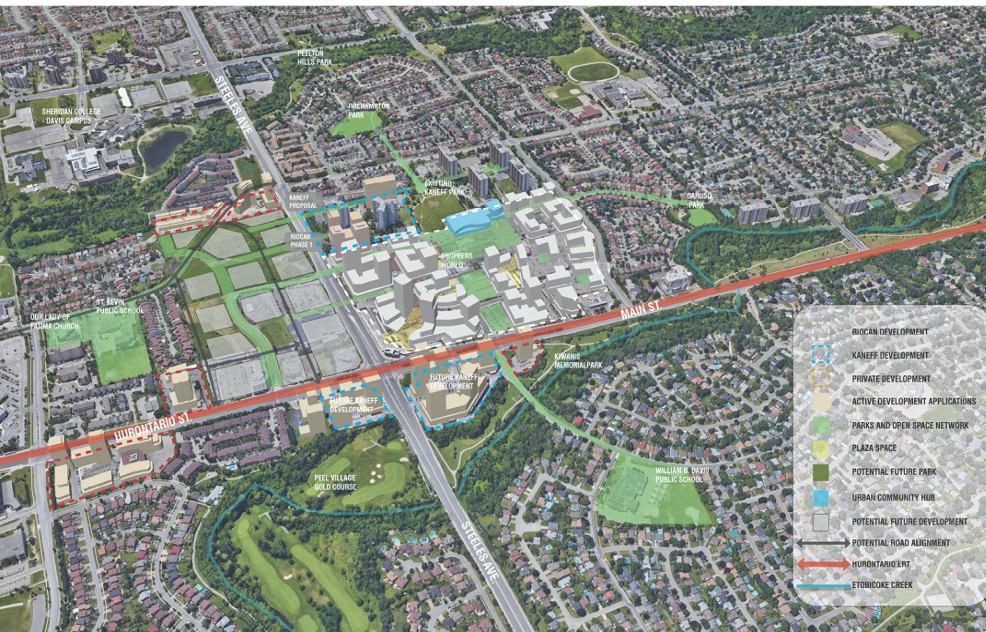
It has now been over a year that I have been working with city planning and urban design staff in Brampton as a Strategic Advisor on implementing its aspirational 2040 Vision adopted in 2018. One of the key areas where this is playing out is around Shoppers World, the conversion of a 60 acre mall into a new mixed-use neighbourhood that will ultimately house about 10,000 people and provide employment for 3,000 at the juncture of Steeles Avenue and Hurontario/Main Street where a new LRT will arrive from the south linking with an existing transportation terminal. Picking up from my last blog here is a progress report on how that is playing out as the plans take shape. 

This is the way this area looks today in a world formed by reliance on the car as the primary means of transport, isolated land uses, the proverbial sea of parking, things so close and yet so far for anyone on foot.

The challenge is daunting. The kind of neighbourhood we are seeking to create in its place is a complex organism – many moving parts, different actors over time, dynamic, interactive, a manifestation of “organized complexity”. A key challenge in delivering on that vision is putting things together in time and space that have lived in silos until now, aligning design moves, public and private investments to be more than the sum of their parts. It is not the work of even the most inspired soloist but of the coordinated actions of a diverse array of actors. This idea of collective creation was captured succinctly by Jane Jacobs: “Cities have the capability of providing something for everybody, only because, and only when, they are created by everybody.”

This is where innovative planning and urban design have critical roles to play, convening, and providing overall design direction to these diverse actors. Urban design thinking is about seeing large pattens, releasing synergies and unlocking value by creating positive chain reactions and virtuous circles, situations where 1+1+1 = 6 or 7. The many collateral benefits to be derived from successful place-making will be enumerated in a business case that is being prepared for City Council. Some are easily quantifiable in economic terms: expediting development, return on public sector investment, job creation, increased taxes etc. Others, no less important, are more indirect and qualitative like better public health outcomes and social cohesion and lighter environmental footprint.  A holistic approach fosters lateral thinking where the solution to one problem may reside in a different area. Mixed-use becomes a mitigating solution to traffic congestion. 

While many of the great neighbourhoods we admire have evolved over long periods of time we are now looking to do this in highly compressed in time new places.  In the case of Shoppers World this process is accelerating as many of the formative pieces are already in play including the LRT and supporting public infrastructure investments, plus multiple developers ready to invest.  The goal is to make them fit together and support each other, to move them from relatively isolated predetermined set pieces to interactive components making a coherent walkable place.  

Unlike, however, many of the neighbourhood precedents from elsewhere we admire where the government owns and controls all of the land at the outset, commissions the master plan and brings in investors or developers (e.g. Kalasatama, Helsinki, Hammarby Sjöstad, Stockholm), or large scale single private ownership examples where the one landowner is in control, we are dealing in Brampton with a diverse pattern of ownership in the area surrounding Shoppers World. This can be seen as both an added challenge and an opportunity – using this heterogeneity to provide greater diversity and the ability for more investors to act concurrently.  

The city has a gamut of statutory planning tools to guide growth scaling from the larger policy context of the Official Plan and Secondary Plans setting out broad parameters re use, density, built form expectations and performance, environmental sustainability, housing affordability, mobility targets etc. to Zoning by-laws governing land use, density, heights, parking ratios etc. and Plans of subdivision formalizing the street network and dedication of rights-of-way.   

In parallel and informing these formal statutory planning tools and the approvals process, Urban Design is contributing a range of new innovative design-oriented tools set the stage from a District Framework Plan supplying big generative integrating design ideas and concepts – the walkable 20 minute neighbourhood and the ‘Creek to Creek’ green armature within which growth will occur. The city will ultimately be responsible the physical and social public infrastructure of streets, parks, institutional uses and the shaping of the public realm which is the unifying glue that ties the neighbourhood together, comprising roughly half of the land area.  

Within the Uptown Framework Plan covering approximately 9 square kilometers, individual Precinct Plans (the circles) will be developed for individual neighbourhoods like the Shoppers World 20 minute TOC on an as needed basis as development initiatives come forward.  These will refine the broad concepts of the Framework and tailor them to specific circumstances, site conditions and property configurations. 

The critical first layer of the District Framework is the Public Realm Plan is rooted in the natural features of the land in this case the parallel Ferguson and Etobicoke Creeks that are are woven into the fabric of the emerging neighbourhoods. 

Lines of force extending from ‘Creek to Creek’ roughly 1.2 kilometers apart form an armature that penetrates and links existing and new neighbourhoods by forming loops of interconnected green space and trail networks. 

Within each Precinct much of the delivery of the built fabric of this 20 minute neighbourhood will be accomplished largely through private sector investment on individual building parcels. In this case with private ownership of virtually all of the developable land, the neighbourhood will emerge from an intensive ongoing dialogue between public sector, the private sector and the institutional and non-profit sector. Partnerships will play a crucial role. 

These interlocking plans, the District Framework Plan and the Neighbourhood Precinct Plan are guiding and coordinating both the shaping of development on private lands as well as public actions, the design and treatment of public spaces, streets, parks, trails and public facilities.  

A vital role of the urban design and planning team is working with the developers and designers of each building project to shape the relationships between the public and private spheres, melding the seamless fusion of these two realms – the public and private into coherent places in the thresholds that link them, the in-between spaces and interfaces. This requires hospitable public-facing ground floors and generous safe and attractive spaces for community life at grade level. 

Each individual development project is seen as a valuable chess piece both designed to meet specific needs but at the same time contributing to larger goals – potentially extroverted on all sides reaching out to surrounding streets and natural green spaces and its neighbours.  . 

The particular forte and skill set of urban design in this negotiated process is the ability to visualize and simulate outcomes, extending the focus of attention beyond individual property lines – making the invisible visible calling attention to latent relationships like the emergence of the underlying larger structure of the creeks as valuable natural features or the streets as shared social spaces, but also fostering a dialogue and conversation among the diverse developments and built-form to public spaces for example the interface of the adjoining developments, turning ‘backs’  to ‘fronts’ forming a third place. 

There is a highly accessible signature public space at the heart of every neighbourhood precinct, in the Shoppers World case the enlarged Kaneff Park with the Community Hub (here shown as a prototype)  as a pavilion in the park containing a school, library, community recreation centre, day care, arts and cultural uses, an entrepreneur centre and a range of ancillary public uses with nearby shopping for daily needs and restaurants and cafes as convenient community gathering spaces on the adjacent High Street. This extended ‘hub’ is the beating heart, the shared common ground of the neighbourhood accommodating both daily life routines and special occasions throughout the year.  

The toughest nut to crack in Uptown will be humanizing and transforming the intersection of the two major arterials at Steeles and Hurontario/Main Street which geographically becomes the ‘100 % corner’ of the 20 minute TOC Neighbourhood with redevelopment currently proposed on three and potentially on all four corners. This will be the real test of the city’s 2040 Vision for prioritizing urban development served by safe and attractive active transportation. 

Achieving the city’s vision for a transformed major arterial illustrated in the 2040 Vision will require a major rethinking of priorities. 

Finally the urban design work underway is not a singular one time intervention, report, study or plan. It has to be seen in the 4th dimension, not as a fixed snap-shot of a moment in time or an imagined end state. It involves an ongoing commitment to a multi-year multi-decade process. It depends on fostering a shared culture of design thinking among a talented and motivated city team and a diverse group of collaborators some of whom are identified below. 

The 20 minute neighbourhood that is emerging around Shoppers World in Brampton is promising start, a work in progress in early stages. It represents a sea change in attitudes and practices in an environment formed around the car. It won’t ever look exactly like any current image, but will evolve, leaving room, for improvisation, creativity and new ideas on all sides, but it will enable new ways of living that are inherently more economically productive, environmentally sustainable, socially inclusive and culturally rich.    


19 Aug 04:34

Second-Order Effects

by Matt

Derek Thompson’s writing for the Atlantic has been some of the most interesting this year. His latest, The Workforce Is About to Change Dramatically, is worth a close read. He gives good arguments for and against how remote working will change real estate, entrepreneurship, and something I’ve been meaning to write about but he did a much better job, how the great migration happening away from superstar cities could reshape politics.

I sincerely hope that all the people moving to new places are registering to vote in their new home, as I did when I moved from San Francisco back to Houston in 2011. The following year was 2012 and in Harris County (Houston) with 4.263 million people, Obama won by 585 votes. I was one of those votes.

19 Aug 04:31

Government to invest $380,000 into B.C.’s electric vehicle network

by Bradly Shankar

The Government of Canada has pledged $380,000 to go towards helping British Columbia’s District of the Summerland build 22 electric vehicle (EV) chargers.

This initiative will specifically result in six EV fast chargers and 16 level 2 EV chargers installed across the city, including at commercial businesses and its Tourist Information Centre. The government says the first site is scheduled to open in fall 2020.

The $380,000 funding comes from the federal government’s Electric Vehicle and Alternative Fuel Infrastructure Deployment Initiative (EVAFIDI) and the Zero-Emission Vehicle Infrastructure Program. An additional $150,000 is being provided by the Government of British Columbia.

The investment is part of the government’s commitment to achieve net-zero emissions by 2050, with the B.C. government targeting an 80 percent reduction in emissions by that same year. Further, this funding goes towards the government’s goal to reach 100 percent of zero-emission passenger vehicle sales by 2040.

Source: Natural Resources Canada

The post Government to invest $380,000 into B.C.’s electric vehicle network appeared first on MobileSyrup.

19 Aug 04:31

Filtered for small groups

1.

James Mulholland has been investigating the small group:

Lying somewhere between a club and a loosely defined set of friends, the SMALL GROUP is a repeated theme in the lives of the successful. Benjamin Franklin had the Junto Club, Tolkien and C.S. Lewis had The Inklings, Jobs and Wozniak had Homebrew. The Bloomsbury Group was integral to the success of Virginia Woolf, Clive Bell, and John Maynard Keynes, while MIT’s Model Railroad Club spawned much of modern hacker culture.

– James Mulholland, The Small Group

It’s a crucible for exploration and creation… but this isn’t a team on working on a single project together. It’s about independent work and feedback. Says Mulholland: An ongoing relationship provides more effective advice, allowing the use of shorthand for concepts and a two-way conversation that autodidactic education lacks.

He asks: What is the SMALL GROUP for the 2020s? – and gives some boundaries: around a dozen members; mutual accountability on personal projects through regular presentations.

It’s a powerfully engaging question.

2.

Here’s Kevin Kelly on Brian Eno’s concept of Scenius, or Communal Genius: Scenius stands for the intelligence and the intuition of a whole cultural scene. It is the communal form of the concept of the genius.

Kelly lists some success factors:

  • mutual appreciation (scenius as peer pressure)
  • rapid exchange of tools and techniques
  • network effects of success (successes are claimed by the scene, not the individual)
  • local tolerance for novelty (the scene doesn’t have to fight its environment)

Kelly is, as ever, incredibly smart. And goodness, I recognise those factors from various communities and even small and big companies.

To use slightly different terms, mutual appreciation is a healthy jealousy without envy – a drive to achieve the same but without wanting to take it from the other.

That feeds the mutualisation of success, which becomes a kind of co-marketing: a rising tide lifts all ships.

And the rapid exchange of tools requires two things: highly efficient communication (openness and forums to be open in); and a non-proprietorial attitude to tools and ideas because execution is what matters.

3.

LOS ANGELES – Hype House, the physical location of a new content creator collective, is a Spanish-style mansion perched at the top of a hill on a gated street in Los Angeles. It has a palatial backyard, a pool and enormous kitchen, dining and living quarters.

Four of the group’s 19 members live in the house full time; several others keep rooms to crash in when they are in town.

That’s from The New York Times, Hype House and the Los Angeles TikTok Mansion Gold Rush.

More:

So-called collab houses, also known as content houses, are an established tradition in the influencer world. Over the last five years they have formed a network of hubs across Los Angeles.

And some detail:

  • Collab houses are beneficial to influencers in lots of ways. Living together allows for more teamwork, which means faster growth.
  • A good collab house has lots of natural light, open space and is far from prying neighbors. A gated community is ideal, to prevent swarms of fans from showing up.
  • And if you want to be a part of the group, you need to churn out content daily.

Manufactured scenius.

4.

Clay Shirky’s classic essay from 2005, A Group Is Its Own Worst Enemy (pdf), on software for groups.

Shirky channels the psychoanalyst Wilfred Bion who specialised in groups in the mid 20th century.

Bion’s realisation was that social groups have their own mentality, a kind of mind which is connected to but also separate from the individuals.

Bion then goes on to detail three basic assumptions that the group mentality can fall into (as fundamental as any of the mental states like exuberance or fight-or-flight that we can fall into an individuals).

Shirky’s words:

  • The first is sex talk. (imo Shirky’s not quite on the money interpreting Bion here, but close enough)
  • The second basic pattern that Bion detailed is the identification and vilification of external enemies.
  • The third pattern Bion identified is religious veneration – any closely-held tenets of the group will do, not necessarily those of an organised religion.

What a successful group does (says Bion) is weave together these three basic assumptions so that they’re no longer dysfunctions (which is what each becomes if left to dominate) but instead providing a foundation for productive work.

Shirky brings Bion’s work to life. It’s an essay very, very much worth a read/re-read (delete as appropriate).


Bonus link: my own stream of consciousness 2015 essay, Small groups and consultancy and coffee mornings.

I find myself circling these topics, and thinking about technology and its role and how we’ve really screwed that up, and about Bion and his wonderfully emotional approach to groups, and asking the same question that James Mulholland asked at the top of this post: What is the SMALL GROUP for the 2020s?

19 Aug 03:55

Moz-eying along…

by sheppy

By now, most folks have heard about Mozilla’s recent layoff of about 250 of its employees. It’s also fairly well known that the entire MDN Web Docs content team was let go, aside from our direct manager, the eminently-qualified and truly excellent Chris Mills. That, sadly, includes myself.

Yes, after nearly 14½ years writing web developer documentation for MDN, I am moving on to new things. I don’t know yet what those new things are, but the options are plentiful and I’m certain I’ll land somewhere great soon.

Winding down

But it’s weird. I’ve spent over half my career as a technical writer at Mozilla. When I started, we were near the end of documenting Firefox 1.5, whose feature features (sorry) were the exciting new <canvas> element and CSS improvements including CSS columns. A couple of weeks ago, I finished writing my portions of the documentation for Firefox 80, for which I wrote about changes to WebRTC and Web Audio, as well as the Media Source API.

Indeed, in my winding-down days, when I’m no longer assigned specific work to do, I find myself furiously writing as much new material as I can for the WebRTC documentation, because I think it’s important, and there are just enough holes in the docs as it stands to make life frustrating for newcomers to the technology. I won’t be able to fix them all before I’m gone, but I’ll do what I can.

Because that’s how I roll. I love writing developer documentation, especially for technologies for which no documentation yet exists. It’s what I do. Digging into a technology and coding and debugging and re-coding (and cursing and swearing a bit, perhaps) until I have working code that ensures that I understand what I’m going to write about is a blast! Using that code, and what I learned while creating it, to create documentation to help developers avoid at least some of the debugging (and cursing and swearing a bit, perhaps) that I had to go through.

The thrill of creation is only outweighed by the deep-down satisfaction that comes from knowing that what you’ve produced will help others do what they need to do faster, more efficiently, and—possibly most importantly—better.

That’s the dream.

Wrapping up

Anyway, I will miss Mozilla terribly; it was a truly wonderful place to work. I’ll miss working on MDN content every day; it was my life from the day I joined as the sole full-time writer, through the hiring and departure of several other writers, until the end.

First, let me thank the volunteer community of writers, editors, and translators who’ve worked on MDN in the past—and who I hope will continue to do so going forward. We need you more than ever now!

Jean-Luc Picard demonstrates the facepalm

Me, if I’ve forgotten to mention anyone.

Then there are our staff writers, both past and present. Jean-Yves Perrier left the team a long while ago, but he was a fantastic colleague and a great guy. Jérémie Pattonier was a blast to work with and a great asset to our team. Paul Rouget, too, was a great contributor and a great person to work with (until he moved on to engineering roles; then he became a great person to get key information from, because he was so easy to engage with).

Chris Mills, our amazing documentation team manager and fabulous writer in his own right, will be remaining at Mozilla, and hopefully will find ways to make MDN stay on top of the heap. I’m rooting for you, Chris!

Florian Scholz, our content lead and the youngest member of our team (a combination that tells you how amazing he is) was a fantastic contributor from his school days onward, and I was thrilled to have him join our staff. I’m exceptionally proud of his success at MDN.

Janet Swisher, who managed our community as well as writing documentation, may have been the rock of our team. She’s been a steadfast and reliable colleague and a fantastic source of advice and ideas. She kept us on track a lot of times when we could have veered sharply off the rails and over a cliff.

Will Bamberg has never been afraid to take on a big project. From developer tools to browser extensions to designing our new documentation platform, I’ve always been amazed by his focus and his ability to do big things well.

Thank you all for the hard work, the brilliant ideas, and the devotion to making the web better by teaching developers to create better sites. We made the world a little better for everyone in it, and I’m very, very proud of all of us.

Farewell, my friends.

18 Aug 14:28

Copying From Other Communities

by Richard Millington

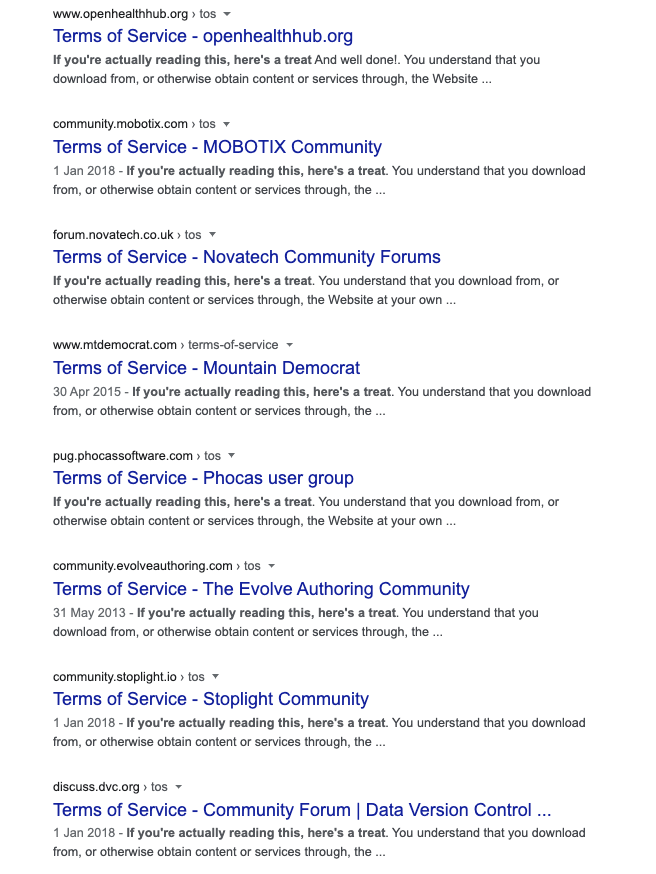
A while back, WordPress buried a small joke deep within their terms of service.


If you clicked the link, you would (bizarrely) see a plate of BBQ food.

A simple search shows hundreds, maybe thousands, of communities have copied these terms of service (including, to some extent, our own). These often include not just the ‘easter egg’, but the wrong jurisdiction too.

Some have copied from another source (which changed the link to an article in the New Yorker). Others copied the text (not the HTML), and have no link at all (communities on Discourse seem especially affected).

Copying terms of service, documentation, and design elements is always going to happen. It’s often how good ideas spread. It’s easier to edit and work with an existing template than developing something new from scratch.

However…you should comb through every single word of what you’re copying to ensure it matches your needs and no-one has slipped some nefarious content in there (i.e. what if the policy said your website will pay every visitor $20?).

p.s. It might be worth checking your terms of service today.

18 Aug 14:24

App stores, trust and anti-trust

by Benedict Evans

We all, I think, understand that the iPhone was a generational change in computing, but that change came in two parts. The multitouch interface is obvious, but the change in the software model was just as important. Apple changed how software development worked, and by doing so expanded the number of people who could comfortably, safely use a computer from a few hundred million to a few billion.

Specifically, Apple tried to solve three kinds of problem:

  • Putting apps in a sandbox, where they can only do things that Apple allows and cannot ask (or persuade, or trick) the user for permission to do ‘dangerous’ things, means that apps become completely safe. A horoscope app can’t break your computer, or silt it up, or run your battery down, or watch your web browser and steal your bank details.

  • An app store is a much better way to distribute software. Users don’t have to mess around with installers and file management to put a program onto their computer - they just press ‘Get’. If you (or your customers) were technical this didn’t seem like a problem, but for everyone else with 15 copies of the installer in their download folder, baffled at what to do next, this was a huge step forward.

  • Asking for a credit card to buy an app online created both a friction barrier and a safety barrier - ‘can I trust this company with my card?’ Apple added frictionless, safe payment.

All of this levelled the playing field. In the past, you knew you could trust Adobe or EA with your credit card, and you knew you could trust them not to abuse your PC too much. PanicRogue Amoeba or Basecamp have accumulated reputations that mean they get trust too, for tech insiders who’ve known about them for years. But what about a random Vietnamese developer who’s made a fun little game about a bird that flaps? The iOS software model removed trust as a problem, and as an advantage for big companies. You still have to hear about the app - the App Store solves distribution but not discovery - but you don’t have to worry about paying for it and you don’t have to worry what it might do to your computer.

This model has enabled an explosion of software. A billion people use iPhones today, the App Store has 500m weekly users, and those users both buy and install far more software than ever before. The new software model has, objectively, been great for software development, and also and much more importantly has been hugely and unambiguously good for actual consumers. Trust and rules are good.

The trouble is, if you have a curated, managed sandbox, where a company decides what’s safe, you have to do a good job of managing and curating, and Apple has not, always, done a good job at all.

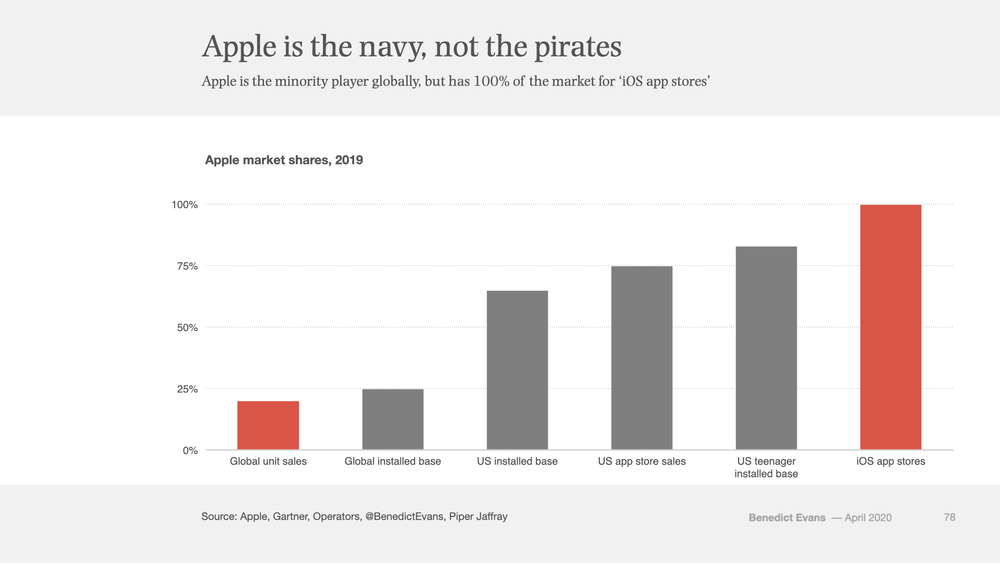
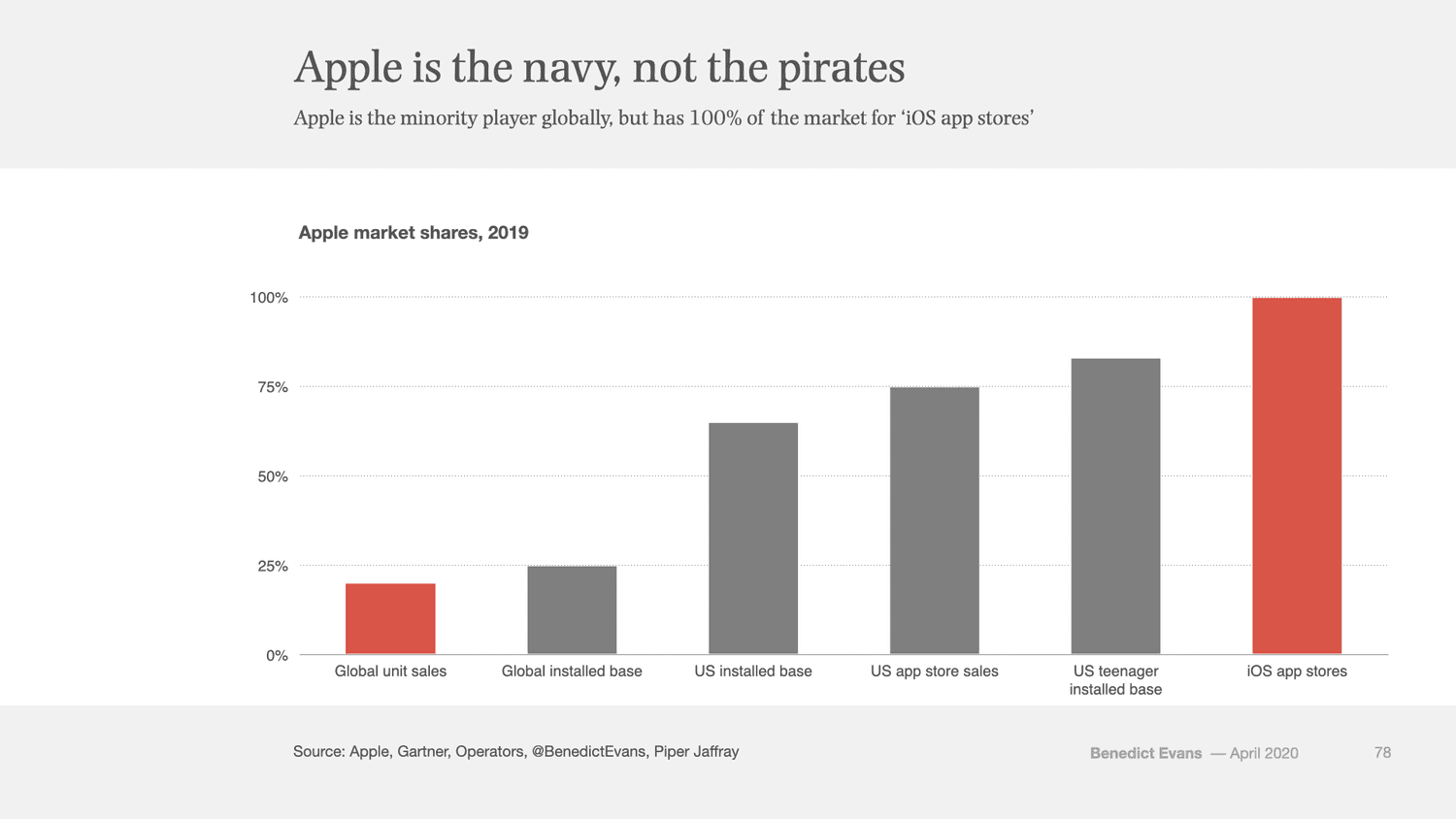
And, it matters if Apple doesn’t do a good job, because when Apple launched the app store it had sold fewer than 10m iPhones ever, but today a billion people use iPhones, and more importantly so does over half of the US market and 80% of American teenagers. For a lot of big companies, iPhone users are the market. When your product has a few points of market share you can make whatever choices you like, but when you dominate the market, other rules start applying. Apple isn’t the pirates anymore - it’s the navy, the port and the customs house. In the last few weeks, Microsoft, Google, Facebook and Epic have been stopped at customs.

2020 Shoulders of Giants 1.5.001.png

So, what kinds of decision does Apple make about what you can do on an iPhone or iPad, and where are the problems? Splitting this apart:

  1. Most decisions do actually have a solid, rational engineering basis. You can’t run in the background and record what every other app does.You can't run the battery down, or read all my photos without permission, or hijack my network connection and CPU to mine crypto. 

  2. But some seem to be just personal preference, or taste - most obviously, the decision in the last few weeks to block streaming games services from Microsoft and Google. This may partly be about revenue, but the real issue seems to be that Apple thinks that games on iOS ’should’ use native APIs, and, perhaps, that they ‘should’ work without you needing to buy a separate games controller. But whatever it is, there’s no safety, security or privacy issue - Apple just doesn’t like those apps.

  3. Some decisions in both of two previous categories cause difficulties for third party apps that compete with Apple products. That isn’t necessarily the aim, but it also might not go un-noticed at Apple.

  4. Then, there are endless horror stories around curation of the store. Apps are rejected in arbitrary, capricious, irrational and inconsistent ways, often for breaking completely unwritten rules. Only Apple actually knows how much this happens, but far too many people have far too many bad experiences. This has done real damage to Apple’s brand amongst developers.

  5. And then there are the payment rules.

Apple’s payment rules, made mandatory in 2011, created a whole load of new problems:

  • United Airlines and Uber aren’t covered at all - only content consumed on the device is affected.

  • There are apps where there’s a clear logic for Apple’s payment system to be compulsory - there are coherent, consistent reasons why that random horoscope app should use the build-in payment and not be allowed to offer extra value if you give it a card, and a level playing field means the same rules for everyone (except we just discovered that Amazon is 'only' paying 15% for some Prime Video signups on iOS).

  • However, there’s a huge grey area around services that are consumed both on and off the platform - for example, Netflix, Disney and newspapers and magazines. How and where, exactly, should Apple get a cut?

  • Worse, there are companies that just can’t pay. Ebooks or music apps have to give a fixed percentage of their top line to rights-holders and don’t have a 30% margin to give Apple.

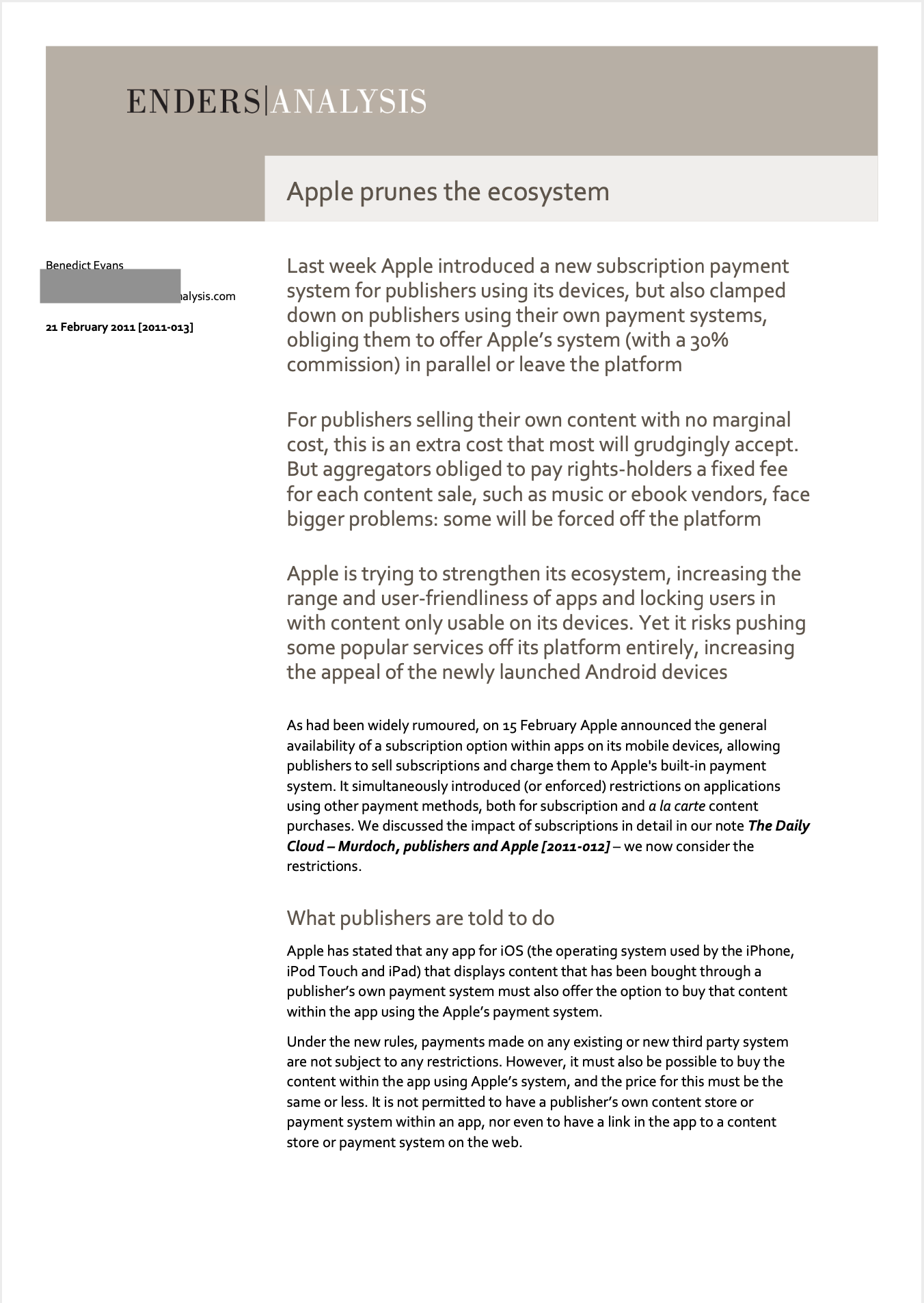
We had all these arguments in 2011 and very little has changed since: I wrote this report at the time and it’s still a pretty good summary.

View fullsize Screenshot 2020-06-21 at 12.28.29 pm.png
View fullsize Screenshot 2020-06-21 at 12.29.23 pm.png
View fullsize Screenshot 2020-06-21 at 12.29.43 pm.png
View fullsize Screenshot 2020-06-21 at 12.29.53 pm.png
View fullsize Screenshot 2020-06-21 at 12.30.01 pm.png
View fullsize Screenshot 2020-06-21 at 12.30.13 pm.png

Meanwhile, none of this is a surprise to Apple. As part of the recent US congress competition hearings, we saw an email from early 2011 in which Steve Jobs explicitly accepted and embraced the fact that the payment rules would be a fundamental problem for some companies.  The result, for almost a decade, has been a horrible muddle, with people using those products forced into a bad user experience.

Screenshot 2020-08-13 at 2.35.17 pm.png

(Of course, when this email was written, Apple was still a fair way away from market dominance: there were only 150-160m iOS devices in use, and iPhones were maybe 10% of all the mobile phones being used in the USA, where today they’re over 50%.)

Ironically, Epic is not in this ‘can’t pay’ category at all, and it built a huge and very profitable business following Apple’s rules. Unlike Spotify, it doesn’t have marginal cost for in-app purchases and there’s no structural reason why it can’t pay Apple (or indeed Google). It just doesn’t want to, or wants to pay less than 30%. Indeed, one could point out that the real issue is that Epic just doesn’t ’like’ Apple’s model, just as Apple doesn’t ‘like’ Stadia.

At this point, many people suggest that we can cut a Gordian knot here - that we can slash through the complexity by letting people have a choice. Allow any payment service, perhaps in parallel to Apple’s; allow third-party app stores; allow side-loading of apps; and of course let users turn off the sandboxed restrictions on the phone. Then you can have the security if you want it, or the freedom.

Unfortunately, you can’t have your cake and eat it. A secure system with a switch to turn off the security might work for Linux and a highly technical user, but when you’ve given smartphones to a few billion people, a secure system with a switch to turn off the security is just a target for malware. That horoscope app can tell you’ll get more accurate results if it has access to some computer gibberish, so please press OK, and guess what? Everyone will press OK. A computer should not ask a question that the user won’t understand, and when you have billions of users the list of those questions looks different. This has been Google’s experience with Android: it chose a less restrictive sandbox than iOS and had many more malware problems, and Google has spent the last decade slowly rowing towards Apple’s approach.

A limited version of this argument, incidentally, is that all the problems are with the store, and you could get rid of it without security problems, relying on software sandboxing on the phones to handle all security and safety issues. But there are also policies people object to on the phone itself (no replacing the default Maps app, say), and policies that we want to keep that are enforced in the store rather than on the phone (no ads in apps for kids, say). You have to tackle the whole policy question, not just part of it, and you cannot rely on the sandbox on the phone to solve all safety and security attacks.

All of this is to say that the demands Epic makes in its lawsuit are not, in fact, merely arguing that the smartphone apps market should be more competitive, with more payment options. The sandboxed app store model is not some curious, incidental feature of modern smartphones - rather, this is an essential and hugely important part of why they have such a strong software ecosystem. Epic is explicitly arguing that we should abandon the smartphone software model and security model almost entirely, and switch to what would actually be the old Windows model. Its arguments would also of course mean that we should abandon any level playing field, and move to a model where big companies and big brands have an even bigger advantage, because a trusted platform is replaced by a trusted reputation. This would be good for big established brands - like Epic - but not for may other people.

Epic's proposal is full of holes, and Epic’s problem is really pretty peripheral, but I’m much more interested in Spotify and Stadia, where the situation now looks unsustainable, and that’s where we’re more likely to see changes. So, I think we should try to draw one more set of distinctions.

First, the App Store moderation problems are infuriating but they’re not rent-seeking or necessarily market abuse - they’re an execution failure, and indeed we’ve been here before. However, the EU, which is becoming the tech regulator by default, is already working on plans for the store review model to be regulated, with real, external rights of appeal and review, and external transparency. Apple could try to get ahead of this, or it might be too late. It might have no choice but to allow Stadia, and ‘we just don’t like that’ won’t do anymore. 

Second, I think Apple is going to have to make fundamental changes to the payment model. Epic only has margin at stake, but Spotify can’t pay at all, it’s a direct competitor, and there’s no user benefit at all to Apple’s policy, just confusion and annoyance. The EU is now pursuing two separate competition policy cases against Apple: one over the App Store, with Spotify a complainant, and the other over Apple Wallet and Apple Pay. This second one is instructive: the EU is taking the view that Apple has a monopoly of payment on the iPhone. Market definition is everything. I-am-not-a-lawyer, but I don’t see how Apple can win on Spotify (or Kindle), and I don’t think it should.

That might mean changes in who and what is covered by payment rules, but it probably also means changes to the 30%. There’s a lot of argument about principle, but there’s also a price: if the rate was, say, 10%, I’m not sure that we would be having the same conversation, and Epic would certainly get less sympathy.

That 30% adds up to real money, incidentally. When the store launched, Steve Jobs said it was aiming to break even - the 30% was to cover the running costs, and it is worth remembering how many huge companies are getting the App Store, the manual review and the file downloads to hundreds of millions of users for nothing more than their $100 a year developer subscription. But the App Store is not running at break even anymore: in 2019 it made somewhere between $10bn and $15bn of commission - 20-30% of the ‘service revenue’ Apple likes to talk about.

Finally - we’ve been arguing about this since the store launched in 2008, but really, some of this debate is as old as personal computers. Right back to the 1970s, there’s been a religious split between people who want computers that they’re free to change however they like, and people who want computers that are easy and safe to use for as many people as possible. This is a trade-off, but there's a certain kind of person in tech that thinks app stores and the iOS sandbox have nothing to do with the success of smartphones and the iPhone - they're just a stupid Apple thing you could get rid of with no ill effects. 30 years ago they thought the same about GUIs, and indeed a lot of Epic’s PR comes straight out of furious Usenet posts from the 1990s about how GUIs are evil and infantilising. But the whole direction of computing since the Apple 1 has been about more abstraction, less access to the lower levels of the system and inherent in that more accessibility for more people.

Apple has always been at one, extreme, end of that debate, taking a strong opinion on how it thought a good computer ‘should’ work and letting you choose it or not. From 1976 to, say, 2015 or so, it was just one fairly niche vendor, and some people chose Apple’s opinion and some didn’t. But with the iPhone, Apple finally won the argument with users’ wallets, and that means it’s not niche anymore - Apple has become the navy, and different rules apply.

A version of this essay was sent to subscribers to my premium newsletter.

You can find out more here.
18 Aug 04:19

Microsoft’s Panos Panay joins Sonos’ board of directors

by Dean Daley

Microsoft chief product officer, as well as the face of the Surface brand of hardware, Panos Panay, is now on Sonos’ board of directors.

Sonos board chairman Mike Volpi announced the change in a press statement released Monday.

“Panos brings extensive experience in building powerful and engaging consumer hardware products and experiences that customers love, at a global scale. He understands how hardware and software work together to deliver products that are easy to use, and deliver a fantastic experience. His track record, along with his passion for Sonos, will make him an impactful contributor to the company’s ongoing success,” said Volpi.

The press release states that the change became effective on August 12th, 2020.

At first thought, Panay joining the board doesn’t seem like a big deal, but with a closer look, the optics are a bit strange.

The Verge points out that Microsoft and Google have a good relationship with one another, especially considering the launch of the upcoming Surface Duo dual-screen smartphone running Android. Whereas, Sonos and Google are in the midst of a legal battle, as the speaker company alleges that Google stole its smart speaker technology. So, it’s a bit odd that Panay would align himself with Sonos.

Regardless of the optics, Panay has had many roles at Microsoft, including corporate vice president of Microsoft Devices, corporate vice president of Surface & PC hardware, and his current role of chief product officer and the face of Surface. Panay joining the board is a smart move on Sonos’ part as he comes with a lot of knowledge and wisdom in tech and hardware.

However, hopefully, this doesn’t ruin the relationship between Google and Microsoft.

Source: Sonos

The post Microsoft’s Panos Panay joins Sonos’ board of directors appeared first on MobileSyrup.

18 Aug 03:50

RT @ColinYeo1: Important point from @kenanmalik on legal challenges by pesky “migrants” and their leftie lawyers. theguardian.com/commentisfree/… h…

by ColinYeo1
mkalus shared this story from BarristerSecret on Twitter.

Important point from @kenanmalik on legal challenges by pesky “migrants” and their leftie lawyers. theguardian.com/commentisfree/… pic.twitter.com/kO0WIj33fg


Retweeted by BarristerSecret on Monday, August 17th, 2020 8:50am


317 likes, 170 retweets
17 Aug 21:11

Long term parking…

by Ton Zijlstra

20200817_142803

Long term parking…

17 Aug 21:11

Find that bug! Using a search engine as a programmer

Most bugs you encounter have been encountered by others before you; most programming problems you face have been faced by others as well. And many of those people have written down details about what they’ve learned—in issue trackers, documentation, and blog posts.

All you have to do is find this information.

Typing a phrase in to your search engine of choice will sometimes take you straight to the right answer. But quite often, the results aren’t helpful.

No need to give up, though: there are still plenty of ways you can productively keep searching.

Use site-specific search too

It’s easy to believe that search engines have all the answers right at the top, but they actually hide quite a lot of content deep in their results. And some obscure content never gets indexed at all, which is unfortunate when it’s the obscure content that you need to find.

So instead of just using a search engine, use the local search engine of the project issue tracker, the documentation, StackOverflow, and so on.

For example, let’s saying you’re using Eliot, a somewhat obscure Python logging library I maintain, and you want to use it with the Pandas library. Unfortunately, you get an error, so you search Google for the text of the error: eliot dataframe is not json serializable. Now, there is an actual issue in Eliot’s GitHub issue tracker with this exact error message—but as of August 2020 Google doesn’t return it, probably because it didn’t bother to index that page.

But if you were to use the search form on the Eliot GitHub project’s issues page, you would find the issue that mentions this particular error. In this case, as in many others, the search engine isn’t actually indexing everything: you have no choice but to use the local search engine.

Local search engines often have the additional benefit of allowing more structured search, for example:

  • An issue tracker might let you search by open/closed status, labels, or the affected version.
  • StackOverflow questions are tagged with particular technologies by the person submitting the question.

You still want to use a search engine

A software project’s documentation and issue tracker are a great place to start searching, but sometimes you’ll find solutions elsewhere.

For example, if you have a problem with library A, it might be that project B had the same issue, and you can find a workaround in their issue tracker. Or perhaps someone wrote a handy blog post on the issue—or they might have other related content. And that related content can also be useful.

Read results that don’t answer your question

Often you’ll encounter results that solve a similar but not identical problem. Read those pages anyway.

First, because you’ll learn more about the shape of the problem, broad approaches, and how the underlying software works.

Second, because you might find suggestions of new places to search.

Third, because this will give you an opportunity to apply your close reading skills and learn more domain-specific jargon. You can then use this jargon to widen, narrow, and vary your search.

Note: This article is an excerpt from my book, The Secret Skills of Productive Programmers, which also has a chapter on close reading.

Narrow and widen your search

Let’s say you’ve tried an initial search engine search, and you got a huge swath of unrelated results. For example, if I use Google in private mode to search for eliot, I get many entries about the poet T.S. Eliot.

Given too many results, you need to focus in: add a keyword or two that will help narrow the results to those you care about. In this example, searching for eliot logging find the actual Python library; searching for eliot python also helps.

Again, the jargon you’ve found along the way will help you know what to add.

If your search is too specific, you can do the opposite, removing some unnecessary keywords.

Try lots of variations by using jargon

Even if your initial searches don’t work, you shouldn’t give up: now is the time to start using synonyms and alternative phrasings. You are using a certain phrase to describe the problem, but other people might conceptualize it a different way, and use different phrases.

If you can rephrase the search you are likely to find many results you haven’t seen before. For example, let’s say you’re using the Pandas dataframe library for Python and you’re running out of memory. If you search for pandas too much memory, pandas out of memory, pandas large files, and pandas out of core will give you some overlapping results, but each returns some results you won’t get from other phrases.

The last term comes from “out-of-core computation”, a computer science term for algorithms that process data that doesn’t fit in memory. How might you learn about that phrase? By collecting jargon as you go along.

Search for errors the right way

When searching for errors, you need to copy/paste enough that you’re identifying the specific error, but not too much such that the search engine can’t find any matching results. For example:

Traceback (most recent call last):
  File "/home/itamarst/flask/app.py", line 2446, in wsgi_app
    response = self.full_dispatch_request()
  File "/home/itamarst/flask/app.py", line 1951, in full_dispatch_request
    rv = self.handle_user_exception(e)
  File "/home/itamarst/flask/app.py", line 1820, in handle_user_exception
    reraise(exc_type, exc_value, tb)
  File "/home/itamarst/flask/_compat.py", line 39, in reraise
    raise value
  File "/home/itamarst/flask/app.py", line 1949, in full_dispatch_request
    rv = self.dispatch_request()
  File "/home/itamarst/flask/app.py", line 1935, in dispatch_request
    return self.view_functions[rule.endpoint](**req.view_args)
  File "flask1.py", line 18, in index
    return _counter + "\n"
TypeError: unsupported operand type(s) for +: 'Counter' and 'str'

Different languages will have different formatting, but the basic idea is that the lines that includes directories are specific to your computer. Searching for /home/itamarst is not going to get good results!

Searching for the last line might work:

TypeError: unsupported operand type(s) for +: 'Counter' and 'str'

Or maybe the last two lines, if that line is from code I downloaded and didn’t write myself:

    return _counter + "\n"
TypeError: unsupported operand type(s) for +: 'Counter' and 'str'

Or perhaps I want to understand the generic error, rather than this particular instance:

TypeError: unsupported operand type(s) for +:

Or perhaps I think this is a problem in the Flask library rather than my code, in which case I might search for:

flask TypeError: unsupported operand type(s) for +: 'Counter' and 'str'

Typically the important information will be either at the beginning or the end of the error traceback or stacktrace.

(Thanks to Jason Swett for suggesting this technique.)

Finally, be careful

One issue with searching for random solutions on the web is that the proposed solution is sometimes wrong or broken. I’ve seen people propose insecure solutions on StackOverflow, and then get upvoted by other people who don’t know any better.

Just because the solution seems to work doesn’t mean it’s correct: you still have to think, do some additional research to validate the proposal, and probably write some tests too.

Want more ways to become a more productive programmer? This article is an excerpt from my book, The Secret Skills of Productive Programmers.


Tired of scrambling to get your job done?

If you were productive enough, you could take the afternoon off, confident you’d produced high value work. Not to mention having an easier time finding a new job when you need one.

Learn the secret skills of productive programmers.

17 Aug 21:10

Apple’s independent repair shop program now includes Macs

by Patrick O'Rourke
MacBook Pro repair

Apple has expanded its independent repair provider program to feature Mac computers, which includes devices like the iMac, MacBook and Mac Mini.

The iPhone version of the program first launched in the U.S. last year, before expanding to Canada and various European countries in early July 2020.

Just like the iPhone program, Apple says it will now provide participating third-party repair shops with access to the same Apple parts, tools, training, diagnostics and repair manuals as authorized service providers and Apple stores.

“We’re excited to expand our independent repair provider program to the Mac, so that customers have an additional way to have their Mac serviced with Apple genuine parts,” said Jeff Williams, Apple’s chief operating officer, in a recent statement.

It’s worth noting that all independent repair shops require an Apple-certified technician capable of performing the repairs to qualify for the program. The certification process is free.

Regarding the ‘Right to a Repair’ movement in Canada specifically, Open Media, a consumer advocacy group, has been urging the Canadian government to implement legislation that forces companies to allow consumers to be able to fix products on their own. Liberal Ontario Member of Provincial Parliament Michael Coteau also introduced a Right to Repair bill in February 2019, though the Ontario legislature voted against it.

While Apple still has a long way to go when it comes to making the ability to repair its devices more accessible, bringing Macs to its third-party repair program is definitely a step in the right direction.

Via: Reuters

The post Apple’s independent repair shop program now includes Macs appeared first on MobileSyrup.

17 Aug 21:10

To the future occupants of my office at the MIT Media Lab

Ethan Zuckerman, My heart’s in Accra, Aug 17, 2020
Icon

Everything about the Media Lab in one post. "There’s so many beautiful and brilliant people who pass through here – and so many frustrated and broken people too – that it gets hard to keep tabs on everyone." The Media Lab was such a good idea, executed so poorly.

Web: [Direct Link] [This Post]
17 Aug 21:10

Open at the Margins

Maha Bali, Catherine Cronin, Laura Czerniewicz, Robin DeRosa, Rajiv Jhangiani, Rebus, Aug 17, 2020
Icon

It's going to take a while to digest everything that's in it, but I want to highlight for now the availability of this eBook (306 page PDF). As Maha Bali writes, the book "centers voices from the margins on open education, a field that until recently was dominated entirely by white, Northern/Western male voices." As one of those privileged white male voices, I would like to wholheartedly welcome the much-needed diversity that this volume brings to the field. It's an accessible collection of blog posts and such that the authors have written over the last few years. That said, many of the authors are very familiar to me, and so I would encourage the editors to redouble their efforts to find the voices not being heard should they contemplate a second volume.

Web: [Direct Link] [This Post]
17 Aug 21:08

The auto-suggested life is not worth living

Doug Belshaw, Open Thinkering, Aug 17, 2020
Icon

I get what Doug Belshaw is saying here but I'm not going to agree with it. I already use the auto-suggestions in my Pixel phone quite a lot (mostly in text messages I exchange with Andrea). Nothing like using one button to day "I'm on my way!" Anyhow, Belshaw suggest that "One way to think about this is as a subtle pressure to conform. It’s an approach rooted in behaviourism, the idea that a particular stimulus always leads to a particular response." Who wants to live a life like that? he asks. Well, I do. When I'm out cycling and text Andrea, I want it to know what I'm going to say (eg., "I'm in Ste-Anne de Prescott") and allow me to confirm with a single button. As long as I'm creating the patterns such a device makes my life easier. The more it frees me from the routine, the more room it leaves me for the original and creative.

Web: [Direct Link] [This Post]