Shared posts

27 Sep 04:47

The Era of Visual Studio Code

VS Code Hero

The most important thing I look for when choosing which tools to use is longevity. Learning software is an investment, and if you have to switch to another application later, you lose some of that investment.

In most software categories, choosing the software with longevity is easy, the most popular tools are usually the ones that have been around the longest. Microsoft Excel and Adobe Illustrator were both released in 1987 and, for the most part, they’ve remained the most popular software in their categories since then.

Text editors, on the other hand, are a software category where the most popular options are not the oldest. According to the Stack Overflow Annual Developer Survey, Sublime Text was the most popular text editor available on the Mac from 2015–2017. Sublime Text was released in 2008, a sprightly youth compared to Excel and Illustrator. Text editors have been a category with a lot of movement: In the last 20 years, TextMate, Sublime Text, and Atom have all been the text editor with the most momentum1. For big complicated desktop software, has any other category ever had so much movement?

I believe the era of new text editors emerging and quickly becoming popular has now ended with Visual Studio Code. VS Code has reached unprecedented levels of popularity and refinement, laying a foundation that could mean decades of market dominance. If, like me, one of your priorities for your tools is longevity2, then that means VS Code might be a great text editor to invest in learning today.

The case for VS Code’s longevity comes from several points we’ll cover in this piece:

  1. Popularity: It’s crossed a popularity threshold that no earlier text editor in recent history has crossed.
  2. The Text Editor as Platform: It’s the endgame of a revolution that saw text editors be remade around extensions.
  3. Paradigm Transcendence: It’s transcended its paradigm as a desktop app by becoming a hosted web app, and even a reference implementation.
  4. Company Management: It’s managed by a powerful tech company, and it’s being developed aggressively.

Popularity

VS Code is the most popular text editor today. It’s so popular, that it could be the most popular GUI programming tool of all time. Since 2015, Stack Overflow has included questions about text editors in their survey3. Back then Notepad++ was the most popular text editor, with 34.7% of respondents saying they were “likely to use it”. In the following years, the popularities of different text editors moved around a bit, but nothing ever broke the 40% mark. That is, until its most recent poll in 2019, when VS Code jumped to 50.7%. This was the second year in a row that VS Code increased by ~45%, this time jumping from 34.9% in 2018, where it had already been the most popular.

Text Editor Popularity 2015–2019

Text Editor Popularity

(Note that Stackoverflow started allowing multiple answers between 2015 and 2016, so I’d take the changes between those two years in particular with a grain of salt.)

The Text Editor as Platform

So VS Code is objectively wildly popular; the next point we’re going to look at is more qualitative. For the past couple of decades, text editors have been on a trajectory that I believe VS Code is the final representation of. This is the progression of text editors becoming platforms in their own right by increasing the role and capabilities of extensions. What follows is the history of this progression4.

Pre-2004: BBEdit, Emacs, and Vim

BBEdit, Emacs, and Vim are all great text editors in their own right, but they all have idiosyncrasies that (while beloved by people like me) prevent them from ever being the most popular text editor.

Emacs, and Vim’s predecessor Vi, were both first released in 1976, before many of todays user-interface conventions were solidified. Predating conventions like using a modifier key with Z, X, C, and V for undo, cut, copy, and paste (keyboard shortcuts that were popularized by the original Macintosh and Windows 1.0, released in 1984 and 1985 respectively). Neither Emacs5 or Vim use these keys, and instead use their own terminology. They both use the term “yank” for example (although to mean different things, it’s copy in Vim, and paste in Emacs).

BBEdit was released in 1992, around the time that some of the first GUI tools emerged that would become dynasties. Note the proximity to Excel (1987), Illustrator (1987), and Photoshop (1990). And just like those apps, BBEdit is still relevant today. But unlike those apps, it’s not the most popular in its category, by a wide margin. The reason seems to be at least partially that it never fully adapted to a world where text editors put so much emphasis on package-driven ecosystems.

2004: TextMate

TextMate, released in 2004, is arguably the most influential text editor ever. Among the numerous features it popularized are abbreviation-based snippets, automatic paired characters, and fuzzy finding by file name. All of these features became staples in every popular text editor that followed. The implementations of Scope Selectors and theming that TextMate pioneered have also formed the basis for themes and syntax highlighting in every subsequent popular text editor.

That’s already a lot to originate from a single app, but it still doesn’t even include TextMate’s most significant innovation; the one that would go on to re-shape text editors, solidify niche status for every text editor that came before it, and pave the way for VS Code to become the most popular text editor in history a decade later. TextMate’s most important innovation was that it was the first popular text editor that was primarily built around extensions.

While TextMate popularized the concept of a text editor built around extensions, in hindsight, it didn’t go far enough. TextMate’s extensions had limitations that later text editors would thrive by removing.

2008: Sublime Text

Sublime Text, released in 2008, popularized the minimap and multiple cursors. And unlike TextMate and BBEdit, it’s cross-platform, running on Linux, MacOS, and Windows, which helped it reach a wider audience than those editors. But Sublime Text’s biggest impact was greatly expanding the capabilities of extensions.

Sublime Text’s extensions run in an embedded Python runtime with an extensive API, unlike TextMate which uses the scripting languages built-in to macOS, and rather than having a proper extension API, mainly centers on processing standard out.

Sublime Text greatly expanded what extensions could do, allowing more sophisticated integrations such as linters that included GUI components. And Package Control, the enormously popular package manager for Sublime Text built by Will Bond6, features a centralized source for package management, reducing the friction to browse, install, and update packages; a model that all subsequent popular text editors would also adopt.

Even with Sublime Text’s expanded extensions, it still didn’t go far enough. Package Control wasn’t built-in, and, while Sublime Text does have an API, its use of Python with custom calls for GUI components still left room for future text editors to make extensions more accessible to build.

2014: Atom

Atom, released by GitHub in 2014, finally brings extensions to their final form. Atom’s package manager is built in7, displays extension READMEs complete with inline images (and early extensions made by GitHub themselves popularized the convention of using animated GIFs to illustrate functionality), creating an extension experience reminiscent of an app store.

Then there’s the matter of HTML and CSS8. Atom is built on Electron9, which means the editor itself is written in JavaScript and runs on Node10. Compared to Sublime Text’s Python API; HTML, CSS, and JavaScript are some of most widely-known languages in existence, which greatly lowers the barrier of entry for creating extensions.

Atom had essentially perfected the extension-based editor, there was just one problem: It’s slow. Performance complaints have plagued Atom since its release, and market ended up split with Sublime Text, which is lightning fast by comparison.

2015: Visual Studio Code

VS Code was released in 2015, based on the Monaco Editor that Microsoft had first released in 2013 that could be embedded into websites. When GitHub released Electron along with Atom. Microsoft used it to create a desktop version of the Monaco Editor called Visual Studio Code.

VS Code takes the same formula as Atom11—a local web-based text editor written in Electron with an emphasis on extensions—and makes it more performant. VS Code makes extensions even more visible, by putting them in the sidebar, raising to the same level as file browsing, searching, source control, and debugging. VS Code extensions can have rich user-interfaces, being written in HTML, CSS, and JavaScript, and with full-access to Node, they can essentially do anything any other application can do. And indeed, some extensions start to look like apps in and of themselves.

With VS Code, the extension-based text editor has seemingly reached its final form. Ever since TextMate, extensions have increased in prominence and capabilities, and with VS Code, that progression appears to have culminated. There just isn’t anywhere else to go. Correspondingly, there isn’t a way a new text editor can leapfrog VS Code the same way previous text editors have been leapfrogging each other by improving extensions.

Paradigm Transcendence

So far we’ve looked at VS Code’s popularity, and its extensions implementation, as indicators of longevity. The third indicator we’ll look at is how VS Code has moved beyond the confines of the desktop. The code-server project runs VS Code as a regular web app, in other words, hosted on a server and accessed through the browser. GitHub’s Codespaces also run VS Code as a web app, this time by spinning up an ad hoc development environment.

Transcending a paradigm, like going from a desktop app to a web app, is a great indicator of longevity. For one, it means it’s more likely to be ported to more paradigms in the future. It takes herculean effort to port to a new paradigm, and expending that effort is a great indicator of value. Emacs and Vim were both ported from the terminal to GUI applications; they were too valuable not to have GUI versions. Photoshop and Excel both run on mobile12, and Illustrator is coming soon. Excel also has a web version13, and there’s a streaming version of Photoshop (although it’s been in closed beta for six years).

Not only has VS Code transcended the parameters of its initial implementation by becoming a web app, it’s also became something of a standard. Version 1.0 of the Theia IDE maintained by the Eclipse Foundation is a re-implementation of VS Code. VS Code is now not only a text editor, but also a model of how a text editor should behave.

Company Management

TextMate is largely the work of one developer, Allan Odgaard, the same with Sublime Text and Jon Skinner. Both of these applications eventually ran into trouble with frustrated users for perceived slow release schedules.

Here’s the history of major releases for these two applications:

  • 2004: TextMate 1
  • 2008: Sublime Text 1
  • 2011: Sublime Text 2 Alpha
  • 2012: Sublime Text 2
  • 2012: TextMate 2 Alpha
  • 2013: Sublime Text 3 Beta
  • 2017: Sublime Text 3
  • 2019: TextMate 2

Here’s a graph of the number of years between stable major releases (contrasted with the release dates for BBEdit 10–13 for comparison):

Text Editor Release Schedule

A couple things jump out from this graph immediately:

  1. TextMate 2 took a long time.
  2. Sublime Text has been consistent with their release schedule.

The complaints about Sublime Text seem to center around the gap between the Sublime Text 3 Beta being announced in 2013 and released in 2017, and a perceived lack of sufficient changes during that period. Sublime Text’s release schedule is slow when compared to BBEdit’s which has released three major versions (11, 12, and 13), while Sublime Text 3 has been in beta. Although Coda 2 was released in 2012, and hasn’t been updated since, so it’s unclear whether Sublime Text’s release schedule is really an anomaly for a commercial text editor.

The current version of VS Code is 1.49, but VS Code is open source, so it plays by different rules than commercial apps. Major versions exist at least partially as an opportunity for companies to charge for upgrades.

Since VS Code is developed out in the open, we can evaluate its pace of development directly by reviewing its commit history. VS Code’s commit graph on GitHub tells a story of aggressive development, out pacing Atom, and even other large open source project like Facebook’s React (note that these graphs have different scales on the Y-axis).

Visual Studio Code Commit Graph

Visual Studio Code Commit Graph

Atom Commit Graph

Atom Commit Graph

React Commit Graph

React Commit Graph

Aggressive development pulls platforms away from the pack because the combination of forward momentum, and third parties building on the platform, is difficult to compete with14. This is the same combination that makes it so hard for new entrants to compete with popular browsers or OSes.

Conclusion

The goal of this piece is to determine if VS Code is a good investment in learning if you value longevity. An implication of the Text Editor as Platform, is that since TextMate’s introduction in 2004, every few years the text editor with the most momentum has changed. These would be short reigns by any standard, but they’re positively miniscule compared to apps like Excel and Photoshop. Learning a new text editor is a questionable investment if you expect something new to come along every few years.

VS Code is giving indications that the era of short reigns for text editors is over. It has the potential to maintain its position as the most popular text editor for a much longer time, possibly for decades, if we use examples of popular software in other categories as a guides. As we’ve outlined in this piece, the case for this is following:

  1. It’s crossed a popularity threshold that’s eluded other text editors by being used by over 50% of developers.
  2. It’s the final form of progression towards maximizing the power and visibility of extensions, making it immune to being leapfrogged by a new text editor with a more capable extension model.
  3. It’s moved beyond its origins as a desktop app, it’s also a web app, and it’s even become a model of how a text editor should behave.
  4. It’s managed by a company, so it’s unlikely to run into the development stagnation that’s plagued other text editors.

Before VS Code, I expected to never learn another general-purpose text editor that wasn’t Emacs or Vim again, it was just too risky. I’ve found a good way to make predictions is to assume things will stay the same; with text editors, that means expecting a new text editor will emerge every few years that gains most of the momentum. Expecting anything else to happen requires extraordinary evidence.

I believe VS Code has presented extraordinary evidence. I’m hoping it moves into the category with apps like Excel, Illustrator, Photoshop, software that has held the most popular position in its category for decades. These applications are reliably time investments that repay their cost of learning over the course of a career. Emacs and Vim have always been like that, but it’s always good to have more choice.


  1. If you think about it, the fact that the most popular text editor is newer than popular software in other categories is pretty strange, since text editing predates almost every other computer task. I think there are a couple of reasons for this. The first is that, on a technical level, writing a text editor is easier than other categories. While I don’t want to downplay the difficulty, text files are the lingua franca of computers, and nearly every major software development framework has at least some built-in support for them. Modern hardware also gives you a lot of performance headroom to develop a text editor that you don’t have if you’re developing, say, a video editor.

    The second reason is that it’s easier for users to switch text editors. While learning new complex software packages is always difficult, at least with text editors you can just open your existing projects with a new one and start editing them, since development projects are just made up of plain text files. There’s almost no other software category where this is true, most applications use proprietary formats that only their application can read. Another reason text editors tend to be easier to pick up is that it’s usually, but not always, easy to figure out the basics: How to enter and edit text. The basics are usually easier to figure out than, say, Adobe Illustrator, which is almost impossible to use without reading the manual.

    These factors combine to make text editors a particularly competitive market, and competition is effective in driving innovation. For my money, it’s made text editors the best software there is: They have the best balance of form and function of any software category. The closest competition are browsers and terminals, which also combine power and flexibility into an elegant package, but I give the edge to text editors, because browsers and terminals achieve their power by simply wrapping powerful concepts, a protocol and standard streams respectively. With text editors in contrast, the user interface is the application in a way that just isn’t true for those other types of applications. (This is also why browsers and terminals all feel roughly the same, while text editors are wonderfully diverse.) ↩︎

  2. If longevity is my priority, then why not use Emacs or Vim? For Vim, the answer is easy, I do already use it. But I don’t like writing prose in Vim’s modal editing model, so I started seeking out a non-modal editor to complement Vim.

    I’ve also spent a fair amount of time with Emacs, but it started crashing for me with an issue similar to this one. The author of that post solved their problem by compiling Emacs locally to run it in lldb, which is farther than I was willing to go to solve my problem.

    Emacs has a difficult balancing act to walk: It’s incredibly customizable, but it’s also fragmented. For the Mac, there are several popular ports. And, macOS isn’t a high-priority platform for Emacs. There’s a history of blocking macOS-only features from Emacs, as well as removing features that are already working. All-in-all this makes Emacs a hard sell on macOS. Customizability and fragmentation aren’t a great combination to begin with, because customizations will often work in one version and not another. But when combined with relatively low market-share (4.5% in 2019), and being on a platform that’s a second-class citizen relative to GNU/Linux, it’s hard to recommend, despite its strong points. ↩︎

  3. For some reason Stack Overflow removed the questions about developer tools like text editors for the 2020 survey unfortunately. ↩︎

  4. The progression of text editors becoming a platform is adapted from a previous post, which is in turn adapted from a Twitter thread↩︎

  5. Emacs does include cua-mode, which when turned on, defines C-x, C-c, C-v, and C-z as “cut (kill), copy, paste (yank), and undo respectively”. (The name cua-mode, is a bit of a misnomer because IBM Common User Access never used these key bindings.) ↩︎

  6. Will Bond was hired by Sublime HQ in 2016↩︎

  7. TextMate 2, released in December 2011, also had the first built-in extension browser in a popular text editor. ↩︎

  8. Light Table, released in 2012, is another important milestone in the web-based text editor journey. Light Table uses NW.js (formerly node-webkit), a predecessor to Electron, and it had an integrated package manager—foreshadowing the same combination that Atom would use a couple of years later.

    What’s most interesting about Light Table that it focused on innovative new features first, like watching variables change as code executes, evaluating code inline, and embedding running projects in the editor itself (some of these features inspired by Bret Victor’s seminal “Inventing on Principle” talk). These are features that even now, eight years later, have been slow to make it into the text editors that followed.

    Light Table was about new features that weren’t available anywhere else, whereas Atom, its closet successor that used a similar web-based approach, was about incremental improvements over previous text editors. Atom’s main feature was that it was web-based, whereas Light Table was about new features that had never been done before. ↩︎

  9. Electron was originally called “Atom Shell”↩︎

  10. Atom was originally written in CoffeeScript↩︎

  11. VS Code is less “hackable” than other text editors. For example, it doesn’t have an “init” file in the tradition of .emacs.d and .vimrc (Atom does have one). This makes VS Code harder to customize, since the only way to do it is to create an extension. ↩︎

  12. Presumably, VS Code would already exist on iOS were it technically feasible to do so, since it’s open source and so popular. It makes an interesting case study for the future of iPadOS as a platform. Because, if it’s not technically possible to port VS Code to iPadOS, then, as VS Code becomes ubiquitous, that increasingly becomes synonymous with iPadOS not supporting programming at all.

    The point is probably moot, because an iOS native version of VS Code would probably work with the same client-server model described in Paradigm Transcendence. But it’s still an interesting thought experiment, because I often see the prediction that iPadOS will [disrupt] the industry from the bottom(https://en.wikipedia.org/wiki/Disruptive_innovation). I wonder how can that happen if a platform puts up so many technical barriers for creating a text editor? ↩︎

  13. Another nice thing about having a web version is that web apps don’t have to abide by the App Store Review Guidelines, so applications prohibited by Apple can still exist on the platform. ↩︎

  14. As I’m fond of saying, if you’re looking for areas that will be disrupted by new technology, look for areas of neglect↩︎

22 Sep 03:40

Facebook threatens to pull out of Europe if it doesnt get its way

by Volker Weber

Vice reports:

CORK, Ireland — Facebook has threatened to pack up its toys and go home if European regulators don’t back down and let the social network get its own way.

In a court filing in Dublin, Facebook said that a decision by Ireland’s Data Protection Commission (DPC) would force the company to pull up stakes and leave the 410 million people who use Facebook and photo-sharing service Instagram in the lurch.

Thank you, thank you, thank you. When can you leave?

More >

22 Sep 03:39

A Verbal Eats Shoots Leaves Problem

by Ms. Jen
In her 2003 book, “Eats, Shoots & Leaves“, Lynn Truss points out the problems of a lack of punctuation or too much punctuation in terms of meaning and how the reader parses the words. If one is a panda bear: one eats shoots &...
21 Sep 21:00

RT @joncstone: renaming London’s streets and squares so they don’t celebrate imperialism: dangerous and divisive renaming Oxford Circus t…

by Jon Stone (joncstone)
mkalus shared this story from iandunt on Twitter.

renaming London’s streets and squares so they don’t celebrate imperialism: dangerous and divisive

renaming Oxford Circus tube station ‘Pepsi Max Central’: prudent financial management pic.twitter.com/guFvvURjoq


Retweeted by Ian Dunt (IanDunt) on Monday, September 21st, 2020 2:37pm


974 likes, 306 retweets
21 Sep 20:58

43

The Mall at the World Trade Center in New York City, April 2019.

💔 RIP Notorious RBG. God help America.

🛫 I miss America right now. I wish I could jump on an airplane and arrive in New York City about six years ago. Alas, 2020 has given some really strong evidence that time travel isn’t ever possible. Or, if it is, it was discovered in an era so far from this one that nobody thought to try to fix this part of timeline.

🐶 So, I distract myself with other things.

📱 After a few days of removing almost the apps from my iPhone’s home screen, save for the 4 at the bottom in the dock, I really don’t want to add anything back that’s not a widget. I’d rather swipe right and launch the app out of the App Library than add any more boring do-nothing icons to my home screen. Widows Phone’s Live Tiles had this right a long time ago. Now, if only we didn’t have to wait a year for this feature to come to the iPad.

⌚ I really like the handwashing timer in the latest version of watchOS. While I remember being coached to wash for longer as a kid, as an adult I’m sure that I’ve averaged way less than I’d care to admit. The feature is totally seamless, kicks in automatically, and gives that extra encouragement to go at least 20 seconds—which feels 5 (or maybe even 10!) seconds longer than I would spend normally.

😷 The six-month wall in any crisis is always difficult, says Dr. Aisha Ahmad. “In my experience, this 6 month wall both arrives and dissipates like clockwork. So I don’t fight it anymore. I don’t beat myself up over it. I just know that it will happen & trust that the dip will pass. In the meantime, I try to support my mental & emotional health.” Good advice and I’ll do my best to take it to heart, especially since this six-month wall comes as the 2020 political campaigns round into the final stretch.

📅 Speaking of politics: 43 days. Tick tock.

21 Sep 20:57

Creating Your Own Widgets: A New Category of Apps Emerges

by Ryan Christoffel

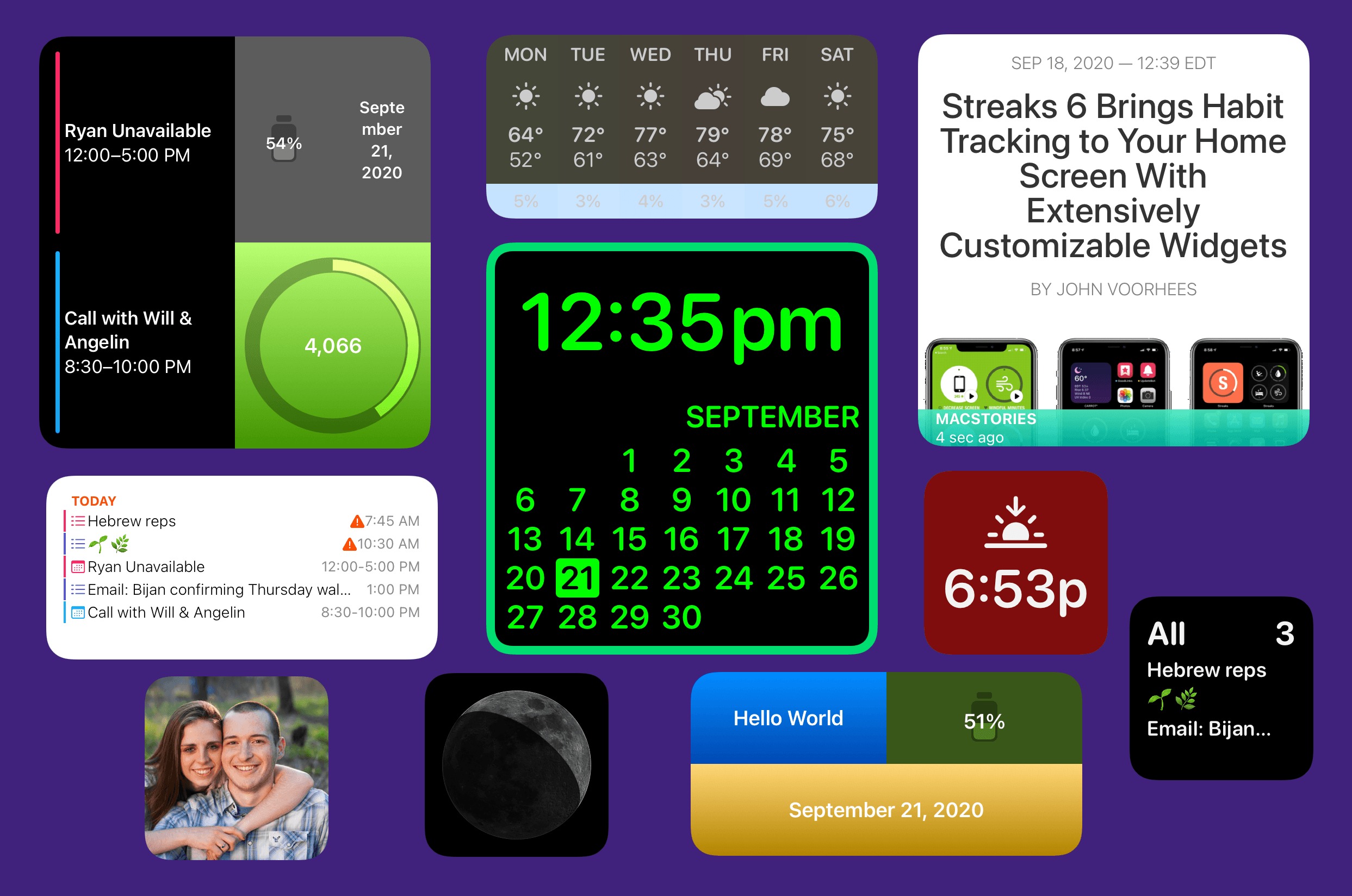
This summer, when Apple detailed iOS 14 and the Home screen changes it would bring, the company highlighted personalization as one of the key features of the new widget-populated Home screen. Rather than just containing an assortment of apps, iOS 14 Home screens can feature the information that matters most to you. Whether that’s your Activity rings so you can stay on top of your health, the current weather forecast, your task list, a memory from the Photos app – there are an abundance of options for personalizing your Home screens now.

I’ve tried a ton of Home screen widgets from third parties over the summer, and developers are doing lots of creative things with their apps’ widgets. One of the most exciting trends I’ve seen is the emergence of a new category of apps entirely centered around widgets. While most widgets will come built in to the apps you already know and love, some developers have built brand new apps for the sole purpose of enabling users to create and customize widgets in a hyper-personalized way. The best widgets I’ve tried offer configuration settings so you can tailor them to your exact needs, and these new apps take that idea even further, offering widget creation tools relating to a variety of traditional app categories – like weather, photos, health and fitness, productivity, and more – but in a single centralized app.

Leading the pack in this regard is Widgetsmith from David Smith, which not only covers one of the widest array of different widget types, but also features a power user-friendly scheduling option that sets it apart. The App Store hosts a growing number of other widget creation tools too, such as Widgeridoo, Widget Wizard, Glimpse, and Health Auto Export.

Because each app specializes in providing its own custom set of options, there’s no limit to the number of apps worth trying. Widget needs can be highly personalized, so it’s no surprise that the apps designed for creating widgets all offer their own takes too.

Get ready to upgrade your Home screens.

Widgetsmith

Widgets built with Widgetsmith.

Widgets built with Widgetsmith.

Widgetsmith needs to be the starting point here, both because it arguably offers the most comprehensive suite of widget creation tools I’ve seen and also because the core concept of the app was birthed even before Apple unveiled iOS 14’s new widget system at WWDC. Widgetsmith directly builds upon the foundation laid by Watchsmith, the app David Smith launched in April for building custom Apple Watch complications. As I wrote in my review at the time, Watchsmith took customization on the watch face to a whole new level.

Now, half a year later, Widgetsmith is essentially Watchsmith but for iPhone and iPad widgets rather than Watch complications. Since Apple’s new widget system is directly based on the company’s work with complications, Smith was able to build Widgetsmith from a great starting place due to his very timely efforts with Watchsmith.

Widgetsmith enables building custom widgets across eight different categories:

  • Weather
  • Calendar
  • World Time
  • Reminders
  • Health
  • Astronomy
  • Tides
  • Photos

These categories each hold multiple widget options spanning small, medium, and large sizes. The widget creation process in the app is really simple, but offers lots of customization. On the main Widgets tab of the app you’ll see sections for configuring small, medium, and large widgets. You can add new widgets in each size, or simply modify the pre-built widgets by tapping on them, after which you’ll see the option to rename your widget, and you can choose to modify the default widget or set up a timed widget, which I’ll cover in detail shortly.

Creating multiple widgets of each size.

Creating multiple widgets of each size.

After tapping the widget preview, you’ll enter the setup screen. From here, you’ll find a myriad of widget styles matching the eight categories named above or some variation of them. If you’re configuring a small widget, for example, you’ll see four styles for Time, six for Date, one for Calendar, two for Reminders, six for Weather, and so on. Each style offers either different utility, or a different design for holding the same data. There aren’t near as many style options for the app’s large widgets as for small and medium, but I expect smaller widgets are by far the more popular options, so it makes sense that Smith prioritized those.

Depending on the widget you choose, you may see additional options at the bottom of the screen to modify the widget’s font, tint color, background color, time format, photo album, location, or whatever else is appropriate to that widget type. I can’t even begin to count the number of different possible widgets you could create with all of these options.

A sampling of Widgetsmith’s widget customization tools.

A sampling of Widgetsmith’s widget customization tools.

Once you’ve chosen all the right customization options and built your ideal widget, going back to the previous view (via the top-left back button) shows a preview of your new widget. Hit Save and you’re ready to add it to your Home screen.

You can create as many different small, medium, and large widgets as you’d like. Installing them is as easy as choosing the correct size from the Home screen widget installer, then tapping the widget while in jiggle mode to see its configuration options. This is where you choose which exact widget you want displayed. Since Widgetsmith enables building multiple widgets in each size class, this last step is necessary for selecting which specific widget you want.

No matter how many different widgets you’ve created, in the installation process you’ll always just see a single small, medium, or large option, but then after choosing the widget size and adding it to your Home screen or Today view, you’ll be able to select which of your created widgets you actually want displayed. This is why the ability to name your widgets in the app’s setup screen is so important.

Widgets built with Widgetsmith not only display the data you configured for them, such as your reminders due in the next day, but you can also tap them to view that data inside the full Widgetsmith app. The functionality inside the app is limited, so you won’t want to use Widgetsmith as a replacement for your full task manager, or calendar or weather app, but it’s nice being able to see related data to what a widget displays with a single tap.

Tapping a widget takes you into one of these views, which are fully-functioning features of the app.

Tapping a widget takes you into one of these views, which are fully-functioning features of the app.

The wide array of widget categories, styles, and customization options make Widgetsmith stand in a class of its own. However, there’s one other unique strength of the app that must be mentioned, and that’s the widget scheduling system.

If you’ve played around with Apple’s built-in widget options in iOS 14, you might be familiar with the Smart Stack. Apple has applied machine learning to widgets such that a stack of widgets can show the right widget from your stack at the right time – or so goes the promise. In iOS 14 when browsing all of your widget options, the Smart Stack is a stack of widgets the system has assembled featuring widgets from a variety of apps it thinks you’ll value; those widgets will then automatically cycle throughout the day based on your normal use behaviors. You can also, optionally, apply Smart Rotate to any widget stack that you created yourself. If they work well, these ‘Smart’ features can make each stack of widgets more powerful by showing you the most relevant widget at just the right time, that way you shouldn’t ever need to manually flip through a widget stack.

For the average user, maybe the Smart Stack and Smart Rotate features can be a nice way to get more out of widgets. But for power users who want a little more control of their widgets rather than trusting machine learning to understand their use patterns, there’s Widgetsmith’s scheduling system.

Scheduling widget setups for different times of day.

Scheduling widget setups for different times of day.

Like I mentioned earlier, after tapping on a widget from the app’s Widgets tab, you’ll see an option at the bottom of the screen to ‘Add a Timed Widget.’ This lets you create additional widgets that are scheduled to appear within a single widget slot at the exact times of day you choose. What this means is that rather than needing to create a stack of different widgets and cycle through them manually, or rely on Smart Rotate to do that for you, Widgetsmith enables having a single widget that changes automatically throughout the day per the schedule you give it.

With Widgetsmith I could, for example, build a single widget that shows the following data on this schedule:

  • My Activity ring progress from 6:00am-8:00am while I exercise
  • A reminders list from 8:00am-5:00pm while I work
  • Activity rings again from 5:00pm-6:00pm to ensure I’m close to completing my rings
  • Some of my favorite photos from 6:00pm-9:00pm
  • The next day’s weather forecast from 9:00-10:00pm

With Widgetsmith, you can program a custom schedule like this for any of your individual widgets. No need to stack widgets, or rely on Apple’s machine learning smarts to learn your habits – you know your habits, so you can program them right into one of your Widgetsmith creations. Then, whether you add that widget to your Home screen or Today view, it will automatically update throughout the day per your instructions.

This scheduling feature is built into Smith’s Watchsmith app too, for scheduling Watch complications, and I’m thrilled that it’s come to Widgetsmith. Stacks and Smart Rotate are nice options to have, but I’ve never liked relying on a computer to figure out what I want, when I want it – I’d much rather explicitly program it to do what I want. I hope Widgetsmith’s scheduling feature is adopted by other apps’ widgets in the future.

Widgeridoo

Widgets made with Widgeridoo.

Widgets made with Widgeridoo.

Widgeridoo, similar to Widgetsmith, offers support for a variety of different widget categories. You can build widgets that display:

  • Static text
  • Photos
  • A specific album, playlist, or song from your music library
  • Battery level for your device
  • A countdown to a specific date
  • Upcoming birthdays for your contacts
  • Steps, distance, or flights traveled today
  • And much more

As this list makes clear, even though Widgetsmith offered its own diverse set of widget types to build, because of the vast possibilities for different widgets, an app like Widgeridoo can have a similarly impressive list of supported widget types yet with very little overlap between the two apps. With most of these widget creation apps, the question isn’t which one app you should download, as though you were picking a single task manager or notes app; rather, the more widget creation apps the better, because they all offer different options.

Widget configuration in Widgeridoo.

Widget configuration in Widgeridoo.

Aside from its distinct list of available data types to build widgets with, one of the things that makes Widgeridoo unique is its use of special layouts for building widgets that offer multiple data types in a single widget.

When creating a widget in Widgeridoo, you can have multiple content blocks laid out in a single widget. You might want one content block to take up the left half of the widget, for example, while two blocks occupy the right half, one in the widget’s top-right corner and one in its bottom-right. You could then select three different sources of data for that widget to display at all times.

Something that makes the widget building experience really easy in Widgeridoo is that you don’t have to specify a size for your widget. Every widget you build in the app will automatically have small, medium, and large versions available for your Home screen. If you use too many content blocks, the small version of that widget would ultimately be too truncated to be useful, but it’s nice being able to seamlessly preview small, medium, and large versions of the same widget without needing to manually re-build it several times. In Widgeridoo you just build once, then all three sizes are available to you.

Widget layouts offer multiple content blocks in a single widget.

Widget layouts offer multiple content blocks in a single widget.

I love the layout feature of Widgeridoo because it makes the app’s widgets extra powerful. It’s interesting how different apps have taken their own approaches to supercharging your Home screen: Widgetsmith does so with its scheduling feature, making a single widget display hyper-relevant data at different times of day; Widgeridoo, on the other hand, makes a single widget more powerful by letting it contain multiple content blocks.

The flexibility provided by Widgeridoo’s content block feature, combined with its extensive customization options, means the app is nearly guaranteed to offer enough value to earn one or more of your precious Home screen or Today view slots.

Widget Wizard

Widget Wizard offers simple widget setup.

Widget Wizard offers simple widget setup.

If you want some powerful new widgets but without the work of manually configuring those widgets in an app like Widgetsmith or Widgeridoo, Widget Wizard may be what you’re looking for. Widget Wizard doesn’t support near as many data types as the apps I’ve covered so far, but like Widgeridoo it supports having multiple content blocks in a single widget; additionally, it removes the need for manually building widgets inside the full app.

Once you’ve opened Widget Wizard and granted it access to data like your calendars, reminders, and health data, you’ll no longer need to use the full app. Rather, you can go straight to iOS 14’s widget picker (by entering jiggle mode on your device then hitting the plus button in the top-left corner) and build your Widget Wizard widgets from there, choosing from three main types:

  • The One Widget - This comes in small, medium, and large varieties and can display a single type of data.
  • The Double Widget - This comes in medium and large, and can display two data types at once.
  • The Triple Widget - Available only in a large size, this displays three data types of your choosing.
The three main widget types of Widget Wizard.

The three main widget types of Widget Wizard.

After you’ve selected one of these widgets, its data can be configured by tapping the widget when your Home screen’s in jiggle mode, or by long-pressing the widget and hitting Edit Widget. This configuration screen is where all of Widget Wizard’s customization tools lie.

For each content block in your widget, you can choose from data sources like Calendar, Health Stats, General Reminders, Countdown, Agenda, and Clock. After making a selection, you’ll see additional options for customizing the data you see. For example, if you choose Health Stats you’ll see options to select which stats are displayed – there are lots of stat options available, and you can choose three or more different stats to display in a single content block. Since all of the widget configuration happens from the widget itself, rather than inside the full Widget Wizard app, it’s much easier to get up and running with the widgets you want.

Glimpse

Websites on your Home screen with Glimpse.

Websites on your Home screen with Glimpse.

Unlike the apps I’ve detailed so far, Glimpse doesn’t aim to offer a variety of widget types, but rather it’s singularly focused on providing widgets that display web views. That’s right, you can have Home screen widgets that preview the latest content on your favorite websites.

Creating widgets with Glimpse is extremely simple. Open the app, hit the plus button to add a website, then type the site’s name and URL, and you’ll see a preview of the page. One of the most valuable features of Glimpse is that when you see this preview of the site, you can scroll it to your desired starting point. This means if you want to create a widget for MacStories, for example, you can avoid wasting valuable widget real estate on our site header and featured stories at the top of the page; rather, your widget can start displaying content at the exact point where our most recent article lives.

After saving the newly configured website in the app, you can add either a medium or large Glimpse widget to your Home screen, and from that widget’s configuration mode you can choose which site to display, how often the widget refreshes (as often as every 15 minutes), and toggle the widget’s bottom bar on and off. The bottom bar tells you the site’s name and how long ago the displayed page was refreshed, but if you’d prefer to devote the entire widget space to the site’s content, you can toggle it off. When you tap the displayed page, as you might expect, Glimpse launches it in your default browser.

I really hope iPadOS 15 adds the ability to place widgets anywhere on the iPad’s Home screen, because if so, I’ll absolutely create a full Home screen page dedicated to Glimpse widgets for my favorite websites. The 12.9-inch iPad Pro’s large display would serve as a fantastic dashboard for my most visited sites.

Health Auto Export

Widgets made with Health Auto Export.

Widgets made with Health Auto Export.

The last app I’ll highlight in this story, Health Auto Export, is similarly focused on providing a single type of widget. I’ll give you one guess what that type is.

Like Widget Wizard, Health Auto Export offers a large selection of health data types to display in widgets. Why mention yet another widget app that supports health data? Because these widgets are so nice looking that I couldn’t resist.

There’s not much to say about Health Auto Export besides what I’ve already said. It offers customizable health widgets, and they look great. Maybe I’ll just let the screenshots speak for themselves.

I still wish Apple would build its own first-party Health app widgets, but Health Auto Export does a fine job filling the gap.


Widgets in iOS and iPadOS 14 are a big deal. At MacStories we’ve tested and written about so many excellent widgets from our favorite third-party apps, but this new category of apps centered entirely on widget creation makes iOS 14’s biggest new feature even more exciting.

Apps like Widgetsmith, Widgeridoo, Widget Wizard, Glimpse 2, and Health Auto Export show not only how powerful widgets can be, but also how personal they can be. We all have our own computing needs and design preferences, and tools like these widget builders ensure that everyone can have access to widgets customized just for them.

As exciting as these five apps are, what’s perhaps even more exciting is that they’re just the start. Many other widget creation apps are available on the App Store, with more to come that I’ve been beta testing. Who knows what developers will enable users to build in the future?

It’s always hard to tell so shortly after an OS release which software trends will stick around, but if my time with widget creation tools, or browsing the App Store’s top charts or Twitter trends serve as any indication, this new app category is here to stay.


Support MacStories Directly

Club MacStories offers exclusive access to extra MacStories content, delivered every week; it’s also a way to support us directly.

Club MacStories will help you discover the best apps for your devices and get the most out of your iPhone, iPad, and Mac. Plus, it’s made in Italy.

Join Now
21 Sep 20:54

On the Supreme Court, Mitch McConnell’s pretzel logic

by Josh Bernoff

Senate Majority Leader Mitch McConnell says there’s a reason why it’s okay to push through confirming a Supreme Court Justice now, just before the election, and it wasn’t when Barack Obama nominated a Justice in his last year as president. Let’s examine his justification and see if there’s any way it makes logical sense. The … Continued

The post On the Supreme Court, Mitch McConnell’s pretzel logic appeared first on without bullshit.

21 Sep 15:49

I'm Linus, and I'm from the Midwest

This post exists because of this tweet, in which I come up with the idea of a “rhyming intro” about myself. I’m Linus, and I’m from the Midwest. Indiana, specifically. Of all the states, it’s one of the best. I’m not originally from there, but from further out west. South Korea, actually. We moved at my parents' request. I got here when I was, like, ten. It was really a test
21 Sep 15:49

'The government has effectively bribed people to eat in restaurants, but if you're a couple with three kids and a new baby you can't chat in the park with another human being' - @jonlis1 on the Rule of Six politics.co.uk/comment-analys…

by Ian Dunt (IanDunt)
mkalus shared this story from iandunt on Twitter.

'The government has effectively bribed people to eat in restaurants, but if you're a couple with three kids and a new baby you can't chat in the park with another human being' - @jonlis1 on the Rule of Six politics.co.uk/comment-analys…


206 likes, 61 retweets
21 Sep 15:49

Apple’s 5.4-inch iPhone rumoured to be called iPhone 12 mini

by Patrick O'Rourke
iPhone 11

Anonymous Apple leak-focused Twitter account ‘L0vetodream‘ has tweeted the names of Apple’s upcoming 2020 iPhone 12 line.

According to the often surprisingly accurate account, this year we’ll see the iPhone 12, iPhone 12 Pro, iPhone 12 Pro Max and the iPhone 12 mini.

While we’ve known for months that Apple plans to release four versions of the iPhone 12, this is one of the first times the iPhone 12 mini name has appeared. This device measures in at 5.4-inches and features a display with a smaller notch, according to L0vetodream.

According to several rumours, the standard iPhone 12 and 12 Pro will feature a 6.1-inch display, with the iPhone 12 Pro Max coming in at 6.7-inches. Apple’s current smallest modern iPhone is the entry-level 4.7-inch iPhone SE (2020).

Earlier rumours indicate that all upcoming iPhone 12 models will feature OLED screens, a new A14 processor and 5G connectivity. There are also some reports stating that the smartphone line will ship without a charging brick and earbuds. The Apple Watch Series 6 not shipping with a charging brick is likely an indicator of this shift. Recent rumours indicate that the higher-end ‘Pro’ devices won’t feature 120Hz displays like previous reports indicated.

While Apple didn’t reveal its 2020 iPhones during the company’s recent hardware event, it’s expected that the smartphones will be revealed during a keynote set for the first or second week of October.

Source: @L0vetodream 

The post Apple’s 5.4-inch iPhone rumoured to be called iPhone 12 mini appeared first on MobileSyrup.

21 Sep 07:01

Burrard Station cutaway, a preliminary renderin...

by illustratedvancouver

Burrard Station cutaway, a preliminary rendering by Alan Hart (a founding member of VIA Architecture), for Ron Love, who created the final render.

21 Sep 07:01

What's Wrong with Social Science and How to Fix It: Reflections After Reading 2578 Papers

Alvaro de Menard, Fantastic Anachronism, Sept 18, 2020
Icon

This article revisits the replication crisis in the social sciences. Disciplines like education, economics and demographics come out the best in a bad lot. "It is difficult to convey just how low the standards are," writes Alvaro de Menard. "The marginal researcher is a hack and the marginal paper should not exist. There's a general lack of seriousness hanging over everything.... Pusillanimous reports repeat tired clichés about "training", "transparency", and a "culture of openness" while downplaying the scale of the problem and ignoring the incentives. No serious actions have followed from their recommendations."

Web: [Direct Link] [This Post]
21 Sep 07:01

Why It’s Time to Reboot Canada’s Failed Digital Agenda

Michael Geist, Sept 18, 2020
Icon

I think I'd use the word 'derailed' rather than 'failed', but I also think Michael Geist is right to suggest that maybe it's time for a reset (not just in Canada, but perhaps globally as well). There are three priorities: consumer telecom pricing, privacy protection and a modernized internet legal framework as priorities. We're stalled on all of them. In Canada we still pay among the highest mobile rates in the world, and rural broadband access is inadequate (and it is a national embarrassment that an indigenous CBC commentator has to participate on television from her car because there isn't adequate bandwidth where she lives) and government actually took some steps backward over the summer. Privacy protection is lagging and as Geist notes some provinces have felt the need to launch their own initiatives. And there are concerns about the evolving regulatory environment - we're not to the point of banning applications for political reasons, but we're skirting that line, which is an unwelcome development. Image: Michal Jarmolik.

Web: [Direct Link] [This Post]
21 Sep 07:01

Unwanted Expenses for Bloggers: Instagram May Charge Fees for Links in Captions

Sangalang Kristine, The Blog Herald, Sept 18, 2020
Icon

This is another one of those cases that leaves me wondering why anyone would use the service (for the record: I don't). The story is a bit speculative, but is based on a patent application. "It seems that Instagram will allow users to add links to their posts but a pop-up will appear asking if the 'user wants to activate the link' for a fee." I put items like this into a category of "finding an alternative to advertising."

Web: [Direct Link] [This Post]
21 Sep 07:00

Apple’s rumoured ‘AirPods Studio’ headphones to reportedly include U1 chip

by Aisha Malik
Apple

Apple’s rumoured ‘AirPods Studio’ headphones will reportedly feature the company’s ultra-wideband U1 chip, according to notable Twitter leaker ‘L0vetodream.’

It’s likely that the U1 chip in the headphones will be used to track their location with the Find My app. However, the chip may also have other functions like directional detection of other U1 devices nearby.

Apple has previously noted that the chip will “enable short-range wireless location to support new experiences, such as next-generation digital car keys.” MacRumors notes that other than directional AirDrop, much of the chip’s functionality has yet to be realized.

The U1 chip was included in the iPhone 11 and iPhone 11 Pro but not the 2020 iPad Pro or the second iPhone SE, which made Apple’s plans with the chip unclear.

However, since the chip is included in the Apple Watch Series 6 and is likely to be in the Airpods Studio headphones, it appears that the chip will be an important part of Apple’s ecosystem in the future.

L0vetodream notes that the U1 chip will likely be able to automatically recognize the left and right positioning of the headphones, which means that regardless of the way users wear the headset, the headphones will be able to recognize the orientation and switch the audio channels accordingly.

Further, the leaker suggests that Apple’s rumoured AirTags will be a key part of the tech giant’s U1 network to bridge different devices together.

Leaked images and renders of the headphones leaked a few days ago, which indicates that a release may be coming soon, but nothing is confirmed. The headphones are rumoured to cost $349 USD (about $459.49 CAD).

Source: @L0vetodream, MacRumors

The post Apple’s rumoured ‘AirPods Studio’ headphones to reportedly include U1 chip appeared first on MobileSyrup.

21 Sep 07:00

These browsers and email apps support iOS 14’s default app option

by Jonathan Lamont
iOS 14 default browser

iOS 14 and iPadOS 14 introduced a feature to let users change their default browser app and email app. Out of the box, iPhone’s use Safari and Apple Mail by default, and while those apps are fine, there are many reasons people want to use other options.

For example, many people use Google Chrome on their computer and would like to use the same browser on their phone. Now, you can set iOS to use Chrome by default, instead of having to contend with Safari against your will.

It’s also worth noting an issue with the current implementation of default apps causes iOS to reset the setting when you reboot your device.

With the new feature, we thought it’d be helpful to compile a list of which browsers and email apps support iOS 14’s default app option, and which don’t. Since there is a wide variety of browser and email apps available for iOS, we’ll focus on the well-known options.

Browsers

The following browsers can be set as the default browser app on iOS 14:

  • Google Chrome
  • Firefox
  • Microsoft Edge
  • DuckDuckGo

Unfortunately, there are a few notable missing browsers from the list. For one, the iOS version of Brave isn’t an option, although The Verge notes that the browser is currently going through Apple’s review process. Firefox Focus, Opera Touch, Dolphin and Ghostery don’t support the feature either, but we’ll keep an eye out if any of these gain support in the future.

To set a browser as your default, open the Settings app and scroll to the browser of choice. Tap it, then tap ‘Default Browser App’ and select the browser you wish to use.

Email apps

The following email apps can be set as the default on iOS 14:

  • Spark
  • Outlook

Some notable missing email apps include Gmail, Yahoo Mail, Polymail and Edison Mail. I’m sure we’ll see many of these roll out support for iOS 14’s default email app setting in the coming weeks.

To set an email app as your default, open the Settings app and scroll to the email app of choice. Tap it, then tap ‘Default Mail App’ and select the option you wish to use.

The post These browsers and email apps support iOS 14’s default app option appeared first on MobileSyrup.

21 Sep 06:59

Twitter Favorites: [tinysubversions] Seeking suggestions for noncommerical alternatives to Roam Research. Specifically I want something Roam/zettelkaste… https://t.co/GrbxfhzQEu

Darius Kazemi @tinysubversions
Seeking suggestions for noncommerical alternatives to Roam Research. Specifically I want something Roam/zettelkaste… twitter.com/i/web/status/1…
21 Sep 06:59

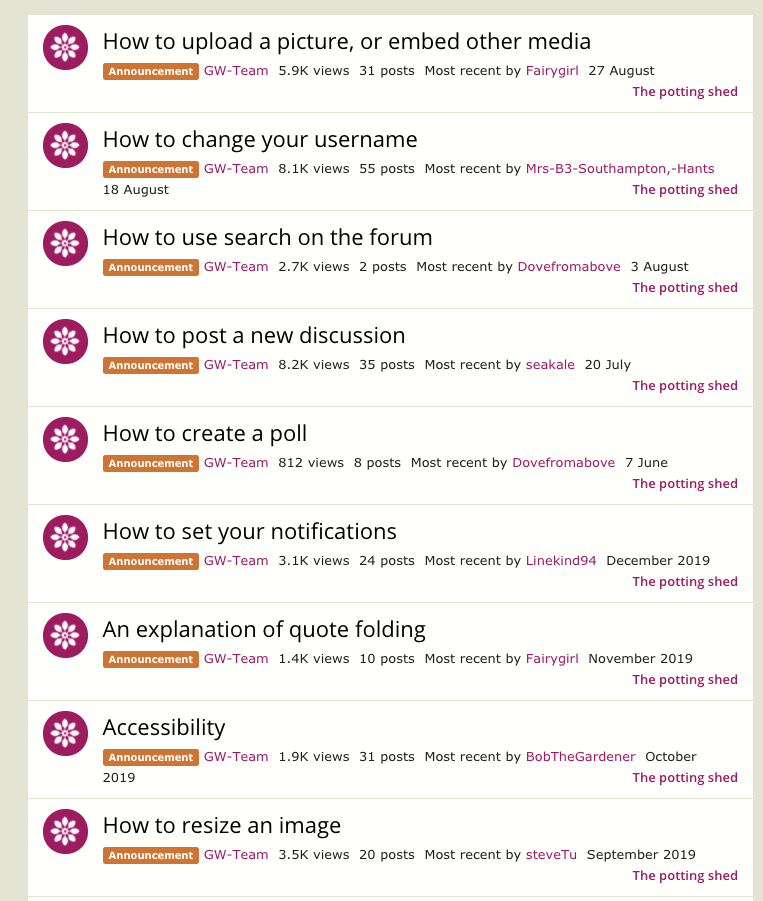
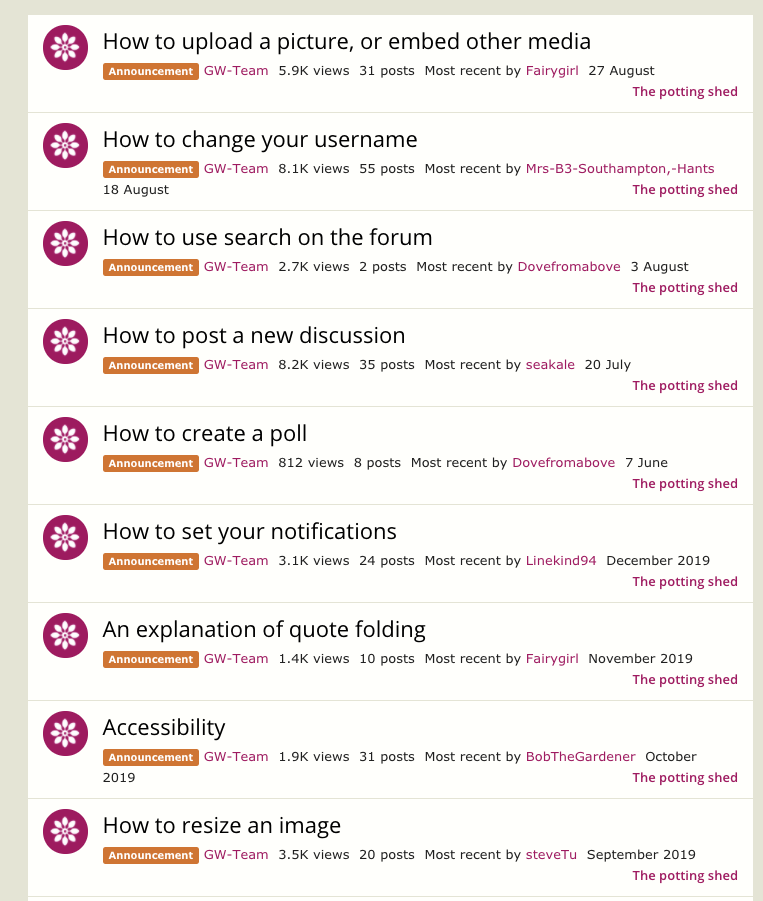
Explaining How To Use The Platform

by Richard Millington

Far better than filling your community with videos, discussions, and content explaining how to use the platform, is selecting a platform that’s intuitive to use in the first place.

And if you are going to share tips on using the platform, do it in one single location – not in a dozen or so sticky threads that push all other content off the page.

(click here if image doesn’t appear)

But even better than explaining how to use the platform, is explaining how to benefit most from the community. What kind of content and ideas is the community craving?

Who are some of the top members a newcomer should follow?

What’s the best way to build a reputation in the community?

What kinds of insider jokes should a newcomer know and what kind of questions should a newcomer avoid?

What are some books or guides which most members have read?

I’d bet this creates a much better experience for newcomers than explaining how to resize an image or create a poll.

21 Sep 06:58

Yes, the statement "Black Lives Matter" belongs in the classroom

Christina Torres, Ed Week, Sept 21, 2020
Icon

This response by Christina Torres more than makes up for the hate in the original (paywalled) post. She makes a number of good points.Here's one: talking about race has "resulted in difficult, beautiful, and rich conversations with some of the best people you'll ever meet: my 8th grade students. I have students who disagree with me about politics, and we all survive!" Here's another, and this is even more important: "Teachers don't just teach 'content.' We never have. For generations, we have also taught our students to listen, share, and be empathetic. Teachers don't just help students understand themselves and the world around them, we also model how to have constructive discussions with one another." A society that has lost that core capacity is a society in deep peril.

Web: [Direct Link] [This Post]
21 Sep 06:46

An H5P Branching Scenario That Might Break the Boat

Alan Levine, CogDogBlog, Sept 21, 2020
Icon

This post at once introduces you to a BCcampus project called the kitchen and also dives deep into the weeds of creating an immense branching scenario game in H5P, an LMS plugin that helps you create, share and reuse interactive HTML5 content and applications. Alan Levine's article is full of working examples (H5P embeds right into web pages) and a link to a Google spreadsheet used to organize the content. P.S. a video of H5P under the hood.

Web: [Direct Link] [This Post]
21 Sep 06:46

Seeing Like an Algorithm

by Eugene Wei

In my previous post on TikTok I discussed why its For You Page algorithm is the connective tissue that makes TikTok work. It is the bus on its motherboard that connects and closes all its feedback loops.

But in the breathless rush to understand why companies might want to acquire TikTok, should ByteDance be forced to divest itself of the popular short video app, the hype around its algorithm has taken on a bit of exoticization that often characterizes Western analysis of the Chinese tech scene these days.I kept holding off on publishing this piece because every day seemed to bring some new development in the possible ban of TikTok in the U.S. And instead of writing any introduction that would become instantly outdated, I'll just leave this sidenote here to say that as of publishing this entry, it seems Oracle will take over the TikTok cloud computing deal while also joining Wal-Mart and some VCs in assuming some ownership stake in TikTok Global. But it won't surprise me one bit if we find out even more bizarre details over the next week. This is the type of deal that I would have thought could only happen in Succession, but even in that satire it would seem hyperbolic. The 2020 Writer's Room is undefeated.

In this post, I want to discuss exactly how the design of TikTok helps its algorithm work as well as it does. Last time I discussed why the FYP algorithm is at the heart of TikTok’s flywheel, but if the algorithm wasn’t effective then the whole feedback loop would collapse. Understanding how the algorithm achieves its accuracy matters even if you’re not interested in TikTok or the short video space because more and more, companies in all industries will be running up against a competitor whose advantage centers around a machine learning algorithm.

What I want to discuss is how TikTok’s design helps its algorithm “see.”


Seeing Like a State by James C. Scott is one of those books that turns you into one of those Silicon Valley types that use (abuse?) the term legibility. I first heard about it after reading Venkatesh Rao’s summary of its main themes, and that piece remains a good tldr primer on the book if you don’t plan to read the text (Scott Alexander's review of the book is also good though is long enough that it could almost justify its own tldr). However, I recommend that you do.

The subtitle of Scott’s book is “How Certain Schemes to Improve the Human Condition Have Failed.” In particular, Scott dissects a failure state that recurs across a number of domains, in which a governing body like the nation-state turns to what Scott terms high modernism in an effort to increase legibility of whatever it is they are trying to exert control over, whether for the purposes of taxation or conscription or any number of goals. In doing so, they impose a false sense of order on a reality more complex than they can imagine.It would really be fascinating to hear from Scott on the case of modern China, under CCP rule, with modern technology for surveillance, and whether he thinks they will prove or violate his thesis in the fullness of time.

It’s a book that raises one’s awareness of all sorts of examples of unintended consequences in day-to-day life. We all could use a healthier does of humility when we are too flush with great man hubris. The world is richer and more complicated than we give it credit for.

As an example, much of what Scott discusses has relevance to some of the hubris of our modern social networking giants. These dominant apps are designed to increase legibility of their user bases for, among other things, driving engagement, preventing churn, and ultimately, serving targeted advertisements. That, in turn, has led their parent companies into a thicket of problems which they’re grappling with constantly now.

But that is a topic for another post, another day. Whereas Scott focuses in on how the nation-state uses simplifying abstractions to “see” its citizens at a synoptic level, I want to discuss how TikTok’s application design allows its algorithm to “see” all the detail it needs to perform its matchmaking job efficiently and accurately. If Seeing Like a State is about a common failure state, this post is about a new model for getting the most leverage from machine learning algorithms in the design of applications and services.I’m aware of the irony that the controversy around TikTok was the potential of user data being accessed by the CCP, or being “seen by that state.” Or that one of the sticking points of this new Cold War is the Chinese Firewall, which selects what the citizens of China “see.” And which most U.S. tech companies sit outside of, looking in.


In recent years, one of the realizations in machine learning, at least to an outsider to the subject like myself, is just how much progress was possible just by increasing the volume of training data by several orders of magnitude. That is, even if the algorithms themselves aren’t that different than they were a few years ago, just by training them on a much larger datasets, AI researchers have achieved breakthroughs like GPT-3 (which temporarily gave tech Twitter a tantric orgasm).

When people say that TikTok’s algorithms are key to its success, many picture some magical block of code as being the secret sauce of the company. The contemporary postmodernist Russian writer Viktor Pelevin has said that the protagonist of all modern cinema is a briefcase full of money. From the briefcase of radioactive material (I think that’s what it was?) in Kiss Me Deadly to the briefcase of similarly glowing who knows what (Marcellus Wallace’s soul?) in Pulp Fiction, from the Genesis equation in The Formula to the secret financial process in David Mamet’s The Spanish Prisoner, we’ve long been obsessed in cinema with the magical McGuffin. In recent weeks, discussion of TikTok’s algorithm has elevated it into something similar, akin to one of those mystical archaeological artifacts in one of the Indiana Jones films, like the Ark of the Covenant, the Holy Grail, or the lingam Shivling.

But most experts in the field doubt that TikTok has made some hitherto unknown advance in machine learning recommendations algorithms. In fact, most of them would say that TikTok is likely building off of the same standard approaches to the problem that others are.

But recall that the effectiveness of a machine learning algorithm isn’t a function of the algorithm alone but of the algorithm after trained on some dataset. GPT-3 may not be novel, but trained on an enormous volume of data, and with a massive number of parameters, its output is often astonishing.

Likewise, the TikTok FYP algorithm, trained on its dataset, is remarkably accurate and efficient at matching videos with those who will find them entertaining (and, just as importantly, at suppressing the distribution of videos to those who won’t find them entertaining).

For some domains, like text, good training data is readily available in large volumes. For example, to train an AI model like GPT-3, you can turn to the vast corpus of text already available on the internet, in books, and so on. If you want to train a visual AI, you can turn to the vast supply of photos online and in various databases. The training is still expensive, but at least copious training data is readily at hand.

But for TikTok (or Douyin, its Chinese clone), who needed an algorithm that would excel at recommending short videos to viewers, no such massive publicly available training dataset existed. Where could you find short videos of memes, kids dancing and lip synching, pets looking adorable, influencers pushing brands, soldiers running through obstacle courses, kids impersonating brands, and on and on? Even if you had such videos, where could you find comparable data on how the general population felt about such videos? Outside of Musical.ly’s dataset, which consisted mostly of teen girls in the U.S. lip synching to each other, such data didn’t exist.

In a unique sort of chicken and egg problem, the very types of video that TikTok’s algorithm needed to train on weren’t easy to create without the app’s camera tools and filters, licensed music clips, etc.

This, then, is the magic of the design of TikTok: it is a closed loop of feedback which inspires and enables the creation and viewing of videos on which its algorithm can be trained.

For its algorithm to become as effective as it has, TikTok became its own source of training data.


To understand how TikTok’s created such a potent flywheel of learning, we need to delve into its design.

The dominant school of thought when it comes to UI design in tech, at least that I’ve grown up with the past two decades, has centered around removing friction for users in accomplishing whatever it is they’re trying to do while delighting them in the process. The goal has been design that is elegant, in every sense of the word: intuitive, ingenious, even stylish.

Perhaps no company has more embodied this school of design than Apple. At its best, Apple makes hardware and software that is pleasingly elegant—“it just works”—but also sexy in a way that makes its users feel tasteful. Apple’s infamous controlling style—no replaceable batteries for its phones and laptops, the current debate over its App Store rules—put the company squarely in the camp of what Scott in Seeing Like a State refers to as high modernism. Is there any reason to show a video of how the new MacBook Pro body is crafted from one solid block of aluminum (besides the fact that Jony Ive cooing “a-loo-MIN-eee-um” is ASMR to Apple fans) when unveiling it at an Apple keynote? How about because it’s sexy AF to see industrial lasers carving that unibody out of a solid chunk of aluminum? And later, when you’re cranking out an email at a coffee shop on said laptop, some residual memory of that video in your unconscious will give you just the slightest hit of dopamine?

There’s a reason this user-centric design model has been so dominant for so long, especially in consumer tech. First, it works. Apple’s market cap was, at last check, over 2 trillion dollars. Remember when fake Sean Parker said a billion dollars was cool? That was just a decade ago and a billion dollars is no longer S-Tier. The wealth meta moves fast. Furthermore, we live in the era of massive network effects, where tech giants who apply Ben Thompson’s aggregation theory and acquire a massive base of users can exert unbelievable leverage on the markets they participate in. One of the best ways to do that is to design products and services that do what users want better than your competitors.

This school of design has been so dominant for so long that I’ve almost managed to forget some of the brutal software design that used to the norm in a bygone era.Not to be confused with brutalist design, which can be quite beautiful in its own respect, like its architectural cousins.

But what if the key to serving your users best depends in large part upon training a machine learning algorithm? What if that ML algorithm needs a massive training dataset? In an age when machine learning is in its ascendancy, this is increasingly a critical design objective.

More and more, when considering how to design an app, you have to consider how best to help an algorithm “see.” To serve your users best, first serve the algorithm.

TikTok fascinates me because it is an example of a modern app whose design, whether by accident or, uhh, design, is optimized to feed its algorithm as much useful signal as possible. It is an exemplar of what I call algorithm-friendly design.I thought about calling it algorithm-centric design but felt it went too far. Ultimately, a design that helps an algorithm see is still doing so in service of providing the user with the best possible experience. This might still be considered just a variant of user-centric design, but for those teams working on products with a heavy machine learning algorithm component, it may be useful to acknowledge explicitly. After all, when a product manager, designer, and engineer meet to design an app, the algorithm isn't in attendance. Yet its training needs must be represented.

James Scott speaks of “seeing like a state,” of massive shifts in fields like urban design that made quantities like plots of land and their respective owners “legible” to tax collectors. TikTok’s design makes its videos, users, and user preferences legible to its For You Page algorithm. The app design fulfills one of its primary responsibilities: “seeing like an algorithm.”

Let’s take a closer look. TikTok opens into the For You Page and goes right into a video. This is what it looks like.

This is, as of right now, the most popular TikTok ever. By the time I publish this post, its 34.1M likes will likely be outdated. You can read the story of how this TikTok even came to be and it will still feel like a cultural conundrum wrapped in a riddle stuffed in a paradox, and you love to see it. I showed this to my niece, we looped it a few dozen times, then we started chanting “M to the B, M to the B” and laughing our asses off and it was one of the only times in this pandemic I’ve truly felt anything other than despair.

The entire screen is filled with one video. Just one. It is displayed fullscreen, in vertical orientation. This is not a scrolling feed. It’s paginated, effectively. The video autoplays almost immediately (and the next few videos are loaded in the background so that they, too, can play quickly when it’s their turn on stage).

This design puts the user to an immediate question: how do you feel about this short video and this short video alone?

Everything you do from the moment the video begins playing is signal as to your sentiment towards that video. Do you swipe up to the next video before it has even finished playing? An implicit (though borderline explicit) signal of disinterest.

Did you watch it more than once, letting it loop a few times? Seems that something about it appealed to you. Did you share the video through the built-in share pane? Another strong indicator of positive sentiment. If you tap the bottom right spinning LP icon and watch more videos with that same soundtrack, that is additional signal as to your tastes. Often the music cue is synonymous with a meme, and now TikTok has another axis on which to recommend videos for you. Did you tap into the video creator’s profile page? Did you watch other videos of theirs, and did you then follow them? In addition to enjoying the video, perhaps you appreciate them in particular.

But let’s step back even earlier, before you’re even watching the video, and understand how the TikTok algorithm “sees” the video itself. Before the video is even sent down to your phone by the FYP algorithm, some human on TikTok’s operations team has already watched the video and added lots of relevant tags or labels.

Is the video about dancing? Lip synching? Video games? A kitten? A chipmunk? Is it comedic? Is the subject a male or female? What age, roughly? Is it a group video? Where is it set? What filters or visual effects are used? If there’s food involved, what kind? And so on. All of these labels become features that the algorithm can now see.

Vision AI also does a pass on the video, and to the extent it can, contributes what it sees. Some of TikTok’s camera filters are designed to track human faces or hands or gestures so vision AI is often invoked even earlier, at the point of creation.

The algorithm can also see what TikTok already knows about you. What types of videos have you enjoyed in the past? What demographic or psychographic information is known about you? Where are you watching the video? What type of device do you have? And so on. Beyond that, what other users are similar to you?

Let's jump back to the moment you watch that video on your phone in TikTok. The FYP algorithm can now close all the feedback loops. It takes every one of the actions you take on the video and can guess how you, with all your tastes, feels about this video, with all its attributes.

None of these individual steps sounds like rocket science, especially to anyone who works on any algorithmic social feed today.In my previous piece I noted that TikTok doesn’t really have a strong social graph. One of the reasons the app is as effective as it is is that it doesn’t try to pretend to be what it isn’t. That is, people already have a gazillion other social graphs and ways to share with people they know. Rather than force people to do so within the TikTok app, they make it dead simple to download videos or share them through those external channels. What TikTok keeps, however, is the signal that you chose to share that video. That data feeds their algorithm and their algorithm alone. Since the videos are watermarked, they also get a nice hit of free publicity from the share. In fact, TikTok has published a blog post describing essentially how their FYP algorithm works, and I doubt anyone in tech will find the description anything but obvious.

But contrast what TikTok's FYP algorithm sees with what a comparable recommendation algorithm sees on most other social networking feeds.

The default UI of our largest social networks today is the infinite vertically scrolling feed (I could have easily used a screenshot of Facebook above, for example). Instead of serving you one story at a time, these apps display multiple items on screen at once. As you scroll up and past many stories, the algorithm can’t “see” which story your eyes rest on. Even if it could, if the user doesn’t press any of the feedback buttons like the Like button, is their sentiment towards that story positive or negative? The signal of user sentiment isn’t clean.

If you subscribe to the idea that UI's should remove friction, the infinite scrolling feed is ideal. It offers a sense of uninhibited control of the pace of consumption. The simulated physics that result from flicking a feed with your thumb and seeing it scroll up like the drum of the Big Wheel from the Price is Right Showcase Showdown with the exact rotational velocity implied by the speed of your initial gesture, seeing that software wheel gradually slow down exactly as it would if encountering constant physical friction, it’s one of the most delightful user interactions of the touchscreen era. You can scroll past a half dozen tweets or Facebook feed items in no time. Wheeeeeeee!

A paginated design, in which you could only see one story at a time, where each flick of the finger would only advance the feed one item at a time, would be a literal and metaphoric drag.

On the other hand, maybe you wouldn’t mind reading one tweet at a time if they were better targeted, and maybe they would be better targeted if Twitter knew more about which types of tweets really interest you. And maybe Twitter would know more about what really interested you if you had to give explicit and implicit positive or negative signals on every tweet.

Even on a story a user does engage with, judging sentiment is a challenge. Most apps only have positive feedback mechanisms, most typically some form of a like button. Since apps like Facebook, Instagram, and Twitter are built around social graphs, it’s obvious why they might opt not to offer dislike buttons.

But, as Stephen King wrote in On Writing, "If you expect to succeed as a writer, rudeness should be the second-to-least of your concerns. The least of all should be polite society and what it expects. If you intend to write as truthfully as you can, your days as a member of polite society are numbered, anyway."

By relying on a long scrolling feed with mostly explicit positive feedback mechanisms, social networks like Facebook, Twitter, and Instagram have made a tradeoff in favor of lower friction scanning for users at the expense of a more accurate read on negative signal.You see another variant of this tradeoff at longstanding companies with the same founding CEO. That person tends to surround themselves with a C-Suite that follows their lead, works well with them. The danger of being surrounded by yes-men is not having anyone to challenge the blindspots in your thinking. It's always worth asking who the people are who are powerful enough to actually change the minds of people like Bezos, Cook, Zuckerberg, Musk. Often the answer is no one, so their blindspots become the blindspots of the company.

Networks that are built around interest graphs, like Reddit, do tend to incorporate down voting mechanisms because their prime directive to keep users from churning is to serve them the most interesting content. That means weeding out uninteresting content as much as it does surfacing appealing content.

TikTok doesn’t have an explicit downvote button, but by serving you just one video at a time, they can infer your lack of interest in any single video based on whether you churn out of that video quickly A quick swipe up before a video has completed is like swiping left on Tinder. The best TikTokers have an intuitive sense of the narrative pace that is appropriate for that platform. How long can you drag out the punching or payoff without losing the viewer, how do you have a set up that keeps the user involved. Using a music cue that has already been co-opted into a meme helps because the bass drop or musical payoff foreshadows when the punchline of the video will drop; a viewer knows how much longer before they reach the payoff. Also viewers may stick around just for the pleasure of hearing that musical resolution.
and by which positive actions you don’t take.

If you click into a text post by someone on Facebook but don’t comment or like the post, how can Facebook judge your sentiment toward that post? Maybe you thought about disagreeing violently in comments, but the person is a coworker or friend of a friend and you decided the better of it. That negative sentiment is difficult to capture; the algorithm can’t “see” your feelings.Most social networks have explicit reporting features for reporting offensive and/or abusive content, but those features are buried and most users don’t resort to them. By the time someone does use a feature like that, you’ve usually already made a grave mistake far upstream and it’s too late to salvage most of the damage that’s been done.

It’s the content that’s boring or causes mild displeasure that is the slow killer. In my previous post, I noted that content derived from a social graph can drift away from a user’s true interests because of the mismatch between your own interests and those of people you know. The switch from a chronological to algorithmic feed is often the default defensive move against such drift.

But if the algorithm isn’t "seeing" signals of a user’s growing disinterest, if only positive engagement is visible, some amount of divergence is unavoidable. You might see that a user is slowly losing interest, not liking as many items, not opening your app as often, but precisely which stories are driving them away may be unclear. By the time they're starting to exhibit those signs of churn, it's often too late to reverse the bleeding.

Algorithm-friendly design need not be user-hostile. It simply takes a different approach as to how to best serve the user’s interests. Pagination may insert some level of friction to the user, but in doing so, it may provide the algorithm with cleaner signal that safeguards the quality of the feed in the long run.

Minimizing friction is merely one means to a great user experience. The goal of any design is not to minimize friction, it’s to help the user achieve some end. Reducing friction is often consistent with that end, but not always. You might say that the quote tweet reduces the friction of manually copying someone else’s tweet, but reducing friction to organizing a mob to pile on someone might not be a core mechanic you want to encourage if your goal is civil public discourse. Some forms of friction are good.

You'll hear many power Twitter users counseling others to make use of muting and blocking early and often.Some users even make liberal use of soft blocking to surreptitiously remove followers.
Users proudly tweet screenshots of words they've muted as a sign of their displeasure with some popular topic of discussion (or their intellectual superiority to said topic). Non sports fans tweet about "sportsball," others tweet "I'll bite, what's X?" where X is something everyone is discussing. Some people have gone so far as to unfollow everyone and start their following from scratch again.At some point, and likely because it A/B tested well, Twitter started showing users tweets that people they followed had liked, even from people that user didn't follow themselves. This does occasionally show me tweets of interest, but what it also does is increase, on an absolute basis, the number of tweets I have no interest in and have to scroll past. I'm a broken record on this: no two people have the exact same interests. The launch of this feature has me really considering unfollowing everyone and starting from scratch, but I also worry about hurting people's feelings, because I'm a softie. If Twitter were structured differently this wouldn't be an issue.

I sometimes think about adopting some or all of these strategies myself, but for Twitter, the necessity of these is itself a failure of the service. If the algorithm were smarter about what interested you, it should take care of muting topics or blocking people on your behalf, without you having to do that work yourself. As I wrote last time, that you have to follow people at all on Twitter to get interesting content is, one could argue, a design flaw for what could be a powerful interest graph.

Not only does TikTok capture very clean signals of sentiment from its users, it also gathers a tremendous volume of them per session. Videos on TikTok are so short that even in a brief session, TikTok can gather a lot of feedback on your tastes.

The process is relatively painless, too. At worst, a few videos might bore you, but swiping them away makes for relatively painless work, and since the algorithm listens closely to your feedback, you may even enjoy dismissing videos knowing that the app will register your displeasure and act on it.Short video happens to be a category quite suited to this type of machine learning-driven recommendation. By no means would I imply that it would work for every type of category. Music works well. It is short in duration so the sampling cost is low, and the repeat consumption value is high. Musical similarities tend to be mathematically detectable. My Spotify Radio recommendations are solid. On the other hand, algorithmic movie recommendations have never really felt magical to me. Movies are very long, the sampling cost is very high. The corpus is small, and only something like 500 or so movies come out each year, of which most people only see a handful. This entire subject is worth a separate post.

By the way, TikTok isn’t the only app with an interface that is optimized for the task of matching, with an interface that shows you one entity at a time so as to be more clear on how you feel. Before TikTok, we had a whole category in which the one-item-at-a-time audition-style UI was dominant.

1_Suggested.png
Tinder - Card Stack.png

There’s a reason swipe right and swipe left have become shorthand slang for signaling approval and disapproval, generally. Tinder came up with what feels like a design primitive on a touchscreen UI for binary voting.

In this software era, true competitive advantages, or moats, are increasingly illusory. Most software features or UI designs can be copied easily by an incumbent or competitor overnight. All you will have done is test the impact of the design for them.On one of my trips to China, I was at a dinner with a large group of Chinese entrepreneurs, and I mentioned the hubbub over Instagram copying Stories from Snapchat. One of the chief product officers of one of China’s top companies laughed and remarked, “In China, if your competitor doesn’t copy one of your successful features inside of two weeks, they must be incompetent.” In many ways, the Chinese tech scene is the true Darwinian marketplace of ideas that Silicon Valley thinks of itself as. This bodes poorly for the relative output of Silicon Valley because the rate of idea spread and mutation occurs more quickly in China. Silicon Valley is often said to have taken over as the geographic center of technology innovation from Boston’s Route 128 in part because Silicon Valley’s more open labor markets allowed ideas to move freely among companies. China has taken that playbook and pushed it even further. Surviving the competitive landscape of the Chinese tech scene is like trying to climb out of that pit in The Dark Knight Rises. Terrifying.

But if you can create a flywheel, like TikTok’s, it becomes much harder for a competitor like Reels or Triller to catch up. Triller may pay some influencers from TikTok to come over and make videos there, Reels might try to draft off of existing Instagram traffic, but what makes TikTok work is the entire positive feedback loop connecting creators, videos, and viewers via the FYP algorithm.

In tech, an industry that epitomizes Brian Arthur’s Increasing Returns and Path Dependence in the Economy perhaps more than any other, the first competitor to achieve product-market fit can run away from the pack. If more and more markets feel like they are winner-take-all, or winners-take-all, that is because in an increasingly interconnected world, they are.

Bytedance is often described as the algorithm company, and TikTok has been described over the past few weeks as powered by just such algorithmic black magic. Many have gone so far as to say that TikTok wouldn’t be worth purchasing if the algorithm weren’t included.

That’s a mistake, in my opinion. Yes, retraining the FYP recommendations algorithm might take so long that some users would churn. I don’t mean to trivialize that task. But the actual magic is how every element of TikTok's design and processes connect with each other to create a dataset with which the algorithm trains itself into peak performance. No single step in that loop is beyond the capabilities of any of the many U.S. suitors. All that’s needed is an understanding of how the flywheel works and a commitment to keep every element and process in it functioning.

All around me, I encounter products or services that seem to have hit a ceiling in the quality of their algorithmic recommendations: Yelp, OpenTable, Amazon, Google, Netflix, and on and on. Don't get me wrong, some of them are at rest in a good place. But I can't help but feel there is another leap to be made in some of these, and that perhaps more algorithm-friendly design might be one of the possible solutions.

To recap, in part one of my series on TikTok, I discussed how the algorithm acts as an matching mechanism that makes TikTok such a scalable entertainment network. In comparison, social networks have to approximate an interest graph using a social graph, with all the problems that come with that. In this second piece on TikTok, I’ve focused on how its design helps its machine learning FYP algorithm “see” what it needs to see to do its job so effectively. An algorithm-friendly design ethos may become a model of how other companies in other verticals might achieve an edge in the age of machine learning.

But there’s one final reason I find TikTok such a fascinating and anomalous case study. It has to do less with software and algorithms and more with something that the cultural determinist in me will never tire of studying: the network effects of creativity. That will be the subject of my third and final part of this series on TikTok.

20 Sep 04:26

watchOS 7 verursacht Probleme mit der Akkulaufzeit

by Volker Weber

c5aed9da88a30351e4527531dde2f43b

Seit dem Update auf watchOS hat die Apple Watch Probleme, durch den Tag zu kommen. Ein Hinweis, dass da etwas nicht stimmt, könnte sein, dass die Watch auch dann im WLAN ist, wenn sie problemlos mit dem iPhone per Bluetooth reden könnte. Normalerweise geht die Reihenfolge so: Bluetooth, wenn das nicht geht, WLAN, und wenn auch das nicht geht, LTE. Diese Theorie halte ich mittlerweile für Blödsinn. Es ist definitiv so, dass einige User gar keine Probleme haben, dafür andere um so mehr. Ein Pattern ist noch nicht erkennbar.

Ich frage mich manchmal, was die ganzen Leute eigentlich testen, die monatelang vor dem Release schon mit der nächsten Version von iOS und watchOS rumlaufen.

20 Sep 04:26

figuring out the CCPA escalation path

(Update 10 Sep 2021: add more material on GPC)

(update 8 Oct 2020: add material on GPC, copy edit)

The later you catch a software bug, the more expensive it is to fix. Catching a syntax error while you're typing code costs practically nothing, fixing a broken test is more expensive, and deploying an update to users can cost even more.

The California Consumer Privacy Act (CCPA) provides for a similar escalation path. It's helpful to look at all the ways to handle CCPA obligations in order from lowest overhead to highest. Just as software developers are learning to find and fix threading bugs with build-time borrow checking before a difficult bug can make it to a customer, companies are learning how to handle CCPA rights at the easiest, fastest, cheapest level.

Here are the levels, cheapest to most expensive.

browser Do Not Sell. The CCPA regulations (PDF) say,

If a business collects personal information from consumers online, the business shall treat user-enabled global privacy controls, such as a browser plug-in or privacy setting, device setting, or other mechanism, that communicate or signal the consumer’s choice to opt-out of the sale of their personal information as a valid request submitted pursuant to Civil Code section 1798.120 for that browser or device, or, if known, for the consumer.

A standard signal to implement this, called Global Privacy Control, has just been announced, and is being tested across a variety of browsers, extensions, and sites. It is technically similar to the old Do Not Track, with the big difference that it's intended to be now legally required (updated for 2021).

authorized agent Do Not Sell This is the first escalation for a mishandled browser Do Not Sell, and the lowest level for a company that the consumer does not have a direct HTTP connection to. Agent opt outs can be bundled and made easy to handle, and the agent has an incentive to cooperate with the company, to cut their own costs and increase user satisfaction. Bulk handling of agent opt outs is an easy win for DSAR vendors, to lower average cost per CCPA transaction.

Do Not Sell My Personal Information emails and clicks. These are similar to a GDPR Article 21 objection, but that can't be handled with the same processes used for GDPR. Lightweight because no user identity verification is required (although the company can do an anti-fraud check) but still heavier than handling an agent opt out. If you get an opt out, cheaper to act on it than to push back and make the consumer escalate to a Right to Know or Right to Delete.

Right to Know and Right to Delete If a Do Not Sell gets subjected to illegal verification steps or other dark patterns, then the consumer can escalate to a Right to Know, followed by a Right to Delete. According to vendors of Data Subject Access Rights software, manual handling of a Right to Know can cost $1,400-$10,000. Software and processes are going to bring this down, but realistically nowhere near the cost of dealing with the browser signal or the agent opt opt correctly in the first place.

Companies that try to apply the same user experience to a Right to Know as to a more common and less expensive opt out are likely to have to have to deal with a higher volume of Right to Know requests.

Somewhere along this escalation path, users can make automated or manual reports to the office of the Attorney General, to help them pick targets for enforcement. They certainly don't have the staff time to go after most CCPA violations, but reports from consumers and consumer organizations will help them pick some high-priority targets.

Some experts are recommending relying on dark patterns to limit the number of CCPA requests I still don't like the term "requests" here since the company has to comply with them. And legally binding communications coming from the company to the customer is never called a request. But "request" is in the regulations. that companies have to deal with. But we're going to discover that the dark patterns approach is flawed. Yes, a lot of consumers are going to give up and go away when they hit a dark pattern, such as an extra verification not allowed by the law, but a fraction of the consumers are going to escalate. A company that chooses dark patterns instead of straightforward compliance is making a high-stakes bet on what fraction of consumers will escalate.

Bonus links

We don’t stop until hate for profit stops

Endorsement: Yes on Prop. 24. It’s not perfect, but it would improve online privacy

Killing the Ad Business. From the inside.

Opt-In Value Exchange Ads: Examples and Best Practices

How Prop 24 Regulates Big Tech and Data Brokers that Sell Your Personal Data

20 Sep 04:26

Park Board to Cyclists: Fight It Out

by Gordon Price

A blunt announcement from the Park Board:

This is what the Park Board is essentially saying to cyclists who still use Park Drive:

“The data tells us we can return the park to its conventional traffic patterns” – and we’re all about sticking with the conventional.  So we’re throwing you back in with the vehicles now, where you can fight it out for the same space.  But be careful, motorists may now see you in the way and assume you should be back on the seawall – where you can fight it out with pedestrians given the inadequate space and your vastly increased numbers (which we assume will drop down to the, um, conventional).

You really shouldn’t be surprised, given that we have repeatedly demonstrated in Kits and Jericho Parks that we don’t intend to find reasonable accommodation, and will relegate you to dirt paths and parking lots, regardless of conflicts and accidents.  And even though we have plans and budgets for improved facilities for cycling in Stanley Park, we haven’t spent it and don’t have immediate plans to do so.

We take our direction from the board, two of whom (the NPA commissioners) will claim our action today as a victory and reinforce the anti-cycling messaging of their party.  The Green and COPE commissioners just stay quiet, more concerned about social issues than, say, something that might actually address climate change.  We have our hands full accommodating the homeless than accommodating cyclists.

Let’s face it, cyclists, the ‘Recreation’ in Board of Parks and Recreation really doesn’t include you.


If that seems a little harsh, let’s ask the commissioners this question: will you commit to re-installing the bike lane next year, if for no other reason than to take the pressure off the seawall and make the experience a better one in order to encourage – as you have voted to do – more cyclists and pedestrians?    Otherwise, we’re going to go through yet another frustrating, counter-productive and cynical bike-lane war. 

And in the meantime, will you finally resolve the missing-link issue in Kitsilano, Jericho and other parks that connect to the city’s Greenway system but are woefully inadequate, even dangerous (see image above from the Kits parking lot) that you have put off for years? 

We await the commissioners responses.

20 Sep 04:12

Twitter Favorites: [Sean_YYZ] I really hate the Front & Portland intersection https://t.co/jaI8Na8W1e

Sean Marshall @Sean_YYZ
I really hate the Front & Portland intersection pic.twitter.com/jaI8Na8W1e
20 Sep 04:12

Twitter Favorites: [Sean_YYZ] I’m pleased to see these new initiatives to get Torontonians out and about, especially as the days get cooler.… https://t.co/pp3amgM6rK

Sean Marshall @Sean_YYZ
I’m pleased to see these new initiatives to get Torontonians out and about, especially as the days get cooler.… twitter.com/i/web/status/1…
20 Sep 04:12

DuckDB

DuckDB

This is a really interesting, relatively new database. It's kind of a weird hybrid between SQLite and PostgreSQL: it uses the PostgreSQL parser but models itself after SQLite in that databases are a single file and the code is designed for use as an embedded library, distributed in a single amalgamation C++ file (SQLite uses a C amalgamation). It features a "columnar-vectorized query execution engine" inspired by MonetDB (also by the DuckDB authors) and is hence designed to run analytical queries really quickly. You can install it using "pip install duckdb" - the resulting module feels similar to Python's sqlite3, and follows roughly the same DBAPI pattern.

Via Any thoughts/future plans for using DuckDB?

19 Sep 05:27

The Best 4K Monitors

by Andrew Cunningham
A 4K monitor, next to a mug and a wireless mouse, displays colorful hot air balloons against a blue sky.

When people shop for a TV these days, a high-resolution, 4K screen is practically a given. But 4K computer monitors are still a luxury, unless you’re editing photos or videos professionally or you specifically want to watch 4K content.

The Dell UltraSharp U2725QE is our favorite 4K monitor because it’s a quality, color-accurate display that can connect to and charge your laptop over USB-C, and it has superior contrast compared with other office monitors. The Dell UltraSharp U3225QE, our upgrade pick, is a larger, 32-inch version of the same display.

For a less expensive option without USB-C, we recommend the Dell 27 Plus S2725QS. And for 4K gaming, we think the Asus ROG Strix OLED XG27UCDMG offers fantastic contrast and motion clarity due to its next-generation OLED display.

If you don’t need a monitor with 4K resolution, you can find all kinds of great monitors and pay a lot less.

19 Sep 05:26

Six Months of Sheltering in Place

by Richard

Summer is almost over. I’ve so far weathered the pandemic by continuing to have a job, already having made a bulk purchase in what was temporarily in short supply, and by keeping active by biking the Lakeshore Boulevard Activeway. The office opening up in July gave me respite from the construction across the street. I bike there and back once or twice a week, partly for a change of scenery and food options, but mostly for some peace and quiet.

Winter is coming, but not before Toronto’s typically magical autumn. I tried to plan a day trip out of the city, but I ultimately couldn’t think of what I’d do once I'd arrive at my destination. A boat trip to Toronto Islands soothed the soul in July, and I have some upcoming vacation where I hope to recapture that feeling. The farthest east I've been has been the office, the fathest north I've been is College St., and the farthest west I've been is Windemere Ave. and Lakeshore Drive W. (one end of the aforementioned Lakeshore Boulevard Activeway). I'm hopeful the City of Toronto will continue to encourage active use of the city while the second phase of the pandemic (acceptance of possible shutdowns if cases surge too fast) before the next phase (the safe introduction of a vaccine).

My main worry about the pandemic was not so much getting the disease but the boredom of events not going forward. Only by knowing what we know now (wearing a mask if you can't physically distance, going outside is relatively safe) do I think some of Toronto events could take place. I'm thinking mostly of one of Toronto's best events, Nuit Blanche, where the city becomes an outdoor art gallery and is celebrated now by all 4 corners of it. I'm hopeful an in-person event can be held next October, 13 months from now, instead of this year's online-only event.

I've more or less avoided virtual events. Concerts and movies aren't the same on the smaller screen and my lesser sound systems. I've helped organize an event normally held in person, so I understand the amount of work that goes into it, and the Icelandic Canadian Club of Toronto's upcoming premier event, Thorrablót, will be online-only as well. In-person events is a prime reason I live in a city, and the hope that they'll return have me staying put until we enter the vaccine phase of the pandemic. If I was worried Toronto had turned into a quiet small town during the initial emergency phase of the pandemic, car traffic has returned, restaurants are open (in limited capacity), people are walking the street (masked and unmasked), so big-city life is making an attempt at a return, at least.

I continue to have questions about Canada's, Ontario's, and Toronto's handling of the pandemic. Are hospitals at increased capacity if they have to accommodate a sustained surge? Are better treatments on the way? When the vaccine is approved in Canada, how will health units deliver it? Will I be able to fly home to British Columbia to visit family for Christmas?

In the meantime, I'm making plans to take a course or two in case boredom sets in again. I will miss the deadline for the fall semester of continuing education courses, though the course I stumbled into for this season will be about an unlikely subject: myself. I hope to one day get a chance to talk about that.

19 Sep 05:25

If You Want to Create Greatness, Encourage Everyone

by Eugene Wallingford

I read two passages in the last few days that echo one another. First, I read this from Wallace Shawn, in a Paris Review interview:

But my God, without writers, humanity might be trapped in a swamp of idiotic, unchanging provincial clichés. Yes, there are writers who merely reinforce people's complacency, but a writer like Rachel Carson inspired the activism of millions, and writers like Lady Murasaki, Milton, and Joyce have reordered people's brains! And for any writers to exist at all, there must surely be a tradition of writing. Maybe in order for one valuable writer to exist, there must be a hundred others who aren't valuable at all, but it isn't possible at any given moment for anyone to be sure who the valuable one is.

Then, in his response to Marc Andreessen's "It's Time to Build", Tanner Greer writes:

To consistently create brilliant poets, you need a society awash in mediocre, even tawdry poetry. Brilliant minds will find their way towards poem writing when poem writing and poem reading is the thing that people do.

I once blogged briefly about The Art of Fear tells the story of an artist sketching hundreds of roosters, which laid the foundation for creating a single sketch for his client. For us as individuals, this means that "talent is rarely distinguishable, over the long run, from perseverance and lots of hard work." As Richard Gabriel often says, "Talent determines only how fast you get good, not how good you get". Volume creates the conditions under which quality can appear.

Shawn and Greer remind us that the same dynamic applies at the scale of a culture. A community that produces many writers has a better chance to produce great writers. When the community values writers, it increases the chances that someone will do the work necessary to becoming a writer. The best way to produce a lot of writers is to have a tradition that welcomes, even encourages, all members of the community to write, even if they aren't great.

The same applies to other forms of achievement, too. In particular, I think it applies to programming.