Shared posts

11 Feb 19:23

Learning to Forget

by Jim

Back in the days when I was a full time consultant working inside a firm, I wore two hats; Chief Knowledge Officer and Chief Learning Officer. The accepted argument was that there was value in capturing and organizing what we knew as an organization so that we could teach it to our consultants and they could do better work for our clients. Knowledge was property—intellectual property—and was as asset to be managed. Good manufacturing firms managed their raw materials. Ideas were our raw materials and, therefore, worthy of active management.

Such a simple analogy. We thought we were more clever than most by tying the knowledge management and learning elements together.

We forgot about forgetting.

Our efforts were all about remembering. There was no attention to the need to make room for new and better ideas. We adopted a scholastic view of knowledge, not a scientific one.

Organizations can be haunted by obsolete ideas as they are held back by failing to remember what they already know. We neglected forgetting practices to go along with remembering ones.

This can be tricky business. Memory hooks are largely about stories; compelling stories make things memorable, even for abstract ideas. It’s hard to simply replace an old story with a new, shiny, story. It’s one of the things making organizational change so hard. The old stories are tightly knit into the fabric of the organization or discipline. The new story, however shiny, can’t compete against the weight of the entire tapestry.

We need to bury old ideas. Celebrate them if we must, but be careful about trying to dig them up when the result is more likely to be zombies than secret treasure.

The post Learning to Forget appeared first on McGee's Musings.

11 Feb 19:23

RT @hmemcpy: Holy. Effin. Shit. bleepingcomputer.com/news/security/… pic.twitter.com/T5uavNBIj1

by Igal Tabachnik (hmemcpy)
mkalus shared this story from internetofshit on Twitter:
🤦‍♂️


Retweeted by Internet of Shit (internetofshit) on Thursday, February 11th, 2021 4:02am


7145 likes, 2201 retweets
11 Feb 17:34

Today’s evolving #opensource licenses are part ...

Today’s evolving #opensource licenses are part of a long line of open licenses designed to attack certain business models.

@kemitchell made a list.

11 Feb 17:34

Updates to the Storage Access API

The Storage Access API allows third-party web content to ask for permission to get access to its unpartitioned storage, typically in order to authenticate the user. In the case of Safari and WebKit, using the Storage Access API enables cookie access under Intelligent Tracking Prevention.

This blog post covers two changes to the Storage Access API in Safari and WebKit as well as a how-to guide on adoption based on questions we’ve been asked the last two years.

Changes to API Functionality

iOS and iPadOS 14.5, and macOS Big Sur 11.3 betas feature two sought after changes to the Storage Access API in Safari and WebKit – per-page storage access and support for nested iframes. Both of these changes were driven by the standards process in W3C Privacy CG.

Per-Page Storage Access

If a request for storage access is granted to embedee.example, access is now granted to all embedee.example resource loads under the current first party webpage. This includes sibling embedee.example iframes but also other, non-document resources.

Nested Iframes Can Request Storage Access

Imagine a webpage embedding a cross-site iframe from embedeeOne.example which in turn embeds a cross-site iframe from embedeeTwo.example which makes the latter a so called nested iframe. As of this release, nested iframes such as embedeeTwo.example are also allowed to request storage access. Note that we may require first parties to explicitly delegate this capability through Permissions Policy at a later stage. Mozilla has expressed an interest in such control.

How To Use the Storage Access API

For the purposes of this guide we will use the domains social.example for the embedded content in need of cookie access and news.example as the first party website embedding social.example.

First, Cross-Site Iframes Call the API

The Storage Access API is called from inside cross-site, or third-party, iframes. You don’t have to call the API if your website is first party and first party websites cannot call the API on behalf of third-parties.

How-To #1: Meet and Greet the User as First Party

If you want to make use of the Storage Access API as a third-party, you first need to take these steps as a first party:

  1. Make sure you are using regular browsing mode, i.e. not Private Browsing. We will cover Private Browsing at the end of this guide.
  2. Take the user to your domain as first party. This is your website showing itself and giving the user a chance to recognize your brand and domain name. Recognition is important since the prompt for storage access features your embedded iframe’s domain. In our example, this is taking the user to a webpage with social.example in the URL bar, either though a navigation or a popup.
  3. Have the user interact (tap, click, or use the keyboard) with your website as first party. This tells the browser that the user has actually seen and used the site. Note: Navigating to and from your website in a redirect without user interaction does not count. Formally, WebKit’s requirement is user interaction as first party the last 30 days of browser use. Being granted storage access through the Storage Access API counts as such user interaction. In our example, this is having the user tap/click on the webpage with social.example in the URL bar.
  4. Set cookies when you are first-party. This establishes the website as “visited” for the purposes of the underlying cookie policy. Third parties without cookies cannot set cookies in Safari and never have since Safari 1.0 in 2003. This means you cannot use the Storage Access API as third-party until you have set at least one cookie as first party. In our example, this is setting cookies for social.example with social.example in the URL bar.

The above requirements are there to make sure the sometimes 50-100 embedded third-parties on a single webpage cannot all prompt the user for storage access, only the ones the user has visited and interacted with can.

How-To #2: Use the Storage Access API as Third Party

Once you have had the user interact with your website as first party and have set cookies as first party, you are ready to make use of the Storage Access API.

  1. In shipping Safari, your cross-site iframe that is about to request storage access must be a direct child frame of the top frame. Nested iframes can request storage access as of iOS 14.5 and macOS 11.3 (currently in beta).
  2. Make your cross-site iframe call document.hasStorageAccess() as soon as it’s rendered to check your status. Note: Don’t call this function upon a user gesture since it’s asynchronous and will consume the gesture. Once the user gesture is consumed, making a subsequent call to document.requestStorageAccess() will fail because it’s not called when processing a user gesture. In our example this is social.example‘s iframe.
  3. If document.hasStorageAccess() returns false, your iframe doesn’t have storage access. Now set an event handler on elements that represent UI which requires storage access and make the event handler call document.requestStorageAccess() on a tap or click. This is the API that requires a user gesture. In our example this is social.example‘s iframe calling the API.
  4. Render the page with your cross-site iframe. Tap or click on an element with an event handler in the iframe. In our example this is rendering a page from news.example with thesocial.example‘s iframe and clicking on an element in the social.example iframe’s document.
  5. If the user has not yet opted in to storage access for social.example under news.example there will now be a prompt. Choose “Don’t Allow” in the prompt. Tip: Don’t choose “Allow” yet because it’ll be remembered and you’ll have to delete browser history to reset it. If you are not getting the prompt, you either have not gotten user interaction as first party and set cookies for social.example yet (see How-To #1) or you have already chosen “Allow” earlier which is remembered.
  6. Test the behavior for the “Don’t Allow” case. You can do it repeatedly. Do it until you’re happy with how your code handles it. Note that when the user chooses “Don’t Allow” in the prompt, their user gesture is consumed and any further API calls in your iframe that require a user gesture will have to get the user to tap or click again. We’ve deliberately designed it this way to make sure that an explicit deny from the user doesn’t trigger further privileged API calls from the iframe. The user should at this point be able to continue with other things.
  7. Now tap or click the iframe again and this time choose “Allow” in the prompt. This should open up cookie access on resolution of the promise.
  8. Test the behavior for the “Allow” case. Note that when the user chooses “Allow” in the prompt, their user gesture is preserved and any further API calls in your iframe that require a user gesture can go right ahead. We’ve deliberately designed it this way so that when you get access to cookies and note that the user is not in the desired state, such as not logged in, you can open a popup or navigate them to your website without further user gestures. In our example this would be a popup or navigation to social.example.
  9. Now reload the webpage. This will reset your per-page storage access. Tap or click the iframe to trigger the call to document.requestStorageAccess(). This should open up cookie access without a prompt since the user has already opted in and that choice is remembered.
  10. Finally test the flow in Private Browsing Mode. In that mode, the user must interact with your website as first party (see How-To #1) in the same tab as where you later request storage access as third-party. This is because Private Browsing Mode uses a separate ephemeral session for each new tab the user opens, i.e. the state of those tabs are separate. The rest should work the same as in regular mode.
11 Feb 17:34

Dependency Confusion: How I Hacked Into Apple, Microsoft and Dozens of Other Companies

Dependency Confusion: How I Hacked Into Apple, Microsoft and Dozens of Other Companies

Alex Birsan describes a new category of security vulnerability he discovered in the npm, pip and gem packaging ecosystems: if a company uses a private repository with internal package names, uploading a package with the same name to the public repository can often result in an attacker being able to execute their own code inside the networks of their target. Alex scored over $130,000 in bug bounties from this one, from a number of name-brand companies. Of particular note for Python developers: the --extra-index-url argument to pip will consult both public and private registries and install the package with the highest version number!

Via @jacobian

11 Feb 17:34

After Cheggification – A way forward (Part 1)

Dave Cormier, Dave’s Educational Blog, Feb 10, 2021
Icon

This is a follow-up to Michael Feldstein's post on Chegg (covered here) and explores what educators can do about online cheating. The first set of solutions consists essentially of ways of making the test harder, and prompts Dave Cormier to ask, "if last year's exam was fair, and this year’s exam is harder... doesn't that make this year's exam unfair?" He then looks at the contrast between well-structured and ill-structured problems. The former are clear and have clearly right answers, and constitute the majority of questions used in academia. But they're also the ones students can cheat on. Ill-structured questions don't have clear right and wrong answers. So why don't we just start using them? Well, they're harder to mark, and they may introduce unfairness in grading. So that leads us to... part 2, which will appear sometime in the future.

Web: [Direct Link] [This Post]
11 Feb 17:34

Unpublishing

Kieran Forde, Feb 10, 2021
Icon

Kieran Forde sent me a pointer to a list of articles on the topic of 'unpublishing' in journalism. It raises for me a host of questions. After all, while on one hand newspapers complain about people using their headlines for free, on the other hand they use their own sources for free. Newspapers do not create the news (or at least, they shouldn't), they observe and chronicle the lives of people in the community. So who owns these stories? Newspapers assume they have full ownership, which is why they demand to get paid for any mention of them, but recent rules regarding ownership and management of data may be challenging that presumption. The old phrase describing ownership - "nothing about me without me" - takes on new meaning when the start talking about news, history and education.

Web: [Direct Link] [This Post]
11 Feb 17:31

Platform regulation is too important to be left to Americans

Blayne Haggart, Global News, Feb 10, 2021
Icon

The headline is a bit click-baity but the topic of internet regulation has acquired a renewed importance in the current Covid age. We pay the price when "U.S. bankers and policymakers (have) a much higher appetite for risk (and criminal wrong-doing) than those in other countries." And the issues are a lot more complex than the headline would suggest. Arguably, there are four internets: Silicon Valley’s open internet, Brussels’ bourgeois internet, Beijing’s authoritarian internet, and DC’s commercial internet (these names are not mine; I would have called them 'libertarian', 'managerial', 'centralized' and 'commercial' respectively). But still, "Platforms need to be made as sensitive to other countries’ needs, laws and values as they are to Americans’." And it's hard to get the recipe just right: should Trump and Qanon have been banned? Should Twitter respond to government calls to block the Indian farmers' protests? What about Hong Kong? The Arab Spring? How do we correct the internet, while at the same time correcting traditional news media? And how does this extend into other sectors: financial regulation, digital currency, education...?

Web: [Direct Link] [This Post]
11 Feb 17:11

Memexes, mountain lakes, and the serendipity of old ideas

I’ve noticed that smart people keep notes, and in particular use their notes in a certain way, and it made me think of something I read recently about viruses.

Where do new influenza outbreaks come from? From Viruses, Plagues, and History (as previously discussed), one possibility is that newly emerging viruses have actually remained hidden and unchanged somewhere but suddenly come forth to cause an epidemic. There was an H1N1 outbreak in 1977 that was genetically identical to one that was causing epidemics in the 1950s. Where had it been?

Here’s one idea about bird flu specifically:

[Zhang and colleagues] reported preservation of influenza A viral genes in ice and water from high altitude lakes that are frequently visited by migratory birds. Could influenza virus be preserved in lake ice that melts during spring warming as a source of infecting migratory birds?

– Michael B A Oldstone, Viruses, Plagues, and History

I am super taken by this concept of reservoirs, in this case frozen mountain lakes that are libraries of ancient viruses, in stasis, waiting for their time to come again – ready to be sipped by a briefly resting bird, perhaps after a decade, more!, and then down from the mountains into a city, and from there the world.


I’m reminded of the European Renaissance, the beginning of the end of the “Dark Ages” that was catalysed (so the story goes) by the transmission of the Greek Classics back into Europe from Arab culture, where they’d been endemic for hundreds of years.


And I’m also reminded of how writers I love and respect maintain their own reservoirs of knowledge, complete with migratory paths down from the mountains.

Cory Doctorow’s commentary on tech and society weaves the present day with historical perspective, and any public thinker would be proud to put out one of these pieces a week – but Doctorow puts out between two and four every day on his blog Pluralistic and on Twitter, in addition to being a prolific author. He detailed his process recently: 20 years a blogger..

My composition is greatly aided both 20 years’ worth of mnemonic slurry of semi-remembered posts and the ability to search memex.craphound.com (the site where I’ve mirrored all my Boing Boing posts) easily.

A huge, searchable database of decades of thoughts really simplifies the process of synthesis.

– Cory Doctorow, Pluralistic: 13 Jan 2021

And it’s interesting, right, this accretive note-taking and the process of taking core samples through the deep time of your own ideas. I’ve built something similar, not as consistently, but for about two decades too, and I keep all my notes in plain text, and all in the same searchable database. I develop nascent ideas in part by typing in keywords, spelunking my own memex for things I’ve previously spotted, connections I’ve made, turns of phrase… most of which I had forgotten, but there they are. And old ideas come back and get recombined and become fresh again. That database of notes is my greatest asset. It’s how I write here, and it’s also how I pretend to be clever when I’m working.

(If I were giving a single piece of advice to any creative starting out, it would be to start noting down everything that grabs your attention, and keep all your notes in one searchable place, as data that you can carry between whatever applications are faddy at the time because two decades is longer than almost any app is maintained, and grow that corpus over time. Don’t presumptively edit, don’t put time into organising, just accrete, and when you make connections, layer them in too, until eventually the whole thing composts down and starts outgassing brand new thoughts of its own.)

Robin Sloan - author, media inventor (my favourite Sloan incarnation), and olive oil/zine magnate - also recently detailed his note-taking process: Tasting Notes with Robin Sloan. He is serious about capturing everything, and also about using search and juxtaposition as part of his process: For example, the keyword ‘empire’ would have brought me to both the entry about the man running an empire from his phone, and that one about the cymbal company founded during the Ottoman Empire.

I’ve created a system so random notes appear every time I open a browser tab.

I like the idea of being presented and re-presented with my notations of things that were interesting to me at some point, but that in many cases I had forgotten about. The effect of surprise creates interesting and productive new connections in my brain.

In order to do this, I’ve put some of my programming skills to work to engineer a kind of Rube Goldberg-y system: as I mentioned previously, I export my notes from nvALT into Simplenote, and just basically use that as a back-end database. That export then gets loaded into a server that I’ve set up to feed me a random note every time I open a blank browser tab.

– Robin Sloan, Tasting Notes with Robin Sloan (Superorganizers)

The empty browser tab as a crystal clear mountain lake!


When I wrote my 15 personal rules for blogging I realise now that I had a blind spot about how I keep notes and how I browse them. Doctorow and Sloan’s observations made me see how much I rely on my notes too… and also realise how I’ve neglected building my own deliberate migratory corridors from the past to the present.

So here’s a start. This blog now has an On This Day page, which lists posts made on this day since 2007 (it goes back a week too). It’s a bit spartan, and I’m not sure yet how to make best use of it…

…BUT, right now I can see

And all of those are suddenly new to me again, and spark new thoughts.

Naturally there’s an On This Day web feed too so these posts appear in my newsreader each morning. Some personal serendipity to start the day.

11 Feb 17:11

Chromecast update adds smaller app icons

by Brad Bennett

Google is tweaking the look of the Chromecast with Google TV home screen by adding smaller app icons.

If you have a Chromecast with Google TV, you’ll be familiar with a string of apps near the top of the main ‘For You’ page. In the current build, you can see roughly seven of these apps at once.

A new update that appears to be rolling out now, according to 9to5Google, shrinks these icons down so you can see roughly nine of them now. While this is a little more functional it the apps look oddly small to me now.

This small size puts more emphasis on Google TV content. This content is fun to browse around sometimes, but I still use the homepage to jump into my apps, so this goes against how I use the service.

Google also recently updated Android TV with the same look as Google TV.

Source: 9to5Google

The post Chromecast update adds smaller app icons appeared first on MobileSyrup.

11 Feb 17:10

In Stock Now: Flat Pack Rack in Noir and More Parts and Accessories

by noreply@blogger.com (VeloOrange)

How do you make the versatile Flat Pack Rack even better? Give it a black finish to match the rest of your glossy Noir VO bits. Prefer silver? Those are back up on the online store, as well. The rack headlines a fresh shipment of parts and accessories to replenish the VO shelves. 

Bottle Cage Restock

Add a little vintage flair to your bike with one of our Retro Bottle Cages, back in stock with and without tab to accommodate your favorite water bottle. For more carrying capacity, we have also received more of the oversized Mojave Cages. The handy Bottle Cage Clamps are also back. 

Cranksets


The Grand Cru 50.4 and Drillium Fluted 110 double cranksets are back in a variety of arm lengths. 

Handlebars


We have received more Granola Bars as well as Nouveau Randonneur bars in 42 cm width. 

...and more

This latest parts and accessories restock also includes:

Coming Soon

We're expecting even more goodies to arrive next month and beyond, including Neutrino framesetsKlunker Bars, and 650b Voyager Rims in March. We'll see Moderniste Bottle Cages, bolt-on fixed hubs, and Enterprise Rims later in the spring. As we get into summer we should see more Pass Hunter, Polyvalent, and Piolet framesets and, of course, our newly revealed next-gen Crazy Bars
11 Feb 17:10

After Cheggification – A way forward (Part 1)

by dave

In 2015 I had a random conversation with a representative of the ‘school help’ site Brainly at a conference. The company had 50 or so million (now 350 million) registrations and I was told that any student could go on the website and ‘exchange answers’ to questions.

You could call it cheating. Students going online, pasting their questions into a search bar and finding an answer from another student, somewhere else in the world. Or you can see it as part of a broader systemic challenge that comes with the Internet. (or both) One way or the other, they were getting answers to classroom assignments from the Internet.

This week, Michael Feldstein wrote an excellent piece about how Chegg, another version of this answer exchange, has not only setup ways for people to find answers together, they actually bought some of those answers from the textbook companies.

The students not only (literally it seems) have the teacher’s copy of the textbook they have the means of getting answers to anything else you throw at them. My students tell me that the answers to questions on exams can sometimes be posted on services like Chegg minutes after the exam has started. These sites aren’t magical. You can get ‘wrong’ answers on Chegg. There are also times when getting answers to those questions take a little longer, some posted questions from students go unanswered… it’s not a perfect system. But it does work. If a student is working with access to a computer, and your question has a correct answer, they can find it.

So I’ve been asking students and faculty what the implications are…

The faculty response

Throughout the pandemic, I’ve trained and worked with 60 or so students who were hired to support faculty and students. It’s been a few years since I worked with University students in this way and I’d forgotten how straightforward and honest the relationship is. We’ve talked about how they are living through the pandemic, about how their friends are doing and, increasing as their grasp of education design increases, how education has been changing in the last 12 months. Interestingly, their perspectives match up almost perfectly with the conversations I’ve been having with clients and colleagues from around the world – except for the students, it’s more personal.

You see, faculty know that Chegg & friends are out there. Moving their courses online (thereby removing in class exams) has removed the only secure check or balance they had that could guarantee that Chegg wasn’t doing assignments for their students. They are responding, and it’s not making things better for anyone. I’m going to leave virtual proctoring out of these responses as that is primarily a school based response, and is a terrible solution.

Response 1 – Make the exams harder

The most common response that I’ve heard is to make the assignments and exams themselves harder. Whether by asking more questions, giving less time to answer the questions, making the questions themselves more difficult, or some combination of the three, the idea is to try to make the event of the test so challenging that students wont have time to cheat. It does make one wonder… if last year’s exam was fair, and this year’s exam is harder… doesn’t that make this year’s exam unfair?

Response 2 – Entrapment

There are a variety of ways this plays out. Some faculty are lurking on Chegg trying to see when their assignments/tests get posted. Some are making very small changes in their questions from pervious years and calling out the students using previous years answers. Lots of ways to do this. Doesn’t necessarily make for friendly feelings all around.

Response 3 – open/take home exams and assignments replacing high stakes exams

Some faculty are taking a different route. They are saying ‘hey, i know you have the exams answers, I’m going to create these really involved exams and give you 24 hours to do them.’ Alternately, they are throwing the exams out the window entirely and giving students assignments and projects to replace those exams.

So what’s the problem?

Well. The first problem is that each of these solutions makes the course experience more difficult for the student. The student experience of education is not, usually, a one course experience. It is a cumulative experience from across 4-6 courses. Options 1 (make exams harder) and 3 (make more assignments) increase the stress and workload on students, leaving them with less time to do all their work. Less time leads them to, you guessed it, look for help from places like Chegg. Faculty are creating a scenario that is pushing students towards the very solution that they are trying to design themselves out of. Cheggification leads to more cheggification.

I’m also worried about how combative the whole thing seems to be getting. Faculty feel like the core social contract of the education system is being betrayed by students. I’ve spoken to long-tenured, student loving faculty members who are getting really frustrated. I’ve also spoken to students who I firmly believe to be students who are trying to do the right thing who suggest the ONLY way to get the grade in the current situation is to get answers from Chegg. It’s not healthy all around.

Well-structured/ill-structured problems

Underlying this conversation is the idea of there being a right answer to a question. In order for Chegg to work as a cheating tool (rather than, say, a tutoring tool) the assignment that the students is looking up has to have an answer that is ‘correct’ that they can ‘find’. And you might say ‘yes, dave, that’s what a test is’. Ok. I hear you. But it doesn’t ‘need’ to be that way. There’s a distinction in cognitive education research between a well-structured problem and an ill-structured (or ill-defined) problem that tells a story that I think is interesting. (for long tenured readers of this blog, it is similar to Cynefin’s complicated/complex)

A well-structured problem is what Chi and Glasser call a classroom problem. That’s a problem with a clearly defined question, clear inputs and a well-defined answer. Think of any math problem, any definition you’ve ever been asked to remember, or even a writing piece with a super-well defined rubric. They are problems that have been created with the express intent of teaching someone something. They are, necessarily, artificial.

An ill-structured problem is what Spiro might call a real-world problem. I kind of like Herbert Simon’s definition of an ill-structured problem, “all the things that aren’t well-structured”. If it’s hard to formulate the question, or the inputs could be different for different people, or there isn’t only one answer (or maybe it doesn’t even make sense for there to be an answer) you’ve got yourself an ill-structured problem. If it helps, read the excellent 1973 Dilemmas in a general theory of planning by Rittel and Webber… they know an ill-structured problem when they see one.

Why do we want well-structured questions?

So, if you have well-structured questions, students are going to use Chegg (or something like it) to find a way to answer those questions without ‘doing the work’ that you want them to do. If you try and fight against it, you make the situation worse. So. That seems easy. Lets just get rid of them. Ill-structured questions For The Win.

Well… maybe not so fast. Maybe it was William Farish who started this whole ‘lets assign a grade for right answers’ business, and maybe it wasn’t, but we’ve sure been doing it for a long time. We might want to consider what we’d be losing by getting rid of well-structured problems. I mean. They’re also called classroom problems. What do we lose if we get rid of them?

A certain kind of equalness

I didn’t say equity and I didn’t say fairness, because i don’t think it’s either, but at least with a well-structured question it’s easy to grade. You either chose (b) or you didn’t. You either did this thing that i specifically laid out in the rubric or you didn’t. It ends a lot of arguments. I know I’ve talked to a ton of high school teachers and even some university professors over the years who’ve moved to this approach just to settle arguments with parents calling for higher grades for little Johnny.

Maybe it’s better for novices?

The research I’ve seen on this is mixed (like all educational research). There are some suggestions that giving people simple answers to things like ‘how is that cell constructed or how do you write a good essay’ is a good way to start people on the learning journey. Novice learners tend to look to the superficial answer, and maybe this helps them develop some basic language or something, that makes it easier for them to dig in later on? (more on this in a future post) I have also seen it argued that it sets people on the wrong path to believing that there ARE simple answers to questions… something they need to break as they move towards being experts.

It’s easier for grading

I mean. Obviously. grading for multiple choice or with a clear rubric is way faster.

Why should we be using ill-structured problems?

Well. that’s going to be the next post. They are ‘real-life’ problems, and, well, it does seem like learning how to deal with real-life might be useful. The big issue though, is that our entire educational design and planning system is designed to work on well-structured problems. There are HUGE implications to change it. Lots more to discuss.

Coupla citations.

Chi, M. T. H., & Glasser, R. (1985). Problem solving ability. In Human abilities: An information-processing approach (pp. 227–257). W. H. Freeman & Co.
Rittel, H. W. J., & Webber, M. M. (1973). Dilemmas in a general theory of planning. Policy Sciences, 4(2), 155–169. https://doi.org/10.1007/BF01405730
Simon, H. A. (1973). The Structure of Ill Structured Problems. Artificial Intelligence, 21.
Spiro, R. J., Feltovich, P. J., Feltovich, P. L., Jacobson, M. J., & Coulson, R. L. (1991). Cognitive Flexibility, Constructivism, and Hypertext: Random Access Instruction for Advanced Knowledge Acquisition in Ill-Structured Domains. Educational Technology, 31(5), 24–33. http://www.jstor.org/stable/44427517

11 Feb 17:09

Communities Creating Email Overwhelm

by Richard Millington

Counting the number of emails a member received from one organisation upon joining the community recently.

  • 1x Weekly newsletter from the company.
  • 1x Special email announcing the community.
  • 1x Confirmation email when they registered.
  • 1x Welcome email when they clicked the confirmation email.
  • 1x Email congratulating the member on making their first post.
  • 1x Email letting the member know they had received a response to their post.
  • 1x Email letting the member know they had received their ‘first post’ badge.
  • 1x Email letting the member know they were now being followed by the admin.
  • 1x Email letting the member know they had received a direct message from the admin.
  • 1x Email letting the member know they had reached a new level.
  • 1x Weekly community digest.
  • 1x Curated monthly community newsletter.

Timing was a factor, but all 12 emails were sent within 3 days.

You can intuitively see how receiving each email individually makes sense.

But combined they create overwhelm which almost guarantees members will never read any of your emails again (aside, while you distinguish between emails from the community and the rest of the organisation, a member doesn’t).

A few basic tips:

1) Limit distribution of emails. If your platform allows it, limit the number of emails a member (especially a newcomer) will receive to just 2 to 3 per week.

2) Don’t send out gamification emails. For newcomers who quickly move up levels, this creates far too many meaningless emails. Either limit this to the higher ranks or turn it off entirely.

3) Don’t send out DM or follow emails. DMs should only be for active members who regularly visit the community and follow-related emails are pointless.

4) Don’t enroll newcomers automatically in the newsletter or digest. Either wait a week or two or invite members to opt-in when they’re ready.

5) Delay the welcome email. Wait until after a member has made their first post or been a member for a week.

Try going through your registration process yourself. You might be surprised just how many emails members receive.

11 Feb 17:08

Go read @genmon’s Memexes, mountain lakes, and ...

Go read @genmon’s Memexes, mountain lakes, and the serendipity of old ideas:

“And it’s interesting, right, this accretive note-taking and the process of taking core samples through the deep time of your own ideas.”

11 Feb 17:08

Headset-Mikrofone unter Stress

by Volker Weber

Ich habe neulich einen Mikrofon-Vergleich gepostet. Keine ideale Umgebung, weil ein akustisch "harter" Raum ohne Dämpfung. Nun erschwere ich die Bedingungen: Kindergeschrei mit 75 dB, gemessen in einem Meter Abstand mit der Apple Watch Noise App, aus zwei Apple HomePods im Stereopaar. Ein Kopfhörer ist zur Beurteilung hilfreich, aber nicht wirklich nötig.

Zunächst das iPhone 12 Pro als Vergleichskulisse, Mikrofon im perfekten 10cm Abstand:

Apple AirPods Pro:

Apple AirPods Max:

Wie man hört, haben beide Headsets keine Chance, den Lärm zu unterdrücken, auch wenn sie für sich in Anspruch nehmen, auch in lauten Umgebungen zu funktionieren. Der wesentliche Grund ist, dass jeweils nur ein Mikrofon die Stimme aufnimmt und die anderen nur unterstützen. Das aufnehmende Mikro ist zu weit entfernt vom Mund.

Auch der EPOS Adapt 660 scheitert an dieser Aufgabe:

Was wirklich hilft, ist ein Mikrofon-Arm wie bei diesem Logitech Zone Wireless+, auch wenn er mir ein wenig zu kurz vorkommt:

Wirklich gut kann es mein Favorit, der Jabra Evolve2 65:

Das Jabra-Headset taugt jedoch keinesfalls für draußen, weil die Mikros sehr windempfindlich sind. Da funktioniert für mich nur das Poly PLT Voyager 5200, das mit seinem patentierten Wind Guard gegen Anpusten geschützt ist:

Wie man hört, sind die Unterschiede wirklich frappierend. Das Voyager klingt roboterartig, wenn es stark filtern muss. Auch in diesem Vergleich gefällt mir das Jabra am besten.

11 Feb 16:55

Getting AlfredApp Workflows

by Ton Zijlstra

I am finally getting to learn AlfredApp Workflows. Previously they looked rather daunting to me.

Since I moved to a new laptop I’m learning to do more with AlfredApp (it is Mac only, and I use the paid PowerPack option). On my old laptop I first only used it for custom search, such as finding a business on Open Street Map. Later I added the automated expansion of text snippets, which saves me a lot of typing during the day.

AlfredApp also allows you to make Workflows, where you string together triggers, inputs, operators, actions and outputs to automate tasks on your machine. I had previously looked at Workflows but they seemed complicated to me, judging by some example workflows I downloaded that weren’t at all clear to me. Early this morning I came across this video of Automating All The Things, where Aron Korenblit talks with Chris Messina about using Workflows (it was early and I did not jot down where I found the vid, in someone’s RSS, mastodon stream or someplace else, so HT to whoever pushed it in my stream)

this is just a screenshot from the video that links to the video on YT, not a video player: I didn’t want to embed YT video.

This morning I reckoned I wasn’t going to watch a 87 minute video, but I was wrong (though I did jump forward a few times). Chris takes Aron through the basics of building your own Workflows, and I now get what they are and how to build my own. First I’ve added some fairly easy things, like having typing ‘read’ open up my fresh articles in my TinyTinyRSS feedreader instance, or typing ‘blog’ followed by a type of post, e.g. ‘blog bookmark’ open up the correct editing window for it. Next, I will be thinking through my local routines and context switches, and how I might be able to assist myself by automating them. The video starts with a few quick tips on how to make AlfredApp easier to access and use for yourself, so it can get embedded in your muscle memory.

11 Feb 16:54

“Why do you hate Britain so?” I don’t hate Britain. I love it. I hate that some people can’t celebrate their identity without turning it into a competition that has to be won for it to have any meaning. That’s not being comfortable in your identity, that’s brittle insecurity.

by Chris Kendall (ottocrat)
mkalus shared this story from ottocrat on Twitter.

“Why do you hate Britain so?” I don’t hate Britain. I love it. I hate that some people can’t celebrate their identity without turning it into a competition that has to be won for it to have any meaning. That’s not being comfortable in your identity, that’s brittle insecurity.


146 likes, 18 retweets
11 Feb 16:54

A tilemap of Switzerland cantons – with some twists

Hey, it’s Lisa again – writer here at Datawrapper. Let’s look at a map today to which the reaction of my coworker Simon Jockers was: “Wow, that’s a pretty tilemap”:

Swiss data scientist Ralph Straumann created this tilemap of Swiss cantons (the Swiss word for “states”) as a side-project in 2016 and published it through his employer EBP, an engineering and consulting company. After he added the Datawrapper-compatible Natural Earth projection to the available projections, data journalist Duc-Quang Nguyen used it for the Covid-19 dashboard of 24 Heures to show the share of people who already got a COVID vaccine in each canton.

That Covid dashboard is where I found it. Yes, this article is about Ralph’s tilemap, but I simply have to point you to that dashboard. Duc-Quang and his coworkers used all kinds of Datawrapper chart types, tables, and maps to create stunning visualizations. Here’s a selection:

Now back to Ralph’s tilemap.

What’s going on with these halved squares?

There are a few interesting things to note about Ralph’s map. He explains:

The tilemap was primarily intended for political visualizations, where the type of canton is often important. The halved squares are Halbkantone or “Kantone mit geteilter Standesstimme”, essentially half-states. They exist for historical reasons and are equal to “normal” cantons except in two regards: Unlike other cantons, they have only one representative (instead of two) in our small chamber of parliament (Ständerat). And their cantonal vote (Standesstimme) only counts half in popular votes (referenda, etc.) that require a majority of cantons/states (Ständemehr).

And what’s with these smaller rectangles in the bottom-left and top-right of the map?

They visualize the Lac Léman and the Bodensee, respectively, Switzerlands largest bodies of water. These rectangles are supposed to help with recognition. This idea was heavily influenced by the London tilemap by agency After The Flood.

How to place the tiles?

When I asked Ralph what he kept in mind when creating that tilemap, he pointed me to an article by the AirBnB data vis engineer Krist Wongsuphasawat. Using six US tilemaps for a case study, Krist defined several quality metrics for tilemaps:

  • If the overall shape looks similar
  • If regions that are neighbors in reality appear as neighbors
  • If “the relative positions between neighbor regions [are] close to reality”

Ralph, too, “tried to preserve relative locations of cantons and make the overall shape of Switzerland recognizable.”

See for yourself how he made that happen – up there are both his tilemap and the same vaccination data in the “normal” map that Datawrapper offers of Switzerland cantons.

How to create a tilemap?

When it comes to the actual software used, Ralph explains:

I created the tilemap manually in a GIS (ArcGIS, in my case, but QGIS would also work), using a background map. Pretty much similar to this figure: I have yet to see an automatic approach for contiguous cartograms that I find convincing.
If you’re thinking about creating tilemaps and you’ve played around with R before, check out the R package called {geofacet}. Ralph has used it for other tilemaps he created: “That package comes with its own browser-based tilemap editor, which is quite helpful for tilemaps with not too many entities.”


To use Ralph’s tilemap in Datawrapper, create a new map and choose “Choropleth Map”, then look for "Switzerland > Cantons (square). To learn more about the tilemap itself, read Ralph’s explanation of this tilemap in German on ebp.ch. He also wrote about other approaches for cartogram creation on his blog. We’ll see you next week!

11 Feb 16:54

Joe Sulmona: Why Tolling is Not Going to Happen in BC

by Gordon Price

There’s been an active comment section to this post on mobility pricing (some of it even on topic) – but this recent one by Joe Sulmona is worth reprinting as a separate post.  With his combination of technical  experience and political smarts, Joe effectively explains why the prospect of visible tolling on BC’s roads and bridges is a non-starter, now or anytime soon:

“Bold progressive mobility pricing type Leadership” simply does NOT apply to current B.C. situation, when one of the current Premier’s first acts was to gut the tolling policy that loudly sent message to key constituents that they were treated unfairly by previous governments.

From what I can see, the principle “vested interest” here in B.C. is to get power, and once in power, stay in power. This is a maxim applicable regardless of political stripe, i.e. survival remains paramount ( and I work all over the world, and only the names’ change – the desired political outcome never does, never has, and I expect in my lifetime will likely remain so).

And while I remain bound by Cabinet confidence, 25 years ago I sat beside Horgan when he was chief communications advisor to Premier Clarke. It would appear the hard political lessons about the political risks of tolling from back then were well learned, and nothing has changed as we fast forward to today’s context.

“Bold leadership” that is NOT coercive towards constituents can rightly only come out of deep “trust” by those affected by the decision. So how does Horgan do 180 and with a straight-face say to south and east Metro regional residents “trust” me when I go in the opposite direction. This kind of behavior cost Gordon Campbell his job, in part, over the perceived HST flip-flop, And politicians who fail to learn these kinds of lessons, regardless of the quarter they come from, don’t last long – Horgan is smart and has been through many wars so he will be highly cautious to repeat the strategic/tactical failures of others, including political opponents.

And please remember in my time in Victoria, I tried to get both the Lion’s Gate Bridge and the Island Highway tolled, but the political forces, NDP at the time, simply could NOT get over the public acceptance hurdles (and these proposals never really got a significant public airing, unlike the Vehicle Levy that cost George Puil his job too).

The possibility may exist for a City of Vancouver type trial, but reality is that the CoV population is only 13% of total for B.C. and falling percentage-wise as Fraser Valley and Okanagan are growing faster. The politics of what Victoria might approve for CoV is NOT ignored elsewhere, so Cabinet will be very cautious to the inadvertent signals this may send to flippable ridings, which become easy pickings for opposition when the party in power mis-steps. And when reaching into the pockets of taxpayers, policy is NEVER FAR from naked politics.

And remember, Horgan is a long-time communications expert so I don’t believe he will miss too many messaging fiascos before they get released. Therefore, in my view, he made the calculated decision that the political gains from gutting the tolling policy far-outweighed the negative policy implications…and this decision was proven right in the last poll.

IMHO, “Mobility Pricing” was set back big time by the current government, and they must own this failure. The first step will be to re-build trust that structural change necessary, which may very well take NEW leadership at the very top as the current messengers have planted their non-tolling flag in a way hard to come back from.

Elsewhere, tolling and mobility pricing continue to make technological improvements.  Here’s a current example from the EU: Greece begins pay-per-mile tolling to replace old ‘unfair’ toll charges


10 Feb 21:12

The Elon Markets Hypothesis

by Matt Levine
Also SCALE SPAC, hedge fund results and Ant.
10 Feb 21:12

Next steps on trustworthy AI: transparency, bias and better data governance

by Mark Surman

Over the last few years, Mozilla has turned its attention to AI, asking: how can we make the data driven technologies we all use everyday more trustworthy? How can we make things like social networks, home assistants and search engines both more helpful and less harmful in the era ahead?

In 2021, we will take a next step with this work by digging deeper in three areas where we think we can make real progress: transparency, bias and better data governance. While these may feel like big, abstract concepts at first glance, all three are at the heart of problems we hear about everyday in the news: problems that are top of mind not just in tech circles, but also amongst policy makers, business leaders and the public at large.

Think about this: we know that social networks are driving misinformation and political divisions around the world. And there is growing consensus that we urgently need to do something to fix this. Yet we can’t easily see inside — we can’t scrutinize — the AI that drives these platforms, making genuine fixes and real accountability impossible. Researchers, policy makers and developers need to be able to see how these systems work (transparency) if we’re going to tackle this issue.

Or, this: we know that AI driven technology can discriminate, exclude or otherwise harm some people more than others. And, as automated systems become commonplace in everything from online advertising to financial services to policing, the impact of these systems becomes ever more real. We need to look at how systemic racism and the lack of diversity in the tech industry sits at the root of these problems (bias). Concretely, we also need to build tools to detect and mitigate bias — and to build for inclusivity — within the technologies that we use everyday.

And, finally, this: we know the constant collection of data about what we do online makes (most of) us deeply uncomfortable. And we know that current data collection practices are at the heart of many of the problems we face with tech today, including misinformation and discrimination. Yet there are few examples of technology that works differently. We need to develop new methods that use AI and data in a way that respects us as people, and that gives us power over the data collected about us (better data governance) — and then using these new methods to create alternatives to the online products and services we all use today.

Late last year, we zeroed in on transparency, bias and data governance for the reasons suggested above — each of these areas are central to the biggest ‘technology meets society’ issues that we face today. There is growing consensus that we need to tackle these issues. Importantly, we believe that this widespread awareness creates a unique opportunity for us to act: to build products, write laws and develop norms that result in a very different digital world. Over the next few years, we have a chance to make real progress towards more trustworthy AI — and a better internet — overall.

This opportunity for action — the chance to make the internet different and better — has shaped how we think about the next steps in our work. Practically, the teams within Mozilla Foundation are organizing our 2021 work around objectives tied to these themes:

  1. Test AI transparency best practices to increase adoption by builders and policymakers.
  2. Accelerate the impact of people working to mitigate bias in AI.
  3. Accelerate equitable data governance alternatives as a way to advance trustworthy AI.

These teams are also focusing on collaborating with others across the internet health movement — and with people in other social movements — to make progress on these issues. We’ve set a specific 2021 objective to ‘partner with diverse movements at the intersection of their primary issues and trustworthy AI’.

We already have momentum — and work underway — on all of these topics, although more with some than others. We spent much of last year developing initiatives related to better data governance, including the Data Futures Lab, which announced its first round of grantee partners in December. And, also in 2020, we worked with citizens on projects like YouTube Regrets Reporter to show what social media transparency could look like in action. While our work is more nascent on the issue of bias, we are supporting the work of people like Mozilla Fellows Deborah Raji and Camille Francios who are exploring concrete ways to tackle this challenge. We hope to learn from them as we shape our own thinking here.

Our high level plans for this work are outlined in our 2021 Objectives and Key Results, which you can find on the Mozilla wiki. We’ll post more detail on our plans — and calls for partnership — in the coming weeks, including overviews of our work and thinking on transparency, bias and better data governance. We’ll also post about efforts to expand partnerships we have with organizations in other movements.

As we look ahead, it’s important to remember: AI and data are defining computing technologies of today, just like the web was the defining technology 20 years ago when Mozilla was founded. As with the web, the norms we set around both AI and data have the potential to delight us and unlock good, or to discriminate and divide. It’s still early days. We still have the chance to define where AI will take us, and to bend it towards helping rather than harming humanity. That’s an important place for all of us to be focusing our attention right now.

P.S. for more background on Mozilla’s thinking about trustworthy AI, take a look at this blog post and associated discussion paper.

The post Next steps on trustworthy AI: transparency, bias and better data governance appeared first on The Mozilla Blog.

10 Feb 19:12

9th February, 4:13 pm

by nobody@domain.com (Cal Henderson)

This is one of the most perfectly evil things I've seen in a while - edible fake silica gel pouches

10 Feb 19:12

Search, Support Centers, And Community Edge Cases

by Richard Millington

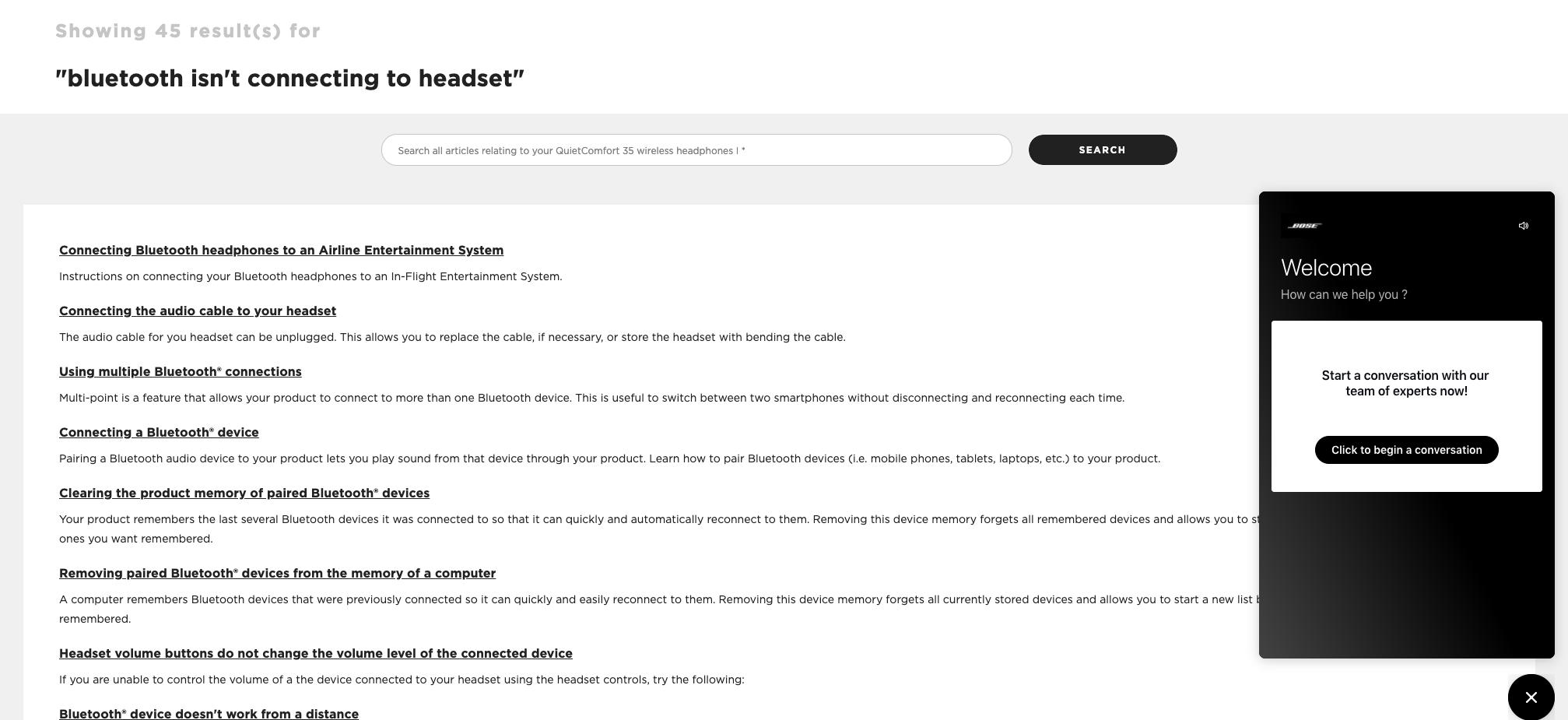
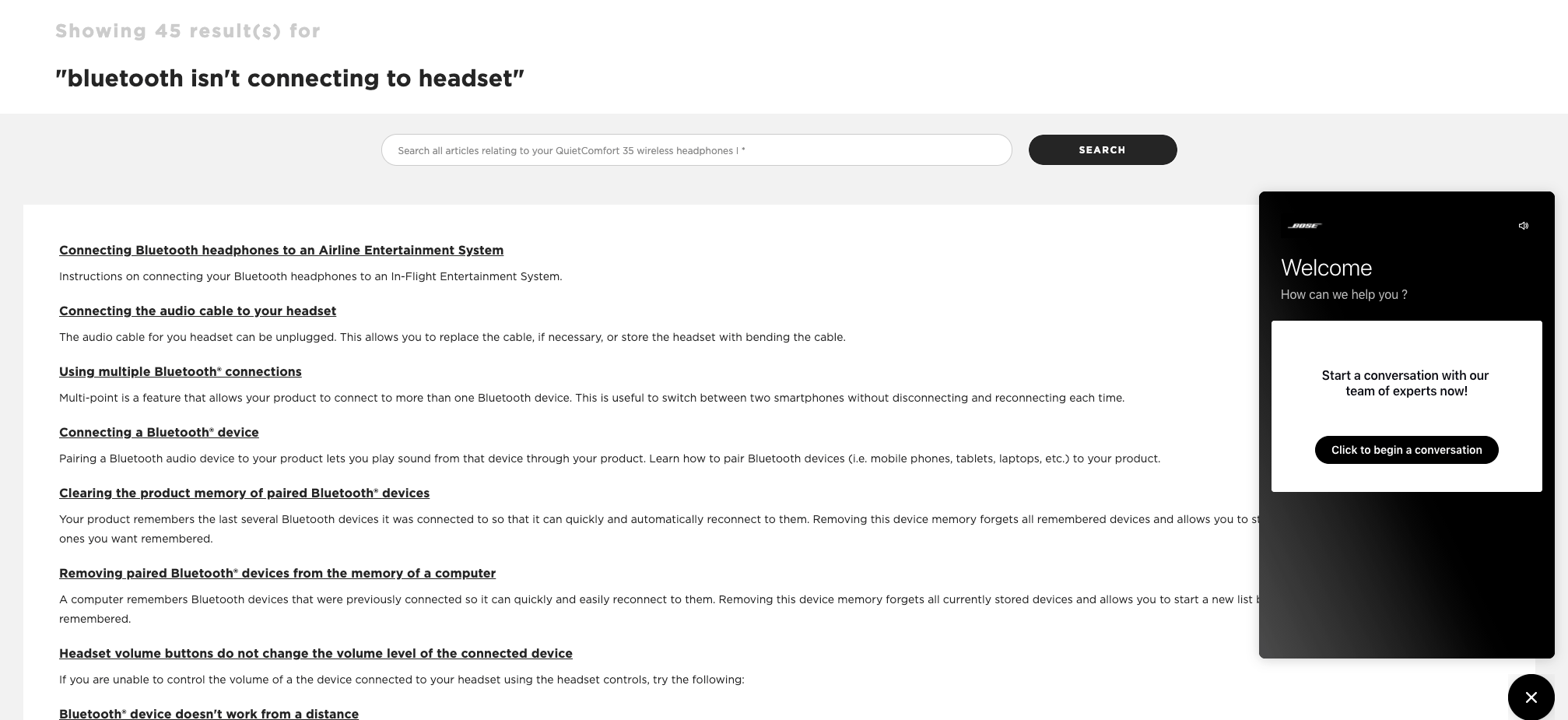
If I visit the Bose support center and ask a question in search, this is the resulting page:

Not one of the 530,000+ posts in the community will ever show up in the answers here.

The incredible collective wisdom of the community is wasted because the support center doesn’t use a federated search tool. Worse yet, the option on the right doesn’t invite people to ask the community but instead contact support.

Two things here…

First, the amazing thing about a community is that over time it covers so many edge cases which can’t be covered in the relatively small number of articles on the support center.

I don’t know how many articles Bose has created to support its products but I’m going to wager it’s less than the half a million posts the community has created.

Every different way a member might describe or solve a problem has been covered in the community. Being able to search for everything in one place is a win for everyone. Prioritise help center articles if you like, but don’t ignore the community content.

Second, if people can’t find the answer in the help center, they probably have an edge case that should be added to the community. The side button shouldn’t be to contact support, but to ask in the community. Questions that are unanswered thereafter [xyz] hours can be escalated to support anyway.

10 Feb 19:12

How quickly the U.S. is vaccinating vs. how long it’ll take to get back to “normal”

by Nathan Yau

Vaccines provide light at the end of the tunnel, but when we finally get to the end depends on the speed at which we vaccinate. The Washington Post considers Joe Biden’s pledge for 100 million shots in his first 100 days in the context of herd immunity and calendar days.

I appreciate the time spent explaining the intersection of these two lines.

Tags: coronavirus, Joe Biden, vaccination, Washington Post

10 Feb 19:10

Reclaim Today: Arcade Grand Opening

by Reverend

027: Arcade Grand Opening

Tim and I sat down on Saturday to talk about the grand opening of Reclaim Arcade. You can see the joy and excitement on our faces, which is my favorite part of the video. I have a lot more to write about the last two weeks working on the arcade, but given I am currently in Paris waiting for a connecting flight to Milan I’ll save the details for a longer post, but this video talks about our first impressions and underlines the fact that people are coming out to enjoy Reclaim Arcade and that’s why we did it, so it feels pretty good.

Reclaim Arcade was also featured on a local Fredericksburg vlog Freehling Finds, and Bill Freehling did a wonderful job highlighting the space. What is cool about Reclaim Arcade is that in many ways it is hyper-local and almost exclusively place-based, which is the opposite of Reclaim Hosting.

And it helps that Tim has been masterful at promoting the arcade on Facebook, Instagram, and in interviews like this one. It’s interesting because this venture has little cross-over with our Reclaim Hosting community, so in many ways we were starting from scratch in terms of generating buzz. I also dig that I have a cameo in the Freehling Finds video playing Elevator Action, which has been restored to its former glory once we got the board fixed.

The last two weeks has been a complete blast, and in many ways exceeded our expectations. It will be a lot of fun to see what comes next, but for the present I think we can rest assured that Reclaim Arcade is a hap-hap-happening!

10 Feb 19:09

CORS Error Connecting to Anki, Or How to Stop and Think First

by Ton Zijlstra

Having moved to a new laptop, the connection I had between my notes and Anki stopped working.

Obsidian, the note taking app I use, has a plugin that allows me to generate Anki flashcards directly from my notes. It uses Anki Connect, an Anki plugin that exposes an API at localhost:8765. That worked fine on my old laptop, when I first connected Obsidian to Anki. On my new laptop it did not work, with the Obsidian plugin saying it could not connect to Anki. Anki Connect is active though.

Obsidian has a developer view (In the menu View go to Toggle developer tools), with a tab Console that shows what’s going on under the hood.
There I found the error message Access to XMLHttpRequest at 'http://127.0.0.1:8765/' from origin 'app://obsidian.md' has been blocked by CORS policy: The 'Access-Control-Allow-Origin' header has a value 'http://localhost' that is not equal to the supplied origin., which meant nothing to me but allowed me to search online for more background.

I run MAMP Pro, which provides me with a local web and mysql server on my laptop. The error to me implied MAMP was refusing the connection based on the source of the request: an app.

The suggested solution I found was changing the server settings to be less strict, in the Directory Directive of MAMP’s Apache webserver settings. I can do that directly in the Apache httpd.conf file in /MAMP/conf/apache, and I can do that in the MAMP interface, selecting localhost and the Apache tab, which has a field “Additional parameters for the Directory Directive”.
Neither solves the issue however, and the error message remains the same. Then I shut down MAMP entirely, to see what happens then. The same error occurs. So, the request was not being handled by MAMP at all!

MacOS 11.0 Big Sur comes with Apache 2.4 pre-installed, so I looked there (in /etc/apache2)her. Anki Connect doesn’t use that Apache instance either.

Then I went back to the Anki Connect plugin itself. Getting to the files of that plugin is best done through Anki itself, selecting the Tools menu, and Add-ons. Then in the screen select Anki Connect and the View Files button. Anki’s plugin files are stored in folders not named after the plugin but after the plugin identification number, so you won’t find anything by searching your file system with the plugin name. There’s a file there config.json, which can also be accessed directly in the Anki add-ons screen through the Config button. And there at the bottom it has the ‘webCorsOriginList‘ that only has localhost which corresponds with the console error message at the start. I had looked at this config file already before going on a wild goose chase in MAMP and Apache settings. Seeing it again having exhausted the previous paths, it hit me in the face: I need to expand that list. And at the same moment I realised I had done that on my old laptop too, because it clearly said so in the installation guide. Duh! Having done what the manual says, it works again.

The issue had nothing to do with local webservers, Anki and Obsidian can do it on their own, if only I had followed the documented settings.
TIL, and definitely not for the first time: Stop and think first. Read the manual. Would have saved me significant time today.

Blogged (and noted) as a reminder.

10 Feb 19:07

Imagine having the chutzpah of having created this situation, promoted it, ignored the Remain vote of Northern Ireland, and then making this statement. twitter.com/SkyNews/status…

by Ian Dunt (IanDunt)
mkalus shared this story from iandunt on Twitter.

Imagine having the chutzpah of having created this situation, promoted it, ignored the Remain vote of Northern Ireland, and then making this statement. twitter.com/SkyNews/status…

"No one is speaking up for Northern Ireland."

Baroness Kate Hoey says the Northern Ireland Protocol "has to be looked at" as it is causing "huge delays" to deliveries travelling to Northern Ireland from the rest of the UK.

Latest politics news: trib.al/94Oqquj pic.twitter.com/BzMkg8bybi


261 likes, 90 retweets


3281 likes, 700 retweets
10 Feb 19:07

I have no mind’s eye: let me try to describe it for you

Neesa Sunar, Psyche, Feb 10, 2021
Icon

I have a very strong inner voice that talks to me constantly (though I can sometimes shut it off with music, a skill I had to learn). I am fond of my inner voice; it literally is me. But like the author, I have no "mind's eye". I can't 'see' things when I visualize; all my mental conceptions are abstract (except for audio). To me, that's normal; I can't imagine people being able to 'see' things in their mind (I remember when I was younger trying very hard just to visualize a circle; it never really came to me). It's normally not a problem for me, except that I have difficulty recognizing faces (and therefore names). And I have always had an excellent memory otherwise. All this reinforces to me once again how different individual people can be and (therefore) how diverse their learning needs must be (no matter what you think of learning styles).

Web: [Direct Link] [This Post]
10 Feb 19:03

How the Notorious Kingsway Triangle Became a Public Park Space

by Sandy James Planner


CBC Journalist Justin McElroy visited EVERY  park  in Vancouver and published his  ranked visits here. One of those parks is a little strip of land that used to be called “the triangle” located at Kingsway and  Fraser Street.

The park is now officially called McAuley Park, after the wonderful couple Harvey and Theresa McAuley who showed up at every public process event that involved their community at city hall, and were legendary as Neighbourhood Watch volunteers.  Their community in east Vancouver has this couple volunteer their time and talent to whatever needed doing.  In fact one Vancouver Police Constable who was the “go to ” person with Neighbourhood Watch said it was not unusual to receive up to nine calls a day from Theresa. They got things done, and they continued to politely question until they got the answers. They are both retired now, but I am sure they are still deeply involved in the community that they loved and that loved them.

There is another story about how McAuley park came into being, and it is more unusual.

The “Kingsway Triangle” was notorious as a place bad things happened, including shootings and murder. But in the same eastside neighbourhood Peter Wohlwend and Midori Oba lived on Windsor Street. Peter had headed up the Neighbourhood Watch in his area, but realized policing wasn’t the challenge, getting to know the neighbours was. He changed the name of the group he headed to the Dickens Community Group, after the school on Windsor Street.

Peter was  a trained Swiss architect and had a feel for community and how it should function. His wife  Midori is an accomplished classical musician and a tremendous gardener, with an eye for aesthetic and design. This couple were the people that placed a bench on the front boulevard outside their house when it was a neighbourhood frequented by drug dealers and on the prostitution stroll. They found the bench welcomed seniors carrying groceries home from Kingsway who stopped for a rest, and was frequented by grandmas and grandpas waiting for children to be released from Dickens Elementary across the street. The bench in many ways transformed how the community saw themselves, by providing a place to just sit and let that be an all right thing to do.

Peter and Midori went on to pilot the Blooming Boulevards program allowing the gardening of public space between the curb and sidewalk, now an award winning city wide program. And in their same way of not being defeated by anything, they decided that their very multicultural area would benefit by a multicultural picnic, and the Kingsway Triangle would be the perfect place to host that.

Peter first went to the businesses that were along the east side of the triangle, which included the first tire shop that was in Vancouver, that had been in the same ownership for generations. There were also several ethnic businesses that expressed a lot of discomfort at the idea of a picnic or barbeque, although they thought it was a very good idea. It turned out that the businesses were within a certain gang’s area, and that gang controlled a lot of the space, and for that matter a lot of those businessmen too.

Peter Wohlwend saw this as an opportunity instead of a hindrance, and arranged to meet one of the gang members to explain his intent of a multicultural barbeque on a weekend.

Legend has it that the business was conducted at the Lion’s Den Cafe across from the triangle park, and Chef Ken’s famously good jerk chicken sealed the deal.

On a sunny weekend Peter and Midori with a host of volunteers started what was to be an annual multicultural event on that triangle of land They had live music, they had dragon dances, they had kids performing and they had food that reflected the ethnic diversity of the community. It was a great success and the annual multicultural event knit the community together.

As Peter often said, the community using and acknowledging the space turned it from a  grassy spit with a few flagpoles to a cared for place that was recognized and had good memories for the community. All the businesses benefited as well by meeting the neighbours who became some of their best customers.  The annual event also served to be a turning point in the community, as more businesses opened up on Fraser Street, as outlined in this article in The Courier by Mike Klassen.

Peter Wohlwend passed away in 2016, and Member of Parliament  Don Davies recognized Peter’s contributions to the community in the House of Commons. But for everyone that lives in the neighbourhood, they also know the story of how Peter Wohlwend created a park and community space on the Kingsway Triangle for local residents.


10 Feb 18:47

Check out this laptop monstrosity with seven displays

by Dean Daley

A company called Expanscape has launched the hydra of laptops with a prototype called Aurora 7 that features six extra displays. The displays extend out from the main screen in a variety of directions.

The screens attach to the main 17.3-inch 4K display with three other screens about the same size and resolution. Above the left and right displays are two smaller single seven-inch 1200p monitors. There’s also another 7-inch screen where your wrist would normally rest.

The Aurora 7 weighs in at 11.8kg (about 26lbs) and measures 11cm (about 4.3-inches) thick.

Additionally, the crazy looking laptop features a Nvidia GTX 1060, an Intel Core i9-9900K processor, and 64GB of RAM. With future revisions, the Expanscape will use the Nvidia RTX 2070 instead, with options for the AMD Ryzen 9 3950x processor or Intel’s i9-10900K.

The Aurora 7’s battery only lasts one hour, and it even needs a secondary 148Wh battery to power the other displays.

Expanscape says it will sell future revisions of the laptop for those interested, but you’ll have to sign a nondisclosure agreement and can’t share the cost publicly. This likely means that the Aurora 7’s cost will put a massive dent in your bank account.

Image Credit: Expanscape 

Via: The Verge

The post Check out this laptop monstrosity with seven displays appeared first on MobileSyrup.