Shared posts

04 Nov 20:09

Goals, Objectives, Strategy, Tactics, Action Plan And Improvement

by Richard Millington

It’s easy to get confused.

Here’s a simple cheat-sheet.

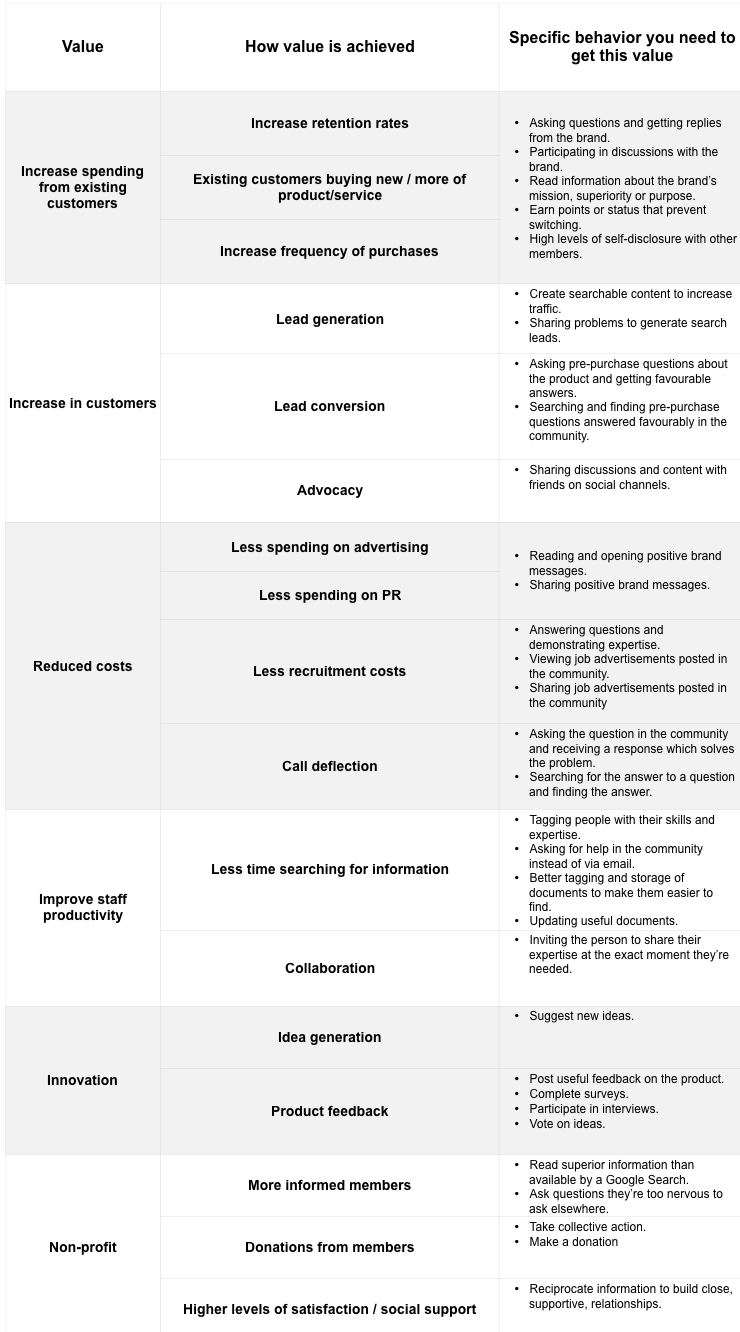
Goals This is the direct value your organization gets from the community.

e.g. Increased customer satisfaction scores

Objectives This is what you need your members to do to get this value.

e.g. Experts answering questions in the community faster.

Strategy This is the emotion you will amplify to get them to perform this behavior.

e.g.  Build a superior group of top experts

Tactics These are the exact things you will do to amplify this emotion.

e.g.  Fly top experts to your HQ to meet the CEO, give them inside information on the product roadmap, and solicit their feedback.

Action Plan This is who will do these things and when they will do them.

e.g. Mark will identify and invite the top experts for Jan 3rd, Jenn will introduce them to the product roadmap on Jan 11th.

Improvement This is how you learn to do things better.

e.g. Did the meeting with the CEO, the inside information, or having their opinions have the biggest impact? Let’s do more of what worked best.

This is a community strategic plan broken down to its most simplest form. You can use it to build a huge number of simple strategic plans for your work if you like.

The art of developing community strategy is to figure out the best things to do to achieve your goals.

Think Strategically About Everything You Do

I want you to think strategically about everything you plan to do in your community today.

Are you doing these things because they are clearly directly connected to the layer above and have been shown to drive results?

Or have you just gotten into the habit of doing them?

The biggest way to improve today is to do far fewer things really, really, well.

That means you need to stop doing all those things which might drive engagement but aren’t strategic. Be really ruthless with your time and devote your time to your biggest wins instead.

What We Learned From 1k Community Professionals

We’ve worked with over 1k+ community professionals in our academy and we’ve found almost every single person can deliver more results simply by cutting out the tasks that don’t drive results.

If you’re not sure, try working upwards from the table above. Begin at the actions you’re taking today and identify the tactics, strategy, objectives, and goals. You might be surprised to see your own mismatch.

p.s. Registration for our Strategic Community Management program will open next week. If you’re tired of chasing metrics and want to work on the things that matter, I hope you will consider joining us.

04 Nov 20:08

Fitbit and GoPro – Horrific Halloween

by windsorr

Reply to this post

RFM AvatarSmall


I see acquisition as the endgame for both players. 

  • GoPro and Fitbit have both been hit again by the simple fact that their products are commoditising and that they have been late to generate user stickiness through the ecosystem.
  • Fitbit reported Q3 16A revenues / adj-EPS of $504m / $0.19 compared to estimates of $508m / $0.19.
  • However, guidance for the critical Q4 holiday season missed estimates by 25% with Q4 16E revenues / adj-EPS of $725m – $750m / $0.14 – $0.18 compared to forecasts of $981m / $0.75.
  • Soft demand and some production issues were blamed for the shortfall but at the end of the day it is increasingly clear that Fitbit’s products are commoditising fast.
  • GoPro fared little better with Q3 16A revenues / adj-EPS of $241m / LOSS$0.60 some 22% below forecasts of $310m / LOSS$0.37.
  • GoPro also went on to say that Q4 16E would also miss estimates with revenues of $600m – $650, some 8% below what the street was looking for.
  • GoPro blamed production issues around the Hero 5 black for the shortfall but I can’t help wondering how many users bought the perfectly good, and 37% cheaper, YI 4K Action Camera instead.
  • YI (Xiaoyi in China) is also coming out with a drone which will carry its 4K camera like the Karma does and this too, will be a t a substantially lower price.
  • Furthermore, when one looks at Fitbit, sales in Asia were down 45% in Q3 16A primarily as a result of a plethora of cheap and adequate health tracking products from Chinese brands such as Xiaomi.
  • These are the issues that beset both Fitbit and GoPro which could have been avoided if they had begun development of their ecosystems much earlier.
  • Unfortunately, like most companies that experience sudden and rapid growth, they have become reactive rather than proactive which is what has landed them in this pickle.
  • If GoPro and Fitbit users knew that they would have an easy to use, fun and vibrant ecosystem to enhance their health monitoring or home movie experience, they would want to stay rather than experiment with far cheaper Chinese equivalents.
  • Both seem to have cottoned onto this concept now but they have only done so once they got into trouble which is much too late.
  • This means that their ecosystems are neither mature enough nor large enough to provide the kind of stickiness that they so desperately need.
  • The result is that users don’t seem to mind leaving to try something else as they have nothing invested in these companies beyond the hardware.
  • Without that critical stickiness, GoPro and Fitbit have to compete on price which is something they cannot afford to do given their high cost base in developed countries.
  • This is why I fear the end game for both of these companies is acquisition.
  • Their hardware is excellent but users are increasingly not willing to pay a premium for it, meaning that gross margins and revenues are going to come under sustained and intense pressure.
  • Someone with a strong ecosystem such as Apple, Google, Tencent, Alibaba or Baidu could easily pick these companies up and combine their good hardware with their own ecosystems to make them much stickier.
  • However, in the absence of M&A, the outlook is very bleak indeed and their shares are likely to continue to suffer from heavy selling pressure.
  • The question is at what point do the shares sink so low that the acquirers are flushed out?
  • I suspect the answer is lower than where we are today.
04 Nov 20:08

A load of poppycock: Fifa insults us (again) by refusing our right to honour war dead

by Peter Simpson
When these words “May their martyred souls be immortal and their noble spirits endure” were added to the Cenotaph in Hong Kong’s Statue Squarein the 1970s to commemorate those who lost their lives during the Japanese invasion, were they chiselled into the granite as a political statement or as an act of remembrance? A similar question is boiling angrily away as the English, Welsh, Northern Irish and Scottish FAs prepare to defy Fifa and wear poppies on their shirts in World...
04 Nov 20:08

Google Play Store to support cheap introductory subscription periods for apps

by Rose Behar

Google announced today that subscription apps on its Play Store will soon be able to use low limited-time introductory offers as a tactic for bringing more users into the app.

The company stated in a blog post for its Playtime Android developer conference that developers will be able to create a special introductory price for a set period of time. For example, an app maker could allow potential users to try out the subscription at $1 for the first three months, then bump them to the regular price once the trial was over. Google also noted that consumer spending in subscription apps had increased by an impressive ten times over the past three years.

In the same post, Google stated that its new pre-registration feature, offered in partnership with select popular mobile titles like Clash Royale and Candy Crush Jelly Saga, had already driven 30 million installs after launching earlier this year. Similarly, titles enrolled in Early Access, an open beta program in which developers can get feedback from early adopters, have seen over four million installs.

Any avid mobile gamers interested in checking out Early Access titles can enroll here.

Related: Peter Molyneux’s The Trail is now available in the Google Play Store

04 Nov 20:08

Not that it makes a difference, but incoming presidents are generally sworn in by judges, very…

by Stowe Boyd
04 Nov 20:08

My second Gran Fondo

In September I did my second Gran Frondo, the first was in 2015.

This time I had an idea of what I was going to face, had a training plan in my head and even a cunning plan for the Fondo.

Training ride near Langley

Going into the Fondo though I was actually slightly worried. After the Fondo last year, once I'd stopped cycling I gained weight again. Approaching the Fondo I was weighing more than last year and all my training rides were slower.

So going in, I was hoping for a similar time, but accepting that I might be slower. I'd changed my strategy a little for the Fondo. Heading up to Squamish specifically I was interested in:

  • Drafting a bit more behind over cyclists to save my energy over the hills and pace myself.
  • Focusing on eating small amounts of food regularly after one hour.
  • Drinking more water at more regular intervals.
  • Try and skip all rest stops.
  • Saving my energy for that last painful hour.

It didn't quite work out that well.

We were worried a little on starting because rain was threatening and I'd gone pretty light, with no coat, it could have been cold. As it turned out the rain never came.

As ever the highlight of the race is going up to Squamish, cycling over Lions Gate while it is closed is awesome. However there still some parts of the race where it gets pretty cramped as they try and fit a bike lane and two car lanes. Approaching those parts at speed can get pretty scary.

The result? I ended up in Squamish faster than last year, at 2h 41m. Dammit.

The next part was still as hard for me, the continual climb out of Squamish up towards Whistler. Sure enough going past the last rest stop as the sun blazed down the energy went out of me. I started to get stomach cramps and my back hurt.

At that point I got passed by so many people. Including one person with one leg, which for a moment annoyed me and then I realised how absolutely awesome that person was.

I ended up in Whistler 1 minute faster than last year at 5h 1m. I was lower in almost every position. Bummer. Maybe a different strategy next year.

But at the same time I knew that coming into the race. It was just that once I'd started the race, I had got it into my head that I could do better. A bit of self-delusion never hurts.

After doing the Gran Fondo this year I did the MEC Century Ride, which is 100km across North Vancouver. I found that race frustrating, with an odd course and also realised my peak was probably the Fondo. I'd trained for one thing and didn't do well. I was really frustrated with my time on that one.

Next big ride? Mozilla is having a meeting in Hawaii, so before then I'm going to cycle around the Big Island. That's 460km+ and a couple of volancoes. Let's see how that goes.

And after that... I signed up for the Fondo next year. I'm going to get below 5hrs next year.

04 Nov 05:11

Get Your Free MongoDB Shirt

by Thom Crowe
Get Your Free MongoDB Shirt

MongoDB is a big part of what Compose is and was the first and only database we offered for a few years. Since then, we've added new offerings like Elasticsearch, PostgreSQL, Redis, RethinkDB, RabbitMQ, etcd and MySQL, but still love MongoDB. Right now, you can deploy MongoDB 3.2.10 on Compose and snag a limited edition MongoDB shirt for free. After you spin up your new database, we'll email you a link, fill it out and then get some cool swag in your mailbox.

MongoDB is the most popular NoSQL database out there and can be found in production in many different scenarios. If you've been thinking about giving MongoDB a try, now's a good time to spin up a deployment and kick the tires to see if it's the right database for your stack.

Check out these articles on MongoDB at Compose to help you get started:

You have options here at Compose. You can start with the MMAPV1 storage engine and deploy a 3-node HA cluster or with 1GB of data and 102MB of RAM, and let that scale up as you need it. If you think you want to start with more power, you can kickstart your MongoDB with the WiredTiger storage engine, with 4GB of data and 1GB of RAM on each of the three database nodes, also with the ability to automatically scale up.

See what MongoDB can do for you and try it this month to get a free t-shirt. If you aren't already using Compose, you can get a 30 day, free trial and give everything Compose offers a try - just remember to try out MongoDB to get your shirt.

04 Nov 05:11

Google Introduces Cheaper Intro Option for Subscription Apps

by Evan Selleck
For folks that want to try out a subscription-based service on their Android device, but don’t want to pay that full price right off the bat, Google’s looking to make that possible. Continue reading →
04 Nov 05:11

Cam-unity building

by D'Arcy Norman

This is cool. CAM(era)-(COMM)unity. A project by the Graduate Students’ Association here at UCalgary. Not just a “create a profile and post a photo” site – but a physical token that must be passed from grad student to grad student to unlock a login to the site. An interesting way to get students to meet each other, and also to share information about themselves and their research.

Source: Cam-unity | U of C project

More info in a UToday article.

04 Nov 05:11

Come to Philly!

by noreply@blogger.com (VeloOrange)

Please come see us, and a lot of other cool companies, at the Philly Bike Expo this weekend. The VO staff all say that this is the most fun of any bike show we've attended. Here the link for info. We'll have a prototype of the new Polyvalent frame to show you.
04 Nov 05:11

New Windows 10 build for ‘Mobile Insiders’ will make future updates a lot faster

by Rose Behar

Windows 10 build 14959 is now rolling out to ‘Insiders,’ bringing with it a new feature for mobile users called Unified Update Platform (UUP) that will make system updates a whole lot faster and more seamless. The feature is set to hit the full range of Microsoft’s Windows devices — PCs, tablets, phones, IoT devices and Hololens headsets — but will begin rolling out for mobile users.

One of the biggest benefits of the update, says the company in a blog post, is the reduction users will see in download size on PCs. The downloads are generally around 4GB and comprise a complete in-place upgrade. With UUP, only the differences between the old version and the new will be downloaded — a simple change that makes the process a whole lot more streamlined. Microsoft says that some PC users can even expect their download size to go down by as much as 35 percent.

The company also notes that UUP should make checking for updates faster, as more of the processing related to figuring out whether a patch is needed will be done in the cloud, rather than on the device — something that the company says is especially important for devices built on the mobile OS.

“We’ve also taken concepts that existed in the PC world and have extended them to mobile,” states Microsoft, noting that rather than having two install several separate updates if you were backlogged, the OS will now be able to gather them together so that users can update their system all at once.

The update is set to come PC Insider builds later this year, with IoT and Hololens following shortly after.

SourceMicrosoft
04 Nov 05:10

"We are conjuring ourselves as ghosts that will haunt the very deep future"

“We are conjuring ourselves as ghosts that will haunt the very deep future”

-

David Farrier, Deep time’s uncanny future is full of ghostly human traces

(h/t Alexis Madrigal)

04 Nov 05:10

What if Twitter's Future Is Becoming Facebook's Live Media App?

What if Twitter's Future Is Becoming Facebook's Live Media App?:

Alexis Madrigal thinks the answer for Twitter is, gulp, Facebook. At first I thought that was like saying the answer to life is death, but I have calmed down, and maybe this reasoning holds water:

Imagine, then, a Facebook-owned product called “Now.” You pair the Twitter timeline, showing you the real-time global text conversation, based on a list of people you follow, with the best of Live video from around the world. This would be the best real-time media product imaginable, especially with Facebook’s corporate muscle behind it.

For Facebook, a Twitter purchase would join a long line of strategic acquisitions made to enhance the company’s core capabilities. When Facebook bought Instagram, it didn’t just want the app’s users—Instagram brought deep, native knowledge of the mobile game into the Facebook house, where it could be used to enhance Facebook’s primary app. Same with WhatsApp, which was purchased, in part, to augment Facebook’s knowledge about the messaging world.

Twitter would bring deep experience with the real-time world to Facebook. And as a nice bonus, Twitter would bring in a squadron of elite power users from across the celebrity and media landscape, who have gotten used to reaching their fans on Twitter.

For hardcore Twitter users, a Facebook acquisition would be something to celebrate. In the past several years, as Twitter has bounced from strategy to strategy in an attempt to chase user growth and justify its value to investors, the core Twitter experience has gotten a little schizophrenic—Twitter Moments appearing one day, hearts replacing stars the next, autoplaying Periscope video suddenly appearing in feeds, axing Vine, weird decisions about reply threads, and so on. (As our Felix Salmon pointed out last year, Twitter’s push for mass market growth “comes at the expense of some of the characteristics which cause its most active users…to love and value it.”)

But if Facebook bought it, Twitter wouldn’t have to change at all—it would simply become the backbone of Facebook’s Live offerings, and fill a niche that Facebook has had trouble building on its own. For the mainstream Facebook user, there would be Live Video. For people who wanted in on the real-time text conversation, there’d be the timeline formerly known as Twitter. Rather than trying to become something it is not, Twitter could double down on the core real-time components of its experience, while attaching itself to the most powerful mobile ad infrastructure in the world.

And besides, what other choice does Twitter have, aside from finding a Bezos?

Yes, maybe Twitter becomes one experience in the Facebook cavalcade of experiences. Ok. I give. Uncle.

04 Nov 05:10

Dropped your phone in the toilet? Here’s how to rescue wet electronics

by Christina Wood

Electronics don’t like water. If yours went swimming, here’s how you can quickly resuscitate it.

How to rescue a wet phone

“Never put your phone in the back pocket of your jeans,” I told my daughter. (She had her phone in the back pocket of her jeans when I said this.) But she took my warning for what it was: Mourning.

She hugged me.

It was well known by now that I had recently drowned a brand-new phone, a device I loved a little too much, in exactly this way. Instead of arguing with me, she took her phone out of her pocket. “It’ll be okay,” she assured me. “You’ll get another phone. Look on the bright side,” she offered. “At least it was a ‘before’ toilet drowning.”

She was right, of course. And I did eventually move on. But I don’t put a phone in my back pocket anymore. It’s too dangerous. I have also, since, learned how to save a wet phone. And rice is not the answer.


Watch the above video to see how Chris Notap gets the water out of electronics so they have the best chance of surviving.

He tries five methods, including all the ones people will tell you when this happens to you. It turns out, though, that none of those work very well. Fortunately, he knows what does work. If you are desperate, fast forward to the clever hacked-vacuum-cleaner-taped-to-a-phone-in-a-sock method. It starts at 2:43 (or click below.)


The folks at TekDry offered me the following list of tips to save a wet phone:

1. DO NOT plug in your phone – Electricity and water just don’t mix.
2. DO power off the phone – This will help prevent a short circuit.
3. DO remove the battery if possible –Separating the battery from the phone helps to keep electricity away from the waterlogged components. This minimizes the chances of irreversible damage.
4. If it was dropped in salt water, DO rinse it in fresh water – Salt water will almost certainly corrode and short the phone and will do more damage than fresh water, so it is best to remove any traces of salt water quickly.
5. DO dry with a paper towel or washcloth – Removing any visible water from the phone will keep it from seeping into the phone and doing more damage.
6. DO NOT use rice – This method is ineffective.
7. DO NOT use a blow dryer or oven – The heat from these methods often warps and damages the sensitive equipment inside your phone.
8. DO NOT use a microwave! A major component of electronic devices is metal and metal in a microwave is a recipe for disaster.
9. TekDry has kiosks at some Staples stores that will dry phones fast.


Updated on 11/25/2022.

Amazon.com Widgets

The post Dropped your phone in the toilet? Here’s how to rescue wet electronics appeared first on Geek Girlfriends.

04 Nov 05:10

Why I’m Considering Bear as a Notes App Replacement

by Federico Viticci

As I wrote in an issue of MacStories Weekly (exclusive to Club MacStories members), I recently moved my Club-related notes from the Apple Notes app to Trello. Because Club MacStories is a collaborative effort, it made sense to use Trello's project management features to let the entire MacStories team see my notes. However, moving those notes to Trello considerably decreased my usage of Apple Notes, which left me wondering if it was time to consider an alternative app for my personal note-taking needs.

I praised Apple Notes numerous times since its relaunch on iOS 9. I believe Notes and Safari are Apple's two best iOS apps, and I recommend Notes to anyone planning a switch from Evernote or OneNote. Notes is surprisingly advanced and fast; its iCloud sync is reliable; it even received support for collaboration in iOS 10. I've used Notes as my only note-taking app for over a year now.

After moving my most frequently accessed notes to Trello1, I looked at what was left in Notes, and I realized that I wanted to see if a different app could fill the gaps Apple didn't address. For everything Notes gets right, there are several limitations that have required me to change how I work: Notes has no native Markdown support, no automation features, and its organization system based on folders could use a revamp. I accepted Notes' shortcomings because I had no other choice; could a new app lure me away from it through the promise of features Apple would never ship?

My transition from Notes to Trello couldn't have come at a better time. I've been keeping an eye on Bear, a new note-taking app developed by Italian studio Shiny Frog, for the entire summer. Bear piqued my interest right away: like Notes, it was based on CloudKit sync, but Bear also strived to augment the experience for "online writers" thanks to Markdown, automation features, themes, tags, cross-reference links, and more.

As Bear betas went out to testers, I told myself I wouldn't need it because I was perfectly fine in Notes. But when I noticed that I was using Notes less frequently anyway, I took the plunge, moved my remaining personal notes to Bear, and put the app on my Home screen. This happened two weeks ago.

I'm still not convinced Bear is the note-taking app I want to use throughout 2017. I didn't have enough time to test the final beta of Bear, and I believe a note-taking app is best evaluated over a few months of usage.

At the same time, Bear is full of interesting ideas, and it has the potential to replace Notes for many iOS users who have been waiting for this kind of rich Markdown note-taking app. Bear has some issues, but it also opens new possibilities for Markdown writers and people who work primarily from iOS and aren't completely satisfied with Notes and other note-taking apps.

I'm considering Bear as a replacement for Notes, but this is not a definitive review. Instead, I want to lay out the reasons why Bear is superior to Notes as well as the features it's missing. I'm still figuring out if Bear is worth committing to, but I'm intrigued by the app, and there's a lot to unpack.


What Bear Gets Right

Bear was clearly built with a lot of care, and it shows. The app has powerful functionalities that make it a strong competitor to Apple Notes on iOS.

Rich Markdown Editing

I love Markdown, and Bear brings rich Markdown editing and export to a lightweight note-taking app that feels like a mix of Apple Notes and Drafts.

Like Apple's app, notes can be formatted with headers and lists, but Bear allows you to enter that syntax quickly with Markdown, which is then rendered to a beautiful inline preview. For instance, you can enter a new section title by typing ## Title as you normally would in Markdown, but as soon as you type the two pound signs, Bear will convert them to a label that says 'H2', indicating the type of title you entered. You can even tap on the header afterwards to change it without having to type in Markdown again.

Markdown headers in Bear.

Markdown headers in Bear.

Other editing features that require too many taps in Notes, such as lists or basic text formatting, can be sped up with Markdown in Bear. Typing an asterisk will start a new list; enclosing text in forward-slashes and asterisks will make it italic and bold, respectively.

If you're a Markdown user, you might be wondering if I made an error above – I didn't. By default, Bear uses its own flavor of Markdown that is slightly different from John Gruber's original version. Fortunately, there is a Markdown compatibility mode in Bear's settings that makes the editor accept standard Markdown syntax. I turned this on immediately.

Markdown support extends to other common editing controls: a Markdown inline link is automatically converted into a rich link; you can tap the link's anchor to open a popup for changing the link's title and text. If you go back and edit that link by hitting backspace, it'll be converted to regular plain text Markdown again.

Bear lets you format the title and URL parts of a link separately.

Bear lets you format the title and URL parts of a link separately.

The same is true for checkboxes, inline code snippets, and other Markdown niceties that Bear supports and previews inline – something I'd never expect Apple to roll into Notes.

Various Markdown and rich text features as reimagined by Bear.

Various Markdown and rich text features as reimagined by Bear.

Unlike other Markdown note-taking apps, which exclusively deal with plain text, Bear supports inline images, too. From this standpoint, the app is more similar to Apple Notes: images can be visualized inline as full previews or smaller thumbnails2, and you can also import any attachment supported by Quick Look (PDFs, .zip archives, text files, videos, etc.) and drop it in a note thanks to document providers.

Bear offers a unique take on Markdown that is both visually appealing and functional. In addition to simply looking nice, Markdown editing means I can format notes and give them structure faster than Apple Notes. I can start a note in Bear and add sections and a few lists without having to tap through multiple menus over and over.

Bear offers a unique take on Markdown that is both visually appealing and functional.

Bear strikes a good balance of fast Markdown editing and rich text presentation. Effectively, Bear offers an "augmented Markdown" editing environment that employs plain text for quick editing, but relies on rich text and a Notes-like model for everything else. I think it works well.

Organize Notes with Tags and Pins

Bear doesn't have folders. To organize notes, you add tags anywhere in the body of a note as #hashtags, which are parsed and highlighted by Bear.

Tags in Bear.

Tags in Bear.

Any note can have an arbitrary number of tags, which grants more flexibility than having to choose a single destination folder. Also, tags can be combined for deeper organization by inserting them together, such as #articles #blog; in the tags sidebar, you'll have expandable menus to view notes that have been assigned both tags.

I find tags to suit my needs better than folders. I often take notes that belong to multiple areas of responsibility or, more generally, I want to organize my notes and personal archive with fine-grained control. Bear makes it easy, for example, to organize my health records by type and year, as well as my articles by project and website.

While I like the way Bear displays tags in a Slack-like dark sidebar, I wish I didn't have to enter tags as hashtags in the middle of a note's text. I have been entering tags at the bottom of my notes so they stay out of my view, but I'd prefer to be able to assign tags in the information sidebar available on the right – it seems like there would be plenty of space available there.

I'm a fan of tags to organize my notes as they bring a little extra versatility I find convenient. I'm even more of a fan of pinned notes, though. This feature lets you pin a note to the top of the list so it's easier to retrieve than others.

I've been using pins to quickly reach notes for articles I'm currently working on, and I feel like they'll come in handy when traveling as well. Overall, the combination of tags and pins gives Bear an edge over Notes in terms of organization, which is good to have when amassing multiple types of content in a single app.

It Looks Nice

I don't usually give much importance to the appearance of a note-taking app, but Bear's interface looks clean and does away with the remnant bits of paper textures and embossed lettering of Apple Notes.

There are some key interface elements to learn in the app – the left sidebar to navigate tags, the scrollable keyboard row for access to common formatting controls, and popovers used to edit items such as headers and links. New notes are created by hitting a '+' button in the bottom right corner of the app, which I find easy to access on large displays.

Bear's UI has been designed to not interfere with content, and there are subtle touches I appreciate throughout the app. On the iPad, the chevron icon in the top left has a delightful transition when switching from list to reading a note. In the Settings, you can adjust typography for the editor choosing from four fonts (System, Avenir Next, Helvetica Neue, Menlo), plus options for size, line height, line width, and paragraph spacing.

Avenir Next, San Francisco, and Menlo in Bear.

Avenir Next, San Francisco, and Menlo in Bear.

The ability to choose a theme is another advantage Bear has over Notes. Shiny Frog built 9 themes into the app, ranging from the default Red Graphite (a white UI with black and red accents) to the dark Charcoal and the retro-looking Panic Mode, plus the omnipresent Solarized Light and Dark.

If you're into dark themes and interfaces that aren't white, Bear has most certainly something to offer.

iCloud Sync Is Seamless

Bear is based on the same CloudKit storage and syncing technology used by Apple Notes and adopted by dozens of iOS productivity apps over the past year. In my experience, CloudKit-powered iCloud sync has been fast, reliable, and, best of all, it doesn't require any manual adjustment. Your Bear notes will propagate across the iPhone, iPad, and Mac (Bear also has a Mac counterpart) in seconds thanks to CloudKit.

It's a small detail, but I like how Bear makes iCloud sync less invisible than Apple's apps by indicating where the last editing session took place. In the information panel (accessed by tapping the 'i' button in the top right corner of a note), you'll find a 'Last Editing Device' field underneath statistics for the current note. Seeing which device synced the last edit is useful to confirm which changes have been saved; you can also view Settings > Status to check when the last complete iCloud sync happened.

In my couple of weeks testing the last beta of Bear (which didn't have several fixes included in today's App Store version), I never ran into data loss issues or other problems related to CloudKit.

Solid Import and Export Options

Alongside Markdown and a focus on power user features (more on this below), another differentiator of Bear is its rich selection of powerful import and export tools. Bear wants to be the new home for your notes, but it doesn't lock you into a proprietary system.

Bear has the best import and export features I've seen in an iOS note-taking app. If you want to migrate your notes to Bear, you can import an Evernote archive or text files into the Mac app; on iOS, you can pick files using document providers. You can choose to keep the original dates for imported notes, use the first line as a title (handy when importing text files from Apple Notes), or, alternatively, use the filename as a title.

Bear's import and export tools.

Bear's import and export tools.

I tested Bear's import feature on my MacBook Air. After exporting from Apple Notes using this free utility, I opened the text files into Bear, and they were imported as advertised by the app. I wasn't able to test importing notes with attachments and rich text from Evernote as I no longer have an Evernote database to test against.

Bear is even more impressive when it comes to getting notes out of the app. There are two ways to export notes in Bear: you can export all notes at once or export an individual note with the iOS share sheet. When exporting all notes, you can choose to merge them in a single file or export a folder with text files and attachments3; you can also decide to keep tags during the export or export text files without attachments.

If you don't want to export your notes as text (.txt), Bear has a variety of options:

  • PDF
  • HTML
  • Markdown
  • RTF
  • DOCX
  • TextBundle
  • Bear Note (proprietary)
  • JPEG

These formats should be enough to ensure anyone's needs can be met when moving from Bear to something else. I'm particularly intrigued by the choice of including TextBundle, a relatively new entry in this space that, among other apps, is natively supported by my favorite text editor, Ulysses for Mac and iOS.

The aforementioned formats are supported as exporting options for individual notes as well. It's refreshing to see an iOS app support multiple ways of exporting notes and sending them to different apps – it's a welcome change from apps that try to keep you within their ecosystem as much as possible (this includes Apple, Evernote, and Microsoft). Personally, I've used Markdown export to send notes I want to develop into full articles to Ulysses.

Also, I'm not ashamed to admit that the JPEG option is going to be great to easily tweet beautiful longform textshots from Bear (I recommend the Linky extension for that).

A Potentially Sustainable Business Model

Bear isn't a classic pay-once-and-hope-for-the-best productivity app. The developers at Shiny Frog are trying a subscription model for Bear: the app is free to download and there's a single subscription (which covers both the iOS and Mac app) to unlock themes, advanced exporting options4, and iCloud sync. Bear uses the new kind of auto-renewable subscriptions for all categories of apps Apple unveiled earlier this year.

A Bear subscription costs $1.49/month (with a 1-week free trial) or $14.99/year (with a 1-month free trial). If you buy the annual subscription or subscribe to the monthly plan for 12 months, themes and advanced exporting options will be unlocked forever.

Bear's auto-renewable iTunes subscriptions.

Bear's auto-renewable iTunes subscriptions.

Building a successful business on the App Store today is different from what it used to be. In recent months, we've seen the launch of App Store subscriptions and developers of pro software switching to a free-to-start model with pro features locked behind In-App Purchases – a way to entice more users to try an app, see for themselves if its feature set fits their workflow, and eventually commit to buying the full version.

Bear's approach is interesting: the app is skewed towards pro users who demand advanced features, but the developers also believe that the frequent usage of a note-taking app – a utility you tend to use every day – warrants a recurring subscription. If Bear ends up being the app I want to use instead of Notes, and if Shiny Frog can continue to find a balance between free features and options exclusive to paying subscribers, I'd have no problem paying $15/year for an app I would use dozens of times every day.

Generating ongoing revenue from loyal customers who depend on software doesn't work for everyone, but it does for a lot of services I pay for, and I'm curious to see how this will play out for Shiny Frog.

It Can Be Automated

If iOS devices are your primary work machines, you'll be glad to know that Bear can be automated and integrated with Workflow using x-callback-url. The developers have documented their URL scheme implementation here. There are several aspects that I like and have integrated with Workflow and Launcher widgets.

Thanks to the URL scheme, you can open specific notes or tags in Bear. This isn't possible with Apple Notes, which doesn't offer a way to recall individual notes from anywhere on iOS. With a system inspired by Ulysses, Bear assigns an alphanumeric ID to each note, which you can use to open a specific note from other apps or widgets – even from the Lock screen. Take a look at how easy it is to build a widget to open a Bear note with Workflow:

I've been using the Bear URL scheme to open a private note I need to view often, but also to jump to a tag view to show a list of notes, which is faster than having to search manually in the Notes app.

The URL scheme goes beyond opening notes and tags, though. You can append text or base64-encoded files to an existing note: if you want a way to quickly append PDF files to the same note in Bear, you can run a workflow from any share sheet on iOS and the PDF will be inserted in the note.5

You can grab URLs and convert them to a Markdown version of the associated webpage in Bear; you can trigger searches from the URL scheme; you can even change the app's theme in two seconds with this Workflow widget.

Changing Bear themes with Workflow.

Changing Bear themes with Workflow.

Bear follows in the great tradition of Drafts and Ulysses with a good library of URL scheme actions supported in version 1.0, and I hope that native Bear actions will be added to Workflow in the future. From an automation perspective, this is a great start.

Other Power User Features

Besides URL schemes, Bear has other power user features that set it apart from Apple Notes. Some of my favorites:

You can refer to individual notes

Using a simple [[Note Title]] syntax, you can create a link that takes you to another note inside Bear.

Creating reference links for other notes in Bear.

Creating reference links for other notes in Bear.

This is ideal to build a body of work in Bear and organize it in a single 'Table of Contents' note pinned to the top, for instance.

There's support for TextExpander snippets

Bear can automatically expand your TextExpander snippets, which can save you a lot of time every day. You can enable TextExpander integration in Settings > General.

You can duplicate notes

Want to have a slightly different version of a note in your Bear library? Swipe left on a note, select More, than tap Duplicate to create a copy.

Smart syntax that recognizes addresses and colors

If you paste an address into a note in Bear, it'll be highlighted with a location icon.

Bear makes it easy to open saved addresses, as well as preview colors.

Bear makes it easy to open saved addresses, as well as preview colors.

Also, if you enter a HEX color code that Bear recognizes as a color instead of a hashtag, it'll be displayed with a colored dot preview within the note.

Enhanced copy & paste menu

When you select some text in Bear, you can choose to copy it as Markdown, HTML, or plain text. Similarly, you can paste text from Markdown, HTML, or code.

Smart copy & paste in Bear.

Smart copy & paste in Bear.

The app even recognizes which programming language you're pasting and creates a fenced code block accordingly. That's pretty neat.

Result highlights in search

Unlike Apple Notes, Bear highlights the word you're looking for in search results. Also, search results are tag-specific – if you open a tag view and search from there, only results for that tag will be returned.


Bear's Shortcomings

While Bear improves upon several aspects of Notes, there are some missing features, technical limitations, and design decisions that are making the switch from Apple's app harder than I imagined.

No Collaboration

With iOS 10, Apple brought collaboration to Notes using the new CloudKit Sharing API, and it's been a fantastic addition to the app. Now, whenever a friend wants to share a document with me, they can do so with the free Notes app and my iCloud email address. It's super simple, built into iOS, and reliable.

Bear doesn't have any collaboration features for now. The good news, however, is that by using CloudKit, it should be fairly easy for the developers to implement the CloudKit Sharing system in a future update. If collaboration is a must-have feature for you, though, you can't use Bear yet.

Lack of Conflict Resolution and Merge for the Extension

This is a tricky one to solve for a third-party iOS app: if you append content from the Bear extension to the same note from multiple devices, when you'll open the app you'll likely be presented with a conflicted copy of that note.

Saving links and images with the Bear extension.

Saving links and images with the Bear extension.

Bear can't start an upload when a note changes because of the app's sharing extension, which leaves the developers to implement a merge feature that intelligently merges the content appended from two different devices running Bear. And Shiny Frog tells me that such merge function hasn't been built into Bear yet, which may lead to conflicted copies if Bear can't reconcile changes to the same note happened at different times on different devices.

This is worse than Apple Notes, which also has an extension that can append content to existing notes, but which can merge changes to the same note without creating a conflicted copy.

To overcome this limitation, I've been using the Bear URL scheme to append content to a note and launch the app afterwards (thus triggering a sync), but it's not ideal, and Notes' merge implementation is vastly superior.

No Rich Links or Sketches

There are two other notable missing features from Notes: Bear doesn't display rich preview snippets for links (they only show a title with no description or image), and there's no drawing mode to create sketches.

Saving links in Bear and Notes with the apps' share extensions.

Saving links in Bear and Notes with the apps' share extensions.

I can live without a sketching mode in my note-taking app (though Notes' drawing mode is extremely useful and quite the technical feat), but the lack of rich link previews is harder to accept. After seeing rich links in Notes and iMessage, it's difficult to go back to regular links.

No Touch ID

Bear can't lock individual notes behind Touch ID or a password. Touch ID authentication on a note-by-note basis is one of my favorite Apple Notes features, and I hope Shiny Frog will consider adding this option soon.

No 3D Touch

Surprisingly, Bear doesn't feature any 3D Touch quick actions on the Home screen or support for peek and pop to preview and open notes. My reliance on 3D Touch has increased over the past year, and I would have liked to see Bear adopting the technology to speed up note creation and access to my favorite notes. I'd especially like to see customizable Home screen quick actions to create a note, open a specific note or tag, and start a search.

Bugs and Other Issues

I came across a few bugs in the beta version of Bear I tested before launch. Embedding a video as a file picked from a document provider would often crash the app when trying to play the video. Occasionally, the copy & paste menu wouldn't appear upon tapping once in an empty text area. And, text selection – particularly when editing tags and headers – would often get stuck or scroll in an unpredictable way. I'm expecting the developers to fix these problems in the next few updates.

Lack of Deeper Customization

Bear offers a great selection of advanced options, but those features can't be reordered or customized for faster access.

You can't select a default export type for the share icon at the top; you can't reorder exporting options based on usage (I would like to have Markdown first); and, you can't reorder buttons in the extra keyboard row. I like it when an app caters to power users, but having dozens of options also implies having extensive customization built-in, and Bear doesn't deliver on this.


Bear 1.0

Since the first beta of iOS 9 in June 2015, I have changed my daily iOS workflow to accommodate Apple Notes in both features and limitations. However, now that I've split my notes between collaborative (Trello) and personal ones, the allure of Bear's Markdown support and power user features is impossible to ignore. I haven't decided if I'm going to become an annual Bear subscriber yet, but I'm willing to pay for a few months and see how quickly Shiny Frog can iterate on version 1.0 of the app.

One of the most impressive app debuts of the year.

Comparisons with Apple Notes aside, Bear stands on its own as one of the most impressive app debuts of the year. Shiny Frog has managed to build a note-taking app that tastefully balances elegance and advanced features – an app that can be used without its deeper options and still be superior to Notes in many ways, but also a power user tool that unlocks more flexibility than Apple Notes. It's great to see an indie developer like Shiny Frog can still ship a noteworthy alternative to an Apple app on both iOS and macOS.

Bear is the best new competitor to Apple Notes for iOS and Mac users, and because it's a free download, I recommend taking it for a spin. I have a feeling that Bear's Markdown integration and automation features will make me save a lot of time every day.


  1. These include the app debuts I cover every week, new stickers from the iMessage App Store, interesting links, and ideas for newsletter sections. ↩︎
  2. Alas, you can't activate thumbnails on a note-by-note basis – it's an app-wide setting. ↩︎
  3. Which, by the way, the Readdle Documents app can import just fine. ↩︎
  4. Specifically, PDF, HTML, RTF, DOCX, and JPEG. ↩︎
  5. I'll detail more Bear workflows and tips in the MacStories Weekly newsletters for Club MacStories members. ↩︎

Like MacStories? Become a Member.

Club MacStories offers exclusive access to extra MacStories content, delivered every week; it’s also a way to support us directly.

Club MacStories will help you discover the best apps for your devices and get the most out of your iPhone, iPad, and Mac. Plus, it’s made in Italy.

Join Now

04 Nov 05:08

What’s Up with SUMO – 3rd November

by Michał

Hello, SUMO Nation!

Welcome to November – probably the most important month for us this year, as we will be migrating SUMO to a new home. More about this below, so keep reading.

Welcome, new contributors!

If you just joined us, don’t hesitate – come over and say “hi” in the forums!

SUMO Community meetings

  • LATEST ONE: 2nd of November – you can read the notes here and see the video at AirMozilla.
  • NEXT ONE: happening on the 10th of November!
  • If you want to add a discussion topic to the upcoming meeting agenda:
    • Start a thread in the Community Forums, so that everyone in the community can see what will be discussed and voice their opinion here before Wednesday (this will make it easier to have an efficient meeting).
    • Please do so as soon as you can before the meeting, so that people have time to read, think, and reply (and also add it to the agenda).
    • If you can, please attend the meeting in person (or via IRC), so we can follow up on your discussion topic during the meeting with your feedback.

Community

Platform

Social

  • Reminder: email Sierra at sreedATmozilla.com to get a scheduled training date for Respond and get on board as soon as you complete it!
  • It’s the final countdown for the Army of Awesome (the tool, not the people). It will be going away in about 2 weeks. Huge thanks to all of those who used it to great effect :-)

Support Forum

Knowledge Base & L10n

Firefox

  • for Android
    • HLS video will be present version 50 – which is coming on November 15th or thereabout. There are some known issues in the current implementation – Roland will be posting more about the “ignorable error” in the forums.
  • for Desktop
    • Version 50 coming November 15th!
  • for iOS
    • All is quiet, all is bright ;-)

That’s it for now, SUMO peeps (to quote Madalina). We will see you around the site, so keep rocking the helpful web and talk to you soon – one way or another.

04 Nov 05:07

What will the bicycles of the future look like?

mkalus shared this story .

“That’s a different way of doing things, and you can only do that when you are not constrained by the UCI. The thing about triathlon is that they have never imposed UCI standards for Iron Man, so it gives you some latitude in design.”

The P5X bears a clear similarity to Cervélo's Baracchi bike, which was the first bike designed by Cervélo founders Phil White and Gerard Vroomen two decades ago before it was scuppered by the UCI regulations. But, says Spearman, “we did not set out to rebuild that bike - it kind of happened organically”.

There has been no shortage of wacky bike concepts in recent years - take, for example, the iPhone controlled FUCI - but the P5X is far more than just a concept and is available from December.

But will this style of bike make its way down the food chain and into the hands of regular pedallers who are just looking to pop to the shops or roll into the office?

It would certainly look “super cool”, says Spearman, and the design would make your ride to work more comfortable.

04 Nov 00:45

Palate Deck vs. Samuel Smith

The days are getting shorter and the temperature is dropping, which is a great time of year to get back into the darker beers. Continuing the series of Palate Deck action shots, let's take a look at Samuel Smith's Taddy Porter.

This Yorkshire brew is a classic English porter with fruity roasty flavor and a clean dry finish. Thanks to some nuanced malt character, there are plenty of subtleties that advanced Palate Deck sessions can help draw out.

Starting with the basic tasting mode again, this time we only have a few cards we can play. With a notably brown color and light malty sweetness, there are hints of fruit but those are the only cards that match.

Taddy Porter with 5 very basic cards played

Sometimes the simpler gameplay modes don't allow enough nuance to adequately describe a beer. Lucky for us, it's not hard to go further. With the extended tasting cards we can build up a better picture of this beer.

The malt character comes across in a few ways. The sweetness suggests caramel and chocolate, while there's a disctinct nuttiness in the flavor. Light berry notes are perceived on the aroma.

With the intensity scale we can quantify all these flavours, and start describing the complex mouthfeel. A rounded creaminess is noticeable, and on the finish this beer goes quite dry.

Even if you've never had it, the cards below give a much better idea of which flavors and sensations you might expect to come across in Samuel Smith's Taddy Porter.

A more detailed evaluation with many specific cards and the intensity scale cards played.

With 108 cards, the two decks provide a lot of nuance and detail. They don’t cover every situation however, so stay tuned for a future update where I shed some light on the Second Edition.

04 Nov 00:45

Rock Bottom

by Alex

When we finally pulled Peanut out of public school at the end of Grade 2, I thought we’d reached rock bottom.

We had a 7-year-old with a basket of diagnoses and labels: anxiety, ADHD, sensory processing issues, tic disorder, fine motor lags and a 99.99th percentile IQ. (It would be another two years before a doctor rolled all these issues up into a single diagnosis of autism spectrum disorder). Every day that he was in school, part of me was waiting for a call from the principal, telling me that Peanut had run out of his classroom, or thrown something at his teacher, or disrupted a lesson. On many, many days, I didn’t have to wait long for the call.

The day we realized that there was no place for Peanut in the school system?—?not just this principal, not just this school, but anywhere?—?I couldn’t imagine anything worse. If Peanut couldn’t go to school, I wouldn’t be able to work, so I’d have to quit my job and find a new, more flexible way of earning a living. It wasn’t just rock bottom for him: it was rock bottom for me.

At least homeschooling promised a relief from our constant anxious waiting for the principal’s call: there’s no way to send a kid home from homeschool. I had no illusions that I would be able to homeschool Peanut myself: instead, I hired a tutor who would be able to challenge Peanut in math, computing and other subjects he was passionate about. I enrolled our little guy in outdoor education, art and parkour classes, so that he would see other kids and get some physical activity. Maybe homeschooling would actually be good for him.

For the first month, all my hopes were realized. Peanut was happy?—?far happier than he’d been in years. Our tutor was a bright engineering grad who helped Peanut rocket forward in his programming lessons. The outdoor education course was a bust (Peanut was horrified to discover it was actually outside), but Peanut loved parkour, and enjoyed his sculpture class whenever I could actually get him through the doors.

Five or six weeks into Project Homeschool, however, Peanut refused to go to any more sculpture classes. Next, he started resisting parkour: even if I got him into the car and over to the gym, he cried and cried when I tried to take him into class. Soon, he was refusing to leave the house at all. Our boy, who’d always been cheerful and social, became depressed and agoraphobic.

And then I got the news: our tutor was missing some of the credits he needed for his med school applications, so he’d be leaving us at the beginning of December in order to finish his coursework.

Welcome to our new rock bottom: a depressed, homeschooled child?—?with no one to teach him. But it was still October, so I had a few weeks to come up with a Plan B.

Plan B was obvious: private school. There was one?—?and only one?—?school in Vancouver that seemed like it could be a fit for Peanut. When we decided to pull Peanut out of public school in May, we’d met with a private school that focused on gifted children. At that time they had already enrolled several challenging kids for the fall, so they weren’t ready to take Peanut on, too. But perhaps they’d be able to work him into school in January, once the other kids had already settled in.

Once I discovered that our tutor would be leaving us, it seemed obvious that I should try again with the private school. We set up a visit for Peanut, and he immediately clicked with the principal, who spent forty-five minutes working through a series of math problems with him so he could see how Peanut’s mind worked. By the end of the hour, the principal was excited by what he’d seen in Peanut, and Peanut was enthusiastic about his math experience in a way I’d never seen before.

The principal arranged for Peanut to spend half a day with the Grade 3 class, and I spent the morning at the coffee shop around the corner, my heart in my throat. What if Peanut had a meltdown during his visit? What if he ran out of school? This was our best, last shot at school, and a bad morning could ruin it forever.

But I hadn’t factored in the value Peanut placed on his friendship with the one boy he knew in that class. Side-by-side with his buddy, he sailed through the morning. When I picked him up at noon, the primary school principal was beaming. She suggested we come back the next week for a full day.

When we arrived at school on the appointed day, we discovered Peanut’s buddy was home sick: uh-oh. But I pointed out some other friendly-looking kids, and he forded into the knot of children happily enough. I took up my position in the coffee shop, hopeful we’d have another great visit.

At 12:30, my phone rang. Peanut had gone to the park with the rest of class, but when they returned, he realized he’d left his book behind. He couldn’t go back to the park on his own, and there was no teacher available to take him. Now he was making for the door, and the principal had her hands full, trying to contain him.

By the time I’d raced around the corner Peanut had run down the block, with the primary school principal chasing after him. I caught up to them and led Peanut back to the car, then apologized to the principal for her trouble. From the look on her face, I knew this incident had convinced her that Peanut was more than they could handle.

I got back in the car and started driving, holding myself together as best I could. Once we were a few blocks away, I pulled the car over and put it in park. Then I rested my head on the steering wheel and began to weep.

“Why did you have to run away?” I asked my son?—?or more truly, the universe. “That was the only school we had left.”

He began to cry too.

“I should just kill myself,” he said. “I’m never going to go to school, I’m never going to be able to get a job, and I make everything so hard for our family. You would all be better off without me.”

That just made me cry harder.

“No, that would make things much, much worse. We all love you. That would break our hearts.”

We finally stopped weeping, and drove the few blocks home in silence. The next morning, I woke up, remembered our situation, and started weeping again. This, surely, was as bad as it could get. No tutor, no school, a child who wanted to die. The real rock bottom.

I got a call from the school principal later that day. He’d heard about our visit from the primary school principal, and he sounded as heartbroken as I was. “Don’t give up,” he told me. “I’ll see what I can do.”

A few days later he invited me into his office for a meeting.

“The primary school is closed to him now. There’s no way back from that visit,” he began. I felt the tears welling up.

“But I know that we are the only people in this city who can help your son. It’s our mission. And if our school isn’t serving him, what are we here for?”

Even though the primary school was closed to Peanut, there might be another way. The senior school began at Grade 4, so Peanut was only a little bit younger than the kids there. The senior school teachers would inevitably hear about Peanut’s escape from primary school, and they’d be leery of taking on another difficult student. But the principal personally taught a Grade 4 coding class in the upper school, and he could include Peanut in that class, as a way of getting his foot in the door.

It was only 45 minutes of instruction, four days a week, but it was a ray of hope. If Peanut could make a go of that one class, he could start going to other senior school classes, and maybe even become a full-time student. The doors were not yet quite closed.

The following Monday, I planned a quiet morning for Peanut. I wanted him to have all the energy he’d need to make it through a potentially challenging class. When it came time to take him to school, his agoraphobic impulses kicked in again, and he refused to get in the car. But I lured him out with a combination of distraction and bribery, and pretty soon, we were on our way.

With some more sweet talking I got him up the stairs and into the principal’s office: for the first class, they’d work one-on-one. I waited just outside, listening for signs of protest. I didn’t hear any raised voices, a good sign.

Peanut came out of his first lesson with a smile, and I thought we were over the hump. But the next day, when it came time to head to school, he once again refused to get in the car. I asked him what would change his mind, and he said he’d like to get a treat after class. I agreed, and we made it to school in time for him to join a small group of boys at their computers.

This continued for two weeks. Every day, Peanut resisted going to class. Every day, I pulled out all the stops, knowing that his continued attendance was the only way we’d have a school for him…and knowing that my alternative was to start the tutor search all over again, and face another term of an increasingly isolated, depressed and anxious son.

And almost every day, I succeeded: he got to class. He did his work. The principal said something encouraging. I took Peanut home. And then I lay down on the bed and cried for an hour, overwhelmed by relief that the day’s class was behind us, and overwhelmed by anxiety about doing it all over again the next day.

At the end of the second week, Peanut once again refused to leave for school.

“Fine,” I said, falling back on a classic parenting trope. “I’ll just leave without you.” I walked out the front door and closed it behind me. Then I stood quietly for a few minutes so he’d think I’d left and panic…at which point I’d throw open the door and find him eager to get to class, after all.

But that’s not how it worked out. When I opened the front door, Peanut was anything but panicked: he was sitting happily in the living room armchair, apparently contemplating the delightful possibilities of an hour alone at home. The sight of his perfect contentment threw me into an immediate rage.

I quickly marched through the house, sweeping up all the computers and devices he might use to entertain himself. Then I reached into the wooden box we keep by the front door, and grabbed my passport. With the computers under my arm, I walked out the door, this time locking it behind me.

I got in the car and called my husband.

“Your eight-year-old son is alone at home. Our tutor will be here in an hour. I’m driving to Seattle. I need to put an international border between me and this child.”

That’s what rock bottom really looked like.

04 Nov 00:44

Resistance is futile: A success story

by Alex

Sometimes success looks like a little boy sobbing his eyes out.

This success story begins yesterday morning, when Peanut showed up at school in his Halloween costume: a Borg cube. For those of you who aren’t Star Trek fans, let me explain that the Borg are a race of terrifying cyborgs. They travel across the galaxy, assimilating other species and declaring that “resistance is futile”. They are emotionless, determined and relentlessly rational. You know, just the kind of cheery creatures any child would embrace.

When his big sister Sweetie decided to dress as a Borg for Halloween, Peanut declared that he would show up as one of the Borg’s cube-shaped ships. OK, he didn’t show up at school in the costume—he didn’t like the feeling of the cardboard box around his neck. But once he got to school he let me pull the hood of his shirt up over his head (thank you, people who make hooded shirts!), which covered his neck enough to make his costume bearable. He wore it for fifteen full minutes before insisting he had to take it Off. Right. Now. Success!

Taking off the costume wasn’t enough to keep Peanut in class for the morning, however. His support worker was home sick for the day, so Peanut declared that he couldn’t even. No support worker meant his whole schedule was thrown off! As soon as his ten minutes of homeroom were up, he retreated to the special ed teacher’s office, where he asked to play on my iPhone. I wouldn’t give him the phone, but I dug into the stash of books I keep in the special ed office, and found the next book in a series he’s recently discovered. He was thrilled, and settled into a chair to read…which meant that I could actually rush to meet a deadline I had all but given up on when our support worker called in sick. I had my work all wrapped up by the time Peanut finished his book. Another success!

At lunch time he put his costume back on so that he could go back into class and lobby his classmates to vote for him in the costume contest. Over the course of the next hour, he took his costume off—and then put it back on—half a dozen times. Each time I fastened him back up, he trotted off to ask someone else for a vote. None of the other kids seemed to be actively campaigning for a costume prize, but his vote requests were perfectly polite and friendly, and apparently well received. Hurray!

After the voting wrapped up Peanut joined in the school Halloween party. I encouraged him to join his class when it was their turn to hear ghost stories, but he didn’t want to go once he found out they would only be listeners, and not storytellers. He also passed on the Halloween arts and crafts. But he spent over an hour in the board game room, playing happily with a couple of classmates, and without any issues over who won or who lost. Yay!

As we approached the time of the costume ceremony, he started watching the clock. “I really want to win the prize for Best Homemade,” he told me. “Or else, Most Creative.”

“What are you going to do if you don’t win?” I asked.

“I’ll shake the hand of the person who wins, and congratulate them, and then I’ll go home and cry.”

It sounded like an impressive plan, but I wasn’t sure he could stick with it. I did a few practice run-throughs, including scenarios in which the winner had a costume that was not nearly as good as his. He seemed ready.

Finally, the Halloween assembly began. Peanut settled into the middle of the crowd, wearing his uncomfortable costume and a big, hopeful smile. His sister (wearing her own Borg costume) sat down next to him and took his hand.

The assembly would present four awards: Best Homemade was the first. When the prize went to another kid, Peanut looked concerned, but kept a tentative smile on his face. Funniest was next—well, that wasn’t a category he’d hoped for. Then the prize for Spookiest: also a long shot. Finally, they announced the winner for Most Creative…and once again, another child took the prize.

As the last winner accepted his prize, I watched Peanut climb out of his own costume. He stood up, a despondent look on his face, and walked quietly out of the assembly.

By the time I caught up with him he had shut himself back into the special ed office; I could hear him crying on the other side of the door. I knocked gently.

“Go away!” he yelled.

“I’m so sorry, buddy,” I called to him. After a few moments, I opened the door.

At the sight of my face, Peanut sobbed even louder. “Why didn’t I win?” he asked, rhetorically. “Why? Why? Why?

I tried to comfort him with a hug, but he pushed me away. I told him I really understood how disappointed he was. And I told him how impressed I was that he had come downstairs to have a cry.

“Lots of people would want to cry in this situation,” I said.

He asked if he could use my iPhone for a bit while he calmed down.

“It’s a special situation,” I said, after quickly thinking it over. “I’m really impressed with how you’ve handled yourself. So yes, I understand if you need a little iPhone time now.”

The phone break saw him through the twenty minutes to the end of the school day, when we returned home for a couple of hours of down time before trick-or-treating. He mentioned his disappointment over the costume contest a few more times, and it was the first thing he told his dad about at the end of the day, but there wasn’t any more sobbing.

As the evening grew dark we reminded him that it would soon be time to go out trick-or-treating. While his sister tweaked her costume and I dug out some warm layers for us all to wear, Peanut watched TV and showed little interest in getting his costume back on. Then all of a sudden, there he was: ready to go out. His dad grabbed a jacket and followed him out the door; Sweetie and I had to play catch up.

That set the tone for the next hour. Peanut was in the lead, zigzagging back and forth across the street in a way that made sense to no one but him. He was very particular about which houses he wanted to visit, and the rest of us acceded to his determination.

Peanut walked up to each door with his sister, but he approached each door like a Borg. I don’t just mean the greeting that the two kids coordinated: “We are Borg. Resistance is futile. Your candy will be assimilated.” I mean the way he went after the candy: picking through each bowl that was offered, asking for additional candy, rejecting candies that didn’t meet his exacting standards. After his first candy negotiation, we talked to him about the importance of being polite and taking what you are offered, but despite returning to this theme throughout the evening, he continued with his relentless approach to candy assimilation.

And then, abruptly, he was done.

“I just want to go home now and eat my candy,” he declared, “And have a cry about losing the costume contest.”

This is a kid who lives for candy—and he was letting the contest overshadow the biggest candy grab of the year? Time to fix that mood.

“Haven’t you seen how many people love your costumes?” I asked. “Look at how much candy you’re getting. And hey, the photo I took of your costume got more than a hundred likes on Facebook—that’s more likes than there are kids in your school! Are you going to let that contest ruin your fun?”

Then I stopped, and remembered last Halloween.

Last year, this same kid had trouble going to school on the Friday that his school celebrated Halloween. But he didn’t just take breaks to get through the day: he spent all of an hour at school, and then headed home—just like he did most of that year. He wasn’t even at school when the costume prizes were announced…but was just as devastated when his sister came home and told him he hadn’t won. So devastated, in fact, that he had a raging meltdown, and threatened to kill himself. We put him on a 24-hour watch—our standard protocol whenever he threatens to hurt himself—and spent Halloween shadowing him to ensure he wouldn’t give in to his temporary despair.

So yes, he once again had a hard time making it through school on Halloween…but he was at school for the full school day. Yes, he opted out of big portions of the school’s festivities…but he found the parts he could enjoy, and dove right in. Yes, he was still heartbroken about losing the costume contest…but he didn’t go ballistic: he took his heartbreak to a private space, and had a cry.

This is what success looks like for my autistic 10-year-old. It doesn’t look like being a “normal” kid: the kind of kid who might feel a bit disappointed about losing a contest, but lets that disappointment wash away with the joys of trick-or-treating.

Instead, it looks like hard work: the hard work of mastering intense emotional responses just enough to keep them private. It looks like flexibility: the flexibility to participate in a school activity that deviates from the usual schedule, even on a day when his support worker isn’t there. And it looks like bravery: the bravery that allows him to actually experience the disappointment I was asking him not to feel.

That was the success I had before me last night, in the person of a little guy who wanted to bail after 45 minutes of trick-or-treating. All I had to do was embrace what success looked like for him. After all, resistance is futile.

04 Nov 00:43

Responding to objections to “Writing Without Bullshit”

by Josh Bernoff

A lot of people think my writing advice is wrong. When you apply the principles in my book at work, you’re going to encounter resistance, because the way I teach writing is not conventional. Here’s a set of objections and counterarguments for when people tell you you’re doing it wrong. Business writing has worked fine for many … Continued

The post Responding to objections to “Writing Without Bullshit” appeared first on without bullshit.

04 Nov 00:42

A Bad Carver

by Sarah Perry

Consider the Venus of Willendorf, the Venus of Hohle Fels, and the Venus of Dolní Věstonice. These three paleolithic statuettes were made from different materials – stone, mammoth tusk, ceramic. Each depicts a female figure with exaggerated breasts and buttocks. Each head is abbreviated, with no face; the legs taper to points. What were they for? What purpose did they serve?

Petr Novák, Wikipedia

Petr Novák, Wikipedia

The only guess we can make with any confidence is that they likely served multiple purposes, whatever those purposes were. Paleolithic people were obliged to carry everything they owned with them. The material culture package of nomadic people was severely constrained. Each item was absolutely necessary, and often served multiple purposes.

As we go back in time, artifacts, institutions, and even people are more condensed. Each person must wear many hats and perform many functions. Each tool must serve many purposes. In this highly condensed order, a minor innovation in some specific technological function would not be worth much, as it would likely come at the expense of some other function.

In our prehistory, Nick Szabo explains,

institutions usually condensed the functions of religion with business, business with politics and war, law with lore, tort law with criminal law, ceremony with accounting, and gang warfare with a substantial body of customary rules. Objects could condense the functions of jewelry with coinage, and concrete utility with media of obligation satisfaction and store of value.

Settled people, on the other hand, can collect more stuff. Going forward in time, artifacts with specialized purposes proliferate, and people specialize. New institutions appear. The cultural package de-condenses. It can look like a mess.

Almost every technological advance is a de-condensation: it abstracts a particular function away from an object, a person, or an institution, and allows it to grow separately from all the things it used to be connected to. Writing de-condenses communication: communication can now take place abstracted from face-to-face speech. Automobiles abstract transportation from exercise, and allow further de-condensation of useful locations (sometimes called sprawl). Markets de-condense production and consumption.

Why is technology so often at odds with the sacred? In other words, why does everyone get so mad about technological change? We humans are irrational and fearful creatures, but I don’t think it’s just that. Technological advances, by their nature, tear the world apart. They carve a piece away from the existing order – de-condensing, abstracting, unbundling – and all the previous dependencies collapse. The world must then heal itself around this rupture, to form a new order and wholeness. To fear disruption is completely reasonable.

The more powerful the technology, the more unpredictable its effects will be. A technological advance in the sense of a de-condensation is by its nature something that does not fit in the existing order. The world will need to reshape itself to fit. Technology is a bad carver, not in the sense that it is bad, but in the sense of Socrates:

First, the taking in of scattered particulars under one Idea, so that everyone understands what is being talked about … Second, the separation of the Idea into parts, by dividing it at the joints, as nature directs, not breaking any limb in half as a bad carver might.”

Plato, Phaedrus, 265D, quoted in Notes on the Synthesis of Form, Christopher Alexander.

The most powerful technological advances break limbs in half. They cut up the world in an entirely new way, inconceivable in the previous order.

De-Condensing, Unbundling, Refactoring

I have previously described some of the ways that activities and institutions have become de-condensed:

The lower levels of Maslow’s pyramid reflect material well-being. But material abundance is not itself the cause of anomie and angst. Rather, ancestral, evolved solutions to lower-level problems also tended to contain solutions to higher-level problems as well. As these ancestral solutions are made obsolete by solutions that are more efficient on the material level, the more ineffable, higher-level problems they solved present themselves anew. Simple abundance of food is not the cause of obesity, but rather the loss of carefully evolved ancestral diets. Our ancestors found it easy to get to sleep because they were tired from intense physical activity; we often find it a challenge to get to sleep because modern solutions to material problems do not include physical activity. We are lonely and bored not because of material abundance simpliciter, but because the specific cultural patterns that have reproduced themselves to produce material abundance have whittled away the social and psychological solutions that were built into old solutions to material problems.

Gabriel Duquette describes how movies, games, and art de-condense (unbundle) various needs:

Unbundling – Elements formerly only available as part of a unitary object are now sold separately, like nutritional supplements instead of food. Those who only want the competence porn aspect of science fiction (without, say, the romance or character development) can get it from The Martian.

Food was probably the first domain of de-condensation. In early prehistory, a technological revolution (cooking, and a more varied diet) abstracted nutrition away from the past order, which involved sitting around chewing for ten hours a day. The change disrupted not only our behavior, but our bodies; our saliva, mouth, teeth, and gut adapted to this change. And agriculture changed everything all over again. Only recently, after yet more technological revolutions (abstracting fertilizer into constituent chemicals, abstracting micronutrients from food), have humans overcome the stunting and nutritional deficiencies that became common after the agricultural de-condensation event.

Refactoring at a minimum de-condenses a concept in a new way. At its best, it re-condenses the mess it makes into a new whole.

The Sacred Wholeness

Many of us moderns have a wistful feeling for the simpler, more condensed order of the (imagined) past. We might not want to be subsistence farmers, but a cast iron pot over the fire, in a rustic cabin in the snow, evokes a longing. Our own objects do not seem so dense with meaning.

Each time we become aware of bad fit in the world – traffic, getting sore from sitting in a chair too long, a moment of loneliness, a software malfunction – we are tempted to nod along with the Unabomber that industrialization was a mistake.

So we can understand, a little bit, why technological change triggers a sacredness immune response. Technology threatens the fragile order with which humans orient themselves. Technology threatens to tear the fabric of society, and even to carve up humans themselves into separate functions. Previous structures of meaning may not survive.

Technological de-condensation is a kind of logical analysis, and logical analysis is very impolite in sacred matters. Technology breaks down unified structures and demonstrates that they are partible. Christopher Alexander describes a “loss of innocence” when using logical, instead of intuitive (sacredness-respecting), means for design:

The use of logical structures to represent design problems has an important consequence. It brings with it the loss of innocence. A logical picture is easier to criticize than a vague picture since the assumptions it is based on are brought out into the open. Its increased precision gives us the chance to sharpen our conception of what the design process involves. But once what we do intuitively can be described and compared with nonintuitive ways of doing the same things, we cannot go on accepting the intuitive method innocently.

Christopher Alexander, Notes on the Synthesis of Form

Technology brings to the light of conscious reflection, and therefore renders profane, the functions underlying previously sacred objects and relations.

One of the most amazing things about technology and sacredness is that (according to Seth Abrutyn) the domain of the sacred is itself a product of technological revolution and refactoring.

Abrutyn examines the so-called Axial Age (around 800-200 B.C.) and claims that sacredness and piety emerge for the first time as a separate and autonomous domain. “Religious entrepreneurs” (such as Buddha and Confucius) carved out a specifically religious domain, separate from kinship relationships and the political domain in which they had previously been embedded. And here is yet another synonym for de-condensation: “‘disembedding’ human concerns related to integration, origins of humanity, and morality/ piety from kinship and polity and embedding them in the logic of religion” (Abrutyn). The sacred itself got refactored.

De-Condensing People

People are very sacred. Technologies that refactor, disrupt, and de-condense human beings are perceived as extremely dangerous to sacredness.

Clocks de-condense time from people, so that their hours may measure their sacrifice in exchange for wages. This is the basis for industrialization. Industrialization de-condenses particular behaviors from humans. Sacredness responses to this include Marx’s alienation of labor, in which humans through industrialization are separated from their species-essence.

Vaccines, antibiotics, and medicines de-condense human health from its previous context of mystery and randomness. Birth control de-condenses human reproduction. This allows sexual relationships to be de-condensed from mating relationships. The production of new humans is de-condensed by in vitro fertilization and surrogacy. Communications technology de-condenses human relationships into messages. Hormones and surgical technology de-condense gender. Sex robots threaten to de-condense human relationships altogether. The sacredness of the “whole” person is threatened by each of these intrusions into its functioning.

One author laments the de-condensation of talking to people:

I think this is an important statement about the coercion that is naturally present in highly condensed culture. In a culture without electronic maps and online encyclopedias of everything, you have to talk to people in order to serve your needs. The absence of this technology provided excuses – plausible deniability – for presumably pleasant social interactions.

It is true that having choices does not always make us better off (I give many examples of choices making people worse off here). Given the choice to talk to people or not, I might choose not to annoy anybody. But I might prefer to talk to people without it being my fault. (Successful online dating technologies provide mechanisms for plausible deniability of interest, such as “matching” only after minimal mutual interest is signaled.) Earlier levels of technology forced us to do a lot of things, some of which were good for (most of) us. It’s not incoherent to regret having a choice that you didn’t have before.

Many people, however, are benefited by the separation of functions. People with ambulatory disabilities, chronic fatigue syndrome, or some forms of chronic pain are much better off not having to do manual labor or walk everywhere. Deaf people have more opportunities when more communication takes place in written text. Blind people can participate more easily in a world abstracted from the visual through software, text, and computerized voice transcription. People who have trouble with eye contact and face-to-face communication are better off with more opportunities for text-based relationships.

Technology implies a kind of coercion: you have no choice but to sit in traffic if you want to go anywhere, and you can’t go back to an earlier order. Pre-technological condensation implies coercion, too: you can’t have access to one function without everything that it’s attached to. But neither of these forms of coercion is necessarily worse. In any change, there are winners and losers. The instinct to return to a sacred wholeness, a system in which all the parts fit, including the human parts, is healthy. But the way to this wholeness, if it exists at all, is forward, not back.

The Age of Recondensation

The general trend in human culture is toward de-condensation. Yet I write this from the most highly condensed artifacts that ever existed: a mobile tablet. This small object (like the ubiquitous smartphone) condenses innumerable functions: a detailed map of the world, a telephone, a newspaper (sending and receiving), an encyclopedia, an alarm clock, a musical instrument, a research library, a neighborhood pub, a stereo, a video camera, a game console, an art studio, and new functions still to be thought of.

Many of the technological advances of the past few years condense functions within an artifact. Airbnb adds a function to a house: where previously it was a consumption good, now it is also something to rent on the market. Uber and Lyft do the same for automobiles. Self-driving cars de-condense driving from human effort and attention; in doing so, the automobile is re-condensed into a space where new functions are possible.

The grocery chain Whole Foods re-condenses food with piety and the sacred. The “wholeness” of food, before it was desacralized by industrial processing, is hinted at in the name. Stores are anchored by a prominent produce section, where shiny, earthy-tasting greens gleam from the beets they’re still ostentatiously attached to. Most of the shelves of Whole Foods, of course, contain processed foods, like this:

image

This food is a processed, highly palatable and convenient rectangle that nonetheless proclaims its connection to the “whole” foods that went into making this. (I’m not hating, I had this on my counter because I like them.) The point is that we are in an age of recondensation, in which technology begins to heal the ruptures it has caused. This is my optimistic portrait of the glorious technological future:

image

03 Nov 20:47

We Want Proportional Representation

by Stephen Rees

Most of this post is going to be a Press Release from Fair Vote Canada. You will know if you have been following me that, like most Canadians, I am dissatisfied with our First Past the Post electoral system. It produces results which fail to reflect the way that we have voted, especially in constituencies where there are several candidates. Clearly  a system that elects someone who most people voted against is a failure. And this is not a new problem, and we have been railing against it for years, yet the politicians who have benefited from this system are not inclined to change it. In the last election Justin Trudeau made a commitment to “Real Change” including “making every vote count”. And now, guess what, he’s trying to find a way to not keep his promises. Just like he has not kept them on respecting First Nations and having an evidence based decision making system.

I know this is another long post, but it is worth reading. It is also worth taking action to remind our Prime Minister that we expect him to keep his promise.

Nov. 3, 2016

Consultations Provide Strong Mandate for Proportional Representation

The all-party committee on electoral reform (ERRE) has just finished four months of expert and public consultations. They will make their recommendation to Government by December 1st.

Of the ERRE witnesses with a position on voting systems, 88% recommended Proportional Representation. This reinforces the findings from decades of research from around the world and of 13 previous electoral reform processes in Canada, including two thorough and impartial citizens assemblies.

unnamed-1

When the Government launched the process without a mechanism for collecting empirical data, Fair Vote Canada, a multi-partisan advocacy group, started tracking the process very closely. We are releasing the results of our work to the media because we believe the process needs to be transparent and accountable.

(You can find key a list of results below with links our spreadsheets.)

Despite a strong call for proportional representation across all of the consultative platforms, we believe reforming the electoral system could be in serious trouble based on recent comments from Prime Minister Trudeau and Minister Monsef.

President Réal Lavergne expressed Fair Vote Canada’s concerns “We are worried that the Minister and the Prime Minister are saying that we cannot count on the government keeping its promise to make every vote count. Yet experts and Canadians have clearly expressed themselves in favour of proportional representation, which is what it really means to “make every vote count.”.

David Merner, Vice-President of Fair Vote Canada and a Liberal candidate in last year’s federal election adds “This is not the time for back-tracking. The Prime Minister and the Minister of Democratic Institutions have personally created a sense of hope in Canadians, building on the 2015 Liberal campaign promise of Real Change. Millions of voters believed that the government intended to keep its promises. We believed the political cynicism of the Harper years was behind us, and thousands of us participated in the government’s consultations in good faith.”

Merner says “Now is the time for the government to deliver on its promises.

Highly regarded Conservative strategist and spokesperson for the Every Voter Counts Alliance, Guy Giorno, adds that “committee members must endorse what’s right for Canadians, not what benefits any particular party. Given the weight of the evidence before the committee, the only legitimate option is a recommendation for proportional representation. Let’s also remember that electoral reform was a major issue at the last election, and voters overwhelmingly supported parties promising change.”

The weight of expert testimony in favour of PR was echoed across the country in hundreds of town halls and public dialogues.

Over the next few days the ERRE will negotiate a recommendation for a new electoral system for Canada. The final report is due on December 1.

Fair Vote Canada’s President Réal Lavergne explains that “Once that recommendation has been made, it will be incumbent on the minister to carry it forward and for the government to act on it. Leadership will be required to educate both the public and parliamentarians, and to champion the proposed reform.”

“Based on all the results of the expert and citizen consultations, the committee’s only legitimate option is to recommend in favour of proportional representation.”

unnamed

Key indicators from ERRE hearings

88% of expert witnesses who expressed a preference called for proportional representation

4% supported the Alternative Vote (majoritarian ranked ballot systems tend to evolve towards a two-party system, often favour centrist parties and could further entrench the distortions brought about by our existing majoritarian system. )

67% thought a referendum was undesirable or unnecessary.

Detailed analysis can be found here in our Synthesis of witness statements and views.

Open Mic-sessions

From coast to coast, Canadians lined up at the ERRE open-mic sessions asking that the committee keep the promise and deliver PR.

According to data released this week by the NDP, out of 428 participants who spoke up, 374 (87.38%) called for proportional representation.

unnamed-2

MP town halls

Total number of town halls reporting: 174

The following indicates the level of support observed for proportional representation in MP town halls.

69.5% (121 town halls) – Majority of speakers calling for proportional representation.

8.6%% (15 town halls) – Majority for electoral reform, but no clear majority specifically for proportional representation

5.2%  (9 town halls) – Support divided between majoritarian system and proportional representation

5.7%   (10 town halls) – Majority for the status quo

8.0% (14 town halls) – Report does not allow any majority view to be identified

2.9%   (5 town halls) – Majority support for the Alternative Vote

Detailed analysis can be found here in our Synthesis of witness statements and views.


Citizen and Community Group Dialogues/Events

Here are basic indicators from the 27 dialogues or town halls hosted by citizens and community groups posted on the ERRE site or for which we have directly obtained the information so far:

Total number of participants: 1,058

88% (22 events) – A majority of speakers calling for proportional representation

8% (2 events ) – A majority for change but no majority for any one option

12% (3 events) – Report does not allow any majority view to be identified.

We are aware of at least 15-20 other community dialogues that are not yet posted on the ERRE site.

Detailed analysis can be found here.


Minister Monsef’s Townhalls

Minister Monsef organized two types of town hall consultations: ones in her own riding, and others as part of a cross-country tour. Here is an extract from the report submitted to the ERRE on town halls held by Minister Monsef in her Riding of Peterborough:

“It is clear that there is an appetite for thoughtful change to the electoral system. While opinions on the various electoral systems did vary, most participants indicated their support for a more proportional electoral process that still respected the need for local representation and simplicity of the ballot.”

Although Minister Monsef routinely conducted straw polls on issues such as mandatory voting and online voting in town halls on the road, she did not do the same regarding support for proportional representation. FVC volunteers attended these events across the country and shared their opinions. Here are a few quotes from participants:

Toronto: “PR was clearly the main issue for most. With respect to PR, many attendees spoke passionately and eloquently in favour, and if anyone present opposed it, he or she was not bold enough to express that view.”

Vancouver: “It seemed that 90% of the audience… did want some form of PR.”

Edmonton: “ It seemed most people were in support of some sort of proportional representation.”

Yellowknife: “She asked whether the participants liked FPTP to remain, or Ranked system or STV or MMP or Proportional Representation implemented. One voted for FPTP. Many voted for MMP and a few voted for PR.”

Yukon: “Some Yukoners came in support of our current electoral system (First Past the Post); more were on the side of moving towards proportional representation.”

Halifax: “The feedback from the groups certainly favoured PR.”

Montreal: “There was an overwhelming support for PR in the room.”

Thunder Bay: “Of the dozens who rose to spoke, everyone spoke in favour of PR.”

Gatineau: “ Participants spoke to PR at every opportunity they had… However, the format made this difficult… Taking into consideration those interventions that spoke to the issue of PR vs FPTP or AV, the overwhelming majority of interventions – in the order of 70% or more – were in favour of PR.”

Waterloo: From the report of 4 MPs: “Every group discussed the need for our new electoral system to feature some degree of proportionality.”

Charlottetown: “ About 90% of the people there were pro-PR.”

Winnipeg: After noting that three people were for FPTP because they feared losing local representation. The rest of the comments I heard were mostly just preferences for the different PR systems.”

Happy Valley-Goose Bay: “What we said was that we wanted PR  BUT, it had to be a hybrid type that considered the lack of population and massive land mass of not only Labrador but 60 % of Canada, i.e. the North.”

Calgary: “There was overwhelming support for getting rid of the current system, with different groups mentioning STV or MMP as their top choice.”

A concluding note

And, to conclude, this eloquent quote from a Fair Vote Canada volunteer at the Victoria town hall where the Minister said she “can’t promise you that I’ll be advocating for PR because I haven’t heard that from an overwhelming majority across the country.“

Victoria: “The wheels were skidding out of control as we tried to combat the spin we received at last night’s town hall on Electoral Reform. Maryam Monsef, the Minister of Democratic Institutions hosted the gathering in Victoria billed as “the last chance” to give your input. But the tone of the meeting was quite acrimonious. They were clearly managing the message while backpedaling from an election commitment about changing the electoral system. Not only did she defend Trudeau’s recent comments about no longer needing this reform because we voted for HIM.”

“After months of hearing expert witness by the proportionally cross-partisan panel, and while MPs held public consultations with thousands of Canadians across the country, are we now to believe there is no appetite for Proportional Representation? Monsef said that she has not yet made up her mind but the implication of her words was troubling. Will the government diminish the committee’s well-researched, democratic report in December by championing their predetermined preference? For many of us who attended last night the so-called consultation felt like a sham.”


Filed under: electoral reform, politics, Transportation Tagged: Proportional Representation
03 Nov 20:47

Shopify CFO says his company might like to buy Google one day

by Rose Behar

Shopify’s chief financial officer Russ Jones shot down the idea of a Google acquisition by stating that, if anything, the reverse might happen in the future, in a recent BNN interview.

In March Recode stated Google was eyeing up some cloud company acquisitions, with Shopify on the list. After being asked about the potential of an acquisition, Jones replied: “We would never talk about these things publicly. Our path is really to become a very important, independent public company. We see that there’s lots of room to grow and that’s the path we’re on. I mean, if you ask Tobi at some time, he might even like to buy Google.”

The ‘Tobi’ in reference is Tobias Lütke, CEO and co-founder of the Ottawa-based online shopping cart system.

The interview came on the heels of Shopify’s Q3 earnings report, which saw the company report impressive 89 percent year-over-year growth.

Related: Shopify now allows users to buy products directly through Facebook Messenger

SourceBNN
03 Nov 20:47

Open Research

files/images/DSC_5216-1024x576-e1468506017715.jpeg


Rebecca Pitt, Beatriz de los Arcos, Rob Farrow, Martin Weller, PressBooks, Nov 06, 2016


You'll find that this 'textbook' based on the  open course of the same name is a very quick read. But it does offer a glimpse at what the open textbook of the future may look like, containing not just text but hyperlinks, audio and video. "This new textbook edition builds on our earlier facilitated versions of the course by including group activities and  incorporating participant contributions into new activity commentary sections. You can now work through the course material as an individual, group or if you’ re a facilitator or educator, use the content and activities to aid discussion." Via Beck Pitt.

[Link] [Comment]
03 Nov 20:47

21st Century Learning, 20th Century Classroom


Zoe Branigan-Pipe, CAE Canada Education, Nov 06, 2016


"It’ s time to match classroom and school design with our changing philosophies and teaching practices," argues Zoe Branigan-Pipe. From the way children sit, the way they are isolated from each other, to the way they are lumped into age-based groups, the realities of the 21st century school reflect an earlier age. "What if students could attend learning sessions based on their individual interests or needs, similar to the EdCamp model or MOOCs (massive open online courses) that allow choice and interest-based learning?" she asks. We begin to see some of the answers in the work of the the Enrichment and Innovation Centre, she writes. "The best examples that we found were Kindergarten classrooms." More on this in the Pipedreams blog:

[Link] [Comment]
03 Nov 20:47

Teaching and Learning in a “Post-truth” World

files/images/edcan-v56-n3-branigan-pipe_0.png


Andrew Campbell, Canadian Education Association (CEA), Nov 06, 2016


The idea that we are living in a "post-truth world" has become fashionable, but I like Andrew Campbell's take: "There are many historical examples of commonly held beliefs that have little basis in fact. Since the 1700's people have believed in the existence of a plot to control the world by the Bavarian Illuminati. McCarthy's communist witch hunt, the belief in a flat earth, assertions that the Apollo Moon landings were faked and the conspiracy theory that the attacks of September 11th 2001 were an 'inside job' are more modern examples of popular ideas which have no basis in fact, yet still endure." The internet did little to correct this, and if anything, has accelerated it. This creates an onus on us to ensure that the students we teach are aware of filtering algorithms, gather news from multiple sources, and have the ability to understand different perspectives on issues.

[Link] [Comment]
03 Nov 20:46

Happy Beta Release Day, Omeka S!!

files/images/omeka-s-stickermule-3x3-150x150.png


Sharon Leon, Omeka, Nov 06, 2016


Via Digital Humanities Now, "Omeka S is the next-generation, open source web-publishing platform that is fully integrated into the scholarly communications ecosystem and designed to serve the needs of medium to large institutional users who wish to launch, monitor, and upgrade many sites from a single installation." The source (PHP and Javascript) is available on GitHub. "Omeka S is a free & open source platform for institutions that want to publish linked open data; integrate their collections with the scholarly communications ecosystem; and manage many users & sites from one installation."

[Link] [Comment]
03 Nov 20:44

3 Types of College Friendships That Matter For Student Success

files/images/school_friend_networks.jpg


Anya Kamenetz, NPR | Mind/Shift, Nov 06, 2016


Interesting summary of a new book from by Janice McCabe, a researcher at Dartmouth College, on the different types of networks students form in college or university. What's interesting is not the typology but the idea that your network of friends can, as the article says, drag you up or drag you down. "Among the students who said their close group of friends provided academic motivation and support, every one of them graduated. Among the ones who said they lacked this support and their friends distracted them from schoolwork, only half managed to graduate within six years." The usual caveat about sample sizes applies.

[Link] [Comment]
03 Nov 20:00

Motorola plans to foster Moto Mod development with the help of Indiegogo

by Patrick O'Rourke

For the future of Moto Mods, it appears that Motorola is looking to Indiegogo.

With the concept of modular smartphones already almost dead following the cancellation of Google’s Project Ara and LG admitting that the G5 was a sales disaster, Motorola is the only company left standing living the modular dream.

motomods

Though all of Motorola’s launch Moto Mods are relatively solid but expensive devices, until now it’s been unclear what the company’s future plans are for Moto Z and Moto Z Play’s modular future. Here’s how the new system works: you submit a Moto Mod concept, which applies you to receive a free Moto Z and Mod development kit.

Contestants who make the best Mods, which are then judged by a panel of industry experts, will have the opportunity to met with Motorola engineers to refine their designs. Once they’ve made it to this stage, the Mod can then be crowdfunded via a Motorola-backed Indiegogo campaign.

Lenovo also notes that if someone comes up with a really good Moto Mod concept, it’s possible the company could step in and fund it immediately. The company has set $1 million USD aside with this program in mind.

Motorola’s Moto Mods Indiegogo contest is open until January 31st, 2016. The company also plans to launch a “hackathon” in December focused on creating Moto Mods, with the finalist from this event automatically also being entered as a finalist in the Indiegogo contest.

SourceMotorola